TIBCO JasperReports IO User Guide Jasper Reports
User Manual:
Open the PDF directly: View PDF  .
.
Page Count: 112 [warning: Documents this large are best viewed by clicking the View PDF Link!]
- Chapter 1 Introduction to JasperReports IO Professional Edition
- Chapter 2 Managing JasperReports IO
- Chapter 3 REST API Reference - The reports Service
- Chapter 4 REST API Reference - The reportExecutions Service
- 4.1 Running a Report Asynchronously
- 4.2 Polling Report Execution
- 4.3 Requesting Report Execution Details
- 4.4 Requesting Page Status
- 4.5 Requesting Report Output
- 4.6 Exporting a Report Asynchronously
- 4.7 Modifying Report Parameters
- 4.8 Polling Export Execution
- 4.9 Stopping Running Reports and Jobs
- 4.10 Removing Report Execution
- Chapter 5 JavaScript API Reference - jrio.js
- Chapter 6 JavaScript API Reference - report
- 6.1 Report Properties
- 6.2 Report Functions
- 6.3 Report Structure
- 6.4 Rendering a Report
- 6.5 Setting Report Parameters
- 6.6 Rendering Multiple Reports
- 6.7 Resizing a Report
- 6.8 Setting Report Pagination
- 6.9 Creating Pagination Controls (Next/Previous)
- 6.10 Creating Pagination Controls (Range)
- 6.11 Exporting From a Report
- 6.12 Exporting Data From a Report
- 6.13 Refreshing a Report
- 6.14 Canceling Report Execution
- Chapter 7 JavaScript API Reference - Errors
- Chapter 8 JavaScript API Usage - Report Events
- Chapter 9 JavaScript API Usage - Hyperlinks
- Chapter 10 JavaScript API Usage - Interactive Reports
- 10.1 Interacting With JIVE UI Components
- 10.2 Using Floating Headers
- 10.3 Changing the Chart Type
- 10.4 Changing the Chart Properties
- 10.5 Undo and Redo Actions
- 10.6 Sorting Table Columns
- 10.7 Filtering Table Columns
- 10.8 Formatting Table Columns
- 10.9 Conditional Formatting on Table Columns
- 10.10 Sorting Crosstab Columns
- 10.11 Sorting Crosstab Rows
- 10.12 Implementing Search in Reports
- 10.13 Providing Bookmarks in Reports
- 10.14 Disabling the JIVE UI
- Glossary
- Index


Copyright ©2005-2018 TIBCO Software Inc. All Rights Reserved. TIBCO Software Inc.
This is version 0918-JRI10-01 of the JasperReports IOUser Guide.

TABLE OF CONTENTS
Chapter 1 Introduction to JasperReports IO Professional Edition 7
1.1 JasperReports IO Professional Edition License Usage and Restrictions 7
1.2 Installing JasperReports IO Using the Standalone Package 8
1.2.1 Requirements 8
1.2.2 Starting JasperReports IO 8
1.3 Installing JasperReports IO For Amazon Web Services 8
1.3.1 Prerequisites 8
1.3.2 Required Permissions 9
1.3.3 Accepting Terms of Use 9
1.3.4 Supported Instance Types 9
1.3.5 Creating a JasperReports IO Instance from a CloudFormation Template 10
1.3.6 Creating a Repository Folder in Your S3 Bucket 11
1.3.7 Correcting an Invalid S3 Bucket 11
Chapter 2 Managing JasperReports IO 13
2.1 JasperReports IO Directories 13
2.2 JasperReports IO Reporting Service and Web Application Directories 14
2.3 Web Application Server 14
2.3.1 Configuring the Web Application Server 15
2.3.2 Web Application 15
2.4 JasperReports IO Repository 16
2.4.1 Repository Directory Structure 16
2.4.2 Data Sources and Data Adapters 16
2.4.3 Reports 17
2.5 Managing Amazon Web Services for JasperReports IO 18
2.5.1 AWS S3 Bucket Repository 18
2.5.2 Referring to Reports in the AWS S3 Bucket Repository 19
2.5.3 JasperReports IO for AWS and VPC Security 20
2.5.4 Customizations for JasperReports IO for AWS 20
2.6 Security 21
Chapter 3 REST API Reference - The reports Service 23
3.1 Running a Report 23
TIBCO Software Inc. 3

JasperReports IOUser Guide
Chapter 4 REST API Reference - The reportExecutions Service 25
4.1 Running a Report Asynchronously 25
4.2 Polling Report Execution 27
4.3 Requesting Report Execution Details 28
4.4 Requesting Page Status 29
4.5 Requesting Report Output 30
4.6 Exporting a Report Asynchronously 31
4.7 Modifying Report Parameters 32
4.8 Polling Export Execution 32
4.9 Stopping Running Reports and Jobs 33
4.10 Removing Report Execution 34
Chapter 5 JavaScript API Reference - jrio.js 35
5.1 Loading the jrio.js Script 35
5.2 Configuring the JasperReports IO Client 36
5.3 Usage Patterns 37
5.4 Testing Your JavaScript 37
5.5 Changing the Look and Feel 38
5.5.1 Customizing the UI with CSS 38
5.5.2 Customizing the UI with Themes 39
Chapter 6 JavaScript API Reference - report 41
6.1 Report Properties 41
6.2 Report Functions 44
6.3 Report Structure 47
6.4 Rendering a Report 48
6.5 Setting Report Parameters 49
6.6 Rendering Multiple Reports 50
6.7 Resizing a Report 51
6.8 Setting Report Pagination 52
6.9 Creating Pagination Controls (Next/Previous) 52
6.10 Creating Pagination Controls (Range) 53
6.11 Exporting From a Report 54
6.12 Exporting Data From a Report 56
6.13 Refreshing a Report 57
6.14 Canceling Report Execution 58
Chapter 7 JavaScript API Reference - Errors 61
7.1 Error Properties 61
7.2 Common Errors 61
7.3 Catching Report Errors 62
Chapter 8 JavaScript API Usage - Report Events 65
8.1 Tracking Completion Status 65
8.2 Listening to Page Totals 65
8.3 Customizing a Report's DOM Before Rendering 66
Chapter 9 JavaScript API Usage - Hyperlinks 69
4 TIBCO Software Inc.

9.1 Structure of Hyperlinks 69
9.2 Customizing Links 70
9.3 Drill-Down in Separate Containers 71
9.4 Accessing Data in Links 72
Chapter 10 JavaScript API Usage - Interactive Reports 75
10.1 Interacting With JIVE UI Components 75
10.2 Using Floating Headers 78
10.3 Changing the Chart Type 78
10.4 Changing the Chart Properties 80
10.5 Undo and Redo Actions 81
10.6 Sorting Table Columns 83
10.7 Filtering Table Columns 84
10.8 Formatting Table Columns 86
10.9 Conditional Formatting on Table Columns 89
10.10 Sorting Crosstab Columns 91
10.11 Sorting Crosstab Rows 92
10.12 Implementing Search in Reports 93
10.13 Providing Bookmarks in Reports 94
10.14 Disabling the JIVE UI 95
Glossary 97
Index 109
TIBCO Software Inc. 5

JasperReports IOUser Guide
6 TIBCO Software Inc.

CHAPTER 1 INTRODUCTION TO JASPERREPORTS IO PROFESSIONAL
EDITION
TIBCO JasperReports IO is an HTTP-based reporting service for JasperReports Library, providing an interface to
the JasperReports Library reporting engine through the use of a REST API and a JavaScript API. The REST API
provides services for running, exporting, and interacting with reports while the JavaScript API allows you to
embed reports and their input controls into your web pages and web applications using JavaScript frameworks
for the layout and style sheets (CSS) to control the look and feel. Report templates, data sources, and all report
resources are stored in a local repository or in an Amazon Web Services (AWS) S3 bucket and you have the
option of creating new report templates using Jaspersoft Studio.
The JasperReports IO service can be deployed in a variety ways, from a single web application with interactive
reports for small-scale deployments, to container-based deployments in the cloud, where specialized services
running in separate containers work together to deliver a single, embeddable reporting service for large-scale
deployments.
JasperReports IO is available as a downloadable standalone package and as an hourly offering on the AWS
Marketplace.
This chapter contains the following sections:
•JasperReports IO Professional Edition License Usage and Restrictions
•Installing JasperReports IO Using the Standalone Package
•Installing JasperReports IO For Amazon Web Services
1.1 JasperReports IO Professional Edition License Usage and Restrictions
JasperReports IO Professional Edition usage is restricted to a single machine instance and may not be installed
into a distributed or clustered machine configuration.
JasperReports IO licensees are entitled to use TIBCO Jaspersoft Studio Professional to create reports.
JasperReports IO Professional for AWS users must register via a link on the AWS Marketplace product page to
receive a copy of Jaspersoft Studio Professional. Users that obtain the downloadable copy of JasperReports IO
from the Jaspersoft.com site are entitled to apply the license file from the JasperReports IO Professional
installation to their Jaspersoft Studio installation.
TIBCO Software Inc. 7

JasperReports IOUser Guide
1.2 Installing JasperReports IO Using the Standalone Package
1.2.1 Requirements
JasperReports IO needs a 64-bit or 32-bit processor and at least 1 GB of Hard Disk space. 1 GB of RAM
dedicated to JasperReports IO is recommended.
1.2.2 Starting JasperReports IO
JasperReports IO is available as a standalone ZIP package, downloadable from Jaspersoft.com.
Different download packages are available for Windows, Linux, and macOS.
This installation package contains all the services and components needed for creating your own client
applications and embeddable reports, including the JasperReports IO Professional reporting service, the
JavaScript API, a web server, a sample web application, data source adapters, and a Java Runtime Environment.
The reporting service and sample web application are deployed when you start the web server. The sample web
application helps you get started with creating your own application by demonstrating the capabilities of the
JasperReports IO reporting service and the JasperReports IO JavaScript API.
See Chapter 2, Managing JasperReports IO for information on the contents and directory structure of
JasperReports IO.
To start the JasperReports IO reporting service:
1. Download the standalone package for your machine's operating system.
2. Extract the standalone package and open the extracted folder.
3. Run the start script to launch the web server.
a. If you are using Windows, run the start.bat script.
b. If you are using Linux or macOS, run start.sh.
The script starts the web server. The two JasperReports IO web applications are ready for use.
4. To test the demo web application, open a browser and go to the following URL: http://localhost:8080
The browser opens the sample JasperReports IO web application. The sample application displays details
about how to work with JasperReports IO.
5. To shut down the web server, run the stop script.
a. If you are using Windows, run the stop.bat script.
b. If you are using Linux or macOS, run stop.sh.
1.3 Installing JasperReports IO For Amazon Web Services
This section covers the JasperReports IO For Amazon Web Services (AWS)Hourly offering. You can purchase
the product directly on the AWS Marketplace.
1.3.1 Prerequisites
You'll need a few things before you can install and run JasperReports IO on Amazon Web Services:
•An Amazon Web Services account.
8 TIBCO Software Inc.

Chapter 1 Introduction to JasperReports IO Professional Edition
If you already have an account, log in to AWS.
To create an AWS account, go to the Amazon Web Services sign in page, click Create a new AWS
account button, and follow the instructions.
If you have a personal Amazon.com account stored in your browser, AWS uses that account by default.
You need to sign out of Amazon or, preferably, use a different browser to set up an AWS account
separate from your personal account.
•A valid Amazon key pair in your account. If you don't have a valid key pair, follow the instructions on the
AWS documentation site: https://docs.aws.amazon.com/AWSEC2/latest/UserGuide/ec2-key-pairs.html
•The Required Permissions for using our CloudFormation template.
1.3.2 Required Permissions
Using our CF templates typically requires some admin permissions. AWS permissions required to launch a new
JasperReports IO instance include:
•CloudFormation create stack and events
•Create and run EC2 instances
•Create EC2 security groups
•Create IAM resources
•Create S3 bucket
•Create CloudWatch log (if selected)
1.3.3 Accepting Terms of Use
You need to accept the terms of use for both the AWS Marketplace and Jaspersoft. This is a single process with
multiple steps.
To accept the license agreement:
1. Go to the Jaspersoft listing on the Amazon Marketplace. You can use the link provided here, or use the
Marketplace search function to locate the page.
2. Click the link for the JasperReports IO For AWS product.
This page shows the total projected charges plus EC2 charges. Simply visiting a page does not place your
order.
3. Click Continue to go to the Launch page.
4. Verify the information on this page and click Accept Terms.
When your order is processed you'll receive an email confirmation.
1.3.4 Supported Instance Types
The following is a list of the instance types supported for JasperReports IO:
•T2 Micro (t2.micro)
•T2 Medium (t2.medium)
Performance may vary based on system attributes, such as network, bandwidth, memory requirements for a given
use case, query requirements, and the like.
TIBCO Software Inc. 9

JasperReports IOUser Guide
For more information about EC2 instance types, see the AWS documentation:
http://docs.aws.amazon.com/AWSEC2/latest/UserGuide/instance-types.html
1.3.5 Creating a JasperReports IO Instance from a CloudFormation Template
A stack is a collection of AWS resources you create and delete as a single unit. Our CloudFormation template
creates the following resources and bundles them into a usable stack:
•IAM role.
•S3 bucket.
•EC2 instance with JasperReports IO installed, configured, and using the IAM role for appropriate
credentials.
To create a JasperReports IO instance:
1. Open the Launching Jaspersoft for AWS web page.
2. Click the Launch Jaspersoft IO for AWS tab.
3. Click the URL for your region. The Select Template page appears.
By default, AWS provides a stack template source URL. Do not change this.
4. Click Next. The Specify Details page appears.
5. In the Stack Name field, give your CloudFormation stack a unique name.
6. Select an InstanceType from the drop down. See 1.3.4, “Supported Instance Types,” on page9 for more
information.
7. In the KeyName field, enter an existing key pair name.
8. In the RemoveSamples field, select whether to remove the sample web application and reports from your
JasperReports IO instance's repository.
9. Choose the VpcId from your account.
10. Choose the SubnetId from the VPC.
11. Choose whether to create a publicly accessible IP address for the instance using EnablePublicIp. Default
is True. Select False to refuse.
12. In the SecuredIp field, enter the IP address and mask for SSH access.
13. Choose whether to enable CloudWatch logs for your instance by selecting Yes for
CloudWatchIntegration.
14. In the S3BucketName field, enter the name of the S3 bucket where you want to store your JasperReports
IO reports and customizations. The S3 bucket must be in the same region as your JasperReports IO instance.
A new S3 bucket will be created if you leave the field empty.
If you enter an existing S3 bucket's name incorrectly, you will experience errors when using
JasperReports IO because the S3 bucket doesn't exist. See 1.3.7, “Correcting an Invalid S3 Bucket,” on
page11 for instructions on fixing the issue.
15. Click Next. The Options page appears.
16. Add any tags you want use to simplify administration of your infrastructure.
A tag consists of a key/value pair and will flow to resources inside your stack. You can add up to 10
unique keys to each instance, along with an optional value for each key.
17. If you want all operations for the stack limited to a certain role, use the Permissions section to choose the
role.
10 TIBCO Software Inc.

Chapter 1 Introduction to JasperReports IO Professional Edition
18. In the Rollback Triggers section, set alarms you want CloudFormation to use to monitor the creation of
the stack. If any alarms are triggered, CloudFormation stops of the creation of the stack and rolls it back.
19. Expand the Advanced section and set your notification, timeout, and other options.
20. Click Next. The Review page appears.
Double-check your template, parameter, and option information.
21. Click the acknowledgment check box, then click Create.
You'll see your Stack Name listed in a table. While it's being created the Status column will display
CREATE_IN_PROGRESS. After a few minutes the status should change to CREATE_COMPLETE. If the
status changes to ROLLBACK instead of CREATE_COMPLETE, you may need to accept the Terms of Use.
Check the Events tab for more information.
22. Select your complete instance and click the Outputs tab. Here you'll find the name of the S3 bucket for
your repository, the link for the CloudWatch log, and the Getting Started URL for logging into the
JasperReports IO web application if you enabled a publicly accessible IP address.
1.3.6 Creating a Repository Folder in Your S3 Bucket
When setting up your JasperReports IO instance, you will need to create a repository folder in your S3 bucket
to store the resources to create and run your reports.
To create a repository folder:
1. On the AWS Management Console home page, click S3.
2. Click the name of the bucket for your instance or cluster.
3. Click Create Folder.
4. Enter remoteRepository for the name of the folder.
5. Select None (Use bucket settings) for the encryption setting.
6. Click Save.
AWS creates the new remoteRepository folder.
You can create the repository directories for your report resources in the new remoteRepository folder and
upload your files. See Managing JasperReports IO for more information on the repository directory structure.
1.3.7 Correcting an Invalid S3 Bucket
If you enter the incorrect name for an existing S3 bucket when creating your instance, you will need to update
the settings for the instance and associated IAM role to point them to the correct S3 bucket.
To correct the S3 bucket:
1. On the AWS Management Console home page, click EC2.
2. Click Instancesin the sidebar.
3. Click on the instance with the invalid S3 bucket in the table.
4. Click Actions >Instance State >Stop to stop the instance.
5. Click Actions >Instance Settings >View/Change User Data.
6. Locate the s3.repository.bucket and replace the invalid S3 bucket name with the correct one.
7. Click Save.
8. Return to the AWS Management Console home page and click IAM.
TIBCO Software Inc. 11

JasperReports IOUser Guide
9. Click Roles in the sidebar.
10. Click the name of the IAM role created for your JasperReports IO instance in the table.
11. On the Permissions tab, expand the policy and click S3 under Service.
The tab displays a list of S3 actions.
12. Click Edit Policy.
13. Click the JSON tab.
14. Locate Resource and replace the invalid S3 bucket name with the correct one. For example:
{
"Statement": [
{
"Action": [
"s3:Get*",
"s3:List*"
],
"Resource": [
"arn:aws:s3:::jrio-jrios3bucket-12",
"arn:aws:s3:::jrio-jrios3bucket-12/*"
],
"Effect": "Allow"
}
]
}
15. Click Review policy.
AWS displays the S3 service you are updating. You can click S3 to review the service before committing
your changes.
16. Click Save changes.
AWS updates the IAM role with the S3 bucket changes.
17. Return to the AWS Management Console home page and click IAM.
18. Restart your instance.
12 TIBCO Software Inc.

CHAPTER 2 MANAGING JASPERREPORTS IO
After installing JasperReports IO, you will need to create the reports, web applications, and anything else you
require for reporting and store the files in a repository for the reporting service to use. The JasperReports IO
installation includes many sample files you can use for reference. You will need to use a file browser on the
host machine to view and manage the contents of the JasperReports IO installation.
This chapter covers the basics of managing your JasperReports IO installation, including:
•file directory structure
•the web application server and web applications
•the repository
•AWSS3 buckets
•security permissions
Unless noted otherwise, all references to JasperReports IO are for the standalone version, not JasperReports IO
for AWS.
For JasperReports IO for AWS, the reporting service is part of an instance hosted on Amazon Web
Services. Use the AWS Management Console to manage the JasperReports IO instance hosted on the
service. See 2.5, “Managing Amazon Web Services for JasperReports IO ,” on page18 for information
on managing JasperReports IO for AWS.
This chapter includes the following sections:
•JasperReports IO Directories
•JasperReports IO Reporting Service and Web Application Directories
•Web Application Server
•JasperReports IO Repository
•Managing Amazon Web Services for JasperReports IO
•Security
2.1 JasperReports IO Directories
The directory where JasperReports IO is installed on the host machine is referred to as <jrio-install>in this
guide. The <jrio-install>directory contains the start and stop scripts for the server, a README file, and the
license agreement. The contents of JasperReports IO are organized as the following directories when first
installed:
TIBCO Software Inc. 13
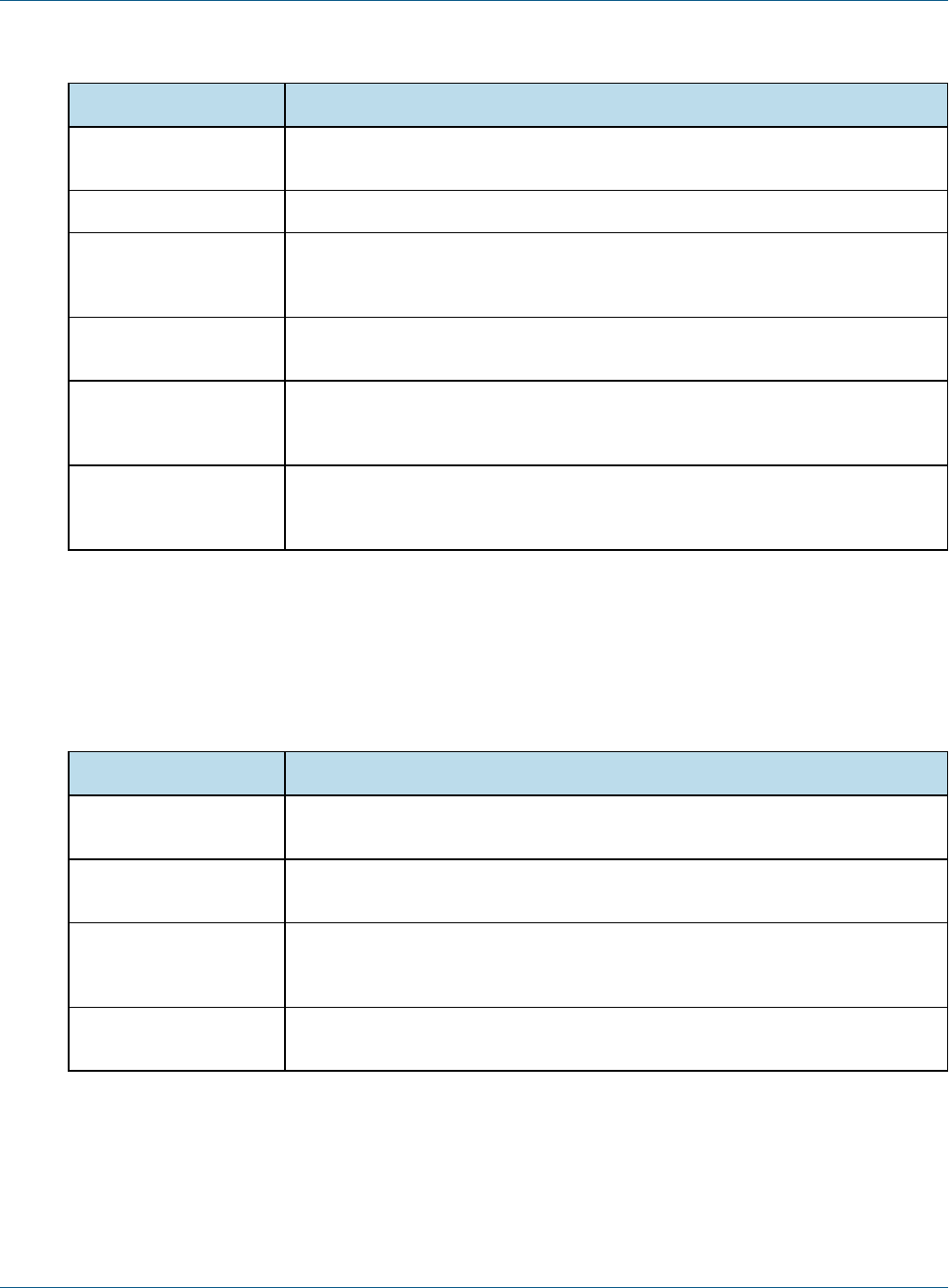
JasperReports IOUser Guide
Directory Description
docker Contains a dockerfile for creating a docker image of JasperReports IO, a start script
for the image, and a repository configuration file.
docs Contains a PDF of the JasperReports IO User Guide.
jetty Contains the Eclipse Jetty web application server that hosts the JasperReports IO
web application. See 2.3, “Web Application Server,” on page14 for more inform-
ation.
jre Contains the Java Runtime Environment for running the JasperReports IO report-
ing service.
jrio Contains the files for the JasperReports IO reporting service and web applications.
See 2.2, “JasperReports IO Reporting Service and Web Application Dir-
ectories,” on page14 for more information.
repository The repository stores all the resources used to run and create reports, including
data source definitions, JRXML files, datatypes, and helper files such as images.
See 2.4, “JasperReports IO Repository,” on page16 for more information.
Table 2-1 JasperReports IO Directories
2.2 JasperReports IO Reporting Service and Web Application Directories
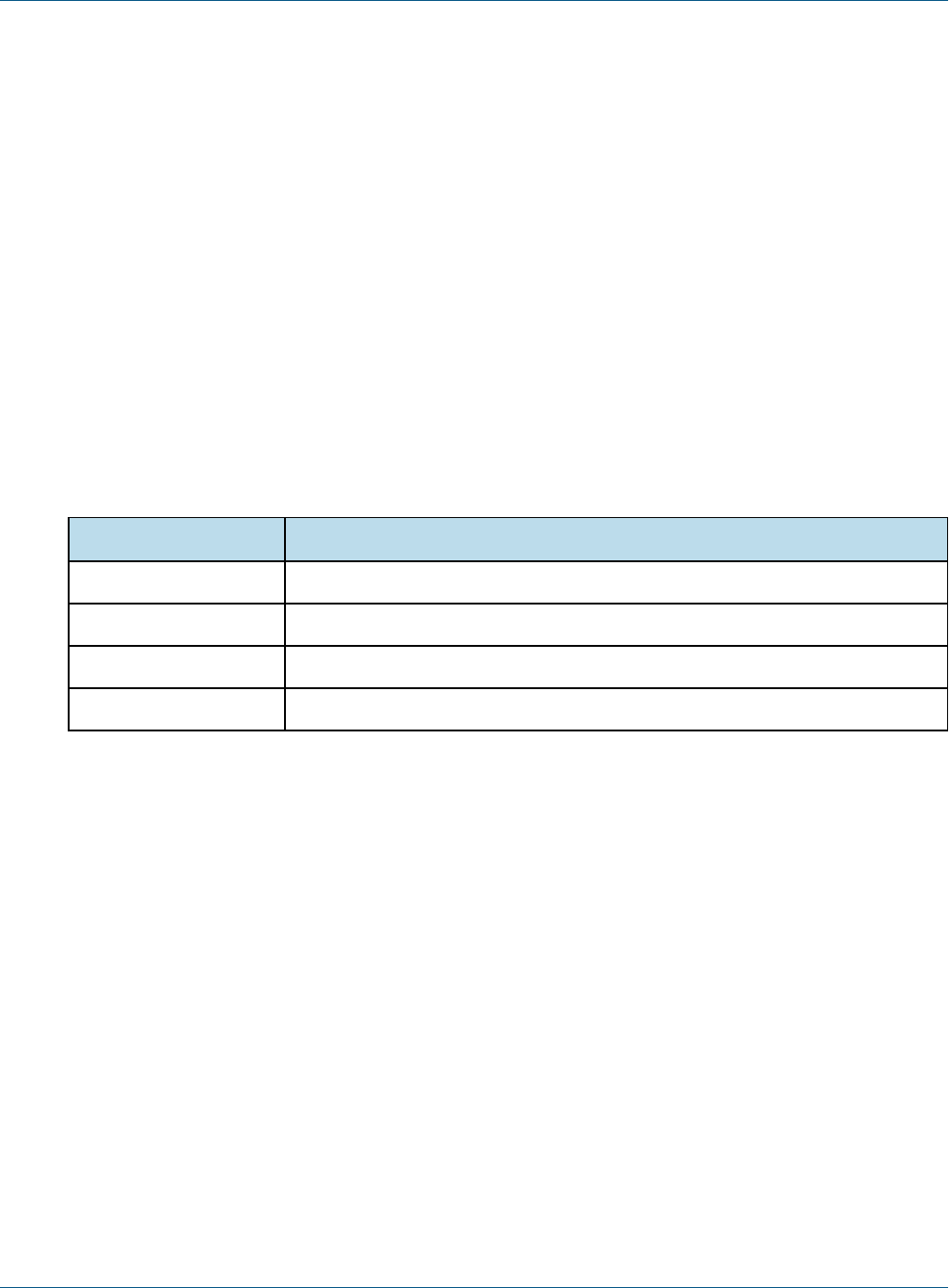
The <jrio-install>/jrio/webapps directory contains the files for the JasperReports IO reporting service,
JavaScript API, and the sample web application.
Directory Description
jrio The JasperReports IO web application, including the reporting service and all con-
figuration files.
jrio-client Contains the files for JasperReports IO's JavaScript API, including the jrio.js file and
UI themes. See JavaScript API for more information.
jrio-docs Contains the files for the JasperReports IO sample web application, which demon-
strates the capabilities of the reporting service, as well as documentation and
report samples.
ROOT The sample html file in this directory forwards root requests to the jrio-docs web
application.
Table 2-2 Web Application Directories
2.3 Web Application Server
The JasperReports IO reporting service is deployed in a Java web application on a Eclipse Jetty web server
included with JasperReports IO. You can create a web application with interactive reports and the web
14 TIBCO Software Inc.

Chapter 2 Managing JasperReports IO
application server will handle all HTTP requests from users. The web application server is located in the <jrio-
install>/jetty directory. For information on the Eclipse Jetty web server, see the Jetty documentation.
In JasperReports IO, there are two scripts in the <jrio-install>directory to start and stop the Eclipse Jetty server
and the JasperReports IO reporting service. The script to start the web application server is start.bat for Windows
and start.sh for Mac OSand Linux,and the stop script is stop.bat for Windows and stop.sh for Mac OSand
Linux.
2.3.1 Configuring the Web Application Server
The start script specifies several startup configuration parameters for the server that can be changed to better suit
your needs.
2.3.1.1 Java Virtual Machine Heap Memory
There are two parameters for specifying the amount of heap memory allocated to the JasperReports IO reporting
service's Java web application when it starts up. The -Xms<size>parameter specifies the initial heap memory
size for the web application and the -Xmx<size>parameter specifies the maximum heap memory size. The
following examples shows an initial heap memory size of 256 MB and a maximum size of 512 MB:
Linux:./jre/bin/java -Xms256m -Xmx512m -jar ./jetty/start.jar
Windows: jre\bin\java -Xms256m -Xmx512m -jar jetty\start.jar
Mac OS:./jre/Contents/Home/bin/java -Xms256m -Xmx512m -jar ./jetty/start.jar
2.3.1.2 Web Application Server Port
By default, the web application server starts on port 8080, but if this port is already in use on your host
machine, you can edit the start script to change the following setting to another port number:
-Djetty.http.port=8080
2.3.1.3 Web Application Server Stop Port and Stop Key
The start and stop scripts define the stop port and stop key settings required for stopping the web application
server. The stop port is the number of the port on the host machine that listens for termination requests and the
stop key is a key that must be port of the stop request. These settings must match in both scripts in order for the
web application server to shut down properly. The following is an example of the stop port and key settings:
-DSTOP.PORT=8989 -DSTOP.KEY=st0p_J3Tty
2.3.2 Web Application
When the web application server is running, the user's web browser will access the HTML files in the <jrio-
install>/repository/ROOT folder when they open http://<jrio>:8080 in their browser. You can store the
files for your web application in this folder or create an index.html file to redirect the user's browser to a web
application in another directory. For example, the sample index.html in the directory that was created during
installation redirects the user's browser to http://<jrio>:8080/jrio-docs, where the sample web application
that comes with JasperReports IO is installed.
TIBCO Software Inc. 15
JasperReports IOUser Guide
2.4 JasperReports IO Repository
The JasperReports IO repository is a folder-based structure where all the resources used to run and create reports
are stored and from where they are retrieved when reports are executed by the JasperReports IO reporting
service. You can have the repository on the host machine or an AWS S3 bucket.
The type of repository, its location in the JasperReports IO file structure, and other specific repository
implementation properties can be specified the following configuration file:
<js-install>/jrio/webapps/jrio/WEB-INF/applicationContext-repository.xml
JasperReports IO comes with a repository full of sample reports and resources in the <js-
install>/repository directory, but you can create your own repository. If you are using JasperReports IO for
AWS, you will have to create a repository in an S3 bucket. See 1.3.6, “Creating a Repository Folder in Your
S3 Bucket,” on page11 for more information.
2.4.1 Repository Directory Structure
The JasperReports IO repository is structured as follows:
Directory Description
data Contains the data source adapters and data source files for your reports.
images Contains image files used in reports.
JR-INF Contains the configuration files for report execution.
reports Contains report templates.
Table 2-3 Repository Directories for Sample Reports
2.4.2 Data Sources and Data Adapters
A data adapter is a resource that specifies how and where to obtain data. Specifically, it is an object that
contains information about how to connect to or retrieve the data, and the logic to do that. This information
includes, URL, user, password, paths, etc. Data adapters also contain the logic to prepare all parameters for
JasperReports IO to run the query and iterate data. All the connections are opened and passed directly to
JasperReports during report generation. A data adapter does not contain any data itself, which are stored in data
sources.
The sample repository installed with JasperReports IO contains multiple data adapters and data sources in the
<js-install>/repository/data directory that you can use for your own reports. These data adapters
include:
•JDBC connection
•CSV connection
•Excel connection
•Empty connection
•JNDI connection
•Remote XML connection
16 TIBCO Software Inc.

Chapter 2 Managing JasperReports IO
JasperReports IOcan use other types of data adapters that are not included in the sample repository. You can
create your own data adapters for JasperReports IO either by using the DataAdapter Wizard in Jaspersoft Studio
or by creating a custom data adapter using an XML file.
2.4.3 Reports
The repository resource that aggregates all information needed to run a report is called a JasperReport. A
JasperReport is based on a JRXML file that conforms to the JasperReports Library that JasperReports IO uses to
render reports. Users can create reports for JasperReports IO using Jaspersoft Studio.
A JasperReport is a complex resource composed of other resources:
• The main JRXML file that defines the report.
• A data source that supplies data for the report.
• A query if none is specified in the main JRXML.
• The query may specify its own data source, which overrides the data source defined in the report.
• Input controls for parameters that users may enter before running the report. Input controls are composed of
either a datatype definition or a list of values.
• Any additional file resources, such as images and fonts.
• If the report includes subreports, the JRXML files for the subreports.
End users interact with a JasperReport as a single resource, but report creators must define all of the component
resources.
Refer to the Jaspersoft Studio User Guide for more information on creating reports.
2.4.3.1 Configuring the Web Application Server to Reference the Repository
In JasperReports IO, the repository containing the sample report templates used by the sample web application
is located in the <jrio-install>/jrio/repository directory. Since this repository folder is not located
within the JasperReports IO web application folder, you will need to configure the <js-
install>/jrio/webapps/WEB-INF/applicationContext-repository.xml file to point the web
application to the repository directory.
There are two different ways to point the web application to a repository on the host machine:using a relative
file path using the WebappRelativeRepositoryFactory bean or an absolute file path using the
FileRepositoryService bean.
To use an relative file path, locate the WebappRelativeRepositoryFactory bean in the
applicationContext-repository.xml file and enter the relative file path as the value for the root property:
<bean class="com.jaspersoft.jrio.common.repository.WebappRelativeRepositoryFactory">
<property name="jasperReportsContext" ref="baseJasperReportsContext"/>
<property name="root" value="../../../repository"/>
</bean>
Since the web application is deployed to the <jrio-install>jrio/webapp/jrio directory, use
"../../../repository" as the relative file path to point the web application to the repository in the <jrio-
install>/jrio/repository directory.
If you want to use an absolute file path to the repository directory, change repository bean class from
com.jaspersoft.jrio.common.repository.WebappRelativeRepositoryFactory to
TIBCO Software Inc. 17

JasperReports IOUser Guide
com.jaspersoft.jrio.common.repository.FileSystemRepository and edit the value for the second
<constructor-arg> to add the absolute file path:
<bean class="com.jaspersoft.jrio.common.repository.FileSystemRepository">
<constructor-arg><ref bean="baseJasperReportsContext"/></constructor-arg>
<constructor-arg><value>/mnt/jrio-repository</value></constructor-arg>
</bean>
Use a slash (/)at the beginning of the URI for the root directory.
If you are using an AWS S3 bucket for the repository, refer to the 2.5.1, “AWS S3 Bucket Repository,” on
page18for instructions on configuring the web application server to use the bucket.
2.4.3.2 Configuring the Web Application Server to Use Multiple Repositories
If you use multiple repository directories to store your report templates and resources, JasperReports IO can treat
these separate directories as a single repository through absolute file paths. A report will work if its JRXML
template is in one repository and its resources are in a second. Add a FileRepositoryService beans to the
<js-install>/jrio/webapps/WEB-INF/applicationContext-repository.xml file for each repository you
want to use.
<bean class="com.jaspersoft.jrio.common.repository.FileSystemRepository">
<constructor-arg><ref bean="baseJasperReportsContext"/></constructor-arg>
<constructor-arg><value>/mnt/repository1</value></constructor-arg>
</bean>
<bean class="com.jaspersoft.jrio.common.repository.FileSystemRepository">
<constructor-arg><ref bean="baseJasperReportsContext"/></constructor-arg>
<constructor-arg><value>/mnt/repository2</value></constructor-arg>
</bean>
2.5 Managing Amazon Web Services for JasperReports IO
This section describes how to use an AWS S3 bucket for a repository for JasperReports IO, referring to reports
stored in an S3 bucket, and customizations for JasperReports IO for AWS.
2.5.1 AWS S3 Bucket Repository
JasperReports IO comes with a sample configuration settings for connecting your standalone JasperReports IO
instance to an AWS S3 bucket as a repository. The S3 bucket can either be public and accessed without
credentials or accessed securely using AWS credentials. Locate and the S3RepositoryService bean in the
<js-install>/jrio/webapps/WEB-INF/applicationContext-repository.xml configuration file to
implement an AWS S3 bucket for a repository:
<bean class="com.jaspersoft.jrio.common.repository.s3.S3RepositoryService">
<property name="jasperReportsContext" ref="baseJasperReportsContext"/>
<property name="s3Service">
<bean class="com.jaspersoft.jrio.common.repository.s3.S3ServiceFactory">
<property name="region" value="us-east-1"/>
<!--
<property name="accessKey" value="put-id-here"/>
18 TIBCO Software Inc.

Chapter 2 Managing JasperReports IO
<property name="secretKey" value="put-key-here"/>
-->
</bean>
</property>
<property name="bucketName" value="jrio-repo-sample"/>
<property name="pathPrefix" value="jrio-repository/"/>
<bean class="com.jaspersoft.jrio.common.repository.s3.S3RepositoryPersistenceServiceFactory" fact-
ory-method="instance"/>
</bean>
You will need to enter the region, S3 bucket name, and the path to the repository.
Use the accessKey and secretKey properties to enter your AWS ID and key. These credentials are optional if
the S3 bucket is public.
If you created your JasperReports IO from the CloudFormation template for AWS, this configuration file will
appear similar to the following:
<bean class="com.jaspersoft.jrio.common.repository.s3.S3RepositoryService">
<property name="jasperReportsContext" ref="baseJasperReportsContext"/>
<property name="s3Service">
<bean class="com.jaspersoft.jrio.common.repository.s3.S3ServiceFactory">
<property name="region" value="${s3.repository.region:null}"/>
<!--
<property name="accessKey" value="put-id-here"/>
<property name="secretKey" value="put-key-here"/>
-->
</bean>
</property>
<property name="bucketName" value="${s3.repository.bucket:null}"/>
<property name="pathPrefix" value="${s3.repository.path.prefix:null}"/>
</bean>
The ${...}is automatically populated by user data that was generated when the JasperReports IO instance was
created.
You do not have to provide your AWS credentials if you created a new S3 bucket or selected an existing one as
when creating the JasperReports IO instance using the CloudFormation template. An IAM Role is automatically
created that will allow the JasperReports IO instance to connect to the S3 bucket without having to provide the
credentials.
2.5.2 Referring to Reports in the AWS S3 Bucket Repository
For storing report resources in an AWS S3 bucket, you will need to create a folder in the bucket called
"remoteRepository." See 1.3.6, “Creating a Repository Folder in Your S3 Bucket,” on page11 for instructions
on adding this folder to your S3 bucket.
JasperReports IO accesses the reports in the bucket through the REST and JavaScript APIs using relative URIs
with /remoteRepository as the root directory. For example, if you have a report stored in the repository at
/remoteRepository/reports/myReport.jrxml, the reference through the API will be /reports/myReport.
When opening the report in the viewer, the URL will be:
http://<JRIO domain>:<JRIO port>/jrio-docs/viewer/viewer.html?jr_report_
uri=/reports/myReport
TIBCO Software Inc. 19

JasperReports IOUser Guide
See the REST API and JavaScript API chapters for more information on how to use them.
2.5.3 JasperReports IO for AWS and VPC Security
When creating your JasperReports IO for AWS instance, you select the VPC and subnet it belongs to. An AWS
VPC isolates its resources to a virtual network with advanced security features to protect the user's resources.
AWS VPCs include security features such as subnets within Availability Zones, IP ranges, route tables, and
security groups to protect the resources.
In order to access the services and resources you want to use, your JasperReports IO for AWS instance needs to
be on the same VPC as those services and the appropriate subnets across Availability Zones. If you have issues
connecting your JasperReports IO for AWS instance to the resources and services it needs, you may need to
update the AWSsecurity features for the VPC to allow access.
2.5.4 Customizations for JasperReports IO for AWS
JasperReports IO and JasperReports IO for AWS allows you to use your S3 bucket to store customized
configuration files for your JasperReports IO instance. In the S3 bucket, you must recreate the JasperReports IO
directory structure for the configuration files in a folder called customizations, starting with the folders at the
<jrio-install> root level, such as jrio and repository.
If you want to remove the customized file from the instance, you will need to copy the original configuration
file to the S3 bucket and reboot the instance. This will replace the file on the instance and remove the
customizations from JasperReports IO. Deleting the customized file from the S3 bucket without adding a
replacement will not remove the customizations when the instance is restarted. JasperReports IO for AWS
includes a special service jrio start/stop command for starting and stopping the web application.
To upload your customization:
1. On the AWS Management Console homepage, click S3.
2. Find the bucket for your JasperReports IO instance and click on the name.
3. Click Create Folder and create a folder called customizations.
4. Click on the name of the customizations folder.
5. Click Create Folder and recreate the paths to your files.
For example, if you want to upload a configuration file that goes in the <jrio-
install>/jrio/webapps/jrio/WEB-INF/classes directory, you will have to create a new folder for
each directory in that file path.
6. After creating the folder paths, browse to the folder for your configuration file.
7. Click Upload.
8. Click Add files and find the configuration file on your local machine.
9. Click Upload to upload the configuration file.
AWS uploads the file and stores it in the S3 bucket.
10. With the configuration file in place, SSH into your instance using your AWS private key and user name.
11. Stop the JasperReports IO instance using the following command:
sudo service jrio stop
12. Start the JasperReports IO instance:
sudo service jrio start
When the JasperReports IO instance restarts , the changes based on the configuration file will be in place.
20 TIBCO Software Inc.

Chapter 2 Managing JasperReports IO
2.6 Security
JasperReports IO provides security for your web applications and reports through a protection domain used by
the Java security manager. A protection domain defines the security permissions, public keys, and URI for a
group of JasperReports IO components, such as report expressions and repository JAR files. You can customize
the permissions using the <jrio-install>/jrio/security.policy file.
JasperReports IO comes with a preconfigured protection domain that by default gives users all permissions to
the files for:
•The Java Virtual Machine.
•The web application server.
•The JasperReports IO reporting service web applications.
The preconfigured protection domain restricts users' permissions to the following:
•Repository JARs.
•Report expressions.
The following shows the preconfigured protection domain settings in the security.policy file:
grant codeBase "file:${java.home}/lib/-" {
permission java.security.AllPermission;
};
grant codeBase "file:${java.home}/lib/ext/-" {
permission java.security.AllPermission;
};
grant codeBase "file:${user.dir}/jetty/-" {
permission java.security.AllPermission;
};
grant codeBase "file:${user.dir}/jrio/webapps/-" {
permission java.security.AllPermission;
};
//permissions for JRIO repository jars
grant codeBase "file:/__jrio/repository/jars/" {
//permission java.security.AllPermission;
};
//permissions for JR reports
grant codeBase "file:/__jrio/repository/reports/" {
};
This default configuration restricts a user's ability to pass parameters within the path of a report. You can edit
the protection domain to customize the security permissions for JasperReports IO to meet your security needs.
More details about the syntax of the security.policy file and what permissions are available can be found in
the Java Security documentation.
The protection domain and the Java security manager for used by JasperReports IO are not active when you first
install the reporting service. To activate the security manager and protection domain, edit the start script in the
<jrio-install> directory to uncomment the following:
-Djava.security.manager -Djava.security.policy=jrio/security.policy
The Java security manager and protection domain will be active when you start the web application server.
TIBCO Software Inc. 21

JasperReports IOUser Guide
22 TIBCO Software Inc.
CHAPTER 3 REST API REFERENCE - THE reports SERVICE
The rest_v2/reports service has a simple API for obtaining report output, such as PDF and XLS. The service also
provides functionality to interact with running reports, report options, and input controls.
3.1 Running a Report
The reports service allows clients to receive report output in a single request-response. The reports service is a
synchronous request, meaning the caller will be blocked until the report is generated and returned in the
response. For large datasets or long reports, the delay can be significant. If you want to use a non-blocking
(asynchronous) request, see Chapter 4, “REST API Reference - The reportExecutions Service,” on page25.
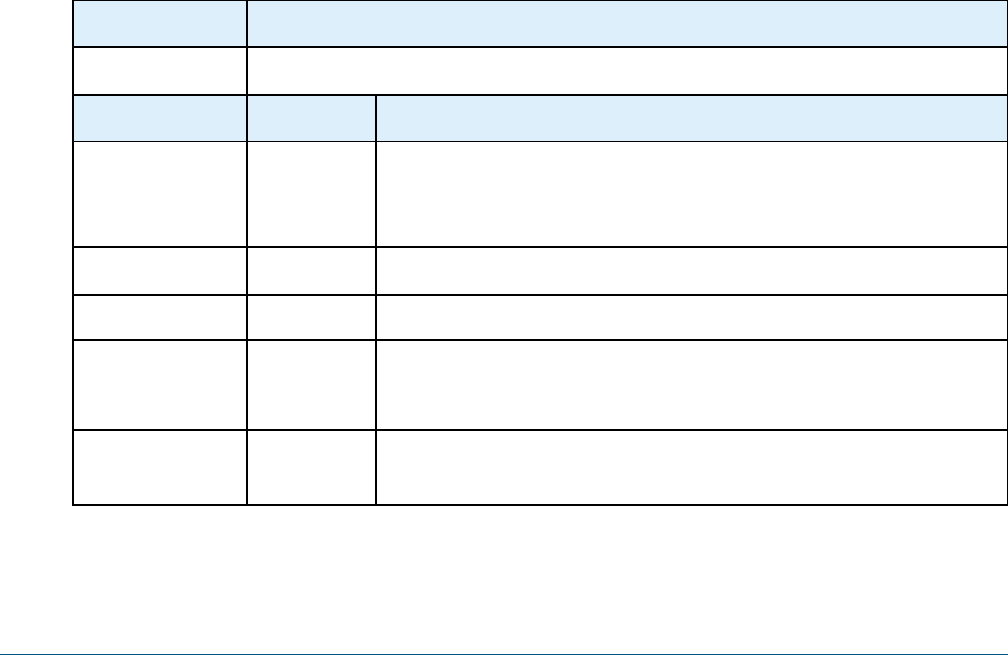
The output format is specified in the URL as a file extension to the report URI.
Method URL
GET http://<host>:<port>/jrio/rest_v2/reports/path/to/report.<format>?<arguments>
Argument Type/Value Description
<format> output
type
One of the following formats:
• Regular output: html, pdf, csv, docx, pptx, xls, xlsx, rtf, odt, ods, xml
• Metadata output: data_csv, data_xls, data_json
page? Integer > 0 An integer value used to export a specific page.
anchor? String An anchor name in the generated report.
ignore
pagination?
Boolean When set to true, the report will be generated as a single page. This can
be useful for some formats such as csv. When omitted, this argument's
default value is false and the report is paginated normally.
<parameter> String Any parameter that is defined for the report. Parameters that are
multivalue may appear more than once. See examples below.
TIBCO Software Inc. 23
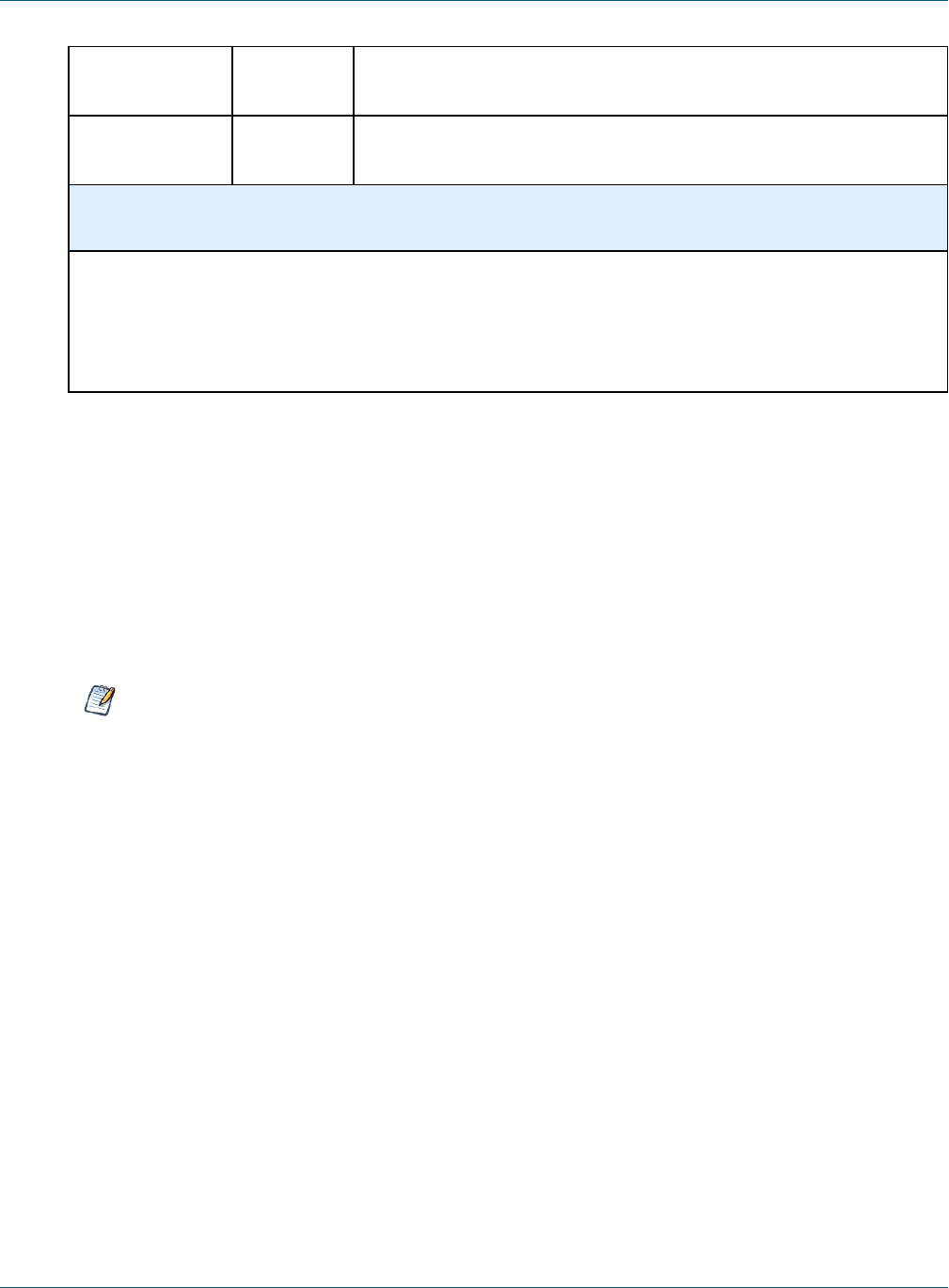
JasperReports IOUser Guide
baseUrl String Specifies the base URL that the report will use to load static resources
such as JavaScript files.
attachmentsPrefix attachments For HTML output, this property specifies the URL path to use for
downloading the attachment files (JavaScript and images).
Return Value on Success Typical Return
Values on Failure
200 OK – The content is the requested file. 404 Not Found –
When the
specified report
URI is not found in
the repository.
The follow examples show various combinations of formats, arguments, and input controls:
http://<host>:<port>/jrio/rest_v2/reports/samples/reports/FirstJasper.html (all pages)
http://<host>:<port>/jrio/rest_v2/reports/samples/reports/FirstJasper.html?page=5
http://<host>:<port>/jrio/rest_v2/reports/samples/reports/FirstJasper.pdf (all pages)
http://<host>:<port>/jrio/rest_v2/reports/samples/reports/FirstJasper.pdf?page=5
http://<host>:<port>/jrio/rest_
v2/reports/samples/reports/chartthemes/ChartThemesReport.pdf?chartTheme=aegean
http://<host>:<port>/jrio/rest_v2/reports/samples/reports/Cascading_multi_select_report.html?Country_
multi_select=USA&Cascading_state_multi_select=WA&Cascading_state_multi_select=CA
JasperReports IOdoes not support exporting Highcharts charts with background images to PDF, ODT,
DOCX, or RTF formats. When exporting or downloading reports with Highcharts that have background
images to these formats, the background image is removed from the chart. The data in the chart is not
affected.
24 TIBCO Software Inc.
CHAPTER 4 REST API REFERENCE - THE reportExecutions
SERVICE
As described in Chapter 3, “REST API Reference - The reports Service ,” on page23, synchronous report
execution blocks the client waiting for the response. When managing large reports that may take minutes to
complete, or when running a large number of reports simultaneously, synchronous report execution slows down
the client or uses many threads, each waiting for a report.
The rest_v2/reportExecutions service provides asynchronous report execution, so that the client does not need to
wait for report output. Instead, the client obtains a request ID and periodically checks the status of the report to
know when it is ready (also called polling). When the report is finished, the client can download the output.
The client can also send an asynchronous request for other export formats (PDF, Excel, and others) of the same
report. Again the client can check the status of the export and download the result when the export has
completed.
4.1 Running a Report Asynchronously
In order to run a report asynchronously, the reportExecutions service provides a method to specify all the
parameters needed to launch a report. Report parameters are all sent as a reportExecutionRequest object. The
response from the server contains the request ID needed to track the execution until completion.
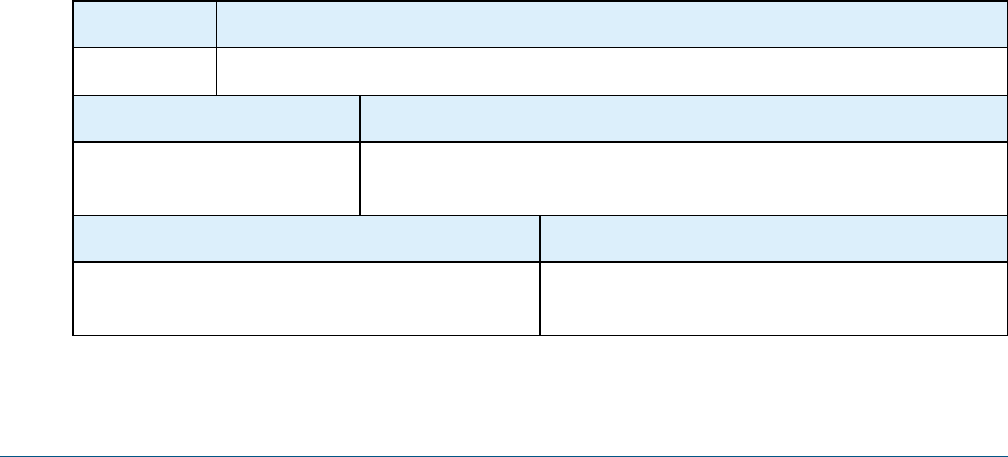
Method URL
POST http://<host>:<port>/jrio/rest_v2/reportExecutions
Content-Type Content
application/json A complete ReportExecutionRequest in JSON format. See the example
and table below for an explanation of its properties.
Return Value on Success Typical Return Values on Failure
200 OK – The content contains a ReportExecution
descriptor. See below for an example
404 Not Found – When the report URI specified in the
request does not exist.
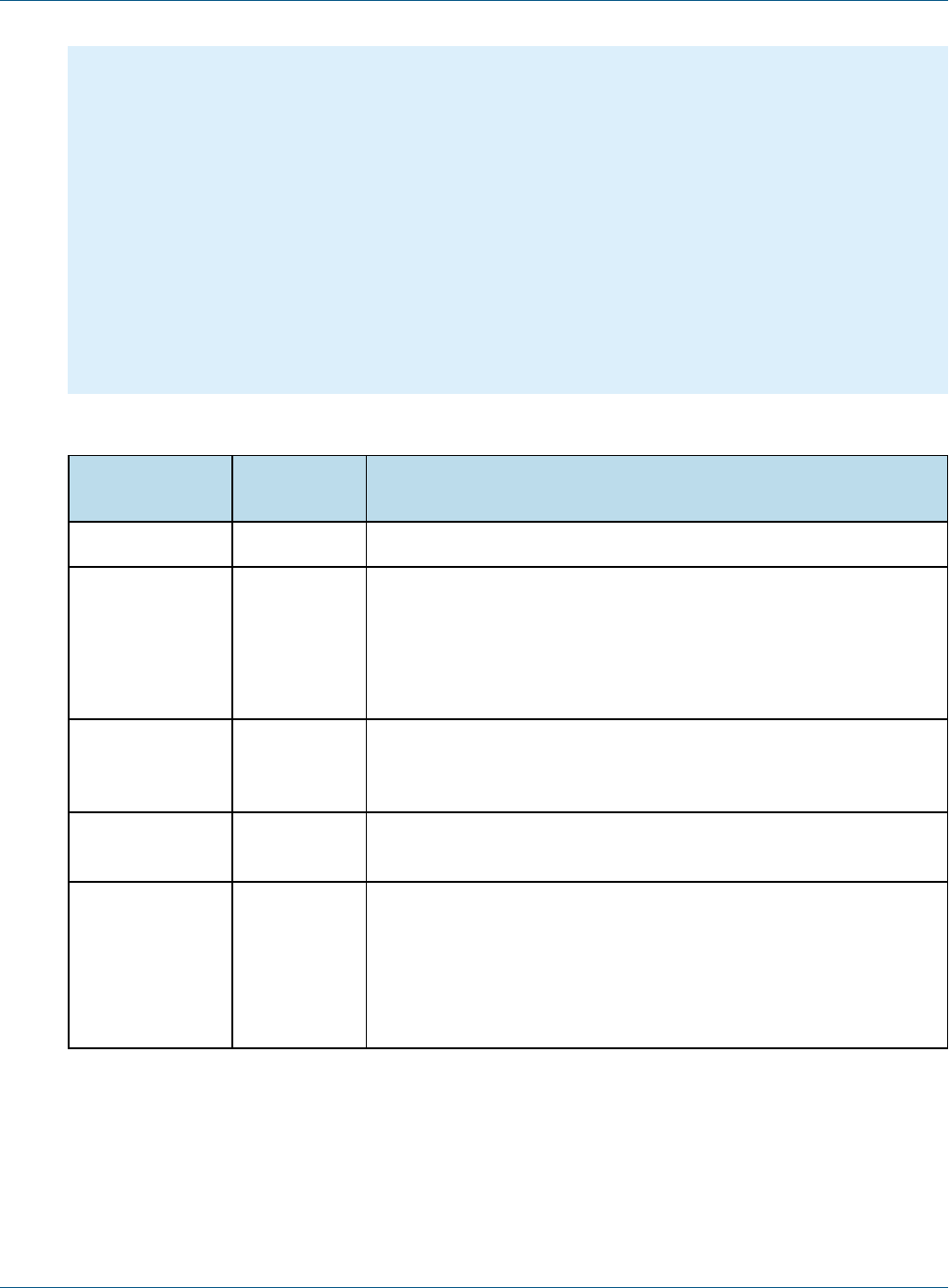
The following example shows the structure of the ReportExecutionRequest:
TIBCO Software Inc. 25
JasperReports IOUser Guide
{
"reportUnitUri":"/samples/reports/chartthemes/ChartThemesReport",
"async":true,
"interactive":true,
"pages":"1-5",
"attachmentsPrefix":"/jrio/rest_v2/reportExecutions/
{reportExecutionId}/exports/{exportExecutionId}/attachments/",
"baseUrl":"/jrio",
"parameters":
{
"reportParameter":
[
{"name":"chartTheme","value":["aegean"]},
{"name":"anotherParamName","value":["value 1","value 2"]}
]
}
}
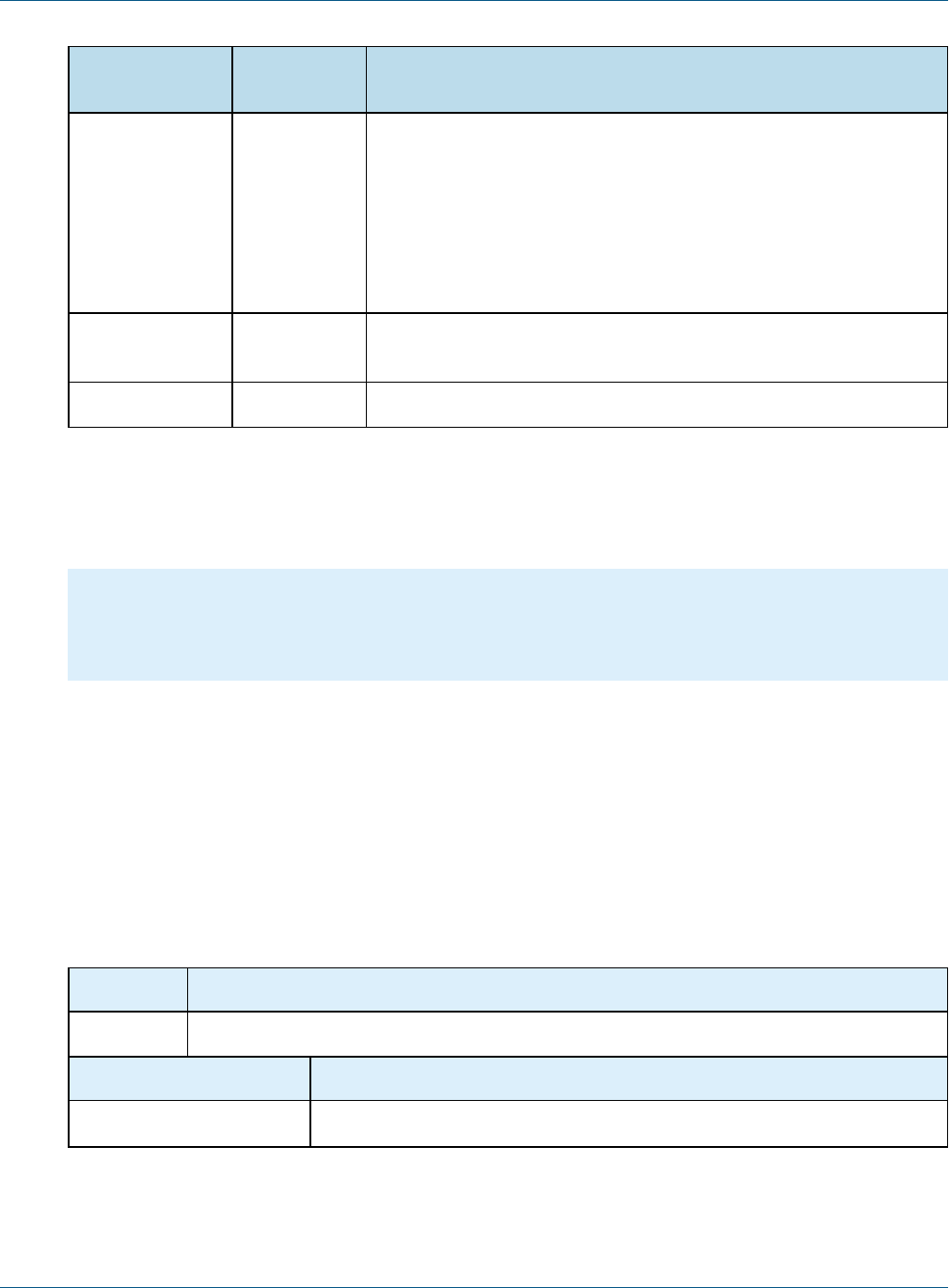
The following table describes the properties you can specify in the ReportExecutionRequest:
Property Required or
Default Description
reportUnitUri Required Repository path (URI) of the report to run.
outputFormat Required Specifies the desired output format:
• Regular output:
html, pdf, csv, docx, pptx, xls, xlsx, rtf, odt, ods, xml
• Metadata output:
data_csv, data_xls, data_json
ignorePagination Optional When set to true, the report is generated as a single long page. This can
be used with HTML output to avoid pagination. When omitted, the
ignorePagination property on the JRXML, if any, is used.
pages Optional Specify a page range to generate a partial report. The format is:
<startPageNumber>-<endPageNumber>
async false Determines whether reportExecution is synchronous or asynchronous.
When set to true, the response is sent immediately and the client must
poll the report status and later download the result when ready. By
default, this property is false and the operation will wait until the report
execution is complete, forcing the client to wait as well, but allowing the
client to download the report immediately after the response.
26 TIBCO Software Inc.
Chapter 4 REST API Reference - The reportExecutions Service
Property Required or
Default Description
attachmentsPrefix attachments For HTML output, this property specifies the URL path to use for
downloading the attachment files (JavaScript and images). The full path
of the default value is:
{contextPath}/rest_v2/reportExecutions/{reportExecutionId}/exports/
{exportExecutionId}/attachments/
You can specify a different URL path using the placeholders
{contextPath}, {reportExecutionId}, and {exportExecutionId}.
baseUrl String Specifies the base URL that the report will use to load static resources
such as JavaScript files.
parameters see example A list of input control parameters and their values.
When successful, the reply from the server contains the reportExecution descriptor. This descriptor contains
the request ID and status needed in order for the client to request the output. There are two statuses, one for the
report execution itself, and one for the chosen output format.
The following descriptor shows that the report was placed in the report execution queue ("status":"queued"):
{
"requestId":"9ecf5c6f-b70d-4170-8a3b-b305db4c2253",
"reportURI":"/samples/reports/chartthemes/ChartThemesReport",
"status":"queued"
}
The value of the async property in the request determines whether or not the report output is available when
the response is received. Your client should implement either synchronous or asynchronous processing of the
response depending on the value you set for the async property.
4.2 Polling Report Execution
When requesting reports asynchronously, use the following method to poll the status of the report execution.
The request ID in the URL is the one returned in the reportExecution descriptor.
This service supports the extended status value that includes an appropriate message.
Method URL
GET http://<host>:<port>/jrio/rest_v2/reportExecutions/requestID/status/
Options Sample Return Value
accept: application/json { "value": "ready" }
TIBCO Software Inc. 27

JasperReports IOUser Guide
accept:
application/status+json
{
"value": "failed",
"errorDescriptor": {
"message": "Input controls validation failure",
"errorCode": "input.controls.validation.error",
"parameters": ["Specify a valid value for type Integer."]
}
}
Return Value on Success Typical Return Values on Failure
200 OK – The content contains the report status, as shown above.
In the extended format, error reports contain error messages
suitable for display.
404 Not Found – When the specified
requestID does not exist.
4.3 Requesting Report Execution Details
Once the report is ready, your client must determine the names of the files to download by requesting the
reportExecution descriptor again. Specify the requestID in the URL as follows:
Method URL
GET http://<host>:<port>/jrio/rest_v2/reportExecutions/requestID
Options
accept: application/json
Return Value on Success Typical Return Values on Failure
200 OK – The content contains a ReportExecution
descriptor. See below for an example.
404 Not Found – When the request ID specified in the
request does not exist.
The reportExecution descriptor now contains the list of exports for the report, including the report output
itself and any other file attachments. File attachments such as images and JavaScript occur only with HTML
export.
{
"status": "ready",
"totalPages": 47,
"requestId": "b487a05a-4989-8b53-b2b9-b54752f998c4",
"reportURI": "/reports/samples/AllAccounts",
"exports": [{
"id": "195a65cb-1762-450a-be2b-1196a02bb625",
"options": {
"outputFormat": "html",
"attachmentsPrefix": "./images/",
"allowInlineScripts": false
28 TIBCO Software Inc.

Chapter 4 REST API Reference - The reportExecutions Service
},
"status": "ready",
"outputResource": {
"contentType": "text/html"
},
"attachments": [{
"contentType": "image/png",
"fileName": "img_0_46_0"
},
{
"contentType": "image/png",
"fileName": "img_0_0_0"
},
{
"contentType": "image/jpeg",
"fileName": "img_0_46_1"
}]
},
{
"id": "4bac4889-0e63-4f09-bbe8-9593674f0700",
"options": {
"outputFormat": "html",
"attachmentsPrefix": "{contextPath}/rest_v2/reportExecutions/{reportExecutionId}/exports/
{exportExecutionId}/attachments/",
"baseUrl": "http://localhost:8080/jrio",
"allowInlineScripts": true
},
"status": "ready",
"outputResource": {
"contentType": "text/html"
},
"attachments": [{
"contentType": "image/png",
"fileName": "img_0_0_0"
}]
}]
}
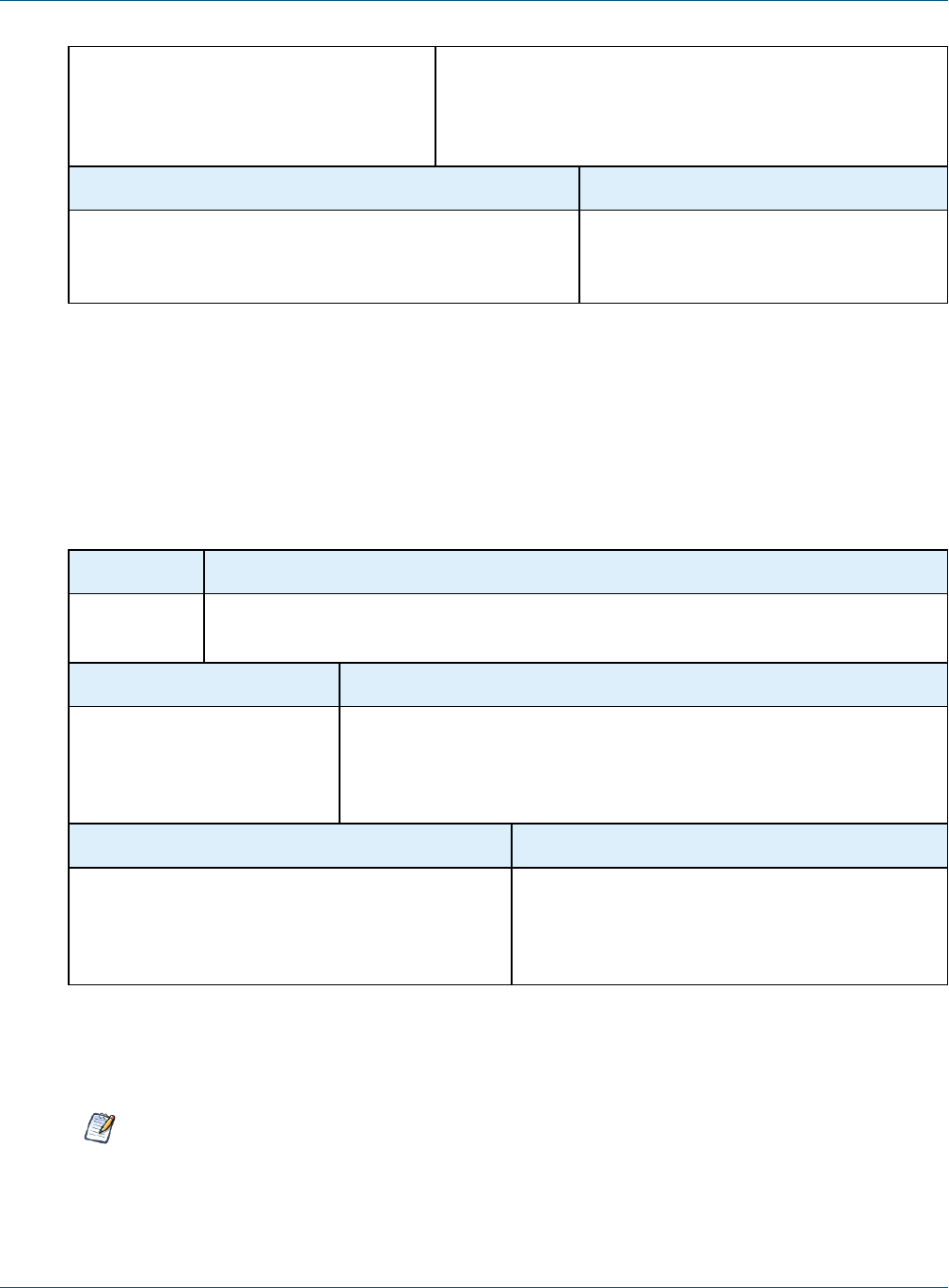
4.4 Requesting Page Status
When requesting reports asynchronously, use the following method to poll the page status during the report
execution. The executionId in the URL is the one returned in the reportExecution descriptor. This
service returns a response containing reportStatus,pageFinal, and pageTimestamp attributes.
Method URL
GET http://<host>:<port>/jrio/rest_v2/reportExecutions/{executionId}/pages/{pageNumber}/status
Options Sample Return Value
accept: application/json { "value": "ready" }
TIBCO Software Inc. 29
JasperReports IOUser Guide
accept: application/status+json {
"reportStatus": "ready",
"pageTimestamp": "0",
"pageFinal": "true"
}
Return Value on Success Typical Return Values on Failure
200 OK – The content contains the page status, as shown
above. In the extended format, error reports contain error
messages suitable for display.
404 Not Found – When the request ID
specified in the request does not exist.
4.5 Requesting Report Output
After requesting a report execution and waiting synchronously or asynchronously for it to finish, your client is
ready to download the report output.
Every export format of the report has an ID that is used to retrieve it. For example, the HTML export in the
previous example has the ID 195a65cb-1762-450a-be2b-1196a02bb625. To download the main report output,
specify this export ID in the following method:
Method URL
GET http://<host>:<port>/jrio/rest_v2/reportExecutions/requestID/exports/
exportID/outputResource
Response Header Description
output-final This value indicates whether the output is in its final form or not. When false,
report items such as total page count are not finalized, but output is
available early. You should reload the output resource again until this value
is true.
Return Value on Success Typical Return Values on Failure
200 OK – The content is the main output of the report,
in the format specified by the contentType property
of the outputResource descriptor, for example:
text/html
404 Not Found – When the request ID specified in the
request does not exist.
For example, to download the main HTML of the report execution response above, use the following URL:
GET http://localhost:8080/jrio/rest_v2/reportExecutions/b487a05a-4989-8b53-b2b9-
b54752f998c4/exports/195a65cb-1762-450a-be2b-1196a02bb625/outputResource
JasperReports IO does not support exporting Highcharts charts with background images to PDF, ODT,
DOCX, or RTF formats. When exporting or downloading reports with Highcharts that have background
images to these formats, the background image is removed from the chart. The data in the chart is not
affected.
30 TIBCO Software Inc.
Chapter 4 REST API Reference - The reportExecutions Service
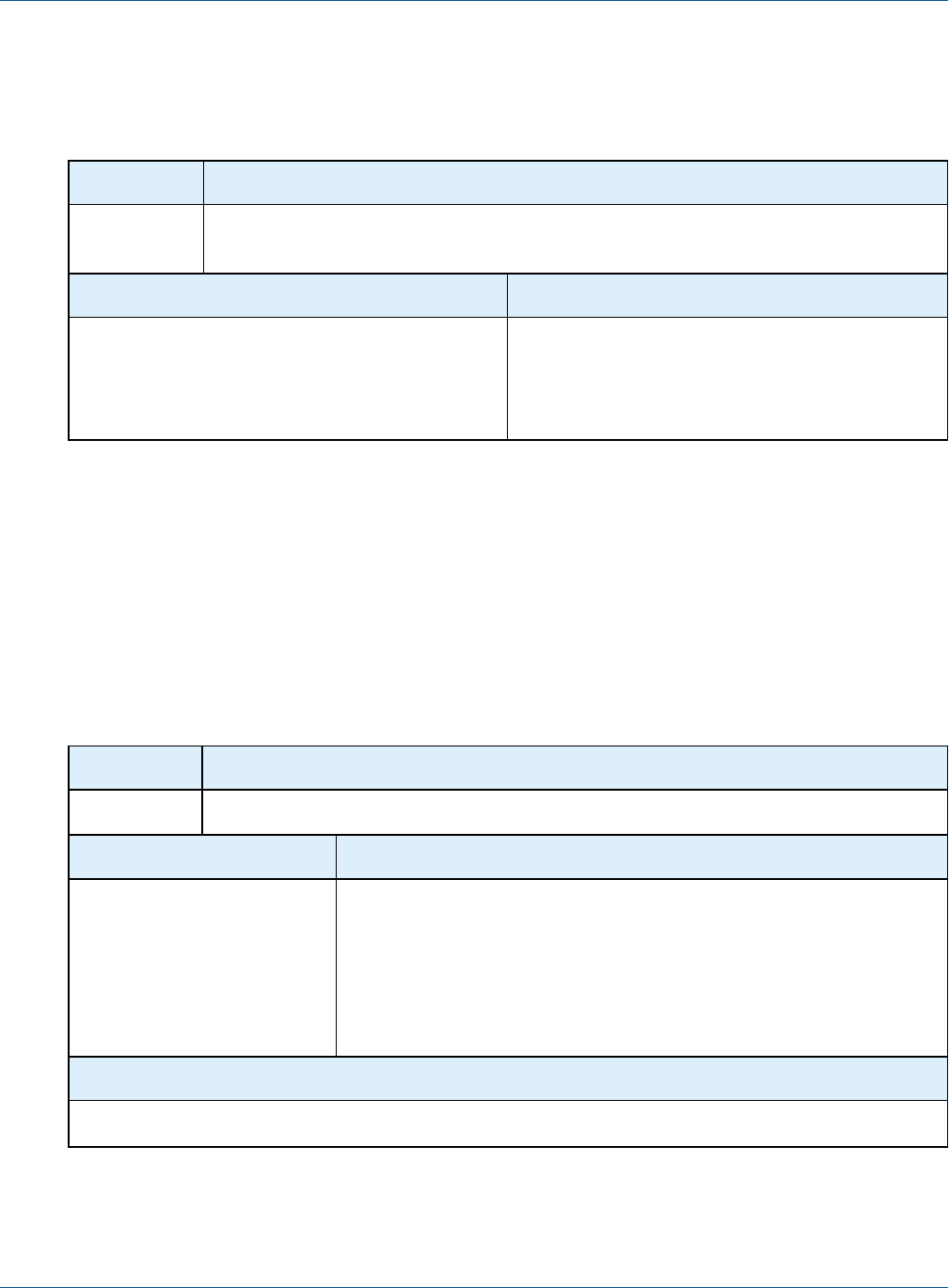
To download file attachments for HTML output, use the following method. You must download all attachments
to display the HTML content properly. The given URL is the default path, but it can be modified with the
attachmentsPrefix property in the reportExecutionRequest, as described in Chapter 4, “REST API
Reference - The reportExecutions Service,” on page25.
Method URL
GET http://<host>:<port>/jrio/rest_
v2/reportExecutions/requestID/exports/exportID/attachments/fileName
Return Value on Success Typical Return Values on Failure
200 OK – The content is the attachment in the format
specified in the contentType property of the
attachment descriptor, for example:
image/png
404 Not Found – When the request ID specified in the
request does not exist.
For example, to download the one of the images for the HTML report execution response above, use the
following URL:
GET http://localhost:8080/jrio/rest_v2/reportExecutions/912382875_1366638024956_
2/exports/html/attachments/img_0_46_0
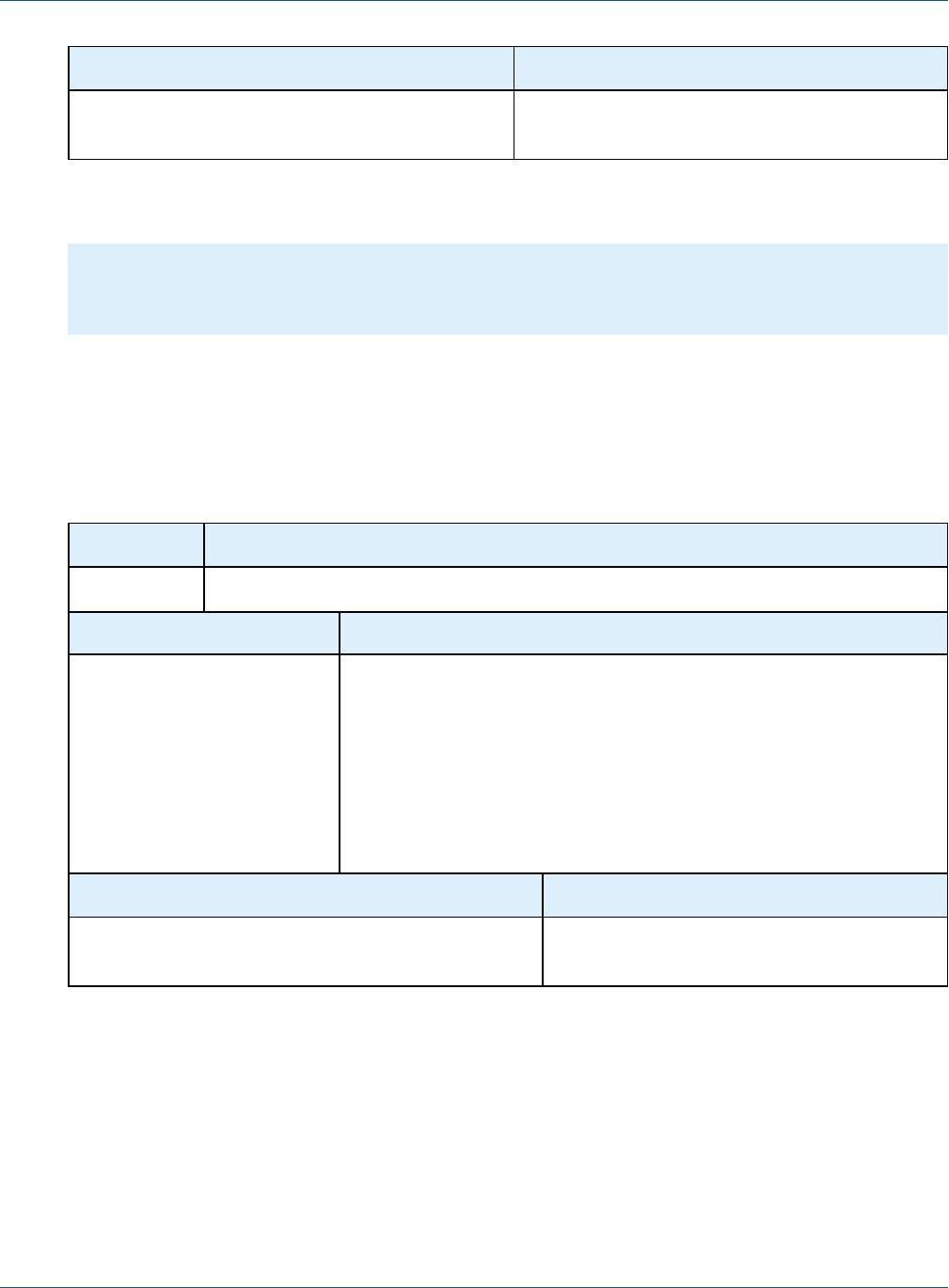
4.6 Exporting a Report Asynchronously
After running a report and downloading its content in a given format, you can request the same report in other
formats. As with exporting report formats through the user interface, the report does not run again because the
export process is independent of the report.
Method URL
POST http://<host>:<port>/jrio/rest_v2/reportExecutions/requestID/exports/
Content-Type Content
application/json Send an export descriptor in JSON format to specify the format and details
of your request. For example:
{
"outputFormat": "html",
"pages": "10-20",
"attachmentsPrefix": "./images/"
}
Options
accept: application/json
TIBCO Software Inc. 31
JasperReports IOUser Guide
Return Value on Success Typical Return Values on Failure
200 OK – The content contains an exportExecution
descriptor. See below for an example.
404 Not Found – When the request ID specified in
the request does not exist.
The following example shows the exportExecution descriptor that the server sends in response to the export
request:
{
"id":"6b7ce8fa-f1d7-4d53-9af6-4569edb05d1b",
"status":"queued"
}
4.7 Modifying Report Parameters
You can update the report parameters, also known as input controls, through a separate method before running
an existing report execution again. Use the following method to reexecute the report with a different set of
parameter values:
Method URL
POST http://<host>:<port>/jrio/rest_v2/reportExecutions/requestID/parameters
Media-Type Content
application/json [
{
"name":"someParameterName",
"value":["value 1", "value 2"]
},
{
"name":"someAnotherParameterName",
"value":["another value"]
}
]
Return Value on Success Typical Return Values on Failure
204 No Content – There is no content to return. 404 Not Found – When the request ID specified
in the request does not exist.
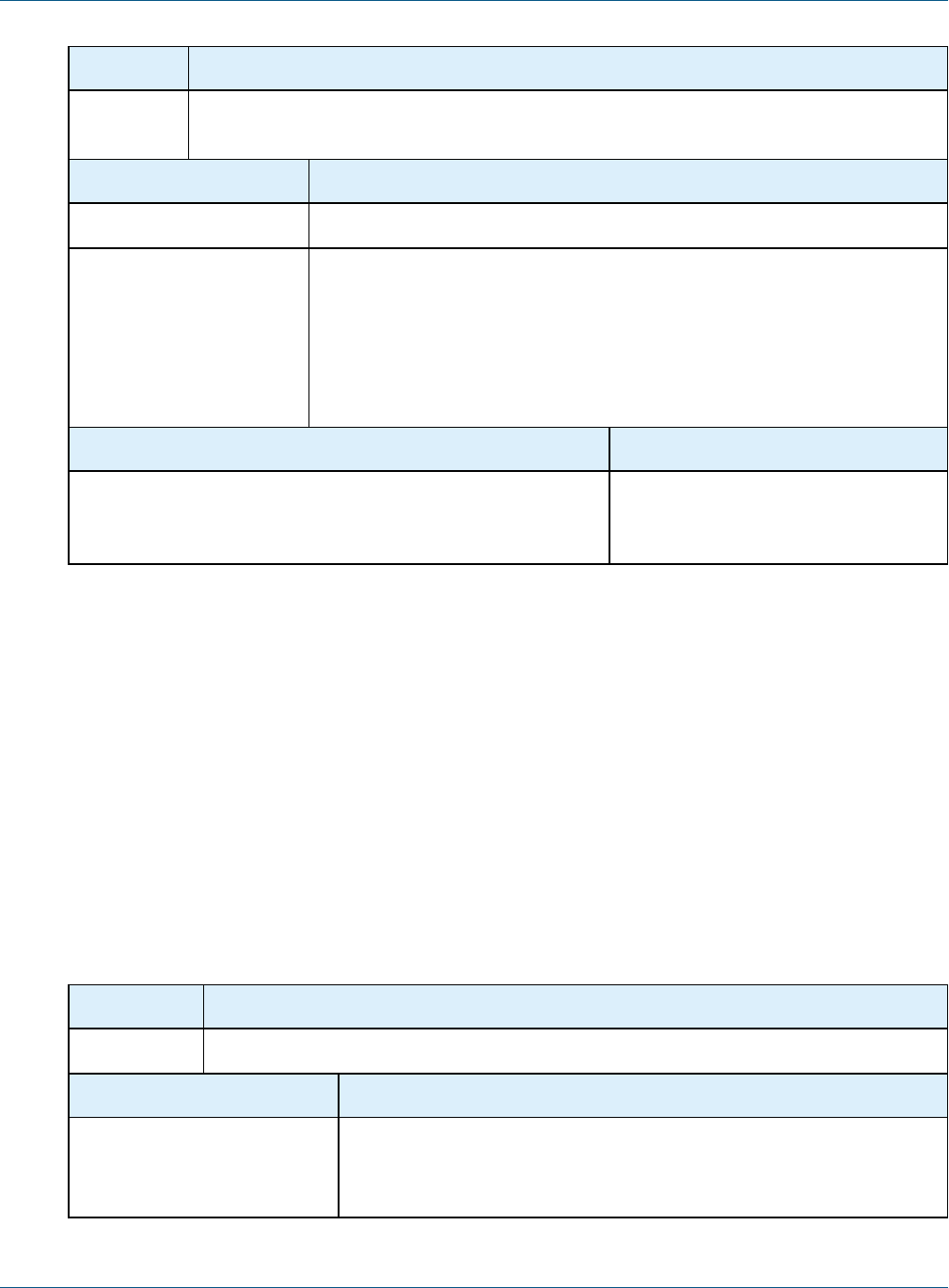
4.8 Polling Export Execution
As with the execution of the main report, you can also poll the execution of the export process. This service
supports the extended status value that includes an appropriate message.
32 TIBCO Software Inc.
Chapter 4 REST API Reference - The reportExecutions Service
Method URL
GET http://<host>:<port>/jrio/rest_v2/reportExecutions/requestID/exports/
exportID/status
Options Sample Return Value
accept: application/json { "value": "ready" }
accept:
application/status+json
{
"value": "failed",
"errorDescriptor": {
"message": "Input controls validation failure",
"errorCode": "input.controls.validation.error",
"parameters": ["Specify a valid value for type Integer."]
}
}
Return Value on Success Typical Return Values on Failure
200 OK – The content contains the export status, as shown above.
In the extended format, error reports contain error messages
suitable for display.
404 Not Found – When the specified
request ID does not exist.
For example, to get the status of the HTML export in the previous example, use the following URL:
GET http://localhost:8080/jrio/rest_v2/reportExecutions/912382875_1366638024956_
2/exports/195a65cb-1762-450a-be2b-1196a02bb625/status
When the status is "ready" your client can download the new export output and any attachments as described in
4.5, “Requesting Report Output,” on page30. For example:
GET http://localhost:8080/jrio/rest_v2/reportExecutions/912382875_1366638024956_
2/exports/195a65cb-1762-450a-be2b-1196a02bb625/outputResource
GET http://localhost:8080/jrio/rest_v2/reportExecutions/912382875_1366638024956_
2/exports/195a65cb-1762-450a-be2b-1196a02bb625/images/img_0_46_0
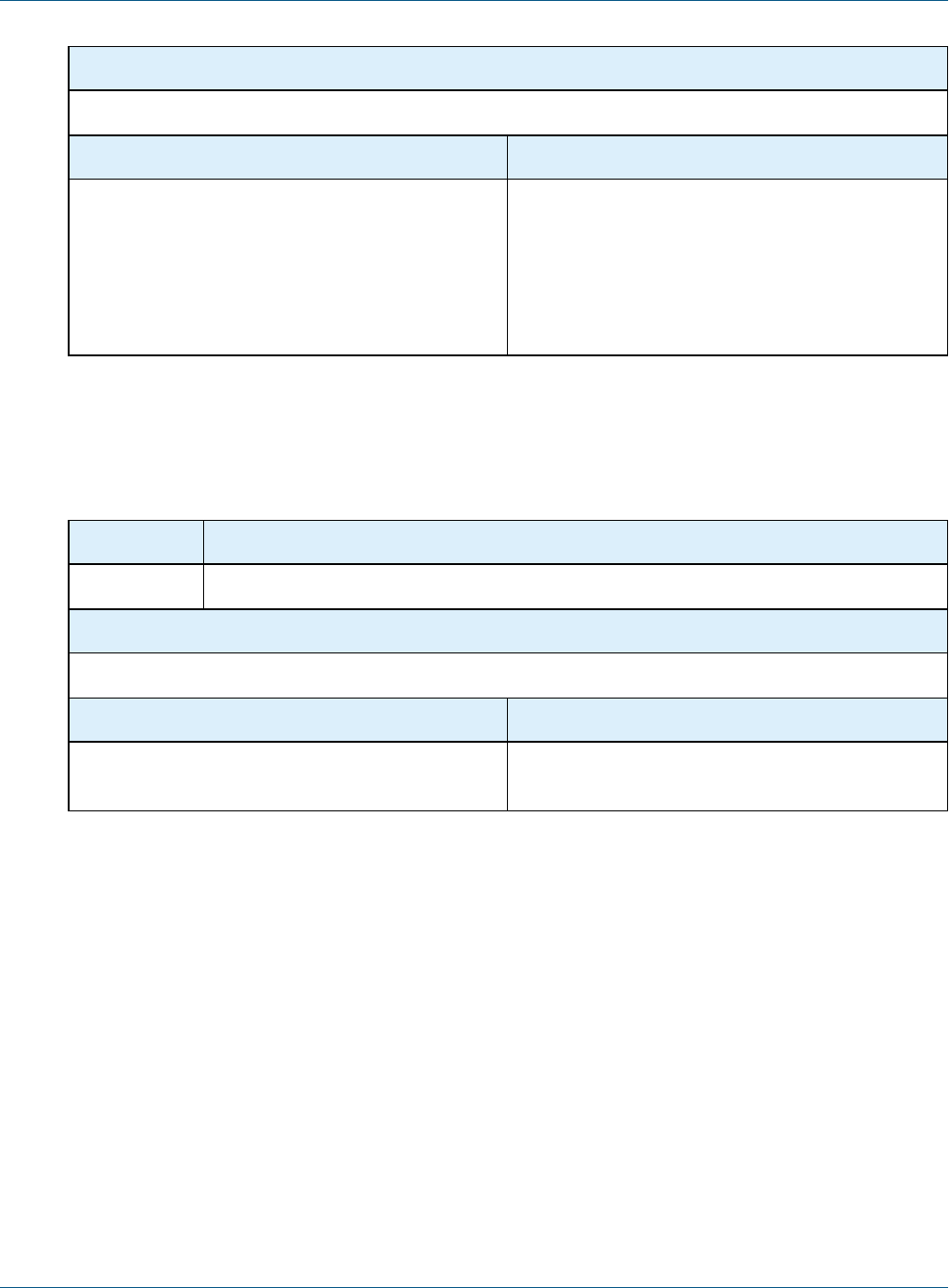
4.9 Stopping Running Reports and Jobs
To stop a report that is running and cancel its output, use the PUT method and specify a status of "cancelled"
in the body of the request.
Method URL
PUT http://<host>:<port>/jrio]/rest_v2/reportExecutions/requestID/status/
Content-Type Content
application/json Send a status descriptor in JSON format with the value cancelled. For
example:
JSON: { "value": "cancelled" }
TIBCO Software Inc. 33
JasperReports IOUser Guide
Options
accept: application/json
Return Value on Success Typical Return Values on Failure
200 OK – When the report execution was successfully
stopped, the server replies with the same status:
{"value": "cancelled" }
204 No Content – When the report specified by the
request ID is not running, either because it finished
running, failed, or was stopped by another process.
404 Not Found – When the request ID specified in the
request does not exist.
4.10 Removing Report Execution
Use the DELETE method to remove a report execution from cache. If the report execution is still running, it will
be stopped automatically and then removed.
Method URL
DELETE http://<host>:<port>/jrio/rest_v2/reportExecutions/<executionID>
Options
accept: application/json
Return Value on Success Typical Return Values on Failure
200 No Content – There is no content to return. 204 No Content – When the specified execution ID is
not found on the server.
34 TIBCO Software Inc.

CHAPTER 5 JAVASCRIPT API REFERENCE -JRIO.JS
The JavaScript API exposed through jrio.js allows you to embed reports into your web pages and web
applications. The embedded elements are fully interactive, either through the UI or programmatically. Users
navigate their data in the context of your app, and you can dynamically compute, update, or render the jrio.js
elements to create seamless interaction. You can use JavaScript frameworks for layout and control the look and
feel of all elements through style sheets (CSS).
With the JavaScript API, you can invent new ways to merge data into your application, and make advanced
business intelligence available to your users.
This chapter contains the following sections:
•Loading the jrio.js Script
•Configuring the JasperReports IO Client
•Usage Patterns
•Testing Your JavaScript
•Changing the Look and Feel
Each function of the JasperReports IO JavaScript API is then described in the following chapters:
•JavaScript API Reference - report
•JavaScript API Reference - Errors
The last chapters demonstrate more advanced usage of the JasperReports IO JavaScript API:
•JavaScript API Usage - Report Events
•JavaScript API Usage - Hyperlinks
•JavaScript API Usage - Interactive Reports
5.1 Loading the jrio.js Script
The script to include on your HTML page is named jrio.js. It is located on your running instance of the
JasperReports IO JavaScript API distribution, which is available for download and can be deployed in your
hosting web application. Later on your page, you also need a container element to display the report from the
script.
<!-- Provide the URL to jrio.js -->
<script src="http://bi.example.com:8080/jrio-client/optimized-scripts/jrio.js"></script>
...
TIBCO Software Inc. 35
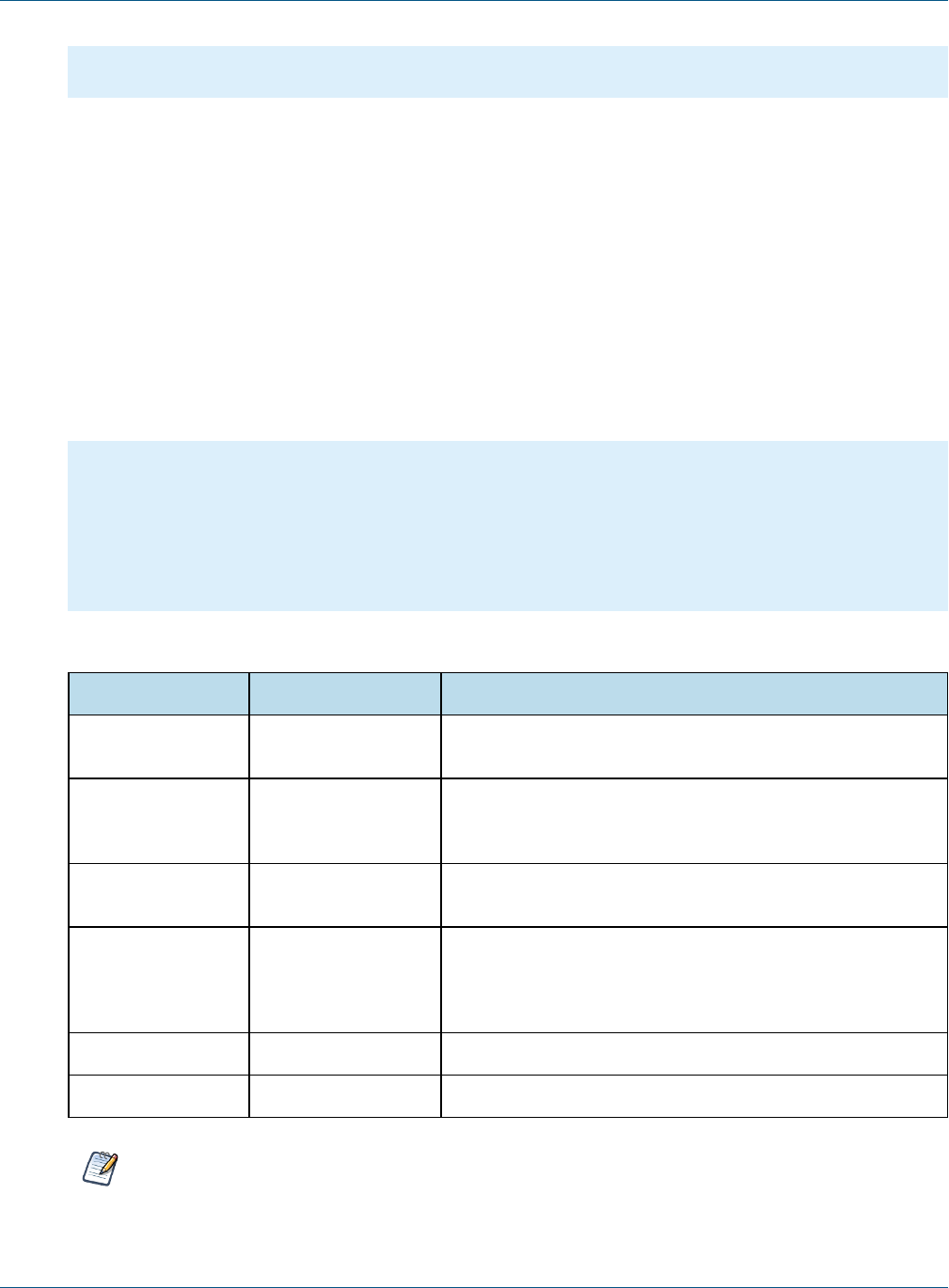
JasperReports IOUser Guide
<!-- Provide a container for the report -->
<div id="reportContainer"></div>
The content of jrio.js is type='text/javascript', but that is the default so you usually don't need to include
it.
5.2 Configuring the JasperReports IO Client
Loading the jrio.js script as above gives you access to the JasperReports IO JavaScript API in your web page.
But this JasperReports IO client-side API needs to be configured to point to an existing JasperReports IO REST
reporting service URL which delivers the actual reports output to be displayed on the current page, the location
of the API scripts (either optimized or non-optimized) and UI theme.
This is achieved by calling the config() function on the jrio object made available globally on the page by
the loading of the jrio.js script:
jrio.config({
server : "http://bi.example.com:8080/jrio",
scripts : "http://bi.example.com:8080/myapp/jriojsapi/optimized-scripts",
theme: {
href: "http://bi.example.com:8080/myapp/jriojsapi/themes/default"
},
locale: "en_US"
});
You can specify several parameters when requesting the script:
Parameter Type or Value Description
server URL The URL to the JasperReports IO service that responds to the
report generating REST requests. This parameter is required.
scripts URL The URL to the folder containing the JasperReports IO
JavaScript API files, either in optimized on non-optimized
format. This parameter is required.
theme URL The URL to the folder containing the JasperReports IO
JavaScript UI theme files.
locale locale string Specify the locale to use for display and running reports. It
must be one of the locales supported by JasperReports IO.
The default is the locale configured on the server. This para-
meter is required.
logEnabled true|false Enable or disable logging. By default, it is disabled (false).
logLevel debug|info|warn|error Set the logging level. By default the level is error.
The server,scripts, and locale parameters are required. The jrio object may produce errors if they
are not set.
36 TIBCO Software Inc.

Chapter 5 JavaScript API Reference - jrio.js
The scripts making up the JasperReports IO JavaScript API are available in two formats: optimized and non-
optimized. They are placed in separate folders in the JasperReports IO JavaScript API distribution under
/optimized-scripts and /scripts subfolders respectively.
If you notice undesirable side-effects when including the JasperReports IO JavaScript library, change the client
configuration to use the optimized scripts to provide better protection, also known as encapsulation. For
example, the JasperReports IO JavaScript API functions might interfere with collapse functions on your menus.
Non-optimized scripts are preferred when you want to perform some runtime debugging for the JavaScript code.
If you want to used the optimized jrio.js script, use the following URL to load it:<script
src="http://bi.example.com:8080/myapp/jriojsapi/optimized-
scripts/client/jrio.js"></script>
If you want to use the non-optimized jrio.js script, you will have to use all of the following scripts:
<script src="http://bi.example.com:8080/myapp/jriojsapi/scripts/bower_com-
ponents/requirejs/require.js"></script>
<script src="http://bi.example.com:8080/myapp/jriojsapi/scripts/require.config.js"></script>
<script src="http://bi.example.com:8080/myapp/jriojsapi/scripts/loader/jasper.js"></script>
<script src="http://bi.example.com:8080/myapp/jriojsapi/scripts/client/jrio.js"></script>
<script>
require.config({
baseUrl: "http://bi.example.com:8080/myapp/jriojsapi/scripts"
});
</script>
5.3 Usage Patterns
After configuring the JasperReports IO client object, you write the callback that will execute inside this client
provided by jrio.js.
jrio.config({
server : "http://bi.example.com:8080/jrio",
scripts : "http://bi.example.com:8080/myapp/jriojsapi/optimized-scripts",
theme: {
href: "http://bi.example.com:8080/myapp/jriojsapi/themes/default"
},
locale: "en_US"
});
jrio(function(jrioClient) {
jrioClient.report({
resource: "/samples/reports/highcharts/HighchartsChart",
container: "#reportContainer",
error: function(err) {
alert(err);
},
});
});
5.4 Testing Your JavaScript
As you learn to use the JasperReports IO JavaScript API and write the JavaScript that embeds your reports into
your web app, you should have a way to run and view the output of your script.
TIBCO Software Inc. 37

JasperReports IOUser Guide
In order to load jrio.js, your HTML page containing your JavaScript must be accessed through a web server.
Opening a static file with a web browser does not properly load the iframes needed by the script.
One popular way to view your JasperReports IO output, is to use the jsFiddle online service. You specify your
HTML, JavaScript, and optional CSS in 3 separate frames, and the result displays in the fourth frame.
Another way to test your JavaScript is to use the app server bundled with JasperReports IO. If you deploy the
server from the installer with the Jetty web application server, you can create an HTML file at the root of one of
the web apps shipped with it by default, for example:
<jrio-install>/jrio/webapps/jrio-docs/testscript.html
Write your HTMLand JavaScript in this file, and then you can run jrio.js by loading the file through the
following URL:
http://mydomain.com:8081/jrio-docs/testscript.html
5.5 Changing the Look and Feel
When you create a web application that embeds JasperReports IO content, you determine the look and feel of
your app through layout, styles, and CSS (Cascading Style Sheets). Most of the content that you embed consists
of reports and dashboards that you create with JasperReports IO or Jaspersoft Studio, where you set the
appearance of colors, fonts, and layout to match your intended usage.
But some JasperReports IO JavaScript API elements also contain UI widgets that are generated by the server in a
default style, for example the labels, buttons, and selection boxes for the input controls of a report. In general,
the default style is meant to be neutral and embeddable in a wide range of visual styles. If the default style of
these UI widgets does not match your app, there are two approaches:
•Customizing the UI with CSS – You can change the appearance of the UI widgets through CSS in your
app.
•Customizing the UI with Themes – You can redefine the default appearance of the UI widgets in themes
on the server.
These two options are covered in the following subsections.
5.5.1 Customizing the UI with CSS
The UI widgets generated by the server have CSS classes and subclasses, also generated by the server, that you
can redefine in your app to change their appearance. To change to appearance of the generated widgets, create
CSS rules that you would add to CSS files in your own web app. To avoid the risk of unintended interference
with other CSS rules, you should define your CSS rules with both a classname and a selector, for example:
#inputContainer .jr-mInput-boolean-label {
color: #218c00;
}
#classname;
To change the style of specific elements in the server's generated widgets, you can find the corresponding CSS
classes and redefine them. To find the CSS classes, write the JavaScript display the UI widgets, for example
input controls, then test the page in a browser. Use your browser's code inspector to look at each element of the
38 TIBCO Software Inc.

Chapter 5 JavaScript API Reference - jrio.js
generated widgets and locate the CSS rules that apply to it. The code inspector shows you the classes and often
lets you modify values to preview the look and feel that you want to create.
5.5.2 Customizing the UI with Themes
You can redefine the default appearance of the UI widgets in themes on the server.
Themes are CSS in the JasperReports IO JavaScript API. The UI widgets in JasperReports IO elements are
generated on the server and their look and feel is ultimately determined by themes.
TIBCO Software Inc. 39

JasperReports IOUser Guide
40 TIBCO Software Inc.

CHAPTER 6 JAVASCRIPT API REFERENCE -REPORT
The report function runs reports on on the JasperReports IO reporting service and displays the result in a
container that you provide. This chapter describes how to render a report in using the JasperReports IO
JavaScript API.
The report function also supports more advanced customizations of hyperlinks and interactivity that are
described in subsequent chapters:
•JavaScript API Usage - Hyperlinks
•JavaScript API Usage - Interactive Reports
This chapter contains the following sections:
•Report Properties
•Report Functions
•Report Structure
•Rendering a Report
•Setting Report Parameters
•JavaScript API Reference - report
•Rendering Multiple Reports
•Resizing a Report
•Setting Report Pagination
•Creating Pagination Controls (Next/Previous)
•Creating Pagination Controls (Range)
•Exporting From a Report
•Exporting Data From a Report
•Refreshing a Report
•Canceling Report Execution
•JavaScript API Reference - report
6.1 Report Properties
The properties structure passed to the report function is defined as follows:
TIBCO Software Inc. 41

JasperReports IOUser Guide
{
"title": "Report Properties",
"type": "object",
"description": "A JSON Schema describing a Report Properties",
"$schema": "http://json-schema.org/draft-04/schema#",
"properties": {
"server": {
"type": "string",
"description": "URL of JRS instance."
},
"resource": {
"type": "string",
"description": "Report resource URI."
},
"container": {
"oneOf": [
{
"type": "object",
"additionalProperties" : true,
"description": "DOM element to render report to"
},
{
"type": "string",
"description": "CSS selector for container to render report to."
}
]
},
"params": {
"type": "object",
"description": "Report's parameters values",
"additionalProperties": {
"type": "array"
}
},
"pages": {
"type": ["string", "integer", "object"],
"description": "Range of report's pages or single report page",
"pattern": "^[1-9]\\d*(\\-\\d+)?$",
"properties": {
"pages": {
"type": ["string", "integer"],
"description": "Range of report's pages or single report page",
"pattern": "^[1-9]\\d*(\\-\\d+)?$",
"minimum": 1
},
"anchor": {
"type": ["string"],
"description": "Report anchor"
}
42 TIBCO Software Inc.

Chapter 6 JavaScript API Reference - report
},
"default": 1,
"minimum": 1
},
"scale" : {
"default": "container",
"oneOf" : [
{
"type": "number",
"minimum" : 0,
"exclusiveMinimum": true,
"description" : "Scale factor"
},
{
"enum": ["container", "width", "height"],
"default": "container",
"description" : "Scale strategy"
}
]
},
"defaultJiveUi": {
"type": "object",
"description": "Default JIVE UI options.",
"properties": {
"enabled": {
"type": "boolean",
"description": "Enable default JIVE UI.",
"default": "true"
},
"floatingTableHeadersEnabled": {
"type": "boolean",
"description": "Enable table floating headers.",
"default": "false"
},
"floatingCrosstabHeadersEnabled": {
"type": "boolean",
"description": "Enable crosstab floating header.",
"default": "false"
}
}
},
"isolateDom": {
"type": "boolean",
"description": "Isolate report in iframe.",
"default": "false"
},
"linkOptions": {
"type": "object",
"description": "Report's parameters values",
"properties": {
"beforeRender": {
"type": "function",
"description": "A function to process link - link element pairs."
TIBCO Software Inc. 43

JasperReports IOUser Guide
eport loading overlay",
"default": true
},
"scrollToTop": {
"type": "boolean",
"description": "Enable/disable scrolling to top after report rendering",
"default": true
},
"showAdhocChartTitle": {
"type": "boolean",
"description": "Enable/disable showing Ad Hoc chart reports title",
"default": true
}
},
"required": ["server", "resource"]
}
6.2 Report Functions
The report function exposes the following functions:
define(function () {
/**
* @param {Object} properties - report properties * @constructor
*/
function Report(properties){}
/**
* Setters and Getters are functions around
* schema for bi component at ./schema/ReportSchema.json
* Each setter returns pointer to 'this' to provide chainable API
*/
/**
* Get any result after invoking run action, 'null' by default * @returns any data which supported
by this bi component
*/
Report.prototype.data = function(){};
/**
* Attaches event handlers to some specific events.
* New events overwrite old ones.
* @param {Object} events - object containing event names as keys and event handlers as values *
44 TIBCO Software Inc.

Chapter 6 JavaScript API Reference - report
@return {Report} report - current Report instance (allows chaining)
*/
Report.prototype.events = function(events){};
//Actions
/**
* Perform main action for bi component
* Callbacks will be attached to deferred object. *
* @param {Function} callback - optional, invoked in case of successful run
* @param {Function} errorback - optional, invoked in case of failed run
* @param {Function} always - optional, invoked always
* @return {Deferred} dfd
*/
Report.prototype.run = function(callback, errorback, always){};
/**
* Render report to container, previously specified in property.
* Clean up all content of container before adding Report's content
* @param {Function} callback - optional, invoked in case successful export * @param {Function}
errorback - optional, invoked in case of failed export * @param {Function} always - optional,
optional, invoked always
* @return {Deferred} dfd
*/
Report.prototype.render = function(callback, errorback, always){};
/**
* Refresh report execution
* @param {Function} callback - optional, invoked in case of successful refresh * @param {Func-
tion} errorback - optional, invoked in case of failed refresh
* @param {Function} always - optional, invoked optional, invoked always
* @return {Deferred} dfd
*/
Report.prototype.refresh = function(callback, errorback, always){};
/**
* Cancel report execution
* @param {Function} callback - optional, invoked in case of successful cancel * @param {Function}
errorback - optional, invoked in case of failed cancel
* @param {Function} always - optional, invoked optional, invoked always
* @return {Deferred} dfd
*/
Report.prototype.cancel = function(callback, errorback, always){};
/**
* Update report's component
* @param {Object} component - jive component to update, should have id field
* @param {Function} callback - optional, invoked in case of successful update
* @param {Function} errorback - optional, invoked in case of failed update
* @param {Function} always - optional, invoked optional, invoked always
TIBCO Software Inc. 45

JasperReports IOUser Guide
on} callback - optional, invoked in case of successful update * @param {Function} errorback -
optional, invoked in case of failed update
* @param {Function} always - optional, invoked optional, invoked always
* @return{Deferred} dfd
*/
Report.prototype.save = function(callback, errorback, always){};
/**
* Save JIVE components state as new report
* @param {Object} options - resource information (i.e. folderUri, label, description, overwrite
flag)
* @param {Function} callback - optional, invoked in case of successful update * @param {Function}
errorback - optional, invoked in case of failed update
* @param {Function} always - optional, invoked optional, invoked always
* @return{Deferred} dfd
*/
Report.prototype.save = function(options, callback, errorback, always){};
/**
* Undo previous JIVE component update
* @param {Function} callback - optional, invoked in case of successful update * @param {Function}
errorback - optional, invoked in case of failed update
* @param {Function} always - optional, invoked optional, invoked always
* @return{Deferred} dfd
*/
Report.prototype.undo = function(callback, errorback, always){};
/**
* Reset report to initial state
* @param {Function} callback - optional, invoked in case of successful update * @param {Function}
errorback - optional, invoked in case of failed update
* @param {Function} always - optional, invoked optional, invoked always
* @return{Deferred} dfd
*/
Report.prototype.undoAll = function(callback, errorback, always){};
/**
* Redo next JIVE component update
* @param {Function} callback - optional, invoked in case of successful update * @param {Function}
errorback - optional, invoked in case of failed update
* @param {Function} always - optional, invoked optional, invoked always
* @return{Deferred} dfd
*/
Report.prototype.redo = function(callback, errorback, always){};
/**
* Export report to specific format, execute only after report run action is finished * @param
{ExportOptions} exportOptions - export options
* @param {Function} callback - optional, invoked with link object
* @param {Function} errorback - optional, invoked in case of failed export
* @param {Function} always - optional, invoked optional, invoked always
* @return{Deferred} dfd
*/
Report.prototype.export = function(exportOptions, callback, errorback, always){};
46 TIBCO Software Inc.

Chapter 6 JavaScript API Reference - report
6.3 Report Structure
The Report Data structure represents the rendered report object manipulated by the report function. Even though
it is named "data," it does not contain report data, but rather the data about the report. For example, it contains
information about the pages and bookmarks in the report.
The report structure also contains other components described elsewhere:
•The definitions of hyperlinks and how to work with them is explained in “Customizing Links” on page70
•Details of the Jaspersoft Interactive Viewer and Editor (JIVE UI) are explained in “Interacting With JIVE
UI Components” on page75.
{
"title": "Report Data",
"description": "A JSON Schema describing a Report Data",
"$schema": "http://json-schema.org/draft-04/schema#",
"type": "object",
"properties": {
"totalPages": {
"type": "number",
"description": "Report's page total count"
},
"links": {
"type": "array",
"description": "Links extracted from markup, so their quantity depends on pages you have
requested",
"items": {
"$ref": "#/definitions/jrLink"
}
},
"bookmarks": {
"type": "array",
"description": "Report's bookmarks. Quantity depends on current page",
"items": {
"$ref": "#/definitions/bookmark"
}
},
"reportParts": {
"type": "array",
"description": "Report's parts. Quantity depends on current page",
"items": {
"$ref": "#/definitions/reportPart"
}
},
"components": {
"type": "array",
"description": "Components in report, their quantity depends on pages you have requested",
"items": {
"type": "object",
"description": "JIVE components data"
}
}
TIBCO Software Inc. 47

JasperReports IOUser Guide
},
"definitions": {
"bookmark":{
"type": "object",
"properties":{
"page": "number",
"anchor": "string",
"bookmarks": {
"type": "array",
"items": {
"$ref": "#/definitions/bookmark"
}
}
}
},
"reportPart":{
"type": "object",
"properties":{
"page": "number",
"name": "string"
}
},
"jrLink": { // see chapter on hyperlinks
}
}
}
6.4 Rendering a Report
To run a report on the server and render it with JasperReports IO Javascript API, load the jrio.js script, configure
the JasperReports IO client object to point to the JasperReports IO REST service and to the needed Javascript
files and theme, and then call the report function providing the URI of the report to run, and the container
where it should be rendered on your page.
The following code example shows how to display a report that the user selects from a list.
jrio.config({
server : "http://bi.example.com:8080/jrio",
scripts : "http://bi.example.com:8080/myapp/jriojsapi/optimized-scripts",
theme: {
href: "http://bi.example.com:8080/myapp/jriojsapi/themes/default"
},
locale: "en_US"
});
jrio(function(jrioClient) {
var report,
selector = document.getElementById("selected_resource");
selector.addEventListener("change", function() {
report = createReport(selector.value);
});
report = createReport(selector.value);
function createReport(uri) {
return jrioClient.report({
resource: uri,
container: "#reportContainer",
48 TIBCO Software Inc.

Chapter 6 JavaScript API Reference - report
error: failHandler
});
}
function failHandler(err) {
alert(err);
}
});
The HTML page that displays the report uses a static list of reports in a drop-down selector, but otherwise needs
only a container element.
<!-- Provide the URL to jrio.js -->
<script src="http://bi.example.com:8080/jriojsapi/optimized-scripts/client/jrio.js"></script>
<select id="selected_resource" name="report">
<option value="/samples/reports/TableReport">Table Report</option>
<option value="/samples/reports/highcharts/HighchartsChart">Highcharts</option>
</select>
<!--Provide container to render your visualization-->
<div id="reportContainer"/>
6.5 Setting Report Parameters
To set or change the parameter values, update the params object of the report properties and invoke the run
function again.
// update report with new parameters
report
.params({ "Country": ["USA"] })
.run();
...
// later in code
console.log(report.params()); // console log output: {"Country": ["USA"] }
The example above is trivial, but the power of the JasperReports IO JavaScript API comes from this simple code.
You can create any number of user interfaces, database lookups, or your own calculations to provide the values
of parameters. Your parameters could be based on 3rd party API calls that get triggered from other parts of the
page or other pages in your app. When your reports can respond to dynamic events, they are seamlessly
embedded and much more relevant to the user.
Here are further guidelines for setting parameters:
•If a report has required parameters, you must set them in the report object of the initial call, otherwise you'll
get an error. For more information, see “Catching Report Errors” on page62.
•Parameters are always sent as arrays of quoted string values, even if there is only one value, such as
["USA"] in the example above. This is also the case even for single value input such as numerical, boolean,
or date/time inputs. You must also use the array syntax for single-select values as well as multi-select
parameters with only one selection. No matter what the type of input, always set its value to an array of
quoted strings.
•The following values have special meanings:
•"" – An empty string, a valid value for text input and some selectors.
•"~NULL~" – Indicates a NULL value (absence of any value), and matches a field that has a NULL
value, for example if it has never been initialized.
TIBCO Software Inc. 49

JasperReports IOUser Guide
•"~NOTHING~" – Indicates the lack of a selection. In multi-select parameters, this is equivalent to
indicating that nothing is deselected, thus all are selected. In a single-select non-mandatory parameter,
this corresponds to no selection (displayed as ---). In a single-select mandatory parameter, the lack of
selection makes it revert to its default value.
6.6 Rendering Multiple Reports
JavaScript Example:
jrio.config({
...
});
jrio(function(jrioClient) {
var reportsToLoad = [
"/samples/reports/TableReport",
"/samples/reports/highcharts/HighchartsChart",
"/samples/reports/cvc/Figures",
"/samples/reports/OrdersTable"
];
$.each(reportsToLoad, function (index, uri) {
var container = "#container" + (index + 1);
jrioClient(container).report({
resource: uri,
success: function () {
console.log("loaded: " + (index + 1));
},
error: function (err) {
alert(err.message);
}
});
});
});
Associated HTML:
<script src="http://ajax.googleapis.com/ajax/libs/jquery/1.8.0/jquery.min.js"></script>
<script src="http://ajax.googleapis.com/ajax/libs/jqueryui/1.10.0/jquery-ui.min.js"></script>
<script src="http://bi.example.com:8080/jriosjapi/client/jrio.js"></script>
<table class="sample">
<tr>
<td id="container1"></td>
<td id="container2"></td>
</tr>
<tr>
<td id="container3"></td>
<td id="container4"></td>
</tr>
</table>
Associated CSS:
html, body {
}
table.sample {
50 TIBCO Software Inc.

Chapter 6 JavaScript API Reference - report
width: 100%;
}
td#c1, td#c2, td#c3, td#c4 {
width: 50%;
}
6.7 Resizing a Report
When rendering a report, by default it is scaled to fit in the container you specify. When users resize their
window, reports will change so that they fit to the new size of the container. This section explains several ways
to change the size of a rendered report.
To set a different scaling factor when rendering a report, specify its scale property:
•container – The report is scaled to fully fit within the container, both in width and height. If the container
is a different aspect ratio, there will be white space in the dimension where the container is larger. This is
the default scaling behavior when the scale property is not specified.
•width – The report is scaled to fit within the width of the container. If the report is taller than the
container, users will need to scroll vertically to see the entire report.
•height – The report is scaled to fit within the height of the container. If the report is wider than the
container, users will need to scroll horizontally to see the entire report.
•Scale factor – A decimal value greater than 0, with 1 being equivalent to 100%. A value between 0 and 1
reduces the report from its normal size, and a value greater than 1 enlarges it. If either or both dimensions of
the scaled report are larger than the container, users will need to scroll to see the entire report.
In every case, the entire report is scaled in both directions by the same amount, you cannot change the aspect
ratio of tables and crosstab elements.
For example, to initialize the report to half-size (50%), specify the following scale:
var report = jrioClient.report({
resource: "/public/Sample",
container: "#reportContainer",
scale: 0.5
});
You can also change the scale after rendering, in this case to more than double size (250%):
report
.scale(2.5)
.run();
Alternatively, you can turn off the container resizing and modify the size of the container explicitly:
var report = jrioClient.report({
resource: "/public/Sample",
container: "#reportContainer",
scale: "container",
autoresize: false
});
$("#reportContainer").width(500).height(500);
report.resize();
TIBCO Software Inc. 51

JasperReports IOUser Guide
6.8 Setting Report Pagination
To set or change the pages displayed in the report, update the pages object of the report properties and invoke
the run function again.
report
.pages(5)
.run(); // re-render report with page 5 into the same container
report
.pages("2") // string is also allowed
.run();
report
.pages("4-6") // a range of numbers as a string is also possible
.run();
report
.pages({ // alternative object notation
pages: "4-6"
})
.run();
The pages object of the report properties also supports bookmarks by specifying the anchor property. You can
also specify both pages and bookmarks as shown in the example below. For more information about bookmarks,
see “Providing Bookmarks in Reports” on page94.
report
.pages({ // bookmark inside report to navigate to
anchor: "summary"
})
.run();
report
.pages({ // set bookmark to scroll report to in scope of provided pages
pages: "2-5",
anchor: "summary"
})
.run();
6.9 Creating Pagination Controls (Next/Previous)
Again, the power of the JasperReports IOJavaScript API comes from these simple controls that you can access
programmatically. You can create any sort of mechanism or user interface to select the page. In this example, the
HTML has buttons that allow the user to choose the next or previous pages.
jrio.config({
...
});
jrio(function(jrioClient) {
var report = jrioClient.report({
resource: "/samples/reports/TableReport",
52 TIBCO Software Inc.

Chapter 6 JavaScript API Reference - report
container: "#reportContainer",
error: function(err) { alert(err); },
});
$("#previousPage").click(function() {
var currentPage = report.pages() || 1;
report
.pages(--currentPage)
.run()
.fail(function(err) { alert(err); });
});
$("#nextPage").click(function() {
var currentPage = report.pages() || 1;
report
.pages(++currentPage)
.run()
.fail(function(err) { alert(err); });
});
});
Associated HTML:
<script src="http://code.jquery.com/jquery-2.1.0.js"></script>
<script src="http://bi.example.com:8080/jriosjapi/client/jrio.js"></script>
<button id="previousPage">Previous Page</button><button id="nextPage">Next Page</button>
<div id="reportContainer"></div>
6.10 Creating Pagination Controls (Range)
JavaScript Example:
jrio.config({
...
});
jrio(function(jrioClient) {
var report = jrioClient.report({
resource: "/samples/reports/TableReport",
container: "#reportContainer",
error: function(err) { alert(err); },
});
$("#pageRange").change(function() {
report
.pages($(this).val())
.run()
.fail(function(err) { alert(err); });
});
});
Associated HTML:
TIBCO Software Inc. 53

JasperReports IOUser Guide
<script src="http://code.jquery.com/jquery-2.1.0.js"></script>
<script src="http://bi.example.com:8080/jriosjapi/client/jrio.js"></script>
Page range: <input type="text" id="pageRange"></input>
<div id="reportContainer"></div>
6.11 Exporting From a Report
To export a report, invoke its export function and specify the outputFormat property. You MUST wait until the
run action has completed before starting the export. The following export formats are supported:
"pdf", "xlsx", "docx", "pptx", "csv", "xls", "rtf", "odt", "ods", "html", "xml", "data_
csv", "data_json," "data_xls"
The last three are for pure data output, also known as "metadata" exporters in the JR Library, and you can learn
more about them in Exporting Data From a Report.
report.run(exportToPdf);
function exportToPdf() {
report
.export({
outputFormat: "pdf"
})
.done(function (link) {
window.open(link.href); // open new window to download report
})
.fail(function (err) {
alert(err.message);
});
}
The following sample exports 10 pages of the report to a paginated Excel spreadsheet:
report.run(exportToPaginatedExcel);
function exportToPaginatedExcel() {
report
.export({
outputFormat: "xls",
pages: "1-10",
paginated: true
})
.done(function(link){
window.open(link.href); // open new window to download report
})
.fail(function(err){
alert(err.message);
});
}
The following sample exports the part of report associated with a named anchor:
54 TIBCO Software Inc.

Chapter 6 JavaScript API Reference - report
report.run(exportPartialPDF);
function exportPartialPDF() {
report
.export({
outputFormat: "pdf",
pages: {
anchor: "summary"
}
})
.done(function(link){
window.open(link.href); //open new window to download report
})
.fail(function(err){
alert(err.message);
});
}
The following example creates a user interface for exporting a report:
jrio.config({
...
});
jrio(function(jrioClient) {
var $select = buildControl("Export to: ",
["pdf","xlsx","docx","pptx","csv","xls","rtf","odt","ods","html","xml","data_csv","data_
json","data_xls"]),
$button = $("#button"),
report = jrioClient.report({
resource: "/samples/reports/OrdersTable",
container: "#reportContainer",
success: function () {
button.removeAttribute("disabled");
},
error: function (error) {
console.log(error);
}
});
$button.click(function () {
console.log($select.val());
report.export({
//export options here
outputFormat: $select.val(),
//exports all pages if not specified
//pages: "1-2"
}, function (link) {
var url = link.href ? link.href : link;
window.location.href = url;
}, function (error) {
console.log(error);
});
});
TIBCO Software Inc. 55

JasperReports IOUser Guide
function buildControl(name, options) {
function buildOptions(options) {
var template = "<option>{value}</option>";
return options.reduce(function (memo, option) {
return memo + template.replace("{value}", option);
}, "")
}
var template = "<label>{label}</label><select>{options}</select><br>",
content = template.replace("{label}", name)
.replace("{options}", buildOptions(options));
var $control = $(content);
$control.insertBefore($("#button"));
//return select
return $($control[1]);
}
});
Associated HTML:
<script src="http://code.jquery.com/jquery-2.1.0.js"></script>
<!-- Provide the URL to jrio.js -->
<script src="http://bi.example.com:8080/jriosjapi/client/jrio.js"></script>
<button id="button" disabled>Export</button>
<!-- Provide a container for the report -->
<div id="reportContainer"></div>
6.12 Exporting Data From a Report
You can also request the raw data of the report in CSV, XLS or JSON format.
The following example shows how to export pure data in CSV format using the metadata CSV exporter. CSV
output is plain text that you must parse to extract the values that you need.
report.run(exportToCsv);
function exportToCsv() {
report
.export({
outputFormat: "data_csv"
})
.done(function(link, request){
request()
.done(function(data) {
// use data here, data is CSV format in plain text
})
.fail(function(err){
//handle errors here
});
})
.fail(function(err){
56 TIBCO Software Inc.

Chapter 6 JavaScript API Reference - report
alert(err.message);
});
}
The following example shows how to export data in JSON format. By its nature, JSON format can be used
directly as data within your JavaScript.
report.run(exportToJson);
function exportToJson() {
report
.export({
outputFormat: "data_json"
})
.done(function(link, request){
request({
dataType: "json"
})
.done(function(data) {
// use JSON data as objects here
})
.fail(function(err){
//handle errors here
});
})
.fail(function(err){
alert(err.message);
});
}
6.13 Refreshing a Report
JavaScript Example:
jrio.config({
...
});
jrio(function(jrioClient) {
var alwaysRefresh = false;
var report = jrioClient.report({
//skip report running during initialization
runImmediately: !alwaysRefresh,
resource: "/samples/reports/FirstJasper",
container: "#reportContainer",
});
if (alwaysRefresh){
report.refresh();
}
$("button").click(function(){
report
TIBCO Software Inc. 57

JasperReports IOUser Guide
.refresh()
.done(function(){console.log("Report Refreshed!");})
.fail(function(){alert("Report Refresh Failed!");});
});
});
});
Associated HTML:
<script src="http://code.jquery.com/jquery-2.1.0.js"></script>
<script src="http://bi.example.com:8080/jriosjapi/client/jrio.js"></script>
<button>Refresh</button>
<div id="reportContainer"></div>
6.14 Canceling Report Execution
To stop a running report, call its cancel function:
...
report
.cancel()
.done(function(){
alert("Report Canceled");
})
.fail(function(){
alert("Report Failed");
});
The following example is more complete and creates a UI for a cancel button for a long-running report.
jrio.config({
...
});
jrio(function(jrioClient) {
var button = $("button");
var report = jrioClient.report({
resource: "/samples/reports/SlowReport",
container: "#reportContainer",
events: {
changeTotalPages : function(){
button.remove();
}
}
});
button.click(function () {
report
.cancel()
.then(function () {
button.remove();
alert("Report Canceled!");
})
58 TIBCO Software Inc.

Chapter 6 JavaScript API Reference - report
.fail(function () {
alert("Can't Cancel Report");
});
});
});
Associated HTML:
<script src="http://code.jquery.com/jquery-2.1.0.js"></script>
<script src="http://bi.example.com:8080/jriosjapi/client/jrio.js"></script>
<button>Cancel</button>
<div id="reportContainer"></div>
TIBCO Software Inc. 59

JasperReports IOUser Guide
60 TIBCO Software Inc.

CHAPTER 7 JAVASCRIPT API REFERENCE - ERRORS
This chapter describes common errors and explains how to handle them with the JasperReports IO Javascript
API.
•Error Properties
•Common Errors
•Catching Report Errors
7.1 Error Properties
The properties structure for Generic Errors is defined as follows:
{
"title": "Generic Errors",
"description": "A JSON Schema describing Visualize Generic Errors",
"$schema": "http://json-schema.org/draft-04/schema#",
"type": "object",
"properties": {
"errorCode": {
"type": "string"
},
"message": {
"type": "string"
},
"parameters":{
"type": "array"
}
},
"required": ["errorCode", "message"]
}
7.2 Common Errors
The following table lists common errors, their messages, and causes.
TIBCO Software Inc. 61
JasperReports IOUser Guide
Error Message - Description
Page or app not responding {no_message} - If your page or web application has stopped working
without notification or errors, check that the server providing Jasper-
Reports IO JavaScript API is accessible and returning scripts.
unexpected.error An unexpected error has occurred - In most of cases this is either a
JavaScript exception or an HTTP 500 (Internal Server Error) response
from server.
schema.validation.error JSON schema validation failed: {error_message} - Validation against
schema has failed. Check the validationError property in object for
more details.
unsupported.
configuration.error
{unspecified_message} - This error happens only when isolateDom =
true and defaultJiveUi.enabled = true. These properties are mutu-
ally exclusive.
container.not.found.error Container was not found in DOM - The specified container was not found
in the DOM:error.
report.execution.failed Report execution failed - The report failed to run on the server.
report.execution.cancelled Report execution was canceled - Report execution was canceled.
report.export.failed Report export failed - The report failed to export on the server.
licence.not.found JRIO missing appropriate license- The server's license was not found.
licence.expired JRIO missing appropriate license - The server's license has expired
resource.not.found Resource not found in Repository - Either the resource doesn't exist in the
repository or the user doesn't have permissions to read it.
export.pages.out.range Requested pages {0} out of range - The user requested pages that don't
exist in the current export.
7.3 Catching Report Errors
To catch and handle errors when running reports, define the contents of the err function as shown in the
following sample:
jrio.config({
...
});
jrio(function(jrioClient) {
var report = jrioClient.report({
error: function(err){
// invoked once report is initialized and has run
}
});
62 TIBCO Software Inc.

Chapter 7 JavaScript API Reference - Errors
report
.run()
.fail(function(err){
// handle errors here
});
)
TIBCO Software Inc. 63

JasperReports IOUser Guide
64 TIBCO Software Inc.

CHAPTER 8 JAVASCRIPT API USAGE - REPORT EVENTS
Depending on the size of your data, the report function can run for several seconds or minutes. You can listen
for events that give the status of running reports and display pages sooner.
This chapter contains the following sections:
•Tracking Completion Status
•JavaScript API Usage - Report Events
•Customizing a Report's DOM Before Rendering
8.1 Tracking Completion Status
By listening to the reportCompleted event, you can give information or take action when a report finishes
rendering.
jrio.config({
...
});
jrio(function(jrioClient) {
var report = jrioClient.report({
// run example with a very long report
resource: "/samples/reports/SlowReport",
container: "#reportContainer",
events: {
reportCompleted: function(status) {
alert("Report status: "+ status + "!");
}
},
error: function(error) {
alert(error);
},
});
});
8.2 Listening to Page Totals
By listening to the changeTotalPages event, you can track the filling of the report.
TIBCO Software Inc. 65

JasperReports IOUser Guide
jrio.config({
...
});
jrio(function(jrioClient) {
var report = jrioClient.report({
// run example with a very long report
resource: "/samples/reports/SlowReport",
container: "#reportContainer",
events: {
changeTotalPages: function(totalPages) {
alert("Total Pages:" + totalPages);
}
},
error: function(error) {
alert(error);
},
});
});
8.3 Customizing a Report's DOM Before Rendering
By listening to the beforeRender event, you can access the Document Object Model (DOM) of the report to
view or modify it before it is displayed. In the example the listener finds span elements and adds a color style
and an attribute my-attr="test" to each one.
jrio.config({
...
});
jrio(function(jrioClient) {
// enable report chooser
$(':disabled').prop('disabled', false);
//render report from provided resource
startReport();
$("#selected_resource").change(startReport);
function startReport () {
// clean container
$("#reportContainer").html("");
// render report from another resource
jrioClient("#reportContainer").report({
resource: $("#selected_resource").val(),
events:{
beforeRender: function(el){
// find all spans
$(el).find(".jrPage td.jrcolHeader span")
.each(function(i, e){
// make them red
$(e).css("color","red")
.attr("data-my-attr", "test");
});
console.log($(el).find(".jrPage").html());
}
}
66 TIBCO Software Inc.

Chapter 8 JavaScript API Usage - Report Events
});
};
});;
The HTML page that displays the report uses a static list of reports in a drop-down selector, but otherwise needs
only a container element. This is similar to the basic report example in “Rendering a Report” on page48,
except that the JavaScript above will change the report before it's displayed.
<script src="http://code.jquery.com/jquery-2.1.0.js"></script>
<!-- Provide the URL to jrio.js -->
<script src="http://bi.example.com:8080/jriojsapi/client/jrio.js"></script>
<select id="selected_resource" disabled="true" name="report">
<option value="/samples/reports/TableReport">Table Report</option>
<option value="/samples/reports/OrdersTable">Orders Table</option>
</select>
<!-- Provide a container to render your visualization -->
<div id="reportContainer"></div>
TIBCO Software Inc. 67

JasperReports IOUser Guide
68 TIBCO Software Inc.

CHAPTER 9 JAVASCRIPT API USAGE - HYPERLINKS
Both reports and dashboards include hyperlinks (URLs) that link to websites or other reports. The JasperReports
IO JavaScript API gives you access to the links so that you can customize them or open them differently. For
links generated in the report, you can customize both the appearance and the container where they are
displayed.
This chapter contains the following sections:
•Structure of Hyperlinks
•Customizing Links
•Drill-Down in Separate Containers
•Accessing Data in Links
9.1 Structure of Hyperlinks
The following JSONschema describes all the parameters on links, although not all are present in all cases.
"jrLink": {
"title": "JR Hyperlink",
"description": "A JSON Schema describing JR hyperlink",
"$schema": "http://json-schema.org/draft-04/schema#",
"type": "object",
"properties":{
"id": {
"type": "string",
"description": "Hyperlink id, reflected in corresponding attribute in DOM. Is not used for
AdHocExecution hyperlink type."
},
"type": {
"type": "string",
"description": "Hyperlink type. Default types are LocalPage, LocalAnchor, RemotePage,
RemoteAnchor, Reference, ReportExecution, AdHocExecution. Custom hyperlink types are possible"
},
"target": {
"type": "string",
"description": "Hyperlink target. Default targets are Self, Blank, Top, Parent. Custom
hyperlink targets are possible"
TIBCO Software Inc. 69

JasperReports IOUser Guide
},
"tooltip": {
"type": "string",
"description": "Hyperlink tooltip"
},
"href": {
"type" : "string",
"description": "Hyperlink reference. Is an empty string for LocalPage, LocalAnchor and
ReportExecution hyperlink types"
},
"parameters": {
"type": "object",
"description": "Hyperlink parameters. Any additional parameters for hyperlink"
},
"resource": {
"type": "string",
"description": "Repository resource URI of resource mentioned in hyperlink. For LocalPage
and LocalAnchor points to current report, for ReportExecution - to _report parameter"
},
"pages": {
"type": ["integer", "string"],
"description": "Page to which hyperlink points to. Is actual for LocalPage, RemotePage and
ReportExecution hyperlink types"
},
"anchor": {
"type": "string",
"description": "Anchor to which hyperlink points to. Is actual for LocalAnchor, RemoteAn-
chor and ReportExecution hyperlink types"
}
},
"required": ["type", "id"]
}
9.2 Customizing Links
You can customize the appearance of link elements in a generated report in two ways:
•The linkOptionsexposes the beforeRender event to which you can add a listener with access to the
links in the document as element pairs.
•The normal click event lets you add a listener that can access to a link when it's clicked.
jrio.config({
...
});
jrio(function(jrioClient) {
jrioClient("#reportContainer").report({
resource: "/samples/reports/TableReport",
linkOptions: {
beforeRender: function (linkToElemPairs) {
linkToElemPairs.forEach(function (pair) {
var el = pair.element;
el.style.backgroundColor = "red";
});
},
events: {
70 TIBCO Software Inc.

Chapter 9 JavaScript API Usage - Hyperlinks
"click": function(ev, link){
if (confirm("Change color of link id " + link.id + " to green?")){
ev.currentTarget.style.backgroundColor = "green";
ev.target.style.color = "#FF0";
}
}
}
},
error: function (err) {
alert(err.message);
}
});
});
9.3 Drill-Down in Separate Containers
By using the method of listing for clicks on hyperlinks, you can write a JasperReports IO JavaScript API script
that sets the destination of drill-down report links to another container. This way, you can create display layouts
or overlays for viewing drill-down links embedded in your reports. This sample code also changes the cursor for
the embedded links, so they are more visible to users.
jrio.config({
...
});
jrio(function(jrioClient) {
jrioClient("#main").report({
resource: "/samples/reports/TableReport",
linkOptions: {
beforeRender: function (linkToElemPairs) {
linkToElemPairs.forEach(showCursor);
},
events: {
"click": function(ev, link){
if (link.type == "ReportExecution"){
jrioClient("#drill-down").report({
resource: link.parameters._report,
params: {
latitude: [link.parameters.latitude],
longitude: [link.parameters.longitude],
zoom: [link.parameters.zoom]
},
});
}
console.log(link);
}
}
},
error: function (err) {
alert(err.message);
}
});
function showCursor(pair){
var el = pair.element;
el.style.cursor = "pointer";
TIBCO Software Inc. 71

JasperReports IOUser Guide
}
});
Associated HTML:
<script src="http://underscorejs.org/underscore.js"></script>
<script src="http://code.jquery.com/jquery-2.1.0.js"></script>
<!-- Provide the URL to jrio.js -->
<script src="http://bi.example.com:8080/jriojsapi/client/jrio.js"></script>
<!-- Provide a container for the main report and one for the drill-down -->
<div>
<div id="main"></div>
<div id="drill-down"></div>
</div>
Associated CSS:
#main{
float: left;
}
#drill-down{
float: left;
}
9.4 Accessing Data in Links
In this example, we access the hyperlinks through the data.links structure after the report has successfully
rendered. From this structure, we can read the tooltips that were set in the JRXML of the report. The script uses
the information in the tooltips of all links in the report to create a drop-down selector of city name options.
By using link tooltips, your JRXML can create reports that pass runtime information to the display logic in your
JavaScripts.
jrio.config({
...
});
jrio(function(jrioClient) {
var $select = $("#selectCity"),
report = jrioClient.report({
resource: "/samples/reports/TableReport",
container: "#main",
success: refreshSelect,
error: showError
});
function refreshSelect(data){
console.log(data);
$.each(data.links, function (i, item) {
$select.append($('<option>', {
value: item.id,
text : item.tooltip
}));
72 TIBCO Software Inc.

Chapter 9 JavaScript API Usage - Hyperlinks
});
}
$("#previousPage").click(function() {
var currentPage = report.pages() || 1;
goToPage(--currentPage);
});
$("#nextPage").click(function() {
var currentPage = report.pages() || 1;
goToPage(++currentPage);
});
function goToPage(numder){
report
.pages(numder)
.run()
.done(refreshSelect)
.fail(showError);
}
function showError(err){
alert(err.message);
}
});
Associated HTML:
<script src="http://code.jquery.com/jquery-2.1.0.js"></script>
<!-- Provide the URL to jrio.js -->
<script src="http://bi.example.com:8080/jriojsapi/client/jrio.js"></script>
<select id="selectCity"></select>
<button id="previousPage">Previous Page</button>
<button id="nextPage">Next Page</button>
<!-- Provide a container for the main report -->
<div>
<div ></div>
<div id="main"></div>
</div>
Associated CSS:
#main{
float: left;
}
TIBCO Software Inc. 73

JasperReports IOUser Guide
74 TIBCO Software Inc.

CHAPTER 10 JAVASCRIPT API USAGE - INTERACTIVE REPORTS
Most reports rendered by the JasperReports IO service have interactive abilities such as column sorting provided
by a feature called JIVE: Jaspersoft Interactive Viewer and Editor. The JIVE UI is the interface of the report
viewer which can be implemented in client applications using the JasperReports IO JavaScript API.
Not only does the JIVE UI allow users to sort and filter regular reports, it also provides many opportunities for
you to further customize the appearance and behavior of your reports through the JasperReports IO JavaScript
API.
This chapter contains the following sections:
•Interacting With JIVE UI Components
•Using Floating Headers
•Changing the Chart Type
•Changing the Chart Properties
•Undo and Redo Actions
•Sorting Table Columns
•Filtering Table Columns
•Formatting Table Columns
•Conditional Formatting on Table Columns
•Sorting Crosstab Columns
•Sorting Crosstab Rows
•Implementing Search in Reports
•Providing Bookmarks in Reports
•Disabling the JIVE UI
10.1 Interacting With JIVE UI Components
The JasperReports IO report interface exposes the updateComponent function that gives your script access to
the JIVE UI. Using the updateComponent function, you can programmatically interact with the JIVE UI to do
such things as set the sort order on a specified column, add a filter, and change the chart type. In addition, the
undoAll function acts as a reset.
For the API reference of the JasperReports IO report interface, see “Report Functions” on page44.
First, your script must enable the default JIVE UI to make its components available after running a report:
TIBCO Software Inc. 75

JasperReports IOUser Guide
var report = jrioClient.report({
resource: "/samples/reports/TableReport",
defaultJiveUi : {
enabled: true
}
});
...
var components = report.data().components;
The components that can be modified are columns and charts. These components of the JIVE UI have an ID, but
it may change from execution to execution. To refer to these components, create your report in JRXML and use
the net.sf.jasperreports.components.name property to name them. In the case of a column, this property
should be set on the column definition in the table model. In Jaspersoft Studio, you can select the column in the
Outline View, then go to Properties > Advanced, and under Misc > Properties you can define custom
properties.
Then you can reference the component by this name, for example a column named sales, and use the
updateComponent function to modify it.
report.updateComponent("sales", {
sort : {
order : "asc"
}
});
Or:
report.updateComponent({
name: "sales",
sort : {
order : "asc"
}
});
We can also get an object that represents the named component of the JIVE UI:
var salesColumn = report
.data()
.components
.filter(function(c){ return c.name === "sales"})
.pop();
This example assumes you have a report whose components already have names, in this case, columns named
ORDERID and SHIPNAME:
jrio.config({
...
});
jrio(function(jrioClient) {
//render report from provided resource
var report = jrioClient.report({
76 TIBCO Software Inc.

Chapter 10 JavaScript API Usage - Interactive Reports
resource: "/samples/reports/OrdersTable",
container: "#reportContainer",
success: printComponentsNames,
error: handleError
});
$("#resetAll").on("click", function() {
report.undoAll();
});
$("#changeOrders").on("click", function() {
report.updateComponent("ORDERID", {
sort: {
order: "asc"
},
filter: {
operator: "greater_or_equal",
value: 10900
}
}).fail(handleError);
});
$("#sortCustomers").on("click", function() {
report.updateComponent("SHIPNAME", {
sort: {
order: "desc"
}
}).fail(handleError);
});
//show error
function handleError(err) {
alert(err.message);
}
function printComponentsNames(data) {
data.components.forEach(function(c) {
console.log("Component Name: " + c.name, "Component Label: " + c.label);
});
}
});
The associated HTML has buttons that will invoke the JavaScript actions on the JIVE UI:
<!-- Provide the URL to jrio.js -->
<script src="http://bi.example.com:8080/jriojsapi/client/jrio.js"></script>
<button id="resetAll">Reset All</button>
<button id="changeOrders">View Top Orders</button>
<button id="sortCustomers">Sort Customers</button>
<!-- Provide a container for the report -->
<div id="reportContainer"></div>
TIBCO Software Inc. 77

JasperReports IOUser Guide
10.2 Using Floating Headers
One feature of the JIVE UI for tables and crosstabs is the floating header. When you turn on floating headers,
the header rows of a table or crosstab float at the top of the container when you scroll down. The report
container must allow scrolling for this to take effect. This means that CSS property overflow with values like
scroll or auto must be specifically set for the report container.
To turn on floating headers for your interactive reports, set the following parameters when you enable the JIVE
UI:
var report = jrioClient.report({
resource: "/samples/reports/TableReport",
defaultJiveUi : {
floatingTableHeadersEnabled: true,
floatingCrosstabHeadersEnabled: true
}
});
10.3 Changing the Chart Type
If you have the name of a chart component, you can easily set a new chart type and redraw the chart.
var mySalesChart = report
.data()
.components
.filter(function(c){ return c.name === "salesChart"})
.pop();
mySalesChart.chartType = "Bar";
report
.updateComponent(mySalesChart)
.done(function(){
alert("Chart type changed!");
})
.fail(function(err){
alert(err.message);
});
Or:
report
.updateComponent("salesChart", {
chartType: "Bar"
})
.done(function(){
alert("Chart type changed!");
})
.fail(function(err){
alert(err.message);
});
The following example creates a drop-down menu that lets users change the chart type. You could also set the
chart type according to other states in your client.
78 TIBCO Software Inc.

Chapter 10 JavaScript API Usage - Interactive Reports
This code also relies on the report.chart.types interface described in “JavaScript API Reference - report”
on page41.
jrio.config({
...
});
jrio(function(jrioClient) {
//persisted chart name
var chartName = "chartOne",
$select = buildControl("Chart types: ", jrioClient.report.chart.types),
report = jrioClient.report({
resource: "/samples/reports/highcharts/HighchartsChart",
container: "#reportContainer",
success: selectDefaultChartType
});
$select.on("change", function () {
report.updateComponent(chartName, {
chartType: $(this).val()
})
.done(function (component) {
chartComponent = component;
})
.fail(function (error) {
alert(error);
});
});
function selectDefaultChartType(data) {
var component = data.components
.filter(function (c) {
return c.name === chartName;
})
.pop();
if (component) {
$select.find("option[value='" + component.chartType + "']")
.attr("selected", "selected");
}
}
function buildControl(name, options) {
function buildOptions(options) {
var template = "<option>{value}</option>";
return options.reduce(function (memo, option) {
return memo + template.replace("{value}", option);
}, "")
}
console.log(options);
if (!options.length) {
console.log(options);
}
var template = "<label>{label}</label><select>{options}</select><br>",
content = template.replace("{label}", name)
TIBCO Software Inc. 79

JasperReports IOUser Guide
.replace("{options}", buildOptions(options));
var $control = $(content);
$control.insertBefore($("#reportContainer"));
return $control;
}
});
As shown in the following HTML, the control for the chart type is created dynamically by the JavaScript:
<script src="http://code.jquery.com/jquery-2.1.0.js"></script>
<!-- Provide the URL to jrio.js -->
<script src="http://bi.example.com:8080/jriojsapi/client/jrio.js"></script>
<!--Provide a container for the report -->
<div id="reportContainer"></div>
10.4 Changing the Chart Properties
Those chart components that are based on Highcharts have a lot of interactivity such as built-in zooming and
animation. The built-in zooming lets users select data, for example columns in a chart, but it can also interfere
with touch interfaces. With the JasperReports IO JavaScript API, you have full control over these features and
you can choose to allow your users access to them or not. For example, animation can be slow on mobile
devices, so you could turn off both zooming and animation. Alternatively, if your users have a range of mobile
devices, tablets, and desktop computers, then you could give users the choice of turning on or off these
properties themselves.
The following example creates buttons to toggle several chart properties and demonstrates how to control them
programmatically. First the HTML to create the buttons:
<script src="http://bi.example.com:8080/jriojsapi/client/jrio.js"></script>
<button id="disableAnimation">disable animation</button>
<button id="enableAnimation">enable animation</button>
<button id="resetAnimation">reset animation to initial state</button>
<button id="disableZoom">disable zoom</button>
<button id="zoomX">set zoom to 'x' type</button>
<button id="zoomY">set zoom to 'y' type</button>
<button id="zoomXY">set zoom to 'xy' type</button>
<button id="resetZoom">reset zoom to initial state</button>
<div id="reportContainer"></div>
Here are the API calls to set the various chart properties:
jrio.config({
...
});
jrio(function(jrioClient) {
80 TIBCO Software Inc.

Chapter 10 JavaScript API Usage - Interactive Reports
var report = jrioClient.report({
resource: "/samples/reports/highcharts/HighchartsChart",
container: "#reportContainer",
error: function(e) {
alert(e);
}
});
function changeChartProperty(prop, value) {
var chartProps = report.chart();
if (typeof value === "undefined") {
delete chartProps[prop];
} else {
chartProps[prop] = value;
}
report.chart(chartProps).run().fail(function(e) { alert(e); });
}
$("#disableAnimation").on("click", function() {
changeChartProperty("animation", false);
});
$("#enableAnimation").on("click", function() {
changeChartProperty("animation", true);
});
$("#resetAnimation").on("click", function() {
changeChartProperty("animation");
});
$("#disableZoom").on("click", function() {
changeChartProperty("zoom", false);
});
$("#zoomX").on("click", function() {
changeChartProperty("zoom", "x");
});
$("#zoomY").on("click", function() {
changeChartProperty("zoom", "y");
});
$("#zoomXY").on("click", function() {
changeChartProperty("zoom", "xy");
});
$("#resetZoom").on("click", function() {
changeChartProperty("zoom");
});
});
10.5 Undo and Redo Actions
The JIVE UI supports undo and redo actions that you can access programmatically with the JasperReports IO
JavaScript API. As in many applications, undo and redo actions act like a stack, and the canUndo and canRedo
TIBCO Software Inc. 81

JasperReports IOUser Guide
events notify your page you are at either end of the stack.
jrio.config({
...
});
jrio(function(jrioClient) {
var chartComponent,
report = jrioClient.report({
resource: "/samples/reports/highcharts/HighchartsChart",
container: "#reportContainer",
events: {
canUndo: function(canUndo) {
if (canUndo) {
$("#undo, #undoAll").removeAttr("disabled");
} else {
$("#undo, #undoAll").attr("disabled", "disabled");
}
},
canRedo: function(canRedo) {
if (canRedo) {
$("#redo").removeAttr("disabled");
} else {
$("#redo").attr("disabled", "disabled");
}
}
},
success: function(data) {
chartComponent = data.components.pop();
$("option[value='" + chartComponent.chartType + "']").attr("selected", "selected");
}
});
var chartTypeSelect = buildChartTypeSelect(jrioClient.report);
chartTypeSelect.on("change", function() {
report.updateComponent(chartComponent.id, {
chartType: $(this).val()
})
.done(function(component) {
chartComponent = component;
console.log("ttttt:" + $(this).val());
})
.fail(function(error) {
console.log(error);
alert(error);
});
});
$("#undo").on("click", function() {
report.undo().fail(function(err) {
alert(err);
});
});
$("#redo").on("click", function() {
report.redo().fail(function(err) {
alert(err);
});
82 TIBCO Software Inc.

Chapter 10 JavaScript API Usage - Interactive Reports
});
$("#undoAll").on("click", function () {
report.undoAll().fail(function (err) {
alert(err);
});
});
});
function buildChartTypeSelect(report) {
chartTypeSelect = $("#chartType");
var chartTypes = report.chart.types;
chartTypeSelect = $("#chartType");
$.each(chartTypes, function (index, type) {
chartTypeSelect.append("<option value=\"" + type + "\">" + type + "</option>");
});
return chartTypeSelect;
}
Associated HTML:
<script src="http://code.jquery.com/jquery-2.1.0.js"></script>
<!-- Provide the URL to jrio.js -->
<script src="http://bi.example.com:8080/jriojsapi/client/jrio.js"></script>
<select id="chartType"></select>
<button id="undo" disabled="disabled">Undo</button>
<button id="redo" disabled="disabled">Redo</button>
<button id="undoAll" disabled="disabled">Undo All</button>
<!-- Provide a container for the report -->
<div id="reportContainer"></div>
10.6 Sorting Table Columns
This code example shows how to set the three possible sorting orders on a column in the JIVE UI: ascending,
descending, and no sorting.
jrio.config({
...
});
jrio(function(jrioClient) {
var report = jrioClient.report({
resource:"/samples/reports/TableReport",
container: "#reportContainer",
error: showError
});
$("#sortAsc").on("click", function () {
report.updateComponent("name", {
sort: {
order: "asc"
}
})
.fail(showError);
TIBCO Software Inc. 83

JasperReports IOUser Guide
});
$("#sortDesc").on("click", function () {
report.updateComponent("name", {
sort: {
order: "desc"
}
})
.fail(showError);
});
$("#sortNone").on("click", function () {
report.updateComponent("name", {
sort: {}
}).fail(showError);
});
function showError(err) {
alert(err);
}
});
Associated HTML:
<script src="http://code.jquery.com/jquery-2.1.0.js"></script>
<script src="http://underscorejs.org/underscore-min.js"></script>
<!-- Provide the URL to jrio.js -->
<script src="http://bi.example.com:8080/jriojsapi/client/jrio.js"></script>
<button id="sortAsc">Sort NAME column ASCENDING</button>
<button id="sortDesc">Sort NAME column DESCENDING</button>
<button id="sortNone">Reset NAME column</button>
<!-- Provide a container for the report -->
<div id="reportContainer"></div>
10.7 Filtering Table Columns
This code example shows how to define filters on columns of various data types (dates, strings, numeric) in the
JIVE UI. It also shows several filter operator such as equal,greater,between,contain (for string matching),
and before (for times and dates).
jrio.config({
...
});
jrio(function(jrioClient) {
var report = jrioClient.report({
resource:"/samples/reports/OrdersTable",
container: "#reportContainer",
error: function(err) {
alert(err);
84 TIBCO Software Inc.

Chapter 10 JavaScript API Usage - Interactive Reports
}
});
$("#setTimestampRange").on("click", function() {
report.updateComponent("ORDERDATE", {
filter: {
operator: "between",
value: [$("#betweenDates1").val(), $("#betweenDates2").val()]
}
}).fail(handleError);
});
$("#resetTimestampFilter").on("click", function() {
report.updateComponent("ORDERDATE", {
filter: {}
}).fail(handleError);
});
$("#setStringContains").on("click", function() {
report.updateComponent("SHIPNAME", {
filter: {
operator: "contain",
value: $("#stringContains").val()
}
}).fail(handleError);
});
$("#resetString").on("click", function() {
report.updateComponent("SHIPNAME", {
filter: {}
}).fail(handleError);
});
$("#setNumericGreater").on("click", function() {
report.updateComponent("ORDERID", {
filter: {
operator: "greater",
value: parseFloat($("#numericGreater").val(), 10)
}
}).fail(handleError);
});
$("#resetNumeric").on("click", function() {
report.updateComponent("ORDERID", {
filter: {}
}).fail(handleError);
});
});
function handleError(err) {
console.log(err);
alert(err);
}
Associated HTML:
<script src="http://code.jquery.com/jquery-2.1.0.js"></script>
TIBCO Software Inc. 85

JasperReports IOUser Guide
<script src="http://underscorejs.org/underscore-min.js"></script>
<!-- Provide the URL to jrio.js -->
<script src="http://bi.example.com:8080/jriojsapi/client/jrio.js"></script>
<input type="text" value="1997-01-10T00:00:00" id="betweenDates1"/> -
<input type="text" id="betweenDates2" value="1997-10-24T00:00:00"/>
<button id="setTimestampRange">Set timestamp range</button>
<button id="resetTimestampFilter">Reset timestamp filter</button>
<br/><br/>
<input type="text" value="ctu" id="stringContains"/>
<button id="setStringContains">Set string column contains</button>
<button id="resetString">Reset string filter</button>
<br/><br/>
<input type="text" value="10500" id="numericGreater"/>
<button id="setNumericGreater">Set numeric column greater than</button>
<button id="resetNumeric">Reset numeric filter</button>
<!-- Provide a container for the report -->
<div id="reportContainer"></div>
10.8 Formatting Table Columns
The JIVE UI allows you to format columns by setting the alignment, color, font, size, and background of text in
both headings and cells. You can also set the numeric format of cells, such as the precision, negative indicator,
and currency.
jrio.config({
...
});
jrio(function(jrioClient) {
var columns,
report = jrioClient.report({
resource: "/samples/reports/TableReport",
container: "#reportContainer",
events: {
reportCompleted: function(status, error) {
if (status === "ready") {
columns = _.filter(report.data().components, function(component) {
return component.componentType == "tableColumn";
});
var column4 = columns[4];
$("#label").val(column4.label);
$("#headingFormatAlign").val(column4.headingFormat.align);
$("#headingFormatBgColor").val(column4.headingFormat.backgroundColor);
$("#headingFormatFontSize").val(column4.headingFormat.font.size);
$("#headingFormatFontColor").val(column4.headingFormat.font.color);
$("#headingFormatFontName").val(column4.headingFormat.font.name);
if (column4.headingFormat.font.bold) {
$("#headingFormatFontBold").attr("checked", "checked");
} else {
$("#headingFormatFontBold").removeAttr("checked");
86 TIBCO Software Inc.

Chapter 10 JavaScript API Usage - Interactive Reports
}
if (column4.headingFormat.font.italic) {
$("#headingFormatFontItalic").attr("checked", "checked");
} else {
$("#headingFormatFontItalic").removeAttr("checked");
}
if (column4.headingFormat.font.underline) {
$("#headingFormatFontUnderline").attr("checked", "checked");
} else {
$("#headingFormatFontUnderline").removeAttr("checked");
}
$("#detailsRowFormatAlign").val(column4.detailsRowFormat.align);
$("#detailsRowFormatBgColor").val(column4.detailsRowFormat.backgroundColor);
$("#detailsRowFormatFontSize").val(column4.detailsRowFormat.font.size);
$("#detailsRowFormatFontColor").val(column4.detailsRowFormat.font.color);
$("#detailsRowFormatFontName").val(column4.detailsRowFormat.font.name);
if (column4.detailsRowFormat.font.bold) {
$("#detailsRowFormatFontBold").attr("checked", "checked");
} else {
$("#detailsRowFormatFontBold").removeAttr("checked");
}
if (column4.detailsRowFormat.font.italic) {
$("#detailsRowFormatFontItalic").attr("checked", "checked");
} else {
$("#detailsRowFormatFontItalic").removeAttr("checked");
}
if (column4.detailsRowFormat.font.underline) {
$("#detailsRowFormatFontUnderline").attr("checked", "checked");
} else {
$("#detailsRowFormatFontUnderline").removeAttr("checked");
}
}
}
},
error: function(err) {
alert(err);
}
});
$("#changeHeadingFormat").on("click", function() {
report.updateComponent(columns[4].id, {
headingFormat: {
align: $("#headingFormatAlign").val(),
backgroundColor: $("#headingFormatBgColor").val(),
font: {
size: parseFloat($("#headingFormatFontSize").val()),
color: $("#headingFormatFontColor").val(),
underline: $("#headingFormatFontUnderline").is(":checked"),
bold: $("#headingFormatFontBold").is(":checked"),
italic: $("#headingFormatFontItalic").is(":checked"),
name: $("#headingFormatFontName").val()
}
}
}).fail(function(e) {
alert(e);
});
TIBCO Software Inc. 87

JasperReports IOUser Guide
});
$("#changeDetailsRowFormat").on("click", function() {
report.updateComponent(columns[4].id, {
detailsRowFormat: {
align: $("#detailsRowFormatAlign").val(),
backgroundColor: $("#detailsRowFormatBgColor").val(),
font: {
size: parseFloat($("#detailsRowFormatFontSize").val()),
color: $("#detailsRowFormatFontColor").val(),
underline: $("#detailsRowFormatFontUnderline").is(":checked"),
bold: $("#detailsRowFormatFontBold").is(":checked"),
italic: $("#detailsRowFormatFontItalic").is(":checked"),
name: $("#detailsRowFormatFontName").val()
}
}
}).fail(function(e) {
alert(e);
});
});
$("#changeLabel").on("click", function() {
report.updateComponent(columns[4].id, {
label: $("#label").val()
}).fail(function(e) {
alert(e);
});
});
});
The associated HTML has static controls for selecting all the formatting options that the script above can
modify in the report.
<script src="http://code.jquery.com/jquery-2.1.0.js"></script>
<script src="http://underscorejs.org/underscore-min.js"></script>
<!-- Provide the URL to jrio.js -->
<script src="http://bi.example.com:8080/jriojsapi/client/jrio.js"></script>
<div >
<h3>Heading format for 5th column</h3>
Align: <select id="headingFormatAlign">
<option value="left">left</option>
<option value="center">center</option>
<option value="right">right</option></select>
<br/>
Background color: <input type="text" id="headingFormatBgColor" value=""/>
<br/>
Font size: <input type="text" id="headingFormatFontSize" value=""/>
<br/>
Font color: <input type="text" id="headingFormatFontColor" value=""/>
<br/>
Font name: <input type="text" id="headingFormatFontName" value=""/>
<br/>
Bold: <input type="checkbox" id="headingFormatFontBold" value="true"/>
88 TIBCO Software Inc.

Chapter 10 JavaScript API Usage - Interactive Reports
<br/>
Italic: <input type="checkbox" id="headingFormatFontItalic" value="true"/>
<br/>
Underline: <input type="checkbox" id="headingFormatFontUnderline" value="true"/>
<br/><br/>
<button id="changeHeadingFormat">Change heading format</button>
</div>
<div >
<h3>Details row format for 5th column</h3>
Align: <select id="detailsRowFormatAlign">
<option value="left">left</option>
<option value="center">center</option>
<option value="right">right</option></select>
<br/>
Background color: <input type="text" id="detailsRowFormatBgColor" value=""/>
<br/>
Font size: <input type="text" id="detailsRowFormatFontSize" value=""/>
<br/>
Font color: <input type="text" id="detailsRowFormatFontColor" value=""/>
<br/>
Font name: <input type="text" id="detailsRowFormatFontName" value=""/>
<br/>
Bold: <input type="checkbox" id="detailsRowFormatFontBold" value="true"/>
<br/>
Italic: <input type="checkbox" id="detailsRowFormatFontItalic" value="true"/>
<br/>
Underline: <input type="checkbox" id="detailsRowFormatFontUnderline" value="true"/>
<br/><br/>
<button id="changeDetailsRowFormat">Change details row format</button>
</div>
<div >
<h3>Change label of 5th column</h3>
<br/>
Label <input type="text" id="label"/>
<br/>
<button id="changeLabel">Change label</button>
</div>
<div ></div>
<!-- Provide a container for the report -->
<div id="reportContainer"></div>
10.9 Conditional Formatting on Table Columns
The JIVE UI also supports conditional formatting so that you can change the appearance of a cell's contents
based on its value. This example highlights cells in a given column that have a certain value by changing their
text color and the cell background color. Note that the column name must be known ahead of time, for example
by looking at your JRXML.
jrio.config({
...
});
TIBCO Software Inc. 89

JasperReports IOUser Guide
jrio(function(jrioClient) {
// column name from JRXML (field name by default)
var report = jrioClient.report({
resource: "/samples/reports/OrdersTable",
container: "#reportContainer",
error: showError
});
$("#changeConditions").on("click", function() {
report.updateComponent("ORDERID", {
conditions: [
{
operator: "greater",
value: 10500,
backgroundColor: null,
font: {
color: "FF0000",
bold: true,
underline: true,
italic: true
}
},
{
operator: "between",
value: [10900, 11000],
backgroundColor: "00FF00",
font: {
color: "0000FF"
}
}
]
})
.then(printConditions)
.fail(showError);
});
function printConditions(component){
console.log("Conditions: "+ component.conditions);
}
function showError(err) {
alert(err);
}
});
This example has a single button that allows the user to apply the conditional formatting when the report is
loaded:
<script src="http://code.jquery.com/jquery-2.1.0.js"></script>
<script src="http://underscorejs.org/underscore-min.js"></script>
<!-- Provide the URL to jrio.js -->
<script src="http://bi.example.com:8080/jriojsapi/client/jrio.js"></script>
<button id="changeConditions">Change conditions for numeric column</button>
<!-- Provide a container for the report -->
<div id="reportContainer"></div>
90 TIBCO Software Inc.

Chapter 10 JavaScript API Usage - Interactive Reports
10.10 Sorting Crosstab Columns
Crosstabs are more complex and do not have as many formatting options. This example shows how to sort the
values in a given column of a crosstab (the rows are rearranged). Note that the code is slightly different than
“Sorting Table Columns” on page83.
jrio.config({
...
});
jrio(function(jrioClient) {
var column2,
report = jrioClient.report({
resource: "/samples/reports/crosstabs/OrdersReport",
container: "#reportContainer",
events: {
reportCompleted: function(status, error) {
if (status === "ready") {
var columns = _.filter(report.data().components, function(component) {
return component.componentType == "crosstabDataColumn";
});
column2 = columns[1];
console.log(columns);
}
}
},
error: function(err) {
alert(err);
}
});
$("#sortAsc").on("click", function () {
report.updateComponent(column2.id, {
sort: {
order: "asc"
}
}).fail(function(e) {
alert(e);
});
});
$("#sortDesc").on("click", function() {
report.updateComponent(column2.id, {
sort: {
order: "desc"
}
}).fail(function(e) {
alert(e);
});
});
$("#sortNone").on("click", function() {
report.updateComponent(column2.id, {
sort: {}
}).fail(function(e) {
alert(e);
});
});
});
TIBCO Software Inc. 91

JasperReports IOUser Guide
The associated HTML has the buttons to trigger the sorting:
<script src="http://code.jquery.com/jquery-2.1.0.js"></script>
<script src="http://underscorejs.org/underscore-min.js"></script>
<!-- Provide the URL to jrio.js -->
<script src="http://bi.example.com:8080/jriojsapi/client/jrio.js"></script>
<button id="sortAsc">Sort 2nd column ascending</button>
<button id="sortDesc">Sort 2nd column descending</button>
<button id="sortNone">Do not sort on 2nd column</button>
<!-- Provide a container for the report -->
<div id="reportContainer"></div>
10.11 Sorting Crosstab Rows
This example shows how to sort the values in a given row of a crosstab (the columns are rearranged).
jrio.config({
...
});
jrio(function(jrioClient) {
var row,
report = jrioClient.report({
resource: "/samples/reports/crosstabs/OrdersReport",
container: "#reportContainer",
events: {
reportCompleted: function(status, error) {
if (status === "ready") {
row = _.filter(report.data().components, function(component) {
return component.componentType == "crosstabRowGroup";
})[0];
}
}
},
error: function(err) {
alert(err);
}
});
$("#sortAsc").on("click", function() {
report.updateComponent(row.id, {
sort: {
order: "asc"
}
}).fail(function(e) {
alert(e);
});
});
$("#sortDesc").on("click", function() {
report.updateComponent(row.id, {
sort: {
order: "desc"
}
92 TIBCO Software Inc.

Chapter 10 JavaScript API Usage - Interactive Reports
}).fail(function (e) {
alert(e);
});
});
$("#sortNone").on("click", function () {
report.updateComponent(row.id, {
sort: {}
}).fail(function(e) {
alert(e);
});
});
});
The associated HTML has the buttons to trigger the sorting:
<script src="http://code.jquery.com/jquery-2.1.0.js"></script>
<script src="http://underscorejs.org/underscore-min.js"></script>
<!-- Provide the URL to jrio.js -->
<script src="http://bi.example.com:8080/jriojsapi/client/jrio.js"></script>
<button id="sortAsc">Sort rows ascending</button>
<button id="sortDesc">Sort rows descending</button>
<button id="sortNone">Do not sort rows</button>
<!-- Provide a container for the report -->
<div id="reportContainer"></div>
10.12 Implementing Search in Reports
The JIVE UI supports a search capability within the report. The following example relies on a page with a
simple search input.
<input id="search-query" type="input" />
<button id="search-button">Search</button>
<!--Provide container to render your visualization-->
<div id="reportContainer"></div>
Then you can use the search function to return a list of matches in the report. In this example, the search button
triggers the function and passes the search term. It uses the console to display the results, but you can use them
to locate the search term in a paginated report.
jrio.config({
...
});
jrio(function(jrioClient) {
//render report from provided resource
var report = jrioClient.report({
resource: "/samples/reports/TableReport",
error: handleError,
container: "#reportContainer"
TIBCO Software Inc. 93

JasperReports IOUser Guide
});
$("#search-button").click(function(){
report
.search($("#search-query").val())
.done(function(results){
!results.length && console.log("The search did not return any results!");
for (var i = 0; i < results.length; i++) {
console.log("found " + results[i].hitCount + " results on page: #" +
results[i].page);
}
})
.fail(handleError);
});
//show error
function handleError(err){
alert(err.message);
}
});
The search function supports several arguments to refine the search:
$("#search-button").click(function(){
report
.search({
text: $("#search-query").val(),
caseSensitive: true,
wholeWordsOnly: true
})
...
10.13 Providing Bookmarks in Reports
The JIVE UI also supports bookmarks that are embedded within the report. You must create your report with
bookmarks, but then the JasperReports IO JavaScript API can make them available on your page. The following
example has a container for the bookmarks and one for the report:
<div>
<h4>Bookmarks</h4>
<div id="bookmarksContainer"></div>
</div>
<!--Provide container to render your visualization-->
<div id="reportContainer"></div>
Then you need a function to read the bookmarks in the report and place them in the container. A handler then
responds to clicks on the bookmarks.
jrio.config({
94 TIBCO Software Inc.

Chapter 10 JavaScript API Usage - Interactive Reports
...
});
jrio(function(jrioClient) {
//render report from provided resource
var report = jrioClient.report({
resource: "/samples/reports/TableReport",
error: handleError,
container: "#reportContainer",
events: {
bookmarksReady: handleBookmarks
}
});
//show error
function handleError(err){
alert(err.message);
}
$("#bookmarksContainer").on("click", ".jr_bookmark", function(evt) {
report.pages({
anchor: $(this).data("anchor")
}).run();
});
// handle bookmarks
function handleBookmarks(bookmarks, container) {
var li, ul = $("<ul/>");
!container && $("#bookmarksContainer").empty();
container = container || $("#bookmarksContainer");
$.each(bookmarks, function(i, bookmark) {
li = $("<li><span class='jr_bookmark' title='Anchor: " + bookmark.anchor + ", page: " +
bookmark.page + "' data-anchor='" + bookmark.anchor + "' data-page='" + bookmark.page + "'>" + book-
mark.anchor + "</span></li>");
bookmark.bookmarks && handleBookmarks(bookmark.bookmarks, li);
ul.append(li);
});
container.append(ul);
}
});
10.14 Disabling the JIVE UI
The JIVE UI is enabled by default on all reports that support it. When the JIVE UI is disabled, the report is
static and neither users nor your script can interact with the report elements. You can disable it in your
jrioClient.report call as shown in the following example:
jrio.config({
...
});
jrio(function(jrioClient) {
jrioClient.report({
resource: "/samples/reports/TableReport",
container: "#reportContainer",
TIBCO Software Inc. 95

JasperReports IOUser Guide
defaultJiveUi: { enabled: false },
error: function (err) {
alert(err.message);
}
});
});
Associated HTML:
<script src="http://bi.example.com:8080/jriojsapi/client/jrio.js"></script>
<p>JIVE UI is disabled on this report:</p>
<div id="reportContainer">Loading...</div>
96 TIBCO Software Inc.

GLOSSARY
Ad Hoc Editor
The interactive data explorer in JasperReports Server Professional and Enterprise editions. Starting from a
predefined collection of fields, the Ad Hoc Editor lets you drag and drop fields, dimensions, and measures to
explore data and create tables, charts, and crosstabs. These Ad Hoc views can be saved as reports.
Ad Hoc Report
In previous versions of JasperReports Server, a report created through the Ad Hoc Editor. Such reports could be
added to dashboards and be scheduled, but when edited in Jaspersoft Studio, lost their grouping and sorting. In
the current version, the Ad Hoc Editor is used to explore views which in turn can be saved as reports. Such
reports can be edited in Jaspersoft Studio without loss, and can be scheduled and added to dashboards.
Ad Hoc View
A view of data that is based on a Domain, Topic, or OLAP client connection. An Ad Hoc view can be a table,
chart, or crosstab and is the entry point to analysis operations such as slice and dice, drill down, and drill
through. Compare OLAP View. You can save an Ad Hoc view as a report in order to edit it in the interactive
viewer, schedule it, or add it to a dashboard.
Aggregate Function
An aggregate function is one that is computed using a group of values; for example, Sum or Average. Aggregate
functions can be used to create calculated fields in Ad Hoc views. Calculated fields containing aggregate
functions cannot be used as fields or added to groups in an Ad Hoc view and should not be used as filters.
Aggregate functions allow you to set a level, which specifies the scope of the calculation; level values include
Current (not available for PercentOf), ColumnGroup, ColumnTotal, RowGroup, RowTotal, Total.
Amazon Web Services (AWS)
Cloud platform, used to provide and host a family of services, such as RDS, S3, and EC2.
Analysis View
See OLAP View.
Audit Archiving
To prevent audit logs from growing too large to be easily accessed, the installer configures JasperReports Server
to move current audit logs to an archive after a certain number of days, and to delete logs in the archive after a
certain age. The archive is another table in the JasperReports Server's repository database.
TIBCO Software Inc. 97

JasperReports IOUser Guide
Audit Domains
A Domain that accesses audit data in the repository and lets administrators create Ad Hoc reports of server
activity. There is one Domain for current audit logs and one for archived logs.
Audit Logging
When auditing is enabled, audit logging is the active recording of who used JasperReports Server to do what
when. The system installer can configure what activities to log, the amount of detail gathered, and when to
archive the data. Audit logs are stored in the same private database that JasperReports Server uses to store the
repository, but the data is only accessible through the audit Domains.
Auditing
A feature of JasperReports Server Enterprise edition that records all server activity and allows administrators to
view the data.
Calculated Field
In an Ad Hoc view or a Domain, a field whose value is calculated from a user-defined formula that may include
any number of fields, operators, and constants. For Domains, a calculated field becomes one of the items to
which the Domain's security file and locale bundles can apply. There are more functions available for Ad Hoc
view calculations than for Domains.
CloudFormation (CF)
Amazon Web Services CloudFormation gives developers and systems administrators an easy way to create and
manage a collection of related AWS resources, provisioning, and updating them in an orderly and predictable
fashion.
CRM
Customer Relationship Management. The practice of managing every facet of a company's interactions with its
clientele. CRM applications help businesses track and support their customers.
CrossJoin
An MDX function that combines two or more dimensions into a single axis (column or row).
Cube
The basis of most OLAP applications, a cube is a data structure that contains three or more dimensions that
categorize the cube's quantitative data. When you navigate the data displayed in an OLAP view, you are
exploring a cube.
Custom Field
In the Ad Hoc Editor, a field that is created through menu items as a simple function of one or two available
fields, including other custom fields. When a custom field becomes too complex or needs to be used in many
reports, it is best to define it as a calculated field in a Domain.
Dashboard
A collection of reports, input controls, graphics, labels, and web content displayed in a single, integrated view.
Dashboards often present a high level view of your data, but input controls can parametrize the data to display.
For example, you can narrow down the data to a specific date range. Embedded web content, such as other web-
based applications or maps, make dashboards more interactive and functional.
Dashlet
An element in a dashboard. Dashlets are defined by editable properties that vary depending on the dashlet type.
Types of dashlet include reports, text elements, filters, and external web content.
98 TIBCO Software Inc.

Glossary
Data Island
A single join tree or a table without joins in a Domain. A Domain may contain several data islands, but when
creating an Ad Hoc view from a Domain, you can only select one of them to be available in the view.
Data Policy
In JasperReports Server, a setting that determines how the server processes and caches data used by Ad Hoc
reports. Select your data policies by clicking Manage > Server > Settings Ad Hoc Settings. By default, this
setting is only available to the superuser account.
Data Source
Defines the connection properties that JasperReports Server needs to access data. The server transmits queries to
data sources and obtains datasets in return for use in filling reports and previewing Ad Hoc reports.
JasperReports Server supports JDBC, JNDI, and Bean data sources; custom data sources can be defined as well.
Dataset
A collection of data arranged in columns and rows. Datasets are equivalent to relational results sets and the
JRDataSource type in the JasperReports Library.
Datatype
In JasperReports Server, a datatype is used to characterize a value entered through an input control. A datatype
must be of type text, number, date, or date-time. It can include constraints on the value of the input, for example
maximum and minimum values. As such, a datatype in JasperReports Server is more structured than a datatype
in most programming languages.
Denormalize
A process for creating table joins that speeds up data retrieval at the cost of having duplicate row values
between some columns.
Derived Table
In a Domain, a derived table is defined by an additional query whose result becomes another set of items
available in the Domain. For example, with a JDBC data source, you can write an SQL query that includes
complex functions for selecting data. You can use the items in a derived table for other operations on the
Domain, such as joining tables, defining a calculated field, or filtering. The items in a derived table can also be
referenced in the Domain's security file and locale bundles.
Dice
An OLAP operation to select columns.
Dimension
A categorization of the data in a cube. For example, a cube that stores data about sales figures might include
dimensions such as time, product, region, and customer's industry.
Domain
A virtual view of a data source that presents the data in business terms, allows for localization, and provides
data-level security. A Domain is not a view of the database in relational terms, but it implements the same
functionality within JasperReports Server. The design of a Domain specifies tables in the database, join clauses,
calculated fields, display names, and default properties, all of which define items and sets of items for creating
Ad Hoc reports.
TIBCO Software Inc. 99

JasperReports IOUser Guide
Domain Topic
A Topic that is created from a Domain by the Data Chooser. A Domain Topic is based on the data source and
items in a Domain, but it allows further filtering, user input, and selection of items. Unlike a JRXML-based
Topic, a Domain Topic can be edited in JasperReports Server by users with the appropriate permissions.
Drill
To click on an element of an OLAP view to change the data that is displayed:
•Drill down. An OLAP operation that exposes more detailed information down the hierarchy levels by
delving deeper into the hierarchy and updating the contents of the navigation table.
•Drill through. An OLAP operation that displays detailed transactional data for a given aggregate measure.
Click a fact to open a new table beneath the main navigation table; the new table displays the low-level
data that constitutes the data that was clicked.
•Drill up. An OLAP operation for returning the parent hierarchy level to view to summary information.
Eclipse
An open source Integrated Development Environment (IDE) for Java and other programming languages, such as
C/C++.
ETL
Extract, Transform, Load. A process that retrieves data from transactional systems, and filters and aggregates the
data to create a multidimensional database. Generally, ETL prepares the database that your reports will access.
The Jaspersoft ETL product lets you define and schedule ETL processes.
Fact
The specific value or aggregate value of a measure for a particular member of a dimension. Facts are typically
numeric.
Field
A field is equivalent to a column in the relational database model. Fields originate in the structure of the data
source, but you may define calculated fields in a Domain or custom fields in the Ad Hoc Editor. Any type of
field, along with its display name and default formatting properties, is called an item and may be used in the Ad
Hoc Editor.
Frame
In Jaspersoft Studio, a frame is a rectangular element that can contain other elements and optionally draw a
border around them. Elements inside a frame are positioned relative to the frame, not to the band, and when you
move a frame, all the elements contained in the frame move together. A frame automatically stretches to fit its
contents.
Frame can also refer to an element in a legacy dashboard; it's the equivalent of a dashlet.
Group
In a report, a group is a set of data rows that have an identical value in a designated field.
•In a table, the value appears in a header and footer around the rows of the group, while the other fields
appear as columns.
•In a chart, the field chosen to define the group becomes the independent variable on the X axis, while the
other fields of each group are used to compute the dependent value on the Y axis.
Hierarchy Level
In an OLAP cube, a member of a dimension containing a group of members.
100 TIBCO Software Inc.

Glossary
Input Control
A button, check box, drop-down list, text field, or calendar icon that allows users to enter a value when running
a report or viewing a dashboard that accepts input parameters. For JRXML reports, input controls and their
associated datatypes must be defined as repository objects and explicitly associated with the report. For
Domain-based reports that prompt for filter values, the input controls are defined internally. When either type of
report is used in a dashboard, its input controls are available to be added as special content.
Item
When designing a Domain or creating a Topic based on a Domain, an item is the representation of a database
field or a calculated field along with its display name and formatting properties defined in the Domain. Items
can be grouped in sets and are available for use in the creation of Ad Hoc reports.
JasperReport
A combination of a report template and data that produces a complex document for viewing, printing, or
archiving information. In the server, a JasperReport references other resources in the repository:
•The report template (in the form of a JRXML file)
•Information about the data source that supplies data for the report
•Any additional resources, such as images, fonts, and resource bundles referenced by the report template.
The collection of all the resources that are referenced in a JasperReport is sometimes called a report unit. End
users usually see and interact with a JasperReport as a single resource in the repository, but report creators must
define all of the components in the report unit.
JasperReports IO
An HTTP-based reporting service for JasperReports Library that provides an interface to the JasperReports
Library reporting engine through the use of a REST API and a JavaScript API. The REST API provides services
for running, exporting, and interacting with reports while the JavaScript API allows you to embed reports and
their input controls into your web pages and web applications.
JasperReports Library
An embeddable, open source, Java API for generating a report, filling it with current data, drawing charts and
tables, and exporting to any standard format (HTML, PDF, Excel, CSV, and others). JasperReports processes
reports defined in JRXML, an open XML format that allows the report to contain expressions and logic to
control report output based on run-time data.
JasperReports Server
A commercial open source, server-based application that calls the JasperReports Library to generate and share
reports securely. JasperReports Server authenticates users and lets them upload, run, view, schedule, and send
reports from a web browser. Commercial versions provide metadata layers, interactive report and dashboard
creation, and enterprise features such as organizations and auditing.
Jaspersoft Studio
A commercial open source tool for graphically designing reports that leverage all features of the JasperReports
Library. Jaspersoft Studio lets you drag and drop fields, charts, and sub-reports onto a canvas, and also define
parameters or expressions for each object to create pixel-perfect reports. You can generate the JRXML of the
report directly in Jaspersoft Studio, or upload it to JasperReports Server. Jaspersoft Studio is implemented in
Eclipse.
Jaspersoft ETL
A graphical tool for designing and implementing your data extraction, transforming, and loading (ETL) tasks. It
provides hundreds of data source connectors to extract data from many relational and non-relational systems.
TIBCO Software Inc. 101

JasperReports IOUser Guide
Then, it schedules and performs data aggregation and integration into data marts or data warehouses that you
use for reporting.
Jaspersoft OLAP
A relational OLAP server integrated into JasperReports Server that performs data analysis with MDX queries.
The product includes query builders and visualization clients that help users explore and make sense of
multidimensional data. Jaspersoft OLAP also supports XML/A connections to remote servers.
Jaspersoft Studio
An open source tool for graphically designing reports that leverage all features of the JasperReports Library.
Jaspersoft Studio lets you drag and drop fields, charts, and sub-reports onto a canvas, and also define parameters
or expressions for each object to create pixel-perfect reports. You can generate the JRXML of the report directly
in Jaspersoft Studio, or upload it to JasperReports Server. Jaspersoft Studio is implemented in Eclipse.
JavaBean
A reusable Java component that can be dropped into an application container to provide standard functionality.
JDBC
Java Database Connectivity. A standard interface that Java applications use to access databases.
JNDI
Java Naming and Directory Interface. A standard interface that Java applications use to access naming and
directory services.
Join Tree
In Domains, a collection of joined tables from the actual data source. A join is the relational operation that
associates the rows of one table with the rows of another table based on a common value in given field of each
table. Only the fields in a same join tree or calculated from the fields in a same join tree may appear together in
a report.
JPivot
An open source graphical user interface for OLAP operations. For more information, visit
http://jpivot.sourceforge.net/.
JRXML
An XML file format for saving and sharing reports created for the JasperReports Library and the applications
that use it, such as Jaspersoft Studio and JasperReports Server. JRXML is an open format that uses the XML
standard to define precisely all the structure and configuration of a report.
Level
Specifies the scope of an aggregate function in an Ad Hoc view. Level values include Current (not available for
PercentOf), ColumnGroup, ColumnTotal, RowGroup, RowTotal, Total.
MDX
Multidimensional Expression Language. A language for querying multidimensional objects, such as OLAP (On
Line Analytical Processing) cubes, and returning cube data for analytical processing. An MDX query is the
query that determines the data displayed in an OLAP view.
Measure
Depending on the context:
•In a report, a formula that calculates the values displayed in a table's columns, a crosstab's data values, or a
chart's dependent variable (such as the slices in a pie).
102 TIBCO Software Inc.

Glossary
•In an OLAP view, a formula that calculates the facts that constitute the quantitative data in a cube.
Mondrian
A Java-based, open source multidimensional database application.
Mondrian Connection
An OLAP client connection that consists of an OLAP schema and a data source. OLAP client connections
populate OLAP views.
Mondrian Schema Editor
An open source Eclipse plug-in for creating Mondrian OLAP schemas.
Mondrian XML/A Source
A server-side XML/A source definition of a remote client-side XML/A connection used to populate an OLAP
view using the XML/A standard.
MySQL
An open source relational database management system. For information, visit http://www.mysql.com/.
Navigation Table
The main table in an OLAP view that displays measures and dimensions as columns and rows.
ODBO Connect
Jaspersoft ODBO Connect enables Microsoft Excel 2003 and 2007 Pivot Tables to work with Jaspersoft OLAP
and other OLAP servers that support the XML/A protocol. After setting up the Jaspersoft ODBO data source,
business analysts can use Excel Pivot Tables as a front-end for OLAP analysis.
OLAP
On Line Analytical Processing. Provides multidimensional views of data that help users analyze current and past
performance and model future scenarios.
OLAP Client Connection
A definition for retrieving data to populate an OLAP view. An OLAP client connection is either a direct Java
connection (Mondrian connection) or an XML-based API connection (XML/A connection).
OLAP Schema
A metadata definition of a multidimensional database. In Jaspersoft OLAP, schemas are stored in the repository
as XML file resources.
OLAP View
Also called an analysis view. A view of multidimensional data that is based on an OLAP client connection and
an MDX query. Unlike Ad Hoc views, you can directly edit an OLAP view's MDX query to change the data
and the way they are displayed. An OLAP view is the entry point for advanced analysis users who want to
write their own queries. Compare Ad Hoc View.
Organization
A set of users that share folders and resources in the repository. An organization has its own user accounts, roles,
and root folder in the repository to securely isolate it from other organizations that may be hosted on the same
instance of JasperReports Server.
TIBCO Software Inc. 103

JasperReports IOUser Guide
Organization Admin
Also called the organization administrator. A user in an organization with the privileges to manage the
organization's user accounts and roles, repository permissions, and repository content. An organization admin
can also create suborganizations and mange all of their accounts, roles, and repository objects. The default
organization admin in each organization is the jasperadmin account.
Outlier
A fact that seems incongruous when compared to other member's facts. For example, a very low sales figure or a
very high number of help desk tickets. Such outliers may indicate a problem (or an important achievement) in
your business. The analysis features of Jaspersoft OLAP excel at revealing outliers.
Parameter
Named values that are passed to the engine at report-filling time to control the data returned or the appearance
and formatting of the report. A report parameter is defined by its name and type. In JasperReports Server,
parameters can be mapped to input controls that users can interact with.
Pivot
To rotate a crosstab such that its row groups become column groups and its column groups become rows. In the
Ad Hoc Editor, pivot a crosstab by clicking .
Pivot Table
A table with two physical dimensions (for example, X and Y axis) for organizing information containing more
than two logical dimensions (for example, PRODUCT, CUSTOMER, TIME, and LOCATION), such that each
physical dimension is capable of representing one or more logical dimensions, where the values described by
the dimensions are aggregated using a function such as SUM. Pivot tables are used in Jaspersoft OLAP.
Properties
Settings associated with an object. The settings determine certain features of the object, such as its color and
label. Properties are normally editable. In Java, properties can be set in files listing objects and their settings.
Report
In casual usage, report may refer to:
•A JasperReport. See JasperReport.
•The main JRXML in a JasperReport.
•The file generated when a JasperReport is scheduled. Such files are also called content resources or output
files.
•The file generated when a JasperReport is run and then exported.
•In previous JasperReports Server versions, a report created in the Ad Hoc Editor. See Ad Hoc Report.
Report Run
An execution of a report, Ad Hoc view, or dashboard, or a view or dashboard designer session, it measures and
limits usage of Freemium instances of JasperReports Server. The executions apply to resources no matter how
they are run (either in the web interface or through the various APIs, such as REST web services). Users of our
Community Project and our full-use commercial licenses are not affected by the limit. For more information,
please contact sales@jaspersoft.com.
Repository
In JasperReports Server, the repository is the tree structure of folders that contain all saved reports, dashboards,
OLAP views, and resources. Users access the repository through the JasperReports Server web interface or
104 TIBCO Software Inc.

Glossary
through Jaspersoft Studio. Applications can access the repository through the web service API. Administrators
use the import and export utilities to back up the repository contents. In JasperReports IO, the repository is a
folder-based structure where all the resources needed to create and run reports are stored. The repository can be
stored on the host computer or in an S3 bucket hosted by Amazon Web Services. Users access the repository
through a file browser if the files are stored on a host machine or the AWS console if the files are stored in an
S3 bucket.
Resource
In JasperReports Server, anything residing in the repository, such as an image, file, font, data source, Topic,
Domain, report element, saved report, report output, dashboard, or OLAP view. Resources also include the
folders in the repository. Administrators set user and role-based access permissions on repository resources to
establish a security policy.
Role
A security feature of JasperReports Server. Administrators create named roles, assign them to user accounts, and
then set access permissions to repository objects based on those roles. Certain roles also determine what
functionality and menu options are displayed to users in the JasperReports Server interface.
S3 Bucket
Cloud storage system for Amazon Web Services. JasperReports IO can use an S3 bucket to store files for its
repository.
Schema
A logical model that determines how data is stored. For example, the schema in a relational database is a
description of the relationships between tables, views, and indexes. In Jaspersoft OLAP, an OLAP schema is the
logical model of the data that appears in an OLAP view; they are uploaded to the repository as resources. For
Domains, schemas are represented in XML design files.
Schema Workbench
A graphical tool for easily designing OLAP schemas, data security schemas, and MDX queries. The resulting
cube and query definitions can then be used in Jaspersoft OLAP to perform simple but powerful analysis of
large quantities of multi-dimensional data stored in standard RDBMS systems.
Set
In Domains and Domain Topics, a named collection of items grouped together for ease of use in the Ad Hoc
Editor. A set can be based on the fields in a table or entirely defined by the Domain creator, but all items in a
set must originate in the same join tree. The order of items in a set is preserved.
Slice
An OLAP operation for filtering data rows.
SQL
Structured Query Language. A standard language used to access and manipulate data and schemas in a
relational database.
Stack
A collection of Amazon Web Services resources you create and delete as a single unit.
System Admin
Also called the system administrator. A user who has unlimited access to manage all organizations, users, roles,
repository permissions, and repository objects across the entire JasperReports Server instance. The system admin
TIBCO Software Inc. 105

JasperReports IOUser Guide
can create root-level organizations and manage all server settings. The default system admin is the superuser
account.
Topic
A JRXML file created externally and uploaded to JasperReports Server as a basis for Ad Hoc reports. Topics are
created by business analysts to specify a data source and a list of fields with which business users can create
reports in the Ad Hoc Editor. Topics are stored in the Ad Hoc Components folder of the repository and
displayed when a user launches the Ad Hoc Editor.
Transactional Data
Data that describe measurable aspects of an event, such as a retail transaction, relevant to your business.
Transactional data are often stored in relational databases, with one row for each event and a table column or
field for each measure.
User
Depending on the context:
•A person who interacts with JasperReports Server through the web interface. There are generally three
categories of users: administrators who install and configure JasperReports Server, database experts or
business analysts who create data sources and Domains, and business users who create and view reports and
dashboards.
•A user account that has an ID and password to enforce authentication. Both people and API calls accessing
the server must provide the ID and password of a valid user account. Roles are assigned to user accounts to
determine access to objects in the repository.
View
Several meanings pertain to JasperReports Server:
•An Ad Hoc view. See Ad Hoc View.
•An OLAP view. See OLAP View.
•A database view. See http://en.wikipedia.org/wiki/View_%28database%29.
Virtual Data Source
A virtual data source allows you to combine data residing in multiple JDBC and/or JNDI data sources into a
single data source that can query the combined data. Once you have created a virtual data source, you create
Domains that join tables across the data sources to define the relationships between the data sources.
WCF
Web Component Framework. A low-level GUI component of JPivot. For more information, see
http://jpivot.sourceforge.net/wcf/index.html.
Web Services
A SOAP (Simple Object Access Protocol) API that enables applications to access certain features of
JasperReports Server. The features include repository, scheduling and user administration tasks.
XML
eXtensible Markup language. A standard for defining, transferring, and interpreting data for use across any
number of XML-enabled applications.
XML/A
XML for Analysis. An XML standard that uses Simple Object Access protocol (SOAP) to access remote data
sources. For more information, see http://www.xmla.org/.
106 TIBCO Software Inc.

Glossary
XML/A Connection
A type of OLAP client connection that consists of Simple Object Access Protocol (SOAP) definitions used to
access data on a remote server. OLAP client connections populate OLAP views.
TIBCO Software Inc. 107

JasperReports IOUser Guide
108 TIBCO Software Inc.

A
a element (hyperlink) 69
alignment of cells 86
Amazon Web Services
CloudFormation template 10
customizations 20
installation 8
instance types 9
prerequisites 8
security 20
terms of use 9
anchor element 69
B
beforeRender event 66, 70
C
cancel 44
canceling reports 58
canRedo event 82
canUndo event 82
cell
alignment 86
background color 86, 89
font 86
text color 86, 89
changeTotalPages event 65
chart type 78
click event 70
components 47
conditional formatting 89
container 35
container.not.found.error 62
CSV export 56
D
data adapters 16
defaultJiveUi 41, 62
destroy 44
directories
JasperReports IO 13
repository 16
web application 14
displaying multiple reports 50
displaying reports 48
Document Object Model 66
DOM 62
modifying 66
download location 8
drill-down 71
drill-down links 71
E
errors 61
event
beforeRender 66, 70
canRedo 82
canUndo 82
changeTotalPages 65
click 70
reportCompleted 65, 86
INDEX
TIBCO Software Inc. 109

JasperReports IOUser Guide
events 44, 65
Excel export 54
export 44
error 62
export.pages.out.range 62
exporting reports 55
F
filtering table columns 84
font 86
font size 86
formatting table columns 86
H
href 47
hyperlink
accessing data 72
drill-down 71
modifying 69
I
installation
AWS 8
standalone 8
isolateDom 41, 62
J
JIVE UI
conditional formatting 89
disabling 95
filtering tables 84
formatting tables 86
redo 81
sorting crosstabs 91-92
sorting tables 83
undo 81
JIVE UI (interactivity) 75
jrio.js
loading 35
parameters 36
JRXML 72
jsFiddle 38
JSON export 57
L
licence.expired 62
licence.not.found 62
license restrictions 7
linkOptions 41, 70
links 47
linkTypeReferencelinkTypeReportExecution 47
M
modifying chart type 78
N
net.sf.jasperreports.components.name 76
next page 52, 54
P
pages 41, 52-54
pagination
controls 52, 54
error 62
events 65
setting pages 52
parameters 47, 49
params 41
prerequisites
AWS 8
previous page 52, 54
R
range (pagination) 53
redo 44, 81
refreshing reports 57
render 44
report 71
bookmarks 52
canceling 58
conditional formatting 89
data export 56
events 65
Excel 54
exporting 55
filtering tables 84
formatting tables 86
handling errors 62
hyperlinks 69
interactivity 75
JIVE 75
multiple 50
110 TIBCO Software Inc.

Index
overview 17
paginated 52, 54
refresh 57
rendering 48
resizing 51
S3 bucket 19
scaling 51
setting pages 52
setting parameters 49
sorting crosstabs 91-92
sorting tables 83
report properties 41
report structure 47
report.execution.cancelled 62
report.execution.failed 62
report.export.failed 62
reportCompleted event 65
repository
error 62
overview 16
S3 bucket folder 11
web application server configuration 17
resource 41
resource.not.found 62
run 44
S
S3 bucket
creating a repository folder 11
invalid bucket 11
schema.validation.error 62
security
AWS and VPC 20
overview 21
sorting crosstab columns 91
sorting crosstab rows 92
sorting table columns 83
T
text color 86, 89
tooltip 47
totalPages 47
U
undo 44, 81
undoAll 44, 75
unexpected.error 62
unsupported.configuration.error 62
updateComponent 44, 75-76
usage pattern 37
W
web application server
configuration 15
overview 14
web server 38
TIBCO Software Inc. 111

JasperReports IOUser Guide
112 TIBCO Software Inc.
