TIBCO JasperReports Server Community Project Source Build Guide Jasper Reports CP
User Manual:
Open the PDF directly: View PDF  .
.
Page Count: 34
- Chapter 1 Introduction
- Chapter 2 Components Required for Source Build
- Chapter 3 Building JasperReports Server Source Code
- 3.1 Introduction to Buildomatic Source Build Scripts
- 3.2 Downloading and Unpacking JasperReports Server Source Code
- 3.3 Check Apache Ant
- 3.4 Configuring the Buildomatic Properties
- 3.5 Build Source Code
- 3.6 Set Java Options
- 3.7 Starting JasperReports Server
- 3.8 Logging into JasperReports Server
- 3.9 JasperReports Server Log Files
- Chapter 4 Create and Load Sample Data
- Chapter 5 Additional Buildomatic Information
- 5.1 Detailed Description of the deploy-webapp-ce Target
- 5.2 Running Ant in Debug Mode
- 5.3 Using Your Own Apache Ant: Get ant-contrib.jar
- 5.4 Generated Property Files
- 5.5 Existing and Generated Database SQL Files
- 5.6 Generated WAR File Location and deploy-webapp-ce Target
- 5.7 Details on Database Load Build Targets
- 5.8 General Fresh Database Schema File
- 5.9 Older Buildomatic Commands
- 5.10 Manual Creation of Databases
- Chapter 6 Jaspersoft Internal Developers and Advanced Developers
- Appendix A Building JasperJPivot Source Code
- Appendix B Java Options
- Appendix C Troubleshooting

TIBCO JasperReports® Server
Community Project Source Build
Guide
Software Release 7.2

Important Information
SOME TIBCO SOFTWARE EMBEDS OR BUNDLES OTHER TIBCO SOFTWARE. USE OF SUCH EMBEDDED OR BUNDLED TIBCO
SOFTWARE IS SOLELY TO ENABLE THE FUNCTIONALITY (OR PROVIDE LIMITED ADD-ON FUNCTIONALITY) OF THE LICENSED
TIBCO SOFTWARE. THE EMBEDDED OR BUNDLED SOFTWARE IS NOT LICENSED TO BE USED OR ACCESSED BY ANY OTHER TIBCO
SOFTWARE OR FOR ANY OTHER PURPOSE.
USE OF TIBCO SOFTWARE AND THIS DOCUMENT IS SUBJECT TO THE TERMS AND CONDITIONS OF A LICENSE AGREEMENT
FOUND IN EITHER A SEPARATELY EXECUTED SOFTWARE LICENSE AGREEMENT, OR, IF THERE IS NO SUCH SEPARATE
AGREEMENT, THE CLICKWRAP END USER LICENSE AGREEMENT WHICH IS DISPLAYED DURING DOWNLOAD OR INSTALLATION OF
THE SOFTWARE (AND WHICH IS DUPLICATED IN THE LICENSE FILE) OR IF THERE IS NO SUCH SOFTWARE LICENSE AGREEMENT
OR CLICKWRAP END USER LICENSE AGREEMENT, THE LICENSE(S) LOCATED IN THE “LICENSE” FILE(S) OF THE SOFTWARE. USE OF
THIS DOCUMENT IS SUBJECT TO THOSE TERMS AND CONDITIONS, AND YOUR USE HEREOF SHALL CONSTITUTE ACCEPTANCE OF
AND AN AGREEMENT TO BE BOUND BY THE SAME.
ANY SOFTWARE ITEM IDENTIFIED AS THIRD PARTY LIBRARY IS AVAILABLE UNDER SEPARATE SOFTWARE LICENSE TERMS AND
IS NOT PART OF A TIBCO PRODUCT. AS SUCH, THESE SOFTWARE ITEMS ARE NOT COVERED BY THE TERMS OF YOUR
AGREEMENT WITH TIBCO, INCLUDING ANY TERMS CONCERNING SUPPORT, MAINTENANCE, WARRANTIES, AND INDEMNITIES.
DOWNLOAD AND USE OF THESE ITEMS IS SOLELY AT YOUR OWN DISCRETION AND SUBJECT TO THE LICENSE TERMS
APPLICABLE TO THEM. BY PROCEEDING TO DOWNLOAD, INSTALL OR USE ANY OF THESE ITEMS, YOU ACKNOWLEDGE THE
FOREGOING DISTINCTIONS BETWEEN THESE ITEMS AND TIBCO PRODUCTS.
This document is subject to U.S. and international copyright laws and treaties. No part of this document may be reproduced in any form without the
written authorization of TIBCO Software Inc.
TIBCO, the TIBCO logo, Jaspersoft, JasperReports, and Visualize.js are registered trademarks of TIBCO Software Inc. in the United States and/or other
countries.
Java and all Java based trademarks and logos are trademarks or registered trademarks of Oracle and/or its affiliates.
All other product and company names and marks mentioned in this document are the property of their respective owners and are mentioned for
identification purposes only.
THIS DOCUMENT IS PROVIDED “AS IS” WITHOUT WARRANTY OF ANY KIND, EITHER EXPRESS OR IMPLIED, INCLUDING, BUT NOT
LIMITED TO, THE IMPLIED WARRANTIES OF MERCHANTABILITY, FITNESS FOR A PARTICULAR PURPOSE, OR NON-INFRINGEMENT.
THIS DOCUMENT COULD INCLUDE TECHNICAL INACCURACIES OR TYPOGRAPHICAL ERRORS. CHANGES ARE PERIODICALLY
ADDED TO THE INFORMATION HEREIN; THESE CHANGES WILL BE INCORPORATED IN NEW EDITIONS OF THIS DOCUMENT. TIBCO
SOFTWARE INC. MAY MAKE IMPROVEMENTS AND/OR CHANGES IN THE PRODUCT(S) AND/OR THE PROGRAM(S) DESCRIBED IN
THIS DOCUMENT AT ANY TIME.
THE CONTENTS OF THIS DOCUMENT MAY BE MODIFIED AND/OR QUALIFIED, DIRECTLY OR INDIRECTLY, BY OTHER
DOCUMENTATION WHICH ACCOMPANIES THIS SOFTWARE, INCLUDING BUT NOT LIMITED TO ANY RELEASE NOTES AND "READ
ME" FILES.
This and other products of TIBCO Software Inc. may be covered by registered patents. Please refer to TIBCO's Virtual Patent Marking document
(https://www.tibco.com/patents) for details.
Copyright © 2005-2019. TIBCO Software Inc. All Rights Reserved.
Version 0619-JSO72-36 of the TIBCO JasperReports Server Community Project Source Build Guide

TABLE OF CONTENTS
Chapter 1 Introduction 5
1.1 Supported Build Configurations 6
1.2 JasperReports Server Source Code Archives 6
Chapter 2 Components Required for Source Build 7
2.1 Check Your Java JDK 7
2.2 Check Your Maven Version 7
2.3 Check Your Application Server 8
2.4 Check Your Database Instance 8
2.5 Check Your PhantomJS Version 8
Chapter 3 Building JasperReports Server Source Code 9
3.1 Introduction to Buildomatic Source Build Scripts 9
3.2 Downloading and Unpacking JasperReports Server Source Code 9
3.2.1 Downloading the Source Archive 9
3.2.2 Unpacking the Source Archive 9
3.2.3 Source Code Package Structure 10
3.3 Check Apache Ant 10
3.4 Configuring the Buildomatic Properties 10
3.4.1 PostgreSQL 10
3.4.2 MySQL 11
3.5 Build Source Code 12
3.6 Set Java Options 13
3.6.1 Set Increased JAVA_OPTS Settings 13
3.7 Starting JasperReports Server 14
3.8 Logging into JasperReports Server 14
3.9 JasperReports Server Log Files 14
Chapter 4 Create and Load Sample Data 15
4.1 Load Sample Data 15
4.2 Generate Your Own Sample Resources 15
4.2.1 Generating Sample Resources for MySQL and PostgreSQL Databases 16
Chapter 5 Additional Buildomatic Information 17
5.1 Detailed Description of the deploy-webapp-ce Target 17
TIBCO Software Inc. 3

TIBCO JasperReports Server Community Project Source Build Guide
5.2 Running Ant in Debug Mode 17
5.2.1 Regenerate Your Buildomatic Property Settings 17
5.3 Using Your Own Apache Ant: Get ant-contrib.jar 18
5.4 Generated Property Files 18
5.5 Existing and Generated Database SQL Files 19
5.6 Generated WAR File Location and deploy-webapp-ce Target 19
5.7 Details on Database Load Build Targets 20
5.7.1 create-load-js-db-ce 20
5.7.2 create-load-all-dbs-ce 20
5.8 General Fresh Database Schema File 20
5.9 Older Buildomatic Commands 21
5.10 Manual Creation of Databases 21
5.10.1 Manually Creating Databases: PostgreSQL 22
5.10.2 Additional Databases 22
Chapter 6 Jaspersoft Internal Developers and Advanced Developers 23
6.1 Internal Developers and Advanced Developers 23
6.2 Additional Properties in default_master.properties 24
Appendix A Building JasperJPivot Source Code 27
Appendix B Java Options 29
B.1 Setting Java JVM Options 29
B.1.1 Tomcat and JBoss JVM Options 29
Appendix C Troubleshooting 31
C.1 Build Troubleshooting 31
C.1.1 Name Undefined Error (Old Ant Version) 31
C.2 Database Troubleshooting 32
C.3 Maven Troubleshooting 32
C.3.1 Maven Error on Linux or Mac 32
C.3.2 Clear JasperReports Server Artifacts in Maven Local Repository 32
C.3.3 Clear Entire Local Repository 33
C.3.4 Maven Warnings 33
C.3.5 Old Maven Binary 33
C.4 Other Build Troubleshooting 33
C.4.1 Error When Building Database Scripts 33
4 TIBCO Software Inc.

CHAPTER 1 INTRODUCTION
TIBCO JasperReports® Server builds on TIBCOJasperReports® Library as a comprehensive family of Business
Intelligence (BI) products, providing robust static and interactive reporting, report server, and data analysis
capabilities. These capabilities are available as either stand-alone products, or as part of an integrated end-to-end
BI suite utilizing common metadata and provide shared services, such as security, a repository, and scheduling.
The server exposes comprehensive public interfaces enabling seamless integration with other applications and
the capability to easily add custom functionality.
This section describes functionality that can be restricted by the software license for JasperReports
Server. If you don’t see some of the options described in this section, your license may prohibit you from
using them. To find out what you're licensed to use, or to upgrade your license, contact Jaspersoft.
The heart of the TIBCO Jaspersoft® BI Suite is the server, which provides the ability to:
•Easily create new reports based on views designed in an intuitive, web-based, drag and drop Ad Hoc
Editor.
•Efficiently and securely manage many reports.
•Interact with reports, including sorting, changing formatting, entering parameters, and drilling on data.
•Schedule reports for distribution through email and storage in the repository.
•Arrange reports and web content to create appealing, data-rich Jaspersoft Dashboards that quickly convey
business trends.
For users interested in multi-dimensional modeling, we offer Jaspersoft® OLAP, which runs as part of the server.
While the Ad Hoc Editor lets users create simple reports, more complex reports can be created outside of the
server. You can either use Jaspersoft® Studio or manually write JRXML code to create a report that can be run
in the server. We recommend that you use Jaspersoft Studio unless you have a thorough understanding of the
JasperReports file structure.
You can use the following sources of information to learn about JasperReports Server:
•Our core documentation describes how to install, administer, and use JasperReports Server and Jaspersoft
Studio. Core documentation is available as PDFs in the doc subdirectory of your JasperReports Server
installation. You can also access PDF and HTML versions of these guides online from the Documentation
section of the Jaspersoft Community website.
•Our Ultimate Guides document advanced features and configuration. They also include best practice
recommendations and numerous examples. You can access PDF and HTML versions of these guides online
from the Documentation section of the Jaspersoft Community website.
TIBCO Software Inc. 5
TIBCO JasperReports Server Community Project Source Build Guide
•Our Online Learning Portal lets you learn at your own pace, and covers topics for developers, system
administrators, business users, and data integration users. The Portal is available online from the Professional
Services section of our website.
•Our free samples, which are installed with JasperReports Library, Jaspersoft Studio, and JasperReports
Server, are available and documented online. Please visit our GitHub repository.
•If you have a subscription to our professional support offerings, please contact our Technical Support team
when you have questions or run into difficulties. They're available on the web at and through email at
http://support.tibco.com and js-support@tibco.com.
JasperReports Server is a component of both a community project and commercial offerings. Each integrates the
standard features such as security, scheduling, a web services interface, and much more for running and sharing
reports. Commercial editions provide additional features, including Ad Hoc views and reports, advanced charts,
dashboards, Domains, auditing, and a multi-organization architecture for hosting large BI deployments.
This guide assists developers in obtaining, setting up, building, and running JasperReports Server from its source
files.
This document describes how to build from a command line shell in Linux or Windows. It does not
address the process of building within an IDE (Integrated Development Environment) such as Eclipse or
IntelliJ.
1.1 Supported Build Configurations
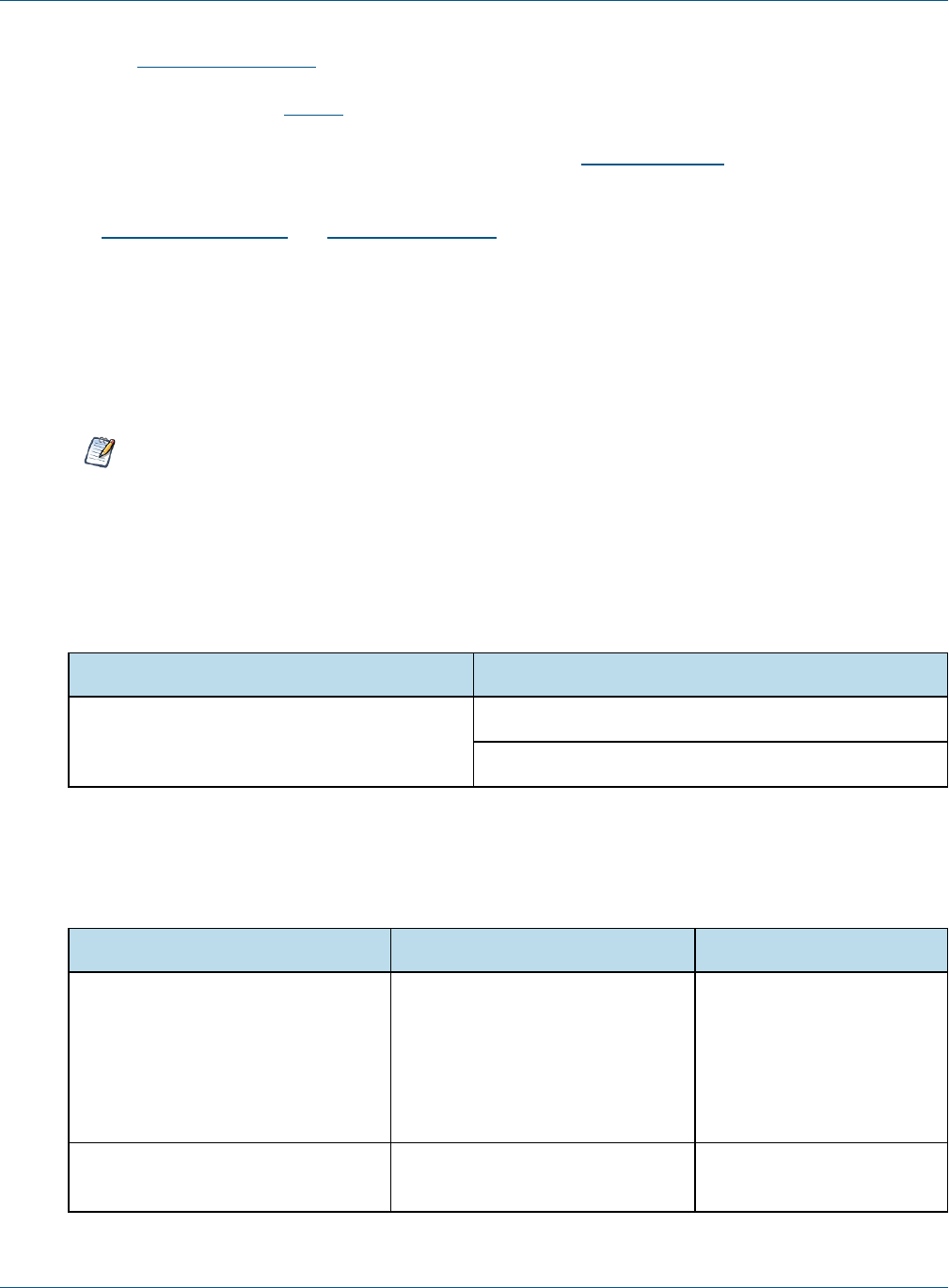
The following table lists the target configurations that can be built from the source:
Application Server Database
Tomcat, JBoss or GlassFish PostgreSQL
MySQL
1.2 JasperReports Server Source Code Archives
The following table lists the source code archive files for JasperReports Server:
File Description Documented In
TIB_js-jrs_cp_7.2.0_src.zip JasperReports Server source code Chapter 2, “Components
Required for Source Build,”
on page7
Chapter 3, “Building
JasperReports Server
Source Code,” on page9
jasperjpivot-5.1.0-src.zip JasperJPivot source code B.1, “Setting Java JVM
Options,” on page29
6 TIBCO Software Inc.

CHAPTER 2 COMPONENTS REQUIRED FOR SOURCE BUILD
The components and versions listed in this section are required to build and run JasperReports Server:
•Check Your Java JDK
•Check Your Maven Version
•Check Your Application Server
•Check Your Database Instance
•Check Your PhantomJS Version
2.1 Check Your Java JDK
You must compile the JasperReports Server source code under Java 1.8. To check the version of your JDK (Java
Development Kit), run the following command:
javac -version
To download the Java JDK, follow the instructions on the Java web site:
http://www.oracle.com/technetwork/java/javase/downloads/index.html.
The Oracle/Sun JDK is the certified Java platform for JasperReports Server. OpenJDK 1.8 is also supported.
2.2 Check Your Maven Version
We use Apache Maven 3.3.9 to compile, build, and package the JasperReports Server source code because of its
ability to manage third party dependencies via online repositories.
To download and install Maven go to: http://maven.apache.org/download.html#installation
To execute mvn from the command line, put the maven binary (mvn or mvn.exe) in your environment PATH. To
check your Maven version, run this command:
mvn -version
For information about Maven, see “Maven Troubleshooting” on page32.
TIBCO Software Inc. 7
TIBCO JasperReports Server Community Project Source Build Guide
2.3 Check Your Application Server
To run JasperReports Server, you need an application server on the same computer as your source code. We
support the following application servers:
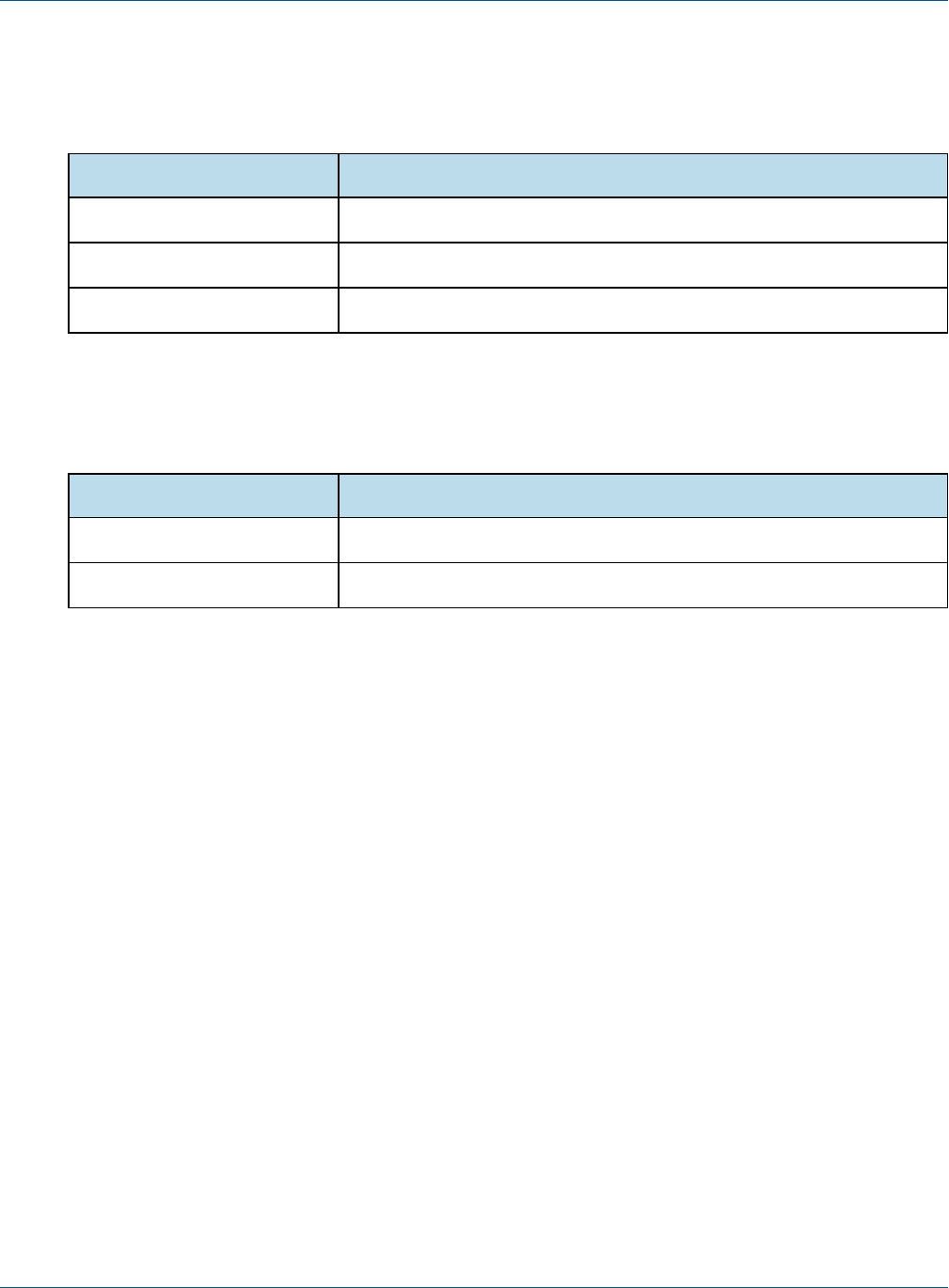
Application Server Comments
Apache Tomcat Source build can automatically deploy to this application server.
Glassfish Source build can automatically deploy to this application server.
JBoss Source build can automatically deploy to this application server.
2.4 Check Your Database Instance
To run JasperReports Server, you need a database instance. We support the following:
Database Comments
PostgreSQL Source build automatically creates the jasperserver database.
MySQL Source build automatically creates the jasperserver database.
2.5 Check Your PhantomJS Version
To build JasperReports Server, you need to install PhantomJS and set the property headless.browser in
default_master.properties. We recommend version 2.1.1 of PhantomJS. See the JasperReports Server Community
Project Administrator Guide for more information about PhantomJS.
8 TIBCO Software Inc.

CHAPTER 3 BUILDING JASPERREPORTS SERVER SOURCE CODE
This document describes how to build from a command line shell in Linux or Windows. It does not
address the process of building within an IDE (Integrated Development Environment) such as Eclipse or
IntelliJ.
3.1 Introduction to Buildomatic Source Build Scripts
The JasperReports Server source code comes with a set of configuration and build scripts based on Apache Ant
known as the buildomatic scripts. You'll find these scripts in the following directory:
<js-src>/jasperserver/buildomatic
The buildomatic scripts automate most aspects of configuring, building, and deploying the source code. Apache
Ant is bundled into the source code distribution to simplify the setup.
3.2 Downloading and Unpacking JasperReports Server Source Code
3.2.1 Downloading the Source Archive
Download the source code package zip for JasperReports Server from the Jaspersoft community site
(http://community.jaspersoft.com):
The download package is TIB_js-jrs_cp_7.2.0_src.zip
3.2.2 Unpacking the Source Archive
Unpack the TIB_js-jrs_cp_7.2.0_src.zip file to a directory location, such as C:\ or /home/<user>. The
resulting location is referred to as <js-src> in this document.
Windows: <js-src> example is C:\JasperReports-Server-cp-7.2.0-src
Linux: <js-src> example is /home/<user>/JasperReports-Server-cp-7.2.0-src
TIBCO Software Inc. 9
TIBCO JasperReports Server Community Project Source Build Guide
3.2.3 Source Code Package Structure
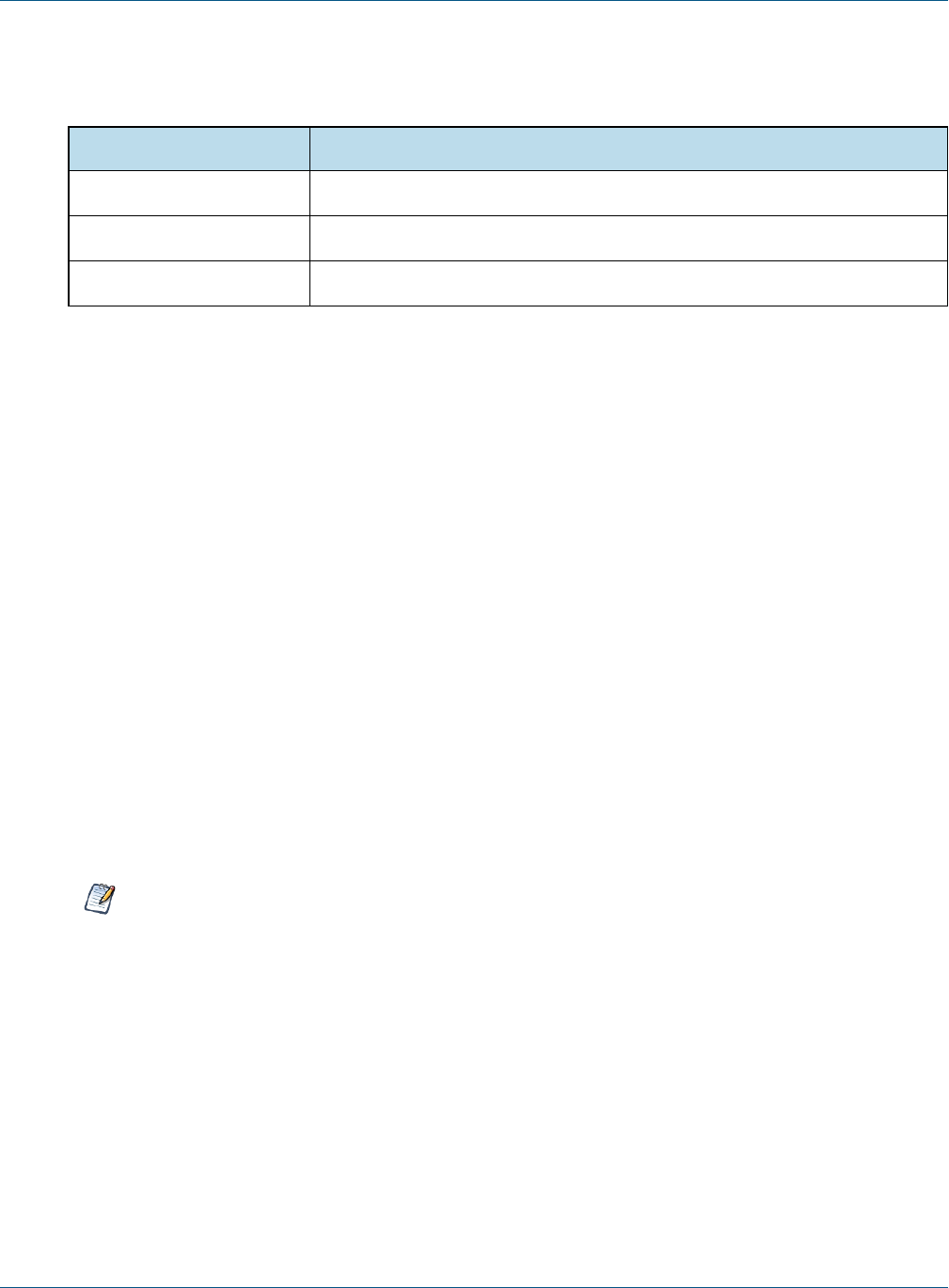
After you've unpacked the zip file, the folder directory has the following structure:
Directory or file Description
<js-src>/apache-ant Bundled version of Apache Ant build tool
<js-src>/jasperserver JasperReports Server open source code for core functionality
<js-src>/jasperserver-repo Dependent jar files (not readily available publicly)
3.3 Check Apache Ant
The Apache Ant tool is bundled (pre-integrated) into the source code distribution package so you don't need to
download or install Ant to run the buildomatic scripts. For example:
cd <js-src>/jasperserver/buildomatic
js-ant help or
./js-ant help (Linux)
If you don't use the bundled version of Apache Ant, we recommend version 1.9.4 or later. Versions earlier than
1.8.1 are not compatible.
3.4 Configuring the Buildomatic Properties
The buildomatic scripts are found at the following location:
<js-src>/jasperserver/buildomatic
Use the buildomatic scripts to build the source code and configure settings for a supported application server
and database. The file for configuring these settings is default_master.properties. The source distribution
includes a properties file for each type of database. You'll add your specific settings to this file and rename it to:
default_master.properties
When specifying paths with Apache Ant and Java in Windows, a single forward slash (/) normally works
the same as “escaped” double backlashes (\\).
3.4.1 PostgreSQL
1. Go to the buildomatic directory in the source distribution:
cd <js-src>/jasperserver/buildomatic
2. Copy the PostgreSQL specific file to the current directory and change its name to
default_master.properties as shown below:
Windows: copy sample_conf\postgresql_master.properties default_master.properties
Linux: cp sample_conf/postgresql_master.properties default_master.properties
10 TIBCO Software Inc.

Chapter 3 Building JasperReports Server Source Code
3. Edit the new default_master.properties file and set the following properties for your local environment:
Property Examples
appServerType appServerType=tomcat [jboss-eap-7, wildfly, glassfish, skipAppServerCheck]
appServerDir appServerDir = C:\\Program Files\\Apache Software Foundation\\Tomcat 9.0
appServerDir = /home/<user>/apache-tomcat-9.0
dbHost dbHost=localhost
dbUsername dbUsername=postgres
dbPassword dbPassword=postgres
maven maven = C:\\apache-maven-3.3.9\\bin\\mvn.cmd
maven = /home/<user>/apache-maven-3.3.9/bin/mvn
js-path js-path = C:\\JasperReports-Server-cp-7.2.0-src\\jasperserver
js-path = /home/<user>/JasperReports-Server-cp-7.2.0-src/jasperserver
js-pro-path js-pro-path = C:\\JasperReports-Server-cp-7.2.0-src\\jasperserver-pro
js-pro-path = /home/<user>/JasperReports-Server-cp-7.2.0-src/jasperserver-pro
repo-path repo-path = C:\\JasperReports-Server-cp-7.2.0\\jasperserver-repo
repo-path = /home/<user>/JasperReports-Server-cp-7.2.0-src/jasperserver-repo
headless.browser c:/phantomjs-2.1.1-windows/bin/phantomjs.exe
/opt/phantomjs/bin/phantomjs
3.4.2 MySQL
1. Go to the buildomatic directory in the source distribution:
cd <js-src>/jasperserver/buildomatic
2. Copy the MySQL specific file to the current directory and change its name to
default_master.properties:
Windows: copy sample_conf\mysql_master.properties default_master.properties
Linux: cp sample_conf/mysql_master.properties default_master.properties
3. Edit the new default_master.properties file and set the following properties to your local
environment:
Property Examples
appServerType appServerType=tomcat [jboss-eap-7, wildfly, glassfish, skipAppServerCheck]
TIBCO Software Inc. 11

TIBCO JasperReports Server Community Project Source Build Guide
Property Examples
appServerDir appServerDir = C:\\Program Files\\Apache Software Foundation\\Tomcat 9.0
appServerDir = /home/<user>/apache-tomcat-9.0
dbHost dbHost = localhost
dbUsername dbUsername = root
dbPassword dbPassword = password
maven maven = C:\\apache-maven-3.3.9\\bin\\mvn.cmd
maven = /home/<user>/apache-3.3.9/bin/mvn
js-path js-path = C:\\JasperReports-Server-cp-7.2.0-src\\jasperserver
js-path = /home/<user>/JasperReports-Server-cp-7.2.0-src/jasperserver
js-pro-path js-pro-path = C:\\JasperReports-Server-cp-7.2.0-src\\jasperserver-pro
js-pro-path = /home/<user>/JasperReports-Server-cp-7.2.0-src/jasperserver-pro
repo-path repo-path = C:\\JasperReports-Server-cp-7.2.0-src\\jasperserver-repo
repo-path = /home/<user>/JasperReports-Server-cp-7.2.0-src/jasperserver-repo
headless.browser c:/phantomjs-2.1.1-windows/bin/phantomjs.exe
/opt/phantomjs/bin/phantomjs
3.5 Build Source Code
Now that you've set up your default_master.properties file, you can build the source code.
To build JasperReports Server:
1. Set up the default_master.properties file for your environment (as described above).
2. Start the database server.
3. Stop the application server unless it’s GlassFish, which should be running.
4. Run the commands shown below:
After executing each Ant target in Table 3-1, look for the message BUILD SUCCESSFUL.
Commands Description
cd <js-src>/jasperserver/buildomatic
js-ant clean-config (Optional) Clears the buildomatic/build_
conf/default directory.
Table 3-1 Commands for Building JasperReports Server
12 TIBCO Software Inc.

Chapter 3 Building JasperReports Server Source Code
Commands Description
js-ant gen-config (Optional) Rebuilds the buildomatic/build_con-
f/default directory.
js-ant add-jdbc-driver (Optional) Used for loading the databases
js-ant build-ce Builds the community source code
js-ant create-load-js-db-ce (Optional)Creates and loads the jasperserver
database, imports core bootstrap data
js-ant deploy-webapp-ce (Optional)Deploys the jasperserver war file to the
application server
3.6 Set Java Options
JasperReports Server needs Java memory options that are larger than the standard defaults.
3.6.1 Set Increased JAVA_OPTS Settings
JasperReports Server needs greater heap settings for all functionality to operate. For testing your deployed
JasperServer you should set your JAVA_OPTS to the same default values described in the JasperReports Server
Community Project Installation Guide. The following shows the minimum recommended settings; you may
need to increase these according to your usage.
JVM Options on Linux and Mac OSX (64 bit)
Options for
all app
servers
export JAVA_OPTS="$JAVA_OPTS -Xms2048m -Xmx4096m -Xss2m"
JVM Options on Windows (64 bit)
Options for
all app
servers
set JAVA_OPTS=%JAVA_OPTS% -Xms2048m -Xmx4096m -Xss2m
You should add these settings to your application server startup script:
Apache Tomcat: <tomcat>/bin/setclasspath.sh (.bat for Windows)
JBoss: <jboss>/bin/standalone.conf (.bat for Windows)
For details on setting Java memory options, please see “Setting Java JVM Options” on page29.
TIBCO Software Inc. 13

TIBCO JasperReports Server Community Project Source Build Guide
3.7 Starting JasperReports Server
You can now start your application server or restart GlassFish. Your database should already be running.
3.8 Logging into JasperReports Server
You can now log into JasperReports Server through a web browser:
Enter the login URL with the default port number:
http://localhost:8080/jasperserver
Log into JasperReports Server as jasperadmin:
User ID: jasperadmin Password: jasperadmin
If you're unable to log in or have other problems, refer to “Troubleshooting” on page31, or the JasperReports
Server Community Project Installation Guide, which provides additional troubleshooting information.
3.9 JasperReports Server Log Files
If you encounter any startup or runtime errors you can check the application server log files. For Apache Tomcat
you'll find the log file here:
<tomcat>/logs/catalina.out
Also check the jasperserver.log file. You can increase the debug output level by editing the
log4j.properties file.
The JasperReports Server runtime log is here:
<tomcat>/webapps/jasperserver/WEB-INF/logs/jasperserver.log
The log4j.properties file is here:
<tomcat>/webapps/jasperserver/WEB-INF/log4j.properties
14 TIBCO Software Inc.

CHAPTER 4 CREATE AND LOAD SAMPLE DATA
The procedure for Chapter 3, “Building JasperReports Server Source Code,” on page9 loads core data
required to start the application, but it doesn't create sample data, such as sample reports to run and sample
databases. Follow the steps below to create and load sample data.
4.1 Load Sample Data
The buildomatic scripts can load sample resources and sample databases. Note: In the procedure below, your
jasperserver database will be deleted and re-created unless you choose ‘n’ for No when prompted.
Your default_master.properties should already be created.
1. Start your database server.
2. Stop your application server.
3. Run the commands shown below:
Commands Description
cd <js-src>/jasperserver/buildomatic
js-ant create-load-all-dbs-ce Creates and loads the jasperserver database
Imports core bootstrap resources
Creates and loads sample databases
Imports sample resources
(Choose ‘n’ when prompted if you do not want to recreate
your jasperserver database.)
4.2 Generate Your Own Sample Resources
This procedure generates the same resources imported and used by the released version of JasperReports Server.
Your jasperserver database will be deleted and re-created.
Your default_master.properties should have already been created.
TIBCO Software Inc. 15

TIBCO JasperReports Server Community Project Source Build Guide
4.2.1 Generating Sample Resources for MySQL and PostgreSQL Databases
1. Make sure that the sample data has been loaded.
2. Start your database server.
3. Stop your application server.
4. Run the commands shown below:
Commands Description
cd <js-src>/jasperserver/buildomatic
js-ant re-init-js-db-ce Drop, create, and initialize the jasperserver database.
js-ant run-production-data-ce Generate sample resources using the processing logic from
the production-test source code.
16 TIBCO Software Inc.

CHAPTER 5 ADDITIONAL BUILDOMATIC INFORMATION
The Ant-based buildomatic scripts contain support files for the setup and configuration of a number of databases
and application servers. This chapter gives the locations of many of these files.
5.1 Detailed Description of the deploy-webapp-ce Target
The deploy-webapp-ce target performs the following actions in your application server environment:
•Deletes any existing jasperserver WAR file.
•Copies the JDBC driver to the appropriate application server directory.
•Copies additional JDBC drivers to the application server to support data source creation in the UI
•Adds a data source definition to the appropriate application server directory.
•Deploys the newly built jasperserver WAR file.
•Deletes files within the application server work directory (to clear out compiled JSP files and other cached
files).
•On Tomcat, if present, deletes the old version of
<tomcat>/conf/Catalina/Localhost/jasperserver.xml.
5.2 Running Ant in Debug Mode
Ant can be run with a -v (verbose) or a -d (debug) option to help with troubleshooting, for example:
js-ant -v build-ce
5.2.1 Regenerate Your Buildomatic Property Settings
If you change your default_master.properties file, buildomatic will automatically clean and regenerate all
configuration settings. If you want to explicitly clean and regenerate your settings manually you can run the
following commands:
Commands Description
js-ant clean-config
js-ant gen-config
Clears the buildomatic/build_conf/default directory.
Rebuilds the buildomatic/build_conf/default directory.
TIBCO Software Inc. 17

TIBCO JasperReports Server Community Project Source Build Guide
Any time you modify the default_master.properties file, configuration settings are automatically re-
generated into the buildomatic/build_conf/default folder.
5.3 Using Your Own Apache Ant: Get ant-contrib.jar
If you prefer to use your own version of Apache Ant, get the file ant-contrib-1.0b3.jar. This JAR enables
conditional logic in Ant scripts.
1. Make sure you're using Apache Ant 1.9.4 or higher.
2. Copy the file ant-contrib-1.0b3.jar from the <js-src>/apache-ant/lib folder to your <ant-home>/lib folder:
From:
<js-src>/apache-ant/lib/ant-contrib.jar
or
<js-src>/jasperserver/buildomatic/install_resources/extra-jars/ant-contrib.jar
To:
<ant-home>/lib (General example)
C:\apache-ant-1.9.4\lib (Windows example)
/usr/share/java/apache-ant/lib (Linux example)
/usr/share/ant/lib (Mac example)
5.4 Generated Property Files
After you set your database and application server property values, you'll run buildomatic scripts to generate the
database and application server configuration files to run JasperReports Server. Generated property files are in
the following directory:
<js-src>/jasperserver/buildomatic/build_conf/default
Some of the key configuration files are:
js.jdbc.properties
maven_settings.xml - (This is the maven settings file used by the source build)
More generated property files are in the following directory:
<js-src>/jasperserver/buildomatic/build_conf/default/webapp
Some of the configuration files in this directory are:
META-INF/context.xml
WEB-INF/hibernate.properties
WEB-INF/js.quartz.properties
Running clean-config removes these generated files. Running gen-config or any other target, regenerates
these files.
18 TIBCO Software Inc.

Chapter 5 Additional Buildomatic Information
5.5 Existing and Generated Database SQL Files
Buildomatic files that support various databases are located in:
<js-src>/jasperserver/buildomatic/install_resources/sql/<db-type>
The source code build procedure creates the jasperserver repository database schema using these files:
js-ce-create.ddl
js-ce-drop.ddl
When you run the buildomatic target build-js-ddl-ce, these database files are freshly generated for your
specified database platform. The files are generated to the following location:
<js-src>/jasperserver/repository-hibernate/build-db/target/sql
Then the files are automatically copied into their buildomatic directory location:
<js-src>/jasperserver/buildomatic/install_resources/sql/<db-type>
These generated files also overwrite the ones already in the buildomatic directory location.
5.6 Generated WAR File Location and deploy-webapp-ce Target
The JasperReports Server source code build creates a jasperserver WAR file. The build assembles the WAR file
into the following location:
<js-src>/jasperserver/jasperserver-war/target
When the build-ce target is run, buildomatic assembles the jasperserver WAR file, and copies the file to this
location for use by subsequent buildomatic targets:
<js-src>/jasperserver/buildomatic/install_resources/war/jasperserver
Later, when you run the buildomatic target deploy-webapp-ce, the following actions take place, for example
on Tomcat:
Files: <js-src>/jasperserver/buildomatic/install_resources/war/jasperserver/*
Copied to: <tomcat>/webapps
File: <js-src>/jasperserver/buildomatic/build_conf/default/webapp/META-INF/context.xml
Copied to: <tomcat>/webapps/jasperserver/jasperserver/META-INF
Files: <js-src>/jasperserver/buildomatic/build_conf/default/webapp/WEB-INF/hibernate.properties
<js-src>/jasperserver/buildomatic/build_conf/default/webapp/WEB-INF/js.quartz.properties
Copied to: <tomcat>/webapps/jasperserver/WEB-INF
File: <js-src>/jasperserver/buildomatic/build_conf/db/postgresql/jdbc/postgresql-9.2-1002.jdbc4.jar
Copied to: <tomcat>/lib
Files: <js-src>/jasperserver/buildomatic/conf_source/db/app-srv-jdbc-drivers/*/jar
Copied to: <tomcat>/lib
TIBCO Software Inc. 19

TIBCO JasperReports Server Community Project Source Build Guide
5.7 Details on Database Load Build Targets
The buildomatic targets shown below are used in “Building JasperReports Server Source Code” on page9 to
create and populate the databases used with JasperReports Server. These targets consolidate and simplify the
handling of the jasperserver database and the optional sample databases:
•create-load-js-db-ce
•create-load-all-dbs-ce
5.7.1 create-load-js-db-ce
This buildomatic target is a consolidation of the following targets:
•drop-js-db (if necessary)
•create-js-db
•init-js-db-ce
•import-minimal-ce
Additional functionality determines whether the jasperserver database already exists. If so, a command line
prompt asks you if you want to delete and re-create the database.
5.7.2 create-load-all-dbs-ce
This buildomatic target is a consolidation of the following targets:
•drop-js-db (if necessary)
•create-js-db
•init-js-db-ce
•import-minimal-ce
•import-sample-data-ce
•(drop-foodmart-db, if necessary)
•create-foodmart-db
•load-foodmart-db
•(drop-sugarcrm-db, if necessary)
•create-sugarcrm-db
•load-sugarcrm-db
Additional functionality determines whether the jasperserver database already exists. If so, a command line
prompt asks you if you want to delete and re-create the database. The same logic applies for the sample
databases: foodmart and sugarcrm.
5.8 General Fresh Database Schema File
The consolidated database scripts do not regenerate the database schema file. Instead the existing default
database schema files are used. To regenerate the database schema files, run the following target:
js-ant build-js-ddl-ce
The files are generated to the following location:
<js-src>/jasperserver/repository-hibernate/build-db/target/sql
Then the files are automatically copied into their buildomatic directory location:
<js-src>/jasperserver/buildomatic/install_resources/sql/<db-type>
20 TIBCO Software Inc.

Chapter 5 Additional Buildomatic Information
5.9 Older Buildomatic Commands
This section shows an alternate, more manual approach for building source code in JasperReports Server.
We recommend using the buildomatic scripts as described in “Building JasperReports Server Source
Code” on page9. You'll have fewer commands to type.
To build JasperReports Server using older Buildomatic commands:
1. Edit the default_master.properties file for your particular environment.
2. Start the database server.
3. Stop the application server (unless it’s GlassFish, which should be running).
After you execute the first build target, the buildomatic scripts automatically configure the necessary
properties and store these settings in the following directory:
<js-src>/jasperserver/buildomatic/build_conf/default
4. Execute the following steps at the command line. After executing each Ant target, look for the message
BUILD SUCCESSFUL.
Commands Description
cd <js-src>/jasperserver/buildomatic
js-ant add-jdbc-driver
js-ant build-ce
Installs the JDBC driver to mvn local repository
Builds the Community Project source code
js-ant create-js-db
js-ant create-sugarcrm-db
js-ant load-sugarcrm-db
js-ant create-foodmart-db
js-ant load-foodmart-db
If the jasperserver database already exists, first run
js-ant drop-js-db
Creates sample data for integration-tests
Creates sample data for integration-tests
Can run for 10 minutes or more
js-ant build-js-ddl-ce
js-ant init-js-db-ce
js-ant run-production-data-ce
Creates the database schema files for your database
type
Loads the schema into database
Put core bootstrap and Sample data into the
jasperserver db
js-ant deploy-webapp-ce Deploys JasperReports Server to the application
server
5.10 Manual Creation of Databases
JasperReports Server runs with a repository database typically named jasperserver. The automated
buildomatic steps create the jasperserver database and sample databases. But you can also create your databases
manually.
TIBCO Software Inc. 21

TIBCO JasperReports Server Community Project Source Build Guide
5.10.1 Manually Creating Databases: PostgreSQL
You can manually execute the scripts buildomatic uses to create and populate databases. Here is an example for
PostgreSQL:
1. To create the jasperserver database, use a client tool to log into PostgreSQL:
cd <js-install>/buildomatic/install_resources/sql/postgresql
psql -U postgres -W
postgres=#create database jasperserver encoding=’utf8’;
postgres=#\c jasperserver;
postgres=#\i js-create.ddl
postgres=#\i quartz.ddl
postgres=#\q
2. To create the sample databases, run these commands:
cd <js-install>/buildomatic/install_resources/sql/postgresql
psql -U postgres -W
postgres=#create database sugarcrm encoding=’utf8’;
postgres=#create database foodmart encoding=’utf8’;
postgres=#\c sugarcrm;
postgres=#\i sugarcrm-postgresql.sql; (first make sure the file is unzipped)
postgres=#\c foodmart;
postgres=#\i foodmart-postqresql.sql; (first make sure the file is unzipped)
postgres=#\i supermart-update.sql;
postgres=#\q
5.10.2 Additional Databases
For information on manual setup of databases other than PostgreSQL, refer to the JasperReports Server
Community Project Installation Guide.
22 TIBCO Software Inc.

CHAPTER 6 JASPERSOFT INTERNAL DEVELOPERS AND ADVANCED
DEVELOPERS
This chapter is for Jaspersoft Internal Developers and for Advanced Developers who want to use some of the
additional options available through the buildomatic property settings.
6.1 Internal Developers and Advanced Developers
Tibco provides a Maven repository using Artifactory to hold all third party components required to build the
server's source code. It also acts as a proxy for the standard public Maven repositories such as repo1.maven.org.
This internal repository is convenient for internal Jaspersoft developers because the developer can point to one
location to get all dependencies resolved.
In default_master.properties, internal developers should comment out maven.build.type=repo and
repo-path=<path>:
# maven.build.type=repo
# repo-path=<path>
External developers (customers) who download the TIB_js-jrs_cp_7.2.0_src.zip package from
jaspersoft.com should set all the properties described in “Configuring the Buildomatic Properties” on page10
before building JasperReports Server.
Additional buildomatic property settings are available for advanced external developers. If you're an external
developer working within an enterprise or on a project that has an internal Maven repository server, you can use
the mirror value. The following property settings and values will enable a local Maven repository:
maven.build.type=mirror
mvn-mirror=<repo-url>
If you're an external developer with other build configurations to add, you can do this with the
maven.build.type=custom property setting. If you set this value, the following file will be used as the
template to set up the JasperReports Server build configuration:
<js-path>/buildomatic/conf_source/templates/maven_settings_custom.xml
You can edit this file to add whatever configurations you want.
TIBCO Software Inc. 23

TIBCO JasperReports Server Community Project Source Build Guide
When buildomatic auto-setup is complete, you can see the final maven settings file used for the JasperReports
Server here:
<js-path>/buildomatic/build_conf/default/maven_settings_custom.xml
6.2 Additional Properties in default_master.properties
You can use the properties in the table below for various customizations of the JasperReports Server build:
Property Setting Purpose
SKIP_TEST_ARG=skipTests Enable this property to skip unit test execution. This will speed the
source build.
VERBOSE_LOGGING=true Enable this property to increase the INFO logging from the Maven
package.
OFFLINE_ARG=-o Enable this property if you want to build in “offline” mode. To run in
offline mode you need to have successfully built JasperServer at least
once.
SKIP_EXPORT_FILES=true Enable this property to skip the copying of files that set up the
command line import-export configuration. This saves time on file
copying.
maven.build.type=repo Use this setting for the build type if you've downloaded the source
code zip package from the jaspersoft.com site, and you're building the
source code as a customer (external developer) would build it. You'll
also need to set the repo-path property. maven.build.type=repo
is the default value used in the sample <dbType>_master.properties
files.
maven.build.type=community Use this setting for the build type if you're building only the Community
source code. This setting supports Community members who have
checked out JasperReports Server source code from the Community
site:
code.jaspersoft.com/svn/repos/jasperserver
maven.build.type=mirror If you're an external developer who has a central Maven style
repository for your enterprise or project, you can use this setting to
specify the local central repository. If you set this property value, you
should also set the mvn-mirror property.
24 TIBCO Software Inc.

Chapter 6 Jaspersoft Internal Developers and Advanced Developers
Property Setting Purpose
maven.build.type=custom If you're an external developer whose build requires additional
configurations, you can use this property value to support them. In this
case, use the following template file:
<js-path>/buildomatic/conf_source/templates/
maven_settings_custom.xml.
You can manually edit this file to add more configurations. The file will
be processed by buildomatic and copied to its final location after
executing a buildomatic command:
buildomatic/build_conf/default/maven_settings_custom.xml
mvn-mirror=<repo-url> mvn-mirror=http://mvnrepo.jaspersoft.com:8081/artifactory/repo
The value shown is the default repo-url used by Jaspersoft internal
development.
repo-path=<path> Set a local path value for this property if you are using
maven.build.type=repo (this is the default configuration from the
source code zip download from jaspersoft.com).
TIBCO Software Inc. 25

TIBCO JasperReports Server Community Project Source Build Guide
26 TIBCO Software Inc.

APPENDIX A BUILDING JASPERJPIVOT SOURCE CODE
JasperJPivot is adapted from the JPivot open source project. It provides the web interface for Jaspersoft OLAP.
JasperJPivot also includes enhanced usability, navigation, configuration, and scalability.
Download the source code package:
On the Jaspersoft technical support website (login required).
Look for a file with the following name:
jasperjpivot-<ver>-src.zip
Build the source code package:
Unpack the downloaded source code package zip file.
Follow the instructions in the <unpacked-src>/Building-JasperJPivot-Source.pdf.
The process of building the JasperJPivot requires Apache Maven. For more information, see “Check Your
Maven Version” on page7.
TIBCO Software Inc. 27

TIBCO JasperReports Server Community Project Source Build Guide
28 TIBCO Software Inc.
APPENDIX B JAVA OPTIONS
B.1 Setting Java JVM Options
To run properly, JasperReports Server needs more Java memory than the default settings. But for development
work, the settings can be simpler than those recommended for production. For full information on recommended
JAVA_OPTS settings, see the JasperReports Server Community Project Installation Guide.
B.1.1 Tomcat and JBoss JVM Options
Here are some typical settings for JVM options that affect JasperReports Server. For space reasons, some of the
options are displayed on multiple lines; make sure you set all options. These are the minimum recommended
options; you may need to increase the JVM memory assignment according to your usage.
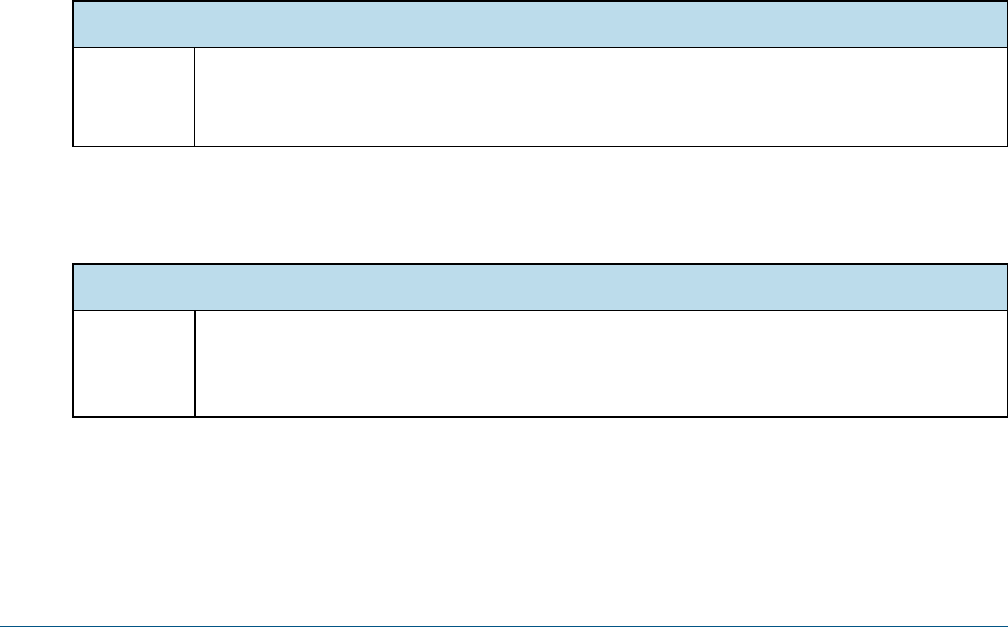
JVM Options on Windows
Options for
all app
servers
set JAVA_OPTS=%JAVA_OPTS% -Xms2048m -Xmx4096m
set JAVA_OPTS=%JAVA_OPTS% -Xss2m -XX:+UseConcMarkSweepGC
JasperReports Server doesn’t provide a virtual X frame buffer on Linux. If your Linux applications are graphical,
set the -Djava.awt.headless=true to prevent Java from trying to connect to an X-Server for image
processing.
JVM Options on Linux and Mac OSX
Options for
all app
servers
export JAVA_OPTS="$JAVA_OPTS -Xms2048m -Xmx4096m"
export JAVA_OPTS="$JAVA_OPTS -Xss2m"
export JAVA_OPTS="$JAVA_OPTS -XX:+UseConcMarkSweepGC"
TIBCO Software Inc. 29
TIBCO JasperReports Server Community Project Source Build Guide
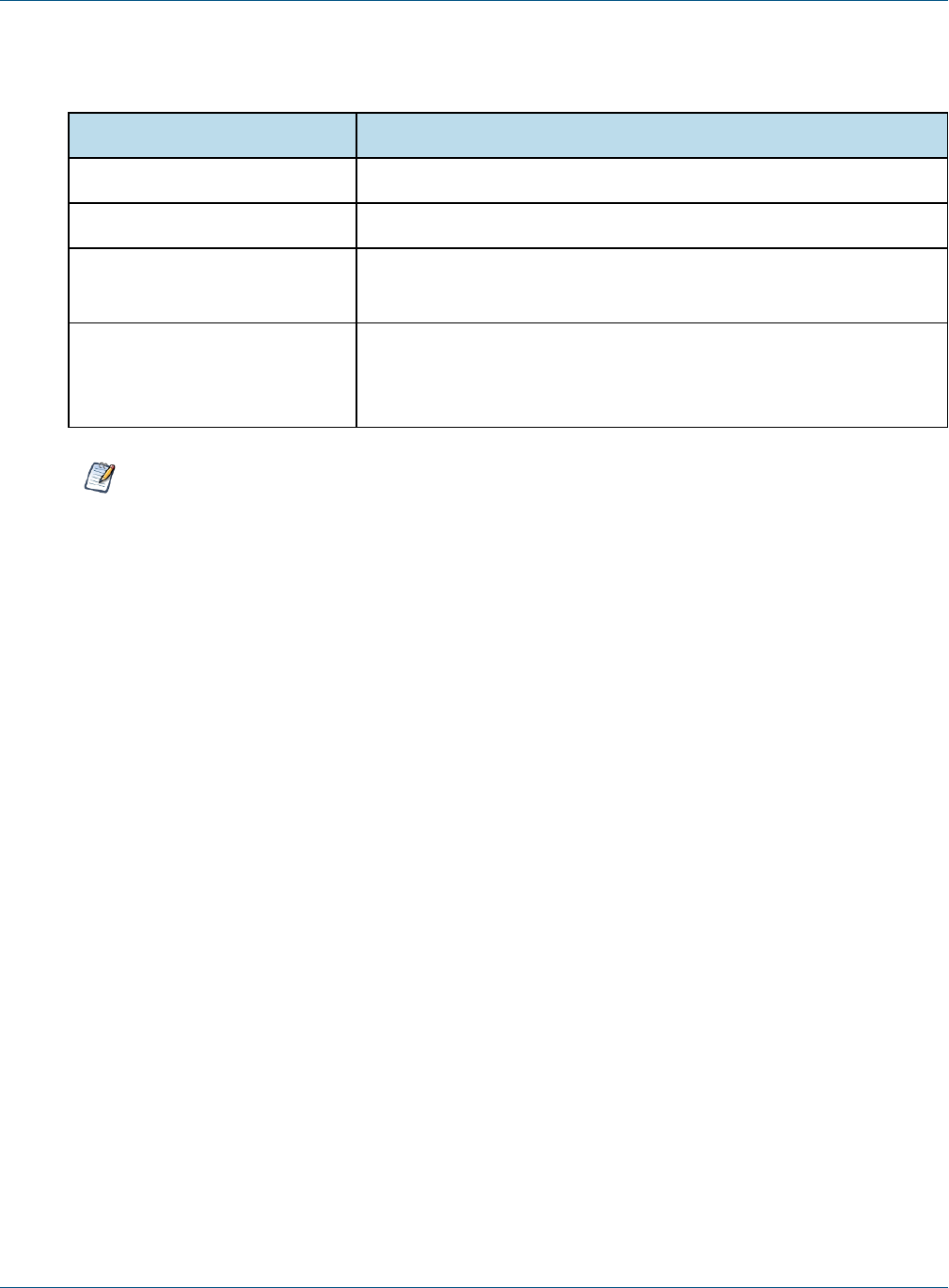
You can set JVM options in a number of ways. For example, you can add your JAVA_OPTS settings to these
files:
File Add JVM Options Below the Lines Shown Here:
<tomcat>\bin\setclasspath.bat set JAVA_ENDORSED_DIRS=%BASEDIR%\common\endorsed
<tomcat>/bin/setclasspath.sh JAVA_ENDORSED_DIRS="$BASEDIR"/common/endorsed
<tomcat>/bin/setenv.bat or
<tomcat>/bin/setenv.sh
JAVA_OPTS setting can go anywhere in this file.
<jboss>\bin\standalone.conf.bat
<jboss>/bin/standalone.conf
set JAVA_OPTS=%JAVA_OPTS% -Dprogram.name=%PROGNAME%
or
export JAVA_OPTS="$JAVA_OPTS -Dprogram.name=$PROGNAME"
For information on recommended JAVA_OPTS settings for all certified application servers, please refer to
the JasperReports Server Community Project Installation Guide.
30 TIBCO Software Inc.

APPENDIX C TROUBLESHOOTING
C.1 Build Troubleshooting
C.1.1 Name Undefined Error (Old Ant Version)
We recommend Apache Ant version 1.9.4 or higher.
If you're not using the version of Apache Ant included with the JasperReports Server source code package, you
could get the following error when running the buildomatic scripts:
BUILD FAILED
c:\js-builds\jasperserver\buildomatic\install.xml:6: Problem: failed to create task or type if
Cause: The name is undefined.
Action: Check the spelling.
Action: Check that any custom tasks/types have been declared.
Action: Check that any <presetdef>/<macrodef> declarations have taken place.
Solution:
The buildomatic scripts require Ant version 1.8.1 or higher, and the ant-contrib.jar file needs to be included in
your ant/lib directory. We recommend Ant version 1.9.4. If you're running with your own Ant version, you can
copy this jar to your <ant-home>/lib directory:
From:
<js-src>/apache-ant/lib/ant-contrib.jar
or
<js-src>/jasperserver/buildomatic/extra-jars/ant-contrib.jar
To:
<ant-home>/lib (General example)
C:\apache-ant-1.9.4\lib (Windows example)
/usr/share/java/apache-ant/lib (Linux example)
/usr/share/ant/lib (Mac example)
TIBCO Software Inc. 31

TIBCO JasperReports Server Community Project Source Build Guide
C.2 Database Troubleshooting
The most common errors encountered when building JasperReports Server involve the database connection. For
information about database connection problems, see the Troubleshooting Appendix of the JasperReports
Server Community Project Installation Guide.
C.3 Maven Troubleshooting
C.3.1 Maven Error on Linux or Mac
If Maven is installed on Linux via rpm, apt-get, or yum (or on Mac), the Maven binary and the Maven libraries
are probably in separate locations. This can potentially cause a problem with the source build.
C.3.1.1 /usr/boot Does Not Exist Error
When building under Linux or Mac, you may get an error similar to the following:
BUILD FAILED
/home/devuser/js-builds/jasperserver/buildomatic/bin/dev.xml:91:
/usr/boot does not exist
The Buildomatic scripts attempt to find the MAVEN_HOME setting and can be unsuccessful when the maven
binary is installed in the /usr/bin/mvn location. The workaround is to update your
default_master.properties file:
cd <js-src>/jasperserver/buildomatic
edit default_master.properties
Uncomment the maven.home line so that it looks like this:
maven.home = /usr/share/maven2 (Linux)
For Mac, the location of the Maven library files is typically slightly different:
maven.home = /usr/share/maven (Mac)
C.3.2 Clear JasperReports Server Artifacts in Maven Local Repository
If you add new code to an existing source build environment, such as a bug fix source patch update, you can
clear the JasperReports Server artifacts in your Maven local repository to ensure that the newly built artifacts
contain the necessary new content. Maven updates the artifacts automatically, but if you have trouble building
or pulling in the modified code, you can try deleting these artifact trees.
To clear existing JasperReports Server artifacts:
1. Go to the repository directory:
cd <home-dir-path>/.m2/repository
2. Remove the old versions by deleting the following directories and their contents:
com/jaspersoft: Community Project artifact tree
jaspersoft: Commercial version artifact tree
32 TIBCO Software Inc.

Appendix C Troubleshooting
C.3.3 Clear Entire Local Repository
If you want to completely rebuild everything, remove all of the cached jars in your Maven local repository. To
do this you can delete (or rename) the entire local repository.
Then when you build JasperServer, all dependencies are re-downloaded.
cd <home-dir-path>/.m2
rm -rf repository
C.3.4 Maven Warnings
Maven generates verbose warnings during the artifact validation process. For example, the following warning
was generated, even though the required JAR file was downloaded successfully:
[WARNING] Unable to get resource from repository jasperServer (file://C:/svn/js-buildlds/jasperserver-
repo
Downloading: http://repo1.maven.org/maven2/commons-logging/commons-logging/1.0/commons-logging-1.0.pom
163b downloaded
C.3.5 Old Maven Binary
In general, it's best to use the most current stable version of the Maven tool. We recommend Maven version
3.0.4.
C.4 Other Build Troubleshooting
C.4.1 Error When Building Database Scripts
When compiling in the jasperserver-repository-hibernate/build-db directory, you might see an error containing
the following message:
[ERROR] BUILD ERROR
[INFO] ------------------------------------------------------------------------
[INFO] Error executing ant tasks
Embedded error: Source file does not exist!
The most likely problem is that your .m2/settings.xml file doesn’t point to the correct source location, and the
build step didn't find the Quartz scripts. The settings.xml file should contain the path to the quartz script
corresponding to your database, for example:
<js.quartz.script>/home/<user>/<js-src>/jasperserver/scripts/quartz/tables_<database>.sql</js.quartz.script>
If you use the buildomatic scripts you shouldn't get this kind of error.
TIBCO Software Inc. 33

TIBCO JasperReports Server Community Project Source Build Guide
34 TIBCO Software Inc.
