JasperReports Server Security Guide Jasper Reports
User Manual:
Open the PDF directly: View PDF  .
.
Page Count: 88
- Chapter 1 Introduction to JasperReports® Server
- Chapter 2 Overview of JasperReports Server Security
- Chapter 3 Application Security
- 3.1 Encrypting Passwords in Configuration Files
- 3.2 Configuring CSRF Protection
- 3.3 Configuring XSS Protection
- 3.4 Protecting Against SQL Injection
- 3.5 Further Security Configuration
- 3.6 Protecting Against XML External Entity Attacks
- 3.7 Restricting File Uploads
- 3.8 Restricting Groovy Access
- 3.9 Hiding Stack Trace Messages
- 3.10 Defining a Cross-Domain Policy for Flash
- 3.11 Enabling SSL in Tomcat
- 3.12 Disabling Unused HTTP Verbs
- 3.13 Configuring HTTP Header Options
- 3.14 Setting the Secure Flag on Cookies
- 3.15 Setting httpOnly for Cookies
- 3.16 Protection Domain Infrastructure in Tomcat
- 3.17 Encrypting Passwords in URLs
- Chapter 4 User Security
- Chapter 5 Securing Data in a Domain
- Glossary
- Index

TIBCO JasperReports® Server
Security Guide
Software Release 7.2

Important Information
SOME TIBCO SOFTWARE EMBEDS OR BUNDLES OTHER TIBCO SOFTWARE. USE OF SUCH EMBEDDED OR BUNDLED TIBCO
SOFTWARE IS SOLELY TO ENABLE THE FUNCTIONALITY (OR PROVIDE LIMITED ADD-ON FUNCTIONALITY) OF THE LICENSED
TIBCO SOFTWARE. THE EMBEDDED OR BUNDLED SOFTWARE IS NOT LICENSED TO BE USED OR ACCESSED BY ANY OTHER TIBCO
SOFTWARE OR FOR ANY OTHER PURPOSE.
USE OF TIBCO SOFTWARE AND THIS DOCUMENT IS SUBJECT TO THE TERMS AND CONDITIONS OF A LICENSE AGREEMENT
FOUND IN EITHER A SEPARATELY EXECUTED SOFTWARE LICENSE AGREEMENT, OR, IF THERE IS NO SUCH SEPARATE
AGREEMENT, THE CLICKWRAP END USER LICENSE AGREEMENT WHICH IS DISPLAYED DURING DOWNLOAD OR INSTALLATION OF
THE SOFTWARE (AND WHICH IS DUPLICATED IN THE LICENSE FILE) OR IF THERE IS NO SUCH SOFTWARE LICENSE AGREEMENT
OR CLICKWRAP END USER LICENSE AGREEMENT, THE LICENSE(S) LOCATED IN THE “LICENSE” FILE(S) OF THE SOFTWARE. USE OF
THIS DOCUMENT IS SUBJECT TO THOSE TERMS AND CONDITIONS, AND YOUR USE HEREOF SHALL CONSTITUTE ACCEPTANCE OF
AND AN AGREEMENT TO BE BOUND BY THE SAME.
ANY SOFTWARE ITEM IDENTIFIED AS THIRD PARTY LIBRARY IS AVAILABLE UNDER SEPARATE SOFTWARE LICENSE TERMS AND
IS NOT PART OF A TIBCO PRODUCT. AS SUCH, THESE SOFTWARE ITEMS ARE NOT COVERED BY THE TERMS OF YOUR
AGREEMENT WITH TIBCO, INCLUDING ANY TERMS CONCERNING SUPPORT, MAINTENANCE, WARRANTIES, AND INDEMNITIES.
DOWNLOAD AND USE OF THESE ITEMS IS SOLELY AT YOUR OWN DISCRETION AND SUBJECT TO THE LICENSE TERMS
APPLICABLE TO THEM. BY PROCEEDING TO DOWNLOAD, INSTALL OR USE ANY OF THESE ITEMS, YOU ACKNOWLEDGE THE
FOREGOING DISTINCTIONS BETWEEN THESE ITEMS AND TIBCO PRODUCTS.
This document is subject to U.S. and international copyright laws and treaties. No part of this document may be reproduced in any form without the
written authorization of TIBCO Software Inc.
TIBCO, the TIBCO logo, Jaspersoft, JasperReports, and Visualize.js are registered trademarks of TIBCO Software Inc. in the United States and/or other
countries.
Java and all Java based trademarks and logos are trademarks or registered trademarks of Oracle and/or its affiliates.
All other product and company names and marks mentioned in this document are the property of their respective owners and are mentioned for
identification purposes only.
THIS DOCUMENT IS PROVIDED “AS IS” WITHOUT WARRANTY OF ANY KIND, EITHER EXPRESS OR IMPLIED, INCLUDING, BUT NOT
LIMITED TO, THE IMPLIED WARRANTIES OF MERCHANTABILITY, FITNESS FOR A PARTICULAR PURPOSE, OR NON-INFRINGEMENT.
THIS DOCUMENT COULD INCLUDE TECHNICAL INACCURACIES OR TYPOGRAPHICAL ERRORS. CHANGES ARE PERIODICALLY
ADDED TO THE INFORMATION HEREIN; THESE CHANGES WILL BE INCORPORATED IN NEW EDITIONS OF THIS DOCUMENT. TIBCO
SOFTWARE INC. MAY MAKE IMPROVEMENTS AND/OR CHANGES IN THE PRODUCT(S) AND/OR THE PROGRAM(S) DESCRIBED IN
THIS DOCUMENT AT ANY TIME.
THE CONTENTS OF THIS DOCUMENT MAY BE MODIFIED AND/OR QUALIFIED, DIRECTLY OR INDIRECTLY, BY OTHER
DOCUMENTATION WHICH ACCOMPANIES THIS SOFTWARE, INCLUDING BUT NOT LIMITED TO ANY RELEASE NOTES AND "READ
ME" FILES.
This and other products of TIBCO Software Inc. may be covered by registered patents. Please refer to TIBCO's Virtual Patent Marking document
(https://www.tibco.com/patents) for details.
Copyright © 2005-2019. TIBCO Software Inc. All Rights Reserved.
Version 0619-JSP72-07 of the TIBCO JasperReports Server Security Guide

TABLE OF CONTENTS
Chapter 1 Introduction to JasperReports® Server 7
Chapter 2 Overview of JasperReports Server Security 9
2.1 Authentication 9
2.2 Authorization Overview 10
Chapter 3 Application Security 13
3.1 Encrypting Passwords in Configuration Files 14
3.1.1 Encrypting Configuration Passwords on Tomcat 14
3.1.2 Encrypting Configuration Passwords on Enterprise Servers 15
3.1.3 Encrypting Additional Properties in default_master.properties 16
3.1.4 Password Encryption for External Authentication 17
3.1.5 Encryption Options 19
3.2 Configuring CSRF Protection 20
3.2.1 Setting the Cross-Domain Whitelist 21
3.2.2 Sending REST Requests from a Browser 23
3.2.3 CSRF Browser Compatibility 23
3.3 Configuring XSS Protection 23
3.3.1 Configuring the Tag Whitelist 25
3.3.2 Configuring the Attribute Map 25
3.4 Protecting Against SQL Injection 26
3.4.1 Customizing the Error Message 26
3.4.2 Understanding Query Validation 27
3.4.3 Customizing Query Validation 28
3.4.4 Performance Issues 29
3.5 Further Security Configuration 29
3.6 Protecting Against XML External Entity Attacks 30
3.7 Restricting File Uploads 30
3.8 Restricting Groovy Access 32
3.9 Hiding Stack Trace Messages 33
3.10 Defining a Cross-Domain Policy for Flash 35
3.11 Enabling SSL in Tomcat 36
3.11.1 Setting Up an SSL Certificate 36
3.11.2 Enabling SSL in the Web Server 37
TIBCO Software Inc. 3

TIBCO JasperReports Server Security Guide
3.11.3 Configuring JasperReports Server to Use Only SSL 38
3.12 Disabling Unused HTTP Verbs 38
3.13 Configuring HTTP Header Options 39
3.14 Setting the Secure Flag on Cookies 39
3.15 Setting httpOnly for Cookies 40
3.16 Protection Domain Infrastructure in Tomcat 40
3.16.1 Enabling the JVM Security Manager 41
3.16.2 Restoring Disallowed Permissions 42
3.17 Encrypting Passwords in URLs 42
Chapter 4 User Security 45
4.1 Configuring the User Session Timeout 45
4.2 Configuring User Password Options 46
4.2.1 Configuring Password Memory 46
4.2.2 Enabling Password Expiration 46
4.2.3 Allowing Users to Change their Passwords 47
4.2.4 Enforcing Password Patterns 47
4.3 Encrypting User Passwords 48
4.3.1 Dropping and Recreating the Database in PostgreSQL 50
4.3.2 Dropping and Recreating the Database in MySQL 50
4.3.3 Dropping and Recreating the Database in Oracle 51
4.3.4 Dropping and Recreating in the Database in Microsoft SQL Server 51
4.4 Encrypting User Session Login 51
4.4.1 Dynamic Key Encryption 53
4.4.2 Static Key Encryption 53
Chapter 5 Securing Data in a Domain 55
5.1 Business Case 56
5.2 Process Overview 56
5.3 Sales Domain 57
5.4 Roles, Users, and Attributes 58
5.4.1 Roles 58
5.4.2 Users 59
5.4.3 User Attributes 59
5.5 Setting Up Logging and Testing 60
5.5.1 Enabling Logging 60
5.5.2 Creating a Test Report 61
5.6 Creating a Domain Security File 61
5.6.1 Access Grant Syntax 62
5.6.2 Row-level Security 63
5.6.3 Column-level Security 65
5.6.4 CZS’s Item Group Access Grants for Sales Data 65
5.6.5 Uploading the Security File 66
5.7 Testing and Results 66
5.8 Updating your Security File 69
5.9 Domain and Security Recommendations 70
4 TIBCO Software Inc.


TIBCO JasperReports Server Security Guide
6 TIBCO Software Inc.

CHAPTER 1 INTRODUCTION TO JASPERREPORTS®SERVER
TIBCO JasperReports® Server builds on TIBCOJasperReports® Library as a comprehensive family of Business
Intelligence (BI) products, providing robust static and interactive reporting, report server, and data analysis
capabilities. These capabilities are available as either stand-alone products, or as part of an integrated end-to-end
BI suite utilizing common metadata and provide shared services, such as security, a repository, and scheduling.
The server exposes comprehensive public interfaces enabling seamless integration with other applications and
the capability to easily add custom functionality.
This section describes functionality that can be restricted by the software license for JasperReports
Server. If you don’t see some of the options described in this section, your license may prohibit you from
using them. To find out what you're licensed to use, or to upgrade your license, contact Jaspersoft.
The heart of the TIBCO Jaspersoft® BI Suite is the server, which provides the ability to:
•Easily create new reports based on views designed in an intuitive, web-based, drag and drop Ad Hoc
Editor.
•Efficiently and securely manage many reports.
•Interact with reports, including sorting, changing formatting, entering parameters, and drilling on data.
•Schedule reports for distribution through email and storage in the repository.
•Arrange reports and web content to create appealing, data-rich Jaspersoft Dashboards that quickly convey
business trends.
For users interested in multi-dimensional modeling, we offer Jaspersoft® OLAP, which runs as part of the server.
While the Ad Hoc Editor lets users create simple reports, more complex reports can be created outside of the
server. You can either use Jaspersoft® Studio or manually write JRXML code to create a report that can be run
in the server. We recommend that you use Jaspersoft Studio unless you have a thorough understanding of the
JasperReports file structure.
You can use the following sources of information to learn about JasperReports Server:
•Our core documentation describes how to install, administer, and use JasperReports Server and Jaspersoft
Studio. Core documentation is available as PDFs in the doc subdirectory of your JasperReports Server
installation. You can also access PDF and HTML versions of these guides online from the Documentation
section of the Jaspersoft Community website.
•Our Ultimate Guides document advanced features and configuration. They also include best practice
recommendations and numerous examples. You can access PDF and HTML versions of these guides online
from the Documentation section of the Jaspersoft Community website.
TIBCO Software Inc. 7

TIBCO JasperReports Server Security Guide
•Our Online Learning Portal lets you learn at your own pace, and covers topics for developers, system
administrators, business users, and data integration users. The Portal is available online from the Professional
Services section of our website.
•Our free samples, which are installed with JasperReports Library, Jaspersoft Studio, and JasperReports
Server, are available and documented online. Please visit our GitHub repository.
•If you have a subscription to our professional support offerings, please contact our Technical Support team
when you have questions or run into difficulties. They're available on the web at https://support.tibco.com
and through email at js-support@tibco.com.
JasperReports Server is a component of both a community project and commercial offerings. Each integrates the
standard features such as security, scheduling, a web services interface, and much more for running and sharing
reports. Commercial editions provide additional features, including Ad Hoc views and reports, advanced charts,
dashboards, Domains, auditing, and a multi-organization architecture for hosting large BI deployments.
8 TIBCO Software Inc.

Chapter 2 Overview of JasperReports Server Security
CHAPTER 2 OVERVIEW OF JASPERREPORTS SERVER SECURITY
JasperReports Server ensures that people can access only the data they're allowed to see. The settings that define
organizations, users, roles, and repository resources work together to provide complete access control that
includes:
•Authentication – Restricts access to identified users and protects that access with passwords. Defines roles
for grouping users and assigning permissions.
•Authorization – Controls access to repository objects, pages, and menus based on users and roles.
•Data level security (commercial version only) – Defines row and column level permissions to access your
data. Row and column level permissions can be defined and enforced in Domains.
Administrators must keep security in mind at all times when managing organizations, user, roles, and resources,
because the security settings behind each of these rely on the others.
The bundled installer is not meant for use in either production environments or security testing; it's only intended for
evaluation purposes. The application server provided in that package has been configured with minimal security.
We recommend that production environments use the WAR package deployed to an application server configured
to your security standards.
This guide focuses on security concerns specific to JasperReports Server. However, you should consider other
security precautions in your environment. For example, an end-user can potentially exploit JasperReports Server's
Test Connection option when scheduling reports to an FTP server. If this is a concern, you can secure the port (by
default, port 21) at the operating system level.
This chapter contains the following sections:
•Authentication
•Authorization Overview
2.1 Authentication
The first part of security is to define user accounts and secure them with passwords to give each user an identity
within JasperReports Server. The server stores user definitions, including encrypted passwords, in a private
database. Administrators create, modify, and delete user accounts through the administrator pages, as described
in the JasperReports Server Administrator Guide.
JasperReports Server also implements roles for creating groups or classes of users with similar permissions. A
user can belong to any number of roles and have the privileges of each The server stores role definition in its
private database, and administrators create, modify, and delete roles through the administrator pages, as
described in the JasperReports Server Administrator Guide.
TIBCO Software Inc. 9

TIBCO JasperReports Server Security Guide
JasperReports Server relies on the open source Spring security framework; it has many configurable options for:
•External authentication services such as LDAP (used by Microsoft Active Directory and Novell eDirectory)
•Single sign-on using JA-SIG's Central Authentication Service (CAS)
•Java Authentication and Authorization Service (JAAS)
•Container security (Tomcat, Jetty)
•SiteMinder
•Anonymous user access (disabled by default)
JasperReports Server also supports these encryption and authentication standards:
•HTTPS, including requiring HTTPS
•HTTP Basic
•HTTP Digest
•X509
The Spring framework is readily extensible to integrate with custom and commercial authentication services and
transports.
Authentication occurs by default through the web user interface, forcing login, and/or through HTTP Basic
authentication for web services, such as Jaspersoft Studio and for XML/A traffic. The server can automatically
synchronize with an external authentication service. External users don’t need to be created manually in the
server first. Both users and roles are created automatically in the server from their definitions in an external
authentication service. For an overview of the authentication system and details about external authentication,
see the JasperReports Server Authentication Cookbook.
2.2 Authorization Overview
With a user’s identity and roles established, JasperReports Server controls the user’s access in these ways:
Menu options and
pages
The menus appear in JasperReports Server UI depending on the user’s roles. For
example, only users with the administrator role can see the Manage menu and
access the administrator pages. By modifying the server’s configuration, you can
modify access to menus, menu items, and individual pages. Refer to the
JasperReports Server Source Build Guide and JasperReports Server Ultimate
Guide for more information.
Organization scope Users belong to organizations and are restricted to resources within their
organizations. Organizations have their own administrators who each see only the
users, roles, and resources of their own organization. When JasperReports Server
is configured with multiple organizations, those organizations are effectively
isolated from each other, although the system admin can share resources through
the Public folder. For more information, see the JasperReports Server Administrator
Guide.
10 TIBCO Software Inc.

Chapter 2 Overview of JasperReports Server Security
Resource permissions Administrators can define access permissions on every folder and resource in the
repository. You can define permissions for every role and every user, or leave them
undefined to be inherited from the parent folder. For example, user may have read-
write access to a folder where they create reports, but the administrator can also
create shared reports in the same folder that are set to read-only. The possible
permissions are: no access, execute only, read-only, read-delete, read-write-delete,
and administer (see "Repository Administration"in the JasperReports Server
Administrator Guide).
Permissions are enforced when accessing any resource whether directly through
the repository interface, indirectly when called from a report, or programmatically
through the web services. A user's access to resources is limited by the permissions
defined in the user's roles.
Administrator privileges JasperReports Server distinguishes between reading or writing a resource in the
repository and viewing or editing the internal definition of a resource. For security
purposes, granting a user read or write permission on a resource does not allow
viewing or editing the resource definition. For example, users need execute or read
permission on a data source to run reports that use it, but they cannot view the data
source’s definition, which includes a database password. Also, only administrators
can interact with theme folders to upload, download, and activate CSS files that
control the UI's appearance.
Data-level security Data-level security determines the data that can be retrieved and viewed in a report,
based on the username and roles of the user running the report. For example, a
management report could allow any user to see the management hierarchy,
managers would see the salary information for their direct employees, and only
human resource managers would see all salary values.
Data-level security in Domains is explained in the JasperReports Server User
Guide. Data-level security through OLAP views is covered in the Jaspersoft OLAP
User Guide.
Note: This type of security is available only in the commercial edition of
JasperReports Server.
User attributes User attributes are name-value pairs associated with a user, organization, or server.
User attributes provide additional information about the user and can also be used
to restrict a user's access to data through Domain security files and OLAP schemas.
For information on defining user attributes, see "Editing User Attributes" in the
JasperReports Server Administrator Guide.
User, organization and server attributes can be used to customize the definition of a
data source or as parameters of a report. See "Attributes in Data Source Definitions"
and "Attribute-Based Parameters for Queries and Reports" in the JasperReports
Server Administrator Guide
TIBCO Software Inc. 11

TIBCO JasperReports Server Security Guide
12 TIBCO Software Inc.

CHAPTER 3 APPLICATION SECURITY
This chapter describes the configuration settings that protect JasperReports Server and its users from
unauthorized access. The configuration properties appear in two locations:
•Some properties must be configured during the installation and deployment phase, before users access the
server. These settings are configured through files used by the installation scripts. These settings are
available only when performing a WAR file installation.
•Properties you can configure after installation are located in files in various folders. Configuration file paths
are relative to the <js-install> directory, which is the root of your JasperReports Server installation. To
change the configuration, edit these files then restart the server.
Because the locations of files described in this chapter vary with your application server, the paths specified in
this chapter are relative to the deployed WAR file for the application. For example, the applicationContext.xml
file is shown as residing in the WEB-INF folder. If you use the Tomcat application server bundled with the
installer, the default path to this location is:
C:\Program Files\jasperreports-server-7.2\apache-tomcat\webapps\jasperserver-pro\WEB-INF
Use caution when editing the properties described in this chapter. Inadvertent changes may cause
unexpected errors throughout JasperReports Server that may be difficult to troubleshoot. Before changing
any files, back them up to a location outside of your JasperReports Server installation.
Do not modify settings not described in the documentation. Even though some settings may appear
straightforward, values other than the default may not work properly and may cause errors.
This chapter contains the following sections:
•Encrypting Passwords in Configuration Files
•Configuring CSRF Protection
•Configuring XSS Protection
•Protecting Against SQL Injection
•Protecting Against XML External Entity Attacks
•Restricting File Uploads
•Restricting Groovy Access
•Hiding Stack Trace Messages
•Defining a Cross-Domain Policy for Flash
•Enabling SSL in Tomcat
•Disabling Unused HTTP Verbs
•Configuring HTTP Header Options
•Setting the Secure Flag on Cookies
TIBCO Software Inc. 13

TIBCO JasperReports Server Security Guide
•Setting httpOnly for Cookies
•Protection Domain Infrastructure in Tomcat
•Encrypting Passwords in URLs
3.1 Encrypting Passwords in Configuration Files
In JasperReports Server version 5.5 or later, administrators can obfuscate passwords that appear in the
configuration files. This satisfies security audit requirements and prevents the passwords from being seen by
unauthorized individuals. Typically, the following are encrypted:
•The password to JasperReports Server's internal database (jasperserver).
•The passwords to the sample databases (foodmart and sugarcrm).
•On Tomcat, passwords in JNDI resource definitions.
You can change the configuration to also encrypt:
•The password for the mail server used by the scheduler (quartz.mail.sender.password)
•The password for LDAP external authentication.
Passwords in configuration files are encrypted during JasperReports Server installation. If the installation
deploys to the Tomcat application server, the database password is also automatically encrypted in the JNDI
configuration (in the file context.xml).
Full password security cannot be guaranteed from within JasperReports Server. A user with sufficient
privileges and knowledge of JasperReports Server can gain access to the encryption keys and the
configuration passwords. While you could require a password on every server restart, this is impractical
for most users. The only practical way to guarantee password security is through backup and restriction
of access to the keystore property file.
3.1.1 Encrypting Configuration Passwords on Tomcat
To encrypt passwords in a Tomcat installation, modify the installation procedure:
1. Depending on the database you use, copy the installation configuration file as usual:
from:<js-install>/buildomatic/sample_conf/<database>_master.properties
to:<js-install>/buildomatic/default_master.properties
2. Edit the default_master.properties file:
•Enter values specific to your installation.
•Enter your passwords in plain text.
•Turn on configuration file encryption by uncommenting the encrypt=true property. You don't have
to uncomment any other encryption properties because they all have the default values shown.
•Unless you're using Oracle, uncomment propsToEncrypt and set it to dbPassword,sysPassword.
•Optionally, specify additional properties to encrypt as described in 3.1.3, “Encrypting Additional
Properties in default_master.properties,” on page16.
•Optionally, change the settings for configuration file encryption as described in 3.1.5, “Encryption
Options,” on page19.
3. Run the buildomatic installation script (js-install) and all other installation steps according to the
JasperReports Server Installation Guide. This will have the following effects:
14 TIBCO Software Inc.

Chapter 3 Application Security
a. The plain text passwords in default_master.properties are overwritten with their encrypted equivalents.
There is no warning when you run js-install with encrypt=true.
b. The encrypted passwords are propagated to all configuration files.
c. The installation proceeds and copies files to their final locations.
4. After installation, passwords are encrypted in the following locations:
•In all server configuration files in .../WEB-INF/applicationContext*.xml.
•In JNDI definitions in .../META-INF/context.xml.
•In the default_master.properties files that remain after installation.
If you get an error like the following when restarting the server:
javax.naming.NamingException: KeystoreManager.init was never called or there are errors instan-
tiating an instance
you may need to add the following to your Tomcat service start properties:
-Duser.home=c:\Users\<TomcatUser>
3.1.2 Encrypting Configuration Passwords on Enterprise Servers
Most enterprise servers, like JBoss, Glassfish, WebSphere, and WebLogic, have proprietary ways to set up
password encryption. You should use these encryption methods. JasperReports Server doesn't automatically set
up encrypted passwords for these servers during deployment. In this case, you can encrypt the passwords in the
buildomatic file after deployment:
1. Deploy JasperReports Server to your enterprise server as specified in the JasperReports Server Installation
Guide. The resulting JasperReports Server instance will have unencrypted JNDI data source passwords. If
you want to encrypt these passwords, refer to your application server's documentation.
2. After the server has been successfully configured, encrypt the JasperReports Server configuration files as
follows:
a. In default_master.properties, turn on encryption by uncommenting encrypt=true.
b. Run the target js-ant refresh-config. This will remove and recreate all the configuration files
without deploying them to the application server. Now the buildomatic files will have the database
passwords encrypted. You should still be able to execute import/export or other scripts.
3. After running js-ant refresh-config, you will need to manually copy the encrypted password to the
application server configuration file. Copy the encrypted password from the updated default_
master.properties file to the corresponding database connection files on the server, such as the /META-
INF/context.xml file for Tomcat.
Do not run js-install or js-ant deploy-webapp-pro. These commands will overwrite the WAR file
created in step 1 and render the server data sources inaccessible. If you need to redeploy the WAR file,
reset the database password(s) to plain text in your default_master.properties file and start again with
step 1.
TIBCO Software Inc. 15

TIBCO JasperReports Server Security Guide
3.1.3 Encrypting Additional Properties in default_master.properties
You can encrypt additional properties in the default_master.properties file. To work correctly, these properties
need to be decrypted when used. Currently decryption is supported for properties loaded into the Spring
application context via the propertyConfigurer bean in applicationContext-webapp.xml.
If a property is defined via JNDI, we recommend pointing there instead of encrypting:
<property name="password">
<jee:jndi-lookup jndi-name="java:comp/env/emailPassword" />
</property>
The following code sample shows the propertyConfigurer bean in applicationContext-webapp.xml:
<bean id="propertyConfigurer" class-
s="com.jaspersoft.jasperserver.api.common.properties.DecryptingPropertyPlaceholderConfigurer">
<property name="locations">
<list>
<value>/WEB-INF/hibernate.properties</value>
<value>/WEB-INF/js.quartz.properties</value>
<value>/WEB-INF/js.spring.properties</value>
<value>/WEB-INF/js.scheduling.properties</value>
<value>/WEB-INF/mondrian.connect.string.properties</value>
<value>/WEB-INF/js.diagnostic.properties</value>
<value>/WEB-INF/js.aws.datasource.properties</value>
<value>/WEB-INF/js.config.properties</value>
<value>/WEB-INF/js.externalAuth.properties</value>
</list>
</property>
...
</bean>
</pre>
Because we extended Spring's PropertyPlaceholderConfigurer class as
DecryptingPropertyPlaceholderConfigurer, all the loaded properties are scanned for the special marker
ENC-<value>-. If that marker is found around the property value, that property is decrypted before it's loaded
into Spring context.
To determine if your property is scanned by propertyConfigurer, search the files in propertyConfigurer's
locations to see if it's defined in one of these files.
For example, suppose you want to encrypt the password property of the reportSchedulerMailSender bean
in applicationContext-report-scheduling.xml:
<bean id="reportSchedulerMailSender" class="org.springframework.mail.javamail.JavaMailSenderImpl">
<property name="host" value="${report.scheduler.mail.sender.host}"/>
<property name="username" value="${report.scheduler.mail.sender.username}"/>
<property name="password" value="${report.scheduler.mail.sender.password}"/>
<property name="protocol" value="${report.scheduler.mail.sender.protocol}"/>
<property name="port" value="${report.scheduler.mail.sender.port}"/>
<property name="javaMailProperties">
<props>
<prop key="mail.smtp.auth">false</prop>
</props>
16 TIBCO Software Inc.

Chapter 3 Application Security
</property>
</bean>
The use of the ${...} syntax tells you that report.scheduler.mail.sender.password is most likely
defined via the propertyConfigurer bean. Search through the propertyConfigurer locations to verify. This
property is defined in /WEB-INF/js.quartz.properties as follows:
report.scheduler.mail.sender.password=${quartz.mail.sender.password}.
Once you've verified that the quartz.mail.sender.password property can be encrypted using default-
master.properties, you set up encryption before installation as follows:
1. Set the password for quartz.mail.sender.password in default-master.properties:
quartz.mail.sender.password=cleartextpassword
2. Uncomment the encrypt=true property in the same file.
3. Uncomment propsToEncrypt=dbPassword in default-master.properties.
4. Add quartz.mail.sender.password to propsToEncrypt:
quartz.mail.sender.password=cleartextpassword
...
encrypt=true
propsToEncrypt=dbPassword,quartz.mail.sender.password
5. Configure and install your JasperReports Server WAR installation as described in the JasperReports Server
Installation Guide.
6. Verify that report.scheduler.mail.sender.password was encrypted in both default-master.properties
and in /WEB-INF/js.quartz.properties.
3.1.4 Password Encryption for External Authentication
As of JasperReports Server 5.6, you can encrypt the passwords in the external authentication configuration files
for LDAP and external database authentication. Here we cover only the encryption of these passwords; for
details about configuring external authentication, see the JasperReports Server External Authentication
Cookbook.
To enable encryption during installation, property values in the external authentication sample configuration
are referenced from other configuration files. For example, if you're using LDAP to authenticate, the sample
configuration file contains the following reference to the LDAP password:
<bean id="ldapContextSource"
class="com.jaspersoft.jasperserver.api.security.externalAuth.ldap.JSLdapContextSource">
<constructor-arg value="${external.ldap.url}" />
<property name="userDn" value="${external.ldap.username}" />
<property name="password" value="${external.ldap.password}"/>
</bean>
The values referenced by the ${...} format are defined in the js.externalAuth.properties file and imported into
Spring context via the propertyConfigurer. For example, the LDAP properties are defined in
js.externalAuth.properties as follows:
external.ldap.url=${external.ldapUrl}
external.ldap.username=${external.ldapDn}
external.ldap.password=${external.ldapPassword}
TIBCO Software Inc. 17

TIBCO JasperReports Server Security Guide
The ${...} syntax again references other configuration properties that must be set in default_master.properties
before installation or upgrade. The following example shows the syntax of the properties in the default_
master.properties file:
external.ldapUrl=ldap://hostname:389/dc=example,dc=com
external.ldapDn=cn=Administrator,dc=example,dc=com
external.ldapPassword=password
To encrypt the password property, set the following values in default_master.properties before installation or
upgrade:
external.ldapPassword=cleartextpassword
...
encrypt=true
propsToEncrypt=dbPassword, external.ldapPassword
During the installation process, the password value in default_master.properties and its reference in
js.externalAuth.properties are overwritten with the encrypted value.
If your external authentication is configured to create organizations for external users, and you're using
JasperReports Server 6.0, or later, there is another password to encrypt. When external authentication creates an
organization, it uses the information in ExternalTenantSetupUser of the externalTenantSetupProcessor
bean to create the organization administrator.
<bean class="com.jaspersoft.jasperserver.multipleTenancy.security.externalAuth.processors.
MTAbstractExternalProcessor.ExternalTenantSetupUser">
<property name="username" value="${new.tenant.user.name.1}"/>
<property name="fullName" value="${new.tenant.user.fullname.1}"/>
<property name="password" value="${new.tenant.user.password.1}"/>
<property name="emailAddress" value="${new.tenant.user.email.1}"/>
<property name="roleSet">
<set>
<value>ROLE_ADMINISTRATOR</value>
<value>ROLE_USER</value>
</set>
</property>
</bean>
The values referenced by the ${...} format are defined in the js.config.properties file as follows:
## New tenant creation: user config
new.tenant.user.name.1=jasperadmin
new.tenant.user.fullname.1=jasperadmin
...
new.tenant.user.password.1=jasperadmin
new.tenant.user.email.1=
The default values for new tenant (organization) administrators in js.config.properties apply only to
external authentication. They do not apply to organizations created by administrators through the UI or
REST interface.
To encrypt this password, modify the js.config.properties file as follows:
new.tenant.user.password.1=${tenant.user.password}
18 TIBCO Software Inc.

Chapter 3 Application Security
Then add the following lines to default_master.properties before installation or upgrade:
tenant.user.password=cleartextpassword
...
encrypt=true
propsToEncrypt=dbPassword, external.ldapPassword, tenant.user.password
During the installation process, the password value in default_master.properties and its reference in
js.config.properties are overwritten with the encrypted value.
3.1.5 Encryption Options
In buildomatic installation scripts, the passwords are symmetrically encrypted: the same secret key is used for
both encryption and decryption. The key and its containing keystore file are randomly generated on each
machine during the first JasperReports Server installation. All subsequent JasperReports Server installations on
the same server rely on the same keystore; they don't regenerate the key.
The keystore is an encrypted file used to securely store secret keys. JasperReports Server uses keystore properties
to access the keystore. Both the keystore and keystore properties files are created by default in the user home
directory. Alternatively, before running js-install, you can specify different locations for the keystore and
keystore properties files via the environmental variables ks and ksp.
By default, database passwords are encrypted with the AES-128 algorithm in Cipher Block Chaining mode with
PKCS5 padding. The AES algorithm is the current industry encryption standard. You can choose to modify the
encryption strength by choosing either a different algorithm, a longer secret key size (for example AES-256), or
a different encryption mode.
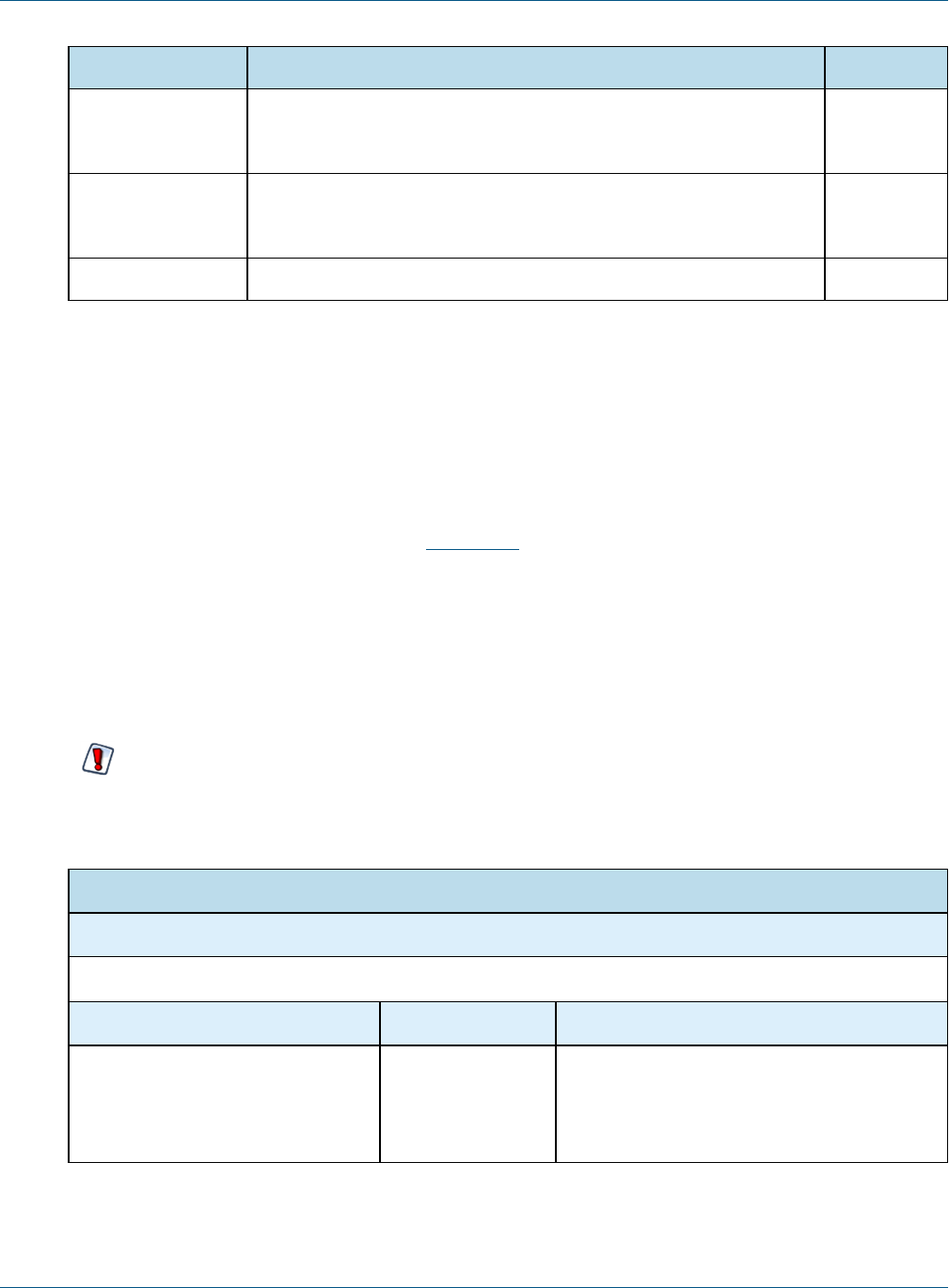
Edit the following properties in your default_master.properties and set these options. If a property is commented
out, the default is used:
Property Description Default
build.key.algo Algorithm used to encrypt the properties in configuration files. AES
build.key.size Size of the encryption key as in AES-128.
To increase the key size, if it has not been done before, you might have
to install "Unlimited Strength Jurisdiction Policy Files" from the Oracle
site for your Java version. To install the files, download US_export_
policy.jar and local_policy.jar. AFTER backing up the old files, extract
the jars into %JAVA_HOME%/jre/lib/security directory.
Alternatively, you may download one of the reputable providers such as
Bouncy Castle (ships with JasperReports Server). You would need to
add the Bouncy Castle provider to the list in
%JAVA_HOME%/jre/lib/security/java.security file:
security.provider.<seq number>=
org.bouncycastle.jce.provider.BouncyCastleProvider
128 (bits)
TIBCO Software Inc. 19
TIBCO JasperReports Server Security Guide
Property Description Default
enc.transformation So-called encryption mode. See Java's javax.crypto documentation
to understand the modes and padding better.
AES/CBC
/PKCS5
Padding
enc.block.size The size of the block that's encrypted. Encrypted text can contain many
blocks. Usually the block is changed together with the encryption
algorithm.
16 (bytes)
propsToEncrypt A comma separated list of the properties to encrypt. dbPassword
3.2 Configuring CSRF Protection
Cross-Site Request Forgery (CSRF) is an exploit where the attacker attempts to gain information or perform
actions while a user is logged into JasperReports Server in another window or tab of the same browser. This is
called session riding. For example, a server administrator logged into JasperReports Server is tricked into
opening a malicious website that invisibly uses the browser session to create a new user with administrator
permissions, which the attacker can then use to access the system at a later time.
JasperReports Server uses the latest release of CSRFGuard from OWASP(Open Web Application Security
Project). CSRFGuard verifies that every POST, PUT, and DELETE request submits a valid token previously
obtained from the server. This includes every request submitted via forms or AJAX. When a malicious request
arrives without the proper token, the server does not reply and logs an error for administrators to analyze later.
Tokens are sent in HTTP headers or parameters, and the entire exchange is invisible to users. Tokens have the
following syntax:
OWASP_CSRFTOKEN: K8E9-L4NZ-58H6-Z4P2-ZG75-KKBW-U53Z-ZL6X
In the default configuration of the server, CSRF protection is active. We recommend leaving this setting
unchanged.
However, in order to fully implement CSRF and secure your server, you must configure the domain
whitelist as explained in the next section.
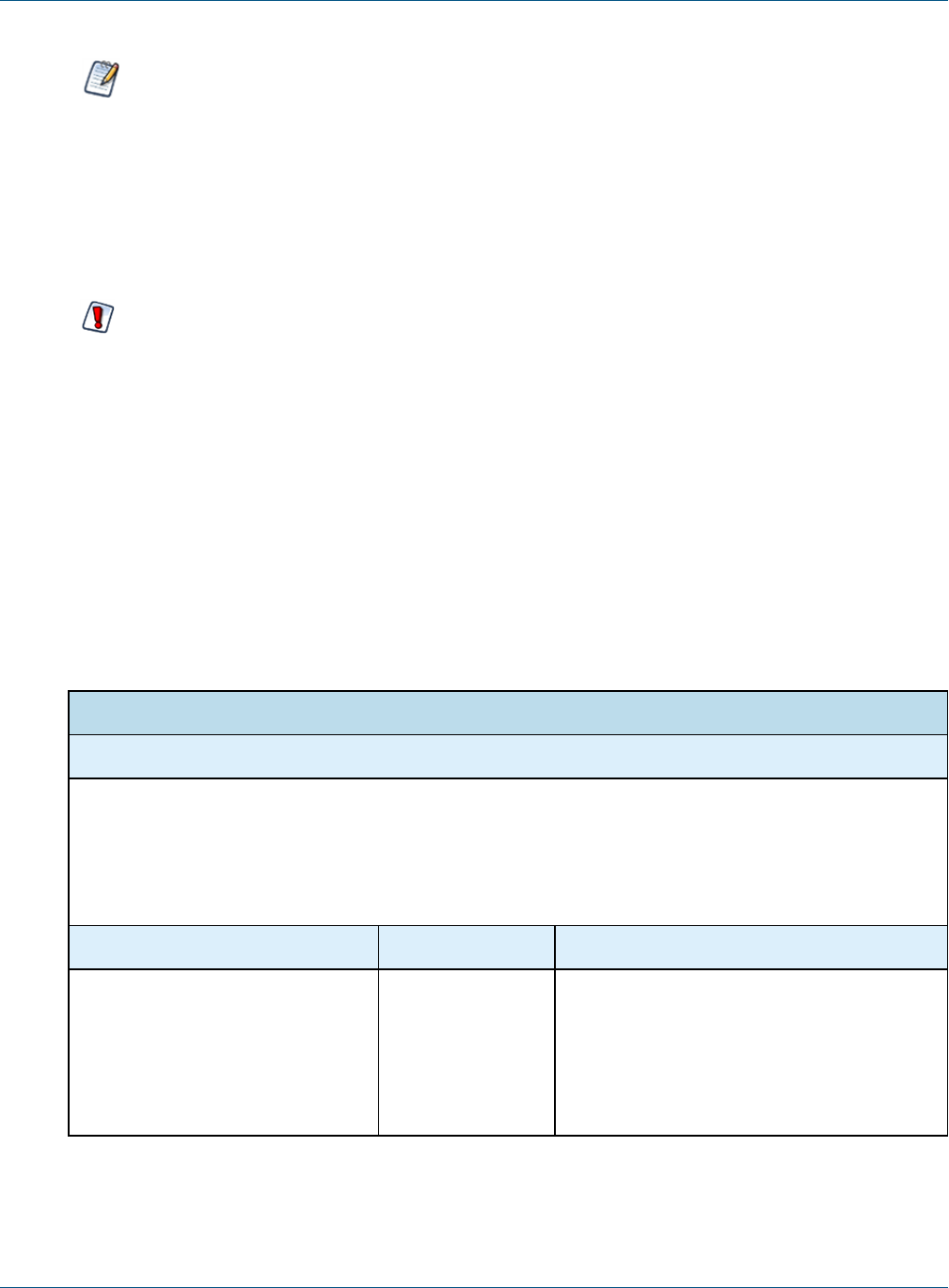
CSRF Protection
Configuration File
.../WEB-INF/csrf/jrs.csrfguard.properties
Property Value Description
org.owasp.csrfguard.Enabled true <default>
false
Turns CSRF protection on or off. By default,
CSRF protection is enabled. Setting this value
to false will disable the CSRF filter and allow
any request regardless of tokens.
20 TIBCO Software Inc.
Chapter 3 Application Security
This configuration file contains many settings that are preconfigured for JasperReports Server. We do not
recommend changing any other settings. In particular, the two configOverlay properties are unreliable
and not supported.
After making any changes to the jrs.csrfguard.properties file, you must restart JasperReports Server for the new
values to take effect.
3.2.1 Setting the Cross-Domain Whitelist
In all cases, even if you do not use Visualize.js, you must configure the whitelist. You should never use a
server in production with the default whitelist.
Applications that use the embedded Visualize.js library typically access JasperReports Server from a different
domain. For this reason, CSRF protection includes a whitelist of domains that you specifically allow to access
the server. Initially, all your Visualize.js applications can access the server, but you should configure the
whitelist so that only your domains have access. Then, any Visualize.js request from an unknown domain will
fail with HTTPerror 401, and the server will log a CSRF warning.
The domain whitelist is implemented through attributes named domainWhitelist at the user, organization, or
server level. Different values can be specified at each level, with the value defined at according to the attribute
hierarchy. In addition, the domainWhitelist attribute is defined with administer permissions, meaning that
organization admins can set their own values. You can set attributes through the server UI or through the REST
API. For more information on how to define attributes and how their values are determined by hierarchy, see the
JasperReports Server Administrator Guide.
There are four cases listed in the table below, choose the one suited to your use of Visualize.js.
Cross-Domain Whitelist
Configuration Location
Attribute named domainWhitelist defined at the server level. For security, always set the server level as
described below, in addition to setting any alternate values at the organization or user levels.
• Server level: as system admin (superuser), select Manage > Server Settings then Server Attributes.
• Organization or user level: as any administrator, select Manage > Organizations or Manage > Users, then
select the organization or user, click Edit in the right-hand panel, and select the Attributes tab.
Attribute Value Description
domainWhitelist at server level <blank> If you do not have any Visualize.js-enabled web
applications, or if you have Visualize.js-enabled
web applications that will access your server
from the same domain as the server, you
should explicitly set the whitelist to blank
(attribute defined with an empty value).
TIBCO Software Inc. 21

TIBCO JasperReports Server Security Guide
Cross-Domain Whitelist
domainWhitelist at server level example.com
(see below)
If you have Visualize.js-enabled web
applications that will access your server from a
different domain, then specify an expression
that will match the domain name. For the syntax
of this expression, see below.
domainWhitelist at server level
domainWhitelist at org1 level
domainWhitelist at user2 level
...
<blank>
example1.com
example2.com
...
(see below)
If your organizations or users have Visualize.js
applications on specific domains, you could use
the hierarchy of attributes to set the whitelist
according to each organization's or each user's
individual domain. In this case, make sure the
whitelist at the server level is defined as blank.
For the syntax of this expression, see below.
domainWhitelist1
domainWhitelist2
<regexp>
<regexp>
If you want to add more than one regular expres-
sion to the whitelist, define these additional
attributes at the same level as domainWhitel-
ist. If you need further attributes, you can spe-
cify them in the
additionalWhitelistAttributes property
of the crossDomainFilter bean in the file
.../WEB-INF/applicationContext.xml.
The actual value of the attribute is a simplified expression that the server converts into the full regular
expression. The value must include the protocol (http), any sub-domains that you use, and the port as well. The
value you write can use *and .which the server translates into proper form as .* and \.. The server also adds
^and $to the ends of the expression. For example, a typical value for this attribute would be:
http://*.myexample.com:80\d0 which is translated to ^http://.*\.myexample\.com:80\d0$
This will match the following domains you might use:
http://bi3.myexample.com:8080 and http://bi3.myexample.com:8090
http://bi4.myexample.com:8080 and http://bi4.myexample.com:8090
But it will not match the following:
http://myexample.com:8080 or http://bi3.myexample.com:8081
If you wish to write your own complete regular expression, surround it with ^and $, and it will be used as-is by
the server.
Remember that if you add Visualize.js applications that run on different domains, or change the domains where
they run, then you must update the whitelist attributes accordingly. Visualize.js applications on domains that
are not whitelisted will not work.
Do not delete the domainWhitelist property from the server level. That will remove the whitelist, but
upon upgrading the server, the attribute will be restored with a less secure default value. When the
attribute is defined, even with an empty value, it will remain during any server upgrade.
22 TIBCO Software Inc.

Chapter 3 Application Security
3.2.2 Sending REST Requests from a Browser
If you use the REST API to access JasperReports Server from within an application, this does not trigger a CSRF
warning because the application is separate from any access through the browser. However, some browser plug-
ins can be used to send REST API requests, and using these to send POST, PUT, or DELETE requests will
trigger a CSRF warning and fail. GET requests from a browser REST client are safe and do not fail the CSRF
check.
To allow REST APIrequests through a browser, configure your browser REST client to include the following
header in every request:
X-REMOTE-DOMAIN: 1
3.2.3 CSRF Browser Compatibility
Because only browsers are susceptible to CSRF, the CSRF protection mechanism detects browsers based on their
user-agent string embedded in the request. For performance reasons, the current configuration only filters for
Mozilla and Opera user-agents, because these cover more than 99% of all browsers in use, such as Chrome,
Firefox, Internet Explorer, and Safari.
If your users have browsers with user-agents other than Mozilla, they will not be protected against CSRF by
default.
All browsers officially supported by JasperReports Server are protected against CSRF. The following
instructions are provided for testing purposes only.
To enable CSRF protection for these browsers, you can add the corresponding user-agent to the CSRF filter:
1. Find the name of the user-agent for the given browser. If you cannot find the user-agent, many are listed on
the following website:
http://www.useragentstring.com/pages/Browserlist/
2. Open the file .../WEB-INF/applicationContext.xml for editing.
3. Locate the csrfGuardFilter bean and its protectedUserAgentRegexs property. Each list value is a
regular expression that is matched against every request's user-agent value in its entirety.
4. Add a regular expression to the protectedUserAgentRegexs property list that will match the user-agent
string from your desired browser.
5. Restart JasperReports Server.
3.3 Configuring XSS Protection
Cross-site scripting (XSS) is a security threat where attackers inject malicious data into the server so that the
data is executed as JavaScript when it is displayed in the UI. The Open Web Application Security Project
(OWASP) lists cross-site scripting in their Top 10 Most Critical Web Application Security Risks.
As of JasperReports Server 6.1, all output in the UI is escaped so that no malicious scripts can run. For example,
if an attacker inserts the <script ...>tag into the text of a resourse description, the HTML generated by the
server contains <script ...> that is displayed but will not run as code. If you see <script ... >in the
data shown in the UI, that means someone is trying to inject a cross-site script on the server.
Before output escaping, the security framework implemented an input validation mechanism to block cross-site
scripting. Input validation is now deprecated in JasperReports Server and no longer supported.
TIBCO Software Inc. 23
TIBCO JasperReports Server Security Guide
Like many modern web apps, JasperReports Server consists of interactive pages that use JavaScript to modify
and update the page dynamically in the browser. To display this dynamic content, JavaScript has to insert
HTML snippets or raw data from the server into the page's static HTML. The static page is generated by
JavaServer Pages (JSP) and HTML templates, which have mechanisms for output escaping to prevent XSS.
JasperReports Server has additional mechanisms to escape the output in the dynamic content, otherwise it would
be vulnerable to XSS. The dynamic output escaping blocks dangerous tags such as <script ...> and it
removes dangerous attributes such as onmouseover.
The default configuration of JasperReports Server provides output escaping of both static and dynamic content,
and thus protects the server from XSS. The output escaping mechanism for static content cannot be configured.
However, for advanced uses, the output escaping mechanism for dynamic content can be configured to allow
different HTML tags and block new attributes. The output escaping mechanism is implemented in
.../scripts/runtime_dependencies/js-sdk/src/commom/util/xssUtil.js. It defines the tags that are allowed, called the
tag whitelist, and HTML attributes that are blocked, called the attribute map. The following configuration
properties can supplement or replace these defaults.
The default configuration of the server provides secure XSS protection. Modifying the following
configuration is for advanced use cases only and must be done correctly. When configured improperly,
these settings may inadvertently break the server UI or silently disable XSS protection.
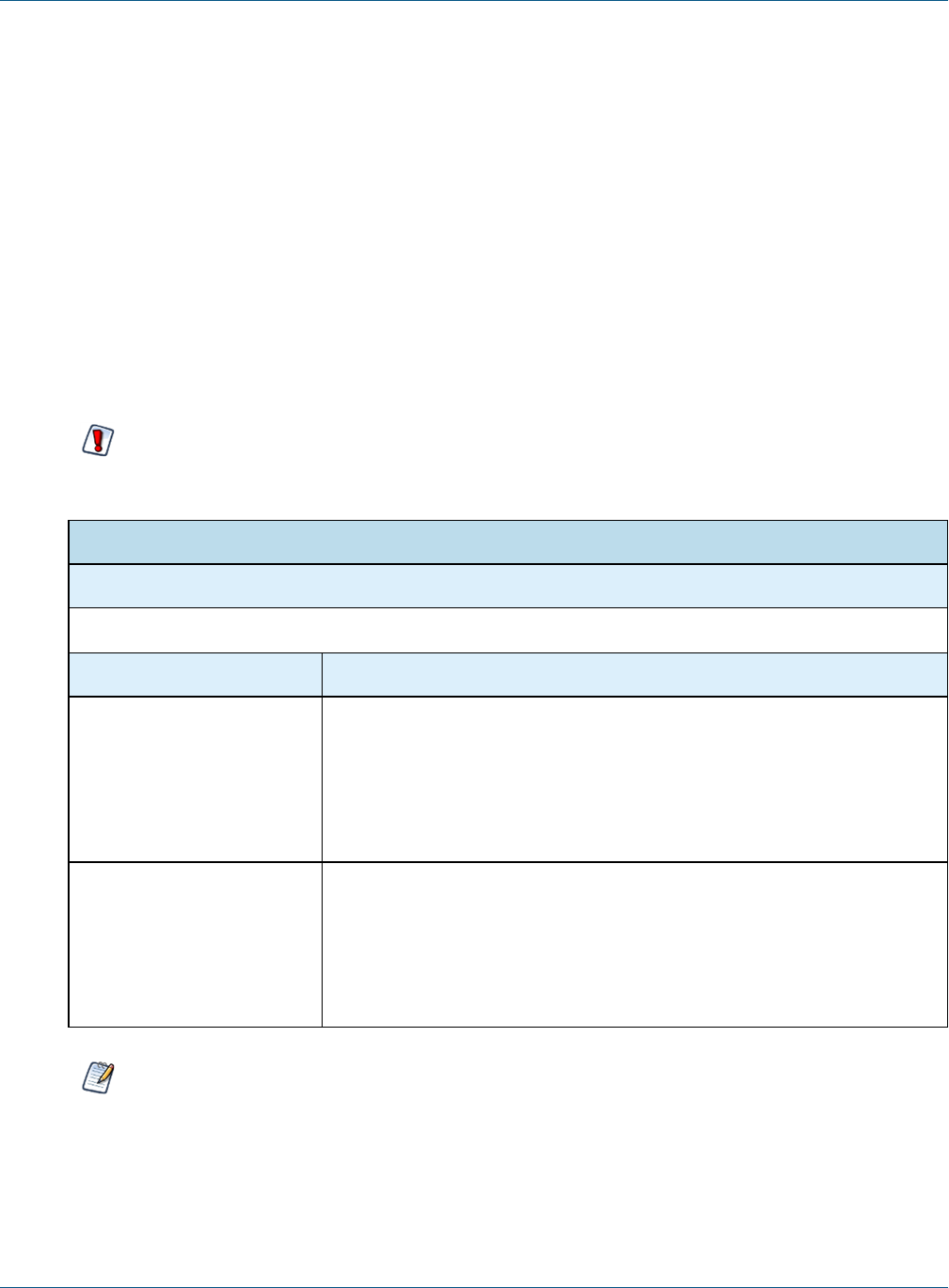
Output Escaping
Configuration File
.../WEB-INF/classes/esapi/security-config.properties
Property Description
xss.soft.html.escape.
tag.whitelist
The whitelist is the list of HTML tags that will not be escaped when the server
renders dynamic content to the UI. This property expands or replaces the
default list in xssUtil.js. Specify comma-separated tag names without <>
brackets. Use + as the first character to append to the default whitelist. If this
property is not specified or the list is empty, the default whitelist applies. For
details, see 3.3.1, “Configuring the Tag Whitelist,” on page25.
xss.soft.html.escape.
attrib.map
The attribute map determines which HTML attributes create vulnerabilities in
dynamic content and how to replace them. This property defines a map of
case-insensitive regular expressions (regex syntax) and replacements. When
specified, it overrides the default map defined in xssUtil.js. If this property is
absent or not set, the default map is used. For details, see 3.3, “Configuring
XSS Protection,” on page23.
Note that these configurations only apply to XSS protection of dynamic content; they do not affect how
static pages or static content are escaped when generated by the server.
24 TIBCO Software Inc.

Chapter 3 Application Security
3.3.1 Configuring the Tag Whitelist
The tag whitelist specifies all HTML tags (elements) that are allowed in the dynamic content sent to a user's
browser, sometimes called asynchronous data. Tags not in the whitelist are escaped, meaning their < and >
brackets are replaced with < and > so they are displayed as < and > but not interpreted as HTML. The
default whitelist is defined in the xssUtil.js file, and it allows the tags needed for the UI to be displayed and
escapes any tags such as <script ...> that create XSS vulnerabilities.
The xss.soft.html.escape.tag.whitelist property expands or replaces the default whitelist. It contains
comma-separated tag names without <> brackets. If this property is not specified or the list is empty, the
default whitelist in xssUtil.js applies.
In normal usage, the first character is + so that the specified tags are added to the default whitelist. For example,
if you want to add blink and marquee to the list of allowed HTML tags, specify the following value:
xss.soft.html.escape.tag.whitelist=+blink,marquee
When + is omitted, this list replaces the entire default whitelist. For example, if you wish to block a tag that is
specified in the default whitelist, copy all of the default tags from xssUtil.js, then remove the one you wish to
block. Be very careful with this usage, because whitelisting the wrong tags can create vulnerabilities. Also,
some parts of the UI depend on the default whitelist, and they may appear broken if they are removed from the
whitelist.
Never add the script tag to the whitelist because it will disable output escaping of dynamic content.
3.3.2 Configuring the Attribute Map
Certain HTML attributes create XSS vulnerabilities because they switch to JavaScript context, for example
onmouseover and the like. The attribute map defines which attributes are dangerous and how to replace them
when performing output escaping of dynamic content, also called asynchronous data. It uses a map of case-
insensitive regular expressions (regex syntax) and replacements to detect and neutralize such malicious HTML.
The default map that is coded in xssUtil.js is equivalent to the following expression:
xss.soft.html.escape.attrib.map= {'\\\\bjavascript:': '', '\\\\bon(\\\\w+?)\\\\s*=': 'on$1=', '\\\\
(':'(', \ '\\\\bsrcdoc\\\\s*=': 'srcdoc='}
When regex syntax appears in properties files, \characters must be escaped. For example, \s appears as \\\\s.
For advanced use cases, you can modify this property by adding more pairs to the map. Copy the default map
above and add the new regex and its safe replacement at the end. For example, to escape the string
data:text/html by replacing it with nothing, use the following map:
xss.soft.html.escape.attrib.map= {'\\\\bjavascript:': '', '\\\\bon(\\\\w+?)\\\\s*=': 'on$1=', '\\\\
(':'(', \ '\\\\bsrcdoc\\\\s*=': 'srcdoc=', '\\\\bdata:\\\\s*text/html\\\\b': ''}
Modify this property at your own risk. To work properly, the regex keys in the map must be very specific. Also,
the replacement values in the map should never be the same as any regex keys, otherwise multiple replacements
will happen, and the output will be corrupted in unpredictable ways.
Never set the map to {} because this will disable HTML attribute escaping in dynamic content.
TIBCO Software Inc. 25
TIBCO JasperReports Server Security Guide
3.4 Protecting Against SQL Injection
SQL injection is an attack that uses malicious SQL queries in reports to gain access or do damage to your
databases. By default, JasperReports Server validates query strings to protect against SQL injection.
Whenever the server runs an SQL query, the server validates the query string with the following rules:
•SQL queries must start with SELECT.
•Queries may not contain INTO clauses.
•Queries may call stored procedures (CALL command used by JDBC drivers).
•Multiple queries separated by semi-colons (;) are also prohibited.
•SQL comments are allowed, but will be removed before being transmitted.
If your reports or Domains use such queries, you need to either change your queries or update the security
configuration to allow them.
Users who run a report with a query that does not meet the rules will see an error. Administrators can monitor
the server logs to search for evidence of attempted security breaches.
SQL query validation is enabled by default when installing JasperReports Server. To turn off this protection,
edit the following file:
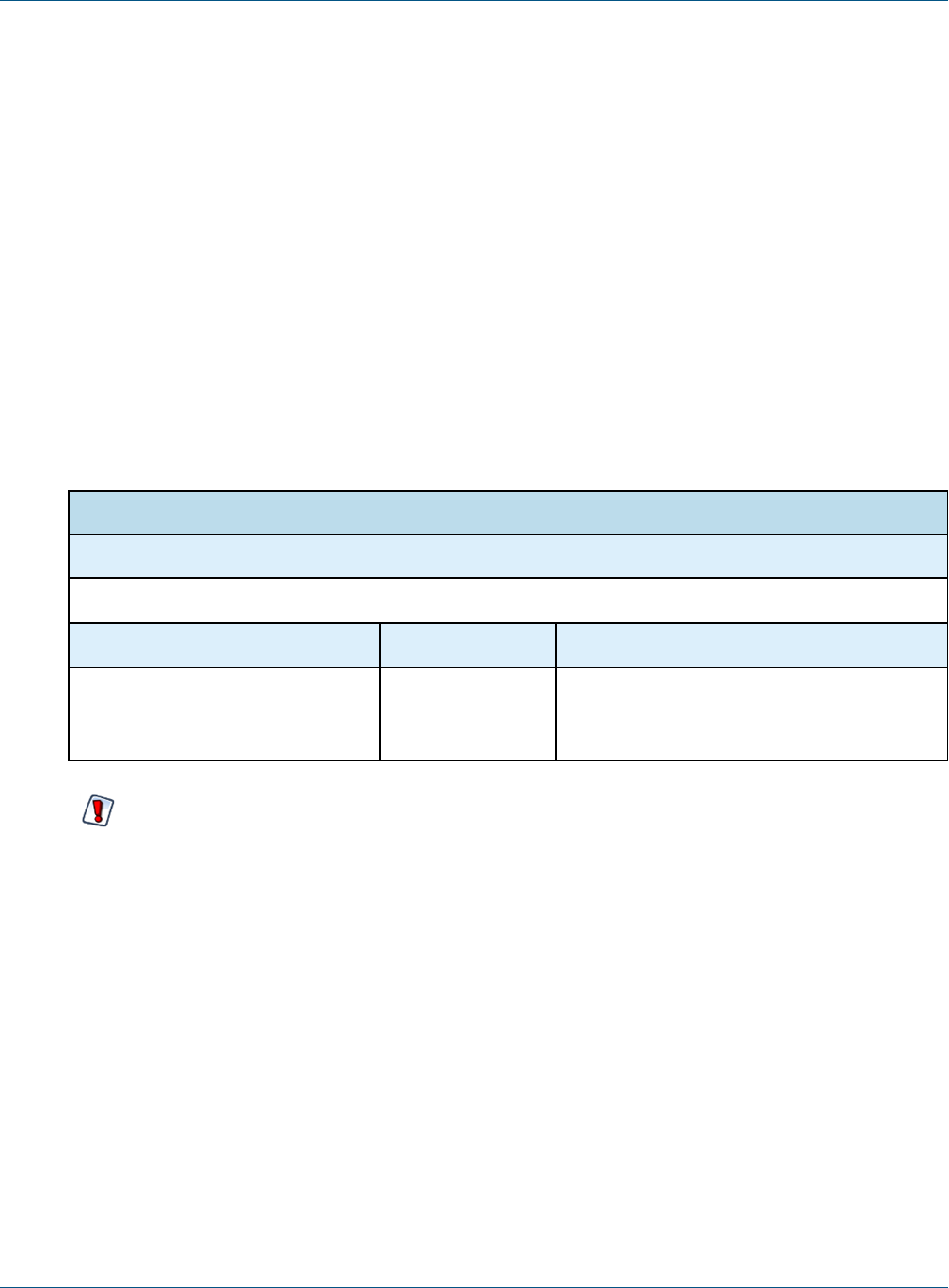
SQL Query Validation
Configuration File
.../WEB-INF/classes/esapi/security-config.properties
Property Default Value Description
security.validation.sql.on true Turns SQL query validation on or off in the
server. Any other value besides case-
insensitive “false” is equivalent to true.
SQL query validation rules were added to comply with security guidelines for web applications. Turning
off query validation or modifying the validation rules may make the server more vulnerable to web attacks.
3.4.1 Customizing the Error Message
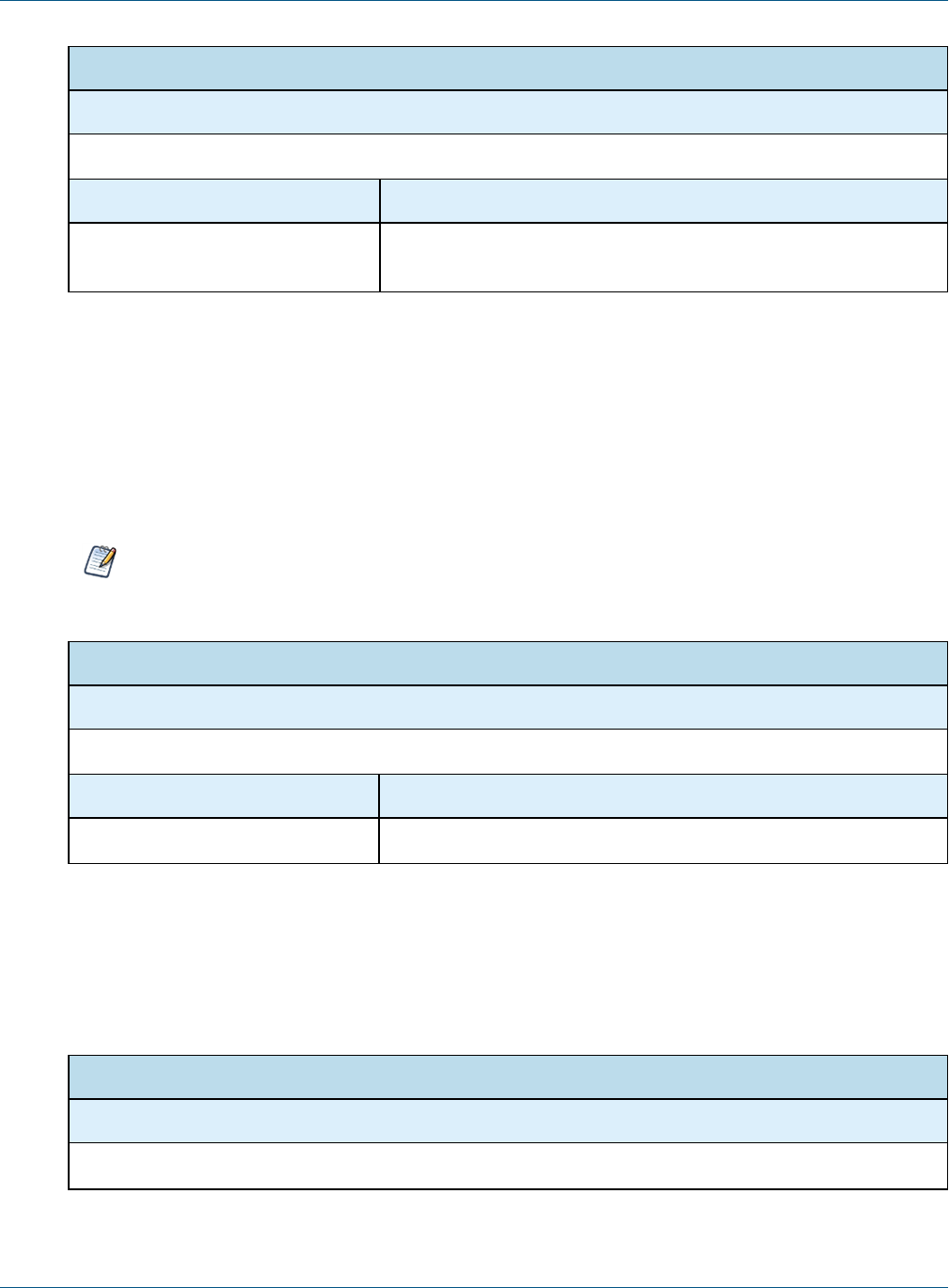
When query validation blocks a query that violates a security rule, the server displays an error in the UI. By
default, security messages are intentionally generic to avoid alerting potential attackers to security errors.
We highly recommend that external deployments customize the security error message to be unique, yet still
generic. You can change both the message and the error number. Choose any combination of numbers or letters
so administrators can easily search the logs to detect security violations.
26 TIBCO Software Inc.
Chapter 3 Application Security
Query Validation Messages
Configuration File
.../WEB-INF/bundles/security.properties
Property Default Value
message.validation.sql An error has occurred. Please contact your system
administrator. (6632)
If you translate your application into other languages, be sure to create a locale-specific copy of this file and
translate these messages as well.
3.4.2 Understanding Query Validation
Query validation uses a mechanism to validate every SQL query before running it. The validation process is
defined by a validation rule that references a validator expression. The rule and the expression are defined in
separate files.
The security.properties and validation.properties files contain many validation rules and expressions.
These were used for general input validation in the server, but this mechanism is deprecated and no
longer used. Only the expressions for SQL validation are still applicable.
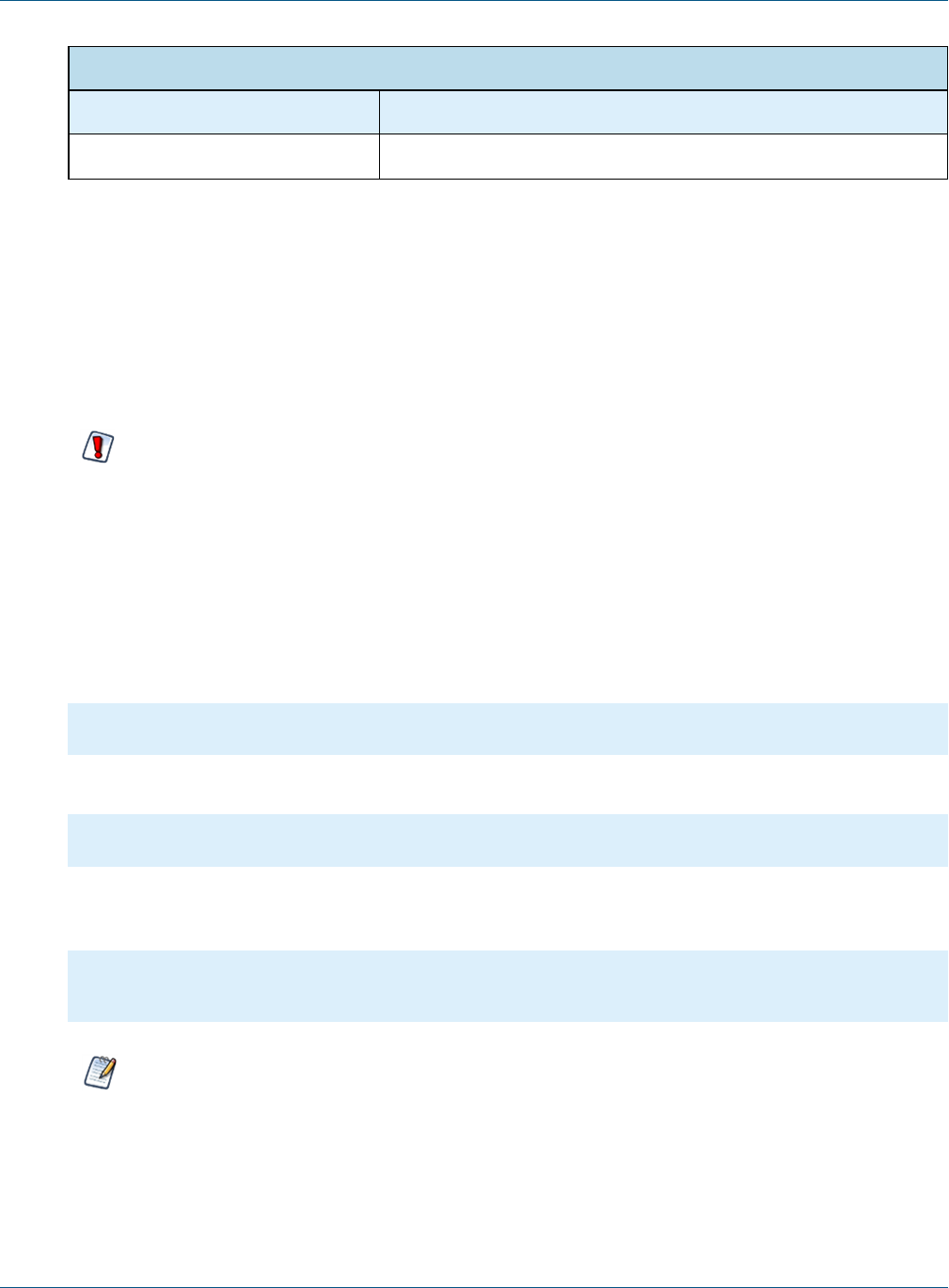
Query Validation Rule
Configuration File
.../WEB-INF/classes/esapi/security.properties
Property Default Value
sqlQueryExecutor Alpha,ValidSQL,500000,true,SQL_Query_Executor_context
The validation rule contains 5 comma-separated values:
•Alpha – Not used for query validation.
•ValidSQL – The name of the SQL validator expression in the other file.
•500000 – The maximum length allowed for the query.
•true – Whether the query can be blank.
•SQL_Query_Executor_context – Context string for log messages.
SQL Validator Expression
Configuration File
.../WEB-INF/classes/esapi/validation.properties
TIBCO Software Inc. 27
TIBCO JasperReports Server Security Guide
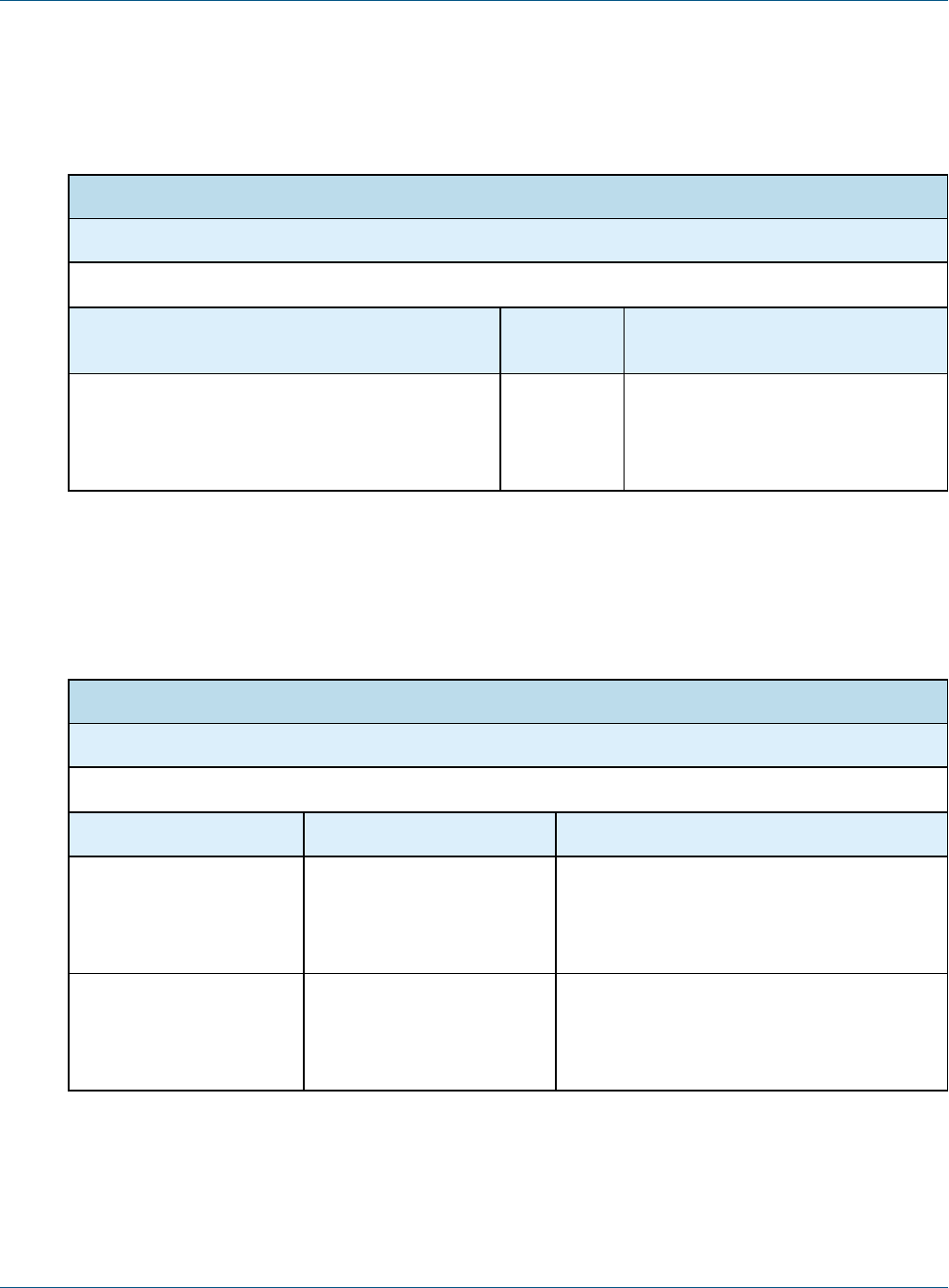
SQL Validator Expression
Property Default Value
Validator.ValidSQL (?is)^\\s*(select|call)\\b((?!\\binto\\b)[^;])*;?\\s*$
The validator expression is a regular expression that must match the query string. The default expression
enforces the following:
•Queries may only use the SELECT statement, which is read-only. The following write statements are
forbidden: DROP, INSERT, UPDATE, DELETE
•SELECT statements may not use the INTO clause that could copy data.
•CALL statements for stored procedures are allowed.
•Multiple queries separated by semi-colons (;) will be rejected. The following example will cause a security
error: SELECT f1,f2 FROM tbl_1; SELECT f3 from tbl_2;
The rule and validator expression are commented by default because the server implements the same
SQL validation with an internal mechanism. If you wish to customize the SQL validation, uncomment the
rule and create a new validator expression as described below.
3.4.3 Customizing Query Validation
If you wish to use a different validator expression for queries, always create a new validator expression with a
new name in validation.properties, then substitute that name in the validation rule in security.properties. For
example, if you wish to forbid queries from running stored procedures in your database, you can add the
following validator expression in validation.properties:
#Validator.ValidSQL=(?is)^\\s*(select|call)\\b((?!\\binto\\b)[^;])*;?\\s*$
Validator.ValidSQLnoProc=(?is)^\\s*(select)\\b((?!\\binto\\b)[^;])*;?\\s*$
Then you would uncomment and modify the validation rule in security.properties as follows:
# Main SQL execution point
sqlQueryExecutor=Alpha,ValidSQLnoProc,500000,true,SQL_Query_Executor_context
It is also possible to have two or more validation rules that will be applied sequentially (logical AND) until one
fails. The rules must have the same names but with a numerical suffix, for example:
# Main SQL execution point
sqlQueryExecutor=Alpha,ValidSQL,500000,true,SQL_Query_Executor_context
sqlQueryExecutor2=Alpha,ValidSQLCustom,500000,true,SQL_Custom_Executor_context
With multiple rules for query validation, each rule is applied in the order listed until one fails. When one
rule fails, the whole validation fails.
28 TIBCO Software Inc.
Chapter 3 Application Security
3.4.4 Performance Issues
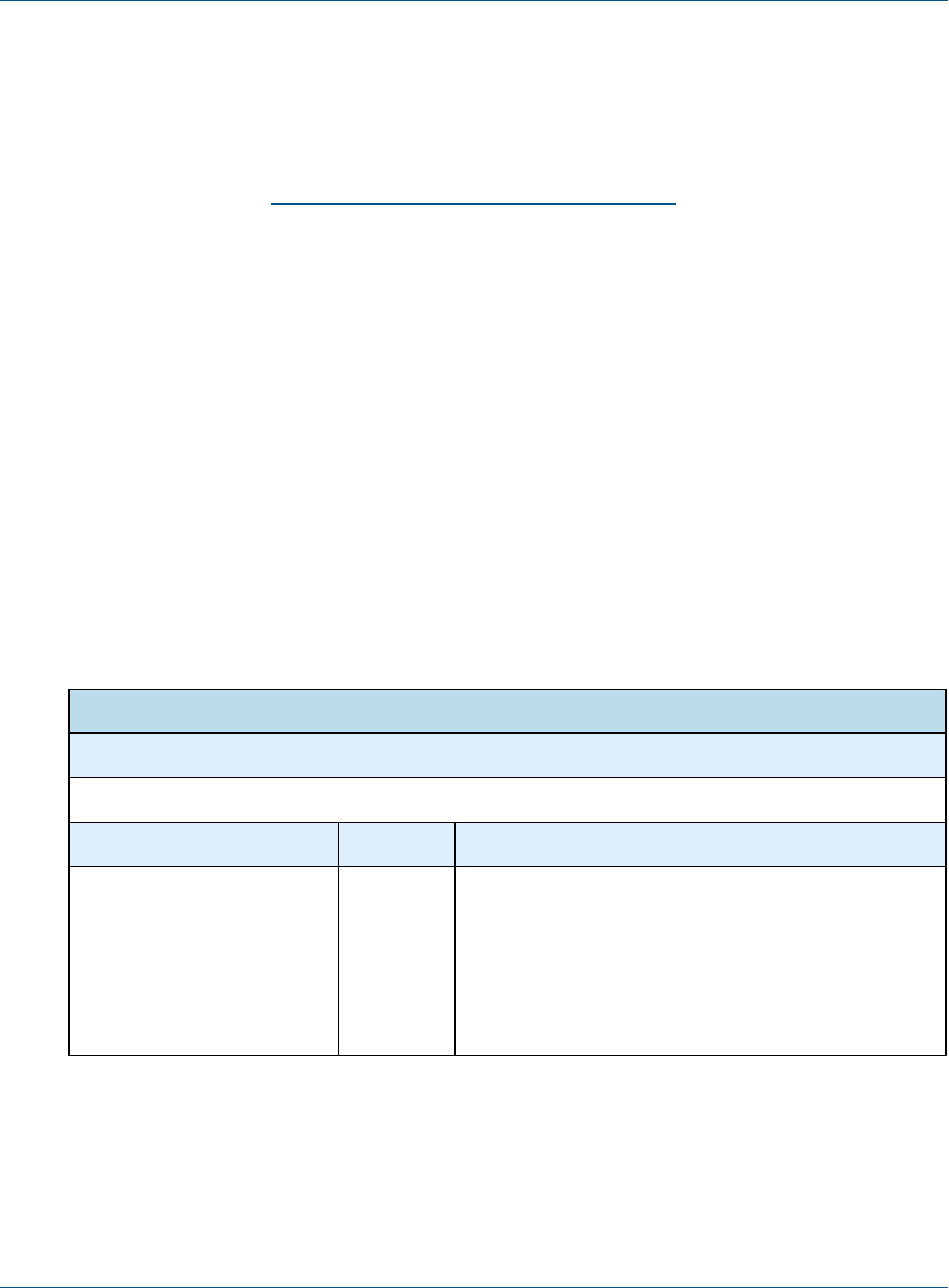
By default, the internal SQL validation mechanism accesses the query metadata to allow semicolons (;) in the
data part of the query, for example in table names. This access can cause performance issue with certain JDBC
drivers, in which case you can disable it as follows:
Advanced Input Validation
Configuration File
.../WEB-INF/classes/esapi/security-config.properties
Property Default
Value
Description
validate.sql.via.metadata.query.execution true Set this value to false to disable
semicolon checking in query metadata
if SQL validation causes performance
issues with your JDBC driver.
3.5 Further Security Configuration
The security configuration file contains other default security settings. In particular, they can warn you when a
security file has a syntax error and could not be loaded. Changing these defaults is possible but not
recommended:
Advanced Input Validation
Configuration File
.../WEB-INF/classes/esapi/security-config.properties
Property Default Value Description
log.msg.security.off SECURITY for [%s] is OFF If security is turned OFF, this message will be
logged. This message in the logs can alert
administrators if the security configuration has
been tampered with.
msg.cannot.load Security configuration [%s]
cannot be loaded.
If there is an error in the security configuration
files, this message is logged. This is a severe
error and should be resolved by the
administrator.
TIBCO Software Inc. 29
TIBCO JasperReports Server Security Guide
3.6 Protecting Against XML External Entity Attacks
XML files are vulnerable to XML External Entity (XXE) attacks when they include a DTD (Document Type
Definition) that has a DOCTYPE declaration. Because of this risk, JasperReports Server can check for
DOCTYPE declarations. By default, this protection is disabled, since the setting causes errors if your XML files
are vulnerable to the attack. Consider enabling this setting if XXE attacks are a concern. For more information
on this security issue, see Wikipedia's article on XML External Entity Attack.
Before enabling the check, ensure that the XML files in your repository don't include DOCTYPE declarations.
To enable XXE protection:
1. Identify and edit any XML files in your JasperReports Server repository that include a DOCTYPE
declaration. Delete the declaration and update the JasperReport on the server. Since JasperReports Server
doesn't support DTDs themselves, we recommend removing them entirely.
2. Using a text editor, open the .../WEB-INF/applicationContext.xml file.
3. Locate the skipXXECheck property and set it to false.
4. Restart JasperReports Server.
3.7 Restricting File Uploads
Several dialogs in JasperReports Server prompt the user to upload a file to the server. For performance and
security reasons, you may want to restrict file uploads by name and size.
The following setting is the global file upload limit for the entire server. Any single upload that exceeds this
limit will trigger an error and a stack trace message. It's intended to be an absolute maximum to prevent a worse
out-of-memory error that affects the entire server.
Global File Size Upload Limit
Configuration File
…/WEB-INF/js.config.properties
Property Value Description
file.upload.max.size -1
<default>
Maximum size in bytes allowed for any file upload. The
default value, -1, means there is no limit to the file size, and a
large enough file could cause an out-of-memory error in the
JVM. Some file uploads such as importing through the UI are
necessarily large and must be taken into account. Set this
value larger than your largest expected import and smaller
than your available memory.
The following settings apply to most file upload dialogs in the UI, such as uploading a JRXML or a JAR file to
create a JasperReport in the repository. These settings in the fileResourceValidator bean restrict the file size
and the filename pattern.
30 TIBCO Software Inc.

Chapter 3 Application Security
File Upload Restrictions
Configuration File
…/WEB-INF/flows/fileResourceBeans.xml
Property Value Description
maxFileSize -1
<default>
Maximum size in bytes allowed for a file uploaded through
most UI dialogs. If an upload exceed this limit, the server
displays a helpful error message. The default value, -1,
means there is no limit to the file size, and an upload could
reach the global limit if set, or an out-of-memory error.
Usually, files required in resources are smaller, and a limit of
10 MB is reasonable.
fileNameRegexp ^.+$
<default>
A regular expression that matches allowed file names. The
default expression matches all filenames of one or more
characters. A more restrictive expression such as [a-zA-Z0-9]
{1,200}\.[a-zA-Z0-9]{1,10} would limit uploads to alpha-
numeric names with an extension.
fileName
ValidationMessageKey
<null/>
<default>
The name of a Java property key whose value is a custom
message to display when the uploaded filename does not
match fileNameRegexp. For example, you could add the
following line to WEB-INF/js.config.properties:
my.filename.validation=The name of the uploaded
filename must contain only alphanumeric
characters and have a valid extension.
The following setting restricts the extension of the uploaded file. The upload dialogs will browse only for files
with the given extensions. Add or remove extensions to change the file type restrictions:
File Upload Extensions
Configuration File
<jasperserver-pro-war>/scripts/resource.locate.js
Property Value
ALLOWED_FILE_
RESOURCE_EXTENSIONS
By default, the following extensions are allowed:
"css", "ttf", "jpg", "jpeg", "gif", "bmp", "png", "jar",
"jrxml", "properties", "jrtx", "xml", "agxml", "docx", "doc",
"ppt", "pptx", "xls", "xlsx", "ods", "odt", "odp", "pdf",
"rtf", "html"
TIBCO Software Inc. 31
TIBCO JasperReports Server Security Guide
3.8 Restricting Groovy Access
This section describes functionality that can be restricted by the software license for JasperReports
Server. If you don’t see some of the options described in this section, your license may prohibit you from
using them. To find out what you're licensed to use, or to upgrade your license, contact Jaspersoft.
JasperReports Server relies on Apache Groovy in a number of contexts, including:
•When a Domain definition includes a security file that determines which users or roles have access to
various data.
•When a calculated field in an Ad Hoc view or Domain relies on a Groovy expression.
By default, Groovy is given broad access within your application server, which is a good approach to certain
design, testing, and evaluation tasks. However, some production systems should be configured to restrict
Groovy to more limited access by creating a whitelist that only includes the classes Groovy should access. Once
configured, the server returns an error when the Groovy compiler encounters code that doesn't conform to the
whitelist.
Groovy's access is set at the server level; configure it by editing properties files as well as a Groovy source file:
1. Configure the groovyRunner to enable the restriction in general.
2. Configure the preprocessor to enable the restriction for Groovy expressions in DomEL.
3. Optionally configure the whitelist to allow Groovy access to additional classes.
First, enable the Groovy restriction:
Groovy Restriction
Configuration File
.../WEB-INF/applicationContext-semanticLayer.xml
Property Bean Description
groovyCustomizerFactory groovyRunner Uncomment this property to enable the
restriction.
In addition to enabling the Groovy restriction, configure the DomEL preprocessor:
DomEL Restriction
Configuration File
.../WEB-INF/applicationContext-datarator.xml
Attribute Bean Description
preprocessGroovy defaultPreprocessor Set this value to true to apply the Groovy
restriction to all DomEL expressions that
rely on the groovy() function.
32 TIBCO Software Inc.

Chapter 3 Application Security
Optionally, you can extend the whitelist by adding additional classes that you want Groovy to access:
Groovy Whitelist
Groovy Source File
.../groovy/com/jaspersoft/commons/groovy/GroovyCustomizerFactoryImpl.groovy
Class Description
GroovyCustomizerFactoryImpl List of classes that Groovy can access. Enclose each
classname in quotes and delimit each entry with a comma.
For example:
def receiversWhiteList = [
'java.lang.Byte',
'java.lang.Character',
...
]
The last entry shouldn't be followed by a comma.
Which classes you might restrict Groovy from accessing depends largely on your usage patterns, environment,
and security concerns. Because of this, we can't provide specific advice about what you should whitelist.
However, we have some general recommendations of classes you wouldn't or would want to whitelist.
For example, Groovy can be used to execute commands in the server host's operating system using a string
literal such as rm -rf /".execute(). Therefore, java.lang.String shouldn't be added to the whitelist.
However, some classes, like those in the default list, are considered much safer. For example, the class
org.apache.commons.lang3.StringUtils consists solely of static utility string methods, so if it's in the
whitelist, you can call StringUtils.isEmpty() to check for an empty string, instead of calling isEmpty() on
a string directly.
When you enable and configure the whitelist, be sure to test your JasperReports Server environment
thoroughly.
If you have been running your server without this restriction, and then enable and configure it, some
functionality may fail. For example, Domains that include a security file may return errors, since they rely on
Groovy to evaluate the principalExpression. The failure is likely because the Groovy expression calls
classes that aren't in your whitelist. However, your best course of action isn't necessarily to add those classes to
the whitelist, as it may be difficult to debug. It's better to create a method in BaseGroovyScript and call it
from the Domain security expression. For more information, please see our article on the Jaspersoft community
site (http://community.jaspersoft.com).
For more information about Groovy, see Apache's Groovy web site.
3.9 Hiding Stack Trace Messages
By default, JasperReports Server displays stack traces in certain error messages. Stack traces reveal some
information about the application, and security experts recommend that an application not display them.
TIBCO Software Inc. 33

TIBCO JasperReports Server Security Guide
The following setting determines what error messages are displayed:
Hiding Stack Trace Messages
Configuration File
.../WEB-INF/applicationContext-security.xml
Property Bean Description
outputControlMap exceptionOutput
Manager
Set the roles in the list for each the three levels of
error details. Only users who have a given role
will see that level of detail. See sample below.
Error messages contain 3 parts: an ID, the stack trace, and a message. You can control which of these error
message parts are displayed to users based on roles.
For example, in order for regular users to not see stack traces, remove ROLE_USER from the second list,
resulting in the following configuration:
<bean name="exceptionOutputManager" class="com.jaspersoft.jasperserver.
api.common.error.handling.ExceptionOutputManagerImpl">
<property name="outputControlMap">
<map>
<entry key="ERROR_UID">
<list>
<!--<value>ROLE_USER</value>-->
</list>
</entry>
<entry key="STACKTRACE">
<list>
<value>ROLE_SUPERUSER</value>
</list>
</entry>
<entry key="MESSAGE">
<list>
<value>ROLE_USER</value>
<value>ROLE_SUPERUSER</value>
</list>
</entry>
</map>
</property>
</bean>
When configuring error messages, keep in mind the following:
•We recommend the configuration shown above, so that users see a descriptive error message.
•You can turn off any or all error message parts, however, when both STACKTRACE and MESSAGE are not
displayed to a user, a generic message is output instead. The generic message text is defined as follows:
34 TIBCO Software Inc.

Chapter 3 Application Security
Generic Error Message
Configuration File
.../WEB-INF/bundles/jasperserver_messages*.properties
Property Value
generic.error.message There was an error on the server. Try again or contact site
administrators. <default> If you modify this message, be sure to update the
translation in all language files of the bundle.
•If you do remove both STACKTRACE and MESSAGE for a given role, we recommend adding back ERROR_UID
for that role. That way, the user will see the generic message and an ID that can be sent to administrators
and correlated with events in the log file.
If you make any changes to the error message configuration or bundles, restart your application server or
redeploy the JasperReports Server web app.
3.10 Defining a Cross-Domain Policy for Flash
JasperReports Server can be configured to use Flash for advanced Fusion-based charts such as gauges and maps.
For security reasons, a Flash animation playing in a web browser is not allowed to access data that resides
outside the exact web domain where the SWF originated.
As a result, even servers in subdomains cannot share data with a server in the parent domain unless they define
a cross-domain policy that explicitly allows it. The file crossdomain.xml, located at the root of the server
containing the data, determines which domains can access the data without prompting the user to grant access
in a security dialog. Therefore, the server containing the data determines which other servers may access the
data.
The following crossdomain.xml sample allows access from only the example domain or any of its subdomains.
This example says the server with this file trusts only example.com to use its data.
<?xml version="1.0" ?>
<!DOCTYPE cross-domain-policy SYSTEM
"http://www.macromedia.com/xml/dtds/cross-domain-policy.dtd">
<cross-domain-policy>
<allow-access-from domain="example.com" />
<allow-access-from domain="*.example.com" />
</cross-domain-policy>
Behind a firewall servers and users often refer to other computers in the same domain without using the domain
name. Flash considers this a different domain and blocks access to data unless the computer name is given in the
policy.
<cross-domain-policy>
<allow-access-from domain="myserver.example.com" />
<allow-access-from domain="myserver" />
</cross-domain-policy>
TIBCO Software Inc. 35
TIBCO JasperReports Server Security Guide
When using web services, use the allow-http-request-headers-from element so that actions encoded in
the request header are allowed. The following example allows standard requests and web service requests from
any subdomain of example.com.
<cross-domain-policy>
<site-control permitted-cross-domain-policies="master-only"/>
<allow-access-from domain="*.example.com"/>
<allow-http-request-headers-from domain="*.example.com" headers="*"
secure="true"/>
</cross-domain-policy>
For a description of all possible properties, see the cross-domain policy file specification.
To define a cross-domain policy for Flash-based reports, create a file such as the ones above on the server
containing the data being accessed. Be sure to place the crossdomain.xml file at the root of the filespace being
served. For example, if you use Apache Tomcat, place your files in the following locations:
File Location
crossdomain.xml <website-B-tomcat-dir>/webapps/ROOT/crossdomain.xml
XML data (*.xml) <website-B-tomcat-dir>/webapps/ROOT/<any-dir>/*.xml
Flash component (*.swf) <website-A-tomcat-dir>/webapps/<appname>/<any-dir>
For more information o configuring the server to use Flash to render advanced charts, see the JasperReports
Server Administrator Guide.
3.11 Enabling SSL in Tomcat
Secure Sockets Layer (SSL) is a widely-used protocol for secure network communications. It encrypts network
connections at the Transport Layer and is used in conjunction with HTTPS, the secure version of the HTTP
protocol. This section shows how to install SSL on Tomcat 9 and to configure JasperReports Server to use only
SSL in Tomcat.
3.11.1 Setting Up an SSL Certificate
To use SSL, you need a valid certificate in the Tomcat keystore. In the Java Virtual Machine (JVM), certificates
and private keys are saved in a keystore. This is the repository for your keys and certificates. By default, it's
implemented as a password-protected file (public keys and certificates are stored elsewhere).
If you already have a suitable certificate, you can import it into the keystore, using the import switch on the
JVM keytool utility. If you don't have a certificate, you can use the keytool utility to generate a self-signed
certificate (one signed by your own certificate authority). Self-signed certificates are acceptable in most cases,
although certificates issued by certificate authorities are even more secure. And they do not require your users to
respond to a security warning every time they login, as self-signed certificates do.
The following command is an example of how to import a certificate. In this case a self-signed certificate
imported into a PKCS12 keystore using OpenSSL:
36 TIBCO Software Inc.

Chapter 3 Application Security
openssl pkcs12 \-export \-in mycert.crt \-inkey mykey.key \-out mycert.p12
\-name tomcat \-CAfile myCA.crt \-caname root \-chain
Next in this example, you create key.bin, the keystore file, in the Tomcat home folder. Use one of these
commands.
For Windows:
%JAVA_HOME%\bin\keytool -genkey -alias tomcat -keyalg RSA -keystore %CATALINA_HOME%\conf\key.bin
For Unix:
$JAVA_HOME/bin/keytool -genkey -alias tomcat -keyalg RSA -keystore $CATALINA_HOME/conf/key.bin
The basic install requires certain data. With the above commands, you're prompted for the data:
•Enter two passwords twice. The default for both is “changeit”. If you use the default, be sure to set better,
stronger passwords later.
•Specify information about your organization, including your first and last name, your organization unit, and
organization. The normal response for first and last name is the domain of your server, such as
jasperserver.mycompany.com. This identifies the organization the certificate is issued to. For organization
unit, enter your department or similar-sized unit; for organization, enter the company or corporation. These
identify the organization the certificate is issued by.
•Keytool has numerous switches. For more information about it, see the Java documentation.
3.11.2 Enabling SSL in the Web Server
Once the certificate and key are saved in the Tomcat keystore, you need to configure your secure socket in the
$CATALINA_BASE/conf/server.xml file, where $CATALINA_BASE represents the base directory for the
Tomcat instance. For your convenience, sample <Connector> elements for two common SSL connectors
(blocking and non-blocking) are included in the default server.xml file that’s installed with Tomcat. They're
similar to the code below, with the connector elements commented out, as shown.
<!-- Define a SSL HTTP/1.1 Connector on port 8443
This connector uses the JSSE configuration, when using APR, the
connector should be using the OpenSSL style configuration
described in the APR documentation -->
<!--
<Connector port="8443" protocol="HTTP/1.1" SSLEnabled="true"
maxThreads="150" scheme="https" secure="true"
clientAuth="false" sslProtocol="TLS" />
-->
To implement a connector, you need to remove the comment tags around its code. Then you can customize the
specified options as necessary. For detailed information about the common options, consult the Tomcat 9.0 SSL
Configuration HOW-TO. For detailed information about all possible options, consult the Server Configuration
Reference.
The default protocol is HTTP 1.1; the default port is 8443. The port is the TCP/IP port number on which
Tomcat listens for secure connections. You can change it to any port number (such as the default port for
HTTPS communications, which is 443). However, note that if you run Tomcat on port numbers lower than
1024, special setup outside the scope of this document is necessary on many operating systems.
TIBCO Software Inc. 37

TIBCO JasperReports Server Security Guide
3.11.3 Configuring JasperReports Server to Use Only SSL
At this point, the JasperReports Server web application runs on either protocol (HTTP and HTTPS). You can
test the protocols in your web browser.
HTTP: http://localhost:8080/jasperserver[-pro]/
HTTPS: https://localhost:<SSLport>./jasperserver[-pro]/
The next step, then, is to configure the web application to enforce SSL as the only protocol allowed. Otherwise,
requests coming through HTTP are still serviced.
Edit the file <js-webapp>/WEB-INF/web.xml. Near the end of the file, make the following changes inside the
first <security-constraint> tag:
•Comment out the line <transport-guarantee>NONE</transport-guarantee>.
•Uncomment the line <transport-guarantee>CONFIDENTIAL</transport-guarantee>.
Your final code should be like the following:
<security-constraint>
<web-resource-collection>
<web-resource-name>JasperServerWebApp</web-resource-name>
<url-pattern>/*</url-pattern>
</web-resource-collection>
<user-data-constraint>
<!-- SSL not enforced -->
<!-- <transport-guarantee>NONE</transport-guarantee> -->
<!-- SSL enforced -->
<transport-guarantee>CONFIDENTIAL</transport-guarantee>
</user-data-constraint>
</security-constraint>
The term CONFIDENTIAL forces the server to accept only SSL connections through HTTPS. And because of the
URL pattern /*, all web services must also use HTTPS. If you need to turn off SSL mode, you can set the
transport guarantee back to NONE or delete the entire <security-constraint> tag.
3.12 Disabling Unused HTTP Verbs
It's a good idea to disable all unused HTTP verbs so they can't be used by intruders.
In the default JasperReports Server installation, the following HTTP verbs are not used, but they are allowed. To
make it easier to disable the verbs, they're listed in a single block of code in <js-webapp>/WEB-INF/web.xml.
As in the code immediately above, the URL pattern /* applies the security constraint to all access to the server,
including web service requests.
The list is commented out by default because it has not been exhaustively tested with all system
configurations and platforms.
After uncommenting the security constraint, your final code should be like the following:
<!-- This constraint disables the listed HTTP methods, which are not used by JS -->
38 TIBCO Software Inc.

Chapter 3 Application Security
<security-constraint>
<web-resource-collection>
<web-resource-name>RestrictedMethods</web-resource-name>
<url-pattern>/*</url-pattern>
<http-method>HEAD</http-method>
<http-method>CONNECT</http-method>
<http-method>COPY</http-method>
<http-method>LOCK</http-method>
<http-method>MKCOL</http-method>
<http-method>OPTIONS</http-method>
<http-method>PATCH</http-method>
<http-method>PROPFIND</http-method>
<http-method>PROPPATCH</http-method>
<http-method>SEARCH</http-method>
<http-method>TRACE</http-method>
<http-method>UNLOCK</http-method>
</web-resource-collection>
</security-constraint>
3.13 Configuring HTTP Header Options
Application servers usually provide mechanisms to secure HTTP headers. For example:
•X-Content-Type-Options
•X-XSS-Protection
For Tomcat, both options are described in Apache's Tomcat documentation.
3.14 Setting the Secure Flag on Cookies
JasperReports Server uses cookies in several ways:
•userTimezone and userLocale to store user settings
•Other UI settings such as "Recently Viewed Resources" and "Popular Resources" on the home page and
data source page history. The cookie names for those resources are
homePageRecentlyViewedResourcesExpandableListState, homePagePopularLinksExpandableListState, and
DataSourceControllerHistory.
The JSESSIONID cookie is managed by the application server, so its security setting depends on your app
server configuration.
Jaspersoft doesn't set the secure flag on these cookies because we don't want to force you to use secure
connections. If you want all cookies to be secure, you must customize the source files that create the cookies.
This requires the source code distribution and recompiling and building the server app, as described in the
JasperReports Server Source Build Guide.
To customize JasperReports Server so cookies are sent only via secure connections:
1. For the time zone and locale cookies, open the following file to edit:
jasperserver-war-jar\src\main\java\com\jaspersoft\jasperserver\war\UserPreferencesFilter.java
2. Locate the following code in 2 locations, one for each cookie, and add the middle line to both:
cookie.setMaxAge(cookieAge);
TIBCO Software Inc. 39

TIBCO JasperReports Server Security Guide
cookie.setSecure(true); /* requires HTTPS */
...
httpOnlyResponseWrapper.addCookie(cookie);
For more information, see the JavaDoc for the setSecure method on the javax.servlet.http.Cookie
class.
3. For the cookies set in JavaScript (homePageRecentlyViewedResourcesExpandableListState and
homePagePopularLinksExpandableListState), edit the following file:
jasperserver-war\src\main\webapp\scripts\home\util\cookie.js
4. Locate the following line:
document.cookie = updatedCookie;
Modify the line as follows:
document.cookie = updatedCookie + ";secure;";
5. Edit the following file:
jasperserver-war\src\main\webapp\scripts\runtime_dependencies\jrs-ui\src\utils.common.js
6. Located the following line:
return _.template('{{- name}}={{- value}}; expires={{- expires}}; path=/;')
Modify the line as follows:
return _.template('{{- name}}={{- value}}; expires={{- expires}}; path=/;secure;')
7. To redeploy the JavaScript files, you will need to optimize and implement them as described in section
"Customizing JavaScript Files" in the JasperReports Server Ultimate Guide. The optimized scripts are the
ones that are served by JasperReports Server by default.
8. Recompile, rebuild, and redeploy the JasperReports Server application.
This acts only on the cookies. Providing a secure connection is up to the client application, usually by
configuring and establishing an HTTPS connection, as described in Enabling SSL in Tomcat. If no secure
connection is established, the cookies with the secure flag will not be sent and user settings won’t take
effect.
3.15 Setting httpOnly for Cookies
The application server that hosts JasperReports Server handles the session cookie. To prevent malicious scripts
on a client from accessing the user connection, you should set the application server to use httpOnly cookies.
This tells the browser that only the server may access the cookie, not scripts running on the client. This setting
safeguards against cross-site scripting (XSS) attacks. Consult the documentation for your application server on
how to set httpOnly cookies.
3.16 Protection Domain Infrastructure in Tomcat
Legitimate code can be used to introduce harmful measures into the web application. For instance, calls for disk
access and calls to System.Exit can be hidden in classpaths. An effective measure against such intrusions is to
implement a protection domain. In Tomcat you have to enable the Tomcat Security Manager then edit its
parameters according to the requirements of your server environment.
40 TIBCO Software Inc.

Chapter 3 Application Security
The ProtectionDomain class encloses a group of classes whose instances have the same permissions, public
keys, and URI. A given class can belong to only one ProtectionDomain. For more information on
ProtectionDomain, see the Java documentation.
3.16.1 Enabling the JVM Security Manager
The Security Manager restricts permissions at the application server level. By default, no permissions are
disallowed at that level, so legitimate permissions must be specifically added. You must add permissions for
JasperReports Server. Doing so does not interfere with server operations because JasperReports Server security
restrictions occur on other levels.
Add the enabling code for the Security Manager in the file <apache-tomcat>/conf/catalina.policy.
ProtectionDomains can be enabled, as defined in <js-webapp>/WEB-INF/applicationContext.xml,
reportsProtectionDomainProvider bean.
To enable the Security Manager and give JasperReports Server full permissions there, add the following code
fragment at the end of catalina.policy.
// These permissions apply to the JasperReports Server application
grant codeBase "file:${catalina.home}/webapps/jasperserver[-pro]/-" {
permission java.security.AllPermission;
};
grant codeBase "file:/groovy/script" {
permission java.io.FilePermission "${catalin-
a.home}${file.separator}webapps${file.separator}jasperserver[-pro]${file.separator}WEB-INF${-
file.separator}classes${file.separator}-", "read";
permission java.io.FilePermission
"${catalina.home}${file.separator}webapps${file.separator}jasperserver[-pro]${file.separator}WEB-
INF${file.separator}lib${file.separator}*", "read";
permission java.util.PropertyPermission "groovy.use.classvalue", "read";
};
After enabling the manager in catalina.policy, you should limit the packages that the JasperReports Library can
access. To do so, edit <apache-tomcat>/conf/catalina.policy, locate the package.access property, and add
the names of the packages that JasperReports Library should be prevented from accessing. We recommend that
you block these packages:
•com.jaspersoft.jasperserver
•org.springframework
After editing, it should be similar to:
package.access=sun.,org.apache.catalina.,org.apache.coyote.,org.apache.jasper.,
org.apache.tomcat.,com.jaspersoft.jasperserver.,org.springframework.
After enabling the manager, you should add the security parameter to your Tomcat startup command. For
example:
<apache-tomcat>\bin\startup -security
If you didn't add the permissions properly, you will receive errors like the following:
TIBCO Software Inc. 41

TIBCO JasperReports Server Security Guide
Feb 9, 2010 12:34:05 PM org.apache.catalina.core.StandardContext listenerStart
SEVERE: Exception sending context initialized event to listener instance of class org.s-
pringframework.web.context.ContextLoaderListener
java.security.AccessControlException: access denied (java.lang.RuntimePermission
accessDeclaredMembers)
at java.security.AccessControlContext.checkPermission(Unknown Source)
at java.security.AccessController.checkPermission(Unknown Source)
at java.lang.SecurityManager.checkPermission(Unknown Source)
at java.lang.SecurityManager.checkMemberAccess(Unknown Source)
at java.lang.Class.checkMemberAccess(Unknown Source)
at java.lang.Class.getDeclaredMethods(Unknown Source)
...
3.16.2 Restoring Disallowed Permissions
The file <js-webapp>/WEB-INF/applicationContext.xml defines the permissions allowed for
java.security.Class. You might have to use the file to add permissions disallowed by enabling the Security
Manager. On the application level, only specified permissions are granted now, so any application-level
permissions you were using have been disallowed. You must write code that restores them.
Refer to this commented sample applicationContext.xml file when you restore necessary permissions.
For instance, to add permission for read/write access to the /temp and JasperReport resources folders, add the
java.io.FilePermission beans to the permissions property of
reportsProtectionDomainProvider:
<bean id="reportsProtectionDomainProvider" class-
s="com.jaspersoft.jasperserver.api.engine.jasperreports.util.
PermissionsListProtectionDomainProvider">
<property name="permissions">
<list>
<bean class="java.io.FilePermission">
<constructor-arg value="${java.io.tmpdir}${file.separator}*"/>
<constructor-arg value="read,write"/>
</bean>
<bean class="java.io.FilePermission">
<constructor-arg value="${catalina.home}${file.separator}webapps${file.separator}
jasperserver[-pro]${file.separator}WEB-INF${file.separator}classes${file.separator}-"/>
<constructor-arg value="read"/>
</bean>
<bean class="java.io.FilePermission">
<constructor-arg value="${catalina.home}${file.separator}webapps${file.separator}
jasperserver[-pro]${file.separator}WEB-INF${file.separator}lib${file.separator}*"/>
<constructor-arg value="read"/>
</bean>
</list>
</property>
</bean>
3.17 Encrypting Passwords in URLs
One advantage of JasperReports Server is the ability to share reports with other users. You can easily share the
URL to access a report, even with people who don't have a username. To embed the web app, it’s often
42 TIBCO Software Inc.

Chapter 3 Application Security
necessary to include a link to a page without logging in, for example:
http://example.com:8080/jasperserver/flow.html?_flowId=homeFlow&j_username=joeuser&j_
password=joeuser
However, you must take special precautions to avoid revealing a password in plain text. The server provides a
way to encrypt any password that appears in a URL:
1. Configure login encryption as described in “Encrypting User Session Login” on page51. Specify static
key encryption by setting encryption.dynamic.key to false and configure the keystore as described.
2. Once the server is restarted, log into the server to generate the static key.
3. Open the following URL: http://example.com:8080/jasperserver/encrypt.html.
4. Enter the password that you want to encrypt then click Encrypt. The script on this page will use the public
key to encrypt the password.
5. Paste the encrypted password into the URL instead of the plain text password (log out of the server to test
this):
http://example.com:8080/jasperserver/flow.html?_flowId=homeFlow&j_username=joeuser&j_
password=<encrypted>
6. Use the URL with the encrypted password to share a report.
For complex web applications generating report URLs on the fly, you can also encrypt the password with
JavaScript. Your JavaScript should perform the same operations as the encrypt.js script used by the encrypt.html
page at the URL indicated above. Using the encryptData() function in encrypt.js, your JavaScript can generate
the encrypted password and use it to create the URL.
Static key encryption is very insecure and recommended only for intranet server installation where the
network traffic is more protected. Anyone who sees the username and encrypted password can use them
to log into JasperReports Server. Therefore, we recommend creating user IDs with very specific
permissions to control access from URLs.
The only advantage of encrypting passwords in URLs is that passwords can't be deciphered and used to
attack other systems where users might have the same password.
TIBCO Software Inc. 43

TIBCO JasperReports Server Security Guide
44 TIBCO Software Inc.
Chapter 4 User Security
CHAPTER 4 USER SECURITY
JasperReports Server ensures that users access only the data they're allowed to see. The settings that define
organizations, users, roles, and repository resources work together to provide complete access control.
This chapter contains the following sections:
•Configuring the User Session Timeout
•Configuring User Password Options
•Encrypting User Passwords
•Encrypting User Session Login
4.1 Configuring the User Session Timeout
After a period of inactivity, JasperReports Server displays a pop-up notice that the user's session is about to
timeout. This gives the user a chance to continue without being logged out.
User Session Timeout
Configuration File
.../WEB-INF/web.xml
Property Value Description
<session-config>
<session-timeout>
20 <default> Set the number of minutes that a user session
can remain idle before automatic logout. A
setting of 0 (zero) will prevent session timeouts.
Note that the session timeout also applies to how long a session remains in memory after a web services call
finishes. If another web service call with the same credentials occurs within the timeout period, the server reuses
the same session. If the timeout is too short for this case, you may have performance issues caused by a high
load of web service calls.
If the timeout is too long, a session may stay active for a long time (even indefinitely with a timeout of 0). The
risk of allowing long sessions is that the in-memory session is not updated with any role changes until the user
logs out manually (ending the session) and logs in again (creating a new session).
TIBCO Software Inc. 45
TIBCO JasperReports Server Security Guide
4.2 Configuring User Password Options
The user password options determine whether passwords can be remembered by the browser, whether users can
change their own passwords, and whether password changes are mandatory or optional.
By default, passwords are stored in an encrypted format in the server’s private database. For information
about changing the way passwords are encrypted, see “Encrypting User Passwords” on page48
4.2.1 Configuring Password Memory
As a general security policy, sensitive passwords should not be stored in browsers. Many browsers have a
“remember passwords” feature that stores a user's passwords. Most browsers don't protect passwords with a
master password by default. JasperReports Server can send the property autocomplete="off" to indicate that
its users’ passwords should not be stored or filled in automatically. This helps to ensure that your users don't
store their passwords. Actual behavior depends on the browser settings and how the browser responds to the
autocomplete="off" property.
Login encryption described in “Encrypting User Session Login” on page51 is not compatible with password
memory in the browser. Independent of the autocomplete setting, the JavaScript that implements the login
encryption clears the password field before submitting the page. As a result, most browsers will not prompt to
remember the password when login encryption is enabled, even if the user has password memory enabled in the
browser.
When autoCompleteLoginForm is true, as in the default installation, you should ensure that all of your
users have a master password in their browser.
Password Memory in the Browser
Configuration File
.../WEB-INF/jasperserver-servlet.xml
Property Value Description
autoCompleteLoginForm true <default>
false
When false, the server sets autocomplete="off"
on the login page and browsers will not fill in or
prompt to save Jaspersoft passwords. When
true, the autocomplete property is not sent at
all, and browser behavior depends on user
settings.
4.2.2 Enabling Password Expiration
If your security policies require users to change their passwords at regular intervals, you can enable password
expiration. This way JasperReports Server prompts users to change their passwords at your set interval. Users
with expired passwords can't log in without changing their passwords. This option is disabled by default,
meaning passwords don’t expire and users are never prompted.
46 TIBCO Software Inc.
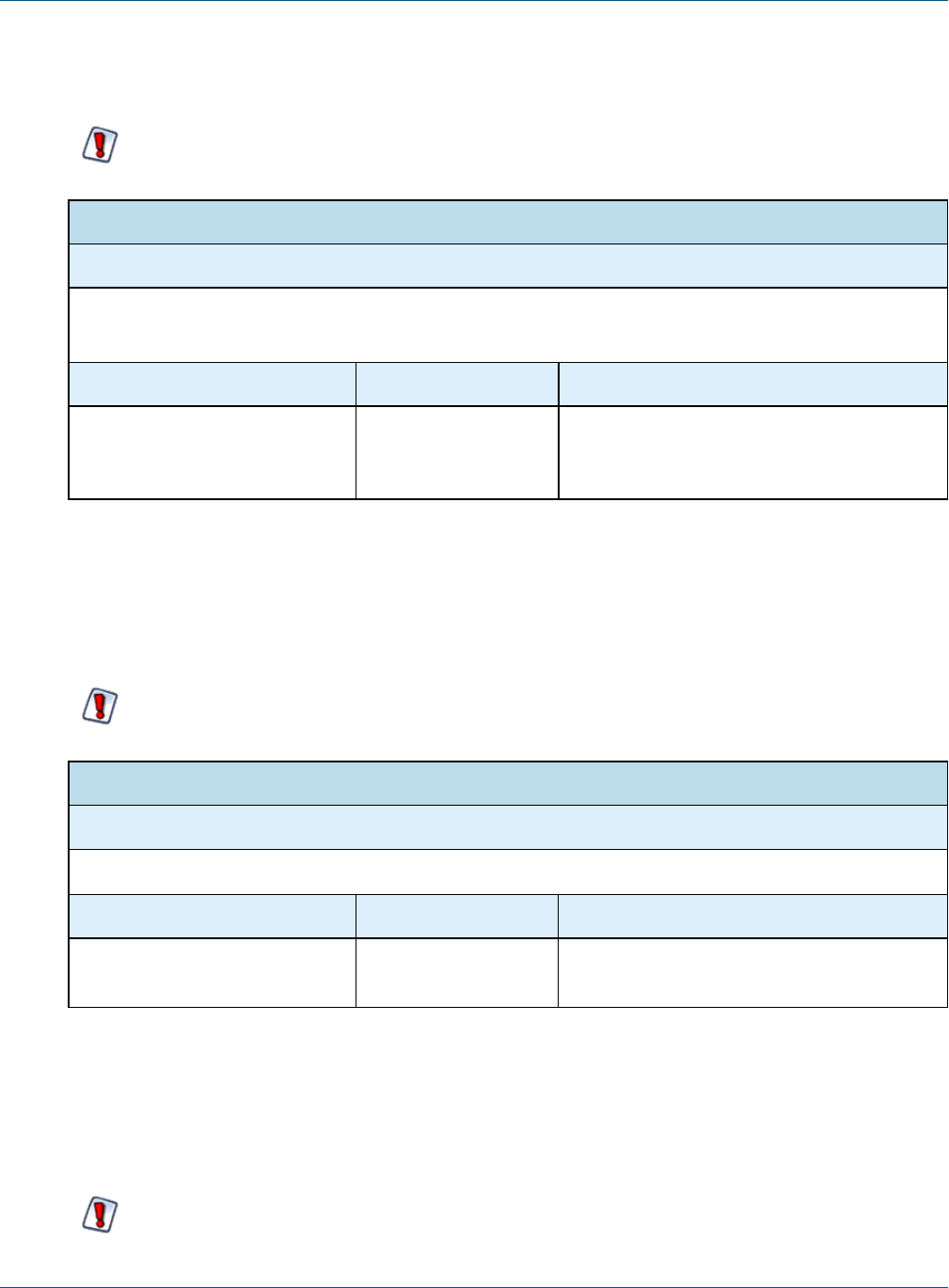
Chapter 4 User Security
When you enable this option, the server automatically enables the Change Password link on the Login page,
even if allowUserPasswordChange is set to false.
If your users are externally authenticated, for example with LDAP, do not enable this option.
Password Administration Option
Configuration File
.../WEB-INF/jasperserver-servlet.xml (controls the Login page)
.../WEB-INF/applicationContext-security-web.xml (controls web services)
Property Value Description
passwordExpirationInDays 0<default>
<any other value>
Set the value to any positive, non-zero value to
specify the number of days after which a
password expires.
4.2.3 Allowing Users to Change their Passwords
This configuration enables the Change Password link on the Login page. By default, this option is turned off,
and an administrator must define user passwords initially or reset a forgotten password. Enabling the password
expiration option (described in the previous section) automatically enables users to change their passwords.
If your users are externally authenticated, for example with LDAP, do not enable this option.
Password Administration Option
Configuration File
.../WEB-INF/jasperserver-servlet.xml
Property Value Description
allowUserPasswordChange false <default>
true
Set the value to true to enable the Change
Password link. Any other value disables it.
4.2.4 Enforcing Password Patterns
If you allow or force users to change their passwords, you can enforce patterns for valid strong passwords, by
requiring a minimum length and a mix of uppercase, lowercase, and numbers. The default pattern accepts any
password of any length, including an empty password.
If your users are externally authenticated, for example with LDAP, do not enable this option.
TIBCO Software Inc. 47
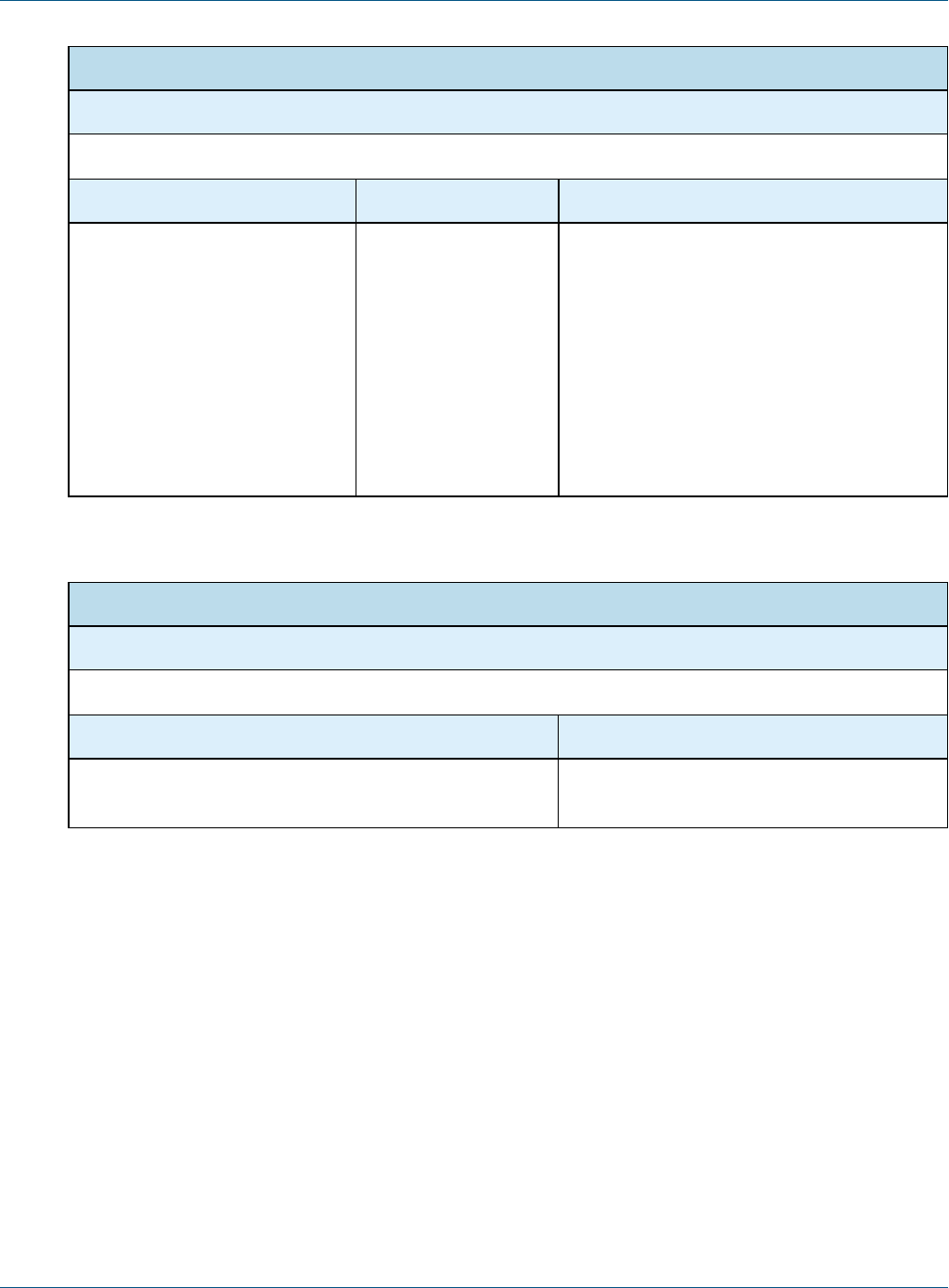
TIBCO JasperReports Server Security Guide
Password Administration Option
Configuration File
.../WEB-INF/applicationContext.xml
Property Bean Description
allowedPasswordPattern userAuthority
Service
A regular expression that matches valid
passwords. The default pattern ^.*$ matches
any password. Change the regular expression
to enforce patterns such as:
• Minimum and maximum password length
• Both uppercase and lowercase characters
• At least one number or special character
Be sure that your pattern allows whitespace
and international characters if needed by your
users.
When you enforce a password pattern, you should set the following message to inform users why their password
was rejected. Be sure to set the message in all your locales.
Password Administration Option
Configuration File
.../WEB-INF/bundles/jsexceptions_messages[_locale].properties
Property Description
exception.remote.weak.password Message displayed to users when password
pattern matching fails.
4.3 Encrypting User Passwords
User passwords are stored along with user profiles in JasperReports Server's own private database. By default,
password encryption is enabled and passwords are stored as cipher text in the database. With the following
procedure, system administrators can turn user password encryption on or off or change the encryption algorithm
and specify the salt key used to initiate the encryption algorithm.
To Configure User Password Encryption:
1. As a precaution, back up the server's private jasperserver database. To back up the default PostgreSQL
database, go to the <js-install> directory and run the following command:
pg_dump -U postgres jasperserver > js-backup.sql
To back up DB2, Oracle, Microsoft SQL Server, and MySQL databases, refer to your database product
documentation.
2. Stop your application server. You should leave your database running.
48 TIBCO Software Inc.

Chapter 4 User Security
3. Export the entire contents of the repository, which includes user profiles and their passwords, with the
following commands. Note that there are two dashes (--) in front of the command options:
Windows: cd <js-install>\buildomatic
js-export.bat --everything --output-dir js-backup-catalog
Linux: cd <js-install>/buildomatic
js-export.sh --everything --output-dir js-backup-catalog
In the export operation, passwords are decrypted using the existing user password ciphers and re-encrypted
with the import-export encryption key. This is a separate encryption that ensures that passwords are never in
plain text, even when exported. For more information, see “Import and Export” in the JasperReports Server
Administrator Guide.
4. Edit the properties in the following table to configure different ciphers. Both the server and the import-
export scripts access the user profiles and must be configured identically. Make the same changes in both
files:
Configuration Files
<jasperserver-pro-war>/WEB-INF/applicationContext-security.xml
<js-install>/buildomatic/conf_source/iePro/applicationContext-security.xml
Property Bean Description
allowEncoding passwordEncoder With the default setting of true, user passwords are
encrypted when stored. When false, user passwords
are stored in clear text in JasperReports Server's
private database. We do not recommend changing this
setting.
keyInPlainText passwordEncoder When true, the secretKey value is given as a plain
text string. When false, the secretKey value is a
numeric representation that can be parsed by Java's
Integer.decode() method. By default, this setting is
false, and the secretKey is in hexadecimal notation
(0xAB).
secretKey passwordEncoder This value is the salt used by the encryption algorithm
to make encrypted values unique. This value can be a
text string or a numeric representation depending on
the value of keyInPlainText.
secretKeyAlgorithm passwordEncoder The name of the algorithm used to process the key, by
default DESede.
cipher
Transformation
passwordEncoder The name of the cipher transformation used to encrypt
passwords, by default DESede/CBC/ PKCS5Padding.
Table 4-1 User Password Encryption Configuration
TIBCO Software Inc. 49

TIBCO JasperReports Server Security Guide
You should change the secretKey value so it's different from the default.
The secretKey,secretKeyAlgorithm, and cipherTransformation properties must be consistent. For
example, the secretKey must be 24 bytes long in hexadecimal notation or 24 characters in plain text for
the default cipher (DESede/CBC/PKCS5Padding). Different algorithms expect different key lengths. For
more information, see Java's javax.crypto documentation.
5. Next, drop your existing jasperserver database, where the passwords had the old encoding, and recreate
an empty jasperserver database. Follow the instructions for your database server:
•Dropping and Recreating the Database in PostgreSQL
•Dropping and Recreating the Database in MySQL
•Dropping and Recreating the Database in Oracle
•Dropping and Recreating in the Database in Microsoft SQL Server
6. Import your exported repository contents with the following commands. The import operation will restore
the contents of JasperReports Server's private database, including user profiles. As the user profiles are
imported, the passwords are encrypted using the new cipher settings.
Note that there are two dashes (--) in front of the command options:
Windows: cd <js-install>\buildomatic
js-import.bat --input-dir js-backup-catalog
Linux: cd <js-install>/buildomatic
js-import.sh --input-dir js-backup-catalog
During the import operation, passwords are decrypted with the import-export encryption key and then re-
encrypted in the database with the new user password encryption settings. For more information, see
“Setting the Import-Export Encryption Key” in the JasperReports Server Administrator Guide.
7. Use a database like the SQuirreL tool to check the contents of the JIUser table in the jasperserver
database and verify that the password column values are encrypted.
8. Restart your application server. Your database should already be running.
9. Log into JasperReports Server to verify that encryption is working properly during the log in process.
4.3.1 Dropping and Recreating the Database in PostgreSQL
1. Change directory to <js-install>/buildomatic/install_resources/sql/postgresql.
2. Start psql using an administrator account such as postgres:
psql -U postgres
3. Drop the jasperserver database, create a new one, and load the jasperserver schema:
drop database jasperserver;
create database jasperserver encoding='utf8';
\c jasperserver
\i js-pro-create.ddl
\i quartz.ddl
4.3.2 Dropping and Recreating the Database in MySQL
1. Change directory to <js-install>/buildomatic/install_resources/sql/mysql.
50 TIBCO Software Inc.

Chapter 4 User Security
2. Log into your MySQL client:
mysql -u root -p
3. Drop the jasperserver database, create a new one, and load the jasperserver schema:
mysql>drop database jasperserver;
mysql>create database jasperserver character set utf8;
mysql>use jasperserver;
mysql>source js-pro-create.ddl;
mysql>source quartz.ddl;
4.3.3 Dropping and Recreating the Database in Oracle
1. Change directory to <js-install>/buildomatic/install_resources/sql/oracle.
2. Log into your SQLPlus client, for example:
sqlplus sys/sys as sysdba
3. Drop the jasperserver database, create a new one, and load the jasperserver schema:
SQL> drop user jasperserver cascade;
SQL> create user jasperserver identified by password;
SQL> connect jasperserver/password
SQL> @js-pro-create.ddl
SQL> @quartz.ddl
4.3.4 Dropping and Recreating in the Database in Microsoft SQL Server
1. Change directory to <js-install>/buildomatic/install_resources/sql/sqlserver.
2. Drop the jasperserver database, create a new one, and load the jasperserver schema using the
SQLCMD utility:
cd <js-install>\buildomatic\install_resources\sql\sqlserver
sqlcmd -S ServerName -Usa -Psa
1> DROP DATABASE [jasperserver]
2> GO
1> CREATE DATABASE [jasperserver]
2> GO
1> USE [jasperserver]
2> GO
1> :r js-pro-create.ddl
2> GO
1> :r quartz.ddl
2> GO
4.4 Encrypting User Session Login
By default, JasperReports Server does not enable the Secure Socket Layer/Transport Layer Security (SSL/TLS) to
encrypt all data between the browser and the server, also known as HTTPS. Enabling HTTPS requires a
certificate and a careful configuration of your servers. We recommend implementing HTTPS but recognize that
it is not always feasible. See “Enabling SSL in Tomcat” on page36
TIBCO Software Inc. 51
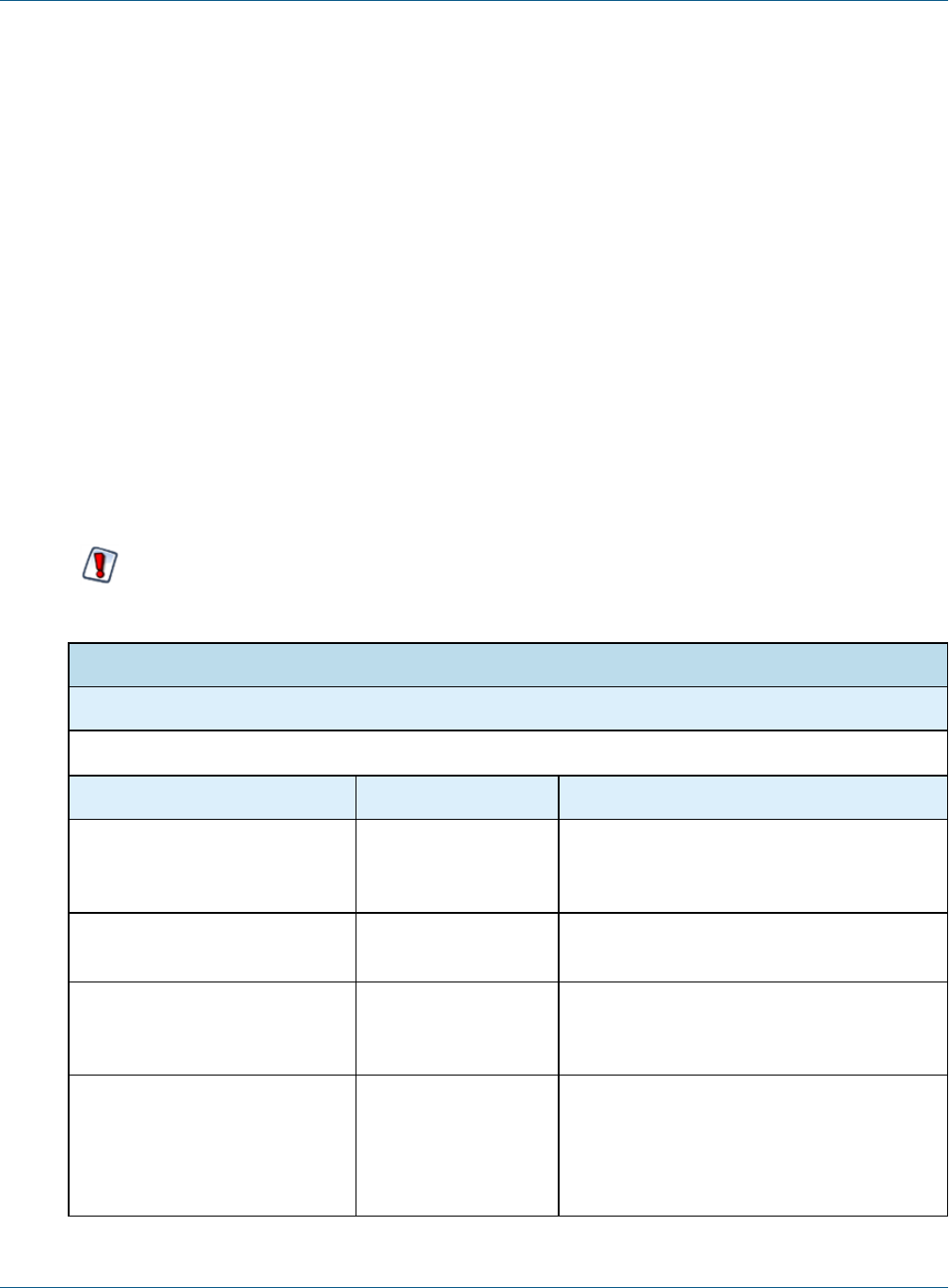
TIBCO JasperReports Server Security Guide
Without HTTPS, all data sent by the user, including passwords, appear unencrypted in the network traffic.
Because passwords should never be visible, JasperReports Server provides an independent method for
encrypting the password values without using HTTPS. Passwords are encrypted in the following cases:
•Passwords sent from the login page.
•Passwords sent from the change password dialog. See “Configuring User Password Options” on page46.
•Passwords sent from the user management pages by an administrator.
When a browser requests one of these pages, the server generates a private-public key pair and sends the public
key along with the page. A JavaScript in the requested page encrypts the password when the user posts it to the
server. Meanwhile, the server saves its private key and uses it to decrypt the password when it arrives. After
decrypting the password, the server continues with the usual authentication methods.
Login encryption is not compatible with password memory in the browser. Independent of the autocomplete
setting described in section“Configuring Password Memory” on page46, the JavaScript that implements
login encryption clears the password field before submitting the page. As a result, most browsers will never
prompt to remember the encrypted password.
The disadvantage of login encryption is the added processing and the added complexity of web services login.
For backward compatibility, login encryption is disabled by default. To enable login encryption, set the
following properties. After making any changes, redeploy the JasperReports Server webapp or restart the
application server.
When login encryption is enabled, web services and URL parameters must also send encrypted
passwords. Your applications must first obtain the key from the server and then encrypt the password
before sending it. See the JasperReports Server Web Services Guide.
Login Encryption
Configuration File
.../WEB-INF/classes/esapi/security-config.properties
Property Value Description
encryption.on truefalse
<default>
Turns login encryption on or off. Encryption is
off by default. Any other value besides case-
insensitive “false” is equivalent to true.
encryption.type RSA <default> Encryption algorithm; currently, only RSA is
supported.
encryption.key.length integer power of 2
1024 <default>
The length of the generated encryption keys.
This affects the strength of encryption and the
length of the encrypted string.
encryption.dynamic.key true <default>
false
When true, a key will be generated per every
single request. When false, the key will be
generated once per application installation.
See descriptions in Dynamic Key Encryption
and Static Key Encryption below.
52 TIBCO Software Inc.

Chapter 4 User Security
Encryption has two modes, dynamic and static, as determined by the encryption.dynamic.key parameter.
These modes provide different levels of security and are further described in the following sections.
4.4.1 Dynamic Key Encryption
The advantage of encrypting the password at login is to prevent it from being seen, but also to prevent it from
being used. For password encryption to achieve this, the password must be encrypted differently every time it's
sent. With dynamic key encryption, the server uses a new public-private key pair with every login request.
Every time someone logs in, the server generates a new key pair and sends the new public key to the JavaScript
on the page that sends the password. This ensures that the encrypted password is different every time it's sent,
and a potential attacker won't be able to steal the encrypted password to log in or send a different request.
Because it's more secure, dynamic key encryption is the default setting when encryption is enabled. The
disadvantage is that it slows down each login, though users may not always notice. Another effect of dynamic
key encryption is that it doesn't allow remembering passwords in the browser. While this may seem
inconvenient, it's more secure to not store passwords in the browser. See “Configuring Password Memory” on
page46.
4.4.2 Static Key Encryption
JasperReports Server also supports static key encryption. In this case, a unique key pair is generated
automatically on the user's first login and remains the same for the entire server installation. Because the key is
always the same, the encrypted value of a user’s password is always the same. This means an attacker could
steal the encrypted password and use it to access the server.
Static key encryption is very insecure and is recommended only for intranet server installation where the
network traffic is more protected. The only advantage of static encryption over no encryption at all is that
passwords can't be deciphered and used to attack other systems where users might have the same password.
Before setting encryption.dynamic.key=false to use static encryption, you must also configure the secure
file called keystore where the key pair is kept. Be sure to customize the keystore parameters listed in the
following table to make your keystore file unique and secure.
For security reasons, always change the default keystore passwords immediately after installing the
server.
TIBCO Software Inc. 53

TIBCO JasperReports Server Security Guide
Keystore Configuration (when encryption.dynamic.key=false)
Configuration File
.../WEB-INF/classes/esapi/security-config.properties
Property Value Description
keystore.location keystore.jks
<default>
Path and filename of the keystore file. This
parameter is either an absolute path or a file in
the webapp classpath, for example
<tomcat>/webapps/jasperserver-pro/WEB-
INF/classes>. By default, the keystore.jks file is
shipped with the server and doesn’t contains
any keys.
keystore.password jasper123 <default> Password for the whole keystore file. This
password is used to verify keystore's integrity.
keystore.key.alias jasper <default> Name by which the single key is retrieved from
keystore. If a new alias is specified and does
not correspond to an existing key, a new key
will be generated and inserted into the
keystore.
keystore.key.password jasper321 <default> Password for the key whose alias is specified
by keystore.key.alias.
When you change the key alias, the old key will not be deleted. You can use it again by resetting the key alias.
Also, once the key has been created with a password, you can't change the password through the keystore
configuration. To delete keys or change a keystore password, the server administrator must use the Java
keytool.exe utility in the bin directory of the JRE or JDK. If you change the keystore password or the key
password, the keystore configuration above must reflect the new values or login will fail for all users.
54 TIBCO Software Inc.

CHAPTER 5 SECURING DATA IN A DOMAIN
You may need to restrict access to the data in a Domain accessed by multiple users. For example, you may
allow managers to analyze data across their department but allow individual contributors to see only their own
data. For this purpose, Domains support security files.
This section describes functionality that can be restricted by the software license for JasperReports
Server. If you don’t see some of the options described in this section, your license may prohibit you from
using them. To find out what you're licensed to use, or to upgrade your license, contact Jaspersoft.
This chapter describes tasks only administrators can perform.
When Domain security is properly configured, a user sees only the data they're meant to see. You define
Domain security by writing data access filtering rules in XML and uploading them as a new security file in the
Domain Designer. These rules are powerful and flexible, and can be based on multiple aspects like user roles or
attributes.
The power of this solution is best presented as an example business case. This section describes a fictional
company’s implementation of Domains in JasperReports Server—from both a business perspective and an
implementation perspective.
In JasperReports Server 6.0, we added support for hierarchical attributes. The examples in this chapter
still work, but they do not support the cascading functionality of hierarchical attributes. See “Updating
your Security File” on page69 for information on implementing domain security with hierarchical
attributes.
For details about the basics of Domains, refer to the JasperReports Server User Guide. For information about
how recent changes to application configuration may effect Domain security, see 3.8, “Restricting Groovy
Access,” on page32.
This chapter includes the following sections:
•Business Case
•Process Overview
•Sales Domain
•Roles, Users, and Attributes
•Setting Up Logging and Testing
•Creating a Domain Security File
TIBCO Software Inc. 55

TIBCO JasperReports Server Security Guide
•Testing and Results
•Updating your Security File
•Domain and Security Recommendations
5.1 Business Case
CZS is an up-and-coming consumer electronics company with operations in the U.S. and Japan. CZS uses
JasperReports Server to track sales revenue and operating cost.
The CZS Sales organization employs the following personnel:
•Rita is the regional sales manager in the Western U.S. She uses the Sales Domain to create reports that track
sales trends in her region.
•Pete is a sales representative selling televisions in Northern California. He uses reports based on the same
Domain to track his quarterly progress.
•Yasmin is a sales representative selling cell phones in Northern California. She uses reports based on the
same Domain to track her quarterly progress.
•Alexi is the regional sales manager in Kansai, Japan. He uses reports based on the same Domain to track
sales trends in his region.
CZS stores its data in a MySQL database. The data is exposed by the Sales Domain, which displays information
about CZS’s consumer electronics sales across the world. It's filtered depending on each employee’s cities of
operation and product. And only managers can access cost information.
5.2 Process Overview
The table below summarizes the steps CZS could take to create the Sales Domain and configure it to secure
their data using user attributes and roles.
Steps Described in…
1. Define a Domain. The CZS business case is met by a
Sales Domain that includes the following fields from their
JDBC data source: city, state, product department, sales
amount, cost amount, and unit sales.
Sales Domain
2. Identify and create access roles. CZS needs two roles:
one for managers, and another for sales representatives.
Both are granted access to the Sales Domain.
Roles
3. Create users and assign appropriate roles to each one. Users
4. Identify and create attributes that determine each user’s
access to data in the Domain. CZS needs two attributes:
Cities and ProductDepartment.
User Attributes
56 TIBCO Software Inc.
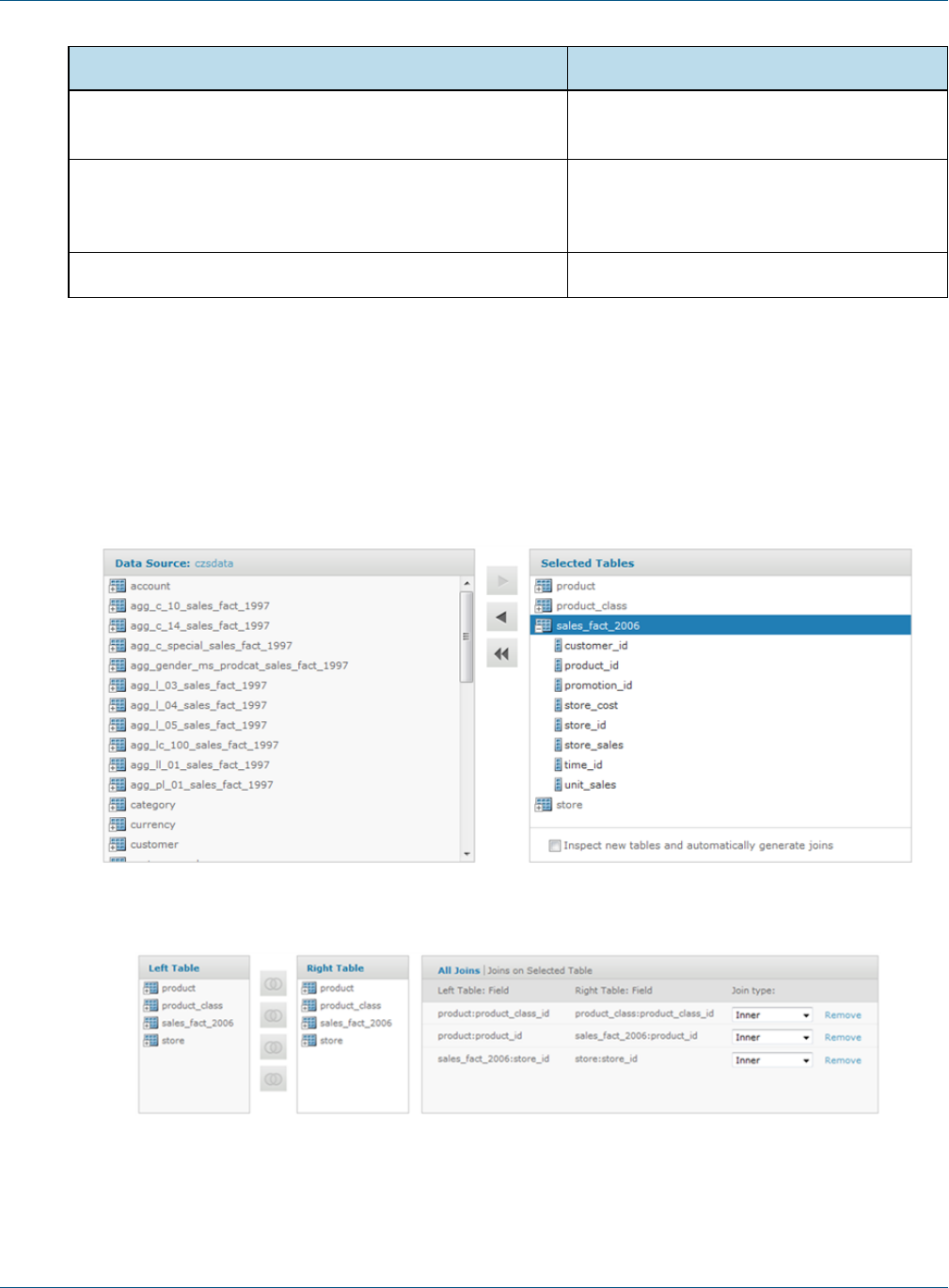
Chapter 5 Securing Data in a Domain
Steps Described in…
5. Prepare to test the security implementation by enabling
logging and creating an example report.
Setting Up Logging and Testing
6. Iteratively create, upload, and test an XML file that defines
the access granted to users based on the attributes
defined in step4.
Creating a Domain Security File
7. Test the Domain as various users. Testing and Results
5.3 Sales Domain
The first step is to create a Domain that presents the relevant data. CZS is primarily interested in the volume and
revenue of their sales, as well as their operational cost. These metrics are represented in the Sales Domain as
fields: unit sales, store sales, and store cost. The Domain also includes fields to establish context for the sales
data, such as product department, city, and state. The following figures show the configuration of this Domain
in the designer.
Figure 5-1 Tables Tab in the Domain Designer
Figure 5-2 Joins Tab in the Domain Designer
TIBCO Software Inc. 57
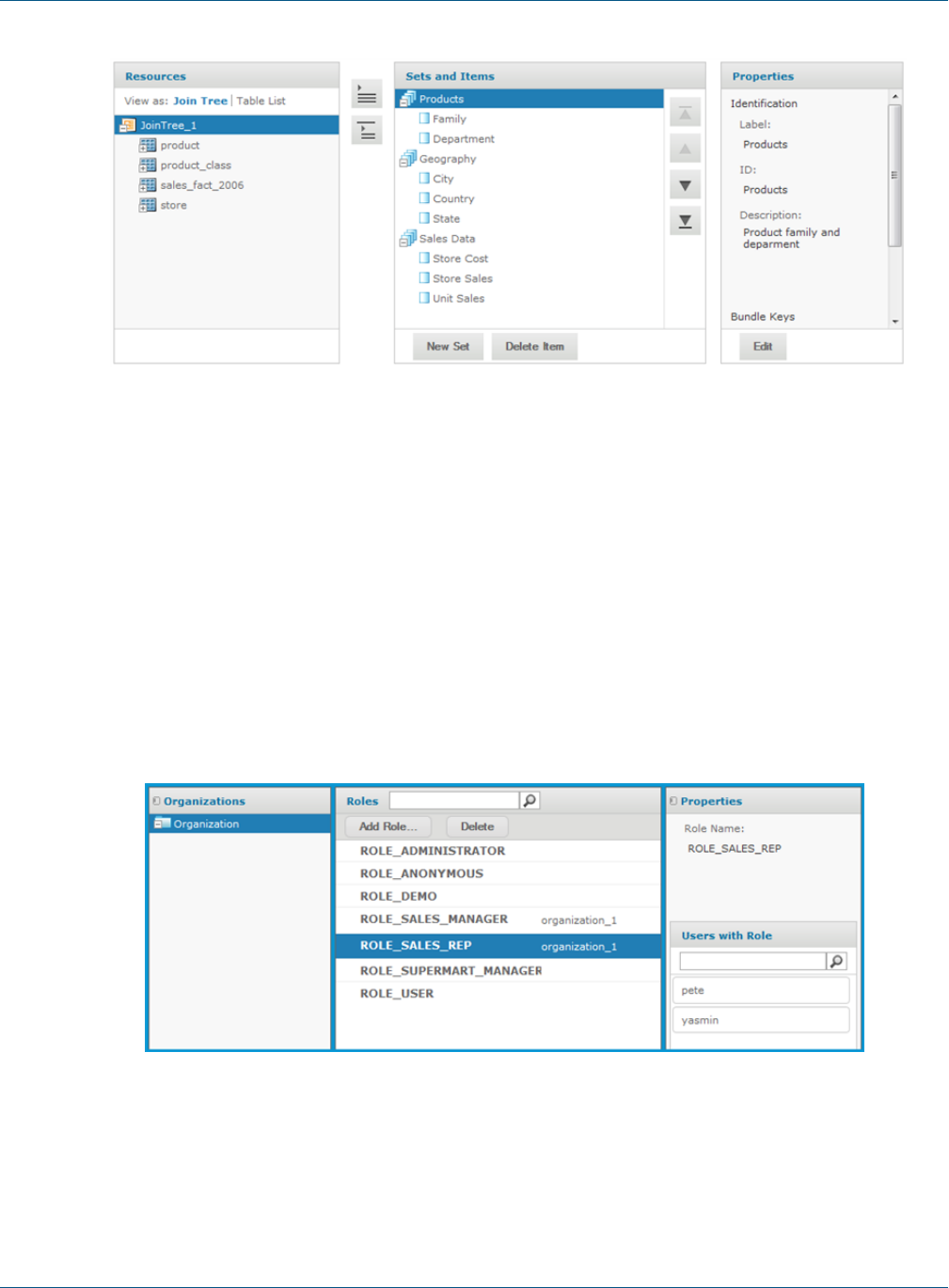
TIBCO JasperReports Server Security Guide
Figure 5-3 Display Tab in the Domain Designer
5.4 Roles, Users, and Attributes
5.4.1 Roles
Domain security can reference a user’s roles to determine the access permissions to grant. The following roles
meet CZS’s needs:
•ROLE_SALES_MANAGER is assigned to sales managers.
•ROLE_SALES_REP is assigned to sales representatives.
CZS grants each role access to view the Sales Domain. For details about creating roles and assigning privileges,
refer to the JasperReports Server Administrator Guide. The following shows CZS’s ROLE_SALES_REP:
Figure 5-4 CZS Sales Representative Role
58 TIBCO Software Inc.

Chapter 5 Securing Data in a Domain
5.4.2 Users
CZS created a user for each of their employees and assigned roles based on each employee’s level of
responsibility:
User Role
Alexi ROLE_SALES_MANAGER
Pete ROLE_SALES_REP
Rita ROLE_SALES_MANAGER
Yasmin ROLE_SALES_REP
For details about creating users, refer to the JasperReports Server Administrator Guide.
5.4.3 User Attributes
A user attribute is a name-value pair defined at the user level that corresponds to some data in a Domain. CZS
wants to be able to describe their users in terms of product lines that they sell and the cities where they sell
them. So each user is assigned two attributes in addition to a role:
•The Cities profile attribute corresponds to the City field in the Geography item group in the Sales
Domain.
•The ProductDepartment attribute corresponds to the Department field in the Product item group in the
Sales Domain.
User
Profile Attributes
Cities Product/Department
Rita San Francisco, Los Angeles, Sacramento Television, Wireless Devices
Pete San Francisco Television
Yasmin San Francisco Wireless Devices
Alexi Osaka, Sakai Wireless Devices
Table 5-1 UserAttributes of All CZS Users
When these attributes are used in the security file in an access grant definition, each user’s attributes determine
the data returned for them by the Domain. For example, Rita’s attribute value for Cities is San
Francisco,Los Angeles,Sacramento. So she sees data for all those cities.
The following figure shows the configuration of Rita’s user account. Notice Rita’s attributes listed below her
roles:
TIBCO Software Inc. 59
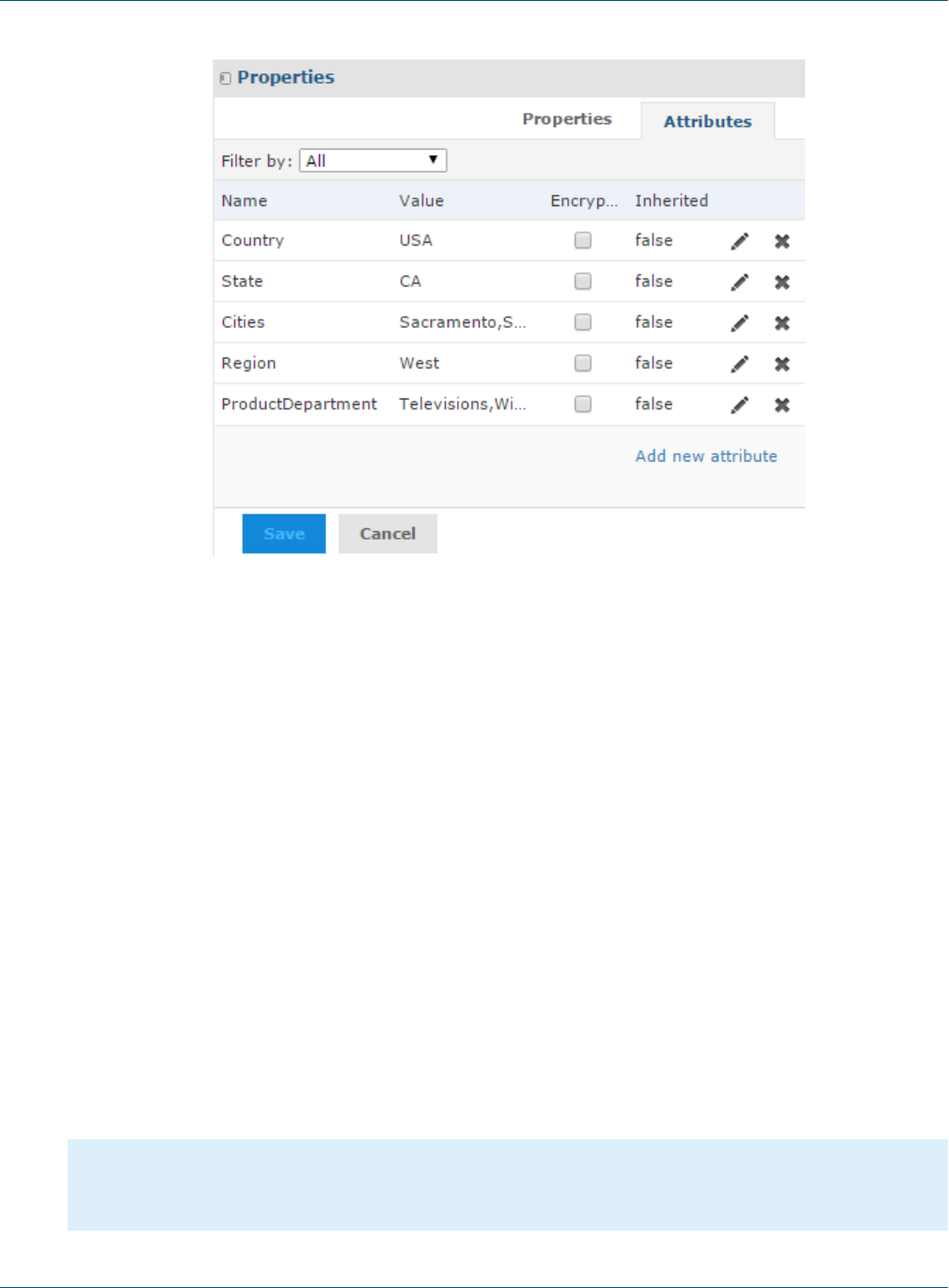
TIBCO JasperReports Server Security Guide
Figure 5-5 CZS User Rita’s Configuration
5.5 Setting Up Logging and Testing
Before creating a security file, CZS prepares for the implementation by:
•Enabling Logging
•Creating a Test Report
5.5.1 Enabling Logging
To assist in the iterative creation of their security file, CZS enables more verbose logging to help troubleshoot
problems with the Sales Domain and security file. Such logging features are disabled by default to minimize the
log size. They should be enabled in test environments when defining security.
To enable Domain security logging:
1. Locate and open the log4j.properties file and scroll to the bottom.
You'll find this file in the WEB-INF folder; if you use Tomcat as your application server, the default path to
this location is:
<js-install>\apache-tomcat\webapps\jasperserver-pro\WEB-INF.
2. Add the following lines after the last line in the file:
log4j.logger.com.jaspersoft.commons.semantic.datasource.impl.
SemanticLayerSecurityResolverImpl=debug
log4j.logger.com.jaspersoft.commons.semantic.dsimpl.JdbcTableDataSet=DEBUG, stdout, fileout
log4j.logger.com.jaspersoft.commons.util.JSControlledJdbcQueryExecuter=DEBUG, stdout, fileout
60 TIBCO Software Inc.
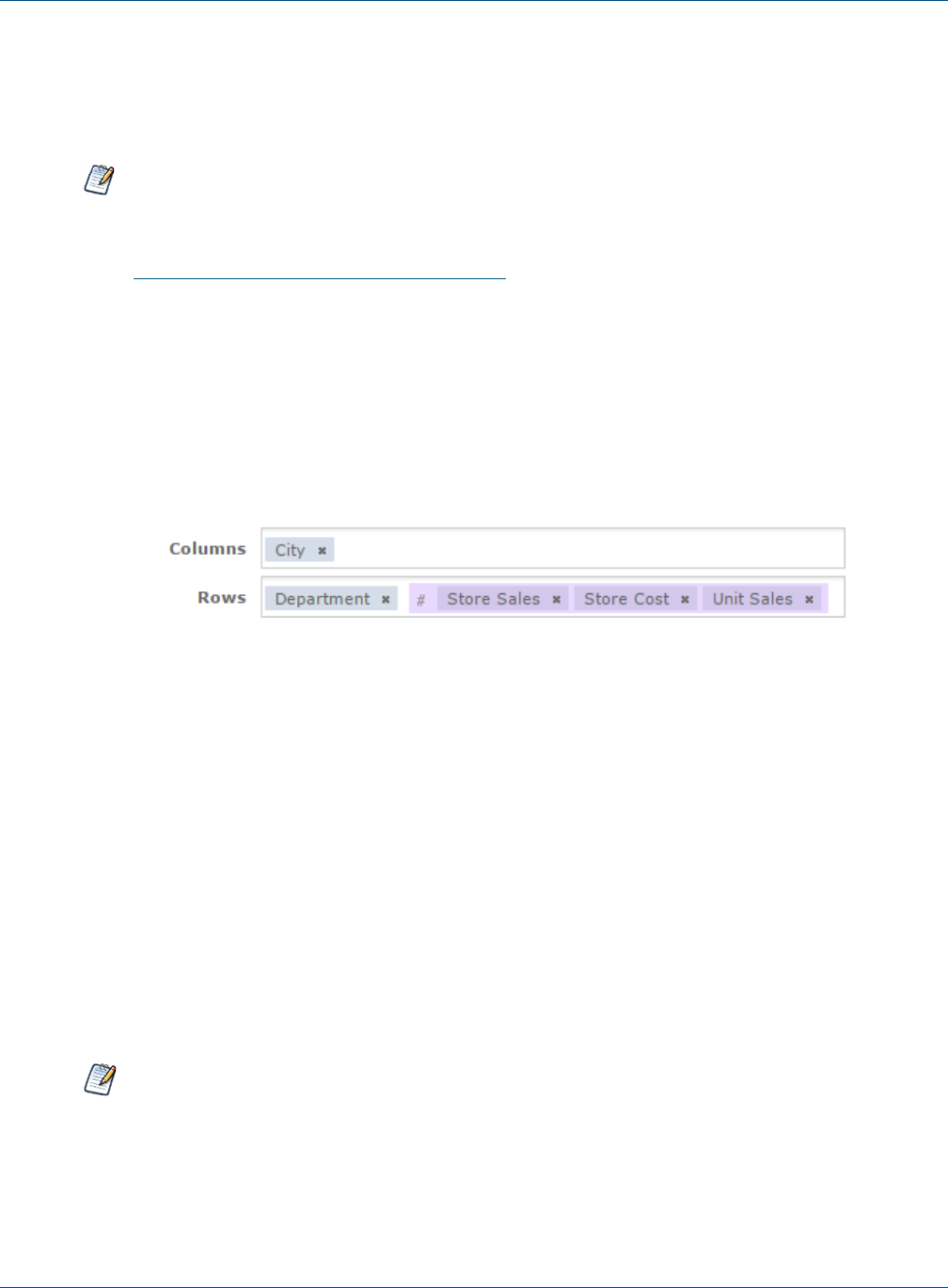
Chapter 5 Securing Data in a Domain
3. Save the file.
4. Restart JasperReports Server.
Information about Domains and their security will now be written to the log and to the console.
The additional information written to the log can be very verbose, and your log files will grow more quickly
with these properties enabled. You can manage your logs in the file system, in the WEB-INF/logs folder
under your JasperReports Server installation. For more information, refer to the log4j documentation,
which is available at:
http://logging.apache.org/log4j/docs/manual.html
Because these options are so verbose, we recommend using them only during debugging and disabling
them in your production environment.
5.5.2 Creating a Test Report
CZS creates an Ad Hoc crosstab based on the Sales Domain to assist in testing the security file as they create
each access grant. The report displays store sales amount, store sales cost, and store units sold for all cities and
departments.
Figure 5-6 Fields added to CZS Ad Hoc crosstab
Each user’s limited view of this report is shown in Testing and Results.
5.6 Creating a Domain Security File
A Domain’s security file contains item and resource access grants that specify access based on certain aspects of
a user, such as attributes or roles. Typically, access grants check a user’s roles or attributes and grant access to
the items (columns) and resources (rows) of the Domain. This mechanism tailors the data that is available to
each user.
A Domain’s security file has two types of access definitions:
•Row-level access determines which rows in the data source can be displayed to a specific user.
•Column-level access determines which columns in the data source can be displayed to a specific user.
This section describes the access grant syntax and illustrates both kinds of access grant.
Note the comments in the XML examples in this section; for example: <!-- Comment -->. It’s good
practice to comment the access grants you define, and to format your XML neatly. We recommend using
an XML editor when creating security files. See Domain and Security Recommendations.
TIBCO Software Inc. 61

TIBCO JasperReports Server Security Guide
5.6.1 Access Grant Syntax
All access grants take a principalExpression that gets the user's attributes or roles and evaluates them. When
the principalExpression evaluates to true, that means the column-level grant or row-level grant applies to
the current user. Column-level grants then have a list of columns, called items, that are denied or granted access.
Row-level grants have a filterExpression that filters rows based on the attributes or roles. In practice, when
the principalExpression of a row-level grant is true, the filterExpression is added to the WHERE clause of
the database query to restrict the rows that are returned.
You can use the following services in a principalExpression or filterExpression:
•authentication.getPrincipal().getRoles() – Use this function to access the roles of the current
user.
•attributesService – Use to retrieve or test for an attribute you have defined at the user, organization, or
server level.
The following service is only used in a filterExpression to filter rows:
•testProfileAttribute – Compares a given attribute to a field in the data.
5.6.1.1 The getRoles() Function
To retrieve information about roles, you must access Spring's currently authenticated principal object. You do
this using authentication.getPrincipal().getRoles() to get a list of all roles defined for the user. Your
expression must process this list to compare it to the desired role names. For example, the following principal
expression checks whether the user has the ROLE_ADMINISTRATOR or ROLE_SALES_MANAGER role.
<principalExpression>
authentication.getPrincipal().getRoles().any{it.getRoleName()
in ['ROLE_ADMINISTRATOR','ROLE_SALES_MANAGER'] }
</principalExpression>
The authentication.getPrincipal() function can access other information about the user, but Jaspersoft
recommends using only the functions described in this section.
5.6.1.2 The attributesService
The attributesService retrieves the value of a given attribute for a user. A user can inherit attributes from
their organization or the server in addition to any attributes assigned to the user directly. When specifying an
attribute, you can either choose the category (user, tenant (organization), or server) in which the server should
look for its value, or allow the server to locate the value hierarchically.
When determining an attribute hierarchically, the server first searches for attributes defined at the user level,
then at the organization-level, then on any parent organizations, then finally at the server level. It will return the
first value it finds, such that an attribute defined at a lower level can override the same attribute at a higher
level.
This function has the following syntax:
attributesService.getAttribute('AttrName',Level[,required])
where:
•AttrName – String that specifies the attribute to check. This can be any customer-defined attribute, such as
Cities.
•Level – Category that specifies a level in the hierarchy to check for attributes. One of: null,'USER',
'TENANT', or 'SERVER'. To search for attributes hierarchically from all levels, use null.
•required (optional) – Boolean that specifies whether or not the attribute is required.
62 TIBCO Software Inc.

Chapter 5 Securing Data in a Domain
•When set to true, an error message is displayed in the UI if the attribute is not present.
•When set to false (default), if the attribute is not present, no error is thrown and the
filterExpression is not performed. In this case, unfiltered information which the user is not
explicitly authorized to view may be displayed.
attributesService is implemented in Groovy. For more information about Groovy, see www.groovy-
lang.org.
For example, the following expression tests whether the user has myValue set for myAttribute anywhere in the
hierarchy.
<principalExpression>
attributesService.getAttribute('myAttribute',null,true)?.getAttrValue().equals('myValue')
</principalExpression>
5.6.1.3 The testProfileAttribute Function
Within a filterExpression, you often want to compare an attribute to a database field value. The
testProfileAttribute function provides an easy way to do so:
testProfileAttribute(table_ID.field_name, 'attribute'[,Level])
where:
•table_ID.field_name – The table name and field name of a field whose value you’re comparing to an
attribute.
•attribute – The name of an attribute.
•Level (optional) – A specific level where the attribute should be defined, one of 'USER','TENANT', or
'SERVER'. When this argument is omitted, the attribute value is determined hierarchically across all levels.
<filterExpression>testProfileAttribute(store1.store_country,'country')</filterExpression>
Table 5-2 Filter expression using testProfileAttribute
JasperReports Server 6.0 added support for hierarchical attributes and changed the behavior of
testProfileAttribute to use them by default. For more information, see 5.8, “Updating your
Security File,” on page69.
You can also use attributesService in a filter expression. The following filter expression gives the same
results as the filter expression in Table 5-2
<filterExpression>
store1.store_country ==(groovy('attributesService.getAttribute("country", null).attrValue'))
</filterExpression>
Table 5-3 Filter expression using attributesService
5.6.2 Row-level Security
This section gives an overview of row-level security and then shows how CZS uses row-level security to restrict
access based on Cities and ProductDepartment.
TIBCO Software Inc. 63

TIBCO JasperReports Server Security Guide
5.6.2.1 Understanding Row-level security
Row-level access determines which rows in the data source can be displayed to a specific user.
For example, consider a table that includes values for the cities where products are sold. You could define a
resource access grant that finds users for which a city has been defined as a profile attribute and, for each such
user, limits access to rows where the city value is the user’s specific city.
For example, take Rita and Alexi. Both have the same role and the same access to the Sales Numbers analysis
view, but CZS doesn’t want them to see the same data—Rita should see data about San Francisco, Sacramento,
and Los Angeles; and Alexi should see data about Osaka and Sakai. Without attributes, this would be possible
only if CZS’s access roles were defined along geographic lines.
Each access grant ID must be unique within the scope of the security file.
You can define several similar resource access grants for each resource defined in your Domain. By
default, the server assumes access grants are combined with a logical AND. You can force the server to
use a logical OR by setting the orMultipleExpressions property to TRUE.
To implement row security, CZS uses attributesService to check for attributes.
For example, CZS used the following XML to define a principal expression and filter expression that grant
access to users based on their Cities profile attribute:
<resourceAccessGrant id="Jointree_1_row_access_grant_20">
<principalExpression>attributesService.getAttribute('Cities', null, true) != null
</principalExpression>
<filterExpression>testProfileAttribute(store.store_city,'Cities')
</filterExpression>
</resourceAccessGrant>
The principal expression gets the values of the Cities attribute for the logged-in user. Since
attributesService supports hierarchical attributes, CZS set the null parameter to indicate that they want to
look at the values from all levels. The optional true parameter ensures that if a user without any values for the
Cities attribute accesses the view, they will receive an error.
The filter expression checks the user’s Cities profile attribute as well, but it compares this value with the
values in the Domain’s store_city field. The Domain then returns all the rows that match the user’s Cities
profile attribute.
5.6.2.2 CZS’s Resource Access Grants
CZS uses the access grant above to determine data access based on a user’s Cities attribute. Because CZS
defines all their attributes in the same manner, they can use a similar resource access grant to determine data
access for users based on their ProductDepartment attribute.
The resulting security file included these two resource access grants.
<!-- Row level security -->
<!-- What access do roles/users have to the rows in the resource? -->
<resourceAccessGrantList id="JoinTree_1_List" label="ListLabel"
resourceId="JoinTree_1">
<resourceAccessGrants>
<!-- Row level for Cities -->
<resourceAccessGrant id="Jointree_1_row_access_grant_20">
64 TIBCO Software Inc.

Chapter 5 Securing Data in a Domain
<principalExpression>attributesService.getAttribute('Cities', null, true) != null
</principalExpression>
<filterExpression>testProfileAttribute(store.store_city,'Cities')
</filterExpression>
</resourceAccessGrant>
<!-- Row level for Product Dept -->
<resourceAccessGrant id="Jointree_1_row_access_grant_30">
<principalExpression>
attributesService.getAttribute('ProductDepartment', null, true) != null
</principalExpression>
<filterExpression>testProfileAttribute(product_class.product_department,
'ProductDepartment')</filterExpression>
</resourceAccessGrant>
</resourceAccessGrants>
</resourceAccessGrantList>
5.6.3 Column-level Security
Column-level access determines which columns in the data source can be displayed to specific users.
5.6.3.1 Understanding Column-level Security
Consider a table that includes employee contact and salary information. You could define item group access
grants that check the user’s role and grant access to the salary field only if the user has the Human Resources
role. For example, the following code sample modifies access for the ROLE_SALESREP role, first by revoking
the default access for that role and then granting access to sales information only. The principle expression
determines which users the item group access grant applies to (users with the ROLE_SALES_REP role). The
item access grants determine the specific access of the users. All role-specific access is revoked then access to
the StoreSales and StoreCost item is granted:
<itemGroupAccessGrant id="Jointree_1_item_group_access_grant_2" access="granted">
<principalExpression>authentication.getPrincipal().getRoles().any
{it.getRoleName() in ['ROLE_SALES_REP'] }</principalExpression>
<itemAccessGrantList id="Jointree_1_grant2_item_group_items"
defaultAccess="denied">
<itemAccessGrants>
<itemAccessGrant id="Jointree_1_grant2_items_grant1" itemId="StoreSales"
access="granted" />
<itemAccessGrant id="Jointree_1_grant2_items_grant2" itemId="UnitSales"
access="granted" />
</itemAccessGrants>
</itemAccessGrantList>
</itemGroupAccessGrant>
</itemGroupAccessGrants>
5.6.4 CZS’s Item Group Access Grants for Sales Data
To ensure that sales representatives don’t have access to cost information, CZS adds item group access grants;
the first grants full access to managers and the administrator:
<!-- Column-level access for Sales Manager and Admins-->
<itemGroupAccessGrant id="Jointree1_item_group_access_grant_MNG" access="granted">
<principalExpression>authentication.getPrincipal().getRoles().any
TIBCO Software Inc. 65
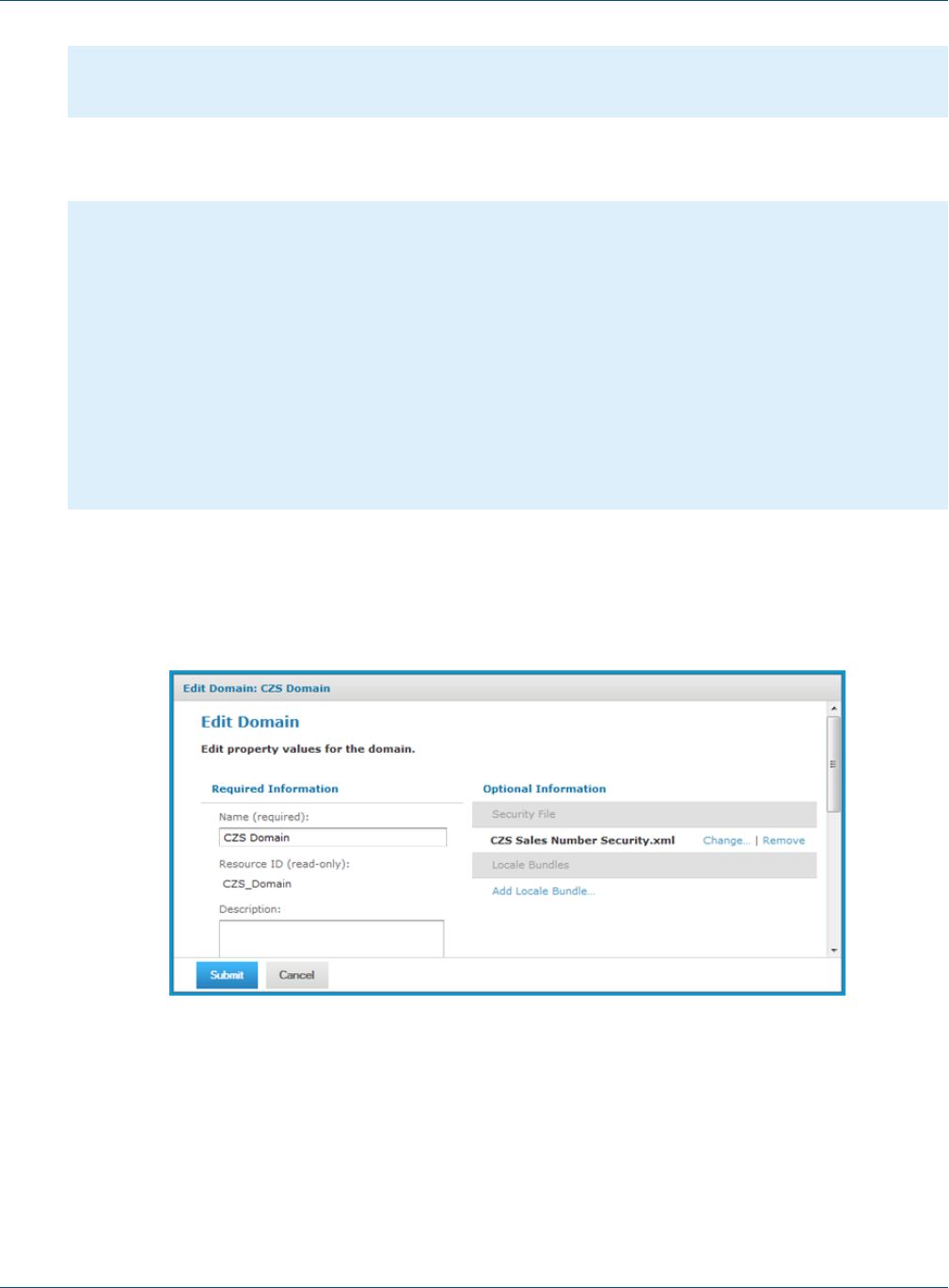
TIBCO JasperReports Server Security Guide
{it.getRoleName() in ['ROLE_ADMINISTRATOR','ROLE_SALES_MANAGER'] }
</principalExpression>
</itemGroupAccessGrant>
CZS then adds an item group access grant that grants limited access to sales representatives; the following XML
grants access to the Store Sales and Sales Units fields while revoking access to the Store Cost field:
<!-- Column-level access for Sales Reps-->
<itemGroupAccessGrant id="Jointree_1_item_group_access_grant_REP"
access="granted">
<principalExpression>authentication.getPrincipal().getRoles().any
{it.getRoleName() in ['ROLE_SALES_REP'] }</principalExpression>
<itemAccessGrantList id="Jointree_1_grant2_item_group_items"
defaultAccess="denied">
<itemAccessGrants>
<itemAccessGrant id="Jointree_1_grant2_items_grant1" itemId="StoreSales"
access="granted" />
<itemAccessGrant id="Jointree_1_grant2_items_grant2" itemId="UnitSales"
access="granted" />
</itemAccessGrants>
</itemAccessGrantList>
</itemGroupAccessGrant>
5.6.5 Uploading the Security File
CZS uploads the security file each time they add a new access grant. You can upload the security file when you
add or edit a Domain. Make sure to click Submit after you have successfully uploaded the security file.
Figure 5-7 Uploaded Security File in the Domain Dialog
5.7 Testing and Results
Finally, CZS verifies Domain access as various users by clicking the Login as User button on the Manage
Users page.
66 TIBCO Software Inc.
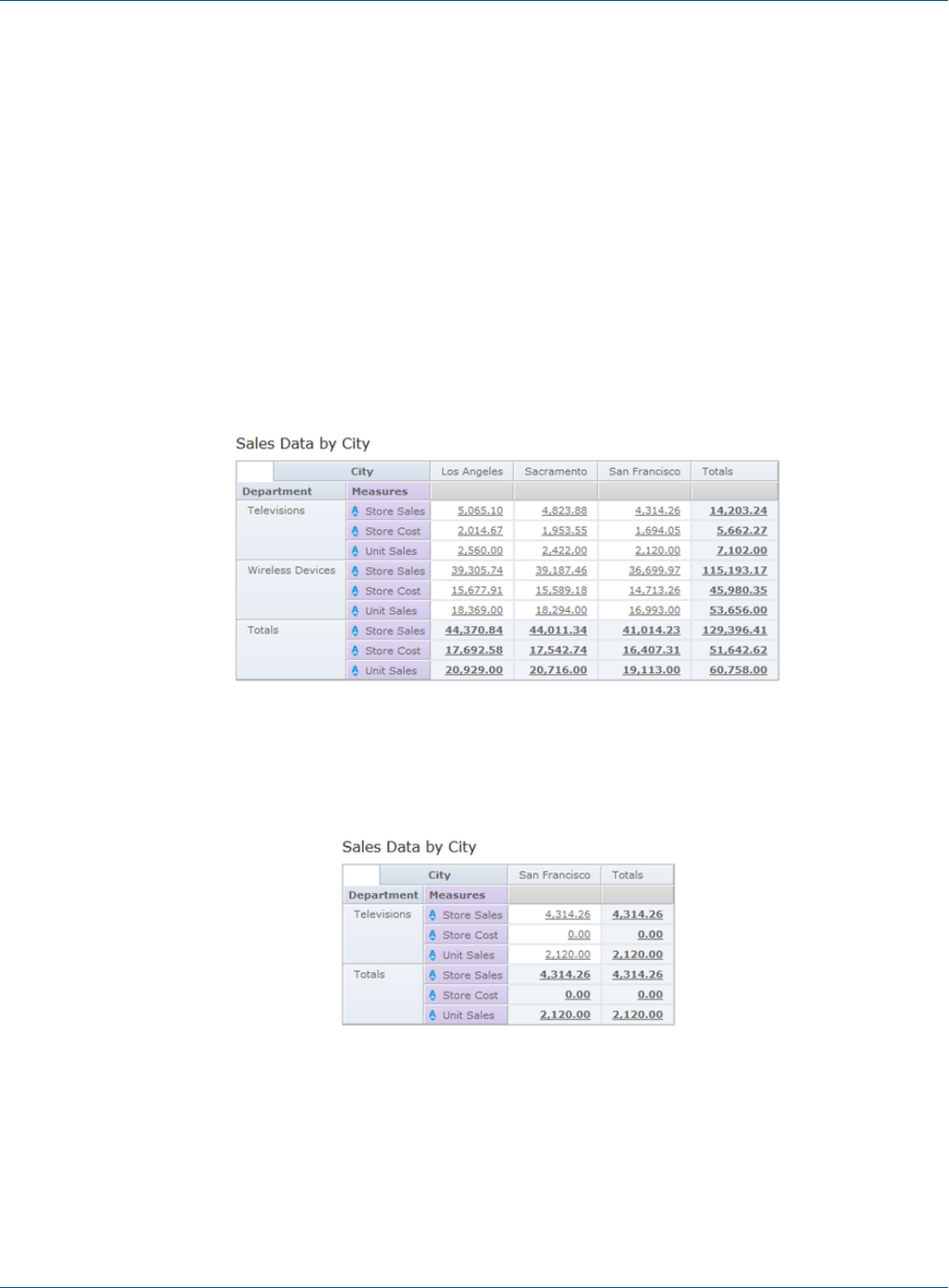
Chapter 5 Securing Data in a Domain
To test the access granted to users on data in the Domain:
1. Log in as administrator (jasperadmin) if necessary.
2. Click Manage > Users.
3. In the list of user names, click the name of the user you want to test.
4. In the User page, click Log in as User. The selected user’s Home page appears.
5. Click View > Reports.
6. In the list of reports, click the test report you created when defining your security file.
7. Review the report to ensure that it shows only the data this user should see. Also verify that you have not
restricted data that the user should see. The figures below show CZS’s results.
8. Click Logout to return to the administrator view.
When viewing the test report created from the Sales Domain:
•Rita can see all data pertaining to California and the three Californian cities where CZS has offices (Los
Angeles, Sacramento, and San Francisco):
Figure 5-8 Rita’s view of the CZS Test Report
•Pete can see only Television data about San Francisco; he sees zeros for Store Cost because he is denied
access to that field:
Figure 5-9 Pete’s view of the CZS Test Report
TIBCO Software Inc. 67
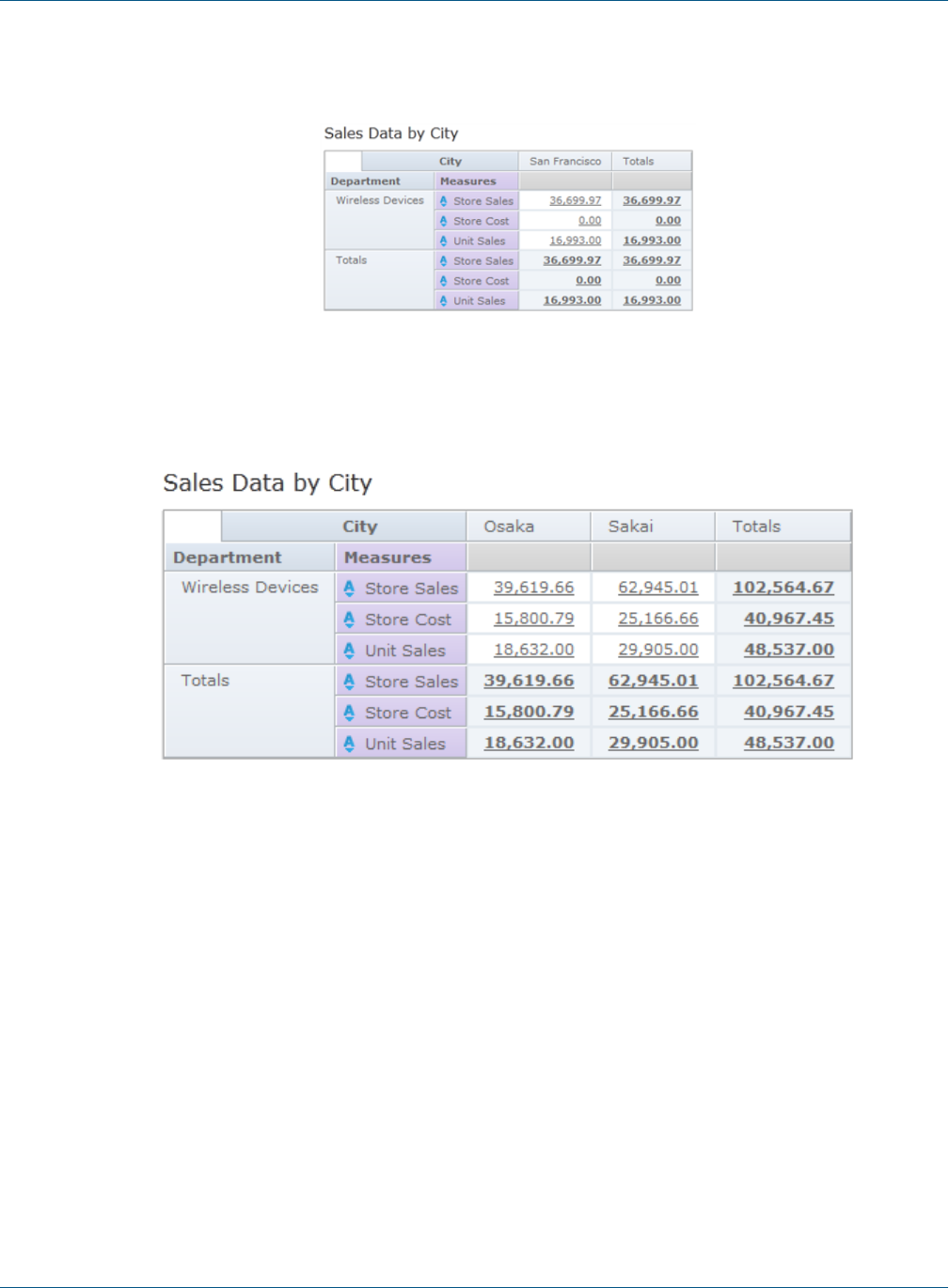
TIBCO JasperReports Server Security Guide
•Yasmin can see only Wireless Devices data about San Francisco; she sees zeros for Store Cost because she
is denied access to that field:
Figure 5-10 Yasmin’s view of the CZS Test Report
•Alexi can see Wireless device data pertaining to the two Japanese cities where CZS has stores (Osaka and
Sakai):
Figure 5-11 Alexi’s view of the CZS Test Report
•Finally, make sure that any user who doesn't have the Cities attribute set can't see any data. For example,
joeuser receives an error:
68 TIBCO Software Inc.
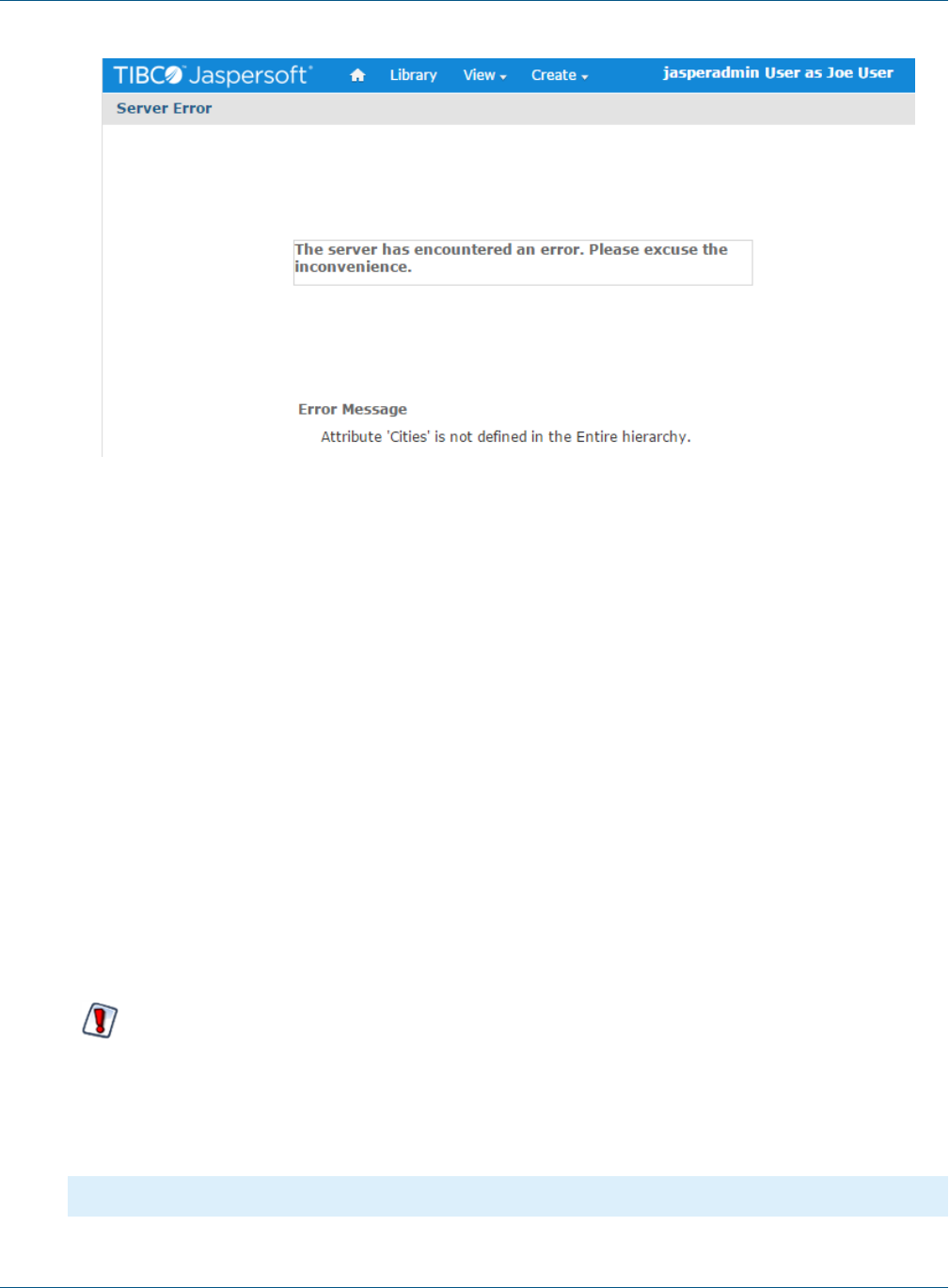
Chapter 5 Securing Data in a Domain
Figure 5-12 joeuser's view of the CZS Test Report
5.8 Updating your Security File
In JasperReports Server 6.0, we added support for hierarchical attributes, which extend attribute functionality.
For security files, we added a new service, attributesService, that supports hierarchical attributes and
usually has better performance. This section describes how to update your security file to use
attributesService.
With hierarchical attributes, a user can inherit attributes from their organization or the server in addition to any
attributes assigned to the user directly. When providing an attribute, you can either specify the category (user,
organization, or server) in which the server should look for its value, or allow the server to locate the value
hierarchically.
To update an existing Domain security file:
•Update principal expressions to use attributesService. However, attributesService does not support
information that is stored in the Spring principal object, such as user roles.
•To retrieve information from the principal object, as in the case of roles, use a getter instead of accessing the
attribute directly. For example, use authentication.getPrincipal.getRoles, not
authentication.principal.roles.
You must update any security file that uses the older authentication.principal.attributes
syntax. This syntax no longer works.
Updating to attributesService:
For example, suppose you have the following resource access grant, which does not support hierarchical
attributes:
<resourceAccessGrant id="custom_grant_1">
TIBCO Software Inc. 69

TIBCO JasperReports Server Security Guide
<principalExpression>
authentication.principal.attributes.any{it.attrName in ['AccessLevel'] ?
it.attrValue.equals('Manager') : false }
</principalExpression>
<filterExpression>testProfileAttribute(region11.sales_city,'Cities')</filterExpression>
</resourceAccessGrant>
You can update the principal expression as shown below:
<resourceAccessGrant id="custom_grant_2">
<principalExpression>
attributesService.getAttribute('AccessLevel', null)?.getAttrValue().equals('Manager')
</principalExpression>
<filterExpression>testProfileAttribute(region11.sales_city,'Cities')</filterExpression>
</resourceAccessGrant>
As part of the changes, the function testProfileAttribute was updated to work with hierarchical attributes
by default. If you wish to compare an attribute's value that is defined specifically at the user level, you can
specify the level as follows:
<filterExpression>testProfileAttribute(region11.sales_city,'Cities','USER')</filterExpression>
For more information, see 5.6.1.3, “The testProfileAttribute Function,” on page63.
5.9 Domain and Security Recommendations
When defining a Domain and its security, keep these recommendations in mind:
•A Domain should cover a large subject area and include data with multiple uses. Define joins to create data
islands that each contain related information; the data islands themselves can contain completely unrelated
data. For example, you could include both human resources and sales data in a single Domain; users would
see only the information relevant to their job responsibilities. For an example of this type of Domain, refer
to the SuperMart example that can be installed with JasperReports Server.
•When defining a Domain, don’t create too many item groups, and avoid very deep structures with many
levels. Such complexity makes the Domain harder to use.
•Logging can help you troubleshoot any problems you encounter while implementing Domain security. For
more information, refer to Enabling Logging.
•Refer to http://groovy.codehaus.org for information on the Groovy expressions that Domain security files
support. Note that, while the server does validate Groovy expressions, the validation is very light weight
and doesn’t detect all improperly formed expressions.
•If the names of tables and fields in your data source change, you can edit the Domain design XML file so
that the resource names match the new names in the database. Then, upload the new version of the file;
your reports that rely on the Domain will work properly without being updated individually. If you have
defined a security file for this Domain, you must also edit the resource names in the security file.
•Start with the simplest item or resource grant, and when that works, expand upon it. Start simple and iterate
until you have the full set of access grants needed. Follow good troubleshooting practices, such as changing
only a single aspect of the security file before testing the results of the change.
•Use an XML editor to create your security file. While the server validates the schema against its own XML
definition, a typical XML editor can identify issues like unclosed tags. For example, open the security file
with Internet Explorer; if it returns errors, use them to identify and correct your XML.
70 TIBCO Software Inc.

Chapter 5 Securing Data in a Domain
•Once your Domain is created, create several Domain Topics that focus on specific aspects of the Domain or
specific data your end-users will want to review regularly. To do so, click Create > Ad Hoc Report, select
your Domain, and use the Data, Filters, and Display pages to customize the contents and the way it's
displayed, then use the Topics page to save the new Domain Topic.
•When creating a security file, be sure to use the IDs of items and groups as they are defined in the Domain
design file exported from the Domain Designer. For more information.
•If you modify the Domain, you should also export the design file and update the security file with any IDs
that have changed. Update the security file using the Change function on the Edit Domain page of the
Domain Designer.
A typical security file has the following structure:
</resourceAccessGrants>
</resourceAccessGrantList>
...
</resourceAccessGrants>
<securityDefinition xmlns="http://www.jaspersoft.com/2007/SL/XMLSchema"
version="1.0" itemGroupDefaultAccess="granted">
<resourceAccessGrants> <!-- Begin row-level security -->
<resourceAccessGrantList id="expense_join_resource_access_grant" label="aLabel"
resourceId="expense_join">
<resourceAccessGrants>
<resourceAccessGrant id="expense_join_ROLE_SUPERMART_MANAGER_store_row_grant">
<principalExpression>
authentication.getPrincipal().getRoles().any{it.getRoleName() in
['ROLE_SUPERMART_MANAGER'] }
</principalExpression>
<filterExpression>s.store_country in ('USA') and s.store_state in ('CA')
</filterExpression>
</resourceAccessGrant>
...
<itemGroupAccessGrants> <!-- Begin column-level security -->
<itemGroupAccessGrantList id="expense_join_item_group_access_grant_group"
label="aLabel" itemGroupId="expense_join" defaultAccess="denied">
<itemGroupAccessGrants>
<itemGroupAccessGrant id="expense_join_super_user_item_group_grant"
access="granted">
<principalExpression>
authentication.getPrincipal().getRoles().any{it.getRoleName() in
['ROLE_ADMINISTRATOR'] }
</principalExpression>
</itemGroupAccessGrant>
...
</itemGroupAccessGrants>
</itemGroupAccessGrantList>
...
</itemGroupAccessGrants>
</securityDefinition>
TIBCO Software Inc. 71

TIBCO JasperReports Server Security Guide
72 TIBCO Software Inc.

GLOSSARY
Ad Hoc Editor
The interactive data explorer in JasperReports Server Professional and Enterprise editions. Starting from a
predefined collection of fields, the Ad Hoc Editor lets you drag and drop fields, dimensions, and measures to
explore data and create tables, charts, and crosstabs. These Ad Hoc views can be saved as reports.
Ad Hoc Report
In previous versions of JasperReports Server, a report created through the Ad Hoc Editor. Such reports could be
added to dashboards and be scheduled, but when edited in Jaspersoft Studio, lost their grouping and sorting. In
the current version, the Ad Hoc Editor is used to explore views which in turn can be saved as reports. Such
reports can be edited in Jaspersoft Studio without loss, and can be scheduled and added to dashboards.
Ad Hoc View
A view of data that is based on a Domain, Topic, or OLAP client connection. An Ad Hoc view can be a table,
chart, or crosstab and is the entry point to analysis operations such as slice and dice, drill down, and drill
through. Compare OLAP View. You can save an Ad Hoc view as a report in order to edit it in the interactive
viewer, schedule it, or add it to a dashboard.
Aggregate Function
An aggregate function is one that is computed using a group of values; for example, Sum or Average. Aggregate
functions can be used to create calculated fields in Ad Hoc views. Calculated fields containing aggregate
functions cannot be used as fields or added to groups in an Ad Hoc view and should not be used as filters.
Aggregate functions allow you to set a level, which specifies the scope of the calculation; level values include
Current (not available for PercentOf), ColumnGroup, ColumnTotal, RowGroup, RowTotal, Total.
Amazon Web Services (AWS)
Cloud platform, used to provide and host a family of services, such as RDS, S3, and EC2.
Analysis View
See OLAP View.
Audit Archiving
To prevent audit logs from growing too large to be easily accessed, the installer configures JasperReports Server
to move current audit logs to an archive after a certain number of days, and to delete logs in the archive after a
certain age. The archive is another table in the JasperReports Server's repository database.
TIBCO Software Inc. 73

TIBCO JasperReports Server Security Guide
Audit Domains
A Domain that accesses audit data in the repository and lets administrators create Ad Hoc reports of server
activity. There is one Domain for current audit logs and one for archived logs.
Audit Logging
When auditing is enabled, audit logging is the active recording of who used JasperReports Server to do what
when. The system installer can configure what activities to log, the amount of detail gathered, and when to
archive the data. Audit logs are stored in the same private database that JasperReports Server uses to store the
repository, but the data is only accessible through the audit Domains.
Auditing
A feature of JasperReports Server Enterprise edition that records all server activity and allows administrators to
view the data.
Calculated Field
In an Ad Hoc view or a Domain, a field whose value is calculated from a user-defined formula that may include
any number of fields, operators, and constants. For Domains, a calculated field becomes one of the items to
which the Domain's security file and locale bundles can apply. There are more functions available for Ad Hoc
view calculations than for Domains.
CloudFormation (CF)
Amazon Web Services CloudFormation gives developers and systems administrators an easy way to create and
manage a collection of related AWS resources, provisioning, and updating them in an orderly and predictable
fashion.
CRM
Customer Relationship Management. The practice of managing every facet of a company's interactions with its
clientele. CRM applications help businesses track and support their customers.
CrossJoin
An MDX function that combines two or more dimensions into a single axis (column or row).
Cube
The basis of most OLAP applications, a cube is a data structure that contains three or more dimensions that
categorize the cube's quantitative data. When you navigate the data displayed in an OLAP view, you are
exploring a cube.
Custom Field
In the Ad Hoc Editor, a field that is created through menu items as a simple function of one or two available
fields, including other custom fields. When a custom field becomes too complex or needs to be used in many
reports, it is best to define it as a calculated field in a Domain.
Dashboard
A collection of reports, input controls, graphics, labels, and web content displayed in a single, integrated view.
Dashboards often present a high level view of your data, but input controls can parametrize the data to display.
For example, you can narrow down the data to a specific date range. Embedded web content, such as other web-
based applications or maps, make dashboards more interactive and functional.
Dashlet
An element in a dashboard. Dashlets are defined by editable properties that vary depending on the dashlet type.
Types of dashlet include reports, text elements, filters, and external web content.
74 TIBCO Software Inc.

Glossary
Data Island
A single join tree or a table without joins in a Domain. A Domain may contain several data islands, but when
creating an Ad Hoc view from a Domain, you can only select one of them to be available in the view.
Data Policy
In JasperReports Server, a setting that determines how the server processes and caches data used by Ad Hoc
reports. Select your data policies by clicking Manage > Server > Settings Ad Hoc Settings. By default, this
setting is only available to the superuser account.
Data Source
Defines the connection properties that JasperReports Server needs to access data. The server transmits queries to
data sources and obtains datasets in return for use in filling reports and previewing Ad Hoc reports.
JasperReports Server supports JDBC, JNDI, and Bean data sources; custom data sources can be defined as well.
Dataset
A collection of data arranged in columns and rows. Datasets are equivalent to relational results sets and the
JRDataSource type in the JasperReports Library.
Datatype
In JasperReports Server, a datatype is used to characterize a value entered through an input control. A datatype
must be of type text, number, date, or date-time. It can include constraints on the value of the input, for example
maximum and minimum values. As such, a datatype in JasperReports Server is more structured than a datatype
in most programming languages.
Denormalize
A process for creating table joins that speeds up data retrieval at the cost of having duplicate row values
between some columns.
Derived Table
In a Domain, a derived table is defined by an additional query whose result becomes another set of items
available in the Domain. For example, with a JDBC data source, you can write an SQL query that includes
complex functions for selecting data. You can use the items in a derived table for other operations on the
Domain, such as joining tables, defining a calculated field, or filtering. The items in a derived table can also be
referenced in the Domain's security file and locale bundles.
Dice
An OLAP operation to select columns.
Dimension
A categorization of the data in a cube. For example, a cube that stores data about sales figures might include
dimensions such as time, product, region, and customer's industry.
Domain
A virtual view of a data source that presents the data in business terms, allows for localization, and provides
data-level security. A Domain is not a view of the database in relational terms, but it implements the same
functionality within JasperReports Server. The design of a Domain specifies tables in the database, join clauses,
calculated fields, display names, and default properties, all of which define items and sets of items for creating
Ad Hoc reports.
TIBCO Software Inc. 75

TIBCO JasperReports Server Security Guide
Domain Topic
A Topic that is created from a Domain by the Data Chooser. A Domain Topic is based on the data source and
items in a Domain, but it allows further filtering, user input, and selection of items. Unlike a JRXML-based
Topic, a Domain Topic can be edited in JasperReports Server by users with the appropriate permissions.
Drill
To click on an element of an OLAP view to change the data that is displayed:
•Drill down. An OLAP operation that exposes more detailed information down the hierarchy levels by
delving deeper into the hierarchy and updating the contents of the navigation table.
•Drill through. An OLAP operation that displays detailed transactional data for a given aggregate measure.
Click a fact to open a new table beneath the main navigation table; the new table displays the low-level
data that constitutes the data that was clicked.
•Drill up. An OLAP operation for returning the parent hierarchy level to view to summary information.
Eclipse
An open source Integrated Development Environment (IDE) for Java and other programming languages, such as
C/C++.
ETL
Extract, Transform, Load. A process that retrieves data from transactional systems, and filters and aggregates the
data to create a multidimensional database. Generally, ETL prepares the database that your reports will access.
The Jaspersoft ETL product lets you define and schedule ETL processes.
Fact
The specific value or aggregate value of a measure for a particular member of a dimension. Facts are typically
numeric.
Field
A field is equivalent to a column in the relational database model. Fields originate in the structure of the data
source, but you may define calculated fields in a Domain or custom fields in the Ad Hoc Editor. Any type of
field, along with its display name and default formatting properties, is called an item and may be used in the Ad
Hoc Editor.
Frame
In Jaspersoft Studio, a frame is a rectangular element that can contain other elements and optionally draw a
border around them. Elements inside a frame are positioned relative to the frame, not to the band, and when you
move a frame, all the elements contained in the frame move together. A frame automatically stretches to fit its
contents.
Group
In a report, a group is a set of data rows that have an identical value in a designated field.
•In a table, the value appears in a header and footer around the rows of the group, while the other fields
appear as columns.
•In a chart, the field chosen to define the group becomes the independent variable on the X axis, while the
other fields of each group are used to compute the dependent value on the Y axis.
Hierarchy Level
In an OLAP cube, a member of a dimension containing a group of members.
76 TIBCO Software Inc.

Glossary
Input Control
A button, check box, drop-down list, text field, or calendar icon that allows users to enter a value when running
a report or viewing a dashboard that accepts input parameters. For JRXML reports, input controls and their
associated datatypes must be defined as repository objects and explicitly associated with the report. For
Domain-based reports that prompt for filter values, the input controls are defined internally. When either type of
report is used in a dashboard, its input controls are available to be added as special content.
Item
When designing a Domain or creating a Topic based on a Domain, an item is the representation of a database
field or a calculated field along with its display name and formatting properties defined in the Domain. Items
can be grouped in sets and are available for use in the creation of Ad Hoc reports.
JasperReport
A combination of a report template and data that produces a complex document for viewing, printing, or
archiving information. In the server, a JasperReport references other resources in the repository:
•The report template (in the form of a JRXML file)
•Information about the data source that supplies data for the report
•Any additional resources, such as images, fonts, and resource bundles referenced by the report template.
The collection of all the resources that are referenced in a JasperReport is sometimes called a report unit. End
users usually see and interact with a JasperReport as a single resource in the repository, but report creators must
define all of the components in the report unit.
JasperReports IO
An HTTP-based reporting service for JasperReports Library that provides a REST API for running, exporting,
and interacting with reports and a JavaScript API for embedding reports and their input controls into your web
pages and web applications.
JasperReports Library
An embeddable, open source, Java API for generating a report, filling it with current data, drawing charts and
tables, and exporting to any standard format (HTML, PDF, Excel, CSV, and others). JasperReports processes
reports defined in JRXML, an open XML format that allows the report to contain expressions and logic to
control report output based on run-time data.
JasperReports Server
A commercial open source, server-based application that calls the JasperReports Library to generate and share
reports securely. JasperReports Server authenticates users and lets them upload, run, view, schedule, and send
reports from a web browser. Commercial versions provide metadata layers, interactive report and dashboard
creation, and enterprise features such as organizations and auditing.
Jaspersoft Studio
A commercial open source tool for graphically designing reports that leverage all features of the JasperReports
Library. Jaspersoft Studio lets you drag and drop fields, charts, and sub-reports onto a canvas, and also define
parameters or expressions for each object to create pixel-perfect reports. You can generate the JRXML of the
report directly in Jaspersoft Studio, or upload it to JasperReports Server. Jaspersoft Studio is implemented in
Eclipse.
Jaspersoft ETL
A graphical tool for designing and implementing your data extraction, transforming, and loading (ETL) tasks. It
provides hundreds of data source connectors to extract data from many relational and non-relational systems.
TIBCO Software Inc. 77

TIBCO JasperReports Server Security Guide
Then, it schedules and performs data aggregation and integration into data marts or data warehouses that you
use for reporting.
Jaspersoft OLAP
A relational OLAP server integrated into JasperReports Server that performs data analysis with MDX queries.
The product includes query builders and visualization clients that help users explore and make sense of
multidimensional data. Jaspersoft OLAP also supports XML/A connections to remote servers.
Jaspersoft Studio
An open source tool for graphically designing reports that leverage all features of the JasperReports Library.
Jaspersoft Studio lets you drag and drop fields, charts, and sub-reports onto a canvas, and also define parameters
or expressions for each object to create pixel-perfect reports. You can generate the JRXML of the report directly
in Jaspersoft Studio, or upload it to JasperReports Server. Jaspersoft Studio is implemented in Eclipse.
JavaBean
A reusable Java component that can be dropped into an application container to provide standard functionality.
JDBC
Java Database Connectivity. A standard interface that Java applications use to access databases.
JNDI
Java Naming and Directory Interface. A standard interface that Java applications use to access naming and
directory services.
Join Tree
In Domains, a collection of joined tables from the actual data source. A join is the relational operation that
associates the rows of one table with the rows of another table based on a common value in given field of each
table. Only the fields in a same join tree or calculated from the fields in a same join tree may appear together in
a report.
JPivot
An open source graphical user interface for OLAP operations. For more information, visit
http://jpivot.sourceforge.net/.
JRXML
An XML file format for saving and sharing reports created for the JasperReports Library and the applications
that use it, such as Jaspersoft Studio and JasperReports Server. JRXML is an open format that uses the XML
standard to define precisely all the structure and configuration of a report.
Level
Specifies the scope of an aggregate function in an Ad Hoc view. Level values include Current (not available for
PercentOf), ColumnGroup, ColumnTotal, RowGroup, RowTotal, Total.
MDX
Multidimensional Expression Language. A language for querying multidimensional objects, such as OLAP (On
Line Analytical Processing) cubes, and returning cube data for analytical processing. An MDX query is the
query that determines the data displayed in an OLAP view.
Measure
Depending on the context:
•In a report, a formula that calculates the values displayed in a table's columns, a crosstab's data values, or a
chart's dependent variable (such as the slices in a pie).
78 TIBCO Software Inc.

Glossary
•In an OLAP view, a formula that calculates the facts that constitute the quantitative data in a cube.
Mondrian
A Java-based, open source multidimensional database application.
Mondrian Connection
An OLAP client connection that consists of an OLAP schema and a data source. OLAP client connections
populate OLAP views.
Mondrian Schema Editor
An open source Eclipse plug-in for creating Mondrian OLAP schemas.
Mondrian XML/A Source
A server-side XML/A source definition of a remote client-side XML/A connection used to populate an OLAP
view using the XML/A standard.
MySQL
An open source relational database management system. For information, visit http://www.mysql.com/.
Navigation Table
The main table in an OLAP view that displays measures and dimensions as columns and rows.
ODBO Connect
Jaspersoft ODBO Connect enables Microsoft Excel 2003 and 2007 Pivot Tables to work with Jaspersoft OLAP
and other OLAP servers that support the XML/A protocol. After setting up the Jaspersoft ODBO data source,
business analysts can use Excel Pivot Tables as a front-end for OLAP analysis.
OLAP
On Line Analytical Processing. Provides multidimensional views of data that help users analyze current and past
performance and model future scenarios.
OLAP Client Connection
A definition for retrieving data to populate an OLAP view. An OLAP client connection is either a direct Java
connection (Mondrian connection) or an XML-based API connection (XML/A connection).
OLAP Schema
A metadata definition of a multidimensional database. In Jaspersoft OLAP, schemas are stored in the repository
as XML file resources.
OLAP View
Also called an analysis view. A view of multidimensional data that is based on an OLAP client connection and
an MDX query. Unlike Ad Hoc views, you can directly edit an OLAP view's MDX query to change the data
and the way they are displayed. An OLAP view is the entry point for advanced analysis users who want to
write their own queries. Compare Ad Hoc View.
Organization
A set of users that share folders and resources in the repository. An organization has its own user accounts, roles,
and root folder in the repository to securely isolate it from other organizations that may be hosted on the same
instance of JasperReports Server.
TIBCO Software Inc. 79

TIBCO JasperReports Server Security Guide
Organization Admin
Also called the organization administrator. A user in an organization with the privileges to manage the
organization's user accounts and roles, repository permissions, and repository content. An organization admin
can also create suborganizations and mange all of their accounts, roles, and repository objects. The default
organization admin in each organization is the jasperadmin account.
Outlier
A fact that seems incongruous when compared to other member's facts. For example, a very low sales figure or a
very high number of help desk tickets. Such outliers may indicate a problem (or an important achievement) in
your business. The analysis features of Jaspersoft OLAP excel at revealing outliers.
Parameter
Named values that are passed to the engine at report-filling time to control the data returned or the appearance
and formatting of the report. A report parameter is defined by its name and type. In JasperReports Server,
parameters can be mapped to input controls that users can interact with.
Pivot
To rotate a crosstab such that its row groups become column groups and its column groups become rows. In the
Ad Hoc Editor, pivot a crosstab by clicking .
Pivot Table
A table with two physical dimensions (for example, X and Y axis) for organizing information containing more
than two logical dimensions (for example, PRODUCT, CUSTOMER, TIME, and LOCATION), such that each
physical dimension is capable of representing one or more logical dimensions, where the values described by
the dimensions are aggregated using a function such as SUM. Pivot tables are used in Jaspersoft OLAP.
Properties
Settings associated with an object. The settings determine certain features of the object, such as its color and
label. Properties are normally editable. In Java, properties can be set in files listing objects and their settings.
Report
In casual usage, report may refer to:
•A JasperReport. See JasperReport.
•The main JRXML in a JasperReport.
•The file generated when a JasperReport is scheduled. Such files are also called content resources or output
files.
•The file generated when a JasperReport is run and then exported.
•In previous JasperReports Server versions, a report created in the Ad Hoc Editor. See Ad Hoc Report.
Report Run
An execution of a report, Ad Hoc view, or dashboard, or a view or dashboard designer session, it measures and
limits usage of Freemium instances of JasperReports Server. The executions apply to resources no matter how
they are run (either in the web interface or through the various APIs, such as REST web services). Users of our
Community Project and our full-use commercial licenses are not affected by the limit. For more information,
please contact sales@jaspersoft.com.
Repository
Depending on the context:
80 TIBCO Software Inc.

Glossary
•In JasperReports Server, the repository is the tree structure of folders that contain all saved reports,
dashboards, OLAP views, and resources. Users access the repository through the JasperReports Server web
interface or through Jaspersoft Studio. Applications can access the repository through the web service API.
Administrators use the import and export utilities to back up the repository contents.
•In JasperReports IO, the repository is where all the resources needed to create and run reports are stored. The
repository can be stored in a directory on the host computer or in an S3 bucket hosted by Amazon Web
Services. Users access the repository through a file browser on the host machine or through the AWS
console.
Resource
In JasperReports Server, anything residing in the repository, such as an image, file, font, data source, Topic,
Domain, report element, saved report, report output, dashboard, or OLAP view. Resources also include the
folders in the repository. Administrators set user and role-based access permissions on repository resources to
establish a security policy.
Role
A security feature of JasperReports Server. Administrators create named roles, assign them to user accounts, and
then set access permissions to repository objects based on those roles. Certain roles also determine what
functionality and menu options are displayed to users in the JasperReports Server interface.
S3 Bucket
Cloud storage system for Amazon Web Services. JasperReports IO can use an S3 bucket to store files for its
repository.
Schema
A logical model that determines how data is stored. For example, the schema in a relational database is a
description of the relationships between tables, views, and indexes. In Jaspersoft OLAP, an OLAP schema is the
logical model of the data that appears in an OLAP view; they are uploaded to the repository as resources. For
Domains, schemas are represented in XML design files.
Schema Workbench
A graphical tool for easily designing OLAP schemas, data security schemas, and MDX queries. The resulting
cube and query definitions can then be used in Jaspersoft OLAP to perform simple but powerful analysis of
large quantities of multi-dimensional data stored in standard RDBMS systems.
Set
In Domains and Domain Topics, a named collection of items grouped together for ease of use in the Ad Hoc
Editor. A set can be based on the fields in a table or entirely defined by the Domain creator, but all items in a
set must originate in the same join tree. The order of items in a set is preserved.
Slice
An OLAP operation for filtering data rows.
SQL
Structured Query Language. A standard language used to access and manipulate data and schemas in a
relational database.
Stack
A collection of Amazon Web Services resources you create and delete as a single unit.
TIBCO Software Inc. 81

TIBCO JasperReports Server Security Guide
System Admin
Also called the system administrator. A user who has unlimited access to manage all organizations, users, roles,
repository permissions, and repository objects across the entire JasperReports Server instance. The system admin
can create root-level organizations and manage all server settings. The default system admin is the superuser
account.
Topic
A JRXML file created externally and uploaded to JasperReports Server as a basis for Ad Hoc reports. Topics are
created by business analysts to specify a data source and a list of fields with which business users can create
reports in the Ad Hoc Editor. Topics are stored in the Ad Hoc Components folder of the repository and
displayed when a user launches the Ad Hoc Editor.
Transactional Data
Data that describe measurable aspects of an event, such as a retail transaction, relevant to your business.
Transactional data are often stored in relational databases, with one row for each event and a table column or
field for each measure.
User
Depending on the context:
•A person who interacts with JasperReports Server through the web interface. There are generally three
categories of users: administrators who install and configure JasperReports Server, database experts or
business analysts who create data sources and Domains, and business users who create and view reports and
dashboards.
•A user account that has an ID and password to enforce authentication. Both people and API calls accessing
the server must provide the ID and password of a valid user account. Roles are assigned to user accounts to
determine access to objects in the repository.
View
Several meanings pertain to JasperReports Server:
•An Ad Hoc view. See Ad Hoc View.
•An OLAP view. See OLAP View.
•A database view. See http://en.wikipedia.org/wiki/View_%28database%29.
Virtual Data Source
A virtual data source allows you to combine data residing in multiple JDBC and/or JNDI data sources into a
single data source that can query the combined data. Once you have created a virtual data source, you create
Domains that join tables across the data sources to define the relationships between the data sources.
WCF
Web Component Framework. A low-level GUI component of JPivot. For more information, see
http://jpivot.sourceforge.net/wcf/index.html.
Web Services
A SOAP (Simple Object Access Protocol) API that enables applications to access certain features of
JasperReports Server. The features include repository, scheduling and user administration tasks.
XML
eXtensible Markup language. A standard for defining, transferring, and interpreting data for use across any
number of XML-enabled applications.
82 TIBCO Software Inc.

Glossary
XML/A
XML for Analysis. An XML standard that uses Simple Object Access protocol (SOAP) to access remote data
sources. For more information, see http://www.xmla.org/.
XML/A Connection
A type of OLAP client connection that consists of Simple Object Access Protocol (SOAP) definitions used to
access data on a remote server. OLAP client connections populate OLAP views.
TIBCO Software Inc. 83

TIBCO JasperReports Server Security Guide
84 TIBCO Software Inc.

A
access control
attributes 56, 59
authentication 9
authorization 10
data 55
data example 56
Domains 55
roles 58
access grants 55
Ad Hoc Editor
testing Domain security 61
administering
Domain security 55
administering JasperReports Server
passwords 46
security settings 13
users 9
attributes 11
CZS example 56, 64
Domain security 59, 64
in user account 59
attributesService 62
authentication Seeaccess control
authorization Seeaccess control
B
business case, CZS 56
C
column-level security 61, 65-66
configuring
Domains 57
cookies 39
Cross-Site Request Forgery (CSRF) 20
cross-site scripting 23
CSRF 20
CZS 56
D
data
access control 55
access control example 56
default_master.properties 18
Domains
access control 55
best practices 70
column-level security 61
complex 70
example 57-58
performance 70
principal expressions 62
row-level security 61
security 58-59
tables tab 57
testing security 61, 66-67
Topics based on 71
INDEX
TIBCO Software Inc. 85

TIBCO JasperReports Server Security Guide
E
examples
CZS business case 56
Domain design 58
Domain tables 57
fields 57
joins 57
report 67
roles 58
users 59
external.ldap.password 17
external.ldap.username 17
F
filters
filter expressions 63-64
G
Groovy 64, 70
H
HTTPS only, configuring 38
I
item groups 70
J
Jasperserver Seeadministering JasperReports Server
Jaspersoft OLAP prerequisites 7
joins 57, 70
js.config.properties 18
js.externalAuth.properties 17
K
keystore 36
L
log4j 60
logging 60
N
new.tenant.user.password.1 18
O
OLAP views 11
output escaping 23
OWASP_CSRFTOKEN 20
P
passwords
expiration 46
users changing 47
PKC12 keystore 36
prerequisites for Jaspersoft OLAP 7
principal expressions 62, 64
propertyConfigurer 16
protection domains 40
Q
query validation 26
R
report.scheduler.mail.sender.password 17
reports
example 67
reportSchedulerMailSender 16
roles
Domain security 58
example 58
row-level security 61, 64, 66
S
Secure Sockets Layer SeeSSL
Secure Sockets Layer. See SSL. 36
security 13
configuring HTTPS only 38
cookies 39-40
Domains 55
httpOnly 40
keystore 36
protection domains 40
SSL 36
security files
principal expressions 62
Security Manager 40
session timeout 45
SQL injection 26
SSL 36, 38
stack trace 33
T
testing Domain security 66-67
86 TIBCO Software Inc.


TIBCO JasperReports Server Security Guide
88 TIBCO Software Inc.
