Kafka: The Definitive Guide Kafka Real Time Data And Stream Processing At Scale
User Manual:
Open the PDF directly: View PDF  .
.
Page Count: 118 [warning: Documents this large are best viewed by clicking the View PDF Link!]
- Cover
- Copyright
- Table of Contents
- Preface
- Chapter 1. Meet Kafka
- Chapter 2. Installing Kafka
- Chapter 3. Kafka Producers - Writing Messages to Kafka
- Chapter 4. Kafka Consumers - Reading Data from Kafka
- Chapter 5. Kafka Internals
- Chapter 6. Reliable Data Delivery
- Chapter 7. Building Data Pipelines
- Chapter 8. Cross-Cluster Data Mirroring
- Chapter 9. Administering Kafka
- Chapter 10. Stream Processing
- Chapter 11. Case Studies
- Appendix A. Installing Kafka on Other Operating Systems
- About the Authors

978-1-491-93616-0
[LSI]
Kafka: The Denitive Guide
by Neha Narkhede , Gwen Shapira , and Todd Palino
Copyright © 2016 Neha Narkhede, Gwen Shapira, Todd Palino. All rights reserved.
Printed in the United States of America.
Published by O’Reilly Media, Inc. , 1005 Gravenstein Highway North, Sebastopol, CA 95472.
O’Reilly books may be purchased for educational, business, or sales promotional use. Online editions are
also available for most titles ( http://safaribooksonline.com ). For more information, contact our corporate/
institutional sales department: 800-998-9938 or corporate@oreilly.com .
Editor: Shannon Cutt
Production Editor: FILL IN PRODUCTION EDI‐
TOR
Copyeditor: FILL IN COPYEDITOR
Proofreader: FILL IN PROOFREADER
Indexer: FILL IN INDEXER
Interior Designer: David Futato
Cover Designer: Karen Montgomery
Illustrator: Rebecca Demarest
July 2016: First Edition
Revision History for the First Edition
2016-02-26: First Early Release
See http://oreilly.com/catalog/errata.csp?isbn=9781491936160 for release details.
While the publisher and the authors have used good faith efforts to ensure that the information and
instructions contained in this work are accurate, the publisher and the authors disclaim all responsibility
for errors or omissions, including without limitation responsibility for damages resulting from the use of
or reliance on this work. Use of the information and instructions contained in this work is at your own
risk. If any code samples or other technology this work contains or describes is subject to open source
licenses or the intellectual property rights of others, it is your responsibility to ensure that your use
thereof complies with such licenses and/or rights.

Table of Contents
Preface. . . . . . . . . . . . . . . . . . . . . . . . . . . . . . . . . . . . . . . . . . . . . . . . . . . . . . . . . . . . . . . . . . . . . . . vii
1. Meet Kafka. . . . . . . . . . . . . . . . . . . . . . . . . . . . . . . . . . . . . . . . . . . . . . . . . . . . . . . . . . . . . . . . 11
Publish / Subscribe Messaging 11
How It Starts 12
Individual Queue Systems 14
Enter Kafka 14
Messages and Batches 15
Schemas 15
Topics and Partitions 16
Producers and Consumers 17
Brokers and Clusters 18
Multiple Clusters 19
Why Kafka? 20
Multiple Producers 21
Multiple Consumers 21
Disk-based Retention 21
Scalable 21
High Performance 22
The Data Ecosystem 22
Use Cases 23
The Origin Story 25
LinkedIn’s Problem 25
The Birth of Kafka 26
Open Source 26
The Name 27
Getting Started With Kafka 27
iii

2. Installing Kafka. . . . . . . . . . . . . . . . . . . . . . . . . . . . . . . . . . . . . . . . . . . . . . . . . . . . . . . . . . . . 29
First Things First 29
Choosing an Operating System 29
Installing Java 29
Installing Zookeeper 30
Installing a Kafka Broker 32
Broker Configuration 33
General Broker 34
Topic Defaults 36
Hardware Selection 39
Disk Throughput 40
Disk Capacity 40
Memory 40
Networking 41
CPU 41
Kafka in the Cloud 41
Kafka Clusters 42
How Many Brokers 43
Broker Configuration 44
Operating System Tuning 44
Production Concerns 47
Garbage Collector Options 47
Datacenter Layout 48
Colocating Applications on Zookeeper 49
Getting Started With Clients 50
3. Kafka Producers - Writing Messages to Kafka. . . . . . . . . . . . . . . . . . . . . . . . . . . . . . . . . . . 51
Producer overview 52
Constructing a Kafka Producer 54
Sending a Message to Kafka 55
Serializers 58
Partitions 64
Configuring Producers 66
Old Producer APIs 70
4. Kafka Consumers - Reading Data from Kafka. . . . . . . . . . . . . . . . . . . . . . . . . . . . . . . . . . . 71
KafkaConsumer Concepts 71
Consumers and Consumer Groups 71
Consumer Groups - Partition Rebalance 74
Creating a Kafka Consumer 76
Subscribing to Topics 77
The Poll Loop 77
iv | Table of Contents

Commits and Offsets 79
Automatic Commit 80
Commit Current Offset 81
Asynchronous Commit 82
Combining Synchronous and Asynchronous commits 84
Commit Specified Offset 85
Rebalance Listeners 86
Seek and Exactly Once Processing 88
But How Do We Exit? 90
Deserializers 91
Configuring Consumers 95
fetch.min.bytes 95
fetch.max.wait.ms 96
max.partition.fetch.bytes 96
session.timeout.ms 96
auto.offset.reset 97
enable.auto.commit 97
partition.assignment.strategy 97
client.id 98
Stand Alone Consumer - Why and How to Use a Consumer without a Group 98
Older consumer APIs 99
5. Kafka Internals. . . . . . . . . . . . . . . . . . . . . . . . . . . . . . . . . . . . . . . . . . . . . . . . . . . . . . . . . . . 101
6. Reliable Data Delivery. . . . . . . . . . . . . . . . . . . . . . . . . . . . . . . . . . . . . . . . . . . . . . . . . . . . . 103
7. Building Data Pipelines. . . . . . . . . . . . . . . . . . . . . . . . . . . . . . . . . . . . . . . . . . . . . . . . . . . . 105
8. Cross-Cluster Data Mirroring. . . . . . . . . . . . . . . . . . . . . . . . . . . . . . . . . . . . . . . . . . . . . . . . 107
9. Administering Kafka. . . . . . . . . . . . . . . . . . . . . . . . . . . . . . . . . . . . . . . . . . . . . . . . . . . . . . . 109
10. Stream Processing. . . . . . . . . . . . . . . . . . . . . . . . . . . . . . . . . . . . . . . . . . . . . . . . . . . . . . . . . 111
11. Case Studies. . . . . . . . . . . . . . . . . . . . . . . . . . . . . . . . . . . . . . . . . . . . . . . . . . . . . . . . . . . . . . 113
A. Installing Kafka on Other Operating Systems. . . . . . . . . . . . . . . . . . . . . . . . . . . . . . . . . . 115
Table of Contents | v

Preface
Conventions Used in This Book
The following typographical conventions are used in this book:
Italic
Indicates new terms, URLs, email addresses, filenames, and file extensions.
Constant width
Used for program listings, as well as within paragraphs to refer to program ele‐
ments such as variable or function names, databases, data types, environment
variables, statements, and keywords.
Constant width bold
Shows commands or other text that should be typed literally by the user.
Constant width italic
Shows text that should be replaced with user-supplied values or by values deter‐
mined by context.
This element signifies a tip or suggestion.
This element signifies a general note.
vii

This element indicates a warning or caution.
Using Code Examples
Supplemental material (code examples, exercises, etc.) is available for download at
https://github.com/oreillymedia/title_title.
This book is here to help you get your job done. In general, if example code is offered
with this book, you may use it in your programs and documentation. You do not
need to contact us for permission unless you’re reproducing a significant portion of
the code. For example, writing a program that uses several chunks of code from this
book does not require permission. Selling or distributing a CD-ROM of examples
from O’Reilly books does require permission. Answering a question by citing this
book and quoting example code does not require permission. Incorporating a signifi‐
cant amount of example code from this book into your product’s documentation does
require permission.
We appreciate, but do not require, attribution. An attribution usually includes the
title, author, publisher, and ISBN. For example: “Kaa: e Denitive Guide by Neha
Narkhede, Gwen Shapira, and Todd Palino (O’Reilly). Copyright 2016 Neha Nar‐
khede, Gwen Shapira, and Todd Palino, 978-1-4919-3616-0.”
If you feel your use of code examples falls outside fair use or the permission given
above, feel free to contact us at permissions@oreilly.com.
Safari® Books Online
Safari Books Online is an on-demand digital library that deliv‐
ers expert content in both book and video form from the
world’s leading authors in technology and business.
Technology professionals, software developers, web designers, and business and crea‐
tive professionals use Safari Books Online as their primary resource for research,
problem solving, learning, and certification training.
Safari Books Online offers a range of plans and pricing for enterprise, government,
education, and individuals.
Members have access to thousands of books, training videos, and prepublication
manuscripts in one fully searchable database from publishers like O’Reilly Media,
Prentice Hall Professional, Addison-Wesley Professional, Microsoft Press, Sams, Que,
viii | Preface

Peachpit Press, Focal Press, Cisco Press, John Wiley & Sons, Syngress, Morgan Kauf‐
mann, IBM Redbooks, Packt, Adobe Press, FT Press, Apress, Manning, New Riders,
McGraw-Hill, Jones & Bartlett, Course Technology, and hundreds more. For more
information about Safari Books Online, please visit us online.
How to Contact Us
Please address comments and questions concerning this book to the publisher:
O’Reilly Media, Inc.
1005 Gravenstein Highway North
Sebastopol, CA 95472
800-998-9938 (in the United States or Canada)
707-829-0515 (international or local)
707-829-0104 (fax)
We have a web page for this book, where we list errata, examples, and any additional
information. You can access this page at http://www.oreilly.com/catalog/<catalog
page>.
To comment or ask technical questions about this book, send email to bookques‐
tions@oreilly.com.
For more information about our books, courses, conferences, and news, see our web‐
site at http://www.oreilly.com.
Find us on Facebook: http://facebook.com/oreilly
Follow us on Twitter: http://twitter.com/oreillymedia
Watch us on YouTube: http://www.youtube.com/oreillymedia
Acknowledgments
Preface | ix

CHAPTER 1
Meet Kafka
The enterprise is powered by data. We take information in, analyze it, manipulate it,
and create more as output. Every application creates data, whether it is log messages,
metrics, user activity, outgoing messages, or something else. Every byte of data has a
story to tell, something of import that will inform the next thing to be done. In order
to know what that is, we need to get the data from where it is created to where it can
be analyzed. We then need to get the results back to where they can be executed on.
The faster we can do this, the more agile and responsive our organizations can be.
The less effort we spend on moving data around, the more we can focus on the core
business at hand. This is why the pipeline is a critical component in the data-driven
enterprise. How we move the data becomes nearly as important as the data itself.
Any time scientists disagree, it’s because we have insufficient data. Then we can agree
on what kind of data to get; we get the data; and the data solves the problem. Either I’m
right, or you’re right, or we’re both wrong. And we move on.
—Neil deGrasse Tyson
Publish / Subscribe Messaging
Before discussing the specifics of Apache Kafka, it is important for us to understand
the concept of publish-subscribe messaging and why it is important. Publish-
subscribe messaging is a pattern that is characterized by the sender (publisher) of a
piece of data (message) not specifically directing it to a receiver. Instead, the publisher
classifies the message somehow, and that receiver (subscriber) subscribes to receive
certain classes of messages. Pub/sub systems often have a broker, a central point
where messages are published, to facilitate this.
11
How It Starts
Many use cases for publish-subscribe start out the same way: with a simple message
queue or inter-process communication channel. For example, you write an applica‐
tion that needs to send monitoring information somewhere, so you write in a direct
connection from your application to an app that displays your metrics on a dash‐
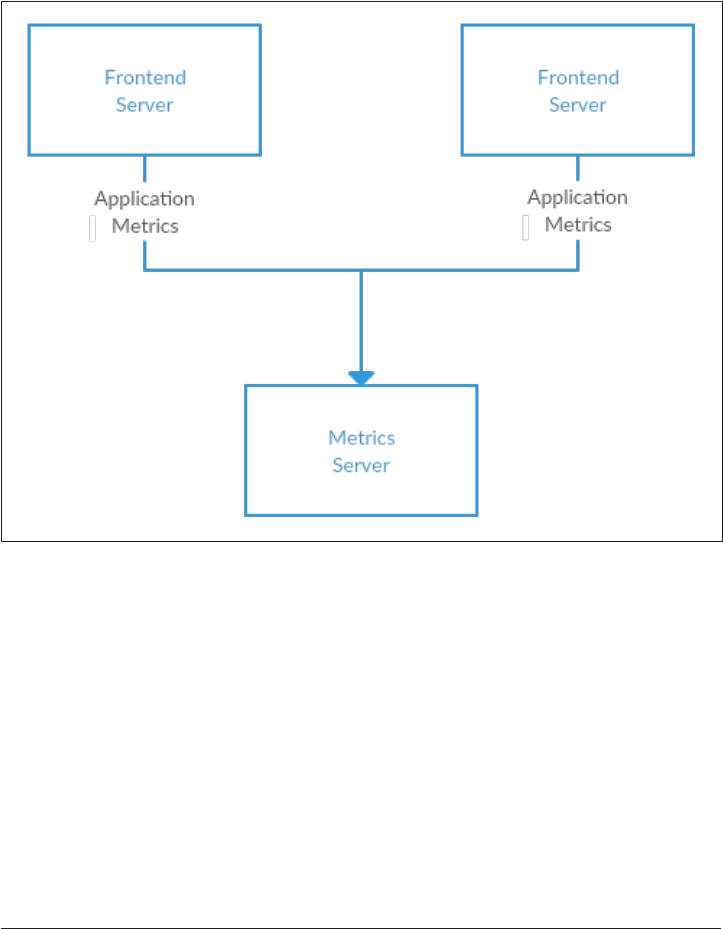
board, and push metrics over that connection, as seen in Figure 1-1.
Figure 1-1. A single, direct metrics publisher
Before long, you decide you would like to analyze your metrics over a longer term,
and that doesn’t work well in the dashboard. You start a new service that can receive
metrics, store them, and analyze them. In order to support this, you modify your
application to write metrics to both systems. By now you have three more applica‐
tions that are generating metrics, and they all make the same connections to these
two services. Your coworker thinks it would be a good idea to do active polling of the
services for alerting as well, so you add a server on each of the applications to provide
metrics on request. After a while, you have more applications that are using those
servers to get individual metrics and use them for various purposes. This architecture
can look much like Figure 1-2, with connections that are even harder to trace.
12 | Chapter 1: Meet Kafka

Figure 1-2. Many metrics publishers, using direct connections
The technical debt built up here is obvious, and you decide to pay some of it back.
You set up a single application that receives metrics from all the applications out
there, and provides a server to query those metrics for any system that needs them.
This reduces the complexity of the architecture to something similar to Figure 1-3.
Congratulations, you have built a publish-subscribe messaging system!
Figure 1-3. A metrics publish/subscribe system
Publish / Subscribe Messaging | 13
Individual Queue Systems
At the same time that you have been waging this war with metrics, one of your cow‐
orkers has been doing similar work with log messages. Another has been working on
tracking user behavior on the front-end website and providing that information to
developers who are working on machine learning, as well as creating some reports for
management. You have all followed a similar path of building out systems that decou‐
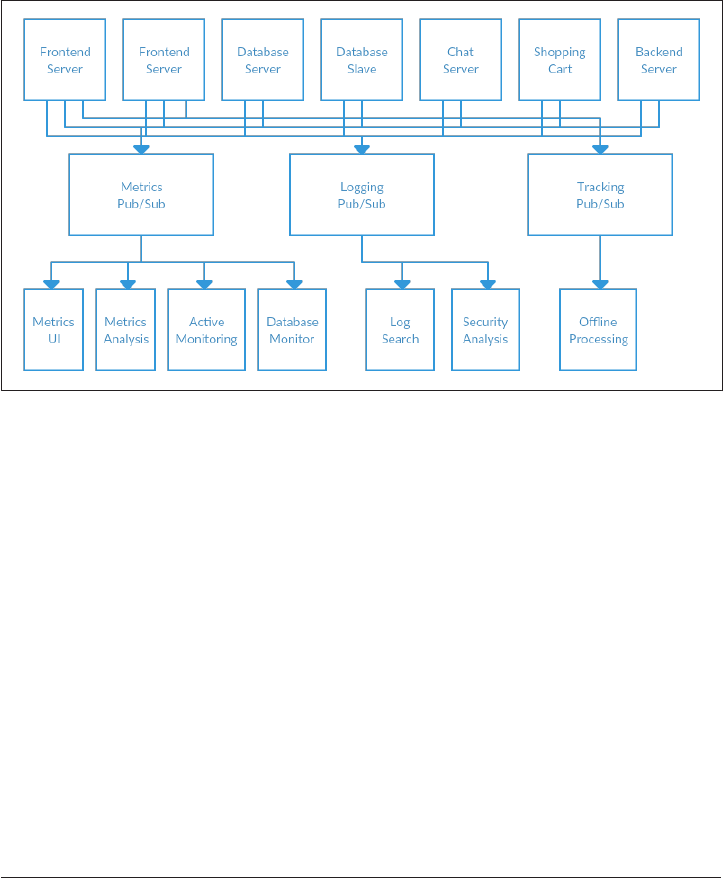
ple the publishers of the information from the subscribers to that information. Figure
1-4 shows such an infrastructure, with three separate pub/sub systems.
Figure 1-4. Multiple publish/subscribe systems
This is certainly a lot better than utilizing point to point connections (as in Figure
1-2), but there is a lot of duplication. Your company is maintaining multiple systems
for queuing data, all of which have their own individual bugs and limitations. You
also know that there will be more use cases for messaging coming soon. What you
would like to have is a single centralized system that allows for publishing of generic
types of data, and that will grow as your business grows.
Enter Kafka
Apache Kafka is a publish/subscribe messaging system designed to solve this prob‐
lem. It is often described as a “distributed commit log”. A filesystem or database com‐
mit log is designed to provide a durable record of all transactions so that they can be
replayed to consistently build the state of a system. Similarly, data within Kafka is
stored durably, in order, and can be read deterministically. In addition, the data can
14 | Chapter 1: Meet Kafka

be distributed within the system to provide additional protections against failures, as
well as significant opportunities for scaling performance.
Messages and Batches
The unit of data within Kafka is called a message. If you are approaching Kafka from a
database background, you can think of this as similar to a row or a record. A message
is simply an array of bytes, as far as Kafka is concerned, so the data contained within
it does not have a specific format or meaning to Kafka. Messages can have an optional
bit of metadata which is referred to as a key. The key is also a byte array, and as with
the message, has no specific meaning to Kafka. Keys are used when messages are to
be written to partitions in a more controlled manner. The simplest such scheme is to
treat partitions as a hash ring, and assure that messages with the same key are always
written to the same partition. Usage of keys is discussed more thoroughly in Chap‐
ter 3.
For efficiency, messages are written into Kafka in batches. A batch is just a collection
of messages, all of which are being produced to the same topic and partition. An indi‐
vidual round trip across the network for each message would result in excessive over‐
head, and collecting messages together into a batch reduces this. This, of course,
presents a tradeoff between latency and throughput: the larger the batches, the more
messages that can be handled per unit of time, but the longer it takes an individual
message to propagate. Batches are also typically compressed, which provides for more
efficient data transfer and storage at the cost of some processing power.
Schemas
While messages are opaque byte arrays to Kafka itself, it is recommended that addi‐
tional structure be imposed on the message content so that it can be easily under‐
stood. There are many options available for message schema, depending on your
application’s individual needs. Simplistic systems, such as Javascript Object Notation
(JSON) and Extensible Markup Language (XML), are easy to use and human reada‐
ble. However they lack features such as robust type handling and compatibility
between schema versions. Many Kafka developers favor the use of Apache Avro,
which is a serialization framework originally developed for Hadoop. Avro provides a
compact serialization format, schemas that are separate from the message payloads
and that do not require generated code when they change, as well as strong data typ‐
ing and schema evolution, with both backwards and forwards compatibility.
A consistent data format is important in Kafka, as it allows writing and reading mes‐
sages to be decoupled. When these tasks are tightly coupled, applications which sub‐
scribe to messages must be updated to handle the new data format, in parallel with
the old format. Only then can the applications that publish the messages be updated
to utilize the new format. New applications that wish to use data must be coupled
Enter Kafka | 15
with the publishers, leading to a high-touch process for developers. By using well-
defined schemas, and storing them in a common repository, the messages in Kafka
can be understood without coordination. Schemas and serialization are covered in
more detail in Chapter 3.
Topics and Partitions
Messages in Kafka are categorized into topics. The closest analogy for a topic is a data‐
base table, or a folder in a filesystem. Topics are additionally broken down into a
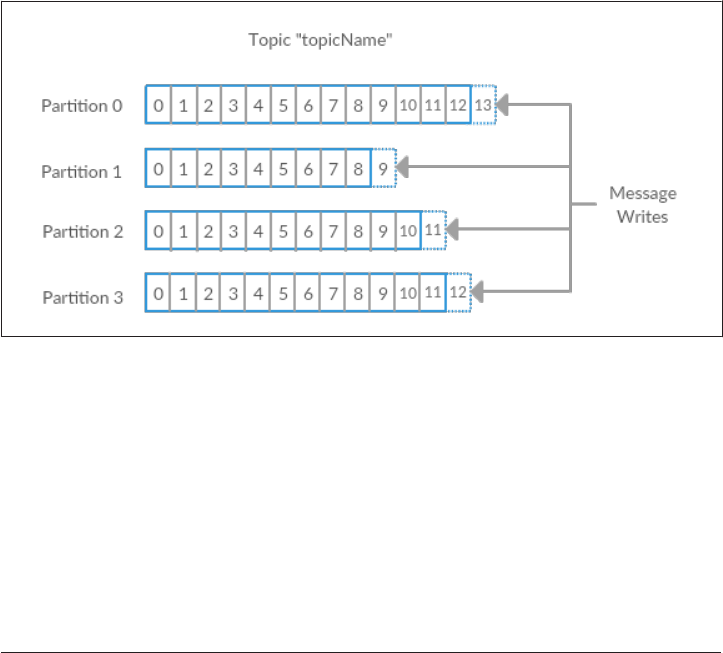
number of partitions. Going back to the “commit log” description, a partition is a sin‐
gle log. Messages are written to it in an append-only fashion, and are read in order
from beginning to end. Note that as a topic generally has multiple partitions, there is
no guarantee of time-ordering of messages across the entire topic, just within a single
partition. Figure 1-5 shows a topic with 4 partitions, with writes being appended to
the end of each one. Partitions are also the way that Kafka provides redundancy and
scalability. Each partition can be hosted on a different server, which means that a sin‐
gle topic can be scaled horizontally across multiple servers to provide for perfor‐
mance far beyond the ability of a single server.
Figure 1-5. Representation of a topic with multiple partitions
The term stream is often used when discussing data within systems like Kafka. Most
often, a stream is considered to be a single topic of data, regardless of the number of
partitions. This represents a single stream of data moving from the producers to the
consumers. This way of referring to messages is most common when discussing
stream processing, which is when frameworks, some of which are Kafka Streams,
Apache Samza, and Storm, operate on the messages in real time. This method of
operation can be compared to the way offline frameworks, namely Hadoop, are
designed to work on bulk data at a later time. An overview of stream processing is
provided in Chapter 10.
16 | Chapter 1: Meet Kafka

Producers and Consumers
Kafka clients are users of the system, and there are two basic types: producers and
consumers.
Producers create new messages. In other publish/subscribe systems, these may be
called publishers or writers. In general, a message will be produced to a specific topic.
By default, the producer does not care what partition a specific message is written to
and will balance messages over all partitions of a topic evenly. In some cases, the pro‐
ducer will direct messages to specific partitions. This is typically done using the mes‐
sage key and a partitioner that will generate a hash of the key and map it to a specific
partition. This assures that all messages produced with a given key will get written to
the same partition. The producer could also use a custom partitioner that follows
other business rules for mapping messages to partitions. Producers are covered in
more detail in Chapter 3.
Consumers read messages. In other publish/subscribe systems, these clients may be
called subscribers or readers. The consumer subscribes to one or more topics and
reads the messages in the order they were produced. The consumer keeps track of
which messages it has already consumed by keeping track of the oset of messages.
The offset is another bit of metadata, an integer value that continually increases, that
Kafka adds to each message as it is produced. Each message within a given partition
has a unique offset. By storing the offset of the last consumed message for each parti‐
tion, either in Zookeeper or in Kafka itself, a consumer can stop and restart without
losing its place.
Consumers work as part of a consumer group. This is one or more consumers that
work together to consume a topic. The group assures that each partition is only con‐
sumed by one member. In Figure 1-6, there are three consumers in a single group
consuming a topic. Two of the consumers are working from one partition each, while
the third consumer is working from two partitions. The mapping of a consumer to a
partition is often called ownership of the partition by the consumer.
In this way, consumers can horizontally scale to consume topics with a large number
of messages. Additionally, if a single consumer fails, the remaining members of the
group will rebalance the partitions being consumed to take over for the missing
member. Consumers and consumer groups are discussed in more detail in Chapter 4.
Enter Kafka | 17
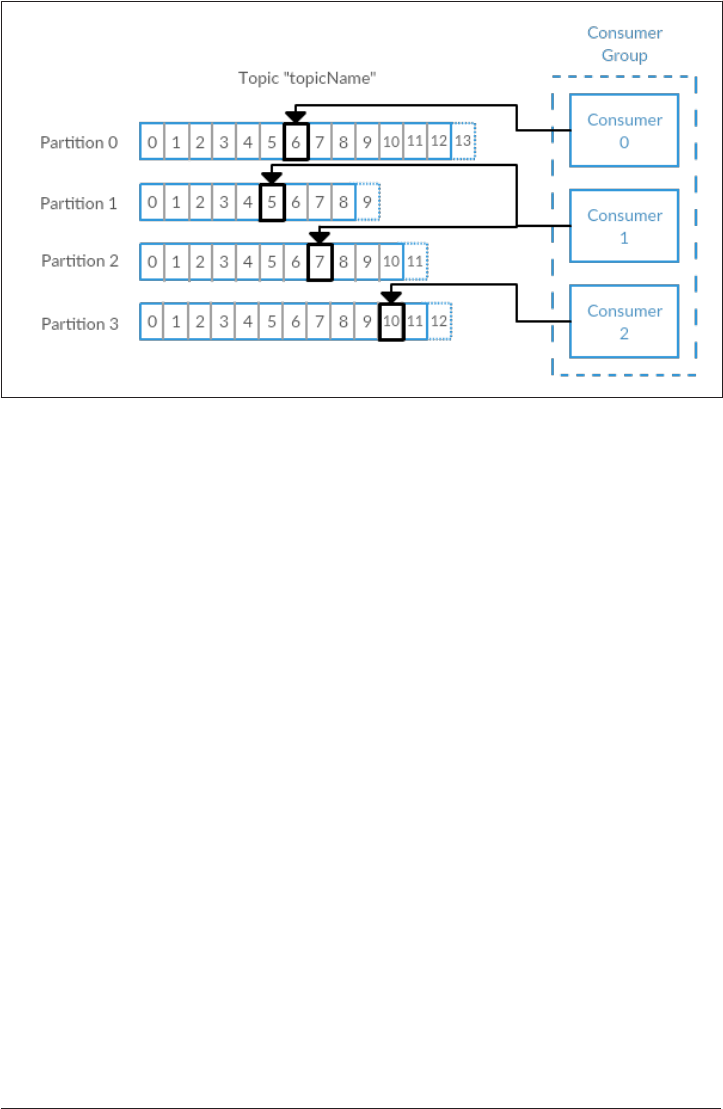
Figure 1-6. A consumer group reading from a topic
Brokers and Clusters
A single Kafka server is called a broker. The broker receives messages from producers,
assigns offsets to them, and commits the messages to storage on disk. It also services
consumers, responding to fetch requests for partitions and responding with the mes‐
sages that have been committed to disk. Depending on the specific hardware and its
performance characteristics, a single broker can easily handle thousands of partitions
and millions of messages per second.
Kafka brokers are designed to operate as part of a cluster. Within a cluster of brokers,
one will also function as the cluster controller (elected automatically from the live
members of the cluster). The controller is responsible for administrative operations,
including assigning partitions to brokers and monitoring for broker failures. A parti‐
tion is owned by a single broker in the cluster, and that broker is called the leader for
the partition. A partition may be assigned to multiple brokers, which will result in the
partition being replicated (as in Figure 1-7). This provides redundancy of messages in
the partition, such that another broker can take over leadership if there is a broker
failure. However, all consumers and producers operating on that partition must con‐
nect to the leader. Cluster operations, including partition replication, are covered in
detail in Chapter 6.
18 | Chapter 1: Meet Kafka
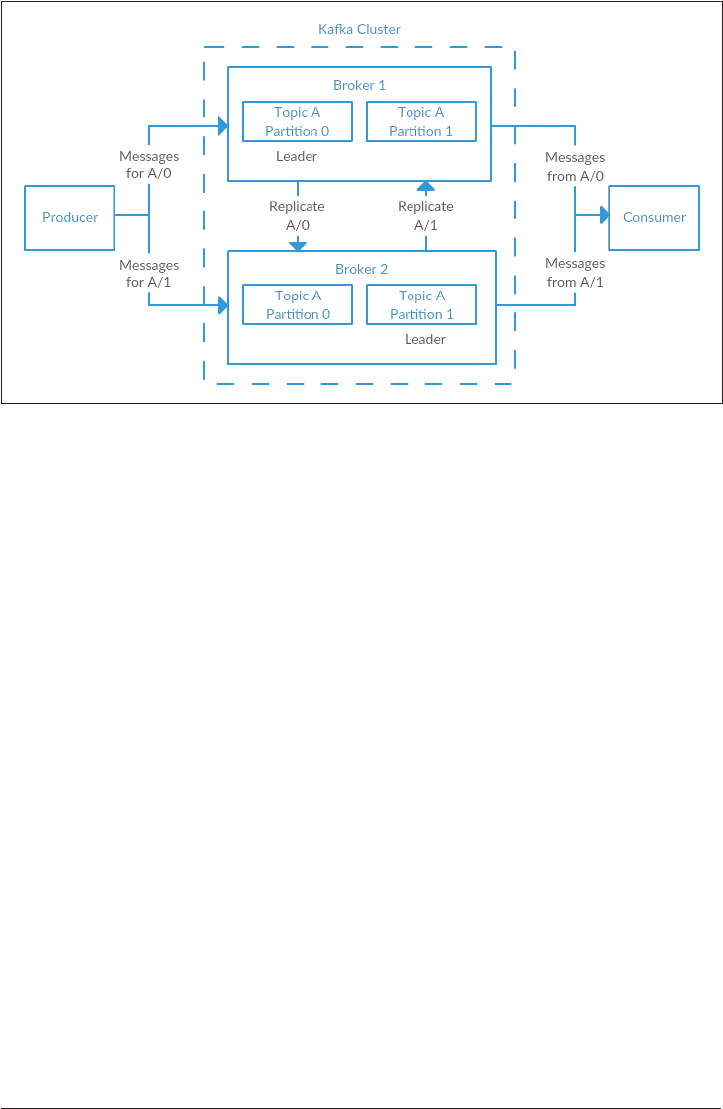
Figure 1-7. Replication of partitions in a cluster
A key feature of Apache Kafka is that of retention, or the durable storage of messages
for some period of time. Kafka brokers are configured with a default retention setting
for topics, either retaining messages for some period of time (e.g. 7 days) or until the
topic reaches a certain size in bytes (e.g. 1 gigabyte). Once these limits are reached,
messages are expired and deleted so that the retention configuration is a minimum
amount of data available at any time. Individual topics can also be configured with
their own retention settings, so messages can be stored for only as long as they are
useful. For example, a tracking topic may be retained for several days, while applica‐
tion metrics may be retained for only a few hours. Topics may also be configured as
log compacted, which means that Kafka will retain only the last message produced
with a specific key. This can be useful for changelog-type data, where only the last
update is interesting.
Multiple Clusters
As Kafka deployments grow, it is often advantageous to have multiple clusters. There
are several reasons why this can be useful:
• Segregation of types of data
• Isolation for security requirements
• Multiple datacenters (disaster recovery)
When working with multiple datacenters, in particular, it is usually required that
messages be copied between them. In this way, online applications can have access to
Enter Kafka | 19
user activity at both sites. Or monitoring data can be collected from many sites into a
single central location where the analysis and alerting systems are hosted. The repli‐
cation mechanisms within the Kafka clusters are designed only to work within a sin‐
gle cluster, not between multiple clusters.
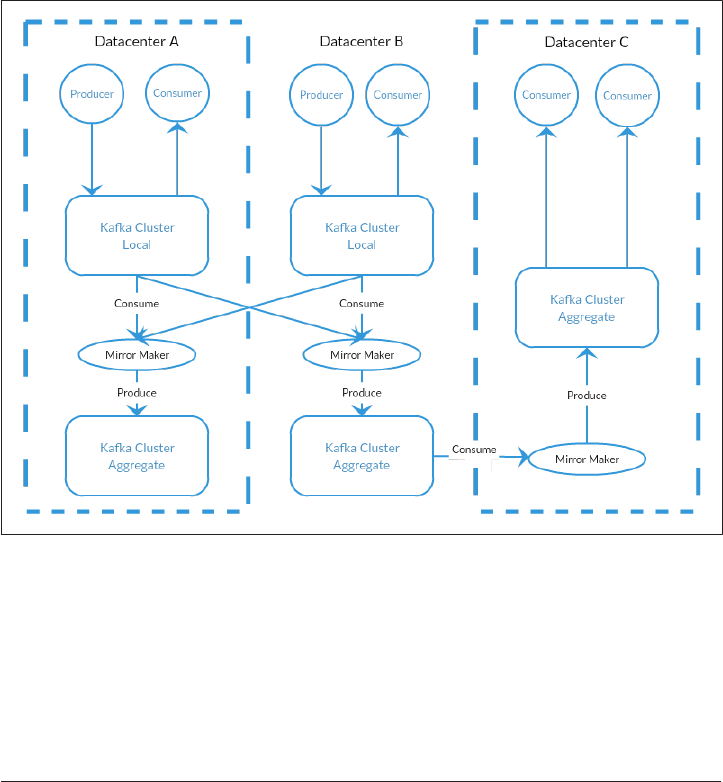
The Kafka project includes a tool called Mirror Maker that is used for this purpose. At
it’s core, Mirror Maker is simply a Kafka consumer and producer, linked together
with a queu. Messages are consumed from one Kafka cluster and produced to
another. Figure 1-8 shows an example of an architecture that uses Mirror Maker,
aggregating messages from two “Local” clusters into an “Aggregate” cluster, and then
copying that cluster to other datacenters. The simple nature of the application belies
its power in creating sophisticated data pipelines, however. All of these cases will be
detailed further in Chapter 7.
Figure 1-8. Multiple datacenter architecture
Why Kafka?
There are many choices for publish/subscribe messaging systems, so what makes
Apache Kafka a good choice?
20 | Chapter 1: Meet Kafka

Multiple Producers
Kafka is able to seamlessly handle multiple producers, whether those clients are using
many topics or the same topic. This makes the system ideal for aggregating data from
many front end systems and providing the data in a consistent format. For example, a
site that serves content to users via a number of microservices can have a single topic
for page views which all services can write to using a common format. Consumer
applications can then received one unified view of page views for the site without
having to coordinate the multiple producer streams.
Multiple Consumers
In addition to multiple consumers, Kafka is designed for multiple consumers to read
any single stream of messages without interfering with each other. This is in opposi‐
tion to many queuing systems where once a message is consumed by one client, it is
not available to any other client. At the same time, multiple Kafka consumers can
choose to operate as part of a group and share a stream, assuring that the entire group
processes a given message only once.
Disk-based Retention
Not only can Kafka handle multiple consumers, but durable message retention means
that consumers do not always need to work in real time. Messages are committed to
disk, and will be stored with configurable retention rules. These options can be
selected on a per-topic basis, allowing for different streams of messages to have differ‐
ent amounts of retention depending on what the consumer needs are. Durable reten‐
tion means that if a consumer falls behind, either due to slow processing or a burst in
traffic, there is no danger of losing data. It also means that maintenance can be per‐
formed on consumers, taking applications offline for a short period of time, with no
concern about messages backing up on the producer or getting lost. The consumers
can just resume processing where they stopped.
Scalable
Flexible scalability has been designed into Kafka from the start, allowing for the abil‐
ity to easily handle any amount of data. Users can start with a single broker as a proof
of concept, expand to a small development cluster of 3 brokers, and move into pro‐
duction with a larger cluster of tens, or even hundreds, of brokers that grows over
time as the data scales up. Expansions can be performed while the cluster is online,
with no impact to the availability of the system as a whole. This also means that a
cluster of multiple brokers can handle the failure of an individual broker and con‐
tinue servicing clients. Clusters that need to tolerate more simultaneous failures can
be configured with higher replication factors. Replication is discussed in more detail
in Chapter 6.
Why Kafka? | 21

High Performance
All of these features come together to make Apache Kafka a publish/subscribe mes‐
saging system with excellent performance characteristics under high load. Producers,
consumers, and brokers can all be scaled out to handle very large message streams
with ease. This can be done while still providing sub-second message latency from
producing a message to availability to consumers.
The Data Ecosystem
Many applications participate in the environments we build for data processing. We
have defined inputs, applications that create data or otherwise introduce it to the sys‐
tem. We have defined outputs, whether that is metrics, reports, or other data prod‐
ucts. We create loops, with some components reading data from the system,
performing operations on it, and then introucing it back into the data infrastructure
to be used elsewhere. This is done for numerous types of data, with each having
unique qualities of content, size, and usage.
Apache Kafka provides the circulatory system for the data ecosystem, as in Figure
1-9. It carries messages between the various members of the infrastructure, providing
a consistent interface for all clients. When coupled with a system to provide message
schemas, producers and consumers no longer require a tight coupling, or direct con‐
nections of any sort. Components can be added and removed as business cases are
created and dissolved, while producers do not need to be concerned about who is
using the data, or how many consuming applications there are.
22 | Chapter 1: Meet Kafka
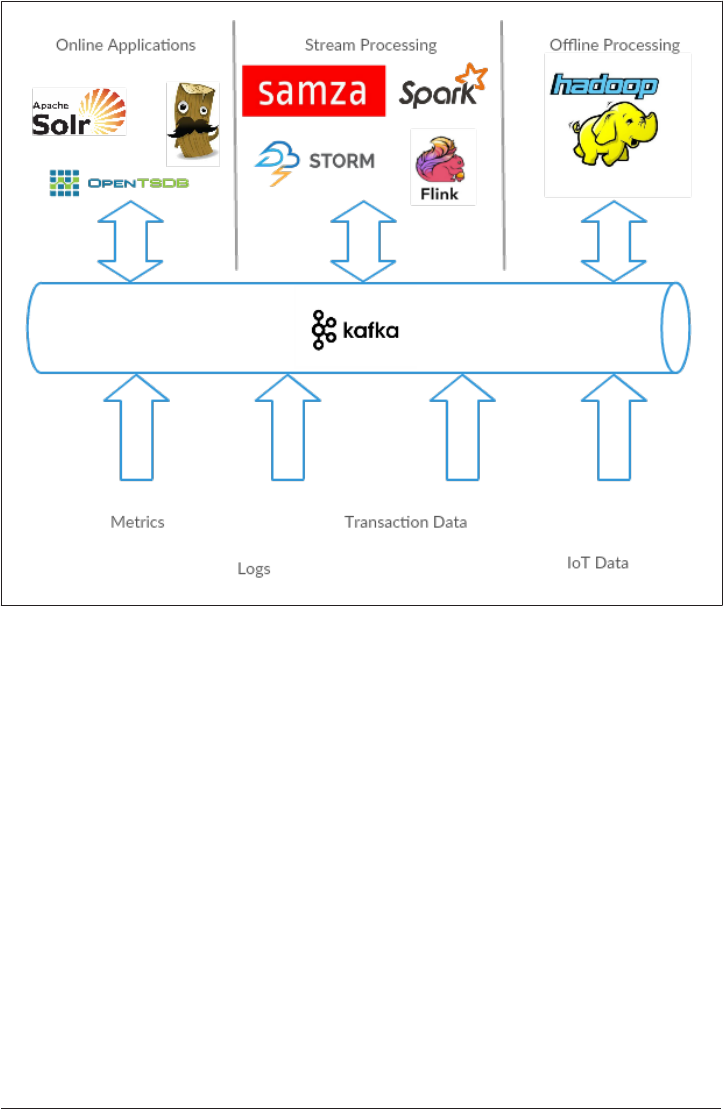
Figure 1-9. A Big data ecosystem
Use Cases
Activity Tracking
The original use case for Kafka is that of user activity tracking. A website’s users inter‐
act with front end applications, which generate messages regarding actions the user is
taking. This can be passive information, such as page views and click tracking, or it
can be more complex actions, such as adding information to their user profile. The
messages are published to one or more topics, which are then consumed by applica‐
tions on the back end. In doing so, we generate reports, feed machine learning sys‐
tems, and update search results, among myriad other possible uses.
Messaging
Another basic use for Kafka is messaging. This is where applications need to send
notifications (such as email messages) to users. Those components can produce mes‐
sages without needing to be concerned about formatting or how the messages will
The Data Ecosystem | 23

actually be sent. A common application can then read all the messages to be sent and
perform the work of formatting (also known as decorating) the messages and select‐
ing how to send them. By using a common component, not only is there no need to
duplicate functionality in multiple applications, there is also the ability to do interest‐
ing transformations, such as aggregation of multiple messages into a single notifica‐
tion, that would not be otherwise possible.
Metrics and Logging
Kafka is also ideal for the collection of application and system metrics and logs. This
is a use where the ability to have multiple producers of the same type of message
shines. Applications publish metrics about their operation on a regular basis to a
Kafka topic, and those metrics can be consumed by systems for monitoring and alert‐
ing. They can also be used in an offline system like Hadoop to perform longer term
analysis, such as year over year growth projections. Log messages can be published in
the same way, and can be routed to dedicated log search systems like Elastisearch or
security anlysis applications. Kafka provides the added benefit that when the destina‐
tion system needs to change (for example, it’s time to update the log storage system),
there is no need to alter the front end applications or the means of aggregation.
Commit Log
As Kafka is based on the concept of a commit log, utilizing Kafka in this way is a nat‐
ural use. Database changes can be published to Kafka and applications can monitor
this stream to receive live updates as they happen. This changelog stream can also be
used for replicating database updates to a remote system, or for consolidating
changes from multiple applications into a single database view. Durable retention is
useful here for providing a buffer for the changelog, meaning it can be replayed in the
event of a failure of the consuming applications. Alternately, log compacted topics
can be used to provide longer retention by only retaining a single change per key.
Stream Processing
Another area that provides numerous types of applications is stream processing. This
can be thought of as providing the same functionality that map/reduce processing
does in Hadoop, but it operates on a data stream in real time, where Hadoop usually
relies on aggregation of data over a longer time frame, either hours or days, and then
performing batch processing on that data. Stream frameworks allow users to write
small applications to operate on Kafka messages, performing tasks such as counting
metrics, partitioning messages for efficient processing by other applications, or trans‐
forming messages using data from multiple sources. Stream processing is covered
separate from other case studies in Chapter 10.
24 | Chapter 1: Meet Kafka

The Origin Story
Kafka was born from necessity to solve the data pipeline problem at LinkedIn. It was
designed to provide a high-performance messaging system which could handle many
types of data, and provide for the availability of clean, structured data about user
activity and system metrics in real time.
Data really powers everything that we do.
—Jeff Weiner, CEO of LinkedIn
LinkedIn’s Problem
As described at the beginning of this chapter, LinkedIn had a system for collecting
system and application metrics that used custom collectors and open source tools for
storing and presenting the data internally. In addition to traditional metrics, such as
CPU usage and application performance, there was a sophisticated request tracing
feature that used the monitoring system and could provide introspection into how a
single user request propagated through internal applications. The monitoring system
had many faults, however. This included metric collection based on polling, large
intervals between metrics, and no self-service capabilities. The system was high-
touch, requiring human intervention for most simple tasks, and inconsistent, with
differing metric names for the same measurement across different systems.
At the same time, there was a system created for collecting user activity tracking
information. This was an HTTP service that front-end servers would connection to
periodically and publish a batch of messages (in XML format). These batches were
then moved to offline processing, which is where the files were parsed and collated.
This system, as well, had many failings. The XML formatting was not consistent, and
parsing it was computationally expensive. Changing the type of activity created
required a significant amount of coordinated work between front-ends and offline
processing. Even then, the system would be broken constantly with changing sche‐
mas. Tracking was built on hourly batching, so it could not be used in real-time for
any purpose.
Monitoring and user activity tracking could not use the same back-end service. The
monitoring service was too clunky, the data format was not oriented for activity
tracking, and the polling model would not work. At the same time, the tracking ser‐
vice was too fragile to use for metrics, and the batch-oriented processing was not the
right model for real-time monitoring and alerting. However, the data shared many
traits, and correlation of the information (such as how specific types of user activity
affected application performance) was highly desirable. A drop in specific types of
user activity could indicate problems with the application that services it, but hours of
delay in processing activity batches meant a slow response to these types of issues.
The Origin Story | 25

At first, existing off-the-shelf open source solutions were thoroughly investigated to
find a new system that would provide real-time access to the data and scale out to
handle the amount of message traffic needed. Prototype systems were set up with
ActiveMQ, but at the time it could not handle the scale. It was also a fragile solution
in the way LinkedIn needed to use it, hitting many bugs that would cause the brokers
to pause. This would back up connections to clients and could interfere with the abil‐
ity of the applications to serve requests to users. The decision was made to move for‐
ward with a custom infrastructure for the data pipeline.
The Birth of Kafka
The development team at LinkedIn was led by Jay Kreps, a principal software engi‐
neer who was previously responsible for the development and open source release of
Voldemort, a distributed key-value storage system. The initial team also included
Neha Narkhede and was quickly joined by Jun Rao. Together they set out to create a
messaging system that would meet the needs of both systems and scale for the future.
The primary goals were:
• Decouple the producers and consumers by using a push-pull model
•Provide persistence for message data within the messaging system to allow multi‐
ple consumers
• Optimize for high throughput of messages
• Allow for horizontal scaling of the system to grow as the data streams grow
The result was a publish/subscribe messaging system that had an interface typical of
messaging systems, but a storage layer more like a log aggregation system. Combined
with the adoption of Apache Avro for message serialization, this system was effective
for handling both metrics and user activity tracking at a scale of billions of messages
per day. Over time, LinkedIn’s usage has grown to in excess of one trillion messages
produced (as of August 2015), and over a petabyte of data consumed daily.
Open Source
Kafka was released as an open source project on GitHub in late 2010. As it started to
gain attention in the open source community, it was proposed and accepted as an
Apache Software Foundation incubator project in July of 2011. Apache Kafka gradu‐
ated from the incubator in October of 2012. Since that time, it has continued to have
active development from LinkedIn, as well as gathering a robust community of con‐
tributors and committers outside of LinkedIn. As a result, Kafka is now used in some
of the largest data pipelines at many organizations. In the fall of 2014, Jay Kreps, Neha
Narkhede, and Jun Rao left LinkedIn to found Confluent, a company centered
around providing development, enterprise support, and training for Apache Kafka.
The two companies, along with ever-growing contributions from others in the open
26 | Chapter 1: Meet Kafka

source community, continue to develop and maintain Kafka, making it the first
choice for big data pipelines.
The Name
A frequent question about the history of Apache Kafka is how the name was selected,
and what bearing it has on the application itself. On this topic, Jay Kreps offered the
following insight:
I thought that since Kafka was a system optimized for writing using a writer’s name
would make sense. I had taken a lot of lit classes in college and liked Franz Kafka. Plus
the name sounded cool for an open source project.
So basically there is not much of a relationship.
—Jay Kreps
Getting Started With Kafka
Now that we know what Kafka is, and have a common terminology to work with, we
can move forwards with getting started with setting up Kafka and building your data
pipeline. In the next chapter, we will explore Kafka installation and configuration. We
will also cover selecting the right hardware to run Kafka on, and some things to keep
in mind when moving to production operations.
Getting Started With Kafka | 27

CHAPTER 2
Installing Kafka
This chapter describes how to get started running the Apache Kafka broker, including
how to set up Apache Zookeeper, which is used by Kafka for storing metadata for the
brokers. The chapter will also cover the basic configuration options that should be
reviewed for a Kafka deployment, as well as criteria for selecting the correct hardware
to run the brokers on. Finally, we cover how to install multiple Kafka brokers
together as part of a single cluster, and some specific concerns when shifting to using
Kafka in a production environment.
First Things First
Choosing an Operating System
Apache Kafka is a Java application, and is run under many operating systems. This
includes Windows, OS X, Linux, and others. The installation steps in this chapter will
be focused on setting up and using Kafka in a Linux environment, as this is the most
common OS on which it is installed. This is also the recommended OS for deploying
Kafka for general use. For information on installing Kafka on Windows and OS X,
please refer to Appendix A.
Installing Java
Prior to installing either Zookeeper or Kafka, you will need a Java environment set up
and functioning. This should be a Java 8 version, and can be the version provided by
your operating system or one directly downloaded from java.com. While Zookeeper
and Kafka will work with a runtime edition of Java, it may be more convenient when
developing tools and applications to have the full Java Development Kit. As such, the
rest of the installation steps will assume you have installed JDK version 8, update 51
in /usr/java/jdk1.8.0_51.
29
Installing Zookeeper
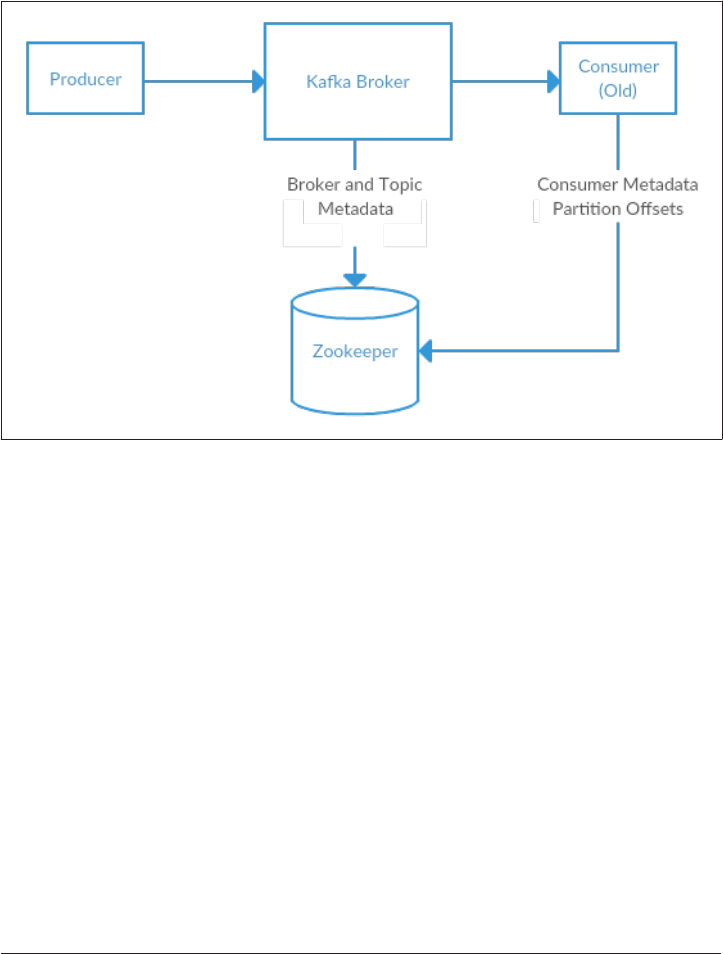
Apache Kafka uses Zookeeper to store metadata information about the Kafka cluster,
as well as consumer client details. While it is possible to run a Zookeeper server using
scripts contained within the Kafka distribution, it is trivial to install a full version of
Zookeeper from the distribution.
Figure 2-1. Kaa and Zookeeper
Kafka has been tested extensively with the stable 3.4.6 release of Zookeeper. Down‐
load that version of Zookeeper from apache.org at http://mirror.cc.columbia.edu/pub/
soware/apache/zookeeper/zookeeper-3.4.6/zookeeper-3.4.6.tar.gz.
Standalone Server
The following example installs Zookeeper with a basic configuration in /usr/local/
zookeeper, storing its data in /var/lib/zookeeper
# tar -zxf zookeeper-3.4.6.tar.gz
# mv zookeeper-3.4.6 /usr/local/zookeeper
# mkdir -p /var/lib/zookeeper
# cat > /usr/local/zookeeper/conf/zoo.cfg << EOF
> tickTime=2000
> dataDir=/var/lib/zookeeper
> clientPort=2181
> EOF
# export JAVA_HOME=/usr/java/jdk1.8.0_51
# /usr/local/zookeeper/bin/zkServer.sh start
JMX enabled by default
30 | Chapter 2: Installing Kafka

Using config: /usr/local/zookeeper/bin/../conf/zoo.cfg
Starting zookeeper ... STARTED
#
You can now validate that Zookeeper is running correctly in standalone mode by
connecting to the client port and sending the four letter command ’srvr’:
# telnet localhost 2181
Trying ::1...
Connected to localhost.
Escape character is '^]'.
srvr
Zookeeper version: 3.4.6-1569965, built on 02/20/2014 09:09 GMT
Latency min/avg/max: 0/0/0
Received: 1
Sent: 0
Connections: 1
Outstanding: 0
Zxid: 0x0
Mode: standalone
Node count: 4
Connection closed by foreign host.
#
Zookeeper Ensemble
A Zookeeper cluster is called an “ensemble”. Due to the consensus protocol used, it is
recommended that ensembles contain an odd number of servers (e.g. 3, 5, etc.) as a
majority of ensemble members (a quorum) must be working for Zookeeper to
respond to requests. This means in a 3-node ensemble, you can run with one node
missing. With a 5-node ensemble, you can run with two nodes missing.
Sizing Your Zookeeper Ensemble
Consider running Zookeeper in a 5-node ensemble. In order to make configuration
changes to the ensemble, including swapping a node, you will need to reload nodes
one at a time. If your ensemble cannot tolerate more than one node being down,
doing maintenance work introduces additional risk. It is also not recommended to
run a Zookeeper ensemble larger than 7 nodes, as performance can start to degrade
due to the nature of the consensus protocol.
To configure Zookeeper servers in an ensemble, they must have a common configu‐
ration that lists all servers, and each server needs a myid file in the data directory
which specifies the ID number of the server. If the hostnames of the servers in the
ensemble are zoo1.example.com, zoo2.example.com, and zoo3.example.com, the
configuration file may be:
First Things First | 31

tickTime=2000
dataDir=/var/lib/zookeeper
clientPort=2181
initLimit=20
syncLimit=5
server.1=zoo1.example.com:2888:3888
server.2=zoo2.example.com:2888:3888
server.3=zoo3.example.com:2888:3888
In this configuration, the initLimit is the amount of time to allow for followers to
connect with a leader. The syncLimit value limits how far out of sync followers can
be with the leader. Both values are a number of tickTime units, which makes the ini
tLimit 20 * 2000 ms, or 40 seconds. The configuration also lists each server in the
ensemble. The servers are specified in the format server.X=hostname:peer
Port:leaderPort, with the following parameters:
•X is the ID number of the server. This must be an integer, but it does not need to
be zero-based or sequential
•hostname is the hostname or IP address of the server
•peerPort is is the TCP port over which servers in the ensemble communicate
with each other
•leaderPort is the TCP port over which leader election is performed
Clients only need to be able to connect to the ensemble over the clientPort, but the
members of the ensemble must be able to communicate with each other over all three
ports.
In addition to the shared configuration file, each server must have a file in the data
Dir directory with the name myid. This file must contain the ID number of the server,
which must match the configuration file. Once these steps are complete, the servers
will start up and communicate with each other in an ensemble.
Installing a Kafka Broker
Once Java and Zookeeper are configured, you are ready to install Apache Kafka. The
current release of Kafka can be downloaded at http://kaa.apache.org/down
loads.html. At press time, that version is 0.9.0.1 running under Scala version 2.11.0.
The following example installs Kafka in /usr/local/kafka, configured to use the
Zookeeper server started previously and to store the message log segments stored
in /tmp/kafka-logs:
# tar -zxf kafka_2.11-0.9.0.1.tgz
# mv kafka_2.11-0.9.0.1 /usr/local/kafka
# mkdir /tmp/kafka-logs
32 | Chapter 2: Installing Kafka

# export JAVA_HOME=/usr/java/jdk1.8.0_51
# /usr/local/kafka/bin/kafka-server-start.sh -daemon
/usr/local/kafka/config/server.properties
#
Once the Kafka broker is started, we can verify it is working by performing some
simple operations against the cluster creating a test topic, producing some messages,
and consuming the same messages:
Create and verify a topic:
# /usr/local/kafka/bin/kafka-topics.sh --create --zookeeper localhost:2181
--replication-factor 1 --partitions 1 --topic test
Created topic "test".
# /usr/local/kafka/bin/kafka-topics.sh --zookeeper localhost:2181
--describe --topic test
Topic:test PartitionCount:1 ReplicationFactor:1 Configs:
Topic: test Partition: 0 Leader: 0 Replicas: 0 Isr: 0
#
Produce messages to a test topic:
# /usr/local/kafka/bin/kafka-console-producer.sh --broker-list
localhost:9092 --topic test
Test Message 1
Test Message 2
^D
#
Consume messages from a test topic:
# /usr/local/kafka/bin/kafka-console-consumer.sh --zookeeper
localhost:2181 --topic test --from-beginning
Test Message 1
Test Message 2
^C
Consumed 2 messages
#
Broker Conguration
The example configuration that is provided with the Kafka distribution is sufficient to
run a standalone server as a proof of concept, but it will not be sufficient for most
installations. There are numerous configuration options for Kafka which control all
aspects of setup and tuning. Many options can be left to the default settings, as they
deal with tuning aspects of the Kafka broker that will not be applicable until you have
a specific use case to work with and a requirement to adjust them.
Broker Conguration | 33

General Broker
There are several broker configurations that should be reviewed when deploying
Kafka for any environment other than a standalone broker on a single server. These
parameters deal with the basic configuration of the broker, and most of them must be
changed to run properly in a cluster with other brokers.
broker.id
Every Kafka broker must have an integer identifier, which is set using the broker.id
configuration. By default, this integer is set to 0, but it can be any value. The most
important thing is that it must be unique within a single Kafka cluster. The selection
of this number is arbitrary, and it can be moved between brokers if necessary for
maintenance tasks. A good guideline is to set this value to something intrinsic to the
host so that when performing maintenance it is not onerous to map broker ID num‐
bers to hosts. For example, if your hostnames contain a unique number (such as
host1.example.com, host2.example.com, etc.), that is a good choice for the broker.id
value.
port
The example configuration file starts Kafka with a listener on TCP port 9092. This
can be set to any available port by changing the port confiugration parameter. Keep
in mind that if a port lower than 1024 is chosen, Kafka must be started as root. Run‐
ning Kafka as root is not a recommended configuration.
zookeeper.connect
The location of the Zookeeper used for storing the broker metadata is set using the
zookeeper.connect configuration parameter. The example configuration uses a Zoo‐
keeper running on port 2181 on the local host, which is specified as localhost:2181.
The format for this parameter is a semicolon separated list of hostname:port/path
strings, where the parts are:
•hostname is the hostname or IP address of the Zookeeper server
•port is the client port number for the server
•/path is an optional Zookeeper path to use as a chroot environment for the
Kafka cluster. If it is omitted, the root path is used.
34 | Chapter 2: Installing Kafka

If a chroot path is specified and does not exist, it will be created by the broker when it
starts up.
Why Use a Chroot Path
It is generally considered to be a good practice to use a chroot path for the Kafka clus‐
ter. This allows the Zookeeper ensemble to be shared with other applications, includ‐
ing other Kafka clusters, without a conflict. It is also best to specify multiple
Zookeeper servers (which are all part of the same ensemble) in this configuration sep‐
arated by semicolons. This allows the Kafka broker to connect to another member of
the Zookeeper ensemble in the case of a server failure.
log.dirs
Kafka persists all messages to disk, and these log segments are stored in the directo‐
ries specified in the log.dirs configuration. This is a comma separated list of paths on
the local system. If more than one path is specified, the broker will store partitions on
them in a “least used” fashion with one partition’s log segments stored within the
same path. Note that the broker will place a new partition in the path that has the
least number of partitions currently stored in it, not the least amount of disk space
used.
num.recovery.threads.per.data.dir
Kafka uses a configurable pool of threads for handling log segments in three situa‐
tions:
•When starting normally, to open each partition’s log segments
• When starting after a failure, to check and truncate each partition’s log segments
• When shutting down, to cleanly close log segments
By default, only one thread per log directory is used. As these threads are only used
during startup and shutdown, it is reasonable to set a larger number of threads in
order to parallelize operations. Specifically, when recovering from an unclean shut‐
down this can mean the difference of several hours when restarting a broker with a
large number of partitions! When setting this parameter, remember that the number
configured is per log directory specified with log.dirs. This means that if num.recov
ery.threads.per.data.dir is set to 8, and there are 3 paths specified in log.dirs,
this is a total of 24 threads.
Broker Conguration | 35

auto.create.topics.enable
The default Kafka configuration specifies that the broker should automatically create
a topic under the following circumstances
• When a producer starts writing messages to the topic
• When a consumer starts reading messages from the topic
• When any client requests metadata for the topic
In many situations, this can be undesirable behavior, especially as there is no way to
validate the existence of a topic through the Kafka protocol without causing it to be
created. If you are managing topic creation explicitly, whether manually or through a
provisioning system, you can set the auto.create.topics.enable configuration to
false.
Topic Defaults
The Kafka server configuration specifies many default configurations for topics that
are created. Several of these parameters, including partition counts and message
retention, can be set per-topic using the administrative tools (covered in Chapter 9).
The defaults in the server configuration should be set to baseline values that are
appropriate for the majority of the topics in the cluster.
Using Per-Topic Overrides
In previous versions of Kafka, it was possible to specify per-topic overrides for these
configurations in the broker configuration using parameters named log.reten
tion.hours.per.topic, log.retention.bytes.per.topic, and log.seg
ment.bytes.per.topic. These parameters are no longer supported, and overrides
must be specified using the administrative tools.
num.partitions
The num.partitions parameter determines how many partitions a new topic is cre‐
ated with, primarily when automatic topic creation is enabled (which is the default
setting). This parameter defaults to 1 partition. Keep in mind that the number of par‐
titions for a topic can only be increased, never decreased. This means that if a topic
needs to have fewer partitions than num.partitions, care will need to be taken to
manually create the topic (discussed in Chapter 9).
As described in Chapter 1, partitions are the way a topic is scaled within a Kafka clus‐
ter, which makes it important to use partition counts that will balance the message
load across the entire cluster as brokers are added. This does not mean that all topics
36 | Chapter 2: Installing Kafka

must have a partition count higher than the number of brokers so that they span all
brokers, provided there are multiple topics (which will also be spread out over the
brokers). However, in order to spread out the load for a topic with a high message
volume, the topic will need to have a larger number of partitions.
log.retention.ms
The most common configuration for how long Kafka will retain messages is by time.
The default is specified in the configuration file using the log.retention.hours
parameter, and it is set to 168 hours, or one week. However, there are two other
parameters allowed, log.retention.minutes and log.retention.ms. All three of
these specify the same configuration, the amount of time after which messages may
be deleted, but the recommended parameter to use is log.retention.ms. If more
than one is specified, the smaller unit size will take precedence.
Retention By Time and Last Modied Times
Retention by time is performed by examining the last modified time (mtime) on each
log segment file on disk. Under normal cluster operations, this is the time that the log
segment was closed, and represents the timestamp of the last message in the file.
However, when using administrative tools to move partitions between brokers, this
time is not accurate. This will result in excess retention for these partitions. More
information on this is provided in Chapter 9 when discussing partition moves.
log.retention.bytes
Another way to expire messages is based on the total number of bytes of messages
retained. This value is set using the log.retention.bytes parameter, and it is
applied per-partition. This means that if you have a topic with 8 partitions, and
log.retention.bytes is set to 1 gigabyte, the amount of data retained for the topic
will be 8 gigabytes at most. Note that all retention is performed for an individual par‐
tition, not the topic. This means that should the number of partitions for a topic be
expanded, the retention will increase as well if log.retention.bytes is used.
Conguring Retention By Size and Time
If you have specified a value for both log.retention.bytes and log.retention.ms
(or another parameter for retention by time), messages may be removed when either
criteria is met. For example, if log.retention.ms is set to 86400000 (1 day), and
log.retention.bytes is set to 1000000000 (1 gigabyte), it is possible for messages
that are less than 1 day old to get deleted if the total volume of messages over the
course of the day is greater than 1 gigabyte. Conversely, if the volume is less than 1
Broker Conguration | 37

gigabyte, messages can be deleted after 1 day even if the total size of the partition is
less than 1 gigabyte.
log.segment.bytes
The log retention settings above operate on log segments, not individual messages. As
messages are produced to the Kafka broker, they are appended to the current log seg‐
ment for the partition. Once the log segment has reached the size specified by the
log.segment.bytes parameter, which defaults to 1 gibibyte, the log segment is closed
and a new one is opened. Once a log segment has been closed, it can be considered
for expiration. A smaller size means that files must be closed and allocated more
often, which reduces the overall efficiency of disk writes.
Adjusting the size of the log segments can be important if topics have a low produce
rate. For example, if a topic receives only 100 megabytes per day of messages, and
log.segment.bytes is set to the default, it will take 10 days to fill one segment. As
messages cannot be expired until the log segment is closed, if log.retention.ms is
set to 604800000 (1 week), there will actually be up to 17 days of messages retained
until the closed log segment is expired. This is because once the log segment is closed
with the current 10 days of messages, that log segment must be retained for 7 days
before it can be expired based on the time policy (as the segment can not be removed
until the last message in the segment can be expired).
Retrieving Osets By Timestamp
The size of the log segments also affects the behavior of fetching offsets by timestamp.
When requesting offsets for a partition at a specific timestamp, Kafka fulfills the
request by looking for the log segment in the partition where the last modified time of
the file is (and therefore closed) after the timestamp and the immediately previous
segment was last modified before the timestamp. Kafka then returns the offset at the
beginning of that log segment (which is also the filename). This means that smaller
log segments will provide more accurate answers for offset requests by timestamp.
log.segment.ms
Another way to control when log segments are closed is by using the log.segment.ms
parameter, which specifies the amount of time after which a log segment should be
closed. As with the log.retention.bytes and log.retention.ms parameters,
log.segment.bytes and log.segment.ms are not mutually exclusive properties.
Kafka will close a log segment either when the size limit is reached, or when the time
38 | Chapter 2: Installing Kafka

limit is reached, whichever comes first. By default, there is no setting for log.seg
ment.ms, which results in only closing log segments by size.
Disk Performance When Using Time-Based Segments
When using a time-based log segment limit, it is important to consider the impact on
disk performance when multiple log segments are closed simultaneously. This can
happen when there are many partitions which never reach the size limit for log seg‐
ments, as the clock for the time limit will start when the broker starts and will always
execute at the same time for these low-volume partitions.
message.max.bytes
The Kafka broker limits the maximum size of a message that can be produced, con‐
figured by the message.max.bytes parameter which defaults to 1000000, or 1 mega‐
byte. A producer which tries to send a message larger than this will receive an error
back from the broker and the message will not be accepted. As with all byte sizes
specified on the broker, this configuration deals with compressed message size, which
means that producers can send messages that are much larger than this value uncom‐
pressed, provided they compress down to under the configured message.max.bytes
size.
There are noticeable performance impacts from increasing the allowable message
size. Larger messages will mean that the broker threads that deal with processing net‐
work connections and requests will be working longer on each request. It also increa‐
ses the size of disk writes, which will impact I/O throughput.
Coordinating Message Size Congurations
The message size configured on the Kafka broker must be coordinated with the
fetch.message.max.bytes configuration on consumer clients. If this value is smaller
than message.max.bytes, then consumers which encounter larger messages will fail
to fetch those messages, resulting in a situation where the consumer gets stuck and
cannot proceed. The same rule applies to the replica.fetch.max.bytes configura‐
tion on the brokers when configured in a cluster.
Hardware Selection
Selecting an appropriate hardware configuration for a Kafka broker can be more art
than science. Kafka itself has no strict requirement on a specific hardware configura‐
tion, and will run without issue on any system. Once performance becomes a con‐
cern, however, there are several factors that must be considered that will contribute to
Hardware Selection | 39

the overall performance: disk throughput and capacity, memory, networking, and
CPU. Once you have determined which types of performance are the most critical for
your environment, you will be able to select an optimized hardware configuration
that fits within your budget.
Disk Throughput
The performance of producer clients will be most directly influenced by the through‐
put of the broker disk that is used for storing log segments. Kafka messages must be
committed to local storage when they are produced, and most clients will wait until at
least one broker has confirmed that messages have been committed before consider‐
ing the send successful. This means that faster disk writes will equal lower produce
latency.
The obvious decision when it comes to disk throughput is whether to use traditional
spinning hard drives (HDD) or solid state disks (SSD). Solid state disks have drasti‐
cally lower seek and access times and will provide the best performance. Spinning
disks, on the other hand, are more economical and provide more capacity per unit.
You can also improve the performance of spinning disks by using more of them in a
broker, whether by having multiple data directories or by setting up the drives in a
RAID configuration. Other factors, such as the specific drive technology (e.g. Serial
Attached Storage or Serial ATA), as well as the quality of the drive controller, will
affect throughput.
Disk Capacity
Capacity is the other side of the storage discussion. The amount of disk capacity that
is needed is driven by how many messages need to be retained at any time. If the
broker is expected to receive 1 terabyte of traffic each day, with 7 days of retention,
then the broker will need a minimum of 7 terabytes of useable storage for log seg‐
ments. You should also factor in at least 10% overhead for other files, in addition to
any buffer that you wish to maintain for fluctuations in traffic or growth over time.
Storage capacity will be one of the factors to consider when sizing a Kafka cluster, and
determining when to expand it. The total traffic for a cluster can be balanced across it
by having multiple partitions per topic, and this will allow additional brokers to shore
up the available capacity if the density on a single broker will not suffice. The decision
on how much disk capacity is needed will also be informed by the replication strategy
chosen for the cluster (which is discussed in more detail in Chapter 6).
Memory
Aside from disk performance, the amount of memory available to the broker is the
primary factor in client performance. Where disk performance primarily affects pro‐
ducers of messages, the memory available mostly affects consumers. The normal
40 | Chapter 2: Installing Kafka

mode of operation for a Kafka consumer is reading from the end of the partitions,
where it is caught up and lagging behind the producers very little, if at all. In this sit‐
uation, the messages that the consumer is reading are optimally stored in the systems
page cache, resulting in faster reads than if the broker must reread the messages from
disk.
Kafka itself does not need very much heap memory configured for the Java Virtual
Machine (JVM). Even a broker that is handling X messages per second and a data rate
of X megabits per second can run with a 5 gigabyte heap. The rest of the system
memory will be used by the page cache and will benefit Kafka. This is the main rea‐
son why it is not recommended to have Kafka colocated on a system with any other
significant application, as this allows the page cache to continually be polluted, which
will decrease performance.
Networking
The available network throughput will specify the maximum amount of traffic that
Kafka can handle. This is often the governing factor, combined with disk storage, for
cluster sizing. This is complicated by the inherent imbalance between inbound and
outbound network usage that is created by Kafka’s support for multiple consumers. A
producer may write 1 MB per second in for a given topic, but there could be any
number of consumers which creates a multiplier on the outbound network usage.
Other operations, such as cluster replication (covered in Chapter 6) and mirroring
(discussed in Chapter 8) will also increase requirements. Should the network inter‐
face become saturated, it is not uncommon for cluster replication to fall behind,
which can leave the cluster in a vulnerable state.
CPU
Processing power is a lesser concern when compared to disk and memory, but it will
affect overall performance of the broker to some extent. Ideally, clients should com‐
press message to optimize network and disk usage. This does require that the Kafka
broker decompress every message batch in order to assign offsets, and then recom‐
press the message batch to store it on disk. This is where the majority of Kafka’s
requirement for processing power comes from. This should not be the primary factor
in selecting hardware, however.
Kafka in the Cloud
A common installation for Kafka is within cloud computing environments, such as
Amazon Web Services. Due to the different types of instances available, the various
performance characteristics of Kafka must be prioritized in order to select the correct
instance configuration to use. A good place to start is with the amount of data reten‐
tion required, followed by the performance needed from the producers. If very low
Kafka in the Cloud | 41

latency is necessary, I/O optimized instances that have local solid state disk storage
may be required. Otherwise, ephemeral storage (such as the AWS Elastic Block Store)
may be sufficient. Once these decisions are made, the CPU and memory options
available will be appropriate for the performance.
In real terms, this will mean that for AWS either the m4 or r3 instance types are a
common choice. The m4 instance will allow for greater retention periods, but the
throughput to the disk will be less as it is on Elastic Block Storage. The r3 instance
will have much better throughput, with local SSD drives, but those drives will limit
the amount of data that can be retained. For the best of both worlds, it is necessary to
move up to either the i2 or d2 instance types, which are significantly more expensive.
Kafka Clusters
A single Kafka server works well for local development work, or for a proof of con‐
cept system, but there are significant benefits to having multiple brokers configured
as a cluster. The biggest benefit is the ability to scale the load across multiple servers.
A close second is using replication to guard against data loss due to single system fail‐
ures. This will also allow for performing maintenance work on Kafka, or the underly‐
ing systems, while still maintaining availability for clients. This section focuses on just
configuring a Kafka cluster. Chapter 6 contains more more information on replica‐
tion of data.
42 | Chapter 2: Installing Kafka
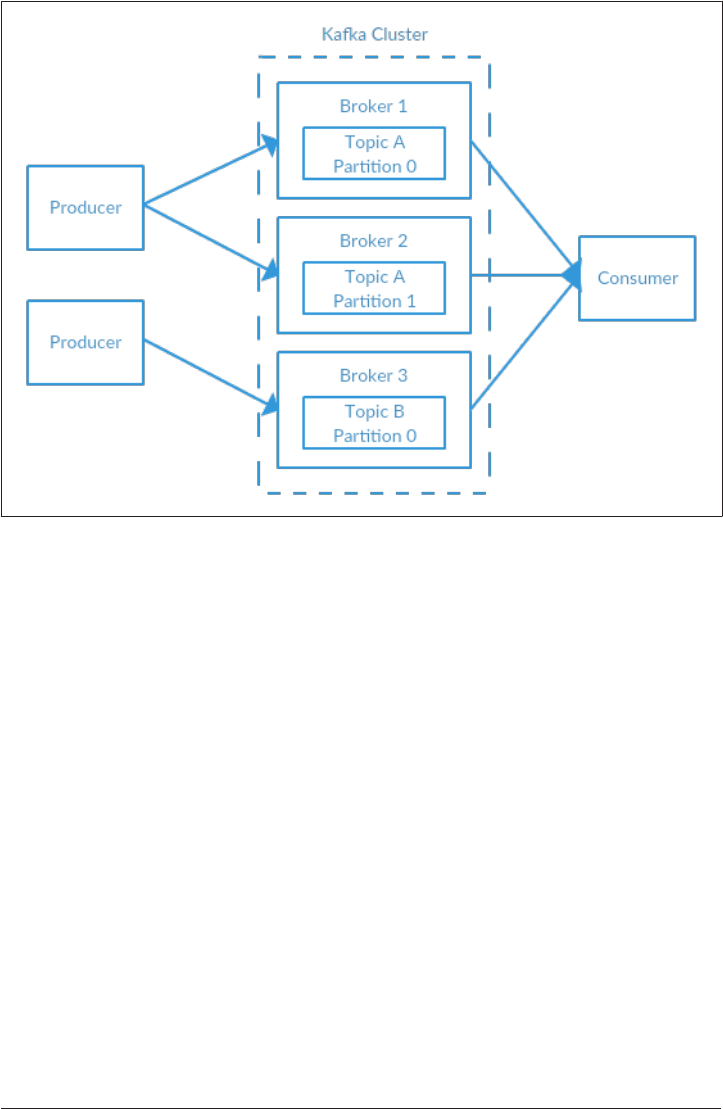
Figure 2-2. A simple Kaa cluster
How Many Brokers
The appropriate size for a Kafka cluster is determined by several factors. The first
concern is how much disk capacity is required for retaining messages and how much
storage is available on a single broker. If the cluster is required to retain 10 terabytes
of data, and a single broker can store 2 TB, then the minimum cluster size is 5 brok‐
ers. In addition, using replication will increase the storage requirements by at least
100%, depending on the replication factor chosen (Chapter 6). This means that this
same cluster, configured with replication, now needs to contain at least 10 brokers.
The other consideration is the capacity of the cluster to handle requests. This is often
required due to the capacity of the network interfaces to handle the client traffic,
specifically if there are multiple consumers of the data or if the traffic is not consis‐
tent over the retention period of the data (e.g. bursts of traffic during peak times). If
the network interface on a single broker is used to 80% capacity at peak, and there are
two consumers of that data, the consumers will not be able to keep up with peak traf‐
fic unless there are two brokers. If replication is being used in the cluster, this is an
additional consumer of the data that must be taken into account. It may also be desir‐
able to scale out to more brokers in a cluster in order to handle performance con‐
cerns caused by lesser disk throughput or system memory available.
Kafka Clusters | 43

Broker Conguration
There are only two requirements in the broker configuration to allow multiple Kafka
brokers to join a single cluster. The first is that all brokers must have the same config‐
uration for the zookeeper.connect parameter. This specifies the Zookeeper ensemble
and path where the cluster stores metadata. The second requirement is that all brok‐
ers in the cluster must have a unique value for the broker.id parameter. If two brok‐
ers attempt to join the same cluster with the same broker.id, the second broker will
log an error and fail to start. There are other configuration parameters used when
running a cluster, specifically parameters that control replication, which are covered
in later chapters.
Operating System Tuning
While most Linux distributions have an out-of-the-box configuration for the kernel
tuning parameters that will work fairly well for most applications, there are a few
changes that can be made for a Kafka broker that will improve performance. These
primarily revolve around the virtual memory and networking subsystems, as well as
specific concerns for the disk mount point that is used for storing log segments.
These parameters are typically configured in the /etc/sysctl.conf file, but you should
refer to your Linux distribution’s documentation for specific details regarding how to
adjust the kernel configuration.
Virtual Memory
In general, the Linux virtual memory system will automatically adjust itself for the
work load of the system. The most impact that can be made here is to adjust how
swap space is handled. As with most applications, specifically ones where throughput
is a concern, the advice is to avoid swapping at (almost) all costs. The cost incurred
by having pages of memory swapped to disk will show up as a noticeable impact in all
aspects of performance in Kafka. In addition, Kafka makes heavy use of the system
page cache, and if the VM system is swapping to disk, this shows that there is cer‐
tainly not enough memory being allocated to page cache.
One way to avoid swapping is just to not configure any swap space at all. Having swap
is not a requirement, but it does provide a safety net if something catastrophic hap‐
pens on the system. Having swap can prevent the operating system from abruptly
killing a process due to an out of memory condition. For this reason the recommen‐
dation is to set the vm.swappiness parameter to a very low value, such as 1. The
parameter is a percentage of how likely the VM subsystem is to use swap space, rather
44 | Chapter 2: Installing Kafka

than dropping pages from the page cache. It is preferable to reduce the size of the
page cache rather than swap.
Why Not Set Swappiness to Zero?
Previously, the recommendation for vm.swappiness was always to set it to 0. This
value used to have the meaning “do not swap unless there is an out of memory condi‐
tion”. However, the meaning of this value changed as of Linux kernel version 3.5-rc1,
and that change was back ported into many distributions, including Red Hat Enter‐
prise Linux kernels as of version 2.6.32-303. This changed the meaning of the value 0
to “never swap under any circumstances”. It is for this reason that a value of 1 is now
recommended.
There is also a benefit to adjusting how the kernel handles dirty pages that must be
flushed to disk. Kafka relies on disk I/O performance to provide a good response time
to producers. This is also the reason that the log segments are usually put on a fast
disk, whether that is an individual disk with a fast response time (e.g. SSD) or a disk
subsystem with signficant NVRAM for caching (e.g. RAID). The result is that the
number of dirty pages that are allowed, before the flush background process starts
writing them to disk, can be reduced. This is accomplished by setting the
=vm.dirty_background_ratio+ value lower than the default of 10. The value is a per‐
centage of the total amount of system memory, and setting this value to 5 is appropri‐
ate in many situations. This setting should not be set to zero, however, as that would
cause the kernel to continually flush pages, which would eliminate the ability for the
kernel to buffer disk writes against temporary spikes in the underlying device perfor‐
mance.
The total number of dirty pages that are allowed before the kernel forces synchronous
operations to flush them to disk can also be increased by changing the value of
vm.dirty_ratio, increasing it above the default of 20 (also a percentage of total sys‐
tem memory). There is a wide range of possible values for this setting, but between 60
and 80 is a reasonable number. This setting does introduce a small amount of risk,
both with regards to the amount of unflushed disk activity as well as the potential for
long I/O pauses if synchronous flushes are forced. If a higher setting for
vm.dirty_ratio is chosen, it is highly recommended that replication be used in the
Kafka cluster to guard against system failures.
When choosing values for these parameters, it is wise to review the number of dirty
pages over time while the Kafka cluster is running under load, whether production or
simulated. The current number of dirty pages can be determined by checking the /
proc/vmstat file:
Kafka Clusters | 45

# cat /proc/vmstat | egrep "dirty|writeback"
nr_dirty 3875
nr_writeback 29
nr_writeback_temp 0
#
Disk
Outside of selecting the disk device hardware, as well as the configuration of RAID if
it is used, the choice of filesystem used for this disk can have the next largest impact
on performance. There are many different filesystems available, but the most com‐
mon choices for local filesystems are either EXT4 (Fourth extended file system) or
XFS. Recently XFS has become the default filesystem for many Linux distributions,
and this is with good reason - it outperforms EXT4 for most workloads with minimal
tuning required. EXT4 can perform well, but it requires using tuning parameters that
can be considered less safe. This includes setting the commit interval to a longer time
than the default of 5 to force less frequent flushes. EXT4 also introduced delayed allo‐
cation of blocks, which brings with it a greater chance of data loss and filesystem cor‐
ruption in the case of a system failure. The XFS filesystem also uses a delayed
allocation algorithm, but it is generally safer than that used by EXT4. XFS also has
better performance for Kafka’s work load without requiring tuning beyond the auto‐
matic tuning performed by the filesystem. It is more efficient when batching disk
writes, all of which combines to give better overall I/O throughput.
Regardless of which filesystem is chosen for the mount which holds the log segments,
it is advisable to set the noatime mount option for the mount point. File metadata
contains three timestamps: creation time (ctime), last modified time (mtime), and last
access time (atime). By default, the atime is updated every time a file is read. This
generates a large number of disk writes and the atime attribute is generally consid‐
ered to be of little use, unless an application needs to know if a file has been accessed
since it was last modified (in which case the relatime option can be used). It is not
used by Kafka at all, which means disabiling setting of the last access time entirely is
safe. Setting noatime on the mount will prevent these timestamp updates from hap‐
pening, but this does not affect the proper handling of the ctime and mtime
attributes.
Networking
Adjusting the default tuning of the Linux networking stack is common for any appli‐
cation which generates a high amount of network traffic, as the kernel is not tuned by
default for large, high speed data transfers. In fact, the recommended changes for
Kafka are the same as are suggested for most web servers and other networking appli‐
cations. The first adjustment is to change the default and maximum amount of mem‐
ory allocated for the send and receive buffers for each socket. This will increase
performance significantly for large transfers. The relevant parameters for the send
46 | Chapter 2: Installing Kafka

and receive buffer default size per socket are net.core.wmem_default and
net.core.rmem_default, and a reasonable setting for these parameters is 131072, or
128 kibibytes. The parameters for the send and receive buffer maximum sizes are
net.core.wmem_max and net.core.rmem_max, and a reasonable setting is 2097152, or
2 mebibytes. Keep in mind that the maximum size does not indicate that every socket
will have this much buffer space allocated, it only allows up to that much if needed.
In addition to the socket settings, the send and receive buffer sizes for TCP sockets
must be set separately using the net.ipv4.tcp_wmem and net.ipv4.tcp_rmem param‐
eters. These are set using 3 space-separated integers that specify the minimum,
default, and maximum sizes respectively. The maximum size cannot be larger than
the values specified for all sockets using net.core.wmem_max and
net.core.rmem_max. An example setting for each of these parameters is “4096 65536
2048000”, which is a 4 kibibyte minimum buffer, 64 kibibyte default, and 2 mebibyte
maximum. Based upon the actual workload that your Kafka brokers receive, you may
want to increase the maximum sizes higher to allow for greater buffering of the net‐
work connections.
There are several other network tuning parameters that are useful to set. Enabling
TCP window scaling by setting net.ipv4.tcp_window_scaling to 1 will allow clients
to transfer data more efficiently, and allow it to be buffered on the broker side.
Increasing the value of net.ipv4.tcp_max_syn_backlog above the default of 1024
will allow a greater number of simultaenous connections to be accepted. Increasing
the value of net.core.netdev_max_backlog to greater than the default of 1000 can
assist with bursts of network traffic, specifically when using multi-gigabit network
connection speeds, by allowing more packets to be queued up for the kernel to pro‐
cess them.
Production Concerns
Once you are ready to move your Kafka environment out of testing and into your
production operations, there are a few more things to think about that will assist with
setting up a reliable messaging service.
Garbage Collector Options
Tuning the Java garbage collection options for an application has always been some‐
thing of an art, requiring detailed information about how the application uses mem‐
ory and a significant amount of observation and trial and error. Thankfully this has
changed with Java 7 and the introduction of the Garbage First (or G1) garbage collec‐
tor. G1 is designed to automatically adjust to different workloads and provide consis‐
tent pause times for garbage collection over the lifetime of the application. It also
Production Concerns | 47

handles large heap sizes with ease, by segmenting the heap into smaller zones and not
collecting over the entire heap in each pause.
G1 does all of this with a minimal amount of configuration in normal operation.
There are two configuration options for G1 that are often used to adjust its perfor‐
mance. These are:
•MaxGCPauseMillis: This option specifies the preferred pause time for each
garbage collection cycle. It is not a fixed maximum - G1 can and will exceed this
time if it is required. This value defaults to 200 milliseconds. This means that G1
will attempt to schedule the frequency of GC cycles, as well as the number of
zones that are collected in each cycle, such that each cycle will take approximately
200ms.
•InitiatingHeapOccupancyPercent: This option specifies the percentage of the
total heap that may be in use before G1 will start a collection cycle. The default
value is 45. This means that G1 will not start a collection cycle until after 45% of
the heap is in use. This includes both the new (eden) and old zone usage in total.
The Kafka broker is fairly efficient with the way it utilizes heap memory and creates
garbage objects, so it is possible to set these options lower. The particular tuning used
here has been found to be appropriate for a server with 64 gigabytes of memory, run‐
ning Kafka in a 5 gigabyte heap. For MaxGCPauseMillis, this broker can be config‐
ured with a value of 20 milliseconds. The value for
InitiatingHeapOccupancyPercent is set to 35, which causes garbage collection to
run slightly earlier than with the default value.
The start script for Kafka does not use the G1 collector, instead defaulting to using
Parallel New and Concurrent Mark and Sweep garbage collection. The change is easy
to make via environment variables. Using the start command from earlier in the
chapter, modify it as such:
# export JAVA_HOME=/usr/java/jdk1.8.0_51
# export KAFKA_JVM_PERFORMANCE_OPTS="-server -XX:+UseG1GC
-XX:MaxGCPauseMillis=20 -XX:InitiatingHeapOccupancyPercent=35
-XX:+DisableExplicitGC -Djava.awt.headless=true"
# /usr/local/kafka/bin/kafka-server-start.sh -daemon
/usr/local/kafka/config/server.properties
#
Datacenter Layout
For development systems, the physical location of the Kafka brokers within a data‐
center is not as much of a concern, as there is not as severe an impact if the cluster is
partially or completely unavailable for short periods of time. When serving produc‐
tion traffic, however, downtime means dollars lost, whether through loss of services
48 | Chapter 2: Installing Kafka

to users or loss of telemetry on what the users are doing. This is when it becomes crit‐
ical to configure replication within the Kafka cluster (see Chapter 6), which is also
when it is important to consider the physical location of brokers in their racks in the
datacenter. If not addressed prior to deploying Kafka, it can mean expensive mainte‐
nances to move servers around.
The Kafka broker has no rack-awareness when assigning new partitions to brokers.
This means that it cannot take into account that two brokers may be located in the
same physical rack, or in the same availability zone (if running in a cloud service like
AWS), and therefore can easily assign all replicas for a partition to brokers that share
the same power and network connections in the same rack. Should that rack have a
failure, these partitions would be offline and inaccessible to clients. In addition, it can
result in additional lost data on recovery due to an unclean leader election (more
about this in Chapter 6).
The best practice is to have each Kafka broker in a cluster installed in a different rack,
or at the very least not sharing single points of failure for infrastructure services such
as power and network. This typically means at least deploying the servers that will
run brokers with dual power connections (to two different circuits) and dual network
switches (with a bonded interface on the servers themselves to fail over seamlessly).
Even with dual connections, there is a benefit to having brokers in completely sepa‐
rate racks. From time to time, it may be neccessary to perform physical maintenance
on a rack or cabinet that requires it to be offline (such as moving servers around, or
rewiring power connections).
Colocating Applications on Zookeeper
Kafka utilizes Zookeeper for storing metadata information about the brokers, topics,
and partitions. This does not represent enough traffic for a Zookeeper ensemble with
multiple nodes for the ensemble to be dedicated to just that Kafka cluster, as the
writes are only on changes to the makeup of the consumer groups or the Kafka clus‐
ter itself. In fact, many deployments will use a single Zookeeper ensemble for multi‐
ple Kafka clusters (using a chroot Zookeeper path for each cluster, as described earlier
in this chapter).
Kafka Consumers and Zookeeper
Prior to Apache Kafka 0.9.0.0, consumers, in addition to the brokers, utilized Zoo‐
keeper, to directly store information about the composition of the consumer group,
what topics it was consuming, and to periodically commit offsets for each partition
being consumed (to enable failover between consumers in the group). With version
0.9.0.0, a new consumer interface was introduced that allows this to be managed
directly with the Kafka brokers. This is the consumer which is discussed in Chapter 4.
Production Concerns | 49

There is a concern with consumers and Zookeeper under certain configurations,
however. Consumers have a configurable choice to use either Zookeeper or Kafka for
committing offsets, as well as the interval between commits. If the consumer uses
Zookeeper for offsets, each consumer will perform a Zookeeper write every interval
for every partition it consumes. A reasonable interval for offset commits is one
minute, as this is the period of time over which a consumer group will read duplicate
messages in the case of a consumer failure. These commits can be a significant
amount of Zookeeper traffic, especially in a cluster with many consumers, and will
need to be taken into account. It may be neccessary to use a longer commit interval if
the Zookeeper ensemble is not able to handle the traffic. However, it is recommended
that consumers using the latest Kafka libraries use Kafka for committing offsets,
removing the dependency on Zookeeper.
Outside of using a single ensemble for multiple Kafka clusters, it is not recommended
to share the ensemble with other applications, if it can be avoided. Kafka is sensitive
to Zookeeper latency and timeouts, and an interruption in communications with the
ensemble will cause the brokers to behave unpredictably. This can easily cause multi‐
ple brokers to go offline at the same time, should they lose Zookeeper connections,
which will result in offline partitions. It also puts stress on the cluster controller,
which can show up as subtle errors long after the interruption has passed, such as
when trying to perform a controlled shutdown of a broker. Other applications which
can put stress on the Zookeeper ensemble, either through heavy usage or improper
operations, should be segregated to their own ensemble.
Getting Started With Clients
In this chapter we learned how to get Apache Kafka up and running. We also covered
picking the right hardware for your brokers and specific concerns around getting set
up in a production environment. Now that you have a Kafka cluster, we will walk
through the basics of Kafka client applications. The next two chapters will cover how
to create clients for both producing messages to Kafka (Chapter 3, as well as consum‐
ing those messages out again (Chapter 4).
50 | Chapter 2: Installing Kafka

CHAPTER 3
Kafka Producers - Writing Messages to
Kafka
Whether you use Kafka as a queue, a message bus or a data storage platform, you will
always use Kafka by writing a producer that reads data from Kafka, a consumer that
writes data to Kafka or an application that serves both roles.
For example, in a credit card transaction processing system, there will be a client
application, perhaps an online store, responsible for sending each transaction to
Kafka immediately when a payment is made. Another application is responsible for
immediately checking this transaction against a rules engine and determining
whether the transaction is approved or denied. The approve / deny response can then
be written back to Kafka and the response can propagate back to the online store
where the transaction has been initiated. A third application can read both transac‐
tions and the approval status from Kafka and store them in a database where analysts
can later review the decisions and perhaps improve the rules engine.
Apache Kafka ships with built in client APIs that developers can use when developing
applications that interact with Kafka. In this chapter we will see how to use Kafka’s
producer client to develop applications that write data to Kafka. In the next chapter
we will look at Kafka’s consumer client and reading data from Kafka.
51

1https://cwiki.apache.org/conuence/display/KAFKA/Clients
In addition to the built-in clients, Kafka has a binary wire protocol.
This means that it is possible for applications to read messages
from Kafka or write messages to Kafka simply by sending the cor‐
rect byte sequences to Kafka’s network port. There are multiple cli‐
ents that implement Kafka’s wire protocol in different
programming language, giving simple ways to use Kafka not just in
Java applications but also in languages like C++, Python, Go and
many more. Those clients are not part of Apache Kafka project, but
a list of those is maintained in the project wiki 1. The wire protocol
and the external clients are outside the scope of the chapter.
There are many reasons an application will need to write messages to Kafka: Record‐
ing user activities for auditting or analysis, recording metrics, storing log messages,
recording information from smart appliances, asynchronous communication with
other applications, buffering information before writing to a database and much
more.
Those diverse use-cases also imply diverse requirements: Is every message critical, or
can we tolerate loss of messages? Are we ok with accidentally duplicating messages?
Are there any strict latency or throughput requirements we need to support?
In the credit-card transaction processing example we introduced earlier, we can see
that it will be critical to never lose a single message nor duplicate any messages,
latency should be low but latencies up to 500ms can be tolerated, and throughput
should be very high - we expect to process up to a million messages a second.
A different use-case can be to store click information from a website. In that case,
some message loss or few duplicates can be tolerated, latency can be high - as long as
there is no impact on the user experience - in other words, we don’t mind if it takes
few seconds for the message to arrive at Kafka, as long as the next page loads immedi‐
ate after the user clicked on a link. Throughput will depend on the level of activity we
anticipate on our website.
The different requirements will influence the way you use the producer API to write
messages to Kafka and the configuration you will use.
Producer overview
While the producer APIs are very simple, there is a bit more that goes on under the
hood of the producer when we send data. In Figure 3-1 you can see the main steps
involved in sending data to Kafka.
52 | Chapter 3: Kafka Producers - Writing Messages to Kafka
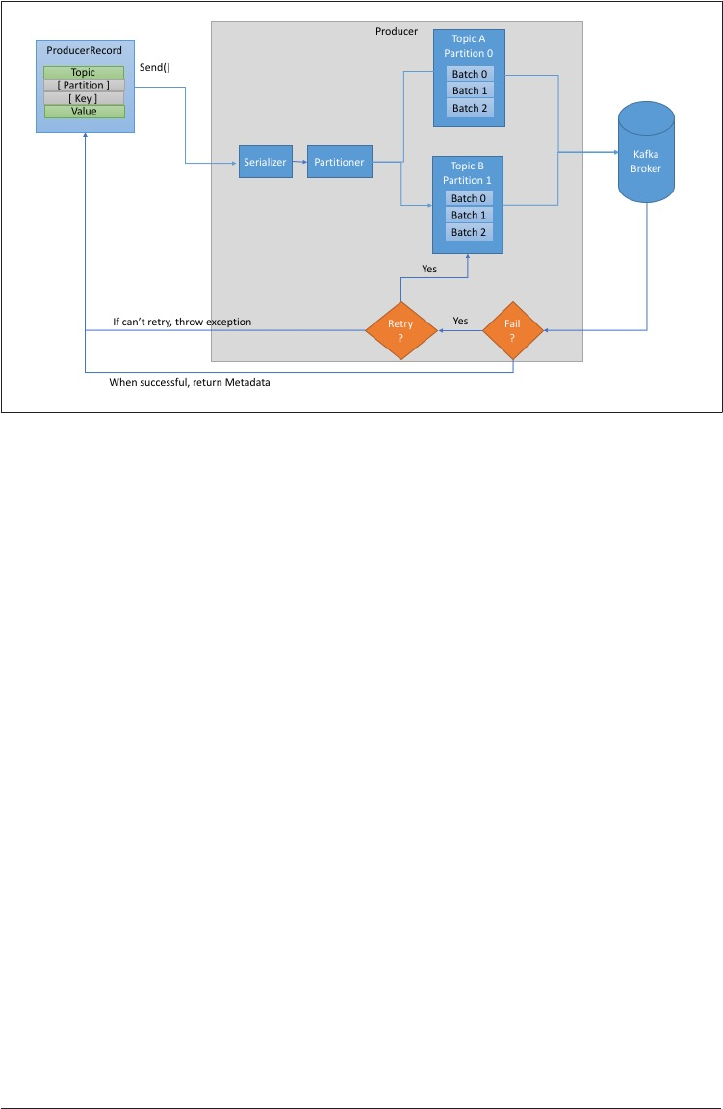
Figure 3-1. High level overview of Kaa Producer components
We start by creating a ProducerRecord, which must include the topic we want to send
the record to and a value we are sending. Optionally, we can also specify a key and /
or a partition. Once we send the ProducerRecord, the first thing the producer will do
is serialize the key and value objects to ByteArrays, so they can be sent over the net‐
work.
Next, the data is sent to a partitioner. If we specified a partition in the ProducerRe‐
cord, the partitioner doesn’t do anything and simply returns the partition we speci‐
fied. If we didn’t, the partitioner will choose a partition for us, usually based on the
ProducerRecord key. Once a partition is selected, the producer knows which topic
and partition the record will go to. It then adds the record to a batch of records that
will also be sent to the same topic and partition. A separate thread is responsible for
sending those batches of records to the appropriate Kafka brokers.
When the broker receives the messages, it sends back a response. If the messages
were successfully written to Kafka, it will return a RecordMetadata object with the
topic, partition and the offset the record in the partition. If the broker failed to write
the messages, it will return an error. When the producer receives an error, it may
retry sending the message few more times before giving up and returning an error.
In this chapter we will learn how to use the Kafka Producer, and in the process we
will go over most of the components in figure 3-1. We will show how to create a Kaf‐
kaProducer and ProducerRecord objects, how to send records to Kafka using the
default partitioner and serializers, how to handle the errors that Kafka may return
Kafka Producers - Writing Messages to Kafka | 53
and how to write your own serializers and partitioner. We will also review the most
important configuration options used to control the producer behavior.
Constructing a Kafka Producer
The first step in writing messages to Kafka is to create a producer object with the
properties you want to pass to the producer. Kafka producer has 3 mandatory prop‐
erties:
•bootstrap.servers - List of host:port pairs of Kafka brokers. This doesn’t have
to include all brokers in the cluster, the producer will query these brokers for
information about additional brokers. But it is recommended to include at least
two, so in case one broker goes down the producer will still be able to connect to
the cluster.
•key.serializer - Kafka brokers expect byte arrays as key and value of messages.
However the Producer interface allows, using parameterized types, to send any
Java object as key and value. This makes for very readable code, but it also means
that the Producer has to know how to convert these objects to byte arrays.
key.serializer should be set to a name of a class that implements
org.apache.kafka.common.serialization.Serializer interface and the Pro‐
ducer will use this class to serialize the key object to byte array. The Kafka client
package includes ByteArraySerializer (which doesn’t do much), StringSerial
izer and IntegerSerializer, so if you use common types, there is no need to
implement your own serializers. Note that setting key.serializer is required
even if you intend to send only values.
•value.serializer - the same way you set key.serializer to a name of a class
that will serialize the message key object to a byte array, you set value.serial
izer to a class that will serialize the message value object. The serializers can be
identical to the key.serializer, for example when both key and value are
Strings or they can be different, for example Integer key and String value.
The following code snippet shows how to create a new Producer by setting just the
mandatory parameters and using default for everything else:
private Properties kafkaProps = new Properties();
kafkaProps.put("bootstrap.servers", "broker1:9092,broker2:9092");
kafkaProps.put("key.serializer", "org.apache.kafka.common.serialization.String-
Serializer");
kafkaProps.put("value.serializer", "org.apache.kafka.common.serializa-
tion.StringSerializer");
producer = new KafkaProducer<String, String>(kafkaProps);
54 | Chapter 3: Kafka Producers - Writing Messages to Kafka

2http://kaa.apache.org/documentation.html#producercongs
We start with a Properties object
Since we are planning on using Strings for message key and value, we use the
built-in StringSerializer
Here we create a new Producer by setting the appropriate key and value types
and passing the Properties object
With such a simple interface, it is clear that most of the control over Producer behav‐
ior is done by setting the correct configuration properties. Apache Kafka documenta‐
tion covers all the configuration options2, and we will go over the important ones
later in this chapter.
Once we instantiated a producer, it is time to start sending messages. There are three
primary methods of sending messages:
•Fire-and-forget - in which we send a message to the server and don’t really care if
it arrived succesfully or not. Most of the time, it will arrive successfully, since
Kafka is highly available and the producer will retry sending messages automati‐
cally. However, some messages will get lost using this method.
•Synchronous Send - we send a message, the send() method returns a Future
object and we use get() to wait on the future and see if the send() was successful
or not.
•Asynchronous Send - we call the send() method with a callback function, which
gets triggered when receive a response from the Kafka broker.
In all those cases, it is important to keep in mind that sending data to Kafka can fail
on occasion and plan on handling those failures. Also note that a single producer
object can be used by multiple threads to send messages, or you can use multiple pro‐
ducers. You will probably want to start with one producer and one thread. If you need
better throughput, you can add more threads that use the same producer. Once this
ceases to increase throughput, adding more producers will be in order.
In the examples below we will see how to send messages using the methods we men‐
tions and how to handle the different types of errors that could occur.
Sending a Message to Kafka
The simplest way to send a message is as follows:
ProducerRecord<String, String> record =
new ProducerRecord<>("CustomerCountry", "Precision Products",
Kafka Producers - Writing Messages to Kafka | 55

3http://docs.oracle.com/javase/7/docs/api/java/util/concurrent/Future.html
"France");
try {
producer.send(record);
} catch (Exception e) {
e.printStackTrace();
}
The Producer accepts ProducerRecord objects, so we start by creating one. Pro‐
ducerRecord has multiple constructors, which we will discuss later. Here we use
one that requires the name of the topic we are sending data to, which is always a
String; and the key and value we are sending to Kafka, which in this case are also
Strings. The types of the key and value must match our Serializer and Producer
objects.
We use the Producer object send() method to send the ProducerRecord. As we’ve
seen in the Producer architecture diagram, the message will be placed in a buffer
and will be sent to the broker in a separate thread. The send() method returns a
Java Future object 3 with RecordMetadata, but since we simply ignore the
returned value, we have no way of knowing whether the message was sent succes‐
fully or not. This method of sending messages is useful when dropping a message
silently in some cases is acceptable. For example when logging Twitter messages
or low-important messages from an application log.
While we ignore errors that may occure while sending messages to Kafka brokers
or in the brokers themselves, we may still get an exception if the producer
encountered errors before sending the message to Kafka. Those can be Serializa‐
tionException, when it fails to serialize the message, a BufferExhaustedException,
if the buffer is full and the producer was configured to throw an exception when
buffer is full rather than block, or an InterruptException, if the sending thread
was interrupted.
Sending a Message Synchronously
ProducerRecord<String, String> record =
new ProducerRecord<>("CustomerCountry", "Precision Products", "France");
producer.send(record).get();
Here, we are using Future.get() to wait until the reply from Kafka arrives back.
The specific Future implemented by the Producer will throw an exception if
Kafka broker sent back an error and our application can handle the problem. If
there were no errors, we will get a RecordMetadata object which we can use to
retrieve the offset the message was written to.
56 | Chapter 3: Kafka Producers - Writing Messages to Kafka

KafkaProducer has two types of errors. Retriable errors are those that can be resolved
by sending the message again. For example connection error can be resolved because
the connection may get re-established, or “no leader” error can be resolved when a
new leader is elected for the partition. KafkaProducer can be configured to retry
those errors automatically, so the application code will get retriable exceptions only
when the number of retries was exhausted and the error was not resolved. Some
errors will not be resolved by retrying. For example, “message size too large”. In those
cases KafkaProducer will not attempt a retry and will return the exception immedi‐
ately.
Sending Messages Asynchronously
Suppose the network roundtrip time between our application and the Kafka cluster is
10ms. If we wait for a reply after sending each message, sending 100 messages will
take around 1 second. On the other hand, if we just send all our messages and not
wait for any replies, then sending 100 messages will barely take any time at all. In
most cases, we really don’t need a reply - Kafka sends back the topic, partition and
offset of the record after it was written and this information is usually not required by
the sending app. On the other hand, we do need to know when we failed to send a
message completely so we can throw an exception, log an error or perhaps write the
message to an “errors” file for later analysis.
In order to send messages asynchronously and still handle error scenarios, the Pro‐
ducer supports adding a callback when sending a record. Here is an example of how
we use a callback:
private class DemoProducerCallback implements Callback {
@Override
public void onCompletion(RecordMetadata recordMetadata, Exception e) {
if (e != null) {
e.printStackTrace();
}
}
}
ProducerRecord<String, String> record =
new ProducerRecord<>("CustomerCountry", "Biomedical Materials", "USA");
producer.send(record, new DemoProducerCallback());
To use callbacks, you need a class that implements org.apache.kafka.cli
ents.producer.Callback inteface, which has a single function - onCompletion
If Kafka returned an error, onCompletion will have a non-null exception. Here
we “handle” it by printing, but production code will probably have more robust
error handling functions.
Kafka Producers - Writing Messages to Kafka | 57

The records are the same as before
And we pass a Callback object along when sending the record
Serializers
As seen in previous examples, Producer configuration includes mandatory serializers.
We’ve seen how to use the default String serializer. Kafka also includes Serializers for
Integers and ByteArrays, but this does not cover most use-cases. Eventually you will
want to be able to serialize more generic records.
We will start by showing how to write your own serializer, and than introduce the
Avro serializer as a recommended alternative.
Custom Serializers
When the object you need to send to Kafka is not a simple String or Integer, you have
a choice of either using a generic serialization library like Avro, Thrift or Protobuf to
create records, or to create a custom serializer for objects you are already using. We
highly recommend to use generic seriazation library. But in order to understand how
the serializers work and why it is a good idea to use a serialization library, lets see
what it takes to write your own custom serializer.
For example, suppose that instead of recording just the customer name, you created a
simple class to represent customers:
public class Customer {
private int customerID;
private String customerName;
public Customer(int ID, String name) {
this.customerID = ID;
this.customerName = name;
}
public int getID() {
return customerID;
}
public String getName() {
return customerName;
}
}
Now suppose we want to create a custom serializer for this class. It will look some‐
thing like this:
import org.apache.kafka.common.errors.SerializationException;
import java.nio.ByteBuffer;
58 | Chapter 3: Kafka Producers - Writing Messages to Kafka

import java.util.Map;
public class CustomerSerializer implements Serializer<Customer> {
@Override
public void configure(Map configs, boolean isKey) {
// nothing to configure
}
@Override
/**
We are serializing Customer as:
4 byte int representing customerId
4 byte int representing length of customerName in UTF-8 bytes (0 if name is
Null)
N bytes representing customerName in UTF-8
*/
public byte[] serialize(String topic, Customer data) {
try {
byte[] serializedName;
int stringSize;
if (data == null)
return null;
else {
if (data.getName() != null) {
serializeName = data.getName().getBytes("UTF-8");
stringSize = serializedName.length;
} else {
serializedName = new byte[0];
stringSize = 0;
}
}
ByteBuffer buffer = ByteBuffer.allocate(4 + 4 + stringSize);
buffer.putInt(data.getID());
buffer.putInt(stringSize);
buffer.put(serializedName);
return buffer.array();
} catch (Exception e) {
throw new SerializationException("Error when serializing Customer to
byte[] " + e);
}
}
@Override
public void close() {
// nothing to close
}
}
Kafka Producers - Writing Messages to Kafka | 59

Configuring a Producer with this CustomerSerializer will allow you to define Produ
cerRecord<String, Customer> and send Customer data directly to the Producer. On
the other hand, note how fragile the code is - If we ever have too many customers for
example and need to change customerID to Long, or if we ever decide to add start‐
Date field to Customer, we will have a serious issue in maintaining compatibility
between old and new messages. Debugging compatibility issues between different
versions of Serializers and Deserializers is fairly challenging - you need to compare
arrays of raw bytes. To make matters even worse, if multiple teams in the same com‐
pany end up writing Customer data to Kafka, they will all need to use the same Serial‐
izers and modify the code at the exact same time.
For these reasons, we recommend to never implement your own custom serializer,
instead use an existing protocol such as Apache Avro, Thrift or Protobuf. In the fol‐
lowing section we will describe Apache Avro and then show how to serialize Avro
records and send them to Kafka.
Serializing using Apache Avro
Apache Avro is a language neutral data serialization format. The project was created
by Doug Cutting to provide a way to share data files with a large audience.
Avro data is described in a language independent schema. The schema is usually
described in JSON and the serialization is usually to binary files although serializing
to JSON is also supported. Avro assumes that the schema is present when reading and
writing files, usually by embedding the schema in the files themselves.
One of the most interesting features of Avro, and what makes it a good fit for use in a
messaging system like Kafka is that when the application writing messages switches
to a new schema, the applications reading the data can continue processing messages
without requiring any change or update.
Suppose the original schema was:
{"namespace": "customerManagement.avro",
"type": "record",
"name": "Customer",
"fields": [
{"name": "id", "type": "int"},
{"name": "name", "type": "string""},
{"name": "faxNumber", "type": ["null", "string"], "default": "null"}
]
}
id and name fields are mandatory, while fax number is optional and defaults to
null
We used this schema for few month and generated few terabytes of data in this for‐
mat. Now suppose that we decide that in the new version, we upgraded to the 21st
60 | Chapter 3: Kafka Producers - Writing Messages to Kafka

4https://avro.apache.org/docs/1.7.7/spec.html#Schema+Resolution
century and we will no longer include a “faxNumer” field, instead we have “email”
field.
The new schema will be:
{"namespace": "customerManagement.avro",
"type": "record",
"name": "Customer",
"fields": [
{"name": "id", "type": "int"},
{"name": "name", "type": "string"},
{"name": "email", "type": ["null", "string"], "default": "null"}
]
}
Now after upgrading to the new version, new records will contain “faxNumber” and
old records will contain “email”. Some of the applications reading the data were
upgraded and how will this be handled?
The reading application will contain calls to methods similar to getName(), getId()
and getFaxNumber. If it encounters a message written with the new schema, get
Name() and getId() will continue working with no modification. getFaxNumber()
will return null since the message will not contain a fax number.
Now suppose we upgraded our reading application and it no longer has getFaxNum
ber() method but rather getEmail(). If it encounters a message written with the old
schema, getEmail() will return null since the older messages do not contain an
email address.
The important thing to note that even though we changed the schema in the mes‐
sages without changing all the applications reading the data, there will be no excep‐
tions or breaking errors and no need for expensive updates of existing data.
There are two caveats to this ideal scenario: * The schema used for writing the data
and the schema expected by the reading application must be compatible. Avro docu‐
mentation includes the compatibility rules 4. * The deserializer will need access to the
schema that was used when writing the data, even when it is different than the
schema expected by the application that accesses the data. In Avro files the writing
schema is included in the file itself, but there is a better way to handle this for Kafka
messages. We will look at that next.
Using Avro records with Kafka
Note is that unlike Avro files, where storing the entire schema in the data file is a
fairly reasonable overhead, storing the entire schema in each record will usually more
Kafka Producers - Writing Messages to Kafka | 61
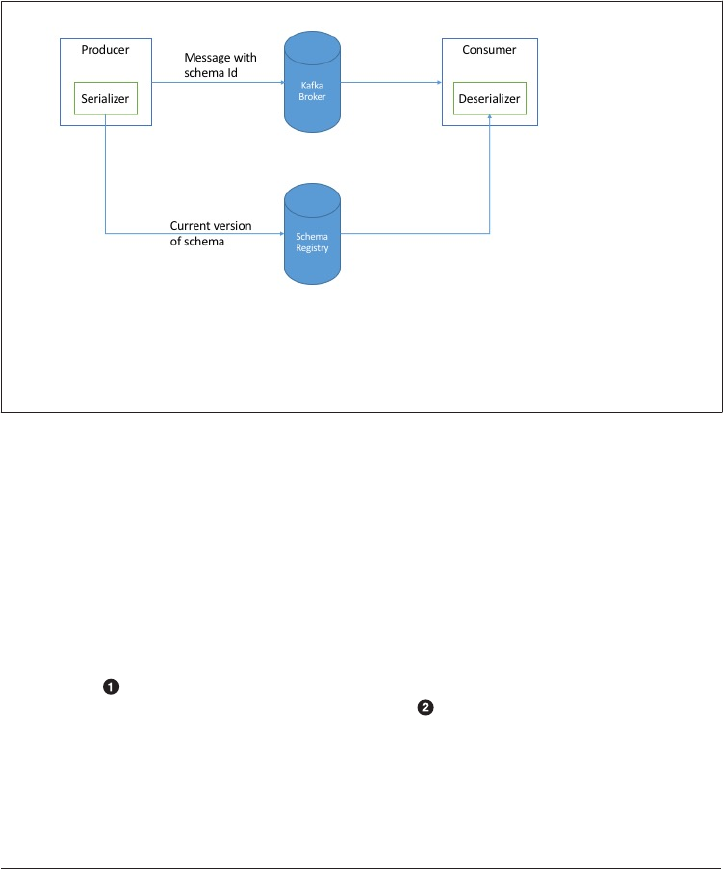
than double the record size. However, Avro still requires the entire schema to be
present when reading the record, so we need to locate the schema elsewhere. To ach‐
ieve this, we use a Schema Registry. The idea is to store all the schemas used to write
data to Kafka in the registry. Then we simply store the identifier for the schema in the
record we produce to Kafka. The readers can then use the identifier to pull the record
out of the schema registry and deserialize the data. The key is that all this work - stor‐
ing the schema in the registry and pulling it up when required is done in the serializ‐
ers and deserializers. The code that produces data to Kafka simply uses the Avro
serializers just like it would any other serializer.
Figure 3-2. Flow diagram of serialization and deserializetion of Avro records
Here is an example of how to produce generated Avro objects to Kafka (See Avro doc‐
umentation:[http://avro.apache.org/docs/current/] on how to use code generation with
Avro):
Properties props = new Properties();
props.put("bootstrap.servers", "localhost:9092");
props.put("key.serializer", "io.confluent.kafka.serializers.KafkaAvroSerial-
izer");
props.put("value.serializer", "io.confluent.kafka.serializers.KafkaAvroSerial-
izer");
props.put("schema.registry.url", schemaUrl);
String topic = "customerContacts";
int wait = 500;
Producer<String, Customer> producer = new KafkaProducer<String, Cus-
62 | Chapter 3: Kafka Producers - Writing Messages to Kafka
tomer>(props);
// We keep producing new events until someone ctrl-c
while (true) {
Customer customer = CustomerGenerator.getNext();
System.out.println("Generated customer " + customer.toString());
ProducerRecord<String, Customer> record =
new ProducerRecord<>(topic, customer.getId(), cus-
tomer);
producer.send(record);
}
We use the KafkaAvroSerializer to serialize our objects with Avro
schema.registry.url is a new parameter. This simply points to where we store
the schemas.
Customer is our generated object. We tell the producer that our records will con‐
tain Customer as the value
We also instantiate ProducerRecord with Customer as the value type, and pass a
Customer object when creating the new record.
That is it. We send the record with our Customer object and KafkaAvroSerializer
will handle the rest.
What if you prefer to use generic Avro objects rather than the generated Avro objects?
No worries. In this case you just need to provide the schema:
Properties props = new Properties();
props.put("bootstrap.servers", "localhost:9092");
props.put("key.serializer", "io.confluent.kafka.serializers.KafkaAvroSerial-
izer");
props.put("value.serializer", "io.confluent.kafka.serializers.KafkaAvroSerial-
izer");
props.put("schema.registry.url", url);
String schemaString = "{\"namespace\": \"customerManagement.avro\",
\"type\": \"record\", " +
"\"name\": \"Customer\"," +
"\"fields\": [" +
"{\"name\": \"id\", \"type\": \"int\"}," +
"{\"name\": \"name\", \"type\": \"string\"}," +
"{\"name\": \"email\", \"type\": [\"null\",\"string
\"], \"default\":\"null\" }" +
"]}";
Producer<String, GenericRecord> producer = new KafkaProducer<String, Generi-
cRecord>(props);
Kafka Producers - Writing Messages to Kafka | 63

Schema.Parser parser = new Schema.Parser();
Schema schema = parser.parse(schemaString);
for (int nCustomers = 0; nCustomers < customers; nCustomers++) {
String name = "exampleCustomer" + nCustomers;
String email = "example " + nCustomers + "@example.com"
GenericRecord customer = new GenericData.Record(schema);
customer.put("id", nCustomer);
customer.put("name", name);
customer.put("email", email);
ProducerRecord<String, GenericRecord> data =
new ProducerRecord<String, GenericRecord>("cus-
tomerContacts", name, customer);
producer.send(data);
}
}
We still use the same KafkaAvroSerializer
And provide URI of the same Schema Registry
But now we also need to provide the Avro schema, since it is not provided by the
Avro generated object
Our object type is an Avro GenericRecord, which we initialize with our schema
and the data we want to write.
Then the value of the ProducerRecord is simply a GenericRecord which coun‐
tains our schema and data. The serializer will know how to get the schema from
this record, store it in the schema registry and serialize the object data.
Partitions
In previous examples, the ProducerRecord objects we created included topic name,
key and value. Kafka messages are key-value pairs and while it is possible to create a
ProducerRecord with just topic and a value, with the key getting set to null by
default, most applications produce records with keys. Keys serve two goals: They are
additional information that gets stored with the message, and they are also used to
decide to which one of the topic partitions the message will be written to. Note that
all messages with same key will go to the same partition. This means that if a process
is reading only a subset of the partitions in a topic (more on that in chapter 4), all the
records for a single key will be recieved by the same process. To create a key-value
record, you simply create a ProducerRecord as follows:
ProducerRecord<Integer, String> record =
new ProducerRecord<>("CustomerCountry", "Laboratory Equipment", "USA");
64 | Chapter 3: Kafka Producers - Writing Messages to Kafka

When creating messages with a null key, you can simply leave the key out:
ProducerRecord<Integer, String> record =
new ProducerRecord<>("CustomerCountry", "USA");
Here the key will simply be set to null, which may indicate that a customer name
was missing on a form
When the key is null and the default partitioner is used, the record will be sent to
one of the available partitions of the topic at random. Round-robin algorithm will be
used to balance the messages between the partitions.
If a key exists and the default partitioner is used, Kafka will hash the key (using its
own hash algorithm, so hash values will not change when Java is upgraded), and use
the result to map the message to a specific partition. Note that this time, it is impor‐
tant that a key will always get mapped to the same partition, so we use all the parti‐
tions in the topic to calculate the mapping and not just available partitions. This
means that if a specific partition is unavailable when you write data to it, you may get
an error. This is a fairly rare occurance, as you will read in chapter X when we discuss
Kafka’s replication and availability.
Also note that the mapping of keys to partitions is consistent only as long as the num‐
ber of partitions in a topic does not change. So as long as the number of partitions is
constant you can be sure that, for example, records regarding user 045189 will always
get written to partition 34. This allows all kinds of optimizations when reading data
from partitions. However, the moment you add new partitions to the topic, this is no
longer guaranteed - the old records will stay in partition 34 while new records will get
written to a different partition. When partitioning of the keys is important, the easiest
solution is to create topics with sufficient partitions (how to determine a good num‐
ber of partitions will be discussed in a different chapter), and never add partitions.
Implementing a Custom Partitioning Strategy
So far we discussed the traits of the default partitioner, which is the one most com‐
monly used. However, Kafka does not limit you to just hash partitions and sometimes
there are good reasons to partition data differently. For example, suppose that you are
a B2B vendor and your biggest customer is a company manufacturing hand-held
devices called Banana. Suppose that Banana is so large that they comprise around
10% of your business. If you use default hash-partitioning, records regarding the
Banana account will get allocated to the same partition as other accounts, resulting in
one partition being about twice as large as the rest. This can cause servers to run out
of space, processing to slow down, etc. What we really want is to give Banana its own
partition and then use hash-partitioning to map the rest of the accounts to partitions.
Here is an example of a custom partitioner as described above:
Kafka Producers - Writing Messages to Kafka | 65

import org.apache.kafka.clients.producer.Partitioner;
import org.apache.kafka.common.Cluster;
import org.apache.kafka.common.PartitionInfo;
import org.apache.kafka.common.record.InvalidRecordException;
import org.apache.kafka.common.utils.Utils;
public class BananaPartitioner implements Partitioner {
public void configure(Map<String, ?> configs) {}
public int partition(String topic, Object key, byte[] keyBytes,
Object value, byte[] valueBytes, Cluster
cluster) {
List<PartitionInfo> partitions = cluster.partitionsFor-
Topic(topic);
int numPartitions = partitions.size();
if ((keyBytes == null) || (!(key instanceOf String)))
throw new InvalidRecordException("We expect all messages to have cus-
tomer name as key")
if (((String) key).equals("Banana"))
return numPartitions; // Banana will always go to last partition
// Other records will get hashed to the rest of the partitions
return (Math.abs(Utils.murmur2(keyBytes)) % (numPartitions - 1))
}
public void close() {}
}
Partitioner interface includes configure, partition and close methods. Here
we only implement partition, although we really should have passed the special
customer name through configure instead of hard-coding it in partition.
We only expect String keys, so we throw an exception if that is not the case
Conguring Producers
So far we’ve seen very few configuration parameters for the producers - just the
mandatory bootstrap.servers URI and serializers.
The producer has a large number of configuration parameters, most are documented
in Apache Kafka documentation:[http://kaa.apache.org/documentation.html#produ
cerconfigs] and many have reasonable defaults so there is no reason to tinker with
every single parameters. Few of the parameters have significant impact on memory
use, performance and reliability of the producers. We will review those here.
66 | Chapter 3: Kafka Producers - Writing Messages to Kafka

acks
The acks parameter controls how many partition replicas must receive the record
before the producer can consider the write successful. This option has significant
impact on how likely it is that messages will be lost. The options are:
•If acks = 0 the Producer will not wait for any reply from the broker before
assuming the message was sent successfully. This means that if something went
wrong and the broker did not receive the message, the producer will not know
about this and the message will be lost. However, because the producer is not
waiting for any response from the server, it can send messages as fast as the net‐
work will support, so this setting can be used to achieve very high throughput.
•If acks = 1 the producer will receive a success response from the broker the
moment the leader replica received the message. If the message can’t be written
to the leader (for example, if the leader crashed and a new leader was not elected
yet), the Producer will receive an error response and can retry sending the mes‐
sage, avoiding potential loss of data. The message can still get lost if the leader
crashes and a replica without this message gets elected as the new leader. In this
case throughput depends on whether we send messages synchronously or asyn‐
chronously. If our client code waits for reply from the server (by calling get()
method of the Future object returned when sending a message) it will obviously
increase latency significantly (at least by a network round-trip). If the client uses
callbacks, latency will be hidden, but throughput will be limited by the number of
in-flight messages (i.e. how many messages the producer will send before receiv‐
ing replies from the server).
•If acks = all the Producer will receive a success response from the broker once
all in-sync replicas received the message. This is the safest mode since you can
make sure more than one broker has the message and that it will survive even in
case of crash (More information on this in chapter X). However, the latency we
discussed in the acks = 1 case will be even higher, since we will be waiting for
more than just one broker to receive the message.
buer.memory
This sets the amount of memory the producer will use to buffer messages waiting to
be sent to brokers. If messages are sent by the application faster than they can be
delivered to the server, this may cause the producer to run out of space and addition
send() calls will either block or throw an exception, based on block.on.buffer.full
parameter.
Kafka Producers - Writing Messages to Kafka | 67

compression.type
By default, messages are sent uncompressed. This parameter can be set to snappy or
gzip in which case the corresponding compression algorithms will be used to com‐
press the data before sending it to the brokers. Snappy compression was invented by
Google to provide decent compression ratio with low CPU overhead and good per‐
formance, so it is recommended in cases where both performance and bandwidth are
a concern. Gzip compression will typically use more CPU and time but result in bet‐
ter compression ratios, so it recommended in cases where network bandwidth is
more restricted. By enabling compression you reduce network utilization, which is
often a bottleneck when sending messages to Kafka.
retries
When the producer receives an error message from the server, the error could be
transient (for example, lack of leader for a partition). In this case, the value of
retries parameter will control how many times the producer will retries sending the
message before giving up and notifying the client of an issue. By default the producer
will wait 100ms between retries, but you can control this using retry.backoff.ms
parameter. We recommend testing how long it takes to recover from a crashed broker
(i.e how long until all partitions get new leaders), and setting the number of retries
and delay between them such that the total amount of time spent retrying will be
longer than the time it takes the Kafka cluster to recover from the crash - otherwise
the producer will give up too soon. Note that some errors are not transient and will
not cause retries (for example “message too large” error). In general, because the pro‐
ducer handles retries for you, there is not much point in catching exceptions or writ‐
ing complex callback logic if all you will do with a producer error is retry later. You
may want to avoid retrying and handle errors yourself if you have a different way of
handing errors other than retrying - perhaps writing them to a file or throwing them
away.
batch.size
When multiple records are sent to the same partition, the producer will batch them
together. This parameter controls the amount of memory in bytes (not messages!)
that will be used for each batch. When the batch is full, all the messages in the batch
will be sent. However, this does not mean that the producer will wait for the batch to
become full. The producer will send half-full batches and even batches with just a sin‐
gle message in them. Therefore setting the batch size too large will not cause delays in
sending messages, it will just use more memory for the batches. Setting the batch size
too small, will add some overhead since the producer will need to send messages
more frequently.
68 | Chapter 3: Kafka Producers - Writing Messages to Kafka

linger.ms
linger.ms control the amount of time we wait for additional messages before send‐
ing the current batch. KafkaProducer sends a batch of messages either when the cur‐
rent batch is full or when linger.ms limit is reached. By default, the producer will
send messages as soon as there is the sender thread is available to send them, even if
there’s just one message in the batch. By setting linger.ms higher than 0, we instruct
the producer to wait few milliseconds for additional messages to get added to the
batch before sending it to the brokers. This increases latency, but also increases
throughput (since we send more messages at once there is less overhead per mes‐
sage).
client.id
This can be any string, and will be used by the brokers to identify messages sent from
the client. It is used in logging, metrics and for quotas.
max.in.ight.requests.per.connection
This controls how many messages the producer will send to the server without
receiving responses. Setting this high can increase memory usage while improving
throughput. Setting this to 1 will guarantee that messages will be written to the broker
in the order they were sent, even when retries occure.
timeout.ms and metadata.fetch.timeout.ms
These parameters control how long the producer will wait for reply from the server
when sending data (timeout.ms) and when requesting metadata such as who are the
current leaders for the partitions we are writing to (metadata.fetch.timeout.ms). If
the timeout is reached without reply, the producer will respond with an error (either
through exception or the send callback).
Kafka Producers - Writing Messages to Kafka | 69

Ordering Guarantees
Apache Kafka preserves order of messages within a partition. This
means that if messages were sent from the producer in a specific
order, the broker will write them to a partition in this order and all
consumers will read them in this order. For some use-cases, order
is very important. There is a big difference between depositing
100$ in an account and later withdrawing them, and the other way
around! However, some use cases are less sensitive.
Setting the retries parameter to non-zero and the
max.in.flights.requests.per.session to more than one, mean
that it is possible that the broker will fail to write the first batch of
messages, succeed to write the second (which was already in flight)
and then retry the first batch and succeed, thereby reversing the
order.
If the order is critical, usually success is critical too so setting retries
to zero is not an option, however you can set
in.flights.requests.per.session = 1 to make sure that no
additional messages will be sent to the broker while the first batch
is still retrying. This will severly limit the throughput of the pro‐
ducer, so only use this when order is important.
Old Producer APIs
In this chapter we discussed the Java producer client that is part of
org.apache.kafka.clients package. At the time of writing this chapter, Apache
Kafka still has two older clients written in Scala that are part of kafka.producer
package and part of the core Kafka module. These producers are called SyncProducer
(which, depending on the value of acks parameter it may wait for the server to ack
each message or batch of messages before sending additional messages) and Asyn‐
cProducer (Which batches messages in the background, sends them in a separate
thread and does not provide feedback regarding success to the client).
Because the current producer supports both behaviors and give much more reliability
and control to the developer, we will not discuss the older APIs. If you are interested
in using them, please think twice and then refer to Apache Kafka documentation to
learn more.
70 | Chapter 3: Kafka Producers - Writing Messages to Kafka

CHAPTER 4
Kafka Consumers - Reading Data from
Kafka
Applications that need to read data from Kafka use KafkaConsumer to subscribe to
Kafka topics and receive messages from these topics. Reading data from Kafka is a bit
different than reading data from other messaging systems and there are few unique
concepts and ideas involved. It is difficult to understand how to use the consumer
API without understanding these concepts first. So we’ll start by explaining some of
the important concepts, and then we’ll go through some examples that show the dif‐
ferent ways the consumer APIs can be used to implement applications with different
requirements.
KafkaConsumer Concepts
Consumers and Consumer Groups
Suppose you have an application that needs to read messages from a Kafka topic, run
some validations against them and write the results to another data store. In this case
your application will create a consumer object, subscribe to the appropriate topic and
start receiving messages, validating them and writing the results. This can work well
for a while, but what if the rate at which producers write messages to the topic exceed
the rate at which your application can validate them? If you are limited to a single
consumer reading and processing the data, your application may fall farther and far‐
ther behind, unable to keep up with the rate of incoming messages. Obviously there is
a need to scale consumption from topics. Just like multiple producers can write to the
same topic, we need to allow multiple consumers to read from the same topic, split‐
ting the data between them.
71
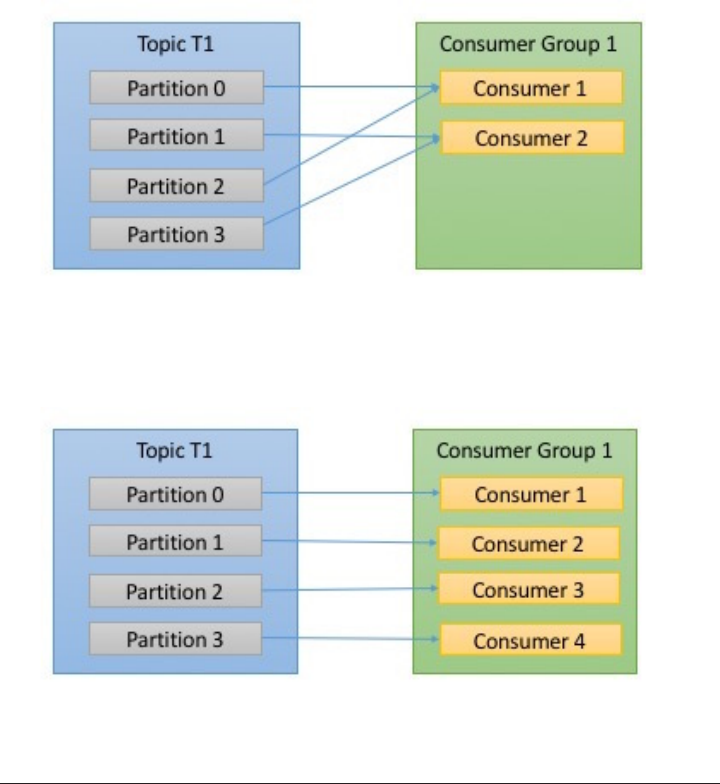
Kafka consumers are typically part of a consumer group. When multiple consumers
are subscribed to a topic and belong to the same consumer group, then each con‐
sumer in the group will receive messages from a different subset of the partitions in
the topic.
Lets take topic t1 with 4 partitions. Now suppose we created a new consumer, c1,
which is the only consumer in group g1 and use it to subscribe to topic t1. Consumer
c1 will get all messages from all four of t1 partitions. image::images/
ch04_consumer_group_1_consumer.jpg[]
If we add another consumer, c2 to group g1, each consumer will only get messages
from two partitions. Perhaps messages from partition 0 and 2 go to c1 and messages
from partitions 1 and 3 go to consumer c2.
If g1 has 4 consumers, then each will read messages from a single partitions.
72 | Chapter 4: Kafka Consumers - Reading Data from Kafka
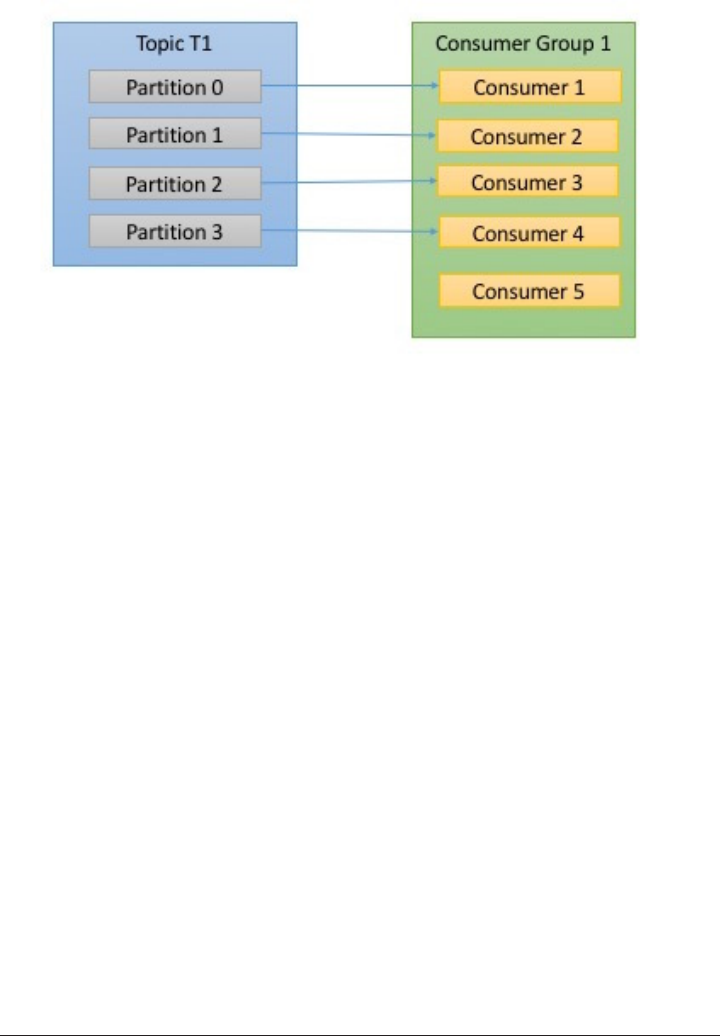
If we add more consumers to a single group with a single topic than we have parti‐
tions, than some of the consumers will be idle and get no messages at all.
The main way we scale consumption of data from a Kafka topic is by adding more
consumers to a consumer group. It is common for Kafka consumers to do high
latency operations such as write to a database or to HDFS, or a time-consuming com‐
putation on the data. In these cases, a single consumer can’t possibly keep up with the
rate data flows into a topic, and adding more consumers that share the load by having
each consumer own just a subset of the partitions and messages is our main method
of scaling. This is a good reason to create topics with a large number of partitions - it
allows adding more consumers when the load increases. Note again that there is no
point in adding more consumers than you have partitions in a topic - some of the
consumers will just be ideal. We will look at how to choose the number of partitions
for a topic in chapter X.
In addition to adding consumers in order to scale a single application, it is very com‐
mon to have multiple applications that need to read data from the same topic. In fact,
one of the main design goals in Kafka was to make the data produced to Kafka topics
available for many use-cases throughout the organization. In those cases, we want
each application to get all of the messages, rather than just a subset. To make sure an
application gets all the messages in a topic, you make sure the application has its own
consumer group. Unlike many traditional messaging systems, Kafka scales to large
number of consumers and consumer groups without reducing performance.
In the example above, if we add a new consumer group g2 with a single consumer,
this consumer will get all the messages in topic t1 independently of what g1 is doing.
g2 can have more than a single consumer, in which case they will each get a subset of
KafkaConsumer Concepts | 73
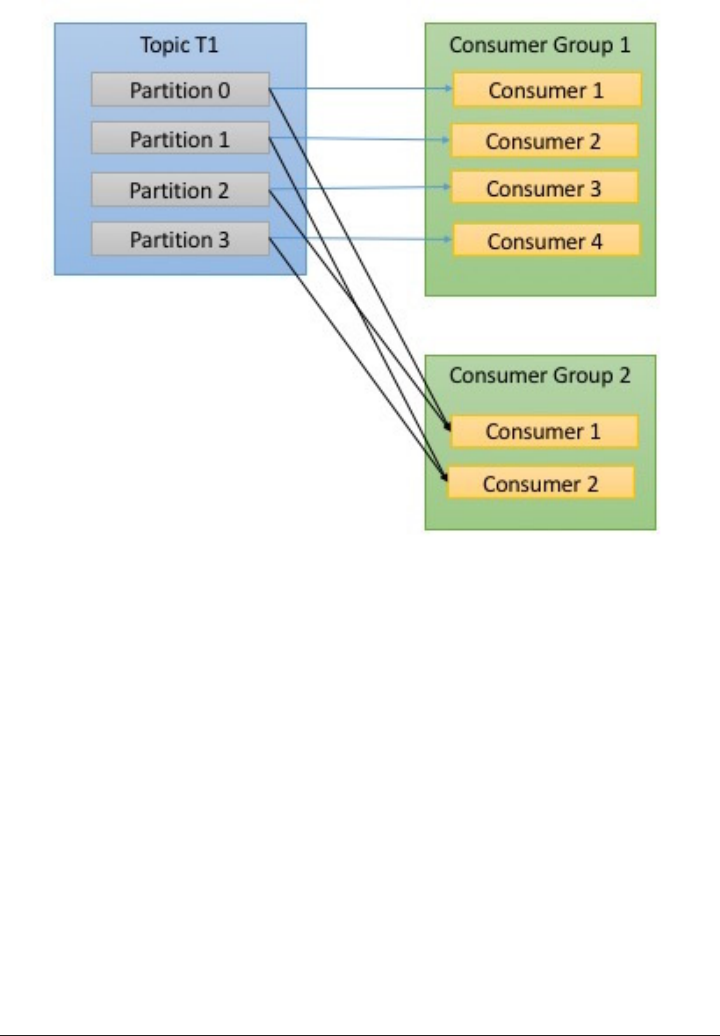
partitions, just like we showed for g1, but g2 as a whole will still get all the messages
regardless of other consumer groups.
To summarize, you create a new consumer group for each application that needs all
the messages from one or more topics. You add consumers to an existing consumer
group to scale the reading and processing of messages from the topics, each addi‐
tional consumer in a group will only get a subset of the messages.
Consumer Groups - Partition Rebalance
As we’ve seen in the previous section, consumers in a consumer group share owner‐
ship of the partitions in the topics they subscribe to. When we add a new consumer to
the group it starts consuming messages from partitions which were previously con‐
sumed by another consumer. The same thing happens when a consumer shuts down
or crashes, it leaves the group, and the partitions it used to consume will be con‐
sumed by one of the remaining consumers. Reassignment of partitions to consumers
also happen when the topics the consumer group is consuming are modified, for
example if an administrator adds new partitions.
74 | Chapter 4: Kafka Consumers - Reading Data from Kafka

The event in which partition ownership is moved from one consumer to another is
called a rebalance. Rebalances are important since they provide the consumer group
with both high-availability and scalability (allowing us to easily and safely add and
remove consumers), but in the normal course of events they are fairly undesirable.
During a rebalance, consumers can’t consume messaged, so a rebalance is in effect a
short window of unavailability on the entire consumer group. In addition, when par‐
titions are moved from one consumer to another the consumer loses its current state,
if it was caching any data, it will need to refresh its caches - slowing down our appli‐
cation until the consumer sets up its state again. Throughout this chapter we will dis‐
cuss how to safely handle rebalances and how to avoid unnecessary rebalances.
The way consumers maintain their membership in a consumer group and their own‐
ership on the partitions assigned to them is by sending heartbeats to a Kafka broker
designated as the Group Coordinator (note that this broker can be different for differ‐
ent consumer groups). As long the consumer is sending heartbeats in regular inter‐
vals, it is assumed to be alive, well and processing messages from its partitions. In
fact, the act of polling for messages is what causes the consumer to send those heart‐
beats. If the consumer stops sending heartbeats for long enough, its session will time
out and the group coordinator will consider it dead and trigger a rebalance. Note that
if a consumer crashed and stopped processing messages, it will take the group coordi‐
nator few seconds without heartbeats to decide it is dead and trigger the rebalance.
During those seconds, no messages will be processed from the partitions owned by
the dead consumer. When closing a consumer cleanly, the consumer will notify the
group coordinator that it is leaving, and the group coordinator will trigger a reba‐
lance immediately, reducing the gap in processing. Later in this chapter we will dis‐
cuss configuration options that control heartbeat frequency and session timeouts and
how to set those to match your requirements.
KafkaConsumer Concepts | 75

How does the process of assigning partitions to brokers work?
When a consumer wants to join a group, it sends a JoinGroup
request to the group coordinator. The first consumer to join the
group becomes the group leader. The leader receives a list of all
consumers in the group from the group coordinator (this will
include all consumers that sent a heartbeat recently and are there‐
fore considered alive) and it is responsible for assigning a subset of
partitions to each consumer. It uses an implementation of Partitio‐
nAssignor interface to decide which partitions should be handled
by which consumer. Kafka has two built-in partition assignment
policies, which we will discuss in more depth in the configuration
section. After deciding on the partition assignment, the consumer
leader sends the list of assignments to the GroupCoordinator
which sends this information to all the consumers. Each consumer
only sees his own assignment - the leader is the only client process
that has the full list of consumers in the group and their assign‐
ments. This process repeats every time a rebalance happens.
Creating a Kafka Consumer
The first step to start consuming records is to create a KafkaConsumer instance. Cre‐
ating a KafkaConsumer is very similar to creating a KafkaProducer - you create a Java
Properties instance with the properties you want to pass to the consumer. We will
discuss all the properties in depth later in the chapter. To start we just need to use the
3 mandatory properties: bootstrap.servers, key.deserializer and value.deser
ializer.
The first property, bootstrap.servers is the connection string to Kafka cluster. It is
used the exact same way it is used in KafkaProducer, and you can refer to Chapter 3
to see specific details on how this is defined. The other two properties key.deserial
izer and value.deserializer are similar to the serializers defined for the pro‐
ducer, but rather than specifying classes that turn Java objects to a ByteArray, you
need to specify classes that can take a ByteArray and turn it into a Java object.
There is a fourth property, which is not strictly mandatory, but for now we will pre‐
tend it is. The property is group.id and it specifies the Consumer Group the Kafka‐
Consumer instance belongs to. While it is possible to create consumers that do not
belong to any consumer group, this is far less common and for most of the chapter
we will assume the consumer is part of a group.
The following code snippet shows how to create a KafkaConsumer:
Properties props = new Properties();
props.put("bootstrap.servers", "broker1:9092,broker2:9092");
props.put("group.id", "CountryCounter");
76 | Chapter 4: Kafka Consumers - Reading Data from Kafka
props.put("key.deserializer", "org.apache.kafka.common.serialization.StringDe-
serializer");
props.put("value.deserializer", "org.apache.kafka.common.serialization.StringDe-
serializer");
KafkaConsumer<String, String> consumer = new KafkaConsumer<String,
String>(props);
Most of what you see here should be very familiar if you’ve read Chapter 3 on creat‐
ing producers. We are planning on consuming Strings as both key and value, so we
use the built-in StringDeserializer and we create KafkaConsumer with String types.
The only new property here is group.id - which is the name of the consumer group
this consumer will be part of.
Subscribing to Topics
Once we created a consumer, the next step is to subscribe to one or more topics. The
subcribe() method takes a list of topics as a parameter, so its pretty simple to use:
consumer.subscribe(Collections.singletonList("customerCountries"));
Here we simply create a list with a single element, the topic name “customer‐
Countries”
It is also possible to call subscribe with a regular expression. The expression can
match multiple topic names and if someone creates a new topic with a name that
matches, a rebalance will happen almost immediately and the consumers will start
consuming from the new topic. This is useful for applications that need to consume
from multiple topics and can handle the different types of data the topics will contain.
It is most common in applications that replicate data between Kafka and another sys‐
tem.
To subscribe to all test topics, we can call:
consumer.subscribe("test.*");
The Poll Loop
At the heart of the consumer API is a simple loop for polling the server for more data.
Once the consumer subscribes to topics, the poll loop handles all details of coordina‐
tion, partition rebalances, heartbeats and data fetching, leaving the developer with a
clean API that simply returns available data from the assigned partitions. The main
body of a consumer will look at follows:
try {
while (true) {
ConsumerRecords<String, String> records = consumer.poll(100);
for (ConsumerRecord<String, String> record : records)
Subscribing to Topics | 77

{
log.debug("topic = %s, partition = %s, offset = %d, customer = %s,
country = %s\n",
record.topic(), record.partition(), record.offset(), record.key(),
record.value());
int updatedCount = 1;
if (custCountryMap.countainsValue(record.value())) {
updatedCount = custCountryMap.get(record.value()) + 1;
}
custCountryMap.put(record.value(), updatedCount)
JSONObject json = new JSONObject(custCountryMap);
System.out.println(json.toString(4))
}
}
} finally {
consumer.close();
}
This is indeed an infinite loop. Consumers are usually a long-running application
that continuously polls Kafka for more data. We will show later in the chapter
how to cleanly exit the loop and close the consumer.
This is the most important line in the chapter. The same way that sharks must
keep moving or they die, consumers must keep polling Kafka or they will be con‐
sidered dead and the partitions they are consuming will be handed to another
consumer in the group to continue consuming.
poll() returns a list of records. Each record contains the topic and partition the
record came from, the offset of the record within the partition, and of course the
key and the value of the record. Typically we want to iterate over the list and pro‐
cess the records individually. poll() method takes a timeout parameter. This
specifies how long it will take poll to return, with or without data. The value is
typically driven by application needs for quick responses - how fast do you want
to return control to the thread that does the polling?
Processing usually ends in writing a result in a data store or updating a stored
record. Here, the goal is to keep a running count of customers from each county,
so we update a hashtable and print the result as JSON. A more realistic example
would store the updates result in a data store.
Always close() the consumer before exiting. This will close the network connec‐
tions and the sockets and will trigger a rebalance immediately rather than wait
for the Group Coordinator to discover that the consumer stopped sending heart‐
beats and is likely dead, which will take longer and therefore result in a longer
78 | Chapter 4: Kafka Consumers - Reading Data from Kafka

period of time during which no one consumes messages from a subset of the par‐
titions.
The poll loop does a lot more than just get data. The first time you call poll() with a
new consumer, it is responsible for finding the GroupCoordinator, joining the con‐
sumer group and receiving a partition assignment. If a rebalance is triggered, it will
be handled inside the poll loop as well. And of course the heartbeats that keep con‐
sumers alive are sent from within the poll loop. For this reason, we try to make sure
that whatever processing we do between iterations is fast and efficient.
Note that you can’t have multiple consumers that belong to the same group in one
thread and you can’t have multiple threads safely use the same consumer. One con‐
sumer per thread is the rule.
To run multiple consumers in the same group in one application,
you will need to run each in its own thread. It is useful to wrap the
consumer logic in its own object, and then use Java’s ExecutorSer‐
vice to start multiple threads each with its own consumer. Conflu‐
ent blog has a tutorial that shows how to do just that.
Commits and Osets
Whenever we call poll(), it returns records written to Kafka that consumers in our
group did not read yet. This means that we have a way of tracking which records were
read by a consumer of the group. As we’ve discussed before, one of Kafka’s unique
characteristics is that it does not track acknowledgements from consumers the way
many JMS queues do. Instead, it allows consumers to use Kafka to track their posi‐
tion (offset) in each partition.
We call the action of updating the current position in the partition a commit.
How does a consumer commits an offset? It produces a message to Kafka, to a special
__consumer_offsets topic, with the committed offset for each partition. As long as all
your consumers are up, running and churning away, this will have no impact. How‐
ever, if a consumer crashes or a new consumer joins the consumer group, this will
trigger a rebalance. After a rebalance, each consumer may be assigned a new set of
partitions than the one it processed before. In order to know where to pick up the
work, the consumer will read the latest committed offset of each partition and con‐
tinue from there.
If the committed offset is smaller than the offset of the last message the client pro‐
cessed, the messages between the last processed offset and the committed offset will
be processed twice.
Commits and Osets | 79
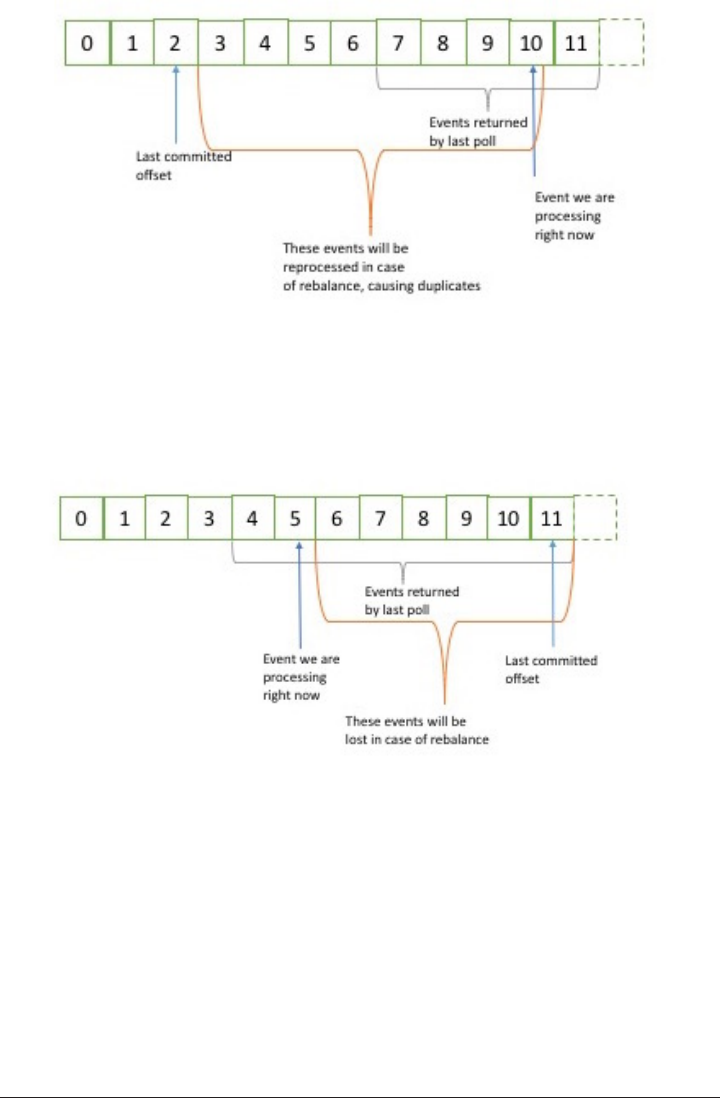
If the committed offset is larger than the offset of the last message the client actually
processed, all messages between the last processed offset and the committed offset
will be missed by the consumer group.
Clearly managing offsets has large impact on the client application.
The KafkaConsumer API provides multiple ways of committing offsets:
Automatic Commit
The easiest way to commit offsets is to allow the consumer to do it for you. If you
configure enable.auto.commit = true then every 5 seconds the consumer will com‐
mit the largest offset your client received from poll(). The 5 seconds interval is the
default and is controlled by setting auto.commit.interval.ms. As everything else in
80 | Chapter 4: Kafka Consumers - Reading Data from Kafka

the consumer, the automatic commits are driven by the poll loop. Whenever you poll,
the consumer checks if its time to commit, and if it is, it will commit the offsets it
returned in the last poll.
Before using this convenient option, however, it is important to understand the con‐
sequences.
Consider that by defaults automatic commit occurs every 5 seconds. Suppose that we
are 3 seconds after the most recent commit and a rebalance is triggered. After the
rebalancing all consumers will start consuming from the last offset committed. In this
case the offset is 3 seconds old, so all the events that arrived in those 3 seconds will be
processed twice. It is possible to configure the commit interval to commit more fre‐
quently and reduce the window in which records will be duplicated, but it is impossi‐
ble to completely eliminate them.
Note that with auto-commit enabled, a call to poll will always commit the last offset
returned by the previous poll. It doesn’t know which events were actually processed,
so it is critical to always process all the events returned by poll before calling poll
again (or before calling close(), it will also automatically commit offsets). This is usu‐
ally not an issue, but pay attention when you handle exceptions or otherwise exit the
poll loop prematurely.
Automatic commits are convenient, but they don’t give developers enough control to
avoid duplicate messages.
Commit Current Oset
Most developers use to exercise more control over the time offsets are committed.
Both to eliminate the possibility of missing messages and to reduce the number of
messages duplicated during rebalancing. Te consumer API has the option of commit‐
ting the current offset at a point that makes sense to the application developer rather
than based on a timer.
By setting auto.commit.offset = false, offsets will only be committed when the
application explicitly chooses to do so. The simplest and most reliable of the commit
APIs is commitSync(). This API will commit the latest offset returned by poll() and
return once the offset is committed, throwing an exception if commit fails for some
reason.
It is important to remember that commitSync() will commit the latest offset returned
by poll(), so make sure you call commitSync() after you are done processing all the
records in the collection, or you risk missing messages as described above. Note that
when rebalance is triggered, all the messages from the beginning of the most recent
batch until the time of the rebalance will be processed twice.
Commits and Osets | 81

Here is how we would use commitSync to commit offsets once we finished processing
the latest batch of messages:
while (true) {
ConsumerRecords<String, String> records = consumer.poll(100);
for (ConsumerRecord<String, String> record : records)
{
System.out.println("topic = %s, partition = %s, offset = %d, customer =
%s, country = %s\n",
record.topic(), record.partition(), record.off-
set(), record.key(), record.value());
}
try {
consumer.commitSync();
} catch (CommitFailedException e) {
log.error("commit failed", e)
}
}
Lets assume that by printing the contents of a record, we are done processing it.
Your application will be much more involved, and you should determine when
you are “done” with a record according to your use-case.
Once we are done “processing” all the records in the current batch, we call com
mitSync to commit the last offset in the batch, before polling for additional mes‐
sages.
commitSync retries committing as long as there is no error that can’t be recov‐
ered. If this happens there is not much we can do except log an error.
Asynchronous Commit
One drawback of manual commit is that the application is blocked until the broker
responds to the commit request. This will limit the throughput of the application.
Throughput can be improved by committing less frequently, but then we are increas‐
ing the number of potential duplicates that a rebalance will create.
Another option is the asynchronous commit API. Instead of waiting for the broker to
respond to a commit, we just send the request and continue on.
while (true) {
ConsumerRecords<String, String> records = consumer.poll(100);
for (ConsumerRecord<String, String> record : records)
{
System.out.println("topic = %s, partition = %s, offset = %d, customer =
%s, country = %s\n",
record.topic(), record.partition(), record.off-
set(), record.key(), record.value());
}
82 | Chapter 4: Kafka Consumers - Reading Data from Kafka

consumer.commitAsync();
}
Commit the last offset and carry on.
The drawback is that while commitSync() will retry the commit until it either suc‐
ceeds or encounters a non-retriable failure, commitAsync() will not retry. The reason
it does not retry is that by the time commitAsync() receives a response from the
server, there may have been a later commit which was already successful. Imagine
that we sent a request to commit offset 2000. There is a temporary communication
problem, so the broker never gets the request and therefore never respond. Mean‐
while, we processed another batch and successfully committed offset 3000. If commitA
sync() now retries the previously failed commit, it may succeed in committing offset
2000 aer offset 3000 was already processed and committed. In case of a rebalance,
this will cause more duplicates.
We are mentioning this complication and the importance of correct order of com‐
mits, because commitAsync() also gives you an option to pass in a callback that will
be triggered when the broker responds. It is common to use the callback to log com‐
mit errors or to count them in a metric, but if you want to use the callback for retries,
you need to be aware of the problem with commit order.
while (true) {
ConsumerRecords<String, String> records = consumer.poll(100);
for (ConsumerRecord<String, String> record : records) {
System.out.println("topic = %s, partition = %s, offset = %d, customer =
%s, country = %s\n",
record.topic(), record.partition(), record.off-
set(), record.key(), record.value());
}
consumer.commitAsync(new OffsetCommitCallback() {
public void onComplete(Map<TopicPartition, OffsetAndMetadata> offsets,
Exception exception) {
if (e != null)
log.error("Commit failed for offsets {}", offsets, e);
}
});
}
We send the commit and carry on, but if the commit fails, the failure and the off‐
sets will be logged.
Commits and Osets | 83

A simple pattern to get commit order right for asynchronous
retries is to use a monotonically increasing sequence number.
Increase the sequence number every time you commit and the
sequence number at the time of the commit to the asyncCommit
callback. When you’re getting ready to send a retry, check if the
commit sequence number the callback got is equal to the instance
variable, if it is - there was no newer commit and it is safe to retry.
If the instance sequence number is higher, don’t retry since a newer
commit was already sent.
Combining Synchronous and Asynchronous commits
Normally, occasional failures to commit without retrying are not a huge problem,
since if the problem is temporary the following commit will be successful. But if we
know that this is the last commit before we close the consumer, or before a rebalance,
we want to make extra sure that the commit succeeds.
Therefore a common pattern is to combine commitAsync with commitSync just
before shutdown. Here is how it works (We will discuss how to commit just before
rebalance when we get to the section about rebalance listeners):
try {
while (true) {
ConsumerRecords<String, String> records = consumer.poll(100);
for (ConsumerRecord<String, String> record : records) {
System.out.println("topic = %s, partition = %s, offset = %d, cus-
tomer = %s, country = %s\n",
record.topic(), record.partition(), record.off-
set(), record.key(), record.value());
}
consumer.commitAsync();
}
} catch (Exception e) {
log.error("Unexpected error", e);
} finally {
try {
consumer.commitSync();
} finally {
consumer.close();
}
}
While everything is fine, we use commitAsync. It is faster, and if one commit
fails, the next commit will serve as a retry.
But if we are closing, there is no “next commit”. We call commitSync, because it
will retry until it succeeds or suffers unrecoverable failure.
84 | Chapter 4: Kafka Consumers - Reading Data from Kafka

Commit Specied Oset
Committing the latest offset only allows you to commit as often as you finish process‐
ing batches. But what if you want to commit more frequently than that? What if
poll() returns a huge batch and you want to commit offsets in the middle of the
batch to avoid having to process all those rows again if a rebalance occures? You can’t
just call commitSync() or commitAsync() - this will commit the last offset returned,
which you didn’t get to process yet.
Fortunately, the consumer API allows you to call commitSync() and commitAsync()
and pass a map of partitions and offsets that you wish to commit. If you are in the
middle of processing a batch of records, and the last message you got from partition 3
in topic “customers” has offset 5000, you can call commitSync() to commit offset
5000 for partition 3 in topic “customers”. Since your consumer may be consuming
more than a single partition, you will need to track offsets on all of them, so moving
to this level of precision in controlling offset commits adds complexity to your code.
Here is what commits of specific offsets looks like:
private Map<TopicPartition, OffsetAndMetadata> currentOffsets;
int count = 0;
....
while (true) {
ConsumerRecords<String, String> records = consumer.poll(100);
for (ConsumerRecord<String, String> record : records)
{
System.out.println("topic = %s, partition = %s, offset = %d, customer =
%s, country = %s\n",
record.topic(), record.partition(), record.off-
set(), record.key(), record.value());
currentOffsets.put(new TopicPartition(record.topic(), record.parti-
tion()),
record.offset());
if (count % 1000 == 0)
consumer.commitAsync(currentOffsets);
count++;
}
}
This is the map we will use to manually track offsets
Remember, println is a stand-in for whatever processing you do for the records
you consume
After reading each record we update the offsets map with the last offset we’ve
seen
Commits and Osets | 85

Here, we decide to commit current offsets every 1000 records. In your applica‐
tion you can commit based on time or perhaps content of the records.
I chose to call commitAsync, but commitSync is also completely valid here. Of
course, when committing specific offsets you still need to perform all the error
handling we’ve seen in previous sections.
Rebalance Listeners
As we mentioned in previous section about committing offsets, a consumer will want
to do some cleanup work before exiting and also before partition rebalancing.
If you know your consumer is about to lose ownership of a partition, you will want to
commit offsets of the last event you’ve processed. If your consumer maintained a
buffer with events that it only processes occasionally (for example, the currentRe
cords map we used when explaining pause() functionality), you will want to process
the events you accumulated before losing ownership of the partition. Perhaps you
also need to close file handles, database connections and such.
The consumer API allows you to run your own code when partitions are added or
removed from the consumer. You do this by passing a ConsumerRebalanceListener
when calling the subscribe() method we discussed previously. ConsumerRebalance‐
Listener has two methods you can implement:
•public void onPartitionsRevoked(Collection<TopicPartition> parti
tions) is called before the rebalancing starts and after the consumer stopped
consuming messages. This is where you want to commit offsets, so whoever gets
this partition next will know where to start.
•public void onPartitionsAssigned(Collection<TopicPartition> parti
tions) is called after partitions has been re-assigned to the broker, but before the
consumer started consuming messages.
This example will show how to use onPartitionsRevoked() to commit offsets before
losing ownership of a partition. In the next section we will show a more involved
example that also demonstrates the use of onPartitionsAssigned().
private Map<TopicPartition, OffsetAndMetadata> currentOffsets;
private class HandleRebalance implements ConsumerRebalanceListener {
public void onPartitionsAssigned(Collection<TopicPartition> partitions) {
}
public void onPartitionsRevoked(Collection<TopicPartition> partitions) {
consumer.commitSync(currentOffsets);
}
86 | Chapter 4: Kafka Consumers - Reading Data from Kafka

}
try {
consumer.subscribe(topics, new HandleRebalance());
while (true) {
ConsumerRecords<String, String> records = consumer.poll(100);
for (ConsumerRecord<String, String> record : records)
{
System.out.println("topic = %s, partition = %s, offset = %d, cus-
tomer = %s, country = %s\n",
record.topic(), record.partition(), record.off-
set(), record.key(), record.value());
currentOffsets.put(new TopicPartition(record.topic(), record.parti-
tion()),
record.offset());
}
consumer.commitAsync(currentOffsets);
}
} catch (WakeupException e) {
// ignore, we're closing
} catch (Exception e) {
log.error("Unexpected error", e);
} finally {
try {
consumer.commitSync(currentOffsets);
} finally {
consumer.close();
}
}
We start by implementing a ConsumerRebalanceListener
In this example we don’t need to do anything when we get a new partition, we’ll
just start consuming messages.
However, when we are about to lose a partition due to rebalancing, we need to
commit offsets. Note that we are committing the latest offsets we’ve processed,
not the latest offsets in the batch we are still processing. This is because a parti‐
tion could get revoked while we are still in the middle of a batch. We are commit‐
ting offsets for all partitions, not just the partitions we are about to lose - since
the offsets are for events that were already processed, there is no harm in that.
Last, note that we are using syncCommit() to make sure the offsets are committed
before the rebalance proceeds.
The most important part - pass the ConsumerRebalanceListener to subscribe()
method so it will get invoked by the consumer.
Rebalance Listeners | 87

Seek and Exactly Once Processing
So far we’ve seen how to use poll() to start consuming messages from the last com‐
mitted offset in each partition and to proceed in processing all messages in sequence.
However, sometimes you want to start reading at a different offset.
If you want to start reading all messages from the beginning of the partition, or you
want to skip all the way to the end of the partition and start consuming only new
messages, there are APIs specifically for that: seekToBeginning(TopicPartition tp)
and seekToEnd(TopicPartition tp).
However, the Kafka API also lets you seek to a specific offset. This ability can be used
in a variety of ways, for example to go back few messages or skip ahead few messages
(perhaps a time-sensitive application that is falling behind will want to skip ahead to
more relevant messages), but the most exciting use-case for this ability is when offsets
are stored in a system other than Kafka.
Think about this common scenario: Your application is reading events from Kafka
(perhaps a clickstream of users in a website), processes the data (perhaps clean up
clicks by robots and add session information) and then store the results in a database,
NoSQL store or Hadoop. Suppose that we really don’t want to lose any data, nor do
we want to store the same results in the database twice.
In these cases the consumer loop may look a bit like this:
while (true) {
ConsumerRecords<String, String> records = consumer.poll(100);
for (ConsumerRecord<String, String> record : records)
{
currentOffsets.put(new TopicPartition(record.topic(), record.parti-
tion()),
record.offset());
processRecord(record);
storeRecordInDB(record);
consumer.commitAsync(currentOffsets);
}
}
Note that we are very paranoid, so we commit offsets after processing each record.
However, there is still a chance that our application will crash after the record was
stored in the database but before we committed offsets, causing the record to be pro‐
cessed again and the database to contain duplicates.
This could be avoided if there was only a way to store both the record and the offset
in one atomic action. Either both the record and the offset are committed, or neither
of them are committed. As long as the records are written to a database and the off‐
sets to Kafka, this is impossible.
88 | Chapter 4: Kafka Consumers - Reading Data from Kafka

But what if we wrote both the record and the offset to the database, in one transac‐
tion? Then we’ll know that either we are done with the record and the offset is com‐
mitted or we are not, and the record will be reprocessed.
Now the only problem is: if the record is stored in a database and not in Kafka, how
will our consumer know where to start reading when it is assigned a partition? This is
exactly what seek() can be used for. When the consumer starts or when new parti‐
tions are assigned, it can look up the offset in the database and seek() to that loca‐
tion.
Here is a skeleton example of how this may work. We use the ConsumerRebalan‐
ceLister and seek() to make sure we start processing at the offsets stored in the data‐
base.
public class SaveOffsetsOnRebalance implements ConsumerRebalanceListener {
public void onPartitionsRevoked(Collection<TopicPartition> partitions) {
commitDBTransaction();
}
public void onPartitionsAssigned(Collection<TopicPartition> partitions) {
for(TopicPartition partition: partitions)
consumer.seek(partition, getOffsetFromDB(partition));
}
}
}
consumer.subscribe(topics, new SaveOffsetOnRebalance(consumer));
consumer.poll(0);
for (TopicPartition partition: consumer.assignment())
consumer.seek(partition, getOffsetFromDB(partition));
while (true) {
ConsumerRecords<String, String> records = consumer.poll(100);
for (ConsumerRecord<String, String> record : records)
{
processRecord(record);
storeRecordInDB(record);
storeOffsetInDB(record.topic(), record.partition(), record.offset());
}
commitDBTransaction();
}
We use an imaginary method here to commit the transaction in the database.
The idea here is that the database records and offsets will be inserted to the data‐
base as we process the records, and we just need to commit the transaction when
we are about to lose the partition to make sure this information will be persisted.
Seek and Exactly Once Processing | 89

We also have an imaginary method to fetch the offsets from the database, and
then we seek() to those records when we get ownership of new partitions.
When the consumer first starts, after we subscribed to topics, we call poll()
once to make sure we join a consumer group and get assigned partitions and
then we immediately seek() to the correct offset in the partitions we are assigned
to. Keep in mind that seek() only updates the position we are consuming from,
so the next poll() will fetch the right messages. If there was an error in seek()
(for example the offset does not exist), the exception will be thrown by poll();
Another imaginary method - this time we update a table storing the offsets in our
database. Here we assume that updating records is fast, so we do an update on
every record, but commits are slow, so we only commit at the end of the batch.
However this can be optimized in different ways.
There are many different ways to implement exactly-once semantics by storing offsets
and data in an external store, but all of them will need to use the ConsumerRebalance
Listener and seek() to make sure offsets are stored in time and that the consumer
starts reading messages from the correct location.
But How Do We Exit?
Earlier in this chapter, when we discussed the poll loop, I asked you not to worry
about the fact that the consumer polls in an infinite loop and that we will discuss how
to exit the loop cleanly. So, lets discuss how to exit cleanly.
When you decide to exit the poll loop, you will need another thread to call con
sumer.wakeup(). If you are running the consumer loop in the main thread, this can
be done from a ShutdownHook. Note that consumer.wakeup() is the only consumer
method that is safe to call from a different thread. Calling wakeup will cause poll()
to exit with WakeupException, or if consumer.wakeup() was called while the thread
was not waiting on poll, the exception will be thrown on the next iteration when poll
is called. The WakeupException doesn’t need to be handled, it was just a way of break‐
ing out of the loop, but it is important that before exitting the thread, you will call
consumer.close(), this will do any last commits if needed and will send the group
coordinator a message that the consumer is leaving the group, so rebalancing will be
triggered immediately and you won’t need to wait for the session to time out.
Here is what the exit code will look like if the consumer is running in the main appli‐
cation thread. This example is a bit truncated, you can view the full example here.
Runtime.getRuntime().addShutdownHook(new Thread() {
public void run() {
System.out.println("Starting exit...");
90 | Chapter 4: Kafka Consumers - Reading Data from Kafka

consumer.wakeup();
try {
mainThread.join();
} catch (InterruptedException e) {
e.printStackTrace();
}
}
});
...
try {
// looping until ctrl-c, the shutdown hook will cleanup on exit
while (true) {
ConsumerRecords<String, String> records = movingAvg.con-
sumer.poll(1000);
System.out.println(System.currentTimeMillis() + " -- waiting
for data...");
for (ConsumerRecord<String, String> record : records) {
System.out.printf("offset = %d, key = %s, value = %s\n",
record.offset(), record.key(), record.value());
}
for (TopicPartition tp: consumer.assignment())
System.out.println("Committing offset at position:" + con-
sumer.position(tp));
movingAvg.consumer.commitSync();
}
} catch (WakeupException e) {
// ignore for shutdown
} finally {
consumer.close();
System.out.println("Closed consumer and we are done");
}
}
ShutdownHook runs in a seperate thread, so the only safe action we can take is to
call wakeup to break out of the poll loop
Another thread calling wakeup will cause poll to throw a WakeupException.
You’ll want to catch the exception, to make sure your application doesn’t exit
unexpectedly, but there is no need to do anything with it.
Before exiting the consumer, make sure you close it cleanly.
Deserializers
As discussed in the previous chapter, Kafka Producers require serializers to convert
objects into byte arrays that are then sent to Kafka. Similarly, Kafka Consumers
require deserializers to convert byte arrays recieved from Kafka into Java objects. In
Deserializers | 91

previous examples, we just assumed that both the key and the value of each message
are Strings and we used the default StringDeserializer in the Consumer configuration.
In the previous chapter about the Kafka Producer, we’ve seen how to serialize custom
types and how to use Avro and AvroSerializers to generate Avro objects from schema
definitions and then serialize them when producing messages to Kafka. We will now
look at how to create custom deserializers for your own objects and how to use Avro
and its deserializers.
It should be obvious that the serializer that was used in producing events to Kafka
must match the deserializer that will be used when consuming events. Serializing with
IntSerializer and then deserializing with StringDeserializer will not end well. This
means that as a developer you need to keep track of which serializers were used to
write into each topic, and make sure each topic only contains data that the deserializ‐
ers you use can interpret. This is one of the benefits of using Avro and the Schema
Repository for serializing and deserializing - the AvroSerializer can make sure that all
the data written to a specific topic is compatible with the schema of the topic, which
means it can be deserialized with the matching deserializer and schema. Any errors in
compatibility - in the producer or the consumer side will be caught easily with an
appropriate error message, which means you will not need to try to debug byte arrays
for serialization errors.
We will start by quickly showing how to write a custom deserializer, even though this
is the less recommended method, and then we will move on to an example of how to
use Avro to deserialize message keys and values.
Custom Deserializers
Lets take the same custom object we serialized in Chapter 3, and write a deserializer
for it.
public class Customer {
private int customerID;
private String customerName;
public Customer(int ID, String name) {
this.customerID = ID;
this.customerName = name;
}
public int getID() {
return customerID;
}
public String getName() {
return customerName;
}
}
92 | Chapter 4: Kafka Consumers - Reading Data from Kafka

The custom deserializer will look as follows:
import org.apache.kafka.common.errors.SerializationException;
import java.nio.ByteBuffer;
import java.util.Map;
public class CustomerDeserializer implements Deserializer<Customer> {
@Override
public void configure(Map configs, boolean isKey) {
// nothing to configure
}
@Override
public Customer deserialize(String topic, byte[] data) {
int id;
int nameSize;
String name;
try {
if (data == null)
return null;
if (data.length < 8)
throw new SerializationException("Size of data received by IntegerDeser-
ializer is shorter than expected");
ByteBuffer buffer = ByteBuffer.wrap(data);
id = buffer.getInt();
String nameSize = buffer.getInt();
byte[] nameBytes = new Array[Byte](nameSize);
buffer.get(nameBytes);
name = new String(nameBytes, 'UTF-8');
return new Customer(id, name);
} catch (Exception e) {
throw new SerializationException("Error when serializing Customer to
byte[] " + e);
}
}
@Override
public void close() {
// nothing to close
}
}
Note that the consumer also needs the implementation of Customer class, and
both the class and the serializer need to match on the producing and consuming
Deserializers | 93

applications. In a large organization with many consumers and producers shar‐
ing access to the data, this can become challenging.
We are just reversing the logic of the serializer here - we get the customer ID and
name out of the byte array and use them to construct the object we need.
The consumer code that uses this serializer will look similar to this example:
Properties props = new Properties();
props.put("bootstrap.servers", "broker1:9092,broker2:9092");
props.put("group.id", "CountryCounter");
props.put("key.deserializer", "org.apache.kafka.common.serialization.StringDe-
serializer");
props.put("value.deserializer", "org.apache.kafka.common.serialization.Customer-
Deserializer");
KafkaConsumer<String, Customer> consumer = new KafkaConsumer<>(props);
consumer.subscribe("customerCountries")
while (true) {
ConsumerRecords<String, Customer> records = consumer.poll(100);
for (ConsumerRecord<String, Customer> record : records)
{
System.out.println("current customer Id: " + record.value().getId() + " and
current customer name: " + record.value().getName());
}
}
Again, it is important to note that implementing custom serializer and deserializer is
not a recommended practice. It tightly couples producers and consumers and is frag‐
ile and error-prone. A better solution would be to use a standard message format
such as Thrift, Protobuf or Avro. We’ll now see how to use Avro deserializers with the
kafka consumer. For background on Apache Avro, its schemas and schema-
compatibility capabilities, please refer back to Chapter 3.
Using Avro Deserialization with Kafka Consumer
Lets assume we are using the implementation of Customer class in Avro that was
shown in Chapter 3. In order to consume those objects from Kafka, you want to
implement a consuming application similar to this:
Properties props = new Properties();
props.put("bootstrap.servers", "broker1:9092,broker2:9092");
props.put("group.id", "CountryCounter");
props.put("key.serializer", "org.apache.kafka.common.serialization.StringDeser-
ializer");
props.put("value.serializer", "io.confluent.kafka.serializers.KafkaAvroDeserial-
izer");
props.put("schema.registry.url", schemaUrl);
String topic = "customerContacts"
94 | Chapter 4: Kafka Consumers - Reading Data from Kafka

KafkaConsumer consumer = new KafkaConsumer(createConsumerConfig(brokers,
groupId, url));
consumer.subscribe(Collections.singletonList(topic));
System.out.println("Reading topic:" + topic);
while (true) {
ConsumerRecords<String, Customer> records = consumer.poll(1000);
for (ConsumerRecord<String, Customer> record: records) {
System.out.println("Current customer name is: " + record.value().get-
Name());
}
consumer.commitSync();
}
We use KafkaAvroDeserializer to deserialize the Avro messages
schema.registry.url is a new parameter. This simply points to where we store
the schemas. This way the consumer can use the schema that was registered by
the producer to deserialize the message.
We specify the generated class, Customer, as the type for the record value
record.value() is a Customer instance and we can use it accordingly
Conguring Consumers
So far we have focused on learning the Consumer API, but we’ve only seen very few
of the configuration properties - just the mandatory bootstrap.servers, group.id,
key.deserializer and value.deserializer. All the Consumer configuration is
documented in Apache Kafka documentation:[http://kaa.apache.org/documenta
tion.html#newconsumerconfigs]. Most of the parameters have reasonable defaults and
do not require modification, but some have implications on performance and availa‐
bility of the consumers. Lets take a look at some of the more important properties:
fetch.min.bytes
This property allows a consumer to specify the minimum amount of data that it
wants to receive from the broker when fetching records. If a Broker receives a request
for records from a Consumer but the new records amount to fewer bytes than
min.fetch.bytes, the broker will wait until more messages are available before send‐
ing the records back to the consumer. This reduces the load on both the Consumer
and the Broker as they have to handle fewer back-and-forward messages in cases
where the topics don’t have much new activity (or for lower activity hours of the day).
Conguring Consumers | 95

You will want to set this parameter higher than the default if the Consumer is using
too much CPU when there isn’t much data available, or to reduce load on the brokers
when you have large number of consumers.
fetch.max.wait.ms
By setting fetch.min.bytes you tell Kafka to wait until it has enough data to send
before responding to the consumer. fetch.max.wait.ms lets you control how long to
wait. By default Kafka will wait up to 500ms. This results in up to 500ms of extra
latency in case there is not enough data flowing to the Kafka topic to satisfy the mini‐
mum amount of data to return. If you want to limit the potential latency (usually due
to SLAs controlling the maximum latency of the application), you can set
fetch.max.wait.ms to lower value. If you set fetch.max.wait.ms to 100ms and
fetch.min.bytes to 1MB, Kafka will recieve a fetch request from the consumer and
will respond with data either when it has 1MB of data to return or after 100ms,
whichever happens first.
max.partition.fetch.bytes
This property controls the maximum number of bytes the server will return per parti‐
tion. The default is 1MB, which means that when KafkaConsumer.poll() returns
ConsumerRecords, the record object will use at most max.partition.fetch.bytes
per partition assigned to the Consumer. So if a topic has 20 partitions, and you have 5
consumers, each consumer will need to have 4MB of memory available for Consum‐
erRecords. In practice, you will want to allocate more memory as each consumer will
need to handle more partitions if other consumers in the group fail. max.parti
tion.fetch.bytes must be larger than the largest message a broker will accept
(max.message.size property in the broker configuration), or the broker may have
messages that the consumer will be unable to consumer, in which case the consumer
will hang trying to read them. Another important consideration when setting
max.partition.fetch.bytes is the amount of time it takes the consumer to process
data. As you recall, the consumer must call poll() frequently enough to avoid session
timeout and subsequent rebalance. If the amount of data a single poll() returns is
very large, it may take the consumer longer to process, which means it will not get to
the next iteration of the poll loop in time to avoid a session timeout. If this occures
the two options are either to lower max.partition.fetch.bytes or to increase the
session timeout.
session.timeout.ms
The amount of time a consumer can be out of contact with the brokers while still
considered alive, defaults to 3 seconds. If a consumer goes for more than ses
sion.timeout.ms without sending a heartbeat to the group coordinator, it is consid‐
96 | Chapter 4: Kafka Consumers - Reading Data from Kafka

ered dead and the group coordinator will trigger a rebalance of the consumer group
to allocate partitions from the dead consumer to the other consumers in the group.
This property is closely related to heartbeat.interval.ms. heartbeat.interval.ms
controls how frequently the KafkaConsumer poll() method will send a heartbeat to
the group coordinator, while session.timeout.ms controls how long can a consumer
go without sending a heartbeat. Therefore, thoese two properties are typically modi‐
fied together - heatbeat.interval.ms must be lower than session.timeout.ms, and
is usually set to a 1/3 of the timeout value. So if session.timeout.ms is 3 seconds,
heartbeat.interval.ms should be 1 second. Setting session.timeout.ms lower
than default will allow consumer groups to detect and recover from failure sooner,
but may also cause unwanted rebalances as result of consumers taking longer to com‐
plete the poll loop or garbage collection. Setting session.timeout.ms higher will
reduce the chance of accidental rebalance, but also means it will take longer to detect
a real failure.
auto.oset.reset
This property controls the behavior of the consumer when it starts reading a partition
for which it doesn’t have a committed offset or if the committed offset it has is invalid
(usually because the consumer was down for so long that the record with that offset
was already aged out of the broker). The default is “latest”, which means that lacking a
valid offset the consumer will start reading from the newest records (records which
were written after the consumer started running). The alternative is “earliest”, which
means that lacking a valid offset the consumer will read all the data in the partition,
starting from the very beginning.
enable.auto.commit
We discussed the different options for committing offsets earlier in this chapter. This
parameter controls whether the consumer will commit offsets automatically and
defaults to true. Set it to false if you prefer to control when offsets are committed,
which is necessary to minimize duplicates and avoid missing data. If you set
enable.auto.commit to true then you may also want to control how frequently off‐
sets will be committed using auto.commit.interval.ms.
partition.assignment.strategy
We learned that partitions are assigned to consumers in a consumer group. A Parti
tionAssignor is a class that, given consumers and topics they subscribed to, decides
which partitions will be assigned to which consumer. By default Kafka has two
assignment strategies: * Range - which assigns to each consumer a consecutive subset
of partitions from each topic it subscribes to. So if consumers C1 and C2 are subscri‐
bed to two topics, T1 and T2 and each of the topics has 3 partitions. Then C1 will be
Conguring Consumers | 97

assigned partitions 0 and 1 from topics T1 and T2, while C2 will be assigned partition
2 from those topics. Note that because each topic has uneven number of partitions
and the assignment is done for each topic independently, the first consumer ended up
with more partitions than the second. This happens whenever Range assignment is
used and the number of consumers does not divide the number of partitions in each
topic neatly. * RoundRobin - which takes all the partitions from all subscribed topics
and assigns them to consumers sequentially, one by one. If C1 and C2 described
above would use RoundRobin assignment, C1 would have partitions 0 and 2 from
topic T1 and partition 1 from topic T2. C2 would have partition 1 from topic T1 and
partitions 0 and 2 from topic T2. In general, if all consumers are subscribed to the
same topics (a very common scenario), RoundRobin assignment will end up with all
consumers having the same number of partitions (or at most 1 partition difference).
partition.assignment.strategy allows you to choose a partition assignment strat‐
egy. The default is org.apache.kafka.clients.consumer.RangeAssignor which
implements the Range strategy described above. You can replace it with
org.apache.kafka.clients.consumer.RoundRobinAssignor. A more advanced
option will be to implement your own assignment strategy, in which case parti
tion.assignment.strategy should point to the name of your class.
client.id
This can be any string, and will be used by the brokers to identify messages sent from
the client. It is used in logging, metrics and for quotas.
Stand Alone Consumer - Why and How to Use a Consumer
without a Group
So far we discussed consumer groups, where partitions are assigned automatically to
consumers and are rebalanced automatically when consumers are added or removed
from the group. Typically, this behavior is just what you want, but in some cases you
want something much simpler. Sometimes you know you have a single consumer that
always needs to read data from all the partitions in a topic, or from a specific parti‐
tion in a topic. In this case there is no reason for groups or rebalances, just subscribe
to specific topic and/or partitions, consume messages and commit offsets on occa‐
sion.
If this is the case, you don’t subscribe to a topic, instead you assign yourself few parti‐
tions. Here is an example of how a consumer can assign itself all partitions of a spe‐
cific topic and consume from them:
List<PartitionInfo> partitionInfos = null;
partitionInfos = consumer.partitionsFor("topic");
if (partitionInfos != null) {
98 | Chapter 4: Kafka Consumers - Reading Data from Kafka

for (PartitionInfo partition : partitionInfos)
partitions.add(new TopicPartition(partition.topic(), partition.parti-
tion()));
consumer.assign(partitions);
while (true) {
ConsumerRecords<String, String> records = consumer.poll(1000);
for (ConsumerRecord<String, String> record: records) {
System.out.println("topic = %s, partition = %s, offset = %d, cus-
tomer = %s, country = %s\n",
record.topic(), record.partition(), record.off-
set(), record.key(), record.value());
}
consumer.commitSync();
}
}
We start by asking the cluster for the partitions available in the topic. If you only
plan on consuming a specific partition, you can skip this part.
Once we know which partitions we want, we call assign() with the list.
Note that other than the lack of rebalances and the need to manually find the parti‐
tions, everything looks normal. Just remember that if someone adds new partitions to
the topic, the consumer will not be notified. So either handle this by checking con
sumer.partitionsFor() periodically or keep in mind that if an admin add partitions,
the applications will require bouncing. Also note that a consumer can either sub‐
scribe to topics (and be part of a consumer group), or assign itself partitions, but not
both at the same time.
Older consumer APIs
In this chapter we discussed the Java KafkaConsumer client that is part of
org.apache.kafka.clients package. At the time of writing this chapter, Apache
Kafka still has two older clients written in Scala that are part of kafka.consumer
package which is part of the core Kafka module. These consumers are called Simple‐
Consumer (which is not very simple. It is a thin wrapper around the Kafka APIs that
allow you to consume from specific partitions and offsets) and the High Level Con‐
sumer, also known as ZookeeperConsumerConnector, which is somewhat similar to
the current consumer in that it has consumer groups and it rebalances partitions -
but it uses Zookeeper to manage consumer groups and it does not give you the same
control over commits and rebalances as we have now.
Because the current consumer supports both behaviors and gives much more reliabil‐
ity and control to the developer, we will not discuss the older APIs. If you are interes‐
Older consumer APIs | 99










About the Authors
Neha Narkhede is Cofounder and Head of Engineering at Confluent, a company
backing the popular Apache Kafka messaging system. Prior to founding Confluent,
Neha led streams infrastructure at LinkedIn where she was responsible for LinkedIn’s
petabyte scale streaming infrastructure built on top of Apache Kafka and Apache
Samza. Neha specializes in building and scaling large distributed systems and is one
of the initial authors of Apache Kafka. In the past she has worked on search within
the database at Oracle and holds a Masters in Computer Science from Georgia Tech.
Gwen Shapira is a Software Engineer at Cloudera, working on data ingest and focus‐
ing on Apache Kafka. She is a frequent contributor to the Apache Kafka project, she
has contributed Kafka integration to Apache Flume, and is a committer on Apache
Sqoop.
Gwen has 15 years of experience working with customers to design scalable data
architectures. Formerly a solution architect at Cloudera, senior consultant at Pythian,
Oracle ACE Director, and board member at NoCOUG. Gwen is a frequent speaker at
industry conferences and contributes to multiple industry blogs including O’Reilly
Radar and Ingest.Tips.
Todd Palino is a Staff Site Reliability Engineer at LinkedIn, tasked with keeping the
largest deployment of Apache Kafka, Zookeeper, and Samza fed and watered. He is
responsible for architecture, day-to-day operations, and tools development, including
the creation of an advanced monitoring and notification system. Todd is the devel‐
oper of the open source project Burrow, a Kafka consumer monitoring tool, and can
be found sharing his experience on Apache Kafka at industry conferences and tech
talks. Todd has spent over 20 years in the technology industry running infrastructure
services, most recently as a Systems Engineer at Verisign, developing service manage‐
ment automation for DNS, networking, and hardware management, as well as man‐
aging hardware and software standards across the company.
