Kenwood_TK 805D Kenwood TK
User Manual: Kenwood_TK-805D
Open the PDF directly: View PDF  .
.
Page Count: 10
Web Site
Search
Monday, May 26, 2008 ..:: GMRS » TK-805D Radio ::.. Register Login
Site Navigation
Home
Blog
Forums
Gallery
Reviews
GeoCaching
GMRS
TK-805D Radio
Project Cheyenne
Software
Camp Gear
Other Sites
Ascentra Hosting
BladeForums.com
GatorLightning.com
Kenwood TK-805D Radio Resources
How-To Program
How-To Clone
Operation
Adjustment
How to Program a TK-805D radio:
REVISED TK-7O5D TK-8O5D PROGRAMMING
The Kenwood TK705D/805D contain a built in front panel
programmer.
Beginning with SN 41200000 several new programming features
were included
in these models. These new features include a programmable
Monitor Switch
function, OFF-HOOK Scanning. OFF-HOOK decode, Transmit Revert
Channel (for
off-hook scanning), and an additional Scan Resume Delay (for
the transmit
revert channel). This Service Bulletin is revised to include
the program-
ming procedure for these new features in the self-programming
mode
Entering the self programming mode is accomplished by turning
on the power
switch while pressing a combination of buttons which act as an
interlock.
Jumper CN-8 located on the main board behind the display is in
the SET
position when the radio is shipped from the factory. This
enables self
programming. If CN-8 is moved to the USE position, which is
recommended
prior to delivering the radio to the customer, the self
Users
Online Now:
Membership:
Latest:
tim0477
New Today: 0
New
Y
esterday: 0
Overall: 3
People
Online:
V
isitors: 0
Members: 0
Total: 0
Pa
g
e 1 of 10
5/26/2008file://C:\DOCUME~1\n2n
y
s\LOCALS~1\Tem
p
\ZOO79KFE.htm

programming mode
cannot be entered. (The radio may be operated with the jumper
left in the
set mode, but after exiting programming mode the display will
revert to
showing channel numbers, not frequencies.)
Prior to initial programming, you may want to perform a Memory
Clear.
With CN8 in the set mode: SIMULTANEOUSLY press and hold the
AUX. and
SCAN and D/A while turning the power switch ON. This will
remove any
frequencies which were factory installed for testing purposes.
The
radio automatically enters the Option setting mode after memory
clear.
To enter the Option Setting Mode without clearing memory,
SIMULTANEOUSLY
press and hold AUX and SCAN buttons while turning power ON
(CN-8 on
the main board must be in the set position).
OPTION SETTING MODE
(Press PTT between all functions to store data and proceed to
next function)
FUNCTION DISPLAY READS ROTATE CHANNEL SELECTOR TO
SELECT
1 BAND RANGE 150.000~ 100Mhz SECTION (150 or
450)
2 TIME OUT TIMER OFF Off-30-60-90-120-180 Sec
(default=off)
3 BUSY CH LOCKOUT b On Off/On (default=on) no TX
when channel busy
4 DEL/ADD CONDITION dA On On=user select, off=fixed
see RX ch & DEL/ADD
5 MIC HOOK OPERATION H On On=scan on hook, PTT off
hook, mon off hook
Off=no scan, ptt on/off
hook, no offhook mon.
6 PRIORITY CHANNEL P FI FI=FIXED US=user
Pa
g
e 2 of 10
5/26/2008file://C:\DOCUME~1\n2n
y
s\LOCALS~1\Tem
p
\ZOO79KFE.htm

selectable (default=fixed)
ADDITIONAL NEW FEATURES FROM SN 41200000
7 MONITOR SWITCH En On On=press to disable
decode, hold to disable Sq.
Off=press to disable
Squelch (default=on)
8 OFF HOOK MONITOR dE Off On=no off hook monitor,
off=monitor off hook
9 OFF HOOK SCAN sc Off On= off hook scan,
off=scan on hook only
10 END END (turn off power)
RECOMMENDATIONS for NEW FEATURE SELECTIONS.
*Off Hook Monitor (dE OFF) is only enabled if On-Hook Scan is
selected(SC=OFF)
*The "Last Called" option in the revert channel selection
supported in units
bearing SN of 50700000 and higher only. Prior to this S/N, the
Last Called
revert feature operated to specifications outlined for certain
export models
only.
*The Revert channel during On-Hook scanning is the Priority
channel only. The
revert channel and Resume B selection is skipped during self
programming when
On Hook scanning is selected.
In the user mode, the display skips unprogrammed channels.
During programming
mode any mistakes in programming can be reprogrammed over but
channels cannot
be deleted once entered unless memory is cleared, and all
desired information
reprogrammed. When all desired tone and frequency entries are
completed,
continue pressing PTT (stepping across unprogrammed channels)
until END is
displayed. If any undesired channels were displayed prior to
END, the memory
Pa
g
e 3 of 10
5/26/2008file://C:\DOCUME~1\n2n
y
s\LOCALS~1\Tem
p
\ZOO79KFE.htm

must be cleared and reprogrammed. (memories may be cleared
individually
when using KPG6D programming software and KPG4 cable by hitting
all spaces.)
FREQUENCY PROGRAMMING MODE
TK-705D AND TK-805D FREQUENCY, AUXILIARY & SCAN Programming
To enter the frequency programming mode, SIMULTANEOUSLY press
and hold the
AUX and D/A buttons while turning power ON (CN-8 on the main
board must be in
the SET position)
CH1 RX FREQ (channel number appears in lower right hand of
display.)
Set RX freq by turning ch. sel., hold AUX key when turning to
change 1mhz
Press SCAN to change channel step from 10 and 12.5kc UHF or 5
and 6.25kc VHF
Press D/A key to enable delete/add scan function for this
channel
Press REC to enable AUX switch function on this channel
(selected later) PTT
RX TONE TYPE
Use ch selector to set RX tone type, QT (tone) or DQT
(digital) or OFF PTT
RX TONE FREQ
Display reads St for tone or S dt for digital
Set receive tone or digital with ch selector=.1hz, Ch sel+AUX
for 1s digit,
sel+REC for 10s digit on tone. For digital, ch selector=1s,
AUX+ch sel=10s,
REC+ch sel=100s, SCAN=normal/inverse DQT (note that non-
standard tones
can be can be selected for both tone or digital)
PTT
TX FREQUENCY
Note: when TX settings are programmed the TX symbol (--/)
will be displayed
Use ch selector to set TX freq (or press PTT to set no tx (RX
only channel),
Ch sel+AUX=1mhz
Pa
g
e 4 of 10
5/26/2008file://C:\DOCUME~1\n2n
y
s\LOCALS~1\Tem
p
\ZOO79KFE.htm

Use SCAN button to set step size (see above, same as RX) PTT
TX TONE TYPE
Set TX tone type (same as receive, see above)
PTT
TX TONE FREQ
Set tone freq (same as receive, see above)
PTT
- Repeat for all ch (bypass ch. by pressing PTT on blank ---.--
- channel.)
AFTER CHANNEL 16, PROGRAMMING ENTERS OPTION SELECT MENU (use Ch
Sel to select)
AUX Sets AUX button function, DRS=digital recording (must have
option boards),
2tonE= two tone sequential decode, dt=DTMF, tA= talkaround.
Only one AUX
condition can be set for all channels, however it can be
turned on or off
individually for specific channels in operation mode.
PTT
RESUME TIME A
Sets resume scanning delay time after receiving call in .5
sec. steps, PTT
RESUME TIME B
Sets delay before scan resumes after transmit (off hook scan
mode).5 sec PTT
FIXED PRI CH
If option setting for priority is set at FI, fixed priority,
select ch number,
If set at US (user selectable) this will be skipped during
programming, PTT
LOOKBACK TIME A
This sets the time between samples looking back at the
priority channel PTT
LOOKBACK TIME B
This sets the time between samples when looking back at the
priority channel
when the priority channel is busy but the signal does not have
the PL tone
you have programmed into the priority channel.
PTT
REVERT CH (only enabled during off hook scan
Use ch sel to set the channel the transmitter will revert to
Pa
g
e 5 of 10
5/26/2008file://C:\DOCUME~1\n2n
y
s\LOCALS~1\Tem
p
\ZOO79KFE.htm

when PTT is
pressed during off hook scan.
St = last channel selected before the scan switch was pressed
P CH = priority channel
CA CH = last channel a call was received on
US CH = last channel used (that was transmitted on) before
scan was pressed
PTT/ END
In programming mode pressing the MON (SPKR symbol) button and
turning the
channel selector knob will take you back or forward in the menu
selections
in case you make a mistake or decide to make changes to
prevoius settings
while programming. In operation mode, to add/delete channels
for scanning,
press scan and add/delete button.
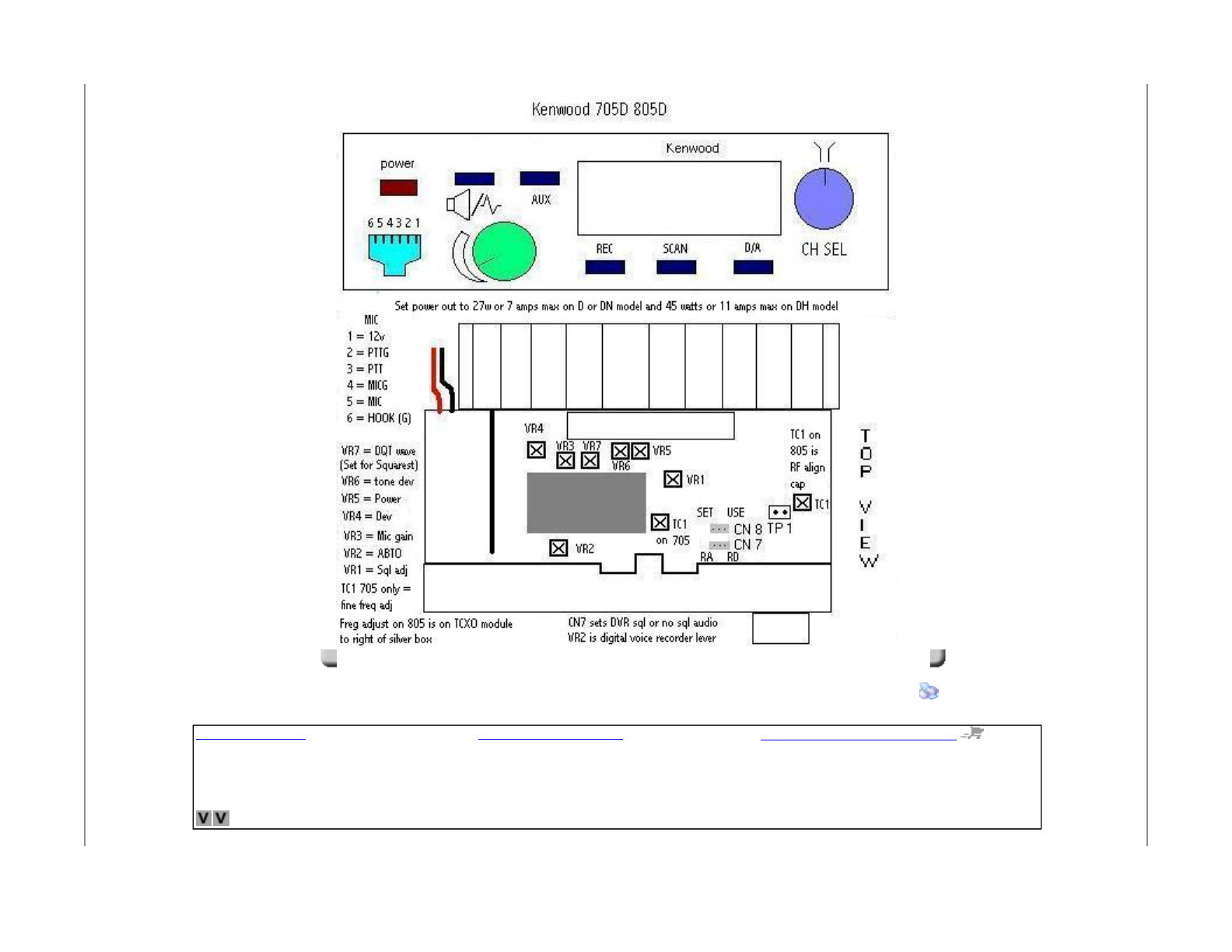
Adjustment pots on theTK705D/805D, facing front of radio, left
to right
VR4=max deviation set , VR3=Mic sensitivity set , VR7=dig
waveform bal
(set for squarest digital waveform as seen at output frequency
on service
monitor), VR6=PL tone level (500 to 750 ~), VR5=power out (set
to 27W) right
side of silver VCO box VR1=preset squelch level, VR2=ABTO (this
is the level
control when using the digital audio recording option board)
TC1= frequency (TCXO) adjustment (NOTE:THIS IS ONLY ON THE
705D, THE 805D
FREQUENCY ADJUSTMENT IS LOCATED ON THE TCXO MODULE WHICH IS TO
THE RIGHT OF
THE SILVER VCO BOX. TC1 on the 805 is a RF stage alignment
cap...)
RA/RD jumper (CN7)
Is for use when using the radio with the digital recording
option. RA
position is for audio that follows the squelched audio, RD
Pa
g
e 6 of 10
5/26/2008file://C:\DOCUME~1\n2n
y
s\LOCALS~1\Tem
p
\ZOO79KFE.htm

position is for unsquelched audio, (noise and audio)
Cloning instructions
On both radios to be cloned -
Turn power ON while holding down MON and AUX keys, wait until radio beeps
.
Release AUX key first, radio displays -C- for clone.
(NOTE: Releasing MON key first puts radio in PC programming mode, radio displays
pc -C- )
Disconnect microphone cable from microphone and plug between both radios mic
j
acks.
On MASTER (transmit) radio,
Press MON key to send data, transmit radio will display transmit symbol ---/
On SLAVE (receive) radio display reads -C- r
Wait approx 40 seconds, both radios will beep and display END
Turn both radios OFF and back ON to use.
To clone another radio without turning master radio off, press MON key again to go
back to -C- mode, hook up another slave radio and press MON again. Repeat as
needed.
OPERATION OF FRONT PANEL CONTROLS - TK705/805
I/O = ON/OFF power toggle switch, (push button upper left)
The MON button (Speaker Symbol) is the "Monitor" button referred to in the
programming
sheet. It operates as follows. On a tone channel, one quick press displays the
"speaker
symbol" and disables the receive PL for monitoring all transmissions on the channel.
A
long press of the button displays the speaker and no transmit symbols and completely
disables the squelch giveing noise, handy for adjusting the volume when no signal is
Pa
g
e 7 of 10
5/26/2008file://C:\DOCUME~1\n2n
y
s\LOCALS~1\Tem
p
\ZOO79KFE.htm

present. On a non-tone channel, one quick press goes directly to squelch noise.
The AUX button is programmable. It cannot be programmed for each channel
independently
but must be set radiowide for all channels from the four options available. It can,
however, be turned on/off for each channel. Most usable is programming it for
"talkaround" (tA) and enableing it on all channels. This gives simplex operation on any
programmed repeater frequency and of course does nothing on programmed simplex
channels.
It displays "tA" on the display when the AUX key is pressed. The programmable
options
for the AUX key are TA (talkaround), DRS (digital recording system), DTMF and
2tonE.
A
ll these other functions require optional boards which are no longer available.
Volume = volume contol setting
(The 3 buttons under the display are only on the "D" model.)
SCAN, this button is toggle ON/OFF, if you have priority set to USER then the priority
channel becomes the one that you start scanning from. Otherwise priority is FIXED.
D/A is also a toggle. If you want to delete/add a channel on the scan list you have to
be out of scan, dial up that channel, then hold scan button while pushing the D/A
button to delete or add it to the list, an ADD symbol is displayed in upper corner on
channels in the scan list, nothing is displayed if they are not in the scan list.
REC, this button is used only if there is an optional digital recording board installed.
\/ = Main channel selector used for selecting channels and programming functions.
Adjustments
Pa
g
e 8 of 10
5/26/2008file://C:\DOCUME~1\n2n
y
s\LOCALS~1\Tem
p
\ZOO79KFE.htm
Kenwood Gmrs
Free same day Shipping on Kenwood Two-Way
Radios, Authorized Dealer
www.BuyTwoWayRadios.com
Radio Programming
Software to program Icom and Yaesu amateur
handheld and mobile radios.
www.rtsystemsinc.com
Radio Programming Cables
USB and Serial Cables for Icom Kenwood,
Motorola, and Yaesu
valley-ent.com
Pa
g
e 9 of 10
5/26/2008file://C:\DOCUME~1\n2n
y
s\LOCALS~1\Tem
p
\ZOO79KFE.htm

Copyright 2008 by Axel Doomeyer Terms Of Use Privacy Statement
DotNetNuke® is copyright 2002-2008 by DotNetNuke Corporation
Pa
g
e 10 of 10
5/26/2008file://C:\DOCUME~1\n2n
y
s\LOCALS~1\Tem
p
\ZOO79KFE.htm
