Kontron Design Guide
User Manual:
Open the PDF directly: View PDF  .
.
Page Count: 61
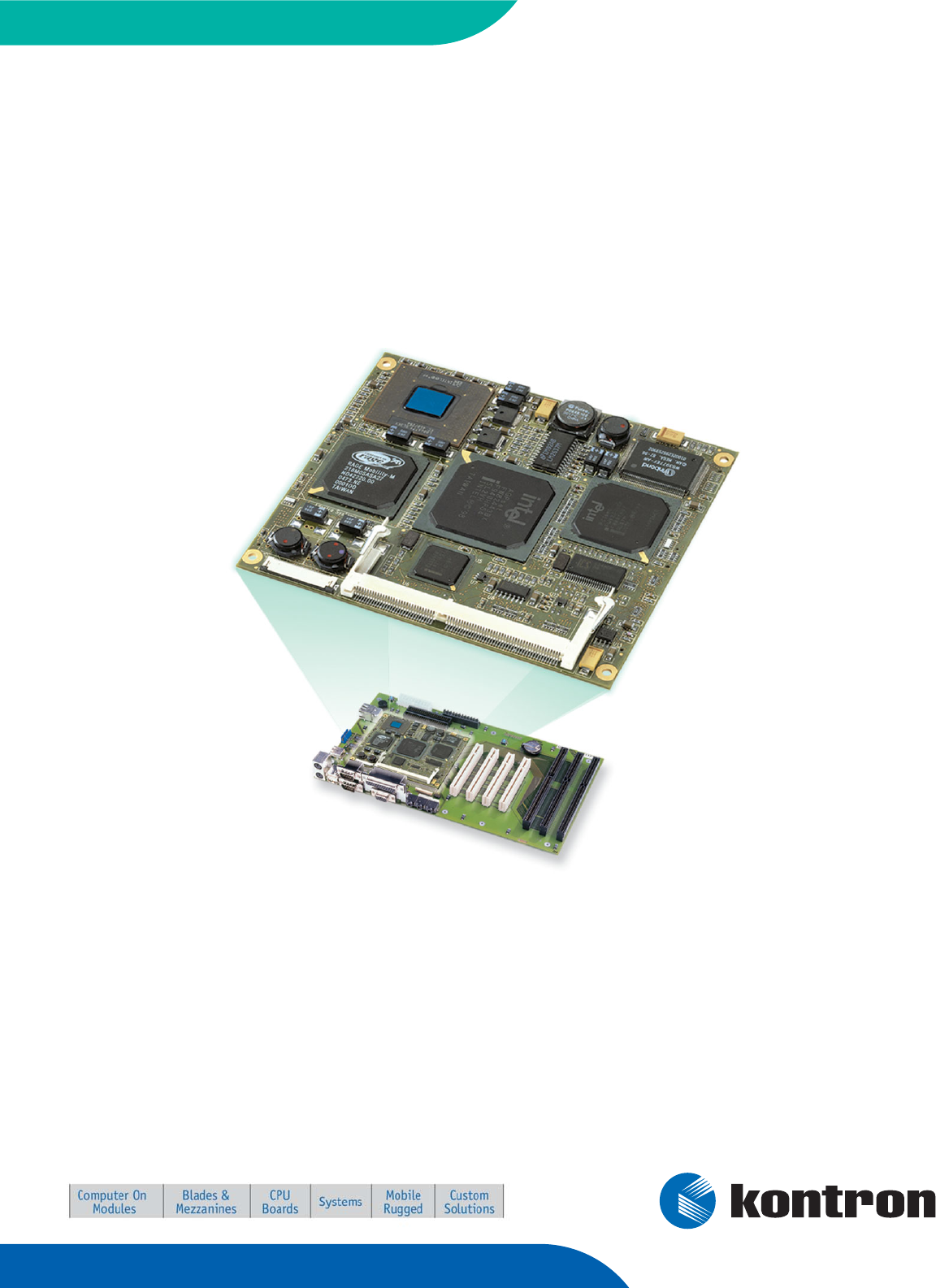
® Kontron Design Guide
® ETX®
Document Revision 2.4
This page intentionally left blank

Table of Contents
Table of Contents
1User Information ........................................................................................................ 6
1.1Objective ......................................................................................................... 6
1.2Target Audience ................................................................................................ 6
1.3Assumptions .................................................................................................... 6
1.4Scope.............................................................................................................. 6
1.5About This Document ......................................................................................... 6
1.6Copyright Notice ............................................................................................... 7
1.7Trademarks ...................................................................................................... 7
1.8Standards ........................................................................................................ 7
1.9Warranty ......................................................................................................... 7
1.10Technical Support .............................................................................................. 8
2Introduction .............................................................................................................. 9
2.1ETX® Documentation ......................................................................................... 9
2.2ETX® Benefits ................................................................................................... 9
3Connector X1 ............................................................................................................ 11
3.1Connector X1 Schematic ................................................................................... 11
3.2ETX® Connector X1 Pinout ................................................................................. 12
3.3Peripheral Component Interconnect (PCI) Bus ...................................................... 13
3.3.1PCI Implementation Notes ................................................................................ 14
3.3.2Differences Among PCI Slots .............................................................................. 14
3.4Universal Serial Bus (USB) ................................................................................ 18
3.4.1USB Port 0 and 1 ............................................................................................. 18
3.4.2USB Ports 2 and 3 ............................................................................................ 19
3.4.3USB Implementation Notes ............................................................................... 20
3.4.4USB Signal Integrity ........................................................................................ 22
3.5Audio Circuits ................................................................................................. 23
3.5.1Audio Implementation Notes ............................................................................. 24
4Connector X2 ............................................................................................................ 25
4.1ETX® Connector X2 Schematic ............................................................................ 25
4.2ETX® Connector X2 Pinout ................................................................................. 26
4.3Industry Standard Architecture (ISA) Bus Slot ....................................................... 27
4.3.1ISA Implementation Notes ................................................................................ 28
5Connector X3 ............................................................................................................ 29
5.1ETX® Connector X3 Schematic ............................................................................ 29
5.2ETX® Connector X3 Pinout ................................................................................. 30
Kontron Design Guide ETX® iii

Table of Contents
5.3Analog Video (VGA) Output ............................................................................... 32
5.3.1VGA Implementation Notes ............................................................................... 33
5.4Flat Panel LVDS Interface / JILI Standard ............................................................. 33
5.4.1LVDS Advantages ............................................................................................. 33
5.4.2LVDS Routing and Wiring Considerations .............................................................. 33
5.4.3LVDS Variations ............................................................................................... 34
5.4.4JILI Flat Panel Interface Standard ....................................................................... 34
5.4.5JILI Baseboard Connector Schematic .................................................................. 35
5.4.6LVDS Signal Mapping on JILI Connector Pins ......................................................... 36
5.4.7JILI Implementation Notes ............................................................................... 36
5.5Flat Panel Digital (FPD) Interface / JIDI Standard .................................................. 37
5.6Television (TV) Out .......................................................................................... 37
5.7Serial Ports 1 and 2 .......................................................................................... 38
5.7.1Serial Port Implementation Notes ....................................................................... 38
5.8IRDA ............................................................................................................. 39
5.9Keyboard and Mouse ........................................................................................ 39
5.10Parallel Port ................................................................................................... 40
5.10.1Parallel Port Implementation Notes .................................................................... 40
5.10.2Floppy Drive Operation Over the Parallel Port Connector .......................................... 41
5.10.3Options for Simultaneous Floppy and Parallel Port Operation ................................... 41
6Connector X4 ............................................................................................................ 42
6.1ETX® Connector X4 Schematic ............................................................................ 42
6.2ETX® Connector X4 Pinout ................................................................................. 43
6.3IDE Ports ....................................................................................................... 44
6.3.1IDE Port Implementation Notes .......................................................................... 45
6.3.2CompactFlash Socket on IDE Port ........................................................................ 46
6.3.3CompactFlash Socket Implementation Notes ......................................................... 47
6.4Ethernet Circuits ............................................................................................. 48
6.4.1Ethernet Implementation Notes ......................................................................... 49
6.4.2Ethernet LEDs ................................................................................................. 50
6.4.3Ethernet Limitation ......................................................................................... 50
6.5Miscellaneous Circuits ...................................................................................... 51
6.5.1Speaker ......................................................................................................... 51
6.5.2Battery .......................................................................................................... 51
6.5.3I2C Bus ......................................................................................................... 52
6.5.4SM Bus .......................................................................................................... 52
6.5.5Power Good / Reset Input ................................................................................. 53
6.5.6Keyboard Inhibit ............................................................................................. 53
6.5.7ATX Power Supply Control.................................................................................. 53
6.5.8OVCR# ........................................................................................................... 54
6.5.9External SMI Interrupt ...................................................................................... 54
Kontron Design Guide ETX® iv

Table of Contents
Kontron Design Guide ETX® v
7Power Supply Recommendations.................................................................................. 55
7.1Power Requirements ........................................................................................ 55
7.2Power Supply Considerations ............................................................................. 55
8Mechanical Considerations.......................................................................................... 57
8.1Baseboard Layout Drawing ................................................................................ 57
8.2Module Dimensions ......................................................................................... 57
8.3ETX® 3.0 specification ...................................................................................... 57
9Appendix F: PC Architecture Information ...................................................................... 58
9.1Buses ............................................................................................................ 58
9.1.1ISA, Standard PS/2 – Connectors ........................................................................ 58
9.1.2PCI/104 ......................................................................................................... 58
9.2General PC Architecture .................................................................................... 59
9.3Ports ............................................................................................................. 59
9.3.1RS-232 Serial ................................................................................................. 59
9.3.2Serial ATA ...................................................................................................... 59
9.3.3USB .............................................................................................................. 60
9.3.4Programming ................................................................................................. 60
10APPENDIX G: DOCUMENT-REVISION HISTORY .................................................................. 61

1 User Information
Kontron Design Guide ETX® 6
1
1.1
1.2
1.3
1.4
1.5
User Information
Objective
This document is intended as a guide for designing a custom system baseboard for ETX modular
computers. This guide includes reference schematics for the external circuitry required to implement the
various ETX® peripheral functions, as well as related comments and application notes. This guide also
shows how to extend the PCI and ISA buses to add additional peripherals or expansion slots to an ETX®
system.
Target Audience
This guide is intended for hardware engineers who design custom system baseboards for ETX® modular
computers.
Assumptions
The reader is assumed to have a hardware engineering background as well as experience with personal
computer buses and peripheral interfaces. A working knowledge of multi-layer printed circuit board
design practices also is assumed. Appendix A (PC Architecture Information) contains some suggested
references for readers desiring a more extensive presentation of topics such as PCI and ISA buses and
the IDE (ATAPI) interface.
Scope
The circuits presented in this guide are typical application circuits. They may not be suitable for all
applications. In particular, additional components may need to be added to these circuits in order to
meet specific ESD (electrostatic discharge), EMC (electromagnetic compatibility), or safety isolation
requirements. Such regulatory requirements and the techniques for meeting them vary by industry and
are beyond the scope of this document.
About This Document
This document provides information about products from Kontron Embedded Modules GmbH and/or its
subsidiaries. No warranty of suitability, purpose, or fitness is implied. While every attempt has been
made to ensure that the information in this document is accurate, the information contained within is
supplied “as-is” and is subject to change without notice.
For the circuits, descriptions and tables indicated, Kontron assumes no responsibility as far as patents or
other rights of third parties are concerned.

1 User Information
Kontron Design Guide ETX® 7
1.6
1.7
1.8
1.9
Copyright Notice
Copyright © 2003-2007 Kontron Embedded Modules GmbH
All rights reserved. No part of this document may be reproduced, transmitted, transcribed, stored in a
retrieval system, or translated into any language or computer language, in any form or by any means
(electronic, mechanical, photocopying, recording, or otherwise), without the express written permission
of Kontron Embedded Modules GmbH.
DIMM-PC®, PISA®, ETX®, ETXexpress® , X-board®, DIMM-IO® and DIMM-BUS® are trademarks or
registered trademarks of Kontron Embedded Modules GmbH. Kontron is trademark or registered
trademark of Kontron AG.
Trademarks
The following lists the trademarks of components used in this board.
® IBM, XT, AT, PS/2 and Personal System/2 are trademarks of International Business
Machines Corp.
® Microsoft is a registered trademark of Microsoft Corp.
® Intel is a registered trademark of Intel Corp.
® All other products and trademarks mentioned in this manual are trademarks of their
respective owners.
Standards
Kontron Embedded Modules GmbH is certified to ISO 9000 standards.
Warranty
This Kontron Embedded Modules GmbH product is warranted against defects in material and
workmanship for the warranty period from the date of shipment. During the warranty period, Kontron
Embedded Modules GmbH will at its discretion decide to repair or replace defective products.
Within the warranty period, the repair of products is free of charge as long as warranty conditions are
observed.
The warranty does not apply to defects resulting from improper or inadequate maintenance or handling
by the buyer, unauthorized modification or misuse, operation outside of the product’s environmental
specifications or improper installation or maintenance.
Kontron Embedded Modules GmbH will not be responsible for any defects or damages to other products
not supplied by Kontron Embedded Modules GmbH that are caused by a faulty Kontron Embedded
Modules GmbH product.

1 User Information
Kontron Design Guide ETX® 8
1.10 Technical Support
Technicians and engineers from Kontron Embedded Modules GmbH and/or its subsidiaries are available
for technical support. We are committed to making our product easy to use and will help you use our
products in your systems.
Before contacting Kontron Embedded Modules GmbH technical support, please consult our Web site at
http://www.kontron-emea.com/emd for the latest product documentation, utilities, and drivers. If the
information does not help solve the problem, contact us by telephone or email.
Asia Europe North/South America
Kontron Asia Inc. Kontron Embedded Modules GmbH Kontron America
4F, No.415, Ti-Ding Blvd., NeiHu
District,
Taipei 114, Taiwan
Brunnwiesenstr. 16
94469 Deggendorf – Germany
14118 Stowe Drive
Poway, CA 92064-7147
Tel: +886 2 2799 2789 Tel: +49 (0) 991-37024-0
T
el: +1 (888) 294 4558
Fax: + 886 2 2799 7399 Fax: +49 (0) 991-37024-333 Fax: +1 (858) 677 0898
mailto:sales@kontron.com.tw mailto:sales-kem@kontron.com mailto:sales@us-kontron.com

2 Introduction
Kontron Design Guide ETX® 9
2
2.1
2.2
Introduction
ETX® Documentation
This ETX® Design Guide is intended as one of three principal references for an ETX® design.
® The ETX® Specification defines the ETX® module form factor, pinout and signals. We
suggest that you read this document first. You can find the document on the Kontron
Web site.
® The ETX® Design Guide is intended as a general guide for baseboard design, with a
focus on maximum flexibility to accommodate a range of ETX® modules.
® The user guides for specific ETX® modules document their specifications and
features. You can find all the user guides for the various ETX® modules on the
Kontron Web site.
ETX® Benefits
Embedded technology extended (ETX®) modules are very compact (~100mm square, 12mm thick),
highly integrated computers. All ETX® modules feature a standardized form factor and a standardized
connector layout that carry a specified set of signals. This standardization allows designers to create a
single-system baseboard that can accept present and future ETX® modules.
ETX® modules include common personal computer (PC) peripheral functions such as:
® Graphics
® Parallel, Serial, and USB ports
® Keyboard/mouse
® Ethernet
® Sound
® IDE

2 Introduction
The baseboard designer can optimize exactly how each of these functions implements physically.
Designers can place connectors precisely where needed for the application on a baseboard designed to
optimally fit a system’s packaging.
Peripheral PCI or ISA buses can be implemented directly on the baseboard rather than on mechanically
unwieldy expansion cards. The ability to build a system on a single baseboard using the computer as one
plug-in component simplifies packaging, eliminates cabling, and significantly reduces system-level cost.
A single baseboard design can use a range of ETX® modules. This flexibility can differentiate products at
various price/performance points, or to design future proof systems that have a built-in upgrade path.
The modularity of an ETX® solution also ensures against obsolescence as computer technology evolves.
A properly designed ETX® baseboard can work with several successive generations of ETX® modules.
An ETX® baseboard design has many advantages of a custom, computer-board design but delivers better
obsolescence protection, greatly reduced engineering effort, and faster time to market.
Schematic Drawing Notes
Some signal names in the schematics have a parenthesized number following the signal name — for
example:
AUXAL (05)
This is an “off-page connector,” which means the signal is also connected in Figure 5.
Signal names used in tables and in the ETX® Specification may differ slightly from those shown in
schematics. These notational differences are not significant. They reflect the naming conventions used
by the schematic capture program used to produce schematics.
Kontron Design Guide ETX® 10
3 Connector X1
Kontron Design Guide ETX® 11
3
3.1
Connector X1
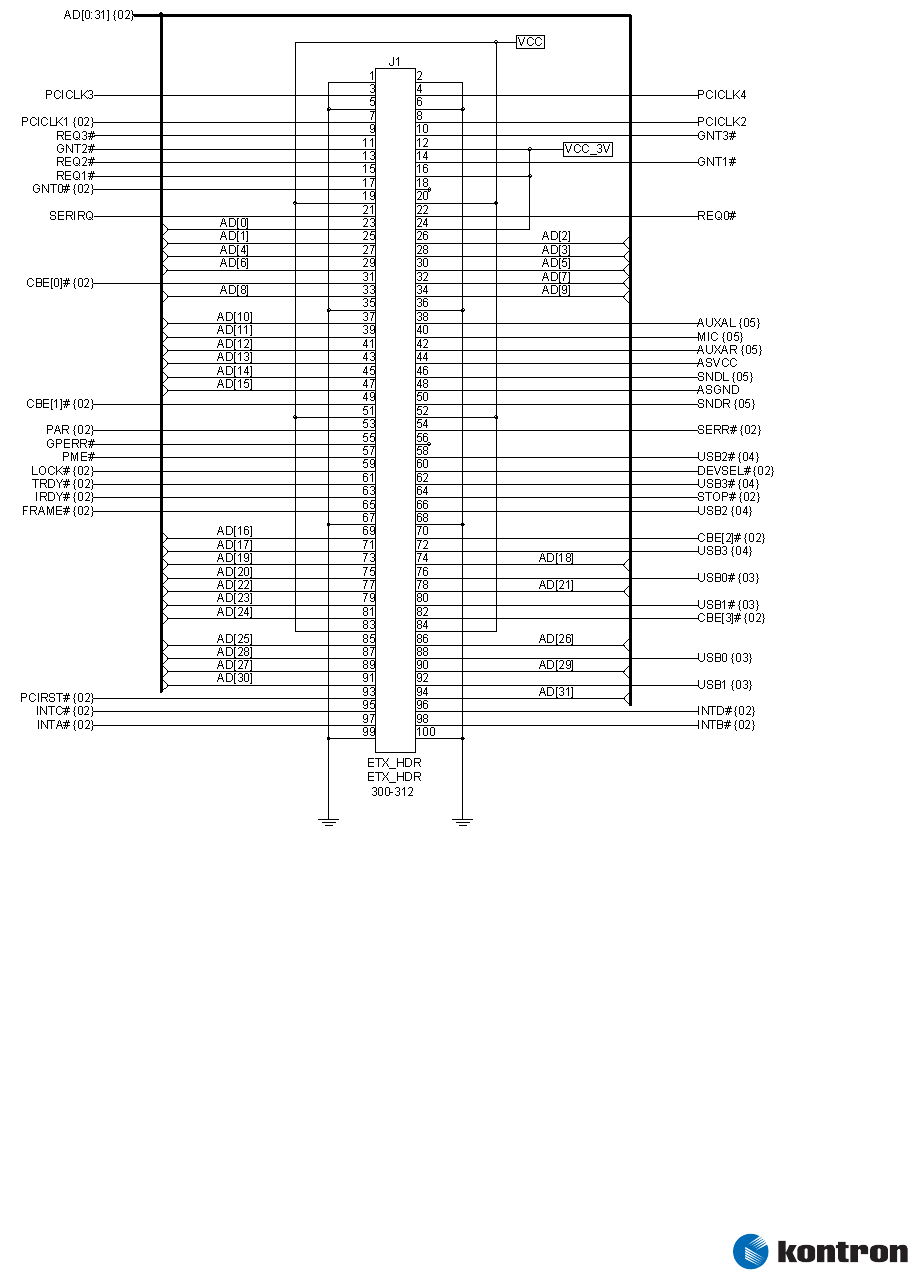
Connector X1 Schematic
Figure 1 – ETX® Connector X1 Schematic

3 Connector X1
Kontron Design Guide ETX® 12
3.2 ETX® Connector X1 Pinout
Pin Signal Pin Signal Pin Signal Pin Signal
1 GND 2 GND 51 VCC 52 VCC
3 PCICLK3 4 PCICLK4 53 PAR 54 SERR#
5 GND 6 GND 55 GPERR# 56 RESERVED
7 PCICLK1 8 PCICLK2 57 PME# 58 USB2#
9 REQ3# 10 GNT3# 59 LOCK# 60 DEVSEL#
11 GNT2# 12 3V 61 TRDY# 62 USB3#
13 REQ2# 14 GNT1# 63 IRDY# 64 STOP#
15 REQ1# 16 3V 65 FRAME# 66 USB2
17 GNT0# 18 RESERVED 67 GND 68 GND
19 VCC 20 VCC 69 AD16 70 CBE2#
21 SERIRQ 22 REQ0# 71 AD17 72 USB3
23 AD0 24 3V 73 AD19 74 AD18
25 AD1 26 AD2 75 AD20 76 USB0#
27 AD4 28 AD3 77 AD22 78 AD21
29 AD6 30 AD5 79 AD23 80 USB1#
31 CBE0# 32 AD7 81 AD24 82 CBE3#
33 AD8 34 AD9 83 VCC 84 VCC
35 GND 36 GND 85 AD25 86 AD26
37 AD10 38 AUXAL 87 AD28 88 USB0
39 AD11 40 MIC 89 AD27 90 AD29
41 AD12 42 AUXAR 91 AD30 92 USB1
43 AD13 44 ASVCC 93 PCIRST# 94 AD31
45 AD14 46 SNDL 95 INTC# 96 INTD#
47 AD15 48 ASGND 97 INTA# 98 INTB#
49 CBE1# 50 SNDR 99 GND 100 GND
Signal names in the table can differ slightly from those in the schematic. For example, AD[12] in the
schematic is shown as AD12 in the pinout table and in the ETX® Specification. These differences reflect
the conventions used by the program used to produce the schematics.
3 Connector X1
Kontron Design Guide ETX® 13
3.3 Peripheral Component Interconnect (PCI) Bus
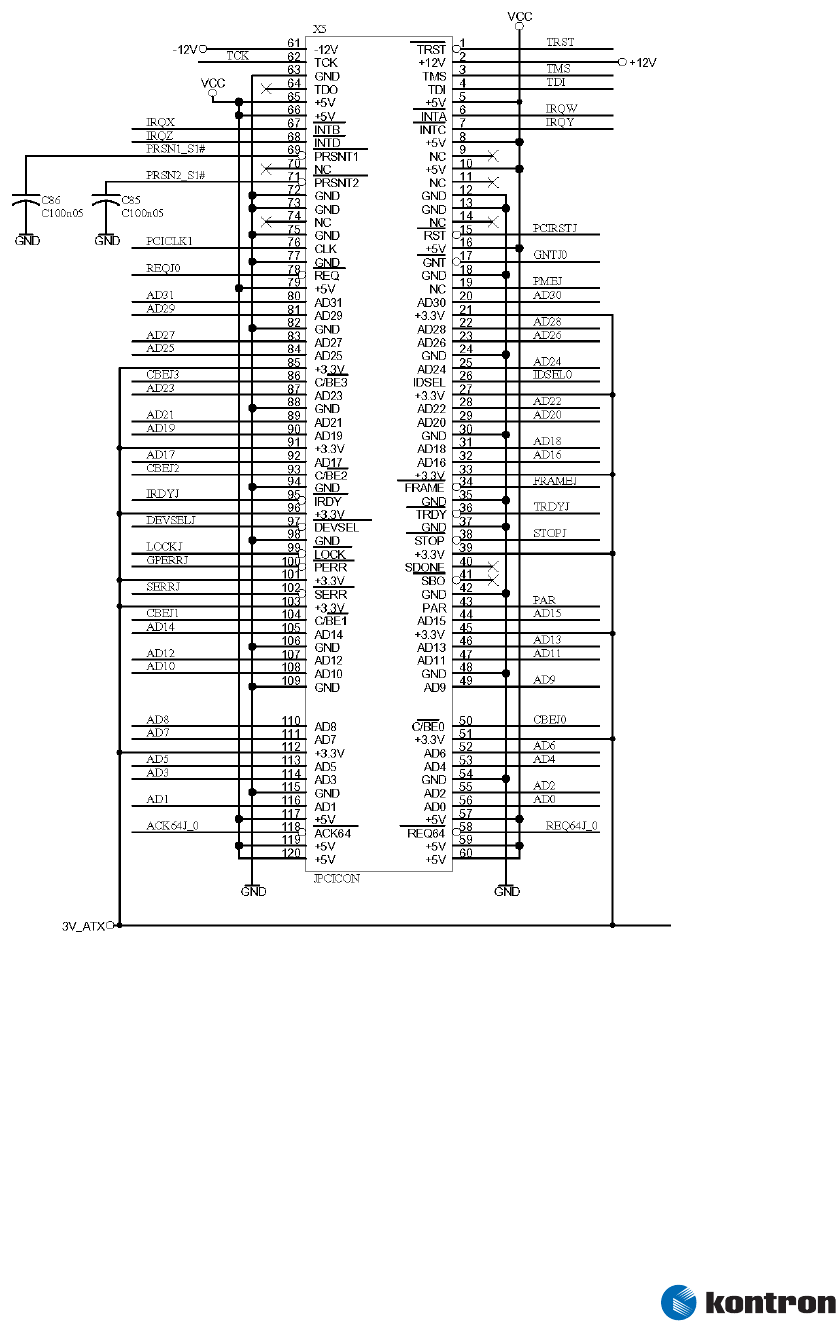
Figure 2 – PCI Bus Slot Connector – Slot 1
Figure 2 shows a single PCI bus slot connector. You can connect up four PCI slots or external PCI devices
to an ETX® module.

3 Connector X1
3.3.1 PCI Implementation Notes
® If a PC104-Plus connector is used, the same signals are attached to the connector but
the pin numbers differ because of the different connector type. See the PC/104 Bus
Version 2.3, June 1996, PC/104 Consortium (www.pc104.ord) for details.
® A PCI device implemented directly on the baseboard uses a subset of the signals
shown on the slot connector. Some pins on the slot connector are used for slot and
PCI card management functions and are not necessary for the operation of the PCI
device itself. An individual PCI device will not have pins REQ64, ACK64, M66EN,
PRSNT1, PRSNT2, SDONE, SBO#, or the reserved pins.
® Most devices do not implement the test pins TCK, TDO, TDI, TMS, and TRST.
® Most PCI devices use INTA# only and do not have a connection for INTB#, INTC# or
INTD#. However, the INTA# pin of the device should not necessarily be connected to
the ETX® INTA# signal. See the following interrupt section for details.
3.3.2 Differences Among PCI Slots
Most PCI signals are connected in parallel to all the slots (or devices). The exceptions are the following
pins from each slot or device:
® IDSEL – Connected (through resistor) to a different AD line for each slot.
® CLK – Connected to a different ETX® PCI clock signal for each slot.
® INTA# - Connected to a different ETX® interrupt signal for each slot.
® REQ# - Connected to a different ETX® request signal for each slot, if used.
® GNT# - Connected to a different ETX® grant signal for each slot, if used.
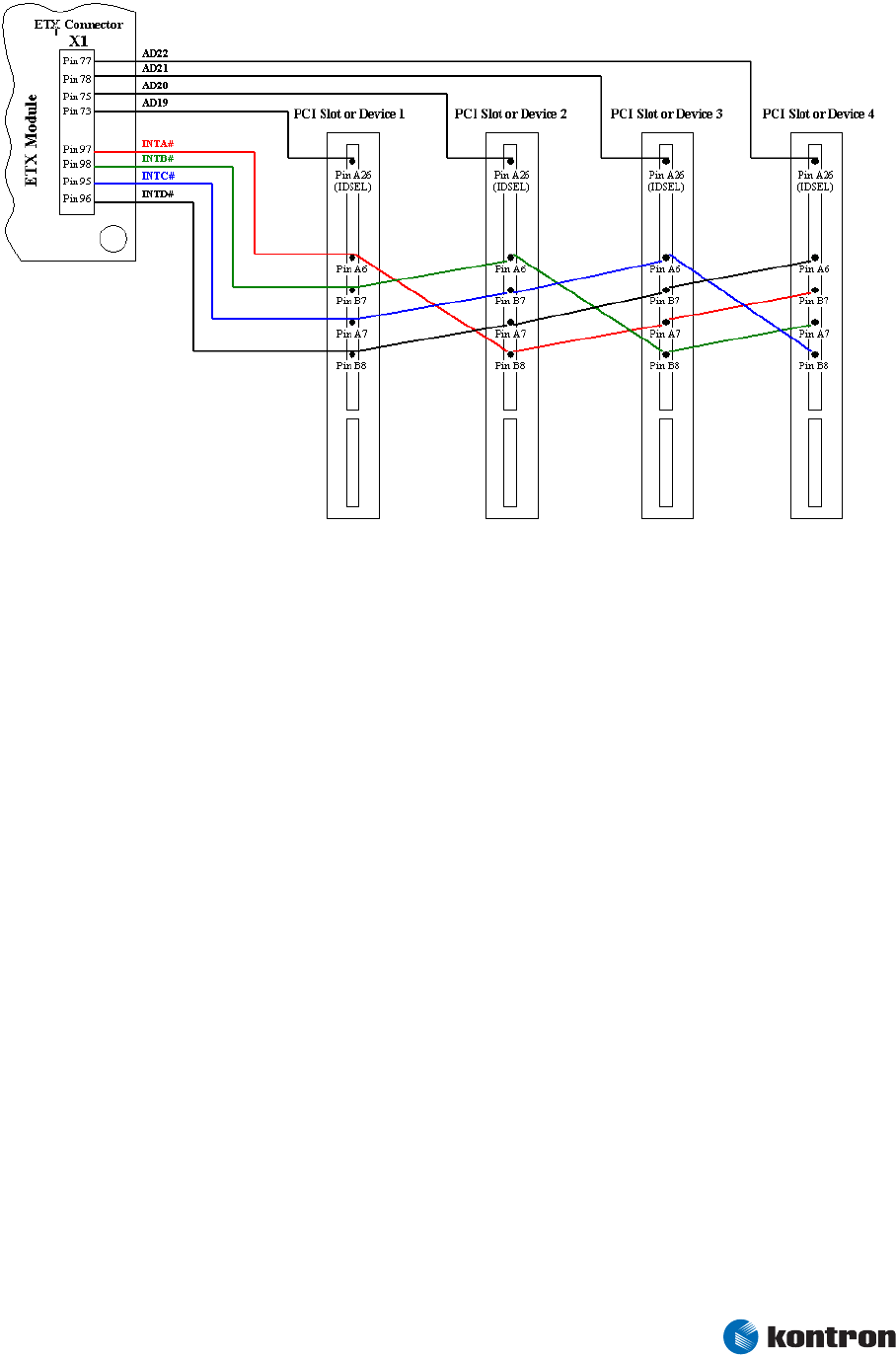
Each signal connects differently for each of the four possible slots or devices as summarized in the
following PCI Slots/Devices table:
Note: The naming convention of the PCI interrupt signal and the interrupt pin on the PCI slot/device is the same.
Pay attention to the routing of these signals. Check the example below for a better understanding.
Kontron Design Guide ETX® 14

3 Connector X1
Signal from
ETX®
PCI Slot or
PCI Device 1
PCI Slot or
PCI Device 2
PCI Slot or
PCI Device 3
PCI Slot or
PCI Device 4
Signal AD19
(X1 Pin 73)
Pin Name IDSEL
(Pin A26 on PCI
Slot)
- - -
Signal AD20
(X1 Pin 75) - Pin Name IDSEL
(Pin A26 on PCI Slot) - -
Signal AD21
(X1 Pin 78) - -
Pin Name IDSEL
(Pin A26 on PCI
Slot)
-
Signal AD22
(X1 Pin 77) - - -
Pin Name IDSEL
(Pin A26 on PCI
Slot)
Signal INTA#
(X1 Pin 97)
Pin Name INTA#
(Pin A6 on PCI Slot)
Pin Name INTD# *
(Pin B8 on PCI Slot)
Pin Name INTC# *
(Pin A7 on PCI Slot)
Pin Name INTB# *
(Pin B7 on PCI
Slot)
Signal INTB#
(X1 Pin 98)
Pin Name INTB# *
(Pin B7 on PCI Slot)
Pin Name INTA#
(Pin A6 on PCI Slot)
Pin Name INTD# *
(Pin B8 on PCI Slot)
Pin Name INTC# *
(Pin A7 on PCI
Slot)
Signal INTC#
(X1 Pin 95)
Pin Name INTC# *
(Pin A7 on PCI Slot)
Pin Name INTB# *
(Pin B7 on PCI Slot)
Pin Name INTA#
(Pin A6 on PCI Slot)
Pin Name INTD# *
(Pin B8 on PCI
Slot)
Signal INTD#
(X1 Pin 96)
Pin Name INTD# *
(Pin B8 on PCI Slot)
Pin Name INTC# *
(Pin A7 on PCI Slot)
Pin Name INTB# *
(Pin B7 on PCI Slot)
Pin Name INTA#
(Pin A6 on PCI
Slot)
Note: *Multifunction PCI devices require that this pin be connected.
Kontron Design Guide ETX® 15
3 Connector X1
Example: Using 4 PCI Slots on the Backplane
Figure 3 - PCI interrupt routing
IDSEL
® Connect each slot or device IDSEL pin to an appropriate AD line via a 22-Ohm
resistor.
PCICLK
® The trace length for all PCI clocks should be matched and controlled. PCI clock routes
should be separated as far from other signal traces as possible.
® PCI clock signals should be routed as controlled-impedance traces, with trace
impedance in the 60-70 Ohm range.
® Only one PCI device or slot should be driven from each ETX® PCI clock output.
® The PCICLK signal that comes from the ETX® module is timed for an external trace
delay of 1300pS from the ETX® output pin to the PCI device’s clock pin.
® The trace length from the ETX® clock pin to a PCI device on the baseboard should be
about 8.7 inches (if a typical figure for baseboard PCB propagation delay of 150pS
per inch is used). If a more accurate value is available for PCB propagation delay, it
should be used in place of the 150pS/inch rule-of-thumb to calculate clock-trace
lengths.
® The clock trace from the ETX® module pin to a slot connector clock pin should be
about 2.5 inches shorter than the length to a device pin because PCI cards are
specified to have 2.5 inches of onboard clock trace length from the connector pin to
the device clock pin.
Kontron Design Guide ETX® 16

3 Connector X1
® PC104-Plus implementations also assume 2.5 inches of trace length on each module.
In addition, further shorten clock routes for specific slot positions to account for
varying stack positions of the PC104-Plus modules. See the PC104-Plus Specification
for details.
INT
® Most PCI devices implement only one interrupt, which is output on the INTA# pin.
This should be connected to the INT inputs on the ETX® module as per the table. For
multifunction devices, connect the additional interrupt outputs as per the table.
® PCI card slots or PC104-Plus implementations must have all four interrupt lines
connected to each slot as per the table. Note that the interrupt wiring rotates for
different slot positions.
® PCI specifications require that PCI devices be capable of interrupt sharing. Interrupts
are typically shared in PCI systems that have more than four interrupt-generating
devices. The purpose of the assignment scheme shown in the table is to distribute
the devices as evenly as possible over the four PCI interrupt lines.
REQ/GNT
® These signals are used only by bus-mastering PCI devices. Most ETX® modules do not
have enough REQ/GNT pairs available to support a bus-mastering device at every slot
position. Refer to the individual ETX® user’s guide for details.
® If there are less than four REQ/GNT pairs available for external devices, they will be
assigned starting with the REQ0#/GNT0# pair. Therefore, external bus-mastering
devices should be placed in the lowest numbered slot positions and non-bus
mastering devices should be placed in the highest-numbered slot positions.
Kontron Design Guide ETX® 17
3 Connector X1
Kontron Design Guide ETX® 18
3.4 Universal Serial Bus (USB)
3.4.1 USB Port 0 and 1
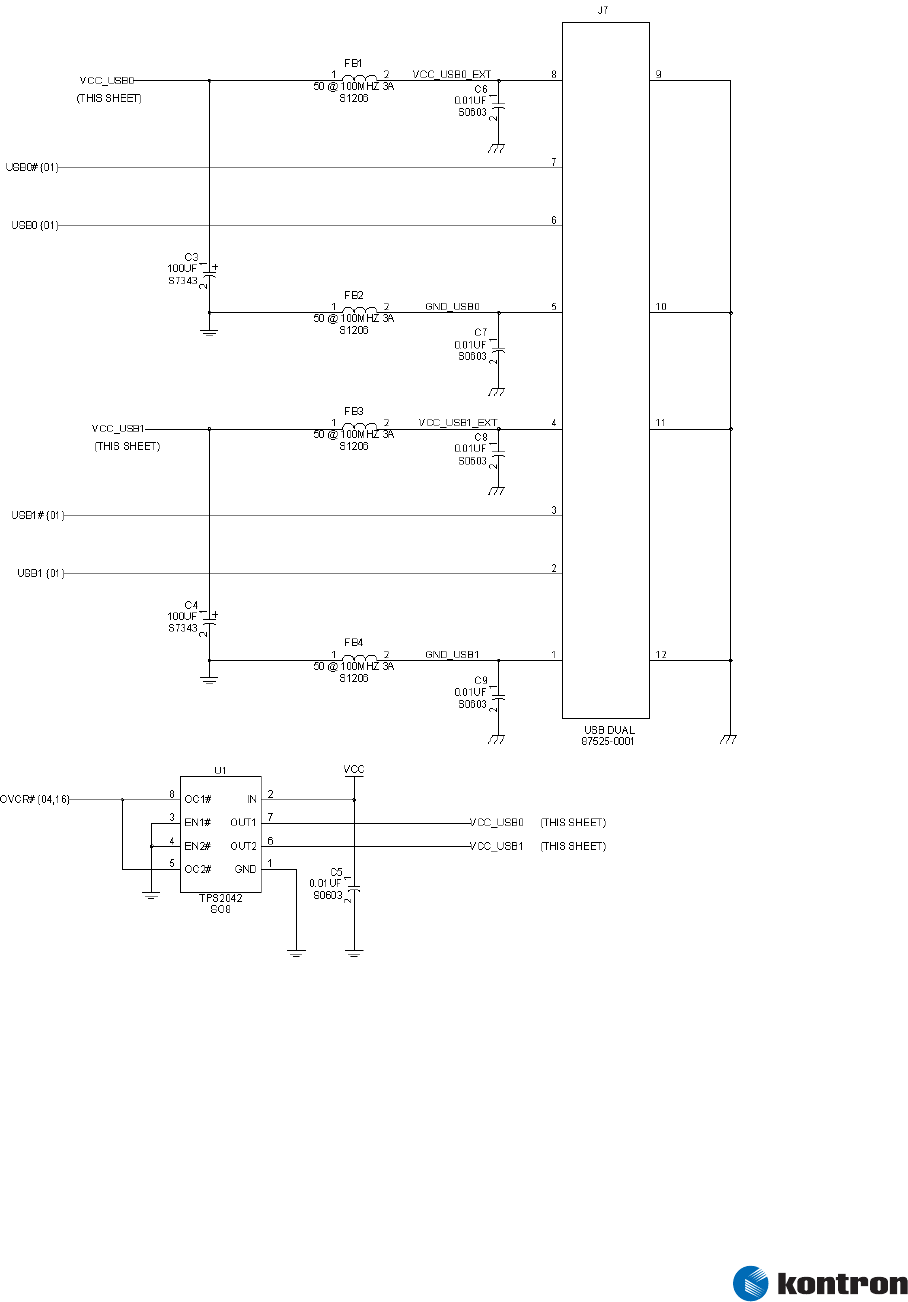
Figure 4 – USB Port 0 & 1
The TPS2042 chip shown provides overcurrent protection for each USB port. Either or both of the OC#
outputs may be connected as desired so that software running on the ETX® module can sense an
overcurrent condition on one or both USB ports.
3 Connector X1
3.4.2 USB Ports 2 and 3
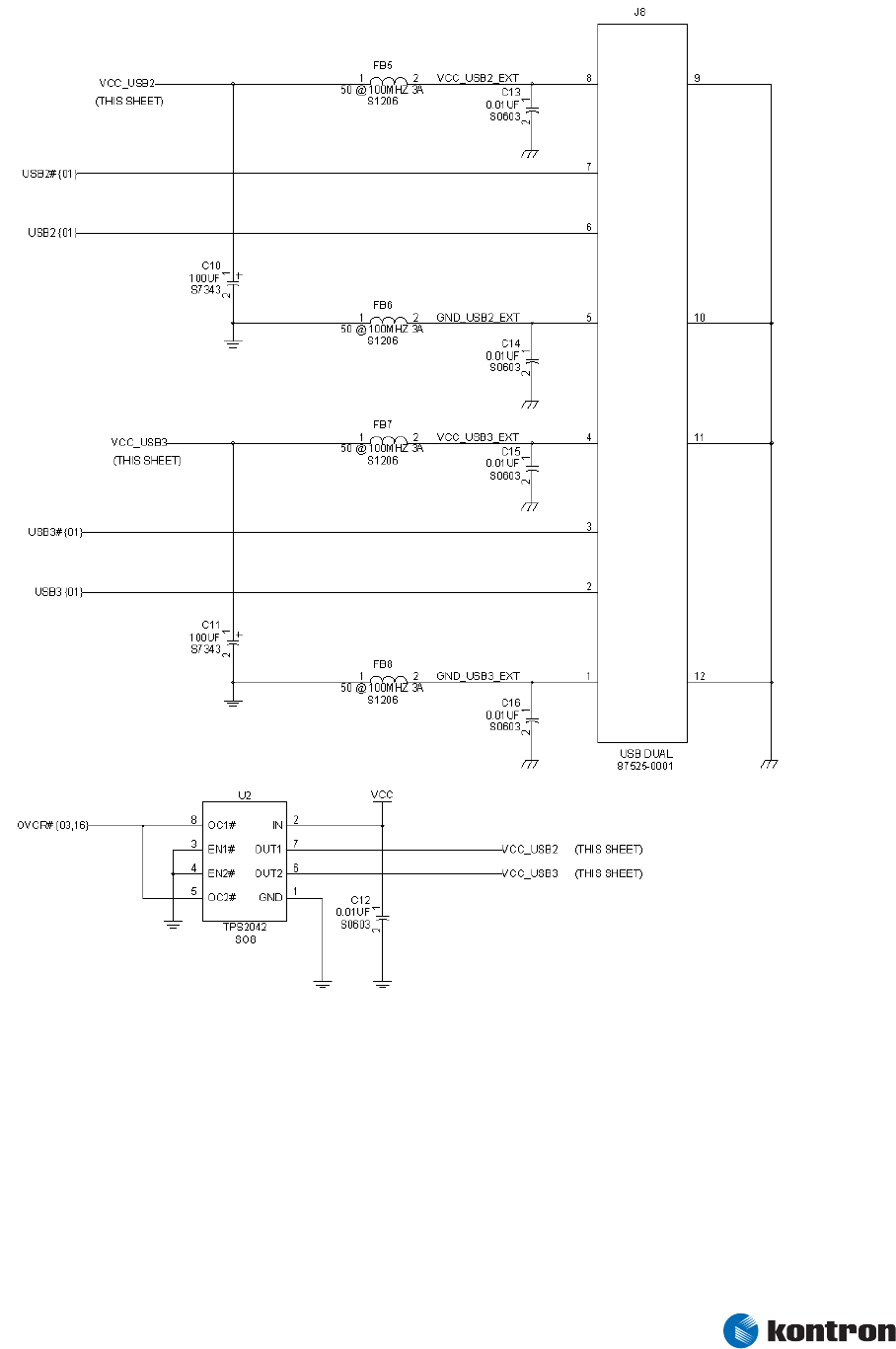
Figure 5 – USB Port 2 & 3
The TPS2042 chip provides overcurrent protection for each USB port. You can connect either or both OC#
outputs so that software running on the ETX® module can sense an overcurrent condition on one or both
USB ports.
Kontron Design Guide ETX® 19

3 Connector X1
3.4.3 USB Implementation Notes
® The USB data pairs (USB0 and US0#) should be routed on the baseboard as
differential pairs, with a differential impedance of 90 Ohms. PCB layout software
usually allows determining the correct trace width and spacing to achieve this
impedance, after the PCB stackup configuration is known.
® As per usual differential pair routing practices, the two traces of each USB pair
should be matched in length and kept at uniform spacing. Sharp corners should be
avoided. At the ETX® module and connector ends of the routes, loop areas should be
minimized.
® USB data pairs should be routed as far from other signals as possible.
® Overcurrent protection on external USB power lines is required to prevent faults in
external USB devices or cables from causing hardware damage and/or crashing the
system. Note that overcurrent protection devices typically allow relatively high
currents to flow for brief periods before the current is limited or interrupted. The
system power supply must be able to provide these high currents while maintaining
output regulation, or else the ETX® module or other system components may
malfunction.
® You can “hot plug” USB devices. In fact, this is one of the virtues of USB relative to
most other PC interfaces. The design of the USB power-decoupling network must
absorb the momentary current surge from hot-plugging an unpowered device. This is
the reason for the large capacitance values of C10 and C11 in the reference
schematic. Reducing these values is not recommended.
® ETX® modules vary in the number of USB ports that are implemented. Two ports are
typical. Some ETX® modules implement three or four ports. If the application needs
more than two USB ports, a low-cost USB hub IC can be integrated onto the
baseboard and connected to the USB0 or USB1 ports on the ETX® module. This
provides a larger number of USB ports regardless of which ETX® module is in use.
® Some USB designs will need additional ESD or EMI suppression components on the
USB data lines. These are most effective when they are placed near the external USB
connector and grounded to a low-impedance ground plane.
Kontron Design Guide ETX® 20
3 Connector X1
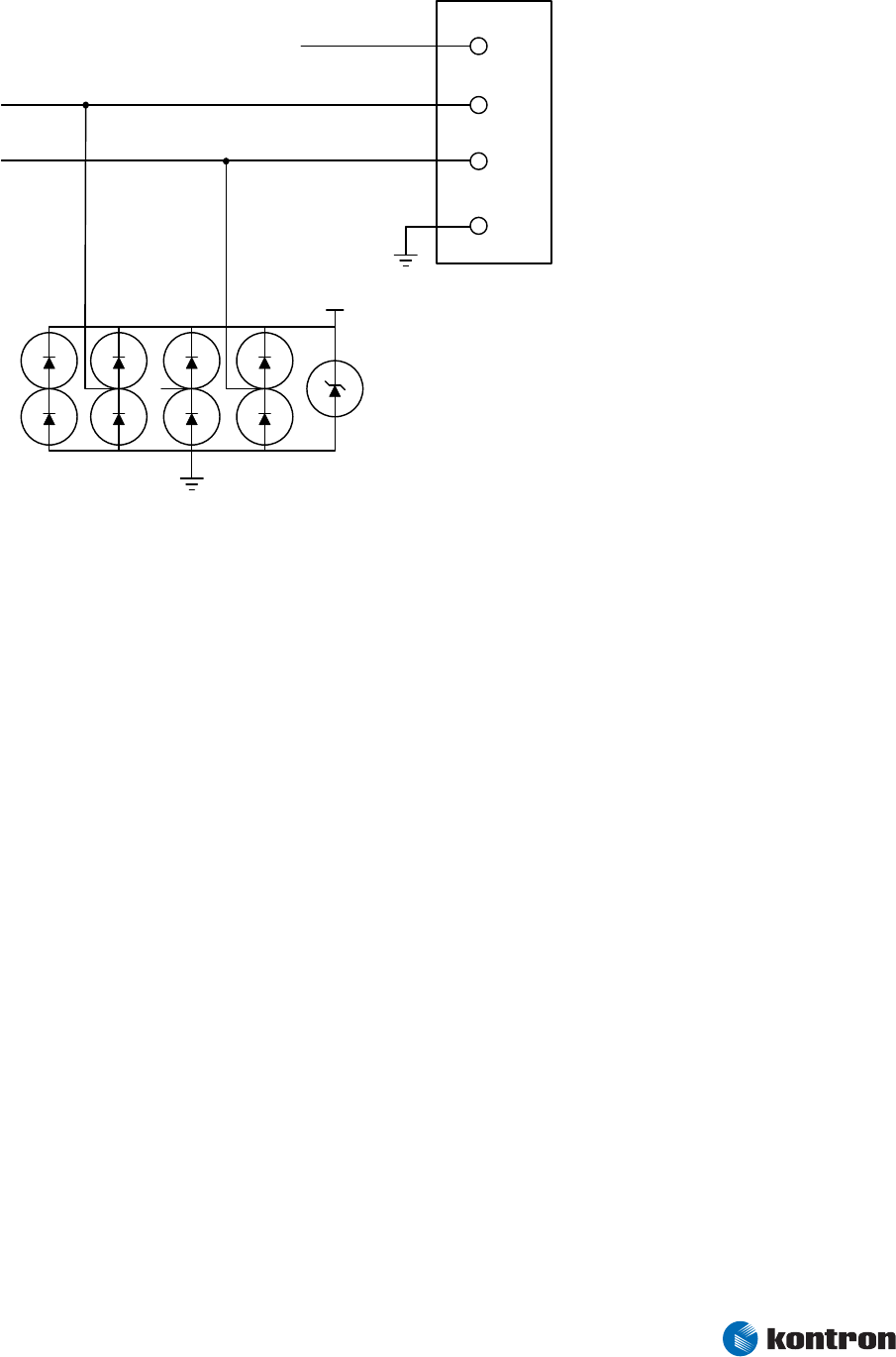
ESD measures
USB_VCC
USB_VCC
TVS - Device
Figure 6 – USB ESD measures
We recommend mounting right near the USB connector a USB TVS device to avoid ESD disturbances.
Possible devices are e.g. Philips IP4220CZ6 or Semtech SRV05-4
Kontron Design Guide ETX® 21
3 Connector X1
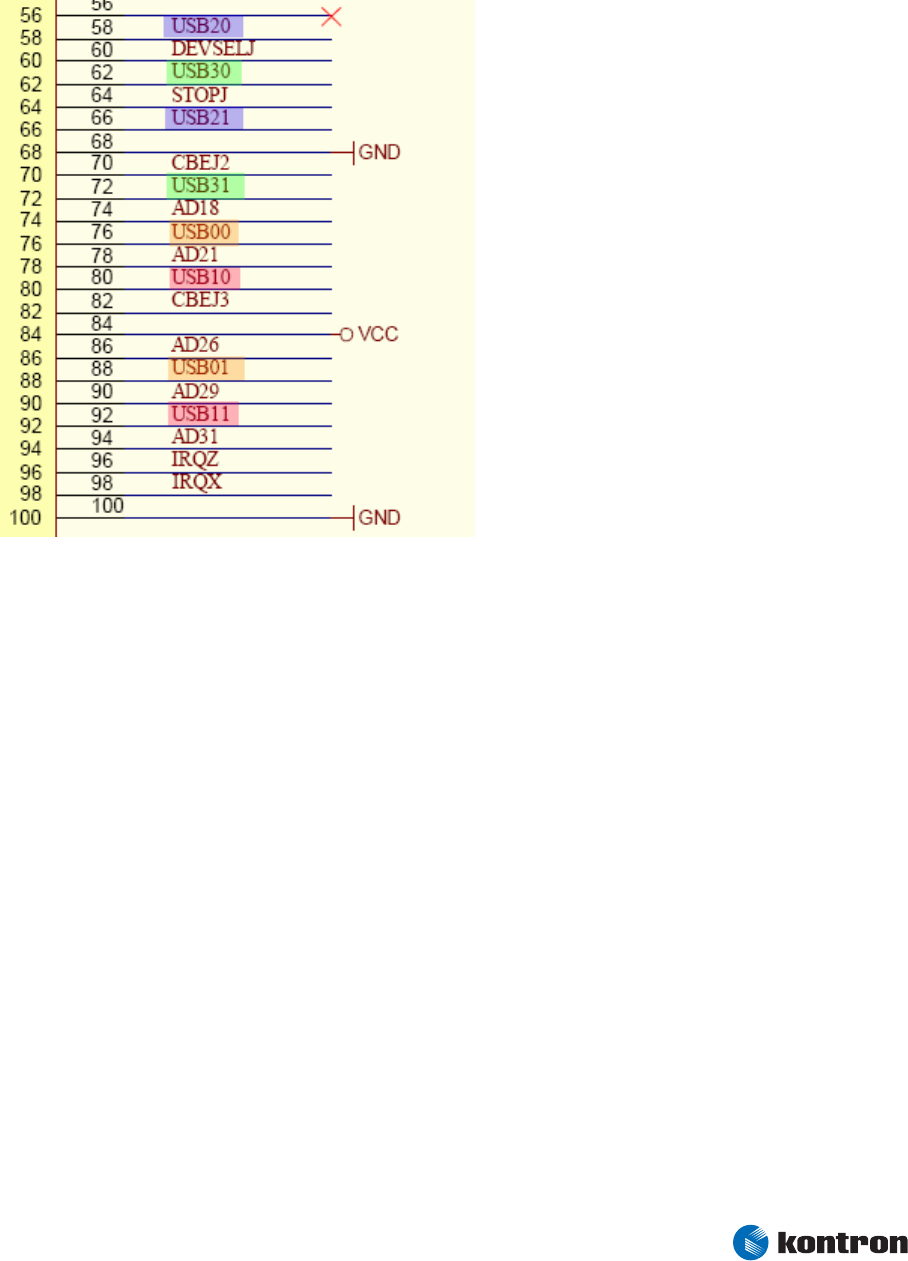
3.4.4 USB Signal Integrity
When ETX was specified the first time it was in 1999 when only USB 1.1 LowSpeed/FullSpeed was
available. The pining of USB on the ETX connectors was quite uncritical and therefore it was done like
that on X1.
The differential pair signals of each USB line are separated end routed to pins of connector X1 which
are not close to each other. The effect could be that the signal integrity is disturbed, the longer the
separated way of signal trace is. Therefore the high ETX baseboard connectors (Hirose FX8C-100S-
SV5) might create more problems than low ones regarding USB 2.0 HighSpeed.
Kontron Design Guide ETX® 22
3 Connector X1
Kontron Design Guide ETX® 23
3.5 Audio Circuits
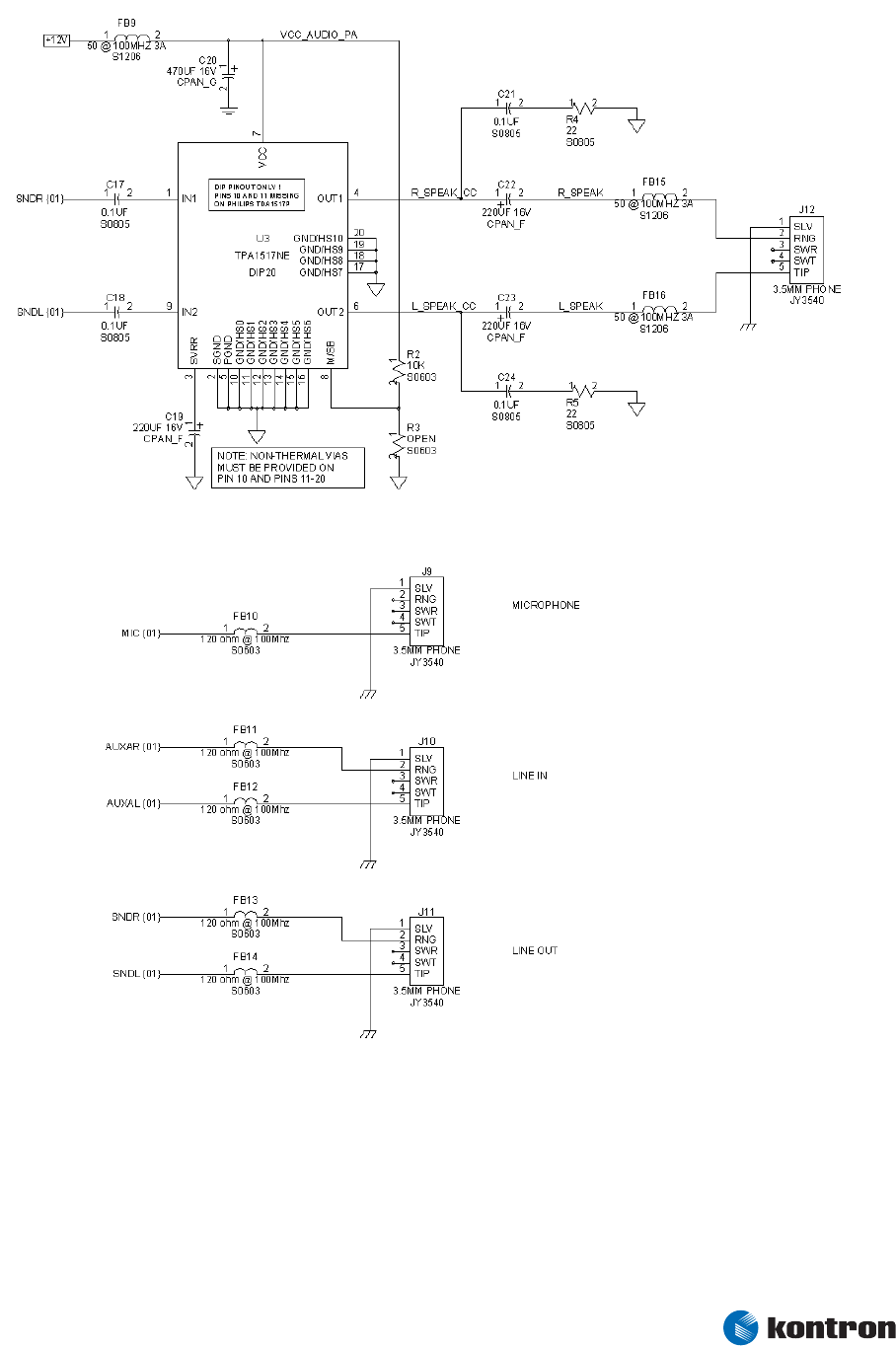
Figure 7 – Audio Circuits
The top section of Figure 7 shows one possible audio amplifier circuit for use with an ETX® module. This
circuit uses a low-cost DIP amplifier made by Texas Instruments and Philips. This circuit requires a 12-
volt supply.

3 Connector X1
Many other audio amplifier IC’s exist. Some circuits can operate from lower supply voltages and/or do
not require output capacitors. Representative manufacturers of such amplifiers are National
Semiconductor and Texas Instruments.
The lower section of Figure 5 shows ETX® connections that implement microphone, line in, and line out
functions using standard 3.5mm phone jacks.
3.5.1 Audio Implementation Notes
® All audio circuits require careful PCB layout and grounding to avoid picking up digital
noise on audio-signal lines. The X1 connector has an audio ground pin (ASGND, pin
48) that should be connected to an analog ground plane underneath the audio
amplifier circuits or the audio input/output jacks. This plane should be isolated from
the ground plane that is used for digital circuitry. Rout audio signals over the analog
ground plane wherever possible and keep them as far away as possible from digital
signals.
® The AUX (line in) and SND (line out) signals are AC-coupled and have a maximum
signal level of approximately 1V P-P. The line outputs are capable of driving a 5K Ohm
load. Audio sources connected to line inputs should also be capable of driving a 5K
Ohm load.
® The MIC (microphone input) is intended for a monaural electret microphone. In
addition to the audio signal, this input carries a DC voltage of approximately 2.5V,
which is sourced from 5K Ohm effective impedance. Many microphones use this DC
voltage as a power source.
® Some ETX® modules provide an option for selecting additional preamplifier gain on
the microphone input, while others provide only a single microphone gain setting.
Designers should consider this in designing baseboards for microphone applications
that are intended to work with different ETX® modules.
® For applications that require a stereo microphone or higher quality microphone
audio, an external microphone preamplifier should be implemented on the
baseboard and connected to the AUXAL/AUXAR inputs.
® If the AUXAL/AUXAR inputs are connected to the audio output from a CD-ROM drive,
shielded cables should be used. The audio grounds from the CD-ROM audio cable
should be connected to ASGND rather than to digital ground to minimize noise.
Kontron Design Guide ETX® 24
4 Connector X2
Kontron Design Guide ETX® 25
4
4.1
Connector X2
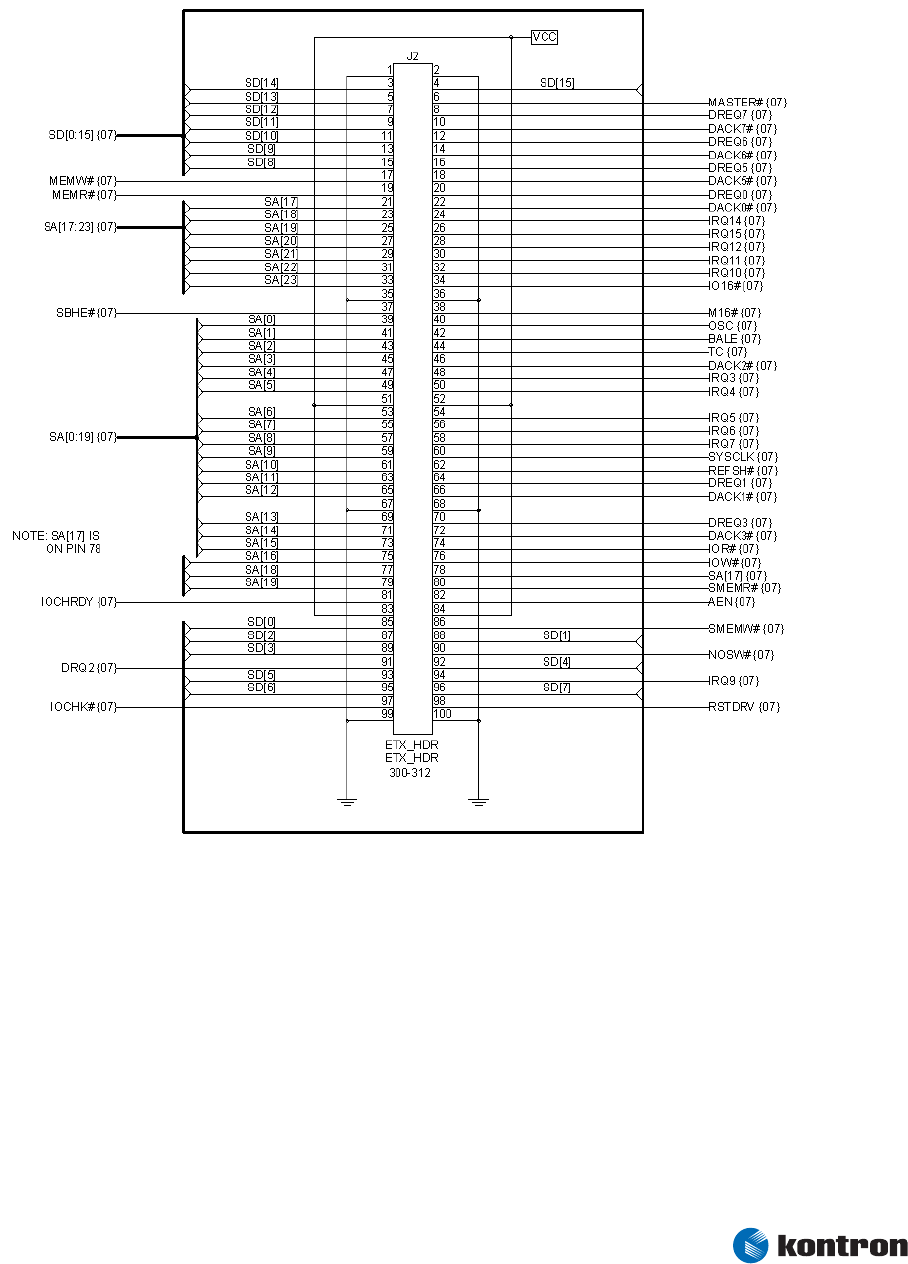
ETX® Connector X2 Schematic
Figure 8 – ETX® Connector X2 Schematic

4 Connector X2
Kontron Design Guide ETX® 26
4.2 ETX® Connector X2 Pinout
Pin Signal Pin Signal Pin Signal Pin Signal
1 GND 2 GND 51 VCC 52 VCC
3 SD14 4 SD15 53 SA6 54 IRQ5
5 SD13 6 MASTER# 55 SA7 56 IRQ6
7 SD12 8 DREQ7 57 SA8 58 IRQ7
9 SD11 10 DACK7# 59 SA9 60 SYSCLK
11 SD10 12 DREQ6 61 SA10 62 REFSH#
13 SD9 14 DACK6# 63 SA11 64 DREQ1
15 SD8 16 DREQ5 65 SA12 66 DACK1#
17 MEMW# 18 DACK5# 67 GND 68 GND
19 MEMR# 20 DREQ0 69 SA13 70 DREQ3
21 LA17 22 DACK0# 71 SA14 72 DACK3#
23 LA18 24 IRQ14 73 SA15 74 IOR#
25 LA19 26 IRQ15 75 SA16 76 IOW#
27 LA20 28 IRQ12 77 SA18 78 SA17
29 LA21 30 IRQ11 79 SA19 80 SMEMR#
31 LA22 32 IRQ10 81 IOCHRDY 82 AEN
33 LA23 34 IO16# 83 VCC 84 VCC
35 GND 36 GND 85 SD0 86 SMEMW#
37 SBHE# 38 M16# 87 SD2 88 SD1
39 SA0 40 OSC 89 SD3 90 NOWS#
41 SA1 42 BALE 91 DREQ2 92 SD4
43 SA2 44 TC 93 SD5 94 IRQ9
45 SA3 46 DACK2# 95 SD6 96 SD7
47 SA4 48 IRQ3 97 IOCHK# 98 RSTDRV
49 SA5 50 IRQ4 99 GND 100 GND
Signal names in the table can differ slightly from those in the schematic. For example, SD[12] in the
schematic is shown as SD12 in the pinout table and in the ETX® Specification. These differences reflect
the conventions used by the program used to produce these schematics.
4 Connector X2
Kontron Design Guide ETX® 27
4.3 Industry Standard Architecture (ISA) Bus Slot
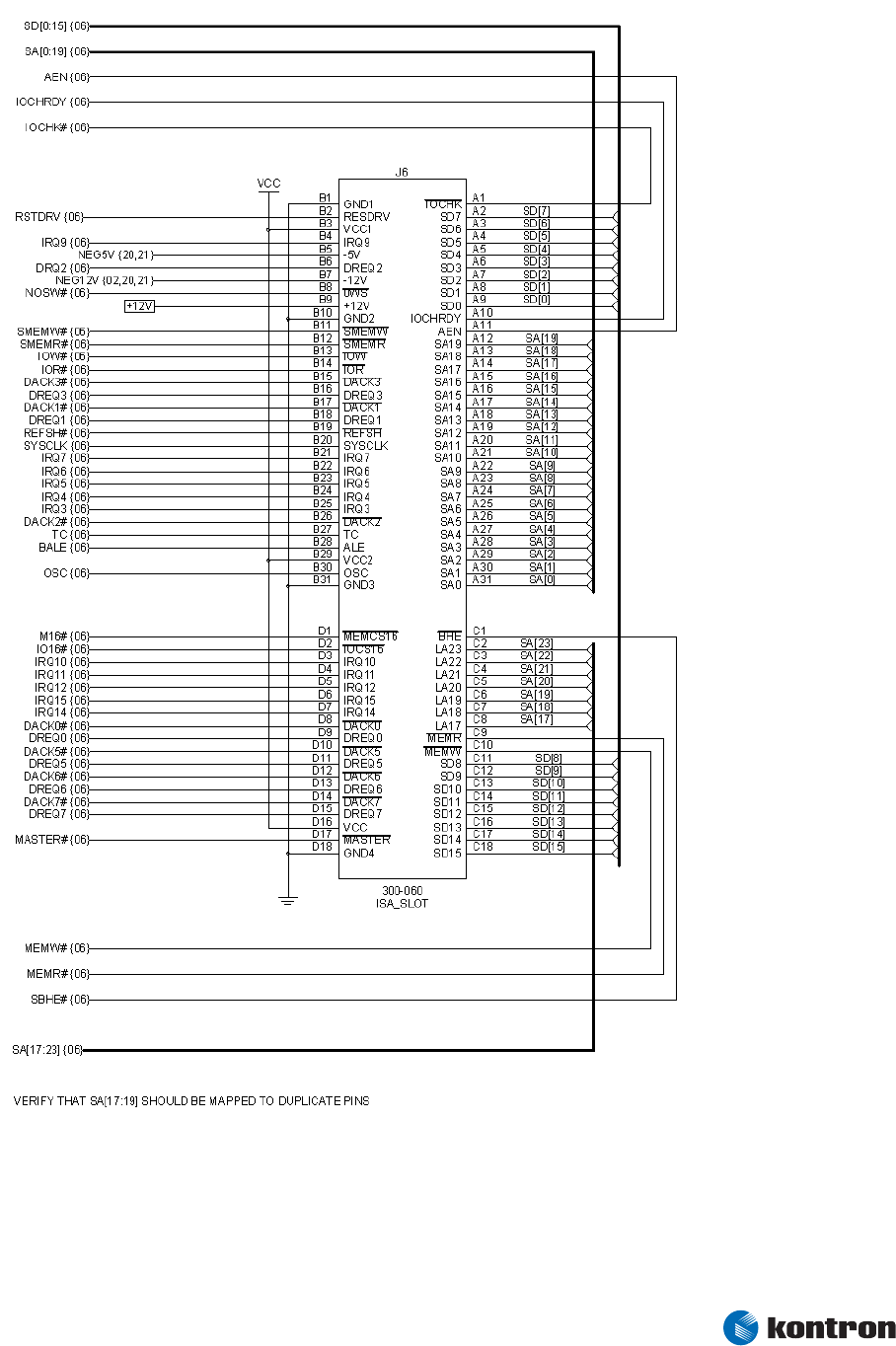
Figure 9 – 16-Bit ISA Bus Slot Connector
Figure 9 shows a 16-bit ISA bus connector. Additional ISA bus devices or connectors can be wired in
parallel with the connector shown.

4 Connector X2
4.3.1 ISA Implementation Notes
® The wiring of PC104 connectors is very similar to the wiring of this slot connector, but
the pin-numbering scheme is slightly different because PC104 uses a pin-and-socket
connector rather than a card-edge connector. See the PC104 specification for details.
® Eight-bit ISA devices will not need the signals on the lower part of the connector (the
C and D pin numbers), but the additional interrupts and DMA channels available on
this part of the connector will make system configuration more flexible.
® Many ISA devices already contain a plug-and-play matrix that allows routing internal
interrupt or DMA requests to most of the possible destinations on the ISA bus. For
simpler devices, which do not implement internal interrupt and DMA routing, it is
often worthwhile to provide jumper blocks or resistor options. These mechanical
switching arrangements allow changing the device’s interrupt and DMA assignments
in case a resource conflict arises later in the development of the system.
® ISA devices generally are not able to share interrupts. Because of this, ISA device
drivers are rarely written with interrupt sharing in mind. Systems with many ISA
devices tend to run out of interrupt lines. Solving this problem can require
specialized software and hardware.
ISA vs. Other Buses
Personal computer manufacturers are eliminating the ISA bus from new products. Although this action
will not have an immediate impact on embedded applications, there is a clear trend to migrate ISA bus
functions to the PCI bus or to other interfaces such as USB.
These newer interfaces are more efficient than the ISA bus and easier for operating systems to manage.
They also have fewer resource limitations. Designers should consider PCI and USB as alternatives to new
ISA bus implementations, or as an eventual upgrade path from ISA designs.
Kontron Design Guide ETX® 28
5 Connector X3
Kontron Design Guide ETX® 29
5
5.1
Connector X3
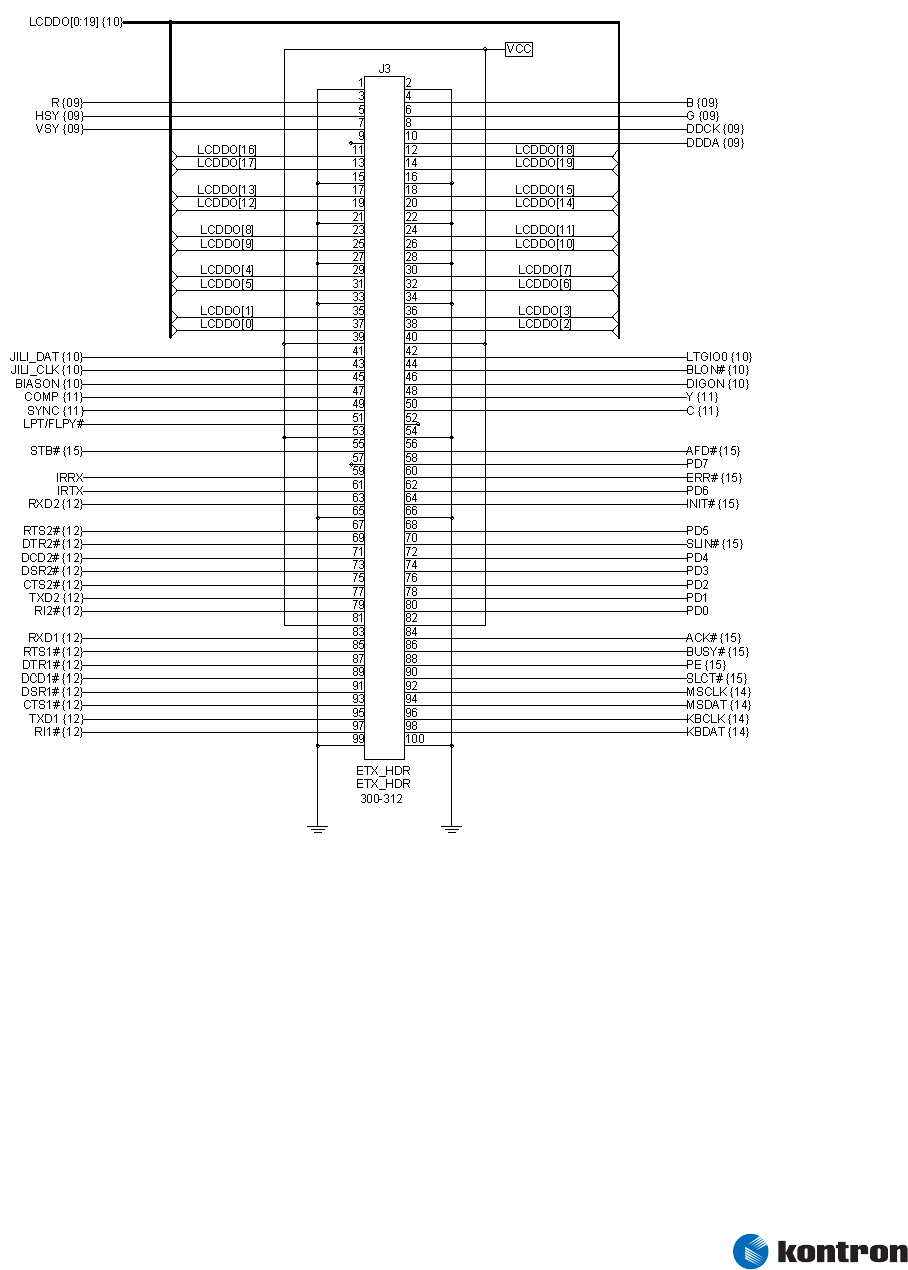
ETX® Connector X3 Schematic
Figure 10 – ETX® Connector X3 Schematic

5 Connector X3
Kontron Design Guide ETX® 30
5.2 ETX® Connector X3 Pinout
ETX® modules can implement either an LVDS flat-panel interface or a parallel digital flat- panel
interface. Alternative pinouts for the two interfaces are shown in the tables below. The left table shows
the standard functions of the pins that support an LVDS flat-panel interface. The right table shows the
alternate function pinout to support a parallel interface to the display.
The parallel flat-panel interface is not a standard ETX® feature. Refer to the individual ETX® user’s guide
to determine if this flat-panel interface is available.
LVDS Interface Pinout Digital Interface Pinout
Pin Signal Pin Signal Pin Signal Pin Signal
1 GND 2 GND 1 GND 2 GND
3 R 4 B 3 R 4 B
5 HSY 6 G 5 HSY 6 G
7 VSY 8 DDCK 7 VSY 8 DDCK
9 DETECT# 10 DDDA 9 DETECT# 10 DDDA
11 LCDDO16 12 LCDDO18 11 B4 12 SHFCLK
13 LCDDO17 14 LCDDO19 13 B5 14 EN
15 GND 16 GND 15 GND 16 GND
17 LCDDO13 18 LCDDO15 17 B1 18 B3
19 LCDDO12 20 LCDDO14 19 B0 20 B2
21 GND 22 GND 21 GND 22 GND
23 LCDDO8 24 LCDDO11 23 G2 24 G5
25 LCDDO9 26 LCDDO10 25 G3 26 G4
27 GND 28 GND 27 GND 28 GND
29 LCDDO4 30 LCDDO7 29 R4 30 G1
31 LCDDO5 32 LCDDO6 31 R5 32 G0
33 GND 34 GND 33 GND 34 GND
35 LCDDO1 36 LCDDO3 35 R1 36 R3
37 LCDDO0 38 LCDDO2 37 R0 38 R2
39 VCC 40 VCC 39 VCC 40 VCC
41 JILI_DAT 42 LTGIO0 41 JILI_DAT 42 VSYNC
43 JILI_CLK 44 BLON# 43 JILI_CLK 44 BLON#
45 BIASON 46 DIGON 45 HSYNC 46 DIGON
47 COMP 48 Y 47 COMP 48 Y
49 SYNC 50 C 49 SYNC 50 C
Pin functions for the shaded pins differ between the two types of flat-panel interfaces. The unshaded
pins have identical functions regardless of the interface type.
Signal names in these tables can differ slightly from those in the schematic. For example, LCDDO[16] in
the schematic is shown as LCDDO16 in the pinout table and in the ETX® Specification. The differences
reflect the conventions used by the schematic capture program used to produce these schematics
You can configure ETX® parallel-port interfaces either as a conventional PC parallel port or as an
interface to a floppy disk drive. Alternative pinouts for the two interfaces are shown in the tables below.
The left table shows the standard functions of the pins that support a conventional PC parallel port. The
right table shows the alternate function pinout that supports the floppy disk drive interface.

5 Connector X3
Parallel Port Mode Pinout Floppy Support Mode Pinout
Pin Signal Pin Signal Pin Signal Pin Signal
51 LPT/FLPY# 52 RESERVED 51 LPT/FLPY# 52 RESERVED
53 VCC 54 GND 53 VCC 54 GND
55 STB# 56 AFD# 55 RESERVED 56 DENSEL
57 RESERVED 58 PD7 57 RESERVED 58 RESERVED
59 IRRX 60 ERR# 59 IRRX 60 HDSEL#
61 IRTX 62 PD6 61 IRTX 62 RESERVED
63 RXD2 64 INIT# 63 RXD2 64 DIR#
65 GND 66 GND 65 GND 66 GND
67 RTS2# 68 PD5 67 RTS2# 68 RESERVED
69 DTR2# 70 SLIN# 69 DTR2# 70 STEP#
71 DCD2# 72 PD4 71 DCD2# 72 DSKCHG#
73 DSR2# 74 PD3 73 DSR2# 74 RDATA#
75 CTS2# 76 PD2 75 CTS2# 76 WP#
77 TXD2 78 PD1 77 TXD2 78 TRK0#
79 RI2# 80 PD0 79 RI2# 80 INDEX#
81 VCC 82 VCC 81 VCC 82 VCC
83 RXD1 84 ACK# 83 RXD1 84 DRV
85 RTS1# 86 BUSY 85 RTS1# 86 MOT
87 DTR1# 88 PE 87 DTR1# 88 WDATA#
89 DCD1# 90 SLCT# 89 DCD1# 90 WGATE#
91 DSR1# 92 MSCLK 91 DSR1# 92 MSCLK
93 CTS1# 94 MSDAT 93 CTS1# 94 MSDAT
95 TXD1 96 KBCLK 95 TXD1 96 KBCLK
97 RI1# 98 KBDAT 97 RI1# 98 KBDAT
99 GND 100 GND 99 GND 100 GND
Pin functions for the shaded pins differ between the parallel port and floppy modes. The unshaded pins
have identical functions regardless of the interface type.
You can select the operating mode by from the BIOS settings or by the hardware mode select pin, X3-51.
If pin X3-51 (LPT/FLPY#) is grounded at boot time, the floppy support mode is selected. If this pin is left
floating or is held high, parallel port mode is selected.
Mode selection is determined at boot time. It cannot be changed until the next boot cycle.
Kontron Design Guide ETX® 31
5 Connector X3
Kontron Design Guide ETX® 32
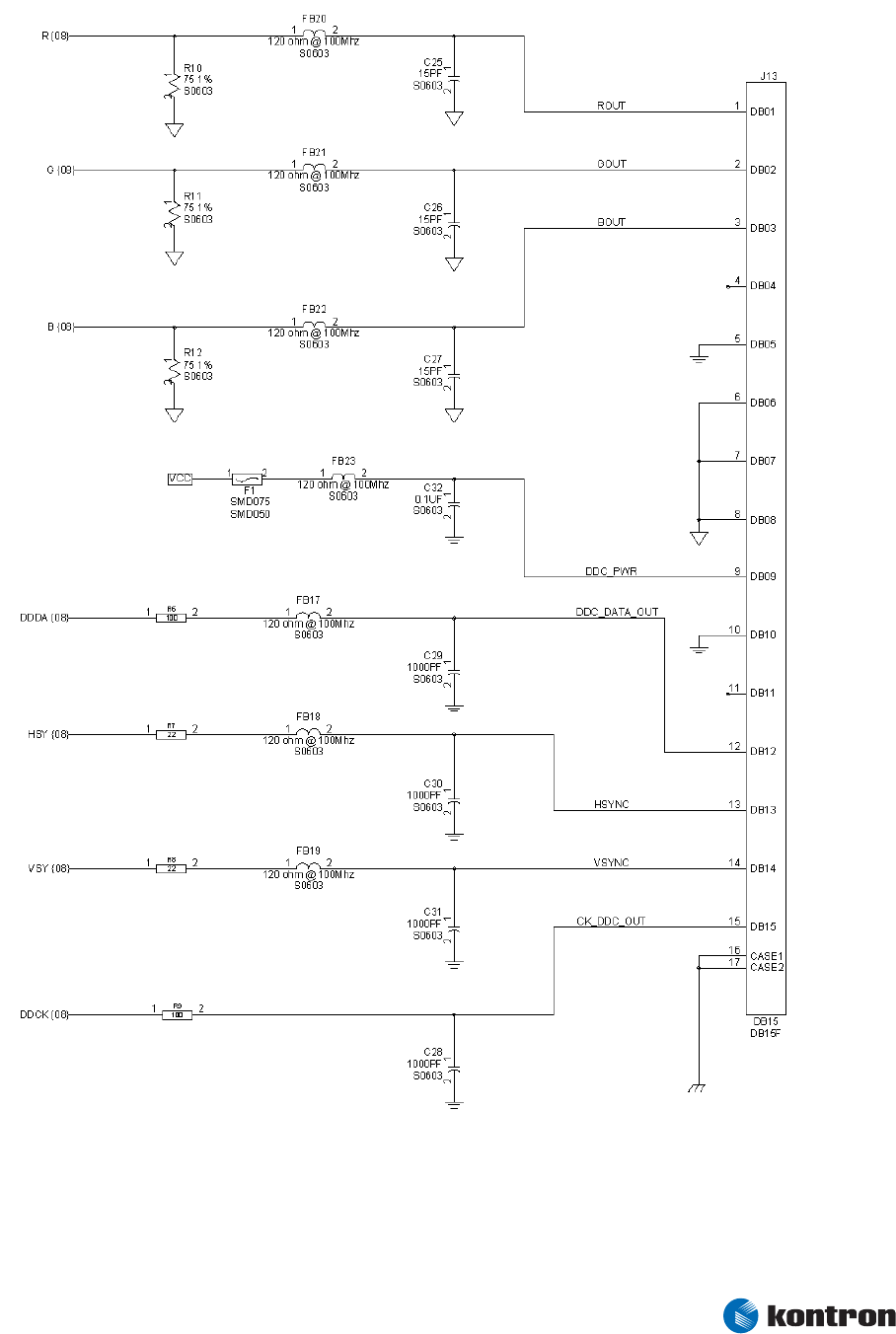
5.3 Analog Video (VGA) Output
Figure 11 – VGA Output Connector and Circuitry
Figure 11 shows analog video (VGA) output using a standard high-density DB-15 connector.

5 Connector X3
Kontron Design Guide ETX® 33
5.3.1 VGA Implementation Notes
® VESA standards require the DDC_PWR line. However, it is frequently not needed in
embedded applications that use an internal VGA monitor because the monitor does
not support the DDC standard. In this case, the associated parts can be omitted.
® Embedded designs also cannot use the DDCK or DDDA lines, which are used for “plug
and play,” monitor-type detection when standard monitors are attached.
5.4 Flat Panel LVDS Interface / JILI Standard
Low Voltage Differential Signaling (LVDS) flat-panel output is the standard interface method for
connecting ETX® modules to flat-panel displays.
5.4.1 LVDS Advantages
LVDS has several advantages over traditional parallel-display interfaces, including:
® LVDS is implemented in a similar way by many different graphics chip vendors. This
makes the display interfaces for ETX® modules very similar despite the fact that
varying graphics controllers are used on different module designs. For relatively
basic display interfaces, such as a single channel, 12- or 18-bit TFT panel, the LVDS
interface will be identical on most ETX® modules.
® LVDS drives long display cables with good performance and much lower EMI.
Embedded applications often require display cables longer than is practical with
direct parallel data interfaces. Parallel display cables also are frequently a major
source of EMI qualification headaches because of a large number of wires that are
driven at high frequencies.
® LVDS reduces the number of wires needed in display cables because each LVDS signal
pair carries numerous panel signals. Because LVDS is a true differential system, large
numbers of ground wires are not needed for signal integrity and EMI minimization.
Connector costs and power consumption also are usually lower than with direct
parallel wiring.
5.4.2 LVDS Routing and Wiring Considerations
Consider the following when routing LVDS signals on PC boards or sending LVDS signals over cables:
® The two signals in each LVDS pair (for example, Channel 1 TXOUT0# and Channel 1
TXOUT0) should be routed together as a differential pair, with a differential
impedance of 100 Ohms. Most PCB layout software allows determining the correct
trace width and spacing to achieve this impedance after the PCB stackup is known.
® Maintain as much separation as possible between the signal pair and other pairs or
traces. In PCB routing, the length of both traces in the same pair should be matched
as closely as possible. All LVDS pairs also should be matched in length in their route
from the ETX® module to a connector. This may require indirect routing of some
pairs.

5 Connector X3
® It is highly recommended that LVDS cables be of twisted-pair construction to take
maximum advantage of the differential signal transmission. In cables that use
twisted pair wiring, the two signals in each LVDS differential pair must be assigned to
the two wires in the same twisted pair.
® If flat-ribbon cables are used, the signals in each LVDS differential pair should be
assigned to adjacent conductors in the cable. Pairs should be separated from other
pairs by one or more ground lines. Flat cables are not recommended for long cable
runs.
® The lengths of all LVDS pairs in a cable should be matched as closely as possible.
® Cable impedances in the 100-150 Ohm range are expected. For different cable
impedance, it may be possible to adjust the LVDS terminating resistors on the
receiver board in order to obtain optimum performance.
5.4.3 LVDS Variations
Although the LVDS interface is standardized for the most common panel types, ETX® modules differ in
their support for panels with dual channel or 24 bit interfaces and for STN (passive) panels. Refer to the
individual ETX® user’s guide to determine which displays are supported. Differences that can occur are:
® Some of the 10 possible LVDS signal pairs are not implemented on some ETX®
modules. For example, a module that supports only single-channel, 12- or 18-bit TFT
panels will use only four of the signal pairs.
® Different connector and cabling arrangements may be needed for each flat-panel
model, even if they all use the same signals. Even similar displays from the same
manufacturer may use different connectors, or use the same connector with different
pinouts.
® Video BIOS changes may be needed when changing flat-panel models because
different models may require different dot clock frequencies or different sync rates.
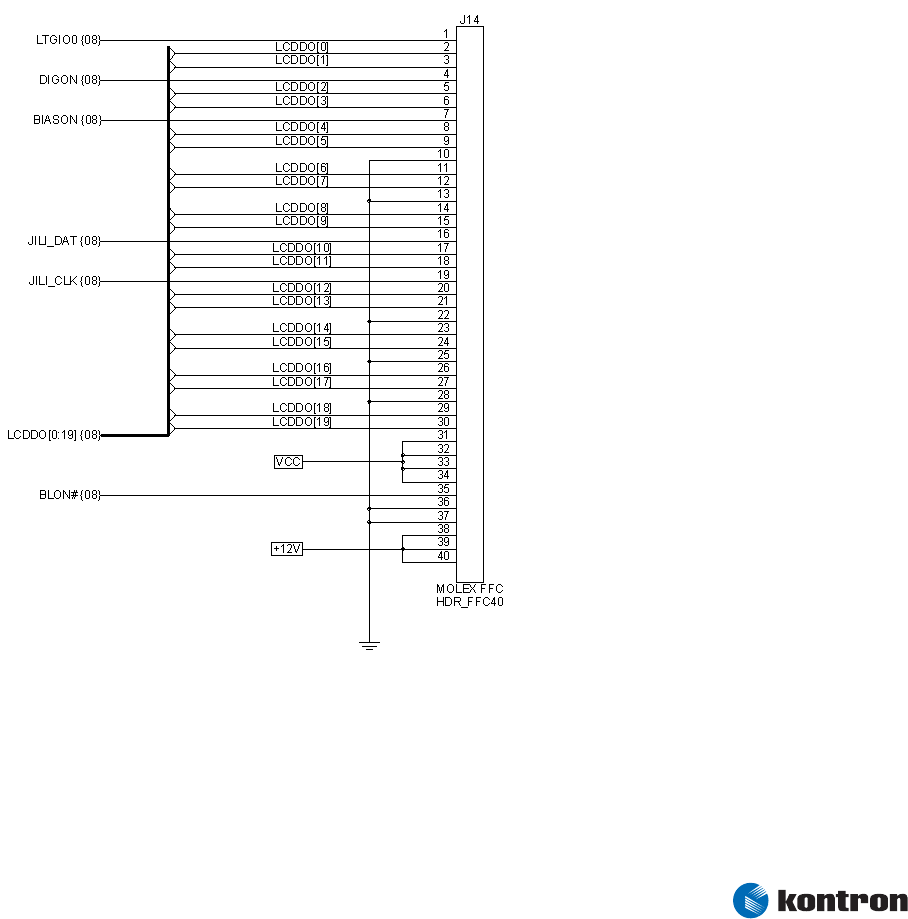
5.4.4 JILI Flat Panel Interface Standard
Kontron has addressed the variations in flat-panel interface details by implementing a standardized
LVDS flat-panel interface arrangement called JUMPtec Intelligent LVDS Interface (JILI). ETX® customers
are encouraged to use this arrangement for flat-panel interfaces.
The JILI interface consists of three components:
® A baseboard connector. This is a 40-pin, flat-foil connector. It is always wired in the
same way, regardless of the flat-panel type.
® A 40-pin, flat-foil cable (essentially a single-sided flex circuit with 40 conductors),
which connects the baseboard to the receiver board below. This cable carries power
for the panel as well as the LVDS signals.
Kontron Design Guide ETX® 34
5 Connector X3
® A small receiver PCB that is designed for use with a specific flat panel and mounts on
or near the flat-panel display. For a parallel-interface panel, this PCB contains an
LVDS receiver chip.
The LVDS receiver board converts the incoming LVDS data to parallel form and outputs the data to the
panel through a connector designed to match the panel pinout.
The receiver board also contains an onboard serial EEPROM programmed with the panel timing
parameters. In operation, the video BIOS code in the ETX® module reads the timing parameters from the
EEPROM on the receiver board and sets the panel timing accordingly. This adapts the ETX® module to a
new panel type without reprogramming the video BIOS. It is possible to change flat-panel types by
changing only the panel itself and its receiver board. The rest of the flat-panel interface remains
unchanged.
Refer to the Kontron Embedded Modules’ JILI Specification for further descriptions of the JILI interface
and the pixel mapping for its various operating modes.
5.4.5 JILI Baseboard Connector Schematic
Figure 12 – JILI Connector for Flat Panel LVDS Interface
Kontron Design Guide ETX® 35

5 Connector X3
5.4.6 LVDS Signal Mapping on JILI Connector Pins
Pin Name Channel/Signal
LCDDO[0] Channel 1 TXOUT0#
LCDDO[1] Channel 1 TXOUT0
LCDDO[2] Channel 1 TXOUT1#
LCDDO[3] Channel 1 TXOUT1
LCDDO[4] Channel 1 TXOUT2#
LCDDO[5] Channel 1 TXOUT2
LCDDO[6] Channel 1 TXCLK#
LCDDO[7] Channel 1 TXCLK
LCDDO[8] Channel 1 TXOUT3#
LCDDO[9] Channel 1 TXOUT3
LCDDO[10] Channel 2 TXOUT0#
LCDDO[11] Channel 2 TXOUT0
LCDDO[12] Channel 2 TXOUT1#
LCDDO[13] Channel 2 TXOUT1
LCDDO[14] Channel 2 TXOUT2#
LCDDO[15] Channel 2 TXOUT2
LCDDO[16] Channel 2 TXCLK#
LCDDO[17] Channel 2 TXCLK
LCDDO[18] Channel 2 TXOUT3#
LCDDO[19] Channel 2 TXOUT3
5.4.7 JILI Implementation Notes
® Kontron Embedded Modules offers receiver boards for common flat-panel types. It is
relatively simple to design a receiver board for a new panel type because of the small
size of the board and the small number of components involved. The simplicity of the
receiver circuitry also allows receiver boards to be implemented in alternative form
factors for optimum integration into a package design.
® When the application uses an LVDS panel, a LVDS receiver chip is not necessary.
However, typically a transition board is mechanically necessary to route the signals
from the connector on the LVDS panel to the different connector used for system
display cabling. This PCB also can carry a serial EEPROM to implement the JILI
automatic display configuration features.
® The JILI concept is useful even if the flat-foil connectors are not suitable for a
particular application. The designer can choose any suitable LVDS connector and
cabling arrangement, as long as the LVDS cable carries the standard set of JILI
signals and the panel-specific parts of the interface are performed on the receiver
board.
® To allow maximum flexibility for future panel upgrades, it is suggested that all the
JILI signals be carried on the LVDS cable even if the current panel type does not
require them. If an application is known to be restricted to a specific display
interface class, such as a single-channel TFT, then some LVDS pairs may be omitted to
save cable bulk and cost.
Kontron Design Guide ETX® 36
5 Connector X3
Kontron Design Guide ETX® 37
5.5
5.6
Flat Panel Digital (FPD) Interface / JIDI Standard
A digital flat-panel interface called JUMPtec Intelligent Digital Interface (JIDI) is available on some
ETX® modules. This is an optional alternative to the LVDS interface. It uses the same ETX® pins as the
LVDS interface, but pin signals for a direct parallel interface to the flat panel.
® The implementation of the parallel flat-panel interface, if available, may differ for
each ETX® module. This is because of the different graphics controller technology
used on each module. Refer to the individual ETX® user’s guide for details.
® If a parallel flat-panel interface is used, consider implementing the interface using
the same connector and pinout used for JILI operation (shown in Figure 10), and a
“receiver board” to connect the parallel signals on the flat foil cable to the display.
This implementation provides an easy upgrade path to an ETX® module with an LVDS
interface.
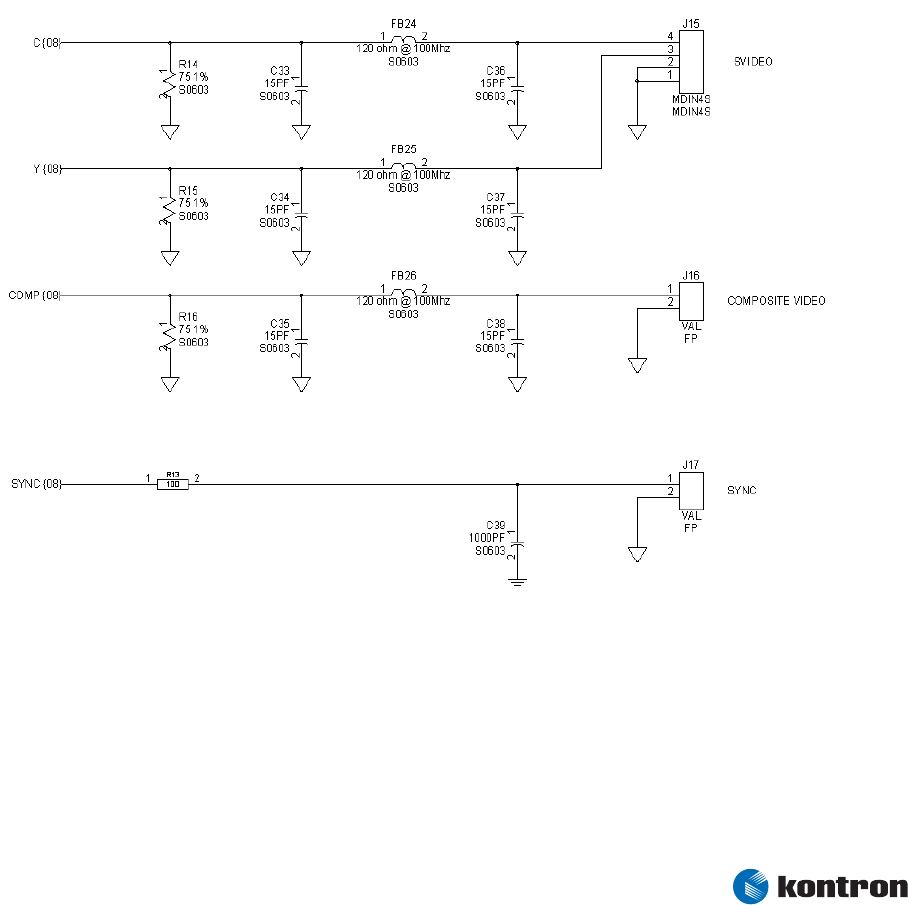
Television (TV) Out
Figure 13 – TV Out Connectors and Circuitry
Television output circuitry, showing S-Video and composite video output connectors.
Television output features are not implemented on all ETX® modules. The video format options and the
quality of the output vary, depending upon the video controller chip used on the module. Refer to the
individual ETX® user’s guide for details.
5 Connector X3
Kontron Design Guide ETX® 38
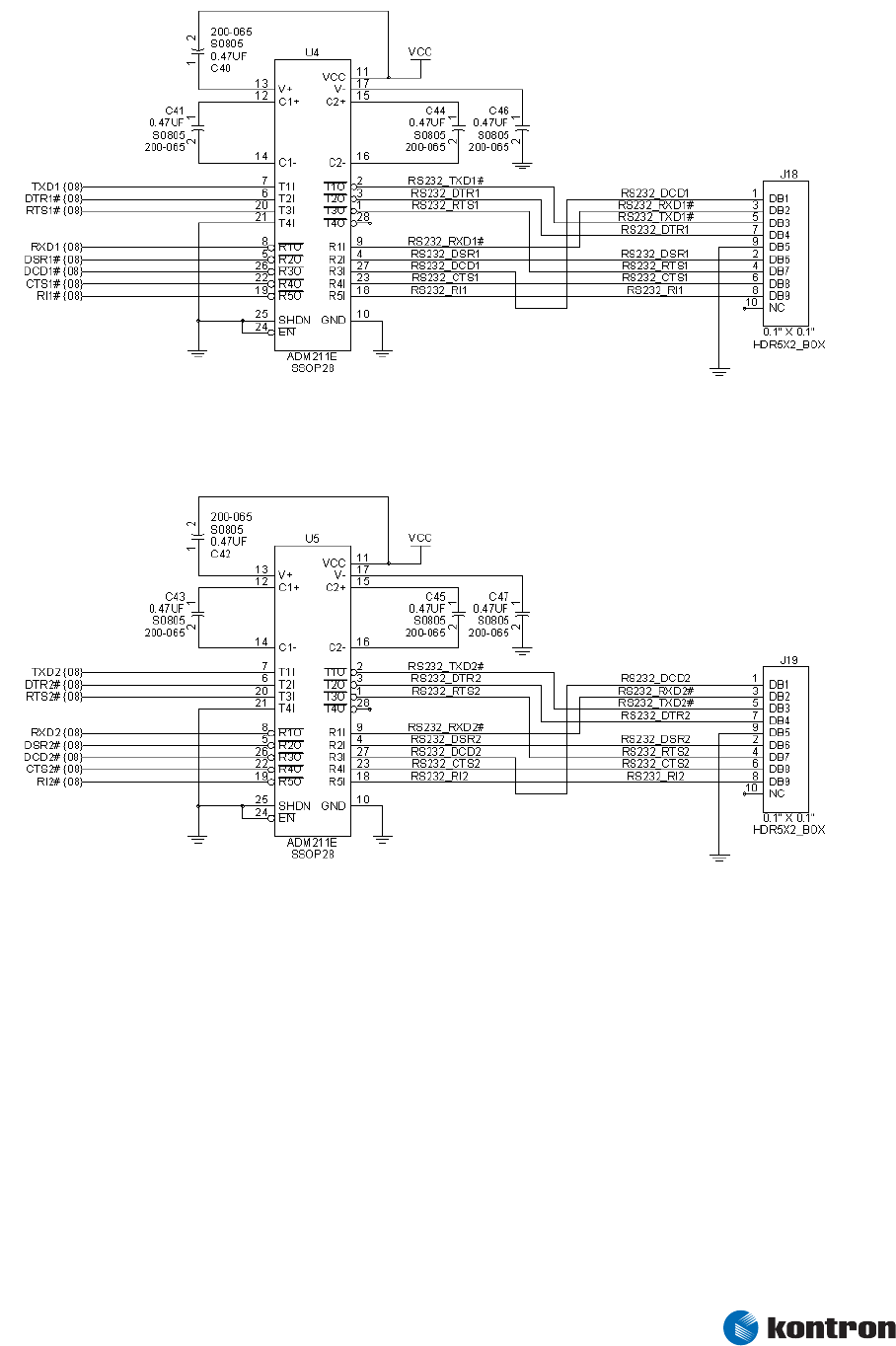
5.7 Serial Ports 1 and 2
Figure 14 – RS232 Transceivers and Connectors for Serial Ports 1 and 2
Figure 14 shows one implementation of RS232 transceivers for Serial Ports 1 and 2. The pin numbers
shown outside the header outlines are for flat-ribbon cable headers. The pin numbers inside the header
outlines are the actual pin numbers on the DB9 serial-port connectors.
5.7.1 Serial Port Implementation Notes
® The ETX® module’s TXD1, TXD2, DTR1#, DTR2#, RTS1# and RTS2# lines are normally
outputs from the module. However, these lines also may be used as chipset
configuration straps during system reset. In this condition, they are inputs that are
pulled to the correct state by resistors internal to the ETX® module. No external DC
loads or external pull-up or pull down resistors should be attached to these lines.
5 Connector X3
Kontron Design Guide ETX® 39
External resistors may override the internal strap states and cause the ETX® module
to malfunction.
® If it is necessary to drive a TTL input (or another input which sources or sinks
significant current) with any of these signals, a CMOS-input buffer should be inserted
in the signal path so that these lines are not pulled up or down by external circuitry
during system reset.
® Use pull-ups on all unused input signals on COM ports. Do not terminate unused
output signals.
5.8
5.9
IRDA
ETX® modules implement a single infrared (IR) port. The capabilities and implementation of the IR port
vary among ETX® modules and are presented in more detail in the user’s guide for each module.
Keyboard and Mouse
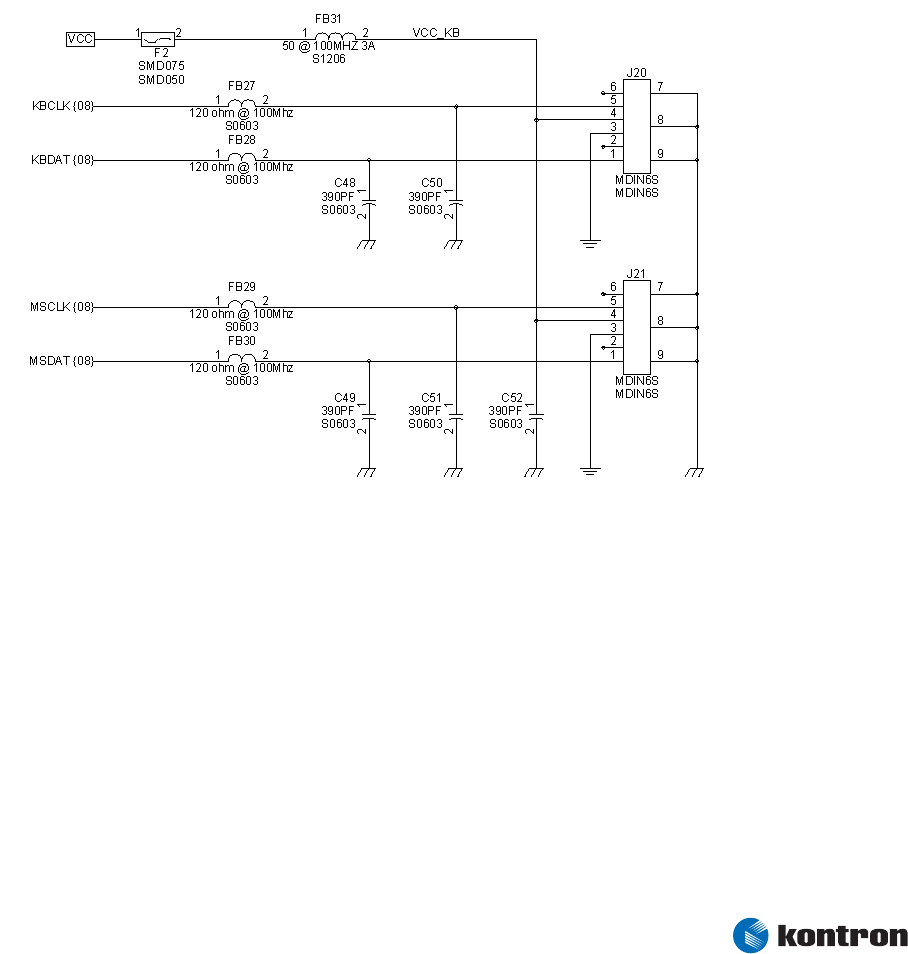
Figure 16 – PS/2 Keyboard and Mouse Port Connectors and Circuitry
Figure 16 shows PS/2 keyboard and mouse ports using mini-DIN connectors.
The supply fusing shown is generally a requirement for external keyboard and mouse devices in which a
fault might occur in the device or its connecting cable.
5 Connector X3
Kontron Design Guide ETX® 40
5.10 Parallel Port
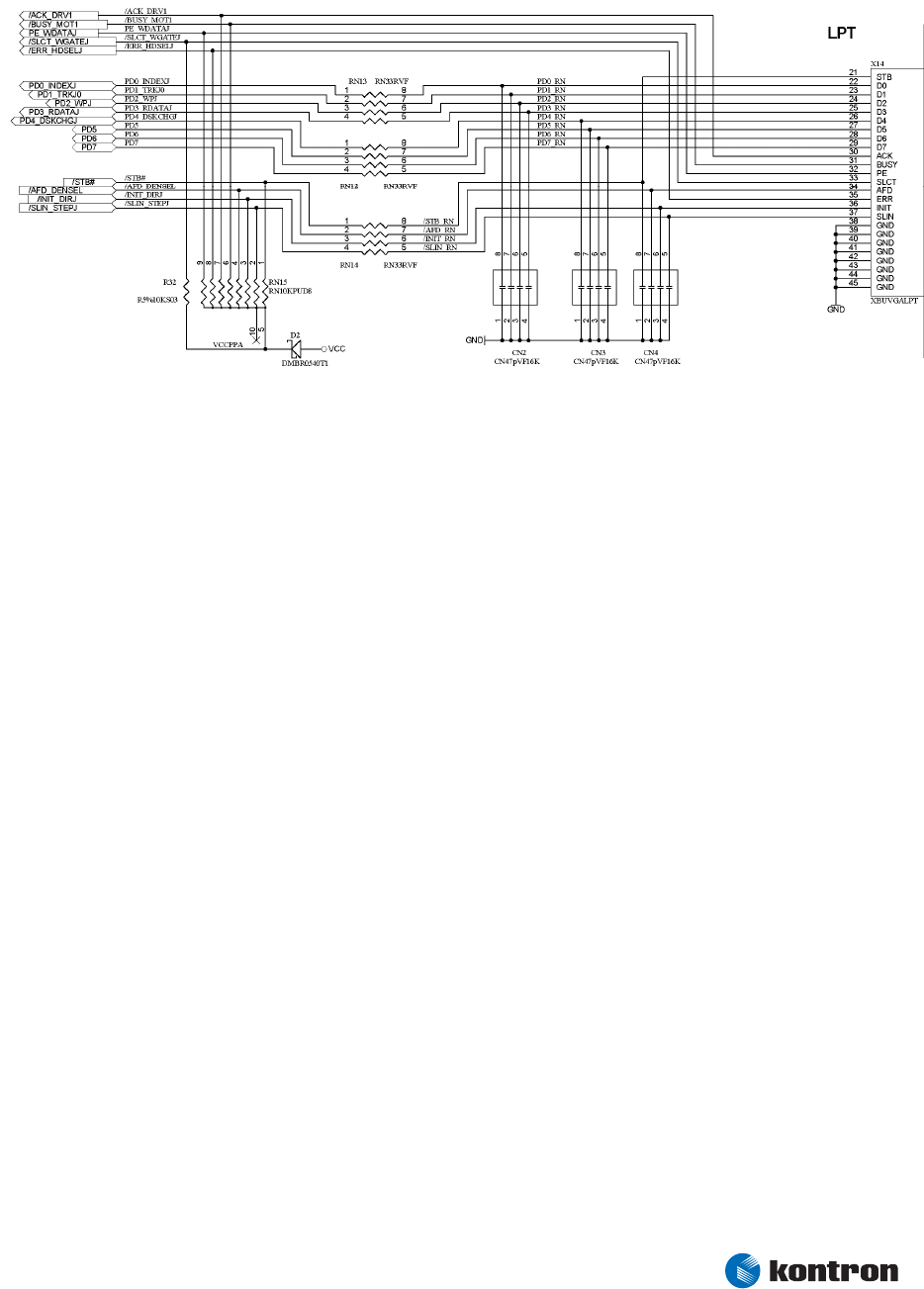
Figure 17 – Parallel Port Connector and Circuitry
Figure 17 shows typical parallel-port circuitry. The pin numbers shown outside the header outlines are
for flat-ribbon cable headers. The pin numbers inside the header outlines are the actual pin numbers on
the DB25 parallel-port connector.
5.10.1 Parallel Port Implementation Notes
The diode in the pull-up power path is present so that a powered parallel port device (such as a printer)
will not source current into the power plane of an unpowered ETX® module. Such “phantom powering”
could interfere with the proper operation of reset and power control circuits on the ETX® module. If
there is no possibility of the parallel device being powered while the ETX® module is not, then the diode
is unnecessary.

5 Connector X3
5.10.2 Floppy Drive Operation Over the Parallel Port Connector
ETX® modules generally support one floppy drive attached to parallel-port pins. This is an alternative to
the normal parallel port functionality. If the parallel port is used in parallel port mode, floppy disk
support is not available via the parallel port. If floppy-disk support is needed, an external controller may
be incorporated in the backplane design.
Note the following considerations for floppy-over-parallel operation:
® ETX® pin X3-51 must be grounded when the ETX® module boots.
® The X3-51 pin is sensed only at the beginning of the boot, so it is not possible to
dynamically switch between floppy and parallel-port modes.
® If X3-51 pin changes state after boot, a reboot will be necessary to sense the change
in state and set the operating mode as specified by the pin.
® The series resistors and pullup components shown in Figure # are still recommended
for applications that use only the floppy-drive functionality.
® If the floppy-over-parallel function is used only occasionally, it can be implemented
as a cable, which connects a standard DB25 parallel port connector to a 34-pin floppy
drive connector. Then the baseboard connector can be wired as a standard parallel
port and used as a parallel port when the floppy functionality is not required.
5.10.3 Options for Simultaneous Floppy and Parallel Port Operation
If an application needs floppy and parallel-port functionality simultaneously, there are several
alternatives for the designer to consider:
® A super I/O chip may be added to the baseboard to implement a dedicated floppy
controller. This is a low-cost option and is particularly attractive if the design also
needs the additional serial or parallel ports in the super I/O chip. For the floppy
interface to work properly, BIOS support will be necessary. Please consult Kontron
Embedded Modules regarding recommended super I/O devices for this application.
® An LS-120 drive may be used. LS120 drives are basically super floppies that connect
to an IDE port. They can read conventional 3-1/2 inch floppy disks and special
120MB, high-density media. This is an attractive choice for many instrumentation
applications in which floppies are used for routine operation but a means of
transferring large data or program files is sometimes needed.
® A USB floppy drive may be used. Most ETX® module BIOSes will support booting from
a USB floppy. However, the operating system also may need to support USB devices
to use a USB floppy after OS boot.
Kontron Design Guide ETX® 41
6 Connector X4
Kontron Design Guide ETX® 42
6
6.1
Connector X4
ETX® Connector X4 Schematic
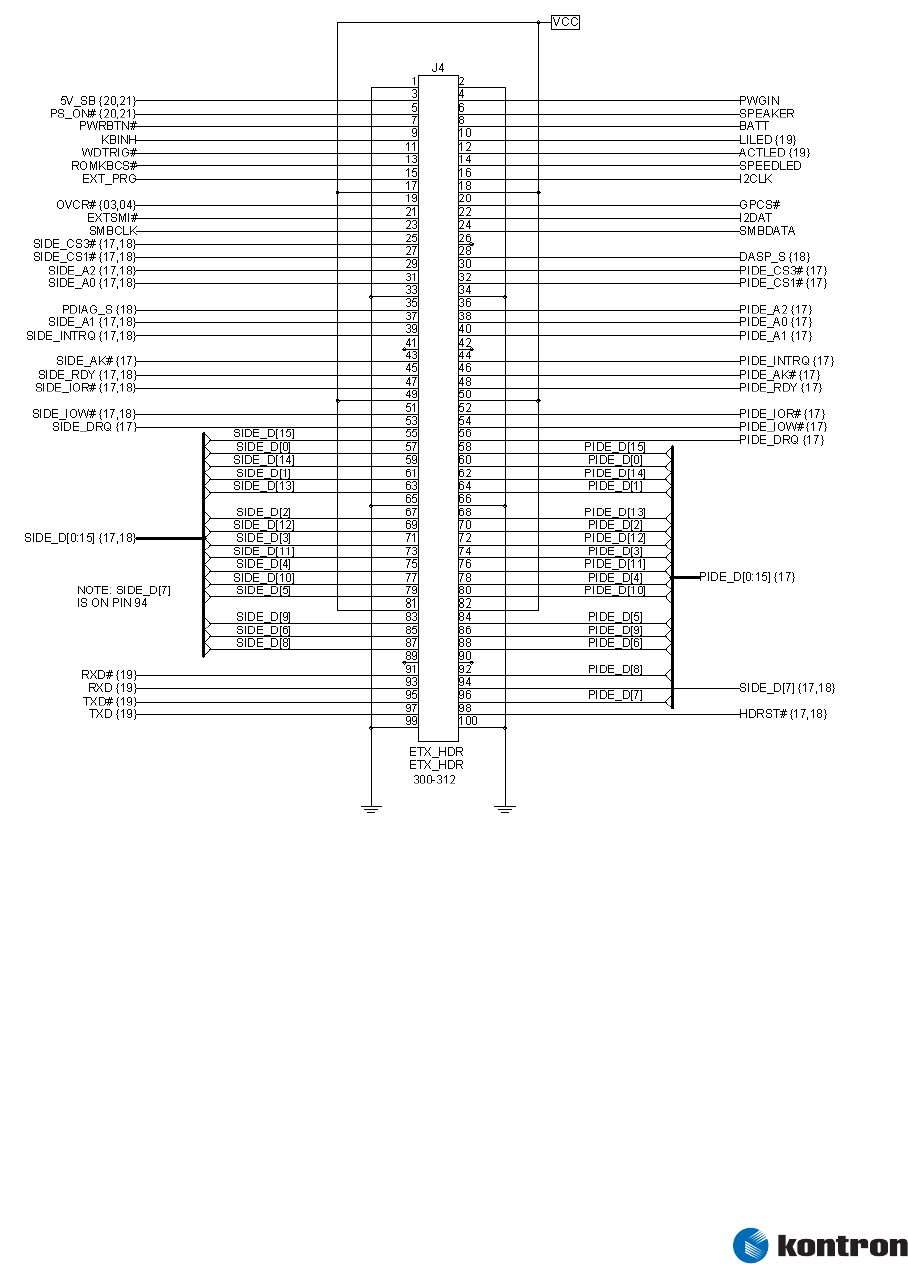
Figure 18 – ETX® Connector X4

6 Connector X4
Kontron Design Guide ETX® 43
6.2 ETX® Connector X4 Pinout
Pin Signal Pin Signal Pin Signal Pin Signal
1 GND 2 GND 51 SIDE_IOW# 52 PIDE_IOR#
3 5V_SB 4 PWGIN 53 SIDE_DRQ 54 PIDE_IOW#
5 PS_ON 6 SPEAKER 55 SIDE_D15 56 PIDE_DRQ
7 PWRBTN# 8 BATT 57 SIDE_D0 58 PIDE_D15
9 KBINH# 10 LILED# 59 SIDE_D14 60 PIDE_D0
11 RSMRST# 12 ACTLED# 61 SIDE_D1 62 PIDE_D14
13 ROMKBCS# 14 SPEEDLED# 63 SIDE_D13 64 PIDE_D1
15 EXT_PRG 16 I2CLK 65 GND 66 GND
17 VCC 18 VCC 67 SIDE_D2 68 PIDE_D13
19 OVCR# 20 GPCS# 69 SIDE_D12 70 PIDE_D2
21 EXTSMI# 22 I2DAT 71 SIDE_D3 72 PIDE_D12
23 SMBCLK 24 SMBDATA 73 SIDE_D11 74 PIDE_D3
25 SIDE_CS3# 26 SMBALRT# 75 SIDE_D4 76 PIDE_D11
27 SIDE_CS1# 28 DASP_S 77 SIDE_D10 78 PIDE_D4
29 SIDE_A2 30 PIDE_CS3# 79 SIDE_D5 80 PIDE_D10
31 SIDE_A0 32 PIDE_CS1# 81 VCC 82 VCC
33 GND 34 GND 83 SIDE_D9 84 PIDE_D5
35 PDIAG_S 36 PIDE_A2 85 SIDE_D6 86 PIDE_D9
37 SIDE_A1 38 PIDE_A0 87 SIDE_D8 88 PIDE_D6
39 SIDE_INTRQ 40 PIDE_A1 89 GPE2# 90 CBLID_P
41 BATLOW# 42 GPE1# 91 RXD# 92 PIDE_D8
43 SIDE_AK# 44 PIDE_INTRQ 93 RXD 94 SIDE_D7
45 SIDE_RDY 46 PIDE_AK# 95 TXD# 96 PIDE_D7
47 SIDE_IOR# 48 PIDE_RDY 97 TXD 98 HDRST#
49 VCC 50 VCC 99 GND 100 GND
6 Connector X4
Kontron Design Guide ETX® 44
6.3 IDE Ports
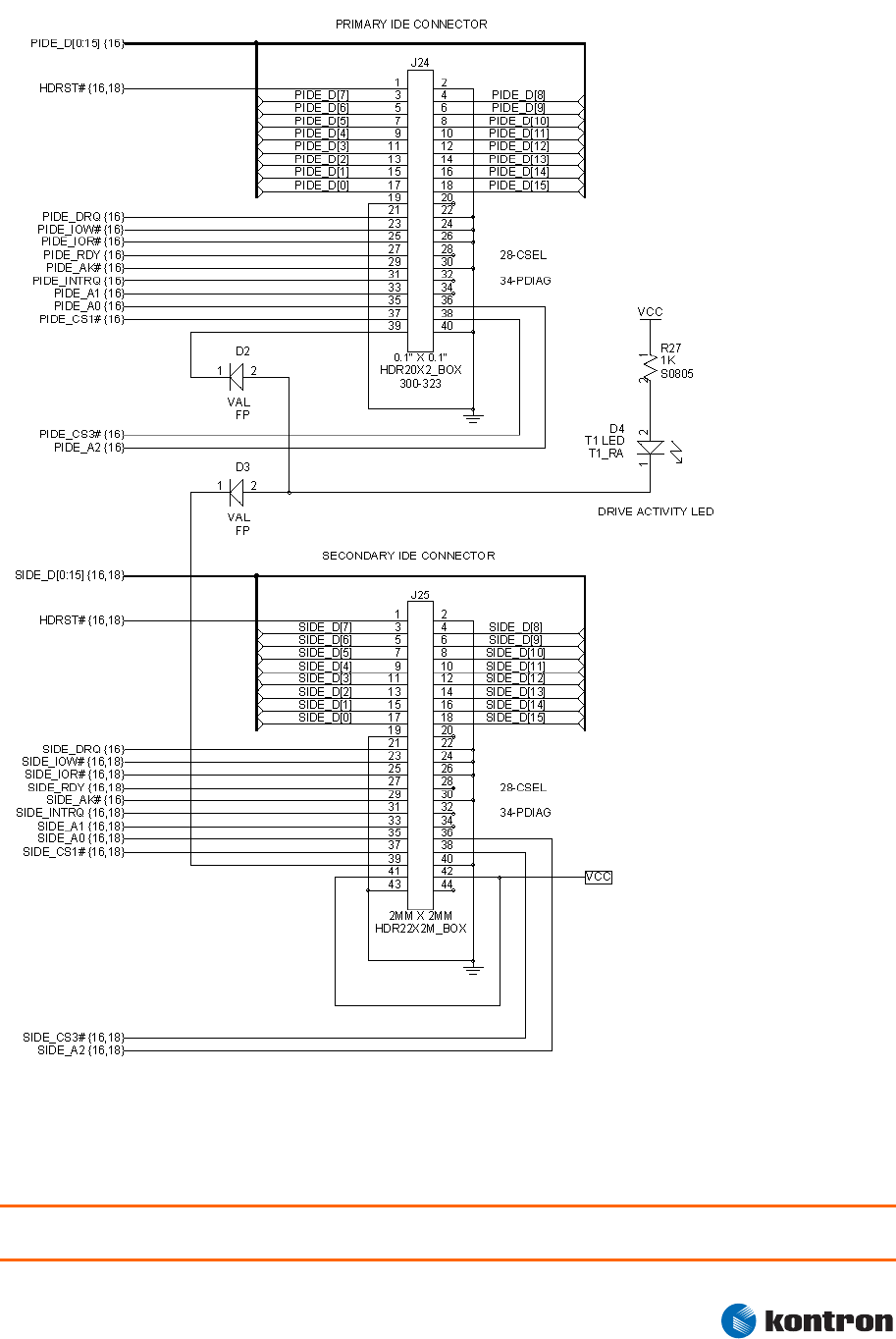
Figure 19 – Primary and Secondary IDE Connectors
Figure 19 shows connectors and circuitry for both primary and secondary IDE ports. The pin numbers
shown outside the header outlines are for flat-ribbon cable headers.
Warning: Pin 34 of J24 must be connected to CBLID_P# (X4/90) and Pin 34 of J25 must be connected to
PDIAG_S# (X4/35).

6 Connector X4
6.3.1 IDE Port Implementation Notes
® The primary port connector shown in Figure 17 is a standard 40-pin IDC flat-cable
header, which is used with 3-1/2 inch desktop IDE hard drives. These drives require a
separate power cable to provide them with 5- and 12-volt operating power.
® The secondary port connector shown is a 44 pin, 2mm header of the type used with 2-
1/2 inch laptop hard drives. The pinout is the same as for the standard connector,
with the addition of pins 41-44 which provide 5-volt power to the drive. Laptop
drives do not need 12-volt power and do not require a separate power cable.
® Each IDE port can support two hard drives or other ATAPI devices. The two devices on
each port are wired in parallel, which is accomplished by plugging both drives into a
single flat ribbon cable equipped with two socket connectors. A jumper is typically
manually set on each device to set it for “master” or “slave” operation.
® If two devices are used in the master/slave mode on the same IDE port, the DASP#
pins of both devices must be connected together. Also, the PDIAG# pins of both
devices must be connected together. These pairs of pins negotiate between the
master and slave devices. The devices may not function correctly unless these pins
are interconnected. If two devices are plugged into a single IDE cable, the cable will
interconnect the pins properly. If the two devices on one port are integrated on the
baseboard or plugged into separate connectors, care should be taken to tie the
corresponding pins together. On a standard IDE connector, PDIAG# is Pin 34 and
DASP# is Pin 39.
® Because some ETX® modules contain an onboard Flash disk on the secondary IDE
port, the DASP_S# and PDIAG_S# pins of that disk are brought to the ETX® connector
and must be connected to the same pins on any other IDE device that is connected to
the secondary port. It is recommended that these pins always be connected for
compatibility with a variety of ETX® modules.
Note: The DASP# and PDIAG# pins from the primary and secondary IDE ports should NOT be tied together. They
should only be connected between the devices that share a single port.
® After IDE devices are initialized, Pin 39 is used for an alternate function. It is
asserted to indicate device activity and may drive a LED. If an activity light is shared
between both IDE ports, diode or gate isolation should be used so that the DASP#
functionality of the two ports is not affected.
® Some ETX® modules support advanced IDE data transfer modes such as UDMA 66.
These modes require a special 80-conductor IDE cable for signal integrity. Refer to
the individual ETX® user’s guide for details about these modes.
Kontron Design Guide ETX® 45
6 Connector X4
6.3.2 CompactFlash Socket on IDE Port
Figure 20 – CompactFlash Socket
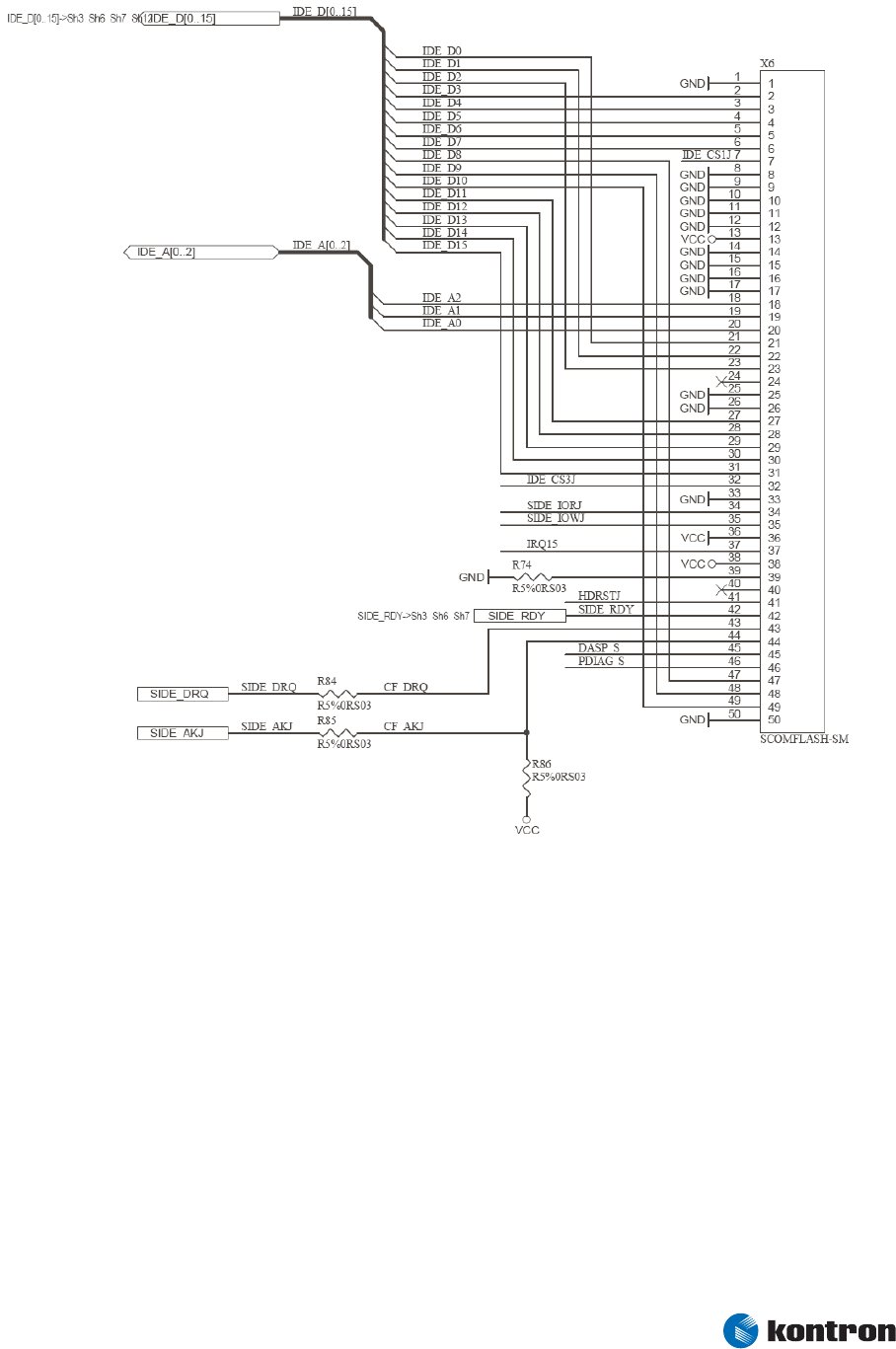
Figure 20 shows CompactFlash (CF) socket wired as a secondary master IDE device. CompactFlash cards
are used as alternatives to mechanical hard drives, especially when only moderate data capacity is
needed. A CF card in IDE mode has the same electrical interface as an IDE hard drive, so it may be wired
to an ETX® IDE port in the same way.
Kontron Design Guide ETX® 46
6 Connector X4
6.3.3 CompactFlash Socket Implementation Notes
® The CF card cannot be hot-plugged (changed while the system is powered). If hot-
plug support is necessary, then a PCI-based CardBus controller chip can be
integrated onto the baseboard and used to control the CF socket.
® The CF card can be configured as a slave device by removing R74.
® If two CF cards (or a CF card and a hard drive) are used in the master/slave mode on
the same IDE port, the DASP# pins of both devices must be connected. Also, the
PDIAG# pins both devices also must be connected. These pins negotiate between the
master and slave devices, and the devices may not function correctly unless these
pins are interconnected. Because some ETX® modules contain an onboard flash disk
on the secondary IDE port, the DASP# and PDIAG# pins of that disk are brought to the
ETX® connector and must be connected to the same pins of any other secondary IDE
device which is implemented in the system.
® Problems have occasionally been observed when two CF cards are used on the same
IDE port (as Master and Slave), or when a CF card is used in combination with a
mechanical hard drive. If a CF card is used on the same IDE channel as another card
or another IDE device, the use of well-proven cards from vendors such as SanDisk is
recommended.
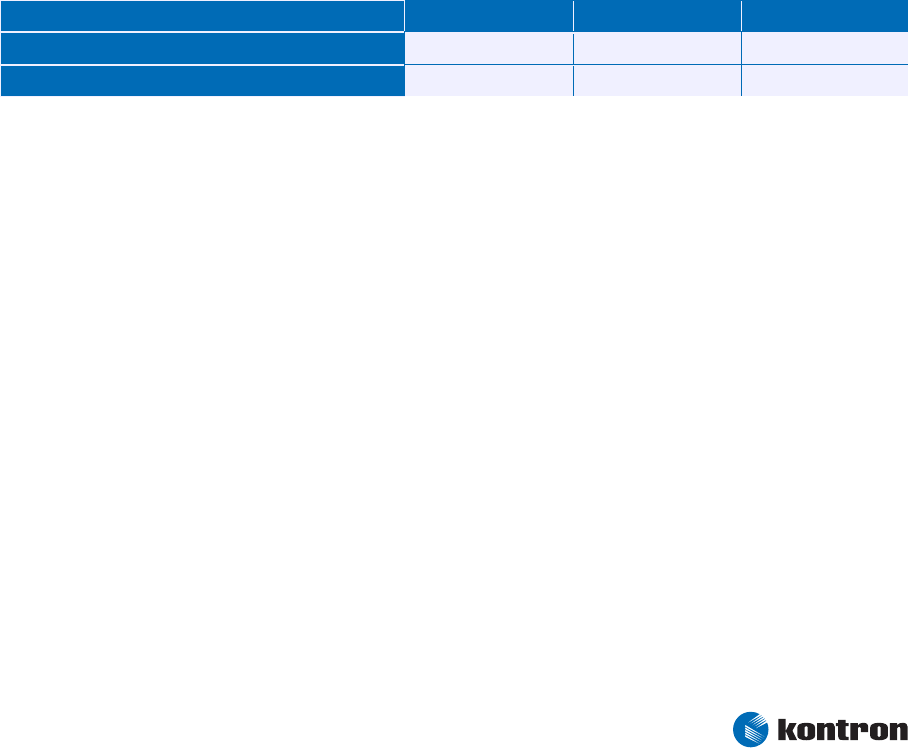
® DMA-support: Configuration of R84, R85 and R86:
R84 R85 R86
3 3 °
DMA
Non-DMA °° 3
Kontron Design Guide ETX® 47
6 Connector X4
Kontron Design Guide ETX® 48
6.4 Ethernet Circuits
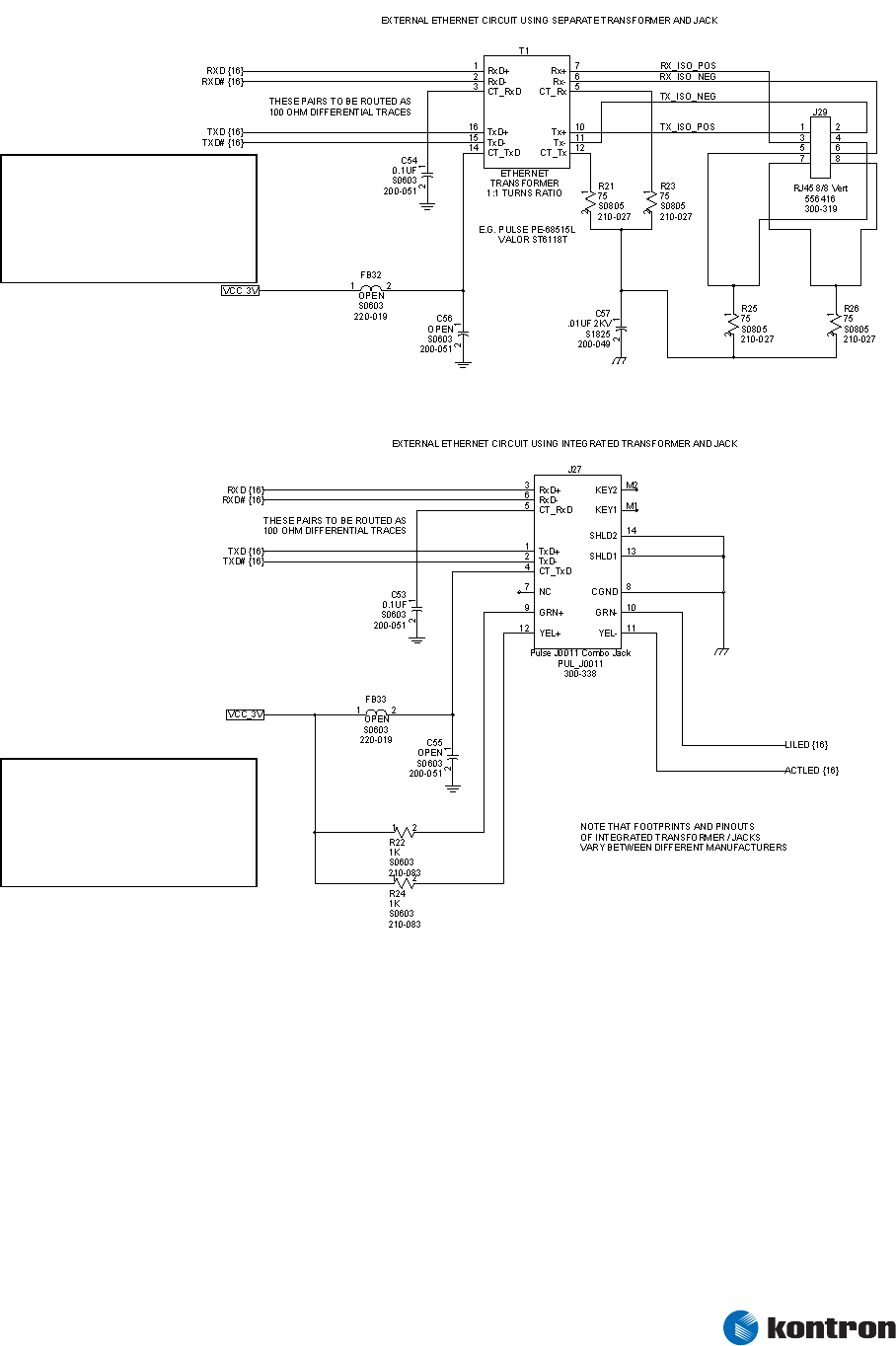
Figure 21 – Ethernet Circuits Using Separate Transformer and Integrated Jack
Figure 21 shows two alternative Ethernet circuits. The top circuit uses a separate transformer and RJ45
jack. The bottom circuit uses an RJ45 jack with integrated magnetics.
The ETX® Ethernet Interface is designed for use with an external transformer or integrated jack that has
a 1:1 turns ratio. Refer to electrical data in the ETX® Specification for details.
The (04) following each net name indicates that this signal connects to an identical net name within
Figure 18 (which shows the ETX® X4 connector).
C56: This capicitor is not normally
installed, but a placement location can be
provided. It may need to be placed based
on the results of FCC conformance testing.
If it is required, values in the pico
farad range would be used. Large
capicitance values installed in this
location will have a negative effect on
long cable performance. so care must be
taken in selecting values used.
C55: This capicitor is not normally
installed, but a placement location can be
provided. It may need to be placed based
on the results of FCC conformance testing.
If it is required, values in the pico
farad range would be used. Large
capicitance values installed in this
location will have a negative effect on
long cable performance. so care must be
taken in selecting values used.
6 Connector X4
Kontron Design Guide ETX® 49
6.4.1 Ethernet Implementation Notes
® Route the transmit and receive lines on the input (ETX® module) side of the coupling
transformer on the baseboard PCB as differential pairs, with a differential impedance
of 100 Ohms. PCB layout software allows determining the correct trace width and
spacing to achieve this impedance after the PCB stack up configuration is known.
® The TXD, TXD# signal pair should be well separated from the RXD, RXD# signal pair.
Both pairs should be well separated from any other signals on the PCB. The total
routing length of these pairs from the ETX® module to the Ethernet jack should be
made as short as practical. If the baseboard layout “doesn’t care” where the Ethernet
jack is located, it should be placed close to the ETX® module pins.
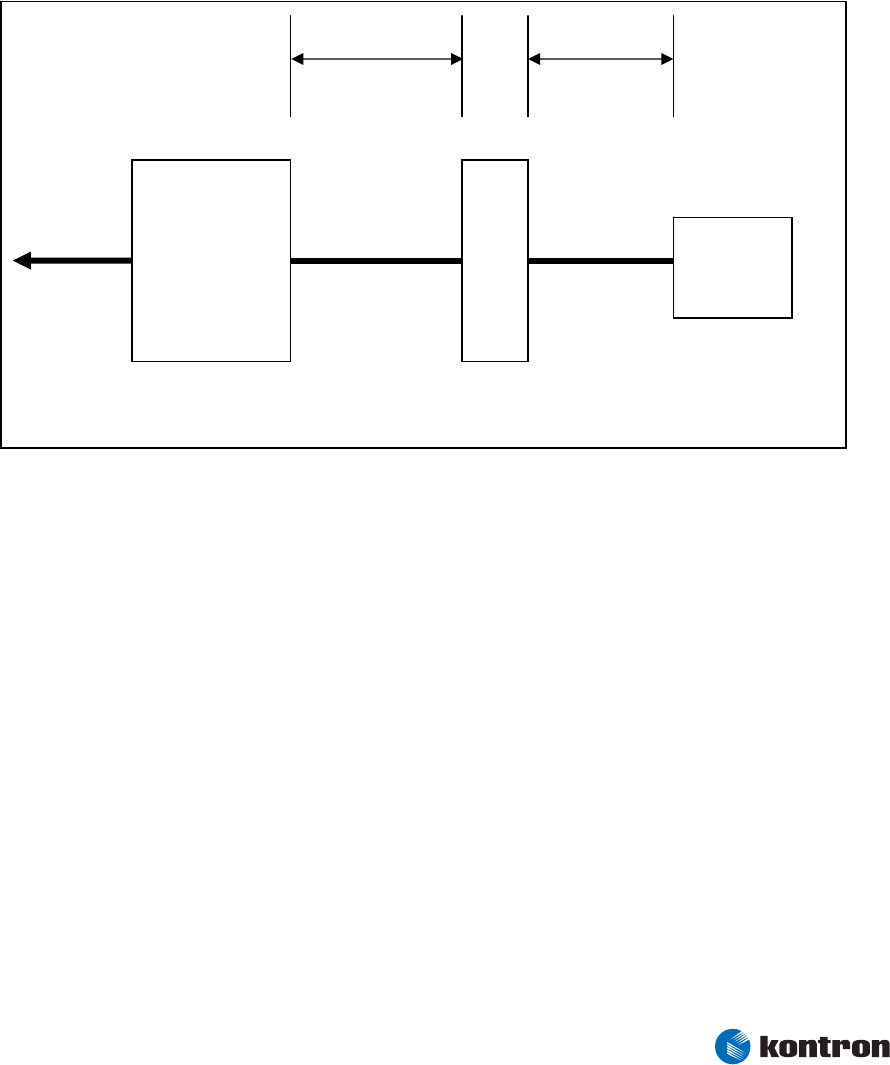
Figure 22 – Critical Dimensions
There are two critical dimensions that must be considered during the layout phase of an Ethernet
controller. These dimensions are identified in Figure 22 as A and B.
Distance A: Transformer to RJ45 (Priority 1); the distance labeled “A” should be given the highest
priority in the backplane layout. The distance between the transformer module and the RJ45 connector
should be kept to less than 1 inch of separation. The following trace characteristics are important and
should be observed:
® 1) Differential Impedance: The differential impedance should be 100 Ω. The single
ended trace impedance will be approximately 50 Ω; however, the differential
impedance also can be affected by the spacing between the traces.
Fast Ethernet
Controller
Transformer
RJ45
B
A
Differential
Pairs
PCI

6 Connector X4
® 2) Trace Symmetry: Differential pairs (such as RXD and TXD) should be routed with
consistent separation and with exactly the same lengths and physical dimensions
(for example, width).
Notes: Asymmetrical and unequal length traces in the differential pairs contribute to common mode
noises. This can degrade the receive circuit’s performance and contribute to radiated emissions from the
transmit circuit. If the Ethernet controller must be placed further than two inches from the RJ45 connector,
Distance B can be sacrificed. Keeping Distance A as short as possible should be a priority.
Distance B: PHY to Transformer (Priority 2) Distance B from Figure 20 also should be designed to extend
as short as possible between devices. The high-speed nature of the signals propagating through these
traces requires that the distances between these components be closely observed.
In general, any section of traces that is intended for use with high-speed signals should observe proper
termination practices.
Many board layouts remove the ground plane underneath the transformer and RJ45 jack to minimize
capacitive coupling of noise between the plane and the external Ethernet cable.
® Some ETX® modules require VCC_3V (from ETX® X1 Pins 12, 16 and 24) to be applied
to the center tap of the transformer’s transmit winding. Others do not. This
implementation difference can be handled as a baseboard build option, by loading or
omitting the ferrite bead when appropriate. In some cases, it may be desirable to
install a Berg jumper in series with the ferrite bead so the baseboard configuration
can be changed without soldering.
6.4.2 Ethernet LEDs
Link and activity LEDs can be implemented by using the ETX® module’s LILED# and ACTLED# pins. These
pins sink current and are intended for attachment to a LED cathode. The anode of the LED should be
pulled to VCC_3V through a resistor of 470 Ohms or greater.
6.4.3 Ethernet Limitation
According to the Physical Layer Specifications of IEEE802.3 an Ethernet controller should be able to
drive a segment length of 100 m. Therefore most Ethernet controllers are designed to meet this
requirement, if all Design & Layout Recommendations are met. However this is the point where problems
arise for the ETX®-standard for the following reasons:
® Due to the dimensions of the ETX® standard the Ground Plane of the ETX® module
often cannot be made as large as recommended
® Due to the direct proximity to other controllers with high frequent pulses the Ground
Plane cannot be held as proper as recommended
Kontron Design Guide ETX® 50

6 Connector X4
Kontron Design Guide ETX® 51
® Due to the modular ETX® concept the distance controller-magnetics will be longer
than having controller-magnetics-jack on one board
® Due to the modular ETX® concept a transmission line discontinuity occurs at the
connectors modul-to-baseboard, attenuating the signal and reducing signal quality
In consequence it may be possible that an ETX® application will not be able to reach the mentioned 100
m limit. During the Product Release Process Kontron tests Ethernet transmission with 50 m Cable length.
So this length can at least be reached with all Kontron ETX®-modules, proper baseboard design
provided. More detailed information concerning Ethernet Transmission length with particular boards on
request.
6.5 Miscellaneous Circuits
6.5.1 Speaker
The SPKR output from the ETX® module is a CMOS level signal. It can control an external FET or logic gate
that drives an external PC speaker.
The ETX® module’s SPKR output should not be directly connected to either a pullup or a pulldown
resistor. The SPKR signal is often used as a configuration strap for the core chipset in ETX® modules. A
pullup or pulldown on this signal can override the internal setting in the module and result in
malfunction of the module.
6.5.2 Battery
The internal real-time clock in the ETX® module requires a constant source of power for timekeeping. On
some ETX® modules, the battery input also is required to retain setup parameters in the CMOS memory.
A 3V Lithium cell is usually used for the RTC battery. The positive terminal is connected to the BATT pin of
the ETX® module, and the negative terminal is connected to ground.
The battery is typically a coin cell type such as a CR2032, but this may not be suitable for all applications.
Some applications may require an RTC battery with greater capacity than small coin cells can provide.
The required battery capacity varies among ETX® modules and operating conditions. In particular,
sustained high operating temperatures will increase both the battery current requirements of the ETX®
module and the battery’s internal self-discharge rate. The combination of these factors may result in a
required battery capacity substantially greater than that typical for a benign office environment.
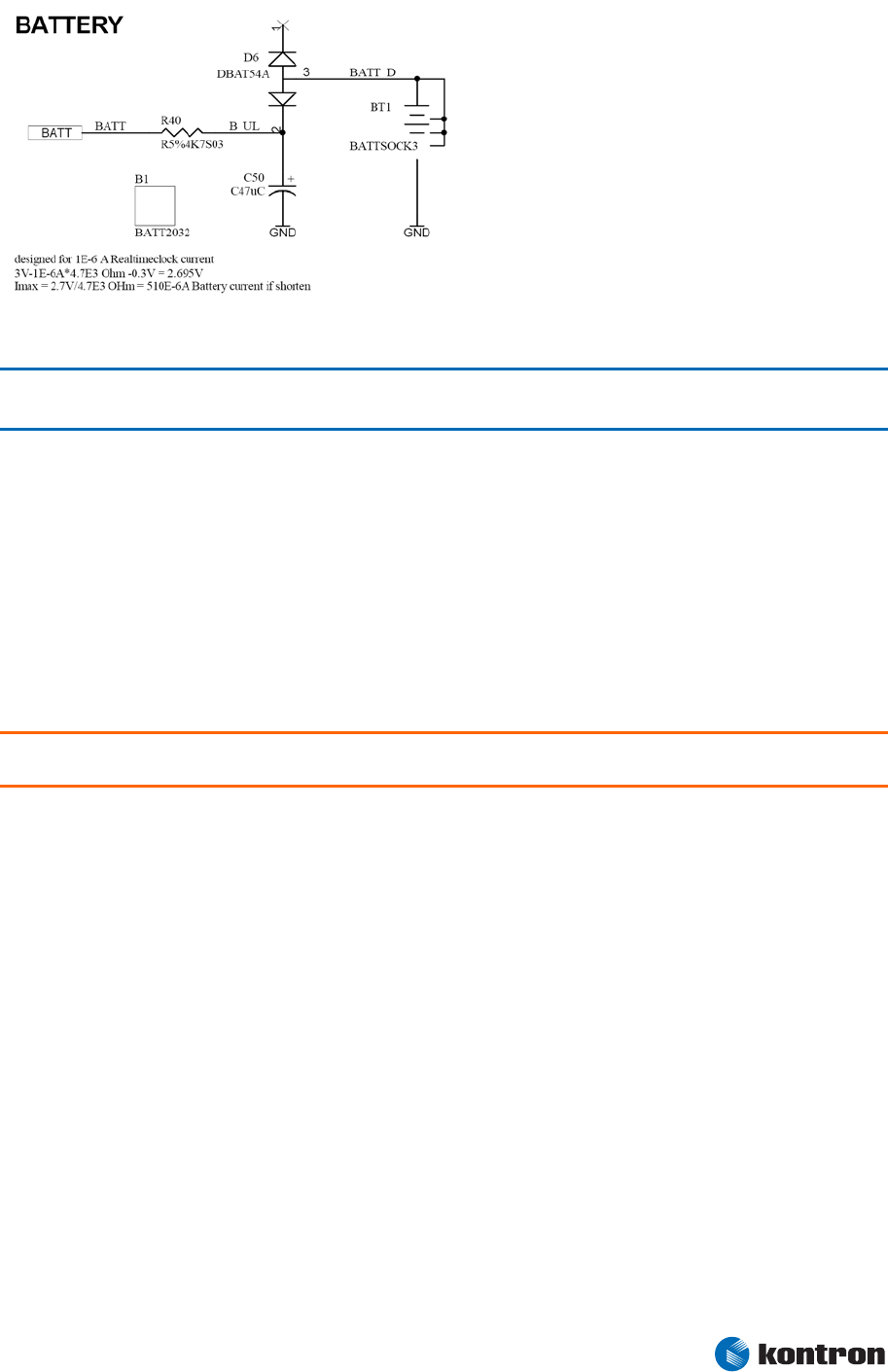
6 Connector X4
Figure 23: Battery Circuit
Note: According to UL60950 and EN60950 it is in the customer responsibility to design the battery circuit so that
the battery cannot be loaded by a reverse current.
The power up sequence of all ETX® boards should be:
® RTC battery voltage
® Stb voltage
® VCC
It is possible to skip the Stb Voltage and run the board in AT mode.
It is also possible to skip the battery voltage, but this might lead to start up problems either in ATX or AT
mode.
Warning: When the module is driven withouth an RTC battery it is highly recommended to postpone the startup
for 3 seconds by delaying the PWGIN signal.
6.5.3 I2C Bus
Most ETX® modules provide a software-driven I2C port for communication with external I2C slave
devices. This port is implemented on ETX® Pins I2DAT and I2CLK.
The implementation details and software interface for this port are different between ETX® modules.
Refer to the individual ETX® user’s guide for details.
6.5.4 SM Bus
Most ETX® modules provide an SMBus port for communication with external SMBUS slave devices. This
port also is used internally in the ETX® module to communicate with onboard SMBUS devices such as the
SPD EEPROMs on DIMMS, clock-generator chips, and hardware- monitoring devices. The port is
externally available on the ETX® pins SMBDAT and SMBCLK.
The addresses for any external SMBus devices must be chosen so that they do not conflict with the
addresses that are used internally in the ETX® module. If the device offers externally controllable
address options, it is desirable to implement baseboard resistor straps to allow the device to be set to at
least two possible SMBus addresses.
Kontron Design Guide ETX® 52

6 Connector X4
The implementation details and software interface for this port differ between ETX® modules. Refer to
the individual ETX® user’s guide for details.
Special care should be taken in external use of the SMBus because of its importance to the internal
operation of the ETX® module. Consultation with Kontron Embedded Modules technical support is
recommended.
6.5.5 Power Good / Reset Input
The ETX® Power Good Input (PWGIN) may be attached to an external power good circuit if desired, or
used as a manual reset input by grounding the pin with a momentary-contact pushbutton switch.
If an external circuit asserts this signal, it should be driven by an open-drain driver and held low for a
minimum of 15mS to initiate a reset.
Use of this input is optional. The ETX® module generates its own power-on reset based on an internal
monitor on the +5V input voltage and/or the internal power supplies.
6.5.6 Keyboard Inhibit
Most ETX® modules support a keyboard inhibit pin (KBINH#) that you can use to disable keyboard
operation for security reasons. This pin may be attached to an external lock switch or other locking
device.
The implementation details for this feature can differ between ETX® modules. Refer to the individual
ETX® user’s guide for details.
6.5.7 ATX Power Supply Control
Most ETX® modules provide support for ATX-style power supplies in which the main power output of the
supply is controlled by the ETX® module.
The power supply must provide a constantly present source of 5V power to support this functionality. The
typical current consumption from the 5V_SB supply pin you can find in the user´s guide of the
individual ETX® module.
If an ATX power supply is not used, the ETX® module’s PS_ON, 5V_SB, and PWRBTN# pins should be left
unconnected.
PS_ON
On ETX® modules that support ATX-style power supplies, the PS_ON signal is an active-low output that
turns on the main outputs of the supply. This is an open-collector signal and should be pulled up to the
5V_SB supply voltage with a 1K resistor. (Typically, there is a pullup resistor implemented in the power
supply itself, but it is good practice to also implement a position for a pullup resistor in the baseboard
circuitry).
Kontron Design Guide ETX® 53

6 Connector X4
PWRBTN#
On ETX® modules that support ATX-style power supplies, this signal used for a momentary-contact,
active-low pushbutton input. The other terminal of the pushbutton should be grounded. The ETX®
module implements an internal pullup to 5V_SB for this signal.
Asserting PWRBTN# indicates that the operator wants to turn the power on or off. The system response to
this signal can vary among ETX® modules and can be subject to modification by BIOS settings or system
software.
6.5.8 OVCR#
This active-low input allows an external overcurrent protection device on one or more of the USB ports
to indicate an overcurrent condition. Response to this signal depends upon system software. The
implementation details for this feature may differ between different ETX® modules. Refer to the
individual ETX® user’s guide for details.
6.5.9 External SMI Interrupt
The active-low SMI input allows external devices to signal a system-management event. Response to this
signal depends upon system software.
This signal is pulled up to 5V_SB internally to the ETX® module. External circuitry driving this signal also
should be powered from a supply that is active whenever 5V_SB is active.
The 5V_SB always will be active whenever power is applied to the ETX® module’s VCC pins. This is only a
concern when the main power supply to the ETX® module is powered down.
The implementation details for this feature can be different between ETX® modules. Refer to the
individual ETX® user’s guide for details.
Kontron Design Guide ETX® 54

7 Power Supply Recommendations
Kontron Design Guide ETX® 55
7
7.1
7.2
Power Supply Recommendations
Power Requirements
ETX® modules operate entirely from 5-volt input power. All other necessary voltages are generated on
the ETX® module using onboard power supplies.
The power requirements of ETX® modules vary substantially, depending on the processor type and
speed. To accommodate the fastest future modules, it is recommended that the 5V supply be capable of
delivering 6 amperes average current to the ETX® module (with momentary peak current to 9 amperes).
It also is recommended that the thermal management solution be capable of removing 30 watts from the
ETX® module’s heat spreader plate while maintaining conservative operating temperatures.
These recommendations may be difficult to meet in many applications. In these cases, the power supply
and the thermal solution can be sized for substantially lower power, as long as it is understood that the
application may not be able to host very high performance ETX® modules with correspondingly high
power consumption.
Power Supply Considerations
The designer should consider several factors when designing power supplies for ETX® systems:
® ETX® modules can provide a limited amount of 3.3V power from their onboard power
supplies. The output current is limited to 500mA. If external system components
require more 3.3V power than this 500mA limit, the baseboard will need to
implement a 3.3V supply.
® Do not connect the outputs of an external 3.3V supply to the 3.3V pins on the ETX®
module because this will cause the power supplies to fight each other and possibly
cause a malfunction of the ETX® module or the external power supply.
® Baseboard designs frequently fuse power outputs to external devices (such as the
keyboard and USB devices) with solid-state or polyswitch overcurrent protection
devices. The protective devices typically open only after passing several times their
rated current for a significant period. If the system power supply is not capable of
supplying the current required to open the protective device, the system may crash
in the presence of an external fault. This may compromise system reliability and
complicate system fault diagnosis.
Occasionally, problems arise with external 5V power supplies that produce a non-monotonic voltage rise
at turn-on. Some ETX® internal circuits, such as clock-generator chips, generate their own reset signals
based on the supply voltage passing a certain voltage threshold. If there is a voltage dip after this
threshold is passed, these circuits may become confused and malfunction. This problem is rare, but it
has been observed in custom mobile power-supply designs. It is advisable to observe the power supply
rise waveform with an oscilloscope during power supply qualification to confirm that the rise is
monotonic and does not contain dips.

7 Power Supply Recommendations
Kontron Design Guide ETX® 56
7.3 S3 Suspend to RAM
When the module is driven in suspend to RAM (S3) the 5V VCC is switched off, but the current OS image is
stored in the RAM, which is supplied by 5V_Stb.
It can lead to power leakage and feedback effects, when signals on the baseboard are pulled up or
supplied by 5V VCC and the board is currently driven only by 5V_Stb. So it is recommended to pull-up the
floppy signals to 5V_Stb instead of 5V and to drive the USB devices also with 5V_Stb when in the system
S3 is used.

8 Mechanical Considerations
Kontron Design Guide ETX® 57
8
8.1
8.2
8.3
Mechanical Considerations
Baseboard Layout Drawing
The ETX® Specification document contains two mechanical drawings. One drawing is of the module
itself, while the other drawing is of the baseboard connector placement.
It is important to use the baseboard connector placement drawing for baseboard design. The locating
pins for the ETX® connectors on the baseboard drawing are in a slightly different position than on the
module drawing because of the connector design.
Module Dimensions
All ETX® modules have the same mounting hole and connector locations and are mechanically
interchangeable. However, during the evolution of the ETX® standard, the specified overall Y dimension
of the module was reduced from 100mm to 95mm. This allows ETX® modules to be used in certain
applications in which the previous form factor was slightly oversized.
New designs will conform to the 95mm specification, but ETX® designs with the 100mm Y dimension will
continue to be produced. Baseboard designers should allow 100mm for the module Y dimension. This
will allow the baseboard to be used with all ETX® modules.
ETX® 3.0 specification
When a board supports the ETX® 3.0 specification it might have additional SATA connectors on its edges.
We recommend to avoid high components near the area of the additional connectors to allow cables be
plugged in.

9 Appendix F: PC Architecture Information
Kontron Design Guide ETX® 58
9
9.1
Appendix F: PC Architecture Information
The following sources of information can help you better understand PC architecture.
Buses
9.1.1 ISA, Standard PS/2 – Connectors
® AT Bus Design: Eight and Sixteen-Bit ISA, E-ISA and EISA Design, Edward Solari,
Annabooks, 1990, ISBN 0-929392-08-6
® AT IBM Technical Reference Vol 1&2, 1985
® ISA & EISA Theory and Operation, Edward Solari, Annabooks, 1992, ISBN
0929392159
® ISA Bus Specifications and Application Notes, Jan. 30, 1990, Intel
® ISA System Architecture, Third Edition, Tom Shanley and Don Anderson, Addison-
Wesley Publishing Company, 1995, ISBN 0-201-40996-8
® Personal Computer Bus Standard P996, Draft D2.00, Jan. 18, 1990, IEEE Inc
® Technical Reference Guide, Extended Industry Standard Architecture Expansion Bus,
Compaq 1989
9.1.2 PCI/104
® Embedded PC 104 Consortium:
The consortium provides information about PC/104 and PC/104-Plus technology. You
can search for information about the consortium on the Web.
® PCI SIG
The PCI-SIG provides a forum for its ~900 member companies, who develop PCI
products based on the specifications that are created by the PCI-SIG. You can search
for information about the SIG on the Web.
® PCI & PCI-X Hardware and Software Architecture & Design, Fifth Edition, Edward
Solari and George Willse, Annabooks, 2001, ISBN 0-929392-63-9.
® PCI System Architecture, Tom Shanley and Don Anderson, Addison-Wesley, 2000,
ISBN 0-201-30974-2.

9 Appendix F: PC Architecture Information
Kontron Design Guide ETX® 59
9.2
9.3
General PC Architecture
® Embedded PCs, Markt&Technik GmbH, ISBN 3-8272-5314-4 (German)
® Hardware Bible, Winn L. Rosch, SAMS, 1997, 0-672-30954-8
® Interfacing to the IBM Personal Computer, Second Edition, Lewis C. Eggebrecht,
SAMS, 1990, ISBN 0-672-22722-3
® The Indispensable PC Hardware Book, Hans-Peter Messmer, Addison-Wesley, 1994,
ISBN 0-201-62424-9
® The PC Handbook: For Engineers, Programmers, and Other Serious PC Users, Sixth
Edition, John P. Choisser and John O. Foster, Annabooks, 1997, ISBN 0-929392-36-1
Ports
9.3.1 RS-232 Serial
® EIA232E standard
The EIA-232-E standard specifies the interface between (for example) a modem and a
computer so that they can exchange data. The computer can then send data to the
modem, which then sends the data over a telephone line. The data that the modem
receives from the telephone line can then be sent to the computer. You can search
for information about the standard on the Web.
® RS-232 Made Easy: Connecting Computers, Printers, Terminals, and Modems, Martin
D. Seyer, Prentice Hall, 1991, ISBN 0-13-749854-3
® National Semiconductor
The Interface Data Book includes application notes. Type “232” as a search criteria to
obtain a list of application notes. You can search for information about the data book
on National Semiconductor’s Web site.
9.3.2 Serial ATA
Serial AT Attachment (ATA) Working Group
This X3T10 standard defines an integrated bus interface between disk drives and host processors. It
provides a common point of attachment for systems manufacturers and the system. You can search for
information about the working group on the Web.
We recommend you also search the Web for information on 4.2 I/O cables, if you use hard disks in a
DMA3 or PIO4 mode.

9 Appendix F: PC Architecture Information
9.3.3 USB
USB Specification
USB Implementers Forum, Inc. is a non-profit corporation founded by the group of companies that
developed the Universal Serial Bus specification. The USB-IF was formed to provide a support
organization and forum for the advancement and adoption of Universal Serial Bus technology. You can
search for information about the standard on the Web.
9.3.4 Programming
® C Programmer’s Guide to Serial Communications, Second Edition, Joe Campbell,
SAMS, 1987, ISBN 0-672-22584-0
® Programmer’s Guide to the EGA, VGA, and Super VGA Cards, Third Edition, Richard
Ferraro, Addison-Wesley, 1990, ISBN 0-201-57025-4
® The Programmer’s PC Sourcebook, Second Edition, Thom Hogan, Microsoft Press,
1991, ISBN 1-55615-321-X
® Undocumented PC, A Programmer’s Guide to I/O, CPUs, and Fixed Memory Areas,
Frank van Gilluwe, Second Edition, Addison-Wesley, 1997, ISBN 0-201-47950-8
Kontron Design Guide ETX® 60

10 APPENDIX G: DOCUMENT-REVISION HISTOR
Y
Kontron Design Guide ETX® 61
10 APPENDIX G: DOCUMENT-REVISION HISTORY
Revision Date Edited By Changes to Preceding Revision
0.1 18 Jan 01 RVS Initial Draft
0.9 22 Mar 01 BB Preliminary Release
1.0 23 May 01 BB Release
1.1 21 Mar 03 GDA and RV Updates with technical changes throughout.
1.2 14 April 03 HCH Added PCI INT diagram.
1.3 25 April 03 HCH Changed PCI INT table for better understanding.
1.4 11 August 03 GDA Inserted proper diagram “PCI bus slot connector” figure 2
section 3.3
1.5 12 Jan 04 GDA Added notes to section 6.4 Ethernet Circuits
1.6 02 Mar 04 GDA Corrected information in Ethernet Circuit diagram in
section 6.4.
1.7 26.May.04 GDA Corrected description of Pin 90 in the X4 connector pinout
table. The pin is high active not low active.
1.8 8.July.04 GDA
Changed Figure 15 in section 5.10 in order to provide a
better example of parallel connector and circuitry.
Changed Pin description of Parallel Port Mode Pinout
Table pin 86 BUSY# to BUSY. Changed Pin descriptions
of X4 Connector Pinout Table pins 9 KBINH, 10 LILED,
12 ACTLED, and 14 SPEEDLED to KBINH#, LILED#,
ACTLED#, and SPEEDLED#.
1.9
20. Jan. 2006
GUL
Updated Layout of document
Update CF-socket for DMA support
Removed power consumption of 5V_SB pin and refered
to the corresponding user´s guide
2.0 23. Jan. 2006 GUL Corrected DMA-support for CF
Released for Web
2.1
17. Mai 2006
19. Mai 2006
20.10.2006
GUL
GUL
Added Ethernet Limitation
Added Battery Circuit
Changed to new Kontron Style
Released
2.2 15. März 2007 UMA
Changed to new Layout
Added EMI suggestion
Added ETX® 3.0 mechanical considerations
2.3 24. Nov. 2007 UMA Added recommended power up sequencing in 6.5.2
2.4 29.07.2009 UMA
Added USB Signal Integrity chapter, added power chaper
S3 suspend to RAM, added warning for missing IDE
signals in IDE chapter
