L011052 Industrial HMI Spec Sheet
User Manual: L011052 - Industrial HMI Spec Sheet
Open the PDF directly: View PDF  .
.
Page Count: 7
FEATURES
GENERAL SPECIFICATIONS
910 East Orangefair Ln. Anaheim, CA 92801 Tel. (714) 992-6990 Fax. (714) 992-0471 www.anaheimautomation.com
DESCRIPTION
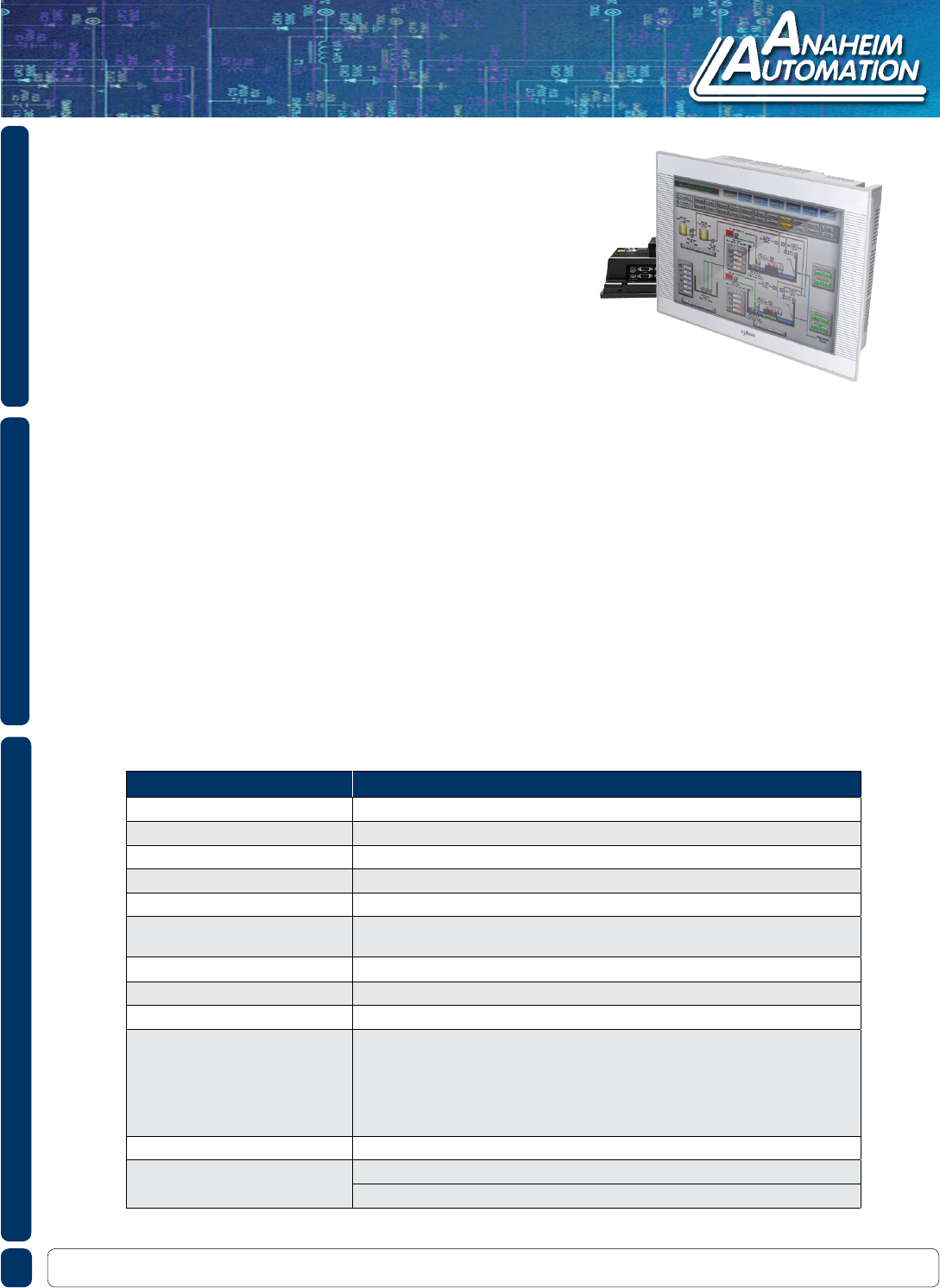
The Industrial HMI line offers high performance, excellent stability, and reliability. Its Intel ATOM N450
processor allows for clock speeds up to 1.66 GHz. The CIMON line of Industrial HMIs comes in 12”, 15”
and 19” displays with touch operation. The industrial HMI module offers the capabilities of a PC with its
VGA ports, printer port, and multiple Ethernet and Serial Ports. Capable of processing even the simplest
tasks, the Industrial HMI can also easily handle complicated tasks such as data algorithm, pre-treatment
operation, data storage, and connection with other systems. The ATOM processor allows the Industrial
HMI to support simultaneous communication without compromising reliability. The efcient fanless design
maintains inner temperature while reducing maintenance costs. Easily transfer CIMON-HMI project les
using USB ports and networks or simply connect a keyboard and mouse and edit a project directly from
the unit.
L011052
CIMON - Industrial HMICIMON - Industrial HMI
• Fanless Design Dissipates Internal Heat Generated
• High Denition, Abundant Color
• TFT LCD Structure
• Slim and Simple Structure
• Fast Response and Excellent Reliability
• Multimedia System
• Various Automation Control Programs
• All-in-One Embedded Board Applied
• Windows Embedded XP POSReady 2009
• P/G, the O/S Protection Utility is Installed
Item Descprition
Permitted Voltage 24 VDC or 100 ~ 240 VAC
Ambient Temperature 0° ~ 50°C
Storage Temperature -20° ~ 60°C
Ambient Humidity 10% ~ 90%RH (Non-Condensing, Wet Bulb Temperature: 39°C Maximum)
Storage Humidity 10% ~ 90%RH (Non-Condensing, Wet Bulb Temperature: 39°C Maximum)
Air Pressure Vibration Resistance
(Availment Altitude) 800 ~ 1,114hPa (Up to 2,000m/6,5000ft)
Dust 0.1mg/m3 or Less
Pollution Degree Less than Equal to Pollution Degree 2
Corrosive Gases Free from Corrosive Gases
Vibration Resistance
IEC61131-2 Compliant
Occasional Vibration
10 ~ 75Hz 0.075mm, 57 ~ 150Hz 9.8m/s2
Continuous Vibration
10 ~ 57Hz 0.035mm, 57 ~ 150Hz 4.9m/s2
X,Y,Z direction for 10 cycles (80 minutes)
Noise Resistance ±2kV, 1μS
Electrostatic Discharge Immunity Contact Sischarge 4kV (IEC61000-4-2)
Air Discharge 8kV
910 East Orangefair Ln. Anaheim, CA 92801 Tel. (714) 992-6990 Fax. (714) 992-0471 www.anaheimautomation.com
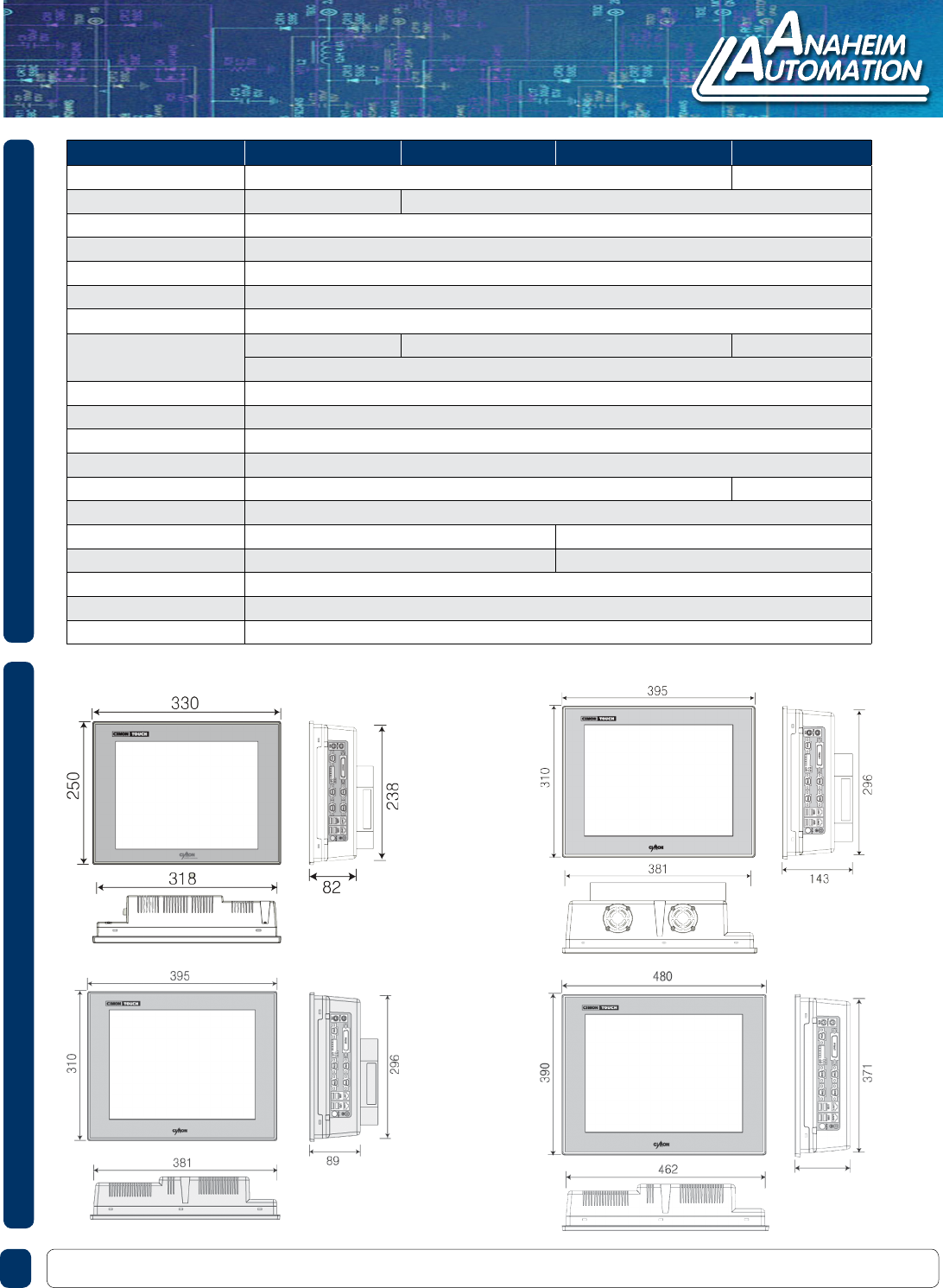
Type P12FS P15FS P15FP P19FP
Touch Screen 1024 x 768 (Analog 8- Wire Resistive) 1280 x 1024
Color 262K 16.7M
Touch Controller PenMount USB Controller
CPU Intel ATOM Processor N450 1.6 GHz (Fanless)
RAM 1GB DDR2 SDRAM
Storage 64 GB SSD (CF card 4GB, 8GB Options)
Graphic Chip Intel GMA 3150 Integrated
Display 12.1” TFT LCD 15” TFT LCD 19” TFT LCD
CRT Output (15P DSUB)
Serial COM 1: RS232C/422/485, COM 2-4: RS232C
Ethernet 2 Gigabit Ethernet Ports
Parallel 1 Port
PS/2 Keyboard & Mouse
USB 4 USB 2.0 Ports 6 USB 2.0 Ports
Audio 1 Port
CD-ROM None 1 Slot
PCI Slot None 1 Slot
Operating System Windows Embedded XP POS Ready 2009
Utility Program Enhanced Write Filter (EWF-Disk Image Safeguard) / Rescue (Factory Default Recovering Tool)
Power 110~220 VAC
HMI-CM-P12FS HMI-CM-P15FP
HMI-CM-P15FS HMI-CM-P19FP
ITEM SPECIFICATIONSITEM DIMENSIONS
L011052
CIMON - Industrial HMICIMON - Industrial HMI
*All units are in mm
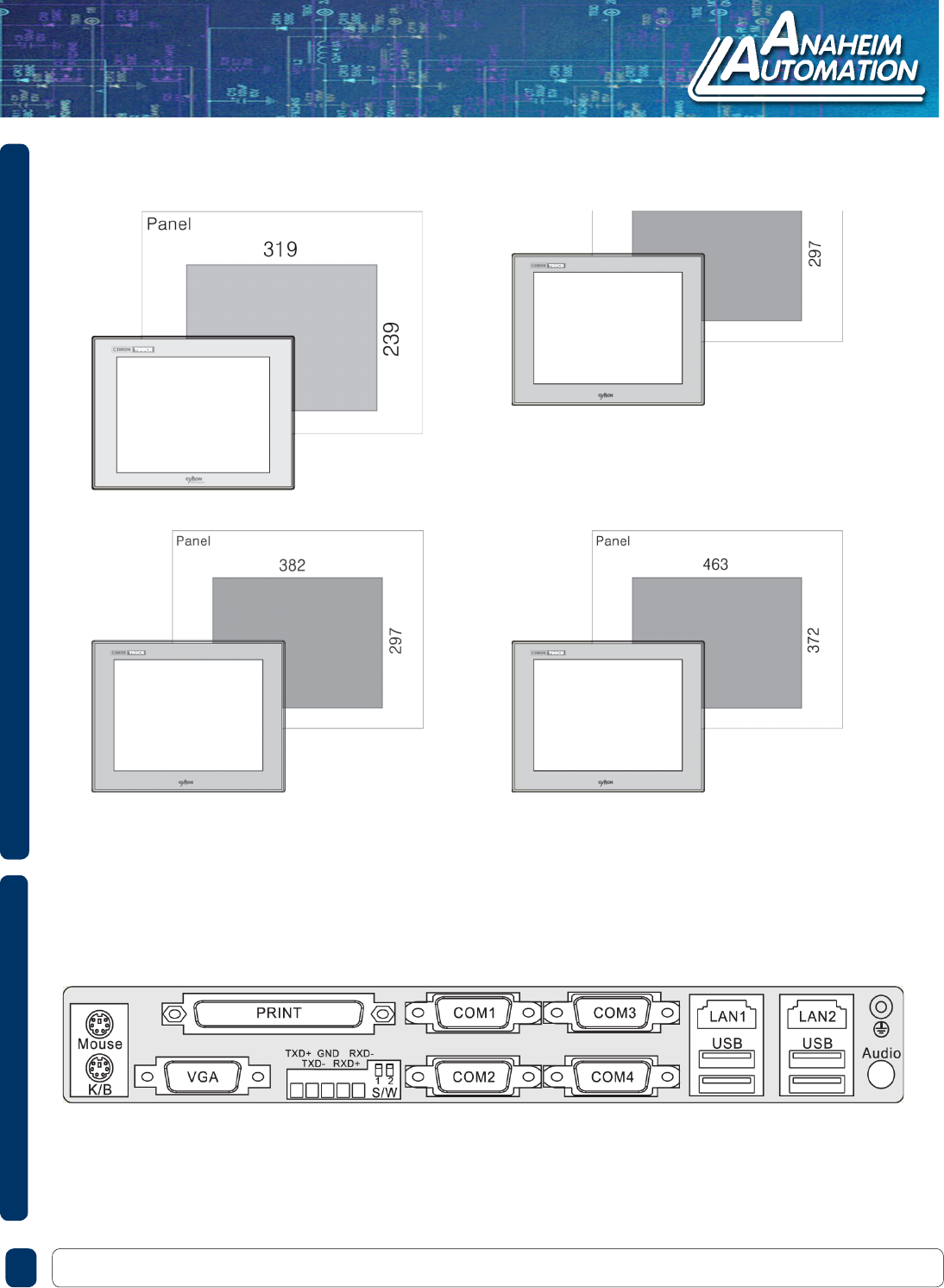
PANEL CUTOUT + DIMENSIONS
HMI-CM-P12FS
HMI-CM-P15FP
HMI-CM-P15FS HMI-CM-P19FP
910 East Orangefair Ln. Anaheim, CA 92801 Tel. (714) 992-6990 Fax. (714) 992-0471 www.anaheimautomation.com
L011052
INTERFACE ARRANGEMENT
CIMON - Industrial HMICIMON - Industrial HMI
*All units are in mm
HOOK UP DIAGRAMS
910 East Orangefair Ln. Anaheim, CA 92801 Tel. (714) 992-6990 Fax. (714) 992-0471 www.anaheimautomation.com
L011052
Connector Pin # Name Description
1 DCD Data Carrier Detect
2 RD Receive Data
3 TD Transmit Data
4 DTR Data Terminal Ready
5 SG Signal Ground
6 DSR Data Set Ready
7RTS Request To Send
8 CTS Clear To Send
9 RI Ring Indicator
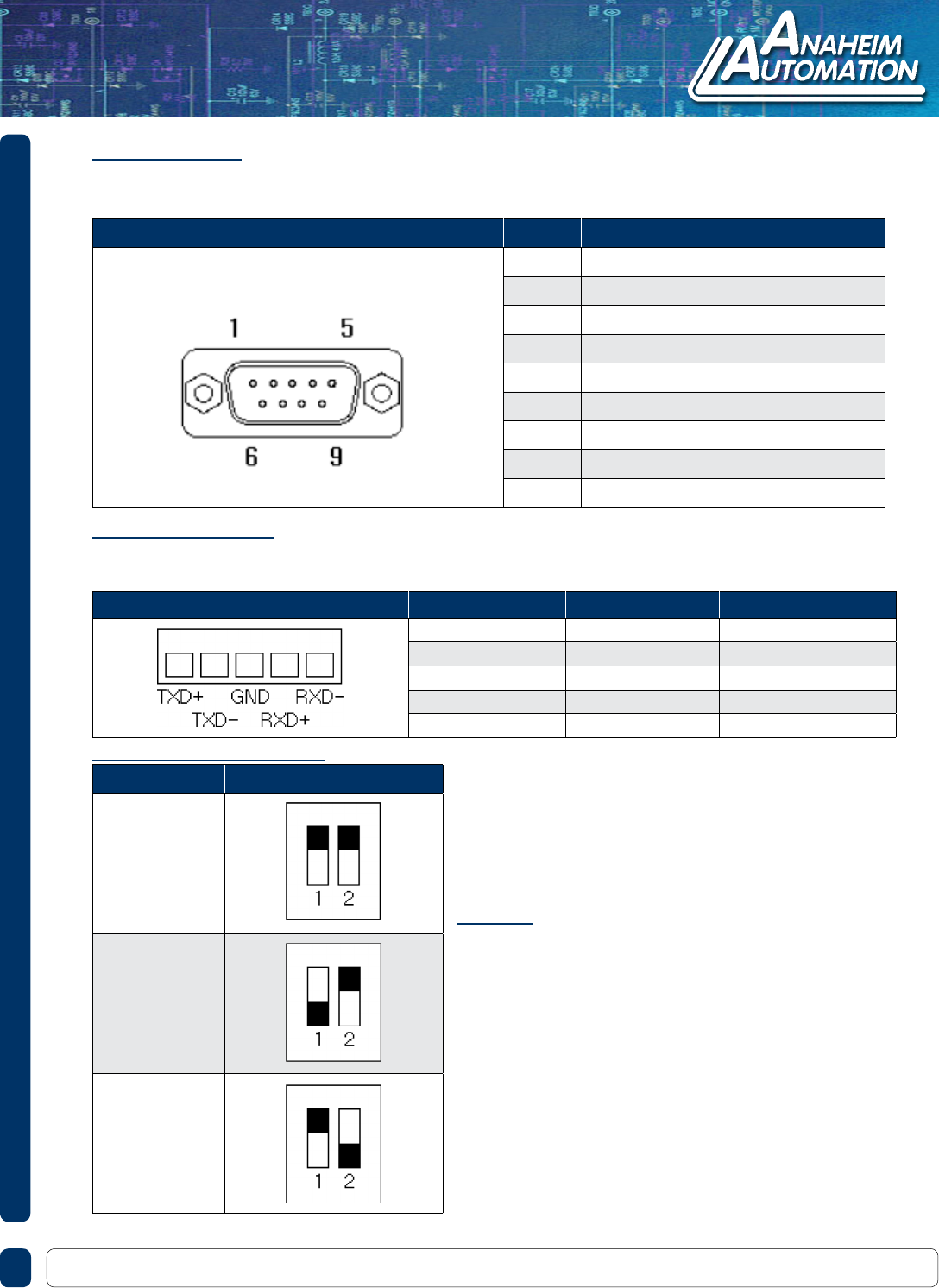
COM1: RS232C
This interface is used to connect the SCADA HMI to the host (PLC), via an RS-232C cable.
When you use COM1 RS-232C port, you must not use COM1 RS-485-422 port.
Connector Pin No. Name Description
1 TXD+ Transmit Data +
2 TXD- Transmit Data -
3 GND Ground
4 RXD+ Recieve Data +
5 RXD- Receive Data -
COM1: RS-422/485
This interface is used to connect the SCADA HMI to the host (PLC) via an RS-422/485 cable.
When you use COM1 RS-422/485 port, you must not use COM1 RS-232C port.
Type Switch
RS-232 (Default)
RS-485
RS-422
Communication Switches
• If you connect the SCADA HMI to the host via an
RS-485 cable (2 wire), you must connect the TXD+
and TXD- lines.
• The RS-485 of the SCADA HMI runds under auto
toggle mode.
• To reduce the risk of damaging the RS-422 circuit, be
sure to connect the SG terminal.
NOTE
CIMON - Industrial HMICIMON - Industrial HMI
910 East Orangefair Ln. Anaheim, CA 92801 Tel. (714) 992-6990 Fax. (714) 992-0471 www.anaheimautomation.com
L011052
HOOK UP DIAGRAMS
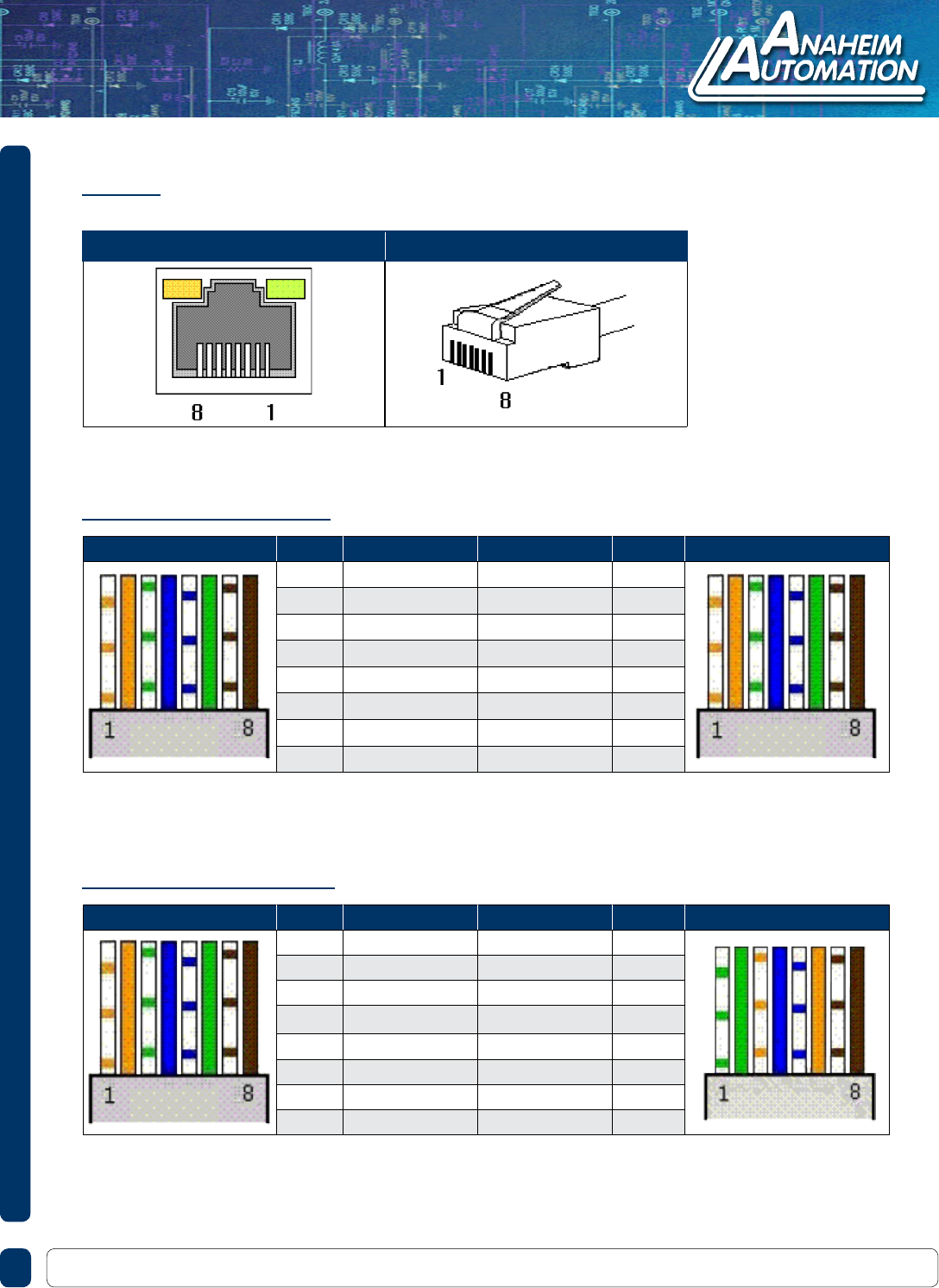
Ethernet
This interface complies with the IEEE802.3 for Ethernet (10 Base-T / 100 Base-TX).
RJ45 Front View RJ45 Side View
Host Cable Pin # Color Color Pin # Hub Cable
1 Orange/W Orange/W 1
2 Orange Orange 2
3 Green/W Green/W 3
4 Blue Blue 4
5 Blue/W Blue/W 5
6 Green Green 6
7 Brown/W Brown/W 7
8 Brown Brown 8
Host Cable Pin # Color Color Pin # Host Cable
1 Orange/W Green/W 1
2 Orange Green 2
3 Green/W Orange/W 3
4 Blue Blue 4
5 Blue/W Blue/W 5
6 Green Orange 6
7 Brown/W Brown/W 7
8 Brown Brown 8
Direct Cable: Host <-> Hub
Direct Cable: Host <-> Host
CIMON - Industrial HMICIMON - Industrial HMI

ESSENTIAL SAFETY PRECAUTIONS
910 East Orangefair Ln. Anaheim, CA 92801 Tel. (714) 992-6990 Fax. (714) 992-0471 www.anaheimautomation.com
L011052
• Do not create Industrial HMI graphic object that could possibly endanger the safety of the
• equipment and personnel. Damage to the Industrial HMI can cause an output signal to remain
ON or OFF continuously and can cause a major accident. Therefore, design all monitoring circuits
• using a limit switch to detect incorrect device movement.
• Do not create Industrial HMI graphic objects that control machine safety operations, such as an
emergency stop. Switches to control machine safety operations must be installed as separated
hardware switches.
• Design your system so that communication fault between the Industrial HMI and the controller of
the equipment can not make the equipment malfunction.
• Do not use the Industrial HMI as a warning device for critical alarms that can cause serious
• operator injury, machine damage or production stoppage.
• The Industrial HMI is not appropriate for use with aircraft control devices, aerospace equipment,
central trunk data transmission (communication) devices, nuclear power control devices, or
• medical life support equipment, due to these devices’ inherent requirements of extremely high
levels of safety and reliability.
• When using the Industrial HMI with transportation vehicles (trains, cars and ships), disaster and
crime prevention devices, various type of safety equipment, non-life support related medical
• devices, etc. redundant and/or fail-safe system designs should be used to ensure the proper
• degree of reliability and safety.
• After the backlight of the Industrial HMI burns out, the touch panel of the Industrial HMI is still
• active. if an operator does not notice that the backlight burned out and touches the panel, a
• potentially dangerous machine miss-operation can occur. Therefore, do not use the Industrial HMI
graphic objects for the control of any equipment safety mechanisms, such as emergency stop
switches, etc. that protect humans and equipment from injury and damage.
CIMON - Industrial HMICIMON - Industrial HMI

INSTALLATION
910 East Orangefair Ln. Anaheim, CA 92801 Tel. (714) 992-6990 Fax. (714) 992-0471 www.anaheimautomation.com
L011052
• Be sure to securely connect all cable connectors to the Industrial HMI. A loose connection may cause
incorrect input or output.
• High voltage runs through the Industrial HMI do not disassemble the Industrial HMI, otherwise an
electric shock can occur.
• Do not modify the Industrial HMI unit because a modied Industrial HMI can cause a re or an electric
shock.
• Do not use the Industrial HMI near ammable gasses because an explosion can occur.
• The Industrial HMI uses a lithium battery to back up its internal clock data. If the battery is
incorrectly replaced, the battery may explode. To prevent this, please do not replace the battery
yourself. When the battery needs to be replaced, please contact Anaheim Automation.
• The LCD contains a powerful irritant and if for any reason the panel is damaged and this liquid
contacts any part of your body, be sure to wash that area with running water for 15 minutes. If any of
this liquid enters your eye, ush your eye for 15 minutes with running water and contact a physician.
• To prevent an electric shcok, be sure to conrm that the power cord of the Industrial HMI is not
connected to the main power before connecting any cord, cables or line to the Industrial HMI.
• Do not use power beyond the specied voltage range of the Industrial HMI. Doing so may cause a
re or an electric shock.
• Ground the eld ground line of the Industrial HMI separately from eld ground lines of other units.
Putting these eld ground lines too close may cause an electric shock or unit malfunction. Be sure
to use a grounding resistance of 100Ω or less and a 2 mm2 or thicker wire, or applicable standard of
your country.
• Correctly wire the Industrial HMI, be sure that the rated voltage and terminal layout are within
the designated range. If the voltage supplied differs from the rated voltage, or incorrect wiring or
grounding is performed, it may cause a re or unit malfunction.
• Use only the designated torque to tighten terminal block screws of the Industrial HMI . If these screws
are not tightened rmly, it may cause a short circuit, re or Industrial HMI malfunction.
• Be careful that the metal lings and wiring debris do not fall into the Industrial HMI; they can cause a
re, Industrial HMI malfunction, or incorrect operation.
WIRING
MAINTENANCE
CIMON - Industrial HMICIMON - Industrial HMI
