LAUNCHXL F28377S Overview User's Guide (Rev. C)
LAUNCHXL_F28377S_Guide
User Manual:
Open the PDF directly: View PDF  .
.
Page Count: 25

LAUNCHXL-F28377S Overview
User's Guide
Literature Number: SPRUI25C
June 2015–Revised April 2017

2SPRUI25C–June 2015–Revised April 2017
Submit Documentation Feedback
Copyright © 2015–2017, Texas Instruments Incorporated
Table of Contents
Contents
1 Trademarks ......................................................................................................................... 4
2 Introduction......................................................................................................................... 5
3 Kit Contents ........................................................................................................................ 6
4 Installation .......................................................................................................................... 6
4.1 Code Composer Studio ................................................................................................. 6
5 Getting Started with the LAUNCHXL-F28377S.......................................................................... 7
5.1 Getting Started ........................................................................................................... 7
5.2 Demo Application, ADC Sampling ..................................................................................... 7
5.3 Program and Debug the ADC Sample Demo Application .......................................................... 7
6 Hardware Configuration........................................................................................................ 8
6.1 ADC Resolution .......................................................................................................... 8
6.2 Power Domain............................................................................................................ 8
6.3 Boot Mode Selection..................................................................................................... 8
6.4 Connecting a BoosterPack.............................................................................................. 8
6.5 Device Migration Path ................................................................................................... 8
7 LAUNCHXL-F28377S Hardware.............................................................................................. 9
7.1 Device Pin Out............................................................................................................ 9
7.2 Schematics .............................................................................................................. 11
7.3 PCB Layout.............................................................................................................. 17
7.4 Bill of Materials (BOM) ................................................................................................. 18
8 References ........................................................................................................................ 22
9 Frequently Asked Questions (FAQ) ...................................................................................... 23
Revision History.......................................................................................................................... 24

www.ti.com
3
SPRUI25C–June 2015–Revised April 2017
Submit Documentation Feedback Copyright © 2015–2017, Texas Instruments Incorporated
List of Figures
List of Figures
1 LAUNCHXL-F28377S Board Overview ................................................................................... 6
2 LAUNCHXL-F28377S_B Block Diagram Schematic .................................................................. 11
3 LAUNCHXL-F28377S XDS100v2 Schematic .......................................................................... 12
4 LAUNCHXL-F28377S Power Schematic................................................................................ 13
5 LAUNCHXL-F28377S_A Schematic..................................................................................... 14
6 LAUNCHXL-F28377S_B Schematic..................................................................................... 15
7 LAUNCHXL-F28377S BoosterPack Schematic ........................................................................ 16
8 Top Silk ...................................................................................................................... 17
9 Top Copper ................................................................................................................. 17
10 Inner Copper 1.............................................................................................................. 17
11 Inner Copper 2.............................................................................................................. 17
12 Bottom Silk .................................................................................................................. 17
13 Bottom Copper.............................................................................................................. 17
List of Tables
1 F28377S LaunchPad Pin Out and Pin Mux Options - J1, J3 .......................................................... 9
2 F28377S LaunchPad Pin Out and Pin Mux Options - J4, J2 .......................................................... 9
3 F28377S LaunchPad Pin Out and Pin Mux Options - J5, J7......................................................... 10
4 F28377S LaunchPad Pin Out and Pin Mux Options - J8, J6......................................................... 10
5 LAUNCHXL-F28377S Bill of Materials .................................................................................. 18

www.ti.com
4SPRUI25C–June 2015–Revised April 2017
Submit Documentation Feedback
Copyright © 2015–2017, Texas Instruments Incorporated
List of Tables
1 Trademarks
C2000, Delfino, LaunchPad, Code Composer Studio are trademarks of Texas Instruments.
Windows is a registered trademark of Microsoft Corporation in the United States and/or other countries.
All other trademarks are the property of their respective owners.

5
SPRUI25C–June 2015–Revised April 2017
Submit Documentation Feedback Copyright © 2015–2017, Texas Instruments Incorporated
LAUNCHXL-F28377S Overview
User's Guide
SPRUI25C–June 2015–Revised April 2017
LAUNCHXL-F28377S Overview
2 Introduction
The C2000™ Delfino™ LaunchPad™, LAUNCHXL-F28377S, is a complete low-cost development board
for the Texas Instruments Delfino F2837xS devices. The LAUNCHXL-F28377S kit features all the
hardware and software necessary to develop applications based on the F2837xS microprocessor. The
LaunchPad is based on the superset F28377S device, and easily allows users to migrate to lower cost
F2837xS devices once the design needs are known. It offers an on-board JTAG emulation tool allowing
direct interface to a PC for easy programming, debugging, and evaluation. In addition to JTAG emulation,
the USB interface provides a UART serial connection from the F2837xS device to the host PC.
Users can download an unrestricted copy of the latest version of Code Composer Studio™ IDE version 6
to write, download, and debug applications on the LAUNCHXL-F28377S board. The debugger is
unobtrusive, allowing the user to run an application at full speed with hardware breakpoints and single
stepping available while consuming no extra hardware resources.
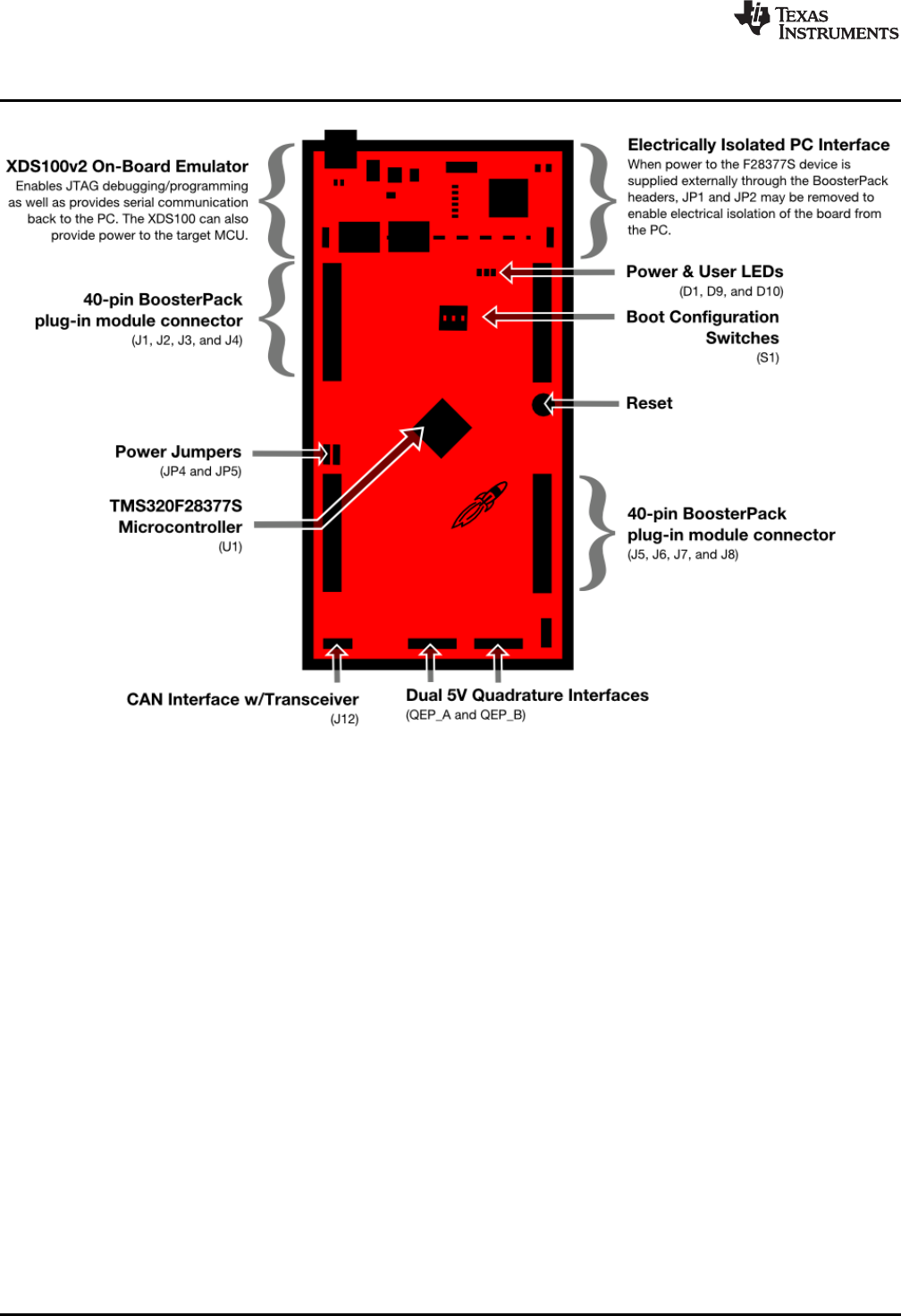
As shown in Figure 1, the LAUNCHXL-F28377S C2000 LaunchPad features include:
• USB debugging and programming interface via a high-speed galvanically isolated XDS100v2 emulator
featuring a USB/UART connection
• Superset F28377S device that allows applications to easily migrate to lower cost devices
• Two user LEDs
• Device reset pushbutton
• Easily accessible device pins for debugging purposes or as sockets for adding customized extension
boards
• Dual 5V quadrature encoder interfaces
• CAN Interface with integrated transceiver
• Boot selection switches
Kit Contents
www.ti.com
6SPRUI25C–June 2015–Revised April 2017
Submit Documentation Feedback
Copyright © 2015–2017, Texas Instruments Incorporated
LAUNCHXL-F28377S Overview
Figure 1. LAUNCHXL-F28377S Board Overview
3 Kit Contents
The LAUNCHXL-F28377S LaunchPad experimenter kit includes the following items:
• C2000 Delfino LaunchPad Board (LAUNCHXL-F28377S)
• Mini USB-B Cable, 0.5m
• Quick Start Guide
4 Installation
The F28377S LaunchPad is supported in Code Composer Studio.
4.1 Code Composer Studio
4.1.1 Download the Required Software
Code Composer Studio IDE is available for free without any restriction when used with the XDS100
emulator on the C2000 LaunchPad. The software can be downloaded from the C2000 LaunchPad page at
ti.com/launchpad. At this site, you can also download a copy of controlSUITE that includes drivers,
examples, and other support software needed to get started.
4.1.2 Install the Software
Once downloaded, install Code Composer Studio and the controlSUITE package.

www.ti.com
Getting Started with the LAUNCHXL-F28377S
7
SPRUI25C–June 2015–Revised April 2017
Submit Documentation Feedback Copyright © 2015–2017, Texas Instruments Incorporated
LAUNCHXL-F28377S Overview
4.1.3 Install the Hardware
After Code Composer Studio is installed, plug the supplied USB cable into the C2000 LaunchPad board
and into an available USB port on your computer.
Windows®will automatically detect the hardware and ask you to install software drivers. Let Windows run
a search for the drivers and automatically install them. After Windows successfully installs the drivers for
the integrated XDS100v2 emulator, your LaunchPad is now ready for use.
5 Getting Started with the LAUNCHXL-F28377S
5.1 Getting Started
The first time the LAUNCHXL-F28377S is used, a demo application automatically starts when the board is
powered from a USB host. If your board does not start the demo application, try placing S1 in the following
positions and resetting the board: UP - UP - DOWN. To start the demo, connect the LAUNCHXL-F28377S
with the included mini-USB cable to a free USB port. The demo application starts with the LEDs flashing
to show the device is active.
5.2 Demo Application, ADC Sampling
The LAUNCHXL-F28377S includes a pre-programmed TMS320F28377S device. When the LaunchPad is
connected via USB, the demo starts with an LED flash sequence. After a few seconds the device switches
into an ADC sample mode.
Each second the ADC is sampled and the sample data is relayed to you. If the sample is above mid-scale
(2048), the red LED will light. However, if the sample is below mid-scale the blue LED will light.
In addition to the LED display, sample information is also displayed on your PC through the USB/UART
connection. To view the UART information on your PC, first figure out the COM port associated with the
LaunchPad. To do this in Windows, right click on My Computer and click on Properties. In the dialog box
that appears, click on the Hardware tab and open Device Manager. Look for an entry under Ports (COM &
LPT) titled "USB Serial Port (COMX)", where X is a number. Remember this number for when you open a
serial terminal. The demo applications UART data was written and debugged using PuTTY, and for the
best user experience we recommend you use PuTTY to view the UART data. PuTTY can be downloaded
from the following URL:
http://www.chiark.greenend.org.uk/~sgtatham/putty/download.html
Open your serial terminal program and open the COM port you found previously in device manager with
the following settings: 115200 Baud, 8 data bits, no parity, 1 stop bit. After opening the serial port in your
serial terminal, reset the Launchpad with the reset push button and observe the serial terminal for a
surprise.
5.3 Program and Debug the ADC Sample Demo Application
The project and associated source code for the C2000 Delfino LaunchPad demo is included in the
controlSUITE software package and should automatically be found by the TI Resource Explorer in Code
Composer Studio v6. In the resource explorer, open the controlSUITE folder and then the Development
Tools entry and look for the C2000 LaunchPad line item. Expand this item and LAUNCHXL-F28377S,
then select the LaunchPad Demo Application. Follow the steps in the main pane of the resource explorer
to import, build, debug, and run this application.

Hardware Configuration
www.ti.com
8SPRUI25C–June 2015–Revised April 2017
Submit Documentation Feedback
Copyright © 2015–2017, Texas Instruments Incorporated
LAUNCHXL-F28377S Overview
6 Hardware Configuration
The F28377S LaunchPad provides users with several options on how to configure the board.
6.1 ADC Resolution
While the F28377S device has a 16 bit ADC, this development kit has been designed to use the ADC in
its 12-bit mode. The user can use the ADC in its 16-bit mode by driving the proper differential signals into
the ADC. Performance will not be on par with the data sheet [1] due to the reference circuitry being
designed to match the ADC's 12-bit mode.
6.2 Power Domain
The F28377S LaunchPad has several different power domains to enable JTAG isolation. Jumpers JP1,
JP2, JP4, and JP5 configure where power is passed.
Jumper Power Domain
JP1 Enable 3.3 V from USB (disables isolation)
JP2 Enable GND from USB (disables isolation)
JP4 Connects target MCU 3.3 V to second set of BoosterPack
headers
JP5 Connects target MCU 5 V to second set of BoosterPack headers
6.3 Boot Mode Selection
The LaunchPad's F28377S device includes a boot ROM that performs some basic start-up checks and
allows for the device to boot in many different ways. Most users will either want to perform an emulation
boot or a boot to flash (if they are running the application standalone). S1 has been provided to allow
users to easily configure the pins that the bootROM checks to make this decision. The switches on S1
correspond to:
Switch Function
1 GPIO84
2 GPIO72
3 TRSTn
Keep in mind that the debugger does not connect if the device is not in the emulation boot mode (TRST
switch in the up position). More information about boot mode selection can be found in the Boot ROM
section of the TMS320F2837xS Delfino Microcontrollers Technical Reference Manual (SPRUHX5).
6.4 Connecting a BoosterPack
The F28377S LaunchPad is the perfect experimenter board to start hardware development with the
F2837xS devices. All of the connectors are aligned in a 0.1-in (2.54-mm) grid to allow easy and
inexpensive development of add on boards called BoosterPacks. These satellite boards can access all of
the GPIO and analog signals. The the pin out of the connectors can be found in Section 6.
6.5 Device Migration Path
Applications developed on the LAUNCHXL-F28377S can easily be migrated to any of these lower cost
devices in the F2837xS family:
Part Number Description
TMS320F28377S 32 Bit Real Time Microcontroller, 200 Mhz, 1024KB Flash, 164KB RAM, 16 Bit ADC
TMS320F28376S 32 Bit Real Time Microcontroller, 200 Mhz, 512KB Flash, 132KB RAM, 16 Bit ADC
TMS320F28375S 32 Bit Real Time Microcontroller, 200 Mhz, 1024KB Flash, 164KB RAM, 12 Bit ADC
TMS320F28374S 32 Bit Real Time Microcontroller, 200 Mhz, 512KB Flash, 132KB RAM, 12 Bit ADC
www.ti.com
LAUNCHXL-F28377S Hardware
9
SPRUI25C–June 2015–Revised April 2017
Submit Documentation Feedback
Copyright © 2015–2017, Texas Instruments Incorporated
LAUNCHXL-F28377S Overview
7 LAUNCHXL-F28377S Hardware
7.1 Device Pin Out
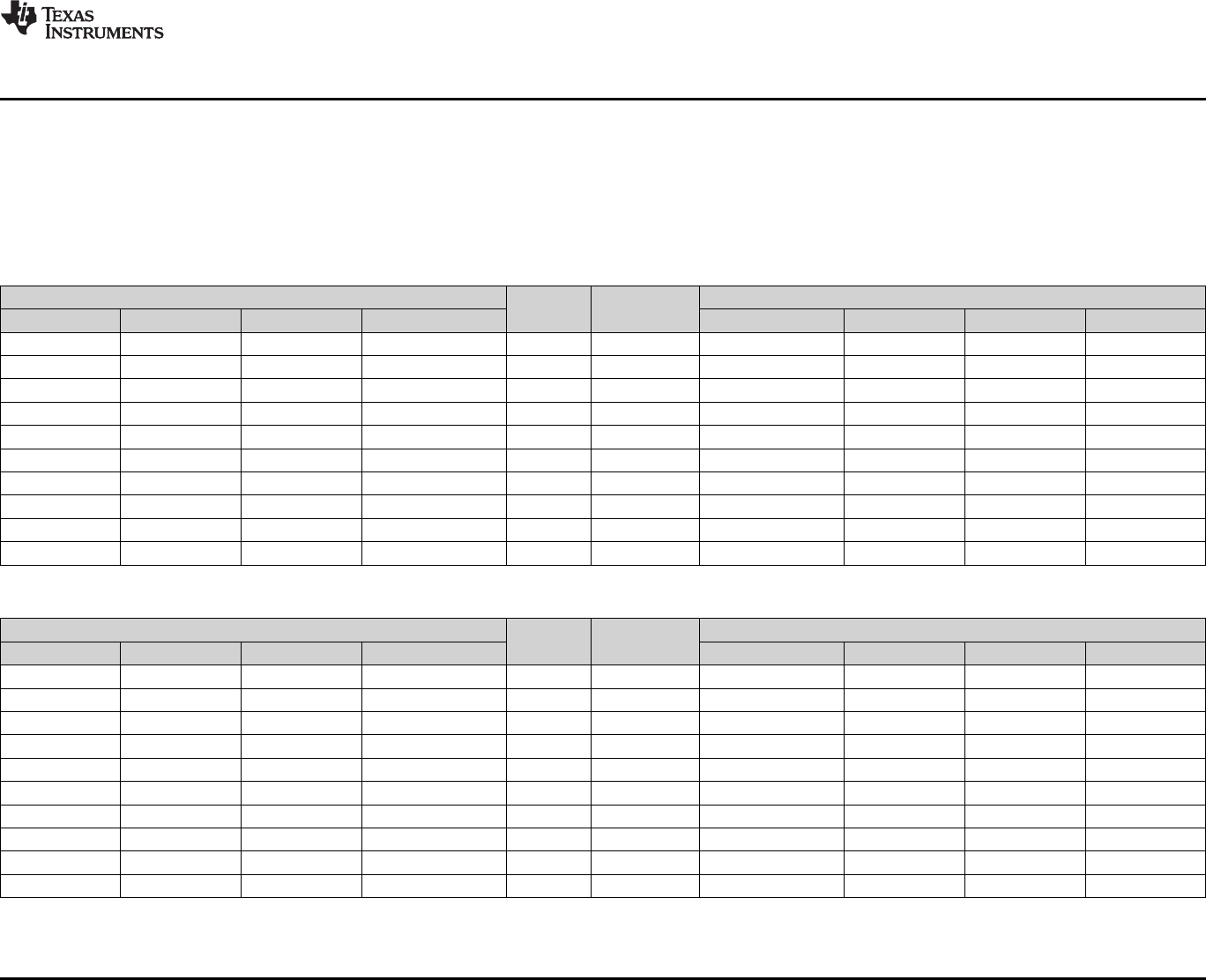
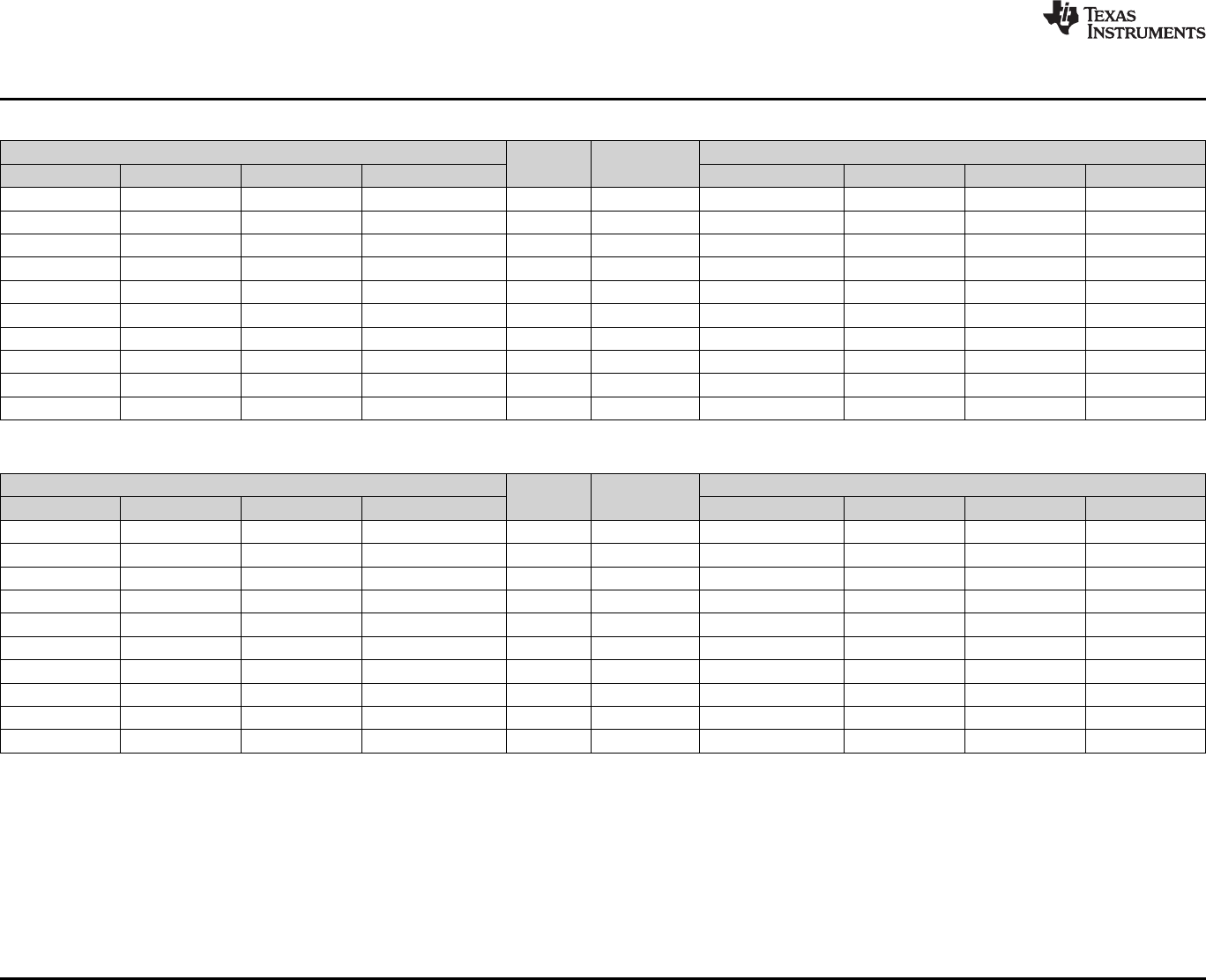
..Table 1 through Table 4 lists the pin out and pin mux options for the C2000 LaunchPad. Additional muxing options are available and can be
found in the TMS320F2837xS Delfino Microcontrollers Data Manual (SPRS881).
Table 1. F28377S LaunchPad Pin Out and Pin Mux Options - J1, J3
Mux Value
J1 Pin J3 Pin
Mux Value
3 2 1 0 0 1 2 3
+3.3 V 1 21 +5 V
EM1D13 GPIO71 2 22 GND
EM1DQM2 EM1A17 GPIO90 3 23 ADCIN14
EM1DQM1 EM1A16 GPIO89 4 24 ADCINB1
EM1A3 GPIO41 5 25 ADCINB4
NC 6 26 ADCINB2
EM2D8 EM1D24 MCLKRB GPIO60 7 27 ADCINA0
EM2D7 EM1D23 MFSRB GPIO61 8 28 ADCINB0
GPIO43 9 29 ADCINA1
GPIO42 10 30 NC
Table 2. F28377S LaunchPad Pin Out and Pin Mux Options - J4, J2
Mux Value
J4 Pin J2 Pin
Mux Value
3 2 1 0 0 1 2 3
MDXB CANTXB EPWM7A GPIO12 40 20 GND
MDRB CANRXB EPWM7B GPIO13 39 19 GPIO4 EPWM3A
MCLKXB SCITXDB EPWM8A GPIO14 38 18 GPIO62 SCIRXDC EM1D22 EM2D6
MFSXB SCIRXDB EPWM8B GPIO15 37 17 NC
OUTPUTXBAR7 CANTXB SPISIMOA GPIO16 36 16 RESET#
OUTPUTXBAR8 CANRXB SPISOMIA GPIO17 35 15 GPIO58 MCLKRA EM1D26 EM2D10
CANTXB MDXA EQEP1A GPIO20 34 14 GPIO59 MFSRA EM1D25 EM2D9
CANRXB MDRA EQEP1B GPIO21 33 13 GPIO72 EM1D12
DAC1 32 12 GPIO73 EM1D11 XCLKOUT
DAC2 31 11 GPIO78 EM1D6
LAUNCHXL-F28377S Hardware
www.ti.com
10 SPRUI25C–June 2015–Revised April 2017
Submit Documentation Feedback
Copyright © 2015–2017, Texas Instruments Incorporated
LAUNCHXL-F28377S Overview
Table 3. F28377S LaunchPad Pin Out and Pin Mux Options - J5, J7
Mux Value
J5 Pin J7 Pin
Mux Value
3 2 1 0 0 1 2 3
+3.3V 41 61 +5V
NC 42 62 GND
EM1RAS EM1A14 GPIO87 43 63 ADCIN15
EM1CAS EM1A13 GPIO86 44 64 ADCINA2
NC 45 65 ADCINA5
NC 46 66 ADCINB5
EM1D19 GPIO65 47 67 ADCINA3
NC 48 68 ADCINB3
EM1D15 GPIO69 49 69 ADCINA4
EM1D18 GPIO66 50 70 NC
Table 4. F28377S LaunchPad Pin Out and Pin Mux Options - J8, J6
Mux Value
J8 Pin J6 Pin
Mux Value
3 2 1 0 0 1 2 3
EPWM2A GPIO2 80 60 GND
EPWM2B GPIO3 79 59 GPIO91 EM1A18 EEM1DQM3
ADCSOCB0 CANRXB EPWM6A GPIO10 78 58 NC
OUTPUTXBAR7 SCIRXDB EPWM6B GPIO11 77 57 NC
CANRXA SCITXDB SPICLKA GPIO18 76 56 RESET#
CANTXA SCIRXDB SPISTEA GPIO19 75 55 GPIO63 SCITXDC EM1D21 EM2D5
NC 74 54 GPIO64 EM1D20 EM2D4
NC 73 53 GPIO99 EM2A1
DAC3 72 52 GPIO92 EM1A19 EM1BA1
DAC4 71 51 NC
1.1
BLOCK DIAGRAM
Sheet 2
Sheet 3
Sheet 4 & 5
Sheet 2
Sheet 6
Sheet 6
Sheet 6
Sheet 6
Sheet 5
REV DATA NOTE
REV1.0 20150326 ORIGINAL RELEASED
Power management
Micro USB type B
FT2232H
TMS320F28377S
BoosterPack 1 Connector
LEDS CAN
SERIAL 1&2
BoosterPack 2 Connector
QEP Connector
A
B
C
D
E
A
B
C
D
E
123456
Date: 6/22/2015 9:21:57 AM Sheet: 1/6
REV:
TITLE:
Document Number:
LAUNCHXL-F28377S
Note: DNP = Do Not Populate
www.ti.com
LAUNCHXL-F28377S Hardware
11
SPRUI25C–June 2015–Revised April 2017
Submit Documentation Feedback Copyright © 2015–2017, Texas Instruments Incorporated
LAUNCHXL-F28377S Overview
7.2 Schematics
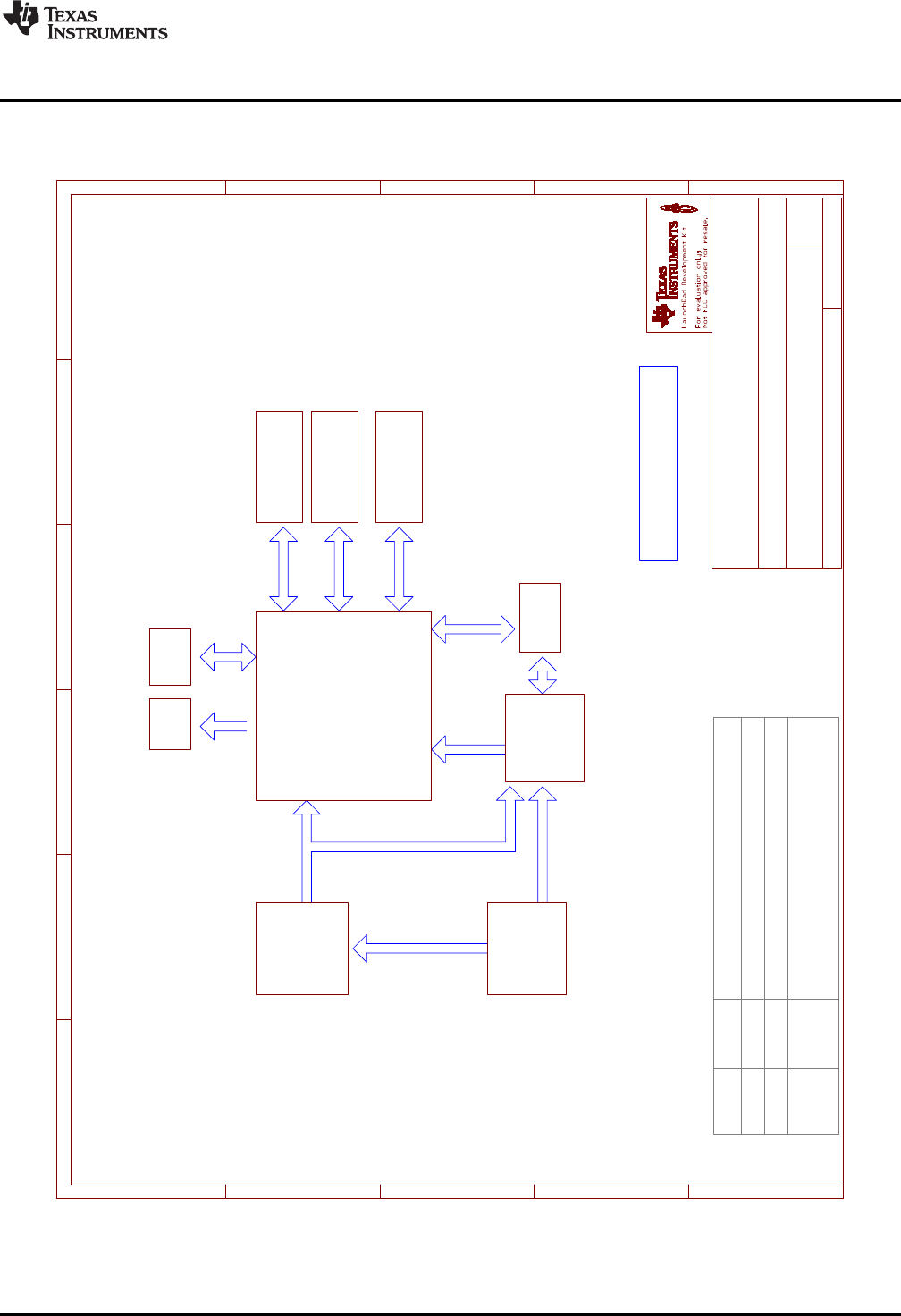
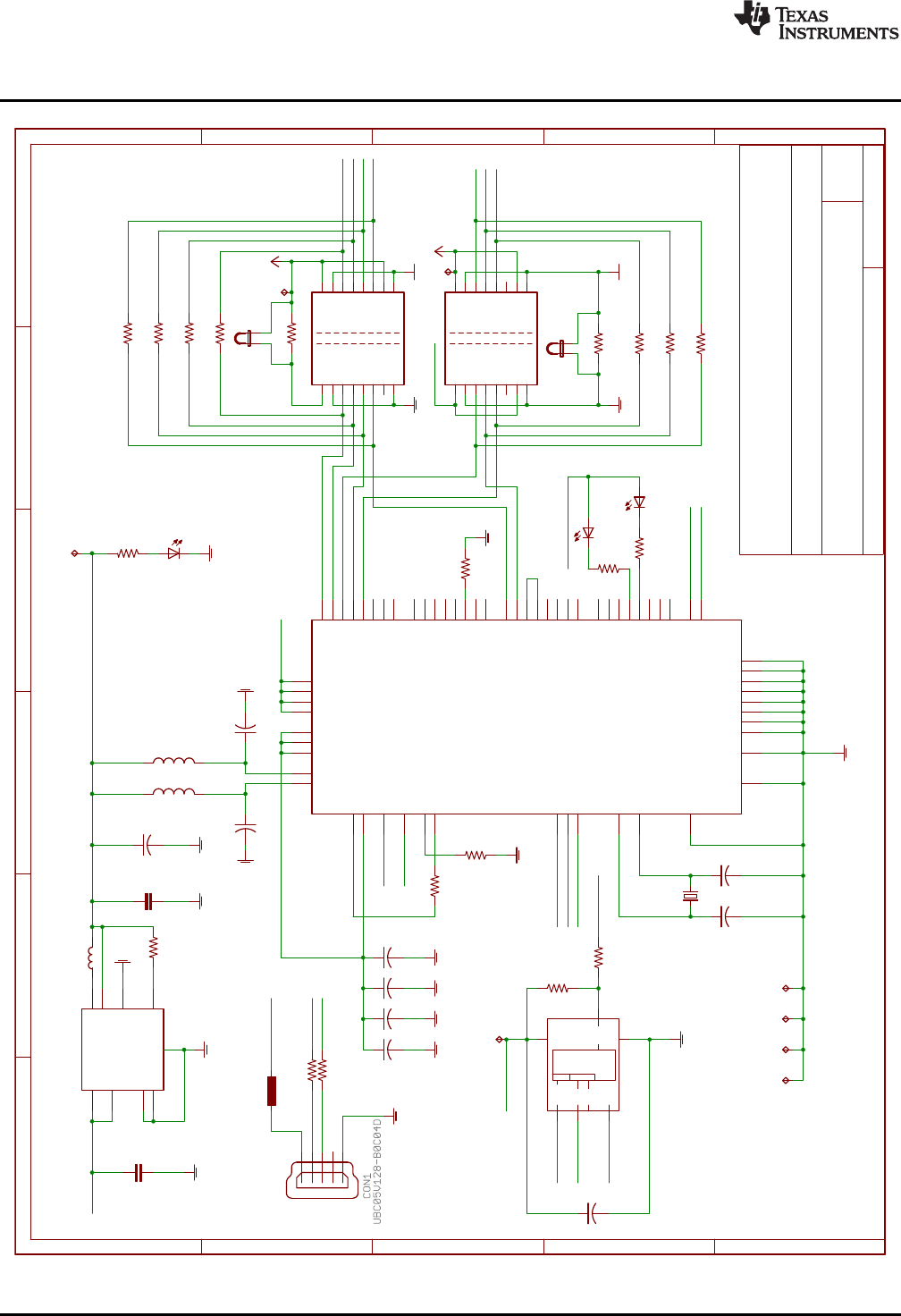
Figure 2 shows the F28377S LaunchPad schematic.
Figure 2. LAUNCHXL-F28377S_B Block Diagram Schematic
1.1
XDS100v2
Vout = 3.3V
Iout = 1A
CDRH2D18/HPNP-2R2NC
2.2k
3.3u
0.1u
93LC56BT-I/OT
0.1u
0.1u
0.1u
12k
1K
ISO7231
ISO7240
AGND
AGND
AGND
AGND
AGND
AGND GND
GND
1K
AGND
Blue
Red
330
330
12M
36p 36p
+3V3
0
0
0
0
0
0
0
0
0
+3V3
AGND
AGND
AGND
AGND
4.7u
4.7u
BLM15AG601SN1D
BLM15AG601SN1D
AGND
AGND
500mA
0R
0R
AGND
0.1u
AGND AGND
AGND
Green 820
AGND
TPS62162DSGR
100K
10uF 22uF
2.2uH
AGND
10K
R31
C15
C16
VCC
GND
62
CLK
4
DO 1
DI
3
CS
5
U8
VREGIN
P$50
USBDM
P$7
USBDP
P$8
REF
P$6
RESET#
P$14
OSCI
P$2
OSCO
P$3
EECS
P$63
EECLK
P$62
EEDATA
P$61
TEST
P$13
AGND
P$10
GND1
P$1
GND2
P$5
GND3
P$11
GND4
P$15
PWREN# P$60
SUSPEND# P$36
BCBUS3 P$54
BCBUS2 P$53
BCBUS1 P$52
BCBUS0 P$48
BDBUS7 P$46
BDBUS6 P$45
BDBUS5 P$44
BDBUS4 P$43
BDBUS3 P$41
BDBUS2 P$40
BDBUS1 P$39
BDBUS0 P$38
ACBUS3 P$29
ACBUS2 P$28
ACBUS1 P$27
ACBUS0 P$26
ADBUS7 P$24
ADBUS6 P$23
ADBUS5 P$22
ADBUS4 P$21
ADBUS3 P$19
ADBUS2 P$18
ADBUS1 P$17
ADBUS0 P$16
VCCIO1 P$20
VCORE2 P$37
VCORE1 P$12
VPHY P$4
ACBUS4 P$30
ACBUS5 P$32
ACBUS6 P$33
ACBUS7 P$34
BCBUS4 P$55
BCBUS5 P$57
BCBUS6 P$58
BCBUS7 P$59
GND5
P$25
GND6
P$35
GND7
P$47
GND8
P$51
VREGOUT
P$49
VPLL P$9
VCORE3 P$64
VCCIO2 P$31
VCCIO3 P$42
VCCIO4 P$56
TH
TH
U6
FT2232H
C14
C13
C12
R24
R22
1
2
3
4
5
VCC1 1
VCC2
16
GND1 2
GND1 8
GND2
15
GND2
9
INA 3
INB 4
OUTC 5
NC1 6
EN1 7
EN2
10
OUTA
14
OUTB
13
INC
12
NC2
11
U7
VCC1
1VCC2 16
GND1
2
GND1
8
GND2 15
GND2 9
INA
3
INB
4
INC
5
IND
6
NC
7EN 10
OUTA 14
OUTB 13
OUTC 12
OUTD 11
U5
R23
D7
D8
R26
R27
Q3
C17 C18
R21
R20
R19
R18
R16
R28
R30
R32
R25
1
2
JP1
JP2
1
2
C10
C11
L2
L1
F1
R15
R33
TP11
TP12
TP13
TP14TP15TP16TP17
C43
D4
R46
TP30
EN
P$3
EX_PAD
P$9
FB P$5
GND
P$4
PG P$8
PGND
P$1
SW P$7
VIN
P$2
VOS P$6
U17
R47
C44 C45
L7
R12
D-
D-
D+
D+
USBVCC
USBVCC
TCK
TDI
TDO
TMS
FTDI_CS
FTDI_CS FTDI_CLK
FTDI_CLK
FTDI_DATA
FTDI_DATA FTDI_DATA
FTDI_1V8
PWREN#
SUSPEND#
FTDI_3V3 FTDI_3V3
FTDI_3V3
FTDI_3V3
FTDI_3V3
FTDI_3V3
FTDI_3V3 FTDI_3V3
JTAG_TRST
GPIO85
GPIO84
Array
EEPROM
A
B
C
D
E
A
B
C
D
E
123456
Date: 6/22/2015 9:21:57 AM Sheet: 2/6
REV:
TITLE:
Document Number:
LAUNCHXL-F28377S
Mini USB
LAUNCHXL-F28377S Hardware
www.ti.com
12 SPRUI25C–June 2015–Revised April 2017
Submit Documentation Feedback
Copyright © 2015–2017, Texas Instruments Incorporated
LAUNCHXL-F28377S Overview
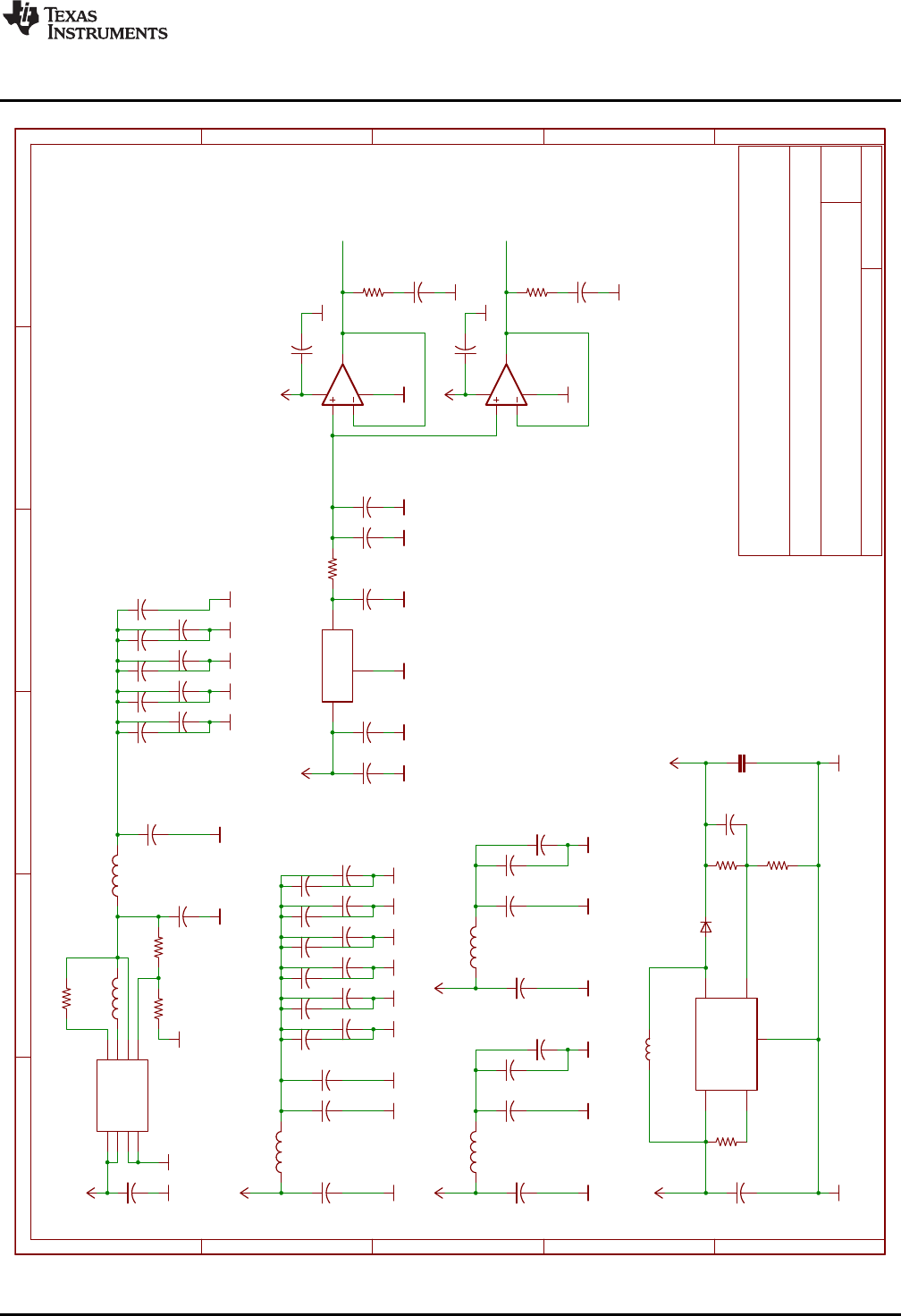
Figure 3. LAUNCHXL-F28377S XDS100v2 Schematic
1.0
F28377S Power
Vout = 5V
Iout = 0.5A
CDRH3D16/HPNP-3R3NC
2.2u
2.2u
2.2u
2.2u
2.2u
2.2u
2.2u
2.2u
2.2u
GND GND GND GND GND
TPS62080
+3V3
10u
GND GND
178k
64.9k
39.2k
22u
GND
GND
220Ohm
10u
GND
0.1u
0.1u 0.1u
0.1u
0.1u
0.1u
0.1u
0.1u
0.1u
0.1u
0.1u
0.1u
GND
GND
GND
GND
GND
GND
220Ohm
10u 10u
10u
+3V3
GND
GND
GND
60Ohm
2.2u
2.2u
+3V3
GND
GND
0.1u
0.1u
GND
60Ohm
2.2u
2.2u
+3V3
GND
GND
0.1u
0.1u
GND
REF3030
0.1u
2.2u
GND
GND
GND
OPA320
GND
0.1u
GND
1k
1u 1u
GND GND
OPA320
GND
0.1u
GND
1u
GND
2.2u
560m
GND
GND
2.2u
560m
820p
LMR62421XMFE/NOPB
10K
3.3uH
1N5819HW-7-F 10uF
30.1K10K
4.7u
+3V3
GND
GND
+5V
+3V3
+3V3
+3V3
1u
C42
C46
C47
C48
C49
C75
C76
C77
C78
VIN
P$8
EN
P$1
MODE
P$3
GND
P$2*2
PG P$6
SW P$7
VOS P$5
FB P$4
U4
C79
R53
R54
R55
C80
L11
C81
C56
C57 C58
C59
C60
C61
C62
C63
C64
C65
C66
C67
L5
C68 C69
C70
L3
C27
C29
C28
C30
L4
C71
C72
C73
C74
IN
1OUT 2
GND
3
U10
C1
C2
U11
4
3
1
52
C5
R3
C6 C7
U13
4
3
1
52
C9
C19
C20
R11
C21
R52
C25
FB 3
GND
2
SD
4
SWITCH 1
VIN
5
U12
R14
L6
D3
C41
R17R45
C8
L8
VDD
+1V2
VDDIO
VDDA
VDDOSC
+5V
VREFHIA
VREFHIB
A
B
C
D
E
A
B
C
D
E
123456
Date: 6/22/2015 9:21:57 AM Sheet: 3/6
REV:
TITLE:
Document Number:
LAUNCHXL-F28377S
www.ti.com
LAUNCHXL-F28377S Hardware
13
SPRUI25C–June 2015–Revised April 2017
Submit Documentation Feedback Copyright © 2015–2017, Texas Instruments Incorporated
LAUNCHXL-F28377S Overview
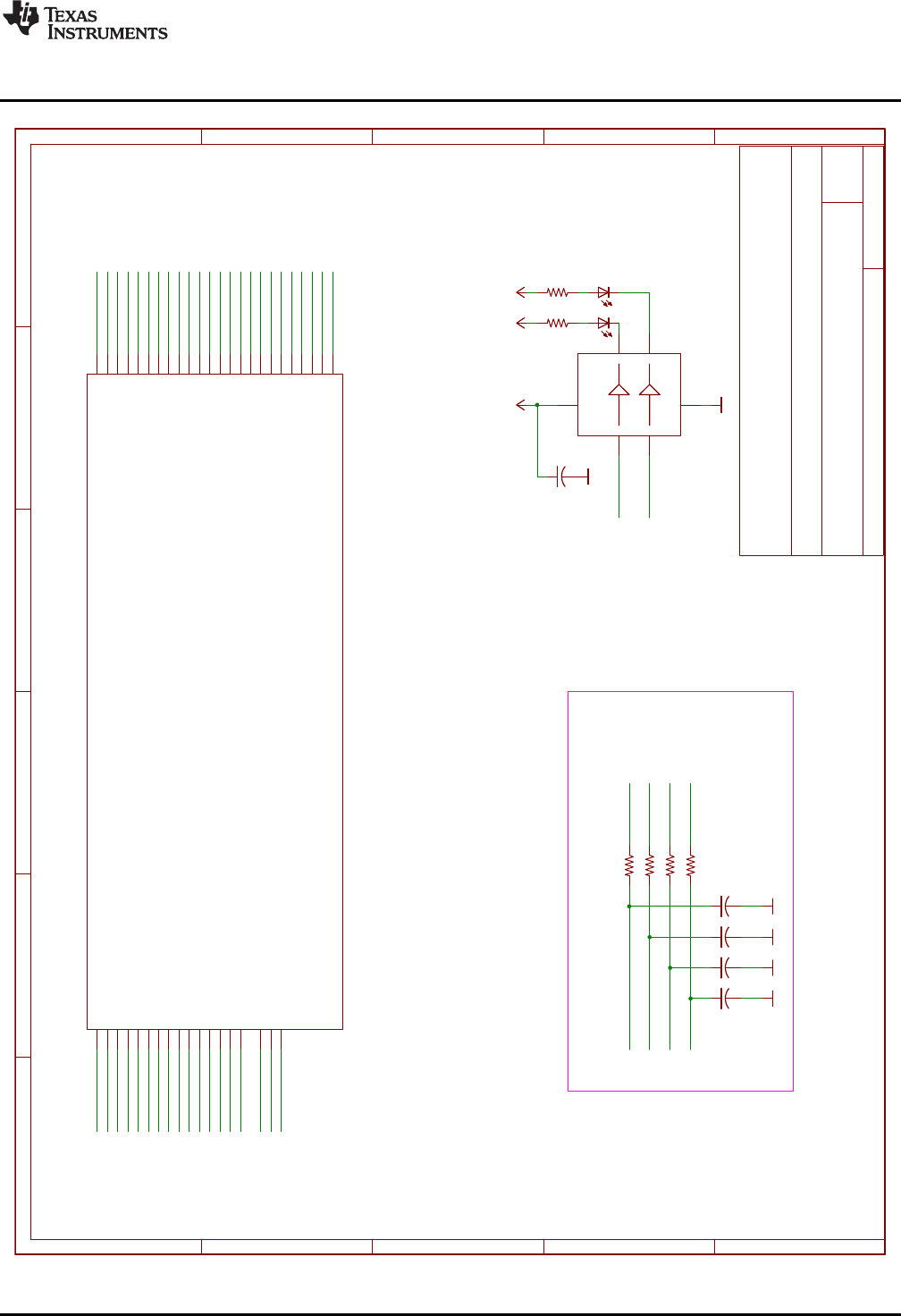
Figure 4. LAUNCHXL-F28377S Power Schematic

1.0
F28377S_A
ADC
GPIO72 GPIO84
TRST
100
0
0
0
0
xx
0
1
1
1
1
0
Emulation Boot
Parallel I/O
SCI
Wait
GetMode
RESET
BOOT
10MHz
36p 36p
1M
2.2k
2.2k
2.2k
820
820
+3V3
+3V3
GND
GND GND
Green 820
+3V3
GND
204-3ST
2.2k
GND
GND
+3V3
GND
0.1u
GND
TMS320F28377S
TMS320F28377S
GND
0.1u
+3V3
GND
+3V3
Q1
C4 C3
R7
R6
R8
R9
R4
R5
D1
R1
S1
4
5
61
2
3
R10
TP18
TP21TP22TP23TP24
C39
VDD
16*9
VDD3VFL
41
VDDA
18*2
VREGENZ 64
VDDIO
2*12
VDDOSC
65*2
VSS TH
VSSOSC 67
VSSA 17*3
U1G$1
XRSN
69
X1
68
X2
66
TCK
50
TDI
46
TDO
47
TMS
49
TRSTN
48
VREFHIA 19
VREFHIB 37
VREFLOB 34
ADCIN14/CMPIN4P 26
ADCIN15/CMPIN4N 27
ADCINA0/DACOUTA 25
ADCINA1/DACOUTB 24
ADCINA2/CMPIN1P 23
ADCINA3/CMPIN1N 22
ADCINA4/CMPIN2P 21
ADCINA5/CMPIN2N 20
ADCINB0/VDAC 28
ADCINB1/DACOUTC 29
ADCINB2/COMPIN3P 30
ADCINB3/COMPIN3N 31
ADCINB4 32
ADCINB5 33
U1G$2
C26
S3
12
TCK
TDI
TDO
TMS
TRST
TRST
RESET#
RESET#
JTAG_TRST
VDDIO
ADCIN14
ADCIN15
ADCINA0
ADCINA1
ADCINA2
ADCINA3
ADCINA4
ADCINA5
ADCINB0
ADCINB1
ADCINB2
ADCINB3
ADCINB4
ADCINB5
GPIO84
GPIO72
VDD
VDDA
VDDOSC
VREFHIB
VREFHIA
VSSOSC
VSSOSC
123
ON
A
B
C
D
E
A
B
C
D
E
123456
Date: 6/22/2015 9:21:57 AM Sheet: 4/6
REV:
TITLE:
Document Number:
LAUNCHXL-F28377S
LAUNCHXL-F28377S Hardware
www.ti.com
14 SPRUI25C–June 2015–Revised April 2017
Submit Documentation Feedback
Copyright © 2015–2017, Texas Instruments Incorporated
LAUNCHXL-F28377S Overview
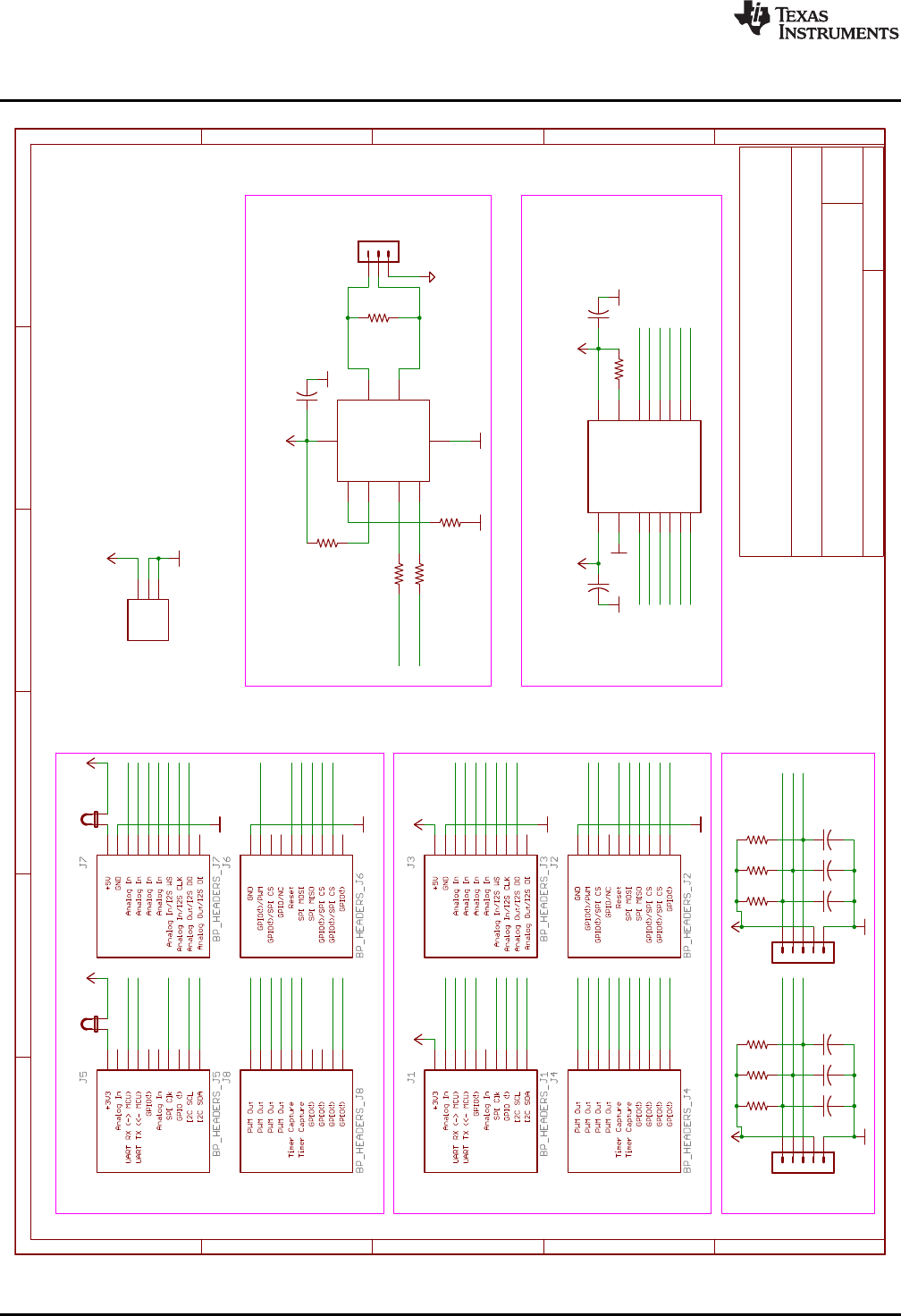
Figure 5. LAUNCHXL-F28377S_A Schematic
1.1
F28377S_B
PWM_DAC
Red
Blue
SN74LVC2G07
330
330
+3V3 +3V3 +3V3
GND
1K
1K
1K
1K
0.1u
0.1u
0.1u 0.1u
GND GND GND GND
0.1u
GND
TMS320F28377S
D9
D10
U9
1A
1
2A
32Y 4
1Y 6
VCC 5
GND
2
R38
R39
R36
R37
R40
R41
C33
C34
C35 C36
C24
GPIO2/EPWM2A/OUTPUTXBAR1/SDAB
91
GPIO3/EPWM2B/OUTPUTXBAR2/MCLKRB/SCLB
92
GPIO4/EPWM3A/OUTPUTXBAR3/CANTXA
93
GPIO10/EPWM6A/CANRXB/ADCSOCBO/EQEP1A/SCITXDB/UPP-WAIT
100
GPIO11/EPWM6B/SCIRXDB/OUTPUTXBAR7/EQEP1B/UPP-START
1
GPIO12/EPWM7A/CANTX/MDXB/EQEP1S/SCITXDC/UPP-ENA
3
GPIO13/EPWM7B/CANRXB/MDRB/EQEP1I/SCIRXDC/UPP-D7
4
GPIO14/EPWM8A/SCITXDB/MCLKXB/OUTPUTXBAR3/UPP-D6
5
GPIO15/EPWM8B/SCIRXDB/MFSXB/OUTPUTXBAR4/UPP-D5
6
GPIO16/SPISIMOA/CANTXB/OUTPUTXBAR7/EPWM9A/SD_D1/UPP-D4
7
GPIO17/SPISOMIA/CANRXB/OUTPUTXBAR8/EPWM9B/SD1_C1/UPP-D3
8
GPIO18/SPICLKA/SCITXDB/CANRXA/EPWM10A/SD1_D2/UPP-D2
9
GPIO19/SPISTEA/SCIRXDB/CANTXA/EPWM10B/SD1_C2/UPP-D1
11
GPIO20/EQEP1A/MDXA/CANTXB/EPWM11A/SD1_D3/UPP-D0
12
GPIO21/EQEP1B/MDRA/CANRXB/EPWM11B/SD1_C3/UPP-CLK
13
GPIO41/EM1A3/SCLB
51
GPIO42/SDAA/SCITXDA/USB0DM
73
GPIO43/SCLA/SCIRXDA/USB0DP
74
GPIO58/MCLKRA/EM1D26/EM2D10/OUTPUTXBAR1/SPICLKB/SD2_D2/SPISIMOA
52
GPIO59/MFSRA/EM1D25/EM2D9/OUTPUTXBAR2/SPISTEB/SD2_C2/SPISOMIA
53
GPIO60/MCLKRB/EM1D24/EM2D8/OUTPUTXBAR3/SPISIMOB/SD2_D3/SPICLKA
54
GPIO61/MFSRB/EM1D23/DM2D7/OUTPUTXBAR4/SPISOMIB/SD2_C3/SPISTEA
56
GPIO62/SCIRXDB/EM1D22/EM2D6/EQEP3A/CANRXA/SD2_D4
57
GPIO63/SCITXDC/EM1D21/EM2D5/EQEP3B/CANTXA/SD2_C4/SPISIMOB
58
GPIO64/EM1D20/EM2D4/EQEP3S/SCIRXDA/SPISOMIB
59
GPIO65/EM1D19/EM2D3/EQEP3I/SCITXDA/SPICLKB
60
GPIO66/EM1D18/EM2D2/SDAB/SPISTEB61
GPIO69/EM1D15/SCLKB/SPISIMOC 75
GPIO70/EM1D14/CANRXA/SCITXDB/SPISOMIC
76
GPIO71/EM1D13/CANTXA/SCIRXDB/SPICLKC
77
GPIO72/EM1D12/CANTXB/SCITXDC/SPISTEC
80
GPIO73/EM1D11/XCLKOUT/CANRXB/SCIRXDC
81
GPIO78/EM1D6/EQEP2A 82
GPIO84/SCITXDA/MDXB/MDXA 85
GPIO85/EM1D0/SCIRXDA/MDRB/MDRA86
GPIO86/EM1A13/EM1CAS/SCITXDB/MCLKXB/MCLKXA
87
GPIO87/EM1A14/EM1RAS/SCIRXDB/MFSXB/MFSXA
88
GPIO89/EM1A16/EM1DQM1/SCITXDC96
GPIO90/EM1A17/EM1DQM2/SCIRXDC97
GPIO91/EM1A18/EM1DQM3/SDAA 98
GPIO92/EM1A19/EM1BA1/SCLA 99
GPIO99/EM2A1/EQEP1I 14
U1G$3
GPIO17
GPIO16
GPIO2
GPIO3
GPIO4
GPIO12
GPIO12
GPIO13
GPIO13
GPIO14
GPIO10
GPIO11
GPIO41
GPIO42
GPIO43
GPIO20
GPIO20
GPIO21
GPIO21
GPIO58
GPIO15
DAC1
DAC2
DAC3
DAC4
GPIO18
GPIO18
GPIO19
GPIO19
GPIO59
GPIO60
GPIO61
GPIO62
GPIO63
GPIO64
GPIO65
GPIO66
GPIO69
GPIO70
GPIO71
GPIO72
GPIO73
GPIO78
GPIO84
GPIO85
GPIO86
GPIO87
GPIO89
GPIO90
GPIO91
GPIO92
GPIO99
A
B
C
D
E
A
B
C
D
E
123456
Date: 6/22/2015 9:21:57 AM Sheet: 5/6
REV:
TITLE:
Document Number:
LAUNCHXL-F28377S
www.ti.com
LAUNCHXL-F28377S Hardware
15
SPRUI25C–June 2015–Revised April 2017
Submit Documentation Feedback Copyright © 2015–2017, Texas Instruments Incorporated
LAUNCHXL-F28377S Overview
Figure 6. LAUNCHXL-F28377S_B Schematic
1.1
BoosterPack Headers
A
B
I
GND
PWR
CAN
LEVEL SHIFT
+3V3
GND
GND
+5V
GND
GND
+3V3
+5V
TXB0106PWR
+5V +5V
GND GND
+5V +3V3
2.2k
GND
120
10K
10K
0R
0R
+3V3
GND
GND
0.1u
GND
0.1u
GND
0.1u
GND
GND
+3V3
PGND
1K
1K
1K
0.001u
0.001u
0.001u
1K
1K
1K
0.001u
0.001u
0.001u
HEADER 1X03
1
2
JP4
1
2
JP5
A1 P$1
A2 P$3
A3 P$4
A4 P$5
A5 P$6
A6 P$7
B1
P$16
B2
P$14
B3
P$13
B4
P$12
B5
P$11
B6
P$10
GND
P$9 OE P$8
VCCA P$2
VCCB
P$15
U2
1
2
3
4
5
QEP_A
1
2
3
4
5
QEP_B
R2
CANH P$7
CANL P$6
D
P$1
EN
P$5
GND
P$2
R
P$4
RS
P$8
VCC P$3
U3
SN65HVD234D
R34
1
2
3
J12
R35
R42
R43
R44
C31
C32
C37
R13
R29
R48
C50
C51
C52
R49
R50
R51
C53
C54
C55
11
22
33
44
55
66
77
88
99
10 10
11 11
12 12
13 13
14 14
15 15
16 16
17 17
18 18
19 19
20 20
21 21
22 22
23 23
24 24
25 25
26 26
27 27
28 28
29 29
30 30
31 31
32 32
33 33
34 34
35 35
36 36
37 37
38 38
39 39
40 40
41 41
42 42
43 43
44 44
45 45
46 46
47 47
48 48
49 49
50 50
51 51
52 52
53 53
54 54
55 55
56 56
57 57
58 58
59 59
60 60
61 61
62 62
63 63
64 64
65 65
66 66
67 67
68 68
69 69
70 70
71 71
72 72
73 73
74 74
75 75
76 76
77 77
78 78
79 79
80 80
1
2
3
J10
RESET#
RESET#
GPIO12
GPIO42
GPIO4
GPIO17
GPIO2
GPIO3
GPIO71
GPIO71
ADCINA4
ADCINB2
ADCINB4
GPIO43 ADCINA1
ADCINB1
ADCINA3
ADCINA0
ADCINB3
ADCIN15
ADCINA5
ADCINB0
GPIO61
GPIO13
GPIO13
ADCINB5
GPIO14
GPIO63
GPIO63
GPIO91
GPIO64
GPIO99
GPIO10
GPIO10
GPIO11
GPIO11
GPIO72
GPIO73
GPIO62
GPIO62
GPIO20
GPIO21
EQEP1A
EQEP1A
EQEP1B
EQEP1B
EQEP1I
EQEP1I
EQEP2A
EQEP2A
EQEP2B
EQEP2B
EQEP2I
EQEP2I
DAC1
DAC2
DAC3
DAC4
GPIO70
CANH
CANL
ADCIN14
GPIO87
GPIO86
GPIO41
GPIO60
GPIO58
GPIO59
GPIO78
GPIO15
GPIO16
GPIO89
GPIO65
GPIO65
GPIO90
GPIO69
GPIO66
ADCINA2
GPIO18
GPIO19
GPIO92
A
B
C
D
E
A
B
C
D
E
123456
Date: 6/22/2015 9:21:57 AM Sheet: 6/6
REV:
TITLE:
Document Number:
LAUNCHXL-F28377S
+3V3
GND
GND
LAUNCHXL-F28377S Hardware
www.ti.com
16 SPRUI25C–June 2015–Revised April 2017
Submit Documentation Feedback
Copyright © 2015–2017, Texas Instruments Incorporated
LAUNCHXL-F28377S Overview
Figure 7. LAUNCHXL-F28377S BoosterPack Schematic
www.ti.com
LAUNCHXL-F28377S Hardware
17
SPRUI25C–June 2015–Revised April 2017
Submit Documentation Feedback Copyright © 2015–2017, Texas Instruments Incorporated
LAUNCHXL-F28377S Overview
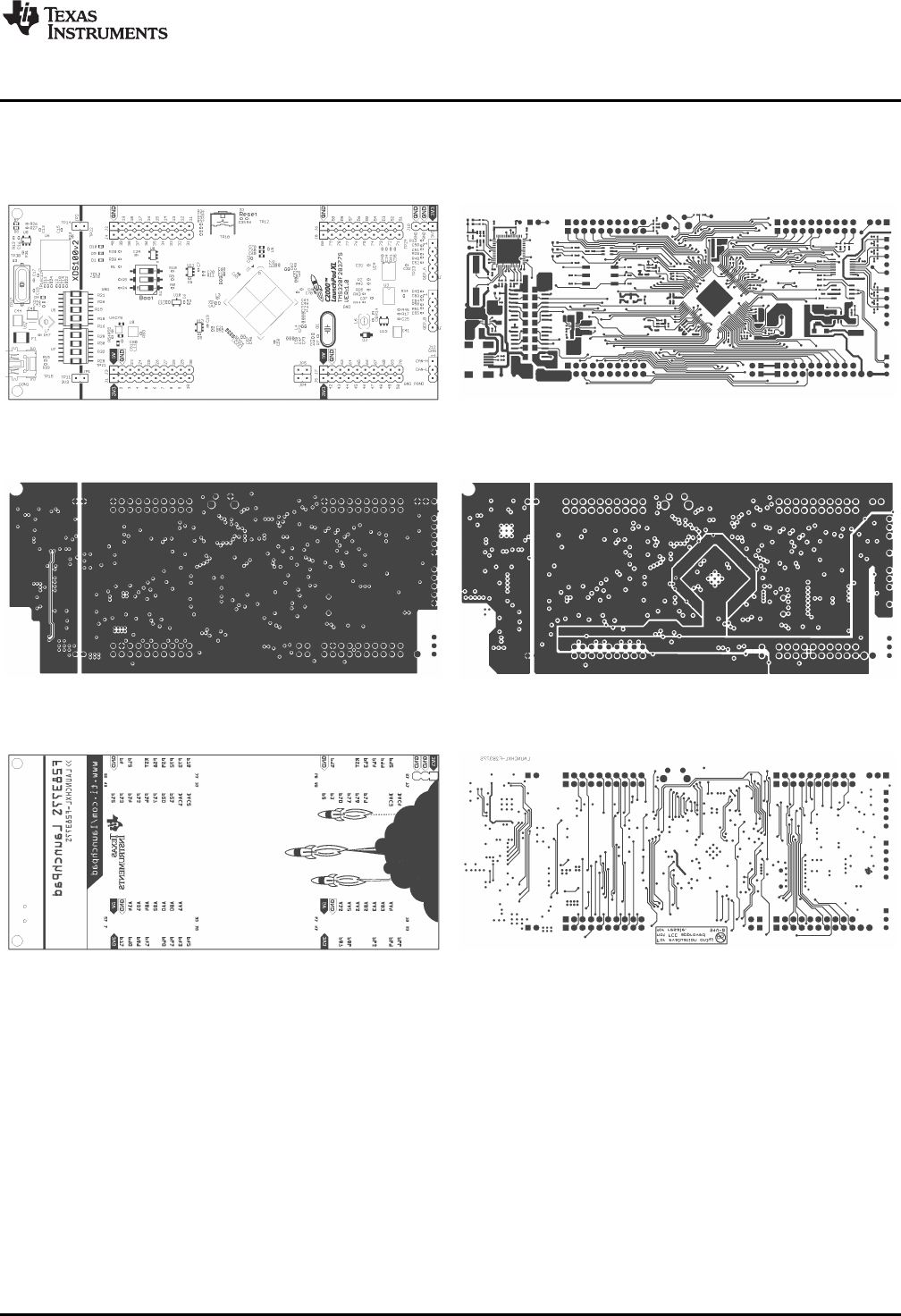
7.3 PCB Layout
Figure 8 through Figure 13 shows the LAUNCHXL-F28377S PCB layout.
Figure 8. Top Silk Figure 9. Top Copper
Figure 10. Inner Copper 1 Figure 11. Inner Copper 2
Figure 12. Bottom Silk Figure 13. Bottom Copper

LAUNCHXL-F28377S Hardware
www.ti.com
18 SPRUI25C–June 2015–Revised April 2017
Submit Documentation Feedback
Copyright © 2015–2017, Texas Instruments Incorporated
LAUNCHXL-F28377S Overview
7.4 Bill of Materials (BOM)
Table 5 lists the LAUNCHXL-F28377S bill of materials.
Table 5. LAUNCHXL-F28377S Bill of Materials
Item Ref Varient Qty Description Mfg Part Number Vendor Stk Number
S3 All 1 SWITCH TACTILE SPST-NO 0.05A
24 V Omron Electronics Inc-
EMC Div B3F-3152 Digikey SW410-ND
S1 All 1 SWITCH TAPE SEAL 3 POS SMD
50 V CTS
Electrocomponents 219-3MST Digikey CT2193MST-ND
F1 All 1 PTC RESETTABLE .50A 15 V 1812 Bourns Inc. MF-MSMF050-2 Digikey MF-MSMF050-2TR-ND
Q1 All 1 Crystal 10.0000MHz 30ppm 18 pF
60 Ω-40°C - 85°C Through Hole
HC49/US
CTS-Frequency
Controls ATS100B-E Digikey CTX919-ND
Q3 All 1 CRYSTAL 12.0000 MHZ 18 pF
SMD Abracon Corporation ABLS2-12.000MHZ-
D4Y-T Digikey 535-9869-2-ND
JP1, JP2, JP4, JP5 All 4 CONN HEADER 2 POS 2.54 Wurth Electronics Inc 61300211121 Digikey 732-5315-ND
JP1, JP2, JP4, JP5 All 4 SHUNT JUMPER .1" BLACK GOLD 3M 969102-0000-DA Digikey 3M9580-ND
J12, J10 All 2 CONN HEADER 3 POS 2.54 Wurth Electronics Inc 61300311121 Digikey 732-5316-ND
QEP_A, QEP_B All 2 CONN HEADER 5 POS 2.54 Wurth Electronics Inc 61300511121 Digikey 732-5318-ND
J1, J2, J3, J4, J5, J6, J7,
J8 All 4 LaunchPad Headers Major League
Electronics SSHQ-110-D-08-G-LF Major League
Electronics SSHQ-110-D-08-G-LF
R16, R18, R19, R20, R21,
R25, R28, R30, R32 DNP 9 RES 0.0 Ω1/4W 1206 SMD Panasonic - ECG ERJ-8GEY0R00V Digikey P0.0ETR-ND
CON1 All 1 CONN RECEPT MINI-USB TYPE B
SMT Mill-Max
Manufacturing Corp. 897-43-005-00-100001 Digikey ED90341TR-ND
C50, C51, C52, C53, C54,
C55 All 6 CAP CER 1000 pF 50 V 10% X7R
0402 Murata Electronics
North America GRM155R71H102KA0
1D Digikey 490-1303-1-ND
C1, C5, C9, C12, C13,
C14, C16, C24, C26, C28,
C30, C31, C32, C33, C34,
C35, C36, C37, C39, C43,
C56, C57, C58, C59, C60,
C61, C62, C63, C64, C65,
C66, C67, C73, C74
All 34 CAP CER 0.1 µF 10 V 10% X5R
0402 Murata Electronics
North America GRM155R61A104KA0
1D Digikey 490-1318-1-ND
C68, C69, C70, C79, C81 All 5 CAP CER 10 µF 4 V 20% X6S
0603 Murata Electronics
North America GRM188C80G106ME
47D Digikey 490-10470-1-ND
C41, C44 All 2 CAP CER 10 µF 25 V Y5V 1210 Murata Electronics
North America GRM32NF51E106ZA0
1L Digikey 490-1893-1-ND
C2, C20, C21, C27, C29,
C42, C46, C47, C48, C49,
C71, C72, C75, C76, C77,
C78
All 16 CAP CER 2.2 µF 4 V 20% X5R
0402 Murata Electronics
North America GRM155R60G225ME
15D Digikey 490-4518-1-ND

www.ti.com
LAUNCHXL-F28377S Hardware
19
SPRUI25C–June 2015–Revised April 2017
Submit Documentation Feedback
Copyright © 2015–2017, Texas Instruments Incorporated
LAUNCHXL-F28377S Overview
Table 5. LAUNCHXL-F28377S Bill of Materials (continued)
Item Ref Varient Qty Description Mfg Part Number Vendor Stk Number
C8, C10, C11 All 3 CAP CER 4.7 µF 6.3 V 20% X5R
0402 Murata Electronics
North America GRM155R60J475ME4
7D Digikey 490-5915-1-ND
C6, C7, C19 All 3 CAP CER 1 µF 6.3 V 10% X5R
0402 Murata Electronics
North America GRM155R60J105KE1
9D Digikey 490-1320-1-ND
C80 All 1 CAP CER 22 µF 4 V 20% X6S
0603 Murata Electronics
North America GRM188C80G226ME
A0D Digikey 490-7196-1-ND
C45 All 1 CAP CER 22 µF 10 V 10% X7R
1210 Murata Electronics
North America GRM32ER71A226KE2
0L Digikey 490-1876-1-ND
C15 All 1 CAP CER 3.3 µF 4 V 20% X5R
0402 TDK Corporation C1005X5R0G335M05
0BB Digikey 445-7397-1-ND
C25 All 1 CAP CER 820 pF 50 V 10% X7R
0402 Murata Electronics
North America GRM155R71H821KA0
1D Digikey 490-3250-1-ND
C3, C4, C17, C18 All 4 CAP CER 36 pF 50 V C0G 0402 TDK Corporation C1005C0G1H360J Digikey 445-4903-2-ND
R15, R33, R43, R44 All 4 RES SMD 0.0 ΩJUMPER 1/10W Panasonic Electronic
Components ERJ-2GE0R00X Digikey P0.0JCT-ND
R11, R52 All 2 RES SMD 0.56 Ω1% 1/6W 0402 Panasonic Electronic
Components ERJ-2BQFR56X Digikey P.56AKCT-ND
R47 All 1 RES SMD 100K Ω1% 1/10W 0402 Panasonic Electronic
Components ERJ-2RKF1003X Digikey P100KLCT-ND
R12, R14, R35, R42, R45 All 5 RES SMD 10K Ω1% 1/10W 0402 Panasonic Electronic
Components ERJ-2RKF1002X Digikey P10.0KLCT-ND
R34 All 1 RES SMD 120 Ω1% 1/10W 0402 Panasonic Electronic
Components ERJ-2RKF1200X Digikey P120LCT-ND
R24 All 1 RES SMD 12K Ω1% 1/10W 0402 Panasonic Electronic
Components ERJ-2RKF1202X Digikey P12.0KLCT-ND
R53 All 1 RES SMD 178K Ω1% 1/10W 0402 Panasonic Electronic
Components ERJ-2RKF1783X Digikey P178KLCT-ND
R3, R13, R22, R23, R29,
R36, R37, R40, R41, R48,
R49, R50, R51
All 13 RES SMD 1K Ω1% 1/10W 0402 Panasonic Electronic
Components ERJ-2RKF1001X Digikey P1.00KLCT-ND
R7 All 1 RES SMD 1M Ω1% 1/10W 0402 Panasonic Electronic
Components ERJ-2RKF1004X Digikey P1.00MLCT-ND
R2, R6, R8, R9, R10, R31 All 6 RES SMD 2.2K Ω1% 1/10W 0402 Panasonic Electronic
Components ERJ-2RKF2201X Digikey P2.20KLCT-ND
R17 All 1 RES SMD 30.1K Ω1% 1/10W 0402 Panasonic Electronic
Components ERJ-2RKF3012X Digikey P30.1KLCT-ND
R26, R27, R38, R39 All 4 RES SMD 330 Ω1% 1/10W 0402 Panasonic Electronic
Components ERJ-2RKF3300X Digikey P330LCT-ND
R55 All 1 RES SMD 39.2K Ω1% 1/10W 0402 Panasonic Electronic
Components ERJ-2RKF3922X Digikey P39.2KLCT-ND

LAUNCHXL-F28377S Hardware
www.ti.com
20 SPRUI25C–June 2015–Revised April 2017
Submit Documentation Feedback
Copyright © 2015–2017, Texas Instruments Incorporated
LAUNCHXL-F28377S Overview
Table 5. LAUNCHXL-F28377S Bill of Materials (continued)
Item Ref Varient Qty Description Mfg Part Number Vendor Stk Number
R54 All 1 RES SMD 64.9K Ω1% 1/10W 0402 Panasonic Electronic
Components ERJ-2RKF6492X Digikey P64.9KLCT-ND
R1, R4, R5, R46 All 4 RES SMD 820 Ω1% 1/10W 0402 Panasonic Electronic
Components ERJ-2RKF8200X Digikey P820LCT-ND
D3 All 1 DIODE SCHOTTKY 40 V 1A
SOD123 Diodes Incorporated 1N5819HW-7-F Digikey 1N5819HW-FDICT-ND
D1, D4 All 2 LED 1X0.5 MM 570NM GN WTR
CLR SMD Kingbright APHHS1005CGCK Digikey 754-1101-1-ND
D8, D9 All 2 LED 1X0.5 MM 630NM RD WTR
CLR SMD Kingbright APHHS1005SURCK Digikey 754-1104-1-ND
D7, D10 All 2 LED BLUE 470NM WTR CLEAR
SMD Kingbright APHHS1005QBC/D Digikey 754-1504-1-ND
L8 All 1 FIXED IND 1 UH 1.62A 40 MOHM
SMD Murata Electronics
North America LQH3NPN1R0NJ0L Digikey 490-5342-1-ND
L7 All 1 FIXED IND 2.2 UH 1.9A 60 MOHM
SMD Sumida America
Components Inc CDRH2D18/
HPNP-2R2NC Digikey 308-2295-1-ND
L6 All 1 FIXED IND 3.3 UH 1.8A 85 MOHM
SMD Sumida America
Components Inc CDRH3D16/
HPNP-3R3NC Digikey 308-1981-1-ND
L5, L11 All 2 FERRITE BEAD 220 Ω0402 Taiyo Yuden BKP1005EM221-T Digikey 587-3290-1-ND
L3, L4 All 2 FERRITE CHIP 60 Ω1700MA 0402 Murata Electronics
North America BLM15PD600SN1D Digikey 490-5201-1-ND
L1, L2 All 2 FERRITE CHIP 600 Ω300MA 0402 Murata Electronics
North America BLM15AG601SN1D Digikey 490-1006-1-ND
U8 All 1 IC EEPROM 2K-BIT 3 MHZ SOT23-
6Microchip Technology 93LC56BT-I/OT Digikey 93LC56BT-I/OTTR-ND
U6 All 1 IC USB HS DUAL UART/FIFO 64-
QFN FTDI, Future
Technology Devices
International Ltd
FT2232HQ-REEL Digikey 768-1025-2-ND
U5 All 1 ISOLAT DGTL 2.5KVRMS 4CH 16-
SOIC Texas Instruments ISO7240CDWR Digikey ISO7240CDWR-ND
U7 All 1 ISOLAT DGTL 3KVRMS 3CH 16-
SOIC Texas Instruments ISO7231CDWR Digikey ISO7231CDWR-ND
U12 All 1 IC REG BOOST ADJ 2.1A SOT23-5 Texas Instruments LMR62421XMFE/
NOPB LMR62421XMFE/NOPB
CT-ND
U3 All 1 IC CAN TRANSCEIVER 3.3 V 8-
SOIC Texas Instruments SN65HVD234DR Digikey 296-27991-1-ND
U9 All 1 IC BUFF/DVR DL NON-INV
SOT236 Texas Instruments SN74LVC2G07DBVR Digikey 296-13494-2-ND
U1 All 1 IC MCU 32-BIT 1024KB 100LQFP Texas Instruments TMX320F28377SPZP
TDigikey 296-39644-ND
www.ti.com
LAUNCHXL-F28377S Hardware
21
SPRUI25C–June 2015–Revised April 2017
Submit Documentation Feedback
Copyright © 2015–2017, Texas Instruments Incorporated
LAUNCHXL-F28377S Overview
Table 5. LAUNCHXL-F28377S Bill of Materials (continued)
Item Ref Varient Qty Description Mfg Part Number Vendor Stk Number
U4 All 1 IC REG BUCK SYNC ADJ 1.2A
8WSON Texas Instruments TPS62080ADSGT Digikey 296-30360-1-ND
U17 All 1 IC REG BUCK SYNC 3.3 V 1A
8WSON Texas Instruments TPS62162DSGT Digikey 296-29897-1-ND
U2 All 1 IC 6BIT NON-INV TRANSLTR
16TSSOP Texas Instruments TXB0106PWR Digikey 296-23759-1-ND
U11, U13 All 2 IC OPAMP GP 20 MHZ RRO
SOT23-5 Texas Instruments OPA320AIDBVR Digikey 296-29480-1-ND
U10 All 1 IC VREF SERIES 3 V SOT23-3 Texas Instruments REF3030AIDBZR Digikey 296-26323-1-ND

References
www.ti.com
22 SPRUI25C–June 2015–Revised April 2017
Submit Documentation Feedback
Copyright © 2015–2017, Texas Instruments Incorporated
LAUNCHXL-F28377S Overview
8 References
The following documents describe the C2000 devices. Copies of these documents are available on the
Internet at http://www.ti.com/c2000 and www.ti.com/c2000-launchpad, or click on the links below:
1. TMS320F2837xS Delfino Microcontrollers Data Manual (SPRS881)
2. TMS320F28377S, TMS320F28376S, TMS320F28375S, TMS320F28374S Delfino Microcontrollers
Silicon Errata (SPRZ422)
3. TMS320F2837xS Delfino Microcontrollers Technical Reference Guide (SPRUHX5)
4. TMS320C28x Extended Instruction Sets Technical Reference Manual (SPRUHS1)
5. TMS320C28x Instruction Set Simulator Technical Overview (SPRU608)
6. TMS320C28x Optimizing C/C++ Compiler v6.1 User's Guide (SPRU514)
7. TMS320C28x Assembly Language Tools v6.1 User's Guide (SPRU513)

www.ti.com
Frequently Asked Questions (FAQ)
23
SPRUI25C–June 2015–Revised April 2017
Submit Documentation Feedback Copyright © 2015–2017, Texas Instruments Incorporated
LAUNCHXL-F28377S Overview
9 Frequently Asked Questions (FAQ)
1. Can other programming and debug tools (such as an XDS510 emulator) be used with the C2000
LaunchPad?
While a user could potentially connect an external emulator to the F28377S device present on the
LaunchPad, it would require some rework of the board. It is recommended that users who want to use
an external emulator purchase a controlCard and docking station that includes an external JTAG
connector.
2. What versions of Code Composer Studio can be used to develop software for the C2000 LaunchPad?
It is highly recommend that novice users develop applications with Code Composer Studio v6. The
drivers, examples, and other associated software are tailored to make the user experience as smooth
as possible in Code Composer Studio v6.
3. Why can’t I connect to the LaunchPad in Code Composer Studio?
There are a number of things that could cause this and they all have an easy fix.
• Is S1 switch 3 in the down position?
This is the TRST pin that enables and disables JTAG functionality on the chip. This switch must be
in the up position for the emulator to be able to connect.
• Are both power LEDs lit?
The board has two power domains because of the isolated JTAG interface. For low-voltage
application development, JTAG isolation is not needed and the power domains can be combined to
allow for convenience (that is, the board can be powered completely through the USB). Ensure that
jumpers are placed on the posts of JP1 and JP2.
• Are drivers correctly installed for the XDS100v2 present on the LaunchPad?
Right click on My Computer and select properties. Navigate to the Hardware tab in the dialog box
and open the device manager. Scroll to the bottom of the list and expand the USB Serial Bus
controllers item. Are there two entries for TI XDS100 Channel A/B? If not, try unplugging and
replugging in the board. Does Windows give you any messages in the system tray? In Device
Manger, do either of the entries have a yellow exclamation mark over their icon? If so, try
reinstalling the drivers.
4. Why is the serial connection not working?
• Are you using the correct COM port?
Right click on My Computer and select properties. Navigate to the Hardware tab in the dialog box and
open the device manager. Scroll to Ports (COM & LPT) and expand this entry. Is there a USB Serial
Port listed? If so, read the COM number to the right of the entry; this is the COM number you should
be using.
• Are you using the correct baud rate?
Most, if not all, of the examples are configured for a baud rate of 115200 when the CPU is running at
200 MHz. If you have changed the PLL settings or written your own application you may have to
recalculate the baud rate for your specific application. For information on how to do this, see the
TMS320F2837xS Delfino Microcontrollers Technical Reference Guide (SPRUHX5).

Revision History
www.ti.com
24 SPRUI25C–June 2015–Revised April 2017
Submit Documentation Feedback
Copyright © 2015–2017, Texas Instruments Incorporated
Revision History
Revision History
NOTE: Page numbers for previous revisions may differ from page numbers in the current version.
Changes from B Revision (January 2017) to C Revision ............................................................................................... Page
• Update was made to Table 1 ............................................................................................................ 9

IMPORTANT NOTICE FOR TI DESIGN INFORMATION AND RESOURCES
Texas Instruments Incorporated (‘TI”) technical, application or other design advice, services or information, including, but not limited to,
reference designs and materials relating to evaluation modules, (collectively, “TI Resources”) are intended to assist designers who are
developing applications that incorporate TI products; by downloading, accessing or using any particular TI Resource in any way, you
(individually or, if you are acting on behalf of a company, your company) agree to use it solely for this purpose and subject to the terms of
this Notice.
TI’s provision of TI Resources does not expand or otherwise alter TI’s applicable published warranties or warranty disclaimers for TI
products, and no additional obligations or liabilities arise from TI providing such TI Resources. TI reserves the right to make corrections,
enhancements, improvements and other changes to its TI Resources.
You understand and agree that you remain responsible for using your independent analysis, evaluation and judgment in designing your
applications and that you have full and exclusive responsibility to assure the safety of your applications and compliance of your applications
(and of all TI products used in or for your applications) with all applicable regulations, laws and other applicable requirements. You
represent that, with respect to your applications, you have all the necessary expertise to create and implement safeguards that (1)
anticipate dangerous consequences of failures, (2) monitor failures and their consequences, and (3) lessen the likelihood of failures that
might cause harm and take appropriate actions. You agree that prior to using or distributing any applications that include TI products, you
will thoroughly test such applications and the functionality of such TI products as used in such applications. TI has not conducted any
testing other than that specifically described in the published documentation for a particular TI Resource.
You are authorized to use, copy and modify any individual TI Resource only in connection with the development of applications that include
the TI product(s) identified in such TI Resource. NO OTHER LICENSE, EXPRESS OR IMPLIED, BY ESTOPPEL OR OTHERWISE TO
ANY OTHER TI INTELLECTUAL PROPERTY RIGHT, AND NO LICENSE TO ANY TECHNOLOGY OR INTELLECTUAL PROPERTY
RIGHT OF TI OR ANY THIRD PARTY IS GRANTED HEREIN, including but not limited to any patent right, copyright, mask work right, or
other intellectual property right relating to any combination, machine, or process in which TI products or services are used. Information
regarding or referencing third-party products or services does not constitute a license to use such products or services, or a warranty or
endorsement thereof. Use of TI Resources may require a license from a third party under the patents or other intellectual property of the
third party, or a license from TI under the patents or other intellectual property of TI.
TI RESOURCES ARE PROVIDED “AS IS” AND WITH ALL FAULTS. TI DISCLAIMS ALL OTHER WARRANTIES OR
REPRESENTATIONS, EXPRESS OR IMPLIED, REGARDING TI RESOURCES OR USE THEREOF, INCLUDING BUT NOT LIMITED TO
ACCURACY OR COMPLETENESS, TITLE, ANY EPIDEMIC FAILURE WARRANTY AND ANY IMPLIED WARRANTIES OF
MERCHANTABILITY, FITNESS FOR A PARTICULAR PURPOSE, AND NON-INFRINGEMENT OF ANY THIRD PARTY INTELLECTUAL
PROPERTY RIGHTS.
TI SHALL NOT BE LIABLE FOR AND SHALL NOT DEFEND OR INDEMNIFY YOU AGAINST ANY CLAIM, INCLUDING BUT NOT
LIMITED TO ANY INFRINGEMENT CLAIM THAT RELATES TO OR IS BASED ON ANY COMBINATION OF PRODUCTS EVEN IF
DESCRIBED IN TI RESOURCES OR OTHERWISE. IN NO EVENT SHALL TI BE LIABLE FOR ANY ACTUAL, DIRECT, SPECIAL,
COLLATERAL, INDIRECT, PUNITIVE, INCIDENTAL, CONSEQUENTIAL OR EXEMPLARY DAMAGES IN CONNECTION WITH OR
ARISING OUT OF TI RESOURCES OR USE THEREOF, AND REGARDLESS OF WHETHER TI HAS BEEN ADVISED OF THE
POSSIBILITY OF SUCH DAMAGES.
You agree to fully indemnify TI and its representatives against any damages, costs, losses, and/or liabilities arising out of your non-
compliance with the terms and provisions of this Notice.
This Notice applies to TI Resources. Additional terms apply to the use and purchase of certain types of materials, TI products and services.
These include; without limitation, TI’s standard terms for semiconductor products http://www.ti.com/sc/docs/stdterms.htm), evaluation
modules, and samples (http://www.ti.com/sc/docs/sampterms.htm).
Mailing Address: Texas Instruments, Post Office Box 655303, Dallas, Texas 75265
Copyright © 2017, Texas Instruments Incorporated
