Legrand 04761 Timer
User Manual: Legrand-04761-timer
Open the PDF directly: View PDF  .
.
Page Count: 11
®
Astronomical/annual time switch
AstroRex DY64
047 70 /74
N 292221/02
34
LNS >1
ON
AUTO
OFF
ON
AUTO
OFF
ON
AUTO
OFF
ON
AUTO
OFF
12
34
214214
214214
120V/230V~50/60Hz
047 70
120V/230V 50/60Hz
R6a -20T
+
M
˜
M
˜
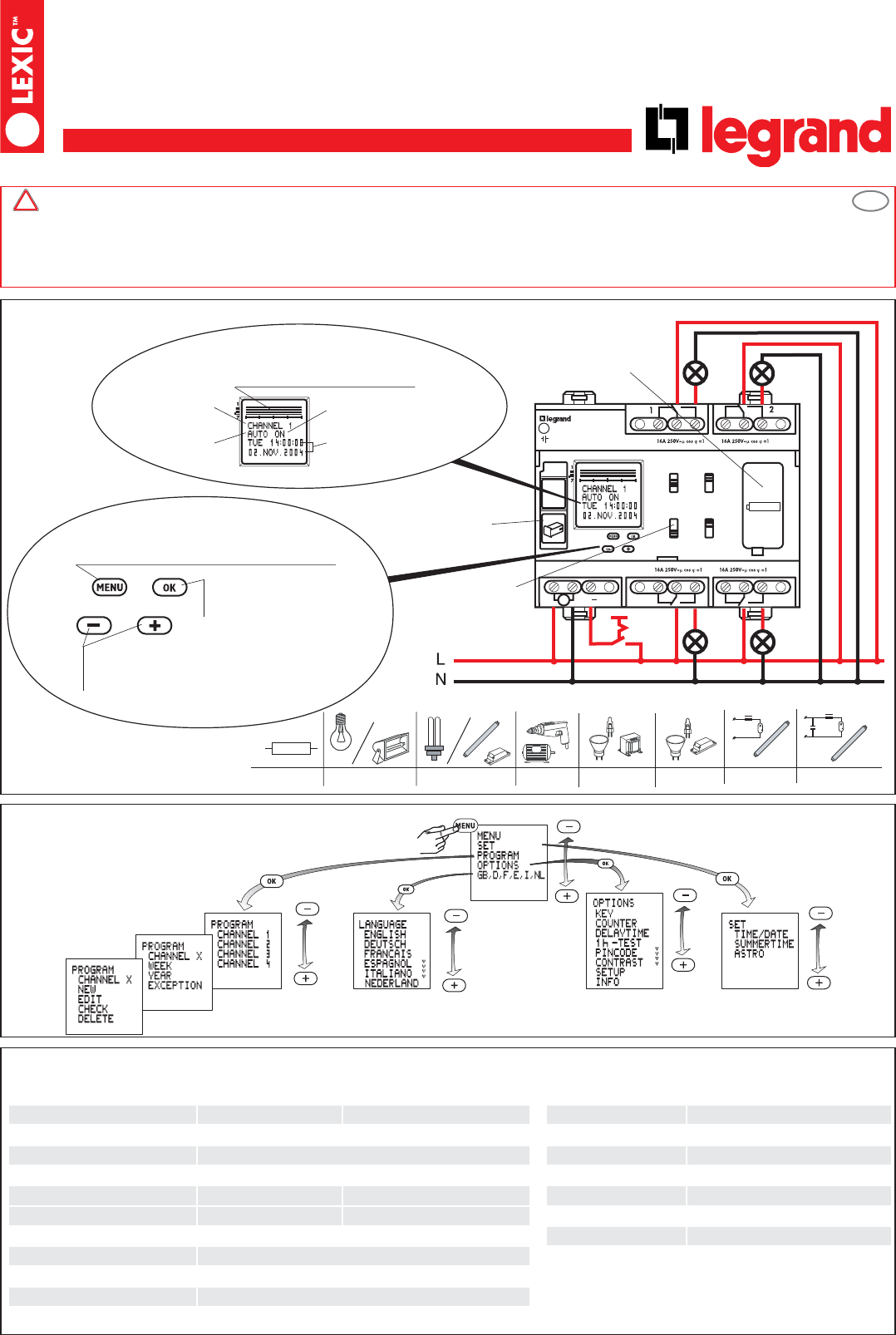
Overview
Day, time, date
Switch state
Function
Channel number
Socket for
data key
Ref. 047 81
Separate
manual switch
for each
channel
1800W 100W 1800W
+
1400VA
1800W 2300W 1x 58W 7µF
3600W
+
+
c
R
One-week overview of the
programmed switching times.
Resolution: 0.5 h
Lithium battery module
Ref. 047 82
Menu selection, back in menu,
Actuation >1s = operating display
Confirm a selection or
accept a parameter setting
• Selection of a menu item or set a parameter.
• Channel selection
Safety notes This product may be installed only by a qualified electrician. Non-compliance may result in a fire hazard or electric shocks. Before installa-
tion, read the operating instructions and observe the product-specific requirements for the installation location. Use only original spare parts for repair and maintenan-
ce. All Legrand products may be opened and repaired only by specially trained Legrand personnel. Unauthorised opening and repair by other persons will invalidate all
claims for liability, replacement or warranty services. When operated from the mains voltage, the time switch may not be used to switch safe extra-low voltages (SELV).
When The device contains a Li-SOCl2 cell. When the product reaches the end of its life, this cell must be correctly removed and disposed of in accordance with natio-
nal legislation and the requirements of environmental protection.operated from a safe extra-low voltage, it may not be used to switch mains voltages.
!
Technical data
047 70 047 74
Supply voltage: 120 / 230V 50/60Hz 24 AC/DC Delay time: 0 … 23 h 59 min 59 s
Power consumption: approx. 0,3…2 W approx. 3…4 W Local coordinates: Resolution 1°
Relay outputs 1- 4: 4 changeover contacts 16A 250V~ cos ϕ= 1 Battery reserve: 5 years
Accuracy: ± 0,2 s/day under typical installation conditions Storage temperature: - 20°C to +60°C
single-strand multi-strand Operating principle: Typ 1.B. S. T. IEC/EN 60730-2-7
Wire cross-sections: 1,5...4 mm21,5...2,5 mm2Operation in a normal environment
Programs 4 channels x 3 program types x 28 programs Degree of contamination: 2
Control signal for channel 1: supply voltage, referred to neutral Installation: in distribution panel
Control-pulse duration: > 200ms
Control-wire length: max. 50m
GB
http://waterheatertimer.org/Din-rail-timers-and-manuals.html
General information
• Starting: After connection of the supply voltage, the clock starts to run with the last selected function. The relay position is determined by the
currently active program.
• Backup battery operation mode:
- background lighting not available.
- data key READ/WRITE only via the menu.
• If, during programming, no key is pressed for 60 seconds, the timer automatically switches from the menu display to the normal operating
display.
• The channel switch states will be updated when programming has been completed.
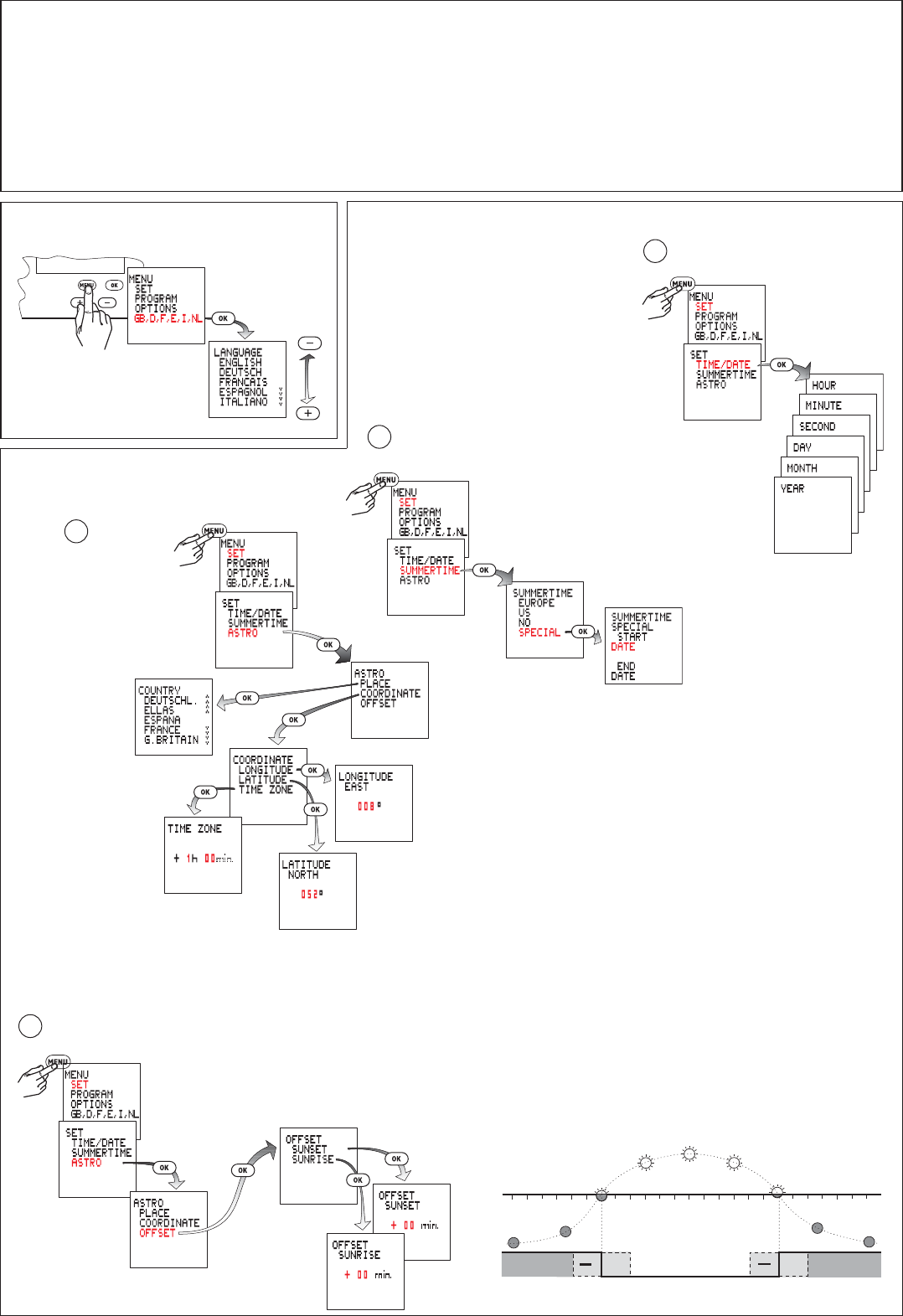
Select language
쐃
Factory setting: 8°E 52°N
The MINUS key is used to adjust the westward longitude value in the range
from 000°EAST/WEST to 180°WEST.
The PLUS key is used to adjust the eastward longitude value in the range
from 000°EAST/WEST to 180°EAST.
The PLUS key is used to adjust the northward latitude value in the range from
00°NORTH/SOUTH to 90°NORTH.
The MINUS key is used to adjust the southward latitude value in the range from
00°NORTH/SOUTH to 90°SOUTH.
0h 3 6 9 12 15 18
21 24h
t
1
0
++
max. 120min
max. 120min
The time switch switches on at the calculated sunset time and off at the calculated sunrise time.
By setting an offset, you can shift the switching times by up to ±120 minutes with respect to the calculated sunrise and
sunset times.
Example: If you set the offset to +30 minutes, the time switch will switch 30 minutes after sunrise and 30 minutes after
sunset.
If you set the offset to -30 minutes, the time switch will switch 30 minutes before sunrise and 30 minutes before
sunset.
Offset
Astro
Summer time +1h
Time and date
Setting
A
B
C
D
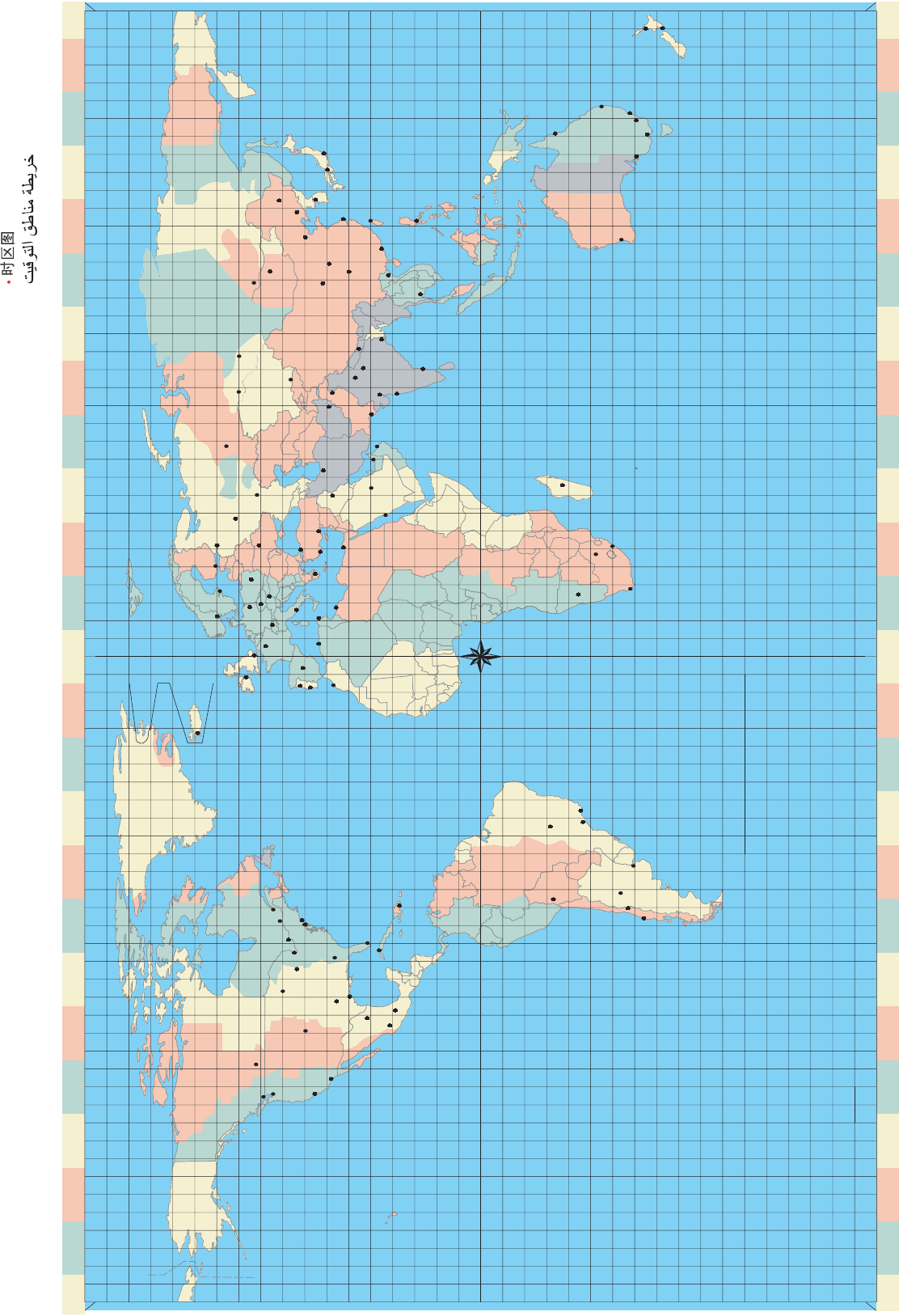
Use the enclosed time-zone map to set
the correct time zone.
From this map, determine the difference
between local time and UTC (Universal Time
Coordinated) and set this value.
Select country.
Select the city
closest to the
planned location
for use.
You can adjust the coordinates
more precisely with
LONGITUDE and
LATITUDE.
Europe: factory setting.
Special: The dates for switching to and from
summer time can be set as desired by entering
a start date and end date. In the following
years, switching will be carried out on the
corresponding day of the week (e.g. Sunday).
3B
PROGRAM / YEAR
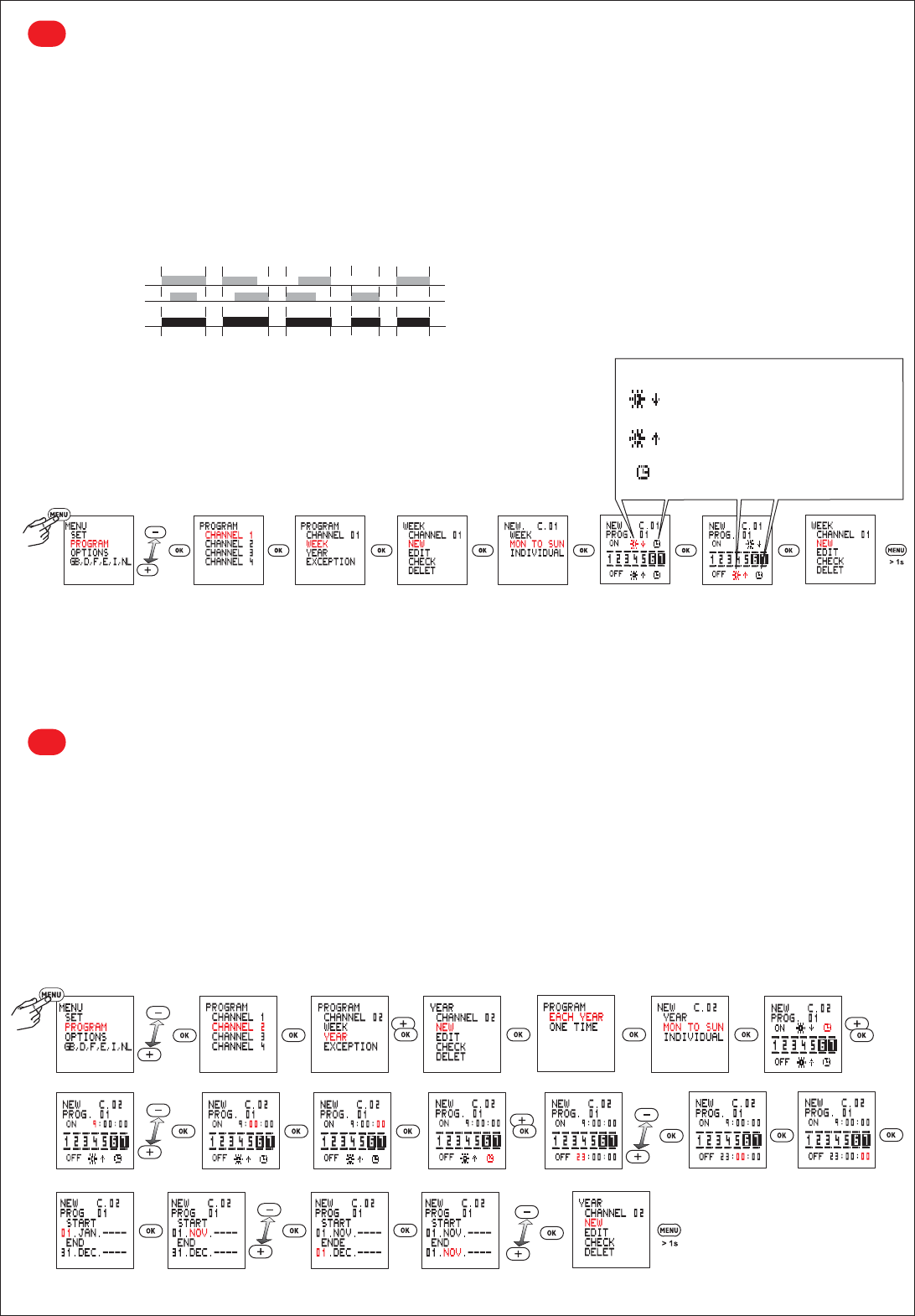
This menu item permits the input of (additional) annual programs which are to be executed only during a specified period. These programs and
the weekly programs of the same channel are ORed together as described above.
The period during which a program is to be executed is defined by entering a start date and an end date.
• The option EVERY YEAR should be selected if the additional program is to be executed during the same period of each year
(e.g. Christmas, national holidays, birthdays, etc.).
• The option ONCE should be selected if the additional program is to be executed only during a single period (e.g. vacation period), but the
start and end dates of this period are different in each year.
Sample YEAR program
Channel 2 is to be activated each year on at 09:00 hours on 01.11. and deactivated at 23:00 hours.
PROGRAM / WEEK
This menu item is provided for the simple input of programs which are to be repeated weekly (such as switching of lights and boilers).
A weekly program consists of an ON time, an OFF time and the associated ON and OFF days.
• MON TO SUN: the days of the week are already assigned and you only need to set the ON and OFF times. This is used where the same
program is to be executed on every day of the week.
• INDIVIDUAL: you can assign the ON and OFF times to any desired days. This is used where the same program is to be executed only on
certain days of the week or different programs are to be executed on the various days.
OR function
The programs defined for each channel are ORed together. In other words, the output will be active if this is defined in any of the programs.
Example: channel 1
Sample WEEK program
The timer is to switch on at sunset on each day of the week and switch off at sunrise.
ON at sunset
OFF at sunrise
ON / OFF at programmed time
Prog. 1
Prog. 2
Channel-1 relay
3A
3C
PROGRAM / EXCEPTION
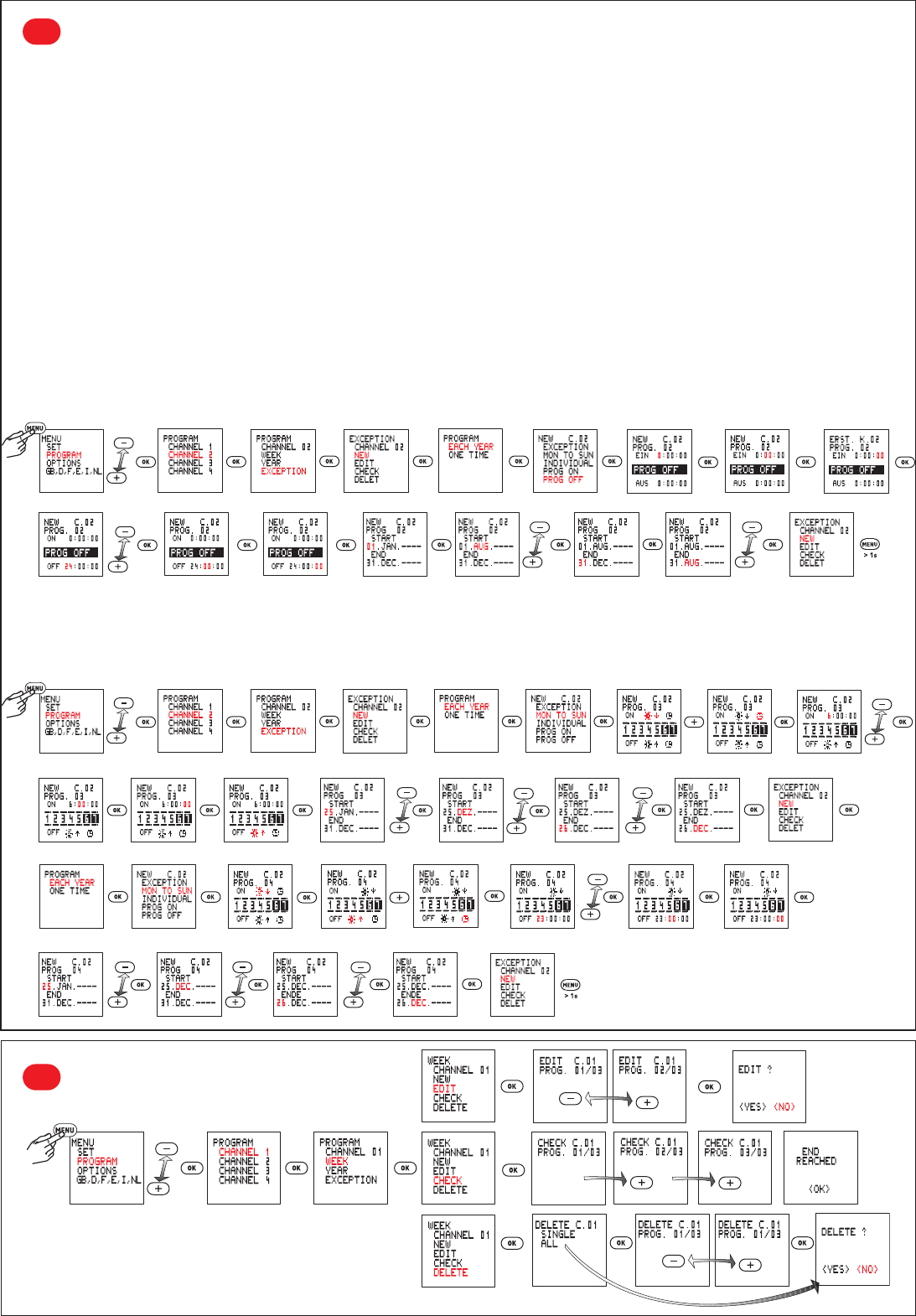
The weekly and annual programs defined for a channel are not executed as long as an extra program is active.
However, other exception programs will be executed while an exception program is active.
The various exception programs are ORed together as described above. (see OR function 3a)
• The option EVERY YEAR should be selected if the exception program is to be activated for the same period in each year
(e.g. Christmas, national holidays, birthdays, etc.).
• The option ONCE should be selected if the exception program is to be activated only during a single period (e.g. vacation period), but the start
and end dates of this period are different in each year.
• Option MON TO SUN: the exception program is active from 00:00 hours on the start date to 24:00 hours on the end date.
During this period, the output of the related channel switches only as defined in the exception program.
• Option INDIVIDUAL: the exception program is active from 00:00 hours on the start date to 24:00 hours on the end date.
During this period, the output of the related channel switches only as defined in the exception program.
• Option PROG ON: the exception program is active from the ON time on the start date to OFF time on the end date. During this period, the output
of the channel is permanently on.
• Option PROG OFF: the exception program is active from the ON time on the start date to OFF time on the end date. During this period, the
output of the channel is permanently off.
Channel 2 is to be switched off each year for the entire period 01.08. to 31.08.
햲
Each year from 25.12. to 26.12., channel 2 is to be switched on at 6:00 hours, switched off at sunrise, switched on at sunset and switched
off at 23:00 hours. For this, two programs are needed:
Program 1: ON at 6:00 and OFF at sunrise
Program 2: ON at sunset and OFF at 23:00
햳
Sample EXCEPTION programs
PROGRAM
Edit/Check/Delete
3D

Prog-
ram
type
Exe-
cution
Char-
acteri-
stics
ON/OFF
times
Weekday
assignments
Active
period
START date
Active
period
END date
Application, objectives, examples
WEEK Repeated
weekly
MON TO
SUN 쎲 쑗 쑗 쑗
The same switching cycle is to be executed on every day of
each week.
Example: switch lights on at sunset and off at 22:30:00 hours
each day.
INDIVI-
DUAL 쎲 쎲 쑗 쑗
A switching cycle is to be executed only on specific days of
each week.
Example: switch lights on at sunset and off at 22:30:00 hours
on Monday to Friday of each week.
YEAR
EVERY
YEAR
MON TO
SUN 쎲 쑗 Day, month,
- - - -
Day, month,
- - - -
• A switching cycle is to be executed on each day within a
specified period of each year.
Example: switch on the outside lights of a church from
17:00:00 to 24:00:00 in the period 1 December to
31 December.
• An existing weekly program is to be supplemented with
additional switching times on each day during a specific
period of each year.
INDIVI-
DUAL 쎲 쎲 Day, month,
- - - -
Day, month,
- - - -
• A switching cycle is to be executed on certain days of the
week within a specified period of each year.
Example: switch on the outside lights of a church from
17:00:00 to 24:00:00 on each Sunday in the period
1 December to 31 December..
• An existing weekly program is to be supplemented with
additional switching times on certain days of the week during
a specific period of each year.
ONCE
MON TO
SUN 쎲 쑗 Day, month,
year
Day, month,
year
• A switching cycle is to be executed on each day of a specified
period in a specified year.
Example: in the year 2005, the heating in a holiday chalet is
to be switched on from 07:30:00 to 23:00:00 on each day
during the Easter holidays (25 March to 28 March 2005).
• An existing weekly program is to be supplemented with
additional switching times on each day during a specific
period of a specific year.
INDIVI-
DUAL 쎲 쎲 Day, month,
year
Day, month,
year
• A switching cycle is to be executed on certain days of a
specified period in a specified year.
Example: in the current year, the lights in a sports hall are to
be switched on from 19:00:00 to 22:00:00 on each Tuesday
and Friday during the period from 10 .January to 23 March.
• An existing weekly program is to be supplemented with
additional switching times on certain days of the week during
a specific period of a specific each year.
Required inputs, depending on the program type and menu options.

Program
type
Execution Charac
teri-
stics
ON/OFF
times
Weekday
assignments
Active
period
START
date
Active
period
END date
Application, objectives, examples
EXCEP-
TION
EVERY
YEAR
MON TO
SUN 쎲 쑗
Day, month,
- - - -
from
0:00:00
hours
Day, month,
- - - -
to
24:00:00
hours
An exception program is to completely replace any existing
weekly or annual program on each day during a specific period
of each year.
Example: the irrigation pump of an orchard is to be switched on
from 17:00:00 to 18:00:00 on each day in the period from
20.March ---- to 10.April ----.
INDIVI-
DUAL 쎲 쎲
Day, month,
- - - -
from
0:00:00
hours
Day, month,
- - - -
to
24:00:00
hours
An exception program is to completely replace any existing
weekly or annual program on certain days during a specific
period of each year.
Example: the irrigation pump of an orchard is to be switched on
from 17:00:00 to 18:00:00 on each Monday and Friday in the
period from 11 April ---- to 15 May ----.
PROG
ON 쎲 쑗
Day, month,
- - - -
from ON
time
Day, month,
- - - -
to
OFF time
A channel is to be switched on continuously from the ON time
on the START date to the OFF time on the END date every
year. This exception program is to completely replace any
existing weekly or annual program for this channel.
Example: instead of the normal times for illumination of a
public building, the illumination is to be switched on from
17:00:00 on the national holiday 3 October ---- until 07:00:00
the next morning 4 October ----.
PROG
OFF 쎲 쑗
Day, month,
- - - -
from ON
time
Day, month,
- - - -
to
OFF time
An output is to be switched off continuously from the ON time
on the START date to the OFF time on the END date every
year. This exception program is to completely replace any
existing weekly or annual program for this channel.
Example: in order to save power, certain equipment in a factory
is to be switched off during the Christmas holiday period of
each year. i.e. from 18:00:00 on 23 December ---- to 6:00:00
on 27 December ----.
ONCE
MON TO
SUN 쎲 쑗
Day, month,
year
from
0:00:00
hours
Day, month,
year
to
24:00:00
hours
On each day during a specific period of a specified year, an
exception program is to completely replace any existing weekly
or annual program.
Example: during the Christmas holidays of the year 2005, the
heating in an apartment is to be switched each day from
7:00:00 to 23:00:00, instead of in the normal cycle. This
exception period is to begin on 24 December 2005 and end
on 06 January 2006.
INDIVI-
DUAL 쎲 쎲
Day, month,
year
from
0:00:00
hours
Day, month,
year
to
24:00:00
hours
On certain weekdays during a specific period of a specific year,
an exception program is to completely replace any existing
weekly or annual program.
Example: in December 2005, the heating system of a
department store is to be switched on from 8:00:00 to 18:00:00
each Sunday, because the store opens on Sundays in the
period 4 December 2005 to 18 December 2005.
PROG
ON 쎲 쑗
Day, month,
year
from ON
time
Day, month,
year
to
OFF time
A channel is to be switched on continuously from the ON time
on the START date to the OFF time on the END date of a
specific year. This exception program is to completely replace
any existing weekly or annual program for this channel.
Example: the alarm system of an office building is to be
switched on continuously during the vacation period 19:00:00
on 15 July 2005 to 06:00:00 on 7 August 2005.
PROG
OFF 쎲 쑗
Day, month,
year
from ON
time
Day, month,
year
to
OFF time
A channel is to be switched off continuously from the ON time
on the START date to the OFF time on the END date of a spe-
cific year. This exception program is to completely replace any
existing weekly or annual program for this channel.
Example: in 2005, the normal recess gong in a school is to be
switched off during the summer holidays 00:00:00 on 28 July
2005 to 24:00:00 on 10 September 2005.
Select the option PROGRAM / WEEK for a program which is to be executed a on specific days of the week and is to be repeated weekly.
Select the option PROGRAM / YEAR for a program which is to be executed each year or only in a specific year. The execution period within the
year can be defined by entering start and end dates.
Select the option PROGRAM / EXCEPTION for a program which is to completely replace existing weekly or annual programs during a specified
period.
Priorities of the various program types within the same channel:
WEEK program YEAR program EXCEPTION program
WEEK program The various weekly programs are
ORed together
The various weekly and annual
programs are ORed together
The exception program is overriding
within its defined period of activity.
YEAR program The various weekly and annual
programs are ORed together
The various annual programs are
ORed together
The exception program is overriding
within its defined period of activity.
EXCEPTION program
The exception program is overri-
ding within its defined period of
activity.
The exception program is overri-
ding within its defined period of
activity.
The various exception programs
are ORed together
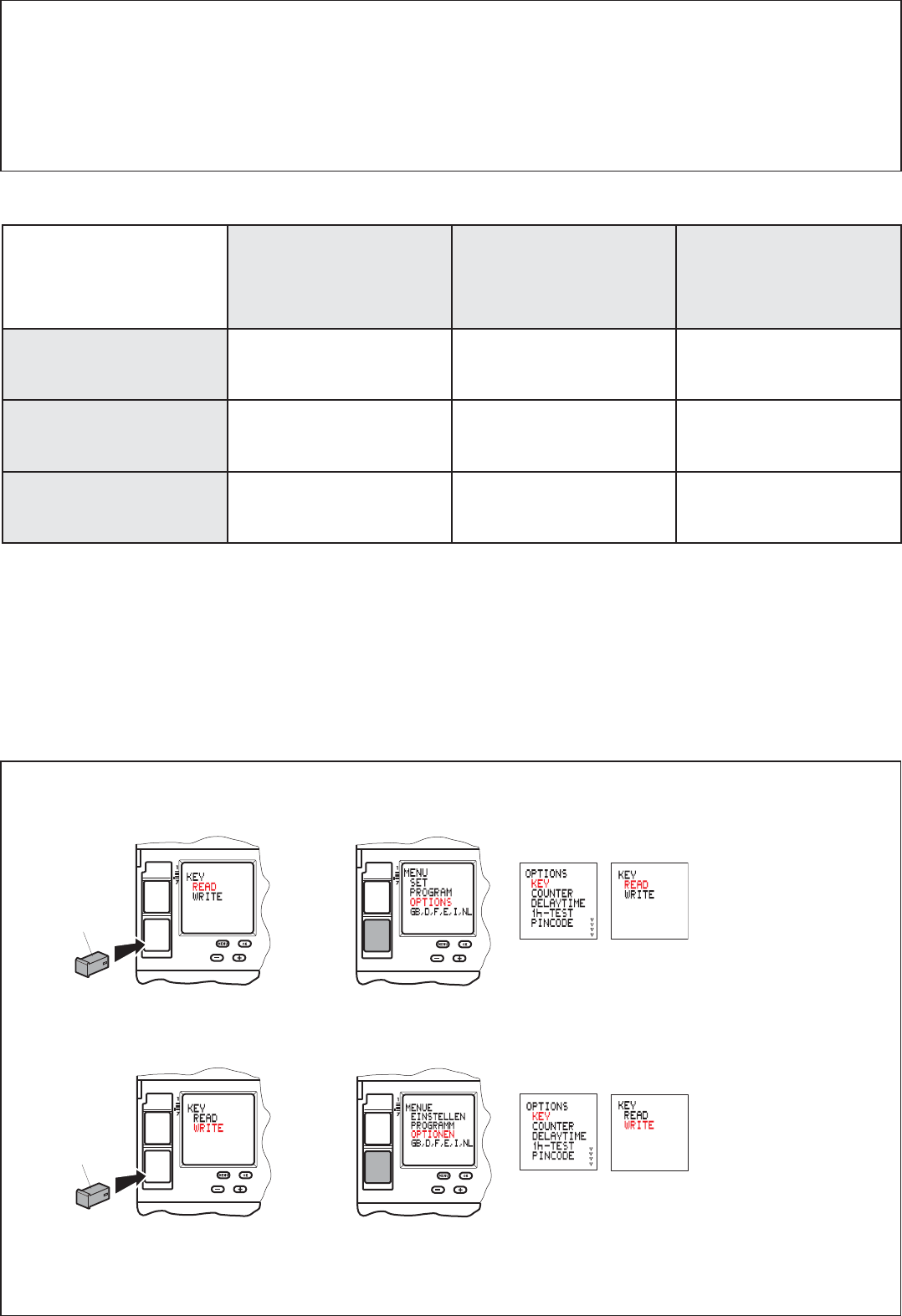
Data key (Color anthracite)
or
or
Load the programs from the data key to the time switch (READ KEY)
Warning! All programs already programmed in the time switch and settings (local coordinates, delay time, summertime) will be
overwritten.
Load the programs of the time switch on to a data key (WRITE KEY)
Warning! all programs already existing on the data key will be overwritten.
047 81
047 81
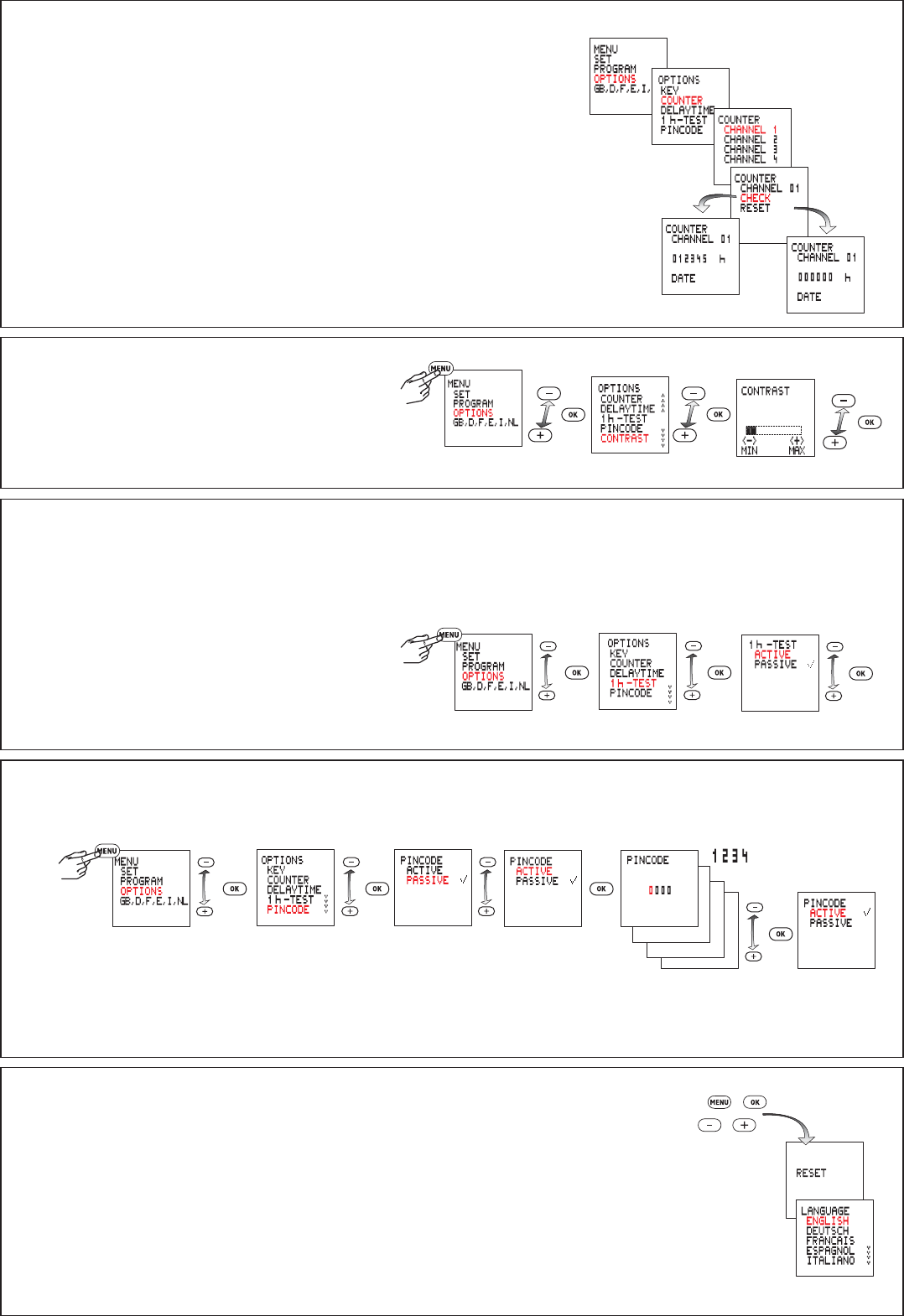
Operating-hours counter
This displays the total duration of the ON times, from 0 to 065535 hours, and the
date on which this counter was last reset.
Contrast adjustment
1 h-Test
If this menu item is activated, the outputs are switched on for one hour.
The test can be terminated at any time by selecting the option PASSIVE.
Reset
Note!
A reset clears the entire memory, which means that all previously set data will be lost.
Press and hold all four keys together for about 2 seconds, then release them.
After a reset, the language, time and date, summertime, coordinates, time zone, switching times and
pin code must be set again.
Pincode (access protection)
Example
PINCODE active: the PINCODE must be entered before the timer switch can be operated.
The access protection can be cancelled by selecting PASSIVE. It is also cancelled by a reset.
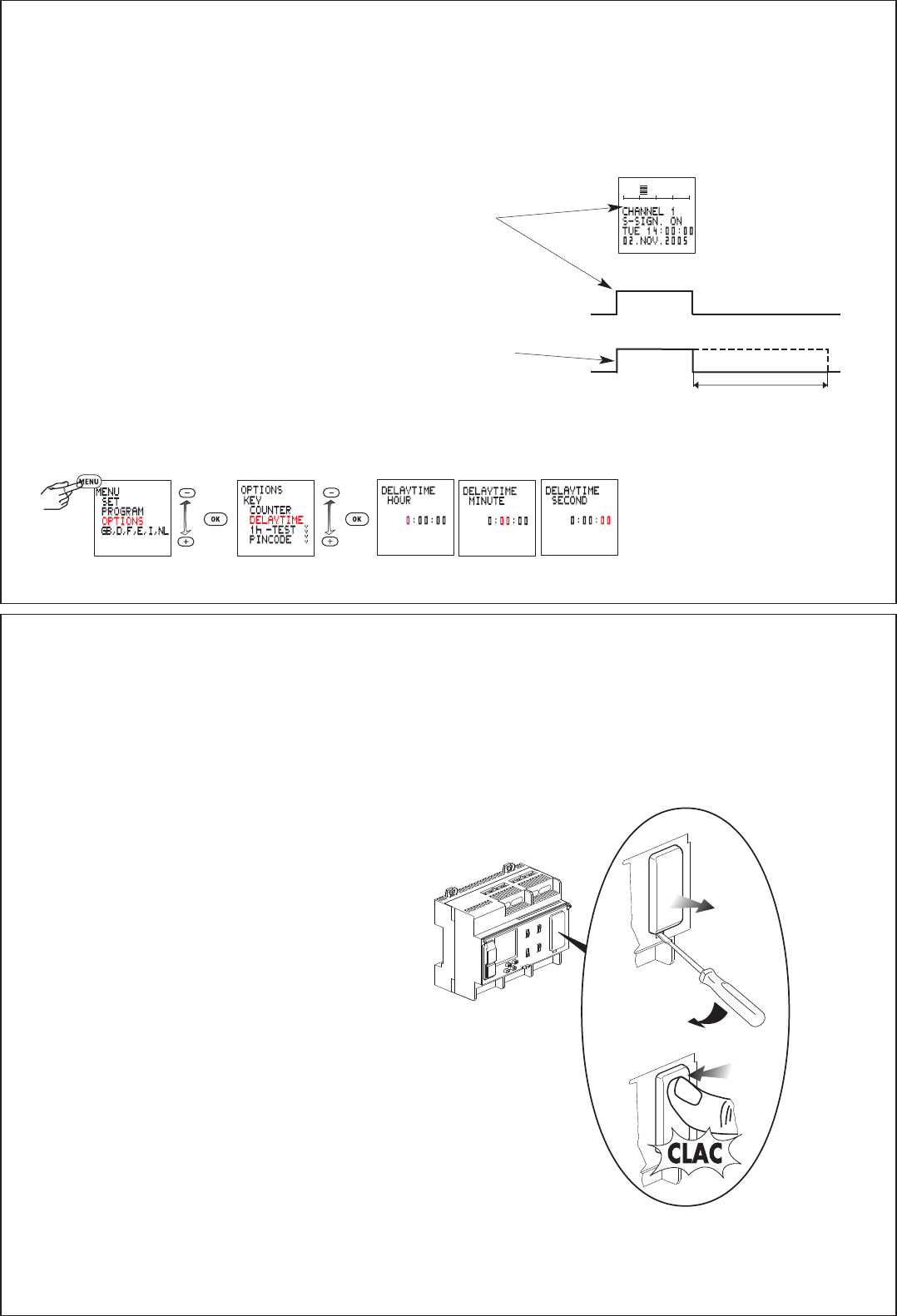
The control signal affects only channel 1 and overrides all program settings for this channel (OR function). Channel 1 remains switched on as
along as the control signal is present. If the function CYCLE is selected under SETUP, channel 1 is switched on and off cyclically.
When the control signal is switched off, the output of channel 1 switches off after the defined delaytime, unless one of the programs for this
channel specifies otherwise.
0 … 23h 59min 59s
Setting the delaytime
Control input with delaytime
0 ... 23h 59min 59s
Control input
Switched output
Changing the lithium battery module
Important note:
If the battery is replaced with the supply voltage connected, all stored program data are retained. If the battery is replaced
with the supply voltage disconnected, the date and time must be set again. Notes for disposal of the lithium battery:
Dispose of the exhausted battery in accordance with your local regulations. Make sure the battery is fully discharged before disposal.
Delaytime
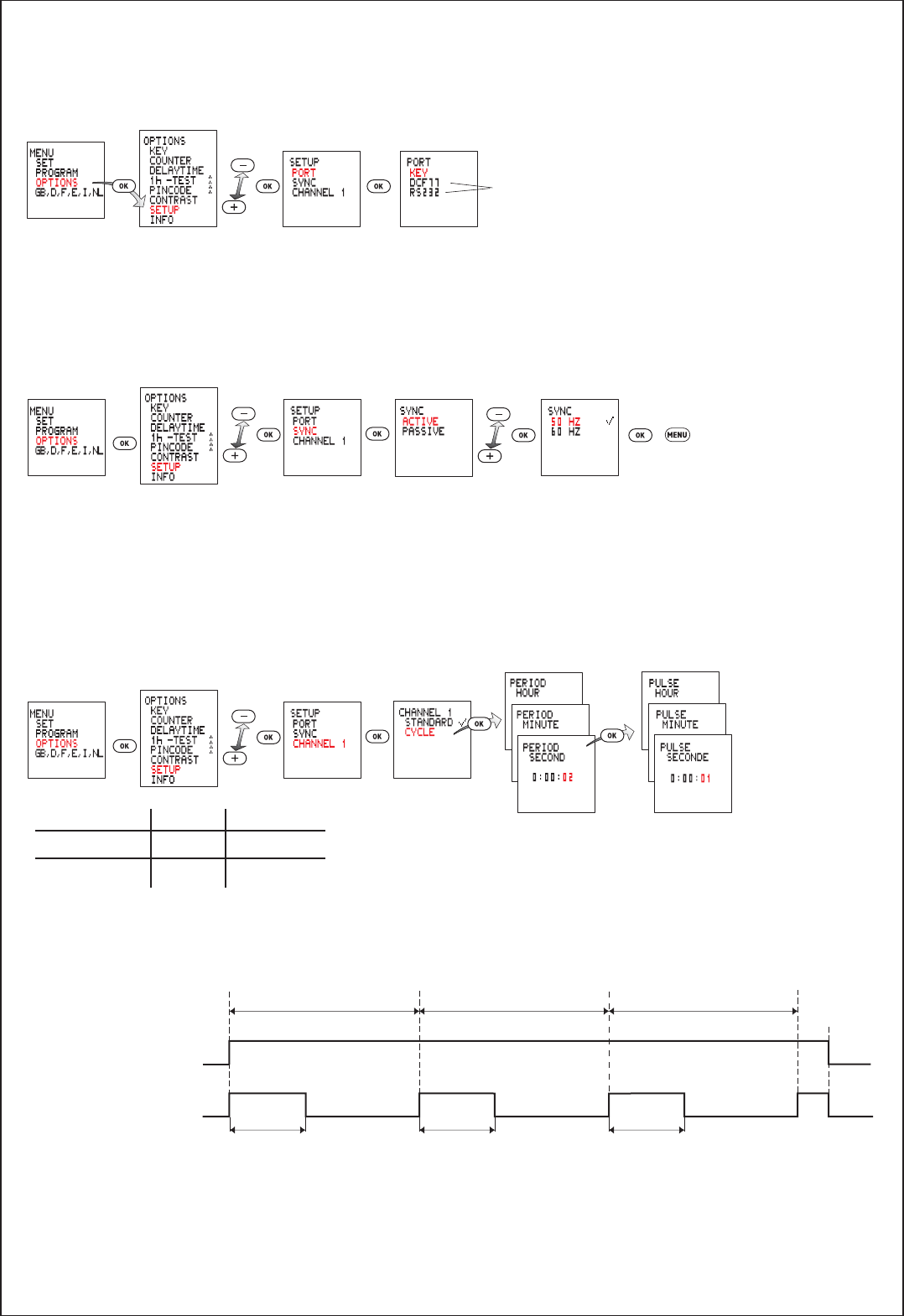
쐅Extended Settings
The data interface KEY is preset and cannot be changed.
Activating and deactivating mains synchronisation.
Cycle function for channel 1
min max
PERIOD 2 s 2h
PULSE-TIME 1 s 1h 59min 59s
without function
The default setting is PASSIVE. In order to improve the long-term accuracy, it is advisable to activate synchronisation on 50/60 Hz mains with
frequency adjustment.
Instead of its STANDARD function, the output of channel 1 is switched on and off cyclically. The available parameters are the PERIOD and the
PULSE-TIME within this period.
0:10:00 0:10:00 0:10:00
0:04:00 0:04:000:04:00
15:00:00 15:10:00 15:20:00 15:30:00
15:32:00
Program channel 1,
or control signal S
Channel-1 relay
PERIOD
PULSE-TIME PULSE-TIME PULSE-TIME
PERIOD PERIOD
Calgary
Cairns
Wien
Lanzhou
Praha
Warszawa
114 W, 51 N
93 W, 45 N
153 E, 27 S
104 W, 39 N
58 E, 24 N
121 E, 25 N
54 E, 24 N
25 E, 60 N
18 E, 59 N
39 E, 21 N
56 E, 58 N
14 E , 50 N
21 E , 52 N
175 170 165 160 155 150 145 140 135 130 125 120 115 110 105 100 95 90 8580 75 70 65 60 55 50 45 40 35 30 25 20 15 10 5 0 5 10 15 20 25 30 35 40 45 50 55 60 65 70 75 8085 90 95 100 110 115 120 125 130 135 140 145 150 155 160 165 175 180170105
175 170 165 160 155 150 145 140 135 130 125 120 115 110 105 100 95 90 8580 75 70 65 60 55 50 45 40 35 30 25 20 15 10 5 0 5 10 15 20 25 30 35 40 45 50 55 60 65 70 75 8085 90 95 100 110 115 120 125 130 135 140 145 150 155 160 165 175 180170105
180
180
90
85
80
75
70
65
60
55
50
45
40
35
30
25
20
15
10
5
0
5
10
15
20
25
30
35
40
45
50
55
60
65
70
75
80
85
90
90
85
80
75
70
65
60
55
50
45
40
35
30
25
20
15
10
5
0
5
10
15
20
25
30
35
40
45
50
55
60
65
70
75
80
85
90
-11:00 -10:00 -9:00 -8:00 -7:00 -6:00 -5:00 -4:00 -2:00-3:00 -1:00 UTC +1:00 +2:00 +3:00 +4:00 +5:00 +6:00 +7:00 +8:00 +9:00 +10:00 +11:00
+12:00-12:00
-11:00 -10:00 -9:00 -8:00 -7:00 -6:00 -5:00 -4:00 -2:00-3:00 -1:00 UTC +1:00 +2:00 +3:00 +4:00 +5:00 +6:00 +7:00 +8:00 +9:00 +10:00 +11:00
+12:00-12:00
France
Bordeaux 1 W 45 N
Brest 5 W 48 N
Calais 2 E 51 N
Dijon 5 E 47 N
La Rochelle 1 W 46 N
Le Havre 0 WE 49 N
Le Mans 0 WE 48 N
Lille 3 E 51 N
Limoges 1 E 46 N
Lyon 5 E 46 N
Marseille 5 E 43 N
Mulhouse 7 E 48 N
Nancy 6 E 49 N
Nantes 2 W 47 N
Paris 2 E 49 N
Perpignan 3 E 43 N
Strasbourg 8 E 49 N
Toulouse 1 E 44 N
Finland
Rovaniemi 26 E 66 N
Oulu 25 E 65 N
Kajaani 28 E 64 N
Tampere 24 E 61 N
Turku 22 E 60 N
Helsinki 25 E 60 N
Great Britain
Aberdeen 2 W 57 N
Belfast 6 W 55 N
Glasgow 4 W 56 N
Newcastle 6 W 54 N
Liverpool 3 W 53 N
Manchester 2 W 53 N
Sheffield 1 W 53 N
Birmingham 2 W 52 N
London 0 WE 51 N
Plymouth 4 W 50 N
Hungary
Budapest 19 E 47 N
Gyor 18 E 48 N
Szombathely 17 E 47 N
Pecs 18 E 46 N
Szeged 20 E 46 N
Debrecen 22 E 48 N
Miskolc 21 E 48 N
Salgotarjan 20 E 48 N
Italy
Cagliari 9 E 39 N
Milano 9 E 45 N
Venézia 12 E 45 N
Génova 9 E 44 N
Roma 12 E 42 N
Nápoli 14 E 41 N
Bari 17 E 41 N
Palermo 13 E 38 N
Ellas (Greece)
Saloniki 23 E 41 N
Athinai 24 E 38 N
Ireland
Dublin 6 W 53 N
Cork 8 W 52 N
Galway 9 W 53 N
Norway
Narvik 17 E 68 N
Trondheim 10 E 63 N
Bergen 5 E 60 N
Oslo 11 E 60 N
Mo i Rana 14 E 66 N
Poland
Gdansk 19 E 54 N
Katowice 19 E 50 N
Kraków 20 E 50 N
Poznan 17 E 52 N
Szczecin 15 E 53 N
Warszawa 21 E 52 N
Portugal
Lisboa 9 W 39 N
Faro 8 W 37 N
Porto 9 W 41 N
Turkey
Adana 35 E 37 N
Adapazari 30 E 41 N
Ankara 33 E 40 N
Antalya 31 E 37 N
Canakkale 26 E 40 N
Gaziantep 37 E 37 N
Istanbul 29 E 41 N
Mugla 28 E 37 N
Samsun 36 E 41 N
Izmir 27 E 38 N
Espana
Barcelona 2 E 41 N
Madrid 4 W 40 N
Palma 3 E 40 N
Selvilla 6 W 37 N
Valencia 0 WE 39 N
Sweden
Goteborg 12 E 58 N
Halmstad 13 E 57 N
Linkoping 16 E 58 N
Orebro 15 E 59 N
Stockholm 18 E 59 N
Gavle 17 E 61 N
Umea 20 E 64 N
Lulea 22 E 66 N
Switzerland
Bern 7 E 47 N
Basel 8 E 47 N
Sankt Gallen 9 E 47 N
Lugano 9 E 46 N
Zürich 9 E 47 N
Los Angeles
Miami
New York
75 W, 40 N
San Francisco
122 W, 38 N
116 E, 40 N
Chongqing
107 E, 30 N
Harbin
127 E, 46 N
Hong Kong
114 E , 22 N
Shenyang
123 E, 42 N
104 E, 36 N Xi'an
109 E, 34 N
Manila
73 E, 34 N
Kabul
+5:00
+3:30
+8:00
+ 6:00
+ 3:00
51 E, 36 N
44 E, 33 N
Windhoek
11 E, 60 N
Oslo
Québec
Cordoba
Brasilia
N
S
+8:00 +10:00
77 E, 43 N
WE
+9:00
+9:00
+7:00 +9:00
+2:00
+3:00
UTC
+1:00
+3:00
+2:00
-3:00
-6:00
-9:00
+3:00
-10:00
+1:00
+2:00
93 E, 56 N
+12:00
3 E , 37 N
8W, 34N
58 W, 35 S
64 W, 31 S
71 W, 33 S
149 E , 35 S
145 E , 38 S
151 E , 34 S
116 E, 32 S Adelaide
139 E , 35 S
146 E , 17 S
175 E, 41 S
43 W , 23 S
47 W, 24 S
79 W, 44 N 74W, 45 N
71W, 47 N
73 W, 37 S
13 E, 52 N
Berlin
Athinai
24 E, 38 N
4 W, 40 N
Madrid
Paris
2 E, 49 N
London
0 WE, 51 N
Dublin
6 W, 53 N
Delhi
77 E , 29 N
Chennai
80 E, 13 N
73 E, 19 N
Mumbai
67 E, 24 N
Karachi
Kolkata
88 E, 23 N
Kanpur
80 E, 26 N
Ahmadabad
73 E, 23 N
Roma
12 E, 42 N
Tokyo
140 E, 36 N
Osaka
135 E, 35 N
Casablanca
El Djazair
Tarabulus
13 E , 33 N
Guadalajara
103 W, 21 N 99 W, 19 N
Monterry
100 W, 26 N
Al-Qahira
31 E, 30 N
175 E, 37 S
Auckland
Wellington
Brisbane
Sydney
Canberra
Melbourne
Perth
16 E, 48 N
Lisboa
9 W, 39 N
Porto
9 W, 41 N
Perm
30 E , 60 N
38 E, 56 N
Moskva Krasnojarsk
Novosibirsk
83 E, 55 N
Omsk
73 E, 55 N
Irkutsk
104 E, 52 N
Jiddah
47 E, 25 N
Ar-Riyad
9 E, 47 N
Zürich
18 E, 34 S
Capetown
Johannesburg
Durban
31 E, 30 S
28 E, 26 S
Seoul
127 E, 38 N
Tunis
10 E, 37 N
Istanbul
29 E, 41 N
Adana
35 E, 37 N
Ismir
27 E, 38 N
Abu Dhabi
84 W, 34 N
Atlanta
88 W, 42 N
97 W, 33 N
Dallas
83 W, 42 N
Detroit
118 W, 34 N
80W, 26 N
74 W, 41 N
Philadelphia
Houston
95 W, 30 N
123 W, 49 N
Vancouver
122 W, 48 N
Seattle
Beijing
Taipei
Bangkok
101 E, 14 N 121 E, 15 N
Hanoi
106 E, 21 N
Kathmandu
85 E , 28 N
Islamabad
69 E, 35 N
+8:00
+5:00
+4:30
Alma Ata
Ulaanbaatar
107 E, 48 N
Kiev
31 E , 50 N 46 E, 52 N
Saratov
Sankt Peterburg
Tehran
Baghdad
Muscat
48 E , 19 S
Antananarivo
17E, 22 S
Helsinki
Stockholm
Reykjavik
21 W, 64 N
-3:30
Montreal
Toronto
Chicago
Denver
Minneapolis
Havana
82 W, 23 N
Santo Domingo
70 W, 19 N
Mexico City
La Paz
68 W, 16 S
Santiago
Concepcion Buenos Aires
Sao Paulo
Rio de Janeiro
48 W, 16 S
Austria
Klagenfurt 14 E 47 N
Salzburg 13 E 48 N
Linz 14 E 48 N
Wien 16 E 48 N
Graz 15 E 47 N
Benelux
Amsterdam 5 E 52 N
Bruxelles 4 E 51 N
Luxembourg 6 E 50 N
Danmark
Københaven 13 E 56 N
Ålborg 10 E 57 N
Århus 10 E 56 N
Esbjerg 8 E 55 N
Germany
Aachen 6 E 51 N
Berlin 13 E 52 N
Düsseldorf 7 E 51 N
Dresden 14 E 51 N
Emden 7 E 53 N
Flensburg 9 E 55 N
Frankfurt 9 E 50 N
Freiburg 8 E 48 N
Hamburg 10 E 54 N
Hannover 10 E 52 N
Kassel 9 E 51 N
Köln 7 E 51 N
Leipzig 12 E 51 N
München 12 E 48 N
Münster 8 E 52 N
Nürnberg 11 E 49 N
Passau 13 E 49 N
Regensburg 12 E 49 N
Rostock 12 E 54 N
Soest 8 E 52 N
Stuttgart 9 E 49 N
Shanghai
121 E, 31 N
N
S
WE
+5:00
+7:00
+6:00
+12:00
+10:00 +11:00
-5:00
-4:00
-7:00
-8:00
-4:00
-5:00
-3:00
+1:00
+9:30
+5:30
+6:30
+ 3:00
-3:00
+5:00
+4:00
+4:00
•Zeitzonenkarte
•Carte des fuseaux horaires
•Time-of-day map
•Tijdszone kaart
•Ajavööndite kaart
•Laika zonu karte
•Laiko juostų žemėlapis
•Mapa stref czasowych
•Mapa s časovými pásmami
•Karta časovnih pasov
•Mapa časových pásem
•Időzóna térkép
•Zaman dilimleri kart
•
•Carta dei fusi allegata
•Carta de husos horarios
•Time-of-day oversigt
•Aikavyöhykekarttaa
•Tidssonenkortet
•Tidzons kartan
•Carta de fusos horários
•‹ÒÙ· ˘ÒÈ·fl˘Ì ·ÙÒ‹ÍÙ˘Ì
