Linked In Profile Guide
User Manual:
Open the PDF directly: View PDF  .
.
Page Count: 25
FIRST
IMPRESSIONS
The B2B professional’s guide to
looking good on Social Media

SECTION ONE
The importance of
your LinkedIn prole
SECTION TWO
What do you want
to accomplish?
SECTION THREE
The most important
prole elements
SECTION FOUR
Templates
SECTION FIVE
Steps for updating
TABLE OF CONTENTS
03
06
09
14
21
3
THE
IMPORTANCE
OF YOUR
LINKEDIN
PROFILE
(why you’re reading
this guide)
LinkedIn Prole Guide | Section 1
Remember when business cards, and possibly an executive bio, contained the only public
information others got to see about you? Those days are gone! Today, there are a mind-boggling
number of online places people can go to nd out more about you simply by typing your name.
It’s time to take control of one place in particular where people are checking you out — LinkedIn.
Only if you’ve been on Mars the past few
years could you not be at least eetingly
familiar with LinkedIn. Since its founding
in 2002 as a job-search site, LinkedIn has
quickly morphed into the world’s largest
business-to-business (B2B) network. As of
this writing, it has over 430 million members
with two new members joining every second.
It’s an exciting place to be, and one that is
increasingly becoming a necessary part of
any B2B buying decision.
So what about your prole? Why is it so
important? Because potential buyers, clients,
employees, investors, partners and who
knows who else go to LinkedIn to check out
and connect with people who can help them:
• solve a problem
• reduce the risk of a purchasing or vendor
selection, or
• take advantage of an opportunity
The place they start - and continue to return
to - is your personal prole.
That’s probably why you’re reading this guide.
However, for anyone who needs further
convincing that a solid, top drawer LinkedIn
prole is worth the time, let’s look at three
reasons.

4
LinkedIn Prole Guide | Section 1
The business-to-business buying process
has changed tremendously over the past few
years -- even in traditionally referral-based
industries such as professional services.
Why? Because buyers (your potential
new clients) now have access to tons of
information that was unavailable to them
before the Internet in general and, LinkedIn
in particular.
Buyers visit LinkedIn to look at the proles
and learn more about people and rms that
have been recommended to them. Some
visit LinkedIn to get a referral in the rst
place. And many referrals these days are
actually referrals of people someone has
heard about or seen on LinkedIn.
Within LinkedIn’s database of 430 million+
members lies a remarkably effective search
engine in constant use by members to nd
experts on every imaginable topic. Members
can search their entire expanded networks
or they can search within groups; and the
point is – even if they don’t nd you, they
probably will nd your competitors.
Much of the method LinkedIn uses to
determine who should show up on a
particular search is based on personal
proles. The best way to be sure you’re
included when a buyer or potential new
client searches for someone with your
expertise is to craft your prole to reect
that expertise.
Google also seems to favor LinkedIn.
When clients are using Google to search
for someone with your capabilities and
“LinkedIn”, your name could pop up.
We’ve seen this happen on numerous
occasions.
According to experts, in the ofine world
it takes about three seconds for someone
to evaluate your appearance and form an
opinion about you. These rapid-re opinions
are notoriously hard to change.
LinkedIn is no different. Visitors to your
prole page glance at your photo and your
headline and maybe the rst paragraph of
your summary, and quickly decide whether or
not they want to read any more about you.
If you pass that test and they read further
into your prole, they then decide whether or
not you’re someone they should get to know.
The reason you want to invest time in
polishing your prole and keeping it that way
is pretty much the same as why you dress up
for work, especially if you’re seeing customers
or clients. Your prole has the power to turn
them away or draw them to you.
60%
Reason #1 REFERRALS
Reason #3 VISIBILITY
Reason #2 FIRST IMPRESSIONS COUNT!
of professional services buyers use social
media to evaluate new providers (Source).
5
BUYERS ARE LOOKING
LinkedIn Prole Guide | Section 1
Whether you see LinkedIn as a powerful tool
for business and reputation development
or you’d rather it all go away, buyers don’t
need your permission to look at your prole.
Considering it an offensive or defensive
move is your choice, but either way, you want
to look good.
Let’s dig further into how to do that.
6
WHAT
DO YOU
WANT TO
ACCOMPLISH?
LinkedIn Prole Guide | Section 2
The world’s best LinkedIn prole begins not with you but with the people you want to attract.
Who are they? What are they looking for? And what do you want them to feel, think and do
after they read your prole? Taking a few minutes now to think through these questions will pay
massive dividends in the effectiveness of your LinkedIn prole.
If you’ve already dened your target
audiences - maybe for some other marketing
or business development program - you’ve
got a head start. In this case, target
audiences are the people you want to reach
or connect with on LinkedIn. Most commonly,
these are customers, clients, prospects,
potential new clients, partners, investors,
media and employees. Some readers might
also want to stand out to hiring managers
and recruiters, but that’s a different Guide.
For each target audience, identify them a
little further. What are their industries, titles,
company sizes, responsibilities, and pain
points? What problems can you help them
solve? What keywords might they use to
nd you?
Then, think about what you want them to do.
You may or may not have a different action for
each audience. For example, you may want
potential new buyers to contact you right
away while you want potential employees to
check out your company page. Or, you may
just want them all to connect with you.
7
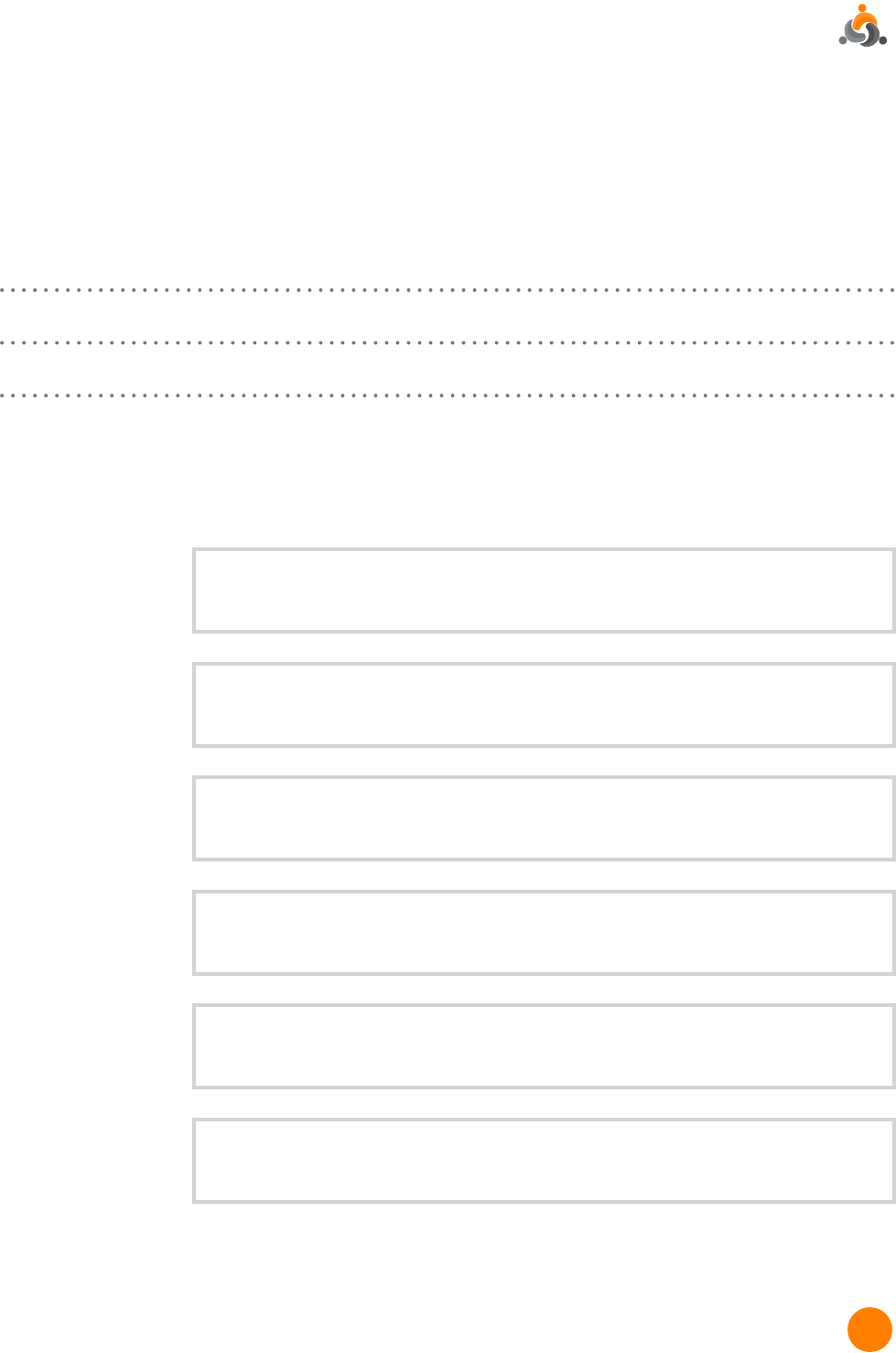
Here’s a questionnaire to help you organize your thoughts.
1. What are your LinkedIn goals and objectives? How will you know you’ve done a good job?
2. Who do you want to connect with on LinkedIn? What are their titles? What types of
companies do they work for?
TARGET AUDIENCE
TITLES
INDUSTRY
RESPONSIBILITIES
KEYWORDS
PAIN POINTS &
PROBLEMS
LinkedIn Prole Guide | Section 2
8
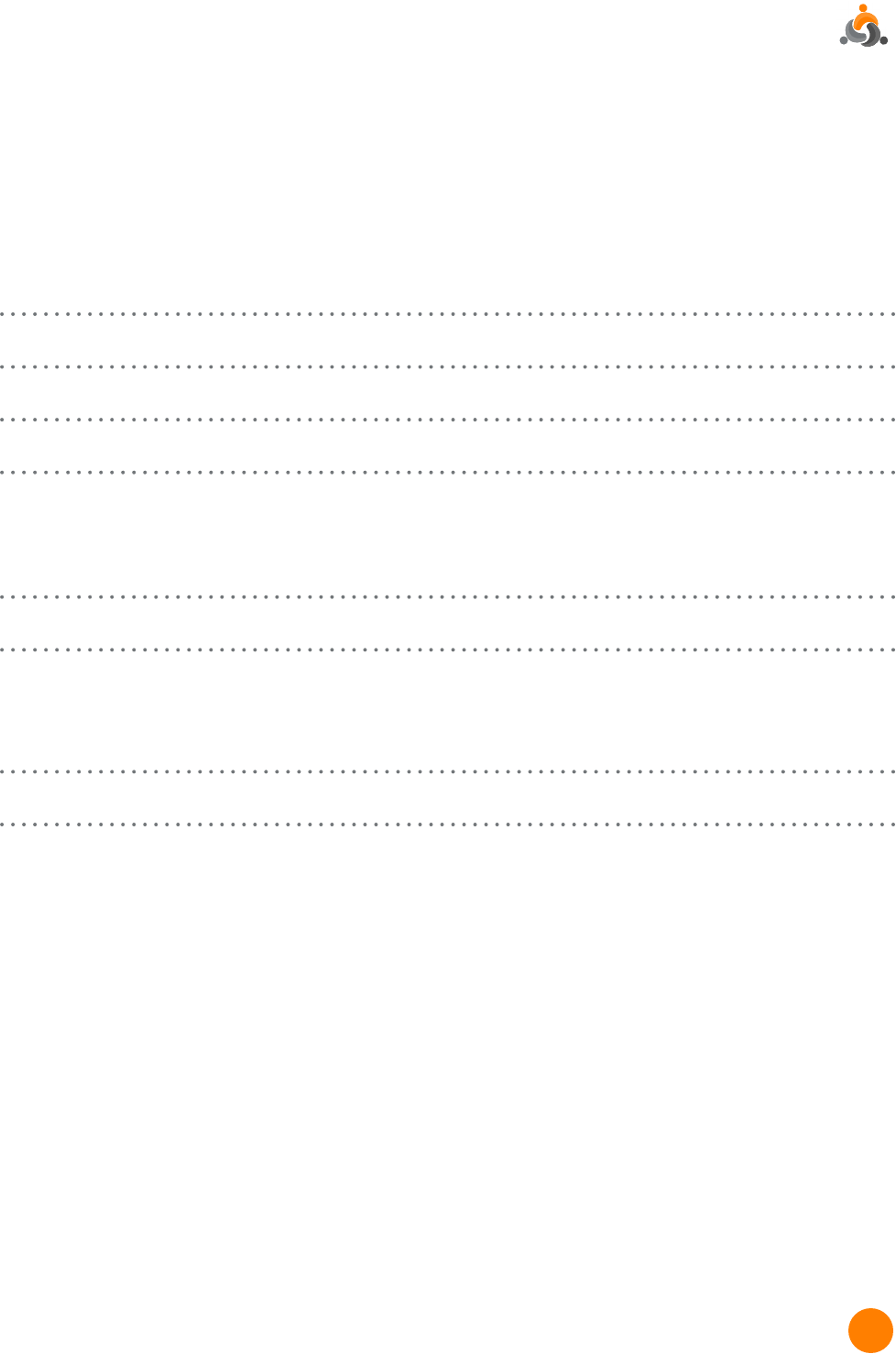
3. How will these people benet from connecting with you personally?
How have you helped similar people in the past?
4. Why are you passionate about your industry and your job?
5. What are your greatest achievements as it relates to your current job?
Next, we’ll look at the most important elements of your new prole.
LinkedIn Prole Guide | Section 2

9
KEY
ELEMENTS:
THE MOST
IMPORTANT
PROFILE
ELEMENTS
LinkedIn Prole Guide | Section 3
There are two ways to look at which elements
deserve the most attention on your prole:
1. the elements LinkedIn considers
necessary for your prole to be 100%
complete and
2. the elements that are most likely to send
relevant viewers your way and make them
want to connect with you.
Fortunately, if you build your prole to appeal
to your target audiences, you will need to
add only a few easy elements to be 100%
complete.
Why do you care about having a complete
prole? LinkedIn says “people with completed
proles are 40X more likely to receive
opportunities through LinkedIn.” One reason
may be that completed proles rank higher
in LinkedIn’s search results. Another reason
is that they are more appealing to viewers.
A completed prole makes you appear more
engaged and better showcases your expertise.
Here are the prole sections you need to
include in order to have LinkedIn consider
your prole complete (Source):
1. Your industry and location
2. A prole photo
3. An up-to-date current position (with
description)
4. Two past positions
5. Your education
6. Your skills (minimum of three)
7. At least 50 connections
Interestingly, one of the most important
elements of your prole is missing from this
list and that is your Prole Summary. You’ll
nd detailed information about writing a
prole on the next few pages.
10
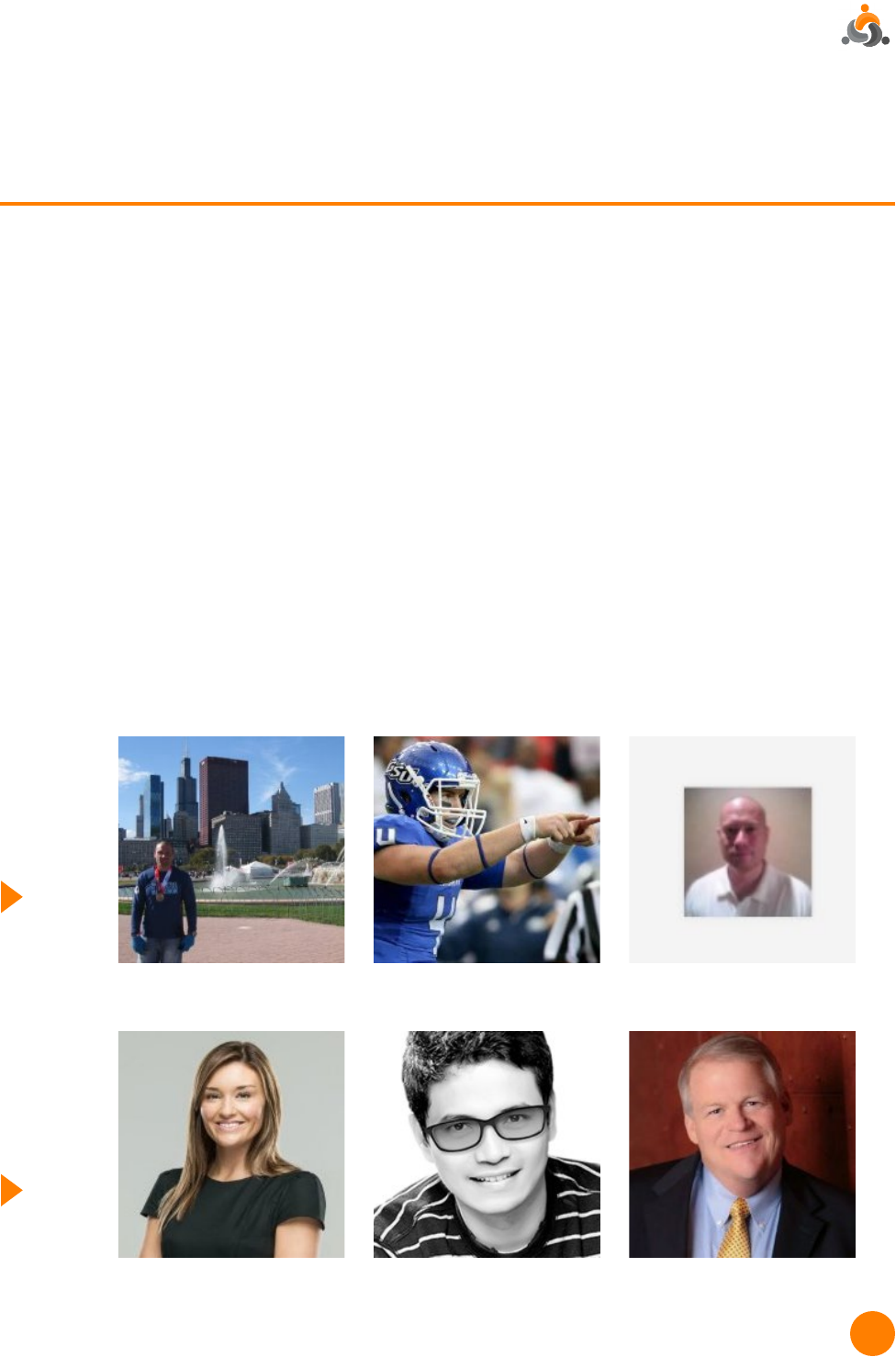
Nice contrasting background.
Now let’s look at the elements that are most important to your target audiences.
Examples
of Bad
LinkedIn
Prole
Photos
Examples
of Good
LinkedIn
Prole
Photos
YOUR PHOTO
Some people consider this the most important part of your prole because it gives visitors
an immediate visual sense of the kind of person you are. As the old saying goes “a picture
is worth a thousand words,” and it’s no different here. This is not the place to put an out of
focus, poorly lit snapshot. Here are a few “rules” to keep in mind:
1. High quality. If you don’t use a professional photographer, at least have someone who
knows what they’re doing take the picture.
2. Big enough to ll the space. (50 pixels wide by 50 pixels high)
3. “Professional” attire. How formal you need to be depends on your business and the image
you want to convey. How do you dress when you visit a client or customer? If it’s a suit,
wear a suit in your photo. Ditto a dress shirt or blouse. Men - at minimum have a collar on
your shirt.
4. Just you. No family. No friends. No pets. Absolutely no cocktails. Save those shots for
Facebook.
5. Up close. What’s known as a “head shot”. From the top of your head to just below your
shoulders. Let us see your eyes - not your skiing technique.
LinkedIn Prole Guide | Section 3
Distracting background,
too far away and out of focus.
Good lighting, clear.
Unless you really are a
football player.
Too small and out of focus.
Coat and tie not required if
you don’t wear one at work.
11
HEADLINE
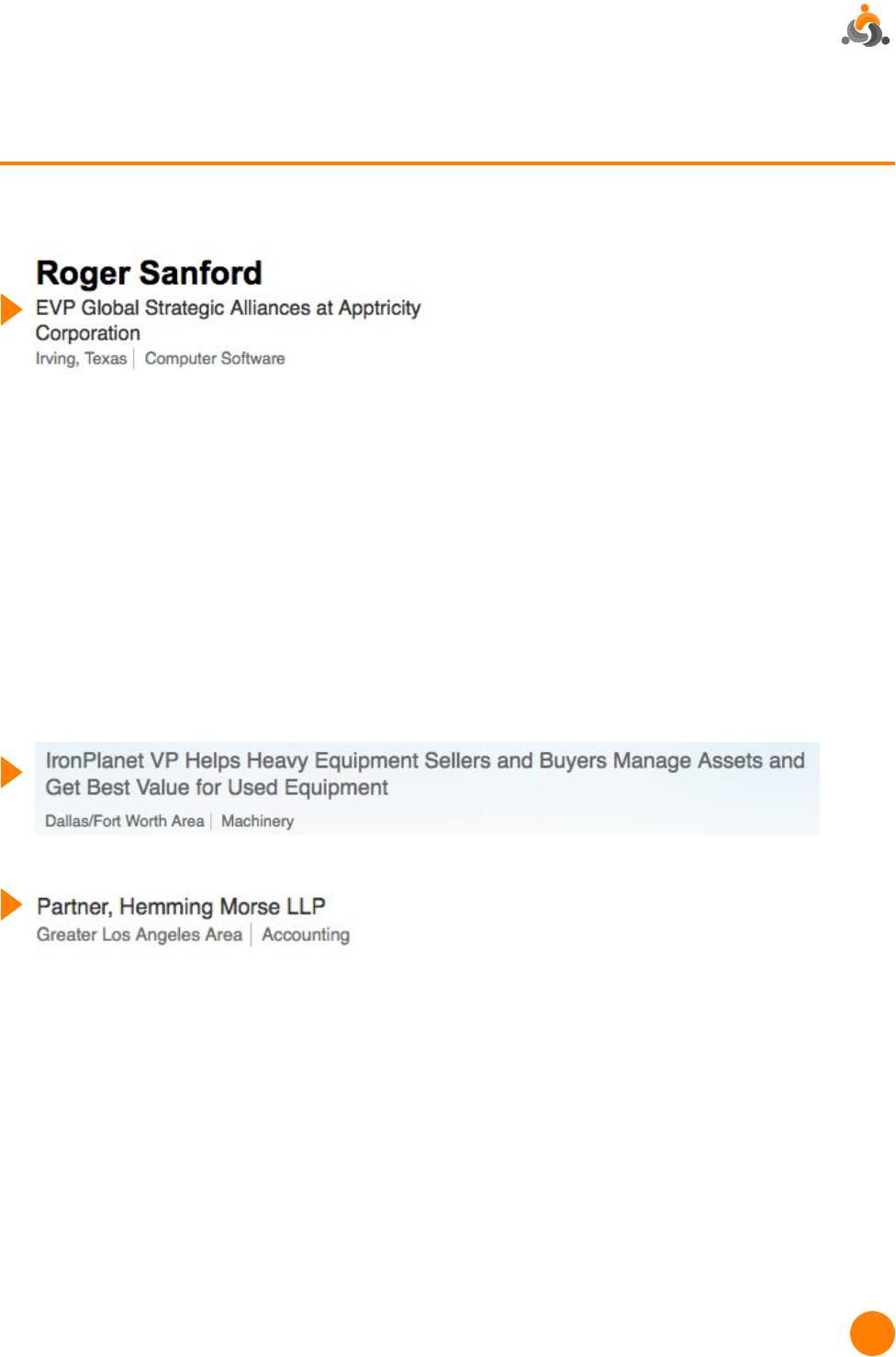
Your “headline” is the phrase that shows up underneath your name on the prole:
The headline is important because the three lines you see above are often all a prospect
gets to see to decide if he/she wants to know more about you or not. For example, when
someone is looking through a list of members in a LinkedIn group or searching LinkedIn with
keywords, this is what they will see.
Unless you tell it otherwise, LinkedIn will use your current title as your headline.
Sometimes this is descriptive enough but more often than not it requires a rewrite. Short
headlines are good. (Some headlines these days are ridiculously long.) But it needs to
communicate enough to let the viewer know whether or not to click on your listing and
learn more about you.
Descriptive versus Non-descriptive Headline
Slogans versus Functions
Many LinkedIn “experts” will tell you that, rather than function related, your headline should
be more of a slogan to emphasize the benets you bring to your customers or clients.
Although The Conversion Company helped pioneer the use of benet-oriented headlines
several years ago, we nd that things have gone too far and the use of slogan type
headlines must be approached very carefully.
You’ll nd some headline templates in the next section.
Descriptive
Non-descriptive
LinkedIn Prole Guide | Section 3

12
SUMMARY
This is where you get to tell your story; and because it’s all about you in an essay format,
the Summary can be the most challenging part of your prole to write. It’s also one of the
most important, so don’t skip it. In general, this section is used to provide an overview of
your background, talents/skills and reasons your target audience might want to connect.
(This is where you can get as benet oriented as you want.)
A few things you’ll want to include in your Summary:
1. BRIEF background & how it relates to what you are doing now—
2. Detailed description of the specic benets you provide clients or customers
3. Something about your passion & how it relates to the above
4. Call to action – invite the reader to contact or connect with you
While it’s easy to copy and paste your bio from another source such as your website, we
recommend you don’t. You’ll come off looking stiff and uninteresting. The best Summaries
are written in conversational tone, and we highly recommend using 1st person – “I” or “we”
instead of “he” or “she”.
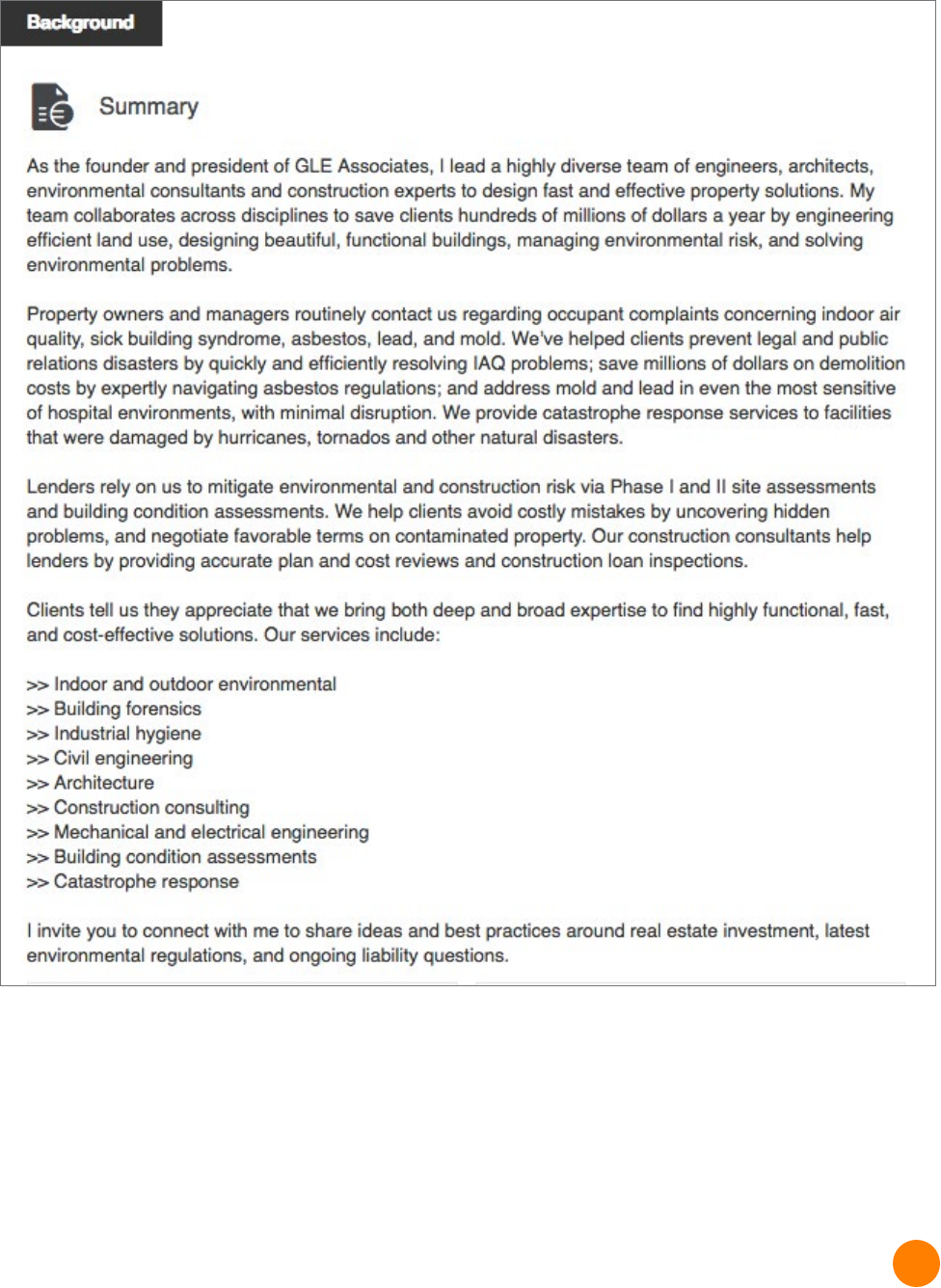
Here’s an example of a good prole summary. Its owner is the founder and president of
an architecture, engineering and environmental consulting rm. His objective for being on
LinkedIn is to increase visibility for himself and his company and to showcase his thought
leadership.
LinkedIn Prole Guide | Section 3
13
Here’s his prole summary:
This prole summary works because, after reading it, you almost feel like you know Bob; as
if you’d actually met him. You know exactly what types of people he wants to connect with
and why those people should be interested.
You’ll nd Bob’s Summary broken down paragraph by paragraph in the template section
of this guide.

14
WORK EXPERIENCE
As we’ve already mentioned, it’s a “must” to include your current position and two previous
positions — company, your title, the time you worked there, where you were located and a
description of your job. Without this information LinkedIn will not consider your prole to be
100% complete and you’ll be penalized in the search results. Remember, the job description
should be more about your accomplishments and the impact you had on the company and
its customers or clients.
We’ve included some examples on the template in the following section.
EVERYTHING ELSE
Your LinkedIn prole gives you ample opportunity to include any additional background
information that might be interesting or helpful to your target audiences. In particular, the
following are quite useful.
Publications. You can use this section to feature any content you’ve created and published
or presented in the past. You can link to content on a website, a PDF, a video or a slide
presentation. LinkedIn likes proles that include rich media, such as videos and slide
presentations.
Projects. This is a great place to promote events your prospect may be interested in, such as
webinars, speaking engagements, lunch-and-learn opportunities.
Certications. This is where you list all the licenses and certications you hold. According to
LinkedIn, members with certications on their proles get twice as many views.
Education. As mentioned above, LinkedIn requires your education to be included in a 100%
complete prole. It’s also important to showcase relevant degrees; and by including the
places where you went to school, you will automatically gain access to others who went
there too.
Volunteer. By including any non-prot organizations you volunteer for or support in other
ways, you are letting others see more of you - and what’s important to you.
Skills. Think of these as keywords that will help others nd you. It’s also one of LinkedIn’s
must-haves. Include at least three.
In addition to these sections, LinkedIn also provides areas for Languages, Organizations,
Honors & Awards, Patents and other information. You decide which are relevant and
important to your audience(s).
At this point you may be thinking that crafting a great prole is an exercise in
creative writing, and in a way it is. Which is why we’ve included templates in the
following section for you to use as guidelines.
LinkedIn Prole Guide | Section 3
15
LINKEDIN
PROFILE
TEMPLATES
LinkedIn Prole Guide | Section 4
A few notes to get you started:
• Your LinkedIn prole should be written in
conversational rst person (use “I” and
“we”) – as if you were telling the reader
about yourself.
• Focus on things that are important from
your prospect’s point of view. Humans
naturally want to know “what’s in it for
me.” It’s your prole, but it’s really all about
making you interesting to them.
• Try to use keywords. Like Google, LinkedIn
uses keywords to determine whether or not
you should show up on a specic search.
The most important places to use your
keywords are in 1) your Headline, 2) your
Title and 3) your Summary.
16
YOUR PROFILE HEADLINE
Your headline should be a benet or keyword related statement that will make prospects
want to look further into your prole. (Note: This is often the rst and only thing a prospect
sees about you. It is important to communicate your relevance to your target audience.)
LinkedIn limits the length of a prole headline to a maximum of 120 characters.
Here is a ll-in-the-blanks approach:
Benets approach with company name
Use this when you want to build your personal network while also promoting
company awareness
[your company] [your title]
[verb – helps, drives, etc]
[benet] for [who]
Examples:
GLE Asbestos Expert Helps Property Managers
Control Costly Environmental Issues
HalcyonFT Managing Partner drives IT excellence
and savings for capital markets rms
CEO of Membrain - Building the #1 Sales
Effectiveness Platform to Achieve Consistent
Performance
Specialty approach
Use this when indicating your seniority and area of expertise is enough.
You can add your company name – especially if it is well-known
[your title], [area of expertise]
Examples:
Partner, Forensic Accounting, Expert Witness
Senior Partner, representing employers in all
areas of human resources.
Partner, Transfer Pricing Economist
CEO of IronPlanet, the Leading Online Global
Marketplace for Used Heavy Equipment
LinkedIn Prole Guide | Section 4

17
YOUR PROFILE SUMMARY
This section is used to provide an overview of your background, talents/skills and reasons
the prospect might want to connect. LinkedIn limits the length of this section to a maximum
of 2000 characters. The example provided is a prole Summary built using this template.
The prole’s owner’s objectives were to generate awareness for his company and further his
own position as an expert.
First Paragraph:
What are you doing now and how does that benet customers and prospects?
You: Example:
As the founder and president of GLE Associates,
I lead a highly diverse team of engineers,
architects, environmental consultants and
construction experts to design fast and effective
property solutions. My team collaborates across
disciplines to save clients hundreds of millions
of dollars a year by engineering efcient land
use, designing beautiful, functional buildings,
managing environmental risk, and solving
environmental problems.
LinkedIn Prole Guide | Section 4

18
Second / Third Paragraph:
Company branding information. (Note: Skip this section if your company is not
important to your objectives.)
Third / Fourth Paragraph:
Your professional history as it relates to your current position and LinkedIn
objectives. Include quantiable results where possible.
You:
You:
Example:
GLE Associates is a leading integrated
architecture, engineering, and environmental
consulting rm, headquartered in Tampa,
Florida, with ofces throughout Florida and the
Southeastern United States. Founded in 1989,
we focus on providing our clients with quick-
response, turnkey solutions that draw on a
broad range of property and building services
expertise. Our architects, engineers, geologists,
industrial hygienists, and construction
consultants collaborate to provide our clients
with a full toolbox of expertise for any project.
GLE services include: Indoor Environmental,
Building Forensics, Industrial Hygiene, Outdoor
Environmental, Civil Engineering, Construction
Consulting, Architecture, Mechanical and
Electrical Engineering, Property Condition
Assessments and Catastrophe Response.
Example:
An environmental engineer at heart, my
professional experience was gained at GLE,
conducting and then overseeing projects of
all sizes for public and private, local, regional
and national companies. Over the course of
my career, I’ve managed hundreds of projects
including: Phase I/II Environmental Site
Assessments, asbestos surveys, asbestos
abatements and indoor air quality studies. Today
those services are often integrated into larger,
more complex projects.

19
Next paragraph:
What drives you? What do you love about your current work?
Last paragraph:
Call-to-action. What do you want the reader to do?
You:
You:
Example:
I believe that my success, and GLE’s success,
is rmly attributed to putting the client before
everything else. I’m proud to be part of a team
that works hard and delivers results that delight
our client base.
Example:
I invite you to connect with me if you’re
interested in learning more about our rm and
how we can help your business.
20
YOUR EXPERIENCE
In the Experience section, you’ll list your current and past employers and positions. It is
not necessary to include every job you’ve ever had – especially if it happened early in your
career and has no relevance to your current business or your future plans. LinkedIn limits
titles to a maximum of 100 characters and description to a maximum of 2000 characters.
Position #1:
Your current position. First sentence should be a description of the company.
Next talk about why you came to (or founded) this company and what you do here.
Again, try to relate it to helping clients.
You: Example:
Title: President
GLE Associates is a leading integrated
architecture, engineering, and environmental
consulting rm, headquartered in Tampa,
Florida, with ofces throughout Florida and the
Southeastern United States. Founded in 1989,
we focus on providing our clients with quick-
response, turnkey solutions that draw on a
broad range of property and building services
expertise. Our architects, engineers, geologists,
industrial hygienists, and construction
consultants collaborate to provide our clients
with a full toolbox of expertise for any project.
LinkedIn Prole Guide | Section 4

21
Additional experience:
For each of your previous jobs, include your title and follow a similar pattern to the
description of your current job. You do not need to go into great detail on positions that
are not relevant to your current position or your current interests.
You: Example:
Division Manager - Asbestos Consulting Services
Law Engineering
1979 to 1989
I began my career as a geotechnical and
materials engineer in Law’s Atlanta ofce.
In 1984, I moved to the Tampa ofce and
established an environmental group, specializing
in asbestos consulting and abatement
management. Over the next 5 years, I
established and managed indoor environmental
departments throughout Law’s ofces in Florida.
OTHER
You can follow the LinkedIn prole wizard to complete the rest of your prole. This wizard is
built-in and appears when you are in prole edit mode.
NOTE: Special thanks to Heather Head at Scopcity for creating the rst of these prole
templates for our use.
22
7 STEPS FOR
UPDATING
YOUR PROFILE
LinkedIn Prole Guide | Section 5
Now it’s time to bring your new and improved
prole to life.
1. Complete the planning questionnaire on
page 7 of this guide to identify your target
audience and your objectives for using
LinkedIn.
2. Write out your updated Headline, Summary
and Experience. LinkedIn does not have a
staging site and any changes you make will
go live as soon as you click on Save. It’s
much safer to craft these sections of your
prole ofine (using Word, Docs or other text
application) and make sure you’re happy with
it before you copy and paste to LinkedIn.
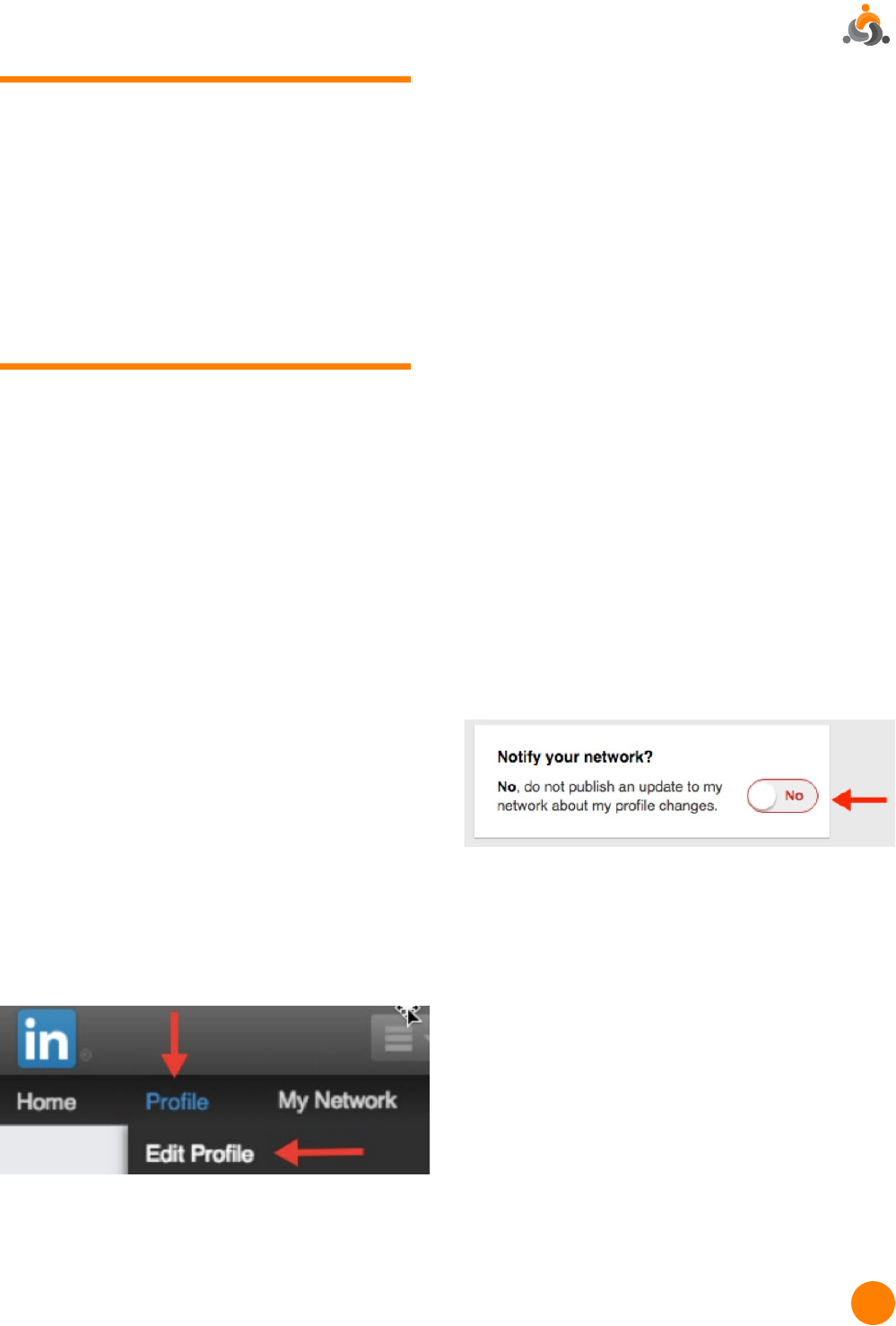
3. Go to the Edit Prole page. To get there,
hover your mouse over “Prole” on the
upper left side of the top navigation and
click “Edit Prole” in the dropdown menu.
You will now be in the prole wizard.
4. Set “Notify Your Connections” to the OFF
position. LinkedIn makes it possible to
automatically notify your connections
whenever you update your prole –
convenient at times; but when you are
making numerous changes, you don’t want
it sending a notice every time you click the
Save button. The Notify Your Connection
control is located along the right-hand side
of the Edit Prole page.
5. Upload your new professional image (if
applicable).
6. Copy and paste your new Headline,
Summary and Experience text into the
prole. Be sure to save each entry.
7. Follow the prole wizard to update any
other sections you want to update.
As you hover your mouse over each section
in your prole, a pencil icon will appear. Click
on that to make your changes.

23
LinkedIn Prole Guide | Section 5
BONUS STEPS
8. You may want to notify your network that
you have updated your prole. To do this,
change the “Notify Your Connections”
setting to “Yes”. Then “edit” your
Summary by making a small change,
changing it back and clicking on Save. Your
connections will receive a notication that
you’ve updated your Summary. (You might
want to set it back to Off afterward just
in case you make minor changes in the
future.)
9. Get your custom URL. Go to Customize
Your Public Prole and follow the
instructions on that page to create a
custom URL. Unless you have a very
unique name, you will likely nd that
someone else already has that URL, but
try to get something as close to your name
as possible. Stay away from nicknames,
employer names or anything that may
change in the future.
10. On this same page, you can also
customize the prole that will show up
when people nd you via a search engine.
11. If you have a premium LinkedIn account,
you can add a header image, which will
help set you even further apart from
others and reinforces your brand.
That’s it.
You’re ready to take
on LinkedIn!
24
ASK ABOUT OUR
SOCIAL MEDIA
MARKETING PROGRAMS
LinkedIn Prole Guide | Section 1
LinkedIn waits for no one. Clients and
prospects are checking you out now.
Make sure you give the very best
impression. We can help you attract the
right buyers, increase awareness and
grow your bottom line.
For more information, call us at
919-246-9936 or email
hello@theconversioncompany.com

25
Author
LinkedIn Prole Guide | Section 1
Susan Tatum is founding partner of The
Conversion Company, a B2B Social Media
Consulting and Implementation rm focused
on helping companies and professionals
use social media to enhance their bottom
line. She is a seasoned business marketing
professional, author, and a pioneer of the use
of LinkedIn as a sales and marketing tool.
First Impressions
The B2B professional’s guide to looking good on Social Media
Copyright © 2016
Published by The Conversion Company
6300 Creedmoor Rd, Suite 170 #193 – Raleigh, NC 27612
All rights reserved. Except as permitted under U.S. Copyright Act of 1976, no part of this
publication may be reproduced, distributed, or transmitted in any form or by any means, or
stored in a database or retrieval system, without the prior written permission of the publisher.
Visit our website at www.theconversioncompany.com
