MAN 12XX OWNERS U 2005 Turbo
User Manual: Turbo
Open the PDF directly: View PDF  .
.
Page Count: 16
OWNER’S GUIDE
www.ultrastarters.com
Covers All 12xx and 13xx Series
Advanced Remote Starters
The system must be placed into Service Mode before any service work is started on the
vehicle. It is the sole responsibility of the vehicle owner to ensure that this is done. The
manufacturer accepts no liability or responsibility for accidental starting of the vehicle.
CARBON MONOXIDE - Never Start in an Enclosed Building (Garage, Carport etc...)
- The Hood Pin Safety Switch Must Always be Installed!
Warning!!
CARBON MONOXIDE MAY CAUSE SERIOUS INJURY, EVEN DEATH!
It is the sole responsibility of the user to place the system in Service Mode
when parking in an enclosed area ex: garage, partially enclosed area
ex: carport, or when the vehicle is being serviced.

OWNER’S MANUAL REMOTE VEHICLE STARTER
PAGE 2
Table Of Contents
Table Of Contents Page 2
Welcome Page 3
Feature List
Remote Starter Functions Page 6
Remote Starting
Extended Runtime
Remote Stop
Optional Features Page 8-9
Lock Doors
lock Doors
Silent Lock and Unlock
Se
Product Warranty Page 16
About Ultra Start
Safety Page 4
Remote Transmitters & Antenna Page 5
Idle Mode
Turbo Timer Mode
Reservation Mode (Manual Transmissions Vehicles only) Page 7
Trunk Release*
Constant Lock Car Finder*
Un Garage Door Interface*
Panic
Timer Start Mode Page 10
PadLoc/ 2nd Car Functions Page 11
Examples Of PadLoc/ 2nd Car Operations
Remote Transmitter Learn Page 12
rvice Mode Page 13
Activating & Deactivating Service Mode
Notes Page 14
Diagnostics Page 15
Battery Replacement
FCC Notice
* Button Programmable
REMOTE VEHICLE STARTER OWNER’S MANUAL
PAGE 3
Congratulations on your purchase of an Ultra Start remote vehicle
starter. Ultra Start remote vehicle starters will provide years of comfort
and convenience. To utilize and understand this system to the fullest,
PLEASE READ THIS MANUAL IN DETAIL.
Welcome
It is our continuing objective to design and manufacture the absolute
best Remote Car Starters, Vehicle Security Systems, Keyless Entry
Systems and Security Bypass units available in today’s competitive
market. This objective is met by utilizing installation professionals with
decades of industry experience to assist in each step of the design
process. This has allowed us to build products that are very installer
and user friendly yet offer advanced and innovative features. Our
systems utilize intelligent programming and auto learning systems
and are designed to work properly in every vehicle. Our systems are
also designed wherever possible to be easily enhanced, allowing the
consumer and the retailer to enjoy easy and cost effective upgrades
and additions to their system down the road. Our limited lifetime
warranty provides one of the best protection plans in the industry,
giving both the consumer and the retailer confidence when they
invest in an Ultra Start product.
About Ultra Start
Feature List
- Remote Keyless Entry. - Ignition Auto Locks.
- Anti-Grind Protection.
- Panic Mode. (Personal Protection) - Car Finder
System Override Protection.(Service Mode) - Safety Start Mode.
- Park Light Diagnostics. - Window Roll-up
- Up to 4 Different Transmitter Codes. - Dual Car Operation.
- Instant Start* - PadLoc
- Timer Mode. (3 Different Start Intervals)
*13xx MODELS ONLY
- Engine Idle Mode. - Turbo Timer Mode.
- Starter Disable.
-

OWNER’S MANUAL REMOTE VEHICLE STARTER
PAGE 4
Safety
The owner/user MUST INSTALL a CARBON MONOXIDE
DETECTOR in the living area near to where the vehicle is
being stored or parked.
ice Mode
It is the sole responsibility of the
owner/user to keep the remote transmitters away from the
reach of children and handle with care so that the system
does not unintentionally start. When the vehicle is parked in
an enclosed/partially enclosed area (ex: garage, car port...),
being serviced (ex: oil change) or the vehicle is loaned to an
operator not familiar with a remote starter,
the system MUST BE placed Serv (see page 10).
NEVER OPERATE THE SYSTEM IN AN
ENCLOSED/PARTIALLY ENCLOSED AREA!
MANUAL TRANSMISSION STARTERS the installation of a
remote starter MUST only be done with a specified manual
transmission starter. It is the sole responsibility of the
vehicles owner to insure that the vehicle is left with the
transmission in neutral position when the remote starter is in
use. The manual transmission starter is designed to be an
added measure of safety ONLY! The manufacturer does not
guarantee or insure against any damages or loss of life that
could result in the event of a remote starter starting while the
vehicle is in gear. Manual transmission models are designed
only to act as a deterrent against the vehicle starting in gear,
this is the vehicle’s owner’s and operator’s responsibility.
VERY IMPORTANT SAFETY NOTES!
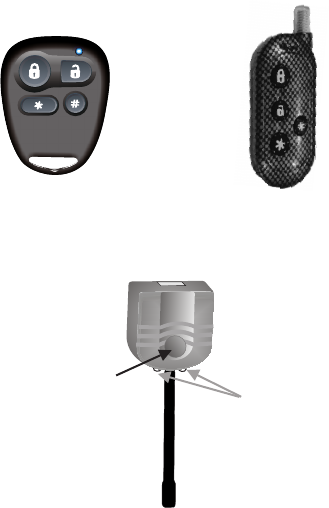
Remote Transmitters and Antenna
REMOTE VEHICLE STARTER OWNER’S MANUAL
PAGE 5
Program Button
LEDs
Active RF antenna with built in LEDs and Program Button.
OE series XR series
NOTE: Remote transmitter’s and antenna may not be exactly as shown.

OWNER’S MANUAL REMOTE VEHICLE STARTER
PAGE 6
Remote Starter Functions
Remote Starting (if remote start fails to start see page 15)
1. Press and release the button.
2. The park lights will flash and the horn (optional) will honk once to confirm.
The vehicle will then remote start, the horn (optional) will honk and the park
lights will then flash four times then remain on while the vehicle is running.*
NOTE: For SAFETY START (optional) press and release the button two
times within three seconds.
Turbo Timer Mode
1. While the vehicle is running with key, press the button.
2. The park lights will turn on and the horn (optional) will honk twice.
3. Turn the ignition key off and the vehicle will continue to run for approximately
2 minutes
NOTE: Reservation Mode on “M” series will not set if Idle mode or Turbo Timer
mode are being used.
*(Default 15 minutes)
Idle Mode
1.While the vehicle is running with key, press and release the button.
2.The park lights will turn on and the horn (optional) will honk twice.
3.Turn the ignition key to the “OFF” position and the vehicle will remain running*
Remote Stop
1. While the vehicle is running with the remote starter, press and hold the
button for three seconds. The remote starter will shut down.
2.The park lights will flash and the horn (optional) will honk 2 times to confirm
shutdown.
NOTE: Pressing the brake pedal or opening the hood will also shut down the
remote starter.
Extended Run Time
1. While the vehicle is running with the remote starter, press and release the
button.
2. The park lights will flash and the horn (optional) will honk one time to confirm.
The system will reset the run time.*
NOTE: Not available with 4 minute run time.

REMOTE VEHICLE STARTER OWNER’S MANUAL
PAGE 7
Very Important! Do not set Reservation Mode if the vehicle is occupied.
Manual transmission remote starters must be set into Reservation Mode before
the remote starter will activate. The activation type of Reservation Mode is
determined when the system is installed.
Auto Reservation Mode (Default)
Step 1 - While the vehicle is running, place into neutral and apply the park brake.
Step 2* - Press and release the brake pedal twice. The park lights will flash twice,
the horn (optional) will honk twice and the doors will unlock (optional).
Step 3 - Turn the ignition key off and the vehicle will continue running.
Step 4** - Within 30 seconds, exit the vehicle and close all the doors. The vehicle will
then shut off .
Manual Reservation Mode (Optional)
Step 1 - While the vehicle is running with the key, place transmission into neutral
and apply the park brake.
Step 2 - Press and release the button. The park lights will flash twice, the horn
(optional) will honk twice and the doors will unlock (optional).
Step 3 - Turn the ignition key off and the vehicle will continue running.
Step 4 - Exit the vehicle and close all the doors.
Step 5** - Press and hold the button for 3 seconds, the vehicle will then shut off.
* If the park lights do not stay on or the horn (optional) honks a third time, repeat
Step 2.
** If the vehicle has dome light delay, the vehicle may stay running until the dome
light turns off. This is normally no longer than 30 seconds.
THE VEHICLE MAY NOW BE SAFELY REMOTE STARTED.
(See page 4 for Remote Starter Functions.)
If Reservation Mode is not set, the remote starter will not activate. When the
button is pressed the park lights will flash 4 times. 4 flashes is the
diagnostic code for “Not in Reservation Mode”
NOTE: Reservation Mode will reset if the doors of the vehicle are opened. To re-enter
the vehicle without canceling the Reservation Mode (ex: forgot something..)
The vehicle must first be remote started. While the vehicle is running by the
remote starter the door may be opened. When done in the vehicle, close the
door and remotely stop the vehicle by pressing and holding the button.
Reservation Mode - (Manual Transmission Vehicles)

OWNER’S MANUAL REMOTE VEHICLE STARTER
PAGE 8
Lock
1. Press and release the button.
2. The doors will lock. The system will confirm with one park light flash and
the horn (optional) will honk one time.
Constant Lock (optional)
1. Press and release, then press and hold the button.
2. The doors will lock. To confirm the park lights will flash and the horn
(optional) will honk one time.
3. The lock output from the system will stay active until the button is released.
*This feature can be used on select vehicles to roll up the windows or to close a
power sunroof.
NOTE: The LEDs on the antenna will start flashing within five seconds.
If installed, the starter disable will activate.
Unlock
1.Press and release the button on the remote transmitter.
2.The park lights will flash and the horn (optional) will honk two times.
3.The doors will unlock.
NOTE: The LEDs on the antenna will stop flashing. If installed, the starter
disable will deactivate.
Silent Lock/Unlock
1. Press and release the & buttons simultaneously.
a) If the doors are in the locked position: The park lights will flash two times
to confirm the doors have unlocked, without horn honks.
b) If the doors are in the unlocked position: The park lights will flash one
time to confirm the doors have locked, without horn honk.
Optional Remote Features

REMOTE VEHICLE STARTER OWNER’S MANUAL
PAGE 9
Optional Remote Features
Trunk (default button)
1. Press and hold the button.
2. The doors will unlock (optional), continue holding until the Trunk Release
activates.
NOTE: The trunk release output will stay active for 5 seconds as long as the
button is pressed. This feature may be used to roll down power
windows or to open a power sunroof on select vehicles.
Trunk (optional button)
1. Press and hold the button.
2. The doors will unlock (optional), continue holding until the Trunk Release
activates.*
NOTE: The trunk release output will not activate when the ignition key is in the
“ON” position.
* The trunk release will be confirmed by one park light flash and horn honk.
or
Car Finder (default setting)
1. Press and hold the button for 3 seconds.
2. The park lights will flash and the horn(optional) will honk 5 times.
NOTE: This feature can be used to locate the vehicle in a crowded parking lot.
or
Garage Door Activation (Requires Garage Door Interface)
1. Press and hold the button for 3 seconds. The optional garage Door
Interface will activate. (Dealer programming)
NOTE: The system will have no conformation for Garage Door Activation.
Panic
1. Press and hold the button.
2. The park lights will flash and the siren will sound**.
3. Press and release the or the button to deactivate.
**Panic will be active for 60 seconds or until disabled by the remote transmitter.

OWNER’S MANUAL REMOTE VEHICLE STARTER
PAGE 10
Timer Mode
Timer Mode will start the vehicle at a user selectable start interval. The vehicle
can be set to start once every 2, 3 or 4 hours, for a maximum of 12 starts. The
vehicle will start at the selected start interval and run for the programmed
runtime*.
EXAMPLE: If the 4 hour start cycle was selected, the vehicle will start once
every 4 hours and run for the programmed runtime*.
To Enter Timer Mode.
Method 1- Press and release the button, then press and hold the button
for 6 seconds or until park lights turn on.
Method 2 - Press the and buttons at the same time for 3 seconds or
until the park lights will turn on.
While the park lights are on the start cycle can be selected.
2 hours Press button 2 Park light flashes
3 hours Press button 3 Park light flashes
4 hours Press button 4 Park light flashes
NOTE: Timer Mode must be set each time the user wishes to use this feature.
To Cancel Timer Mode
Method 1- Press and release the button, then press and hold the button
for 6 seconds.
Method 2- Press the and buttons at the same time for 3 seconds.
NOTE: Pressing the brake pedal or turning the ignition to the ON position will
cancel Timer Mode. Cancellation will be confirmed with 2 park
light flashes and 2 horn honks (optional).
Never remote start or set the Timer Mode if the vehicle is parked
in a Garage or Attached Carport! (see page 4 SAFETY)
*Default 15 minutes
REMOTE VEHICLE STARTER OWNER’S MANUAL
PAGE 11
PadLoc/ 2nd Car Remote Functions
NOTE: Some features not available with PadLoc or 2nd car mode.
Remote Starting (if remote start fails to start see page 15)
1. Press and release the and buttons.
2. The park lights will flash and the horn (optional) will honk once to confirm.
The vehicle will then remote start, the horn (optional) will honk and the park
lights will then flash four times then remain on while the vehicle is running.*
Remote Stop
1. While the vehicles is running with the remote starter, press and hold
the and button for three seconds.
2.The remote starter will shut down. The park lights will flash and the
horn (optional) will honk 2 times to confirm shutdown.
NOTE: Pressing the brake pedal or opening the hood will also shut down
the remote starter.
3. The LEDs on the antenna will start flashing within five seconds.
NOTE: If installed the starter disable will activate.
Unlock (optional)
1. Press and release the and buttons at the same time.
2. The doors will unlock (optional).
The park lights will flash and the horn (optional) will honk two times.
3. The LEDs on the antenna will stop flashing
NOTE: If installed the starter disable will deactivate.
*(default 15 minutes)
Lock (optional)
1. Press and release the and buttons at the same time.
2. The doors will lock.
The park lights will flash and the horn (optional) will honk once to confirm.
OWNER’S MANUAL REMOTE VEHICLE STARTER
PAGE 12
Remote Transmitter Learn
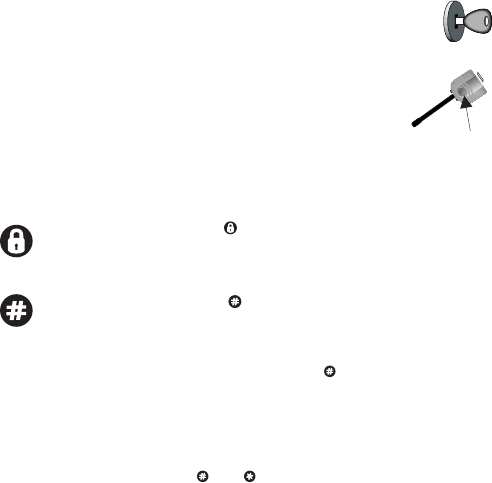
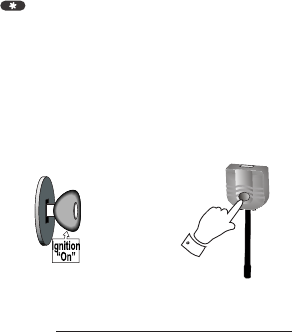
STEP 1 - Within 3 seconds turn the ignition key to the “ON”
position three times leaving “ON” the third time.
NOTE:
STEP 3a (Default) - While holding the Program Button, press and
release the button on each of the remote
transmitters to be programmed.
STEP 3b (PadLoc/ - While holding the Program Button, press and
2nd Car)* release the button on each of the remote
transmitters to be programmed.
If the parking lights do not turn “ON”, release the Program Button and
turn the ignition to the “OFF” position, wait 5sec and repeat steps 1 & 2.
STEP 2 - Press and hold the Program Button. The park
lights will turn “ON” and the horn (optional) will
honk once. Continue to hold the Program
Button, the park lights will turn “OFF” and the
horn (optional) will honk 5 times quickly.
PadLoc is a safety feature that “LOCKS” the remote transmitter. To
“UNLOCK” the remote transmitter the button must be
pressed simultaneously with the function chosen.
or
2nd Car function allows the operation of two Ultra Start systems
(in two separate vehicles) with one remote transmitter.
Example: Press and release and simultaneously to remote start.
NOTE: Some features not available with PadLoc or 2nd car mode.
*see page 11 for functions
IMPORTANT! All remote transmitters not programmed at this time
will be erased from memory for security.
REMOTE VEHICLE STARTER OWNER’S MANUAL
PAGE 13
System Service Mode will disable the remote starter. This will only effect the
remote start portion of the system. The optional lock, unlock and trunk release
features will still be operational. When the vehicle is to have any under hood or
service work done, the system must be placed into Service Mode. This feature
may also be used if a transmitter is lost, damaged or if the system malfunctions.
ATTENTION:
TO AVOID SERIOUS INJURY, this remote start system must be set into
Service Mode before any under hood servicing is started. Service Mode
will prevent the vehicle from starting while the vehicle is being serviced.
It is the sole responsibility of the vehicle’s owner to place the system into
Service Mode. The manufacture accepts no responsibility for accidental
starting of the vehicle while the vehicle is being serviced.
System Service Mode (Valet Mode)
ENTERING SERVICE MODE
1. Turn the ignition key to the On position.
2. Press and hold the Program Button (Located on the antenna) for 5 seconds
or until the horn (optional) honks five times.
NOTE: The LEDs on the antenna will turn on solid to confirm Service Mode.
If the button is pressed while the system is in Service Mode the
park lights will flash 3 times slowly.
EXITING SERVICE MODE
1.Turn the ignition key to the On position.
2. Press and hold the Program Button (Located on the antenna) for 5 seconds
or until the horn (optional) honks two times.
NOTE: The LEDs on the Antenna will turn off and the remote starter functions
will be re-enabled.
5sec
OWNER’S MANUAL REMOTE VEHICLE STARTER
PAGE 14
Notes
REMOTE VEHICLE STARTER OWNER’S MANUAL
PAGE 15
If the remote starter does not activate when the button is pressed the park
lights will flash a diagnostic code to indicate what shutdown input has been
triggered.
PARK LIGHTS STATUS LED DIAGNOSTIC CODE
3 Slow Flashes LED’s On Solid System Is In Service Mode
4 Slow Flashes Series of 4 Flashes Not in Reservation Mode (M units)
5 Slow Flashes Series of 5 Flashes Ignition On During Start Attempt
5 Flashes Series of 5 Flashes Hood Pin Opened
6 Flashes Series of 6 Flashes Brake Pedal Shutdown
7 Flashes Series of 7 Flashes Tach Lock-Out(see dealer)
Diagnostics
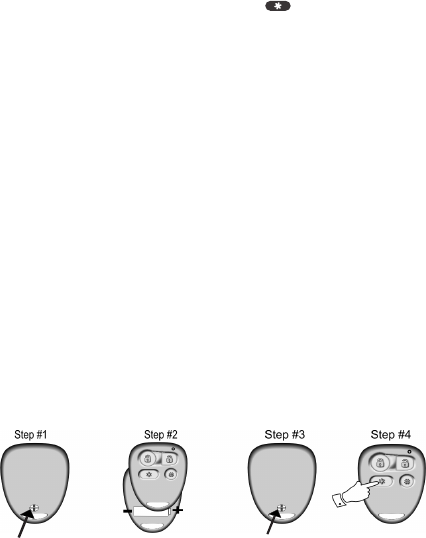
Carefully remove
the screw from the
back of the remote.
Remove the top
case, then replace
the battery.
Replace top case
and Re-install
screw.
Test remote for
proper operation.
Battery Replacement
The transmitter battery should be changed at least once every year to maintain
proper operating range. Replace with a quality 23A 12volt Alkaline battery
(OE remote). Replace with two quality 3V lithium batteries (XR remote).

OWNER’S MANUAL REMOTE VEHICLE STARTER
PAGE 16
Limited Lifetime Warranty
This device complies with Part 15 of the FCC rules. Operation of this device is subject to the following
conditions:
(1) This device may not cause harmful interference, and
(2) This device must accept any interference received, including interference that may cause undesired
operation.
CAUTION: Changes or modifications not expressly approved by the part responsible for compliance
voids the users authority to operate this device.
FCC Notice
The manufacturer warrants to the original purchaser of their remote starters and alarms, that the product shall
be free from defects in material and workmanship. However, should this product be proven to be defective,
within a two year period from the original date of purchase, the manufacturer will, without charge to the
purchaser (excluding any charges incurred to have the product delivered to the manufacturer), repair or replace
any part of the remote starter and/or alarm which the manufacturer agrees to be defective. After the initial 2
year period the manufacture shall repair or replace defective products with a nominal processing fee of $30.00
USD. All warranties apply to the original purchaser and the vehicle in which it was originally installed ONLY.
Repairs or replacement of defective modules shall remain at the discretion of the manufacturer. All other parts,
components, accessories and/or optional equipment pertaining to the remote starter and alarm are not
included in the manufacturer’s warranty. This warranty is non-transferable. Request for warranty service
from any Factory Authorized Dealer must be accompanied with the original purchase receipt or have
product registered by authorized dealer on manufacturer’s website. Failure to comply with any of these
conditions may result in warranty being voided. This warranty does not cover the following: removal and
reinstall labor charges, shipping charges, abuse, misuse, or accidental damages to the remote starter and
alarm, automobile, and/or parts there of. This warranty is void upon modification, repairs, or alterations of any
part of the product. The manufacturer does not guarantee or insure against theft of the vehicle or its contents.
Alarm models are designed only to act as a deterrent against possible theft. This alarm may qualify for auto
insurance discounts, contact your Insurance Agent for further information . The manufacturer shall not be held
liable for any consequential damages due to breach of this or any other warranty, expressed, or implied. This
warranty gives you specific legal rights. Your specific legal rights may vary for each region.
CERTAIN DAMAGES EXCLUDED - The manufacturer expressly disclaims any liability or responsibility for
incidental damages caused by the product, including economic loss, loss of use of the product, car rentals, or
any other costs relating to the care and custody of the product. The manufacturer disclaims liability or
responsibility for any consequential damages caused by the product or resulting from its use, including the cost
of repairing or replacing other property damaged by the product or caused by its use, whether or not the
product is working properly. The product is intended to deter unauthorized use of the vehicles in which it is
installed. The manufacturer does not warrant that the product is fool-safe against theft and/or vandalism and/or
human error or misuse. The manufacturer accepts no liability or responsibility for any damage of any kind
whatsoever caused to any vehicle in which the product is installed or any resulting damage from its use. The
manufacturer accepts no responsibility or liability for any damage resulting to or theft of the vehicle or its
contents, caused or alleged to be caused, directly or indirectly, by failure of the product.
MANUAL TRANSMISSION STARTERS the installation of a remote starter MUST only be done with a
specified manual transmission starter. It is the sole responsibility of the vehicles operator to insure
that the vehicle is left with the transmission in neutral position when the remote starter is in use. The
manual transmission starter is designed to be an added measure of safety ONLY! The manufacturer
does not guarantee or insure against any damages or loss of life that could result in the event of a
remote starter starting while the vehicle is in gear. Manual transmission models are designed only to
act as a deterrent against the vehicle starting in gear, this is the vehicle’s owner’s and operator’s
responsibility.
