Manual
Manual
User Manual:
Open the PDF directly: View PDF  .
.
Page Count: 55
- Introduction
- Installing Databrowse
- Getting Started
- Databrowse Configuration Options
- Databrowse Library
- Databrowse Plugin Format
- Included Databrowse Plugins
- Checklist Editor
- Checklist Viewer
- Datacollect v1 Viewer
- Datacollect v2 Viewer
- Dataguzzler Data File
- Dataguzzler Settings File
- Data Table
- Default
- Directory
- File Operations
- Generic Binary File
- Generic HDF5 File
- Generic WSGI Application
- Generic XML File
- Image Viewer
- Mercurial Repository
- Movie Viewer
- Multimedia Directory
- Office Viewer
- PDF Viewer
- Plain Text File
- SolidWorks Viewer
- Specimen Management Plugin
- Specimen Directory Plugin
- Specimen Group Management Plugin
- SVG Viewer
- Transducer Management Plugin
- Transducer Directory Plugin
- Trigger Log Plugin
- Trigger Log Directory Plugin
- Web Page Viewer
- SDT File Viewer
- License and Third-Party Components
Databrowse: An extensible data management platform
Tyler J. Lesthaeghe
tylerl@iastate.edu
Nathan D. Scheirer
scheirer@iastate.edu
Department of Aerospace Engineering and
Center for Nondestructive Evaluation
Iowa State University of Science and Technology
Ames, Iowa 50011
June 27, 2018
Version 0.8
1
Databrowse: An Exensible Data Management Platform
Copyright c
2012-2016 Iowa State University Research Foundation, Inc.
All rights reserved.
Redistribution and use in source and binary forms, with or without modification, are permitted provided
that the following conditions are met:
1. Redistributions of source code must retain the above copyright notice, this list of conditions and the
following disclaimer.
2. Redistributions in binary form must reproduce the above copyright notice, this list of conditions and
the following disclaimer in the documentation and/or other materials provided with the distribution.
3. Neither the name of the copyright holder nor the names of its contributors may be used to endorse or
promote products derived from this software without specific prior written permission.
THIS SOFTWARE IS PROVIDED BY THE COPYRIGHT HOLDERS AND CONTRIBUTORS “AS IS”
AND ANY EXPRESS OR IMPLIED WARRANTIES, INCLUDING, BUT NOT LIMITED TO, THE IM-
PLIED WARRANTIES OF MERCHANTABILITY AND FITNESS FOR A PARTICULAR PURPOSE
ARE DISCLAIMED. IN NO EVENT SHALL THE COPYRIGHT HOLDER OR CONTRIBUTORS BE
LIABLE FOR ANY DIRECT, INDIRECT, INCIDENTAL, SPECIAL, EXEMPLARY, OR CONSEQUEN-
TIAL DAMAGES (INCLUDING, BUT NOT LIMITED TO, PROCUREMENT OF SUBSTITUTE GOODS
OR SERVICES; LOSS OF USE, DATA, OR PROFITS; OR BUSINESS INTERRUPTION) HOWEVER
CAUSED AND ON ANY THEORY OF LIABILITY, WHETHER IN CONTRACT, STRICT LIABILITY,
OR TORT (INCLUDING NEGLIGENCE OR OTHERWISE) ARISING IN ANY WAY OUT OF THE USE
OF THIS SOFTWARE, EVEN IF ADVISED OF THE POSSIBILITY OF SUCH DAMAGE.
This material is based on work supported by the Air Force Research Laboratory under Contract #FA8650-
10-D-5210, Task Order #023, and performed at Iowa State University.
DISTRIBUTION A. Approved for public release: distribution unlimited; 19 Aug 2016; 88ABW-2016-4051.
This material is based on work supported by NASA under Contract NNX16CL31C and performed by Iowa
State University as a subcontractor to TRI Austin.
Approved for public release by TRI Austin: distribution unlimited; 01 June 2018; by Carl W. Magnuson
(NDE Division Director).
2

Contents
1 Introduction 5
1.1 Motivation .............................................. 5
1.2 Implementation............................................ 5
1.2.1 XML.............................................. 5
1.2.2 XSLT ............................................. 6
1.3 DatabrowsePlugins ......................................... 6
2 Installing Databrowse 9
2.1 DatabrowsePlatforms ........................................ 9
2.2 DatabrowseServer .......................................... 9
2.2.1 Software Requirements and Dependencies . . . . . . . . . . . . . . . . . . . . . . . . . 9
2.2.2 Installation on Unix-based Platforms . . . . . . . . . . . . . . . . . . . . . . . . . . . . 10
2.3 CEFDatabrowse ........................................... 12
2.3.1 Software Requirements and Dependencies . . . . . . . . . . . . . . . . . . . . . . . . . 12
2.3.2 Installation .......................................... 13
3 Getting Started 15
3.1 FeaturesofInterest.......................................... 15
3.2 CreatingNewDirectories ...................................... 16
3.3 UploadingFiles............................................ 17
4 Databrowse Configuration Options 18
4.1 databrowse wsgi.conf ....................................... 18
4.2 iconmap.conf ............................................. 19
4.3 hiddenfiles.conf .......................................... 19
5 Databrowse Library 20
6 Databrowse Plugin Format 21
6.1 PluginFileStructure......................................... 21
6.2 FileContents ............................................. 21
6.2.1 init.py .......................................... 21
6.2.2 db plugin name.py ..................................... 21
6.2.3 dbs stylesheet name.xml ................................. 24
6.2.4 handlers.py ......................................... 25
7 Included Databrowse Plugins 26
7.1 ChecklistEditor ........................................... 26
7.2 ChecklistViewer ........................................... 26
7.3 Datacollectv1Viewer ........................................ 27
7.4 Datacollectv2Viewer ........................................ 27
7.5 DataguzzlerDataFile ........................................ 27
7.6 DataguzzlerSettingsFile ...................................... 28
7.7 DataTable .............................................. 28
7.8 Default ................................................ 28
7.9 Directory ............................................... 29
7.10FileOperations............................................ 29
7.11GenericBinaryFile.......................................... 29
7.12GenericHDF5File.......................................... 30
7.13GenericWSGIApplication ..................................... 30
7.14GenericXMLFile .......................................... 30
7.15ImageViewer............................................. 31
7.16MercurialRepository......................................... 31
3
7.17MovieViewer............................................. 31
7.18MultimediaDirectory ........................................ 32
7.19OfficeViewer ............................................. 32
7.20PDFViewer.............................................. 33
7.21PlainTextFile ............................................ 33
7.22SolidWorksViewer .......................................... 33
7.23SpecimenManagementPlugin.................................... 34
7.24SpecimenDirectoryPlugin ..................................... 34
7.25 Specimen Group Management Plugin . . . . . . . . . . . . . . . . . . . . . . . . . . . . . . . . 34
7.26SVGViewer.............................................. 35
7.27 Transducer Management Plugin . . . . . . . . . . . . . . . . . . . . . . . . . . . . . . . . . . . 35
7.28TransducerDirectoryPlugin..................................... 35
7.29TriggerLogPlugin.......................................... 35
7.30TriggerLogDirectoryPlugin .................................... 35
7.31WebPageViewer........................................... 36
7.32SDTFileViewer ........................................... 36
8 License and Third-Party Components 37
8.1 BSD3-ClauseLicense ........................................ 38
8.2 GNUGeneralPublicLicensev3................................... 39
8.3 GNU Lesser General Public License v3 . . . . . . . . . . . . . . . . . . . . . . . . . . . . . . . 48
8.4 MITLicense.............................................. 51
8.5 ZopePublicLicensev2.1....................................... 52
8.6 ApacheLicensev2.0 ......................................... 53
4
1 Introduction
Databrowse is an extensible web-based platform for data viewing, manipulation, and management. At the
most basic level, Databrowse is a file browser; however, simple plugins enable Databrowse to represent data
of a variety of formats in a consistent way, enabling rapid viewing and transformation of those views to
narrow in on features of interest. The plugin architecture enables Databrowse to be adapted to support any
data format in which knowledge of the data format is available. Data from multiple sources or formats can
be pulled together into combined representations and then further transformed as desired. Furthermore, all
of these transformations are performed in real time.
1.1 Motivation
Databrowse was originally developed to aid in viewing and analyzing data collected in the field of nonde-
structive evaluation (NDE). NDE is a broad, highly interdisciplinary field related to the development of
measurement techniques that find and characterize material flaws and condition. Some well known NDE
techniques include visual/liquid penetrant inspection, magnetic particle inspection, ultrasonics, radiography,
and eddy current testing.
NDE techniques are capable of generating considerable amounts of data in very short periods of time.
However, many industrial NDE inspections today produce a simple pass/fail response as a result of a testing
process. Recorded raw data is often viewed as useless, or potentially even a liability, unless we have ways
to extract useful information. Ultimately, the problem of finding a needle in a haystack is particularly
challenging, especially if you do not know what you are looking for.
Even in research scenarios where we desire to collect large quantities of data to examine specific items,
handling large quantities of data can still be a challenge. As a part of a recent modeling effort related
to development of a forward model for vibrothermography, a nondestructive testing technique that utilizes
vibration-induced heating to located cracks in materials, the need became apparent for better tools and data
management practices. It was known at the beginning of the work that a considerable amount of data was
to be generated. In the end, a final data table containing almost 25,000 entries was generated, along with
over 0.5 TB of raw data.
The authors sought to develop a tool that would help in the short term for dealing with the latter problem,
while serving as a spring board to further work toward dealing with the former problem. Databrowse was
the resulting tool.
1.2 Implementation
1.2.1 XML
Databrowse represents data as XML. XML (eXtensible Markup Language) is a standard that allows text
data to be hierarchically structured utilizing arbitrarily defined tags. Special engines can then be used to
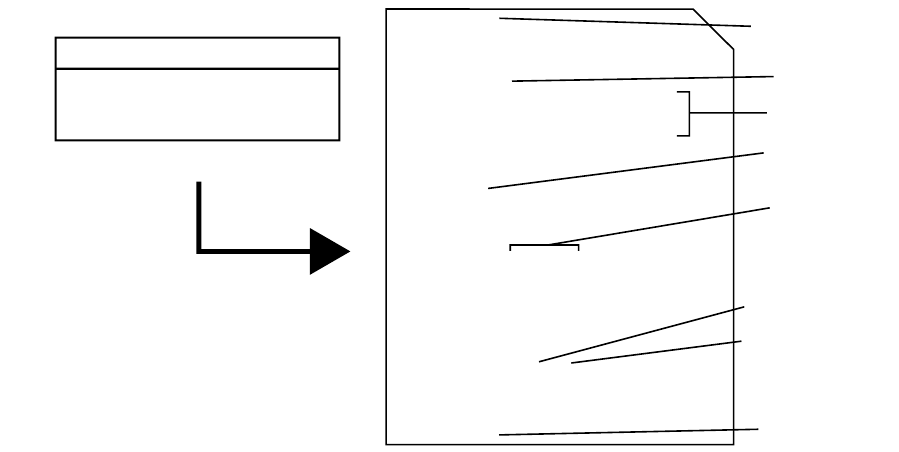
parse and manipulate such structured data. Figure 1 shows an example of a simple data set being structured
and stored in an XML format. The first line of the sample XML file shows an experiment tag, and the
last line shows that tag being closed. Everything contained between the opening and closing tags can be
described as children. In this context, our measurements are children of the experiment. Thus, a hierarchical
data structure can be developed. Subsequently, we have represented all of the individual parameters for each
measurement as children of that measurement.
We can take it a step further and indicate that one of these parameters could have multiple values, as
seen with the voltage data. This is one major advantage of this type of data structure, as our spreadsheet
style data table does not necessarily make representing this type of data structure easy. We have made it
work here with a comma list of values in our data table; however, this does not work so easily with more
complicated data.
Furthermore, XML tends to work very nicely as a way of representing most data, since many frequently
used data formats internally represent data in a natural hierarchical structure, often as a convenient way
of dealing with the issue just described. Therefore, conversion to XML, if even required, is generally very
straightforward. Once represented as XML, Databrowse is able to leverage the power and speed of the open
5
# Sample Voltage Result
1
2
3
A-001
A-002
B-004
1V, 2V, 3V
1.5V
1.5V, 3V
10
15
12
Simple Experimental Data Table
<experiment>
<measurement>
<measnum>1</measnum>
<sample>A-001</sample>
<voltages>
<voltage units="V">1</voltage>
<voltage units="V">2</voltage>
<voltage units="V">3</voltage>
</voltages>
<result>10</result>
</measurement>
<measurement>
<measnum>2</measnum>
<sample>A-002</sample>
<voltages>
<voltage units="V">1.5</voltage>
</voltages>
</measurement>
<measurement>
<measnum>3</measnum>
<sample>B-004></sample>
<voltages>
<voltage units="V">1.5</voltage>
<voltage units="V">3</voltage>
</voltages>
</measurement>
</experiment>
Converted and Stored in a
Simple XML Representation
Opening Tag
Closing Tag
Parent
Children
Tag Name
Attribute
Attribute Name
Attribute Value
Figure 1: Sample XML Data
source XML engine libxml2. The result is being able to parse and transform considerable amounts of data
in seconds.
It is important to note that raw binary waveforms are not intended to be represented as XML; however,
pieces of them might be. More typically though, a plugin would utilize an interface provided by Databrowse
that enables the creation of images of such data. Such an image can be generated in real time and served to
the web browser by Databrowse. This would not be limited to images. Any format that could be displayed
in a web browser could be used, such as videos, animations, or any format that can use a web browser plugin
to display.
1.2.2 XSLT
Databrowse utilizes XSLT to transform data. XSLT (eXtensible Stylesheet Language Template) provides
an interface by which the user can define a set of transformations to be applied to XML data. In other
words, XML data and XSLT templates designed to act on that data are provided to the XSLT engine and
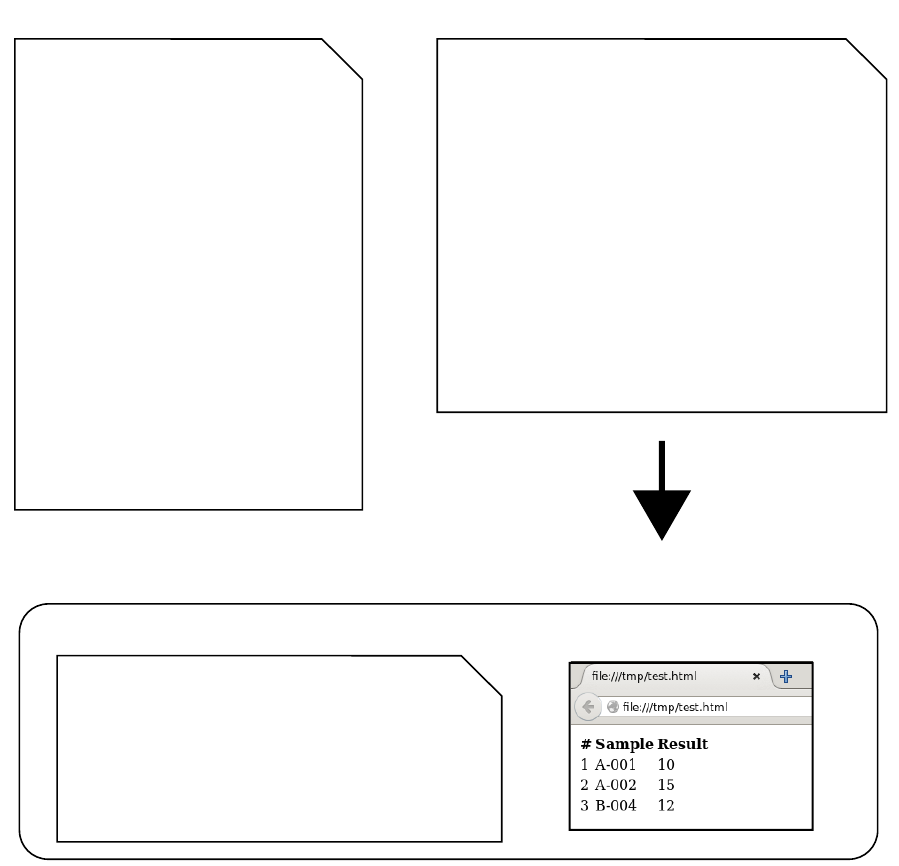
the engine will output a new set of XML data based on the transformation provided. This behavior can be
seen in Figure 2, where our sample data from Figure 1 has been transformed using an XSLT template.
Databrowse, being a web based platform, wants to build web pages utilizing the data being provided.
HTML, the language with which web pages are built, is a type of XML. As a result, our XSLT transform
is able to take our data file and build a web page dynamically in real time. Databrowse then handles the
process of serving that web page to a user in their web browser.
1.3 Databrowse Plugins
Databrowse plugins are responsible for providing the following: 1) registering the file types with which they
should be able to operate on, 2) providing an XML representation of the file, and 3) providing an XSLT
transform that converts the XML representation to the desired HTML view that is displayed in the web
browser. Plugins are also able to provide additional features that can be triggered or accessed from the web
view. Such features might include the automatic generation of animations, data conversions, or running of
processing scripts.
Since every file can be represented as XML, Databrowse provides an interface for recursively obtaining
an XML representation of entire directories and sub-directories. Thus, a single representation of multiple
files can be obtained. In addition to providing a set of plugins for some common file types, Databrowse
6
<experiment>
<measurement>
<measnum>1</measnum>
<sample>A-001</sample>
<voltages>
<voltage units="V">1</voltage>
<voltage units="V">2</voltage>
<voltage units="V">3</voltage>
</voltages>
<result>10</result>
</measurement>
<measurement>
<measnum>2</measnum>
<sample>A-002</sample>
<voltages>
<voltage units="V">1.5</voltage>
</voltages>
<result>15</result>
</measurement>
<measurement>
<measnum>3</measnum>
<sample>B-004</sample>
<voltages>
<voltage units="V">1.5</voltage>
<voltage units="V">3</voltage>
</voltages>
<result>12</result>
</measurement>
</experiment>
<xsl:stylesheet xmlns="http://www.w3.org/1999/xhtml"
xmlns:xsl="http://www.w3.org/1999/XSL/Transform">
<xsl:template match="experiment">
<html>
<head/>
<body>
<table>
<tr>
<th>#</th><th>Sample</th><th>Result</th>
</tr>
<xsl:apply-templates />
</table>
</body>
</html>
</xsl:template>
<xsl:template match="measurement">
<tr>
<td><xsl:value-of select="measnum" /></td>
<td><xsl:value-of select="sample" /></td>
<td><xsl:value-of select="result" /></td>
</tr>
</xsl:template>
</xsl:stylesheet>
+
XML File XSL Stylesheet
<html>
<head/>
<body>
<table>
<tr><th>#</th><th>Sample</th><th>Result</th></tr>
<tr><td>1</td><td>A-001</td><td>10</td></tr>
<tr><td>2</td><td>A-002</td><td>15</td></tr>
<tr><td>3</td><td>B-004</td><td>12</td></tr>
</table>
</body>
</html>
HTML Representation
HTML Source Code Web Browser View
Figure 2: Sample XML Data being Transformed with XSLT
7
includes some plugins designed to provide a simple interface for building such combined representations.
XSLT transformation stylesheets can also be provided on a per-directory basis if additional control is needed
for specific use cases.
8

2 Installing Databrowse
2.1 Databrowse Platforms
Databrowse comes in two flavors, both of which contain the same functionality and provide nearly identical
feature sets. Databrowse Server utilizes a WSGI compliant web server which is hosted the end users data
storage system. The server version of Databrowse allows the end user to access their file system remotely
from any other device connected to the internet following a onetime installation process. Alternatively, CEF-
Databrowse has been implemented which utilizes CEFpython (Chromium Embedded Framework - Python)
to provide the entirety of the Databrowse library on a single client. This self contained client can be in-
stalled directly through PIP and will seclude the Databrowse session to the host machine. This version of
Databrowse can be especially effective in environments where data cannot be accessed via the internet or be
even exposed to a network.
2.2 Databrowse Server
2.2.1 Software Requirements and Dependencies
Databrowse requires the use of a WSGI compliant web server. Databrowse has been tested extensively with
mod wsgi on Apache 2.2.15 on Red Hat Enterprise Linux 6.6 and Apache 2.4.10 on Ubuntu 15.04. The
usage of mod wsgi, Apache, and a Unix-based operating system are strongly recommended. Using Apache
on Windows has been preliminarily tested; however, its use is strongly discouraged at this time due to file
path issues that will be resolved in a later version of Databrowse.
Modern versions of Mozilla Firefox and Google Chrome are recommended for accessing Databrowse.
Usage of Microsoft Internet Explorer is strongly discouraged. Microsoft Edge has not yet been tested.
Databrowse is dependent upon Python 2 (2.6 or later, Python 3 is not supported at this time). Databrowse
also requires the following Python modules (available from PIP or the package management systems on Red
Hat and Ubuntu):
•python-lxml version 3.2 or greater
•python-magic version 0.2 or greater (python-magic-bin if platform is Windows)
•python-numpy version 1.8 or greater
•python-pillow version 2.3 or greater
Several Databrowse plugins packaged with the distribution also require the use of the following Python
modules:
•python-qrcode version 4.0 or greater
•Dataguzzler Python Bindings (http://thermal.cnde.iastate.edu/dataguzzler)
•Dataguzzler Units Support (http://thermal.cnde.iastate.edu/dataguzzler)
Databrowse also requires the use of mod rewrite for URL rewriting. Databrowse can be ran without this
support enabled; however, its use has not been tested extensively.
2.2.1.1 Experimental Windows Use A set of binary packages providing the necessary prerequisites
have been compiled and are available upon request for usage with Apache on Windows. These packages
require the usage of Apache compiled against the Microsoft Visual C++ 9 Runtime. This is a limitation
imposed by Python 2. WampServer 2.2d is one such binary distribution of Apache that meets these require-
ments. Please contact the author for additional information.
9

2.2.2 Installation on Unix-based Platforms
The necessary minimum prerequisites can be installed using the following commands on Debian-based plat-
forms:
sudo apt-get install python2.7 python-lxml python-magic (python-magic-bin if platform \
is Windows) python-numpy python-pip libjpeg libjpeg-dev libfreetype6 \
libfreetype6-dev zlib1g-dev apache2 libapache2-mod-wsgi libapache2-mod-rewrite \
python-dev python-setuptools libtiff5-dev libjpeg8-dev zlib1g-dev liblcms2-dev \
libwebp-dev tcl8.5-dev tk8.5-dev python-tk \
sudo pip install pillow
And for Fedora-based platforms:
sudo yum install python python-lxml python-magic python2-numpy python-pip libjpeg-turbo \
libjpeg-turbo-devel freetype freetype-devel zlib zlib-devel httpd mod_wsgi \
python-devel redhat-rpm-config libtiff-devel libjpeg-devel zlib-devel freetype-devel \
lcms2-devel libwebp-devel tcl-devel tk-devel
sudo pip install pillow
The package redhat-rpm-config is only required on Fedora 23 or later. The command dnf may also
be exchanged for yum on newer Fedora-based platforms as well. Obtain the Databrowse source from the
Databrowse website or from the GitHub repository (coming soon). From within the root directory, run the
following command:
sudo python setup.py install
This will install the Databrowse library components into the the Python site-packages directory. Ensure
that the necessary Apache modules are running and available by running the following command for Debian
platforms:
sudo a2enmod wsgi
sudo a2enmod rewrite
And for Fedora platforms, both modules should be enabled by default. Verify the presence of the
following lines in the file /etc/httpd/conf/httpd.conf or in any files contained in /etc/httpd/conf.d/
or /etc/httpd/conf.modules.d:
LoadModule rewrite_module modules/mod_rewrite.so
LoadModule wsgi_module modules/mod_wsgi.so
From the Databrowse source folder, copy the contents of the databrowse wsgi folder to an appropriate
location. For example, to install the server components in /var/www/databrowse, use the following command
from within the Databrowse source folder:
sudo mkdir /var/www/databrowse
sudo cp -a databrowse_wsgi/* /var/www/databrowse/
sudo chmod -R 755 /var/www/databrowse
Apache must now be configured. If working on a Debian-based system with a newer version of Apache,
create the file /etc/apache2/sites-available/databrowse.conf with the following example contents and
adjust as necessary for your system. On Fedora-based systems, the file name should be /etc/httpd/conf.
d/databrowse.conf with the contents below adjusted as necessary:
WSGIScriptAlias /databrowse /var/www/databrowse/databrowse.wsgi
Alias /dbres /var/www/databrowse/resources
10

<Location "/databrowse">
# Implementation of proper user controls is strongly encouraged!
# Require SSL is also Strongly Encouraged But Must Be Appropriately Configured
# Also be sure to modify databrowse_wsgi.conf to reflect ‘‘https’’
# instead of ‘‘http’’ on all URLs
# SSLRequireSSL
# Suggest the following items to restrict to localhost
# Only disable if you know what you’re doing and have Apache properly configured
# AND have authentication enabled on Databrowse
Order deny,allow
Deny from all
Allow from 127.0.0.1
Options FollowSymLinks
# Rewrite Rules - No Modification Should Be Needed Unless You Change Location Above
RewriteEngine on
RedirectMatch ^databrowse$ /databrowse/
RewriteCond %{QUERY_STRING} path=
RewriteRule ^(.*)/databrowse\.wsgi(.*)$ $1/databrowse.wsgi [QSA]
RedirectMatch ^databrowse$ /databrowse/
RewriteCond %{QUERY_STRING} !path=
RewriteRule ^(.*)/databrowse\.wsgi(.*)$ $1/databrowse.wsgi?path=/$2 [QSA,L]
</Location>
WARNING! Improper configuration of a web server can leave your computer and data at risk of
exposure. Databrowse does not provide any built-in authentication mechanism nor should it be relied on to
prevent access to files outside of the configured data root. Accordingly, usage of Databrowse on computer
systems in which web server access is available from the Internet is strongly discouraged without the usage
of SSL and an appropriate Apache authorization module. It is strongly encouraged that anyone deploying
Databrowse for use over the Internet be comfortable with securely configuring and using Apache. The
authors provide no warranty and are not responsible for loss or damages. Please see the Databrowse license
for additional information.
The above configuration assumes that the Databrowse WSGI components are installed in /var/www/
databrowse and will serve Databrowse from http://localhost/databrowse and will serve Databrowse
static resources from http://localhost/dbres on a default installation of Apache on Debian-based systems.
The above configuration will utilize server default access permissions, so, you may wish to add additional
configuration or ensure that your web server is not accessible from the Internet. Refer to the warning above.
The following command is required for Debian-based systems only and can be used to enable Databrowse:
sudo a2ensite databrowse.conf
Prior to restarting Apache, the files databrowse wsgi.conf and databrowse style.xml (or symbolic
links to these files) must exist in the same directory as databrowse.wsgi. It should be sufficient to simply
rename the file databrowse style.sample.xml to databrowse style.xml until you are ready to customize
the appearance of Databrowse. The databrowse wsgi.conf file will require some additional configuration.
A sample file databrowse wsgi.sample.conf is provided.
The most critical line that must be changed in databrowse wsgi.conf from the sample provided file
is self.dataroot. This should be set to the absolute path of the directory containing the data you wish
Databrowse to serve. Databrowse provides very simple checks to keep the user inside directories below this
path; however, this should not be used as a method of security! Symbolic links pointing out of this directory
will be followed and there may be other methods available for a user to escape out of the data root path.
11

Additionally, you may wish to set self.requireuser=False if you do not presently have authenticaion
configured on Apache. This may be okay if your Apache instance is only accessible from the local machine.
However, if it is accessible to the world, it is highly encouraged to correctly configure authentication. See
the previous warning about security.
If you have SSL properly configured on your web server and you uncommented the SSLRequireSSL line in
databrowse.conf, you should update all URLs in databrowse wsgi.conf to show https at the beginning
instead of http.
It is also worth noting that files contained within data root must be at least readable by the web server
process owner. To take advantage of the full capabilities of Databrowse, you will also want write access
available to the web server process owner as well. Again, use caution when using Databrowse, especially if
you are not familiar with securely configuring Apache. Additionally, if using SELinux or similar systems,
you will need to make additional configuration changes to ensure the web server process has read/write
access to all files in the data repository. On newer Fedora systems, for example, if you set your dataroot to
/home/databrowse, then you could run the following command to allow access to Apache:
sudo chcon -R -t httpd_sys_rw_content_t /home/databrowse
Within databrowse wsgi.conf, you will also want to ensure that self.siteurl and self.resurl are
correct if you have changed any Apache settings from the defaults. You should also ensure that the directory
listed in self.checklistpath has been created within the data root directory. This setting is related to
the Checklist plugin, but, Databrowse presently will not run if this directory does not exist. This will be
corrected in future versions of Databrowse.
Please see Chapter 4 for more information on these files.
Restart the web server and Databrowse should now be ready for use. On Debian-based systems:
sudo service apache2 restart
On Fedora-based systems:
sudo service httpd restart
You should now be able to access Databrowse by visiting http://localhost/databrowse in your web
browser.
2.3 CEFDatabrowse
CEFDatabrowse is a standalone client that operates nearly identically to the server version of Databrowse,
however this version does not require a connection to a network and allows local usage of Databrowe’s feature
set.
2.3.1 Software Requirements and Dependencies
CEFDatabrowse utilizes the same dependencies as the server version with a few additions and can be
seen in Section 2.2.1. The dependencies are automatically pulled in through platform specific files in the
”requirements” folder of the root source directory. The Databrowse core architecture as been extensively
tested on Linux, however the CEFDatabrowse client is being used on both Linux and Windows platforms at
this time. Your experience may be different if you are using an untested platform.
CEFDatabrowse requires Python 2.7 and will not function with any other version of Python at this
time. The following Python modules are also required, these should be automatically installed when the
PIP package or setup.py file is ran but if a package does not install correctly, then these are the packages
that are required:
•python-lxml version 3.2 or greater
•python-magic version 0.2 or greater (python-magic-bin if platform is Windows)
•python-numpy version 1.8 or greater
•python-pillow version 2.3 or greater
•cefpython3 version 57.0 or greater
12
2.3.2 Installation
On either Linux or Windows the installation process should be almost identical with the exception that the
python-magic library should be used on Linux and the python-magic-bin library should be used on Windows.
To install CEFDatabrowse verify that Python 2.7 is installed on your system. If not, run:
Linux:
sudo apt-get install python2.7
Windows:
Install Anaconda package manager or a Python 2.7 binary
CEFDatabrowse can be installed via PIP or from source. The PIP binaries are verified to work in
both Linux and Windows environments, therefore to install via PIP execute the following command in your
command prompt:
pip install databrowse
This will install CEFDatabrowse along with the components that would be required to run the server
version to your sites-packages directory within your Python installation directory. Following a successful
installation, CEFDatabrowse can be utilized in the following manner:
Usage: databrowse [-h] [-s path] [-e] [-g [path]]
Databrowse: An Extensible Data Management Platform
optional arguments:
-h, --help show this help message and exit
-s path, --setdataroot path path to set new dataroot
-e, --openconfig open cefdatabrowse config file
-g [path], --go [path] open cefdatabrowse in a directory
On a fresh install a few configuration values will need to be changed. These include the dataroot directory
and any third party software packages that need to be added to the Python path during operation. The
CEFDatabrowse configuration file can be accessed through the settings in the GUI or by using the command:
databrowse -e
This will open the configuration file in your default editor. If the EDITOR envrionment variable is not
set then you will have to set it to your prefered editor program in order for these features to work. The
configuration file will contain default variables like this:
[databrowse]
width = 800
height = 600
x=0
y=0
dataroot = C:/databrowse
limatix-qautils = C:/Users/nscheirer/Documents/dev/databrowse-utils/limatix-qautils
qautils = C:/Users/nscheirer/Documents/dev/databrowse-utils/QAutils
[3rdparty]
dataguzzlerlib = C:/Users/nscheirer/Documents/dev/dataguzzler-lib/python
nditoolbox = C:/Users/nscheirer/Documents/nditoolnew/NDITool
Note: If installing on a Linux platform, the configuration file’s permissions might need to be changed to
allow write access.
13
From here you can set which directory you would like CEFDatabrowse to have access to (dataroot). Keep
in mind that CEFDatabrowse cannot access any files outside of this directory, therefore if you would like
access to all files, setting the dataroot to C:/ is an acceptable approach. When a new dataroot is set it will be
required that a directory called SOPs be created in the dataroot directory location therefore, CEFDatabrowse
will throw an error reminding you of this if you do not have a SOPs folder. The values following dataroot
correspond to required third party packages that different plugins utilize. If you need that functionality,
replace these paths with the correct path to your installed copies. From this point CEFDatabrowse can be
used via the defined usage above.
14
3 Getting Started
This section will provide some information on using the directory interface within Databrowse.
3.1 Features of Interest
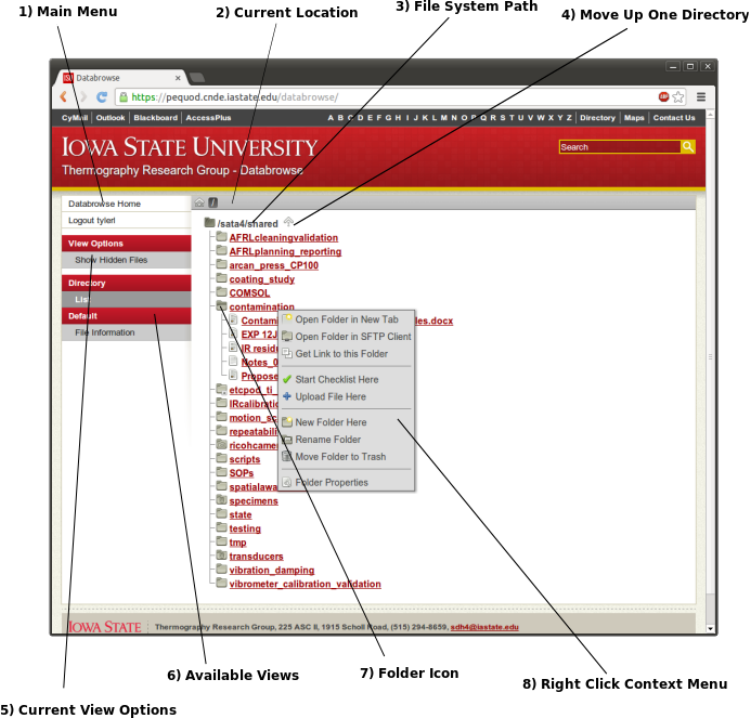
1. Main Menu
Contains links to jump to the data directory
root, logout, and switch views
2. Current Location
Displays the location of the current view rela-
tive to the data directory root – click a folder
name to jump to it
3. File System Path
Displays the absolute path of the current view
in the file system
4. Move Up One Directory
Click this link to move up one directory until
you reach the data directory root
5. Current View Options
Displays a list of options available to modify the
current view
6. Available Views
Displays a list of various plugins that are capa-
ble of rendering the current file or folder and
views available within those plugins
7. Folder Icon
Click this folder icon to expand the folder and
dynamically load the contents of the sub folder
8. Right Click Context Menu
Right click the name of any folder or file in this
view to display this context menu
15
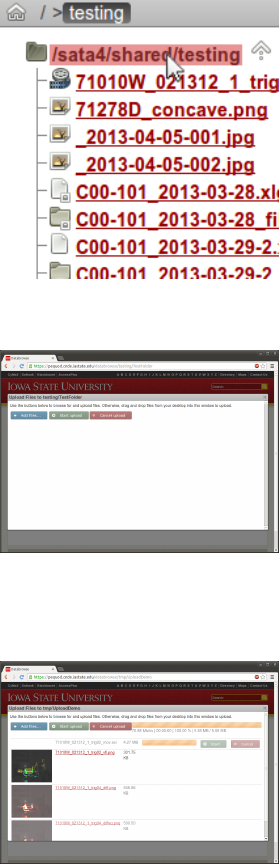
3.2 Creating New Directories
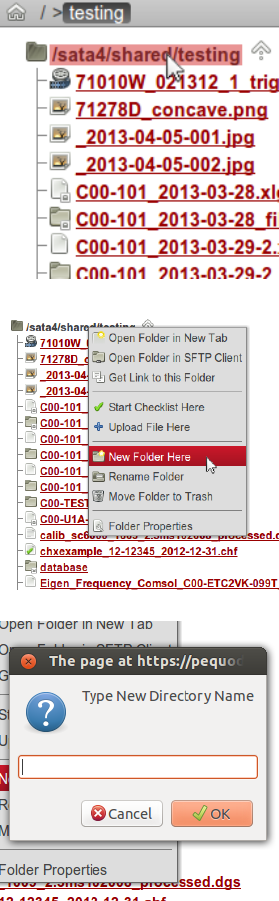
The following steps can be used to create new directories from Databrowse:
1) Navigate to the Folder that will Contain the New Folder
Using the Databrowse interface, locate the folder that will contain the
folder you wish to create.
2) Right Click Folder Name to Open Context Menu
Using the mouse, right click on the name of the folder you wish to contain
your new folder. If the current view is the location you wish to create a
new folder within, right click on the black text at the top. This is the
shaded area shown on the figure to the right.
3) Select New Folder Here from the Context Menu
4) Type a Name and Click OK
Type a name for your new folder. Spaces are special characters that are
permitted in folder names on your operating system may be used; however,
their use is discouraged.
5) Finished!
You will be taken to the new folder automatically.
16
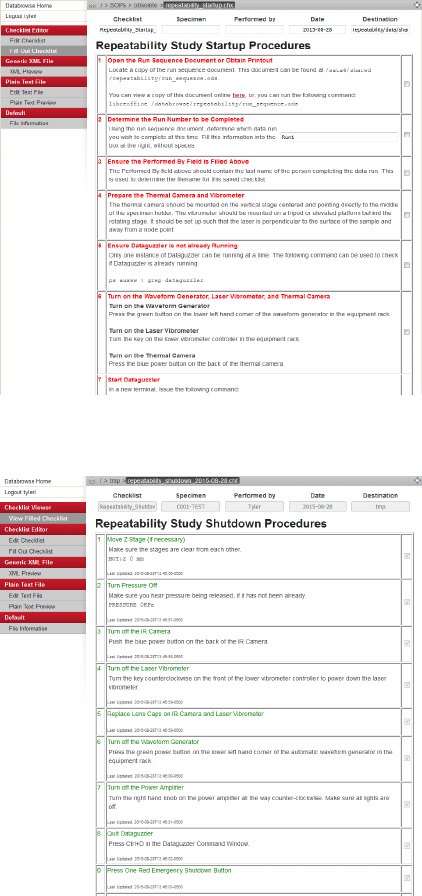
3.3 Uploading Files
The following steps can be used to upload files using Databrowse:
1) Navigate to the Folder in which you wish to Upload Files
Using the Databrowse interface, locate the folder that will contain the files
you wish to upload.
2) Right Click Folder Name to Open Context Menu
Using the mouse, right click on the name of the folder in which you wish
to upload files. If the current view is the location you wish to upload files
to, right click on the black text at the top. This is the shaded area shown
on the figure to the right.
3) Select Upload Files Here from the Context Menu
4) Click Add Files to Open the File Selection Box
Inside the file selection box, you may hold Shift or Ctrl on the key-
board to select multiple files. Select Open once you have chosen
the file(s) you wish to upload. Repeat for any additional files to
be uploaded. The options you have selected will appear in the win-
dow.
Alternatively, Drag and Drop Files into the Upload Window
Using Windows Explorer, Finder, or Nautilus, depending on your operat-
ing system, you may drag files into the open space on the upload window.
The files will appear in the window.
5) Click Start Upload
You should see progress bars indicating the length of time remaining to
upload your files. If uploading photos, you will see a preview thumbnail
of the photo.
6) Click the X or Click Outside of the Upload Window to Close
The page will automatically refresh to show your new files. Do not close
the window while uploading is still taking place or your upload will be
interrupted.
17

4 Databrowse Configuration Options
This section provides information about the various configuration options that can be used to customize the
low level functionality of Databrowse.
4.1 databrowse wsgi.conf
The file databrowse wsgi.conf (or a symbolic link to this file) must be contained inside the same folder as
databrowse.wsgi. This file is a Python script that can be used to run code during the start of a web request
to the server. It is ran within the context of the web support.py file contained within databrowse/support
in the source distribution. web support.py is actually a Python class which is instantiated with the con-
figuration from databrowse wsgi.conf and the default values contained within the class at the start of a
request. This code is ran directly during the call to web support. init . Accordingly any Python code
can be included within databrowse wsgi.conf and it will be executed in this context.
The following options can be set in this file:
Site URL self.siteurl (String)
Default: http://localhost/databrowse
The full URL to Databrowse. This is used internally to build URLs. No trailing slash should be used if
search engine optimized URLs are enabled. If you disable search engine optimized URLs, you should update
this to list the full URL to databrowse.wsgi.
Resource URL self.resurl (String)
Default: http://localhost/dbres
The full URL to Databrowse static resource files. This is used internally to build URLs to static JavaScript,
images, stylesheets, etc.
Logout URL self.logouturl (String)
Default: http://localhost/logout
The URL to use in order to trigger the web server’s logout mechanism. This will need to be adjusted de-
pending on your authentication method.
Icon Configuration File self.icondbpath (String)
Default: os.path.join(os.path.dirname(databrowse.support. file ), "iconmap.conf")
The path to a file containing a ConfigParser-compatible configuration file associating file extensions with
icons. See 4.2 for more information about the contents of this file.
Hidden File Configuration File self.hiddenfiledbpath (String)
Default: os.path.join(os.path.dirname(databrowse.support. file ), "hiddenfiles.conf")
The path to a file containing a ConfigParser-compatible configuration file containing Glob syntax strings that
can be used to hide certain files from view in the Databrowse directory views. See 4.3 for more information
about the contents of this file.
Search Engine Optimization self.seo urls (Boolean)
Default: True
When set to true, Databrowse will write out URLs that have been search engine optimized. Instead of the
URL http://localhost/databrowse.wsgi?path=/SOPs, the URL would be written as http://localhost/
databrowse/SOPs. Usage of this feature requires mod rewrite to be enabled with the options as suggested
in the Installation instructions. It is strongly encouraged to keep this feature turned on.
Other options can also be set in this file using the same format, if desired, for use in Databrowse plug-
ins.
18
4.2 iconmap.conf
This file generally does not need to be modified, unless you wish to build or modify plugins. This file tracks
the mapping between file types and icons. These icons are used to provide a graphical representation of a
file type within Databrowse. The file uses a Python ConfigParser module compatible format. There are two
sections that can be used inside this file: [Content-Type] and [Extension]. Content types are defined
as specified in RFC 2045 and are determined utilizing libmagic. File extensions are matched against the
potion of the filename after the final period. The content-type or extension becomes the parameter name in
iconmap.conf and the parameter value is the name of the file containing the icon served at the URL icons/
relative to the Databrowse resources URL (e.g. http://localhost/dbres/icons/folder.png).
The following is an example of how this file is laid out:
[Content-Type]
inode/directory=folder.png
application/x-directory=folder.png
[Extension]
txt=text-x-generic.png
html=text-html.png
All files that are unable to be matched with a configuration option are given the icon unknown.png.
4.3 hiddenfiles.conf
This file can be used to hide files based on their file name. Glob expressions are permitted. This file uses
a Python ConfigParser module compatible format. There are two sections that can be used inside this file:
[Hidden] and [Shown]. The hidden section is used to define file names or glob expressions for filenames
that should be hidden from the Databrowse directory view. The shown section can be used to override glob
expressions contained in the hidden section for explicit file names. Glob expressions are also permitted here.
The parameter name is used only for comment and will be ignored by Databrowse. The parameter value
will be used by Databrowse to filter file lists in the directory view.
The following is an example of how this file is laid out:
[Hidden]
backup_files=*~
hidden_files=.*
generic_backup_files=*.bak
[Shown]
my_special_backup_file=MyBackup*.bak
19

5 Databrowse Library
The core components of Databrowse that are most directly responsible for building XML representations of
files and directories are packaged into Python modules. An interface has been provided that enables Python
scripts to leverage the power of Databrowse to quickly obtain XML representations for any file. This is
particularly useful in the context of processing scripts written in Python. This is also especially useful in
contexts in which the Databrowse plugin responsible for handling a particular type of file provides additional
information or meta data that wouldn’t otherwise be easily accessible working with the file directly.
The Databrowse library can be imported in Python with the following code:
from databrowse.lib import db_lib as dbl
The library contains one function named GetXML. This function will return the XML representation of a
file, as produced by Databrowse.
function dbl.GetXML(filename, output=dbl.OUTPUT ELEMENT, **params)
Aguments
filename String containing a relative or absolute path to the file of interest
output Determines the type of output to be returned from the function
dbl.OUTPUT ELEMENT returns an LXML etree.Element
dbl.OUTPUT ETREE returns an LXML etree.ElementTree
dbl.OUTPUT STRING returns a string containing the XML
dbl.OUTPUT STDOUT prints the XML string to stdout and returns nothing
**params A variable number of optional parameters that are treated the same way as query string
values that would be POST or GET to the web server when Databrowse is being used from the
web. Used to pass in various options into plugins.
Usage
>>> from databrowse.lib import db_lib as dbl
>>> dbl.GetXML(’/tmp/emptyfile’, output=dbl.OUTPUT_STDOUT)
<default:default>
<filename>emptyfile</filename>
<path>/tmp</path>
<size>0.0 byte</size>
<mtime>Tue Sep 3 10:12:40 2013</mtime>
<ctime>Tue Sep 3 10:12:40 2013</ctime>
<atime>Tue Sep 3 10:12:42 2013</atime>
<contenttype>text/plain</contenttype>
<permissions>-rw-rw-r--</permissions>
<owner>user:user</owner>
</default:default>
It is also worth mentioning the presence of the function DebugGetXML which operates identically to
GetXML, however, it launches a Python debugger session, enabling the user to step through the code line by
line.
20

6 Databrowse Plugin Format
This section provides documentation on nature of Databrowse plugins. It is intended to provide enough
information that skilled users may be able to build or customize their own Databrowse plugins, but it is not
intended to be a tutorial. Such material will be produced for Databrowse v1.0.
6.1 Plugin File Structure
Individual plugins are Python packages contained within the databrowse.plugins namespace. All plugin
names should start with the prefix db (this is a legacy requirement and will be removed in Databrowse
v1.0). The file structure of the package should be as follows:
db_plugin_name\
__init.py__
db_plugin_name.py
dbs_stylesheet_one.xml
dbs_stylesheet_two.xml
handlers.py
6.2 File Contents
This section will detail the required contents for each file in the plugin. For the purposes of providing an
example, let’s say we wish to construct a plugin that simply displays the name of a file to the web page.
This section will display the necessary file contents needed to produce such a plugin.
6.2.1 init.py
This file does not require any contents. Its presence is a trigger to the Python interpreter to search for
modules. However, you may find it useful to place a docstring inside this file for usage from the Python
console and for documentation purposes. The presence of a copyright statement is strongly encouraged.
This file can also be used to initialize variables, though, this usage is strongly discouraged in the context of
the WSGI server.
6.2.2 db plugin name.py
This file must be named with the same name as the folder name. The top of the file should contain a
copyright statement. The usage of a docstring at the top of the file is also recommended for identification
purposes.
This file must contain a class derived from databrowse.support.renderer support.renderer class
and named identically to the file name. It must have several class variables defined:
namespace uri A string containing the fully qualified URL referring to the XML namespace for the plugin.
Existing Databrowse plugins follow the format http://thermal.cnde.iastate.edu/databrowse/
plugin_name.
namespace local A string containing the local abbreviated form of the namespace. You should take care
to avoid conflicts with other namespace prefixes.
Several other class variables are automatically initialized to defaults, but may be overridden by declaring
them as class variables to your inherited class:
default content mode A string identifying the default content mode to be loaded when no content mode
is specified. The content mode full is frequently used. This serves more as an internal identifier for
use within the plugin; however, the content mode raw has special meaning. This content mode will
prevent the main WSGI script from outputting any content to the user. As a result, you can use the
raw content mode to serve binary content to the web browser. You must manually set the output
headers and return content as appropriate from your plugin per PEP 3333.
21

default style mode A string identifying the name of the stylesheet that should be applied to the content
output by default if one is not specified by the end user. This string should not include the dbs prefix.
See Section 6.2.3 for more information.
default recursion depth A number indicating how deep a plugin operating on a directory should recurse
down a directory tree by default. This value is not used by plugins that do not operate on directories
but should still be set.
An additional set of class variables will be initialized to contain references to objects used by other
portions of Databrowse that may be of convenience or use here:
relpath A string initialized to the file path of the currently requested file relative to the data root with a
leading forward slash. These paths are used by Databrowse internally to represent full file paths inside
URLs.
fullpath A string initialized to the absolute file path of the currently request file. This path should be
used to access the file.
web support A reference to the instantiated web support class, which contains information about the web
server request and the current configuration of Databrowse.
handler support A reference to an instantiated handler support class, which provides functionality for
determining which types of plugins are capable of operating on a particular file. It also provides support
functionality to determine the icon used to represent a file.
caller A string that identifies the plugin responsible for the call to this plugin. When set to databrowse,
the call to the plugin is the result of a direct request from the Databrowse WSGI application. Otherwise,
this string will contain the name of the plugin making the recursive call to get content from the plugin.
This is most frequently the Directory plugin, which can query a plugin for information about a file.
This information can then be displayed by the Directory plugin as a preview of a file’s contents.
handlers A list of other plugins that are capable of working with this particular type of file, in order of
precedence.
The class must contain at least one function – getContent. With the exception of the scenario in which
the content mode is set to raw, this function must return via with an LXML etree.Element, None, or raise
an exception. The keyword None should only be returned when the plugin is not called by Databrowse,
but rather is being called by another plugin. This is normally the desired behavior, unless your plugin
needs to return content to a directory plugin. The example contents of db plugin name.py displayed on the
following page will produce an XML document containing the filename of the requested file. The format of
the generated XML document is
<pn:pn xmlns:pn="http://thermal.cnde.iastate.edu/databrowse/plugin_name">
<filename>some_file_name.txt</filename>
</pn:pn>
if the plugin were called with the filename some_file_name.txt. This example plugin is trivial, but provides
the framework needed to produce XML representations of any type of file.
22
#!/usr/bin/env python
###############################################################################
## Databrowse: An Extensible Data Management Platform ##
## Copyright (C) 2012-2015 Iowa State University ##
## ##
## This program is free software: you can redistribute it and/or modify ##
## it under the terms of the GNU General Public License as published by ##
## the Free Software Foundation, either version 3 of the License, or ##
## (at your option) any later version. ##
## ##
## This program is distributed in the hope that it will be useful, ##
## but WITHOUT ANY WARRANTY; without even the implied warranty of ##
## MERCHANTABILITY or FITNESS FOR A PARTICULAR PURPOSE. See the ##
## GNU General Public License for more details. ##
## ##
## You should have received a copy of the GNU General Public License ##
## along with this program. If not, see <http://www.gnu.org/licenses/>. ##
###############################################################################
""" plugins/db_plugin_name/db_plugin_name.py - The Plugin Name Plugin """
from lxml import etree
from databrowse.support.renderer_support import renderer_class
class db_plugin_name(renderer_class):
""" The Plugin Name Plugin - This plugin is an example """
_namespace_uri = "http://thermal.cnde.iastate.edu/databrowse/plugin_name"
_namespace_local = "pn"
_default_content_mode = "full"
_default_style_mode = "default_view"
_default_recursion_depth = 2
def getContent(self):
if self._caller != "databrowse":
return None
else:
if self._content_mode == "full":
xmlroot = etree.Element(’{%s}%s’ % (self._namespace_uri, self._namespace_local),
nsmap=self.nsmap)
xmlchild = etree.SubElement(xmlroot, "filename", nsmap=self.nsmap)
xmlchild.text = os.path.basename(self._fullpath)
return xmlroot
else:
raise self.RendererException("Invalid Content Mode")
pass
pass
23

6.2.3 dbs stylesheet name.xml
Plugins can contain any number of XSLT stylesheets that are used to transform the XML content produced
by the plugin for a particular file into HTML for display on the web browser. These stylesheet files must
be named with the prefix dbs and end with the extension .xml. Databrowse will automatically locate all
stylesheets located within the plugin named in this format and display them as options to the user in the
Databrowse menu. Databrowse will also search for stylesheets inside the data folders placed inside of the
.databrowse/stylesheets/db_plugin_name folder, enabling the end user to write stylesheets for custom
views relevant to a particular set of data.
This file does not contain a complete XSLT stylesheet. Rather, it contains XSLT template snippets which
will be combined with other snippets from other plugins that may be producing content displayed on the
page at any given time. This is particularly important in the context of a directory plugin that is displaying
representations of many different files contained within that directory.
This file also does not produce a complete web page. Rather, it should be written such that it writes out
HTML snippets, which will be placed in the appropriate location on the web page.
The construction of an XSLT template and the usage of HTML is outside of the scope of this document.
Please refer to one of many tutorials on the topics available on line.
The following is an example of an XSLT stylesheet that could be used to transform the content produced
by the discussed plugin into HTML.
<xsl:template xmlns="http://www.w3.org/1999/xhtml"
xmlns:pn="http://thermal.cnde.iastate.edu/databrowse/plugin_name"
xmlns:xsl="http://www.w3.org/1999/XSL/Transform" match="pn:pn" mode="full">
<h1><xsl:value-of select="filename" /></h1>
</xsl:template>
24

6.2.4 handlers.py
Plugins must contain a handlers.py file. This file should contain one function with a name starting with
the prefix dbh . The name of this function will be used to determine the order of precedence in ascending
order in the case in which multiple plugins can operate on a file. This function receives three parameters:
path A string containing the full path to the file that has been requested.
contenttype A string containing the RFC 2045 compliant MIME type.
extension A string the portion of the filename after the final period or empty if there is no period in the
filename.
The return from this function should either be the name of a plugin capable of responding to a request
for the given file or False otherwise.
Returning to the previous example, a handlers.py file for our example plugin might look like the file
displayed below. The displayed code will result in this plugin being able to respond to any file with the .txt
extension.
#!/usr/bin/env python
###############################################################################
## Databrowse: An Extensible Data Management Platform ##
## Copyright (C) 2012-2015 Iowa State University ##
## ##
## This program is free software: you can redistribute it and/or modify ##
## it under the terms of the GNU General Public License as published by ##
## the Free Software Foundation, either version 3 of the License, or ##
## (at your option) any later version. ##
## ##
## This program is distributed in the hope that it will be useful, ##
## but WITHOUT ANY WARRANTY; without even the implied warranty of ##
## MERCHANTABILITY or FITNESS FOR A PARTICULAR PURPOSE. See the ##
## GNU General Public License for more details. ##
## ##
## You should have received a copy of the GNU General Public License ##
## along with this program. If not, see <http://www.gnu.org/licenses/>. ##
###############################################################################
""" plugins/handlers/dbh_plugin_name.py - Handler for the Plugin Name plugin """
def dbh_plugin_name(path, contenttype, extension):
""" Plugin Name Handler - Responds to *.txt files"""
if extension == "txt":
return "db_plugin_name"
else:
return False
25
7 Included Databrowse Plugins
This section details the various plugins that are included with Databrowse for working with a variety of dif-
ferent file types. Documentation in this section is a work in progress. For the time being, simple descriptions
of each plugin have been provided.
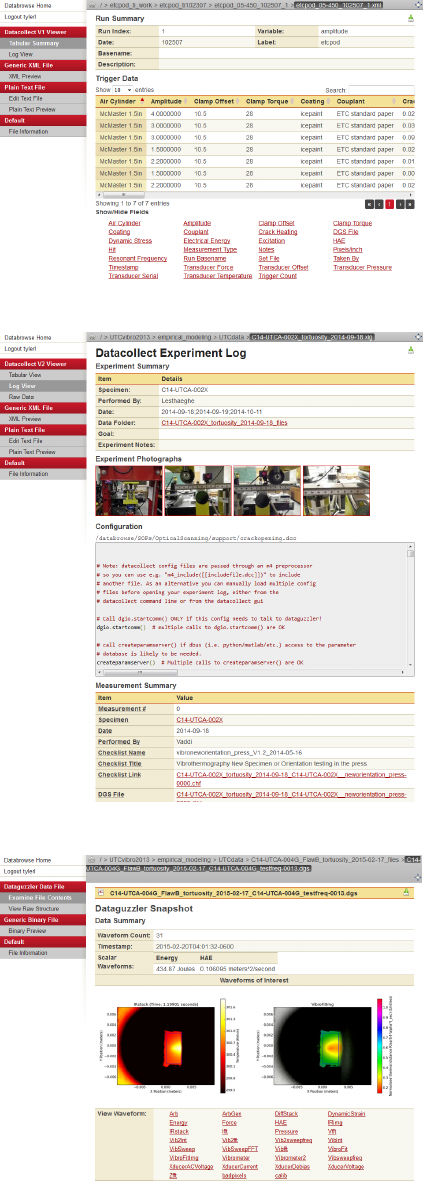
7.1 Checklist Editor
The checklist editor plugin is one of several Databrowse
plugins that were constructed to create and modify data.
Checklists (*.chx for checklist templates and *.chf for
filled checklists) are XML files that contain the necessary
information to document laboratory procedures. The
complete details of the file format are outside of the scope
of this document. However, this plugin enables the user
to open a checklist template, fill out a checklist, and save
the filled checklist to the file system.
An experimental tool for modifying a checklist is be-
ing developed as well. This tool utilizes the Axel XML
JavaScript library (http://ssire.github.io/axel/) to
provide an interface for editing the file in the web browser.
This plugin is not intended to be used from within the
Databrowse library interface.
7.2 Checklist Viewer
The checklist viewer plugin displays filled checklist files
(*.chf). Checklists (*.chx for checklist templates and *.chf
for filled checklists) are XML files that contain the nec-
essary information to document laboratory procedures.
The complete details of the file format are outside of the
scope of this document. However, this plugin will display
the status of all checklist items, along with displaying
time stamp information and notes.
26
7.3 Datacollect v1 Viewer
Datacollect is a tool that enables the automation of data
collection processes. Version 1 of Datacollect provides an
interface for the entry of experimental parameters and
an interface to aid in automating use of data acquisition
tools. This plugin is responsible for displaying the data
saved by Datacollect in a meaningful fashion. It can dis-
play data in both a log-style format and in a tabular form,
capable of being sorted, filtered, and searched.
7.4 Datacollect v2 Viewer
Datacollect is a tool that enables the automation of data
collection processes. Version 2 of Datacollect provides an
interface for the entry of experimental parameters, an in-
terface to aid in automating use of data acquisition tools,
and an interface for managing experimental processes and
procedures. This plugin is responsible for displaying the
data saved by Datacollect in a meaningful fashion. It can
display data in both a log-style format and in a tabular
form, capable of being sorted, filtered, and searched.
7.5 Dataguzzler Data File
Dataguzzler is an open source extensible data acquisition
platform – providing a high speed mechanism for data
capture, storage, and visualization. Dataguzzler also pro-
vides bindings enabling simple integration with data col-
lection automation scripts and other related programs.
The Dataguzzler data file plugin for Databrowse enables
the user to view the data contained within Dataguzzler
binary data files (*.dgs, *.dgd, *.dga, *.dgz). The plu-
gin utilizes Matplotlib for Python to produce realtime
visualizations of data, in addition to displaying all of the
associated meta data. The plugin can also export data
from Dataguzzler data files into several other common
file formats, including CSV and MAT. The plugin is also
capable of exporting videos from the appropriate types of
data.
27
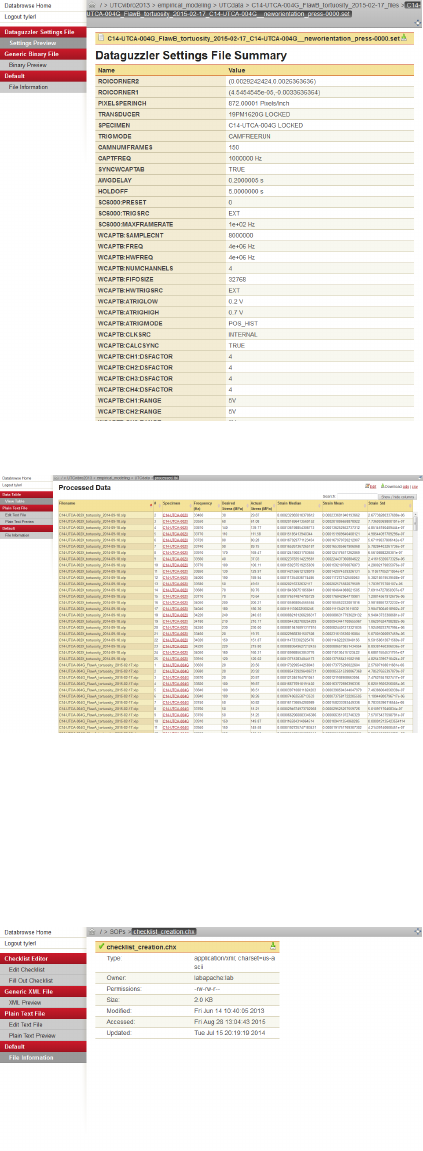
7.6 Dataguzzler Settings File
Dataguzzler is an open source extensible data acquisition
platform – providing a high speed mechanism for data
capture, storage, and visualization. Dataguzzler also pro-
vides bindings enabling simple integration with data col-
lection automation scripts and other related programs.
The Dataguzzler set file plugin for Databrowse enables
the user to examine the contents of Dataguzzler settings
files (*.set).
7.7 Data Table
The data table plugin is a tool designed to aid in the col-
lection and compilation of large data sets from multiple
sources. This plugin operates on *.tbl files. The exact
schema of the *.tbl file is outside of the scope of this doc-
ument; however, the tbl file is an XML file which instructs
the Data Table plugin where to find data files and how to
select data from them. The end result is a new XML doc-
ument that combines all of this data together. This XML
document can then be rendered by Databrowse in the web
browser in the form of a searchable, sortable, and filter-
able table. This table can be exported to CSV from the
web browser as well. Additionally, this plugin can prove
to be very powerful when utilized inside of a processing
script using the Databrowse library, enabling rapid de-
velopment of data processing scripts that can operate on
large sets of data in real time.
7.8 Default
The default plugin is a catch-all plugin that can operate
on any type of file. This ensures that even for files in
which Databrowse is unable to determine the appropriate
plugin to use, or a plugin does not exist that supports a
particular file type, some set of information about the file
can be returned and displayed. This plugin will extract
basic file information, such as file name, size, timestamps,
and permissions.
28
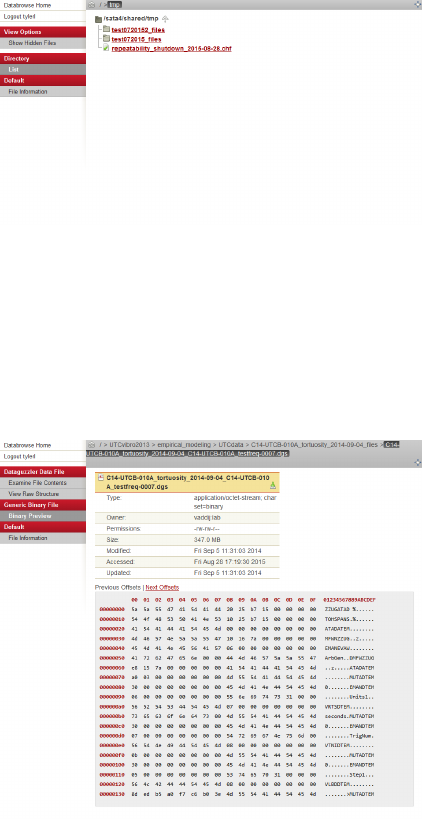
7.9 Directory
The generic directory plugin is capable of scanning a
folder and building an XML representation of the contents
of that folder. It is also capable of recursively building a
representation of entire directory trees. In the web in-
terface, this is displayed as the default file browser view.
The web browser interface has a number of useful features
that enable the user to perform operations on files. See
Section 3 for additional information about this interface.
7.10 File Operations
The file operations plugin is a special plugin that is nor-
mally not visible from the web or library interface. This
plugin enables other plugins to perform special operations
on files, particularly those that do not yet exist.
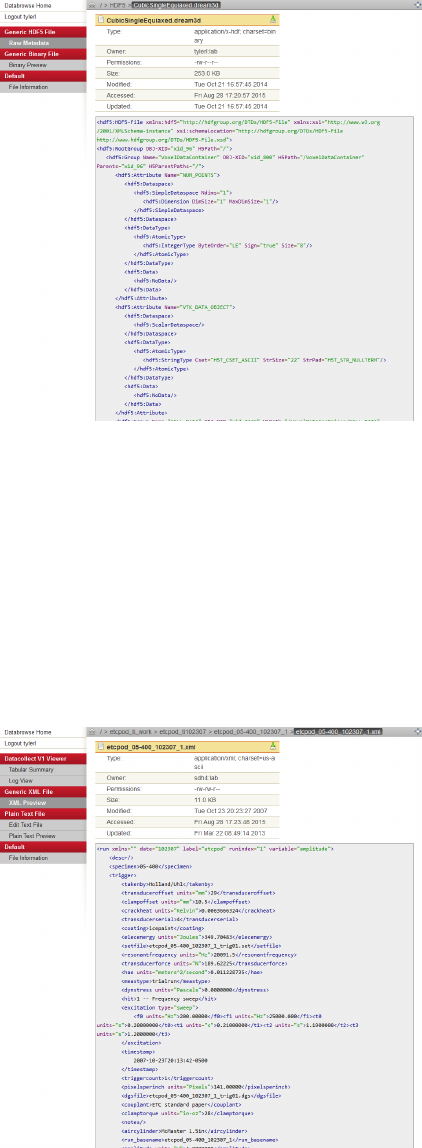
7.11 Generic Binary File
The generic binary file plugin is capable of reading out
data in a hex and ASCII format from a binary data file. In
the web interface, generic information is displayed about
the file, along with an interactive hex viewer tool. The
viewer will only pull in a small chunk of the file at a time,
since binary files can be rather large. AJAX requests are
made by the web browser enabling the user to browse
through the file interactively in real time.
29
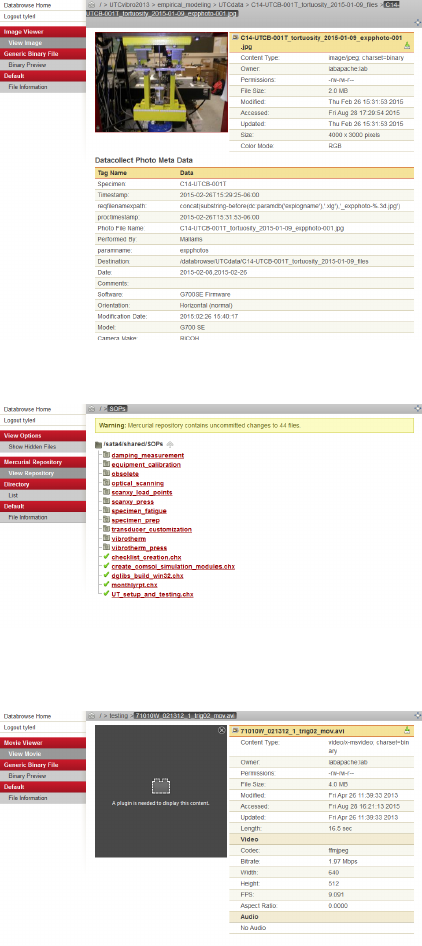
7.12 Generic HDF5 File
The HDF5 viewer plugin is a work-in-progress plugin that
will simply display the internal structure of an HDF5 file
at this time.
7.13 Generic WSGI Application
The generic WSGI application plugin will enable a WSGI
compliant Python script to be ran inside the context of
Databrowse. This is very useful for scenarios in which
an end user wishes to quickly create an interactive web
application within the context of a particular set of data
or for a task-oriented purpose without the need to create
an infrastructure in which that application will run.
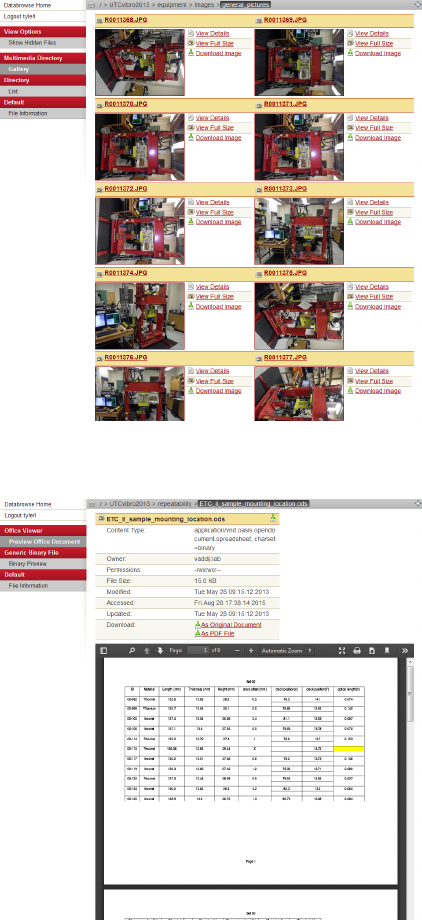
7.14 Generic XML File
The generic XML file viewer will display a textual view
of an XML file, along with basic file information.
30
7.15 Image Viewer
The image viewer plugin will display an image, in addition
to all internal metadata and EXIF tags associated with
an image. The plugin also supports the ability to resize
images in real time for use by other plugins as well. It will
operate on any file type supported by the Python Imaging
Library, including *.png, *.jpg, *.bmp, and many more.
7.16 Mercurial Repository
Mercurial is a version tracking tool. The Mercurial
Repository Databrowse plugin is a work-in-progress that
will display warning information to users about uncom-
mitted changes and other potential concerns associated
with a Mercurial repository. This plugin overrides the
default Directory plugin, though, all other functionality
available from the directory plugin is still available in this
context.
7.17 Movie Viewer
The movie viewer plugin is an experimental plugin that
will attempt to stream video content to the users web
browser. This requires the usage of the appropriate plu-
gins and codecs on the end user computer. This plugin is
also capable of extracting preview frames from videos. It
will operate on any video format supported by FFMPEG.
31
7.18 Multimedia Directory
The multimedia directory plugin will display thumbnail
previews of image, video, and other multimedia content.
It will override the default directory plugin when the ma-
jority of the content inside of a folder can be displayed
with a thumbnail preview. Clicking on a thumbnail in
the multimedia directory plugin will display a larger ver-
sion of the image without leaving the page.
7.19 Office Viewer
The office viewer plugin provides an in-browser PDF pre-
view of word processor documents, spreadsheets, presen-
tations, and other document files. This plugin operates on
any file format supported by LibreOffice, including *.doc,
*.ppt, *.xls, *.odt, *.odp, *.ods, and many others.
32
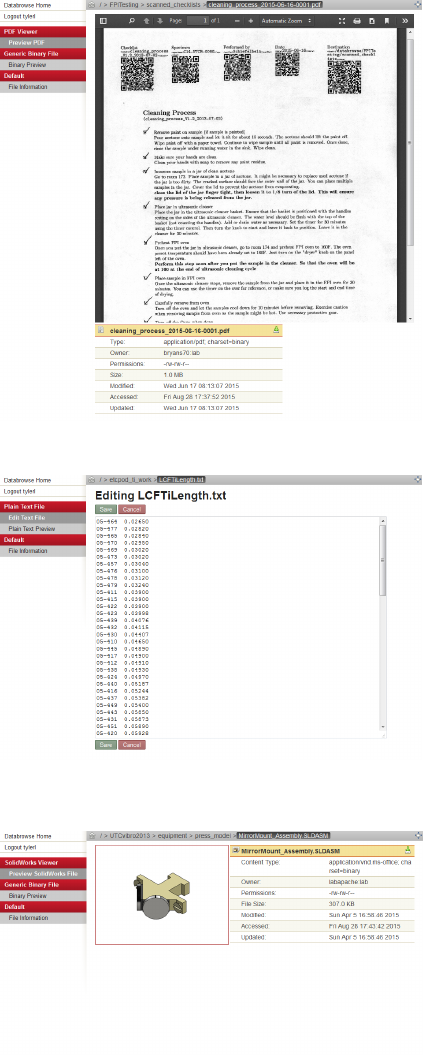
7.20 PDF Viewer
The PDF viewer plugin will display a PDF file for the
user inside the web browser.
7.21 Plain Text File
The plain text file plugin displays the contents of any
plain text file inside the web browser. It also provides
a convenient interface for editing plain text files right in
the web browser. Backups will automatically be saved by
this plugin during a save operation. It will operate on all
files with the content-type of plain/text.
7.22 SolidWorks Viewer
The SolidWorks viewer plugin provides a quick low res-
olution image preview of a SolidWorks file in the web
browser. This plugin is also capable of providing a thumb-
nail for use in the context of the multimedia directory plu-
gin and other plugins where appropriate. It operates on
files with the *.sldprt, *.sldasm, and *.slddrw extensions.
33
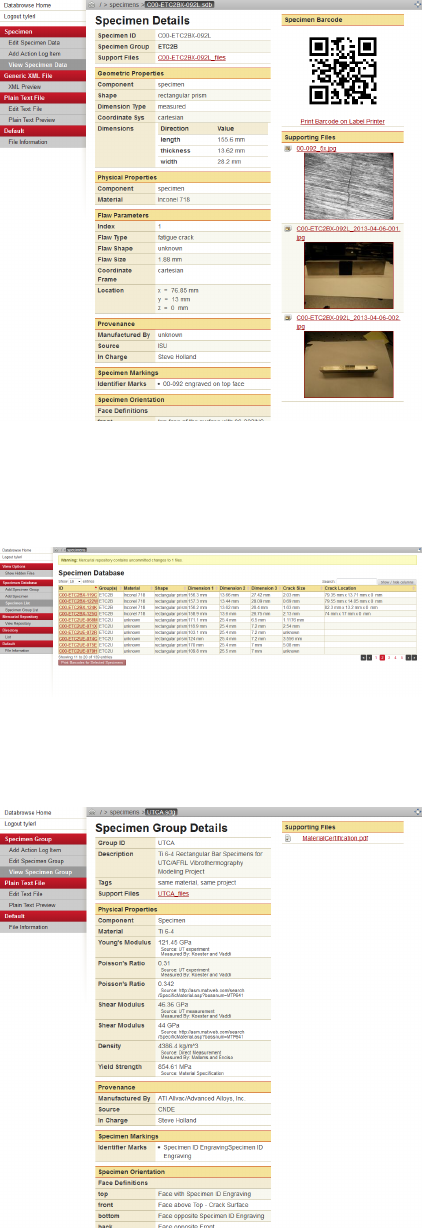
7.23 Specimen Management Plugin
The Specimen Management plugin provides an interface
for storing and tracking information about specimens.
Operating on XML files containing the *.sdb extension,
it can produce a visual display of the details of a spec-
imen, including identification, geometry, provenance in-
formation, images, bar code labels, etc. Additionally, uti-
lizing the Axel XML JavaScript library (http://ssire.
github.io/axel/), this plugin can also provide a web-
based interface to edit the details of a specimen on an in-
teractive form. The structure of the sdb files are outside of
the context of this document. Templates that control the
display and editing of specimen files can be modified, en-
abling the introduction of new parameters. This plugin is
also capable of combining multiple sources of data about
a specimen into one unified representation, highly useful
both on the web and in the context of the Databrowse
library. This capability is presently being used to enable
specimens to be placed into specimen groups – sharing all
of the parameters from the group and thus limiting the
unnecessary repetition of data across many files.
7.24 Specimen Directory Plugin
The Specimen Directory plugin is a complementary tool
to the Specimen Management plugin, overriding the direc-
tory plugin on directories that contain *.sdb files. This
plugin displays a tabular view of specimen parameters,
enabling the quick searching, filtering, and sorting of en-
tire sets of specimen data. This plugin also provides easy
access needed to create new *.sdb files in the current lo-
cation.
7.25 Specimen Group Management Plugin
The Specimen Group Management plugin is a comple-
mentary tool to the Specimen Management plugin, pro-
viding similar functionality, but acting in the context of
*.sdg files. The schema defining the *.sdg file is outside
of the context of this document; however, it is similar in
structure to the *.sdb file.
34
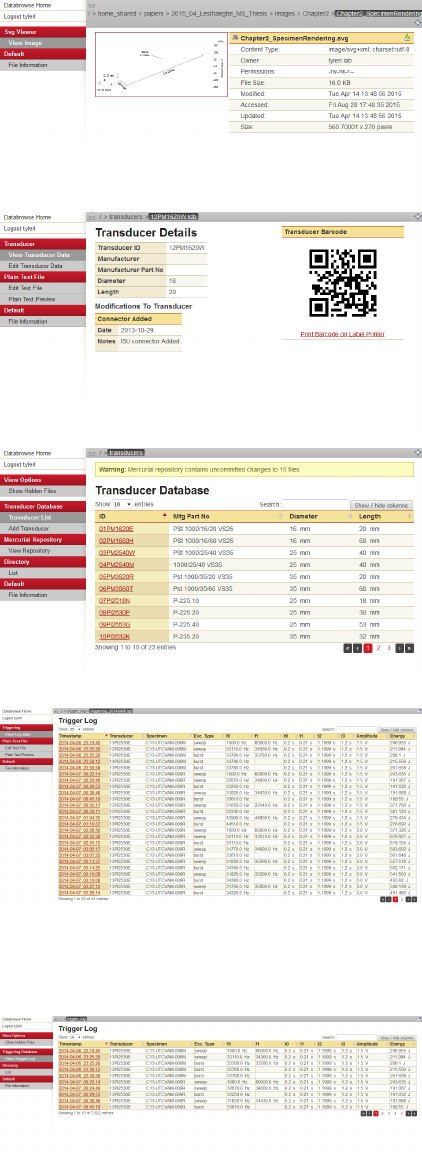
7.26 SVG Viewer
The SVG viewer plugin adds the necessary support to
ensure that *.svg vector graphics image files can be dis-
played on all web browsers, producing an image thumb-
nail and preview if necessary. It also produces thumbnails
for the multimedia directory plugin and in other contexts
as needed.
7.27 Transducer Management Plugin
The Transducer Management plugin is similar in func-
tionality to the Specimen Management plugin, but de-
signed in the context of managing parameters and other
information associated with ultrasonic transducers. The
plugin operates XML files with the extension *.tdb. The
structure of these files is outside of the context of this
document.
7.28 Transducer Directory Plugin
The Transducer Directory plugin is similar in functional-
ity to the Specimen Directory plugin, overriding the di-
rectory plugin on directories that contain *.tdb files, and
providing a tabular view of the data contained within,
enabling rapid searching, sorting, and filtering.
7.29 Trigger Log Plugin
The Trigger Log plugin is similar in functionality to the
Transducer Management plugin, but designed in the con-
text of tracking the usage of ultrasonic transducers. An
interface with data acquisition software ensures that an
XML file with the *.tgl extension is recorded to ensure
accurate tracking of all experimental triggers. This plu-
gin will display the data from such a file in a tabular
form, enabling rapid searching, sorting, and filtering. The
structure of the *.tgl file is outside of the context of this
document.
7.30 Trigger Log Directory Plugin
The Trigger Log Directory plugin functions similarly to
the Trigger Log plugin, but enabling an entire directory of
*.tgl files to be combined into one single representation.
This representation is displayed in tabular form, enabling
rapid searching, sorting and filtering. This plugin also
provides the capability of exporting this data to a CSV
file for further analysis.
35
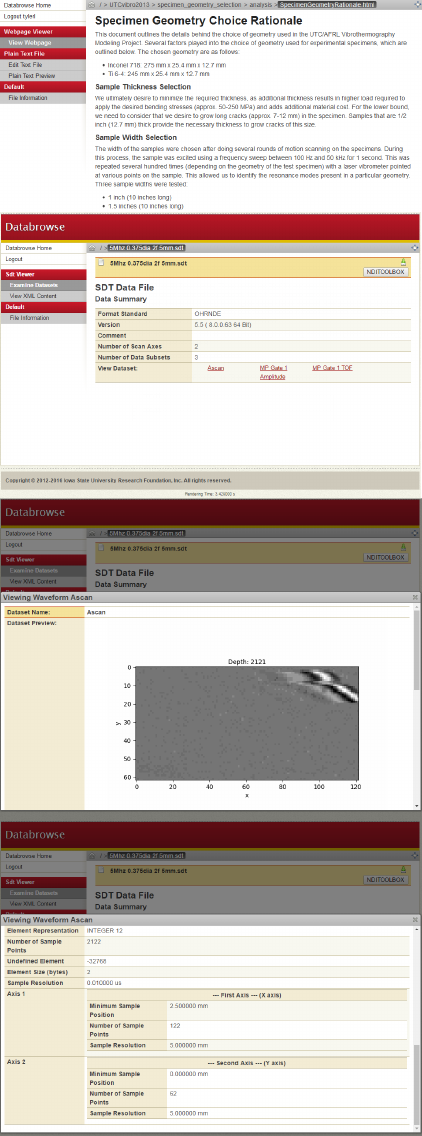
7.31 Web Page Viewer
The web page viewer plugin will display the contents of
an HTML file within the Databrowse interface. Combined
with the plain text editor plugin, this plugin can provide
a convenient mechanism for documentation while being
able to pull together all of the other resources available
inside the context of Databrowse.
7.32 SDT File Viewer
The SDT file viewer operates on .sdt files generated from
third party data collection software, i.e. Inspectionware.
With the ability to generate images and gifs of the in-
cluded data sets as well as collecting the header informa-
tion all of the experimental data is located in one easy
to find location. Integration with the NDIToolBox is also
available if that software is available.
36
8 License and Third-Party Components
Databrowse is distributed under the terms of the BSD-3 clause license.
Databrowse is packaged with the following third party components:
Portions of this software are adapted from gnome-icon-theme-3.7.4:
Copyright c
2005-2013 The GNOME Project
License: LGPL v3 or CC-BY-SA v3.0
Portions of this software are adapted from jQuery-1.9.1:
Copyright c
2013 jQuery Foundation and other contributors
License: MIT
Portions of this software are adapted from DataTables-1.9.4:
Copyright c
2008-2010 Allan Jardine
License: GPL v2 or BSD-3
Portions of this software are adapted from hurry.filesize-0.9:
Copyright c
2009 Martijn Faassen, Startifact
License: ZPL v2.1
Portions of this software are adapted from prettify-4-Mar-2013:
Copyright c
2011 Mike Samuel et al
License: Apache v2.0
Portions of this software are adapted from jQuery-File-Upload-7.4.1-jquery.ui:
Copyright c
2013 Sebastian Tschan
License: MIT
Portions of this software are adapted from axel-1.1.2-beta:
Copyright c
2008 - 2010 Staphane Sire
License: LGPL v2.1 or newer
Portions of this software are adapted from images2gif.py:
Copyright c
2012 Almar Klein, Ant1, Marius van Voorden
License: BSD-3
Portions of this software are adapted from exif-py-1.2.0:
Copyright c
2002-2007 Gene Cash
Copyright c
2007-2013 Ianar Svi and contributors
License: BSD-3
Portions of this software are adapted from cefpython:
Copyright c
2012 The CEF Python authors - see the Authors file in cefpython repository.
All rights reserved. Licensed under the BSD 3-clause license.
See project website: https://github.com/cztomczak/cefpython
License: BSD-3
37
8.1 BSD 3-Clause License
Redistribution and use in source and binary forms, with or without modification, are permitted provided
that the following conditions are met:
1. Redistributions of source code must retain the above copyright notice, this list of conditions and the
following disclaimer.
2. Redistributions in binary form must reproduce the above copyright notice, this list of conditions and
the following disclaimer in the documentation and/or other materials provided with the distribution.
3. The name of the author may not be used to endorse or promote products derived from this software
without specific prior written permission.
THIS SOFTWARE IS PROVIDED BY THE AUTHOR “AS IS” AND ANY EXPRESS OR IMPLIED
WARRANTIES, INCLUDING, BUT NOT LIMITED TO, THE IMPLIED WARRANTIES OF MER-
CHANTABILITY AND FITNESS FOR A PARTICULAR PURPOSE ARE DISCLAIMED. IN NO EVENT
SHALL THE AUTHOR BE LIABLE FOR ANY DIRECT, INDIRECT, INCIDENTAL, SPECIAL, EXEM-
PLARY, OR CONSEQUENTIAL DAMAGES (INCLUDING, BUT NOT LIMITED TO, PROCUREMENT
OF SUBSTITUTE GOODS OR SERVICES; LOSS OF USE, DATA, OR PROFITS; OR BUSINESS IN-
TERRUPTION) HOWEVER CAUSED AND ON ANY THEORY OF LIABILITY, WHETHER IN CON-
TRACT, STRICT LIABILITY, OR TORT (INCLUDING NEGLIGENCE OR OTHERWISE) ARISING IN
ANY WAY OUT OF THE USE OF THIS SOFTWARE, EVEN IF ADVISED OF THE POSSIBILITY OF
SUCH DAMAGE.
38
8.2 GNU General Public License v3
GNU GENERAL PUBLIC LICENSE
Version 3, 29 June 2007
Copyright c
2007 Free Software Foundation, Inc. http://fsf.org/
Everyone is permitted to copy and distribute verbatim copies of this
license document, but changing it is not allowed.
Preamble
The GNU General Public License is a free, copyleft license for software and other kinds of works.
The licenses for most software and other practical works are designed to take away your freedom to
share and change the works. By contrast, the GNU General Public License is intended to guarantee your
freedom to share and change all versions of a program–to make sure it remains free software for all its
users. We, the Free Software Foundation, use the GNU General Public License for most of our software;
it applies also to any other work released this way by its authors. You can apply it to your programs,
too.
When we speak of free software, we are referring to freedom, not price. Our General Public Licenses
are designed to make sure that you have the freedom to distribute copies of free software (and charge
for them if you wish), that you receive source code or can get it if you want it, that you can change the
software or use pieces of it in new free programs, and that you know you can do these things.
To protect your rights, we need to prevent others from denying you these rights or asking you to
surrender the rights. Therefore, you have certain responsibilities if you distribute copies of the software,
or if you modify it: responsibilities to respect the freedom of others.
For example, if you distribute copies of such a program, whether gratis or for a fee, you must pass
on to the recipients the same freedoms that you received. You must make sure that they, too, receive or
can get the source code. And you must show them these terms so they know their rights.
Developers that use the GNU GPL protect your rights with two steps: (1) assert copyright on the
software, and (2) offer you this License giving you legal permission to copy, distribute and/or modify it.
For the developers’ and authors’ protection, the GPL clearly explains that there is no warranty for
this free software. For both users’ and authors’ sake, the GPL requires that modified versions be marked
as changed, so that their problems will not be attributed erroneously to authors of previous versions.
Some devices are designed to deny users access to install or run modified versions of the software
inside them, although the manufacturer can do so. This is fundamentally incompatible with the aim
of protecting users’ freedom to change the software. The systematic pattern of such abuse occurs in
the area of products for individuals to use, which is precisely where it is most unacceptable. Therefore,
we have designed this version of the GPL to prohibit the practice for those products. If such problems
arise substantially in other domains, we stand ready to extend this provision to those domains in future
versions of the GPL, as needed to protect the freedom of users.
Finally, every program is threatened constantly by software patents. States should not allow patents
to restrict development and use of software on general-purpose computers, but in those that do, we wish
to avoid the special danger that patents applied to a free program could make it effectively proprietary.
To prevent this, the GPL assures that patents cannot be used to render the program non-free.
The precise terms and conditions for copying, distribution and modification follow.
Terms and Conditions
0. Definitions.
“This License” refers to version 3 of the GNU General Public License.
“Copyright” also means copyright-like laws that apply to other kinds of works, such as semiconductor
masks.
“The Program” refers to any copyrightable work licensed under this License. Each licensee is addressed
as “you”. “Licensees” and “recipients” may be individuals or organizations.
To “modify” a work means to copy from or adapt all or part of the work in a fashion requiring copyright
permission, other than the making of an exact copy. The resulting work is called a “modified version”
of the earlier work or a work “based on” the earlier work.
39
A “covered work” means either the unmodified Program or a work based on the Program.
To “propagate” a work means to do anything with it that, without permission, would make you directly
or secondarily liable for infringement under applicable copyright law, except executing it on a computer
or modifying a private copy. Propagation includes copying, distribution (with or without modification),
making available to the public, and in some countries other activities as well.
To “convey” a work means any kind of propagation that enables other parties to make or receive copies.
Mere interaction with a user through a computer network, with no transfer of a copy, is not conveying.
An interactive user interface displays “Appropriate Legal Notices” to the extent that it includes a
convenient and prominently visible feature that (1) displays an appropriate copyright notice, and (2)
tells the user that there is no warranty for the work (except to the extent that warranties are provided),
that licensees may convey the work under this License, and how to view a copy of this License. If the
interface presents a list of user commands or options, such as a menu, a prominent item in the list
meets this criterion.
1. Source Code.
The “source code” for a work means the preferred form of the work for making modifications to it.
“Object code” means any non-source form of a work.
A “Standard Interface” means an interface that either is an official standard defined by a recognized
standards body, or, in the case of interfaces specified for a particular programming language, one that
is widely used among developers working in that language.
The “System Libraries” of an executable work include anything, other than the work as a whole, that
(a) is included in the normal form of packaging a Major Component, but which is not part of that
Major Component, and (b) serves only to enable use of the work with that Major Component, or to
implement a Standard Interface for which an implementation is available to the public in source code
form. A “Major Component”, in this context, means a major essential component (kernel, window
system, and so on) of the specific operating system (if any) on which the executable work runs, or a
compiler used to produce the work, or an object code interpreter used to run it.
The “Corresponding Source” for a work in object code form means all the source code needed to
generate, install, and (for an executable work) run the object code and to modify the work, including
scripts to control those activities. However, it does not include the work’s System Libraries, or general-
purpose tools or generally available free programs which are used unmodified in performing those
activities but which are not part of the work. For example, Corresponding Source includes interface
definition files associated with source files for the work, and the source code for shared libraries and
dynamically linked subprograms that the work is specifically designed to require, such as by intimate
data communication or control flow between those subprograms and other parts of the work.
The Corresponding Source need not include anything that users can regenerate automatically from
other parts of the Corresponding Source.
The Corresponding Source for a work in source code form is that same work.
2. Basic Permissions.
All rights granted under this License are granted for the term of copyright on the Program, and are
irrevocable provided the stated conditions are met. This License explicitly affirms your unlimited
permission to run the unmodified Program. The output from running a covered work is covered by
this License only if the output, given its content, constitutes a covered work. This License acknowledges
your rights of fair use or other equivalent, as provided by copyright law.
You may make, run and propagate covered works that you do not convey, without conditions so long as
your license otherwise remains in force. You may convey covered works to others for the sole purpose
of having them make modifications exclusively for you, or provide you with facilities for running those
works, provided that you comply with the terms of this License in conveying all material for which
you do not control copyright. Those thus making or running the covered works for you must do so
exclusively on your behalf, under your direction and control, on terms that prohibit them from making
any copies of your copyrighted material outside their relationship with you.
40
Conveying under any other circumstances is permitted solely under the conditions stated below. Sub-
licensing is not allowed; section 10 makes it unnecessary.
3. Protecting Users’ Legal Rights From Anti-Circumvention Law.
No covered work shall be deemed part of an effective technological measure under any applicable law
fulfilling obligations under article 11 of the WIPO copyright treaty adopted on 20 December 1996, or
similar laws prohibiting or restricting circumvention of such measures.
When you convey a covered work, you waive any legal power to forbid circumvention of technological
measures to the extent such circumvention is effected by exercising rights under this License with
respect to the covered work, and you disclaim any intention to limit operation or modification of the
work as a means of enforcing, against the work’s users, your or third parties’ legal rights to forbid
circumvention of technological measures.
4. Conveying Verbatim Copies.
You may convey verbatim copies of the Program’s source code as you receive it, in any medium,
provided that you conspicuously and appropriately publish on each copy an appropriate copyright
notice; keep intact all notices stating that this License and any non-permissive terms added in accord
with section 7 apply to the code; keep intact all notices of the absence of any warranty; and give all
recipients a copy of this License along with the Program.
You may charge any price or no price for each copy that you convey, and you may offer support or
warranty protection for a fee.
5. Conveying Modified Source Versions.
You may convey a work based on the Program, or the modifications to produce it from the Program, in
the form of source code under the terms of section 4, provided that you also meet all of these conditions:
(a) The work must carry prominent notices stating that you modified it, and giving a relevant date.
(b) The work must carry prominent notices stating that it is released under this License and any
conditions added under section 7. This requirement modifies the requirement in section 4 to
“keep intact all notices”.
(c) You must license the entire work, as a whole, under this License to anyone who comes into
possession of a copy. This License will therefore apply, along with any applicable section 7
additional terms, to the whole of the work, and all its parts, regardless of how they are packaged.
This License gives no permission to license the work in any other way, but it does not invalidate
such permission if you have separately received it.
(d) If the work has interactive user interfaces, each must display Appropriate Legal Notices; however,
if the Program has interactive interfaces that do not display Appropriate Legal Notices, your work
need not make them do so.
A compilation of a covered work with other separate and independent works, which are not by their
nature extensions of the covered work, and which are not combined with it such as to form a larger
program, in or on a volume of a storage or distribution medium, is called an “aggregate” if the
compilation and its resulting copyright are not used to limit the access or legal rights of the compilation’s
users beyond what the individual works permit. Inclusion of a covered work in an aggregate does not
cause this License to apply to the other parts of the aggregate.
6. Conveying Non-Source Forms.
You may convey a covered work in object code form under the terms of sections 4 and 5, provided that
you also convey the machine-readable Corresponding Source under the terms of this License, in one of
these ways:
(a) Convey the object code in, or embodied in, a physical product (including a physical distribu-
tion medium), accompanied by the Corresponding Source fixed on a durable physical medium
customarily used for software interchange.
41
(b) Convey the object code in, or embodied in, a physical product (including a physical distribution
medium), accompanied by a written offer, valid for at least three years and valid for as long as you
offer spare parts or customer support for that product model, to give anyone who possesses the
object code either (1) a copy of the Corresponding Source for all the software in the product that is
covered by this License, on a durable physical medium customarily used for software interchange,
for a price no more than your reasonable cost of physically performing this conveying of source,
or (2) access to copy the Corresponding Source from a network server at no charge.
(c) Convey individual copies of the object code with a copy of the written offer to provide the
Corresponding Source. This alternative is allowed only occasionally and noncommercially, and
only if you received the object code with such an offer, in accord with subsection 6b.
(d) Convey the object code by offering access from a designated place (gratis or for a charge), and
offer equivalent access to the Corresponding Source in the same way through the same place at no
further charge. You need not require recipients to copy the Corresponding Source along with the
object code. If the place to copy the object code is a network server, the Corresponding Source
may be on a different server (operated by you or a third party) that supports equivalent copying
facilities, provided you maintain clear directions next to the object code saying where to find the
Corresponding Source. Regardless of what server hosts the Corresponding Source, you remain
obligated to ensure that it is available for as long as needed to satisfy these requirements.
(e) Convey the object code using peer-to-peer transmission, provided you inform other peers where
the object code and Corresponding Source of the work are being offered to the general public at
no charge under subsection 6d.
A separable portion of the object code, whose source code is excluded from the Corresponding Source
as a System Library, need not be included in conveying the object code work.
A “User Product” is either (1) a “consumer product”, which means any tangible personal property
which is normally used for personal, family, or household purposes, or (2) anything designed or sold
for incorporation into a dwelling. In determining whether a product is a consumer product, doubtful
cases shall be resolved in favor of coverage. For a particular product received by a particular user,
“normally used” refers to a typical or common use of that class of product, regardless of the status of
the particular user or of the way in which the particular user actually uses, or expects or is expected to
use, the product. A product is a consumer product regardless of whether the product has substantial
commercial, industrial or non-consumer uses, unless such uses represent the only significant mode of
use of the product.
“Installation Information” for a User Product means any methods, procedures, authorization keys,
or other information required to install and execute modified versions of a covered work in that User
Product from a modified version of its Corresponding Source. The information must suffice to ensure
that the continued functioning of the modified object code is in no case prevented or interfered with
solely because modification has been made.
If you convey an object code work under this section in, or with, or specifically for use in, a User
Product, and the conveying occurs as part of a transaction in which the right of possession and use
of the User Product is transferred to the recipient in perpetuity or for a fixed term (regardless of
how the transaction is characterized), the Corresponding Source conveyed under this section must be
accompanied by the Installation Information. But this requirement does not apply if neither you nor
any third party retains the ability to install modified object code on the User Product (for example,
the work has been installed in ROM).
The requirement to provide Installation Information does not include a requirement to continue to
provide support service, warranty, or updates for a work that has been modified or installed by the
recipient, or for the User Product in which it has been modified or installed. Access to a network may
be denied when the modification itself materially and adversely affects the operation of the network or
violates the rules and protocols for communication across the network.
Corresponding Source conveyed, and Installation Information provided, in accord with this section
must be in a format that is publicly documented (and with an implementation available to the public
in source code form), and must require no special password or key for unpacking, reading or copying.
42
7. Additional Terms.
“Additional permissions” are terms that supplement the terms of this License by making exceptions
from one or more of its conditions. Additional permissions that are applicable to the entire Program
shall be treated as though they were included in this License, to the extent that they are valid under
applicable law. If additional permissions apply only to part of the Program, that part may be used
separately under those permissions, but the entire Program remains governed by this License without
regard to the additional permissions.
When you convey a copy of a covered work, you may at your option remove any additional permissions
from that copy, or from any part of it. (Additional permissions may be written to require their own
removal in certain cases when you modify the work.) You may place additional permissions on material,
added by you to a covered work, for which you have or can give appropriate copyright permission.
Notwithstanding any other provision of this License, for material you add to a covered work, you may
(if authorized by the copyright holders of that material) supplement the terms of this License with
terms:
(a) Disclaiming warranty or limiting liability differently from the terms of sections 15 and 16 of this
License; or
(b) Requiring preservation of specified reasonable legal notices or author attributions in that material
or in the Appropriate Legal Notices displayed by works containing it; or
(c) Prohibiting misrepresentation of the origin of that material, or requiring that modified versions
of such material be marked in reasonable ways as different from the original version; or
(d) Limiting the use for publicity purposes of names of licensors or authors of the material; or
(e) Declining to grant rights under trademark law for use of some trade names, trademarks, or service
marks; or
(f) Requiring indemnification of licensors and authors of that material by anyone who conveys the
material (or modified versions of it) with contractual assumptions of liability to the recipient, for
any liability that these contractual assumptions directly impose on those licensors and authors.
All other non-permissive additional terms are considered “further restrictions” within the meaning of
section 10. If the Program as you received it, or any part of it, contains a notice stating that it is
governed by this License along with a term that is a further restriction, you may remove that term. If a
license document contains a further restriction but permits relicensing or conveying under this License,
you may add to a covered work material governed by the terms of that license document, provided
that the further restriction does not survive such relicensing or conveying.
If you add terms to a covered work in accord with this section, you must place, in the relevant source
files, a statement of the additional terms that apply to those files, or a notice indicating where to find
the applicable terms.
Additional terms, permissive or non-permissive, may be stated in the form of a separately written
license, or stated as exceptions; the above requirements apply either way.
8. Termination.
You may not propagate or modify a covered work except as expressly provided under this License.
Any attempt otherwise to propagate or modify it is void, and will automatically terminate your rights
under this License (including any patent licenses granted under the third paragraph of section 11).
However, if you cease all violation of this License, then your license from a particular copyright holder
is reinstated (a) provisionally, unless and until the copyright holder explicitly and finally terminates
your license, and (b) permanently, if the copyright holder fails to notify you of the violation by some
reasonable means prior to 60 days after the cessation.
Moreover, your license from a particular copyright holder is reinstated permanently if the copyright
holder notifies you of the violation by some reasonable means, this is the first time you have received
43
notice of violation of this License (for any work) from that copyright holder, and you cure the violation
prior to 30 days after your receipt of the notice.
Termination of your rights under this section does not terminate the licenses of parties who have
received copies or rights from you under this License. If your rights have been terminated and not
permanently reinstated, you do not qualify to receive new licenses for the same material under section
10.
9. Acceptance Not Required for Having Copies.
You are not required to accept this License in order to receive or run a copy of the Program. Ancillary
propagation of a covered work occurring solely as a consequence of using peer-to-peer transmission to
receive a copy likewise does not require acceptance. However, nothing other than this License grants
you permission to propagate or modify any covered work. These actions infringe copyright if you do
not accept this License. Therefore, by modifying or propagating a covered work, you indicate your
acceptance of this License to do so.
10. Automatic Licensing of Downstream Recipients.
Each time you convey a covered work, the recipient automatically receives a license from the original
licensors, to run, modify and propagate that work, subject to this License. You are not responsible for
enforcing compliance by third parties with this License.
An “entity transaction” is a transaction transferring control of an organization, or substantially all
assets of one, or subdividing an organization, or merging organizations. If propagation of a covered
work results from an entity transaction, each party to that transaction who receives a copy of the work
also receives whatever licenses to the work the party’s predecessor in interest had or could give under
the previous paragraph, plus a right to possession of the Corresponding Source of the work from the
predecessor in interest, if the predecessor has it or can get it with reasonable efforts.
You may not impose any further restrictions on the exercise of the rights granted or affirmed under this
License. For example, you may not impose a license fee, royalty, or other charge for exercise of rights
granted under this License, and you may not initiate litigation (including a cross-claim or counterclaim
in a lawsuit) alleging that any patent claim is infringed by making, using, selling, offering for sale, or
importing the Program or any portion of it.
11. Patents.
A “contributor” is a copyright holder who authorizes use under this License of the Program or a
work on which the Program is based. The work thus licensed is called the contributor’s “contributor
version”.
A contributor’s “essential patent claims” are all patent claims owned or controlled by the contributor,
whether already acquired or hereafter acquired, that would be infringed by some manner, permitted by
this License, of making, using, or selling its contributor version, but do not include claims that would
be infringed only as a consequence of further modification of the contributor version. For purposes of
this definition, “control” includes the right to grant patent sublicenses in a manner consistent with the
requirements of this License.
Each contributor grants you a non-exclusive, worldwide, royalty-free patent license under the contrib-
utor’s essential patent claims, to make, use, sell, offer for sale, import and otherwise run, modify and
propagate the contents of its contributor version.
In the following three paragraphs, a “patent license” is any express agreement or commitment, however
denominated, not to enforce a patent (such as an express permission to practice a patent or covenant
not to sue for patent infringement). To “grant” such a patent license to a party means to make such
an agreement or commitment not to enforce a patent against the party.
If you convey a covered work, knowingly relying on a patent license, and the Corresponding Source of
the work is not available for anyone to copy, free of charge and under the terms of this License, through
a publicly available network server or other readily accessible means, then you must either (1) cause
the Corresponding Source to be so available, or (2) arrange to deprive yourself of the benefit of the
44
patent license for this particular work, or (3) arrange, in a manner consistent with the requirements of
this License, to extend the patent license to downstream recipients. “Knowingly relying” means you
have actual knowledge that, but for the patent license, your conveying the covered work in a country,
or your recipient’s use of the covered work in a country, would infringe one or more identifiable patents
in that country that you have reason to believe are valid.
If, pursuant to or in connection with a single transaction or arrangement, you convey, or propagate by
procuring conveyance of, a covered work, and grant a patent license to some of the parties receiving
the covered work authorizing them to use, propagate, modify or convey a specific copy of the covered
work, then the patent license you grant is automatically extended to all recipients of the covered work
and works based on it.
A patent license is “discriminatory” if it does not include within the scope of its coverage, prohibits
the exercise of, or is conditioned on the non-exercise of one or more of the rights that are specifically
granted under this License. You may not convey a covered work if you are a party to an arrangement
with a third party that is in the business of distributing software, under which you make payment to
the third party based on the extent of your activity of conveying the work, and under which the third
party grants, to any of the parties who would receive the covered work from you, a discriminatory
patent license (a) in connection with copies of the covered work conveyed by you (or copies made from
those copies), or (b) primarily for and in connection with specific products or compilations that contain
the covered work, unless you entered into that arrangement, or that patent license was granted, prior
to 28 March 2007.
Nothing in this License shall be construed as excluding or limiting any implied license or other defenses
to infringement that may otherwise be available to you under applicable patent law.
12. No Surrender of Others’ Freedom.
If conditions are imposed on you (whether by court order, agreement or otherwise) that contradict the
conditions of this License, they do not excuse you from the conditions of this License. If you cannot
convey a covered work so as to satisfy simultaneously your obligations under this License and any other
pertinent obligations, then as a consequence you may not convey it at all. For example, if you agree to
terms that obligate you to collect a royalty for further conveying from those to whom you convey the
Program, the only way you could satisfy both those terms and this License would be to refrain entirely
from conveying the Program.
13. Use with the GNU Affero General Public License.
Notwithstanding any other provision of this License, you have permission to link or combine any
covered work with a work licensed under version 3 of the GNU Affero General Public License into a
single combined work, and to convey the resulting work. The terms of this License will continue to
apply to the part which is the covered work, but the special requirements of the GNU Affero General
Public License, section 13, concerning interaction through a network will apply to the combination as
such.
14. Revised Versions of this License.
The Free Software Foundation may publish revised and/or new versions of the GNU General Public
License from time to time. Such new versions will be similar in spirit to the present version, but may
differ in detail to address new problems or concerns.
Each version is given a distinguishing version number. If the Program specifies that a certain numbered
version of the GNU General Public License “or any later version” applies to it, you have the option of
following the terms and conditions either of that numbered version or of any later version published by
the Free Software Foundation. If the Program does not specify a version number of the GNU General
Public License, you may choose any version ever published by the Free Software Foundation.
If the Program specifies that a proxy can decide which future versions of the GNU General Public
License can be used, that proxy’s public statement of acceptance of a version permanently authorizes
you to choose that version for the Program.
45
Later license versions may give you additional or different permissions. However, no additional obli-
gations are imposed on any author or copyright holder as a result of your choosing to follow a later
version.
15. Disclaimer of Warranty.
THERE IS NO WARRANTY FOR THE PROGRAM, TO THE EXTENT PERMITTED BY APPLI-
CABLE LAW. EXCEPT WHEN OTHERWISE STATED IN WRITING THE COPYRIGHT HOLD-
ERS AND/OR OTHER PARTIES PROVIDE THE PROGRAM “AS IS” WITHOUT WARRANTY
OF ANY KIND, EITHER EXPRESSED OR IMPLIED, INCLUDING, BUT NOT LIMITED TO,
THE IMPLIED WARRANTIES OF MERCHANTABILITY AND FITNESS FOR A PARTICULAR
PURPOSE. THE ENTIRE RISK AS TO THE QUALITY AND PERFORMANCE OF THE PRO-
GRAM IS WITH YOU. SHOULD THE PROGRAM PROVE DEFECTIVE, YOU ASSUME THE
COST OF ALL NECESSARY SERVICING, REPAIR OR CORRECTION.
16. Limitation of Liability.
IN NO EVENT UNLESS REQUIRED BY APPLICABLE LAW OR AGREED TO IN WRITING
WILL ANY COPYRIGHT HOLDER, OR ANY OTHER PARTY WHO MODIFIES AND/OR CON-
VEYS THE PROGRAM AS PERMITTED ABOVE, BE LIABLE TO YOU FOR DAMAGES, IN-
CLUDING ANY GENERAL, SPECIAL, INCIDENTAL OR CONSEQUENTIAL DAMAGES ARIS-
ING OUT OF THE USE OR INABILITY TO USE THE PROGRAM (INCLUDING BUT NOT
LIMITED TO LOSS OF DATA OR DATA BEING RENDERED INACCURATE OR LOSSES SUS-
TAINED BY YOU OR THIRD PARTIES OR A FAILURE OF THE PROGRAM TO OPERATE
WITH ANY OTHER PROGRAMS), EVEN IF SUCH HOLDER OR OTHER PARTY HAS BEEN
ADVISED OF THE POSSIBILITY OF SUCH DAMAGES.
17. Interpretation of Sections 15 and 16.
If the disclaimer of warranty and limitation of liability provided above cannot be given local legal
effect according to their terms, reviewing courts shall apply local law that most closely approximates
an absolute waiver of all civil liability in connection with the Program, unless a warranty or assumption
of liability accompanies a copy of the Program in return for a fee.
End of Terms and Conditions
How to Apply These Terms to Your New Programs
If you develop a new program, and you want it to be of the greatest possible use to the public, the
best way to achieve this is to make it free software which everyone can redistribute and change under
these terms.
To do so, attach the following notices to the program. It is safest to attach them to the start of each
source file to most effectively state the exclusion of warranty; and each file should have at least the
“copyright” line and a pointer to where the full notice is found.
<one line to give the program’s name and a brief idea of what it does.>
Copyright (C) <textyear> <name of author>
This program is free software: you can redistribute it and/or modify
it under the terms of the GNU General Public License as published by
the Free Software Foundation, either version 3 of the License, or
(at your option) any later version.
This program is distributed in the hope that it will be useful,
but WITHOUT ANY WARRANTY; without even the implied warranty of
MERCHANTABILITY or FITNESS FOR A PARTICULAR PURPOSE. See the
GNU General Public License for more details.
You should have received a copy of the GNU General Public License
along with this program. If not, see <http://www.gnu.org/licenses/>.
46
Also add information on how to contact you by electronic and paper mail.
If the program does terminal interaction, make it output a short notice like this when it starts in an
interactive mode:
<program> Copyright (C) <year> <name of author>
This program comes with ABSOLUTELY NO WARRANTY; for details type ‘show w’.
This is free software, and you are welcome to redistribute it
under certain conditions; type ‘show c’ for details.
The hypothetical commands show w and show c should show the appropriate parts of the General
Public License. Of course, your program’s commands might be different; for a GUI interface, you
would use an “about box”.
You should also get your employer (if you work as a programmer) or school, if any, to sign a “copyright
disclaimer” for the program, if necessary. For more information on this, and how to apply and follow
the GNU GPL, see http://www.gnu.org/licenses/.
The GNU General Public License does not permit incorporating your program into proprietary pro-
grams. If your program is a subroutine library, you may consider it more useful to permit linking
proprietary applications with the library. If this is what you want to do, use the GNU Lesser Gen-
eral Public License instead of this License. But first, please read http://www.gnu.org/philosophy/
why-not-lgpl.html.
47
8.3 GNU Lesser General Public License v3
GNU LESSER GENERAL PUBLIC LICENSE
Version 3, 29 June 2007
Copyright c
2007 Free Software Foundation, Inc. http://fsf.org/
Everyone is permitted to copy and distribute verbatim copies of this
license document, but changing it is not allowed.
This version of the GNU Lesser General Public License incorporates the terms and conditions of version
3 of the GNU General Public License, supplemented by the additional permissions listed below.
0. Additional Definitions.
As used herein, “this License” refers to version 3 of the GNU Lesser General Public License, and the
“GNU GPL” refers to version 3 of the GNU General Public License.
“The Library” refers to a covered work governed by this License, other than an Application or a
Combined Work as defined below.
An “Application” is any work that makes use of an interface provided by the Library, but which is
not otherwise based on the Library. Defining a subclass of a class defined by the Library is deemed a
mode of using an interface provided by the Library.
A “Combined Work” is a work produced by combining or linking an Application with the Library. The
particular version of the Library with which the Combined Work was made is also called the “Linked
Version”.
The “Minimal Corresponding Source” for a Combined Work means the Corresponding Source for the
Combined Work, excluding any source code for portions of the Combined Work that, considered in
isolation, are based on the Application, and not on the Linked Version.
The “Corresponding Application Code” for a Combined Work means the object code and/or source
code for the Application, including any data and utility programs needed for reproducing the Combined
Work from the Application, but excluding the System Libraries of the Combined Work.
1. Exception to Section 3 of the GNU GPL.
You may convey a covered work under sections 3 and 4 of this License without being bound by section
3 of the GNU GPL.
2. Conveying Modified Versions.
If you modify a copy of the Library, and, in your modifications, a facility refers to a function or data
to be supplied by an Application that uses the facility (other than as an argument passed when the
facility is invoked), then you may convey a copy of the modified version:
(a) under this License, provided that you make a good faith effort to ensure that, in the event an
Application does not supply the function or data, the facility still operates, and performs whatever
part of its purpose remains meaningful, or
(b) under the GNU GPL, with none of the additional permissions of this License applicable to that
copy.
3. Object Code Incorporating Material from Library Header Files.
The object code form of an Application may incorporate material from a header file that is part of
the Library. You may convey such object code under terms of your choice, provided that, if the
incorporated material is not limited to numerical parameters, data structure layouts and accessors, or
small macros, inline functions and templates (ten or fewer lines in length), you do both of the following:
(a) Give prominent notice with each copy of the object code that the Library is used in it and that
the Library and its use are covered by this License.
48
(b) Accompany the object code with a copy of the GNU GPL and this license document.
4. Combined Works.
You may convey a Combined Work under terms of your choice that, taken together, effectively do
not restrict modification of the portions of the Library contained in the Combined Work and reverse
engineering for debugging such modifications, if you also do each of the following:
(a) Give prominent notice with each copy of the Combined Work that the Library is used in it and
that the Library and its use are covered by this License.
(b) Accompany the Combined Work with a copy of the GNU GPL and this license document.
(c) For a Combined Work that displays copyright notices during execution, include the copyright
notice for the Library among these notices, as well as a reference directing the user to the copies
of the GNU GPL and this license document.
(d) Do one of the following:
. Convey the Minimal Corresponding Source under the terms of this License, and the Corre-
sponding Application Code in a form suitable for, and under terms that permit, the user to
recombine or relink the Application with a modified version of the Linked Version to pro-
duce a modified Combined Work, in the manner specified by section 6 of the GNU GPL for
conveying Corresponding Source.
i. Use a suitable shared library mechanism for linking with the Library. A suitable mechanism
is one that (a) uses at run time a copy of the Library already present on the user’s computer
system, and (b) will operate properly with a modified version of the Library that is interface-
compatible with the Linked Version.
(e) Provide Installation Information, but only if you would otherwise be required to provide such
information under section 6 of the GNU GPL, and only to the extent that such information is
necessary to install and execute a modified version of the Combined Work produced by recombin-
ing or relinking the Application with a modified version of the Linked Version. (If you use option
4d0, the Installation Information must accompany the Minimal Corresponding Source and Corre-
sponding Application Code. If you use option 4d1, you must provide the Installation Information
in the manner specified by section 6 of the GNU GPL for conveying Corresponding Source.)
5. Combined Libraries.
You may place library facilities that are a work based on the Library side by side in a single library
together with other library facilities that are not Applications and are not covered by this License, and
convey such a combined library under terms of your choice, if you do both of the following:
(a) Accompany the combined library with a copy of the same work based on the Library, uncombined
with any other library facilities, conveyed under the terms of this License.
(b) Give prominent notice with the combined library that part of it is a work based on the Library,
and explaining where to find the accompanying uncombined form of the same work.
6. Revised Versions of the GNU Lesser General Public License.
The Free Software Foundation may publish revised and/or new versions of the GNU Lesser General
Public License from time to time. Such new versions will be similar in spirit to the present version,
but may differ in detail to address new problems or concerns.
Each version is given a distinguishing version number. If the Library as you received it specifies that
a certain numbered version of the GNU Lesser General Public License “or any later version” applies
to it, you have the option of following the terms and conditions either of that published version or of
any later version published by the Free Software Foundation. If the Library as you received it does
not specify a version number of the GNU Lesser General Public License, you may choose any version
of the GNU Lesser General Public License ever published by the Free Software Foundation.
49
If the Library as you received it specifies that a proxy can decide whether future versions of the GNU
Lesser General Public License shall apply, that proxy’s public statement of acceptance of any version
is permanent authorization for you to choose that version for the Library.
50
8.4 MIT License
Permission is hereby granted, free of charge, to any person obtaining a copy of this software and associated
documentation files (the ”Software”), to deal in the Software without restriction, including without limitation
the rights to use, copy, modify, merge, publish, distribute, sublicense, and/or sell copies of the Software, and
to permit persons to whom the Software is furnished to do so, subject to the following conditions:
The above copyright notice and this permission notice shall be included in all copies or substantial
portions of the Software.
THE SOFTWARE IS PROVIDED ”AS IS”, WITHOUT WARRANTY OF ANY KIND, EXPRESS
OR IMPLIED, INCLUDING BUT NOT LIMITED TO THE WARRANTIES OF MERCHANTABILITY,
FITNESS FOR A PARTICULAR PURPOSE AND NONINFRINGEMENT. IN NO EVENT SHALL THE
AUTHORS OR COPYRIGHT HOLDERS BE LIABLE FOR ANY CLAIM, DAMAGES OR OTHER LI-
ABILITY, WHETHER IN AN ACTION OF CONTRACT, TORT OR OTHERWISE, ARISING FROM,
OUT OF OR IN CONNECTION WITH THE SOFTWARE OR THE USE OR OTHER DEALINGS IN
THE SOFTWARE.
51
8.5 Zope Public License v2.1
A copyright notice accompanies this license document that identifies the copyright holders. This license
has been certified as open source. It has also been designated as GPL compatible by the Free Software
Foundation (FSF). Redistribution and use in source and binary forms, with or without modification, are
permitted provided that the following conditions are met:
1. Redistributions in source code must retain the accompanying copyright notice, this list of conditions,
and the following disclaimer.
2. Redistributions in binary form must reproduce the accompanying copyright notice, this list of condi-
tions, and the following disclaimer in the documentation and/or other materials provided with the distribu-
tion.
3. Names of the copyright holders must not be used to endorse or promote products derived from this
software without prior written permission from the copyright holders.
4. The right to distribute this software or to use it for any purpose does not give You the right to use
Servicemarks (sm) or Trademarks (tm) of the copyright holders.
5. If You make a patent infringement claim against any entity (including a cross- claim or counterclaim in a
lawsuit) alleging that the software licensed hereunder constitutes direct or contributory patent infringement,
then any patent and any right-to-use licenses granted to You under this License for that software shall
terminate as of the date such claim is made.
If any files are modified by You then you must cause the modified files to carry prominent notices stating
that you changed the files and the date of any change.
Disclaimer
THIS SOFTWARE IS PROVIDED BY THE COPYRIGHT HOLDERS AS IS AND ANY EXPRESSED
OR IMPLIED WARRANTIES, INCLUDING, BUT NOT LIMITED TO, THE IMPLIED WARRANTIES
OF MERCHANTABILITY AND FITNESS FOR A PARTICULAR PURPOSE ARE DISCLAIMED. IN
NO EVENT SHALL THE COPYRIGHT HOLDERS BE LIABLE FOR ANY DIRECT, INDIRECT, IN-
CIDENTAL, SPECIAL, EXEMPLARY, OR CONSEQUENTIAL DAMAGES (INCLUDING, BUT NOT
LIMITED TO, PROCUREMENT OF SUBSTITUTE GOODS
OR SERVICES; LOSS OF USE, DATA, OR PROFITS; OR BUSINESS INTERRUPTION) HOWEVER
CAUSED AND ON ANY THEORY OF LIABILITY, WHETHER IN CONTRACT, STRICT LIABILITY,
OR TORT (INCLUDING NEGLIGENCE OR OTHERWISE) ARISING IN ANY WAY OUT OF THE USE
OF THIS SOFTWARE, EVEN IF ADVISED OF THE POSSIBILITY OF SUCH DAMAGE.
52
8.6 Apache License v2.0
Apache License
Version 2.0, January 2004
http://www.apache.org/licenses/
TERMS AND CONDITIONS FOR USE, REPRODUCTION, AND DISTRIBUTION
1. Definitions.
”License” shall mean the terms and conditions for use, reproduction, and distribution as defined by
Sections 1 through 9 of this document.
”Licensor” shall mean the copyright owner or entity authorized by the copyright owner that is granting
the License.
”Legal Entity” shall mean the union of the acting entity and all other entities that control, are controlled
by, or are under common control with that entity. For the purposes of this definition, ”control” means (i)
the power, direct or indirect, to cause the direction or management of such entity, whether by contract or
otherwise, or (ii) ownership of fifty percent (50outstanding shares, or (iii) beneficial ownership of such entity.
”You” (or ”Your”) shall mean an individual or Legal Entity exercising permissions granted by this License.
”Source” form shall mean the preferred form for making modifications, including but not limited to
software source code, documentation source, and configuration files.
”Object” form shall mean any form resulting from mechanical transformation or translation of a Source
form, including but not limited to compiled object code, generated documentation, and conversions to other
media types.
”Work” shall mean the work of authorship, whether in Source or Object form, made available under
the License, as indicated by a copyright notice that is included in or attached to the work (an example is
provided in the Appendix below).
”Derivative Works” shall mean any work, whether in Source or Object form, that is based on (or derived
from) the Work and for which the editorial revisions, annotations, elaborations, or other modifications
represent, as a whole, an original work of authorship. For the purposes of this License, Derivative Works
shall not include works that remain separable from, or merely link (or bind by name) to the interfaces of,
the Work and Derivative Works thereof.
”Contribution” shall mean any work of authorship, including the original version of the Work and any
modifications or additions to that Work or Derivative Works thereof, that is intentionally submitted to
Licensor for inclusion in the Work by the copyright owner or by an individual or Legal Entity authorized to
submit on behalf of the copyright owner. For the purposes of this definition, ”submitted” means any form
of electronic, verbal, or written communication sent to the Licensor or its representatives, including but not
limited to communication on electronic mailing lists, source code control systems, and issue tracking systems
that are managed by, or on behalf of, the Licensor for the purpose of discussing and improving the Work, but
excluding communication that is conspicuously marked or otherwise designated in writing by the copyright
owner as ”Not a Contribution.”
”Contributor” shall mean Licensor and any individual or Legal Entity on behalf of whom a Contribution
has been received by Licensor and subsequently incorporated within the Work.
2. Grant of Copyright License. Subject to the terms and conditions of this License, each Contributor
hereby grants to You a perpetual, worldwide, non-exclusive, no-charge, royalty-free, irrevocable copyright li-
cense to reproduce, prepare Derivative Works of, publicly display, publicly perform, sublicense, and distribute
the Work and such Derivative Works in Source or Object form.
3. Grant of Patent License. Subject to the terms and conditions of this License, each Contributor hereby
grants to You a perpetual, worldwide, non-exclusive, no-charge, royalty-free, irrevocable (except as stated
in this section) patent license to make, have made, use, offer to sell, sell, import, and otherwise transfer
the Work, where such license applies only to those patent claims licensable by such Contributor that are
necessarily infringed by their Contribution(s) alone or by combination of their Contribution(s) with the Work
to which such Contribution(s) was submitted. If You institute patent litigation against any entity (including
a cross-claim or counterclaim in a lawsuit) alleging that the Work or a Contribution incorporated within the
Work constitutes direct or contributory patent infringement, then any patent licenses granted to You under
this License for that Work shall terminate as of the date such litigation is filed.
53
4. Redistribution. You may reproduce and distribute copies of the Work or Derivative Works thereof
in any medium, with or without modifications, and in Source or Object form, provided that You meet the
following conditions:
(a) You must give any other recipients of the Work or Derivative Works a copy of this License; and
(b) You must cause any modified files to carry prominent notices stating that You changed the files; and
(c) You must retain, in the Source form of any Derivative Works that You distribute, all copyright,
patent, trademark, and attribution notices from the Source form of the Work, excluding those notices that
do not pertain to any part of the Derivative Works; and
(d) If the Work includes a ”NOTICE” text file as part of its distribution, then any Derivative Works
that You distribute must include a readable copy of the attribution notices contained within such NOTICE
file, excluding those notices that do not pertain to any part of the Derivative Works, in at least one of the
following places: within a NOTICE text file distributed as part of the Derivative Works; within the Source
form or documentation, if provided along with the Derivative Works; or, within a display generated by the
Derivative Works, if and wherever such third-party notices normally appear. The contents of the NOTICE
file are for informational purposes only and do not modify the License. You may add Your own attribution
notices within Derivative Works that You distribute, alongside or as an addendum to the NOTICE text from
the Work, provided that such additional attribution notices cannot be construed as modifying the License.
You may add Your own copyright statement to Your modifications and may provide additional or different
license terms and conditions for use, reproduction, or distribution of Your modifications, or for any such
Derivative Works as a whole, provided Your use, reproduction, and distribution of the Work otherwise
complies with the conditions stated in this License.
5. Submission of Contributions. Unless You explicitly state otherwise, any Contribution intentionally
submitted for inclusion in the Work by You to the Licensor shall be under the terms and conditions of
this License, without any additional terms or conditions. Notwithstanding the above, nothing herein shall
supersede or modify the terms of any separate license agreement you may have executed with Licensor
regarding such Contributions.
6. Trademarks. This License does not grant permission to use the trade names, trademarks, service
marks, or product names of the Licensor, except as required for reasonable and customary use in describing
the origin of the Work and reproducing the content of the NOTICE file.
7. Disclaimer of Warranty. Unless required by applicable law or agreed to in writing, Licensor provides the
Work (and each Contributor provides its Contributions) on an ”AS IS” BASIS, WITHOUT WARRANTIES
OR CONDITIONS OF ANY KIND, either express or implied, including, without limitation, any warranties
or conditions of TITLE, NON-INFRINGEMENT, MERCHANTABILITY, or FITNESS FOR A PARTIC-
ULAR PURPOSE. You are solely responsible for determining the appropriateness of using or redistributing
the Work and assume any risks associated with Your exercise of permissions under this License.
8. Limitation of Liability. In no event and under no legal theory, whether in tort (including negligence),
contract, or otherwise, unless required by applicable law (such as deliberate and grossly negligent acts) or
agreed to in writing, shall any Contributor be liable to You for damages, including any direct, indirect,
special, incidental, or consequential damages of any character arising as a result of this License or out of the
use or inability to use the Work (including but not limited to damages for loss of goodwill, work stoppage,
computer failure or malfunction, or any and all other commercial damages or losses), even if such Contributor
has been advised of the possibility of such damages.
9. Accepting Warranty or Additional Liability. While redistributing the Work or Derivative Works
thereof, You may choose to offer, and charge a fee for, acceptance of support, warranty, indemnity, or other
liability obligations and/or rights consistent with this License. However, in accepting such obligations, You
may act only on Your own behalf and on Your sole responsibility, not on behalf of any other Contributor,
and only if You agree to indemnify, defend, and hold each Contributor harmless for any liability incurred
by, or claims asserted against, such Contributor by reason of your accepting any such warranty or additional
liability.
END OF TERMS AND CONDITIONS
APPENDIX: How to apply the Apache License to your work.
To apply the Apache License to your work, attach the following boilerplate notice, with the fields enclosed
by brackets ”[]” replaced with your own identifying information. (Don’t include the brackets!) The text
should be enclosed in the appropriate comment syntax for the file format. We also recommend that a file or
54
class name and description of purpose be included on the same ”printed page” as the copyright notice for
easier identification within third-party archives.
Copyright [yyyy] [name of copyright owner]
Licensed under the Apache License, Version 2.0 (the "License");
you may not use this file except in compliance with the License.
You may obtain a copy of the License at
http://www.apache.org/licenses/LICENSE-2.0
Unless required by applicable law or agreed to in writing, software
distributed under the License is distributed on an "AS IS" BASIS,
WITHOUT WARRANTIES OR CONDITIONS OF ANY KIND, either express or implied.
See the License for the specific language governing permissions and
limitations under the License.
55
