PTV Balance Manual EN ENG
User Manual:
Open the PDF directly: View PDF  .
.
Page Count: 54

PTV BALANCE
USER MANUAL

PTV Balance Manual EN Contents
PTV GROUP
2
Copyright and legal agreements
Copyright
© 2017 PTV AG, Karlsruhe, Germany
All brand or product names in this document are trademarks or registered trademarks of
the corresponding companies or organizations. All rights reserved.
Legal agreements
The information contained in this documentation is subject to change without notice and
should not be construed as a commitment on the part of PTV AG.
Without the prior written permission of PTV AG, this manual may neither be reproduced or
stored in a retrieval system, nor transmitted in any form or by any means, electronically,
mechanically, photocopying, recording, or otherwise, except for the buyer's personal use
as permitted under the terms of the copyright.
Warranty restriction
The content accuracy is not warranted. We are grateful for any information on errors.
Imprint
PTV AG
Haid-und-Neu-Str. 15
76131 Karlsruhe
Germany
Tel. +49 721 9651-300
Fax +49 721 9651-562
info@vision.ptvgroup.com
www.ptvgroup.com
Last amended: November 2017 EN-US F
PTV Balance Manual EN Contents
PTV GROUP
3
Contents
1 Introduction .................................................................................................. 5
2 Functionality ................................................................................................. 6
2.1 Architecture and algorithms .............................................................. 6
2.1.1 Basic Idea 6
2.1.2 Collection of Data Fehler! Textmarke nicht definiert.
2.1.3 Traffic Model 10
2.1.4 Determination of Efficiency and Evaluation of Control
Alternatives 13
2.1.5 Optimization process 17
2.2 Definition of control groups ............................................................. 24
2.3 Changing the Objective Function .................................................... 25
2.4 Online-/Offline-System .................................................................... 26
2.5 Possibilities for the Local Control .................................................... 26
2.5.1 PTV Balance with PTV Epics 26
2.5.2 TRENDS-Kernel with normal TRELAN-Logic 26
2.5.3 VS-Plus (Verkehrssysteme AG) 26
2.5.4 Ring-barrier-controller 27
2.5.5 Dynamic Fixed Time Control 27
2.5.6 Other Methods 27
3 Data Provision ............................................................................................ 28
3.1 Guidelines for using PTV Balance within the PTV Vision suite ........ 29
3.2 Network and Demand Data ............................................................. 33
3.2.1 Network Data 33
3.2.2 Demand Data 35
3.3 PTV Balance Parameters and Signal Control Data ......................... 36
3.3.1 Local Parameters and Signal Control Data 36
3.3.2 Global Parameters 40
4 Simulation, Calibration and Operation ..................................................... 43
4.1 Simulation With PTV Vissim ........................................................... 43
4.1.1 Data Provision 43
4.1.2 Showing Additional Data in the Signal Times Window 44
PTV Balance Manual EN Contents
PTV GROUP
4
4.1.3 Evaluating Additional Data in the Signal Control Detector
Record 45
4.1.4 PTV Balance and Epics network view 46
4.2 Log Files ......................................................................................... 47
4.2.1 Balance_output_YYYY-MM-DD.log.txt 48
4.2.2 Bxx_summary_YYYY-MM-DD-log.txt 48
4.2.3 Balance_signals_YYYY-MM-DD-log.txt 49
4.3 Calibration ...................................................................................... 50
4.3.1 General 50
4.3.2 Guideline for the Calibration 50
5 Literature .................................................................................................... 53
PTV Balance Manual EN Introduction
PTV GROUP
5
1 Introduction
The adaptive network control PTV Balance (“balancing adaptive network control method”)
was originally created within the research projects “Munich Comfort” (Friedrich and Mertz
1996) and “Tabasco” (Friedrich et al. 1998). Numerous other projects followed in which the
system and its algorithms were tested, evaluated and improved, most notably the research
project TRAVOLUTION (2006-2009) with the development of the genetic optimization
algorithm and the projects TRISTAR (2013-2015) and Lublin (2015-2016) that established
Balance in Poland, the latter together with PTV Optima as a comprehensive traffic
management system.
The inner core of PTV Balance consists of four parts:
1. A macroscopic traffic model that estimates flows in accordance with detector data,
2. A control model that emulates the local intersection control,
3. A mesoscopic traffic flow model that calculates the effects of a specific signal plan,
4. And most importantly different optimization algorithms.
Furthermore, it is possible to replace the macroscopic traffic model with external traffic state
estimating programs that are able to take a whole conurbation into account. To this end
Balance can be embedded into PTV Optima, which is the traffic management platform and
decision support system developed by PTV. The main advantages are that Optima is able
to predict traffic, enabling an optimization for the near future, and also allows to take much
more traffic data than just detectors into account, e.g. floating cars and ANPR data.
PTV Balance is independent of the local control method that is used in the field as long as
the local traffic control is able to utilize the frame signal plans calculated by PTV Balance.
The ideal partner is the sister product PTV Epics, as it adds strong local adaption, has full
transit signal priority and is integrated with PTV Balance from a technical and a
methodological point of view already.
PTV Balance is seamlessly embedded into the environment of the PTV Vision suite. The
road network and the traffic demand are modelled in PTV Visum. Signal control related
data and parameters are provided with Vissig, a module of either PTV Visum or PTV
Vissim. PTV Balance’s input formats are shared with PTV Vissim and Vissig, the former
being able to fully simulate the effects of the Balance control, thus enabling an elegant way
of testing, calibrating and evaluating the effects on the road network.
PTV Balance Manual EN Functionality
PTV GROUP
6
2 Functionality
2.1 Architecture and algorithms
2.1.1 Basic Idea
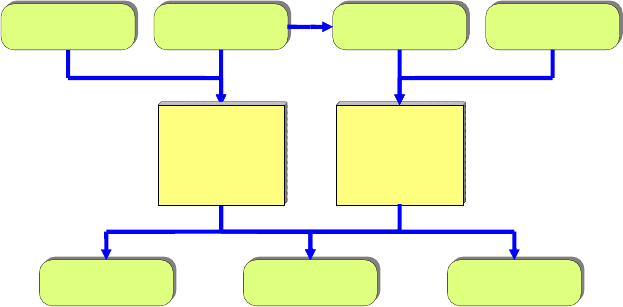
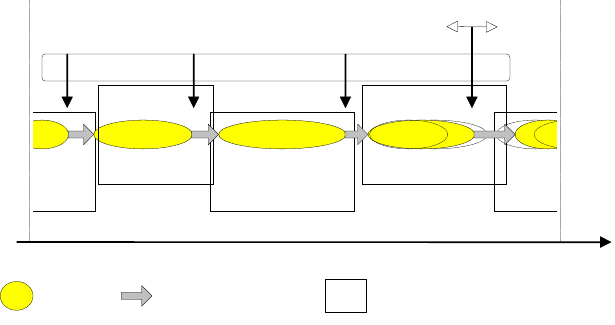
Figure 1: Two-Level-Concept of PTV Balance
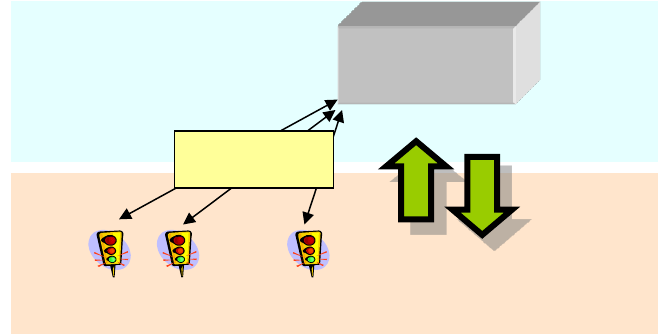
The system architecture of Balance is characterized by a two-level-concept, where the
functionality of the traffic light system is divided hierarchically (see Figure 1)
An efficient microscopic controlling method looks at short-term changes of the traffic
volume, e.g. during the prioritization of public transport, based on the current detector
values and signal status. The local controlling method works usually on a second-by-
second basis or even shorter.
PTV Balance works as macroscopic system on the tactical level of the adaptive
network control by sending framework signal plans to the intersections every 5
Minutes. A framework signal plan defines static and variable areas for the phases of
the local control for all controllers within a group that have the same cycle time. Inside
the variable areas, the local control can adapt to the current traffic volume by using its
local detection. Nevertheless, a basic structure for the single traffic light systems is
provided by the framework signal plans. The green times of the signal groups can vary
inside this framework.
Any local traffic control system control can be applied, as long as it integrates an interface
for the frame signal plans which are created by PTV Balance. This flexibility was one of
the main goals during the development of PTV Balance, to be able to apply the system
quickly without changing the local traffic light system control. Currently PTV Epics, the
Trelan/Trends-System (Gevas software Systementwicklung und Verkehrinformatik GmbH
2010a/b), the VS-PLUS-Control (Verkehrs-Systeme AG 2012) and the SIEMENS
TL/PDM-System have been used as local control strategy. Tests with the American ring
barrier controller have also been conducted.
The reduction of delay by the traffic adaptive coordination of traffic signal systems among
each other (offset-optimization, green wave) and by the rough adaption of the green times
of the signal groups is processed centrally on the level of the network. A second-by-second
operational level
tactical level
JCt. 1
Jct. 2
Jct. n
intersections
framework
signal plans
Detector
measurings
Signal States
PTV
BALANCE
central
decentral
data transmitting
infrastructure
network
PTV Balance Manual EN Functionality
PTV GROUP
7
adaption of the green times is processed in the local controller. If there is no local detection
or traffic responsive control available at the intersection, the Balance framework signal
plans can also be used directly as fix time-program.
A PTV Balance-System can control all intersections of a town, but it is necessary to divide
them into several control groups, with a size of 1-30 intersections in each group. This
additional division is required to distinguish different areas of the network with different
traffic related characteristics. One important point is that Balance selects a signal program
with an adequate cycle time at once for all controllers in a group. Performance issues play
a role here, and a limitation of the search space for optimization is also good to avoid being
stuck in local optima.
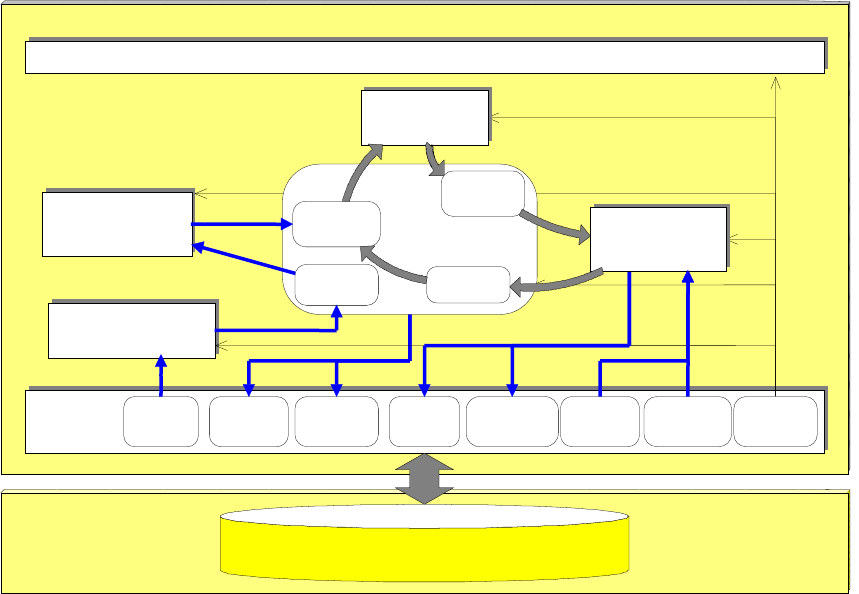
Figure 2: Block-diagram of the PTV Balance network control
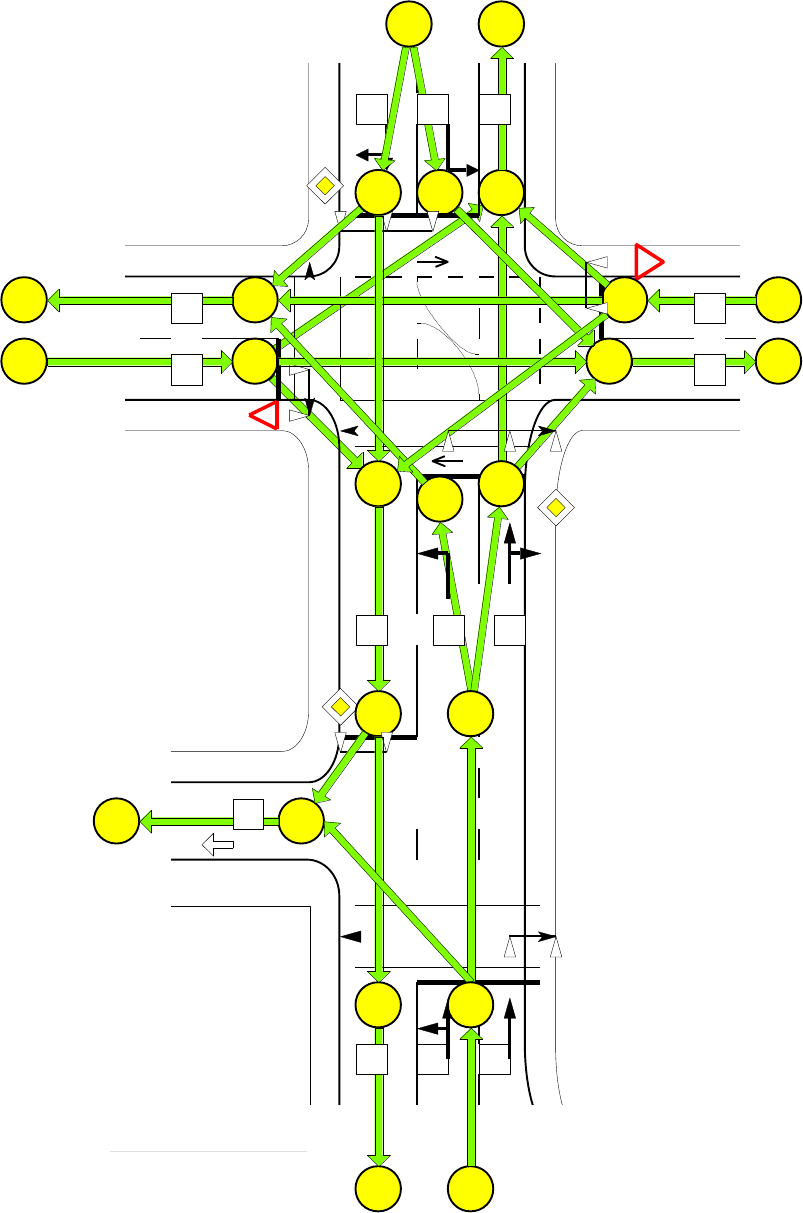
The central database structure in PTV Balance is the network model. The street network is
represented internally as a graph in form of nodes and edges. Figure 3 illustrates this
aspect at the example of a small net with two intersections.
PTV Balance
data preparation
traffic-
Model
data-
Interface
sequence control
detector-
data
traffic-
flows
Impact
signal
-
states
framework
signal plans
static
data
Program
Switches
cycle-
times
database-server
control-
model
efficiency-
model
network
traffic-
flows
Impact,
PI
actuators
messages
Iteration
PTV Balance Manual EN Functionality
PTV GROUP
8
Figure 3: Example of a simple network model
Fv07
D41
D72
D71
D11
Fg53
Fv08
Fv05
Fv04
Fg52
Fv03
Fv02
11
22
14
33
38
25
24
23
21
13
32
35
40
39
43
41
42
44
15
LZA 5
LZA 7
45
31
34
36
37
D75
D21
Fv01
D81
D51
D45
Fv06
Fg51
D61
D31
D35
D65
D95
PTV Balance Manual EN Functionality
PTV GROUP
9
The edges are the central container for the traffic data within the PTV Balance-System.
The procedures of the PTV Balance-Controlling system can be divided into five functional
groups:
Collection and Preparation of data
Illustration of the traffic
Determination of efficiency and evaluation of control alternatives
Creation of the control alternatives
Data interface
There are more system functions available for the control of the internal process or for
database accesses, etc, but these functions are not discussed in this manual. The next
chapters will shortly describe the functional groups mentioned above.
2.1.2 Detector positioning and data gathering
It is necessary to estimate the current traffic state in the road network as good as possible,
before the optimization of the signal control can start. Local detectors collect the traffic
situation in the controlled area in the form of aggregated or disaggregated measurements
for the current calculation interval. This data is gathered by the controllers and delivered to
the central database. Detectors which are not connected to a traffic light system can also
be utilized by PTV Balance. Additional kinds of dynamic data of the traffic light systems are
also collected. For example, the currently running signal program, the cycle time or different
operation modes of the controller or the detector.
The positioning of detectors for Balance should be done according to the following rules:
1. There should be single- or double loop detectors on every lane that leads to an
intersection controlled by the traffic light. The distance to the stop line should be at
least 20m and not more than 50m. The ideal detector position is 40-50m in front of
the stop line.
2. Every lane has to be detected on its own. No detector may cover more than one
lane.
3. In case of turn-off lanes, the detector should also be placed according to the
distances suggested in 1., if possible. If the turn-off lane is shorter, the detector
should be placed on the turn-off lane so that it is as far as possible from the stop
line and measures all turning vehicles. If this is not possible, the second criterion is
more important. It may be necessary to do an on-site inspection to decide this. In
addition, single loop detectors should be placed on the main lanes 50m in front of
the sop line.
4. At the borders of the area which is selected for the calculation of the traffic state
(usually the main road network), detectors which measure the outflow may be
placed (about 30m behind the stop line) if there are big differences between the
incoming and the outflowing traffic during the day. This improves the quality of the
origin-destination estimation of the network model.
PTV Balance Manual EN Functionality
PTV GROUP
10
The detectors which are suggested here are normal single loops which can also be used
for the time gap control or counting purposes. It is also an option to use other means of
detection, but only if it is guaranteed that the cars are reliably counted even under adverse
weather conditions and under heavy saturation.
It is usually not necessary to have more or different detectors for Balance than for Epics.
So, if the junction is controlled by PTV Epics, everything should be fine regarding detection.
2.1.3 Traffic Model
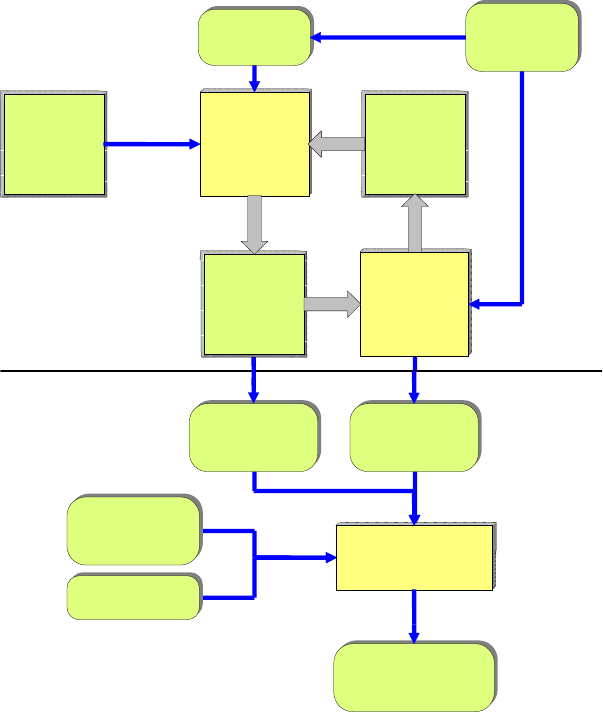
The PTV Balance-traffic model builds an internal spatial/ chronological representation of
the current traffic situation out of traffic flows measured at different measuring sections. It
consists of three different functional parts which are arranged in two different levels (see
Figure 4):
Figure 4: block diagram of the PTV Balance-traffic model
The first level (see chapter 2.1.3.1) consists of a macroscopic traffic model (Ploss 1993),
which is called only once for every optimization. It consists of:
An OD-Estimation for the determination of the origin-/destination-relations in the sub-
net and
static
weighting-
matrix
w
kl
Iteration
1. level
2. level
traffic flow-
model
edge-related
traffic flow profiles
qFl(a, t)
cycle time
tu
status
controller
zust(sg,t)
Origin-/Destination-
Relations
f
kl
edge-related
traffic flows
qMod(a)
assignment
Origin/
Destination-
Matrix
f
kl_i
Matrix
dividing-
parameters
p
akl_i
OD-
Estimation
Cordon-
measurements
cross section-
measurements
q(a)
PTV Balance Manual EN Functionality
PTV GROUP
11
A traffic assignment for the allocation of the traffic flows to the road edges in the
network
The second level (chapter 2.1.3.3) is a mesoscopic traffic flow model, which periodically
generates traffic flow profiles out of the macroscopic traffic parameters of the first level.
This takes place during every step of the signal plan-optimization process inside PTV
Balance.
2.1.3.1 Macroscopic traffic model (1. Level)
An estimation of the matrix (fkl_0) of the traffic flows [veh/h] from an entry-edge k to an exit-
edge l is processed according to a static weighting-matrix (wkl) and to the in- and outflows
at the edges of the net (OD-Estimation). The entropy-maximizing algorithm of (Van Zuylen
and Branston 1982) is used for the OD-Estimation.
In the first step, the in- and outflows at the edges on the border of the controlled area are
estimated. This goal is achieved either by using already existing measurements, or by
estimating the traffic, based on the historic weighting matrix and the measured values which
are available.
The matrix of the origin-destination-relations is the input parameter for the traffic
assignment, which distributes the traffic to the streets in the network using an incremental
multiple-assignment-algorithm. The traffic is assigned to the edges in shares of 10%, 20%,
30% und 40%. After every step, a route-searching algorithm is conducted. This algorithm
calculates the fastest route according to impedances in the net (like travel times) and
assigns the whole traffic of this step to the respective edges (All-Or-Nothing Assignment).
The results of the traffic assignment are the traffic flows qMod(a) [Veh/h] per edge and also
the matrix of the distribution parameters (pakl), that defines which share of the traffic relation
fkl drives over edge a. Therefore, the following correlation exists:
Ek Al
i
kl
i
akl
ifpaqMod )(
Where
i step of iteration
a index of edge
k, l index of origin/destination
E, A number of entries/exits respectively
origins/destinations in the network
piakl share [0...1,0] of the traffic relation fkl which uses edge
a
The relative deviation X(a) between traffic model and reality can be calculated with the help
of the estimated traffic flows qMod(a) and the real traffic flows q(a) measured on the edges
a in the network. The deviation is used in combination with the distribution parameters pakl
in order to correct the estimation of the origin-destination relations in an iterative process.
Criteria for the cancellation of the so called internal iteration are the exceeding of a
previously defined number of iterations or the shortfall below a given value of the standard
deviation between measured and estimated value.
PTV Balance Manual EN Functionality
PTV GROUP
12
This procedure is repeated until a given number of iterations is reached. The main results
are macroscopic traffic volumes qMod(a) [Veh/h] for all edges a of the network, and
especially for edges where no measured values are available. Other results are the matrix
of the origin-destination relations (fkl) in the network and the distribution parameters (pakl).
2.1.3.2 Embedding into superordinate traffic models
A superordinate traffic model like PTV Optima can also be embedded instead of the
macroscopic traffic model discussed above. PTV Optima’s model is dedicated to traffic
state estimation based on a wider range of detection sources (loops, ANPR, FCD...) and
can calculate the real traffic situation in a network more precisely. As input PTV Balance
requires the traffic volumes for every edge and the turn-off rates at the intersections of the
network control. The values should be delivered at least every 5 minutes.
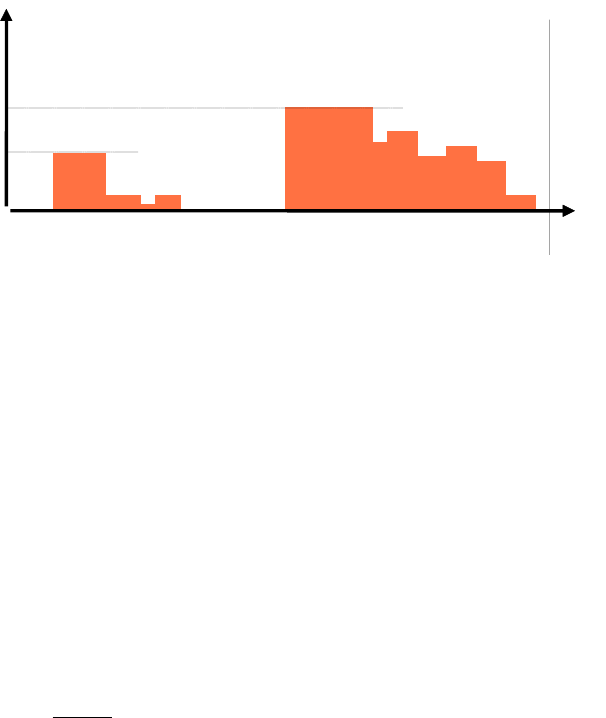
2.1.3.3 Mesoscopic traffic model (2. level)
Traffic flow profiles qFl(a,t) [Veh/sec] are created for all edges based on the data of the
traffic model (1. Level) or a super ordinate traffic model and the states of the signal groups
in the network, given by the control model. The length of the flow profiles represents the
homogeneous cycle time tu of the control group (see Figure 5).
Figure 5: Illustration of the traffic flow profile of the second level of the traffic model
The mesoscopic traffic flow model takes the influence of the traffic lights, the travel times
and the dissolving of the queues through changing speeds on the groups of vehicles into
account. Therefore the outflow zFl(a,t) at the end of an edge a is defined as follows:
With the estimated average
travel time on the edge
tr(a) = len(a) / v(a)
[sec]
The platoon dispersion is modelled over the length of two intervals 2L by moving average
determination
Lt
Ltt
taqFl
L
taqFl
'
)',(
12
1
),('
With the given whole-number length of the interval L
q(t)
[Veh/sec]
s
sg1
s
sg2
t
[sec]
tU
t)(a,qFl't)l(a, otherwise
ssgt)(a,qFl't)l(a,queue the
and t at released issg if
sg
s
t time in point at release no is there if 0
trttuazFl
))(mod,(

PTV Balance Manual EN Functionality
PTV GROUP
13
where
t periodical base of time [1... tu sec]
sg index of signal group sg, controlled by edge a
ssg saturation of signal group sg [Veh/sec]
l(a, t) queue length [Veh] on edge a at point in time t
k(a) calibration of the dissolving
len(a) length [m] of edge a
v(a) estimated average speed [m/sec] on edge a
DIV whole-number division
The periodic traffic flow model q(a, t) at the beginning of an edge results from the additive
connection of the outflows zFl(a´, t) of the incoming edges a´. These outflows are
distributed to the following edges, according to their share of the whole traffic volume:
)('
),'(),'(),(
aIna
tazFlaaptaqFl
The distributing factors p(a´, a) contain the share [0...1.0] of the total traffic volume on edge
a, which comes from edge a´. This share is calculated by using the traffic volumes qMod
which were defined in the first level of the traffic model:
)'()(
)(
)(
)(
)'(
),'(
aOutaaIna
aqMod
aqMod
aqMod
aqMod
aap
where
In(a) number of entry edges of edge a
Out(a´) number of exit edges of edge a´
qMod(a) modelled traffic volume [Veh/h] on edge a
At the beginning of the traffic flow modelling, the flow profiles are initialized for the cordon-
edges. Here an equally distributed flow profile is assumed:
)...1(
3600
)(
),( tutfor
aqMod
taqFl
Starting from the edges at the network entrances, this procedure is executed periodically
for all edges in the network. At the end of this process the traffic flow profiles qFl are defined
for all edges in the network. The flow modelling is processed for every edge of the sub-net
during every step of the optimization. Usually there are some thousand optimization-steps
processed during every PTV Balance-call. Therefore the traffic flow model had to be
implemented very efficiently.
2.1.4 Determination of Efficiency and Evaluation of Control
Alternatives
With the help of the effect model, the impact of the control alternatives is calculated for the
next step in time. The control alternatives are evaluated by a performance index. The
PTV Balance Manual EN Functionality
PTV GROUP
14
relevant variables for the calculation of the index are: weighted vehicle waiting times,
number of stops of vehicles and queue-lengths.
)),,(),,(),,((),( sgyxLsgyxHsgyxDyxPI sgsg
SGsg
sg
where
SG number of signal groups in the sub-net
sg, sg, sg emphasis of waiting time/ stops/ queue-lengths for
signal group sg
D, H, L vehicle waiting times/ stops/ queue-lengths for signal
group sg
x vector of control variables
y vector of traffic related variables
The variables of efficiency are generated by two models: Every second, a high-resolution
mesoscopic model calculates the deterministic share by assuming a steady maximum
speed and saturation flow. The stochastic part at the stop lines is determined by a
macroscopic queue-model that takes overloads into account (see Figure 6).
Figure 6: Block-Image of the PTV Balance-efficiency model
The deterministic effect model is based on the flow profiles of the traffic model qFl(a, t) and
the cycle time, defined green times of the controllers zust(sg,t). It calculates the impact of
the adjacent control alternatives in a numerical, simulative way. The calculation for every
second enables the modelling of the traffic related impact of green time-lengths and offsets
between adjacent signal groups.
The optimization of green times of a signal group in a traffic network always has an impact
on the signal groups which are located downstream. Therefore, the optimization of the
green time is calculated for the whole subnet at the same time. Although this holistic
solution requires a lot of computing capacity, compared to a heuristic procedure, it
considers all relations between the signals and links in the network.
For this it is necessary to use the flow profiles of the links which lead out of the subnet, as
input variables for the signal groups which are located downstream. As described in chapter
2.1.4.3, the traffic flow profiles of the entry-links of a sub-net are initialized with equally
distributed profiles. If there is a traffic flow profile available for an exit-link of an adjacent
waiting time
D(sg)
queue-lengths
L(sg)
stops
H(sg)
green times
tgr(sg)
traffic flow
qMod(a)
signal states
zust(sg, t)
stochastic
effect model
flow profiles
qFl(a, t)
deterministic
effect model
PTV Balance Manual EN Functionality
PTV GROUP
15
sub-net, the equally distributed profile will be overwritten. This way it is guaranteed that the
traffic light systems at the links of the sub-nets get realistic traffic flow profiles.
The deterministic effect model is built similar to the models in the well-known planning
system Transyt (Robertson 1969) and the adaptive control SCOOT (Hunt et al. 1981). A
simulation of the impact of the controllers on the traffic flow is processed in order to get the
efficiency variables vehicle waiting time, number of stops and mean queue-length. The
traffic is not modelled as single vehicles (microscopic modelling) but with the help of the
macroscopic parameter traffic volume. However, this parameter is available for every
second (mesoscopic modelling). The applied formulas are described in the following sub-
chapters.
2.1.4.1 Calculation of delay
The signal group-related vehicle delay D results from the summing up of the queue lengths
l(t) which denote the vehicles that have stopped during time frame T. l(t) is defined as the
sum of the inflows Q(t) at an origin or entrance (demand process) and as the sum of the
outflows Z(sp,t) at an exit or destination (service process) until the point in time t :
where
SG number of signal groups
sp signal plan which is evaluated
Qsg sum of the vehicles which have entered at signal
group sg until t
Zsg sum of the vehicles which have left at signal group sg
until t
Dsg sum of the vehicles waiting times at signal group sg
during time frame T
The following formula defines the request process Q
with qsg(t) = inflow [Veh/s] to signal group sg at time t.
The inflow profile qsg(t) is the input parameter for the effect model and is defined as
described above.
2.1.4.2 Calculation of the vehicle stops
The following formula represents the sum of vehicles Hsg, which are forced to stop due to
the creation of a signal plan of the length T at a signal group sg
where

PTV Balance Manual EN Functionality
PTV GROUP
16
sp signal plan which is evaluated
hsg sum of the vehicles which have to stop at signal group
sg at time t
A vehicle has to stop if it reaches the end of a queue or the stop line while the inflow is
greater than the outflow (normally when the signal is red). Therefore, the stops hsg at point
in time t are defined as follows:
2.1.4.3 Calculation of the queue lengths
In case of the queue lengths, time-related-, current-, average- and maximum queue lengths
are distinguished.
The current queue length lsg is calculated by the difference between the incoming and the
leaving traffic:
The average queue length L and the maximum queue length Lmax can be derived from
the formula mentioned above:
The maximum queue length is important for the protection of congestion spaces or to
prevent the congestion to reach into previous intersections. It is the maximum queue length
that is applied in the performance index of PTV Balance.
2.1.4.4 Modelling of stochastic deviations
The analytic queuing model of (Kimber and Hollis 1979) is used to include stochastic
deviations resulting from capacity overloads in the calculation. It only requires the degree
of saturation of an entry as macroscopic input parameter. It is calculated by the average
traffic volume qMod of an entry and the cycle time-related length tgr(sg) [sec] of the green
times of the signal groups:
3600)(
)(
)( tu
ssgtgr
aqMod
sgrsg
Aa
where
A number of edges which are controlled by signal group
sg
r degree of saturation
tu cycle time [sec]
ssg saturation [Veh/sec] of signal group sg
The results of the macroscopic effect model are the waiting times and average queue
lengths created by the random deviations of the traffic flow. They are added to the waiting
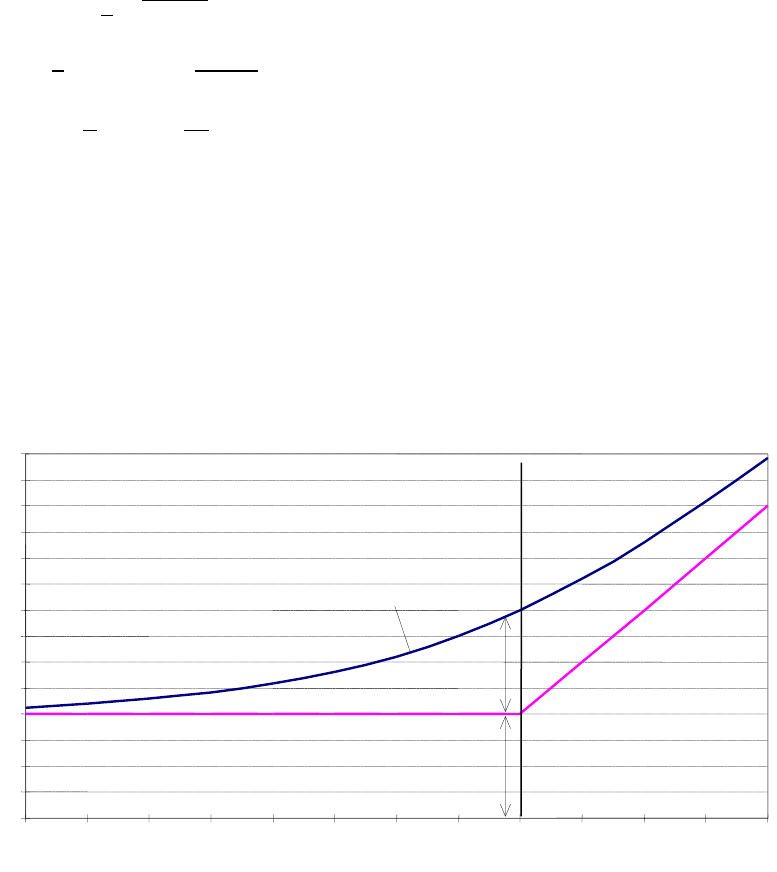
PTV Balance Manual EN Functionality
PTV GROUP
17
times of the deterministic effect model (Figure 7). The sum of both models serves as input
parameter for the performance index.
The formulas for the stochastic waiting time WKB, sg for signal group sg are defined as
follows:
Where
r= r(sg) the degree of saturation calculated above,
g0 the start queue length before signal group,
C a constant (usually C=0,4 in PTV Balance),
q capacity in [Veh/s] for the signal group (saturation flow
respecting green share)
T the time frame (usually 300 seconds in PTV Balance).
The stochastic delay is added to the deterministic delay for each signal group.
Figure 7: Schematic waiting times with deterministic and stochastic model
2.1.5 Optimization process
The control model of the PTV Balance-network control optimizes the following control
parameters:
Length of the green times (split)
Chronological location of the green times according to their equal cycle time (offsets)
Length of the cycle time
0
5
10
15
20
25
30
35
40
45
50
55
60
65
70
0,2
0,3
0,4
0,5
0,6
0,7
0,8
0,9
1
1,1
1,2
1,3
1,4
saturation r
waiting time
deterministic model
waiting time
stochastic model
total waiting time
overload area
PTV Balance Manual EN Functionality
PTV GROUP
18
PTV Balance was originally designed to use a Hill-Climbing (HC) algorithm for optimization.
In 2008 an additional optimization procedure was developed and implemented in the
German research project TRAVOLUTION: The Genetic Algorithm (GA). One important
advantage of a Genetic Algorithm is its ability to optimize all control parameters at the same
time. The other advantage is that it tends to avoid local optima by applying a parallel search
through the solution space. The research project TRAVOLUTION showed that the GA
significantly improved the optimization quality in terms of a better performance index in
Balance and, more importantly, also on the road. But it also is consuming more calculation
time. This is not so big an issue in a real-world traffic centre, but slows down the speed
when used in conjunction with a micro simulation, e.g. PTV Vissim. That’s why still both
algorithms are contained in Balance. The user can switch between them through an entry
in the initialization file. The GA in Balance has been patent-protected
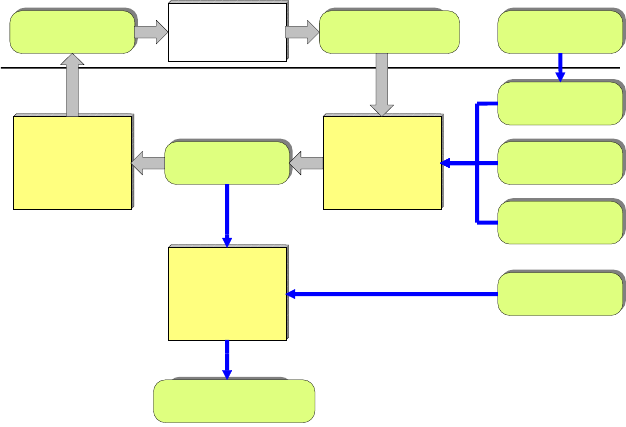
2.1.5.1 Calculation of split and offset
The Balance control model creates framework signal plans for all traffic lights in the sub-
network every 5 minutes and sends them to the controllers. A framework signal plan (FSP)
contains the length (split) of the green times of all signal groups of the traffic light system
and their chronological location (offset) according to the cycle time which is equal for all
objects in the control group. Both control variables are optimized together in an integrated
approach, which calculates a framework for the starting points of the interstages for every
possible periodical stage cycle (see Figure 8).
Figure 8: Block-Image of the PTV Balance control model
Base of the optimization is the modelling of the relevant control parameters in the control
model. These are:
The signal groups (index and type)
The stage definition (index, belonging signal groups)
The definition of the interstages (index, Start- and target-stage, switch on- /switch off-
points in time of the signal groups, index of belonging signal groups)
Framework signal plan
FSP
creation
framework
signal plan
stage cycle
phab
modification
starting points
stage transitions
creation
signal plan
TLS-Model
start solution
performance-index
PI(phab)
signal states
state (sg, t)
traffic model,
effect model
framework-
conditions
Signal State
traffic flows
qMod
iterative
optimization
PTV Balance Manual EN Functionality
PTV GROUP
19
The signal programs (index, cycle time, type)
Program-related framework conditions (minimum/maximum green times of the signal
group, earliest and latest starting points of the interstages
The optimization itself is processed for each intersection as a search in the solution space.
The solution space is defined by the parameters described above. At first, a valid starting
solution is created with the current fixed-time program of the traffic light. A valid solution is
represented by a periodical stage cycle. This describes a vector, which consists of the
indexes of the interstages and their starting points:
Where
pui index of interstage i
Ti starting point of interstage i [1 ... tu sec]
n length of stage cycle, number of stage transitions
Starting with the start solution phab_0, the control model successively creates new
solutions by changing the local parameters. The starting points are increased for each
interstage of the stage cycle (Figure 9) respectively the modification is interpreted in a way,
which allows the following solutions phab_i to be valid, too. This means, that the solutions
are compliant with the framework conditions and therefore give a valid signal plan for each
traffic light controller.
Figure 9: Example modification of the stage cycle
The stage cycle is transformed into a signal plan sp by the control model. It describes the
states of the signal groups during the cycle time of the control group:
),(...)1,(
.....
),(...)1,( 11
tusgstatesgstate
tusgstatesgstate
sp
mm
Where
sgi index of signal group
m number of signal groups
state(sg, t) state [free, blocked] of signal group sg at point in time
t in signal plan sp
S1
S2
S3
S4
S1
tu
t
0
stage
stage transition
framework conditions
T1
T4
T3
T2
Starting points of stages
pu1
pu4
pu3
pu2
Modification
PTV Balance Manual EN Functionality
PTV GROUP
20
Now the traffic-related impacts of the solutions can be calculated by the traffic model
because the states of the signal groups in relation to cycle time are given by the signal
plan. The solutions can be evaluated by the effect model according to the given
performance index PI (see chapter 2.1.4). Now the goal of the optimization model is to find
the optimal solution according to the PI.
Unfortunately, the problem of traffic network optimization is very complex and not
mathematically solvable. Simple optimization strategies, like the gradient procedure or
linear optimization lead often to suboptimal results or are not applicable at all. Because of
that, the global optimum can only be found securely by an exhaustive search of the solution
space. This procedure is not working if there are too many input parameters (number of
intersections, number of stages per intersection, etc.) because the size of the solution
space is growing exponentially with the number of input parameters, so the calculation time
would grow to infinity regardless of the speed of the computer.
Calculation with the Hill-Climbing Algorithm
The Hill-Climbing approach is a heuristic procedure which moves starting times of
interstages in the cycle and calculates the performance index of the resulting signal plan.
Only solutions which are better than the previous state are accepted. This is done iteratively
for all stages and all controllers. The performance index is always calculated for the whole
network at once, so changes that will deteriorate the downstream traffic will be rejected.
This procedure corresponds to the Hill-Climbing Algorithm (Domschke and Drexl 1998),
which is also used by many other adaptive network control procedures like Scoot (Hunt et
al. 1981) and Transyt (Robertson 1969).
The procedure mentioned above is executed multiple times for each intersection of the
respective control group with a limited number of calculation steps, until no improvement
can be achieved anymore. This best solution for each traffic light, according to the
performance index, is realized with its framework signal plan FSP and sent down to the
controllers. At the local site, stages can also be extended or skipped according to the local
detection.
Calculation of split and offset with the Genetic Algorithm
The Genetic Algorithm was conceived in the Bavarian research project TRAVOLUTION
and tested in the city of Ingolstadt at 50 intersections. It proved an improvement of over
10% in terms of delays and stops in comparison to the Hill-Climbing Algorithm, and over
20% compared to the vehicle-actuated control that was in place before.
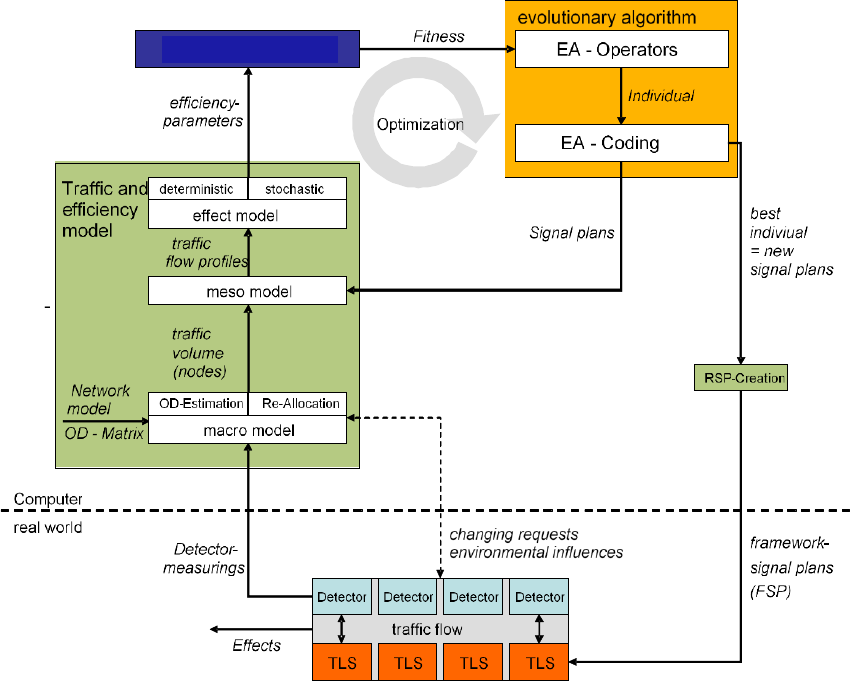
The whole work-flow of the optimization is illustrated in Figure 10. It consists of the following
main components:
Traffic- and Efficiency-Model
Objective function
Optimization procedure
The traffic model creates an internal representation of the current traffic state out of the
traffic volumes measured at the measuring sections. The effect model, which is based on
the traffic model, determines the efficiency parameters, which in turn are the input
PTV Balance Manual EN Functionality
PTV GROUP
21
parameters for the objective function. The result of this function is the fitness of an
individual, which means a scalar quality value for a control alternative (signal plans of the
network). The fitness in turn is the input variable for the optimization procedure which
optimizes the signal plans of the whole network and determines the best control alternative
(=the best individual) for the current traffic flow. All of the main components and the
framework signal plan creation (FSP-Creation) represent the traffic adaptive network
control PTV Balance, which delivers a new framework signal plan every 5 minutes (tactical
level). Based on that, the local control of the traffic light at each intersection reacts on short-
term changes of the traffic flow each second (operational level).
Figure 10: Procedure of online-optimization
The coding of the control parameters has significant meaning for the quality and the
functional ability of the optimization. In case of an evolutionary algorithm, coding means
the translation of signal plans to the individual. In case of the given problem, the following
specific framework conditions are relevant for the coding:
Conditions of the planning (allowed cycle times, allowed cycle procedures)
Necessary framework conditions (intergreen times, minimum green times)
Framework conditions of the local traffic-dependent control
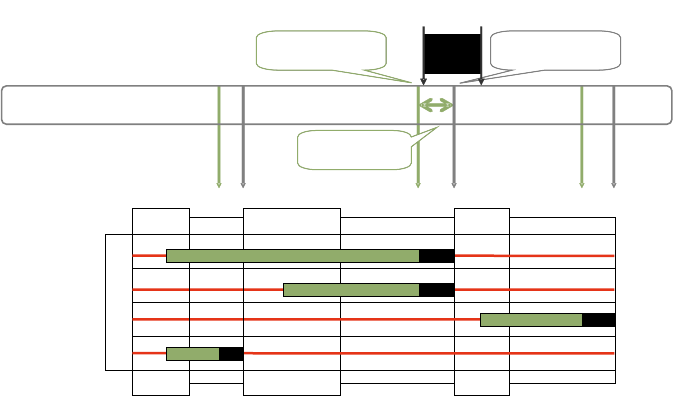
The framework conditions for the time interval control, which is very common in Germany
and the world, are illustrated in Figure 11.
Objective function
PTV Balance Manual EN Functionality
PTV GROUP
22
The framework signal plan for the local, measurement-based time-gap control is defined
by the T-Time-Limits (TiA, TiB). The latest starting points of the interstages TiB are optimized
for all traffic lights in the control area. An interval [TiBmin, TiBmax] is defined for TiB in order to
assure the functionality of the local control.
Figure 11: T-Time-Limits of the local control
The optimization procedure GALOP (GALOP-Online – ein Genetischer Algorithmus zur
netzweiten Online-Optimierung der Lichtsignalsteuerung, Braun and Kemper 2008)
represents the control alternatives by the so-called coding of the individuals. An individual
has the following expression:
),...,,,,(),...,,...,,,,(),,...,,,,(, 1221222111111 21 n
nmnnnnmm
It contains a gene φ for the cycle time as well as n so called chromosomes for the m
intersections of the network which are to be optimized. Every chromosome consists of
multiple genes: one gene σ for the definition of the stage cycle, one gene ω for the global
offset, one gene ο for the local offset, as well as m genes ϴ for the stage durations
respectively the starting points of the interstages. Every gene has a real value between 0
and 1.
The genes remain inactive for the local and the global offset in the version of the algorithm
which is implemented in TRAVOLUTION because of the offset limits and framework
conditions of the local traffic dependent control. A special sequential coding was
developed. Its principle is described in (Braun and Kemper 2008) and in (Braun 2008) and
is protected by patents. Besides the necessary framework conditions, like the adherence
of intergreen times, it also integrates the framework conditions of the local traffic-dependent
control. The achievement was to create only valid individuals in each optimization.
The arrangements of the operators of the evolutionary algorithm and their parameterization
have a great influence on the quality of the optimization procedure. The operators must be
aligned to the coding because one individual represents all intersections in the network. An
intersection in the individual is illustrated as set of genes (chromosome). During the
recombination, single genes from the parent-individuals are used for the creation of
offspring-individuals by default. The recombination-operator was developed concerning the
probability p that a recombination will also be applied to the complete chromosomes
T
1B
T
2B
T
4B
T
1A
T
2A
T
4A
earliest point in time
for the interstage
framework signal plan
stage 1
stage 4
stage 2
1
-
2
2
-
4
interstage
4
-
1
K1
K2
K3
K4
min
2
B
T
max
2
B
T
interstage
interstage
latest point in time
for the interstage
buffer for the
local control
PTV Balance Manual EN Functionality
PTV GROUP
23
(intersections). A mutation takes only place inside T-Time-Limits. Therefore, the length of
the steps can either be adjusted individually for each gene or for the whole individual. which
makes an adaption on demand possible.
The Hill-Climbing Algorithm can only optimize the control parameters sequentially in
contrary to the evolutionary algorithm which optimizes all control parameters at the same
time. Therefore, the created control alternative depends on the chosen order. As soon as
no better control alternative can be found for a control parameter in one direction, the
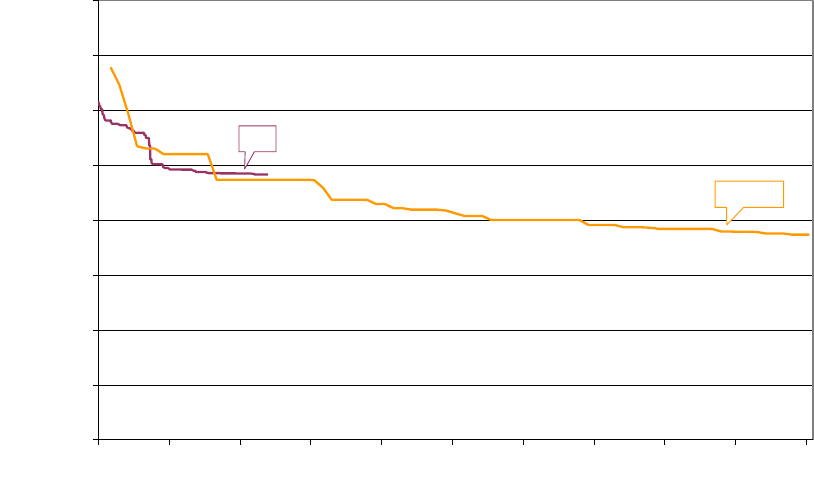
search will be continued for another direction. Figure 12 illustrates an example for the
different behaviour of the Hill-Climbing-Algorithm and the evolutionary algorithm in an
identical network with identical traffic volumes.
Figure 12: Comparison of the development of the fitness of the GA and the HC
The Hill-Climbing-Algorithm starts with the signal plans of the basic control that already
have a good quality. In contrary to that, the evolutionary algorithm begins with a random
start population. The best individual of the first generation (after 175 evaluated individuals)
does not reach that quality yet. However, the Hill-Climbing Algorithm stops after 2.404
evaluated control alternatives with a quality value of 241.742, because it can´t find a better
control alternative (it is stuck in a local optimum). Instead, the evolutionary algorithm has
reached a fitness of 236.556 after 2.300 individuals in the 18th generation. The evolutionary
algorithm has even reached a fitness of 186.559 after 80 generations and 10.050 control
alternatives.
2.1.5.2 Calculation of the ideal cycle time
The calculation of the ideal cycle time is done for all controllers of a control group at the
same time, to achieve an equal cycle time within the group. However, the adaption is
processed more slowly and in larger intervals than the changing of the split and offset
parameters, because a change of cycle time usually requires synchronization at the local
0
50000
100000
150000
200000
250000
300000
350000
400000
01000 2000 3000 4000 5000 6000 7000 8000 9000 10000
Bewertete Steuerungsalternativen
Beste Fitness (Gütewert)
HC
GALOP
Evaluated alternatives/objective function calls
(Best) Performance index

PTV Balance Manual EN Functionality
PTV GROUP
24
controllers. This can take several cycles, is disruptive for the individual traffic and hence
frequent changes should be avoided.
Moreover, this adaption can only be processed in discrete steps, because it is realized on
intersection level by the selection of signal programs with a given cycle time. Only a limited
number of signal programs can be supplied for each controller. Therefore, Balance
determines the signal program that has a cycle time nearest but bigger to the currently
ideal cycle time.
The switching procedure for the traffic-dependent selection of the signal plan automatically
calculates the required cycle time out of the saturation ratio of the signals with an optimized
signal plan from Balance. Considering the green time tgr and the saturation ratio µ for a
signal group, the additional green time necessary to reach a desired saturation α (e.g.
90%) with the same cycle time is determined as follows:
If you increase the green time by this value, the cycle time also changes, so that it’s
necessary to adjust the green share again to reach the desired value. This leads to the
following formula for the cycle time change Δt for the whole intersection:
With ti,gr the green time of the critical signal group in stage i and the additional green
time for stage i determined with above formula (tu is the currently running cycle time). The
intersection that gives the biggest value of Δt in a control group is the most critical
intersection and thus determines the necessary cycle time as tu+Δt. Consideration of the
available signal programs and their cycle times allows to choose the signal program that
has minimum cycle time longer than the desired one. Thresholds can be applied for the
number of repetitions of this calculation, before an actual switch is done in the field. These
thresholds can be set differently for switching into longer or shorter signal programs.
2.2 Definition of control groups
For the network control you should define several control areas marking the traffic light
systems which should be controlled in one go. These control areas are defined according
to the following guidelines:
Distance between intersections
Different cycle times
Coordination areas
There shouldn’t be more than 30 intersections in one signal control, and as few as 1 is
permitted, if the intersection is separated from its surrounding. The greater the number of
intersections, the more degrees of freedom are in the optimization, enhancing the risk to
stick to a local optimum.
The maximum distance between the traffic light systems which belong to one control area
should be in the range of 700-1200m. A larger distance prevents a possible coordination,
because the queue dissolving processes increases with a larger distance.
PTV Balance Manual EN Functionality
PTV GROUP
25
Different cycle times in a control area also prevent the coordination of the respective traffic
light systems. A certain coordination is still possible if the different cycle times are a multiple
to each other, like i.e. 60s and 120s. No coordination and therefore no good optimization
of the network can be processed if the cycle times are not uniform.
In order to guarantee a good optimization, it is important not to divide coordination areas
by a control area. A coordination area should be integrated into the control area because
in general, coordination areas already fulfil the first two conditions: the distance between
the intersections and the uniform cycle times.
The groups are defined statically, according to geographical issues and traffic-related
coherences. Because of queue dissolving-processes, it is useless to add traffic light
systems which are far away from the group. Moreover, it has to be regarded, that the traffic
light systems of a group have to run in the same cycle time. The defined groups are
checked and calibrated before the actual operation in the streets by simulations and quality
management plans. The whole system changes by adding a signal controller. Therefore
you would have to check and calibrate the control group again after you have added a
controller, in order to guarantee an error-free operation of the group. Because of that, the
integration of a completely dynamic change of the group compositions would not make
sense.
2.3 Changing the Objective Function
A dynamic change of the objective function is realized by additional master-weights. The
single summands of the objective function are multiplied with additional factors WD, WH,
WL, which are valid for the whole group. Therefore, either single impacts can be
disregarded by the factor 0 or different combinations of impacts can be regarded.
)),,(),,(),,((),( L
sg
H
sg
SGsg
D
sg WsgyxLWsgyxHWsgyxDyxPI
Where
SG all the signal groups in the sub-net
sg,
sg,
sg weighting of waiting times/stops/queue lengths of
signal group sg
D, H, L vehicles waiting times/stops/queue lengths of signal
group sg
WD, WH, WL master-weights Waiting time/stops/queue length
x vector of control parameters (the signal plans of each
intersection)
y vector of traffic parameters (traffic volumes)
These factors can be changed dynamically by the user to create an optimization of the
objective function with the respective weights. The following optimization-possibilities are
available for the user:
Minimization of the number of stops
Minimization of delay times (which is the same as minimizing the travel times)
Minimization of the queue lengths (which is the same as maximizing the traffic flow)
PTV Balance Manual EN Functionality
PTV GROUP
26
2.4 Online-/Offline-System
In the previous chapters, the network control was mentioned in combination with the live-,
respectively the online-system. However, it is also possible and useful to build the network
control in an offline system. PTV Vissim (PTV AG 2017a) is serving as simulation software.
PTV Balance is integrated into Vissim systems as a DLL-file. The data provision of PTV
Balance is created by Network-XML-Files which are exported from the data provision tool
PTV Visum and by a signal controller data-file shared with PTV Epics and Vissig. The data
provision itself is done similar to the data provision for the online system. Further
information about this topic can be found in chapters 3 and 4.1.
The offline system offers multiple ways to test the behaviour of the network control because
the functionality of the network control is not affected. It is possible to test possible changes
and calibrate the whole system including the network control. It is important to test changes
at an intersection inside the offline mode before they are applied in the online system,
because the changes at one intersection of the network control could have impact on the
whole system. Therefore, it is important to test changes of the weighting, the objective
function, the control or of the network itself, in a simulation.
2.5 Possibilities for the Local Control
2.5.1 PTV Balance with PTV Epics
It is possible to operate the network control PTV Balance with PTV Epics. PTV Balance as
network-wide system takes the task of overall coordination and traffic control. The model-
based system PTV Epics assumes the local holistic optimization on the node including
public transport. Thus, the traffic-dependent control is realized within seconds and can
react to changes in the traffic very quickly.
2.5.2 TRENDS-Kernel with normal TRELAN-Logic
A further possibility is to combine a rule-based traffic-dependent control by means of
TRELAN-Logic (Gevas software Systementwicklung und Verkehrinformatik GmbH 2010b)
with the network control PTV Balance. Every 5 minutes the frame signal times on which
local traffic-dependent control is based are optimized by PTV Balance. The public transport
is considered only by the local control.
2.5.3 VS-Plus (Verkehrssysteme AG)
It is also possible to couple VS-Plus controlled controllers with PTV Balance. The
parameterized frame signal plan in VS-Plus is replaced by PTV Balance. This way the local
traffic actuated control logic of VS-Plus is preserved. VS-PLUS receives from its
superordinate network control dynamically adapted frame signal plans that improve the
traffic flow throughout the network.
PTV Balance Manual EN Functionality
PTV GROUP
27
2.5.4 Ring-barrier-controller
The North American Ring Barrier control system was already equipped with PTV Balance
as a superordinate network control system. This has been tested in a simulation study.
2.5.5 Dynamic Fixed Time Control
In network control is also possible to bypass the local control function and to use a so-
called dynamic fixed time. The earliest and latest starting points of the interstages as part
of the frame are reduced to one point. Is the local control set in a way that the requirements
of PTV Balance are strictly adhered, a dynamic fixed time control is switched that changes
the green times and offsets every 5 Minutes. There is no local traffic dependency needed.
This control method is a valid option if transit signal priority is not used and traffic demand
is rather static.
2.5.6 Other Methods
As you can see, the network control PTV Balance can be coupled with many local control
systems, so there are other connections with other methods open.
PTV Balance Manual EN Data Provision
PTV GROUP
28
3 Data Provision
The PTV Vision suite allows data provision for PTV Balance in a seamless way for
simulation and calibration. PTV Balance data provision consists of the following parts:
A network model of the road network and the traffic demand
PTV Visum provides this information in the anm/anmroutes format. This step uses the
same standard export and import functionalities that are used to convert a PTV Visum
model to PTV Vissim.
Parameters of PTV Balance and signal control data
Local parameters e.g. signal control data and parameters that are intersection
related
The signal controller “Epics/Balance-Local” is used to provide signal control data.
This signal controller is available in PTV Visum and PTV Vissim. Vissig, PTV
Balance and PTV Epics use the same sig-file format that can be shared between
the different models.
Global parameters e.g. optimization algorithm
Global parameters for PTV Balance are provided using the traffic signal controller
“Balance-Central” in PTV Vissim.
For details regarding PTV Vissim, PTV Visum or PTV Epics please refer to their respective
manuals (PTV AG 2017a/b/c).
Figure 13: Workflow for data provision in the PTV Vision suite.
•Network Model
•Assignment
•ANM/ANMROUTES-Export
•Provision of signal control
data for PTV Balance/Epics
Modelling in PTV Visum
•Finetuning of the simulation
model
•Provision of signal control
data for PTV Balance/Epics
Modelling in PTV Vissim
•Simulation for testing and
calibration
Simulation of PTV Balance and PTV
Epics
and/or
Field device data provision

PTV Balance Manual EN Data Provision
PTV GROUP
29
Hint: PTV Balance is a network control that optimizes signal plans typically every five
minutes. It has local and global parameters. It requires a local signal controller to apply
the optimized signal plans. Therefore, PTV Balance is modelled with two types of signal
controllers - “Epics/Balance-local” and “Balance-Central”. The local controller
“Epics/Balance-local” can accomplish several tasks. It can be a pure executor of PTV
Balance, it can be the local traffic signal optimization PTV Epics and it can be the
combination of both.
For guidelines on using PTV Epics and PTV Balance within the PTV Vision suite, please
see chapter 3.1.
3.1 Guidelines for using PTV Balance within the PTV Vision
suite
This chapter provides guidelines for the data provision for PTV Balance and PTV Epics
within the PTV Vision suite. The guidelines are a recommendation, there are other means
of handling the related tasks and the necessity of specific steps depends on the actual
project.
Step 1: PTV Visum - base model
Provide a suitable base model in PTV Visum in terms of:
Supply with hourly capacities on links and turns, vehicle restrictions, free flow speeds
etc. and public transport if required for simulations with PTV Epics.
The network needs to be suitable for an anm ex- and import i.e.
connectors must not be connected to nodes that represent a physical intersection
every node must not have more than one connector per direction
every zone must not have more than one connector per direction
Demand matrices for the relevant days and times of day for which PTV Balance shall
be designed and calibrated (e.g. Mon-Fry morning peak, Mon-Fry mid-day, Sat/Sun
morning peak etc.).
Ideally, these matrices have already been assigned and are corrected with
TFlowFuzzy for hourly counts (see PTV AG 2017b “Matrix correction using
TFlowFuzzy”). See also Step 3: PTV Visum - assignment specifics.
Step 2: PTV Visum - PTV Balance (and PTV Epics) data provision
Hint: Use the Add-In “Preprocess Balance/Epics” in order to create specific user defined
attributes for PTV Balance and load an appropriate layout for the junction editor.
1. Set the PTV Visum project directory for “External control” to the directory of the ver-
file.
2. Provide detailed information for all nodes that shall be controlled by PTV Balance
using the junction editor. For any of these nodes:
create a signal control of the type “Epics/Balance local”
edit the signal control “Epics/Balance local” (see chapter 3.3.1 and PTV AG
2017b “Editing a signal control in Vissig”).

PTV Balance Manual EN Data Provision
PTV GROUP
30
add only the signal groups and return to the PTV Visum junction editor
Hint: In the next steps signal groups will be assigned to lane turns. After this step, the
GUI of “Epics/Balance local” can draw direction arrows for the specific signal groups,
making further steps much easier.
define the geometry of legs, lanes, lane turns and crosswalks
assign the signal groups to their lane turns
add detectors to the lanes and assign the appropriate signal control and channel
number
Hint: Log-in detectors for public transport prioritization for PTV Epics can be at a long
distance upstream of the node of the signal control. It is possible that the link approaching
the signalized node is too short and the detector is located on a link further upstream. In
that case, add the detector to the appropriate upstream node and make sure that the
assigned signal control of that detector is correct.
make sure that allowed traffic systems of turns and lane turns are consistent
edit the signal control “Epics/Balance local”
define intergreen matrices, stages, signal programs etc.
define parameters for PTV Balance and PTV Epics (or do that after Step 5: in
PTV Vissim)
Hint: When signal control design starts from scratch (i.e. no fixed time signal programs
available) you can use the PTV Visum procedures “Signal cycle and split optimization”
and “Signal offset optimization” (PTV AG 2017b) to quickly create good starting signal
programs for a large number of intersections (also see Step 3: PTV Visum - assignment
specifics).
3. Define signal coordination groups and assign the signal controllers to these groups.
4. After finishing the data provision of all signal-controlled nodes, run the Add-In
“Preprocess Balance/Epics” again. This updates the saturation flow rates with
respect to the updated lane turns.
5. Use the network check “Viability for Balance / Epics” and make sure that all checks
are “ok”.
Step 3: PTV Visum - assignment specifics
PTV Balance requires an anm export with an anmroutes-file containing routes. An
anmroutes-file can contain matrices and/or routes. The latter describing an assignment
result from PTV Visum. This in turn means that one has to calculate an assignment in PTV
Visum and export the results via an anmroutes file containing routes to PTV Vissim and
PTV Balance. This is also a very comfortable way of defining vehicle inputs and vehicle
routes in PTV Vissim. All of the below is valid for anmroutes-routes, specifically the
interaction of anmroutes-matrices and time validities is different.
There is no general limitation to the assignment method. However, the following things are
of importance:

PTV Balance Manual EN Data Provision
PTV GROUP
31
Impact of signal control
This can either be considered directly by an assignment with ICA or by suitably
derived capacities on turns e.g. from an assignment with ICA (see PTV AG 2017b
“The procedure of assignment with ICA”).
Time validity of the demand
Static assignments do not consider whether a demand matrix contains the demand for
1 or for 24 hours, though obviously the capacities of the network have to correspond.
What does matter for PTV Vissim as well as for PTV Balance is that the demand
information of the anmroutes file is connected to an appropriate time interval (see PTV
AG 2017b “Saving an abstract network model”).
In general, it is perfectly fine to use a static assignment that e.g. assigns a 3-hour
demand matrix and map this to a simulation time interval of three hours in PTV Vissim.
However, that way it will neither be possible to use an assignment with ICA, that
requires hourly values nor will it be possible to represent a demand in PTV Vissim that
changes over time e.g. one hour with low demand, then one hour with high demand
and then again one hour with low demand. In order to represent this, use an
assignment with the Dynamic User Equilibrium (see also PTV AG 2017b “Parameters
of Dynamic User Equilibrium (DUE)”). On the other hand, DUE cannot directly
consider the impact of signal control on turn capacities.
Therefore, in order to consider both impact of signal control on capacities and a fluctuation
in demand over time, a combination of an assignment with ICA and DUE is recommended.
The former providing turn capacities for the latter and the latter providing the actual input
for PTV Vissim and PTV Balance. If a simulation time of one hour is sufficient and demand
fluctuations over time are not of interest, then skip sub-steps 5 and 6 in the
recommendation below.
1. In Calculate->General procedure settings->Prt settings->Assignment set Save
paths to As connections.
This allows PTV Visum to save the routes of an assignment in the anmroutes file.
2. (Optional) use an assignment without blocking back and TFlowFuzzy to correct the
demand matrices (see PTV AG 2017b “Matrix correction using TFlowFuzzy”).
3. Use an assignment with ICA for the peak hour demand (see PTV AG 2017b “The
procedure of assignment with ICA”).
4. (Optional)
Use “Signal cycle and split optimization” and “Signal offset optimization” (see
PTV AG 2017b) to provide new or update existing fixed time signal plans.
Recalculate the assignment with ICA to respect the updated signal plans.
Hint: While it seems tempting to set up an iterative process around sub-steps 2 to 4, this
has to be avoided, as it is likely that this process has a positive feedback loop and will
yield an unrealistic result.
5. Use the ICA capacities “ICAFINALCAP” as turn capacities. Apply a minimum turn
capacity of 100 Veh/h.

PTV Balance Manual EN Data Provision
PTV GROUP
32
6. Use the DUE assignment to calculate the final output for PTV Vissim and PTV
Balance.
Step 4: PTV Visum - anm/anmroutes export
1. Export the network and the result of an assignment as anm/anmroutes-files.
For general information on anm/anmroutes export see PTV AG 2017b “Saving an
abstract network model” and for PTV Balance specific parameters see chapter
3.2.1 and 3.2.2.
Hint: Set the project directory for “External control” of the PTV Visum ver-file and export of
anm/anmroutes-file to the same folder. This way PTV Visum, PTV Vissim, PTV Balance
and PTV Epics will share the same sig-files. Take note, that the anm export will provide a
warning that the external control files will be shared.
In order to simulate large networks with several signal coordination groups in a timely
manner in PTV Vissim, cut subnetworks corresponding to signal coordination groups for
PTV Balance.
In order to simulate several demand scenarios, repeat the process starting from Step 3:
PTV Visum - assignment specifics but only export the anmroutes file and specify a
suitable name.
Step 5: PTV Vissim - anm/anmroutes import
1. Import only the anm-file in PTV Visum (see PTV AG 2017a “Importing ANM data”)
2. Check the result of the anm import and fine tune the network as desired. Typical
tasks are:
Check detector positions.
On connectors that reduce additional lanes after an intersection, check if Route-
>Lane change: is short enough to make the vehicles use the additional lanes.
Depending on the maximum cycle time, adjust the Waiting time before
diffusion of the Driving Behaviors.
Check conflict areas and positions of links, connectors and crosswalks.
Specifically large intersections are likely to require corrections.
If desired, apply cosmetic changes e.g. number of splines on connectors, fix the
splines on links (besides “inside intersection corrections”, typically links feeding
the network that lead to an intersection with a central island require fixing) etc.
Take note that, besides slightly changing the lengths of links and connectors,
these changes do not affect the quality of the simulation.
3. Add a signal controller of the type “Balance-Central” and provide parameters (see
chapter 3.3.2).
4. Save, this is your “base” network in PTV Vissim.
5. Import the anmroutes files as desired.

PTV Balance Manual EN Data Provision
PTV GROUP
33
Hint: The import of the anmroutes file can be repeated as long as the node structure in
the inpx-file remains stable. This swaps the entire demand and allows a comfortable way
of handling different demand scenarios within one inpx-file. In order to keep track of the
results use the comment of the Simulation Runs list.
It is also possible to “split” and maintain several inpx-files for every demand scenario,
though this makes updates of the network for several inpx-files more tedious.
Step 6: PTV Vissim - simulation and calibration
1. Simulate and calibrate (see chapter 4)
Make sure that PTV Vissim behaves realistically (specifically due to anm based
network generation).
Fine tune PTV Balance and/or PTV Epics parameters.
Hint: For PTV Balance the input file that describes the network is the anm-file. Therefore
changes to the network, e.g. saturation flows for PTV Balance, adding detectors (or
correcting the position in terms of placing the detector on another link) etc. anything that
is stored in the anm-file need to be applied in PTV Visum and require a new export of the
anm-file (and the import in PTV Vissim).
This does not apply to PTV Epics.
3.2 Network and Demand Data
3.2.1 Network Data
An anm-file describes the network data (links, turns, number of lanes, detectors etc.).
Create these files with PTV Visum. PTV Vissim can import these files too. The anm-file is
a parameter of the signal control Balance-Central.
The anmroutes-file is used in the same way as for an export to PTV Vissim (see PTV AG
2017b “Saving an abstract network model”). In addition to that, it is required to define
attributes describing the saturation flow for links and turns for the anm export in PTV Visum.
The saturation flow corresponds to the capacity of a link or turn with no signal control.
The PTV Visum Junction Editor and Control add-on is required to model signalized
intersections in the required level of detail.
To define the additional parameters in PTV Visum:
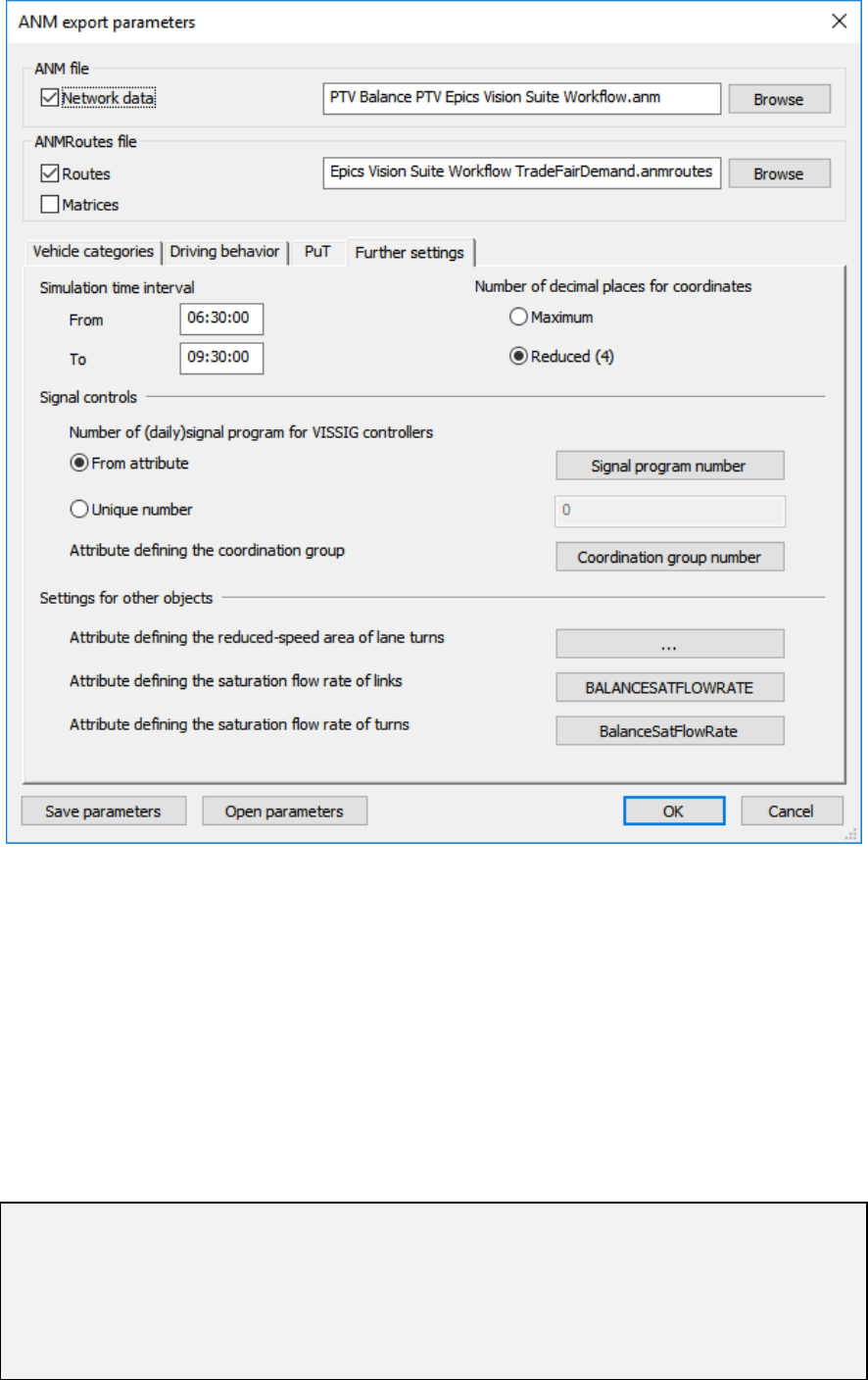
1. Open anm export parameters.
2. Click on Further settings.
3. In Signal controls click on the button next to Attribute defining the coordination
group.
4. Choose any attribute.
Fill the chosen attribute with the corresponding values.

PTV Balance Manual EN Data Provision
PTV GROUP
34
Element
Description
Attribute defining the
coordination group [-]
Numerical attribute that assigns the signal control to a signal control
group. PTV Balance optimizes all signal controllers of one group
together. Design control groups based on the topology of the network
and runtime restrictions (depending on network size and computational
power usually up to 50 signal controllers are feasible).
It is possible to provide several signal control groups in the same anm-
file. Use the global parameters of PTV Balance in PTV Vissim (see
chapter 3.3.2) to optimize a specific group together with PTV Vissim.
Nevertheless, in order to simulate large networks in a timely manner with
PTV Vissim, cut subnetworks in PTV Visum, that correspond to the
desired signal control groups.
5. In Settings for other objects click on the button next to either Attribute defining
the saturation flow rate of links or Attribute defining the saturation flow rate of
links turns.
6. Choose any attribute.
Fill the chosen attribute with the corresponding values.
Element
Description
Attribute defining the
saturation flow rate of links
[Veh/h]
Saturation flow of the link respecting number of lanes, share of HGV,
slope, etc. standard value is 1800 x number of lanes x reduction factors.
Attribute defining the
saturation flow rate of turns
[Veh/h]
Saturation flow of the turn respecting number of lanes, share of HGV,
slope, direction (right turns tend to require a lower speed than straight
turns) etc. standard value is 1750/1850/1800 (right/straight/left) x number
of lanes x reduction factors.
PTV Balance Manual EN Data Provision
PTV GROUP
35
3.2.2 Demand Data
An anmroutes-file describes demand data. Create these files with PTV Visum. PTV Vissim
can import these files too. The anmroutes-file is a parameter of the signal control Balance-
Central.
The anmroutes-file is used in the same way as for an export to PTV Vissim (see PTV AG
2017b “Saving an abstract network model”).
The anmroutes-file must contain only Routes. In PTV Visum Calculate->General
procedure settings->Prt settings->Assignment set Save paths to As connections.
This allows PTV Visum to save the routes of an assignment in the anmroutes file.
Hint: A static assignment in PTV Visum does not have any information about the time.
Therefore, if exporting the result of a static assignment, make sure that the demand and
the Simulation time interval in the ANM export parameters fit together. PTV Vissim
and PTV Balance will respect these settings.
In order to test how PTV Balance reacts to unplanned changes in demand it is possible to
use different anmroutes-files for PTV Vissim and PTV Balance.
PTV Balance Manual EN Data Provision
PTV GROUP
36
3.3 PTV Balance Parameters and Signal Control Data
3.3.1 Local Parameters and Signal Control Data
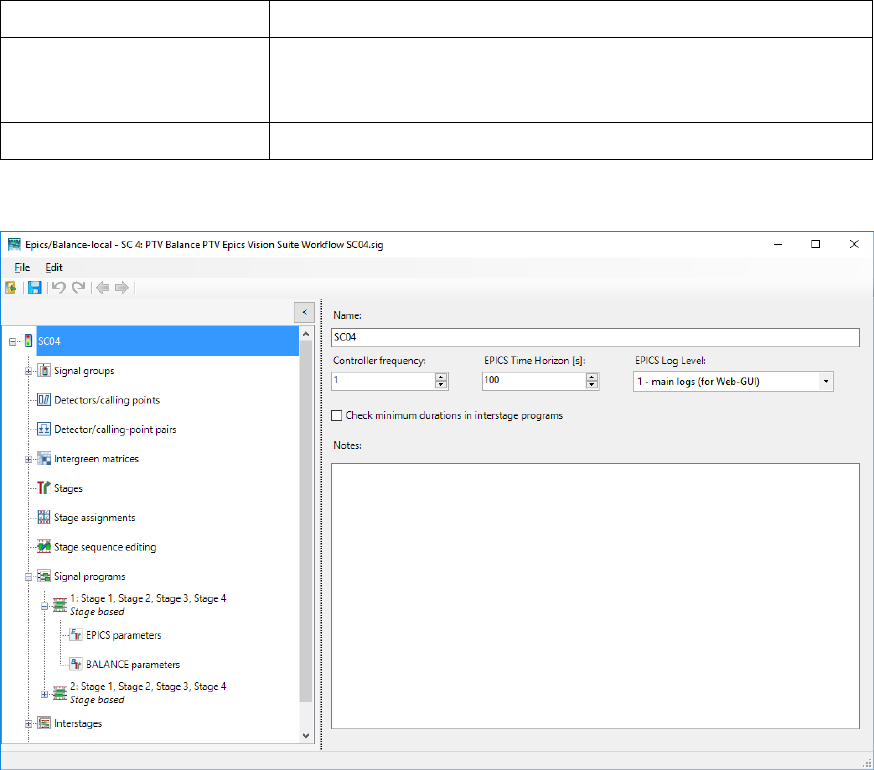
PTV Balance related parameters are provided with the GUI of the signal controller
Epics/Balance-local that is an extended version of Vissig. This manual will only address
additional data that are relevant for PTV Balance. Sections that are not covered are not
required for PTV Balance.
PTV Balance requires a stage based design.
1. From the Signal Control menu, choose > Signal Controllers.
The Signal Controller list opens.
2. Right-click the entry of your choice.
3. From the shortcut menu, choose Edit or Add.
The Signal Control window opens.
4. In the Type field, select > Epics/Balance-Local
5. Edit the desired data:
PTV Balance Manual EN Data Provision
PTV GROUP
37
Element
Description
Debug mode
If active, then the local controller creates log-files. Detailed log-files are
created in the subfolder Epics_Log of the directory of the inpx-file. This
significantly increases runtime.
All other elements
Please refer to help on Fixed Time control.
6. Click on Edit Signal Control.
The SC Editor opens.
3.3.1.1 Signal groups
As required for any stage based fixed time control modelled with Vissig.
3.3.1.2 Intergreen matrices
As required for any stage based fixed time control modelled with Vissig.
3.3.1.3 Stages
As required for any stage based fixed time control modelled with Vissig.
3.3.1.4 Stage assignments
As required for any stage based fixed time control modelled with Vissig.
3.3.1.5 Stage sequence editing
As required for any stage based fixed time control modelled with Vissig.
3.3.1.6 Signal programs
As required for any stage based fixed time control modelled with Vissig.
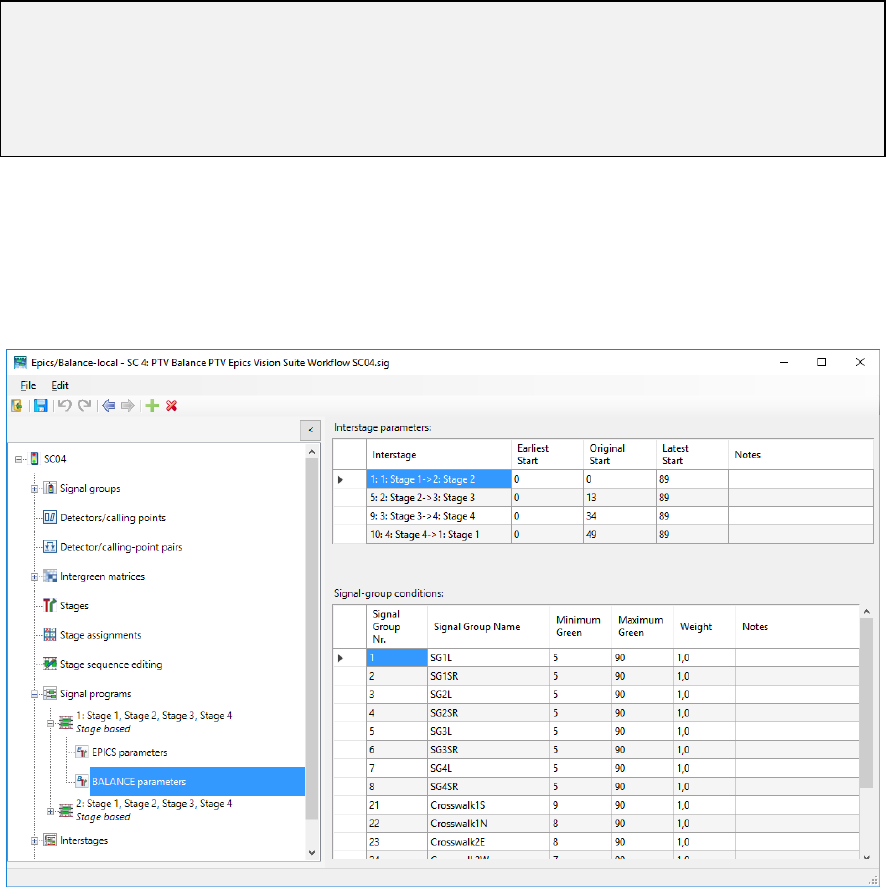
PTV Balance Manual EN Data Provision
PTV GROUP
38
Additionally PTV Balance requires the provision of signal program and stage dependent
parameters that define priorities and constraints for the optimization.
Overview of signal program parameters
PTV Balance has parameters concerning time and duration constraints of stages and
allowed interstages. These parameters are signal program dependent and are set to
default values during the automatic creation. Some of the default values are derived from
the fixed-time signal program (e.g. original start of an interstage).
These parameters govern the optimization function of PTV Balance.
Hint: Every parameter for PTV Balance comes with a tooltip providing an explanation of
its meaning. In addition, there are numerous plausibility checks with explanations.
When you have the license for PTV Balance and PTV Epics and you want to use only
PTV Balance, then activate EPICS parameters > BALANCE fixed-time control to force
PTV Epics to follow the results of PTV Balance exactly.
Setting signal program interstage parameters
1. Select a stage based signal program.
2. Expand the Navigator.
3. Select BALANCE parameters.
4. Make the desired changes of the Interstage parameters

PTV Balance Manual EN Data Provision
PTV GROUP
39
Element
Description
Interstage
Interstage can be added, removed and changed (see hint).
Earliest Start
Cycle second [s] defining the earliest possible start of the
corresponding interstage.
Original Start
Cycle second [s] defining the original start, typically as defined by the
underlying fixed time signal program, of the corresponding interstage.
Latest End
Cycle second [s] defining the latest possible start of the corresponding
interstage.
Note
Free text.
Hint: The interstages of PTV Balance and the underlying fixed time signal program may
be different.
This is mainly of concern for real-word data provision, where the underlying fixed time
signal program may be used as a fallback by the local controller. As a fallback option the
underlying fixed time signal program must use all stages even e.g. non-regular PuT
prioritization stages. But specifically these non-regular stages are not useful to be
considered in the optimization of PTV Balance.
The PTV Balance interstages are set according to a newly created underlying fixed time
signal program but can be changed manually.
Adding an interstage of a signal program
1. In the table, right-click the table cell.
2. From the context menu, choose Add.
Removing an interstage of a signal program
1. In the table, right-click the desired row.
2. From the context menu, choose the entry Delete.
Resetting interstage parameters of a signal program
1. In any table right-click the desired cell or column.
2. From the context menu, choose either Reset values of table or Reset values of
column ...
This resets either the whole table or the corresponding column to the default
values.
Setting signal program signal-group conditions
1. Select a stage based signal program.
2. Expand the Navigator.
3. Select BALANCE parameters.
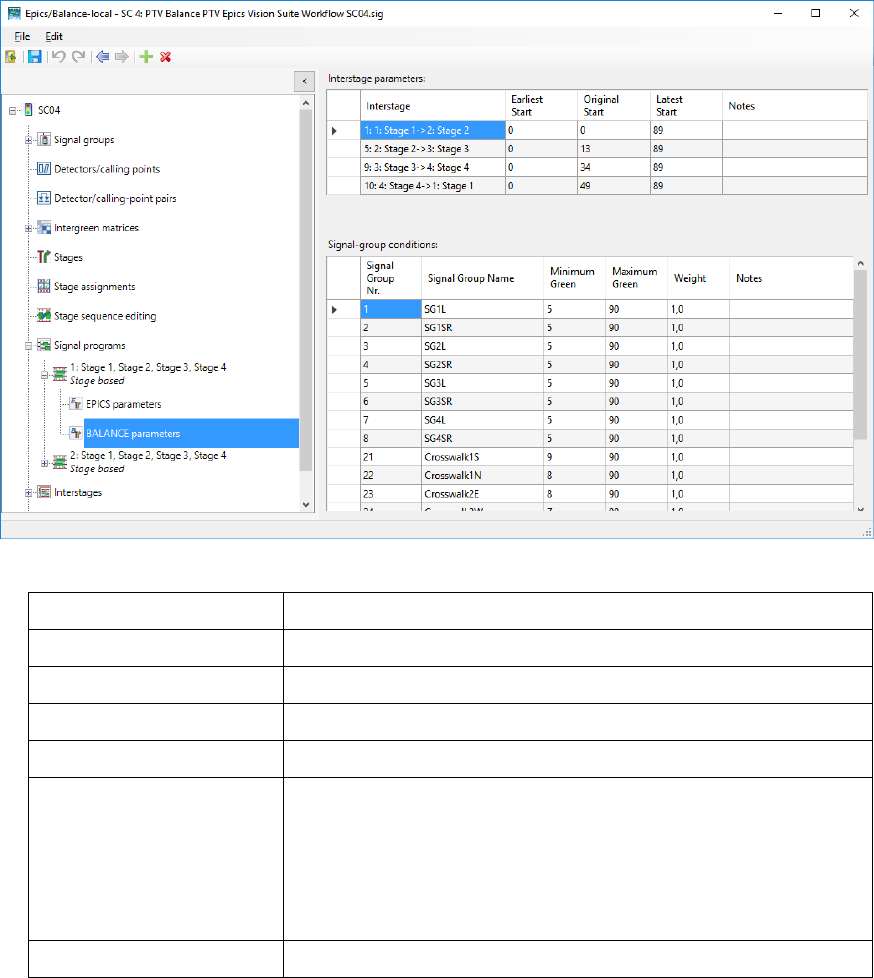
PTV Balance Manual EN Data Provision
PTV GROUP
40
4. Make the desired changes of the Signal-group conditions
Element
Description
Signal Group Nr.
Non-editable as defined in signal groups.
Signal Group Name
Non-editable as defined in signal groups.
Minimum Green
The minimum length of the corresponding signal group [s].
Maximum Green
The maximum length of the corresponding signal group [s].
Weight
The weight reflects the importance of the signal group for the objective
function of PTV Balance.
Of specific concern is the relation of the weights of the different signal
groups. If you want to put specific empathizes on a direction or if you
experience queues in front of a specific signal group, increase its
weight in relation to the other signal groups.
Note
Free text.
3.3.1.7 Interstages
As required for any stage based fixed time control modelled with Vissig.
3.3.1.8 Daily signal program lists
Optional but as required for any stage based fixed time control modelled with Vissig.
3.3.2 Global Parameters
Global parameters are set by a signal control of the type Balance-Central. This signal
control is not associated with any signal groups or signal heads. It is a virtual signal control,
which represents the core of PTV Balance. There has to be only one instance of such a
signal control.
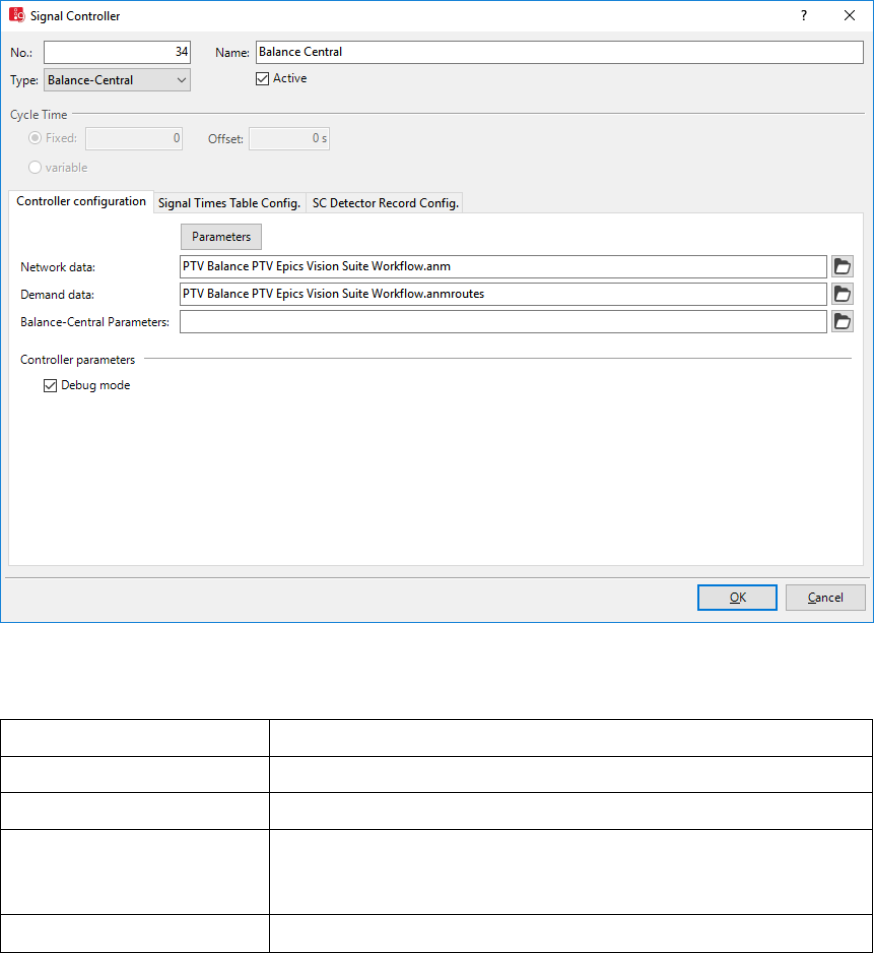
PTV Balance Manual EN Data Provision
PTV GROUP
41
1. From the Signal Control menu, choose > Signal Controllers.
The Signal Controller list opens.
2. Right-click the entry of your choice.
3. From the shortcut menu, choose Edit or Add.
The Signal Control window opens.
4. In the Type field, select > Balance-Central
5. Edit the desired data:
Element
Description
Data file 1:
The anm-file describing the network.
Data file 2:
The anmroutes-file describing the demand.
Debug mode
If active, then PTV Balance creates log files (see chapter 4.1.2). The
level of detail of the log files can be set in the Balance-Central Editor.
This influences the number of produced log files. This increases runtime.
All other elements
Please refer to help on Fixed Time control.
6. Click on Parameters
The Balance-Central Editor opens.
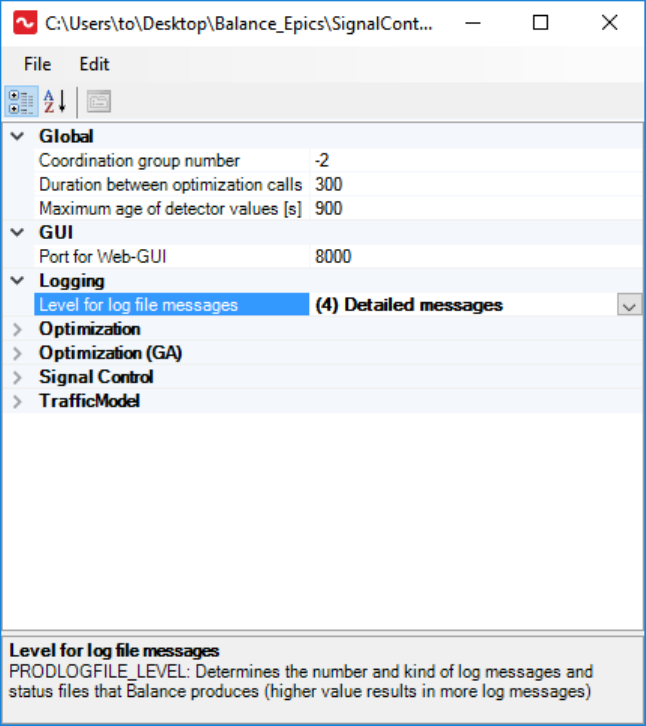
PTV Balance Manual EN Data Provision
PTV GROUP
42
7. Edit the desired data.
Categories group the parameters.
The bottom of the figure displays a short description of the currently selected
parameter.
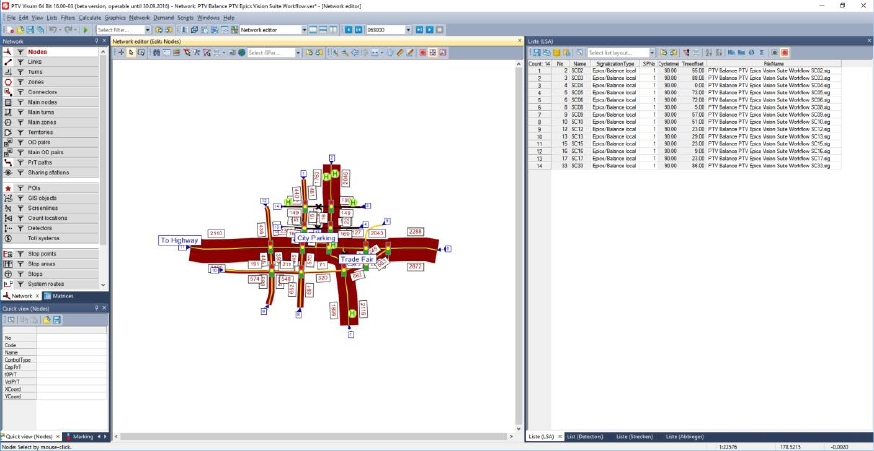
PTV Balance Manual EN Simulation, Calibration and Operation
PTV GROUP
43
4 Simulation, Calibration and Operation
Testing the efficiency of an adaptive signal control like PTV Balance is nearly impossible
without a modern simulation environment like PTV Vissim. It is the only way to check
whether all parameters are chosen and calibrated well and if all detectors are correctly
defined
On the other hand a simulation is never 100-percent exact. Therefore the step from the
simulated network to the real road network has to be taken with care – a recalibration might
be necessary, at least for some approaches.
4.1 Simulation With PTV Vissim
4.1.1 Data Provision
The microscopic traffic flow simulation PTV Vissim provides the possibility to test PTV
Balance without access to any online system. PTV Vissim uses the same import/input
format for network and demand data as PTV Balance providing a quick to set up test
environment. PTV Visum, PTV Vissim and PTV Balance share signal control related data
through the sig-files.
PTV Visum and PTV Vissim are the recommended way for data provision and calibration.
See chapter 3.1 for guidelines on how to set up a PTV Balance project with the PTV Vision
suite.
Figure 14: Network in PTV Visum.
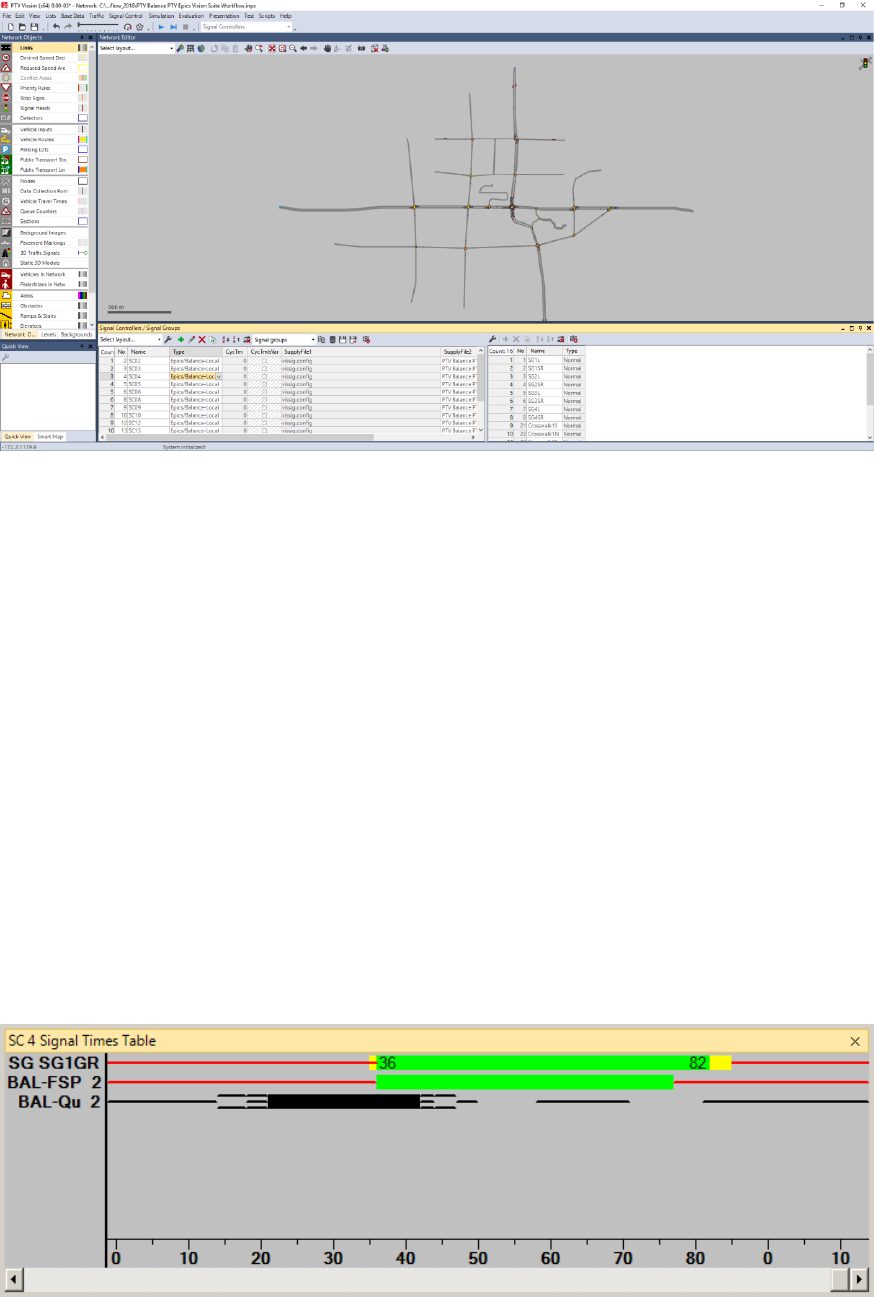
PTV Balance Manual EN Simulation, Calibration and Operation
PTV GROUP
44
Figure 15: Network in PTV Vissim using anm-export and import functionalities.
4.1.2 Showing Additional Data in the Signal Times Window
You can show the current signal states and detector states during a simulation or during
interactive tests of signal control logic in a window. Therein, the green times, yellow times
and red times are represented graphically along a horizontal time axis for each selected
signal control.
For details on the standard attributes and configuring the signal times window please refer
the Vissim user manual (PTV AG 2017a).
PTV Balance allows you to show additional attributes that are described below.
Result of evaluation of signal times tables, additional PTV Balance attributes
If you have selected the evaluation, each selected signal control is shown in a window
during a simulation or a test run of the signal times table.
The colors indicate the current state of the respective signal group.
The state of the current time step is represented at the right edge of the window.
If the signal times table also contains PTV Balance frame signal plan BAL-FSP, the colors
indicate the desired signal state of PTV Balance. BAL-FSP does only differ red and green

PTV Balance Manual EN Simulation, Calibration and Operation
PTV GROUP
45
states and it is subject to the local control whether the frame signal plan is respected or
not.
If the signal times table also contains PTV Balance queues BAL-Qu, the colors indicate the
queue state of the PTV Balance simulation model.
Queue color
Description of the queue state
nothing
no queue
black line
1-3 vehicles in queue
black frame
4-6 vehicles in queue
black line and black frame
7-8 vehicles in queue
solid black
>8 vehicles in queue
Hint: These attributes are not available before PTV Balance calculated an actual
optimization. On the first call to PTV Balance, the network is empty, detectors have not
yet delivered any data and therefore this initial call, does not yield optimization results.
4.1.3 Evaluating Additional Data in the Signal Control Detector
Record
You can use the SC detector record to check control logic of external control procedures.
For each SC, you can show a freely configurable, precise record of the SC values and
detector values as well as internal parameters of the control procedure.
For details on the standard attributes and configuring the signal control detector record
please refer the Vissim user manual (PTV AG 2017a).
PTV Balance allows you to show additional attributes that are described below.
Result of the SC detector record evaluation, additional PTV Balance attributes
Value type
Meaning
BAL-FSP
PTV Balance Frame Signal Plan
BAL-FSP does only differ red and green states and it is subject to the local
control whether the frame signal plan is respected or not.
State of frame signal plan:
. red
I green
BAL-Qu
PTV Balance Queue
Bal-Qu indicates the queue state of the PTV Balance simulation model:
0-9 vehicles in the queue
X more than 9 vehicles in the queue
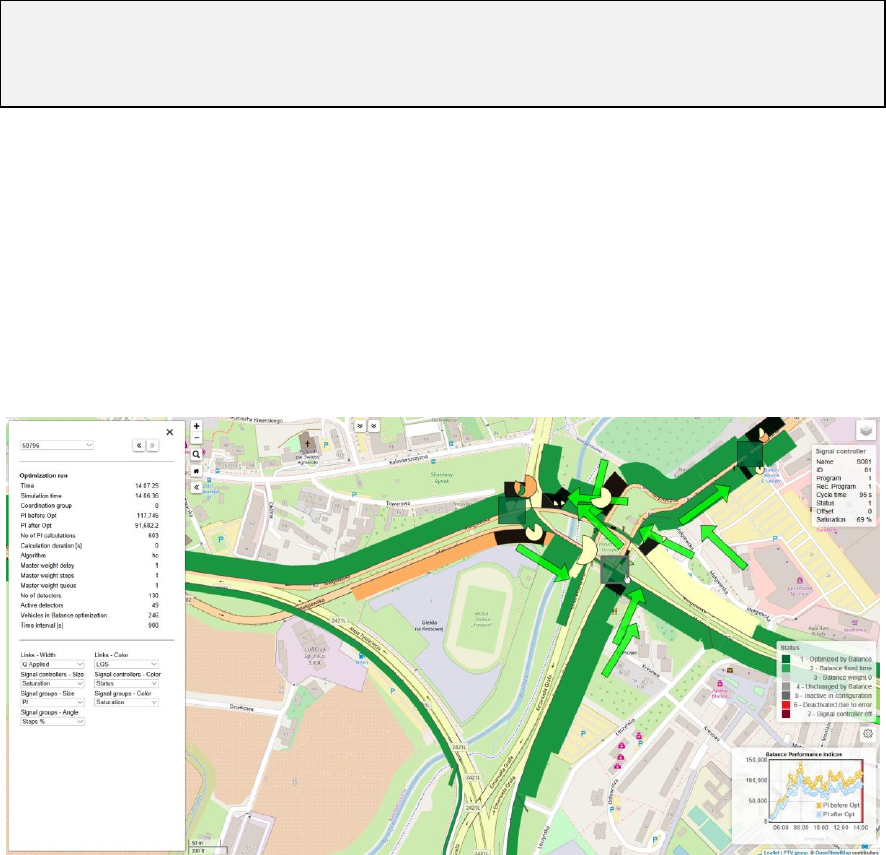
PTV Balance Manual EN Simulation, Calibration and Operation
PTV GROUP
46
Hint: These attributes are not available before PTV Balance calculated an actual
optimization. On the first call to PTV Balance, the network is empty, detectors have not
yet delivered any data and therefore this initial call does not yield optimization results but
shows the road network in grey.
4.1.4 PTV Balance and Epics network view
PTV Balance and PTV Epics are distributed with PTV Vissim and their own data
visualization tool “PTV Balance and Epics network view”. This tool is browser-based and
shows many internal data and the results of PTV Balance (and some information of PTV
Epics) and is a useful tool for understanding and calibrating PTV Balance (it is also used
for real-world deployments). It opens automatically when a simulation is started in Vissim
which contains a signal controller of type “Balance central” that has an activated check box
“debug mode“ in its signal controller parameters.
Right after the start of the simulation the Balance GUI can only show the network, but after
the first optimization run it shows the results of the Balance calculation for each link,
controller and signal. The GUI is mouse sensitive and always shows the data for the object
under the mouse cursor. The button in the right upper corner allows to lay an Open Street
Map under the network, if the coordinates fit.
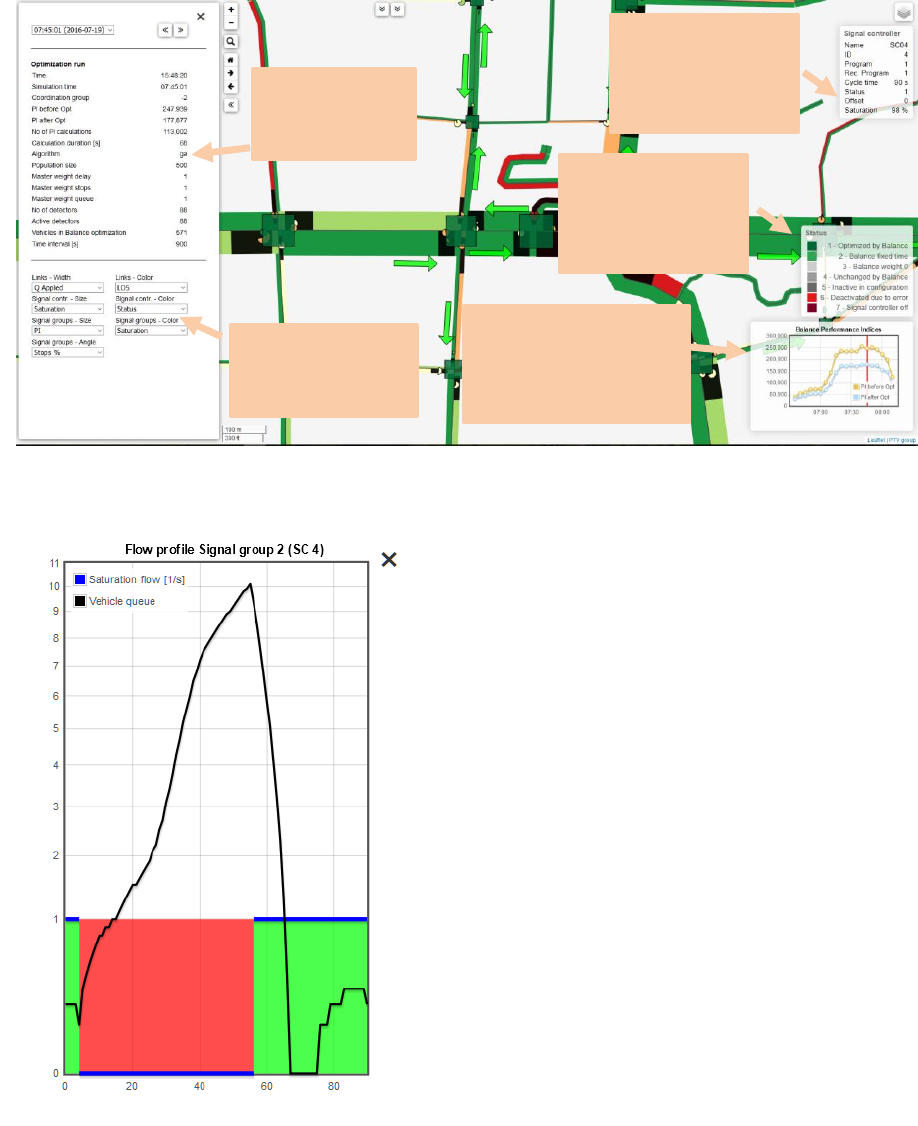
PTV Balance Manual EN Simulation, Calibration and Operation
PTV GROUP
47
Clicking on a signal group will display the flow profile that Balance calculated for this
signal: For each second in the cycle, it displays
1. If it is green or red
2. When red, it shows the number of cars
waiting at the stop line
3. When green, it shows the number of cars
passing through the stop line
This allows to check the quality of coordination
as Balance calculated and compare this with the
Vissim “reality”.
The example to the left shows a signal group
with a queue length of 10 cars in total at the
beginning of green. These vehicles have passed
the stop line after 10 seconds of green. Then
there is a gap of 10 seconds. Finally a platoon
arrives from the upstream intersection and
passes the stop line. The majority of cars is
arriving after 20 seconds of red time.
Clicking on an intersection (the square) allows to
see the frame signal plan that Balance
calculated as optimal.
4.2 Log Files
PTV Balance provides several log files. These contain warnings, errors and results. The
log files are an important tool to identify errors in the data provision and for calibration.
The level of detail of the log files can be set in the Balance-Central Editor. This influences
the number of produced log files.
Visualize
performance index
and choose past
optimization runs
Choose what to
display in the
map
Summary of
optimization
run
Calculation
results for
object at
mouse position
Explanation for
color of the
object at
mouse position
PTV Balance Manual EN Simulation, Calibration and Operation
PTV GROUP
48
Log files are created in the subfolder of the directory of the inpx-file. The folder has the
name of the anmroutes-file with suffix BAL_Log.
PTV Balance creates a new log file for every calendar day and appends information to
existing log files for every optimization.
Most log files provide a short explanation of its content and their first two columns display
the current time and the simulation time.
PTV Balance creates numerous log files of the following schemes and types:
Balance_LOGTYPE_YYYY-MM-DD_log.txt
LOGTYPE identifies the type of the log file. The most important types are described
below.
YYYY-MM-DD represents the current day.
json files
These are used internally by the visualization component.
genetic algorithm files (sav files and last files)
These are used internally to manage the genetic algorithm.
4.2.1 Balance_output_YYYY-MM-DD.log.txt
The main log file. It includes error messages, warnings and information of the initialization
and the optimization.
The first two columns display the time stamp and the log level. The third column denotes
the Balance group that created the message, followed by the message text. A log level of
5 indicates an error and usually prevents an optimization. Messages of log level 4 indicate
a warning and usually do not prevent an optimization but impact the achievable quality of
the results.
4.2.2 Bxx_summary_YYYY-MM-DD-log.txt
This file provides an aggregated summary of every optimization run for group Bxx (with xx
the group number). The summary is split up in the following parts:
Optimization
Static information about the optimization algorithm and parameters.
Dynamic information about the achieved results and the reason for termination of the
optimization.
Signal control
Overview of all signal controllers, the active signal program, cycle time and the
saturation of every signal controller. The latter helps to identify critical spots for
calibration.
Input data
Number of known and active detectors. When PTV Balance is used in combination
with PTV Vissim, these numbers should be identical.

PTV Balance Manual EN Simulation, Calibration and Operation
PTV GROUP
49
Traffic state
The top ten least and most saturated signal groups. The latter helps to identify critical
spots for calibration.
OD estimation
The top nine signals with the biggest deviation between measured and modelled traffic
flows. Helps to identify critical spots for calibration.
4.2.3 Balance_signals_YYYY-MM-DD-log.txt
An important file for the calibration is the file Balance_signals_YYYY-MM-DD-log.txt. This
file shows the internal state of PTV Balance’s microscopic traffic model.
Column header
Description
Time
current time [hh:mm:ss]
Simulation time
current simulation time [hh:mm:ss]
Group
The number of the traffic control group
SPR
active signal program
LSA
unique ID of the traffic light system
FVSGR
signal group name
Link
unique ID of this object type
LinkGisID
unique ID of this object type
Lanes
number of lanes
Tgr[s]
green time demanded by PTV Balance, based on the latest T-Times
Q[Fz/h]
measured traffic volume
Qmod[Fz/h]
traffic volume calculated by the traffic model
Start queue length
not used
queue length
queue length from queue estimator
Queue length [Fz]
mean queue length
Queue lengthDet[Fz]
mean queue length from the deterministic model
Queue lengthSto (KiHo) [Fz]
mean queue length from the stochastic model
Waiting time[s/tInt]
total waiting time during the calculation interval of the objective function
Waiting time[s/Fz]
mean waiting time per vehicle
Waiting timeDet [s/Fz]
mean waiting time per vehicle from the deterministic model
Waiting timeSto (KiHo)[s/Fz]
mean waiting time per vehicle from the stochastic model
Saturation[-]
saturation of the signal group
MaxCap[Fz/h]
maximum capacity of the lane
NumberStops[/TU]
number of stops during a cycle time
ShareStopingVeh[-]
share of the stopping vehicles
PI(SGrelated)
performance index of the objective function, related to the signal group
Average speed
average speed [km/h]
PTV Balance Manual EN Simulation, Calibration and Operation
PTV GROUP
50
4.3 Calibration
4.3.1 General
In order to calibrate PTV Balance it is necessary to know the determining factors and their
effects. If the data provision is correct, the following parameters allow improving the
performance of PTV Balance:
Saturation flows of the edges and turning movements:
Saturation flows of the edges are a major factor in the calculation of the delay.
Saturation flows represent the capacity of a link or turn considering HGV share, turning
ratio, width, steepness etc. but not green shares of a signal control. The anm file
defines saturation flows for links and turns and can be changed using PTV Visum. For
calibration purposes, one has to consider that in general the real saturation flow is
unknown. Therefore, careful deliberation and ideally measurements are helpful,
especially for turning movements.
Weights for waiting time, queue length and number of steps for every signal group:
Weights are used in the objective function of PTV Balance (chapter 2.1.4). Specific
local circumstances or objectives to emphasize specific directions within the
optimization are modelled with the weights. In order to get effects from the change of
weights at an intersection, all signal groups and the scale of their effects have to be
considered.
4.3.2 Guideline for the Calibration
In order to assist the calibration process, the following chapters provide an outline of a
structured approach. In general, calibration is an iterative process and it is advised to not
apply too many changes at once.
4.3.2.1 Simulation without optimization
Generally, there is always a With- and Without-Comparison. The simulation runs should
always be started with different random seeds and at least 5 repetitions to guarantee a
solid data base with different traffic situations for assessment.
Bigger traffic related changes like morning peak, off-peak or evening peak should be
simulated in different scenarios. The signal programs can be analysed separately, because
usually different signal programs are used during the different scenarios.
4.3.2.2 Simulation with optimization
In the beginning, the simulation with optimization is not processed with different simulation
random seeds until a useful result is achieved. A soon as a positive result is achieved with
a certain random seed, simulation runs with other random seeds can be tested.
Because PTV Balance is a network control, the delay, travel times and numbers of stops
of the whole network should also be observed and evaluated during any simulation run.
The traffic parameters which should be captured during the simulation are varying
according to the objectives of the control. Because there is a vast array of possibilities for
PTV Balance Manual EN Simulation, Calibration and Operation
PTV GROUP
51
the analysis of those data offered in the simulation, almost every objective of the control
can be achieved with these analysing methods. The analyses can be generated and
visualized by PTV Vissim and can be used for the evaluation of the network control.
Depending on the objective of the control, it may also be useful to analyse certain edge
sections apart from the others using additional parameters which can be integrated into the
calibration.
4.3.2.3 Observing the simulation
PTV Vissim offers many parameters for the evaluation of the performance of the network
control. However, one should not rely on these parameters only, but also observe the
simulation visually. It is possible that the overall results are improving due to a queue on
one of the entrances of the network. In conclusion, less vehicles drive into the road network
and the overall result gets better. If there are errors in the data provision or the optimization
the reason can quickly be located by observing the simulation in a heavily congested
network.
4.3.2.4 Analysing log Files
For details on the content of the log files please refer to chapter 4.1.2.
Balance_output_YYYY-MM-DD.log.txt
The main log file has to be checked for messages of log level 4 and 5 that either negatively
affect or prevent an optimization.
Balance_signals_YYYY-MM-DD-log.txt
The values traffic volume, demanded green time, delay, queue length and number of stops
should be compared to the values which have been calculated in the simulation. If there
are significant differences, check the data provision. If the traffic volume is also plausible,
the actual calibration can be started.
Bxx_summary_YYYY-MM-DD-log.txt
The summary of every optimization allows for a quickly identification of critical spots.
Signal controllers and signal groups with the highest saturation should be examined in the
simulation. If the behaviour of the simulation is plausible then these are the most promising
locations to focus the calibration.
Large deviations between measured and modelled vehicle flows indicate either potential
errors in detector data provision (wrong location or vehicles not travelling over a detector)
or a low quality of the provided demand matrix.
4.3.2.5 Result evaluation
Result evaluation depends on the objective. PTV Vissim provides various possibilities to
measure global indicators (e.g. total delay time) or to focus on more specific indicators
(delay time for public transport busses, pedestrians or travel times along a specific
direction). Suitable indicators have to be defined and observed to evaluate changes in the
optimization parameters.
PTV Balance Manual EN Simulation, Calibration and Operation
PTV GROUP
52
4.3.2.6 Tweaking calibration parameters
The following circumstances require special attention:
Mixed lanes
Tweaking saturation flows of edges is especially important if there are right turning
vehicles and straight driving vehicles on the same lane. If the right turning vehicles
progress independent of the straight turn, an estimation of the saturation traffic volume
is difficult. If PTV Balances estimates waiting times significantly different from the
simulation this indicates the need to adjust saturation flows.
Left turns
Left turns with separate short lanes that are signalled in separate stages can block the
straight turns and deserve special attention.
If single directions of the signal groups are estimated wrong, it is recommended to
change the weight for the waiting time in order to perform a specific adaption of the
signal group resp. the direction. It is important to consider the scale of the other
weights of this intersection.
If coordination is one of the most important objectives, the weight for number of stops
should be changed at the respective signal groups. Every intersection should be
checked one by one considering the objectives and the weights should be changed
accordingly. This is an iterative process because changes at a single intersection can
have effects on the whole network.
PTV Balance Manual EN Literature
PTV GROUP
53
5 Literature
Braun, R. (2008). Ein echtzeitfähiger Evolutionärer Algorithmus zur netzweiten
Optimierung der Lichtsignalsteuerung. München: Dissertation am Lehrstuhl für
Verkehrstechnik, Technische Universität München.
Braun, R., Kemper, C. (2008). GALOP-Online – ein Genetischer Algorithmus zur
netzweiten Online-Optimierung der Lichtsignalsteuerung. Forschungsgesellschaft für
Straßen- und Verkehrswesen, HEUREKA '08, Optimierung in Verkehr und Transport -
Tagungsband . Köln: FGSV Verlag, ISBN 978-3-939715-48-1.
Domschke, W., Drexl, A. (1998). Einführung in Operations Research. Berlin: Springer, 4.
Auflage.
Domschke, W., Klein, R., Scholl, A. (1996). Taktische Tabus, Tabu -Search - Durch
Verbote schneller optimieren. c`t - Magazin für Computertechnik, Heft 12/1996, S.326-332.
Forschungsgesellschaft für Straßen- und Verkehrswesen (2009). Handbuch für die
Bemessung von Straßenverkehrsanlagen. Köln.
Friedrich, B., Mertz, J. (1996). Abschlußbericht Munich COMFORT Arbeitsbereich 444,
Städtische Verkehrssteuerung. München: Fachgebiet Verkehrstechnik und
Verkehrsplanung, TU-München.
Friedrich, B., Mertz, J., Ernhofer, O., Clark, M., Toomey, C., McLean, T., et al. (1998).
TABASCO Deliverable 9.4: Urban Traffic Control with PT Priority: Final Evaluation Report.
Brüssel.
Gevas software Systementwicklung und Verkehrinformatik GmbH (2010a). TRENDS,
Version 5.0, Benutzerhandbuch. München.
Gevas software Systementwicklung und Verkehrsinformatik GmbH (2010b).
openTRELAN, Version 5.0, Benutzerhandbuch. München.
Gevas software Systementwicklung und Verkehrinformatik GmbH (2012a).
Benutzerhandbuch DRIVERS. München.
Gevas software Systementwicklung und Verkehrinformatik GmbH (2012b).
Benutzerhandbuch Nonstop. München.
Gevas software Systementwicklung und Verkehrsinformatik GmbH (2012c). Projekt Tristar,
Anforderungsspezifikation Detektorpositionierung und betriebliche Aspekte der Detektion.
München.
Hunt, P. B., Robertson, D. I., Bretherton, R. D., Winton, R. I. (1981). SCOOT, A Traffic
Responsive Method of Coordinating Signals, TRRL Report No. LR 1014. Crowthorne UK:
Transport and Road Research Laboratory.
Kimber, R. M., Hollis, E. M. (1979). Traffic Queues and delays at road junctions. TRRL
Laboratory Report 909.
Ploss, G. (1993). EIn dynamisches Verfahren zur Schätzung von Verkehrsbeziehungen
aus Querschnittszählungen. München: Fachgebiet Verkehrstechnik und Verkehrsplanung,
TU München.
PTV AG (2017a). PTV Vissim manual. Karlsruhe.
PTV Balance Manual EN Literature
PTV GROUP
54
PTV AG (2017b). PTV Visum manual. Karlsruhe.
PTV AG (2017c). PTV Epics manual. Karlsruhe.
Robertson, D. I. (1969). TRANSYT, A traffic Network Study Tool. TRRL Report No. LR 253
. Crowthorne, UK: Transport and Road Research Laboratory.
Van Zuylen, H. J., Branston, D. (1982). Consistant Link Flow Estimation from Traffic
Counts. Transportation Research B. Vol. 16B.
Verkehrs-Systme AG (2012). VS-Plus. Muttenz.
