Maxxum 5 Manual Part 2
Maxxum 5 Manual - Part 2 Maxxum 5 Manual - Part 2
User Manual: Maxxum 5 Manual - Part 2
Open the PDF directly: View PDF  .
.
Page Count: 25
5150
CREATIVE
EXPOSURE MODES
In this section you take full creative control of your camera.
Depending on the selected exposure mode, you will control the
aperture, shutter speed, or both when capturing your image.
In the previous sections, only the program (P) exposure mode
was explored. Here you will learn to use the aperture priority
(A), shutter priority (S), and manual (M) exposure modes. Select
A mode to control the depth-of-field in your images. Set S mode
to control the way moving subjects appear in your images. Set
M mode when you want full control over the exposure.
DRIVE MODES
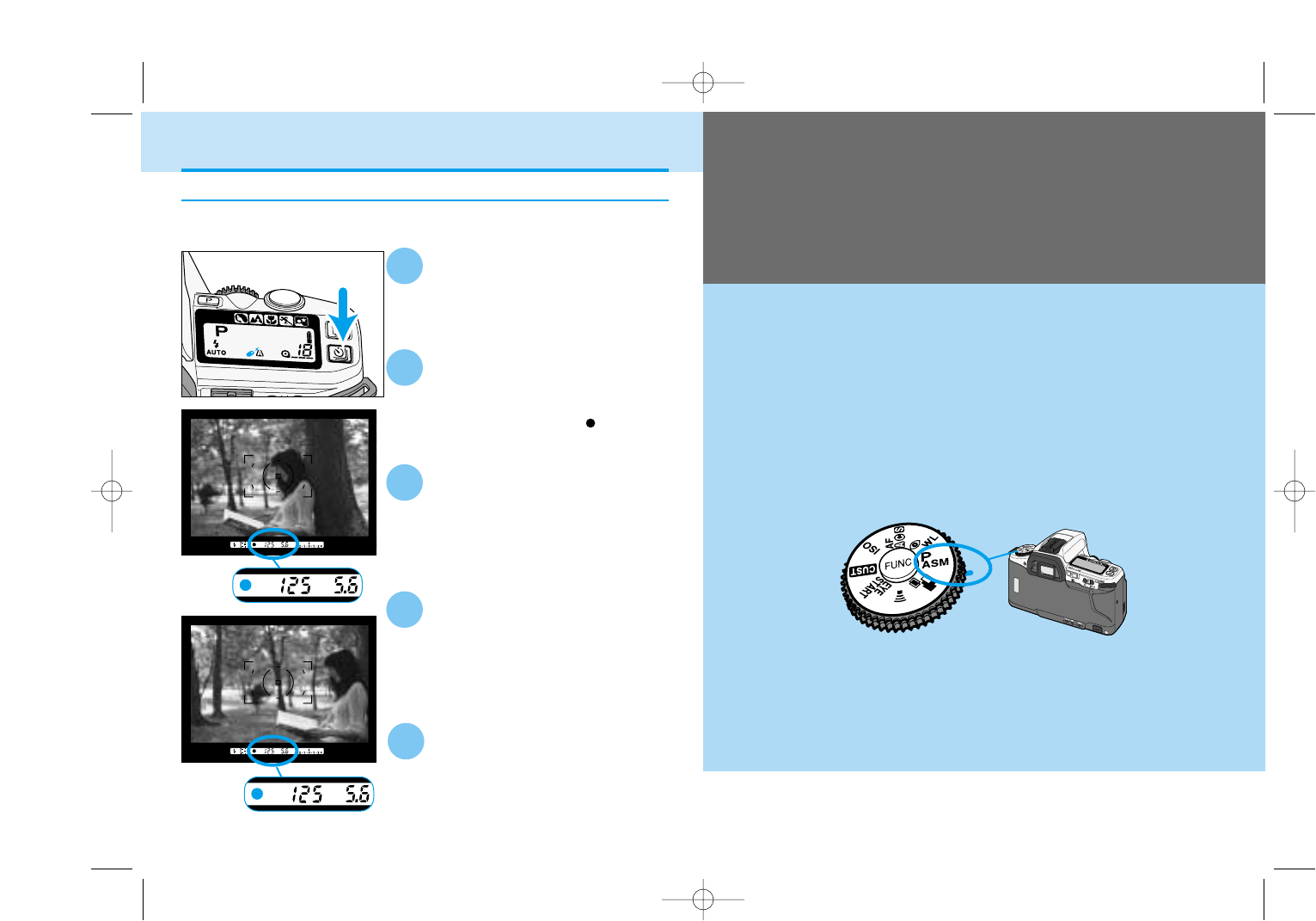
Focus Lock in Remote Control Mode
Set the camera to the remote-
control mode.
Center your subject in the
focus frame, then press the
shutter-release button
partway down until appears
in the vewfinder.
2
1
Lift your finger from the
shutter-release button.
• Focus and exposure is set for the
picture.
• The shutter speed and aperture will be
displayed on the data panel.
3
Recompose the picture.
4
Point the remote toward the
front of the camera and press
the release or delay button.
5
When your subject is not centered in the focus frame, use manual focus
or focus lock.
9222-2163-11 MM-B108 (E).qxd 01.8.3 16:11 Page 50
53
CREATIVE
EXPOSURE
52
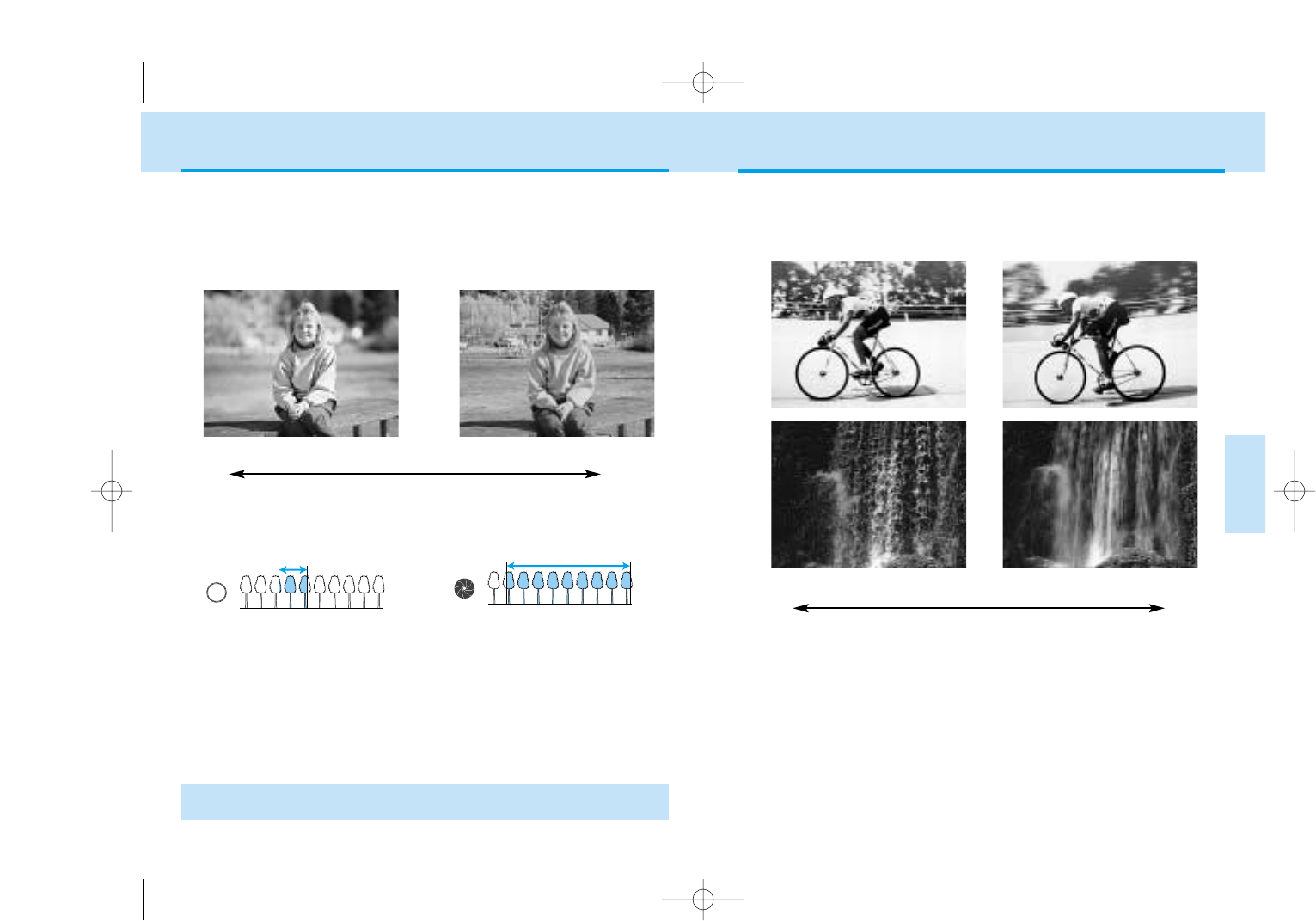
Fast Shutter Speed Slow Shutter Speed
SHUTTER CONTROL
Slow shutter speeds will make a
moving subject appear to flow,
creating a feeling of motion.
In addition to controlling the duration of the exposure, shutter speeds
determine how moving subjects will appear in the final image. Use a fast
shutter speed to stop the motion of your subject, use a slow shutter
speed to blur the motion.
Fast shutter speeds can stop the
action and also help prevent
blurring caused by camera
movement during exposure,
known as camera shake.
APERTURE CONTROL
Large Aperture
(small f-number)
Small Aperture
(large f-number)
Range in focus is deeper.
Range in focus is narrower.
The size of the aperture (lens opening) determines the depth-of-field of
the final image as well as the intensity of the light falling on the film.
Depth-of-field is the range in front of and behind the subject that appears
sharp in the final image. Depth of field increases as the focal length
decreases. The wide angle position of the lens will have a greater
depth of field at a given aperture than at the telephoto position.
Large apertures (small f-numbers)
limit the depth-of-field to a narrow
range in front of and behind the
point of focus. Set a larger
aperture when photographing
portraits to make your subject
stand out from the background.
• Usable apertures will depend on the aperture range of the lens you are
using.
Small apertures (large f-numbers)
provide greater depth-of-field. Set
a small aperture when pho-
tographing landscapes to ensure
your entire scene is sharp.
f/2.8 f/4 f/5.6 f/8 f/11 f/16
Large Small
1/4000s 1/250s 1/125s 1/45s 1/8s 1s 6s 30s
Fast Slow
9222-2163-11 MM-B108 (E).qxd 01.8.3 16:11 Page 52
55
CREATIVE
EXPOSURE
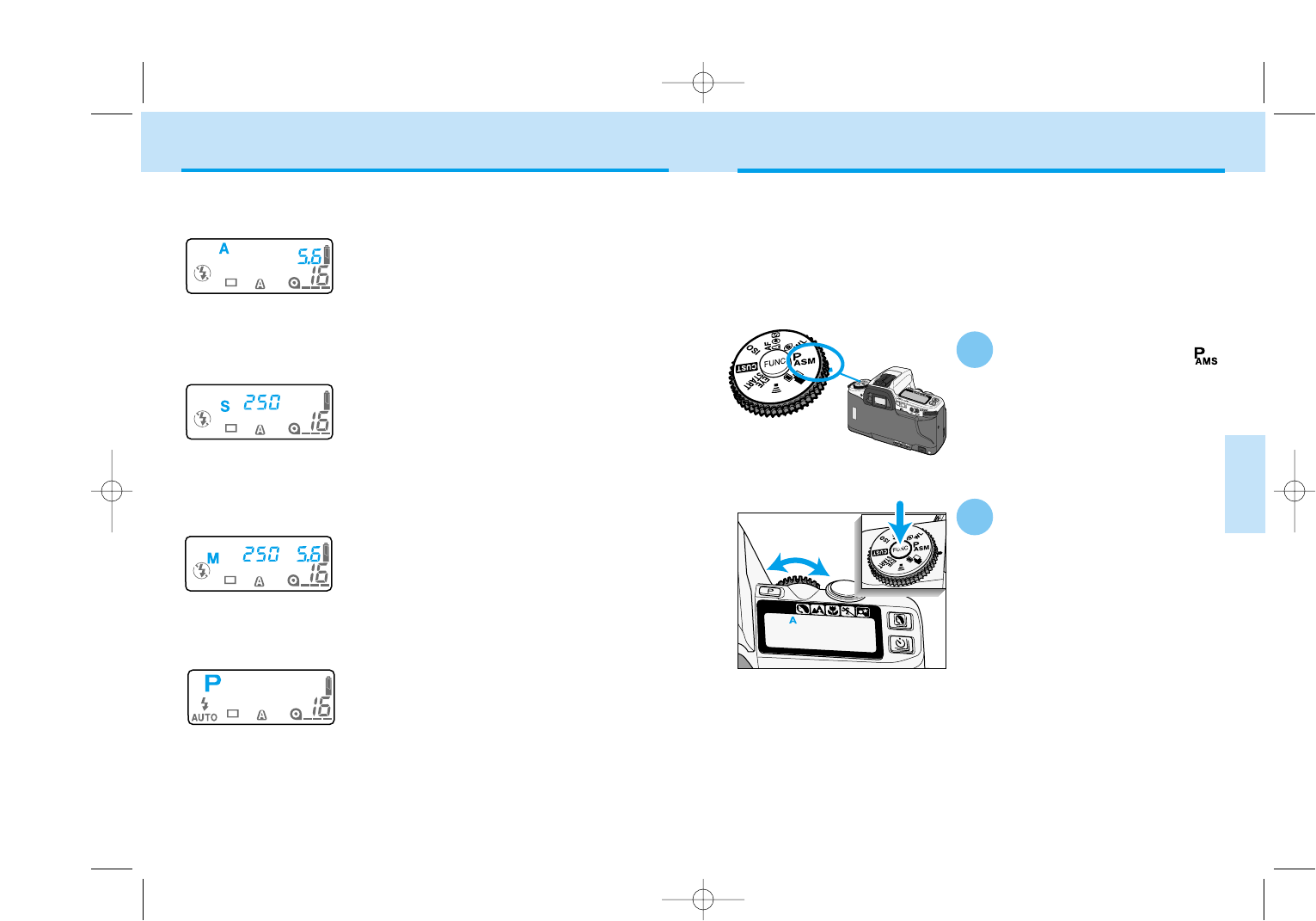
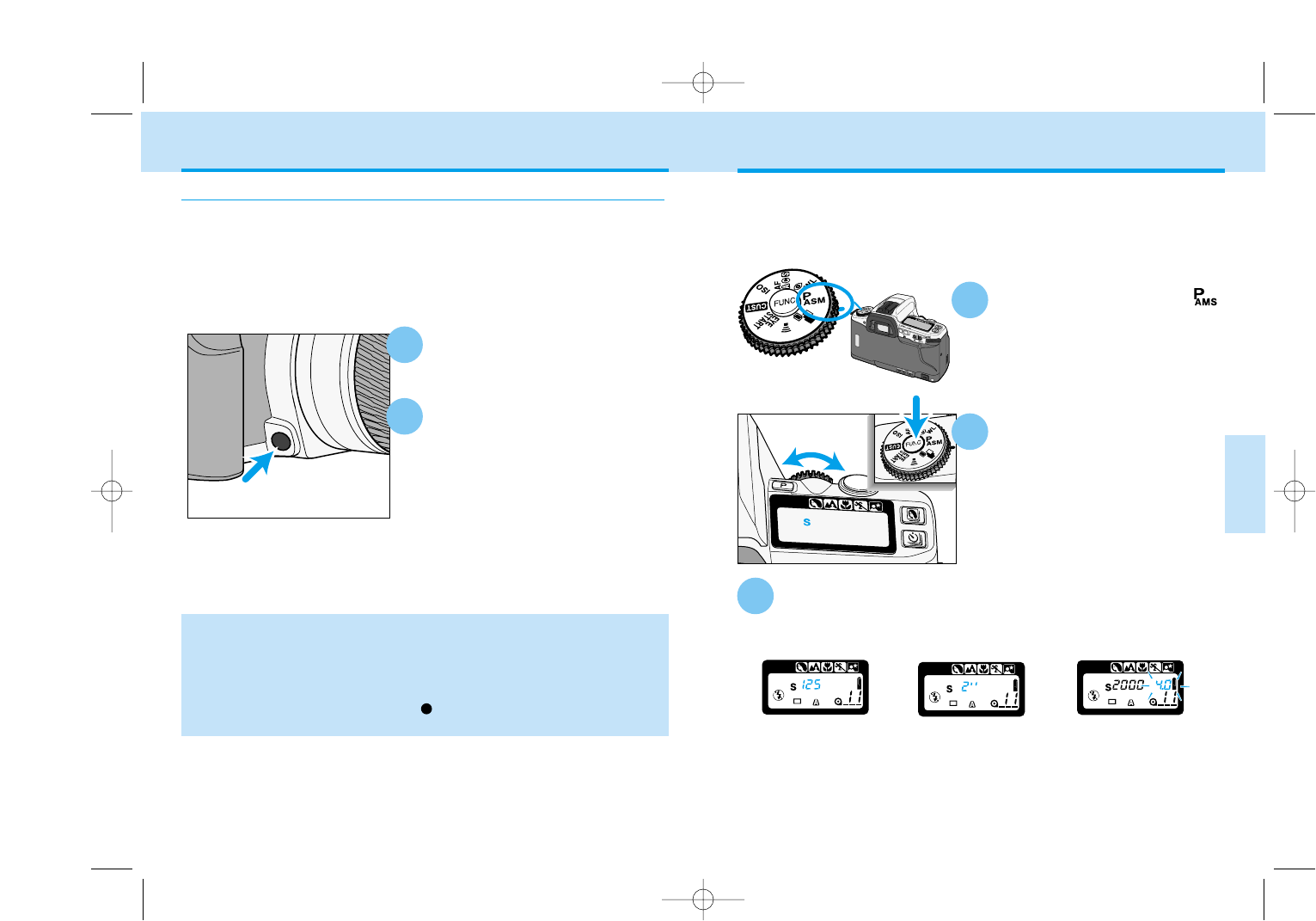
While pressing the function
button, turn the control dial
until A appears on the data
panel.
Turn the function dial to .
In A mode, you select the aperture and the camera automatically sets the
shutter speed required for proper exposure. Set the camera to A mode
when you want to control the depth-of-field in the image.
A MODE - APERTURE PRIORITY
54
Four exposure modes are availabe on this camera. Select the best
exposure for your subject.
A mode (Aperture Priority) (p.55)
In A mode, you select the aperture and the camera
automatically sets the shutter speed required for
proper exposure. Set the camera to A mode when
you want to control the depth-of-field in the image.
S mode (Shutter Priority) (p.59)
In S mode, you select the shutter speed and the
camera automatically sets the aperture for the
proper exposure. Use S mode when you want to
control the blur caused by subject movement or
stop the motion of your subject.
M mode (Manual Exposure) (p.61)
M mode gives you full control over the exposure by
allowing you to set both the shutter speed and
aperture. The camera’s Ev scale displays how your
settings compare to the exposure determined by
the camera’s metering system.
P mode (Programmed AE) (p.64)
Select P mode when you want to give your full
attention to your subject and composition by letting
the camera control both the shutter speeds and
aperture. The P mode software analyzes the sub-
ject’s size, motion, and distance as well as the
focal length of the lens, then controls the shutter
speed and aperture to correctly expose the scene.
EXPOSURE MODES
1
2
Continued on next page
9222-2163-11 MM-B108 (E).qxd 01.8.3 16:11 Page 54
57
CREATIVE
EXPOSURE
56
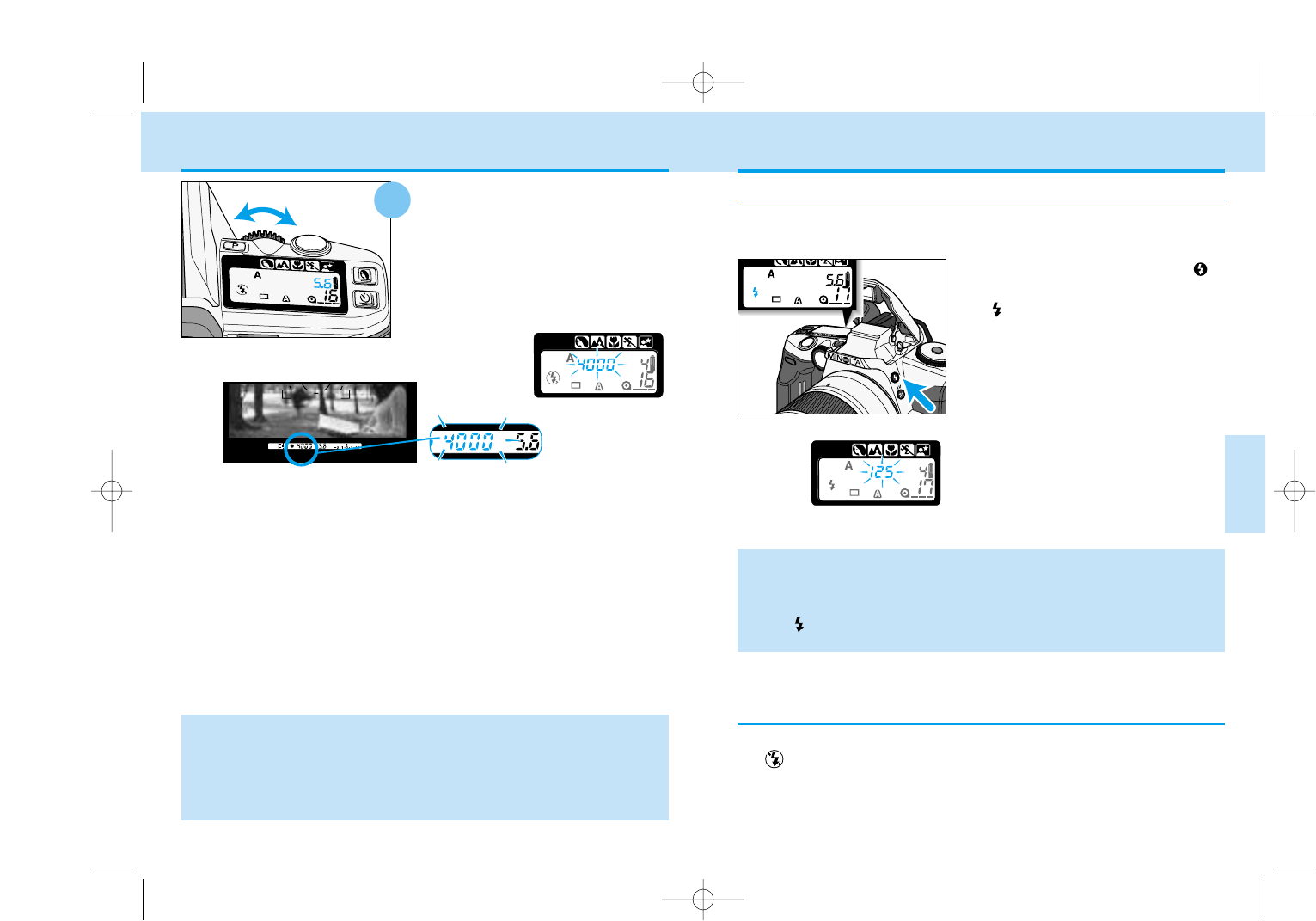
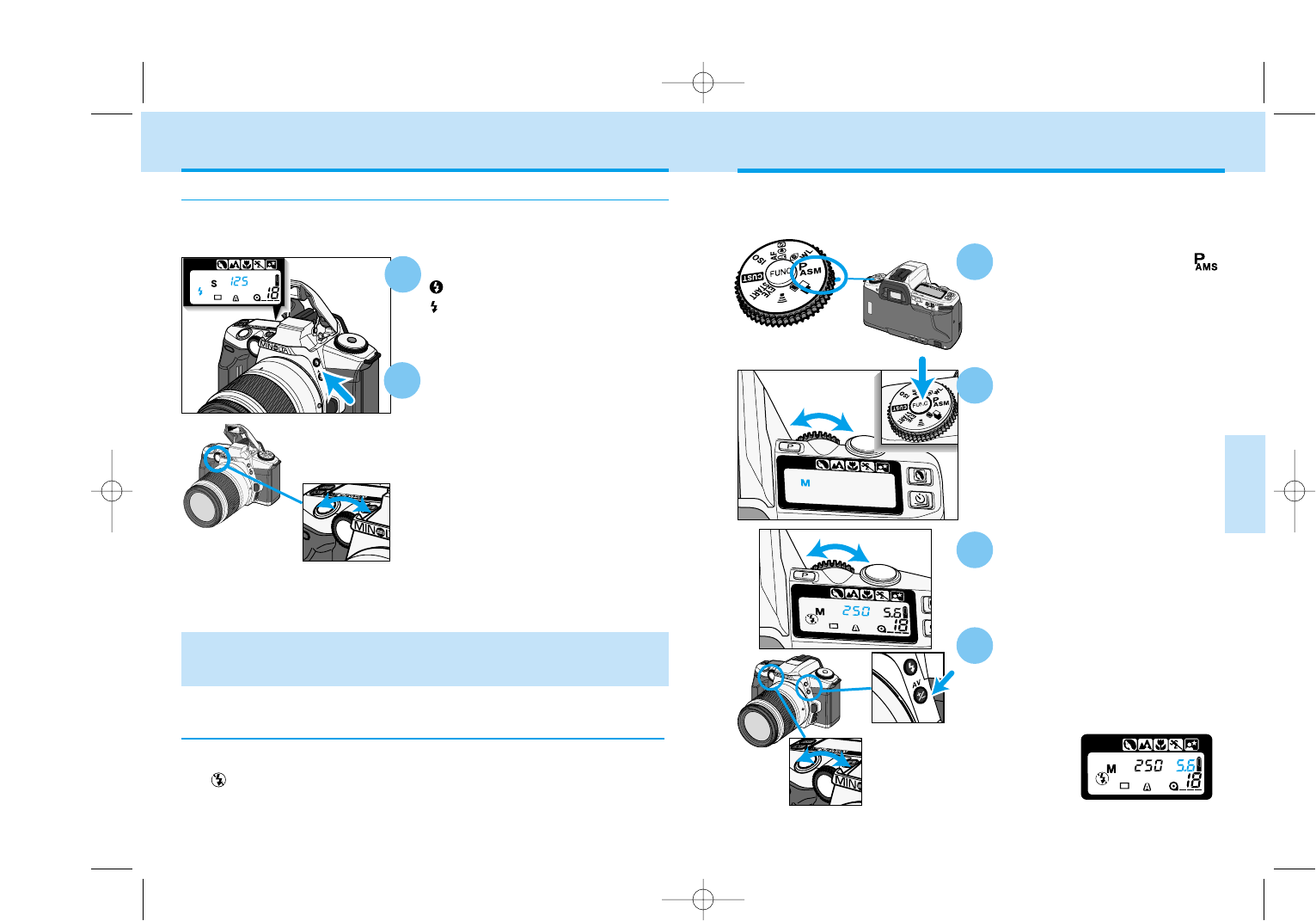
Push the built-in flash down or turn the accessory flash off.
• will be displayed on the data panel.
Flash with A Mode
Press the flash-mode button
to pop-up the built-in flash.
• will appear on the data panel.
• The shutter speed will be set to 1/125
or slower.
• If 125 blinks in the viewfinder and on
the data panel, the light level is too
bright for the selected aperture. Turn
the control dial to change the aperture
until the blinking stops or cancel the
flash.
• A smaller aperture (larger f-number) will result in a shorter flash range.
Refer to flash range (p.36) to determine the range of the built-in flash at
the selected aperture. The use of very small apertures (large f numbers) is
not recommended.
• The will appear in the viewfinder after the picture is taken to confirm the
flash exposure.
Canceling the Flash
Release the function button.
Turn the control dial to select
the aperture.
• If 4000 or 30” blinks on the data panel,
the aperture setting is beyond the
camera’s shutter speed range. Turn the
control dial until the shutter-speed
display stops blinking.
• To return to P mode, repeat step 1 and 2 until P appears on the data
panel.
• To return to P mode and fully-automatic operation, press the program-reset
button.(p. 30)
• Press the depth-of-field preview button to see the effect of the change in
aperture (p.58).
3
A MODE - APERTURE PRIORITY
In A mode, flash will not fire automatically. When you want to use flash,
pop-up the built-in flash or attach an accessory flash.
9222-2163-11 MM-B108 (E).qxd 01.8.3 16:11 Page 56
59
CREATIVE
EXPOSURE
58
Focus on the subject and set
the aperture.
Press the depth-of-field
preview button.
• The lens will stop down to the selected
aperture.
• Preview is cancelled when the depth-
of-field button is released.
Depth-of-field can be increased by :,
• Using smaller apertures.
• Using short focal length lenses.
• Moving farther away from your subject.
Depth-of-field Preview
1
Custom Function Notes
Cust-6: Focus-hold button on Minolta lenses can be used for focus lock
(1), continuous-advance exposure bracketing (2) or depth-of field preview
(3) (p.110).
2
To check how much of your scene will appear in focus, press the depth-
of-field preview button. The lens will stop down to the aperture that
appearing on the display.
• The viewfinder may appear dark at larger f-number (smaller lens
opening). The aperture is always at its brightest setting when looking
through the viewfinder; the aperture is stopped down during exposure.
• Do not turn the focusing ring while pressing the depth-of-field button.
• Changing the aperture while pressing the depth-of-field preview button,
does not affect the preview image. Depth of field can only be previewed
after the aperture is set.
• If you press the depth-of-field preview button after pressing the shutter-
release button partway down and glows in viewfinder, the shutter can
be released.
A MODE - APERTURE PRIORITY
While pressing the
function button , turn the
control dial until S appears
on the data panel.
In S mode, you select the shutter speed and the camera automatically
sets the aperture required for proper exposure. Use S mode when you
want to control the blur caused by subject movement or the stop the
motion of the subject.
Turn the function dial to .
S MODE – SHUTTER PRIORITY
Release the function button. Turn the control dial to
select the shutter speed.
• The shutter speed range is from 1/4000 to 30 seconds.
If the aperture display blinks,
the shutter speed is outside
the aperture range of the
lens. Turn the control dial
until the blinking stops.
Fractions of a second are
displayed without a
numerator. The number
125 displayed stands for
1/125th of a second.
“ indicates full
seconds. 2” is two
seconds.
3
1
2
9222-2163-11 MM-B108 (E).qxd 01.8.3 16:11 Page 58
60 61
CREATIVE
EXPOSURE
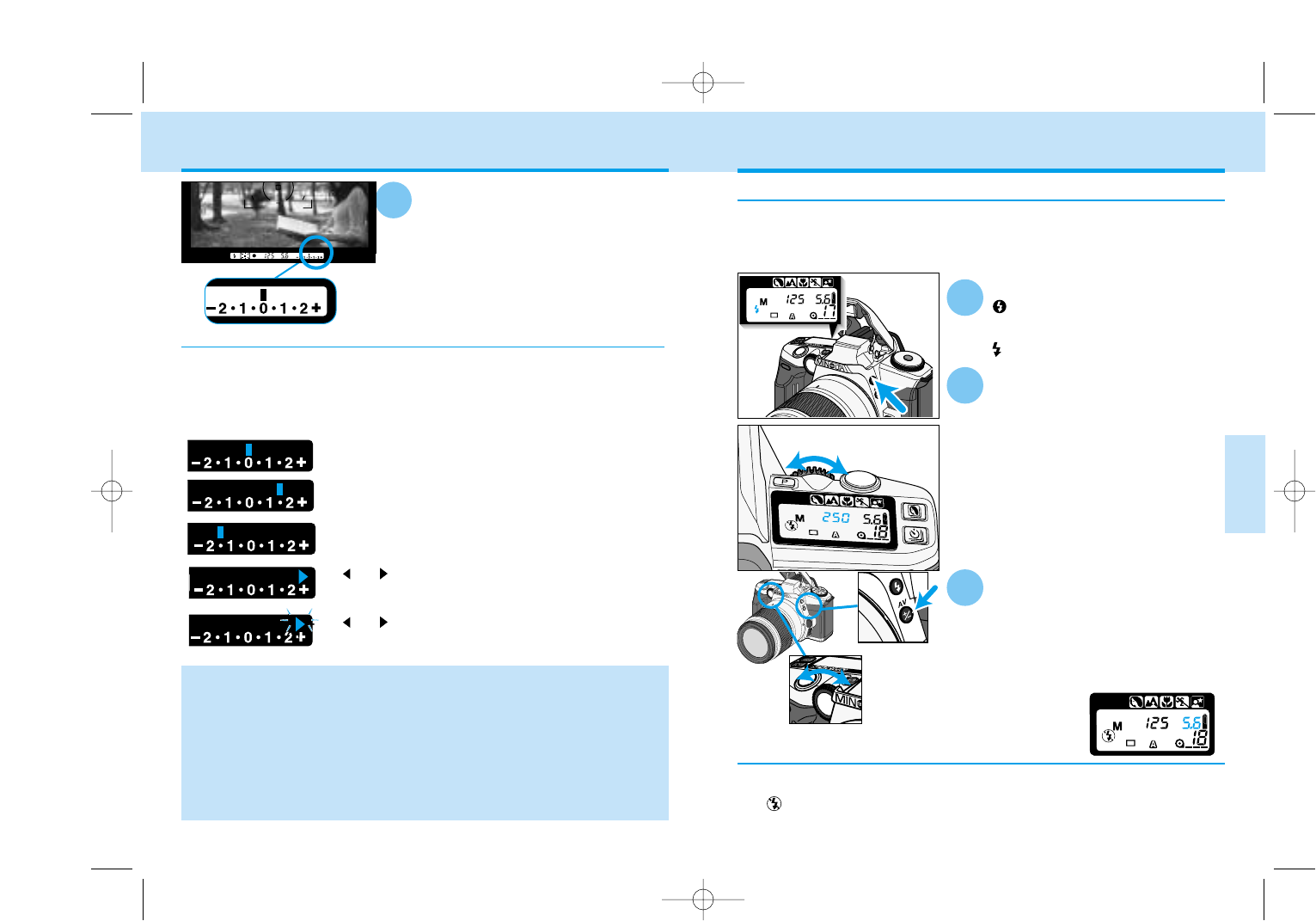
M MODE – MANUAL
To select the shutter speed,
turn the control dial .
• The shutter-speed range is from
1/4000 to 30 seconds.
To select the aperture, turn
the control dial while
pressing the exposure-
compensation button.
• The aperture range depends on the
lens.
M mode gives you full control over exposure. The viewfinder’s Ev scale
displays the difference between your shutter speed and aperture
settings and the exposure determined by the camera’s metering system.
Press the flash-mode button
to pop-up the built-in flash.
• will appear on the data panel.
Push the built-in flash down or turn the accessory flash off.
• will be displayed on the data panel.
Flash with S Mode
• Shutter speeds greater than 1/125 can be achieved using the high-speed
sync function with 5600 HS(D), 3600HS(D), or 5400HS external flash units
(sold separately) (p.97).
Canceling the Flash
In S mode, the flash will not fire automatically. When you want to use
the flash, pop-up the built-in flash or attach an accessory flash.
1
Turn the control dial to select
the shutter speed.
• The maxium shutter speed is 1/125 sec
when using flash.
• The camera automatically sets the
aperture for the selected shutter
speed.
• With larger aperture numbers (smaller
lens opening), the subject will be out of
flash range. The use of smaller
aperture numbers (larger lens opening)
is recommended. See the flash range
(p. 36).
2
S MODE – SHUTTER PRIORITY
3
Turn the function dial to .
1
While pressing the function
button, turn the control dial
until M appears on the data
panel. Release the function
button.
2
4
Control dial
Exposure-
compensation
button
Control dial Continued on next page
9222-2163-11 MM-B108 (E).qxd 01.8.3 16:11 Page 60
Ev Scale
Control dial
Canceling the Flash
63
CREATIVE
EXPOSURE
62
Press the flash-mode button
to pop-up the built-in
flash.
• will appear on the data panel.
In M mode, the flash will not fire automatically. When you want to use the
flash, pop-up the built-in flash or attach an accessory flash.
• The camera’s automatic flash metering system will ensure proper
exposure.
Push the built-in flash down or turn the accessory flash off.
• will be displayed on the data panel.
To select the shutter speed,
turn the control dial.
• The maxium shutter speed is 1/125 sec
when using flash. The shutter speeds
slower than 1/125 can be used
• Shutter speeds greater than 1/125
can be achieved using the high-
speed sync (p. 97) function with 5600
HS(D), 3600HS(D), or 5400HS
external flash units (sold separately).
To select the aperture, press
the exposure-compensation
button while turning the
control dial .
• Refer to the flash range on page 36 to
determine the aperture setting.
Flash with M mode
1
2
M-MODE – MANUAL
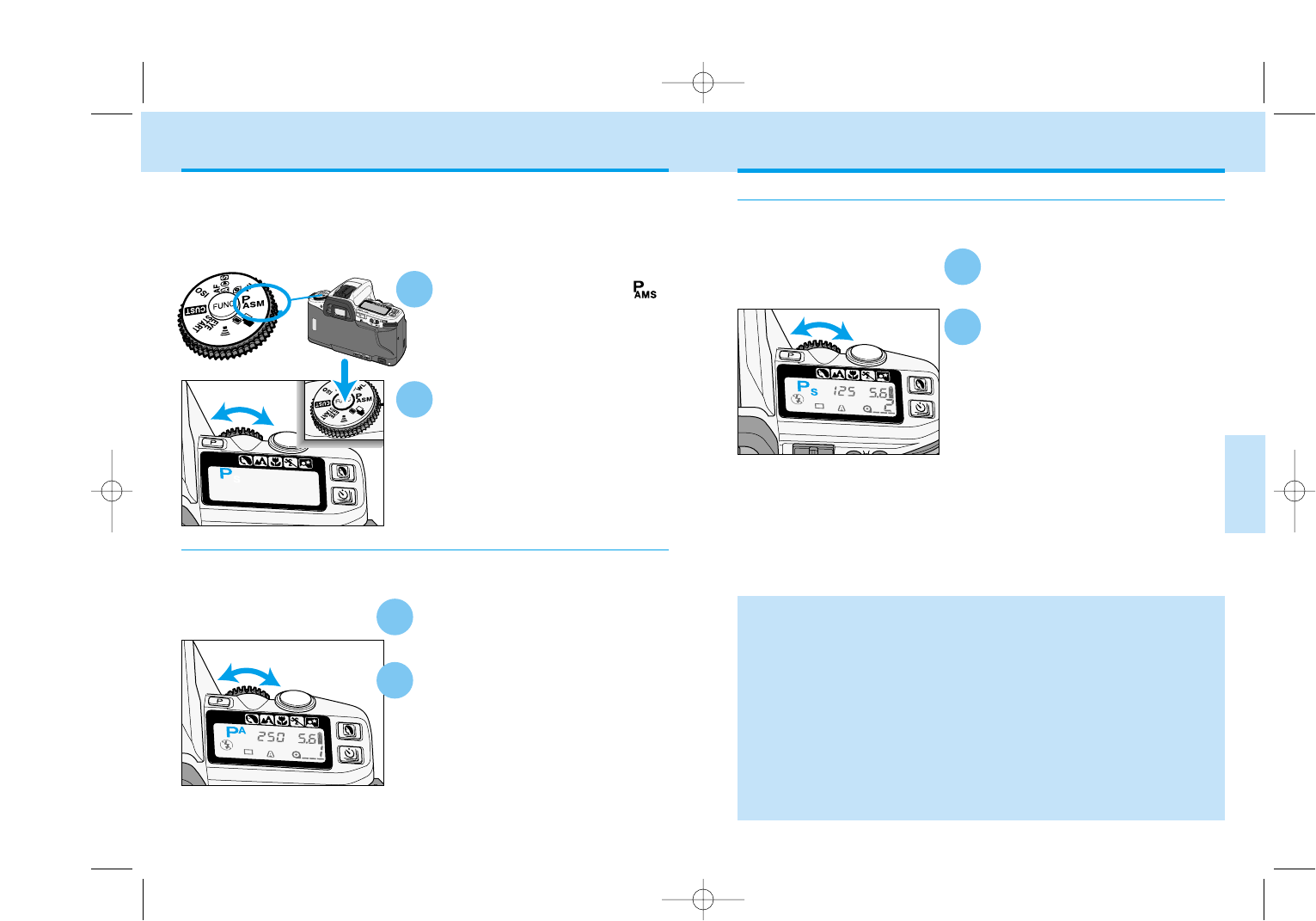
Your settings match the recommended exposure.
Your settings will overexpose the metered area by
1.5 Ev.
Your settings will underexpose the metered area by
1.5 Ev.
or will glow on the Ev scale if the set exposure
will over or underexpose the subject by 2.5.
Ev Scale in the Viewfinder
Use the viewfinder’s Ev Scale
to compares your exposure
setting with the camera’s
meter reading.
5
• Any changes with exposure-compensation is canceled temporarily in M
mode. If exposure compensation was set before switching to M mode, it
will be reapplied when the exposure mode is changed back to another
mode.
•Ev stands for exposure value. A change in one Ev adjusts the exposure by
a factor of two. If your exposure is 1/30 sec. at f5.6 and is overexposed by
1 Ev, changing the shutter speed to 1/60 sec will correct the exposure. The
control dial adjusts the shutter speeds and aperture values in 0.5 Ev
increments. One Ev is equivalent to one stop.
Exposure-
compensation
button
3
The Ev scale displays the Ev difference between your settings and the
exposure determined by the camera. The 0 position (null point)
represents the recommended exposure using the selected metering
pattern.
•The Ev scale is marked in 0.5 increments.
or will blink on the Ev scale if the set exposure
will over or underexpose the subject by 3.0.
9222-2163-11 MM-B108 (E).qxd 01.8.3 16:11 Page 62
65
CREATIVE
EXPOSURE
64
PS Mode
Set the camera to custom 8-3.
See page 111 for instructions.
1
Press the shutter-release
button partway down to
display the shutter speed and
aperture value. Turn the
control dial to change the
shutter speeds.
• The aperture is automatically adjusted
to ensure correct exposure.
2
• The built-in flash and accessory flashes cannot be used with PAor Ps
modes. PAand Ps modes are canceled when the built-in flash is up or an
accessory flash is on. The PAand Ps custom settings are still active and
can be used when the built-in flash or accessory flash is turned off.
• To turn off the PA/Ps function, change the custom setting to 8-1. Turning
the function dial to other modes,or poping up the built-in flash will
temporary cancel the PA/Ps mode.
• When an operation is not made for five seconds, the aperture display (Ps)
or the shutter speed display (PA) will go blank on the data panel. A few
seconds later, the S/A on the data panel will turn off; the camera returns to
P mode. PA/Ps can be activated again by simply pressing the shutter-
release button partway down to display the shutter speed and aperture
display and then turn the control dial to reactivate the PA/Ps mode.
Set the camera to custom 8-2.
See page 111 for instructions.
Press the shutter-release
button partway down to display
the shutter speed and aperture
value. Turn the control dial to
change the aperture.
• The shutter speed is automatically
adjusted to ensure correct exposure.
While pressing the function
button, turn the control dial
until P appears on the data
panel.
Select P mode when you want to give your full attention to your subject and
composition by letting the camera control both the shutter speeds and aper-
ture. The P mode software analyzes the subject’s size, motion, and distance
as well as the focal length of the lens, then controls the shutter speed and
aperture to correctly expose the scene.
Turn the function dial to .
P MODE
2
PAMode
The aperture can be changed in P mode with the Custom 8 -2
setting.(p.111).
1
2
1
The shutter speed can be changed in P mode with the Custom 8 - 3 set-
ting.(p.111).
9222-2163-11 MM-B108 (E).qxd 01.8.3 16:11 Page 64
67
66
DETAILED
OPERATION
In this section you can move on to the detailed
operation to expand your expertise. Read those pages
pertaining to the areas of your interest and need.
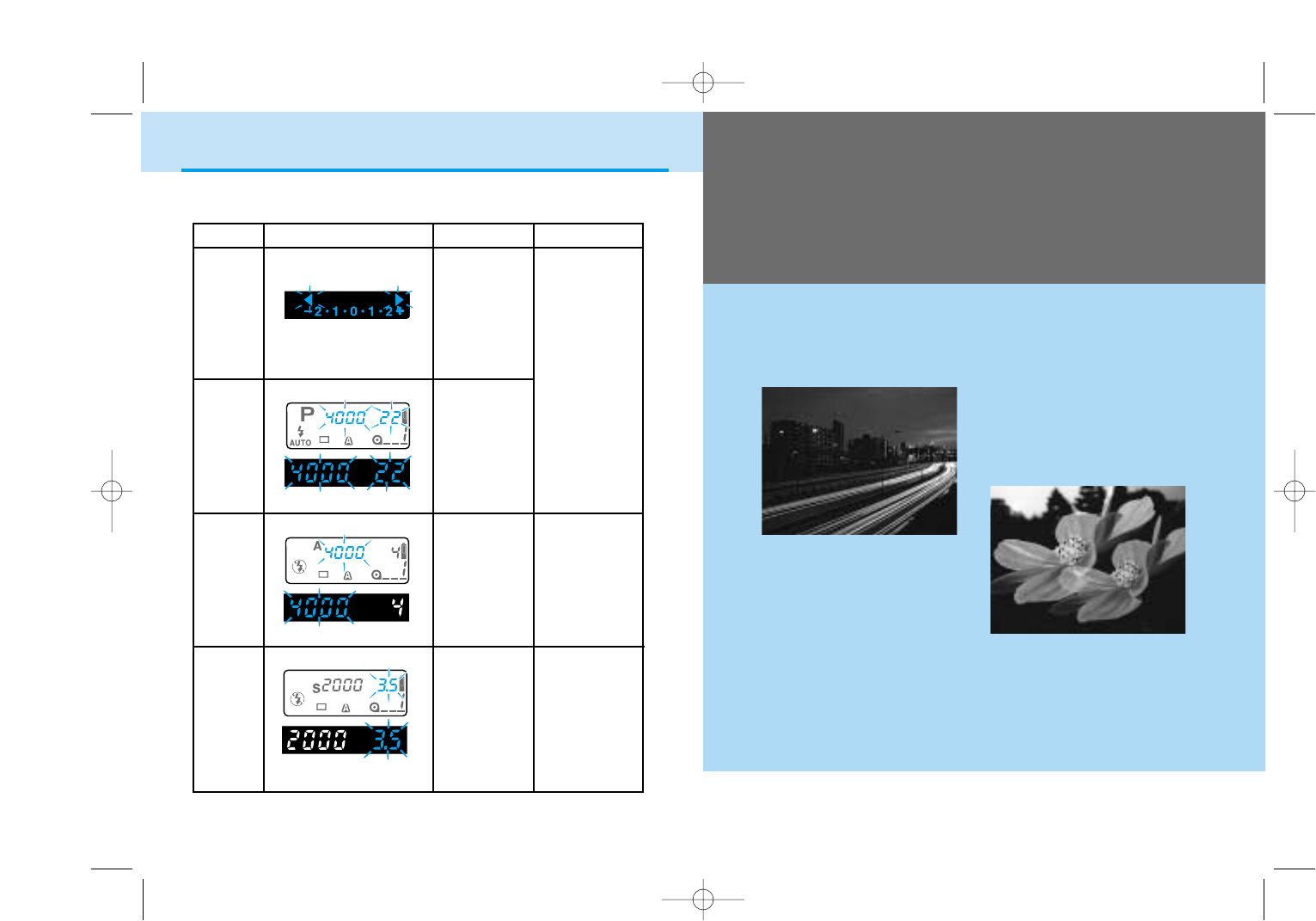
MODE DISPLAY CAUSE ACTION
P
A
S
M
Bright Light
Use slower
speed film, a
neutral density
(ND) filter, or
reduce the light
level of your
surroundings.
Low Light
Use higher
speed film or a
flash.
P
The required
exposure is
beyond the
shutter-
speed and
aperture
range.*
A/PA
The required
exposure is
beyond the
shutter-
speed range.
Select a larger
or smaller
aperture until
the display stops
blinking.
S/Ps
The required
exposure is
beyond the
aperture
range of the
lens.
Select a faster
or slower shutter
speed until the
display stops
blinking.
Indicators will blink in the viewfinder or data panel when the level of
available light is beyond the camera’s control.
* The warnings may appear with subject programs.
EXPOSURE WARNINGS
The light
level is
beyond the
camera’s
metering
range.*
Taking Time Exposures (p.81)
Multiple Exposures (p.90)
9222-2163-11 MM-B108 (E).qxd 01.8.3 16:11 Page 66
69
DETAILED
OPERATION
68
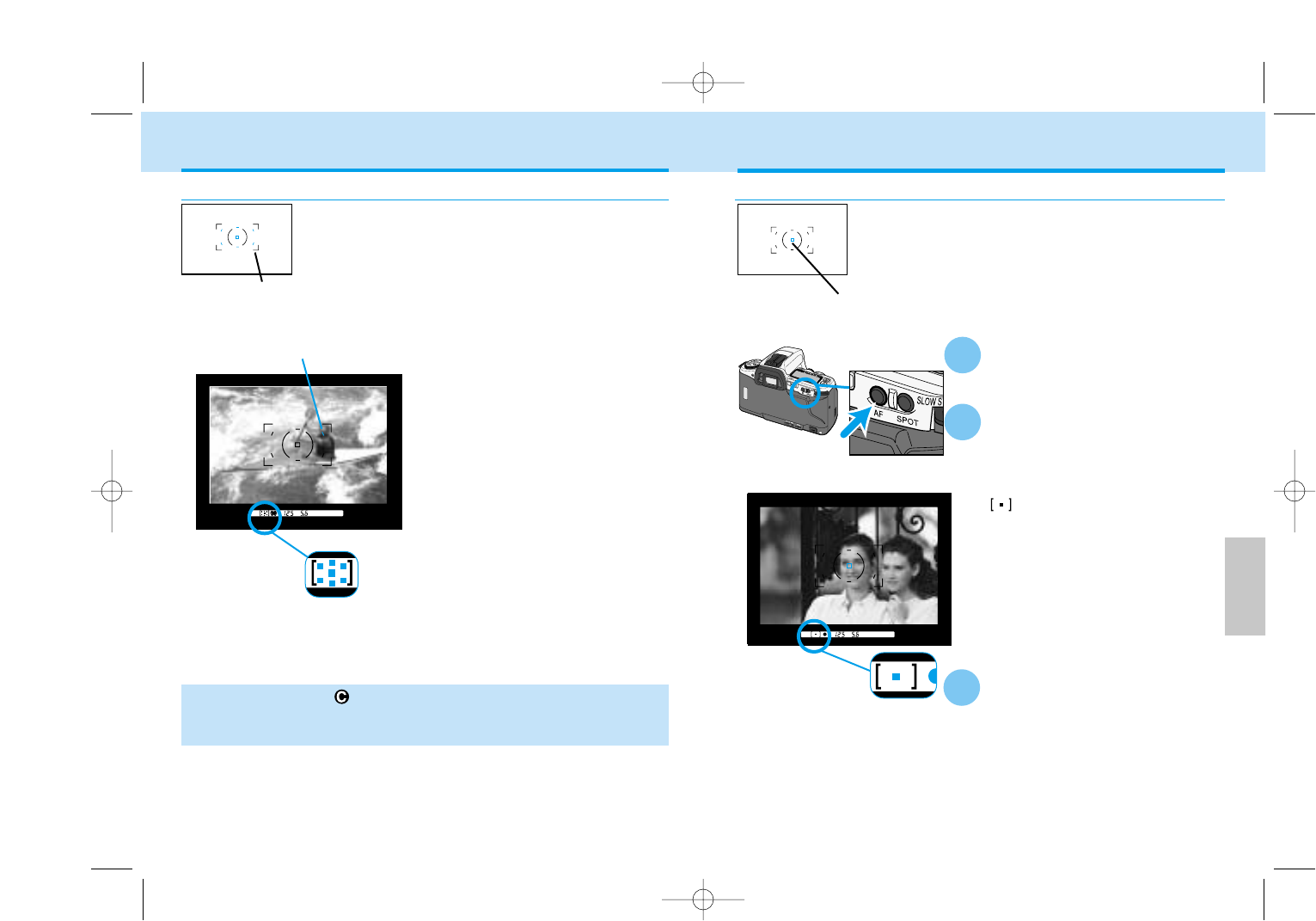
Place your subject inside the
spot focus area.
Press and hold the spot AF
button.
• The spot focus area in the viewfinder
will glow for a second after focus is
confirmed.
• will appear in the viewfinder,
indicating the center focus sensor is
being used.
• Focus and exposure remain locked
until the spot focus button is released.
While holding the spot AF
button, press the shutter-
release button all the way
down to take the picture.
• When you release the spot AF button,
the wide focus frame will be
displayed.
Spot Focus Area
1
2
3
Spot focus area
Press the shutter-release but-
ton partway down to activate
the wide focus area.
• A local focus area LED or spot focus
area LED in the viewfinder will glow
to indicate the point of focus within
the wide focus area for less than one
second.
• When the subject is moving, LEDs
may not illuminate.
• All the focus area indicators in the
viewfinder turn on when the wide
focus frame is being used.
Wide focus frame
Wide Focus Area
• With continuous AF (p.73) or the sports subject-program mode (p.43),
the local focus area LEDs will not glow in the vewfinder. The LEDs may
not glow in continuous advance.
Custom Function Notes
Cust-13: When focus is confirmed, the local focus area LEDs will illuminate for
approx. 0.3s (1), or for approx. 0.6s (2), The local focus area LEDs will only
illuminate when an area is selected by the user (3) (p.113).
FOCUS AREA
Local focus area LED
Spot AF button
The wide focus frame uses seven focus sensors
(the spot focus area and six local focus areas) to
automatically focus on your subject. The wide
focus area provides greater framing flexibility and
makes it easier for the camera to focus on
moving subjects.
By simply pressing the spot AF button, the center
spot focus area is selected. The focus and
exposure settings will be made with the center
spot focus area.
Focus area indicator
9222-2163-11 MM-B108 (E).qxd 01.8.3 16:11 Page 68
71
DETAILED
OPERATION
70
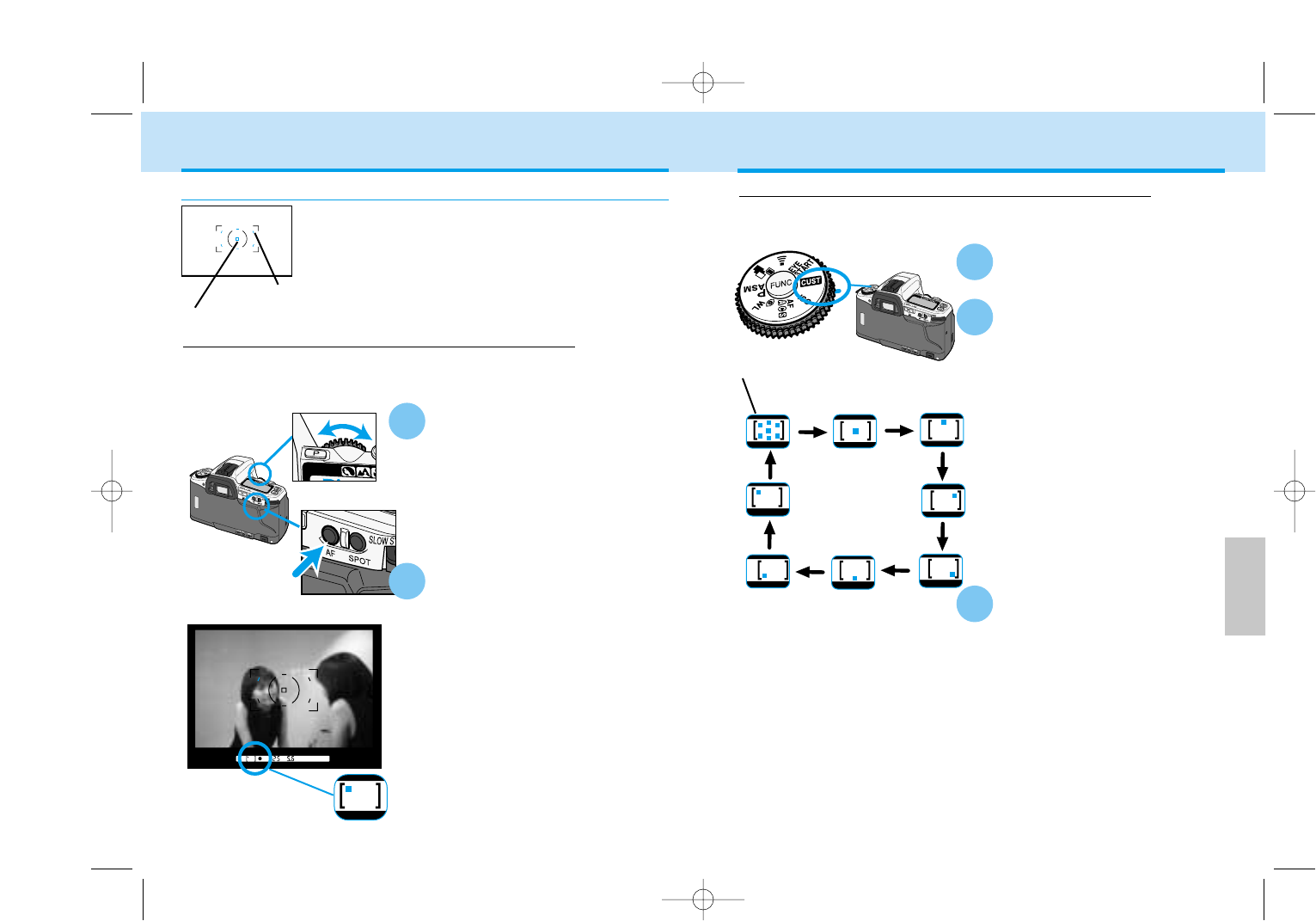
While holding the spot AF
button, turn the control dial
to select the focus area.
• As the local focus areas are
selected the corresponding LED will
glow in the viewfinder.
• The selected local focus area is also
indicated by the focus area
indicator.
Press the shutter-release
button all the way down to
take the picture.
• The selected focus area will remain
active until changed using the spot
AF button and control dial.
Selecting Local Focus Areas with the Custom Function
Set Custom 9-2. See the
page 107.
When the focus-area custom function is set, the focus area in use will
not change. The focus area can be changed with the spot AF button.
• The focus areas will cycle as
indicated in the diagram when
turning the control dial clockwise.
Turning the control dial
counterclockwise will cycle through
the focus areas in reverse order.
Custom Function Notes
Cust-9: Local focus areas are selected with the control dial while pressing the
spot AF button. When the spot AF button is released, the wide focus area is
active(1). Wide focus area and local focus areas set with the control dial while
pressing the spot AF button (2). To switch between the spot focus area and
wide focus frame every time the spot AF button is pressed (3) (p.111).
While holding the spot AF
button, turn the control dial
to select a local focus area.
• As the local focus areas are
selected, the corresponding LED will
glow in the viewfinder.
• The selected local focus area is also
indicated by the focus area indicator.
While holding the spot AF
button, press the shutter-
release button all the way
down to take the picture.
• If the spot AF button is released,
selected local focus area is
cancelled and the wide focus area is
activated.
FOCUS AREA
Local Focus Areas
1
Selecting Local Focus Areas with the Spot AF button
Any of the seven local focus sensors (the spot
focus area and six local areas) can be
individually selected. Use the local focus areas
with off-center subjects when changing the
camera position is difficult such as when it is
attached to a tripod.
Spot focus area
Local focus area
Spot AF button
Control dial
2
Wide focus frame
is selected
2
1
This is the camera’s default setting. Changing between the local focus
areas and the wide focus area is simple when using the spot AF button.
3
9222-2163-11 MM-B108 (E).qxd 01.8.3 16:11 Page 70
7372
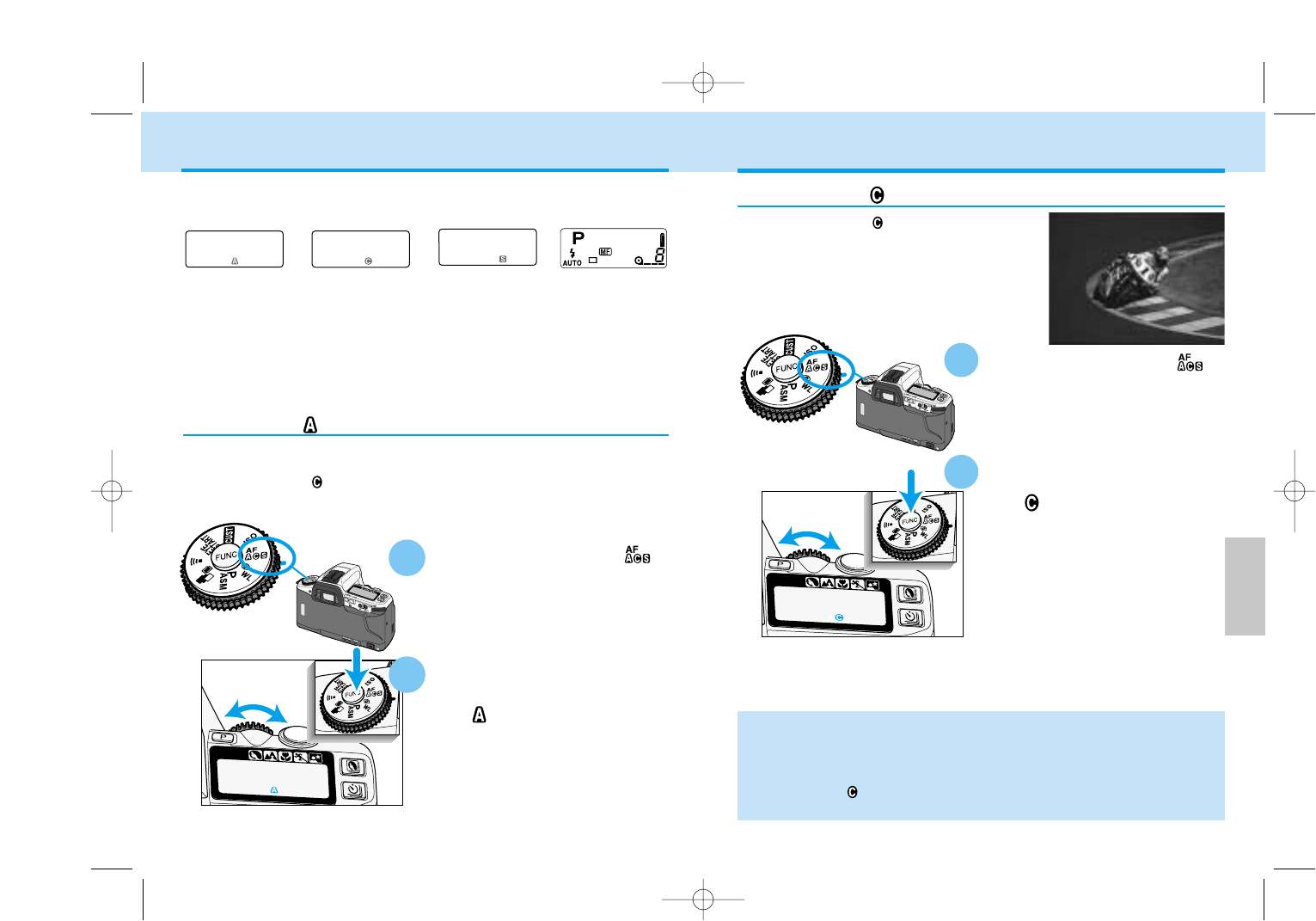
Continuous AF
Use continuous AF when shooting sporting
events or when the subject is in constant
motion.
Turn the function dial to .
While pressing the function
button, turn the control dial
until appears on the data
panel.
• When taking pictures, the camera continues to focus while the shutter-
release button is pressed partway down. Focus lock cannot be used with
continuous AF.
• Focus can be locked with the spot AF button in continuous AF.
• Continuous AF does not use audio signals or local focus area LEDs to
indicate focus.
FOCUS MODES
• All the autofocus modes work with the exposure modes: P A S M.
• The subject programs use automatic AF, except for sports mode, which
uses continuous AF.
Automatic AF
Designed to work well in most situations, automatic AF is suited to
events that have both moving a static subjects. When the subject is mov-
ing, continuous AF is used; when static, single-shot AF is employed.
Turn the function dial to .
While pressing the function
button, turn the control dial
until appears on the data
panel.
1
2
Manual Focus
Continuous AF Single-shot AFAutomatic AF
Your camera has four focus modes:
DETAILED
OPERATION
2
1
9222-2163-11 MM-B108 (E).qxd 01.8.3 16:11 Page 72
75
DETAILED
OPERATION
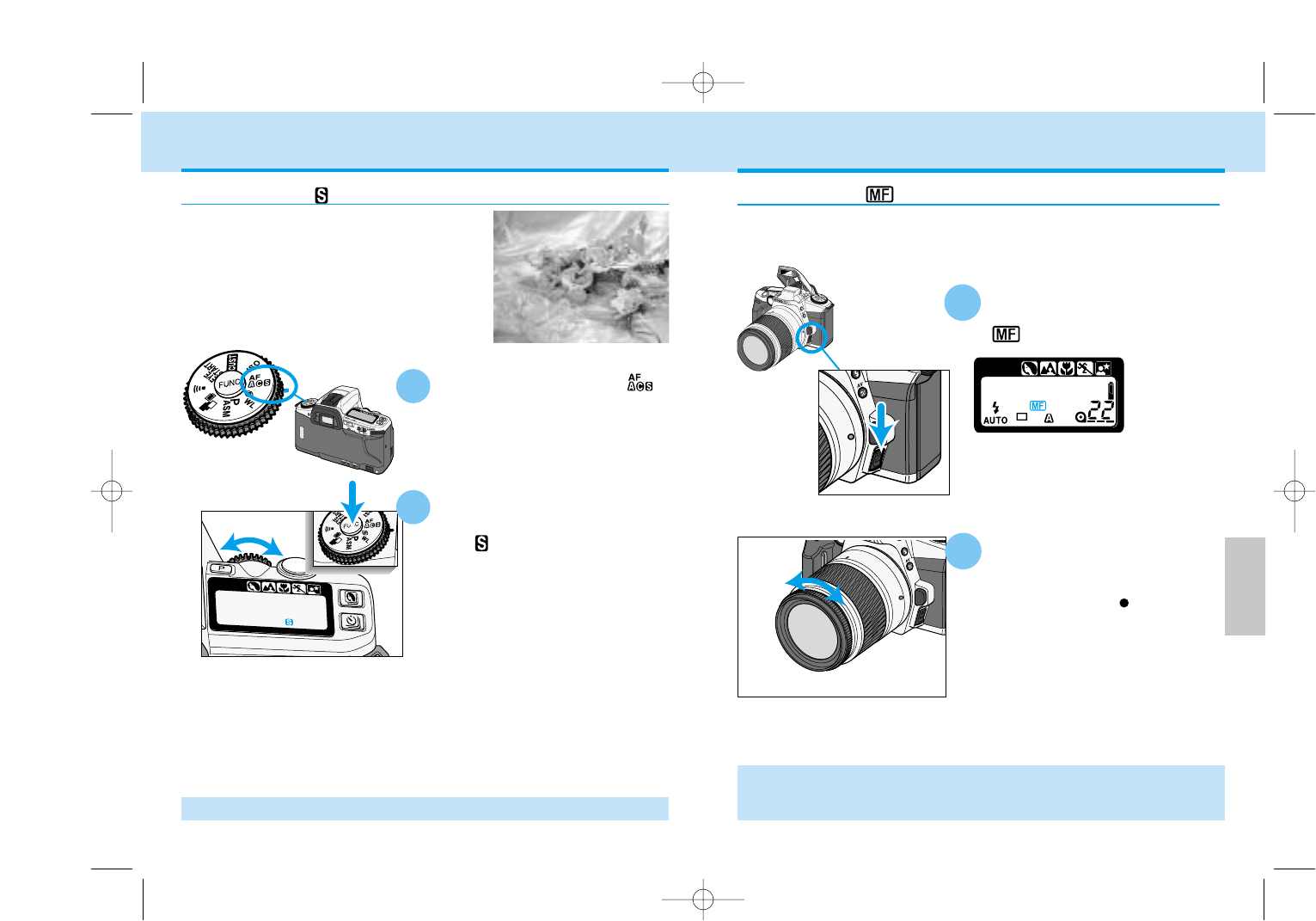
Hold the focus-mode switch
down and release.
•will appear on the data panel.
Turn the focusing ring until
your subject appears sharp.
• While pressing the shutter-release
button partway down, appears in the
viewfinder when the subject in the focus
frame is in focus.
• To return to the autofocus mode, push
the focus-mode switch down a second
time
The autofocus system can be used to monitor focus and indicate when
a subject in the focus frame is in focus. The lens can be focused
manually when autofocus and focus lock is not possible.
Manual Focus
1
2
•In manual focus mode with any lens except the ‘D’ series lenes, the camera
switches to center-weighted metering. The metered exposure may be differ-
ent between autofocus and manual focus.
74
Single-Shot AF
Turn the function dial to .
While pressing the function
button, turn the control dial
until appears on the data
panel.
•Focus lock (p.34) can be used with single-shot AF.
FOCUS MODES
1
Use single-shot AF when photographing
static subjects.
Focus-mode switch
2
9222-2163-11 MM-B108 (E).qxd 01.8.3 16:11 Page 74
77
DETAILED
OPERATION
76
Subject on the right
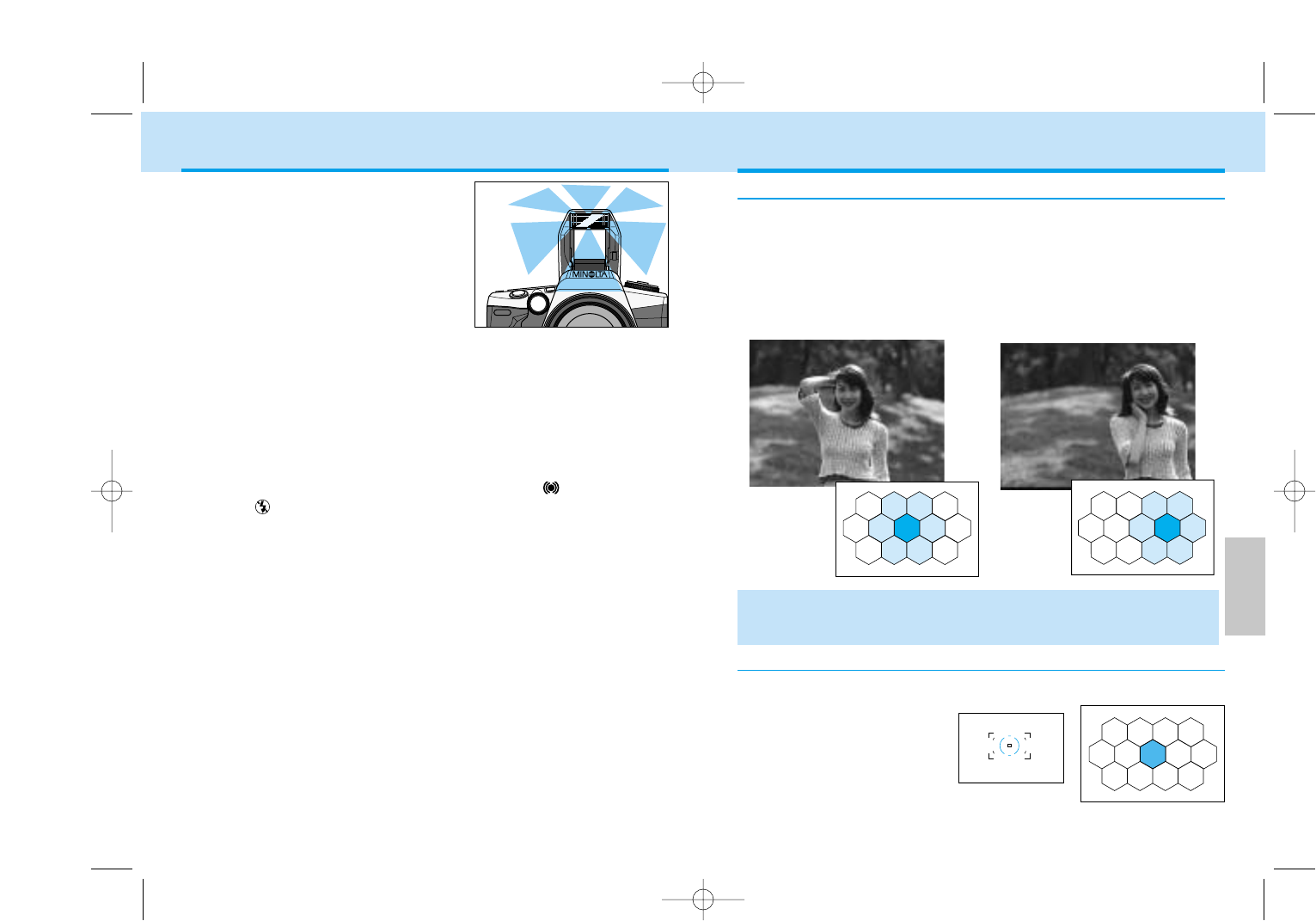
When pressing the spot AE-lock button, only the spot metering area will
be used to calculate the exposure.
Spot metering area
EXPOSURE – Metering System
This is the camera’s standard metering mode and is appropriate for most
photographic situations.
• 14-segment honeycomb-pattern metering uses information from the
autofocus system to set the metering pattern according to the position of
the main subject. The light metered by each segment is then evaluated to
determine the degree of spot-lighting or backliting in the scene.
Subject in the center
14-Segment Honeycomb-Pattern Metering
Spot Metering
•In manual focus mode with any lens except the ‘D’ series lenes, the camera
switches to center-weighted metering. The metered exposure may be differ-
ent between autofocus and manual focus.
AF ILLUMINATOR
The built-in flash is used as an AF
Illuminator. When the scene is too dark for
the camera to focus, the built-in flash fires
a few short bursts when the shutter-
release button is pressed partway down to
provide the light necessary for the camera
to focus.
• Pressing the spot AF button can also activate the AF illuminator.
• The range of the AF Illuminator is approximately 1 to 5 m ( 3.3 to 16.5 ft.).
• The AF illuminator will not fire in continuous AF mode or if flash
cancel is selected.
• The AF illuminator may not operate with focal lengths of 300mm or longer.
• The AF illuminator will not operate with 3x-1x Macro Zoom.
• When an accessory flash is attached, the flash will be used as the AF
illuminator in place of the camera’s built-in flash unit.
Custom Function Notes
Cust-11: AF illuminator active (1), AF illuminator disabled (2) (p.112)
9222-2163-11 MM-B108 (E).qxd 01.8.3 16:11 Page 76
79
DETAILED
OPERATION
78
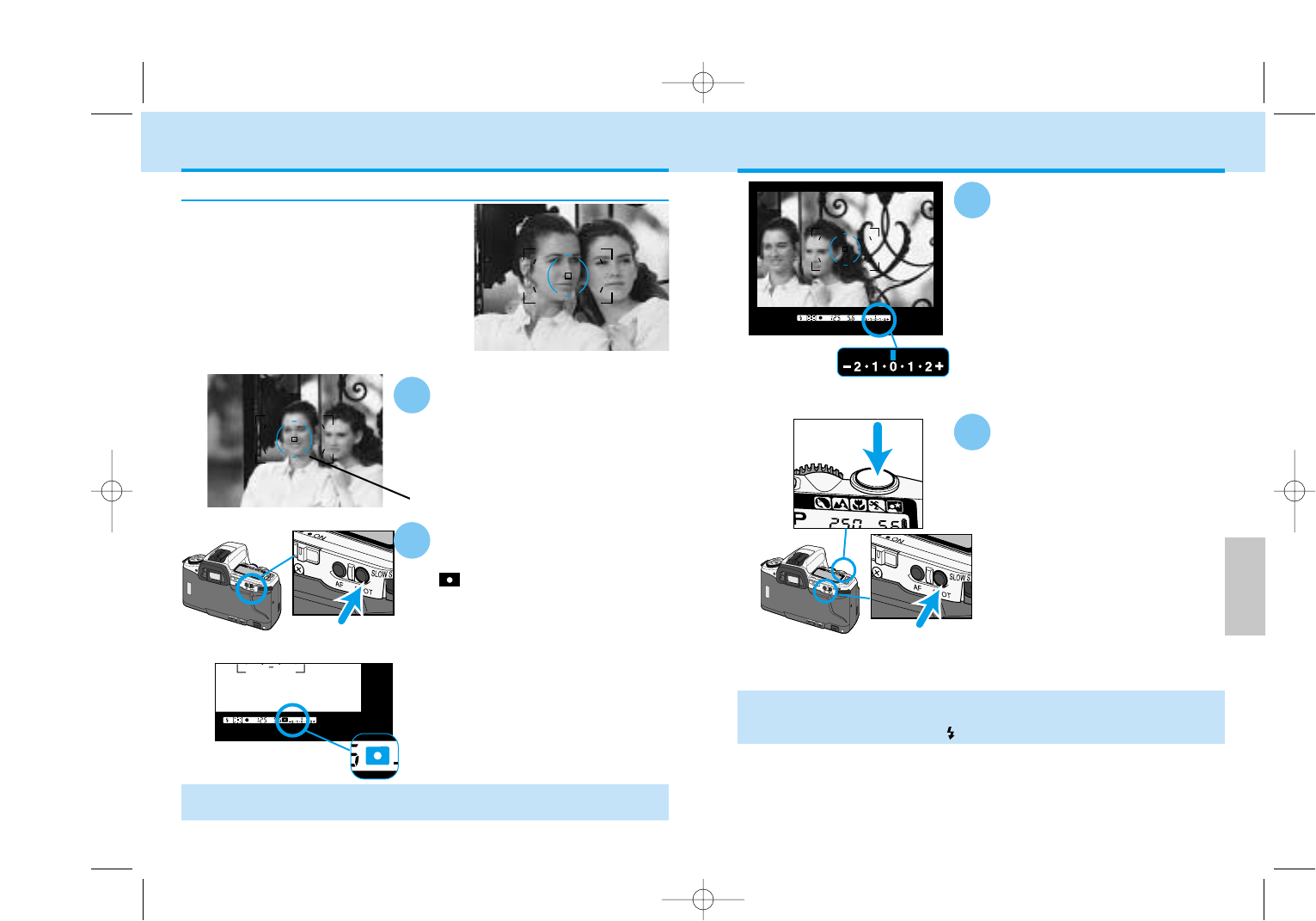
While pressing the AE-lock
button, recompose the
scene.
• The Ev scale will show the
difference in relative brightness
between the metered area and the
object in the spot metering area (p.
80).
EXPOSURE – AE-LOCK
3
While still pressing the AE-
lock button, press the
shutter-release button all the
way down to take the
picture.
• If the spot AE-lock button is not released after taking the picture, the
exposure setting will remain locked.
• Slow-sync is activated when appears in the viewfinder (p.96).
Custom Function Notes
Cust-10: Spot-AE lock: activated when the AE lock button is pressed and held
(1), or activated when the button is pressed once and then canceled when it is
pressed again (2) (p.112).
4
Spot metering uses only the center
honeycomb segment shown by the spot
metering area in the viewfinder. You can
lock the metered exposure without locking
the focus. With a high or low key subject,
an object away from the subject can be
used to set the shutter speed and
aperture. The exposure remains locked
until the spot AE lock button is released.
• When using flash. pressing the spot-AE lock button sets the flash mode to
slow-sync (p.96).
Press and hold the spot AE
lock button.
• will be displayed in the
viewfinder to indicate the exposure
is locked.
Spot-AE Lock
Place the spot metering area
on the area to be metered.
• Make sure the light falling on the
metered area is the same as the light
falling on the subject.
1
Spot metering area
Ev Scale
Spot-AE lock button
2
Spot AE lock button
9222-2163-11 MM-B108 (E).qxd 01.8.3 16:11 Page 78
81
DETAILED
OPERATION
80
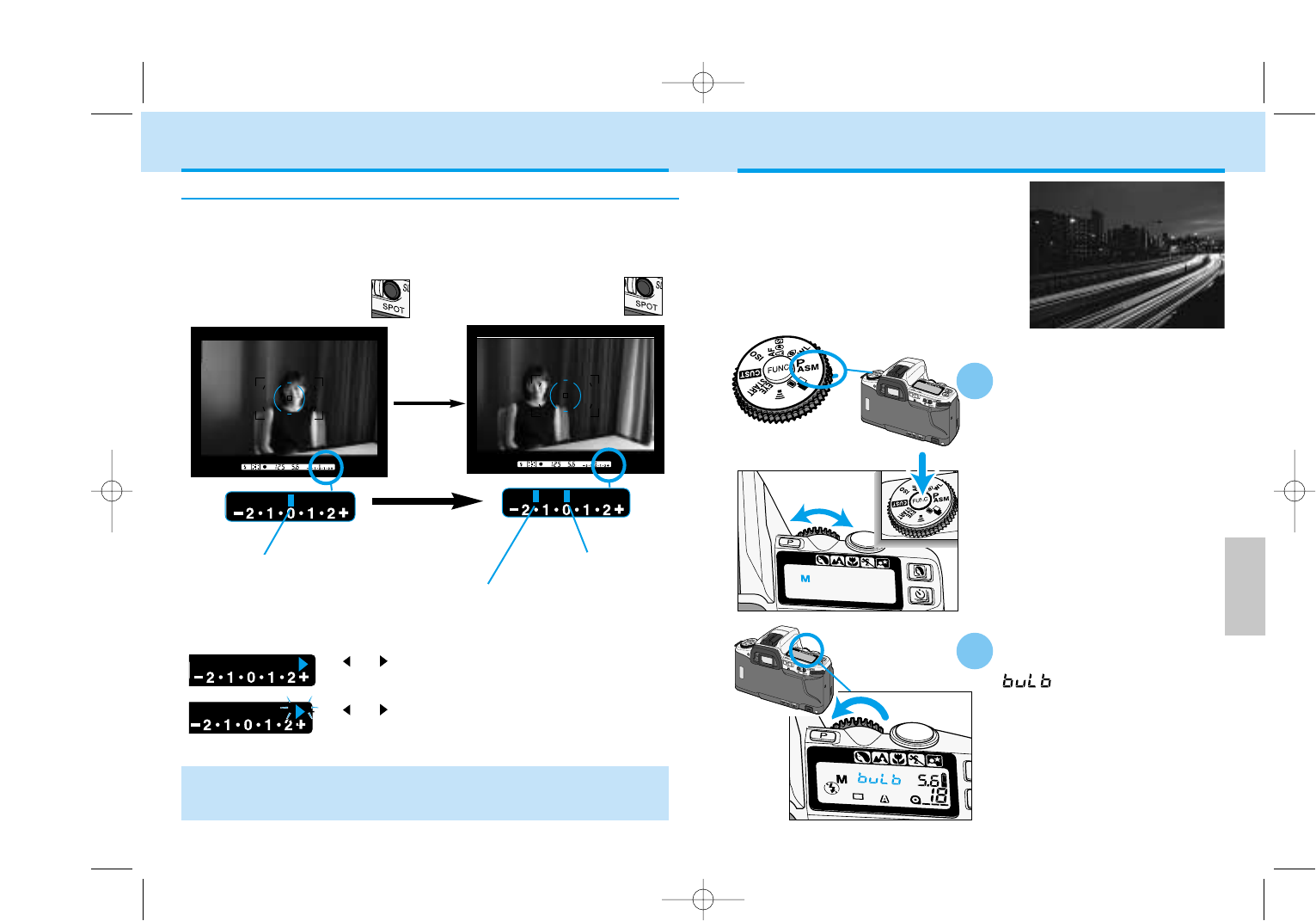
Set the shutter speed to bulb when you
want to take time exposures. When
bulb is selected, the shutter remains
open as long as the shutter-release
button is pressed. The camera’s
exposure meter does not work with
bulb.
Mount the camera on a
tripod. Set the camera to M
mode (p.61).
Turn the control dial
counterclockwise until
appears on the data
panel.
1
2
TAKING TIME EXPOSURES (buLb)
The Ev scale will display the difference between the exposure set
with the spot AE lock and the relative luminance of the subject.
While pressing AE-lock button,
recompose the picture.
Set exposure
Ev Scale Display When Using the Spot-AE Lock
Relative brightness of the object in the
spot metering area
• With slide film, if the difference between the metered area and the subject
area is within ±2 Ev, the subject area will retain detail and will not be
washed out or blocked up.
With the object to be metered
in the spot metering area,
press the AE-lock button.
EXPOSURE – AE-LOCK
Set exposure
Continued on next page
or will glow on the Ev scale if the set exposure
will over or underexpose the subject by 2.5.
or will blink on the Ev scale if the set exposure
will over or underexpose the subject by 3.0.
9222-2163-11 MM-B108 (E).qxd 01.8.3 16:11 Page 80
83
DETAILED
OPERATION
82
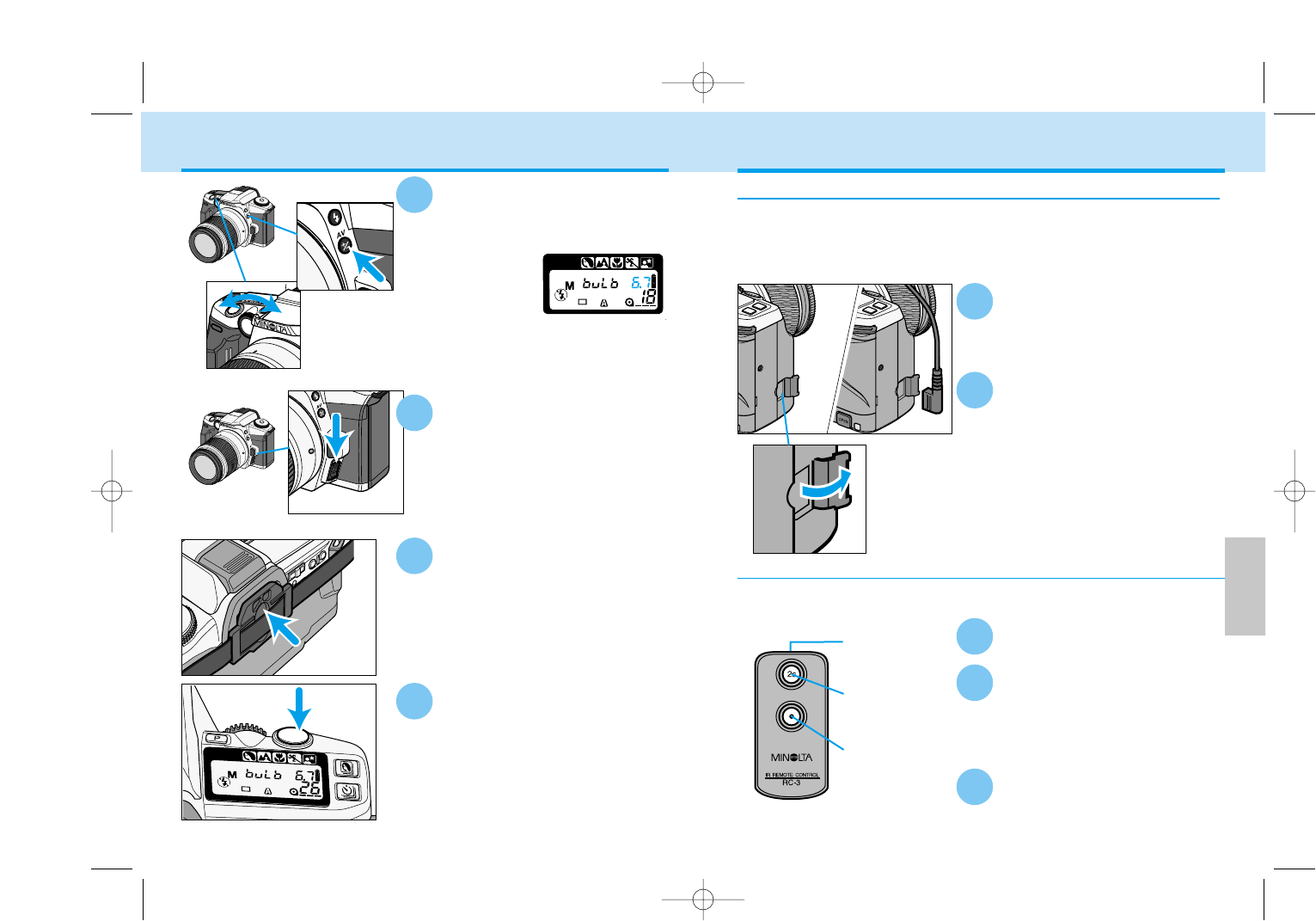
Press and hold the shutter-
release button to take the
picture.
• The shutter remains open as long as
the button is pressed.
Insert the plug into the
terminal.
• When removing the Remote Cord
RC-1000S or RC-1000L, take care
not to pull out the remote-terminal
cover with the Remote Cord.
• The Remote-cord Clip (sold
separately) can be used to attach
the remote cord to the camera
strap.
Attaching the Remote Cord (Sold Separately)
Using the Remote-Control with Bulb(Sold Separately)
Open the remote-control-
terminal cover.
Press release button again
to close the shutter.
1
3
6
2
To reduce the camera shake or for long exposures, the shutter can be
released with the Remote Cord RC-1000S or RC-1000L.
•Do not use the Wireless Controller IR-1N with this camera. Its use may
permanent damage the camera.
To reduce camera shake, use the optional remote-control IR-3. (sold
separately) (p.49).
Set the camera to remote-
control mode (p.49).
1
Press the release button to
open the shutter.
• Hold the remote control near the
sensor on the grip. Take care not to
stand in front of the lens.
2
Firmly press the eyepiece
cap into the eyepiece.
• The eyepiece cap prevents light from
entering through the viewfinder and
fogging the film.
5
Compose the scene and
focus on your subject.
• If the scene is too dark for the
autofocus to operate, press the
focus-mode switch and focus the
lens manually (p. 75).
While pressing the exposure-
compensation button, turn
the control dial to select the
aperture.
3
TAKING TIME EXPOSURES (buLb)
4
Focus-mode switch
Emitter window
Delayed button
Release button
Exposure-
compensation
button
Control dial
9222-2163-11 MM-B108 (E).qxd 01.8.3 16:11 Page 82
85
DETAILED
OPERATION
84
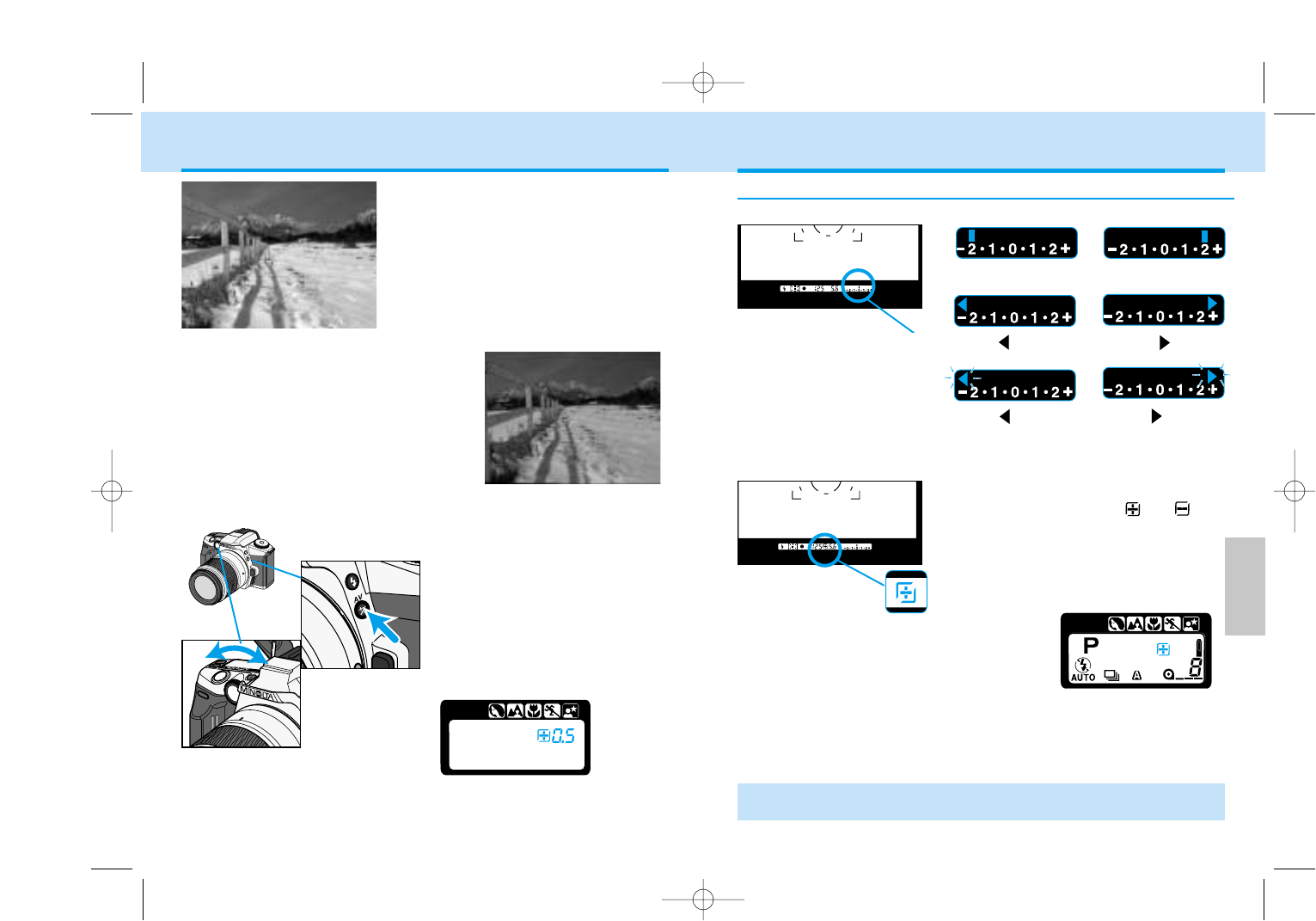
-2.0 +2.0
+2.5 ( glows)
+3.0 ( blinks)
• To cancel exposure compensation, the camera must be reset manually to
0.0 .
Checking Exposure Compensation
The Ev scale shows the amount of compensated.
After releasing the exposure
compensation button, or
remains on the data panel and in
the viewfinder to indicate that the
exposure is being compensated.
-3.0 ( blinks)
-2.5 ( glows)
The scene on the left was underexposed
because of the snow. By compensating
the exposure by +2Ev, the snow appears
white and fresh.
• This effect is most visible with slide film.
• Exposure compensation is not available
in M mode.
The metering system in this camera
averages the scene’s light values to
determine the exposure. This is an
accurate method for scenes with a
normal tones. Bright scenes, such as
snowy landscapes or sandy beaches,
can deceive the camera’s meter and be
underexposed. Dark scenes can be
overexposed.
Metered Exposure
Compensated Exposure
While pressing the
exposure-compensation
button, turn the control dial
until the desired
compensation value appears
on the data panel.
• The metered exposure can be
adjusted by ±3 Ev in 0.5 Ev
increments.
EXPOSURE COMPENSATION
Ev Scale
Exposure-
compensation
button
Control dial
9222-2163-11 MM-B108 (E).qxd 01.8.3 16:11 Page 84
DETAILED
OPERATION
8786
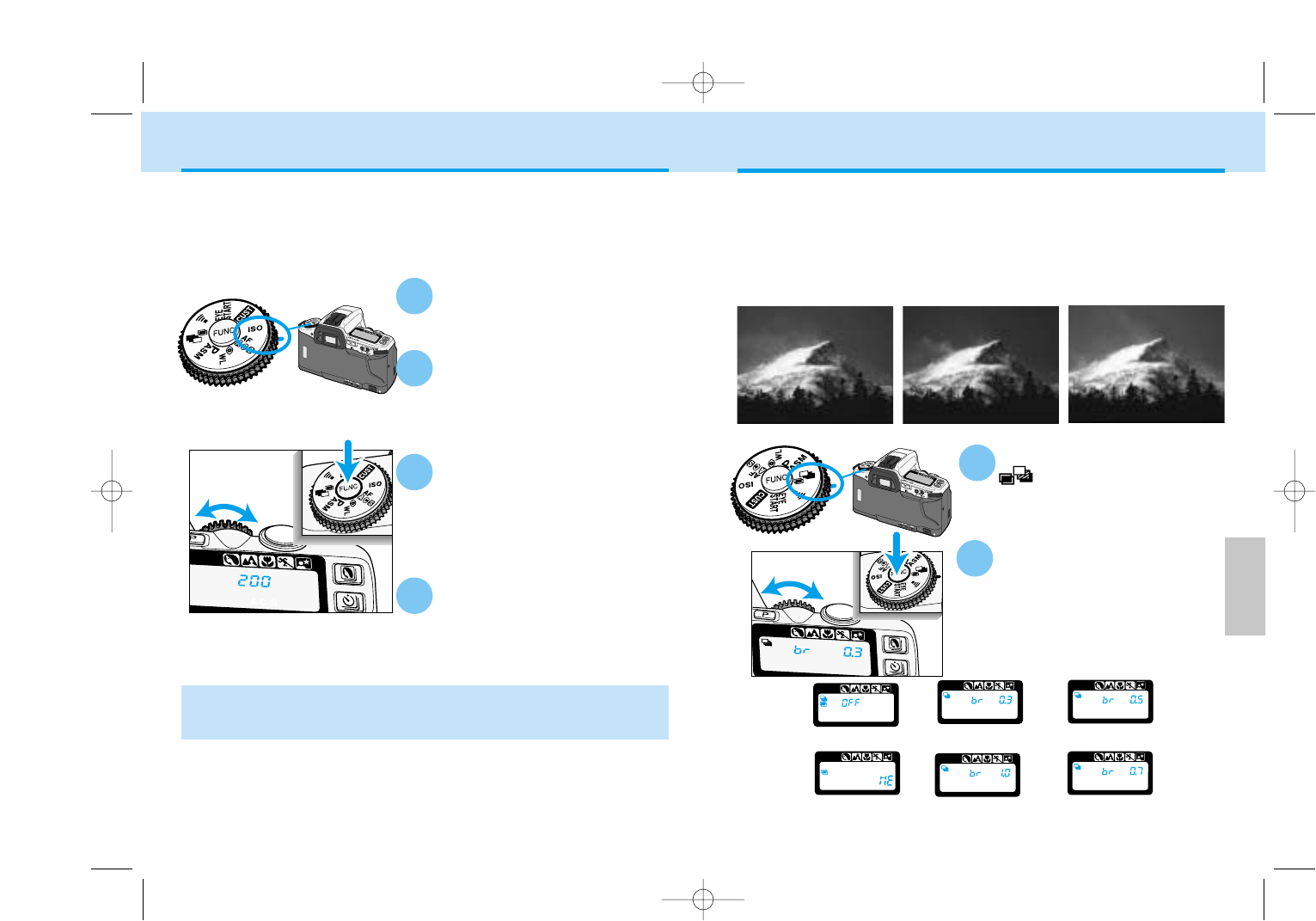
EXPOSURE BRACKETING
Turn the function dial to
.
While pressing the function
button, turn the control dial
to set the bracketing
increment.
• Increments of 0.3, 0.5, 0.7 or 1.0 EV
can be selected.
Bracketing automatically exposes a series of three frames with differing
exposures. Bracket your exposures when shooting slides and other
films with a low tolerance for exposure error.
• The bracket can be set in increments of 0.3, 0.5, 0.7, or 1.0 Ev.
• The flash cannot be used with bracketing.
• Exposure compensation can be used to adjust the bracket series.
Metered Exposure 0.5 Ev Under 0.5 Ev Over
0.7EV
1
2
Multiple
Exposure (p.90)
SETTING THE ISO MANUALLY
While pressing the function
button, turn the control dial
until the desired ISO value
appears on the data panel.
Set the film speed manually when you want to override DX-coded film or
when using non-DX-coded film. Film speeds can be set from ISO 6 to
6400 in 1/3Ev increments.
• Non-DX coded film is initially set to the previous roll’s ISO.
Custom Function Notes
Cust-4: Manual ISO settings will be canceled when the film is rewound (1),
or the manual ISO setting will be stored and applied to future rolls of film
with the same DX-coded ISO (2) (p.109).
Turn the function dial to ISO.
Load the film.
• Exposure compensation in 1/3 Ev increments can be made using the ISO
function. Care should be taken because no warning will be displayed
indicating the ISO has been changed.
Release the function button.
The selected film speed will
be set.
• The data panel returns to the usual
display.
2
3
4
1
OFF 0.3EV 0.5EV
1.0EV
9222-2163-11 MM-B108 (E).qxd 01.8.3 16:11 Page 86
89
DETAILED
OPERATION
88
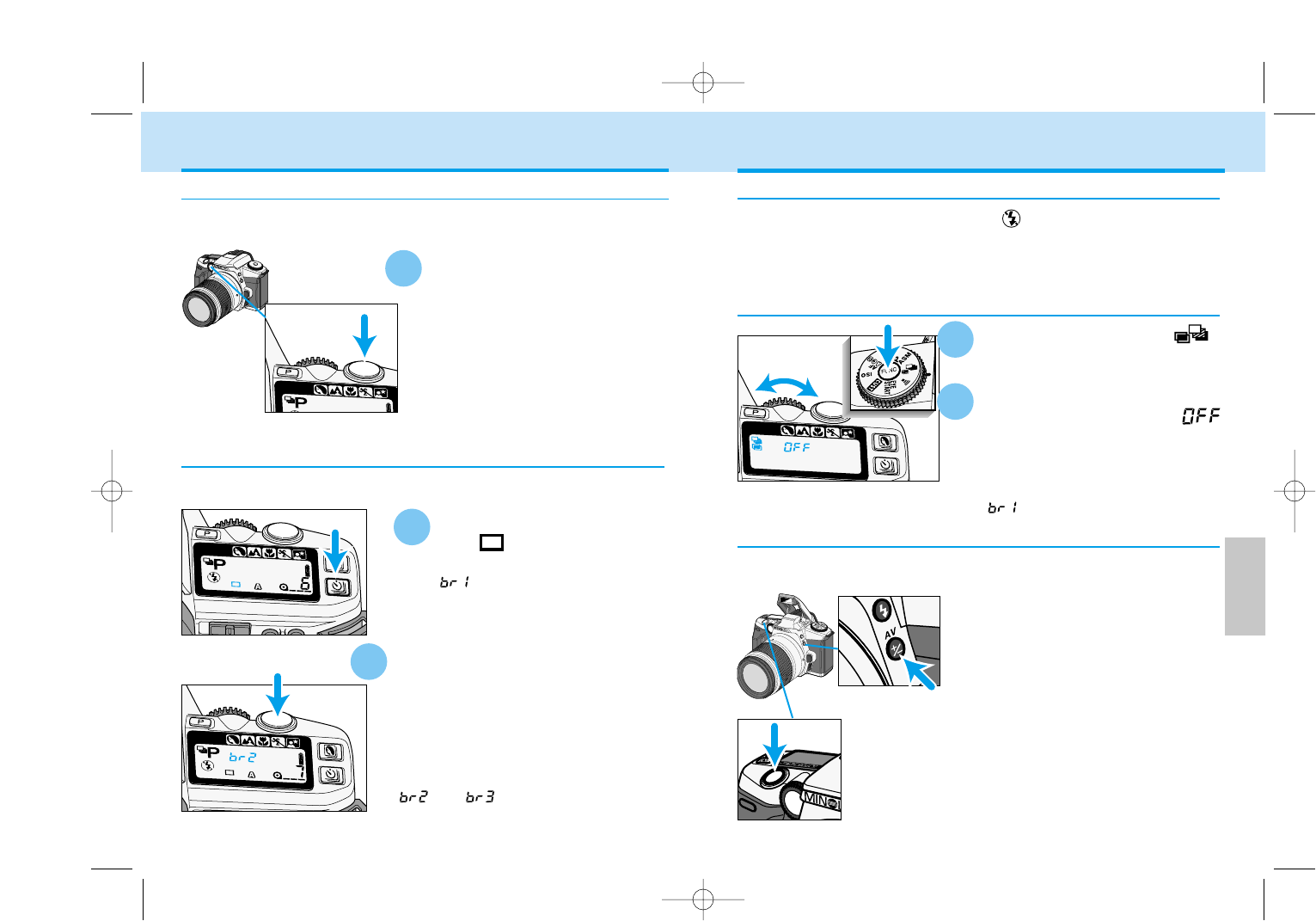
While pressing the exposure-
compensation button, press and
hold the shutter-release button
all the way down.
• The camera automatically exposes a
three-frame bracketed series.
• Releasing the shutter-release button
before the series is complete, cancels
the exposure series.
Bracketing with the Exposure-compensation Button
This function is a shortcut to take a three-frame bracket in increments of
0.5 Ev.
• The built-in flash is set to flash cancel when bracketing is selected.
• An attached Minolta accessory flash will be turned off when bracketing is
selected.
Flash Notes
Turn the function dial to .
Press the function button and
turn the control dial until
appears on the data panel.
•Sliding the main switch to OFF in the
middle of a bracketing series resets the
bracketing series to the first frame
().
Canceling Bracketing
Hold the shutter-release
button all the way down to
make the bracket.
• Three frames will be taken. Do not
release the shutter button until all
three exposures are made.
• If the shutter button is released before
the three exposures are made, the
current bracket will be canceled.
• Exposure is locked with the first frame
of the series.
Press the drive-mode button
until appears on the
data panel.
• will appear on the data panel
after pressing the shutter-release
button partway down to indicate the
first bracket.
1
Press the shutter button all the
way down to take each bracket.
• The shutter-release button must be pressed
for each bracket.
• To cancel the bracketing series, turn the
camera off.
• Exposure is locked with the first frame of
the series.
• and will appear on the data
panel to indicate the bracket frame.
Single Frame Advance Bracketing
Continuous Advance Bracketing
To take each picture of the three-frame bracket individually, set the drive
mode to single frame advance.
1
To make an automatic three-frame bracket. The drive mode is automati-
cally set to contiuous advance when bracketing is selected.
EXPOSURE BRACKETING
2
1
2
Exposure-
compensation
button
9222-2163-11 MM-B108 (E).qxd 01.8.3 16:11 Page 88
91
DETAILED
OPERATION
90
While is blinking on the
data panel, press the shutter-
release button all the way
down to take the last
exposure.
• Multiple-exposure mode is cancelled
after the last exposure has been
taken.
• The film will be advanced to the next
frame.
Taking last exposure
Taking more than 2 exposures
While pressing the function
button, turn the control dial
one click counterclockwise to
stop the from blinking.
Press the shutter-release
button to take the picture.
Repeat 4 and 5 for each
additional exposure.
5
6
MULTIPLE EXPOSURE
Turn the function dial to .
While pressing the function
button, turn the control dial
until appears on the
data panel.
Press the shutter-release
button all the way down to
take the first exposure.
•blinks on the data panel
indicating the next exposure will be
the last in the series.
• Go to step 7 when making only 2
exposures.
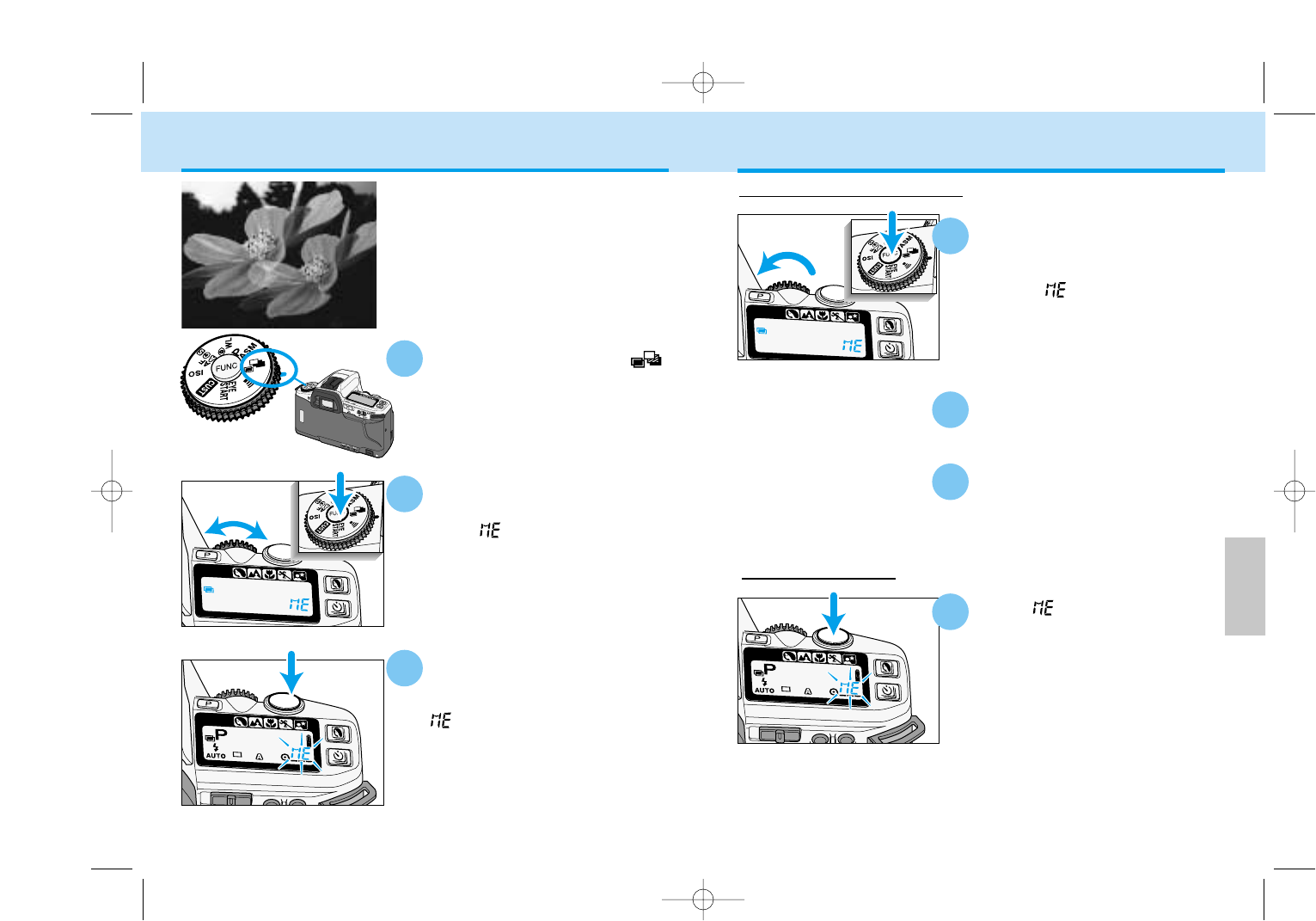
The multiple-exposure function makes
it possible to expose two or more
images on the same frame.
•Flash cannot be used with multiple
exposure.
3
2
1
4
7
9222-2163-11 MM-B108 (E).qxd 01.8.3 16:11 Page 90
93
DETAILED
OPERATION
92
Your camera’s built-in flash provides coverage for a 28mm wide-angle
lens, with a flash guide number of 12 (ISO100). This section of your manu-
al covers the operation of accessory flashes as well as the built-in flash.
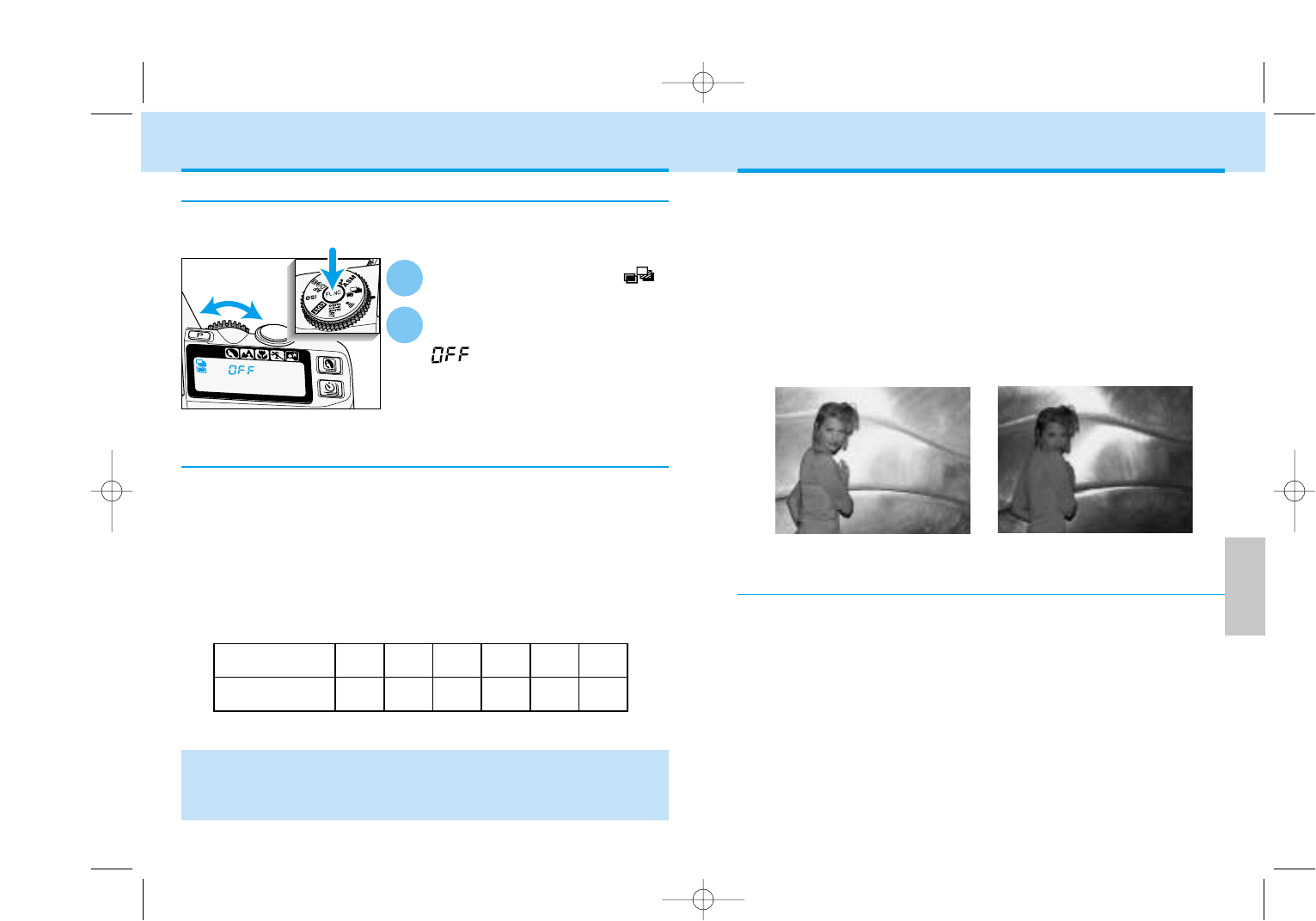
The high accuracy of your camera’s flash is achieved by ADI (Advanced
Distance Integration) flash metering in combination with the newly devel-
oped D series flash units and lenses. Compared with conventional TTL
flash metering, ADI flash metering is less influenced by background condi-
tions or the subject’s reflectance, providing optimum flash exposures
every time.
ADI flash metering Conventional TTL metering
FLASH
• The above corrections are intended as a general guideline. Some testing
may be necessary to produce the desired results.
• When using negative film, inform the photofinisher that multiple-exposure
pictures are included on the film.
The meter in your camera determines exposure (Ev) based on the
assumption that only one exposure will be made for each picture. When
making multiple exposures, the combined exposure of the series must
equal the exposure required for one picture.
•Compensation is not necessary if all of the exposures have dark
backgrounds and the subjects of the exposures will not overlap.
Compensate the exposures as follows:
Number of
Exposures
Exposure
Adjustment
Metering Multiple Exposure
Turn the function dial to .
Press the function button and
turn the control dial until
appears on the data
panel.
•Sliding the main switch to OFF does
not cancel multiple exposure mode.
Canceling Multiple Exposure
1
2
The multiple exposure series can be canceled before the last frame is
taken.
MULTIPLE EXPOSURE
Program Flash
An optional accessory flash, such as the 5600HS(D) or 3600HS(D),
improves flash performance over the built-in flash. The flash units fit in
the accessory shoe located on the top of the camera.
• The flash signals for the accessory flash are the same as those for the built-
in flash (p. 35).
• Refer to the accessory flash’s instruction manual for the flash range. For the
5600HS(D), 5400HS, and 5400xi, the flash range is on the back of the flash
units.
• Refer to the accessory flash’s instruction manual to attach the flash.
1 2 3 4 5 6
0.0 -1.0 -1.5 -2.0 -2.5 -3.0
9222-2163-11 MM-B108 (E).qxd 01.8.3 16:11 Page 92
Other lens
and HSS off
Other lens
and HSS on
D lens and
HSS off
D lens and
HSS on
95
DETAILED
OPERATION
94
• When an off-camera cable or bounce flash is used, the TTL metering mode
will be automatically set.
• If Wireless/Remote flash is used, the TTL metering mode will be automatical-
ly set.
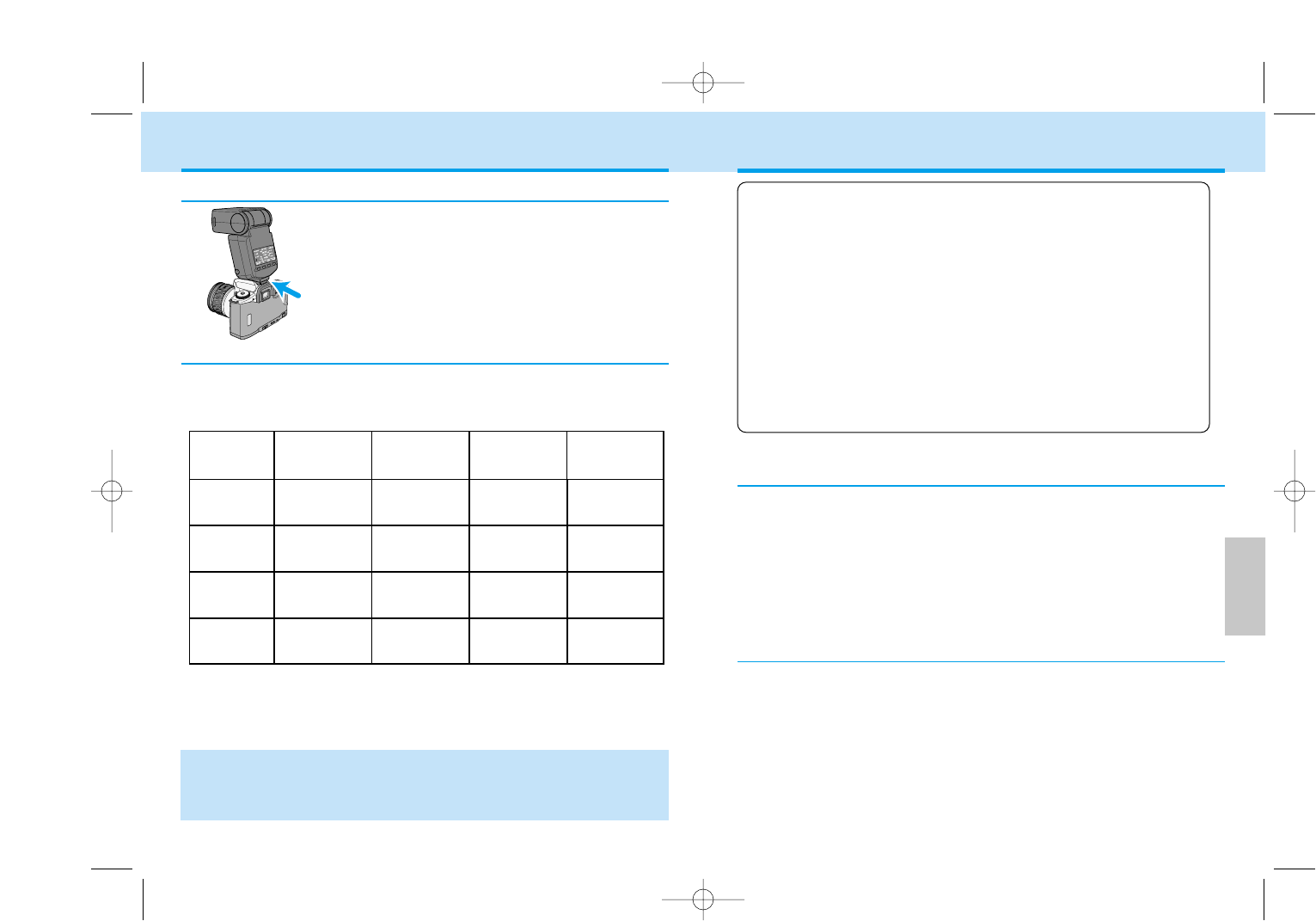
TTL metering (Through The Lens):
The TTL flash metering system controls the flash during the
exposure automatically.
Pre-flash metering:
In combination with TTL metering, a pre-flash fires before the
main exposure. The pre-flash is metered with 14 segment
honeycomb pattern and fed back to the flash exposure sys-
tem to determine the reflectance of the scene.
ADI metering (Advanced Distance Integration):
Flash metering is controlled by distance information from D
series lenses in addition to TTL metering. With the 5600HS
(D) and 3600HS (D) accessory flash units, a pre-flash is also
used. With ADI metering, flash output is less influenced by
background conditions or the subject’s reflectance.
5600HS(D)
3600HS(D)
Built-in
flash ADI metering
without pre-flash
5400HS Pre-flash
metering
Other
flashes –
Flash Metering
Flash metering changes according to the flash unit and lens being used.
The metering mode also changes when the HSS mode on the flash is
turned on or off.
FLASH
• For more information on HSS (high-speed sync) flash mode, see page 97.
ADI metering
with pre-flash
TTL
metering
ADI metering
without pre-flash
–
TTL metering
Pre-flash
metering TTL metering
Pre-flash
metering TTL metering
–TTL metering
–TTL metering
The accessory flash units fit in the shoe located on
the top of your camera.
Attaching the Accessory Flash
When pre-flash fires, a flash/color meter cannot meter accurately. This
is because the purpose of pre-flash is to assist ADI/Pre-flashmetering,
not to provide illumination for the picture. Cancel HSS (see flash man-
ual) or eliminate the influence on metering using Custom 12-2 (p.
113). However, if you use the test-flash button on the flash, the pre-
flash will not fire.
Use of a Flash/Color Meter with Pre-Flash
When Using a Close-up Diffuser, Certain Filters and Lenses
When close-up diffuser CD-1000, or a filter whose stop’s increase is
not 0 (i.e., ND) is used, or when the focus-range limiter or macro release
of certain lenses are used, the proper exposure will not be obtained by
ADI or Pre-flash metering.
9222-2163-11 MM-B108 (E).qxd 01.8.3 16:11 Page 94
97
DETAILED
OPERATION
96
Attach the accessory flash to
the camera and set the flash to
high-speed sync (HSS).
• will appear in the camera’s
viewfinder and data panel to indicate
that the flash unit is set to high-
speed sync.
• Refer to the flash unit’s instruction
manual for details on its use.
• The use of high-speed sync reduces the flash range. Refer to the flash
unit’s instruction manual.
• HSS cannot be used under fluorescent lights.
• When or blinks on the viewfinder’s Ev scale before taking the
picture, proper flash exposure might not be achieved. High-speed sync
cannot be used.
• Flash and color meters cannot can not be used with high-speed sync.
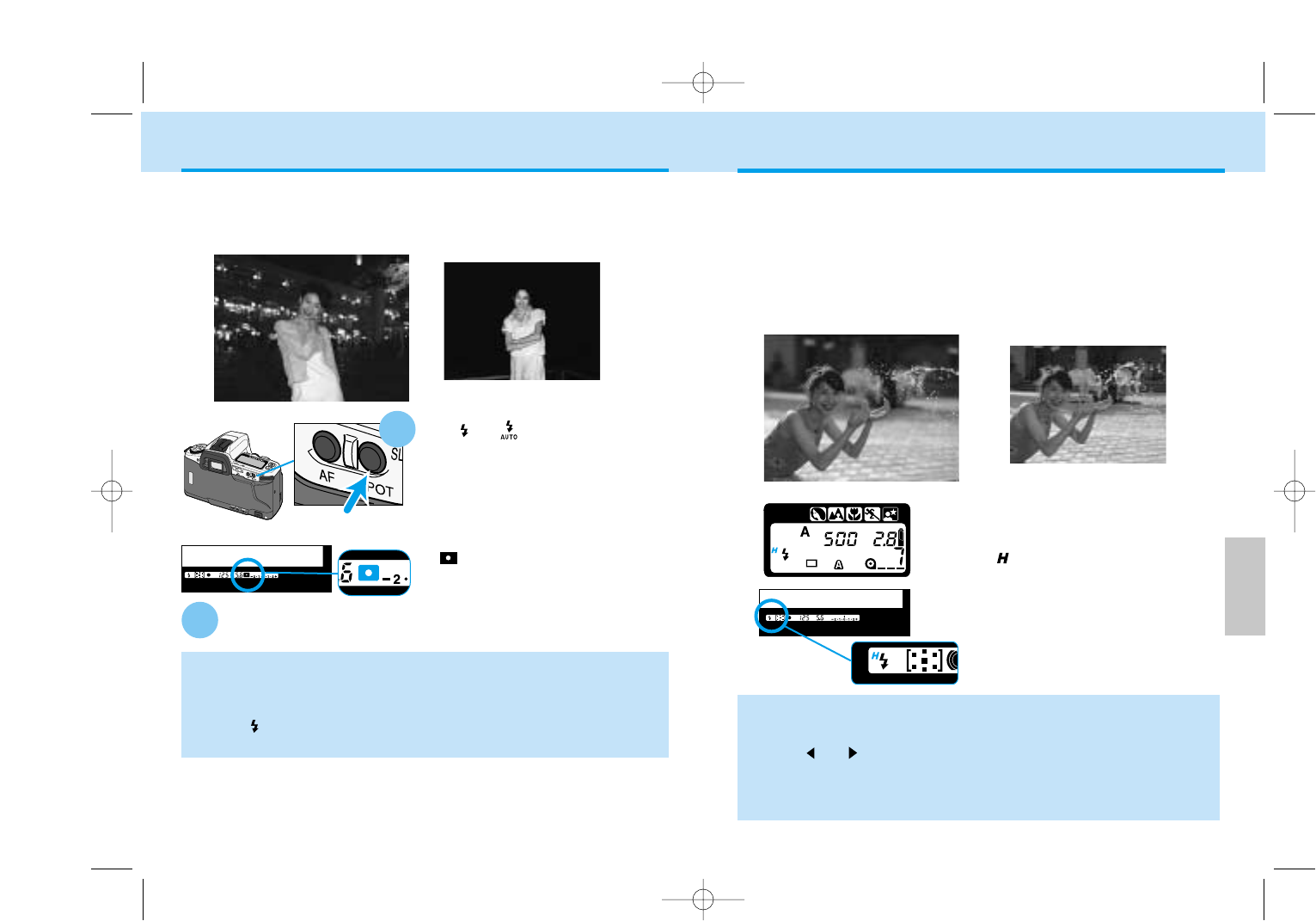
High-speed Sync Conventional Fill Flash
HIGH-SPEED SYNC (HSS)
The maximum flash-sync speed for this camera is 1/125. However, with
the 5600HS (D), 3600HS (D), and 5400HS accessory flashes (sold
separately) shutter speeds up to 1/4000 can be used. High-speed sync is
a function built into the HS series flash units.
High-speed sync (HSS) allows faster shutter speeds with fill flash when
photographing moving subjects outdoors. HSS also lets you use large
aperture/high shutter-speed combinations to separate your subject from
the background by limiting the depth-of-field.
SLOW SYNC
Conventional Flash
With or on the data panel,
press the spot-AE lock button to
set the ambient light exposure.
• In P mode, the flash will
automatically be activated. In A
mode, press the flash-mode button to
acvtivate the built-in flash.
• and the locked exposure will be
displayed in the viewfinder.
While holding the spot-AE lock button, press the shutter-
release button all the way down to take the picture.
• The slow-sync effect is the same as the night portrait subject program
(p.44).
• Use a tripod if the shutter speed is too slow to allow sharp, hand-held
pictures.
• When is not on the data panel, the camera is in spot-metering mode
and not in slow sync (p.78).
Custom Function Notes
Cust-10: Spot-AE lock: activated when the AE lock button is pressed and held
(1), or activated when the button is pressed once and then canceled when it is
pressed again (2) (p.112).
2
In P and A modes, slow-shutter sync sets the shutter speed and aperture
value for ambient lighting and balances the flash output with the
exposure .
• Slow sync cannot be used in S mode, or M mode.
Slow-shutter Sync 1
spot-AE lock button
9222-2163-11 MM-B108 (E).qxd 01.8.3 16:11 Page 96
Flash-mode
button
99
DETAILED
OPERATION
98
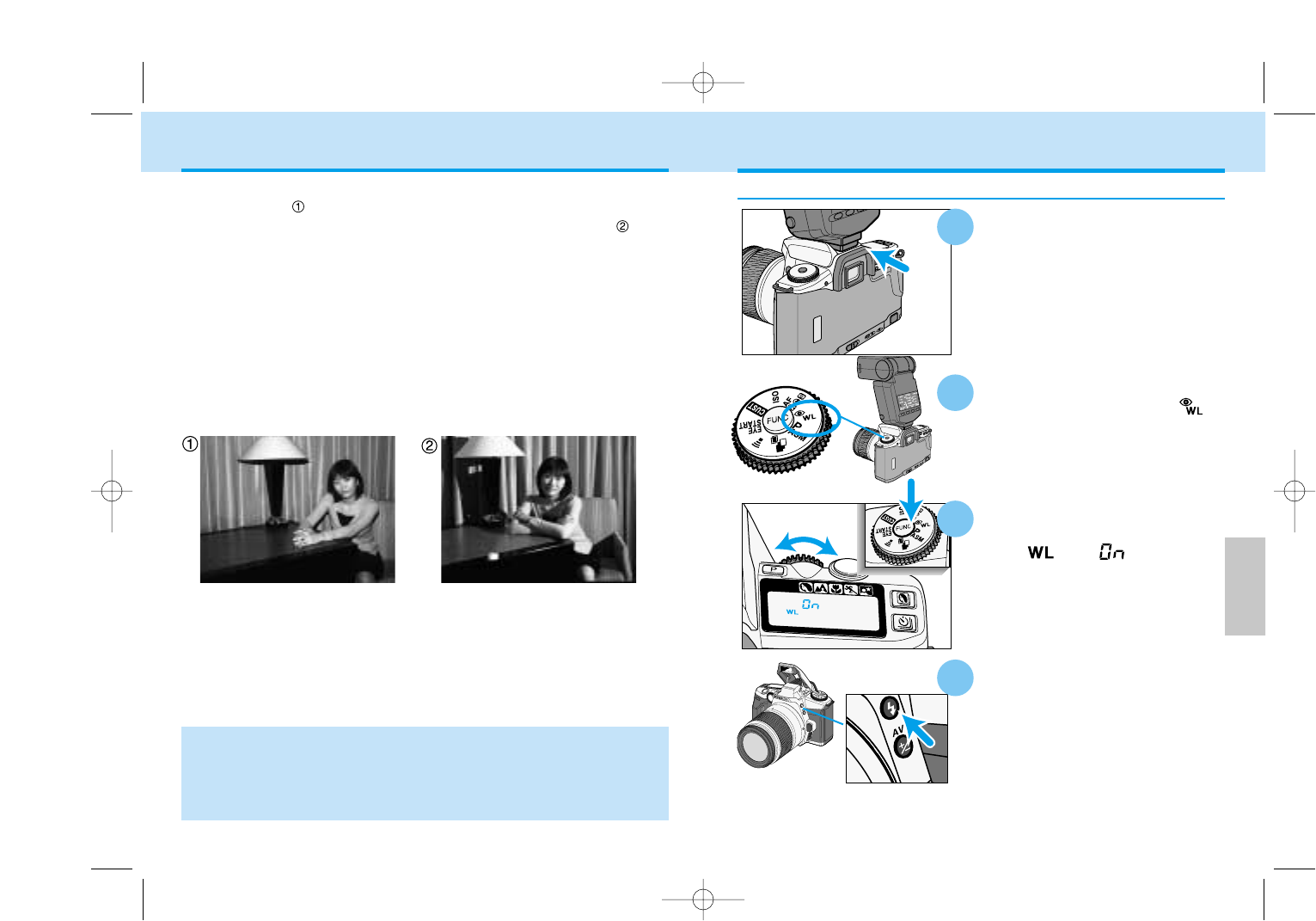
With the camera and flash on,
turn the function dial to .
While pressing the function
button, turn the control dial
until and appear on
the camera’s data panel.
Detach the accessory flash,
then press the camera’s
flash-mode button to raise
the built-in flash.
Attach the accessory flash to
the camera before turning the
flash and camera on.
•The flash must be mounted on the
accessory shoe because the camera
needs to send a signal to the flash to
turn on its wireless/remote function.
2
Setting Wireless/Remote Flash Mode
Normal flash Wireless flash
• HSS with wireless/remote flash is available only with 3600HS(D),
5600HS(D).
• With an accessory flash other than 3600HS(D) and 5600HS(D), the shutter
speed will be set to slower than 1/45 second automatically.
• Flash and color meters cannot be used with wireless/remote flash.
Photographs taken with the flash attached to the camera are flat as
shown in photo . Use an accessory flash positioned away from the
camera it to obtain three-dimensional lighting as shown in photo . The
output of the built-in flash can be used as a fill light to change the light-
ing ratio of the subject. See wireless/remote flash ratio on page 101
When taking this type of photograph, the camera and the flash unit are
most commonly connected by cable. The use of the 5600HS (D), 3600HS
(D), 5400HS, 5400xi, or 3500xi flash unit eliminates the need for a cable.
The flash units are controlled by the camera’s built-in flash. This type of
flash control is referred to as wireless or remote flash. The proper expo-
sure is determined automatically by the camera.
WIRELESS/REMOTE FLASH
1
4
3
9222-2163-11 MM-B108 (E).qxd 01.8.3 16:11 Page 98
