Precision And Analytical Balances Mettler Toledo Balance Me1002e Manual
User Manual:
Open the PDF directly: View PDF  .
.
Page Count: 28
- Overview components
- Overview operation keys
- 1 Safety Information
- 2 Design and Function
- 3 Installation and Putting into Operation
- 4 Maintenance
- 5 Technical Data
METTLER TOLEDO
METTLER TOLEDO
METTLER TOLEDO
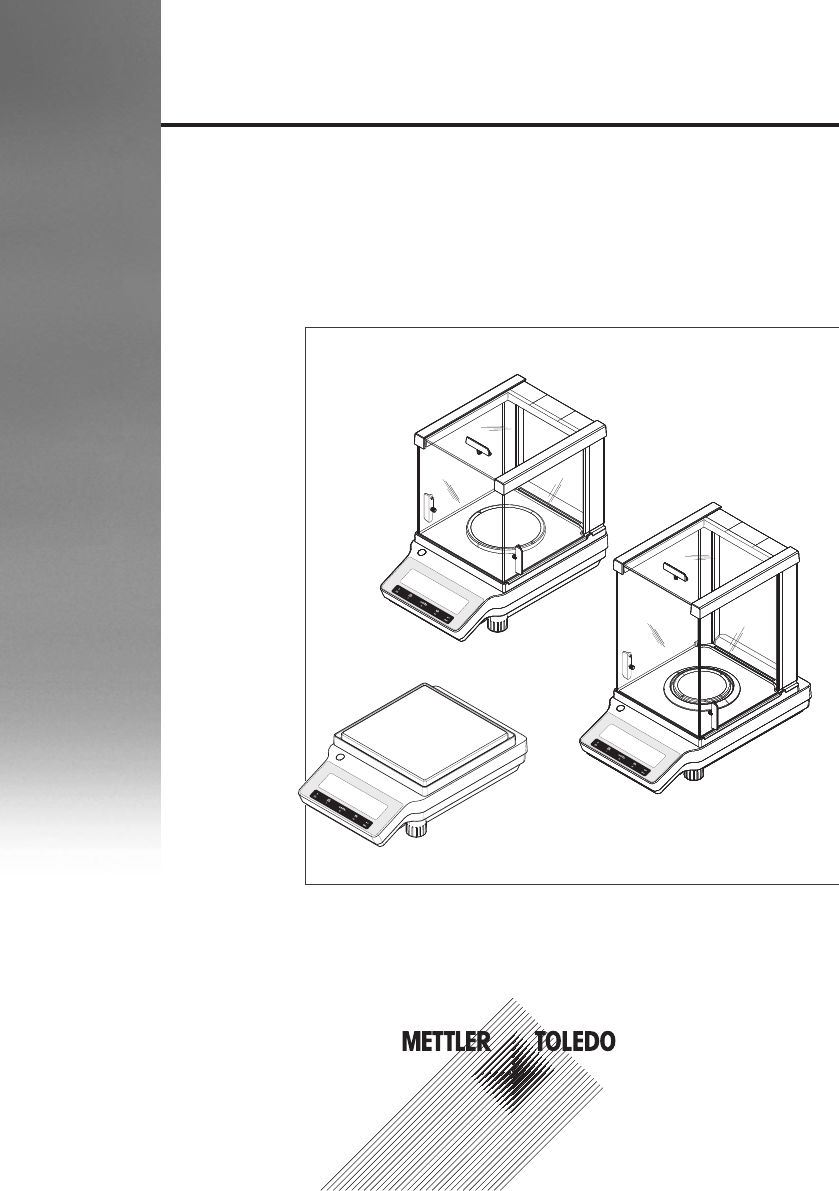
Precision and Analytical Balances
ME
User Manual

Overview components
METTLER TOLEDO
METTLER TOLEDO
METTLER TOLEDO
METTLER TOLEDO
11
810
1
2
3
3
3
3
1
21
2
7
77
9
9
5
6
5
4
4
5
6
0.1 mg 1 mg
10 mg~100 mg
12
1Display 2Operation keys
3Leveling foot 4Handle for operation of the draft shield door
5Weighing pan 6Draft shield element
7Level indicator 8Kensington slot for anti-theft purposes
9Glass draft shield 10 RS232C serial interface
11 Socket for AC adapter 12 Legal for Trade (LFT) sealing
Overview components 3Precision and Analytical Balances
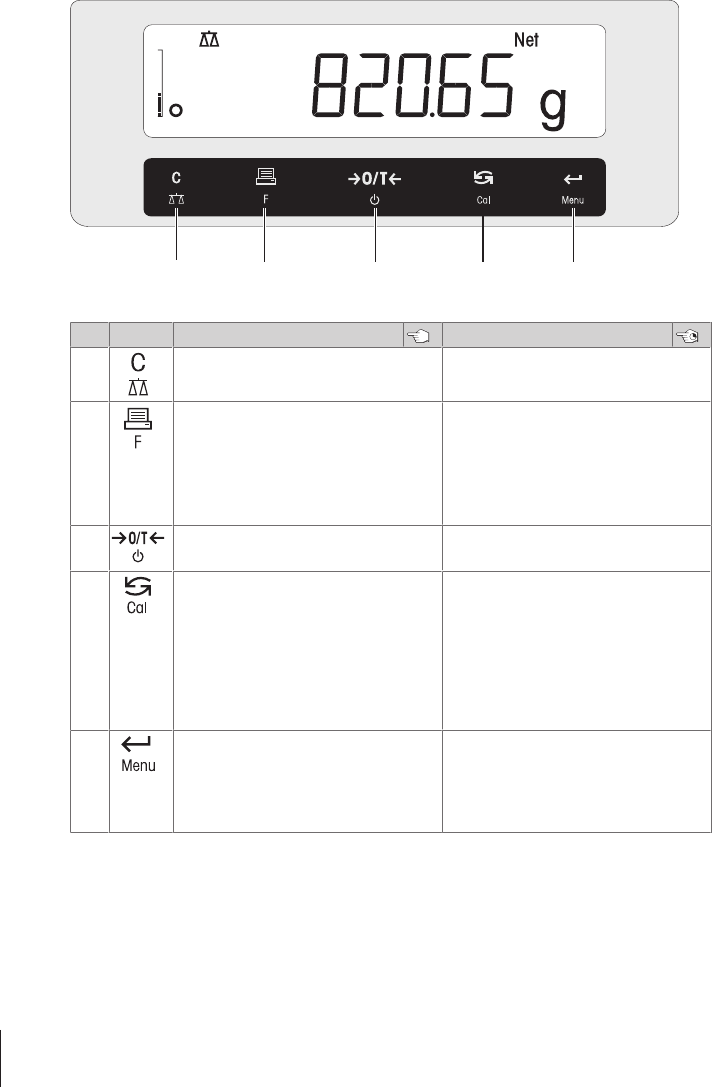
Overview operation keys
1 2 3 4 5
Legend key functions
No. Key Press briefly (less than 1.5 s) Press and hold (longer than 1.5 s)
1•Cancel or leave menu without saving
•One step back in the menu
•Select the simple weighing application
•Exit application
2•Print display value
•Transmit data
•To navigate backwards in the menu or
menu selection
•Decrease parameters in menu or appli-
cations
•Open the application list for selecting an
application
3•Zero/Tare
•Switch on
•Switch off into standby mode
4•With entries, scroll down
•To navigate forward menu topics or
menu selections
•To toggle between unit 1, recall value (if
selected), unit 2 (if different from unit 1)
and the application unit (if any)
•Increase parameters in menu or appli-
cations.
•Select adjustment (calibration)
– with internal weight *
– with external weight
– Customer fine adjustment *
* On models with internal weight only
5•Enter or leave menu selection
•To enter application parameter digit and
switch to next parameter digit
•To accept parameter in menu selection.
•Enter or leave menu (parameter
settings)
•To store parameter
•To accept numeric inputs in appli-
cations.
Overview operation keys4 Precision and Analytical Balances
1 Safety Information
1.1 Definition of signal warnings and symbols
Safety notes are marked with signal words and warning symbols. These show safety issues and
warnings. Ignoring the safety notes may lead to personal injury, damage to the instrument,
malfunctions and false results.
WARNING for a hazardous situation with medium risk, possibly resulting in death or severe
injury if not avoided.
CAUTION for a hazardous situation with low risk, resulting in minor or moderate injury if not
avoided.
NOTICE for a hazardous situation with low risk, resulting in damage to the balance, other
material damage, malfunctions and erroneous results, or loss of data.
Note (no symbol)
for useful information about the product.
General hazard Electrical shock
NOTICE
1.2 Product safety information
Intended use
Your balance is used for weighing. Use the balance exclusively for this purpose. Any other type of use
and operation beyond the limits of technical specifications without written consent from Mettler-Toledo
GmbH, is considered as not intended.
It is not permitted to use the instrument in explosive atmosphere of gases, steam, fog, dust
and flammable dust (hazardous environments).
General safety information
This balance complies with current industry standards and the recognized safety regulations;
however, it can constitute a hazard in use. Do not open the balance housing: The balance contains
no user-serviceable parts. In the event of problems, please contact a METTLER TOLEDO represen-
tative.
Always operate and use your instrument only in accordance with the instructions contained in this
document. The instructions for setting up your new instrument must be strictly observed.
If the instrument is not used according to the Operating Instructions, protection of the instrument
may be impaired and METTLER TOLEDO assumes no liability.
Staff safety
These printed document must be read and understood before using the balance. These printed
document must be retained for future reference.
The balance must not be altered or modified in any way. Only use METTLER TOLEDO original spare
parts and accessories.
Safety Information 5Precision and Analytical Balances
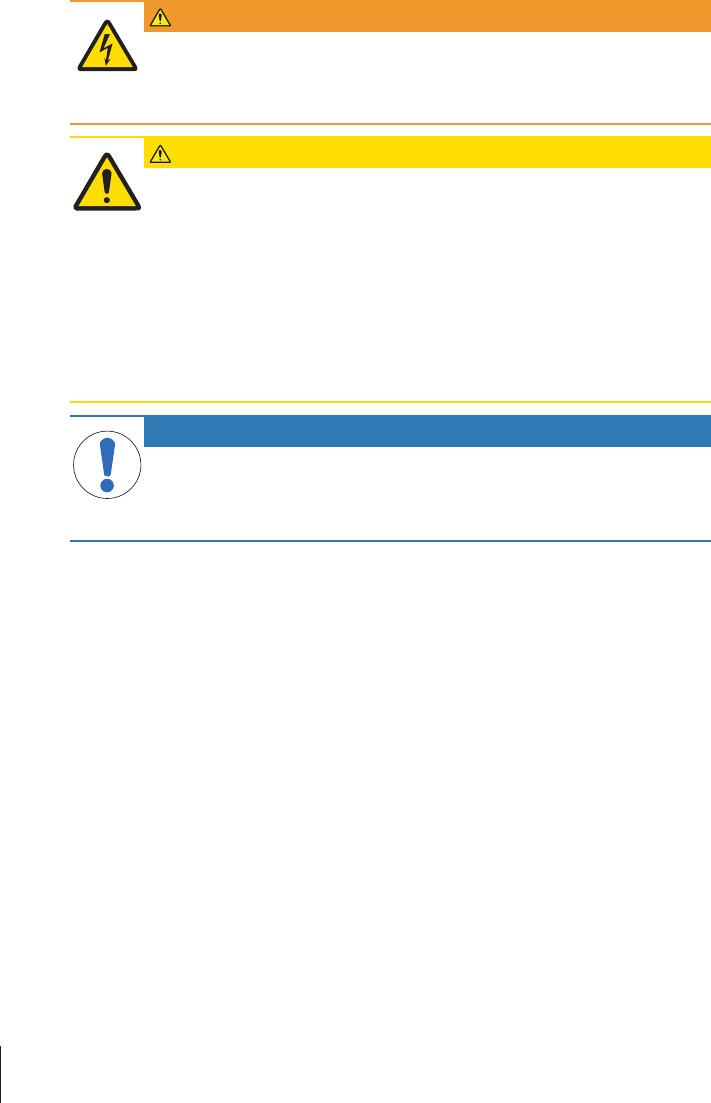
Safety notes
WARNING
Risk of electric shock
Use only the original universal AC/DC adapter delivered with your balance, and check
that the voltage printed on it is the same as your local power supply voltage. Only plug
the adapter into a socket which is grounded.
CAUTION
Damage to the balance
1 Only use indoors in dry locations.
2 Do not use pointed objects to operate the keyboard!
The balance is of a very sturdy design, but is still a precision instrument. It must be
handled with care.
3 Do not open the balance:
The balance contains no user-serviceable parts. In the event of problems, please
contact a METTLER TOLEDO representative.
4 Only use METTLER TOLEDO original accessories and peripheral devices for the
balance.
These are specifically designed for the balance.
NOTICE
Damage of the balance or software
In some countries, excessive mains voltage fluctuations and strong glitches may occur.
This may affect the balance functions or damage the software.
− Use the PowerPac-M-12V for stabilizing.
Safety Information6 Precision and Analytical Balances
2 Design and Function
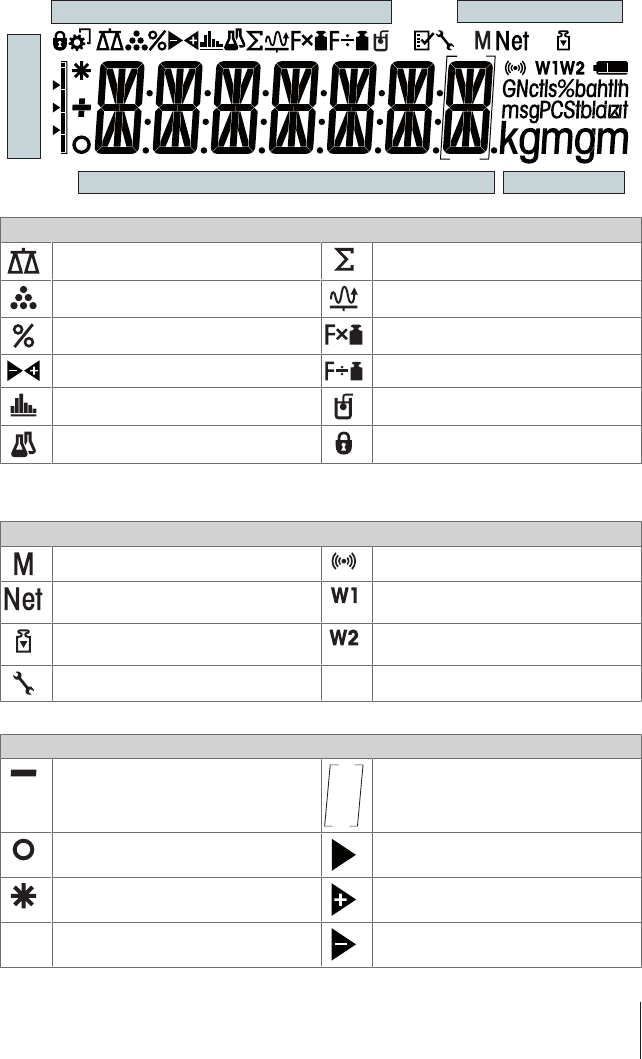
2.1 Display
Application Icons Status Icons
Weighing-in aid
Weight Value Field Unit Field
Application Icons
Application "Weighing" Application “Totaling”
Application "Piece counting" Application “Dynamic weighing”
Application "Percent weighing" Application “Multiplication factor”
Application "Check weighing" Application “Division factor”
Application "Statistics" Application “Density”
Application “Formulation / Net-Total” Menu locked
Note
While an application is running, the corresponding application icon appears at the top of the display.
Status Icons
Indicates stored value (Memory) Feedback for pressed keys
Indicates Net weight values Weighing range 1 (Dual Range models
only)
Adjustments (calibration) started Weighing range 2 (Dual Range models
only)
Service reminder
Weight Value Field and Weighing-in aid
Indicates negative values Brackets to indicate uncertified digits
(approved models only)
Indicates unstable values Marking of nominal or target weight
Indicates calculated values Marking of tolerance limit T+
Marking of tolerance limit T-
Design and Function 7Precision and Analytical Balances
Unit Field
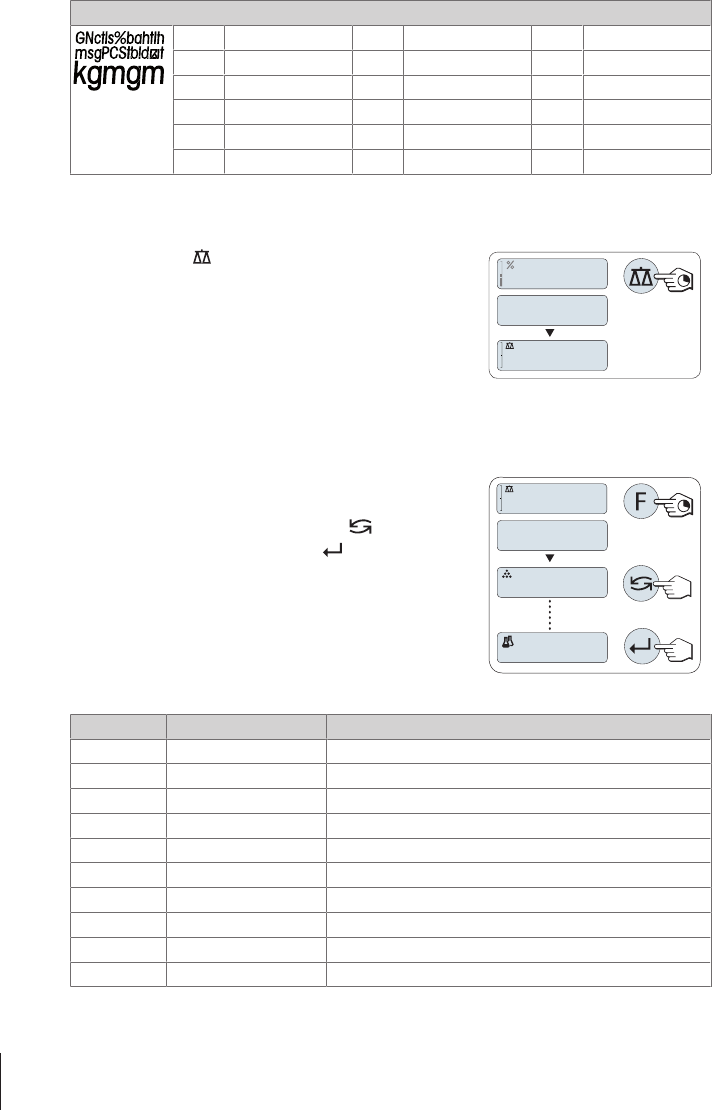
ggram ozt troy ounce tls Singapore taels
kg kilogram GN grain tlt Taiwan taels
mg milligram dwt pennyweight tola tola
ct carat mom momme baht baht
lb pound msg mesghal
oz ounce tlh Hong Kong taels
2.2 Basic principles for operation
Selecting simple weighing or terminate application
− Press and hold « » until "WEIGH" appears on the display.
ðThe balance returns to the simple weighing mode.
WEIGH
0
.
00
g
I00.0%
Note
How to perform simple weighing see [Performing a simple weighing}21].
Selecting an application
1 Press and hold «F» until "APP.LIST" (application list).
ðLast active application e.g. "COUNT" appears on the display.
2 Select an application by multiple pressing « ».
3 To execute selected application press « ».
APP.LIST
0
.
00
g
COUNT
FORMULA
Available applications
Display Remark Description
COUNT Piece counting see Application "Piece Counting"
PERCENT Percent weighing see Application "Percent Weighing"
CHECK Checkweighing see Application "Check Weighing"
STAT Statistics see Application "Statistics"
FORMULA Formulation / Net-Total see Application "Formulation" (Net Total Formulation)
TOTAL Totaling see Application "Totaling"
DYNAMIC Dynamic weighing see Application "Dynamic Weighing"
FACTOR.M Multiplication factor see Application "Multiplication Factor Weighing"
FACTOR.D Division factor see Application "Division Factor Weighing"
DENSITY Density see Application "Density"
Design and Function8 Precision and Analytical Balances
Entering the menu
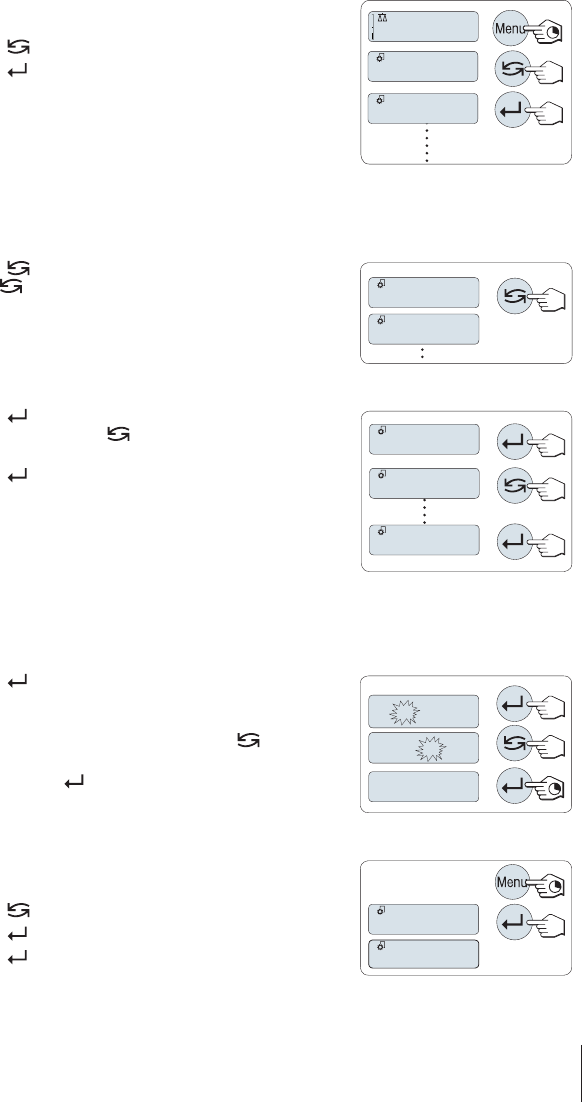
1 Press and hold «Menu» to enter main menu. The first menu
"BASIC" is displayed (except menu protection is active).
2 Press « » repeatedly to change menu.
3 Press « » to confirm the selection.
406.2
g
ADVANCE
BASIC
Note
Detailed description of the menu see The Menu.
Selecting menu topics
− Press « ». The next menu topic appears in the display. Each
time « » is pressed, the balance switches to the next menu
topic.
TIME
DATE
Changing settings in selected menu topic
1 Press « ».The display shows the current setting in the selected
menu topic. Each time « » is pressed, the balance switches to
the next selection. After the last selection, the first is shown again.
2 Press « » to confirm the setting. For store the setting see section
Saving Settings and Closing the Menu.
ENVIRON.
STABLE
ENVIRON.
Changing settings in a submenu selection
The same procedure as for menu topics.
Input principle of numerical values
1 Press « » to select a digit (cyclically from left to right) or a
value (depending on the application). The selected digit or the
selected value is blinking.
2 For changing blinking digits or values, press « » to increase or
«F» to decrease.
3 Press and hold « » to accept the value.
01. 2500
01. 6500
01.6500
Saving settings and closing the menu
1 Press and hold «Menu» to leave menu topic.
ð"SAVE:YES" appears on the display.
2 Press « » to toggle between "SAVE:YES" and "SAVE:NO".
3 Press « » to execute "SAVE:YES". Changes are saved.
4 Press « » to execute "SAVE:NO". Changes are not saved.
SAVE:YES
SAVE:NO
Design and Function 9Precision and Analytical Balances
Cancel
§During menu operation
− To leave menu topic or menu selection without saving press
«C» (one step back in the menu).
§During application operation
− To cancel settings press «C».
ðThe balance returns to the previous active application.
Note: If no entry is made within 30 seconds, the balance reverts to last active application mode.
Changes are not saved. If changes are made, the balance asks "SAVE:NO".
Design and Function10 Precision and Analytical Balances
3 Installation and Putting into Operation
Finding more information
u www.mt.com/me-analytical
u www.mt.com/me-precision
WARNING
Electrical shock
The balance must be disconnected from the power supply when carrying out all setup
and mounting work.
3.1 Unpacking and delivery inspection
1 Open the packaging and carefully remove all components.
2 Check the delivered items.
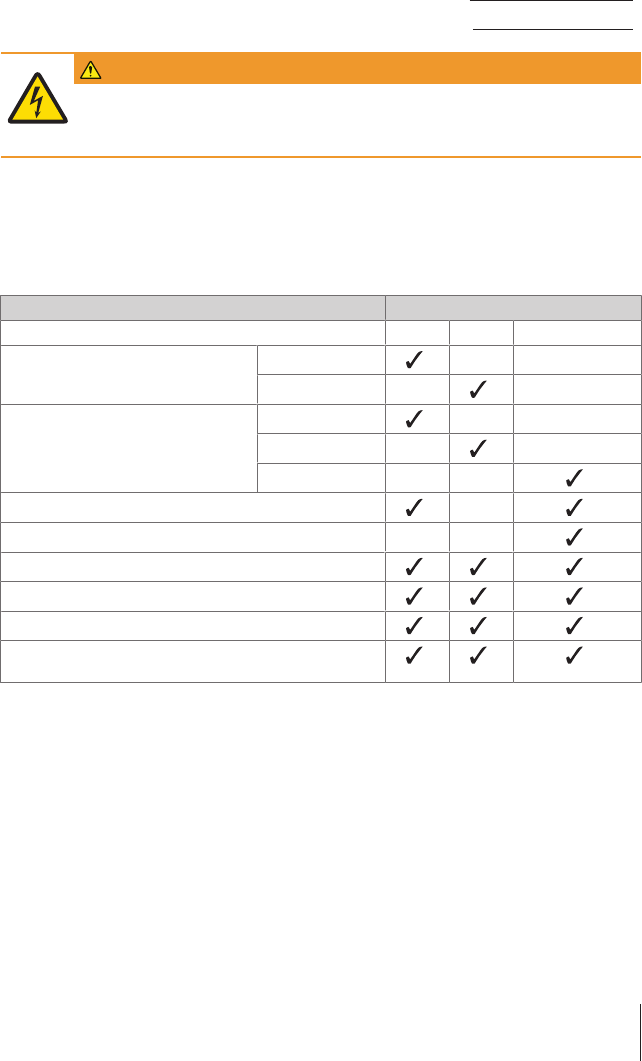
The standard scope of delivery contains the following items:
Components Model
0.1 mg 1 mg 10 mg / 100 mg
Draft shield high, 235 mm – –
low, 170 mm – –
Weighing pan with pan support ø 90 mm – –
ø 120 mm – –
180 × 180 mm – –
Draft shield element –
Pan support – –
Protective cover
Universal AC adapter
EC declaration of conformity
Operating instructions or User Manual; printed or on CD-ROM,
depending on country of use
Installation and Putting into Operation 11Precision and Analytical Balances
3.2 Installing components
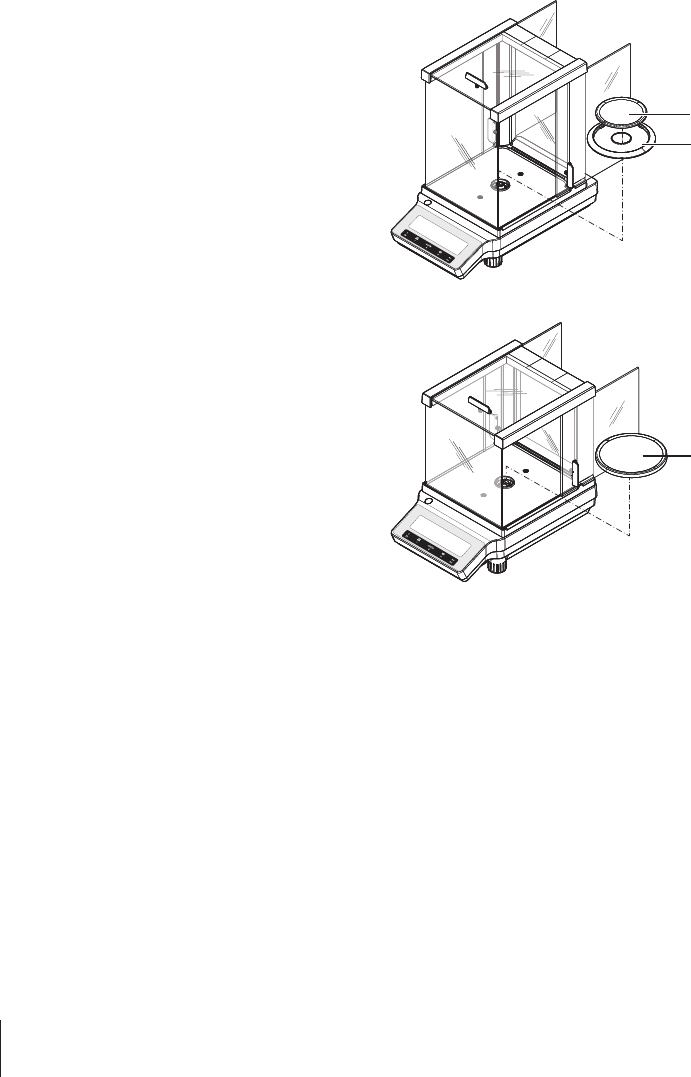
Balances with readability of 0.1 mg
Place the following components on the balance in
the specified order:
1 Push the side glass doors back as far as will go.
2 Place draft shield element (1).
3 Place weighing pan (2).
Note
Cleaning the draft shield see Cleaning the draft
shield.
METTLER TOLEDO
1
2
Balances with readability of 1 mg
Place the following components on the balance in
the specified order:
1 Push the side glass doors back as far as will go.
2 Place weighing pan (1).
Note
Cleaning the draft shield see Cleaning the draft
shield.
METTLER TOLEDO
1
Installation and Putting into Operation12 Precision and Analytical Balances
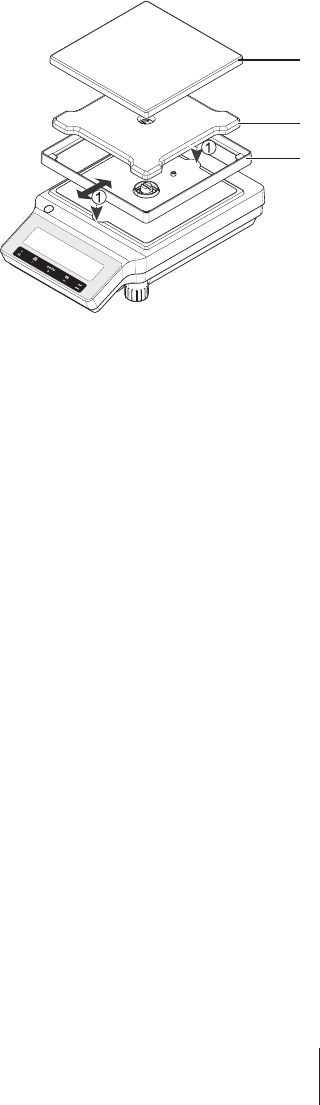
Balances with readability of 10 mg / 100 mg
Place the following components on the balance in
the specified order:
1 Place draft shield element (1): carefully pull apart
the draft shield element to fix it under the retaining
plate.
2 Insert pan support (2).
3 Place weighing pan (3).
METTLER TOLEDO
1
2
3
Installation and Putting into Operation 13Precision and Analytical Balances
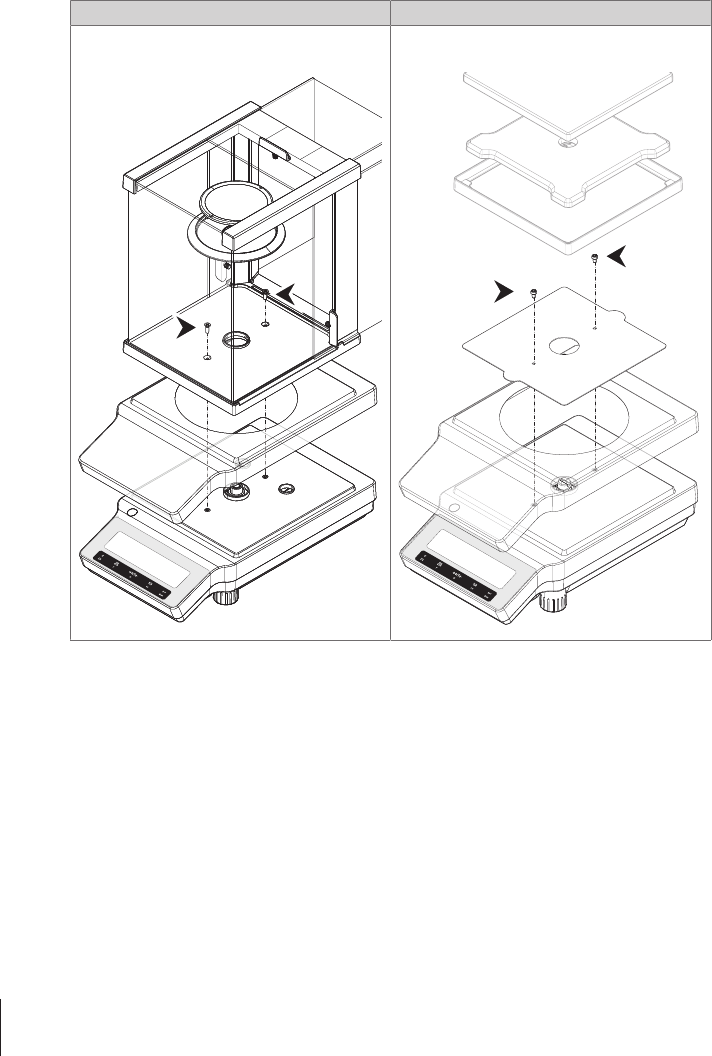
3.3 Installing protective cover
Note
Make sure using the correct protective cover, see Accessories and Spare Parts
Balances with readability of 0.1mg / 1mg Balances with readability of 10 mg / 100 mg
Install the protective cover according to the illus-
trations below, using a screwdriver Philips No. 2.
METTLER TOLEDO
Install the protective cover according to the illus-
trations below, using a screwdriver Torx TX20.
METTLER TOLEDO
Installation and Putting into Operation14 Precision and Analytical Balances
3.4 Selecting a location
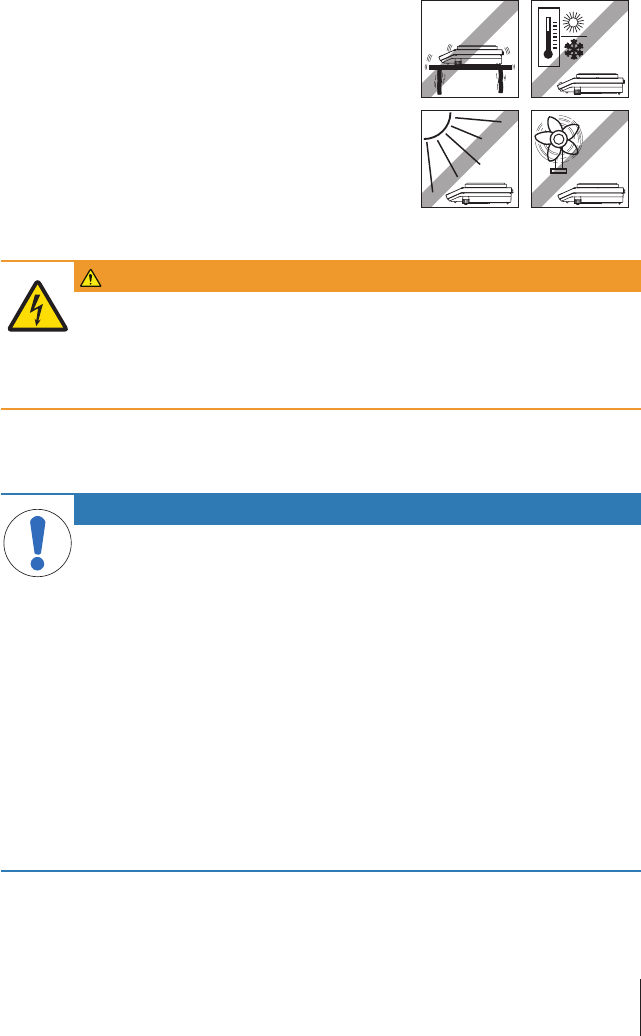
Your balance is a precision instrument and will thank you for an optimum location with high
accuracy and dependability. Select a stable, vibration-free position that is as horizontal as possible.
The surface must be able to safely carry the weight of a fully loaded balance.
Observe ambient conditions see Technical Data.
Avoid the following:
•Vibrations
•Excessive temperature fluctuations
•Direct sunlight
•Powerful drafts (e.g. from fans or air conditioners)
3.5 Connecting the balance
WARNING
Risk of electric shock
1 Only connect the balance to a three-pin power socket with earthing contact.
2 Only standardized extension cable with equipment grounding conductor must be
used for operation of the balance.
3 Intentional disconnection of the equipment grounding conductor is forbidden.
The balance is supplied with an universal AC adapter and a country-specific plug. The AC adapter is
suitable for use with the following voltage range:
100 – 240 VAC, 50/60Hz.
NOTICE
Danger of damage to the AC adapter due to overheating or incorrect voltage range!
If the AC adapter is covered or in a container, it is not sufficiently cooled and overheats.
If the voltage is too high for the device in use, the device might be damaged or the cable
might start to burn.
If the voltage is too low, use of the device might be restricted or the device might not
function at all.
1 Do not cover the AC adapter.
2 Do not put the AC adapter in a container.
3 Check whether your local power supply falls within this range. If this is not the
case, under no circumstances connect the AC adapter to the power supply, but
contact a METTLER TOLEDO representative.
4 The power plug must be accessible at all times.
5 Prior to use, check the power cable for damage.
6 Route the cable in such a way that it cannot be damaged or cause a hindrance
when working.
7 Ensure that no liquid comes into contact with the AC adapter.
Installation and Putting into Operation 15Precision and Analytical Balances
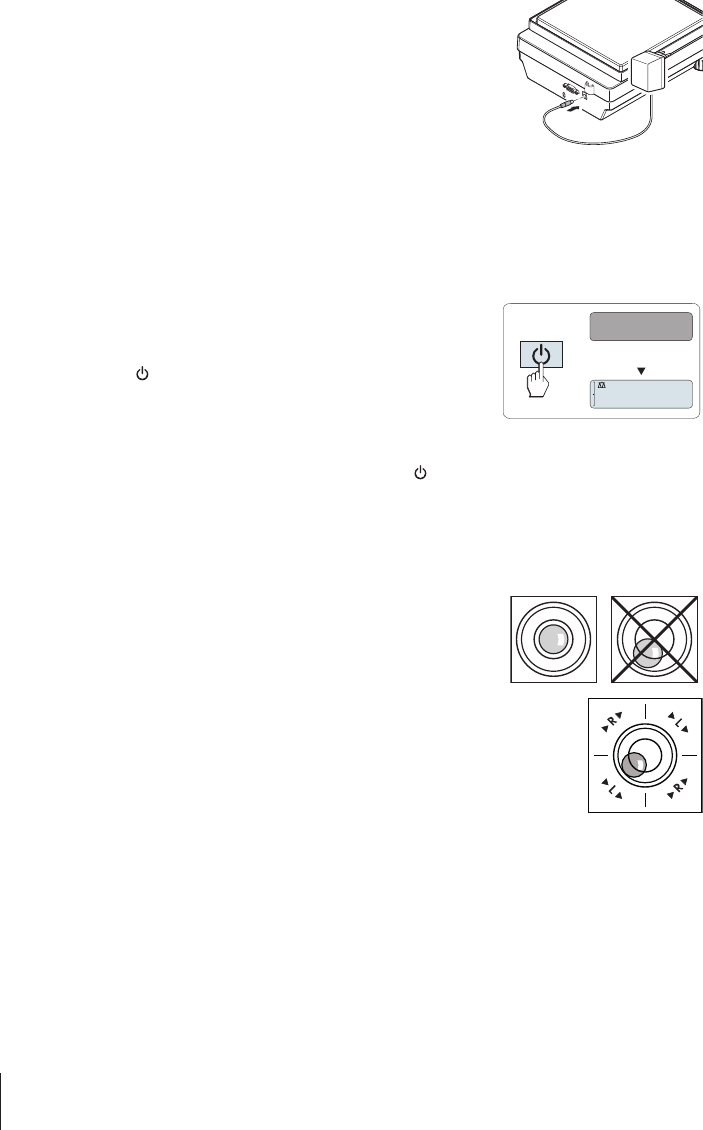
− Connect the AC adapter to the connection socket on the back of
your balance (see figure) and to the power line.
ðThe balance performs a display test (all segments in the
display light up briefly), "WELCOME", Software version,
Maximum load and Readability appears briefly.
The balance is ready for use.
3.6 Setting up the balance
3.6.1 Switching on the balance
Before working with the balance, it must be warmed up in order to obtain accurate weighing results.
To reach operating temperature, the balance must be connected to the power supply for at least 30
minutes (0.1 mg models 60 minutes).
Switching on
§The Balance is in "STANDBY" mode. "MT.GREEN" appears on the
display.
− Press « » or remove any load from weighing pan or tap on the
weighing pan.
The balance is ready for weighing or for operation with the last active
application.
Note
Approved balances can only be switched on by pressing « » in
selected countries.
0
.
00
g
MT.GREEN
3.6.2 Leveling the balance
Note
The balance must be leveled and adjusted each time it is moved to a new location.
1 Align the balance horizontally.
2 Turning the two front leveling screws of the housing until the air
bubble is in the inner circle of the level indicator.
ðThe position of the air bubble illustrates which leveling screw
you need to turn (L = left leveling screw, R = right leveling
screw) and in which direction so that the air bubble moves to
the center.
Example
In this example, turn the left leveling screw counterclockwise.
3.6.3 Adjusting the balance
To obtain accurate weighing results, the balance must be adjusted to match the gravitational accel-
eration at its location and depending on the ambient conditions. After reaching the operation
temperature, adjusting is necessary
•before the balance is used for the first time.
•after a change of the location.
•at regular intervals during weighing service.
Installation and Putting into Operation16 Precision and Analytical Balances
3.7 Setting date and time
When you put your new instrument into operation for the first time, you should enter the current date
and time.
Note
•These settings are retained even if you disconnect your instrument from the power supply.
•A reset of the instrument will not change these settings.
•Set the current date according to the date format "DATE.FRM" in the menu "ADVANCE.".
•Set the current time according to the time format "TIME.FRM" in the menu "ADVANCE.".
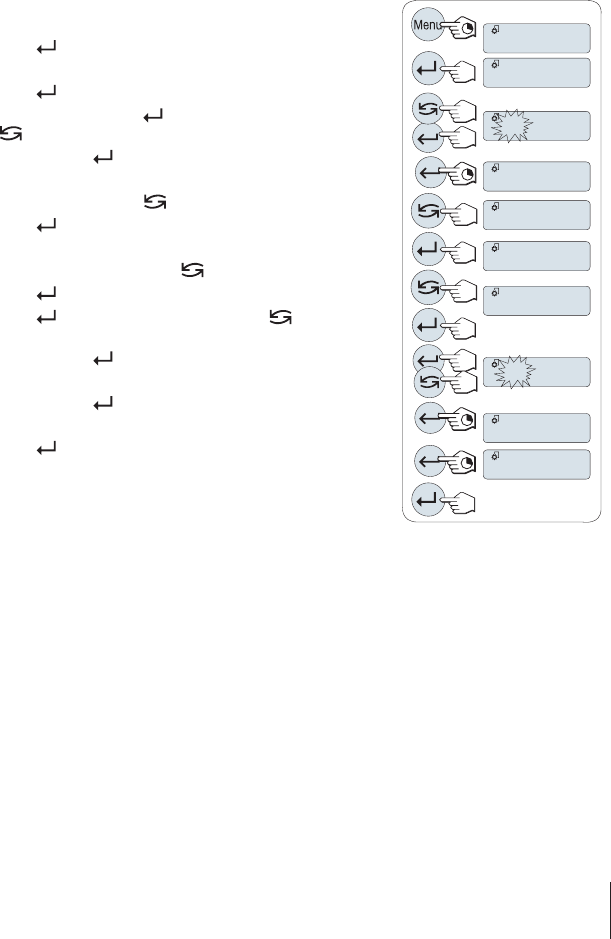
1 Press and hold «Menu» until menu "BASIC" appears on the
display.
2 Press « » to open menu "BASIC".
ð"DATE" appears.
3 Press « » to confirm.
4Set current date. Press « » to select day, month or year; press
«» to set current day, month or year.
5 Press and hold « » to confirm the settings.
ð"DATE" appears..
6Set current time. Press « » to select "TIME".
7 Press « » to confirm.
ð"+1H" appears.
8 Select "SET.TIME" by pressing « ».
9 Press « » to confirm.
10 Press « » to select hours or minutes; press « » to set current
hours or minutes.
11 Press and hold « » to confirm the settings.
ð"TIME" appears.
12 Press and hold « » to store the settings.
ð"SAVE:YES" appears.
13 Press « » to confirm.
BASIC
SET.TIME
DATE
TIME
06.05.12
13.30
SAVE:YES
DATE
TIME
+1H
Installation and Putting into Operation 17Precision and Analytical Balances
3.8 Adjustment (calibration)
NOTICE
Before adjusting the balance, it must be warmed up.
3.8.1 Adjustment with internal weight
Note: On models with internal weight only (see technical data).
§Weighing pan is unloaded.
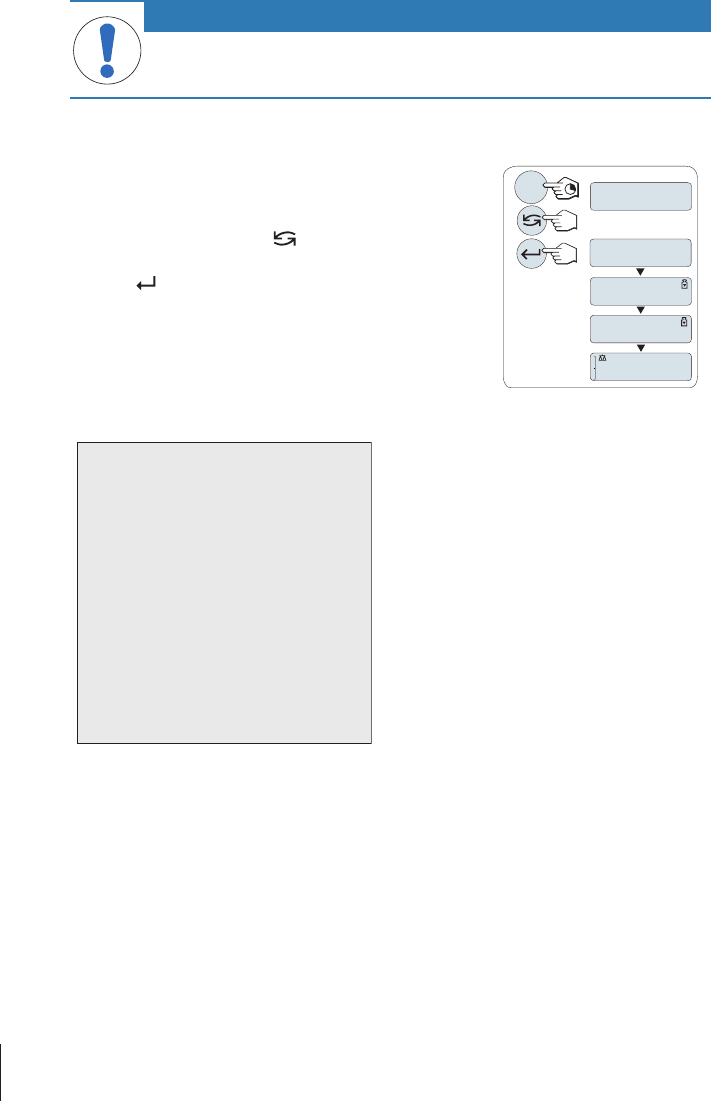
1 To carry out this operation press and hold «CAL» until "ADJUST"
appears.
2 Select "ADJ.INT" by pressing « ».
ð"ADJ.INT" appears on the display.
3 Press « » to execute "Internal Adjustment".
The balance adjusts itself automatically. The adjusting is finished
when the message "ADJ.DONE" appears briefly on the display. The
balance returns to the last active application and is ready for
operation.
------
ADJ.DONE
0
.
00
g
ADJ.INT
Cal
ADJ.EXT
Sample adjustment printout using internal weight:
- Internal Adjustment --
21.Jan 2012 12:56
METTLER TOLEDO
Balance Type ME4002
SNR 1234567890
Temperature 22.5 °C
Diff 3 ppm
Adjustment done
-----------------------
3.8.2 Adjustment with external weight
Note: Because of certification legislation, the approved models cannot be adjusted with an external
weight * (depend on selected countries' certification legislation).
* except OIML accuracy class I approved models.
Installation and Putting into Operation18 Precision and Analytical Balances
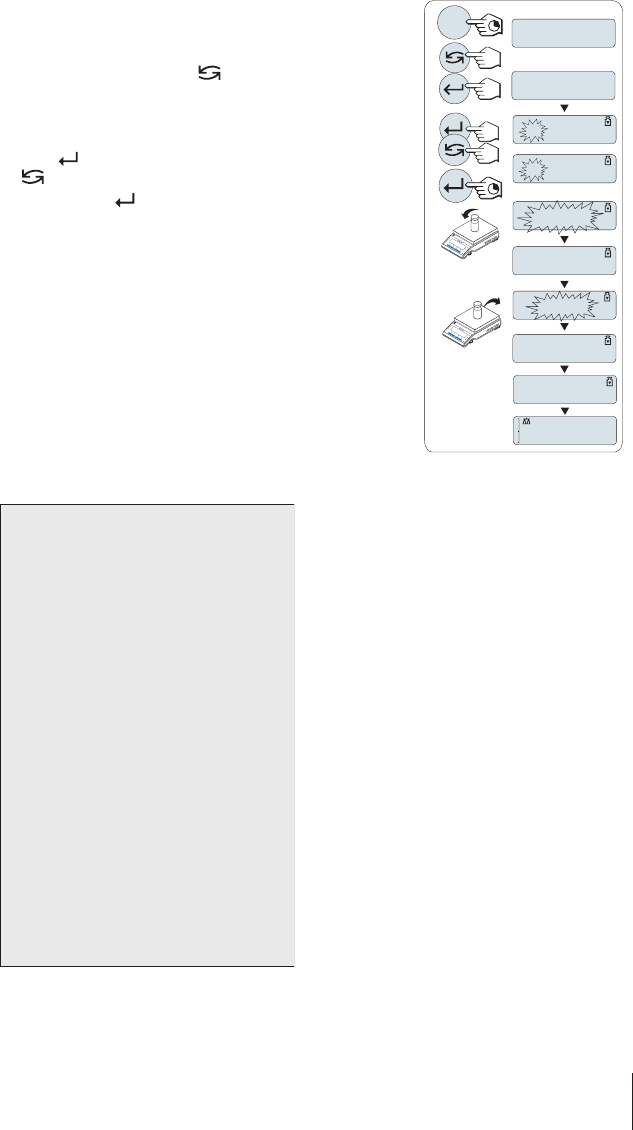
1 Have required adjustment weight ready.
2 To carry out this operation press and hold «CAL» until "ADJUST"
appears.
3 Select "ADJ.EXT" by pressing « ».
ð"ADJ.EXT" appears on the display.
4 Unload weighing pan.
5 Optional: If necessary, you can define a different weight value.
Press « » to change a digit (cyclically from left to right); press
«» to change the blinking digit.
6 Press and hold « » to execute "External Adjustment".
ðThe required adjustment weight value flashes in the display.
7 Place adjustment weight in center of pan.
ðThe balance adjusts itself automatically.
8 When zero is flashing, remove adjustment weight.
ðThe adjusting is finished when the message "ADJ.DONE" appears
briefly on the display. The balance returns to the last active appli-
cation and is ready for operation
------
2000
.
00
g
ADJ.DONE
0
.
00
g
C
0
.
00
g
------
C
ADJ.INT
ADJ.EXT
Cal
4000
.
00
g
2000
.
00
g
Sample adjustment printout using external weight:
- External Adjustment --
21.Jan 2012 12:56
METTLER TOLEDO
Balance Type ME4002
SNR 1234567890
Temperature 22.5 °C
Nominal 2000.00 g
Actual 1999.99 g
Diff 5 ppm
Adjustment done
Signature
.......................
-----------------------
Installation and Putting into Operation 19Precision and Analytical Balances
3.8.3 Customer fine adjustment
NOTICE
This function should be executed only by trained personnel.
The function customer fine adjustment "ADJ.CF" allows you to adjust the value of the internal
adjustment weight with your own adjustment weight. The adjustable range of the adjustment weight
is possible only in a very small range. Customer fine adjustment impacts the function of internal
adjustment. The customer fine adjustment can be deactivated at any time.
Note
•This feature is available on models with internal weight only.
•Because of certification legislation, approved models cannot be adjusted with customer fine
adjustment (depending on selected countries' certification legislation).
•Use certificated weights.
•Balance and test weight have to be on operating temperature.
•Observe the correct environmental conditions.
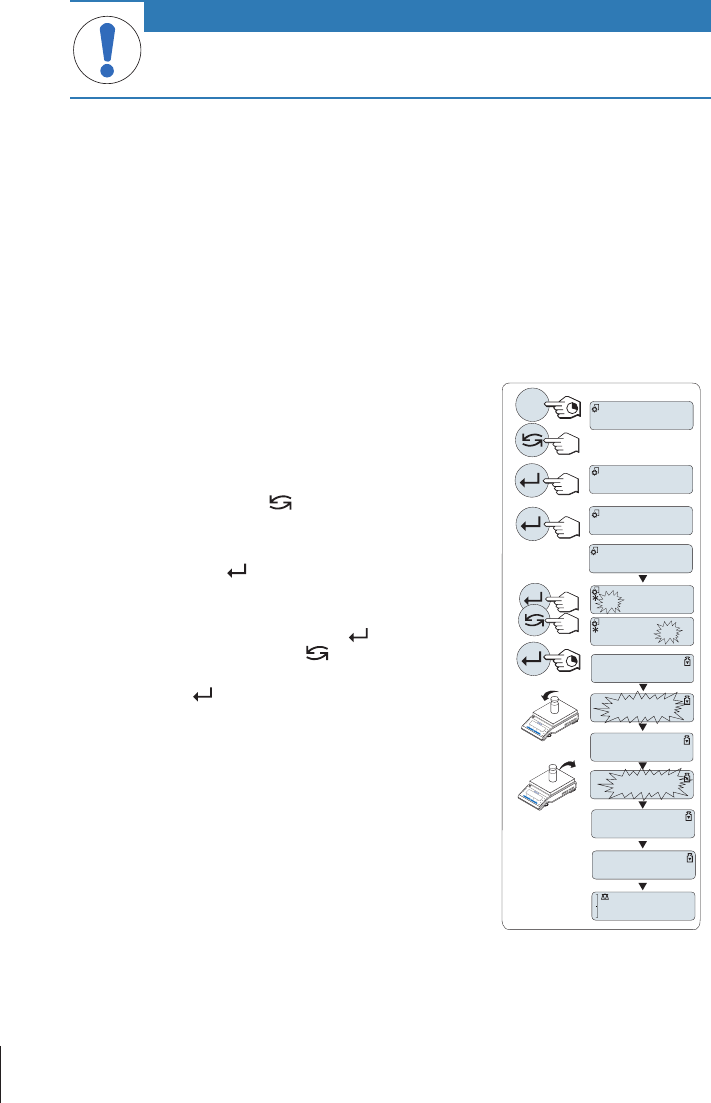
Execute customer fine adjustment
§The balance is under measuring condition.
1 Have required adjustment weight ready.
2 Unload weighing pan
3 To carry out this operation press and hold «CAL» until "ADJUST"
appears
4 Select "ADJ.CF" by pressing « ».
ð"ADJ.CF" appears on the display.
5 Select "EXECUTE"
6 Start Adjustment with « »
ð"SET REF." appears briefly.
ðThe last saved value flashes on the display.
7 Select the target adjustment weight. Press « » to change a digit
(cyclically from left to right); press « » to change the blinking
digit.
8 Press and hold « » to confirm and execute "ADJ.CF".
ðThe required adjustment weight value flashes in the display.
This could take some time.
9 Place required adjustment weight in center of pan.
10 Remove adjustment weight when zero is flashing.
11 Wait until "ADJ.DONE" briefly appears.
ðThe adjusting is finished when the message "ADJ.DONE" appears
briefly on the display. The balance returns to the last active appli-
cation and is ready for operation
ðIf the error message "WRONG ADJUSTMENT WEIGHT" appears,
the weight is not within the allowed value range and could not be
accepted. "ADJ.CF" could not be executed.
Note
Storing the adjustment is not required.
200.0000
g
ADJ.DONE
0
.
00
g
------
149.9995 g
------
149.9995 g
C
C
ADJ.CF
EXECUTE
SET REF.
ADJUST
------
Cal
0
.
00
g
Installation and Putting into Operation20 Precision and Analytical Balances
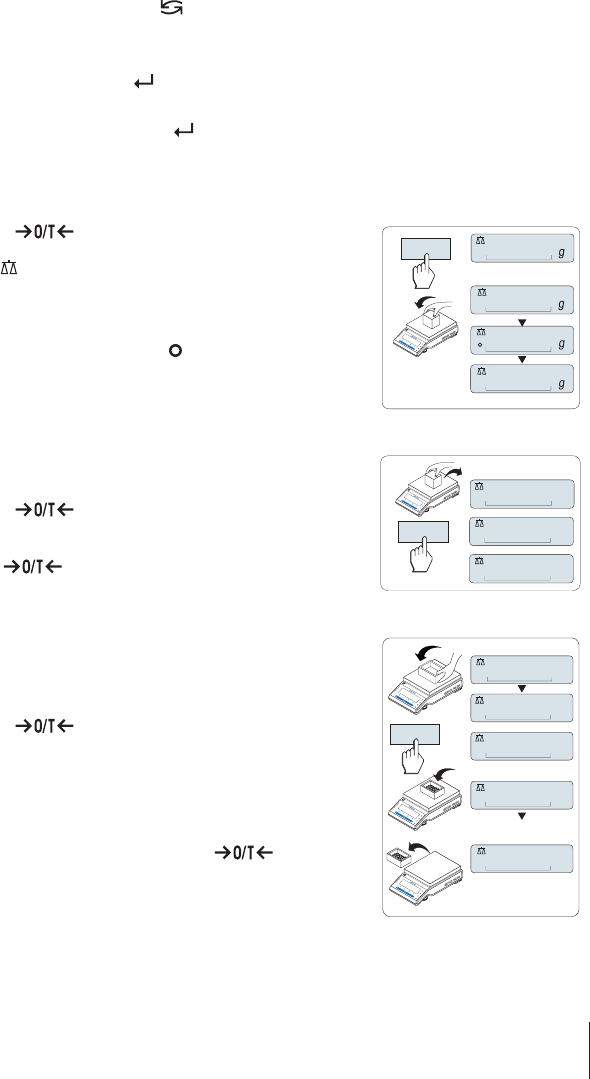
Deactivate customer fine adjustment
1 To carry out this operation press and hold «CAL» until "ADJUST" appears
2 Select "ADJ.CF" by pressing « ».
ð"ADJ.CF" appears on the display.
3 Select "RESET"
4 Start RESET by pressing « »
ð"NO?" appears.
5 Select "YES?" and confirm with« ».
ðThe adjusting is finished when the message "ADJ.DONE" appears briefly on the display. The
balance returns to the last active application and is ready for operation with initial adjustment.
3.9 Performing a simple weighing
1 Press « » to zero the balance.
Note: If your balance is not in the weighing mode, press and hold
the « » key down until “WEIGHING“ appears in the display.
Release the key. Your balance is in the weighing mode and set to
zero.
2 Place weighing sample on the weighing pan.
3 Wait until the instability detector " " disappears and the stability
beep sounds.
4 Read the result.
1250
.
38
0
.
00
1182
.
03
C
¢¢¢¢¢¢¢¢
¢¢¢¢¢¢
#
0
.
00
Zeroing
Zero setting
1 Unload the balance.
2 Press « » to set the balance to zero. All weight values are
measured in relation to this zero point (see menu topic "ZERO
RNG").
Use the « » zeroing key before you start with a weighing.
121
.
01
g
¢¢¢¢
#
0
.
01
g
0
.
00
g
C
Taring
Taring
If you are working with a weighing container, first set the balance to
zero.
1 Place empty container on the balance. The weight is displayed.
2 Press « » to tare the balance.
"0.00 g" and "Net" appears in the display. "Net" indicates that all
weight values displayed are net values.
Note
•If the container is removed from the balance, the tare weight will
be shown as a negative value.
•The tare weight remains stored until the « » key is
pressed again or the balance is switched off.
•With METTLER TOLEDO DeltaRange balances, the fine range with
its 10 times smaller display increments (depending on the
model) is available again after every taring operation.
C
C
121
.
01
g
¢¢¢¢
0
.
00
g
0
.
00
g
¢¢¢¢
95
.
97
g
¢¢¢¢¢¢¢
121
.
01
g
¢¢¢¢
-
Net
Net
Net
#
C
C
Installation and Putting into Operation 21Precision and Analytical Balances
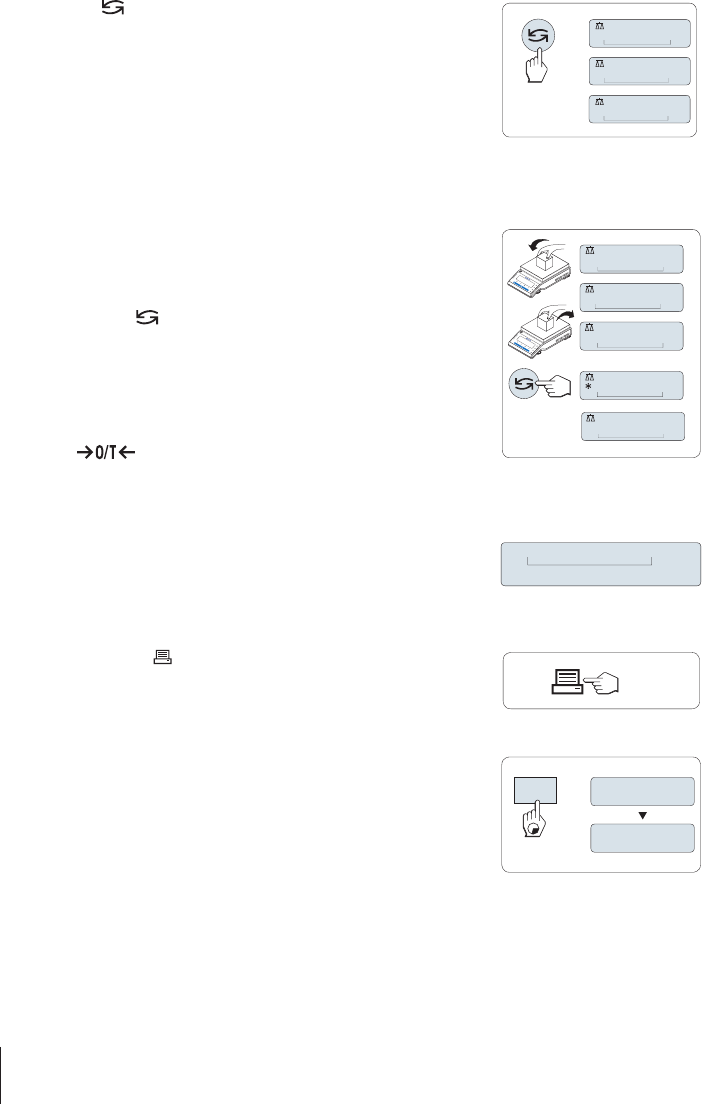
Switching weight units
The « » key can be used at any time to toggle between weight unit
"UNIT 1","RECALL" value (if selected) and weight unit "UNIT 2" (if
different from weight unit 1) and the application unit (if any).
0.78
oz
22
.
00
g
¢¢¢¢
*
22
.
00
g
¢¢¢¢
M
Recall / Recall weight value
Recall stores stable weights with an absolute display value bigger than 10d.
Requirement: The function "RECALL" must be activated in the menu.
1 Load weighing sample. The display shows weight value and
stores stable value.
2 Remove weighing sample. When the weight is removed the
Display shows zero.
3 Press « ». The display shows last stored stable weight value
for 5 seconds together with asterisk (*) and Memory (M)
symbols. After 5 seconds the display goes back to zero. This can
be repeated unlimited times.
Delete last weight value
As soon a new stable weight value is displayed, the old recall value
becomes replaced by the new weight value. When pressing
«», the recall value is set to 0.
Note: If the power is switched off, the recall value is lost. The recall
value can not be printed.
121
.
01
g
¢¢¢¢
0
.
00
g
0
.
00
g
M
121
.
01
g
0
.
00
g
C
C
Weighing with the weighing-in aid
The weighing-in aid is a dynamic graphic indicator which shows the
used amount of the total weighing range. You can thus recognize at
a glance when the load on the balance approaches the maximum
load.
¢¢¢¢¢¢¢¢
0% 100%
Print / Transmit data
Pressing the « » key transmits the weighing results over the
interface e.g. to a printer or a PC.
Switching off
− Press and hold the «Off» key until "SHUTOFF" appears on the
display. Release the key.
ðMains operated balances switch into standby mode.
ðBattery operated balances switch off completely.
SHUTOFF
On
Off
Note
•After switching on from standby mode, your balance needs no warm-up time and is immediately
ready for weighing.
•Standby mode is not possible with approved balances (only available in selected countries).
•If your balance has been switched off after a preselected time, the display is dimly lit and shows
date, time, maximum load and readability.
Installation and Putting into Operation22 Precision and Analytical Balances

•If your balance has been switched off manually, the display is off.
•To completely switch off mains operated balances, they must be disconnected from the power
supply.
Installation and Putting into Operation 23Precision and Analytical Balances
4 Maintenance
4.1 Cleaning and service
Every now and then, clean the weighing pan, draft shield element, bottom plate, draft shield
(depending on the model) and housing of your balance. Your balance is made from high-quality,
durable materials and can therefore be cleaned using a damp cloth or with a standard cleaning
agent.
To thoroughly clean the draft shield glass panels, remove the draft shield from the balance. When
reinstalling the draft shield, ensure that it is in the correct position.
Please observe the following notes:
WARNING
Risk of electric shock
1 Disconnect the balance from the power supply prior to cleaning and maintenance.
2 Only use METTLER TOLEDO power adapter, if these need to be replaced.
3 Ensure that no liquid comes into contact with the balance, terminal or AC adapter.
4 Do not open the balance or AC adapter.
These contain no user-serviceable parts.
CAUTION
Damage to balance
Under no circumstances use cleaning agents containing solvents or abrasive agents, as
this can damage the operation panel overlay.
Do not clean the IP65 protected models using high-pressure or high-temperature water.
Note
Contact a METTLER TOLEDO representative to find about the service options available – regular
maintenance by an authorized service engineer will ensure consistent weighing accuracy over the long
term and extend the service life of the balance.
4.2 Disposal
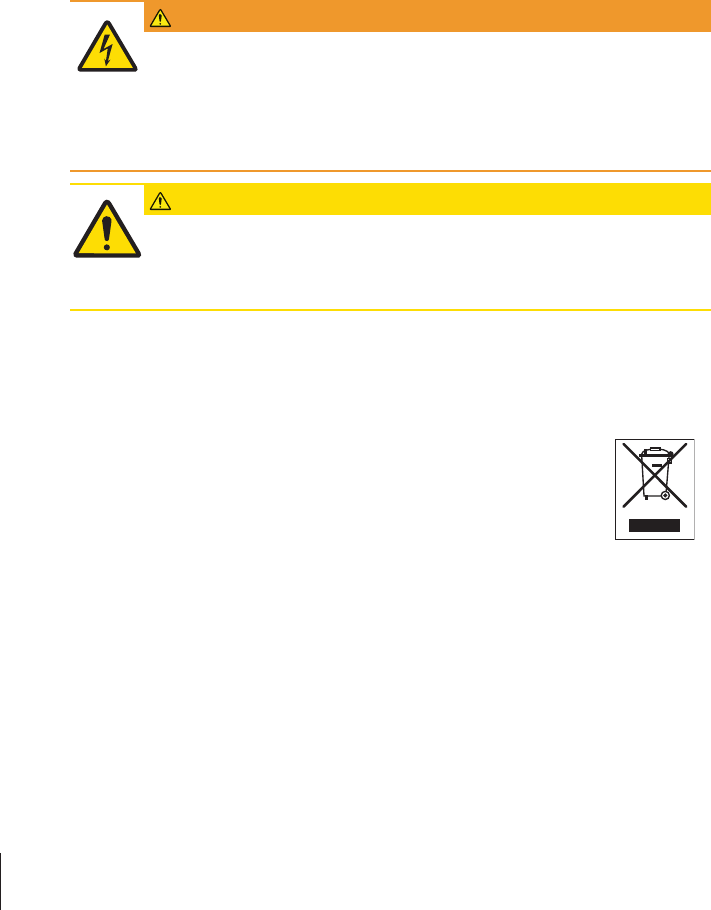
In conformance with the European Directive 2002/96/EC on Waste Electrical and
Electronic Equipment (WEEE) this device may not be disposed of in domestic waste. This
also applies to countries outside the EU, per their specific requirements.
Please dispose of this product in accordance with local regulations at the collecting point
specified for electrical and electronic equipment. If you have any questions, please contact
the responsible authority or the distributor from which you purchased this device. Should
this device be passed on to other parties (for private or professional use), the content of
this regulation must also be related.
Thank you for your contribution to environmental protection.
Maintenance24 Precision and Analytical Balances

5 Technical Data
5.1 General data
CAUTION
Use only with a tested AC Adapter with SELV output current.
Ensure correct polarity
Standard power supply
AC adapter: Primary: 100 – 240 V, ±10%, 50/60Hz, 0.3 A
Secondary: 12 V DC, 0.84 A (with electronic overload
protection)
Balance power supply: 12 V DC, 0.84 A
Can be used up to 2000 m height above mean sea level.
NOTICE
If the balance is used above 2000 m mean sea level, the optional power supply must
be used.
Optional power supply
AC adapter: Primary: 100 – 240 V, ±10%, 50/60Hz
Secondary: 12 V DC ±3%, 2.5 A (with electronic overload
protection)
Cable for AC adapter: 3-core, with country-specific plug
Balance power supply: 12 V DC ±3%, 2.25 A, maximum ripple: 80 mVpp
Can be used up to 4000 m height above mean sea level.
Protection and standards
Overvoltage category: II
Degree of pollution: 2
Protection: Protected against dust and water
Standards for safety and EMC: See Declaration of Conformity
Range of application: For use only in closed interior rooms
Environmental conditions
Height above mean sea level: Depending on the power adapter (2000 - 4000 m)
Except for China: max. 2000 m
Ambient temperature: Operating condition for ordinary lab application: +10 to 30°C
(operability guaranteed between +5 to 40°C)
Storage condition: -25 to 70 °C
Relative air humidity: 10% up to 80% at 31°C, linearly decreasing to 50% at
40°C, non-condensing
Warm-up time: At least 30 minutes (0.1 mg models 60 minutes) after
connecting the balance to the power supply
Technical Data 25Precision and Analytical Balances

Materials
Housing: Top housing: Plastic (ABS)
Bottom housing: Die-cast aluminum, lacquered
Weighing pan: Pan ø 90 mm: Stainless steel X2CrNiMo 17-12-2 (1.4404)
All others: Stainless steel X5CrNi 18-10 (1.4301)
Draft shield element: 0.1 mg models: Stainless steel X5CrNi 18-10 (1.4301)
Draft shield: Plastic (ABS), glass
In-use-cover: Plastic (PET)
Technical Data26 Precision and Analytical Balances
Mettler-Toledo GmbH
Im Langacher 44
8606 Greifensee, Switzerland
www.mt.com/contact
Subject to technical changes.
© Mettler-Toledo GmbH 11/2016
30348473D en
For more information
www.mt.com/balances
30348473
