DATEX II Client Toolkit NIS D2TK 002 Design, Build And Deployment Guide V1 11
User Manual:
Open the PDF directly: View PDF  .
.
Page Count: 22

Design, Build and
Deployment Guide
DATEX II Client Toolkit
23 March 2016 - NIS-D2TK-002
Page 2 / 22
© Saturn Eclipse Limited / Software Engineering / 23/03/2016
DATEX II Client Toolkit/ Document Control
Document Control
Document Reference
NIS-D2TK-002
Document Synopsis
This document defines the design, install and configuration for the DATEX II Client
Toolkit.
Document Details
Author: Sam Roberts
Version Issue: 1.11
Document date: 23 March 2016
Status: Issue
Owner: Saturn Eclipse Limited
Number of pages: 22
Review/ Change History
Date
Status
Updated by
Details
Version
30/11/2015
Draft
Sam Roberts
Initial Draft
0.01
04/12/2015
Draft
Oliver Roberts
Review
0.02
08/12/2015
Draft
Sam Roberts
Review updates
0.03
06/01/2016
Issue
Sam Roberts
Issue
1.00
09/01/2016
Issue
Sam Roberts
Updated build & deployment sections
1.01
15/01/2016
Update
Oliver Roberts
Updated after comments from NIS
1.02
21/01/2016
Update
Sam Roberts
Removed the dynamic Matrix Signal data
store
1.03
25/01/2016
Update
Sam Roberts
Added extra deployment configuration
1.04
27/01/2016
Update
Sam Roberts
Added C# subsections
1.05
28/01/2016
Update
Sam Roberts
Expanded descriptions of data store IDs
1.06
29/01/2016
Update
Sam Roberts
Presentation Review
1.07
19/02/2016
Update
Sam Roberts
Updated C# Quick Start section
1.08
11/03/2016
Update
Oliver Roberts
Updated C# Deployment section
1.09
16/03/2016
Update
Oliver Roberts
Updated C# Deployment section
1.10
23/03/2016
Update
Sam Roberts
Updated GitHub repositories.
1.11
Page 3 / 22
© Saturn Eclipse Limited / Software Engineering / 23/03/2016
DATEX II Client Toolkit/ Contents
Contents
DOCUMENT CONTROL 2
CONTENTS 3
1 INTRODUCTION 5
1.1 PROJECT OVERVIEW 5
1.2 DOCUMENT REFERENCES 5
2 DESIGN 6
2.1 DESIGN OVERVIEW 6
2.2 DATEX II RECEIVE FUNCTION 6
2.2.1 DATEX II Client Endpoint Controller 8
2.2.2 DATEX II Update Service 8
2.2.3 DATEX II Process Service 8
2.2.4 Network Model Update Service 9
2.2.5 Network Model Update Notification Process Service 9
2.3 JSON SERVER FUNCTION 10
2.3.1 Data Object Controller 10
2.4 INITIALISATION FUNCTION 12
2.5 DATA DICTIONARY 12
2.5.1 ANPR Data 12
2.5.2 ANPR Route Static Data 13
2.5.3 ANPR Static Data 13
2.5.4 Alternate Route Static Data 13
2.5.5 Event Data 13
2.5.6 Fused FVD and Sensor Data 13
2.5.7 Fused Sensor Only Data 13
2.5.8 HATRIS Section Static Data 14
2.5.9 Link Shape Static Data 14
2.5.10 MIDAS Data 14
2.5.11 MIDAS Static Data 14
2.5.12 Matrix Signal Static Data 14
2.5.13 Nwk Link Static Data 14
2.5.14 Nwk Node Static Data 14
2.5.15 TAME Static Data 14
2.5.16 TMU Data 15
2.5.17 TMU Static Data 15
2.5.18 VMS Data 15
2.5.19 VMS Static Data 15
3 BUILD, TEST AND CONFIGURATION 16
3.1 JAVA 16
3.1.1 Pre-requisites 16
3.1.2 Source Code Download 16

Page 4 / 22
© Saturn Eclipse Limited / Software Engineering / 23/03/2016
DATEX II Client Toolkit/ Contents
3.1.3 Development Environment 16
3.1.4 Configuration 16
3.1.5 Test 17
3.1.6 Quick Start 17
3.1.7 Build 17
3.2 C# 18
3.2.1 Pre-requisites 18
3.2.2 Source Code Download 18
3.2.3 Development Environment 18
3.2.4 Configuration 18
3.2.5 Test 18
3.2.6 Quick Start 19
3.2.7 Build 19
4 DEPLOYMENT 20
4.1 JAVA 20
4.1.1 Tomcat Deployment 20
4.2 C# 21
4.2.1 IIS Deployment 21
Page 5 / 22
© Saturn Eclipse Limited / Software Engineering
DATEX II Client Toolkit/ Introduction
Page 5 / 226Page 5 / 22IntroductiongnPage 5 / 226Page 5 / 22
Page 5 / 226Page 5 / 2226Page 5 / 2223Page 5 / 22
1 Introduction
1.1 Project Overview
Network Information Services (NIS) a Joint Venture comprising of Mouchel and Thales
has been engaged by the Highways England (HE) to operate and transform the
system that supports the management of traffic on the Highways England road
network. The Thales role in the consortium is to replace the existing National Traffic
Control Centre (NTCC) System with a new National Traffic Information System (NTIS).
The NTIS system provides various DATEX II data feeds and they use a push
mechanism to deliver data to DATEX II Subscribers. Subscribers of the DATEX II data
feeds from NTIS will need to develop a DATEX II Client to consume and process the
data for their specific needs. Highways England have requested a DATEX II Client
Toolkit be developed aiming to reduce development time and ease integration with
NTIS DATEX II services.
Subscribers will be able to either use the DATEX II Client Toolkit as a starting point to
their development or simply use it as a reference to copy from.
1.2 Document References
Documents references can be found in the following table.
Document Reference
Document Title
Document
Version
Document
Author
WA119-08-007-002-03-02-21
External Interface Design
Document, Published Services, Web
Services
v6.0
Thales
WA119-08-007-002-03-02-18
External Interface Design
Document, Published Services,
Network Model
v2.0
Thales
Page 6 / 22
© Saturn Eclipse Limited / Software Engineering
DATEX II Client Toolkit/ Design
Page 6 / 226Page 6 / 22DesigngnPage 6 / 226Page 6 / 22
Page 6 / 226Page 6 / 2226Page 6 / 2223Page 6 / 22
2 Design
2.1 Design Overview
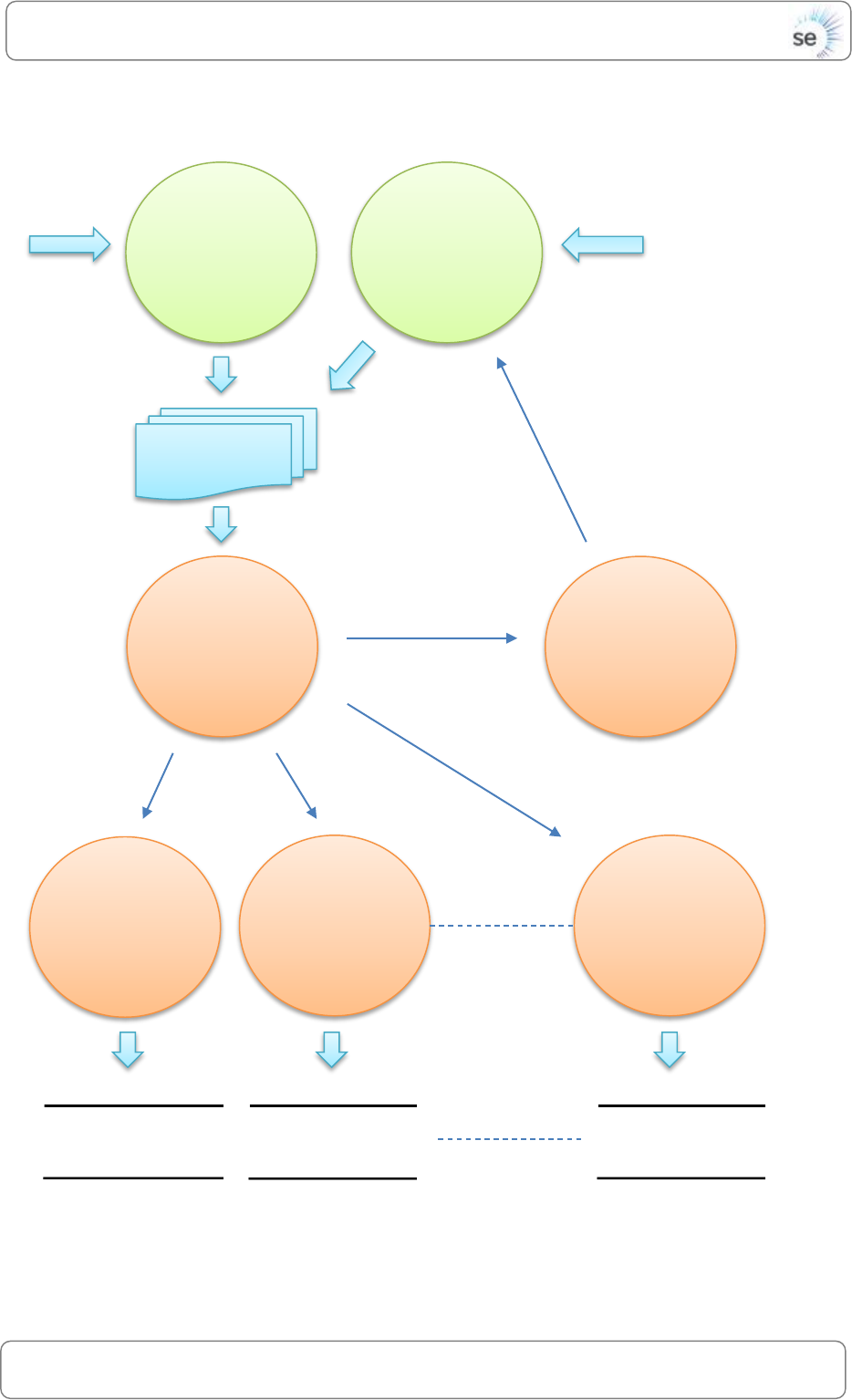
The DATEX II Client Toolkit processes data sent from NTIS over a DATEX II v2 interface
defined in the external interface design documents (ref WA119-08-007-002-03-02-21
and WA119-08-007-002-03-02-18). DATEX II messages received by the DATEX II Client
Toolkit are processed and data is then stored in-memory and made available over
an HTTP API in JSON format. Figure 1 shows the high level view of the system.
Figure 1 - Design Overview
NTIS traffic data is received in DATEX II format by the DATEX II Receive Function. This
data is parsed, processed and stored using in-memory data stores. Users can then
access this data through an HTTP interface in JSON format provided by the JSON
Server Function.
2.2 DATEX II Receive Function
The diagram shown in Figure 2 describes the DATEX II Receive Function.
NTIS
Users
DATEX II
HTTP /
JSON
DATEX II
Receive
Function
JSON
Server
Function
Data Stores
DATEX II Toolkit
Page 7 / 22
© Saturn Eclipse Limited / Software Engineering
DATEX II Client Toolkit/ Design
Page 7 / 226Page 7 / 22DesigngnPage 7 / 226Page 7 / 22
Page 7 / 226Page 7 / 2226Page 7 / 2223Page 7 / 22
Figure 2 - DATEX II Receive Function
DATEX II
Client
Endpoint
Controller
DATEX II
(Push)
DATEX II
Update
Service
Network
Model
Update
Service
Message
Queue
DATEX II
Process
Service
DATEX II
Process
Service
DATEX II
Process
Service
11 Process
Service Types
Data Store
Data Store
Data Store
19 Data Store
Types
Network Model
Update trigger
Network
Model Update
Notification
Process
Service
DATEX II
(Pull)

Page 8 / 22
© Saturn Eclipse Limited / Software Engineering
DATEX II Client Toolkit/ Design
Page 8 / 226Page 8 / 22DesigngnPage 8 / 226Page 8 / 22
Page 8 / 226Page 8 / 2226Page 8 / 2223Page 8 / 22
2.2.1 DATEX II Client Endpoint Controller
The DATEX II Client Endpoint Controller receives messages from NTIS in DATEX II
format. Each message is parsed and added to the message queue ready for
processing.
2.2.2 DATEX II Update Service
The DATEX II Update Service takes messages off the message queue and forwards
the message onto the correct DATEX II Process Service depending on the message
type.
2.2.3 DATEX II Process Service
There are 11 different DATEX II Process Services, one for each possible message type.
The following message types are as follows:
ANPR
Event
FusedFVDAndSensor
FusedSensorOnly
MIDAS
ModelUpdateNotification
TMU
VMS
NTISModelMeasurementSites
NTISModelPredefinedLocation
NTISModelVMS
Each process service will extract a data object identifier and payload to store in a
data store. Some process services are responsible for adding data objects to more
than one data store depending on the message received.
The following list describes the messages received by each process service and the
associated data stores used to store the data objects.
ANPR received by ANPR Process Service
o ANPR Data Object inserted into ANPR Data Store
Event received by Event Process Service
o Event Data Object inserted into Event Data Store
FusedFVDAndSensor received by FusedFVDAndSensor Process Service
o FusedFVDAndSensor Data Object inserted into FusedFVDAndSensor
Data Store
FusedSensorOnly received by FusedSensorOnly Process Service
o FusedSensorOnly Data Object inserted into FusedSensorOnly Data
Store

Page 9 / 22
© Saturn Eclipse Limited / Software Engineering
DATEX II Client Toolkit/ Design
Page 9 / 226Page 9 / 22DesigngnPage 9 / 226Page 9 / 22
Page 9 / 226Page 9 / 2226Page 9 / 2223Page 9 / 22
MIDAS received by MIDAS Process Service
o MIDAS Data Object inserted into MIDAS Data Store
ModelUpdateNotification received by ModelUpdateNotification Process
Service
TMU received by TMU Process Service
o TMU Data Object inserted into TMU Data Store
VMS received by VMS Process Service
o VMS (including Matrix Signals) Data Object inserted into VMS Data
Store
NTISModelMeasurementSites received by NTISModelMeasurementSites
Process Service
o TAMEStatic Data Object inserted into TAMEStatic Data Store
o MIDASStatic Data Object inserted into MIDASStatic Data Store
o ANPRStatic Data Object inserted into ANPRStatic Data Store
o TMUStatic Data Object inserted into TMUStatic Data Store
NTISModelPredefinedLocation received by NTISModelPredefinedLocation
Process Service
o NwkLinkStatic Data Object inserted into NwkLinkStatic Data Store
o NwkNodeStatic Data Object inserted into NwkNodeStatic Data Store
o LinkShapeStatic Data Object inserted into LinkShapeStatic Data Store
o ANPRRouteStatic Data Object inserted into ANPRRouteStatic Data
Store
o HATRISSectionStatic Data Object inserted into HATRISSectionStatic
Data Store
o AlternateRouteStatic Data Object inserted into AlternateRouteStatic
Data Store
NTISModelVMS received by NTISModelVMS Process Service
o VMSStatic Data Object inserted into VMSStatic Data Store
o MatrixSignalStatic Data Object inserted into MatrixSignalStatic Data
Store
2.2.4 Network Model Update Service
The Network Model Update Service provides a function called
‘updateNetworkModel’ that when invoked; downloads the latest NTIS Network
Model in DATEX II format as a ZIP file. The ZIP file is unzipped, parsed and added to
the message queue ready for processing.
2.2.5 Network Model Update Notification Process Service
When a ‘Network Model Update Notification’ message is received, this service
invokes the ‘updateNetworkModel’ function provided by the ‘Network Model
update Service’.

Page 10 / 22
© Saturn Eclipse Limited / Software Engineering
DATEX II Client Toolkit/ Design
Page 10 / 226Page 10 / 22DesigngnPage 10 / 226Page 10 / 22
Page 10 / 226Page 10 / 2226Page 10 / 2223Page 10 / 22
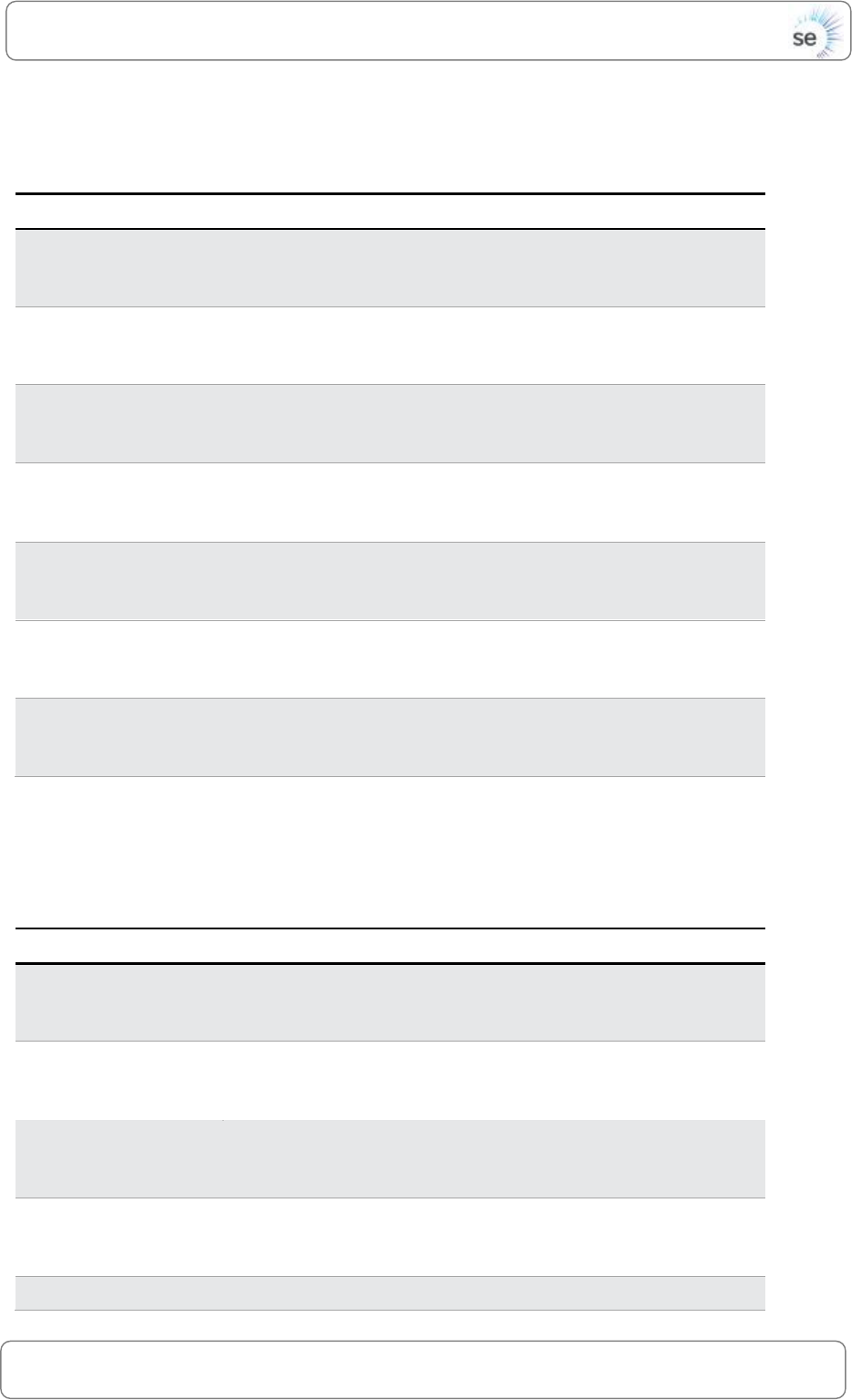
2.3 JSON Server Function
Figure 3 shows a diagram of the JSON Server Function.
Figure 3 - JSON Server Function
2.3.1 Data Object Controller
The Data Object Controller provides an HTTP API for all data objects in a JSON
format. All JSON responses will be constructed following the DATEX II data structure.
Users can request all data objects of a given type, a single data object specified by
a data object type and unique identifier. The following subsections define URL paths
are made available through the Data Object Controller for dynamic and static data
elements. The base for the controller is:
http://[HOST_IP]:8080/api
It is expected engineers using the DATEX II Toolkit will need to enhance the Data
Object Controller to provide additional required interfaces during development.
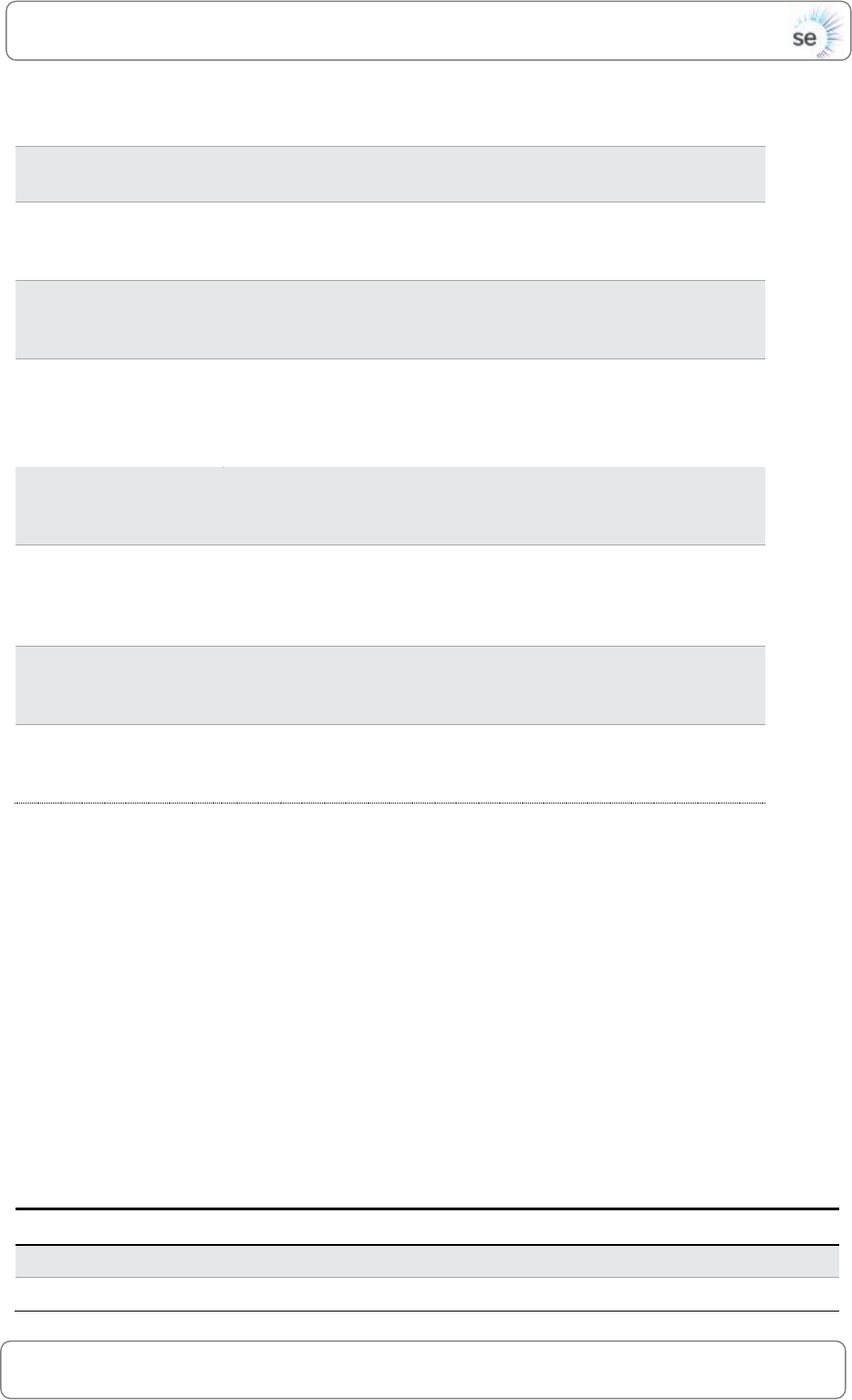
2.3.1.1 Dynamic Data Interface
URLs defined in this section can be used to obtain dynamic data objects. The
content of JSON responses match DATEX II output defined in WA119-08-007-002-03-
02-21.
Data Store
Data Store
Data Store
19 Data Store
Types
Data
Object
Controller
HTTP /
JSON
Page 11 / 22
© Saturn Eclipse Limited / Software Engineering
DATEX II Client Toolkit/ Design
Page 11 / 226Page 11 / 22DesigngnPage 11 / 226Page 11 / 22
Page 11 / 226Page 11 / 2226Page 11 / 2223Page 11 / 22
Data Type
URLs
VMS
/vms?id=[VMS ID]
/vms/all
/vms/count
Event
/event?id=[Event ID]
/event/all
/event/count
ANPR
/anpr?id=[ANPR ID]
/anpr/all
/anpr/count
Fused FVD and
Sensor
/fusedFVDAndSensor?id=[Fused FVD and Sensor ID]
/fusedFVDAndSensor/all
/fusedFVDAndSensor/count
Fused Sensor Only
/fusedSensorOnly?id=[Fused Sensor Only ID]
/fusedSensorOnly/all
/fusedSensorOnly/count
MIDAS
/midas?id=[MIDAS ID]
/midas/all
/midas/count
TMU
/tmu?id=[TMU ID]
/tmu/all
/tmu/count
2.3.1.2 Static Data Interface
URLs defined in this section can be used to obtain static data objects. Content of
JSON responses match DATEX II output defined in WA119-08-007-002-03-02-18.
Static Data Type
URLs
VMS
/vmsStatic?id=[VMS ID]
/vmsStatic/all
/vmsStatic/count
Matrix Signal
/matrixSignalStatic?id=[Matrix Signal ID]
/matrixSignalStatic/all
/matrixSignalStatic/count
TAME
/tameStatic?id=[TAME ID]
/tameStatic/all
/tameStatic/count
MIDAS
/midasStatic?id=[MIDAS ID]
/midasStatic/all
/midasStatic/count
ANPR
/anprStatic?id=[ANPR ID]
Page 12 / 22
© Saturn Eclipse Limited / Software Engineering
DATEX II Client Toolkit/ Design
Page 12 / 226Page 12 / 22DesigngnPage 12 / 226Page 12 / 22
Page 12 / 226Page 12 / 2226Page 12 / 2223Page 12 / 22
/anprStatic/all
/anprStatic/count
TMU
/tmuStatic?id=[TMU ID]
/tmuStatic/all
/tmuStatic/count
Network Link Shapes
/linkShapeStatic?id=[Link Shape ID]
/linkShapeStatic/all
/linkShapeStatic/count
Network Links
/nwkLinkStatic?id=[Link ID]
/nwkLinkStatic/all
/nwkLinkStatic/count
ANPR Routes
/anprRouteStatic?id=[ANPR Route ID]
/anprRouteStatic/all
/anprRouteStatic/count
HATRIS Sections
/hatrisSectionStatic?id=[HATRIS Section ID]
/hatrisSectionStatic/all
/hatrisSectionStatic/count
Network Nodes
/nwkNodeStatic?id=[Node ID]
/nwkNodeStatic/all
/nwkNodeStatic/count
Alternative Routes
/alternateRouteStatic?id=[Alternate Route ID]
/alternateRouteStatic/all
/alternateRouteStatic/count
2.4 Initialisation Function
On start-up, the DATEX II Client Toolkit invokes the initialisation function. The
initialisation function will check the local file-system for a network model that has
been previously downloaded. If this exists, the initialisation function will then invoke
the Network Model Update Service to process the network model.
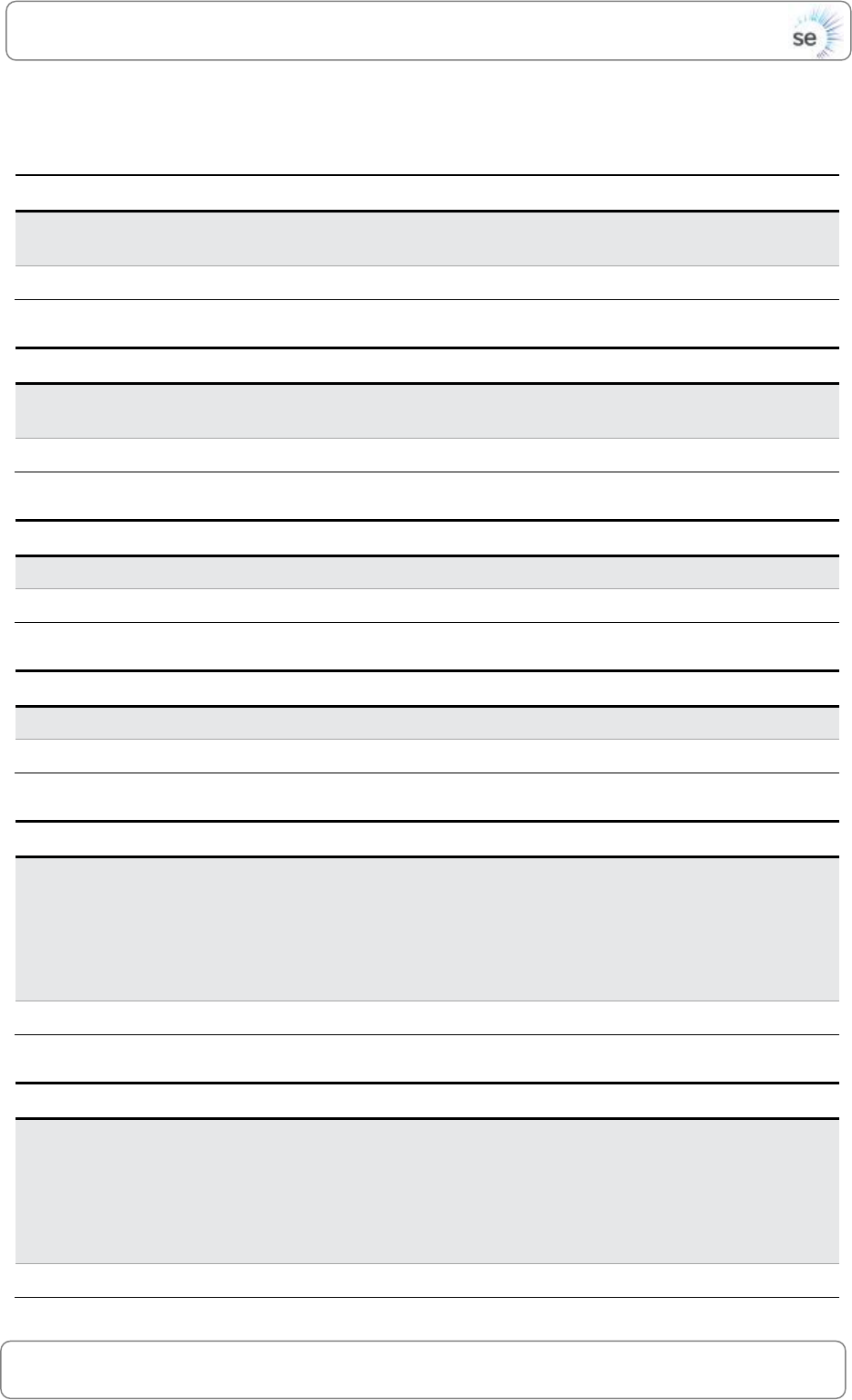
2.5 Data Dictionary
The following sections define data stores that are used within the DATEX II Toolkit. For
a definition of the DATEX II elements defined in each data object refer to the
external interface definition documents (ref WA119-08-007-002-03-02-21 and WA119-
08-007-002-03-02-18).
2.5.1 ANPR Data
Data Element
Data Type
Data Definition
Identifier
String
ANPR Identifier (e.g. ANPR_Measurement_Site_30071390)
Object
DataObject
List of DATEX II SiteMeasurements
Page 13 / 22
© Saturn Eclipse Limited / Software Engineering
DATEX II Client Toolkit/ Design
Page 13 / 226Page 13 / 22DesigngnPage 13 / 226Page 13 / 22
Page 13 / 226Page 13 / 2226Page 13 / 2223Page 13 / 22
2.5.2 ANPR Route Static Data
Data Element
Data Type
Data Definition
Identifier
String
ANPR Route Static Identifier
(e.g. NTIS_ANPR_Route_30072635_6)
Object
DataObject
DATEX II PredefinedLocation
2.5.3 ANPR Static Data
Data Element
Data Type
Data Definition
Identifier
String
ANPR Static Identifier
(e.g. ANPR_Measurement_Site_30071075)
Object
DataObject
DATEX II MeasurementSiteRecord
2.5.4 Alternate Route Static Data
Data Element
Data Type
Data Definition
Identifier
String
Alternate Route Static Identifier (e.g. 8202461_3)
Object
DataObject
DATEX II PredefinedLocation
2.5.5 Event Data
Data Element
Data Type
Data Definition
Identifier
String
Event Identifier (e.g. RW-14-09-25-000095)
Object
DataObject
DATEX II Situation
2.5.6 Fused FVD and Sensor Data
Data Element
Data Type
Data Definition
Identifier
String
Basic Data Type + Fused FVD and Sensor Identifier (e.g.
TrafficSpeed101001802,
TravelTimeData101001802,
TrafficHeadway101001802,
TrafficFlow101001802,
TrafficConcentration101001802)
Object
DataObject
DATEX II ElaboratedData
2.5.7 Fused Sensor Only Data
Data Element
Data Type
Data Definition
Identifier
String
Basic Data Type + Fused Sensor Only Identifier (e.g.
TrafficSpeed101001802,
TravelTimeData101001802,
TrafficHeadway101001802,
TrafficFlow101001802,
TrafficConcentration101001802)
Object
DataObject
DATEX II ElaboratedData
Page 14 / 22
© Saturn Eclipse Limited / Software Engineering
DATEX II Client Toolkit/ Design
Page 14 / 226Page 14 / 22DesigngnPage 14 / 226Page 14 / 22
Page 14 / 226Page 14 / 2226Page 14 / 2223Page 14 / 22
2.5.8 HATRIS Section Static Data
Data Element
Data Type
Data Definition
Identifier
String
HATRIS Section Identifier (e.g. HS50001739_7)
Object
DataObject
DATEX II PredefinedLocation
2.5.9 Link Shape Static Data
Data Element
Data Type
Data Definition
Identifier
String
Link Shape Identifier (e.g. 111018701_98)
Object
DataObject
DATEX II PredefinedLocation
2.5.10 MIDAS Data
Data Element
Data Type
Data Definition
Identifier
String
MIDAS Identifier
(e.g. 1816E27C1C474CB981FC38C5A55451E4)
Object
DataObject
DATEX II SiteMeasurements
2.5.11 MIDAS Static Data
Data Element
Data Type
Data Definition
Identifier
String
MIDAS Static Identifier
(e.g. 94A449F6F2D0404990D842B016B396C5)
Object
DataObject
DATEX II MeasurementSiteRecord
2.5.12 Matrix Signal Static Data
Data Element
Data Type
Data Definition
Identifier
String
Matrix Signal Static Identifier
(e.g. D250950202D97952E0433CC411ACA994)
Object
DataObject
DATEX II VmsUnitRecord
2.5.13 Nwk Link Static Data
Data Element
Data Type
Data Definition
Identifier
String
Nwk Link Static Identifier (e.g. 101007503)
Object
DataObject
DATEX II PredefinedLocation
2.5.14 Nwk Node Static Data
Data Element
Data Type
Data Definition
Identifier
String
Nwk Node Static Identifier (e.g. 1230041)
Object
DataObject
DATEX II PredefinedLocation
2.5.15 TAME Static Data
Data Element
Data Type
Data Definition
Page 15 / 22
© Saturn Eclipse Limited / Software Engineering
DATEX II Client Toolkit/ Design
Page 15 / 226Page 15 / 22DesigngnPage 15 / 226Page 15 / 22
Page 15 / 226Page 15 / 2226Page 15 / 2223Page 15 / 22
Identifier
String
TAME Static Identifier
(e.g. C6ED3C0237593F7DE0433CC411AC7306)
Object
DataObject
DATEX II MeasurementSiteRecord
2.5.16 TMU Data
Data Element
Data Type
Data Definition
Identifier
String
TMU Identifier
(e.g. C6E971CAD18C789BE0433CC411ACCCEA)
Object
DataObject
DATEX II SiteMeasurements
2.5.17 TMU Static Data
Data Element
Data Type
Data Definition
Identifier
String
TMU Static Identifier
(e.g. C6E971CAD0EE789BE0433CC411ACCCEA)
Object
DataObject
DATEX II MeasurementSiteRecord
2.5.18 VMS Data
Data Element
Data Type
Data Definition
Identifier
String
VMS Identifier (e.g. CFB613DE86263254E0433CC411ACFD01)
Object
DataObject
DATEX II VmsUnit
2.5.19 VMS Static Data
Data Element
Data Type
Data Definition
Identifier
String
VMS Static Identifier
(e.g. CFB613DE86263254E0433CC411ACFD01)
Object
DataObject
DATEX II VmsUnitRecord
Page 16 / 22
© Saturn Eclipse Limited / Software Engineering
DATEX II Client Toolkit/ Build, Test and Configuration
Page 16 / 226Page 16 / 22Build, Test and ConfigurationgnPage 16
/ 226Page 16 / 22
Page 16 / 226Page 16 / 2226Page 16 / 2223Page 16 / 22
3 Build, Test and Configuration
3.1 Java
3.1.1 Pre-requisites
This section requires the following tools to be installed:
OpenJDK: version 1.7
OpenJDK development package: version 1.7
Git: version 2.1
Gradle: version 2.3
3.1.2 Source Code Download
The Java DATEX II Client Toolkit is available through GitHub repository. To clone the
project run the following command:
# git clone https://github.com/SaturnEclipseUK/DATEXIIToolkitJava.git
3.1.3 Development Environment
Optionally, the Eclipse IDE (version ‘Mars’) can be used to make source code
changes. To prepare the source code for this environment run the following
command from the working directory:
# gradle eclipse
To import the project; start the Eclipse IDE and choose the following menu option:
File -> Import -> Import Existing Project
Then, select the root of the project directory and proceed with the import.
3.1.4 Configuration
The configuration parameters for the DATEX II Client Toolkit are stored in the
configuration file “./src/main/resources/application.properties”.
The NTIS network model base URL (ntisNwkModelBaseUrl) is the location where the
NTIS network model is downloaded from. Please check with the project
administrators that the value of this parameter is correct and up-to-date. A
username and password is also required to download the network model and can
be set in ntisNwkModelUsername and ntisNwkModelPassword.
The DATEXII Client Toolkit can be configured to download the NTIS network model on startup.
This can be done using the Boolean configuration parameter loadNwkModelOnStartup.
Events will be deleted after they have been set to ‘cleared’ for the number of minutes
defined in expireClearedEventsAfterMins.

Page 17 / 22
© Saturn Eclipse Limited / Software Engineering
DATEX II Client Toolkit/ Build, Test and Configuration
Page 17 / 226Page 17 / 22Build, Test and ConfigurationgnPage 17
/ 226Page 17 / 22
Page 17 / 226Page 17 / 2226Page 17 / 2223Page 17 / 22
3.1.5 Test
The DATEX II Client Toolkit has a number of tests that can be run to give the user
some confidence that the software is behaving correctly. The tests will use sample
DATEXII input files to populate the data caches, which are then requested through
the web controller and printed to the console.
From within the DATEX II Client Toolkit project directory, test the project using the
following command:
# gradle test
Note: 3Gb of free memory is required for the tests to run
3.1.6 Quick Start
For evaluation purposes, the DATEX II Client Toolkit can be run using the following
command:
# gradle run
Once started, the application will start a web server on port 8080. To test the
application’s functionality, submit a sample DATEXII message to the application
using the example script:
# ./scripts/submitD2lm.sh ./src/test/resources/Event_Data_3794674417759799.xml
To check the data has been processed correctly, use the following cURL command
to retrieve the data object in JSON format:
# curl http://localhost:8080/api/event/all
and;
# curl http://localhost:8080/api/event?id=UF-15-04-29-000224
See section 2.3.1 for a complete list of URLs.
3.1.7 Build
The DATEX II Client Toolkit can be deployed to an application server by creating a
WAR file. To create a WAR file run the following Gradle command:
# gradle war
The newly created WAR file can be found at:
./build/libs/datex2-client-toolkit-[version].war
See section 4 for instructions on deploying the application.

Page 18 / 22
© Saturn Eclipse Limited / Software Engineering
DATEX II Client Toolkit/ Build, Test and Configuration
Page 18 / 226Page 18 / 22Build, Test and ConfigurationgnPage 18
/ 226Page 18 / 22
Page 18 / 226Page 18 / 2226Page 18 / 2223Page 18 / 22
3.2 C#
3.2.1 Pre-requisites
This section requires the following tools to be installed:
Visual Studio: version ‘Community 2015’
Git: version 2.1
cURL for Windows: (http://www.confusedbycode.com)
3.2.2 Source Code Download
The C# DATEX II Client Toolkit is available through GitHub repository. To clone the
project run the following command:
# git clone https://github.com/SaturnEclipseUK/DATEXIIToolkitCS.git
3.2.3 Development Environment
Visual Studio can be used to make source code changes. Once Visual Studio is
installed, open the DATEXIIToolkit.sln file located in the root of the project directory.
3.2.4 Configuration
The configuration parameters for the DATEX II Client Toolkit are stored in the
configuration file “./DATEXIIToolkit/Web.config”.
The NTIS network model base URL (ntisNwkModelBaseUrl) is the location where the
NTIS network model is downloaded from. Please check with the project
administrators that the value of this parameter is correct and up-to-date. A
username and password is also required to download the network model and can
be set in ntisNwkModelUsername and ntisNwkModelPassword.
The DATEXII Client Toolkit can be configured to download the NTIS network model on startup.
This can be done using the Boolean configuration parameter loadNwkModelOnStartup.
Events will be deleted after they have been set to ‘cleared’ for the number of minutes
defined in expireClearedEventsAfterMins.
3.2.5 Test
The DATEX II Client Toolkit has a number of tests that can be run to give the user
some confidence that the software is behaving correctly. The tests will use sample
DATEXII input files to populate the data caches, which are then requested through
the web controller.
From within Visual Studio, test the project using the menu option:
# Test -> Run -> All Tests
Note: 3Gb of free memory is required for the tests to run

Page 19 / 22
© Saturn Eclipse Limited / Software Engineering
DATEX II Client Toolkit/ Build, Test and Configuration
Page 19 / 226Page 19 / 22Build, Test and ConfigurationgnPage 19
/ 226Page 19 / 22
Page 19 / 226Page 19 / 2226Page 19 / 2223Page 19 / 22
3.2.6 Quick Start
For evaluation purposes, the DATEX II Client Toolkit can be run within Visual Studio by
pressing F5.
Note: Ensure IIS Express runs in 64 bit mode. In Visual Studio tick the option:
Tools -> Options -> Projects & Solutions -> Web Projects -> Use 64 bit version of IIS
Once started, the application will start a web server on port 49519. To test the
application’s functionality, submit sample DATEXII messages to the application using
the batch script:
# cd DATEXIIToolkitTests\BatchScripts
# postFiles.bat
To check the data has been processed correctly, use the following cURL command
to retrieve the data object in JSON format:
# curl http://localhost:49519/api/event/all
Or use the batch script to exercise all API functions:
# cd DATEXIIToolkitTests\BatchScripts
# GetObjects.bat
See section 2.3.1 for a complete list of URLs.
3.2.7 Build
The DATEX II Client Toolkit can be deployed to an IIS server by publishing the project.
To publish the project from Visual Studio:
From the menu click: Build -> Publish
Select the publish target ‘custom’
Enter a profile name: ‘D2TK’
Select publish method: ‘File System’
Enter a target location: e.g. ‘C:\DATEXIIToolkitRelease’
Select configuration: ‘Release’
Select: Publish
The newly published project can be found at the target location.
See section 4 for instructions on deploying the application.
Page 20 / 22
© Saturn Eclipse Limited / Software Engineering
DATEX II Client Toolkit/ Deployment
Page 20 / 226Page 20 / 22DeploymentgnPage 20 / 226Page 20 /
22
Page 20 / 226Page 20 / 2226Page 20 / 2223Page 20 / 22
4 Deployment
4.1 Java
The Java DATEX II Client Toolkit can be deployed in an application server such as
JBoss Application Server or Apache Tomcat.
4.1.1 Tomcat Deployment
The following is a guide to deploying the DATEX II Client Toolkit on a Redhat
Enterprise Linux 7.1 server using Apache Tomcat 7.0.
Before you begin, you need to set up a subscription with the NTIS system by
registering as a subscriber through the Traffic England web site
(www.trafficengland.com). You should obtain a username and password from your
NTIS administrator to access the NTIS network model.
OS Pre-requisites: A default install of Redhat Enterprise Linux 7 with at least 3Gb of
free memory.
# yum install java-1.7.0-openjdk
# yum install java-1.7.0-openjdk-devel
# yum install tomcat
Append the following line to the bottom of the Tomcat configuration
file ‘/etc/tomcat/tomcat.conf’:
JAVA_OPTS="-Xmx3g"
Create a WAR file from your development host. See section 3.1.7 on how to create a
WAR file. (Note. before you create a WAR file, you will need to update the NTIS
username and password in the configuration file. See section 3.1.4). Rename the
WAR file to ‘ROOT.war’ and then copy the WAR file to the following location:
/var/lib/tomcat/webapps/ROOT.war
Start the Tomcat service:
# service tomcat start
Check the application has started using the log file:
/var/log/tomcat/datex2-client-toolkit.log
Once the application is running, set up the DATEX II data feeds to your application.
To do this, you will need to provide to following URL to your NTIS system administrator:
http://[HOST IP ADDRESS]:8080/subscriber/update
Page 21 / 22
© Saturn Eclipse Limited / Software Engineering
DATEX II Client Toolkit/ Deployment
Page 21 / 226Page 21 / 22DeploymentgnPage 21 / 226Page 21 /
22
Page 21 / 226Page 21 / 2226Page 21 / 2223Page 21 / 22
Use the log file to verify you are receiving traffic information.
Note: When re-deploying a WAR file to Tomcat. Ensure to remove the entire contents
of the webapps directory before copying the new WAR into it, otherwise the new
changes will not take effect.
# rm –rf /var/lib/tomcat/webapps/*
4.2 C#
The C# DATEX II Client Toolkit can be deployed in IIS.
4.2.1 IIS Deployment
The following is a guide to deploying the DATEX II Client Toolkit on a Windows Server
2012 R2 server using IIS 8.5.
Before you begin, you need to set up a subscription with the NTIS system by
registering as a subscriber through the Traffic England web site
(www.trafficengland.com). You should obtain a username and password from your
NTIS administrator to access the NTIS network model.
OS Pre-requisites: A default install of Windows Server 2012 R2 with at least 3Gb of free
memory.
From the ‘Server Manager’ dashboard:
Select: Manage -> Add Roles and Features
Click Next until the ‘Server Roles’ tab
From the ‘Roles’ section, tick Web Server IIS and Add Feature
From the ‘Features’ tab, tick .NET Framework 4.5 Features -> ASP.NET 4.5
From the ‘Role Services’ tab tick Application Development -> ASP.NET 4.5 and Add
Features
Click Next and Install
Once the install of IIS is complete, from the ‘Server Manager’ dashboard:
Select Tools -> Internet Information Services (IIS) Manager
Copy your published project onto the IIS Web Server (See section 3.2.7 to create a
published project) and ensure the user IIS_IUSRS has read access permissions to the
folder.
The DATEX II Toolkit generates logs and downloads the network model into the
DATEXII Toolkit root folder. The DATEX II Toolkit root folder is defined by the

Page 22 / 22
© Saturn Eclipse Limited / Software Engineering
DATEX II Client Toolkit/ Deployment
Page 22 / 226Page 22 / 22DeploymentgnPage 22 / 226Page 22 /
22
Page 22 / 226Page 22 / 2226Page 22 / 2223Page 22 / 22
‘rootDirectory’ (by default this is ‘C:\DATEXIIToolkit’) configuration that can be found
in application settings. To allow the DATEX II Toolkit permission to create files the
IIS_IUSRS must be granted ‘read and write’ permissions on the root folder.
From the ‘connections’ pane, navigate to ‘Sites’
Right click on ‘Sites’ -> Add Website
Enter a Website name ‘e.g. D2TK’ and Select the Application Pool ‘.NET v4.5’
Enter the physical path to where your published project.
Update the port number to 8080.
Click ok.
By default IIS will configure the DATEX II Toolkit C# web application to start the next
time a web request is made to the web site.
Check the application has started using the log file:
C:\\DATEXIIToolkit\logs\datexiitoolkit-*.log
Once the application is running, set up the DATEX II data feeds to your application.
To do this, you will need to provide to following URL to your NTIS system administrator:
http://[HOST IP ADDRESS]:8080/subscriber/update
Note: By default IIS has a website inactivity idle timeout of 20mins where the website
will terminate and restart with new activity. To prevent this undesired affect, under
the application pool’s advanced settings, update:
‘Idle Time-out action’ to ‘suspend’
Note: The NTIS System restricts the downloading of the network model file to once
every five minutes. If DATEX II Toolkit requests the network model file twice within a
five minute period NTIS will respond with a failure, the DATEX II Toolkit will retry
downloading the network model every minute for five minutes.
