NX 487 (60 834 95) Flexguard Sound Sensor
NX-487 (60-834-95) Flexguard Sound Sensor NX-487 (60-834-95) Flexguard Sound Sensor
User Manual: NX-487 (60-834-95) Flexguard Sound Sensor AlarmHow.net Library
Open the PDF directly: View PDF  .
.
Page Count: 6
- Part No. 60-834-95
- 60-765-43
- Adjustable Dual Technology Sound Sensor
- Product Summary
- Programming
- Installation
- Guidelines
- Mounting the Sensor
- 1. Open the sensor door and remove the cover screw using a Phillips screwdriver (see Fig ure 2).
- 2. Remove the sensor cover by first pulling up at the top of the cover then lift up at the bottom. Set the sensor cover aside.
- 3. Enable the wall tamper switch by removing the plastic tab on the back of the sensor using the needle-nose pliers (see Figure 3).
- 4. Screw the M4 or M5 screw into the wall or ceiling so that it will make contact with the wall tamper arm.
- 5. Place the sensor base at the desired location on the wall or ceiling (over tamper screw if installed) and mark the narrow portion of the mounting holes (see Figure 4).
- 6. Insert screws part way into anchors (if necessary) or wall.
- 7. Place the sensor base on the screws and slide the narrow portion of the mounting holes onto the screws.
- 8. Gently tighten the screws to secure the sensor in place.
- Testing
- Note Do not test when the sensor is in normal mode.
- Table 2: LED Indicator Conditions
- Sensor Testing with the FG-700 Glass Break Simulator
- 1. Set the panel to the dealer sensor test mode.
- 2. Open the sensor door (to view LEDs).
- 3. Place the sensor in test mode by shorting out the silver test points on the sensor board using a small flathead screwdriver (see Figure 5). When the sensor is in test mode the green LED blinks once per second.
- 4. Hold the tester at the farthest point of the glass to be protected (25 feet maximum).
- 5. Place the tester setting switches to “Flex” and “Temp.”
- 6. Within 30 seconds of arming the tester, generate a signal by striking the glass with your hand or a cushioned tool. The tester will automatically generate a burst of glass breaking sound, and the red LED on the sensor should light to indic...
- 7. Listen for interior siren beeps to determine acceptable range (see panel installation instruc tions).
- Sensor Testing with the FG-701 Glass Break Simulator
- 1. Set the panel to the dealer sensor test mode.
- 2. Open the sensor door (to view LEDs).
- 3. Place the sensor in test mode by placing the tester setting switches to “Activate” and “Man,” then press the red button on the tester (within 15 feet of the sensor). The tester emits a low fre quency buzzing sound. When the sensor is in te...
- 4. Hold the tester at the farthest point of the glass to be protected (25 feet maximum).
- 5. Place the tester setting switches to “Test” and “Flex.”
- 6. Within 30 seconds of arming the tester, generate a signal by striking the glass with your hand or a cushioned tool. The tester will automatically generate a burst of glass breaking sound, and the red LED on the sensor should light to indic...
- 7. Listen for interior siren beeps to determine acceptable range (see panel installation instruc tions).
- Note Do not test when the sensor is in normal mode.
- Adjusting the Sensitivity
- 1. Open the sensor door.
- 2. Remove the batteries.
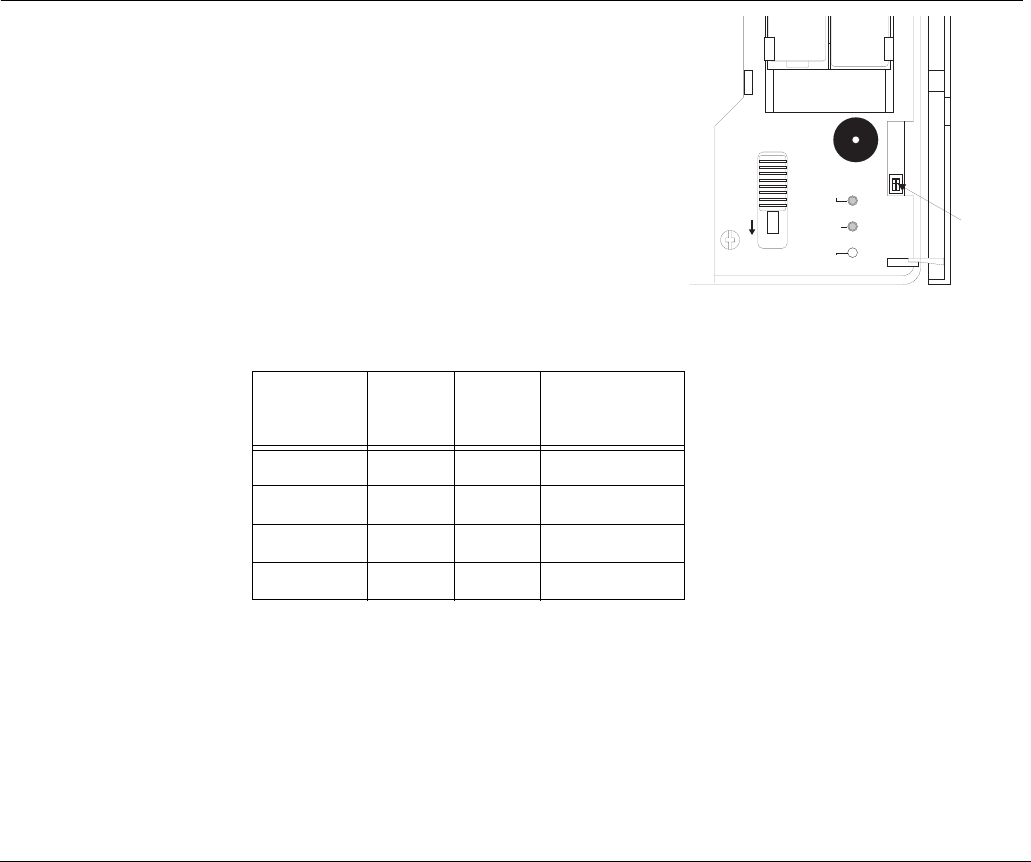
- 3. Use a small screwdriver to move the sensi tivity switches to the desired setting (see Figure 6). Sensitivity settings are shown in Table 3.
- Table 3: Sensitivity Settings
- 4. Reinstall the batteries.
- 5. Place the sensor in test mode (see appropriate range testing section).
- 6. Turn on any heating/air-conditioning system, and any other equipment in the sensor vicinity. Observe the green audio LED for one minute with equipment running. Excessive subsonic (inaudible) noise typically produced by air handling systems...
- 7. If the LED flashes randomly, decrease the sensitivity according to the sensitivity settings in Table 3.
- Specifications
1
,QVWDOODWLRQ,QVWUXFWLRQV
*(6HFXULW\
'
Product
Summary
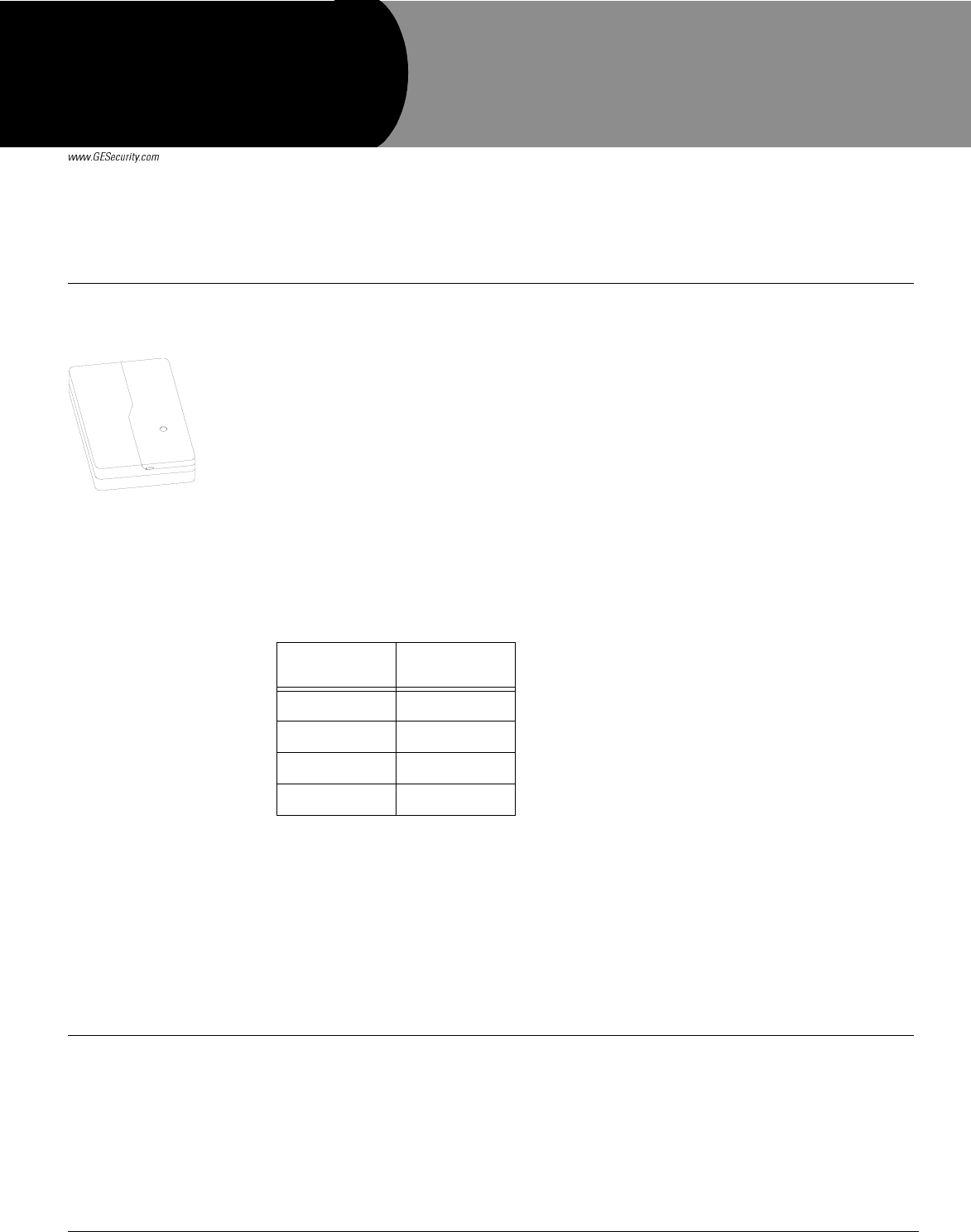
The sensor is a dual technology glass-break detector that uses a single microphone for detecting
both flex and audio frequencies. Since glass breaking must be both detected and verified, false
alarms are virtually eliminated.
The sensor detects glass breakage of windows within 25 feet.
How It Works
The microphone is sensitive to different frequencies. It detects both the ultra-low frequencies
produced by a blow to a glass window and the higher frequencies produced by breaking glass.
The audio technology remains inactive until the microphone detects a blow to the glass. Once
this happens the microphone must also detect the frequency of breaking glass, within a defined
time-window after the flex circuitry detects a blow to the glass. Only then does the sensor go into
alarm.
The sensor is powered by two 3.6V Lithium AA batteries (included).
The sensor can be used with the glass types and thicknesses shown in Table 1.
For the sensor to work properly, the glass size must be at least 10-7/8” x 10-7/8”.
Tools Needed
• Small Phillips Screwdriver
• Small Flathead Screwdriver
• Screws and Anchors (included)
• Small Needle-Nose Pliers
• M4 or M5 Screw
• Sound Sensor Tester (GE Security part number 13-332)
Programming The following steps describe the general guidelines for programming (learning) the sensor into
panel memory. Refer to the specific panel installation instructions or reference manual for com-
plete programming details.
1. Set the panel to the program mode.
2. Proceed to the LEARN SENSORS menu.
3. Select the appropriate sensor group and sensor number assignments.
Table 1: Glass Types and
Thicknesses
Glass Type Thickness
(inches)
Plate 3/32
Tempered 1/8
Laminated 1/8
Wired 1/4
'RFXPHQW1XPEHU5HY&
0D\
$GMXVWDEOH'XDO7HFKQRORJ\
6RXQG6HQVRU
3DUW1R
2Adjustable Dual Technology Sound Sensor Installation Instructions
4. When prompted by the panel to trip the sensor, activate the sensor tamper by opening the
sensor door.
5. Exit program mode.
Installation Guidelines
Determine the best mounting location for the sensor using the following guidelines:
• Mount the sensor on the ceiling or on a wall at least 7 feet from the floor with a direct
and unobstructed line-of-sight of the protected glass.
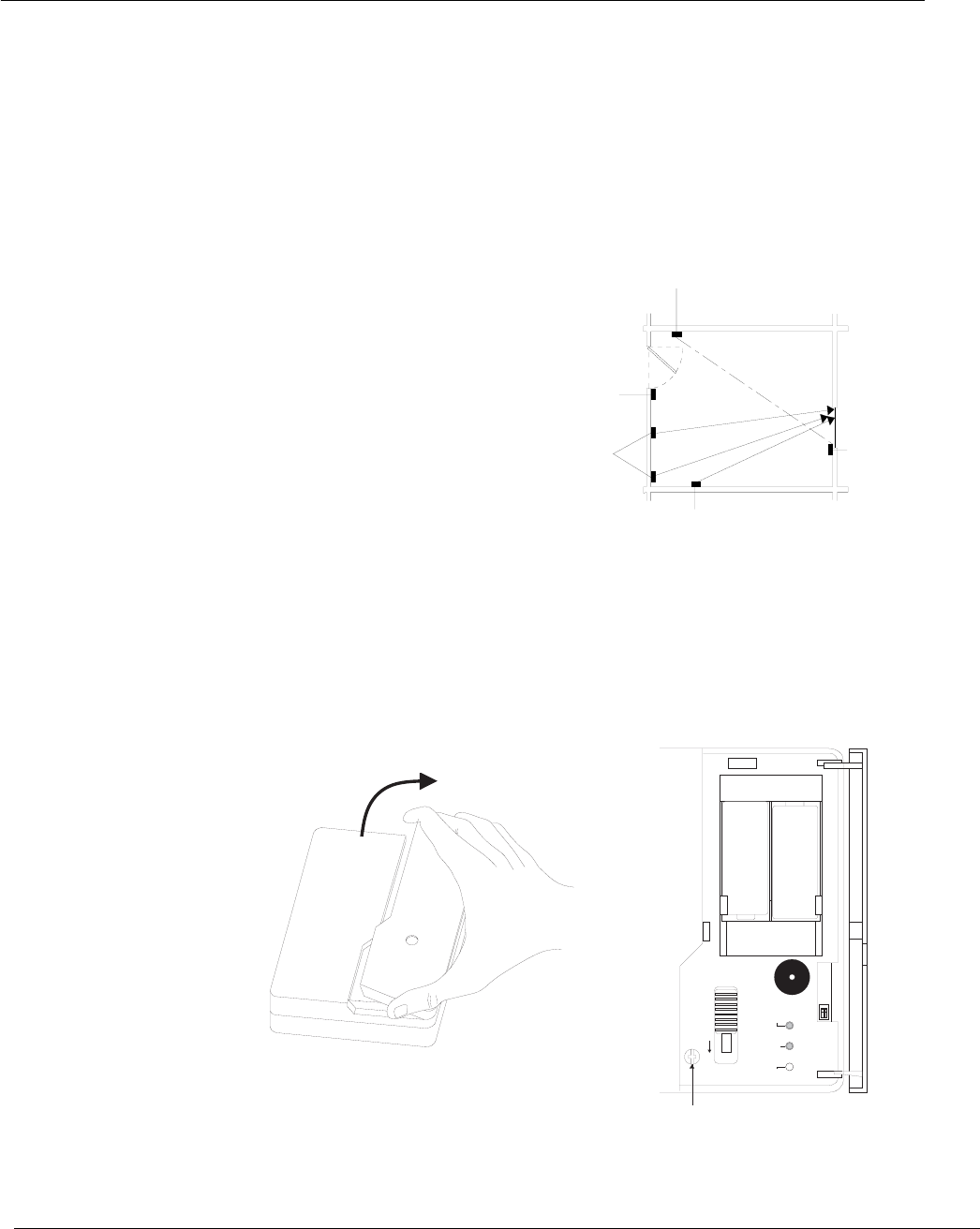
• Mount the sensor within 25 feet of the glass to be protected (see Figure 1).
Note
Curtains, blinds, and other window coverings can absorb energy from breaking glass. For exam-
ple, heavy curtains will effectively block the sound signal. In these cases, mount the sensor behind
the window covering next to or above the window.
• Do not mount the sensor next to air
ducts, forced air fans, or bells mea-
suring 2 inches (or larger) in diam-
eter.
• Do not mount the sensor near doors
and windows that can be slammed
(see Figure 1).
• Do not mount the sensor where fur-
niture may be placed between the
glass and the sensor.
• Do not mount the sensor on posts,
free-standing or otherwise.
• Do not mount the sensor where a
door can be closed between the
sensor and the glass or where an
open door may obstruct sensor
line-of-sight (see Figure 1).
Figure 1. Sensor Mounting Locations
Mounting the Sensor
Mount the sensor using the following procedure:
1. Open the sensor door and remove the cover screw using a Phillips screwdriver (see Fig-
ure 2).
Figure 2. Opening Cover to Locate and Remove Cover Screw
POOR LOCATION
FULLY OPENED DOOR CAN
BLOCK SENSORS VIEW
SATISFACTORY
LOCATION
SATISFACTOR
Y
LOCATION
POOR LOCATION,
HIGH RISK OF
DOOR SLAM
NOISE
OPTIMUM
LOCATIONS
25' MAXIMUM
25' MAXIMUM
25' MAXIMUM
+
-
SENS 1
TEST MODE
LED ENABLED
ON OFF
FLEX ALARM AUDIO
SCREW
3.6V
LITHIUM
AA
BATTERY
3.6V
LITHIUM
AA
BATTERY
SENS 2
3Adjustable Dual Technology Sound Sensor Installation Instructions
2. Remove the sensor cover by first pulling up at the top of the cover then lift up at the bottom.
Set the sensor cover aside.
Note
Steps 3 and 4 provide instructions on how to enable the wall tamper switch. For commercial UL listed
systems the wall tamper switch must be used. If not using the tamper switch feature, move on to step 5.
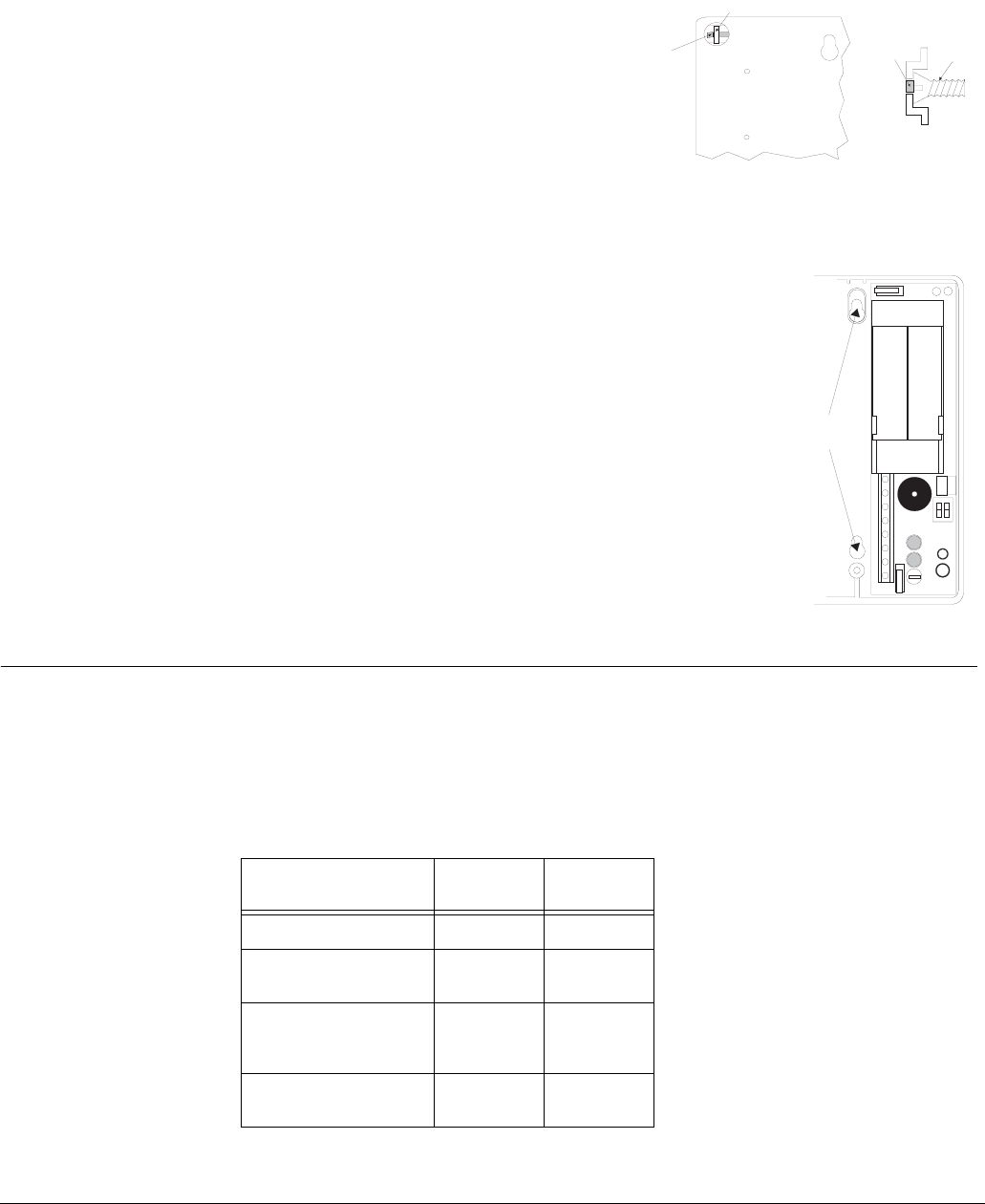
3. Enable the wall tamper switch by removing
the plastic tab on the back of the sensor using
the needle-nose pliers (see Figure 3).
4. Screw the M4 or M5 screw into the wall or
ceiling so that it will make contact with the
wall tamper arm.
Figure 3. Wall Tamper Switch
5. Place the sensor base at the desired location on the wall or ceiling
(over tamper screw if installed) and mark the narrow portion of
the mounting holes (see Figure 4).
6. Insert screws part way into anchors (if necessary) or wall.
7. Place the sensor base on the screws and slide the narrow portion
of the mounting holes onto the screws.
8. Gently tighten the screws to secure the sensor in place.
Figure 4. Mounting Hole Locations
Testing Use the following procedures with the Sound Sensor Tester to test the audio and RF ranges simul-
taneously. The recommended tester is a FG-701 Glass Break Simulator, however instructions for
the FG-700 Glass Break Simulator are also provided. For additional testing information, refer to
the tester operating instructions. For UL listed systems, the installer should test the unit at least
once a year.
Note
Do not test when the sensor
is in normal mode.
Table 2 describes LED indicator conditions.
Plastic Tab
Wall
Tamper
Arm
(
Back of Sensor
)
(Side View)
Scre
w
Wall
Tamper
Arm
+
-
MOUNTING
HOLES
Table 2: LED Indicator Conditions
Condition Green
LED
Red
LED
Normal OFF OFF
Normal, event
detected
Flicker OFF
Normal, event
detected and alarm in
memory
Flicker Flash 5
seconds
Normal, break
detected
OFF ON 5
seconds
4Adjustable Dual Technology Sound Sensor Installation Instructions
Sensor Testing with the FG-700 Glass Break Simulator
1. Set the panel to the dealer sensor test mode.
2. Open the sensor door (to view LEDs).
Note
The only LEDs are for audio and alarm. The flex LED hole should be empty.
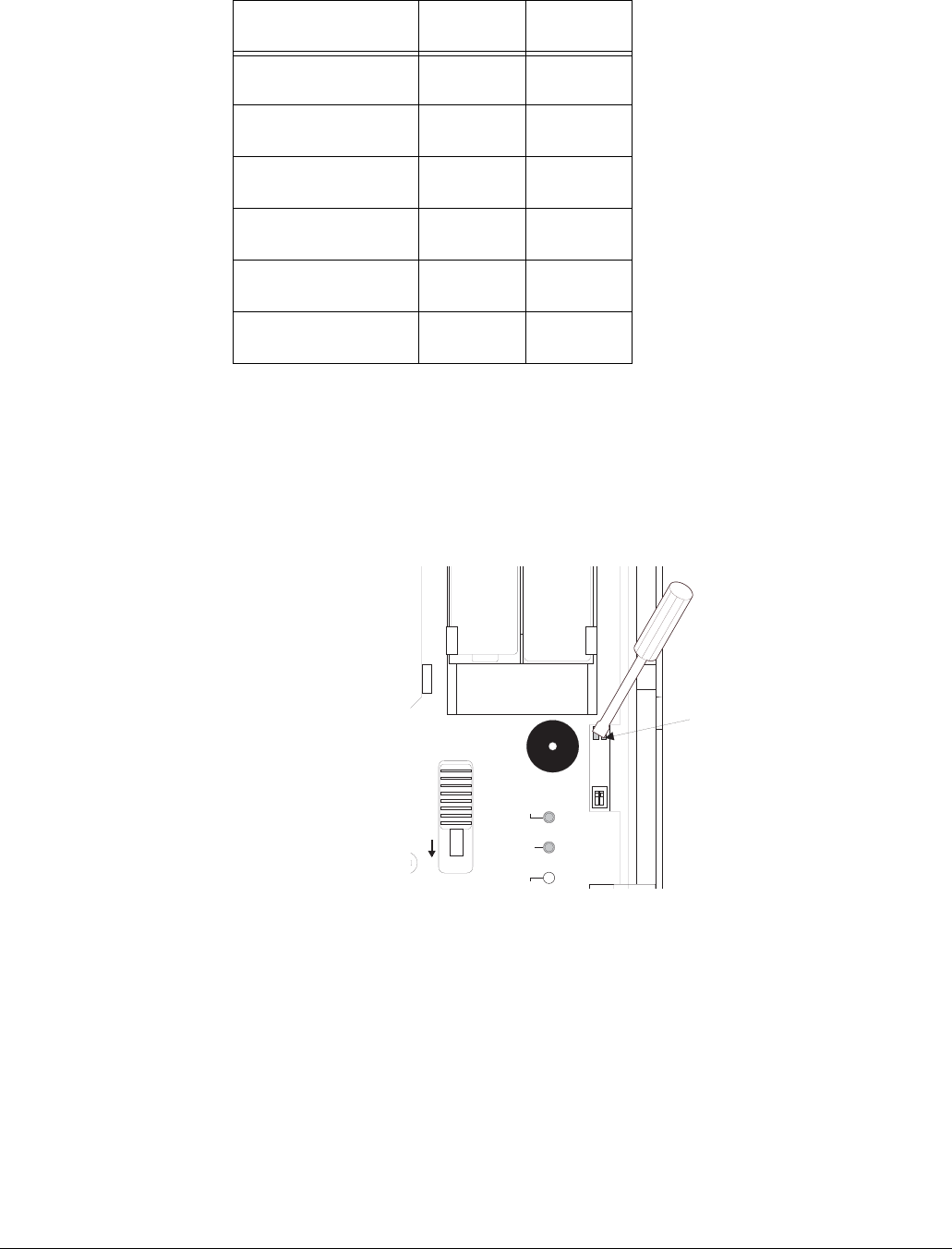
3. Place the sensor in test mode by shorting out the silver test points on the sensor board using a
small flathead screwdriver (see Figure 5). When the sensor is in test mode the green LED
blinks once per second.
Figure 5. Shorting Out the Sensor Board Test Points
Note
The sensor returns to normal mode after 5 minutes. To immediately return the sensor to normal mode
short out the silver test points a second time.
4. Hold the tester at the farthest point of the glass to be protected (25 feet maximum).
5. Place the tester setting switches to “Flex” and “Temp.”
6. Within 30 seconds of arming the tester, generate a signal by striking the glass with your hand
or a cushioned tool. The tester will automatically generate a burst of glass breaking sound,
and the red LED on the sensor should light to indicate an alarm condition.
7. Listen for interior siren beeps to determine acceptable range (see panel installation instruc-
tions).
Note
If the sensor response is unacceptable, change the position or location of the sensor and re-test.
Power up self-test ON 1
second
ON 1
second
Trouble detected Flash
ON/OFF
Flash
OFF/ON
Low battery Flash
ON/OFF
Flash
ON/OFF
Test Mode Flash once
per second
OFF
Test Mode, event
detected
Flicker OFF
Test Mode, alarm Flash once
per second
ON 5
seconds
Table 2: LED Indicator Conditions (cont.)
Condition Green
LED
Red
LED
Silver Tes
t
Points
SENS 1
TEST MODE
LED ENABLED
ON OFF
E
XALARM AUDIO
3.6V
LITHIUM
AA
3.6V
LITHIUM
AA
SENS 2
5Adjustable Dual Technology Sound Sensor Installation Instructions
Sensor Testing with the FG-701 Glass Break Simulator
1. Set the panel to the dealer sensor test mode.
2. Open the sensor door (to view LEDs).
Note
The only LEDs are for audio and alarm. The flex LED hole should be empty.
3. Place the sensor in test mode by placing the tester setting switches to “Activate” and “Man,”
then press the red button on the tester (within 15 feet of the sensor). The tester emits a low fre-
quency buzzing sound. When the sensor is in test mode the green LED blinks once per sec-
ond.
Note
The sensor returns to normal mode after 5 minutes. To immediately return the sensor to normal mode,
place the tester setting switches to “Activate” and “Man,” then press the red button on the tester. The
tester emits a low frequency buzzing sound and the green LED stops flashing.
4. Hold the tester at the farthest point of the glass to be protected (25 feet maximum).
5. Place the tester setting switches to “Test” and “Flex.”
6. Within 30 seconds of arming the tester, generate a signal by striking the glass with your hand
or a cushioned tool. The tester will automatically generate a burst of glass breaking sound,
and the red LED on the sensor should light to indicate an alarm condition.
7. Listen for interior siren beeps to determine acceptable range (see panel installation instruc-
tions).
Note
If the sensor response is unacceptable, change the position or location of the sensor and re-test.
Adjusting the
Sensitivity
The sensitivity is set at the factory and should
only be adjusted when necessary. Adjust the
sensitivity using the following procedure:
Note
Sensitivity changes must be made with sensor
batteries removed.
1. Open the sensor door.
2. Remove the batteries.
3. Use a small screwdriver to move the sensi-
tivity switches to the desired setting (see
Figure 6). Sensitivity settings are shown in
Table 3.
Figure 6. LED Sensitivity Switches
4. Reinstall the batteries.
5. Place the sensor in test mode (see appropriate range testing section).
6. Turn on any heating/air-conditioning system, and any other equipment in the sensor vicinity.
Observe the green audio LED for one minute with equipment running. Excessive subsonic
(inaudible) noise typically produced by air handling systems may cause the green audio LED
to flash randomly.
7. If the LED flashes randomly, decrease the sensitivity according to the sensitivity settings in
Table 3.
Table 3: Sensitivity Settings
Sensitivity
SENS
1
Switch
SENS
2
Switch
Approximate
Coverage
Max Off Off 25 Feet
Med On Off 15 Feet
Low Off On 10 Feet
Lowest On On 5 Feet
SENS 1
TEST MODE
LED ENABLED
ON OFF
FLEX ALARM AUDIO
SENS 2
Sensitivit
y
Switches

6Adjustable Dual Technology Sound Sensor Installation Instructions
Specifications Compatibility: ............................60-834-95—all 319.5 MHz. GE Security Learn Mode panels
60-765-43—all 433 MHz. GE Security Learn Mode panels
Power Source:............................Two 3.6VDC Saft or Tadiran AA Lithium Batteries.
Operating Temperature Range:..32°F - 110°F
Dimensions: ...............................4.75” x 4.13” x 1.25” (L x W x D)
)*(6HFXULW\
