Operating System Lab Manual OS
User Manual:
Open the PDF directly: View PDF  .
.
Page Count: 56
- Arithmetic :
- if...else statements:
- Accessing Array Values:
- FILE AND DIRECTOEY ACCESS MODES:
- 1. Read:Grants the capability to read ie. view the contents of the file and directory .
- 2. Write:Grants the capability to modify, or remove the content of the file and directory .
- 3. Execute:User with execute permissions can run a file as a program.But in case of directory , it does not mean anything only traverse permission .
- CHANGING PERMISSIONS:
- Using chmod in symbolic mode:
- Using chmod with Absolute Permissions:
- CHANGING OWNERS AND GROUPS:
- Changing ownership:
- Changing Group Ownership:
- Types of System Calls

Operating System Lab Manual
(6th sem CSE )
PREPARED BY
Prof. Saswati Sahoo

SYLLABUS
1. Basic LINUX commands and its Use.
2. Study of editors in LINUX
3. Detail study of File Access Permission in LINUX.
4. Detail study of LINUX Shell Programming.
5. Advance Shell Programming.
6. Programs on UNIX System calls.
7. Programs on process creation and synchronization, inter process communication
including shared memory, pipes and messages.( Dinning Philosopher problem /
Cigarette Smoker problem / Sleeping barber problem).
8. Simulation of CPU Scheduling Algorithms. (FCFS, RR, SJF, Priority, Multilevel
Queuing).
9. Simulation of Banker’s Algorithm for Deadlock Avoidance.
10. Program for FIFO, LRU, and OPTIMAL page replacement algorithm.

COURSE OBJECTIVES :
!" #
$ "%&#&' %#
()*+,)(*" #
- %,)(*.%%
/ 0 !0"" ,)(*
10,)(*
COURSE OUTCOMES :
%."""%
$ % (% &# % & %0
- (+22 ( 3% & 1"1#
" , 30% %"
"%# % &#&'#&%
LAB MAPPING:
Contribution of Courses to Program Outcomes: (mapping)
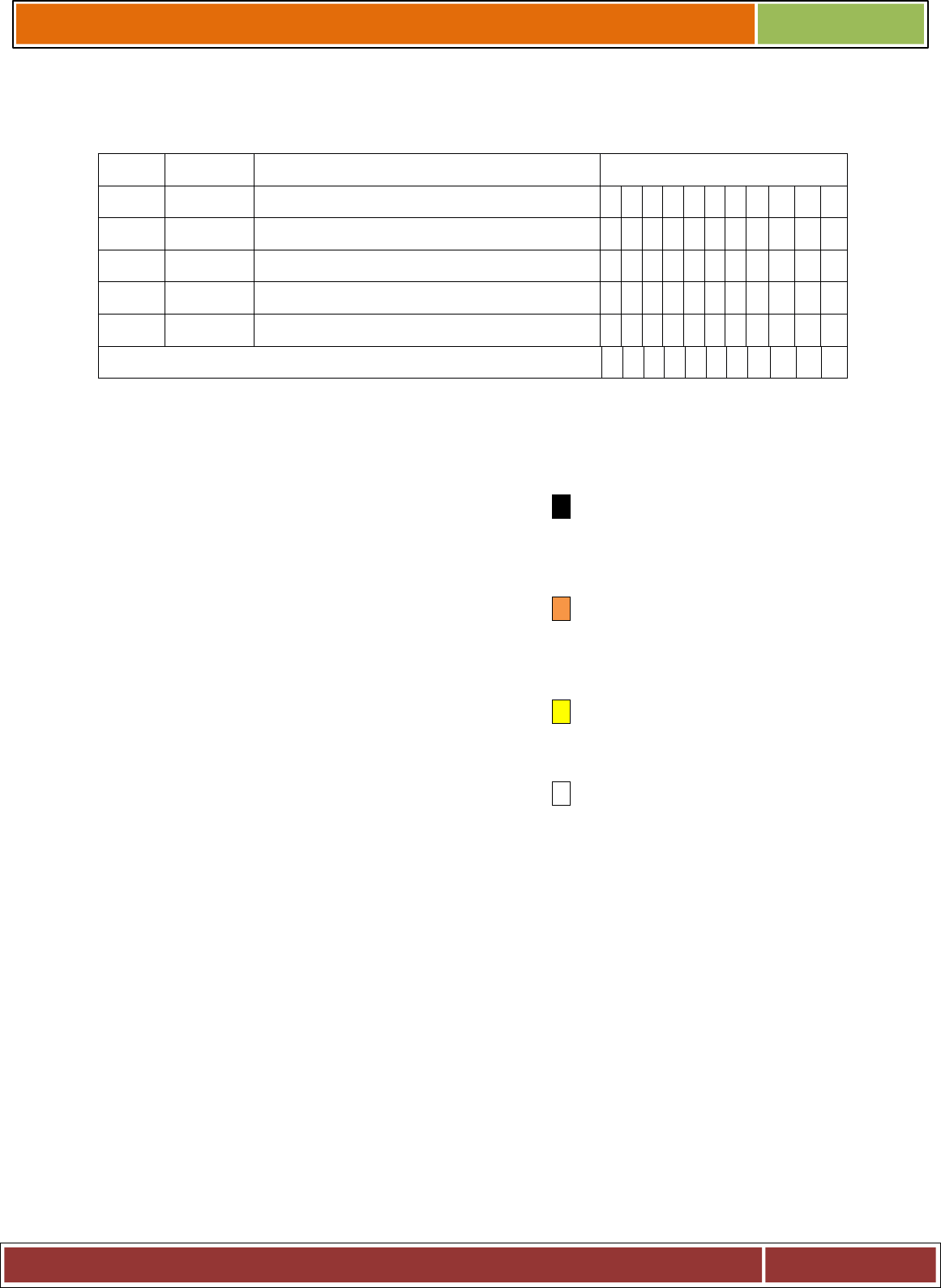
Program Outcomes
TYPE Modules COURSE NUMBER & TITLE a b c d e f g h i j k
,4
.%% . #%"%
Type:
LAB - - Strong
contribution
- Average
contribution
- Some contribution
- No contribution
Implement the following on LINUX platform. Use C for high level language implementation .
INDEX

S.n
o
Experiment
No.
NAME OF THE EXPERIMENT PAGE
NO.
1 Execution of various file/directory handling commands.
$2 To study the various commands operated in vi editor in
LINUX.
-3 To study the various File Acess Permission and different types
users in LINUX
/4 i. Write a shell script program to find the Maximum
three numbers .
ii. Write a shell script program for comparison of strings
iii. Peform Arithmetic operation using CASE
55 i. Calculate the factorial value of a number using shell
script .
ii. To write a shell program to generate fibonacci series.
iii. Write a program to draw a Pascal’s Triangle
66 i. Write a program to demonstrates a one-way pipe
between two Process .
Write a program to illustrate IPC through pipe and
fork system calls – Printing only odd numbers
77 i. To write a program to create a process in LINUX.
ii. To study Dinning Philosophers Problem.
88 Simulation of scheduling algorithms: Write a program to
implement the following process scheduling algorithms
i. First Come First Serve
ii. Shortest Remaining Job First
iii. Round Robin
99 Write a program To simulate banker’s algorithm for deadlock
avoidance
: 10 i. Page replacement algorithm for FIFO.
ii. Page replacement algorithm for LFU.
iii. Page replacement algorithm for LRU .
LIST OF EXPERIMENT BEYOND SYLLABUS

Experiment 1 :
i. To implement and simulate the MFT algorithm.
ii. To write a program to simulate the MVT algorithm
Experiment 2:
i. To implement simple paging technique.
INTRODUCTION TO LINUX OPERATING
SYSTEM

Linux % ( 3;0 %" " #
. , 3 0 1" "
3" " % ! %. < #"%#
# % % % . & # & . .#
#
=, 3= % , 3 0 & # ! 99.#
, 1 # # %" %" %
"% > 1& * ? ! #& @ 0"
1 & . A( " #
B % 98-.#% C
# D 1 + " % ! % "%
% 0 .#& ! "%%#
3 , 3, 30! "#
EXPERIMENT – 1
AIM:#3% 1'+%# %
THEORY:
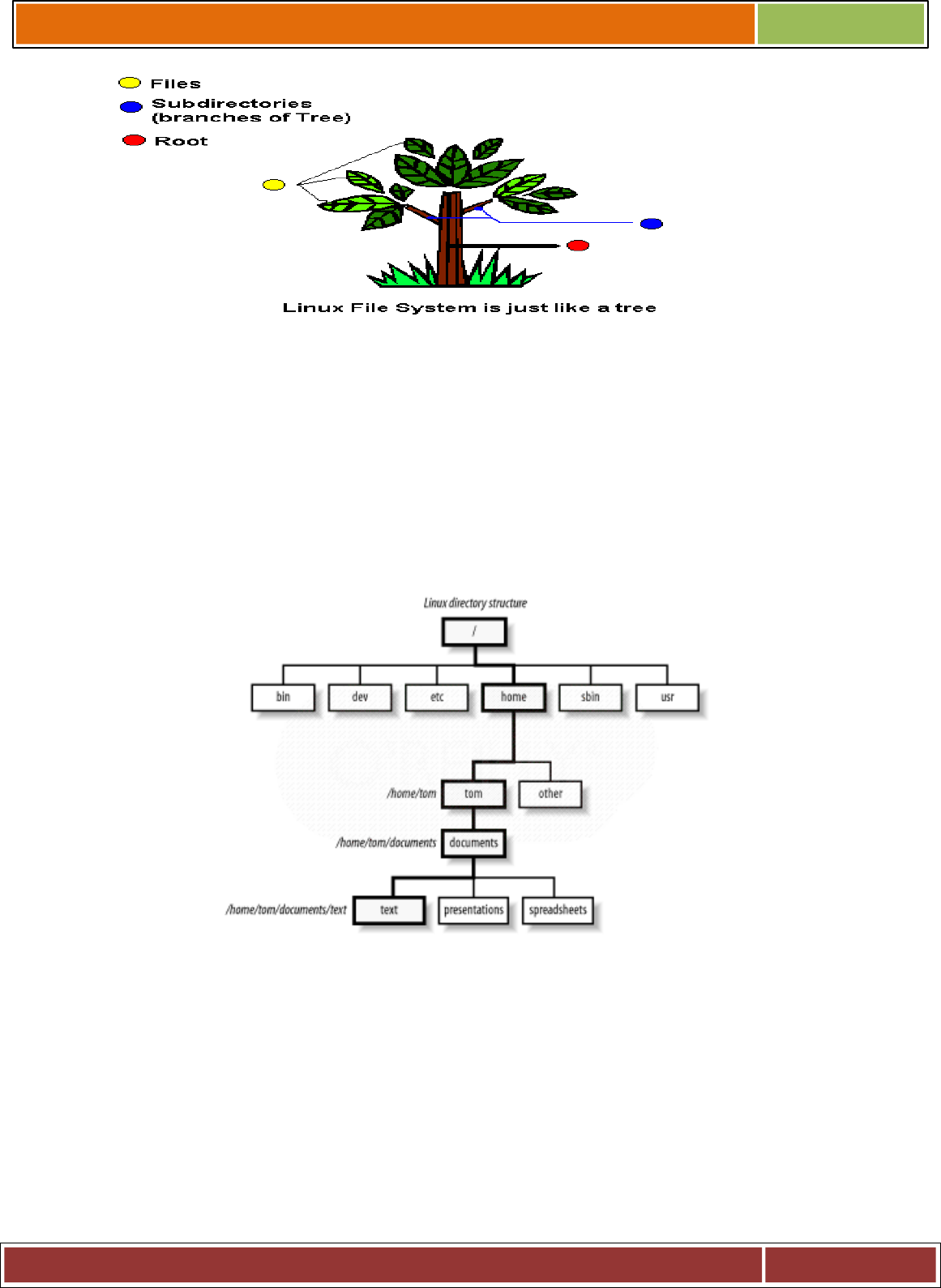
, 3'#% !% #
%" ! %#%%
%#% % '&!%
)#!"' % , 3&!00
";! "%#&!%" .#
B+C4!% % , 3#&
%. &1&&.& "& !%%&
!%&% % .%
, 3%# # %! E
+. ; % , 3% &%&&&
%
+.;>.., 30 .% ' '
BA(4C

+1; '" %%" 1% #
# % 1%B#C&F""#0BC&
0B%C&BC& ;B%CB""%
#%%1%%#1%'&.
#%%%#C
+%; 1% ' '
+; % %! %%
+;1% 1%&%'
# 1.B!%# %&F""#&
C) >,& #1.
%# %#! BGC
% %B(4" 1%C
+"%;1% 0
"%
+;" H%#
+. ; 1% "%
+#;+"%;0'#&!, 3$60
% ' ! F%
#H1% .#0 )" #
% +"%
+"; "#'.#""%
+; % &&"%'B*C&.
B.C& 1# 1% '
+1; %.#1""% )
"%&!#!"%'#
1B+1+"C?.1B+1+!!!C)% #
'B+1+C) &&>& 1%!1
+1%#, 3 4B
!!! +"%C
COMMAND :
1.Date Command :
This command is used to display the current data and time.
Syntax :
$date
$date +%ch

Options :
a = Abbrevated weekday.
A = Full weekday.
b = Abbrevated month.
B = Full month.
c = Current day and time.
C = Display the century as a decimal number.
d = Day of the month.
D = Day in „mm/dd/yy‟ format
h = Abbrevated month day.
H = Display the hour.
L = Day of the year.
m = Month of the year.
M = Minute.
P = Display AM or PM
S = Seconds
T = HH:MM:SS format
u = Week of the year.
y = Display the year in 2 digit.
Y = Display the full year.
Z = Time zone .
To change the format :
Syntax :
$date „+%H-%M-%S‟
2.Calender Command :
This command is used to display the calendar of the year or the particular month of
calendar year.
Syntax :
a.$cal <year>
b.$cal <month> <year>
Here the first syntax gives the entire calendar for given year & the second Syntax gives
the calendar of reserved month of that year.
3.Echo Command :
This command is used to print the arguments on the screen .
Syntax : $echo <text>
4.Banner Command :
It is used to display the arguments in „#‟ symbol .

Syntax : $banner <arguments>
5.’who’ Command :
It is used to display who are the users connected to our computer currently.
Syntax : $who – option‟s
Options : -
H–Display the output with headers.
b–Display the last booting date or time or when the system was lastely rebooted.
6.’who am i’ Command :
Display the details of the current working directory.
Syntax : $who am i
9.’CLEAR’ Command :
It is used to clear the screen.
Syntax : $clear
10.’MAN’ Command :
It help us to know about the particular command and its options & working. It is like
„help‟ command in windows .
Syntax : $man <command name>
11.LIST Command :
It is used to list all the contents in the current working directory.
Syntax : $ ls – options <arguments>
If the command does not contain any argument means it is working in the Current directory.
Options :
a– used to list all the files including the hidden files.
c– list all the files columnwise.
d- list all the directories.
m- list the files separated by commas.
p- list files include „/‟ to all the directories.
r- list the files in reverse alphabetical order.
f- list the files based on the list modification date.
x-list in column wise sorted order.

DIRECTORY RELATED COMMANDS :
1.Present Working Directory Command :
To print the complete path of the current working directory.
Syntax : $pwd
2.MKDIR Command :
To create or make a new directory in a current directory .
Syntax : $mkdir <directory name>
3.CD Command :
To change or move the directory to the mentioned directory .
Syntax : $cd <directory name.
4.RMDIR Command :
To remove a directory in the current directory & not the current directory itself.
Syntax : $rmdir <directory name>
FILE RELATED COMMANDS :
1.CREATE A FILE :
To create a new file in the current directory we use CAT command.
Syntax : $cat > <filename.
The > symbol is redirectory we use cat command.
2.DISPLAY A FILE :
To display the content of file mentioned we use CAT command without „>‟ operator.
Syntax : $cat <filename.
Options –s = to neglect the warning /error message.
3.COPYING CONTENTS :
To copy the content of one file with another. If file doesnot exist, a new file is created
and if the file exists with some data then it is overwritten.
Syntax : $ cat <filename source> >> <destination filename>

$ cat <source filename> >> <destination filename> it is avoid overwriting.
Options :
-n content of file with numbers included with blank lines.
Syntax :
$cat –n <filename>
4.SORTING A FILE :
To sort the contents in alphabetical order in reverse order.
Syntax :
$sort <filename >
Option : $ sort –r <filename>
5.COPYING CONTENTS FROM ONE FILE TO ANOTHER :
To copy the contents from source to destination file . so that both contents are same.
Syntax :
$cp <source filename> <destination filename>
$cp <source filename path > <destination filename path>
6.MOVE Command :
To completely move the contents from source file to destination file and to remove the
source file.
Syntax :
$ mv <source filename> <destination filename>
7.REMOVE Command :
To permanently remove the file we use this command .
Syntax :
$rm <filename>
8.WORD Command :
To list the content count of no of lines , words, characters .
Syntax :
$wc<filename>
Options :
-c – to display no of characters.
-l – to display only the lines.
-w – to display the no of words.
FILTERS AND PIPES
HEAD : It is used to display the top ten lines of file.

Syntax: $head<filename>
TAIL : This command is used to display the last ten lines of file.
Syntax: $tail<filename>
PAGE : This command shows the page by page a screen full of information is displayed after
which the page command displays a prompt and passes for the user to strike the enter key to
continue scrolling.
Syntax: $ls –a\p
MORE : It also displays the file page by page .To continue scrolling with more command ,
press the space bar key.
Syntax: $more<filename>
SORT : This command is used to sort the data in some order.
Syntax: $sort<filename>
PIPE : It is a mechanism by which the output of one command can be channelled into the
input of another command.
Syntax: $who | wc-l
TR :The tr filter is used to translate one set of characters from the standard inputs to another.
Syntax: $tr “[a-z]” “[A-Z]”
INPUT :
Valid Input-
Valid Output-
Invalid Input-
Invalid Output-
VIVA QUESTION :
1. Which command is used to display the top of the file?

2. Which command is used to remove a directory?
3. Which of the following commands is used to display the directory attributes rather than its
contents?
4. Which command is used to concatenate all files beginning with the string 'emp' and followed
by a non-numeric characters?
5. Which command is used to delete all files in the current directory and all its sub-directories?
EXPERIMENT – 2
AIM :
To study the various commands operated in vi editor in LINUX.
THEORY :
The Vi editor is a visual editor used to create and edit text, files, documents and
programs. It displays the content of files on the screen and allows a user to add, delete or
change part of text . There are three modes available in the Vi editor , they are
1.Command mode
2.Input (or) insert mode.
Starting Vi :
The Vi editor is invoked by giving the following commands in LINUX prompt.
Syntax : $vi <filename> (or) $vi
This command would open a display screen with 25 lines and with tilt (~) symbol at the
start of each line. The first syntax would save the file in the filename mentioned and for the
next the filename must be mentioned at the end.
Options :
1.vi +n <filename> - this would point at the nth line (cursor pos).
2.vi –n <filename> - This command is to make the file to read only to change from one mode
to another press escape key.
INSERTING AND REPLACING COMMANDS :
To move editor from command node to edit mode, you have to press the <ESC> key.
For inserting and replacing the following commands are used.
1.ESC a Command :
This command is used to move the edit mode and start to append after the current
character.

Syntax : <ESC> a
2.ESC A command :
This command is also used to append the file , but this command append at the end of
current line.
Syntax : <ESC> A
3.ESC i Command :
This command is used to insert the text before the current cursor position.
Syntax : <ESC> i
4.ESC I Command :
This command is used to insert at the beginning of the current line.
Syntax : <ESC> I
5.ESC o Command :
This command is insert a blank line below the current line & allow insertion of
contents.
Syntax : <ESC> o
6.ESC O Command :
This command is used to insert a blank line above & allow insertion of contents.
Syntax : <ESC> O
7.ESC r Command :
This command is to replace the particular character with the given characters.
Syntax : <ESC> rx Where x is the new character.
8.ESC R Command :
This command is used to replace the particular text with a given text.
Syntax : <ESC> R text
9.<ESC> s Command :
This command replaces a single character with a group of character .

Syntax : <ESC> s
10.<ESC> S Command :
This command is used to replace a current line with group of characters.
Syntax : <ESC> S
CURSOR MOVEMENT IN Vi :
1.<ESC> h :
This command is used to move to the previous character typed. It is used to move to
left of the text . It can also used to move character by character (or) a number of characters.
Syntax : <ESC> h – to move one character to left.
<ESC> nh – tomove „n‟ character to left.
2.<ESC> l :
This command is used to move to the right of the cursor (ie) to the next character. It can
also be used to move the cursor for a number of character.
Syntax : <ESC> l – single character to right.
<ESC> nl - „n‟ characters to right.
3.<ESC> j :
This command is used to move down a single line or a number of lines.
Syntax :
<ESC> j – single down movement.
<ESC> nj – „n‟ times down movement.
4.<ESC> k :
This command is used to move up a single line or a number of lines.
Syntax :
<ESC> k – single line above.
<ESC> nk – „n‟ lines above.
5.ENTER (OR) N ENTER :
This command will move the cursor to the starting of next lines or a group of lines
mentioned.
Syntax :

<ESC> enter <ESC> n enter.
6.<ESC> + Command :
This command is used to move to the beginning of the next line.
Syntax :
<ESC> + <ESC> n+
7.<ESC> - Command :
This command is used to move to the beginning of the previous line.
Syntax :
<ESC> - <ESC> n-
8.<ESC> 0 :
This command will bring the cursor to the beginning of the same current line.
Syntax :
<ESC> 0
9.<ESC> $ :
This command will bring the cursor to the end of the current line.
Syntax :
<ESC> $
10.<ESC> ^ :
This command is used to move to first character of first lines.
Syntax :
<ESC> ^
11.<ESC> b Command :
This command is used to move back to the previous word (or) a number of words.
Syntax :
<ESC> b <ESC>nb
12.<ESC> e Command :
This command is used to move towards and replace the cursor at last character of the
word (or) no of words.
Syntax :
<ESC> e <ESC>ne

13.<ESC> w Command :
This command is used to move forward by a single word or a group of words.
Syntax :
<ESC> w <ESC> nw
DELETING THE TEXT FROM Vi :
1.<ESC> x Command :
To delete a character to right of current cursor positions , this command is used.
Syntax :
<ESC> x <ESC> nx
2.<ESC> X Command :
To delete a character to left of current cursor positions , this command is used.
Syntax :
<ESC> X <ESC> nX
3.<ESC> dw Command :
This command is to delete a single word or number of words to right of current cursor
position.
Syntax :
<ESC> dw <ESC> ndw
4.db Command :
This command is to delete a single word to the left of the current cursor position.
Syntax :
<ESC> db <ESC> ndb
5.<ESC> dd Command :
This command is used to delete the current line (or) a number of line below the current
line.
Syntax :
<ESC> dd <ESC> ndd
6.<ESC> d$ Command :
This command is used to delete the text from current cursor position to last character of
current line.
Syntax : <ESC> d$
SAVING AND QUITING FROM vi :-
1.<ESC> w Command :

To save the given text present in the file.
Syntax : <ESC> : w
2.<ESC> q! Command :
To quit the given text without saving.
Syntax : <ESC> :q!
3.<ESC> wq Command :
This command quits the vi editor after saving the text in the mentioned file.
Syntax : <ESC> :wq
4.<ESC> x Command :
This command is same as „wq‟ command it saves and quit.
Syntax : <ESC> :x
5.<ESC> q Command :
This command would quit the window but it would ask for again to save the file.
Syntax : <ESC> : q
INPUT :
Valid Input-
Start by creating a file and putting some content into it. Save the file and view it in
both cat and less Go back into the file in vi and enter some more content. Move
around the content using at least 6 different movement commands.
Valid Output-
Invalid Input-
Invalid Output
VIVA QUESTION :

1. What are the two different modes in vi editor?
2. What is the command used to append text after current line?
3. How to enter from command mode to insertion mode?
4. What is the difference between zz and :wq commands?
5. How to go to 10 number line directly .
EXPERIMENT – 3
AIM :
1. Write a shell script program to find the Maximum three numbers .
2. Write a shell script program for comparison of strings
3. Peform Arithmetic operation using CASE
THEORY :
Shell programming is a group of commands grouped together under single filename.
After logging onto the system a prompt for input appears which is generated by a Command
String Interpreter program called the shell. The shell interprets the input, takes appropriate
action, and finally prompts for more input. The shell can be used either interactively - enter
commands at the command prompt, or as an interpreter to execute a shell script. Shell scripts
are dynamically interpreted, NOT compiled.
Common Shells.
C-Shell - csh : The default on teaching systems Good for interactive systems Inferior
programmable features
Bourne Shell - bsh or sh - also restricted shell - bsh : Sophisticated pattern matching
and file name substitution
Korn Shell : Backwards compatible with Bourne Shell Regular expression
substitution emacs editing mode
Thomas C-Shell - tcsh : Based on C-Shell Additional ability to use emacs to edit the
command line Word completion & spelling correction Identifying your
shell.
SHELL KEYWORDS :
echo, read, if fi, else, case, esac, for , while , do , done, until , set, unset, readonly, shift,
export, break, continue, exit, return, trap , wait, eval ,exec, ulimit , umask. ‘
EXPRESSION Command :
To perform all arithematic operations .
Syntax :
Var =
„expr$value1‟
+ $ value2‟

OPERATORS :
Shell uses the built-in test command operators to test numbers and strings.
Equality:
= string
!= string
-eq number
-ne number
Logical:
-a and
-o or
! not
Logical:
AND
&&
OR
||
Relational:
-gt greater than
-ge greater than, equal to
-lt less than
-le less than, equal to
Arithmetic :
+, -, \*, /, %
DESCISION MAKING STATEMENMTS
LINUX Shell supports conditional statements which are used to perform different actions
based on different conditions. Here we will explain following two decision making
statements:
The if...else statements
The case...esac statement
if...else statements:
If else statements are useful decision making statements which can be used to select an option
from a given set of options.
LINUX Shell supports following forms of if..else statement:
'
'
'

'
SyntaxE
if [ expression ]
Then
block of statements
Fi
'
syntax:
If[expression]
then
block of statements
else
block of statements
fi
'
syntax:
If[expression]
then
block of statements
elif[expression]
then
block of statement
elif [expression]
then
else
block of statements

fi
case...esac statement
%1.I
" C
<<
" $C
<<
" -C
<<
C1
<<
%
1 .ALGORTHIM :
Step1: Declare the three variables.
Step2: Check if A is greater than B and C.
Step3: If so print A is greater.
Step4: Else check if B is greater than C.
Step5: If so print B is greater.
Step6: Else print C is greater.
INPUT:
Valid Input:
Enter A:23
Enter B:45
Enter C:67
Valid Output:
C is greater
Invalid Input:
Enter A:GEC
Enter B:45
Enter C:67

Invalid Output:
2. ALGORITHM :
Step 1 : Read the input variables and assign the value
Step 2 : Print the various arithmetic operations which we are going to perform
Step 3 : Using the case operator assign the various functions for the arithmetic
operators.
Step 4 : Check the values for all the corresponding operations.
Step 5 : Print the result and stop the execution.
INPUT :
Valid Input:
1. Addition
2. Subtraction
3. Multiplication
4. Division
Enter your choice:1
Enter the value of b:3
Enter the value of c:4
Valid Output:
Invalid Input:
1. Addition
2. Subtraction
3. Multiplication
4. Division
Enter your choice:8
Enter the value of b:A
Enter the value of c:4
Invalid Output:

3.
Algorithm:
Step1: Enter into the vi editor and go to the insert mode for entering the code
Step2: Read the first string.
Step3: Read the second string
Step4: Compare the two strings using the if loop
Step5: If the condition satisfies then print that two strings are equal else print two
strings are not equal.
Step6: Enter into the escape mode for the execution of the result and verify the output
INPUT :
Valid Input:
Enter first string: hai
Enter second string: hai
Valid Output:
Invalid Input:
Enter first string: hai
Enter second string:cs#4e
Invalid Output:
VIVA QUESTION:
1. How do you terminate a shell script if statement?
2. What code would you use in a shell script to determine if a directory exists?
3. How do you read keyboard input in shell scripts?
4. How do you find out what’s your shell?
5. Write the syntax for switch case in shell script .

EXPERIMENT – 4
AIM:
1. Calculate the factorial value of a number using shell script .
2. To write a shell program to generate fibonacci series.
3. Write a program to draw a Pascal’s Triangle
THEORY:
Loop defined as:"Computer can repeat particular instruction again and again, until
particular condition satisfies. A group of instruction that is executed repeatedly is called a
loop."
Following types of loops available to shell programmers:
The while loop
The for loop
The until loop
The select loop
Note that in each and every loop,
(a) First, the variable used in loop condition must be initialized, then execution of the
loop begins.
(b) A test (condition) is made at the beginning of each iteration.
(c) The body of loop ends with a statement that modifies the value of the test (condition)
variable.
While Loop
Syntax:
while [ condition ]
do
……
statements
done

Until Loop
Sometimes you need to execute a set of commands until a condition is true.
Syntax:
until command
do
Statement(s) to be executed until command is true
done
For Loop
Syntax 1:
for (( expr1; expr2; expr3 ))
do
.....
.....
repeat all statements between do and
done until expr2 is TRUE
Done
Syntax 2:
for { variable name } in { list }
do
…..
…..
execute one for each item in the list until the list is not
finished and repeat all statement between do and done
done

ARRAY:
Shell supports a different type of variable called an array variable that can hold multiple values at the
same time. Arrays provide a method of grouping a set of variables. Instead of creating a new name for
each variable that is required, you can use a single array variable that stores all the other variables.
Simplest method of creating an array variable is to assign a value to one of its indices. This is
expressed as follows:
array_name[index]=value
Here array_name is the name of the array, index is the index of the item in the array that you want to
set, and value is the value you want to set for that item.
Accessing Array Values:
After you have set any array variable, you access it as follows:
${array_name[index]}
Here array_name is the name of the array, and index is the index of the value to be accessed.
1.
ALGORTHIM
step 1. Start
step 2. Read the number n
step 3. [Initialize]
i=1, fact=1
step 4. Repeat step 4 through 6 until i=n
step 5. fact=fact*i
step 6. i=i+1
step 7. Print fact
step 8. Stop
[process finish of calculate the factorial value of a number]
INPUT :
Valid Input:
Enter the no: 5
Valid Output:
120
Invalid Input:
Enter the no:3.5

Invalid Output:
2.
ALGORITHM :
Step 1 : Initialise a to 0 and b to 1.
Step 2 : Print the values of 'a' and 'b'.
Step 3 : Add the values of 'a' and 'b'. Store the added value in variable 'c'.
Step 4 : Print the value of 'c'.
Step 5 : Initialise 'a' to 'b' and 'b' to 'c'.
"6E""-&/&51HH :
INPUT :
Valid input:
E5
Valid Output:
120
Invalid input:
E;5
Invalid output:
3.
ALGORTHIM:
1. Start
2. Declare variables x, y, n, a, z, s
3. Enter the limit
4. Initialize the value of variables, s=n , x=0, y=0 , z=s
5. Do the following operations in loop
a. x = 0 to n
b. a= 1, x++
c. z=s to 0
d. print space
e. z —-
f. y = o to x
g. print a
h. a = a*(x-y)/(y+1)
i. y= y+1
j. go to next line

6. Repeat the process to n
7. Print the final required triangle
8. Stop
INPUT:
Valid input:
Valid output:
Invalid input:
Invalid output:
VIVA QUESTION:
1. What is the difference between while and until loop.
2. How to Acess the array value.
3. What is the syntax of for loop.
EXPERIMENT – 5
AIM:
To study the various File Acess Permission and different types users in LINUX
THEORY:
File ownership is an important component of LINUX that provides a secure method for storing files.
Every file and directory in LINUX has the following attributes:
Owner permissions: The owner's permissions determine what actions the owner of the file
can perform on the file.
Group permissions: The group's permissions determine what actions a user, who is a
member of the group that a file belongs to, can perform on the file.
Other (world) permissions: The permissions for others indicate what action all other users
can perform on the file.
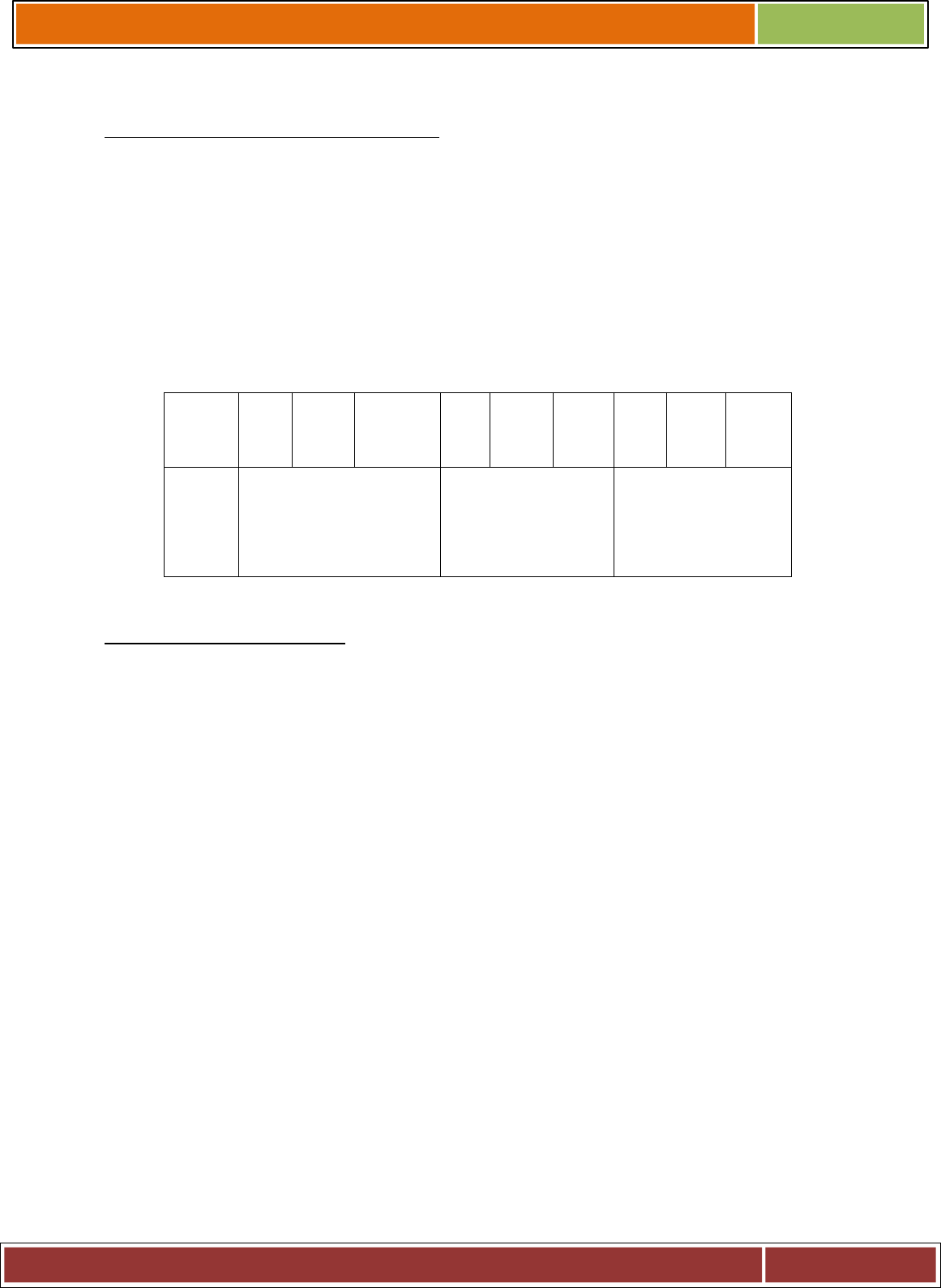
The permissions can be granted or denied to these three classes of users.
FILE AND DIRECTOEY ACCESS MODES:
1. Read:Grants the capability to read ie. view the contents of the file and directory .
2. Write:Grants the capability to modify, or remove the content of the file and directory .
3. Execute:User with execute permissions can run a file as a program.But in case of directory , it
does not mean anything only traverse permission .
They are represented as :
__ rW X r__ X r __ X
#"
! '
"
!%'
.
CHANGING PERMISSIONS:
To change file or directory permissions, you use the chmod (change mode) command. There
are two ways to use chmod: symbolic mode and absolute mode.
Using chmod in symbolic mode:
The easiest way for a beginner to modify file or directory permissions is to use the symbolic
mode. With symbolic permissions you can add, delete, or specify the permission set you want
by using the operators in the following table.
Chmod operator Description
+Adds the designated permission(s) to a file or
directory.
-Removes the designated permission(s) from a file or
directory.
=Sets the designated permission(s).
u user
g group
o other

a all
r read
w write
x execute
Using chmod with Absolute Permissions:
The second way to modify permissions with the chmod command is to use a number to
specify each set of permissions for the file.
Each permission is assigned a value, as the following table shows, and the total of each set of
permissions provides a number for that set.
Number Octal Permission Representation Ref
0No permission ---
1Execute permission --x
2Write permission -w-
3Execute and write permission: 1 (execute) + 2
(write) = 3 -wx
4Read permission r--
5Read and execute permission: 4 (read) + 1
(execute) = 5 r-x
6Read and write permission: 4 (read) + 2 (write) =
6 rw-
7All permissions: 4 (read) + 2 (write) + 1 (execute)
= 7 rw
CHANGING OWNERS AND GROUPS:
While creating an account on Unix, it assigns a owner ID and a group ID to each user. All the
permissions mentioned above are also assigned based on Owner and Groups.
Two commands are available to change the owner and the group of files:
1. chown: The chown command stands for "change owner" and is used to change the
owner of a file.
2. chgrp: The chgrp command stands for "change group" and is used to change the
group of a file.

Changing ownership:
The chown command changes the ownership of a file.
syntax :
$ chown user filelist
The value of user can be either the name of a user on the system or the user id (uid) of a user
on the system.
Changing Group Ownership:
The chrgp command changes the group ownership of a file.
syntax :
$ chgrp group filelist
INPUT:
Valid input: %# "' !"#.
!1 1" # %#
!#% % H
Valid output:
Invalid input:
chmode u + g file1
Invalid output:
EXPERIMENT –6
AIM :
1. To write a program to create a process in LINUX.
2. To study Dinning Philosophers Problem.
THEORY:
Five philosophers are seated around a circular table. Each philosopher has a place of
spaghetti and he needs two forks to eat. Between each plate there is a fork. The life of a
philosopher consists of alternate period of eating & thinking. When a philosopher gets
hungry, he tries to acquire his left fork, if he gets it, it tries to acquire right fork.
In this solution, we check after picking the left fork whether the right fork is available or not.
If not, then philosopher puts down the left fork & continues to think. Even this can fail if all

the philosophers pick the left fork simultaneously & no right forks available & putting the left
fork down again. This repeats & leads to starvation.
Now, we can modify the problem by making the philosopher wait for a random amount of
time instead of same time after failing to acquire right hand fork. This will reduce the
problem of starvation. Solution to dinning philosophers problem.
1 . ALGORITHM:
STEP 1: Start the program.
STEP 2: Declare pid as integer.
STEP 3: Create the process using Fork command.
STEP 4: Check pid is less than 0 then print error else if pid is equal to 0 then
execute
command else parent process wait for child process.
5E""
INPUT:
Valid input:
$cc pc.c
$a.out
parent process$ child process
$ps
PID CLS PRI TTY TIME COMD
5913 TS 70 pts022 0:00 ksh
6$$959":$$:E::"
Valid output:
Invalid input:
Invalid output:
2 . ALGORITHM:
system DINING_PHILOSOPHERS
VAR
me: semaphore, initially 1; /* for mutual exclusion */
s[5]: semaphore s[5], initially 0; /* for synchronization */
pflag[5]: {THINK, HUNGRY, EAT}, initially THINK; /* philosopher flag */
As before, each philosopher is an endless cycle of thinking and eating.
procedure philosopher(i)
{
while TRUE do
{

THINKING;
take_chopsticks(i);
EATING;
drop_chopsticks(i);
}
}
The take_chopsticks procedure involves checking the status of neighboring philosophers and
then declaring one's own intention to eat. This is a two-phase protocol; first declaring the
status HUNGRY, then going on to EAT.
procedure take_chopsticks(i)
{
DOWN(me); /* critical section */
pflag[i] := HUNGRY;
test[i];
UP(me); /* end critical section */
DOWN(s[i]) /* Eat if enabled */
}
void test(i) /* Let phil[i] eat, if waiting */
{
if ( pflag[i] == HUNGRY
&& pflag[i-1] != EAT
&& pflag[i+1] != EAT)
then
{
pflag[i] := EAT;
UP(s[i])
}
}
Once a philosopher finishes eating, all that remains is to relinquish the resources---its two
chopsticks---and thereby release waiting neighbours.
void drop_chopsticks(int i)
{
DOWN(me); /* critical section */
test(i-1); /* Let phil. on left eat if possible */
test(i+1); /* Let phil. on rght eat if possible */
UP(me); /* up critical section */
}
INPUT:
Valid input:
No of philosopher - 5

No. of chopstick - 5
Valid output:
Invalid input:
No of philosopher -6
No. of chopstick -5
Invalid output:
VIVA QUESTION:
1. What is starvation
2. What do you mean by process synchronization.
3. What is critical section? What are the requirements to its solution.
4. What is semaphore? What are the types of it.
EXPERIMENT –7
AIM:
1. Write a program to illustrate IPC through pipe and fork system calls – Printing only
odd numbers.
2. Demonstrates a one-way pipe between two processes.
THEORY:
The system call provides an interface to the operating system services. System calls allow
user-level processes to request some services from the operating system which process itself
is not allowed to do.
Types of System Calls
There are 5 different categories of system calls:
process control, file manipulation, device manipulation, information maintenance and communication.
Process Control: A running program needs to be able to stop execution either normally or
abnormally. When execution is stopped abnormally, often a dump of memory is taken and
can be examined with a debugger.
File Management : Some common system calls are create, delete, read, write, reposition, or
close. Also, there is a need to determine the file attributes – get and set file attribute. Many
times the OS provides an API to make these system calls.
Device Management : Process usually require several resources to execute, if these resources
are available, they will be granted and control returned to the user process. These resources

are also thought of as devices. Some are physical, such as a video card, and others are
abstract, such as a file.
User programs request the device, and when finished they release the device. Similar to files,
we can read, write, and reposition the device.
Information Management : Some system calls exist purely for transferring information
between the user program and the operating system. An example of this is time, or date.
The OS also keeps information about all its processes and provides system calls to report this
information.
Communication :There are two models of interprocess communication, the message-passing
model and the shared memory model.
Message-passing uses a common mailbox to pass messages between processes.
Shared memory use certain system calls to create and gain access to create and gain access to
regions of memory owned by other processes. The two processes exchange information by
reading and writing in the shared data.
1.
#include <stdio.h>
#include <sys/types.h>
#include <unistd.h>
#include <stdlib.h>
int main()
{
int pfd[2], i;
pid_t mypid;
if(pipe(pfd) < 0)
perror(“Pipe Error”);
if(!fork())
{
char data;

printf(“Enter a Number…\n”);
scanf(“%d”, &data);
write(pfd[1], &data, 1);
mypid = getpid();
printf(“I am process %d\n”, mypid);
printf(“My parent is process %d\n”, getppid());
printf(“Child Exiting…\n”);
exit(0);
}
else
{
char data1;
read(pfd[0], &data1, 1);
printf(“Received %d from child \n”, data1);
printf(“The odd numbers are… \n”);
for(i=1; i<=data1; i+=2)
{
printf(“%5d”, i);
sleep(2);
}
printf(“\n Parent Exiting…\n”);
exit(0);
}
return(0);
}

2.
#include <stdio.h>
#define ERR (-1) /* indicates an error condition */
#define READ 0 /* read end of a pipe */
#define WRITE 1 /* write end of a pipe */
#define STDIN 0 /* file descriptor of standard in */
#define STDOUT 1 /* file descriptor of standard out */
int main()
{
int pid_1, /* will be process id of first child - who */
pid_2, /* will be process id of second child - wc */
pfd[2]; /* pipe file descriptor table. */
if ( pipe ( pfd ) == ERR ) /* create a pipe */
{ /* must do before a fork */
perror (" ");
exit (ERR);
}
if (( pid_1 = fork () ) == ERR) /* create 1st child */
{
perror (" ");
exit (ERR);
}
if ( pid_1 != 0 ) /* in parent */
{
if (( pid_2 = fork () ) == ERR) /* create 2nd child */
{
perror (" ");

exit (ERR);
}
if ( pid_2 != 0 ) /* still in parent */
{
close ( pfd [READ] ); /* close pipe in parent */
close ( pfd [WRITE] ); /* conserve file descriptors */
wait (( int * ) 0); /* wait for children to die */
wait (( int * ) 0);
}
else /* in 2nd child */
{
close (STDIN); /* close standard input */
dup ( pfd [READ] ); /* read end of pipe becomes stdin */
close ( pfd [READ] ); /* close unneeded I/O */
close ( pfd [WRITE] ); /* close unneeded I/O */
execl ("/bin/wc", "wc", "-l", (char *) NULL);
}
}
else /* in 1st child */
{
close (STDOUT); /* close standard out */
dup ( pfd [WRITE] ); /* write end of pipes becomes stdout */
close ( pfd [READ] ); /* close unneeded I/O */
close ( pfd [WRITE] ); /* close unneeded I/O */
execl ("/bin/who", "who", (char *) NULL);
}
exit (0);
}

VIVA QUESTION :
1. What are system calls?
2. What is spawning of a process ?
3. In LINUX , how to create a child process ?
4. How to terminate a process ?
EXPERIMENT –8
AIM:
1. To write a C program to implement the CPU scheduling algorithm for FIRST COME
FIRST SERVE.
2. Write a C program to implement the various process scheduling mechanisms such
as SJF Scheduling .
3. Write a C program to implement the various process scheduling mechanisms such
as Round Robin Scheduling.
THEORY:
FCFS:
CPU scheduler will decide which process should be given the CPU for its execution.For this it
use different algorithm to choose among the process. one among that algorithm is fcfs algorithm.
In this algorithm the process which arrive first is given the cpu after finishing its request only it
will allow cpu to execute other process.
SJF:
This algorithm associates with each process the length of the process's next CPU burst.
When the CPU is available, it is assigned to the process that has the smallest next CPU burst.
If the next CPU bursts of two processes are the same, FCFS scheduling is used.
RR :

The round-robin (RR) scheduling algorithm is designed especially for time-sharing systems.
It is similar to FCFS scheduling . A small unit of time, called a time quantum or time slice, is
defined. A time quantum is generally from 10 to 100 milliseconds. The ready queue is treated
as a circular queue.
1 .ALGORITHM:
Step 1: Start the process
Step 2: Accept the number of processes in the ready Queue
Step 3: For each process in the ready Q, assign the process id and accept the CPU
burst time
Step 4: Set the waiting of the first process as ‘0’ and its burst time as its turn around
time
Step 5: for each process in the Ready Q calculate
(a) Waiting time for process(n)= waiting time of process (n-1) + Burst time of
process(n-1)
(b) Turn around time for Process(n)= waiting time of Process(n)+ Burst time
for process(n)
Step 6: Calculate
(a) Average waiting time = Total waiting Time / Number of process
(b) Average Turnaround time = Total Turnaround Time / Number of process
Step 7: Stop the process
INPUT:
Valid input:
Enter number of processes:
3
Enter the Burst Time of the process 1: 2
Enter the Burst Time of the process 2: 5
Enter the Burst Time of the process 3: 4
Valid output:
Invalid Input:
Enter number of processes:
2
Enter the Burst Time of the process 1: 0
Enter the Burst Time of the process 2: -3
Enter the Burst Time of the process 3: 4

Invalid Output:
2 .ALGORITHM:
Step 1: Start the process
Step 2: Accept the number of processes in the ready Queue
Step 3: For each process in the ready Q, assign the process id and accept the CPU
burst time
Step 4: Start the Ready Q according the shortest Burst time by sorting according to
lowest to
highest burst time.
Step 5: Set the waiting time of the first process as ‘0’ and its turnaround time as its
burst time.
Step 6: For each process in the ready queue, calculate
(c) Waiting time for process(n)= waiting time of process (n-1) + Burst time of
process(n-1)
(d) Turn around time for Process(n)= waiting time of Process(n)+ Burst time
for process(n)
Step 6: Calculate
(c) Average waiting time = Total waiting Time / Number of process
(d) Average Turnaround time = Total Turnaround Time / Number of process
Step 7: Stop the process
INPUT:
Valid input:
Enter number of process
3
Enter the Burst Time of Process 04
Enter the Burst Time of Process 13
Enter the Burst Time of Process 25
Valid output:
Invalid Input:
Enter number of process
3
Enter the Burst Time of Process 0- 4.99
Enter the Burst Time of Process 1- 3.7
Enter the Burst Time of Process 2- 5

Invalid Output:
3.ALGORITHM:
Step 1: Start the process
Step 2: Accept the number of processes in the ready Queue and time quantum (or)
time slice
Step 3: For each process in the ready Q, assign the process id and accept the CPU
burst time
Step 4: Calculate the no. of time slices for each process where
No. of time slice for process(n) = burst time process(n)/time slice
Step 5: If the burst time is less than the time slice then the no. of time slices =1.
Step 6: Consider the ready queue is a circular Q, calculate
(a) Waiting time for process(n) = waiting time of process(n-1)+ burst time of
process(n-1 ) + the time difference in getting the CPU from process(n-1)
(b) Turn around time for process(n) = waiting time of process(n) + burst time
of process(n)+ the time difference in getting CPU from process(n).
Step 7: Calculate
(e) Average waiting time = Total waiting Time / Number of process
(f) Average Turnaround time = Total Turnaround Time / Number of process
Step 8: Stop the process
INPUT:
Valid Input:
ROUND ROBIN SCHEDULING
Enter the number of Processors
4
Enter the Timeslice
5
Enter the process ID 1 5
Enter the Burst Time for the process 10
Enter the process ID 2 6
Enter the Burst Time for the process 15
Enter the process ID 3 7
Enter the Burst Time for the process 20
Enter the process ID 4 8

Enter the Burst Time for the process 25
Valid output:
Invalid Input:
ROUND ROBIN SCHEDULING
Enter the number of Processors
4
Enter the Time slice
-5
Enter the process ID 1 5
Enter the Burst Time for the process 10
Enter the process ID 2 6
Enter the Burst Time for the process 15
Enter the process ID 3 7
Enter the Burst Time for the process 20
Enter the process ID 4 8
Enter the Burst Time for the process 25
Invalid output:
VIVA QUESTION :
1. What are the states of a process?
2. What are turnaround time and response time?
3. Why is round robin algorithm considered better than first come first served algorithm?
4. What the disadvantages of the priority scheduling algorithm .
5. Which algorithm is particularly troublesome for time sharing system
EXPERIMENT –9

AIM:
To simulate banker’s algorithm for deadlock avoidance
THEORY:
Deadlock :
A set of processes is deadlocked if each process in the set is waiting for an event that only another
process in the set can cause (including itself).
Waiting for an event could be:
waiting for access to a critical section
Waiting for a resource Note that it is usually a non-preempt able (resource). Preempt able
resources can be yanked away and given to another.
Conditions for Deadlock
Mutual exclusion: resources cannot be shared.
Hold and wait: processes request resources incrementally, and hold on to what they've got.
No preemption: resources cannot be forcibly taken from processes.
Circular wait: circular chain of waiting, in which each process is waiting for a resource held by
the next process in the chain.
Deadlock Avoidance
Avoid actions that may lead to a deadlock. Think of it as a state machine moving from one state to
another as each instruction is executed.
Safe State
Safe state is one where
It is not a deadlocked state
There is some sequence by which all requests can be satisfied.
To avoid deadlocks, we try to make only those transitions that will take you from one safe state to
another. We avoid transitions to unsafe state (a state that is not deadlocked, and is not safe) .
ALGORITHM:
1. Start the program.
2. Get the values of resources and processes.

3. Get the avail value.
4. After allocation find the need value.
5. Check whether its possible to allocate.
6. If it is possible then the system is in safe state.
7. Else system is not in safety state.
8. If the new request comes then check that the system is in safety.
9. or not if we allow the request.
10. stop the program.
INPUT:
Valid Input:
Enter the no.of process and resource:4 3
enter the claim matrix:3 2 2
6 1 3
3 1 4
4 2 2
enter the allocation matrix:
1 0 0
6 1 2
2 1 1
0 0 2
resource vector:9 3 6
Valid output:
Invalid Input:
Enter the no.of process and resource:4 1
enter the claim matrix:3 2 2
6 1 3
3 1 4
4 2 2

enter the allocation matrix:
1 0 0
6 1 2
2 1 1
0 0 2
resource vector:9 3 6
Invalid Output :
VIVA QUESTION
1. Consider two processes P1 and P2. Let each of them have exclusive access to resources R1
and R2. In very simple terms tell me any one scenario that could result in a deadlock?
2. What are the necessary conditions for deadlock?
3. How the circular wait condition can be prevented .
4. What is the drawback of banker’s algorithm?
5. Assuming the operating system detects the system is deadlocked, what can the operating
system do to recover from deadlock?
EXPERIMENT – 10
AIM:
To study page replacement policies like
1. First-in-first-out
2. Least recently used(LRU)
3. Optimal
THEORY:
In multiprogramming system using dynamic partitioning there will come a time when all of
the processes in the main memory are in a blocked state and there is insufficient memory. To
avoid wasting processor time waiting for an active process to become unblocked. The OS
will swap one of the process out of the main memory to make room for a new process or for a
process in ReadySuspend state. Therefore,the OS must choose which pocess to replace.
Thus, when a page fault occurs, the OS has to change a page to remove from memory to
make room for the page that must be brought in. If the page to be removed has been modified
while in memory it must be written to disk to bring the disk copy up to date.
Replacement algorithms can affect the system's performance.

Following are the three basic page replacement algorithms:
First-In-First_Out
Replace the page that has been in memory longest, is the policy applied by FIFO.
Pages from
memory are removed in round-robin fashion. Its advantage is it's simplicity.
Least Recently Used Algorithm
This paging algorithm selects a page for replacement that has been unused for the
longest time.
Optimal Page Replacement Policy
The idea is to replace the page that will not be referenced for the longest period of
time.
1 . ALGORITHM:
Step 1: create a queue to hold all pages in memory
Step 2: when the page is required replace the page at the head of the queue
Step 3: now the new page is inserted at the tail of the queue
INPUT:
Valid Input
Enter no.of frames....4
Enter number of reference string..
6
Enter the reference string..
5 6 4 1 2 3
Valid output :
Invalid Input:
Enter no.of frames....2
Enter number of reference string..

5
Enter the reference string..
5 6 4 1 2 3
Invalid Output:
2 . ALGORITHM:
Step 1: Create a queue to hold all pages in memory
Step 2: When the page is required replace the page at the head of the queue
Step 3: Now the new page is inserted at the tail of the queue
Step 4: Create a stack
Step 5: When the page fault occurs replace page present at the bottom of the stack
INPUT:
Valid Input
Enter no.of Frames....3
Enter no.of reference string..6
Enter reference string..
6 5 4 2 3 1
Valid Output:
Invalid Input :
Enter no.of Frames....1
Enter no.of reference string..6
Enter reference string..
6 5 4 2 3 1

Invalid Output:
3. ALGORITHM:
1. Start Program
2. Read Number Of Pages And Frames
3. Read Each Page Value
4. Search For Page In The Frames
5. If Not Available Allocate Free Frame
6. If No Frames Is Free Repalce The Page With The Page That Is Not Used In Next N
Pages(N Is Number Of Frames)
7. Print Page Number Of Page Faults
8. Stop process.
INPUT
Valid Input
-
% 6
%
65/$-
Valid Output:
Invalid Input:
% /
%
65/;$-
Invalid Output:
VIVA QUESTION:
?%.""% J
2. What is Belady's anomaly and why does it occur ? How would you avoid this ..?

- #"% 1#1.!
1## % 1& ""%
/ ) &IIIII" BC+D
5. -"&! % E
7:$:-:/$-:-$$:7:>! #",(
""% "%J
EXPERIMENT-1
AIM:
1. To implement and simulate the MFT algorithm.
2. To write a program to simulate the MVT algorithm
THEORY: In this the memory is divided in to parts and process is fit into it. The process
which is best suited in to it is placed in the particular memory where it suits. We have to
check memory partition. If it suits, its status should be changed.
MFT -
Partition main memory into a set of non-overlapping memory regions called partitions.
Fixed partitions can be of equal or unequal sizes.Leftover space in partition, after program
assignment, is called internal fragmentation.
Main memory use is inefficient. Any program, no matter how small, occupies an entire
partition. This can cause internal fragmentation. Unequal-size partitions lessens these
problems but they still remain ... Equal-size partitions was used in early IBM’s OS/MFT
(Multiprogramming with a Fixed number of Tasks).
MVT -
Variable-partition sizes for efficiency (sized to a given process’ needs).Hole – block of
available memory; holes of various size are scattered throughout memory. When a process
arrives, it is allocated memory from a hole large enough to accommodate it. Process exiting
frees its partition, adjacent free partitions combined.
1.ALGORITHM:
Step1: start the process.
Step2: Declare variables.
Step3: Enter total memory size ms.
Step4: Allocate memory for os.
Ms=ms-os
Step5: Read the no partition to be divided n
Partition size=ms/n.

Step6: Read the process no and process size.
Step 7: If proceaa size is less than partition size allot alse blocke the process. While
allocating update memory wastage-external fragmentation.
if(pn[i]==pn[j])
f=1;
if(f==0){
if(ps[i]<=size)
{
extft=extft+size-ps[i];
avail[i]=1;
count++;
}
}
Step 8: Print the results
Step 9 :Stop the process.
2 .ALGORITHM:
Step1: start the process.
Step2: Declare variables.
Step3: Enter total memory size ms.
Step4: Allocate memory for os.
Ms=ms-os
Step5: Read the no partition to be divided n
Partition size=ms/n.
Step6: Read the process no and process size.
Step 7: If proceaa size is less than partition size allot alse blocke the process.
While allocating update memory wastage-external fragmentation.
if(pn[i]==pn[j])
f=1;
if(f==0){
if(ps[i]<=size)
{
extft=extft+size-ps[i];
avail[i]=1;
count++;
}
}
Step 8: Print the results
Step 9 :Stop the process.

EXPERIMENT-2
AIM:
To implement simple paging technique.
THEORY:
Paging is a memory management scheme which permits the physical address space of a
process to be non contiguous.In this scheme physical memory is broken into fixed sized
blocks called FRAMES . The logical memory is broken into blocks of same size called
PAGES.When a process is to be executed, its pages are loaded into any available memory
frames from the backing store.
Every address generated by the CPU is divided into two parts
page number( p )
page offset (d )
The size of a page is power of 2 . The selection of power of 2 as the page size makes the
translation of logical address into a page number and page offset easy.The size of a page is 2
lies between 512 bytes and 16mb per page depending on the computer architecture.
When we use the paging scheme we have no external fragmentation.
ALGORITHM:
Step 1: Read all the necessary input from the keyboard.
Step 2: Pages - Logical memory is broken into fixed - sized blocks.
Step 3: Frames – Physical memory is broken into fixed – sized blocks.
Step 4: Calculate the physical address using the following
Physical address = ( Frame number * Frame size ) + offset
Step 5: Display the physical address.

Step 6: Stop the process.
