OV7670 Connection Instructions
User Manual:
Open the PDF directly: View PDF  .
.
Page Count: 20
4.10.2018 OV7670 Arduino Camera Sensor Module Framecapture Tutorial: 11 Steps (with Pictures)
https://www.instructables.com/id/OV7670-Arduino-Camera-Sensor-Module-Framecapture-T/ 1/20
OV7670 ARDUINO CAMERA SENSOR MODULE FRAMECAPTURE TUTORIAL
By mybotic (/member/mybotic/) in Technology (/technology/) >Arduino (/technology/arduino/) 113.831 118 75 Featured
Download Favorite
By mybotic (/member/mybotic/)
Mybotic (http://www.mybotic.com.my)
Follow More by
the author: (/member/mybotic/)
(/member/mybotic/)
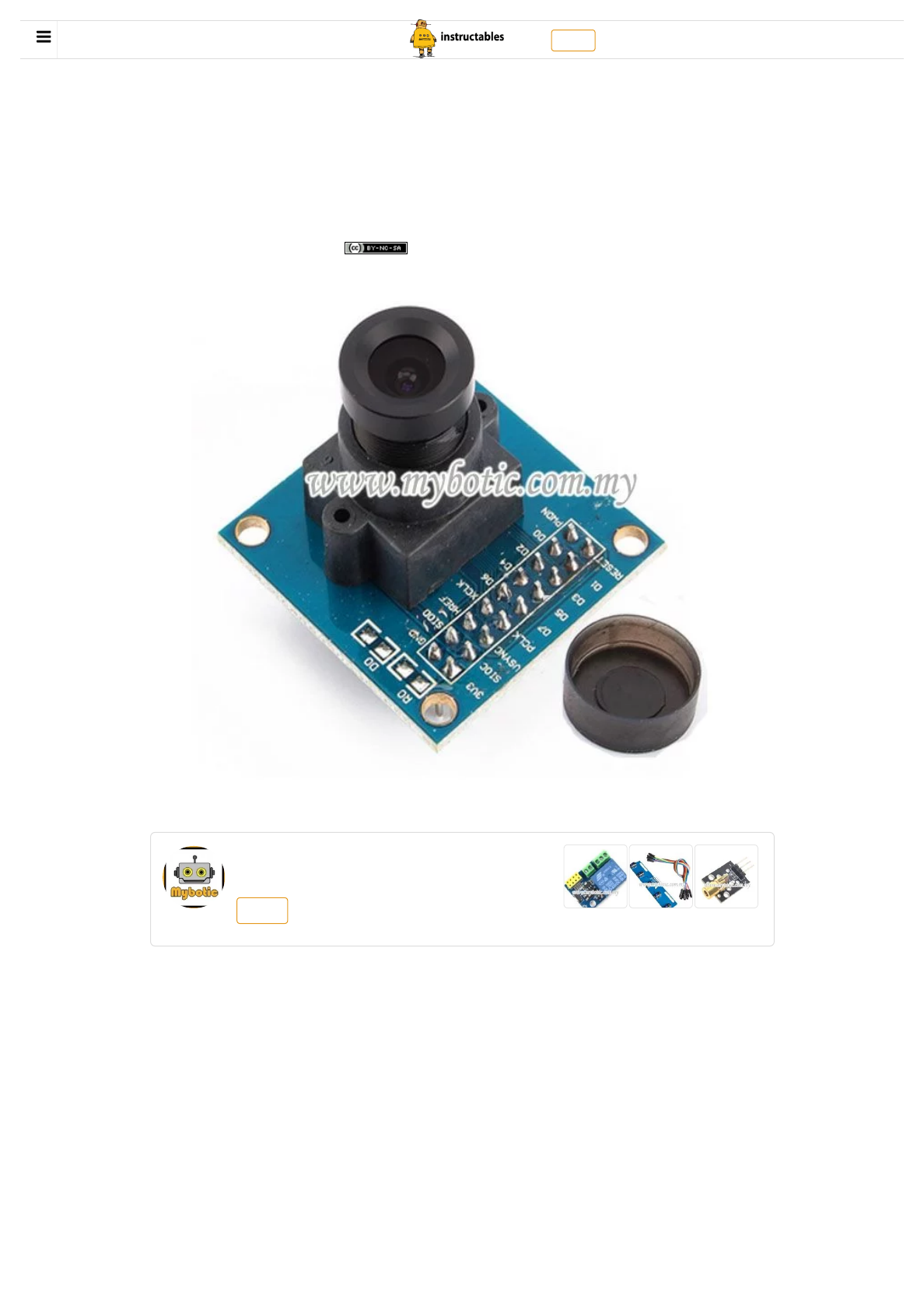
Intro: OV7670 Arduino Camera Sensor Module Framecapture Tutorial
Description
The camera module is powered from a single +3.3V power supply. An external oscillator
provide the clock source for camera module XCLK pin. With proper conguration to the
camera internal registers via I2C bus, then the camera supply pixel clock (PCLK) and
camera data back to the host with synchronize signal like HREF and VSYNC. The OV7670
camera module is a low cost 0.3 mega pixel CMOS color camera module, it can output
640x480 VGA resolution image at 30fps. The OV7670 camera module build in onboard
LDO regulator only single 3.3V power needed and can be used in Arduino, STM32,Chipkit,
ARM, DSP , FPGA and etc.
Specication
(https://cdn instructables com/FKA/3GUB/IUIYU30T/FKA3GUBIUIYU30T LARGE jpg)
Download Favorite OV7670 Arduino Camera Sensor Module Framecapture Tutorial by mybotic (/member/mybotic/) Follow Login (/account/login/) | Sign Up (/account/gopro)
(/)

4.10.2018 OV7670 Arduino Camera Sensor Module Framecapture Tutorial: 11 Steps (with Pictures)
https://www.instructables.com/id/OV7670-Arduino-Camera-Sensor-Module-Framecapture-T/ 2/20
Optical size 1/6 inch
Resolution 640x480 VGA
Onboard regulator, only single 3.3V supply needed
Mounted with high quality F1.8 / 6mm lens
High sensitivity for low-light operation
VarioPixel® method for sub-sampling
Automatic image control functions including: Automatic
Exposure Control (AEC), Automatic Gain Control (AGC), Automatic White Balance
(AWB), Automatic
Band Filter (ABF), and Automatic Black-Level Calibration (ABLC)
Image quality controls including color saturation, hue, gamma, sharpness (edge
enhancement), and anti-blooming
ISP includes noise reduction and defect correction
Supports LED and ash strobe mode
Supports scaling
Lens shading correction
Flicker (50/60 Hz) auto detection
Saturation level auto adjust (UV adjust)
Edge enhancement level auto adjust
De-noise level auto adjust
Step 1: Material Preparation
Add Tip Ask Question Comment Download
(https://cdn instructables com/FRA/7UKT/IUOHO7QS/FRA7UKTIUOHO7QS LARGE jpg)
Download Favorite OV7670 Arduino Camera Sensor Module Framecapture Tutorial by mybotic (/member/mybotic/) Follow

4.10.2018 OV7670 Arduino Camera Sensor Module Framecapture Tutorial: 11 Steps (with Pictures)
https://www.instructables.com/id/OV7670-Arduino-Camera-Sensor-Module-Framecapture-T/ 3/20
In this tutorial, you will need :
1. Arduino Uno Board and USB
2. OV7670 Arduino Camera Sensor Module STM32
3.10K resistor X 2
4. 4.7K Resistor X2
5. Breadboard
and you will be using Arduino IDE and Java.
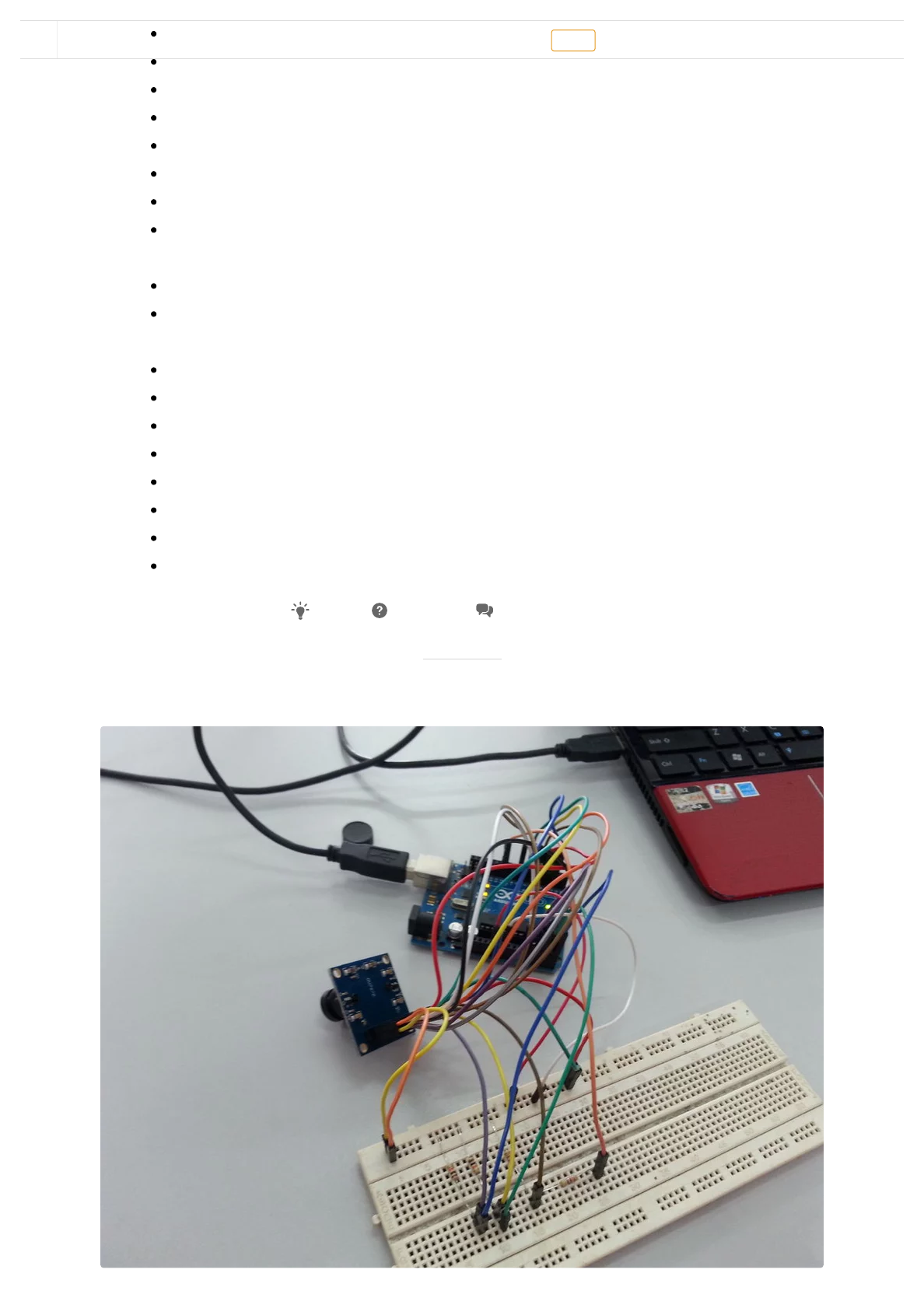
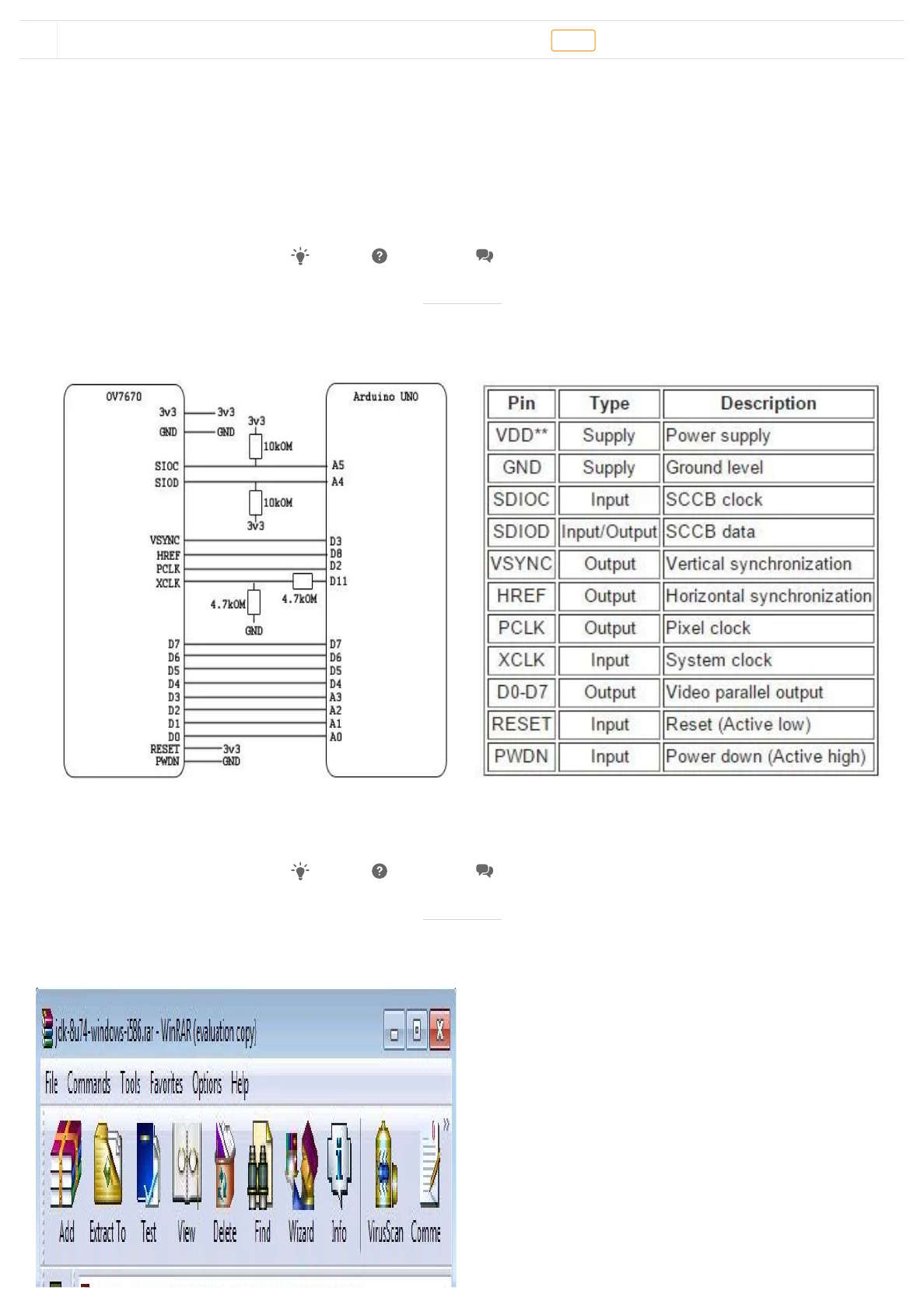
Step 2: Pinout Connection
Connect your circuit as illustrated on the picture above.
Step 3: Java
Add Tip Ask Question Comment Download
(https://cdn instructables com/FE4/V64C/IUKF37JH/FE4V64CIUKF37JH LARGE jpg)
(https://cdn instructables com/FTA/LCJB/IUKF37BG/FTALCJBIUKF37BG LARGE jpg)
Add Tip Ask Question Comment Download
Download Favorite OV7670 Arduino Camera Sensor Module Framecapture Tutorial by mybotic (/member/mybotic/) Follow


4.10.2018 OV7670 Arduino Camera Sensor Module Framecapture Tutorial: 11 Steps (with Pictures)
https://www.instructables.com/id/OV7670-Arduino-Camera-Sensor-Module-Framecapture-T/ 4/20
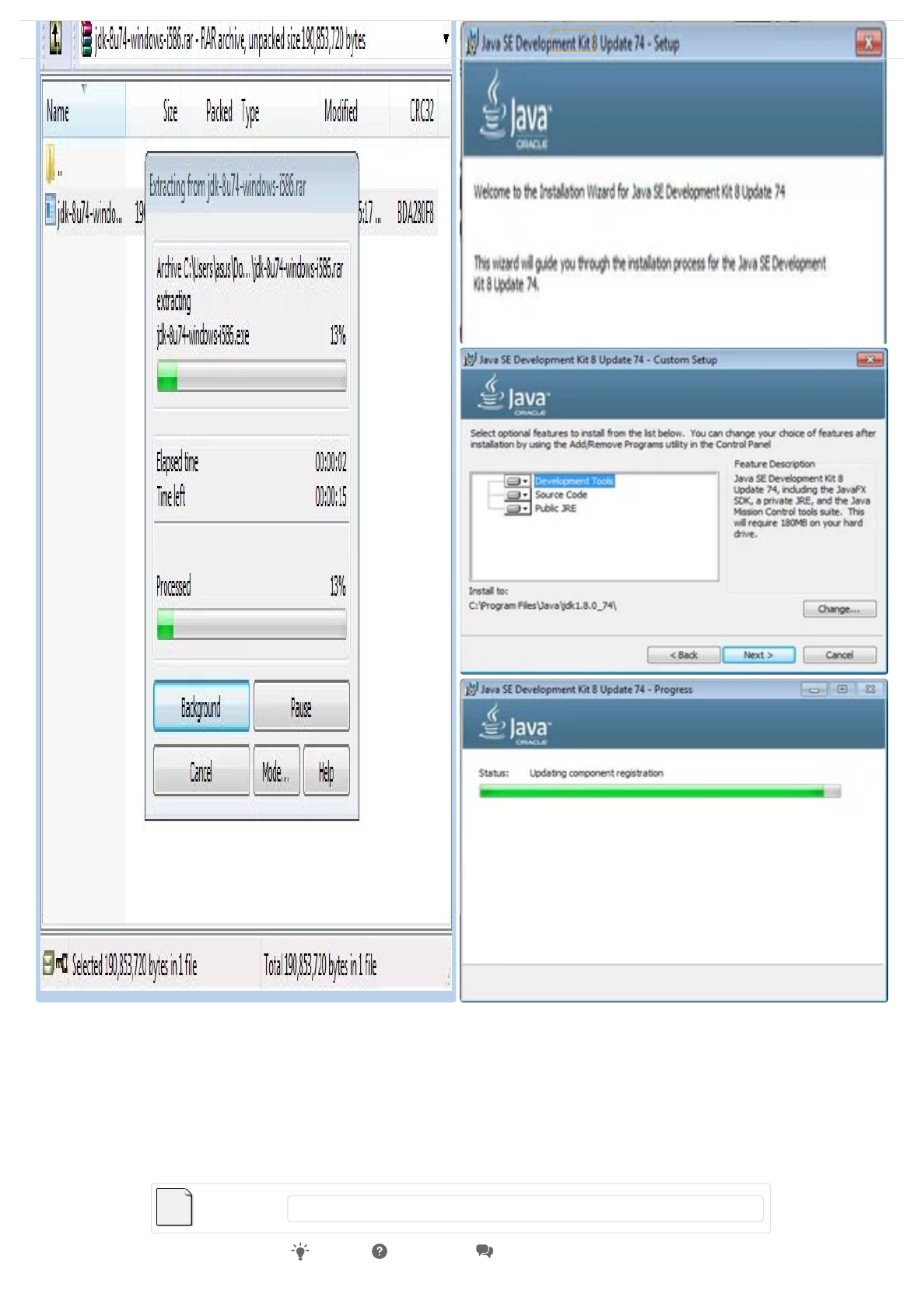
You have to download this to be able to interface this camera sensor module on your
pc.Open the zip le and install to your computer. By default, this will be install to your c
drive in your program les folder. As for mine, it is stored in C:\Program
Files\Java\jdk1.8.0_74. You can refer picture above.
NOTE : This jdk-8u74-windows-i586.rar le is quite big.
(https://cdn instructables com/FQR/THKZ/IUKEXJ1L/FQRTHKZIUKEXJ1L LARGE jpg)
(https://cdn instructables com/FRK/6YL5/IUOHNY1M/FRK6YL5IUOHNY1M LARGE jpg)
(https://cdn instructables com/FQS/SSB7/IUOHNY1N/FQSSSB7IUOHNY1N LARGE jpg)
jdk-8u74-windows-i58…
(https://cdn.instructables.com/ORIG/FDI/07P7/IUOHOM44/FDI07P7IUOHOM44.rar)
Download (https://cdn.instructables.com/ORIG/FDI/07P7/IUOHOM44/FDI07P7IUOHOM44.rar)
Add Tip Ask Question Comment Download
Download Favorite OV7670 Arduino Camera Sensor Module Framecapture Tutorial by mybotic (/member/mybotic/) Follow


4.10.2018 OV7670 Arduino Camera Sensor Module Framecapture Tutorial: 11 Steps (with Pictures)
https://www.instructables.com/id/OV7670-Arduino-Camera-Sensor-Module-Framecapture-T/ 5/20
Step 4: Sample Source Code
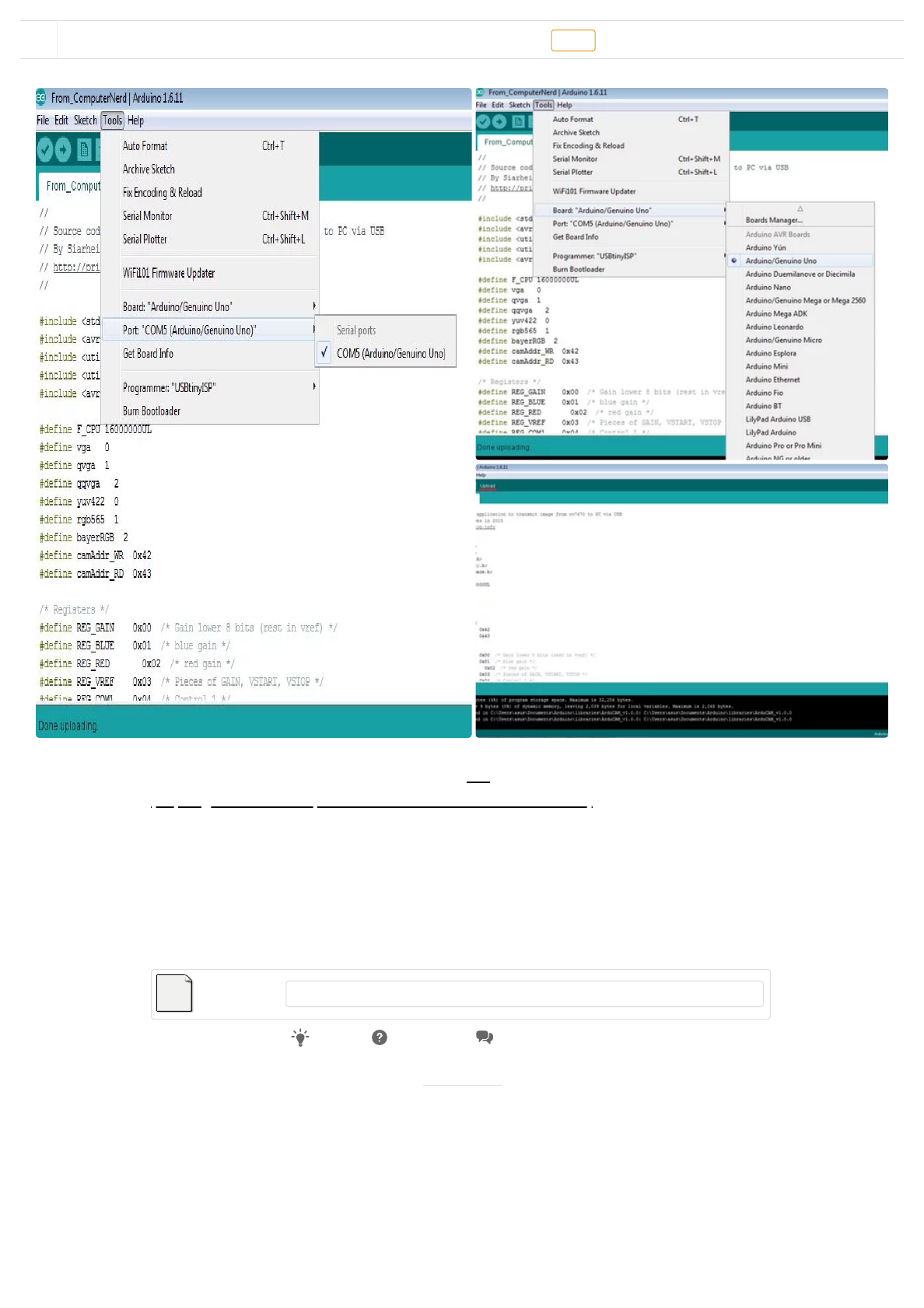
This sample source code is originally from this link
(https://github.com/ComputerNerd/ov7670-no-ram-arduino-uno). Download this sample
source code, open it on your Arduino IDE, connect your Arduino Uno Board to your
computer and upload it. Select the correct board and port before uploading this source
code. Refer image above for help.
NOTE : Don't mind that it does not recognize some libraries in the beginning of the le. If it
bothers you, comment the whole line out with //
Step 5: Checking Your Port
(https://cdn instructables com/F6L/ZQKO/IUKEXF0G/F6LZQKOIUKEXF0G LARGE jpg)
(https://cdn instructables com/FBX/IIM5/IUKEXEYH/FBXIIM5IUKEXEYH LARGE jpg)
(https://cdn instructables com/FEA/93O4/IUKEXFJ6/FEA93O4IUKEXFJ6 LARGE jpg)
From_ComputerNerd.rar
(https://cdn.instructables.com/ORIG/FFJ/OFFW/IUKEXDI3/FFJOFFWIUKEXDI3.rar)
Download (https://cdn.instructables.com/ORIG/FFJ/OFFW/IUKEXDI3/FFJOFFWIUKEXDI3.rar)
Add Tip Ask Question Comment Download
Download Favorite OV7670 Arduino Camera Sensor Module Framecapture Tutorial by mybotic (/member/mybotic/) Follow


4.10.2018 OV7670 Arduino Camera Sensor Module Framecapture Tutorial: 11 Steps (with Pictures)
https://www.instructables.com/id/OV7670-Arduino-Camera-Sensor-Module-Framecapture-T/ 6/20
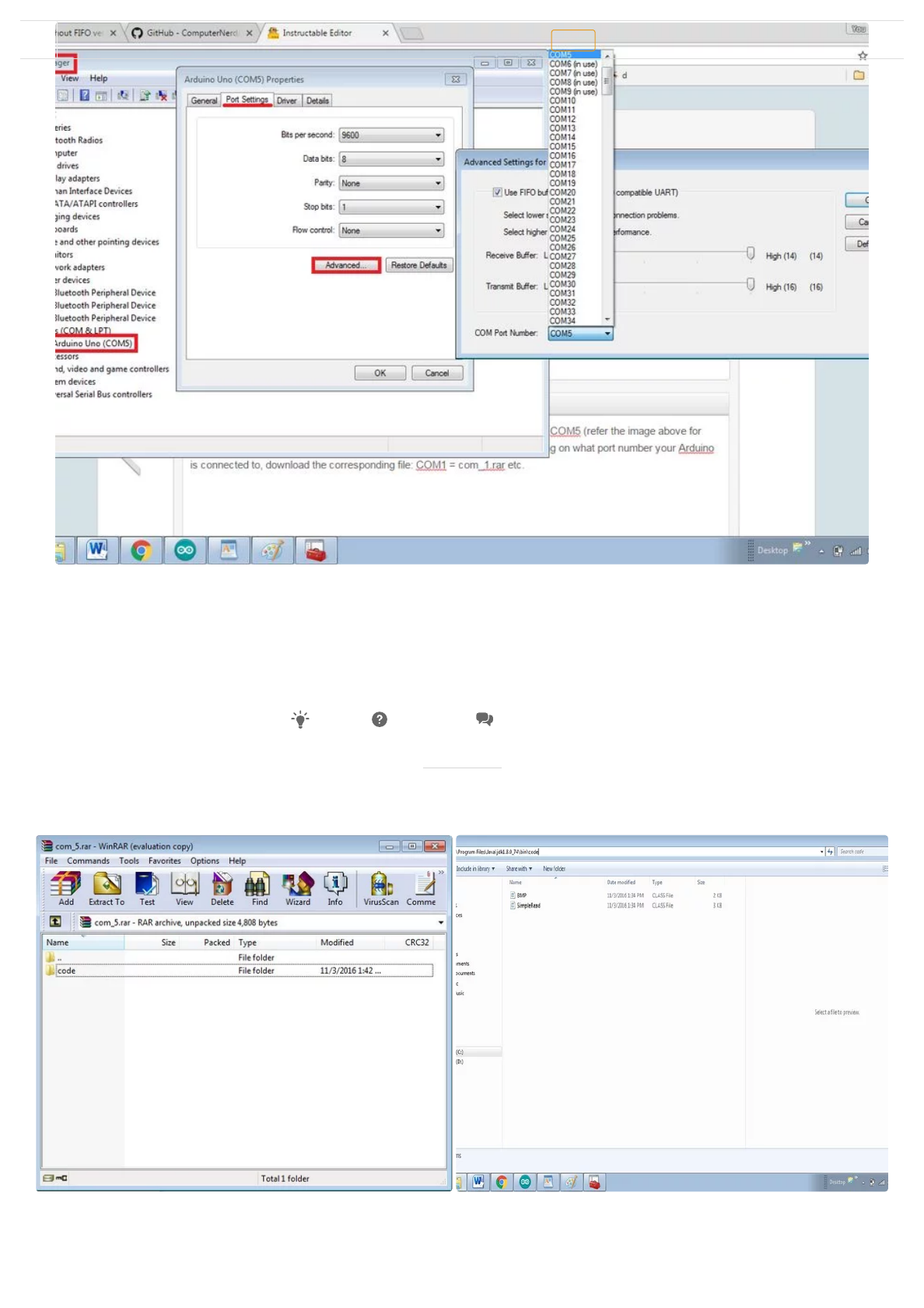
Find out what USB port your Arduino is connected to, something like COM4 or COM5. You
could check it on your Control Panel > Device Manager > Ports (COM & LPT) > right click >
Properties > Port Settings > Advanced > COM Port Number > /Select Your Port Number/.
You can refer the image above for help. As for mine, it is port COM5.
Step 6: Com_#.rar
(https://cdn instructables com/F1Z/40PU/IUKEXHX5/F1Z40PUIUKEXHX5 LARGE jpg)
Add Tip Ask Question Comment Download
(https://cdn instructables com/FRF/0V4I/IUKEXMEC/FRF0V4IIUKEXMEC LARGE jpg)
(https://cdn instructables com/FR2/OBBM/IUKEXK0R/FR2OBBMIUKEXK0R LARGE jpg)
Download Favorite OV7670 Arduino Camera Sensor Module Framecapture Tutorial by mybotic (/member/mybotic/) Follow


4.10.2018 OV7670 Arduino Camera Sensor Module Framecapture Tutorial: 11 Steps (with Pictures)
https://www.instructables.com/id/OV7670-Arduino-Camera-Sensor-Module-Framecapture-T/ 7/20
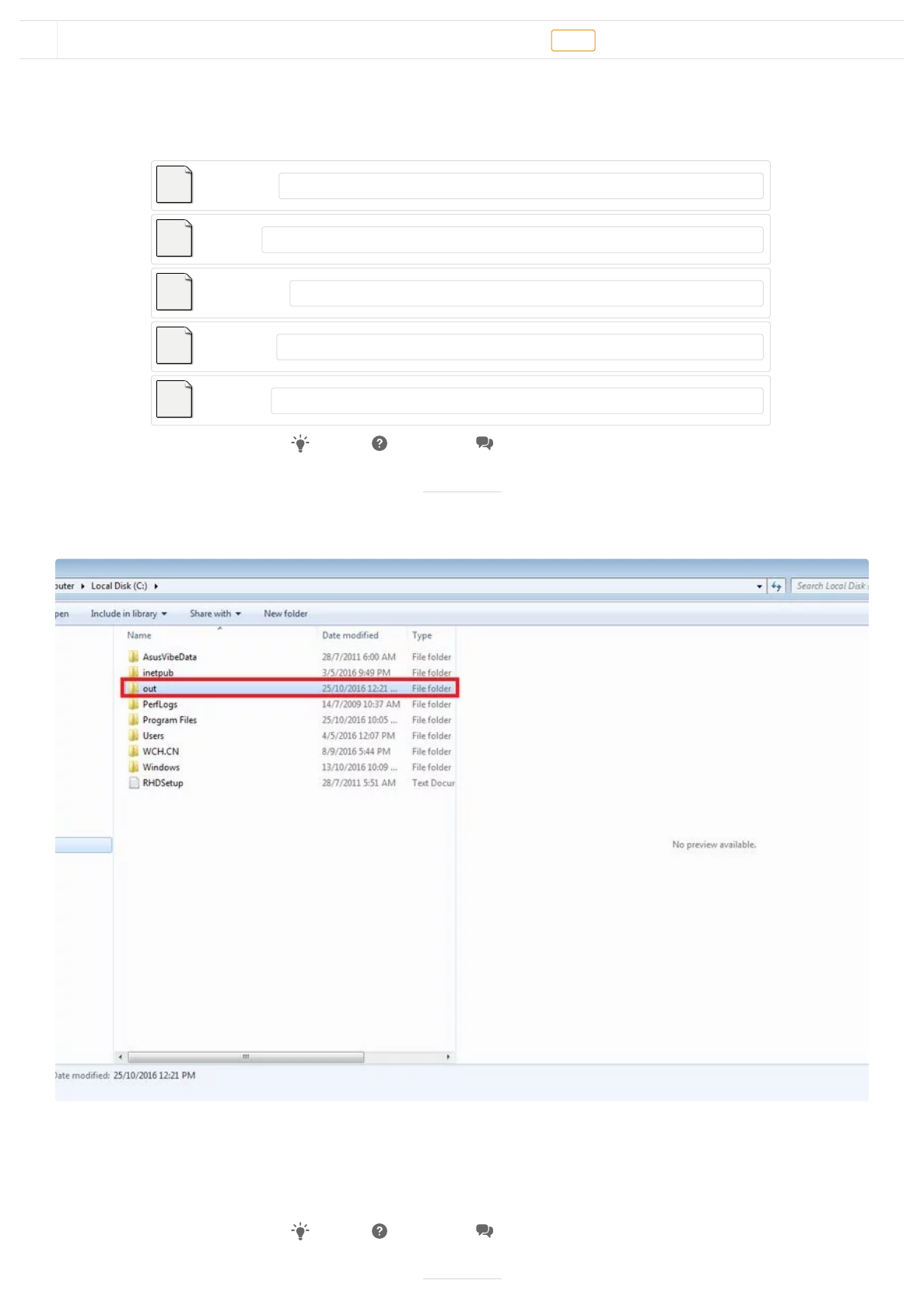
Depending on what port number your Arduino is connected to, download the
corresponding le. COM1 = com_1.rar , COM2 = com_2.rar and etc. Open your com#.rar on
WinRaR, extract/copy the 'code' folder from com_#.rar, go to Local Disk > Program Files >
Java > jdk1.8.0_74 > bin and paste it there. you can refer the picture above for a better
understanding.
Step 7: C:\out
You have to create a new folder on your c drive / Local Disk (C:). This will be your camera
module sensor's taken picture's destination. Name this folder as out (it could be anything
though).
com_1.rar
(https://cdn.instructables.com/ORIG/FX5/2XGC/IUKEXHH9/FX52XGCIUKEXHH9.rar)
Download (https://cdn.instructables.com/ORIG/FX5/2XGC/IUKEXHH9/FX52XGCIUKEXHH9.rar)
com_2.rar
(https://cdn.instructables.com/ORIG/F5N/MSMW/IUKEXHCC/F5NMSMWIUKEXHCC.rar)
Download (https://cdn.instructables.com/ORIG/F5N/MSMW/IUKEXHCC/F5NMSMWIUKEXHCC.rar)
com_4.rar
(https://cdn.instructables.com/ORIG/FQ4/6ICY/IUKEXHF5/FQ46ICYIUKEXHF5.rar)
Download (https://cdn.instructables.com/ORIG/FQ4/6ICY/IUKEXHF5/FQ46ICYIUKEXHF5.rar)
com_3.rar
(https://cdn.instructables.com/ORIG/FPA/5LDU/IUKEXHCG/FPA5LDUIUKEXHCG.rar)
Download (https://cdn.instructables.com/ORIG/FPA/5LDU/IUKEXHCG/FPA5LDUIUKEXHCG.rar)
com_5.rar
(https://cdn.instructables.com/ORIG/F5M/W8UK/IUKEXHH8/F5MW8UKIUKEXHH8.rar)
Download (https://cdn.instructables.com/ORIG/F5M/W8UK/IUKEXHH8/F5MW8UKIUKEXHH8.rar)
Add Tip Ask Question Comment Download
(https://cdn instructables com/FE5/1ZD8/IUORHH55/FE51ZD8IUORHH55 LARGE jpg)
Add Tip Ask Question Comment Download
Download Favorite OV7670 Arduino Camera Sensor Module Framecapture Tutorial by mybotic (/member/mybotic/) Follow

4.10.2018 OV7670 Arduino Camera Sensor Module Framecapture Tutorial: 11 Steps (with Pictures)
https://www.instructables.com/id/OV7670-Arduino-Camera-Sensor-Module-Framecapture-T/ 8/20
Step 8: Extra.rar
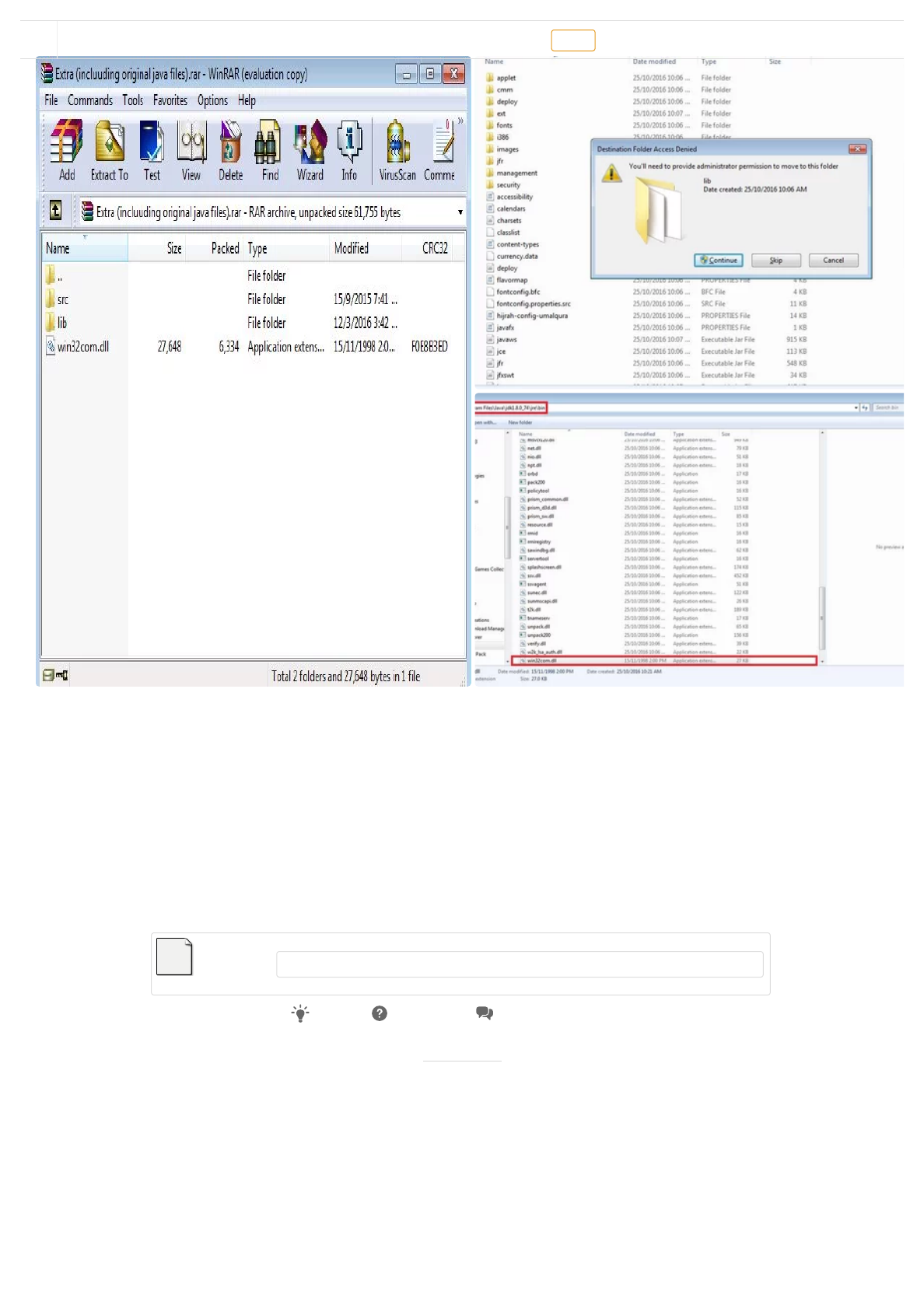
1. Download and extract the Extra.rar le below and open it. As you could see, there is src
folder, lib folder and "win32com.dll". You have to copy and placed "win32com.dll" in the
"C:\Program Files\Java\jdk1.8.0_74\jre\bin" directory.
2. Then, open the lib and you could see the "comm.jar" and "javax.comm.properties" in it.
Copy and paste the "comm.jar" in "C:\Program Files\Java\jdk1.8.0_74\jre\lib\ext" and
"javax.comm.properties" in the "C:\Program Files\Java\jdk1.8.0_74\jre\lib" directory.
NOTE : it may ask for administrator permission, just proceed anyway.
Step 9: CMD
(https://cdn instructables com/FHM/NB1P/IUKEXOWP/FHMNB1PIUKEXOWP LARGE jpg)
(https://cdn instructables com/FED/TN1J/IUOHO0UT/FEDTN1JIUOHO0UT LARGE jpg)
(https://cdn instructables com/FZR/WRCJ/IUOHO0UW/FZRWRCJIUOHO0UW LARGE jp
Extra (incluuding origi…
(https://cdn.instructables.com/ORIG/FU2/GNYS/IUKEXML7/FU2GNYSIUKEXML7.rar)
Download (https://cdn.instructables.com/ORIG/FU2/GNYS/IUKEXML7/FU2GNYSIUKEXML7.rar)
Add Tip Ask Question Comment Download
2 More Images
Download Favorite OV7670 Arduino Camera Sensor Module Framecapture Tutorial by mybotic (/member/mybotic/) Follow


4.10.2018 OV7670 Arduino Camera Sensor Module Framecapture Tutorial: 11 Steps (with Pictures)
https://www.instructables.com/id/OV7670-Arduino-Camera-Sensor-Module-Framecapture-T/ 9/20
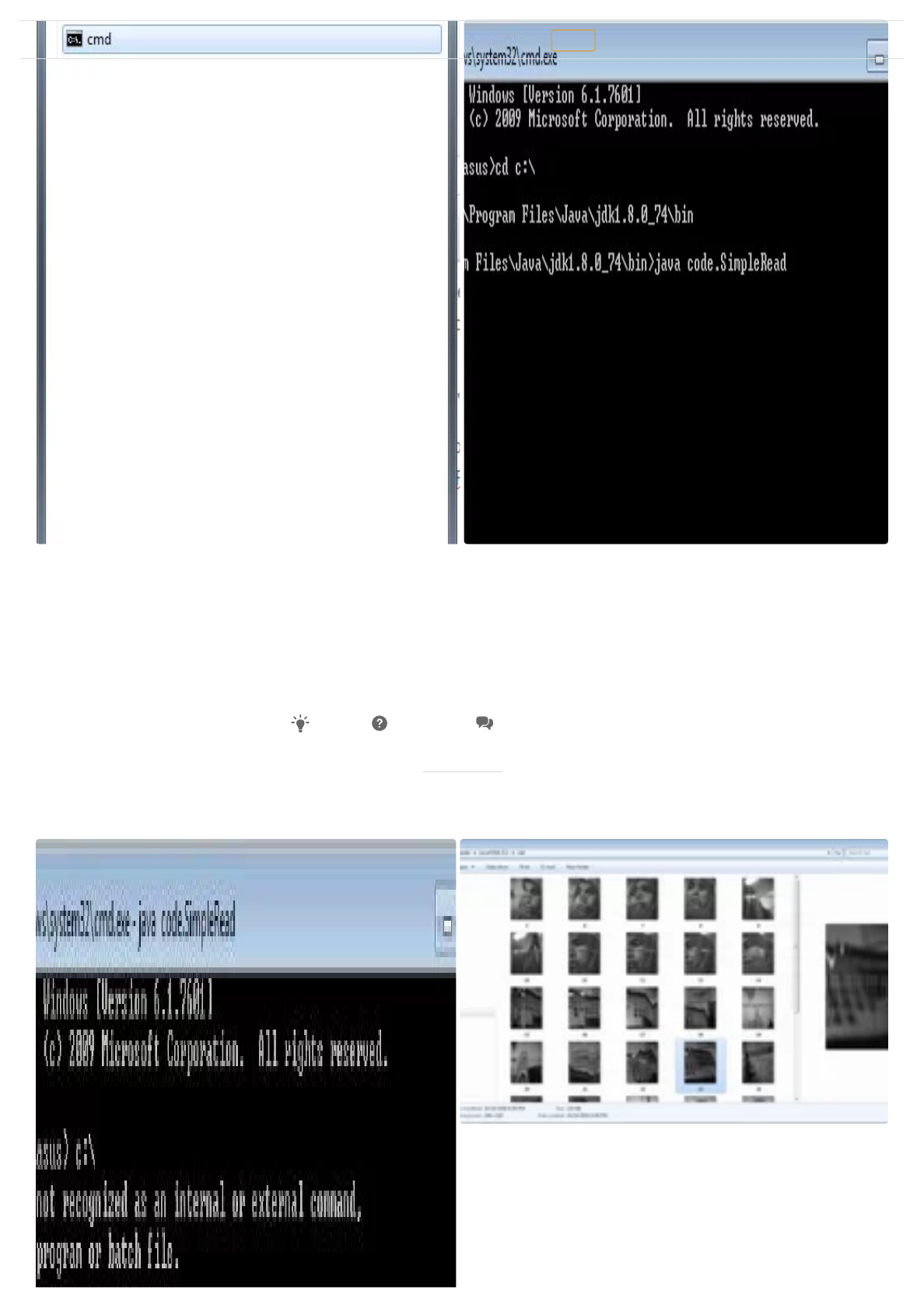
Open cmd and open the folder wherein the code folder is by writing its address. mine is
"C:\Program Files\Java\jdk1.8.0_74\bin". Click enter and it will give u "C:\Program
Files\Java\jdk1.8.0_74\bin>". Now, write "java code.SimpleRead". It supposed to be like
this---> C:\Program Files\Java\jdk1.8.0_74\bin>java code. SimpleRead. You can refer image
for help.
Step 10: Result
Add Tip Ask Question Comment Download
(https://cdn instructables com/F56/GOT8/IUOHNUTS/F56GOT8IUOHNUTS LARGE jpg)
Download Favorite OV7670 Arduino Camera Sensor Module Framecapture Tutorial by mybotic (/member/mybotic/) Follow


4.10.2018 OV7670 Arduino Camera Sensor Module Framecapture Tutorial: 11 Steps (with Pictures)
https://www.instructables.com/id/OV7670-Arduino-Camera-Sensor-Module-Framecapture-T/ 10/20
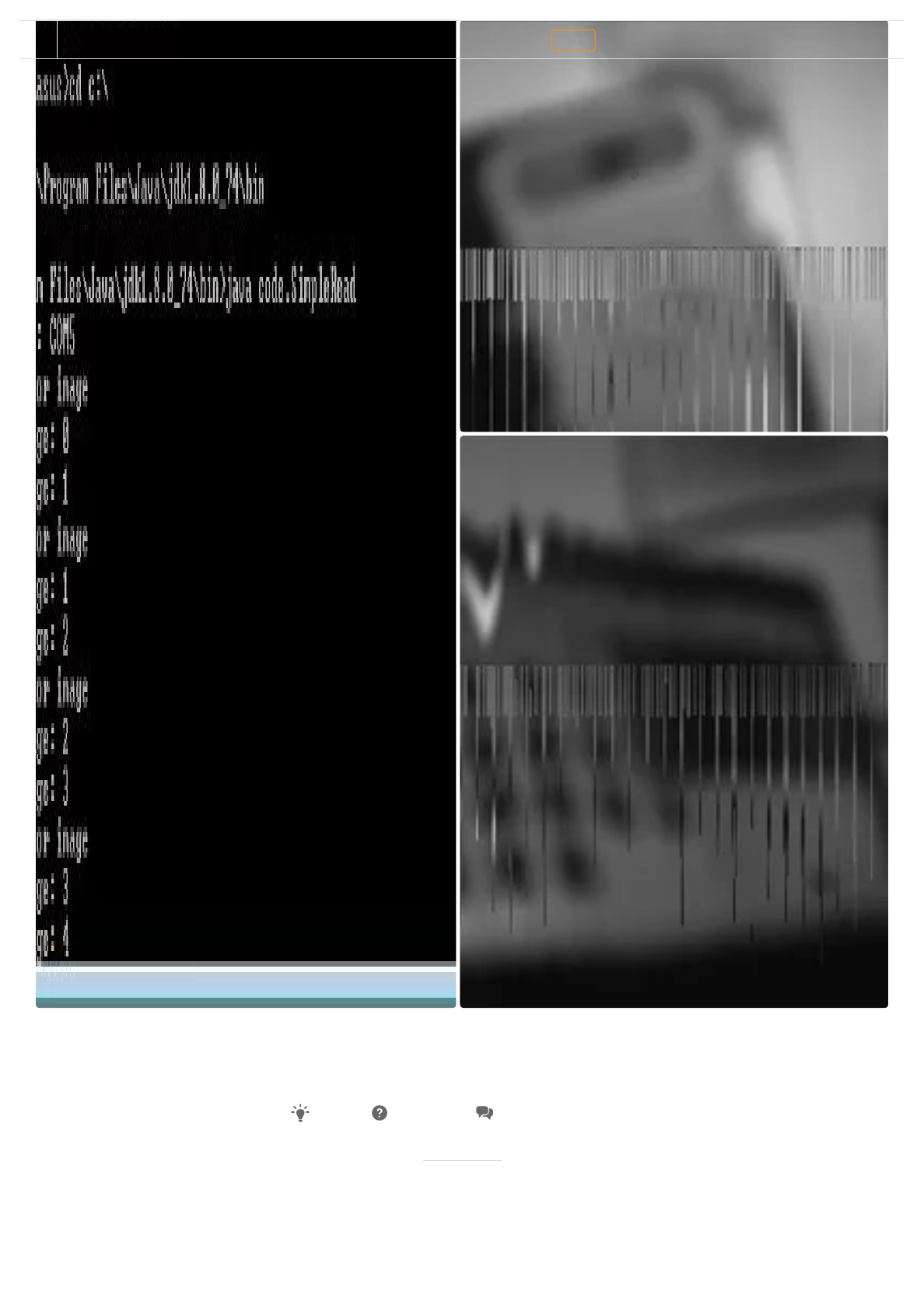
You can see the picture taken from your OV7670 Camera Module Sensor in your our folder
in c drive.
Step 11: Troubleshooting
(https://cdn instructables com/FAJ/Z2Y0/IUOHNZSG/FAJZ2Y0IUOHNZSG LARGE jpg)
(https://cdn instructables com/FTH/N8M1/IUOHNU5S/FTHN8M1IUOHNU5S LARGE jpg)
Add Tip Ask Question Comment Download
Download Favorite OV7670 Arduino Camera Sensor Module Framecapture Tutorial by mybotic (/member/mybotic/) Follow


4.10.2018 OV7670 Arduino Camera Sensor Module Framecapture Tutorial: 11 Steps (with Pictures)
https://www.instructables.com/id/OV7670-Arduino-Camera-Sensor-Module-Framecapture-T/ 11/20
1. If your cmd cannot nd images, try switching the USB of the arduino from a USB2.0 to a
USB3.0 (blue socket) or vice versa.
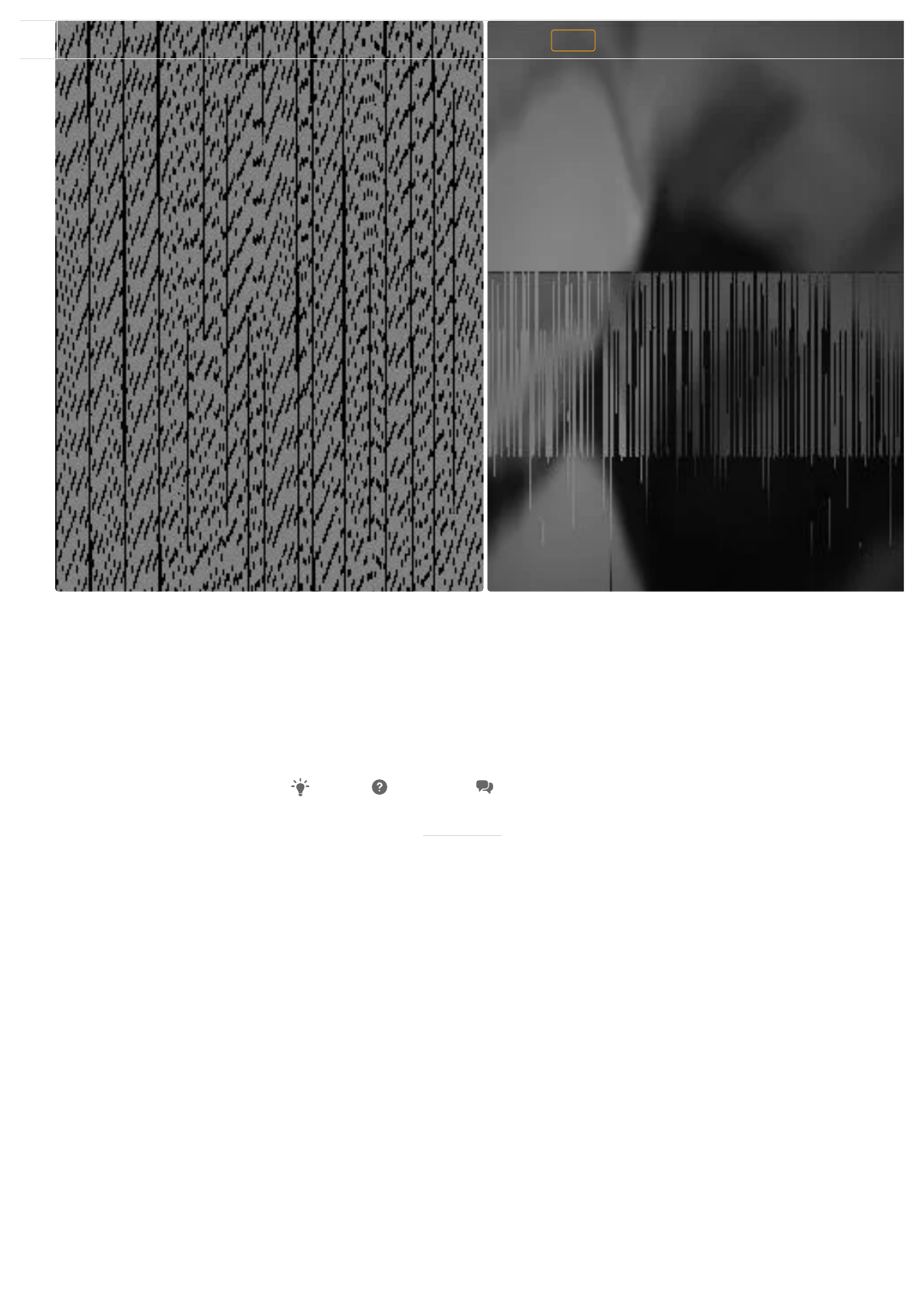
2 If you receive scrambles pictures, you need to edit the sample source code. Edit line:
wrReg(0x11, 12); try changing the 12 to 11/10/9/13. Upload it to the arduino and run the
cmd code again.
Add Tip Ask Question Comment Download
Download Favorite OV7670 Arduino Camera Sensor Module Framecapture Tutorial by mybotic (/member/mybotic/) Follow



4.10.2018 OV7670 Arduino Camera Sensor Module Framecapture Tutorial: 11 Steps (with Pictures)
https://www.instructables.com/id/OV7670-Arduino-Camera-Sensor-Module-Framecapture-T/ 12/20
8 People Made This Project!
adiwori (/member/adiwori/) made it!
Billd39ET (/member/Billd39ET/) made it!
VinayY19 (/member/VinayY19/) made it!
edmo117 (/member/edmo117/) made it!
Download Favorite OV7670 Arduino Camera Sensor Module Framecapture Tutorial by mybotic (/member/mybotic/) Follow

4.10.2018 OV7670 Arduino Camera Sensor Module Framecapture Tutorial: 11 Steps (with Pictures)
https://www.instructables.com/id/OV7670-Arduino-Camera-Sensor-Module-Framecapture-T/ 13/20
Did you make this project? Share it with us!
I Made It!
Recommendations
See 4 more that made it
Download Favorite OV7670 Arduino Camera Sensor Module Framecapture Tutorial by mybotic (/member/mybotic/) Follow

4.10.2018 OV7670 Arduino Camera Sensor Module Framecapture Tutorial: 11 Steps (with Pictures)
https://www.instructables.com/id/OV7670-Arduino-Camera-Sensor-Module-Framecapture-T/ 14/20
(/id/Custom-Car-Badges/)
Custom Car Badges (/id/Custom-Car-Badges/)
by mikeasaurus (/member/mikeasaurus/) in Technology (/technology/)
Download Favorite OV7670 Arduino Camera Sensor Module Framecapture Tutorial by mybotic (/member/mybotic/) Follow
4.10.2018 OV7670 Arduino Camera Sensor Module Framecapture Tutorial: 11 Steps (with Pictures)
https://www.instructables.com/id/OV7670-Arduino-Camera-Sensor-Module-Framecapture-T/ 15/20
(/id/How-to-Install-LEDs-Under-a-Scooter-with-Bluetooth/)
How to Install LEDs Under a Scooter (with Bluetooth) (/id/How-to-Install-LEDs-Under-a-Scooter-with-Bluetooth/)
by bekathwia (/member/bekathwia/) in Arduino (/technology/arduino/)
Download Favorite OV7670 Arduino Camera Sensor Module Framecapture Tutorial by mybotic (/member/mybotic/) Follow
4.10.2018 OV7670 Arduino Camera Sensor Module Framecapture Tutorial: 11 Steps (with Pictures)
https://www.instructables.com/id/OV7670-Arduino-Camera-Sensor-Module-Framecapture-T/ 16/20
(/id/Kravox-Wireless-Motion-and-Touch-Sensing-Musical-I/)
Spatial Synthesizer Kravox! Wireless, Motion- & Touch-Sensing (/id/Kravox-Wireless-Motion-and-Touch-Sensing-Musical-I/)
by timkrahmer (/member/timkrahmer/) in Arduino (/technology/arduino/)
Download Favorite OV7670 Arduino Camera Sensor Module Framecapture Tutorial by mybotic (/member/mybotic/) Follow
4.10.2018 OV7670 Arduino Camera Sensor Module Framecapture Tutorial: 11 Steps (with Pictures)
https://www.instructables.com/id/OV7670-Arduino-Camera-Sensor-Module-Framecapture-T/ 17/20
(/class/Arduino-Class/)
Arduino Class (/id/Arduino-Class/)
72,883 Enrolled
(/contest/audio18/)
(/contest/electronicstips2018/)
(/contest/optics/)
We have a be nice policy.
Please be positive and constructive.
Add Tip
Ask Question
Post Comment
Add Images
Post
Download Favorite OV7670 Arduino Camera Sensor Module Framecapture Tutorial by mybotic (/member/mybotic/) Follow
4.10.2018 OV7670 Arduino Camera Sensor Module Framecapture Tutorial: 11 Steps (with Pictures)
https://www.instructables.com/id/OV7670-Arduino-Camera-Sensor-Module-Framecapture-T/ 18/20
75 Discussions
I made it last night. I already had JDK installed b/c im a software developer but I had the 64bit JDK so when
I did the instructions step by step and then tried to run the jar, it said something like "cannot run 32bit dll in
64 bit environment" so I got the 32 bit version of the latest jdk (just google "jdk 32 bit download" and then
click first link. Then download the first one that says windows x86 and install that when it finishes
downloading. Then you need to re-do this tutorial and any time he says "Program Files" you need to replace
that with "Program Files (x86)" and then it should work.
(https://cdn.instructables.com/FYF/S90C/JCUUH1W2/FYFS90CJCUUH1W2.LARGE.jpg)
4 replies
(/member/ryan.avery.dev/) ryan.avery.dev (/member/ryan.avery.dev/)8 months ago Reply Upvote
Reply Upvote
(https://www.instructables.com/id/How-to-use-OV7670-Camera-Module-with-Arduino/#)
if you want OV7670
https://www.youtube.com/watch?v=y2myh6Mptt0 (https://www.youtube.com/watch?v=y2myh6Mptt0)
I got new video about OV7670,, and it's work
(/member/AgusA12/) AgusA12 (/member/AgusA12/) Tip 7 weeks ago Reply
1
Upvote
In my project, I want to save the arduino data into Virtuabotix SD Card Reader/Writer, and that is easy as I
know
But then connect the SD Card to my laptop to take out the pictures
Is there a way to take the pictures from data stored in the SD Card?
PLEASE HELP
THANK YOU
(/member/Sadek-313-/) Sadek-313- (/member/Sadek-313-/)2 months ago Reply Upvote
How to save previous pictures?
whenever camera reworks, previous pictures are gone.they're rewriting the previous picture name.
(/member/Tareq007/) Tareq007 (/member/Tareq007/) Question 2 months ago on Step 10
Answer Upvote
Please, can anyone help me?
The Java code is giving error for windows 10 64bit. Look:
C: \ Program Files \ Java \ jre1.8.0_171 \ bin> java code.SimpleRead
(/member/Alfonsoff/) Alfonsoff (/member/Alfonsoff/) Question 2 months ago Answer Upvote
Download Favorite OV7670 Arduino Camera Sensor Module Framecapture Tutorial by mybotic (/member/mybotic/) Follow

4.10.2018 OV7670 Arduino Camera Sensor Module Framecapture Tutorial: 11 Steps (with Pictures)
https://www.instructables.com/id/OV7670-Arduino-Camera-Sensor-Module-Framecapture-T/ 19/20
More Comments Post Comment
Error loading win32com: java.lang.UnsatisfiedLinkError: C: \ Program Files \ Java \ jre1.8.0_171 \ bin \
win32com.dll: Can not load IA 32-bit .dll on a AMD 64-bit platform
the image will not be found
searching for image in cmd
(https://cdn.instructables.com/FIC/P8OM/IZ6CO7VM/FICP8OMIZ6CO7VM.LARGE.jpg)
4 replies
(/member/rennythomas260394/) rennythomas260394 (/member/rennythomas260394/)1 year ago
Reply
2
Upvote
my Arduino Is connected with com 6 here here the code is not avaible
(/member/darshan.lad/) darshan.lad (/member/darshan.lad/) Question 4 months ago on Step 6
Answer Upvote
how can I find address of file to write in cmd
(/member/GsR3/) GsR3 (/member/GsR3/) Question 4 months ago Answer Upvote
what is bin and paste
(/member/GsR3/) GsR3 (/member/GsR3/) Question 4 months ago on Step 6 Answer Upvote
what does that 8 to 10 from the above mean please any one send a video for help
(/member/GsR3/) GsR3 (/member/GsR3/) Question 4 months ago Answer Upvote
Hi can somebody help me on how to retrieve image from ov7670 CMOS camera. It only shows port name
come and looking for image.
Help....
1 more answer
(/member/S_K_Gouda/) S_K_Gouda (/member/S_K_Gouda/) Question 5 months ago Answer
3
Upvote
Download Favorite OV7670 Arduino Camera Sensor Module Framecapture Tutorial by mybotic (/member/mybotic/) Follow

4.10.2018 OV7670 Arduino Camera Sensor Module Framecapture Tutorial: 11 Steps (with Pictures)
https://www.instructables.com/id/OV7670-Arduino-Camera-Sensor-Module-Framecapture-T/ 20/20
Download Favorite OV7670 Arduino Camera Sensor Module Framecapture Tutorial by mybotic (/member/mybotic/) Follow
Technology (/technology/)
Workshop (/workshop/)
Craft (/craft/)
Home (/home/)
Food (/food/)
Play (/play/)
Outside (/outside/)
Costumes (/costumes/)
Categories About Us
Who We Are
(/about/)
Why Publish?
(/create/)
Jobs
(/topics/Positions-
available-at-
Instructables/)
Contact
(/contact/)
Resources
Residency Program
(http://www.autodesk.com/pier-
9/residency/home)
Community (/topics/)
Sitemap (/sitemap/)
Help (/id/how-to-write-a-
great-instructable/)
(http://www.instagram.com
(http://www.pinterest.com/
(http://www.facebook.com/
(http://www.twitter.com/ins
Find Us
(http://www.autodesk.com)
© 2018 Autodesk, Inc.
Terms of Service (http://usa.autodesk.com/adsk/servlet/item?siteID=123112&id=21959721) |
Privacy Statement (http://usa.autodesk.com/adsk/servlet/item?siteID=123112&id=21292079) | Privacy settings |
Legal Notices & Trademarks (http://usa.autodesk.com/legal-notices-trademarks/)
