PC5005_v3 2_int_pws_29005955_r001_main Text PC5005 V3.2 Program Manual
PC5005 v3.2 Program Manual PC5005 v3.2 Program Manual
User Manual: PC5005 v3.2 Program Manual AlarmHow.net Library
Open the PDF directly: View PDF  .
.
Page Count: 40
- Table of Contents
- Section 1: For the Record
- Account Information
- Customer:________________________________________________________________________________________...
- Address:_________________________________________________________________________________________...
- Telephone:______________________________________________Installation Date:_______________________...
- Installer’s Code:________________________________________________________________________________...
- Module Name Description Location
- PC5005 Main Panel I______________________________________________________________________________...
- PC5100 Addressable Zone Expander I_______________________________________________________________...
- PC5132 Wireless Receiver 1 I_____________________________________________________________________...
- PC5132 Wireless Receiver 2 I_____________________________________________________________________...
- PC5132 Wireless Receiver 3 I_____________________________________________________________________...
- PC5132 Wireless Receiver 4 I_____________________________________________________________________...
- PC5200 Power Supply Module 1 I___________________________________________________________________...
- PC5200 Power Supply Module 2 I___________________________________________________________________...
- PC5200 Power Supply Module 3 I___________________________________________________________________...
- PC5200 Power Supply Module 4 I___________________________________________________________________...
- PC5204 Power Supply Output Module I______________________________________________________________...
- PC5208 Low-Current Output Module I_______________________________________________________________...
- PC5936 Audio Interface Module I__________________________________________________________________...
- Escort5580 Voice Prompt Module I_________________________________________________________________...
- PC5400 Serial Printer Module I___________________________________________________________________...
- PC5400 DVACS Module I____________________________________________________________________________...
- LINKS1000 Cellular Communicator I________________________________________________________________...
- LINKS2X50 Long Range Radio I_____________________________________________________________________...
- Skyroute Transceiver I___________________________________________________________________________...
- Keypads Keypad Type Location
- Keypad 1 I_____________________________________________I I_______________________________________...
- Keypad 2 I_____________________________________________I I_______________________________________...
- Keypad 3 I_____________________________________________I I_______________________________________...
- Keypad 4 I_____________________________________________I I_______________________________________...
- Keypad 5 I_____________________________________________I I_______________________________________...
- Keypad 6 I_____________________________________________I I_______________________________________...
- Keypad 7 I_____________________________________________I I_______________________________________...
- Keypad 8 I_____________________________________________I I_______________________________________...
- Zone Programming Summary
- *Zone Attributes:
- Account Information
- Section 2: Keypad Programming
- [000] Keypad Enrollment
- NOTE: This must be done at each keypad requiring programming.
- [0] Slot address [Valid entries are 0-8 for the partition, 1-8 for the slot. (e.g., to enroll a k...
- [1] Function Key 1 Assignment (Valid entries are 00-32)
- [2] Function Key 2 Assignment (Valid entries are 00-32)
- [3] Function Key 3 Assignment (Valid entries are 00-32)
- [4] Function Key 4 Assignment (Valid entries are 00-32)
- [5] Function Key 5 Assignment (Valid entries are 00-32)
- Function Key Options:
- Partition/ Function Function Function Function Function Slot Key 1 Key 2 Key 3 Key 4 Key 5
- LCD 5501/LED defaults 11 03 04 06 14 16
- LCD Defaults 18 03 04 06 14 16
- KEYPAD 1 I________I________I I________I________I I________I________I I________I________I I_______...
- KEYPAD 2 I________I________I I________I________I I________I________I I________I________I I_______...
- KEYPAD 3 I________I________I I________I________I I________I________I I________I________I I_______...
- KEYPAD 4 I________I________I I________I________I I________I________I I________I________I I_______...
- KEYPAD 5 I________I________I I________I________I I________I________I I________I________I I_______...
- KEYPAD 6 I________I________I I________I________I I________I________I I________I________I I_______...
- KEYPAD 7 I________I________I I________I________I I________I________I I________I________I I_______...
- KEYPAD 8 I________I________I I________I________I I________I________I I________I________I I_______...
- Section 3: Basic Programming
- Zone Definitions
- System Times and Codes
- Default
- Default
- Default
- Default Default
- Default Default
- 01 I_______I_______I PGM 3 (main panel/PC5208)* 01 I_______I_______I PGM 7 (PC5208)
- 01 I_______I_______I PGM 4 (main panel/PC5208)* 01 I_______I_______I PGM 8 (PC5208)
- 01 I_______I_______I PGM 5 (PC5208) 01 I_______I_______I PGM 9 (PC5208)
- 01 I_______I_______I PGM 6 (PC5208) 01 I_______I_______I PGM 10 (PC5208)
- Default Default
- Default
- Default Option ON OFF
- OFF I________I 1 Normally Closed Loops End-of-Line Resistors
- OFF I________I 2 Double End-of-Line Resistors Single End-of-Line Resistors
- ON* I________I 3 Panel shows all troubles when armed Panel shows only Fire troubles when armed
- OFF I________I 4 Tampers/Faults do not show as open Tampers/Faults show as open
- ON I________I 2 Auto-Arm Schedule in [*][6]† Auto-Arm Schedule in Installer Programming Only
- ON I________I 6 Audible Exit Fault Enabled Audible Exit Fault Disabled
- ON I________I 7 Event Buffer Follows Swinger Shutdown Event Buffer Logs Events Past shutdown
- OFF I________I 8 Temporal Three Fire Signal Enabled Standard Pulsed Fire Signal
- * Option 3 must be OFF if LCD keypads older than v2.0 are used.
- †This option applies to all partitions.
- Default Option ON OFF
- OFF I________I 1 Arm / Disarm Bell Squawk enabled Arm / Disarm Bell Squawk disabled
- OFF I________I 2 Bell Squawk During Auto Arm No Bell Squawk During Auto Arm
- OFF I________I 3 Bell Squawk On Exit Delay No Bell Squawk On Exit Delay
- OFF I________I 4 Bell Squawk On Entry Delay No Bell Squawk On Entry Delay
- OFF I________I 5 Bell Squawk On Trouble No Bell Squawk On Trouble
- ON I________I 6 Audible Exit with Urgency Silent Exit Delay
- OFF I________I 7 Exit Delay Termination Enabled Exit Delay Termination Disabled
- OFF I________I 8 Residential Fire Bell is Continuous Residential Fire Bell Follows Bell Cut-off
- Default Option ON OFF
- ON I________I 1 Fire Keys Enabled Fire Keys Disabled
- OFF I________I 2 Panic Keys Audible (Bell / Beeps) Panic Keys Silent
- OFF I________I 3 Quick Exit Enabled Quick Exit Disabled
- ON* I________I 4 Quick Arming Enabled/ Quick Arming Disabled/ Function keys do not require code F...
- OFF** I________I 5 Code Required For Bypassing No Code Required
- OFF I________I 6 Master Code Not Changeable Master Code Changeable
- ON I________I 7 TLM Enabled TLM Disabled
- OFF I________I 8 TLM Audible (Bell) When Armed TLM Trouble Beeps When Armed
- * When using a PC5132 version 2.1 or older with the WLS909 Wireless Key, Option [4] must be ON fo...
- **If option [5] is ON, function keys programmed as [08] Bypass will require an access code when u...
- Default Option ON OFF
- ON I________I 1 AC Trouble Displayed AC Trouble Not Displayed
- OFF I________I 2 Trouble Light Flashes if AC Fails Trouble Light Does Not Follow AC Status
- OFF I________I 3 Blank Keypad When Not Used Keypad Active Always
- OFF I________I 4 Code Required to Remove Keypad Blanking No Code Required
- ON I________I 5 Keypad Backlighting is enabled Keypad Backlighting is disabled
- OFF I________I 6 Power Save Mode enabled Power Save Mode disabled
- OFF I________I 7 Bypass Status Displayed While Armed Bypass Status Not Displayed While Armed
- OFF I________I 8 Keypad Tampers enabled Keypad Tampers disabled
- Default Option ON OFF
- ON I________I 1 WLS Key Does Not Use Access Codes* WLS Key Uses Access Codes
- OFF I________I 2 RF Jam Log After 5 Minutes RF Jam Log After 30 Seconds
- OFF I________I 3 Audible RF Jam Trouble Beeps Silent RF Trouble Jam Beeps
- OFF I________I 4 Double Hit Enabled Double Hit Disabled
- OFF I________I 5 Late to Close Enabled Late to Close Disabled
- OFF I________I 6 Daylight Savings Time Enabled Daylight Savings Time Disabled
- ON I________I 7 For Future Use Periodic Camera Test Disabled
- OF F I________I 8 Squawk on Away Key Arming/Disarming Only Bell Squawk on all Arming/Disarming‡
- *This option must be enabled when using a PC5132 v2.1 or earlier. / ‡This option is supplemental ...
- Default Option ON OFF
- OFF I________I 1 Test Transmission Exception Enabled Test Transmission Exception Disabled
- OFF I________I 2 Verbal Chime Enabled Verbal Chime Disabled
- OFF I________I 3 Verbal Alarm Enabled Verbal Alarm Disabled
- OFF I________I 4 Water-Flow Silence Inhibit Enabled Water-Flow Silence Inhibit Disabled
- OFF I________I 5 Keypad Buzzer Follows Bell Enabled Keypad Buzzer Follows Bell Disabled
- OFF I________I 6 Cross Zoning Enabled Cross Zoning Disabled
- OFF I________I 7 Exit Delay Restart Enabled Exit Delay Restart Disabled
- OFF I________I 8 AC Trouble Beeps Enabled AC Trouble Beeps Disabled
- NOTE: For Cross Zoning to function, Option[6] in Section [018] and Option [9] in Section [101]-[1...
- Keypad Zone Assignments
- Default
- 00 I________I_______I Keypad (slot 1) Zone Valid entries are zones 01-32
- 00 I________I_______I Keypad (slot 2) Zone Valid entries are zones 01-32
- 00 I________I_______I Keypad (slot 3) Zone Valid entries are zones 01-32
- 00 I________I_______I Keypad (slot 4) Zone Valid entries are zones 01-32
- 00 I________I_______I Keypad (slot 5) Zone Valid entries are zones 01-32
- 00 I________I_______I Keypad (slot 6) Zone Valid entries are zones 01-32
- 00 I________I_______I Keypad (slot 7) Zone Valid entries are zones 01-32
- 00 I________I_______I Keypad (slot 8) Zone Valid entries are zones 01-32
- Zone Loop Response Option Code
- Default Option ON OFF
- OFF I________I 1 Zone 1 is Fast Loop Response Zone 1 is Normal Loop Response
- OFF I________I 2 Zone 2 is Fast Loop Response Zone 2 is Normal Loop Response
- OFF I________I 3 Zone 3 is Fast Loop Response Zone 3 is Normal Loop Response
- OFF I________I 4 Zone 4 is Fast Loop Response Zone 4 is Normal Loop Response
- OFF I________I 5 Zone 5 is Fast Loop Response Zone 5 is Normal Loop Response
- OFF I________I 6 Zone 6 is Fast Loop Response Zone 6 is Normal Loop Response
- OFF I________I 7 Zone 7 is Fast Loop Response Zone 7 is Normal Loop Response
- OFF I________I 8 Zone 8 is Fast Loop Response Zone 8 is Normal Loop Response
- Section 4: Advanced System Programming
- Zone Attributes
- Zone Attribute Defaults (Y = Option ON; N = Option OFF):
- Section Zone # Zone Audible/ Steady/ Chime Bypass Force Swing Tx. Delay Wireless Cross Zn Type** ...
- [101] 01 ( ) I________I I________| I________| I________| I________| I________| I________| I______...
- [102] 02 ( ) I________I I________| I________| I________| I________| I________| I________| I______...
- [103] 03 ( ) I________I I________| I________| I________| I________| I________| I________| I______...
- [104] 04 ( ) I________I I________| I________| I________| I________| I________| I________| I______...
- [105] 05 ( ) I________I I________| I________| I________| I________| I________| I________| I______...
- [106] 06 ( ) I________I I________| I________| I________| I________| I________| I________| I______...
- [107] 07 ( ) I________I I________| I________| I________| I________| I________| I________| I______...
- [108] 08 ( ) I________I I________| I________| I________| I________| I________| I________| I______...
- [109] 09 ( ) I________I I________| I________| I________| I________| I________| I________| I______...
- [110] 10 ( ) I________I I________| I________| I________| I________| I________| I________| I______...
- [111] 11 ( ) I________I I________| I________| I________| I________| I________| I________| I______...
- [112] 12 ( ) I________I I________| I________| I________| I________| I________| I________| I______...
- [113] 13 ( ) I________I I________| I________| I________| I________| I________| I________| I______...
- [114] 14 ( ) I________I I________| I________| I________| I________| I________| I________| I______...
- Section Zone # Zone Audible/ Steady/ Chime Bypass Force Swing Tx. Delay Wireless Cross Zn Type** ...
- [115] 15 ( ) I________I I________| I________| I________| I________| I________| I________| I______...
- [116] 16 ( ) I________I I________| I________| I________| I________| I________| I________| I______...
- [117] 17 ( ) I________I I________| I________| I________| I________| I________| I________| I______...
- [118] 18 ( ) I________I I________| I________| I________| I________| I________| I________| I______...
- [119] 19 ( ) I________I I________| I________| I________| I________| I________| I________| I______...
- [120] 20 ( ) I________I I________| I________| I________| I________| I________| I________| I______...
- [121] 21 ( ) I________I I________| I________| I________| I________| I________| I________| I______...
- [122] 22 ( ) I________I I________| I________| I________| I________| I________| I________| I______...
- [123] 23 ( ) I________I I________| I________| I________| I________| I________| I________| I______...
- [124] 24 ( ) I________I I________| I________| I________| I________| I________| I________| I______...
- [125] 25 ( ) I________I I________| I________| I________| I________| I________| I________| I______...
- [126] 26 ( ) I________I I________| I________| I________| I________| I________| I________| I______...
- [127] 27 ( ) I________I I________| I________| I________| I________| I________| I________| I______...
- [128] 28 ( ) I________I I________| I________| I________| I________| I________| I________| I______...
- [129] 29 ( ) I________I I________| I________| I________| I________| I________| I________| I______...
- [130] 30 ( ) I________I I________| I________| I________| I________| I________| I________| I______...
- [131] 31 ( ) I________I I________| I________| I________| I________| I________| I________| I______...
- [132] 32 ( ) I________I I________| I________| I________| I________| I________| I________| I______...
- **Record here based on programming in sections [001] - [004]
- System Timers
- [165] Maximum Dialing Attempts to Each Telephone Number
- Default: 007 I_______I_______I_______I Valid entries are 001-015 attempts (do not enter 000).
- Default: 040 I_______I_______I_______I Valid entries are 001-255 seconds
- Default: 020 I_______I_______I_______I Valid entries are 001-255 seconds
- Default: 005 I_______I_______I_______I Valid entries are 001-255 seconds
- Default: 000 I_______I_______I_______I Valid entries are 001-255 minutes, 000 allows automatic ar...
- Default: 060 I_______I_______I_______I Valid entries are 001-255 seconds/minutes
- Default: 000 I_______I_______I_______I Valid entries are 000-090 seconds
- Default: 015 I_______I_______I_______I Valid entries are 001-255 seconds
- Automatic Arming Schedule
- Enter a four-digit number (HH:MM) for each day that the system will auto-arm. All entries are dis...
- Default Partition Default
- 001 All I_______I_______I_______I Valid entries are 001-255 seconds, 000 for no pre-alert
- Section Partition Default
- [191] 1 I_______I_______I_______I Valid entries are 001-255 seconds, 000 to disable
- [192] 2 I_______I_______I_______I Valid entries are 001-255 seconds, 000 to disable
- [193] 3 I_______I_______I_______I Valid entries are 001-255 seconds, 000 to disable
- [194] 4 I_______I_______I_______I Valid entries are 001-255 seconds, 000 to disable
- [195] 5 I_______I_______I_______I Valid entries are 001-255 seconds, 000 to disable
- [196] 6 I_______I_______I_______I Valid entries are 001-255 seconds, 000 to disable
- [197] 7 I_______I_______I_______I Valid entries are 001-255 seconds, 000 to disable
- [198] 8 I_______I_______I_______I Valid entries are 001-255 seconds, 000 to disable
- NOTE: Default is [000] for all partitions.
- Section 5: Partition and Zone Programming
- [201] Partition Selection Mask
- Default Option ON OFF
- ON I________I 1 Partition 1 is enabled (cannot be turned off)
- OFF I________I 2 Partition 2 is enabled Disabled
- OFF I________I 3 Partition 3 is enabled Disabled
- OFF I________I 4 Partition 4 is enabled Disabled
- OFF I________I 5 Partition 5 is enabled Disabled
- OFF I________I 6 Partition 6 is enabled Disabled
- OFF I________I 7 Partition 7 is enabled Disabled
- OFF I________I 8 Partition 8 is enabled Disabled
- Assigning Zones to Partitions
- Section Partition Zone:
- [202] 1 01 02 03 04 05 06 07 08
- I________I I________I I________I I________I I________I I________I I________I I________I
- [203] 1 09 10 11 12 13 14 15 16
- I________I I________I I________I I________I I________I I________I I________I I________I
- [204] 1 17 18 19 20 21 22 23 24
- I________I I________I I________I I________I I________I I________I I________I I________I
- [205] 1 25 26 27 28 29 30 31 32
- I________I I________I I________I I________I I________I I________I I________I I________I
- Section Partition Zone:
- [210] 2 01 02 03 04 05 06 07 08
- I________I I________I I________I I________I I________I I________I I________I I________I
- [211] 2 09 10 11 12 13 14 15 16
- I________I I________I I________I I________I I________I I________I I________I I________I
- [212] 2 17 18 19 20 21 22 23 24
- I________I I________I I________I I________I I________I I________I I________I I________I
- [213] 2 25 26 27 28 29 30 31 32
- I________I I________I I________I I________I I________I I________I I________I I________I
- Assigning Zones to Partitions
- Section Partition Zone:
- Section Partition Zone:
- [218] 3 01 02 03 04 05 06 07 08
- I________I I________I I________I I________I I________I I________I I________I I________I
- [219] 3 09 10 11 12 13 14 15 16
- I________I I________I I________I I________I I________I I________I I________I I________I
- [220] 3 17 18 19 20 21 22 23 24
- I________I I________I I________I I________I I________I I________I I________I I________I
- [221] 3 25 26 27 28 29 30 31 32
- I________I I________I I________I I________I I________I I________I I________I I________I
- Section Partition Zone:
- [226] 4 01 02 03 04 05 06 07 08
- I________I I________I I________I I________I I________I I________I I________I I________I
- [227] 4 09 10 11 12 13 14 15 16
- I________I I________I I________I I________I I________I I________I I________I I________I
- [228] 4 17 18 19 20 21 22 23 24
- I________I I________I I________I I________I I________I I________I I________I I________I
- [229] 4 25 26 27 28 29 30 31 32
- I________I I________I I________I I________I I________I I________I I________I I________I
- Section Partition Zone:
- [234] 5 01 02 03 04 05 06 07 08
- I________I I________I I________I I________I I________I I________I I________I I________I
- [235] 5 09 10 11 12 13 14 15 16
- I________I I________I I________I I________I I________I I________I I________I I________I
- [236] 5 17 18 19 20 21 22 23 24
- I________I I________I I________I I________I I________I I________I I________I I________I
- [237] 5 25 26 27 28 29 30 31 32
- I________I I________I I________I I________I I________I I________I I________I I________I
- Assigning Zones to Partitions
- Section Partition Zone:
- [242] 6 01 02 03 04 05 06 07 08
- I________I I________I I________I I________I I________I I________I I________I I________I
- [243] 6 09 10 11 12 13 14 15 16
- I________I I________I I________I I________I I________I I________I I________I I________I
- [244] 6 17 18 19 20 21 22 23 24
- I________I I________I I________I I________I I________I I________I I________I I________I
- [245] 6 25 26 27 28 29 30 31 32
- I________I I________I I________I I________I I________I I________I I________I I________I
- Section Partition Zone:
- [250] 7 01 02 03 04 05 06 07 08
- I________I I________I I________I I________I I________I I________I I________I I________I
- [251] 7 09 10 11 12 13 14 15 16
- I________I I________I I________I I________I I________I I________I I________I I________I
- [252] 7 17 18 19 20 21 22 23 24
- I________I I________I I________I I________I I________I I________I I________I I________I
- [253] 7 25 26 27 28 29 30 31 32
- I________I I________I I________I I________I I________I I________I I________I I________I
- Section Partition Zone:
- [258] 8 01 02 03 04 05 06 07 08
- I________I I________I I________I I________I I________I I________I I________I I________I
- [259] 8 09 10 11 12 13 14 15 16
- I________I I________I I________I I________I I________I I________I I________I I________I
- [260] 8 17 18 19 20 21 22 23 24
- I________I I________I I________I I________I I________I I________I I________I I________I
- [261] 8 25 26 27 28 29 30 31 32
- I________I I________I I________I I________I I________I I________I I________I I________I
- Section 6: Communicator Programming
- Telephone Numbers
- NOTE: For sections [301] to [353], the content of every section by default is [F].
- [301] First Telephone Number (32 Digits)
- I_____I_____I_____I_____I_____I_____I_____I_____I_____I_____I_____I_____I_____I_____I_____I_____I...
- I_____I_____I_____I_____I_____I_____I_____I_____I_____I_____I_____I_____I_____I_____I_____I_____I...
- I_____I_____I_____I_____I_____I_____I_____I_____I_____I_____I_____I_____I_____I_____I_____I_____I...
- I_______I_______I_______I_______I_______I_______I Default = DB70EF Program unused digits with Hex F
- NOTE: All six digits must be entered for changes to be saved. Fill unused digit spaces with ‘F’
- NOTE: When using T-Link, program CAAA as the phone number.
- Account Codes
- Enter a six-digit account number for the system account code. SIA will use this account code for ...
- [310] I_______I_______I_______I_______I_______I_______I
- Enter a four-digit account number for each active partition.
- [311] 1 I_______I_______I_______I_______I
- [312] 2 I_______I_______I_______I_______I
- [313] 3 I_______I_______I_______I_______I
- [314] 4 I_______I_______I_______I_______I
- [315] 5 I_______I_______I_______I_______I
- [316] 6 I_______I_______I_______I_______I
- [317] 7 I_______I_______I_______I_______I
- [318] 8 I_______I_______I_______I_______I
- NOTE: For sections [301] to [353], the content of every section by default is [F].
- Alarm Reporting Codes, Zones 01-32
- Note: All reporting codes are defaulted to FF.
- Section
- [320] Zone 01 Zone 02 Zone 03 Zone 04 Zone 05 Zone 06 Zone 07 Zone 08
- I_______I_______I I_______I_______I I_______I_______I I_______I_______I I_______I_______I I______...
- Zone 09 Zone 10 Zone 11 Zone 12 Zone 13 Zone 14 Zone 15 Zone 16
- I_______I_______I I_______I_______I I_______I_______I I_______I_______I I_______I_______I I______...
- [321] Zone 17 Zone 18 Zone 19 Zone 20 Zone 21 Zone 22 Zone 23 Zone 24
- I_______I_______I I_______I_______I I_______I_______I I_______I_______I I_______I_______I I______...
- Zone 25 Zone 26 Zone 27 Zone 28 Zone 29 Zone 30 Zone 31 Zone 32
- I_______I_______I I_______I_______I I_______I_______I I_______I_______I I_______I_______I I______...
- Section
- [324] Zone 01 Zone 02 Zone 03 Zone 04 Zone 05 Zone 06 Zone 07 Zone 08
- I_______I_______I I_______I_______I I_______I_______I I_______I_______I I_______I_______I I______...
- Zone 09 Zone 10 Zone 11 Zone 12 Zone 13 Zone 14 Zone 15 Zone 16
- I_______I_______I I_______I_______I I_______I_______I I_______I_______I I_______I_______I I______...
- [325] Zone 17 Zone 18 Zone 19 Zone 20 Zone 21 Zone 22 Zone 23 Zone 24
- I_______I_______I I_______I_______I I_______I_______I I_______I_______I I_______I_______I I______...
- Zone 25 Zone 26 Zone 27 Zone 28 Zone 29 Zone 30 Zone 31 Zone 32
- I_______I_______I I_______I_______I I_______I_______I I_______I_______I I_______I_______I I______...
- I_______I_______I Duress Alarm
- I_______I_______I Opening After Alarm
- I_______I_______I Recent Closing
- I_______I_______I Zone Expander Supervisory Alarm
- I_______I_______I Zone Expander Supervisory Restore
- I_______I_______I Cross Zone Police Code Alarm
- I_______I_______I Burglary Not Verified
- I_______I_______I Alarm Cancelled
- I_______I_______I Keypad Fire Alarm
- I_______I_______I Keypad Auxiliary Alarm
- I_______I_______I Keypad Panic Alarm
- I_______I_______I Auxiliary Input Alarm
- I_______I_______I Keypad Fire Restoral
- I_______I_______I Keypad Auxiliary Restoral
- I_______I_______I Keypad Panic Restoral
- I_______I_______I Auxiliary Input Restore
- Section
- [330] Zone 01 Zone 02 Zone 03 Zone 04 Zone 05 Zone 06 Zone 07 Zone 08
- I_______I_______I I_______I_______I I_______I_______I I_______I_______I I_______I_______I I______...
- Zone 09 Zone 10 Zone 11 Zone 12 Zone 13 Zone 14 Zone 15 Zone 16
- I_______I_______I I_______I_______I I_______I_______I I_______I_______I I_______I_______I I______...
- [331] Zone 17 Zone 18 Zone 19 Zone 20 Zone 21 Zone 22 Zone 23 Zone 24
- I_______I_______I I_______I_______I I_______I_______I I_______I_______I I_______I_______I I______...
- Zone 25 Zone 26 Zone 27 Zone 28 Zone 29 Zone 30 Zone 31 Zone 32
- I_______I_______I I_______I_______I I_______I_______I I_______I_______I I_______I_______I I______...
- Section
- [334] Zone 01 Zone 02 Zone 03 Zone 04 Zone 05 Zone 06 Zone 07 Zone 08
- I_______I_______I I_______I_______I I_______I_______I I_______I_______I I_______I_______I I______...
- Zone 09 Zone 10 Zone 11 Zone 12 Zone 13 Zone 14 Zone 15 Zone 16
- I_______I_______I I_______I_______I I_______I_______I I_______I_______I I_______I_______I I______...
- [335] Zone 17 Zone 18 Zone 19 Zone 20 Zone 21 Zone 22 Zone 23 Zone 24
- I_______I_______I I_______I_______I I_______I_______I I_______I_______I I_______I_______I I______...
- Zone 25 Zone 26 Zone 27 Zone 28 Zone 29 Zone 30 Zone 31 Zone 32
- I_______I_______I General System Tamper
- I_______I_______I General System Tamper Rest.
- I_______I_______I Keypad Lockout
- Section
- [339] Code 1 Code 2 Code 3 Code 4 Code 5 Code 6 Code 7 Code 8
- I_______I_______I I_______I_______I I_______I_______I I_______I_______I I_______I_______I I______...
- Code 9 Code 10 Code 11 Code 12 Code 13 Code 14 Code 15 Code 16
- I_______I_______I I_______I_______I I_______I_______I I_______I_______I I_______I_______I I______...
- [340] Code 17 Code 18 Code 19 Code 20 Code 21 Code 22 Code 23 Code 24
- I_______I_______I I_______I_______I I_______I_______I I_______I_______I I_______I_______I I______...
- Code 25 Code 26 Code 27 Code 28 Code 29 Code 30 Code 31 Code 32
- I_______I_______I I_______I_______I I_______I_______I I_______I_______I I_______I_______I I______...
- I_______I_______I Closing by Duress Code 33
- I_______I_______I Closing by Duress Code 34
- I_______I_______I Closing by Master Code 40
- I_______I_______I Closing by Supervisory Code 41
- I_______I_______I Closing by Supervisory Code 42
- I_______I_______I Partial Closing
- I_______I_______I Special Closing
- I_______I_______I Late to Close
- Section
- [342] Code 1 Code 2 Code 3 Code 4 Code 5 Code 6 Code 7 Code 8
- I_______I_______I I_______I_______I I_______I_______I I_______I_______I I_______I_______I I______...
- Code 9 Code 10 Code 11 Code 12 Code 13 Code 14 Code 15 Code 16
- I_______I_______I I_______I_______I I_______I_______I I_______I_______I I_______I_______I I______...
- [343] Code 17 Code 18 Code 19 Code 20 Code 21 Code 22 Code 23 Code 24
- I_______I_______I I_______I_______I I_______I_______I I_______I_______I I_______I_______I I______...
- Code 25 Code 26 Code 27 Code 28 Code 29 Code 30 Code 31 Code 32
- I_______I_______I I_______I_______I I_______I_______I I_______I_______I I_______I_______I I______...
- I_______I_______I Opening by Duress Code 33
- I_______I_______I Opening by Duress Code 34
- I_______I_______I Opening by Master Code 40
- I_______I_______I Opening by Supervisory Code 41
- I_______I_______I Opening by Supervisory Code 42
- I_______I_______I Auto Arm Cancellation
- I_______I_______I Special Opening
- I_______I_______I Battery Trouble Alarm
- I_______I_______I AC Failure Trouble Alarm
- I_______I_______I Bell Circuit Trouble Alarm
- I_______I_______I Fire Trouble Alarm
- I_______I_______I Auxiliary Power Supply Trouble Alarm
- I_______I_______I TLM Trouble Code (via LINKS)
- I_______I_______I General System Trouble
- I_______I_______I General System Supervisory
- I_______I_______I Battery Trouble Restoral
- I_______I_______I AC Failure Trouble Restoral
- I_______I_______I Bell Circuit Trouble Restoral
- I_______I_______I Fire Trouble Restoral
- I_______I_______I Auxiliary Power Supply Trouble Restoral
- I_______I_______I TLM Restoral
- I_______I_______I General System Trouble Restore
- I_______I_______I General System Supervisory Restore
- I_______I_______I Telephone Number 1 FTC Restore
- I_______I_______I Telephone Number 2 FTC Restore
- I_______I_______I Event Buffer 75% Full Since Last Upload
- I_______I_______I DLS Lead IN
- I_______I_______I DLS Lead OUT
- I_______I_______I Zone Fault Alarm
- I_______I_______I Zone Fault Restore
- I_______I_______I Delinquency Code
- I_______I_______I General Zone Low Battery Alarm
- I_______I_______I General Zone Low Battery Restoral
- I_______I_______I Walk Test End
- I_______I_______I Walk Begin
- I_______I_______I Periodic Test Transmission with Trouble
- I_______I_______I Periodic Test Transmission
- I_______I_______I System Test
- I_______I_______I LINKS1000 Test Transmission Code*
- *The LINKS1000 Test Transmission Code must be programmed as “00” for the LINKS1000 Test Transmiss...
- [350] Communicator Format Options
- Default
- 04 I_______I_______I 1st/3rd Telephone Number
- 04 I_______I_______I 2nd Telephone Number
- 01 20 BPS, 1400 HZ handshake 04 SIA FSK 07 10 BPS, 1400Hz handshake
- 02 20 BPS, 2300 HZ handshake 05 Pager 08 10 BPS, 2300Hz handshake
- 03 DTMF CONTACT ID 06 Residential Dial
- Call Direction Options
- Alarm/Restore Communicator Call Directions
- NOTE: The LINKS1000 backup call directions will only back up their respective telephone numbers.
- NOTE: The LINKS1000 backup call directions will only back up their respective telephone numbers.
- NOTE: The LINKS1000 backup call directions will only back up their respective telephone numbers.
- NOTE: The LINKS1000 backup call directions will only back up their respective telephone numbers.
- NOTE: The LINKS1000 backup call directions will follow the programming in Sections 351-376, above.
- [377] Communication Variables
- Default
- 003 I_______I_______I_______I Swinger Shutdown (Alarms and Rest) (001-014 Transmissions)
- 003 I_______I_______I_______I Swinger Shutdown (Tampers and Rest) (001-014 Transmissions, 000=dis...
- 003 I_______I_______I_______I Swinger Shutdown (Maint and Rest) (001-014 Transmissions, 000=disab...
- 000 I_______I_______I_______I Communication Delay (001-255 seconds)
- 030 I_______I_______I_______I AC Failure Communication Delay (001-255 minutes)
- 003 I_______I_______I_______I TLM Trouble Delay (No. of checks required - valid entries 003 - 255)
- 030 I_______I_______I_______I Test Transmission Cycle (land line) (001-255 days/minutes)†
- 030 I_______I_______I_______I Test Transmission Cycle (LINKS1000) (001-255 days)
- 007 I_______I_______I_______I Zone Low Battery Transmission Delay (000-255 days)
- 030 I_______I_______I_______I Delinquency Transmission Cycle (000-255 days/hours)
- 000 I_______I_______I_______I Communications Cancelled Window (000-255 minutes)
- †Depends on programming in section [702], option [3].
- NOTE: To disable the AC failure communications delay, program [000].
- NOTE: Transmission delay cannot be used in conjunction with Downlook.
- Default
- Default Option ON OFF
- ON I_______I 1 Communications Enabled Communications Disabled
- OFF I_______I 2 Restorals on Bell Time-out Restorals Follow Zones
- OFF I_______I 3 Pulse Dialing DTMF Dialing
- OFF I_______I 4 Switch to Pulse Dialing on 5th Attempt DTMF Dial For All Attempts
- OFF I_______I 5 3rd Telephone Number enabled 3rd Telephone Number disabled
- OFF I_______I 6 Alternate Dial (1st and 3rd) Call 1st Number, Backup to 3rd
- OFF I_______I 7 Call LINKS as well as land line LINKS is Backup of land line(s)
- OFF I_______I 8 Delinquency Follows Zone Activity (Hours) Delinquency Follows Arming (Days)
- Default Option ON OFF
- OFF I_______I 1 Open After Alarm Kypd Ringback enabled Open After Alrm Kypd Ringback disabled
- OFF I_______I 2 Open After Alarm Bell Ringback enabled Open After Alrm Bell Ringback disabled
- OFF I_______I 3 SIA Sends Programmed Rep. Codes SIA Sends Automatic Rep. Codes
- OFF I_______I 4 Closing Confirmation Enabled Closing Confirmation Disabled
- ON I_______I 5 Talk/Listen (PC5936) on phone lines 1/3 No Talk/Listen (PC5936) on phone lines 1/3
- OFF I_______I 6 Talk/Listen (PC5936) on phone line 2 No Talk/Listen (PC5936) on phone line 2
- ON I_______I 7 Contact ID Uses Programmed Rep. Codes Contact ID Uses Automatic Rep. Codes
- OFF I_______I 8 For Future Use
- Default Option ON OFF
- OFF I_______I 1 Contact ID. Partial Closing Identifier is 5 Partial Closing ID is 4
- OFF I_______I 2 Alarm Communications Enabled During Walk Test Alarm Communications Disabled Durin...
- ON I_______I 3 Communication Cancelled Message Enabled Communication Cancelled Message Disabled
- OFF I_______I 4 Call Waiting Cancel Enabled* Call Waiting Cancel Disabled
- OFF I_______I 5 T-Link Interface Enabled T-Link Interface Disabled
- OFF I_______I 6 AC Failure Transmission Delay is in Hours AC Failure Transmission Delay is in Min...
- OFF I_______I 7-8 For Future Use
- LINKS1000 Preambles
- [390] LINKS1000 Preamble (First Telephone Number)
- Default: FFFF I_______I_______I_______I_______I (Program all unused digits with Hex F)
- Default: FFFF I_______I_______I_______I_______I (Program all unused digits with Hex F)
- Default: FFFF I_______I_______I_______I_______I (Program all unused digits with Hex F)
- Default: FFFFFF I_______I_______I_______I_______I_______I_______I (Program all unused digits with...
- • Enter [*][2][*] (HEX B) to dial [*]
- • Enter [*][3][*] (HEX C) to dial [#]
- Telephone Numbers
- Section 7: Downloading Options
- [401] First Downloading Option Code
- Default Option ON OFF
- OFF I_______I 1 Answering machine/double call enabled Answering machine/double call disabled
- ON I_______I 2 User Can Enable DLS Window User Cannot Enable DLS Window
- OFF I_______I 3 Call-Back Enabled Call-Back Disabled
- OFF I_______I 4 User-initiated call-up enabled User-initiated call-up disabled
- OFF I_______I 5 Auto Event Buffer Upload Enabled Auto Event Buffer Upload Disabled
- OFF I_______I 6-8 For Future Use
- I_____I_____I_____I_____I_____I_____I_____I_____I_____I_____I_____I_____I_____I_____I_____I_____I...
- Default: 5005 I_______I_______I_______I_______I Enter 4 HEX digits
- Default: 5005 I_______I_______I_______I_______I Enter 4 HEX digits
- Default: 060 I_______I_______I_______I (Valid entries are 001-255 seconds)
- Default: 000 I_______I_______I_______I (Valid entries are 000-255 rings)
- Default: FFFF I_______I_______I_______I_______I (Program all unused digits with Hex F)
- To begin PC-Link downloading, enter [499][Installer’s Code][499].
- Section 8: Programmable Output Programming
- Programmable Output Attributes
- PGM Attribute Defaults (Y = Attribute ON; N = Attribute OFF):
- Section PGM Output 1 2 3 4 5 6 7 8 # Type*
- Main Board
- [501] 1 ( ) I________I I________| I________| I________| I________| I________| I________| I________I
- [502] 2 ( ) I________I I________| I________| I________| I________| I________| I________| I________I
- Main Board / PC5208
- [503] ** 3 ( ) I________I I________| I________| I________| I________| I________| I________| I____...
- [504] ** 4 ( ) I________I I________| I________| I________| I________| I________| I________| I____...
- *Record here based on programming in [009], [010] and [011].
- ** These two sections allow you to program both PGM3 and PGM4 on the main panel, and the first tw...
- Section PGM Output 1 2 3 4 5 6 7 8 # Type*
- PC5208
- [505] 5 ( ) I________I I________| I________| I________| I________| I________| I________| I________I
- [506] 6 ( ) I________I I________| I________| I________| I________| I________| I________| I________I
- [507] 7 ( ) I________I I________| I________| I________| I________| I________| I________| I________I
- [508] 8 ( ) I________I I________| I________| I________| I________| I________| I________| I________I
- [509] 9 ( ) I________I I________| I________| I________| I________| I________| I________| I________I
- [510] 10 ( ) I________I I________| I________| I________| I________| I________| I________| I________I
- PC5204
- [511] 11 ( ) I________I I________| I________| I________| I________| I________| I________| I________I
- [512] 12 ( ) I________I I________| I________| I________| I________| I________| I________| I________I
- [513] 13 ( ) I________I I________| I________| I________| I________| I________| I________| I________I
- [514] 14 ( ) I________I I________| I________| I________| I________| I________| I________| I________I
- *Record here based on programming in [009], [010] and [011].
- PGM Output Partition Assignment
- Section PGM Partition: 1 2 3 4 5 6 7 8 #
- Main Board
- [551] 1 I________I I________| I________| I________| I________| I________| I________| I________I
- [552] 2 I________I I________| I________| I________| I________| I________| I________| I________I
- Main Board / PC5208
- [553] 3 I________I I________| I________| I________| I________| I________| I________| I________I
- [554] 4 I________I I________| I________| I________| I________| I________| I________| I________I
- PC5208
- [555] 5 I________I I________| I________| I________| I________| I________| I________| I________I
- [556] 6 I________I I________| I________| I________| I________| I________| I________| I________I
- [557] 7 I________I I________| I________| I________| I________| I________| I________| I________I
- [558] 8 I________I I________| I________| I________| I________| I________| I________| I________I
- [559] 9 I________I I________| I________| I________| I________| I________| I________| I________I
- [560] 10 I________I I________| I________| I________| I________| I________| I________| I________I
- PC5204
- [561] 11 I________I I________| I________| I________| I________| I________| I________| I________I
- [562] 12 I________I I________| I________| I________| I________| I________| I________| I________I
- [563] 13 I________I I________| I________| I________| I________| I________| I________| I________I
- [564] 14 I________I I________| I________| I________| I________| I________| I________| I________I
- Section 9: International Programming
- [700] Clock Adjust
- Default: 60 I_______I______I Valid entries are 01-99 seconds
- Default Option ON OFF
- OFF I_______I 1 50 Hz AC 60 Hz AC
- OFF I_______I 2 Time Base - Internal Crystal Time Base - AC Line
- OFF I_______I 3 AC/DC Arming Inhibit Enabled AC/DC Arming inhibit disabled
- OFF I_______I 4 All System Tampers Require Installer Reset All System Tampers follow Restore
- OFF I_______I 5 6 digit User Access Codes 4 digit User Access Codes
- OFF I_______I 6 Busy Tone detection enabled Busy Tone detection disabled
- OFF I_______I 7 High Current Battery Charge Standard current battery charge
- OFF I_______I 8 For Future Use
- Default Option ON OFF
- OFF I_______I 1 Pulse Dialing Make/Break Ratio is 33/67 Pulse Dialing Make/Break Ratio is 40/60
- ON I_______I 2 Force Dialing Enabled Force Dialing Disabled
- OFF I_______I 3 Land Line Test Transmission in Minutes Land Line Test Transmission in Days
- OFF I_______I 4 1600 Hz Handshake Standard Handshake
- OFF I_______I 5 ID Tone Enabled ID Tone Disabled
- OFF I_______I 6 2100 Hz ID Tone 1300 Hz ID Tone
- OFF I_______I 7 One Time 1-Hr User Enabled DLS Window Full 6-Hr User Enabled DLS Window
- OFF I_______I 8 Bell on FTC when Armed FTC Trouble only when Armed
- Default: 003 I_______I_______I_______I Valid entries are 000-255 Seconds
- Section 10: Module Programming
- [801] PC5400 Printer Module Programming
- Please refer to your PC5400 Installation Manual for installation and programming instructions.
- Please refer to your PC5936 Installation Manual for installation and programming instructions.
- Please refer to your LINKS2X50, Skyroute, PC5400 ADT DVACS or PC5400 Sur-Gard DVACS Installation ...
- Please refer to your PC5132 Installation Manual for programming locations and instructions.
- Please refer to your PC5100 Installation Manual for programming locations and instructions.
- Please refer to your T-Link Installation Manual for programming locations and instructions.
- NOTE: To enable T-Link, Option [5] in Section [382] must be ON.
- Section 11: Special Installer Functions
- [901] Installer Walk Test Mode Enable / Disable
- [902] Module Supervision Reset
- [903] Module Supervision Field
- [904] Wireless Module Placement Test
- For more information, please refer to your PC5132 Installation Manual
- Placement Led Keypad LCD Keypad Bell / Buzzer
- Good Light 1 ON Steady “GOOD” 1 Beep / Squawk
- Bad Light 3 ON Steady “BAD” 3 Beeps / Squawks
- [990] Installer Lockout Enable
- [991] Installer Lockout Disable
- [993] Restore Alternate Communicator (LINKS2X50, Skyroute, PC5400) to Factory Default Programming
- [995] Restore Escort5580(TC) to Factory Default Programming
- [996] Restore PC5132 to Factory Default Programming
- [997] Restore PC5400 to Factory Default Programming
- [998] Restore PC5936 to Factory Default Programming
- [999] Restore PC5005 to Factory Default Programming
- Appendix A: Programming LCD5500Z/ Keypads
- If you have an LCD5500Z keypad, additional programming is required for proper operation. All LCD ...
- LCD5500Z v2.x and Lower Keypads
- How to Enter LCD Programming
- Programmable Labels
- [01] to [32] Zone Labels (14 Characters)
- Default: “Zone 1” - “Zone 32”
- Default: “Fire Zone” I_____I_____I_____I_____I_____I_____I_____I_____I_____I_____I_____I_____I___...
- Default: “System” I_____I_____I_____I_____I_____I_____I_____I_____I_____I_____I_____I_____I_____I...
- Default: “Partition 2” I_____I_____I_____I_____I_____I_____I_____I_____I_____I_____I_____I_____I_...
- Default: “Command_O/P_1” I_____I_____I_____I_____I_____I_____I_____I_____I_____I_____I_____I_____...
- Default: “Command_O/P_1” I_____I_____I_____I_____I_____I_____I_____I_____I_____I_____I_____I_____...
- Default: “Command_O/P_2” I_____I_____I_____I_____I_____I_____I_____I_____I_____I_____I_____I_____...
- Default: “Command_O/P_2” I_____I_____I_____I_____I_____I_____I_____I_____I_____I_____I_____I_____...
- Default: “Command_O/P_3” I_____I_____I_____I_____I_____I_____I_____I_____I_____I_____I_____I_____...
- Default: “Command_O/P_3” I_____I_____I_____I_____I_____I_____I_____I_____I_____I_____I_____I_____...
- Default: “Command_O/P_4” I_____I_____I_____I_____I_____I_____I_____I_____I_____I_____I_____I_____...
- Default: “Command_O/P_4” I_____I_____I_____I_____I_____I_____I_____I_____I_____I_____I_____I_____...
- Default: “System Has Failed to Arm” I_____I_____I_____I_____I_____I_____I_____I_____I_____I_____I...
- Default: “Alarm Occurred While Armed < >” I_____I_____I_____I_____I_____I_____I_____I_____I_____I...
- Default Option ON OFF
- ON I_______I 1 Hold [P]anic Keys prompt ON Hold [P]anic Keys prompt OFF
- ON I_______I 2 Zone Bypassing prompt ON Zone Bypass prompt OFF
- ON I_______I 3 Troubles prompt ON Troubles prompt OFF
- ON I_______I 4 Alarm Memory prompt ON Alarm Memory prompt OFF
- ON I_______I 5 Door Chime Control prompt ON Door Chime Control prompt OFF
- ON I_______I 6 Access Codes prompt ON Access Codes prompt OFF
- ON I_______I 7 User Functions prompt ON User Functions prompt OFF
- ON I_______I 8 Output Control prompt ON Output Control prompt OFF
- Default Option ON OFF
- OFF I_______I 1 Installer Programming prompt ON Installer Programming prompt OFF
- ON I_______I 2 Stay Arm prompt ON Stay Arm prompt OFF
- ON I_______I 3 Quick Arm prompt ON Quick Arm prompt OFF
- ON I_______I 4 Interior Arm prompt ON Interior Arm prompt OFF
- OFF I_______I 5 Quick Exit prompt ON Quick Exit prompt OFF
- ON I_______I 6 View Event Buffer prompt ON View Event Buffer prompt OFF
- OFF I _______I 7 For Future Use
- OFF I_______I 8 Music Input ON Music Input OFF
- Default Option ON OFF
- ON I_______I 1 System Test prompt ON System Test prompt OFF
- ON I_______I 2 Time and Date prompt ON Time and Date prompt OFF
- ON I_______I 3 Auto-Arm Control prompt ON Auto-Arm Days prompt OFF
- ON I_______I 4 Auto-Arm Time prompt ON Auto-Arm Time prompt OFF
- ON I_______I 5 Download Enable prompt ON Download Enable prompt OFF
- ON I _______I 6 Bright Control prompt ON Bright Control prompt OFF
- ON I_______I 7 Contrast Control prompt ON Contrast Control prompt OFF
- ON I_______I 8 Buzzer Control prompt ON Buzzer Control prompt OFF
- Default: 003 I_______I_______I_______I (Valid entries are 000-255, 000=Unlimited Message Display....
- Default Option ON OFF
- Default Option ON OFF
- ON I_______I 1 User Initiated Call-up prompt ON User Initiated Call-up prompt OFF
- OFF I_______I 2 For Future Use
- OFF I_______I 3 For Future Use
- ON I_______I 4 Command Output #1 prompt ON Command Output #1 prompt OFF
- ON I_______I 5 Command Output #2 prompt ON Command Output #2 prompt OFF
- OFF I_______I 6 Command Output #3 prompt ON Command Output #3 prompt OFF
- OFF I_______I 7 Command Output #4 prompt ON Command Output #4 prompt OFF
- OFF I_______I 8 For Future Use
- Default Option ON OFF
- ON I_______I 1 Display Access Code when Programming Display ‘X’ when Programming
- ON I_______I 2 Local Clock Display Enabled Local Clock Display Disabled
- OFF I_______I 3 Local Clock Displays 24 Hour time Local Clock Displays AM/PM
- ON I_______I 4 Auto Alarm Memory Scroll Enabled Auto Alarm Memory Scroll Disabled
- OFF I_______I 5 Local Display of Temperature Enabled* Local Display of Temperature Disabled
- OFF I_______I 6 Bypass Options prompt ON Bypass Options prompt OFF
- OFF I_______I 7-8 For Future Use
- Default Option ON OFF
- OFF I_______I 1 Thermostat CTRL Prompt ON* Thermostat CTRL Prompt OFF
- OFF I_______I 2 Temperature Setting Prompt ON* Temperature Setting Prompt OFF
- OFF I_______I 3 Occupancy Mode Prompt ON* Occupancy Mode Prompt OFF
- OFF I_______I 4 Thermostat Mode Prompt ON* Thermostat Mode Prompt OFF
- OFF I_______I 5 Fan Control Prompt ON* Fan Control Prompt OFF
- OFF I_______I 6 For Keypad View Prompt ON* For Keypad View Prompt OFF
- OFF I_______I 7-8 For Future Use
- Default Option ON OFF
- OFF I_______I 1 Occupancy Mode Auxiliary Prompt ON* Occupancy Mode Auxiliary Prompt OFF
- OFF I_______I 2 Occupancy Mode Day Prompt ON* Occupancy Mode Day Prompt OFF
- OFF I_______I 3 Occupancy Mode Away Prompt ON* Occupancy Mode Away Prompt OFF
- OFF I_______I 4 Occupancy Mode Night Prompt ON* Occupancy Mode Night Prompt OFF
- OFF I_______I 5-8 For Future Use
- All LCD programming is done per keypad. If more than one LCD keypad are present on the system, an...
- Step 1 - Program one LCD keypad completely.
- Step 2 - Make sure all LCD keypads are connected to the Keybus.
- Step 3 - Enter Keypad Programming, then enter section [98] at the keypad that was programmed. The...
- all the information programmed to all the other LCD keypads on the system.
- Step 4 - When the keypad is finished press the [#] key to exit.
- ASCII Characters
- LCD5500Z v3.0 and Higher Keypads
- How to Enter LCD Programming
- Programmable Labels
- [001] to [032] Zone Labels (14 Characters)
- Default: “Zone 1” - “Zone 32”
- Default: “Fire Zone” I_____I_____I_____I_____I_____I_____I_____I_____I_____I_____I_____I_____I___...
- Default: “System Has Failed to Arm” I_____I_____I_____I_____I_____I_____I_____I_____I_____I_____I...
- Default: “Alarm Occurred While Armed < >” I_____I_____I_____I_____I_____I_____I_____I_____I_____I...
- Default Option ON OFF
- ON I_______I 1 Hold [P]anic Keys prompt ON Hold [P]anic Keys prompt OFF
- ON I_______I 2 Zone Bypassing prompt ON Zone Bypass prompt OFF
- ON I_______I 3 Troubles prompt ON Troubles prompt OFF
- ON I_______I 4 Alarm Memory prompt ON Alarm Memory prompt OFF
- ON I_______I 5 Door Chime Control prompt ON Door Chime Control prompt OFF
- ON I_______I 6 Access Codes prompt ON Access Codes prompt OFF
- ON I_______I 7 User Functions prompt ON User Functions prompt OFF
- ON I_______I 8 Output Control prompt ON Output Control prompt OFF
- Default Option ON OFF
- OFF I_______I 1 Installer Programming prompt ON Installer Programming prompt OFF
- ON I_______I 2 Stay Arm prompt ON Stay Arm prompt OFF
- ON I_______I 3 Quick Arm prompt ON Quick Arm prompt OFF
- ON I_______I 4 Interior Arm prompt ON Interior Arm prompt OFF
- OFF I_______I 5 Quick Exit prompt ON Quick Exit prompt OFF
- ON I_______I 6 View Event Buffer prompt ON View Event Buffer prompt OFF
- OFF I_______I 7 For Future Use
- OFF I_______I 8 Music Input ON Music Input OFF
- Default Option ON OFF
- ON I_______I 1 System Test prompt ON System Test prompt OFF
- ON I_______I 2 Time and Date prompt ON Time and Date prompt OFF
- ON I_________I 3 Auto-Arm Control prompt ON Auto-Arm Days prompt OFF
- ON I_________I 4 Auto-Arm Time prompt ON Auto-Arm Time prompt OFF
- ON I_________I 5 Download Enable prompt ON Download Enable prompt OFF
- ON I_________I 6 Bright Control prompt ON Bright Control prompt OFF
- ON I_________I 7 Contrast Control prompt ON Contrast Control prompt OFF
- ON I_________I 8 Buzzer Control prompt ON Buzzer Control prompt OFF
- Default: 003 I_______I_______I_______I (Valid entries are 000-255, 000=Unlimited Message Display....
- Default Option ON OFF
- Default Option ON OFF
- ON I_______I 1 User Initiated Call-up prompt ON User Initiated Call-up prompt OFF
- OFF I_______I 2 Last Code to Disarm/Arm prompt ON Last Code to Disarm/Arm prompt OFF
- OFF I _______I 3 Walk Test Prompt ON Walk Test Prompt ON
- ON I_______I 4 Command Output #1 prompt ON Command Output #1 prompt OFF
- ON I_______I 5 Command Output #2 prompt ON Command Output #2 prompt OFF
- OFF I_______I 6 Command Output #3 prompt ON Command Output #3 prompt OFF
- OFF I_______I 7 Command Output #4 prompt ON Command Output #4 prompt OFF
- OFF I_______I 8 For Future Use
- Default Option ON OFF
- ON I_______I 1 Display Access Code when Programming Display ‘X’ when Programming
- ON I_______I 2 Local Clock Display Enabled Local Clock Display Disabled
- OFF I_______I 3 Local Clock Displays 24 Hour time Local Clock Displays AM/PM
- ON I_______I 4 Auto Alarm Memory Scroll Enabled Auto Alarm Memory Scroll Disabled
- OFF I_______I 5 Local Display of Temperature Enabled* Local Display of Temperature Disabled
- OFF I_______I 6 Bypass Options prompt ON Bypass Options prompt OFF
- OFF I_______I 7 For Future Use
- OFF I_______I 8 Auto Scroll Open Zones Enabled Auto Scroll Open Zones Disabled
- Default Option ON OFF
- OFF I_______I 1 Thermostat CTRL Prompt ON* Thermostat CTRL Prompt OFF
- OFF I_______I 2 Temperature Setting Prompt ON* Temperature Setting Prompt OFF
- OFF I_______I 3 Occupancy Mode Prompt ON* Occupancy Mode Prompt OFF
- OFF I_______I 4 Thermostat Mode Prompt ON* Thermostat Mode Prompt OFF
- OFF I_______I 5 Fan Control Prompt ON* Fan Control Prompt OFF
- OFF I_______I 6 For Keypad View Prompt ON* For Keypad View Prompt OFF
- OFF I_______I 7-8 For Future Use
- Default Option ON OFF
- OFF I_______I 1 Occupancy Mode Auxiliary Prompt ON* Occupancy Mode Auxiliary Prompt OFF
- OFF I_______I 2 Occupancy Mode Day Prompt ON* Occupancy Mode Day Prompt OFF
- OFF I_______I 3 Occupancy Mode Away Prompt ON* Occupancy Mode Away Prompt OFF
- OFF I_______I 4 Occupancy Mode Night Prompt ON* Occupancy Mode Night Prompt OFF
- OFF I_______I 5-8 For Future Use
- Default: “System” - “Partition 8”
- Section Partition Label
- [101] 1/System I_____I_____I_____I_____I_____I_____I_____I_____I_____I_____I_____I_____I_____I_____I
- [102] 2 I_____I_____I_____I_____I_____I_____I_____I_____I_____I_____I_____I_____I_____I_____I
- [103] 3 I_____I_____I_____I_____I_____I_____I_____I_____I_____I_____I_____I_____I_____I_____I
- [104] 4 I_____I_____I_____I_____I_____I_____I_____I_____I_____I_____I_____I_____I_____I_____I
- [105] 5 I_____I_____I_____I_____I_____I_____I_____I_____I_____I_____I_____I_____I_____I_____I
- [106] 6 I_____I_____I_____I_____I_____I_____I_____I_____I_____I_____I_____I_____I_____I_____I
- [107] 7 I_____I_____I_____I_____I_____I_____I_____I_____I_____I_____I_____I_____I_____I_____I
- [108] 8 I_____I_____I_____I_____I_____I_____I_____I_____I_____I_____I_____I_____I_____I_____I
- Default: “Command_O/P_1” - “Command_O/P_4”
- Program a label for each Command Output used, as it will appear at each partition ( of the Instal...
- Section Partition Command Output Label
- [120] 1 1 I_____I_____I_____I_____I_____I_____I_____I_____I_____I_____I_____I_____I_____I_____I
- [121] 1 2 I_____I_____I_____I_____I_____I_____I_____I_____I_____I_____I_____I_____I_____I_____I
- [122] 1 3 I_____I_____I_____I_____I_____I_____I_____I_____I_____I_____I_____I_____I_____I_____I
- [123] 1 4 I_____I_____I_____I_____I_____I_____I_____I_____I_____I_____I_____I_____I_____I_____I
- [124] 2 1 I_____I_____I_____I_____I_____I_____I_____I_____I_____I_____I_____I_____I_____I_____I
- [125] 2 2 I_____I_____I_____I_____I_____I_____I_____I_____I_____I_____I_____I_____I_____I_____I
- [126] 2 3 I_____I_____I_____I_____I_____I_____I_____I_____I_____I_____I_____I_____I_____I_____I
- [127] 2 4 I_____I_____I_____I_____I_____I_____I_____I_____I_____I_____I_____I_____I_____I_____I
- [128] 3 1 I_____I_____I_____I_____I_____I_____I_____I_____I_____I_____I_____I_____I_____I_____I
- [129] 3 2 I_____I_____I_____I_____I_____I_____I_____I_____I_____I_____I_____I_____I_____I_____I
- [130] 3 3 I_____I_____I_____I_____I_____I_____I_____I_____I_____I_____I_____I_____I_____I_____I
- [131] 3 4 I_____I_____I_____I_____I_____I_____I_____I_____I_____I_____I_____I_____I_____I_____I
- [132] 4 1 I_____I_____I_____I_____I_____I_____I_____I_____I_____I_____I_____I_____I_____I_____I
- [133] 4 2 I_____I_____I_____I_____I_____I_____I_____I_____I_____I_____I_____I_____I_____I_____I
- [134] 4 3 I_____I_____I_____I_____I_____I_____I_____I_____I_____I_____I_____I_____I_____I_____I
- [135] 4 4 I_____I_____I_____I_____I_____I_____I_____I_____I_____I_____I_____I_____I_____I_____I
- [136] 5 1 I_____I_____I_____I_____I_____I_____I_____I_____I_____I_____I_____I_____I_____I_____I
- [137] 5 2 I_____I_____I_____I_____I_____I_____I_____I_____I_____I_____I_____I_____I_____I_____I
- [138] 5 3 I_____I_____I_____I_____I_____I_____I_____I_____I_____I_____I_____I_____I_____I_____I
- [139] 5 4 I_____I_____I_____I_____I_____I_____I_____I_____I_____I_____I_____I_____I_____I_____I
- [140] 6 1 I_____I_____I_____I_____I_____I_____I_____I_____I_____I_____I_____I_____I_____I_____I
- [141] 6 2 I_____I_____I_____I_____I_____I_____I_____I_____I_____I_____I_____I_____I_____I_____I
- [142] 6 3 I_____I_____I_____I_____I_____I_____I_____I_____I_____I_____I_____I_____I_____I_____I
- [143] 6 4 I_____I_____I_____I_____I_____I_____I_____I_____I_____I_____I_____I_____I_____I_____I
- [144] 7 1 I_____I_____I_____I_____I_____I_____I_____I_____I_____I_____I_____I_____I_____I_____I
- [145] 7 2 I_____I_____I_____I_____I_____I_____I_____I_____I_____I_____I_____I_____I_____I_____I
- [146] 7 3 I_____I_____I_____I_____I_____I_____I_____I_____I_____I_____I_____I_____I_____I_____I
- [147] 7 4 I_____I_____I_____I_____I_____I_____I_____I_____I_____I_____I_____I_____I_____I_____I
- [148] 8 1 I_____I_____I_____I_____I_____I_____I_____I_____I_____I_____I_____I_____I_____I_____I
- [149] 8 2 I_____I_____I_____I_____I_____I_____I_____I_____I_____I_____I_____I_____I_____I_____I
- [150] 8 3 I_____I_____I_____I_____I_____I_____I_____I_____I_____I_____I_____I_____I_____I_____I
- [151] 8 4 I_____I_____I_____I_____I_____I_____I_____I_____I_____I_____I_____I_____I_____I_____I
- All LCD programming is done per keypad. If more than one LCD keypad are present on the system, an...
- Step 1 - Program one LCD keypad completely.
- Step 2 - Make sure all LCD keypads are connected to the Keybus.
- Step 3 - Enter Keypad Programming, then enter section [998] at the keypad that was programmed. Th...
- Step 4 - When the keypad is finished press the [#] key to exit.
- ASCII Characters
- Appendix B: Programming LCD5501Z Keypads
- There are several programming options available for the LCD5501Z keypad. These are described belo...
- Programming Keypad Options
- Clock Options
- NOTE: If the time does not display on keypad option is selected, make sure that the Keypad displa...
- Alarms Displayed While Armed Option
- Emergency Key Options
- Door Chime on Zone Openings/Closings
- [6] LCD5501Z Keypad Options
- Default Option On Off
- ON I________I 1 Local Clock Display Enabled Local Clock Display Disabled
- ON I________I 2 Local Clock Displays AM/PM Local Clock Displays 24-hr Time
- OFF I________I 3 Open Zones Override Clock Display Open Zones Do Not Override Clock
- OFF I________I 4 Scandinavian Approvals enabled Scandinavian Approvals disabled
- OFF I________I 5 Alarms Not Displayed While Armed Alarms Always Displayed While Armed
- OFF I________I 6 Door Chime Enabled for Zone Openings Door Chime Disabled for Zone Openings
- OFF I________I 7 Door Chime Enabled for Zone Closings Door Chime Disabled for Zone Closings
- OFF I________I 8 For Future Use
- Default Option On Off
- ON I________I 1 [F] Key Enabled [F] Key Disabled
- ON I________I 2 [A] Key Enabled [A] Key Disabled
- ON I________I 3 [P] Key Enabled [P] Key Disabled
- OFF I________I 4-8 For Future Use
- Programming Door Chime Options
- Door Chime Sounds
- NOTE: For a zone to be able to trigger the door chime sound, the Door Chime zone attribute must a...
- NOTE: LCD5501Z v 1.x keypads only support zones 1 to 32.
- NOTE: Make sure that only one of the above options is turned on. If more than one is on, the keyp...
- Door Chime Sound Programming
- Zone Location Options: [1] [2] [3] [4]
- 3 Beeps “Bing-bing” “Ding-dong” Alarm tone (default)
- [01] I__________________________________________________________________I I________I I________I I...
- [02] I__________________________________________________________________I I________I I________I I...
- [03] I__________________________________________________________________I I________I I________I I...
- [04] I__________________________________________________________________I I________I I________I I...
- [05] I__________________________________________________________________I I________I I________I I...
- [06] I__________________________________________________________________I I________I I________I I...
- [07] I__________________________________________________________________I I________I I________I I...
- [08] I__________________________________________________________________I I________I I________I I...
- [09] I__________________________________________________________________I I________I I________I I...
- [10] I__________________________________________________________________I I________I I________I I...
- [11] I__________________________________________________________________I I________I I________I I...
- [12] I__________________________________________________________________I I________I I________I I...
- [13] I__________________________________________________________________I I________I I________I I...
- [14] I__________________________________________________________________I I________I I________I I...
- [15] I__________________________________________________________________I I________I I________I I...
- [16] I__________________________________________________________________I I________I I________I I...
- [17] I__________________________________________________________________I I________I I________I I...
- [18] I__________________________________________________________________I I________I I________I I...
- [19] I__________________________________________________________________I I________I I________I I...
- [20] I__________________________________________________________________I I________I I________I I...
- [21] I__________________________________________________________________I I________I I________I I...
- [22] I__________________________________________________________________I I________I I________I I...
- [23] I__________________________________________________________________I I________I I________I I...
- [24] I__________________________________________________________________I I________I I________I I...
- [25] I__________________________________________________________________I I________I I________I I...
- [26] I__________________________________________________________________I I________I I________I I...
- [27] I__________________________________________________________________I I________I I________I I...
- [28] I__________________________________________________________________I I________I I________I I...
- [29] I__________________________________________________________________I I________I I________I I...
- [30] I__________________________________________________________________I I________I I________I I...
- [31] I__________________________________________________________________I I________I I________I I...
- [32] I__________________________________________________________________I I________I I________I I...
Power 8
SECURITY SYSTEM
®
TM
Programming
Worksheets
DLS-3 v1.3 and higher
PC5005 Version 3.2
FCC Compliance Statement:
CAUTION: Changes or modifications not expressly approved by Digital
Security Controls Ltd. could void your authority to use this equipment.
This equipment has been tested and found to comply with the limits for a Class
B digital device, pursuant to Part 15 of the FCC Rules. These limits are
designed to provide reasonable protection against harmful interference in a
residential installation. This equipment generates, uses and can radiate radio
frequency energy and, if not installed and used in accordance with the instruc-
tions, may cause harmful interference to radio communications. However, there
is no guarantee that interference will not occur in a particular installation. If this
equipment does cause harmful interference to radio or television reception,
which can be determined by turning the equipment off and on, the user is
encouraged to try to correct the interference by one or more of the following
measures:
• Re-orient the receiving antenna.
• Increase the separation between the equipment and receiver.
• Connect the equipment into an outlet on a circuit different from that to which
the receiver is connected.
• Consult the dealer or an experienced radio/television technician for help.
The user may find the following booklet prepared by the FCC useful: “How to
Identify and Resolve Radio/Television Interference Problems”. This booklet is
available from the U.S. Government Printing Office, Washington D.C. 20402,
Stock # 004-000-00345-4.
IMPORTANT INFORMATION
This equipment complies with Part 68 of the FCC Rules. On the side of
this equipment is a label that contains, among other information, the FCC
registration number of this equipment.
Notification to Telephone Company The customer shall notify the tele-
phone company of the particular line to which the connection will be
made, and provide the FCC registration number and the ringer equiva-
lence of the protective circuit.
FCC Registration Number: F53CAN-34330-AL-E
Ringer Equivalence Number: 0.1B
USOC Jack: RJ-31X
Telephone Connection Requirements Except for the telephone company
provided ringers, all connections to the telephone network shall be made
through standard plugs and telephone company provided jacks, or equivalent,
in such a manner as to allow for easy, immediate disconnection of the terminal
equipment. Standard jacks shall be so arranged that, if the plug connected
thereto is withdrawn, no interference to the operation of the equipment at the
customer’s premises which remains connected to the telephone network shall
occur by reason of such withdrawal.
Incidence of Harm Should terminal equipment or protective circuitry cause
harm to the telephone network, the telephone company shall, where practica-
ble, notify the customer that temporary disconnection of service may be
required; however, where prior notice is not practicable, the telephone com-
pany may temporarily discontinue service if such action is deemed reasonable
in the circumstances. In the case of such temporary discontinuance, the tele-
phone company shall promptly notify the customer and will be given the oppor-
tunity to correct the situation.
Additional Telephone Company Information The security control panel must
be properly connected to the telephone line with a USOC RJ-31X telephone
jack.
The FCC prohibits customer-provided terminal equipment be connected to
party lines or to be used in conjunction with coin telephone service. Intercon-
nect rules may vary from state to state.
Changes in Telephone Company Equipment or Facilities The telephone
company may make changes in its communications facilities, equipment,
operations or procedures, where such actions are reasonably required and
proper in its business. Should any such changes render the customer’s termi-
nal equipment incompatible with the telephone company facilities the cus-
tomer shall be given adequate notice to the effect modifications to maintain
uninterrupted service.
Ringer Equivalence Number (REN) The REN is useful to determine the quan-
tity of devices that you may connect to your telephone line and still have all of
those devices ring when your telephone number is called. In most, but not all
areas, the sum of the RENs of all devices connected to one line should not
exceed five (5.0). To be certain of the number of devices that you may connect
to your line, you may want to contact your local telephone company.
Equipment Maintenance Facility If you experience trouble with this telephone
equipment, please contact the facility indicated below for information on
obtaining service or repairs. The telephone company may ask that you discon-
nect this equipment from the network until the problem has been corrected or
until you are sure that the equipment is not malfunctioning.
Digital Security Controls Ltd. 160 Washburn St., Lockport, NY 14094

Power864 Programming Guidelines
Item Page Section Item Page Section
Zone Programming Pager
Zone Definitions 19 [001]-[002] First, Second, Third Phone Numbers 31 [301]-[303]
Zone Attributes 29 [101]-[132] Call Waiting Cancel String 31 [304]
Adding Wireless Zones System Account Number 31 [310]
Enrolling Wireless Serial Numbers PC5132 Manual [804] Partition Account Numbers 31 [311]-[318]
Partition Selection Mask 30 [201] Reporting Codes App . A [320]-[349]
Assigning Zones to Partitions 30 [202]-[261] Communicator Format Options 34 [350]
Zone Definitions 19 [001]-[002] Communicator Call Direction 36 [351]-[376]
Zone Attributes 29 [101]-[132] Residential Dial
Adding AML Zones First, Second, Third Phone Numbers 31 [301]-[303]
Enrolling Wireless Serial Numbers PC5100 Manual [805] Call Waiting Cancel String 31 [304]
Partition Selection Mask 30 [201] System Account Number 31 [310]
Assigning Zones to Partitions 30 [202]-[261] Partition Account Numbers 31 [311]-[318]
Zone Definitions 19 [001]-[002] Reporting Codes App . A [320]-[349]
Zone Attributes 29 [101]-[132] Communicator Format Options 34 [350]
Adding Keypad Zones Communicator Call Direction 36 [351]-[376]
Keypad Assignment 6[000] Test Transmission
Keypad Zone Assignment 28 [020] Test Transmission Reporting Codes App . A [348]
Partition Selection Mask 30 [201] Communication Variables 37 [377]
Assigning Zones to Partitions 30 [202]-[261] Test Transmission Time of Day 37 [378]
Wiring Keypad Zones 82.11 Sixth System Option Code, Option [1] 27 [018]
2 Wire Smoke Detectors Telephone Line Monitoring (TLM)
Programmable Output Options 21 [009] Third System Option Code, Options [7, 8] 25 [015]
Priority Alarm/Restore Reporting Codes 31 [329] Communication Variables 37 [377]
Zone Wiring - 2 Wire Smoke Detectors 72.10 Reporting Codes App . A [345, 364]
Cross Zones PGM Outputs
Sixth System Option Code - Option [6] 27 [018] PGM1 and PGM2 Outputs 21 [009]
Zone Attributes 29 [101]-[132] PGM3 to PGM10 Outputs 21 [010]
Cross Zone / Police Code Timer 29 [176] PGM11 to PGM14 Outputs 21 [011]
Miscellaneous Alarm Reporting Codes 31 [328] PGM Output Attributes 41 [501]-[514]
Additional Partitions PGM Output Partition Assignment 42 [551]-[564]
Keypad Assignment 6[000] Downloading
Partition & Zone Programming 30 [202]-[261] First Downloading Option Code 41 [401]
Partition 1-8 Account Codes 31 [311]-[317] Downloading Computer Phone Number 41 [402]
Programming Access Codes 13 4.2 Downloading Access Code 41 [403]
Local System Panel Identification Code 41 [404]
First Communicator Option Code, Option [1] 38 [380] Double Call Timer 41 [405]
Third System Option Code, Option [7] 25 [015] Number of Rings to Answer 41 [406]
SIA Communications Bell Output Options
First, Second, Third Phone Numbers 31 [301]-[304] System Times 20 [005], [009]
Call Waiting Cancel String 31 [304] First System Option Code, Option [8] 24 [013]
System Account Code 31 [310] Second System Option Code, Options [1]-[5] 24 [014]
Partition Account Numbers 31 [311]-[318] Automatic Arming
Reporting Codes App . A [320]-[349] Automatic Arming Schedule 30 [181]-[188]
Communicator Format Options 34 [350] Postpone Auto Arming Timer 29 [175]
Communicator Call Direction 36 [351]-[376] Auto-Arming Pre-Alert 30 [199]
First, Second, Third Communicator Options 38 [380]-[382] Fifth System Option Code, Option [1] 26 [017]
Contact ID Communications No Activity Arming
First, Second, Third Phone Numbers 31 [301]-[303] No Activity Arming Timers 30 [191]-[198]
Call Waiting Cancel String 31 [304] No Activity Arming Pre-Alert 30 [190]
System Account Number 31 [310] International Programming
Partition Account Numbers 31 [311]-[318] Automatic Clock Adjust 42 [700]
Reporting Codes App . A [320]-[349] International Option Codes 43 [701]-[702]
Communicator Format Options 34 [350] Delay Between Dialing Attempts 44 [703]
Communicator Call Direction 36 [351]-[376] Module Programming
First, Second, Third Communicator Options 38 [380]-[382] Module Programming 44 [801]-[851]
Special Installer Functions
Special Installer Functions 44 [901]-[999]
Page references below are to the accompanying Installation Manual. The programming sections are in numeric order in the
present publication.

Table of Contents
Section 1: For the Record 1
Account Information .......................................................... 1
Zone Programming Summary ............................................. 2
Section 2: Keypad Programming 3
Section 3: Basic Programming 4
Zone Definitions ................................................................. 4
System Times and Codes .................................................... 5
Programmable Output Options........................................... 5
Other System Options......................................................... 6
Keypad Zone Assignments.................................................. 7
Zone Loop Response Option Code...................................... 7
Section 4: Advanced System Programming 8
Zone Attributes .................................................................. 8
System Timers .................................................................... 9
Automatic Arming Schedule ............................................. 10
Section 5: Partition and Zone Programming 11
[201] Partition Selection Mask .......................................... 11
Assigning Zones to Partitions ............................................ 11
Section 6: Communicator Programming 13
Telephone Numbers ......................................................... 13
[350] Communicator Format Options ............................... 16
Call Direction Options ....................................................... 16
[377] Communication Variables ........................................18
Communicator Options.....................................................18
LINKS1000 Preambles ....................................................... 19
Section 7: Downloading Options 20
Section 8: Programmable Output Programming 21
Programmable Output Attributes ...................................... 21
PGM Output Partition Assignment .................................... 22
Section 9: International Programming 23
Section 10: Module Programming 24
Section 11: Special Installer Functions 25
Appendix A: Programming LCD5500Z/ Keypads 26
LCD5500Z v2.x and Lower Keypads .................................. 26
ASCII Characters ..............................................................28
LCD5500Z v3.0 and Higher Keypads .................................28
ASCII Characters ..............................................................32
Appendix B: Programming LCD5501Z Keypads 33
Programming Keypad Options...........................................33
Programming Door Chime Options ...................................34

1
Section 1: For the Record
Account Information
Customer:___________________________________________________________________________________________________
Address:____________________________________________________________________________________________________
Telephone:______________________________________________Installation Date:_____________________________________
Installer’s Code:______________________________________________________________________________________________
Module and Keypad Information
Module Name Description Location
PC5005 Main Panel I________________________________________________________________________________________________________________I
PC5100 Addressable Zone Expander I________________________________________________________________________________________________________________I
PC5132 Wireless Receiver 1 I________________________________________________________________________________________________________________I
PC5132 Wireless Receiver 2 I________________________________________________________________________________________________________________I
PC5132 Wireless Receiver 3 I________________________________________________________________________________________________________________I
PC5132 Wireless Receiver 4 I________________________________________________________________________________________________________________I
PC5200 Power Supply Module 1 I________________________________________________________________________________________________________________I
PC5200 Power Supply Module 2 I________________________________________________________________________________________________________________I
PC5200 Power Supply Module 3 I________________________________________________________________________________________________________________I
PC5200 Power Supply Module 4 I________________________________________________________________________________________________________________I
PC5204 Power Supply Output Module I________________________________________________________________________________________________________________I
PC5208 Low-Current Output Module I________________________________________________________________________________________________________________I
PC5936 Audio Interface Module I________________________________________________________________________________________________________________I
Escort5580 Voice Prompt Module I________________________________________________________________________________________________________________I
PC5400 Serial Printer Module I________________________________________________________________________________________________________________I
PC5400 DVACS Module I________________________________________________________________________________________________________________I
LINKS1000 Cellular Communicator I________________________________________________________________________________________________________________I
LINKS2X50 Long Range Radio I________________________________________________________________________________________________________________I
Skyroute Transceiver I________________________________________________________________________________________________________________I
Keypads Keypad Type Location
Keypad 1 I_____________________________________________I I________________________________________________________________________________________________________________I
Keypad 2 I_____________________________________________I I________________________________________________________________________________________________________________I
Keypad 3 I_____________________________________________I I________________________________________________________________________________________________________________I
Keypad 4 I_____________________________________________I I________________________________________________________________________________________________________________I
Keypad 5 I_____________________________________________I I________________________________________________________________________________________________________________I
Keypad 6 I_____________________________________________I I________________________________________________________________________________________________________________I
Keypad 7 I_____________________________________________I I________________________________________________________________________________________________________________I
Keypad 8 I_____________________________________________I I________________________________________________________________________________________________________________I
2
Zone Programming Summary
Zone programming can be found in sections [001] - [002], [101] - [132], [020] and [202] - [261]. Use this area to record a sum-
mary of your zone programming. Refer to, for instructions on programming zone labels.
*Zone Attributes:
Option 1: Audible/Silent Option 5: Force Arming
Option 2: Steady/Pulsed Option 6: Swinger Shutdown
Option 3: Chime Option 7: Transmission Delay
Option 4: Bypass Option 8: Wireless
Option 9: Cross Zone
System Zone Label Zone Zone Attributes* Serial Number Partitions
Zone Type 12345678 9 (Wireless) 12345678
1
2
3
4
5
6
7
8
9
10
11
12
13
14
15
16
17
18
19
20
21
22
23
24
25
26
27
28
29
30
31
32

3
Section 2: Keypad Programming
[000] Keypad Enrollment
NOTE: This must be done at each keypad requiring programming.
[0] Slot address [Valid entries are 0-8 for the partition, 1-8 for the slot. (e.g., to enroll a keypad in partition 3 and slot 1, enter (31)]
[1] Function Key 1 Assignment (Valid entries are 00-32)
[2] Function Key 2 Assignment (Valid entries are 00-32)
[3] Function Key 3 Assignment (Valid entries are 00-32)
[4] Function Key 4 Assignment (Valid entries are 00-32)
[5] Function Key 5 Assignment (Valid entries are 00-32)
Function Key Options:
Partition/ Function Function Function Function Function
Slot Key 1 Key 2 Key 3 Key 4 Key 5
LCD 5501/LED defaults11 03 04 06 14 16
LCD Defaults 18 03 04 06 14 16
KEYPAD 1 I________I________I I________I________I I________I________I I________I________I I________I________I I________I________I
KEYPAD 2 I________I________I I________I________I I________I________I I________I________I I________I________I I________I________I
KEYPAD 3 I________I________I I________I________I I________I________I I________I________I I________I________I I________I________I
KEYPAD 4 I________I________I I________I________I I________I________I I________I________I I________I________I I________I________I
KEYPAD 5 I________I________I I________I________I I________I________I I________I________I I________I________I I________I________I
KEYPAD 6 I________I________I I________I________I I________I________I I________I________I I________I________I I________I________I
KEYPAD 7 I________I________I I________I________I I________I________I I________I________I I________I________I I________I________I
KEYPAD 8 I________I________I I________I________I I________I________I I________I________I I________I________I I________I________I
00 Not used 11 [*][5] Access Code Programming 22 Active Camera Monitor Selection
01 Select Partition 1 12 [*][6] User Functions 23 Bypass Recall
02 Select Partition 2 13 Command Output #1 [*][7][1] 24 Recall Bypass Group
03 Stay Arm 14 Command Output #2 [*][7][2]/Sensor Reset 25 For Future Use
04 Away Arm 15 General Voice Prompted Help 26 For Future Use
05 [*][9] No-Entry Arm 16 [*][0] Quick Exit 27 Select Partition 3
06 [*][4] Chime On / Off 17 [*][1] Reactivate Stay/Away Zones 28 Select Partition 4
07 [*][6][——][4] System Test 18 Identified Voice Prompted Help 29 Select Partition 5
08 [*][1] Bypass Mode 19 Command Output 3 [*][7][3] 30 Select Partition 6
09 [*][2] Trouble Display 20 For Future Use 31 Select Partition 7
10 [*][3] Alarm Memory 21 Command Output 4 [*][7][4] 32 Select Partition 8

4
Section 3: Basic Programming
Zone Definitions
NOTE:To use 24-hour Buzzer zones, keypads must be installed .
NOTE:Keypad zones are assigned in section [020]. Zone Attributes are assigned in sections [101] - [132]. Zone assignment is
in sections [202] - [261].
00 Null Zone (Not Used) 12 24 Hour Holdup* 23 Maintained Keyswitch Arm*
01 Delay 1* 13 24 Hour Gas* 24 LINKS1000 Answer*
02 Delay 2* 14 24 Hour Heating* 25 Interior Delay*
03 Instant* 15 24 Hour Auxiliary* 26 24 Hour Non-alarm*
04 Interior* 16 24 Hour Panic* 27 Delayed 24 Hour Waterflow
05 Interior, Stay/Away* 17 24 Hour Emergency* 28 Instant 24 Hour Waterflow
06 Delay, Stay/Away* 18 24 Hour Sprinkler* 29 Auto Verified Fire
07 Delayed 24 Hour Fire (Hardwired)** 19 24 Hour Water* 30 Fire Supervisory
08 Standard 24 Hour Fire (Hardwired) 20 24 Hour Freeze* 31 Day Zone*
09 24 Hour Supervisory 21 24 Hour Latching Tamper* 87 Delay 24 Hour Fire (Wireless)**
10 24 Hour Supervisory Buzzer* 22 Momentary Keyswitch Arm* 88 Standard 24 Hour Fire (Wireless)**
11 24 Hour Burglary*
*For burglary applications only
** For residential fire applications only
Section # Zone # Default Zone
Defn.
[001] 01 01 I_____I_____I
02 03 I_____I_____I
03 03 I_____I_____I
04 03 I_____I_____I
05 04 I_____I_____I
06 04 I_____I_____I
07 04 I_____I_____I
08 04 I_____I_____I
09 00 I_____I_____I
10 00 I_____I_____I
11 00 I_____I_____I
12 00 I_____I_____I
13 00 I_____I_____I
14 00 I_____I_____I
15 00 I_____I_____I
16 00 I_____I_____I
[002] 17 00 I_____I_____I
18 00 I_____I_____I
19 00 I_____I_____I
20 00 I_____I_____I
21 00 I_____I_____I
22 00 I_____I_____I
23 00 I_____I_____I
24 00 I_____I_____I
25 00 I_____I_____I
26 00 I_____I_____I
27 00 I_____I_____I
28 00 I_____I_____I
29 00 I_____I_____I
30 00 I_____I_____I
31 00 I_____I_____I
32 00 I_____I_____I

Basic Programming:
5
System Times and Codes
[005] System Times
[006] Installer’s Code
Default
5555 I_______I_______I_______I_______I
[007] Master Code
Default
1234 I_______I_______I_______I_______I
[008] Maintenance Code
Default
AAAA I_______I_______I_______I_______I
Programmable Output Options
01 Residential Burglary and Fire Bell Output 14 Ground Start Pulse
02 For Future Use 15 Remote Operation (DLS-3 Support)
03 Sensor Reset [*][7][2] 16 LINKS1000 Support (PGM1 only)
04 2 Wire Smoke Support (PGM 2 only) 17 Away Armed Status
05 System Armed Status 18 Stay Armed Status
06 Ready To Arm 19 Command Output #1 ([*][7][1])
07 Keypad Buzzer Follow Mode 20 Command Output #2 ([*][7][2])
08 Courtesy Pulse 21 Command Output #3 ([*][7][3])
09 System Trouble Output (with Trouble options) 22 Command Output #4 ([*][7][4])
10 System Event [Strobe (with Event options)] 23 24 Hour Silent Input
11 System Tamper (all sources: zones, keypad, modules) 24 24 Hour Audible Input
12 TLM and Alarm 25 Delayed Fire and Burglary Output
13 Kissoff Output
NOTE: Output types [03] and [20] cannot be used together on the same system.
[009] PGM1 and PGM2 Output Programming (Main Panel)
NOTE: Program PGM Option Attributes in sections [501] - [514]. Program PGM partitions in sections [551] - [564]
Default Default
19 I_______I_______I PGM 1 10 I_______I_______I PGM 2
[010] PGM3 to PGM10 Output Programming (Main Panel/PC5208)
NOTE: Program PGM Option Attributes in sections [501] - [514]. Program PGM partitions in sections [551] - [564]
Default Default
01 I_______I_______I PGM 3 (main panel/PC5208)* 01 I_______I_______I PGM 7 (PC5208)
01 I_______I_______I PGM 4 (main panel/PC5208)* 01 I_______I_______I PGM 8 (PC5208)
01 I_______I_______I PGM 5 (PC5208) 01 I_______I_______I PGM 9 (PC5208)
01 I_______I_______I PGM 6 (PC5208) 01 I_______I_______I PGM 10 (PC5208)
NOTE: These two sections allow you to program both PGM3 and PGM4 on the main panel, and the first two PGM outputs on
the PC5208. If you use both the main panel and the PC5208 outputs, PGM3 will work the same as the first PC5208 output,
and PGM4 will work the same as the second PC5208 output.
NOTE: Valid entries for Entry Delay is between 001-255, valid entries for Exit Delay is between 001-255.
[01] Partition 1 Entry/Exit times [05] Partition 5 Entry/Exit times
030 I___I___I___I Entry Delay 1 030 I___I___I___I Entry Delay 1
045 I___I___I___I Entry Delay 1 045 I___I___I___I Entry Delay 1
120 I___I___I___I Exit Delay 120 I___I___I___I Exit Delay
[02] Partition 2 Entry/Exit times [06] Partition 6 Entry/Exit times
030 I___I___I___I Entry Delay 1 030 I___I___I___I Entry Delay 1
045 I___I___I___I Entry Delay 1 045 I___I___I___I Entry Delay 1
120 I___I___I___I Exit Delay 120 I___I___I___I Exit Delay
[03] Partition 3 Entry/Exit times [07] Partition 7 Entry/Exit times
030 I___I___I___I Entry Delay 1 030 I___I___I___I Entry Delay 1
045 I___I___I___I Entry Delay 1 045 I___I___I___I Entry Delay 1
120 I___I___I___I Exit Delay 120 I___I___I___I Exit Delay
[04] Partition 4 Entry/Exit times [08] Partition 8 Entry/Exit times
030 I___I___I___I Entry Delay 1 030 I___I___I___I Entry Delay 1
045 I___I___I___I Entry Delay 1 045 I___I___I___I Entry Delay 1
120 I___I___I___I Exit Delay 120 I___I___I___I Exit Delay
[09] Bell Cut-Off Timer (All Partitions)
004 I___I___I___I Enter 3 digits from 001-255

6
[011] PGM11 to PGM14 Output Programming (PC5204)
NOTE: Program PGM Option Attributes in sections [501] - [514]. Program PGM partitions in sections [551] - [564]
Default Default
01 I_______I_______I PGM 11 01 I_______I_______I PGM 13
01 I_______I_______I PGM 12 01 I_______I_______I PGM 14
Other System Options
[012] Keypad Lockout Options
NOTE:If Keypad Lockout is active, the panel cannot be disarmed with a keyswitch.
Default
000 I_______I_______I_______I Number of Invalid Codes Before Lockout (001-255 codes)
000 I_______I_______I_______I Lockout Duration (001-255 minutes)
[013] First System Option Code
Default Option ON OFF
OFF I________I 1 Normally Closed Loops End-of-Line Resistors
OFF I________I 2 Double End-of-Line Resistors Single End-of-Line Resistors
ON* I________I 3 Panel shows all troubles when armed Panel shows only Fire troubles when armed
OFF I________I 4 Tampers/Faults do not show as open Tampers/Faults show as open
ON I________I 2 Auto-Arm Schedule in [*][6]† Auto-Arm Schedule in Installer Programming Only
ON I________I 6 Audible Exit Fault Enabled Audible Exit Fault Disabled
ON I________I 7 Event Buffer Follows Swinger Shutdown Event Buffer Logs Events Past shutdown
OFF I________I 8 Temporal Three Fire Signal Enabled Standard Pulsed Fire Signal
* Option 3 must be OFF if LCD keypads older than v2.0 are used.
†This option applies to all partitions.
[014] Second System Option Code
Default Option ON OFF
OFF I________I 1 Arm / Disarm Bell Squawk enabled Arm / Disarm Bell Squawk disabled
OFF I________I 2 Bell Squawk During Auto Arm No Bell Squawk During Auto Arm
OFF I________I 3 Bell Squawk On Exit Delay No Bell Squawk On Exit Delay
OFF I________I 4 Bell Squawk On Entry Delay No Bell Squawk On Entry Delay
OFF I________I 5 Bell Squawk On Trouble No Bell Squawk On Trouble
ON I________I 6 Audible Exit with Urgency Silent Exit Delay
OFF I________I 7 Exit Delay Termination Enabled Exit Delay Termination Disabled
OFF I________I 8 Residential Fire Bell is Continuous Residential Fire Bell Follows Bell Cut-off
[015] Third System Option Code
Default Option ON OFF
ON I________I 1 Fire Keys Enabled Fire Keys Disabled
OFF I________I 2 Panic Keys Audible (Bell / Beeps) Panic Keys Silent
OFF I________I 3 Quick Exit Enabled Quick Exit Disabled
ON* I________I 4 Quick Arming Enabled/ Quick Arming Disabled/
Function keys do not require code Function keys require code
OFF** I________I 5 Code Required For Bypassing No Code Required
OFF I________I 6 Master Code Not Changeable Master Code Changeable
ON I________I 7 TLM Enabled TLM Disabled
OFF I________I 8 TLM Audible (Bell) When Armed TLM Trouble Beeps When Armed
* When using a PC5132 version 2.1 or older with the WLS909 Wireless Key, Option [4] must be ON for the Arm button to work.
**If option [5] is ON, function keys programmed as [08] Bypass will require an access code when used, even if option [4] is also on.

Basic Programming:
7
[016] Fourth System Option Code
Default Option ON OFF
ON I________I 1 AC Trouble Displayed AC Trouble Not Displayed
OFF I________I 2 Trouble Light Flashes if AC Fails Trouble Light Does Not Follow AC Status
OFF I________I 3 Blank Keypad When Not Used Keypad Active Always
OFF I________I 4 Code Required to Remove Keypad Blanking No Code Required
ON I________I 5 Keypad Backlighting is enabled Keypad Backlighting is disabled
OFF I________I 6 Power Save Mode enabled Power Save Mode disabled
OFF I________I 7 Bypass Status Displayed While Armed Bypass Status Not Displayed While Armed
OFF I________I 8 Keypad Tampers enabled Keypad Tampers disabled
[017] Fifth System Option Code
Default Option ON OFF
ON I________I 1 WLS Key Does Not Use Access Codes* WLS Key Uses Access Codes
OFF I________I 2 RF Jam Log After 5 Minutes RF Jam Log After 30 Seconds
OFF I________I 3 Audible RF Jam Trouble Beeps Silent RF Trouble Jam Beeps
OFF I________I 4 Double Hit Enabled Double Hit Disabled
OFF I________I 5 Late to Close Enabled Late to Close Disabled
OFF I________I 6 Daylight Savings Time Enabled Daylight Savings Time Disabled
ON I________I 7 For Future Use Periodic Camera Test Disabled
OFF I________I 8 Squawk on Away Key Arming/Disarming Only Bell Squawk on all Arming/Disarming‡
*This option must be enabled when using a PC5132 v2.1 or earlier. / ‡This option is supplemental to Section 14 Option 1
[018] Sixth System Option Code
Default Option ON OFF
OFF I________I 1 Test Transmission Exception Enabled Test Transmission Exception Disabled
OFF I________I 2 Verbal Chime Enabled Verbal Chime Disabled
OFF I________I 3 Verbal Alarm Enabled Verbal Alarm Disabled
OFF I________I 4 Water-Flow Silence Inhibit Enabled Water-Flow Silence Inhibit Disabled
OFF I________I 5 Keypad Buzzer Follows Bell Enabled Keypad Buzzer Follows Bell Disabled
OFF I________I 6 Cross Zoning Enabled Cross Zoning Disabled
OFF I________I 7 Exit Delay Restart Enabled Exit Delay Restart Disabled
OFF I________I 8 AC Trouble Beeps Enabled AC Trouble Beeps Disabled
NOTE: For Cross Zoning to function, Option[6] in Section [018] and Option [9] in Section [101]-[132] must be ON for the desired
zone. Each zone has the ability to protect the intended area. Cross Zoning is not recommended for line security installations or on
exit/entry zone types.
Keypad Zone Assignments
[020] Keypad Zone Assignments
NOTE: Only one keypad may be assigned to a zone.
Default
00 I________I_______I Keypad (slot 1) Zone Valid entries are zones 01-32
00 I________I_______I Keypad (slot 2) Zone Valid entries are zones 01-32
00 I________I_______I Keypad (slot 3) Zone Valid entries are zones 01-32
00 I________I_______I Keypad (slot 4) Zone Valid entries are zones 01-32
00 I________I_______I Keypad (slot 5) Zone Valid entries are zones 01-32
00 I________I_______I Keypad (slot 6) Zone Valid entries are zones 01-32
00 I________I_______I Keypad (slot 7) Zone Valid entries are zones 01-32
00 I________I_______I Keypad (slot 8) Zone Valid entries are zones 01-32
Zone Loop Response Option Code
[030] Sixth System Option Code
Default Option ON OFF
OFF I________I 1 Zone 1 is Fast Loop Response Zone 1 is Normal Loop Response
OFF I________I 2 Zone 2 is Fast Loop Response Zone 2 is Normal Loop Response
OFF I________I 3 Zone 3 is Fast Loop Response Zone 3 is Normal Loop Response
OFF I________I 4 Zone 4 is Fast Loop Response Zone 4 is Normal Loop Response
OFF I________I 5 Zone 5 is Fast Loop Response Zone 5 is Normal Loop Response
OFF I________I 6 Zone 6 is Fast Loop Response Zone 6 is Normal Loop Response
OFF I________I 7 Zone 7 is Fast Loop Response Zone 7 is Normal Loop Response
OFF I________I 8 Zone 8 is Fast Loop Response Zone 8 is Normal Loop Response
8
Section 4: Advanced System
Programming
Zone Attributes
Zone Attribute Defaults (Y = Option ON; N = Option OFF):
Section Zone # Zone Audible/ Steady/ Chime Bypass Force Swing Tx. Delay Wireless Cross Zn
Type** Silent Pulsed No No No No No No No
12345 6789
[101] 01 ( ) I________I I________| I________| I________| I________| I________| I________| I________I I________|
[102] 02 ( ) I________I I________| I________| I________| I________| I________| I________| I________I I________I
[103] 03 ( ) I________I I________| I________| I________| I________| I________| I________| I________I I________I
[104] 04 ( ) I________I I________| I________| I________| I________| I________| I________| I________I I________I
[105] 05 ( ) I________I I________| I________| I________| I________| I________| I________| I________I I________I
[106] 06 ( ) I________I I________| I________| I________| I________| I________| I________| I________I I________I
[107] 07 ( ) I________I I________| I________| I________| I________| I________| I________| I________I I________I
[108] 08 ( ) I________I I________| I________| I________| I________| I________| I________| I________I I________I
[109] 09 ( ) I________I I________| I________| I________| I________| I________| I________| I________I I________I
[110] 10 ( ) I________I I________| I________| I________| I________| I________| I________| I________I I________I
[111] 11 ( ) I________I I________| I________| I________| I________| I________| I________| I________I I________I
[112] 12 ( ) I________I I________| I________| I________| I________| I________| I________| I________I I________I
[113] 13 ( ) I________I I________| I________| I________| I________| I________| I________| I________I I________I
[114] 14 ( ) I________I I________| I________| I________| I________| I________| I________| I________I I________I
Attribute: 123456 789
ON Audible Steady Chime Bypass Force Swing Tx. Delay Wireless Zn Cross Zn
OFF Silent Pulsed No No No No No No No
Zone Type:
00 Null Zone NNNNNNNNN
01 Delay 1 YYYYNYNNN
02 Delay 2 YYYYNYNNN
03 Instant YYYYNYNNN
04 Interior Y Y N Y N Y N N N
05 Int. Stay/Away Y Y N Y Y Y N N N
06 Dly. Stay/Away Y Y N Y Y Y N N N
07 Dly. 24hr Fire (Hardw.) Y NNNNNNNN
08 Stand. 24hr Fire (Hardw.) Y NNNNNNNN
09 24hr Superv. N Y N N Y N N N N
10 24hr Superv. Buzzer N Y N Y N N N N N
11 24hr Burglary Y Y N Y N N N N N
12 24hr Holdup N Y NNNNNNN
13 24hr Gas Y NNNNNNNN
14 24hr Heating Y NNNNNNNN
15 24hr Medical Y Y NNNNNNN
16 24hr Panic Y Y NNNNNNN
17 24hr Emergency Y Y NNNNNNN
18 24hr Sprinkler Y Y NNNNNNN
19 24hr Water Y Y NNNNNNN
20 24hr Freeze Y Y NNNNNNN
21 24hr Latching Tamper Y Y NNNNNNN
22 Momentary KeyswitchNNNNYNNNN
23 Maintained KeyswitchNNNNYNNNN
24 LINKS Answer NNNNYNNNN
25 Interior Delay YYNYNYNNN
26 24hr Non-alarm NNNNYNNNN
27 Delayed 24hr Waterflow Y NNNNNNNN
28 Instant 24hr Waterflow Y NNNNNNNN
29 Auto Verified Fire YNNNNNNNN
30 Fire Supervisory NNNNNNNNN
31 Day Zone Y Y N Y Y Y N N N
87 Dly. 24hr Fire (Wireless) Y NNNNNNY N
88 Stand. 24hr Fire (Wireless) Y NNNNNNY N

Advanced System Programming:
9
Section Zone # Zone Audible/ Steady/ Chime Bypass Force Swing Tx. Delay Wireless Cross Zn
Type** Silent Pulsed No No No No No No No
12345 6789
[115] 15 ( ) I________I I________| I________| I________| I________| I________| I________| I________I I________I
[116] 16 ( ) I________I I________| I________| I________| I________| I________| I________| I________I I________I
[117] 17 ( ) I________I I________| I________| I________| I________| I________| I________| I________I I________I
[118] 18 ( ) I________I I________| I________| I________| I________| I________| I________| I________I I________I
[119] 19 ( ) I________I I________| I________| I________| I________| I________| I________| I________I I________I
[120] 20 ( ) I________I I________| I________| I________| I________| I________| I________| I________I I________I
[121] 21 ( ) I________I I________| I________| I________| I________| I________| I________| I________I I________I
[122] 22 ( ) I________I I________| I________| I________| I________| I________| I________| I________I I________I
[123] 23 ( ) I________I I________| I________| I________| I________| I________| I________| I________I I________I
[124] 24 ( ) I________I I________| I________| I________| I________| I________| I________| I________I I________I
[125] 25 ( ) I________I I________| I________| I________| I________| I________| I________| I________I I________I
[126] 26 ( ) I________I I________| I________| I________| I________| I________| I________| I________I I________I
[127] 27 ( ) I________I I________| I________| I________| I________| I________| I________| I________I I________I
[128] 28 ( ) I________I I________| I________| I________| I________| I________| I________| I________I I________I
[129] 29 ( ) I________I I________| I________| I________| I________| I________| I________| I________I I________I
[130] 30 ( ) I________I I________| I________| I________| I________| I________| I________| I________I I________I
[131] 31 ( ) I________I I________| I________| I________| I________| I________| I________| I________I I________I
[132] 32 ( ) I________I I________| I________| I________| I________| I________| I________| I________I I________I
**Record here based on programming in sections [001] - [004]
System Timers
[165] Maximum Dialing Attempts to Each Telephone Number
Default: 007 I_______I_______I_______I Valid entries are 001-015 attempts (do not enter 000).
[166] Post Dial Wait for Handshake (All Formats)
Default: 040 I_______I_______I_______I Valid entries are 001-255 seconds
[167] T-Link Communications Wait for Acknowledge Delay
Default: 020 I_______I_______I_______I Valid entries are 001-255 seconds
[170] PGM Output Timer
Default: 005 I_______I_______I_______I Valid entries are 001-255 seconds
[175] Auto-Arm Postpone Timer
Default: 000 I_______I_______I_______I Valid entries are 001-255 minutes, 000 allows automatic arming to be cancelled
[176] Cross Zone/Police Code Timer
Default: 060 I_______I_______I_______I Valid entries are 001-255 seconds/minutes
[177] Waterflow Delay Timer
Default: 000 I_______I_______I_______I Valid entries are 000-090 seconds
[178] Alarm Tone Verified for Verbal Alarm
Default: 015 I_______I_______I_______I Valid entries are 001-255 seconds

10
Automatic Arming Schedule
Enter a four-digit number (HH:MM) for each day that the system will auto-arm. All entries are disabled (9999) by default. Valid
entries are 0000-2359.
[190] No Activity Arming Pre-Alert Time
Default Partition Default
001 All I_______I_______I_______I Valid entries are 001-255 seconds, 000 for no pre-alert
No Activity Arming Timers
Section Partition Default
[191] 1 I_______I_______I_______I Valid entries are 001-255 seconds, 000 to disable
[192] 2 I_______I_______I_______I Valid entries are 001-255 seconds, 000 to disable
[193] 3I_______I_______I_______I Valid entries are 001-255 seconds, 000 to disable
[194] 4I_______I_______I_______I Valid entries are 001-255 seconds, 000 to disable
[195] 5I_______I_______I_______I Valid entries are 001-255 seconds, 000 to disable
[196] 6 I_______I_______I_______I Valid entries are 001-255 seconds, 000 to disable
[197] 7 I_______I_______I_______I Valid entries are 001-255 seconds, 000 to disable
[198] 8I_______I_______I_______I Valid entries are 001-255 seconds, 000 to disable
NOTE: Default is [000] for all partitions.
[199] Auto-Arming Pre-Alert Timer
Default: 005 I_______I_______I_______I Valid entries are 001-255 seconds
Section # Partition Day of the
Week Time of Day Section # Partition Day of the
Week Time of Day
[181] 1 Sunday I_______I_______I : I_______I_______I [185] 5 Sunday I_______I_______I : I_______I_______I
Monday I_______I_______I : I_______I_______I Monday I_______I_______I : I_______I_______I
Tuesday I_______I_______I : I_______I_______I Tuesday I_______I_______I : I_______I_______I
Wednesday I_______I_______I : I_______I_______I Wednesday I_______I_______I : I_______I_______I
Thursday I_______I_______I : I_______I_______I Thursday I_______I_______I : I_______I_______I
Friday I_______I_______I : I_______I_______I Friday I_______I_______I : I_______I_______I
Saturday I_______I_______I : I_______I_______I Saturday I_______I_______I : I_______I_______I
[182] 2 Sunday I_______I_______I : I_______I_______I [186] 6 Sunday I_______I_______I : I_______I_______I
Monday I_______I_______I : I_______I_______I Monday I_______I_______I : I_______I_______I
Tuesday I_______I_______I : I_______I_______I Tuesday I_______I_______I : I_______I_______I
Wednesday I_______I_______I : I_______I_______I Wednesday I_______I_______I : I_______I_______I
Thursday I_______I_______I : I_______I_______I Thursday I_______I_______I : I_______I_______I
Friday I_______I_______I : I_______I_______I Friday I_______I_______I : I_______I_______I
Saturday I_______I_______I : I_______I_______I Saturday I_______I_______I : I_______I_______I
[183] 3 Sunday I_______I_______I : I_______I_______I [187] 7 Sunday I_______I_______I : I_______I_______I
Monday I_______I_______I : I_______I_______I Monday I_______I_______I : I_______I_______I
Tuesday I_______I_______I : I_______I_______I Tuesday I_______I_______I : I_______I_______I
Wednesday I_______I_______I : I_______I_______I Wednesday I_______I_______I : I_______I_______I
Thursday I_______I_______I : I_______I_______I Thursday I_______I_______I : I_______I_______I
Friday I_______I_______I : I_______I_______I Friday I_______I_______I : I_______I_______I
Saturday I_______I_______I : I_______I_______I Saturday I_______I_______I : I_______I_______I
[184] 4 Sunday I_______I_______I : I_______I_______I [188] 8 Sunday I_______I_______I : I_______I_______I
Monday I_______I_______I : I_______I_______I Monday I_______I_______I : I_______I_______I
Tuesday I_______I_______I : I_______I_______I Tuesday I_______I_______I : I_______I_______I
Wednesday I_______I_______I : I_______I_______I Wednesday I_______I_______I : I_______I_______I
Thursday I_______I_______I : I_______I_______I Thursday I_______I_______I : I_______I_______I
Friday I_______I_______I : I_______I_______I Friday I_______I_______I : I_______I_______I
Saturday I_______I_______I : I_______I_______I Saturday I_______I_______I : I_______I_______I

11
Section 5: Partition and Zone
Programming
[201] Partition Selection Mask
Select which partitions will be active on the system
NOTE: Partition 1 cannot be disabled.
Default Option ON OFF
ON I________I 1 Partition 1 is enabled (cannot be turned off)
OFF I________I 2 Partition 2 is enabled Disabled
OFF I________I 3 Partition 3 is enabled Disabled
OFF I________I 4 Partition 4 is enabled Disabled
OFF I________I 5 Partition 5 is enabled Disabled
OFF I________I 6 Partition 6 is enabled Disabled
OFF I________I 7 Partition 7 is enabled Disabled
OFF I________I 8 Partition 8 is enabled Disabled
Assigning Zones to Partitions
Program which zones will be assigned to each partition in sections [202] to [261]. Program zone definitions in sections [001] -
[002] and zone attributes in sections [101] - [132]. Program keypad zone assignments in section [020].
NOTE: By default, zones 1 through 8 are assigned to partition 1. All other zones are not assigned to a partition.
ON = Assigned to partition; OFF = Not assigned to partition
Section Partition Zone:
[202]1 0102030405060708
I________I I________I I________I I________I I________I I________I I________I I________I
[203]1 0910111213141516
I________I I________I I________I I________I I________I I________I I________I I________I
[204]1 1718192021222324
I________I I________I I________I I________I I________I I________I I________I I________I
[205]1 2526272829303132
I________I I________I I________I I________I I________I I________I I________I I________I
Section Partition Zone:
[210]2 0102030405060708
I________I I________I I________I I________I I________I I________I I________I I________I
[211]2 0910111213141516
I________I I________I I________I I________I I________I I________I I________I I________I
[212]2 1718192021222324
I________I I________I I________I I________I I________I I________I I________I I________I
[213]2 2526272829303132
I________I I________I I________I I________I I________I I________I I________I I________I

12
Assigning Zones to Partitions
Section Partition Zone:
Section Partition Zone:
[218] 3 01 02 03 04 05 06 07 08
I________I I________I I________I I________I I________I I________I I________I I________I
[219] 3 09 10 11 12 13 14 15 16
I________I I________I I________I I________I I________I I________I I________I I________I
[220] 3 17 18 19 20 21 22 23 24
I________I I________I I________I I________I I________I I________I I________I I________I
[221] 3 25 26 27 28 29 30 31 32
I________I I________I I________I I________I I________I I________I I________I I________I
Section Partition Zone:
[226] 4 01 02 03 04 05 06 07 08
I________I I________I I________I I________I I________I I________I I________I I________I
[227] 4 09 10 11 12 13 14 15 16
I________I I________I I________I I________I I________I I________I I________I I________I
[228] 4 17 18 19 20 21 22 23 24
I________I I________I I________I I________I I________I I________I I________I I________I
[229] 4 25 26 27 28 29 30 31 32
I________I I________I I________I I________I I________I I________I I________I I________I
Section Partition Zone:
[234] 5 01 02 03 04 05 06 07 08
I________I I________I I________I I________I I________I I________I I________I I________I
[235] 5 09 10 11 12 13 14 15 16
I________I I________I I________I I________I I________I I________I I________I I________I
[236] 5 17 18 19 20 21 22 23 24
I________I I________I I________I I________I I________I I________I I________I I________I
[237] 5 25 26 27 28 29 30 31 32
I________I I________I I________I I________I I________I I________I I________I I________I
Assigning Zones to Partitions
Section Partition Zone:
[242] 6 01 02 03 04 05 06 07 08
I________I I________I I________I I________I I________I I________I I________I I________I
[243] 6 09 10 11 12 13 14 15 16
I________I I________I I________I I________I I________I I________I I________I I________I
[244] 6 17 18 19 20 21 22 23 24
I________I I________I I________I I________I I________I I________I I________I I________I
[245] 6 25 26 27 28 29 30 31 32
I________I I________I I________I I________I I________I I________I I________I I________I
Section Partition Zone:
[250] 7 01 02 03 04 05 06 07 08
I________I I________I I________I I________I I________I I________I I________I I________I
[251] 7 09 10 11 12 13 14 15 16
I________I I________I I________I I________I I________I I________I I________I I________I
[252] 7 17 18 19 20 21 22 23 24
I________I I________I I________I I________I I________I I________I I________I I________I
[253] 7 25 26 27 28 29 30 31 32
I________I I________I I________I I________I I________I I________I I________I I________I
Section Partition Zone:
[258] 8 01 02 03 04 05 06 07 08
I________I I________I I________I I________I I________I I________I I________I I________I
[259] 8 09 10 11 12 13 14 15 16
I________I I________I I________I I________I I________I I________I I________I I________I
[260] 8 17 18 19 20 21 22 23 24
I________I I________I I________I I________I I________I I________I I________I I________I
[261] 8 25 26 27 28 29 30 31 32
I________I I________I I________I I________I I________I I________I I________I I________I

13
Section 6: Communicator
Programming
Telephone Numbers
NOTE: For sections [301] to [353], the content of every section by default is [F].
[301] First Telephone Number (32 Digits)
I_____I_____I_____I_____I_____I_____I_____I_____I_____I_____I_____I_____I_____I_____I_____I_____I_____I_____I_____I_____I_____I_____I_____I_____I_____I_____I_____I_____I_____I_____I_____I_____I
[302] Second Telephone Number (32 Digits)
I_____I_____I_____I_____I_____I_____I_____I_____I_____I_____I_____I_____I_____I_____I_____I_____I_____I_____I_____I_____I_____I_____I_____I_____I_____I_____I_____I_____I_____I_____I_____I_____I
[303] Third Telephone Number (32 Digits)
I_____I_____I_____I_____I_____I_____I_____I_____I_____I_____I_____I_____I_____I_____I_____I_____I_____I_____I_____I_____I_____I_____I_____I_____I_____I_____I_____I_____I_____I_____I_____I_____I
[304] Call Waiting Cancel String (6 Digits)
I_______I_______I_______I_______I_______I_______I Default = DB70EF Program unused digits with Hex F
NOTE: All six digits must be entered for changes to be saved. Fill unused digit spaces with ‘F’
NOTE: When using T-Link, program CAAA as the phone number.
Account Codes
Enter a six-digit account number for the system account code. SIA will use this account code for all eight partitions. Only SIA sup-
ports six digit account codes. If the last two digits of the account code are FF, the panel will only use the first four digits.
Section System Account Code
[310] I_______I_______I_______I_______I_______I_______I
Enter a four-digit account number for each active partition.
Section Partition Partition Account Code
[311] 1I_______I_______I_______I_______I
[312] 2I_______I_______I_______I_______I
[313] 3I_______I_______I_______I_______I
[314] 4I_______I_______I_______I_______I
[315] 5I_______I_______I_______I_______I
[316] 6I_______I_______I_______I_______I
[317] 7I_______I_______I_______I_______I
[318] 8I_______I_______I_______I_______I
Reporting Codes
Alarm Reporting Codes, Zones 01-32
Note: All reporting codes are defaulted to FF.
Section
[320] Zone 01 Zone 02 Zone 03 Zone 04 Zone 05 Zone 06 Zone 07 Zone 08
I_______I_______I I_______I_______I I_______I_______I I_______I_______I I_______I_______I I_______I_______I I_______I_______I I_______I_______I
Zone 09 Zone 10 Zone 11 Zone 12 Zone 13 Zone 14 Zone 15 Zone 16
I_______I_______I I_______I_______I I_______I_______I I_______I_______I I_______I_______I I_______I_______I I_______I_______I I_______I_______I
[321] Zone 17 Zone 18 Zone 19 Zone 20 Zone 21 Zone 22 Zone 23 Zone 24
I_______I_______I I_______I_______I I_______I_______I I_______I_______I I_______I_______I I_______I_______I I_______I_______I I_______I_______I
Zone 25 Zone 26 Zone 27 Zone 28 Zone 29 Zone 30 Zone 31 Zone 32
I_______I_______I I_______I_______I I_______I_______I I_______I_______I I_______I_______I I_______I_______I I_______I_______I I_______I_______I
Alarm Restoral Reporting Codes, Zones 01-32
Section
[324] Zone 01 Zone 02 Zone 03 Zone 04 Zone 05 Zone 06 Zone 07 Zone 08
I_______I_______I I_______I_______I I_______I_______I I_______I_______I I_______I_______I I_______I_______I I_______I_______I I_______I_______I
Zone 09 Zone 10 Zone 11 Zone 12 Zone 13 Zone 14 Zone 15 Zone 16
I_______I_______I I_______I_______I I_______I_______I I_______I_______I I_______I_______I I_______I_______I I_______I_______I I_______I_______I
[325] Zone 17 Zone 18 Zone 19 Zone 20 Zone 21 Zone 22 Zone 23 Zone 24
I_______I_______I I_______I_______I I_______I_______I I_______I_______I I_______I_______I I_______I_______I I_______I_______I I_______I_______I
Zone 25 Zone 26 Zone 27 Zone 28 Zone 29 Zone 30 Zone 31 Zone 32
I_______I_______I I_______I_______I I_______I_______I I_______I_______I I_______I_______I I_______I_______I I_______I_______I I_______I_______I

14
[328] Miscellaneous Alarm Reporting Codes
I_______I_______I Duress Alarm
I_______I_______I Opening After Alarm
I_______I_______I Recent Closing
I_______I_______I Zone Expander Supervisory Alarm
I_______I_______I Zone Expander Supervisory Restore
I_______I_______I Cross Zone Police Code Alarm
I_______I_______I Burglary Not Verified
I_______I_______I Alarm Cancelled
[329] Priority Alarm and Restoral
I_______I_______I Keypad Fire Alarm
I_______I_______I Keypad Auxiliary Alarm
I_______I_______I Keypad Panic Alarm
I_______I_______I Auxiliary Input Alarm
I_______I_______I Keypad Fire Restoral
I_______I_______I Keypad Auxiliary Restoral
I_______I_______I Keypad Panic Restoral
I_______I_______I Auxiliary Input Restore
Tamper Reporting Codes, Zones 01-32
Section
[330] Zone 01 Zone 02 Zone 03 Zone 04 Zone 05 Zone 06 Zone 07 Zone 08
I_______I_______I I_______I_______I I_______I_______I I_______I_______I I_______I_______I I_______I_______I I_______I_______I I_______I_______I
Zone 09 Zone 10 Zone 11 Zone 12 Zone 13 Zone 14 Zone 15 Zone 16
I_______I_______I I_______I_______I I_______I_______I I_______I_______I I_______I_______I I_______I_______I I_______I_______I I_______I_______I
[331] Zone 17 Zone 18 Zone 19 Zone 20 Zone 21 Zone 22 Zone 23 Zone 24
I_______I_______I I_______I_______I I_______I_______I I_______I_______I I_______I_______I I_______I_______I I_______I_______I I_______I_______I
Zone 25 Zone 26 Zone 27 Zone 28 Zone 29 Zone 30 Zone 31 Zone 32
I_______I_______I I_______I_______I I_______I_______I I_______I_______I I_______I_______I I_______I_______I I_______I_______I I_______I_______I
Tamper Restoral Reporting Codes, Zones 01-32
Section
[334] Zone 01 Zone 02 Zone 03 Zone 04 Zone 05 Zone 06 Zone 07 Zone 08
I_______I_______I I_______I_______I I_______I_______I I_______I_______I I_______I_______I I_______I_______I I_______I_______I I_______I_______I
Zone 09 Zone 10 Zone 11 Zone 12 Zone 13 Zone 14 Zone 15 Zone 16
I_______I_______I I_______I_______I I_______I_______I I_______I_______I I_______I_______I I_______I_______I I_______I_______I I_______I_______I
[335] Zone 17 Zone 18 Zone 19 Zone 20 Zone 21 Zone 22 Zone 23 Zone 24
I_______I_______I I_______I_______I I_______I_______I I_______I_______I I_______I_______I I_______I_______I I_______I_______I I_______I_______I
Zone 25 Zone 26 Zone 27 Zone 28 Zone 29 Zone 30 Zone 31 Zone 32
[338] Miscellaneous Tamper Reporting Codes
I_______I_______I General System Tamper
I_______I_______I General System Tamper Rest.
I_______I_______I Keypad Lockout
Closing (Arming) Reporting Codes, Access Codes 1-32
Section
[339] Code 1 Code 2 Code 3 Code 4 Code 5 Code 6 Code 7 Code 8
I_______I_______I I_______I_______I I_______I_______I I_______I_______I I_______I_______I I_______I_______I I_______I_______I I_______I_______I
Code 9 Code 10 Code 11 Code 12 Code 13 Code 14 Code 15 Code 16
I_______I_______I I_______I_______I I_______I_______I I_______I_______I I_______I_______I I_______I_______I I_______I_______I I_______I_______I
[340] Code 17 Code 18 Code 19 Code 20 Code 21 Code 22 Code 23 Code 24
I_______I_______I I_______I_______I I_______I_______I I_______I_______I I_______I_______I I_______I_______I I_______I_______I I_______I_______I
Code 25 Code 26 Code 27 Code 28 Code 29 Code 30 Code 31 Code 32
I_______I_______I I_______I_______I I_______I_______I I_______I_______I I_______I_______I I_______I_______I I_______I_______I I_______I_______I

Communicator Programming:
15
[341] Miscellaneous Closing (Arming) Reporting Codes
I_______I_______I Closing by Duress Code 33
I_______I_______I Closing by Duress Code 34
I_______I_______I Closing by Master Code 40
I_______I_______I Closing by Supervisory Code 41
I_______I_______I Closing by Supervisory Code 42
I_______I_______I Partial Closing
I_______I_______I Special Closing
I_______I_______I Late to Close
Opening (Disarming) Reporting Codes, Access Codes 1-32
Section
[342] Code 1 Code 2 Code 3 Code 4 Code 5 Code 6 Code 7 Code 8
I_______I_______I I_______I_______I I_______I_______I I_______I_______I I_______I_______I I_______I_______I I_______I_______I I_______I_______I
Code 9 Code 10 Code 11 Code 12 Code 13 Code 14 Code 15 Code 16
I_______I_______I I_______I_______I I_______I_______I I_______I_______I I_______I_______I I_______I_______I I_______I_______I I_______I_______I
[343] Code 17 Code 18 Code 19 Code 20 Code 21 Code 22 Code 23 Code 24
I_______I_______I I_______I_______I I_______I_______I I_______I_______I I_______I_______I I_______I_______I I_______I_______I I_______I_______I
Code 25 Code 26 Code 27 Code 28 Code 29 Code 30 Code 31 Code 32
I_______I_______I I_______I_______I I_______I_______I I_______I_______I I_______I_______I I_______I_______I I_______I_______I I_______I_______I
[344] Miscellaneous Opening (Disarming) Reporting Codes
I_______I_______I Opening by Duress Code 33
I_______I_______I Opening by Duress Code 34
I_______I_______I Opening by Master Code 40
I_______I_______I Opening by Supervisory Code 41
I_______I_______I Opening by Supervisory Code 42
I_______I_______I Auto Arm Cancellation
I_______I_______I Special Opening
[345] Maintenance Alarm Reporting Codes
I_______I_______I Battery Trouble Alarm
I_______I_______I AC Failure Trouble Alarm
I_______I_______I Bell Circuit Trouble Alarm
I_______I_______I Fire Trouble Alarm
I_______I_______I Auxiliary Power Supply Trouble Alarm
I_______I_______I TLM Trouble Code (via LINKS)
I_______I_______I General System Trouble
I_______I_______I General System Supervisory
[346] Maintenance Restoral Reporting Codes
I_______I_______I Battery Trouble Restoral
I_______I_______I AC Failure Trouble Restoral
I_______I_______I Bell Circuit Trouble Restoral
I_______I_______I Fire Trouble Restoral
I_______I_______I Auxiliary Power Supply Trouble Restoral
I_______I_______I TLM Restoral
I_______I_______I General System Trouble Restore
I_______I_______I General System Supervisory Restore

16
[347] Miscellaneous Maintenance Reporting Codes
I_______I_______I Telephone Number 1 FTC Restore
I_______I_______I Telephone Number 2 FTC Restore
I_______I_______I Event Buffer 75% Full Since Last Upload
I_______I_______I DLS Lead IN
I_______I_______I DLS Lead OUT
I_______I_______I Zone Fault Alarm
I_______I_______I Zone Fault Restore
I_______I_______I Delinquency Code
I_______I_______I General Zone Low Battery Alarm
I_______I_______I General Zone Low Battery Restoral
[348] Test Transmission Reporting Codes
I_______I_______I Walk Test End
I_______I_______I Walk Begin
I_______I_______I Periodic Test Transmission with Trouble
I_______I_______I Periodic Test Transmission
I_______I_______I System Test
I_______I_______I LINKS1000 Test Transmission Code*
*The LINKS1000 Test Transmission Code must be programmed as “00” for the LINKS1000 Test Transmission to be disabled.
[350] Communicator Format Options
NOTE:The Third telephone number follows the format of the First telephone number.
Default
04 I_______I_______I 1st/3rd Telephone Number
04 I_______I_______I 2nd Telephone Number
01 20 BPS, 1400 HZ handshake 04 SIA FSK 07 10 BPS, 1400Hz handshake
02 20 BPS, 2300 HZ handshake 05 Pager 08 10 BPS, 2300Hz handshake
03 DTMF CONTACT ID 06 Residential Dial
Call Direction Options
Alarm/Restore Communicator Call Directions
NOTE:The LINKS1000 backup call directions will only back up their respective telephone numbers.
Section Partition Option: 1
1st Telephone
Number
2
2nd Telephone
Number
3
1st Telephone
Number (via
LINKS1000)
4
2nd Telephone
Number (via
LINKS1000)
5
Alternate
Communicator
6,7,8
For
Future
Use
Defaults: ON OFF OFF OFF ON I________I
[351] 1 I________I I________I I________I I________I I________I I________I
[352] 2 I________I I________I I________I I________I I________I I________I
[353] 3 I________I I________I I________I I________I I________I I________I
[354] 4 I________I I________I I________I I________I I________I I________I
[355] 5 I________I I________I I________I I________I I________I I________I
[356] 6 I________I I________I I________I I________I I________I I________I
[357] 7 I________I I________I I________I I________I I________I I________I
[358] 8 I________I I________I I________I I________I I________I I________I

Communicator Programming:
17
Tamper/Restore Communicator Call Directions
NOTE:The LINKS1000 backup call directions will only back up their respective telephone numbers.
Opening/Closing Communicator Call Directions
NOTE: The LINKS1000 backup call directions will only back up their respective telephone numbers.
System Maintenance Communicator Call Directions
NOTE:The LINKS1000 backup call directions will only back up their respective telephone numbers.
System Test Transmissions Communicator Call Directions
NOTE:The LINKS1000 backup call directions will follow the programming in Sections 351-376, above.
Section Partition Option: 1
1st Telephone
Number
2
2nd Telephone
Number
3
1st Telephone
Number (via
LINKS1000)
4
2nd Telephone
Number (via
LINKS1000)
5
Alternate
Communicator
6,7,8
For
Future
Use
Defaults: ON OFF OFF OFF ON I________I
[359] 1 I________I I________I I________I I________I I________I I________I
[360] 2 I________I I________I I________I I________I I________I I________I
[361] 3 I________I I________I I________I I________I I________I I________I
[362] 4 I________I I________I I________I I________I I________I I________I
[363] 5 I________I I________I I________I I________I I________I I________I
[364] 6 I________I I________I I________I I________I I________I I________I
[365] 7 I________I I________I I________I I________I I________I I________I
[366] 8 I________I I________I I________I I________I I________I I________I
Section Partition Option: 1
1st Telephone
Number
2
2nd Telephone
Number
3
1st Telephone
Number (via
LINKS1000)
4
2nd Telephone
Number (via
LINKS1000)
5
Alternate
Communicator
6,7,8
For
Future
Use
Defaults: ON OFF OFF OFF ON I________I
[367] 1 I________I I________I I________I I________I I________I I________I
[368] 2 I________I I________I I________I I________I I________I I________I
[369] 3 I________I I________I I________I I________I I________I I________I
[370] 4 I________I I________I I________I I________I I________I I________I
[371] 5 I________I I________I I________I I________I I________I I________I
[372] 6 I________I I________I I________I I________I I________I I________I
[373] 7 I________I I________I I________I I________I I________I I________I
[374] 8 I________I I________I I________I I________I I________I I________I
Section Option: 1
1st Telephone
Number
2
2nd Telephone
Number
3
1st Telephone
Number (via
LINKS1000)
4
2nd Telephone
Number (via
LINKS1000)
5
Alternate
Communicator
6,7,8
For
Future
Use
Defaults: ON OFF OFF OFF ON I________I
[375] I________I I________I I________I I________I I________I I________I
Section Option: 1
1st Telephone
Number
2
2nd Telephone
Number
3
1st Telephone
Number (via
LINKS1000)
4
2nd Telephone
Number (via
LINKS1000)
5
Alternate
Communicator
6,7,8
For
Future
Use
Defaults: ON OFF OFF OFF ON I________I
[376] I________I I________I I________I I________I I________I I________I

18
[377] Communication Variables
Default
003 I_______I_______I_______I Swinger Shutdown (Alarms and Rest) (001-014 Transmissions)
003 I_______I_______I_______I Swinger Shutdown (Tampers and Rest) (001-014 Transmissions, 000=disabled)
003 I_______I_______I_______I Swinger Shutdown (Maint and Rest) (001-014 Transmissions, 000=disabled)
000 I_______I_______I_______I Communication Delay (001-255 seconds)
030 I_______I_______I_______I AC Failure Communication Delay (001-255 minutes)
003 I_______I_______I_______I TLM Trouble Delay (No. of checks required - valid entries 003 - 255)
030 I_______I_______I_______I Test Transmission Cycle (land line) (001-255 days/minutes)†
030 I_______I_______I_______I Test Transmission Cycle (LINKS1000) (001-255 days)
007 I_______I_______I_______I Zone Low Battery Transmission Delay (000-255 days)
030 I_______I_______I_______I Delinquency Transmission Cycle (000-255 days/hours)
000 I_______I_______I_______I Communications Cancelled Window (000-255 minutes)
†Depends on programming in section [702], option [3].
NOTE: To disable the AC failure communications delay, program [000].
NOTE: Transmission delay cannot be used in conjunction with Downlook.
[378] Test Transmission Time of Day
Default
9999 I_______I_______I_______I_______I Valid entries are 0000-2359, 9999 to disable)
Communicator Options
[380] First Communicator Option Code
Default Option ON OFF
ON I_______I 1 Communications Enabled Communications Disabled
OFF I_______I 2 Restorals on Bell Time-out Restorals Follow Zones
OFF I_______I 3 Pulse Dialing DTMF Dialing
OFF I_______I 4 Switch to Pulse Dialing on 5th Attempt DTMF Dial For All Attempts
OFF I_______I 5 3rd Telephone Number enabled 3rd Telephone Number disabled
OFF I_______I 6 Alternate Dial (1st and 3rd) Call 1st Number, Backup to 3rd
OFF I_______I 7 Call LINKS as well as land line LINKS is Backup of land line(s)
OFF I_______I 8 Delinquency Follows Zone Activity (Hours) Delinquency Follows Arming (Days)
[381] Second Communicator Option Code
Default Option ON OFF
OFF I_______I 1 Open After Alarm Kypd Ringback enabled Open After Alrm Kypd Ringback disabled
OFF I_______I 2 Open After Alarm Bell Ringback enabled Open After Alrm Bell Ringback disabled
OFF I_______I 3 SIA Sends Programmed Rep. Codes SIA Sends Automatic Rep. Codes
OFF I_______I 4 Closing Confirmation Enabled Closing Confirmation Disabled
ON I_______I 5 Talk/Listen (PC5936) on phone lines 1/3 No Talk/Listen (PC5936) on phone lines 1/3
OFF I_______I 6 Talk/Listen (PC5936) on phone line 2 No Talk/Listen (PC5936) on phone line 2
ON I_______I 7 Contact ID Uses Programmed Rep. Codes Contact ID Uses Automatic Rep. Codes
OFF I_______I 8 For Future Use
[382] Third Communicator Option Code
Default Option ON OFF
OFF I_______I 1 Contact ID. Partial Closing Identifier is 5 Partial Closing ID is 4
OFF I_______I 2 Alarm Communications Enabled During Walk Test Alarm Communications Disabled During Walk Test
ON I_______I 3 Communication Cancelled Message Enabled Communication Cancelled Message Disabled
OFF I_______I 4 Call Waiting Cancel Enabled* Call Waiting Cancel Disabled
OFF I_______I 5 T-Link Interface Enabled T-Link Interface Disabled
OFF I_______I 6 AC Failure Transmission Delay is in Hours AC Failure Transmission Delay is in Minutes
OFF I_______I 7-8 For Future Use
* A Call Waiting Cancel on a non-Call Waiting line will prevent successful connection to the central station.

Communicator Programming:
19
LINKS1000 Preambles
[390] LINKS1000 Preamble (First Telephone Number)
Default: FFFF I_______I_______I_______I_______I (Program all unused digits with Hex F)
[391] LINKS1000 Preamble (Second Telephone Number)
Default: FFFF I_______I_______I_______I_______I (Program all unused digits with Hex F)
[392] LINKS1000 Preamble (Third Telephone Number)
Default: FFFF I_______I_______I_______I_______I (Program all unused digits with Hex F)
[393] LINKS1000 Special Function Preamble (All Telephone Numbers)
Default: FFFFFF I_______I_______I_______I_______I_______I_______I (Program all unused digits with Hex F)
• Enter [*][2][*] (HEX B) to dial [*]
• Enter [*][3][*] (HEX C) to dial [#]

20
Section 7: Downloading Options
[401] First Downloading Option Code
Default Option ON OFF
OFF I_______I 1 Answering machine/double call enabled Answering machine/double call disabled
ON I_______I 2 User Can Enable DLS Window User Cannot Enable DLS Window
OFF I_______I 3 Call-Back Enabled Call-Back Disabled
OFF I_______I 4 User-initiated call-up enabled User-initiated call-up disabled
OFF I_______I 5 Auto Event Buffer Upload Enabled Auto Event Buffer Upload Disabled
OFF I_______I 6-8 For Future Use
[402] Downloading Computer’s Telephone Number (32 Digits)
I_____I_____I_____I_____I_____I_____I_____I_____I_____I_____I_____I_____I_____I_____I_____I_____I_____I_____I_____I_____I_____I_____I_____I_____I_____I_____I_____I_____I_____I_____I_____I_____I
[403] Downloading Access Code
Default: 5005 I_______I_______I_______I_______IEnter 4 HEX digits
[404] Panel Identification Code
Default: 5005 I_______I_______I_______I_______IEnter 4 HEX digits
[405] Answering Machine Double-call Timer
Default: 060 I_______I_______I_______I (Valid entries are 001-255 seconds)
[406] Number of Rings to Answer On
Default: 000 I_______I_______I_______I (Valid entries are 000-255 rings)
[490] LINKS Preamble (Downloading Telephone Number)
Default: FFFFI_______I_______I_______I_______I (Program all unused digits with Hex F)
[499] Initiate PC-Link (Local Downloading)
To begin PC-Link downloading, enter [499][Installer’s Code][499].
21
Section 8: Programmable Output
Programming
Programmable Output Attributes
Program only the following attributes for the PGM options listed. All others will be ignored. PGM options are programmed in [009],
[010] & [011].
PGM Attribute Defaults (Y = Attribute ON; N = Attribute OFF):
Section PGM Output 1 2 3 4 5 6 7 8
#Type*
Main Board
[501] 1 ( ) I________I I________| I________| I________| I________| I________| I________| I________I
[502] 2 ( ) I________I I________| I________| I________| I________| I________| I________| I________I
Main Board / PC5208
[503] ** 3 ( ) I________I I________| I________| I________| I________| I________| I________| I________I
[504] ** 4 ( ) I________I I________| I________| I________| I________| I________| I________| I________I
*Record here based on programming in [009], [010] and [011].
** These two sections allow you to program both PGM3 and PGM4 on the main panel, and the first two PGM outputs on the
PC5208. If you use both the main panel and the PC5208 outputs, PGM3 will work the same as the first PC5208 output, and PGM4
will work the same as the second PC5208 output.
Attribute: 1 2 3 4 5 6 7 8
ON Not used Not used True Output Follows Timer Code Req. Not used Not used Not used
OFF ——Inverted On / Off No Code Req. ———
PGM Option
[01] Burg. / Fire Bell Y
[02] Future Use
[03] Sensor Reset Y N
[04] 2-Wire Smoke Support (PGM2 only) Y
[05] Armed Status Y
[06] Ready To Arm Y
[07] Kypd Bzz Follow Y
[08] Courtesy Pulse Y
[09] System Trouble Output / Trouble Options) Y Y Y Y Y Y Y Y
[10] System Event / Event Options) Y Y Y Y Y Y Y Y
[11] System Tamper Y
[12] TLM and Alarm Y
[13] Kiss-off Y
[14] Gnd Strt Pulse Y
[15] Remote Op. Y
[16] LINKS1000 Sup. Y
[17] Away Armed Status Y
[18] Stay Armed Status Y
[19] Comm. Output #1, [*][7][1] Y Y Y
[20] Comm. Output #2, [*][7][2] Y Y N
[21] Comm. Output #3, [*][7][3] Y Y N
[22] Comm. Output #4, [*][7][4] Y Y N
[23] Silent 24 Hr (PGM2 only) Y
[24] Audible 24 Hr (PGM2 only) Y
[25] Delayed Burglary & Fire Bell Y
Attribute: 123456 7 8
PGM Option
ON Serv. req. AC Fail TLM Fault FTC Zone Fault Zone Tmp. Zn. Low Bat. Loss of Clock
OFF Disabled Disabled Disabled Disabled Disabled Disabled Disabled Disabled
[09] System Trouble YYYYYY Y Y
ON Burg. Evnt. Fire Evnt. Panic Evnt. Med. Evnt. Supv. Evnt. Priority Evnt. Holdup Evnt. Follows Timer*
OFF Disabled Disabled Disabled Disabled Disabled Disabled Disabled Latched
[10] System Event YYYYYYY N
*If attribute [8] is turned ON, attributes [1-7] must also be turned ON.

22
Section PGM Output 1 2 3 4 5 6 7 8
# Type*
PC5208
[505] 5 ( ) I________I I________| I________| I________| I________| I________| I________| I________I
[506] 6 ( ) I________I I________| I________| I________| I________| I________| I________| I________I
[507] 7 ( ) I________I I________| I________| I________| I________| I________| I________| I________I
[508] 8 ( ) I________I I________| I________| I________| I________| I________| I________| I________I
[509] 9 ( ) I________I I________| I________| I________| I________| I________| I________| I________I
[510] 10 ( ) I________I I________| I________| I________| I________| I________| I________| I________I
PC5204
[511] 11 ( ) I________I I________| I________| I________| I________| I________| I________| I________I
[512] 12 ( ) I________I I________| I________| I________| I________| I________| I________| I________I
[513] 13 ( ) I________I I________| I________| I________| I________| I________| I________| I________I
[514] 14 ( ) I________I I________| I________| I________| I________| I________| I________| I________I
*Record here based on programming in [009], [010] and [011].
PGM Output Partition Assignment
Section PGM Partition: 1 2 3 4 5 6 7 8
#
Main Board
[551] 1 I________I I________| I________| I________| I________| I________| I________| I________I
[552] 2 I________I I________| I________| I________| I________| I________| I________| I________I
Main Board / PC5208
[553] 3 I________I I________| I________| I________| I________| I________| I________| I________I
[554] 4 I________I I________| I________| I________| I________| I________| I________| I________I
PC5208
[555] 5 I________I I________| I________| I________| I________| I________| I________| I________I
[556] 6 I________I I________| I________| I________| I________| I________| I________| I________I
[557] 7 I________I I________| I________| I________| I________| I________| I________| I________I
[558] 8 I________I I________| I________| I________| I________| I________| I________| I________I
[559] 9 I________I I________| I________| I________| I________| I________| I________| I________I
[560] 10 I________I I________| I________| I________| I________| I________| I________| I________I
PC5204
[561] 11 I________I I________| I________| I________| I________| I________| I________| I________I
[562] 12 I________I I________| I________| I________| I________| I________| I________| I________I
[563] 13 I________I I________| I________| I________| I________| I________| I________| I________I
[564] 14 I________I I________| I________| I________| I________| I________| I________| I________I

23
Section 9: International Programming
[700] Clock Adjust
Default: 60 I_______I______I Valid entries are 01-99 seconds
[701] First International Options Code
Default Option ON OFF
OFF I_______I 1 50 Hz AC 60 Hz AC
OFF I_______I 2 Time Base - Internal Crystal Time Base - AC Line
OFF I_______I 3 AC/DC Arming Inhibit Enabled AC/DC Arming inhibit disabled
OFF I_______I 4 All System Tampers Require Installer Reset All System Tampers follow Restore
OFF I_______I 5 6 digit User Access Codes 4 digit User Access Codes
OFF I_______I 6 Busy Tone detection enabled Busy Tone detection disabled
OFF I_______I 7 High Current Battery Charge Standard current battery charge
OFF I_______I 8 For Future Use
[702] Second International Options Code
Default Option ON OFF
OFF I_______I 1 Pulse Dialing Make/Break Ratio is 33/67 Pulse Dialing Make/Break Ratio is 40/60
ON I_______I 2 Force Dialing Enabled Force Dialing Disabled
OFF I_______I 3 Land Line Test Transmission in Minutes Land Line Test Transmission in Days
OFF I_______I 4 1600 Hz Handshake Standard Handshake
OFF I_______I 5 ID Tone Enabled ID Tone Disabled
OFF I_______I 6 2100 Hz ID Tone 1300 Hz ID Tone
OFF I_______I 7 One Time 1-Hr User Enabled DLS Window Full 6-Hr User Enabled DLS Window
OFF I_______I 8 Bell on FTC when Armed FTC Trouble only when Armed
[703] Delay Between Dialing Attempts
Default:003 I_______I_______I_______I Valid entries are 000-255 Seconds

24
Section 10: Module Programming
[801] PC5400 Printer Module Programming
Please refer to your PC5400 Installation Manual for installation and programming instructions.
[802] PC5936 Audio Interface Programming
Please refer to your PC5936 Installation Manual for installation and programming instructions.
[803] Alternate Communicator Programming
Please refer to your LINKS2X50, Skyroute, PC5400 ADT DVACS or PC5400 Sur-Gard DVACS Installation Manual for installation
and programming instructions.
[804] PC5132 Wireless Expansion Programming
Please refer to your PC5132 Installation Manual for programming locations and instructions.
[805] PC5100 Programming
Please refer to your PC5100 Installation Manual for programming locations and instructions.
[851] T-Link Programming
Please refer to your T-Link Installation Manual for programming locations and instructions.
NOTE: To enable T-Link, Option [5] in Section [382] must be ON.

25
Section 11: Special Installer Functions
[901] Installer Walk Test Mode Enable / Disable
[902] Module Supervision Reset
[903] Module Supervision Field
[904] Wireless Module Placement Test
For more information, please refer to your PC5132 Installation Manual
• Select the module / transmitter (Zones 01-32).
• Press [#] to Cancel.
Placement Led Keypad LCD Keypad Bell / Buzzer
Good Light 1 ON Steady “GOOD” 1 Beep / Squawk
Bad Light 3 ON Steady “BAD” 3 Beeps / Squawks
[990] Installer Lockout Enable
[991] Installer Lockout Disable
[993] Restore Alternate Communicator (LINKS2X50, Skyroute, PC5400) to Factory Default Programming
[995] Restore Escort5580(TC) to Factory Default Programming
[996] Restore PC5132 to Factory Default Programming
[997] Restore PC5400 to Factory Default Programming
[998] Restore PC5936 to Factory Default Programming
[999] Restore PC5005 to Factory Default Programming

26
Appendix A: Programming LCD5500Z/
Keypads
If you have an LCD5500Z keypad, additional programming is required for proper operation. All LCD programming is done per
keypad. If more than one LCD keypad are present on the system, labels programmed at one keypad can be broadcast to all
other LCD keypads. Check the software version of the keypad you are programming, and refer to the correct programming
instructions.
LCD5500Z v2.x and Lower Keypads
The following is a description of the available programming
options and their accompanying programming sections:
How to Enter LCD Programming
Programming LCD keypads is similar to programming the rest of
the system. Follow the programming procedure as outlined in
Section 3 of the Installation Manual.
1. Enter keypad programming by pressing [*][8][Installer’s Code].
2. Press the [*] key.
3. Enter the two-digit section number to be programmed.
Programmable Labels
Zone labels and other LCD display identifiers can be customized
to make operation of the system easier for the end user. The fol-
lowing procedure should be used for creating all LCD labels:
1. Enter Installer’s Programming. Enter the two-digit section
number for the label to be programmed.
3. Use the arrow keys (<>) to move the underline bar under-
neath the letter to be changed.
4. Press the number key [1] to [9] corresponding to the letter
you require. The first time you press the number the first let-
ter will appear. Pressing the number key again will display
the next letter. Refer to the following chart:
[1] - A, B, C, 1 [6] - P, Q, R, 6
[2] - D, E, F, 2 [7] - S, T, U, 7
[3] - G, H, I, 3 [8] - V, W, X, 8
[4] - J, K, L, 4 [9] - Y, Z, 9,0
[5] - M, N, O, 5 [0] - Space
5. When the required letter or number is displayed use the
arrow keys (<>) to scroll to the next letter.
6. When you are finished programming the Zone Label, press
the [*] key, scroll to “Save,” then press [*].
7. Continue from Step 2 until all Labels are programmed.
[01] to [32] Zone Labels (14 Characters)
Default: “Zone 1” - “Zone 32”
[33] Fire Alarm Label (14 Characters)
Default: “Fire Zone” I_____I_____I_____I_____I_____I_____I_____I_____I_____I_____I_____I_____I_____I_____I
[34] and [35] Partition Labels (14 Characters)
Default: “System” I_____I_____I_____I_____I_____I_____I_____I_____I_____I_____I_____I_____I_____I_____I
Default: “Partition 2” I_____I_____I_____I_____I_____I_____I_____I_____I_____I_____I_____I_____I_____I_____I
[40] Partition 1 and [41] Partition 2 “Command Output 1” Label (14 Characters)
Default: “Command_O/P_1” I_____I_____I_____I_____I_____I_____I_____I_____I_____I_____I_____I_____I_____I_____I
Default: “Command_O/P_1” I_____I_____I_____I_____I_____I_____I_____I_____I_____I_____I_____I_____I_____I_____I
[44] Partition 1 and [45] Partition 2 “Command Output 2” Label (14 Characters)
Default: “Command_O/P_2” I_____I_____I_____I_____I_____I_____I_____I_____I_____I_____I_____I_____I_____I_____I
Default: “Command_O/P_2” I_____I_____I_____I_____I_____I_____I_____I_____I_____I_____I_____I_____I_____I_____I
[46] Partition 1 and [47] Partition 2 “Command Output 3” Label (14 Characters)
Default: “Command_O/P_3” I_____I_____I_____I_____I_____I_____I_____I_____I_____I_____I_____I_____I_____I_____I
Default: “Command_O/P_3” I_____I_____I_____I_____I_____I_____I_____I_____I_____I_____I_____I_____I_____I_____I
[48] Partition 1 and [49] Partition 2 “Command Output 4” Label (14 Characters)
Default: “Command_O/P_4” I_____I_____I_____I_____I_____I_____I_____I_____I_____I_____I_____I_____I_____I_____I
Default: “Command_O/P_4” I_____I_____I_____I_____I_____I_____I_____I_____I_____I_____I_____I_____I_____I_____I
[51] Fail to Arm Event Message
Default: “System Has Failed to Arm” I_____I_____I_____I_____I_____I_____I_____I_____I_____I_____I_____I_____I_____I_____I
[52] Alarm When Armed Event Message
Default: “Alarm Occurred While Armed < >” I_____I_____I_____I_____I_____I_____I_____I_____I_____I_____I_____I_____I_____I_____I

Special Installer Functions:
27
[60] First User Display Mask
Default Option ON OFF
ON I_______I 1 Hold [P]anic Keys prompt ON Hold [P]anic Keys prompt OFF
ON I_______I 2 Zone Bypassing prompt ON Zone Bypass prompt OFF
ON I_______I 3 Troubles prompt ON Troubles prompt OFF
ON I_______I 4 Alarm Memory prompt ON Alarm Memory prompt OFF
ON I_______I 5 Door Chime Control prompt ON Door Chime Control prompt OFF
ON I_______I 6 Access Codes prompt ON Access Codes prompt OFF
ON I_______I 7 User Functions prompt ON User Functions prompt OFF
ON I_______I 8 Output Control prompt ON Output Control prompt OFF
[61] Second User Display Mask
Default Option ON OFF
OFF I_______I 1 Installer Programming prompt ON Installer Programming prompt OFF
ON I_______I 2 Stay Arm prompt ON Stay Arm prompt OFF
ON I_______I 3 Quick Arm prompt ON Quick Arm prompt OFF
ON I_______I 4 Interior Arm prompt ON Interior Arm prompt OFF
OFF I_______I 5 Quick Exit prompt ON Quick Exit prompt OFF
ON I_______I 6 View Event Buffer prompt ON View Event Buffer prompt OFF
OFF I _______I 7 For Future Use
OFF I_______I 8 Music Input ON Music Input OFF
[62] Third User Display Mask
Default Option ON OFF
ON I_______I 1 System Test prompt ON System Test prompt OFF
ON I_______I 2 Time and Date prompt ON Time and Date prompt OFF
ON I_______I 3 Auto-Arm Control prompt ON Auto-Arm Days prompt OFF
ON I_______I 4 Auto-Arm Time prompt ON Auto-Arm Time prompt OFF
ON I_______I 5 Download Enable prompt ON Download Enable prompt OFF
ON I _______I 6 Bright Control prompt ON Bright Control prompt OFF
ON I_______I 7 Contrast Control prompt ON Contrast Control prompt OFF
ON I_______I 8 Buzzer Control prompt ON Buzzer Control prompt OFF
[63] Downloaded LCD Message Duration
Default: 003 I_______I_______I_______I (Valid entries are 000-255, 000=Unlimited Message Display. This number represents the number of
times the Downloaded message is cleared by pressing any key while the message is up after timeout)
[64] Key Options
Default Option ON OFF
ON I_______I 1 [F]ire Keys enabled [F]ire Keys disabled
ON I_______I 2 [A]uxiliary Keys enabled [A]uxiliary Keys disabled
ON I_______I 3 [P]anic Keys enabled [P]anic Keys disabled
OFF I_______I 4-8 For Future Use
[65] Fourth User Display Mask
Default Option ON OFF
ON I_______I 1 User Initiated Call-up prompt ON User Initiated Call-up prompt OFF
OFF I_______I 2 For Future Use
OFF I_______I 3 For Future Use
ON I_______I 4 Command Output #1 prompt ON Command Output #1 prompt OFF
ON I_______I 5 Command Output #2 prompt ON Command Output #2 prompt OFF
OFF I_______I 6 Command Output #3 prompt ON Command Output #3 prompt OFF
OFF I_______I 7 Command Output #4 prompt ON Command Output #4 prompt OFF
OFF I_______I 8 For Future Use
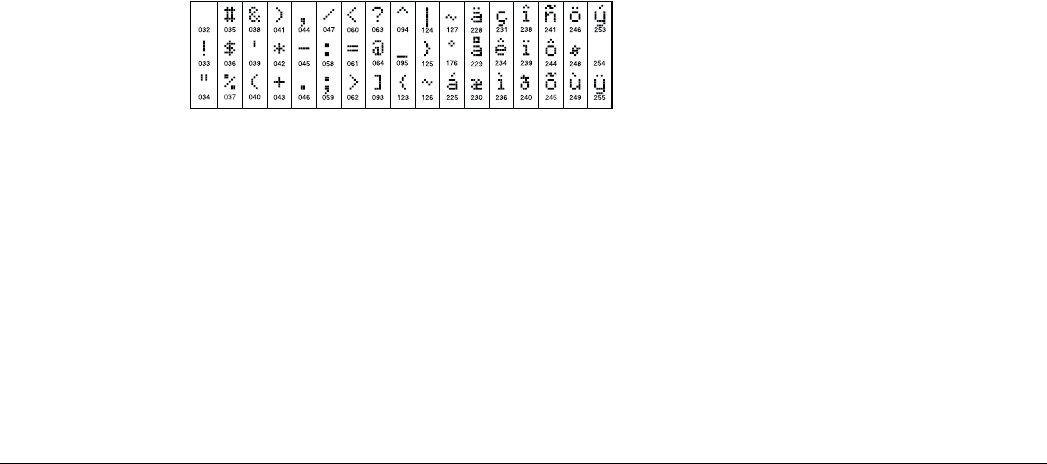
28
[66] Keypad Options
Default Option ON OFF
ON I_______I 1 Display Access Code when Programming Display ‘X’ when Programming
ON I_______I 2 Local Clock Display Enabled Local Clock Display Disabled
OFF I_______I 3 Local Clock Displays 24 Hour time Local Clock Displays AM/PM
ON I_______I 4 Auto Alarm Memory Scroll Enabled Auto Alarm Memory Scroll Disabled
OFF I_______I 5 Local Display of Temperature Enabled* Local Display of Temperature Disabled
OFF I_______I 6 Bypass Options prompt ON Bypass Options prompt OFF
OFF I_______I 7-8 For Future Use
[67] Fifth User Display Mask
Default Option ON OFF
OFF I_______I 1 Thermostat CTRL Prompt ON* Thermostat CTRL Prompt OFF
OFF I_______I 2 Temperature Setting Prompt ON* Temperature Setting Prompt OFF
OFF I_______I 3 Occupancy Mode Prompt ON* Occupancy Mode Prompt OFF
OFF I_______I 4 Thermostat Mode Prompt ON* Thermostat Mode Prompt OFF
OFF I_______I 5 Fan Control Prompt ON* Fan Control Prompt OFF
OFF I_______I 6 For Keypad View Prompt ON* For Keypad View Prompt OFF
OFF I_______I 7-8 For Future Use
[68] Sixth User Display Mask
Default Option ON OFF
OFF I_______I 1 Occupancy Mode Auxiliary Prompt ON* Occupancy Mode Auxiliary Prompt OFF
OFF I_______I 2 Occupancy Mode Day Prompt ON* Occupancy Mode Day Prompt OFF
OFF I_______I 3 Occupancy Mode Away Prompt ON* Occupancy Mode Away Prompt OFF
OFF I_______I 4 Occupancy Mode Night Prompt ON* Occupancy Mode Night Prompt OFF
OFF I_______I 5-8 For Future Use
NOTE: These options are only relevant if you are using an LCD5500Z v2.1 or higher.
[97] View Software Version
[98] Initiate Global Label Broadcast
All LCD programming is done per keypad. If more than one LCD keypad are present on the system, and the PC5400 receives
labels, labels programmed at one keypad can be broadcast to all other LCD keypads. Perform the following procedure in order to
broadcast labels:
Step 1 - Program one LCD keypad completely.
Step 2 - Make sure all LCD keypads are connected to the Keybus.
Step 3 - Enter Keypad Programming, then enter section [98] at the keypad that was programmed. The keypad will now broadcast
all the information programmed to all the other LCD keypads on the system.
Step 4 - When the keypad is finished press the [#] key to exit.
[99] Reset LCD EEPROM to Factory Defaults
ASCII Characters
LCD5500Z v3.0 and Higher Keypads
The following is a description of the available programming
options and their accompanying programming sections:
How to Enter LCD Programming
Programming LCD keypads is similar to programming the rest of
the system. Follow the programming procedure as outlined in
Section 3 of the Installation Manual.
1. Enter keypad programming by pressing [*][8][Installer’s
Code].
2. Press the [*] key.
3. Enter the three-digit section number to be programmed.

Special Installer Functions:
29
Programmable Labels
Zone labels and other LCD display identifiers can be customized to
make operation of the system easier for the end user. The following
procedure should be used for creating all LCD labels:
1. Enter Installer’s Programming. Enter the three-digit section num-
ber for the label to be programmed.
2. Use the arrow keys (<>) to move the underline bar underneath
the letter to be changed.
3. Press the number key [1] to [9] corresponding to the letter you
require. The first time you press the number the first letter will
appear. Pressing the number key again will display the next letter.
Refer to the following chart:
[1] - A, B, C, 1 [6] - P, Q, R, 6
[2] - D, E, F, 2 [7] - S, T, U, 7
[3] - G, H, I, 3 [8] - V, W, X, 8
[4] - J, K, L, 4 [9] - Y, Z, 9,0
[5] - M, N, O, 5 [0] - Space
4. When the required letter or number is displayed use the arrow
keys (<>) to scroll to the next letter.
5. When you are finished programming the Zone Label, press the [*]
key, scroll to “Save,” then press [*].
6. Continue from Step 2 until all Labels are programmed.
[001] to [032] Zone Labels (14 Characters)
Default: “Zone 1” - “Zone 32”
[065] Fire Alarm Label (14 Characters)
Default: “Fire Zone”I_____I_____I_____I_____I_____I_____I_____I_____I_____I_____I_____I_____I_____I_____I
[066] Fail to Arm Event Message
Default: “System Has Failed to Arm” I_____I_____I_____I_____I_____I_____I_____I_____I_____I_____I_____I_____I_____I_____I
[067] Alarm When Armed Event Message
Default: “Alarm Occurred While Armed < >”I_____I_____I_____I_____I_____I_____I_____I_____I_____I_____I_____I_____I_____I_____I
[070] First User Display Mask
Default Option ON OFF
ON I_______I 1 Hold [P]anic Keys prompt ON Hold [P]anic Keys prompt OFF
ON I_______I 2 Zone Bypassing prompt ON Zone Bypass prompt OFF
ON I_______I 3 Troubles prompt ON Troubles prompt OFF
ON I_______I 4 Alarm Memory prompt ON Alarm Memory prompt OFF
ON I_______I 5 Door Chime Control prompt ON Door Chime Control prompt OFF
ON I_______I 6 Access Codes prompt ON Access Codes prompt OFF
ON I_______I 7 User Functions prompt ON User Functions prompt OFF
ON I_______I 8 Output Control prompt ON Output Control prompt OFF
[071] Second User Display Mask
Default Option ON OFF
OFF I_______I 1 Installer Programming prompt ON Installer Programming prompt OFF
ON I_______I 2 Stay Arm prompt ON Stay Arm prompt OFF
ON I_______I 3 Quick Arm prompt ON Quick Arm prompt OFF
ON I_______I 4 Interior Arm prompt ON Interior Arm prompt OFF
OFF I_______I 5 Quick Exit prompt ON Quick Exit prompt OFF
ON I_______I 6 View Event Buffer prompt ON View Event Buffer prompt OFF
OFF I_______I 7 For Future Use
OFF I_______I 8 Music Input ON Music Input OFF
[072] Third User Display Mask
Default Option ON OFF
ON I_______I 1 System Test prompt ON System Test prompt OFF
ON I_______I 2 Time and Date prompt ON Time and Date prompt OFF
ON I_________I 3 Auto-Arm Control prompt ON Auto-Arm Days prompt OFF
ON I_________I 4 Auto-Arm Time prompt ON Auto-Arm Time prompt OFF
ON I_________I 5 Download Enable prompt ON Download Enable prompt OFF
ON I_________I 6 Bright Control prompt ON Bright Control prompt OFF
ON I_________I 7 Contrast Control prompt ON Contrast Control prompt OFF
ON I_________I 8 Buzzer Control prompt ON Buzzer Control prompt OFF
[073] Downloaded LCD Message Duration
Default: 003 I_______I_______I_______I (Valid entries are 000-255, 000=Unlimited Message Display. This number represents the number of
times the Downloaded message is cleared by pressing any key while the message is up after timeout)
[074] Key Options
Default Option ON OFF
ON I_______I 1 [F]ire Keys enabled [F]ire Keys disabled
ON I_______I 2 [A]uxiliary Keys enabled [A]uxiliary Keys disabled
ON I_______I 3 [P]anic Keys enabled [P]anic Keys disabled
OFF I________I 4-8 For Future Use

30
[075] Fourth User Display Mask
Default Option ON OFF
ON I_______I 1 User Initiated Call-up prompt ON User Initiated Call-up prompt OFF
OFF I_______I 2 Last Code to Disarm/Arm prompt ON Last Code to Disarm/Arm prompt OFF
OFF I _______I 3 Walk Test Prompt ON Walk Test Prompt ON
ON I_______I 4 Command Output #1 prompt ON Command Output #1 prompt OFF
ON I_______I 5 Command Output #2 prompt ON Command Output #2 prompt OFF
OFF I_______I 6 Command Output #3 prompt ON Command Output #3 prompt OFF
OFF I_______I 7 Command Output #4 prompt ON Command Output #4 prompt OFF
OFF I_______I 8 For Future Use
[076] Keypad Options
Default Option ON OFF
ON I_______I 1 Display Access Code when Programming Display ‘X’ when Programming
ON I_______I 2 Local Clock Display Enabled Local Clock Display Disabled
OFF I_______I 3 Local Clock Displays 24 Hour time Local Clock Displays AM/PM
ON I_______I 4 Auto Alarm Memory Scroll Enabled Auto Alarm Memory Scroll Disabled
OFF I_______I 5 Local Display of Temperature Enabled* Local Display of Temperature Disabled
OFF I_______I 6 Bypass Options prompt ON Bypass Options prompt OFF
OFF I_______I 7 For Future Use
OFF I_______I 8 Auto Scroll Open Zones Enabled Auto Scroll Open Zones Disabled
[077] Fifth User Display Mask
Default Option ON OFF
OFF I_______I 1 Thermostat CTRL Prompt ON* Thermostat CTRL Prompt OFF
OFF I_______I 2 Temperature Setting Prompt ON* Temperature Setting Prompt OFF
OFF I_______I 3 Occupancy Mode Prompt ON* Occupancy Mode Prompt OFF
OFF I_______I 4 Thermostat Mode Prompt ON* Thermostat Mode Prompt OFF
OFF I_______I 5 Fan Control Prompt ON* Fan Control Prompt OFF
OFF I_______I 6 For Keypad View Prompt ON* For Keypad View Prompt OFF
OFF I_______I 7-8 For Future Use
[078] Sixth User Display Mask
Default Option ON OFF
OFF I_______I 1 Occupancy Mode Auxiliary Prompt ON* Occupancy Mode Auxiliary Prompt OFF
OFF I_______I 2 Occupancy Mode Day Prompt ON* Occupancy Mode Day Prompt OFF
OFF I_______I 3 Occupancy Mode Away Prompt ON* Occupancy Mode Away Prompt OFF
OFF I_______I 4 Occupancy Mode Night Prompt ON* Occupancy Mode Night Prompt OFF
OFF I_______I 5-8 For Future Use
NOTE: These options are only relevant if you are using an LCD5500Z v2.1 or higher.
Partition Labels
Default: “System” - “Partition 8”
Section Partition Label
[101] 1/System I_____I_____I_____I_____I_____I_____I_____I_____I_____I_____I_____I_____I_____I_____I
[102] 2 I_____I_____I_____I_____I_____I_____I_____I_____I_____I_____I_____I_____I_____I_____I
[103] 3 I_____I_____I_____I_____I_____I_____I_____I_____I_____I_____I_____I_____I_____I_____I
[104] 4 I_____I_____I_____I_____I_____I_____I_____I_____I_____I_____I_____I_____I_____I_____I
[105] 5 I_____I_____I_____I_____I_____I_____I_____I_____I_____I_____I_____I_____I_____I_____I
[106] 6 I_____I_____I_____I_____I_____I_____I_____I_____I_____I_____I_____I_____I_____I_____I
[107] 7 I_____I_____I_____I_____I_____I_____I_____I_____I_____I_____I_____I_____I_____I_____I
[108] 8 I_____I_____I_____I_____I_____I_____I_____I_____I_____I_____I_____I_____I_____I_____I

Special Installer Functions:
31
Command Output Labels
Default: “Command_O/P_1” - “Command_O/P_4”
Program a label for each Command Output used, as it will appear at each partition ( of the Installation Manual).
Section Partition Command Output Label
[120] 1 1 I_____I_____I_____I_____I_____I_____I_____I_____I_____I_____I_____I_____I_____I_____I
[121] 1 2 I_____I_____I_____I_____I_____I_____I_____I_____I_____I_____I_____I_____I_____I_____I
[122] 1 3 I_____I_____I_____I_____I_____I_____I_____I_____I_____I_____I_____I_____I_____I_____I
[123] 1 4 I_____I_____I_____I_____I_____I_____I_____I_____I_____I_____I_____I_____I_____I_____I
[124] 2 1 I_____I_____I_____I_____I_____I_____I_____I_____I_____I_____I_____I_____I_____I_____I
[125] 2 2 I_____I_____I_____I_____I_____I_____I_____I_____I_____I_____I_____I_____I_____I_____I
[126] 2 3 I_____I_____I_____I_____I_____I_____I_____I_____I_____I_____I_____I_____I_____I_____I
[127] 2 4 I_____I_____I_____I_____I_____I_____I_____I_____I_____I_____I_____I_____I_____I_____I
[128] 3 1 I_____I_____I_____I_____I_____I_____I_____I_____I_____I_____I_____I_____I_____I_____I
[129] 3 2 I_____I_____I_____I_____I_____I_____I_____I_____I_____I_____I_____I_____I_____I_____I
[130] 3 3 I_____I_____I_____I_____I_____I_____I_____I_____I_____I_____I_____I_____I_____I_____I
[131] 3 4 I_____I_____I_____I_____I_____I_____I_____I_____I_____I_____I_____I_____I_____I_____I
[132] 4 1 I_____I_____I_____I_____I_____I_____I_____I_____I_____I_____I_____I_____I_____I_____I
[133] 4 2 I_____I_____I_____I_____I_____I_____I_____I_____I_____I_____I_____I_____I_____I_____I
[134] 4 3 I_____I_____I_____I_____I_____I_____I_____I_____I_____I_____I_____I_____I_____I_____I
[135] 4 4 I_____I_____I_____I_____I_____I_____I_____I_____I_____I_____I_____I_____I_____I_____I
[136] 5 1 I_____I_____I_____I_____I_____I_____I_____I_____I_____I_____I_____I_____I_____I_____I
[137] 5 2 I_____I_____I_____I_____I_____I_____I_____I_____I_____I_____I_____I_____I_____I_____I
[138] 5 3 I_____I_____I_____I_____I_____I_____I_____I_____I_____I_____I_____I_____I_____I_____I
[139] 5 4 I_____I_____I_____I_____I_____I_____I_____I_____I_____I_____I_____I_____I_____I_____I
[140] 6 1 I_____I_____I_____I_____I_____I_____I_____I_____I_____I_____I_____I_____I_____I_____I
[141] 6 2 I_____I_____I_____I_____I_____I_____I_____I_____I_____I_____I_____I_____I_____I_____I
[142] 6 3 I_____I_____I_____I_____I_____I_____I_____I_____I_____I_____I_____I_____I_____I_____I
[143] 6 4 I_____I_____I_____I_____I_____I_____I_____I_____I_____I_____I_____I_____I_____I_____I
[144] 7 1 I_____I_____I_____I_____I_____I_____I_____I_____I_____I_____I_____I_____I_____I_____I
[145] 7 2 I_____I_____I_____I_____I_____I_____I_____I_____I_____I_____I_____I_____I_____I_____I
[146] 7 3 I_____I_____I_____I_____I_____I_____I_____I_____I_____I_____I_____I_____I_____I_____I
[147] 7 4 I_____I_____I_____I_____I_____I_____I_____I_____I_____I_____I_____I_____I_____I_____I
[148] 8 1 I_____I_____I_____I_____I_____I_____I_____I_____I_____I_____I_____I_____I_____I_____I
[149] 8 2 I_____I_____I_____I_____I_____I_____I_____I_____I_____I_____I_____I_____I_____I_____I
[150] 8 3 I_____I_____I_____I_____I_____I_____I_____I_____I_____I_____I_____I_____I_____I_____I
[151] 8 4 I_____I_____I_____I_____I_____I_____I_____I_____I_____I_____I_____I_____I_____I_____I
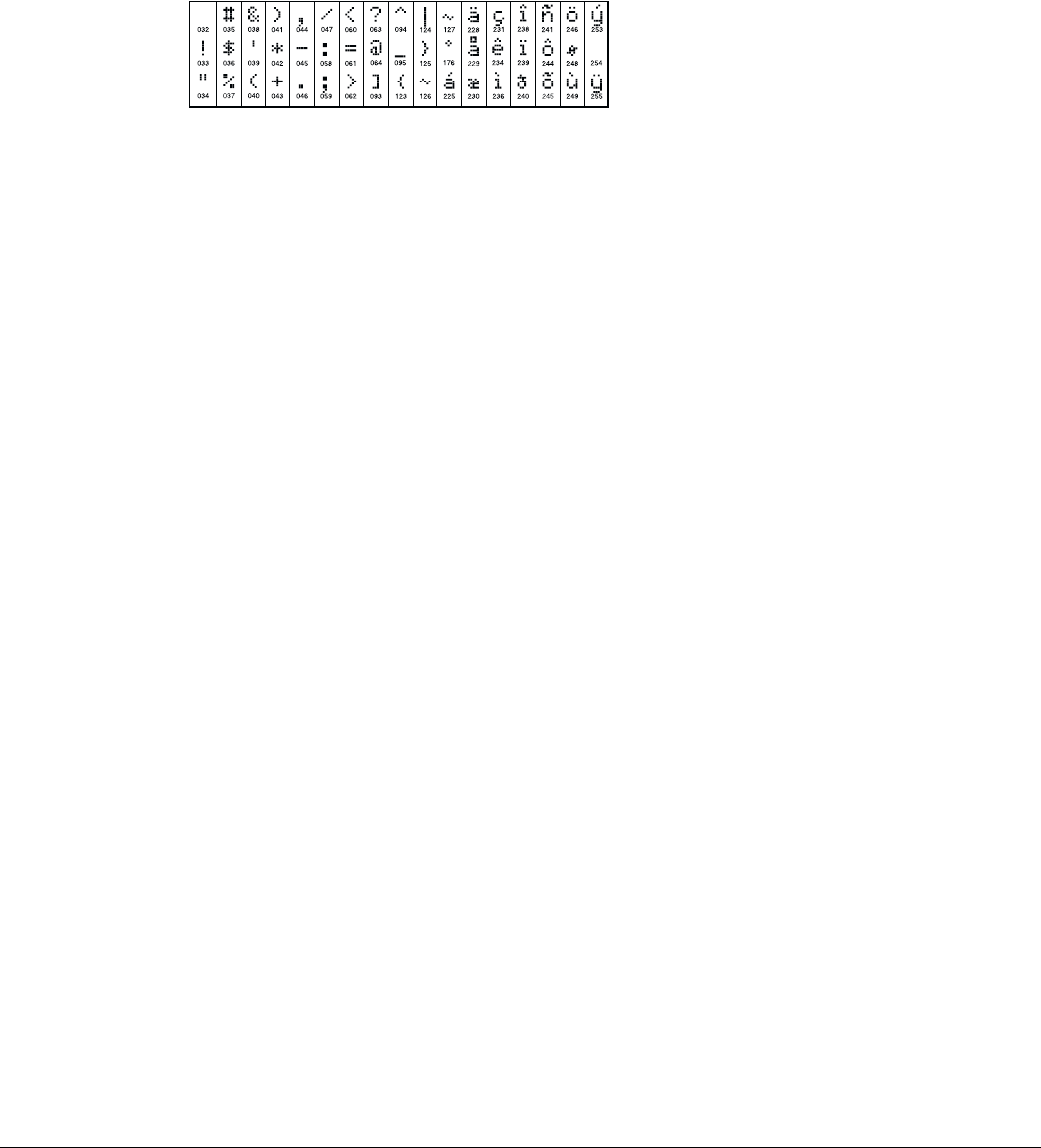
32
[997] View Software Version
[998] Initiate Global Label Broadcast
All LCD programming is done per keypad. If more than one LCD keypad are present on the system, and the PC5400 receives
labels, labels programmed at one keypad can be broadcast to all other LCD keypads. Perform the following procedure in order to
broadcast labels:
Step 1 - Program one LCD keypad completely.
Step 2 - Make sure all LCD keypads are connected to the Keybus.
Step 3 - Enter Keypad Programming, then enter section [998] at the keypad that was programmed. The keypad will now broadcast
all the information programmed to all the other LCD keypads on the system.
Step 4 - When the keypad is finished press the [#] key to exit.
[999] Reset LCD EEPROM to Factory Defaults
ASCII Characters

33
Appendix B: Programming LCD5501Z Keypads
There are several programming options available for the LCD5501Z keypad. These are described below. Record all your program-
ming choices in the programming worksheets included in this manual.
Programming Keypad Options
Programming the LCD5501Z is similar to programming the rest
of the system. To change the keypad programming:
1. Enter [*][8][Installer’s code]
2. Enter [000] to go to keypad programming
3. Enter section number [6] or [7].
4. To turn any of the options on or off, press the option number
(from [1] to [8]).
5. When you are finished programming, press [#].
When you are in the LCD5501Z programming sections, the key-
pad will display which options are turned on along the top of the
display. To turn an option on or off, press the number corre-
sponding to the option on the number pad. The numbers of the
options that are currently turned ON will be displayed.
For example, if options 1 and 2 are on, the display will look like:
Clock Options
The LCD5501Z will display the current time after 30 seconds of
no key presses. To set the correct time and date for the system,
please refer to the Power864 User’s Guide. You can change how
the keypad displays the time with options [1] to [3] in program-
ming section [6].
NOTE: If the time does not display on keypad option is selected, make sure that the Keypad displays time when zones are open
option is also selected.
Alarms Displayed While Armed Option
You can disable the display of alarms on the keypad when the
system is armed. The display of alarms is enabled by default. To
disable the display of alarms when the system is armed, turn off
section [6], option [5].
Emergency Key Options
You can enable or disable the Fire, Auxiliary and Panic keys at
each keypad. These keys are enabled by default. Please see the
Power864 Installation Manual for more information on these
keys and their options. To turn any of the emergency keys on or
off on the keypad, enter section [7], and turn on or off options
[1] to [3].
Door Chime on Zone Openings/Closings
By default, LCD5501Z keypads are programmed to sound door
chimes on both zone openings and closings.
To change the door chime opening/closing settings, at each
LCD5501Z keypad, enter section [6], and turn on or off options
[6] and [7].
[6] LCD5501Z Keypad Options
Default Option On Off
ON I________I 1 Local Clock Display Enabled Local Clock Display Disabled
ON I________I 2 Local Clock Displays AM/PM Local Clock Displays 24-hr Time
OFF I________I 3 Open Zones Override Clock Display Open Zones Do Not Override Clock
OFF I________I 4 Scandinavian Approvals enabled Scandinavian Approvals disabled
OFF I________I 5 Alarms Not Displayed While Armed Alarms Always Displayed While Armed
OFF I________I 6 Door Chime Enabled for Zone Openings Door Chime Disabled for Zone Openings
OFF I________I 7 Door Chime Enabled for Zone Closings Door Chime Disabled for Zone Closings
OFF I________I 8 For Future Use
[7] Emergency Key Options
Default Option On Off
ON I________I 1 [F] Key Enabled [F] Key Disabled
ON I________I 2 [A] Key Enabled [A] Key Disabled
ON I________I 3 [P] Key Enabled [P] Key Disabled
OFF I________I 4-8 For Future Use

34
Programming Door Chime Options
You can program the LCD5501Z keypad to sound a tone when
any zone is opened or closed. There are two parts to the
LCD5501Z door chime programming:
• Program if the LCD5501Z will chime when zones are opened
and/or closed (see ).
• Program the type of sound the LCD5501Z will make when an
individual zone is opened or closed.
For the door chime feature to work, you will also need to turn on
the Door Chime attribute for each zone that will trigger the
chime. This programming is done in the control panel software.
Refer to the Power864 Installation Manual for more information.
Door Chime Sounds
You can program the LCD5501Z keypad to make different door
chime sounds for individual zones, or groups of zones. Each
LCD5501Z keypad can make any of four door chime sounds for
each zone that triggers the door chime:
• ·3 quick beeps (default sound)
• ·‘Bing – Bing’ tone
• ·‘Ding – Dong’ tone
• ·‘Alarm’ tone
NOTE: For a zone to be able to trigger the door chime sound,
the Door Chime zone attribute must also be enabled in the
control panel programming. Please see your Power864 Instal-
lation Manual.
To change the door chime sounds:
1. Enter [*][8][Installer’s code].
2. Enter [*] to go to door chime sound programming.
3. Enter the 2-digit number for the zone you are programming
[01] - [64].
NOTE: LCD5501Z v 1.x keypads only support zones 1 to 32.
4. Turn one of the following options on by pressing [1], [2], [3],
or [4]:
[1] 6 quick beeps (default sound)
[2]‘Bing – Bing’ tone
[3]‘Ding – Dong’ tone
[4]‘Alarm’ tone
NOTE: Make sure that only one of the above options is turned on. If more than one is on, the keypad will sound the first option that
is enabled. If none of the options are selected, the keypad will not make any sound when the zone is opened or closed.
5. To program the door chime sound for another zone, repeat
steps 3 and 4.
6. When you are finished programming the door chime sounds,
press [#] to exit.

Special Installer Functions:
35
Door Chime Sound Programming
Zone Location Options: [1] [2] [3] [4]
3 Beeps “Bing-bing” “Ding-dong” Alarm tone
(default)
[01] I__________________________________________________________________I I________I I________I I________I I________I
[02] I__________________________________________________________________I I________I I________I I________I I________I
[03] I__________________________________________________________________I I________I I________I I________I I________I
[04] I__________________________________________________________________I I________I I________I I________I I________I
[05] I__________________________________________________________________I I________I I________I I________I I________I
[06] I__________________________________________________________________I I________I I________I I________I I________I
[07] I__________________________________________________________________I I________I I________I I________I I________I
[08] I__________________________________________________________________I I________I I________I I________I I________I
[09] I__________________________________________________________________I I________I I________I I________I I________I
[10] I__________________________________________________________________I I________I I________I I________I I________I
[11] I__________________________________________________________________I I________I I________I I________I I________I
[12] I__________________________________________________________________I I________I I________I I________I I________I
[13] I__________________________________________________________________I I________I I________I I________I I________I
[14] I__________________________________________________________________I I________I I________I I________I I________I
[15] I__________________________________________________________________I I________I I________I I________I I________I
[16] I__________________________________________________________________I I________I I________I I________I I________I
[17] I__________________________________________________________________I I________I I________I I________I I________I
[18] I__________________________________________________________________I I________I I________I I________I I________I
[19] I__________________________________________________________________I I________I I________I I________I I________I
[20] I__________________________________________________________________I I________I I________I I________I I________I
[21] I__________________________________________________________________I I________I I________I I________I I________I
[22] I__________________________________________________________________I I________I I________I I________I I________I
[23] I__________________________________________________________________I I________I I________I I________I I________I
[24] I__________________________________________________________________I I________I I________I I________I I________I
[25] I__________________________________________________________________I I________I I________I I________I I________I
[26] I__________________________________________________________________I I________I I________I I________I I________I
[27] I__________________________________________________________________I I________I I________I I________I I________I
[28] I__________________________________________________________________I I________I I________I I________I I________I
[29] I__________________________________________________________________I I________I I________I I________I I________I
[30] I__________________________________________________________________I I________I I________I I________I I________I
[31] I__________________________________________________________________I I________I I________I I________I I________I
[32] I__________________________________________________________________I I________I I________I I________I I________I

©2001 Digital Security Controls Ltd.
Toronto, Canada • www.dsc.com
Printed in Canada 29005955 R001
