PRU Optimizing C/C++ Compiler V2.2 User's Guide (Rev. B) Manual
User Manual:
Open the PDF directly: View PDF  .
.
Page Count: 151 [warning: Documents this large are best viewed by clicking the View PDF Link!]
- Table of Contents
- Preface
- 1 Introduction to the Software Development Tools
- 2 Using the C/C++ Compiler
- 2.1 About the Compiler
- 2.2 Invoking the C/C++ Compiler
- 2.3 Changing the Compiler's Behavior with Options
- 2.3.1 Linker Options
- 2.3.2 Frequently Used Options
- 2.3.3 Miscellaneous Useful Options
- 2.3.4 Run-Time Model Options
- 2.3.5 Symbolic Debugging Options
- 2.3.6 Specifying Filenames
- 2.3.7 Changing How the Compiler Interprets Filenames
- 2.3.8 Changing How the Compiler Processes C Files
- 2.3.9 Changing How the Compiler Interprets and Names Extensions
- 2.3.10 Specifying Directories
- 2.3.11 Assembler Options
- 2.4 Controlling the Compiler Through Environment Variables
- 2.5 Controlling the Preprocessor
- 2.5.1 Predefined Macro Names
- 2.5.2 The Search Path for #include Files
- 2.5.3 Support for the #warning and #warn Directives
- 2.5.4 Generating a Preprocessed Listing File (--preproc_only Option)
- 2.5.5 Continuing Compilation After Preprocessing (--preproc_with_compile Option)
- 2.5.6 Generating a Preprocessed Listing File with Comments (--preproc_with_comment Option)
- 2.5.7 Generating Preprocessed Listing with Line-Control Details (--preproc_with_line Option)
- 2.5.8 Generating Preprocessed Output for a Make Utility (--preproc_dependency Option)
- 2.5.9 Generating a List of Files Included with #include (--preproc_includes Option)
- 2.5.10 Generating a List of Macros in a File (--preproc_macros Option)
- 2.6 Passing Arguments to main()
- 2.7 Understanding Diagnostic Messages
- 2.8 Other Messages
- 2.9 Generating Cross-Reference Listing Information (--gen_cross_reference Option)
- 2.10 Generating a Raw Listing File (--gen_preprocessor_listing Option)
- 2.11 Using Inline Function Expansion
- 2.12 Using Interlist
- 2.13 Enabling Entry Hook and Exit Hook Functions
- 3 Optimizing Your Code
- 3.1 Invoking Optimization
- 3.2 Performing File-Level Optimization (--opt_level=3 option)
- 3.3 Program-Level Optimization (--program_level_compile and --opt_level=3 options)
- 3.4 Link-Time Optimization (--opt_level=4 Option)
- 3.5 Accessing Aliased Variables in Optimized Code
- 3.6 Use Caution With asm Statements in Optimized Code
- 3.7 Automatic Inline Expansion (--auto_inline Option)
- 3.8 Using the Interlist Feature With Optimization
- 3.9 Debugging and Profiling Optimized Code
- 3.10 Controlling Code Size Versus Speed
- 3.11 What Kind of Optimization Is Being Performed?
- 3.11.1 Cost-Based Register Allocation
- 3.11.2 Alias Disambiguation
- 3.11.3 Branch Optimizations and Control-Flow Simplification
- 3.11.4 Data Flow Optimizations
- 3.11.5 Expression Simplification
- 3.11.6 Inline Expansion of Functions
- 3.11.7 Function Symbol Aliasing
- 3.11.8 Induction Variables and Strength Reduction
- 3.11.9 Loop-Invariant Code Motion
- 3.11.10 Loop Rotation
- 3.11.11 Instruction Scheduling
- 3.11.12 Tail Merging
- 3.11.13 Autoincrement Addressing
- 3.11.14 Epilog Inlining
- 3.11.15 Integer Division With Constant Divisor
- 4 Linking C/C++ Code
- 4.1 Invoking the Linker Through the Compiler (-z Option)
- 4.2 Linker Code Optimizations
- 4.3 Controlling the Linking Process
- 5 PRU C/C++ Language Implementation
- 5.1 Characteristics of PRU C
- 5.2 Characteristics of PRU C++
- 5.3 Using MISRA C 2004
- 5.4 Data Types
- 5.5 Keywords
- 5.6 C++ Exception Handling
- 5.7 Register Variables and Parameters
- 5.8 The __asm Statement
- 5.9 Pragma Directives
- 5.9.1 The CALLS Pragma
- 5.9.2 The CHECK_MISRA Pragma
- 5.9.3 The CODE_SECTION Pragma
- 5.9.4 The DATA_ALIGN Pragma
- 5.9.5 The DATA_SECTION Pragma
- 5.9.6 The Diagnostic Message Pragmas
- 5.9.7 The FUNC_ALWAYS_INLINE Pragma
- 5.9.8 The FUNC_CANNOT_INLINE Pragma
- 5.9.9 The FUNC_EXT_CALLED Pragma
- 5.9.10 The FUNCTION_OPTIONS Pragma
- 5.9.11 The LOCATION Pragma
- 5.9.12 The MUST_ITERATE Pragma
- 5.9.13 The NOINIT and PERSISTENT Pragmas
- 5.9.14 The NO_HOOKS Pragma
- 5.9.15 The pack Pragma
- 5.9.16 The RESET_MISRA Pragma
- 5.9.17 The RETAIN Pragma
- 5.9.18 The SET_CODE_SECTION and SET_DATA_SECTION Pragmas
- 5.9.19 The UNROLL Pragma
- 5.9.20 The WEAK Pragma
- 5.10 The _Pragma Operator
- 5.11 PRU Instruction Intrinsics
- 5.12 Object File Symbol Naming Conventions (Linknames)
- 5.13 Changing the ANSI/ISO C/C++ Language Mode
- 5.14 GNU Language Extensions
- 5.15 Compiler Limits
- 6 Run-Time Environment
- 6.1 Memory Model
- 6.2 Object Representation
- 6.3 Register Conventions
- 6.4 Function Structure and Calling Conventions
- 6.5 Accessing Linker Symbols in C and C++
- 6.6 Interfacing C and C++ With Assembly Language
- 6.7 System Initialization
- 7 Using Run-Time-Support Functions and Building Libraries
- 8 C++ Name Demangler
- A Glossary
- B Revision History
- Important Notice

PRU Optimizing C/C++ Compiler
v2.2
User's Guide
Literature Number: SPRUHV7B
October 2017

2SPRUHV7B–October 2017
Submit Documentation Feedback
Copyright © 2017, Texas Instruments Incorporated
Contents
Contents
Preface ........................................................................................................................................ 8
1 Introduction to the Software Development Tools.................................................................... 11
1.1 Software Development Tools Overview ................................................................................. 12
1.2 Compiler Interface.......................................................................................................... 13
1.3 ANSI/ISO Standard ........................................................................................................ 14
1.4 Output Files ................................................................................................................. 14
1.5 Utilities ....................................................................................................................... 14
2 Using the C/C++ Compiler ................................................................................................... 15
2.1 About the Compiler......................................................................................................... 16
2.2 Invoking the C/C++ Compiler ............................................................................................. 16
2.3 Changing the Compiler's Behavior with Options ....................................................................... 17
2.3.1 Linker Options ..................................................................................................... 23
2.3.2 Frequently Used Options......................................................................................... 25
2.3.3 Miscellaneous Useful Options ................................................................................... 26
2.3.4 Run-Time Model Options......................................................................................... 27
2.3.5 Symbolic Debugging Options.................................................................................... 28
2.3.6 Specifying Filenames ............................................................................................. 28
2.3.7 Changing How the Compiler Interprets Filenames ........................................................... 29
2.3.8 Changing How the Compiler Processes C Files .............................................................. 29
2.3.9 Changing How the Compiler Interprets and Names Extensions ............................................ 29
2.3.10 Specifying Directories............................................................................................ 30
2.3.11 Assembler Options............................................................................................... 30
2.4 Controlling the Compiler Through Environment Variables............................................................ 31
2.4.1 Setting Default Compiler Options (PRU_C_OPTION)........................................................ 31
2.4.2 Naming One or More Alternate Directories (PRU_C_OPTION)............................................. 31
2.5 Controlling the Preprocessor ............................................................................................. 32
2.5.1 Predefined Macro Names ........................................................................................ 32
2.5.2 The Search Path for #include Files ............................................................................. 33
2.5.3 Support for the #warning and #warn Directives ............................................................... 34
2.5.4 Generating a Preprocessed Listing File (--preproc_only Option) ........................................... 34
2.5.5 Continuing Compilation After Preprocessing (--preproc_with_compile Option)........................... 34
2.5.6 Generating a Preprocessed Listing File with Comments (--preproc_with_comment Option) ........... 35
2.5.7 Generating Preprocessed Listing with Line-Control Details (--preproc_with_line Option)............... 35
2.5.8 Generating Preprocessed Output for a Make Utility (--preproc_dependency Option) ................... 35
2.5.9 Generating a List of Files Included with #include (--preproc_includes Option) ........................... 35
2.5.10 Generating a List of Macros in a File (--preproc_macros Option) ......................................... 35
2.6 Passing Arguments to main()............................................................................................. 35
2.7 Understanding Diagnostic Messages.................................................................................... 36
2.7.1 Controlling Diagnostic Messages ............................................................................... 37
2.7.2 How You Can Use Diagnostic Suppression Options ......................................................... 38
2.8 Other Messages............................................................................................................ 39
2.9 Generating Cross-Reference Listing Information (--gen_cross_reference Option)................................ 39
2.10 Generating a Raw Listing File (--gen_preprocessor_listing Option)................................................. 39
2.11 Using Inline Function Expansion ......................................................................................... 41
2.11.1 Inlining Intrinsic Operators ...................................................................................... 42

www.ti.com
3
SPRUHV7B–October 2017
Submit Documentation Feedback Copyright © 2017, Texas Instruments Incorporated
Contents
2.11.2 Automatic Inlining ................................................................................................ 42
2.11.3 Inlining Restrictions .............................................................................................. 42
2.12 Using Interlist ............................................................................................................... 43
2.13 Enabling Entry Hook and Exit Hook Functions......................................................................... 44
3 Optimizing Your Code......................................................................................................... 45
3.1 Invoking Optimization...................................................................................................... 46
3.2 Performing File-Level Optimization (--opt_level=3 option)............................................................ 47
3.2.1 Creating an Optimization Information File (--gen_opt_info Option)......................................... 47
3.3 Program-Level Optimization (--program_level_compile and --opt_level=3 options)............................... 47
3.3.1 Controlling Program-Level Optimization (--call_assumptions Option)...................................... 48
3.3.2 Optimization Considerations When Mixing C/C++ and Assembly .......................................... 49
3.4 Link-Time Optimization (--opt_level=4 Option) ......................................................................... 50
3.4.1 Option Handling ................................................................................................... 51
3.4.2 Incompatible Types ............................................................................................... 51
3.5 Accessing Aliased Variables in Optimized Code....................................................................... 51
3.6 Use Caution With asm Statements in Optimized Code ............................................................... 51
3.7 Automatic Inline Expansion (--auto_inline Option)..................................................................... 52
3.8 Using the Interlist Feature With Optimization........................................................................... 53
3.9 Debugging and Profiling Optimized Code............................................................................... 54
3.10 Controlling Code Size Versus Speed ................................................................................... 54
3.11 What Kind of Optimization Is Being Performed?....................................................................... 55
3.11.1 Cost-Based Register Allocation ................................................................................ 55
3.11.2 Alias Disambiguation ............................................................................................ 55
3.11.3 Branch Optimizations and Control-Flow Simplification...................................................... 56
3.11.4 Data Flow Optimizations ........................................................................................ 56
3.11.5 Expression Simplification........................................................................................ 56
3.11.6 Inline Expansion of Functions .................................................................................. 56
3.11.7 Function Symbol Aliasing ....................................................................................... 56
3.11.8 Induction Variables and Strength Reduction ................................................................. 57
3.11.9 Loop-Invariant Code Motion .................................................................................... 57
3.11.10 Loop Rotation ................................................................................................... 57
3.11.11 Instruction Scheduling.......................................................................................... 57
3.11.12 Tail Merging ..................................................................................................... 57
3.11.13 Autoincrement Addressing .................................................................................... 57
3.11.14 Epilog Inlining ................................................................................................... 57
3.11.15 Integer Division With Constant Divisor....................................................................... 57
4 Linking C/C++ Code............................................................................................................ 58
4.1 Invoking the Linker Through the Compiler (-z Option) ................................................................ 59
4.1.1 Invoking the Linker Separately .................................................................................. 59
4.1.2 Invoking the Linker as Part of the Compile Step.............................................................. 60
4.1.3 Disabling the Linker (--compile_only Compiler Option) ...................................................... 60
4.2 Linker Code Optimizations ................................................................................................ 61
4.2.1 Generating Aggregate Data Subsections (--gen_data_subsections Compiler Option) .................. 61
4.3 Controlling the Linking Process .......................................................................................... 61
4.3.1 Including the Run-Time-Support Library ....................................................................... 61
4.3.2 Run-Time Initialization ............................................................................................ 62
4.3.3 Global Object Constructors ...................................................................................... 63
4.3.4 Specifying the Type of Global Variable Initialization.......................................................... 63
4.3.5 Specifying Where to Allocate Sections in Memory ........................................................... 64
4.3.6 A Sample Linker Command File ................................................................................ 64
5 PRU C/C++ Language Implementation .................................................................................. 66
5.1 Characteristics of PRU C.................................................................................................. 67
5.1.1 Implementation-Defined Behavior............................................................................... 67

www.ti.com
4SPRUHV7B–October 2017
Submit Documentation Feedback
Copyright © 2017, Texas Instruments Incorporated
Contents
5.2 Characteristics of PRU C++ .............................................................................................. 71
5.3 Using MISRA C 2004 ...................................................................................................... 72
5.4 Data Types.................................................................................................................. 73
5.4.1 Size of Enum Types .............................................................................................. 74
5.5 Keywords .................................................................................................................... 74
5.5.1 The const Keyword................................................................................................ 74
5.5.2 The near and far Keywords ...................................................................................... 75
5.5.3 The volatile Keyword.............................................................................................. 75
5.6 C++ Exception Handling................................................................................................... 76
5.7 Register Variables and Parameters...................................................................................... 77
5.7.1 Local Register Variables and Parameters ..................................................................... 77
5.7.2 Global Register Variables ........................................................................................ 77
5.8 The __asm Statement ..................................................................................................... 78
5.9 Pragma Directives.......................................................................................................... 79
5.9.1 The CALLS Pragma............................................................................................... 79
5.9.2 The CHECK_MISRA Pragma.................................................................................... 80
5.9.3 The CODE_SECTION Pragma.................................................................................. 81
5.9.4 The DATA_ALIGN Pragma ...................................................................................... 81
5.9.5 The DATA_SECTION Pragma .................................................................................. 82
5.9.6 The Diagnostic Message Pragmas ............................................................................. 82
5.9.7 The FUNC_ALWAYS_INLINE Pragma......................................................................... 83
5.9.8 The FUNC_CANNOT_INLINE Pragma ........................................................................ 83
5.9.9 The FUNC_EXT_CALLED Pragma............................................................................. 84
5.9.10 The FUNCTION_OPTIONS Pragma .......................................................................... 84
5.9.11 The LOCATION Pragma ........................................................................................ 84
5.9.12 The MUST_ITERATE Pragma ................................................................................. 85
5.9.13 The NOINIT and PERSISTENT Pragmas .................................................................... 86
5.9.14 The NO_HOOKS Pragma....................................................................................... 87
5.9.15 The pack Pragma ................................................................................................ 88
5.9.16 The RESET_MISRA Pragma ................................................................................... 88
5.9.17 The RETAIN Pragma ............................................................................................ 88
5.9.18 The SET_CODE_SECTION and SET_DATA_SECTION Pragmas ....................................... 89
5.9.19 The UNROLL Pragma ........................................................................................... 90
5.9.20 The WEAK Pragma .............................................................................................. 90
5.10 The _Pragma Operator.................................................................................................... 91
5.11 PRU Instruction Intrinsics ................................................................................................. 92
5.12 Object File Symbol Naming Conventions (Linknames) ............................................................... 93
5.13 Changing the ANSI/ISO C/C++ Language Mode ...................................................................... 94
5.13.1 Enabling C99 Mode (--c99) ..................................................................................... 94
5.13.2 Enabling Strict ANSI/ISO Mode and Relaxed ANSI/ISO Mode (--strict_ansi and --relaxed_ansi
Options)............................................................................................................. 96
5.14 GNU Language Extensions ............................................................................................... 97
5.14.1 Extensions ........................................................................................................ 97
5.14.2 Function Attributes ............................................................................................... 98
5.14.3 Variable Attributes................................................................................................ 99
5.14.4 Type Attributes ................................................................................................... 99
5.14.5 Built-In Functions ............................................................................................... 100
5.15 Compiler Limits............................................................................................................ 100
6 Run-Time Environment...................................................................................................... 101
6.1 Memory Model ............................................................................................................ 102
6.1.1 Sections ........................................................................................................... 102
6.1.2 C/C++ System Stack ............................................................................................ 103
6.1.3 Dynamic Memory Allocation.................................................................................... 104

www.ti.com
5
SPRUHV7B–October 2017
Submit Documentation Feedback Copyright © 2017, Texas Instruments Incorporated
Contents
6.2 Object Representation ................................................................................................... 105
6.2.1 Data Type Storage............................................................................................... 105
6.2.2 Bit Fields .......................................................................................................... 106
6.2.3 Character String Constants..................................................................................... 107
6.3 Register Conventions .................................................................................................... 108
6.4 Function Structure and Calling Conventions .......................................................................... 109
6.4.1 How a Function Makes a Call.................................................................................. 110
6.4.2 How a Called Function Responds ............................................................................. 112
6.4.3 Accessing Arguments and Local Variables................................................................... 112
6.5 Accessing Linker Symbols in C and C++.............................................................................. 113
6.6 Interfacing C and C++ With Assembly Language .................................................................... 113
6.6.1 Using Assembly Language Modules With C/C++ Code .................................................... 113
6.6.2 Accessing Assembly Language Functions From C/C++ ................................................... 114
6.6.3 Accessing Assembly Language Variables From C/C++.................................................... 114
6.6.4 Sharing C/C++ Header Files With Assembly Source ....................................................... 116
6.6.5 Using Inline Assembly Language.............................................................................. 116
6.6.6 Modifying Compiler Output ..................................................................................... 116
6.7 System Initialization ...................................................................................................... 116
6.7.1 Run-Time Stack.................................................................................................. 117
6.7.2 Automatic Initialization of Variables ........................................................................... 117
7 Using Run-Time-Support Functions and Building Libraries ................................................... 122
7.1 C and C++ Run-Time Support Libraries ............................................................................... 123
7.1.1 Linking Code With the Object Library ......................................................................... 123
7.1.2 Header Files ...................................................................................................... 123
7.1.3 Modifying a Library Function ................................................................................... 123
7.1.4 Support for String Handling..................................................................................... 124
7.1.5 Minimal Support for Internationalization ...................................................................... 124
7.1.6 Allowable Number of Open Files .............................................................................. 124
7.1.7 Library Naming Conventions ................................................................................... 124
7.2 The C I/O Functions ...................................................................................................... 125
7.2.1 High-Level I/O Functions ....................................................................................... 126
7.2.2 Overview of Low-Level I/O Implementation .................................................................. 127
7.2.3 Device-Driver Level I/O Functions............................................................................. 130
7.2.4 Adding a User-Defined Device Driver for C I/O.............................................................. 134
7.2.5 The device Prefix ................................................................................................ 135
7.3 Handling Reentrancy (_register_lock() and _register_unlock() Functions)........................................ 137
7.4 Library-Build Process..................................................................................................... 138
7.4.1 Required Non-Texas Instruments Software .................................................................. 138
7.4.2 Using the Library-Build Process ............................................................................... 138
7.4.3 Extending mklib .................................................................................................. 141
8 C++ Name Demangler........................................................................................................ 142
8.1 Invoking the C++ Name Demangler.................................................................................... 143
8.2 C++ Name Demangler Options ......................................................................................... 143
8.3 Sample Usage of the C++ Name Demangler ......................................................................... 143
A Glossary.......................................................................................................................... 145
A.1 Terminology ............................................................................................................... 145
B Revision History ............................................................................................................... 150
B.1 Recent Revisions ......................................................................................................... 150

www.ti.com
6SPRUHV7B–October 2017
Submit Documentation Feedback
Copyright © 2017, Texas Instruments Incorporated
List of Figures
List of Figures
1-1. PRU Software Development Flow ....................................................................................... 12
6-1. Bit-Field Packing in Big-Endian and Little-Endian Formats ......................................................... 107
6-2. Use of the Stack During a Function Call............................................................................... 110
6-3. Autoinitialization at Run Time ........................................................................................... 118
6-4. Initialization at Load Time ............................................................................................... 120
6-5. Constructor Table......................................................................................................... 121
List of Tables
2-1. Processor Options ......................................................................................................... 17
2-2. Optimization Options ...................................................................................................... 17
2-3. Advanced Optimization Options ......................................................................................... 18
2-4. Debug Options.............................................................................................................. 18
2-5. Include Options ............................................................................................................ 18
2-6. Control Options ............................................................................................................ 18
2-7. Language Options.......................................................................................................... 19
2-8. Parser Preprocessing Options............................................................................................ 19
2-9. Predefined Symbols Options ............................................................................................. 19
2-10. Diagnostic Message Options ............................................................................................. 19
2-11. Run-Time Model Options.................................................................................................. 20
2-12. Entry/Exit Hook Options ................................................................................................... 20
2-13. Assembler Options......................................................................................................... 21
2-14. File Type Specifier Options ............................................................................................... 21
2-15. Directory Specifier Options................................................................................................ 21
2-16. Default File Extensions Options .......................................................................................... 21
2-17. Command Files Options................................................................................................... 22
2-18. MISRA-C 2004 Options ................................................................................................... 22
2-19. Linker Basic Options....................................................................................................... 23
2-20. File Search Path Options.................................................................................................. 23
2-21. Command File Preprocessing Options .................................................................................. 23
2-22. Diagnostic Message Options ............................................................................................. 23
2-23. Linker Output Options ..................................................................................................... 24
2-24. Symbol Management Options ............................................................................................ 24
2-25. Run-Time Environment Options.......................................................................................... 24
2-26. Miscellaneous Options..................................................................................................... 25
2-27. Predefined PRU Macro Names........................................................................................... 32
2-28. Raw Listing File Identifiers ................................................................................................ 40
2-29. Raw Listing File Diagnostic Identifiers................................................................................... 40
3-1. Interaction Between Debugging and Optimization Options........................................................... 46
3-2. Options That You Can Use With --opt_level=3......................................................................... 47
3-3. Selecting a Level for the --gen_opt_info Option........................................................................ 47
3-4. Selecting a Level for the --call_assumptions Option................................................................... 48
3-5. Special Considerations When Using the --call_assumptions Option ................................................ 49
3-6. Interaction Between Debugging and Optimization Options........................................................... 54
4-1. Initialized Sections Created by the Compiler ........................................................................... 64
4-2. Uninitialized Sections Created by the Compiler........................................................................ 64
5-1. PRU C/C++ Data Types................................................................................................... 73
5-2. Enumerator Types.......................................................................................................... 73

www.ti.com
7
SPRUHV7B–October 2017
Submit Documentation Feedback Copyright © 2017, Texas Instruments Incorporated
List of Tables
5-3. PRU Compiler Intrinsics for Register Transfers ........................................................................ 92
5-4. Additional PRU Compiler Intrinsics ...................................................................................... 93
5-5. GCC Language Extensions ............................................................................................... 97
6-1. Summary of Sections and Memory Placement ....................................................................... 103
6-2. Data Representation in Registers and Memory ...................................................................... 105
6-3. How Register Types Are Affected by the Conventions .............................................................. 108
6-4. Register Usage ........................................................................................................... 108
7-1. The mklib Program Options ............................................................................................. 140
B-1. Revision History........................................................................................................... 150
8SPRUHV7B–October 2017
Submit Documentation Feedback
Copyright © 2017, Texas Instruments Incorporated
Read This First
Preface
SPRUHV7B–October 2017
Read This First
About This Manual
The PRU Optimizing C/C++ Compiler User's Guide explains how to use the following Texas Instruments
Code Generation compiler tools:
• Compiler
• Library build utility
• C++ name demangler
The TI compiler accepts C and C++ code conforming to the International Organization for Standardization
(ISO) standards for these languages. The compiler supports both the 1989 and 1999 versions of the C
language and the 2003 version of the C++ language.
This user's guide discusses the characteristics of the TI C/C++ compiler. It assumes that you already
know how to write C/C++ programs. The C Programming Language (second edition), by Brian W.
Kernighan and Dennis M. Ritchie, describes C based on the ISO C standard. You can use the Kernighan
and Ritchie (hereafter referred to as K&R) book as a supplement to this manual. References to K&R C (as
opposed to ISO C) in this manual refer to the C language as defined in the first edition of Kernighan and
Ritchie's The C Programming Language.
Notational Conventions
This document uses the following conventions:
• Program listings, program examples, and interactive displays are shown in a special typeface.
Interactive displays use a bold version of the special typeface to distinguish commands that you enter
from items that the system displays (such as prompts, command output, error messages, etc.).
Here is a sample of C code:
#include <stdio.h>
main()
{ printf("Hello World\n");
}
• In syntax descriptions, instructions, commands, and directives are in a bold typeface and parameters
are in an italic typeface. Portions of a syntax that are in bold should be entered as shown; portions of a
syntax that are in italics describe the type of information that should be entered.
• Square brackets ( [ and ] ) identify an optional parameter. If you use an optional parameter, you specify
the information within the brackets. Unless the square brackets are in the bold typeface, do not enter
the brackets themselves. The following is an example of a command that has an optional parameter:
clpru [options] [filenames] [--run_linker [link_options] [object files]]
• Braces ( { and } ) indicate that you must choose one of the parameters within the braces; you do not
enter the braces themselves. This is an example of a command with braces that are not included in the
actual syntax but indicate that you must specify either the --rom_model or --ram_model option:
clpru --run_linker {--rom_model |--ram_model}filenames [--output_file= name.out]
--library= libraryname

www.ti.com
Related Documentation
9
SPRUHV7B–October 2017
Submit Documentation Feedback Copyright © 2017, Texas Instruments Incorporated
Read This First
• In assembler syntax statements, the leftmost column is reserved for the first character of a label or
symbol. If the label or symbol is optional, it is usually not shown. If a label or symbol is a required
parameter, it is shown starting against the left margin of the box, as in the example below. No
instruction, command, directive, or parameter, other than a symbol or label, can begin in the leftmost
column.
symbol .usect "section name", size in bytes[, alignment]
• Some directives can have a varying number of parameters. For example, the .byte directive. This
syntax is shown as [, ..., parameter].
• The PRU 16-bit instruction set is referred to as 16-BIS.
• The PRU 32-bit instruction set is referred to as 32-BIS.
Related Documentation
You can use the following books to supplement this user's guide:
ANSI X3.159-1989, Programming Language - C (Alternate version of the 1989 C Standard), American
National Standards Institute
ISO/IEC 9899:1989, International Standard - Programming Languages - C (The 1989 C Standard),
International Organization for Standardization
ISO/IEC 9899:1999, International Standard - Programming Languages - C (The 1999 C Standard),
International Organization for Standardization
ISO/IEC 14882-2003, International Standard - Programming Languages - C++ (The 2003 C++
Standard), International Organization for Standardization
The C Programming Language (second edition), by Brian W. Kernighan and Dennis M. Ritchie,
published by Prentice-Hall, Englewood Cliffs, New Jersey, 1988
The Annotated C++ Reference Manual, Margaret A. Ellis and Bjarne Stroustrup, published by Addison-
Wesley Publishing Company, Reading, Massachusetts, 1990
C: A Reference Manual (fourth edition), by Samuel P. Harbison, and Guy L. Steele Jr., published by
Prentice Hall, Englewood Cliffs, New Jersey
Programming Embedded Systems in C and C++, by Michael Barr, Andy Oram (Editor), published by
O'Reilly & Associates; ISBN: 1565923545, February 1999
Programming in C, Steve G. Kochan, Hayden Book Company
The C++ Programming Language (second edition), Bjarne Stroustrup, published by Addison-Wesley
Publishing Company, Reading, Massachusetts, 1990
Tool Interface Standards (TIS) DWARF Debugging Information Format Specification Version 2.0,
TIS Committee, 1995
DWARF Debugging Information Format Version 3, DWARF Debugging Information Format Workgroup,
Free Standards Group, 2005 (http://dwarfstd.org)
DWARF Debugging Information Format Version 4, DWARF Debugging Information Format Workgroup,
Free Standards Group, 2010 (http://dwarfstd.org)
System V ABI specification (http://www.sco.com/developers/gabi/)
Related Documentation From Texas Instruments
See the following resources for further information about the TI Code Generation Tools:
• Texas Instruments Wiki: Compiler topics
• Texas Instruments E2E Community: Compiler forum
You can use the following documents to supplement this user's guide:

Related Documentation From Texas Instruments
www.ti.com
10 SPRUHV7B–October 2017
Submit Documentation Feedback
Copyright © 2017, Texas Instruments Incorporated
Read This First
SPRUHV6 —PRU Assembly Language Tools User's Guide. Describes the assembly language tools
(assembler, linker, and other tools used to develop assembly language code), assembler directives,
macros, common object file format, and symbolic debugging directives for PRU devices.
SPRAAB5 —The Impact of DWARF on TI Object Files. Describes the Texas Instruments extensions to
the DWARF specification.
PRU-ICSS on Texas Instruments Wiki —Serves as a hub for the broad market PRU subsystem
collateral and related resources, including software user guides, application notes, training
modules, and FAQs,
Trademarks
All trademarks are the property of their respective owners.
11
SPRUHV7B–October 2017
Submit Documentation Feedback Copyright © 2017, Texas Instruments Incorporated
Introduction to the Software Development Tools
Chapter 1
SPRUHV7B–October 2017
Introduction to the Software Development Tools
Programmable Real-Time Units (PRU) are 32-bit RISC cores. The instruction set is simple and execution
times are deterministic. The programmable PRUs provide flexibility in implementing fast real-time
responses, specialized data handling operations, custom peripheral interfaces, and in offloading tasks
from the other processor cores of the system-on-chip (SoC). PRUs are part of the Programmable Real-
Time Unit Subsystem and Industrial Communication Subsystem (PRU-ICSS), which includes two PRU
cores, an interrupt controller, local data and instruction memories, internal peripheral modules, and
interfaces to capture and manipulate system-wide events and pins.
The Programmable Real-Time Unit (PRU) is supported by a set of software development tools, which
includes an optimizing C/C++ compiler, an assembler, a linker, and assorted utilities.
This chapter provides an overview of these tools and introduces the features of the optimizing C/C++
compiler. The assembler and linker are discussed in detail in the PRU Assembly Language Tools User's
Guide.
The PRU is optimized for performing embedded tasks that require manipulation of packed memory
mapped data structures, handling of system events that have tight real-time constraints and interfacing
with systems external to the SoC. The PRU is both very small and very efficient at handling such tasks.
For more information about PRU, see the Texas Instruments Wiki.
Topic ........................................................................................................................... Page
1.1 Software Development Tools Overview................................................................. 12
1.2 Compiler Interface.............................................................................................. 13
1.3 ANSI/ISO Standard ............................................................................................. 14
1.4 Output Files....................................................................................................... 14
1.5 Utilities ............................................................................................................. 14
Software Development Tools Overview
www.ti.com
12 SPRUHV7B–October 2017
Submit Documentation Feedback
Copyright © 2017, Texas Instruments Incorporated
Introduction to the Software Development Tools
1.1 Software Development Tools Overview
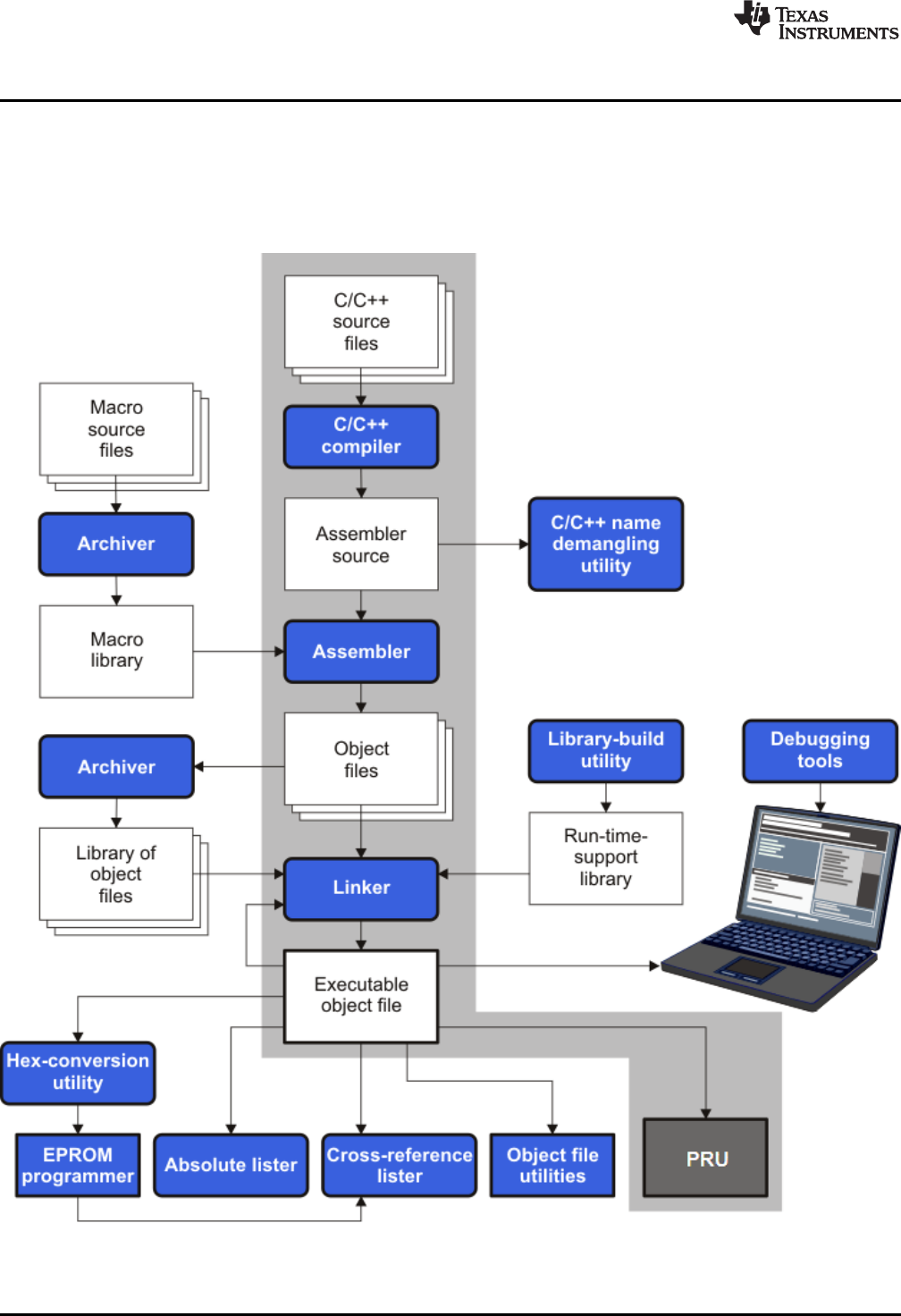
Figure 1-1 illustrates the software development flow. The shaded portion of the figure highlights the most
common path of software development for C language programs. The other portions are peripheral
functions that enhance the development process.
Figure 1-1. PRU Software Development Flow

www.ti.com
Compiler Interface
13
SPRUHV7B–October 2017
Submit Documentation Feedback Copyright © 2017, Texas Instruments Incorporated
Introduction to the Software Development Tools
The following list describes the tools that are shown in Figure 1-1:
• The compiler accepts C/C++ source code and produces PRU assembly language source code. See
Chapter 2.
• The assembler translates assembly language source files into machine language relocatable object
files. See the PRU Assembly Language Tools User's Guide.
• The linker combines relocatable object files into a single absolute executable object file. As it creates
the executable file, it performs relocation and resolves external references. The linker accepts
relocatable object files and object libraries as input. See Chapter 4 for an overview of the linker. See
the PRU Assembly Language Tools User's Guide for details.
• The archiver allows you to collect a group of files into a single archive file, called a library. The
archiver allows you to modify such libraries by deleting, replacing, extracting, or adding members. One
of the most useful applications of the archiver is building a library of object files. See the PRU
Assembly Language Tools User's Guide.
• The run-time-support libraries contain the standard ISO C and C++ library functions, compiler-utility
functions, floating-point arithmetic functions, and C I/O functions that are supported by the compiler.
See Chapter 7.
The library-build utility automatically builds the run-time-support library if compiler and linker options
require a custom version of the library. See Section 7.4. Source code for the standard run-time-support
library functions for C and C++ is provided in the lib\src subdirectory of the directory where the
compiler is installed.
• The hex conversion utility converts an object file into other object formats. You can download the
converted file to an EPROM programmer. See the PRU Assembly Language Tools User's Guide.
• The absolute lister accepts linked object files as input and creates .abs files as output. You can
assemble these .abs files to produce a listing that contains absolute, rather than relative, addresses.
Without the absolute lister, producing such a listing would be tedious and would require many manual
operations. See the PRU Assembly Language Tools User's Guide.
• The cross-reference lister uses object files to produce a cross-reference listing showing symbols,
their definitions, and their references in the linked source files. See the PRU Assembly Language
Tools User's Guide.
• The C++ name demangler is a debugging aid that converts names mangled by the compiler back to
their original names as declared in the C++ source code. As shown in Figure 1-1, you can use the C++
name demangler on the assembly file that is output by the compiler; you can also use this utility on the
assembler listing file and the linker map file. See Chapter 8.
• The disassembler decodes object files to show the assembly instructions that they represent. See the
PRU Assembly Language Tools User's Guide.
• The main product of this development process is an executable object file that can be executed in a
PRU device.
1.2 Compiler Interface
The compiler is a command-line program named clpru . This program can compile, optimize, assemble,
and link programs in a single step. Within Code Composer Studio, the compiler is run automatically to
perform the steps needed to build a project.
For more information about compiling a program, see Section 2.1
The compiler has straightforward calling conventions, so you can write assembly and C functions that call
each other. For more information about calling conventions, see Chapter 6.

ANSI/ISO Standard
www.ti.com
14 SPRUHV7B–October 2017
Submit Documentation Feedback
Copyright © 2017, Texas Instruments Incorporated
Introduction to the Software Development Tools
1.3 ANSI/ISO Standard
The compiler supports both the 1989 and 1999 versions of the C language and the 2003 version of the
C++ language. The C and C++ language features in the compiler are implemented in conformance with
the following ISO standards:
•ISO-standard C
The C compiler supports the 1989 and 1999 versions of the C language.
–C89. Compiling with the --c89 option causes the compiler to conform to the ISO/IEC 9899:1990 C
standard, which was previously ratified as ANSI X3.159-1989. The names "C89" and "C90" refer to
the same programming language. "C89" is used in this document.
–C99. Compiling with the --c99 option causes the compiler to conform to the ISO/IEC 9899:1999 C
standard. This standard supports several features not part of C89, such as inline functions, new
data types, and one-line comments beginning with //.
The C language is also described in the second edition of Kernighan and Ritchie's The C Programming
Language (K&R).
•ISO-standard C++
Compiling with the --c++03 option causes the C++ compiler to conform to the C++ Standard ISO/IEC
14882:2003. The language is also described in Ellis and Stroustrup's The Annotated C++ Reference
Manual (ARM), but this is not the standard. The compiler also supports embedded C++. For a
description of unsupported C++ features, see Section 5.2.
•ISO-standard run-time support
The compiler tools come with an extensive run-time library. Library functions conform to the ISO C/C++
library standard unless otherwise stated. The library includes functions for standard input and output,
string manipulation, dynamic memory allocation, data conversion, timekeeping, trigonometry, and
exponential and hyperbolic functions. Functions for signal handling are not included, because these
are target-system specific. For more information, see Chapter 7.
See Section 5.13 for command line options to select the C or C++ standard your code uses.
1.4 Output Files
The following type of output file is created by the compiler:
•ELF object files
Executable and Linking Format (ELF) enables supporting modern language features like early template
instantiation and exporting inline functions. ELF is part of the System V Application Binary Interface
(ABI).
1.5 Utilities
These features are compiler utilities:
•Library-build utility
The library-build utility lets you custom-build object libraries from source for any combination of run-
time models. For more information, see Section 7.4.
•C++ name demangler
The C++ name demangler (dempru ) is a debugging aid that translates each mangled name it detects
in compiler-generated assembly code, disassembly output, or compiler diagnostic messages to its
original name found in the C++ source code. For more information, see Chapter 8.
•Hex conversion utility
For stand-alone embedded applications, the compiler has the ability to place all code and initialization
data into ROM, allowing C/C++ code to run from reset. The ELF files output by the compiler can be
converted to EPROM programmer data files by using the hex conversion utility, as described in the
PRU Assembly Language Tools User's Guide.

15
SPRUHV7B–October 2017
Submit Documentation Feedback Copyright © 2017, Texas Instruments Incorporated
Using the C/C++ Compiler
Chapter 2
SPRUHV7B–October 2017
Using the C/C++ Compiler
The compiler translates your source program into machine language object code that the PRU can
execute. Source code must be compiled, assembled, and linked to create an executable object file. All of
these steps are executed at once by using the compiler.
Topic ........................................................................................................................... Page
2.1 About the Compiler ............................................................................................ 16
2.2 Invoking the C/C++ Compiler ............................................................................... 16
2.3 Changing the Compiler's Behavior with Options.................................................... 17
2.4 Controlling the Compiler Through Environment Variables ...................................... 31
2.5 Controlling the Preprocessor............................................................................... 32
2.6 Passing Arguments to main() .............................................................................. 35
2.7 Understanding Diagnostic Messages.................................................................... 36
2.8 Other Messages ................................................................................................. 39
2.9 Generating Cross-Reference Listing Information (--gen_cross_reference Option)...... 39
2.10 Generating a Raw Listing File (--gen_preprocessor_listing Option).......................... 39
2.11 Using Inline Function Expansion.......................................................................... 41
2.12 Using Interlist .................................................................................................... 43
2.13 Enabling Entry Hook and Exit Hook Functions ...................................................... 44
About the Compiler
www.ti.com
16 SPRUHV7B–October 2017
Submit Documentation Feedback
Copyright © 2017, Texas Instruments Incorporated
Using the C/C++ Compiler
2.1 About the Compiler
The compiler lets you compile, optimize, assemble, and optionally link in one step. The compiler performs
the following steps on one or more source modules:
• The compiler accepts C/C++ . It produces object code.
You can compile C, C++, and assembly files in a single command. The compiler uses the filename
extensions to distinguish between different file types. See Section 2.3.9 for more information.
• The linker combines object files to create object file. The link step is optional, so you can compile and
assemble many modules independently and link them later. See Chapter 4 for information about linking
the files.
Invoking the Linker
NOTE: By default, the compiler does not invoke the linker. You can invoke the linker by using the --
run_linker (-z)compiler option. See Section 4.1.1 for details.
For a complete description of the assembler and the linker, see the PRU Assembly Language Tools
User's Guide.
2.2 Invoking the C/C++ Compiler
To invoke the compiler, enter:
clpru [options] [filenames] [--run_linker [link_options]object files]]
clpru Command that runs the compiler and the assembler.
options Options that affect the way the compiler processes input files. The options are listed
in Table 2-6 through Table 2-26.
filenames One or more C/C++ source files and assembly language source files.
--run_linker (-z) Option that invokes the linker. The --run_linker option's short form is -z. See
Chapter 4 for more information.
link_options Options that control the linking process.
object files Names of the object files for the linking process.
The arguments to the compiler are of three types:
• Compiler options
• Link options
• Filenames
The --run_linker option indicates linking is to be performed. If the --run_linker option is used, any compiler
options must precede the --run_linker option, and all link options must follow the --run_linker option.
Source code filenames must be placed before the --run_linker option. Additional object file filenames can
be placed after the --run_linker option.
For example, if you want to compile two files named symtab.c and file.c, assemble a third file named
seek.asm, and link to create an executable program called myprogram.out, you will enter:
clpru symtab.c file.c seek.asm --run_linker --library=lnk.cmd
--output_file=myprogram.out
www.ti.com
Changing the Compiler's Behavior with Options
17
SPRUHV7B–October 2017
Submit Documentation Feedback Copyright © 2017, Texas Instruments Incorporated
Using the C/C++ Compiler
2.3 Changing the Compiler's Behavior with Options
Options control the operation of the compiler. This section provides a description of option conventions
and an option summary table. It also provides detailed descriptions of the most frequently used options,
including options used for type-checking and assembling.
For a help screen summary of the options, enter clpru with no parameters on the command line.
The following apply to the compiler options:
• There are typically two ways of specifying a given option. The "long form" uses a two hyphen prefix
and is usually a more descriptive name. The "short form" uses a single hyphen prefix and a
combination of letters and numbers that are not always intuitive.
• Options are usually case sensitive.
• Individual options cannot be combined.
• An option with a parameter should be specified with an equal sign before the parameter to clearly
associate the parameter with the option. For example, the option to undefine a constant can be
expressed as --undefine=name. Likewise, the option to specify the maximum amount of optimization
can be expressed as -O=3. You can also specify a parameter directly after certain options, for example
-O3 is the same as -O=3. No space is allowed between the option and the optional parameter, so -O 3
is not accepted.
• Files and options except the --run_linker option can occur in any order. The --run_linker option must
follow all compiler options and precede any linker options.
You can define default options for the compiler by using the PRU_C_OPTION environment variable. For a
detailed description of the environment variable, see Section 2.4.1.
Table 2-6 through Table 2-26 summarize all options (including link options). Use the references in the
tables for more complete descriptions of the options.
Table 2-1. Processor Options
Option Alias Effect Section
--silicon_version={ 0 | 1 | 2 | 3 } -v Selects the silicon version. The default is --silicon_version=3. Section 2.3.4
(1) Note: Machine-specific options (see Table 2-11) can also affect optimization.
Table 2-2. Optimization Options(1)
Option Alias Effect Section
--opt_level=off Disables all optimization. Section 3.1
--opt_level=n-OnLevel 0 (-O0) optimizes register usage only.
Level 1 (-O1) uses Level 0 optimizations and optimizes locally.
Level 2 (-O2) uses Level 1 optimizations and optimizes globally
(default).
Level 3 (-O3) uses Level 2 optimizations and optimizes the file. ()
Level 4 (-O4) uses Level 3 optimizations and performs link-time
optimization. ()
Section 3.1,
Section 3.2,
Section 3.4
--opt_for_speed[=n] -mf Controls the tradeoff between size and speed (0-5 range). If this
option is specified without n, the default value is 4. If this option is
not specified, the default setting is 1.
Section 3.10
--fp_mode={relaxed|strict} Enables or disables relaxed floating-point mode. Section 2.3.3
--fp_reassoc={on|off} Enables or disables the reassociation of floating-point arithmetic. Section 2.3.3
--sat_reassoc={on|off} Enables or disables the reassociation of saturating arithmetic.
Default is --sat_reassoc=off. Section 2.3.3
Changing the Compiler's Behavior with Options
www.ti.com
18 SPRUHV7B–October 2017
Submit Documentation Feedback
Copyright © 2017, Texas Instruments Incorporated
Using the C/C++ Compiler
(1) Note: Machine-specific options (see Table 2-11) can also affect optimization.
Table 2-3. Advanced Optimization Options(1)
Option Alias Effect Section
--auto_inline=[size] -oi Sets automatic inlining size (--opt_level=3 only). If size is not
specified, the default is 1. Section 3.7
--call_assumptions=n-opnLevel 0 (-op0) specifies that the module contains functions and
variables that are called or modified from outside the source code
provided to the compiler.
Level 1 (-op1) specifies that the module contains variables modified
from outside the source code provided to the compiler but does not
use functions called from outside the source code.
Level 2 (-op2) specifies that the module contains no functions or
variables that are called or modified from outside the source code
provided to the compiler (default).
Level 3 (-op3) specifies that the module contains functions that are
called from outside the source code provided to the compiler but
does not use variables modified from outside the source code.
Section 3.3.1
--gen_opt_info=n-onnLevel 0 (-on0) disables the optimization information file.
Level 1 (-on2) produces an optimization information file.
Level 2 (-on2) produces a verbose optimization information file.
Section 3.2.1
--optimizer_interlist -os Interlists optimizer comments with assembly statements. Section 3.8
--program_level_compile -pm Combines source files to perform program-level optimization. Section 3.3
--aliased_variables -ma Assumes called functions create hidden aliases (rare). Section 3.5
Table 2-4. Debug Options
Option Alias Effect Section
--symdebug:dwarf -g Default behavior. Enables symbolic debugging. The generation of
debug information no longer impacts optimization. Therefore,
generating debug information is enabled by default. If you explicitly
use the -g option but do not specify an optimization level, no
optimization is performed.
Section 2.3.5
Section 3.9
--symdebug:none Disables all symbolic debugging. Section 2.3.5
Section 3.9
Table 2-5. Include Options
Option Alias Effect Section
--include_path=directory -I Adds the specified directory to the #include search path. Section 2.5.2.1
--preinclude=filename Includes filename at the beginning of compilation. Section 2.3.3
Table 2-6. Control Options
Option Alias Effect Section
--compile_only -c Disables linking (negates --run_linker). Section 4.1.3
--help -h Prints (on the standard output device) a description of the options
understood by the compiler. Section 2.3.2
--run_linker -z Causes the linker to be invoked from the compiler command line. Section 2.3.2
--skip_assembler -n Compiles C/C++ source file, producing an assembly language output
file. The assembler is not run and no object file is produced. Section 2.3.2
www.ti.com
Changing the Compiler's Behavior with Options
19
SPRUHV7B–October 2017
Submit Documentation Feedback Copyright © 2017, Texas Instruments Incorporated
Using the C/C++ Compiler
Table 2-7. Language Options
Option Alias Effect Section
--c89 Processes C files according to the ISO C89 standard. Section 5.13
--c99 Processes C files according to the ISO C99 standard. Section 5.13
--c++03 Processes C++ files according to the ISO C++03 standard. Section 5.13
--cpp_default -fg Processes all source files with a C extension as C++ source files. Section 2.3.7
--exceptions Enables C++ exception handling. Section 5.6
--float_operations_allowed={none|
all|32|64} Restricts the types of floating point operations allowed. Section 2.3.3
--gen_cross_reference -px Generates a cross-reference listing file (.crl). Section 2.9
---gen_preprocessor_listing -pl Generates a raw listing file (.rl). Section 2.10
--pending_instantiations=# Specify the number of template instantiations that may be in
progress at any given time. Use 0 to specify an unlimited number. Section 2.3.4
--plain_char={signed|unsigned} -mc Specifies how to treat plain chars, default is unsigned. Section 2.3.4
--relaxed_ansi -pr Enables relaxed mode; ignores strict ISO violations. This is on by
default. To disable this mode, use the --strict_ansi option. Section 5.13.2
--rtti -rtti Enables C++ run-time type information (RTTI). –-
--strict_ansi -ps Enables strict ANSI/ISO mode (for C/C++, not for K&R C). In this
mode, language extensions that conflict with ANSI/ISO C/C++ are
disabled. In strict ANSI/ISO mode, most ANSI/ISO violations are
reported as errors. Violations that are considered discretionary may
be reported as warnings instead.
Section 5.13.2
Table 2-8. Parser Preprocessing Options
Option Alias Effect Section
--preproc_dependency[=filename] -ppd Performs preprocessing only, but instead of writing preprocessed
output, writes a list of dependency lines suitable for input to a
standard make utility.
Section 2.5.8
--preproc_includes[=filename] -ppi Performs preprocessing only, but instead of writing preprocessed
output, writes a list of files included with the #include directive. Section 2.5.9
--preproc_macros[=filename] -ppm Performs preprocessing only. Writes list of predefined and user-
defined macros to a file with the same name as the input but with a
.pp extension.
Section 2.5.10
--preproc_only -ppo Performs preprocessing only. Writes preprocessed output to a file
with the same name as the input but with a .pp extension. Section 2.5.4
--preproc_with_comment -ppc Performs preprocessing only. Writes preprocessed output, keeping
the comments, to a file with the same name as the input but with a
.pp extension.
Section 2.5.6
--preproc_with_compile -ppa Continues compilation after preprocessing with any of the -pp<x>
options that normally disable compilation. Section 2.5.5
--preproc_with_line -ppl Performs preprocessing only. Writes preprocessed output with line-
control information (#line directives) to a file with the same name as
the input but with a .pp extension.
Section 2.5.7
Table 2-9. Predefined Symbols Options
Option Alias Effect Section
--define=name[=def] -D Predefines name.Section 2.3.2
--undefine=name -U Undefines name.Section 2.3.2
Table 2-10. Diagnostic Message Options
Option Alias Effect Section
--compiler_revision Prints out the compiler release revision and exits. --
--diag_error=num -pdse Categorizes the diagnostic identified by num as an error. Section 2.7.1
Changing the Compiler's Behavior with Options
www.ti.com
20 SPRUHV7B–October 2017
Submit Documentation Feedback
Copyright © 2017, Texas Instruments Incorporated
Using the C/C++ Compiler
Table 2-10. Diagnostic Message Options (continued)
Option Alias Effect Section
--diag_remark=num -pdsr Categorizes the diagnostic identified by num as a remark. Section 2.7.1
--diag_suppress=num -pds Suppresses the diagnostic identified by num.Section 2.7.1
--diag_warning=num -pdsw Categorizes the diagnostic identified by num as a warning. Section 2.7.1
--diag_wrap={on|off} Wrap diagnostic messages (default is on). Note that this command-
line option cannot be used within the Code Composer Studio IDE.
--display_error_number -pden Displays a diagnostic's identifiers along with its text. Note that this
command-line option cannot be used within the Code Composer
Studio IDE.
Section 2.7.1
--emit_warnings_as_errors -pdew Treat warnings as errors. Section 2.7.1
--issue_remarks -pdr Issues remarks (non-serious warnings). Section 2.7.1
--no_warnings -pdw Suppresses diagnostic warnings (errors are still issued). Section 2.7.1
--quiet -q Suppresses progress messages (quiet). --
--section_sizes={on|off} Generates section size information, including sizes for sections
containing executable code and constants, constant or initialized
data (global and static variables), and uninitialized data. (Default is
off if this option is not included on the command line. Default is on if
this option is used with no value specified.)
Section 2.7.1
--set_error_limit=num -pdel Sets the error limit to num. The compiler abandons compiling after
this number of errors. (The default is 100.) Section 2.7.1
--super_quiet -qq Super quiet mode. --
--tool_version -version Displays version number for each tool. --
--verbose Display banner and function progress information. --
--verbose_diagnostics -pdv Provides verbose diagnostic messages that display the original
source with line-wrap. Note that this command-line option cannot be
used within the Code Composer Studio IDE.
Section 2.7.1
--write_diagnostics_file -pdf Generates a diagnostic message information file. Compiler only
option. Note that this command-line option cannot be used within the
Code Composer Studio IDE.
Section 2.7.1
Table 2-11. Run-Time Model Options
Option Alias Effect Section
--endian={ big | little } Specify the endianness of both code and data. If not specified,
compiler defaults to --endian=little. Section 2.3.4
--gen_data_subsections={on|off} Place all aggregate data (arrays, structs, and unions) into
subsections. This gives the linker more control over removing
unused data during the final link step. The default is on.
Section 4.2.1
--hardware_mac={on|off} Enables use of the hardware MAC available on some PRU cores.
Defaults to --hardware_mac=off. Section 2.3.4
--mem_model:data={ near | far } Specifies data access model. When not specified, compiler defaults
to --mem_model:data=near. Section 5.5.2
--printf_support={nofloat|full|
minimal} Enables support for smaller, limited versions of the printf function
family (sprintf, fprintf, etc.) and the scanf function family (sscanf,
fscanf, etc.) run-time-support functions.
Section 2.3.3
Table 2-12. Entry/Exit Hook Options
Option Alias Effect Section
--entry_hook[=name] Enables entry hooks. Section 2.13
--entry_parm={none|name|
address} Specifies the parameters to the function to the --entry_hook option. Section 2.13
--exit_hook[=name] Enables exit hooks. Section 2.13
--exit_parm={none|name|address} Specifies the parameters to the function to the --exit_hook option. Section 2.13
--remove_hooks_when_inlining Removes entry/exit hooks for auto-inlined functions. Section 2.13
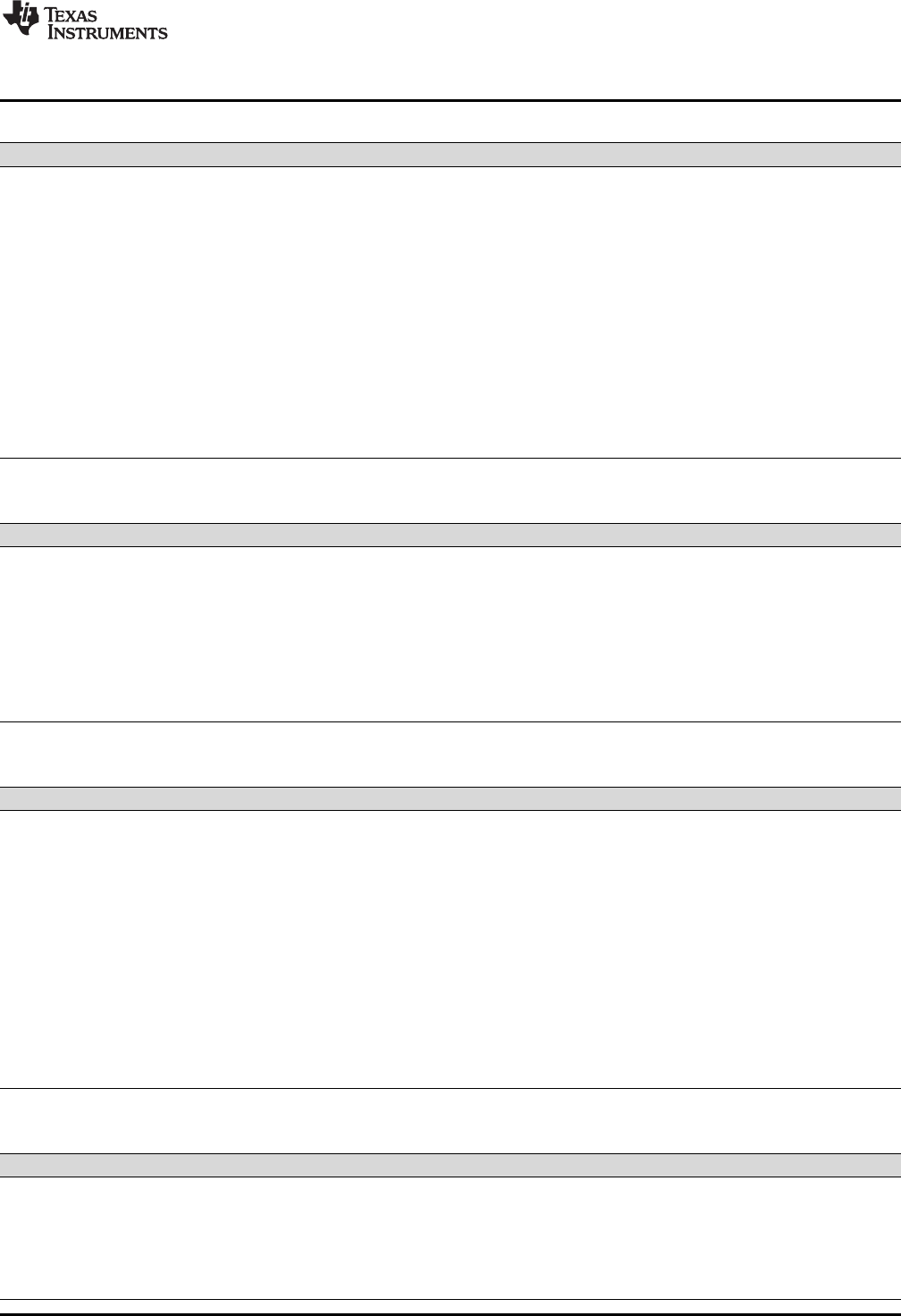
www.ti.com
Changing the Compiler's Behavior with Options
21
SPRUHV7B–October 2017
Submit Documentation Feedback Copyright © 2017, Texas Instruments Incorporated
Using the C/C++ Compiler
Table 2-13. Assembler Options
Option Alias Effect Section
--keep_asm -k Keeps the assembly language (.asm) file. Section 2.3.11
--asm_listing -al Generates an assembly listing file. Section 2.3.11
--c_src_interlist -ss Interlists C source and assembly statements. Section 2.12
Section 3.8
--src_interlist -s Interlists optimizer comments (if available) and assembly source
statements; otherwise interlists C and assembly source statements. Section 2.3.2
--absolute_listing -aa Enables absolute listing. Section 2.3.11
--asm_define=name[=def] -ad Sets the name symbol. Section 2.3.11
--asm_dependency -apd Performs preprocessing; lists only assembly dependencies. Section 2.3.11
--asm_includes -api Performs preprocessing; lists only included #include files. Section 2.3.11
--asm_undefine=name -au Undefines the predefined constant name.Section 2.3.11
--asm_listing_cross_reference -ax Generates the cross-reference file. Section 2.3.11
--include_file=filename -ahi Includes the specified file for the assembly module. Section 2.3.11
Table 2-14. File Type Specifier Options
Option Alias Effect Section
--asm_file=filename -fa Identifies filename as an assembly source file regardless of its
extension. By default, the compiler and assembler treat .asm files as
assembly source files.
Section 2.3.7
--c_file=filename -fc Identifies filename as a C source file regardless of its extension. By
default, the compiler treats .c files as C source files. Section 2.3.7
--cpp_file=filename -fp Identifies filename as a C++ file, regardless of its extension. By
default, the compiler treats .C, .cpp, .cc and .cxx files as a C++ files. Section 2.3.7
--obj_file=filename -fo Identifies filename as an object code file regardless of its extension.
By default, the compiler and linker treat .obj files as object code files. Section 2.3.7
Table 2-15. Directory Specifier Options
Option Alias Effect Section
--abs_directory=directory -fb Specifies an absolute listing file directory. By default, the compiler
uses the .obj directory. Section 2.3.10
--asm_directory=directory -fs Specifies an assembly file directory. By default, the compiler uses
the current directory. Section 2.3.10
--list_directory=directory -ff Specifies an assembly listing file and cross-reference listing file
directory By default, the compiler uses the .obj directory. Section 2.3.10
--obj_directory=directory -fr Specifies an object file directory. By default, the compiler uses the
current directory. Section 2.3.10
--output_file=filename -fe Specifies a compilation output file name; can override --
obj_directory. Section 2.3.10
--pp_directory=dir Specifies a preprocessor file directory. By default, the compiler uses
the current directory. Section 2.3.10
--temp_directory=directory -ft Specifies a temporary file directory. By default, the compiler uses the
current directory. Section 2.3.10
Table 2-16. Default File Extensions Options
Option Alias Effect Section
--asm_extension=[.]extension -ea Sets a default extension for assembly source files. Section 2.3.9
--c_extension=[.]extension -ec Sets a default extension for C source files. Section 2.3.9
--cpp_extension=[.]extension -ep Sets a default extension for C++ source files. Section 2.3.9
--listing_extension=[.]extension -es Sets a default extension for listing files. Section 2.3.9
--obj_extension=[.]extension -eo Sets a default extension for object files. Section 2.3.9
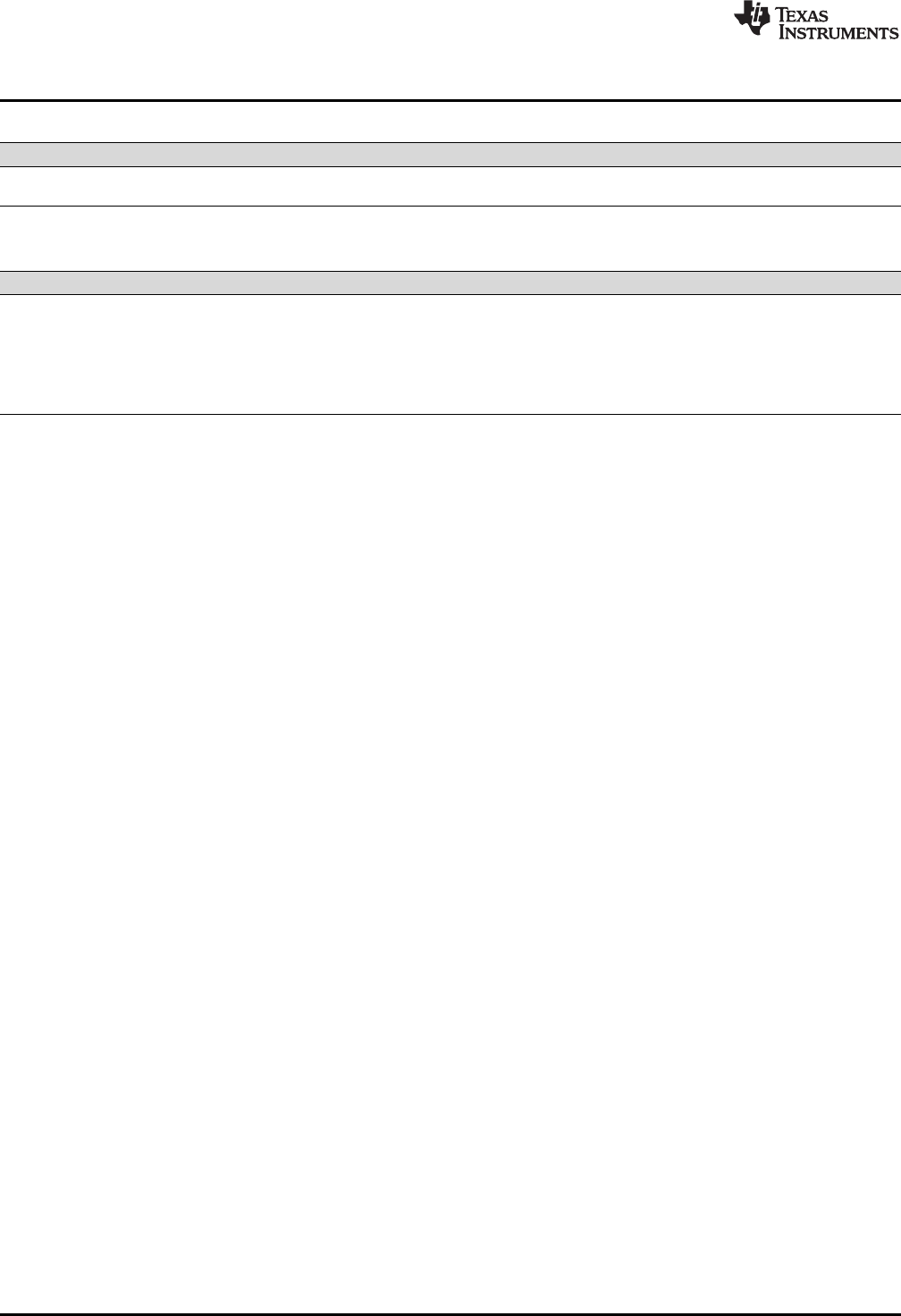
Changing the Compiler's Behavior with Options
www.ti.com
22 SPRUHV7B–October 2017
Submit Documentation Feedback
Copyright © 2017, Texas Instruments Incorporated
Using the C/C++ Compiler
Table 2-17. Command Files Options
Option Alias Effect Section
--cmd_file=filename -@ Interprets contents of a file as an extension to the command line.
Multiple -@ instances can be used. Section 2.3.2
Table 2-18. MISRA-C 2004 Options
Option Alias Effect Section
--check_misra[={all|required|
advisory|none|rulespec}] Enables checking of the specified MISRA-C:2004 rules. Default is
all. Section 2.3.3
--misra_advisory={error|warning|
remark|suppress} Sets the diagnostic severity for advisory MISRA-C:2004 rules. Section 2.3.3
--misra_required={error|warning|
remark|suppress} Sets the diagnostic severity for required MISRA-C:2004 rules. Section 2.3.3
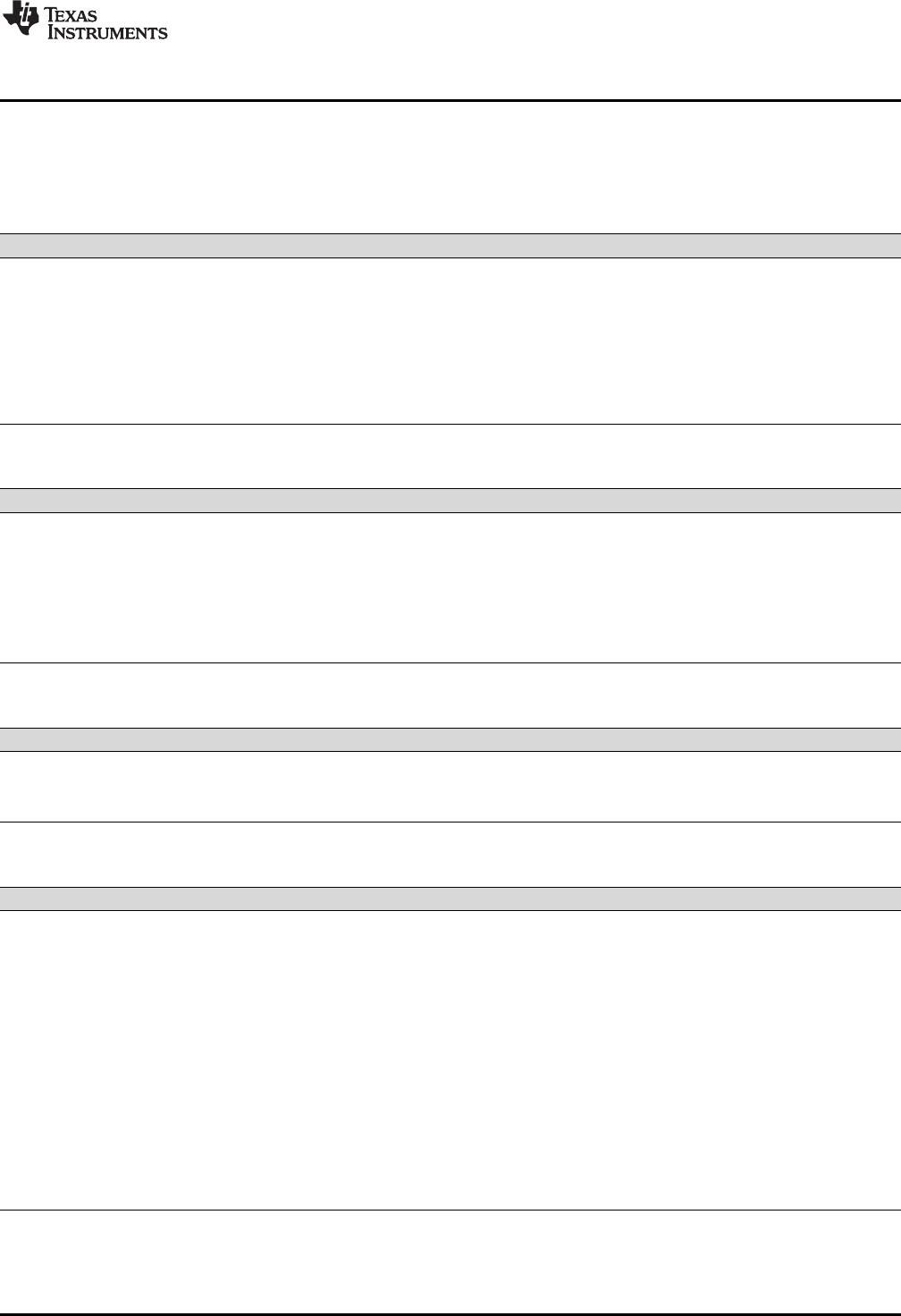
www.ti.com
Changing the Compiler's Behavior with Options
23
SPRUHV7B–October 2017
Submit Documentation Feedback Copyright © 2017, Texas Instruments Incorporated
Using the C/C++ Compiler
2.3.1 Linker Options
The following tables list the linker options. See Chapter 4 of this document and the PRU Assembly
Language Tools User's Guide for details on these options.
Table 2-19. Linker Basic Options
Option Alias Description
--run_linker -z Enables linking.
--output_file=file -o Names the executable output file. The default filename is a .out file.
--map_file=file -m Produces a map or listing of the input and output sections, including holes, and places
the listing in file.
--stack_size=size [-]-stack Sets C system stack size to size bytes and defines a global symbol that specifies the
stack size. Default = 256 bytes.
--heap_size=size [-]-heap Sets heap size (for the dynamic memory allocation in C) to size bytes and defines a
global symbol that specifies the heap size. Default = 256 bytes.
Table 2-20. File Search Path Options
Option Alias Description
--library=file -l Names an archive library or link command file as linker input.
--search_path=pathname -I Alters library-search algorithms to look in a directory named with pathname before
looking in the default location. This option must appear before the --library option.
--priority -priority Satisfies unresolved references by the first library that contains a definition for that
symbol.
--reread_libs -x Forces rereading of libraries, which resolves back references.
--disable_auto_rts Disables the automatic selection of a run-time-support library. See Section 4.3.1.1.
Table 2-21. Command File Preprocessing Options
Option Alias Description
--define=name=value Predefines name as a preprocessor macro.
--undefine=name Removes the preprocessor macro name.
--disable_pp Disables preprocessing for command files.
Table 2-22. Diagnostic Message Options
Option Alias Description
--diag_error=num Categorizes the diagnostic identified by num as an error.
--diag_remark=num Categorizes the diagnostic identified by num as a remark.
--diag_suppress=num Suppresses the diagnostic identified by num.
--diag_warning=num Categorizes the diagnostic identified by num as a warning.
--display_error_number Displays a diagnostic's identifiers along with its text.
--emit_warnings_as_errors -pdew Treat warnings as errors.
--issue_remarks Issues remarks (non-serious warnings).
--no_demangle Disables demangling of symbol names in diagnostic messages.
--no_warnings Suppresses diagnostic warnings (errors are still issued).
--set_error_limit=count Sets the error limit to count. The linker abandons linking after this number of errors. (The
default is 100.)
--verbose_diagnostics Provides verbose diagnostic messages that display the original source with line-wrap.
--warn_sections -w Displays a message when an undefined output section is created.
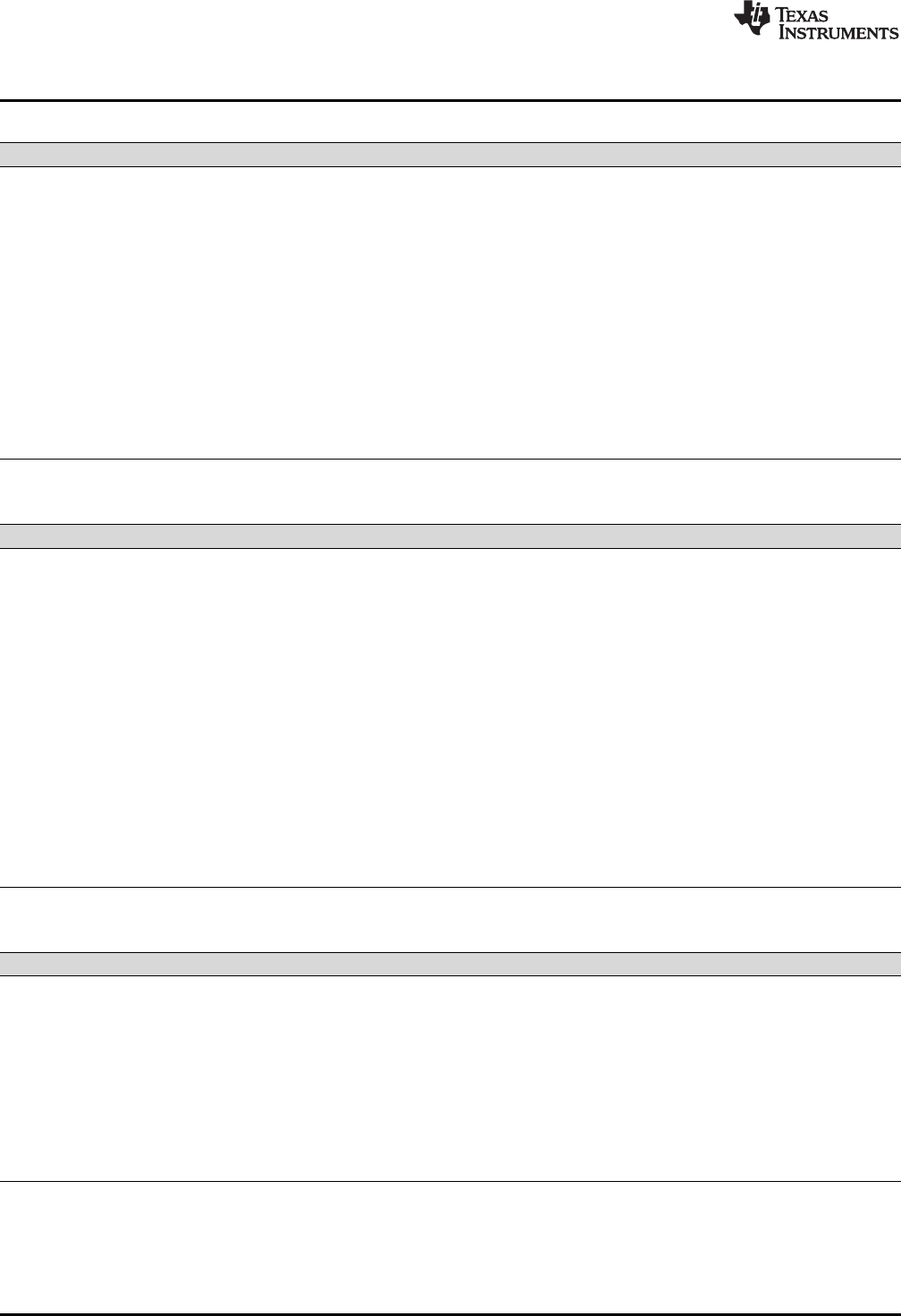
Changing the Compiler's Behavior with Options
www.ti.com
24 SPRUHV7B–October 2017
Submit Documentation Feedback
Copyright © 2017, Texas Instruments Incorporated
Using the C/C++ Compiler
Table 2-23. Linker Output Options
Option Alias Description
--absolute_exe -a Produces an absolute, executable object file. This is the default; if neither --absolute_exe
nor --relocatable is specified, the linker acts as if --absolute_exe were specified.
--code_endian={ big | little } Specify the endianness for code sections. The default is that code endianness is the
same as the data endianness, which defaults to little-endian. For relocatable object files,
the endianness must be the same for code and data. However, for memory stored on
the PRU core itself, code and data endianness can be different.
--ecc:data_error Inject specified errors into the output file for testing.
--ecc:ecc_error Inject specified errors into the Error Correcting Code (ECC) for testing.
--mapfile_contents=attribute Controls the information that appears in the map file.
--relocatable -r Produces a nonexecutable, relocatable output object file.
--rom Creates a ROM object.
--run_abs -abs Produces an absolute listing file.
--xml_link_info=file Generates a well-formed XML file containing detailed information about the result of a
link.
Table 2-24. Symbol Management Options
Option Alias Description
--entry_point=symbol -e Defines a global symbol that specifies the primary entry point for the executable object
file.
--globalize=pattern Changes the symbol linkage to global for symbols that match pattern.
--hide=pattern Hides symbols that match the specified pattern.
--localize=pattern Make the symbols that match the specified pattern local.
--make_global=symbol -g Makes symbol global (overrides -h).
--make_static -h Makes all global symbols static.
--no_sym_merge -b Disables merging of types in symbolic debugging information.
--no_symtable -s Strips symbol table information and line number entries from the executable object file.
--retain Retains a list of sections that otherwise would be discarded.
--scan_libraries -scanlibs Scans all libraries for duplicate symbol definitions.
--symbol_map=refname=defname Specifies a symbol mapping; references to the refname symbol are replaced with
references to the defname symbol.
--undef_sym=symbol -u Adds symbol to the symbol table as an unresolved symbol.
--unhide=pattern Excludes symbols that match the specified pattern from being hidden.
Table 2-25. Run-Time Environment Options
Option Alias Description
--arg_size=size --args Reserve size bytes for the argc/argv memory area.
--
cinit_compression[=compression_ki
nd]
Specifies the type of compression to apply to the C auto initialization data. The default if
this option is specified with no compression_kind is lzss for Lempel-Ziv-Storer-
Szymanski compression.
--
copy_compression[=compression_ki
nd]
Compresses data copied by linker copy tables. The default if this option is specified with
no compression_kind is lzss for Lempel-Ziv-Storer-Szymanski compression.
--fill_value=value -f Sets default fill value for holes within output sections
--ram_model -cr Initializes variables at load time.
--rom_model -c Autoinitializes variables at run time.
www.ti.com
Changing the Compiler's Behavior with Options
25
SPRUHV7B–October 2017
Submit Documentation Feedback Copyright © 2017, Texas Instruments Incorporated
Using the C/C++ Compiler
Table 2-26. Miscellaneous Options
Option Alias Description
--compress_dwarf[=off|on] Aggressively reduces the size of DWARF information from input object files. Default is
on.
--linker_help [-]-help Displays information about syntax and available options.
--preferred_order=function Prioritizes placement of functions.
--strict_compatibility[=off|on] Performs more conservative and rigorous compatibility checking of input object files.
Default is on.
--unused_section_elimination[=off|on] Eliminates sections that are not needed in the executable module. Default is on.
--zero_init=[off|on] Controls preinitialization of uninitialized variables. Default is on.
2.3.2 Frequently Used Options
Following are detailed descriptions of options that you will probably use frequently:
--c_src_interlist Invokes the interlist feature, which interweaves original C/C++ source
with compiler-generated assembly language. The interlisted C
statements may appear to be out of sequence. You can use the interlist
feature with the optimizer by combining the --optimizer_interlist and --
c_src_interlist options. See Section 3.8. The --c_src_interlist option can
have a negative performance and/or code size impact.
--cmd_file=filename Appends the contents of a file to the option set. You can use this option
to avoid limitations on command line length or C style comments
imposed by the host operating system. Use a # or ; at the beginning of a
line in the command file to include comments. You can also include
comments by delimiting them with /* and */. To specify options, surround
hyphens with quotation marks. For example, "--"quiet.
You can use the --cmd_file option multiple times to specify multiple files.
For instance, the following indicates that file3 should be compiled as
source and file1 and file2 are --cmd_file files:
clpru --cmd_file=file1 --cmd_file=file2 file3
--compile_only Suppresses the linker and overrides the --run_linker option, which
specifies linking. The --compile_only option's short form is -c. Use this
option when you have --run_linker specified in the PRU_C_OPTION
environment variable and you do not want to link. See Section 4.1.3.
--define=name[=def] Predefines the constant name for the preprocessor. This is equivalent to
inserting #define name def at the top of each C source file. If the
optional[=def] is omitted, the name is set to 1. The --define option's short
form is -D.
If you want to define a quoted string and keep the quotation marks, do
one of the following:
• For Windows, use --define=name="\"string def\"". For example, --
define=car="\"sedan\""
• For UNIX, use --define=name='"string def"'. For example, --
define=car='"sedan"'
• For Code Composer Studio, enter the definition in a file and include
that file with the --cmd_file option.
--help Displays the syntax for invoking the compiler and lists available options.
If the --help option is followed by another option or phrase, detailed
information about the option or phrase is displayed. For example, to see
information about debugging options use --help debug.

Changing the Compiler's Behavior with Options
www.ti.com
26 SPRUHV7B–October 2017
Submit Documentation Feedback
Copyright © 2017, Texas Instruments Incorporated
Using the C/C++ Compiler
--include_path=directory Adds directory to the list of directories that the compiler searches for
#include files. The --include_path option's short form is -I. You can use
this option several times to define several directories; be sure to
separate the --include_path options with spaces. If you do not specify a
directory name, the preprocessor ignores the --include_path option. See
Section 2.5.2.1.
--keep_asm Retains the assembly language output from the compiler or assembly
optimizer. Normally, the compiler deletes the output assembly language
file after assembly is complete. The --keep_asm option's short form is -k.
--quiet Suppresses banners and progress information from all the tools. Only
source filenames and error messages are output. The --quiet option's
short form is -q.
--run_linker Runs the linker on the specified object files. The --run_linker option and
its parameters follow all other options on the command line. All
arguments that follow --run_linker are passed to the linker. The --
run_linker option's short form is -z. See Section 4.1.
--skip_assembler Compiles only. The specified source files are compiled but not
assembled or linked. The --skip_assembler option's short form is -n. This
option overrides --run_linker. The output is assembly language output
from the compiler.
--src_interlist Invokes the interlist feature, which interweaves optimizer comments or
C/C++ source with assembly source. If the optimizer is invoked (--
opt_level=noption), optimizer comments are interlisted with the
assembly language output of the compiler, which may rearrange code
significantly. If the optimizer is not invoked, C/C++ source statements are
interlisted with the assembly language output of the compiler, which
allows you to inspect the code generated for each C/C++ statement. The
--src_interlist option implies the --keep_asm option. The --src_interlist
option's short form is -s.
--tool_version Prints the version number for each tool in the compiler. No compiling
occurs.
--undefine=name Undefines the predefined constant name. This option overrides any --
define options for the specified constant. The --undefine option's short
form is -U.
--verbose Displays progress information and toolset version while compiling.
Resets the --quiet option.
2.3.3 Miscellaneous Useful Options
Following are detailed descriptions of miscellaneous options:
--check_misra={all|required|
advisory|none|rulespec}Displays the specified amount or type of MISRA-C documentation.
This option must be used if you want to enable use of the
CHECK_MISRA and RESET_MISRA pragmas within the source
code. The rulespec parameter is a comma-separated list of specifiers.
See Section 5.3 for details.
--float_operations_allowed=
{none|all|32|64} Restricts the type of floating point operations allowed in the
application. The default is all. If set to none, 32, or 64, the application
is checked for operations that will be performed at runtime. For
example, if --float_operations_allowed=32 is specified on the
command line, the compiler issues an error if a double precision
operation will be generated. This can be used to ensure that double
precision operations are not accidentally introduced into an
application. The checks are performed after relaxed mode
optimizations have been performed, so illegal operations that are
completely removed result in no diagnostic messages.

www.ti.com
Changing the Compiler's Behavior with Options
27
SPRUHV7B–October 2017
Submit Documentation Feedback Copyright © 2017, Texas Instruments Incorporated
Using the C/C++ Compiler
--fp_mode={relaxed|strict} The default floating-point mode is strict. To enable relaxed floating-
point mode use the --fp_mode=relaxed option. Relaxed floating-point
mode causes double-precision floating-point computations and
storage to be converted to integers where possible. This behavior
does not conform with ISO, but it results in faster code, with some
loss in accuracy. The following specific changes occur in relaxed
mode:
• Division by a constant is converted to inverse multiplication.
• Note that the PRU does not provide hardware floating point
support. Floating point emulation routines are provided.
--fp_reassoc={on|off} Enables or disables the reassociation of floating-point arithmetic.
Because floating-point values are of limited precision, and because
floating-point operations round, floating-point arithmetic is neither
associative nor distributive. For instance, (1 + 3e100) - 3e100 is not
equal to 1 + (3e100 - 3e100). If strictly following IEEE 754, the
compiler cannot, in general, reassociate floating-point operations.
Using --fp_reassoc=on allows the compiler to perform the algebraic
reassociation, at the cost of a small amount of precision for some
operations.
--misra_advisory={error|
warning|remark|suppress} Sets the diagnostic severity for advisory MISRA-C:2004 rules.
--misra_required={error|
warning|remark|suppress} Sets the diagnostic severity for required MISRA-C:2004 rules.
--preinclude=filename Includes the source code of filename at the beginning of the
compilation. This can be used to establish standard macro definitions.
The filename is searched for in the directories on the include search
list. The files are processed in the order in which they were specified.
--printf_support={full|
nofloat|minimal} Enables support for smaller, limited versions of the printf function
family (sprintf, fprintf, etc.) and the scanf function family (sscanf,
fscanf, etc.) run-time-support functions. The valid values are:
• full: Supports all format specifiers. This is the default.
• nofloat: Excludes support for printing and scanning floating-point
values. Supports all format specifiers except %a, %A, %f, %F, %g,
%G, %e, and %E.
• minimal: Supports the printing and scanning of integer, char, or
string values without width or precision flags. Specifically, only
the %%, %d, %o, %c, %s, and %x format specifiers are supported
There is no run-time error checking to detect if a format specifier is
used for which support is not included. The --printf_support option
precedes the --run_linker option, and must be used when performing
the final link.
--sat_reassoc={on|off} Enables or disables the reassociation of saturating arithmetic.
2.3.4 Run-Time Model Options
These options are specific to the PRU toolset. See the referenced sections for more information. PRU-
specific assembler options are listed in Section 2.3.11.
--endian={ big | little } Designates big- or little-endian format for compiled code and data. By
default, little-endian format is used. (The linker provides a --
code_endian option, which can be used in certain situations to make
the code endianness different from the data endianness.)

Changing the Compiler's Behavior with Options
www.ti.com
28 SPRUHV7B–October 2017
Submit Documentation Feedback
Copyright © 2017, Texas Instruments Incorporated
Using the C/C++ Compiler
--hardware_mac={ on | off } Enables use of the hardware multiply accumulate (MAC) feature
available on some PRU cores. This feature can be used to speed up
32-bit multiplication or multiply-accumulate instructions that result in a
64-bit result. If not specified, compiler defaults to --
hardware_mac=off.
--mem_model:data={ near | far } Specifies data access model as near or far. The default is near. See
Section 5.5.2.
--pending_instantiations=# Specify the number of template instantiations that may be in progress
at any given time. Use 0 to specify an unlimited number.
--plain_char={signed|unsigned} Specifies how to treat C/C++ plain char variables. Default is signed.
--silicon_version=num Selects the processor version. The num parameter can be: 0, 1, 2, or
3. The default is 3.
2.3.5 Symbolic Debugging Options
The following options are used to select symbolic debugging:
--symdebug:dwarf (Default) Generates directives that are used by the C/C++ source-level
debugger and enables assembly source debugging in the assembler.
The --symdebug:dwarf option's short form is -g. See Section 3.9.
For more information on the DWARF debug format, see The DWARF
Debugging Standard.
--symdebug:none Disables all symbolic debugging output. This option is not recommended;
it prevents debugging and most performance analysis capabilities.
2.3.6 Specifying Filenames
The input files that you specify on the command line can be C source files, C++ source files, assembly
source files, or object files. The compiler uses filename extensions to determine the file type.
Extension File Type
.asm, .abs, or .s* (extension begins with s) Assembly source
.c C source
.C Depends on operating system
.cpp, .cxx, .cc C++ source
.obj .o* .dll .so Object
NOTE: Case Sensitivity in Filename Extensions
Case sensitivity in filename extensions is determined by your operating system. If your
operating system is not case sensitive, a file with a .C extension is interpreted as a C file. If
your operating system is case sensitive, a file with a .C extension is interpreted as a C++ file.
For information about how you can alter the way that the compiler interprets individual filenames, see
Section 2.3.7. For information about how you can alter the way that the compiler interprets and names the
extensions of assembly source and object files, see Section 2.3.10.
You can use wildcard characters to compile or assemble multiple files. Wildcard specifications vary by
system; use the appropriate form listed in your operating system manual. For example, to compile all of
the files in a directory with the extension .cpp, enter the following:
clpru *.cpp

www.ti.com
Changing the Compiler's Behavior with Options
29
SPRUHV7B–October 2017
Submit Documentation Feedback Copyright © 2017, Texas Instruments Incorporated
Using the C/C++ Compiler
NOTE: No Default Extension for Source Files is Assumed
If you list a filename called example on the command line, the compiler assumes that the
entire filename is example not example.c. No default extensions are added onto files that do
not contain an extension.
2.3.7 Changing How the Compiler Interprets Filenames
You can use options to change how the compiler interprets your filenames. If the extensions that you use
are different from those recognized by the compiler, you can use the filename options to specify the type
of file. You can insert an optional space between the option and the filename. Select the appropriate
option for the type of file you want to specify:
--asm_file=filename for an assembly language source file
--c_file=filename for a C source file
--cpp_file=filename for a C++ source file
--obj_file=filename for an object file
For example, if you have a C source file called file.s and an assembly language source file called assy,
use the --asm_file and --c_file options to force the correct interpretation:
clpru --c_file=file.s --asm_file=assy
You cannot use the filename options with wildcard specifications.
2.3.8 Changing How the Compiler Processes C Files
The --cpp_default option causes the compiler to process C files as C++ files. By default, the compiler
treats files with a .c extension as C files. See Section 2.3.9 for more information about filename extension
conventions.
2.3.9 Changing How the Compiler Interprets and Names Extensions
You can use options to change how the compiler program interprets filename extensions and names the
extensions of the files that it creates. The filename extension options must precede the filenames they
apply to on the command line. You can use wildcard specifications with these options. An extension can
be up to nine characters in length. Select the appropriate option for the type of extension you want to
specify:
--asm_extension=new extension for an assembly language file
--c_extension=new extension for a C source file
--cpp_extension=new extension for a C++ source file
--listing_extension=new extension sets default extension for listing files
--obj_extension=new extension for an object file
The following example assembles the file fit.rrr and creates an object file named fit.o:
clpru --asm_extension=.rrr --obj_extension=.o fit.rrr
The period (.) in the extension is optional. You can also write the example above as:
clpru --asm_extension=rrr --obj_extension=o fit.rrr

Changing the Compiler's Behavior with Options
www.ti.com
30 SPRUHV7B–October 2017
Submit Documentation Feedback
Copyright © 2017, Texas Instruments Incorporated
Using the C/C++ Compiler
2.3.10 Specifying Directories
By default, the compiler program places the object, assembly, and temporary files that it creates into the
current directory. If you want the compiler program to place these files in different directories, use the
following options:
--abs_directory=directory Specifies the destination directory for absolute listing files. The default is
to use the same directory as the object file directory. For example:
clpru --abs_directory=d:\abso_list
--asm_directory=directory Specifies a directory for assembly files. For example:
clpru --asm_directory=d:\assembly
--list_directory=directory Specifies the destination directory for assembly listing files and cross-
reference listing files. The default is to use the same directory as the
object file directory. For example:
clpru --list_directory=d:\listing
--obj_directory=directory Specifies a directory for object files. For example:
clpru --obj_directory=d:\object
--output_file=filename Specifies a compilation output file name; can override --obj_directory . For
example:
clpru --output_file=transfer
--pp_directory=directory Specifies a preprocessor file directory for object files (default is .). For
example:
clpru --pp_directory=d:\preproc
--temp_directory=directory Specifies a directory for temporary intermediate files. For example:
clpru --temp_directory=d:\temp
2.3.11 Assembler Options
Following are assembler options that you can use with the compiler. For more information, see the PRU
Assembly Language Tools User's Guide.
--absolute_listing Generates a listing with absolute addresses rather than section-relative
offsets.
--asm_define=name[=def] Predefines the constant name for the assembler; produces a .set directive
for a constant or an .arg directive for a string. If the optional [=def] is
omitted, the name is set to 1. If you want to define a quoted string and
keep the quotation marks, do one of the following:
• For Windows, use --asm_define=name="\"string def\"". For example: -
-asm_define=car="\"sedan\""
• For UNIX, use --asm_define=name='"string def"'. For example: --
asm_define=car='"sedan"'
• For Code Composer Studio, enter the definition in a file and include
that file with the --cmd_file option.
--asm_dependency Performs preprocessing for assembly files, but instead of writing
preprocessed output, writes a list of dependency lines suitable for input to
a standard make utility. The list is written to a file with the same name as
the source file but with a .ppa extension.
--asm_includes Performs preprocessing for assembly files, but instead of writing
preprocessed output, writes a list of files included with the #include
directive. The list is written to a file with the same name as the source file
but with a .ppa extension.
--asm_listing Produces an assembly listing file.
--asm_undefine=name Undefines the predefined constant name. This option overrides any --
asm_define options for the specified name.

www.ti.com
Controlling the Compiler Through Environment Variables
31
SPRUHV7B–October 2017
Submit Documentation Feedback Copyright © 2017, Texas Instruments Incorporated
Using the C/C++ Compiler
--
asm_listing_cross_referen
ce
Produces a symbolic cross-reference in the listing file.
--include_file=filename Includes the specified file for the assembly module; acts like an .include
directive. The file is included before source file statements. The included
file does not appear in the assembly listing files.
2.4 Controlling the Compiler Through Environment Variables
An environment variable is a system symbol that you define and assign a string to. Setting environment
variables is useful when you want to run the compiler repeatedly without re-entering options, input
filenames, or pathnames.
NOTE: C_OPTION and C_DIR -- The C_OPTION and C_DIR environment variables are
deprecated. Use device-specific environment variables instead.
2.4.1 Setting Default Compiler Options (PRU_C_OPTION)
You might find it useful to set the compiler, assembler, and linker default options using the
PRU_C_OPTION environment variable. If you do this, the compiler uses the default options and/or input
filenames that you name PRU_C_OPTION every time you run the compiler.
Setting the default options with these environment variables is useful when you want to run the compiler
repeatedly with the same set of options and/or input files. After the compiler reads the command line and
the input filenames, it looks for the PRU_C_OPTION environment variable and processes it.
The table below shows how to set the PRU_C_OPTION environment variable. Select the command for
your operating system:
Operating System Enter
UNIX (Bourne shell) PRU_C_OPTION=" option1[option2. . .]"; export PRU_C_OPTION
Windows set PRU_C_OPTION= option1[option2. . .]
Environment variable options are specified in the same way and have the same meaning as they do on
the command line. For example, if you want to always run quietly (the --quiet option), enable C/C++
source interlisting (the --src_interlist option), and link (the --run_linker option) for Windows, set up the
PRU_C_OPTION environment variable as follows:
set PRU_C_OPTION=--quiet --src_interlist --run_linker
In the following examples, each time you run the compiler, it runs the linker. Any options following --
run_linker on the command line or in PRU_C_OPTION are passed to the linker. Thus, you can use the
PRU_C_OPTION environment variable to specify default compiler and linker options and then specify
additional compiler and linker options on the command line. If you have set --run_linker in the environment
variable and want to compile only, use the compiler --compile_only option. These additional examples
assume PRU_C_OPTION is set as shown above:
clpru *c ; compiles and links
clpru --compile_only *.c ; only compiles
clpru *.c --run_linker lnk.cmd ; compiles and links using a command file
clpru --compile_only *.c --run_linker lnk.cmd
; only compiles (--compile_only overrides --run_linker)
For details on compiler options, see Section 2.3. For details on linker options, see the Linker Description
chapter in the PRU Assembly Language Tools User's Guide.
2.4.2 Naming One or More Alternate Directories (PRU_C_OPTION)
The linker uses the PRU_C_OPTION environment variable to name alternate directories that contain
object libraries. The command syntaxes for assigning the environment variable are:
Controlling the Preprocessor
www.ti.com
32 SPRUHV7B–October 2017
Submit Documentation Feedback
Copyright © 2017, Texas Instruments Incorporated
Using the C/C++ Compiler
Operating System Enter
UNIX (Bourne shell) PRU_C_OPTION=" pathname1;pathname2;..."; export PRU_C_OPTION
Windows set PRU_C_OPTION= pathname1;pathname2;...
The pathnames are directories that contain input files. The pathnames must follow these constraints:
• Pathnames must be separated with a semicolon.
• Spaces or tabs at the beginning or end of a path are ignored. For example, the space before and after
the semicolon in the following is ignored:
set PRU_C_DIR=c:\path\one\to\tools ; c:\path\two\to\tools
• Spaces and tabs are allowed within paths to accommodate Windows directories that contain spaces.
For example, the pathnames in the following are valid:
set PRU_C_DIR=c:\first path\to\tools;d:\second path\to\tools
The environment variable remains set until you reboot the system or reset the variable by entering:
Operating System Enter
UNIX (Bourne shell) unset PRU_C_DIR
Windows set PRU_C_DIR=
2.5 Controlling the Preprocessor
This section describes features that control the preprocessor, which is part of the parser. A general
description of C preprocessing is in section A12 of K&R. The C/C++ compiler includes standard C/C++
preprocessing functions, which are built into the first pass of the compiler. The preprocessor handles:
• Macro definitions and expansions
• #include files
• Conditional compilation
• Various preprocessor directives, specified in the source file as lines beginning with the # character
The preprocessor produces self-explanatory error messages. The line number and the filename where the
error occurred are printed along with a diagnostic message.
2.5.1 Predefined Macro Names
The compiler maintains and recognizes the predefined macro names listed in Table 2-27.
(1) Specified by the ISO standard
Table 2-27. Predefined PRU Macro Names
Macro Name Description
_ _DATE_ _(1) Expands to the compilation date in the form mmm dd yyyy
_ _FILE_ _(1) Expands to the current source filename
_ _LINE_ _(1) Expands to the current line number
_ _STDC_ _(1) Defined to indicate that compiler conforms to ISO C Standard. See Section 5.1 for
exceptions to ISO C conformance.
_ _STDC_VERSION_ _ C standard macro
_ _TI_COMPILER_VERSION_ _ Defined to a 7-9 digit integer, depending on if X has 1, 2, or 3 digits. The number does
not contain a decimal. For example, version 3.2.1 is represented as 3002001. The
leading zeros are dropped to prevent the number being interpreted as an octal.
_ _TI_GNU_ATTRIBUTE_SUPPORT_ _ Defined if GCC extensions are enabled (which is the default)
_ _TI_STRICT_ANSI_MODE__ Defined if strict ANSI/ISO mode is enabled (the --strict_ansi option is used); otherwise, it
is undefined.
_ _TI_STRICT_FP_MODE_ _ Defined to 1 if --fp_mode=strict is used (or implied); otherwise, it is undefined.
_ _TIME_ _(1) Expands to the compilation time in the form "hh:mm:ss"
_INLINE Expands to 1 if optimization is used (--opt_level or -O option); undefined otherwise.

www.ti.com
Controlling the Preprocessor
33
SPRUHV7B–October 2017
Submit Documentation Feedback Copyright © 2017, Texas Instruments Incorporated
Using the C/C++ Compiler
You can use the names listed in Table 2-27 in the same manner as any other defined name. For example,
printf ( "%s %s" , __TIME__ , __DATE__);
translates to a line such as:
printf ("%s %s" , "13:58:17", "Jan 14 1997");
2.5.2 The Search Path for #include Files
The #include preprocessor directive tells the compiler to read source statements from another file. When
specifying the file, you can enclose the filename in double quotes or in angle brackets. The filename can
be a complete pathname, partial path information, or a filename with no path information.
• If you enclose the filename in double quotes (" "), the compiler searches for the file in the following
directories in this order:
1. The directory of the file that contains the #include directive and in the directories of any files that
contain that file.
2. Directories named with the --include_path option.
3. Directories set with the PRU_C_OPTION environment variable.
• If you enclose the filename in angle brackets (< >), the compiler searches for the file in the following
directories in this order:
1. Directories named with the --include_path option.
2. Directories set with the PRU_C_OPTION environment variable.
See Section 2.5.2.1 for information on using the --include_path option. See Section 2.4.2 for more
information on input file directories.
2.5.2.1 Adding a Directory to the #include File Search Path (--include_path Option)
The --include_path option names an alternate directory that contains #include files. The --include_path
option's short form is -I. The format of the --include_path option is:
--include_path=directory1 [--include_path= directory2 ...]
There is no limit to the number of --include_path options per invocation of the compiler; each --
include_path option names one directory. In C source, you can use the #include directive without
specifying any directory information for the file; instead, you can specify the directory information with the -
-include_path option.
For example, assume that a file called source.c is in the current directory. The file source.c contains the
following directive statement:
#include "alt.h"
Assume that the complete pathname for alt.h is:
UNIX /tools/files/alt.h
Windows c:\tools\files\alt.h

Controlling the Preprocessor
www.ti.com
34 SPRUHV7B–October 2017
Submit Documentation Feedback
Copyright © 2017, Texas Instruments Incorporated
Using the C/C++ Compiler
The table below shows how to invoke the compiler. Select the command for your operating system:
Operating System Enter
UNIX clpru --include_path=/tools/files source.c
Windows clpru --include_path=c:\tools\files source.c
NOTE: Specifying Path Information in Angle Brackets
If you specify the path information in angle brackets, the compiler applies that information
relative to the path information specified with --include_path options and the
PRU_C_OPTION environment variable.
For example, if you set up PRU_C_OPTION with the following command:
PRU_C_DIR "/usr/include;/usr/ucb"; export PRU_C_DIR
or invoke the compiler with the following command:
clpru --include_path=/usr/include file.c
and file.c contains this line:
#include <sys/proc.h>
the result is that the included file is in the following path:
/usr/include/sys/proc.h
2.5.3 Support for the #warning and #warn Directives
In strict ANSI mode, the TI preprocessor allows you to use the #warn directive to cause the preprocessor
to issue a warning and continue preprocessing. The #warn directive is equivalent to the #warning directive
supported by GCC, IAR, and other compilers.
If you use the --relaxed_ansi option (on by default), both the #warn and #warning preprocessor directives
are supported.
2.5.4 Generating a Preprocessed Listing File (--preproc_only Option)
The --preproc_only option allows you to generate a preprocessed version of your source file with an
extension of .pp. The compiler's preprocessing functions perform the following operations on the source
file:
• Each source line ending in a backslash (\) is joined with the following line.
• Trigraph sequences are expanded.
• Comments are removed.
• #include files are copied into the file.
• Macro definitions are processed.
• All macros are expanded.
• All other preprocessing directives, including #line directives and conditional compilation, are expanded.
The --preproc_only option is useful when creating a source file for a technical support case or to ask a
question about your code. It allows you to reduce the test case to a single source file, because #include
files are incorporated when the preprocessor runs.
2.5.5 Continuing Compilation After Preprocessing (--preproc_with_compile Option)
If you are preprocessing, the preprocessor performs preprocessing only; it does not compile your source
code. To override this feature and continue to compile after your source code is preprocessed, use the --
preproc_with_compile option along with the other preprocessing options. For example, use --
preproc_with_compile with --preproc_only to perform preprocessing, write preprocessed output to a file
with a .pp extension, and compile your source code.

www.ti.com
Controlling the Preprocessor
35
SPRUHV7B–October 2017
Submit Documentation Feedback Copyright © 2017, Texas Instruments Incorporated
Using the C/C++ Compiler
2.5.6 Generating a Preprocessed Listing File with Comments (--preproc_with_comment
Option)
The --preproc_with_comment option performs all of the preprocessing functions except removing
comments and generates a preprocessed version of your source file with a .pp extension. Use the --
preproc_with_comment option instead of the --preproc_only option if you want to keep the comments.
2.5.7 Generating Preprocessed Listing with Line-Control Details (--preproc_with_line Option)
By default, the preprocessed output file contains no preprocessor directives. To include the #line
directives, use the --preproc_with_line option. The --preproc_with_line option performs preprocessing only
and writes preprocessed output with line-control information (#line directives) to a file named as the
source file but with a .pp extension.
2.5.8 Generating Preprocessed Output for a Make Utility (--preproc_dependency Option)
The --preproc_dependency option performs preprocessing only. Instead of writing preprocessed output, it
writes a list of dependency lines suitable for input to a standard make utility. If you do not supply an
optional filename, the list is written to a file with the same name as the source file but a .pp extension.
2.5.9 Generating a List of Files Included with #include (--preproc_includes Option)
The --preproc_includes option performs preprocessing only, but instead of writing preprocessed output,
writes a list of files included with the #include directive. If you do not supply an optional filename, the list is
written to a file with the same name as the source file but with a .pp extension.
2.5.10 Generating a List of Macros in a File (--preproc_macros Option)
The --preproc_macros option generates a list of all predefined and user-defined macros. If you do not
supply an optional filename, the list is written to a file with the same name as the source file but with a .pp
extension. Predefined macros are listed first and indicated by the comment /* Predefined */. User-defined
macros are listed next and indicated by the source filename.
2.6 Passing Arguments to main()
Some programs pass arguments to main() via argc and argv. This presents special challenges in an
embedded program that is not run from the command line. In general, argc and argv are made available
to your program through the .args section. There are various ways to populate the contents of this section
for use by your program.
To cause the linker to allocate an .args section of the appropriate size, use the --arg_size=size linker
option. This option tells the linker to allocate an uninitialized section named .args, which can be used by
the loader to pass arguments from the command line of the loader to the program. The size is the number
of bytes to be allocated. When you use the --arg_size option, the linker defines the __c_args__ symbol to
contain the address of the .args section.
It is the responsibility of the loader to populate the .args section. The loader and the target boot code can
use the .args section and the __c_args__ symbol to determine whether and how to pass arguments from
the host to the target program. The format of the arguments is an array of pointers to char on the target.
Due to variations in loaders, it is not specified how the loader determines which arguments to pass to the
target.
If you are using Code Composer Studio to run your application, you can use the Scripting Console tool to
populate the .args section. To open this tool, choose View > Scripting Console from the CCS menus.
You can use the loadProg command to load an object file and its associated symbol table into memory
and pass an array of arguments to main(). These arguments are automatically written to the allocated
.args section.
The loadProg syntax is as follows, where file is an executable file and args is an object array of
arguments. Use JavaScript to declare the array of arguments before using this command.
loadProg(file, args)

Understanding Diagnostic Messages
www.ti.com
36 SPRUHV7B–October 2017
Submit Documentation Feedback
Copyright © 2017, Texas Instruments Incorporated
Using the C/C++ Compiler
The .args section is loaded with the following data for non-SYS/BIOS-based executables, where each
element in the argv[] array contains a string corresponding to that argument:
Int argc;
Char * argv[0];
Char * argv[1];
...
Char * argv[n];
For SYS/BIOS-based executables, the elements in the .args section are as follows:
Int argc;
Char ** argv; /* points to argv[0] */
Char * envp; /* ignored by loadProg command */
Char * argv[0];
Char * argv[1];
...
Char * argv[n];
For more details, see the "Scripting Console" topic in the TI Processors Wiki.
2.7 Understanding Diagnostic Messages
One of the primary functions of the compiler and linker is to report diagnostic messages for the source
program. A diagnostic message indicates that something may be wrong with the program. When the
compiler or linker detects a suspect condition, it displays a message in the following format:
"file.c", line n:diagnostic severity :diagnostic message
"file.c"The name of the file involved
line n:The line number where the diagnostic applies
diagnostic severity The diagnostic message severity (severity category descriptions follow)
diagnostic message The text that describes the problem
Diagnostic messages have a severity, as follows:
• A fatal error indicates a problem so severe that the compilation cannot continue. Examples of such
problems include command-line errors, internal errors, and missing include files. If multiple source files
are being compiled, any source files after the current one will not be compiled.
• An error indicates a violation of the syntax or semantic rules of the C/C++ language. Compilation may
continue, but object code is not generated.
• A warning indicates something that is likely to be a problem, but cannot be proven to be an error. For
example, the compiler emits a warning for an unused variable. An unused variable does not affect
program execution, but its existence suggests that you might have meant to use it. Compilation
continues and object code is generated (if no errors are detected).
• A remark is less serious than a warning. It may indicate something that is a potential problem in rare
cases, or the remark may be strictly informational. Compilation continues and object code is generated
(if no errors are detected). By default, remarks are not issued. Use the --issue_remarks compiler option
to enable remarks.
Diagnostic messages are written to standard error with a form like the following example:
"test.c", line 5: error: a break statement may only be used within a loop or switch
break;
^
By default, the source code line is not printed. Use the --verbose_diagnostics compiler option to display
the source line and the error position. The above example makes use of this option.
The message identifies the file and line involved in the diagnostic, and the source line itself (with the
position indicated by the ^ character) follows the message. If several diagnostic messages apply to one
source line, each diagnostic has the form shown; the text of the source line is displayed several times,
with an appropriate position indicated each time.
Long messages are wrapped to additional lines, when necessary.

www.ti.com
Understanding Diagnostic Messages
37
SPRUHV7B–October 2017
Submit Documentation Feedback Copyright © 2017, Texas Instruments Incorporated
Using the C/C++ Compiler
You can use the --display_error_number command-line option to request that the diagnostic's numeric
identifier be included in the diagnostic message. When displayed, the diagnostic identifier also indicates
whether the diagnostic can have its severity overridden on the command line. If the severity can be
overridden, the diagnostic identifier includes the suffix -D (for discretionary); otherwise, no suffix is
present. For example:
"Test_name.c", line 7: error #64-D: declaration does not declare anything
struct {};
^
"Test_name.c", line 9: error #77: this declaration has no storage class or type specifier
xxxxx;
^
Because errors are determined to be discretionary based on the severity in a specific context, an error can
be discretionary in some cases and not in others. All warnings and remarks are discretionary.
For some messages, a list of entities (functions, local variables, source files, etc.) is useful; the entities are
listed following the initial error message:
"test.c", line 4: error: more than one instance of overloaded function "f"
matches the argument list:
function "f(int)"
function "f(float)"
argument types are: (double)
f(1.5);
^
In some cases, additional context information is provided. Specifically, the context information is useful
when the front end issues a diagnostic while doing a template instantiation or while generating a
constructor, destructor, or assignment operator function. For example:
"test.c", line 7: error: "A::A()" is inaccessible
B x;
^
detected during implicit generation of "B::B()" at line 7
Without the context information, it is difficult to determine to what the error refers.
2.7.1 Controlling Diagnostic Messages
The C/C++ compiler provides diagnostic options to control compiler- and linker-generated diagnostic
messages. The diagnostic options must be specified before the --run_linker option.
--diag_error=num Categorizes the diagnostic identified by num as an error. To determine the
numeric identifier of a diagnostic message, use the --display_error_number
option first in a separate compile. Then use --diag_error=num to recategorize
the diagnostic as an error. You can only alter the severity of discretionary
diagnostic messages.
--diag_remark=num Categorizes the diagnostic identified by num as a remark. To determine the
numeric identifier of a diagnostic message, use the --display_error_number
option first in a separate compile. Then use --diag_remark=num to
recategorize the diagnostic as a remark. You can only alter the severity of
discretionary diagnostic messages.
--diag_suppress=num Suppresses the diagnostic identified by num. To determine the numeric
identifier of a diagnostic message, use the --display_error_number option first
in a separate compile. Then use --diag_suppress=num to suppress the
diagnostic. You can only suppress discretionary diagnostic messages.
--diag_warning=num Categorizes the diagnostic identified by num as a warning. To determine the
numeric identifier of a diagnostic message, use the --display_error_number
option first in a separate compile. Then use --diag_warning=num to
recategorize the diagnostic as a warning. You can only alter the severity of
discretionary diagnostic messages.

Understanding Diagnostic Messages
www.ti.com
38 SPRUHV7B–October 2017
Submit Documentation Feedback
Copyright © 2017, Texas Instruments Incorporated
Using the C/C++ Compiler
--display_error_number Displays a diagnostic's numeric identifier along with its text. Use this option in
determining which arguments you need to supply to the diagnostic
suppression options (--diag_suppress, --diag_error, --diag_remark, and --
diag_warning). This option also indicates whether a diagnostic is discretionary.
A discretionary diagnostic is one whose severity can be overridden. A
discretionary diagnostic includes the suffix -D; otherwise, no suffix is present.
See Section 2.7.
--emit_warnings_as_
errors Treats all warnings as errors. This option cannot be used with the --
no_warnings option. The --diag_remark option takes precedence over this
option. This option takes precedence over the --diag_warning option.
--issue_remarks Issues remarks (non-serious warnings), which are suppressed by default.
--no_warnings Suppresses diagnostic warnings (errors are still issued).
--set_error_limit=num Sets the error limit to num, which can be any decimal value. The compiler
abandons compiling after this number of errors. (The default is 100.)
--verbose_diagnostics Provides verbose diagnostic messages that display the original source with
line-wrap and indicate the position of the error in the source line. Note that this
command-line option cannot be used within the Code Composer Studio IDE.
--write_diagnostics_file Produces a diagnostic message information file with the same source file
name with an .err extension. (The --write_diagnostics_file option is not
supported by the linker.) Note that this command-line option cannot be used
within the Code Composer Studio IDE.
2.7.2 How You Can Use Diagnostic Suppression Options
The following example demonstrates how you can control diagnostic messages issued by the compiler.
You control the linker diagnostic messages in a similar manner.
int one();
int I;
int main()
{
switch (I){
case 1;
return one ();
break;
default:
return 0;
break;
}
}
If you invoke the compiler with the --quiet option, this is the result:
"err.c", line 9: warning: statement is unreachable
"err.c", line 12: warning: statement is unreachable
Because it is standard programming practice to include break statements at the end of each case arm to
avoid the fall-through condition, these warnings can be ignored. Using the --display_error_number option,
you can find out the diagnostic identifier for these warnings. Here is the result:
[err.c]
"err.c", line 9: warning #111-D: statement is unreachable
"err.c", line 12: warning #111-D: statement is unreachable
Next, you can use the diagnostic identifier of 111 as the argument to the --diag_remark option to treat this
warning as a remark. This compilation now produces no diagnostic messages (because remarks are
disabled by default).
NOTE: You can suppress any non-fatal errors, but be careful to make sure you only suppress
diagnostic messages that you understand and are known not to affect the correctness of
your program.

www.ti.com
Other Messages
39
SPRUHV7B–October 2017
Submit Documentation Feedback Copyright © 2017, Texas Instruments Incorporated
Using the C/C++ Compiler
2.8 Other Messages
Other error messages that are unrelated to the source, such as incorrect command-line syntax or inability
to find specified files, are usually fatal. They are identified by the symbol >> preceding the message.
2.9 Generating Cross-Reference Listing Information (--gen_cross_reference Option)
The --gen_cross_reference option generates a cross-reference listing file that contains reference
information for each identifier in the source file. (The --gen_cross_reference option is separate from --
asm_listing_cross_reference, which is an assembler rather than a compiler option.) The cross-reference
listing file has the same name as the source file with a .crl extension.
The information in the cross-reference listing file is displayed in the following format:
sym-id name X filename line number column number
sym-id An integer uniquely assigned to each identifier
name The identifier name
XOne of the following values:
D Definition
d Declaration (not a definition)
M Modification
A Address taken
U Used
C Changed (used and modified in a single operation)
R Any other kind of reference
E Error; reference is indeterminate
filename The source file
line number The line number in the source file
column number The column number in the source file
2.10 Generating a Raw Listing File (--gen_preprocessor_listing Option)
The --gen_preprocessor_listing option generates a raw listing file that can help you understand how the
compiler is preprocessing your source file. Whereas the preprocessed listing file (generated with the --
preproc_only, --preproc_with_comment, --preproc_with_line, and --preproc_dependency preprocessor
options) shows a preprocessed version of your source file, a raw listing file provides a comparison
between the original source line and the preprocessed output. The raw listing file has the same name as
the corresponding source file with an .rl extension.
The raw listing file contains the following information:
• Each original source line
• Transitions into and out of include files
• Diagnostic messages
• Preprocessed source line if nontrivial processing was performed (comment removal is considered
trivial; other preprocessing is nontrivial)
Generating a Raw Listing File (--gen_preprocessor_listing Option)
www.ti.com
40 SPRUHV7B–October 2017
Submit Documentation Feedback
Copyright © 2017, Texas Instruments Incorporated
Using the C/C++ Compiler
Each source line in the raw listing file begins with one of the identifiers listed in Table 2-28.
Table 2-28. Raw Listing File Identifiers
Identifier Definition
N Normal line of source
X Expanded line of source. It appears immediately following the normal line of source
if nontrivial preprocessing occurs.
S Skipped source line (false #if clause)
L Change in source position, given in the following format:
Lline number filename key
Where line number is the line number in the source file. The key is present only
when the change is due to entry/exit of an include file. Possible values of key are:
1 = entry into an include file
2 = exit from an include file
The --gen_preprocessor_listing option also includes diagnostic identifiers as defined in Table 2-29.
Table 2-29. Raw Listing File Diagnostic Identifiers
Diagnostic Identifier Definition
E Error
F Fatal
R Remark
W Warning
Diagnostic raw listing information is displayed in the following format:
S filename line number column number diagnostic
SOne of the identifiers in Table 2-29 that indicates the severity of the diagnostic
filename The source file
line number The line number in the source file
column number The column number in the source file
diagnostic The message text for the diagnostic
Diagnostic messages after the end of file are indicated as the last line of the file with a column number of
0. When diagnostic message text requires more than one line, each subsequent line contains the same
file, line, and column information but uses a lowercase version of the diagnostic identifier. For more
information about diagnostic messages, see Section 2.7.

www.ti.com
Using Inline Function Expansion
41
SPRUHV7B–October 2017
Submit Documentation Feedback Copyright © 2017, Texas Instruments Incorporated
Using the C/C++ Compiler
2.11 Using Inline Function Expansion
When an inline function is called, a copy of the C/C++ source code for the function is inserted at the point
of the call. This is known as inline function expansion, commonly called function inlining or just inlining.
Inline function expansion can speed up execution by eliminating function call overhead. This is particularly
beneficial for very small functions that are called frequently. Function inlining involves a tradeoff between
execution speed and code size, because the code is duplicated at each function call site. Large functions
that are called frequently are poor candidates for inlining.
Function inlining is triggered by the following situations:
• The use of built-in intrinsic operations. Intrinsic operations look like function calls, and are inlined
automatically, even though no function body exists.
• Use of the inline keyword or the equivalent __inline keyword. Functions declared with the inline
keyword may be inlined by the compiler if you set --opt_level=3 or greater. The inline keyword is a
suggestion from the programmer to the compiler. Even if your optimization level is high, inlining is still
optional for the compiler. The compiler decides whether to inline a function based on the length of the
function, the number of times it is called, your --opt_for_speed setting, and any contents of the function
that disqualify it from inlining (see Section 2.11.3). Functions can be inlined at --opt_level=3 if the
function body is visible in the same module or if -pm is also used and the function is visible in one of
the modules being compiled. Functions may be inlined at link time if the file containing the definition
and the call site were both compiled with --opt_level=4.
• Use of static inline functions. Functions defined as both static and inline are more likely to be inlined.
• When --opt_level=3 or greater is used, the compiler may automatically inline eligible functions even if
they are not declared as inline functions. The same list of decision factors listed for functions explicitly
defined with the inline keyword is used. For more about automatic function inlining, see Section 3.7
• The pragma FUNC_ALWAYS_INLINE forces a function to be inlined (where it is legal to do so) unless
--opt_level=off. That is, the pragma FUNC_ALWAYS_INLINE forces function inlining even if --
opt_level=0 or --opt_level=1.
NOTE: Function Inlining Can Greatly Increase Code Size
Function inlining increases code size, especially inlining a function that is called in a number
of places. Function inlining is optimal for functions that are called only from a small number
of places and for small functions.
The semantics of the inline keyword in C code follow the C99 standard. The semantics of the inline
keyword in C++ code follow the C++ standard.
The inline keyword is supported in all C++ modes, in relaxed ANSI mode for all C standards, and in strict
ANSI mode for C99. It is disabled in strict ANSI mode for C89, because it is a language extension that
could conflict with a strictly conforming program. If you want to define inline functions while in strict ANSI
C89 mode, use the alternate keyword _ _inline.
Compiler options that affect inlining are: --opt_level, --auto_inline, -remove_hooks_when_inlining, and -
opt_for_speed.
In most cases, inlining will reduce the code size by a small amount.

Using Inline Function Expansion
www.ti.com
42 SPRUHV7B–October 2017
Submit Documentation Feedback
Copyright © 2017, Texas Instruments Incorporated
Using the C/C++ Compiler
2.11.1 Inlining Intrinsic Operators
The compiler has built-in function-like operations called intrinsics. The implementation of an intrinsic
function is handled by the compiler, which substitutes a sequence of instructions for the function call. This
is similar to the way inline function are handled, however, because the compiler knows the code of the
intrinsic function, it can perform better optimization.
Intrinsic operations look like function calls, and can be implemented very efficiently with the target's
instruction set. The compiler automatically inlines the intrinsic operators of the target system by default.
Inlining happens whether or not you use the optimizer. For details about intrinsics, and a list of the
intrinsics, see Section 5.11.
2.11.2 Automatic Inlining
When optimizing with the --opt_level=3 (aliased as -O3), the compiler automatically inlines certain
functions. For more information, see Section 3.7.
2.11.3 Inlining Restrictions
The compiler makes decisions about which functions to inline based on the factors mentioned in
Section 2.11. In addition, there are several restrictions that can disqualify a function from being inlined by
automatic inlining or inline keyword-based inlining. The FUNC_ALWAYS_INLINE pragma overrides these
disqualifications, so you should be aware of situations that can cause problems if you are using the
FUNC_ALWAYS_INLINE pragma.
• Is not defined in the current compilation unit
• Never returns
• Is a recursive or nonleaf function that exceeds the depth limit
• Has a variable-length argument list
• Has a different number of arguments than the call site
• Has an argument whose type is incompatible with the corresponding call site argument
• Has a class, struct, or union parameter
• Contains a volatile local variable or argument
• Contains local static variables but is not a static inline function.
• Is not declared inline and contains an asm() statement that is not a comment
• Is the main() function
• Is not declared inline and returns void but its return value is needed.
• Is not declared inline and will require too much stack space for local array or structure variables.
Furthermore, inlining should be used for small functions or functions that are called in a few places
(though the compiler does not enforce this).
NOTE: Excessive Inlining Can Degrade Performance
Excessive inlining can make the compiler dramatically slower and degrade the performance
of generated code.

www.ti.com
Using Interlist
43
SPRUHV7B–October 2017
Submit Documentation Feedback Copyright © 2017, Texas Instruments Incorporated
Using the C/C++ Compiler
2.12 Using Interlist
The compiler tools include a feature that interlists C/C++ source statements into the assembly language
output of the compiler. The interlist feature enables you to inspect the assembly code generated for each
C statement. The interlist behaves differently, depending on whether or not the optimizer is used, and
depending on which options you specify.
The easiest way to invoke the interlist feature is to use the --c_src_interlist option. To compile and run the
interlist on a program called function.c, enter:
clpru --c_src_interlist function
The --c_src_interlist option prevents the compiler from deleting the interlisted assembly language output
file. The output assembly file, function.asm, is assembled normally.
When you invoke the interlist feature without the optimizer, the interlist runs as a separate pass between
the code generator and the assembler. It reads both the assembly and C/C++ source files, merges them,
and writes the C/C++ statements into the assembly file as comments.
Using the --c_src_interlist option can cause performance and/or code size degradation.
Example 2-1 shows a typical interlisted assembly file.
For more information about using the interlist feature with the optimizer, see Section 3.8.
Example 2
‑‑
1. An Interlisted Assembly Language File
||main||:
;* --------------------------------------------------------------------------*
SUB r2, r2, 0x06 ; []
SBBO &r3.b2, r2, 4, 2 ; []
;----------------------------------------------------------------------
; 5 | printf("Hello World\n");
;----------------------------------------------------------------------
LDI32 r0, $C$SL1 ; [] |5|
SBBO &r0, r2, 0, 4 ; [] |5|
JAL r3.w2, ||printf|| ; [] |5| printf
ZERO &r14, 4 ; [] |6|
LBBO &r3.b2, r2, 4, 2 ; []
ADD r2, r2, 0x06 ; []
JMP r3.w2 ; []

Enabling Entry Hook and Exit Hook Functions
www.ti.com
44 SPRUHV7B–October 2017
Submit Documentation Feedback
Copyright © 2017, Texas Instruments Incorporated
Using the C/C++ Compiler
2.13 Enabling Entry Hook and Exit Hook Functions
An entry hook is a routine that is called upon entry to each function in the program. An exit hook is a
routine that is called upon exit of each function. Applications for hooks include debugging, trace, profiling,
and stack overflow checking.
Entry and exit hooks are enabled using the following options:
--entry_hook[=name] Enables entry hooks. If specified, the hook function is called name. Otherwise,
the default entry hook function name is __entry_hook.
--entry_parm{=name|
address|none} Specify the parameters to the hook function. The name parameter specifies
that the name of the calling function is passed to the hook function as an
argument. In this case the signature for the hook function is: void hook(const
char *name);
The address parameter specifies that the address of the calling function is
passed to the hook function. In this case the signature for the hook function is:
void hook(void (*addr)());
The none parameter specifies that the hook is called with no parameters. This
is the default. In this case the signature for the hook function is: void
hook(void);
--exit_hook[=name] Enables exit hooks. If specified, the hook function is called name. Otherwise,
the default exit hook function name is __exit_hook.
--exit_parm{=name|
address|none} Specify the parameters to the hook function. The name parameter specifies
that the name of the calling function is passed to the hook function as an
argument. In this case the signature for the hook function is: void hook(const
char *name);
The address parameter specifies that the address of the calling function is
passed to the hook function. In this case the signature for the hook function is:
void hook(void (*addr)());
The none parameter specifies that the hook is called with no parameters. This
is the default. In this case the signature for the hook function is: void
hook(void);
The presence of the hook options creates an implicit declaration of the hook function with the given
signature. If a declaration or definition of the hook function appears in the compilation unit compiled with
the options, it must agree with the signatures listed above.
In C++, the hooks are declared extern "C". Thus you can define them in C (or assembly) without being
concerned with name mangling.
Hooks can be declared inline, in which case the compiler tries to inline them using the same criteria as
other inline functions.
Entry hooks and exit hooks are independent. You can enable one but not the other, or both. The same
function can be used as both the entry and exit hook.
You must take care to avoid recursive calls to hook functions. The hook function should not call any
function which itself has hook calls inserted. To help prevent this, hooks are not generated for inline
functions, or for the hook functions themselves.
You can use the --remove_hooks_when_inlining option to remove entry/exit hooks for functions that are
auto-inlined by the optimizer.
See Section 5.9.14 for information about the NO_HOOKS pragma.

45
SPRUHV7B–October 2017
Submit Documentation Feedback Copyright © 2017, Texas Instruments Incorporated
Optimizing Your Code
Chapter 3
SPRUHV7B–October 2017
Optimizing Your Code
The compiler tools can perform many optimizations to improve the execution speed and reduce the size of
C and C++ programs by simplifying loops, rearranging statements and expressions, and allocating
variables into registers.
This chapter describes how to invoke different levels of optimization and describes which optimizations are
performed at each level. This chapter also describes how you can use the Interlist feature when
performing optimization and how you can debug optimized code.
Topic ........................................................................................................................... Page
3.1 Invoking Optimization......................................................................................... 46
3.2 Performing File-Level Optimization (--opt_level=3 option) ....................................... 47
3.3 Program-Level Optimization (--program_level_compile and --opt_level=3 options)..... 47
3.4 Link-Time Optimization (--opt_level=4 Option) ....................................................... 50
3.5 Accessing Aliased Variables in Optimized Code .................................................... 51
3.6 Use Caution With asm Statements in Optimized Code............................................ 51
3.7 Automatic Inline Expansion (--auto_inline Option).................................................. 52
3.8 Using the Interlist Feature With Optimization......................................................... 53
3.9 Debugging and Profiling Optimized Code.............................................................. 54
3.10 Controlling Code Size Versus Speed ................................................................... 54
3.11 What Kind of Optimization Is Being Performed? .................................................... 55
Invoking Optimization
www.ti.com
46 SPRUHV7B–October 2017
Submit Documentation Feedback
Copyright © 2017, Texas Instruments Incorporated
Optimizing Your Code
3.1 Invoking Optimization
The C/C++ compiler is able to perform various optimizations. High-level optimizations are performed in the
optimizer and low-level, target-specific optimizations occur in the code generator. Use high-level
optimization levels, such as --opt_level=2 and --opt_level=3, to achieve optimal code.
The easiest way to invoke optimization is to use the compiler program, specifying the --opt_level=noption
on the compiler command line. You can use -Onto alias the --opt_level option. The ndenotes the level of
optimization (0, 1, 2, 3), which controls the type and degree of optimization.
•--opt_level=off or -Ooff
– Performs no optimization
•--opt_level=0 or -O0
– Performs control-flow-graph simplification
– Allocates variables to registers
– Performs loop rotation
– Eliminates unused code
– Simplifies expressions and statements
– Expands calls to functions declared inline
•--opt_level=1 or -O1
Performs all --opt_level=0 (-O0) optimizations, plus:
– Performs local copy/constant propagation
– Removes unused assignments
– Eliminates local common expressions
•--opt_level=2 or -O2
Performs all --opt_level=1 (-O1) optimizations, plus:
– Performs loop optimizations
– Eliminates global common subexpressions
– Eliminates global unused assignments
– Performs loop unrolling
•--opt_level=3 or -O3
Performs all --opt_level=2 (-O2) optimizations, plus:
– Removes all functions that are never called
– Simplifies functions with return values that are never used
– Inlines calls to small functions
– Reorders function declarations; the called functions attributes are known when the caller is
optimized
– Propagates arguments into function bodies when all calls pass the same value in the same
argument position
– Identifies file-level variable characteristics
If you use --opt_level=3 (-O3), see Section 3.2 and Section 3.3 for more information.
By default, debugging is enabled and the default optimization level is unaffected by the generation of
debug information. However, the optimization level used is affected by whether or not the command line
includes the -g (--symdebug:dwarf) option and the --opt_level option as shown in the following table:
Table 3-1. Interaction Between Debugging and Optimization Options
Optimization no -g -g
no --opt_level --opt_level=off --opt_level=off
--opt_level --opt_level=2 --opt_level=2
--opt_level=n optimized as specified optimized as specified
www.ti.com
Performing File-Level Optimization (--opt_level=3 option)
47
SPRUHV7B–October 2017
Submit Documentation Feedback Copyright © 2017, Texas Instruments Incorporated
Optimizing Your Code
The levels of optimizations described above are performed by the stand-alone optimization pass. The
code generator performs several additional optimizations, particularly processor-specific optimizations. It
does so regardless of whether you invoke the optimizer. These optimizations are always enabled,
although they are more effective when the optimizer is used.
3.2 Performing File-Level Optimization (--opt_level=3 option)
The --opt_level=3 option (aliased as the -O3 option) instructs the compiler to perform file-level
optimization. You can use the --opt_level=3 option alone to perform general file-level optimization, or you
can combine it with other options to perform more specific optimizations. The options listed in Table 3-2
work with --opt_level=3 to perform the indicated optimization:
Table 3-2. Options That You Can Use With --opt_level=3
If You ... Use this Option See
Want to create an optimization information file --gen_opt_level=nSection 3.2.1
Want to compile multiple source files --program_level_compile Section 3.3
3.2.1 Creating an Optimization Information File (--gen_opt_info Option)
When you invoke the compiler with the --opt_level=3 option, you can use the --gen_opt_info option to
create an optimization information file that you can read. The number following the option denotes the
level (0, 1, or 2). The resulting file has an .nfo extension. Use Table 3-3 to select the appropriate level to
append to the option.
Table 3-3. Selecting a Level for the --gen_opt_info Option
If you... Use this option
Do not want to produce an information file, but you used the --gen_opt_level=1 or --gen_opt_level=2
option in a command file or an environment variable. The --gen_opt_level=0 option restores the
default behavior of the optimizer.
--gen_opt_info=0
Want to produce an optimization information file --gen_opt_info=1
Want to produce a verbose optimization information file --gen_opt_info=2
3.3 Program-Level Optimization (--program_level_compile and --opt_level=3 options)
You can specify program-level optimization by using the --program_level_compile option with the --
opt_level=3 option (aliased as -O3). (If you use --opt_level=4 (-O4), the --program_level_compile option
cannot be used, because link-time optimization provides the same optimization opportunities as program
level optimization.)
With program-level optimization, all of your source files are compiled into one intermediate file called a
module. The module moves to the optimization and code generation passes of the compiler. Because the
compiler can see the entire program, it performs several optimizations that are rarely applied during file-
level optimization:
• If a particular argument in a function always has the same value, the compiler replaces the argument
with the value and passes the value instead of the argument.
• If a return value of a function is never used, the compiler deletes the return code in the function.
• If a function is not called directly or indirectly by main(), the compiler removes the function.
The --program_level_compile option requires use of --opt_level=3 in order to perform these optimizations.
To see which program-level optimizations the compiler is applying, use the --gen_opt_level=2 option to
generate an information file. See Section 3.2.1 for more information.
Program-Level Optimization (--program_level_compile and --opt_level=3 options)
www.ti.com
48 SPRUHV7B–October 2017
Submit Documentation Feedback
Copyright © 2017, Texas Instruments Incorporated
Optimizing Your Code
In Code Composer Studio, when the --program_level_compile option is used, C and C++ files that have
the same options are compiled together. However, if any file has a file-specific option that is not selected
as a project-wide option, that file is compiled separately. For example, if every C and C++ file in your
project has a different set of file-specific options, each is compiled separately, even though program-level
optimization has been specified. To compile all C and C++ files together, make sure the files do not have
file-specific options. Be aware that compiling C and C++ files together may not be safe if previously you
used a file-specific option.
Compiling Files With the --program_level_compile and --keep_asm Options
NOTE: If you compile all files with the --program_level_compile and --keep_asm options, the
compiler produces only one .asm file, not one for each corresponding source file.
3.3.1 Controlling Program-Level Optimization (--call_assumptions Option)
You can control program-level optimization, which you invoke with --program_level_compile --opt_level=3,
by using the --call_assumptions option. Specifically, the --call_assumptions option indicates if functions in
other modules can call a module's external functions or modify a module's external variables. The number
following --call_assumptions indicates the level you set for the module that you are allowing to be called or
modified. The --opt_level=3 option combines this information with its own file-level analysis to decide
whether to treat this module's external function and variable declarations as if they had been declared
static. Use Table 3-4 to select the appropriate level to append to the --call_assumptions option.
Table 3-4. Selecting a Level for the --call_assumptions Option
If Your Module … Use this Option
Has functions that are called from other modules and global variables that are modified in other
modules --call_assumptions=0
Does not have functions that are called by other modules but has global variables that are modified in
other modules --call_assumptions=1
Does not have functions that are called by other modules or global variables that are modified in other
modules --call_assumptions=2
Has functions that are called from other modules but does not have global variables that are modified
in other modules --call_assumptions=3
In certain circumstances, the compiler reverts to a different --call_assumptions level from the one you
specified, or it might disable program-level optimization altogether. Table 3-5 lists the combinations of --
call_assumptions levels and conditions that cause the compiler to revert to other --call_assumptions
levels.

www.ti.com
Program-Level Optimization (--program_level_compile and --opt_level=3 options)
49
SPRUHV7B–October 2017
Submit Documentation Feedback Copyright © 2017, Texas Instruments Incorporated
Optimizing Your Code
Table 3-5. Special Considerations When Using the --call_assumptions Option
If --call_assumptions is... Under these Conditions... Then the --call_assumptions
Level...
Not specified The --opt_level=3 optimization level was specified Defaults to --call_assumptions=2
Not specified The compiler sees calls to outside functions under the --
opt_level=3 optimization level Reverts to --call_assumptions=0
Not specified Main is not defined Reverts to --call_assumptions=0
--call_assumptions=1 or
--call_assumptions=2 No function has main defined as an entry point, and no interrupt
functions are defined, and no functions are identified by the
FUNC_EXT_CALLED pragma
Reverts to --call_assumptions=0
--call_assumptions=1 or
--call_assumptions=2 A main function is defined, or, an interrupt function is defined, or a
function is identified by the FUNC_EXT_CALLED pragma Remains --call_assumptions=1
or --call_assumptions=2
--call_assumptions=3 Any condition Remains --call_assumptions=3
In some situations when you use --program_level_compile and --opt_level=3, you must use a --
call_assumptions option or the FUNC_EXT_CALLED pragma.
3.3.2 Optimization Considerations When Mixing C/C++ and Assembly
If you have any assembly functions in your program, you need to exercise caution when using the --
program_level_compile option. The compiler recognizes only the C/C++ source code and not any
assembly code that might be present. Because the compiler does not recognize the assembly code calls
and variable modifications to C/C++ functions, the --program_level_compile option optimizes out those
C/C++ functions. To keep these functions, place the FUNC_EXT_CALLED pragma (see Section 5.9.9)
before any declaration or reference to a function that you want to keep.
Another approach you can take when you use assembly functions in your program is to use the --
call_assumptions=noption with the --program_level_compile and --opt_level=3 options. See Section 3.3.1
for information about the --call_assumptions=noption.
In general, you achieve the best results through judicious use of the FUNC_EXT_CALLED pragma in
combination with --program_level_compile --opt_level=3 and --call_assumptions=1 or --
call_assumptions=2.
If any of the following situations apply to your application, use the suggested solution:
Situation — Your application consists of C/C++ source code that calls assembly functions. Those
assembly functions do not call any C/C++ functions or modify any C/C++ variables.
Solution — Compile with --program_level_compile --opt_level=3 --call_assumptions=2 to tell the compiler
that outside functions do not call C/C++ functions or modify C/C++ variables.
If you compile with the --program_level_compile --opt_level=3 options only, the compiler reverts
from the default optimization level (--call_assumptions=2) to --call_assumptions=0. The compiler
uses --call_assumptions=0, because it presumes that the calls to the assembly language functions
that have a definition in C/C++ may call other C/C++ functions or modify C/C++ variables.
Situation — Your application consists of C/C++ source code that calls assembly functions. The assembly
language functions do not call C/C++ functions, but they modify C/C++ variables.
Solution — Try both of these solutions and choose the one that works best with your code:
• Compile with --program_level_compile --opt_level=3 --call_assumptions=1.
• Add the volatile keyword to those variables that may be modified by the assembly functions and
compile with --program_level_compile --opt_level=3 --call_assumptions=2.

Link-Time Optimization (--opt_level=4 Option)
www.ti.com
50 SPRUHV7B–October 2017
Submit Documentation Feedback
Copyright © 2017, Texas Instruments Incorporated
Optimizing Your Code
Situation — Your application consists of C/C++ source code and assembly source code. The assembly
functions are entry points to the application; the C/C++ functions that the assembly functions call
are never called from C/C++. These C/C++ functions act like main: they function as entry points
into C/C++.
Solution — Add the volatile keyword to the C/C++ variables that may be modified by the interrupts. Then,
you can optimize your code in one of these ways:
• You achieve the best optimization by applying the FUNC_EXT_CALLED pragma to all of the
entry-point functions called from the assembly language interrupts, and then compiling with --
program_level_compile --opt_level=3 --call_assumptions=2. Be sure that you use the pragma
with all of the entry-point functions. If you do not, the compiler might remove the entry-point
functions that are not preceded by the FUNC_EXT_CALLED pragma.
• Compile with --program_level_compile --opt_level=3 --call_assumptions=3. Because you do not
use the FUNC_EXT_CALLED pragma, you must use the --call_assumptions=3 option, which is
less aggressive than the --call_assumptions=2 option, and your optimization may not be as
effective.
Keep in mind that if you use --program_level_compile --opt_level=3 without additional options, the
compiler removes the C functions that the assembly functions call. Use the FUNC_EXT_CALLED
pragma to keep these functions.
3.4 Link-Time Optimization (--opt_level=4 Option)
Link-time optimization is an optimization mode that allows the compiler to have visibility of the entire
program. The optimization occurs at link-time instead of compile-time like other optimization levels.
Link-time optimization is invoked by using the --opt_level=4 option. This option must be used in both the
compilation and linking steps. At compile time, the compiler embeds an intermediate representation of the
file being compiled into the resulting object file. At link-time this representation is extracted from every
object file which contains it, and is used to optimize the entire program.
If you use --opt_level=4 (-O4), the --program_level_compile option cannot also be used, because link-time
optimization provides the same optimization opportunities as program level optimization (Section 3.3).
Link-time optimization provides the following benefits:
• Each source file can be compiled separately. One issue with program-level compilation is that it
requires all source files to be passed to the compiler at one time. This often requires significant
modification of a customer's build process. With link-time optimization, all files can be compiled
separately.
• References to C/C++ symbols from assembly are handled automatically. When doing program-level
compilation, the compiler has no knowledge of whether a symbol is referenced externally. When
performing link-time optimization during a final link, the linker can determine which symbols are
referenced externally and prevent eliminating them during optimization.
• Third party object files can participate in optimization. If a third party vendor provides object files that
were compiled with the --opt_level=4 option, those files participate in optimization along with user-
generated files. This includes object files supplied as part of the TI run-time support. Object files that
were not compiled with –opt_level=4 can still be used in a link that is performing link-time optimization.
Those files that were not compiled with –opt_level=4 do not participate in the optimization.
• Source files can be compiled with different option sets. With program-level compilation, all source files
must be compiled with the same option set. With link-time optimization files can be compiled with
different options. If the compiler determines that two options are incompatible, it issues an error.

www.ti.com
Link-Time Optimization (--opt_level=4 Option)
51
SPRUHV7B–October 2017
Submit Documentation Feedback Copyright © 2017, Texas Instruments Incorporated
Optimizing Your Code
3.4.1 Option Handling
When performing link-time optimization, source files can be compiled with different options. When
possible, the options that were used during compilation are used during link-time optimization. For options
which apply at the program level, --auto_inline for instance, the options used to compile the main function
are used. If main is not included in link-time optimization, the option set used for the first object file
specified on the command line is used. Some options, --opt_for_speed for instance, can affect a wide
range of optimizations. For these options, the program-level behavior is derived from main, and the local
optimizations are obtained from the original option set.
Some options are incompatible when performing link-time optimization. These are usually options which
conflict on the command line as well, but can also be options that cannot be handled during link-time
optimization.
3.4.2 Incompatible Types
During a normal link, the linker does not check to make sure that each symbol was declared with the
same type in different files. This is not necessary during a normal link. When performing link-time
optimization, however, the linker must ensure that all symbols are declared with compatible types in
different source files. If a symbol is found which has incompatible types, an error is issued. The rules for
compatible types are derived from the C and C++ standards.
3.5 Accessing Aliased Variables in Optimized Code
Aliasing occurs when a single object can be accessed in more than one way, such as when two pointers
point to the same object or when a pointer points to a named object. Aliasing can disrupt optimization
because any indirect reference can refer to another object. The optimizer analyzes the code to determine
where aliasing can and cannot occur, then optimizes as much as possible while still preserving the
correctness of the program. The optimizer behaves conservatively. If there is a chance that two pointers
are pointing to the same object, then the optimizer assumes that the pointers do point to the same object.
The compiler assumes that if the address of a local variable is passed to a function, the function changes
the local variable by writing through the pointer. This makes the local variable's address unavailable for
use elsewhere after returning. For example, the called function cannot assign the local variable's address
to a global variable or return the local variable's address. In cases where this assumption is invalid, use
the --aliased_variables compiler option to force the compiler to assume worst-case aliasing. In worst-case
aliasing, any indirect reference can refer to such a variable.
3.6 Use Caution With asm Statements in Optimized Code
You must be extremely careful when using asm (inline assembly) statements in optimized code. The
compiler rearranges code segments, uses registers freely, and can completely remove variables or
expressions. Although the compiler never optimizes out an asm statement (except when it is
unreachable), the surrounding environment where the assembly code is inserted can differ significantly
from the original C/C++ source code.
It is usually safe to use asm statements to manipulate hardware controls, but asm statements that attempt
to interface with the C/C++ environment or access C/C++ variables can have unexpected results. After
compilation, check the assembly output to make sure your asm statements are correct and maintain the
integrity of the program.

Automatic Inline Expansion (--auto_inline Option)
www.ti.com
52 SPRUHV7B–October 2017
Submit Documentation Feedback
Copyright © 2017, Texas Instruments Incorporated
Optimizing Your Code
3.7 Automatic Inline Expansion (--auto_inline Option)
When optimizing with the --opt_level=3 option (aliased as -O3), the compiler automatically inlines small
functions. A command-line option, --auto_inline=size, specifies the size threshold for automatic inlining.
This option controls only the inlining of functions that are not explicitly declared as inline.
When the --auto_inline option is not used, the compiler sets the size limit based on the optimization level
and the optimization goal (performance versus code size). If the -auto_inline size parameter is set to 0,
automatic inline expansion is disabled. If the --auto_inline size parameter is set to a non-zero integer, the
compiler automatically inlines any function smaller than size. (This is a change from previous releases,
which inlined functions for which the product of the function size and the number of calls to it was less
than size. The new scheme is simpler, but will usually lead to more inlining for a given value of size.)
The compiler measures the size of a function in arbitrary units; however the optimizer information file
(created with the --gen_opt_info=1 or --gen_opt_info=2 option) reports the size of each function in the
same units that the --auto_inline option uses. When --auto_inline is used, the compiler does not attempt to
prevent inlining that causes excessive growth in compile time or size; use with care.
When --auto_inline option is not used, the decision to inline a function at a particular call-site is based on
an algorithm that attempts to optimize benefit and cost. The compiler inlines eligible functions at call-sites
until a limit on size or compilation time is reached.
When deciding what to inline, the compiler collects all eligible call-sites in the module being compiled and
sorts them by the estimated benefit over cost. Functions declared static inline are ordered first, then leaf
functions, then all others eligible. Functions that are too big are not included.
Inlining behavior varies, depending on which compile-time options are specified:
• The code size limit is smaller when compiling for code size rather than performance. The --auto_inline
option overrides this size limit.
• At --opt_level=3, the compiler automatically inlines small functions.
Some Functions Cannot Be Inlined
NOTE: For a call-site to be considered for inlining, it must be legal to inline the function and inlining
must not be disabled in some way. See the inlining restrictions in Section 2.11.3.
Optimization Level 3 and Inlining
NOTE: In order to turn on automatic inlining, you must use the --opt_level=3 option. If you desire the
--opt_level=3 optimizations, but not automatic inlining, use --auto_inline=0 with the --
opt_level=3 option.
Inlining and Code Size
NOTE: Expanding functions inline increases code size, especially inlining a function that is called in
a number of places. Function inlining is optimal for functions that are called only from a small
number of places and for small functions. To prevent increases in code size because of
inlining, use the --auto_inline=0 option. This option causes the compiler to inline intrinsics
only.

www.ti.com
Using the Interlist Feature With Optimization
53
SPRUHV7B–October 2017
Submit Documentation Feedback Copyright © 2017, Texas Instruments Incorporated
Optimizing Your Code
3.8 Using the Interlist Feature With Optimization
You control the output of the interlist feature when compiling with optimization (the --opt_level=nor -On
option) with the --optimizer_interlist and --c_src_interlist options.
• The --optimizer_interlist option interlists compiler comments with assembly source statements.
• The --c_src_interlist and --optimizer_interlist options together interlist the compiler comments and the
original C/C++ source with the assembly code.
When you use the --optimizer_interlist option with optimization, the interlist feature does not run as a
separate pass. Instead, the compiler inserts comments into the code, indicating how the compiler has
rearranged and optimized the code. These comments appear in the assembly language file as comments
starting with ;**. The C/C++ source code is not interlisted, unless you use the --c_src_interlist option also.
The interlist feature can affect optimized code because it might prevent some optimization from crossing
C/C++ statement boundaries. Optimization makes normal source interlisting impractical, because the
compiler extensively rearranges your program. Therefore, when you use the --optimizer_interlist option,
the compiler writes reconstructed C/C++ statements.
shows a function that has been compiled with optimization (--opt_level=2) and the --optimizer_interlist
option. The assembly file contains compiler comments interlisted with assembly code.
Impact on Performance and Code Size
NOTE: The --c_src_interlist option can have a negative effect on performance and code size.
When you use the --c_src_interlist and --optimizer_interlist options with optimization, the compiler inserts
its comments and the interlist feature runs before the assembler, merging the original C/C++ source into
the assembly file.
shows the function from compiled with the optimization (--opt_level=2) and the --c_src_interlist and --
optimizer_interlist options. The assembly file contains compiler comments and C source interlisted with
assembly code.
Debugging and Profiling Optimized Code
www.ti.com
54 SPRUHV7B–October 2017
Submit Documentation Feedback
Copyright © 2017, Texas Instruments Incorporated
Optimizing Your Code
3.9 Debugging and Profiling Optimized Code
Generating symbolic debugging information no longer affects the ability to optimize code. The same
executable code is generated regardless of whether generation of debug information is turned on or off.
For this reason, debug information is now generated by default. You do not need to specify the -g option
in order to debug your application.
If you do not specify the -g option and allow the default generation of debug information to be used, the
default level of optimization is used unless you specify some other optimization level.
The --symdebug:dwarf option no longer disables optimization, because generation of debug information no
longer impacts optimization.
If you specify the -g option explicitly but do not specify an optimization level, no optimization is performed.
This is because while generating debug information does not affect the ability to optimize code, optimizing
code does make it more difficult to debug code. At higher levels of optimization, the compiler's extensive
rearrangement of code and the many-to-many allocation of variables to registers often make it difficult to
correlate source code with object code for debugging purposes. It is recommended that you perform
debugging using the lowest level of optimization possible.
If you specify an --opt_level (aliased as -O) option, that optimization level is used no matter what type of
debugging information you enabled.
The optimization level used if you do not specify the level on the command line is affected by whether or
not the command line includes the -g option and the --opt_level option as shown in the following table:
Table 3-6. Interaction Between Debugging and Optimization Options
Optimization no -g -g
no --opt_level --opt_level=off --opt_level=off
--opt_level --opt_level=2 --opt_level=2
--opt_level=n optimized as specified optimized as specified
Debug information increases the size of object files, but it does not affect the size of code or data on the
target. If object file size is a concern and debugging is not needed, use --symdebug:none to disable the
generation of debug information.
3.10 Controlling Code Size Versus Speed
The latest mechanism for controlling the goal of optimizations in the compiler is represented by the --
opt_for_speed=num option. The num denotes the level of optimization (0-5), which controls the type and
degree of code size or code speed optimization:
• --opt_for_speed=0
Enables optimizations geared towards improving the code size with a high risk of worsening or
impacting performance.
• --opt_for_speed=1
Enables optimizations geared towards improving the code size with a medium risk of worsening or
impacting performance.
• --opt_for_speed=2
Enables optimizations geared towards improving the code size with a low risk of worsening or
impacting performance.
• --opt_for_speed=3
Enables optimizations geared towards improving the code performance/speed with a low risk of
worsening or impacting code size.
• --opt_for_speed=4
Enables optimizations geared towards improving the code performance/speed with a medium risk of
worsening or impacting code size.
• --opt_for_speed=5

www.ti.com
What Kind of Optimization Is Being Performed?
55
SPRUHV7B–October 2017
Submit Documentation Feedback Copyright © 2017, Texas Instruments Incorporated
Optimizing Your Code
Enables optimizations geared towards improving the code performance/speed with a high risk of
worsening or impacting code size.
If you specify the --opt_for_speed option without a parameter, the default setting is --opt_for_speed=4. If
you do not specify the --opt_for_speed option, the default setting is 4
3.11 What Kind of Optimization Is Being Performed?
The PRU C/C++ compiler uses a variety of optimization techniques to improve the execution speed of
your C/C++ programs and to reduce their size.
Following are some of the optimizations performed by the compiler:
Optimization See
Cost-based register allocation Section 3.11.1
Alias disambiguation Section 3.11.1
Branch optimizations and control-flow simplification Section 3.11.3
Data flow optimizations
• Copy propagation
• Common subexpression elimination
• Redundant assignment elimination
Section 3.11.4
Expression simplification Section 3.11.5
Inline expansion of functions Section 3.11.6
Function Symbol Aliasing Section 3.11.7
Induction variable optimizations and strength reduction Section 3.11.8
Loop-invariant code motion Section 3.11.9
Loop rotation Section 3.11.10
Instruction scheduling Section 3.11.11
PRU-Specific Optimization See
Tail merging Section 3.11.12
Autoincrement addressing Section 3.11.13
Epilog inlining Section 3.11.14
Integer division with constant divisor Section 3.11.15
3.11.1 Cost-Based Register Allocation
The compiler, when optimization is enabled, allocates registers to user variables and compiler temporary
values according to their type, use, and frequency. Variables used within loops are weighted to have
priority over others, and those variables whose uses do not overlap can be allocated to the same register.
Induction variable elimination and loop test replacement allow the compiler to recognize the loop as a
simple counting loop and unroll or eliminate the loop. Strength reduction turns the array references into
efficient pointer references with autoincrements.
3.11.2 Alias Disambiguation
C and C++ programs generally use many pointer variables. Frequently, compilers are unable to determine
whether or not two or more I values (lowercase L: symbols, pointer references, or structure references)
refer to the same memory location. This aliasing of memory locations often prevents the compiler from
retaining values in registers because it cannot be sure that the register and memory continue to hold the
same values over time.
Alias disambiguation is a technique that determines when two pointer expressions cannot point to the
same location, allowing the compiler to freely optimize such expressions.

What Kind of Optimization Is Being Performed?
www.ti.com
56 SPRUHV7B–October 2017
Submit Documentation Feedback
Copyright © 2017, Texas Instruments Incorporated
Optimizing Your Code
3.11.3 Branch Optimizations and Control-Flow Simplification
The compiler analyzes the branching behavior of a program and rearranges the linear sequences of
operations (basic blocks) to remove branches or redundant conditions. Unreachable code is deleted,
branches to branches are bypassed, and conditional branches over unconditional branches are simplified
to a single conditional branch.
When the value of a condition is determined at compile time (through copy propagation or other data flow
analysis), the compiler can delete a conditional branch. Switch case lists are analyzed in the same way as
conditional branches and are sometimes eliminated entirely. Some simple control flow constructs are
reduced to conditional instructions, totally eliminating the need for branches.
3.11.4 Data Flow Optimizations
Collectively, the following data flow optimizations replace expressions with less costly ones, detect and
remove unnecessary assignments, and avoid operations that produce values that are already computed.
The compiler with optimization enabled performs these data flow optimizations both locally (within basic
blocks) and globally (across entire functions).
•Copy propagation. Following an assignment to a variable, the compiler replaces references to the
variable with its value. The value can be another variable, a constant, or a common subexpression.
This can result in increased opportunities for constant folding, common subexpression elimination, or
even total elimination of the variable.
•Common subexpression elimination. When two or more expressions produce the same value, the
compiler computes the value once, saves it, and reuses it.
•Redundant assignment elimination. Often, copy propagation and common subexpression elimination
optimizations result in unnecessary assignments to variables (variables with no subsequent reference
before another assignment or before the end of the function). The compiler removes these dead
assignments.
3.11.5 Expression Simplification
For optimal evaluation, the compiler simplifies expressions into equivalent forms, requiring fewer
instructions or registers. Operations between constants are folded into single constants. For example, a =
(b+4)-(c+1)becomesa=b-c+3.
3.11.6 Inline Expansion of Functions
The compiler replaces calls to small functions with inline code, saving the overhead associated with a
function call as well as providing increased opportunities to apply other optimizations.
3.11.7 Function Symbol Aliasing
The compiler recognizes a function whose definition contains only a call to another function. If the two
functions have the same signature (same return value and same number of parameters with the same
type, in the same order), then the compiler can make the calling function an alias of the called function.
For example, consider the following:
int bbb(int arg1, char *arg2);
int aaa(int n, char *str)
{
return bbb(n, str);
}
For this example, the compiler makes aaa an alias of bbb, so that at link time all calls to function aaa
should be redirected to bbb. If the linker can successfully redirect all references to aaa, then the body of
function aaa can be removed and the symbol aaa is defined at the same address as bbb.
For information about using the GCC function attribute syntax to declare function aliases, see
Section 5.14.2

www.ti.com
What Kind of Optimization Is Being Performed?
57
SPRUHV7B–October 2017
Submit Documentation Feedback Copyright © 2017, Texas Instruments Incorporated
Optimizing Your Code
3.11.8 Induction Variables and Strength Reduction
Induction variables are variables whose value within a loop is directly related to the number of executions
of the loop. Array indices and control variables for loops are often induction variables.
Strength reduction is the process of replacing inefficient expressions involving induction variables with
more efficient expressions. For example, code that indexes into a sequence of array elements is replaced
with code that increments a pointer through the array.
Induction variable analysis and strength reduction together often remove all references to your loop-
control variable, allowing its elimination.
3.11.9 Loop-Invariant Code Motion
This optimization identifies expressions within loops that always compute to the same value. The
computation is moved in front of the loop, and each occurrence of the expression in the loop is replaced
by a reference to the precomputed value.
3.11.10 Loop Rotation
The compiler evaluates loop conditionals at the bottom of loops, saving an extra branch out of the loop. In
many cases, the initial entry conditional check and the branch are optimized out.
3.11.11 Instruction Scheduling
The compiler performs instruction scheduling, which is the rearranging of machine instructions in such a
way that improves performance while maintaining the semantics of the original order. Instruction
scheduling is used to improve instruction parallelism and hide latencies. It can also be used to reduce
code size.
3.11.12 Tail Merging
If you are optimizing for code size, tail merging can be very effective for some functions. Tail merging finds
basic blocks that end in an identical sequence of instructions and have a common destination. If such a
set of blocks is found, the sequence of identical instructions is made into its own block. These instructions
are then removed from the set of blocks and replaced with branches to the newly created block. Thus,
there is only one copy of the sequence of instructions, rather than one for each block in the set.
3.11.13 Autoincrement Addressing
For pointer expressions of the form *p++, the compiler uses efficient PRU autoincrement addressing
modes. In many cases, where code steps through an array in a loop such as below, the loop optimizations
convert the array references to indirect references through autoincremented register variable pointers.
for (I = 0; I <N; ++I) a(I)...
3.11.14 Epilog Inlining
If the epilog of a function is a single instruction, that instruction replaces all branches to the epilog. This
increases execution speed by removing the branch.
3.11.15 Integer Division With Constant Divisor
The optimizer attempts to rewrite integer divide operations with constant divisors. The integer divides are
rewritten as a multiply with the reciprocal of the divisor. This occurs at optimization level 2 (--opt_level=2
or -O2) and higher. You must also compile with the --opt_for_speed option, which selects compile for
speed.
58 SPRUHV7B–October 2017
Submit Documentation Feedback
Copyright © 2017, Texas Instruments Incorporated
Linking C/C++ Code
Chapter 4
SPRUHV7B–October 2017
Linking C/C++ Code
The C/C++ compiler and assembly language tools provide two methods for linking your programs:
• You can compile individual modules and link them together. This method is especially useful when you
have multiple source files.
• You can compile and link in one step. This method is useful when you have a single source module.
This chapter describes how to invoke the linker with each method. It also discusses special requirements
of linking C/C++ code, including the run-time-support libraries, specifying the type of initialization, and
allocating the program into memory. For a complete description of the linker, see the PRU Assembly
Language Tools User's Guide.
Topic ........................................................................................................................... Page
4.1 Invoking the Linker Through the Compiler (-z Option) ............................................ 59
4.2 Linker Code Optimizations .................................................................................. 61
4.3 Controlling the Linking Process........................................................................... 61

www.ti.com
Invoking the Linker Through the Compiler (-z Option)
59
SPRUHV7B–October 2017
Submit Documentation Feedback Copyright © 2017, Texas Instruments Incorporated
Linking C/C++ Code
4.1 Invoking the Linker Through the Compiler (-z Option)
This section explains how to invoke the linker after you have compiled and assembled your programs: as
a separate step or as part of the compile step.
4.1.1 Invoking the Linker Separately
This is the general syntax for linking C/C++ programs as a separate step:
clpru --run_linker {--rom_model | --ram_model}filenames
[options] [--output_file= name.out]--library= library [lnk.cmd]
clpru--run_linker The command that invokes the linker.
--rom_model |--ram_model Options that tell the linker to use special conventions defined by the
C/C++ environment. When you use clpru --run_linker, you must use --
rom_model or --ram_model. The --rom_model option uses
automatic variable initialization at run time; the --ram_model option
uses variable initialization at load time.
filenames Names of object files, linker command files, or archive libraries. The
default extension for all input files is .obj; any other extension must be
explicitly specified. The linker can determine whether the input file is
an object or ASCII file that contains linker commands. The default
output filename is a.out, unless you use the --output_file option to
name the output file.
options Options affect how the linker handles your object files. Linker options
can only appear after the --run_linker option on the command line,
but otherwise may be in any order. (Options are discussed in detail in
the PRU Assembly Language Tools User's Guide.)
--output_file= name.out Names the output file.
--library= library Identifies the appropriate archive library containing C/C++ run-time-
support and floating-point math functions, or linker command files. If
you are linking C/C++ code, you must use a run-time-support library.
You can use the libraries included with the compiler, or you can
create your own run-time-support library. If you have specified a run-
time-support library in a linker command file, you do not need this
parameter. The --library option's short form is -l.
lnk.cmd Contains options, filenames, directives, or commands for the linker.
When you specify a library as linker input, the linker includes and links only those library members that
resolve undefined references. The linker uses a default allocation algorithm to allocate your program into
memory. You can use the MEMORY and SECTIONS directives in the linker command file to customize
the allocation process. For information, see the PRU Assembly Language Tools User's Guide.
You can link a C/C++ program consisting of object files prog1.obj, prog2.obj, and prog3.obj, with an
executable object file filename of prog.out with the command:
clpru --run_linker --rom_model prog1 prog2 prog3 --output_file=prog.out
--library=rtspruv3_le.lib

Invoking the Linker Through the Compiler (-z Option)
www.ti.com
60 SPRUHV7B–October 2017
Submit Documentation Feedback
Copyright © 2017, Texas Instruments Incorporated
Linking C/C++ Code
4.1.2 Invoking the Linker as Part of the Compile Step
This is the general syntax for linking C/C++ programs as part of the compile step:
clpru filenames [options]--run_linker {--rom_model | --ram_model}filenames
[options] [--output_file= name.out]--library= library [lnk.cmd]
The --run_linker option divides the command line into the compiler options (the options before --
run_linker) and the linker options (the options following --run_linker). The --run_linker option must follow all
source files and compiler options on the command line.
All arguments that follow --run_linker on the command line are passed to the linker. These arguments can
be linker command files, additional object files, linker options, or libraries. These arguments are the same
as described in Section 4.1.1.
All arguments that precede --run_linker on the command line are compiler arguments. These arguments
can be C/C++ source files, assembly files, or compiler options. These arguments are described in
Section 2.2.
You can compile and link a C/C++ program consisting of object files prog1.c, prog2.c, and prog3.c, with an
executable object file filename of prog.out with the command:
clpru prog1.c prog2.c prog3.c --run_linker --rom_model --output_file=prog.out --
library=rtspruv3_le.lib
NOTE: Order of Processing Arguments in the Linker
The order in which the linker processes arguments is important. The compiler passes
arguments to the linker in the following order:
1. Object filenames from the command line
2. Arguments following the --run_linker option on the command line
3. Arguments following the --run_linker option from the PRU_C_OPTION environment
variable
4.1.3 Disabling the Linker (--compile_only Compiler Option)
You can override the --run_linker option by using the --compile_only compiler option. The -run_linker
option's short form is -z and the --compile_only option's short form is -c.
The --compile_only option is especially helpful if you specify the --run_linker option in the
PRU_C_OPTION environment variable and want to selectively disable linking with the --compile_only
option on the command line.
www.ti.com
Linker Code Optimizations
61
SPRUHV7B–October 2017
Submit Documentation Feedback Copyright © 2017, Texas Instruments Incorporated
Linking C/C++ Code
4.2 Linker Code Optimizations
These techniques are used to further optimize your code.
4.2.1 Generating Aggregate Data Subsections (--gen_data_subsections Compiler Option)
Similarly to code sections described in the previous section, data can either be placed in a single section
or multiple sections. The benefit of multiple data sections is that the linker may omit unused data
structures from the executable. By default, the --gen_data_subsections option is on. This option causes
aggregate data—arrays, structs, and unions—to be placed in separate subsections of the data section.
4.3 Controlling the Linking Process
Regardless of the method you choose for invoking the linker, special requirements apply when linking
C/C++ programs. You must:
• Include the compiler's run-time-support library
• Specify the type of boot-time initialization
• Determine how you want to allocate your program into memory
This section discusses how these factors are controlled and provides an example of the standard default
linker command file. For more information about how to operate the linker, see the linker description in the
PRU Assembly Language Tools User's Guide
4.3.1 Including the Run-Time-Support Library
You must link all C/C++ programs with a run-time-support library. The library contains standard C/C++
functions as well as functions used by the compiler to manage the C/C++ environment. The following
sections describe two methods for including the run-time-support library.
4.3.1.1 Automatic Run-Time-Support Library Selection
The linker assumes you are using the C and C++ conventions if either the --rom_model or --ram_model
linker option is specified, or if the link step includes the compile step for a C or C++ file, or if you link
against the index library libc.a.
If the linker assumes you are using the C and C++ conventions and the entry point for the program
(normally c_int00) is not resolved by any specified object file or library, the linker attempts to automatically
include the most compatible run-time-support library for your program. The run-time-support library chosen
by the compiler is searched after any other libraries specified with the --library option on the command line
or in the linker command file. If libc.a is explicitly used, the appropriate run-time-support library is included
in the search order where libc.a is specified.
You can disable the automatic selection of a run-time-support library by using the --disable_auto_rts
option.
If the --issue_remarks option is specified before the --run_linker option during the linker, a remark is
generated indicating which run-time support library was linked in. If a different run-time-support library is
desired than the one reported by --issue_remarks, you must specify the name of the desired run-time-
support library using the --library option and in your linker command files when necessary.
Example 4-1. Using the --issue_remarks Option
clpru --silicon_version=2 --issue_remarks main.c --run_linker --rom_model
<Linking>
remark: linking in "libc.a"
remark: linking in "rtspruv2_le.lib" in place of "libc.a"

Controlling the Linking Process
www.ti.com
62 SPRUHV7B–October 2017
Submit Documentation Feedback
Copyright © 2017, Texas Instruments Incorporated
Linking C/C++ Code
4.3.1.2 Manual Run-Time-Support Library Selection
You can bypass automatic library selection by explicitly specifying the desired run-time-support library to
use. Use the --library linker option to specify the name of the library. The linker will search the path
specified by the --search_path option and then the PRU_C_DIR environment variable for the named
library. You can use the --library linker option on the command line or in a command file.
clpru --run_linker {--rom_model |--ram_model}filenames --library= libraryname
4.3.1.3 Library Order for Searching for Symbols
Generally, you should specify the run-time-support library as the last name on the command line because
the linker searches libraries for unresolved references in the order that files are specified on the command
line. If any object files follow a library, references from those object files to that library are not resolved.
You can use the --reread_libs option to force the linker to reread all libraries until references are resolved.
Whenever you specify a library as linker input, the linker includes and links only those library members
that resolve undefined references.
By default, if a library introduces an unresolved reference and multiple libraries have a definition for it, then
the definition from the same library that introduced the unresolved reference is used. Use the --priority
option if you want the linker to use the definition from the first library on the command line that contains
the definition.
4.3.2 Run-Time Initialization
You must link all C/C++ programs with code to initialize and execute the program called a bootstrap
routine. The bootstrap routine is responsible for the following tasks:
1. Switch to user mode and sets up the user mode stack
2. Set up status and configuration registers
3. Set up the stack and secondary system stack
4. Process special binit copy table, if present.
5. Process the run-time initialization table to autoinitialize global variables (when using the --rom_model
option)
6. Call all global constructors
7. Call the main() function
8. Call exit() when main() returns
NOTE: The _c_int00 Symbol
If you use the --ram_model or --rom_model link option, _c_int00 is automatically defined as
the entry point for the program. Otherwise, an entry point is not automatically selected and
you will receive a linker warning.

www.ti.com
Controlling the Linking Process
63
SPRUHV7B–October 2017
Submit Documentation Feedback Copyright © 2017, Texas Instruments Incorporated
Linking C/C++ Code
4.3.3 Global Object Constructors
Global C++ variables that have constructors and destructors require their constructors to be called during
program initialization and their destructors to be called during program termination. The C++ compiler
produces a table of constructors to be called at startup.
Constructors for global objects from a single module are invoked in the order declared in the source code,
but the relative order of objects from different object files is unspecified.
Global constructors are called after initialization of other global variables and before the main() function is
called. Global destructors are invoked during the exit run-time support function, similar to functions
registered through atexit.
Section 6.7.2.6 discusses the format of the global constructor table.
4.3.4 Specifying the Type of Global Variable Initialization
The C/C++ compiler produces data tables for initializing global variables. Section 6.7.2.4 discusses the
format of these initialization tables. The initialization tables are used in one of the following ways:
• Global variables are initialized at run time. Use the --rom_model linker option (see ).
• Global variables are initialized at load time. Use the --ram_model linker option (see ).
When you link a C/C++ program, you must use either the --rom_model or --ram_model option. These
options tell the linker to select initialization at run time or load time. When you compile and link programs,
the --rom_model option is the default. If used, the --rom_model option must follow the --run_linker option
(see Section 4.1).
For details on linking conventions used with --rom_model and --ram_model, see Section 6.7.2.3 and
Section 6.7.2.5, respectively.
NOTE: Boot Loader
A loader is not included as part of the C/C++ compiler tools. You can use the PRU emulator
with the source debugger as a loader. See the "Program Loading and Running" chapter of
the PRU Assembly Language Tools User's Guide for more about boot loading.
Controlling the Linking Process
www.ti.com
64 SPRUHV7B–October 2017
Submit Documentation Feedback
Copyright © 2017, Texas Instruments Incorporated
Linking C/C++ Code
4.3.5 Specifying Where to Allocate Sections in Memory
The compiler produces relocatable blocks of code and data. These blocks, called sections, are allocated
in memory in a variety of ways to conform to a variety of system configurations. See Section 6.1.1 for a
complete description of how the compiler uses these sections.
The compiler creates two basic kinds of sections: initialized and uninitialized. Table 4-1 summarizes the
initialized sections. Table 4-2 summarizes the uninitialized sections.
Table 4-1. Initialized Sections Created by the Compiler
Name Contents
.binit Boot time copy tables (See the Assembly Language Tools User's Guide for information on BINIT in
linker command files.)
.cinit Tables for initializing global data at runtime.
.data Initialized non-const near data.
.fardata Initialized non-const far data.
.init_array Table of constructors to be called at startup.
.ovly Copy tables other than boot time (.binit) copy tables. Read-only data.
.rodata Constant read-only near data.
.rofardata Constant read-only far data.
.text Executable code.
.TI.crctab Generated CRC checking tables. Read-only data.
Table 4-2. Uninitialized Sections Created by the Compiler
Name Contents
.args Linker-created section used to pass arguments in the argv array to main
.bss Uninitialized near data
.farbss Uninitialized far data
.stack Stack space (size is controlled by -stack option)
.sysmem Heap for dynamic memory allocation by malloc, etc. (Size is controlled by -heap option.)
When you link your program, you must specify where to allocate the sections in memory. In general,
initialized sections are linked into ROM or RAM; uninitialized sections are linked into RAM. All data
sections should be allocated on page 1 and all executable sections should be allocated on page 0.
The linker provides MEMORY and SECTIONS directives for allocating sections. For more information
about allocating sections into memory, see the PRU Assembly Language Tools User's Guide.
4.3.6 A Sample Linker Command File
Example 4-2 shows a typical linker command file that links a C program. The command file in this
example is named lnk.cmd and lists several link options:
-cr Same as --ram_model. Tells the linker to initialize variables at load time
-stack Tells the linker to set the C stack size to 0x8000 bytes
-heap Tells the linker to set the heap size to 0x8000 bytes
To link the program, use the following syntax:
clpru --run_linker object_file(s) --output_file outfile --map_file mapfile lnk32.cmd

www.ti.com
Controlling the Linking Process
65
SPRUHV7B–October 2017
Submit Documentation Feedback Copyright © 2017, Texas Instruments Incorporated
Linking C/C++ Code
Example 4-2. Linker Command File
-cr /* LINK USING C CONVENTIONS */
-stack 0x8000 /* SOFTWARE STACK SIZE */
-heap 0x8000 /* HEAP AREA SIZE */
/*--args 0x100 */
/* SPECIFY THE SYSTEM MEMORY MAP */
MEMORY
{
PAGE 0:
P_MEM : org = 0x00000008 len = 0x0003FFF8
PAGE 1:
NEAR_MEM : org = 0x00000008 len = 0x0000FFF8
FAR_MEM : org = 0x00010000 len = 0x80000000
}
/* SPECIFY THE SECTIONS ALLOCATION INTO MEMORY */
SECTIONS
{
.bss : {} > NEAR_MEM, PAGE 1
.data : {} > NEAR_MEM, PAGE 1 palign=2
.rodata : {} > NEAR_MEM, PAGE 1
.farbss : {} > FAR_MEM, PAGE 1
.fardata : {} > FAR_MEM, PAGE 1
.rofardata : {} > FAR_MEM, PAGE 1
/* In far memory for validation purposes */
.sysmem : {} > FAR_MEM, PAGE 1
.stack : {} > FAR_MEM, PAGE 1
.init_array : {} > FAR_MEM, PAGE 1
.cinit : {} > FAR_MEM, PAGE 1
.args : {} > NEAR_MEM, PAGE 1
.text : {} > P_MEM, PAGE 0
}

66 SPRUHV7B–October 2017
Submit Documentation Feedback
Copyright © 2017, Texas Instruments Incorporated
PRU C/C++ Language Implementation
Chapter 5
SPRUHV7B–October 2017
PRU C/C++ Language Implementation
The C/C++ compiler supports the C/C++ language standard that was developed by a committee of the
American National Standards Institute (ANSI) and subsequently adopted by the International Standards
Organization (IS0).
The C++ language supported by the PRU is defined by the ANSI/ISO/IEC 14882:2003 standard with
certain exceptions.
Topic ........................................................................................................................... Page
5.1 Characteristics of PRU C..................................................................................... 67
5.2 Characteristics of PRU C++ ................................................................................. 71
5.3 Using MISRA C 2004........................................................................................... 72
5.4 Data Types ........................................................................................................ 73
5.5 Keywords.......................................................................................................... 74
5.6 C++ Exception Handling...................................................................................... 76
5.7 Register Variables and Parameters....................................................................... 77
5.8 The __asm Statement ......................................................................................... 78
5.9 Pragma Directives .............................................................................................. 79
5.10 The _Pragma Operator........................................................................................ 91
5.11 PRU Instruction Intrinsics ................................................................................... 92
5.12 Object File Symbol Naming Conventions (Linknames)............................................ 93
5.13 Changing the ANSI/ISO C/C++ Language Mode...................................................... 94
5.14 GNU Language Extensions.................................................................................. 97
5.15 Compiler Limits................................................................................................ 100

www.ti.com
Characteristics of PRU C
67
SPRUHV7B–October 2017
Submit Documentation Feedback Copyright © 2017, Texas Instruments Incorporated
PRU C/C++ Language Implementation
5.1 Characteristics of PRU C
The C compiler supports the 1989 and 1999 versions of the C language:
•C89. Compiling with the --c89 option causes the compiler to conform to the ISO/IEC 9899:1990 C
standard, which was previously ratified as ANSI X3.159-1989. The names "C89" and "C90" refer to the
same programming language. "C89" is used in this document.
•C99. Compiling with the --c99 option causes the compiler to conform to the ISO/IEC 9899:1999 C
standard. This standard supports several features not part of C89, such as inline functions, new data
types, and one-line comments beginning with //.
The C language is also described in the second edition of Kernighan and Ritchie's The C Programming
Language (K&R). The compiler can also accept many of the language extensions found in the GNU C
compiler (see Section 5.14).
The compiler supports some features of C99 in the default relaxed ANSI mode with C89 support. It
supports all language features of C99 in C99 mode. See Section 5.13.
The ANSI/ISO standard identifies some features of the C language that may be affected by characteristics
of the target processor, run-time environment, or host environment. This set of features can differ among
standard compilers.
Unsupported features of the C library are:
• The run-time library has minimal support for wide and multibyte characters. The type wchar_t is
implemented as int. The wide character set is equivalent to the set of values of type char. The library
includes the header files <wchar.h> and <wctype.h>, but does not include all the functions specified in
the standard.
• The run-time library includes the header file <locale.h>, but with a minimal implementation. The only
supported locale is the C locale. That is, library behavior that is specified to vary by locale is hard-
coded to the behavior of the C locale, and attempting to install a different locale by way of a call to
setlocale() will return NULL.
• Some run-time functions and features in the C99 specification are not supported. See Section 5.13.
5.1.1 Implementation-Defined Behavior
The C standard requires that conforming implementations provide documentation on how the compiler
handles instances of implementation-defined behavior.
The TI compiler officially supports a freestanding environment. The C standard does not require a
freestanding environment to supply every C feature; in particular the library need not be complete.
However, the TI compiler strives to provide most features of a hosted environment.
The section numbers in the lists that follow correspond to section numbers in Appendix J of the C99
standard. The numbers in parentheses at the end of each item are sections in the C99 standard that
discuss the topic. Certain items listed in Appendix J of the C99 standard have been omitted from this list.
J.3.1 Translation
• The compiler and related tools emit diagnostic messages with several distinct formats. Diagnostic
messages are emitted to stderr; any text on stderr may be assumed to be a diagnostic. If any errors
are present, the tool will exit with an exit status indicating failure (non-zero). (3.10, 5.1.1.3)
• Nonempty sequences of white-space characters are preserved and are not replaced by a single space
character in translation phase 3. (5.1.1.2)
J.3.2 Environment
• The compiler does not support multibyte characters in identifiers, so there is no mapping from
multibyte characters to the source character set. However, the compiler accepts multibyte characters in
comments, string literals, and character constants in the physical source file. (5.1.1.2)
• The name of the function called at program startup is "main" (5.1.2.1)

Characteristics of PRU C
www.ti.com
68 SPRUHV7B–October 2017
Submit Documentation Feedback
Copyright © 2017, Texas Instruments Incorporated
PRU C/C++ Language Implementation
• Program termination does not affect the environment; there is no way to return an exit code to the
environment. By default, the program is known to have halted when execution reaches the special
C$$EXIT label. (5.1.2.1)
• In relaxed ANSI mode, the compiler accepts "void main(void)" and "void main(int argc, char *argv[])" as
alternate definitions of main. The alternate definitions are rejected in strict ANSI mode. (5.1.2.2.1)
• If space is provided for program arguments at link time with the --args option and the program is run
under a system that can populate the .args section (such as CCS), argv[0] will contain the filename of
the executable, argv[1] through argv[argc-1] will contain the command-line arguments to the program,
and argv[argc] will be NULL. Otherwise, the value of argv and argc are undefined. (5.1.2.2.1)
• Interactive devices include stdin, stdout, and stderr (when attached to a system that honors CIO
requests). Interactive devices are not limited to those output locations; the program may access
hardware peripherals that interact with the external state. (5.1.2.3)
• Signals are not supported. The function signal is not supported. (7.14) (7.14.1.1)
• The library function getenv is implemented through the CIO interface. If the program is run under a
system that supports CIO, the system performs getenv calls on the host system and passes the result
back to the program. Otherwise the operation of getenv is undefined. No method of changing the
environment from inside the target program is provided. (7.20.4.5)
• The system function is not supported. (7.20.4.6).
J.3.3. Identifiers
• The compiler does not support multibyte characters in identifiers. (6.4.2)
• The number of significant initial characters in an identifier is unlimited. (5.2.4.1, 6.4.2)
J.3.4 Characters
• The number of bits in a byte (CHAR_BIT) is 8. See Section 5.4 for details about data types. (3.6)
• The execution character set is the same as the basic execution character set: plain ASCII. (5.2.1)
• The values produced for the standard alphabetic escape sequences are as follows: (5.2.2)
Escape Sequence ASCII Meaning Integer Value
\a BEL (bell) 7
\b BS (backspace) 8
\f FF (form feed) 12
\n LF (line feed) 10
\r CR (carriage
return) 13
\t HT (horizontal tab) 9
\v VT (vertical tab) 11
• The value of a char object into which any character other than a member of the basic execution
character set has been stored is the ASCII value of that character. (6.2.5)
• Plain char is identical to signed char, but can be changed to unsigned char with the --
plain_char=unsigned option. (6.2.5, 6.3.1.1)
• The source character set and execution character set are both plain ASCII, so the mapping between
them is one-to-one. The compiler does accept multibyte characters in comments, string literals, and
character constants. (6.4.4.4, 5.1.1.2)
• The compiler currently supports only one locale, "C". (6.4.4.4).
• The compiler currently supports only one locale, "C". (6.4.5).
J.3.5 Integers
• No extended integer types are provided. (6.2.5)
• Integer types are represented as two's complement, and there are no trap representations. (6.2.6.2)
• No extended integer types are provided, so there is no change to the integer ranks. (6.3.1.1)
• When an integer is converted to a signed integer type which cannot represent the value, the value is
truncated (without raising a signal) by discarding the bits which cannot be stored in the destination

www.ti.com
Characteristics of PRU C
69
SPRUHV7B–October 2017
Submit Documentation Feedback Copyright © 2017, Texas Instruments Incorporated
PRU C/C++ Language Implementation
type; the lowest bits are not modified. (6.3.1.3)
• Right shift of a signed integer value performs an arithmetic (signed) shift. The bitwise operations other
than right shift operate on the bits in exactly the same way as on an unsigned value. That is, after the
usual arithmetic conversions, the bitwise operation is performed without regard to the format of the
integer type, in particular the sign bit. (6.5)
J.3.6 Floating point
• The accuracy of floating-point operations (+ - * /) is bit-exact. The accuracy of library functions that
return floating-point results is not specified. (5.2.4.2.2)
• The compiler does not provide non-standard values for FLT_ROUNDS (5.2.4.2.2)
• The compiler does not provide non-standard negative values of FLT_EVAL_METHOD (5.2.4.2.2)
• The rounding direction when an integer is converted to a floating-point number is IEEE-754 "round to
even". (6.3.1.4)
• The rounding direction when a floating-point number is converted to a narrower floating-point number
is IEEE-754 "round to even". (6.3.1.5)
• For floating-point constants that are not exactly representable, the implementation uses the nearest
representable value. (6.4.4.2)
• The compiler does not contract float expressions. (6.5)
• The default state for the FENV_ACCESS pragma is off. (7.6.1)
• The TI compiler does not define any additional float exceptions (7.6, 7.12)
• The default state for the FP_CONTRACT pragma is off. (7.12.2)
• The "inexact" floating-point exception cannot be raised if the rounded result equals the mathematical
result. (F.9)
• The "underflow" and "inexact" floating-point exceptions cannot be raised if the result is tiny but not
inexact. (F.9)
J.3.7 Arrays and pointers
• When converting a pointer to an integer or vice versa, the pointer is considered an unsigned integer of
the same size, and the normal integer conversion rules apply.
• When converting a pointer to an integer or vice versa, if the bitwise representation of the destination
can hold all of the bits in the bitwise representation of the source, the bits are copied exactly. (6.3.2.3)
• The size of the result of subtracting two pointers to elements of the same array is the size of ptrdiff_t,
which is defined in Section 5.4. (6.5.6)
J.3.8 Hints
• When the optimizer is used, the register storage-class specifier is ignored. When the optimizer is not
used, the compiler will preferentially place register storage class objects into registers to the extent
possible. The compiler reserves the right to place any register storage class object somewhere other
than a register. (6.7.1)
• The inline function specifier is ignored unless the optimizer is used. For other restrictions on inlining,
see Section 2.11.3. (6.7.4)
J.3.9 Structures, unions, enumerations, and bit-fields
• A "plain" int bit-field is treated as a signed int bit-field. (6.7.2, 6.7.2.1)
• In addition to _Bool, signed int, and unsigned int, the compiler allows char, signed char, unsigned char,
signed short, unsigned shot, signed long, unsigned long, signed long long, unsigned long long, and
enum types as bit-field types. (6.7.2.1)
• Bit-fields may not straddle a storage-unit boundary.(6.7.2.1)
• Bit-fields are allocated in endianness order within a unit. (6.7.2.1)
• Non-bit-field members of structures are aligned as specified in (6.7.2.1)
• The integer type underlying each enumerated type is described in Section 5.4.1. (6.7.2.2)

Characteristics of PRU C
www.ti.com
70 SPRUHV7B–October 2017
Submit Documentation Feedback
Copyright © 2017, Texas Instruments Incorporated
PRU C/C++ Language Implementation
J.3.10 Qualifiers
• The TI compiler does not shrink or grow volatile accesses. It is the user's responsibility to make sure
the access size is appropriate for devices that only tolerate accesses of certain widths. The TI compiler
does not change the number of accesses to a volatile variable unless absolutely necessary. This is
significant for read-modify-write expressions such as += ; for an architecture which does not have a
corresponding read-modify-write instruction, the compiler will be forced to use two accesses, one for
the read and one for the write. Even for architectures with such instructions, it is not guaranteed that
the compiler will be able to map such expressions to an instruction with a single memory operand. It is
not guaranteed that the memory system will lock that memory location for the duration of the
instruction. In a multi-core system, some other core may write the location after a RMW instruction
reads it, but before it writes the result. The TI compiler will not reorder two volatile accesses, but it may
reorder a volatile and a non-volatile access, so volatile cannot be used to create a critical section. Use
some sort of lock if you need to create a critical section. (6.7.3)
J.3.11 Preprocessing directives
• Include directives may have one of two forms, " " or < >. For both forms, the compiler will look for a
real file on-disk by that name using the include file search path. See Section 2.5.2. (6.4.7).
• The value of a character constant in a constant expression that controls conditional inclusion matches
the value of the same character constant in the execution character set (both are ASCII). (6.10.1).
• The compiler uses the file search path to search for an included < > delimited header file. See
Section 2.5.2. (6.10.2).
• he compiler uses the file search path to search for an included " " delimited header file. See
Section 2.5.2. (6.10.2). (6.10.2).
• There is no arbitrary nesting limit for #include processing. (6.10.2).
• See Section 5.9 for a description of the recognized non-standard pragmas. (6.10.6).
• The date and time of translation are always available from the host. (6.10.8).
J.3.12 Library functions
• Almost all of the library functions required for a hosted implementation are provided by the TI library,
with exceptions noted in Section 5.13.1. (5.1.2.1).
• The format of the diagnostic printed by the assert macro is "Assertion failed, (assertion macro
argument), file file, line line". (7.2.1.1).
• No strings other than "C" and "" may be passed as the second argument to the setlocale function
(7.11.1.1).
• No signal handling is supported. (7.14.1.1).
• The +INF, -INF, +inf, -inf, NAN, and nan styles can be used to print an infinity or NaN. (7.19.6.1,
7.24.2.1).
• The output for %p conversion in the fprintf or fwprintf function is the same as %x of the appropriate
size. (7.19.6.1, 7.24.2.1).
• The termination status returned to the host environment by the abort, exit, or _Exit function is not
returned to the host environment. (7.20.4.1, 7.20.4.3, 7.20.4.4).
• The system function is not supported. (7.20.4.6).
J.3.13 Architecture
• The values or expressions assigned to the macros specified in the headers float.h, limits.h, and stdint.h
are described along with the sizes and format of integer types are described in Section 5.4. (5.2.4.2,
7.18.2, 7.18.3)
• The number, order, and encoding of bytes in any object are described in Section 6.2.1. (6.2.6.1)
• The value of the result of the sizeof operator is the storage size for each type, in terms of bytes. See
Section 6.2.1. (6.5.3.4)

www.ti.com
Characteristics of PRU C++
71
SPRUHV7B–October 2017
Submit Documentation Feedback Copyright © 2017, Texas Instruments Incorporated
PRU C/C++ Language Implementation
5.2 Characteristics of PRU C++
The PRU compiler supports C++ as defined in the ANSI/ISO/IEC 14882:2003 standard, including these
features:
• Complete C++ standard library support, with exceptions noted below.
• Templates
• Exceptions, which are enabled with the --exceptions option; see Section 5.6.
• Run-time type information (RTTI), which can be enabled with the --rtti compiler option.
The exceptions to the standard are as follows:
• The compiler does not support embedded C++ run-time-support libraries.
• The library supports wide chars (wchar_t), in that template functions and classes that are defined for
char are also available for wchar_t. For example, wide char stream classes wios, wiostream,
wstreambuf and so on (corresponding to char classes ios, iostream, streambuf) are implemented.
However, there is no low-level file I/O for wide chars. Also, the C library interface to wide char support
(through the C++ headers <cwchar> and <cwctype>) is limited as described above in the C library.
• Two-phase name binding in templates, as described in [tesp.res] and [temp.dep] of the standard, is not
implemented.
• The export keyword for templates is not implemented.
• A typedef of a function type cannot include member function cv-qualifiers.
• A partial specialization of a class member template cannot be added outside of the class definition.
Using MISRA C 2004
www.ti.com
72 SPRUHV7B–October 2017
Submit Documentation Feedback
Copyright © 2017, Texas Instruments Incorporated
PRU C/C++ Language Implementation
5.3 Using MISRA C 2004
MISRA C is a set of software development guidelines for the C programming language. It promotes best
practices in developing safety-related electronic systems in road vehicles and other embedded systems.
MISRA C was originally launched in 1998 by the Motor Industry Software Reliability Association, and has
since been adopted across a wide variety of industries. A subsequent update to the guidelines was
publishes as MISRA C:2004
You can alter your code to work with the MISRA C:2004 rules. The following options and pragmas can be
used to enable/disable rules:
• The --check_misra option enables checking of the specified MISRA C:2004 rules. This compiler option
must be used if you want to enable further control over checking using the CHECK_MISRA and
RESET_MISRA pragmas.
• The CHECK_MISRA pragma enables/disables MISRA C:2004 rules at the source level. See
Section 5.9.2.
• The RESET_MISRA pragma resets the specified MISRA C:2004 rules to their state before any
CHECK_MISRA pragmas were processed. See Section 5.9.16.
The syntax of the option and the pragmas is:
--check_misra={all|required|advisory|none|rulespec}
#pragma CHECK_MISRA ("{all|required|advisory|none|rulespec}")
#pragma RESET_MISRA ("{all|required|advisory|rulespec}")
The rulespec parameter is a comma-separated list of rule numbers to enable or disable.
Example: --check_misra=1.1,1.4,1.5,2.1,2.7,7.1,7.2,8.4
• Enables checking of rules 1.1, 1.4, 1.5, 2.1, 2.7, 7.1, 7.2, and 8.4.
Example: #pragma CHECK_MISRA("-7.1,-7.2,-8.4")
• Disables checking of rules 7.1, 7.2, and 8.4.
A typical use case is to use the --check_misra option on the command line to specify the rules that should
be checked in most of your code. Then, use the CHECK_MISRA pragma with a rulespec to activate or
deactivate certain rules for a particular region of code.
Two options control the severity of certain MISRA C:2004 rules:
• The --misra_required option sets the diagnostic severity for required MISRA C:2004 rules.
• The --misra_advisory option sets the diagnostic severity for advisory MISRA C:2004 rules.
The syntax for these options is:
--misra_advisory={error|warning|remark|suppress}
--misra_required={error|warning|remark|suppress}
www.ti.com
Data Types
73
SPRUHV7B–October 2017
Submit Documentation Feedback Copyright © 2017, Texas Instruments Incorporated
PRU C/C++ Language Implementation
5.4 Data Types
Table 5-1 lists the size, representation, and range of each scalar data type for the PRU compiler. Many of
the range values are available as standard macros in the header file limits.h.
(1) Figures are minimum precision.
Table 5-1. PRU C/C++ Data Types
Range
Type Size Representation Minimum Maximum
signed char
char (unless --
plain_char=unsigned)
8 bits ASCII -128 127
unsigned char 8 bits ASCII 0 255
short, signed short 16 bits 2s complement -32 768 32 767
unsigned short 16 bits Binary 0 65 535
int, signed int 32 bits 2s complement -2 147 483 648 2 147 483 647
unsigned int, wchar_t 32 bits Binary 0 4 294 967 295
long, signed long 32 bits 2s complement -2 147 483 648 2 147 483 647
unsigned long 32 bits Binary 0 4 294 967 295
long long, signed long long 64 bits 2s complement -9 223 372 036 854 775 808 9 223 372 036 854 775 807
unsigned long long 64 bits Binary 0 18 446 744 073 709 551 615
float 32 bits IEEE 32-bit 1.175 494e-38(1) 3.40 282 346e+38
double 64 bits IEEE 64-bit 2.22 507 385e-308(1) 1.79 769 313e+308
long double 64 bits IEEE 64-bit 2.22 507 385e-308(1) 1.79 769 313e+308
data pointers 32 bits Binary 0 0xFFFFFFFF
code pointers 16 bits Binary 0 0xFFFF
All data types are single-byte aligned.
The type of the storage container for an enumerated type is the smallest integer type that contains all the
enumerated values. The container types for enumerators are shown in Table 5-2.
Table 5-2. Enumerator Types
Lower Bound Range Upper Bound Range Enumerator Type
0 to 255 0 to 255 unsigned char
-128 to 1 -128 to 127 signed char
0 to 65 535 256 to 65 535 unsigned short
-128 to 1 128 to 32 767 short, signed short
-32 768 to -129 -32 768 to 32 767
0 to 4 294 967 295 2 147 483 648 to 4 294 967 295 unsigned int
-32 768 to -1 32 767 to 2 147 483 647 int, signed int
-2 147 483 648 to -32 769 -2 147 483 648 to 2 147 483 647
0 to 2 147 483 647 65 536 to 2 147 483 647
The compiler determines the type based on the range of the lowest and highest elements of the
enumerator.
For example, the following code results in an enumerator type of int:
enum COLORS
{ green = -200,
blue = 1,
yellow = 2,
red = 60000
};

Data Types
www.ti.com
74 SPRUHV7B–October 2017
Submit Documentation Feedback
Copyright © 2017, Texas Instruments Incorporated
PRU C/C++ Language Implementation
For example, the following code results in an enumerator type of short:
enum COLORS
{ green = -200,
blue = 1,
yellow = 2,
red = 3
};
See Section 6.2.1 for additional information about data type storage.
5.4.1 Size of Enum Types
An enum type is represented by an underlying integer type. The size of the integer type and whether it is
signed is based on the range of values of the enumerated constants.
In strict C89 or C99 mode, the compiler allows only enumeration constants with values that will fit in "int"
or "unsigned int".
For C++ and relaxed C89/C99, the compiler allows enumeration constants up to the largest integral type
(64 bits). The default, which is recommended, is for the underlying type to be the first type in the following
list in which all the enumerated constant values can be represented: int, unsigned int, long, unsigned long
long long, unsigned long long.
Enums are always packed and are aligned on a single-byte boundary.
5.5 Keywords
The PRU C/C++ compiler supports all of the standard C89 keywords, including const, volatile, and
register. It also supports all of the standard C99 keywords, including inline and restrict. It also supports TI
extension keywords __near, __far, and __asm. Some keywords are not available in strict ANSI mode.
The following keywords may appear in other target documentation and require the same treatment as the
restrict keyword:
• trap
• reentrant
• cregister
5.5.1 The const Keyword
The C/C++ compiler supports the ANSI/ISO standard keyword const in all modes.
This keyword gives you greater optimization and control over allocation of storage for certain data objects.
You can apply the const qualifier to the definition of any variable or array to ensure that its value is not
altered.
Global objects qualified as const are placed in the .const section. The linker allocates the .const section
from ROM or FLASH, which are typically more plentiful than RAM. The const data storage allocation rule
has the following exceptions:
• If volatile is also specified in the object definition. For example, volatile const int x. Volatile
keywords are assumed to be allocated to RAM. (The program is not allowed to modify a const volatile
object, but something external to the program might.)
• If the object has automatic storage ().
• If the object is a C++ object with a "mutable" member.
• If the object is initialized with a value that is not known at compile time (such as the value of another
variable).
In these cases, the storage for the object is the same as if the const keyword were not used.
The placement of the const keyword within a definition is important. For example, the first statement below
defines a constant pointer p to a modifiable int. The second statement defines a modifiable pointer q to a
constant int:
int * const p = &x;

www.ti.com
Keywords
75
SPRUHV7B–October 2017
Submit Documentation Feedback Copyright © 2017, Texas Instruments Incorporated
PRU C/C++ Language Implementation
const int * q = &x;
Using the const keyword, you can define large constant tables and allocate them into system ROM. For
example, to allocate a ROM table, you could use the following definition:
const int digits[] = {0,1,2,3,4,5,6,7,8,9};
5.5.2 The near and far Keywords
The PRU can load a 16-bit address into a register with a single instruction. However, pointers are 32 bits
and load/store instructions can load from the full 32-bit address space. The near and far keywords allow
more efficient loading of data.
The near and far keywords can be applied to any data symbol. The __near and __far keywords are also
accepted and are available even when --strict_ansi is specified. The __near and __far keywords are
guaranteed to not conflict with any user symbols named "near" and "far".
The near keyword asserts that a symbol will be in the lower 16 bits of memory. By default all symbols are
near. The PRU local memory is always in the lower 16 bits; most accesses to the upper memory range
will be for peripheral accesses.
The far keyword asserts that a symbol may be in the upper 16 bits of memory. It is legal to place far data
in the lower 16 bits of memory. All symbols that will reside in the upper 16 bits of memory must be
declared using far, even if they have the cregister attribute.
A cregister symbol can have a far qualifier and be a near cregister access. See Section 5.14.4 for
information about type attributes, including cregister. For example:
__far int peripheral __attribute__((cregister("PERIPH", near)));
This means that relative to the cregister access peripheral, this is a near access. However, if accessed
using an absolute address, this is a far access. This is important because the compiler may choose to not
access a peripheral using a cregister access.
5.5.3 The volatile Keyword
The C/C++ compiler supports the volatile keyword in all modes. In addition, the __volatile keyword is
supported in relaxed ANSI mode for C89, C99, and C++.
The volatile keyword indicates to the compiler that there is something about how the variable is accessed
that requires that the compiler not use overly-clever optimization on expressions involving that variable.
For example, the variable may also be accessed by an external program, another thread, or a peripheral
device.
The compiler eliminates redundant memory accesses whenever possible, using data flow analysis to
figure out when it is legal. However, some memory accesses may be special in some way that the
compiler cannot see, and in such cases you should use the volatile keyword to prevent the compiler from
optimizing away something important. The compiler does not optimize out any accesses to variables
declared volatile. The number of volatile reads and writes will be exactly as they appear in the C/C++
code, no more and no less and in the same order.
Any variable which might be modified by something external to the obvious control flow of the program
must be declared volatile. This tells the compiler that a function might modify the value at any time, so the
compiler should not perform optimizations which will change the number or order of accesses of that
variable. This is the primary purpose of the volatile keyword. In the following example, the loop intends to
wait for a location to be read as 0xFF:
unsigned int *ctrl;
while (*ctrl !=0xFF);
However, in this example, *ctrl is a loop-invariant expression, so the loop is optimized down to a single-
memory read. To get the desired result, define ctrl as:
volatile unsigned int *ctrl;
Here the *ctrl pointer is intended to reference a hardware location.

C++ Exception Handling
www.ti.com
76 SPRUHV7B–October 2017
Submit Documentation Feedback
Copyright © 2017, Texas Instruments Incorporated
PRU C/C++ Language Implementation
The volatile keyword must also be used when accessing memory locations that represent memory-
mapped peripheral devices. Such memory locations might change value in ways that the compiler cannot
predict. These locations might change if accessed, or when some other memory location is accessed, or
when some signal occurs.
Volatile must also be used for local variables in a function which calls setjmp, if the value of the local
variables needs to remain valid if a longjmp occurs.
Example 5-1. Volatile for Local Variables With setjmp
#include <stdlib.h>
jmp_buf context;
void function()
{
volatile int x = 3;
switch(setjmp(context))
{
case 0: setup(); break;
default:
{
printf("x == %d\n", x); /* We can only reach here if longjmp has occurred; because x's
lifetime begins before the setjmp and lasts through the longjmp,
the C standard requires x be declared "volatile" */
break;
}
}
}
5.6 C++ Exception Handling
The compiler supports all the C++ exception handling features as defined by the ANSI/ISO 14882 C++
Standard. More details are discussed in The C++ Programming Language, Third Edition by Bjarne
Stroustrup.
The compiler --exceptions option enables exception handling. The compiler’s default is no exception
handling support.
For exceptions to work correctly, all C++ files in the application must be compiled with the --exceptions
option, regardless of whether exceptions occur in a particular file. Mixing exception-enabled object files
and libraries with object files and libraries that do not have exceptions enabled can lead to undefined
behavior.
Exception handling requires support in the run-time-support library, which come in exception-enabled and
exception-disabled forms; you must link with the correct form. When using automatic library selection (the
default), the linker automatically selects the correct library Section 4.3.1.1. If you select the library
manually, you must use run-time-support libraries whose name contains _eh if you enable exceptions.
Using the --exceptions option causes the compiler to insert exception handling code. This code will
increase the size of the programand the execution time, even if an exception is never thrown.
See Section 7.1 for details on the run-time libraries.
www.ti.com
Register Variables and Parameters
77
SPRUHV7B–October 2017
Submit Documentation Feedback Copyright © 2017, Texas Instruments Incorporated
PRU C/C++ Language Implementation
5.7 Register Variables and Parameters
The C/C++ compiler allows the use of the keyword register on global and local register variables and
parameters. This section describes the compiler implementation for this qualifier.
5.7.1 Local Register Variables and Parameters
The C/C++ compiler treats register variables (variables defined with the register keyword) differently,
depending on whether you use the --opt_level (-O) option.
•Compiling with optimization
The compiler ignores any register definitions and allocates registers to variables and temporary values
by using an algorithm that makes the most efficient use of registers.
•Compiling without optimization
If you use the register keyword, you can suggest variables as candidates for allocation into registers.
The compiler uses the same set of registers for allocating temporary expression results as it uses for
allocating register variables.
The compiler attempts to honor all register definitions. If the compiler runs out of appropriate registers, it
frees a register by moving its contents to memory. If you define too many objects as register variables,
you limit the number of registers the compiler has for temporary expression results. This limit causes
excessive movement of register contents to memory.
Any object with a scalar type (integral, floating point, or pointer) can be defined as a register variable. The
register designator is ignored for objects of other types, such as arrays.
The register storage class is meaningful for parameters as well as local variables. Normally, in a function,
some of the parameters are copied to a location on the stack where they are referenced during the
function body. The compiler copies a register parameter to a register instead of the stack, which speeds
access to the parameter within the function.
For more information about register conventions, see Section 6.3.
5.7.2 Global Register Variables
The C/C++ compiler extends the C language by adding a special convention to the register storage class
specifier to allow the allocation of global registers. This special global declaration has the form:
register type regid
The regid parameter can be __R30 and __R31. The identifiers _ _R30 and _ _R31 are each bound to
their corresponding register R30 and R31, respectively. These are control registers and should always be
declared as volatile. For example:
volatile register unsigned int __R31;
__R31 |= 1;

The __asm Statement
www.ti.com
78 SPRUHV7B–October 2017
Submit Documentation Feedback
Copyright © 2017, Texas Instruments Incorporated
PRU C/C++ Language Implementation
5.8 The __asm Statement
The C/C++ compiler can embed assembly language instructions or directives directly into the assembly
language output of the compiler. This capability is an extension to the C/C++ language implemented
through the __asm keyword. The __asm keyword provides access to hardware features that C/C++
cannot provide.
The alternate keyword, "asm", may also be used except in strict ANSI C mode. It is available in relaxed C
and C++ modes.
Using __asm is syntactically performed as a call to a function named __asm, with one string constant
argument:
__asm(" assembler text ");
The compiler copies the argument string directly into your output file. The assembler text must be
enclosed in double quotes. All the usual character string escape codes retain their definitions. For
example, you can insert a .byte directive that contains quotes as follows:
__asm("STR: .byte \"abc\"");
The inserted code must be a legal assembly language statement. Like all assembly language statements,
the line of code inside the quotes must begin with a label, a blank, a tab, or a comment (asterisk or
semicolon). The compiler performs no checking on the string; if there is an error, the assembler detects it.
For more information about the assembly language statements, see the PRU Assembly Language Tools
User's Guide.
The __asm statements do not follow the syntactic restrictions of normal C/C++ statements. Each can
appear as a statement or a declaration, even outside of blocks. This is useful for inserting directives at the
very beginning of a compiled module.
The __asm statement does not provide any way to refer to local variables. If your assembly code needs to
refer to local variables, you will need to write the entire function in assembly code.
For more information, refer to Section 6.6.5.
NOTE: Avoid Disrupting the C/C++ Environment With asm Statements
Be careful not to disrupt the C/C++ environment with __asm statements. The compiler does
not check the inserted instructions. Inserting jumps and labels into C/C++ code can cause
unpredictable results in variables manipulated in or around the inserted code. Directives that
change sections or otherwise affect the assembly environment can also be troublesome.
Be especially careful when you use optimization with __asm statements. Although the
compiler cannot remove __asm statements, it can significantly rearrange the code order near
them and cause undesired results.

www.ti.com
Pragma Directives
79
SPRUHV7B–October 2017
Submit Documentation Feedback Copyright © 2017, Texas Instruments Incorporated
PRU C/C++ Language Implementation
5.9 Pragma Directives
Pragma directives tell the compiler how to treat a certain function, object, or section of code. The C/C++
compiler supports the following pragmas:
• CALLS (See Section 5.9.1)
• CHECK_MISRA (See Section 5.9.2)
• CODE_SECTION (See Section 5.9.3)
• DATA_ALIGN (See Section 5.9.4)
• DATA_SECTION (See Section 5.9.5)
• diag_suppress, diag_remark, diag_warning, diag_error, diag_default, diag_push, diag_pop (See
Section 5.9.6)
• FUNC_ALWAYS_INLINE (See Section 5.9.7)
• FUNC_CANNOT_INLINE (See Section 5.9.8)
• FUNC_EXT_CALLED (See Section 5.9.9)
• FUNCTION_OPTIONS (See Section 5.9.10)
• LOCATION (See Section 5.9.11)
• MUST_ITERATE (See Section 5.9.12)
• NOINIT (See Section 5.9.13)
• NO_HOOKS (See Section 5.9.14)
• pack (See Section 5.9.15)
• PERSISTENT (See Section 5.9.13)
• RESET_MISRA (See Section 5.9.16)
• RETAIN (See Section 5.9.17)
• SET_CODE_SECTION (See Section 5.9.18)
• SET_DATA_SECTION (See Section 5.9.18)
• UNROLL (See Section 5.9.19)
• WEAK (See Section 5.9.20)
arguments func and symbol cannot be defined or declared inside the body of a function. You must specify
the pragma outside the body of a function; and the pragma specification must occur before any
declaration, definition, or reference to the func or symbol argument. If you do not follow these rules, the
compiler issues a warning and may ignore the pragma.
For pragmas that apply to functions or symbols, the syntax differs between C and C++.
• In C, you must supply the name of the object or function to which you are applying the pragma as the
first argument. Because the entity operated on is specified, a pragma in C can appear some distance
way from the definition of that entity.
• In C++, pragmas are positional. They do not name the entity on which they operate as an argument.
Instead, they always operate on the next entity defined after the pragma.
5.9.1 The CALLS Pragma
The CALLS pragma specifies a set of functions that can be called indirectly from a specified calling
function.
The CALLS pragma is used by the compiler to embed debug information about indirect calls in object files.
Using the CALLS pragma on functions that make indirect calls enables such indirect calls to be included in
calculations for such functions' inclusive stack sizes. For more information on generating function stack
usage information, see the -cg option of the Object File Display Utility in the "Invoking the Object File
Display Utility" section of the Assembly Language Tools User's Guide.
The CALLS pragma can precede either the calling function's definition or its declaration. In C, the pragma
must have at least 2 arguments—the first argument is the calling function, followed by at least one
function that will be indirectly called from the calling function. In C++, the pragma applies to the next
function declared or defined, and the pragma must have at least one argument.
Pragma Directives
www.ti.com
80 SPRUHV7B–October 2017
Submit Documentation Feedback
Copyright © 2017, Texas Instruments Incorporated
PRU C/C++ Language Implementation
The syntax for the CALLS pragma in C is as follows. This indicates that calling_function can indirectly call
function_1 through function_n.
#pragma CALLS ( calling_function,function_1,function_2, ..., function_n )
The syntax for the CALLS pragma in C++ is:
#pragma CALLS ( function_1_mangled_name, ..., function_n_mangled_name )
Note that in C++, the arguments to the CALLS pragma must be the full mangled names for the functions
that can be indirectly called from the calling function.
The GCC-style "calls" attribute syntax, which has the same effect as the CALLS pragma, is as follows:
__attribute__((calls("function_1","function_2",..., "function_n")))
5.9.2 The CHECK_MISRA Pragma
The CHECK_MISRA pragma enables/disables MISRA C:2004 rules at the source level. The compiler
option --check_misra must be used to enable checking in order for this pragma to function at the source
level.
The syntax of the pragma in C is:
#pragma CHECK_MISRA (" {all|required|advisory|none|rulespec}")
The rulespec parameter is a comma-separated list of rule numbers. See Section 5.3 for details.
The RESET_MISRA pragma can be used to reset any CHECK_MISRA pragmas; see Section 5.9.16.
www.ti.com
Pragma Directives
81
SPRUHV7B–October 2017
Submit Documentation Feedback Copyright © 2017, Texas Instruments Incorporated
PRU C/C++ Language Implementation
5.9.3 The CODE_SECTION Pragma
The CODE_SECTION pragma allocates space for the symbol in C, or the next symbol declared in C++, in
a section named section name.
The syntax of the pragma in C is:
#pragma CODE_SECTION (symbol , "section name ")
The syntax of the pragma in C++ is:
#pragma CODE_SECTION (" section name ")
The CODE_SECTION pragma is useful if you have code objects that you want to link into an area
separate from the .text section.
The following example demonstrates the use of the CODE_SECTION pragma.
Example 5-2. Using the CODE_SECTION Pragma C Source File
#pragma CODE_SECTION(fn, "my_sect")
int fn(int x)
{
return x;
}
In this example, the fn() function will be placed in a section called "my_sect".
5.9.4 The DATA_ALIGN Pragma
The DATA_ALIGN pragma aligns the symbol in C, or the next symbol declared in C++, to an alignment
boundary. The alignment boundary is the maximum of the symbol's default alignment value or the value of
the constant in bytes. The constant must be a power of 2. The maximum alignment is 32768.
The DATA_ALIGN pragma cannot be used to reduce an object's natural alignment.
The syntax of the pragma in C is:
#pragma DATA_ALIGN ( symbol ,constant )
The syntax of the pragma in C++ is:
#pragma DATA_ALIGN ( constant )
Pragma Directives
www.ti.com
82 SPRUHV7B–October 2017
Submit Documentation Feedback
Copyright © 2017, Texas Instruments Incorporated
PRU C/C++ Language Implementation
5.9.5 The DATA_SECTION Pragma
The DATA_SECTION pragma allocates space for the symbol in C, or the next symbol declared in C++, in
a section named section name.
The syntax of the pragma in C is:
#pragma DATA_SECTION ( symbol , " section name ")
The syntax of the pragma in C++ is:
#pragma DATA_SECTION (" section name ")
The DATA_SECTION pragma is useful if you have data objects that you want to link into an area separate
from the .bss section.
Example 5-3 through demonstrate the use of the DATA_SECTION pragma.
Example 5-3. Using the DATA_SECTION Pragma C Source File
#pragma DATA_SECTION(bufferB, "my_sect")
char bufferA[512];
char bufferB[512];
Example 5-4. Using the DATA_SECTION Pragma C++ Source File
char bufferA[512];
#pragma DATA_SECTION("my_sect")
char bufferB[512];
5.9.6 The Diagnostic Message Pragmas
The following pragmas can be used to control diagnostic messages in the same ways as the
corresponding command line options:
Pragma Option Description
diag_suppress num -pds=num[, num2,num3...] Suppress diagnostic num
diag_remark num -pdsr=num[, num2,num3...] Treat diagnostic num as a remark
diag_warning num -pdsw=num[, num2,num3...] Treat diagnostic num as a warning
diag_error num -pdse=num[, num2,num3...] Treat diagnostic num as an error
diag_default num n/a Use default severity of the diagnostic
diag_push n/a Push the current diagnostics severity state to store it for later use.
diag_pop n/a Pop the most recent diagnostic severity state stored with #pragma
diag_push to be the current setting.
The syntax of the diag_suppress, diag_remark, diag_warning, and diag_error pragmas in C is:
#pragma diag_xxx [=]num[, num2,num3...]
Notice that the names of these pragmas are in lowercase.
The diagnostic affected (num) is specified using either an error number or an error tag name. The equal
sign (=) is optional. Any diagnostic can be overridden to be an error, but only diagnostic messages with a
severity of discretionary error or below can have their severity reduced to a warning or below, or be
suppressed. The diag_default pragma is used to return the severity of a diagnostic to the one that was in
effect before any pragmas were issued (i.e., the normal severity of the message as modified by any
command-line options).
www.ti.com
Pragma Directives
83
SPRUHV7B–October 2017
Submit Documentation Feedback Copyright © 2017, Texas Instruments Incorporated
PRU C/C++ Language Implementation
The diagnostic identifier number is output with the message when you use the -pden command line
option. The following example suppresses a diagnostic message and then restores the previous
diagnostics severity state:
#pragma diag_push
#pragma diag_suppress 551
#pragma CHECK_MISRA("-9.1")
#pragma diag_pop
5.9.7 The FUNC_ALWAYS_INLINE Pragma
The FUNC_ALWAYS_INLINE pragma instructs the compiler to always inline the named function. The
compiler only inlines the function if it is legal to inline the function and the compiler is invoked with any
level of optimization (--opt_level=0). See Section 2.11 for details about interaction between various types
of inlining.
This pragma must appear before any declaration or reference to the function that you want to inline. In C,
the argument func is the name of the function that will be inlined. In C++, the pragma applies to the next
function declared.
The syntax of the pragma in C is:
#pragma FUNC_ALWAYS_INLINE ( func )
The syntax of the pragma in C++ is:
#pragma FUNC_ALWAYS_INLINE
The following example uses this pragma:
#pragma FUNC_ALWAYS_INLINE(functionThatMustGetInlined)
static inline void functionThatMustGetInlined(void) {
P1OUT |= 0x01;
P1OUT &= ~0x01;
}
Use Caution with the FUNC_ALWAYS_INLINE Pragma
NOTE: The FUNC_ALWAYS_INLINE pragma overrides the compiler's inlining decisions. Overuse of
this pragma could result in increased compilation times or memory usage, potentially enough
to consume all available memory and result in compilation tool failures.
5.9.8 The FUNC_CANNOT_INLINE Pragma
The FUNC_CANNOT_INLINE pragma instructs the compiler that the named function cannot be expanded
inline. Any function named with this pragma overrides any inlining you designate in any other way, such as
using the inline keyword. Automatic inlining is also overridden with this pragma; see Section 2.11.
The pragma must appear before any declaration or reference to the function that you want to keep. In C,
the argument func is the name of the function that cannot be inlined. In C++, the pragma applies to the
next function declared.
The syntax of the pragma in C is:
#pragma FUNC_CANNOT_INLINE ( func )
The syntax of the pragma in C++ is:
#pragma FUNC_CANNOT_INLINE
Pragma Directives
www.ti.com
84 SPRUHV7B–October 2017
Submit Documentation Feedback
Copyright © 2017, Texas Instruments Incorporated
PRU C/C++ Language Implementation
5.9.9 The FUNC_EXT_CALLED Pragma
When you use the --program_level_compile option, the compiler uses program-level optimization. When
you use this type of optimization, the compiler removes any function that is not called, directly or indirectly,
by main(). You might have C/C++ functions that are called by hand-coded assembly instead of main().
The FUNC_EXT_CALLED pragma specifies that the optimizer should keep these C functions or any
functions these C/C++ functions call. These functions act as entry points into C/C++. The pragma must
appear before any declaration or reference to the function to keep. In C, the argument func is the name of
the function to keep. In C++, the pragma applies to the next function declared.
The syntax of the pragma in C is:
#pragma FUNC_EXT_CALLED ( func )
The syntax of the pragma in C++ is:
#pragma FUNC_EXT_CALLED
The name of the interrupt (the func argument) does not need to conform to a naming convention.
When you use program-level optimization, you may need to use the FUNC_EXT_CALLED pragma with
certain options. See Section 3.3.2.
5.9.10 The FUNCTION_OPTIONS Pragma
The FUNCTION_OPTIONS pragma allows you to compile a specific function in a C or C++ file with
additional command-line compiler options. The affected function will be compiled as if the specified list of
options appeared on the command line after all other compiler options. In C, the pragma is applied to the
function specified. In C++, the pragma is applied to the next function.
The syntax of the pragma in C is:
#pragma FUNCTION_OPTIONS ( func, "additional options" )
The syntax of the pragma in C++ is:
#pragma FUNCTION_OPTIONS( "additional options" )
Supported options for this pragma are --opt_level, --auto_inline, --code_state, and --opt_for_speed. In
order to use --opt_level and --auto_inline with the FUNCTION_OPTIONS pragma, the compiler must be
invoked with some optimization level (that is, at least --opt_level=0).
5.9.11 The LOCATION Pragma
The compiler supports the ability to specify the run-time address of a variable at the source level. This can
be accomplished with the LOCATION pragma or attribute.
The syntax of the pragma in C is:
#pragma LOCATION( x,address )
int x
The syntax of the pragmas in C++ is:
#pragma LOCATION(address )
int x
The syntax of the GCC attribute is:
www.ti.com
Pragma Directives
85
SPRUHV7B–October 2017
Submit Documentation Feedback Copyright © 2017, Texas Instruments Incorporated
PRU C/C++ Language Implementation
int x__attribute__((location(address )))
The NOINIT pragma may be used in conjunction with the LOCATION pragma to map variables to special
memory locations; see Section 5.9.13.
5.9.12 The MUST_ITERATE Pragma
The MUST_ITERATE pragma specifies to the compiler certain properties of a loop. When you use this
pragma, you are guaranteeing to the compiler that a loop executes a specific number of times or a
number of times within a specified range.
Any time the UNROLL pragma is applied to a loop, MUST_ITERATE should be applied to the same loop.
For loops the MUST_ITERATE pragma's third argument, multiple, is the most important and should
always be specified.
Furthermore, the MUST_ITERATE pragma should be applied to any other loops as often as possible. This
is because the information provided via the pragma (especially the minimum number of iterations) aids the
compiler in choosing the best loops and loop transformations (that is, nested loop transformations). It also
helps the compiler reduce code size.
No statements are allowed between the MUST_ITERATE pragma and the for, while, or do-while loop to
which it applies. However, other pragmas, such as UNROLL, can appear between the MUST_ITERATE
pragma and the loop.
5.9.12.1 The MUST_ITERATE Pragma Syntax
The syntax of the pragma for C and C++ is:
#pragma MUST_ITERATE ( min,max,multiple )
The arguments min and max are programmer-guaranteed minimum and maximum trip counts. The trip
count is the number of times a loop iterates. The trip count of the loop must be evenly divisible by multiple.
All arguments are optional. For example, if the trip count could be 5 or greater, you can specify the
argument list as follows:
#pragma MUST_ITERATE(5)
However, if the trip count could be any nonzero multiple of 5, the pragma would look like this:
#pragma MUST_ITERATE(5, , 5) /* Note the blank field for max */
It is sometimes necessary for you to provide min and multiple in order for the compiler to perform
unrolling. This is especially the case when the compiler cannot easily determine how many iterations the
loop will perform (that is, the loop has a complex exit condition).
When specifying a multiple via the MUST_ITERATE pragma, results of the program are undefined if the
trip count is not evenly divisible by multiple. Also, results of the program are undefined if the trip count is
less than the minimum or greater than the maximum specified.
If no min is specified, zero is used. If no max is specified, the largest possible number is used. If multiple
MUST_ITERATE pragmas are specified for the same loop, the smallest max and largest min are used.

Pragma Directives
www.ti.com
86 SPRUHV7B–October 2017
Submit Documentation Feedback
Copyright © 2017, Texas Instruments Incorporated
PRU C/C++ Language Implementation
5.9.12.2 Using MUST_ITERATE to Expand Compiler Knowledge of Loops
Through the use of the MUST_ITERATE pragma, you can guarantee that a loop executes a certain
number of times. The example below tells the compiler that the loop is guaranteed to run exactly 10 times:
#pragma MUST_ITERATE(10,10)
for(i = 0; i < trip_count; i++) { ...
In this example, the compiler attempts to generate a loop even without the pragma. However, if
MUST_ITERATE is not specified for a loop such as this, the compiler generates code to bypass the loop,
to account for the possibility of 0 iterations. With the pragma specification, the compiler knows that the
loop iterates at least once and can eliminate the loop-bypassing code.
MUST_ITERATE can specify a range for the trip count as well as a factor of the trip count. The following
example tells the compiler that the loop executes between 8 and 48 times and the trip_count variable is a
multiple of 8 (8, 16, 24, 32, 40, 48). The multiple argument allows the compiler to unroll the loop.
#pragma MUST_ITERATE(8, 48, 8)
for(i = 0; i < trip_count; i++) { ...
You should consider using MUST_ITERATE for loops with complicated bounds. In the following example,
the compiler would have to generate a divide function call to determine, at run time, the number of
iterations performed.
for(i2 = ipos[2]; i2 < 40; i2 += 5) { ...
The compiler will not do the above. In this case, using MUST_ITERATE to specify that the loop always
executes eight times allows the compiler to attempt to generate a loop:
#pragma MUST_ITERATE(8, 8)
for(i2 = ipos[2]; i2 < 40; i2 += 5) { ...
5.9.13 The NOINIT and PERSISTENT Pragmas
Global and static variables are zero-initialized. However, in applications that use non-volatile memory, it
may be desirable to have variables that are not initialized. Noinit variables are global or static variables
that are not zero-initialized at startup or reset.
Persistent and noinit variables behave identically with the exception of whether or not they are initialized at
load time.
The NOINIT pragma may be used in conjunction with the LOCATION pragma to map variables to special
memory locations, like memory-mapped registers, without generating unwanted writes. The NOINIT
pragma may only be used with uninitialized variables.
The PERSISTENT pragma is similar to the NOINIT pragma, except that it may only be used with
statically-initialized variables. Persistent variables disable startup initialization; they are given an initial
value when the code is loaded, but are never again initialized.
NOTE: When using these pragmas in non-volatile FRAM memory, the memory region could be
protected against unintended writes through the device's Memory Protection Unit. Some
devices have memory protection enabled by default. Please see the information about
memory protection in the datasheet for your device. If the Memory Protection Unit is enabled,
it first needs to be disabled before modifying the variables.
www.ti.com
Pragma Directives
87
SPRUHV7B–October 2017
Submit Documentation Feedback Copyright © 2017, Texas Instruments Incorporated
PRU C/C++ Language Implementation
If you are using non-volatile RAM, you can define a persistent variable with an initial value of zero loaded
into RAM. The program can increment that variable over time as a counter, and that count will not
disappear if the device loses power and restarts, because the memory is non-volatile and the boot
routines do not initialize it back to zero. For example:
#pragma PERSISTENT(x)
#pragma location = 0xC200 // memory address in RAM
int x = 0;
void main() {
run_init();
while (1) {
run_actions(x);
__delay_cycles(1000000);
x++;
}
}
The syntax of the pragmas in C is:
#pragma NOINIT (x)
int x;
#pragma PERSISTENT (x)
int x=10;
The syntax of the pragmas in C++ is:
#pragma NOINIT
int x;
#pragma PERSISTENT
int x=10;
The syntax of the GCC attributes is:
int x__attribute__((noinit));
int x__attribute__((persistent)) = 0;
5.9.14 The NO_HOOKS Pragma
The NO_HOOKS pragma prevents entry and exit hook calls from being generated for a function.
The syntax of the pragma in C is:
#pragma NO_HOOKS ( func )
The syntax of the pragma in C++ is:
#pragma NO_HOOKS
Pragma Directives
www.ti.com
88 SPRUHV7B–October 2017
Submit Documentation Feedback
Copyright © 2017, Texas Instruments Incorporated
PRU C/C++ Language Implementation
See Section 2.13 for details on entry and exit hooks.
5.9.15 The pack Pragma
The pack pragma can be used to control the alignment of fields within a class, struct, or union type. The
syntax of the pragma in C/C++ can be any of the following.
#pragma pack (n)
The above form of the pack pragma affects all class, struct, or union type declarations that follow this
pragma in a file. It forces the maximum alignment of each field to be the value specified by n. Valid values
for nare 1, 2, 4, 8, and 16 bytes.
#pragma pack ( push,n)
#pragma pack ( pop )
The above form of the pack pragma affects only class, struct, and union type declarations between push
and pop directives. (A pop directive with no prior push results in a warning diagnostic from the compiler.)
The maximum alignment of all fields declared is n. Valid values for nare 1, 2, 4, 8, and 16 bytes.
#pragma pack ( show )
The above form of the pack pragma sends a warning diagnostic to stderr to record the current state of the
pack pragma stack. You can use this form while debugging.
For more about packed fields, see Section 5.14.4.
5.9.16 The RESET_MISRA Pragma
The RESET_MISRA pragma resets the specified MISRA C:2004 rules to the state they were before any
CHECK_MISRA pragmas (see Section 5.9.2) were processed. For instance, if a rule was enabled on the
command line but disabled in the source, the RESET_MISRA pragma resets it to enabled. This pragma
accepts the same format as the --check_misra option, except for the "none" keyword.
The --check_misra compiler command-line option must be used to enable MISRA C:2004 rule checking in
order for this pragma to function at the source level.
The syntax of the pragma in C is:
#pragma RESET_MISRA (" {all|required|advisory|rulespec}")
The rulespec parameter is a comma-separated list of rule numbers. See Section 5.3 for details.
5.9.17 The RETAIN Pragma
The RETAIN pragma can be applied to a code or data symbol. It causes a .retain directive to be
generated into the section that contains the definition of the symbol. The .retain directive indicates to the
linker that the section is ineligible for removal during conditional linking. Therefore, regardless whether or
not the section is referenced by another section in the application that is being compiled and linked, it will
be included in the output file result of the link.
The syntax of the pragma in C is:
#pragma RETAIN ( symbol )
The syntax of the pragma in C++ is:
#pragma RETAIN
www.ti.com
Pragma Directives
89
SPRUHV7B–October 2017
Submit Documentation Feedback Copyright © 2017, Texas Instruments Incorporated
PRU C/C++ Language Implementation
5.9.18 The SET_CODE_SECTION and SET_DATA_SECTION Pragmas
These pragmas can be used to set the section for all declarations below the pragma.
The syntax of the pragmas in C/C++ is:
#pragma SET_CODE_SECTION ("section name")
#pragma SET_DATA_SECTION ("section name")
In Example 5-5 x and y are put in the section mydata. To reset the current section to the default used by
the compiler, a blank parameter should be passed to the pragma. An easy way to think of the pragma is
that it is like applying the CODE_SECTION or DATA_SECTION pragma to all symbols below it.
Example 5-5. Setting Section With SET_DATA_SECTION Pragma
#pragma SET_DATA_SECTION("mydata")
int x;
int y;
#pragma SET_DATA_SECTION()
The pragmas apply to both declarations and definitions. If applied to a declaration and not the definition,
the pragma that is active at the declaration is used to set the section for that symbol. Here is an example:
Example 5-6. Setting a Section With SET_CODE_SECTION Pragma
#pragma SET_CODE_SECTION("func1")
extern void func1();
#pragma SET_CODE_SECTION()
...
void func1() { ... }
In Example 5-6 func1 is placed in section func1. If conflicting sections are specified at the declaration and
definition, a diagnostic is issued.
The current CODE_SECTION and DATA_SECTION pragmas and GCC attributes can be used to override
the SET_CODE_SECTION and SET_DATA_SECTION pragmas. For example:
Example 5-7. Overriding SET_DATA_SECTION Setting
#pragma DATA_SECTION(x, "x_data")
#pragma SET_DATA_SECTION("mydata")
int x;
int y;
#pragma SET_DATA_SECTION()
In Example 5-7 x is placed in x_data and y is placed in mydata. No diagnostic is issued for this case.
The pragmas work for both C and C++. In C++, the pragmas are ignored for templates and for implicitly
created objects, such as implicit constructors and virtual function tables.
Pragma Directives
www.ti.com
90 SPRUHV7B–October 2017
Submit Documentation Feedback
Copyright © 2017, Texas Instruments Incorporated
PRU C/C++ Language Implementation
5.9.19 The UNROLL Pragma
The UNROLL pragma specifies to the compiler how many times a loop should be unrolled. The optimizer
must be invoked (use --opt_level=[1|2|3] or -O1, -O2, or -O3) in order for pragma-specified loop unrolling
to take place. The compiler has the option of ignoring this pragma.
No statements are allowed between the UNROLL pragma and the for, while, or do-while loop to which it
applies. However, other pragmas, such as MUST_ITERATE, can appear between the UNROLL pragma
and the loop.
The syntax of the pragma for C and C++ is:
#pragma UNROLL( n)
If possible, the compiler unrolls the loop so there are ncopies of the original loop. The compiler only
unrolls if it can determine that unrolling by a factor of nis safe. In order to increase the chances the loop is
unrolled, the compiler needs to know certain properties:
• The loop iterates a multiple of ntimes. This information can be specified to the compiler via the
multiple argument in the MUST_ITERATE pragma.
• The smallest possible number of iterations of the loop
• The largest possible number of iterations of the loop
The compiler can sometimes obtain this information itself by analyzing the code. However, sometimes the
compiler can be overly conservative in its assumptions and therefore generates more code than is
necessary when unrolling. This can also lead to not unrolling at all. Furthermore, if the mechanism that
determines when the loop should exit is complex, the compiler may not be able to determine these
properties of the loop. In these cases, you must tell the compiler the properties of the loop by using the
MUST_ITERATE pragma.
Specifying #pragma UNROLL(1) asks that the loop not be unrolled. Automatic loop unrolling also is not
performed in this case.
If multiple UNROLL pragmas are specified for the same loop, it is undefined which pragma is used, if any.
5.9.20 The WEAK Pragma
The WEAK pragma gives weak binding to a symbol.
The syntax of the pragma in C is:
#pragma WEAK ( symbol )
The syntax of the pragma in C++ is:
#pragma WEAK
The WEAK pragma makes symbol a weak reference if it is a reference, or a weak definition, if it is a
definition. The symbol can be a data or function variable. In effect, unresolved weak references do not
cause linker errors and do not have any effect at run time. The following apply for weak references:
• Libraries are not searched to resolve weak references. It is not an error for a weak reference to remain
unresolved.
• During linking, the value of an undefined weak reference is:
– Zero if the relocation type is absolute
– The address of the place if the relocation type is PC-relative
– The address of the nominal base address if the relocation type is base-relative.
A weak definition does not change the rules by which object files are selected from libraries. However, if a
link set contains both a weak definition and a non-weak definition, the non-weak definition is always used.

www.ti.com
The _Pragma Operator
91
SPRUHV7B–October 2017
Submit Documentation Feedback Copyright © 2017, Texas Instruments Incorporated
PRU C/C++ Language Implementation
5.10 The _Pragma Operator
The PRU C/C++ compiler supports the C99 preprocessor _Pragma() operator. This preprocessor operator
is similar to #pragma directives. However, _Pragma can be used in preprocessing macros (#defines).
The syntax of the operator is:
_Pragma (" string_literal ");
The argument string_literal is interpreted in the same way the tokens following a #pragma directive are
processed. The string_literal must be enclosed in quotes. A quotation mark that is part of the string_literal
must be preceded by a backward slash.
You can use the _Pragma operator to express #pragma directives in macros. For example, the
DATA_SECTION syntax:
#pragma DATA_SECTION( func ," section ")
Is represented by the _Pragma() operator syntax:
_Pragma ("DATA_SECTION( func ,\" section \")")
The following code illustrates using _Pragma to specify the DATA_SECTION pragma in a macro:
...
#define EMIT_PRAGMA(x) _Pragma(#x)
#define COLLECT_DATA(var) EMIT_PRAGMA(DATA_SECTION(var,"mysection"))
COLLECT_DATA(x)
int x;
...
The EMIT_PRAGMA macro is needed to properly expand the quotes that are required to surround the
section argument to the DATA_SECTION pragma.
PRU Instruction Intrinsics
www.ti.com
92 SPRUHV7B–October 2017
Submit Documentation Feedback
Copyright © 2017, Texas Instruments Incorporated
PRU C/C++ Language Implementation
5.11 PRU Instruction Intrinsics
Assembly instructions can be generated using intrinsics.
Table 5-3 shows the calling syntax for intrinsics that perform register transfers. In these intrinsics, the
following parameters are used:
•device_id: Value from 0-255 that specifies the device ID to transfer data from or to. Common device
IDs include:
– 10: Scratch pad bank 0 accessible by both PRU cores.
– 11: Scratch pad bank 1 accessible by both PRU cores.
– 12: Scratch pad bank 2 accessible by both PRU cores.
– 13: Reserved.
– 14: Direct connect mode access to other PRU core.
•base_register: Value from 0-32 that corresponds to the register that must be used as the base register
for the transfer.
•use_remapping: Boolean value (zero is false, non-zero is true) that specifies whether a register file
shift amount is used to move the registers to the appropriate base register. An example of this is the
bank shift supported for the scratchpad memory on ICSS.
•object: Any object with a size less than 44 bytes.
Table 5-3. PRU Compiler Intrinsics for Register Transfers
C/C++ Compiler Intrinsic Assembly
Instruction Description
void __xin ( unsigned int device_id ,
unsigned int base_register , unsigned int
use_remapping , void& object );
XFR Read in register values from the device specified by device_id
using the XFR wide transfer bus. For each device_id, specific
registers are tied to the bus. If use_remapping is false, the
intrinsic reads into registers starting at base_register and
continuing for the number of bytes in object. If use_remapping is
true, the compiler puts a shift value in R0.b0, so that the hardware
will shift results to a different register than base_register. A
consequence of this is that when use_remapping is true , the
base_register is not read from.
void __xout ( unsigned int device_id ,
unsigned int base_register , unsigned int
use_remapping , void& object );
XFR Write out register values using the XFR wide transfer bus. For
each device_id, specific registers are tied to the bus. If
use_remapping is false, the intrinsic writes out registers starting at
base_register and continuing for the number of bytes in object. If
use_remapping is true, the compiler puts a shift value in R0.b0,
so that the hardware willl shift results to a different register than
base_register. A consequence of this is that when use_remapping
is true , the base_register is not written to.
void __xchg ( unsigned int device_id ,
unsigned int base_register , unsigned int
use_remapping , void& object );
XFR Exchange register values with register values on the device
specified by device_id using the XFR wide transfer bus. For each
device_id, specific registers are tied to the bus. If use_remapping
is false, the intrinsic writes out registers starting at base_register
and continuing for the number of bytes in object. If
use_remapping is true, the compiler puts a shift value in R0.b0,
so that the hardware willl shift results to a different register than
base_register. A consequence of this is that when use_remapping
is true , the base_register is not accessed.
void __sxin ( unsigned int device_id ,
unsigned int base_register , unsigned int
use_remapping , void& object );
XFR Performs the same action as __xin, but also transfers the core
status, which includes the instruction pointer, the carry/borrow bit,
and other information.
void __sxout( unsigned int device_id ,
unsigned int base_register , unsigned int
use_remapping , void& object );
XFR Performs the same action as __xout, but also transfers the core
status, which includes the instruction pointer, the carry/borrow bit,
and other information.
void __sxchg( unsigned int device_id ,
unsigned int base_register , unsigned int
use_remapping , void& object );
XFR Performs the same action as __xchg, but also transfers the core
status, which includes the instruction pointer, the carry/borrow bit,
and other information.
Table 5-4 shows the calling syntax for additional intrinsics that can be used to generate assembly
instructions.
www.ti.com
Object File Symbol Naming Conventions (Linknames)
93
SPRUHV7B–October 2017
Submit Documentation Feedback Copyright © 2017, Texas Instruments Incorporated
PRU C/C++ Language Implementation
Table 5-4. Additional PRU Compiler Intrinsics
C/C++ Compiler Intrinsic Assembly
Instruction(s) Description
unsigned int location __lmbd( unsigned
int src , unsigned int pattern ); LMBD location ,src ,pattern Scans src for the bit pattern in position 0 of pattern and returns
the first position where it is found. This intrinsic scans only for the
value in the last bit (bit 0) of the pattern.
void __halt(); HALT This intrinsic disables the PRU. It can be used to implement
software breakpoints for debugging. The PRU program counter
remains at its current location (the location of the HALT). When
the PRU is re-enabled, the instruction is re-fetched from
instruction memory.
void __delay_cycles( unsigned int
cycles ); varies Delays PRU execution for the specified number of cycles. The
number of cycles must be a constant.
5.12 Object File Symbol Naming Conventions (Linknames)
Each externally visible identifier is assigned a unique symbol name to be used in the object file, a so-
called linkname. This name is assigned by the compiler according to an algorithm which depends on the
name, type, and source language of the symbol. This algorithm may add a prefix to the identifier (typically
an underscore), and it may mangle the name.
User-defined symbols in C code and in assembly code are in the same namespace, which means you are
responsible for making sure that your C identifiers do not collide with your assembly code identifiers. You
may have identifiers that collide with assembly keywords (for instance, register names); in this case, the
compiler automatically uses an escape sequence to prevent the collision. The compiler escapes the
identifier with double parallel bars, which instructs the assembler not to treat the identifier as a keyword.
You are responsible for making sure that C identifiers do not collide with user-defined assembly code
identifiers.
Name mangling encodes the types of the parameters of a function in the linkname for a function. Name
mangling only occurs for C++ functions which are not declared 'extern "C"'. Mangling allows function
overloading, operator overloading, and type-safe linking. Be aware that the return value of the function is
not encoded in the mangled name, as C++ functions cannot be overloaded based on the return value.
For example, the general form of a C++ linkname for a function named func is:
__func__F parmcodes
Where parmcodes is a sequence of letters that encodes the parameter types of func.
For this simple C++ source file:
int foo(int i){ } //global C++ function
This is the resulting assembly code:
$__foo__Fi
The linkname of foo is $__foo__Fi, indicating that foo is a function that takes a single argument of type int.
To aid inspection and debugging, a name demangling utility is provided that demangles names into those
found in the original C++ source. See Chapter 8 for more information.
The mangling algorithm follows that described in the Itanium C++ ABI (http://www.codesourcery.com/cxx-
abi/abi.html).
int foo(int i) { } would be mangled "_Z3fooi"

Changing the ANSI/ISO C/C++ Language Mode
www.ti.com
94 SPRUHV7B–October 2017
Submit Documentation Feedback
Copyright © 2017, Texas Instruments Incorporated
PRU C/C++ Language Implementation
5.13 Changing the ANSI/ISO C/C++ Language Mode
The language mode command-line options determine how the compiler interprets your source code. You
specify one option to identify which language standard your code follows. You can also specify a separate
option to specify how strictly the compiler should expect your code to conform to the standard.
Specify one of the following language options to control the language standard that the compiler expects
the source to follow. The options are:
• ANSI/ISO C89 (--c89, default for C files)
• ANSI/ISO C99 (--c99, see Section 5.13.1.)
• ISO C++03 (--c++03, default for C++ files)
Use one of the following options to specify how strictly the code conforms to the standard:
• Relaxed ANSI/ISO (--relaxed_ansi or -pr) This is the default.
• Strict ANSI/ISO (--strict_ansi or -ps)
The default is relaxed ANSI/ISO mode. Under relaxed ANSI/ISO mode, the compiler accepts language
extensions that could potentially conflict with ANSI/ISO C/C++. Under strict ANSI mode, these language
extensions are suppressed so that the compiler will accept all strictly conforming programs. (See
Section 5.13.2.)
5.13.1 Enabling C99 Mode (--c99)
The compiler supports the 1999 standard of C as standardized by the ISO. However, the following list of
run-time functions and features are not implemented or fully supported:
• complex.h
• ctype.h
– isblank()
• fenv.h
• float.h
– DECIMAL_DIG
– FLT_EVAL_METHOD
• inttypes.h
– wcstoimax() / wcstoumax()
• math.h
– FP_ILOGB0 / FP_ILOGBNAN macros
– MATH_ERRNO macro
– copysign()
– float_t / double_t types
– math_errhandling()
– signbit()
– The following sets of C99 functions do not support the "long double" type. C89 math functions using
float and long double types are supported. (Section numbers are from the C99 standard.)
• 7.12.4: Trigonometric functions
• 7.12.5: Hyperbolic functions
• 7.12.6: Exponential and logarithmic functions
• 7.12.7: Power and absolute value functions
• 7.12.9: Nearest integer functions
• 7.12.10: Remainder functions
– expm1()
– ilogb() / log1p() / logb()
– scalbn() / scalbln()

www.ti.com
Changing the ANSI/ISO C/C++ Language Mode
95
SPRUHV7B–October 2017
Submit Documentation Feedback Copyright © 2017, Texas Instruments Incorporated
PRU C/C++ Language Implementation
– cbrt()
– hypot()
– erf() / erfc()
– lgamma() / tgamma()
– nearbyint()
– rint() / lrint() / llrint()
– lround() / llround()
– remainder() / remquo()
– nan()
– nextafter() / nexttoward()
– fdim() / fmax() / fmin() / fma()
– isgreater() / isgreaterequal() / isless() / islessequal() / islessgreater() / isunordered()
• stdarg.h
– va_copy macro
• stdio.h
– %a and %A format specifiers for hexadecimal float
– The %e specifier may produce "-0" when "0" is expected by the standard
– snprintf() does not properly pad with spaces when writing to a wide character array
• stdlib.h
– strtof() atof() / strtod() / strtold() do not support hexadecimal float strings
– vfscanf() / vscanf() / vsscanf() return value on floating point matching failure is incorrect
• tgmath.h
• time.h
– strftime()
• wchar.h
– getws() / fputws()
– mbrlen()
– mbsrtowcs()
– wcscat()
– wcschr()
– wcscmp() / wcsncmp()
– wcscpy() / wcsncpy()
– wcsftime()
– wcsrtombs()
– wcsstr()
– wcstok()
– wcsxfrm()
– Wide character print / scan functions
– Wide character conversion functions

Changing the ANSI/ISO C/C++ Language Mode
www.ti.com
96 SPRUHV7B–October 2017
Submit Documentation Feedback
Copyright © 2017, Texas Instruments Incorporated
PRU C/C++ Language Implementation
5.13.2 Enabling Strict ANSI/ISO Mode and Relaxed ANSI/ISO Mode (--strict_ansi and --
relaxed_ansi Options)
Under relaxed ANSI/ISO mode (the default), the compiler accepts language extensions that could
potentially conflict with a strictly conforming ANSI/ISO C/C++ program. Under strict ANSI mode, these
language extensions are suppressed so that the compiler will accept all strictly conforming programs.
Use the --strict_ansi option when you know your program is a conforming program and it will not compile
in relaxed mode. In this mode, language extensions that conflict with ANSI/ISO C/C++ are disabled and
the compiler will emit error messages where the standard requires it to do so. Violations that are
considered discretionary by the standard may be emitted as warnings instead.
Examples:
The following is strictly conforming C code, but will not be accepted by the compiler in the default relaxed
mode. To get the compiler to accept this code, use strict ANSI mode. The compiler will suppress the far
keyword language exception, and far may then be used as an identifier in the code.
int main()
{
int far = 0;
return 0;
}
The default mode is relaxed ANSI. This mode can be selected with the --relaxed_ansi (or -pr) option.
Relaxed ANSI mode accepts the broadest range of programs. It accepts all TI language extensions, even
those which conflict with ANSI/ISO, and ignores some ANSI/ISO violations for which the compiler can do
something reasonable. Some GCC language extensions described in Section 5.14 may conflict with strict
ANSI/ISO standards, but many do not conflict with the standards.
www.ti.com
GNU Language Extensions
97
SPRUHV7B–October 2017
Submit Documentation Feedback
Copyright © 2017, Texas Instruments Incorporated
PRU C/C++ Language Implementation
5.14 GNU Language Extensions
The GNU compiler collection (GCC) defines a number of language features not found in the ANSI/ISO C
and C++ standards. The definition and examples of these extensions (for GCC version 4.7) can be found
at the GNU web site, http://gcc.gnu.org/onlinedocs/gcc-4.7.2/gcc/C-Extensions.html#C-Extensions. Most of
these extensions are also available for C++ source code.
5.14.1 Extensions
Most of the GCC language extensions are available in the TI compiler when compiling in relaxed ANSI
mode (--relaxed_ansi).
The extensions that the TI compiler supports are listed in Table 5-5, which is based on the list of
extensions found at the GNU web site. The shaded rows describe extensions that are not supported.
(1) Feature defined for GCC 3.0; definition and examples at http://gcc.gnu.org/onlinedocs/gcc-4.7.2/gcc/C-Extensions.html#C-
Extensions
Table 5-5. GCC Language Extensions
Extensions Descriptions
Statement expressions Putting statements and declarations inside expressions (useful for creating smart 'safe' macros)
Local labels Labels local to a statement expression
Labels as values Pointers to labels and computed gotos
Nested functions As in Algol and Pascal, lexical scoping of functions
Constructing calls Dispatching a call to another function
Naming types(1) Giving a name to the type of an expression
typeof operator typeof referring to the type of an expression
Generalized lvalues Using question mark (?) and comma (,) and casts in lvalues
Conditionals Omitting the middle operand of a ?: expression
long long Double long word integers and long long int type
Hex floats Hexadecimal floating-point constants
Complex Data types for complex numbers
Zero length Zero-length arrays
Variadic macros Macros with a variable number of arguments
Variable length Arrays whose length is computed at run time
Empty structures Structures with no members
Subscripting Any array can be subscripted, even if it is not an lvalue.
Escaped newlines Slightly looser rules for escaped newlines
Multi-line strings(1) String literals with embedded newlines
Pointer arithmetic Arithmetic on void pointers and function pointers
Initializers Non-constant initializers
Compound literals Compound literals give structures, unions, or arrays as values
Designated initializers Labeling elements of initializers
Cast to union Casting to union type from any member of the union
Case ranges 'Case 1 ... 9' and such
Mixed declarations Mixing declarations and code
Function attributes Declaring that functions have no side effects, or that they can never return
Attribute syntax Formal syntax for attributes
Function prototypes Prototype declarations and old-style definitions
C++ comments C++ comments are recognized.
Dollar signs A dollar sign is allowed in identifiers.
Character escapes The character ESC is represented as \e
Variable attributes Specifying the attributes of variables
Type attributes Specifying the attributes of types
GNU Language Extensions
www.ti.com
98 SPRUHV7B–October 2017
Submit Documentation Feedback
Copyright © 2017, Texas Instruments Incorporated
PRU C/C++ Language Implementation
Table 5-5. GCC Language Extensions (continued)
Extensions Descriptions
Alignment Inquiring about the alignment of a type or variable
Inline Defining inline functions (as fast as macros)
Assembly labels Specifying the assembler name to use for a C symbol
Extended asm Assembler instructions with C operands
Constraints Constraints for asm operands
Alternate keywords Header files can use __const__, __asm__, etc
Explicit reg vars Defining variables residing in specified registers
Incomplete enum types Define an enum tag without specifying its possible values
Function names Printable strings which are the name of the current function
Return address Getting the return or frame address of a function (limited support)
Other built-ins Other built-in functions (see Section 5.14.5)
Vector extensions Using vector instructions through built-in functions
Target built-ins Built-in functions specific to particular targets
Pragmas Pragmas accepted by GCC
Unnamed fields Unnamed struct/union fields within structs/unions
Thread-local Per-thread variables
Binary constants Binary constants using the '0b' prefix.
5.14.2 Function Attributes
The following GCC function attributes are supported:
• alias
• always_inline
• const
• constructor
• deprecated
• format
• format_arg
• interrupt
• malloc
• noinline
• noreturn
• pure
• section
• unused
• used
• visibility
• warn_unused_result
For example, this function declaration uses the alias attribute to make "my_alias" a function alias for the
"myFunc" function:
void my_alias() __attribute__((alias("myFunc")));
The format attribute is applied to the declarations of printf, fprintf, sprintf, snprintf, vprintf, vfprintf, vsprintf,
vsnprintf, scanf, fscanf, vfscanf, vscanf, vsscanf, and sscanf in stdio.h. Thus when GCC extensions are
enabled, the data arguments of these functions are type checked against the format specifiers in the
format string argument and warnings are issued when there is a mismatch. These warnings can be
suppressed in the usual ways if they are not desired.

www.ti.com
GNU Language Extensions
99
SPRUHV7B–October 2017
Submit Documentation Feedback Copyright © 2017, Texas Instruments Incorporated
PRU C/C++ Language Implementation
The malloc attribute is applied to the declarations of malloc, calloc, realloc and memalign in stdlib.h.
5.14.3 Variable Attributes
The following variable attributes are supported: aligned, deprecated, mode, noinit, persistent, section,
transparent_union, unused, used, and weak.
The used attribute is defined in GCC 4.2 (see http://gcc.gnu.org/onlinedocs/gcc-4.2.4/gcc/Variable-
Attributes.html#Variable-Attributes).
In addition, the packed attribute may be applied to individual fields within a struct or union.
5.14.4 Type Attributes
The following type attributes are supported: aligned, cregister, deprecated, packed, transparent_union,
unused, and visibility.
The cregister attribute provides support for using the constant registers. If the cregister attribute is used,
the peripheral attribute can be used along with it. The syntax is:
int x __attribute__((cregister("MEM", [near|far]), peripheral));
The name "MEM" can be any name, although it will need to correspond to a memory range name in your
linker command file. The near or far parameter tells the compiler whether it can use the immediate
addressing mode (near) or register indirect addressing mode (far). If the data will be completely contained
within the first 256 bytes from the top of the constant register pointer then use near, otherwise use far. The
default is near.
The peripheral attribute can only be used with the cregister attribute and has two effects. First, it puts the
object in a section that will not be loaded onto the device. This prevents initialization of the peripheral at
runtime. Second, it allows the same object to be defined in multiple source files without a linker error. The
intent is that peripherals can be completely described in a header file.
The linker command file must be modified for the cregister attribute to work, otherwise relocation errors
occur. See the PRU Assembly Language Tools User's Guide for details about the linker command file.
The updated linker command file syntax is:
MEMORY
{
MEM: o=xxx l=xxx CREGISTER=4
}
The packed attribute is supported for struct and union types. It is supported if the --relaxed_ansi option is
used.
Members of a packed structure are stored as closely to each other as possible, omitting additional bytes of
padding usually added to preserve word-alignment. For example, assuming a word-size of 4 bytes
ordinarily has 3 bytes of padding between members c1 and i, and another 3 bytes of trailing padding after
member c2, leading to a total size of 12 bytes:
struct unpacked_struct { char c1; int i; char c2;};
However, the members of a packed struct are byte-aligned. Thus the following does not have any bytes of
padding between or after members and totals 6 bytes:
struct __attribute__((__packed__)) packed_struct { char c1; int i; char c2; };
Subsequently, packed structures in an array are packed together without trailing padding between array
elements.
Bit fields of a packed structure are bit-aligned. The byte alignment of adjacent struct members that are not
bit fields does not change. However, there are no bits of padding between adjacent bit fields.
The packed attribute can only be applied to the original definition of a structure or union type. It cannot be
applied with a typedef to a non-packed structure that has already been defined, nor can it be applied to
the declaration of a struct or union object. Therefore, any given structure or union type can only be packed
or non-packed, and all objects of that type will inherit its packed or non-packed attribute.

GNU Language Extensions
www.ti.com
100 SPRUHV7B–October 2017
Submit Documentation Feedback
Copyright © 2017, Texas Instruments Incorporated
PRU C/C++ Language Implementation
The packed attribute is not applied recursively to structure types that are contained within a packed
structure. Thus, in the following example the member s retains the same internal layout as in the first
example above. There is no padding between c and s, so s falls on an unaligned boundary:
struct __attribute__((__packed__)) outer_packed_struct { char c; struct unpacked_struct s; };
It is illegal to implicitly or explicitly cast the address of a packed struct member as a pointer to any non-
packed type except an unsigned char. In the following example, p1, p2, and the call to foo are all illegal.
void foo(int *param);
struct packed_struct ps;
int *p1 = &ps.i;
int *p2 = (int *)&ps.i;
foo(&ps.i);
However, it is legal to explicitly cast the address of a packed struct member as a pointer to an unsigned
char:
unsigned char *pc = (unsigned char *)&ps.i;
Enumerated types are always packed, and the smallest integral type available for the fields in the type is
used.
The TI compiler also supports an unpacked attribute for an enumeration type to allow you to indicate that
the representation is to be an integer type that is no smaller than int; in other words, it is not packed.
5.14.5 Built-In Functions
The following built-in functions are supported: __builtin_abs, __builtin_classify_type, __builtin_constant_p,
__builtin_expect, __builtin_fabs, __builtin_fabsf, __builtin_frame_address, __builtin_labs, __builtin_llabs,
__builtin_sqrt, __builtin_sqrtf, __builtin_memcpy, and __builtin_return_address.
The __builtin_frame_address function returns zero unless the argument is a constant zero.
The __builtin_return_address function always returns zero.
5.15 Compiler Limits
Due to the variety of host systems supported by the C/C++ compiler and the limitations of some of these
systems, the compiler may not be able to successfully compile source files that are excessively large or
complex. In general, exceeding such a system limit prevents continued compilation, so the compiler aborts
immediately after printing the error message. Simplify the program to avoid exceeding a system limit.
Some systems do not allow filenames longer than 500 characters. Make sure your filenames are shorter
than 500.
The compiler has no arbitrary limits but is limited by the amount of memory available on the host system.
On smaller host systems such as PCs, the optimizer may run out of memory. If this occurs, the optimizer
terminates and the shell continues compiling the file with the code generator. This results in a file compiled
with no optimization. The optimizer compiles one function at a time, so the most likely cause of this is a
large or extremely complex function in your source module. To correct the problem, your options are:
• Don't optimize the module in question.
• Identify the function that caused the problem and break it down into smaller functions.
• Extract the function from the module and place it in a separate module that can be compiled without
optimization so that the remaining functions can be optimized.
101
SPRUHV7B–October 2017
Submit Documentation Feedback Copyright © 2017, Texas Instruments Incorporated
Run-Time Environment
Chapter 6
SPRUHV7B–October 2017
Run-Time Environment
This chapter describes the PRU C/C++ run-time environment. To ensure successful execution of C/C++
programs, it is critical that all run-time code maintain this environment. It is also important to follow the
guidelines in this chapter if you write assembly language functions that interface with C/C++ code.
Topic ........................................................................................................................... Page
6.1 Memory Model.................................................................................................. 102
6.2 Object Representation....................................................................................... 105
6.3 Register Conventions........................................................................................ 108
6.4 Function Structure and Calling Conventions........................................................ 109
6.5 Accessing Linker Symbols in C and C++............................................................. 113
6.6 Interfacing C and C++ With Assembly Language.................................................. 113
6.7 System Initialization.......................................................................................... 116

Memory Model
www.ti.com
102 SPRUHV7B–October 2017
Submit Documentation Feedback
Copyright © 2017, Texas Instruments Incorporated
Run-Time Environment
6.1 Memory Model
The PRU compiler treats memory as a single linear block that is partitioned into subblocks of code and
data. Each subblock of code or data generated by a C program is placed in its own continuous memory
space. The compiler assumes that a full 32-bit address space is available in target memory.
The Linker Defines the Memory Map
NOTE: The linker, not the compiler, defines the memory map and allocates code and data into
target memory. The compiler assumes nothing about the types of memory available, about
any locations not available for code or data (holes), or about any locations reserved for I/O or
control purposes. The compiler produces relocatable code that allows the linker to allocate
code and data into the appropriate memory spaces. For example, you can use the linker to
allocate global variables into on-chip RAM or to allocate executable code into external ROM.
You can allocate each block of code or data individually into memory, but this is not a
general practice (an exception to this is memory-mapped I/O, although you can access
physical memory locations with C/C++ pointer types).
6.1.1 Sections
The compiler produces relocatable blocks of code and data called sections. The sections are allocated
into memory in a variety of ways to conform to a variety of system configurations. For more information
about sections and allocating them, see the introductory object file information in the PRU Assembly
Language Tools User's Guide.
There are two basic types of sections:
•Initialized sections contain data or executable code. Initialized sections are usually, but not always,
read-only. The C/C++ compiler creates the following initialized sections:
– The .args section contains arguments in the argv array to be passed to main. This section is read-
only.
– The .binit section contains boot time copy tables. This is a read-only section. For details on BINIT,
see the PRU Assembly Language Tools User's Guide for linker command file information.
– The .cinit section contains tables for initializing global data at runtime.
– The .ovly section contains copy tables other than boot time (.binit) copy tables. This is a read-only
section.
– The .data section contains initialized near data.
– The .fardata section contains initialized far data.
– The .init_array section contains global constructor tables to be called at startup.
– The .rodata section contains constant read-only near data.
– The .rofardata section contains constant read-only far data.
– The .text section contains all the executable code. This section is usually read-only.
– The .TI.crctab section contains CRC checking tables. This is a read-only section.
•Uninitialized sections reserve space in memory (usually RAM). A program can use this space at run
time to create and store variables. The compiler creates the following uninitialized sections:
– The .bss section reserves space for uninitialized near data (stored at addresses reachable with a
16-bit address).
– The .farbss section reserves space for uninitialized far data (stored at addresses only reachable
with a 32-bit address).
– The .stack section reserves memory for the C/C++ software stack.
– The .sysmem section reserves space for dynamic memory allocation. The reserved space is used
by dynamic memory allocation routines, such as malloc, calloc, realloc, or new. If a C/C++ program
does not use these functions, the compiler does not create the .sysmem section.

www.ti.com
Memory Model
103
SPRUHV7B–October 2017
Submit Documentation Feedback Copyright © 2017, Texas Instruments Incorporated
Run-Time Environment
The assembler creates the default sections .text, .bss, and .data. You can instruct the compiler to create
additional sections by using the CODE_SECTION and DATA_SECTION pragmas (see Section 5.9.3 and
Section 5.9.5).
The linker takes the individual sections from different object files and combines sections that have the
same name. The resulting output sections and the appropriate placement in memory for each section are
listed in Table 6-1. You can place these output sections anywhere in the address space as needed to
meet system requirements.
Table 6-1. Summary of Sections and Memory Placement
Section Type of Memory Section Type of Memory
.args ROM or RAM .init_array ROM or RAM
.bss RAM .rodata ROM or RAM
.cinit ROM or RAM .rofardata ROM or RAM
.data RAM .stack RAM
.farbss RAM .sysmem RAM
.fardata ROM or RAM .text ROM or RAM
You can use the SECTIONS directive in the linker command file to customize the section-allocation
process. For more information about allocating sections into memory, see the linker description chapter in
the PRU Assembly Language Tools User's Guide.
6.1.2 C/C++ System Stack
The C/C++ compiler uses a stack to:
• Allocate local variables
• Pass arguments to functions
• Save register contents
The run-time stack grows from the high addresses to the low addresses. The compiler uses the R2
register to manage this stack. R2 is the stack pointer (SP), which points to the next unused location on the
stack.
The linker sets the stack size, creates a global symbol, __STACK_SIZE, and assigns it a value equal to
the stack size in bytes. The default stack size is 256 bytes. You can change the stack size at link time by
using the --stack_size option with the linker command. For more information on the --stack_size option,
see the linker description chapter in the PRU Assembly Language Tools User's Guide.
At system initialization, SP is set to a designated address for the top of the stack. This address is the first
location past the end of the .stack section. Since the position of the stack depends on where the .stack
section is allocated, the actual address of the stack is determined at link time.
The C/C++ environment automatically decrements SP at the entry to a function to reserve all the space
necessary for the execution of that function. The stack pointer is incremented at the exit of the function to
restore the stack to the state before the function was entered. If you interface assembly language routines
to C/C++ programs, be sure to restore the stack pointer to the same state it was in before the function
was entered.
For more information about using the stack pointer, see Section 6.3; for more information about the stack,
see Section 6.4.
Stack Overflow
NOTE: The compiler provides no means to check for stack overflow during compilation or at run
time. A stack overflow disrupts the run-time environment, causing your program to fail. Be
sure to allow enough space for the stack to grow. You can use the --entry_hook option to
add code to the beginning of each function to check for stack overflow; see Section 2.13.

Memory Model
www.ti.com
104 SPRUHV7B–October 2017
Submit Documentation Feedback
Copyright © 2017, Texas Instruments Incorporated
Run-Time Environment
6.1.3 Dynamic Memory Allocation
The run-time-support library supplied with the PRU compiler contains several functions (such as malloc,
calloc, and realloc) that allow you to allocate memory dynamically for variables at run time.
Memory is allocated from a global pool, or heap, that is defined in the .sysmem section. You can set the
size of the .sysmem section by using the --heap_size=size option with the linker command. The linker also
creates a global symbol, __SYSMEM_SIZE, and assigns it a value equal to the size of the heap in bytes.
The default size is 256 bytes. For more information on the --heap_size option, see the linker description
chapter in the PRU Assembly Language Tools User's Guide.
If you use any C I/O function, the RTS library allocates an I/O buffer for each file you access. This buffer
will be a bit larger than BUFSIZ, which is defined in stdio.h and defaults to 256. Make sure you allocate a
heap large enough for these buffers or use setvbuf to change the buffer to a statically-allocated buffer.
Dynamically allocated objects are not addressed directly (they are always accessed with pointers) and the
memory pool is in a separate section (.sysmem); therefore, the dynamic memory pool can have a size
limited only by the amount of available memory in your system. To conserve space in the .bss section,
you can allocate large arrays from the heap instead of defining them as global or static. For example,
instead of a definition such as:
struct big table[100];
Use a pointer and call the malloc function:
struct big *table
table = (struct big *)malloc(100*sizeof(struct big));
When allocating from a heap, make sure the size of the heap is large enough for the allocation. This is
particularly important when allocating variable-length arrays.
www.ti.com
Object Representation
105
SPRUHV7B–October 2017
Submit Documentation Feedback Copyright © 2017, Texas Instruments Incorporated
Run-Time Environment
6.2 Object Representation
For general information about data types, see Section 5.4. This section explains how various data objects
are sized, aligned, and accessed.
6.2.1 Data Type Storage
Table 6-2 lists register and memory storage for various data types:
Table 6-2. Data Representation in Registers and Memory
Data Type Register Storage Memory Storage
char, signed char Bits 0-7 or 8-15 or 16-23 or 24-31 of register 8 bits aligned to 8-bit boundary
unsigned char, bool Bits 0-7 or 8-15 or 16-23 or 24-31 of register 8 bits aligned to 8-bit boundary
short, signed short Bits 0-15 or 8-23 or 16-31 of register 16 bits aligned to 8-bit boundary
unsigned short, wchar_t Bits 0-15 or 8-23 or 16-31 of register 16 bits aligned to 8-bit boundary
int, signed int Bits 0-15 or 8-23 or 16-31 of register 32 bits aligned to 8-bit boundary
unsigned int Bits 0-15 or 8-23 or 16-31 of register 32 bits aligned to 8-bit boundary
enum Bits 0-15 or 8-23 or 16-31 of register 32 bits aligned to 8-bit boundary
long, signed long Bits 0-15 or 8-23 or 16-31 of register 32 bits aligned to 8-bit boundary
unsigned long Bits 0-15 or 8-23 or 16-31 of register 32 bits aligned to 8-bit boundary
long long Register pair 64 bits aligned to 8-bit boundary
unsigned long long Register pair 64 bits aligned to 8-bit boundary
float Bits 0-15 or 8-23 or 16-31 of register 32 bits aligned to 8-bit boundary
double Register pair 64 bits aligned to 8-bit boundary
long double Register pair 64 bits aligned to 8-bit boundary
struct Members are stored as their individual types
require. Members are stored as their individual types
require. All types are aligned to an 8-bit boundary.
array Members are stored as their individual types
require. Members are stored as their individual types
require. All types are aligned to an 8-bit boundary.
pointer to data Bits 0-31 of register 32 bits aligned to 8-bit boundary
pointer to code Bits 0-15 of register 64 bits aligned to 8-bit boundary
For signed char and signed short types, negative values are not sign-extended. For larger signed types,
negative values are sign-extended to bit 31.
For enum storage information, see Table 5-2.

Object Representation
www.ti.com
106 SPRUHV7B–October 2017
Submit Documentation Feedback
Copyright © 2017, Texas Instruments Incorporated
Run-Time Environment
6.2.2 Bit Fields
Bit fields are the only objects that are packed within a byte. That is, two bit fields can be stored in the
same byte. Bit fields can range in size from 1 to 32 bits, but they never span a 4-byte boundary.
For little-endian mode (the default), bit fields are packed into registers from the LSB to the MSB in the
order in which they are defined, and packed in memory from LSbyte to MSbyte.
For big-endian mode, bit fields are packed into registers from most significant bit (MSB) to least significant
bit (LSB) in the order in which they are defined. Bit fields are packed in memory from most significant byte
(MSbyte) to least significant byte (LSbyte).
• Plain int bit fields are unsigned. Consider the following C code:
struct st
{
int a:5;
} S;
foo()
{
if (S.a < 0)
bar();
}
The bar() function is never called as bit field 'a' is unsigned. Use signed int if you need a signed bit
field.
• Bit fields are handled using the declared type, .
• Bit fields of type long long are supported.
• As is true for all other PRU types, bit fields are aligned on single-byte intervals.
• The size of a struct containing the bit field depends on the declared type of the bit field. For example,
both of these structs have a size of 4 bytes:
struct st {int a:4};
struct st {char a:4; int :22;};
• Bit fields declared volatile are accessed according to the bit field's declared type. A volatile bit field
reference generates exactly one reference to its storage; multiple volatile bit field accesses are not
merged.
Figure 6-1 illustrates bit-field packing, using the following bit field definitions:
struct{
int A:7
int B:10
int C:3
int D:2
int E:9
}x;
A0 represents the least significant bit of the field A; A1 represents the next least significant bit, etc. Again,
storage of bit fields in memory is done with a byte-by-byte, rather than bit-by-bit, transfer.
www.ti.com
Object Representation
107
SPRUHV7B–October 2017
Submit Documentation Feedback Copyright © 2017, Texas Instruments Incorporated
Run-Time Environment
Figure 6-1. Bit-Field Packing in Big-Endian and Little-Endian Formats
Big-endian register
MS LS
A A A A A A A B B B B B B B B B B C C C D D E E E E E E E E E X
6 5 4 3 2 1 0 9 8 7 6 5 4 3 2 1 0 2 1 0 1 0 8 7 6 5 4 3 2 1 0 X
31 0
Big-endian memory
Byte 0 Byte 1 Byte 2 Byte 3
A A A A A A A B B B B B B B B B B C C C D D E E E E E E E E E X
6 5 4 3 2 1 0 9 8 7 6 5 4 3 2 1 0 2 1 0 1 0 8 7 6 5 4 3 2 1 0 X
Little-endian register
MS LS
X E E E E E E E E E D D C C C B B B B B B B B B B A A A A A A A
X 8 7 6 5 4 3 2 1 0 1 0 2 1 0 9 8 7 6 5 4 3 2 1 0 6 5 4 3 2 1 0
31 0
Little-endian memory
Byte 0 Byte 1 Byte 2 Byte 3
B A A A A A A A B B B B B B B B E E D D C C C B X E E E E E E E
0 6 5 4 3 2 1 0 8 7 6 5 4 3 2 1 1 0 1 0 2 1 0 9 X 8 7 6 5 4 3 2
LEGEND: X = not used, MS = most significant, LS = least significant
6.2.3 Character String Constants
In C, a character string constant is used in one of the following ways:
• To initialize an array of characters. For example:
char s[] = "abc";
When a string is used as an initializer, it is simply treated as an initialized array; each character is a
separate initializer. For more information about initialization, see Section 6.7.
• In an expression. For example:
strcpy (s, "abc");
When a string is used in an expression, the string itself is defined in the .rodata:.string section with the
.string assembler directive, along with a unique label that points to the string; the terminating 0 byte is
included. For example, the following lines define the string abc, and the terminating 0 byte (the label
SL5 points to the string):
.sect ".rodata:.string"
SL5: .string "abc",0
String labels have the form SLn, where nis a number assigned by the compiler to make the label
unique. The number begins at 0 and is increased by 1 for each string defined. All strings used in a
source module are defined at the end of the compiled assembly language module.
The label SLnrepresents the address of the string constant. The compiler uses this label to reference
the string expression.
Because strings are stored in the .rodata:.string section (possibly in ROM) and shared, it is bad
practice for a program to modify a string constant. The following code is an example of incorrect string
use:
const char *a = "abc"
a[1] = 'x'; /* Incorrect! undefined behavior */

Register Conventions
www.ti.com
108 SPRUHV7B–October 2017
Submit Documentation Feedback
Copyright © 2017, Texas Instruments Incorporated
Run-Time Environment
6.3 Register Conventions
Strict conventions associate specific registers with specific operations in the C/C++ environment. If you
plan to interface an assembly language routine to a C/C++ program, you must understand and follow
these register conventions.
The register conventions dictate how the compiler uses registers and how values are preserved across
function calls. Table 6-3 shows the types of registers affected by these conventions. Table 6-4
summarizes how the compiler uses registers and whether their values are preserved across calls. For
information about how values are preserved across calls, see Section 6.4.
Table 6-3. How Register Types Are Affected by the Conventions
Register Type Description
Argument register Passes arguments during a function call
Return register Holds the return value from a function call
Expression register Holds a value
Argument pointer Used as a base value from which a function's parameters (incoming
arguments) are accessed (AP)
Stack pointer Holds the address of the top of the software stack (SP)
Link register Contains the return address of a function call (LR)
Program counter Contains the current address of code being executed
Table 6-4. Register Usage
Register Usage Save on Call Save on Entry
R0.w0 Expression register Yes
R1 Expression register Yes
R2 Stack pointer (SP)
R3.w0 Expression register
R3.w2 Expression register (usually used as Link register to store the
return address) Yes
R4 Argument pointer (AP) Yes
R5 Expression register Yes
R6 Expression register Yes
R7 Expression register Yes
R8 Expression register Yes
R9 Expression register Yes
R10 Expression register Yes
R11 Expression register Yes
R12 Expression register Yes
R13 Expression register Yes
R14 Return register Yes
R15 Expression register Yes
R16 Expression register Yes
R17 Expression register Yes
R18 Expression register Yes
R19 Expression register Yes
R20 Expression register Yes
R21 Expression register Yes
R22 Expression register Yes
R23 Expression register Yes
R24 Expression register Yes
R25 Expression register Yes

www.ti.com
Function Structure and Calling Conventions
109
SPRUHV7B–October 2017
Submit Documentation Feedback Copyright © 2017, Texas Instruments Incorporated
Run-Time Environment
Table 6-4. Register Usage (continued)
Register Usage Save on Call Save on Entry
R26 Expression register Yes
R27 Expression register Yes
R28 Expression register Yes
R29 Expression register Yes
R30 Control register
R31 Control register
6.4 Function Structure and Calling Conventions
The C/C++ compiler imposes a strict set of rules on function calls. Except for special run-time support
functions, any function that calls or is called by a C/C++ function must follow these rules. Failure to adhere
to these rules can disrupt the C/C++ environment and cause a program to fail.
The following sections use this terminology to describe the function-calling conventions of the C/C++
compiler:
•Argument block. The part of the local frame used to pass arguments to other functions. Arguments
are passed to a function by moving them into the argument block rather than pushing them on the
stack. The local frame and argument block are allocated at the same time.
•Register save area. The part of the local frame that is used to save the registers when the program
calls the function and restore them when the program exits the function.
•Save-on-call registers. Registers R0-R1 and R14-R29. The called function does not preserve the
values in these registers; therefore, the calling function must save them if their values need to be
preserved.
•Save-on-entry registers. Registers R3.w2 through R13. It is the called function's responsibility to
preserve the values in these registers. If the called function modifies these registers, it saves them
when it gains control and preserves them when it returns control to the calling function.
Figure 6-2 illustrates a typical function call. In this example, arguments are passed to the function, and the
function uses local variables and calls another function. Registers F14-R29 are used to pass arguments 1
through 16. If there are additional arguments, the stack is used. This example also shows allocation of a
local frame and argument block for the called function. Functions that have no local variables and do not
require an argument block do not allocate a local frame.
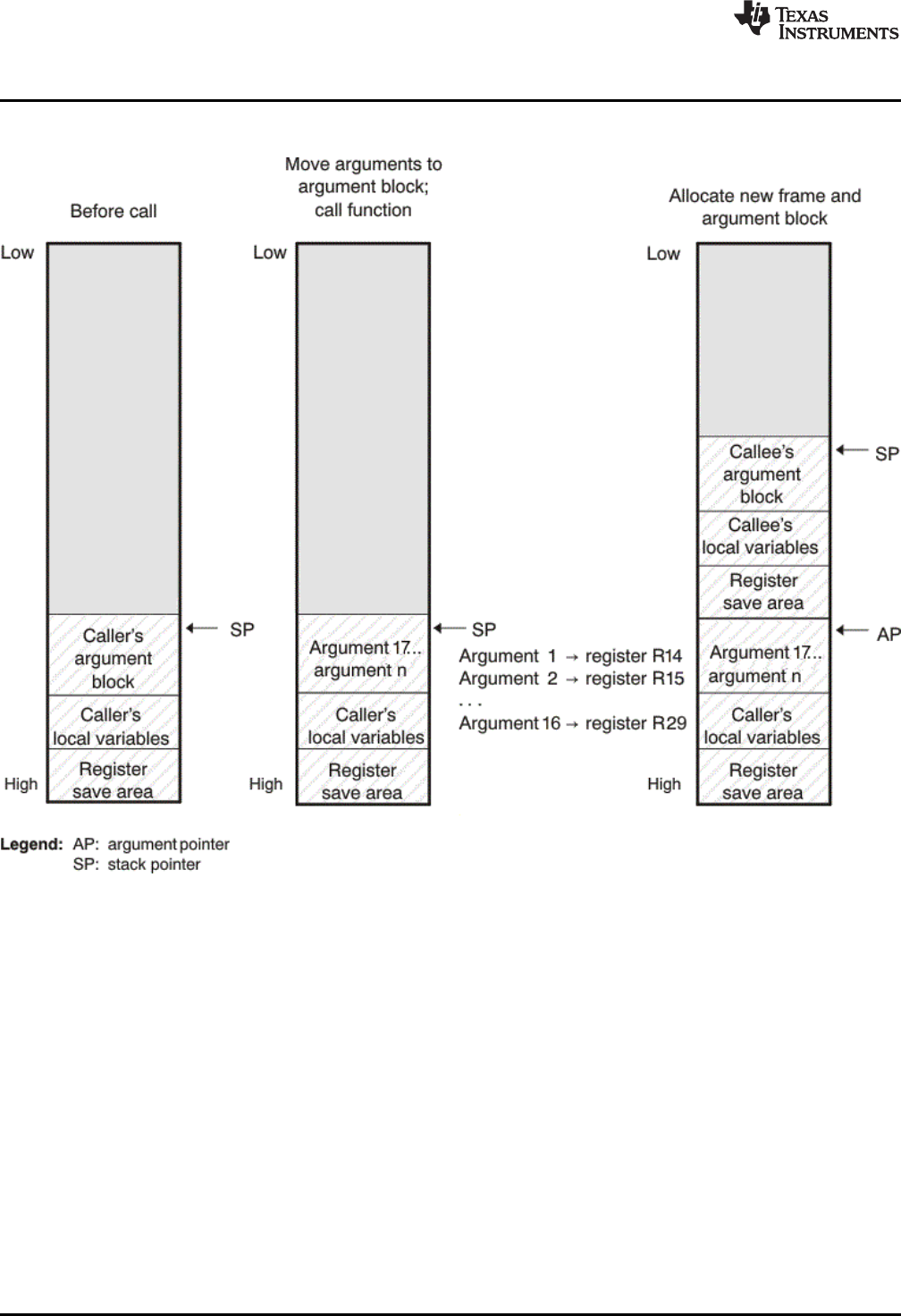
Function Structure and Calling Conventions
www.ti.com
110 SPRUHV7B–October 2017
Submit Documentation Feedback
Copyright © 2017, Texas Instruments Incorporated
Run-Time Environment
Figure 6-2. Use of the Stack During a Function Call
6.4.1 How a Function Makes a Call
A function (parent function) performs the following tasks when it calls another function (child function).
1. The calling function (parent) is responsible for preserving any save-on-call registers across the call that
are live across the call. (The save-on-call registers are R0-R1 and R14-R29)
2. If the called function (child) returns a structure, the caller allocates space for the structure and passes
the address of that space to the called function as the first argument.
3. The caller places the first arguments in registers R14-R29, in that order. The caller moves the
remaining arguments to the argument block in reverse order, placing the leftmost remaining argument
at the lowest address. Thus, the leftmost remaining argument is placed at the top of the stack.

www.ti.com
Function Structure and Calling Conventions
111
SPRUHV7B–October 2017
Submit Documentation Feedback Copyright © 2017, Texas Instruments Incorporated
Run-Time Environment
6.4.1.1 Layout of Arguments Passed in Registers
The argument registers for PRU are R14-R29. PRU supports efficient sub-register accesses of the form
Rx.by and Rx.wy. For example, F14.b1 or F14.w2.
Because of this capability, arguments are packed into registers based on their size. 8-bit scalars are
passed using 8-bits of a register and are accessed using Rx.by register operands. 16-bit scalars are
passed using 16-bits of a register and are accessed using Rx.wy register operands. 32-bit scalars are
passed using a full register. 64-bit scalars are passed in two registers referred to as a register pair. For
register pairs, the lowest-numbered register holds the LSW (least significant word). Structures can be
passed and returned in registers. Structures of size 8, 16, 32, and 64 bits are passed and returned in
registers (see Section 6.4.1.3).
Arguments are assigned, in declared order, to the first available slot within the argument registers. Holes
can be left in the argument registers if 8-bit and 16-bit variables are passed. In this case those holes are
filled with subsequent arguments. For example:
foo(int a1, short a2, int a3, short a4)
In this example, a1 is assigned to R14, a2 is assigned to R15.w0, a3 is assigned to R16, and a4 is
assigned to R15.w2 to fill the hole left by a2.
6.4.1.2 Stack Layout of Arguments Not Passed in Registers
Any arguments not passed in registers are placed on the stack at increasing addresses, starting at 0(SP).
Each argument is placed at the next available address correctly aligned for its type, subject to the
following additional considerations:
• The stack alignment of a scalar is that of its declared type.
• Each argument reserves an amount of stack space equal to its size rounded up to the next multiple of
its stack alignment.
For a variadic C function (that is, a function declared with an ellipsis indicating that it is called with varying
numbers of arguments), the last explicitly declared argument and all remaining arguments are passed on
the stack, so that its stack address can act as a reference for accessing the undeclared arguments.
Undeclared scalar arguments to a variadic function that are smaller than int are promoted to and passed
as int, in accordance with the C language. Alignment "holes" can occur between arguments passed on the
stack, but "back-fill" does not occur.
6.4.1.3 Layout of Structures or Unions Passed and Returned by Reference
Structures (including classes) and unions larger than 64 bits are passed and returned by reference. To
pass a structure or union by reference, the caller places its address in the appropriate location: either in a
register or on the stack, according to its position in the argument list. To preserve pass-by-value
semantics (required for C and C++), the callee may need to make its own copy of the pointed-to object. In
some cases, the callee need not make a copy, such as if the callee is a leaf and it does not modify the
pointed-to object.
If the called function returns a structure or union larger than 64 bits, the caller must pass an additional
argument containing a destination address for the returned value, or NULL if the returned value is not
used.
This additional argument is passed in the first argument register as an implicit first argument. The callee
returns the object by copying it to the given address. The caller is responsible for allocating memory if
required. Typically this involves reserving space on the stack, but in some cases the address of an
already-existing object can be passed and no allocation is required. For example, if f returns a structure,
the assignment s = f() can be compiled by passing &s in the first argument register.

Function Structure and Calling Conventions
www.ti.com
112 SPRUHV7B–October 2017
Submit Documentation Feedback
Copyright © 2017, Texas Instruments Incorporated
Run-Time Environment
6.4.2 How a Called Function Responds
A called function (child function) must perform the following tasks:
1. If the function is declared with an ellipsis, it can be called with a variable number of arguments. The
called function pushes these arguments on the stack if they meet both of these criteria:
• The argument includes or follows the last explicitly declared argument.
• The argument is passed in a register.
2. The called function pushes register values of all the registers that are modified by the function and that
must be preserved upon exit of the function onto the stack. Normally, these registers are the save-on-
entry registers--R3.w2 through R13--if the function contains calls.
3. The called function allocates memory for the local variables and argument block by subtracting a
constant from the SP. This constant is computed with the following formula:
size of all local variables +max =constant
The max argument specifies the size of all parameters placed in the argument block for each call.
4. The called function executes the code for the function.
5. If the called function returns a value, it places the value in R14.
6. If the called function returns a structure, it copies the structure to the memory block that the first
argument, R14, points to. If the caller does not use the return value, R14 is set to 0. This directs the
called function not to copy the return structure.
In this way, the caller can be smart about telling the called function where to return the structure. For
example, in the statement s = f(x), where s is a structure and f is a function that returns a structure, the
caller can simply pass the address of s as the first argument and call f. The function f then copies the
return structure directly into s, performing the assignment automatically.
You must be careful to properly declare functions that return structures, both at the point where they
are called (so the caller properly sets up the first argument) and at the point where they are declared
(so the function knows to copy the result).
7. The called function deallocates the frame and argument block by adding the constant computed in
Step 3.
8. The called function restores all registers that were saved in Step 2.
9. The called function ( _f) branches to the return address..
The following example is typical of how a called function responds to a call:
; called function entry point
SUB r2, r2, 0x06 ; allocate frame
SBBO &r3.b2, r2, 0, 6 ; save R3.w2 and R2
... ; body of the function
LBBO &r3.b2, r2, 0, 6 ; restore R3.w2 and R2
ADD r2, r2, 0x06 ; deallocate frame
6.4.3 Accessing Arguments and Local Variables
A function accesses its local nonregister variables indirectly through the stack pointer (SP, which is R2)
and its stack arguments indirectly through the argument pointer (AP, which is R4). If all stack arguments
can be referenced with the SP, they are, and the AP is not reserved. The SP always points to the top of
the stack (points to the most recently pushed value) and the AP points to the leftmost stack argument (the
one closest to the top of the stack). For example:
LBBO &R0, R2, 4, 4 ; load local var from stack
LBBO &R0, R4, 0, 4 ; load argument from stack
Since the stack grows toward smaller addresses, the local and argument data on the stack for the C/C++
function is accessed with a positive offset from the SP or the AP register.

www.ti.com
Accessing Linker Symbols in C and C++
113
SPRUHV7B–October 2017
Submit Documentation Feedback Copyright © 2017, Texas Instruments Incorporated
Run-Time Environment
6.5 Accessing Linker Symbols in C and C++
See the section on "Using Linker Symbols in C/C++ Applications" in the PRU Assembly Language Tools
User's Guide for information about referring to linker symbols in C/C++ code.
6.6 Interfacing C and C++ With Assembly Language
The following are ways to use assembly language with C/C++ code:
• Use separate modules of assembled code and link them with compiled C/C++ modules (see
Section 6.6.1).
• Use assembly language variables and constants in C/C++ source (see Section 6.6.3).
• Use inline assembly language embedded directly in the C/C++ source (see Section 6.6.5).
• Modify the assembly language code that the compiler produces (see Section 6.6.6).
6.6.1 Using Assembly Language Modules With C/C++ Code
Interfacing C/C++ with assembly language functions is straightforward if you follow the calling conventions
defined in Section 6.4, and the register conventions defined in Section 6.3. C/C++ code can access
variables and call functions defined in assembly language, and assembly code can access C/C++
variables and call C/C++ functions.
Follow these guidelines to interface assembly language and C:
• You must preserve any dedicated registers modified by a function. Dedicated registers include:
– Save-on-entry registers (R3.w2-R13)
– Stack pointer (R2)
If the SP is used normally, it does not need to be explicitly preserved. In other words, the assembly
function is free to use the stack as long as anything that is pushed onto the stack is popped back off
before the function returns (thus preserving SP).
Any register that is not dedicated can be used freely without first being saved.
• When you call a C/C++ function from assembly language, load the designated registers with
arguments and push the remaining arguments onto the stack as described in Section 6.4.1.
Remember that a function can alter any register not designated as being preserved without having to
restore it. If the contents of any of these registers must be preserved across the call, you must
explicitly save them.
• Functions must return values correctly according to their C/C++ declarations. Every value is returned
starting with R14. 64-bit types are returned in R14-R15, and structures are returned as described in
Step 2 of Section 6.4.1.
• No assembly module should use the .cinit section for any purpose other than autoinitialization of global
variables. The C/C++ startup routine assumes that the .cinit section consists entirely of initialization
tables. Disrupting the tables by putting other information in .cinit can cause unpredictable results.
• The compiler assigns linknames to all external objects. Thus, when you write assembly language code,
you must use the same linknames as those assigned by the compiler. See Section 5.12 for details.
• Any object or function declared in assembly language that is accessed or called from C/C++ must be
declared with the .def or .global directive in the assembly language modifier. This declares the symbol
as external and allows the linker to resolve references to it.
Likewise, to access a C/C++ function or object from assembly language, declare the C/C++ object with
the .ref or .global directive in the assembly language module. This creates an undeclared external
reference that the linker resolves.

Interfacing C and C++ With Assembly Language
www.ti.com
114 SPRUHV7B–October 2017
Submit Documentation Feedback
Copyright © 2017, Texas Instruments Incorporated
Run-Time Environment
6.6.2 Accessing Assembly Language Functions From C/C++
Functions defined in C++ that will be called from assembly should be defined as extern "C" in the C++ file.
Functions defined in assembly that will be called from C++ must be prototyped as extern "C" in C++.
Example 6-1 illustrates a C++ function called main, which calls an assembly language function called
asmfunc, Example 6-2. The asmfunc function takes its single argument, adds it to the C++ global variable
called gvar, and returns the result.
Example 6-1. Calling an Assembly Language Function From a C/C++ Program
extern "C" {
extern int asmfunc(int a); /* declare external asm function */
int gvar = 0; /* define global variable */
}
void main()
{
int I = 5;
I = asmfunc(I); /* call function normally */
Example 6-2. Assembly Language Program Called by Example 6-1
.global asmfunc
.global gvar
asmfunc:
LDI r0, gvar
LBBO &r1, r0, 0, 4
ADD r14, r1, r14
SBBO &r14, r0, 0, 4
JMP r3.w2
In the C++ program in Example 6-1, the extern "C" declaration tells the compiler to use C naming
conventions (that is, no name mangling). When the linker resolves the .global asmfunc reference, the
corresponding definition in the assembly file will match.
The parameter i is passed in R0, and the result is returned in R0. R1 holds the address of the global gvar.
R2 holds the value of gvar before adding the value i to it.
6.6.3 Accessing Assembly Language Variables From C/C++
It is sometimes useful for a C/C++ program to access variables or constants defined in assembly
language. There are several methods that you can use to accomplish this, depending on where and how
the item is defined: a variable defined in the .bss section, a variable not defined in the .bss section, or a
linker symbol.
6.6.3.1 Accessing Assembly Language Global Variables
Accessing variables from the .bss section or a section named with .usect is straightforward:
1. Use the .bss or .usect directive to define the variable.
2. Use the .def or .global directive to make the definition external.
3. Use the appropriate linkname in assembly language.
4. In C/C++, declare the variable as extern and access it normally.
www.ti.com
Interfacing C and C++ With Assembly Language
115
SPRUHV7B–October 2017
Submit Documentation Feedback Copyright © 2017, Texas Instruments Incorporated
Run-Time Environment
Example 6-4 and Example 6-3 show how you can access a variable defined in .bss.
Example 6-3. Assembly Language Variable Program
.bss var,4,4 ; Define the variable
.global var ; Declare the variable as external
Example 6-4. C Program to Access Assembly Language From Example 6-3
extern int var; /* External variable */
var = 1; /* Use the variable */
6.6.3.2 Accessing Assembly Language Constants
You can define global constants in assembly language by using the .set directive in combination with
either the .def or .global directive, or you can define them in a linker command file using a linker
assignment statement. These constants are accessible from C/C++ only with the use of special operators.
For variables defined in C/C++ or assembly language, the symbol table contains the address of the value
contained by the variable. When you access an assembly variable by name from C/C++, the compiler gets
the value using the address in the symbol table.
For assembly constants, however, the symbol table contains the actual value of the constant. The
compiler cannot tell which items in the symbol table are addresses and which are values. If you access an
assembly (or linker) constant by name, the compiler tries to use the value in the symbol table as an
address to fetch a value. To prevent this behavior, you must use the & (address of) operator to get the
value (_symval). In other words, if x is an assembly language constant, its value in C/C++ is &x. See the
section on "Using Linker Symbols in C/C++ Applications" in the PRU Assembly Language Tools User's
Guide for more examples that use _symval.
For more about symbols and the symbol table, refer to the section on "Symbols" in the PRU Assembly
Language Tools User's Guide.
You can use casts and #defines to ease the use of these symbols in your program, as in Example 6-5 and
Example 6-6.
Example 6-5. Accessing an Assembly Language Constant From C
extern int table_size; /*external ref */
#define TABLE_SIZE ((int) (&table_size))
. /* use cast to hide address-of */
.
.
for (I=0; i<TABLE_SIZE; ++I) /* use like normal symbol */
Example 6-6. Assembly Language Program for Example 6-5
_table_size .set 10000 ; define the constant
.global _table_size ; make it global
Because you are referencing only the symbol's value as stored in the symbol table, the symbol's declared
type is unimportant. In Example 6-5, int is used. You can reference linker-defined symbols in a similar
manner.

Interfacing C and C++ With Assembly Language
www.ti.com
116 SPRUHV7B–October 2017
Submit Documentation Feedback
Copyright © 2017, Texas Instruments Incorporated
Run-Time Environment
6.6.4 Sharing C/C++ Header Files With Assembly Source
You can use the .cdecls assembler directive to share C headers containing declarations and prototypes
between C and assembly code. Any legal C/C++ can be used in a .cdecls block and the C/C++
declarations will cause suitable assembly to be generated automatically, allowing you to reference the
C/C++ constructs in assembly code. For more information, see the C/C++ header files chapter in the PRU
Assembly Language Tools User's Guide.
6.6.5 Using Inline Assembly Language
Within a C/C++ program, you can use the asm statement to insert a single line of assembly language into
the assembly language file created by the compiler. A series of asm statements places sequential lines of
assembly language into the compiler output with no intervening code. For more information, see
Section 5.8.
The asm statement is useful for inserting comments in the compiler output. Simply start the assembly
code string with a semicolon (;) as shown below:
asm(";*** this is an assembly language comment");
NOTE: Using the asm Statement
Keep the following in mind when using the asm statement:
• Be extremely careful not to disrupt the C/C++ environment. The compiler does not check
or analyze the inserted instructions.
• Avoid inserting jumps or labels into C/C++ code because they can produce
unpredictable results by confusing the register-tracking algorithms that the code
generator uses.
• Do not change the value of a C/C++ variable when using an asm statement. This is
because the compiler does not verify such statements. They are inserted as is into the
assembly code, and potentially can cause problems if you are not sure of their effect.
• Do not use the asm statement to insert assembler directives that change the assembly
environment.
• Avoid creating assembly macros in C code and compiling with the --symdebug:dwarf (or
-g) option. The C environment’s debug information and the assembly macro expansion
are not compatible.
6.6.6 Modifying Compiler Output
You can inspect and change the compiler's assembly language output by compiling the source and then
editing the assembly output file before assembling it. The C/C++ interlist feature can help you inspect
compiler output. See Section 2.12.
6.7 System Initialization
Before you can run a C/C++ program, you must create the C/C++ run-time environment. The C/C++ boot
routine performs this task using a function called c_int00 (or _c_int00). The run-time-support source
library, rts.src, contains the source to this routine in a module named boot.c (or boot.asm).
To begin running the system, the c_int00 function can be called by reset hardware. You must link the
c_int00 function with the other object files. This occurs automatically when you use the --rom_model or --
ram_model link option and include a standard run-time-support library as one of the linker input files.
When C/C++ programs are linked, the linker sets the entry point value in the executable output file to the
symbol c_int00.
The c_int00 function performs the following tasks to initialize the environment:
1. Switches to the appropriate mode, reserves space for the run-time stack, and sets up the initial value
of the stack pointer (SP). The stack is not aligned on specific boundary.
2. Calls the function _ _TI_auto_init to perform the C/C++ autoinitialization.
The _ _TI_auto_init function does the following tasks:

www.ti.com
System Initialization
117
SPRUHV7B–October 2017
Submit Documentation Feedback Copyright © 2017, Texas Instruments Incorporated
Run-Time Environment
• Processes the binit copy table, if present.
• Performs C autoinitialization of global/static variables. For more information, see Section 6.7.2.
• Calls C++ initialization routines for file scope construction from the global constructor table. For
more information, see Section 6.7.2.6.
3. Calls the main() function to run the C/C++ program.
You can replace or modify the boot routine to meet your system requirements. However, the boot routine
must perform the operations listed above to correctly initialize the C/C++ environment.
6.7.1 Run-Time Stack
The run-time stack is allocated in a single continuous block of memory and grows down from high
addresses to lower addresses. The SP points to the top of the stack.
The code does not check to see if the run-time stack overflows. Stack overflow occurs when the stack
grows beyond the limits of the memory space that was allocated for it. Be sure to allocate adequate
memory for the stack.
The stack size can be changed at link time by using the --stack_size link option on the linker command
line and specifying the stack size as a constant directly after the option.
The C/C++ boot routine shipped with the compiler sets up the user/thread mode run-time stack. If your
program uses a run-time stack when it is in other operating modes, you must also allocate space and set
up the run-time stack corresponding to those modes.
The stack is not aligned on a specific boundary.
6.7.2 Automatic Initialization of Variables
Any global variables declared as preinitialized must have initial values assigned to them before a C/C++
program starts running. The process of retrieving these variables' data and initializing the variables with
the data is called autoinitialization. Internally, the compiler and linker coordinate to produce compressed
initialization tables. Your code should not access the initialization table.
6.7.2.1 Zero Initializing Variables
In ANSI C, global and static variables that are not explicitly initialized must be set to 0 before program
execution. The C/C++ compiler supports preinitialization of uninitialized variables by default. This can be
turned off by specifying the linker option --zero_init=off.
6.7.2.2 Direct Initialization
The compiler uses direct initialization to initialize global variables. For example, consider the following C
code:
int i = 23;
int a[5] = { 1, 2, 3, 4, 5 };
The compiler allocates the variables 'i' and 'a[] to .data section and the initial values are placed directly.
.global i
.data
.align 4
i:
.field 23,32 ; i @ 0
.global a
.data
.align 4
a:
.field 1,32 ; a[0] @ 0
.field 2,32 ; a[1] @ 32
.field 3,32 ; a[2] @ 64
.field 4,32 ; a[3] @ 96
.field 5,32 ; a[4] @ 128
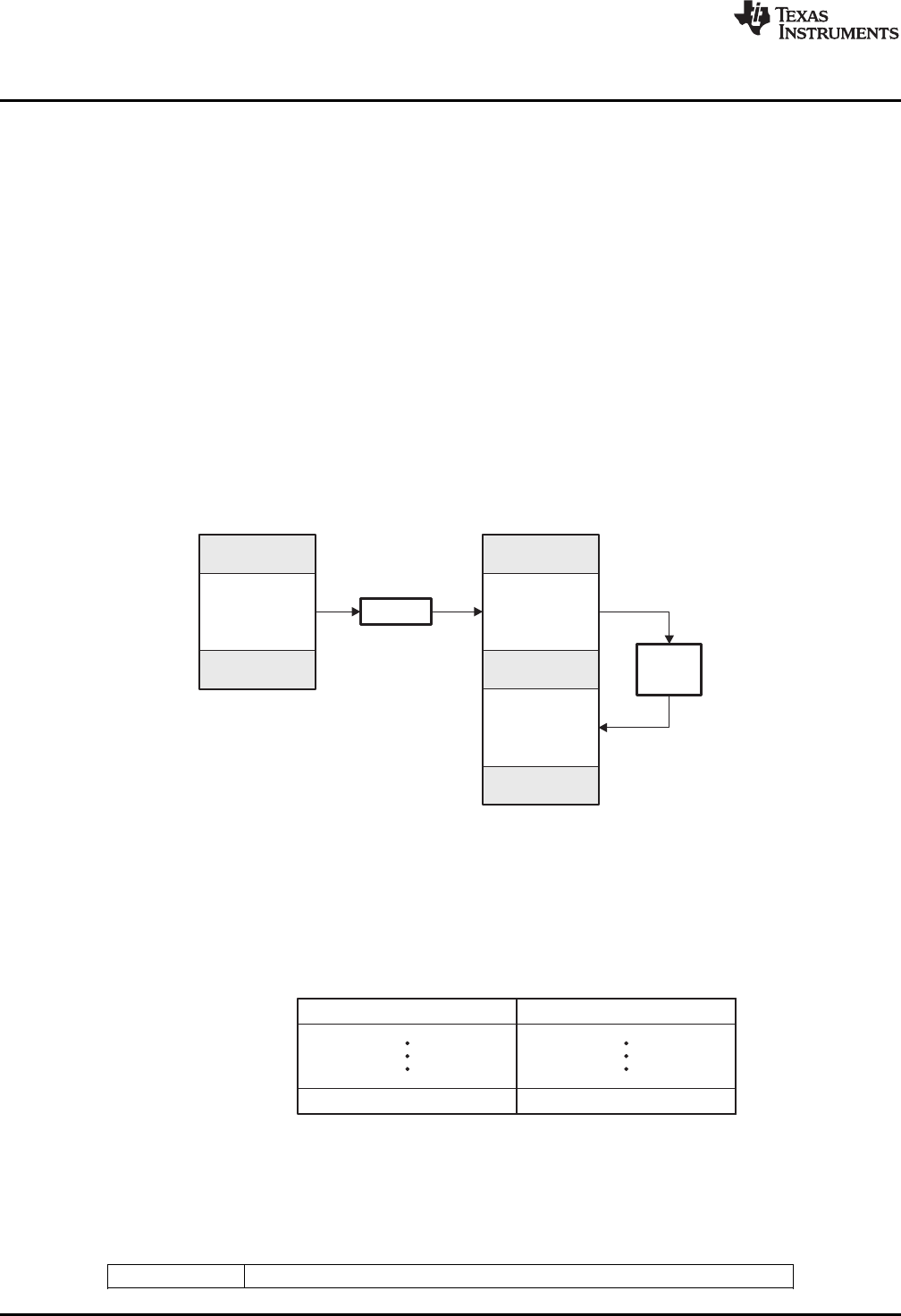
32-bitloadaddress
32-bitloadaddress
_TI_CINIT_Base:
_TI_CINT_Limit:
32-bitrunaddress
32-bitrunaddress
Cautoinit
tableanddata
(ROM)
.data
uninitialized
(RAM)
Boot
routine
Loader
Objectfile Memory
Cautoinit
tableanddata
(ROM)
(.cinitsection)
System Initialization
www.ti.com
118 SPRUHV7B–October 2017
Submit Documentation Feedback
Copyright © 2017, Texas Instruments Incorporated
Run-Time Environment
Each compiled module that defines static or global variables contains these .data sections. The linker
treats the .data section like any other initialized section and creates an output section. In the load-time
initialization model, the sections are loaded into memory and used by the program. See Section 6.7.2.5.
In the run-time initialization model, the linker uses the data in these sections to create initialization data
and an additional compressed initialization table. The boot routine processes the initialization table to copy
data from load addresses to run addresses. See Section 6.7.2.3.
6.7.2.3 Autoinitialization of Variables at Run Time
Autoinitializing variables at run time is the default method of autoinitialization. To use this method, invoke
the linker with the --rom_model option.
Using this method, the linker creates a compressed initialization table and initialization data from the direct
initialized sections in the compiled module. The table and data are used by the C/C++ boot routine to
initialize variables in RAM using the table and data in ROM.
Figure 6-3 illustrates autoinitialization at run time. Use this method in any system where your application
runs from code burned into ROM.
Figure 6-3. Autoinitialization at Run Time
6.7.2.4 Autoinitialization Tables
The compiled object files do not have initialization tables. The variables are initialized directly . The linker,
when the --rom_model option is specified, creates C auto initialization table and the initialization data. The
linker creates both the table and the initialization data in an output section named .cinit.
The autoinitialization table has the following format:
The linker defined symbols __TI_CINIT_Base and __TI_CINIT_Limit point to the start and end of the
table, respectively. Each entry in this table corresponds to one output section that needs to be initialized.
The initialization data for each output section could be encoded using different encoding.
The load address in the C auto initialization record points to initialization data with the following format:
8-bit index Encoded data
32-bithandler1address
32-bithandlernaddress
_TI_Handler_Table_Base:
_TI_Handler_Table_Limit:
www.ti.com
System Initialization
119
SPRUHV7B–October 2017
Submit Documentation Feedback Copyright © 2017, Texas Instruments Incorporated
Run-Time Environment
The first 8-bits of the initialization data is the handler index. It indexes into a handler table to get the
address of a handler function that knows how to decode the following data.
The handler table is a list of 32-bit function pointers.
The encoded data that follows the 8-bit index can be in one of the following format types. For clarity the 8-
bit index is also depicted for each format.
6.7.2.4.1 Length Followed by Data Format
8-bit index 24-bit padding 32-bit length (N) N byte initialization data (not compressed)
The compiler uses 24-bit padding to align the length field to a 32-bit boundary. The 32-bit length field
encodes the length of the initialization data in bytes (N). N byte initialization data is not compressed and is
copied to the run address as is.
The run-time support library has a function __TI_zero_init() to process this type of initialization data. The
first argument to this function is the address pointing to the byte after the 8-bit index. The second
argument is the run address from the C auto initialization record.
6.7.2.4.2 Zero Initialization Format
8-bit index 24-bit padding 32-bit length (N)
The compiler uses 24-bit padding to align the length field to a 32-bit boundary. The 32-bit length field
encodes the number of bytes to be zero initialized.
The run-time support library has a function __TI_zero_init() to process the zero initialization. The first
argument to this function is the address pointing to the byte after the 8-bit index. The second argument is
the run address from the C auto initialization record.
6.7.2.4.3 Run Length Encoded (RLE) Format
8-bit index Initialization data compressed using run length encoding
The data following the 8-bit index is compressed using Run Length Encoded (RLE) format. uses a simple
run length encoding that can be decompressed using the following algorithm:
1. Read the first byte, Delimiter (D).
2. Read the next byte (B).
3. If B != D, copy B to the output buffer and go to step 2.
4. Read the next byte (L).
a. If L == 0, then length is either a 16-bit, a 24-bit value, or we’ve reached the end of the data, read
next byte (L).
1. If L == 0, length is a 24-bit value or the end of the data is reached, read next byte (L).
a. If L == 0, the end of the data is reached, go to step 7.
b. Else L <<= 16, read next two bytes into lower 16 bits of L to complete 24-bit value for L.
.datasection
(initialized)
(RAM)
.data
section Loader
Objectfile Memory
System Initialization
www.ti.com
120 SPRUHV7B–October 2017
Submit Documentation Feedback
Copyright © 2017, Texas Instruments Incorporated
Run-Time Environment
2. Else L <<= 8, read next byte into lower 8 bits of L to complete 16-bit value for L.
b. Else if L > 0 and L < 4, copy D to the output buffer L times. Go to step 2.
c. Else, length is 8-bit value (L).
5. Read the next byte (C); C is the repeat character.
6. Write C to the output buffer L times; go to step 2.
7. End of processing.
The run-time support library has a routine __TI_decompress_rle24() to decompress data compressed
using RLE. The first argument to this function is the address pointing to the byte after the 8-bit index. The
second argument is the run address from the C auto initialization record.
RLE Decompression Routine
NOTE: The previous decompression routine, __TI_decompress_rle(), is included in the run-time-
support library for decompressing RLE encodings generated by older versions of the linker.
6.7.2.4.4 Lempel-Ziv-Storer-Szymanski Compression (LZSS) Format
8-bit index Initialization data compressed using LZSS
The data following the 8-bit index is compressed using LZSS compression. The run-time support library
has the routine __TI_decompress_lzss() to decompress the data compressed using LZSS. The first
argument to this function is the address pointing to the byte after the 8-bit index. The second argument is
the run address from the C auto initialization record.
6.7.2.5 Initialization of Variables at Load Time
Initialization of variables at load time enhances performance by reducing boot time and by saving the
memory used by the initialization tables. To use this method, invoke the linker with the --ram_model
option.
When you use the --ram_model link option, the linker does not generate C autoinitialization tables and
data. The direct initialized sections (.data) in the compiled object files are combined according to the linker
command file to generate initialized output sections. The loader loads the initialized output sections into
memory. After the load, the variables are assigned their initial values.
Since the linker does not generate the C autoinitialization tables, no boot time initialization is performed.
Figure 6-4 illustrates the initialization of variables at load time.
Figure 6-4. Initialization at Load Time
Addressofconstructor1
Addressofconstructor2
Addressofconstructorn
SHT$$INIT_ARRAY$$Base:
SHT$$INIT_ARRAY$$Limit:
www.ti.com
System Initialization
121
SPRUHV7B–October 2017
Submit Documentation Feedback Copyright © 2017, Texas Instruments Incorporated
Run-Time Environment
6.7.2.6 Global Constructors
All global C++ variables that have constructors must have their constructor called before main(). The
compiler builds a table of global constructor addresses that must be called, in order, before main() in a
section called .init_array. The linker combines the .init_array section form each input file to form a single
table in the .init_array section. The boot routine uses this table to execute the constructors. The linker
defines two symbols to identify the combined .init_array table as shown below. This table is not null
terminated by the linker.
Figure 6-5. Constructor Table
122 SPRUHV7B–October 2017
Submit Documentation Feedback
Copyright © 2017, Texas Instruments Incorporated
Using Run-Time-Support Functions and Building Libraries
Chapter 7
SPRUHV7B–October 2017
Using Run-Time-Support Functions and Building Libraries
Some of the features of C/C++ (such as I/O, dynamic memory allocation, string operations, and
trigonometric functions) are provided as an ANSI/ISO C/C++ standard library, rather than as part of the
compiler itself. The TI implementation of this library is the run-time-support library (RTS). The C/C++
compiler implements the ISO standard library except for those facilities that handle exception conditions,
signal and locale issues (properties that depend on local language, nationality, or culture). Using the
ANSI/ISO standard library ensures a consistent set of functions that provide for greater portability.
In addition to the ANSI/ISO-specified functions, the run-time-support library includes routines that give you
processor-specific commands and direct C language I/O requests. These are detailed in Section 7.1 and
Section 7.2.
A library-build utility is provided with the code generation tools that lets you create customized run-time-
support libraries. This process is described in Section 7.4 .
Topic ........................................................................................................................... Page
7.1 C and C++ Run-Time Support Libraries............................................................... 123
7.2 The C I/O Functions .......................................................................................... 125
7.3 Handling Reentrancy (_register_lock() and _register_unlock() Functions)............... 137
7.4 Library-Build Process ....................................................................................... 138

www.ti.com
C and C++ Run-Time Support Libraries
123
SPRUHV7B–October 2017
Submit Documentation Feedback Copyright © 2017, Texas Instruments Incorporated
Using Run-Time-Support Functions and Building Libraries
7.1 C and C++ Run-Time Support Libraries
PRU compiler releases include pre-built run-time support (RTS) libraries that provide all the standard
capabilities. Separate libraries are provided for big and little endian support for each of PRU silicon
versions 1 through 3, and C++ exception support. See Section 7.1.7 for information on the library-naming
conventions.
The run-time-support library contains the following:
• ANSI/ISO C/C++ standard library
• C I/O library
• Low-level support functions that provide I/O to the host operating system
• Fundamental arithmetic routines
• System startup routine, _c_int00
• Compiler helper functions (to support language features that are not directly efficiently expressible in
C/C++)
The run-time-support libraries do not contain functions involving signals and locale issues.
The C++ library supports wide chars, in that template functions and classes that are defined for char are
also available for wide char. For example, wide char stream classes wios, wiostream, wstreambuf and so
on (corresponding to char classes ios, iostream, streambuf) are implemented. However, there is no low-
level file I/O for wide chars. Also, the C library interface to wide char support (through the C++ headers
<cwchar> and <cwctype>) is limited as described in Section 5.1.
TI does not provide documentation that covers the functionality of the C++ library. TI suggests referring to
one of the following sources:
•The Standard C++ Library: A Tutorial and Reference,Nicolai M. Josuttis, Addison-Wesley, ISBN 0-201-
37926-0
•The C++ Programming Language (Third or Special Editions), Bjarne Stroustrup, Addison-Wesley,
ISBN 0-201-88954-4 or 0-201-70073-5
7.1.1 Linking Code With the Object Library
When you link your program, you must specify the object library as one of the linker input files so that
references to the I/O and run-time-support functions can be resolved. You can either specify the library or
allow the compiler to select one for you. See Section 4.3.1 for further information.
When a library is linked, the linker includes only those library members required to resolve undefined
references. For more information about linking, see the PRU Assembly Language Tools User's Guide.
C, C++, and mixed C and C++ programs can use the same run-time-support library. Run-time-support
functions and variables that can be called and referenced from both C and C++ will have the same
linkage.
7.1.2 Header Files
You must use the header files provided with the compiler run-time support when using functions from
C/C++ standard library. Set the PRU_C_DIR environment variable to the include directory where the tools
are installed.
7.1.3 Modifying a Library Function
You can inspect or modify library functions by examining the source code in the lib/src subdirectory of the
compiler installation. For example, C:\ti\ccsv6\tools\compiler\pru_#.#.#\lib\src.
One you have located the relevant source code, change the specific function file and rebuild the library.
You can use this source tree to rebuild the rtspruv3_le.lib library or to build a new library. See Section 7.4
for details on building.

C and C++ Run-Time Support Libraries
www.ti.com
124 SPRUHV7B–October 2017
Submit Documentation Feedback
Copyright © 2017, Texas Instruments Incorporated
Using Run-Time-Support Functions and Building Libraries
7.1.4 Support for String Handling
The library includes the header files <string.h> and <strings.h>, which provide the following functions for
string handling beyond those required.
• string.h
– strdup(), which duplicates a string
• strings.h
– bcmp(), which is equivalent to memcmp()
– bcopy(), which is equivalent to memmove()
– bzero(), which replaces memory locations with zero-valued bytes
– ffs(), which finds the first bit set and returns the index of that bit
– index(), which is equivalent to strchr()
– rindex(), which is equivalent to strrchr()
– strcasecmp() and strncasecmp(), which perform case-insensitive string comparisons
7.1.5 Minimal Support for Internationalization
The library includes the header files <locale.h>, <wchar.h>, and <wctype.h>, which provide APIs to
support non-ASCII character sets and conventions. Our implementation of these APIs is limited in the
following ways:
• The library has minimal support for wide and multibyte characters. The type wchar_t is implemented as
int. The wide character set is equivalent to the set of values of type char. The library includes the
header files <wchar.h> and <wctype.h> but does not include all the functions specified in the standard.
So-called multibyte characters are limited to single characters. There are no shift states. The mapping
between multibyte characters and wide characters is simple equivalence; that is, each wide character
maps to and from exactly a single multibyte character having the same value.
• The C library includes the header file <locale.h> but with a minimal implementation. The only
supported locale is the C locale. That is, library behavior that is specified to vary by locale is hard-
coded to the behavior of the C locale, and attempting to install a different locale via a call to setlocale()
will return NULL.
7.1.6 Allowable Number of Open Files
In the <stdio.h> header file, the value for the macro FOPEN_MAX has the value of the macro _NFILE,
which is set to 10. The impact is that you can only have 10 files simultaneously open at one time
(including the pre-defined streams - stdin, stdout, stderr).
The C standard requires that the minimum value for the FOPEN_MAX macro is 8. The macro determines
the maximum number of files that can be opened at one time. The macro is defined in the stdio.h header
file and can be modified by changing the value of the _NFILE macro and recompiling the library.
7.1.7 Library Naming Conventions
By default, the linker uses automatic library selection to select the correct run-time-support library (see
Section 4.3.1.1) for your application. If you select the library manually, you must select the matching
library according to the following naming scheme:
rtspru[v#]_[endian][_eh].lib
rtspru Indicates the library is built for PRU support
_v# Indicates the silicon version number of the device for which the library is built
_endian "le" indicates library is built for little endian support; "be" indicates library is built for big
endian support
_eh Indicates the library has exception handling support

www.ti.com
The C I/O Functions
125
SPRUHV7B–October 2017
Submit Documentation Feedback Copyright © 2017, Texas Instruments Incorporated
Using Run-Time-Support Functions and Building Libraries
7.2 The C I/O Functions
The C I/O functions make it possible to access the host's operating system to perform I/O. The capability
to perform I/O on the host gives you more options when debugging and testing code.
The I/O functions are logically divided into layers: high level, low level, and device-driver level.
With properly written device drivers, the C-standard high-level I/O functions can be used to perform I/O on
custom user-defined devices. This provides an easy way to use the sophisticated buffering of the high-
level I/O functions on an arbitrary device.
The formatting rules for long long data types require ll (lowercase LL) in the format string. For example:
printf("%lld", 0x0011223344556677);
printf("llx", 0x0011223344556677);
Debugger Required for Default HOST
NOTE: For the default HOST device to work, there must be a debugger to handle the C I/O
requests; the default HOST device cannot work by itself in an embedded system. To work in
an embedded system, you will need to provide an appropriate driver for your system.
NOTE: C I/O Mysteriously Fails
If there is not enough space on the heap for a C I/O buffer, operations on the file will silently
fail. If a call to printf() mysteriously fails, this may be the reason. The heap needs to be at
least large enough to allocate a block of size BUFSIZ (defined in stdio.h) for every file on
which I/O is performed, including stdout, stdin, and stderr, plus allocations performed by the
user's code, plus allocation bookkeeping overhead. Alternately, declare a char array of size
BUFSIZ and pass it to setvbuf to avoid dynamic allocation. To set the heap size, use the --
heap_size option when linking (refer to the Linker Description chapter in the PRU Assembly
Language Tools User's Guide).
NOTE: Open Mysteriously Fails
The run-time support limits the total number of open files to a small number relative to
general-purpose processors. If you attempt to open more files than the maximum, you may
find that the open will mysteriously fail. You can increase the number of open files by
extracting the source code from rts.src and editing the constants controlling the size of some
of the C I/O data structures. The macro _NFILE controls how many FILE (fopen) objects can
be open at one time (stdin, stdout, and stderr count against this total). (See also
FOPEN_MAX.) The macro _NSTREAM controls how many low-level file descriptors can be
open at one time (the low-level files underlying stdin, stdout, and stderr count against this
total). The macro _NDEVICE controls how many device drivers are installed at one time (the
HOST device counts against this total).

The C I/O Functions
www.ti.com
126 SPRUHV7B–October 2017
Submit Documentation Feedback
Copyright © 2017, Texas Instruments Incorporated
Using Run-Time-Support Functions and Building Libraries
7.2.1 High-Level I/O Functions
The high-level functions are the standard C library of stream I/O routines (printf, scanf, fopen, getchar, and
so on). These functions call one or more low-level I/O functions to carry out the high-level I/O request. The
high-level I/O routines operate on FILE pointers, also called streams.
Portable applications should use only the high-level I/O functions.
To use the high-level I/O functions:
• Include the header file stdio.h for each module that references a function.
• Allow for 320 bytes of heap space for each I/O stream used in your program. A stream is a source or
destination of data that is associated with a peripheral, such as a terminal or keyboard. Streams are
buffered using dynamically allocated memory that is taken from the heap. More heap space may be
required to support programs that use additional amounts of dynamically allocated memory (calls to
malloc()). To set the heap size, use the --heap_size option when linking; see Table 2-19.
For example, given the following C program in a file named main.c:
#include <stdio.h>
void main()
{
FILE *fid;
fid = fopen("myfile","w");
fprintf(fid,"Hello, world\n");
fclose(fid);
printf("Hello again, world\n");
}
Issuing the following compiler command compiles, links, and creates the file main.out from the run-time-
support library:
clpru main.c --run_linker --heap_size=400 --library=rtspru_v3_le.lib --output_file=main.out
Executing main.out results in
Hello, world
being output to a file and
Hello again, world
being output to your host's stdout window.

www.ti.com
The C I/O Functions
127
SPRUHV7B–October 2017
Submit Documentation Feedback Copyright © 2017, Texas Instruments Incorporated
Using Run-Time-Support Functions and Building Libraries
7.2.2 Overview of Low-Level I/O Implementation
The low-level functions are comprised of seven basic I/O functions: open, read, write, close, lseek,
rename, and unlink. These low-level routines provide the interface between the high-level functions and
the device-level drivers that actually perform the I/O command on the specified device.
The low-level functions are designed to be appropriate for all I/O methods, even those which are not
actually disk files. Abstractly, all I/O channels can be treated as files, although some operations (such as
lseek) may not be appropriate. See Section 7.2.3 for more details.
The low-level functions are inspired by, but not identical to, the POSIX functions of the same names.
The low-level functions operate on file descriptors. A file descriptor is an integer returned by open,
representing an opened file. Multiple file descriptors may be associated with a file; each has its own
independent file position indicator.
open Open File for I/O
Syntax #include <file.h>
int open (const char * path , unsigned flags , int file_descriptor );
Description The open function opens the file specified by path and prepares it for I/O.
• The path is the filename of the file to be opened, including an optional directory path
and an optional device specifier (see Section 7.2.5).
• The flags are attributes that specify how the file is manipulated. The flags are
specified using the following symbols:
O_RDONLY (0x0000) /* open for reading */
O_WRONLY (0x0001) /* open for writing */
O_RDWR (0x0002) /* open for read & write */
O_APPEND (0x0008) /* append on each write */
O_CREAT (0x0200) /* open with file create */
O_TRUNC (0x0400) /* open with truncation */
O_BINARY (0x8000) /* open in binary mode */
Low-level I/O routines allow or disallow some operations depending on the flags used
when the file was opened. Some flags may not be meaningful for some devices,
depending on how the device implements files.
• The file_descriptor is assigned by open to an opened file.
The next available file descriptor is assigned to each new file opened.
Return Value The function returns one of the following values:
non-negative file descriptor if successful
-1 on failure
close — Close File for I/O
www.ti.com
128 SPRUHV7B–October 2017
Submit Documentation Feedback
Copyright © 2017, Texas Instruments Incorporated
Using Run-Time-Support Functions and Building Libraries
close Close File for I/O
Syntax #include <file.h>
int close (int file_descriptor );
Description The close function closes the file associated with file_descriptor.
The file_descriptor is the number assigned by open to an opened file.
Return Value The return value is one of the following:
0 if successful
-1 on failure
read Read Characters from a File
Syntax #include <file.h>
int read (int file_descriptor , char * buffer , unsigned count );
Description The read function reads count characters into the buffer from the file associated with
file_descriptor.
• The file_descriptor is the number assigned by open to an opened file.
• The buffer is where the read characters are placed.
• The count is the number of characters to read from the file.
Return Value The function returns one of the following values:
0 if EOF was encountered before any characters were read
# number of characters read (may be less than count)
-1 on failure
write Write Characters to a File
Syntax #include <file.h>
int write (int file_descriptor , const char * buffer , unsigned count );
Description The write function writes the number of characters specified by count from the buffer to
the file associated with file_descriptor.
• The file_descriptor is the number assigned by open to an opened file.
• The buffer is where the characters to be written are located.
• The count is the number of characters to write to the file.
Return Value The function returns one of the following values:
# number of characters written if successful (may be less than count)
-1 on failure

www.ti.com
lseek — Set File Position Indicator
129
SPRUHV7B–October 2017
Submit Documentation Feedback Copyright © 2017, Texas Instruments Incorporated
Using Run-Time-Support Functions and Building Libraries
lseek Set File Position Indicator
Syntax for C #include <file.h>
off_t lseek (int file_descriptor , off_t offset , int origin );
Description The lseek function sets the file position indicator for the given file to a location relative to
the specified origin. The file position indicator measures the position in characters from
the beginning of the file.
• The file_descriptor is the number assigned by open to an opened file.
• The offset indicates the relative offset from the origin in characters.
• The origin is used to indicate which of the base locations the offset is measured from.
The origin must be one of the following macros:
SEEK_SET (0x0000) Beginning of file
SEEK_CUR (0x0001) Current value of the file position indicator
SEEK_END (0x0002) End of file
Return Value The return value is one of the following:
# new value of the file position indicator if successful
(off_t)-1 on failure
unlink Delete File
Syntax #include <file.h>
int unlink (const char * path );
Description The unlink function deletes the file specified by path. Depending on the device, a deleted
file may still remain until all file descriptors which have been opened for that file have
been closed. See Section 7.2.3.
The path is the filename of the file, including path information and optional device prefix.
(See Section 7.2.5.)
Return Value The function returns one of the following values:
0 if successful
-1 on failure

rename — Rename File
www.ti.com
130 SPRUHV7B–October 2017
Submit Documentation Feedback
Copyright © 2017, Texas Instruments Incorporated
Using Run-Time-Support Functions and Building Libraries
rename Rename File
Syntax for C #include {<stdio.h> | <file.h>}
int rename (const char * old_name , const char * new_name );
Syntax for C++ #include {<cstdio> | <file.h>}
int std::rename (const char * old_name , const char * new_name );
Description The rename function changes the name of a file.
• The old_name is the current name of the file.
• The new_name is the new name for the file.
NOTE: The optional device specified in the new name must match the device of
the old name. If they do not match, a file copy would be required to
perform the rename, and rename is not capable of this action.
Return Value The function returns one of the following values:
0 if successful
-1 on failure
NOTE: Although rename is a low-level function, it is defined by the C standard
and can be used by portable applications.
7.2.3 Device-Driver Level I/O Functions
At the next level are the device-level drivers. They map directly to the low-level I/O functions. The default
device driver is the HOST device driver, which uses the debugger to perform file operations. The HOST
device driver is automatically used for the default C streams stdin, stdout, and stderr.
The HOST device driver shares a special protocol with the debugger running on a host system so that the
host can perform the C I/O requested by the program. Instructions for C I/O operations that the program
wants to perform are encoded in a special buffer named _CIOBUF_ in the .cio section. The debugger
halts the program at a special breakpoint (C$$IO$$), reads and decodes the target memory, and performs
the requested operation. The result is encoded into _CIOBUF_, the program is resumed, and the target
decodes the result.
The HOST device is implemented with seven functions, HOSTopen, HOSTclose, HOSTread, HOSTwrite,
HOSTlseek, HOSTunlink, and HOSTrename, which perform the encoding. Each function is called from the
low-level I/O function with a similar name.
A device driver is composed of seven required functions. Not all function need to be meaningful for all
devices, but all seven must be defined. Here we show the names of all seven functions as starting with
DEV, but you may choose any name except for HOST.

www.ti.com
DEV_open — Open File for I/O
131
SPRUHV7B–October 2017
Submit Documentation Feedback Copyright © 2017, Texas Instruments Incorporated
Using Run-Time-Support Functions and Building Libraries
DEV_open Open File for I/O
Syntax int DEV_open (const char * path , unsigned flags , int llv_fd );
Description This function finds a file matching path and opens it for I/O as requested by flags.
• The path is the filename of the file to be opened. If the name of a file passed to open
has a device prefix, the device prefix will be stripped by open, so DEV_open will not
see it. (See Section 7.2.5 for details on the device prefix.)
• The flags are attributes that specify how the file is manipulated. The flags are
specified using the following symbols:
O_RDONLY (0x0000) /* open for reading */
O_WRONLY (0x0001) /* open for writing */
O_RDWR (0x0002) /* open for read & write */
O_APPEND (0x0008) /* append on each write */
O_CREAT (0x0200) /* open with file create */
O_TRUNC (0x0400) /* open with truncation */
O_BINARY (0x8000) /* open in binary mode */
See POSIX for further explanation of the flags.
• The llv_fd is treated as a suggested low-level file descriptor. This is a historical
artifact; newly-defined device drivers should ignore this argument. This differs from
the low-level I/O open function.
This function must arrange for information to be saved for each file descriptor, typically
including a file position indicator and any significant flags. For the HOST version, all the
bookkeeping is handled by the debugger running on the host machine. If the device uses
an internal buffer, the buffer can be created when a file is opened, or the buffer can be
created during a read or write.
Return Value This function must return -1 to indicate an error if for some reason the file could not be
opened; such as the file does not exist, could not be created, or there are too many files
open. The value of errno may optionally be set to indicate the exact error (the HOST
device does not set errno). Some devices might have special failure conditions; for
instance, if a device is read-only, a file cannot be opened O_WRONLY.
On success, this function must return a non-negative file descriptor unique among all
open files handled by the specific device. The file descriptor need not be unique across
devices. The device file descriptor is used only by low-level functions when calling the
device-driver-level functions. The low-level function open allocates its own unique file
descriptor for the high-level functions to call the low-level functions. Code that uses only
high-level I/O functions need not be aware of these file descriptors.
DEV_close — Close File for I/O
www.ti.com
132 SPRUHV7B–October 2017
Submit Documentation Feedback
Copyright © 2017, Texas Instruments Incorporated
Using Run-Time-Support Functions and Building Libraries
DEV_close Close File for I/O
Syntax int DEV_close (int dev_fd );
Description This function closes a valid open file descriptor.
On some devices, DEV_close may need to be responsible for checking if this is the last
file descriptor pointing to a file that was unlinked. If so, it is responsible for ensuring that
the file is actually removed from the device and the resources reclaimed, if appropriate.
Return Value This function should return -1 to indicate an error if the file descriptor is invalid in some
way, such as being out of range or already closed, but this is not required. The user
should not call close() with an invalid file descriptor.
DEV_read Read Characters from a File
Syntax int DEV_read (int dev_fd , char * buf , unsigned count );
Description The read function reads count bytes from the input file associated with dev_fd.
• The dev_fd is the number assigned by open to an opened file.
• The buf is where the read characters are placed.
• The count is the number of characters to read from the file.
Return Value This function must return -1 to indicate an error if for some reason no bytes could be
read from the file. This could be because of an attempt to read from a O_WRONLY file,
or for device-specific reasons.
If count is 0, no bytes are read and this function returns 0.
This function returns the number of bytes read, from 0 to count. 0 indicates that EOF
was reached before any bytes were read. It is not an error to read less than count bytes;
this is common if the are not enough bytes left in the file or the request was larger than
an internal device buffer size.
DEV_write Write Characters to a File
Syntax int DEV_write (int dev_fd , const char * buf , unsigned count );
Description This function writes count bytes to the output file.
• The dev_fd is the number assigned by open to an opened file.
• The buffer is where the write characters are placed.
• The count is the number of characters to write to the file.
Return Value This function must return -1 to indicate an error if for some reason no bytes could be
written to the file. This could be because of an attempt to read from a O_RDONLY file,
or for device-specific reasons.

www.ti.com
DEV_lseek — Set File Position Indicator
133
SPRUHV7B–October 2017
Submit Documentation Feedback Copyright © 2017, Texas Instruments Incorporated
Using Run-Time-Support Functions and Building Libraries
DEV_lseek Set File Position Indicator
Syntax off_t lseek (int dev_fd , off_t offset , int origin );
Description This function sets the file's position indicator for this file descriptor as lseek.
If lseek is supported, it should not allow a seek to before the beginning of the file, but it
should support seeking past the end of the file. Such seeks do not change the size of
the file, but if it is followed by a write, the file size will increase.
Return Value If successful, this function returns the new value of the file position indicator.
This function must return -1 to indicate an error if for some reason no bytes could be
written to the file. For many devices, the lseek operation is nonsensical (e.g. a computer
monitor).
DEV_unlink Delete File
Syntax int DEV_unlink (const char * path );
Description Remove the association of the pathname with the file. This means that the file may no
longer be opened using this name, but the file may not actually be immediately removed.
Depending on the device, the file may be immediately removed, but for a device which
allows open file descriptors to point to unlinked files, the file will not actually be deleted
until the last file descriptor is closed. See Section 7.2.3.
Return Value This function must return -1 to indicate an error if for some reason the file could not be
unlinked (delayed removal does not count as a failure to unlink.)
If successful, this function returns 0.
DEV_rename Rename File
Syntax int DEV_rename (const char * old_name , const char * new_name );
Description This function changes the name associated with the file.
• The old_name is the current name of the file.
• The new_name is the new name for the file.
Return Value This function must return -1 to indicate an error if for some reason the file could not be
renamed, such as the file doesn't exist, or the new name already exists.
NOTE: It is inadvisable to allow renaming a file so that it is on a different device.
In general this would require a whole file copy, which may be more
expensive than you expect.
If successful, this function returns 0.

The C I/O Functions
www.ti.com
134 SPRUHV7B–October 2017
Submit Documentation Feedback
Copyright © 2017, Texas Instruments Incorporated
Using Run-Time-Support Functions and Building Libraries
7.2.4 Adding a User-Defined Device Driver for C I/O
The function add_device allows you to add and use a device. When a device is registered with
add_device, the high-level I/O routines can be used for I/O on that device.
You can use a different protocol to communicate with any desired device and install that protocol using
add_device; however, the HOST functions should not be modified. The default streams stdin, stdout, and
stderr can be remapped to a file on a user-defined device instead of HOST by using freopen() as in
Example 7-1. If the default streams are reopened in this way, the buffering mode will change to _IOFBF
(fully buffered). To restore the default buffering behavior, call setvbuf on each reopened file with the
appropriate value (_IOLBF for stdin and stdout, _IONBF for stderr).
The default streams stdin, stdout, and stderr can be mapped to a file on a user-defined device instead of
HOST by using freopen() as shown in Example 7-1. Each function must set up and maintain its own data
structures as needed. Some function definitions perform no action and should just return.
Example 7-1. Mapping Default Streams to Device
#include <stdio.h>
#include <file.h>
#include "mydevice.h"
void main()
{
add_device("mydevice", _MSA,
MYDEVICE_open, MYDEVICE_close,
MYDEVICE_read, MYDEVICE_write,
MYDEVICE_lseek, MYDEVICE_unlink, MYDEVICE_rename);
/*-----------------------------------------------------------------------*/
/* Re-open stderr as a MYDEVICE file */
/*-----------------------------------------------------------------------*/
if (!freopen("mydevice:stderrfile", "w", stderr))
{
puts("Failed to freopen stderr");
exit(EXIT_FAILURE);
}
/*-----------------------------------------------------------------------*/
/* stderr should not be fully buffered; we want errors to be seen as */
/* soon as possible. Normally stderr is line-buffered, but this example */
/* doesn't buffer stderr at all. This means that there will be one call */
/* to write() for each character in the message. */
/*-----------------------------------------------------------------------*/
if (setvbuf(stderr, NULL, _IONBF, 0))
{
puts("Failed to setvbuf stderr");
exit(EXIT_FAILURE);
}
/*-----------------------------------------------------------------------*/
/* Try it out! */
/*-----------------------------------------------------------------------*/
printf("This goes to stdout\n");
fprintf(stderr, "This goes to stderr\n"); }
NOTE: Use Unique Function Names
The function names open, read, write, close, lseek, rename, and unlink are used by the low-
level routines. Use other names for the device-level functions that you write.

www.ti.com
The C I/O Functions
135
SPRUHV7B–October 2017
Submit Documentation Feedback
Copyright © 2017, Texas Instruments Incorporated
Using Run-Time-Support Functions and Building Libraries
Use the low-level function add_device() to add your device to the device_table. The device table is a
statically defined array that supports ndevices, where nis defined by the macro _NDEVICE found in
stdio.h/cstdio.
The first entry in the device table is predefined to be the host device on which the debugger is running.
The low-level routine add_device() finds the first empty position in the device table and initializes the
device fields with the passed-in arguments. For a complete description, see the add_device function.
7.2.5 The device Prefix
A file can be opened to a user-defined device driver by using a device prefix in the pathname. The device
prefix is the device name used in the call to add_device followed by a colon. For example:
FILE *fptr = fopen("mydevice:file1", "r");
int fd = open("mydevice:file2, O_RDONLY, 0);
If no device prefix is used, the HOST device will be used to open the file.
add_device Add Device to Device Table
Syntax for C #include <file.h>
int add_device(char * name,
unsigned flags ,
int (* dopen )(const char *path, unsigned flags, int llv_fd),
int (* dclose )( int dev_fd),
int (* dread )(intdev_fd, char *buf, unsigned count),
int (* dwrite )(int dev_fd, const char *buf, unsigned count),
off_t (* dlseek )(int dev_fd, off_t ioffset, int origin),
int (* dunlink )(const char * path),
int (* drename )(const char *old_name, const char *new_name));
Defined in lowlev.c (in the lib/src subdirectory of the compiler installation)
Description The add_device function adds a device record to the device table allowing that device to
be used for I/O from C. The first entry in the device table is predefined to be the HOST
device on which the debugger is running. The function add_device() finds the first empty
position in the device table and initializes the fields of the structure that represent a
device.
To open a stream on a newly added device use fopen( ) with a string of the format
devicename :filename as the first argument.
• The name is a character string denoting the device name. The name is limited to 8
characters.
• The flags are device characteristics. The flags are as follows:
_SSA Denotes that the device supports only one open stream at a time
_MSA Denotes that the device supports multiple open streams
More flags can be added by defining them in file.h.
• The dopen,dclose,dread,dwrite,dlseek,dunlink, and drename specifiers are
function pointers to the functions in the device driver that are called by the low-level
functions to perform I/O on the specified device. You must declare these functions
with the interface specified in Section 7.2.2. The device driver for the HOST that the
PRU debugger is run on are included in the C I/O library.
Return Value The function returns one of the following values:
0 if successful
-1 on failure

add_device — Add Device to Device Table
www.ti.com
136 SPRUHV7B–October 2017
Submit Documentation Feedback
Copyright © 2017, Texas Instruments Incorporated
Using Run-Time-Support Functions and Building Libraries
Example Example 7-2 does the following:
• Adds the device mydevice to the device table
• Opens a file named test on that device and associates it with the FILE pointer fid
• Writes the string Hello, world into the file
• Closes the file
Example 7-2 illustrates adding and using a device for C I/O:
Example 7-2. Program for C I/O Device
#include <file.h>
#include <stdio.h>
/****************************************************************************/
/* Declarations of the user-defined device drivers */
/****************************************************************************/
extern int MYDEVICE_open(const char *path, unsigned flags, int fno);
extern int MYDEVICE_close(int fno);
extern int MYDEVICE_read(int fno, char *buffer, unsigned count);
extern int MYDEVICE_write(int fno, const char *buffer, unsigned count);
extern off_t MYDEVICE_lseek(int fno, off_t offset, int origin);
extern int MYDEVICE_unlink(const char *path);
extern int MYDEVICE_rename(const char *old_name, char *new_name);
main()
{
FILE *fid;
add_device("mydevice", _MSA, MYDEVICE_open, MYDEVICE_close, MYDEVICE_read,
MYDEVICE_write, MYDEVICE_lseek, MYDEVICE_unlink, MYDEVICE_rename);
fid = fopen("mydevice:test","w");
fprintf(fid,"Hello, world\n");
fclose(fid);
}

www.ti.com
Handling Reentrancy (_register_lock() and _register_unlock() Functions)
137
SPRUHV7B–October 2017
Submit Documentation Feedback Copyright © 2017, Texas Instruments Incorporated
Using Run-Time-Support Functions and Building Libraries
7.3 Handling Reentrancy (_register_lock() and _register_unlock() Functions)
The C standard assumes only one thread of execution, with the only exception being extremely narrow
support for signal handlers. The issue of reentrancy is avoided by not allowing you to do much of anything
in a signal handler. However, SYS/BIOS applications have multiple threads which need to modify the
same global program state, such as the CIO buffer, so reentrancy is a concern.
Part of the problem of reentrancy remains your responsibility, but the run-time-support environment does
provide rudimentary support for multi-threaded reentrancy by providing support for critical sections. This
implementation does not protect you from reentrancy issues; this remains your responsibility.
The run-time-support environment provides hooks to install critical section primitives. By default, a single-
threaded model is assumed, and the critical section primitives are not employed. In a multi-threaded
system such as SYS/BIOS, the kernel arranges to install semaphore lock primitive functions in these
hooks, which are then called when the run-time-support enters code that needs to be protected by a
critical section.
Throughout the run-time-support environment where a global state is accessed, and thus needs to be
protected with a critical section, there are calls to the function _lock(). This calls the provided primitive, if
installed, and acquires the semaphore before proceeding. Once the critical section is finished, _unlock() is
called to release the semaphore.
Usually SYS/BIOS is responsible for creating and installing the primitives, so you do not need to take any
action. However, this mechanism can be used in multi-threaded applications that do not use the
SYS/BIOS locking mechanism.
You should not define the functions _lock() and _unlock() functions directly; instead, the installation
functions are called to instruct the run-time-support environment to use these new primitives:
void _register_lock (void ( *lock)());
void _register_unlock(void (*unlock)());
The arguments to _register_lock() and _register_unlock() should be functions which take no arguments
and return no values, and which implement some sort of global semaphore locking:
extern volatile sig_atomic_t *sema = SHARED_SEMAPHORE_LOCATION;
static int sema_depth = 0;
static void my_lock(void)
{
while (ATOMIC_TEST_AND_SET(sema, MY_UNIQUE_ID) != MY_UNIQUE_ID);
sema_depth++;
}
static void my_unlock(void)
{
if (!--sema_depth) ATOMIC_CLEAR(sema);
}
The run-time-support nests calls to _lock(), so the primitives must keep track of the nesting level.

Library-Build Process
www.ti.com
138 SPRUHV7B–October 2017
Submit Documentation Feedback
Copyright © 2017, Texas Instruments Incorporated
Using Run-Time-Support Functions and Building Libraries
7.4 Library-Build Process
When using the C/C++ compiler, you can compile your code under a number of different configurations
and options that are not necessarily compatible with one another. Because it would be infeasible to
include all possible run-time-support library variants, compiler releases pre-build only a small number of
very commonly-used libraries such as rtspru_v3_le.lib.
To provide maximum flexibility, the run-time-support source code is provided as part of each compiler
release. You can build the missing libraries as desired. The linker can also automatically build missing
libraries. This is accomplished with a new library build process, the core of which is the executable mklib,
which is available beginning with CCS 5.1
7.4.1 Required Non-Texas Instruments Software
To use the self-contained run-time-support build process to rebuild a library with custom options, the
following are required:
• sh (Bourne shell)
• gmake (GNU make 3.81 or later)
More information is available from GNU at http://www.gnu.org/software/make. GNU make (gmake) is
also available in earlier versions of Code Composer Studio. GNU make is also included in some UNIX
support packages for Windows, such as the MKS Toolkit, Cygwin, and Interix. The GNU make used on
Windows platforms should explicitly report "This program build for Windows32" when the following is
executed from the Command Prompt window:
gmake -h
All three of these programs are provided as a non-optional feature of CCS 5.1. They are also available as
part of the optional XDC Tools feature if you are using an earlier version of CCS.
The mklib program looks for these executables in the following order:
1. in your PATH
2. in the directory getenv("CCS_UTILS_DIR")/cygwin
3. in the directory getenv("CCS_UTILS_DIR")/bin
4. in the directory getenv("XDCROOT")
5. in the directory getenv("XDCROOT")/bin
If you are invoking mklib from the command line, and these executables are not in your path, you must set
the environment variable CCS_UTILS_DIR such that getenv("CCS_UTILS_DIR")/bin contains the correct
programs.
7.4.2 Using the Library-Build Process
You should normally let the linker automatically rebuild libraries as needed. If necessary, you can run
mklib directly to populate libraries. See Section 7.4.2.2 for situations when you might want to do this.
7.4.2.1 Automatic Standard Library Rebuilding by the Linker
The linker looks for run-time-support libraries primarily through the PRU_C_DIR environment variable.
Typically, one of the pathnames in PRU_C_DIR is your install directory/lib, which contains all of the pre-
built libraries, as well as the index library libc.a. The linker looks in PRU_C_DIR to find a library that is the
best match for the build attributes of the application. The build attributes are set indirectly according to the
command-line options used to build the application. Build attributes include things like CPU revision. If the
library name is explicitly specified (e.g. -library=rtspru_v3_le.lib), run-time support looks for that library
exactly. If the library name is not specified, the linker uses the index library libc.a to pick an appropriate
library. If the library is specified by path (e.g. –library=/foo/rtspru_v3_le.lib), it is assumed the library
already exists and it will not be built automatically.
The index library describes a set of libraries with different build attributes. The linker will compare the build
attributes for each potential library with the build attributes of the application and will pick the best fit. For
details on the index library, see the archiver chapter in the PRU Assembly Language Tools User's Guide.

www.ti.com
Library-Build Process
139
SPRUHV7B–October 2017
Submit Documentation Feedback Copyright © 2017, Texas Instruments Incorporated
Using Run-Time-Support Functions and Building Libraries
Now that the linker has decided which library to use, it checks whether the run-time-support library is
present in PRU_C_DIR . The library must be in exactly the same directory as the index library libc.a. If the
library is not present, the linker invokes mklib to build it. This happens when the library is missing,
regardless of whether the user specified the name of the library directly or allowed the linker to pick the
best library from the index library.
The mklib program builds the requested library and places it in 'lib' directory part of PRU_C_DIR in the
same directory as the index library, so it is available for subsequent compilations.
Things to watch out for:
• The linker invokes mklib and waits for it to finish before finishing the link, so you will experience a one-
time delay when an uncommonly-used library is built for the first time. Build times of 1-5 minutes have
been observed. This depends on the power of the host (number of CPUs, etc).
• In a shared installation, where an installation of the compiler is shared among more than one user, it is
possible that two users might cause the linker to rebuild the same library at the same time. The mklib
program tries to minimize the race condition, but it is possible one build will corrupt the other. In a
shared environment, all libraries which might be needed should be built at install time; see
Section 7.4.2.2 for instructions on invoking mklib directly to avoid this problem.
• The index library must exist, or the linker is unable to rebuild libraries automatically.
• The index library must be in a user-writable directory, or the library is not built. If the compiler
installation must be installed read-only (a good practice for shared installation), any missing libraries
must be built at installation time by invoking mklib directly.
• The mklib program is specific to a certain version of a certain library; you cannot use one compiler
version's run-time support's mklib to build a different compiler version's run-time support library.
7.4.2.2 Invoking mklib Manually
You may need to invoke mklib directly in special circumstances:
• The compiler installation directory is read-only or shared.
• You want to build a variant of the run-time-support library that is not pre-configured in the index library
libc.a or known to mklib. (e.g. a variant with source-level debugging turned on.)
7.4.2.2.1 Building Standard Libraries
You can invoke mklib directly to build any or all of the libraries indexed in the index library libc.a. The
libraries are built with the standard options for that library; the library names and the appropriate standard
option sets are known to mklib.
This is most easily done by changing the working directory to be the compiler run-time-support library
directory 'lib' and invoking the mklib executable there:
mklib --pattern=rtspru_v3_le.lib
7.4.2.2.2 Shared or Read-Only Library Directory
If the compiler tools are to be installed in shared or read-only directory, mklib cannot build the standard
libraries at link time; the libraries must be built before the library directory is made shared or read-only.
At installation time, the installing user must build all of the libraries which will be used by any user. To
build all possible libraries, change the working directory to be the compiler RTS library directory 'lib' and
invoke the mklib executable there:
mklib --all
Some targets have many libraries, so this step can take a long time. To build a subset of the libraries,
invoke mklib individually for each desired library.
Library-Build Process
www.ti.com
140 SPRUHV7B–October 2017
Submit Documentation Feedback
Copyright © 2017, Texas Instruments Incorporated
Using Run-Time-Support Functions and Building Libraries
7.4.2.2.3 Building Libraries With Custom Options
You can build a library with any extra custom options desired. This is useful for building a debugging
version of the library, or with silicon exception workarounds enabled. The generated library is not a
standard library, and must not be placed in the 'lib' directory. It should be placed in a directory local to the
project which needs it. To build a debugging version of the library , change the working directory to the 'lib'
directory and run the command:
mklib --pattern=rtspru_v3_le.lib --name=rtspru_v3_le_debug.lib
--install_to=$Project/Debug --extra_options="-g"
7.4.2.2.4 The mklib Program Option Summary
Run the following command to see the full list of options. These are described in Table 7-1.
mklib --help
Table 7-1. The mklib Program Options
Option Effect
--index=filename The index library (libc.a) for this release. Used to find a template library for custom builds, and to find the
source files (in the lib/src subdirectory of the compiler installation). REQUIRED.
--pattern=filename Pattern for building a library. If neither --extra_options nor --options are specified, the library will be the
standard library with the standard options for that library. If either --extra_options or --options are
specified, the library is a custom library with custom options. REQUIRED unless --all is used.
--all Build all standard libraries at once.
--install_to=directory The directory into which to write the library. For a standard library, this defaults to the same directory as
the index library (libc.a). For a custom library, this option is REQUIRED.
--compiler_bin_dir=
directory The directory where the compiler executables are. When invoking mklib directly, the executables should
be in the path, but if they are not, this option must be used to tell mklib where they are. This option is
primarily for use when mklib is invoked by the linker.
--name=filename File name for the library with no directory part. Only useful for custom libraries.
--options='str'Options to use when building the library. The default options (see below) are replaced by this string. If
this option is used, the library will be a custom library.
--extra_options='str'Options to use when building the library. The default options (see below) are also used. If this option is
used, the library will be a custom library.
--list_libraries List the libraries this script is capable of building and exit. ordinary system-specific directory.
--log=filename Save the build log as filename.
--tmpdir=directory Use directory for scratch space instead of the ordinary system-specific directory.
--gmake=filename Gmake-compatible program to invoke instead of "gmake"
--parallel=NCompile Nfiles at once ("gmake -j N").
--query=filename Does this script know how to build FILENAME?
--help or --h Display this help.
--quiet or --q Operate silently.
--verbose or --v Extra information to debug this executable.
Examples:
To build all standard libraries and place them in the compiler's library directory:
mklib --all --index=$C_DIR/lib
To build one standard library and place it in the compiler's library directory:
mklib --pattern=rtspru_v3_le.lib --index=$C_DIR/lib
To build a custom library that is just like rtspru_v3_le.lib, but has symbolic debugging support enabled:
mklib --pattern=rtspru_v3_le.lib --extra_options="-g" --index=$C_DIR/lib --
install_to=$Project/Debug
--name=rtspru_v3_le_debug.lib

www.ti.com
Library-Build Process
141
SPRUHV7B–October 2017
Submit Documentation Feedback Copyright © 2017, Texas Instruments Incorporated
Using Run-Time-Support Functions and Building Libraries
7.4.3 Extending mklib
The mklib API is a uniform interface that allows Code Composer Studio to build libraries without needing
to know exactly what underlying mechanism is used to build it. Each library vendor (e.g. the TI compiler)
provides a library-specific copy of 'mklib' in the library directory that can be invoked, which understands a
standardized set of options, and understands how to build the library. This allows the linker to
automatically build application-compatible versions of any vendor's library without needing to register the
library in advance, as long as the vendor supports mklib.
7.4.3.1 Underlying Mechanism
The underlying mechanism can be anything the vendor desires. For the compiler run-time-support
libraries, mklib is just a wrapper that knows how to use the files in the lib/src subdirectory of the compiler
installation and invoke gmake with the appropriate options to build each library. If necessary, mklib can be
bypassed and the Makefile used directly, but this mode of operation is not supported by TI, and you are
responsible for any changes to the Makefile. The format of the Makefile and the interface between mklib
and the Makefile is subject to change without notice. The mklib program is the forward-compatible path.
7.4.3.2 Libraries From Other Vendors
Any vendor who wishes to distribute a library that can be rebuilt automatically by the linker must provide:
• An index library (like 'libc.a', but with a different name)
• A copy of mklib specific to that library
• A copy of the library source code (in whatever format is convenient)
These things must be placed together in one directory that is part of the linker's library search path
(specified either in PRU_C_DIR or with the linker --search_path option).
If mklib needs extra information that is not possible to pass as command-line options to the compiler, the
vendor will need to provide some other means of discovering the information (such as a configuration file
written by a wizard run from inside CCS).
The vendor-supplied mklib must at least accept all of the options listed in Table 7-1 without error, even if
they do not do anything.
142 SPRUHV7B–October 2017
Submit Documentation Feedback
Copyright © 2017, Texas Instruments Incorporated
C++ Name Demangler
Chapter 8
SPRUHV7B–October 2017
C++ Name Demangler
The C++ compiler implements function overloading, operator overloading, and type-safe linking by
encoding a function's prototype and namespace in its link-level name. The process of encoding the
prototype into the linkname is often referred to as name mangling. When you inspect mangled names,
such as in assembly files, disassembler output, or compiler or linker diagnostic messages, it can be
difficult to associate a mangled name with its corresponding name in the C++ source code. The C++ name
demangler is a debugging aid that translates each mangled name it detects to its original name found in
the C++ source code.
These topics tell you how to invoke and use the C++ name demangler. The C++ name demangler reads
in input, looking for mangled names. All unmangled text is copied to output unaltered. All mangled names
are demangled before being copied to output.
Topic ........................................................................................................................... Page
8.1 Invoking the C++ Name Demangler..................................................................... 143
8.2 C++ Name Demangler Options ........................................................................... 143
8.3 Sample Usage of the C++ Name Demangler......................................................... 143
www.ti.com
Invoking the C++ Name Demangler
143
SPRUHV7B–October 2017
Submit Documentation Feedback Copyright © 2017, Texas Instruments Incorporated
C++ Name Demangler
8.1 Invoking the C++ Name Demangler
The syntax for invoking the C++ name demangler is:
dempru [options ] [filenames]
dempru Command that invokes the C++ name demangler.
options Options affect how the name demangler behaves. Options can appear anywhere on the
command line. (Options are discussed in Section 8.2.)
filenames Text input files, such as the assembly file output by the compiler, the assembler listing file,
the disassembly file, and the linker map file. If no filenames are specified on the command
line, dempru uses standard input.
By default, the C++ name demangler outputs to standard output. You can use the -o file option if you want
to output to a file.
8.2 C++ Name Demangler Options
The following options apply only to the C++ name demangler:
--debug Prints debug messages.
--diag_wrap[=on,off] Sets diagnostic messages to wrap at 79 columns (on, which is the default)
or not (off).
--help Prints a help screen that provides an online summary of the C++ name
demangler options.
--output=file Outputs to the specified file rather than to standard out.
--quiet Reduces the number of messages generated during execution.
-u Specifies that external names do not have a C++ prefix.
-v Enables verbose mode (outputs a banner).
8.3 Sample Usage of the C++ Name Demangler
The examples in this section illustrate the demangling process. Example 8-1 shows a sample C++
program. Example 8-2 shows the resulting assembly that is output by the compiler. In this example, the
linknames of all the functions are mangled; that is, their signature information is encoded into their names.
Example 8
‑‑
1. C++ Code for calories_in_a_banana
class banana {
public:
int calories(void);
banana();
~banana();
};
int calories_in_a_banana(void)
{
banana x;
return x.calories();
}
Example 8
‑‑
2. Resulting Assembly for calories_in_a_banana
||_Z20calories_in_a_bananav||:
Sample Usage of the C++ Name Demangler
www.ti.com
144 SPRUHV7B–October 2017
Submit Documentation Feedback
Copyright © 2017, Texas Instruments Incorporated
C++ Name Demangler
Example 8
‑‑
2. Resulting Assembly for calories_in_a_banana (continued)
SUB r2, r2, 0x07
SBBO &r3.b2, r2, 1, 6
ADD r14, r2, 0
JAL r3.w2, ||_ZN6bananaC1Ev||
ADD r14, r2, 0
JAL r3.w2, ||_ZN6banana8caloriesEv||
MOV r4, r14
ADD r14, r2, 0
JAL r3.w2, ||_ZN6bananaD1Ev||
MOV r14, r4
LBBO &r3.b2, r2, 1, 6
ADD r2, r2, 0x07
JMP r3.w2
Executing the C++ name demangler demangles all names that it believes to be mangled. Enter:
dempru calories_in_a_banana.asm
The result is shown in Example 8-3. The linknames in Example 8-2 ___ct__6bananaFv,
_calories__6bananaFv, and ___dt__6bananaFv are demangled.
Example 8
‑‑
3. Result After Running the C++ Name Demangler
||calories_in_a_banana()||:
;* --------------------------------------------------------------------------*
SUB r2, r2, 0x07
SBBO &r3.b2, r2, 1, 6
ADD r14, r2, 0
JAL r3.w2, ||banana::banana()||
ADD r14, r2, 0
JAL r3.w2, ||banana::calories()||
MOV r4, r14
ADD r14, r2, 0
JAL r3.w2, ||banana::~banana()||
MOV r14, r4
LBBO &r3.b2, r2, 1, 6
ADD r2, r2, 0x07
JMP r3.w2

145
SPRUHV7B–October 2017
Submit Documentation Feedback Copyright © 2017, Texas Instruments Incorporated
Glossary
Appendix A
SPRUHV7B–October 2017
Glossary
A.1 Terminology
absolute lister— A debugging tool that allows you to create assembler listings that contain absolute
addresses.
Application Binary Interface (ABI)— A standard that specifies the interface between two object
modules. An ABI specifies how functions are called and how information is passed from one
program component to another.
assignment statement— A statement that initializes a variable with a value.
autoinitialization— The process of initializing global C variables (contained in the .cinit section) before
program execution begins.
autoinitialization at run time— An autoinitialization method used by the linker when linking C code. The
linker uses this method when you invoke it with the --rom_model link option. The linker loads the
.cinit section of data tables into memory, and variables are initialized at run time.
alias disambiguation— A technique that determines when two pointer expressions cannot point to the
same location, allowing the compiler to freely optimize such expressions.
aliasing— The ability for a single object to be accessed in more than one way, such as when two
pointers point to a single object. It can disrupt optimization, because any indirect reference could
refer to any other object.
allocation— A process in which the linker calculates the final memory addresses of output sections.
ANSI— American National Standards Institute; an organization that establishes standards voluntarily
followed by industries.
archive library— A collection of individual files grouped into a single file by the archiver.
archiver— A software program that collects several individual files into a single file called an archive
library. With the archiver, you can add, delete, extract, or replace members of the archive library.
assembler— A software program that creates a machine-language program from a source file that
contains assembly language instructions, directives, and macro definitions. The assembler
substitutes absolute operation codes for symbolic operation codes and absolute or relocatable
addresses for symbolic addresses.
assignment statement— A statement that initializes a variable with a value.
autoinitialization— The process of initializing global C variables (contained in the .cinit section) before
program execution begins.
autoinitialization at run time— An autoinitialization method used by the linker when linking C code. The
linker uses this method when you invoke it with the --rom_model link option. The linker loads the
.cinit section of data tables into memory, and variables are initialized at run time.
big endian— An addressing protocol in which bytes are numbered from left to right within a word. More
significant bytes in a word have lower numbered addresses. Endian ordering is hardware-specific
and is determined at reset. See also little endian
BIS— Bit instruction set.

Terminology
www.ti.com
146 SPRUHV7B–October 2017
Submit Documentation Feedback
Copyright © 2017, Texas Instruments Incorporated
Glossary
block— A set of statements that are grouped together within braces and treated as an entity.
.bss section— One of the default object file sections. You use the assembler .bss directive to reserve a
specified amount of space in the memory map that you can use later for storing data. The .bss
section is uninitialized.
byte— Per ANSI/ISO C, the smallest addressable unit that can hold a character.
C/C++ compiler— A software program that translates C source statements into assembly language
source statements.
code generator— A compiler tool that takes the file produced by the parser or the optimizer and
produces an assembly language source file.
command file— A file that contains options, filenames, directives, or commands for the linker or hex
conversion utility.
comment— A source statement (or portion of a source statement) that documents or improves
readability of a source file. Comments are not compiled, assembled, or linked; they have no effect
on the object file.
compiler program— A utility that lets you compile, assemble, and optionally link in one step. The
compiler runs one or more source modules through the compiler (including the parser, optimizer,
and code generator), the assembler, and the linker.
configured memory— Memory that the linker has specified for allocation.
constant— A type whose value cannot change.
cross-reference listing— An output file created by the assembler that lists the symbols that were
defined, what line they were defined on, which lines referenced them, and their final values.
.data section— One of the default object file sections. The .data section is an initialized section that
contains initialized data. You can use the .data directive to assemble code into the .data section.
direct call— A function call where one function calls another using the function's name.
directives— Special-purpose commands that control the actions and functions of a software tool (as
opposed to assembly language instructions, which control the actions of a device).
disambiguation— See alias disambiguation
dynamic memory allocation— A technique used by several functions (such as malloc, calloc, and
realloc) to dynamically allocate memory for variables at run time. This is accomplished by defining a
large memory pool (heap) and using the functions to allocate memory from the heap.
ELF— Executable and Linkable Format; a system of object files configured according to the System V
Application Binary Interface specification.
emulator— A hardware development system that duplicates the PRU operation.
entry point— A point in target memory where execution starts.
environment variable— A system symbol that you define and assign to a string. Environmental variables
are often included in Windows batch files or UNIX shell scripts such as .cshrc or .profile.
epilog— The portion of code in a function that restores the stack and returns.
executable object file— A linked, executable object file that is downloaded and executed on a target
system.
expression— A constant, a symbol, or a series of constants and symbols separated by arithmetic
operators.
external symbol— A symbol that is used in the current program module but defined or declared in a
different program module.

www.ti.com
Terminology
147
SPRUHV7B–October 2017
Submit Documentation Feedback Copyright © 2017, Texas Instruments Incorporated
Glossary
file-level optimization— A level of optimization where the compiler uses the information that it has about
the entire file to optimize your code (as opposed to program-level optimization, where the compiler
uses information that it has about the entire program to optimize your code).
function inlining— The process of inserting code for a function at the point of call. This saves the
overhead of a function call and allows the optimizer to optimize the function in the context of the
surrounding code.
global symbol— A symbol that is either defined in the current module and accessed in another, or
accessed in the current module but defined in another.
high-level language debugging— The ability of a compiler to retain symbolic and high-level language
information (such as type and function definitions) so that a debugging tool can use this
information.
indirect call— A function call where one function calls another function by giving the address of the
called function.
initialization at load time— An autoinitialization method used by the linker when linking C/C++ code. The
linker uses this method when you invoke it with the --ram_model link option. This method initializes
variables at load time instead of run time.
initialized section— A section from an object file that will be linked into an executable object file.
input section— A section from an object file that will be linked into an executable object file.
integrated preprocessor— A C/C++ preprocessor that is merged with the parser, allowing for faster
compilation. Stand-alone preprocessing or preprocessed listing is also available.
interlist feature— A feature that inserts as comments your original C/C++ source statements into the
assembly language output from the assembler. The C/C++ statements are inserted next to the
equivalent assembly instructions.
intrinsics— Operators that are used like functions and produce assembly language code that would
otherwise be inexpressible in C, or would take greater time and effort to code.
ISO— International Organization for Standardization; a worldwide federation of national standards
bodies, which establishes international standards voluntarily followed by industries.
K&R C— Kernighan and Ritchie C, the de facto standard as defined in the first edition of The C
Programming Language (K&R). Most K&R C programs written for earlier, non-ISO C compilers
should correctly compile and run without modification.
label— A symbol that begins in column 1 of an assembler source statement and corresponds to the
address of that statement. A label is the only assembler statement that can begin in column 1.
linker— A software program that combines object files to form an executable object file that can be
allocated into system memory and executed by the device.
listing file— An output file, created by the assembler, which lists source statements, their line numbers,
and their effects on the section program counter (SPC).
little endian— An addressing protocol in which bytes are numbered from right to left within a word. More
significant bytes in a word have higher numbered addresses. Endian ordering is hardware-specific
and is determined at reset. See also big endian
loader— A device that places an executable object file into system memory.
loop unrolling— An optimization that expands small loops so that each iteration of the loop appears in
your code. Although loop unrolling increases code size, it can improve the performance of your
code.
macro— A user-defined routine that can be used as an instruction.
macro call— The process of invoking a macro.

Terminology
www.ti.com
148 SPRUHV7B–October 2017
Submit Documentation Feedback
Copyright © 2017, Texas Instruments Incorporated
Glossary
macro definition— A block of source statements that define the name and the code that make up a
macro.
macro expansion— The process of inserting source statements into your code in place of a macro call.
map file— An output file, created by the linker, which shows the memory configuration, section
composition, section allocation, symbol definitions and the addresses at which the symbols were
defined for your program.
memory map— A map of target system memory space that is partitioned into functional blocks.
name mangling— A compiler-specific feature that encodes a function name with information regarding
the function's arguments return types.
object file— An assembled or linked file that contains machine-language object code.
object library— An archive library made up of individual object files.
operand— An argument of an assembly language instruction, assembler directive, or macro directive
that supplies information to the operation performed by the instruction or directive.
optimizer— A software tool that improves the execution speed and reduces the size of C programs.
options— Command-line parameters that allow you to request additional or specific functions when you
invoke a software tool.
output section— A final, allocated section in a linked, executable module.
parser— A software tool that reads the source file, performs preprocessing functions, checks the syntax,
and produces an intermediate file used as input for the optimizer or code generator.
partitioning— The process of assigning a data path to each instruction.
pop— An operation that retrieves a data object from a stack.
pragma— A preprocessor directive that provides directions to the compiler about how to treat a particular
statement.
preprocessor— A software tool that interprets macro definitions, expands macros, interprets header
files, interprets conditional compilation, and acts upon preprocessor directives.
program-level optimization— An aggressive level of optimization where all of the source files are
compiled into one intermediate file. Because the compiler can see the entire program, several
optimizations are performed with program-level optimization that are rarely applied during file-level
optimization.
prolog— The portion of code in a function that sets up the stack.
push— An operation that places a data object on a stack for temporary storage.
quiet run— An option that suppresses the normal banner and the progress information.
raw data— Executable code or initialized data in an output section.
relocation— A process in which the linker adjusts all the references to a symbol when the symbol's
address changes.
run-time environment— The run time parameters in which your program must function. These
parameters are defined by the memory and register conventions, stack organization, function call
conventions, and system initialization.
run-time-support functions— Standard ISO functions that perform tasks that are not part of the C
language (such as memory allocation, string conversion, and string searches).
run-time-support library— A library file, rts.src, which contains the source for the run time-support
functions.

www.ti.com
Terminology
149
SPRUHV7B–October 2017
Submit Documentation Feedback Copyright © 2017, Texas Instruments Incorporated
Glossary
section— A relocatable block of code or data that ultimately will be contiguous with other sections in the
memory map.
sign extend— A process that fills the unused MSBs of a value with the value's sign bit.
source file— A file that contains C/C++ code or assembly language code that is compiled or assembled
to form an object file.
stand-alone preprocessor— A software tool that expands macros, #include files, and conditional
compilation as an independent program. It also performs integrated preprocessing, which includes
parsing of instructions.
static variable— A variable whose scope is confined to a function or a program. The values of static
variables are not discarded when the function or program is exited; their previous value is resumed
when the function or program is reentered.
storage class— An entry in the symbol table that indicates how to access a symbol.
string table— A table that stores symbol names that are longer than eight characters (symbol names of
eight characters or longer cannot be stored in the symbol table; instead they are stored in the string
table). The name portion of the symbol's entry points to the location of the string in the string table.
structure— A collection of one or more variables grouped together under a single name.
subsection— A relocatable block of code or data that ultimately will occupy continuous space in the
memory map. Subsections are smaller sections within larger sections. Subsections give you tighter
control of the memory map.
symbol— A string of alphanumeric characters that represents an address or a value.
symbolic debugging— The ability of a software tool to retain symbolic information that can be used by a
debugging tool such as an emulator.
target system— The system on which the object code you have developed is executed.
.text section— One of the default object file sections. The .text section is initialized and contains
executable code. You can use the .text directive to assemble code into the .text section.
trigraph sequence— A 3-character sequence that has a meaning (as defined by the ISO 646-1983
Invariant Code Set). These characters cannot be represented in the C character set and are
expanded to one character. For example, the trigraph ??' is expanded to ^.
trip count— The number of times that a loop executes before it terminates.
unconfigured memory— Memory that is not defined as part of the memory map and cannot be loaded
with code or data.
uninitialized section— A object file section that reserves space in the memory map but that has no
actual contents. These sections are built with the .bss and .usect directives.
unsigned value— A value that is treated as a nonnegative number, regardless of its actual sign.
variable— A symbol representing a quantity that can assume any of a set of values.
word— A 32-bit addressable location in target memory
150 SPRUHV7B–October 2017
Submit Documentation Feedback
Copyright © 2017, Texas Instruments Incorporated
Revision History
Appendix B
SPRUHV7B–October 2017
Revision History
B.1 Recent Revisions
Table B-1 lists significant changes made to this document. The left column identifies the first version of
this document in which that particular change appeared.
Table B-1. Revision History
Version
Added Chapter Location Additions / Modifications / Deletions
SPRUHV7B Using the Compiler Section 2.3 and
Section 4.2.1 The --gen_data_subsections option has been added.
SPRUHV7B C/C++ Language Section 5.9.1
A CALLS pragma has been added to specify a set of functions that can
be called indirectly from a specified calling function. Using this pragma
allows such indirect calls to be included in the calculation of a functions'
inclusive stack size.
SPRUHV7A Using the Compiler Section 2.6 Added section on techniques for passing arguments to main().
SPRUHV7A C/C++ Language Section 5.14.2 The GCC alias function attribute is now supported.
SPRUHV7A C/C++ Language Section 5.9.6 Added the diag_push and diag_pop diagnostic message pragmas.
SPRUHV7A C/C++ Language Section 5.9.7,
Section 5.9.8, and
Section 5.9.13
Added the FUNC_ALWAYS_INLINE, FUNC_CANNOT_INLINE,
NOINIT, and PERSISTENT pragmas.
SPRUHV7A Run-Time
Environment Section 6.5 Added reference to section on accessing linker symbols in C and C++
in the Assembly Language Tools User's Guide.

IMPORTANT NOTICE FOR TI DESIGN INFORMATION AND RESOURCES
Texas Instruments Incorporated (‘TI”) technical, application or other design advice, services or information, including, but not limited to,
reference designs and materials relating to evaluation modules, (collectively, “TI Resources”) are intended to assist designers who are
developing applications that incorporate TI products; by downloading, accessing or using any particular TI Resource in any way, you
(individually or, if you are acting on behalf of a company, your company) agree to use it solely for this purpose and subject to the terms of
this Notice.
TI’s provision of TI Resources does not expand or otherwise alter TI’s applicable published warranties or warranty disclaimers for TI
products, and no additional obligations or liabilities arise from TI providing such TI Resources. TI reserves the right to make corrections,
enhancements, improvements and other changes to its TI Resources.
You understand and agree that you remain responsible for using your independent analysis, evaluation and judgment in designing your
applications and that you have full and exclusive responsibility to assure the safety of your applications and compliance of your applications
(and of all TI products used in or for your applications) with all applicable regulations, laws and other applicable requirements. You
represent that, with respect to your applications, you have all the necessary expertise to create and implement safeguards that (1)
anticipate dangerous consequences of failures, (2) monitor failures and their consequences, and (3) lessen the likelihood of failures that
might cause harm and take appropriate actions. You agree that prior to using or distributing any applications that include TI products, you
will thoroughly test such applications and the functionality of such TI products as used in such applications. TI has not conducted any
testing other than that specifically described in the published documentation for a particular TI Resource.
You are authorized to use, copy and modify any individual TI Resource only in connection with the development of applications that include
the TI product(s) identified in such TI Resource. NO OTHER LICENSE, EXPRESS OR IMPLIED, BY ESTOPPEL OR OTHERWISE TO
ANY OTHER TI INTELLECTUAL PROPERTY RIGHT, AND NO LICENSE TO ANY TECHNOLOGY OR INTELLECTUAL PROPERTY
RIGHT OF TI OR ANY THIRD PARTY IS GRANTED HEREIN, including but not limited to any patent right, copyright, mask work right, or
other intellectual property right relating to any combination, machine, or process in which TI products or services are used. Information
regarding or referencing third-party products or services does not constitute a license to use such products or services, or a warranty or
endorsement thereof. Use of TI Resources may require a license from a third party under the patents or other intellectual property of the
third party, or a license from TI under the patents or other intellectual property of TI.
TI RESOURCES ARE PROVIDED “AS IS” AND WITH ALL FAULTS. TI DISCLAIMS ALL OTHER WARRANTIES OR
REPRESENTATIONS, EXPRESS OR IMPLIED, REGARDING TI RESOURCES OR USE THEREOF, INCLUDING BUT NOT LIMITED TO
ACCURACY OR COMPLETENESS, TITLE, ANY EPIDEMIC FAILURE WARRANTY AND ANY IMPLIED WARRANTIES OF
MERCHANTABILITY, FITNESS FOR A PARTICULAR PURPOSE, AND NON-INFRINGEMENT OF ANY THIRD PARTY INTELLECTUAL
PROPERTY RIGHTS.
TI SHALL NOT BE LIABLE FOR AND SHALL NOT DEFEND OR INDEMNIFY YOU AGAINST ANY CLAIM, INCLUDING BUT NOT
LIMITED TO ANY INFRINGEMENT CLAIM THAT RELATES TO OR IS BASED ON ANY COMBINATION OF PRODUCTS EVEN IF
DESCRIBED IN TI RESOURCES OR OTHERWISE. IN NO EVENT SHALL TI BE LIABLE FOR ANY ACTUAL, DIRECT, SPECIAL,
COLLATERAL, INDIRECT, PUNITIVE, INCIDENTAL, CONSEQUENTIAL OR EXEMPLARY DAMAGES IN CONNECTION WITH OR
ARISING OUT OF TI RESOURCES OR USE THEREOF, AND REGARDLESS OF WHETHER TI HAS BEEN ADVISED OF THE
POSSIBILITY OF SUCH DAMAGES.
You agree to fully indemnify TI and its representatives against any damages, costs, losses, and/or liabilities arising out of your non-
compliance with the terms and provisions of this Notice.
This Notice applies to TI Resources. Additional terms apply to the use and purchase of certain types of materials, TI products and services.
These include; without limitation, TI’s standard terms for semiconductor products http://www.ti.com/sc/docs/stdterms.htm), evaluation
modules, and samples (http://www.ti.com/sc/docs/sampterms.htm).
Mailing Address: Texas Instruments, Post Office Box 655303, Dallas, Texas 75265
Copyright © 2017, Texas Instruments Incorporated
