PayMob Merchant Integration Pay Mob Guide V2.0
User Manual:
Open the PDF directly: View PDF  .
.
Page Count: 27

PayMob Solutions
PayMob Payment-on-
Delivery Service
Merchant Developers Guide v2.0
All Rights Reserved, 2015
PayMob Solutions, SAE

PayMob Merchant Developers Guide v2.0
2
PayMob Payment-on-Delivery Service
Table of Contents
............................................................................................................................................. 1
Disclaimer ....................................................................................................................... 3
License Agreement ......................................................................................................... 3
Copyright ........................................................................................................................ 3
Preface................................................................................................................................. 4
What Is the Purpose of This Guide ..................................................................................... 4
Who Should Read This Guide ............................................................................................ 4
Where to Get Help .............................................................................................................. 4
Merchant Setup Process ...................................................................................................... 5
Definitions........................................................................................................................... 6
Integration Requests............................................................................................................ 7
1. Register Order.............................................................................................................. 7
2. Update Order ............................................................................................................. 10
3. Get Order Information from Merchant (Optional) .................................................... 12
4. Delete Order (Optional) ............................................................................................. 14
5. Cancel Order (Optional) ............................................................................................ 15
CallBack Notifications (Cash/Card) ................................................................................. 17
6. Payment Response ..................................................................................................... 17
7. Check Order Status .................................................................................................... 20
8. Update Order Currency Request ................................................................................ 23
Error Handling .................................................................................................................. 25
Self-Testing Guide ............................................................................................................ 26
1. Register Order Testing ............................................................................................... 26
2. Request Order Information Testing ........................................................................... 27
3. Payment Notification ................................................................................................. 27

PayMob Merchant Developers Guide v2.0
3
PayMob Payment-on-Delivery Service
Disclaimer
We may make improvements and/or changes to the products and services described
in this Manual at any time.
License Agreement
The software described in this Manual is supplied under a license agreement and may
only be used in accordance with the terms of that agreement.
Copyright
PayMob owns the intellectual property in this Manual exclusively. You acknowledge
that you must not perform any act which infringes the copyright or any other
intellectual property rights of PayMob and cannot make any copies of this Manual
unless in accordance with these terms and conditions.
Without our express written consent you must not:
• distribute any information contained in this Manual to the public media or
quote or use such information in the public media; or
• allow access to the information in this Manual to any company, firm,
partnership, association, individual, group of individuals or other legal entity other
than your officers, directors and employees who require the information for purposes
directly related to your business.

PayMob Merchant Developers Guide v2.0
4
PayMob Payment-on-Delivery Service
Preface
What Is the Purpose of This Guide
This Merchant Developers Guide highlights the several methods of
integration with PayMob’s Payment-on-Delivery Service API with the
partnered Merchants which allows Merchants to register payment
orders to be electronically processed for the Merchant to receive the
payment upon delivery. It seeks to guide developers to use the
functionality of the Payment-on-Delivery Service API.
The guide also outlines the business logic around the payment
processing on PayMob’s Payment-on-Delivery Service Servers.
Who Should Read This Guide
PayMob Payment-on-Delivery API provides an easy to use, low
integration effort solution for payment enabling web-sites, ecommerce
applications, online stores or any equivalent merchant. The solution
uses standard web technology allowing merchants to integrate
payment capabilities into their online store without installing or
configuring any payments software making it suitable for most website
hosting environments
This guide is specifically aimed at business analysts and integrators
who want to effectively integrate PayMob’s Payment-on-Delivery
Service into merchant applications, and merchant bank personnel who
will be involved with the support of the process.
Where to Get Help
If you need assistance with Payment-on-Delivery Service Guide, please
contact your PayMob’s account manager, the details of which you will
be given once you sign up with PayMob’s Payment-on-Delivery Service
through your acquiring bank.

PayMob Merchant Developers Guide v2.0
5
PayMob Payment-on-Delivery Service
Merchant Setup Process
The following table guides you through the basic steps to enable an online store to
using PayMob Payment-on-Delivery Service.
Step 1:
Receive PayMob Admin Panel Credentials from Bank Account Manager
Step 2:
Download the Integration Guide material from the Admin Panel
Step 3:
Obtain your API Key and API Secret Key from the Admin Panel
Step 4:
Design and Implement the Integration
Step 5:
Test your Integration
Step 6:
Go Live
Step 7:
Conduct Pre-Production testing
Step 8:
Begin Live Processing of Payment-on-Delivery Orders
PayMob Merchant Developers Guide v2.0
6
PayMob Payment-on-Delivery Service
Definitions
API-KEY
API-SECRET-KEY
Predefined Values that are sent along with the requests to
PayMob servers in order to authenticate the sender server.
The values for those keys are available in the API Settings tab
of PayMob’s Admin Panel.
REF-1
REF-2
These values are set by the developer to allow the sender
server to authenticate PayMob Callbacks. These values are
sent in the header of each Callback request.
These values are set in the API Settings tab of PayMob’s
Admin Panel.
Live Host
https://liveapi.paymobsolutions.com
Test Host
http://test5.paymobsolutions.com
airway_bill
This parameter servers as a unique identifier to the collector
for the order
merchant_order_id
This parameter serves as a unique identifier to the merchant
for the order
PayMob Merchant Developers Guide v2.0
7
PayMob Payment-on-Delivery Service
Integration Requests
1. Register Order
The below URL is where the merchant registers an order at PayMob
PATH : /api/register_order/
POST Request:
HTTP Header includes:
API-KEY: xxxxxxx
API-SECRET-KEY: xxxxxxxx
JSON format body:
{ “merchant_order_id”: {
x : {
“amount”: x,
“extra_order_type”: x,
“product_info”: x,
},
xy : {
“amount”: x,
“extra_order_type”: x,
“product_info”: x,
},
},
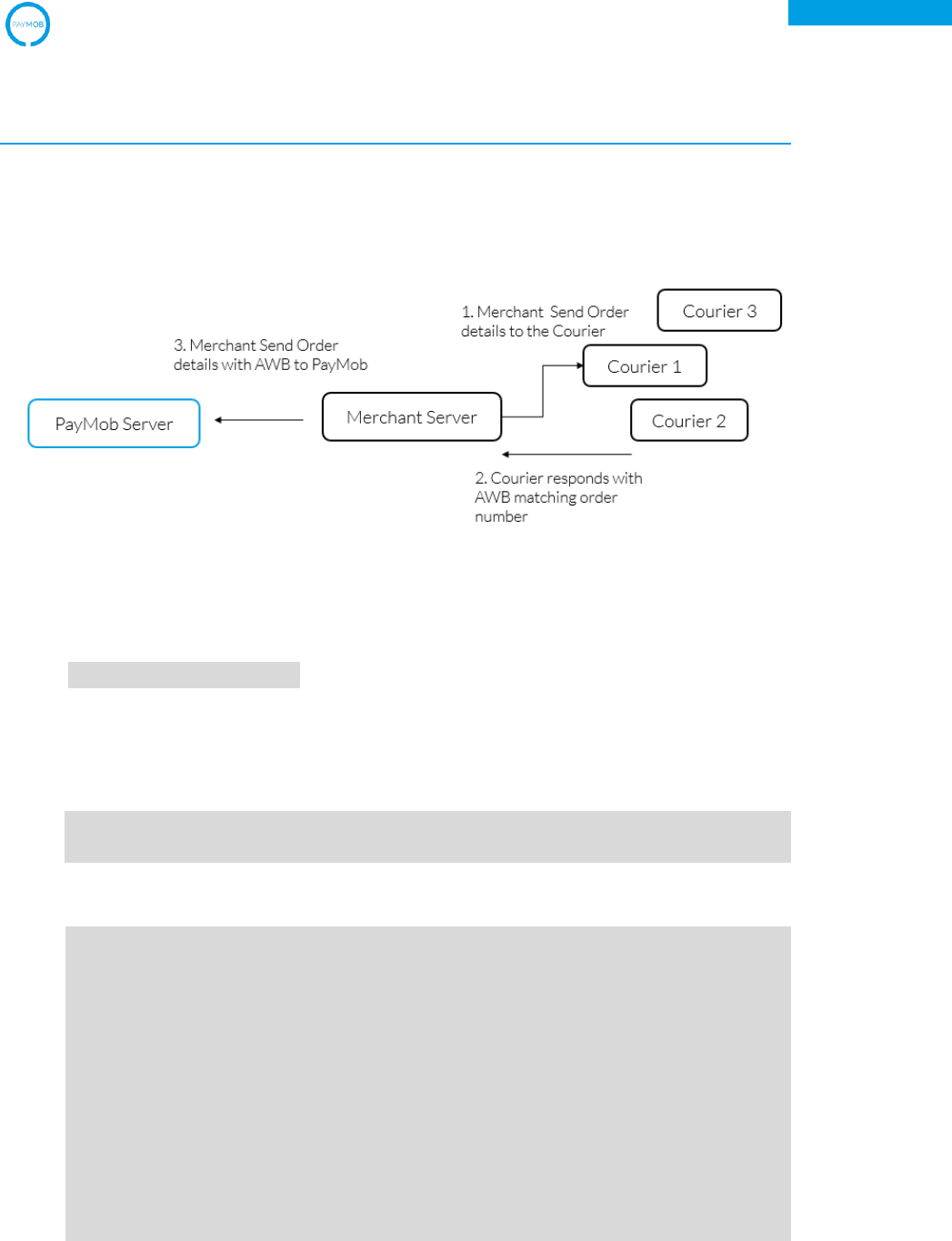
Figure 1 – Data Flow

PayMob Merchant Developers Guide v2.0
8
PayMob Payment-on-Delivery Service
"total_amount": x,
“currency”: x,
“order_time”: x,
“courier_id”: x,
“comments”: x,
“expected_payment_method”: x,
"customer": {
“name”: x,
“phone”: x,
“address”: x,
“email”: x,
}
“expiry_time”: x,
“expiry_action”: x,
“cancel_upon_expiration”: x,
“extra_order_type”: x,
“in_promo”: x,
“promo_code”: x,
“extra_x1”: x,
“extra_x2”: x,
“extra_x3”: x,
“extra_x4”: x,
“extra_x5”: x,
}
Parameter Name
Data Type
Example
Is Required
Comments
merchant_order_id
JSON
{1234 :
{“amount”: x,
“extra_order_type”:
x, “product_info”:
x}}
True
No restrictions on
the id format
merchant_order_id
.amount
Float/Integer
123.50
True
merchant_order_id
.extra_order_type
250 CharArray
“Bags category”
False
merchant_order_id
.product_info
250 CharArray
“Apparel”
False
total_amount
Float/Integer
123.50
True
currency
Choice Field:
EGP /USD
EGP
False
Default: EGP
order_time
Timestamp
1422038585
False
courier_id
Alphanumeric
MA8213
True
comments
TextField
“simple comment”
False
expected_payment_
Choice Field:
CASH
True
PayMob Merchant Developers Guide v2.0
9
PayMob Payment-on-Delivery Service
method
CASH/CARD/
MWALLET
customer.name
250 CharArray
“Bisll White”
True
customer.phone
50 CharArray
“+201005023132”
True
customer.address
250 CharArray
“48, Street 16”
True
customer.email
250 CharArray
client@client.com
True
expiry_time
Timestamp
1422038585
False
expiry_action
ChoiceField:
EMAIL/CALL
BACK/EMAIL
-CALLBACK
EMAIL-
CALLBACK
False
cancel_upon_expir
ation
Boolean Field
True
False
extra_order_type
250 CharArray
“Bags category”
False
in_promo
Boolean Field
True
False
promo_code
250 CharArray
30%DISCOUNT
False
extra_x1
Reserved
N/A
False
extra_x2
Reserved
N/A
False
extra_x3
Reserved
N/A
False
extra_x4
Reserved
N/A
False
extra_x5
Reserved
N/A
False
PayMob Server Response
{ "paymob_id": x,
“request_status”: x,
“qr_code_awb”: x,
“airway_bill”: x,
}
Parameter Name
Data Type
Example
Is Required
Comments
paymob_id
Integer
41233352
True
request_status
Choice Field:
SUCCESS/
FAILURE
SUCCESS
True
qr_code_awb
URL Field
https://api.qrserver
.com/v1/create-qr-
code/?size=150x1
50&data=1234
True
airway_bill
Alphanumeric
True

PayMob Merchant Developers Guide v2.0
10
PayMob Payment-on-Delivery Service
2. Update Order
The below URL is where the merchant update an order at PayMob
PATH : /api/update_order/<awb>
POST Request:
HTTP Header includes:
API-KEY: xxxxxxx
API-SECRET-KEY: xxxxxxxx
JSON format body:
{ “merchant_order_id”: {
x : {
“amount”: x,
“extra_order_type”: x,
“product_info”: x,
},
xy : {
“amount”: x,
“extra_order_type”: x,
“product_info”: x,
},
},
"total_amount": x,
“courier_id”: x,
“expected_payment_method”: x,
“expiry_time”: x,
“expiry_action”: x,
“cancel_upon_expiration”: x,
“extra_x1”: x,
“extra_x2”: x,
“extra_x3”: x,
“extra_x4”: x,
“extra_x5”: x,
}
Parameter Name
Data Type
Example
Is Required
Comments
merchant_order_id
JSON
{1234 :
{“amount”: x,
“extra_order_type”:
x, “product_info”:
x}}
True
No restrictions on
the id format

PayMob Merchant Developers Guide v2.0
11
PayMob Payment-on-Delivery Service
merchant_order_id
.amount
Float/Integer
123.50
True
merchant_order_id
.extra_order_type
250 CharArray
“Bags category”
False
merchant_order_id
.product_info
250 CharArray
“Apparel”
False
total_amount
Float/Integer
123.50
True
courier_id
Alphanumeric
MA8213
True
expected_payment_
method
Choice Field:
CASH/CARD/
MWALLET
CASH
True
expiry_time
Timestamp
1422038585
False
expiry_action
ChoiceField:
EMAIL/CALL
BACK/EMAIL
-CALLBACK
EMAIL-
CALLBACK
False
cancel_upon_expir
ation
Boolean Field
True
False
extra_x1
Reserved
N/A
False
extra_x2
Reserved
N/A
False
extra_x3
Reserved
N/A
False
extra_x4
Reserved
N/A
False
extra_x5
Reserved
N/A
False
PayMob Server Response
{ "paymob_id": x,
“request_status”: x,
“airway_bill”: x,
“merchant_order_id”: {
x : {
“amount”: x,
“extra_order_type”: x,
“product_info”: x,
},
xy : {
“amount”: x,
“extra_order_type”: x,
“product_info”: x,
},
},
}
Parameter Name
Data Type
Example
Is Required
Comments
paymob_id
Integer
41233352
True
PayMob Merchant Developers Guide v2.0
12
PayMob Payment-on-Delivery Service
request_status
Choice Field:
SUCCESS/
FAILURE
SUCCESS
True
merchant_order_id
JSON
{1234 :
{“amount”: x,
“extra_order_type”
: x,
“product_info”:
x}}
True
No restrictions on
the id format
merchant_order_id
.amount
Float/Integer
123.50
True
merchant_order_id
.extra_order_type
250 CharArray
“Bags category”
False
merchant_order_id
.product_info
250 CharArray
“Apparel”
False
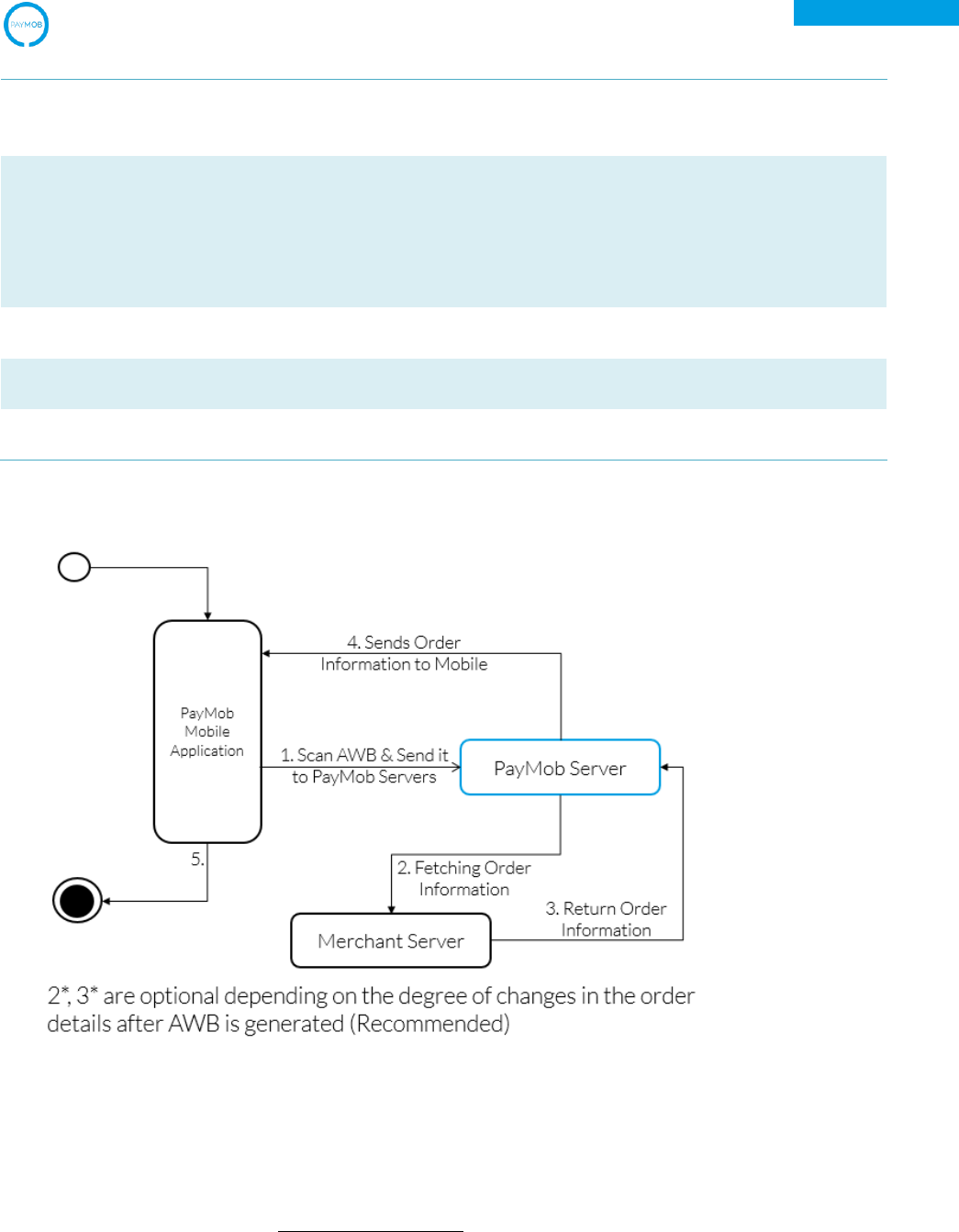
Figure 3 – Activity Diagram for Order Retrieval
3. Get Order Information from Merchant (Optional)
This method is to validate the latest order amount during the time of payment
(fulfillment).

PayMob Merchant Developers Guide v2.0
13
PayMob Payment-on-Delivery Service
URL:
THE URL SHALL BE SPECIFIED BY THE ORGANIZATION THROUGH THE ADMIN PANEL
POST Request:
HTTP Header includes:
REF-1: xxxxx
REF-2: xxxxx
JSON format body:
{ “airway_bill”: x,
“attempted_payment_method”: x,
“courier_id”: x,
}
Parameter Name
Data Type
Example
Is Required
Comments
airway_bil
Alphanumeric
B1458F
True
attempted_paymen
t_method
ChoiceField
CASH/CARD/
MWALLET
CARD
False
courier_id
Alphanumeric
MA813
True
Merchant Server Response on Successful Airway Bill Retrieval:
{ “merchant_order_id”: {
x : {
“amount”: x,
“extra_order_type”: x,
“product_info”: x,
},
xy : {
“amount”: x,
“extra_order_type”: x,
“product_info”: x,
},
},
"latest_amount": x,
“currency”: x,
}
Parameter Name
Data Type
Example
Is Required
Comments
merchant_order_id
JSON
{1234 :
True
No restrictions on

PayMob Merchant Developers Guide v2.0
14
PayMob Payment-on-Delivery Service
{“amount”: x,
“extra_order_type”
: x,
“product_info”:
x}}
the id format
merchant_order_id
.amount
Float/Integer
123.50
True
merchant_order_id
.extra_order_type
250 CharArray
“Bags category”
False
merchant_order_id
.product_info
250 CharArray
“Apparel”
False
latest_amount
Float/Integer
123.50
True
currency
Choice Field:
EGP/USD
EGP
False
Default: EGP
Merchant Server Response on Failure in Airway Bill Retrieval:
{ “error_code”: x,
“error_message”: x,
}
Parameter Name
Data Type
Example
Is Required
Comments
error_code
Choice Field:
0/1/2
1
True
0: Airway_bill
does not exist
1: Payment is
prohibited for this
airway_bill
2: Other problems
with the order
error_message
String
“Order does not
exist”
False
4. Delete Order
The below URL is where the collector can delete order:
PATH : /api/delete_order/<courier_id>/<awb>
POST Request:
HTTP Header includes:
API-KEY: xxxxxxx
API-SECRET-KEY: xxxxxxxx
PayMob Merchant Developers Guide v2.0
15
PayMob Payment-on-Delivery Service
JSON format body:
NO JSON BODY
PayMob Server Response
{ “request_status”: x,
“error_code”: x,
}
Parameter Name
Data Type
Example
Is Required
Comments
request_status
Choice Field:
SUCCESS/
FAILURE
SUCCESS
True
error_code
Choice Field:
1/2
1
True
1: Order has
already been paid
2: Order cannot be
deleted for other
reasons
5. Cancel Order
The below URL is where the collector can delete order:
PATH : /api/cancel_order/<courier_id>/<awb>
POST Request:
HTTP Header includes:
API-KEY: xxxxxxx
API-SECRET-KEY: xxxxxxxx
JSON format body:
NO JSON BODY
PayMob Server Response
{ “request_status”: x,
“error_code”: x,
}
Parameter Name
Data Type
Example
Is Required
Comments
request_status
Choice Field:
SUCCESS
True
PayMob Merchant Developers Guide v2.0
16
PayMob Payment-on-Delivery Service
SUCCESS/
FAILURE
error_code
Choice Field:
1/2
1
True
1: Order has
already been paid
2: Order cannot be
deleted for other
reasons
PayMob Merchant Developers Guide v2.0
17
PayMob Payment-on-Delivery Service
CallBack Notifications (Cash/Card)
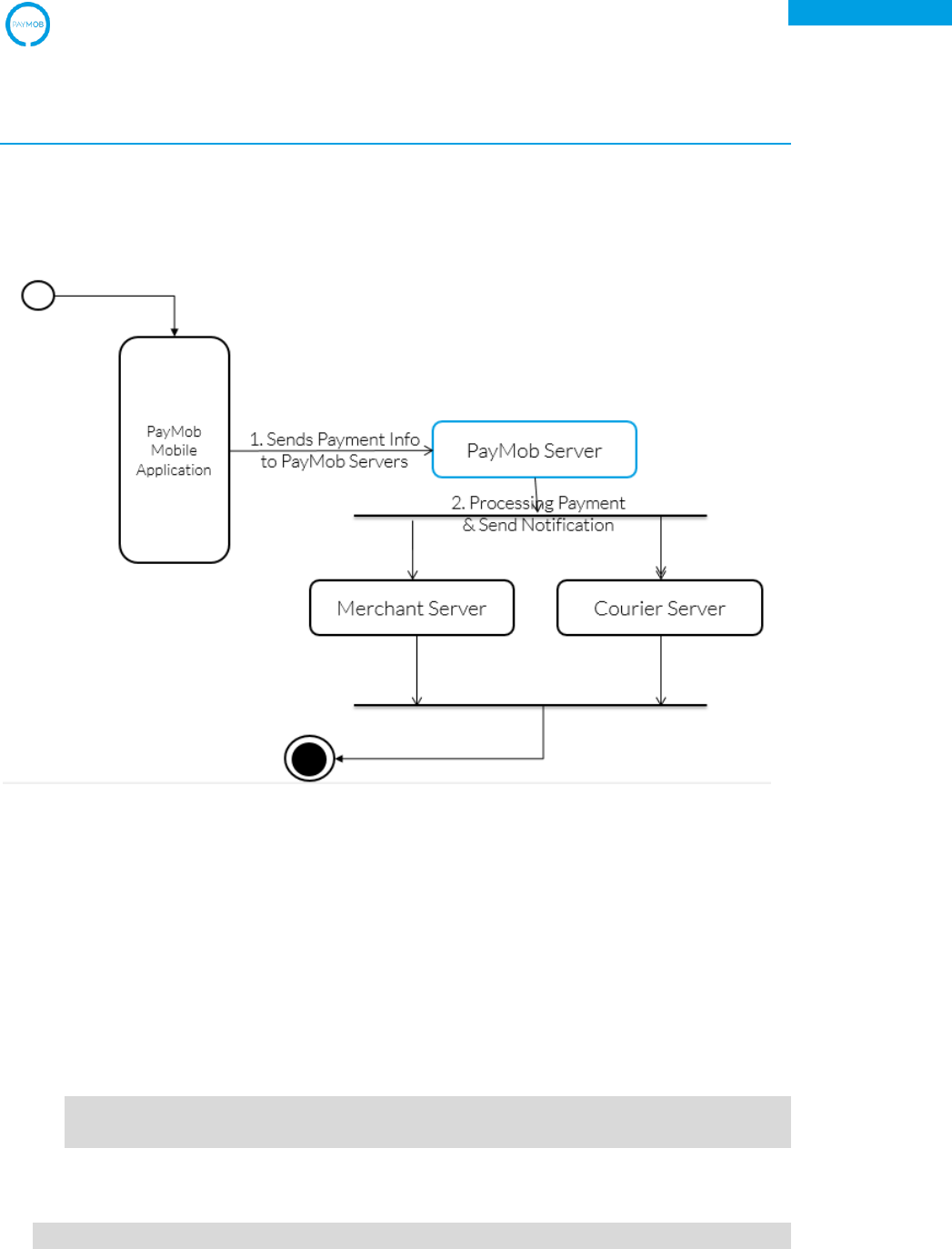
Important Note:
Upon transaction completion, PayMob server will automatically notify the merchant
server about the updated status of the transaction.
Figure 4 – Payment Notification Activity Diagram
6. Payment Response
PayMob server shall send the following information to the CallBack URL Specified by
the Merchant
POST Request:
HTTP Header includes:
REF-1: xxxxxxx
REF-2: xxxxxxx
JSON format body:
{ “request_status”: x,

PayMob Merchant Developers Guide v2.0
18
PayMob Payment-on-Delivery Service
"paymob_id": x,
“merchant_order_id”: {
x: {
“amount”: x,
“extra_order_type”: x,
“product_info”: x,
}.
xy: {
“amount”: x,
“extra_order_type”: x,
“product_info”: x,
}.
“airway_bill”: x,
"actual_payment_method": x,
"payment_status": x,
"total_amount": x,
“currency”: x,
“merchant_id”: x,
“courier_id”: x,
"order_paid_on": x,
“batch_number”: x,
“card_type”: x,
“card_num” x,
“in_promo”: x.
“promo_code”: x,
“transaction_number”: x,
“fail_count”: x,
“fail_reasons”: [],
“merchant_callback_retries”: x,
}
Parameter Name
Data Type
Example
Is Required
Comments
request_status
ChoiceField:
SUCCESS/
FAILURE
SUCCESS
True
paymob_id
Integer
12314
True
merchant_order_id
JSON
{1234 :
{“amount”: x,
“extra_order_type
”: x,
“product_info”:
x}}
True
No restrictions on
the id format
merchant_order_id.
amount
Float/Integer
123.50
True
merchant_order_id.
250 CharArray
“Bags category”
False

PayMob Merchant Developers Guide v2.0
19
PayMob Payment-on-Delivery Service
extra_order_type
merchant_order_id.
product_info
250 CharArray
“Apparel”
False
airway_bill
Alphanumeric
True
No restrictions on
the format
actual_payment_me
thod
ChoiceField:
CASH/CARD/
MWALLET
CASH
True
payment_status
ChoiceField:
PAID/
UNPAID/
VOID/
CANCELLED
PAID
True
total_amount
Float/Integer
123.50
True
currency
Choice Field:
EGP/USD
EGP
False
Default: EGP
merchant_id
Alphanumeric
ME4112
True
No restrictions on
the format
courier_id
Alphanumeric
MA8213
True
No restrictions on
the format
order_paid_on
Timestamp
True
batch_number
DateField:
DD/MM/YYY
Y
24/5/2015
False
card_type
ChoiceField:
mastercard/visa
Visa
False
card_num
Digits
1234
False
Last 4 digits in the
payment card
number
in_promo
Booelean Field
True
False
promo_code
250 CharArray
30%DISCOUNT
False
transaction_number
Integer
4323
True
fail_count
Integer
5
True
fail_reasons
List of Error
Objects
[{“error_code”:
12, “description”:
“x”},
{“error_code”: 1,
“description”:
“x”}]
True
merchant_callback_
retries
Unsigned
Integer
4
True
0 means first
attempts, no
retries.

PayMob Merchant Developers Guide v2.0
20
PayMob Payment-on-Delivery Service
Error Object:
error_code
Unsigned integer
12314
True
error_message
String
“message”
True
Merchant Server Response
{ "ack”: “ok”
}
** If PayMob server does not receive any response, it will attempt to retry
every 2 hours within the gap of 2 days until the Merchant server
acknowledges the request. If the duration of 2 days has passed, and the
Merchant server didn’t respond to the Callback notification, PayMob
server shall stop sending notification about the status of the non-
acknowledged order. However, the Merchant server can check the status
of the order afterwards using “Check Order Status”
7. Check Order Status
At any time whenever the merchant wants to check the status of an order.
The below URL is where the merchant can request the order status:
PATH : /api/order/awb/<courier_id>/<air_way_bill>
POST Request:
HTTP Header includes:
API-KEY: xxxxxxx
API-SECRET-KEY: xxxxxxxx
JSON format body:
NO JSON BODY
PayMob Server Response
{ "paymob_id": x,
“request_status”: x,
“merchant_order_id”: {
x: {
“amount”: x,
“extra_order_type”: x,

PayMob Merchant Developers Guide v2.0
21
PayMob Payment-on-Delivery Service
“product_info”: x,
}.
xy: {
“amount”: x,
“extra_order_type”: x,
“product_info”: x,
}.
“airway_bill”: x,
"actual_payment_method": x,
"payment_status": x,
"total_amount": x,
“currency”: x,
“merchant_id”: x,
“order_time”: x,
"order_paid_on": x,
“transaction_number”: x,
“expiry_time”: x,
“card_type”: x,
“card_num”: x,
“in_promo”: x,
“promo_code”: x,
“fail_count”: x,
“fail_reasons”: [],
"customer": {
“name”: x,
“phone”: x,
“address”: x,
}
“comments”: x,
“extra_order_type”: x,
“extra_x1”: x,
“extra_x2”: x,
“extra_x3”: x,
“extra_x4”: x,
“extra_x5”: x,
}
Parameter Name
Data Type
Example
Is Required
Comments
paymob_id
Integer
12314
True
request_status
Choice Field:
SUCCESS/
FAILURE
SUCCESS
True
merchant_order_id
JSON
{1234 :
{“amount”: x,
“extra_order_type
True
No restrictions on
the id format

PayMob Merchant Developers Guide v2.0
22
PayMob Payment-on-Delivery Service
”: x,
“product_info”:
x}}
merchant_order_id.
amount
Float/Integer
123.50
True
merchant_order_id.
extra_order_type
250 CharArray
“Bags category”
False
merchant_order_id.
product_info
250 CharArray
“Apparel”
False
airway_bill
Alphanumeric
True
No restrictions on
the format
actual_payment_me
thod
ChoiceField:
CASH/CARD/
MWALLET
CASH
True
payment_status
ChoiceField:
PAID/
UNPAID/
VOID/
CANCELLED
PAID
True
total_amount
Float/Integer
123.50
True
currency
Choice Field:
EGP/USD
EGP
False
Default: EGP
merchant_id
Alphanumeric
MA8213
True
order_time
Timestamp
False
order_paid_on
Timestamp
True
transaction_number
Integer
4323
True
expiry_time
Timestamp
1422038585
False
card_type
ChoiceField:
mastercard/visa
Visa
False
card_num
Digits
1234
False
Last 4 digits in the
payment card
number
in_promo
Booelean Field
True
False
promo_code
Alphanumeric
30%DISCOUNT
False
fail_count
Integer
5
True
fail_reasons
List of Error
Objects
[{“error_code”:
12, “description”:
“x”},
{“error_code”: 1,
“description”:
“x”}]
True
customer.name
250 CharArray
“Ahmed Sayed”
True
customer.phone
50 CharArray
“+201005023132
”
True
customer.address
250 CharArray
“48, Faisal
Street”
True

PayMob Merchant Developers Guide v2.0
23
PayMob Payment-on-Delivery Service
comments
TextField
“simple
comment”
False
extra_order_type
250 CharArray
“Bags category”
False
extra_x1
Reserved
N/A
False
extra_x2
Reserved
N/A
False
extra_x3
Reserved
N/A
False
extra_x4
Reserved
N/A
False
extra_x5
Reserved
N/A
False
Error Object:
error_code
Unsigned integer
12314
True
error_message
String
“message”
True
8. Update Order Currency Request
This request is for currency conversion when needed by the end customer
URL:
THE URL SHALL BE SPECIFIED BY THE ORGANIZATION THROUGH THE ADMIN PANEL
POST Request:
HTTP Header includes:
REF-1: xxxxx
REF-2: xxxxx
JSON format body:
{ “airway_bill”: x,
“courier_id”: x,
“currency”: x,
}
Parameter Name
Data Type
Example
Is Required
Comments
airway_bil
Alphanumeric
B1458F
True
courier_id
Alphanumeric
MA8213
True
currency
Choice Field:
EGP/USD
EGP
True
Merchant Server Response on Successful Airway Bill Retrieval:
{ “merchant_order_id”: {
x: {
“amount”: x,

PayMob Merchant Developers Guide v2.0
24
PayMob Payment-on-Delivery Service
“extra_order_type”: x,
“product_info”: x,
}.
xy: {
“amount”: x,
“extra_order_type”: x,
“product_info”: x,
}.
"total_amount": x,
“currency”: x,
}
Parameter Name
Data Type
Example
Is Required
Comments
merchant_order_id
JSON
{1234 :
{“amount”: x,
“extra_order_type”
: x,
“product_info”:
x}}
True
No restrictions on
the id format
merchant_order_id
.amount
Float/Integer
123.50
True
merchant_order_id
.extra_order_type
250 CharArray
“Bags category”
False
merchant_order_id
.product_info
250 CharArray
“Apparel”
False
total_amount
Float/Integer
123.50
True
currency
Choice Field:
EGP/USD
EGP
False
Default: EGP
Merchant Server Response on Failure in Airway Bill Retrieval:
{ “error_code”: x,
“error_message”: x,
}
Parameter Name
Data Type
Example
Is Required
Comments
error_code
Choice Field:
0/1/2
1
True
0: Airway_bill
does not exist
1: Payment is
prohibited for this
airway_bill
2: Other problems
with the order
error_message
String
“Order does not
exist”
False
PayMob Merchant Developers Guide v2.0
25
PayMob Payment-on-Delivery Service
Error Handling
Below is the list of all error levels along with a description for what each level represents
in addition to the possible message values for each error level.
Error Level
Description
Message Values
Level 0
User Authentication Error
- ‘Unidentified User’
- ‘User is not a Merchant, please consult your access
control’
Level 1
HTTP Request Type Error
- ‘Expected POST request only’
Level 2
Error: Invalid/Missing
Data Type in the
parameter of the request
- ‘Required ’merchant_order_id’ field’
- ‘Required ’merchant_order_id’ field’
- ‘’order_time’ must be of type timestamp’
- ‘expected_payment_method’ shall have a value
of ’CASH’ or ’CARD’’
- ’Customer’ information shall be specified. Please
refer to the documentation.’
- ‘Customer email should be specified’
- ’courier_id’ parameter must have a value’
- ’airway_bill’ parameter is mandatory’
Level 3
Misconfiguration in the
Admin Portal
- ‘courier_id’ value is not identified. Please consult the
admin portal to identify the courier.
Level 4
Logic Error
- ‘Order with the same merchant order id already been
created.’
- ‘Order with the same airway bill and courier already
been created.’
- ‘Order Not found’
- ‘Unidentified PATH’
Level 5
Unauthorized Request:
Please contact PayMob
Support
- ’courier_id’ value is not linked to a courier account’
- ’courier_id’ is linked to an account that is not
verified. Please wait until courier account is verified.’
PayMob Merchant Developers Guide v2.0
26
PayMob Payment-on-Delivery Service
Self-Testing Guide
Throughout the integration, developers should use this guide to ensure the
correctness the sent and retrieved data from and to PayMob servers.
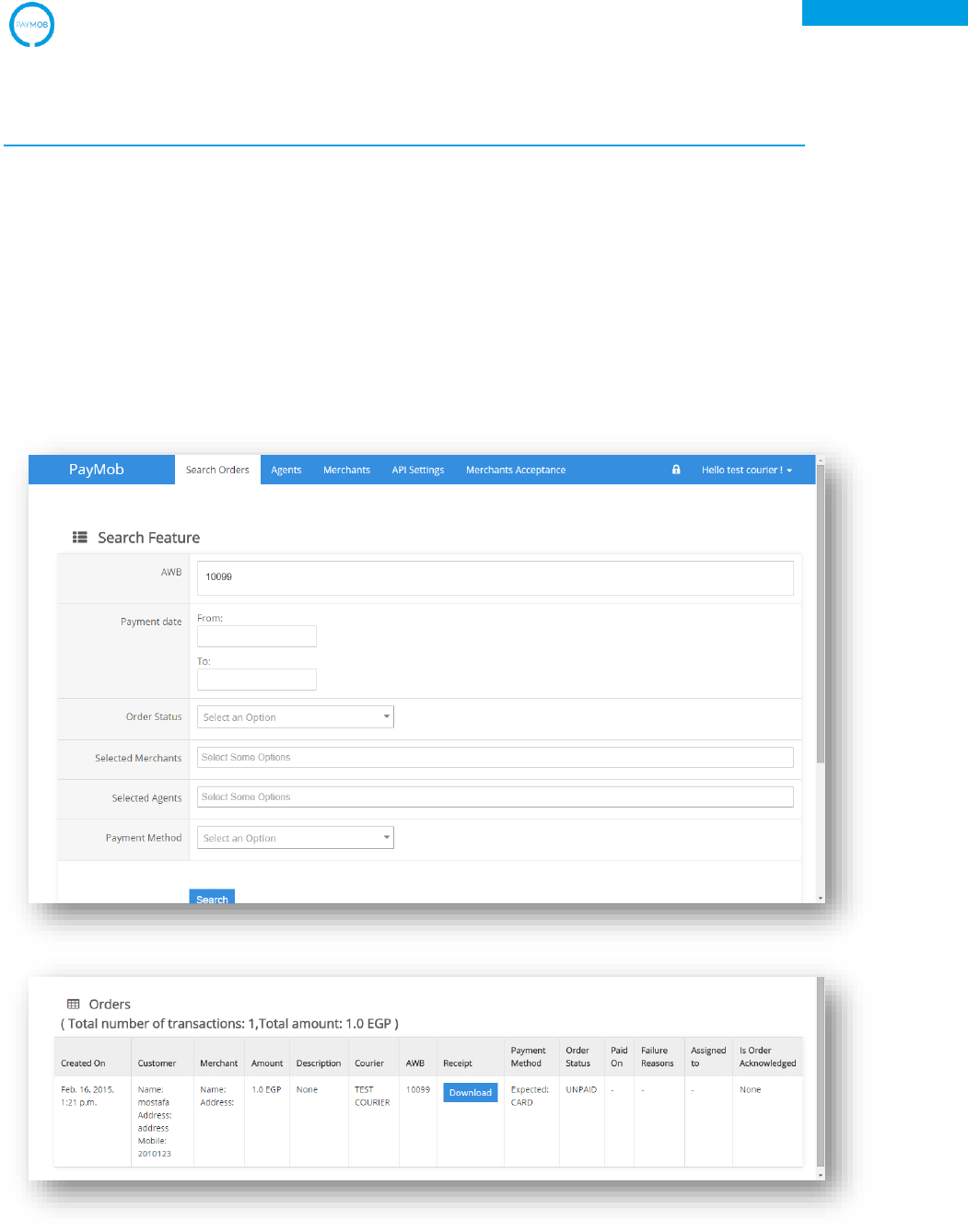
1. Register Order Testing
Upon sending a successful request to register an order, verification of this order
can be done through the Search Order tab on PayMob Admin Panel.
Assume order airway_bill was “10099”, it should appear in the search results.
PayMob Merchant Developers Guide v2.0
27
PayMob Payment-on-Delivery Service
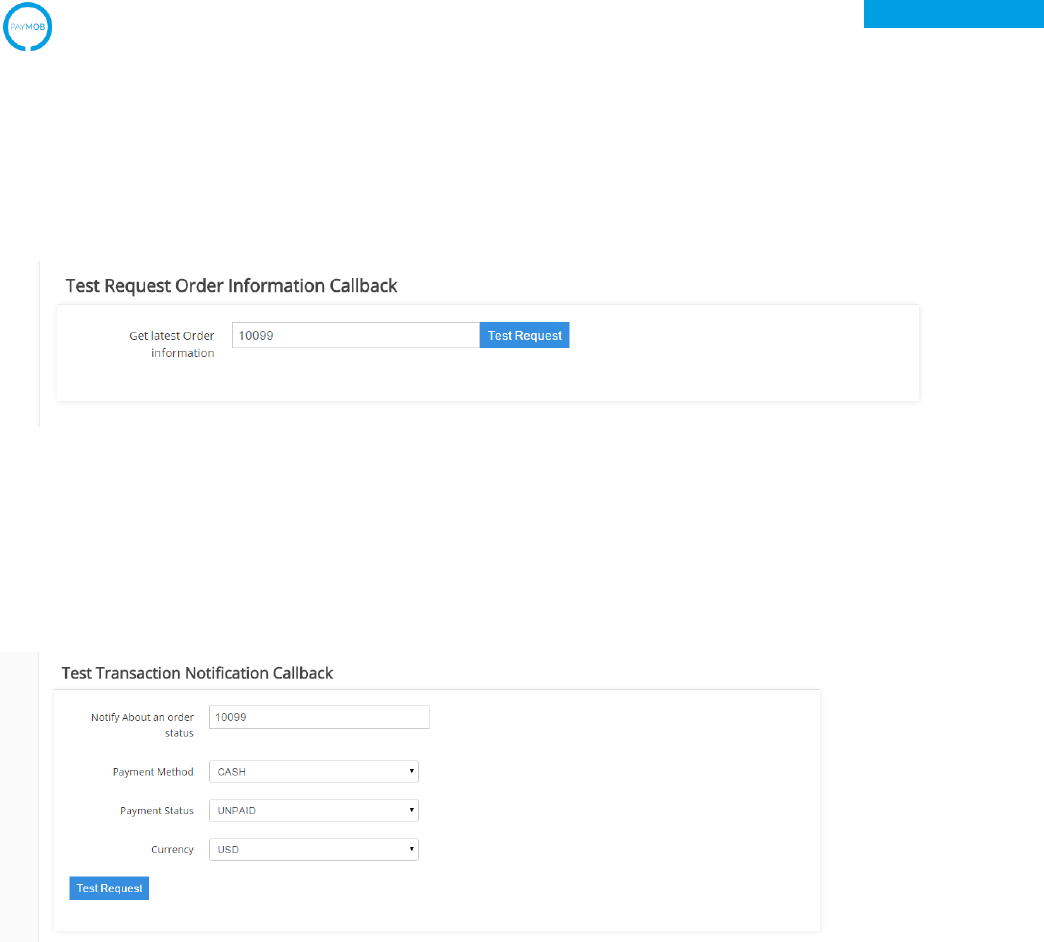
2. Request Order Information Testing
To simulate the Request Order Information, under the Test Request Order
Information Callback in the API Settings tab on PayMob Admin Panel, developers are
required to enter a registered Airway Bill code and click on Test Request.
3. Payment Notification
To simulate a transaction, under the Test Transaction Notification Callback in the
API Setting on PayMob Admin Panel, developers are required to enter a registered
Airway Bill code and click on Test Request.
