Pine Labs Payment Gateway Integration Guide
User Manual:
Open the PDF directly: View PDF  .
.
Page Count: 34

©Pine Labs 2019
Rev. 1.1
Page 1 of 34
Confidential
This document shall not be disclosed to any third party.
Pine Labs Payment Gateway
Merchant Integration Document V1.1

©Pine Labs 2019
Rev. 1.1
Page 2 of 34
Confidential
This document shall not be disclosed to any third party.
DOCUMENT VERSION HISTORY
Version
Description
Author
Approved by
Remark
0.1
First draft
Jaya Kiran K
Rakesh Shukla
0.2
Added transaction
flows
Vishal Mishra
Rakesh Shukla
1.1
Added API specs
Vishal Mishra
Rakesh Shukla

©Pine Labs 2019
Rev. 1.1
Page 3 of 34
Confidential
This document shall not be disclosed to any third party.
CONTENTS
1 About This Guide ........................................................................... 5
Objectives and Target Audience ................................................................................. 5 1.1
Related Documentation .............................................................................................. 5 1.2
2 Introduction .................................................................................... 5
Requesting a test setup .............................................................................................. 5 2.1
Prerequisites ............................................................................................................... 6 2.2
Who to contact for queries .......................................................................................... 6 2.3
Connecting to the Payment Gateway ......................................................................... 6 2.4
The Payment Process ................................................................................................ 6 2.5
Steps in the Payment Process .................................................................................... 8 2.6
3 Overview of Payment Models ........................................................ 9
Payment Modes ........................................................................................................ 11 3.1
4 Overview of Transaction Types ..................................................... 11
Purchase ................................................................................................................... 11 4.1
Auth & Capture ......................................................................................................... 11 4.2
Supporting Transactions ........................................................................................... 12 4.3
4.3.1 Refund and Inquiry Transactions ........................................................................ 12
5 Overview of the Integration Modes .............................................. 12
Redirect Mode .......................................................................................................... 13 5.1
Seamless .................................................................................................................. 13
5.2
6 Merchant Integration Process ...................................................... 13
Integration Steps ....................................................................................................... 13 6.1
Key Tasks in Payment Gateway Integration .............................................................. 14 6.2
6.2.1 Merchant Setup and Registration ....................................................................... 14
6.2.2 Development ...................................................................................................... 14
Sale Request ............................................................................................................ 15 6.3
6.3.1 Overview ............................................................................................................ 15
Dependent Transactions: Inquiry, Capture, Refund .................................................. 26
6.4

©Pine Labs 2019
Rev. 1.1
Page 5 of 34
Confidential
This document shall not be disclosed to any third party.
1 About This Guide
Objectives and Target Audience 1.1
This guide provides the details on how to connect merchant‘s website with Pine Labs
payment gateway and use its services. It is intended for users who want to carry out
integration with payment gateway.
It also covers the steps in the payment process and the information that needs to be
passed from merchant‘s web server to Pine Labs payment gateway, thus enabling Pine
Labs payment gateway to process payments.
Related Documentation 1.2
This guide should be used together with the additional documents as described below.
Document
Description
HashGeneration
Describes about hash generation
algorithm
ResponseCodeList
Listing of transaction response codes
2 Introduction
Pine Labs payment gateway hosts a collection of secure services, to process customer
payments. It offers multiple payment modes like cards ( with multi acquiring ) , brand
EMI, net banking, UPI, BharatQR, Pay by Points and others.
Post payment completion, the customer is returned to merchant website and merchant
will receive a real-time notification of the payment, which includes details of the
transaction.
Requesting a test setup 2.1
Merchant will need a test setup to integrate with Pine Labs payment gateway. Test setup
works as a live environment, however funds cannot be sent from a test account to a live
account.

©Pine Labs 2019
Rev. 1.1
Page 6 of 34
Confidential
This document shall not be disclosed to any third party.
Prerequisites 2.2
Duly filled merchant enrollment form.
Who to contact for queries 2.3
For all support queries, contact the Merchant Services department: -
Email: PGIntegration@pinelabs.com
Connecting to the Payment Gateway 2.4
Connecting to Pine Labs payment gateway requires integration with merchant website.
When customer selects Make Payment, page redirects to Pine Labs payment
gateway. At the same time merchant page needs to submit information about the
payment, such as MID, amount to be paid and several other hidden text fields.
The Payment Process 2.5
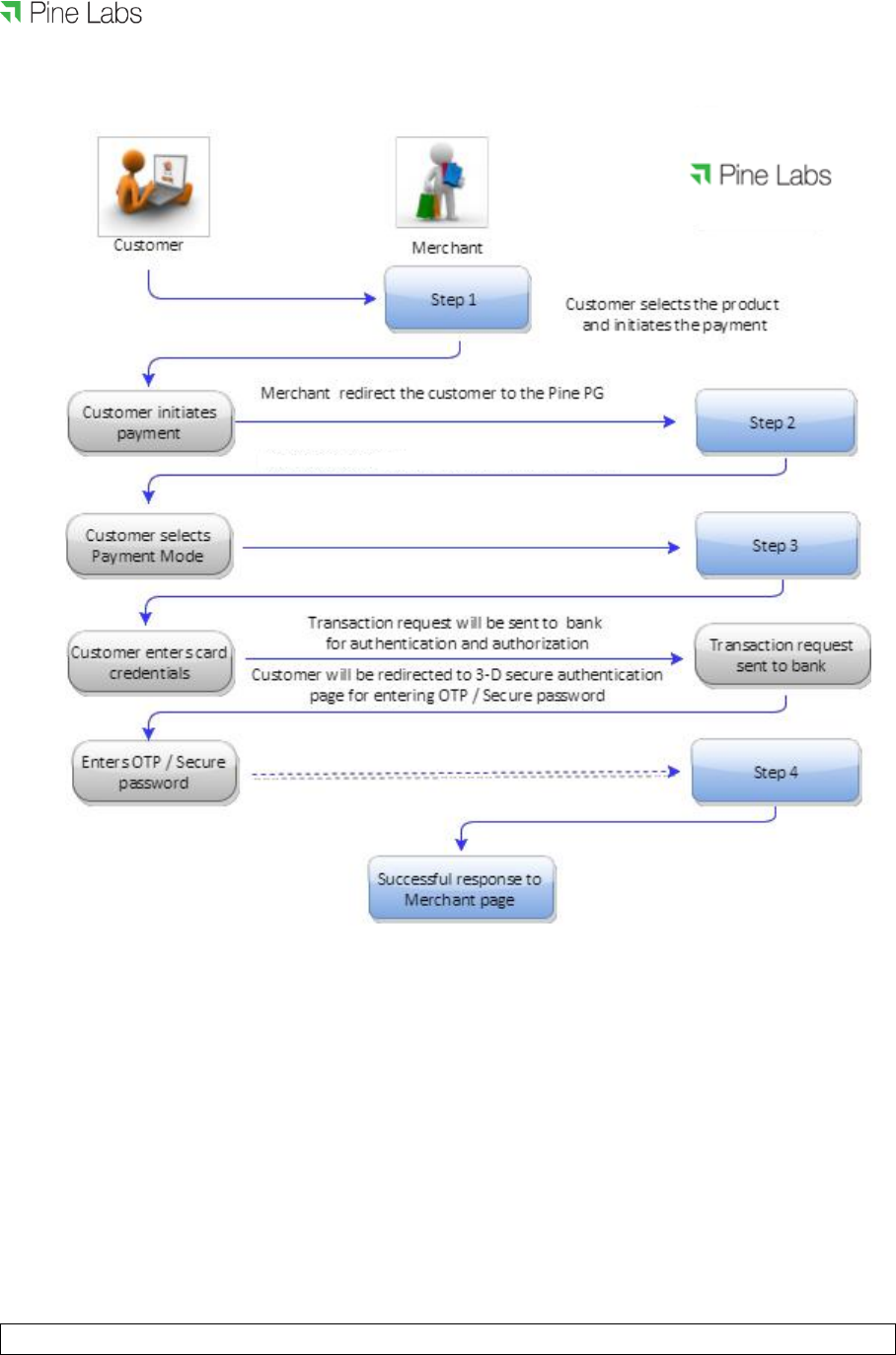
Figure 1 below provides a more detailed view of the interaction between customer,
merchant and Pine Labs payment gateway in a typical transaction.
©Pine Labs 2019
Rev. 1.1
Page 7 of 34
Confidential
This document shall not be disclosed to any third party.
Figure 1

©Pine Labs 2019
Rev. 1.1
Page 8 of 34
Confidential
This document shall not be disclosed to any third party.
Steps in the Payment Process 2.6
Payment details are collected from the customer and merchant is notified of
the results in the following steps: -
Step 1: Customer selects the product and initiates payment, merchant
redirects the customer to the Pine Labs payment gateway.
Step 2: Customer selects the payment mode.
Step 3: Customer enters his card details / payment credentials and
confirms payment.
Step 4: Customer will be redirected to 3DES authentication page for
Verified by Visa / MasterCard SecureCode / Amex Safe key. On
successful authentication, Pine Labs payment gateway seeks
authorization of the payment.
The customer receives a payment confirmation and merchant receives notification on
status of the payment.

©Pine Labs 2019
Rev. 1.1
Page 9 of 34
Confidential
This document shall not be disclosed to any third party.
3 Overview of Payment Models
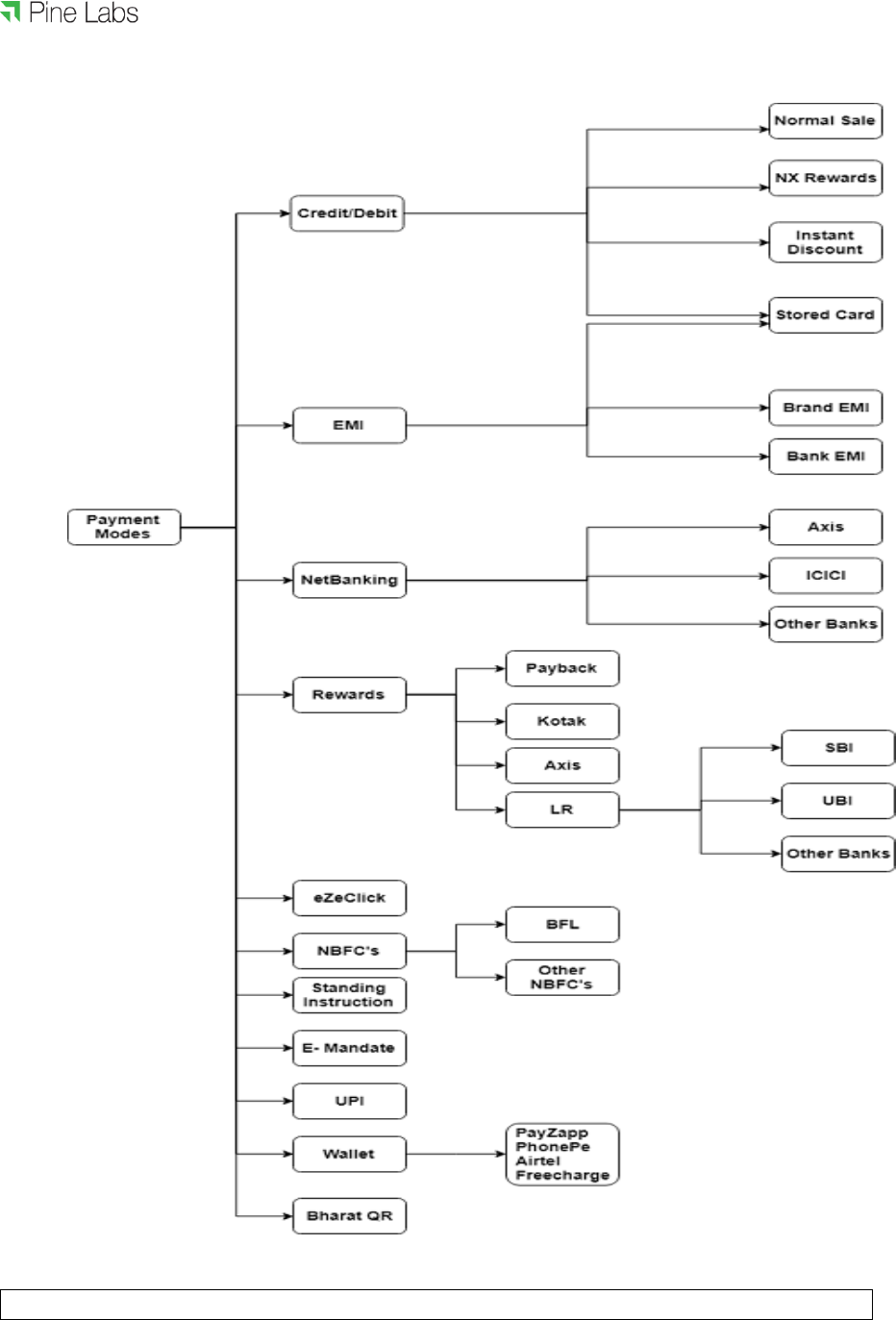
Pine Labs payment gateway supports the following payment models:
Purchase
Auth & Capture
A merchant can be enrolled in auth & capture or purchase payment model.
A merchant cannot have both the payment models on a single MID.
©Pine Labs 2019
Rev. 1.1
Page 10 of 34
Confidential
This document shall not be disclosed to any third party.

©Pine Labs 2019
Rev. 1.1
Page 11 of 34
Confidential
This document shall not be disclosed to any third party.
Payment Modes 3.1
Payment Mode ID
Payment Modes
1
Credit/Debit Cards
3
Net Banking
4
EMI
5
Rewards
6
eZeClick
7
NBFC (Third Party Emi)
8
Standing Instruction
9
E-Mandate
10
UPI
11
Wallets
12
BharatQR
4 Overview of Transaction Types
Pine Labs payment gateway supports the following transaction types: -
Purchase
Pre-Authorization
Capture
Refund
Inquiry
Purchase 4.1
Purchase transaction, where the merchant transaction is authorized by the issuing bank
and the customer card account is debited in a single transaction
Auth & Capture
4.2
Auth (commonly referred to as Authorization) transaction, wherein the transaction
value of the goods or services is sent to the issuing bank to verify the availability of
funds in the customer card account. And to block the (Open To Buy –OTB) funds
until the capture transaction is initiated by the merchant.
The auth transaction blocks the funds in the card account for a predetermined period
of time as determined by the issuing bank.
The auth transaction should be followed by capture transaction independently.

©Pine Labs 2019
Rev. 1.1
Page 12 of 34
Confidential
This document shall not be disclosed to any third party.
The capture transaction refers to the initial auth transactions and confirms to the issu-
ing bank. Issuing bank transfer the funds from customer card account through the ac-
quiring bank to the merchant’s bank account.
Supporting Transactions 4.3
For every authorized transaction, there should be a number of associated supporting
financial transactions.
Inquiry to know the status of the transaction.
Refund for purchase transaction.
Refund for auth/capture transactions.
4.3.1 Refund and Inquiry Transactions
The refund API gives the convenience of automating customer refunds. Alternatively,
there is an option to refund a payment transaction manually using the Merchant
Console.
If for some reason you didn't receive a response from Pine Labs payment gateway for
a sale or refund transaction (maybe the user abandoned the transaction midway or
there was a network/timeout issue when Pine Labs payment gateway sent the
response to callback URL). Merchant can use the inquiry API to confirm the final
status of the transaction. This transaction can be initiated using Pine Labs payment
gateway API or through merchant console.
5 Overview of the Integration Modes
Following are the integration modes supported:
Redirect
Seamless
Merchant redirects a customer to Pine Labs payment gateway landing page. This is
called redirect mode.
Capturing customer card details at merchant page is called seamless mode. In this
case, merchant needs to be PCI DSS certified.

©Pine Labs 2019
Rev. 1.1
Page 13 of 34
Confidential
This document shall not be disclosed to any third party.
Redirect Mode 5.1
Merchant redirects customer to Pine Labs payment gateway landing page along with
merchant MID and other specific details.
Customer enters card details on Pine Labs payment gateway page.
Pine Labs payment gateway processes transactions by communicating with acquirer
in turn scheme and then issuer banks.
After transaction completion, Pine Labs payment gateway maps transaction with
merchant and order specific details and redirects customer to merchant page along
with the response of the transaction.
In this scenario Pine Labs payment gateway also provides landing page
customization details to merchant. These customization details will include CSS.
In this CSS, merchant can define fonts, color scheme of Pine Labs payment gateway
landing page. So that when customer gets redirected from merchant site to Pine Labs
payment gateway page, seamless experience is offered in terms of look and feel of
the website.
Seamless 5.2
In this integration mode, merchant captures card details of the customer at its page
and calls Pine Labs payment gateway api’s passing encrypted card details along
with merchant MID and other specific fields.
Pine Labs payment gateway processes this transaction, maps transaction with
merchant and order specific details and sends response back on merchant return url.
6 Merchant Integration Process
Integration Steps 6.1
• Project initiation kick off call
• Merchant setup and registration
• Pine Labs issues test MID, URL and credentials

©Pine Labs 2019
Rev. 1.1
Page 14 of 34
Confidential
This document shall not be disclosed to any third party.
• Pre development
• Merchant builds code and is ready for testing
• System tests with full functionality in QA environment
• Security testing with Pine Labs
• Security testing with acquirer banks
• Sign off confirmation from Pine Labs & Acquirer banks
• Pine Labs issues live MID, URL and credentials
• Launch – Go Live
Key Tasks in Payment Gateway Integration 6.2
6.2.1 Merchant Setup and Registration
Merchant needs to share dully filled merchant enrollment form to Pine Labs.
Based on the options selected by merchant; relevant test setup, test codes, test URL
and credentials will be shared to merchant.
Pine Labs payment gateway will share integration guide, sample request and
response messages with the merchant.
An overview will be provided, if requested by the merchant.
6.2.2 Development
Merchant develops his application to integrate with Pine Labs payment gateway.
Merchant to first integrate using the test MID which will be provided by Pine Labs.
Merchant can use test MID to check complete functionality of authentication,
authorization, capture and refund. UAT testing will be initiated post to this.
©Pine Labs 2019
Rev. 1.1
Page 15 of 34
Confidential
This document shall not be disclosed to any third party.
Sale Request 6.3
6.3.1 Overview
It is a Http form post request where merchant will redirect user to Pine Labs payment
gateway page along with request parameters.
6.3.1.1 Request API & URL
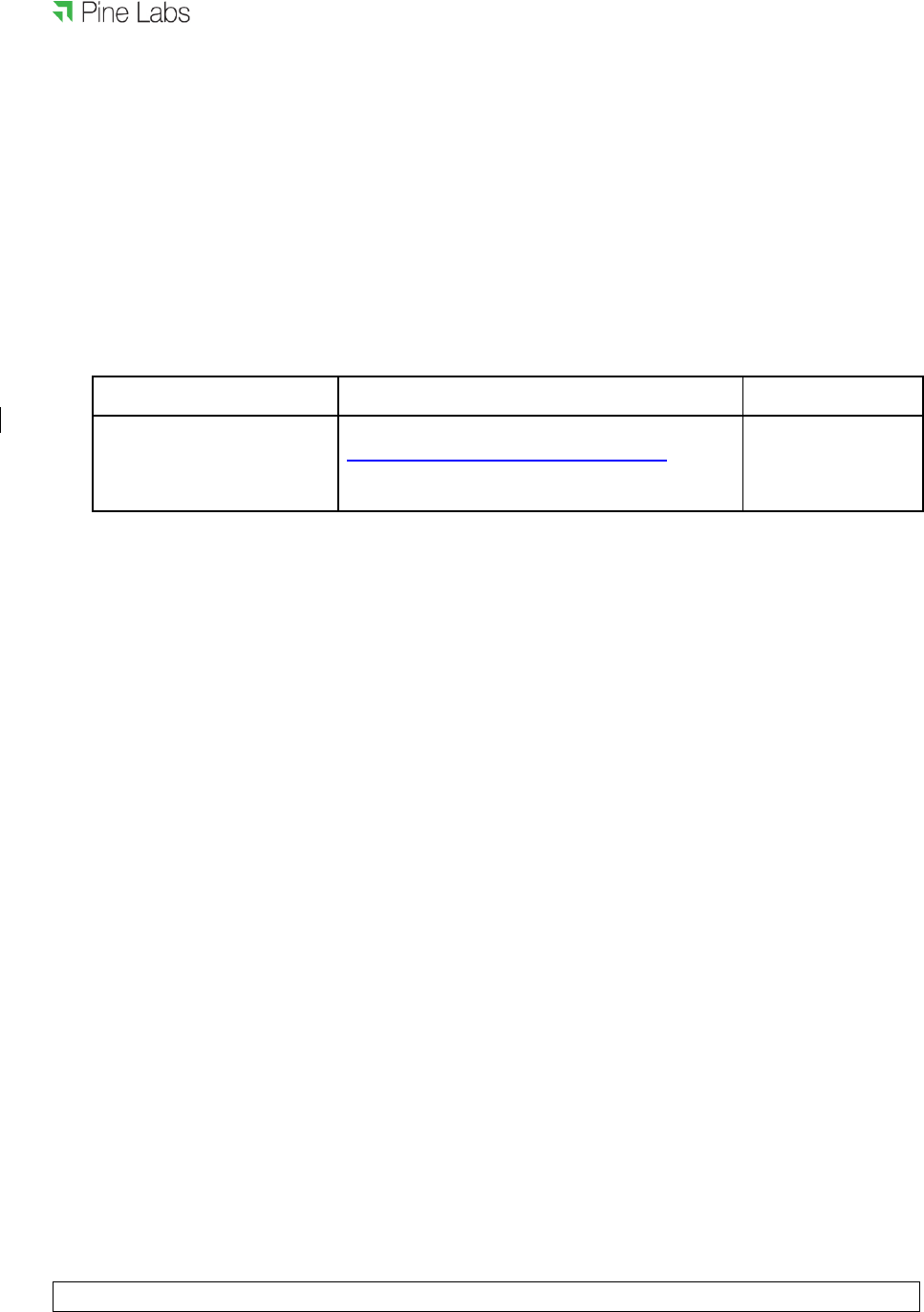
API
URL
Calling mode
Pre-Authorization,
https://uat.pinepg.in/PinePGRedirect
Browser
Purchase
redirect/form post
6.3.1.2 Authentication of Request
Each request is authenticated based on the following :-
Merchant access code, parameter name ppc_MerchantAccessCode. Received value
of this parameter will be validated at Pine Labs payment gateway.
Hash of request parameters using Secret key (provided to merchant during merchant
registration). Please refer to HashGeneration document for hash generation
algorithm.
Parameters for passing hash and hash type are:
ppc_DIA_SECRET
ppc_DIA_SECRET_TYPE
Merchant must create the ppc_DIA_SECRET using Secret key,
ppc_DIA_SECRET_TYPE and request parameters list.
6.3.1.3 Request parameters Key-Value pair Table
Contains a collection of key-value pairs of all parameters which are required to be sent

©Pine Labs 2019
Rev. 1.1
Page 16 of 34
Confidential
This document shall not be disclosed to any third party.
in sale request.
Key
Value
Details
Mandatory/Optional
ppc_MerchantID
Integer
You can find it in
your (merchant)
registration data.
It is the merchant
Id issued by Pine
Labs
M
ppc_Amount
Long
.
It is the amount for
which payment
transaction is
required.
Greater than zero,
in the least
currency
denominator
(e.g. for INR
amount is in
Paise )
M
ppc_DIA_SECRET_TYPE
String
Use ‘SHA256’ or
‘MD5’ as its
Value
M
ppc_DIA_SECRET
String
Hash of request
parameters.
Please refer to
HashGeneration
document for
hash generation
algorithm.
M
ppc_MerchantAccessCode
String
You can find it in
your (merchant)
Registration data.
M
ppc_MerchantReturnURL
String
Browser call back
URL. This URL will
be used by Pine
M

©Pine Labs 2019
Rev. 1.1
Page 17 of 34
Confidential
This document shall not be disclosed to any third party.
Labs payment
gateway to post
and redirect
Sale/Pre Auth
transaction
response.
ppc_NavigationMode
Integer
Integration mode
2 for Redirect
7 for Seamless
M
ppc_UniqueMerchantTxnID
String.
Max
Length
99
It is the transaction
Id generated at
merchant side, for
merchant
transaction
tracking. It is
required only for
‘PreAuth’ and
‘Purchase’
transactions.
M
ppc_TransactionType
Integer
Use-
1 for ‘Purchase’,
8 for ‘PreAuth’,
3 for ‘Inquiry’,
9 for ‘Capture’,
10 for ‘Refund’
M
ppc_PayModeOnLandingPag
e
String
It will contain csv of
valid payment
mode Ids.
M
ppc_CurrencyCode
String
It is the currency
code which is
required for
handling the
amount provided.
Use ‘356’ for Indian
rupees.
M

©Pine Labs 2019
Rev. 1.1
Page 18 of 34
Confidential
This document shall not be disclosed to any third party.
ppc_Product_Code
String
It is merchant
product code. It is
required for brand
EMI transaction.
O
ppc_PayCredentials
String
Encrypted card
data is send in this
attribute.
Applicable only for
seamless mode.
O
ppc_KeyID
Integer
Key Id used to
encrypt card data.
Applicable only for
seamless mode
O
ppc_TenureID
Integer
Tenure ID
applicable for
seamless EMI
transaction
O
ppc_Scheme
Json
string
Scheme selected
by user.
Applicable only in
seamless EMI
mode
O
ppc_CustomerId
String.
Max
Length
can be
49
In case of Saved
Card/Express
Checkout, this is
used for getting
saved cards.
O
ppc_CustomerEmail
String
Email address of
customer.
O
ppc_CustomerMobile
String
Mobile number of
customer.
O
ppc_CustomerAddress1
String
Address1 of
customer
O

©Pine Labs 2019
Rev. 1.1
Page 19 of 34
Confidential
This document shall not be disclosed to any third party.
ppc_CustomerAddress2
String
Address2 of
customer
O
ppc_CustomerAddress3
String
Address2 of
customer
O
ppc_CustomerCity
String
City of customer
O
ppc_CustomerState
String
State of customer
address
O
ppc_CustomerCountry
String
Country of
customer address
O
6.3.1.3.1 ppc_PayModeOnLandingPage
Payment modes send in request must be subset of payment modes enabled on merchant.
If this validation fails, transaction will fail.
If this validation succeeds, Pine Labs payment gateway landing page will show only those
options of payment that are sent in ppc_PayModeOnLandingPage
6.3.1.3.2 ppc_CustomerId
If incoming request from merchant includes ppc_CustomerId, and payment modes to be
rendered are credit/debit card or EMI; Pine Labs payment gateway will check for saved
cards. Key for this search will be customer id and merchant id. If saved cards are found, all
the saved cards will be shown. User can select any saved card, enter CVV/4DBC and do
transactions.
In case of EMI, if customer is having any saved card against selected issuer, saved cards will
be shown after EMI table and user can do transaction by entering CVV/4DBC only.
6.3.1.3.3 ppc_MerchantReturnURL
This URL will be used by Pine Labs payment gateway to post transaction response. It is

©Pine Labs 2019
Rev. 1.1
Page 20 of 34
Confidential
This document shall not be disclosed to any third party.
mandatory for purchase and preauth transaction types. Also, Pine Labs payment gateway
should be having access to this URL. This might need whitelisting of Pine Labs payment
gateway URL at merchant set up.
Please note that ppc_MerchantReturnURL sent in transaction request has to be same as
the one provided during merchant registration. Multiple return urls can be configured in the
system.
If ppc_MerchantReturnURL sent in transaction request and merchant return URL
configured for merchant are different, transaction will be rejected.
6.3.1.4 Response parameters Key-Value pair Table
Key
Value
Details
Mandatory/Optiona
l
ppc_MerchantID
Integer
In response you can see
the merchant id which you
have sent as one of the
parameter in Pine Labs
payment gateway API
request parameters.
M
ppc_MerchantAccessCode
String
In response you can find
the merchant access code
which you have sent as
one of the parameter.
M
ppc_UniqueMerchantTxnID
String. Max
length 99
In response you can find
the merchant unique
transaction Id which you
have sent as one of the
parameter.
M
ppc_PinePGTxnStatus
Integer
Transaction status
M
ppc_TransactionCompletion
DateTime
DateTime
The date-time of the
transaction completion at
Pine Labs payment
O

©Pine Labs 2019
Rev. 1.1
Page 21 of 34
Confidential
This document shall not be disclosed to any third party.
gateway server.
ppc_Amount
Long
It is the amount for which
payment transaction is
being done.
M
ppc_TxnResponseCode
Integer
Represent the response of
the API request and
response code is
returned based on the
transaction result.
M
ppc_TxnResponseMessage
String
Transaction response
M
ppc_AcquirerName
String
Acquirer Bank
O
ppc_PinePGTransactionID
Long
Unique transaction id
generated by Pine Labs
O
ppc_PaymentMode
Integer
Payment mode chosen at
landing page.
O
ppc_DIA_SECRET
String
Hash of response
parameters. Please refer
to
HashGeneration
document.
Pine Labs payment
gateway creates the
hash of the
response parameters and
sends this information in
M

©Pine Labs 2019
Rev. 1.1
Page 22 of 34
Confidential
This document shall not be disclosed to any third party.
response in tag
ppc_DIA_SECRET.
Merchant should use this
hash value returned in
response to match
with new secret
generated at its side
using other response
Parameters. If these
two secrets do not match
then data is not authentic.
ppc_DIA_SECRET_TYPE
String
‘SHA256’ or ‘MD5’ and will
be the same which is
passed in
ppc_DIA_SECRET_TYPE
parameter of request
M
ppc_Is_BankEMITransactio
n
Bool
Flag to indicate Bank EMI
transaction
O
ppc_Is_BrandEMITransactio
n
Bool
Flag to indicate Brand EMI
transaction
O
ppc_EMITenureMonth
Integer
Tenure month of EMI
transaction
O
ppc_EMIPrincipalAmount
Long
Principal EMI amount in
Paise
O
ppc_EMIAmountPayableEa
chMonth
Long
Monthly Installment
O
ppc_EMIInterestRatePercen
t
Integer
Interest rate charged by
bank multiplied by 10000
O
ppc_EMICashBackType
Integer
Its value will be 0 or 1
O

©Pine Labs 2019
Rev. 1.1
Page 23 of 34
Confidential
This document shall not be disclosed to any third party.
0- Pre cash back
1- Post cash back
ppc_EMITotalDiscCashBack
Amt
Long
Total discount or cashback
amount applicable in EMI
transaction in paise
O
ppc_EMITotalDiscCashBack
Percent
Integer
Total discount or cashback
percent applicable in EMI
transaction multiplied by
10000
O
ppc_EMIMerchantDiscCash
BackPercent
Integer
Merchant discount or
cashback percent
applicable in EMI
tranasction multiplied by
10000
O
ppc_EMIMerchantCashBack
FixedAmt
Long
Merchant fixed discount or
cashback amount
applicable in
EMI transaction in paise
O
ppc_EMIIssuerDiscCashBac
kPercent
Integer
Issuer discount or
cashback percent
applicable in EMI
transaction multiplied by
10000
O
ppc_EMIIssuerDiscCashBac
kFixedAmt
Long
Issuer fixed discount or
cashback amount
applicable in EMI
transaction in paise
O

©Pine Labs 2019
Rev. 1.1
Page 24 of 34
Confidential
This document shall not be disclosed to any third party.
6.3.1.5 Pine Labs Payment Gateway Transaction Status Table
TXN_STATUS_ID
TXN_STATUS_NAME
DESCRIPTION
-10
Cancelled
when the user cancels the
transaction.
-9
Auth Cancelled
Authorisation transaction
has cancelled due to some
reasons e.g.bank session
time out, capture
transaction failed.
-8
Velocity Check Failed
Velocity check failed for EMI
transactions
-7
Failure
Transaction has failed due
to some reasons e.g. bank
session time out,
insufficient funds. Payer
needs to re-
initiate the transaction.
-6
Rejected
Transaction has been
rejected.
1
Initiated
Pine Labs payment gateway
has not received response
from Payment
Provider/Bank. For all
such transactions, We will
retry the transaction, post
which the transaction status
will be updated to
‘Captured‘ or‘AuthReceived’
or
‘Rejected’.

©Pine Labs 2019
Rev. 1.1
Page 25 of 34
Confidential
This document shall not be disclosed to any third party.
2
Auth Received
Authorization
successful.This transaction
will be on hold for 24
hours. After risk analysis
this transaction will be
marked as 'AuthComplete'
in Pine Labs payment
gateway system.
3
Auth Complete
Transaction is now eligible
for 'Capture'. It can be 'Auto-
Captured' by Pine Labs
payment gateway. Or
Merchant can 'Capture' it
using merchant console
post-delivery confirmation.
Transaction which is not
captured within predefined
auth expiry days will be
cancelled.
4
Captured
'Captured' call is successful.
Funds will be transferred to
merchant account.
5
Cleared
Funds have been
transferred to Merchant
account.
6
Refunded
Refund of the transaction
is successful.
7
Query Complete
Query of the transaction is
successful.

©Pine Labs 2019
Rev. 1.1
Page 26 of 34
Confidential
This document shall not be disclosed to any third party.
Dependent Transactions: Inquiry, Capture, Refund 6.4
6.4.1 Web Service: REST Based API
Request parameters are a collection of key-value pairs of all properties which are
required to be sent to Pine Labs payment gateway API.
Response returned is in JSON and contains a collection of key-value pairs.
6.4.1.1 Request API & URL
Hosting
API
URL
Calling mode
TEST
Inquiry,
HTTP post method(content-type will be
x-www-form-urlencoded)
Capture,
Refund
https://uat.pinepg.in/api
/PG
PRODUCTION
Inquiry,
https://pinepg.in/api/PG
HTTP post method(content-type will be
x-www-form-urlencoded)
Capture,
Refund
6.4.1.2 Authentication of API Calls
Each request is authenticated based on the following: -
Merchant access code, parameter name ppc_MerchantAccessCode. Merchant
Access code received will be validated at Pine Labs payment gateway.
Hash of request parameters using Secret key (provided to merchant during merchant
registration). Please refer to HashGeneration document for hash generation
algorithm. Parameters for passing hash and hash type are:
1. ppc_DIA_SECRET
2. ppc_DIA_SECRET_TYPE
Merchant must create the ppc_DIA_SECRET using Secret key,

©Pine Labs 2019
Rev. 1.1
Page 27 of 34
Confidential
This document shall not be disclosed to any third party.
ppc_DIA_SECRET_TYPE and request parameters list.
6.4.1.3 Request Parameters Key-Value Pair Table
Contains a collection of key-value pairs of all parameters which are required to be
sent to Pine Labs payment gateway API
KEY
VALUE
DETAILS
MANDATORY/
OPTIONAL
ppc_MerchantID
Integer
Shared by Pine Labs
on merchant
registration.
M
ppc_Amount
Long
It is the amount for
which payment
transaction is required.
Greater than zero,
in the least currency
denominator ( e.g. for
INR amount is in
Paise )
M(optional for
inquiry)
ppc_DIA_SECRET_TYPE
String
Values: ‘SHA256’ or
‘MD5’
M
ppc_DIA_SECRET
String
Hash of response
parameters. Please
refer to
HashGenerationDocu
ment.
Pine Labs payment
gateway creates the
hash of the
response parameters
and
sends this information
in
response in tag
M

©Pine Labs 2019
Rev. 1.1
Page 28 of 34
Confidential
This document shall not be disclosed to any third party.
ppc_DIA_SECRET.
Merchant should use
this
hash value returned in
response to match
with new secret
generated at its side
using other response
parameters. If the
two secrets do not
match then data is not
authentic.
ppc_UniqueMerchantTxnID
String
Merchant transaction
id
M for Inquiry
ppc_MerchantAccessCode
String
Shared by Pine Labs
on
merchant registration.
M
ppc_PinePGTransactionID
Long
This is the
unique transaction id
generated by Pine
Labs
against the transaction
id of
merchant for ‘PreAuth’
or
‘Purchase’ transaction.
This is sent to the
merchant in response
of transaction.
This value is used as
input parameter for
dependent
transactions like
‘Capture’, ‘Refund’,
‘Inquiry’.
M(Optional for
inquiry)

©Pine Labs 2019
Rev. 1.1
Page 29 of 34
Confidential
This document shall not be disclosed to any third party.
ppc_CurrencyCode
Integer
Use-356 for INR
M (Optional for
Inquiry)
ppc_TransactionType
Integer
3 for ‘Inquiry’,
9 for ‘Capture’,
10 for ‘Refund’
M
6.4.1.4 Response parameters Key-Value pair Table
Contains a collection of key-value pairs of all parameters which Pine Labs payment
gateway will post back in response.
KEY
VALUE
DETAILS
ppc_MerchantID
Integer
MID through which transaction
has been initiated.
ppc_MerchantAccessCode
String
MerchantAccessCode used
in
API request.
ppc_UniqueMerchantTxnID
String
In response you can find the
merchant unique transaction
ID
which you have sent as one of
the parameter.
ppc_PinePGTxnStatus
Integer
Please refer Pine PG
Transaction
Status Table.
ppc_TransactionCompletionDat
DateTime
The date-time of the

©Pine Labs 2019
Rev. 1.1
Page 30 of 34
Confidential
This document shall not be disclosed to any third party.
eTime
transaction completion at Pine
PG server.
ppc_Amount
Long. Greater than zero,
in the
least currency
denominator
( e.g. for INR amount is
in Paise )
It is the amount for which
Payment transaction is being
done.
ppc_TxnResponseCode
Integer
Represent the response status
of the API call made to Pine
Labs payment gateway.
For the response status of
parent transaction refer
ppc_ParentTxnResponseCode
and ppc_Parent_TxnStatus
ppc_TxnResponseMessage
String
It is the text corresponding to
ppc_TxnResponseCode.
Please refer to
transaction
response code list.
ppc_AcquirerName
String
Acquirer Name
ppc_PinePGTransactionID
Long
Pine Labs payment gateway
unique transaction ID
ppc_DIA_SECRET
String
Hash of response parameters
ppc_DIA_SECRET_TYPE
String
‘SHA256’ or ‘MD5’ and will be
the same which is passed in
ppc_DIA_SECRET_TYPE
parameter of request

©Pine Labs 2019
Rev. 1.1
Page 31 of 34
Confidential
This document shall not be disclosed to any third party.
ppc_MerchantReturnURL
String
Return Url which you have
posted in request
ppc_EMITenureMonth
Integer
Tenure months of Emi
transaction
ppc_EMIInterestRatePercent
Integer
Interest rate charged by bank
multiplied by 1000
ppc_EMIProcessingFee
Long
Processing Fee of EMI in
paisa
ppc_EMIPrincipalAmount
Long
Principal EMI amount in paisa
ppc_EMIAmountPayableEachM
onth
Long
EMI Montly installment
ppc_ProductCode
String
Merchant product Code in
case
of Brand EMI transaction.
ppc_ProductDisplayName
String
Product display name
ppc_Is_BankEMITransaction
Bool
Flag to indicate bank EMI
Transaction
ppc_Is_BrandEMITransaction
Bool
Flag to indicate brand EMI
Transaction
ppc_CapturedAmount
Long
Total amount captured
ppc_RefundedAmount
Long
Total amount refunded

©Pine Labs 2019
Rev. 1.1
Page 32 of 34
Confidential
This document shall not be disclosed to any third party.
ppc_EMICashBackType
Integer
Its value will be 0 or 1
0- Pre cash back
1- Post cash back
ppc_EMIIssuerDiscCashBackPer
cent
Integer
Issuer discount or cashback
percent applicable in EMI
transaction multiplied by
10000
ppc_EMIIssuerDiscCashBackFix
edAmt
Long
Issuer fixed discount or
cashback amount applicable in
EMI transaction in paisa
ppc_EMIMerchantDiscCashBac
kPercent
Integer
Merchant discount or
cashback percent applicable in
EMI transaction multiplied by
10000
ppc_EMIMerchantCashBackFix
edAmt
Long
Merchant fixed discount or
cashback amount applicable in
EMI transaction in paisa
ppc_EMITotalDiscCashBackPerc
ent
Integer
Total discount or cashback
percent applicable in EMI
transaction multiplied by
10000
ppc_EMITotalDiscCashBackPerc
entFixedAmt
Long
Total fixed discount or
cashback percent applicable in
EMI transaction in paisa
ppc_EMITotalDiscCashBackAmt
Long
Total discount or cashback
amount applicable in EMI
transaction in paisa
ppc_EMIAdditionalCashBack
String
Additional cashback applicable

©Pine Labs 2019
Rev. 1.1
Page 33 of 34
Confidential
This document shall not be disclosed to any third party.
ppc_EMIAdditionalRewardPoints
Integer
Additional rewards points
ppc_PaymentMode
Integer
Payment mode selected
for doing the purchase
transaction.
ppc_OriginalTxnAmt
Long
This the transaction amount
for
which purchase transaction
was
done.
ppc_Parent_TxnStatus
Integer, Status of the
Purchase
transaction
Please refer Pine Labs
payment gateway transaction
status table.
This field should be mapped
for
the response status of parent
purchase transaction for which
API call is made.
ppc_ParentTxnResponseCode
Integer, Response code
of the
Purchase transaction
Represent the response of the
API request and response
code is returned based on the
transaction result.
This field should be mapped
for
the response status of parent
purchase transaction for which
API call is made.
ppc_ParentTxnResponseMessa
ge
String, Response
message of
purchase transaction
It is the text corresponding to
ppc_TxnResponseCode.
Please refer to response code
list
©Pine Labs 2019
Rev. 1.1
Page 34 of 34
Confidential
This document shall not be disclosed to any third party.
ppc_ProgramType
Integer
Values:
106 for Brand EMI.
ppc_MaskedCardNumber
String
Masked value of card used for
purchase transaction.
ppc_ISEZEClick
Bool
Flag to indicate whether the
transaction was done through
ezeclick or not.
Note:
The status of the purchase transaction for which an inquiry API call is made should be
inferred from parameters ppc_Parent_TxnStatus and ppc_ParentTxnResponseCode.
Status
Value of
ppc_Parent_TxnStatus
Value of
ppc_ParentTxnResponseCode
Successful parent
purchase transaction
4
1
