QualNet 6.1 InstallationGuide Qual Net Installation Guide
User Manual:
Open the PDF directly: View PDF  .
.
Page Count: 15


ii QualNet 6.1 Installation Guide
Copyright Information
© 2012 Scalable Network Technologies, Inc. All rights reserved.
QualNet and EXata are registered trademarks of Scalable Network Technologies, Inc.
All other trademarks and trade names used are property of their respective companies.
Scalable Network Technologies, Inc.
6100 Center Drive, Suite 1250
Los Angeles, CA 90045
Phone: 310-338-3318
Fax: 310-338-7213
http://www.scalable-networks.com

QualNet 6.1 Installation Guide iii
Table of Contents
Preface................................................................................... iv
Chapter 1 Installing QualNet on Windows .............................................. 1
1.1 System Requirements ............................................................................................ 1
1.2 Installing QualNet ................................................................................................... 2
1.3 License..................................................................................................................... 2
1.4 Compiling QualNet.................................................................................................. 3
1.5 Uninstalling QualNet............................................................................................... 3
Chapter 2 Installing QualNet on Linux .................................................... 4
2.1 System Requirements ............................................................................................ 4
2.2 Installing QualNet ................................................................................................... 6
2.2.1 Running QualNet Installer from GUI .................................................................. 6
2.2.2 Running QualNet Installer from Command Line ................................................ 7
2.3 License..................................................................................................................... 8
2.4 Installing Third-Party Software.............................................................................. 9
2.5 Compiling QualNet.................................................................................................. 9
2.6 Uninstalling QualNet............................................................................................... 9

iv QualNet 6.1 Installation Guide
Preface
. . . . . . . . . . . . . . . . . . . . . . . . . . . . . . . . . . . . . . . . . . . . . . . . . . . . . . . . . . . . . . . . . . . . . . . . .
Who Should Read this Guide
This installation guide describes the system requirements and installation process for QualNet on
Windows and Linux systems.
. . . . . . . . . . . . . . . . . . . . . . . . . . . . . . . . . . . . . . . . . . . . . . . . . . . . . . . . . . . . . . . . . . . . . . . . .
How this Guide is Organized
This guide contains the following information:
•Chapter 1 describes installing QualNet on Windows platforms.
•Chapter 2 describes installing QualNet on Linux platforms.

QualNet 6.1 Installation Guide v
. . . . . . . . . . . . . . . . . . . . . . . . . . . . . . . . . . . . . . . . . . . . . . . . . . . . . . . . . . . . . . . . . . . . . . . . .
QualNet Document List
The following table shows the QualNet Documentation Set and offers a brief description of each document.
. . . . . . . . . . . . . . . . . . . . . . . . . . . . . . . . . . . . . . . . . . . . . . . . . . . . . . . . . . . . . . . . . . . . . . . . .
More Information
•For general information about SCALABLE, visit the company website at www.scalable-networks.com.
Document Description
QualNet API Reference Guide This guide is a supplement to QualNet Programmer’s Guide and
provides detailed information on the QualNet API functions and
parameters. This is available in both PDF and HTML formats.
QualNet Distributed Reference Guide This guide provides instructions for running QualNet on a
distributed architecture.
QualNet Documentation Portfolio The documentation portfolio combines all QualNet documents in a
single PDF file.
QualNet Installation Guide This guide provides detailed steps for installing QualNet on
Windows and Linux/Mac platforms.
QualNet Model Libraries This set of documents contains detailed reference information on all
QualNet models and includes the following protocol libraries. See
QualNet Model Library Index for an alphabetical list of all our
models and a reference to which library they can be found in.
Advanced Wireless
Cellular
Developer
LTE
Multimedia and Enterprise
Sensor Networks
Standard Interfaces
TIREM Advanced Propagation
UMTS
Urban Propagation
Wireless
QualNet Portability Guide This document describes the changes that need to be made
scenarios developed for previous versions of QualNet in order to
run them on the current version of QualNet.
QualNet Product Tour This tour provides an introduction to QualNet by means of an
example.
QualNet Programmer’s Guide This is a guide to the QualNet programming interface and functions,
allowing users to develop and customize protocol models.
QualNet Release Notes This document lists the changes (added and removed features, bug
fixes, etc.) made in the current version of QualNet with respect to
the previous version.
QualNet Statistics Database User’s Guide This is a guide to the statistics database generated by QualNet.
QualNet User’s Guide This is a detailed guide for using QualNet and works in combination
with the QualNet Model Libraries set of documents.

vi QualNet 6.1 Installation Guide
•For more information on QualNet, please contact QualNet Sales at sales@scalable-networks.com or
visit the QualNet website at www.exata-cyber.com.
•For technical help on QualNet, please contact QualNet Support at support@scalable-networks.com or
visit our Support website at support.scalable-networks.com.
•For help on QualNet documentation, please contact QualNet Support at support@scalable-
networks.com or visit the QualNet website at www.exata-cyber.com and click on Documentation.

QualNet 6.1 Installation Guide 1
1Installing QualNet on Windows
This chapter covers the system requirements and installation procedures for QualNet on Windows.
. . . . . . . . . . . . . . . . . . . . . . . . . . . . . . . . . . . . . . . . . . . . . . . . . . . . . . . . . . . . . . . . . . . . . . . . .
1.1 System Requirements
QualNet is supported on the following platforms:
•Microsoft Windows XP Professional with service pack 3 (SP3) 32-bit edition
•Microsoft Windows XP Professional x64 Edition with service pack 2 (SP2)
•Windows 7 Home Premium and Professional 32-bit and 64-bit editions
The minimum platform requirements to run QualNet on a Windows system are listed in Table 1-1.
Notes: 1. Although QualNet has not been fully tested on other platforms, it should also work on
other editions of Windows XP and Windows 7.
2. The pre-compiled QualNet binary included in the QualNet distribution is a 32-bit
application. For 64-bit platforms, a 64-bit pre-compiled QualNet binary is also included.
3. The QualNet GUI is a 32-bit application which can run on both 32-bit and 64-bit
platforms.
TABLE 1-1. Minimum Requirements for Windows
Item Requirements
CPU 32-bit (x86 compatible) processor
or
64-bit (x86-64 compatible) processor
Memory 512 MB free for LAN-size simulations without GUI
2 GB free for LAN-size simulations with GUI
2 - 4 GB free for a large network (1000+ nodes)
Disk 600 MB free disk space

Installing QualNet Chapter 1
2QualNet 6.1 Installation Guide
GUI Requirements
In addition to the above, the following are recommended when running the QualNet GUI on Windows:
•Discrete graphics card with at least 128 MB memory supporting hardware 3D acceleration.
•Display with 1024 x 768 or better resolution.
. . . . . . . . . . . . . . . . . . . . . . . . . . . . . . . . . . . . . . . . . . . . . . . . . . . . . . . . . . . . . . . . . . . . . . . . .
1.2 Installing QualNet
To install QualNet on Windows, perform the following steps:
1. Download the installation package (qualnet--6.1-windows-installer.exe) from the QualNet download
page or load it from the installation CD.
2. Double-click on the installation package and follow the installation prompts.
. . . . . . . . . . . . . . . . . . . . . . . . . . . . . . . . . . . . . . . . . . . . . . . . . . . . . . . . . . . . . . . . . . . . . . . . .
1.3 License
During the installation, the installer prompts the user to copy the license file. Copy the license file into
QUALNET_HOME\license_dir, where QUALNET_HOME is the directory where QualNet is installed.
The license file name is of the form QualNet-<type>-<date>.lic, where <type> is the type of license and
<date> is the date when support for the product expires. <type> is one of the following: Commercial-
floating, Commercial-node-locked, University-floating, University-node-locked, Evaluation, or Temporary-
node-locked. <date> is in the format YYYY-MM-DD-HH-MM-SS. For example, the license file may be
named QualNet-Commercial-floating-2013-05-19-01-19-52.lic.
Note: Some firewall programs may prevent QualNet GUI from running. To use QualNet GUI, you
may need to add it to the exception list of your firewall program. Check the documentation
of your firewall program for details on adding a program to the exception list or contact
your system administrator. If you are using Microsoft Windows firewall, visit the Microsoft
website for details of adding a program to the exception list.
Notes: 1. Be sure to check the file extension on your license file. It should end in “.lic”.
Depending on your system and method of copying, you may end up with an extra
extension, such as QualNet-Commercial-floating-2013-05-19-01-19-52-lic.txt, which
will not work.
2. If the license file cannot be located, inquire with the purchaser of QualNet. For users
with the evaluation version of QualNet, the license file is sent as an email attachment
from Scalable Network Technologies.
3. If a floating license is used, follow the instructions provided with the license files to
install the server license file.
4. For help with license issues, contact license@scalable-networks.com or visit the FAQ
page: http://www.scalable-networks.com/snt-support/
index.php?_m=knowledgebase&_a=view.

QualNet 6.1 Installation Guide 3
Chapter 1 Compiling QualNet
. . . . . . . . . . . . . . . . . . . . . . . . . . . . . . . . . . . . . . . . . . . . . . . . . . . . . . . . . . . . . . . . . . . . . . . . .
1.4 Compiling QualNet
The QualNet installer places a pre-compiled executable file in QUALNET_HOME\bin, where
QUALNET_HOME is the directory where QualNet is installed. This pre-compiled executable can be used
directly and you do not need to compile QualNet. Refer to QualNet User’s Guide for details.
However, if you modify the code or activate certain libraries, you will need to recompile QualNet. Refer to
QualNet Programmer’s Guide for details.
. . . . . . . . . . . . . . . . . . . . . . . . . . . . . . . . . . . . . . . . . . . . . . . . . . . . . . . . . . . . . . . . . . . . . . . . .
1.5 Uninstalling QualNet
To uninstall QualNet, do one of the following:
•Uninstall QualNet from the Start menu (this option is available only if you chose to install Start menu
shortcuts during installation):
Start > All Programs > SNT > QualNet Developer 6.1 > Uninstall QualNet Developer
•Open a command window, change directories to any location other than the QualNet installation
directory or any of its subdirectories, and type the following command:
%QUALNET_HOME%/Uninstall.exe

QualNet 6.1 Installation Guide 4
2Installing QualNet on Linux
This chapter covers the system requirements and installation of QualNet on Linux systems. For distributed
platforms, refer to QualNet Distributed Reference Guide.
. . . . . . . . . . . . . . . . . . . . . . . . . . . . . . . . . . . . . . . . . . . . . . . . . . . . . . . . . . . . . . . . . . . . . . . . .
2.1 System Requirements
QualNet is supported on 32-bit (x86 compatible) and 64-bit (x86-64 compatible) platforms running one of
the following Linux distributions:
•CentOS 5.3 and 5.4
•openSUSE 10.2 and 11.1
•Red Hat Enterprise Linux 5.3 and 5.4
•SUSE Linux Enterprise Server 10 SP2 and 11
•Ubuntu 9.10 (Karmic)
QualNet can also be supported on the following Linux distributions. If you need to run QualNet on one of
these platforms, contact support@scalable-networks.com.
•CentOS 5.6 and 6.3
•openSUSE 11.4 and 12.1
•Red Hat Enterprise Linux 5.6 and 6.3
•SUSE Linux Enterprise Server 10 SP4 and 11 SP2
•Ubuntu 10.04 LTS and 12.04 LTS
Note: The pre-compiled QualNet binary included in the QualNet distribution is a 32-bit
application for 32-bit platforms and a 64-bit application for 64-bit platforms. For 64-bit
platforms, a 32-bit pre-compiled QualNet binary is also included.
The QualNet GUI is a 32-bit application which can run on both 32-bit and 64-bit platforms.
QualNet 6.1 Installation Guide 5
Chapter 2 System Requirements
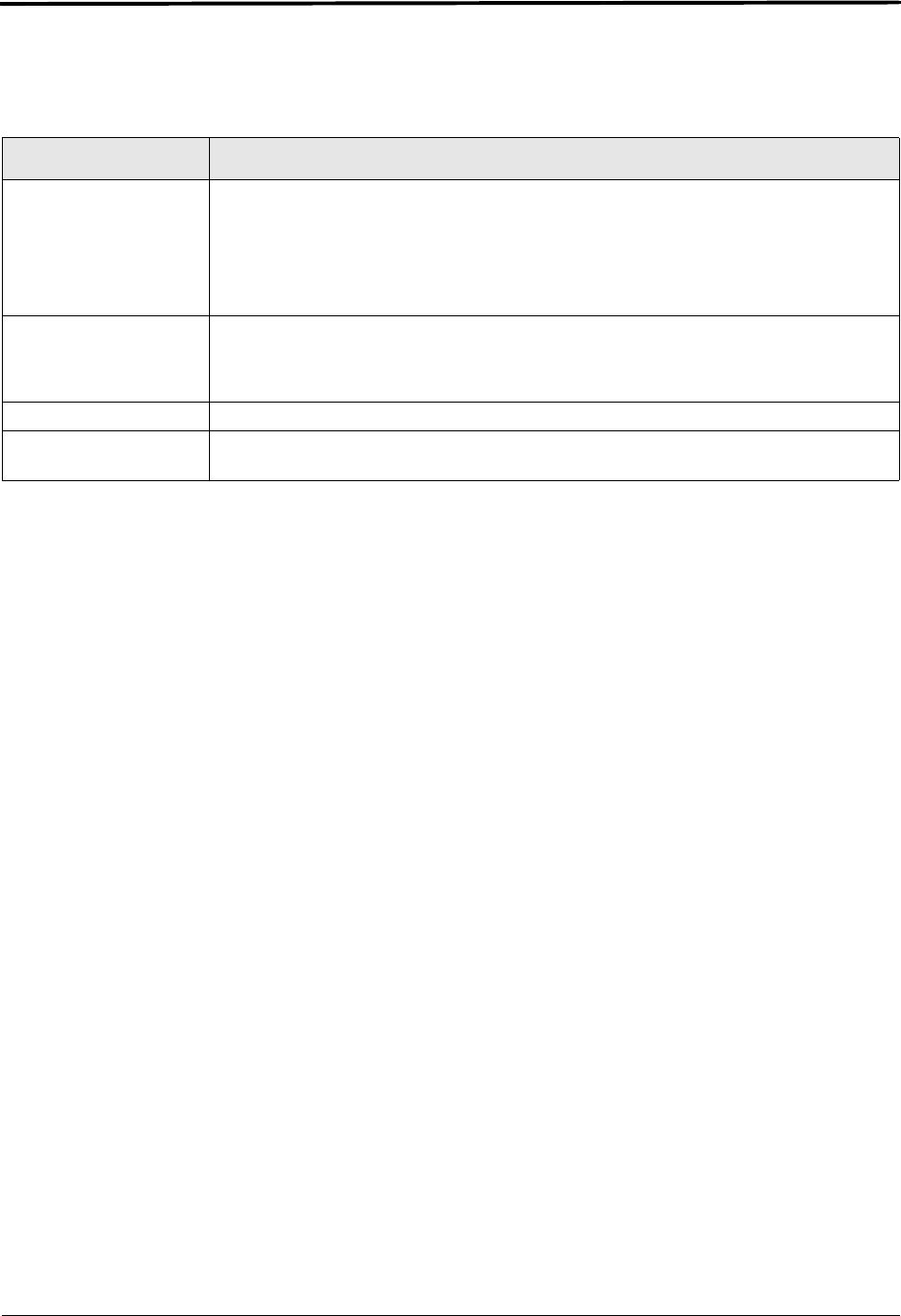
The minimum platform requirements to run QualNet on a Linux system are listed in Table 2-1.
GUI Requirenments
In the addition to the above, the following are recommended when running QualNet GUI on Linux:
•Discrete graphics card with at least 128 MB memory supporting hardware 3D acceleration (see
Section 2.4 for details on installing drivers). (QualNet GUI may not run on a virtual machine since virtual
machines typically do not support 3D acceleration.)
•Display with 1024 x 768 or better resolution
QualNet Packet Sniffer Interface Requirements
In order to use the QualNet Packet Sniffer interface, Linux kernel source code or header files must be
present. To verify if these are available on the emulation server (i.e., the machine running QualNet), open
a terminal window and do the following:
•For Debian or Ubuntu systems, type:
dpkg -s kernel
dpkg -s kernel-headers
•For other systems, type:
rpm –q kernel
rpm –q kernel-headers
If the above commands fail, consult your system administrator on how to install the kernel source or
header files on the emulation server.
TABLE 2-1. Minimum Requirements for Linux
Item Requirements
CPU 32-bit (x86 compatible) processor with SSE2 extension support
or
64-bit (x86-64 compatible) processor
Note: When you install QualNet, the installer will check whether the CPU supports
SSE2 extension.
Memory 512 MB free for LAN-size simulations without GUI
2 GB free for LAN-size simulations with GUI
2 - 4 GB free for a large network (1000+ nodes)
Disk 600 MB free disk space.
OpenGL OpenGL library libGL.so.1.2 or higher (needed only if QualNet GUI is run on the
machine).

Installing QualNet Chapter 2
6QualNet 6.1 Installation Guide
. . . . . . . . . . . . . . . . . . . . . . . . . . . . . . . . . . . . . . . . . . . . . . . . . . . . . . . . . . . . . . . . . . . . . . . . .
2.2 Installing QualNet
This section describes how to install QualNet on a Linux system.
QualNet can be installed locally on a machine by running the installer’s GUI (see Section 2.2.1). QualNet
can be installed on a remote machine by running the installer from the command line using ssh (see
Section 2.2.2).
2.2.1 Running QualNet Installer from GUI
To install QualNet on a Linux system using the installer’s GUI, perform the following steps:
1. Download the installation package from the QualNet download page or load it from the installation CD.
•The installation package for QualNet Developer on 32-bit platforms is qualnet-6.1-linux-installer-
32bit.
•The installation package for QualNet Developer on 64-bit platforms is qualnet-6.1-linux-installer-
64bit.
2. Double-click on the installation package.
3. Follow the installation prompts.
4. In addition to copying the necessary files to your system, the installer also updates some environment
variables. In order for these environment variables to take effect, you must logout of the system and
login again.
Note: QualNet is small enough that each user can install a separate copy of the software in their
home directory. QualNet need not be installed in /usr/local or other shared directories.
QualNet 6.1 Installation Guide 7
Chapter 2 Installing QualNet
2.2.2 Running QualNet Installer from Command Line
To install QualNet on a Linux system using the installer’s command line interface, perform the following
steps:
1. Download the installation package from the QualNet download page or load it from the installation CD.
•The installation package for QualNet Developer on 32-bit platforms is qualnet-6.1-linux-installer-
32bit.
•The installation package for QualNet Developer on 64-bit platforms is qualnet-6.1-linux-installer-
64bit.
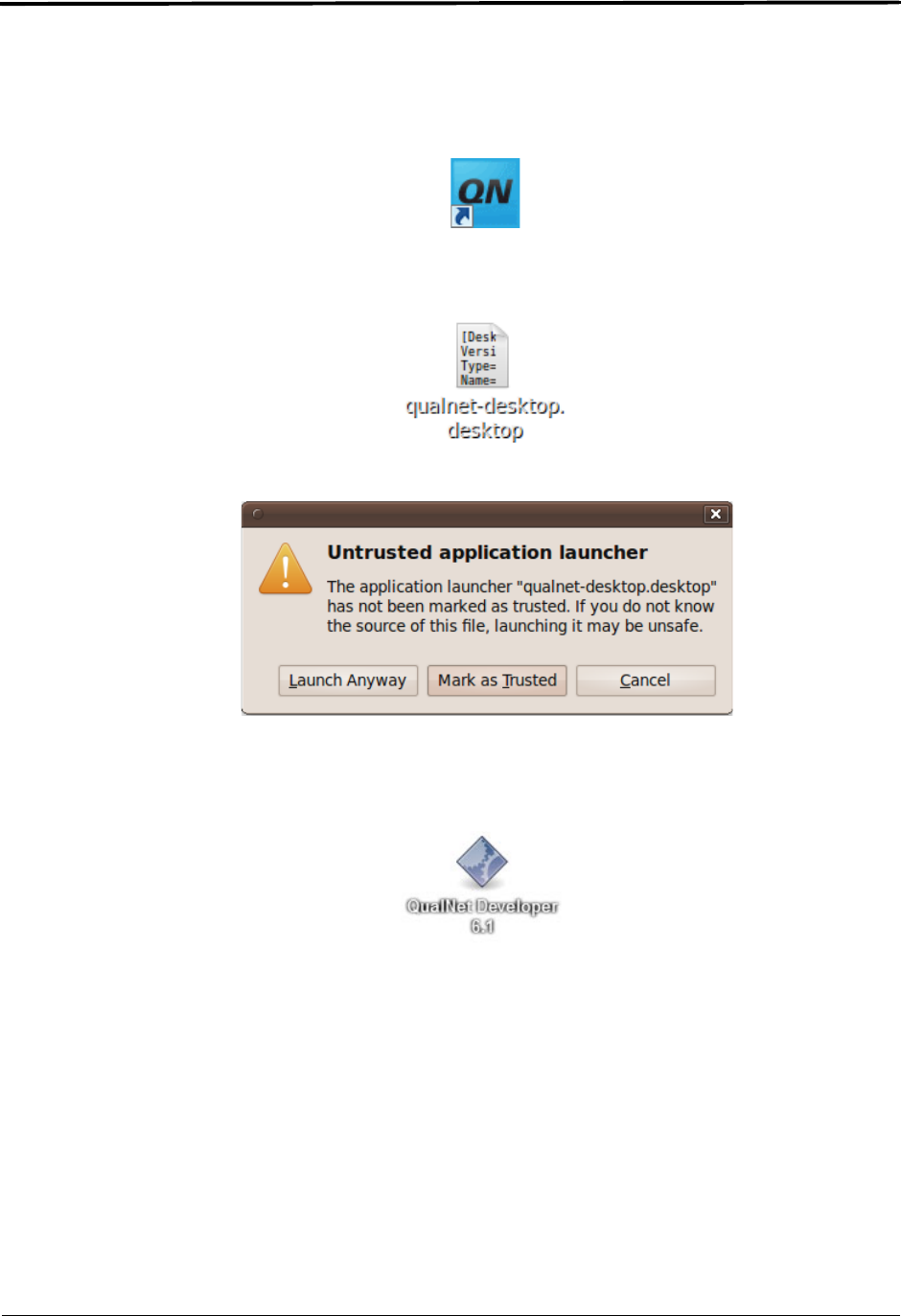
Note: In the last step of the installation, the installer provides an option for placing shortcuts on
the desktop. If this option is selected, the following shortcut for the QualNet GUI is placed
on the desktop:
On some Ubuntu platforms, instead of the above icon, the following icon is placed on the
desktop:
Clicking on this icon displays the following dialog:
Select the Mark as Trusted option. This will replace the previous desktop icon with the
following:
Clicking on the above icon will start the QualNet GUI.

License Chapter 2
8QualNet 6.1 Installation Guide
2. Open a command window and change the directory to the location where you downloaded the
installation package.
3. Run the installer by typing one of the following commands:
•For QualNet Developer on 32-bit platforms, use the following command:
./qualnet-6.1-linux-installer-32bit --mode text
•For QualNet Developer on 64-bit platforms, use the following command:
./qualnet-6.1-linux-installer-64bit --mode text
4. Follow the installation prompts. (On Ubuntu platforms, you may need to replace the dektop shortcut, as
explained in Section 2.2.1.)
5. Logout of the system and login again. (This step is required for the environment variables updated by
the installer to take effect.)
. . . . . . . . . . . . . . . . . . . . . . . . . . . . . . . . . . . . . . . . . . . . . . . . . . . . . . . . . . . . . . . . . . . . . . . . .
2.3 License
During the installation, the installer prompts the user to copy the license file. Copy the license file into
QUALNET_HOME\license_dir, where QUALNET_HOME is the directory where QualNet is installed.
The license file name is of the form QualNet-<type>-<date>.lic, where <type> is the type of license and
<date> is the date when support for the product expires. <type> is one of the following: Commercial-
floating, Commercial-node-locked, University-floating, University-node-locked, Evaluation, or Temporary-
node-locked. <date> is in the format YYYY-MM-DD-HH-MM-SS. For example, the license file may be
named QualNet-Commercial-floating-2013-05-19-01-19-52.lic.
Notes: 1. Be sure to check the file extension on your license file. It should end in “.lic”.
Depending on your system and method of copying, you may end up with an extra
extension, such as QualNet-Commercial-floating-2013-05-19-01-19-52-lic.txt, which
will not work.
2. If the license file cannot be located, inquire with the purchaser of QualNet. For users
with the evaluation version of QualNet, the license file is sent as an email attachment
from Scalable Network Technologies.
3. If a floating license is used, follow the instructions provided with the license files to
install the server license file.
4. For help with license issues, contact license@scalable-networks.com or visit the FAQ
page: http://www.scalable-networks.com/snt-support/
index.php?_m=knowledgebase&_a=view.

QualNet 6.1 Installation Guide 9
Chapter 2 Installing Third-Party Software
. . . . . . . . . . . . . . . . . . . . . . . . . . . . . . . . . . . . . . . . . . . . . . . . . . . . . . . . . . . . . . . . . . . . . . . . .
2.4 Installing Third-Party Software
To be able to run the QualNet GUI on Linux platforms, you need to install the following software:
•OpenGL library libGL.so.1.2 or higher: Consult your system administrator for help with installing
OpenGL.
•Graphics driver: Contact the manufacturer of the graphic card installed on your system for instructions
to install the latest version of the graphics driver.
-For NVidia GeForce cards, drivers are available from http://www.nvidia.com.
-For ATI Radeon cards, drivers are available from http://www.ati.com.
. . . . . . . . . . . . . . . . . . . . . . . . . . . . . . . . . . . . . . . . . . . . . . . . . . . . . . . . . . . . . . . . . . . . . . . . .
2.5 Compiling QualNet
The QualNet installer places a pre-compiled executable file in QUALNET_HOME\bin, where
QUALNET_HOME is the directory where QualNet is installed. This pre-compiled executable can be used
directly and you do not need to compile QualNet. Refer to QualNet User’s Guide for details.
However, if you modify the code or activate certain libraries, you will need to recompile QualNet. Refer to
QualNet Programmer’s Guide for details.
. . . . . . . . . . . . . . . . . . . . . . . . . . . . . . . . . . . . . . . . . . . . . . . . . . . . . . . . . . . . . . . . . . . . . . . . .
2.6 Uninstalling QualNet
To uninstall QualNet, do the following:
1. Open a command window.
2. Change directories to any location other than the QualNet installation directory or any of its
subdirectories.
3. Type the following command to uninstall QualNet from the local machine:
$QUALNET_HOME/uninstall
Type the following command to uninstall QualNet from a remote machine:
$QUALNET_HOME/uninstall --mode text
Note: Some Linux distribution include prepackaged versions of these drivers. Search for "nvidia"
for NVidia cards or "fglrx" for ATI cards using the system package manager.
