Quectel BG96 Lw M2M User Guide V1.0
User Manual:
Open the PDF directly: View PDF  .
.
Page Count: 32

LTE Module Series
BG96 LwM2M User Guide
BG96_LwM2M_User_Guide 1 / 31
Our aim is to provide customers with timely and comprehensive service. For any
assistance, please contact our company headquarters:
Quectel Wireless Solutions Co., Ltd.
7th Floor, Hongye Building, No.1801 Hongmei Road, Xuhui District, Shanghai 200233, China
Tel: +86 21 5108 6236
Email: info@quectel.com
Or our local office. For more information, please visit:
http://www.quectel.com/support/sales.htm
For technical support, or to report documentation errors, please visit:
http://www.quectel.com/support/technical.htm
Or email to: support@quectel.com
GENERAL NOTES
QUECTEL OFFERS THE INFORMATION AS A SERVICE TO ITS CUSTOMERS. THE INFORMATION
PROVIDED IS BASED UPON CUSTOMERS’ REQUIREMENTS. QUECTEL MAKES EVERY EFFORT
TO ENSURE THE QUALITY OF THE INFORMATION IT MAKES AVAILABLE. QUECTEL DOES NOT
MAKE ANY WARRANTY AS TO THE INFORMATION CONTAINED HEREIN, AND DOES NOT ACCEPT
ANY LIABILITY FOR ANY INJURY, LOSS OR DAMAGE OF ANY KIND INCURRED BY USE OF OR
RELIANCE UPON THE INFORMATION. ALL INFORMATION SUPPLIED HEREIN IS SUBJECT TO
CHANGE WITHOUT PRIOR NOTICE.
COPYRIGHT
THE INFORMATION CONTAINED HERE IS PROPRIETARY TECHNICAL INFORMATION OF
QUECTEL WIRELESS SOLUTIONS CO., LTD. TRANSMITTING, REPRODUCTION, DISSEMINATION
AND EDITING OF THIS DOCUMENT AS WELL AS UTILIZATION OF THE CONTENT ARE
FORBIDDEN WITHOUT PERMISSION. OFFENDERS WILL BE HELD LIABLE FOR PAYMENT OF
DAMAGES. ALL RIGHTS ARE RESERVED IN THE EVENT OF A PATENT GRANT OR
REGISTRATION OF A UTILITY MODEL OR DESIGN.
Copyright © Quectel Wireless Solutions Co., Ltd. 2018. All rights reserved.
LTE Module Series
BG96 LwM2M User Guide
BG96_LwM2M_User_Guide 2 / 31
About the Document
History
Revision
Date
Author
Description
1.0
2018-08-20
Sherlock ZHAO
Initial
LTE Module Series
BG96 LwM2M User Guide
BG96_LwM2M_User_Guide 3 / 31
Contents
About the Document .................................................................................................................................. 2
Contents ...................................................................................................................................................... 3
Table Index .................................................................................................................................................. 4
Figure Index ................................................................................................................................................ 5
1 Introduction ......................................................................................................................................... 6
2 General Overview of LwM2M ............................................................................................................. 7
3 LwM2M on BG96 ................................................................................................................................. 8
3.1. LwM2M Interfaces ...................................................................................................................... 8
3.1.1. Bootstrap Interface .......................................................................................................... 8
3.1.2. Client Registration Interface ............................................................................................ 8
3.1.3. Device Management and Service Enablement Interfaces ........................................... 10
3.1.4. Information Reporting Interface ..................................................................................... 11
3.2. LwM2M Object ......................................................................................................................... 12
3.3. File Provision and Configuration .............................................................................................. 12
3.3.1. bootstrap.ini ................................................................................................................... 13
3.3.2. carrier_apn_cfg ............................................................................................................. 14
3.3.3. lwm2m_cfg .................................................................................................................... 15
3.3.4. Security Mode (SSL) ..................................................................................................... 17
4 LwM2M Related AT Command ........................................................................................................ 18
4.1. AT+QLWM2M Configure LwM2M Client ............................................................................... 18
5 Firmware Update (DFOTA) ............................................................................................................... 22
6 Example.............................................................................................................................................. 25
6.1. LwM2M Test Example with Leshan Server ............................................................................. 25
7 FAQs ................................................................................................................................................... 29
8 Appendix A References .................................................................................................................... 30
LTE Module Series
BG96 LwM2M User Guide
BG96_LwM2M_User_Guide 4 / 31
Table Index
TABLE 1: CONFIGURATION FILES OF LWM2M ............................................................................................ 13
TABLE 2: FORMAT OF BOOTSTRAP.INI ........................................................................................................ 13
TABLE 3: ITEMS OF CARRIER_APN_CFG ..................................................................................................... 14
TABLE 4: ITEMS OF LWM2M_CFG ................................................................................................................. 15
TABLE 5: RELATED DOCUMENTS ................................................................................................................. 30
TABLE 6: TERMS AND ABBREVIATIONS ....................................................................................................... 30
LTE Module Series
BG96 LwM2M User Guide
BG96_LwM2M_User_Guide 5 / 31
Figure Index
FIGURE 1: LWM2M STACK ON BG96 ................................................................................................................7
FIGURE 2: CLIENT REGISTRATION INTERFACE OPERATION FLOW ...........................................................9
FIGURE 3: EXAMPLE DATA FLOW OF DEVICE MANAGEMENT.................................................................. 10
FIGURE 4: EXAMPLE DATA FLOW OF SERVICE ENABLEMENT................................................................. 11
FIGURE 5: EXAMPLE DATA FLOW OF INFORMATION REPORTING .......................................................... 11
FIGURE 6: LWM2M FIRMWARE IMAGE DOWNLOAD ................................................................................... 22
FIGURE 7: OBSERVE PACKAGE URI AND DOWNLOAD FIRMWARE ......................................................... 23
FIGURE 8: OBSERVE “UPDATE” RESOURCE AND UPDATE EVENT PROCESSING ................................ 24
FIGURE 9: CLICK “ADD NEW CLIENT SECURITY CONFIGURATION” (IN SECURITY TAB) ...................... 26
FIGURE 10: CREATE “NEW SECURITY CONFIGURATION” ON LESHAN SERVER ................................... 26
FIGURE 11: ONLINE CLIENT ON LESHAN SERVER ..................................................................................... 28
FIGURE 12: CLIENT OBJECT AND INSTANCE ON LESHAN SERVER ........................................................ 28
LTE Module Series
BG96 LwM2M User Guide
BG96_LwM2M_User_Guide 6 / 31
1 Introduction
With the rise of the Internet of Things, more and more terminal devices have been connected to Internet.
So the requirement of device management and upgrade becomes urgent.
The emergence of OMA Lightweight M2M (LwM2M) solves this industry problem. LwM2M provides some
features to help device vendors to manage their devices, update the firmware, remotely control devices,
etc. The main motivation for LwM2M is to define a set of lightweight protocols for a variety of IoT devices,
since IoT devices are often very limited resources for embedded terminals, without UI, and come with
limited computing and network communication capabilities. It is also because of the huge number of IoT
terminals, due to which saving network resources become more important.
This document mainly introduces LwM2M protocol, architecture of OMA LwM2M, and how to use this
feature with Quectel BG96 module.
LTE Module Series
BG96 LwM2M User Guide
BG96_LwM2M_User_Guide 7 / 31
2 General Overview of LwM2M
Open Mobile Alliance (OMA) specifies the application layer communication protocol between a LwM2M
Server and a LwM2M Client, located in a LwM2M device. The OMA LwM2M enabler includes device
management and service enablement for LwM2M devices.
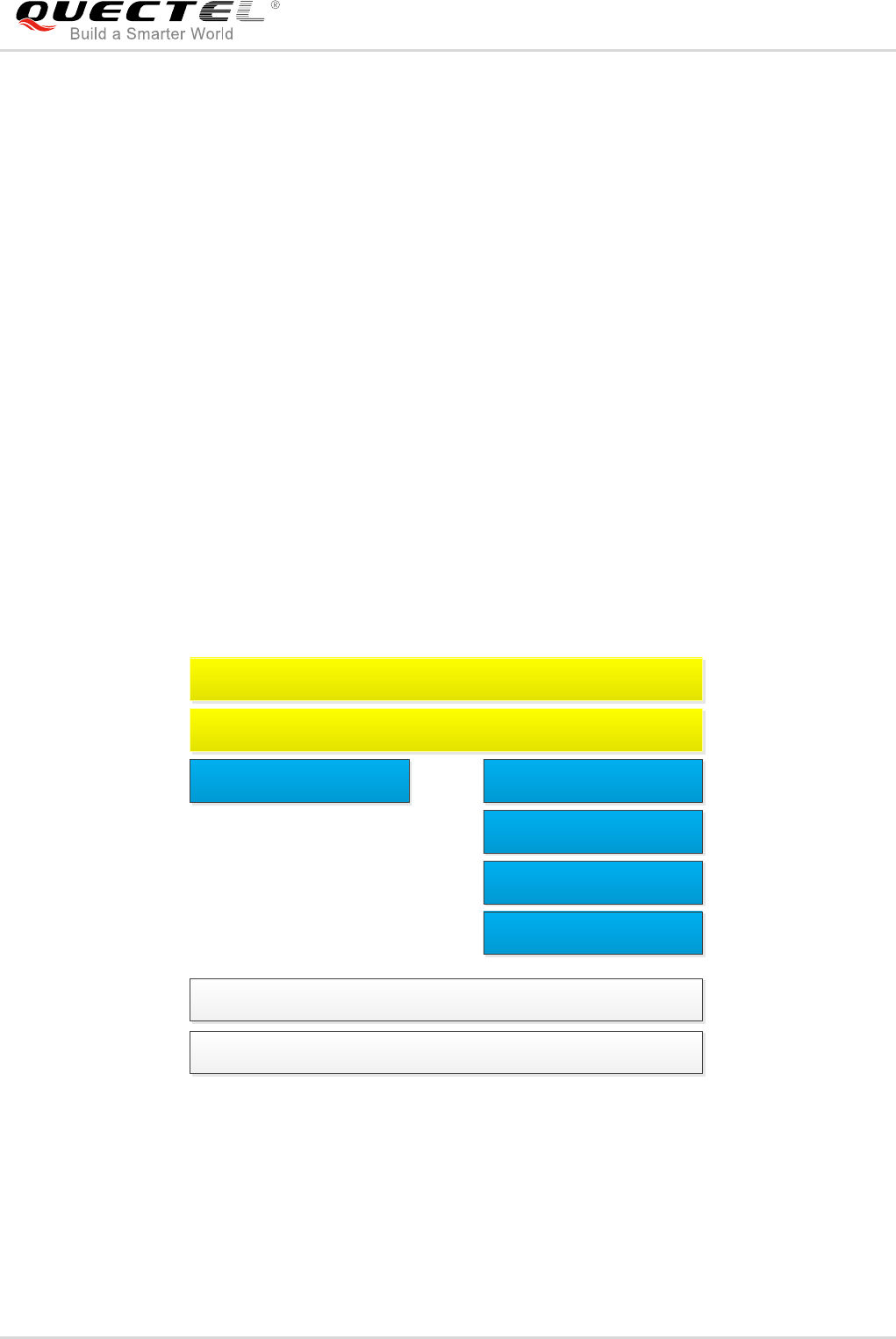
BG96 provides LwM2M Client on MDM9206 ThreadX platform. The LWM2M Client is compliant with
OMA Lightweight Machine to Machine Technical Specification and supports the following interfaces:
- Bootstrap
- Client Registration
- Device Management and Service Enablement
- Information Reporting
The following figure shows the LwM2M stack on BG96.
LwM2M Client
LwM2M Core Library
QMI QAPI
COAP
DTLS
UDP/IP
ThreadX & ThreadX module APIs
Modem
Figure 1: LwM2M Stack on BG96

LTE Module Series
BG96 LwM2M User Guide
BG96_LwM2M_User_Guide 8 / 31
3 LwM2M on BG96
3.1. LwM2M Interfaces
3.1.1. Bootstrap Interface
The bootstrap interface is used to provision essential information into the LwM2M Client to enable the
LwM2M Client to “Register” to one or more LwM2M Servers.
- Bootstrap Modes Supported by BG96
There are four bootstrap modes supported by the LwM2M: factory bootstrap, bootstrap from smartcard,
client-initiated bootstrap and server-initiated bootstrap. Generally, a LwM2M Client must support at least
one bootstrap mode specified in the bootstrap server. Currently, BG96 supports two bootstrap modes in
LwM2M: factory bootstrap by default and client-initiated bootstrap.
- Server and Access Control Configurations
Information about bootstrap server or other servers, and access control can be configured in bootstrap.ini
file and preloaded on the device. During the device start-up, the bootstrap.ini file is loaded and parsed to
get the required information for bootstrapping or registering to the servers. During the client-initiated
bootstrap, if disconnection or failure occurs, then retry timers can be configured as per lwm2m_cfg file.
The default APN specified in lwm2m_cfg file is used for data call setup for bootstrap request.
3.1.2. Client Registration Interface
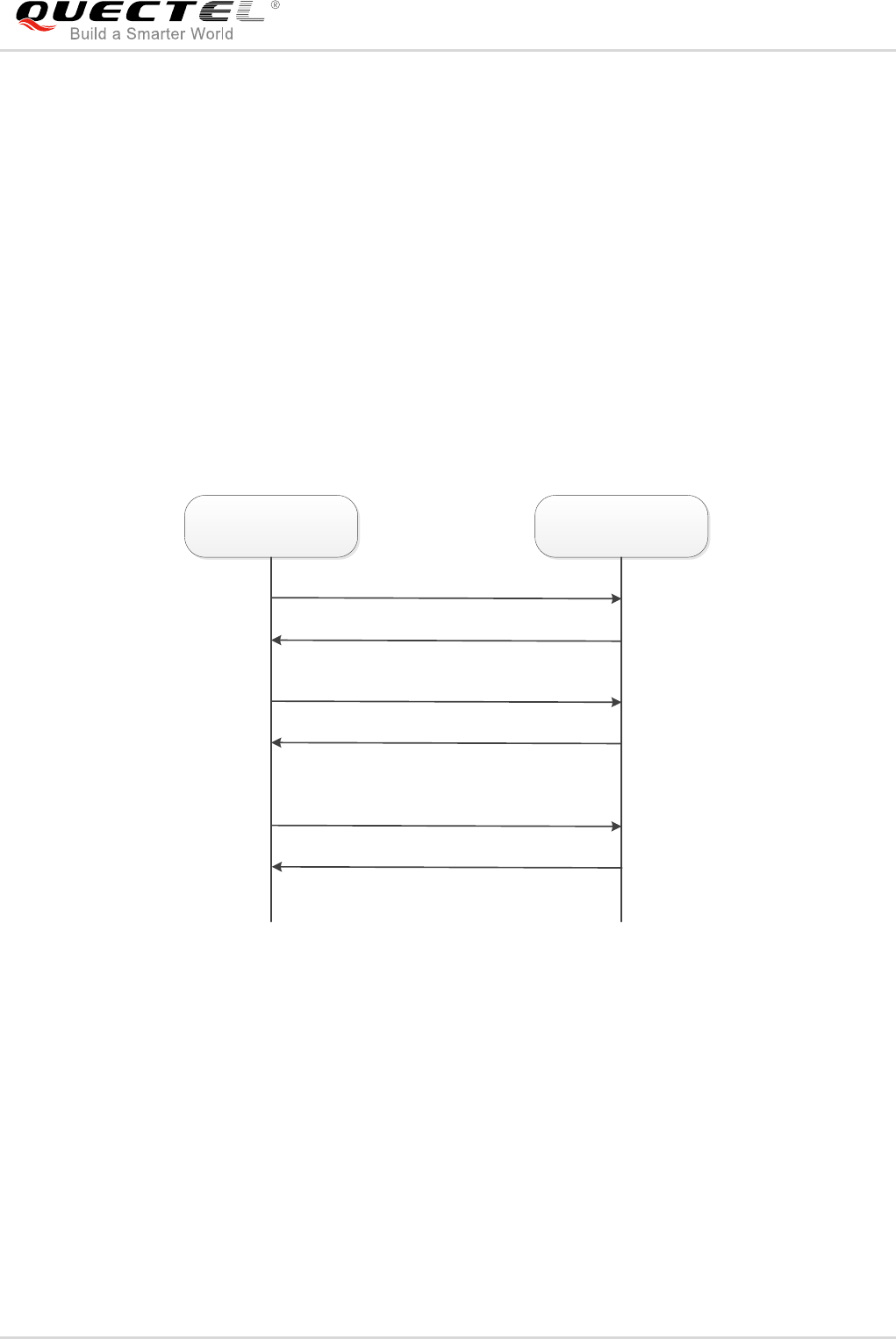
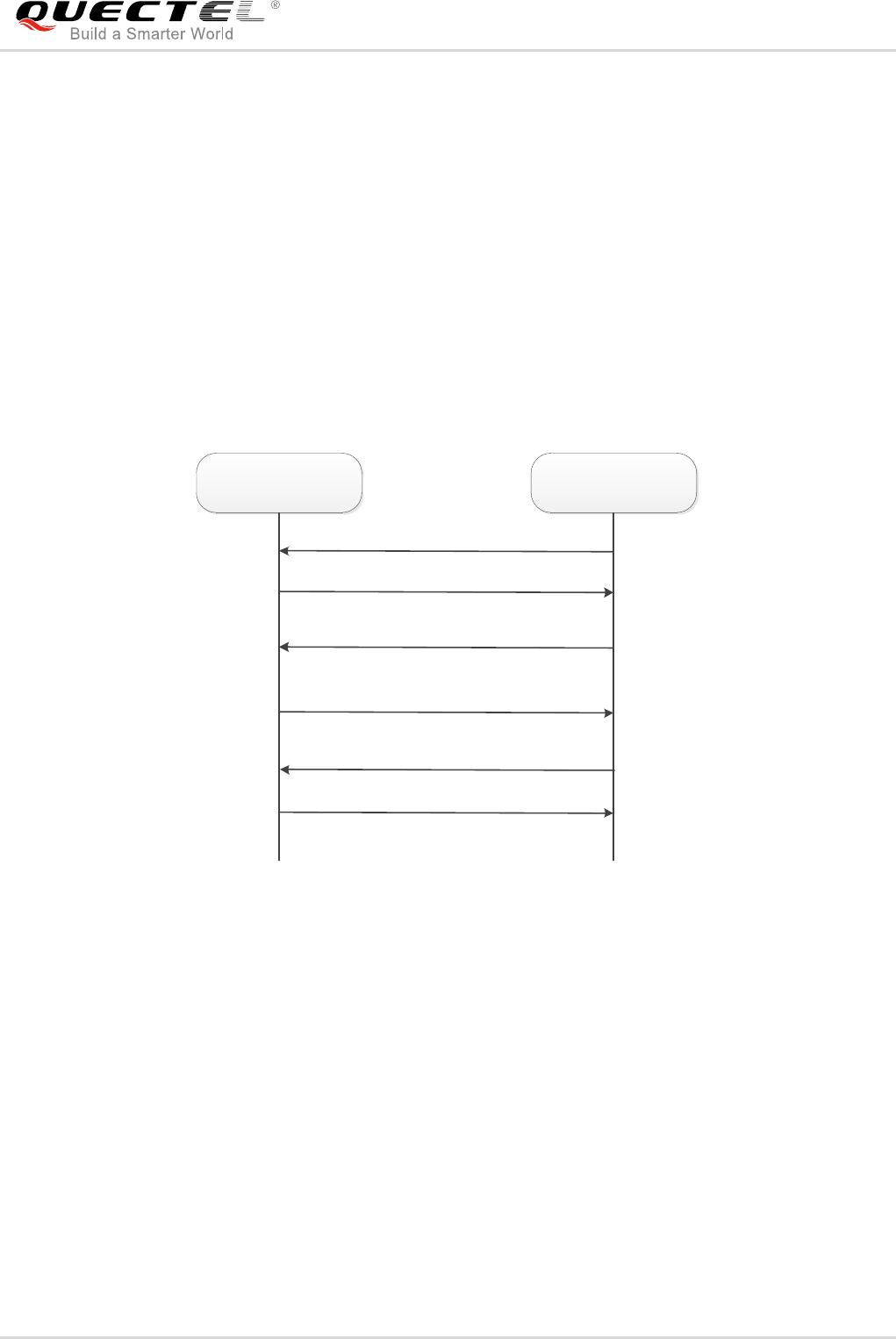
The client registration interface is used by a LwM2M Client to register to one or more LwM2M Servers,
maintain each registration to and de-register from a LwM2M Server.
- Register
When registering, the LwM2M Client performs the “Register” operation and provides the properties the
LwM2M Server requires to contact the LwM2M Client (e.g., End Point Name); maintain the registration
and session (e.g., Lifetime, Queue Mode) between the LwM2M Client and LwM2M Server as well as
knowledge of the Objects the LwM2M Client supports and existing Object Instances in the LwM2M Client.
The registration is soft state, with a lifetime indicated by the Lifetime Resource of that LwM2M Server
Object Instance.
LTE Module Series
BG96 LwM2M User Guide
BG96_LwM2M_User_Guide 9 / 31
- Update
The LwM2M Client periodically performs an update of its registration information to the registered LwM2M
Server(s) by performing the “Update” operation. If the lifetime of a registration expires without receiving an
update from the LwM2M Client, the LwM2M Server removes the registration.
- Deregister
Finally, when shutting down or discontinuing use of a LwM2M Server, the LwM2M Client performs a
“Deregister” operation.
The Binding Resource of the LwM2M Server Object informs the LwM2M Client of the transport protocol
preferences of the LwM2M Server for the communication session between the LwM2M Client and
LwM2M Server. The LwM2M Client SHOULD perform the operations with the modes indicated by the
Binding Resource of the LwM2M Server Object Instance.
LwM2M Client LwM2M Server
Register ep=node1
</1/1>,</2/1>,</3/0>
Update
2.04 Changed
De-register
2.02 Deleted
2.01 Created
Figure 2: Client Registration Interface Operation Flow
carrier_apn_cfg file allows configuring the APN for the data call connection to each server. In the absence
of carrier_apn_cfg file, the default APN specified in the lwm2m_cfg file is used.
If there is a disconnection or failure in registration, then retry timers can be configured as per lwm2m_cfg
file. After a disconnection or device reboot during registration, reregistration with servers can be disabled
by enabling the parameter PER_REGSTATUS_FEAT.
The registration update follows the registration lifetime (as per Resource /1/x/1 value).
LTE Module Series
BG96 LwM2M User Guide
BG96_LwM2M_User_Guide 10 / 31
3.1.3. Device Management and Service Enablement Interfaces
Device management and service enablement are very important interfaces in LwM2M.
- These interfaces are used by LwM2M Server to access object instances and resources available
from the LwM2M Client.
- The interfaces provide this access through the use of “Create”, “Read”, “Write”, “Delete”, “Execute”,
“Write Attributes”, or “Discover” operations.
- The operations that Resource supports are defined in the Object definition using the Object
Template.
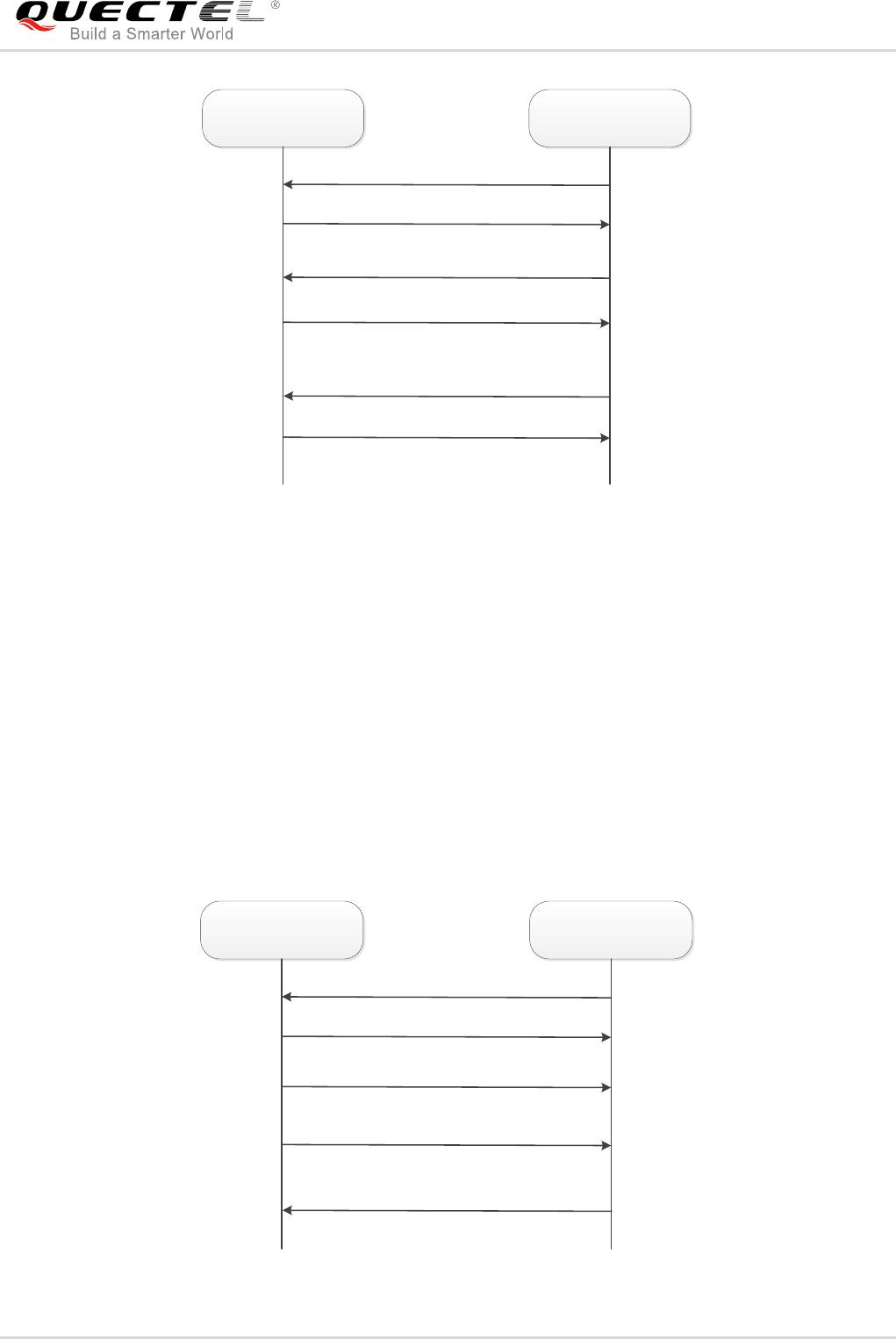
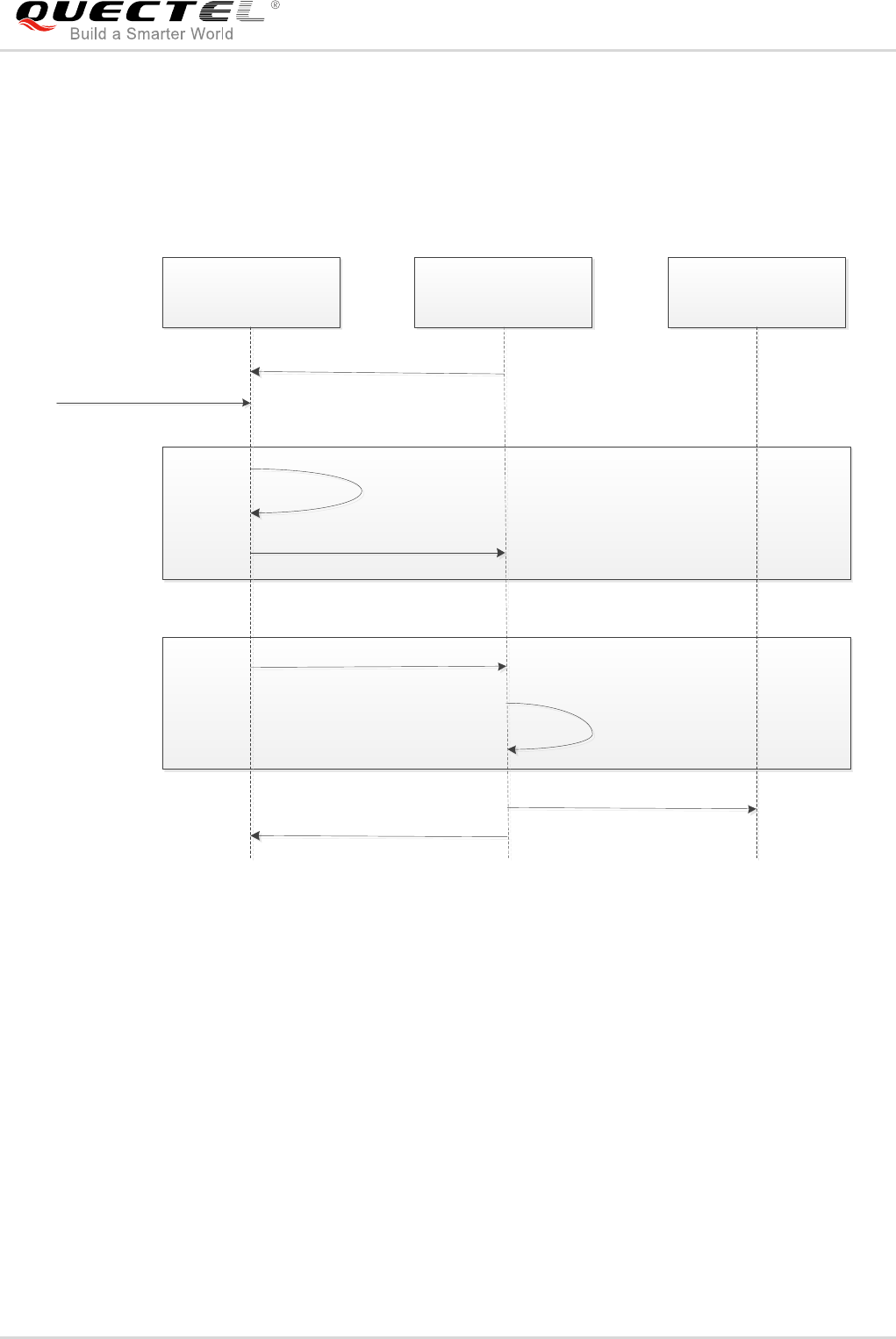
The data flow of device management and service enablement is shown as below:
LwM2M Client LwM2M Server
Read /3/0/0
Write /3/0/1
Lightweight M2M Client
Execute /3/0/4
Success
Success
Open Mobile Alliance
Success
Figure 3: Example Data Flow of Device Management
LTE Module Series
BG96 LwM2M User Guide
BG96_LwM2M_User_Guide 11 / 31
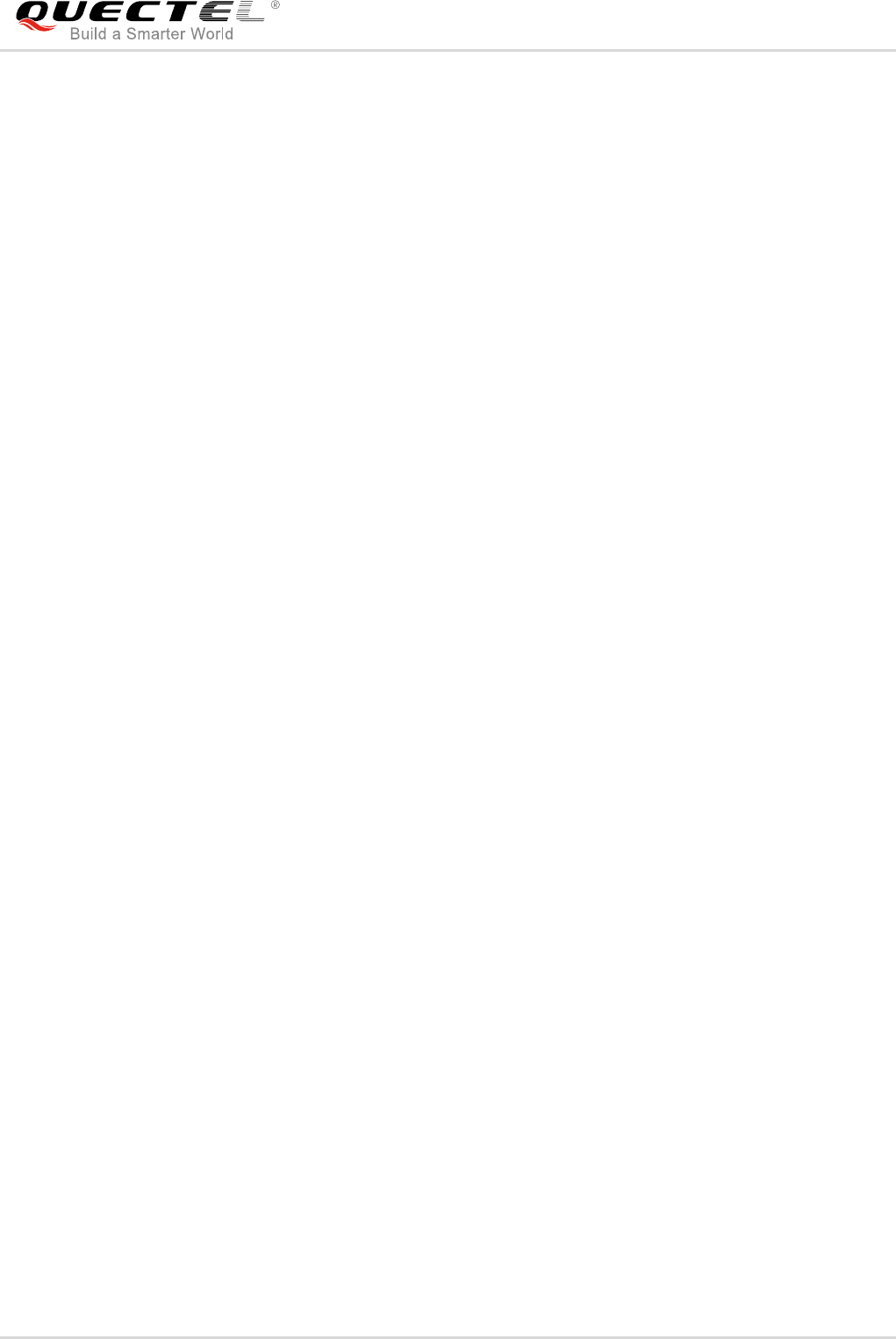
LwM2M Client LwM2M Server
Create /2
Write /2
Success-Location: /2/4
Delete /2/3
Success
Success-Location: /2/3
Figure 4: Example Data Flow of Service Enablement
3.1.4. Information Reporting Interface
The information reporting interface is used by a LwM2M Server to observe any changes in a Resource on
a LwM2M Client, receiving notifications when new values are available.
- This observation relationship is initiated by sending an ”Observe” operation to the LwM2M Client for
an Object, an Object Instance or a Resource.
- An observation ends when a “Cancel Observation” operation is performed.
BG96 LwM2M Client supports observation and notification of object instances and resources.
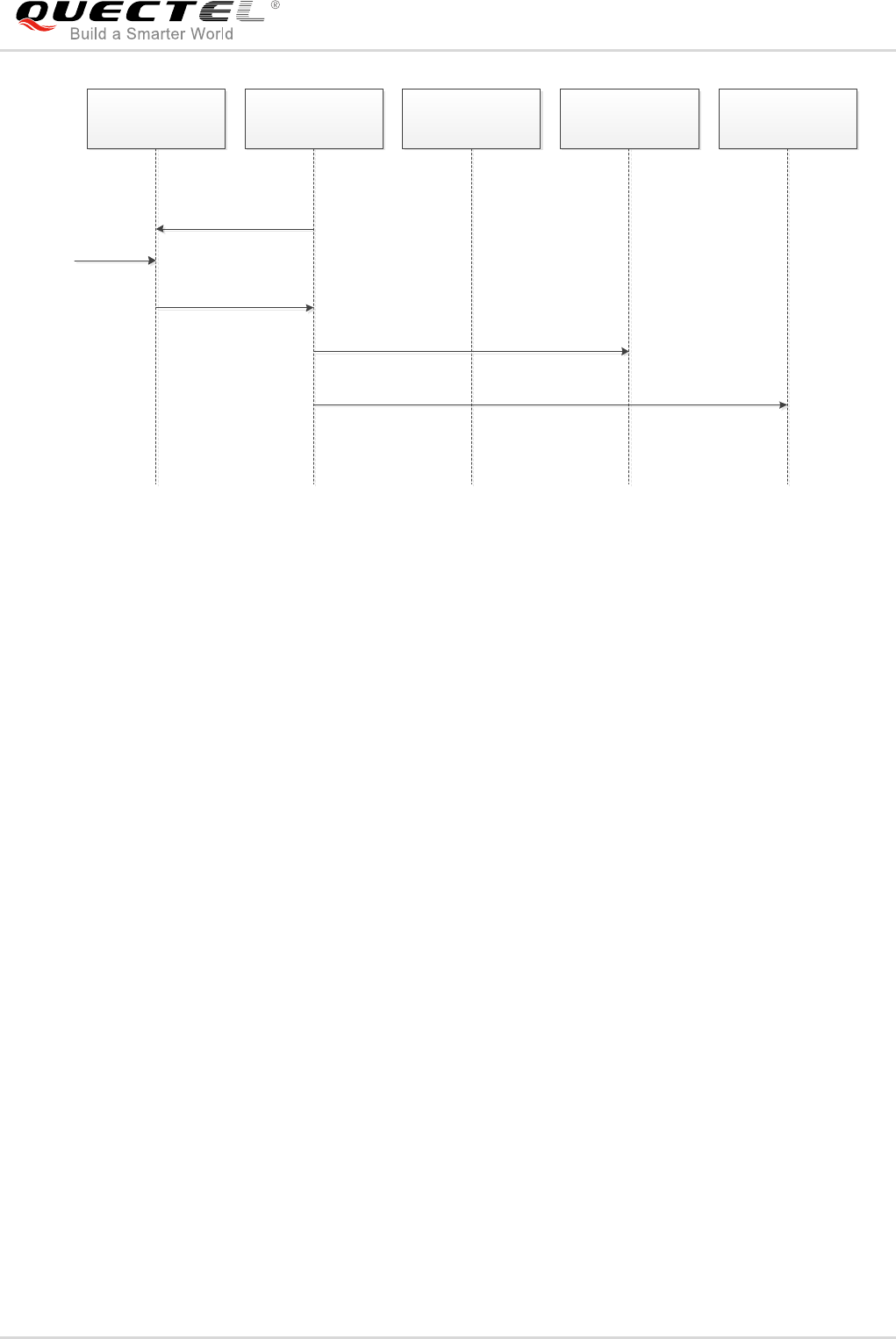
LwM2M Client LwM2M Server
Get /4/0/2 Observe
Notify
Cancel Observation
2.05 Content Observe
30
…...
28
Notify
31
Figure 5: Example Data Flow of Information Reporting
LTE Module Series
BG96 LwM2M User Guide
BG96_LwM2M_User_Guide 12 / 31
3.2. LwM2M Object
LwM2M Client of BG96 implements the following objects and handles the server requests for them:
- Security object
- Server object
- Access control object
- Device object
- Connectivity monitoring object
- Location object
- Connectivity statistics object
The LwM2M Client of QTI supports the following objects as a pass-through objects:
- Firmware update object
- Software management object
- Device capability management object
The information received for these objects is sent to other registered applications such as DFOTA, which
implements these objects and monitors them using LwM2M QAPI.
For example, the LwM2M receives a request for "execute update" on firmware update object. LwM2M
Client passes the request to DFOTA application, which is registered to receive the events. When DFOTA
application receives the "execute update" message, it processes and applies the image and sends the
result to LwM2M Client to forward it to LwM2M Server.
3.3. File Provision and Configuration
The previous chapters provide us a simple understanding of LwM2M. BG96 supports LwM2M feature
based on COAP and DTLS protocol on the MDM9206 ThreadX. This chapter will introduce how to use
this feature on BG96.
Customers just need to modify related configuration files to set the bootstrap server or LwM2M Server
address and APN, then the module will connect to the LwM2M Server automatically when the module
boots up. LwM2M Server can get all the resources information from the module’s LwM2M Client.
Presently, BG96 only supports reading/writing of objects.
Related configuration files are shown as below:
LTE Module Series
BG96 LwM2M User Guide
BG96_LwM2M_User_Guide 13 / 31
Table 1: Configuration Files of LwM2M
If required, the above mentioned files should be preloaded to the folder /datatx in BG96. After BG96
reboots, LwM2M Client will run automatically.
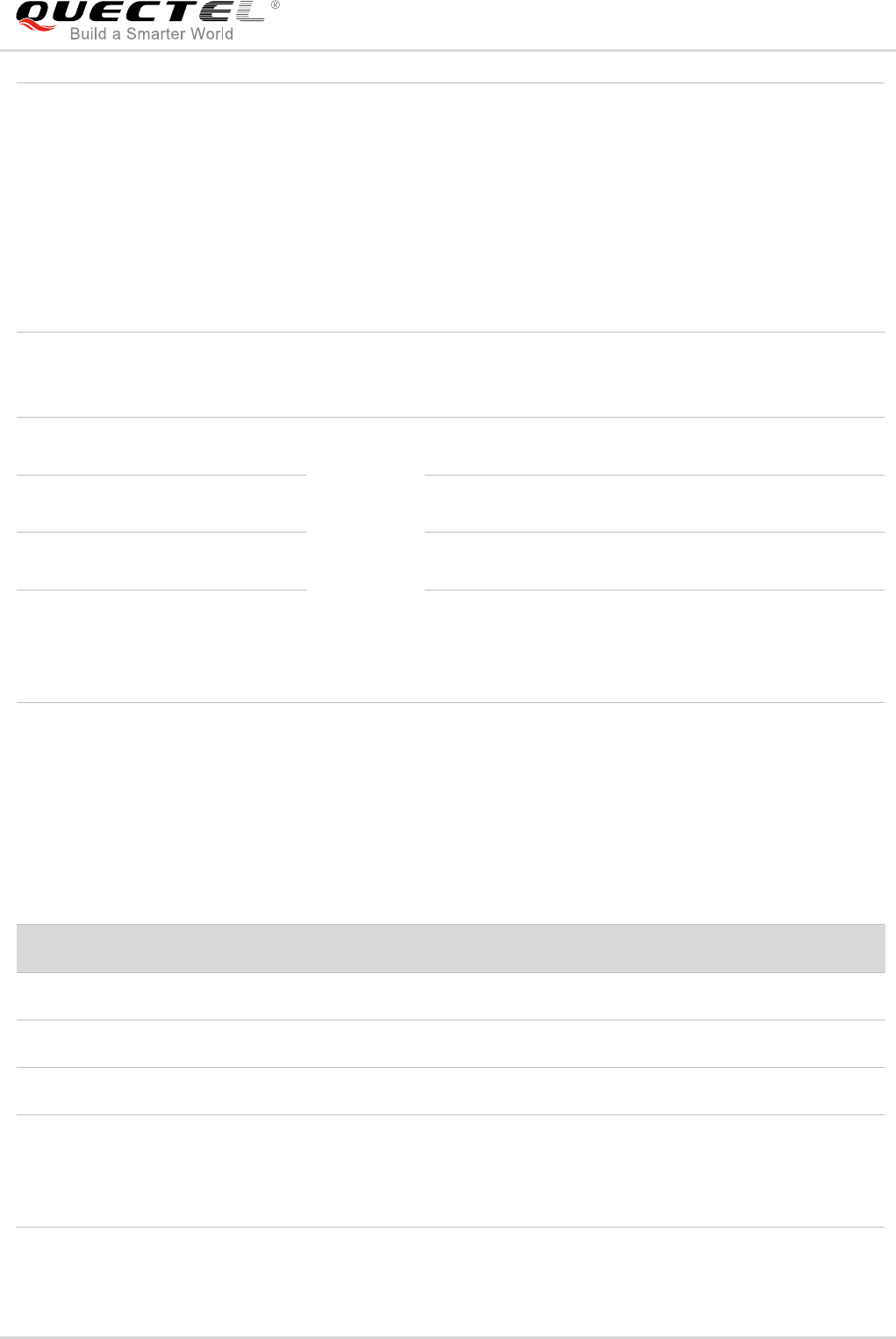
3.3.1. bootstrap.ini
bootstrap.ini file contains the object information required for the bootstrapping process. The object
information is in JSON format defined in the OMA Lightweight Machine to Machine Technical
Specification.
Table 2: Format of bootstrap.ini
Filename
Description
bootstrap.ini
Used as factory bootstrap to discover the bootstrap server or other
servers.
Bootstrap server details for client initiated bootstrap.
Can be used to instantiate multiple instances of objects (Security,
Server, ACL).
carrier_apn_cfg
This file defined default APN for LwM2M Server connection, as BG96 needs
to establish PDN connection first in current network.
lwm2m_app_autostart
LwM2M Client startup script. LwM2M Client will not boot up without this file.
lwm2m_cfg
Contains LwM2M options to control features such as registration retry.
qcli_config
QCLI startup script.
Attributes
JSON Variable
Mandatory
Description
Base Name
bn
No
The base name string which is prepended to the
Name value of the entry for forming a globally unique
identifier for resource.
Base Time
bt
No
The base time which the Time values are relative to.
Resource
Array
e
Yes
The Resource list as JSON value array according to
[SENML] with Array parameter extension (Object
Link).
Array Parameters
name
n
No
The Name value is prepended by the Base Name
value to form the name of the resource instance. The
NOTE
LTE Module Series
BG96 LwM2M User Guide
BG96_LwM2M_User_Guide 14 / 31
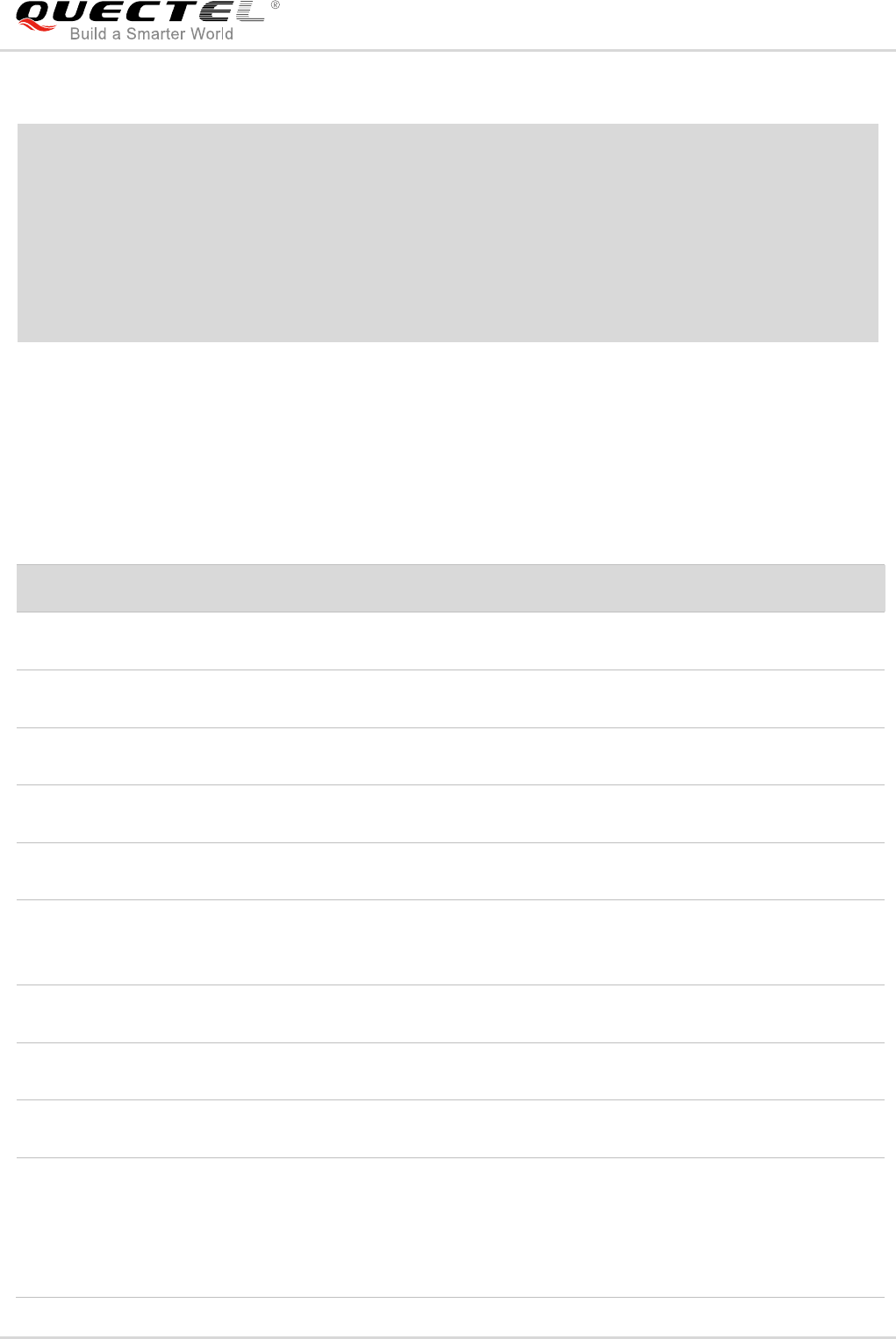
3.3.2. carrier_apn_cfg
The file carrier_apn_cfg has details about the carrier-specific APN used for each server.
Table 3: Items of carrier_apn_cfg
Sometimes in order to successfully register to the network and activate the PDN connection, the
corresponding APN should be configured according to the current network. After the existing APN
resulting name uniquely identifies the Resource
Instance from all others.
Example:
if Base Name is “/”, the Array entry Name of the
Resource is {Object}/{Object
Instance}/{Resource}/{Resource Instance}
when Base Name is not present, the Array entry
Name is the full URI of the requested Resource
Instance
Time
t
No
The time of the representation relative to the Base
Time in seconds for a notification. Required only for
historical representations.
Float
Value
v
One value
field is
mandatory
Value as a JSON float if the Resource data type is
Integer, Float, or Time.
Boolean
value
bv
Value as a JSON Boolean if the Resource data type is
Boolean.
ObjectLink
value
ov
Value as a JSON string if the Resource data type is
ObjectLink Format.(e.g.”10:03”)
String
value
sv
Value as a JSON string for all other Resource data
types. If the Resource data type is opaque the string
value holds the Base64 encoded representation of the
Resource.
Parameter
Default value
Description
APN_NAME
carrierAPN1
APN to be used for the server with SHORT_SERVER_ID1.
APN_CLASS
2
Class/Category of the APN.
SHORT_SERVER_ID1
102
Short server ID of the server that uses the APN.
BS_IF_REG_FAILS
0
If set to 0, LwM2M Client does not perform bootstrapping
on registration failure for this SSID.
If set to 1, LwM2M Client does bootstrapping on
registration failure for this SSID.
LTE Module Series
BG96 LwM2M User Guide
BG96_LwM2M_User_Guide 15 / 31
configuration, add a semicolon and then in the next line add a new APN configuration, as shown below:
/* Existing APN config */
APN_NAME=vzwadmin
APN_CLASS=2
SHORT_SERVER_ID1=102
; /* New APN config */
APN_NAME=vzwinternet
APN_CLASS=3
SHORT_SERVER_ID1=103
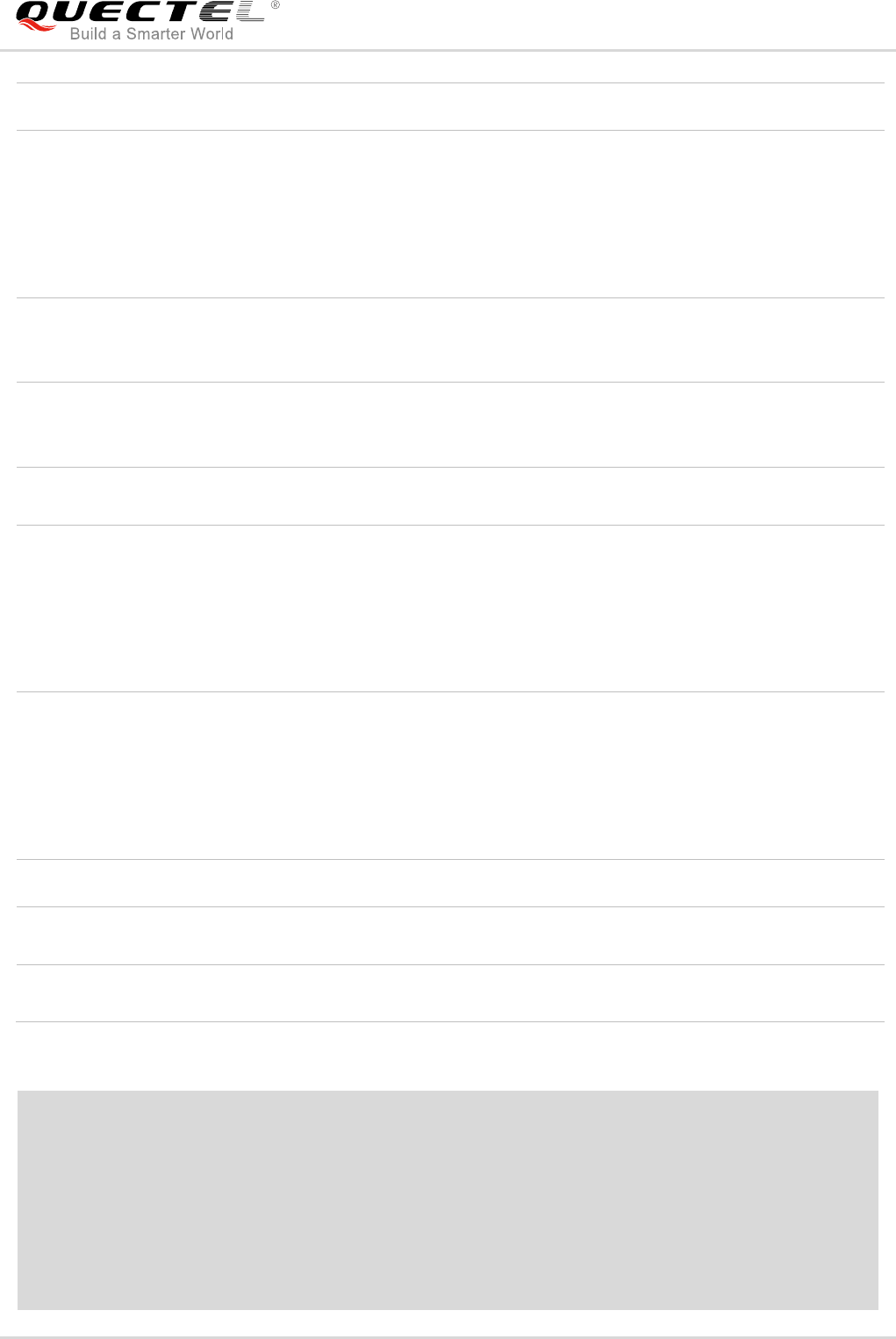
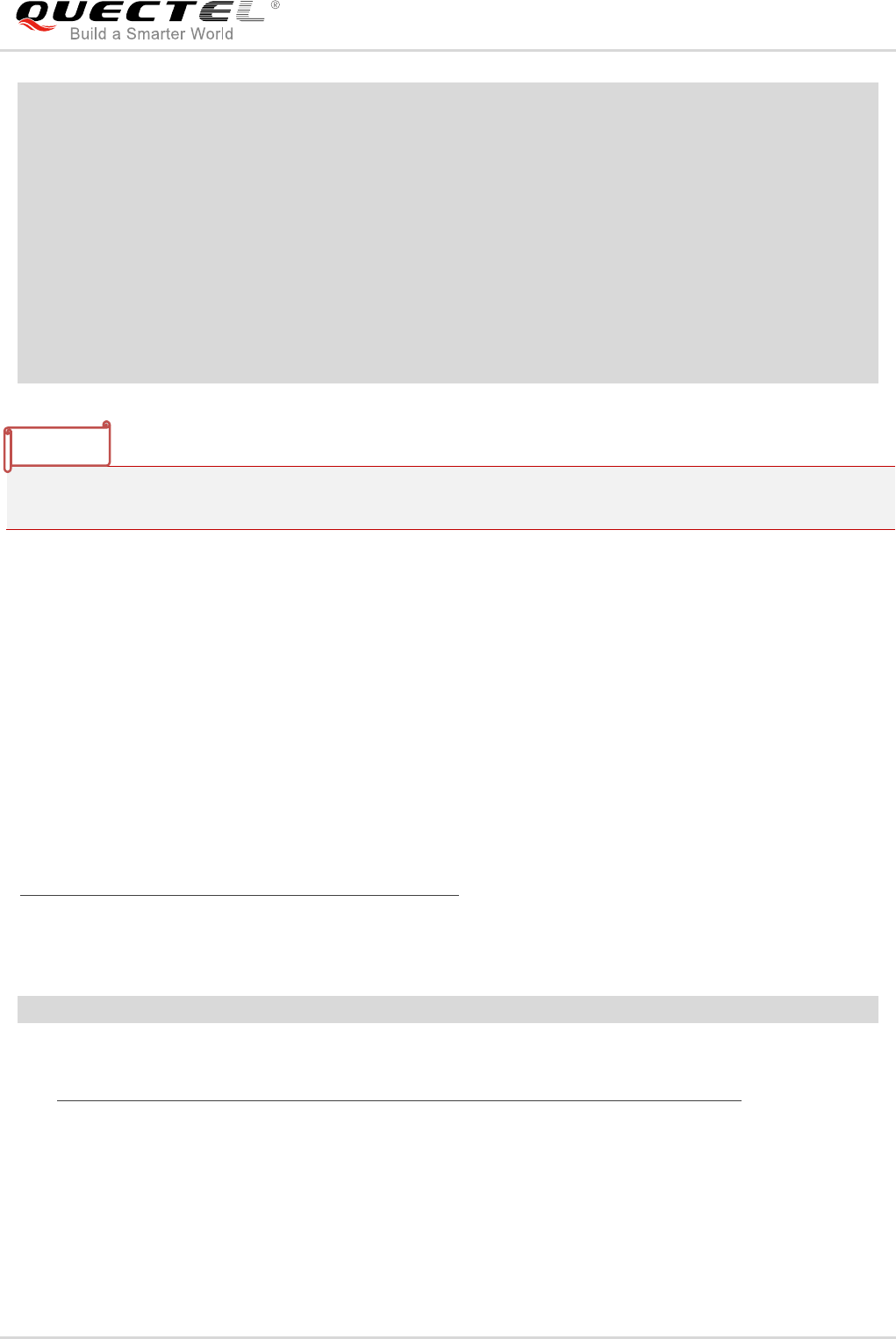
3.3.3. lwm2m_cfg
lwm2m_cfg is a LwM2M Client configuration file containing the following configuration information:
Table 4: Items of lwm2m_cfg
Parameter
Default value
Description
APN
-
Default APN to be used if carrier_apn_cfg is not
available.
RETRY_TIMEOUT
30
Initial time period (in seconds) to retry data-call if
there is a data-call failure.
RETRY_EXPONENT_VAL
2
Value by which timeout for data-call retry has to
be increased exponentially.
MAX_RETRY_TIMEOUT
640
Maximum time period (in seconds) for data-call
retry.
MAX_NO_RETRIES
5
Maximum number of retry attempts in case of
data-call failure.
ACK_TIMEOUT
60
Sleep-ACK timeout value (in seconds). If there is
no activity during the period, then DUT goes to
sleep.
REG_RETRY_TIMEOUT
60
Initial time period (in seconds) to retry
registration, if there is a registration failure.
REG_RETRY_EXPONENT
2
Value by which timeout for registration retry must
be increased exponentially.
REG_RETRY_MAXTIMEOUT
480
Maximum time period in seconds for registration
retry, if there is a registration failure.
ROAMING_FEAT
1
Determines LwM2M functionality enablement in
roaming condition:
When set to 1, LwM2M functionality is
disabled in roaming.
When set to 0, LwM2M functionality is
LTE Module Series
BG96 LwM2M User Guide
BG96_LwM2M_User_Guide 16 / 31
A typical content of lwm2m_cfg is shown as below:
{
APN=carrier_apn;
RETRY_TIMEOUT=30;
RETRY_EXPONENT_VAL=2;
MAX_RETRY_TIMEOUT=640;
MAX_NO_RETRIES=5;
ACK_TIMEOUT=30;
REG_RETRY_TIMEOUT=60;
enabled in roaming.
FER_REGSTATUS_FEAT
0
Determines registration persistence across
reboot in LwM2M Client:
When set to 1, registration persistence is
enabled across reboot in LwM2M Client.
When set to 0, registration persistence is
disabled across reboot in LwM2M Client.
BATTERY_LEVEL_THRESHOLD
20
Battery level less than the threshold mentioned in
this configuration value would be considered as
low battery by the client.
CARRIER_TYPE
0
Enables carrier specific functionality in the client:
0 Default
1 Verizon
REBOOTSTRAP_REG_FAILS_
MAX_NO_ATTEMPTS
0
Maximum number of reattempts on bootstrap
failure.
REG_EP_NAME
4
EP Name to be used during registration. Please
refer to OMA Specifications Section
6.3.1-Endpoint Client Name for more details.
Supported values are given below:
4 IMEI URN
7 IMEI MSISDN URN
BOOTSTRAP_EP_NAME
7
EP Name to be used during bootstrap. Please
refer to OMA Specifications Section
6.3.1-Endpoint Client Name for more details.
Supported values are given below:
4 IMEI URN
7 IMEI MSISDN URN
BOOT_UP_SLEEP_TIME
5
Sleep time before LwM2M Client operation starts.
GPS_MIN_INTERVAL
3000
The interval (in milliseconds) after which GNSS
information is fetched periodically.
GPS_MIN_DISTANCE
1
The change in distance (in meters) after which
GNSS information is fetched.
LTE Module Series
BG96 LwM2M User Guide
BG96_LwM2M_User_Guide 17 / 31
REG_RETRY_EXPONENT=2;
REG_RETRY_MAXTIMEOUT=480;
ROAMING_FEAT=1;
PER_REGSTATUS_FEAT=0;
BATTERY_LEVEL_THRESHOLD=20;
REBOOTSTRAP_REG_FAILS_MAX_NO_ATTEMPTS=5;
CARRIER_TYPE=0;
REG_EP_NAME=4;
BOOTSTRAP_EP_NAME=7;
BOOT_UP_SLEEP_TIME=10;
}
Customers could not add new resources in the client for customization. Customer’s LwM2M Server only
gets the resource information supported by BG96 currently.
3.3.4. Security Mode (SSL)
PSK files corresponding to bootstrap server and DIAG server have to be present in /datatx/ssl.
And the files should be in the format of ssid_server.psk (e.g. 100_server.psk for Boostrap Server).
Resource 0/x/2 decides the security mode. Please refer to Appendix E.1 of OMA Lightweight Machine to
Machine Technical Specification for possible values. For Verizon, security mode should be enabled
always for bootstrap and DIAG.
Generate random key using PSKTool with the following steps (PSKTool download path:
https://fossies.org/windows/misc/gnutls-3.5.8-w64.zip/):
1. Use the following command to generate .psk file. This will generate 101_server.psk in the same
directory.
psktool.exe -u iot_app_101 -p 101_server.psk -s 32
2. Please check the link below for the tool usage:
https://www.gnutls.org/manual/html_node/psktoolInvocation.html#psktool-Invocation
3. Copy <short_server_id>_server.psk file generated in datatx/ssl/ directory into alternate file systems
of BG96.
NOTE
LTE Module Series
BG96 LwM2M User Guide
BG96_LwM2M_User_Guide 18 / 31
4 LwM2M Related AT Command
4.1. AT+QLWM2M Configure LwM2M Client
The command is used to configure the LwM2M Client’s parameters before connecting to LwM2M Server.
After the module reboots, these configurations will be loaded by LwM2M Client.
AT+QLWM2M Configure LwM2M Client
Test Command
AT+QLWM2M=?
Response
+QLWM2M: "select",(0-3)
+QLWM2M: "enable",(0,1)
+QLWM2M: "bootstrap",(0-4)[,<instance>]
+QLWM2M: "qcli_en",(0,1)
+QLWM2M: "psk",(0,1)
+QLWM2M: "apn",<apn_name>
+QLWM2M: "endpoint",(4,7),(4,7)
+QLWM2M: "reset"
+QLWM2M: "clean"
OK
Write Command
Select the LwM2M Server:
AT+QLWM2M="select",<server_type
>
Response
OK
If there is any error, response:
ERROR
Write Command
Enable/disable LwM2M Client feature:
AT+QLWM2M="enable",<enable_valu
e>
Response
OK
If there is any error, response:
ERROR
Write Command
Configure the configuration category:
AT+QLWM2M="bootstrap",<category
>[,<instance>]
Response
OK
If there is any error, response:
ERROR
Write Command
Response
LTE Module Series
BG96 LwM2M User Guide
BG96_LwM2M_User_Guide 19 / 31
Parameter
Enable/disable QCLI:
AT+QLWM2M="qcli_en",<qcli_value>
OK
If there is any error, response:
ERROR
Write Command
Configure/query PSK key value:
AT+QLWM2M="psk",<psk_operation
>
Response
OK
If there is any error, response:
ERROR
Write Command
Configure the APN to be used for the
server:
AT+QLWM2M="apn",<apn_name>
Response
OK
If there is any error, response:
ERROR
Write Command
Configure the EP name to be used
during registration and bootstrap:
AT+QLWM2M="endpoint",<reg_endp
oint>,<boostrap_endpoint>
Response
OK
If there is any error, response:
ERROR
Write Command
Delete persistent files of LwM2M Client
to make all configurations take effect
after module resetting:
AT+QLWM2M="reset"
Response
OK
If there is any error, response:
ERROR
Write Command
Clean all LwM2M Client configuration
files:
AT+QLWM2M="clean"
Response
OK
If there is any error, response:
ERROR
Reference
<server_type> This parameter is used to select the type of LwM2M Server to which the LwM2M
Client will be connected.
0 Leshan server
1 T-Mobile server
2 Verizon motive server
3 Ericsson server
<enable_value> This parameter is used to enable LwM2M Client functionality.
0 Disable LwM2M Client feature
1 Enable LwM2M Client feature
<category> Integer type. The configuration category.
LTE Module Series
BG96 LwM2M User Guide
BG96_LwM2M_User_Guide 20 / 31
After executing AT+QLWM2M="reset" command, all persistent files (some temporary files in
/datatx/lwm2m/ in Alternate EFS) will be deleted and all configurations will take effect after resetting the
module.
0 Backup boostrap.ini file from EFS. If the backup file is not exist in
/datatx/factory, the command will response an error.
1 Configure LwM2M registration or bootstrap server address and port
<instance> LwM2M Server address and port. The format of server
address is "coap(s)://server_address:server_port".
2 Specify the lifetime of the registration in seconds.
<instance> The lifetime of the registration in seconds. The maximum
value is 86400.
3 The access mode through which the LwM2M Client is connected to the
LwM2M Server.
<instance> If set to 0, LwM2M Client will connect to registration server.
If set to 1, LwM2M Client will try to connect to bootstrap
server.
4 Security mode
<instance> If set to 0, LwM2M Client will use PSK mode. If set to 3,
LwM2M Client will use no-security mode.
<qcli_value> This parameter is used to enable QCLI.
0 Disable.
1 Enable
<psk_operation> If set to 0, the module will use “IMEI:<imei>_QUECTELTMOBILEDDI” as PSK
identify and use SHA256 to generate PSK key value automatically. After the
command is responded successfully, PSK file will be saved into /datatx/ssl folder.
If set to 1, the module can query the PSK key value using currently.
<apn_name> APN to be used for the server.
<reg_endpoint> EP name to be used during registration. Please refer to OMA Specifications
Section 6.3.1-Endpoint Client Name for more details. The following are the
supported values:
4 IMEI URN
7 IMEI MSISDN URN
<boostrap_endpoint> EP Name to be used during bootstrap. Please refer to OMA Specifications
Section 6.3.1-Endpoint Client Name for more details. The following are the
supported values:
4 IMEI URN
7 IMEI MSISDN URN
NOTE

LTE Module Series
BG96 LwM2M User Guide
BG96_LwM2M_User_Guide 21 / 31
Example
//If T-Mobile LwM2M Server configuration files are intended to be loaded, then the LwM2M Client will
connect to T-Mobile server automatically after rebooting.
AT+QLWM2M="select",1
OK
AT+QLWM2M="bootstrap",1,"coaps://bootp.iot.lab.t-mobile.com:5584" //Set LwM2M Server
address and port.
OK
AT+QLWM2M="bootstrap",0 //Set PSK mode and generate PSK key value automatically.
OK
AT+QLWM2M="psk",0
OK
AT+QLWM2M="psk",1 //Query generated PSK key value.
+QLWM2M: "psk","|IMEI:864508030025248_QUECTELTMOBILEDDI|:04C78FAE976B3229FAFC7C
278715A5BAE1F0FFE127D00B80542F21C27AC5DABF"
OK
AT+QLWM2M="endpoint",4,4 //Set registration endpoint name and bootstrap endpoint name.
OK
AT+QLWM2M="reset" //Delete persistent files of LwM2M Client.
OK
AT+QLWM2M="clean" //Clean all configuration files.
OK
LTE Module Series
BG96 LwM2M User Guide
BG96_LwM2M_User_Guide 22 / 31
5 Firmware Update (DFOTA)
OMA defines the application layer communication protocol between a LwM2M Server and a LwM2M
Client, which is located in a LwM2M device. For BG96, the LwM2M protocol is used to manage device
provisioning and is a trigger of a DFOTA procedure. For the DFOTA upgrade on the BG96, firmware
update object is provided by the LwM2M specification.
The typical process of DFOTA is illustrated below:
1. Download the firmware image.
2. Trigger the firmware update on the BG96.
3. Boot the flow to apply candidate firmware image.
The LwM2M Client will be notified about the new firmware by the LwM2M Server using Constrained
Application Protocol (CoAP). The client sends the indication to registered DFOTA application. DFOTA
application downloads the firmware from the server and stores it on file system of BG96. The following
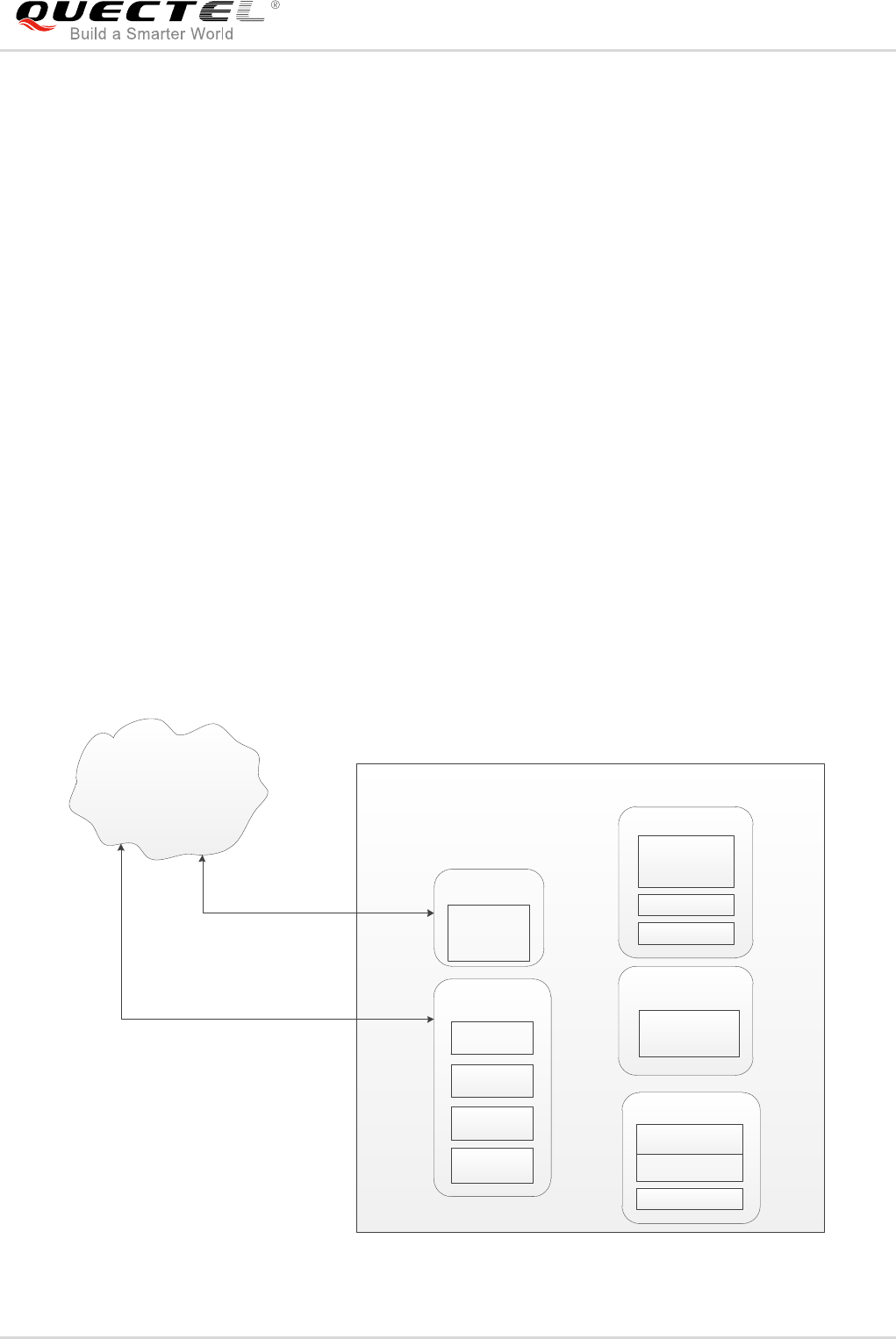
diagram shows the key components involved in DFOTA process on BG96.
ThreadX
DFOTA Application
LwM2M Client
Security
File System
Boot Loader (SBL)
LwM2M and DFOTA
Servers
Load Image
based on
Cookie
Clear Cookie
Boot Result
Authenticate
Image
Boot Partition
DFOTA Partition
DFOTA Cookie
Download
Image
Request
Reboot
Get Boot
Result
Set DFOTA
Cookie
Firmware
Update
Object
HTTP(S)
CoAP
Figure 6: LwM2M Firmware Image Download
LTE Module Series
BG96 LwM2M User Guide
BG96_LwM2M_User_Guide 23 / 31
About “Firmware Update Object” in LwM2M on BG96, the detailed interaction process between LwM2M
Client on BG96 and LwM2M Server will be described as below.
LwM2M Client registers and observes the “Package URI” resource in firmware update object, and then
customers will see this object shown in the server after client registering success.
LwM2M Client DFOTA Application File System
In Band
Out of
Band
Send Package URI
Set Download State
Write to DFOTA Partition
Download Package
(HTTP(S))
Send Firmware Image
Download Package
(CoAP)
Write Package/
Package URI
Register to get Firmware
Update Object
Figure 7: Observe Package URI and Download Firmware
- In “In-Band” mode, the module downloads firmware package from LwM2M Server directly via CoAP
protocol, and send downloaded package to DFOTA application. All “firmware update” actions will be
done in the application.
- In “Out of Band” mode, the only difference is that the module downloads firmware package from
HTTP(S) server to the local.
LTE Module Series
BG96 LwM2M User Guide
BG96_LwM2M_User_Guide 24 / 31
LwM2M Client DFOTA
Application Security File System SysMon
Register to get
Firmware object
Updates
Firmware Update
Set DFOTA Cookie
Request Reboot
Post “Update”
Figure 8: Observe “Update” Resource and Update Event Processing

LTE Module Series
BG96 LwM2M User Guide
BG96_LwM2M_User_Guide 25 / 31
6 Example
6.1. LwM2M Test Example with Leshan Server
LwM2M feature can be tested on Leshan server. If customers want to test BG96 LwM2M Client on
Leshan server, please follow the steps below:
1. qcli_config, bootstrap.ini, carrier_apn_cfg, and lwm2m_cfg should be added to alternate file system
of BG96, but some files should be modified before adding.
1) One sequence of bootstrap.ini file should be modified to specify Leshan server address for BG96:
- In Non-Security mode:
{"bn":"/0/1/",
"e":[
{"n":"0","sv":"coap://leshan.eclipse.org:5683"},
{"n":"1","bv":false},
{"n":"2","v":3},
{"n":"10","v":102
}]}
- In Security mode with PSK:
{"bn":"/0/1/",
"e":[
{"n":"0","sv":"coaps://leshan.eclipse.org:5684"},
{"n":"1","bv":false},
{"n":"2","v":0},
{"n":"10","v":101
}]}
2) carrier_apn_cfg and lwm2m_cfg should be modified to offer the correct APN value and class based
on the module’s network environment. For details, please refer to Chapter 3.3.2 and Chapter 3.3.3.
2. Create a directory named lwm2m under /datatx (/datatx/lwm2m) in alternate file system of BG96. If
BG96 is connected to Leshan server in security mode, then an additional direction named SSL
should be created under /datatx (/datatx/lwm2m) and finally add PSK file into this folder.
LTE Module Series
BG96 LwM2M User Guide
BG96_LwM2M_User_Guide 26 / 31
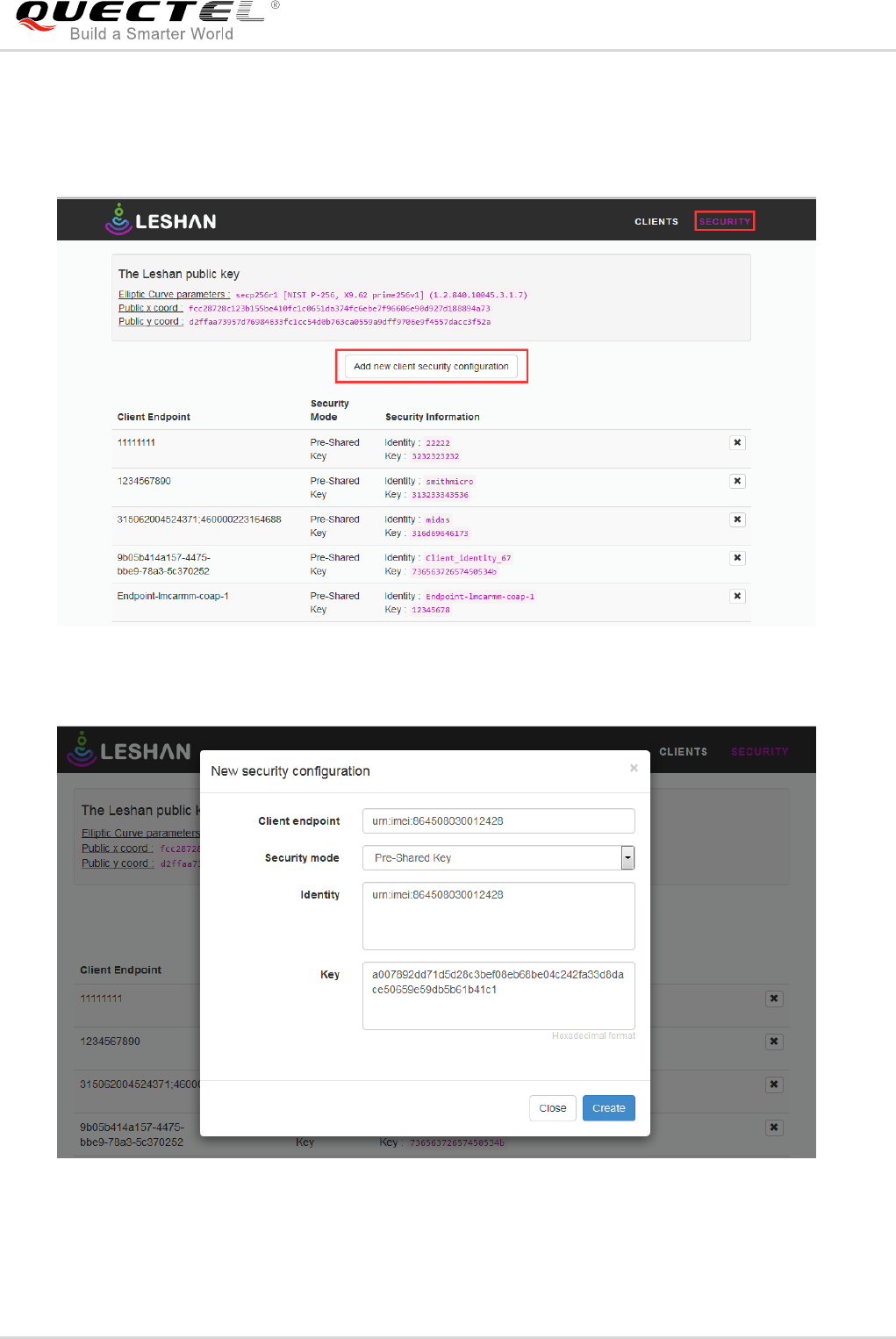
Please note that if security mode is used while creating connection to Leshan server, then client security
configuration should be added in the web interface of the server, according to steps illustrated in the
figure below.
Figure 9: Click “Add New Client Security Configuration” (in SECURITY Tab)
Figure 10: Create “New Security Configuration” on Leshan Server
3. After all modified files are loaded into /datatx folder of EFS, the following information can be read
through the debug port of BG96 after reboot.

LTE Module Series
BG96 LwM2M User Guide
BG96_LwM2M_User_Guide 27 / 31
Net: Net Registered
dss_netapp: DSS_NetApp Registered
LwM2M_EXT: LwM2M_EXT Registered
Command List:
Commands:
1. Help
2. Exit
Subgroups:
3. Net
4. dss_netapp
5. LwM2M_EXT
> LwM2M: CLI registered
LwM2M: LwM2M_LOG:Carrier type = 0
LwM2M:
LwM2M: REG EP NAME = 4
LwM2M:
LwM2M: BOOTSTRAP EP NAME = 7
LwM2M:
LwM2M: LwM2M_LOG: bootstrap_name --> urn:imei-msisdn:864508030012428-5755127091
LwM2M:
LwM2M: State: STATE_REGISTER_REQUIRED
LwM2M: State: STATE_REGISTERING
LwM2M: State: STATE_READY
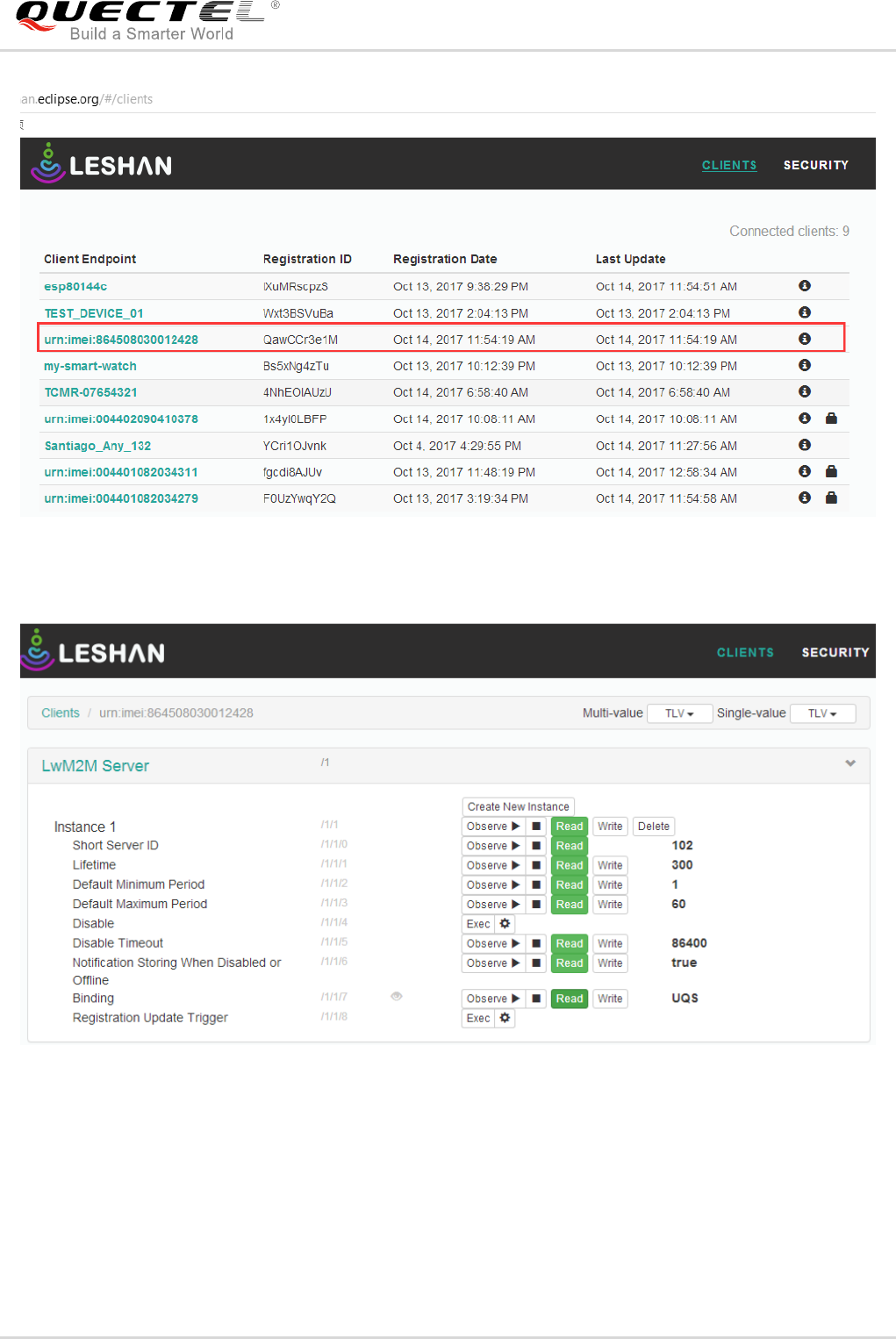
When “LwM2M: State: STATE_READY” is shown, it means BG96 has been connected to Leshan server
successfully. Leshan server shows the permission for each resource on the webpage. For instance, if
customers want to get “Lifetime” resource value, there is only a need to click “Read” button on webpage
and then “Lifetime” value will be shown. When any resource value needs to be updated, customers only
need to click “Write” and input a new value.
LTE Module Series
BG96 LwM2M User Guide
BG96_LwM2M_User_Guide 28 / 31
Figure 11: Online Client on Leshan Server
Figure 12: Client Object and Instance on Leshan Server
LTE Module Series
BG96 LwM2M User Guide
BG96_LwM2M_User_Guide 29 / 31
7 FAQs
In practical application scenarios, customers may encounter some problems. The following are the
solutions for some frequently asked questions for reference:
1. Q: The module has been registered to the network, but why the LwM2M cannot set up a data
call or connect to the server?
A: LwM2M is implemented in APPS side of BG96. If the LwM2M wants to set up a data call and
establish a PDN connection, then customers should set a correct APN in carrier_apn_cfg and
lwm2m_cfg for LwM2M according to the current network situation.
2. Q: When the LwM2M initialization is complete, why the error message “LWM2M: LWM2M_LOG:
Populating Reg EP name : LWM2M_IMEI_MSISDN_URN failed” is displayed on the QCLI
debug port?
A: When BOOTSTRAP_EP_NAME or REG_EP_NAME is set as 7 in lwm2m_cfg, LwM2M will use
IMEI and MSISDN to generate an endpoint name for connection. If the module cannot query
MSISDN from the (U)SIM card successfully or the (U)SIM card does not have a MSISDN, then
LwM2M will respond the error when connecting to the server. In such case, please set
BOOTSTRAP_EP_NAME or REG_EP_NAME to 4 and test again.
3. Q: LwM2M has been connected to LwM2M Server before, but why the server cannot be connected
successfully after setting a new LwM2M Server address in bootstrap.ini and rebooting?
A: After LwM2M is connected to LwM2M Server, LwM2M will generate some temporary files in
/datatx/lwm2m/ in Alternate EFS. These persistent files must be deleted to make the new
configurations take effect.
LTE Module Series
BG96 LwM2M User Guide
BG96_LwM2M_User_Guide 30 / 31
8 Appendix A References
Table 5: Related Documents
Table 6: Terms and Abbreviations
SN
Document Name
Remark
[1]
OMA-TS-LightweightM2M-V1_0-20170208-A
OMA Lightweight Machine to Machine Technical
Specification
[2]
OMA-AD-LightweightM2M-V1_0-20170208-A
OMA Lightweight Machine to Machine
Architecture
Abbreviation
Description
ACL
Access Control List
APN
Access Point Name
APPS
Application Subsystem
CoAP
Constrained Application Protocol
DFOTA
Delta Firmware Upgrade Over-the-air
DIAG
Diagnostics
DTLS
Datagram Transport Layer Security
DUT
Device Under Test
EFS
Embedded File System
EP
Endpoint
GNSS
Global Navigation Satellite System
HTTP(S)
Hypertext Transfer Protocol (Secure)
IMEI
International Mobile Equipment Identity
LTE Module Series
BG96 LwM2M User Guide
BG96_LwM2M_User_Guide 31 / 31
LwM2M
Lightweight Machine to Machine
MSISDN
Mobile Station International Subscriber Directory Number
OMA
Open Mobile Alliance
PDN
Public Data Network
QCLI
Qualcomm Command Line Interface
SSID
Short Server Identifier
SSL
Secure Sockets Layer
UI
User Interface
URI
Uniform Resource Identifier
URN
Uniform Resource Name
