Quectel EC20 GNSS AT Commands Manual V1.1
Quectel_EC20_GNSS_AT_Commands_Manual_V1.1
Quectel_EC20_GNSS_AT_Commands_Manual_V1.1
Quectel_EC20_GNSS_AT_Commands_Manual_V1.1
User Manual:
Open the PDF directly: View PDF  .
.
Page Count: 27
- About the Document
- Contents
- Table Index
- 1 Introduction
- 2 Description of AT Command
- 2.1. AT+QGPSCFG Configure GNSS
- 2.2. AT+QGPSDEL Delete Assistance Data
- 2.3. AT+QGPS Operate GPS Session
- 2.4. AT+QGPSEND Terminate GNSS Session
- 2.5. AT+QGPSLOC Obtain Position
- 2.6. AT+QGPSGNMEA Obtain NMEA Sentences
- 2.7. AT+QGPSXTRA Enable gpsOneXTRA Functionality
- 2.8. AT+QGPSXTRATIME Inject gpsOneXTRA Time
- 2.9. AT+QGPSXTRADATA Inject gpsOneXTRA Data Manually
- 2.10. Introduction of URC
- 3 Example
- 4 Appendix A Reference
- 5 Appendix B Summary of Error Codes

EC20 GNSS
AT Commands Manual
LTE Module Series
Rev. EC20_GNSS_AT_Commands_Manual_V1.1
Date: 2015-06-09
www.quectel.com

LTE Module Series
EC20 GNSS AT Commands Manual
EC20_GNSS_AT_Commands_Manual Confidential / Released 1 / 26
Our aim is to provide customers with timely and comprehensive service. For any
assistance, please contact our company headquarters:
Quectel Wireless Solutions Co., Ltd.
Office 501, Building 13, No.99, Tianzhou Road, Shanghai, China, 200233
Tel: +86 21 5108 6236
Mail: info@quectel.com
Or our local office, for more information, please visit:
http://www.quectel.com/support/salesupport.aspx
For technical support, to report documentation errors, please visit:
http://www.quectel.com/support/techsupport.aspx
Or Email: Support@quectel.com
GENERAL NOTES
QUECTEL OFFERS THIS INFORMATION AS A SERVICE TO ITS CUSTOMERS. THE INFORMATION
PROVIDED IS BASED UPON CUSTOMERS’ REQUIREMENTS. QUECTEL MAKES EVERY EFFORT
TO ENSURE THE QUALITY OF THE INFORMATION IT MAKES AVAILABLE. QUECTEL DOES NOT
MAKE ANY WARRANTY AS TO THE INFORMATION CONTAINED HEREIN, AND DOES NOT ACCEPT
ANY LIABILITY FOR ANY INJURY, LOSS OR DAMAGE OF ANY KIND INCURRED BY USE OF OR
RELIANCE UPON THE INFORMATION. ALL INFORMATION SUPPLIED HEREIN IS SUBJECT TO
CHANGE WITHOUT PRIOR NOTICE.
COPYRIGHT
THIS INFORMATION CONTAINED HERE IS PROPRIETARY TECHNICAL INFORMATION OF
QUECTEL CO., LTD. TRANSMITTABLE, REPRODUCTION, DISSEMINATION AND EDITING OF THIS
DOCUMENT AS WELL AS UTILIZATION OF THIS CONTENTS ARE FORBIDDEN WITHOUT
PERMISSION. OFFENDERS WILL BE HELD LIABLE FOR PAYMENT OF DAMAGES. ALL RIGHTS
ARE RESERVED IN THE EVENT OF A PATENT GRANT OR REGISTRATION OF A UTILITY MODEL
OR DESIGN.
Copyright © Quectel Wireless Solutions Co., Ltd. 2015. All rights reserved.
Quectel
Confidential
LTE Module Series
EC20 GNSS AT Commands Manual
EC20_GNSS_AT_Commands_Manual Confidential / Released 2 / 26
About the Document
History
Revision
Date
Author
Description
1.0
2015-02-28
Tommy ZHANG
Initial
1.1
2015-06-09
Tommy ZHANG
1. Added <uartdebug> and <plane>
parameters in AT+QGPSCFG command.
2. Deleted AT+QGPSXTRAUPL command.
Quectel
Confidential

LTE Module Series
EC20 GNSS AT Commands Manual
EC20_GNSS_AT_Commands_Manual Confidential / Released 3 / 26
Contents
About the Document ................................................................................................................................... 2
Contents ....................................................................................................................................................... 3
Table Index ................................................................................................................................................... 4
1 Introduction .......................................................................................................................................... 5
1.1. How to Use GNSS ...................................................................................................................... 5
1.2. NMEA Sentences Type ............................................................................................................... 6
1.3. Introduction of gpsOneXTRA ...................................................................................................... 6
1.4. GNSS Power Saving Management ............................................................................................ 7
1.4.1. DPO (Dynamic Power Optimization) ............................................................................... 7
1.4.2. ODP (On-Demand Positioning) ........................................................................................ 7
2 Description of AT Command .............................................................................................................. 9
2.1. AT+QGPSCFG Configure GNSS ............................................................................................. 9
2.2. AT+QGPSDEL Delete Assistance Data ................................................................................. 13
2.3. AT+QGPS Operate GPS Session .......................................................................................... 13
2.4. AT+QGPSEND Terminate GNSS Session ............................................................................. 15
2.5. AT+QGPSLOC Obtain Position .............................................................................................. 15
2.6. AT+QGPSGNMEA Obtain NMEA Sentences ........................................................................ 17
2.7. AT+QGPSXTRA Enable gpsOneXTRA Functionality ............................................................ 18
2.8. AT+QGPSXTRATIME Inject gpsOneXTRA Time ................................................................... 19
2.9. AT+QGPSXTRADATA Inject gpsOneXTRA Data Manually ................................................... 20
2.10. Introduction of URC ............................................................................................................... 21
2.10.1. Expired XTRA Data ........................................................................................................ 21
3 Example .............................................................................................................................................. 23
3.1. Turn On and Off the GNSS Engine ........................................................................................... 23
3.2. Application of GNSS nmeasrc .................................................................................................. 23
3.3. Example of Injecting gpsOneXTRA .......................................................................................... 24
4 Appendix A Reference ....................................................................................................................... 25
5 Appendix B Summary of Error Codes ............................................................................................. 26
Quectel
Confidential

LTE Module Series
EC20 GNSS AT Commands Manual
EC20_GNSS_AT_Commands_Manual Confidential / Released 4 / 26
Table Index
TABLE 1: RELATED DOCUMENTS .................................................................................................................. 25
TABLE 2: TERMS AND ABBREVIATIONS ........................................................................................................ 25
TABLE 3: SUMMARY OF ERROR CODES ...................................................................................................... 26
Quectel
Confidential

LTE Module Series
EC20 GNSS AT Commands Manual
EC20_GNSS_AT_Commands_Manual Confidential / Released 5 / 26
1 Introduction
EC20 integrates a GNSS engine, which supports GPS and GLONASS double system and provides
gpsOneXTRA assistance. EC20 GNSS engine is high-performance and suitable for various applications
which lowest-cost and accurate positioning are needed. Meanwhile, it can also support position tracking
without network assistance, and GNSS capabilities when GSM/WCDMA is out of network coverage areas.
EC20 GNSS can be applied in the following occasions: turn-by-turn navigation applications, asset
tracking, buddy tracking, location-aware games, homing and fleet management.
1.1. How to Use GNSS
EC20 GNSS engine allows calculating location without any assistance from the network. The procedure
of turning on GNSS is shown as below:
Step 1: Configure corresponding demands by AT+QGPSCFG.
Step 2: Active GNSS engine by AT+QGPS.
Step 3: After GNSS session is started successfully and GNSS has fixed, positioning information can be
obtained by three ways:
1) NMEA sentences output to "usbnmea" port by default, you can read the port to obtain NMEA
sentences.
2) You can use AT+QGPSLOC to obtain some positioning information directly, such as latitude,
longitude, height, time and positioning type and so on .
3) After enabling <nmeasrc> by AT+QGPSCFG, you can acquire the specified NMEA sentence by
AT+QGPSGNMEA. If <nmeasrc> is disabled, this command cannot be used.
Step 4: You can terminate GNSS by two ways:
1) If the parameter <fixcount> of the AT+QGPS is set to 0 in Step 2, GNSS engine will get position
continuously, and it can be ended by AT+QGPSEND.
2) If the actual fix times reach to the specified <fixcount> value, the engine will stop automatically;
in this process you can use the command AT+QGPSEND to end the session.
Quectel
Confidential

LTE Module Series
EC20 GNSS AT Commands Manual
EC20_GNSS_AT_Commands_Manual Confidential / Released 6 / 26
1.2. NMEA Sentences Type
The NMEA sentences are compatible with NMEA-0183 protocol, and all of the standard NMEA sentences
have two kinds of prefix.
For GPS sentences, the prefix is “GP”, as below:
- GPGGA - Global Positioning System Fix Data, Time, Position and related fix data
- GPRMC - Recommended minimum data
- GPGSV - Detailed satellite data
- GPGSA - Overall satellite data
- GPVTG - Vector track and speed over the ground
And for GLONASS sentences, the prefixes are "GL" and "GN", as below:
- GLGSV - Detailed satellite data
- GNGSA - Overall satellite data
- GNGNS - Positioning System
1.3. Introduction of gpsOneXTRA
gpsOneXTRA assistance enhances standalone performance, and simplifies GNSS assistance delivery to
GNSS engine, including ephemeris, almanac, ionosphere, UTC, health and coarse time assistance. After
booting gpsOneXTRA, TTFF (Time to First Fix) can be reduced by 18 to 30 sec (or more in harsh signal
environments). And the gpsOneXTRA data needs to be updated once per day (or every a couple of days)
which is obtained from an XTRA server on the network.
In order to use gpsOneXTRA feature, you should ensure that valid gpsOneXTRA assistance data is
available. Firstly download a new gpsOneXTRA binary file from one of the gpsOneXTRA assistance web
servers via HTTP. The files are named as xtra.bin for GPS only and xtra2.bin for GPS+GLONASS. The
exact file size should be less than 50kB:
http://xtra1.gpsonextra.net/xtra.bin
http://xtra2.gpsonextra.net/xtra.bin
http://xtra3.gpsonextra.net/xtra.bin
http://xtra1.gpsonextra.net/xtra2.bin
http://xtra2.gpsonextra.net/xtra2.bin
http://xtra3.gpsonextra.net/xtra2.bin
gpsOneXTRA data needs to be updated regularly. You can query the gpsOneXTRA data status by
AT+QGPSXTRADATA? to update gpsOneXTRA data properly.
Quectel
Confidential

LTE Module Series
EC20 GNSS AT Commands Manual
EC20_GNSS_AT_Commands_Manual Confidential / Released 7 / 26
The working procedure of gpsOneXTRA is shown as follows:
Step 1: If gpsOneXTRA is disabled, enable it by AT+QGPSXTRA and restart the module.
Step 2: Confirm the current validity of gpsOneXTRA data by AT+QGPSXTRADATA?.
Step 3: Download xtra.bin or xtra2.bin to the module via HTTP AT command.
Step 4: Inject the correct time by AT+QGPSXTRATIME.
Step 5: Inject the downloaded xtra.bin or xtra2.bin file by AT+QGPSXTRADATA.
Step 6: Others steps see Chapter 1.1.
1.4. GNSS Power Saving Management
EC20 GNSS engine provides power saving solutions by DPO and ODP, thus extending battery life,
maximizing talk and standby time, and enhancing accuracy and TTFF.
1.4.1. DPO (Dynamic Power Optimization)
DPO (Dynamic Power Optimization) is a power-saving solution which attempts to turn off GNSS RF and
other unneeded components. DPO takes effect after configuring <dpoenable> via AT+QGPSCFG. There
are several preconditions to turn on the DPO, shown as below:
- All SVs>26dB-Hz must have ephemeris or recent (<3.5 days) XTRA almanac corrections for those
SVs.
- Health or UTC information is not transmitted over-the-air.
- Valid position and HEPE should be less than 50m and within users’ specified value in QoS.
- 6 SVs>37dB-Hz or 4 SVs>26dB-Hz and have almanac and health for all SVs.
Benefits and impacts of DPO:
- When the DPO feature is on and the SV or navigational data cannot be decoded, the GPS receiver
will not be continuous.
- During the DPO, the SBAS feature is effectively disabled. The receiver cannot demodulate the SBAS
messages. DPO always takes precedence over SBAS.
- TTFF and yield will not be impacted.
1.4.2. ODP (On-Demand Positioning)
When On-Demand Positioning (ODP) is enabled, standalone GNSS positioning will be triggered in the
background. The positions calculated as a result of ODP are not presented to the application, NMEA, or
the network. However, when the on-demand session is operating and the users or network request a
GNSS session, the on-demand session is immediately terminated and the incoming request is
implemented.
Quectel
Confidential

LTE Module Series
EC20 GNSS AT Commands Manual
EC20_GNSS_AT_Commands_Manual Confidential / Released 8 / 26
ODP system requirements: (1) ODP requires valid gpsOneXTRA assistance data. (2) ODP requires that
EC20 is in service. If these two requirements are not fulfilled ODP will be turned off automatically. And
ODP will be suspended if a regular GNSS fix is running.
In the enabled low power mode, the GNSS engine is turned on to consume low power. Requests to
determine the GNSS position are returned with a reduced time-to-fix while this mode is active. In the
enabled Ready mode, the GNSS engine is kept active and is available to perform fixed position. Requests
to determine the GNSS position are immediately returned while this mode is active. The battery will be
greatly impacted in this mode. Maintenance of position and time uncertainty also improves the
performance of E911 on UMTS.
Configure <odpcontrol> to set two different modes by AT+QGPSCFG:
Low power mode:
- Low-frequency background GNSS tracking session.
- In good signal condition, use shorter interval with frequent ODP session (i.e., per 5 min).
- In weak signal condition, use longer interval, but less frequent ODP session (i.e., twice per hour).
Ready mode:
- GNSS engine will start 1 Hz positioning session.
- Main goal is to keep GNSS engine ready so that when the application demands a position from the
GNSS engine, position can be reported quickly.
Quectel
Confidential
LTE Module Series
EC20 GNSS AT Commands Manual
EC20_GNSS_AT_Commands_Manual Confidential / Released 9 / 26
2 Description of AT Command
2.1. AT+QGPSCFG Configure GNSS
This command can be used to configure the using of GLONASS, switchover of NMEA sentences output
port and setting of power saving and so on.
AT+QGPSCFG Configure GNSS
Test command
AT+QGPSCFG=?
Response
+QGPSCFG:“outport”,("none","usbnmea","uartdebug")
+QGPSCFG: “nmeasrc”,(0,1)
+QGPSCFG: “gpsnmeatype”,(0-31)
+QGPSCFG: “glonassnmeatype”,(0-7)
+QGPSCFG: “glonassenable”,(0,1)
+QGPSCFG: “odpcontrol”,(0-2)
+QGPSCFG: “dpoenable”,(0,1)
+QGPSCFG: “plane”,(0-2)
OK
Configure NMEA sentences out port
AT+QGPSCFG=“outport”[,<outport>]
Response
When there are two parameters:
OK
If error is related to ME functionality:
+CME ERROR: <errcode>
When the second parameter is omitted, query the current
setting:
+QGPSCFG: “outport”,<outport>
OK
Enable nmeasrc, obtain NMEA sentences
by AT+QGPSGNMEA
AT+QGPSCFG=“nmeasrc”[,<nmeasrc
>]
Response
When there are two parameters:
OK
If error is related to ME functionality:
Quectel
Confidential

LTE Module Series
EC20 GNSS AT Commands Manual
EC20_GNSS_AT_Commands_Manual Confidential / Released 10 / 26
+CME ERROR: <errcode>
When the second parameter is omitted, query the current
setting:
+QGPSCFG: “nmeasrc”,<nmeasrc>
OK
Configure output type of GPS NMEA
sentences
AT+QGPSCFG=“gpsnmeatype”[,<gpsn
meatype>]
Response
When there are two parameters:
OK
If error is related to ME functionality:
+CME ERROR: <errcode>
When the second parameter is omitted, query the current
setting:
+QGPSCFG: “gpsnmeatype”,<gpsnmeatype>
OK
Configure output type of GLONASS
NMEA sentences
AT+QGPSCFG=“glonassnmeatype”[,<g
lonassnmeatype>]
Response
When there are two parameters:
OK
If error is related to ME functionality:
+CME ERROR: <errcode>
When the second parameter is omitted, query the current
setting:
+QGPSCFG: “glonassnmeatype”,<glonassnmeatype>
OK
Configure GLONASS
AT+QGPSCFG=“glonassenable”[,<glon
assenable>]
Response
When there are two parameters:
OK
If error is related to ME functionality:
+CME ERROR: <errcode>
When the second parameter is omitted, query the current
setting:
+QGPSCFG: “glonassenable”,<glonassenable>
OK
Quectel
Confidential

LTE Module Series
EC20 GNSS AT Commands Manual
EC20_GNSS_AT_Commands_Manual Confidential / Released 11 / 26
Parameter
Configure ODP mode
AT+QGPSCFG=“odpcontrol”[,<odpcon
trol>]
Response
When there are two parameters:
OK
If error is related to ME functionality:
+CME ERROR: <errcode>
When the second parameter is omitted, query the current
setting:
+QGPSCFG: “odpcontrol”,<odpcontrol>
OK
Configure DPO
AT+QGPSCFG=“dpoenable”[,<dpoena
ble>]
Response
When there are two parameters:
OK
If error is related to ME functionality:
+CME ERROR: <errcode>
When the second parameter is omitted, query the current
setting:
+QGPSCFG: “dpoenable”,<dpoenable>
OK
Configure GPS plane
AT+QGPSCFG=“plane”[,<plane>]
Response
When there are two parameters:
OK
If error is related to ME functionality:
+CME ERROR: <errcode>
When the second parameter is omitted, query the current
setting:
+QGPSCFG: “plane”,<plane>
OK
Reference
<outport> Configure the output port of NMEA sentences, and the setting will be auto
saved to NVRAM.
“none” Close NMEA sentence outputting
Quectel
Confidential
LTE Module Series
EC20 GNSS AT Commands Manual
EC20_GNSS_AT_Commands_Manual Confidential / Released 12 / 26
“usbnmea” Output through USB NMEA port
“uartdebug” Output through UART DEBUG port
<nmeasrc> After enabled, original NMEA sentences can be acquired by
AT+QGPSGNMEA, and the setting will be auto saved to NVRAM.
Meanwhile, sentences are output through NMEA port as before
0 Disable
1 Enable
<gpsnmeatype> Configure output type of GPS NMEA sentences by ORed, the setting will be
auto saved to NVRAM. The default value is 31.
1 GGA
2 RMC
4 GSV
8 GSA
16 VTG
<glonassnmeatype> Configure output type of GLONASS NMEA sentences by ORed, the setting
will be auto saved to NVRAM. The default value is 0.
1 GSV
2 GSA
4 GNS
<glonassenable> Enable/Disable GLONASS, the setting will be auto saved to NVRAM.
Parameter takes effect after module reset. If GLONASS is disabled and
<glonassnmeatype> is not zero, the GLONASS NMEA sentences will be
output.
0 Disable GLONASS
1 Enable GLONASS
<odpcontrol> Set ODP mode, the setting will be auto saved to NVRAM.
0 Disable ODP
1 Low power mode
2 Ready mode
<dpoenable> Enable/Disable DPO, the setting will be auto saved to NVRAM.
0 Disable DPO
1 Enable DPO
<plane> Set user plane and control plane.
0 User plane without SSL
1 User plane with SSL
2 Control plane
<errcode> Integer type, indicate the error code of the operation. If it is not 0, it is the type
of error (Please refer to the Chapter 5).
Quectel
Confidential
LTE Module Series
EC20 GNSS AT Commands Manual
EC20_GNSS_AT_Commands_Manual Confidential / Released 13 / 26
2.2. AT+QGPSDEL Delete Assistance Data
Delete assistance data to operate cold start, hot start and warm start. This command can only be
executed when GPS engine is turned off. After deleting the assistance data by this command, cold start
will be enforced by AT+QGPS, or perform hot/warm start when the hot/warm start condition is permitted.
Parameter
2.3. AT+QGPS Operate GPS Session
Turn on GNSS engine, current <gnssmode> only supports Standalone GNSS. When <fixcount> is 0,
GNSS engine will position continuously, you can terminate the session by AT+QGPSEND. When
<fixcount> is not 0, and the actual fix times reach to the specified value, GNSS engine will terminate
automatically.
AT+QGPSDEL Delete Assistance Data
Test Command
AT+QGPSDEL=?
Response
+QGPSDEL: (0-3)
OK
Write Command
AT+QGPSDEL=<deletetype>
Response
OK
If error is related to ME functionality:
+CME ERROR: <errcode>
Reference
<deletetype> Delete data type.
0 Delete all assistance data, not include XTRA data. Enforce cold start after starting
GNSS.
1 Do not delete any data. Perform hot start if the conditions are permitted after
starting GNSS.
2 Delete related data. Perform warm start if the conditions are permitted after
starting GNSS.
3 Delete gpsOneXTRA data.
<errcode> Integer type, indicate the error code of the operation. If it is not 0, it is the type of error
(Please refer to the Chapter 5).
Quectel
Confidential
LTE Module Series
EC20 GNSS AT Commands Manual
EC20_GNSS_AT_Commands_Manual Confidential / Released 14 / 26
Parameter
AT+QGPS Operate GPS Session
Test Command
AT+QGPS=?
Response
+QGPS: (1-4),(1-255),(0-1000),(0-1000),(1-65535)
OK
Read current GNSS session state
AT+QGPS?
Response
+QGPS: <gnssstate>
OK
Write Command
AT+QGPS=<gnssmode>[,<fixmaxtim
e>[,<fixmaxdist>[,<fixcount>[,<fixrate
>]]]]
Response
OK
If error is related to ME functionality:
+CME ERROR: <errcode>
Reference
<gnssstate> GNSS state
0 GNSS off
1 GNSS on
<gnssmode> GNSS start mode
1 Standalone
2 MS-based
3 MS-assisted
4 Speed optimal
<fixmaxtime> The max positioning time, unit: s, indicates the response time during the
measurement of the GNSS pseudo range, the upper time limit of the GPS satellite
searching, include the time for demodulating the ephemeris data and calculating
the position.
1-30-255 Max positioning time
<fixmaxdist> Accuracy threshold of positioning, unit: m.
0-50-1000
<fixcount> Fix times
0–1000 0 indicates continuous fix. Non 0 indicates the actual fix times.
<fixrate> The intervals between the first and second positioning, unit: s.
1–65535
<errcode> Integer type, indicates the error code of the operation. If it is not 0, it is the type of
error (Please refer to the Chapter 5).
Quectel
Confidential
LTE Module Series
EC20 GNSS AT Commands Manual
EC20_GNSS_AT_Commands_Manual Confidential / Released 15 / 26
2.4. AT+QGPSEND Terminate GNSS Session
Turn on GNSS engine by AT+QGPS, when <fixcount> is 0, GNSS engine will fix continuously, you can
force to terminate it by AT+QGPSEND. When <fixcount> is not 0, and the actual fix times reach to the
specified value, it will terminate automatically.
Parameter
2.5. AT+QGPSLOC Obtain Position
Before using this command, GNSS engine must be turned on by AT+QGPS. If it does not position
successfully, +CME ERROR: <errcode> will be returned to indicate the corresponding situation. Please
note that the response appears on current AT port.
AT+QGPSEND Terminate GNSS Session
Test Command
AT+QGPSEND=?
Response
OK
Read command
AT+QGPSEND?
Response
OK
Execution Command, terminate GNSS
session
AT+QGPSEND
Response
OK
If error is related to ME functionality:
+CME ERROR: <errcode>
Reference
<errcode> Integer type, indicate the error code of the operation. If it is not 0, it is the type of error
(Please refer to the Chapter 5).
AT+QGPSLOC Obtain Position
Test Command
AT+QGPSLOC=?
Response
+QGPSLOC:
<UTC>,<latitude>,<longitude>,<hdop>,<altitude>,<fix>,<c
og>,<spkm>,<spkn>,<date>,<nsat>
OK
Quectel
Confidential

LTE Module Series
EC20 GNSS AT Commands Manual
EC20_GNSS_AT_Commands_Manual Confidential / Released 16 / 26
Parameter
Read Command
AT+QGPSLOC=<mode>
Response
+QGPSLOC:
<UTC>,<latitude>,<longitude>,<hdop>,<altitude>,<fix>,<c
og>,<spkm>,<spkn>,<date>,<nsat>
OK
If error is related to ME functionality:
+CME ERROR: <errcode>
Reference
<mode> Control the latitude and longitude display format
0: <latitude>,<longitude> format: ddmm.mmmmN/S,dddmm.mmmmE/W
1: <latitude>,<longitude> format: ddmm.mmmmmm,N/S,dddmm.mmmmmm,E/W
2: <latitude>,<longitude> format: (-)dd.ddddd,(-)ddd.ddddd
<UTC> UTC time. Format: hhmmss.sss (Quoted from GPGGA sentence).
<latitude> Latitude. Format: ddmm.mmmm N/S (Quoted from GPGGA sentence).
dd 00-89 (degree)
mm.mmmm 00.0000-59.9999 (minute)
N/S North latitude/South latitude
<longitude> Longitude. Format: dddmm.mmmm E/W (Quoted from GPGGA sentence).
ddd 000-179 (degree)
mm.mmmm 00.0000-59.9999 (minute)
E/W East longitude/West longitude
<hdop> Horizontal Precision, 0.5-99.9 (quoted from GPGGA sentence)
<altitude> The altitude of the antenna away from the sea level (unit: m), accurate to one decimal
place (Quoted from GPGGA sentence).
<fix> GNSS positioning mode (quoted from GNGSA/GPGSA)
2 2D positioning
3 3D positioning
<cog> Ground heading based on true north. Format: ddd.mm (quoted from GPVTG
sentence)
ddd 000-359 (degree)
mm 00-59 (minute)
<spkm> Speed over ground. Format: xxxx.x, unit: Km/h, accurate to one decimal place.
(Quoted from GPVTG sentence).
<spkn> Speed over ground. Format: xxxx.x, unit: knots, accurate to one decimal place.
(Quoted from GPVTG sentence).
<date> UTC time when positioning. Format: ddmmyy (Quoted from GPRMC sentence).
<nsat> Number of satellites, from 00 to 12 (The first 0 will also be transferred, quoted from
GPGGA sentence).
Quectel
Confidential
LTE Module Series
EC20 GNSS AT Commands Manual
EC20_GNSS_AT_Commands_Manual Confidential / Released 17 / 26
2.6. AT+QGPSGNMEA Obtain NMEA Sentences
Before using this command, GNSS engine must be turned on by AT+QGPS, and enable <nmeasrc> by
AT+QGPSCFG. This command can be used to obtain NMEA sentences.
If <gpsnmeatype> and <glonassnmeatype> is 0, this command cannot obtain NMEA sentences. If it
has already obtained sentences after the engine is activated, you close the output by
AT+QGPSCFG=“gpsnmeatype”/“glonassnmeatype”, then the sentence obtained by this command is
the last sentences. Please note that the response appears on current AT port.
<errcode> Integer type, indicate the error code of the operation. If it is not 0, it is the type of error
(Please refer to the Chapter 5).
AT+QGPSGNMEA Obtain NMEA Sentences
Test Command
AT+QGPSGNMEA=?
Response
+QGPSGNMEA:
(“GGA”,“RMC”,“GSV”,“GSA”,“VTG”,“GNS”)
OK
Read Command
AT+QGPSGNMEA?
Response
OK
Query GGA information
AT+QGPSGNMEA=“GGA”
Response
+QGPSGNMEA: GGA sentence
OK
If error is related to ME functionality:
+CME ERROR: <errcode>
Query RMC information
AT+QGPSGNMEA=“RMC”
Response
+QGPSGNMEA: RMC sentence
OK
If error is related to ME functionality:
+CME ERROR: <errcode>
Query GSV information
AT+QGPSGNMEA=“GSV”
Response
+QGPSGNMEA: GSV sentence
OK
If error is related to ME functionality:
Quectel
Confidential
LTE Module Series
EC20 GNSS AT Commands Manual
EC20_GNSS_AT_Commands_Manual Confidential / Released 18 / 26
Parameter
2.7. AT+QGPSXTRA Enable gpsOneXTRA Functionality
This command can be used to enable gpsOneXTRA functionality aftert restarting GNSS engine.
+CME ERROR: <errcode>
Query GSA information
AT+QGPSGNMEA=“GSA”
Response
+QGPSGNMEA: GSA sentence
OK
If error is related to ME functionality:
+CME ERROR: <errcode>
Query VTG information
AT+QGPSGNMEA=“VTG”
Response
+QGPSGNMEA: VTG sentence
OK
If error is related to ME functionality:
+CME ERROR: <errcode>
Query GNS information
AT+QGPSGNMEA=“GNS”
Response
+QGPSGNMEA: GNS sentence
OK
If error is related to ME functionality:
+CME ERROR: <errcode>
Reference
<errcode> Integer type, indicate the error code of the operation. If it is not 0, it is the type of error
(Please refer to the Chapter 5).
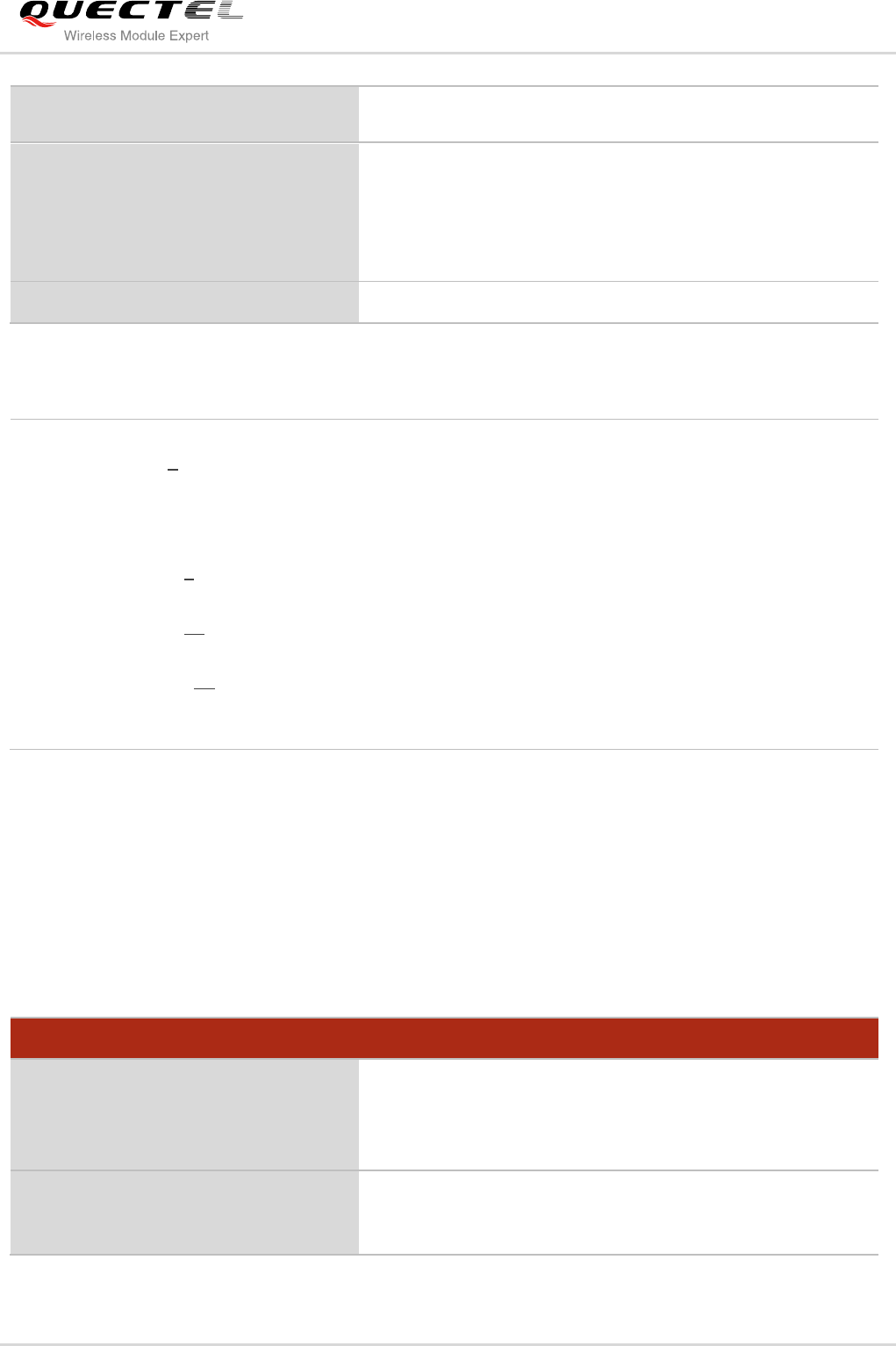
AT+QGPSXTRA Enable gpsOneXTRA Functionality
Test Command
AT+QGPSXTRA=?
Response
+QGPSXTRA: (0-2),(0-10),(1-120),(24-168)
OK
Read Command
AT+QGPSXTRA?
Response
+QGPSXTRA: <xtraenable>
Quectel
Confidential
LTE Module Series
EC20 GNSS AT Commands Manual
EC20_GNSS_AT_Commands_Manual Confidential / Released 19 / 26
Parameter
2.8. AT+QGPSXTRATIME Inject gpsOneXTRA Time
This command can be used to inject time to GNSS engine. Before using it, you must turn off the GNSS
engine and configure <xtraenable> by AT+QGPSXTRA. After activating gpsOneXTRA functionality,
GNSS engine will ask for gpsOneXTRA time and gpsOneXTRA data. Meanwhile, before injecting
gpsOneXTRA data, gpsOneXTRA time must be injected first by this command.
OK
Write Command
AT+QGPSXTRA=<xtraenable>[,<retri
es>,<retryInt>,<dloadInt>]
Response
OK
If error is related to ME functionality:
+CME ERROR: <errcode>
Reference
<xtraenable> Enable gpsOneXTRA functionality, the setting will be auto saved to NVRAM.
0 Disable gpsOneXTRA
1 Enable gpsOneXTRA and inject data by manual
2 Enable gpsOneXTRA and automatically inject data
<retries> Automatically download retry count. It is effective when <xtraenable> is set to 2.
0-3-10
<retryInt> Automatically download retry interval. It is effective when <xtraenable> is set to 2.
1-10-120
<dloadInt> Automatically download time interval. It is effective when <xtraenable> is set to 2.
24-48-168
<errcode> Integer type, indicate the error code of the operation. If it is not 0, it is the type of error
(Please refer to the Chapter 5).
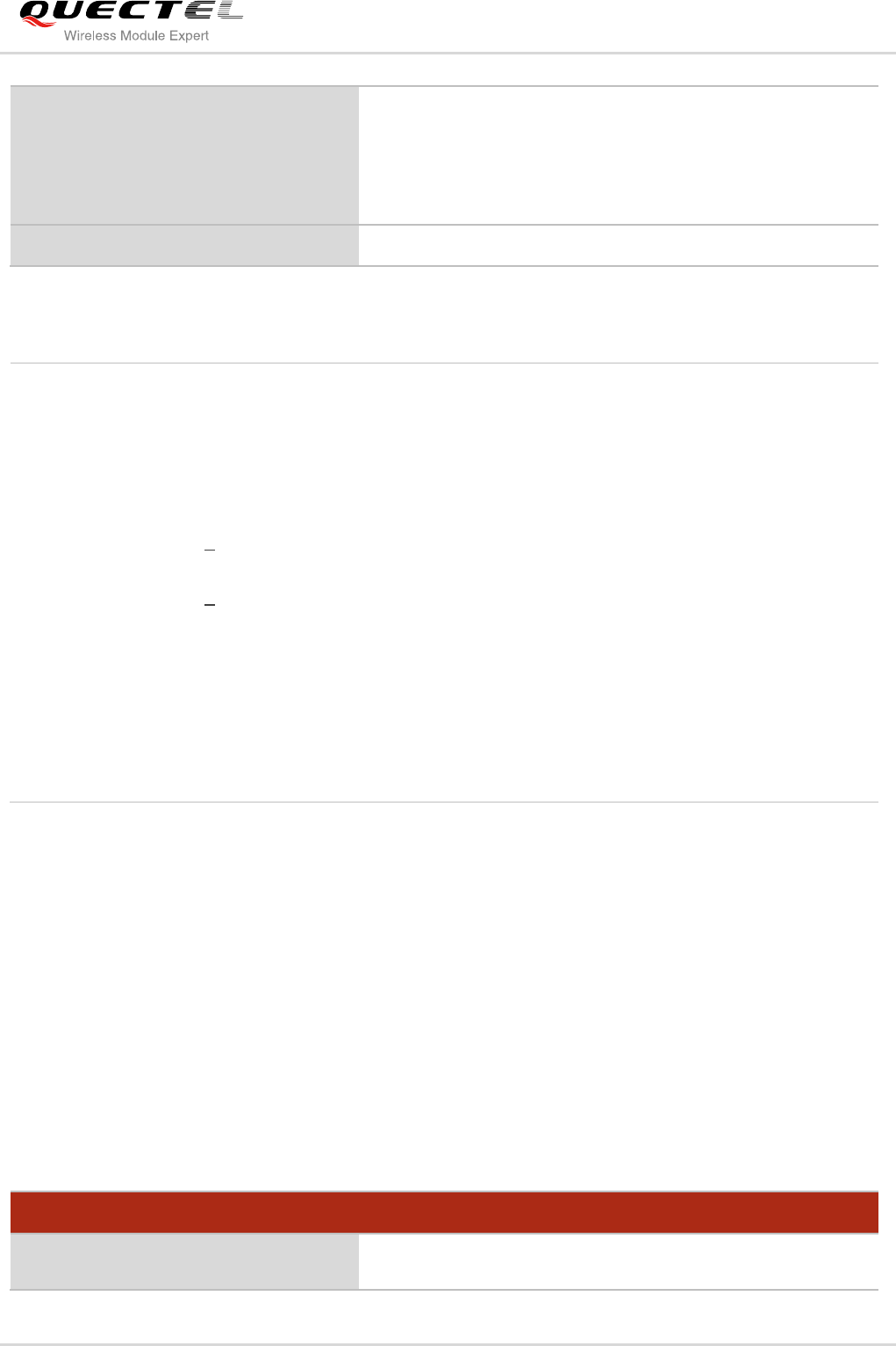
AT+QGPSXTRATIME Inject gpsOneXTRA Time
Test Command
AT+QGPSXTRATIME=?
Response
+QGPSXTRATIME: 0,<xtratime>,(0,1),(0,1),<uncrtn>
OK
Read Command
AT+QGPSXTRATIME?
Response
OK
Quectel
Confidential
LTE Module Series
EC20 GNSS AT Commands Manual
EC20_GNSS_AT_Commands_Manual Confidential / Released 20 / 26
Parameter
2.9. AT+QGPSXTRADATA Inject gpsOneXTRA Data Manually
This command can be used to inject gpsOneXTRA data to GNSS engine. Before using it, you must turn
off the GNSS engine and enable XTRA by AT+QGPSXTRA. Meanwhile, before injecting gpsOneXTRA
data, gpsOneXTRA time must be injected first by AT+QGPSXTRATIME.
Before operating AT+QGPSXTRADATA command, you should store the valid gpsOneXTRA data into
RAM or UFS of the mudule (recommended to save it to RAM). After operating this command successfully,
gpsOneXTRA data can be deleted. At this moment, you can query the validity of gpsOneXTRA data by
AT+QGPSXTRADATA?.
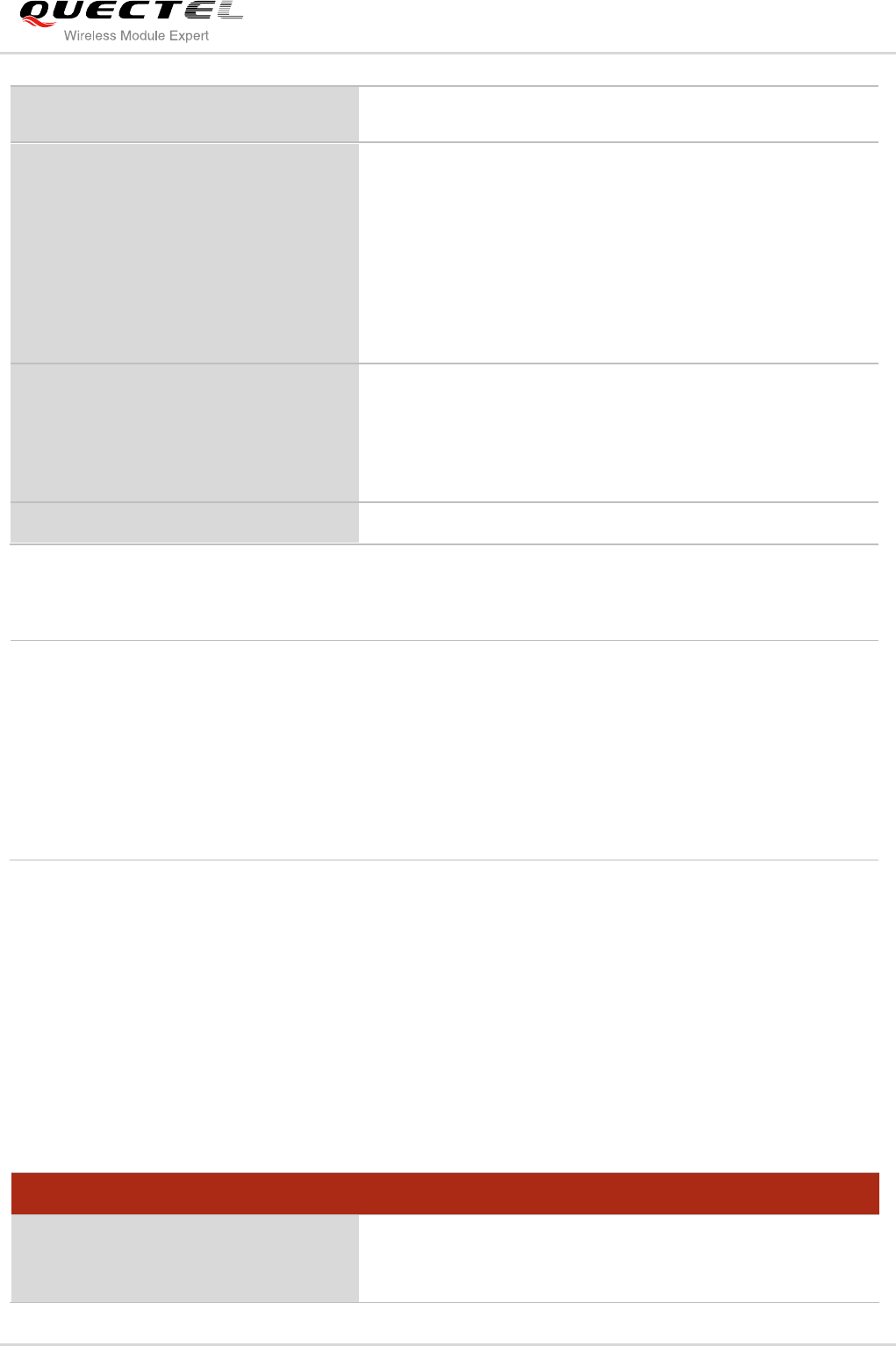
AT+QGPSXTRADATA Inject gpsOneXTRA Data Manually
Test Command
AT+QGPSXTRADATA=?
Response
+QGPSXTRADATA: <xtradatafilename>
Inject XTRA time manually
AT+QGPSXTRATIME=<op>,<xtratime
>[,<utc>[,<force>,<uncrtn>]]
Response
OK
If error is related to ME functionality:
+CME ERROR: <errcode>
Reference
<op> Operation type
0 Inject gpsOneXTRA time
<xtratime> Current UTC/GPS time, the format of time: YYYY/MM/DD, hh:mm:ss,
e.g.2015/01/03,15:34:50.
<utc> The type of time
0 GPS time
1 UTC time
<force> Force or allow GPS subsystem to accept the time entered.
0 Allow acceptances
1 Force acceptances
<uncrtn> Uncertainty of time. Unit: ms, default value: 3500ms. It indicates the time
difference between sending a request to the SNTP server and receiving a
response from the SNTP server. If the set time is less than 3.5s, it will be counted
as 3.5s.
<errcode> Integer type, indicate the error code of the operation. If it is not 0, it is the type of
error (Please refer to the Chapter 5).
Quectel
Confidential
LTE Module Series
EC20 GNSS AT Commands Manual
EC20_GNSS_AT_Commands_Manual Confidential / Released 21 / 26
OK
Query the validity of the current
gpsOneXTRA data
AT+QGPSXTRADATA?
Response
+QGPSXTRADATA:
<xtradatadurtime>,<injecteddatatime>
OK
If error is related to ME functionality:
+CME ERROR: <errcode>
Inject gpsOneXTRA data manually
AT+QGPSXTRADATA=<xtradatafilena
me>
Response
OK
If error is related to ME functionality:
+CME ERROR: <errcode>
Reference
Parameter
2.10. Introduction of URC
EC20 GNSS engine will inform some information via URC.
2.10.1. Expired XTRA Data
When XTRA data is expired, it will be informed by URC.
<xtradatafilename> Filename of gpsOneXTRA data file, e.g. “xtra.bin” or “xtra2.bin”.
<xtradatadurtime> Valid time of injected gpsOneXTRA data, unit: minute.
0 No gpsOneXTRA file or gpsOneXTRA file is overdue
1-10080 Valid time of gpsOneXTRA file
<injecteddatatime> Starting time of the valid time of XTRA data, format:
“YYYY/MM/DD,hh:mm:ss”, e.g. “2015/01/03,15:34:50”.
<errcode> Integer type, indicate the error code of the operation. If it is not 0, it is the type
of error (Please refer to the Chapter 5).
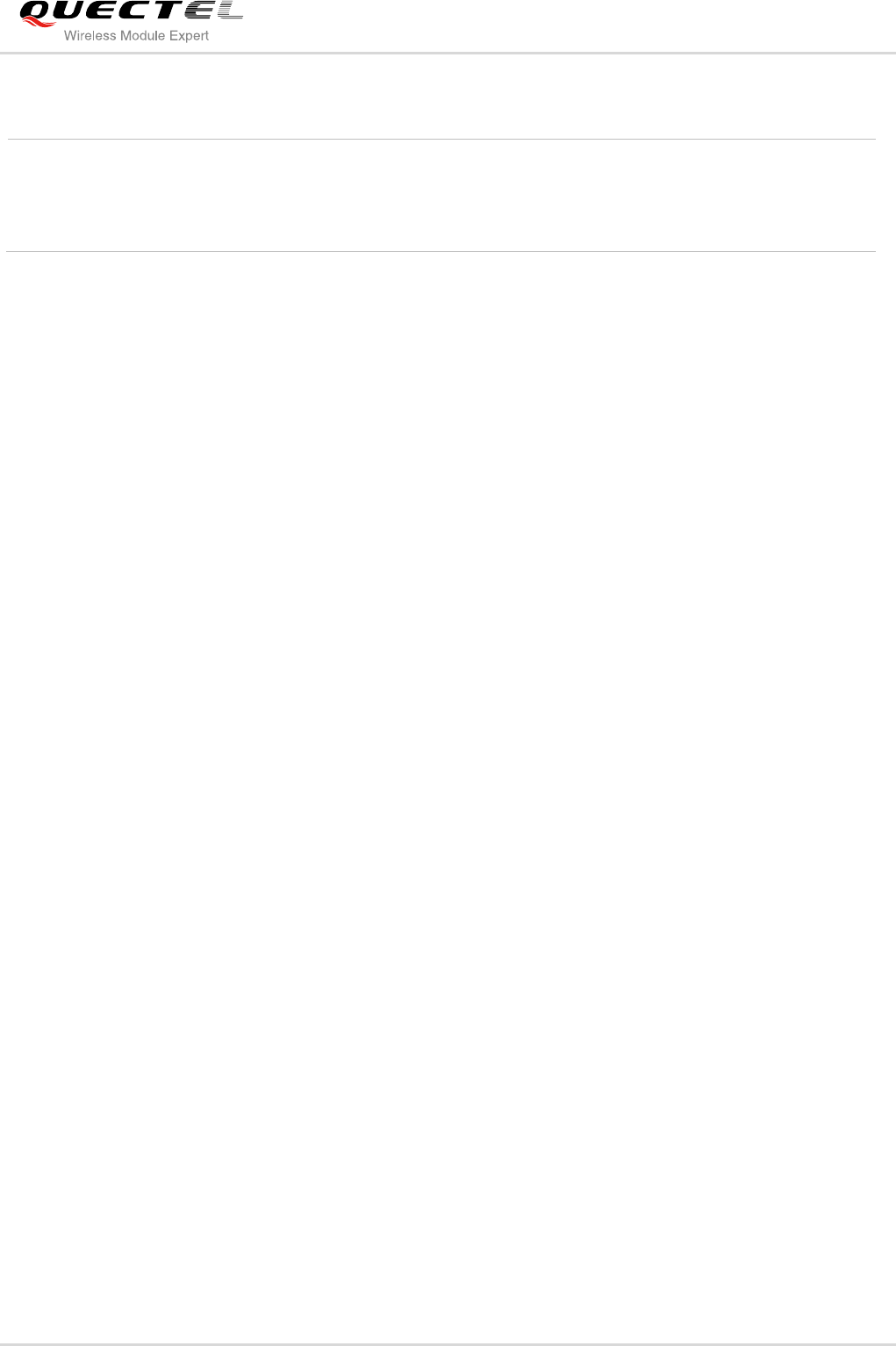
Expired XTRA Data
+QGPSURC:
“xtradataexpire”,<xtradatadurtime>,<
injecteddatatime>
XTRA data is expired, and need to be updated.
Quectel
Confidential
LTE Module Series
EC20 GNSS AT Commands Manual
EC20_GNSS_AT_Commands_Manual Confidential / Released 22 / 26
Parameter
<xtradatadurtime> Valid time of injected XTRA data, unit: minute.
0 No XTRA file or XTRA file is expired
<injecteddatatime> Starting time of the valid time of XTRA data, format:
“YYYY/MM/DD,hh:mm:ss”, e.g.“2015/01/03,15:34:50”
Quectel
Confidential

LTE Module Series
EC20 GNSS AT Commands Manual
EC20_GNSS_AT_Commands_Manual Confidential / Released 23 / 26
3 Example
3.1. Turn On and Off the GNSS Engine
The example uses default arguments to start GNSS engine, after turning on GNSS engine, NMEA
sentences will be outputted from “usbnmea” port by default.
AT+QGPS=1 //Turn on GNSS engine.
OK
//After turning on GNSS engine, NMEA sentences will be outputted from “usbnmea” port by default.
AT+QGPSLOC? //Obtain position information.
+QGPSLOC: 061951.0,3150.7223N,11711.9293E,0.7,62.2,2,0.0,0.0,0.0,110513,09
OK
AT+QGPSEND //Turn off GNSS engine.
OK
3.2. Application of GNSS nmeasrc
When GNSS was started, you can turn on <nmeasrc> feature, and obtain NMEA sentences by
AT+QGPSGNMEA directly.
AT+QGPSCFG=“nmeasrc”,1 //Enable nmeasrc functionality.
OK
AT+QGPSGNMEA=“GGA” //Obtain GGA sentence.
+QGPSGNMEA: $GPGGA,103647.0,3150.721154,N,11711.925873,E,1,02,4.7,59.8,M,-2.0,M,,*77
OK
AT+QGPSCFG=“nmeasrc”,0 //Disable nmeasrc functionality.
OK
AT+QGPSGNMEA=“GGA” //Disable nmeasrc functionality, GGA sentence can’t be obtained.
+CME ERROR: 507
Quectel
Confidential

LTE Module Series
EC20 GNSS AT Commands Manual
EC20_GNSS_AT_Commands_Manual Confidential / Released 24 / 26
3.3. Example of Injecting gpsOneXTRA
You must enable gpsOneXTRA before injecting gpsOneXTRA time and data to GNSS engine. In this
example we manually download the XTRA file, then upload to UFS via AT+QGPSXTRAUPL.
//If gpsOneXTRA is disabled, enable it by AT+QGPSXTRA and reset EC20, then perform the following
procedures.
AT+QGPSXTRA=1 //Enable XTRA.
OK
//Restart EC20, enable gpsOneXTRA of GNSS engine.
//If gpsOneXTRA data is invalid (query by AT+QGPSXTRADATA?), then perform the following
procedures.
//You can download XTRA file to PC from this URL http://xtra1.gpsonextra.net/xtra2.bin or other URL
(Refer to the Chapter 1.3).
AT+QFUPL="RAM:xtra2.bin",59748,60
<Select file & send it in QCOM>
OK
//<utc> format is YYYY/MM/DD,hh:mm:ss, e.g. 2015/01/03,15:30:30.
AT+QGPSXTRATIME=0,“2015/01/03,15:30:30”,1,1,5 //Inject gpsOneXTRA time to GNSS engine.
OK
AT+QGPSXTRADATA=“RAM:xtra2.bin” //Inject gpsOneXTRA data to GNSS engine successfully.
OK
AT+QFDEL=“RAM:xtra2.bin” //Delete XTRA data file from RAM file
OK
AT+QGPS=1 //Turn on GNSS engine
OK
Quectel
Confidential
LTE Module Series
EC20 GNSS AT Commands Manual
EC20_GNSS_AT_Commands_Manual Confidential / Released 25 / 26
4 Appendix A Reference
Table 1: Related Documents
SN
Document name
Remark
[1]
Quectel_EC20_AT_Commands_Manual
EC20 AT commands sets
Table 2: Terms and Abbreviations
Abbreviation
Description
GNSS
Global Navigation Satellite Systems
GPS
Global Positioning System provides by USA
GLONASS
Global Navigation Satellite System provides by Russia
NMEA
National Marine Electronics Association
gpsOneXTRA
An auxiliary positioning technology provides by Qualcomm
DPO
Dynamic Power Optimization
ODP
On-Demand Positioning
Quectel
Confidential

LTE Module Series
EC20 GNSS AT Commands Manual
EC20_GNSS_AT_Commands_Manual Confidential / Released 26 / 26
5 Appendix B Summary of Error Codes
The error code <errcode> indicates an error related to GNSS operations. The detail about <errcode> is
described in the following table.
Table 3: Summary of Error Codes
<errcode>
Meaning
501
Invalid parameter(s)
502
Operation not supported
503
GNSS subsystem busy
504
Session is ongoing
505
Session not activity
506
Operation timeout
507
Function not enabled
508
Time information error
509
XTRA not enabled
510
XTRA file open failed
511
Bad CRC for XTRA data file
512
Validity time is out of range
513
Internal resource error
514
GNSS locked
515
End by E911
516
Not fixed now
549
Unknown error
Quectel
Confidential
