Upgrade Firmware Tools User Guide Quectel FW Tool Lite V1.1
User Manual:
Open the PDF directly: View PDF  .
.
Page Count: 22
Firmware Upgrade
Tool Lite User Guide
Firmware_Upgrade_Tool_Lite_V1.1
Firmware Upgrade Tool Lite User Guide
Firmware_Upgrade_Tool_Lite_V1.1 -1 -
Document Title
Firmware Upgrade Tool Lite User Guide
Version
1.1
Date
2010-12-24
Status
Release
Document Control ID
Firmware_Upgrade_Tool_Lite_V1.1
General Notes
Quectel offers this information as a service to its customers, to support application and
engineering efforts that use the products designed by Quectel. The information provided is
based upon requirements specifically provided to Quectel by the customers. Quectel has not
undertaken any independent search for additional relevant information, including any
information that may be in the customer’s possession. Furthermore, system validation of this
product designed by Quectel within a larger electronic system remains the responsibility of
the customer or the customer’s system integrator. All specifications supplied herein are
subject to change.
Copyright
This document contains proprietary technical information which is the property of Quectel
Limited. The copying of this document, distribution to others, and communication of the
contents thereof, are forbidden without express authority. Offenders are liable to the payment
of damages. All rights are reserved in the event of a patent grant or registration of a utility
model or design. All specification supplied herein are subject to change without notice at any
time.
Copyright © Quectel Wireless Solutions Co., Ltd. 2010
Quectel
Confidential

Firmware Upgrade Tool Lite User Guide
Firmware_Upgrade_Tool_Lite_V1.1 -2 -
Contents
Contents ............................................................................................................................................ 2
Figure Index ...................................................................................................................................... 3
0. Revision history ............................................................................................................................ 4
1. Installations and Upgrade .............................................................................................................. 5
2. Firmware ....................................................................................................................................... 6
3. Introduction of the Tool................................................................................................................. 7
3.1. Introduction of the UI .......................................................................................................... 7
3.1.1. Configuration ............................................................................................................ 8
3.1.2. Files setting ............................................................................................................... 9
3.1.3. Start ......................................................................................................................... 11
3.1.4. Stop .......................................................................................................................... 14
3.2. Abnormalities .................................................................................................................... 15
Quectel
Confidential

Firmware Upgrade Tool Lite User Guide
Firmware_Upgrade_Tool_Lite_V1.1 -3 -
Figure Index
FIGURE 1: THE MAIN INTERFACE ............................................................................................. 7
FIGURE 2: UI OF PORT .................................................................................................................. 8
FIGURE 3: UI OF BAUD RATE...................................................................................................... 9
FIGURE 4: UI OF SCATTER FILE SELECTED .......................................................................... 10
FIGURE 5: UI OF SCATTER FILE SELECTED .......................................................................... 10
FIGURE 6: UI OF STARTING UPGRADE ................................................................................... 11
FIGURE 7: UI OF UPGRADE OK ................................................................................................ 12
FIGURE 8: UI OF DA PERCENT.................................................................................................. 13
FIGURE 9: UI OF DOWNLOAD PERCENT ................................................................................ 13
FIGURE 10: UI OF CLEAR DATA PERCENT ............................................................................. 14
FIGURE 11: UI OF STOP UPGRADE ........................................................................................... 15
FIGURE 12: UI OF PORT ERROR ................................................................................................ 16
FIGURE 13: UI OF BAUD RATE ERROR ................................................................................... 17
FIGURE 14: UI OF UPGRADE WITH INCORRECT SCATTER FILE ....................................... 18
FIGURE 15: UI OF POWER SUPPLY OR USB ABNORMAL .................................................... 19
FIGURE 16: UI OF POWER SUPPLY OR USB ABNORMAL .................................................... 19
FIGURE 17: UI OF POWER SUPPLY OR USB ABNORMAL .................................................... 20
FIGURE 18: UI OF POWER SUPPLY OR USB ABNORMAL .................................................... 20
Quectel
Confidential
Firmware Upgrade Tool Lite User Guide
Firmware_Upgrade_Tool_Lite_V1.1 -4 -
0. Revision history
Revision
Date
Author
Description of change
V1.1
2010-12-24
Jean HU
Initial
Quectel
Confidential

Firmware Upgrade Tool Lite User Guide
Firmware_Upgrade_Tool_Lite_V1.1 -5 -
1. Installations and Upgrade
The present document describes how to upgrade firmware using “Firmware Upgrade Tool Lite
User Guide” supplied by Quectel. The tool can run approximately in PC without any installations
if the OS of PC is among the ones listed below.
- Windows 95
- Windows 98
- Windows 2000
- Windows ME
- Windows XP
Any upgraded version of the tool will be informed in advance and provided.
Quectel
Confidential

Firmware Upgrade Tool Lite User Guide
Firmware_Upgrade_Tool_Lite_V1.1 -6 -
2. Firmware
The firmware package contains three files:
- .txt file: the scatter file to describe layout of the firmware image on memory.
- Database file: used in the Data Tool.
- .bin file: the firmware image file.
Quectel
Confidential
Firmware Upgrade Tool Lite User Guide
Firmware_Upgrade_Tool_Lite_V1.1 -7 -
3. Introduction of the Tool
The tool is used to upgrade firmware.
It works as following steps:
Step1: Select the .txt scatter file corresponding to the .bin file.
Step2: Choose the correct serial port and baud rate.
Step3: Click Start button to start downloading.
Step4: Set the device into download mode (take M10 module as an example: set “D/L” switch on
EVB to ON (make sure the “5V_SW” switch is ON))
The following describes the detail of using the upgrade tool.
3.1. Introduction of the UI
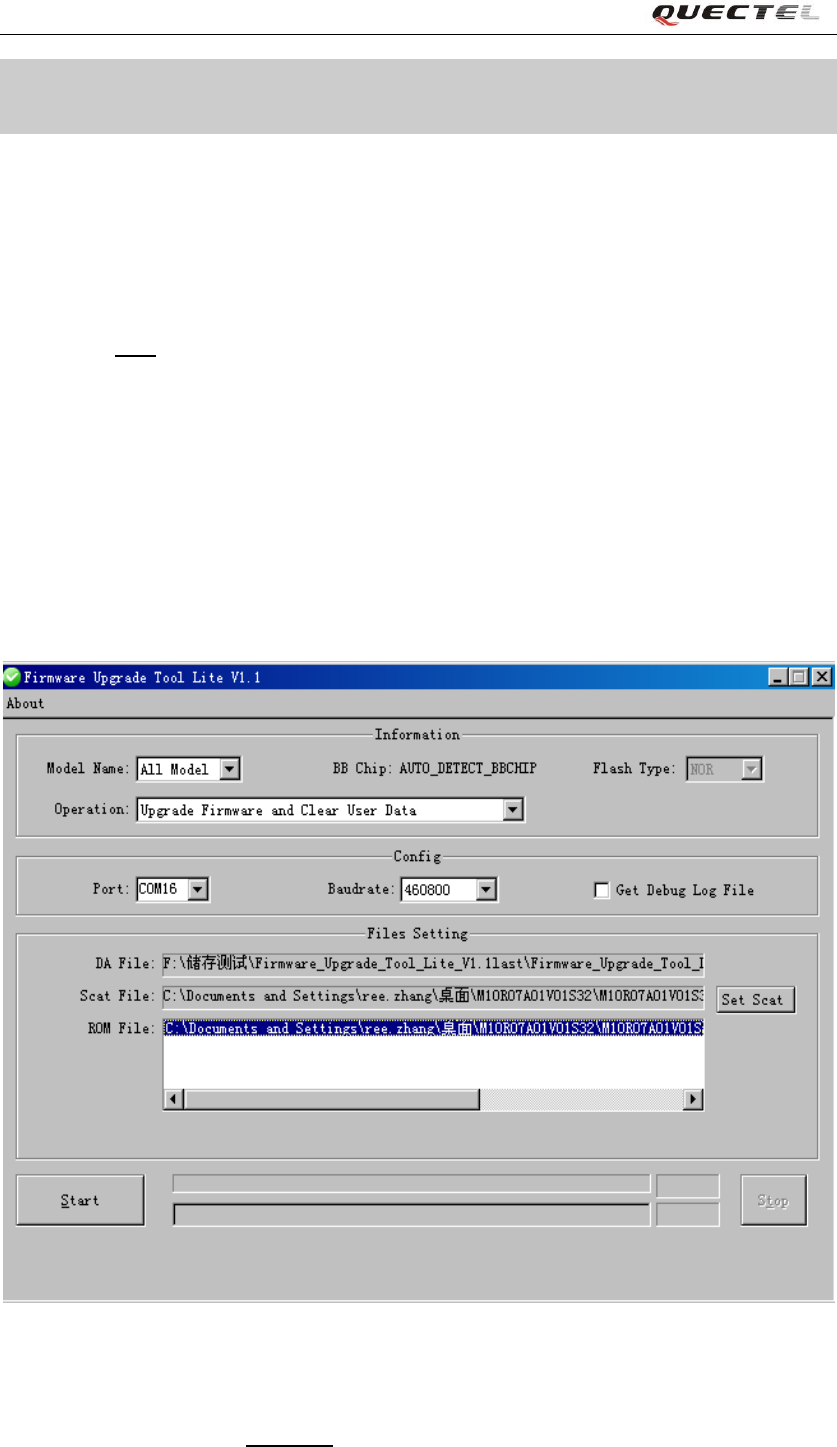
The figure 1 shows the main interface of the tool. This tool supports many projects to upgrade
firmware.
Figure 1: The main interface
Note:
There are two choices in the Operation, the one is default named “Upgrade Firmware and Clear
Quectel
Confidential
Firmware Upgrade Tool Lite User Guide
Firmware_Upgrade_Tool_Lite_V1.1 -8 -
User Data” and the other one “Upgrade Firmware Only” is reserved which customer can ignore.
3.1.1. Configuration
A) Port
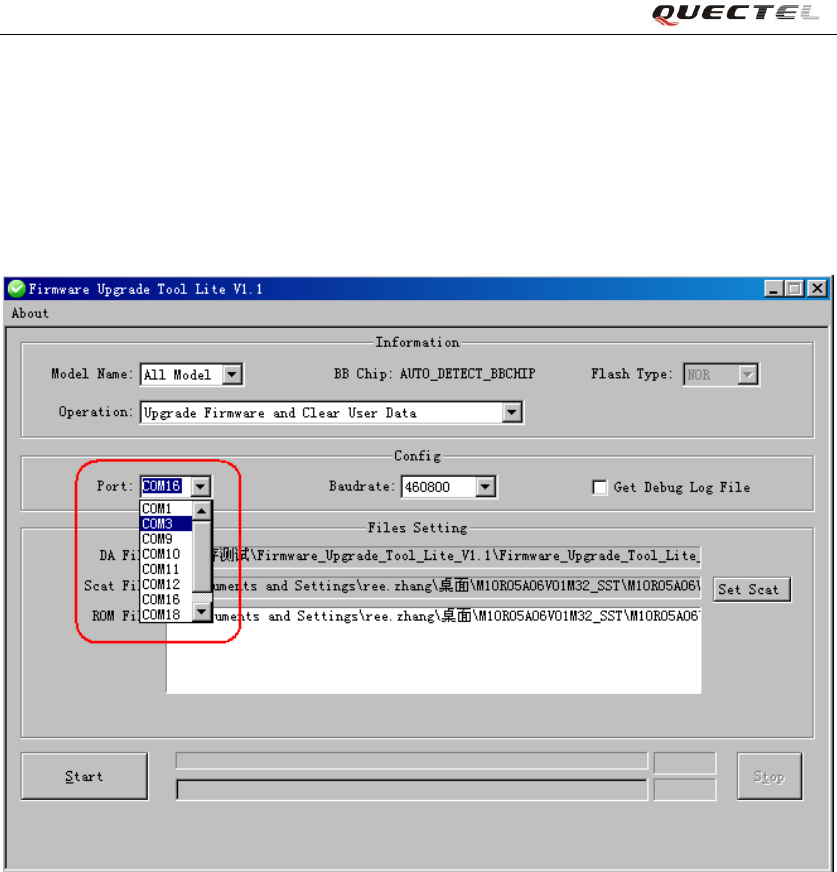
According to the connection between PC and EVB, select the right serial port as figure 2.
Figure 2: UI of Port
B) Baud rate
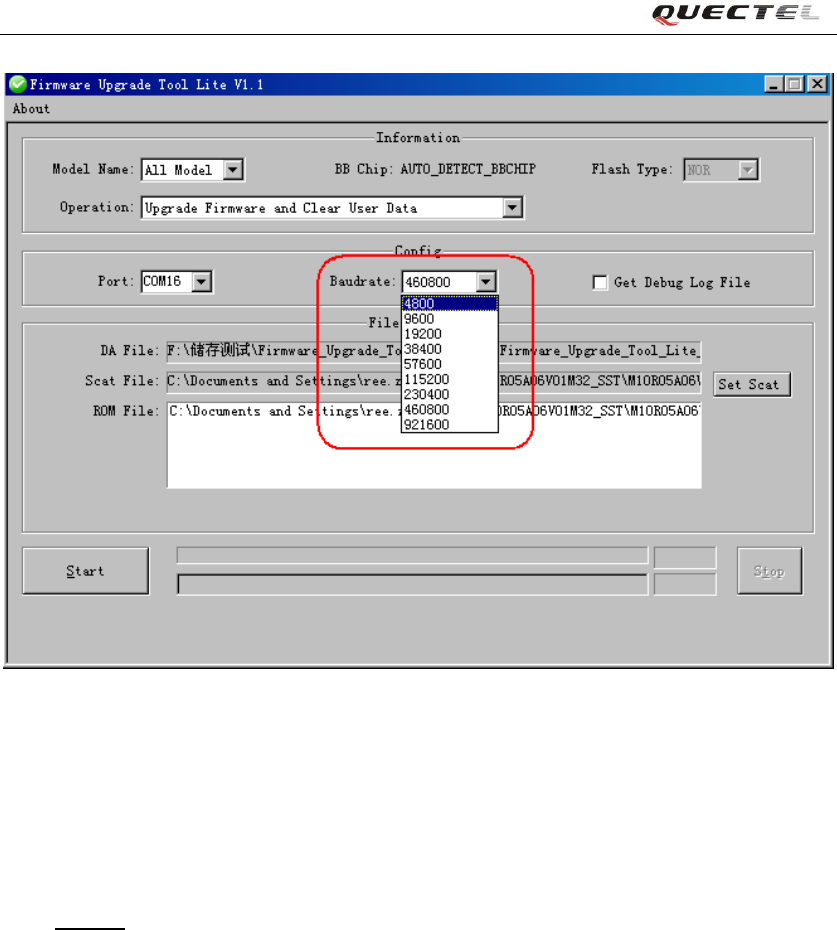
Choose an appropriate baud rate. Please refer to figure 3.
Note:
The maximal baud rate of standard serial cable is 115200, and the USB Serial cable is 460800.
Quectel
Confidential
Firmware Upgrade Tool Lite User Guide
Firmware_Upgrade_Tool_Lite_V1.1 -9 -
Figure 3: UI of Baud rate
C) Get Debug Log File
This function is used for more information, the customer can ignore it.
3.1.2. Files setting
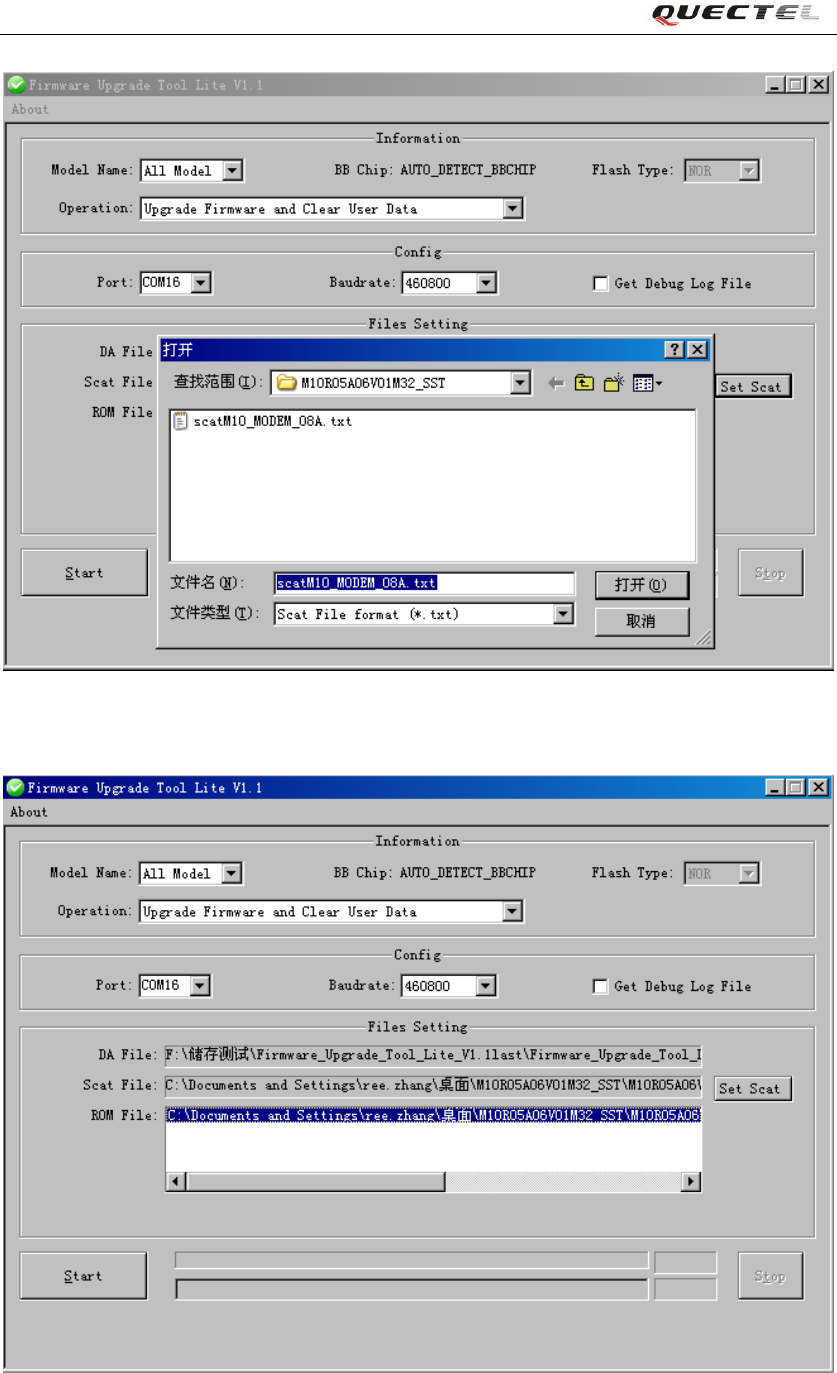
Click Set Scat button to select the scatter file. The tool will match the .bin file in the same folder
automatically after selected correct scatter file. Dialogue frames are shown in figure 4 and figure
5.
Quectel
Confidential
Firmware Upgrade Tool Lite User Guide
Firmware_Upgrade_Tool_Lite_V1.1 -10 -
Figure 4: UI of Scatter File Selected
Figure 5: UI of Scatter File Selected
Quectel
Confidential
Firmware Upgrade Tool Lite User Guide
Firmware_Upgrade_Tool_Lite_V1.1 -11 -
3.1.3. Start
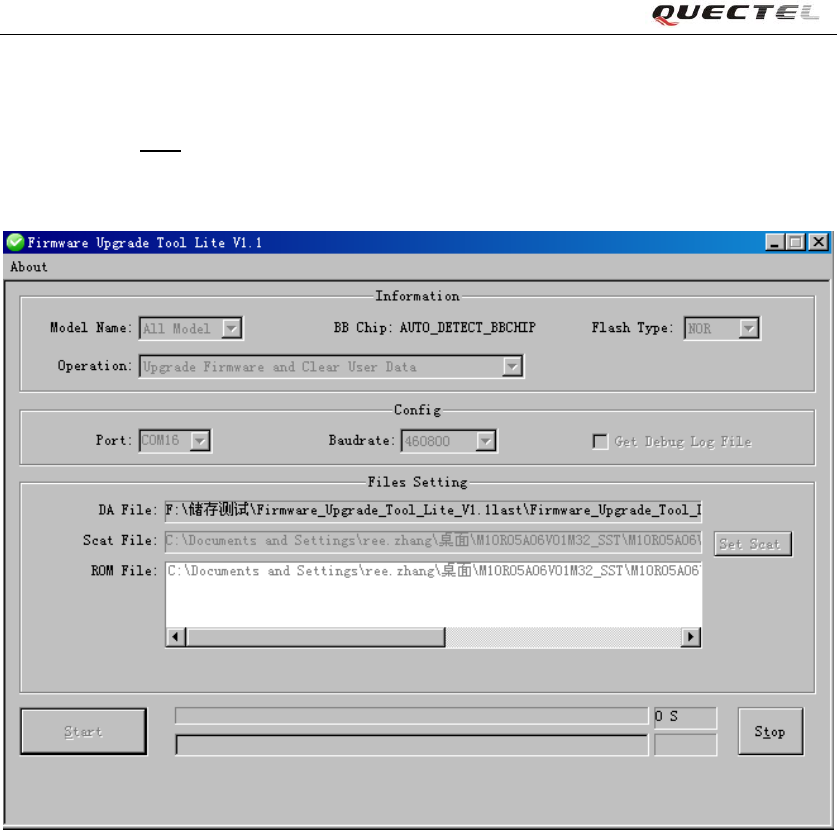
Firstly click the Start button to upgrade the chosen firmware. Please refer in figure 6.
Secondly, set “D/L” switch to ON to start upgrading process.
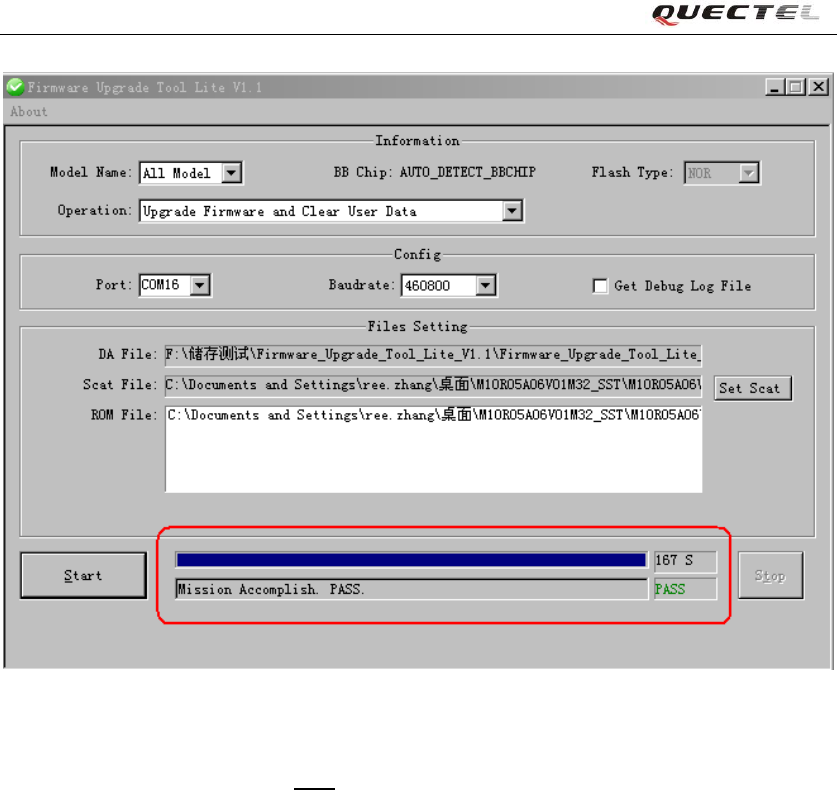
Finally, it will indicate “Mission Accomplish. Pass.” if successfully as shown in figure 7.
Figure 6: UI of Starting Upgrade
Quectel
Confidential
Firmware Upgrade Tool Lite User Guide
Firmware_Upgrade_Tool_Lite_V1.1 -12 -
Figure 7: UI of Upgrade OK
The progress bar on the right of Start button indicates the progress of upgrading firmware and
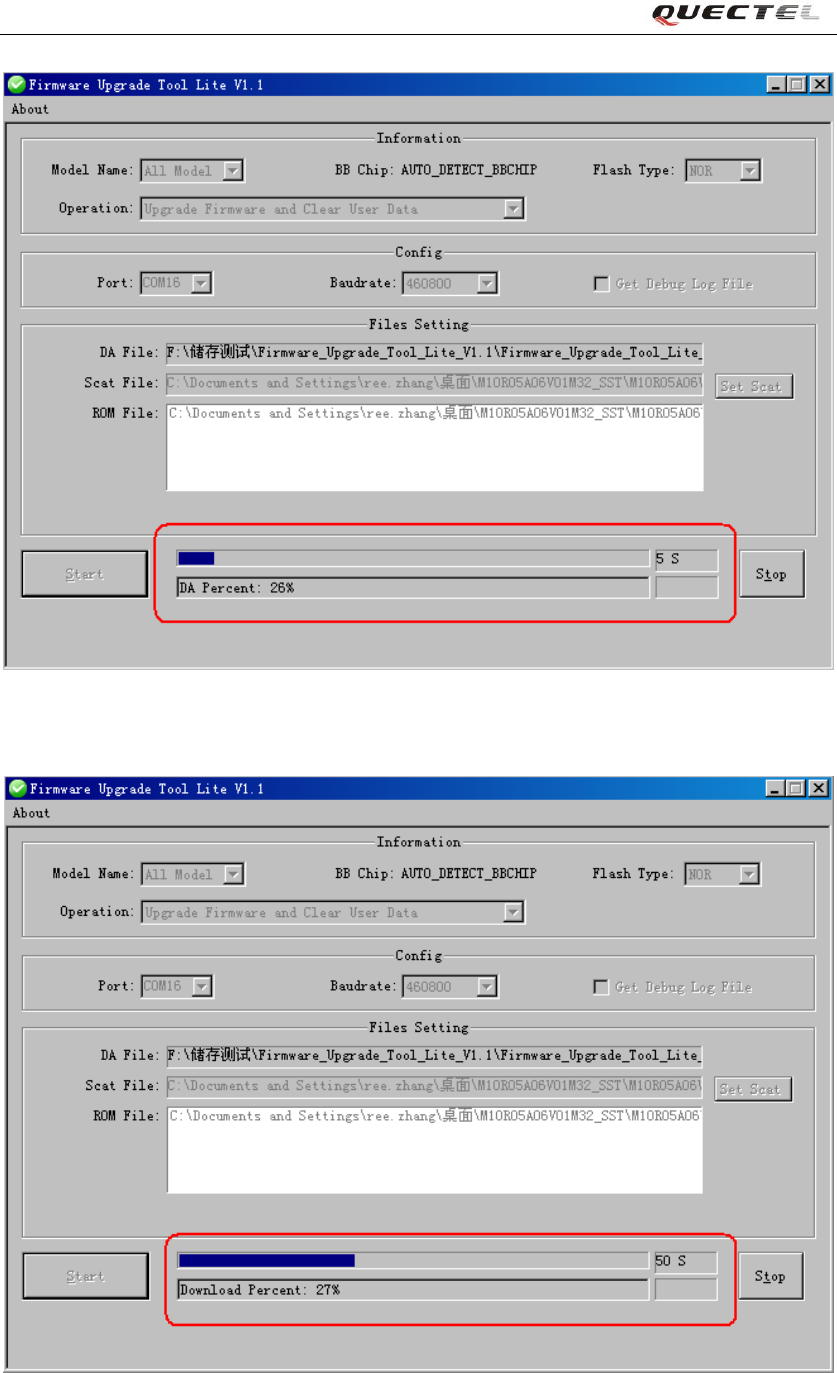
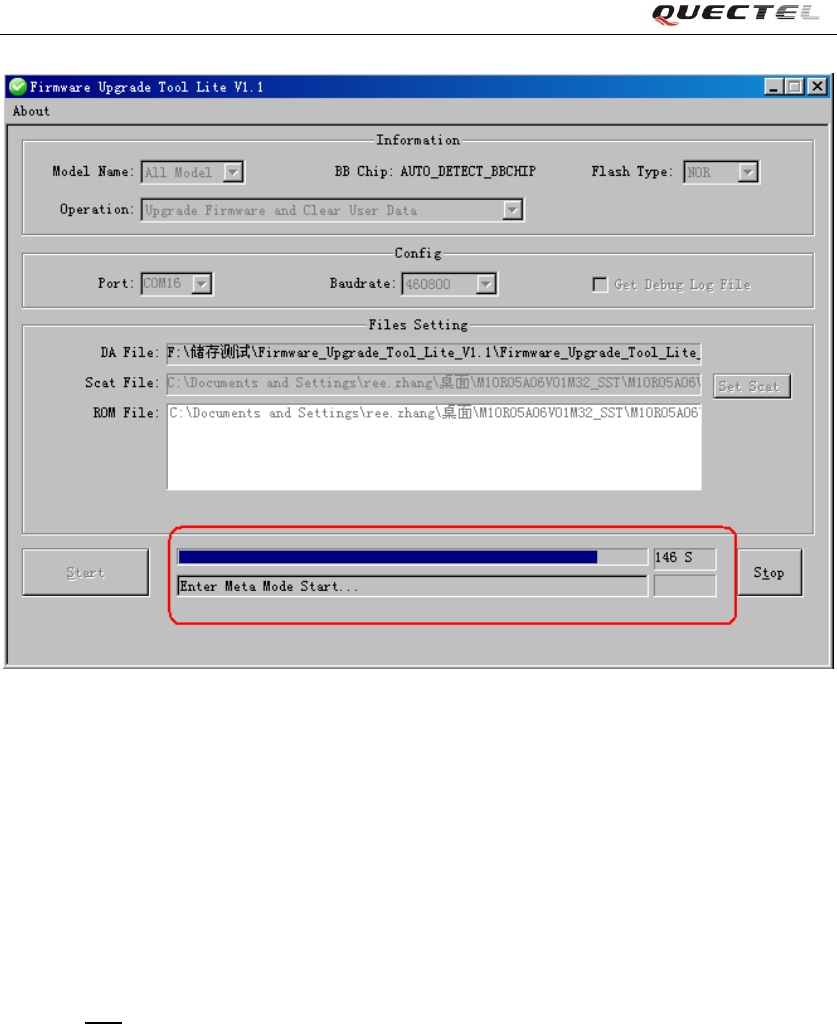
shows the time expire of upgrading. There are several steps in the progress of upgrading firmware.
DA Percent
Download Percent
Clear the flash
Dialogue frames are shown in figure 8, figure 9 and figure 10.
Quectel
Confidential
Firmware Upgrade Tool Lite User Guide
Firmware_Upgrade_Tool_Lite_V1.1 -13 -
Figure 8: UI of DA Percent
Figure 9: UI of Download Percent
Quectel
Confidential
Firmware Upgrade Tool Lite User Guide
Firmware_Upgrade_Tool_Lite_V1.1 -14 -
Figure 10: UI of Clear data Percent
Note:
To make sure the tool runs successfully, following preparations must be done in advance:
- Link PC and module correctly
- Choose the correct serial port and baud rate
- Choose the right file to be upgraded
3.1.4. Stop
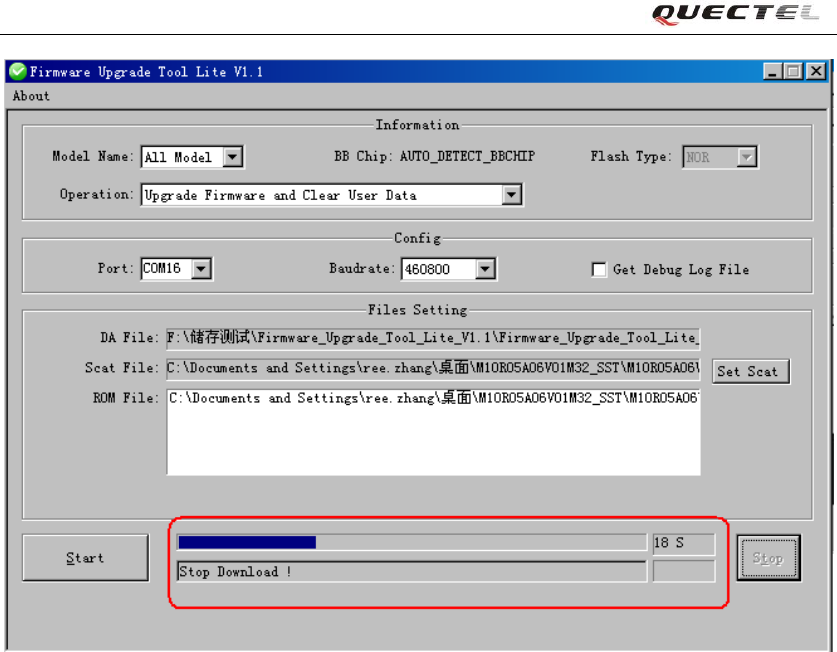
Click the Stop button to stop upgrading. The tool will indicate as shown in figure 11.
Warning:
If the upgrade process is interrupted, there would be no valid firmware in the module. So it is
strongly recommended never to stop the firmware upgrade process.
Quectel
Confidential
Firmware Upgrade Tool Lite User Guide
Firmware_Upgrade_Tool_Lite_V1.1 -15 -
Figure 11: UI of Stop Upgrade
3.2. Abnormalities
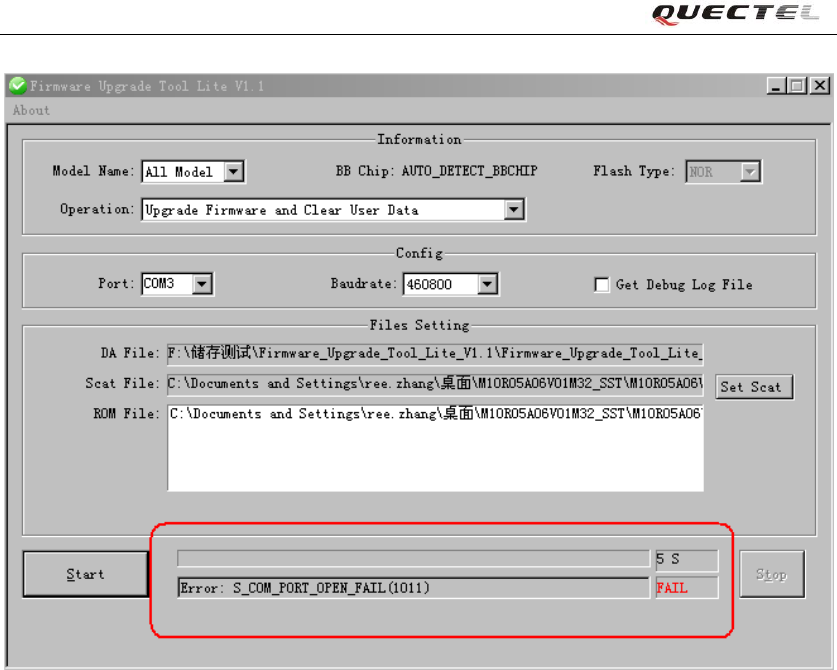
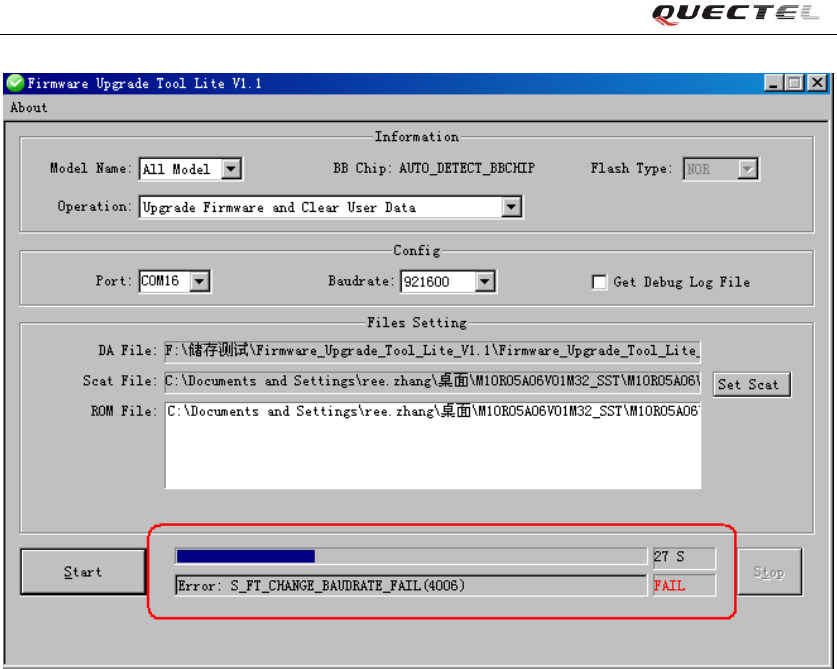
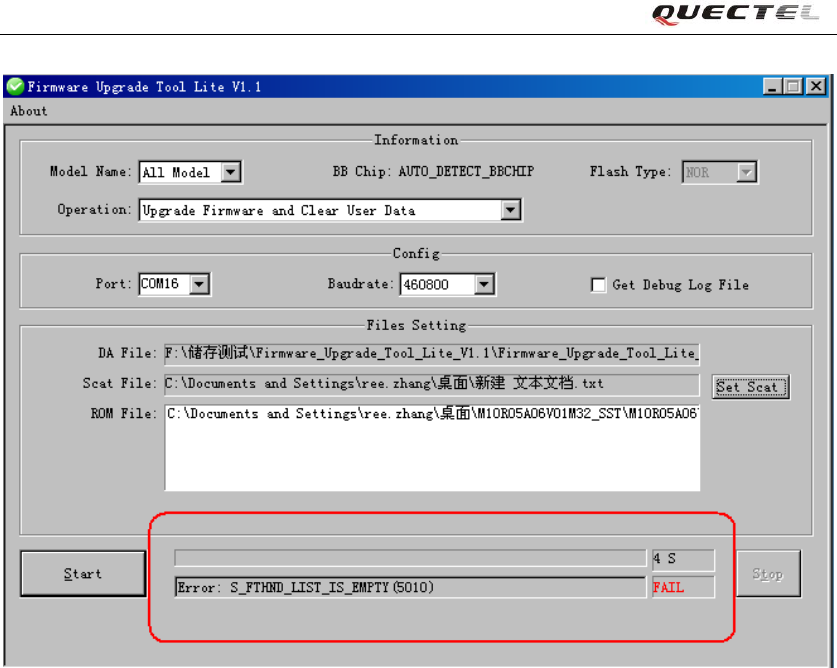
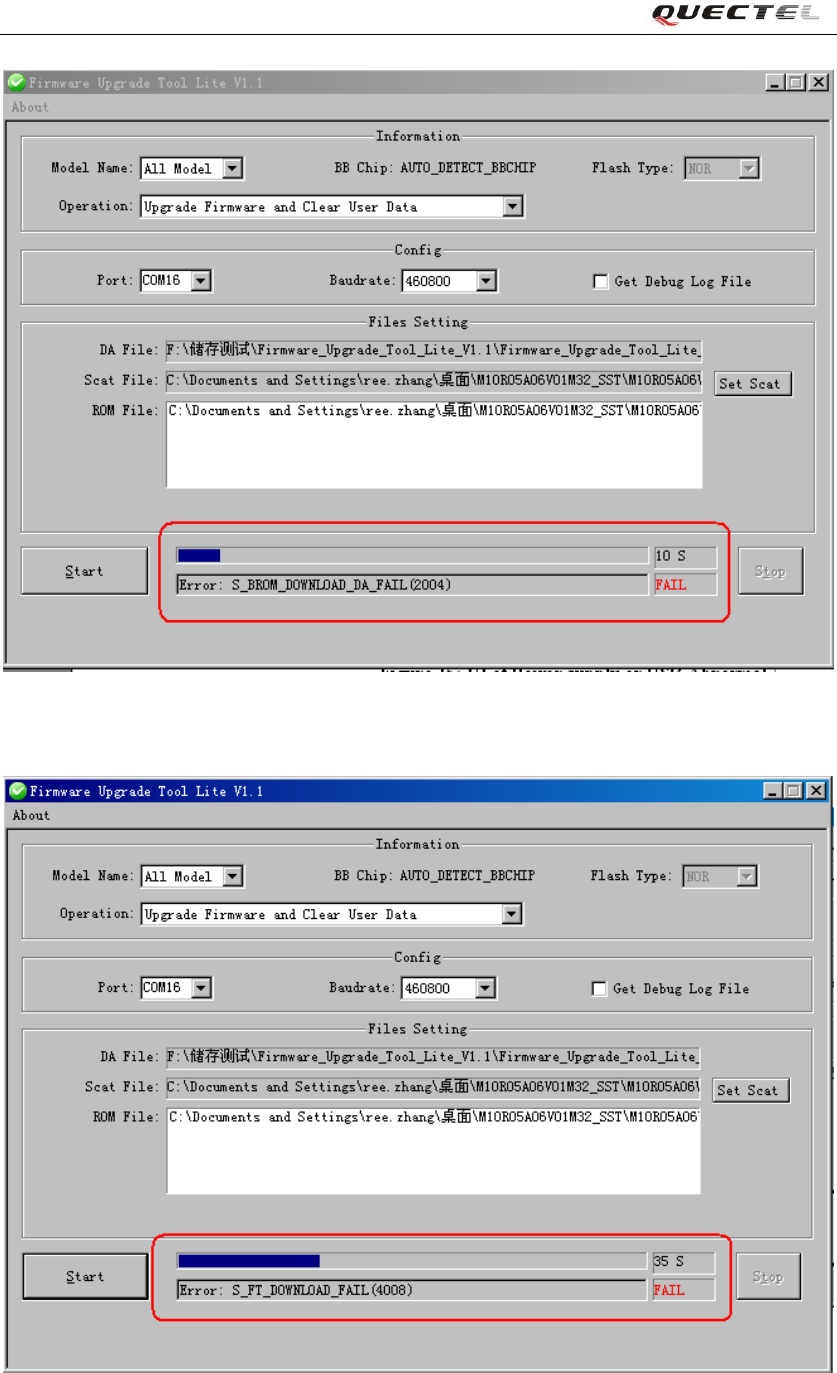
The wrong parameter of Port and Baud rate, the damaged EVB and module, the incorrect file, etc.
may lead to abnormalities as following.
A) Wrong parameter of Port
Quectel
Confidential
Firmware Upgrade Tool Lite User Guide
Firmware_Upgrade_Tool_Lite_V1.1 -16 -
Figure 12: UI of Port ERROR
B) Wrong parameter of Baud rate
Quectel
Confidential
Firmware Upgrade Tool Lite User Guide
Firmware_Upgrade_Tool_Lite_V1.1 -17 -
Figure 13: UI of Baud rate ERROR
C) Upgrade with Incorrect File
Quectel
Confidential
Firmware Upgrade Tool Lite User Guide
Firmware_Upgrade_Tool_Lite_V1.1 -18 -
Figure 14: UI of Upgrade with Incorrect Scatter File
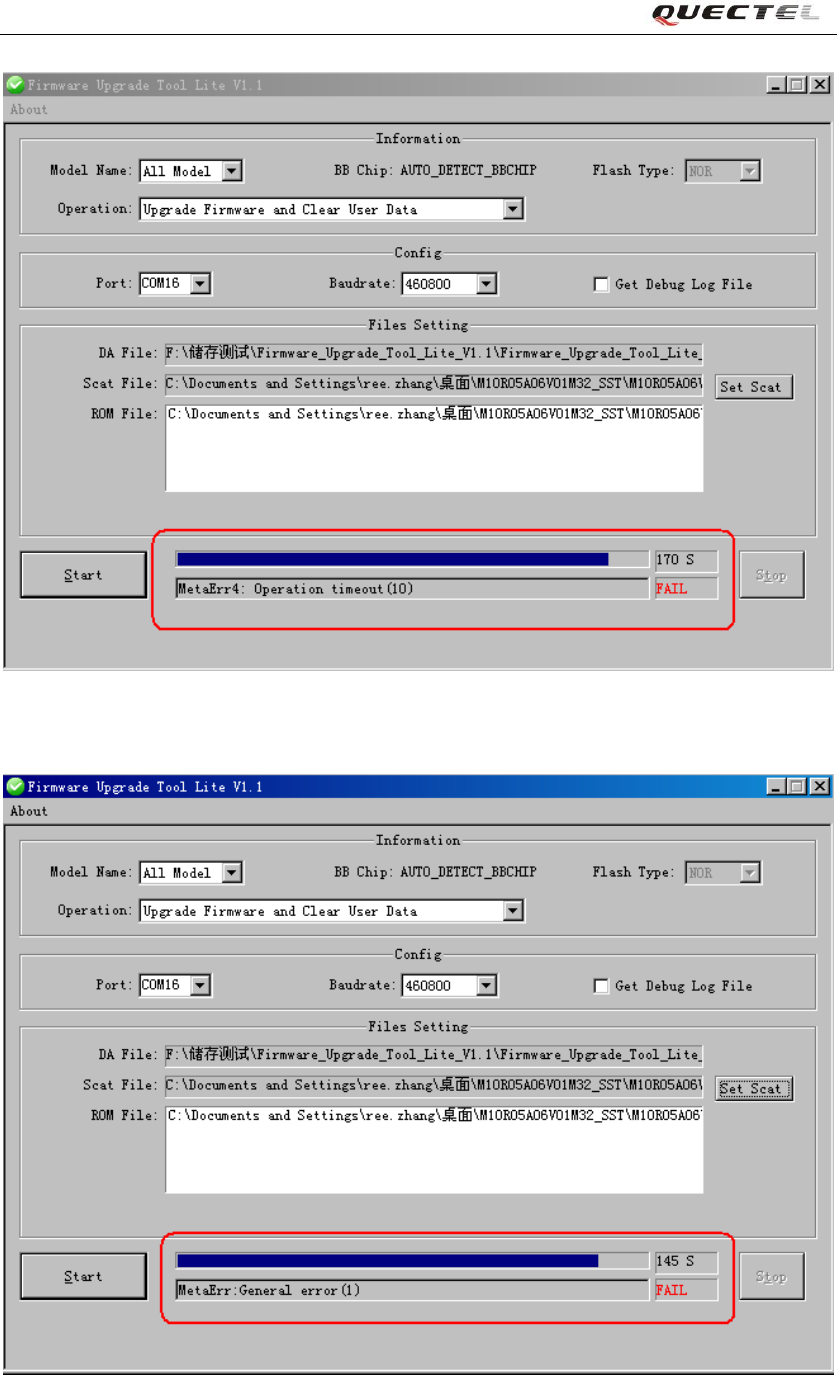
D) Power supply or USB Abnormal
Quectel
Confidential
Firmware Upgrade Tool Lite User Guide
Firmware_Upgrade_Tool_Lite_V1.1 -19 -
Figure 15: UI of Power supply or USB Abnormal
Figure 16: UI of Power supply or USB Abnormal
Quectel
Confidential
Firmware Upgrade Tool Lite User Guide
Firmware_Upgrade_Tool_Lite_V1.1 -20 -
Figure 17: UI of Power supply or USB Abnormal
Figure 18: UI of Power supply or USB Abnormal
Quectel
Confidential