Quectel MC60 Open CPU Series User Guide V2.0
User Manual:
Open the PDF directly: View PDF  .
.
Page Count: 200 [warning: Documents this large are best viewed by clicking the View PDF Link!]
- About the Document
- Contents
- Table Index
- Figure Index
- 1 Introduction
- 2 OpenCPU Platform
- 3 Base Data Types
- 4 System Configuration
- 5 API Functions
- 5.1. System API Functions
- 5.1.1. Usage
- 5.1.2. API Functions
- 5.1.2.1. Ql_Reset
- 5.1.2.2. Ql_Sleep
- 5.1.2.3. Ql_GetUID
- 5.1.2.4. Ql_GetCoreVer
- 5.1.2.5. Ql_GetSDKVer
- 5.1.2.6. Ql_GetMsSincePwrOn
- 5.1.2.7. Ql_OS_GetMessage
- 5.1.2.8. Ql_OS_SendMessage
- 5.1.2.9. Ql_OS_CreateMutex
- 5.1.2.10. Ql_OS_TakeMutex
- 5.1.2.11. Ql_OS_GiveMutex
- 5.1.2.12. Ql_OS_CreateSemaphore
- 5.1.2.13. Ql_OS_TakeSemaphore
- 5.1.2.14. Ql_OS_CreateEvent
- 5.1.2.15. Ql_OS_WaitEvent
- 5.1.2.16. Ql_OS_SetEvent
- 5.1.2.17. Ql_OS_GiveSemaphore
- 5.1.2.18. Ql_SetLastErrorCode
- 5.1.2.19. Ql_GetLastErrorCode
- 5.1.2.20. Ql_OS_GetCurrenTaskLeftStackSize
- 5.1.3. Possible Error Codes
- 5.1.4. Examples
- 5.2. Time APIs
- 5.3. Timer APIs
- 5.4. Power Management APIs
- 5.5. Memory APIs
- 5.6. File System APIs
- 5.6.1. Usage
- 5.6.2. API Functions
- 5.6.2.1. Ql_FS_Open
- 5.6.2.2. Ql_FS_OpenRAMFile
- 5.6.2.3. Ql_FS_Read
- 5.6.2.4. Ql_FS_Write
- 5.6.2.5. Ql_FS_Seek
- 5.6.2.6. Ql_FS_GetFilePosition
- 5.6.2.7. Ql_FS_Truncate
- 5.6.2.8. Ql_FS_Flush
- 5.6.2.9. Ql_FS_Close
- 5.6.2.10. Ql_FS_GetSize
- 5.6.2.11. Ql_FS_Delete
- 5.6.2.12. Ql_FS_Check
- 5.6.2.13. Ql_FS_Rename
- 5.6.2.14. Ql_FS_CreateDir
- 5.6.2.16. Ql_FS_CheckDir
- 5.6.2.17. Ql_FS_FindFirst
- 5.6.2.18. Ql_FS_FindNext
- 5.6.2.19. Ql_FS_FindClose
- 5.6.2.20. Ql_FS_XDelete
- 5.6.2.21. Ql_FS_XMove
- 5.6.2.22. Ql_FS_ GetFreeSpace
- 5.6.2.23. Ql_FS_GetTotalSpace
- 5.6.2.24. Ql_FS_Format
- 5.6.3. Example
- 5.7. Hardware Interface APIs
- 5.7.1. UART
- 5.7.1.1. UART Overview
- 5.7.1.2. UART Usage
- 5.7.1.3. API Functions
- 5.7.1.3.1. Ql_UART_Register
- 5.7.1.3.2. Ql_UART_Open
- 5.7.1.3.3. Ql_UART_OpenEx
- 5.7.1.3.4. Ql_UART_Write
- 5.7.1.3.5. Ql_UART_Read
- 5.7.1.3.6. Ql_UART_SetDCBConfig
- 5.7.1.3.7. Ql_UART_GetDCBConfig
- 5.7.1.3.8. Ql_UART_ClrRxBuffer
- 5.7.1.3.9. Ql_UART_ClrTxBuffer
- 5.7.1.3.10. Ql_UART_GetPinStatus
- 5.7.1.3.11. Ql_UART_SetPinStatus
- 5.7.1.3.12. Ql_UART_SendEscap
- 5.7.1.3.13. Ql_UART_Close
- 5.7.1.4. Example
- 5.7.2. GPIO
- 5.7.2.1. GPIO Overview
- 5.7.2.2. GPIO List
- 5.7.2.3. GPIO Initial Configuration
- 5.7.2.4. GPIO Usage
- 5.7.2.5. API Functions
- 5.7.2.5.1. Ql_GPIO_Init
- 5.7.2.5.2. Ql_GPIO_GetLevel
- 5.7.2.5.3. Ql_GPIO_SetLevel
- 5.7.2.5.4. Ql_GPIO_GetDirection
- 5.7.2.5.5. Ql_GPIO_SetDirection
- 5.7.2.5.6. Ql_GPIO_GetPullSelection
- 5.7.2.5.7. Ql_GPIO_SetPullSelection
- 5.7.2.5.8. Ql_GPIO_Uninit
- 5.7.2.6. Example
- 5.7.3. EINT
- 5.7.4. PWM
- 5.7.5. ADC
- 5.7.6. IIC
- 5.7.7. SPI
- 5.7.1. UART
- 5.8. GPRS APIs
- 5.8.1. Overview
- 5.8.2. Usage
- 5.8.3. API Functions
- 5.8.3.1. Ql_GPRS_Register
- 5.8.3.2. Callback_GPRS_Actived
- 5.8.3.3. CallBack_GPRS_Deactived
- 5.8.3.4. Ql_GPRS_Config
- 5.8.3.5. Ql_GPRS_Activate
- 5.8.3.6. Ql_GPRS_ActivateEx
- 5.8.3.7. Ql_GPRS_Deactivate
- 5.8.3.8. Ql_GPRS_DeactivateEx
- 5.8.3.9. Ql_GPRS_GetLocalIPAddress
- 5.8.3.10. Ql_GPRS_GetDNSAddress
- 5.8.3.11. Ql_GPRS_SetDNS Address
- 5.9. Socket APIs
- 5.9.1. Overview
- 5.9.2. Usage
- 5.9.3. API Functions
- 5.9.3.1. Ql_SOC_Register
- 5.9.3.2. Callback_Socket_Read
- 5.9.3.3. Callback_Socket_Write
- 5.9.3.4. Ql_SOC_Create
- 5.9.3.5. Ql_SOC_Close
- 5.9.3.6. Ql_SOC_Connect
- 5.9.3.7. Ql_SOC_ConnectEx
- 5.9.3.8. Ql_SOC_Send
- 5.9.3.9. Ql_SOC_Recv
- 5.9.3.10. Ql_SOC_GetAckNumber
- 5.9.3.11. Ql_SOC_SendTo
- 5.9.3.12. Ql_SOC_RecvFrom
- 5.9.3.13. Ql_SOC_Bind
- 5.9.3.14. Ql_SOC_Listen
- 5.9.3.15. Ql_SOC_Accept
- 5.9.3.16. Ql_IpHelper_GetIPByHostName
- 5.9.3.17. Ql_IpHelper_ConvertIpAddr
- 5.9.4. Possible Error Codes
- 5.9.5. Example
- 5.10. Watchdog APIs
- 5.11. FOTA APIs
- 5.12. Debug APIs
- 5.13. RIL APIs
- 5.13.1. AT APIs
- 5.13.2. Telephony APIs
- 5.13.3. SMS APIs
- 5.13.4. (U)SIM Card APIs
- 5.13.5. Network APIs
- 5.13.6. GSM Location APIs
- 5.13.7. Secure data APIs
- 5.13.8. System APIs
- 5.13.9. Audio APIs
- 5.13.9.1. RIL_AUD_SetChannel
- 5.13.9.2. RIL_AUD_GetChannel
- 5.13.9.3. RIL_AUD_SetVolume
- 5.13.9.4. RIL_AUD_GetVolume
- 5.13.9.5. RIL_AUD_RegisterPlayCB
- 5.13.9.6. RIL_AUD_PlayFile
- 5.13.9.7. RIL_AUD_StopPlay
- 5.13.9.8. RIL_AUD_PlayMem
- 5.13.9.9. RIL_AUD_StopPlayMem
- 5.13.9.10. RIL_AUD_StartRecord
- 5.13.9.11. RIL_AUD_StopRecord
- 5.13.9.12. RIL_AUD_GetRecordState
- 5.14. GNSS APIs
- 5.15. Bluetooth EDR APIs
- 5.15.1. RIL_BT_Switch
- 5.15.2. RIL_BT_GetPwrState
- 5.15.3. RIL_BT_Initialize
- 5.15.4. RIL_BT_SetName
- 5.15.5. RIL_BT_GetName
- 5.15.6. RIL_BT_GetLocalAddr
- 5.15.7. RIL_BT_SetVisble
- 5.15.8. RIL_BT_GetVisble
- 5.15.9. RIL_BT_StartScan
- 5.15.10. RIL_BT_GetDevListInfo
- 5.15.11. RIL_BT_GetDevListPointer
- 5.15.12. RIL_BT_StopScan
- 5.15.13. RIL_BT_QueryState
- 5.15.14. RIL_BT_PairReq
- 5.15.15. RIL_BT_PairConfirm
- 5.15.16. RIL_BT_Unpair
- 5.15.17. RIL_BT_GetSupportedProfile
- 5.15.18. RIL_BT_ConnReq
- 5.15.19. RIL_BT_SPP_DirectConn
- 5.15.20. RIL_BT_ConnAccept
- 5.15.21. RIL_BT_Disconnect
- 5.15.22. RIL_BT_SPP_Send
- 5.15.23. RIL_BT_SPP_Read
- 5.16. BLE APIs
- 5.1. System API Functions
- 6 Appendix A References


GSM/GPRS/GNSS Module Series
MC60-OpenCPU Series User Guide
MC60-OpenCPU_Series_User_Guide Confidential / Released 1 / 194
Our aim is to provide customers with timely and comprehensive service. For any
assistance, please contact our company headquarters:
Quectel Wireless Solutions Co., Ltd.
7th Floor, Hongye Building, No.1801 Hongmei Road, Xuhui District, Shanghai 200233, China
Tel: +86 21 5108 6236
Email: info@quectel.com
Or our local office. For more information, please visit:
http://www.quectel.com/support/salesupport.aspx
For technical support, or to report documentation errors, please visit:
http://www.quectel.com/support/techsupport.aspx
Or Email to: Support@quectel.com
GENERAL NOTES
QUECTEL OFFERS THE INFORMATION AS A SERVICE TO ITS CUSTOMERS. THE INFORMATION
PROVIDED IS BASED UPON CUSTOMERS‟ REQUIREMENTS. QUECTEL MAKES EVERY EFFORT
TO ENSURE THE QUALITY OF THE INFORMATION IT MAKES AVAILABLE. QUECTEL DOES NOT
MAKE ANY WARRANTY AS TO THE INFORMATION CONTAINED HEREIN, AND DOES NOT ACCEPT
ANY LIABILITY FOR ANY INJURY, LOSS OR DAMAGE OF ANY KIND INCURRED BY USE OF OR
RELIANCE UPON THE INFORMATION. ALL INFORMATION SUPPLIED HEREIN IS SUBJECT TO
CHANGE WITHOUT PRIOR NOTICE.
COPYRIGHT
THE INFORMATION CONTAINED HERE IS PROPRIETARY TECHNICAL INFORMATION OF
QUECTEL CO., LTD. TRANSMITTING, REPRODUCTION, DISSEMINATION AND EDITING OF THIS
DOCUMENT AS WELL AS UTILIZATION OF THE CONTENT ARE FORBIDDEN WITHOUT
PERMISSION. OFFENDERS WILL BE HELD LIABLE FOR PAYMENT OF DAMAGES. ALL RIGHTS
ARE RESERVED IN THE EVENT OF A PATENT GRANT OR REGISTRATION OF A UTILITY MODEL
OR DESIGN.
Copyright © Quectel Wireless Solutions Co., Ltd. 2017. All rights reserved.

GSM/GPRS/GNSS Module Series
MC60-OpenCPU Series User Guide
MC60-OpenCPU_Series_User_Guide Confidential / Released 2 / 194
About the Document
History
Revision
Date
Author
Description
1.0
2016-07-22
Hyman DING
Initial
1.1
2016-10-09
Ablaze LU
1. Added three multiplexing pins as GPIO port:
PINNAME_SIM2_CLK, PINNAME_SIM2_DATA
and PINNAME_SIM2_RST (Table 6)
2. Newly opened five GPIOs:
PINNAME_GPIO0, PINNAME_GPIO1,
PINNAME_GPIO2, PINNAME_GPIO3
and PINNAME_GPIO4 (Table 6)
2.0
2017-07-05
Allan LIANG
Added Bluetooth EDR and BLE APIs (Chapters 5.15
and 5.16)

GSM/GPRS/GNSS Module Series
MC60-OpenCPU Series User Guide
MC60-OpenCPU_Series_User_Guide Confidential / Released 3 / 194
Contents
About the Document ................................................................................................................................ 2
Contents .................................................................................................................................................... 3
Table Index ............................................................................................................................................. 12
Figure Index ............................................................................................................................................ 13
1 Introduction ..................................................................................................................................... 14
2 OpenCPU Platform .......................................................................................................................... 15
2.1. System Architecture .............................................................................................................. 15
2.2. Open Resources ................................................................................................................... 16
2.2.1. Processor .................................................................................................................... 16
2.2.2. Memory Schemes ........................................................................................................ 16
2.3. Interfaces .............................................................................................................................. 16
2.3.1. Serial Interfaces ........................................................................................................... 16
2.3.2. GPIO ............................................................................................................................ 17
2.3.3. EINT ............................................................................................................................ 17
2.3.4. PWM ............................................................................................................................ 17
2.3.5. ADC ............................................................................................................................. 17
2.3.6. IIC ................................................................................................................................ 17
2.3.7. SPI ............................................................................................................................... 17
2.3.8. Power Key ................................................................................................................... 17
2.4. Development Environment ................................................................................................... 18
2.4.1. SDK ............................................................................................................................. 18
2.4.2. Editor ........................................................................................................................... 18
2.4.3. Compiler & Compiling .................................................................................................. 18
2.4.3.1. Complier .......................................................................................................... 18
2.4.3.2. Compiling ........................................................................................................ 18
2.4.3.3. Compiling Output ............................................................................................. 19
2.4.4. Download ..................................................................................................................... 19
2.4.5. How to Program ........................................................................................................... 19
2.4.5.1. Program Composition ...................................................................................... 19
2.4.5.2. Program Framework ........................................................................................ 20
2.4.5.3. Makefile ........................................................................................................... 22
2.4.5.4. How to Add a .c File ........................................................................................ 23
2.4.5.5. How to Add a Directory .................................................................................... 23
3 Base Data Types ............................................................................................................................. 24
3.1. Required Header File ............................................................................................................ 24
3.2. Base Data Type .................................................................................................................... 24
4 System Configuration ..................................................................................................................... 26
4.1. Configuration for Tasks ......................................................................................................... 26
4.2. Configuration for GPIO ......................................................................................................... 27

GSM/GPRS/GNSS Module Series
MC60-OpenCPU Series User Guide
MC60-OpenCPU_Series_User_Guide Confidential / Released 4 / 194
4.3. Configuration for Customizations .......................................................................................... 27
4.3.1. Power Key Configuration ............................................................................................. 28
4.3.2. GPIO for External Watchdog ....................................................................................... 30
4.3.3. Debug Port Working Mode Config ............................................................................... 30
5 API Functions .................................................................................................................................. 31
5.1. System API Functions ........................................................................................................... 31
5.1.1. Usage .......................................................................................................................... 31
5.1.1.1. Receive Message ............................................................................................ 31
5.1.1.2. Send Message ................................................................................................ 31
5.1.1.3. Mutex .............................................................................................................. 32
5.1.1.4. Semaphore ...................................................................................................... 32
5.1.1.5. Event ............................................................................................................... 32
5.1.1.6. Backup Critical Data ........................................................................................ 32
5.1.2. API Functions .............................................................................................................. 33
5.1.2.1. Ql_Reset ......................................................................................................... 33
5.1.2.2. Ql_Sleep ......................................................................................................... 33
5.1.2.3. Ql_GetUID ....................................................................................................... 33
5.1.2.4. Ql_GetCoreVer ................................................................................................ 34
5.1.2.5. Ql_GetSDKVer ................................................................................................ 35
5.1.2.6. Ql_GetMsSincePwrOn .................................................................................... 35
5.1.2.7. Ql_OS_GetMessage ....................................................................................... 35
5.1.2.8. Ql_OS_SendMessage ..................................................................................... 36
5.1.2.9. Ql_OS_CreateMutex ....................................................................................... 37
5.1.2.10. Ql_OS_TakeMutex .......................................................................................... 37
5.1.2.11. Ql_OS_GiveMutex .......................................................................................... 37
5.1.2.12. Ql_OS_CreateSemaphore .............................................................................. 38
5.1.2.13. Ql_OS_TakeSemaphore ................................................................................. 38
5.1.2.14. Ql_OS_CreateEvent ........................................................................................ 39
5.1.2.15. Ql_OS_WaitEvent ........................................................................................... 39
5.1.2.16. Ql_OS_SetEvent ............................................................................................. 40
5.1.2.17. Ql_OS_GiveSemaphore .................................................................................. 40
5.1.2.18. Ql_SetLastErrorCode ...................................................................................... 41
5.1.2.19. Ql_GetLastErrorCode ...................................................................................... 41
5.1.2.20. Ql_OS_GetCurrenTaskLeftStackSize .............................................................. 41
5.1.3. Possible Error Codes ................................................................................................... 42
5.1.4. Examples ..................................................................................................................... 42
5.2. Time APIs ............................................................................................................................. 44
5.2.1. Usage .......................................................................................................................... 44
5.2.2. API Functions .............................................................................................................. 44
5.2.2.1. Ql_SetLocalTime ............................................................................................. 44
5.2.2.2. Ql_GetLocalTime............................................................................................. 45
5.2.2.3. Ql_Mktime ....................................................................................................... 45
5.2.2.4. Ql_MKTime2CalendarTime ............................................................................. 46
5.2.3. Example ....................................................................................................................... 46

GSM/GPRS/GNSS Module Series
MC60-OpenCPU Series User Guide
MC60-OpenCPU_Series_User_Guide Confidential / Released 5 / 194
5.3. Timer APIs ............................................................................................................................ 47
5.3.1. Usage .......................................................................................................................... 47
5.3.2. API Functions .............................................................................................................. 47
5.3.2.1. Ql_Timer_Register .......................................................................................... 47
5.3.2.2. Ql_Timer_RegisterFast ................................................................................... 48
5.3.2.3. Ql_Timer_Start ................................................................................................ 49
5.3.2.4. Ql_Timer_Stop ................................................................................................ 49
5.3.3. Example ....................................................................................................................... 50
5.4. Power Management APIs ..................................................................................................... 51
5.4.1. Usage .......................................................................................................................... 51
5.4.1.1. Power on/off .................................................................................................... 51
5.4.1.2. Sleep Mode ..................................................................................................... 51
5.4.2. API Functions .............................................................................................................. 51
5.4.2.1. Ql_PowerDown ............................................................................................... 51
5.4.2.2. Ql_LockPower ................................................................................................. 52
5.4.2.3. Ql_PwrKey_Register ....................................................................................... 52
5.4.2.4. Ql_SleepEnable .............................................................................................. 53
5.4.2.5. Ql_SleepDisable .............................................................................................. 53
5.4.3. Example ....................................................................................................................... 53
5.5. Memory APIs ........................................................................................................................ 54
5.5.1. Usage .......................................................................................................................... 54
5.5.2. API Functions .............................................................................................................. 54
5.5.2.1. Ql_MEM_Alloc ................................................................................................. 54
5.5.2.2. Ql_MEM_Free ................................................................................................. 55
5.5.3. Example ....................................................................................................................... 55
5.6. File System APIs .................................................................................................................. 56
5.6.1. Usage .......................................................................................................................... 56
5.6.2. API Functions .............................................................................................................. 57
5.6.2.1. Ql_FS_Open ................................................................................................... 57
5.6.2.2. Ql_FS_OpenRAMFile ...................................................................................... 57
5.6.2.3. Ql_FS_Read.................................................................................................... 58
5.6.2.4. Ql_FS_Write .................................................................................................... 59
5.6.2.5. Ql_FS_Seek .................................................................................................... 60
5.6.2.6. Ql_FS_GetFilePosition .................................................................................... 60
5.6.2.7. Ql_FS_Truncate .............................................................................................. 61
5.6.2.8. Ql_FS_Flush ................................................................................................... 61
5.6.2.9. Ql_FS_Close ................................................................................................... 62
5.6.2.10. Ql_FS_GetSize ............................................................................................... 62
5.6.2.11. Ql_FS_Delete .................................................................................................. 63
5.6.2.12. Ql_FS_Check .................................................................................................. 63
5.6.2.13. Ql_FS_Rename ............................................................................................... 64
5.6.2.14. Ql_FS_CreateDir ............................................................................................. 64
5.6.2.15. Ql_FS_DeleteDir ............................................................................................. 65
5.6.2.16. Ql_FS_CheckDir ............................................................................................. 65

GSM/GPRS/GNSS Module Series
MC60-OpenCPU Series User Guide
MC60-OpenCPU_Series_User_Guide Confidential / Released 6 / 194
5.6.2.17. Ql_FS_FindFirst .............................................................................................. 66
5.6.2.18. Ql_FS_FindNext .............................................................................................. 66
5.6.2.19. Ql_FS_FindClose ............................................................................................ 67
5.6.2.20. Ql_FS_XDelete ............................................................................................... 68
5.6.2.21. Ql_FS_XMove ................................................................................................. 68
5.6.2.22. Ql_FS_ GetFreeSpace .................................................................................... 69
5.6.2.23. Ql_FS_GetTotalSpace ..................................................................................... 70
5.6.2.24. Ql_FS_Format ................................................................................................. 70
5.6.3. Example ....................................................................................................................... 71
5.7. Hardware Interface APIs ....................................................................................................... 75
5.7.1. UART ........................................................................................................................... 75
5.7.1.1. UART Overview ............................................................................................... 75
5.7.1.2. UART Usage ................................................................................................... 76
5.7.1.3. API Functions .................................................................................................. 77
5.7.1.3.1. Ql_UART_Register .......................................................................................... 77
5.7.1.3.2. Ql_UART_Open .............................................................................................. 77
5.7.1.3.3. Ql_UART_OpenEx .......................................................................................... 78
5.7.1.3.4. Ql_UART_Write ............................................................................................... 79
5.7.1.3.5. Ql_UART_Read .............................................................................................. 79
5.7.1.3.6. Ql_UART_SetDCBConfig ................................................................................ 80
5.7.1.3.7. Ql_UART_GetDCBConfig ............................................................................... 81
5.7.1.3.8. Ql_UART_ClrRxBuffer ..................................................................................... 82
5.7.1.3.9. Ql_UART_ClrTxBuffer ..................................................................................... 82
5.7.1.3.10. Ql_UART_GetPinStatus .................................................................................. 83
5.7.1.3.11. Ql_UART_SetPinStatus ................................................................................... 83
5.7.1.3.12. Ql_UART_SendEscap ..................................................................................... 84
5.7.1.3.13. Ql_UART_Close .............................................................................................. 85
5.7.1.4. Example .......................................................................................................... 85
5.7.2. GPIO ............................................................................................................................ 86
5.7.2.1. GPIO Overview ............................................................................................... 86
5.7.2.2. GPIO List ......................................................................................................... 86
5.7.2.3. GPIO Initial Configuration ................................................................................ 87
5.7.2.4. GPIO Usage .................................................................................................... 88
5.7.2.5. API Functions .................................................................................................. 88
5.7.2.5.1. Ql_GPIO_Init ................................................................................................... 88
5.7.2.5.2. Ql_GPIO_GetLevel ......................................................................................... 89
5.7.2.5.3. Ql_GPIO_SetLevel .......................................................................................... 89
5.7.2.5.4. Ql_GPIO_GetDirection .................................................................................... 90
5.7.2.5.5. Ql_GPIO_SetDirection .................................................................................... 90
5.7.2.5.6. Ql_GPIO_GetPullSelection ............................................................................. 91
5.7.2.5.7. Ql_GPIO_SetPullSelection .............................................................................. 91
5.7.2.5.8. Ql_GPIO_Uninit ............................................................................................... 92
5.7.2.6. Example .......................................................................................................... 92
5.7.3. EINT ............................................................................................................................ 93

GSM/GPRS/GNSS Module Series
MC60-OpenCPU Series User Guide
MC60-OpenCPU_Series_User_Guide Confidential / Released 7 / 194
5.7.3.1. EINT Overview ................................................................................................ 93
5.7.3.2. EINT Usage ..................................................................................................... 93
5.7.3.3. API Functions .................................................................................................. 94
5.7.3.3.1. Ql_EINT_Register ........................................................................................... 94
5.7.3.3.2. Ql_EINT_RegisterFast .................................................................................... 94
5.7.3.3.3. Ql_EINT_Init .................................................................................................... 95
5.7.3.3.4. Ql_EINT_Uninit ............................................................................................... 96
5.7.3.3.5. Ql_EINT_GetLevel .......................................................................................... 96
5.7.3.3.6. Ql_EINT_Mask ................................................................................................ 97
5.7.3.3.7. Ql_EINT_Unmask ........................................................................................... 97
5.7.3.4. Example .......................................................................................................... 97
5.7.4. PWM ............................................................................................................................ 99
5.7.4.1. PWM Overview ................................................................................................ 99
5.7.4.2. PWM Usage .................................................................................................... 99
5.7.4.3. API Functions .................................................................................................. 99
5.7.4.3.1. Ql_PWM_Init ................................................................................................... 99
5.7.4.3.2. Ql_PWM_Uninit ............................................................................................. 100
5.7.4.3.3. Ql_PWM_Output ........................................................................................... 100
5.7.4.4. Example ........................................................................................................ 101
5.7.5. ADC ........................................................................................................................... 101
5.7.5.1. ADC Overview ............................................................................................... 101
5.7.5.2. ADC Usage ................................................................................................... 102
5.7.5.3. API Functions ................................................................................................ 102
5.7.5.3.1. Ql_ADC_Register .......................................................................................... 102
5.7.5.3.2. Ql_ADC_Init .................................................................................................. 103
5.7.5.3.3. Ql_ADC_Sampling ........................................................................................ 103
5.7.5.4. Example ........................................................................................................ 104
5.7.6. IIC .............................................................................................................................. 104
5.7.6.1. IIC Overview .................................................................................................. 104
5.7.6.2. IIC Usage ...................................................................................................... 105
5.7.6.3. API Functions ................................................................................................ 105
5.7.6.3.1. Ql_IIC_Init ..................................................................................................... 105
5.7.6.3.2. Ql_IIC_Config ................................................................................................ 106
5.7.6.3.3. Ql_IIC_Write .................................................................................................. 107
5.7.6.3.4. Ql_IIC_Read.................................................................................................. 107
5.7.6.3.5. Ql_IIC_WriteRead ......................................................................................... 108
5.7.6.3.6. Ql_IIC_Uninit ................................................................................................. 109
5.7.6.4. Example ........................................................................................................ 109
5.7.7. SPI .............................................................................................................................. 110
5.7.7.1. SPI Overview .................................................................................................. 110
5.7.7.2. SPI Usage ...................................................................................................... 110
5.7.7.3. API Functions ................................................................................................. 110
5.7.7.3.1. Ql_SPI_Init ..................................................................................................... 110
5.7.7.3.2. Ql_SPI_Config ................................................................................................ 111

GSM/GPRS/GNSS Module Series
MC60-OpenCPU Series User Guide
MC60-OpenCPU_Series_User_Guide Confidential / Released 8 / 194
5.7.7.3.3. Ql_SPI_Write .................................................................................................. 112
5.7.7.3.4. Ql_SPI_Read ................................................................................................. 112
5.7.7.3.5. Ql_SPI_WriteRead ......................................................................................... 113
5.7.7.3.6. Ql_SPI_Uninit ................................................................................................. 114
5.7.7.4. Example ......................................................................................................... 114
5.8. GPRS APIs .......................................................................................................................... 115
5.8.1. Overview ..................................................................................................................... 115
5.8.2. Usage ......................................................................................................................... 115
5.8.3. API Functions ............................................................................................................. 116
5.8.3.1. Ql_GPRS_Register ........................................................................................ 116
5.8.3.2. Callback_GPRS_Actived ................................................................................ 116
5.8.3.3. CallBack_GPRS_Deactived ........................................................................... 117
5.8.3.4. Ql_GPRS_Config ........................................................................................... 118
5.8.3.5. Ql_GPRS_Activate ......................................................................................... 119
5.8.3.6. Ql_GPRS_ActivateEx .................................................................................... 120
5.8.3.7. Ql_GPRS_Deactivate .................................................................................... 121
5.8.3.8. Ql_GPRS_DeactivateEx ............................................................................... 122
5.8.3.9. Ql_GPRS_GetLocalIPAddress ...................................................................... 123
5.8.3.10. Ql_GPRS_GetDNSAddress .......................................................................... 124
5.8.3.11. Ql_GPRS_SetDNS Address .......................................................................... 124
5.9. Socket APIs ........................................................................................................................ 125
5.9.1. Overview .................................................................................................................... 125
5.9.2. Usage ........................................................................................................................ 125
5.9.2.1. TCP Client Socket Usage .............................................................................. 125
5.9.2.2. TCP Server Socket Usage ............................................................................ 126
5.9.2.3. UDP Service Socket Usage ........................................................................... 126
5.9.3. API Functions ............................................................................................................ 127
5.9.3.1. Ql_SOC_Register .......................................................................................... 127
5.9.3.2. Callback_Socket_Read ................................................................................. 129
5.9.3.3. Callback_Socket_Write ................................................................................. 129
5.9.3.4. Ql_SOC_Create ............................................................................................ 130
5.9.3.5. Ql_SOC_Close .............................................................................................. 130
5.9.3.6. Ql_SOC_Connect .......................................................................................... 131
5.9.3.7. Ql_SOC_ConnectEx ..................................................................................... 132
5.9.3.8. Ql_SOC_Send ............................................................................................... 133
5.9.3.9. Ql_SOC_Recv ............................................................................................... 134
5.9.3.10. Ql_SOC_GetAckNumber .............................................................................. 135
5.9.3.11. Ql_SOC_SendTo ........................................................................................... 135
5.9.3.12. Ql_SOC_RecvFrom ...................................................................................... 136
5.9.3.13. Ql_SOC_Bind ................................................................................................ 137
5.9.3.14. Ql_SOC_Listen ............................................................................................. 137
5.9.3.15. Ql_SOC_Accept ............................................................................................ 138
5.9.3.16. Ql_IpHelper_GetIPByHostName ................................................................... 138
5.9.3.17. Ql_IpHelper_ConvertIpAddr .......................................................................... 139

GSM/GPRS/GNSS Module Series
MC60-OpenCPU Series User Guide
MC60-OpenCPU_Series_User_Guide Confidential / Released 9 / 194
5.9.4. Possible Error Codes ................................................................................................. 140
5.9.5. Example ..................................................................................................................... 140
5.10. Watchdog APIs ................................................................................................................... 141
5.11. FOTA APIs .......................................................................................................................... 141
5.11.1. Usage ........................................................................................................................ 141
5.11.2. API Functions ............................................................................................................ 141
5.11.2.1. Ql_FOTA _Init ................................................................................................ 141
5.11.2.2. Ql_FOTA_WriteData ...................................................................................... 142
5.11.2.3. Ql_FOTA_ReadData ..................................................................................... 143
5.11.2.4. Ql_FOTA_Finish ............................................................................................ 143
5.11.2.5. Ql_FOTA_Update .......................................................................................... 144
5.11.3. Example ..................................................................................................................... 145
5.12. Debug APIs ......................................................................................................................... 147
5.12.1. Usage ........................................................................................................................ 147
5.12.2. API Functions ............................................................................................................ 147
5.12.2.1. Ql_Debug_Trace ........................................................................................... 147
5.13. RIL APIs .............................................................................................................................. 148
5.13.1. AT APIs ...................................................................................................................... 149
5.13.1.1. Ql_RIL_SendATCmd ..................................................................................... 149
5.13.2. Telephony APIs .......................................................................................................... 150
5.13.2.1. RIL_Telephony_Dial ...................................................................................... 151
5.13.2.2. RIL_Telephony_Answer ................................................................................ 151
5.13.2.3. RIL_Telephony_Hangup ................................................................................ 152
5.13.3. SMS APIs .................................................................................................................. 152
5.13.3.1. RIL_SMS_ReadSMS_Text ............................................................................ 153
5.13.3.2. RIL_SMS_ReadSMS_PDU ........................................................................... 153
5.13.3.3. RIL_SMS_SendSMS_Text ............................................................................ 154
5.13.3.4. RIL_SMS_SendSMS_PDU ........................................................................... 155
5.13.3.5. RIL_SMS_DeleteSMS ................................................................................... 155
5.13.4. (U)SIM Card APIs ...................................................................................................... 156
5.13.4.1. RIL_SIM_GetSimState .................................................................................. 156
5.13.4.2. RIL_SIM_GetIMSI ......................................................................................... 157
5.13.4.3. RIL_SIM_GetCCID ........................................................................................ 157
5.13.5. Network APIs ............................................................................................................. 157
5.13.5.1. RIL_NW_GetGSMState ................................................................................. 157
5.13.5.2. RIL_NW_GetGPRSState ............................................................................... 158
5.13.5.3. RIL_NW_GetSignalQuality ............................................................................ 158
5.13.5.4. RIL_NW_SetGPRSContext ........................................................................... 159
5.13.5.5. RIL_NW_SetAPN .......................................................................................... 159
5.13.5.6. RIL_NW_OpenPDPContext .......................................................................... 160
5.13.5.7. RIL_NW_ClosePDPContext .......................................................................... 160
5.13.5.8. RIL_NW_GetOperator ................................................................................... 161
5.13.6. GSM Location APIs .................................................................................................... 162
5.13.6.1. RIL_GetLocation ........................................................................................... 162

GSM/GPRS/GNSS Module Series
MC60-OpenCPU Series User Guide
MC60-OpenCPU_Series_User_Guide Confidential / Released 10 / 194
5.13.7. Secure data APIs ....................................................................................................... 162
5.13.7.1. Ql_SecureData_Store ................................................................................... 162
5.13.7.2. Ql_SecureData_Read ................................................................................... 163
5.13.8. System APIs .............................................................................................................. 164
5.13.8.1. RIL_QuerySysInitStatus ................................................................................ 164
5.13.8.2. RIL_GetPowerSupply .................................................................................... 164
5.13.8.3. RIL_GetIMEI .................................................................................................. 165
5.13.9. Audio APIs ................................................................................................................. 165
5.13.9.1. RIL_AUD_SetChannel .................................................................................. 165
5.13.9.2. RIL_AUD_GetChannel .................................................................................. 166
5.13.9.3. RIL_AUD_SetVolume .................................................................................... 166
5.13.9.4. RIL_AUD_GetVolume ................................................................................... 167
5.13.9.5. RIL_AUD_RegisterPlayCB ............................................................................ 167
5.13.9.6. RIL_AUD_PlayFile ........................................................................................ 168
5.13.9.7. RIL_AUD_StopPlay ....................................................................................... 168
5.13.9.8. RIL_AUD_PlayMem ...................................................................................... 168
5.13.9.9. RIL_AUD_StopPlayMem ............................................................................... 169
5.13.9.10. RIL_AUD_StartRecord .................................................................................. 169
5.13.9.11. RIL_AUD_StopRecord .................................................................................. 170
5.13.9.12. RIL_AUD_GetRecordState ............................................................................ 170
5.14. GNSS APIs ......................................................................................................................... 171
5.14.1.1. RIL_GPS_Open ............................................................................................ 171
5.14.1.2. RIL_GPS_Read ............................................................................................. 171
5.15. Bluetooth EDR APIs ............................................................................................................ 172
5.15.1. RIL_BT_Switch .......................................................................................................... 172
5.15.2. RIL_BT_GetPwrState ................................................................................................ 172
5.15.3. RIL_BT_Initialize ........................................................................................................ 173
5.15.4. RIL_BT_SetName ...................................................................................................... 173
5.15.5. RIL_BT_GetName ..................................................................................................... 174
5.15.6. RIL_BT_GetLocalAddr ............................................................................................... 175
5.15.7. RIL_BT_SetVisble ..................................................................................................... 175
5.15.8. RIL_BT_GetVisble ..................................................................................................... 176
5.15.9. RIL_BT_StartScan ..................................................................................................... 176
5.15.10. RIL_BT_GetDevListInfo ............................................................................................. 177
5.15.11. RIL_BT_GetDevListPointer ....................................................................................... 178
5.15.12. RIL_BT_StopScan ..................................................................................................... 178
5.15.13. RIL_BT_QueryState ................................................................................................... 179
5.15.14. RIL_BT_PairReq ........................................................................................................ 179
5.15.15. RIL_BT_PairConfirm .................................................................................................. 180
5.15.16. RIL_BT_Unpair .......................................................................................................... 180
5.15.17. RIL_BT_GetSupportedProfile .................................................................................... 181
5.15.18. RIL_BT_ConnReq ..................................................................................................... 182
5.15.19. RIL_BT_SPP_DirectConn ......................................................................................... 182
5.15.20. RIL_BT_ConnAccept ................................................................................................. 183

GSM/GPRS/GNSS Module Series
MC60-OpenCPU Series User Guide
MC60-OpenCPU_Series_User_Guide Confidential / Released 11 / 194
5.15.21. RIL_BT_Disconnect ................................................................................................... 184
5.15.22. RIL_BT_SPP_Send ................................................................................................... 184
5.15.23. RIL_BT_SPP_Read ................................................................................................... 185
5.16. BLE APIs ............................................................................................................................ 186
5.16.1. RIL_BT_Gatsreg ........................................................................................................ 186
5.16.2. RIL_BT_Gatss ........................................................................................................... 187
5.16.3. RIL_BT_Gatsc ........................................................................................................... 188
5.16.4. RIL_BT_Gatsd ........................................................................................................... 189
5.16.5. RIL_BT_Gatsst .......................................................................................................... 190
5.16.6. RIL_BT_Gatsind ........................................................................................................ 190
5.16.7. RIL_BT_Gatsrsp ........................................................................................................ 191
5.16.8. RIL_BT_Gatsl ............................................................................................................ 192
5.16.9. RIL_BT_QBTFMPsreg* ............................................................................................. 192
5.16.10. RIL_BT_QBTPXPsreg* ............................................................................................. 193
5.16.11. RIL_BT_QBTGatadv .................................................................................................. 194
5.16.12. RIL_BT_Gatcpu ......................................................................................................... 194
6 Appendix A References ................................................................................................................ 196

GSM/GPRS/GNSS Module Series
MC60-OpenCPU Series User Guide
MC60-OpenCPU_Series_User_Guide Confidential / Released 12 / 194
Table Index
TABLE 1: OPENCPU PROGRAM COMPOSITION .......................................................................................... 20
TABLE 2: BASE DATA TYPE ............................................................................................................................. 24
TABLE 3: SYSTEM CONFIG FILE LIST ........................................................................................................... 26
TABLE 4: CUSTOMIZATION ITEM ................................................................................................................... 28
TABLE 5: PARTICIPANTS FOR FEEDING EXTERNAL WATCHDOG ............................................................. 30
TABLE 6: MULTIPLEXING PINS ....................................................................................................................... 86
TABLE 7: FORMAT SPECIFICATION FOR STRING PRINT .......................................................................... 148
TABLE 8: REFERENCE DOCUMENTS .......................................................................................................... 196
TABLE 9: ABBREVIATIONS ............................................................................................................................ 196
TABLE 10: FORMAT MAP OF PROPERTIES AND PERMISSION ................................................................ 198

GSM/GPRS/GNSS Module Series
MC60-OpenCPU Series User Guide
MC60-OpenCPU_Series_User_Guide Confidential / Released 13 / 194
Figure Index
FIGURE 1: THE FUNDAMENTAL PRINCIPLE OF OPENCPU SOFTWARE ARCHITECTURE ...................... 15
FIGURE 2: TIME SEQUENCE FOR GPIO INITIALIZATION ............................................................................ 27
FIGURE 3: THE WORKING CHART OF UART ................................................................................................ 76

GSM/GPRS/GNSS Module Series
MC60-OpenCPU Series User Guide
MC60-OpenCPU_Series_User_Guide Confidential / Released 14 / 194
1 Introduction
OpenCPU is an embedded development solution for M2M applications where GSM/GPRS/GNSS
modules can be designed as the main processor. It has been designed to facilitate the design and
accelerate the application development. OpenCPU makes it possible to create innovative applications
and embed them directly into Quectel GSM/GPRS/GNSS modules to run without external MCU. It has
been widely used in M2M field, such as tracker & tracing, automotive, energy, wearable devices, etc.
MC60-OpenCPU series module currently includes two variants:
- OC: MC60CA-04-STD (supports BT3.0)
- OC: MC60ECA-04-BLE (supports BT4.0)
GSM/GPRS/GNSS Module Series
MC60-OpenCPU Series User Guide
MC60-OpenCPU_Series_User_Guide Confidential / Released 15 / 194
2 OpenCPU Platform
2.1. System Architecture
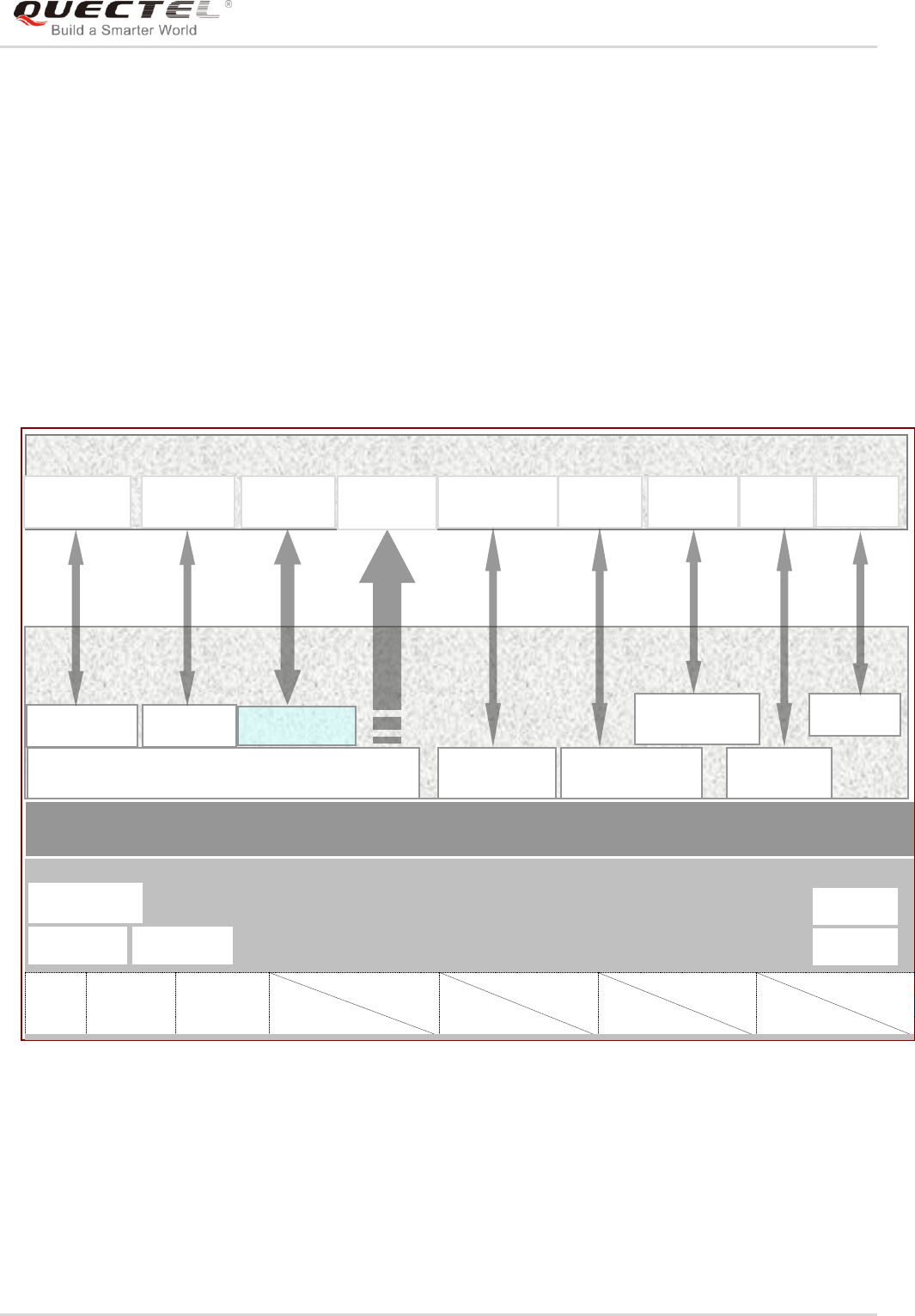
The following figure shows the fundamental principle of OpenCPU software architecture.
Figure 1: The Fundamental Principle of OpenCPU Software Architecture
PWM, EINT, IIC, SPI are multiplexing interfaces with GPIOs.
OpenCPU Core System is a combination of hardware and software of GSM/GPRS/GNSS module. It has
built-in ARM7EJ-S processor, and has been built over Nucleus operating system, which has the
characteristics of micro-kernel, real-time, multi-tasking, etc.
OpenCPU User APIs
RTC
2×UART
21×GPIO
3×GPIO
3×EINT
1×GPIO
1×PWM
2×GPIO
1×IIC
4×GPIO
1×SPI
PCM
ADC
Hardware Application Interfaces
Power Supply
Power Key
OpenCPU Core System (Core)
AUDIO
OpenCPU Application (App)
Hardware APIs
TCP/UDP APIs
OpenCPU RIL (API)
SMS APIs
Telephony
APIs
Other
Programs
Telephony
Program
SMS
Program
I/O
Access
GPRS
(TCP/UDP)
Program
URC by Message
URC
Handle
File Access
System
Program
File System
APIs
System APIs
Customized
API
Watchdog
WTD APIs

GSM/GPRS/GNSS Module Series
MC60-OpenCPU Series User Guide
MC60-OpenCPU_Series_User_Guide Confidential / Released 16 / 194
OpenCPU User APIs are designed for accessing to hardware resources, radio communications resources,
user file system, or external devices. All APIs are introduced in Chapter 5.
OpenCPU RIL is an open source layer, which enables developers to simply call API to send AT and get
the response when API returns. Additionally, developers can easily add a new API to implement an AT
command. For more details, please refer to document Quectel_OpenCPU_RIL_Application_Note.
In OpenCPU RIL, all URC messages of module have already been reinterpreted and the result is
informed to App by system message. App will receive the message MSG_ID_URC_INDICATION when
an URC arrives.
2.2. Open Resources
2.2.1. Processor
32-bit ARM7EJ-STM RISC 260MHz.
2.2.2. Memory Schemes
- MC60-OpenCPU (OC: MC60CA-04-STD) module builds in 4MB flash and 4MB RAM.
User App Code Space: 320KB space available for image bin.
RAM Space: 100KB static memory and 500KB dynamic memory.
User File System Space: 120KB available.
- MC60-OpenCPU (OC: MC60ECA-04-BLE) module builds in 4MB flash and 4MB RAM.
User App Code Space: 280KB space available for image bin.
RAM Space: 100KB static memory and 500KB dynamic memory.
User File System Space: Not supported.
2.3. Interfaces
2.3.1. Serial Interfaces
OpenCPU provides 2 UART ports: MAIN UART and DEBUG UART. They are also named as UART1 and
UART2 respectively. Please refer to Chapter 5.7.1 for software API functions.
UART1 is a 9-pin serial interface with RTS/CTS HW handshake. UART2 is a 3-wire interface. UART2 has
debug function that can debug the Core System. Please refer to Chapter 5.12 for details.

GSM/GPRS/GNSS Module Series
MC60-OpenCPU Series User Guide
MC60-OpenCPU_Series_User_Guide Confidential / Released 17 / 194
2.3.2. GPIO
There are 21 I/O pins that can be configured for general purpose I/O. All pins can be accessed under
OpenCPU by API functions. Please refer to Chapter 5.7.2 for details.
2.3.3. EINT
OpenCPU supports external interrupt input. There are three I/O pins that can be configured for external
interrupt input. But the EINT cannot be used for the purpose of highly frequent interrupt detection, which
causes module‟s unstable working. The EINT pins can be accessed by APIs. Please refer to
Chapter 5.7.3 for details.
2.3.4. PWM
There is one I/O pin that can be configured for PWM. There are 32K and 13M clock sources that are
available. The PWM pin can be configured and controlled by APIs. Please refer to Chapter 5.7.4 for
details.
2.3.5. ADC
There is an analogue input pin that can be configured for ADC. The sampling period and count can be
configured by an API. Please refer to Chapter 5.7.5.
Please refer to document [2] for the characteristics of ADC interface.
2.3.6. IIC
MC60-OpenCPU series module provides a hardware IIC interface. Please refer to Chapter 5.7.6 for
programming API functions.
2.3.7. SPI
MC60-OpenCPU series module provides a hardware SPI interface. The SPI interface is multiplexed with
PCM interface. And also both of them are multiplexed with GPIOs. Please refer to Chapter 5.7.7 for
programming API functions.
2.3.8. Power Key
In OpenCPU, App can catch the behavior that power key is pressed down or released. Then developers
may redefine the behavior of pressing power key. Please refer to Chapters 4.3.1, 5.4.2.2 and 5.4.2.3.

GSM/GPRS/GNSS Module Series
MC60-OpenCPU Series User Guide
MC60-OpenCPU_Series_User_Guide Confidential / Released 18 / 194
2.4. Development Environment
2.4.1. SDK
OpenCPU SDK provides the resources as follows for developers:
- Compile environment.
- Development guide and other related documents.
- A set of header files that defines all API functions and type declaration.
- Source code for examples.
- Open source code for RIL.
- Download tool for application image bin file.
- Pack tool for FOTA upgrade.
Customers may get the latest SDK package from sales channel.
2.4.2. Editor
Any text editor is available for editing codes, such as Source Insight, Visual Studio and even Notepad.
The Source Insight tool is recommended to be used to edit and manage codes. It is an advanced code
editor and browser with built-in analysis for C/C++ program, and provides syntax highlighting, code
navigation and customizable keyboard shortcuts.
2.4.3. Compiler & Compiling
2.4.3.1. Complier
OpenCPU uses GCC as the compiler, and the compiler edition is “Sourcery CodeBench”. The document
Quectel_OpenCPU_GCC_Installation_Guide tells the ways of establishing GCC environment.
2.4.3.2. Compiling
In OpenCPU, compiling commands are executed in command line. The compiling and clean commands
are defined as follows.
make clean
make new
GSM/GPRS/GNSS Module Series
MC60-OpenCPU Series User Guide
MC60-OpenCPU_Series_User_Guide Confidential / Released 19 / 194
2.4.3.3. Compiling Output
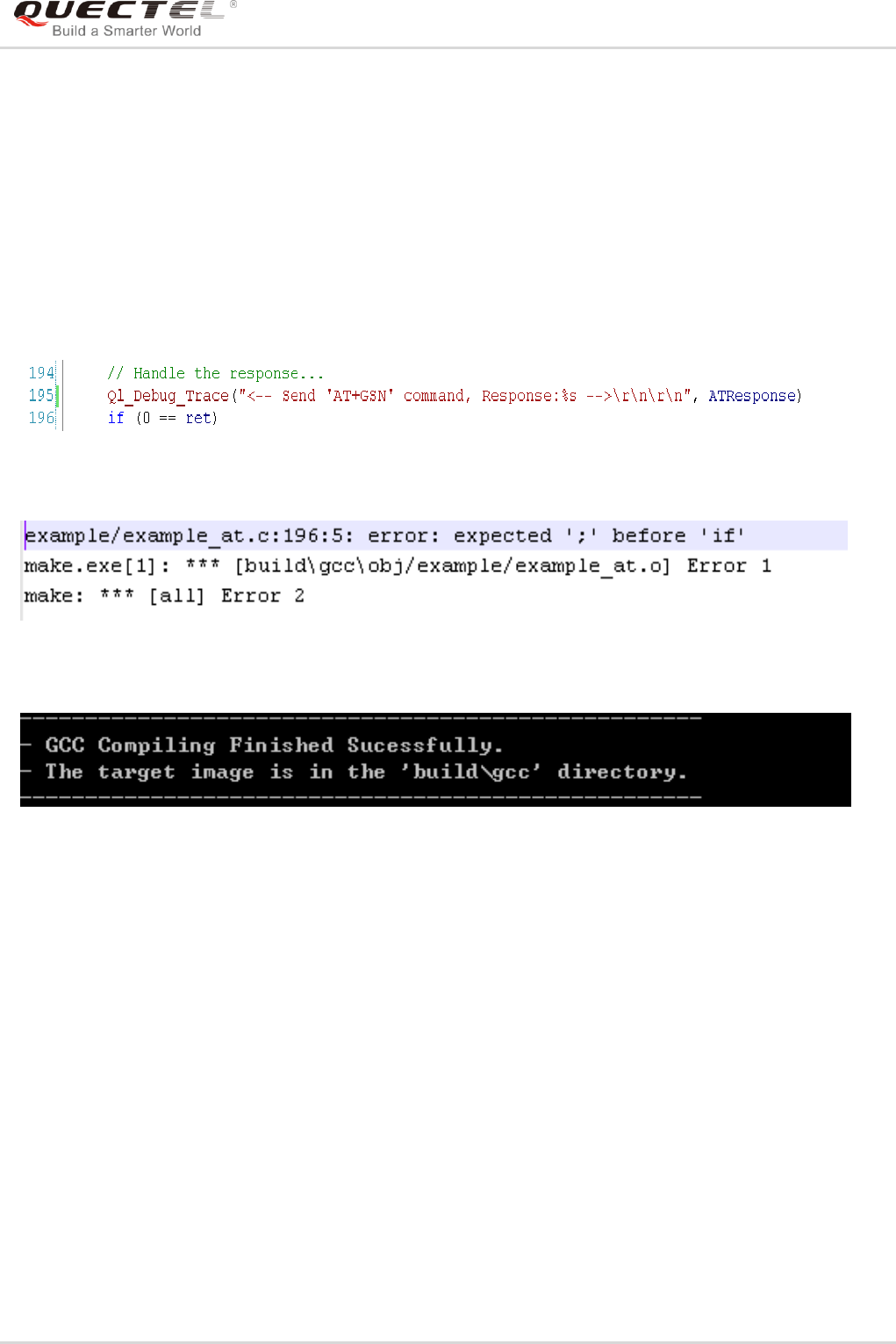
In command-line, some compiler processing information will be outputted during compiling. All
WARNINGs and ERRORs are recorded in \SDK\build\gcc\build.log.
Therefore, if there exists any compiling error during compiling, please check the build.log for the error line
number and the error hints.
For example, in line 195 in example_at.c, the semicolon is missed intentionally.
When compiling this example program, a compiling error will be thrown out. In build.log, it goes like this:
If there is no any compiling error during compiling, the prompt for successful compiling is given.
2.4.4. Download
The document Quectel_QFlash_User_Guide introduces the download tool and the way to use it to
download application bin.
2.4.5. How to Program
By default, the custom directory has been designed to store the developers‟ source code files in SDK.
2.4.5.1. Program Composition
OpenCPU program consists of the aspects as follows.

GSM/GPRS/GNSS Module Series
MC60-OpenCPU Series User Guide
MC60-OpenCPU_Series_User_Guide Confidential / Released 20 / 194
Table 1: OpenCPU Program Composition
2.4.5.2. Program Framework
The following codes are the least codes that comprise an OpenCPU Embedded Application.
/**
* The entrance of this application
*/
void proc_main_task(s32 taskId)
{
ST_MSG msg;
//Start message loop of this task
while (1)
{
Ql_OS_GetMessage(&msg);
switch(msg.message)
{
case MSG_ID_RIL_READY:
{
Ql_Debug_Trace("<-- RIL is ready -->\r\n");
//Before using the RIL feature, developers must initialize it by calling the following APIs.
//After receiving the MSG_ID_RIL_READY message.
Ql_RIL_Initialize();
//Now developers can start to send AT commands.
Demo_SendATCmd();
break;
}
case MSG_ID_URC_INDICATION:
{
//Ql_Debug_Trace("<-- Received URC: type: %d, -->\r\n", msg.param1);
switch (msg.param1)
{
case URC_SYS_INIT_STATE_IND:
Item
Description
.h, .def files
Declarations for variables, functions and macros.
.c files
Source code implementations.
makefile
Define the destination object files and directories to compile.

GSM/GPRS/GNSS Module Series
MC60-OpenCPU Series User Guide
MC60-OpenCPU_Series_User_Guide Confidential / Released 21 / 194
Ql_Debug_Trace("<-- Sys Init Status %d -->\r\n", msg.param2);
break;
case URC_SIM_CARD_STATE_IND:
Ql_Debug_Trace("<-- SIM Card Status:%d -->\r\n", msg.param2);
break;
case URC_GSM_NW_STATE_IND:
Ql_Debug_Trace("<-- GSM Network Status:%d -->\r\n", msg.param2);
break;
case URC_GPRS_NW_STATE_IND:
Ql_Debug_Trace("<-- GPRS Network Status:%d -->\r\n", msg.param2);
break;
case URC_CFUN_STATE_IND:
Ql_Debug_Trace("<-- CFUN Status:%d -->\r\n", msg.param2);
break;
case URC_COMING_CALL_IND:
{
ST_ComingCall* pComingCall = (ST_ComingCall*)msg.param2;
Ql_Debug_Trace("<-- Coming call, number:%s, type:%d -->\r\n",
pComingCall->phoneNumber, pComingCall->type);
break;
}
case URC_CALL_STATE_IND:
switch (msg.param2)
{
case CALL_STATE_BUSY:
Ql_Debug_Trace("<-- The number you dialed is busy now -->\r\n");
break;
case CALL_STATE_NO_ANSWER:
Ql_Debug_Trace("<-- The number you dialed has no answer -->\r\n");
break;
case CALL_STATE_NO_CARRIER:
Ql_Debug_Trace("<-- The number you dialed cannot reach -->\r\n");
break;
case CALL_STATE_NO_DIALTONE:
Ql_Debug_Trace("<-- No Dial tone -->\r\n");
break;
default:
break;
}
break;
case URC_NEW_SMS_IND:
Ql_Debug_Trace("<-- New SMS Arrives: index=%d\r\n", msg.param2);
break;
case URC_MODULE_VOLTAGE_IND:

GSM/GPRS/GNSS Module Series
MC60-OpenCPU Series User Guide
MC60-OpenCPU_Series_User_Guide Confidential / Released 22 / 194
Ql_Debug_Trace("<-- VBatt Voltage Ind: type=%d\r\n", msg.param2);
break;
default:
Ql_Debug_Trace("<-- Other URC: type=%d\r\n", msg.param1);
break;
}
break;
}
//
//Other Message ID of users…
//
default:
break;
}
}
}
The proc_main_task function is the entrance of Embedded Application, just like the main() in C
application.
Ql_OS_GetMessage is an important system function that the Embedded Application receives messages
from message queue of the task.
MSG_ID_RIL_READY is a system message that RIL module sends to main task.
MSG_ID_URC_INDICATION is a system message that indicates a new URC is coming.
2.4.5.3. Makefile
In OpenCPU, the compiler compiles program according to the definitions in makefile. The profile of
makefile has been pre-designed and is ready for use. However, developers need to change some settings
before compiling program according to native conditions, such as compiler environment path.
\SDK\make\gcc\gcc_makefile\gcc_makefile needs to be maintained. This makefile mainly includes:
Environment path definition of compiler
Preprocessor definitions
Definitions for the paths that include files
Source code directories and files to compile
Library files to link
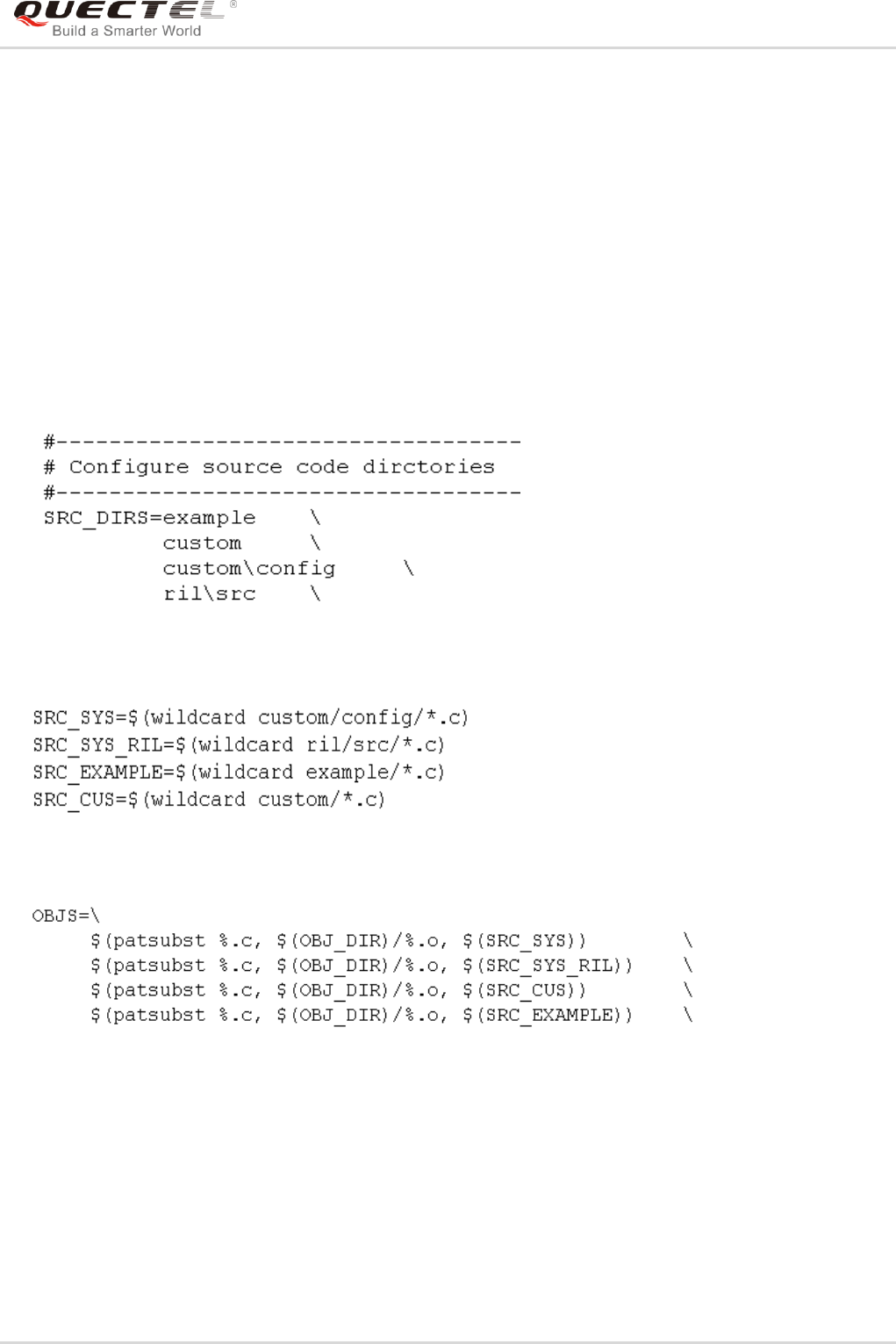
GSM/GPRS/GNSS Module Series
MC60-OpenCPU Series User Guide
MC60-OpenCPU_Series_User_Guide Confidential / Released 23 / 194
2.4.5.4. How to Add a .c File
Suppose that the new file is in custom directory, and the newly added .c files will be compiled
automatically.
2.4.5.5. How to Add a Directory
If developers need to add new directory in custom, please follow the steps below.
First, add the new directory name in variable “SRC_DIRS” in \SDK\make\gcc\gcc _makefile\gcc_makefile,
and define the source code files to compile.
Secondly, define the source code files to compile in the new directory.

GSM/GPRS/GNSS Module Series
MC60-OpenCPU Series User Guide
MC60-OpenCPU_Series_User_Guide Confidential / Released 24 / 194
3 Base Data Types
3.1. Required Header File
In OpenCPU, the base data types are defined in the ql_type.h header file.
3.2. Base Data Type
Table 2: Base Data Type
Type
Description
bool
Boolean variable (should be TRUE or FALSE).
This variable is declared as follows:
typedef unsigned char bool;
s8
8-bit signed integer.
This variable is declared as follows:
typedef signed char s8;
u8
8-bit unsigned integer.
This variable is declared as follows:
typedef unsigned char u8;
s16
16-bit signed integer.
This variable is declared as follows:
typedef signed short s16;
u16
16-bit unsigned integer.
This variable is declared as follows:
typedef unsigned short u16;
s32
32-bit signed integer.
This variable is declared as follows:
typedef int s32;
u32
32-bit unsigned integer.
This variable is declared as follows:
typedef unsigned int u32;
u64
64-bit unsigned integer.
This variable is declared as follows:

GSM/GPRS/GNSS Module Series
MC60-OpenCPU Series User Guide
MC60-OpenCPU_Series_User_Guide Confidential / Released 25 / 194
typedef unsigned long lone u64;
float
Floating-point variable.
This variable is declared in math.h.

GSM/GPRS/GNSS Module Series
MC60-OpenCPU Series User Guide
MC60-OpenCPU_Series_User_Guide Confidential / Released 26 / 194
4 System Configuration
In the \SDK\custom\config directory, developers can reconfigure the application according to their
requirements for heap memory size, tasks addition and task stack size configuration, as well as GPIO
initialization status. All config files for developers are named with prefix “custom_”.
Table 3: System Config File List
4.1. Configuration for Tasks
OpenCPU supports multitask processing. Developers only need to simply follow suit to add a record in
custom_task_cfg.h file to define a new task. OpenCPU supports one main task, and maximum TEN
subtasks.
If there are file operations in task, the stack size must be set to at least 5KB.
Developers should avoid calling these functions: Ql_Sleep(), Ql_OS_TakeSemaphore() and
Ql_OS_TakeMutex(). These functions will block the task, thus will make the task cannot fetch message
from the message queue. If the message queue is filled up, the system will automatically reboot
unexpectedly.
Config File
Description
custom_feature_def.h
OpenCPU features enabled. Now only includes RIL. Developers generally
do not need to change this file.
custom_gpio_cfg.h
Configurations for GPIO initialization status
custom_heap_cfg.h
Definition of heap memory size
custom_task_cfg.h
Multitask configuration
custom_sys_cfg.c
Other system configurations, including power key, specified GPIO pin for
external watchdog, and setting working mode of debug port.
GSM/GPRS/GNSS Module Series
MC60-OpenCPU Series User Guide
MC60-OpenCPU_Series_User_Guide Confidential / Released 27 / 194
4.2. Configuration for GPIO
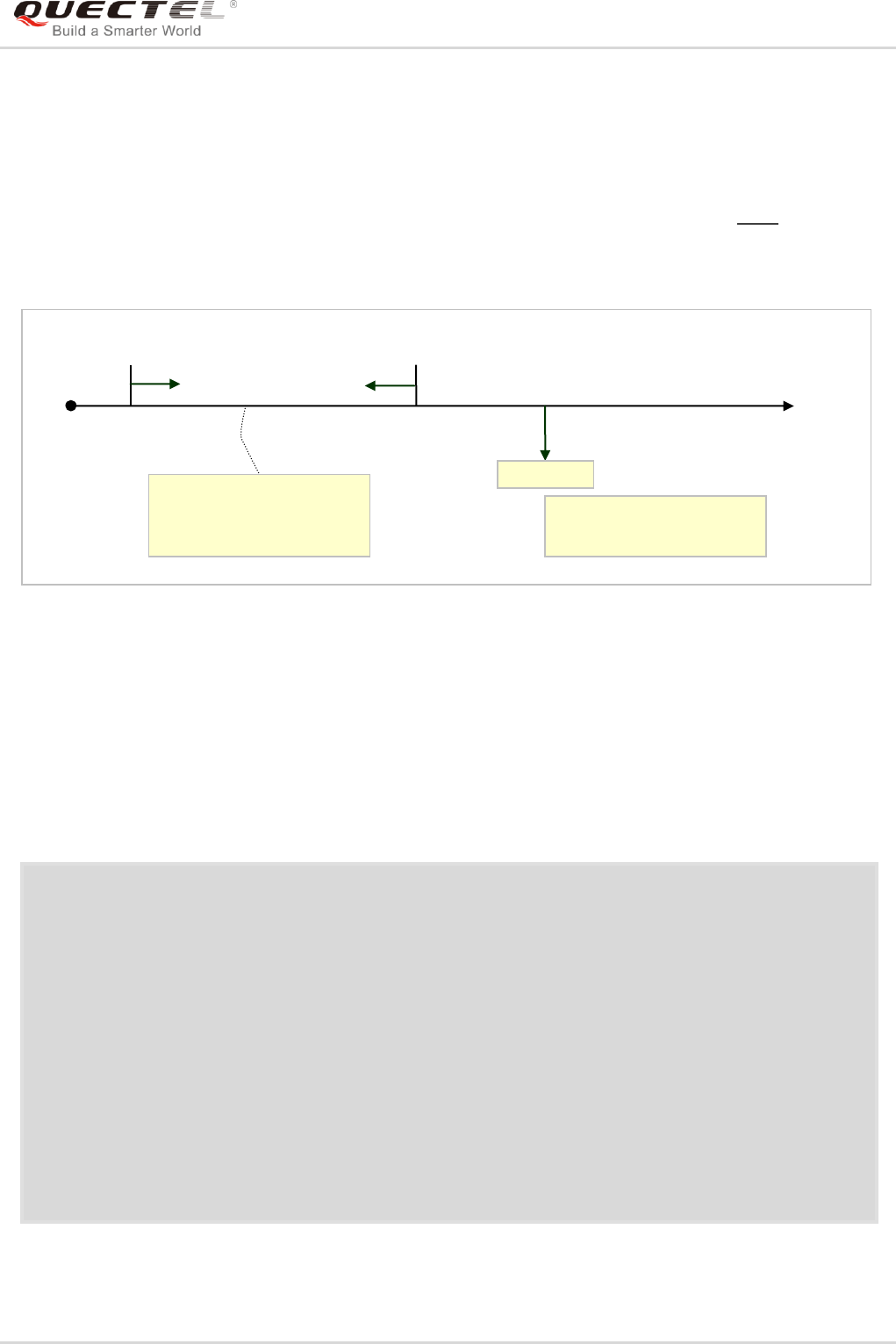
In OpenCPU, there are two ways to initialize GPIOs. One is to configure GPIO list initialization in
custom_gpio_cfg.h; the other way is to call GPIO related APIs (Please refer to Chapter 5.7.2) to initialize
after App starts. But the former one is earlier than the latter one on time sequence. The following figure
shows the time sequence relationship.
Figure 2: Time Sequence for GPIO Initialization
4.3. Configuration for Customizations
All customization items are configured in TLV (Type-Length-Value) in custom_sys_cfg.c. Developers may
change App‟s features by changing the value.
const ST_SystemConfig SystemCfg[] = {
{SYS_CONFIG_APP_ENABLE_ID, SYS_CONFIG_APPENABLE_DATA_SIZE,
(void*)&appEnableCfg},
{SYS_CONFIG_PWRKEY_DATA_ID, SYS_CONFIG_PWRKEY_DATA_SIZE,
(void*)&pwrkeyCfg },
{SYS_CONFIG_WATCHDOG_DATA_ID, SYS_CONFIG_WATCHDOG_DATA_SIZE,
(void*)&wtdCfg },
{SYS_CONFIG_DEBUG_MODE_ID, SYS_CONFIG_DEBUGMODE_DATA_SIZE,
(void*)&debugPortCfg},
{SYS_CONFIG_END, 0,
NULL }
};
Driver Init Stage
Initialize GPIOs according
to the configurations in
custom_gpio_cfg.h.
App starts.
Initialize GPIOs by calling
GPIO related APIs.
t
Power
On

GSM/GPRS/GNSS Module Series
MC60-OpenCPU Series User Guide
MC60-OpenCPU_Series_User_Guide Confidential / Released 28 / 194
Table 4: Customization Item
4.3.1. Power Key Configuration
static const ST_PowerKeyCfg pwrkeyCfg =
{
TRUE, //Working mode for powering on module by PWRKEY pin.
/*
Module is automatically powered on when feeding a low level to PWRKEY pin.
When set to FALSE, the callback that Ql_PwrKey_Register registers will be trigged. Application
must call Ql_LockPower() to lock power supply, or module will lose power when the PWRKEY pin
is at high level.
*/
TRUE, //Working mode for powering off module by PWRKEY pin.
/*
Module is automatically powered off when feeding a low level to PWRKEY pin.
When set to FALSE, the callback that Ql_PwrKey_Register registers will be trigged.
Application may do post processing before switching off the module.
*/
};
For example, if the “pwrKeyCfg” is configured as follows.
Item
Type (T)
Length (L)
Default
Value
Possible Value
Description
App
Enabling
SYS_CONFIG_APP_
ENABLE_ID
4
APP_
ENABLE
APP_ENABLE
APP_DISABLE
App enabling
configuration
PWRKEY
Pin
Config
SYS_CONFIG_
PWRKEY_DATA_ID
2
TRUE
TRUE
TRUE/FALSE
Power on/off
working mode.
Refer to
Chapter 4.3.1
GPIO for
WTD
Config
SYS_CONFIG_
WATCHDOG_DATA_
ID
8
PINNAME_
GPIO0
One value of
Enum_PinName
GPIO for
feeding WTD.
Refer to
Chapter 4.3.2
Working
Mode
for Debug
Port
SYS_CONFIG_
DEBUG_MODE_ID
4
BASIC_
MODE
BASIC_MODE
ADVANCE_MODE
Application
mode or debug
mode for
debug port

GSM/GPRS/GNSS Module Series
MC60-OpenCPU Series User Guide
MC60-OpenCPU_Series_User_Guide Confidential / Released 29 / 194
static const ST_PowerKeyCfg pwrkeyCfg =
{
FALSE, //Working mode for powering on module by PWRKEY pin.
FALSE, //Working mode for powering off module by PWRKEY pin.
};
When switching on/off the module by feeding a low level to PWRKEY pin, the callback in application will
be triggered. The example codes are shown below.
…
//Register a callback function for pressing PWRKEY pin.
Ql_PwrKey_Register((Callback_PowerKey_Ind)callback_pwrKey_ind);
…
//Callback definition
void Callback_PowerKey_Hdlr(s32 param1, s32 param2)
{
Ql_Debug_Trace("<-- Power Key: %s, %s -->\r\n",
param1==POWER_OFF ? "Power Off":"Power On",
param2==KEY_DOWN ? "Key Down":"Key Up"
);
if (POWER_ON==param1)
{
Ql_Debug_Trace("<-- App Lock Power Key! -->\r\n");
Ql_LockPower();
}
else if (POWER_OFF==param1)
{
//Post processing before power-down
//...
//Power down
Ql_PowerDown();
}
}

GSM/GPRS/GNSS Module Series
MC60-OpenCPU Series User Guide
MC60-OpenCPU_Series_User_Guide Confidential / Released 30 / 194
4.3.2. GPIO for External Watchdog
When an external watchdog is adopted to monitor the APP, the module has to feed the watchdog in the
whole period of the module‟s power-on, including the processess of startup, App activation and upgrade.
Table 5: Participants for Feeding External Watchdog
Therefore, developers just need to specify which GPIO is designed to feed the external watchdog.
static const ST_ExtWatchdogCfg wtdCfg = {
PINNAME_CTS, //Specify a pin or another GPIO to connect to the external watchdog.
PINNAME_END //Specify another pin for watchdog if needed.
};
4.3.3. Debug Port Working Mode Config
The serial debug port (UART2) may work as a common serial port (BASIC_MODE), or a special debug
port (ADVANCE_MODE) that can debug some issues during application.
Usually developers do not need to use ADVANCE_MODE when there are no requirements from support
engineer. If needed, please refer to document Quectel_Catcher_Operation_UGD for the usage of the
special debug port.
static const ST_DebugPortCfg debugPortCfg = {
BASIC_MODE //Set the serial debug port (UART2) to a common serial port.
//ADVANCE_MODE //Set the serial debug port (UART2) to a special debug port.
};
Period
Feeding Host
Booting
Core system
App Running
App
Upgrading App by FOTA
Core system

GSM/GPRS/GNSS Module Series
MC60-OpenCPU Series User Guide
MC60-OpenCPU_Series_User_Guide Confidential / Released 31 / 199
5 API Functions
5.1. System API Functions
The header file ql_system.h declares system-related API functions. These functions are essential to any
customers‟ applications. Make sure the header file is included when using these functions.
OpenCPU provides interfaces that support multitasking, message, mutex, semaphore and event
mechanism functions. These interfaces are used for multitask programming. The example
example_multitask.c in OpenCPU SDK shows the proper usages of these API functions.
5.1.1. Usage
This section introduces some important operations and the API functions in system-level programming.
5.1.1.1. Receive Message
Developers can call Ql_OS_GetMessage to retrieve a message from the current task's message queue.
The message can be a system message, and also can be a customized message.
5.1.1.2. Send Message
Developers can call Ql_OS_SendMessage to send messages to other tasks. To send message,
developers have to define a message ID. In OpenCPU, user message ID must greater than 0x1000.
Step 1: Define message ID
#define MSG_ID_USER_START 0x1000
#define MSG_ID_MESSAGE1 (MSG_ID_USER_START + 1)
Step 2: Send message
Ql_OS_SendMessage(ql_subtask1, MSG_ID_MESSAGE1, 0, 0);

GSM/GPRS/GNSS Module Series
MC60-OpenCPU Series User Guide
MC60-OpenCPU_Series_User_Guide Confidential / Released 32 / 199
5.1.1.3. Mutex
A mutex object is a synchronization object whose state is set to signaled when it is not owned by any task,
and non-signaled when it is owned. A task can only own one mutex object at a time. For example, to
prevent two tasks from being written to shared memory at the same time, each task waits for ownership of
a mutex object before the code that accesses the memory is executed. After writing to the shared memory,
the task releases the mutex object.
Step 1: Create a mutex. Developers can call Ql_OS_CreateMutex to create a mutex.
Step 2: Get the specified mutex. If developers want to use mutex mechanism for programming, they can
call Ql_OS_TakeMute to get the specified mutex ID.
Step 3: Give the specified mutex. Developers can call Ql_OS_GiveMutex to release the specified mutex.
5.1.1.4. Semaphore
A semaphore object is a synchronization object that maintains a count between zero and a specified
maximum value. The count is decremented each time a task completes waiting for the semaphore object
and is incremented each time a task releases the semaphore. When the count reaches zero, no more
tasks can successfully wait for the semaphore object state to be signaled. The state of a semaphore is set
to signaled when its count is greater than zero and non-signaled when its count is zero.
Step 1: Create a semaphore. Developers can call Ql_OS_CreateSemaphore to create a semaphore.
Step 2: Get the specified emaphore. If developers want to use semaphore mechanism for programming,
they can call Ql_OSTakeSemaphore to get the specified semaphore ID.
Step 3: Give the specified semaphore. Developers can call Ql_OS_GiveSemaphore to release the
specified semaphore.
5.1.1.5. Event
An event object is a synchronization object, which is useful in sending a signal to a thread indicating that a
particular event has occurred. A task uses Ql_OS_CreateEvent function to create an event object, whose
state can be explicitly set to signaled by use of the Ql_OS_SetEvent function.
5.1.1.6. Backup Critical Data
OpenCPU has designed 13 blocks of system storage space to backup critical user data. Among the
storage blocks, blocks 1~8 can store 50 bytes data for each block, blocks 9~12 can store 100 bytes data
for each block, and block 13 can store 500 bytes data.
Developers may call Ql_SecureData_Store to backup data, and call Ql_Userdata_Read() to read back
data from backup space.

GSM/GPRS/GNSS Module Series
MC60-OpenCPU Series User Guide
MC60-OpenCPU_Series_User_Guide Confidential / Released 33 / 199
5.1.2. API Functions
5.1.2.1. Ql_Reset
This function resets the system.
- Prototype
void Ql_Reset(s32 resetType)
- Parameters
resetType:
[In] Reset type. It must be 0.
- Return Value
None.
5.1.2.2. Ql_Sleep
This function suspends the execution of the current task until the timeout interval elapses. The sleep time
should not exceed 500ms since if the task is suspended for too long, it may receive too many messages
to be crushed.
- Prototype
void Ql_Sleep(u32 msec)
- Parameters
msec:
[In] The time interval for the execution to be suspended. Unit: ms.
- Return Value
None.
5.1.2.3. Ql_GetUID
This function gets the module UID. UID is a 20-byte serial number identification. The probability that
different modules have the same UID is 1ppm (1/10000000).

GSM/GPRS/GNSS Module Series
MC60-OpenCPU Series User Guide
MC60-OpenCPU_Series_User_Guide Confidential / Released 34 / 199
- Prototype
s32 Ql_GetUID(u8* ptrUID, u32 len)
- Parameters
ptrUID:
[In] Pointer to the buffer that is used to store the UID. The buffer length needs to be at least 20 bytes.
len:
[In] The “ptrUID” buffer length. The value must be less than or equal to the size of the buffer that “ptrVer”
points to.
- Return Value
If the ptrUID is null, this function will return QL_RET_ERR_INVALID_PARAMETER. If this function reads
the UID successfully, the length of UID will be returned.
5.1.2.4. Ql_GetCoreVer
This function gets the version ID of the core. The core version ID is a string with no more than 35
characters, and is end with „\0‟.
- Prototype
s32 Ql_GetCoreVer(u8* ptrVer, u32 len)
- Parameters
ptrVer:
[In] Pointer to the buffer that is used to store the version ID of the core. The buffer length needs to be at
least 35 bytes
len:
[In] The “ptrVer” buffer length. The value must be less than or equal to the size of the buffer that “ptrVer”
points to.
- Return Value
The return value is the length of version ID of the core if this function succeeds. Otherwise, the return
value is an error code. To get extended error information, please refer to the ERROR CODES in header
file Ql_error.h.

GSM/GPRS/GNSS Module Series
MC60-OpenCPU Series User Guide
MC60-OpenCPU_Series_User_Guide Confidential / Released 35 / 199
5.1.2.5. Ql_GetSDKVer
This function gets the version ID of SDK. The SDK version ID is a string with no more than 20 characters,
and is end with „\0‟.
- Prototype
s32 Ql_GetSDKVer(u8* ptrVer, u32 len)
- Parameters
ptrVer:
[In] Pointer to the buffer that is used to store the version ID of SDK. The buffer length needs to be at least
20 bytes.
len:
[In] The “ptrVer” length. The value must be less than or equal to the size of the buffer that “ptrVer” points
to.
- Return Value
The return value is the length of version ID if this function succeeds. Otherwise, the return value is an
error code. To get extended error information, please refer to the ERROR CODES in header file
Ql_error.h.
5.1.2.6. Ql_GetMsSincePwrOn
This function returns the number of milliseconds since the device has been booted.
- Prototype
u64 Ql_GetMsSincePwrOn (void)
- Parameters
Void.
- Return Value
Number of milliseconds.
5.1.2.7. Ql_OS_GetMessage
This function gets a message from the current task's message queue. When there is no message in task‟s
message queue, the task is in waiting state.

GSM/GPRS/GNSS Module Series
MC60-OpenCPU Series User Guide
MC60-OpenCPU_Series_User_Guide Confidential / Released 36 / 199
- Prototype
s32 Ql_OS_GetMessage(ST_MSG* msg)
typedef struct {
u32 message;
u32 param1;
u32 param2;
u32 srcTaskId;
} ST_MSG;
- Parameters
msg:
[In] Pointer to the “ST_MSG” struct.
- Return Value
QL_RET_OK: indicates this function is executed successfully.
5.1.2.8. Ql_OS_SendMessage
This function sends messages between tasks. The destination task receives messages with
Ql_OS_GetMessage.
- Prototype
s32 Ql_OS_SendMessage (s32 destTaskId, u32 msgId, u32 param1, u32 param2)
- Parameters
desttaskid:
[In] The maximum value is 10. The destination task is main task if the value is 0. The destination task is
subtask if the value is between 1 and 10.
param1:
[In] User data.
param2:
[In] User data.
- Return Value
OS_SUCCESS: indicates the function is executed successfully.

GSM/GPRS/GNSS Module Series
MC60-OpenCPU Series User Guide
MC60-OpenCPU_Series_User_Guide Confidential / Released 37 / 199
5.1.2.9. Ql_OS_CreateMutex
This function creates a mutex. A handle of created mutex will be returned if creation succeeds. 0 means
failure. If the same mutex has already been created, this function may return a valid handle also. But the
Ql_GetLastError function returns ERROR_ALREADY_EXISTS.
- Prototype
u32 Ql_OS_CreateMutex(char *mutexName)
- Parameters
mutexName:
[In] Name of the mutex to be created.
- Return Value
A handle of the created mutex. 0 means failure.
5.1.2.10. Ql_OS_TakeMutex
This function obtains an instance of the specified mutex. If the mutex ID is invalid, the system may be
crushed.
- Prototype
void Ql_OS_TakeMutex(u32 mutexId)
- Parameters
mutexid:
[In] Destination mutex to be taken.
- Return Value
None.
5.1.2.11. Ql_OS_GiveMutex
This function releases an instance of the specified mutex.
- Prototype
void Ql_OS_GiveMutex(u32 mutexId)

GSM/GPRS/GNSS Module Series
MC60-OpenCPU Series User Guide
MC60-OpenCPU_Series_User_Guide Confidential / Released 38 / 199
- Parameters
mutexid:
[In] Destination mutex to be given.
- Return Value
None.
5.1.2.12. Ql_OS_CreateSemaphore
This function creates a counting semaphore. A handle of created semaphore will be returned, if creation
succeeds. 0 means failure. If the same semaphore has already been created, this function may return a
valid handle also. But the Ql_GetLastError function returns ERROR_ALREADY_EXISTS.
- Prototype
u32 Ql_OS_CreateSemaphore(char *semName, u32 maxCount)
- Parameters
semname:
[In] Name of the semaphore to be created.
maxCount:
[In] The maximum count of the semaphore.
- Return Value
A handle of the created semaphore. 0 means failure.
5.1.2.13. Ql_OS_TakeSemaphore
This function obtains an instance of the specified semaphore. If the mutex ID is invalid, the system may
be crushed.
- Prototype
u32 Ql_OSTakeSemaphore(u32 semId, bool wait)
- Parameters
semId:
[In] The destination semaphore to be taken.

GSM/GPRS/GNSS Module Series
MC60-OpenCPU Series User Guide
MC60-OpenCPU_Series_User_Guide Confidential / Released 39 / 199
wait:
[In] The waiting style determining if a task waits infinitely (TRUE) or returns immediately (FALSE).
- Return Value
OS_SUCCESS: indicates the function is executed successfully.
OS_SEM_NOT_AVAILABLE: indicates the semaphore is unavailable immediately.
5.1.2.14. Ql_OS_CreateEvent
This function waits until the specified type of event is in the signaled state. Developers can specify
different types of events for purposes. The event flags are defined in Enum_EventFlag.
- Prototype
u32 Ql_OS_CreateEvent(char* evtName);
- Parameters
evtName:
[In] Event name.
- Return Value
An event ID that identifies this event is unique.
5.1.2.15. Ql_OS_WaitEvent
This function waits until the specified type of event is in signaled state. Developers can specify different
types of events for purposes. The event flags are defined in Enum_EventFlag.
- Prototype
s32 Ql_OS_WaitEvent(u32 evtId, u32 evtFlag);
- Parameters
evtId:
Event ID that is returned by calling Ql_OS_CreateEvent().
evtFlag:
Event flag type. See Enum_EventFlag.

GSM/GPRS/GNSS Module Series
MC60-OpenCPU Series User Guide
MC60-OpenCPU_Series_User_Guide Confidential / Released 40 / 199
- Return Value
Zero indicates the function is executed successfully and nonzero indicates failed to execute the function.
5.1.2.16. Ql_OS_SetEvent
This function sets the specified event flag. Any task waiting on the event whose event flag request is
satisfied is resumed.
- Prototype
s32 Ql_OS_SetEvent(u32 evtId, u32 evtFlag);
- Parameters
evtId:
Event ID that is returned by calling Ql_OS_CreateEvent().
evtFlag:
Event flag type. See Enum_EventFlag.
- Return Value
Zero indicates the function is executed successfully and nonzero indicates failed to execute the function.
5.1.2.17. Ql_OS_GiveSemaphore
This function releases an instance of the specified semaphore.
void Ql_OS_GiveSemaphore(u32 semId)
- Parameters
semid:
[In] The destination semaphore to be given.
- Return Value
None.

GSM/GPRS/GNSS Module Series
MC60-OpenCPU Series User Guide
MC60-OpenCPU_Series_User_Guide Confidential / Released 41 / 199
5.1.2.18. Ql_SetLastErrorCode
This function sets error code.
- Prototype
s32 Ql_SetLastErrorCode(s32 errCode)
- Parameters
errCode:
[In] Error code.
- Return Value
QL_RET_OK: indicates this function is executed successfully.
QL_RET_ERR_FATAL: indicates failed to set error code.
5.1.2.19. Ql_GetLastErrorCode
This function retrieves the calling task's last error code value.
- Prototype
s32 Ql_GetLastErrorCode(void)
- Parameters
Void.
- Return Value
The return value is the calling task's last error code value.
5.1.2.20. Ql_OS_GetCurrenTaskLeftStackSize
This function gets the number of bytes left in the current task stack.
- Prototype
u32 Ql_OS_GetCurrenTaskLeftStackSize(void)
- Parameters
Void.

GSM/GPRS/GNSS Module Series
MC60-OpenCPU Series User Guide
MC60-OpenCPU_Series_User_Guide Confidential / Released 42 / 199
- Return Value
The return value is the number of bytes if this function succeeds. Otherwise an error code is returned.
5.1.3. Possible Error Codes
The frequent error codes, which could be returned by APIs in multitask programming, are enumerated in
the Enum_OS_ErrCode.
/**************************************************************
* Error Code Definition
**************************************************************/
typedef enum {
OS_SUCCESS,
OS_ERROR,
OS_Q_FULL,
OS_Q_EMPTY,
OS_SEM_NOT_AVAILABLE,
OS_WOULD_BLOCK,
OS_MESSAGE_TOO_BIG,
OS_INVALID_ID,
OS_NOT_INITIALIZED,
OS_INVALID_LENGHT,
OS_NULL_ADDRESS,
OS_NOT_RECEIVE,
OS_NOT_SEND,
OS_MEMORY_NOT_VALID,
OS_NOT_PRESENT,
OS_MEMORY_NOT_RELEASE
} Enum_OS_ErrCode;
5.1.4. Examples
1. Mutex Example:
static int s_iMutexId = 0;
//Create a mutex first.
s_iMutexId = Ql_OS_CreateMutex("MyMutex");
void MutextTest(int iTaskId) //Two tasks run this function at the same time.
{
//Get the mutex.
Ql_OS_TakeMutex(s_iMutexId);

GSM/GPRS/GNSS Module Series
MC60-OpenCPU Series User Guide
MC60-OpenCPU_Series_User_Guide Confidential / Released 43 / 199
//3 seconds later, another caller prints this sentence.
Ql_Sleep(3000);
//3 seconds later, release the mutex.
Ql_OS_GiveMutex(s_iMutexId);
}
2. Semaphore Example:
static int s_iSemaphoreId = 0; //Define a semaphore ID
static int s_iTestSemNum =4; //Set the maximum semaphore number as 4.
//Create a semaphore first.
s_iSemaphoreId = Ql_OS_CreateSemaphore("MySemaphore", s_iTestSemNum);
void SemaphoreTest(int iTaskId)
{
int iRet = -1;
//Get the mutex.
iRet = Ql_OS_TakeSemaphore(s_iSemaphoreId, TRUE);//TRUE or FLASE indicates the task should
wait infinitely or return immediately.
Ql_OS_TakeMutex(s_iSemMutex);
s_iTestSemNum--; //One semaphore is being used.
Ql_OS_GiveMutex(s_iSemMutex);
Ql_Sleep(3000);
//3 seconds later, release the semaphore.
Ql_OS_GiveSemaphore(s_iSemaphoreId);
s_iTestSemNum++; //One semaphore is released.
Ql_Debug_Trace("\r\n<--=========Task[%d]: s_iTestSemNum=%d-->", iTaskId, s_iTestSemNum);
}

GSM/GPRS/GNSS Module Series
MC60-OpenCPU Series User Guide
MC60-OpenCPU_Series_User_Guide Confidential / Released 44 / 199
5.2. Time APIs
OpenCPU provides time-related APIs including setting local time, getting local time, converting the
calendar time into seconds or converting seconds into the calendar time, etc.
5.2.1. Usage
Calendar time is measured from a standard point in time to the current time elapsed seconds, generally
set at 00:00:00 on January 1st, 1970 as a standard point in time.
5.2.2. API Functions
The time struct is defined as follows:
typedef struct {
s32 year; //Range: 2000~2127
s32 month;
s32 day;
s32 hour; //In 24-hour time system
s32 minute;
s32 second;
s32 timezone; //Range: -12~12
}ST_Time;
The field “timezone” defines the time zone. A negative number indicates the Western Time zone, and a
positive number indicates the Eastern Time zone. For example: the time zone of Beijing is East Area 8,
then timezone=8; the time zone of Washington is West Zone 5, the timezone=-5.
5.2.2.1. Ql_SetLocalTime
This function sets the current local date and time.
- Prototype
s32 Ql_SetLocalTime(ST_Time *datetime)
- Parameters
datetime:
[In] Pointer to the “ST_Time” struct.

GSM/GPRS/GNSS Module Series
MC60-OpenCPU Series User Guide
MC60-OpenCPU_Series_User_Guide Confidential / Released 45 / 199
- Return Value
QL_RET_OK: indicates this function is executed successfully.
QL_RET_ERR_PARAM: indicates parameter error.
5.2.2.2. Ql_GetLocalTime
This function gets the current local date and time.
- Prototype
ST_Time * Ql_GetLocalTime(ST_Time * dateTime)
- Parameters
dateTime:
[Out] Pointer to the “ST_Time” struct.
- Return Value
If the function is executed successfully, the current local date and time are returned. NULL means failure.
5.2.2.3. Ql_Mktime
This function gets the total seconds elapsed since 00:00:00 on January 1st, 1970.
- Prototype
u64 Ql_Mktime(ST_Time *dateTime)
- Parameters
dateTime:
[In] Pointer to the “ST_Time” struct.
- Return Value
Return the total seconds.

GSM/GPRS/GNSS Module Series
MC60-OpenCPU Series User Guide
MC60-OpenCPU_Series_User_Guide Confidential / Released 46 / 199
5.2.2.4. Ql_MKTime2CalendarTime
This function converts the seconds elapsed since 00:00:00 on January 1st, 1970 to the local date and
time.
- Prototype
ST_Time *Ql_MKTime2CalendarTime(u64 seconds, ST_Time *pOutDateTime)
- Parameters
seconds:
[In] The seconds elapsed since 00:00:00 on January 1st, 1970.
pOutDateTime:
[Out] Pointer to the “ST_Time” struct.
- Return Value
If the function is executed successfully, the current local date and time are returned. NULL means failure.
5.2.3. Example
The following codes show how to use the time-related APIs.
s32 ret;
u64 sec;
ST_Time datetime, *tm;
datetime.year=2013;
datetime.month=6;
datetime.day=12;
datetime.hour=18;
datetime.minute=12;
datetime.second=13;
datetime.timezone=-8;
//Set local time.
ret=Ql_SetLocalTime(&datetime);
Ql_Debug_Trace("\r\n<--Ql_SetLocalTime,ret=%d -->\r\n",ret);
Ql_Sleep(5000);
//Get local time.
tm=Ql_GetLocalTime(&datetime);
Ql_Debug_Trace("<--%d/%d/%d %d:%d:%d %d -->\r\n",tm->year, tm->month, tm->day, tm->hour, tm
->minute, tm->second, tm->timezone);

GSM/GPRS/GNSS Module Series
MC60-OpenCPU Series User Guide
MC60-OpenCPU_Series_User_Guide Confidential / Released 47 / 199
//Get total seconds elapsed since 00:00:00 on January 1st, 1970.
sec=Ql_Mktime(tm);
Ql_Debug_Trace("\r\n<--Ql_Mktime,sec=%lld -->\r\n",sec);
//Convert the seconds elapsed since 00:00:00 on January 1st, 1970 to local date and time.
tm=Ql_MKTime2CalendarTime(sec, & datetime);
Ql_Debug_Trace("<--%d/%d/%d %d:%d:%d %d -->\r\n",tm->year, tm->month, tm->day, tm->hour, tm
->minute, tm->second, tm->timezone);
5.3. Timer APIs
OpenCPU provides two kinds of timers. One is “Common Timer”, and the other is “Fast Timer”. OpenCPU
system allows maximum 10 Common Timers running at the same time in a task. The system provides
only one Fast Timer for application. The accuracy of the Fast Timer is relatively higher than a common
timer.
5.3.1. Usage
Developer uses Ql_Timer_Register() to create a common timer, and register the interrupt handler. And a
timer ID, which is an unsigned integer, must be specified. Ql_Timer_Start() can start the created timer,
and Ql_Timer_Stop() can stop the running timer.
Developers may call Ql_Timer_RegisterFast() to create the Fast Timer, and register the interrupt handler.
Ql_Timer_Start() can start the created timer, and Ql_Timer_Stop() can stop the running timer. The
minimum interval for Fast Timer should be an integral multiple of 10ms.
5.3.2. API Functions
5.3.2.1. Ql_Timer_Register
This function registers a Common Timer. Each task supports 10 timers running at the same time. Only the
task which registers the timer can start and stop the timer.
- Prototype
s32 Ql_Timer_Register(u32 timerId, Callback_Timer_OnTimer callback_onTimer, void* param)
typedef void(*Callback_Timer_OnTimer)(u32 timerId, void* param)

GSM/GPRS/GNSS Module Series
MC60-OpenCPU Series User Guide
MC60-OpenCPU_Series_User_Guide Confidential / Released 48 / 199
- Parameters
timerId:
[In] Timer ID. It must be ensured that the ID is the only one under OpenCPU task. Of course, the ID that
registered by Ql_Timer_RegisterFast also cannot be the same with it.
callback_onTimer:
[Out] Notify developers when the timer arrives.
param:
[In] One customized parameter that can be passed into the callback functions.
- Return Value
QL_RET_OK: indicates this function is executed successfully.
QL_RET_ERR_PARAM: indicates parameter error.
QL_RET_ERR_INVALID_TIMER: indicates the timer is invalid.
QL_RET_ERR_TIMER_FULL: indicates all timers are used up.
5.3.2.2. Ql_Timer_RegisterFast
This function registers a Fast Timer. It only supports one timer for App. Please do not add any task
schedule in the interrupt handler of the Fast Timer.
- Prototype
s32 Ql_Timer_RegisterFast(u32 timerId, Callback_Timer_OnTimer callback_onTimer, void* param)
typedef void(*Callback_Timer_OnTimer)(u32 timerId, void* param)
- Parameters
timerId:
[In] Timer ID. It must be ensured that the ID is not the same as the one that registered by
Ql_Timer_Register.
callback_onTimer:
[Out] Notify developers when the timer arrives.
param:
[In] One customized parameter that can be passed into the callback functions.
- Return Value
QL_RET_OK: indicates this function is executed successfully.
QL_RET_ERR_PARAM: indicates parameter error.
QL_RET_ERR_INVALID_TIMER: indicates the timer is invalid.

GSM/GPRS/GNSS Module Series
MC60-OpenCPU Series User Guide
MC60-OpenCPU_Series_User_Guide Confidential / Released 49 / 199
QL_RET_ERR_TIMER_FULL: indicates all timers are used up.
5.3.2.3. Ql_Timer_Start
This function starts up the specified timer. When start or stop a specified timer in a task, the task must be
the same as the one that registers the timer.
- Prototype
s32 Ql_Timer_Start(u32 timerId, u32 interval, bool autoRepeat)
- Parameters
timerId:
[In] Timer ID, which must be registered.
interval:
[In] Set the interval of the timer. Unit: ms. If developers start a Common Timer, the interval must be
greater than or equal to 1ms. If developers start a Fast Timer, the interval must be an integer multiple
of 10ms.
autoRepeat:
[In] TRUE or FALSE, which indicates the timer is executed once or repeatedly.
- Return Value
QL_RET_OK: indicates this function is executed successfully.
QL_RET_ERR_PARAM: indicates parameter error.
QL_RET_ERR_INVALID_TIMER: indicates the timer is invalid.
QL_RET_ERR_INVALID_TASK_ID: indicates the current task is not the one that registers the timer.
5.3.2.4. Ql_Timer_Stop
This function stops the specified timer. When start or stop a specified timer in a task, the task must be the
same as the one that registers the timer.
- Prototype
s32 Ql_Timer_Stop(u32 timerId)
- Parameters
timerId:
[In] Timer ID. The timer has been started by calling Ql_Timer_Start previously.

GSM/GPRS/GNSS Module Series
MC60-OpenCPU Series User Guide
MC60-OpenCPU_Series_User_Guide Confidential / Released 50 / 199
- Return Value
QL_RET_OK: indicates this function is executed successfully.
QL_RET_ERR_PARAM: indicates parameter error.
QL_RET_ERR_INVALID_TIMER: indicates the timer invalid.
QL_RET_ERR_INVALID_TASK_ID: indicates the current task is not the one that registers the timer.
5.3.3. Example
The following codes show how to register and start a Common Timer.
s32 ret;
u32 timerId=999; //Timer ID is 999
u32 interval=2 * 1000; //2 seconds
bool autoRepeat=TRUE;
u32 param=555;
//Callback function.
void Callback_Timer(u32 timerId, void* param)
{
ret=Ql_Timer_Stop(timerId);
Ql_Debug_Trace("\r\n<--Stop: timerId=%d,ret = %d -->\r\n", timerId ,ret);
}
//Register the timer.
ret=Ql_Timer_Register(timerId, Callback_Timer, ¶m);
Ql_Debug_Trace("\r\n<--Register: timerId=%d, param=%d,ret=%d -->\r\n", timerId ,param,ret);
//Start the timer.
ret=Ql_Timer_Start(timerId, interval, autoRepeat);
Ql_Debug_Trace("\r\n<--Start: timerId=%d,repeat=%d,ret=%d -->\r\n", timerId , autoRepeat,ret);

GSM/GPRS/GNSS Module Series
MC60-OpenCPU Series User Guide
MC60-OpenCPU_Series_User_Guide Confidential / Released 51 / 199
5.4. Power Management APIs
Power management contains the power-related operations, such as power-down, power key control and
low power consumption enabling/disabling.
5.4.1. Usage
5.4.1.1. Power on/off
Developers may call Ql_PowerDown function to power off the module when PWRKEY pin has not been
short-circuited to ground. And this action will reset the module when PWRKEY pin has been
short-circuited to ground.
5.4.1.2. Sleep Mode
The Ql_ SleepEnable function can enable the sleep mode of module. The module enters into sleep mode
when it is idle.
The timeout of timer, coming call, coming SMS, GPRS data and an interrupt event can wake up the
module from sleep mode. The Ql_SleepDisable function can disable the sleep mode when module is
woken up.
5.4.2. API Functions
5.4.2.1. Ql_PowerDown
This function powers off the module. When call this API to power down the module, the module will
complete the network anti-registration first. So powering off the module will need more time.
- Prototype
void Ql_PowerDown(u8 pwrDwnType)
- Parameters
pwrDwnType:
[In] Power-off type of this function. 1 means normal power-off.
- Return Value
None.

GSM/GPRS/GNSS Module Series
MC60-OpenCPU Series User Guide
MC60-OpenCPU_Series_User_Guide Confidential / Released 52 / 199
5.4.2.2. Ql_LockPower
When getting the control right of power key, application must call Ql_LockPower to lock power supply, or
the module will lose power when the level of PWRKEY pin goes high. Please refer to Chapter 4.3.1.
- Prototype
void Ql_LockPower(void);
- Parameters
Void.
- Return Value
None.
5.4.2.3. Ql_PwrKey_Register
This function registers the callback for PWRKEY indication. The callback function will be triggered when
the power key is pressed down or released (including power-on and power-off). The configuration for
power key in sys_config.c should be set to FALSE, or else, the callback will not be triggered. Please refer
to Chapter 4.3.1.
- Prototype
s32 Ql_PwrKey_Register(Callback_PowerKey_Ind callback_pwrKey)
typedef void (*Callback_PowerKey_Ind)(s32 param1, s32 param2)
- Parameters
Callback_pwrKey:
[In] Callback function for PWRKEY indication.
param1:
[Out] One value of Enum_PowerKeyOpType.
param2:
[Out] One value of Enum_KeyState.
- Return Value
The return value is QL_RET_OK if this function is executed succeeds. Otherwise, the return value is an
error code. To get extended error information, please refer to the ERROR CODES in header file
Ql_error.h.

GSM/GPRS/GNSS Module Series
MC60-OpenCPU Series User Guide
MC60-OpenCPU_Series_User_Guide Confidential / Released 53 / 199
5.4.2.4. Ql_SleepEnable
This function enables the sleep mode of module. The module will enter into sleep mode when it is under
idle state.
- Prototype
s32 Ql_ SleepEnable(void)
- Parameters
Void.
- Return Value
QL_RET_OK: indicates this function is executed successfully.
Ql_RET_NOT_SUPPORT: indicates the function is not supported by users‟ currently used SDK version.
5.4.2.5. Ql_SleepDisable
This function disables the sleep mode of module.
- Prototype
s32 Ql_SleepDisable(void)
- Parameters
Void.
- Return Value
QL_RET_OK: indicates this function is executed successfully.
Ql_RET_NOT_SUPPORT: indicates the function is not supported by users‟ currently used SDK version.
5.4.3. Example
The following sample codes show how to enter into and quit from sleep mode in the interrupt handler.
void Eint_CallBack _Hdlr (Enum_PinName eintPinName, Enum_PinLevel pinLevel, void* customParam)
{
If (0==pinLevel)
{
SYS_DEBUG( DBG_Buffer,"DTR set to low=%d wake !!\r\n", level);
Ql_SleepDisable(); //Enter into sleep mode.

GSM/GPRS/GNSS Module Series
MC60-OpenCPU Series User Guide
MC60-OpenCPU_Series_User_Guide Confidential / Released 54 / 199
}else{
SYS_DEBUG( DBG_Buffer,"DTR set to high=%d Sleep \r\n", level);
Ql_SleepEnable(); //Quit from sleep mode.
}
}
5.5. Memory APIs
OpenCPU operating system supports dynamic memory management. Ql_MEM_Alloc and
QL_MEM_Free functions are used to allocate and release the dynamic memory respectively.
The dynamic memory is system heap space. And the maximum available system heap of application is
500KB.
Ql_MEM_Alloc and QL_MEM_Free must be present in pairs. Otherwise, memory leakage arises.
5.5.1. Usage
Step 1: Call Ql_MEM_Alloc() to apply for a block of memory with the specified size. The memory allocate
by Ql_MEM_Alloc() is from system heap.
Step 2: If the memory block is not needed anymore, please call Ql_MEM_Free() to free the memory
block that is previously allocated by calling Ql_MEM_Alloc().
5.5.2. API Functions
5.5.2.1. Ql_MEM_Alloc
This function allocates memory with the specified size in memory heap.
- Prototype
void *Ql_MEM_Alloc (u32 size)
- Parameters
Size:
[In] Number of memory bytes to be allocated.
- Return Value
A pointer of void type to the address of allocated memory. NULL will be returned if the allocation fails.

GSM/GPRS/GNSS Module Series
MC60-OpenCPU Series User Guide
MC60-OpenCPU_Series_User_Guide Confidential / Released 55 / 199
5.5.2.2. Ql_MEM_Free
This function frees the memory that is allocated by Ql_MEM_Alloc.
- Prototype
void Ql_MEM_Free (void *ptr);
- Parameters
Ptr:
[In] Previously allocated memory block to be free.
- Return Value
None.
5.5.3. Example
The following codes show how to allocate and free a specified size memory.
char *pch=NULL;
//Allocate the memory.
pch=(char*)Ql_MEM_Alloc(1024);
if (pch !=NULL)
{
Ql_Debug_Trace("Successfully apply for memory, pch=0x%x\r\n", pch);
}else{
Ql_Debug_Trace("Fail to apply for memory, size=%d\r\n", 1024);
}
//Free the memory.
Ql_MEM_Free(pch);
pch=NULL;

GSM/GPRS/GNSS Module Series
MC60-OpenCPU Series User Guide
MC60-OpenCPU_Series_User_Guide Confidential / Released 56 / 199
5.6. File System APIs
OpenCPU supports user file system, and provides a set of complete API functions to create, access and
delete files and directories. This section describes these APIs and their usages.
The storage can be flash (UFS) and RAM (RAM file). The RAM file does not support directory structure.
5.6.1. Usage
The type of storage is divided into two kinds. One is the UFS in the flash, and the other is RAM file system.
The RAM file does not support directory structure. Developers can select the storage location according
to their own needs. When they want to create/open a file or directory, they must use a relative path. For
example, if they want to create a file in the root of the UFS, they can set the file as filename.ext for
instance.
- The Ql_FS_GetTotalSpace function is used to obtain the amount of total space on flash or SD card.
- The Ql_FS_GetFreeSpace function is used to obtain the amount of free space on flash or SD card.
- The Ql_FS_GetSize function is used to get the size of the specified file, and the size is in bytes.
- The Ql_FS_Open function is used to create or open a file. Developers must define the file's opening
and access modes. If developers want to know the usage of this function, please refer to the detailed
descriptions of it.
- The Ql_FS_Read and Ql_FS_Write functions are used to read and write a file. Developers must
ensure that the file has been opened.
- The Ql_FS_Seek and Ql_FS_GetFilePosition functions are used to set and get the position of the file
pointer. Developers must ensure that the file has been opened.
- The Ql_FS_Truncate function is used to truncate the specified file to zero length.
- The Ql_FS_Delete and Ql_FS_Check functions are used to delete and check a file.
- The Ql_FS_CreateDir, Ql_FS_DeleteDir and Ql_FS_CheckDir functions are used to create, delete
and check a specified directory.
- The Ql_FS_FindFirst, Ql_FS_FindNext and Ql_FS_XDelete functions are used to traverse all files
and directories in the specified directory. The three functions are usually used together.
- The Ql_FS_XDelete function is multi-functional. It can be used to delete a specified file or an empty
directory. Developers can also delete all files and directories in the specified directory by recursive
way.
- The Ql_FS_XMove function is used to move or copy a file or folder.
- The Ql_FS_Format function is used to format the UFS.
1. The RAM file does not support directory structure.
2. This stack size of the task, in which file operations will be executed, cannot be less than 5KB.
NOTES

GSM/GPRS/GNSS Module Series
MC60-OpenCPU Series User Guide
MC60-OpenCPU_Series_User_Guide Confidential / Released 57 / 199
5.6.2. API Functions
5.6.2.1. Ql_FS_Open
This function opens or creates a file with a specified name.
- Prototype
s32 Ql_FS_Open(char* lpFileName, u32 flag)
- Parameters
lpFileName:
[In] The File name. The name is limited to 252 characters. Developers must use a relative path, such as
filename.ext or dirname\filename.ext.
flag:
[In] An u32 data type that defines the file's opening and access modes. The possible values are shown as
follows:
QL_FS_READ_WRITE: indicates the file can be read and written.
QL_FS_READ_ONLY: indicates the file can be read only.
QL_FS_CREATE: indicates open the file if it exists and create the file if it does not exist.
QL_FS_CREATE_ALWAYS: indicates create a new file. If the file is already existed, the function
overwrites the file and clears the existing attributes.
- Return Value
The return value specifies a file handle if this function succeeds. Otherwise an error code is returned.
QL_RET_ERR_PARAM: indicates parameter error.
QL_RET_ERR_FILENAMETOOLENGTH: indicates the file name is too long.
QL_RET_ERR_FILEOPENFAILED: indicates failed to open the file.
5.6.2.2. Ql_FS_OpenRAMFile
This function opens or creates a file with a specified name in the RAM. Developers need to add prefix
“RAM:” to the file name. Developers can create 15 files at most.
- Prototype
s32 Ql_FS_OpenRAMFile(char *lpFileName, u32 flag, u32 ramFileSize)

GSM/GPRS/GNSS Module Series
MC60-OpenCPU Series User Guide
MC60-OpenCPU_Series_User_Guide Confidential / Released 58 / 199
- Parameters
lpFileName:
[In] The file name. The name is limited to 252 characters. Developers must use a relative path such as
RAM: filename.ext.
flag:
[In] An u32 data type that defines the file‟s opening and access modes. The possible values are shown as
follows:
QL_FS_READ_WRITE: indicates the file can be read and written.
QL_FS_READ_ONLY: indicates the file can be read only.
QL_FS_CREATE: indicates open the file if it exists and create the file if it does not exist.
QL_FS_CREATE_ALWAYS: indicates create a new file. If the file is already existed, the function
overwrites the file and clears the existing attributes.
ramFileSize:
[In] The size of the specified file that developers want to create.
- Return Value
The return value specifies a file handle if this function succeeds. Otherwise an error code is returned.
QL_RET_ERR_PARAM: indicates parameter error.
QL_RET_ERR_FILENAMETOOLENGTH: indicates the file name is too long.
QL_RET_ERR_FILEOPENFAILED: indicates failed to open the file.
5.6.2.3. Ql_FS_Read
This function reads the data that from the specified file from the position indicated by the file pointer. After
the reading operation has been completed, the file pointer is adjusted by the number of bytes actually
read.
- Prototype
s32 Ql_FS_Read(s32 fileHandle, u8 *readBuffer, u32 numberOfBytesToRead, u32
*numberOfBytesRead)
- Parameters
fileHandle:
[In] The file handle to be read, which is a return value of Ql_FS_Open function.
readBuffer:
[Out] Pointer to the buffer that is used to receive the data read from the file.

GSM/GPRS/GNSS Module Series
MC60-OpenCPU Series User Guide
MC60-OpenCPU_Series_User_Guide Confidential / Released 59 / 199
numberOfBytesToRead:
[In] Number of bytes to read.
numberOfBytesRead:
[Out] Number of bytes that has been read. Set this value to zero before taking read action or checking
errors.
- Return Value
QL_RET_OK: indicates this function is executed successfully.
QL_RET_ERR_FILEREADFAILED: indicates failed to read the file.
5.6.2.4. Ql_FS_Write
This function writes data from a buffer to the specifed file, and returns the actual number of written bytes.
- Prototype
s32 Ql_FS_Write(s32 fileHandle, u8 *writeBuffer, u32 numberOfBytesToWrite, u32
*numberOfBytesWritten)
- Parameters
fileHandle:
[In] The file handle to be written, which is a return value of Ql_FS_Open function.
writeBuffer:
[In] Pointer to the buffer that that is used to contain the data to be written to the file.
numberOfBytesToWrite:
[In] Number of bytes to be written to the file.
numberOfBytesToWritten:
[Out] Pointer to the number of bytes to be written by the function calling.
- Return Value
QL_RET_OK: indicates this function is executed successfully.
QL_RET_ERR_FILEDISKFULL: indicates the file disk is full.
QL_RET_ERR_FILEWRITEFAILED: indicates failed to write file.

GSM/GPRS/GNSS Module Series
MC60-OpenCPU Series User Guide
MC60-OpenCPU_Series_User_Guide Confidential / Released 60 / 199
5.6.2.5. Ql_FS_Seek
This function repositions the pointer in the previously opened file.
- Prototype
s32 Ql_FS_Seek(s32 fileHandle, s32 offset, u32 whence)
- Parameters
fileHandle:
[In] The file handle, which is the return value of Ql_FS_Open function.
offset:
[In] Number of bytes to move the file pointer.
whence:
[In] Pointer movement mode. It must be one of the following values.
typedef enum
{
QL_FS_FILE_BEGIN,
QL_FS_FILE_CURRENT,
QL_FS_FILE_END
} Enum_FsSeekPos;
- Return Value
QL_RET_OK: indicates this function is executed successfully.
QL_RET_ERR_FILESEEKFAILED: indicates failed to seek the file.
5.6.2.6. Ql_FS_GetFilePosition
This function gets the current value of the file pointer.
- Prototype
s32 Ql_FS_GetFilePosition(s32 fileHandle)
- Parameters
fileHandle:
[In] The file handle, which is the return value of Ql_FS_Open function.

GSM/GPRS/GNSS Module Series
MC60-OpenCPU Series User Guide
MC60-OpenCPU_Series_User_Guide Confidential / Released 61 / 199
- Return Value
The return value is the current offset from the beginning of the file if this function succeeds. Otherwise, the
return value is an error code.
QL_RET_ERR_FILEFAILED: indicates failed to operate the file.
5.6.2.7. Ql_FS_Truncate
This function truncates the specified file to zero length.
- Prototype
s32 Ql_FS_Truncate(s32 fileHandle)
- Parameters
fileHandle:
[In] The file handle, which is the return value of Ql_FS_Open function.
- Return Value
QL_RET_OK: indicates this function is executed successfully.
QL_RET_ERR_FILEFAILED: indicates failed to operate the file.
5.6.2.8. Ql_FS_Flush
This function forces the data remaining in the file buffer to be written to the file.
- Prototype
void Ql_FS_Flush(s32 fileHandle)
- Parameters
fileHandle:
[In] The file handle, which is the return value of Ql_FS_Open function.
- Return Value
None.

GSM/GPRS/GNSS Module Series
MC60-OpenCPU Series User Guide
MC60-OpenCPU_Series_User_Guide Confidential / Released 62 / 199
5.6.2.9. Ql_FS_Close
This function closes the file associated with the file handle and makes the file unavailable for reading or
writing.
- Prototype
void Ql_FS_Close(s32 fileHandle)
- Parameters
fileHandle:
[In] The file handle, which is the return value of Ql_FS_Open function.
- Return Value
None.
5.6.2.10. Ql_FS_GetSize
This function retrieves the size of the specified file and the size is in bytes.
- Prototype
s32 Ql_FS_Delete(char *lpFileName)
- Parameters
lpFileName:
[In] The file name. The name is limited to 252 characters. Developers must use a relative path, such as
filename.ext or dirname\filename.ext.
- Return Value
The return value is the bytes of the file if this function succeeds. Otherwise, the return value is an error
code.
QL_RET_ERR_PARAM: indicates parameter error.
QL_RET_ERR_FILENAMETOOLENGTH: indicates the file name is too long.
QL_RET_ERR_FILEFAILED: indicates failed to operate the file.

GSM/GPRS/GNSS Module Series
MC60-OpenCPU Series User Guide
MC60-OpenCPU_Series_User_Guide Confidential / Released 63 / 199
5.6.2.11. Ql_FS_Delete
This function deletes an existing file.
- Prototype
s32 Ql_FS_Delete(char *lpFileName)
- Parameters
lpFileName:
[In] The file name. The name is limited to 252 characters. Developers must use a relative path, such as
filename.ext or dirname\filename.ext.
- Return Value
QL_RET_OK: indicates this function is executed successfully.
QL_RET_ERR_PARAM: indicates parameter error.
QL_RET_ERR_FILENAMETOOLENGTH: indicates the file name is too long.
QL_RET_ERR_FILEFAILED: indicates failed to operate the file.
5.6.2.12. Ql_FS_Check
This function checks whether the file exists or not.
- Prototype
s32 Ql_FS_Check(char *lpFileName)
- Parameters
lpFileName:
[In] The file name. The name is limited to 252 characters. Developers must use a relative path, such as
filename.ext or dirname\filename.ext.
- Return Value
QL_RET_OK: indicates this function is executed successfully.
QL_RET_ERR_PARAM: indicates parameter error.
QL_RET_ERR_FILENAMETOOLENGTH: indicates the file name is too long.
QL_RET_ERR_FILEFAILED: indicates failed to operate the file.
QL_RET_ERR_FILENOTFOUND: indicates the file is not found.

GSM/GPRS/GNSS Module Series
MC60-OpenCPU Series User Guide
MC60-OpenCPU_Series_User_Guide Confidential / Released 64 / 199
5.6.2.13. Ql_FS_Rename
This function renames an existing file.
- Prototype
s32 Ql_FS_Rename(char *lpFileName, char *newLpFileName)
- Parameters
lpFileName:
[In] The current name of the file. The name is limited to 252 characters. Developers must use a relative
path, such as filename.ext or dirname\filename.ext.
newLpFileName:
[In] The new name of the file. The new name is different from the existing names and is limited to 252
characters. Developers must use a relative path, such as filename.ext or dirname\filename.ext.
- Return Value
QL_RET_OK: indicates this function is executed successfully.
QL_RET_ERR_PARAM: indicates parameter error.
QL_RET_ERR_FILENAMETOOLENGTH: indicates the file name is too long.
QL_RET_ERR_FILEFAILED: indicates failed to operate the file.
5.6.2.14. Ql_FS_CreateDir
This function creates a directory.
- Prototype
s32 Ql_FS_CreateDir(char *lpDirName)
- Parameters
lpDirName:
[In] The name of the directory. The name is limited to 252 characters. Developers must use a relative path,
such as dirname1 or dirname1\dirname2.
- Return Value
QL_RET_OK: indicates this function is executed successfully.
QL_RET_ERR_PARAM: indicates parameter error.
QL_RET_ERR_FILENAMETOOLENGTH: indicates the file name is too long.
QL_RET_ERR_FILEFAILED: indicates failed to operate the file.

GSM/GPRS/GNSS Module Series
MC60-OpenCPU Series User Guide
MC60-OpenCPU_Series_User_Guide Confidential / Released 65 / 199
5.6.2.15. Ql_FS_DeleteDir
This function deletes an existing directory.
- Prototype
s32 Ql_FS_DeleteDir(char *lpDirName)
- Parameters
lpDirName:
[In] The name of the directory. The name is limited to 252 characters. Developers must use a relative path,
such as dirname1 or dirname1\dirname2.
- Return Value
QL_RET_OK: indicates this function is executed successfully.
QL_RET_ERR_PARAM: indicates parameter error.
QL_RET_ERR_FILENAMETOOLENGTH: indicates the file name is too long.
QL_RET_ERR_FILEFAILED: indicates failed to operate the file.
5.6.2.16. Ql_FS_CheckDir
This function checks whether the directory exists or not.
- Prototype
s32 Ql_FS_CheckDir(char *lpDirName)
- Parameters
lpDirName:
[In] The name of the directory. The name is limited to 252 characters. Developers must use a relative path,
such as dirname1 or dirname1\dirname2.
- Return Value
QL_RET_OK: indicates this function is executed successfully.
QL_RET_ERR_PARAM: indicates parameter error.
QL_RET_ERR_FILENAMETOOLENGTH: indicates the file name is too long.
QL_RET_ERR_FILEFAILED: indicates failed to operate the file.
QL_RET_ERR_FILENOTFOUND: indicates the file is not found.

GSM/GPRS/GNSS Module Series
MC60-OpenCPU Series User Guide
MC60-OpenCPU_Series_User_Guide Confidential / Released 66 / 199
5.6.2.17. Ql_FS_FindFirst
This function searchs for a directory for a file or subdirectory whose name matches the specified file
name.
- Prototype
s32 Ql_FS_FindFirst(char *lpPath, char *lpFileName, u32 fileNameLength, u32 *fileSize, bool *isDir)
- Parameters
lpPath:
[In] Pointer to a null-terminated string that specifies a valid directory or path.
lpFileName:
[In] Pointer to a null-terminated string that specifies a valid file name, which can contain wildcard
characters, such as „*‟ and „?‟.
fileNameLength:
[In] The maximum name length of a file to be received.
fileSize:
[Out] Pointer to the variable that represents the size specified by the file.
isDir:
[Out] Pointer to the variable that represents the type specified by the file.
- Return Value
The return value is a search handle that can be used in a subsequent calling to the Ql_FindNextFile or
Ql_FindClose function if this function succeeds.
If the function fails, an error code is returned.
QL_RET_ERR_PARAM: indicates parameter error.
QL_RET_ERR_FILENAMETOOLENGTH: indicates the file name is too long.
QL_RET_ERR_FILEFAILED: indicates failed to operate the file.
QL_RET_ERR_FILENOMORE: indicates no more files.
5.6.2.18. Ql_FS_FindNext
This function finds the next file continuously according to the handle which is a return value of
Ql_FS_FindFirst function.

GSM/GPRS/GNSS Module Series
MC60-OpenCPU Series User Guide
MC60-OpenCPU_Series_User_Guide Confidential / Released 67 / 199
- Prototype
s32 Ql_FS_FindNext(s32 handle, char *lpFileName, u32 fileNameLength, u32 *fileSize, bool *isDir)
- Parameters
handle:
[In] The handle is a return value of Ql_FS_FindFirst function.
lpFileName:
[In] Pointer to a null-terminated string that specifies a valid file name, which can contain wildcard
characters, such as „*‟ and „?‟.
fileNameLength:
[In] The maximum name length of the file to be received.
fileSize:
[Out] Pointer to the variable that represents the size specified by the file.
isDir:
[Out] Pointer to the variable whose type is specified by the file.
- Return Value
QL_RET_OK: indicates this function is executed successfully.
QL_RET_ERR_PARAM: indicates parameter error.
QL_RET_ERR_FILEFAILED: indicates failed to operate the file.
QL_RET_ERR_FILENOMORE: indicates no more files.
5.6.2.19. Ql_FS_FindClose
This function closes the specified search handle.
- Prototype
void Ql_FS_FindClose(s32 handle)
- Parameters
handle:
[In] Find handle. It is returned by a previous calling of Ql_FS_FindFirst function.
- Return Value
None.

GSM/GPRS/GNSS Module Series
MC60-OpenCPU Series User Guide
MC60-OpenCPU_Series_User_Guide Confidential / Released 68 / 199
5.6.2.20. Ql_FS_XDelete
This function deletes a file or directory.
- Prototype
s32 Ql_FS_XDelete(char* lpPath, u32 flag)
- Parameters
lpPath:
[In] The file path to be deleted.
flag:
[In] An u32 data type that defines the file's opening and access modes. The possible values are shown as
follows.
QL_FS_FILE_TYPE: indicates file type.
QL_FS_DIR_TYPE: indicates directory type.
QL_FS_RECURSIVE_TYPE: indicates recursive type of getting all the files in a folder.
- Return Value
QL_RET_OK: indicates this function is executed successfully.
QL_RET_ERR_PARAM: indicates parameter error.
QL_RET_ERR_FILENAMETOOLENGTH: indicates the file name is too long.
QL_RET_ERR_FILENOTFOUND: indicates the file is not found.
QL_RET_ERR_PATHNOTFOUND: indicates the path is not found.
QL_RET_ERR_GET_MEM: indicates failed to get memory.
QL_RET_ERR_GENERAL_FAILURE: indicates general failure.
5.6.2.21. Ql_FS_XMove
This function provides a facility to move or copy a file or folder.
- Prototype
s32 Ql_FS_XMove(char* lpSrcPath, char* lpDestPath, u32 flag)
- Parameters
lpSrcPath:
[In] Source path to be moved or copied.

GSM/GPRS/GNSS Module Series
MC60-OpenCPU Series User Guide
MC60-OpenCPU_Series_User_Guide Confidential / Released 69 / 199
lpDestPath:
[In] Destination path.
flag:
[In] An u32 data type that defines the file's opening and access modes.The possible values are shown as
follows:
QL_FS_MOVE_COPY: indicates copy the source code file to destination file.
QL_FS_MOVE_KILL: indicates cut the source code file to destination file.
QL_FS_MOVE_OVERWRITE: indicates overwrite the source code file to destination file.
- Return Value
QL_RET_OK: indicates this function is executed successfully.
QL_RET_ERR_PARAM: indicates parameter error.
QL_RET_ERR_FILENAMETOOLENGTH: indicates the file name is too long.
QL_RET_ERR_FILENOTFOUND: indicates the file is not found.
QL_RET_ERR_PATHNOTFOUND: indicates the path is not found.
QL_RET_ERR_GET_MEM: indicates failed to get memory.
QL_RET_ERR_FILE_EXISTS: indicates the file is existed.
QL_RET_ERR_GENERAL_FAILURE: indicates general failure.
5.6.2.22. Ql_FS_ GetFreeSpace
This function obtains the amount of free space on flash or SD card.
- Prototype
s64 Ql_FS_GetFreeSpace (u32 storage)
- Parameters
storage:
[In] The type of storage. One value of Enum_FSStorage.
- Return Value
The return value is the total number of bytes of the free space in the specified storage if this function
succeeds. Otherwise, the return value is an error code.
typedef enum
{
Ql_FS_UFS = 1,
Ql_FS_SD = 2,
Ql_FS_RAM = 3,
}Enum_FSStorage;

GSM/GPRS/GNSS Module Series
MC60-OpenCPU Series User Guide
MC60-OpenCPU_Series_User_Guide Confidential / Released 70 / 199
Ql_RET_ERR_UNKOWN: indicates unkown error.
5.6.2.23. Ql_FS_GetTotalSpace
This function obtains the amount of total space on flash or SD card.
- Prototype
s64 Ql_FS_GetTotalSpace(u32 storage)
- Parameters
storage:
[In] The type of storage. One value of Enum_FSStorage.
- Return Value
The return value is the total number of bytes in the specified storage if this function succeeds. Otherwise,
the return value is an error code.
Ql_RET_ERR_UNKOWN: indicates unkown error.
5.6.2.24. Ql_FS_Format
This function formats the UFS.
- Prototype
s32 Ql_FS_Format(u32 storage)
- Parameters
storage:
[In] The format storage. One value of Enum_FSStorage.
- Return Value
QL_RET_OK: indicates this function is executed successfully.
QL_RET_ERR_PARAM: indicates parameter error.
QL_RET_ERR_FILENAMETOOLENGTH: indicates the file name is too long.
QL_RET_ERR_FILENOTFOUND: indicates the file is not found.
QL_RET_ERR_PATHNOTFOUND: indicates the path is not found.
QL_RET_ERR_GET_MEM: indicates failed to get memory.
QL_RET_ERR_GENERAL_FAILURE: indicates general failure.

GSM/GPRS/GNSS Module Series
MC60-OpenCPU Series User Guide
MC60-OpenCPU_Series_User_Guide Confidential / Released 71 / 199
5.6.3. Example
The following codes show how to use the file system.
#define MEMORY_TYPE 1
#define FILE_NAME "test.txt"
#define NEW_FILE_NAME "file.txt"
#define DIR_NAME "DIR\\"
#define LPPATH "\\*"
#define LPPATH2 "\\DIR\\*"
#define XDELETE_PATH "\\"
#define WRITE_DATA "1234567890"
#define OFFSET 0
void API_TEST_File(void)
{
s32 ret;
s64 size;
s32 filehandle, findfile;
u32 writeedlen, readedlen ;
u8 strBuf[100];
s32 position;
s32 filesize;
bool isdir;
//Get the amount of free space on flash or SD card.
size=Ql_FS_GetFreeSpace(MEMORY_TYPE);
Ql_Debug_Trace("Ql_FS_GetFreeSpace()=%lld,type =%d\r\n",size,MEMORY_TYPE);
//Get the amount of total space on flash or SD card.
size=Ql_FS_GetTotalSpace(MEMORY_TYPE);
Ql_Debug_Trace("Ql_FS_GetTotalSpace()=%lld,type =%d\r\n",size,MEMORY_TYPE);
//Format the UFS.
ret=Ql_FS_Format(MEMORY_TYPE);
Ql_Debug_Trace("Ql_FS_Format()=%d type =%d\r\n",ret,MEMORY_TYPE);
//Create a file test.txt.
ret=Ql_FS_Open(FILE_NAME, QL_FS_READ_WRITE|QL_FS_CREATE);
if(ret >= QL_RET_OK)
{
filehandle = ret;
}
Ql_Debug_Trace("Ql_FS_OpenCreate(%s,%08x)=%d\r\n",FILE_NAME,
QL_FS_READ_WRITE|QL_FS_CREATE, ret);

GSM/GPRS/GNSS Module Series
MC60-OpenCPU Series User Guide
MC60-OpenCPU_Series_User_Guide Confidential / Released 72 / 199
//Write "1234567890" to file.
ret=Ql_FS_Write(filehandle, WRITE_DATA, Ql_strlen(WRITE_DATA), &writeedlen);
Ql_Debug_Trace("Ql_FS_Write()=%d: writeedlen=%d\r\n",ret, writeedlen);
//Write data remaining in the file buffer to the file.
Ql_FS_Flush(filehandle);
//Move the file pointer to the starting position.
ret=Ql_FS_Seek(filehandle, OFFSET , QL_FS_FILE_BEGIN);
Ql_Debug_Trace("Ql_FS_Seek()=%d: offset=%d\r\n",ret, OFFSET);
//Read data from file.
Ql_memset(strBuf,0,100);
ret = Ql_FS_Read(filehandle, strBuf, 100, &readedlen);
Ql_Debug_Trace("Ql_FS_Read()=%d: readedlen=%d, strBuf=%s\r\n",ret, readedlen, strBuf);
//Move the file pointer to the starting position.
ret=Ql_FS_Seek(filehandle, OFFSET , QL_FS_FILE_BEGIN);
Ql_Debug_Trace("Ql_FS_Seek()=%d: offset=%d\r\n",ret, OFFSET);
//Truncate the file to zero length.
ret=Ql_FS_Truncate(filehandle);
Ql_Debug_Trace("Ql_FS_Truncate()=%d\r\n",ret);
//Read data from file.
Ql_memset(strBuf,0,100);
ret=Ql_FS_Read(filehandle, strBuf, 100, &readedlen);
Ql_Debug_Trace("Ql_FS_Read()=%d: readedlen=%d, strBuf=%s\r\n",ret, readedlen, strBuf);
//Get the position of the file pointer.
Position=Ql_FS_GetFilePosition(filehandle);
Ql_Debug_Trace("Ql_FS_GetFilePosition(): Position=%d\r\n",Position);
//Close the file.
Ql_FS_Close(filehandle);
filehandle=-1;
Ql_Debug_Trace("Ql_FS_Close()\r\n");
//Get the size of the file.
filesize=Ql_FS_GetSize(FILE_NAME);
Ql_Debug_Trace((char*)("Ql_FS_GetSize(%s), filesize=%d\r\n"), FILE_NAME, filesize);
//Check whether the file exists or not.

GSM/GPRS/GNSS Module Series
MC60-OpenCPU Series User Guide
MC60-OpenCPU_Series_User_Guide Confidential / Released 73 / 199
ret=Ql_FS_Check(FILE_NAME);
Ql_Debug_Trace("Ql_FS_Check(%s)=%d\r\n", FILE_NAME, ret);
//Rename the file name from "test.txt" to "file.txt".
ret=Ql_FS_Rename(FILE_NAME, NEW_FILE_NAME);
Ql_Debug_Trace("Ql_FS_Rename(\"%s\",\"%s\")=%d\r\n", FILE_NAME, NEW_FILE_NAME, ret);
//Delete the file file.txt.
ret=Ql_FS_Delete(NEW_FILE_NAME);
Ql_Debug_Trace("Ql_FS_Delete(%s)=%d\r\n", NEW_FILE_NAME, ret);
//Create a file test.txt.
ret=Ql_FS_Open(FILE_NAME, QL_FS_READ_WRITE|QL_FS_CREATE);
if(ret >=QL_RET_OK)
{
filehandle=ret;
}
Ql_Debug_Trace("Ql_FS_Open Create (%s,%08x)=%d\r\n", FILE_NAME,
QL_FS_READ_WRITE|QL_FS_CREATE, ret);
//Write "1234567890" to file.
ret=Ql_FS_Write(filehandle, WRITE_DATA, Ql_strlen(WRITE_DATA), &writeedlen);
Ql_Debug_Trace("Ql_FS_Write()=%d: writeedlen=%d\r\n",ret, writeedlen);
//Close the file.
Ql_FS_Close(filehandle);
filehandle=-1;
Ql_Debug_Trace("Ql_FS_Close()\r\n");
//Create a directory.
ret=Ql_FS_CreateDir(DIR_NAME);
Ql_Debug_Trace("Ql_FS_CreateDir(%s)=%d\r\n", DIR_NAME, ret);
//Check whether the directory exists or not.
ret=Ql_FS_CheckDir(DIR_NAME);
Ql_Debug_Trace("Ql_FS_CheckDir(%s)=%d\r\n", DIR_NAME, ret);
//Delete the directory.
ret=Ql_FS_DeleteDir(DIR_NAME);
Ql_Debug_Trace("Ql_FS_DeleteDir(%s)=%d\r\n", DIR_NAME, ret);
//Create a directory.
ret=Ql_FS_CreateDir(DIR_NAME);
Ql_Debug_Trace("Ql_FS_CreateDir(%s)=%d\r\n", DIR_NAME, ret);

GSM/GPRS/GNSS Module Series
MC60-OpenCPU Series User Guide
MC60-OpenCPU_Series_User_Guide Confidential / Released 74 / 199
//List all files and directories under the root of the UFS.
Ql_memset(strBuf,0,100);
findfile=Ql_FS_FindFirst(LPPATH, strBuf, 100, &filesize, &isdir);
Ql_Debug_Trace("\r\nLater:strBuf=[%s]",strBuf);
if(findfile < 0)
{
Ql_Debug_Trace("Failed Ql_FS_FindFirst(%s)=%d\r\n", LPPATH, findfile);
}else{
Ql_Debug_Trace("Sueecss Ql_FS_FindFirst(%s)\r\n", LPPATH);
}
ret=findfile;
while(ret >=0)
{
Ql_Debug_Trace("filesize(%d),isdir(%d),Name(%s)\r\n", filesize, isdir, strBuf);
ret=Ql_FS_FindNext(findfile, strBuf, 100, &filesize, &isdir);
if(ret !=QL_RET_OK)
break;
}
Ql_FS_FindClose(findfile);
//Copy the file test.txt to the directory DIR.
ret=Ql_FS_XMove(FILE_NAME, DIR_NAME, QL_FS_MOVE_COPY);
Ql_Debug_Trace("Ql_FS_XMove(%s.%s,%x)=%d\r\n", FILE_NAME, DIR_NAME,
QL_FS_MOVE_COPY, ret);
//List all files and directories in the directory DIR.
Ql_memset(strBuf,0,100);
findfile=Ql_FS_FindFirst(LPPATH2, strBuf, 100, &filesize, &isdir);
Ql_Debug_Trace("\r\nLater:strBuf=[%s]",strBuf);
if(findfile<0)
{
Ql_Debug_Trace("Failed Ql_FS_FindFirst(%s)=%d\r\n", LPPATH2, findfile);
}else{
Ql_Debug_Trace("Sueecss Ql_FS_FindFirst(%s)\r\n", LPPATH2);
}
ret=findfile;
while(ret>=0)
{
Ql_Debug_Trace("filesize(%d),isdir(%d),Name(%s)\r\n", filesize, isdir, strBuf);
ret=Ql_FS_FindNext(findfile, strBuf, 100, &filesize, &isdir);
if(ret !=QL_RET_OK)
break;

GSM/GPRS/GNSS Module Series
MC60-OpenCPU Series User Guide
MC60-OpenCPU_Series_User_Guide Confidential / Released 75 / 199
}
Ql_FS_FindClose(findfile);
//Delete all files and directories under the root of the UFS by recursive way.
ret=Ql_FS_XDelete(XDELETE_PATH,QL_FS_FILE_TYPE
|QL_FS_DIR_TYPE|QL_FS_RECURSIVE_TYPE);
Ql_Debug_Trace("\r\nQl_FS_XDelete(%s,%x)=%d\r\n",XDELETE_PATH,
QL_FS_RECURSIVE_TYPE, ret);
Ql_memset(strBuf,0,100);
Findfile=Ql_FS_FindFirst(LPPATH, strBuf, 100, &filesize, &isdir);
Ql_Debug_Trace("Later:strBuf=[%s]",strBuf);
if(findfile < 0)
{
Ql_Debug_Trace("Failed Ql_FS_FindFirst(%s)=%d\r\n", LPPATH, findfile);
}else{
Ql_Debug_Trace("Sueecss Ql_FS_FindFirst(%s)\r\n", LPPATH);
}
ret=findfile;
while(ret>=0)
{
Ql_Debug_Trace("filesize(%d),isdir(%d),Name(%s)\r\n", filesize, isdir, strBuf);
ret=Ql_FS_FindNext(findfile, strBuf, 100, &filesize, &isdir);
if(ret !=QL_RET_OK)
break;
}
Ql_FS_FindClose(findfile);
}
5.7. Hardware Interface APIs
5.7.1. UART
5.7.1.1. UART Overview
In OpenCPU, UART ports include physical UART ports and virtual UART ports. The physical UART ports
can be connected to external devices, and the virtual UART ports are used to communicate between
application and the bottom operating system.
One of the physical UART ports has hardware handshaking function, and others have three-wire
interfaces.
OpenCPU provides two virtual UART ports that are used for communication between App and Core.
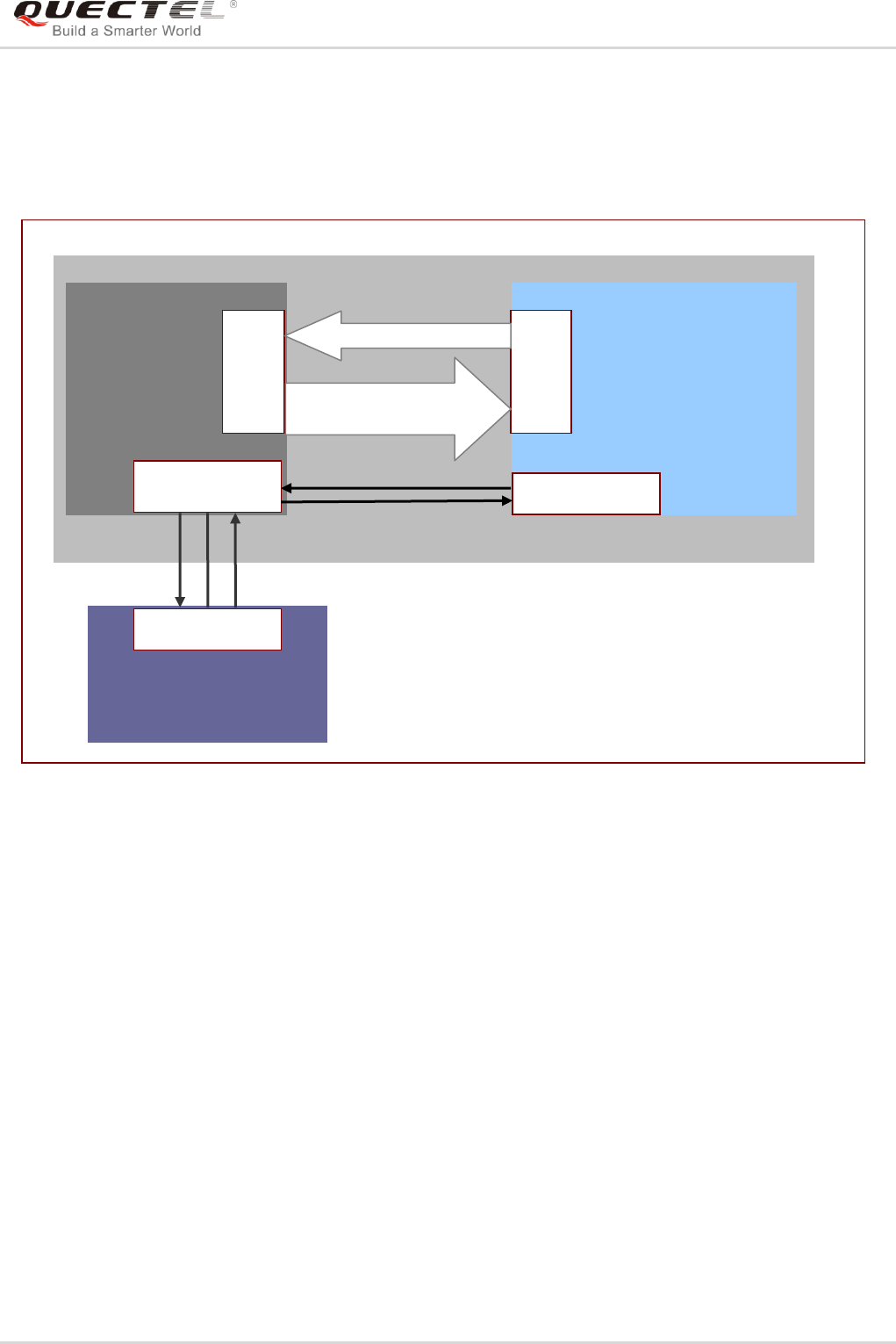
GSM/GPRS/GNSS Module Series
MC60-OpenCPU Series User Guide
MC60-OpenCPU_Series_User_Guide Confidential / Released 76 / 199
These virtual ports are designed according to the features of physical serial interface. They have their RI
and DCD information. The level of DCD can be used to indicate the virtual port is in data mode or AT
command mode.
The working chart for UARTs is shown below:
Figure 3: The Working Chart of UART
5.7.1.2. UART Usage
For physical UART or virtual UART initialization and usage, developers can accomplish by following
simple steps.
Step 1: Call Ql_UART_Register to register the UART‟s callback function.
Step 2: Call Ql_UART_Open to open the special UART port.
Step 3: Call Ql_UART_Write to write data to the specified UART port. When the number of bytes actually
sent is less than that to be sent, application should stop sending data, and application will
receive an event EVENT_UART_READY_TO_WRITE later in callback function. After receiving
this event, application can continue to send data, and the previously unsent data should be
resent.
Step 4: Deal with the UART‟s notification in the callback function. If the notification type is
EVENT_UART_READY_TO_READ, developers should read out all data in the UART RX buffer.
Otherwise, there will not be such notification to be reported to application when new data comes
OpenCPU
Core
System
OpenCPU
Application
Virtual
UART
Virtual
UART
Physical UART
External Device
Physical UART
Receive AT Response
/URC
TX
TX
RX
RX
Send AT Command
UART Program
Open/Write/Read/Close
Signal Notification

GSM/GPRS/GNSS Module Series
MC60-OpenCPU Series User Guide
MC60-OpenCPU_Series_User_Guide Confidential / Released 77 / 199
to UART RX buffer later.
5.7.1.3. API Functions
5.7.1.3.1. Ql_UART_Register
This function registers the callback function for the the specified serial port. UART callback function is
used to receive the UART notification from core system.
- Prototype
s32 Ql_UART_Register(Enum_SerialPort port, CallBack_UART_Notify callback_uart,void *
customizePara)
typedef void (*CallBack_UART_Notify)( Enum_SerialPort port, Enum_UARTEventType event, bool
pinLevel,void *customizePara)
- Parameters
port:
[In] Port name.
callback_uart:
[In] Pointer of the UART callback function.
event:
[Out] Indication of the event type of UART callback. One value of Enum_UARTEventType.
pinLevel:
[Out] If the event type is EVENT_UART_RI_IND, EVENT_UART_DCD_IND or EVENT_UART_DTR_IND,
the pinLevel indicates the related pin's current level. Otherwise this parameter has no meaning, and
just ignore it.
customizePara:
[In] Customized parameter. If not used, just it set to NULL.
- Return Value
The return value is QL_RET_OK if this function succeeds. Otherwise, the return value is an error code. To
get extended error information, please refer to the ERROR CODES in header file Ql_error.h.
5.7.1.3.2. Ql_UART_Open
This function opens a specified UART port with the specified flow control mode. The task that calls this
function will own the specified UART port.

GSM/GPRS/GNSS Module Series
MC60-OpenCPU Series User Guide
MC60-OpenCPU_Series_User_Guide Confidential / Released 78 / 199
- Prototype
s32 Ql_UART_Open(Enum_SerialPort port,u32 baudrate, Enum_FlowCtrl flowCtrl)
typedef enum {
FC_NONE=1, //None Flow Control
FC_HW, //Hardware Flow Control
FC_SW //Software Flow Control
} Enum_FlowCtrl;
- Parameters
port:
[In] Port name.
baudrate:
[In] The baud rate of the UART to be opened.
The physical UART supports baud rates as follows: 75bps, 150bps, 300bps, 600bps, 1200bps, 2400bps,
4800bps, 7200bps, 9600bps, 14400bps, 19200bps, 28800bps, 38400bps, 57600bps, 115200bps,
230400bps and 460800bps. The parameter does not take effect for VIRTUAL_PORT1 and
VIRTUAL_PORT2, so just it set to 0.
flowCtrl:
[In] See Enum_flowCtrl for the physical UART ports. Only UART_PORT1 supports hardware flow control
(FC_HW).
- Return Value
The return value is QL_RET_OK if this function succeeds. Otherwise, the return value is an error code. To
get extended error information, please refer to the ERROR CODES in header file Ql_error.h.
5.7.1.3.3. Ql_UART_OpenEx
This function opens a specified UART port with the specified DCB parameters. The task that calls this
function will own the specified UART port.
- Prototype
s32 Ql_UART_OpenEx(Enum_SerialPort port, ST_UARTDCB *dcb)
- Parameters
port:
[In] Port name.

GSM/GPRS/GNSS Module Series
MC60-OpenCPU Series User Guide
MC60-OpenCPU_Series_User_Guide Confidential / Released 79 / 199
dcb:
[In] Pointer to the UART DCB settings, including baud rate, data bits, stop bits, parity, and flow control.
Only physical serial port1 (UART_PORT1) supports hardware flow control. This parameter does not
take effect for VIRTUAL_PORT1 and VIRTUAL_PORT2, so just set it to NULL.
- Return Value
The return value is QL_RET_OK if this function succeeds. Otherwise, the return value is an error code. To
get extended error information, please refer to the ERROR CODES in header file Ql_error.h.
5.7.1.3.4. Ql_UART_Write
This function is used to send data to the specified UART port. When the number of bytes actually sent is
less than that to be sent, application should stop sending data. And application (in callback function) will
receive an event EVENT_UART_READY_TO_WRITE later. After receiving this event, application can
continue to send data, and the previously unsent data should be resent.
- Prototype
s32 Ql_UART_Write(Enum_SerialPort port, u8* data, u32 writeLen)
- Parameters
port:
[In] Port name.
data:
[In] Pointer to data to write.
writeLen:
[In] The length of the data to write. For VIRTUAL_UART1 and VIRTUAL_UART2, the maximum length
that can be written at one time is 1023 bytes which cannot be modified programmatically in
application.
- Return Value
Actual number of bytes written. If this function fails to write data, a negative number will be returned. To
get extended error information, please refer to the ERROR CODES in header file Ql_error.h.
5.7.1.3.5. Ql_UART_Read
This function reads data from the specified UART port. When the UART callback is invoked, and the
notification is EVENT_UART_READY_TO_READ, developers should read out all data in the UART RX
buffer by calling this function in loop; otherwise, there will not be such notification to be reported to

GSM/GPRS/GNSS Module Series
MC60-OpenCPU Series User Guide
MC60-OpenCPU_Series_User_Guide Confidential / Released 80 / 199
application when new data comes to UART RX buffer later.
- Prototype
s32 Ql_UART_Read(Enum_SerialPort port, u8* data, u32 readLen)
- Parameters
port:
[In] Port name
data:
[In] Pointer to the buffer for the read data.
readLen:
[In] The length of the data to be read. The maximum data length of the receive buffer for physical UART
buffer is 3584 bytes, and 1023 bytes for virtual UART. The buffer size cannot be modified
programmatically in application.
- Return Value
Actual number of read bytes. If readLen equals to the actual read length, developers need to continue
reading the UART until the actual read length is less than the readLen. To get extended error information,
please refer to the ERROR CODES in header file Ql_error.h.
5.7.1.3.6. Ql_UART_SetDCBConfig
This function sets the parameters of the specified UART port and works only for physical UART ports.
- Prototype
s32 Ql_UART_SetDCBConfig(Enum_SerialPort port, ST_UARTDCB *dcb)
The enumerations for DCB are defined as follows.
typedef enum {
DB_5BIT = 5,
DB_6BIT,
DB_7BIT,
DB_8BIT
} Enum_DataBits;
typedef enum {
SB_ONE=1,
SB_TWO,

GSM/GPRS/GNSS Module Series
MC60-OpenCPU Series User Guide
MC60-OpenCPU_Series_User_Guide Confidential / Released 81 / 199
SB_ONE_DOT_FIVE
} Enum_StopBits;
typedef enum {
PB_NONE=0,
PB_ODD,
PB_EVEN,
PB_SPACE,
PB_MARK
} Enum_ParityBits;
typedef enum {
FC_NONE=1, //None Flow Control
FC_HW, //Hardware Flow Control
FC_SW //Software Flow Control
} Enum_FlowCtrl;
typedef struct {
u32 baudrate;
Enum_DataBits dataBits;
Enum_StopBits stopBits;
Enum_ParityBits parity;
Enum_FlowCtrl flowCtrl;
}ST_UARTDCB;
- Parameter
port:
[In] Port name.
dcb:
[In] Pointer to the UART DCB struct, which includes baud rate, databits, stopbits and parity.
- Return Value
The return value is QL_RET_OK if this function succeeds. Otherwise, the return value is an error code. To
get extended error information, please refer to the ERROR CODES in header file Ql_error.h.
5.7.1.3.7. Ql_UART_GetDCBConfig
This function gets the configuration parameters of the specified UART port and works only for physical
UART ports.

GSM/GPRS/GNSS Module Series
MC60-OpenCPU Series User Guide
MC60-OpenCPU_Series_User_Guide Confidential / Released 82 / 199
- Prototype
s32 Ql_UART_GetDCBConfig(Enum_SerialPort port, ST_UARTDCB *dcb)
- Parameters
port:
[In] Port name.
dcb:
[In] The specified UART port‟s current DCB configration parameters, which includes baud rate, databits,
stopbits and parity.
- Return Value
The return value is QL_RET_OK if this function succeeds. Otherwise, the return value is an error code. To
get extended error information, please refer to the ERROR CODES in header file Ql_error.h.
5.7.1.3.8. Ql_UART_ClrRxBuffer
This function clears the receive buffer of the specified UART port.
- Prototype
void Ql_UART_ClrRxBuffer(Enum_SerialPort port)
- Parameters
port:
[In] Port name.
- Return Value
None.
5.7.1.3.9. Ql_UART_ClrTxBuffer
This function clears the send buffer of the specified UART port.
- Prototype
void Ql_UART_ClrTxBuffer(Enum_SerialPort port)

GSM/GPRS/GNSS Module Series
MC60-OpenCPU Series User Guide
MC60-OpenCPU_Series_User_Guide Confidential / Released 83 / 199
- Parameters
port:
[In] Port name.
- Return Value
None.
5.7.1.3.10.Ql_UART_GetPinStatus
This function gets the status indication pins (including RI, DCD and DTR) of the virtual UART port and
does not work for the physical UART ports
- Prototype
s32 Ql_UART_GetPinStatus(Enum_SerialPort port, Enum_UARTPinType pin)
typedef enum {
UART_PIN_RI=0, //RI read operator is only valid on the virtual UART.
//RI set operator is invalid both on virtual and physical UART.
UART_PIN_DCD, //DCD read operator is only valid on the virtual UART.
//DCD set operatir is invalid both on virtual and physical UART.
} Enum_UARTPinType;
- Parameters
port:
[In] Virtual UART port name.
pin:
[In] Pin name. One value of Enum_UARTPinType.
- Return Value
If the return value ≥ 0, then it indicates the function is executed successfully, and a special pin level value
is returned: 0 means low level, and 1 means high level. If the return value ≤ 0, then it indicates failed to
execute the function.
5.7.1.3.11.Ql_UART_SetPinStatus
This function sets the pin level status of the virtual UART port. It does not work for the physical UART
ports.

GSM/GPRS/GNSS Module Series
MC60-OpenCPU Series User Guide
MC60-OpenCPU_Series_User_Guide Confidential / Released 84 / 199
- Prototype
s32 Ql_UART_SetPinStatus(Enum_SerialPort port, Enum_UARTPinType pin, bool pinLevel)
- Parameters
port:
[In] Virtual UART port name.
pin:
[In] Pin name. One value of Enum_UARTPinType.
pinLevel:
[In] The pin level to be set. 0 means low level and 1 means high level.
- Return Value
The return value is QL_RET_OK if this function succeeds. Otherwise, the return value is an error code. To
get extended error information, please refer to the ERROR CODES in header file Ql_error.h.
5.7.1.3.12.Ql_UART_SendEscap
This function notifies the virtual serial port to quit from Data Mode, and return back to Command Mode.
This function works only for virtual ports.
- Prototype
s32 Ql_UART_SendEscap (Enum_SerialPort port)
- Parameters
port:
[In] Port name.
- Return Value
The return value is QL_RET_OK if this function succeeds. Otherwise, the return value is an error code. To
get extended error information, please refer to the ERROR CODES in header file Ql_error.h.

GSM/GPRS/GNSS Module Series
MC60-OpenCPU Series User Guide
MC60-OpenCPU_Series_User_Guide Confidential / Released 85 / 199
5.7.1.3.13.Ql_UART_Close
This function closes the specified UART port.
- Prototype
void Ql_UART_Close(Enum_SerialPort port)
- Parameters
port:
[In] Port name.
- Return Value
None.
5.7.1.4. Example
This chapter gives the example of how to use the UART port APIs.
//Write the callback function for dealing with the UART notifications.
static void CallBack_UART_Hdlr(Enum_SerialPort port, Enum_UARTEventType msg, bool level, void*
customizedPara); //Callback function.
{
switch(msg)
case EVENT_UART_READ_TO_READ:
//Read data from the UART port.
Ql_UART_Read (port,buffer,rlen);
break;
case EVENT_UART_READ_TO_WRITE:
//Resume the operation of writing data to UART.
QL_UART_Write(port,buffer,wlen);
break;
case EVENT _UART_RI_CHANGE:
break;
case EVENT _UART_DCD_CHANGE
break;
case EVENT _UART_DTR_CHANGE:
break;
case EVENT _UART_FE_IND:
break;
default:
break;
}

GSM/GPRS/GNSS Module Series
MC60-OpenCPU Series User Guide
MC60-OpenCPU_Series_User_Guide Confidential / Released 86 / 199
//Register the callback function.
s32 Ql_UART_Register(UART_PORT1, CallBack_UART_Hdlr,NULL)
//Open the specified UART port
Ql_UART_Open(UART_PORT1);
//Write data to UART port
QL_UART_Write(UART_PORT1,buffer,len)
5.7.2. GPIO
5.7.2.1. GPIO Overview
There are 21 I/O pins that can be designed for general purpose I/O. All pins can be accessed under
OpenCPU by API functions.
5.7.2.2. GPIO List
Table 6: Multiplexing Pins
Pin
No.
Pin Name
RESET
MODE1
MODE2
MODE3
MODE4
7
PINNAME_SD_CMD
I/PD
SD_CMD
GPIO
8
PINNAME_SD_CLK
I/PD
SD_CLK
GPIO
9
PINNAME_SD_DATA
I/PD
SD_DATA
GPIO
10
PINNAME_SIM2_CLK
I/PD
SIM2_CLK
GPIO
11
PINNAME_SIM2_DATA
I/PD
SIM2_DATA
GPIO
12
PINNAME_SIM2_RST
I/PD
SIM2_RST
GPIO
35
PINNAME_RI
I/PD
RI
GPIO
I2C_SCL
36
PINNAME_DCD
I/PD
DCD
GPIO
I2C_SDA
37
PINNAME_DTR
I/PD
DTR
GPIO
EINT
SIM_PRESENCE
38
PINNAME_CTS
I/PU
CTS
GPIO
EINT
39
PINNAME_RTS
I/PU
RTS
GPIO
47
PINNAME_NETLIGHT
I/PD
NETLIGHT
GPIO
PWM_OUT
EINT
57
PINNAME_GPIO0
I/PD
GPIO
58
PINNAME_GPIO1
I/PD
GPIO
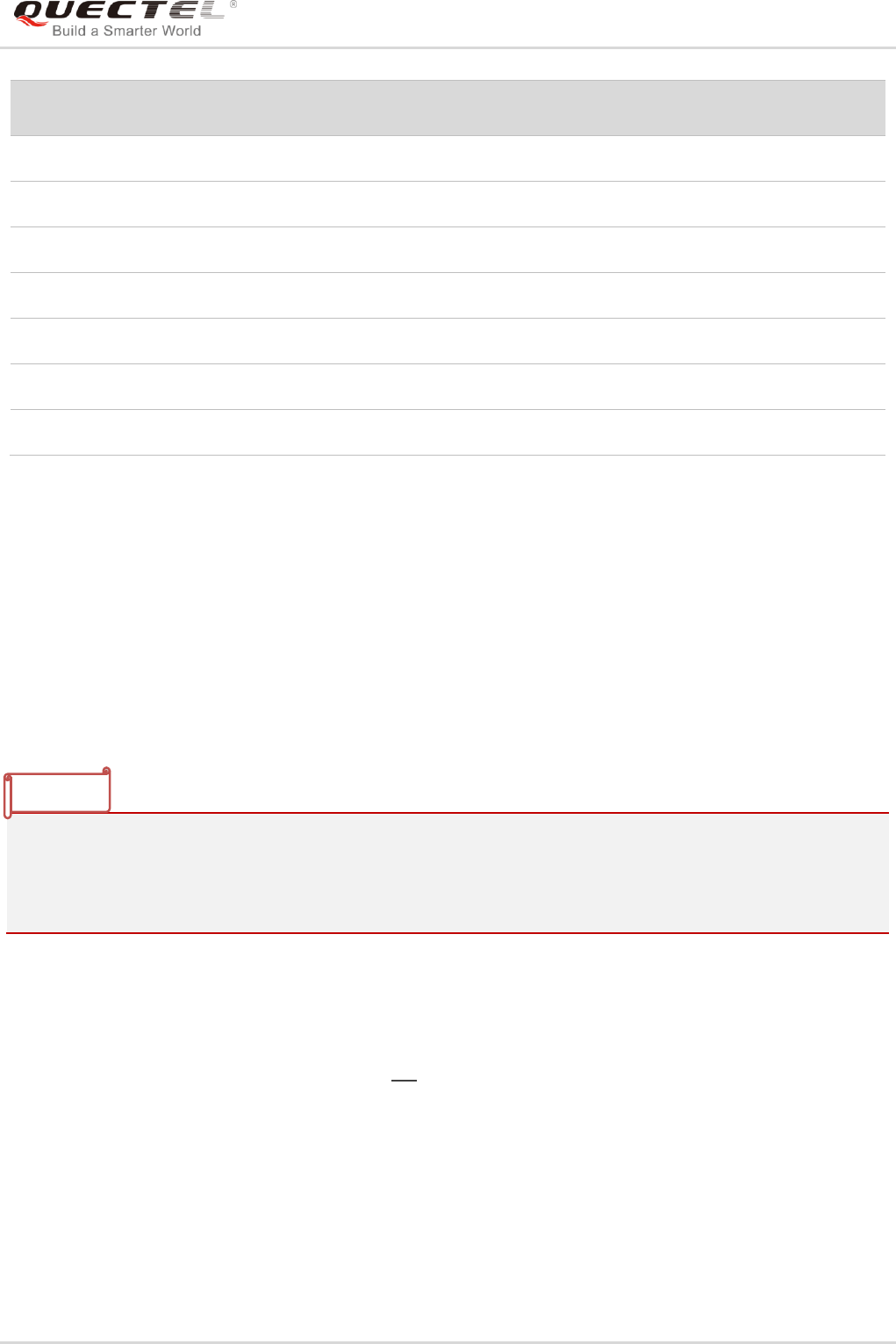
GSM/GPRS/GNSS Module Series
MC60-OpenCPU Series User Guide
MC60-OpenCPU_Series_User_Guide Confidential / Released 87 / 199
Pin
No.
Pin Name
RESET
MODE1
MODE2
MODE3
MODE4
59
PINNAME_PCM_CLK
HO/-
PCM_CLK
GPIO
SPI_CS
60
PINNAME_PCM_OUT
I/PD
PCM_OUT
GPIO
SPI_MOSI
61
PINNAME_PCM_SYNC
I/PD
PCM_SYNC
GPIO
SPI_MISO
62
PINNAME_PCM_IN
I/PU
PCM_IN
GPIO
SPI_CLK
63
PINNAME_GPIO2
I/PD
GPIO
64
PINNAME_GPIO3
I/PD
GPIO
65
PINNAME_GPIO4
I/PD
GPIO
.
- The “MODE1” defines the original status of pin in standard module.
- “RESET” column defines the default status of every pin after system is powered on.
- “I” means input.
- “O” means output.
- “HO” means high output.
- “PU” means internal pull-up circuit.
- “PD” means internal pull-down circuit.
- “EINT” means external interrupt input.
- “PWM_OUT” means PWM output function.
-
1. If pins PINNAME_SD_CMD, PINNAME_SD_CLK and PINNAME_SD_DATA are designed as SD
card interface, please do not configure these pins in customers‟ applications.
2. If PINNAME_SIM2_DATA, PINNAME_SIM2_RST, PINNAME_SIM2_CLK are designed as (U)SIM
card interface, please do not configure these pins in customers‟ applications.
5.7.2.3. GPIO Initial Configuration
In OpenCPU, there are two ways to initialize GPIOs. One is to configure initial GPIO list in
custom_gpio_cfg.h, please refer to Chapter 4.3; the other way is to call GPIO related APIs to initialize
after App starts.
The following codes show the PINNAME_NETLIGHT, PINNAME_PCM_IN and PINNAME_PCM_OUT
pins‟ initial Configuration in custom_gpio_cfg.h file.
NOTES

GSM/GPRS/GNSS Module Series
MC60-OpenCPU Series User Guide
MC60-OpenCPU_Series_User_Guide Confidential / Released 88 / 199
/*---------------------------------------------------------------------------------------------------------------------------------------
{ Pin Name | Direction | Level | Pull
Selection }
*---------------------------------------------------------------------------------------------------------------------------------------*/
#if 1 //If needed, configure GPIOs here
GPIO_ITEM(PINNAME_NETLIGHT, PINDIRECTION_OUT, PINLEVEL_LOW,
PINPULLSEL_PULLDOWN)
GPIO_ITEM(PINNAME_PCM_IN, PINDIRECTION_OUT, PINLEVEL_LOW,
PINPULLSEL_PULLDOWN)
GPIO_ITEM(PINNAME_PCM_OUT, PINDIRECTION_OUT, PINLEVEL_LOW,
PINPULLSEL_PULLUP)
#else if 0
…
#endif
5.7.2.4. GPIO Usage
The following shows how to use the multifunctional GPIOs:
Step 1: GPIO initialization. Call Ql_GPIO_Init function sets the specified pin as the GPIO function, and
initializes the configurations, which includes direction, level and pull selection.
Step 2: GPIO control. When the pin is initialized as GPIO, the developers can call the GPIO related
APIs to change the GPIO level.
Step 3: Release the pin. If developers do not want use this pin no longer, and need to use this pin for
other purposes (such as PWM, EINT), they must call Ql_GPIO_Uninit to release the pin first.
This step is optional.
5.7.2.5. API Functions
5.7.2.5.1. Ql_GPIO_Init
This function enables the GPIO function of the specified pin, and initializes the configurations, which
includes direction, level and pull selection.
- Prototype
s32 Ql_GPIO_Init(PinName pinName,PinDirection dir,PinLevel level ,PinPullSel pullsel)

GSM/GPRS/GNSS Module Series
MC60-OpenCPU Series User Guide
MC60-OpenCPU_Series_User_Guide Confidential / Released 89 / 199
- Parameters
pinName:
[In] Pin name. One value of Enum_PinName.
dir:
[In] The initial direction of GPIO. One value of Enum_PinDirection.
pullsel:
[In] Pull selection. One value of Enum_PinPullSel.
level:
[In] The initial level of GPIO. One value of Enum_PinLevel.
- Return Value
QL_RET_OK: indicates this function is executed successfully. Negative integer indicates this function
fails.
5.7.2.5.2. Ql_GPIO_GetLevel
This function gets the level of the specified GPIO.
- Prototype
s32 Ql_GPIO_GetLevel(PinName pinName)
- Parameters
pinName:
[In] Pin name. One value of Enum_PinName.
- Return Value
Return the level of the specified GPIO. 1 means high level, and 0 means low level.
5.7.2.5.3. Ql_GPIO_SetLevel
This function sets the level of the specified GPIO.
- Prototype
s32 Ql_GPIO_SetLevel(PinName pinName, PinLevel level)

GSM/GPRS/GNSS Module Series
MC60-OpenCPU Series User Guide
MC60-OpenCPU_Series_User_Guide Confidential / Released 90 / 199
- Parameters
pinName:
[In] Pin name. One value of Enum_PinName.
level:
[In] The initial level of GPIO. One value of Enum_PinLevel.
- Return Value
QL_RET_OK: indicates this function is executed successfully. Negative integer indicates this function
fails.
5.7.2.5.4. Ql_GPIO_GetDirection
This function gets the direction of the specified GPIO.
- Prototype
s32 Ql_GPIO_GetDirection(PinName pinName)
- Parameters
pinName:
[In] Pin name. One value of Enum_PinName.
- Return Value
The direction of the specified GPIO. 1 means output and 0 means input.
5.7.2.5.5. Ql_GPIO_SetDirection
This function sets the direction of the specified GPIO.
- Prototype
s32 Ql_GPIO_SetDirection(PinName pinName,PinDirection dir)
- Parameters
pinName:
[In] Pin name. One value of Enum_PinName.
dir:
[In] The initial direction of GPIO. One value of Enum_PinDirection.

GSM/GPRS/GNSS Module Series
MC60-OpenCPU Series User Guide
MC60-OpenCPU_Series_User_Guide Confidential / Released 91 / 199
- Return Value
QL_RET_OK: indicates this function is executed successfully. Negative integer indicates this function
fails.
5.7.2.5.6. Ql_GPIO_GetPullSelection
This function gets the pull selection of the specified GPIO.
- Prototype
s32 Ql_GPIO_GetPullSelection(PinName pinName)
- Parameters
pinName:
[In] Pin name. One value of Enum_PinName.
- Return Value
Return the pull selection of the specified GPIO. One value of Enum_PinPullSel.
5.7.2.5.7. Ql_GPIO_SetPullSelection
This function sets the pull selection of the specified GPIO.
- Prototype
s32 Ql_GPIO_SetPullSelection(PinName pinName,PinPullSel pullSel)
- Parameters
pinName:
[In] Pin name. One value of Enum_PinName.
pullSel:
[In] Pull selection. One value of Enum_PinPullSel.
- Return Value
QL_RET_OK: indicates this function is executed successfully. Negative integer indicates this function
fails.

GSM/GPRS/GNSS Module Series
MC60-OpenCPU Series User Guide
MC60-OpenCPU_Series_User_Guide Confidential / Released 92 / 199
5.7.2.5.8. Ql_GPIO_Uninit
This function releases the specified GPIO that was initialized by calling Ql_GPIO_Init previously. After
releasing, the GPIO can be used for other purposes.
- Prototype
s32 Ql_GPIO_Uninit(PinName pinName)
- Parameters
pinName:
[In] Pin name. One value of Enum_PinName.
- Return Value
QL_RET_OK: indicates this function is executed successfully. Negative integer indicates this function
fails.
5.7.2.6. Example
This chapter gives the example of how to use the GPIO APIs.
void API_TEST_gpio(void)
{
s32 ret;
Ql_Debug_Trace("\r\n<*********** GPIO API Test ***********>\r\n");
ret=Ql_GPIO_Init(PINNAME_NETLIGHT, PINDIRECTION_OUT, PINLEVEL_HIGH,
PINPULLSEL_PULLUP);
Ql_Debug_Trace("\r\n<--pin(%d) Ql_GPIO_Init ret=%d-->\r\n",PINNAME_NETLIGHT,ret);
ret=Ql_GPIO_SetLevel(PINNAME_NETLIGHT,PINLEVEL_HIGH);
Ql_Debug_Trace("\r\n<--pin(%d) Ql_GPIO_SetLevel =%d ret=%d-->\r\n",
PINNAME_NETLIGHT,PINLEVEL_HIGH,ret);
ret=Ql_GPIO_SetDirection(PINNAME_NETLIGHT,PINDIRECTION_IN);
Ql_Debug_Trace("\r\n<--pin(%d) Ql_GPIO_SetDirection =%d ret=%d-->\r\n",
PINNAME_NETLIGHT,PINDIRECTION_IN,ret);
ret=Ql_GPIO_GetLevel(PINNAME_NETLIGHT);
Ql_Debug_Trace("\r\n<--pin(%d) Ql_GPIO_GetLevel =%d ret=%d-->\r\n",
PINNAME_NETLIGHT,ret,ret);
ret=Ql_GPIO_GetDirection(PINNAME_NETLIGHT);

GSM/GPRS/GNSS Module Series
MC60-OpenCPU Series User Guide
MC60-OpenCPU_Series_User_Guide Confidential / Released 93 / 199
Ql_Debug_Trace("\r\n<--pin(%d) Ql_GPIO_GetDirection =%d ret=%d-->\r\n",
PINNAME_NETLIGHT,ret,ret);
ret=Ql_GPIO_SetPullSelection(PINNAME_NETLIGHT,PINPULLSEL_PULLDOWN);
Ql_Debug_Trace("\r\n<--pin(%d) Ql_GPIO_SetPullSelection =%d ret=%d-->\r\n",
PINNAME_NETLIGHT,PINPULLSEL_PULLDOWN,ret);
ret=Ql_GPIO_GetPullSelection(PINNAME_NETLIGHT);
Ql_Debug_Trace("\r\n<--pin(%d) Ql_GPIO_GetPullSelection =%d ret=%d-->\r\n",
PINNAME_NETLIGHT,ret,ret);
ret=Ql_GPIO_Uninit(PINNAME_NETLIGHT);
Ql_Debug_Trace("\r\n<--pin(%d) Ql_GPIO_Uninit ret=%d-->\r\n",PINNAME_NETLIGHT,ret);
}
5.7.3. EINT
5.7.3.1. EINT Overview
OpenCPU module has three external interrupt pins, please refer to Chapter 5.7.2.2 for details. The
interrupt trigger mode just support level-triggered mode. The software debounce for external interrupt
sources is used to minimize the possibility of false activations. External interrupt has higher priority, so
frequent interrupt is not allowed. It is strongly recommended that the interrupt frequency is not more than
2, and too frequent interrupt will cause other tasks cannot be scheduled, which probably leads to
unexpected exception.
The interrupt response time is 50ms by default, and can be re-programmed to a greater value in
OpenCPU. However, it is strongly recommended that the interrupt frequency cannot be more than 3Hz so
as to ensure stable working of the module.
5.7.3.2. EINT Usage
The following steps show how to use the external interrupt function:
Step 1: Register an external interrupt function. Developers must choose one external interrupt pin and
use Ql_EINT_Register (or Ql_EINT_RegisterFast) to register an interrupt handler function.
Step 2: Initialize the interrupt configurations. Call Ql_EINT_Init function to configure the software
debounce time and set the level-triggered interrupt mode.
Step 3: Interrupt handle. The interrupt callback function will be called if the level has changed.
Developers can process something in the handler.
Step 4: Mask the interrupt. When developers do not want external interrupt. they can use
NOTE

GSM/GPRS/GNSS Module Series
MC60-OpenCPU Series User Guide
MC60-OpenCPU_Series_User_Guide Confidential / Released 94 / 199
Ql_EINT_Mask function to disable the external interrupt, and call the Ql_EINT_Unmask function
to enable the external interrupt.
Step 5: Release the specified EINT pin. Call Ql_EINT_Uninit function to release the specified EINT pin,
and the pin can be used for other purposes after it is released. This step is optional.
5.7.3.3. API Functions
5.7.3.3.1. Ql_EINT_Register
This function registers an EINT I/O, and specifies the interrupt handler.
- Prototype
s32 Ql_EINT_Register(PinName eintPinName, Callback_EINT_Handle callback_eint,void*
customParam)
typedef void (*Callback_EINT_Handle)(PinName eintPinName, PinLevel pinLevel, void*
customParam)
- Parameters
eintPinName:
[In] EINT pin name. One value of Enum_PinName that has the interrupt function.
callback_eint:
[In] The interrupt handler.
pinLevel:
[In] The EINT pin level value. One value of Enum_PinLevel.
customParam:
[In] Customized parameter. If not used, just set it to NULL.
- Return Value
QL_RET_OK: indicates this function is executed successfully. Negative integer indicates this function
fails.
5.7.3.3.2. Ql_EINT_RegisterFast
This function registers an EINT I/O, and specifies the interrupt handler. The EINT that is registered by
calling this function is a top half interrupt. The response to interrupt request is timelier. Please do not add
any task schedule in the interrupt handler which cannot consume much CPU time, or else, system
exceptions or resetting may be caused.

GSM/GPRS/GNSS Module Series
MC60-OpenCPU Series User Guide
MC60-OpenCPU_Series_User_Guide Confidential / Released 95 / 199
- Prototype
s32 Ql_EINT_RegisterFast(PinName eintPinName, Callback_EINT_Handle callback_eint, void*
customParam)
- Parameters
eintPinName:
[In] EINT pin name. One value of Enum_PinName that has the interrupt function.
callback_eint:
[In] The interrupt handler.
pinLevel:
[In] The EINT pin level value. One value of Enum_PinLevel.
customParam:
[In] Customized parameter. If not used, just set it to NULL.
- Return Value
QL_RET_OK: indicates this function is executed successfully. Negative integer indicates this function
fails.
5.7.3.3.3. Ql_EINT_Init
This function initializes an external interrupt function.
- Prototype
s32 Ql_EINT_Init(PinName eintPinName,EintType eintType,u32 hwDebounce,u32 swDebounce,
bool autoMask)
- Parameters
eintPinName:
[In] EINT pin name. One value of Enum_PinName that has the interrupt function.
eintType:
[In] Interrupt type, level-triggered or edge-triggered. Now, only level-triggered interrupt is supported.
hwDebounce:
[In] Hardware debounce. Unit: 10ms. It is not supported now.
swDebounce:
[In] Software debounce. Unit: 10ms. The minimum value for this parameter is 5, and this means the

GSM/GPRS/GNSS Module Series
MC60-OpenCPU Series User Guide
MC60-OpenCPU_Series_User_Guide Confidential / Released 96 / 199
minimum software debounce time is 5 × 10ms=50ms.
autoMask:
[In] Whether automatically mask the external interrupt after the interrupt happens. 0 means no, and 1
means yes.
- Return Value
QL_RET_OK: indicates this function is executed successfully. Negative integer indicates this function
fails.
5.7.3.3.4. Ql_EINT_Uninit
This function releases the specified EINT pin.
- Prototype
s32 Ql_EINT_Uninit(PinName eintPinName)
- Parameters
eintPinName:
[In] EINT pin name.
- Return Value
QL_RET_OK: indicates this function is executed successfully. Negative integer indicates this function
fails.
5.7.3.3.5. Ql_EINT_GetLevel
This function gets the level of the specified EINT pin.
- Prototype
s32 Ql_EINT_GetLevel(PinName eintPinName)
- Parameters
eintPinName:
[In] EINT pin name.
- Return Value
1 means high level, and 0 means low level.

GSM/GPRS/GNSS Module Series
MC60-OpenCPU Series User Guide
MC60-OpenCPU_Series_User_Guide Confidential / Released 97 / 199
5.7.3.3.6. Ql_EINT_Mask
This function masks the specified EINT pin.
- Prototype
void Ql_EINT_Mask(PinName eintPinName)
- Parameters
eintPinName:
[In] EINT pin name.
- Return Value
None.
5.7.3.3.7. Ql_EINT_Unmask
This function unmasks the specified EINT pin.
- Prototype
void Ql_EINT_Unmask(PinName eintPinName)
- Parameters
eintPinName:
[In] EINT pin name.
- Return Value
None.
5.7.3.4. Example
The following sample codes show how to use the EINT function.
void eint_callback_handle(Enum_PinName eintPinName, Enum_PinLevel pinLevel, void* customParam)
{
s32 ret;
if(PINNAME_DTR==eintPinName) //This pin is the external interrput.
{
ret=Ql_EINT_GetLevel(eintPinName); //Get the pin level if developers need.

GSM/GPRS/GNSS Module Series
MC60-OpenCPU Series User Guide
MC60-OpenCPU_Series_User_Guide Confidential / Released 98 / 199
//Developers need to unmask the interrupt again, because PINNAME_DTR pin interrupt is
initialized as auto mask.
Ql_EINT_Unmask(eintPinName);
if(*((s32*)customParam) >= 3)
{
//If developers do not want the interrupt, mask it now!!!
Ql_EINT_Mask(eintPinName);
}
}
else if(PINNAME_SIM_PRESENCE==eintPinName)
{
ret=Ql_EINT_GetLevel(eintPinName);
Ql_Debug_Trace("\r\n<--Ql_EINT_GetLevel pin(%d) levle(%d)-->\r\n",eintPinName,ret);
//Ql_EINT_Unmask(eintPinName) is not needed, the interrupt is not auto mask when it is
initialized.
if(*((s32*)customParam) >= 3)
{
//If developers do not want the interrupt, mask it now!!!
Ql_EINT_Mask(PINNAME_SIM_PRESENCE);
}
}
*((s32*)customParam) +=1;
}
void API_TEST_eint(void)
{
s32 ret;
//Register PINNAME_SIM_PRESENCE pin for a top half external interrupt pin.
ret=Ql_EINT_RegisterFast(PINNAME_SIM_PRESENCE,eint_callback_handle,(void
*)&EintcustomParam);
//Initialize some parameters and the auto mask is set to FALSE.
ret=Ql_EINT_Init(PINNAME_SIM_PRESENCE, EINT_LEVEL_TRIGGERED, 0,5,0);
Ql_Debug_Trace("\r\n<--pin(%d) Ql_EINT_Init ret=%d-->\r\n",PINNAME_SIM_PRESENCE,ret);
//Register PINNAME_DTR pin for an external interrupt pin.
ret=Ql_EINT_Register(PINNAME_DTR,eint_callback_handle, (void *)&fastEintcustomParam);
//Initialize some parameters and the auto mask is set to TRUE.
ret=Ql_EINT_Init( PINNAME_DTR, EINT_LEVEL_TRIGGERED, 0, 5,1);
}

GSM/GPRS/GNSS Module Series
MC60-OpenCPU Series User Guide
MC60-OpenCPU_Series_User_Guide Confidential / Released 99 / 199
5.7.4. PWM
5.7.4.1. PWM Overview
OpenCPU module has one PWM pin, please refer to Chapter 5.7.2.2 for details. The PWM has two clock
sources: one is 32K (the exact value is 32768Hz) and the other is 13M. When the module is in sleep
mode, the 13M clock source will be disabled, but the 32K clock source works normally.
5.7.4.2. PWM Usage
The following steps show how to use the PWM function:
Step 1: Initialize a PWM pin. Call Ql_PWM_Init function to configure the PWM duty cycle and frequency.
Step 2: PWM waveform control. Call Ql_PWM_Output to switch on/off the PWM waveform output.
Step 3: Release the PWM pin. Call Ql_PWM_Uninit to release the PWM pin. This step is optional.
5.7.4.3. API Functions
5.7.4.3.1. Ql_PWM_Init
This function initializes the PWM pin.
- Prototype
s32 Ql_PWM_Init(PinName pwmPinName,PwmSource pwmSrcClk,PwmSourceDiv pwmDiv,u32
lowPulseNum,u32 highPulseNum)
- Parameters
pwmPinName:
[In] PWM pin name, and only can be PINNAME_NETLIGHT.
pwmSrcClk:
[In] PWM clock source. One value of Enum_PwmSource.
pwmDiv:
[In] Clock source frequency division. One value of Enum_PwmSourceDiv.
lowPulseNum:
[In] Set the number of clock cycles to stay at low level. The result of lowPulseNum plus highPulse Num is
less than 8193.

GSM/GPRS/GNSS Module Series
MC60-OpenCPU Series User Guide
MC60-OpenCPU_Series_User_Guide Confidential / Released 100 / 199
highPulseNum:
[In] Set the number jof clock cycles to stay at high level. The result of lowPulseNum plus highPulseNum is
less than 8193.
1. PWM Duty cycle = highPulseNum/(lowPulseNum + highPulseNum).
2. PWM frequency = (pwmSrcClk/pwmDiv)/(lowPulseNum + highPulseNum).
- Return Value
QL_RET_OK: indicates this function is executed successfully. Negative integer indicates this function
fails.
5.7.4.3.2. Ql_PWM_Uninit
This function releases a PWM pin.
- Prototype
s32 Ql_PWM_Uninit(PinName pwmPinName)
- Parameters
pwmPinName:
[In] PWM pin name. One value of Enum_PinName.
- Return Value
QL_RET_OK: indicates this function is executed successfully. Negative integer indicates this function
fails.
5.7.4.3.3. Ql_PWM_Output
This function switches on/off the PWM waveform output.
- Prototype
s32 Ql_PWM_Output(PinName pwmPinName,bool pwmOnOff)
- Parameters
pwmPinName:
[In] PWM pin name. One value of Enum_PinName.
NOTES

GSM/GPRS/GNSS Module Series
MC60-OpenCPU Series User Guide
MC60-OpenCPU_Series_User_Guide Confidential / Released 101 / 199
pwmOnOff:
[In] PWM enabling or disabling. Control the enabling/disabling and waveform output of PWM function.
- Return Value
QL_RET_OK: indicates this function is executed successfully. Negative integer indicates this function
fails.
5.7.4.4. Example
This following sample codes show how to use the PWM function.
void API_TEST_pwm(void)
{
s32 ret;
//Initialize some parameters.
ret=Ql_PWM_Init(PINNAME_NETLIGHT, PWMSOURCE_32K, PWMSOURCE_DIV4, 500, 500);
Ql_Debug_Trace("\r\n<--pin(%d) Ql_PWM_Init ret=%d-->\r\n",PINNAME_NETLIGHT,ret);
//Output PWM waveform.
ret=Ql_PWM_Output(PINNAME_NETLIGHT, 1);
Ql_Debug_Trace("\r\n<--pin(%d) Ql_PWM_Output start ret=%d-->\r\n",PINNAME_NETLIGHT,ret);
Ql_Sleep(3000);
//Stop PWM waveform output.
ret=Ql_PWM_Output(PINNAME_NETLIGHT, 0);
Ql_Debug_Trace("\r\n<--pin(%d) Ql_PWM_Output stop ret=%d-->\r\n",PINNAME_NETLIGHT,ret);
//Release the pin if developers do not use it.
ret=Ql_PWM_Uninit(PINNAME_NETLIGHT);
Ql_Debug_Trace("\r\n<--pin(%d) Ql_PWM_Uninit stop ret=%d-->\r\n",PINNAME_NETLIGHT,ret);
}
5.7.5. ADC
5.7.5.1. ADC Overview
OpenCPU module provides an analogue input pin that can be used to detect the external voltage. Please
refer to document [2] for the pin definitions and ADC hardware characteristics. The voltage range that
can be detected is 0mV~2800mV.

GSM/GPRS/GNSS Module Series
MC60-OpenCPU Series User Guide
MC60-OpenCPU_Series_User_Guide Confidential / Released 102 / 199
5.7.5.2. ADC Usage
The following steps tell the use of the ADC function:
Step 1: Register an ADC sampling function. Call Ql_ADC_Register function to register a callback
function which will be called when the module outputs the ADC value.
Step 2: ADC sampling parameter initialization. Call Ql_ADC_Init function to set the sampling count and
the interval of each sampling.
Step 3: Start/stop ADC sampling. Use Ql_ADC_Sampling function with an enabling parameter to start
ADC sampling, and then ADC callback function will be invoked cyclically to report the ADC value.
Call this API function again with a disabling parameter may stop the ADC sampling.
5.7.5.3. API Functions
5.7.5.3.1. Ql_ADC_Register
This function registers an ADC callback function. The callback function will be called when the module
outputs the ADC value.
- Prototype
s32 Ql_ADC_Register(ADCPin adcPin,Callback_ADC callback_adc,void *customParam)
typedef void (*Callback_ADC)(ADCPin adcPin, u32 adcValue, void *customParam)
- Parameters
adcPin:
[In] ADC pin name. One value of Enum_ADCPin.
callback_adc:
[In] Callback funtion, which will be called when the module outputs the ADC value.
customParam:
[In] Customized parameter. If not used, just set it to NULL.
adcValue:
[In] The average value of ADC sampling. The range is 0mV~2800mV.
- Return Value
QL_RET_OK: indicates this function is executed successfully. Negative integer indicates this function
fails.

GSM/GPRS/GNSS Module Series
MC60-OpenCPU Series User Guide
MC60-OpenCPU_Series_User_Guide Confidential / Released 103 / 199
5.7.5.3.2. Ql_ADC_Init
This function initializes the configurations for ADC, including sampling count and the interval of each
internal sampling. The ADC callback function will be called when the module outputs the ADC value, and
the value is the average of the sampling value.
- Prototype
s32 Ql_ADC_Init(ADCPin adcPin,u32 count,u32 interval)
- Parameters
adcpin:
[In] ADC pin name. One value of Enum_ADCPin.
count:
[In] Internal sampling times for each reporting ADC value. The minimum value is 5.
interval:
[In] Interval of each internal sampling. Unit: ms. The minimum value is 200 and this means the ADC report
frequency must be less than 1Hz.
- Return Value
QL_RET_OK: indicates this function is executed successfully. Negative integer indicates this function
fails.
5.7.5.3.3. Ql_ADC_Sampling
This function switches on/off ADC sampling.
- Prototype
s32 Ql_ADC_Sampling(ADCPin adcPin,bool enable)
- Parameters
adcPin:
[In] ADC pin name. One value of Enum_ADCPin.
enable:
[In] Sampling control. 1 means start sampling, and 0 means stop sampling.

GSM/GPRS/GNSS Module Series
MC60-OpenCPU Series User Guide
MC60-OpenCPU_Series_User_Guide Confidential / Released 104 / 199
- Return Value
QL_RET_OK: indicates this function is executed successfully. Negative integer indicates this function
fails.
5.7.5.4. Example
The following example demonstrates the use of ADC sampling.
void ADC_callback_handle(Enum_ADCPin adcPin, u32 adcValue, void *customParam)
{
s32 ret;
if (PIN_ADC0==adcPin )
{
if( *((s32*)customParam) >= 4)
{
//Stop ADC0 sampling if developers do not need it.
ret=Ql_ADC_Sampling(PIN_ADC0, 0);
}
}
*((s32*)customParam) +=1;
}
void API_TEST_adc(void)
{
s32 ret;
//Register ADC0 callback function.
ret=Ql_ADC_Register(PIN_ADC0, ADC_callback_handle, (void * )&ADC0customParam);
//Set the internal sampling times and the interval.
ret=Ql_ADC_Init(PIN_ADC0, 5, 200);//So the ADC0 reports the ADC value at frequency of 1
Hz.(5*200ms).
ret=Ql_ADC_Sampling(PIN_ADC0, 1); //Start sampling.
}
5.7.6. IIC
5.7.6.1. IIC Overview
The module provides a hardware IIC interface. The IIC interface can be simulated by GPIO pins, which
can be any two GPIOs in the GPIO list in Chapter 5.7.2.2. Therefore, one or more IIC interfaces are
possible.
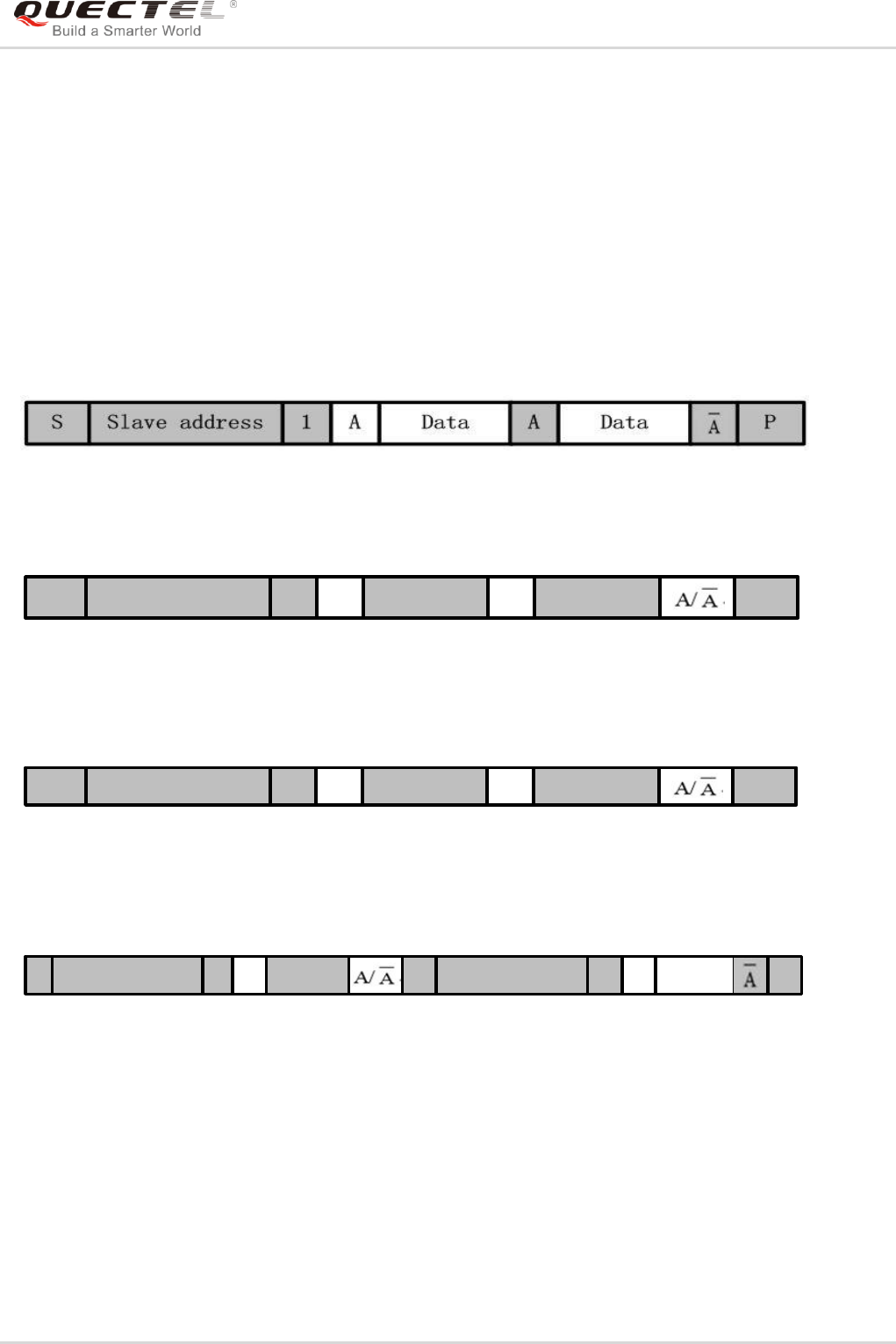
GSM/GPRS/GNSS Module Series
MC60-OpenCPU Series User Guide
MC60-OpenCPU_Series_User_Guide Confidential / Released 105 / 199
5.7.6.2. IIC Usage
The following steps tell how to work with IIC function:
Step 1: Initialize IIC interface. Call Ql_IIC_Init function to initialize an IIC channel, including the specified
GPIO pins for IIC and an IIC channel number.
Step 2: Configure IIC interface. Call Ql_IIC_Config to configure parameters that the slave device needs.
Please refer to the API decription for extended information.
Step 3: Read data from slave. Developers can use Ql_IIC_Read function to read data from the specified
slave. The following figure shows the data exchange direction.
Step 4: Write data to slave. Developers can use Ql_IIC_Write function to write data to the specified slave.
The following figure shows the data exchange direction.
S Slave address 0 A Data A Data P
Step 5: Write the data to the register (or the specified address) of the slave. Developers can use
Ql_IIC_Write function to write the data to a register of the slave. The following figure shows the
data exchange direction.
S Slave address 0 A Data A Data P
Step 6: Read the data from the register (or the specified address) of the slave. Developers can use
Ql_IIC_Write_Read function to read the data from a register of the slave. The following figure
shows the data exchange direction.
S Slave address 0 Data 1 Data PA S Slave address A 1
Step 7: Release the IIC channel. Call Ql_IIC_Uninit function to release the specified IIC channel.
5.7.6.3. API Functions
5.7.6.3.1. Ql_IIC_Init
This function initializes the configurations for an IIC channel, including the specified pins for IIC, IIC type,
and IIC channel number.

GSM/GPRS/GNSS Module Series
MC60-OpenCPU Series User Guide
MC60-OpenCPU_Series_User_Guide Confidential / Released 106 / 199
- Prototype
s32 Ql_IIC_Init(u32 chnnlNo,PinName pinSCL,PinName pinSDA, u32 IICtype)
- Parameters
chnnlNo:
[In] IIC channel number. The range is 0~254.
pinSCL:
[In] IIC SCL pin.
pinSDA:
[In] IIC SDA pin.
IICtype:
[In] IIC type. FALSE means simulated IIC, and TRUE means hardware IIC.
Return Value
QL_RET_OK: indicates this function is executed successfully. Negative integer indicates this function
fails.
5.7.6.3.2. Ql_IIC_Config
This function configures the IIC interface for one slave.
- Prototype
s32 Ql_IIC_Config(u32 chnnlNo, bool isHost, u8 slaveAddr, u32 speed)
- Parameters
chnnlNo:
[In] IIC channel number. It is specified by Ql_IIC_Init function.
isHost:
[In] Whether use host mode or not. It must be TRUE and just support host mode.
slaveAddr:
[In] Slave address.
speed:
[In] IIC communication speed. The parameter is just for IIC controller, and can be ingored if developers
use simulated IIC.

GSM/GPRS/GNSS Module Series
MC60-OpenCPU Series User Guide
MC60-OpenCPU_Series_User_Guide Confidential / Released 107 / 199
- Return Value
QL_RET_OK: indicates this function is executed successfully. Negative integer indicates this function
fails.
5.7.6.3.3. Ql_IIC_Write
This function writes data to specified slave through IIC interface.
- Prototype
s32 Ql_IIC_Write(u32 chnnlNo,u8 slaveAddr,u8 *pData,u32 len)
- Parameters
chnnlNo:
[In] IIC channel number. It is specified by Ql_IIC_Init function.
slaveAddr:
[In] Slave address.
pData:
[In] Setting value to be written to the slave.
Len:
[In] Number of bytes to write. If IICtype=1, then 1<len<8 because Quectel‟s IIC controller supports 8 bytes
at most for transmission at a time.
- Return Value
If no error occurs, the length of the write data will be returned. Negative integer indicates this function
fails.
5.7.6.3.4. Ql_IIC_Read
This function reads data from specified slave through IIC interface.
- Prototype
s32 Ql_IIC_Read(u32 chnnlNo,u8 slaveAddr,u8 *pBuffer,u32 len)
- Parameters
chnnlNo:
[In] IIC channel number. It is specified by Ql_IIC_Init function.

GSM/GPRS/GNSS Module Series
MC60-OpenCPU Series User Guide
MC60-OpenCPU_Series_User_Guide Confidential / Released 108 / 199
slaveAddr:
[In] Slave address.
pBuffer:
[Out] The buffer that stores the data read from a specific slave.
Len:
[Out] Number of bytes to read. If IICtype=1, then 1<len<8 because Quectel‟s IIC controller supports 8
bytes at most for one-time transmission.
- Return Value
If no error occurs, the length of the red data will be returned. Negative integer indicates this function fails.
5.7.6.3.5. Ql_IIC_WriteRead
This function reads data from the specified register (or address) of the specified slave.
- Prototype
s32 Ql_IIC_Write_Read(u32 chnnlNo,u8 slaveAddr,u8 * pData,u32 wrtLen,u8 * pBuffer,u32 rdLen)
- Parameters
chnnlNo:
[In] IIC channel number. It is specified by Ql_IIC_Init function.
slaveAddr:
[In] Slave address.
pData:
[In] Setting values of the specified register of the slave.
wrtLen:
[In] Number of bytes to write. If IICtype=1, then 1<wrtLen<8.
pBuffer:
[Out] The buffer that stores the data read from a specific slave
rdLen:
[Out] Number of bytes to read. If IICtype=1, then 1<wrtLen<8.
- Return Value
If no error occurs, the length of the read data will be returned. Negative integer indicates this function fails.

GSM/GPRS/GNSS Module Series
MC60-OpenCPU Series User Guide
MC60-OpenCPU_Series_User_Guide Confidential / Released 109 / 199
5.7.6.3.6. Ql_IIC_Uninit
This function releases the IIC pins.
- Prototype
s32 Ql_IIC_Uninit(u32 chnnlNo)
- Parameters
chnnlNo:
[In] IIC channel number. It is specified by Ql_IIC_Init function.
- Return Value
QL_RET_OK: indicates this function is executed successfully. Negative integer indicates this function
fails.
5.7.6.4. Example
The following example code demonstrates the use of IIC interface.
void API_TEST_iic(void)
{
s32 ret;
u8 write_buffer[4]={0x10,0x02,0x50,0x0a};
u8 read_buffer[6]={0x14,0x22,0x33,0x44,0x55,0x66};
u8 registerAdrr[2]={0x01,0x45};
Ql_Debug_Trace("\r\n<*********** IIC API Test ***********>\r\n");
//Simulate IIC test.
ret=Ql_IIC_Init(0,PINNAME_GPIO0,PINNAME_GPIO1,0);
//Simulated IIC interface. The IIC speed can be ignored.
ret=Ql_IIC_Config(0, TRUE,0x07, 0);
ret=Ql_IIC_Write(0, 0x07, write_buffer, sizeof(write_buffer));
ret=Ql_IIC_Read(0, 0x07, read_buffer, sizeof(read_buffer));
ret=Ql_IIC_Write_Read(0, 0x07, registerAdrr, sizeof(registerAdrr),read_buffer, sizeof(read_buffer));
//IIC controller test
ret=Ql_IIC_Init(1,PINNAME_GPIO8,PINNAME_GPIO9,1);
//IIC controller speed setting is necessary.
ret=Ql_IIC_Config(1, TRUE, 0x07, 300);

GSM/GPRS/GNSS Module Series
MC60-OpenCPU Series User Guide
MC60-OpenCPU_Series_User_Guide Confidential / Released 110 / 199
ret=Ql_IIC_Write(1, 0x07, write_buffer, sizeof(write_buffer));
ret=Ql_IIC_Read(1, 0x07, read_buffer, sizeof(read_buffer));
ret=Ql_IIC_Write_Read(1, 0x07, registerAdrr, sizeof(registerAdrr),read_buffer, sizeof(read_buffer));
ret=Ql_IIC_Uninit(1);
}
5.7.7. SPI
5.7.7.1. SPI Overview
The module provides a hardware SPI interface. The interface can also be simulated by GPIO pins, which
can be any GPIO in the GPIO list in Chapter 5.7.2.2.
5.7.7.2. SPI Usage
The following steps tell how to use the SPI function:
Step 1: Initialize SPI Interface. Call Ql_SPI_Init function to initialize the configurations for a SPI channel,
including the specified pins for SPI, SPI type, and SPI channel number.
Step 2: Configure parameters. Call Ql_SPI_Config function to configure some parameters for the SPI
interface, including the clock polarity and clock phase.
Step 3: Write data. Call Ql_SPI_Write function to write bytes to the specified slave bus.
Step 4: Read data. Call Ql_SPI_Read function to read bytes from the specified slave bus.
Step 5: Write and read. The Ql_SPI_WriteRead function is used for SPI full-duplex communication that
can read and write data at a time.
Step 6: Release SPI interface. Invoke Ql_SPI_Uniti function to release the SPI pins. This step is
optional.
5.7.7.3. API Functions
5.7.7.3.1. Ql_SPI_Init
This function initializes the configurations for a SPI channel, including the SPI channel number and the
specified GPIO pins for SPI.
- Prototype
s32 Ql_SPI_Init(u32 chnnlNo,PinName pinClk,PinName pinMiso,PinName pinMosi,bool spiType)

GSM/GPRS/GNSS Module Series
MC60-OpenCPU Series User Guide
MC60-OpenCPU_Series_User_Guide Confidential / Released 111 / 199
- Parameters
chnnlNo:
[In] SPI channel number. The range is 0~254
pinClk:
[In] SPI CLK pin.
pinMiso:
[In] SPI MISO pin.
pinMosi:
[In] SPI MOSI pin.
spiType:
[In] SPI type. It must be 0.
- Return Value
QL_RET_OK: indicates this function is executed successfully. Negative integer indicates this function
fails.
5.7.7.3.2. Ql_SPI_Config
This function configures the SPI interface.
- Prototype
s32 Ql_SPI_Config (u32 chnnlNo, bool isHost, bool cpol, bool cpha, u32 clkSpeed)
- Parameters
chnnlNo:
[In] SPI channel number. It is specified by Ql_SPI_Init function.
isHost:
[In] Whether use host mode or not. It must be TRUE and just support host mode.
cpol:
[In] Clock polarity. Please refer to the SPI standard protocol for more information.
cpha:
[In] Clock phase. Please refer to the SPI standard protocol for more information.

GSM/GPRS/GNSS Module Series
MC60-OpenCPU Series User Guide
MC60-OpenCPU_Series_User_Guide Confidential / Released 112 / 199
clkSpeed:
[In] SPI speed. It is not supported now, so the input argument will be ignored.
- Return Value
If no error occurs, the length of the write data will be returned. Negative integer indicates this function fails
5.7.7.3.3. Ql_SPI_Write
This function writes data to the specified slave through SPI interface.
- Prototype
s32 Ql_SPI_Write(u32 chnnlNo,u8 * pData,u32 len)
- Parameters
chnnlNo:
[In] SPI channel number. It is specified by Ql_SPI_Init function.
pData:
[In] Setting value to be written to the slave.
len:
[In] Number of bytes to be written.
- Return Value
If no error occurs, the length of the write data will be returned. Negative integer indicates this function
fails.
5.7.7.3.4. Ql_SPI_Read
This function reads data from the specified slave through SPI interface.
- Prototype
s32 Ql_SPI_Read(u32 chnnlNo,u8 *pBuffer,u32 rdLen)
- Parameters
chnnlNo:
[In]
SPI channel number. It is specified by Ql_SPI_Init function.

GSM/GPRS/GNSS Module Series
MC60-OpenCPU Series User Guide
MC60-OpenCPU_Series_User_Guide Confidential / Released 113 / 199
pBuffer:
[Out] The buffer that stores the data read from a specific slave.
rdLen:
[Out] Number of bytes to be read.
- Return Value
If no error occurs, the length of the read data will be returned. Negative integer indicates this function fails.
5.7.7.3.5. Ql_SPI_WriteRead
This function is used for SPI full-duplex communication.
- Prototype
s32 Ql_SPI_WriteRead(u32 chnnlNo,u8 *pData,u32 wrtLen,u8 * pBuffer,u32 rdLen)
- Parameters
chnnlNo:
[In]
SPI channel number. It is specified by Ql_SPI_Init function.
pData:
[In] Setting value to be written to the slave.
wrtLen:
[In] Number of bytes to be written.
pBuffer:
[Out] The buffer that stores the data read from a specific slave.
rdLen:
[Out] Number of bytes to be read.
1. If wrtLen>rdLen, the other read buffer data will be set as 0xff;
2. If rdLen>wrtLen, the other write buffer data will be set as 0xff.
- Return Value
If no error occurs, the length of the read data will be returned. Negative integer indicates this function fails.
NOTES

GSM/GPRS/GNSS Module Series
MC60-OpenCPU Series User Guide
MC60-OpenCPU_Series_User_Guide Confidential / Released 114 / 199
5.7.7.3.6. Ql_SPI_Uninit
This function releases the SPI pins.
- Prototype
s32 Ql_SPI_Uninit(u32 chnnlNo)
- Parameters
chnnlNo:
[In] SPI channel number. It is specified by Ql_SPI_Init function.
- Return Value
QL_RET_OK: indicates this function is executed successfully. Negative integer indicates this function fails
5.7.7.4. Example
The following example shows the use of the SPI interface.
void API_TEST_spi(void)
{
s32 ret;
u32 rdLen=0;
u32 wdLen=0;
u8 spi_write_buffer[]={0x01,0x02,0x03,0x0a,0x11,0xaa};
u8 spi_read_buffer[100];
Ql_Debug_Trace("\r\n<*********** TEST API Test ***********>\r\n");
ret=Ql_SPI_Init(1,PINNAME_PCM_IN,PINNAME_PCM_SYNC,PINNAME_PCM_OUT,PINNAME_PC
M_CLK,1);
Ql_Debug_Trace("\r\n<--SPI channel 1 Ql_SPI_Init ret=%d-->\r\n",ret);
ret=Ql_SPI_Config(1,1,1,1,1000); //isHost=1, cpol=1, cpha=1, clock=10MHz
Ql_Debug_Trace("<--Ql_SPI_Config(), SPI channel 1, ret=%d-->",ret);
wdLen=Ql_SPI_Write(1,spi_write_buffer,6);
Ql_Debug_Trace("\r\n<--SPI channel 1 Ql_SPI_Write data len =%d-->\r\n",wdLen);
rdLen=Ql_SPI_Read(1,spi_read_buffer,6);
Ql_Debug_Trace("\r\n<--SPI channel 1 Ql_SPI_Read data len =%d-->\r\n",rdLen);
rdLen=Ql_SPI_WriteRead(1,spi_write_buffer,6,spi_read_buffer,3);
Ql_Debug_Trace("\r\n<--SPI channel 1 Ql_SPI_WriteRead Read data len =%d-->\r\n",rdLen);

GSM/GPRS/GNSS Module Series
MC60-OpenCPU Series User Guide
MC60-OpenCPU_Series_User_Guide Confidential / Released 115 / 199
ret=Ql_SPI_Uninit(1);
Ql_Debug_Trace("\r\n<--SPI channel 1 Ql_SPI_Uninit ret =%d-->\r\n",ret);
}
5.8. GPRS APIs
5.8.1. Overview
The API functions in this section are declared in ql_gprs.h.
The module supports defining and activating 2 PDP contexts at the same time. Each PDP context
supports at most 6 client socket connections and 5 server socket connections.
The examples in the example_tcpclient.c and example_tcpserver.c of OpenCPU SDK show the proper
usages of these methods.
5.8.2. Usage
The following steps tell how to work with GPRS PDP context:
Step 1: Register PDP callback. Call function Ql_GPRS_Register to register the GPRS‟s callback
function.
Step 2: Set PDP context. Call function Ql_GPRS_Config to configure the GPRS PDP context, including
APN name, user name and password.
Step 3: Activate PDP. Call function Ql_GPRS_Activate to activate the GPRS PDP context. The result for
activating GPRS will usually be informed in Callback_GPRS_Actived. See also the description
for Ql_GPRS_Activate below.
Calling of Ql_GPRS_AcitvateEx may activate the GPRS and get the result when this API
function returns. The callback function Callback_GPRS_Actived will not be invoked. It means
this API function will be executed in blocking mode. See also the description for
Ql_GPRS_ActivateEx below.
The maximum possible time for Activating GPRS is 180s.
Step 4: Get local IP. Call function Ql_GPRS_GetLocalIPAddress to get the local IP address.
Step 5: Get host IP by domain name if needed. Call Ql_GPRS_GetDNSAddress to retrieve the host IP
address by the domain name address if a domain name address for server is used.
Step 6: Deactivate PDP context. Call function Ql_GPRS_Deactivate to close the GPRS PDP context.
The result for deactivating GPRS is usually informed in Callback_GPRS_Deactived. The
callback function Callback_GPRS_Deactived will be invoked when GPRS drops down. See also
the description for Ql_GPRS_Activate below.
Calling of Ql_GPRS_DeacitvateEx may deactivate the GPRS and get the result when this API

GSM/GPRS/GNSS Module Series
MC60-OpenCPU Series User Guide
MC60-OpenCPU_Series_User_Guide Confidential / Released 116 / 199
function returns. The callback function Callback_GPRS_Deactived will not be invoked. It means
this API function will be executed in blocking mode. See also the description for
Ql_GPRS_DeactivateEx below.
The maximum possible time for deactivating GPRS is 90s.
5.8.3. API Functions
5.8.3.1. Ql_GPRS_Register
This function registers the GPRS related callback functions. And these callback functions will be invoked
only in the registered task.
- Prototype
s32 Ql_GPRS_Register(u8 contextId,ST_PDPContxt_Callback* callback_func,void* ustomParam)
typedef struct {
void (*Callback_GPRS_Actived)(u8 contexId, s32 errCode, void* customParam);
void (*CallBack_GPRS_Deactived)(u8 contextId, s32 errCode, void* customParam );
} ST_PDPContxt_Callback;
- Parameters
contextid:
[In] Module supports two PDP contexts at the same time. It can be 0 or 1
callback_func:
[In] Callback function, which is called by OpenCPU to inform Embedded Application whether this function
succeeds or not. It should be implemented by Embedded Application.
customerParam:
[In] One customized parameter that can be passed into callback functions.
- Return Value
The return value is 0 if this function succeeds. Otherwise, a value of Enum_SocError is returned.
5.8.3.2. Callback_GPRS_Actived
When the return value of Ql_GPRS_Activate is SOC_WOULDBLOCK, this callback function will be
invoked later.

GSM/GPRS/GNSS Module Series
MC60-OpenCPU Series User Guide
MC60-OpenCPU_Series_User_Guide Confidential / Released 117 / 199
- Prototype
void (*Callback_GPRS_Actived)(u8 contexId, s32 errCode, void* customParam)
- Parameters
contextId:
[Out] PDP context ID that is specified when calling Ql_GPRS_Activate. It can be 0 or 1.
errCode:
[Out] The result code of activating GPRS. 0 means successful GPRS activation.
customerParam:
[Out] One customized parameter that can be passed into Ql_GPRS_Register. It may be NULL.
- Return Value
None.
5.8.3.3. CallBack_GPRS_Deactived
When the return value of Ql_GPRS_Deactivate is SOC_WOULDBLOCK, this callback function will be
invoked by Core System later.
- Prototype
void (*CallBack_GPRS_Deactived)(u8 contextId, s32 errCode, void* customParam )
- Parameters
contextId:
[Out] PDP context ID that is specified when calling Ql_GPRS_Activate. It may be 0 or 1.
errCode:
[Out] The result code of activating GPRS. 0 indicates successful GPRS activating.
customerParam:
[Out] One customized parameter that can be passed into Ql_GPRS_Register. It may be NULL.
- Return Value
None.

GSM/GPRS/GNSS Module Series
MC60-OpenCPU Series User Guide
MC60-OpenCPU_Series_User_Guide Confidential / Released 118 / 199
5.8.3.4. Ql_GPRS_Config
This function configures GPRS parameters including APN name, user name, password and
authentication type for the specified PDP context.
- Prototype
s32 Ql_GPRS_Config(u8 contextId, ST_GprsConfig* cfg)
typedef struct {
u8 apnName[MAX_GPRS_APN_LEN];
u8 apnUserId[MAX_GPRS_USER_NAME_LEN];
u8 apnPasswd[MAX_GPRS_PASSWORD_LEN];
u8 authtype; //PAP or CHAP
void* Reserved1; //QoS
void* Reserved2; //
} ST_GprsConfig;
- Parameters
apnName:
[In] APN name. Null-terminated characters.
apnUserId:
[In] APN user ID. Null-terminated characters.
apnPasswd:
[In] APN password. Null-terminated characters.
Authtype:
[In] Authentication method. 1 means PAP authentification, and 2 means CHAP authentification.
- Return Value
The possible return values are as follows:
SOC_SUCCESS: indicates this function is executed succeefully.
SOC_INVAL: indicates invalid argument.
SOC_ALREADY: indicates this function is running.

GSM/GPRS/GNSS Module Series
MC60-OpenCPU Series User Guide
MC60-OpenCPU_Series_User_Guide Confidential / Released 119 / 199
5.8.3.5. Ql_GPRS_Activate
This function activates GPRS PDP context. On the basis of network status, the PDP context activation will
take some time, and the longest activation time is 150s. When the PDP activation succeeds or fails,
Callback_GPRS_Actived callback function will be called and gives the activation result.
- Prototype
s32 Ql_GPRS_Activate(u8 contextId)
- Parameters
contextId:
[In] Module supports two PDP contexts at the same time. It can be 0 or 1.
- Return Value
The possible return values are as follows:
GPRS_PDP_SUCCESS: indicates activated GPRS successfully.
GPRS_PDP_WOULDBLOCK: indicates the application should wait till the callback function is called. The
application gets the information of success or failure in callback function. The maximum possible time for
activating GPRS is 180s.
GPRS_PDP_INVAL: indicates invalid argument.
GPRS_PDP_ALREADY: indicates the activating operation is in process.
GPRS_PDP_BEARER_FAIL: indicates the bearer is broken.
- Example
The following codes show the process of activating GPRS.
{
s32 ret;
ret=Ql_GPRS_Activate(0);
if (GPRS_PDP_SUCCESS==ret)
{
//Activated GPRS successfully.
}
else if (GPRS_PDP_WOULDBLOCK==ret)
{
//GPRS is being activated, and module needs to wait for the reault of calling
Callback_GPRS_Actived.
}
else if (GPRS_PDP_ALREADY==ret)
{
//GPRS has been activated.

GSM/GPRS/GNSS Module Series
MC60-OpenCPU Series User Guide
MC60-OpenCPU_Series_User_Guide Confidential / Released 120 / 199
}else{
//Failed to activate GPRS, and the error code is in "ret".
//Developers may retry to activate GPRS, and reset the module after 3 successive failures.
}
}
5.8.3.6. Ql_GPRS_ActivateEx
This function activates the specified GPRS PDP context. The maximum possible time for activating GPRS
is 180s.
This function supports two modes:
- Non-blocking Mode
When isBlocking is set to FALSE, this function works under non-blocking mode. The result will be
returned even if the operation is not done, and the result will be reported in callback.
- Blocking Mode
When isBlocking is set to TRUE, this function works under blocking mode. The result will be returned only
after the operation is done.
If working under non-blocking mode, this function is the same as Ql_GPRS_Activate().
- Prototype
s32 Ql_GPRS_ActivateEx(u8 contxtId, bool isBlocking);
- Parameters
contextId:
[In] Module supports two PDP contexts at the same time. It can be 0 or 1.
isBlocking:
[In] Mode the function works in. TRUE means blocking mode, and FALSE means non-blocking mode.
- Return Value
The possible return values are as follows:
GPRS_PDP_SUCCESS: indicates activated GPRS successfully.
GPRS_PDP_INVAL: indicates invalid argument.
GPRS_PDP_ALREADY: indicates the activating operation is in process.
GPRS_PDP_BEARER_FAIL: indicates the bearer is broken.

GSM/GPRS/GNSS Module Series
MC60-OpenCPU Series User Guide
MC60-OpenCPU_Series_User_Guide Confidential / Released 121 / 199
- Example
The following codes show the process of activating GPRS.
{
s32 ret;
ret=Ql_GPRS_Activate(0, TRUE);
if (GPRS_PDP_SUCCESS==ret)
{
//Activated GPRS successfully.
}
else if (GPRS_PDP_ALREADY==ret)
{
//GPRS has been activated.
}else{
//Failed to activate GPRS, and the error code is in "ret".
//Developers may retry to activate GPRS, and reset the module after 3 successive failures.
}
}
5.8.3.7. Ql_GPRS_Deactivate
This function deactivates the specified PDP context. On the basis of the network status, PDP deactivation
will take some time and the longest time is 90s. When the PDP deactivation succeeds or fails,
CallBack_GPRS_Deactived callback function will be called and gives the activation result.
- Prototype
s32 Ql_GPRS_Deactivate(u8 contextId)
- Parameters
contextId:
[In] PDP context ID that is specified when calling Ql_GPRS_Activate.
- Return Value
The return value is 0 if this function succeeds. Otherwise, a value of ql_soc_error_enum is returned.
Please refer to the Possible Error Codes in Chapter 5.9.4.

GSM/GPRS/GNSS Module Series
MC60-OpenCPU Series User Guide
MC60-OpenCPU_Series_User_Guide Confidential / Released 122 / 199
- Example
The following codes show the process of deactivating GPRS.
{
s32 ret;
ret=Ql_GPRS_Deactivate(0);
if (GPRS_PDP_SUCCESS==ret)
{
//Deactivated GPRS successfully.
}
else if (GPRS_PDP_WOULDBLOCK==ret)
{
//GPRS is being activated, and module needs to wait for the reault of calling
Callback_GPRS_Deactived.
}else{
//Failed to deactivate GPRS, and the error code is in "ret".
}
}
5.8.3.8. Ql_GPRS_DeactivateEx
This function deactivates the specified PDP context. The maximum possible time for activating GPRS is
90s.
This function supports two modes:
- Non-blocking Mode
When "isBlocking" is set to FALSE, this function works under non-blocking mode. The result will be
returned even if the operation is not done, and the result will be reported in callback.
- Blocking Mode
When "isBlocking" is set to TRUE, this function works under blocking mode. The result will be returned
only after the operation is done.
If working under non-blocking mode, this function is same as Ql_GPRS_Deactivate().
- Prototype
s32 Ql_GPRS_DeactivateEx(u8 contextId, bool isBlocking);

GSM/GPRS/GNSS Module Series
MC60-OpenCPU Series User Guide
MC60-OpenCPU_Series_User_Guide Confidential / Released 123 / 199
- Parameters
contextId:
[In] PDP context ID that is specified when calling Ql_GPRS_Activate.
isBlocking:
[In] Mode the function works in. TRUE means blocking mode, and FALSE means non-blocking mode.
- Return Value
The possible return values are as follows:
GPRS_PDP_SUCCESS: indicates activated GPRS successfully.
GPRS_PDP_INVAL: indicates invalid argument.
GPRS_PDP_ALREADY: indicates the activating operation is in process.
GPRS_PDP_BEARER_FAIL: indicates the bearer is broken.
- Example
The following codes show the process of deactivating GPRS.
{
s32 ret;
ret=Ql_GPRS_Deactivate(0, TRUE);
if (GPRS_PDP_SUCCESS==ret)
{
//Deactivated GPRS successfully.
}else{
//Failed to deactivate GPRS, and the error code is in "ret".
}
}
5.8.3.9. Ql_GPRS_GetLocalIPAddress
This function retrieves the local IP of the specified PDP context.
- Prototype
s32 Ql_GPRS_GetLocalIPAddress(u8 contxtId, u32* ipAddr)
- Parameters
contextId:
[In] PDP context ID that is specified when calling Ql_GPRS_Activate.

GSM/GPRS/GNSS Module Series
MC60-OpenCPU Series User Guide
MC60-OpenCPU_Series_User_Guide Confidential / Released 124 / 199
ipAddr:
[Out] Pointer to the buffer that is used to store the local IPv4 address.
- Return Value
If no error occurs, this return value will be SOC_SUCCESS (0). Otherwise, a value of Enum_SocError is
returned.
5.8.3.10. Ql_GPRS_GetDNSAddress
This function retrieves the DNS server‟s IP addresses, which include the first DNS addess and the
second DNS addess.
- Prototype
s32 Ql_GPRS_GetDNSAddress(u8 contextId, u32* firstAddr, u32* secondAddr)
- Parameters
contextId:
[In] PDP context ID that is specified when calling Ql_GPRS_Activate.
firstAddr:
[Out] Pointer to the buffer that is used to store the primary DNS server‟s IP address.
secondAddr:
[Out] Pointer to the buffer that is used to store the secondary DNS server‟s IP address.
- Return Value
If no error occurs, this return value will be SOC_SUCCESS (0). Otherwise, a value of Enum_SocError is
returned.
5.8.3.11. Ql_GPRS_SetDNS Address
This function sets the DNS server‟s IP address.
- Prototype
s32 Ql_GPRS_SetDNSAddress(u8 contextId, u32 firstAddr, u32 secondAddr)
- Parameters
contextid:
[In] PDP context ID that is specified when calling Ql_GPRS_Activate.

GSM/GPRS/GNSS Module Series
MC60-OpenCPU Series User Guide
MC60-OpenCPU_Series_User_Guide Confidential / Released 125 / 199
firstAddr:
[In] An u32 integer that stores the IPv4 address.
secondAddr:
[In] An u32 integer that stores the IPv4 address.
- Return Value
If no error occurs, this return value will be SOC_SUCCESS (0). Otherwise, a value of Enum_SocError is
returned.
5.9. Socket APIs
5.9.1. Overview
Socket program implements the TCP and UDP protocols. In OpenCPU, developers use the API functions
to program TCP/UDP instead of using AT commands. Each PDP context supports at most 6 client socket
connections and 5 server socket connections.
The API functions in this section are declared in ql_socket.h.
5.9.2. Usage
5.9.2.1. TCP Client Socket Usage
The following steps tell how to work with TCP client socket:
Step 1: Register socket related callback functions. Call function Ql_SOC_Register to register the socket
related callback functions.
Step 2: Create a socket. Call function Ql_SOC_Create to create a socket. The “contextId” argument
should be the same as the one that Ql_GPRS_Register uses, and the “socketType” should be
set as “SOCK_TCP”.
Step 3: Connet to socket. Call Ql_SOC_Connect to request a socket connection. The
Callback_Socket_Connect function will be invoked no matter the connection is successful or not.
Step 4: Send data to socket. Call function Ql_SOC_Send to send data to socket. After the data is sent
out, developers can call Ql_SOC_GetAckNumber function to check whether the data is received
by the server. If Ql_SOC_Send retruns SOC_WOULDBLOCK, the application must wait for
Callback_Socket_Write function to send data again.
Step 5: Receive data from socket. When there is data coming from the socket, the callback_socket_read
function will be invoked to inform App. When received the notificatioin, application may call
Ql_SocketRecv to receive the data. Application must read out all the data. Otherwise, the
callback function will not be invoked when new data comes.
Step 6: Close the socket. Application can call function Ql_SOC_Close to close the socket. When

GSM/GPRS/GNSS Module Series
MC60-OpenCPU Series User Guide
MC60-OpenCPU_Series_User_Guide Confidential / Released 126 / 199
application receives the notification that the server side has closed the socket, application has to
call Ql_SOC_Close to close the socket from the client side.
5.9.2.2. TCP Server Socket Usage
The following steps tell how to work with the TCP Server:
Step 1: Register the socket related callback functions. Call function Ql_SOC_Register to register the
socket related callback functions.
Step 2: Create a socket. Call function Ql_SOC_Create to create a socket.
Step 3: Bind. Call function Ql_SOC_Bind to associate a local address with a socket.
Step 4: Listen. Call function Ql_SOC_Listen to start to listen to the connection request from listening
port.
Step 5: Accept connection request. When a connection request comes, Callback_Socket_Accept will be
invoked to inform App. Application can call function Ql_SOC_Accept to accept the connection
request.
Step 6: Send data to socket. Call function Ql_SOC_Send to send data to socket. After the data is sent out,
developers can call Ql_SOC_GetAckNumber function to check whether the data is received by
the client. When this function retruns SOC_WOULDBLOCK, the application has to wait till
Callback_Socket_Write is invoked, and then application can continue to send data.
Step 7: Receive data from socket. When data comes from the socket, the Callback_Socket_Read will be
invoked to inform application, and application can call Ql_SocketRecv to receive the data.
Application must read out all the data. Otherwise, the callback function will not be invoked when
new data comes.
Step 8: Close socket. Application can call function Ql_SOC_Close to close the socket. When application
receives the notification the client side has closed the socket, it has to call Ql_SOC_Close to
close the socket from the server side.
5.9.2.3. UDP Service Socket Usage
The following steps tell how to work with UDP Server:
Step 1: Register the socket related callback functions. Call function Ql_SOC_Register to register the
socket related callback functions.
Step 2: Create a socket. Call function Ql_SOC_Create to create a socket. The „contextId‟ argument
should be the same as the one that Ql_GPRS_Register uses, and the „socketType‟ should be
set as ‟SOCK_UDP‟.
Step 3: Bind. Call function Ql_SOC_Bind to associate a local address with a socket.
Step 4: Send data to socket. Call function Ql_SOC_SendTo to send data. When this function retruns
SOC_WOULDBLOCK, the application has to wait till Callback_Socket_Write is invoked, and
then App can continue to send data.
Step 5: Receive data from socket. When data comes from the socket, the Callback_Socket_Read
function will be invoked to inform application and application can call Ql_SocketRecvFrom to

GSM/GPRS/GNSS Module Series
MC60-OpenCPU Series User Guide
MC60-OpenCPU_Series_User_Guide Confidential / Released 127 / 199
receive the data. App must read out all the data. Otherwise, the callback function will not be
invoked when new data comes.
Step 6: Close socket. Call function Ql_SOC_Close to close the socket. App can call function
Ql_SOC_Close to close the socket.
5.9.3. API Functions
5.9.3.1. Ql_SOC_Register
This function registers callback functions for the specified socket.
- Prototype
s32 Ql_SOC_Register(ST_SOC_Callback cb, void* customParam)
typedef struct {
void (*callback_socket_connect)(s32 socketId, s32 errCode, void* customParam );
void (*callback_socket_close)(s32 socketId, s32 errCode, void* customParam );
void (*callback_socket_accept)(s32 listenSocketId, s32 errCode, void* customParam );
void (*callback_socket_read)(s32 socketId, s32 errCode, void* customParam );
void (*callback_socket_write)(s32 socketId, s32 errCode, void* customParam );
}ST_SOC_Callback;
- Parameters
cb:
[In] Pointer of the socket related callback function.
customParam:
[In] Customized parameter. If not used, just set it to NULL.
Callback_Socket_Connect
This callback function is invoked by Ql_SocketConnect when the return value of Ql_SocketConnect is
SOC_WOULDBLOCK.
- Prototype
typedef void(*callback_socket_connect)(s32 socketId, s32 errCode, void* customParam)
- Parameters
socketId:
[Out] Socket ID that is returned when calling Ql_SOC_Create.

GSM/GPRS/GNSS Module Series
MC60-OpenCPU Series User Guide
MC60-OpenCPU_Series_User_Guide Confidential / Released 128 / 199
errCode:
[Out] Error code.
customParam:
[Out] Customized parameter. If not used, just set it to NULL.
Callback_Socket_Close
This callback function will be invoked when the socket connection is closed by the remote side. This
function is valid for TCP socket only. If the socket connection is closed by the module, this function will not
be invoked.
- Prototype
typedef void(*callback_socket_close)(s32 socketId, s32 errCode, void* customParam)
- Parameters
socketId:
[Out] Socket ID that is returned when calling Ql_SOC_Create.
errCode:
[Out] Error code.
customParam:
[Out] Customized parameter. If not used, just set it to NULL.
Callback_Socket_Accept
Accept a connection on a socket when the module is a server. This function is valid when the module is
used as TCP server only.
- Prototype
typedef void(*callback_socket_accept)(s32 listenSocketId, s32 errCode, void* customParam)
- Parameters
listenSocketId:
[Out] Socket ID that is returned when calling Ql_SOC_Create.
error_code:
[Out] Error code.
customParam:
[Out] Customized parameter. If not used, just set it to NULL.

GSM/GPRS/GNSS Module Series
MC60-OpenCPU Series User Guide
MC60-OpenCPU_Series_User_Guide Confidential / Released 129 / 199
- Return Value
None.
5.9.3.2. Callback_Socket_Read
This function will be invoked when received data from the socket. Then developers can read the data via
Ql_SOC_Recv (for TCP) or Ql_SOC_RecvFrom (for UDP) APIs.
- Prototype
typedef void(*callback_socket_read)(s32 socketId, s32 errCode, void* customParam)
- Parameters
socketId:
[Out] Socket ID that is returned when calling Ql_SOC_Create.
error_code:
[Out] Error code.
customParam:
[Out] Customized parameter. If not used, just set it to NULL.
- Return Value
None.
5.9.3.3. Callback_Socket_Write
When the return value of Ql_SOC_Send is SOC_WOULDBLOCK, this callback function will be invoked to
enable application to continue to send TCP data.
- Prototype
typedef void(*callback_socket_write)(s32 socketId, s32 errCode, void* customParam )
- Parameters
socketId:
[Out] Socket ID that is returned when calling Ql_SOC_Create.
errCode:
[Out] Error code.

GSM/GPRS/GNSS Module Series
MC60-OpenCPU Series User Guide
MC60-OpenCPU_Series_User_Guide Confidential / Released 130 / 199
customParam:
[Out] Customized parameter. If not used, just set it to NULL.
- Return Value
None.
5.9.3.4. Ql_SOC_Create
This function creates a socket with the specified socket ID on the specified PDP context.
- Prototype
s32 Ql_SOC_Create(u8 contextId, u8 socketType)
- Parameters
contextId:
[In] PDP context ID that is specified when calling Ql_GPRS_Activate. It can be 0 or 1.
socketType:
[In] Socket type. One value of Enum_SocketType.
typedef enum{
SOCK_TCP = 0, //Stream socket, TCP.
SOCK_UDP, //Datagram socket, UDP.
} Enum_SocketType;
- Return Value
The return value is the socket ID. Otherwise, a value of Enum_SocError is returned. The possible return
values are as follows:
SOC_INVAL: indicates invalid argument.
SOC_BEARER_FAIL: indicates the bearer is broken.
SOC_LIMIT_RESOURCE: indicates the maximum socket number exceeds.
5.9.3.5. Ql_SOC_Close
This function closes a socket.
- Prototype
s32 Ql_SOC_Close(s32 socketId)

GSM/GPRS/GNSS Module Series
MC60-OpenCPU Series User Guide
MC60-OpenCPU_Series_User_Guide Confidential / Released 131 / 199
- Parameters
socketId:
[In] Socket ID that is returned when calling Ql_SOC_Create.
- Return Value
This return value will be SOC_SUCCESS (0) if this function succeeds. Otherwise, a value of
Enum_SocError is returned.
5.9.3.6. Ql_SOC_Connect
This function establishes a socket connection to the host. The host is specified by an IP address and a
port number. This function is used for the TCP client only. The connecting process will take some time,
and the longest time is 75s, which depends on the network quality. When the TCP socket connection
succeeds, the Callback_Socket_Connect callback function will be invoked.
- Prototype
s32 Ql_SOC_Connect(s32 socketId, u32 remoteIP, u16 remotePort)
- Parameters
socketId:
[In] Socket ID that is returned when calling Ql_SOC_Create.
remoteIP:
[In] Peer IPv4 address.
remotePort:
[In] Peer IPv4 port.
- Return Value
This return value will be SOC_SUCCESS (0) if this function succeeds. Otherwise, a value of
Enum_SocError is returned.The possible return values are as follows:
SOC_SUCCESS: indicates this function is executed succeefully.
SOC_WOULDBLOCK: indicates the application should wait till the Callback_Socket_Connect function is
called. The application can get the information of success or failure in the callback function.
SOC_INVALID_SOCKET: indicates invalid socket.

GSM/GPRS/GNSS Module Series
MC60-OpenCPU Series User Guide
MC60-OpenCPU_Series_User_Guide Confidential / Released 132 / 199
5.9.3.7. Ql_SOC_ConnectEx
This function establishes a socket connection to the host. The host is specified by an IP address and a
port number. This function is used for the TCP client only. The connecting processing will take some time,
and the longest time is 75s, which depends on the network quality. After the TCP socket connection
succeeds or fails, this function returns, and the Callback_Socket_Connect callback function will not be
invoked.
This function supports two modes:
- Non-blocking Mode
When isBlocking is set to FALSE, this function works under non-blocking mode. The result will be
returned even if the operation is not done, and the result will be reported in callback.
- Blocking Mode
When isBlocking is set to TRUE, this function works in blocking mode. The result will be returned only
after the operation is done.
If working under non-blocking mode, this function is same as Ql_SOC_Connect() functionally.
- Prototype
s32 Ql_SOC_ConnectEx(s32 socketId, u32 remoteIP, u16 remotePort, bool isBlocking);
- Parameters
socketId:
[In] Socket ID that is returned when calling Ql_SOC_Create.
remoteIP:
[In] Peer IPv4 address.
remotePort:
[In] Peer IPv4 port.
isBlocking:
[In] Mode the function works in. TRUE=blocking mode, FALSE=non-blocking mode.
- Return Value
This return value will be SOC_SUCCESS (0) if this function succeeds. Otherwise, a value of
Enum_SocError is returned. The possible return values are as follows:
SOC_SUCCESS: indicates this function is executed succeefully.

GSM/GPRS/GNSS Module Series
MC60-OpenCPU Series User Guide
MC60-OpenCPU_Series_User_Guide Confidential / Released 133 / 199
SOC_INVALID_SOCKET: indicates invalid socket.
Other values: indicates error codes. See Enum_SocError in Chapter 5.9.4..
5.9.3.8. Ql_SOC_Send
This function sends data to a host which has already connected previously. It is used for TCP socket only.
If developers call Ql_SOC_Send function to send many data to the socket buffer, this function will return
SOC_WOULDBLOCK. Then developers must stop sending data. After the socket buffer has enough
space, the Callback_Socket_Write function will be called, and developers can continue to send the data.
This function just sends data to the network, but whether the data is received by the server is unknown.
So developers may need to call Ql_SOC_GetAckNumber function to check whether the data has been
received by the server.
- Prototype
s32 Ql_SOC_Send(s32 socketId, u8* pData, s32 dataLen)
- Parameters
socketId:
[In] Socket ID that is returned when calling Ql_SOC_Create.
pData:
[In] Pointer to the data to be sent.
dataLen:
[In] Number of bytes to send.
- Return Value
If no error occurs, Ql_SOC_Send returns the total number of bytes sent, which can be less than the
number requested to be sent by the dataLen parameter. Otherwise, a value of Enum_SocError is
returned.
1. The application should call Ql_SOC_Send circularly to send data till all the data in pData are sent out.
If the number of bytes actually sent is less than the number requested to be sent in the dataLen
parameter, the application should keep sending out the left data.
2. If the Ql_SocketSend returns a negative number, but not SOC_WOULDBLOCK, which indicates
some error happened to the socket, the application has to close the socket by calling
Ql_SocketClose and reestablish a connection to the socket. If the return value is
SOC_WOULDBLOCK, embedded application should stop sending data, and wait for the
Ql_Callback_Socket_Write() to be invoked to continue to send data.
NOTES

GSM/GPRS/GNSS Module Series
MC60-OpenCPU Series User Guide
MC60-OpenCPU_Series_User_Guide Confidential / Released 134 / 199
5.9.3.9. Ql_SOC_Recv
This function receives the TCP socket data from a connected or bound socket. When the TCP data
comes from the network, the Callback_Socket_Read function will be called. Developers can use
Ql_SOC_Recv to read the data cyclically until it returns SOC_WOULDBLOCK in the callback function.
The Callback_Socket_Read function will be called if the new data is from the network again.
- Prototype
s32 Ql_SOC_Recv(s32 socketId, u8* pData, s32 dataLen)
- Parameters
socketId:
[In] Socket ID that is returned when calling Ql_SOC_Create.
pData:
[Out] Pointer to the buffer that is used to store the received data.
dataLen:
[Out] Length of pData. It is in bytes.
- Return Value
If no error occurs, Ql_SOC_Recv returns the total number of bytes received. Otherwise, a value of
Enum_SocError is returned.
1. The application should call Ql_SOC_Recv circularly in Callback_Socket_Read function to receive
data and do data processing work till the SOC_WOULDBLOCK is returned.
2. If this function returns 0, which indicates the server has closed the socket, the application has to
close the socket by calling Ql_SOC_Close and reestablish a connection to the socket.
3. If the Ql_SOC_Recv returns a negative number, but not SOC_WOULDBLOCK, which indicates some
errors happened to the socket, the application has to close the socket by calling Ql_SOC_Close and
reestablish a connection to the socket.
NOTES

GSM/GPRS/GNSS Module Series
MC60-OpenCPU Series User Guide
MC60-OpenCPU_Series_User_Guide Confidential / Released 135 / 199
5.9.3.10. Ql_SOC_GetAckNumber
This function gets the TCP socket ACK number.
- Prototype
s32 Ql_SOC_GetAckNumber (s32 socketId, u64* ackNum)
- Parameters
socketId:
[In] Socket ID that is returned when calling Ql_SOC_Create.
ackNum:
[Out] Pointer to an u64 data type that is the storage space for the TCP ACK number.
- Return Value
If no error occurs, this return value will be SOC_SUCCESS (0). Otherwise, a value of Enum_SocError is
returned.
5.9.3.11. Ql_SOC_SendTo
This function sends data to a specific destination through UDP.
- Prototype
s32 Ql_SOC_SendTo(s32 socketId, u8* pData, s32 dataLen, u32 remoteIP, u16 remotePort)
- Parameters
socketId:
[In] Socket ID that is returned when calling Ql_SOC_Create.
pData:
[In] Buffer containing the data to be transmitted.
dataLen:
[In] Length of pData. It is in bytes.
remoteIP:
[In] Pointer to the address of the target socket.

GSM/GPRS/GNSS Module Series
MC60-OpenCPU Series User Guide
MC60-OpenCPU_Series_User_Guide Confidential / Released 136 / 199
remotePort:
[In] The target port number.
- Return Value
If no error occurs, this function returns the number of bytes actually sent. Otherwise, a value of
Enum_SocError is returned.
5.9.3.12. Ql_SOC_RecvFrom
This function receives a datagram data through UDP socket.
- Prototype
s32 Ql_SOC_RecvFrom(s32 socketId, u8* pData, s32 recvLen, u32* remoteIP, u16* remotePort)
- Parameters
socketId:
[In] Socket ID that is returned when calling Ql_SOC_Create.
pData:
[Out] Pointer to the buffer that is used to store the received data.
rcvLen:
[Out] Length of pData. It is in bytes.
remoteIP:
[Out] An optional pointer to the buffer that receives the address of the connecting entity.
remotePort:
[Out] An optional pointer to an integer that contains the port number of the connecting entity.
- Return Value
If no error occurs, this function returns the number of bytes received. Otherwise, a value of
Enum_SocError is returned.

GSM/GPRS/GNSS Module Series
MC60-OpenCPU Series User Guide
MC60-OpenCPU_Series_User_Guide Confidential / Released 137 / 199
5.9.3.13. Ql_SOC_Bind
This function associates a local address with a socket.
- Prototype
s32 Ql_SOC_Bind(s32 socketId, u16 localPort)
- Parameters
socketId:
[In] Socket ID that is returned when calling Ql_SOC_Create.
localPort:
[In] Socket local port number.
- Return Value
If no error occurs, this function returns SOC_SUCCESS (0). Otherwise, a value of Enum_SocError is
returned.
5.9.3.14. Ql_SOC_Listen
This function places a socket in a state of listening for an incoming connection.
- Prototype
s32 Ql_SOC_Listen(s32 listenSocketId, s32 maxClientNum)
- Parameters
listenSocketId:
[In] Socket ID that is returned when calling Ql_SOC_Create.
maxClientNum:
[In] Maximum connection number. It limits the maximum length of the request queue. The maximum value
is 5.
- Return Value
If no error occurs, this function returns SOC_SUCCESS (0). Otherwise, a value of Enum_SocError is
returned.

GSM/GPRS/GNSS Module Series
MC60-OpenCPU Series User Guide
MC60-OpenCPU_Series_User_Guide Confidential / Released 138 / 199
5.9.3.15. Ql_SOC_Accept
This function permits an incoming connection attempt on a socket. When the TCP server is started, and
there is a client coming, the Callback_Socket_Accept function will be called. App can call this function in
the Callback_Socket_Accept function to accept the connection request.The socket ID is allocated by the
operating system.
- Prototype
s32 Ql_SOC_Accept(s32 listenSocketId, u32 * remoteIP, u16* remotePort)
- Parameters
listenSocketId:
[In] The listen socket ID.
remoteIP:
[Out] An optional pointer to a buffer that receives the address of the connecting entity.
remotePort:
[Out] An optional pointer to an integer that contains the port number of the connecting entity.
- Return Value
If no error occurs, this function returns a socket ID, which is greater than or equal to zero. Otherwise, a
value of Enum_SocError is returned.
5.9.3.16. Ql_IpHelper_GetIPByHostName
This function retrieves host IP corresponding to a host name.
- Prototype
s32 Ql_IpHelper _GetIPByHostName (
u8 contextId,
u8 requestId
u8 *hostname,
Callback_IpHelper_GetIpByName callback_getIpByName
)
typedef void (*Callback_IpHelper_GetIpByName)(u8 contexId, u8 requestId, s32 errCode, u32 ipAddrCnt,
u32* ipAddr)

GSM/GPRS/GNSS Module Series
MC60-OpenCPU Series User Guide
MC60-OpenCPU_Series_User_Guide Confidential / Released 139 / 199
- Parameters
contextId:
[In] Module supports two PDP contexts at the same time. It can be 0 or 1
requestId:
[Out] Embedded in response message.
hostname:
[In] The host name.
callback_getIpByName:
[In] This callback is called by Core System to notify whether this function retrieves host IP successfully or
not.
errCode:
[Out] Error code.
ipAddrCnt:
[Out] Get the number of address.
ipAddr:
[Out] The host IPv4 address.
- Return Value
If no error occurs, this return value will be SOC_SUCCESS (0). Otherwise, a value of Enum_SocError is
returned. However, if the SOC_WOULDBLOCK is returned, the application will have to wait till the
callback_getipByName is called to know whether this function retrieves host IP successfully or not.
5.9.3.17. Ql_IpHelper_ConvertIpAddr
This function checks whether an IP address is valid or not. If yes, each segment of the IP address string
will be converted into integer to be stored in ipaddr parameter.
- Prototype
s32 Ql_IpHelper_ConvertIpAddr(u8 *addressstring, u32* ipaddr)
- Parameters
addressstring:
[In] IP address string.

GSM/GPRS/GNSS Module Series
MC60-OpenCPU Series User Guide
MC60-OpenCPU_Series_User_Guide Confidential / Released 140 / 199
ipaddr:
[Out] Pointer to u32 data type. Each byte stores the IP digit converted from the corresponding IP string.
- Return Value
The possible return values are as follows:
SOC_SUCCESS: indicates the IP address string is valid.
SOC_ERROR: indicates the IP address string is invalid.
SOC_INVAL: indicates invalid argument.
5.9.4. Possible Error Codes
The error codes are enumerated in the Enum_SocError as follows.
typedef enum
{
SOC_SUCCESS = 0,
SOC_ERROR = -1,
SOC_WOULDBLOCK = -2,
SOC_LIMIT_RESOURCE = -3, //Limited resource
SOC_INVALID_SOCKET = -4, //Invalid socket
SOC_INVALID_ACCOUNT = -5, //Invalid account ID
SOC_NAMETOOLONG = -6, //Address is too long
SOC_ALREADY = -7, //Operation is already in progress
SOC_OPNOTSUPP = -8, //Operation is not supported
SOC_CONNABORTED = -9, //Software caused connection abortion
SOC_INVAL = -10, //Invalid argument
SOC_PIPE = -11, //Broken pipe
SOC_NOTCONN = -12, //Socket is not connected
SOC_MSGSIZE = -13, //MSG is too long
SOC_BEARER_FAIL = -14, //Bearer is broken
SOC_CONNRESET = -15, //TCP half-write close, i.e., FINED
SOC_DHCP_ERROR = -16,
SOC_IP_CHANGED = -17,
SOC_ADDRINUSE = -18,
SOC_CANCEL_ACT_BEARER = -19 //Cancel the activation of bearer
} Enum_SocErrCode;
5.9.5. Example
Please refer to the exmples example_tcpclient.c and example_udpclient.c in SDK\example\.

GSM/GPRS/GNSS Module Series
MC60-OpenCPU Series User Guide
MC60-OpenCPU_Series_User_Guide Confidential / Released 141 / 199
5.10. Watchdog APIs
Pleae refer to document Quectel_OpenCPU_Watchdog_Application_Note for the complete
introduction of OpenCPU watchdog solution.
5.11. FOTA APIs
OpenCPU provides FOTA (Firmware over the Air) function that can upgrade App remotely. This section
defines and describes related API functions, and demonstrates how to program with FOTA.
5.11.1. Usage
Please refer to document Quectel_OpenCPU_FOTA_Application_Note for the complete application
solution.
5.11.2. API Functions
5.11.2.1. Ql_FOTA _Init
This function initializes FOTA related functions. It is a simple API. Programers only need to pass the
simple parameters to this API.
- Prototype
s32 Ql_FOTA_Init(ST_FotaConfig * pFotaCfg)
- Parameters
pFotaCfg:
[In] Pointer to “ST_FotaConfig” struct.

GSM/GPRS/GNSS Module Series
MC60-OpenCPU Series User Guide
MC60-OpenCPU_Series_User_Guide Confidential / Released 142 / 199
typedef struct tagFotaConfig
{
s16 Q_gpio_pin1; //GPIO pin 1 for watchdog. If developers only use this GPIO, they can set
the other GPIO to -1 which means the pin is invalid.
s16 Q_feed_interval1; //Time interval of GPIO pin 1 for feeding dog.
s16 Q_gpio_pin2; //GPIO pin 2 for watchdog. If developers only use this GPIO, they can set
the other GPIO to -1 which means the pin is invalid.
s16 Q_feed_interval2; //Time interval of GPIO pin 2 for feeding dog.
s32 reserved1; //The reserved parameter reserved1 must be zero.
s32 reserved2; //The reserved parameter reserved2 must be zero.
}ST_FotaConfig;
- Return Value
QL_RET_OK: indicates this function is executed successfully.
QL_RET_ERR_PARAM: indicates parameter error.
Ql_RET_NOT_SUPPORT: indicates the function is not supported by users‟ currently used SDK version.
Ql_RET_ERR_RAWFLASH_UNKNOW: indicates unkown error.
5.11.2.2. Ql_FOTA_WriteData
This function writes the delta data of applications to the special space in the module.
- Prototype
s32 Ql_FOTA_WriteData(s32 length, s8* buffer)
- Parameters
length:
[In] The length of data to write. Unit: byte. Recommend to be 512 bytes
buffer:
[In] Pointer to the data buffer.
- Return Value
QL_RET_OK: indicates this function is executed successfully.
QL_RET_ERR_PARAM: indicates parameter error.
Ql_RET_NOT_SUPPORT: indicates the function is not supported by users‟ currently used SDK version.
Ql_RET_ERR_UNKOWN: indicates unkown error.
Ql_RET_ERR_RAWFLASH_OVERRANGE: indicates over flash range when writing data to flash.
Ql_RET_ERR_RAWFLASH_UNIITIALIZED: indicates the flash is uninitialized before writing or reading.
Ql_RET_ERR_RAWFLASH_UNKNOW: indicates unkown error.

GSM/GPRS/GNSS Module Series
MC60-OpenCPU Series User Guide
MC60-OpenCPU_Series_User_Guide Confidential / Released 143 / 199
Ql_RET_ERR_RAWFLASH_INVLIDBLOCKID: indicates invalid block ID.
Ql_RET_ERR_RAWFLASH_PARAMETER: indicates parameter error.
Ql_RET_ERR_RAWFLASH_ERASEFlASH: indicates failed to erase flash.
Ql_RET_ERR_RAWFLASH_WRITEFLASH: indicates failed to write flash.
Ql_RET_ERR_RAWFLASH_READFLASH: indicates failed to read flash.
Ql_RET_ERR_RAWFLASH_MAXLENGATH: indicates the data length is too long.
5.11.2.3. Ql_FOTA_ReadData
This function reads data from the data region which Ql_FOTA_WriteData writes to. If developers need to
check the whole data package after writing, this API can read back the data.
- Prototype
s32 Ql_FOTA_ReadData(u32 offset, u32 len, u8* pBuffer)
- Parameters
offset:
[In] The offset value to the data region.
len:
[In] The length of the data to read. Unit: byte. Recommend to be 512 bytes.
pBuffer:
[Out] Pointer to the buffer that is used to store the data read.
- Return Value
QL_RET_ERR_PARAM: indicates parameter error.
If the function is executed successfully, the actual number of bytes read will be returned.
5.11.2.4. Ql_FOTA_Finish
This function compares calculated checksum with image checksum in the header after the whole image is
written.
- Prototype
s32 Ql_FOTA_Finish(void)

GSM/GPRS/GNSS Module Series
MC60-OpenCPU Series User Guide
MC60-OpenCPU_Series_User_Guide Confidential / Released 144 / 199
- Parameters
Void.
- Return Value
QL_RET_OK: indicates this function is executed successfully.
Ql_RET_NOT_SUPPORT: indicates the function is not supported by users‟ currently used SDK version.
Ql_RET_ERR_UNKOWN: indicates unknown error.
Ql_RET_ERR_RAWFLASH_OVERRANGE: indicates over flash range.
Ql_RET_ERR_RAWFLASH_UNIITIALIZED: indicates uninitialized before writing or reading flash.
Ql_RET_ERR_RAWFLASH_UNKNOW: indicates unknown error.
Ql_RET_ERR_RAWFLASH_INVLIDBLOCKID: indicates block ID invalid.
Ql_RET_ERR_RAWFLASH_PARAMETER: indicates parameter error.
Ql_RET_ERR_RAWFLASH_ERASEFlASH: indicates failed to erase flash.
Ql_RET_ERR_RAWFLASH_WRITEFLASH: indicates failed to write flash.
Ql_RET_ERR_RAWFLASH_READFLASH: indicates failed to read flash.
Ql_RET_ERR_RAWFLASH_MAXLENGATH: indicates the data length is too long.
5.11.2.5. Ql_FOTA_Update
This function starts FOTA update.
- Prototype
s32 Ql_FOTA_Update(void);
- Parameters
Void.
- Return Value
QL_RET_OK: indicates this function is executed successfully.
QL_RET_ERR_INVALID_OP: indicates invalid operation.
Ql_RET_NOT_SUPPORT: indicates the function is not supported by users‟ currently used SDK version.
Ql_RET_ERR_RAWFLASH_PARAMETER: indicates parameter error.
Ql_RET_ERR_RAWFLASH_ERASEFlASH: indicates failed to erase flash.
Ql_RET_ERR_RAWFLASH_WRITEFLASH: indicates failed to write flash.

GSM/GPRS/GNSS Module Series
MC60-OpenCPU Series User Guide
MC60-OpenCPU_Series_User_Guide Confidential / Released 145 / 199
5.11.3. Example
The following code shows how to use FOTA function.
static ST_FotaConfig FotaConfig;
static u8 g_AppBinFile[64]="appbin.bin"; //The file name in file system
#define READ_SIZE 512
int StartAppUpdate()
{
int iRet=-1;
int iFileSize=0;
int iReadSize=0;
int iReadLen=0;
int hFile=-1;
char buf[512];
char *p=NULL;
static int s_iSizeRem=0;
//1. Initialize some parameters.
Ql_memset((void *)(&FotaConfig), 0, sizeof(ST_FotaConfig)); //Do not enable watch_dog
FotaConfig.Q_gpio_pin1=0;
FotaConfig.Q_feed_interval1=100;
FotaConfig.Q_gpio_pin2=26;
FotaConfig.Q_feed_interval2=500;
//2. Begin to check the Bin file.
iRet=Ql_FS_GetSize((u8 *)g_AppBinFile); //Get the size of upgrade file from file system.
if(iRet <QL_RET_OK)
{
//The file does not exist.
return -1;
}
iRet=Ql_FS_Open((u8 *)g_AppBinFile, QL_FS_READ_WRITE|QL_FS_CREATE);
if(iRet <0)
{
//Failed to open the file.
return -1;
}
hFile=iRet;//Get file handle.
//Write App bin to flash.
iRet=Ql_FOTA_Init(&FotaConfig); //Initialise the upgrade operation
if(QL_RET_OK !=iRet)
{

GSM/GPRS/GNSS Module Series
MC60-OpenCPU Series User Guide
MC60-OpenCPU_Series_User_Guide Confidential / Released 146 / 199
return -1;
}
Ql_Debug_Trace("Ql_Fota_Init OK!\r\n");
while(iFileSize > 0)
{
Ql_memset(buf, 0, sizeof(buf));
if (iFileSize <=READ_SIZE)
{
iReadSize=iFileSize;
}
else
{
iReadSize=READ_SIZE;
}
iRet=Ql_FS_Read(hFile, buf, iReadSize, &iReadLen); //Read upgrade data from file system.
if(QL_RET_OK != iRet)
{
Ql_Debug_Trace("Read file failed!(iRet = %x)\r\n", iRet);
return -1;
}
//Write upgrade data to FOTA cache region.
iRet=Ql_FOTA_WriteData(iReadSize,(s8*)buf);
if(QL_RET_OK !=iRet)
{
Ql_Debug_Trace(“Fota write file failed!(iRet=%d)\r\n", iRet);
return -1;
}else
{
s_iSizeRem +=iReadSize;
}
iFileSize -= iReadLen;
Ql_Sleep(5); //Sleep 5ms for outputing catcher log!!!
}
Ql_FS_Close(hFile);
iRet=Ql_FOTA_Finish(); //Finish the upgrade operation with calling this API.
iRet=Ql_FOTA_Update(); //Update flag fields in the FOTA Cache.
if(QL_RET_OK != iRet) //If this function succeeds, the module will automatically restart.
{
Ql_Debug_Trace("[max] Ql_Fota_Update failed!(iRet=%d)\r\n", iRet);
return -1;
}
return 0;

GSM/GPRS/GNSS Module Series
MC60-OpenCPU Series User Guide
MC60-OpenCPU_Series_User_Guide Confidential / Released 147 / 199
}
Please refer to example_fota_ftp.c and example_fota_http.c for the complete sample code in
SDK\example\.
5.12. Debug APIs
The head file ql_trace.h must be included so that the debug functions can be called. All examples in
OpenCPU SDK show the proper usages of these APIs.
5.12.1. Usage
There are two working modes for UART2 (DEBUG port): BASIC_MODE and ADVANCE_MODE.
Developers can configure the working mode of UART2 by the “debugPortCfg” variable in the
custom_sys_cfg.c file.
static const ST_DebugPortCfg debugPortCfg = {
BASIC_MODE //Set the serial debug port (UART2) to a common serial port.
//ADVANCE_MODE //Set the serial debug port (UART2) to a special debug port.
};
Under basic mode, application debug messages will be outputted as text through UART2 port. The
UART2 port works as common serial port with RX, TX and GND. In this case, UART2 can be used as
common serial port for application.
Under ADVANCE_MODE, both application debug messages and system debug messages will be
outputted through UART2 port with special format. The “Catcher Tool” provided by Quectel can be used to
capture and analyze these messages. Usually developers do not need to use ADVANCE_MODE without
the requirements from support engineer. If needed, please refer to document
Quectel_Catcher_Operation_UGD for the usage of the special debug mode.
5.12.2. API Functions
5.12.2.1. Ql_Debug_Trace
This function formats and prints a series of characters and values through the debug serial port (UART2).
Its function is the same as that of standard “sprintf”.
- Prototype
s32 Ql_Debug_Trace (char *fmt, ... )
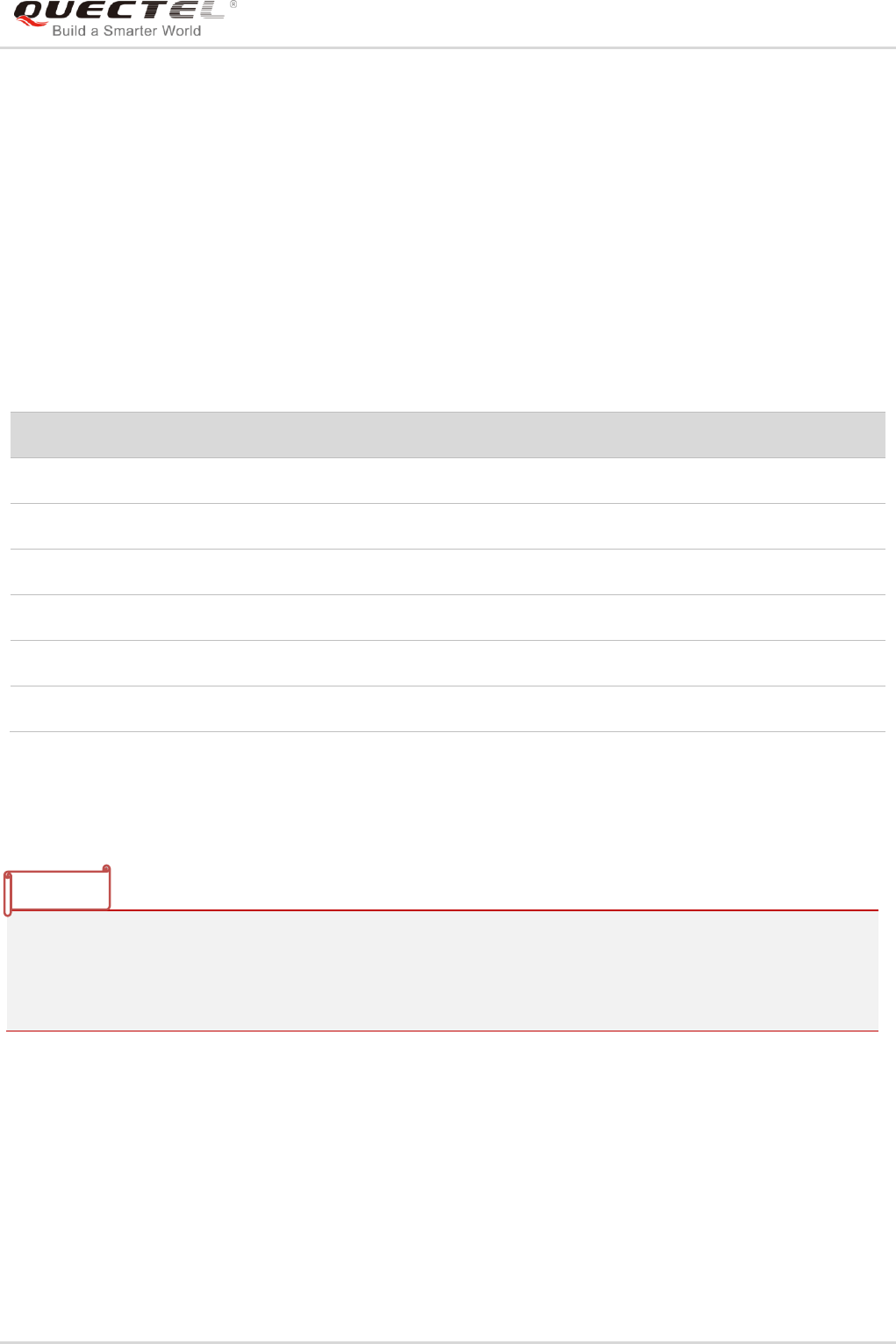
GSM/GPRS/GNSS Module Series
MC60-OpenCPU Series User Guide
MC60-OpenCPU_Series_User_Guide Confidential / Released 148 / 199
- Parameters
format:
Pointer to a null-terminated multibyte string that specifies how to interpret the data. The maximum
string length is 512 bytes. Format-control string. A format specification has the following form:
%type:
A character that determines whether the associated argument is interpreted as a character, a string, or a
number.
Table 7: Format Specification for String Print
- Return Value
Number of characters printed.
1. The string to be printed must not be larger than the maximum number of bytes allowed in buffer.
Otherwise, a buffer overrun can occur.
2. The maximum allowed number of characters to be outputted is 512.
3. To print a 64-bit integer, please first convert it to characters using Ql_sprintf().
5.13. RIL APIs
OpenCPU RIL related API functions respectively implement the corresponding AT command‟s function.
Developers can simply call APIs to send AT commands and get the response when APIs return.
Developers can refer to document Quectel_OpenCPU_RIL_Application_Note for OpenCPU RIL
mechanism.
Character
Type
Output Format
c
int
Specifies a single-byte character.
d
int
Signed decimal integer.
o
int
Unsigned octal integer.
x
int
Unsigned hexadecimal integer, using "abcdef."
f
double
Float point digit.
p
Pointer to void
Prints the address of the argument in hexadecimal digits.
NOTES

GSM/GPRS/GNSS Module Series
MC60-OpenCPU Series User Guide
MC60-OpenCPU_Series_User_Guide Confidential / Released 149 / 199
The APIs defined in this section work normally only after calling Ql_RIL_Initialize(), and
Ql_RIL_Initialize() is used to initialize RIL option after App receives the message MSG_ID_RIL_READY.
5.13.1. AT APIs
The API functions in this section are declared in header file ril.h.
5.13.1.1. Ql_RIL_SendATCmd
This function is used to send AT command with the result being returned synchronously. Before this
function returns, the responses for AT command will be handled in the callback function atRsp_callback,
and the paring results of AT responses can be stored in the space that the parameter userData points to.
All AT responses string will be passed into the callback line by line. So the callback function may be called
for times.
- Prototype
s32 Ql_RIL_SendATCmd(char* atCmd,
u32 atCmdLen,
Callback_ATResponse atRsp_callback,
void* userData,
u32 timeout
);
typedef s32 (*Callback_ATResponse)(char* line, u32 len, void* userdata);
- Parameter
atCmd:
[In] AT command string.
atCmdLen:
[In] The length of AT command string.
atRsp_callBack:
[In] Callback function for handling the response of AT command.
userData:
[Out] Used to transfer the users‟ parameters.
timeOut:
[In] Timeout for the AT command. Unit: ms. If it is set to 0, RIL uses the default timeout time (3min).
NOTE

GSM/GPRS/GNSS Module Series
MC60-OpenCPU Series User Guide
MC60-OpenCPU_Series_User_Guide Confidential / Released 150 / 199
- Return Value
RIL_AT_SUCCESS: indicates the AT command is executed successfully, and the response is OK.
RIL_AT_FAILED: indicates failed to execute the AT command or the response is ERROR.
RIL_AT_TIMEOUT: indicates sending AT command timed out.
RIL_AT_BUSY: indicates the AT command is being sent.
RIL_AT_INVALID_PARAM: indicates invalid input parameter.
RIL_AT_UNINITIALIZED: indicates RIL is not ready, and module needs to wait for MSG_ID_RIL_READY
and then call Ql_RIL_Initialize() to initialize RIL.
- Default Callback Function
If this callback parameter is set to NULL, a default callback function will be called. But the default callback
function only handles the simple AT response. Please refer to Default_atRsp_callback in
ril_atResponse.c.
The following codes are the implementation for default callback function.
s32 Default_atRsp_callback(char* line, u32 len, void* userdata)
{
if (Ql_RIL_FindLine(line, len, "OK")) //Find <CR><LF>OK<CR><LF>, <CR>OK<CR>,<LF>OK<LF>
{
return RIL_ATRSP_SUCCESS;
}
else if (Ql_RIL_FindLine(line, len, "ERROR") //Find <CR><LF>ERROR<CR><LF>,
<CR>ERROR<CR>,<LF>ERROR<LF>
|| Ql_RIL_FindString(line, len, "+CME ERROR:") //Fail
|| Ql_RIL_FindString(line, len, "+CMS ERROR:")) //Fail
{
return RIL_ATRSP_FAILED;
}
return RIL_ATRSP_CONTINUE; //Continue to wait.
}
5.13.2. Telephony APIs
This section defines telephony related API functions that are implemented based on OpenCPU RIL.
These APIs imeplement the equivalent functions as AT commands ATD, ATA, ATH.
The API functions in this section are declared in ril_telephony.h.
To set/get the voice channels (normal/headset/handfree), developers can call
RIL_AUD_SetChannel()/RIL_AUD_GetChannel(). To set/get the volume, they can call
RIL_AUD_SetVolume()/RIL_AUD_GetVolume(), which are defined in ril_audio.h.

GSM/GPRS/GNSS Module Series
MC60-OpenCPU Series User Guide
MC60-OpenCPU_Series_User_Guide Confidential / Released 151 / 199
5.13.2.1. RIL_Telephony_Dial
This function dials a specified number.
- Prototype
s32 RIL_Telephony_Dial(u8 type, char* phoneNumber, s32* result);
- Parameters
type:
[In] Dialing type. It must be 0 and just support voice call.
phoneNumber:
[In] Phone number. Null-terminated string.
result:
[Out] Result for dialing. One value of Enum_CallState.
- Return Value
RIL_AT_SUCCESS: indicates the AT command is executed successfully, and the response is OK.
RIL_AT_FAILED: indicates failed to execute the AT command or the response is ERROR.
RIL_AT_TIMEOUT: indicates sending AT command timed out.
RIL_AT_BUSY: indicates the AT command is being sent.
RIL_AT_INVALID_PARAM: indicates invalid input parameter.
RIL_AT_UNINITIALIZED: indicates RIL is not ready, and module needs to wait for MSG_ID_RIL_READY
and then call Ql_RIL_Initialize() to initialize RIL.
5.13.2.2. RIL_Telephony_Answer
This function answers a coming call.
- Prototype
s32 RIL_Telephony_Answer(s32 *result);
- Parameters
result:
[Out] Result for dialing. One value of Enum_CallState.

GSM/GPRS/GNSS Module Series
MC60-OpenCPU Series User Guide
MC60-OpenCPU_Series_User_Guide Confidential / Released 152 / 199
- Return Value
RIL_AT_SUCCESS: indicates the AT command is executed successfully, and the response is OK.
RIL_AT_FAILED: indicates failed to execute the AT command or the response is ERROR.
RIL_AT_TIMEOUT: indicates sending AT command timed out.
RIL_AT_BUSY: indicates the AT command is being sent.
RIL_AT_INVALID_PARAM: indicates invalid input parameter.
RIL_AT_UNINITIALIZED: indicates RIL is not ready, and module needs to wait for MSG_ID_RIL_READY
and then call Ql_RIL_Initialize() to initialize RIL.
5.13.2.3. RIL_Telephony_Hangup
This function hangs up the current call.
- Prototype
s32 RIL_Telephony_Hangup(void);
- Parameters
Void.
- Return Value
RIL_AT_SUCCESS: indicates the AT command is executed successfully, and the response is OK.
RIL_AT_FAILED: indicates failed to execute the AT command or the response is ERROR.
RIL_AT_TIMEOUT: indicates sending AT command timed out.
RIL_AT_BUSY: indicates the AT command is being sent.
RIL_AT_INVALID_PARAM: indicates invalid input parameter.
RIL_AT_UNINITIALIZED: indicates RIL is not ready, and module needs to wait for MSG_ID_RIL_READY
and then call Ql_RIL_Initialize() to initialize RIL.
5.13.3. SMS APIs
This section defines short message related API functions that are implemented bassed on OpenCPU RIL.
These APIs imeplement the same functionas as AT commands AT+CMGR, AT+CMGS, AT+CMGD, etc.
The API functions in this section are declared in ril_sms.h.

GSM/GPRS/GNSS Module Series
MC60-OpenCPU Series User Guide
MC60-OpenCPU_Series_User_Guide Confidential / Released 153 / 199
5.13.3.1. RIL_SMS_ReadSMS_Text
This function reads a short message of text format with the specified index.
- Prototype
s32 RIL_SMS_ReadSMS_Text(u32 uIndex, LIB_SMS_CharSetEnum eCharset, ST_RIL_SMS_
TextInfo* pTextInfo);
- Parameters
uIndex:
[In] The SMS index in current SMS storage.
eCharset:
[In] Character set. One value of LIB_SMS_CharSetEnum.
pTextInfo:
[In] Pointer of SMS information of text format.
- Return Value
RIL_AT_SUCCESS: indicates the AT command is executed successfully, and the response is OK.
RIL_AT_FAILED: indicates failed to execute the AT command or the response is ERROR.
RIL_AT_TIMEOUT: indicates sending AT command timed out.
RIL_AT_BUSY: indicates the AT command is being sent.
RIL_AT_INVALID_PARAM: indicates invalid input parameter.
RIL_AT_UNINITIALIZED: indicates RIL is not ready, and module needs to wait for MSG_ID_RIL_READY
and then call Ql_RIL_Initialize() to initialize RIL.
5.13.3.2. RIL_SMS_ReadSMS_PDU
This function reads a short message of PDU format with the specified index.
- Prototype
s32 RIL_SMS_ReadSMS_PDU(u32 uIndex, ST_RIL_SMS_PDUInfo* pPDUInfo);
- Parameters
index:
[In] SMS index in current SMS storage.
pduInfo:
[In] Pointer of “ST_RIL_SMS_PDUInfo” struct.

GSM/GPRS/GNSS Module Series
MC60-OpenCPU Series User Guide
MC60-OpenCPU_Series_User_Guide Confidential / Released 154 / 199
- Return Value
RIL_AT_SUCCESS: indicates the AT command is executed successfully, and the response is OK.
RIL_AT_FAILED: indicates failed to execute the AT command or the response is ERROR.
RIL_AT_TIMEOUT: indicates sending AT command timed out.
RIL_AT_BUSY: indicates the AT command is being sent.
RIL_AT_INVALID_PARAM: indicates invalid input parameter.
RIL_AT_UNINITIALIZED: indicates RIL is not ready, and module needs to wait for MSG_ID_RIL_READY
and then call Ql_RIL_Initialize() to initialize RIL.
5.13.3.3. RIL_SMS_SendSMS_Text
This function sends a short message of text format.
- Prototype
s32 RIL_SMS_SendSMS_Text(char* pNumber, u8 uNumberLen, LIB_SMS_CharSetEnum eCharset, u8*
pMsg, u32 uMsgLen,u32 *pMsgRef);
- Parameters
pNumber:
[In] Pointer of phone number.
uNumberLen:
[In] The length of phone number.
eCharset:
[In] Character set. One value of LIB_SMS_CharSetEnum.
pMsg:
[In] Pointer of message content.
uMsgLen:
[In] The length of message content.
pMsgRef:
[Out] Pointer of message reference number.
- Return Value
RIL_AT_SUCCESS: indicates the AT command is executed successfully, and the response is OK.
RIL_AT_FAILED: indicates failed to execute the AT command or the response is ERROR.
RIL_AT_TIMEOUT: indicates sending AT command timed out.
RIL_AT_BUSY: indicates the AT command is being sent.
RIL_AT_INVALID_PARAM: indicates invalid input parameter.

GSM/GPRS/GNSS Module Series
MC60-OpenCPU Series User Guide
MC60-OpenCPU_Series_User_Guide Confidential / Released 155 / 199
RIL_AT_UNINITIALIZED: indicates RIL is not ready, and module needs to wait for MSG_ID_RIL_READY
and then call Ql_RIL_Initialize() to initialize RIL.
5.13.3.4. RIL_SMS_SendSMS_PDU
This function sends a short message of PDU format.
- Prototype
s32 RIL_SMS_SendSMS_PDU(char* pPDUStr,u32 uPDUStrLen,u32 *pMsgRef);
- Parameters
pPDUStr:
[In] Pointer of PDU string.
uPDUStrLen:
[In] The length of PDU string.
pMsgRef:
[Out] Pointer of message reference number.
- Return Value
RIL_AT_SUCCESS: indicates the AT command is executed successfully, and the response is OK.
RIL_AT_FAILED: indicates failed to execute the AT command or the response is ERROR.
RIL_AT_TIMEOUT: indicates sending AT command timed out.
RIL_AT_BUSY: indicates the AT command is being sent.
RIL_AT_INVALID_PARAM: indicates invalid input parameter.
RIL_AT_UNINITIALIZED: indicates RIL is not ready, and module needs to wait for MSG_ID_RIL_READY
and then call Ql_RIL_Initialize() to initialize RIL.
5.13.3.5. RIL_SMS_DeleteSMS
This function deletes one short message or more messages in current SMS storage with the specified
rule.
- Prototype
s32 RIL_SMS_DeleteSMS(u32 uIndex,Enum_RIL_SMS_DeleteFlag eDelFlag);

GSM/GPRS/GNSS Module Series
MC60-OpenCPU Series User Guide
MC60-OpenCPU_Series_User_Guide Confidential / Released 156 / 199
- Parameters
index:
[In] The index number of SMS message.
flag:
[In] Delete flag. One value of Enum_RIL_SMS_DeleteFlag.
- Return Value
RIL_AT_SUCCESS: indicates the AT command is executed successfully, and the response is OK.
RIL_AT_FAILED: indicates failed to execute the AT command or the response is ERROR.
RIL_AT_TIMEOUT: indicates sending AT command timed out.
RIL_AT_BUSY: indicates the AT command is being sent.
RIL_AT_INVALID_PARAM: indicates invalid input parameter.
RIL_AT_UNINITIALIZED: indicates RIL is not ready, and module needs to wait for MSG_ID_RIL_READY
and then call Ql_RIL_Initialize() to initialize RIL.
5.13.4. (U)SIM Card APIs
The API functions in this section are declared in ril_sim.h.
5.13.4.1. RIL_SIM_GetSimState
This function gets the state of (U)SIM card.
- Prototype
s32 RIL_SIM_GetSimState(s32* state);
- Parameters
state:
[Out] (U)SIM card state code. One value of Enum_SIMState.
- Return Value
RIL_AT_SUCCESS: indicates the AT command is executed successfully, or see Enum_ATSndError.

GSM/GPRS/GNSS Module Series
MC60-OpenCPU Series User Guide
MC60-OpenCPU_Series_User_Guide Confidential / Released 157 / 199
5.13.4.2. RIL_SIM_GetIMSI
This function gets the IMSI number of (U)SIM card.
- Prototype
s32 RIL_SIM_GetIMSI(char* imsi);
- Parameters
imsi:
[Out] IMSI number. A string of 15 bytes.
- Return Value
RIL_AT_SUCCESS: indicates the AT command is executed successfully, or see Enum_ATSndError.
5.13.4.3. RIL_SIM_GetCCID
This function gets the CCID number of (U)SIM card.
- Prototype
s32 RIL_SIM_GetCCID(s32* ccid);
- Parameters
state:
[Out] CCID number. A string of 20 bytes.
- Return Value
RIL_AT_SUCCESS: indicates the AT command is executed successfully, or see Enum_ATSndError.
5.13.5. Network APIs
The API functions in this section are declared in ril_network.h.
5.13.5.1. RIL_NW_GetGSMState
This function gets the GSM network registeration state.

GSM/GPRS/GNSS Module Series
MC60-OpenCPU Series User Guide
MC60-OpenCPU_Series_User_Guide Confidential / Released 158 / 199
- Prototype
s32 RIL_NW_GetGSMState(s32 *stat);
- Parameters
stat:
[Out] GSM state.
- Return Value
Network registeration state code. One value of Enum_NetworkState. -1 indicates failed to get the network
state.
5.13.5.2. RIL_NW_GetGPRSState
This function gets the GPRS network registeration state.
- Prototype
s32 RIL_NW_GetGPRSState(s32 *stat);
- Parameters
stat:
[Out] GPRS State.
- Return Value
Network registeration state code. One value of Enum_NetworkState. -1 indicates failed to get the network
state.
5.13.5.3. RIL_NW_GetSignalQuality
This function gets the signal quality level and bit error rate.
- Prototype
s32 RIL_NW_GetSignalQuality(u32* rssi, u32* ber);
- Parameters
rssi:
[Out] Signal quality level. 0~31 or 99. 99 indicates the module is not registered on GSM network.

GSM/GPRS/GNSS Module Series
MC60-OpenCPU Series User Guide
MC60-OpenCPU_Series_User_Guide Confidential / Released 159 / 199
ber:
[Out] Bit error code of the signal.
- Return Value
QL_RET_OK: indicates this function is executed successfully.
QL_RET_ERR_INVALID_PARAMETER: indicates there is error for input parameters.
5.13.5.4. RIL_NW_SetGPRSContext
This function sets a PDP foreground context.
- Prototype
s32 RIL_NW_SetGPRSContext(u8 foregroundContext);
- Parameters
foregroundContext:
[In] Foreground context. Anumeric indicates which context will be set as foreground context. The range is
0~1.
- Return Value
RIL_AT_SUCCESS: indicates the AT command is executed successfully, and the response is OK.
RIL_AT_FAILED: indicates failed to execute the AT command or the response is ERROR.
RIL_AT_TIMEOUT: indicates sending AT command timed out.
RIL_AT_BUSY: indicates the AT command is being sent.
RIL_AT_INVALID_PARAM: indicates invalid input parameter.
RIL_AT_UNINITIALIZED: indicates RIL is not ready, and module needs to wait for MSG_ID_RIL_READY
and then call Ql_RIL_Initialize() to initialize RIL.
5.13.5.5. RIL_NW_SetAPN
This function sets the default APN of module.
- Prototype
s32 RIL_NW_SetAPN(u8 mode, u8* apn, u8* userName, u8* possword);
- Parameters
mode:
[In] Netwrok mode. 0 means CSD, and 1 means GPRS.

GSM/GPRS/GNSS Module Series
MC60-OpenCPU Series User Guide
MC60-OpenCPU_Series_User_Guide Confidential / Released 160 / 199
apn:
[In] APN string.
userName:
[In] User name for APN.
password:
[In] Password for APN.
- Return Value
QL_RET_OK: indicates this function is executed successfully.
QL_RET_ERR_INVALID_PARAMETER: indicates there is error for input parameters.
5.13.5.6. RIL_NW_OpenPDPContext
This function opens/activates the PDP foreground context. The PDP context ID is specified by
RIL_NW_SetGPRSContext().
- Prototype
s32 RIL_NW_OpenPDPContext(void);
- Parameters
Void.
- Return Value
RIL_AT_SUCCESS: indicates the AT command is executed successfully, and the response is OK.
RIL_AT_FAILED: indicates failed to execute the AT command or the response is ERROR.
RIL_AT_TIMEOUT: indicates sending AT command timed out.
RIL_AT_BUSY: indicates the AT command is being sent.
RIL_AT_INVALID_PARAM: indicates invalid input parameter.
RIL_AT_UNINITIALIZED: indicates RIL is not ready, and module needs to wait for MSG_ID_RIL_READY
and then call Ql_RIL_Initialize() to initialize RIL.
5.13.5.7. RIL_NW_ClosePDPContext
This function closes/deactivates the PDP foreground context. The PDP context ID is specified by
RIL_NW_SetGPRSContext().

GSM/GPRS/GNSS Module Series
MC60-OpenCPU Series User Guide
MC60-OpenCPU_Series_User_Guide Confidential / Released 161 / 199
- Prototype
s32 RIL_NW_ClosePDPContext(void);
- Parameters
Void.
- Return Value
RIL_AT_SUCCESS: indicates the AT command is executed successfully, and the response is OK.
RIL_AT_FAILED: indicates failed to execute the AT command or the response is ERROR.
RIL_AT_TIMEOUT: indicates sending AT command timed out.
RIL_AT_BUSY: indicates the AT command is being sent.
RIL_AT_INVALID_PARAM: indicates invalid input parameter.
RIL_AT_UNINITIALIZED: indicates RIL is not ready, and module needs to wait for MSG_ID_RIL_READY
and then call Ql_RIL_Initialize() to initialize RIL.
5.13.5.8. RIL_NW_GetOperator
This function gets the network operator that the module is registered to.
- Prototype
s32 RIL_NW_GetOperator(char* operator);
- Parameters
operator:
[Out] A string with maximum 16 characters, which indicates the network operator that the module
registered to.
- Return Value
RIL_AT_SUCCESS: indicates the AT command is executed successfully, and the response is OK.
RIL_AT_FAILED: indicates failed to execute the AT command or the response is ERROR.
RIL_AT_TIMEOUT: indicates sending AT command timed out.
RIL_AT_BUSY: indicates the AT command is being sent.
RIL_AT_INVALID_PARAM: indicates invalid input parameter.
RIL_AT_UNINITIALIZED: indicates RIL is not ready, and module needs to wait for MSG_ID_RIL_READY
and then call Ql_RIL_Initialize() to initialize RIL.

GSM/GPRS/GNSS Module Series
MC60-OpenCPU Series User Guide
MC60-OpenCPU_Series_User_Guide Confidential / Released 162 / 199
5.13.6. GSM Location APIs
The API functions in this section are declared in ril_location.h.
5.13.6.1. RIL_GetLocation
This function retrieves the longitude and latitude of the current place of the module.
- Prototype
s32 RIL_GetLocation(CB_LocInfo cb_loc);
typedef void(*CB_LocInfo)(s32 result,ST_LocInfo* loc_info);
- Parameters
cb_loc:
Pointer to a callback function that tells the location information.
- Return Value
QL_RET_OK: indicates this function is executed successfully.
QL_RET_ERR_INVALID_PARAMETER: indicates there is error for input parameters.
5.13.7. Secure data APIs
The API functions in this section are declared in ril_system.h.
5.13.7.1. Ql_SecureData_Store
This function stores some critical user data to prevent them from losing.
1. OpenCPU has been designed with 13 blocks of system storage space to backup critical user data.
Developers may specify the first parameter index [1-13] to specify different storage block. Among
the storage blocks, 1~8 blocks can store 50 bytes for each block, 9~12 blocks can store 100 bytes
for each block, and the 13th block can store 500 bytes.
2. Developers should not call this API function frequently, which is not good for life cycle of flash.
- Prototype
s32 Ql_SecureData_Store(u8 index , u8* pData, u32 len);
NOTES

GSM/GPRS/GNSS Module Series
MC60-OpenCPU Series User Guide
MC60-OpenCPU_Series_User_Guide Confidential / Released 163 / 199
- Parameters
index:
[In] The index of the secure data block. The range is 1~13.
pData:
[In] The data to be backed up. In groups 1~8, each group can save 50 bytes at most. In groups 9~12,
each group can save 100 bytes at most. If the index of secure data block is 13, the user data can
save 500 bytes at most.
len:
[In] The length of the user data. If the index of secure data block is 1~8, then len ≤ 50. If the index is 9~12,
then len ≤ 100. If the index is 13, then len ≤ 500.
- Return Value
QL_RET_OK: indicates this function is executed successfully.
QL_RET_ERR_PARAM: indicates invalid parameter.
QL_RET_ERR_GET_MEM: indicates the heap memory is not enough.
5.13.7.2. Ql_SecureData_Read
This functin reads secure data which is previously stored by Ql_SecureData_Store.
- Prototype
s32 Ql_SecureData_Read(u8 index, u8* pBuffer, u32 len);
- Parameters
index:
[In] The index of the secure data block. The range is 1~13.
len:
[In] The length of the user data. If the index of secure data block is 1~8, then len ≤ 50. If the index is 9~12,
then len ≤ 100. If the index is 13, then len ≤ 500.
- Return Value
The return value will be real read length If this function succeeds.
QL_RET_ERR_PARAM: indicates invalid parameter.
QL_RET_ERR_GET_MEM: indicates the heap memory is not enough.
Ql_RET_ERR_UNKOWN: indicates unknown error.

GSM/GPRS/GNSS Module Series
MC60-OpenCPU Series User Guide
MC60-OpenCPU_Series_User_Guide Confidential / Released 164 / 199
5.13.8. System APIs
The API functions in this section are declared in ril_system.h.
5.13.8.1. RIL_QuerySysInitStatus
This function queries the initialization status of the module.
- Prototype
s32 RIL_QuerySysInitStatus(s32* SysInitStatus);
- Parameters
SysInitStatus:
[Out] System initialization status. It can be 0, 1, 2 and 3. One value of Enum_SysInitState. Please refer to
AT+QINISTAT in Quectel_MC60_AT_Commands_Manual for details.
- Return Value
RIL_AT_SUCCESS: indicates the AT command is executed successfully, and the response is OK.
RIL_AT_FAILED: indicates failed to execute the AT command or the response is ERROR.
RIL_AT_TIMEOUT: indicates sending AT command timed out.
RIL_AT_BUSY: indicates the AT command is being sent.
RIL_AT_INVALID_PARAM: indicates invalid input parameter.
RIL_AT_UNINITIALIZED: indicates RIL is not ready, and module needs to wait for MSG_ID_RIL_READY
and then call Ql_RIL_Initialize() to initialize RIL.
5.13.8.2. RIL_GetPowerSupply
This function queries the battery balance and battery voltage.
- Prototype
s32 RIL_GetPowerSupply(u32* capacity, u32* voltage);
- Parameters
capacity:
[Out] Battery balance. A percentage and ranges from 1~100.
voltage:
[Out] Battery voltage, Unit: mV.

GSM/GPRS/GNSS Module Series
MC60-OpenCPU Series User Guide
MC60-OpenCPU_Series_User_Guide Confidential / Released 165 / 199
- Return Value
RIL_AT_SUCCESS: indicates the AT command is executed successfully, and the response is OK.
RIL_AT_FAILED: indicates failed to execute the AT command or the response is ERROR.
RIL_AT_TIMEOUT: indicates sending AT command timed out.
RIL_AT_BUSY: indicates the AT command is being sent.
RIL_AT_INVALID_PARAM: indicates invalid input parameter.
RIL_AT_UNINITIALIZED: indicates RIL is not ready, and module needs to wait for MSG_ID_RIL_READY
and then call Ql_RIL_Initialize() to initialize RIL.
5.13.8.3. RIL_GetIMEI
This function retrieves the IMEI number of module.
- Prototype
s32 RIL_GetIMEI(char* imei);
- Parameters
imei:
[Out] Buffer to store the IMEI number. The length of the buffer should be at least 15 bytes..
- Return Value
RIL_AT_SUCCESS: indicates the AT command is executed successfully, and the response is OK.
RIL_AT_FAILED: indicates failed to execute the AT command or the response is ERROR.
RIL_AT_TIMEOUT: indicates sending AT command timed out.
RIL_AT_BUSY: indicates the AT command is being sent.
RIL_AT_INVALID_PARAM: indicates invalid input parameter.
RIL_AT_UNINITIALIZED: indicates RIL is not ready, and module needs to wait for MSG_ID_RIL_READY
and then call Ql_RIL_Initialize() to initialize RIL.
5.13.9. Audio APIs
5.13.9.1. RIL_AUD_SetChannel
This function sets the audio channel.
- Prototype
s32 RIL_AUD_SetChannel(Enum_AudChannel audChannel);

GSM/GPRS/GNSS Module Series
MC60-OpenCPU Series User Guide
MC60-OpenCPU_Series_User_Guide Confidential / Released 166 / 199
- Parameters
audChannel:
[Out] Audio channel. See Enum_AudChannel.
- Return Value
RIL_AT_SUCCESS: indicates the AT command is executed successfully, or see Enum_ATSndError.
5.13.9.2. RIL_AUD_GetChannel
This function gets the audio channel.
- Prototype
s32 RIL_AUD_GetChannel(Enum_AudChannel *pChannel);
- Parameters
pChannel:
[Out] Audio channel, see Enum_AudChannel.
- Return Value
RIL_AT_SUCCESS: indicates the AT command is executed successfully, or see Enum_ATSndError.
5.13.9.3. RIL_AUD_SetVolume
This function sets the volume level with the specified volume type.
- Prototype
s32 RIL_AUD_SetVolume(Enum_VolumeType volType, u8 volLevel);
- Parameters
volType:
[In] Volume type. See Enum_VolumeType.
volLevel:
[In] Volume level.
- Return Value
RIL_AT_SUCCESS: indicates the AT command is executed successfully, or see Enum_ATSndError.

GSM/GPRS/GNSS Module Series
MC60-OpenCPU Series User Guide
MC60-OpenCPU_Series_User_Guide Confidential / Released 167 / 199
5.13.9.4. RIL_AUD_GetVolume
This function gets the volume level with the specified volume type.
- Prototype
s32 RIL_AUD_GetVolume(Enum_VolumeType volType, u8* pVolLevel);
- Parameters
volType:
[In] Volume type. See Enum_VolumeType.
pvolLevel:
[In] Volume level.
- Return Value
RIL_AT_SUCCESS: indicates the AT command is executed successfully, or see Enum_ATSndError.
5.13.9.5. RIL_AUD_RegisterPlayCB
This function registers a callback function that will be invoked to indicate the playing result.
If developers want to get a feedback (end indication or error code) for playing when calling APIs
RIL_AUD_PlayFile and RIL_AUD_PlayMem, they can call this API to register a callback function before
calling playing API.
- Prototype
typedef void (*RIL_AUD_PLAY_IND)(s32 errCode);
s32 RIL_AUD_RegisterPlayCB(RIL_AUD_PLAY_IND audCB);
- Parameters
audCB:
[In] The callback function for playing.
errcode:
[Out] Error code for audio playing, which is defined in AT+QAUDPLAY.
- Return Value
RIL_AT_SUCCESS: indicates the AT command is executed successfully, or see Enum_ATSndError.

GSM/GPRS/GNSS Module Series
MC60-OpenCPU Series User Guide
MC60-OpenCPU_Series_User_Guide Confidential / Released 168 / 199
5.13.9.6. RIL_AUD_PlayFile
This function plays the specified audio file.
- Prototype
s32 RIL_AUD_PlayFile(char* filePath, bool isRepeated);
- Parameters
filePath:
[In] Source code file name with file path.
isRepeated:
[In] Repeat play mode.
- Return Value
RIL_AT_SUCCESS: indicates the AT command is executed successfully, or see Enum_ATSndError.
5.13.9.7. RIL_AUD_StopPlay
This function stops playing the audio file.
- Prototype
s32 RIL_AUD_StopPlay(void);
- Parameters
Void.
- Return Value
RIL_AT_SUCCESS: indicates the AT command is executed successfully, or see Enum_ATSndError.
5.13.9.8. RIL_AUD_PlayMem
This function plays the specified audio data in RAM.
- Prototype
s32 RIL_AUD_PlayMem(u32 mem_addr, u32 mem_size, u8 aud_format, bool repeat);

GSM/GPRS/GNSS Module Series
MC60-OpenCPU Series User Guide
MC60-OpenCPU_Series_User_Guide Confidential / Released 169 / 199
- Parameters
mem_addr:
[In] RAM address of audio data.
mem_size:
[In] Size of audio data.
aud_format:
[In] Audio data format.
repeat:
[In] Play audio data circularly or not.
Return Value
RIL_AT_SUCCESS: indicates the AT command is executed successfully, or see Enum_ATSndError.
5.13.9.9. RIL_AUD_StopPlayMem
This function stops playing the audio file.
- Prototype
s32 RIL_AUD_StopPlayMem(void);
- Parameters
Void.
- Return Value
RIL_AT_SUCCESS: indicates the AT command is executed successfully, or see Enum_ATSndError.
5.13.9.10. RIL_AUD_StartRecord
This function starts to record with the spedifed audio format. The recording data will be recorded into the
specified file in UFS.
- Prototype
s32 RIL_AUD_StartRecord(char* fileName, Enum_AudRecordFormat format);

GSM/GPRS/GNSS Module Series
MC60-OpenCPU Series User Guide
MC60-OpenCPU_Series_User_Guide Confidential / Released 170 / 199
- Parameters
fileName:
[In] Name of the file, which is used to store record data.
format:
[In] Recording data format. One value of Enum_AudRecordFormat.
- Return Value
RIL_AT_SUCCESS: indicates the AT command is executed successfully, or see Enum_ATSndError.
5.13.9.11. RIL_AUD_StopRecord
This function stops recording.
- Prototype
s32 RIL_AUD_StopRecord(void);
- Parameters
Void.
- Return Value
RIL_AT_SUCCESS: indicates the AT command is executed successfully, or see Enum_ATSndError.
5.13.9.12. RIL_AUD_GetRecordState
This function gets the current state of recorder.
- Prototype
s32 RIL_AUD_GetRecordState(u8* pState);
- Parameters
pState:
[Out] Recording state. 0 indicates the recorder is in idle state; 1 indicates the recorder is recording.
- Return Value
RIL_AT_SUCCESS: indicates the AT command is executed successfully, or see Enum_ATSndError.

GSM/GPRS/GNSS Module Series
MC60-OpenCPU Series User Guide
MC60-OpenCPU_Series_User_Guide Confidential / Released 171 / 199
5.14. GNSS APIs
5.14.1.1. RIL_GPS_Open
This function powers on/off GNSS.
- Prototype
s32 RIL_GPS_Open(u8 op);
- Parameters
op:
[In] Operation of powering on/off GNSS. 0 means powering off GNSS and 1 means powering on GNSS.
- Return Value
RIL_AT_SUCCESS: indicates the AT command is executed successfully, or see Enum_ATSndError.
5.14.1.2. RIL_GPS_Read
This function queries the navigation information.
- Prototype
s32 RIL_GPS_Read(u8 *item, u8 *rdBuff);
- Parameters
item:
[In] Pointer to the item to be queried.
rdBuff:
[In] Pointer to the buffer that is used to store the navigation information.
- Return Value
RIL_AT_SUCCESS: indicates the AT command is executed successfully, or see Enum_ATSndError.

GSM/GPRS/GNSS Module Series
MC60-OpenCPU Series User Guide
MC60-OpenCPU_Series_User_Guide Confidential / Released 172 / 199
5.15. Bluetooth EDR APIs
Quectel provides a set of API functions to support basic bluetooth operations, including scanning, pairing,
connection and so on.
5.15.1. RIL_BT_Switch
This function turns on/off bluetooth.
- Prototype
s32 RIL_BT_Switch(u8 on_off);
- Parameters
On_off:
[In] Bluetooth turing on/off. 0 means bluetooth is turned off; 1 means bluetooth is turned on.
- Return Value
RIL_AT_SUCCESS: indicates the AT command is executed successfully, and the response is OK.
RIL_AT_FAILED: indicates failed to execute the AT command or the response is ERROR.
RIL_AT_TIMEOUT: indicates sending AT command timed out.
RIL_AT_BUSY: indicates the AT command is being sent.
RIL_AT_INVALID_PARAM: indicates invalid input parameter.
RIL_AT_UNINITIALIZED: indicates RIL is not ready, and module needs to wait for MSG_ID_RIL_READY
and then call Ql_RIL_Initialize() to initialize RIL.
5.15.2. RIL_BT_GetPwrState
This function querys the current power state of bluetooth.
- Prototype
s32 RIL_BT_GetPwrState(s32 *p_on_off);
- Parameters
p_on_off:
[Out] Bluetooth powering on/off. 0 means the bluetooth is powered off; 1 means the bluetooth is powered
on.

GSM/GPRS/GNSS Module Series
MC60-OpenCPU Series User Guide
MC60-OpenCPU_Series_User_Guide Confidential / Released 173 / 199
- Return Value
RIL_AT_SUCCESS: indicates the AT command is executed successfully, and the response is OK.
RIL_AT_FAILED: indicates failed to execute the AT command or the response is ERROR.
RIL_AT_TIMEOUT: indicates sending AT command timed out.
RIL_AT_BUSY: indicates the AT command is being sent.
RIL_AT_INVALID_PARAM: indicates invalid input parameter.
RIL_AT_UNINITIALIZED: indicates RIL is not ready, and module needs to wait for MSG_ID_RIL_READY
and then call Ql_RIL_Initialize() to initialize RIL.
5.15.3. RIL_BT_Initialize
This fucntion initializes bluetooth, registers callback and updates pairing information after powering on
bluetooth.
- Prototype
s32 RIL_BT_Initialize(CALLBACK_BT_IND cb);
- Parameters
cb:
[In] Callback function to be registered.
- Return Value
RIL_AT_SUCCESS: indicates the AT command is executed successfully, and the response is OK.
RIL_AT_FAILED: indicates failed to execute the AT command or the response is ERROR.
RIL_AT_TIMEOUT: indicates sending AT command timed out.
RIL_AT_BUSY: indicates the AT command is being sent.
RIL_AT_INVALID_PARAM: indicates invalid input parameter.
RIL_AT_UNINITIALIZED: indicates RIL is not ready, and module needs to wait for MSG_ID_RIL_READY
and then call Ql_RIL_Initialize() to initialize RIL.
5.15.4. RIL_BT_SetName
This function sets the name of bluetooth.
s32 RIL_BT_SetName(char *name,u8 len);
- Parameters
name:
[In] Bluetooth name to be set.

GSM/GPRS/GNSS Module Series
MC60-OpenCPU Series User Guide
MC60-OpenCPU_Series_User_Guide Confidential / Released 174 / 199
len:
[In] Length of parameter name. Unit: byte.
- Return Value
RIL_AT_SUCCESS: indicates the AT command is executed successfully, and the response is OK.
RIL_AT_FAILED: indicates failed to execute the AT command or the response is ERROR.
RIL_AT_TIMEOUT: indicates sending AT command timed out.
RIL_AT_BUSY: indicates the AT command is being sent.
RIL_AT_INVALID_PARAM: indicates invalid input parameter.
RIL_AT_UNINITIALIZED: indicates RIL is not ready, and module needs to wait for MSG_ID_RIL_READY
and then call Ql_RIL_Initialize() to initialize RIL.
5.15.5. RIL_BT_GetName
This function gets the name of bluetooth.
- Prototype
s32 RIL_BT_GetName(char *name/*char addr[BT_NAME_LEN]*/,u8 len);
- Parameters
name:
[Out] Bluetooth name to be got.
len:
[In] Length of parameter name. Unit: byte.
- Return Value
RIL_AT_SUCCESS: indicates the AT command is executed successfully, and the response is OK.
RIL_AT_FAILED: indicates failed to execute the AT command or the response is ERROR.
RIL_AT_TIMEOUT: indicates sending AT command timed out.
RIL_AT_BUSY: indicates the AT command is being sent.
RIL_AT_INVALID_PARAM: indicates invalid input parameter.
RIL_AT_UNINITIALIZED: indicates RIL is not ready, and module needs to wait for MSG_ID_RIL_READY
and then call Ql_RIL_Initialize() to initialize RIL.

GSM/GPRS/GNSS Module Series
MC60-OpenCPU Series User Guide
MC60-OpenCPU_Series_User_Guide Confidential / Released 175 / 199
5.15.6. RIL_BT_GetLocalAddr
This function gets the local address of bluetooth device.
- Prototype
s32 RIL_BT_GetLocalAddr(char* ptrAddr/*char addr[BT_ADDR_LEN]*/,u8 len);
- Parameters
ptrAddr:
[Out] Bluetooth local address to be got. The length is 13 bytes including '\0' and is fixed.
len:
[In] Length of parameter ptrAddr. Unit: byte.
- Return Value
RIL_AT_SUCCESS: indicates the AT command is executed successfully, and the response is OK.
RIL_AT_FAILED: indicates failed to execute the AT command or the response is ERROR.
RIL_AT_TIMEOUT: indicates sending AT command timed out.
RIL_AT_BUSY: indicates the AT command is being sent.
RIL_AT_INVALID_PARAM: indicates invalid input parameter.
RIL_AT_UNINITIALIZED: indicates RIL is not ready, and module needs to wait for MSG_ID_RIL_READY
and then call Ql_RIL_Initialize() to initialize RIL.
5.15.7. RIL_BT_SetVisble
This function sets the current visibility mode of bluetooth.
- Prototype
s32 RIL_BT_SetVisble(Enum_VisibleMode mode,u8 timeout);
- Parameters
mode:
[In] Visiblity mode. 0 means bluetooth is set to be invisible; 1 means bluetooth is set to be visible forever;
2 means bluetooth is set to be visible temporarily in the time period that bluetooth can be found by
other devices. See Enum_VisibleMode.
timeout:
[In] When mode is set as 2, this parameter decides the the time period that bluetooth can be found by
other devices. Unit: s. The range is 1~255. After timeout, MSG_BT_INVISIBLE will be triggered, and

GSM/GPRS/GNSS Module Series
MC60-OpenCPU Series User Guide
MC60-OpenCPU_Series_User_Guide Confidential / Released 176 / 199
bluetooth will be set to invisible mode. The parameter will be omitted when it equals to 0 or 1.
- Return Value
RIL_AT_SUCCESS: indicates the AT command is executed successfully, and the response is OK.
RIL_AT_FAILED: indicates failed to execute the AT command or the response is ERROR.
RIL_AT_TIMEOUT: indicates sending AT command timed out.
RIL_AT_BUSY: indicates the AT command is being sent.
RIL_AT_INVALID_PARAM: indicates invalid input parameter.
RIL_AT_UNINITIALIZED: indicates RIL is not ready, and module needs to wait for MSG_ID_RIL_READY
and then call Ql_RIL_Initialize() to initialize RIL.
5.15.8. RIL_BT_GetVisble
This function gets the current visibility mode of bluetooth.
- Prototype
s32 RIL_BT_GetVisble(s32 *mode);
- Parameters
mode:
[Out] Visibility mode. 0 means bluetooth is set to be invisible; 1 means bluetooth is set to be visible forever;
2 means bluetooth is set to be visible temporarily. See Enum_VisibleMode.
- Return Value
RIL_AT_SUCCESS: indicates the AT command is executed successfully, and the response is OK.
RIL_AT_FAILED: indicates failed to execute the AT command or the response is ERROR.
RIL_AT_TIMEOUT: indicates sending AT command timed out.
RIL_AT_BUSY: indicates the AT command is being sent.
RIL_AT_INVALID_PARAM: indicates invalid input parameter.
RIL_AT_UNINITIALIZED: indicates RIL is not ready, and module needs to wait for MSG_ID_RIL_READY
and then call Ql_RIL_Initialize() to initialize RIL.
5.15.9. RIL_BT_StartScan
This function starts to scan for nearby bluetooth devices.
- Prototype
s32 RIL_BT_StartScan(u16 maxDevCount, u16 CoD, u16 timeout);

GSM/GPRS/GNSS Module Series
MC60-OpenCPU Series User Guide
MC60-OpenCPU_Series_User_Guide Confidential / Released 177 / 199
- Parameters
maxDevCount:
[In] Maximum number of device supported. The range is 0~20. The default value is 20.
CoD:
[In] The class of device/service. The range is 0~0xFFFFFFFF. The default value is 0.
timeout:
[In] Timeout. The range is 1~255. The default value is 60. Unit: s.
- Return Value
RIL_AT_SUCCESS: indicates the AT command is executed successfully, and the response is OK.
RIL_AT_FAILED: indicates failed to execute the AT command or the response is ERROR.
RIL_AT_TIMEOUT: indicates sending AT command timed out.
RIL_AT_BUSY: indicates the AT command is being sent.
RIL_AT_INVALID_PARAM: indicates invalid input parameter.
RIL_AT_UNINITIALIZED: indicates RIL is not ready, and module needs to wait for MSG_ID_RIL_READY
and then call Ql_RIL_Initialize() to initialize RIL.
5.15.10. RIL_BT_GetDevListInfo
This function gets the information of bluetooth device list.
s32 RIL_BT_GetDevListInfo(void);
- Parameters
Void.
- Return Value
RIL_AT_SUCCESS: indicates the AT command is executed successfully, and the response is OK.
RIL_AT_FAILED: indicates failed to execute the AT command or the response is ERROR.
RIL_AT_TIMEOUT: indicates sending AT command timed out.
RIL_AT_BUSY: indicates the AT command is being sent.
RIL_AT_INVALID_PARAM: indicates invalid input parameter.
RIL_AT_UNINITIALIZED: indicates RIL is not ready, and module needs to wait for MSG_ID_RIL_READY
and then call Ql_RIL_Initialize() to initialize RIL.

GSM/GPRS/GNSS Module Series
MC60-OpenCPU Series User Guide
MC60-OpenCPU_Series_User_Guide Confidential / Released 178 / 199
5.15.11. RIL_BT_GetDevListPointer
This function gets the pointer to the bluetooth device list.
- Prototype
ST_BT_DevInfo ** RIL_BT_GetDevListPointer(void);
- Parameters
Void.
- Return Value
The return value is the the pointer of the array that stores the device list information.
For example:
ptr = RIL_BT_GetDevListPointer();
ptr[i]->btDevice.devHdl
5.15.12. RIL_BT_StopScan
This function stops scanning for the nearby bluetooth devices.
- Prototype
s32 RIL_BT_StopScan(void);
- Parameters
Void.
- Return Value
RIL_AT_SUCCESS: indicates the AT command is executed successfully, and the response is OK.
RIL_AT_FAILED: indicates failed to execute the AT command or the response is ERROR.
RIL_AT_TIMEOUT: indicates sending AT command timed out.
RIL_AT_BUSY: indicates the AT command is being sent.
RIL_AT_INVALID_PARAM: indicates invalid input parameter.
RIL_AT_UNINITIALIZED: indicates RIL is not ready, and module needs to wait for MSG_ID_RIL_READY
and then call Ql_RIL_Initialize() to initialize RIL.

GSM/GPRS/GNSS Module Series
MC60-OpenCPU Series User Guide
MC60-OpenCPU_Series_User_Guide Confidential / Released 179 / 199
5.15.13. RIL_BT_QueryState
This function querys the current state and the updated pairing list of bluetooth.
- Prototype
s32 RIL_BT_QueryState(s32 *status);
- Parameters
status:
[Out] Current bluetooth status. See Enum_BTDevStatus.
- Return Value
RIL_AT_SUCCESS: indicates the AT command is executed successfully, and the response is OK.
RIL_AT_FAILED: indicates failed to execute the AT command or the response is ERROR.
RIL_AT_TIMEOUT: indicates sending AT command timed out.
RIL_AT_BUSY: indicates the AT command is being sent.
RIL_AT_INVALID_PARAM: indicates invalid input parameter.
RIL_AT_UNINITIALIZED: indicates RIL is not ready, and module needs to wait for MSG_ID_RIL_READY
and then call Ql_RIL_Initialize() to initialize RIL.
5.15.14. RIL_BT_PairReq
This function requests to pair a bluetooth device. For paired device, ignore this step and connect it to local
device directely.
- Prototype
s32 RIL_BT_PairReq(BT_DEV_HDL hdlDevice);
- Parameters
hdIDevice:
[In] Bluetooth handle to be paired.
- Return Value
RIL_AT_SUCCESS: indicates the AT command is executed successfully, and the response is OK.
RIL_AT_FAILED: indicates failed to execute the AT command or the response is ERROR.
RIL_AT_TIMEOUT: indicates sending AT command timed out.
RIL_AT_BUSY: indicates the AT command is being sent.
RIL_AT_INVALID_PARAM: indicates invalid input parameter.
RIL_AT_UNINITIALIZED: indicates RIL is not ready, and module needs to wait for MSG_ID_RIL_READY

GSM/GPRS/GNSS Module Series
MC60-OpenCPU Series User Guide
MC60-OpenCPU_Series_User_Guide Confidential / Released 180 / 199
and then call Ql_RIL_Initialize() to initialize RIL.
5.15.15. RIL_BT_PairConfirm
This function confirms whether to pair the bluetooth device or not.
- Prototype
s32 RIL_BT_PairConfirm(bool accept, char* pinCode);
- Parameters
accept:
[In] Whether to accept the pairing request. 0 means reject the pairing requiest; 1 means accept the pairing
request.
pinCode:
[In] Passkey used to pair the bluetooth device. If the pairing mode is SSP, this parameter can be omitted.
- Return Value
RIL_AT_SUCCESS: indicates the AT command is executed successfully, and the response is OK.
RIL_AT_FAILED: indicates failed to execute the AT command or the response is ERROR.
RIL_AT_TIMEOUT: indicates sending AT command timed out.
RIL_AT_BUSY: indicates the AT command is being sent.
RIL_AT_INVALID_PARAM: indicates invalid input parameter.
RIL_AT_UNINITIALIZED: indicates RIL is not ready, and module needs to wait for MSG_ID_RIL_READY
and then call Ql_RIL_Initialize() to initialize RIL.
5.15.16. RIL_BT_Unpair
This function unpairs a paired bluetooth device.
- Prototype
s32 RIL_BT_Unpair(BT_DEV_HDL hdlDevice)
- Parameters
hdlDevice:
[In] Bluetooth handle to be unpaired.

GSM/GPRS/GNSS Module Series
MC60-OpenCPU Series User Guide
MC60-OpenCPU_Series_User_Guide Confidential / Released 181 / 199
- Return Value
RIL_AT_SUCCESS: indicates the AT command is executed successfully, and the response is OK.
RIL_AT_FAILED: indicates failed to execute the AT command or the response is ERROR.
RIL_AT_TIMEOUT: indicates sending AT command timed out.
RIL_AT_BUSY: indicates the AT command is being sent.
RIL_AT_INVALID_PARAM: indicates invalid input parameter.
RIL_AT_UNINITIALIZED: indicates RIL is not ready, and module needs to wait for MSG_ID_RIL_READY
and then call Ql_RIL_Initialize() to initialize RIL.
5.15.17. RIL_BT_GetSupportedProfile
This function gets the profile supported by both the local device and the paired bluetooth device.
s32 RIL_BT_GetSupportedProfile(BT_DEV_HDL hdlDevice,s32 *profile_support,u8 len);
- Parameters
hdlDevice:
[In] Bluetooth handle that supports the profile to be got.
profile_support:
[Out] Supported profile to be got. See Enum_BTProfileId.
len:
[In] Length of the array of the supported profile by both local device and the paired device. Unit: byte.
- Return Value
RIL_AT_SUCCESS: indicates the AT command is executed successfully, and the response is OK.
RIL_AT_FAILED: indicates failed to execute the AT command or the response is ERROR.
RIL_AT_TIMEOUT: indicates sending AT command timed out.
RIL_AT_BUSY: indicates the AT command is being sent.
RIL_AT_INVALID_PARAM: indicates invalid input parameter.
RIL_AT_UNINITIALIZED: indicates RIL is not ready, and module needs to wait for MSG_ID_RIL_READY
and then call Ql_RIL_Initialize() to initialize RIL.

GSM/GPRS/GNSS Module Series
MC60-OpenCPU Series User Guide
MC60-OpenCPU_Series_User_Guide Confidential / Released 182 / 199
5.15.18. RIL_BT_ConnReq
This function requests to connect a paired bluetooth device.
- Prototype
s32 RIL_BT_ConnReq(BT_DEV_HDL hdlDevice, u8 profileId, u8 mode);
- Parameters
hdlDevice:
[In] Bluetooth handle to be connected.
profileId:
[In] Profile type when connecting. See Enum_BTProfileId.
mode:
[In] Connection type. See Enum_BT_SPP_ConnMode.
- Return Value
RIL_AT_SUCCESS: indicates the AT command is executed successfully, and the response is OK.
RIL_AT_FAILED: indicates failed to execute the AT command or the response is ERROR.
RIL_AT_TIMEOUT: indicates sending AT command timed out.
RIL_AT_BUSY: indicates the AT command is being sent.
RIL_AT_INVALID_PARAM: indicates invalid input parameter.
RIL_AT_UNINITIALIZED: indicates RIL is not ready, and module needs to wait for MSG_ID_RIL_READY
and then call Ql_RIL_Initialize() to initialize RIL.
5.15.19. RIL_BT_SPP_DirectConn
This function uses bluetooth address to request a connection to bluetooth device directly, so there is no
need to scan for the device and concern the paring process. This function only supports SPP connection.
- Prototype
s32 RIL_BT_SPP_DirectConn(char* btMacAddr, u8 mode, char* pinCode);
- Parameters
btMacAddr:
[In] Bluetooth device address to be connected.

GSM/GPRS/GNSS Module Series
MC60-OpenCPU Series User Guide
MC60-OpenCPU_Series_User_Guide Confidential / Released 183 / 199
mode:
[In] Connection type. See Enum_BT_SPP_ConnMode.
pinCode:
[In] Passkey used to pair the bluetooth device.
- Return Value
RIL_AT_SUCCESS: indicates the AT command is executed successfully, and the response is OK.
RIL_AT_FAILED: indicates failed to execute the AT command or the response is ERROR.
RIL_AT_TIMEOUT: indicates sending AT command timed out.
RIL_AT_BUSY: indicates the AT command is being sent.
RIL_AT_INVALID_PARAM: indicates invalid input parameter.
RIL_AT_UNINITIALIZED: indicates RIL is not ready, and module needs to wait for MSG_ID_RIL_READY
and then call Ql_RIL_Initialize() to initialize RIL.
5.15.20. RIL_BT_ConnAccept
This function accepts the connection requested from bluetooth device.
- Prototype
s32 RIL_BT_ConnAccept(bool accept , u8 mode);
- Parameters
accept:
[In] Whether to accept the connection request. 0 means reject the connection request; 1 means accept
the connection request.
mode:
[In] Connection type. See Enum_BT_SPP_ConnMode.
- Return Value
RIL_AT_SUCCESS: indicates the AT command is executed successfully, and the response is OK.
RIL_AT_FAILED: indicates failed to execute the AT command or the response is ERROR.
RIL_AT_TIMEOUT: indicates sending AT command timed out.
RIL_AT_BUSY: indicates the AT command is being sent.
RIL_AT_INVALID_PARAM: indicates invalid input parameter.
RIL_AT_UNINITIALIZED: indicates RIL is not ready, and module needs to wait for MSG_ID_RIL_READY
and then call Ql_RIL_Initialize() to initialize RIL.

GSM/GPRS/GNSS Module Series
MC60-OpenCPU Series User Guide
MC60-OpenCPU_Series_User_Guide Confidential / Released 184 / 199
5.15.21. RIL_BT_Disconnect
This function disconnects the local device and the bluetooth device.
- Prototype
s32 RIL_BT_Disconnect(BT_DEV_HDL hdlDevice);
- Parameters
hdlDevice:
[In] Bluetooth handle to be disconnected.
- Return Value
RIL_AT_SUCCESS: indicates the AT command is executed successfully, and the response is OK.
RIL_AT_FAILED: indicates failed to execute the AT command or the response is ERROR.
RIL_AT_TIMEOUT: indicates sending AT command timed out.
RIL_AT_BUSY: indicates the AT command is being sent.
RIL_AT_INVALID_PARAM: indicates invalid input parameter.
RIL_AT_UNINITIALIZED: indicates RIL is not ready, and module needs to wait for MSG_ID_RIL_READY
and then call Ql_RIL_Initialize() to initialize RIL.
5.15.22. RIL_BT_SPP_Send
This function sends data from module to the connected device in SPP mode.
- Prototype
s32 RIL_BT_SPP_Send(BT_DEV_HDL hdlDevice, u8* ptrData, u32 lenToSend,u32* actualSend);
- Parameters
hdlDevice:
[In] Bluetooth handle to be sent data to.
ptrData:
[In] Pointer to the buffer that is used to store the data to be sent.
lenToSend:
[In] Length of data to be sent. Unit: byte.
actualSend:
[Out] Actual length of data sent. Unit: byte.

GSM/GPRS/GNSS Module Series
MC60-OpenCPU Series User Guide
MC60-OpenCPU_Series_User_Guide Confidential / Released 185 / 199
- Return Value
RIL_AT_SUCCESS: indicates the AT command is executed successfully, and the response is OK.
RIL_AT_FAILED: indicates failed to execute the AT command or the response is ERROR.
RIL_AT_TIMEOUT: indicates sending AT command timed out.
RIL_AT_BUSY: indicates the AT command is being sent.
RIL_AT_INVALID_PARAM: indicates invalid input parameter.
RIL_AT_UNINITIALIZED: indicates RIL is not ready, and module needs to wait for MSG_ID_RIL_READY
and then call Ql_RIL_Initialize() to initialize RIL.
5.15.23. RIL_BT_SPP_Read
This function reads data sent from module to the connected device in SPP mode.
- Prototype
s32 RIL_BT_SPP_Read(BT_DEV_HDL hdlDevice, u8* ptrBuffer, u32 lenToRead ,u32 *actualReadlen);
- Parameters
hdlDevice:
[In] Bluetooth handle to read data.
ptrBuffer:
[In] Pointer to the buffer that is used to store the data read.
lenToRead:
[In] Length of data to be read. Unit: byte.
actualReadlen:
[Out] Actual length of data read. Unit: byte.
- Return Value
RIL_AT_SUCCESS: indicates the AT command is executed successfully, and the response is OK.
RIL_AT_FAILED: indicates failed to execute the AT command or the response is ERROR.
RIL_AT_TIMEOUT: indicates sending AT command timed out.
RIL_AT_BUSY: indicates the AT command is being sent.
RIL_AT_INVALID_PARAM: indicates invalid input parameter.
RIL_AT_UNINITIALIZED: indicates RIL is not ready, and module needs to wait for MSG_ID_RIL_READY
and then call Ql_RIL_Initialize() to initialize RIL.

GSM/GPRS/GNSS Module Series
MC60-OpenCPU Series User Guide
MC60-OpenCPU_Series_User_Guide Confidential / Released 186 / 199
5.16. BLE APIs
MC60-OpenCPU (OC: MC60ECA-04-BLE) module adopts dual-mode chip, and supports BT4.0
specification. BT4.0 supports BT3.0 and Bluetooth Low Power (BLE) technology, which is low cost,
short-range and interoperable wireless technology, and uses intelligent means to minimize power
consumption.
The BLE of MC60-OpenCPU (OC: MC60ECA-04-BLE) can only works as a server, and the following APIs
are used for creating a server.
BLE APIs can only be used for MC60-OpenCPU (OC: MC60ECA-04-BLE) modules.
Please refer to the example_ble.c for the complete sample codes in SDK\example\.
The server struct is defined as follows:
typedef struct
{
u8 sid;
char gserv_id[32];
s32 result;
ST_BLE_WRreq wrreq_param;
ST_BLE_ConnStatus conn_status;
ST_BLE_Service service_id[SERVICE_NUM];
} ST_BLE_Server;
The parameter gserv_id[32] used for registering a GATT server must be a hex value string (string should
be included in quotation marks). Each character of it should be in set {„0‟~‟9‟,‟a‟~‟f‟,‟A‟~‟F‟}.
5.16.1. RIL_BT_Gatsreg
This function registers a GATT server.
- Prototype
s32 RIL_BT_Gatsreg(u8 op , ST_BLE_Server* gserv);
NOTE

GSM/GPRS/GNSS Module Series
MC60-OpenCPU Series User Guide
MC60-OpenCPU_Series_User_Guide Confidential / Released 187 / 199
- Parameters
op:
[In] Register or deregister a GATT server. 0 means deregister and 1 means register.
gserv:
[In] Pointer to the “ST_BLE_Server” struct.
- Return Value
RIL_AT_SUCCESS: indicates the AT command is executed successfully, and the response is OK.
RIL_AT_FAILED: indicates failed to execute the AT command or the response is ERROR.
RIL_AT_TIMEOUT: indicates sending AT command timed out.
RIL_AT_BUSY: indicates the AT command is being sent.
RIL_AT_INVALID_PARAM: indicates invalid input parameter.
RIL_AT_UNINITIALIZED: indicates RIL is not ready, and module needs to wait for MSG_ID_RIL_READY
and then call Ql_RIL_Initialize() to initialize RIL.
5.16.2. RIL_BT_Gatss
This function adds or removes a service.
- Prototype
s32 RIL_BT_Gatss(u8 op , ST_BLE_Server* gserv);
- Parameters
op:
[In] Add or remove a service. 0 means remove and 1 means add.
gserv:
[In] Pointer to the “ST_BLE_Serve” struct.
typedef struct
{
u8 num_handles;
u8 is_primary;
u8 inst;
u8 transport;
u8 cid;
u8 is_used;
u8 is_started;
u16 service_uuid;
s32 service_handle;

GSM/GPRS/GNSS Module Series
MC60-OpenCPU Series User Guide
MC60-OpenCPU_Series_User_Guide Confidential / Released 188 / 199
s32 in_service;
ST_BLE_Char char_id[CHAR_NUM];
}ST_BLE_Service;
- Return Value
RIL_AT_SUCCESS: indicates the AT command is executed successfully, and the response is OK.
RIL_AT_FAILED: indicates failed to execute the AT command or the response is ERROR.
RIL_AT_TIMEOUT: indicates sending AT command timed out.
RIL_AT_BUSY: indicates the AT command is being sent.
RIL_AT_INVALID_PARAM: indicates invalid input parameter.
RIL_AT_UNINITIALIZED: indicates RIL is not ready, and module needs to wait for MSG_ID_RIL_READY
and then call Ql_RIL_Initialize() to initialize RIL.
5.16.3. RIL_BT_Gatsc
This function adds a characteristic to an exisiting service.
- Prototype
s32 RIL_BT_Gatsc(u8 op , ST_BLE_Server* gserv);
- Parameters
op:
[In] Adding one characteristic at a time is supported and deleting characteristic is not supported currently.
gserv:
[In] Pointer to the “ST_BLE_Server” struct.
typedef struct
{
u8 inst;
u8 is_used;
u16 char_uuid;
s32 char_handle;
u32 permission; //Permission of this characteristic. For more details, please refer to Table 10.
u32 prop; //Properties of this characteristic. For more details, please refer to Table 10.
u32 did;
s32 trans_id;
ST_BLE_Desc desc_id[DESC_NUM];
}ST_BLE_Char;

GSM/GPRS/GNSS Module Series
MC60-OpenCPU Series User Guide
MC60-OpenCPU_Series_User_Guide Confidential / Released 189 / 199
- Return Value
RIL_AT_SUCCESS: indicates the AT command is executed successfully, and the response is OK.
RIL_AT_FAILED: indicates failed to execute the AT command or the response is ERROR.
RIL_AT_TIMEOUT: indicates sending AT command timed out.
RIL_AT_BUSY: indicates the AT command is being sent.
RIL_AT_INVALID_PARAM: indicates invalid input parameter.
RIL_AT_UNINITIALIZED: indicates RIL is not ready, and module needs to wait for MSG_ID_RIL_READY
and then call Ql_RIL_Initialize() to initialize RIL.
5.16.4. RIL_BT_Gatsd
This function adds a descriptor to an existing service.
- Prototype
s32 RIL_BT_Gatsd(u8 op , ST_BLE_Server* gserv);
- Parameters
op:
[In] Adding one descriptor at a time is supported and deleting descriptor is not supported currently.
gserv:
[In] Pointer to the “ST_BLE_Server” struct.
typedef struct
{
u8 inst;
u8 is_used;
u16 desc_uuid;
s32 desc_handle;
u32 permission;
}ST_BLE_Desc;
- Return Value
RIL_AT_SUCCESS: indicates the AT command is executed successfully, and the response is OK.
RIL_AT_FAILED: indicates failed to execute the AT command or the response is ERROR.
RIL_AT_TIMEOUT: indicates sending AT command timed out.
RIL_AT_BUSY: indicates the AT command is being sent.
RIL_AT_INVALID_PARAM: indicates invalid input parameter.
RIL_AT_UNINITIALIZED: indicates RIL is not ready, and module needs to wait for MSG_ID_RIL_READY
and then call Ql_RIL_Initialize() to initialize RIL.

GSM/GPRS/GNSS Module Series
MC60-OpenCPU Series User Guide
MC60-OpenCPU_Series_User_Guide Confidential / Released 190 / 199
5.16.5. RIL_BT_Gatsst
This function starts or stops a service.
- Prototype
s32 RIL_BT_Gatsst(u8 op , ST_BLE_Server* gserv);
- Parameters
op:
[In] Start or stop a service. 0 means stop and 1 means start.
gserv:
[In] Pointer to the “ST_BLE_Server” struct.
- Return Value
RIL_AT_SUCCESS: indicates the AT command is executed successfully, and the response is OK.
RIL_AT_FAILED: indicates failed to execute the AT command or the response is ERROR.
RIL_AT_TIMEOUT: indicates sending AT command timed out.
RIL_AT_BUSY: indicates the AT command is being sent.
RIL_AT_INVALID_PARAM: indicates invalid input parameter.
RIL_AT_UNINITIALIZED: indicates RIL is not ready, and module needs to wait for MSG_ID_RIL_READY
and then call Ql_RIL_Initialize() to initialize RIL.
5.16.6. RIL_BT_Gatsind
This function sends an indication to the client.
- Prototype
s32 RIL_BT_Gatsind(ST_BLE_Server* gserv);
- Parameters
gserv:
[In] Pointer to the “ST_BLE_Server” struct.
typedef struct
{
s32 trans_id;
s32 need_cnf; //Set whether the client needs to reply after receiving data from server. 1 means yes,
and 0 means no.
s32 need_rsp; //Set whether the server needs to reply after receiving data from client. 1 means

GSM/GPRS/GNSS Module Series
MC60-OpenCPU Series User Guide
MC60-OpenCPU_Series_User_Guide Confidential / Released 191 / 199
yes, and 0 means no.
s32 attr_handle;
char value[VALUE_NUM];
} ST_BLE_WRreq;
- Return Value
RIL_AT_SUCCESS: indicates the AT command is executed successfully, and the response is OK.
RIL_AT_FAILED: indicates failed to execute the AT command or the response is ERROR.
RIL_AT_TIMEOUT: indicates sending AT command timed out.
RIL_AT_BUSY: indicates the AT command is being sent.
RIL_AT_INVALID_PARAM: indicates invalid input parameter.
RIL_AT_UNINITIALIZED: indicates RIL is not ready, and module needs to wait for MSG_ID_RIL_READY
and then call Ql_RIL_Initialize() to initialize RIL.
5.16.7. RIL_BT_Gatsrsp
This function responses to the read or write request from client.
- Prototype
s32 RIL_BT_Gatsrsp(ST_BLE_Server* gserv);
- Parameters
gserv:
[In] Pointer to the “ST_BLE_Server” struct.
- Return Value
RIL_AT_SUCCESS: indicates the AT command is executed successfully, and the response is OK.
RIL_AT_FAILED: indicates failed to execute the AT command or the response is ERROR.
RIL_AT_TIMEOUT: indicates sending AT command timed out.
RIL_AT_BUSY: indicates the AT command is being sent.
RIL_AT_INVALID_PARAM: indicates invalid input parameter.
RIL_AT_UNINITIALIZED: indicates RIL is not ready, and module needs to wait for MSG_ID_RIL_READY
and then call Ql_RIL_Initialize() to initialize RIL.

GSM/GPRS/GNSS Module Series
MC60-OpenCPU Series User Guide
MC60-OpenCPU_Series_User_Guide Confidential / Released 192 / 199
5.16.8. RIL_BT_Gatsl
This function starts or stops advertising.
- Prototype
s32 RIL_BT_Gatsl(u8 op , ST_BLE_Server* gserv);
- Parameters
op:
[In] Start or stop advertising. 0 means stop and 1 means start.
gserv:
[In] Pointer to the “ST_BLE_Server” struct.
- Return Value
RIL_AT_SUCCESS: indicates the AT command is executed successfully, and the response is OK.
RIL_AT_FAILED: indicates failed to execute the AT command or the response is ERROR.
RIL_AT_TIMEOUT: indicates sending AT command timed out.
RIL_AT_BUSY: indicates the AT command is being sent.
RIL_AT_INVALID_PARAM: indicates invalid input parameter.
RIL_AT_UNINITIALIZED: indicates RIL is not ready, and module needs to wait for MSG_ID_RIL_READY
and then call Ql_RIL_Initialize() to initialize RIL.
5.16.9. RIL_BT_QBTFMPsreg*
This function registers or deregisters an FMP service.
- Prototype
s32 RIL_BT_QBTFMPsreg(u8 op) ;
- Parameters
op:
[In] Register or deregister an FMP service. 0 means deregister and 1 means register.
- Return Value
RIL_AT_SUCCESS: indicates the AT command is executed successfully, and the response is OK.
RIL_AT_FAILED: indicates failed to execute the AT command or the response is ERROR.
RIL_AT_TIMEOUT: indicates sending AT command timed out.
RIL_AT_BUSY: indicates the AT command is being sent.
GSM/GPRS/GNSS Module Series
MC60-OpenCPU Series User Guide
MC60-OpenCPU_Series_User_Guide Confidential / Released 193 / 199
RIL_AT_INVALID_PARAM: indicates invalid input parameter.
RIL_AT_UNINITIALIZED: indicates RIL is not ready, and module needs to wait for MSG_ID_RIL_READY
and then call Ql_RIL_Initialize() to initialize RIL.
“*” means under development.
5.16.10. RIL_BT_QBTPXPsreg*
This function registers or deregisters a PXP service.
- Prototype
s32 RIL_BT_QBTPXPsreg(u8 op);
- Parameters
op:
[In] Register or deregister a PXP service. 0 means deregister and 1 means register.
- Return Value
RIL_AT_SUCCESS: indicates the AT command is executed successfully, and the response is OK.
RIL_AT_FAILED: indicates failed to execute the AT command or the response is ERROR.
RIL_AT_TIMEOUT: indicates sending AT command timed out.
RIL_AT_BUSY: indicates the AT command is being sent.
RIL_AT_INVALID_PARAM: indicates invalid input parameter.
RIL_AT_UNINITIALIZED: indicates RIL is not ready, and module needs to wait for MSG_ID_RIL_READY
and then call Ql_RIL_Initialize() to initialize RIL.
“*” means under development.
NOTE
NOTE

GSM/GPRS/GNSS Module Series
MC60-OpenCPU Series User Guide
MC60-OpenCPU_Series_User_Guide Confidential / Released 194 / 199
5.16.11. RIL_BT_QBTGatadv
This function sets advertising parameters.
- Prototype
s32 RIL_BT_QBTGatadv(u16 min_interval,u16 max_interval);
- Parameters
min_interval:
[In] Minimum advertising interval for undirected and low duty cycle directed advertising. The range is
32~16384.
max_interval:
[In] Maximum advertising interval for undirected and low duty cycle directed advertising. The range is
32~16384.
- Return Value
RIL_AT_SUCCESS: indicates the AT command is executed successfully, and the response is OK.
RIL_AT_FAILED: indicates failed to execute the AT command or the response is ERROR.
RIL_AT_TIMEOUT: indicates sending AT command timed out.
RIL_AT_BUSY: indicates the AT command is being sent.
RIL_AT_INVALID_PARAM: indicates invalid input parameter.
RIL_AT_UNINITIALIZED: indicates RIL is not ready, and module needs to wait for MSG_ID_RIL_READY
and then call Ql_RIL_Initialize() to initialize RIL.
5.16.12. RIL_BT_Gatcpu
This function updates connection parameters.
- Prototype
s32 RIL_BT_Gatcpu(char* bt_addr,u16 min_interval,u16 max_interval,u16 timeout,u16 latency);
- Parameters
bt_addr:
[In] Address of the peer device.
min_interval:
[In] Minimum value of the connection interval. The range is 6~3200.

GSM/GPRS/GNSS Module Series
MC60-OpenCPU Series User Guide
MC60-OpenCPU_Series_User_Guide Confidential / Released 195 / 199
max_interval:
[In] Maximum value of the connection interval. The range is 6~3200.
timeout:
[In] Supervision timeout for the connection. The range is 10~3200.
latency:
[In] Maximum slave latency allowed for the connection specified as the number of connection. The range
is 0~499.
- Return Value
RIL_AT_SUCCESS: indicates the AT command is executed successfully, and the response is OK.
RIL_AT_FAILED: indicates failed to execute the AT command or the response is ERROR.
RIL_AT_TIMEOUT: indicates sending AT command timed out.
RIL_AT_BUSY: indicates the AT command is being sent.
RIL_AT_INVALID_PARAM: indicates invalid input parameter.
RIL_AT_UNINITIALIZED: indicates RIL is not ready, and module needs to wait for MSG_ID_RIL_READY
and then call Ql_RIL_Initialize() to initialize RIL.

GSM/GPRS/GNSS Module Series
MC60-OpenCPU Series User Guide
MC60-OpenCPU_Series_User_Guide Confidential / Released 196 / 199
6 Appendix A References
Table 8: Reference Documents
Table 9: Abbreviations
SN
Document Name
[1]
Quectel_MC60_AT_Commands_Manual
[2]
Quectel_MC60-OpenCPU_Series_Hardware_Design
[3]
Quectel_QFlash_User_Guide
[4]
Quectel_OpenCPU_FOTA_Application_Note
[5]
Quectel_OpenCPU_GCC_Installation_Guide
[6]
Quectel_OpenCPU_RIL_Application_Note
[7]
Quectel_OpenCPU_Watchdog_Application_Note
[8]
Quectel_OpenCPU_Security_Data_Application_Note
Abbreviation
Description
ACK
Acknowledgement
ADC
Analog-to-digital Converter
API
Application Programming Interface
App
OpenCPU Application
BLE
Bluetooth Low Energy
CCID
Circuit Card Identity
CHAP
Challenge Handshake Authentication Protocol
Core
Core System; OpenCPU Operating System

GSM/GPRS/GNSS Module Series
MC60-OpenCPU Series User Guide
MC60-OpenCPU_Series_User_Guide Confidential / Released 197 / 199
CSD
Circuit Switched Data
DNS
Domain Name System
EDR
Enhanced Data Rate
EINT
External Interrupt Input
FOTA
Firmware Over the Air
FMP
Find Me Profile
GCC
GNU Compiler Collection
DCB
Data Center Bridging
GNSS
Global Navigation Satellite System
GPIO
General Purpose Input Output
GPRS
General Packet Radio Service
GPS
Global Positioning System
IIC
Inter-Integrated Circuit
IMSI
International Mobile Subscriber Identification Number
I/O
Input/Output
KB
Kilobytes
M2M
Machine-to-Machine
MB
Megabytes
MCU
Micro Control Unit
PAP
Password Authentication Protocol
PWM
Pulse Width Modulation
RAM
Random-Access Memory
RIL
Radio Interface Layer
ROM
Read-Only Memory
RTC
Real Time Clock
SDK
Software Development Kit

GSM/GPRS/GNSS Module Series
MC60-OpenCPU Series User Guide
MC60-OpenCPU_Series_User_Guide Confidential / Released 198 / 199
Table 10: Format Map of Properties and Permission
SMS
Short Messaging Service
SPI
Serial Peripheral Interface
SPP
Sequential Packet Protocol
SSP
Secure Simple Pairing
TCP
Transfer Control Protocol
UART
Universal Asynchronous Receiver and Transmitter
UDP
User Datagram Protocol
UID
User Identification
URC
Unsolicited Result Code
(U)SIM
(Universal) Subscriber Identity Module
WTD
Watchdog
Properties
Format Map
Default
0
Broadcast
1
Read
2
Write without response
4
Write
8
Notify
16
Indicate
32
Signed write
64
Extended properties
128
Permission
Format Map
Read
1
Read with encrypted protection
2

GSM/GPRS/GNSS Module Series
MC60-OpenCPU Series User Guide
MC60-OpenCPU_Series_User_Guide Confidential / Released 199 / 199
Read with MITM protection
4
Write
16
Write with encrypted protection
32
Write with MITM protection
64
Signed write
128
Signed write with MITM protection
256
