RAK LB801 Lo Ra Button Firmware Upgrade Manual
User Manual:
Open the PDF directly: View PDF  .
.
Page Count: 12
LoRaButton Firmware upgrade
COPYRIGHT ©
SHENZHEN RAKWIRELESS TECHNOLOGY CO., LTD
www.rakwireless.com ETDX1805101302
RAK_LB801 LoRaButton
Firmware Upgrade Manual
© 2018 Rakwireless all rights reserved .
Mentioned in this document , the actual company and product
names, trademarks are their respective owners.
After update the new version, this document without prior notice.
LoRaButton Firmware upgrade
COPYRIGHT ©
SHENZHEN RAKWIRELESS TECHNOLOGY CO., LTD
www.rakwireless.com ETDX1805101302
1.Required materials (hardware, tools)
RAK_LB801 LoRaButton board
RAK LoRaButton Upgrade Tool V1.0
Micro USB line and PC(Only support Windows)
Note: RAK_LB801 LoRaButton has two versions of firmware: open source project
firmware and the AT command firmware.These are two different firmware.Therefore do
not mix them.
The RAK LoRaButton Upgrade Tool V1.0 you can download in this link :
http://www.rakwireless.com/en/download
LoRaButton Firmware upgrade
COPYRIGHT ©
SHENZHEN RAKWIRELESS TECHNOLOGY CO., LTD
www.rakwireless.com ETDX1805101302
2.Firmware Upgrade
In order to facilitate the user to upgrade the device firmware, we have designed a
BOOT upgrade mode for the device. The user can upgrade the device directly using the
UART interface. The BOOT mode essentially adds the code to receive the rewrite
firmware at the start address of the device's RAM. After the device upgrade is complete,
jump to the application's address to run.
This module provides two firmware: AT command firmware and open source project
firmware.These two firmware upgrades’ methods are described in detail below.
2.1AT Firmware Upgrade
Required tools:
RAL LoRaButton Upgrade Tool V1.0
AT Firmware
The tools mentioned above can be accessed through the RAK official website.
RAL LoRaButton Upgrade Tool V1.0:You can download it through this link:
Url:RAL LoRaButton Upgrade Tool V1.0.exe
AT Firmware:You need to choose the right firmware package, and you can download
three firmware packages from the following link.
Url:AT Command Firmware
The firmware upgrade methods are the same, and the following will be an example of
one of the firmware upgrades.
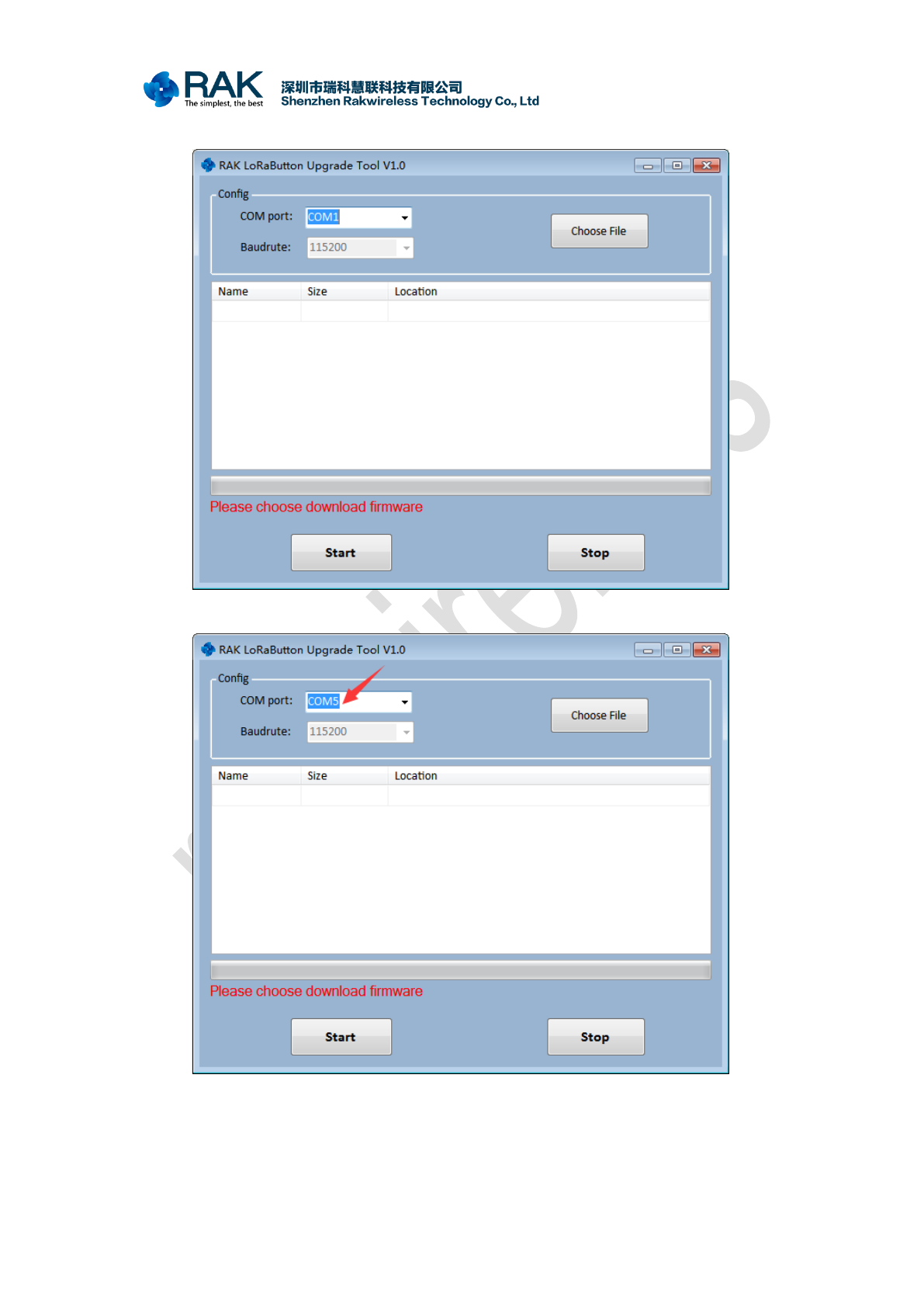
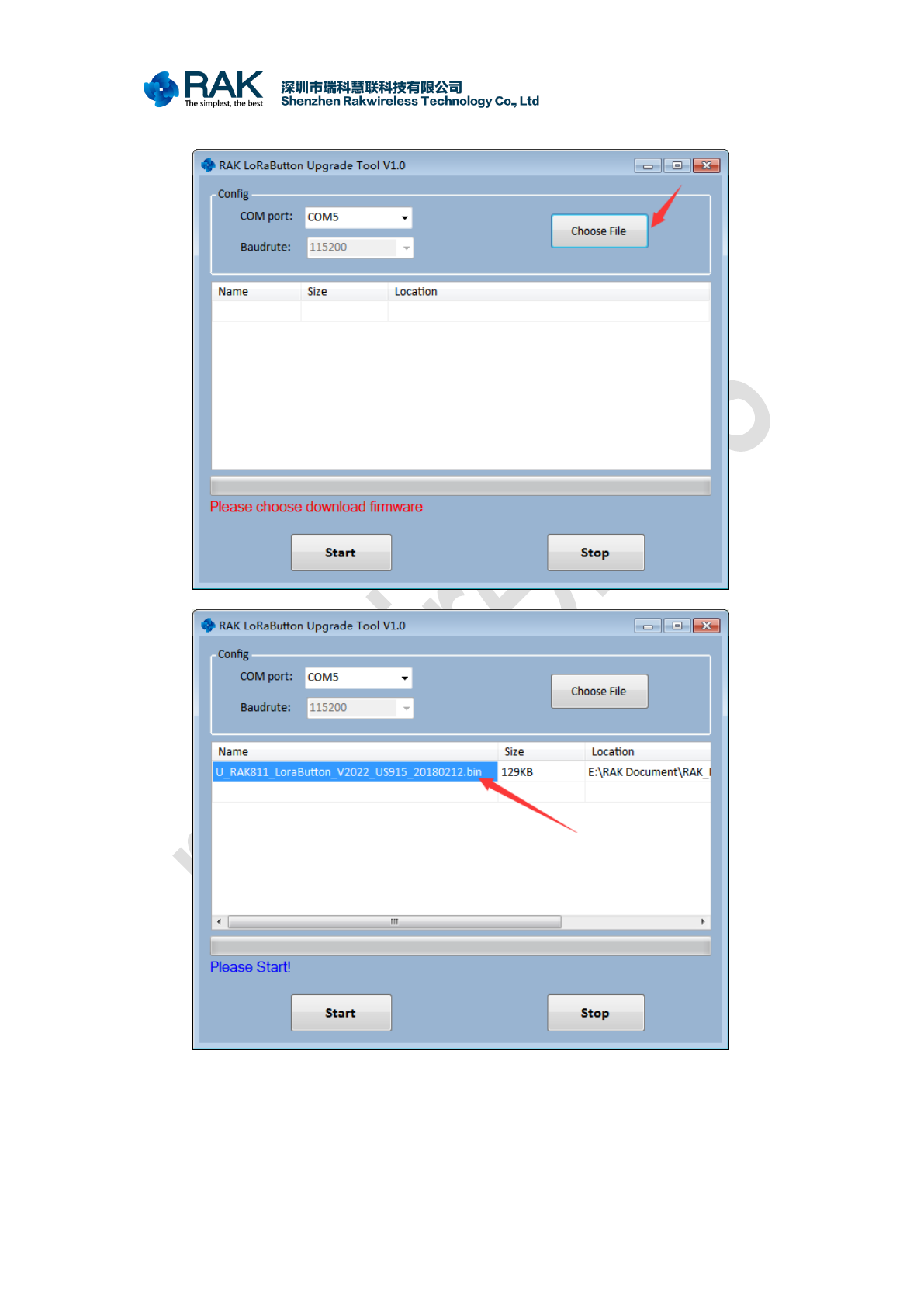
1. Use the micro USB link LoRaButton module to your PC.
LoRaButton Firmware upgrade
COPYRIGHT ©
SHENZHEN RAKWIRELESS TECHNOLOGY CO., LTD
www.rakwireless.com ETDX1805101302
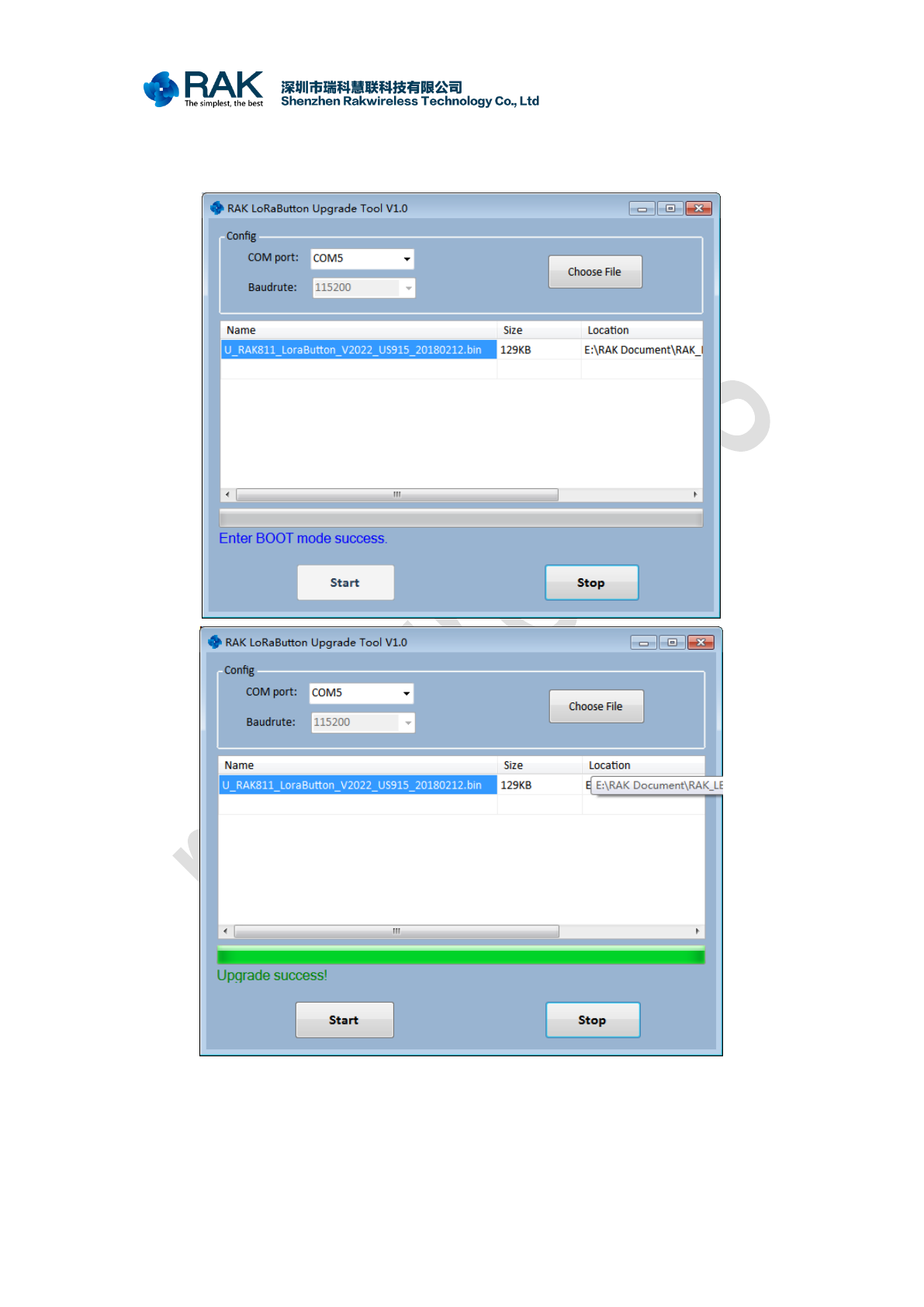
4. Click on “Start”. then long press button 1(SW3) and button 2(SW2), until the device
flashes red. Indicates that the device has entered BOOT mode. The tool will then
automatically start the download process.
Congratulations! firmware upgrade is successful, and then you can use the AT
command system.Please refer to the RAk_LB801 LoRaButton AT Firmwawre User
Manual V1.0.PDF for specific AT instruction operation.
LoRaButton Firmware upgrade
COPYRIGHT ©
SHENZHEN RAKWIRELESS TECHNOLOGY CO., LTD
www.rakwireless.com ETDX1805101302
2.2 Open Source Project firmware download
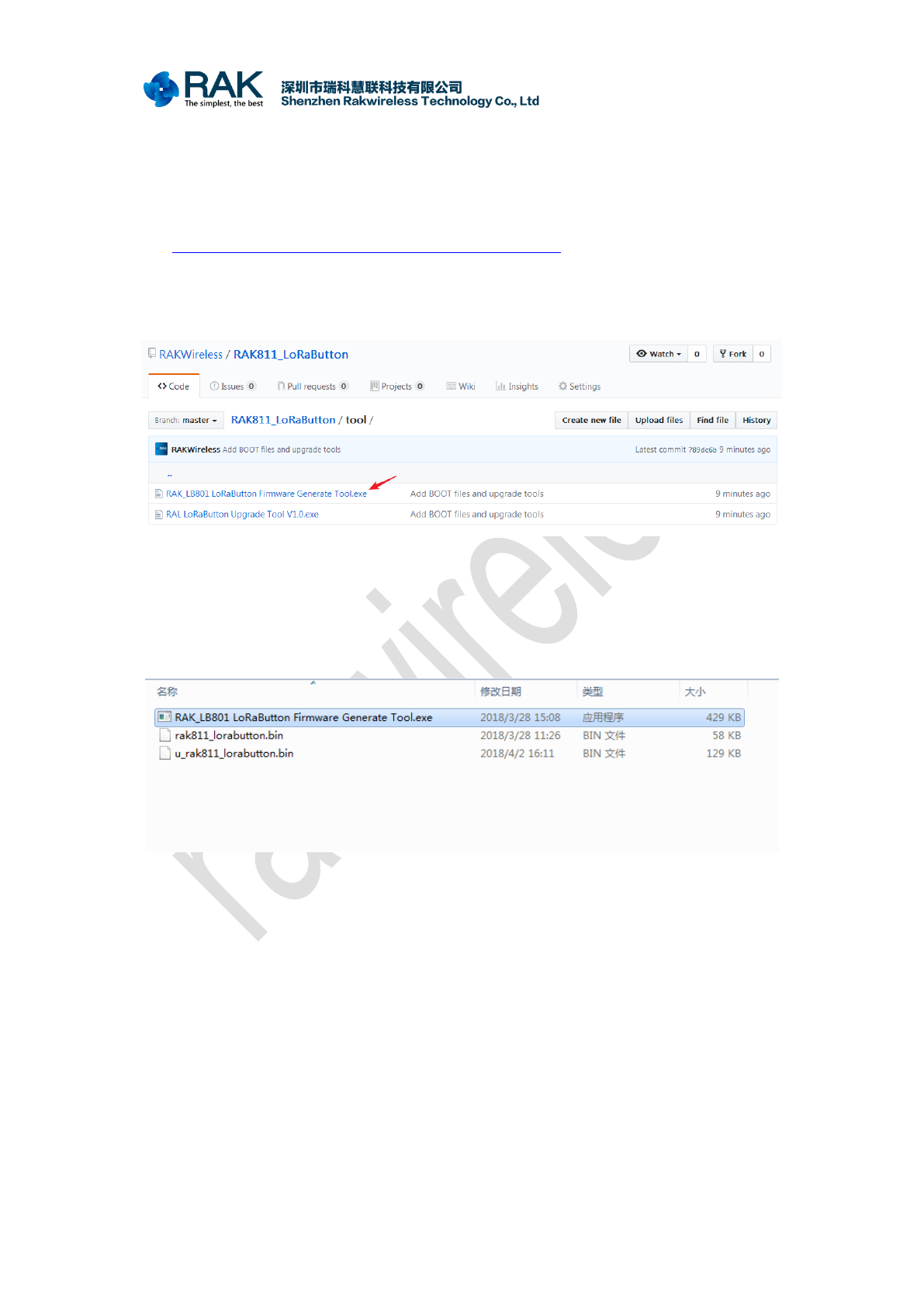
The application firmware of the RAK_LB801 device is a firmware compiled using
open source code provided by RAK:
https://github.com/RAKWireless/RAK811_LoRaButton
However, the bin file directly generated by the open source code compiler cannot be
upgraded through BOOT. You need to use the RAK_LB801 LoRaButton Firmware
Generate Tool.exe to convert it to a bin file that can be upgraded by BOOT.
After successfully compiling with open source project, the generated
rak811_lorabutton.bin file and RAK_LB801 LoRaButton Firmware Generate Tool are
placed in the same directory. Click on the Run tool to generate the
u_rak811_lorabutton.bin file. This file can use BOOT mode to upgrade the firmware.
LoRaButton Firmware upgrade
COPYRIGHT ©
SHENZHEN RAKWIRELESS TECHNOLOGY CO., LTD
www.rakwireless.com ETDX1805101302
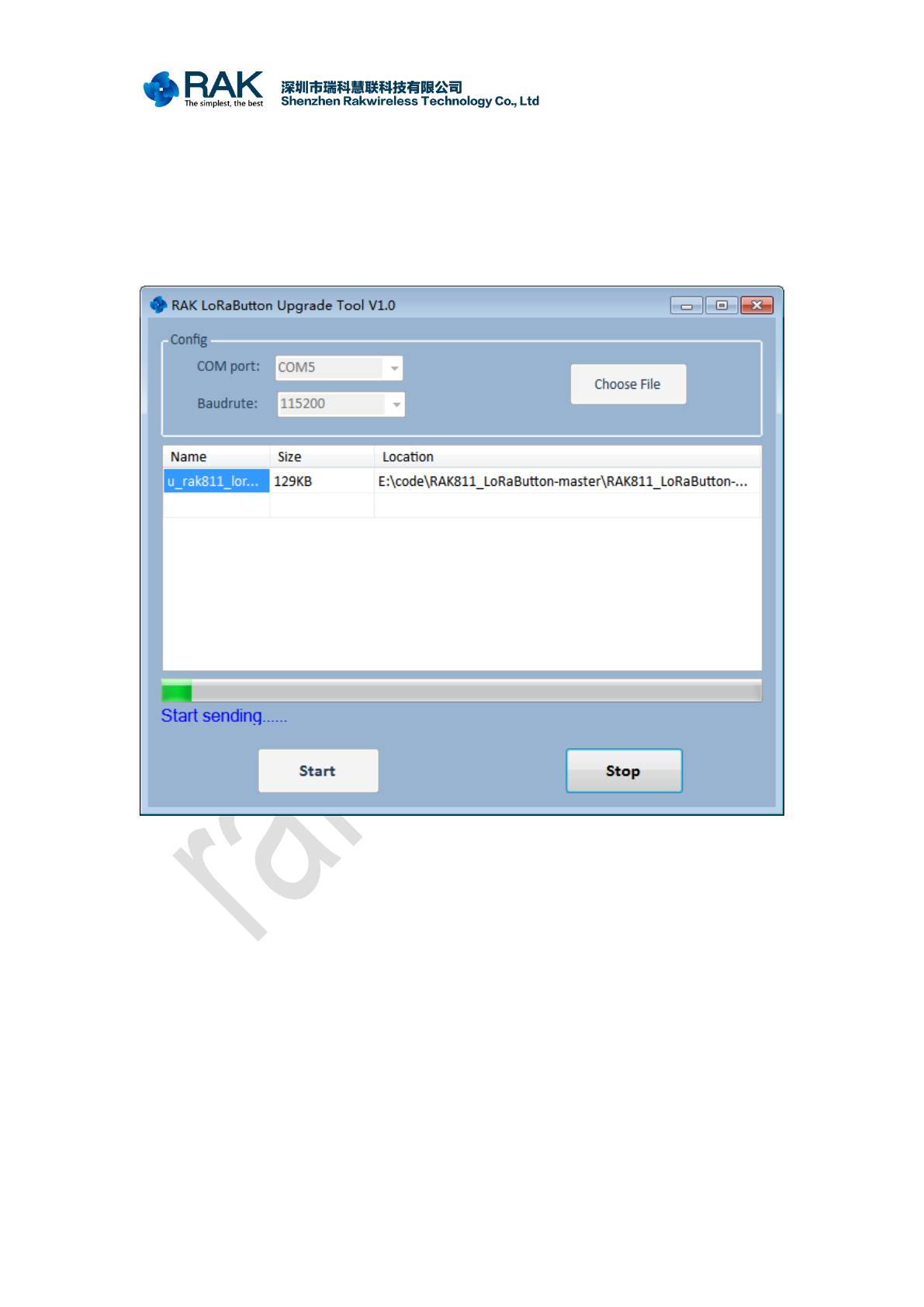
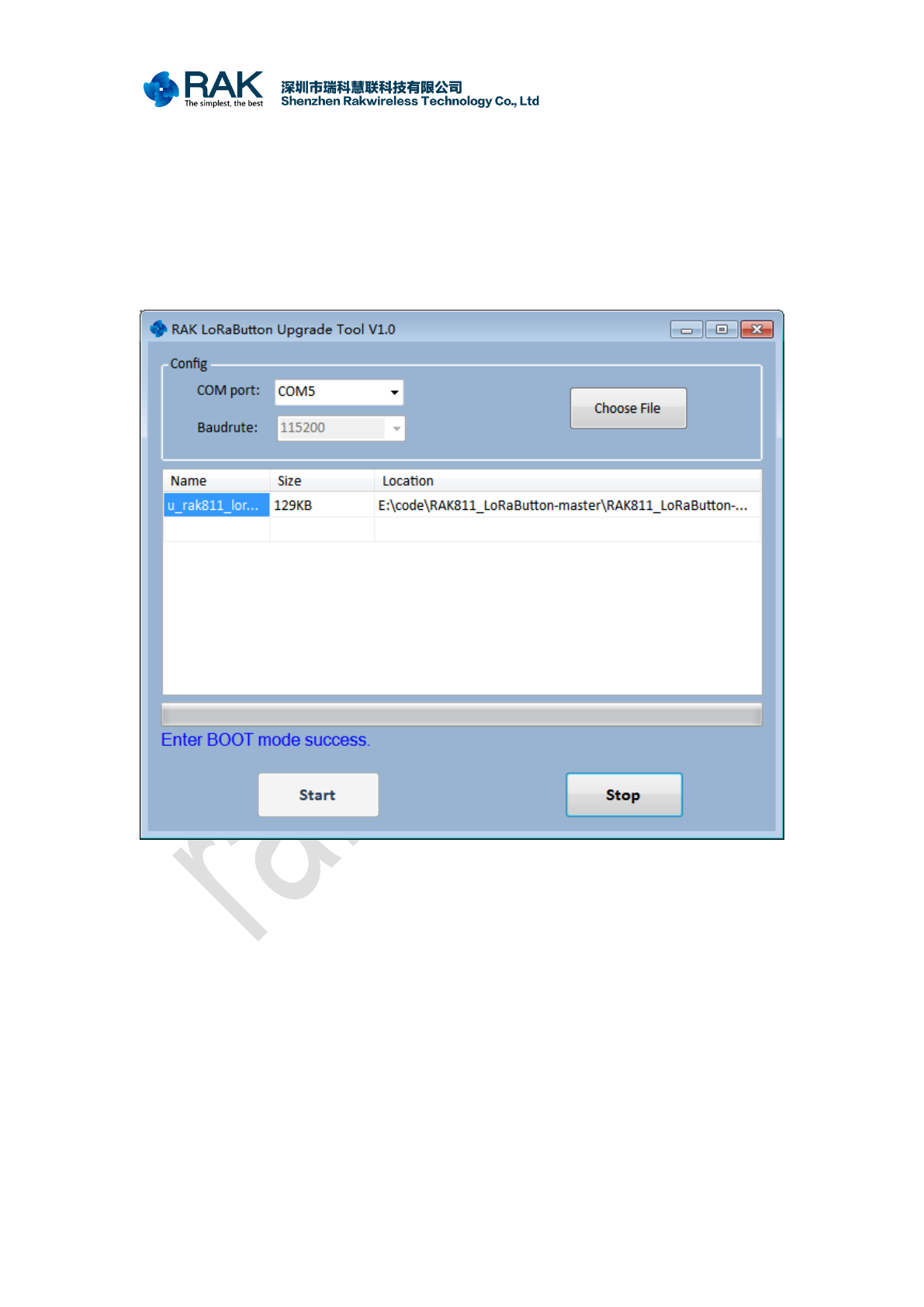
If you are using the device for the first time, or if your application code is not modified,
long press any key to reset the function. Then plug in the device Micro USB interface to
connect the computer, long press button 1(SW3) and button 2(SW2), Until the device
flashes red. At this time, release buttons 1 and 2 to open the RAK LoRaButton Upgrade
Tool V1.0.exe on the computer, select the device serial port, select the generated
u_rak811_lorabutton.bin file, and click “Start” to start the firmware upgrade.
LoRaButton Firmware upgrade
COPYRIGHT ©
SHENZHEN RAKWIRELESS TECHNOLOGY CO., LTD
www.rakwireless.com ETDX1805101302
If the application code in your device is damaged, or you reprogrammed the BOOT
firmware. At this point, you need to press button 1(SW3) and button 2(SW2) for a long
time until the device is flashing red, Then use the Micro USB connector to connect the
device to the computer,at this point can release the button.( The premise is that the device
has enough battery power). Next, open the RAK LoRaButton Upgrade Tool V1.0.exe on
the computer, select the device port number, select the u_rak811_lorabutton.bin file, and
click “Start” to start the upgrade.
LoRaButton Firmware upgrade
COPYRIGHT ©
SHENZHEN RAKWIRELESS TECHNOLOGY CO., LTD
www.rakwireless.com ETDX1805101302
2.2 BOOT firmware download
This method is only used when the device is abnormal, and it needs to open the shell
of the device when it is used.
The BOOT firmware of the device will not be erased if it is operating normally.
Downloading BOOT firmware requires J-link device and SEGGER software. First
install SEGGER, please download SEGGER here:
https://www.segger.com/downloads/jlink
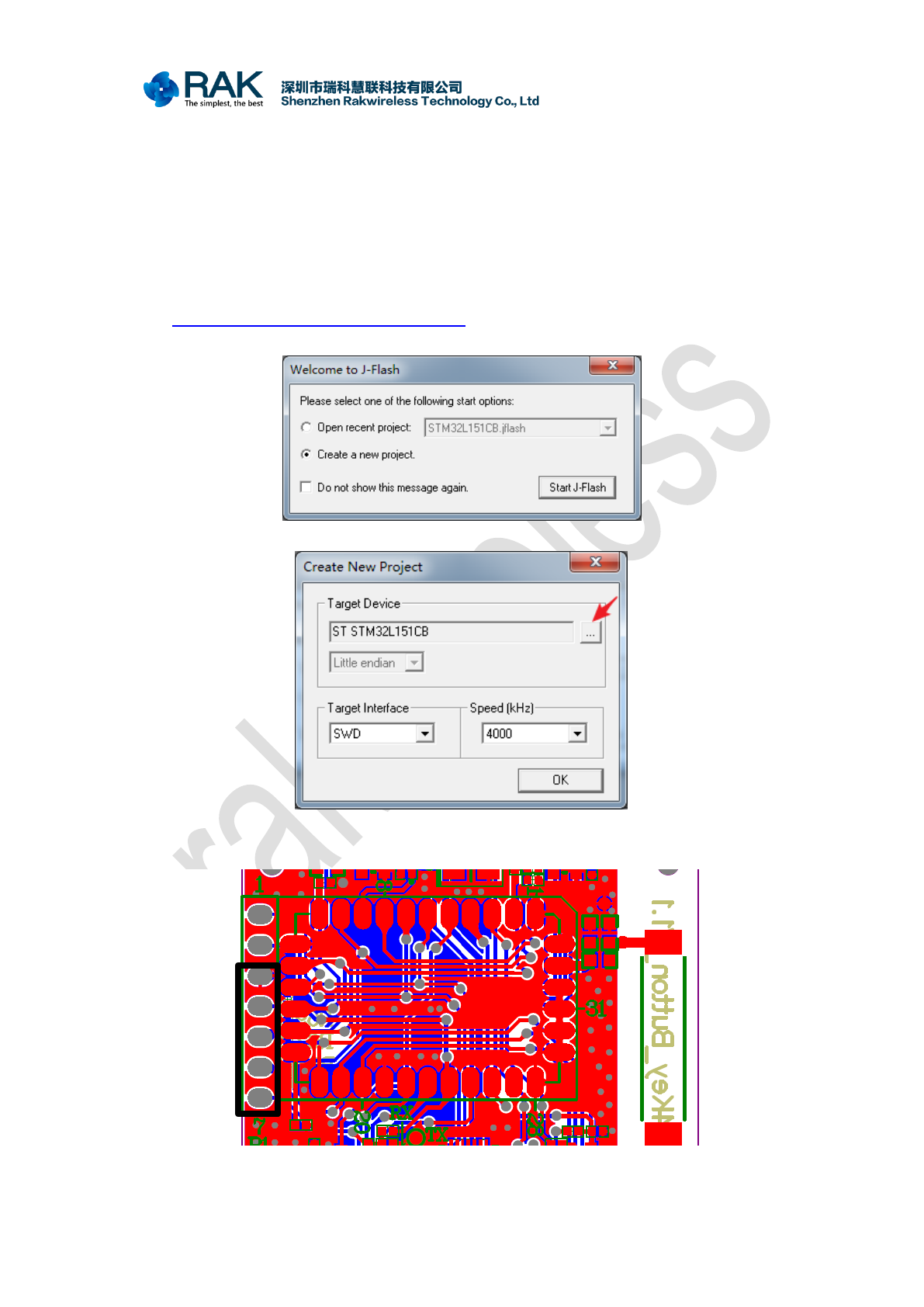
After installation is complete, open J-Flash and choose to create a new project.
Then select the device as “STM32L151CB”. Select interface for “SWD”
Next use the j-link device to connect the RAK_LB801 LoRaButton's SWD interface.
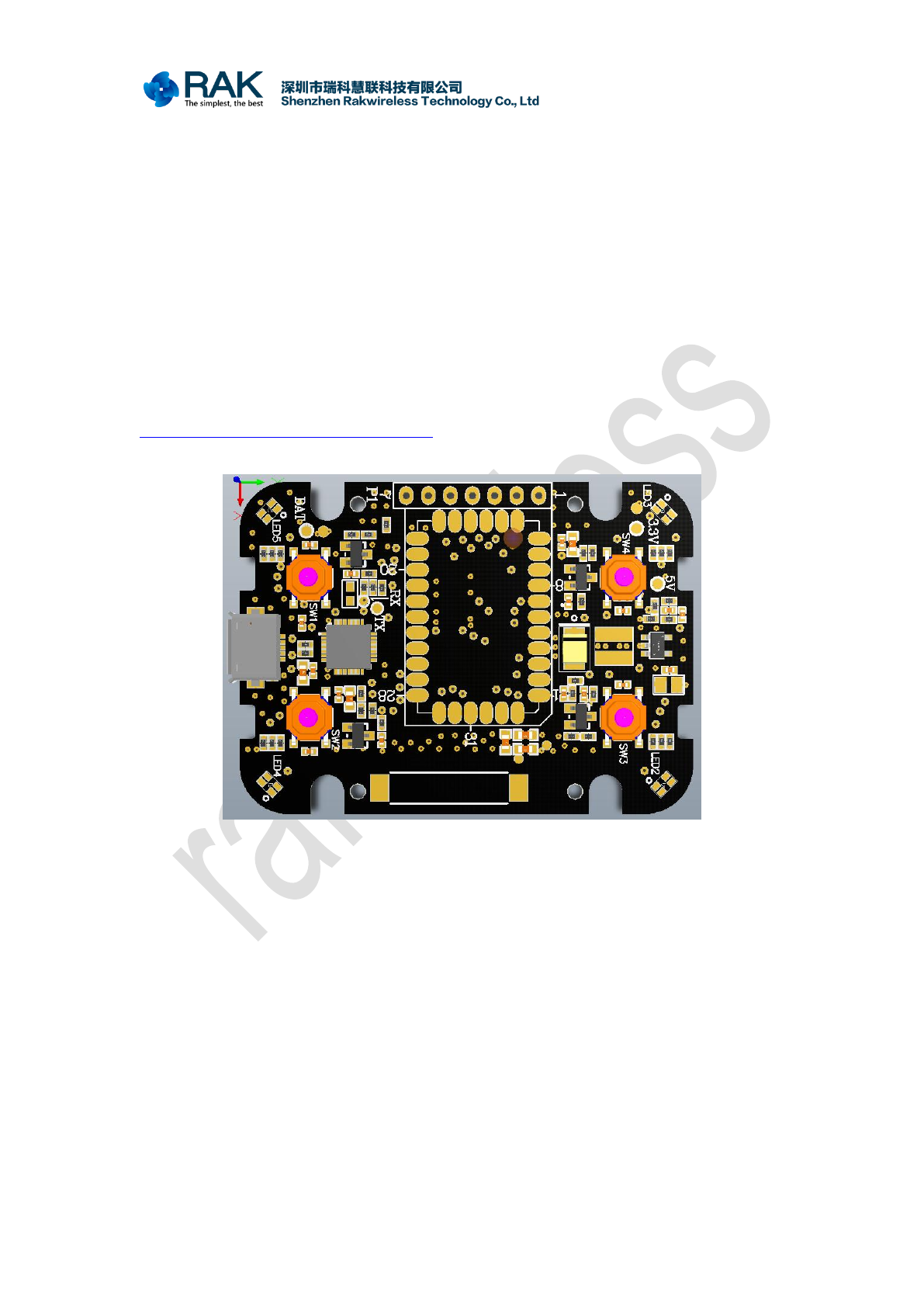
SWD interface of the device, see the schematic.
LoRaButton Firmware upgrade
COPYRIGHT ©
SHENZHEN RAKWIRELESS TECHNOLOGY CO., LTD
www.rakwireless.com ETDX1805101302
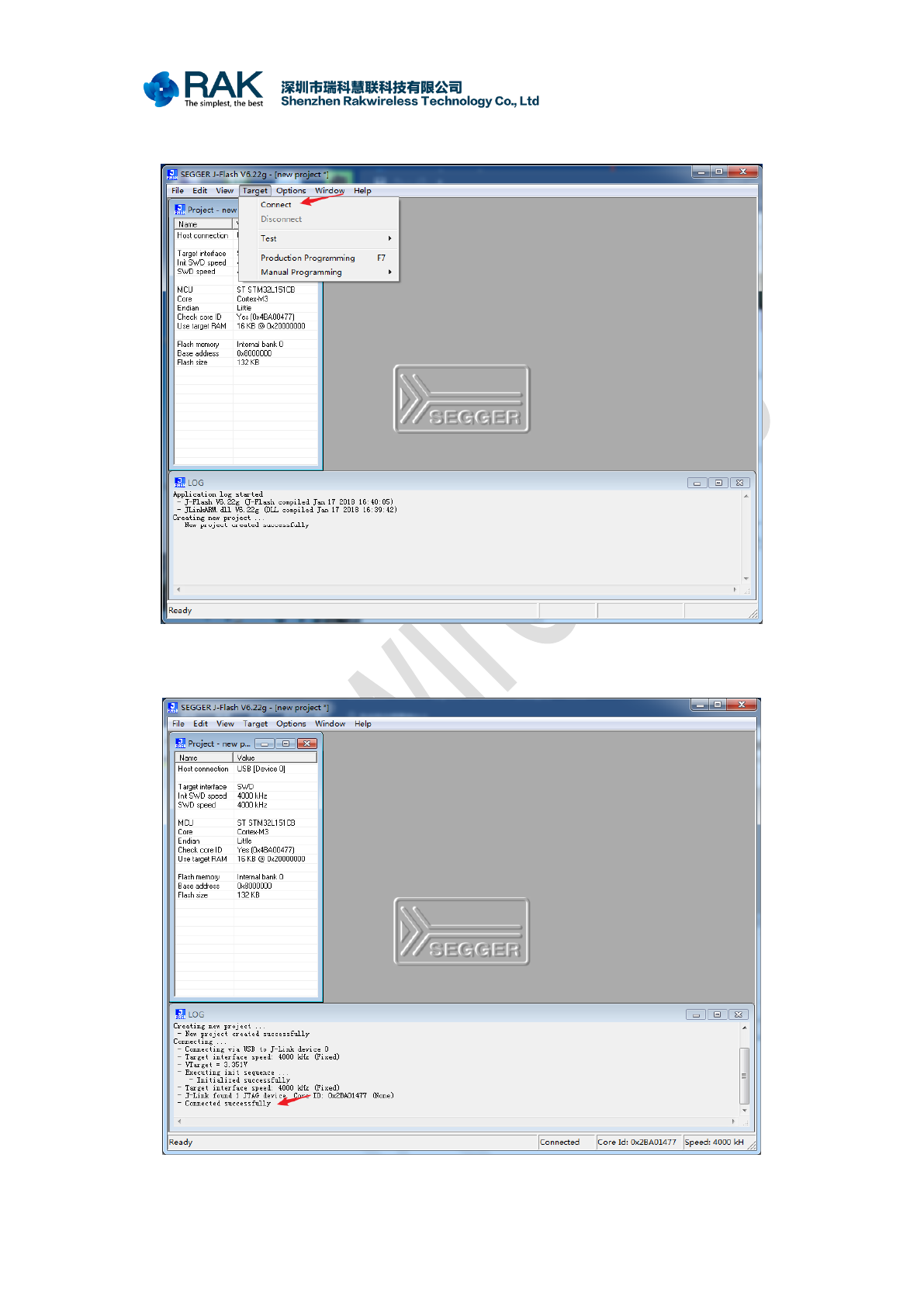
After connecting the SWD interface of the j-link and the SWD interface of the device,
click "Connect" to try to connect.
Normally, "LOG" message box will display "Connection successful".(If there have
some problem with this step, please Google).
LoRaButton Firmware upgrade
COPYRIGHT ©
SHENZHEN RAKWIRELESS TECHNOLOGY CO., LTD
www.rakwireless.com ETDX1805101302
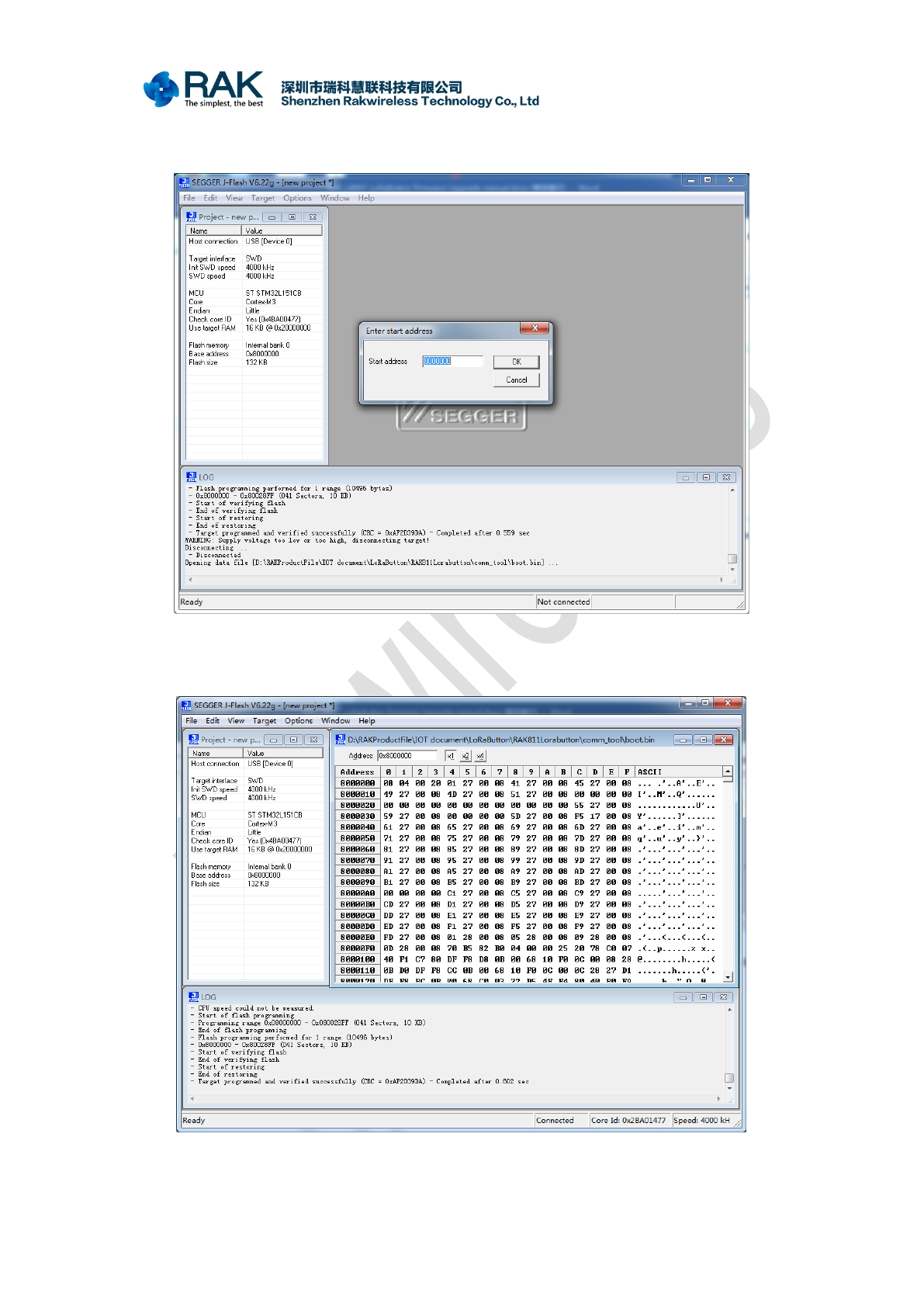
Next click "File" -> "Open data file", select the boot.bin file, and enter the starting
address 8000000.( boot.bin file you can find in the open source project)
Finally, click "Target"->"Manual programming"->"Program & Verify" to start
downloading the boot.bin program. After success, you will see a successful programming
message.( If there have some problem with this step, please Google)
