RODBC Manual
User Manual:
Open the PDF directly: View PDF  .
.
Page Count: 28

ODBC Connectivity
by Brian Ripley
Department of Statistics, University of Oxford
ripley@stats.ox.ac.uk
July 12, 2009
Package RODBC implements ODBC database connectivity. It was originally
written by Michael Lapsley (St George’s Medical School, University of Lon-
don) in the early days of R (1999), but after he disappeared in 2002, it
was rescued and since much extended by Brian Ripley. Version 1.0-1 was
released in January 2003, and RODBC is nowadays a mature and much-used
platform for interfacing R to database systems.
1 ODBC Concepts
ODBC aims to provide a common API for access to SQL1-based database
management systems (DBMSs) such as MySQL, PostgreSQL, Microsoft Ac-
cess and SQL Server, DB2, Oracle and SQLite. It originated on Windows
in the early 1990s, but ODBC driver managers unixODBC and iODBC are
nowadays available on a wide range of platforms (and a version of iODBC
ships with recent versions of Mac OS X). The connection to the particular
DBMS needs an ODBC driver: these may come with the DBMS or the
ODBC driver manager or be provided separately by the DBMS developers,
and there are third-party2developers such as Actual Technologies, Easysoft
and OpenLink. (This means that for some DBMSs there are several different
ODBC drivers available, and they can behave differently.)
Microsoft provides drivers on Windows for non-SQL database systems such
as DBase and FoxPro, and even for flat files and Excel spreadsheets. Actual
Technologies sell a driver for Mac OS X that covers (some) Excel spread-
sheets and flat files.
A connection to a specific database is called a Data Source Name or DSN
1SQL is a language for querying and managing data in databases—see http://en.
wikipedia.org/wiki/SQL.
2but there are close links between unixODBC and Easysoft, and iODBC and OpenLink.
1

(see http://en.wikipedia.org/wiki/Database_Source_Name). See Ap-
pendix B for how to set up DSNs on your system. One of the greatest
advantages of ODBC is that it is a cross-platform client-server design, so it
is common to run R on a personal computer and access data on a remote
server whose OS may not even be known to the end user. This does rely on
suitable ODBC drivers being available on the client: they are for the major
cross-platform DBMSs, and some vendors provide ‘bridge’ drivers, so that
for example a ‘bridge’ ODBC driver is run on a Linux client and talks to
the Access ODBC driver on a remote Windows machine.
ODBC provides an abstraction that papers over many of the differences
between DBMSs. That abstraction has developed over the years, and RODBC
works with ODBC version 3. This number describes both the API (most
drivers nowadays work with API 3.51 or 3.52) and capabilities. The latter
allow ODBC drivers to implement newer features partially or not at all,
so some drivers are much more capable than others: in the main RODBC
works with basic features. ODBC is a superset of the ISO/IEC 9075-3:1995
SQL/CLI standard.
A somewhat biased overview of ODBC on Unix-alikes can be found at http:
//www.easysoft.com/developer/interfaces/odbc/linux.html.
2 Basic Usage
Two groups of functions are provided in RODBC. The mainly internal odbc*
commands implement low-level access to C-level ODBC functions with sim-
ilar3names. The sql* functions operate at a higher level to read, save,
copy and manipulate data between data frames and SQL tables. The two
low-level functions which are commonly used make or break a connection.
2.1 Making a connection
ODBC works by setting up a connection or channel from the client (here
RODBC) to the DBMSs as specified in the DSN. Such connections are normally
used throughout a session, but should be closed explicitly at the end of the
session but RODBC will clear up after you if you forget (with a warning that
might not be seen in a GUI environment). There can be many simultaneous
connections.
The simplest way to make a connection is
library(RODBC)
3in most cases with prefix SQL replacing odbc.
2

ch <- odbcConnect("some dsn ")
and when you are done with it,
close(ch)
# or if you prefer
odbcClose(ch)
The connection object ch is how you specify one of potentially many open
connections, and is the first argument to all other RODBC functions. If you
forget the details, printing it will give some summary information.
If the DBMS user and password are needed and not stored in the DSN, they
can be supplied by e.g.
ch <- odbcConnect("some dsn ", uid = "user ", pwd = "**** ")
Users of the R GUI under Windows4have another possibility: if an incom-
pletely specified DSN is given, the driver-specific Data Source dialog box
will pop up to allow it to be completed.
More flexibility is available via function odbcDriverConnect, which works
with a connection string. At its simplest it is
"DSN=dsn ;UID=uid ;PWD=pwd "
but it can be constructed without a DSN by specifying a driver directly via
DRIVER=, and more (in some cases many more) driver-specific parameters
can be given. See the documentation for the driver (and Appendix A) for
more details.
2.2 Reading from a database
where ‘database’ can be interpreted very widely, including for example Excel
spreadsheets and directories of flat files.
The simplest and most common use of RODBC is to extract data from
databases held on central database servers. Such access is read-only, and this
can be ensured by settings in the DSN or (better) via permission settings
(also known as privileges) on the database.
To find out what tables are accessible from a connection ch, use
sqlTables(ch)
Some drivers will return all visible table-like objects, not just those owned
by you. In that case you may want to restrict the scope by e.g.
4This does not work from Rterm.exe.
3

sqlTables(ch, tableType = "TABLE")
sqlTables(ch, schema = "some pattern ")
sqlTables(ch, tableName = "some pattern ")
The details are driver-specific but in most cases some pattern can use wild-
cards5with underscore matching a single character and percent matching
zero or more characters. Since underscore is a valid character in a table
name it can be handled literally by preceding it by a backslash—but it is
rarely necessary to do so.
A table can be retrieved as a data frame by
res <- sqlFetch(ch, "table name ")
If it has many rows it can be retrieved in sections by
res <- sqlFetch(ch, "table name ", max = m)
res <- sqlFetchMore(ch, "table name ", max = m)
...
It is often necessary to reduce the data to be transferred: we have seen how
to subset rows, but it can be more effective to restrict the columns or to
return only rows meeting some conditions. To find out what columns are
available, use sqlColumns, for example
> sqlColumns(ch, "USArrests")
TABLE CAT TABLE SCHEM TABLE NAME COLUMN NAME DATA TYPE TYPE NAME COLUMN SIZE
1 ripley <NA> USArrests State 12 varchar 255
2 ripley <NA> USArrests Murder 8 double 15
3 ripley <NA> USArrests Assault 4 integer 10
4 ripley <NA> USArrests UrbanPop 4 integer 10
5 ripley <NA> USArrests Rape 8 double 15
...
Then an SQL Query can be used to return part of the table, for example
(MySQL on Linux)
> sqlQuery(sh, paste("SELECT State, Murder FROM USArrests",
+ "WHERE Rape > 30 ORDER BY Murder"))
State Murder
1 Colorado 7.9
2 Arizona 8.1
3 California 9.0
4 Alaska 10.0
5 New Mexico 11.4
6 Michigan 12.1
7 Nevada 12.2
8 Florida 15.4
Note that although there are standards for SQL, all the major producers
of DBMSs have their own dialects, so for example on the Oracle and DB2
systems we tested this query had to be given as
5these are the SQL wildcards used for example in LIKE clauses.
4

> sqlQuery(ch, paste(’SELECT "State", "Murder" FROM "USArrests"’,
+ ’WHERE "Rape" > 30 ORDER BY "Murder"’))
Describing how to extract data from databases is the forte of the SQL lan-
guage, and doing so efficiently is the aim of many of the DBMSs, so this
is a very powerful tool. To learn SQL it is best to find a tutorial specific
to the dialect you will use; for example Chapter 3 of the MySQL manual
is a tutorial. A basic tutorial which covers some common dialects6can be
found at http://www.1keydata.com/sql/sql.html: tutorials on how to
perform common tasks in several commonly used DBMSs are available at
http://sqlzoo.net/.
2.3 Table Names
SQL-92 expects both table and column names to be alphanumeric plus un-
derscore, and RODBC does not in general support vendor extensions (for
example Access allows spaces). There are some system-specific quoting
schemes: Access and Excel allow table names to be enclosed in [ ] in SQL
queries, MySQL (by default) quotes via backticks, and most other systems
use the ANSI SQL standard of double quotes.
The odbcConnnect function allows the specification of the quoting rules
for names RODBC itself sends, but sensible defaults7are selected. Users do
need to be aware of the quoting issue when writing queries for sqlQuery
themselves.
Note the underscore is a wildcard character in table names for some of the
functions, and so may need to be escaped (by backslash) at times.
2.4 Types of table
The details are somewhat DBMS-specific, but ‘tables’ usually means ‘tables,
views or similar objects’.
In some systems ‘tables’ are physical objects (files) that actually store data—
Mimer calls these base tables. For these other ‘tables’ can be derived that
present information to the user, usually called ‘views’. The principal dis-
tinctions between a (base) table and a view are
∙Using DROP on a table removes the data, whereas using it on a view
merely removes the convenient access to a representation of the data.
6MySQL, Oracle and SQL Server.
7backticks for MySQL, [ ] for the Access and Excel convenience wrappers, otherwise
ANSI double quotes.
5

∙The access permission (privilege) of a view can be very different from
those of a table: this is commonly used to hide sensitive information.
A view can contain a subset of the information available in a single table or
combine information from two or more tables.
Further, some DBMSs distinguish between tables and views generated by
ordinary users and system tables used by the DBMS itself. Where present,
this distinction is reflected in the result of sqlTable() calls.
Some DBMSs support synonyms and/or aliases which are simply alternative
names for an existing table/view/synonym, often those in other schemas (see
below).
Typically tables, views, synonyms and aliases share a name space and so
must have a name that is unique (in the enclosing schema where schemas
are implemented).
3 Writing to a Database
To create or update a table in a database some more details need to be
considered. For some systems, all table and column names need to be lower
case (e.g. PostgreSQL, MySQL on Windows) or upper case (e.g. some
versions of Oracle). To make this a little easier, the odbcConnect function
allows a remapping of table names to be specified, and this happens by
default for DBMSs where remapping is known to be needed.
The main tool to create a table is sqlSave. It is safest to use this after
having removed any existing table of the same name, which can be done by
sqlDrop(ch, "table name ", errors=FALSE)
Then in the simplest usage
sqlSave(ch, some data frame )
creates a new table whose name is the name of the data frame (remapped
to upper or lower case as needed) and with first column rownames the row
names of the data frame, and remaining columns the columns of the data
frame (with names remapped as necessary). For the many options, see the
help page.
sqlSave works well when asked to write integer, numeric and reasonable-
length8character strings to the database. It needs some help with other
8which of course depends on the DBMS. Almost all have an implementation of varchar
that allows up to 255 bytes or characters, and some have much larger limits. Calling
sqlTypeInfo will tell you about the data type limits.
6

types of columns in mapping to the DBMS-specific types of column. For
some drivers it can do a good job with date and date-time columns; in oth-
ers it needs some hints (and e.g. for Oracle dates are stored as date-times).
The files in the RODBC/tests directory in the sources and the installed file
tests.R provide some examples. One of the options is the fast argument:
the default is fast=TRUE which transfers data in binary format: the alter-
native is fast=FALSE which transfer data as character strings a row at a
time—this is slower but can work better with some drivers (and worse with
others).
The other main tool for writing is sqlUpdate which is used to add rows to
or change rows in an existing table. Note that RODBC only does this is a
simple fashion, and on up-market DBMSs it may be better to set cursors
and use direct SQL queries, or at least to control transactions by calls to
odbcSetAutoCommit and odbcEndTran. The basic operation of sqlUpdate
is to take a data frame with the same column names (up to remapping) as
some or all of the columns of an existing table: the values in the data frame
are then used either to replace entries or to create new rows in the table.
Rows in a DBMS table are in principle unordered and so cannot be referred
to by number: the sometimes tricky question is to know what rows are to
replaced. We can help the process by giving one or more index columns
whose values must match: for a data frame the row names are often a good
choice. If no index argument is supplied, a suitable set of columns is chosen
based on the properties of the table.
3.1 Primary keys and indices
When a table is created (or afterwards) it can be given additional informa-
tion to enable it to be used effectively or efficiently.
Primary keys are one (usually) or more columns that provide a reliable way
to reference rows in the table: values of the primary key must be unique
and not NULL (SQL parlance for ‘missing’). Primary keys in one table are
also used as foreign keys in another table: this ensure that e.g. values of
customer id only take values which are included in the primary key column
of that name in table customers. Support of foreign keys is patchy: some
DBMSs (e.g, MySQL <6.0) accept specifications but ignore them.
RODBC allows primary keys to be set as part of the sqlSave() function when
it creates a table: otherwise they can be set by sqlQuery() in DBMS-specific
ways (usually by ALTER TABLE).
Columns in a table can be declared as UNIQUE: primary keys and such
columns are usually used as the basis for table indices, but other indices
7
(sometimes called secondary indices) can be declared by a CREATE INDEX
SQL command. Whether adding primary keys or other indices has any
effect on performance depends on the DBMS and the query.
4 Data types
This can be confusing: R has data types (including character,double,
integer and various classes including Date and POSIXt), ODBC has both
C and SQL data types, the SQL standards have data types and so do the
various DBMSs and they all have different names and different usages of
the same names.
Double- and single-precision numeric values and 32- and 16-bit integers
(only) are transferred as binary values, and all other types as character
strings. However, unless as.is=TRUE,sqlGetResults (used by all the
higher-level functions to return a data frame) converts character data to
an date/date-time class or via type.convert.
You can find out the DBMS names for the data types used in the columns
of a table by a call to sqlColumns, and further information is given on those
types in the result of sqlTypeInfo. For example in MySQL,
TABLE_CAT TABLE_SCHEM TABLE_NAME COLUMN_NAME DATA_TYPE TYPE_NAME COLUMN_SIZE
1 ripley <NA> USArrests State 12 varchar 255
2 ripley <NA> USArrests Murder 8 double 15
3 ripley <NA> USArrests Assault 4 integer 10
4 ripley <NA> USArrests UrbanPop 4 integer 10
5 ripley <NA> USArrests Rape 8 double 15
BUFFER_LENGTH DECIMAL_DIGITS NUM_PREC_RADIX NULLABLE REMARKS COLUMN_DEF
1 255 NA NA 0 ’’
2 8 NA NA 1 <NA>
3 4 0 10 1 <NA>
4 4 0 10 1 <NA>
5 8 NA NA 1 <NA>
SQL_DATA_TYPE SQL_DATETIME_SUB CHAR_OCTET_LENGTH ORDINAL_POSITION IS_NULLABLE
1 12 NA 255 1 NO
2 8 NA NA 2 YES
3 4 NA NA 3 YES
4 4 NA NA 4 YES
5 8 NA NA 5 YES
This gives the DBMS data by name and by number (twice, once the number
used in the DBMS and once that used by SQL—they agree here). Other
things of interest here are the column size, which gives the maximum size
of the character representation, and the two columns about ‘nullable’ which
indicate if the column is allowed to contain missing values (SQL NULLs).
The result of sqlTypeInfo has 19 columns and in the version of MySQL
used here, 52 types. We show a small subset of the more common types:
> sqlTypeInfo(channel)[c(1:3,7,16)]
8

> sqlTypeInfo(channel)[<...>, c(1:3,7,16)]
TYPE_NAME DATA_TYPE COLUMN_SIZE NULLABLE SQL_DATATYPE
1 bit -7 1 1 -7
2 tinyint -6 3 1 -6
6 bigint -5 19 1 -5
18 text -1 65535 1 -1
19 mediumtext -1 16777215 1 -1
20 longtext -1 2147483647 1 -1
22 char 1 255 1 1
23 numeric 2 19 1 2
24 decimal 3 19 1 3
25 integer 4 10 1 4
37 smallint 5 5 1 5
41 double 6 15 1 6
43 float 7 7 1 7
45 double 8 15 1 8
47 date 91 10 1 9
48 time 92 8 1 9
49 year 5 4 1 5
50 datetime 93 21 1 9
51 timestamp 93 14 0 9
52 varchar 12 255 1 12
Note that there are both duplicate names and duplicate numbers.
Most DBMSs started with their own data types and later mapped the stan-
dard SQL data types on to them, although these may only be partially
implemented. Some DBMSs allow user-defined data types, for example enu-
merations.
Commonly used data types fall into a number of groups:
Character types Character types can be classified three ways: fixed or
variable length, by the maximum size and by the character set used.
The most commonly used types9are varchar for short strings of vari-
able length and char for short strings of fixed length (usually right-
padded with spaces). The value of ‘short’ differs by DBMS and is at
least 254, often a few thousand—often other types will be available
for longer character strings. There is a sanity check which will allow
only strings of up to 65535 bytes when reading: this can be removed
by recompiling RODBC.
Many other DBMSs have separate types to hold Unicode character
strings, often with names like nvarchar or varwchar. Note that cur-
rently RODBC only uses the current locale for character data, which
could be UTF-8 (and will be on Mac OS X and in many cases on
Linux and other Unix-alikes), but is never UCS-2 as used on Win-
dows. So if character data is stored in the database in Unicode, it
will be translated (with a possibly loss of information) in non-Unicode
locales. (This may change in future versions of RODBC.)
9the SQL names for these are CHARACTER VARYING and CHARACTER, but these are too
cumbersome for routine use.
9

Integer types Most DBMSs have types for 32-bit (integer, synomyn int)
and 16-bit (smallint) integers. Some, including MySQL, also have
unsigned versions and 1-bit, 8-bit and 64-bit integer types: these fur-
ther types would usually be transferred as character strings and con-
verted on reading to an integer or double vector.
Type names int2,int4 and int8 are common as synonyms for the
basic type names.
The SQL standard does not require integer and smallint to be bi-
nary (rather than decimal) types, but they almost always are binary.
Note that 64-bit integers will be transferred as character strings and
read by sqlGetResults as character vectors or (for 231 ≤ ∣𝑥∣<253)
as a double vectors.
Floating-point types The basic SQL floating-point types are 8 and 7 for
double- and single-precision binary types. The SQL names are double
precision and real, but beware of the variety of names. Type 6
is float in the standard, but is used by some DBMSs10 for single-
precision and by some for double-precision: the forms float(24) and
float(53) are also commonly supported.
You should not assume that these types can store Inf,-Inf or NaN,
but they often can.
Other numeric types It is common to store decimal quantities in
databases (e.g. currency amounts) and types 2 and 3 are for deci-
mals. Some DBMSs have specialized types to handle currencies, e.g.
money in SQL Server.
Decimal types have a precision (the maximum number of significant
decimal digits) and scale (the position of the decimal point). numeric
and decimal are usually synonymous, but the distinction in the stan-
dards is that for numeric the precision is exact whereas for decimal
the DBMS can use a larger value than that specified.
Some DBMSs have a type integer(p)to represent up to pdecimal
digits, and this may or may not be distinct from decimal(p, 0).
DBMSs do not necessarily fully implement decimal types, e.g. MySQL
currently stores them in binary and used to store them as character
strings.
Dates and times The handling of dates and times is very much specific
to the DBMS. Some allow fractional seconds in date-times, and some
10In Oracle the FLOAT type is a decimal and not a binary type.
10
do not; some store timezones with date-times or always use UTC and
some do not, and so on. Usually there are also types for time intervals.
All such types are transferred as character strings in RODBC.
It is possible (but rare) for the DBMS to support data types that the ODBC
driver cannot handle. Most DBMSs have binary data types which have no
corresponding R data type (raw corresponds to a single byte, not a fixed or
variable length set of bytes): these are not currently covered by RODBC.
4.1 Data types when saving a data frame
When sqlSave creates a table, there is some choice as to the SQL data
types used.
The default is to select the SQL data type from the R type via the typeInfo
argument to sqlSave. If this is not supplied (usual) a default mapping
is looked up using getSqlTypeInfo() or by interrogating sqlTypeInfo().
This will almost always produce the correct mapping for numeric, integer
and character columns of up to 254 characters (or bytes). In other cases
(include dates and date-times) the desired SQL type can be specified for
each column via the argument varTypes, a named character vector with
names corresponding to (some of) the names in the data frame to be saved.
Only a very few DBMSs have a logical data type and the default mapping is
to store R logical vectors as varchar(5). For others DBMSs BIT,TINYINT
or an enumeration type could be used (but the column may be need to be
converted to and from a suitable representation). For example, in MySQL we
could use enum(’FALSE’, ’TRUE’), but this is actually stored as char(5).
Note that to represent NA the SQL data type chosen needs to be nullable,
which BIT often is not. (Mimer has a nullable data type BOOLEAN but this
is not supported by the ODBC client.)
4.2 SQLite
SQLite’s concept of ‘data type’ is anomalous: version 3 does recognize types
of data (in version 2 everything was a character string), but it does not
have a fixed type for a column in a table (although the type specified in
the CREATE TABLE statement is a ‘recommended’ type for the values of that
column). Every value is categorized as null, integer (of length 1, 2, 3, 4, 6 or
8 bytes), double, text (UTF-8 or UTF-16) or BLOB (a sequence of bytes).
This does not fit well with the ODBC interface which pre-determines a type
for each column before reading or writing it: the ‘SQLite ODBC’ driver falls
11

SQL CHAR 1 SQL LONGVARCHAR -1
SQL NUMERIC 2 SQL BINARY -2
SQL DECIMAL 3 SQL VARBINARY -3
SQL INTEGER 4 SQL LONGVARBINARY -4
SQL SMALLINT 5 SQL BIGINT -5
SQL FLOAT 6 SQL TINYINT -6
SQL REAL 7 SQL BIT -7
SQL DOUBLE 8 SQL WCHAR -8
SQL DATETIME 9 SQL WVARCHAR -9
SQL INTERVAL 10 SQL WLONGVARCHAR -10
SQL TIMESTAMP 11 SQL GUID -11
SQL VARCHAR 12
SQL TYPE DATE 91
SQL TYPE TIME 92
SQL TYPE TIMESTAMP 93
Table 1: Mapping between ODBC SQL data type names and numbers.
(GUIDs are 16-byte numbers, Microsoft’s implementation of UUIDs.)
back to a SQL VARCHAR or SQL LONGVARCHAR type if the column type is not
available.
4.3 ODBC data types
ODBC defines two sets of data types: SQL data types and C data types.
SQL data types indicate the data types of data stored at the data source
using standard names. C data types indicate the data types used in the
compiled code in the application (here RODBC) when transferring data, and
are the same for all drivers.
The ODBC SQL data types are abstractions of the data types discussed
above with names like SQL INTEGER. They include SQL LONGVARCHAR for
large character types and SQL WVARCHAR for Unicode character types. It
is usually these types that are returned (by number) in the SQL DATA TYPE
column of the result of sqlColumns and SQL DATATYPE column of the result
of sqlTypeInfo. The mapping from names to numbers is given in table 1.
The only ODBC C data types currently used by RODBC are SQL C DOUBLE,
SQL C SLONG (32-bit signed integers) and SQL C CHAR for reading and writ-
ing, and SQL C FLOAT (single-precision) and SQL C SSHORT (16-bit signed
integers) for reading from the database.
http://msdn.microsoft.com/en-us/library/ms713607%28VS.85%29.
aspx is the defintiive source of information about ODBC data types.
12

5 Schemas and Catalogs
This is a more technical section: few users will need to deal with these
concepts.
‘Schemas’ are collections of objects (such as tables and views) within a
database that are supported by some DBMSs: often a separate schema is
associated with each user (and ‘schema’ in ODBC 3 replaced ‘owner’ in
ODBC 2). In SQL-92, schemas are collected in a ‘catalog’ which is often
implemented as a database. Where schemas are implemented, there is a
current schema used to find unqualified table names, and tables in other
schemas can be referred to within SQL queries using the schema.table
notation. You can think of a schema as analogous to a name space; it allows
related objects to be grouped together without worrying about name clashes
with other groups. (Some DBMSs will search for unqualified table names in
a search path: see the detailed descriptions below.)
Note that ‘schema’ is used in another sense in the database literature, for
the design of a database and in particular of tables, views and privileges.
Here are some details of various DBMSs’ interpretations of catalog and
schema current at the time of writing (mid 2009). (These descriptions are
simplistic, and in some cases experimental observations.)
∙SQLite uses dotted names for alternative databases that are attached
by an ATTACH DATABASE command.11 There is a search path of
databases, so it is only necessary to use the dotted name notation
when there are tables of the same name on attached databases. The
initial database is known as main and that used for temporary tables
as temp.
∙MySQL uses catalog to refer to a database. In MySQL’s parlance,
‘schema’ is a little-used synonym for ‘database’.
∙PostgreSQL only allows a session to access one database, and does
not use ‘catalog’ except to refer to the current database. Version
7.3 introduced schemas—users can create their own schemas with a
CREATE SCHEMA query. Tables are by default in the public schema,
and unqualified table names are searched for along a ‘search path’ of
schemas (by default, containing public).
∙Oracle uses schemas as synonymous with ‘owner’ (also known as
‘user’).
∙IBM DB2 uses schemas as name spaces for objects that may lie on
different databases: using aliases allows objects to be in more than
11and may be subsequently detached by a DETACH DATABASE command
13

one schema. The initial current schema is named the same as the user
(SQLID in DB2 parlance).
∙Microsoft SQL Server 2008 uses both catalog and schema,catalog
for the database and schema for the type of object, e.g. "sys" for
most of the system tables/views and (default) "dbo" for user tables.
Further schemas can be created by users. The default schema for a
user can be set when the user is created and changed via ALTER USER.
Prior to SQL Server 2005, ‘schema’ meant ‘user’, and the search path
for unqualified names was the database user then "dbo".
∙The Microsoft Excel and Access ODBC drivers do not use schemas,
but do use catalog to refer to other database/spreadsheet files.
∙Mimer (www.mimer.com) uses schemas which are normally the same as
users (which it calls IDENT s), but users can create additional schemas.
There are also system schemas.
It is often possible to use sqlTables to list the available catalogs or schemas:
see its help page for the driver-specific details.
RODBC usually works with tables in the current schema, and so tables in
other schemas can only be used in a few functions (sqlClear,sqlDrop
and sqlFetch) and in SQL queries passed to sqlQuery. What the ‘dot-
ted name’ notation means depends on the DBMS: the SQL-92 mean-
ing is schema.table and this is accepted by PostgreSQL, Oracle, DB2
and Mimer. However, MySQL and SQLite use database.table . Mi-
crosoft SQL Server allows (depending on the version) up to four compo-
nents: linked server.catalog.schema.table . PostgreSQL does allow
database.schema.table , but this is not useful as database must be the
currently connected database.
Functions sqlTables,sqlColumns and sqlPrimaryKeys have arguments
catalog and schema which in principle allow tables in other schema to be
listed or examined: however these are only partially implemented in many
current ODBC drivers. See the help page for sqlTables for some further
details.
For other uses, the trick is to select the schema(s) you want to use, which is
done via an SQL statement sent by sqlQuery. For Oracle you can set the
default schema (owner) by
ALTER SESSION SET CURRENT SCHEMA = schema
whereas for PostgreSQL the search path can be changed via
SET search path TO schema1 ,schema2 .
14
In DB2, creating an alias in the current schema can be used to access tables
in other schemas, and a CURRENT SCHEMA query can be used to change the
current schema. In MySQL and SQL Server a database can be selected by
aUSE database query.
6 Internationalization Issues
Internationalization issues are made more complex by ODBC being a client-
server system, and the ODBC client (RODBC) and the server may be running
on different machines with different OSes on different continents. So the
client may need some help.
In most cases numeric data are transferred to and from R in binary form, so
the representation of the decimal point is not an issue. But in some cases it
could be (e.g. decimal rather than binary SQL data types will be transferred
as character strings) and then the decimal point to be used will be taken from
options("dec"): if unset this is set when RODBC is loaded from the setting
of the current locale on the machine running R (via Sys.localeconv). Some
ODBC drivers (e.g. for SQL Server, Oracle) allow the locale (‘NLS’) to be
used for numeric values to be selected for the connection.
The other internationalization issue is the character encoding used. When
R and the DBMS are running on the same machine this is unlikely to be
an issue, and in many cases the ODBC driver has some options to translate
character sets. SQL is an ANSI (US) standard, and DBMSs tended to
assume that character data was ASCII or perhaps 8-bit. More recently
DBMSs have started to (optionally or by default) to store data in Unicode,
which unfortunately means UCS-2 on Windows and UTF-8 elsewhere. So
cross-OS solutions are not guaranteed to work, but most do.
Encoding issues are best resolved in the ODBC driver or in DBMS settings.
In the unusual case that this cannot be done, the DBMSencoding argument
to odbcDriverConnect allows for recoding when sending data to or from
the ODBC driver and thence the DBMS.
7 Excel Drivers
The Microsoft Excel ODBC driver (Windows only) has a number of pecu-
liarities which mean that it should be used with care.
It seems that its concept of a ‘table’ is principally a named range. It treats
worksheets are system tables, and append a dollar to their name (making
15

then non-standard SQL table names: the quoting convention used is to
enclose such names in square brackets).
Column names are taken as the first row of the named range/worksheet.
Non-standard SQL names are allowed here too, but the driver maps .to #
in column names. Annoyingly, sqlTables is allowed to select named ranges
only by tableType = "TABLE" but not to select only worksheets.
There are at least two known problems with reading columns that do not
have a format set before data entry, and so start with format ‘General’.
First, the driver uses the first few rows to determined the column type, and
is over-fond of declaring ‘Numeric’ even when there are non-numeric entries.
The default number of rows consulted is 8, but attempts to change this
in the DSN setup are ignored. Second, if a column is declared as ‘Text’,
numeric entries will be read as SQL nulls and hence R NAs. Unfortunately,
in neither case does reformatting the column help.
The connection is by default read-only. It is possible to de-select this in the
DSN (and the convenience wrapper odbcConnectExcel has a readOnly =
FALSE argument to do so), but this does not support deletion, including SQL
DROP,DELETE,UPDATE and ALTER statements). In particular, sqlDrop will
remove the data in a worksheet but not the worksheet itself. The driver does
allow a worksheet to be updated by sqlUpdate, and for a new worksheet
(with a different name from existing worksheets) to be created by sqlSave
(which also creates a named range).
As far as we know, no similar issues affect the Actual Technologies Mac OS
X Excel driver: however, it allows only read-only access to Excel files and
does not support Excel 2007/2008 .xlsx files.
8 DBMS-specific tidbits
This section covers some useful DBMS-specific SQL commands and other
usefule details.
Recent versions of several DBMSs have a schema INFORMATION SCHEMA that
holds many predefined system views. These include MySQL (the name of
a database, mainly populated beginning with MySQL 5.1), SQL Server and
Mimer.
MySQL
We have already mentioned USE database as the way to change the
database in use. SHOW DATABASES lists the databases ‘for which you have
16

some kind of privilege’, and can have a LIKE clause to restrict the result to
some pattern of database names.
The DESCRIBE table command is a compact way to get a description of a
table or view, similar to the useful parts of the result of a call to sqlColumns.
(It is also known as SHOW COLUMNS FROM table .)
SHOW TABLES is the command to produce a table of the tables/views on the
current database, similar to sqlTables.
For example,
> sqlQuery(channel, "USE ripley")
[1] "No Data"
> sqlQuery(channel, "SHOW TABLES")
Tables_in_ripley
1 USArrests
> sqlQuery(channel, "DESCRIBE USArrests")
Field Type Null Key Default Extra
1 State varchar(255) NO PRI NA NA
2 Murder double YES NA NA
3 Assault int(11) YES NA NA
4 UrbanPop int(11) YES NA NA
5 Rape double YES NA NA
SHOW FULL TABLES gives an additional additional column Table type, the
types of the tables/views.
There is useful information for end users in the INFORMATION SCHEMA
database, much more extensively as from MySQL 5.1.
Some of the non-standard behaviour can be turned off, e.g. starting MySQL
with --sql-mode=ANSI gives closer conformance to the standard, and this
can be set for a single session by
SET SESSION sql mode=’ANSI’
To change just the behaviour of quotes (to use double quotes in place of
backticks) replace ANSI by ANSI QUOTE.
PostgreSQL
Table pg tables lists all tables in all schemas; you probably want to filter
on tableowner=’current user ’, e.g.
> sqlQuery(channel, "select * from pg_tables where tableowner=’ripley’")
schemaname tablename tableowner tablespace hasindexes hasrules hastriggers
1 public dtest ripley NA 0 0 0
There are both ANSI and Unicode versions of the ODBC driver on Windows.
17

SQLite
These comments are only about SQLite 3 and Christian Werner’s
SQLite ODBC driver.
Table sqlite master lists tables and indices, and the sql column gives the
SQL command used. E.g.
> tmp <- sqlQuery(channel, "select * from sqlite_master")
> tmp[, "sql"] <- substr(tmp[, "sql"], 1, 16)
> tmp
type name tbl_name rootpage sql
1 table USArrests USArrests 2 CREATE TABLE "US
2 index sqlite_autoindex_USArrests_1 USArrests 4 <NA>
My current versions of SQLiteODBC store character data in the current
locale’s charset (e.g. UTF-8) on Unix-alikes and in Unicode (UCS-2) on
Windows (unless de-selected in the DSN configuration).
The default collation for text data is byte-by-byte comparisons, so avoid
comparing non-ASCII character data in SQLite.
Views are read-only in SQLite.
Oracle
Tables cat,user table and user catalog contain useful information on
tables. Information on columns is in all tab columns, e.g.
> sqlQuery(channel,
"select * from all tab columns where table_name=’USArrests’")
OWNER TABLE_NAME COLUMN_NAME DATA_TYPE DATA_TYPE_MOD
1 RIPLEY USArrests State VARCHAR2 NA
2 RIPLEY USArrests Murder FLOAT NA
3 RIPLEY USArrests Assault NUMBER NA
4 RIPLEY USArrests UrbanPop NUMBER NA
5 RIPLEY USArrests Rape FLOAT NA
...
Oracle’s character data types are CHAR,VARCHAR2 (character set specified
when the database was created) and NCHAR,NVARCHAR2 (Unicode), as well
as CLOB and NCLOB for large character strings. For the non-Unicode types
the units of length are either bytes or charactor (set as a default for the
database) but can be overriden by adding a BYTE or CHAR qualifier.
18

DB2
Schema syscat contains many views with information about tables: for
example view syscat.tables lists all tables, and
> sqlQuery(channel,
"select * from syscat.columns where tabname=’USArrests’")
TABSCHEMA TABNAME COLNAME COLNO TYPESCHEMA TYPENAME LENGTH SCALE
1 RIPLEY USArrests State 0 SYSIBM VARCHAR 255 0
2 RIPLEY USArrests Murder 1 SYSIBM DOUBLE 8 0
3 RIPLEY USArrests Assault 2 SYSIBM INTEGER 4 0
4 RIPLEY USArrests UrbanPop 3 SYSIBM INTEGER 4 0
5 RIPLEY USArrests Rape 4 SYSIBM DOUBLE 8 0
...
SQL Server
There are several hundred views in schemas INFORMATION SCHEMA and
sys which will be listed by sqlTables and also by the stored procedure
sp tables. Another way to list tables is
SELECT * FROM sysobjects WHERE xtype=’U’
where the condition restricts to user tables.
USE database changes the database in use.
Mimer
There are tens of views in schema INFORMATION SCHEMA which can be read
by SQL SELECT queries of the form
SELECT column-list
FROM INFORMATION_SCHEMA.view-name
WHERE condition
See the Mimer SQL Reference Manual chapter on Data Dictionary views for
full details: two views are TABLES and VIEWS.
A session can be set to be read-only by the SQL command SET SESSION
READ ONLY.
Mimer uses Latin-1 for its default character types but Unicode types (NCHAR
and NVARCHAR) are also available. Unsurprisingly given that the company
is Swedish, different collations are allowed for both Latin-1 and Unicode
character types.
19

A Installation
RODBC is simple to install, and binary distributions are available for Mac OS
X and Windows from CRAN.
To install from the sources, an ODBC Driver Manager is required. Windows
normally comes with one (it is part of MDAC and can be installed separately
if required). Mac OS X since 10.2 has shipped with iODBC, which is also
available for other Unix-alikes. But for other systems the driver manager of
choice is unixODBC, part of almost all Linux distributions and with sources
downloadable from http://www.unixODBC.org. In Linux binary distribu-
tions it is likely that package unixODBC-devel or unixodbc-dev or some
such will be needed.
In most cases the package’s configure script will find the driver manager
files, and the package will install with no extra settings. However, if further
information is required, use --with-odbc-include and --with-odbc-lib
or environment variables ODBC INCLUDE and ODBC LIBS to set the include
and library paths as needed. A specific ODBC driver manager can be speci-
fied by the --with-odbc-manager configure option, with likely values odbc
or iodbc: if this is done for odbc and the program odbc config is found, it
is used to set the libpath as a last resort (it is often wrong), and to add any
additional CFLAGS.
Sources of drivers
A fairly comprehensive list of drivers is maintained at http://www.
sqlsummit.com/ODBCVend.htm, and one for unixODBC12 at http://www.
unixodbc.org/drivers.html.unixODBC ships with a number of drivers
(although in most cases the DBMS vendor’s driver is preferred)—these in-
clude for MySQL, PostgreSQL, Mimer and flat files.
MySQL provides drivers under the name ‘Connector/ODBC’ (formerly My-
ODBC’) in source form, and binaries for all common R platforms.
PostgreSQL has an associated project at http://pgfoundry.org/
projects/psqlodbc/ and another project for a driver in development at
http://pgfoundry.org/projects/odbcng/.
An SQLite ODBC driver for Unix-alikes and Windows are available from
http://www.ch-werner.de/sqliteodbc/.
Oracle provides ODBC drivers as a supplement to its ‘Instant Client’ for
some of its platforms (including 32-bit Windows and ix86 Linux, but not
12that the author works for Easysoft is conspicuous.
20
Mac OS X nor x86_64 Linux). See http://www.oracle.com/technology/
software/tech/oci/instantclient/. One quirk of the Windows driver is
that the Oracle binaries must be in the path, so PATH should include e.g
c:\Oracle\bin.
For IBM’s DB2, search its site for drivers for ‘ODBC and CLI’. There are
some notes about using this under Linux at http://www.unixodbc.org/
doc/db2.html.
Mimer (www.mimer.com) is a cross-platform DBMS with integral ODBC
support, so
‘The Mimer SQL setup process automatically installs an ODBC
driver when the Mimer SQL client is installed on any Windows
or UNIX platform.’
The ‘HowTos’ at http://developer.mimer.se/howto/index.tml provide
some useful hints.
Some details of the Microsoft ‘ODBC Desktop Database Drivers’ (for Ac-
cess, Excel, Paradox, dBase and text files on Windows) can be found
at http://msdn.microsoft.com/en-us/library/ms709326%28VS.85%29.
aspx. There is also a Visual FoxPro driver and an (outdated) Oracle driver.
Windows drivers for Access 2007 and Excel 2007 are bun-
dled with Office 2007 but can be installed separately via
the installer AccessDatabaseEngine.exe available from http:
//www.microsoft.com/downloads/details.aspx?FamilyID=
7554f536-8c28-4598-9b72-ef94e038c891&DisplayLang=en
For recent versions of Mac OS X, low-cost and easy-to-use drivers are avail-
able from http://www.actualtechnologies.com/products.php: these
cover MySQL/PostgreSQL/SQLite (one driver), SQL Server/Sybase, Ora-
cle, and a read-only driver for Access and related formats (including Ac-
cess 2007 and Excel, but not Excel 2007). That SQLite driver needs
believeNRows = FALSE set.
Mac OS X drivers for the MySQL, PostgreSQL and the major commercial
databases are available from http://uda.openlinksw.com/.
Specifying ODBC drivers
The next step is to specify the ODBC drivers to be used for specific DBMSs.
On Windows installing the drivers will register them automatically. This
might happen as part of the installation on other systems, but usually does
not.
21

$ cat /etc/odbcinst.ini
[MySQL]
Description = ODBC 3.51.26 for MySQL
Driver = /usr/lib64/libmyodbc3.so
FileUsage = 1
[MySQL ODBC 5.1 Driver]
Description = ODBC 5.1.05 for MySQL
Driver = /usr/lib64/libmyodbc5.so
UsageCount = 1
[PostgreSQL]
Description = ODBC for PostgreSQL
Driver = /usr/lib64/psqlodbc.so
FileUsage = 1
[sqlite3]
Description = sqliteodbc
Driver = /usr/local/lib64/libsqlite3odbc.so
Setup = /usr/local/lib64/libsqlite3odbc.so
FileUsage = 1
Figure 1: A system ODBC driver file from a x86 64 Fedora 10 Linux system
using unixODBC.
Both unixODBC and iODBC store information on drivers in configura-
tion files, normally system-wide in /etc/odbcinst.ini and per-user in
˜/.odbcinst.ini. However, the system location can vary, and on systems
with unixODBC can be found by at the Unix command line by one of
$ odbcinst -j
$ odbc config --odbcinstini
For iODBC use iodbc config: on Mac OS X the system location is
/Library/ODBC/odbcinst.ini.
The format can be seen from figure 1. (unixODBC allows Driver64 here to
allow for different paths on 32-bit and 64-bit platforms sharing a file sys-
tem.) The MySQL and PostgreSQL drivers were installed from the Fedora
RPMs mysql-connector-odbc and postgresql-odbc, and also from the
mysql-connector-odbc RPM in the MySQL distribution (which inserted
the entry in the driver file).
The MySQL manual gives detailed information (including screenshots) of
installing its drivers and setting up DSNs that may also be informative to
users of other DBMSs.
22

B Specifying DSNs
The ODBC driver managers have ‘User DSNs’ and ‘System DSNs’: these
differ only in where the information is stored, the first on a per-user basis
and the second for all users of the system.
Windows has a GUI to set up DSNs, called something like ‘Data Sources
(ODBC)’ under ‘Administrative Tools’ in the Control Panel. You can add,
remove and edit (‘configure’) DSNs there (see figure 2). When adding a
DSN, first select the ODBC driver and then complete the driver-specific
dialog box. There will usually be an option to test the DSN and it is wise
to do so.
If Rgui is to be used on Windows, incomplete DSNs can be created and
the dialog box will be brought up for completion when odbcConnect is
called—this can be helpful to avoid storing passwords in the Windows Reg-
istry or to allow alternate users or databases. On that platform, calling
odbcDriverConnect() with no arguments will bring up the main ODBC
Data Sources dialog box to allow a DSN to be constructed on the fly.
Mac OS X comes with a very similar GUI (figure 3) found at Applications /
Utilities / ODBC Administrator.
Both unixODBC and iODBC provide GUIs (which might be packaged sepa-
rately in binary distributions) to create DSNs, and iODBC also has a web-
based DSN administrator. UnixODBC’s GUI is currently called ODBCConfig
(see figure 4), and there is a KDE control widget called DataManager to
manage both ODBC drivers and DSNs. See the unixODBC user manual at
http://www.unixodbc.org/doc/UserManual/. (On Fedora these are in the
unixODBC-kde RPM. It has been announced that they will become separate
projects after unixODBC 2.2.14.)
On Unix-alikes DSNs can also be specified in files (and the graphical tools
just manipulate these files). The system-wide file is usually /etc/odbc.ini
and the per-user file13 ˜/.odbc.ini. Some examples of the format are shown
figure 5.
What fields are supported is driver-specific (and it can be hard to find doc-
umentation). There is no clear distinction between fields that specify the
driver and those which specify the DSN, so any parts of the driver spec-
ification which might differ between connections can be used in the DSN
file.
Things that are often set here are if the connection is read-only (test pg is
not readonly) and the character encoding to be used.
13˜/Library/ODBC/odbc.ini on Mac OS X.
23
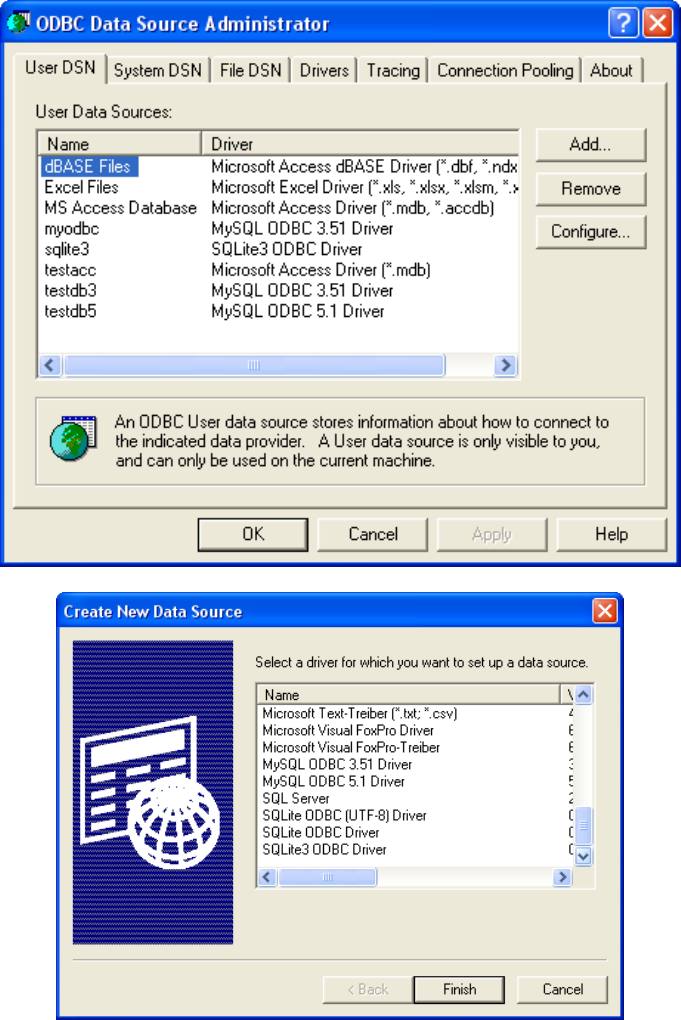
Figure 2: (Top) The main Data Sources (ODBC) dialog box from a Windows
XP system. (Bottom) The dialog box to select a driver that comes up when
the Add button is clicked.
24
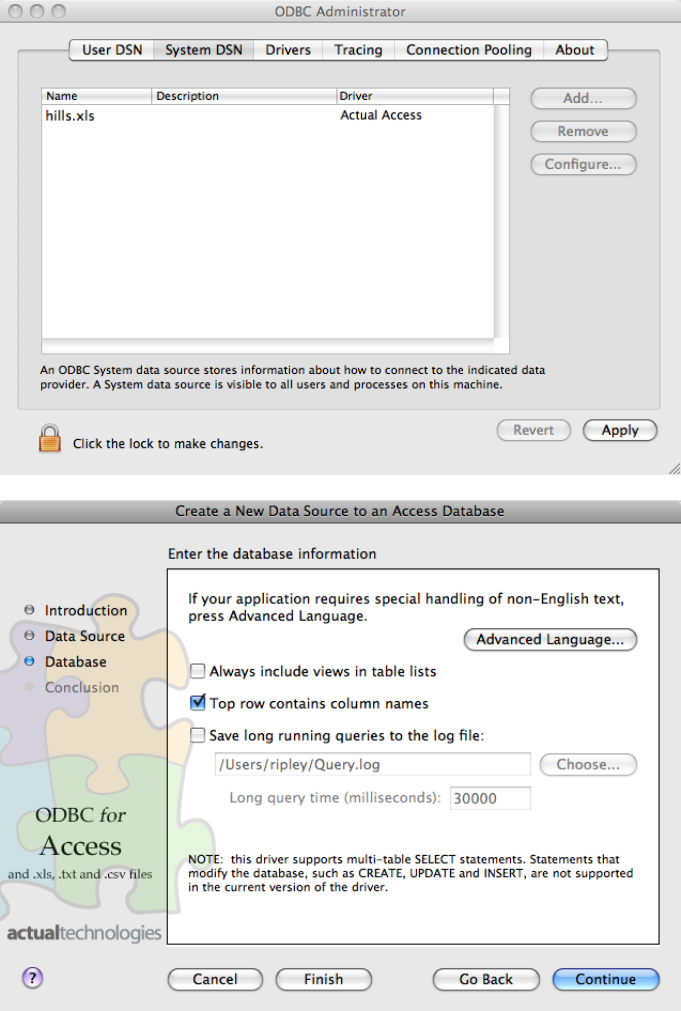
Figure 3: (Top) The main ODBC Administrator dialog box from a Mac
OS X system. (Bottom) A page of the dialog box to specify a DSN for the
Actual Technologies Access/Excel driver.
25
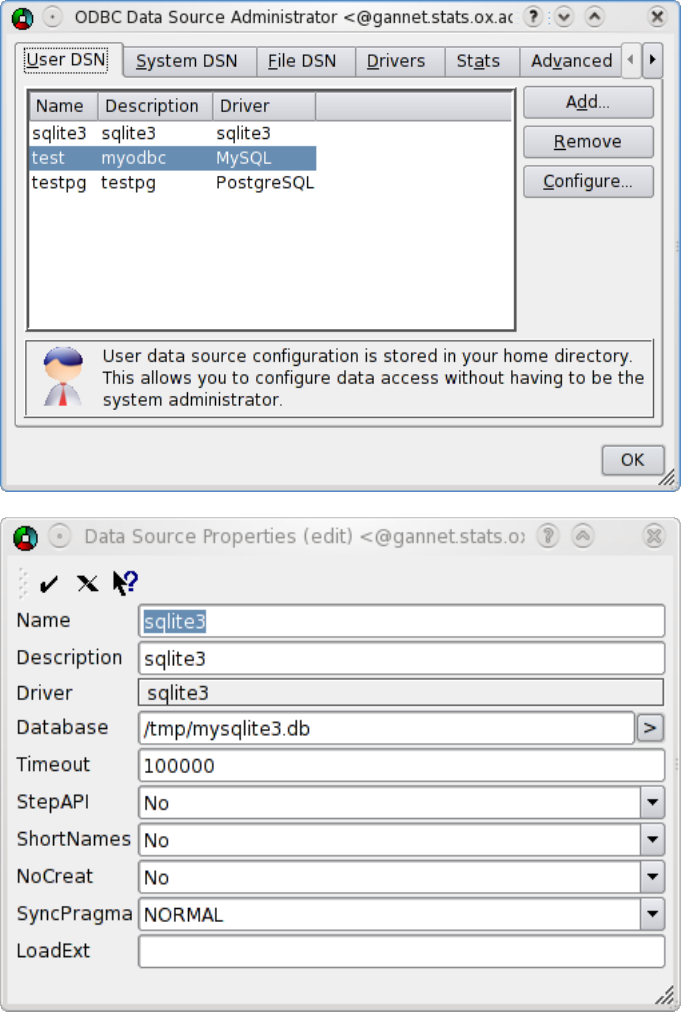
Figure 4: The dialog box of ODBCconfig on Fedora 10 Linux, and the Con-
figure screen for the SQLite driver.
26
[test_mysql]
Description = test MySQL
Driver = MySQL
Trace = No
Server = localhost
Port = 3306
Database = test
[test_mysql5]
Description = myodbc5
Driver = MySQL ODBC 5.1 Driver
Server = gannet
Port = 3306
Database = ripley
[test_pg]
Description = test PostgreSQL
Driver = PostgreSQL
Trace = No
TraceFile =
ServerName = localhost
UserName = ripley
Port = 5432
Socket =
Database = testdb
ReadOnly = 0
[test_sqlite3]
Description = test SQLite3
Driver = sqlite3
Database = /tmp/mysqlite3.db
Figure 5: A personal (˜/.odbc.ini) file from a Fedora 10 Linux system
using unixODBC.
Command-line programs isql (unixODBC) and iodbctest (iODBC) can be
used to test a DSN that has been created manually in a file. The formats
are
$ isql -v dsn db_username db_password
$ iodbctest
Both give a command-line SQL interface: use quit to terminate.
27
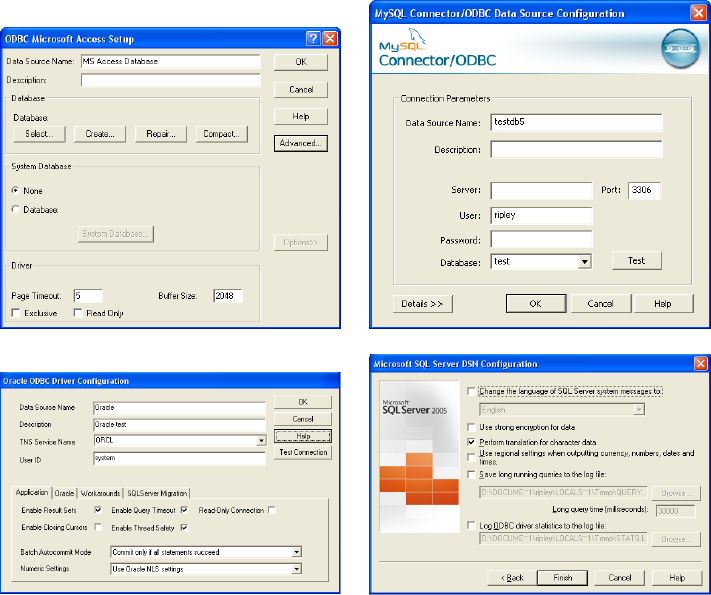
Figure 6: Parts of the ODBC driver configuration screens on Windows XP
for Microsoft Access, MySQL Connector/ODBC 5.1, Oracle’s ODBC driver
and Microsoft SQL Server.
28
