Digi Tech RP70 Multi Effects Owner’s Manuals RP70Manual18 0491 A
User Manual: DigiTech RP70 Multi Effects Owner’s Manuals Troubleshoot DigiTech RP70 Multi Effects s |
Open the PDF directly: View PDF  .
.
Page Count: 48
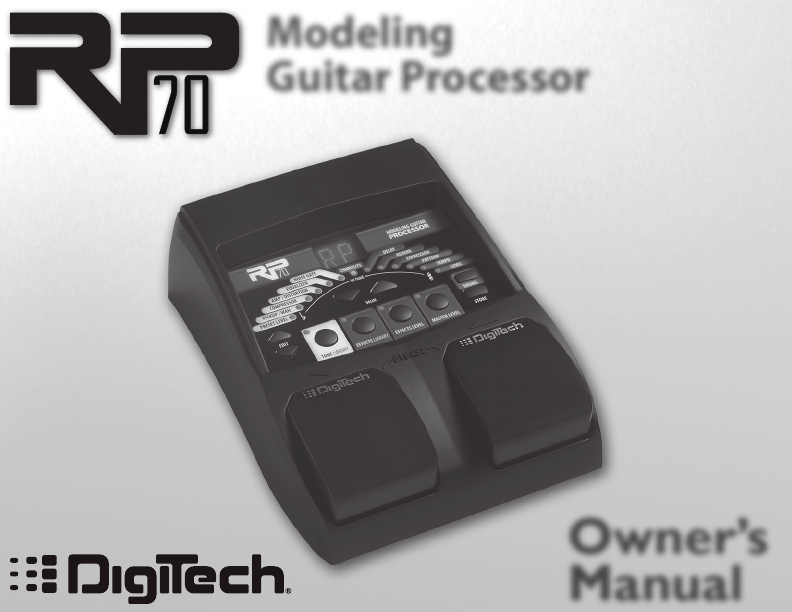
Modeling
Guitar Processor
Owner’s
Manual
WARNING FOR YOUR PROTECTION
PLEASE READ THE FOLLOWING:
KEEP THESE INSTRUCTIONS
HEED ALL WARNINGS
FOLLOW ALL INSTRUCTIONS
THE APPARATUS SHALL NOT BE EXPOSED TO DRIPPING OR SPLASHING LIQUID
AND NO OBJECT FILLED WITH LIQUID, SUCH AS VASES, SHALL BE PLACED
ON THE APPARATUS.
CLEAN ONLY WITH A DRY CLOTH.
DO NOT BLOCK ANY OF THE VENTILATION OPENINGS. INSTALL IN ACCORDANCE
WITH THE MANUFACTURER’S INSTRUCTIONS.
DO NOT INSTALL NEAR ANY HEAT SOURCES SUCH AS RADIATORS, HEAT
REGISTERS, STOVES, OR OTHER APPARATUS (INCLUDING AMPLIFIERS) THAT
PRODUCE HEAT.
ONLY USE ATTACHMENTS/ACCESSORIES SPECIFIED BY THE MANUFACTURER.
UNPLUG THIS APPARATUS DURING LIGHTNING STORMS OR WHEN UNUSED FOR
LONG PERIODS OF TIME.
Do not defeat the safety purpose of the polarized or grounding-type plug. A
polarized plug has two blades with one wider than the other. A grounding
type plug has two blades and a third grounding prong. The wide blade or
third prong are provided for your safety. If the provided plug does not fit
your outlet, consult an electrician for replacement of the obsolete outlet.
Protect the power cord from being walked on or pinched particularly at
plugs, convenience receptacles, and the point where they exit from the
apparatus.
Use only with the cart stand, tripod bracket, or table specified by the manu-
facture, or sold with the apparatus. When a cart is used, use caution when
moving the cart/apparatus combination to avoid injury from tip-over.
Refer all servicing to to qualified service personnel. Servicing is required
when the apparatus has been damaged in any way, such as power-supply
cord or plug is damaged, liquid has been spilled or objects have fallen into
the apparatus, the apparatus has been exposed to rain or moisture, does not
operate normally, or has been dropped.
POWER ON/OFF SWITCH: The Power switch used in this piece of equipment
DOES NOT break the connection from the mains.
MAINS DISCONNECT: The plug shall remain readily operable. For rack-mount
or installation where plug is not accessible, an all-pole mains switch with a
contact separation of at least 3 mm in each pole shall be incorporated into
the electrical installation of the rack or building.
DECLARATION OF CONFORMITY
Manufacturer’s Name: DigiTech
Manufacturer’s Address: 8760 S. Sandy Parkway
Sandy, Utah 84070, USA
declares that the product:
Product name: RP 70
Product option: all (requires Class II power adapter that conforms to the requirements of EN60065,
EN60742, or equivalent.)
conforms to the following Product Specifications:
Safety: IEC 60065 (7th ed. 2001)
EMC: EN 55013 (2001 + A1)
EN 55020 (1991)
Supplementary Information:
The product herewith complies with the requirements of the Low Voltage Directive 72/23/EEC and the EMC Directive
89/336/EEC as amended by Directive 93/68/EEC.
Vice-President of Engineering-MI
8760 S. Sandy Parkway
Sandy, Utah 84070, USA
Date: August 27, 2007
European Contact: Your local DigiTech Sales and Service Office or
Harman Music Group
8760 South Sandy Parkway
Sandy, Utah 84070 USA
Ph: (801) 566-8800
Fax: (801) 568-7583
Warranty
We at DigiTech® are very proud of our products and back up each one we sell with the following warranty:
1. The warranty registration card must be mailed within ten days after purchase date to validate this
warranty.
2. DigiTech warrants this product, when used solely within the U.S., to be free from defects in materials and
workmanship under normal use and service.
3. DigiTech liability under this warranty is limited to repairing or replacing defective materials that show
evidence of defect, provided the product is returned to DigiTech WITH RETURN AUTHORIZATION,
where all parts and labor will be covered up to a period of one year. A Return Authorization number may
be obtained from DigiTech by telephone. The company shall not be liable for any consequential damage as a
result of the product’s use in any circuit or assembly.
4. Proof-of-purchase is considered to be the burden of the consumer.
5. DigiTech reserves the right to make changes in design, or make additions to, or improvements upon this
product without incurring any obligation to install the same on products previously manufactured.
6. The consumer forfeits the benefits of this warranty if the product’s main assembly is opened and tampered
with by anyone other than a certified DigiTech technician or, if the product is used with AC voltages outside
of the range suggested by the manufacturer.
7. The foregoing is in lieu of all other warranties, expressed or implied, and DigiTech neither assumes nor
authorizes any person to assume any obligation or liability in connection with the sale of this product. In no
event shall DigiTech or its dealers be liable for special or consequential damages or from any delay in the
performance of this warranty due to causes beyond their control.
NOTE: The information contained in this manual is subject to change at any time without notification. Some
information contained in this manual may also be inaccurate due to undocumented changes in the product or
operating system since this version of the manual was completed. The information contained in this version of
the owner’s manual supersedes all previous versions.
Table of Contents
Section One - Introduction
Getting Acquainted .......................................................... 1
Included Items .................................................................. 1
About the RP70 ............................................................... 2
Performance Mode ....................................................... 2
Edit Mode ........................................................................2
Bypass Mode .................................................................. 2
Tuner Mode .................................................................... 2
Tone Library Button...................................................... 4
Effects Library Button .................................................. 4
Effects Level Button ...................................................... 4
Master Level Button .....................................................4
Presets ............................................................................. 5
A Guided Tour of the RP70 ...........................................6
Front Panel ..................................................................... 6
Rear Panel .....................................................................10
Getting Started ...............................................................13
Making Connections ......................................................13
Mono Operation - Amplifier ....................................13
Stereo Operation ........................................................14
Applying Power ..............................................................16
Section Two - Editing Functions
Editing/Creating Presets ...............................................17
Storing/Copying a Preset..............................................18
Section Three - Models and Effects
About the Models ..........................................................20
Model Definitions ..........................................................21
Pickup/Wah .....................................................................21
Compressor ....................................................................22
Amp/Distortion Models ...............................................23
EQ. .....................................................................................25
Noise Gate ......................................................................25
Chorus/FX. ......................................................................26
Chorus. ..........................................................................26
Flanger ...........................................................................27
Phaser ............................................................................27
Tremolo ..........................................................................27
Panner. ............................................................................27
Vibrato ............................................................................27
Rotary Speaker ............................................................27
YaYaTM .............................................................................28
Auto Ya™ ......................................................................28
Step Filter ......................................................................28
Envelope Filter .............................................................28
Detune ...........................................................................28
Pitch Shift ......................................................................28
DigiTech Whammy™ ..................................................29
Delay .................................................................................29
Reverb ..............................................................................31
Section Four - Other Functions
Optional Expression Pedal ...........................................32
Drum Machine ................................................................34
Factory Reset ..................................................................34
Section Five - Appendix
Specifications ...................................................................35
Tone Library ....................................................................37
Effects Library .................................................................38
Preset List ........................................................................39
Disclaimer: DigiTech, Production Modeling, Grunge, Death Metal, DOD, DigiTech Whammy, Multi-Chorus, Ya Ya,
Johnson Amplification and AudioDNA2 are trademarks of Harman International Industries, Incorporated in the
U.S. and other countries. Fender Tweed Deluxe, Fender Blackface Twin Reverb, Fender Twin Reverb, Marshall
Super Lead, Marshall Slant, Marshall Master Volume, Marshall Straight, Vox AC30, Mesa Boogie, Dunlop Cry Baby,
Vox Clyde McCoy Wah, Ibanez Tube Screamer, Boss DS-1, Electro-Harmonix Big Muff are products of DigiTech’s
competitors and trademarks of their respective companies in the U.S. and other countries and are not associ-
ated or affiliated with DigiTech or Harman International Industries, Incorporated. © 2007 Harman International
Industries, Inc. All Rights Reserved.

Section 1 - Introduction
Getting Acquainted
Congratulations on your purchase of the RP70. You now have an incredibly advanced modeling
guitar processor that can keep up with your creative impulses and even increase them. Armed
with DigiTech®’s patented AudioDNA2® custom audio DSP chip, the RP70 gives you a huge selec-
tion of tones and effects, right at your fingertips. When you easily select an amp or distortion tone
and an effects chain from the Tone Library or the Effects Library, you’ll appreciate the accuracy in
each model, and the dynamic interaction in each tone. Add a built-in drum machine, and you have
the RP70: the key to unlock your creative potential.
Included Items
Before you get started, please make sure that the following items have been included:
• RP70
• PS200R Power Supply
• Warranty Card
The utmost care was taken while your RP70 was being manufactured. Everything should be in-
cluded and in perfect working order. If anything is missing, contact the factory at once. Please help
us become acquainted with you and your needs by completing your warranty card or registering
online at www.digitech.com. It is your safeguard should a problem arise with your RP70.
1

2
About the RP70
Performance Mode
When you first apply power to the RP70, it powers up in Performance mode. Performance mode
provides access to all of the presets within the RP70 via the Up and Down Footswitches. The
Edit Up/Down buttons cycle through the effects in the matrix.
Edit Mode
When you select an Effect with the Edit Up/Down buttons, you can adjust the Effect with the
Value Up/Down buttons. (For descriptions of the Effects and their parameters, see page 20.)
When you make changes to a preset’s Effects, you must store the changes or they will be lost
when you select a different preset or disconnect power to the RP70. See page 18 for a description
of the Store procedure.
Bypass Mode
The RP70 presets can be bypassed for a clean, unprocessed guitar signal. To bypass the RP70, press
and release both Footswitches simultaneously. The Display reads indicating the preset is
bypassed. In Bypass mode, all buttons are disabled. Press either Footswitch to exit Bypass mode
and return the RP70 to the last preset used.
Tuner Mode
The Tuner in the RP70 allows you to quickly tune or check the tuning on your guitar. Enter Tuner
mode by pressing and holding both Footswitches simultaneously. The Display briefly shows
indicating that you are in Tuner mode. To begin tuning, play a note on your guitar (a harmonic
at the 12th fret usually works best). The Display shows the note being played. The Matrix LEDs
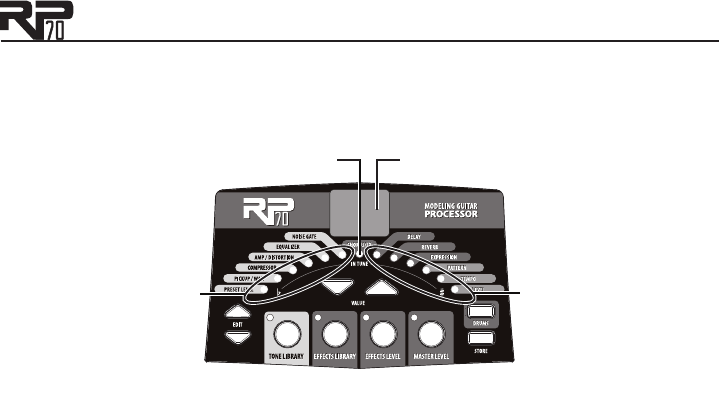
3
indicate whether you are sharp or flat. The left 6 red LEDs indicate the note is flat and should be
tuned up. The right 6 red LEDs indicate the note is sharp and should be tuned down. The center
LED indicates the note is in tune. The output is muted in Tuner mode; rock the Expression Pedal
to regain volume.
Display shows
note played
Right LEDs indicate
note is sharp
Center LED indicates
note is in tune
Left LEDs indicate
note is flat
In Tuner mode, you can change your tuning reference with the Vallue Up/Down buttons. The
default factory setting is A=440 Hz (displayed as ). Other tuning references are A=A flat (dis-
played as ), A=G (displayed as ), and A=G flat (displayed as ). The display window will briefly
flash the currently selected tuning preference.
Exit Tuner mode by pressing either Footswitch.

4
Tone Library Button
You can press this button at any time (except in Bypass or Tuner mode) to access the Tone Library,
and then use the Value Up/Down buttons to select from a variety of genre-based amp tone
defaults ranging from Blues to Metal to Country. Behind the scenes, the Compressor, Distortion,
Pickup/Wah effects, Amp/Cabinet model, and EQ are configured to create a specified tone. You
can further refine the sound by editing the preset (see Editing/Creating Presets on page 17). Chang-
ing between different Tone Library defaults does not change the Chorus/FX, Delay or Reverb,
letting you experiment with different amp styles quickly in the context of the current effect chain.
Effects Library Button
You can press this button at any time (except in Bypass or Tuner mode) to access the Effects Li-
brary and then use the Value Up/Down buttons to select from a variety of post-amplifier model
effect chains (Chorus, Chorus + Delay, Delay + Reverb, etc.). You can further refine the sound by
editing the preset (see Editing/Creating Presets on page 17). Changing between different Effects Li-
brary defaults does not change the Compressor, Distortion, Amp/Cabinet model, and EQ settings,
letting you experiment with different effect chains quickly in the context of the current amp tone.
Effects Level Button
You can press this button at any time (except in Bypass or Tuner mode) to access the Effects Level.
This button changes the relative level of the post-amp effects (Chorus/FX, Delay, and Reverb). This
can be thought of as an effects mix control, where increasing this button’s value increases the level
of these effects and decreasing its value decreases the level of these effects.
Master Level Button
Press this button and use the Value Up/Down buttons to set the overall output level of the RP70.
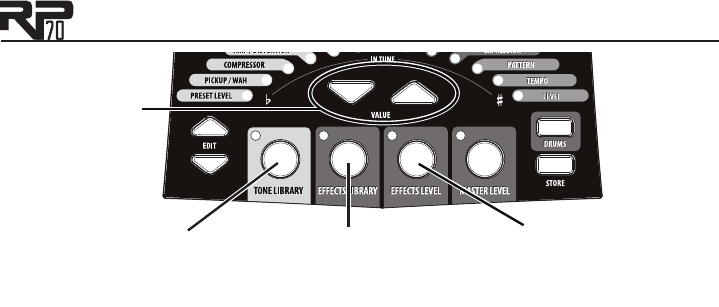
5
1. Access the Tone Library
with this button and select
a tone with the Value buttons.
2. Access the Effects Library
with this button and select
a tone with the Value buttons.
3. Access the effects level
with this button and adjust the
level with the Value buttons.
Value
Buttons
The Tone Library button, Effects Library button, and Effects Level button make it easy
to quickly load preset tones, effects, and effects chains.
To learn about storing changes to presets, see page 18.
Presets
Presets are numbered locations of programmed sounds which reside in the RP70. Presets are re-
called with the Footswitches. The active effects in each preset are indicated by lighted LEDs in the
Effect Matrix. The RP70 comes with 50 User presets (1-50) and 50 Factory presets (51-00). The
User presets are locations where your creations may be stored. The Factory presets do not allow
you to store any changes to them. From the factory, the 50 User presets are exact duplicates of
the 50 Factory presets. This allows you to create your own presets without losing the sounds that
came with the RP70.
6
A Guided Tour of the RP70
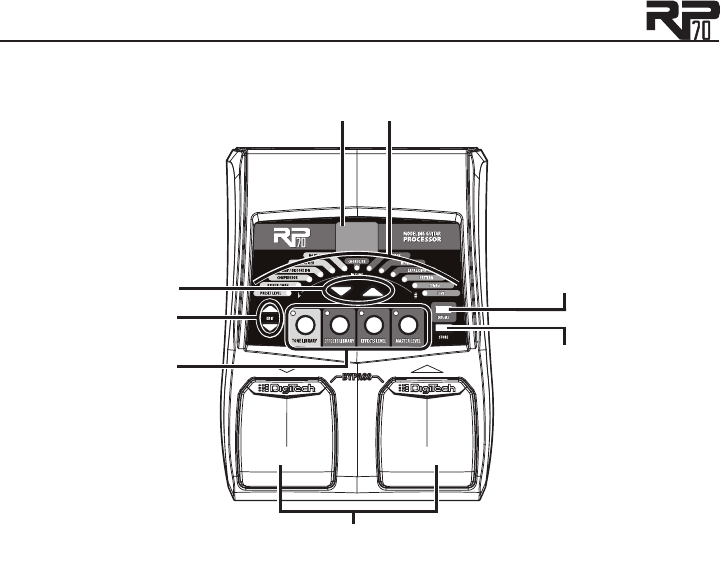
Front Panel
1
2
3
4
5
7
8
6

7
Footswitches
These two Footswitches select presets, access the Tuner, or bypass the RP70. The
Footswitch on the right will select the next preset up, and the Footswitch on the left will
select the next preset down. Pressing both Footswitches together will bypass the currently
selected preset. Pressing and holding both Footswitches for 2 seconds will access the Tuner.
Press either Footswitch to exit Bypass or Tuner mode.
Tone Library, Effects Library, Effects Level, and Master Level Buttons
At the heart of creating presets in the RP70 are the Tone Library, Effects Library, and Effects
Level buttons. By pressing one of these buttons and using the Value Up/Down buttons,
you can select from 20 amp/distortion tones, 20 effects chains, or the overall post amp/dis-
tortion effects level respectively. The Master Level button accesses the master output vol-
ume parameter for the RP70. Each button is described in detail below.
Tone Library Button
The Tone Library button accesses a library of preset amp tones. Press this button
and then use the Value Up/Down buttons to select from a variety of genre-based
amp tones ranging from Blues to Metal to Country (see page 37 for a list of available
tones). Behind the scenes, the Pickup/Wah, Compressor, Amp/Distortion, and EQ are
configured to create a specified tone. You can further refine the sound by editing the
preset (see Editing/Creating Presets on page 17). Changing between different Tone Library
selections does not change the Chorus/FX, Delay, or Reverb settings, allowing you to
experiment with different amp styles quickly in the context of the current effect chain.
The Display will read (for “custom”) when any of the associated effects have been
changed from a default library setting.
1.
2.

8
Effects Library Button
The Effects Library button accesses a library of preset effect configurations. Press this
button and use the Value Up/Down buttons to select a variety of post-amplifier model
effect chains (Chorus, Chorus + Delay, Delay + Reverb, etc…). You can further refine
the sound by editing the preset (see Editing/Creating Presets on page 17). Changing be-
tween different Effects Library selections does not change the Pickup/Wah, Compressor,
Amp/Distortion and EQ settings, allowing you to experiment with different effect chains
quickly in the context of the current amp tone. The Display will read (for “custom”)
when any of the associated effects have been changed from a default library setting.
Effects Level Button
The Effects Level button lets you adjust the levels of post-amp model effects (Cho-
rus/FX, Delay, and Reverb). Press this button and use the Value Up/Down buttons to
change the relative level of the post-amp effects (Chorus/FX, Delay, and Reverb). Think
of it as an effects mix control where increasing this setting increases the level of these
effects, while decreasing this setting decreases the level of these effects.
Master Level Button
The Master Level button lets you adjust the output level of the RP70. Press this button
and use the Value Up/Down buttons to change the output level of the RP70.
Edit Up/Down
The Edit Up/Down buttons select which effect is to be edited. As each effect is selected,
the Display shows the effect setting. A decimal in the bottom right corner of the Display
turns on when a preset has been modified. The Edit Up/Down buttons are also used to
change the RP70 Drum Machine parameters (Note that Drum Machine settings are global
for all presets and are not saved with the preset).
3.

9
Value Up/Down
The Value Up/Down buttons are used for editing effects, navigating Tone/Effects Libraries,
adjusting Effects and Master Levels, and adjusting Drum Machine settings.
Display
The Display provides information for different functions depending on the mode that has
been selected. In Performance mode, the Display shows the currently selected preset num-
ber. In Edit mode, the Display shows the value of the effect being adjusted. A decimal in
the bottom right corner of the Display turns on when a preset has been modified. In Tuner
mode, the Display shows the note being played.
Matrix
The matrix provides information regarding the current preset and Effect edit functions. In
Performance mode, the LEDs next to each Effect provide a visual indication of which Effects
are in use for the currently selected preset. While editing a preset, the LEDs indicate the
Effect currently selected for editing. In Tuner mode, the LEDs indicate whether the note
played is sharp, flat, or in tune.
Drums
The Drums button is used to turn on and off the RP70’s built-in drum machine. When the
Drums button is turned on, the Drums button LED lights and the selected drum pattern
plays continuously. Use the Value Up/Down buttons to change the pattern of the drum
machine. See page 34 for more information about the drum machine.
Store
The Store button is used to save your changes to the User presets. See page 18 for more
information about storing presets.
4.
5.
6.
7.
8.
10
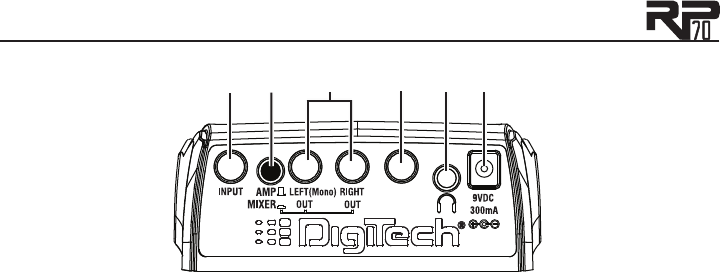
Rear Panel
CONTROL
IN
1 2 3 5 6
4
Input
Connect your instrument to this high-impedance TS input.
Amp / Mixer
This button optimizes the RP70’s outputs for use when plugged into a guitar amp or a
mixer/recording device. When set to Mixer (“In” position), the outputs are optimized for
connecting to a mixer, recording device or headphones. When set to Amp (“Out” position),
the outputs are optimized for running directly in to the input of a guitar amp.
Left (Mono) and Right Outputs
Connect the Left (Mono) output to the input of a single amplifier (or mixer input) for mono
operation. Connect the Left and Right outputs to the inputs of 2 amplifiers (or 2 mixer
channels) for stereo operation.
1.
2.
3.

11
Control In
Connect a passive volume pedal to this jack to control Volume, Wah, and DigiTech®
WhammyTM, or a variety of other effect parameters in the RP70.
Headphones
Connect a pair of stereo headphones to this 1/8" jack. For proper frequency response,
the Amp/Mixer switch should be set to Mixer (“in” position) when using headphones.
Headphones with an impedance of 100 Ohms or less are recommended.
Note: The Headphones output can have either a mono or stereo signal, depending on what
1/4" outputs are connected. If neither (or both) 1/4" outputs are connected, the Headphones
output will be in stereo. If a cable is connected to the Left (Mono) 1/4" output only, the Head-
phones output will be in mono.
Power Input
Connect only the DigiTech PS200R power supply to this jack.
4.
5.
6.

12
13
Getting Started
Making Connections
There are several different connection options available with the RP70. Before connecting the
RP70, make sure that the power to your amplifier and the RP70 is turned off. There is no power
switch on the RP70. To turn the RP70 on or off, connect or disconnect the included PS200R
power supply from the Power Input jack.
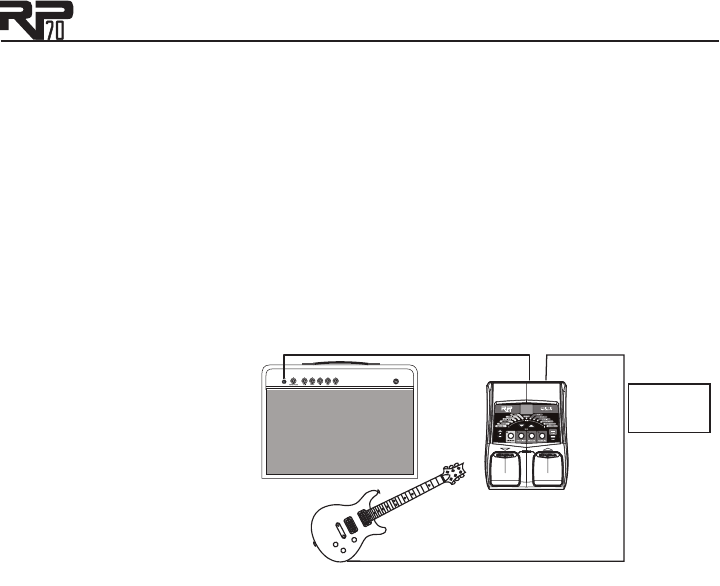
Mono Operation - Amplifier
Connect your guitar to the Input of the RP70. Connect a single mono instrument cable from the
Left (Mono) output of the RP70 to the instrument input or effect return on your amplifier. Set
the Amp/Mixer switch to Amp.
Guitar Amp Input/
Effect Return
Left (Mono)
Output Input
Amp/Mixer
switch set to
Amp.
NOTE: When using a
guitar amp, it may be best to
connect the Output of the
RP70 to the effect return of
the amplifier.
14
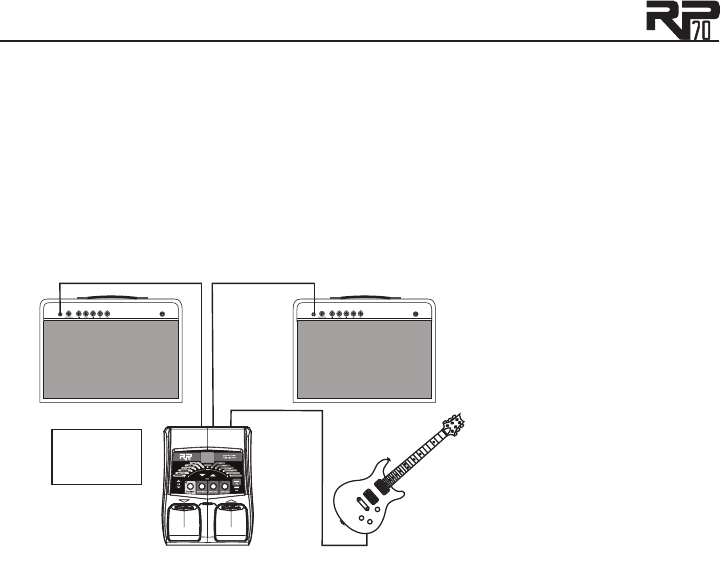
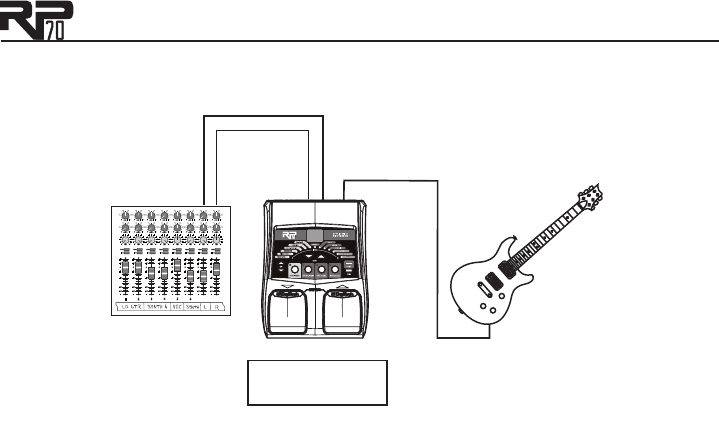
Stereo Operation
For stereo operation connect the guitar to the Input of the RP70. Connect one cable to the
RP70’s Left (Mono) output, and another cable to the RP70’s Right output. Connect one cable
to the input of one amplifier, channel of a mixer, or power amp. Connect the second cable to a
second amplifier, second channel of a mixer, or power amp. If connecting to a mixing console, set
the pan controls of the mixer channels hard left and right in order to retain stereo separation. If
connecting to a mixer, set the Amp/Mixer switch to Mixer. If connecting to two amplifiers, set
the Amp/Mixer switch to Amp.
Stereo Amp Setup
Guitar Amp Input/Effect Returns
Outputs Input
Amp/Mixer
switch set to
Amp.
NOTE: When using a guitar
amp, it may be best to con-
nect the Output of the RP70
to the effect return of the
amplifier.
15
Stereo Mixer Setup
Outputs
Instrument Input
Pan
Mute
-10
0
+5
+10
-20
-30
-
-5
L / R
Mute
L / R
Mute
L / R
Mute
L / R
-5
-4
-3
-2
-1 0+1
+2
+3
+4
+5 Pan
-5
-4
-3
-2
-1 0+1
+2
+3
+4
+5 Pan
-5
-4
-3
-2
-1 0+1
+2
+3
+4
+5 Pan
-5
-4
-3
-2
-1 0+1
+2
+3
+4
+5 Pan
-5
-4
-3
-2
-1 0+1
+2
+3
+4
+5 Pan
-5
-4
-3
-2
-1 0+1
+2
+3
+4
+5 Pan
-5
-4
-3
-2
-1 0+1
+2
+3
+4
+5 Pan
-5
-4
-3
-2
-1 0+1
+2
+3
+4
+5
1 2 3 4
-10
0
+5
+10
-20
-30
-
-5
-10
0
+5
+10
-20
-30
-
-5
-10
0
+5
+10
-20
-30
-
-5
Mute
L / R
5
-10
0
+5
+10
-20
-30
-
-5
Mute
L / R
6
-10
0
+5
+10
-20
-30
-
-5
Mute
L / R
-10
0
+5
+10
-20
-30
-
-5
Aux 1
0
2
4 6
8
10
Aux 2
0
2
4 6
8
10
Aux 1
0
2
4 6
8
10
Aux 2
0
2
4 6
8
10
Aux 1
0
2
4 6
8
10
Aux 2
0
2
4 6
8
10
Aux 1
0
2
4 6
8
10
Aux 2
0
2
4 6
8
10
Aux 1
0
2
4 6
8
10
Aux 2
0
2
4 6
8
10
Aux 1
0
2
4 6
8
10
Aux 2
0
2
4 6
8
10
Aux 1
0
2
4 6
8
10
Aux 2
0
2
4 6
8
10
Aux 1
0
2
4 6
8
10
Aux 2
0
2
4 6
8
10
Mute
L / R
-10
0
+5
+10
-20
-30
-
-5
Mixer
Amp/Mixer switch
set to Mixer
16
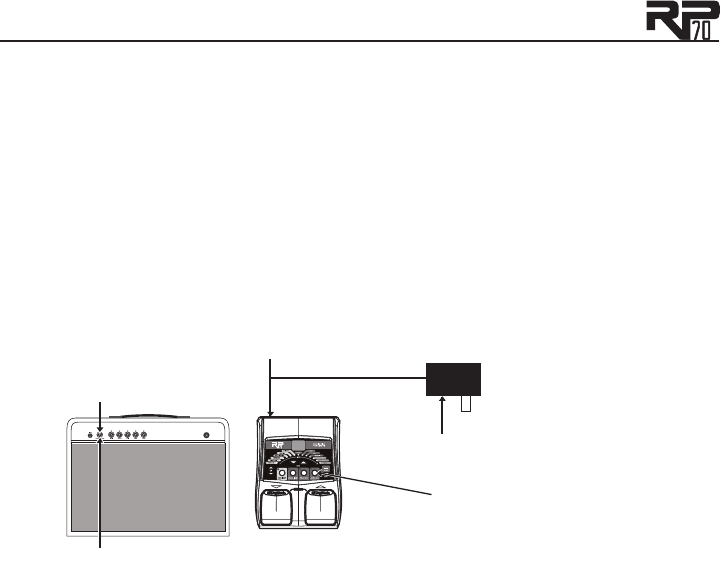
Applying Power
Before applying power to anything, set your amp(s) to a clean tone and set the tone controls to
a flat EQ response (on most amps, this would be 0 or 5 on the tone controls). Then follow the
steps listed below.
Turn the amp volume all the way down.
Connect the plug of the PS200R power supply to the power jack on the rear panel of the
RP70.
Connect the other end of the PS200R power supply to an AC outlet. Use the Master
Level button and the Value Up/Down buttons to set the RP70’s Master Level to “0”.
Turn the power of your amplifier(s) to the on position and adjust the volume(s) to a nor-
mal playing level.
Use the Master Level button and the Value Up/Down buttons to gradually increase the
RP70’s Master Level to achieve the desired volume.
4. Turn amp volume up
1. Turn amp volume down
2. Connect PS200R to power jack
3. Connect PS200R to AC outlet
and set the RP70’s Master
Level to “0”
5. Set the RP70’s Master Level to the
desired listening volume
1.
2.
3.
4.
5.

17
Section Two - Editing Functions
Editing/Creating Presets
The RP70 is designed to make preset editing and creation easy and intuitive. When creating your
own sound, you must first start with an existing preset. Note that the preset you begin with
doesn’t have to be in the memory location you intend to have it reside, since you can store it to
any User preset location during the store procedure.
The easiest way to start is by using the Tone Library and Effects Library buttons. The Tone
Library button gives you access to a variety of pre-programmed amp/distortion tones (see page
37) based on different musical styles. The Effects Library button then lets you select from a pal-
ette of effects chains (see page 38), from simple delays to full multi-effect signals with modulation,
delay and reverb. Use the Effects Level Button to easily increase or decrease the Chorus/FX,
Delay and Reverb levels if desired. Using these three controls should get you close to a sound you
are after. From there you can then use the Edit buttons to select individual Effects, and the Value
Up/Down buttons to adjust their settings.
To edit and create a custom preset:
Use the Footswitches to select the preset you wish to edit. If you are trying to find some-
thing different from the existing presets, begin by using the Tone Library, Effects Library,
Effects Level and Value Up/Down buttons to get close to a sound you want.
Once you have a sound close to what you are after, begin editing the Effects by pressing the
Edit Up/Down buttons and selecting the Effect you want to adjust.
To turn an Effect on, select it with the Edit Up/Down buttons. Each Effect has multiple set-
tings to select from. Use the Value Up/Down buttons to change the values for the selected
Effect To turn an Effect off, press and hold the Value Down button until appears in the
Display. (For EQs, , , and are the settings with no boost or cut.)
1.
2.
3.

18
Anytime a stored value within a preset is changed, you need to store the changes (with the Store
button), or the changes will be lost. Changing presets, or turning the power off before storing any
changes erases any edits made and the RP70 will revert to the stored values for the preset.
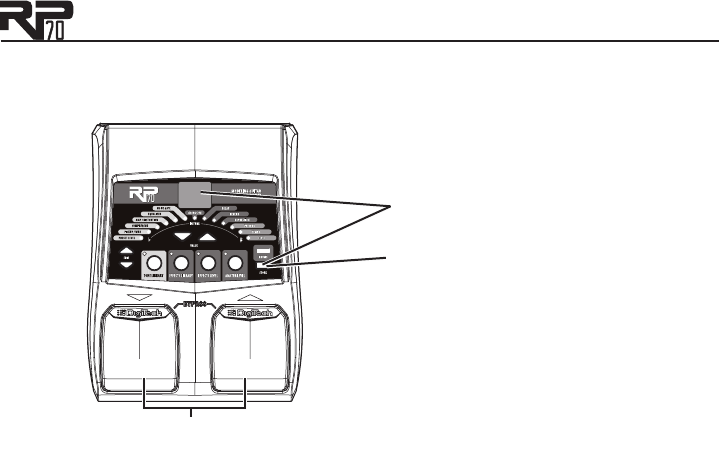
Storing/Copying a Preset
Once the preset has been modified to your liking, you may store your settings to any of the
50 User preset locations (presets 1-50). The following steps outline the procedure for storing
changes to a preset or copying a preset to a different location:
Press the Store button once and the current Preset location will flash in the Display. This
is asking you to select a new User Preset location where your new sound will reside.
If desired, select a new User Preset location using the Footswitches.
Press the Store button again to save the changes.
The procedure for copying one Preset to another Preset location is the same. Simply use the
Footswitches to select the Preset that you want to copy, then follow the steps listed above.
1.
2.
3.
19
Storing/Copying a Preset
2. Select a destination
with the Footswitches.
1. Press the Store button;
the Preset number flashes.
3. Press the Store button
again to save your changes.
20
Section Three - Models and Effects
About the Models
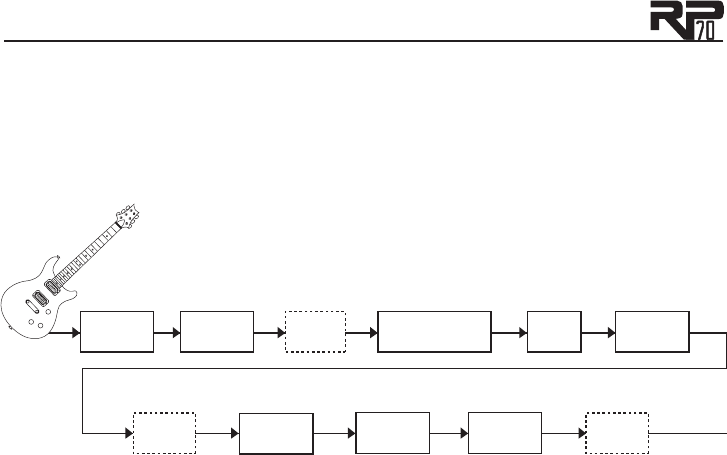
The RP70 can be thought of as several different “virtual” amplifiers and individual, high-tech
stompboxes in a single programmable package. With stompboxes, the order in which they are
connected affects the overall sound. The RP70 has placed the Amp and Effect models in an order
for optimum results. The following diagram shows the order in which they are connected.
Pickup/
Wah Compressor EQ
Amp-Cabinet/Distortion
Modeling
Volume Pedal
(Pre)
Volume Pedal
(Post)
Chorus/FX
(Whammy)
Chorus/FX
Noise Gate
Delay Reverb

21
Model Definitions
Each Amp and Effect model within the RP70 has multiple settings to select from. Use the Value
Up/Down buttons to change the values for the selected Effect. The following overview of the
RP70’s Effects outlines the settings each Effect contains.
Pickup/Wah
The Pickup Simulator provides the thick tone of a humbucker pickup to a guitar with single coil
pickups, or the bright, edgy sound of a single coil pickup to a guitar with a humbucker. This gives
you the best of both worlds without having to change guitars during a performance. Wah is an ef-
fect controlled by an optional Expression Pedal making the guitar sound as if it’s saying “Wah.” See
page 32 for information on how to link the Wah effect to an Expression Pedal.
The Pickup/Wah settings are:
Pickup/Wah is turned off.
Makes a single coil pickup sound like a humbucker.
Makes a humbucker pickup sound like a single coil.
Dunlop® Cry Baby
TM wah model
Vox® Clyde McCoy
TM wah
Full range wah

22
Compressor
A Compressor is used to increase sustain, tighten up guitars, and prevent the signal from clipping
the input of other effects. It sets a maximum boundary for the strength of a signal.
The settings for the compressor effect are:
Compressor is turned off.
- Level of compression and sustain. Ratio is set to infinity:1.
Disclaimer: DigiTech, Production Modeling, Grunge, Death Metal, DOD, DigiTech Whammy, Multi-Chorus, Ya Ya,
Johnson Amplification and AudioDNA2 are trademarks of Harman International Industries, Incorporated in the
U.S. and other countries. Fender Tweed Deluxe, Fender Blackface Twin Reverb, Fender Twin Reverb, Marshall
Super Lead, Marshall Slant, Marshall Master Volume, Marshall Straight, Vox AC30, Mesa Boogie, Dunlop Cry Baby,
Vox Clyde McCoy Wah, Ibanez Tube Screamer, Boss DS-1, Electro-Harmonix Big Muff are products of DigiTech’s
competitors and trademarks of their respective companies in the U.S. and other countries and are not associ-
ated or affiliated with DigiTech or Harman International Industries, Incorporated. © 2007 Harman International
Industries, Inc. All Rights Reserved.

23
Amp/Distortion Models
The RP70 has 12 amp and 6 distortion models to choose from. Each model is identified by a
single letter and has nine settings (for example, through ), except Acoustic Guitar Simulator
and Direct, which only have one setting. As the setting increases, the amp/distortion gain increases.
Each amp model has a cabinet model assigned to it as shown in the following list.
Amp/Distortion is turned off.
Amp/Cabinet Models
Based on a ‘57 Fender® Tweed Deluxe® amp with a Fender® Tweed Deluxe 1x12 cabinet
Based on a ‘65 Fender Blackface Twin Reverb® amp with a Fender Twin Reverb 2x12
cabinet
Based on a ‘68 Marshall® Super Lead (Plexi) amp with a Johnson® Straight Celestion®
Vintage 30 4x12 cabinet
Based on a ‘77 Marshall Master Volume amp with a Marshall Straight Celestion G12-
T70 4x12 cabinet
Based on an ‘83 Marshall JCM800 amp with a Johnson Straight Celestion Vintage 30
4x12 cabinet
Based on a ‘63 Vox® AC30 Top Boost amp with an AC30 TB Jensen® Blue Back 2x12
cabinet
Based on an ‘01 Mesa/Boogie® Dual RectifierTM amp with a Johnson Straight Celestion
Vintage 30 4x12 cabinet
Based on a ‘96 Matchless® DC-30 amp with a Johnson Straight Celestion Vintage 30
4x12 cabinet
DigiTech® Solo amp model with a DigiTech Solo 4x12 cabinet model
DigiTech Metal amp model with a DigiTech Metal 4x12 cabinet model
DigiTech Bright Clean amp model with a DigiTech Bright Clean 4x12 cabinet model
DigiTech Clean Tube amp model with a cabinet model based on a Fender Twin Reverb
2x12 cabinet

24
Distortion Models
Based on Ibanez® TS-9 Tube ScreamerTM
Based on DOD® 250 Preamp/Overdrive
Based on Boss® DS-1TM Distortion
DigiTech® Grunge®
DigiTech Death Metal
Based on Electro Harmonix® Big Muff® Pi
Other
Acoustic Guitar simulator

25
EQ
The RP70’s EQ helps further shape your tone with Bass, Midrange, and Treble controls. The EQ
settings are:
Bass tone control. - cut bass frequencies by –12dB, –9dB, –6dB, and –3dB
respectively. has no boost or cut. - boost bass frequencies by 3dB, 6dB, 9dB,
and 12dB respectively.
Midrange tone control. - cut midrange frequencies by –12dB, –9dB, –6dB, and
–3dB respectively. has no boost or cut. - boost midrange frequencies by
3dB, 6dB, 9dB, and 12dB respectively.
Treble tone control. - cut treble frequencies by –12dB, –9dB, –6dB, and –3dB
respectively. has no boost or cut. - boost treble frequencies by 3dB, 6dB,
9dB, and 12dB respectively.
Noise Gate
The Noise Gate effect includes two models: a Silencer gate and an Auto Swell gate.
A silencer gate is designed to eliminate noise while you are not playing. The Silencer gate’s nine
settings () determine the threshold, which determines how loud a signal must be before it
can be heard. The higher the setting, the louder a signal must be in order to be heard.
The Auto Swell provides an automatic volume swell effect. The auto swell’s nine settings ()
determine the attack time (how quickly the swell grows from the note you play). The higher the
setting, the faster the swell grows.
The noise gate settings are:
Noise gate effect is turned off
Silencer gate. is the lowest threshold, is the highest threshold.

26
Auto Swell gate. is the fastest attack time, is the slowest attack time.
Chorus/FX
The Chorus/FX model actually contains twelve different modulation and pitch effects (described
on the following pages). Each effect includes nine settings which include a variety of configurations
that generally range from more subtle (lower settings) to more extreme (higher settings). The
Chorus/FX settings are:
Chorus/FX effect is turned off
Boss® CE-2 Chorus
Dual Chorus
Flanger
Phaser
Tremolo
Panner
Vibrato
Rotary Speaker
YaYa™
AutoYa™
Step Filter
Envelope Filter
Detune
Pitch Shift
DigiTech® Whammy™
Chorus
A Chorus adds a short delay to your signal. The delayed signal is modulated in and out of tune
and then mixed back with the original signal to create a thicker sound. The RP70 Chorus effect
includes a model based on the classic Boss® CE-2 Chorus and the DigiTech’s Dual Chorus. Chorus
settings are:
Boss CE-2 Chorus.
Dual Chorus.

27
Flanger
A Flanger uses the same principle as a Chorus but uses a shorter delay time and adds regeneration
(or repeats) to the modulating delay. This results in an exaggerated up and down sweeping motion
to the effect. Settings are .
Phaser
A phaser splits the incoming signal, and then changes the phasing of the signal. This signal is then
taken in and out of phase and mixed back in with the original signal. As the phasing changes, differ-
ent frequencies get canceled resulting in a warm sort of twisting sound. Settings are .
Tremolo
A Tremolo effect modulates the volume of the signal at an even rate. Settings are .
Panner
A Panner modulates the sound from left to right at an even rate. Settings are .
Vibrato
A Vibrato effect modulates the pitch of the incoming signal at an even rate. Settings are .
Rotary Speaker
Rotary Speaker is an emulation of a device that included a spinning horn and woofer. The rotation
of these two speakers produced an interesting combination of the sound panning from side to
side. This produced a slight pitch change due to the speed of the sound coming towards, and then

28
going away from the listener. Settings are .
YaYaTM
AutoYa combines the characteristics of a Wah and a Flanger, creating an almost human vowel char-
acteristic as if the guitar were saying “Yah.” Control the effect with an optional Expression Pedal.
Settings are .
AutoYa™
Similar to the YaYa effect described above, AutoYa™ automatically provides this animation to the
sound at an even rate. Settings are .
Step Filter
The Step Filter is like an automatic “random wah” with a square waveform. Settings are .
Envelope Filter
The Envelope Filter is a dynamic Wah effect that alters your sound based upon how hard you play.
Settings are .
Detune
A Detuner makes a copy of your incoming signal, takes the copied signal slightly out of tune from
the original, then mixes the two signals together. The result is a doubling type of effect as if two
guitars were playing the same part together. Settings are .
Pitch Shift
A Pitch Shifter copies the incoming signal, then shifts the pitch of the copy to a different note. The
shifted note is then mixed back with the original signal, sounding as if two guitars were playing dif-

29
ferent notes. Settings are .
DigiTech® Whammy™
The DigiTech® WhammyTM is an effect that uses an optional Expression Pedal to bend the pitch
of the incoming signal, or add a bendable harmony with the original signal. As the Pedal is moved,
the note bends either up or down. When DigiTech Whammy is selected, it is automatically placed
before the Amp modeling as shown in the block diagram on page 20. Settings are .
Delay
Delay is an effect that will record a portion of the incoming signal, and then play it back a short
time later. The recording can repeat just once or several times.
The RP70 offers four different delay models (Analog Delay, Digital Delay, Pong Delay, and Tape
Delay), each with 5 seconds of delay time available. There are two different parameters used to
program the delay: Delay Variation and Delay Time. The first parameter of the delay effect is Delay
Model type and Variation, which varies the amount of feedback (number of repeats) and level. The
second delay parameter is Delay Time. This is indicated by a value 1-99 (10ms-990ms), 1.0 - 5.0 (1
- 5 seconds respectively in 100ms increments) in the Preset Number display when the Delay LED
is lit. Delay settings are listed on the following page.

30
Delay Variation
Delay effect is turned off
Analog Delay
feedback=5% level=15
feedback=5% level=30
feedback=5% level=50
feedback=20% level=15
feedback=20% level=30
feedback=20% level=50
feedback=45% level=15
feedback=45% level=30
feedback=45% level=50
Digital Delay
feedback=5% level=15
feedback=5% level=30
feedback=5% level=50
feedback=20% level=15
feedback=20% level=30
feedback=20% level=50
feedback=45% level=15
feedback=45% level=30
feedback=45% level=50
Pong Delay
feedback=5% level=15
feedback=5% level=30
feedback=5% level=50
feedback=20% level=15
feedback=20% level=30
feedback=20% level=50
feedback=45% level=15
feedback=45% level=30
feedback=45% level=50
Tape Delay
feedback=5% level=15
feedback=5% level=30
feedback=5% level=50
feedback=20% level=15
feedback=20% level=30
feedback=20% level=50
feedback=45% level=15
feedback=45% level=30
feedback=45% level=50
Delay Time
10ms-990ms in 10ms increments
.. 1-5 seconds in 100ms increments

31
Reverb
Using reverb in recorded program material gives the listener a sense that the material is being
performed in an actual room or hall. It is this similarity to actual acoustic spaces that makes rever-
beration a useful tool in recorded music. Settings are:
Reverb effect is turned off.
Based on a Fender® Twin Reverb® (Spring)
Room reverb
Hall reverb

32
Section Four - Other Functions
Optional Expression Pedal
The rear panel of the RP70 includes an input for an Expression Pedal. Any passive volume pedal
can be used as an Expression Pedal with the RP70. Connect the output of a passive volume pedal
to the Control In jack on the RP70. The Expression Pedal can be assigned in each preset to
control the Volume, Wah, DigiTech® WhammyTM, YaYaTM, or one of several other parameters in real
time with your foot. When a parameter has been assigned to the Expression Pedal, a program-
mable minimum and maximum value can also be assigned. The procedure for assigning a parameter
to the Expression Pedal is as follows:
Press either Edit Up button until the Expression LED lights up. An effect LED will also light
indicating which effect the Expression Pedal is currently assigned to.
Press either Value Up/Down button until your desired effect’s LED is lit in the matrix. The
Expression LED will stay lit during your selection and the Display will show a two-digit char-
acter value to describe the effect parameter that the Expression Pedal is assigned to.
Once you have assigned a parameter, you can set the control range of that parameter. Press
the Edit Up button again. The number value shown is the minimum parameter value – this is
the value that will be reached when the Expression Pedal is rocked back (toe up).
Press the Edit Up button again. The number value shown is the maximum parameter value
– this is the value that will be reached when the Expression Pedal is rocked forward (toe
down).
Use the Store procedure (see page 18) to save your changes to the preset.
1.
2.
3.
4.
5.

33
Expression assignments available are as follows:
No Assignment
Volume (Output Level Pre Delay)
Volume (Output Level Post Delay)
Wah (Expression Pedal acts as a Wah pedal)
Amp (Expression Pedal controls the Amp Gain)
Chorus (Speed) (Level)
Flanger (Speed) (Level)
Phaser (Speed) (Level)
Tremolo (Speed) (Depth)
Panner (Speed) (Depth)
Vibrato (Speed) (Depth)
Rotary (Speed) (Depth)
YaYa (Expression Pedal acts as a YaYaTM Effect when engaged)
AutoYa (Speed) (Depth)
Envelope Filter (Sensitivity)
Detune (Level of the Detuned signal)
Pitch Shift (Level of the Pitch Shifted signal)
Whammy (Expression Pedal acts as a DigiTech® WhammyTM pedal)
Delay (Delay Level) (Delay Feedback)
Reverb (Reverb Level)

34
Drum Machine
The RP70 features a built-in drum machine, which is enabled by pressing the Drums button.
Select patterns, tempo, and level with the Edit Up/Down buttons. Change their values with the
Value Up/Down buttons. The drum machine has the following parameters
Drum Patterns
Drum Tempo (equivalent of 40 – 240BPM)
Drum Level
Drum machine settings are globally set and not individually stored with each of the RP70’s user
presets.
Factory Reset
This function resets the RP70 to its original factory settings. This procedure erases all custom
User presets.
ATTENTION: Performing this function will erase all user-programmed data. All such
data will be lost forever! Be sure you want to erase the memory and return the RP70
to its factory default state before continuing with this procedure.
The procedure for performing a Factory Reset is as follows:
1. Press and hold the Store button while powering up the RP70.
2. When the display prompts you with , release the Store button.
3. Press and hold the Store button for 3 seconds until appears in the display and release. The
Factory Reset procedure takes approximately 10 seconds.

35
Section 5 - Appendix
Specifications
General Specifications
A/D/A Converter: 24-bit high performance audio
Sampling Frequency: 44.1 kHz
DSP Section: AudioDNA2™ DSP Processor
Simultaneous Effects: 9
Preset Memory: 50 User Presets (1-50) / 50 Factory Presets (51-00)
Drum Machine: 40 Patterns
Dimensions: 6.5" Length x 5" Width x 2" Height
Unit Weight: .86 lbs.
Analog Input Connections:
Guitar Input: 1/4" Unbalanced (TS)
Input Impedance: 500k Ohms
Control Input: Use a passive expression controller with 250 kOhm or greater pot

36
Analog Output Connections:
Left/Right Outputs: 1/4" Unbalanced
Left/Right Output Impedance: 500 Ohms per side
Maximum Output: +7.0 dBu
Headphones: 1/8" Stereo (TRS) – 17.4mW per channel @ 50 Ohms
Power Requirements:
US and Canada: 120 VAC, 60 Hz Adapter: PS200R-120
Japan: 100 VAC, 50/60 Hz Adapter: PS200R-100
Europe: 230 VAC, 50 Hz Adapter: PS200R-230
UK: 240 VAC, 50 Hz Adapter: PS200R-240
37
Tone Library
Overdrive Rock Wah
Rock Chunky
Blues Smooth
Metal Heavy
Country Clean
Warm Drive British
Crunch Distortion
Texas Tone Scooped
Rockabilly Bright Clean
Solo Acoustic
38
Effects Library
Chorus Hall Reverb
Flanger Spring Reverb
Phaser Chorus + Digital Delay
Pitch Chorus + Delay + Reverb
Tremolo Flanger + Analog Delay
Rotary Phaser + Tape Delay
Envelope Filter Digital Delay + Hall Reverb
Digital Delay Analog Delay + Spring
Analog Delay Pitch + Room Reverb
Tape Delay Vibrato + Tape Delay
39
/ RECTO / RETRO BILLY
/ CLEAN CHORUS / GOOD N’ GREASY
/ BRITISH STACK / OCTAVED
/ TWEEDY / CLEAN DELAY
/ ANALOG BOY / TAPE DELAYS
/ FUNK IT / ACOUSTIC
/ WHAMMY / DA CRUSHER
/ OLD SCHOOL / SB - PURPLE FUZZ*
/ BIG SOLO / ISN’T IT SWELL
/ SB - OVERDRIVE* / BLUE DELUXE
/ BRITISH COMBO / CAPTAIN CRUNCH
/ WAHS HAPPENING / 5THS
/ BLUES DRIVE / PHASE DELAY
/ JAZZY DRIVE / JAZZ BOX
/ SB - DISTORTION* / SARGENT D
/ YOU TOO / WARM DRIVE
/ COUNTRY PICKIN / SB - GOOD GRUNGE*
/ SB - FUZZ KING* / TREMOLO VERB
/ BIG BLUES / UNPLUGGED
/ HEAVY DUTY / MOSHIN’
/ PLEXI TIME / MR CLEAN
/ FLANGIST / ANGUS
/ DETUNED CLEAN / VIBRO
/ PHASE HEAD / WAHNABEE
/ COMPRESSED / PUNK
Preset List (User/Factory
* SB = Stompbox
Distortion



DigiTech®
8760 South Sandy Parkway
Sandy, Utah 84070
PH (801) 566-8800
FAX (801) 566-7005
http://www.digitech.com
Printed 8/2007
RP70 Owner’s Manual 18-0491-A
©2007 Harman International Industries, Incorporated, all rights reserved.
DigiTech, Production Modeling, Grunge, Death Metal, DOD, DigiTech Whammy, Multi-Cho-
rus, Ya Ya, Johnson Amplification and AudioDNA2 are trademarks of Harman International
Industries, Incorporated in the U.S. and other countries. Fender Tweed Deluxe, Fender
Blackface Twin Reverb, Fender Twin Reverb, Marshall Super Lead, Marshall Slant, Marshall
Master Volume, Marshall Straight, Vox AC30, Mesa Boogie, Dunlop Cry Baby, Vox Clyde
McCoy Wah, Ibanez Tube Screamer, Boss DS-1, Electro-Harmonix Big Muff are products of
DigiTech’s competitors and trademarks of their respective companies in the U.S. and other
countries and are not associated or affiliated with DigiTech or Harman International Indus-
tries, Incorporated. © 2007 Harman International Industries, Inc. All Rights Reserved.
