110 1086 Robertshaw Thermostat 8400 RS Manual
User Manual: Robertshaw Thermostat 8400
Open the PDF directly: View PDF  .
.
Page Count: 12
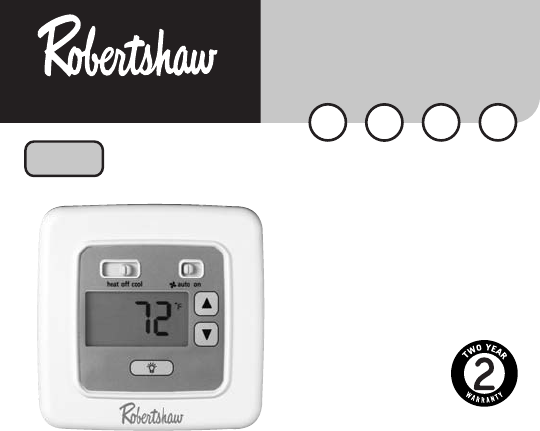
DIGITAL
NON-PROGRAMMABLE
THERMOSTAT
8400
ELECTRIC
E
GAS
G
OIL
O
®
NeW
1 Heat / 1 Cool
User's Manual
Quick Start
Installation
HEAT PUMP
H
Application
The Robertshaw 8400 is a single-stage thermostat designed to control
24 VAC gas or electric heating and cooling systems or single-stage
heat pump.
Features
• Low battery indicator
• Large back lit display
• Adjustable temperature differential: 1°F to 3.0°F (0.5°C to 1.5°C)
• Compressor short cycle protection
• Accuracy within ±1°
• Zone system compatible as a master thermostat
• Permanent memory retention
• Fahrenheit/Celsius display option
• Adjustable from 45°F to 90°F (7°C - 32°C)
• Quick wire terminal block
1
110-1086
IMPORTANT SAFETY INFORMATION WARNING:
• Always turn off power at main fuse or circuit breaker panel before
installing, removing, cleaning, or servicing thermostat.
• Read all the information in this manual before installing this thermostat.
• DO NOT CONNECT TO 120 VAC. This is a 24 VAC low-voltage
thermostat. Do not install on voltages higher than 30 VAC.
• All wiring must conform to local and national building and electrical
codes and ordinances.
• Do not short (jumper) across terminals on the gas valve or at the
system control to test installation. This will damage the thermostat
and void the warranty.
• Do not connect ground to any terminal in this unit.
Recycling Thermostat
If this thermostat REPLACES a thermostat that contains mercury,
DO NOT discard the old thermostat in the regular trash. Mercury
is harmful to humans and the environment. For this reason, do
not open, break, or crush the mercury cell. If mercury leaks from
a damaged cell, DO NOT touch or handle mercury with bare
hands. Use protective, non-absorbent gloves to place mercury
into a sealable container. Fill the container with sand or another
absorbent material and seal the container completely.
Return the mercury or mercury products, in a sealed container, to
Invensys Climate Controls or a local recycling center for proper
disposal. If you have any questions, call Robertshaw technical
support at 1-800-445-8299.
Invensys Climate Controls
28C Leigh Fisher Blvd.
El Paso, TX 79906
Attn: Mercury Recycling Center
Step 1: Replacing Existing Thermostat
IMPORTANT SAFETY INFORMATION WARNING:
In heat pump applications, do not connect anything to the W1
terminal. When switched to HP mode, W1 is connected internally
to Y1 on the thermostat.
Wiring Table
Old Terminal New Label Description
M,W,Rh,R5 or 5 Rh Heat transformer, hot side
V or Rc Rc Cool transformer, hot side
Y or Y6 Y1 Cooling control
H,W, or 4 W1 Heating control
F or G G Fan control relay
O O Cool active reversing valve
B B Heat active reversing valve
NOTE: ON SOME OLDER MODELS, THE C TERMINAL CAN BE EITHER THE COOLING CONTROL OR
THE COMMON SIDE OF THE TRANSFORMER. CHECK FURNACE WIRING DIAGRAM TO VERIFY
C TERMINAL. IF IT IS THE COMMON SIDE OF THE TRANSFORMER, CAP THE WIRE AND
TUCK INTO THE WALL. IF IT IS THE COOLING CONTROL, CONNECT TO THE Y TERMINAL.
2
!
!
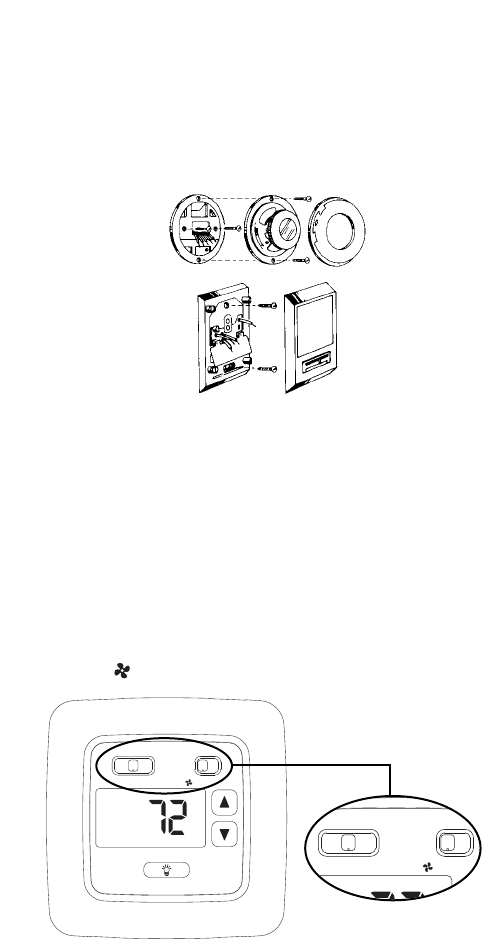
1. Turn off power to heating and cooling system.
2. Remove cover from old thermostat to expose wires (Figure 1).
3. Disconnect wires one at a time from existing terminals. Use enclosed
labels to mark existing wires. Refer to cross references in the Wiring Table
if existing wiring does not directly match the labels.
4. Remove existing thermostat base from wall.
Step 2: Installing Model 8400 Thermostat
NOTE: FOR NEW INSTALLATIONS, MOUNT THERMOSTAT ON
INSIDE WALL, FIVE FEET ABOVE THE FLOOR. DO NOT
INSTALL BEHIND A DOOR, IN A CORNER, NEAR AIR
VENTS, IN DIRECT SUNLIGHT, OR NEAR ANY HEAT OR
STEAM GENERATING FIXTURES. INSTALLATION AT THESE
LOCATIONS WILL AFFECT THERMOSTAT OPERATION.
1. Turn power off to the heating and cooling systems.
2. Place HEAT-OFF-COOL in OFF position (Figure 2).
3. Place AUTO-ON switch into AUTO position (Figure 2).
3
Figure 1
heat off cool auto on
°
F
Figure 2
heat off cool auto on
°
F
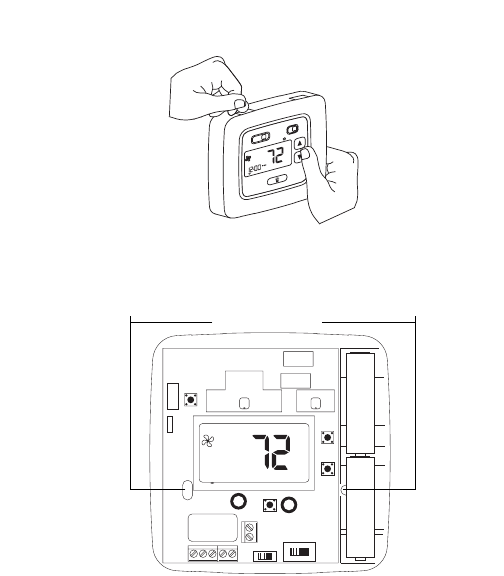
4. Remove the cover using a coin or screwdriver (Figure 3). Set aside.
5. Place thermostat against the wall at desired location. Make sure
wires will feed through opening (Figure 4) on base of thermostat.
6. Mark placement of mounting holes (Figure 4). Set base aside.
7. If mounting on drywall, tap plastic anchors into wall.
NOTE: Enclosed plastic anchors do not require a drilled hole
for drywall.
8. If mounting on a surface other than drywall, drill the marked holes
using a 3/16" (5mm) drill bit.
9. Align base with plastic anchors and feed wires through opening.
10. Secure base to wall with supplied screws. NOTE: The thermostat
will mount horizontally on a single gang junction box.
11. Strip end of wires 5/16” (8mm) if needed.
12. Terminal screws are already loose and ready for wire insertion.
Insert wires into terminal strip (Figure 4) matching the label to the
corresponding terminal (see Wiring Diagrams). Tighten screws.
4
heat off cool
hold
vac
prog
run/set hold
temp
clock
set
auto on
MON
°
F
Figure 3
RC
RH
GOB Y1W1
ELEC GAS
NON_HP HP
°
F
+
–
+
–
Figure 4
Mounting Holes
5
Hot
Heating
Control
Fan
Control
Cooling
Control
Heating
Control
(COOLING)
Transformer
(HEATING)
Transformer
Transformer T
H
E
R
M
O
S
T
A
T
RH
RC
W1
Y1
G
O
B
24 VAC
120 VAC
Hot
Heating
Control
Fan
Control
Transformer
24 VAC
120 VAC
Hot
Heating
Control
Transformer
24 VAC
120 VAC
Hot
120 VAC 24 VAC
24 VAC
Hot
120 VAC
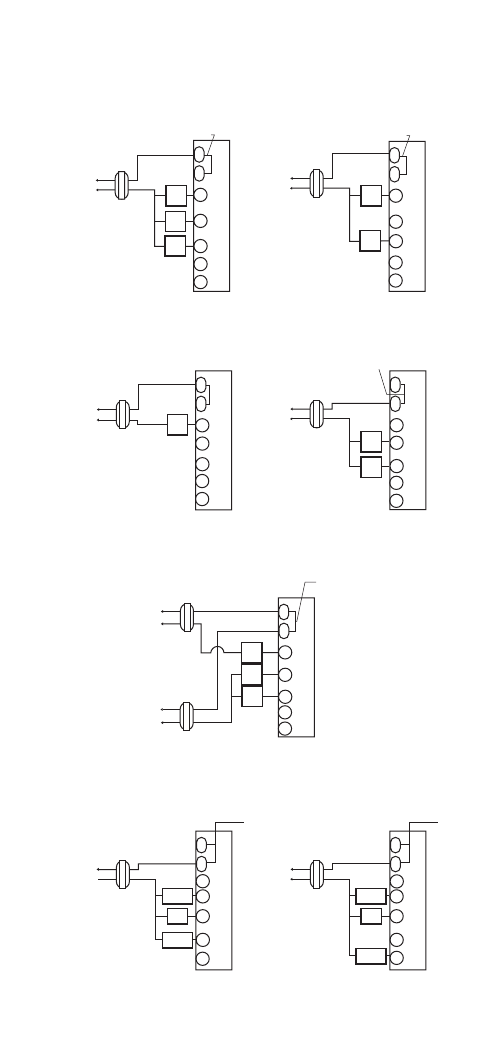
HEAT/COOL
4-WIRE
SINGLE TRANSFORMER
HEAT ONLY
2-WIRE
SINGLE TRANSFORMER
HEAT ONLY
SINGLE TRANSFORMER
3-WIRE
Factory-Installed
Jumper
Hot
Cooling
Control
Fan
Control
Transformer
24 VAC
120 VAC
COOL ONLY
3-WIRE
SINGLE TRANSFORMER
Cooling
Control
HEAT/COOL
5-WIRE
TWO TRANSFORMER
RH
RC
W1
Y1
G
Factory-Installed
Jumper
RH
RC
W1
Y1
G
NOTE: Disconnect
factory installed jumper.
RH
RC
W1
Y1
G
Hot
Compressor
Contactor
Transformer
24 VAC
120 VAC
HEAT PUMP WITH
COOL ACTIVE
REVERSING VALVE
RH
RC
W1
Y1
B
G
O
RC
RH
W1
Y1
G
CAUTION: Both transformers
must be in phase or damage
may result.
to the equipment and thermostat
Hot
Transformer
24 VAC
120 VAC
HEAT PUMP WITH
HEAT ACTIVE
REVERSING VALVE
RH
RC
W1
NOTE: Factory
Installed Jumper
NOTE: Factory
Installed Jumper
T
H
E
R
M
O
S
T
A
T
T
H
E
R
M
O
S
T
A
T
T
H
E
R
M
O
S
T
A
T
T
H
E
R
M
O
S
T
A
T
T
H
E
R
M
O
S
T
A
T
T
H
E
R
M
O
S
T
A
T
NOTE: Remove factory
installed jumper
NOTE: Make sure the HP switch
is in the HP position
NOTE: Make sure the HP switch
is in the HP position
O
B
O
B
O
B
O
B
Fan
Relay
Reversing
Valve
Fan
Relay
Compressor
Contactor Y1
G
O
B
Reversing
Valve
Fan
Relay
♦Wiring Diagrams
13. Make sure wire connections are secure.
14. Push excess wire back through opening.
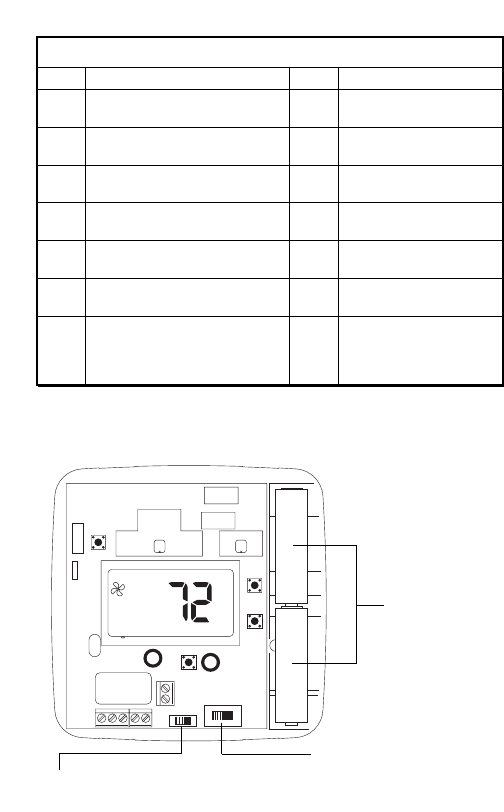
15. Set the Electric/Gas switch to either GAS for a gas/oil heating
system or ELEC for an electric heating system (Figure 5).
16. Set the HP option switch to either the HP for heat pump or
NON_HP for furnace applications (Figure 5).
17. Install two AA Energizer brand batteries or equivalent into
battery compartment as shown (Figure 5).
18. Replace thermostat cover by snapping into place.
6
RC
RH
GOB Y1W1
ELEC GAS
NON_HP HP
°
F
+
–
+
–
Figure 5
TERMINAL LEGEND - 8400
TERM EQUIPMENT TO CONNECT REQ? TERMINAL FUNCTION
Rh 24VAC hot connection Yes For input of 24VAC hot
side of heat transformer
Rc 24VAC hot connection Yes For input of 24VAC hot
side of cool transformer
W1 Heat connection Yes* Energizes on a call for
heating
Y1 Compressor Connection Yes* Energizes on a call for
cooling
B Heat active reversing valve** No Energizes when in the
HEAT mode
O Cool active reversing valve** No Energizes when in the
COOL mode
G Indoor fan connection Yes Energizes with Y1 & W1
terminals or with FAN
option switched to the
ON position
* This thermostat can be used as a heat only or cool only thermostat therefore it is not always
necessary to use both Y and W.
**The O and B terminals are accessory terminals that typically are used for heat pump applications.
Correct battery
placement
ELECTRIC/GAS SWITCH
Selects fan control.
HP OPTION SWITCH
Heat pump switch.
7
Step 3: Testing the Thermostat
WARNING: DO NOT SHORT (JUMPER) ACROSS TERMINALS OF GAS
VALVE OR SYSTEM CONTROL TO TEST OPERATION. THIS WILL
DAMAGE THE THERMOSTAT AND VOID YOUR WARRANTY.
CAUTION: DO NOT SWITCH SYSTEM TO COOL IF THE TEMPERATURE
IS BELOW 50°F (10°C). THIS CAN DAMAGE THE AIR
CONDITIONING SYSTEM AND CAUSE PERSONAL INJURY.
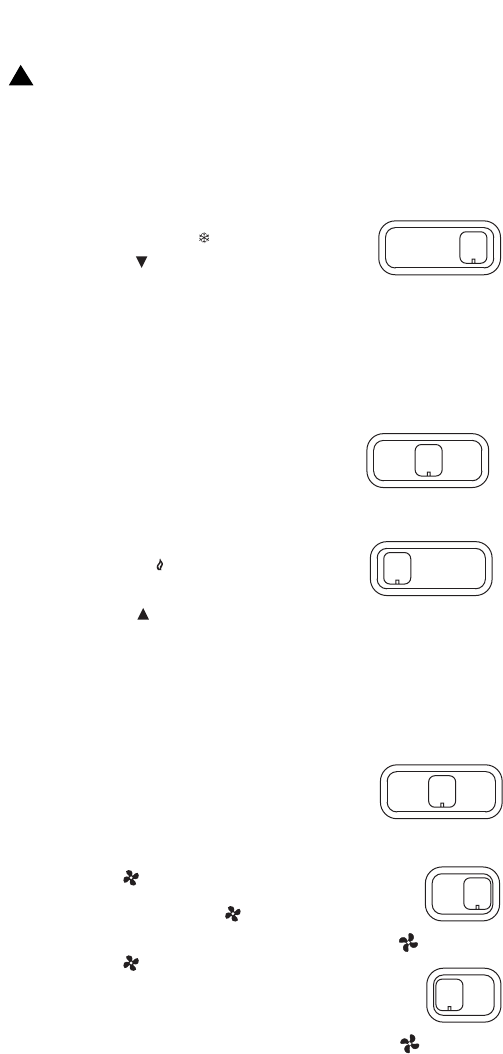
1. Place the HEAT-OFF-COOL switch into the
COOL position. The will be displayed.
2. Press the button until the temperature
setting is at least 3 degrees below the room
temperature. The air conditioning system
should turn on within a few seconds.
NOTE: ONCE THE THERMOSTAT TURNS OFF WHEN IN THE COOL MODE,
A BUILT IN 5-MINUTE DELAY PREVENTS THE SYSTEM FROM
TURNING ON AGAIN. THIS PROTECTS THE COMPRESSOR. NO
ADDITIONAL TIME DELAY RELAY IS REQUIRED. TO OVERRIDE THE
5-MINUTE DELAY FOR INSTALLATION, PRESS THE RESET BUTTON.
3. Put the HEAT-OFF-COOL switch into the OFF
position. The air conditioning system should
turn off.
4. Put the HEAT-OFF-COOL switch into the HEAT
position. The will be displayed.
5. Press the button until the temperature
setting is at least 3 degrees above room
temperature. The heating system should turn on. The fan may
not turn on immediately, depending on the fan delay built into
the furnace.
NOTE: If HP is selected, the heat will not come on until the 5 minute
short cycle protection has expired.
6. Put the HEAT-OFF-COOL switch into the OFF
position. The heating system should turn off.
The fan may continue to run for a short
period of time.
7. Put the AUTO-ON switch into the ON
position. The blower fan should turn on.
The display will show a .
8. Put the AUTO-ON switch into the AUTO
position. The blower fan should turn off.
heat off cool
heat off cool
heat off cool
!
heat off cool
auto on
auto on
Step 4: Customizing the Thermostat
♦Settings
System
Cool: The thermostat controls the cooling.
Off: The heating and cooling systems are off.
Heat: The thermostat controls the heat.
Fan
Auto: Equipment controls the fan.
On: The fan operates continuously.
♦Temperature Differential
The temperature differential is factory set at 1.0°F (.5°C). This means that
whenever the room temperature changes by one degree Fahrenheit
from the temperature setting, the system will turn on. If the system turns
on too often, increase the temperature differential.
♦Changing Fahrenheit (°F) to Celsius (°C),
the Temperature Differential, and
the Filter Monitor
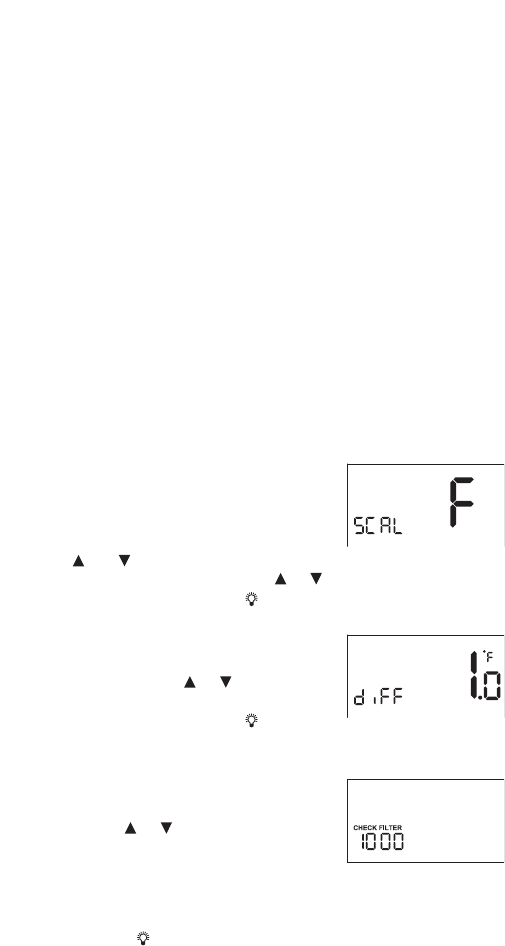
1. The thermostat is preset to display the
temperature in degrees Fahrenheit (US
models) or degrees Celsius (Canadian
models). The temperature display can be
changed. Press and hold both the
and buttons for three seconds. The display will flash either an F
or C. Release buttons. Press the or button to switch the display.
2. Wait five seconds or press and the display will switch to the
differential setting.
3. The display will read diFF. The tempera-
ture differential is factory set at 1.0°F
(0.5°C). Press the or button to adjust
the differential up or down.
4. Wait five seconds or press and the
display will switch to the
filter monitor setting.
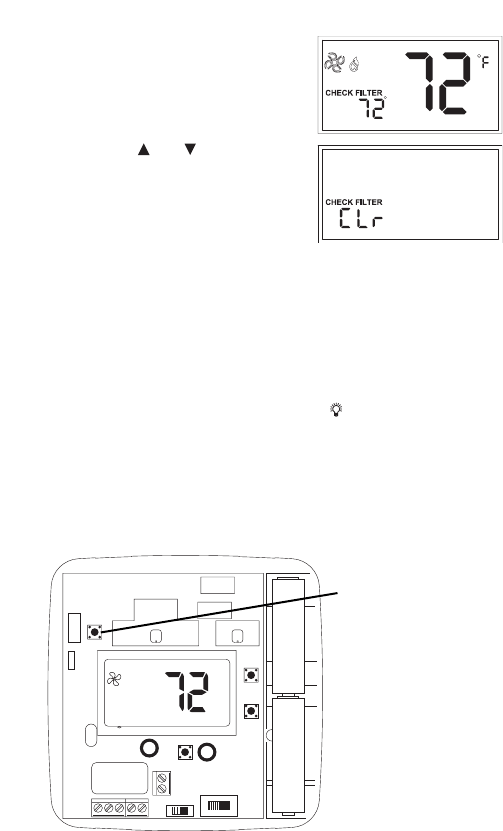
5. CHECK FILTER and the length of hours for
the filter monitor will be displayed.
6. Use the or to adjust the filter timer
from 0 (OFF) to 9900 hours. NOTE: The
filter timer is based on equipment run
time. Select the length of time based on
the recommended service interval for
your filter.
7. Press the to return to normal operation.
8
9
♦Check Filter Reset
Once the filter timer has expired,
CHECK FILTER will turn on and stay
on. To clear the message and reset
the timer:
1. Press the and buttons and hold
for 3 seconds. CLr will appear in the
time display.
2. Press any key to clear the message.
The display will transition to the
temperature scale display as
described in the previous section.
3. No further input is needed. Within a few seconds, the display will
return to the normal operating mode.
♦Backlit Display
This thermostat is equipped with a backlight to make nighttime temper-
ature adjustments quick and easy. Press the button to activate the
backlight. The backlight will turn off after about 10 seconds of inactivity.
♦Reset
To reset the thermostat press the RESET button located above the upper
left corner of the display.
RC
RH
GOB Y1W1
ELEC GAS
NON_HP HP
°
F
+
–
+
–
RESET switch
Step 5: Troubleshooting
Symptom Remedy
Thermostat does not turn on system. Check wiring (see Installation
section).
If problems with thermostat cannot be resolved, call:
Technical Support: (800) 445-8299
Monday-Friday 7:30 AM - 5:30 PM CST
10
Thermostat turns system on and
off too frequently.
Increase temperature differential
(see Changing the Temperature
Differential section).
Display is blank, flashing or
constant LOW BATT.
Replace batteries.
System fan does not operate
properly.
Move Electric/Gas switch to
either electric or gas, to match
system (see Installation section).
Thermostat does not display
proper room temperature.
Check F/C (Fahrenheit/Celsius)
setting. See Changing Fahrenheit
(F) to Celsius (C).

Two Year Limited Warranty
Climate Controls Americas warrants to the original contractor
installer, or to the original consumer user, each new Robertshaw
thermostat to be free from defects in materials and workmanship under
normal use and service for a period of two (2) years from date of
purchase. This warranty and our liability does not apply to batteries or
merchandise that has been damaged by misuse, neglect, mishandling,
alterations, improper installation, or use in a way other than in
accordance with Climate Controls Americas recommendations
and instructions.
Climate Controls Americas agrees to repair or replace at its option
any thermostat under warranty provided it is returned within the warranty
period, postage prepaid, with proof of the date of purchase. Cost of
thermostat removal or reinstallation is not the responsibility of Climate
Controls Americas.
Repair or replacement as provided under this warranty is the exclusive
remedy of the consumer. Climate Controls Americas shall not be liable
for any incidental or consequential damages for breach of any express or
implied warranty on this product, or under any other theory of liability.
Except to the extent prohibited by applicable law, any implied warranty of
merchantability or fitness for a particular purpose on this product is
limited to the duration of this warranty.
Some states do not allow the exclusion or limitation of incidental or
consequential damages, or allow limitations on how long an implied
warranty lasts, so the above limitations or exclusions may not apply to
you. This warranty gives you specific legal rights, and you may also have
other rights which vary from state to state.
For warranty returns, send thermostat, shipping prepaid to:
Climate Controls Americas
Warranty Claims Department
515 S. Promenade
Corona, CA 91719
©2004 Climate Controls Americas 110 -1086
11
Climate Controls Americas
191 E. North Avenue
Carol Stream, Illinois 60188
United States of America

NOTES
12
