Revit API Resource Guide By Rod Howarth
User Manual:
Open the PDF directly: View PDF  .
.
Page Count: 10

Autodesk® Revit® API Resource Guide
By Rod Howarth
Introduction
This document was produced originally as a handout for my Autodesk® University class ‘How the Autodesk®
Revit® API has saved our company time and money, and how it can do the same for yours’ which was
presented in 2009. I’ve since modified it ready for public release. I hope that it can be of assistance to anyone
new to API development.
If there are any questions that relate to this document, please don’t hesitate to contact me via
rodhowarth257@gmail.com

Revit API Resources
By Rod Howarth (http://rodhowarth.com) 2
Resources for the Autodesk® Revit® API
There are a number of resources you can utilize to learn and develop with the Autodesk® Revit® API. If you
have tried in the past and found it difficult you should take note that these are improved with every release
(and every day more information is added to the blogosphere/online forums). For your convenience I have
listed a number of the resources that I recommend below, along with a full link and a shortened link from
Budurl.com which is in the format budrl.com/RHRVT- and then a number (this is in case you are reading a
printed version and don’t want to type out the full address)
C# / VB.Net Resources
The first step to learning the API is to learn how to program in C# or VB.NET (the samples are mostly in C#
and that is my preference). There are a couple ways of doing this.
1. Get a good book
This is definitely the best way, as a good book will explain things in detail, and guide you in progressive
steps (rather than being hit with the huge amount of information online). One book that I recommend is:
Head First C# by Andrew Stellman & Jennifer Greene, published by O’Reilly.
http://www.bookdepository.co.uk/book/9780596514822/Head-First-C (budurl.com/RHRVT1)
This book I’ve found lays things out in an easy to understand language – perfect for BIM Managers or
other non-programming types that are learning this sort of thing for the first time.
One thing to note with programming books is that you probably don’t need to read the whole thing to
start working with the Revit API, a lot of C# books lead into talking about databases, XML parsing and
other more complex topics that won’t be fully applicable to you in your early days of development.
2. View information online
Given this is programming there is naturally a lot of information available online. A Google search is
your best friend in this regard, but there are a couple of good sites I like to visit:
Stack Overflow
http://www.stackoverflow.com (budurl.com/RHRVT2)
Ask programming questions and have them answered by other programmers. View others questions –
which may be the same one you were going to ask!
MSDN
http://www.msdn.com (budurl.com/RHRVT3)
Microsoft Developer Network, the centre of all things .NET, C#, Visual Basic. Has technical references,
but also has guides, tutorials, videos and other learning tools. Perhaps a good place for people to start
would be the MSDN Beginner Developer Learning Centre: http://www.msdn.com/beginner
(budurl.com/RHRVT4).
SDK Samples
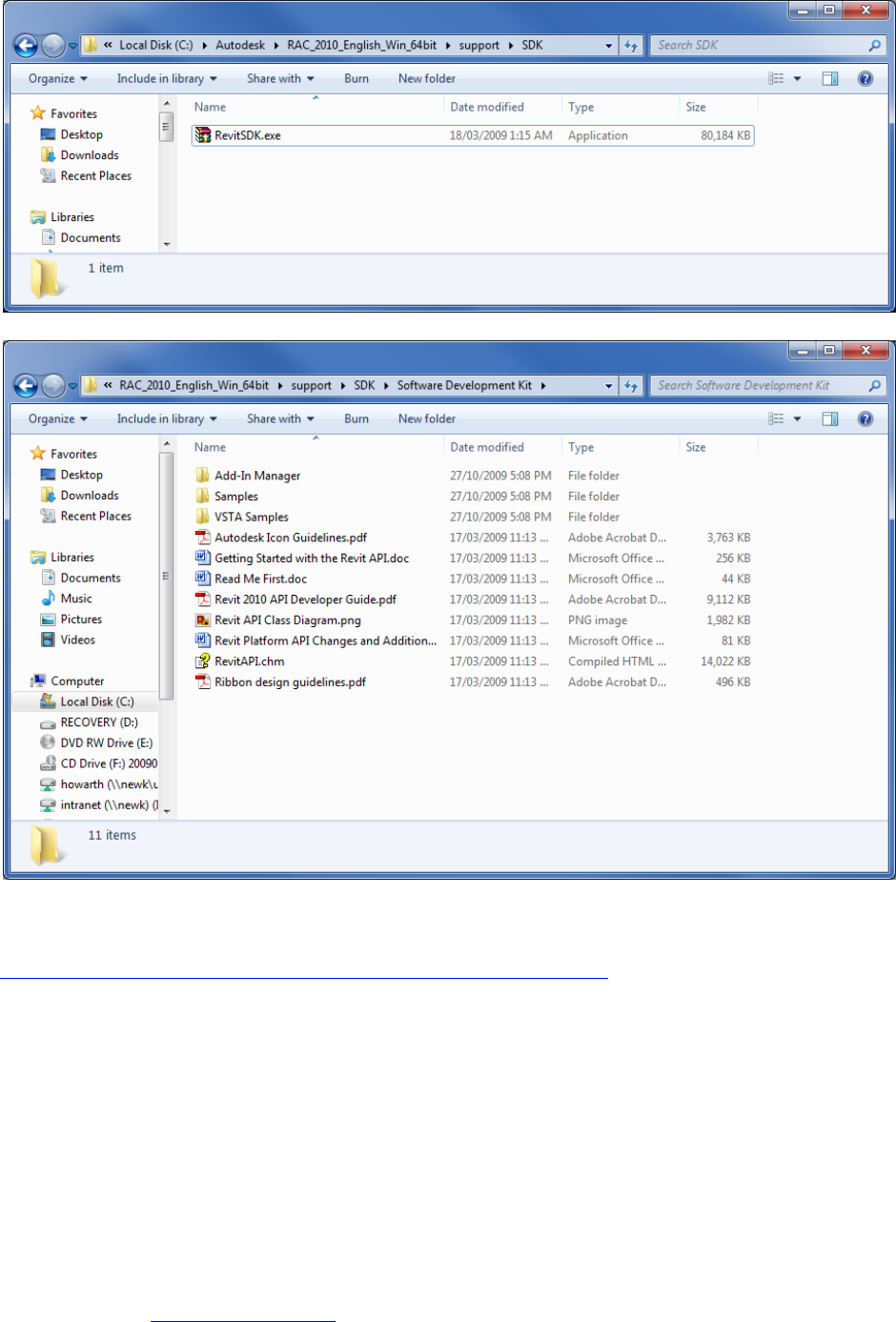
Every Revit disc and download comes with the Software Development Kit (SDK). This is normally found in the
support folder in the disc, or in the C:\Autodesk\ folder which the downloadable versions get extracted to.
Revit API Resources
By Rod Howarth (http://rodhowarth.com) 3
Extracting it provides:
This folder contains a number of the resources mentioned in this document, including a number of sample
code solutions. If you cannot find your disk, you can download the SDK online at
http://usa.autodesk.com/adsk/servlet/index?id=2484975&siteID=123112 (budurl.com/RHRVT5)
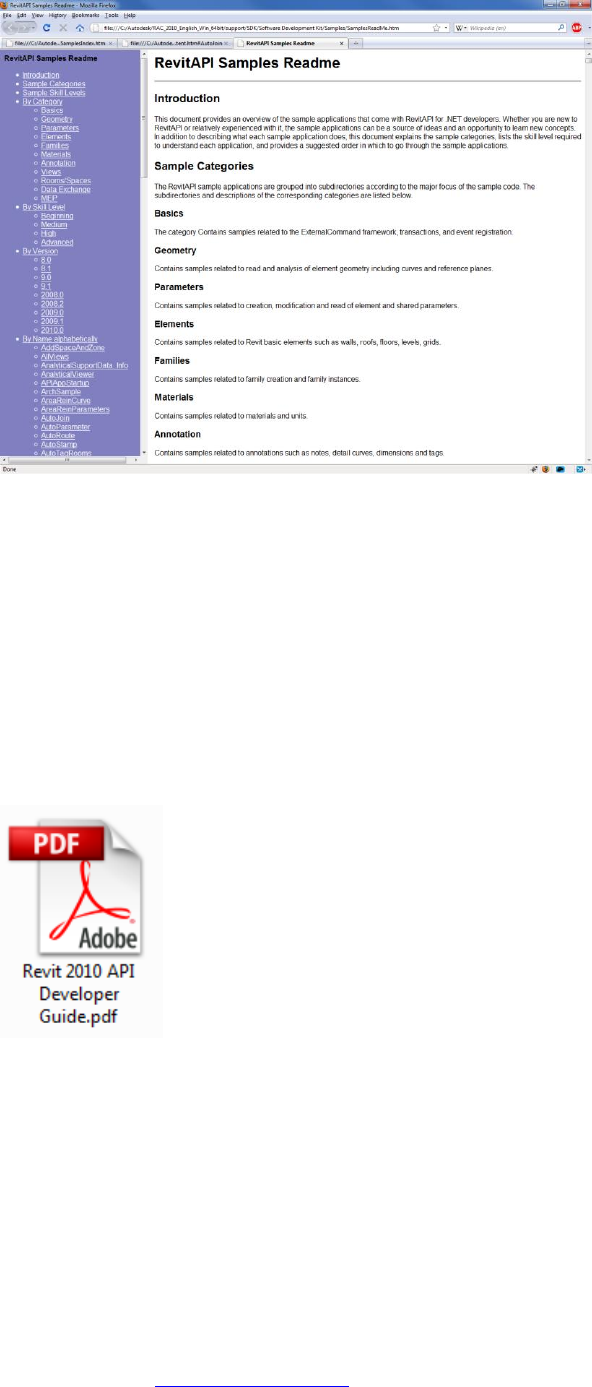
In the samples folder you can click on SamplesReadme.htm to open it up in your browser.
Revit API Resources
By Rod Howarth (http://rodhowarth.com) 4
There you can see samples organized by category, skill level, Revit version they were introduced in, or just by
name. Each of these points to a small summary of each sample, and a listing of some of the classes from the
Revit API that they implement – this is handy to do a search through (Control + F in your browser) for sections
of the API you want to learn about.
Developers Guide eBook
Another part of the SDK is the Developers Guide eBook, which has been introduced fairly recently – and I
sure wish I had it when I started!
It’s listed as Revit 2010 API Developer Guide in the SDK directory, and is over 300 pages packed full of
walkthroughs, descriptions and examples on various parts of the API. I recommend flicking through it to get
an idea of what the API is capable, of and also searching through it when you are researching a certain part
of the API.
Compiled HTML Help File
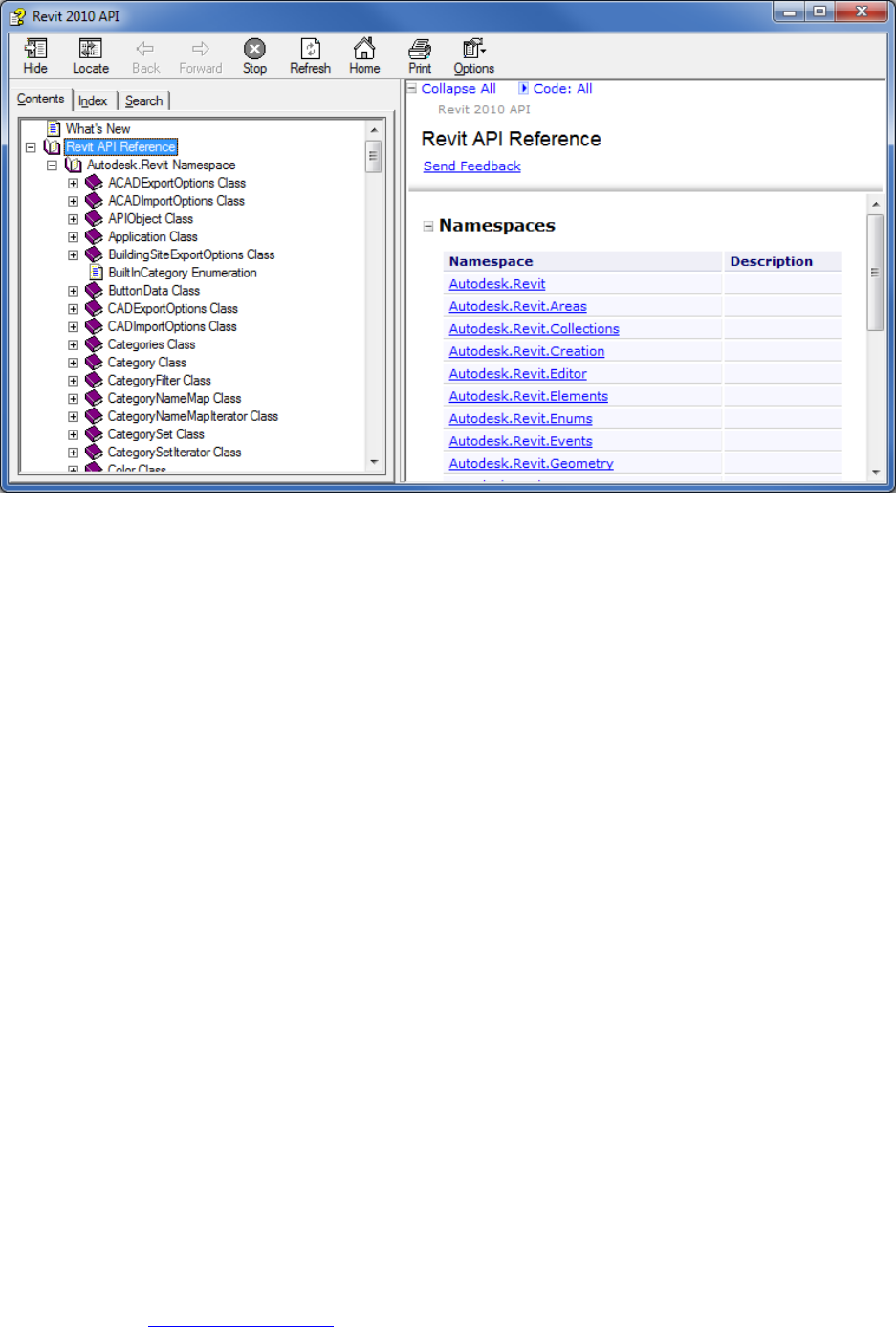
Another, more technical part of the SDK is the RevitAPI.chm file, which lists ALL of the classes and their
methods in the Revit API.
Revit API Resources
By Rod Howarth (http://rodhowarth.com) 5
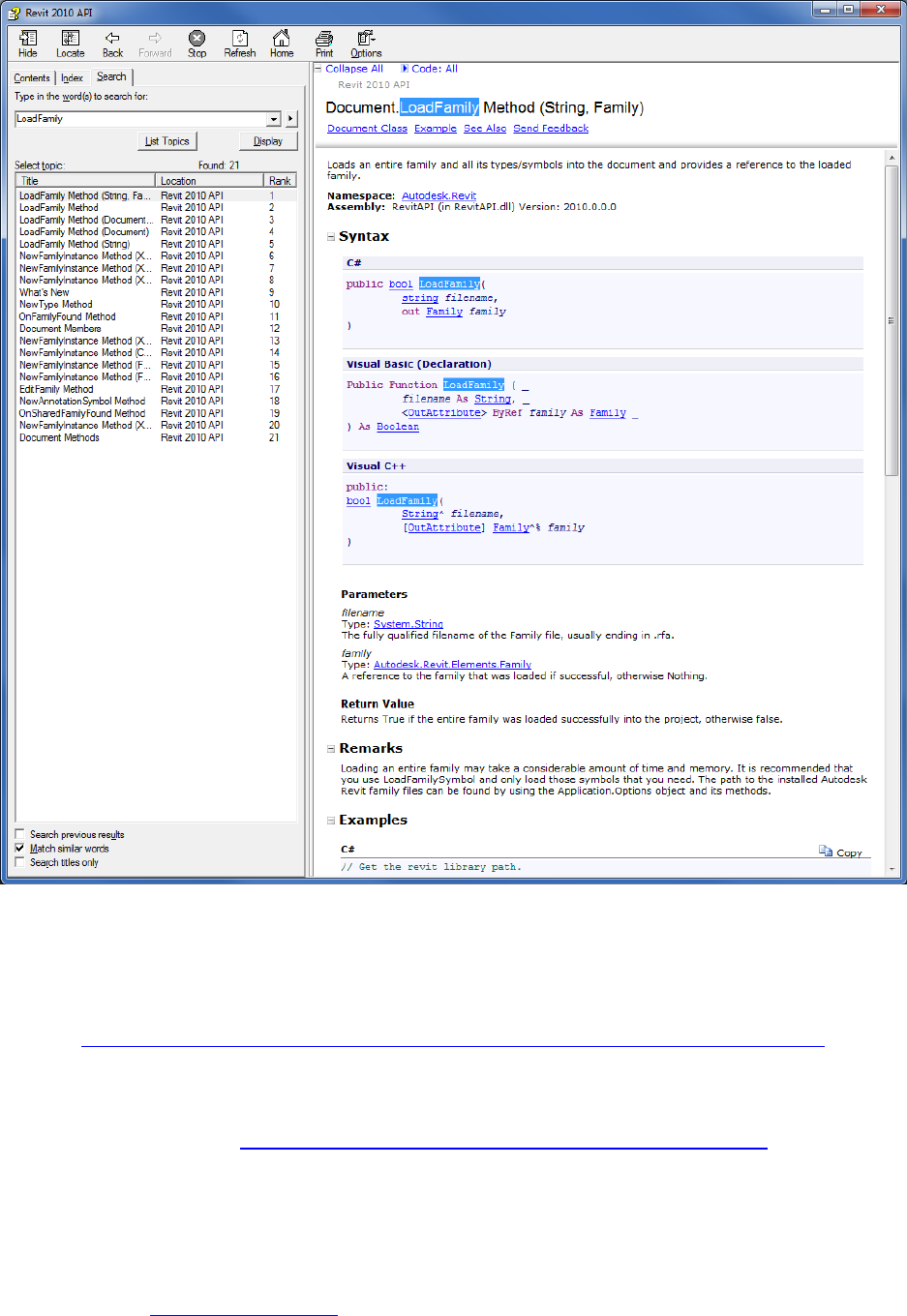
This is the best technical reference you will get, and I refer to it often, but it may zoom right over the heads of
beginners. You can do a search through it and read up on certain classes or methods and how to use them.
Revit API Resources
By Rod Howarth (http://rodhowarth.com) 6
In the 2010 release of Autodesk® Revit® they’ve added some examples to this file, which is really handy.
Webcasts
Autodesk and the ADN (mentioned later in this document) run webcasts on developing with the API that can
be a good visual way of learning.
The best one to start with is the ‘Dev TV’ introduction to API webcast, this has been recorded and is available
online at: http://download.autodesk.com/media/adn/DevTV_Introduction_to_Revit_Programming/
(budurl.com/RHRVT6)
Autodesk regularly run webcasts (and sometimes even face to face training), you can see the schedule of
upcoming training events at http://www.adskconsulting.com/adn/cs/api_course_sched.php
(budurl.com/RHRVT7)

Revit API Resources
By Rod Howarth (http://rodhowarth.com) 7
Autodesk University
You obviously already know that Autodesk University is a great source of information, but don’t forget, this
isn’t the only year it has been run! You can download podcasts, handouts and other materials from previous
years, or classes this year that you have missed on the AU website: http://au.autodesk.com/?nd=home
(budurl.com/RHRVT8)
Blogs
Blogs are a great way of getting easy to understand walkthroughs, written by people who were in the exact
same situation as you! There are a number of great blogs dedicated to the Autodesk® Revit® API. Some of
these include:
Bolt Out Of The Red – Guy Robinson - http://redbolts.com/blog/ (budurl.com/RHRVT9)
Revit Programming – Ed Pitt - http://revit-programmer.blogspot.com/ (budurl.com/RHRVT10)
The Building Coder – Jeremy Tammik - http://thebuildingcoder.typepad.com/blog/ (budurl.com/RHRVT11)
CAD Application Development – Matt Mason - http://cadappdev.blogspot.com/ (budurl.com/RHRVT12)
Rod.Net – Rod Howarth - http://roddotnet.blogspot.com/ (budurl.com/RHRVT13)
I especially recommend The Building Coder by Jeremy Tammik, who is a fellow speaker here at AU – he
blogs frequently and has a great backlog of information to look through.
Autodesk® Revit® API search engine
In order to make it easier to search for what you need through all of the above blogs, I’ve created a custom
Google search page that indexes ONLY Revit API related sites. This allows you to search for API information
without having to sift through other information that is on the internet.
I’ve setup a URL for this (as the full address is very long): http://revitapisearch.com/
(budurl.com/RHRVT14)
Online Forums
A good free source of information and assistance are online forums with sub-sections designed specifically
for likeminded people to discuss programming in Autodesk® Revit®. Two good forums are:
AUGI Forums - http://forums.augi.com/forumdisplay.php?f=93 (budurl.com/RHRVT15)
Autodesk Discussion Groups - http://discussion.autodesk.com/forums/forum.jspa?forumID=160
(budurl.com/RHRVT16)
Autodesk Developer Network
For anyone serious about developing with any Autodesk® product, the ADN gives you a knowledge base of
information, discounts on training and online support requests that are answered by Autodesk employees.
You can find out more information at: http://autodesk.com/adn (budurl.com/RHRVT17)
RvtMgdDbg
RvtMgdDbg is a great tool for seeking out what in your current model is accessible via the API. In my opinion
this is a must have tool for anyone who has learnt the basics of the API and is looking at developing some
great add-ins.
Jeremy Tammik has a great guide on how to use this tool on his blog
http://thebuildingcoder.typepad.com/blog/2009/02/rvtmgddbg.html (budurl.com/RHRVT18)

Revit API Resources
By Rod Howarth (http://rodhowarth.com) 8
He has also included the RvtMgdDbg 2010 version in the downloadable materials from an Autodesk® Revit®
API webcast:
http://download.autodesk.com/media/adn/RevitAPI_2010_Webcast.zip (budurl.com/RHRVT19)
ADN members can use this direct link:
http://adn.autodesk.com/adn/servlet/item?siteID=4814862&id=12264104&linkID=4901650
(budurl.com/RHRVT20)
‘The Process’
Listed below are the steps that I generally take when trying to create a new add-in for Autodesk® Revit®. My
aim here is to give you an idea of the best way to utilize the resources that I have listed above.
1. Learn how to do it manually
You are probably trying to automate something that you could manually do (you generally won’t find anything
in the API that isn’t possible by mouse click), so the first step to take would be to have a good idea of how to
do what it is you are trying to do in Autodesk® Revit®, and what happens to the model when you do it.
2. Identify key words / areas
When you are manually doing it, what are the menu names? What types of elements are you working with?
Does the functionality you are achieving have a name? Some examples of key words are:
Load Family
Beam
Level
Visibility
3. RvtMgdDbg
While you are still inside of Autodesk® Revit®, use RvtMgdDbg to ‘snoop’ around the areas of the database
that relate to what you are doing. You can look at all the parameters, types, categories etc of the currently
selected element, and check out the details of other elements that relate to it. If you see a parameter, or
property here you are trying to access, or perhaps change – then you are probably in luck! This tool uses the
API, it’s not magic, so anything that this tool can do – you can do in your code.
4. Search SDK Samples + Developers Guide
Now you have a bit of a clear idea of what you are trying to achieve, and perhaps the areas of the API that
relate to it, it’s a very good idea to see if there is any SDK samples, or examples in the Developers Guide
PDF which have something similar to what you are trying to achieve, because if there is – your life will be a lot
easier!
The Developers Guide PDF is easy to search through – just use the search function in your PDF reader,
however for the samples, there are 3 different ways to search:
1. Search through the SamplesContent.htm file
Revit API Resources
By Rod Howarth (http://rodhowarth.com) 9
The SDK has a SamplesContent.htm file in the Samples directory, open this up in your browser and press
Control + F to do a search. This simply searches the summaries but it is a quick and easy way to search.
2. Search through Visual Studio
The SDK comes with a Visual Studio solution file that contains all of the samples inside it, you can open
this and do a text search on the whole solution for some of your key words that you identified. This will
search through just the code files – but those are what you are after!
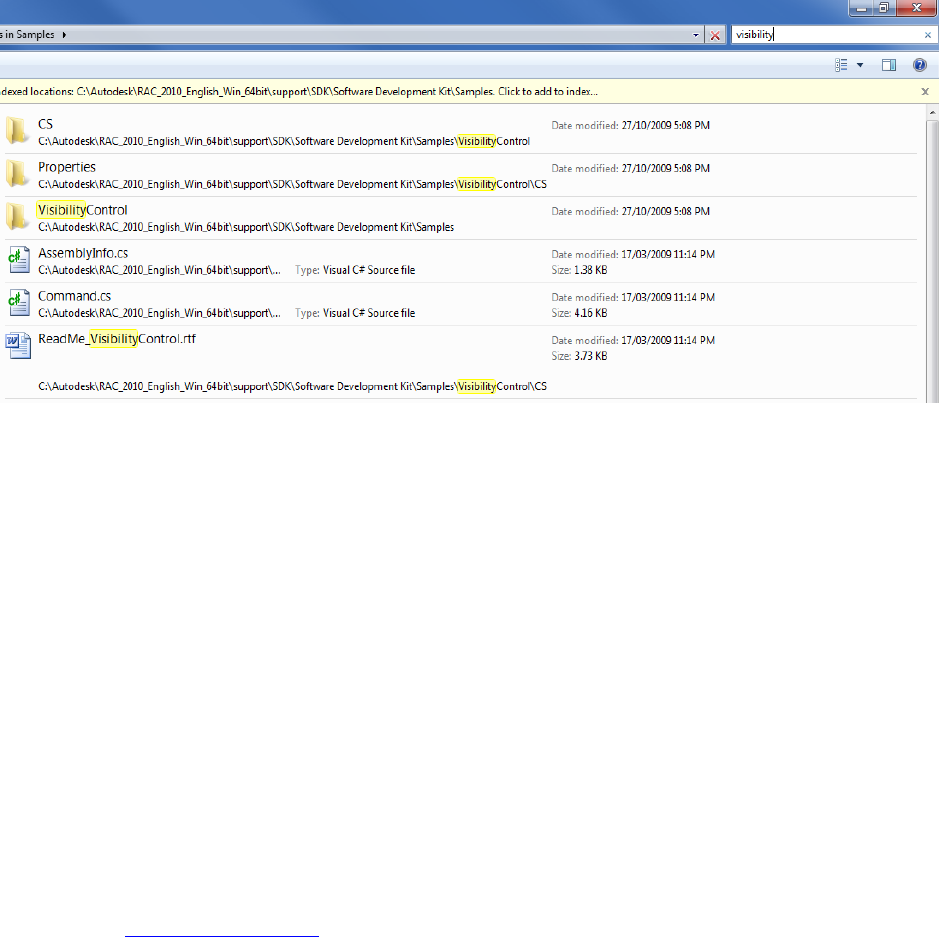
3. Search through Windows Explorer
Explorer can index the contents of .cs and .doc files, so as long as you have that setting turned on.
In XP you can set it when you search, in Windows 7 you have to go to Tools (hold down alt key for it to
become visible) > Folder Options > Search and tick ‘Always search file names and contents’.
Then you can simply do a search for your keyword, and it will list any of the code files, or the summary
word documents which contain your key word.
5. Search CHM
To start getting into the details of how to use the sections of the API you have identified, open up the
RevitAPI.chm file from the SDK. Do a search on the classes of anything you have found in the samples, this
will turn up the exact methods and properties of each class in the API. Use the ‘ClassName members’ links
down in the ‘See Also’ section of each class’s description to view more information about each class.
6. Search Online
If you haven’t really found anything in the samples, or are confused still, it’s worth doing a search online. Use
the API Search Engine, AUGI Forums, ADN Knowledge base of the Autodesk Forums as good places to look,
there may be someone out there who has had a similar problem to solve!

Revit API Resources
By Rod Howarth (http://rodhowarth.com) 10
7. IntelliSense / Experimentation
If you at least have a starting point, and are a ‘trial and error’ sort of person, using the IntelliSense feature of
Visual Studio is a good way to hack up some example code to run in Autodesk® Revit®. You can scroll
through a list of possible classes, methods, properties and their details as you are typing the code, this is not
only a great way to learn the API but a great way to learn more about programming with .NET in general.
You can then make some test code and run it, use Debug.Write or MessageBox.Show to spit out information
that your code has found, you can also set breakpoints and use the Visual Studio debugger to hover over
variables and look through their information.
8. ADN / Forums
If you’ve reached the end of the line and are still stuck, the place turn turn is the Autodesk Developer
Network. If you are a member you have access to DevHelp, where you can ask the experts themselves. If
you don’t have access to ADN, the forums at AUGI or Autodesk’s website are a great place to post as well.
It usually takes a day or two for a response (though you can pay for quicker support from ADN), but it’s well
worth it if you are stuck. Perhaps the greatest part of ADN help is them being able to tell you what just isn’t
possible with the API ,as a lot of time can be wasted trying to implement something that hasn’t been made
available to the API just yet.
Wrap Up
I hope that this document has helped you to get a better idea of:
- Where to find information on the API
- How to use this information to start creating your own add-ins
Also note, that my original AU speech is available for viewing here:
http://au.autodesk.com/?nd=class&session_id=5116 (http://budurl.com/RHRVT21)
If you have any further questions, please do not hesitate to contact me via rodhowarth257@gmail.com
