Robo Master GM6020 Brushless DC Motor User Guide
User Manual:
Open the PDF directly: View PDF  .
.
Page Count: 13

RoboMaster
GM6020 Brushless DC Motor
V1.0 2018.12
User Guide


© 2018 DJI All Rights Reserved. 1
Disclaimer
Thank you for purchasing the ROBOMASTERTM GM6020 Brushless DC Motor (hereinafter referred
to as “product”). Read this disclaimer carefully before using this product. By using this product, you
hereby agree to this disclaimer and signify that you have read it fully. Install and use this product in
strict accordance with the User Guide. SZ DJI TECHNOLOGY CO., LTD. and its afliated companies
assume no liability for damage(s) or injuries incurred directly or indirectly from using, installing, or
modifying this product improperly, including but not limited to using non-designated accessories.
DJITM is a trademark of SZ DJI TECHNOLOGY CO., LTD. (abbreviated as “DJI”) and its afliated
companies. Names of products, brands, etc., appearing in this document are trademarks or
registered trademarks of their respective owner companies. This product and document are
copyrighted by DJI with all rights reserved. No part of this product or document shall be reproduced
in any form without the prior written consent or authorization of DJI.
The nal interpretation right of this disclaimer is reserved by DJI.
Warning
1. Visit the ofcial RoboMaster website and download the RoboMaster GM6020 Brushless DC Motor
User Guide before use. Be sure to read the whole manual and strictly follow the instructions when
using the motor.
2. DO NOT allow any foreign materials to come into contact with the rotors, as it may negatively
affect the performance.
3. Ensure all the cables are properly connected.
4. Ensure the motor is securely mounted.
5. Avoid damage to the cables or wires, as it may negatively affect the performance.
6. DO NOT touch the rotors, as doing so may cause injury.
7. The motor heats when the output torque is high. Although this is normal, take caution to avoid
scalding.
8. DO NOT disassemble the motor, as this may negatively affect the accuracy of the motor’s control
and may lead to permanent malfunction.
Introduction
The GM6020 Brushless DC Motor is a high-performance motor with a built-in driver designed for use
in elds such as educational research, automation, and robotic competition.
The motor boasts a high pole number design, fractional slot concentrated windings, and rare earth
magnets, making it an optimal solution for situations that require low rotational speed, direct driving,
and large torque.
The Field Oriented Control (FOC) algorithm of the built-in driver and the high-precision angle sensor
allows for precision control of the motor's torque and position. If an error is detected, the motor issues
warnings and automatically responds to protect itself. Multiple communication methods are supported
to facilitate the users in motor control and rmware update.
Features
• A hollow shaft to attach slip rings or other accessories when required.
• Compact design combining the motor and driver in one.
• Multiple communication methods are supported (e.g. CAN, PWM).
• With RoboMaster Assistant, users can set parameters online and update rmware.
• Use a CAN cable to acquire information such as rotor position, rotational speed, and motor temperature.
2 © 2018 DJI All Rights Reserved.
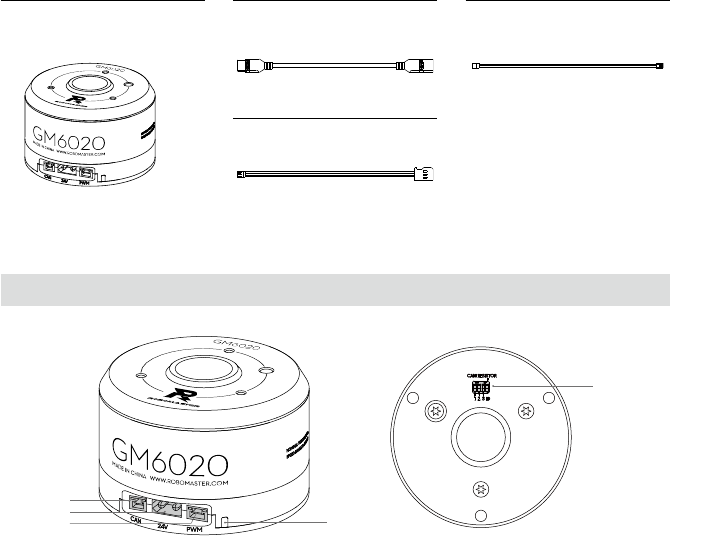
Motor ×1
PWM Cable ×1
XT30 Power Cable ×1 CAN Cable ×1
Overview
GM6020 Motor
1. CAN Port
Connects to the external device and receives the CAN control signal to give feedback to the
motor’s status. The bitrate of the CAN bus is 1 Mbps.
2. Power Port
Connects to a power outlet with a rated voltage of 24 V using the XT30 power cable to provide
power to the motor.
3. PWM Port
Connects to the PWM port on an external device using the PWM cable to control the motor’s
rotational speed and position (analog servo mode). It can also connect to a USB to serial
converter to your computer with the provided PWM cable to set parameters or update the
motor’s rmware via RoboMaster Assistant.
4. Status LED
Indicates the motor’s operating status. Refer to “Status LED and DIP Switch” for more details.
5. DIP switch
Set the motors’ ID and enable or disable the CAN terminal resistance. Refer to “Status LED and
DIP Switch” for more details.
1
2
34
5
• Use the DIP switch to set ID and to enable/disable the CAN terminal resistance.
• Includes over-temperature and overvoltage protection.
In the Box
© 2018 DJI All Rights Reserved. 3
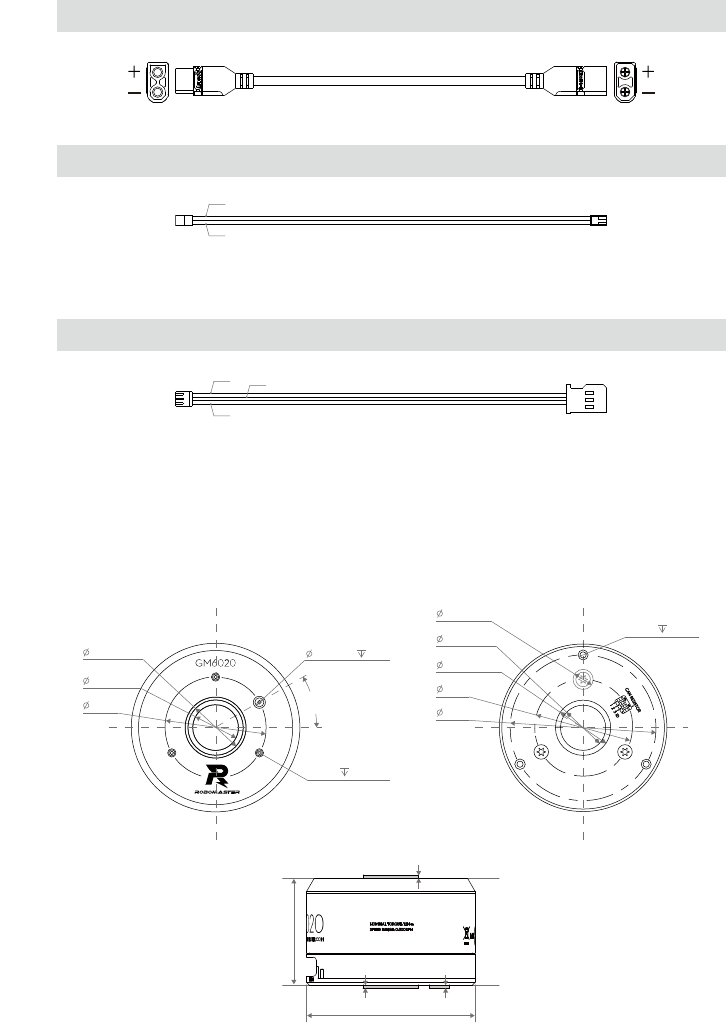
CAN Cable
A: CAN_H (Red) B: CAN_L (Black)
A: PWM/RX (White) B: TX (Grey) C: GND (Black)
PWM Cable
Mounting the Motor
Refer to the dimensions below to mount the motor to an appropriate platform.
A
B
C
B
A
3 - M4
6 EQS
38.50
58.00
18.00 +0.05
0
8.00±0.03
22.00±0.05
4.2
4.00 +0.04
0
3 - M3 4.2 EQS
22.00±0.05
40.00
18.00 +0.05
0
30°
XT30 Power Cable
1.50 +0.04
0
1.50 +0.04
0
66.70±0.10
1.50±0.04
42.00±0.10
Unit: mm
4 © 2018 DJI All Rights Reserved.
CCW CW
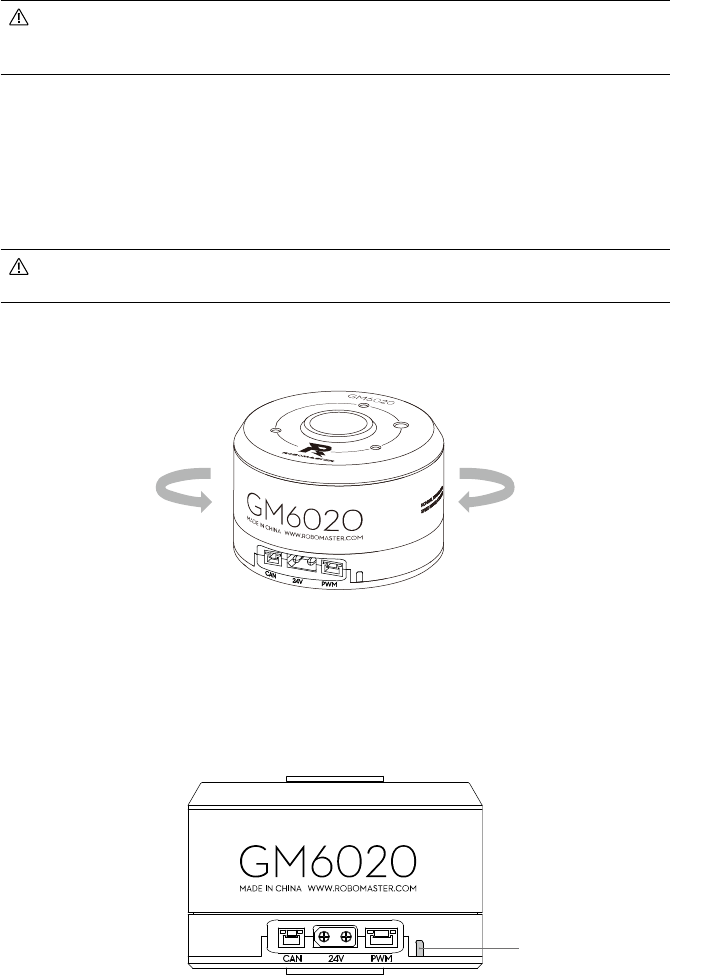
The motor rotor is outfitted with M3 mounting holes at a depth of 4 mm while the motor
stator is outfitted with M4 holes at a depth of 6 mm. Use appropriately-sized screws to
mount properly and avoid damage.
On the top and bottom of the motor there is a boss, with an inner diameter of 18 mm and an outer
diameter of 22 mm. The bosses can help to attach other devices to the motor.
Additionally, on the top of the motor is a blind hole with a diameter of 4 mm and a depth of 4.2 mm.
On the bottom of the motor there is also a boss, with an inner diameter of 8 mm and a height of
1.5mm. Both the blind hole and the boss can help protect the screws from being damaged and also
help locate when mounting.
Make sure to keep the motor away from strong electromagnetic environments and magnetic
materials, like iron. Otherwise, the motor will vibrate or may even malfunction.
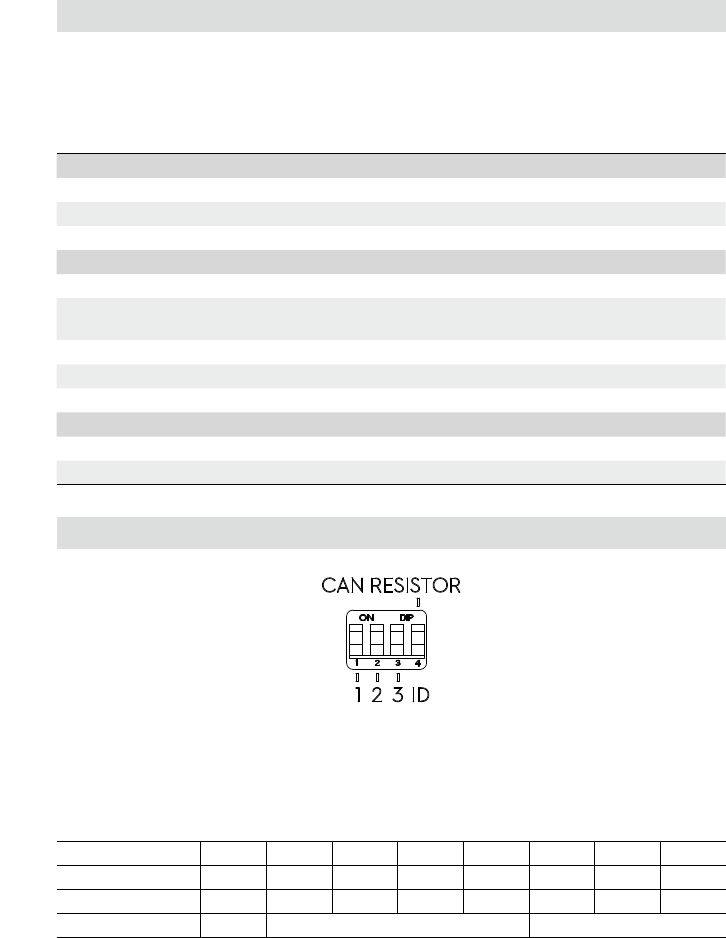
Motor Rotation Direction
When viewed from the top of the output axis: counterclockwise rotation (CCW) is called the positive
direction (+) and clockwise rotation (CW) is called the reverse direction (-).
Status LED and DIP Switch
Status LED
© 2018 DJI All Rights Reserved. 5
Status LED Description
The status LED is used to indicate the motor’s operational status. In situations that indicate warning
and abnormal working conditions, the LED will only indicate the abnormal working condition. In
situations that indicate multiple warning or abnormal working conditions, the LED will only indicate
the condition that emits the least amount of blinks. Note: the driver automatically cuts off the output
stream when it is in abnormal status.
Normal Description
Blinks green N times every second The number of blinks indicate the current ID of the motor
Blinks green slowly PWM communication is normal
Solid green PWM signal is being calibrated
Warning Description
Blinks orange once every second The temperature of motor is higher than 212° F (100° C)
Blinks orange twice every second More than one motor share the same ID connected to the
CAN bus
Blinks orange three times every second PWM signal cannot be detected
Blinks orange four times every second Temperature sensor is abnormal
Blinks orange quickly PWM signal calibration is failed
Abnormal Description
Blinks red once every second The voltage of the power supply is too high
Blinks red four times every second The temperature of motor is higher than 257° F (125° C)
DIP Switch
ID Setting
The rst three bits refer to Bit0, Bit1, and Bit2 which are used to control the motors’ ID. Toggling the
bit to the ON position is recorded as 1 while the off position is recorded as 0.
Bit[2:0] is the ID value of the motor, which will affect the identier of the CAN communication. Their
corresponding relationships are shown as below:
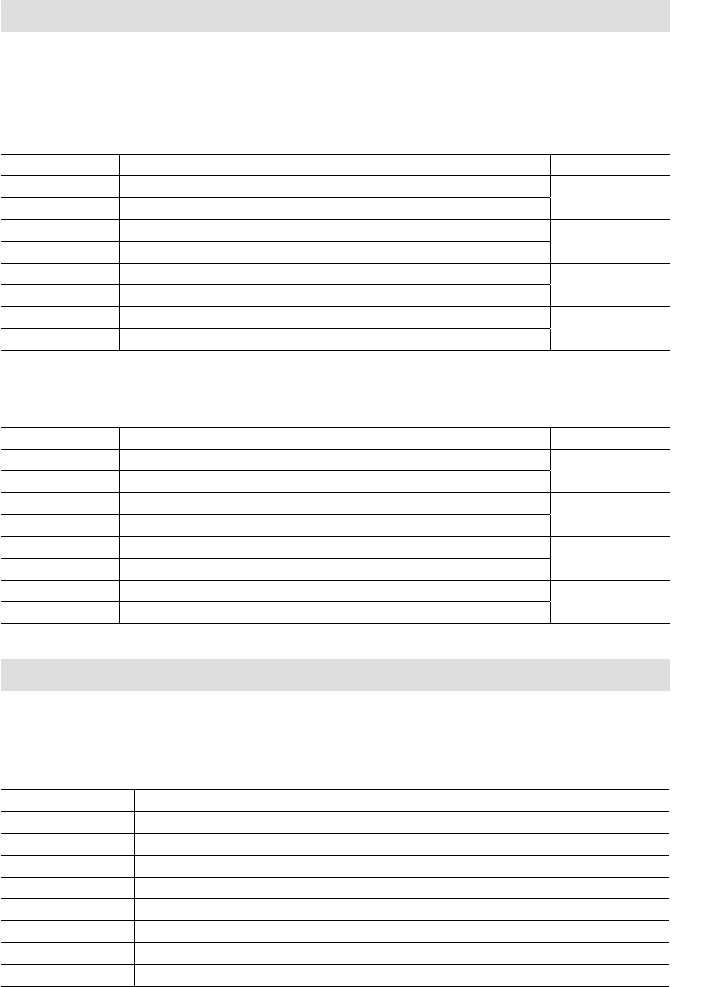
Bit[2:0] 000 001 010 011 100 101 110 111
Motor ID Invalid 1 2 3 4 5 6 7
Feedback identier 0x205 0x206 0x207 0x208 0x209 0x20A 0x20B
Control identier 0x1FF 0x2FF
CAN Resistance Setting
The fourth bit controls if the CAN terminal resistance should be enabled or not. Toggle it to the ON
position to enable the resistance.
6 © 2018 DJI All Rights Reserved.
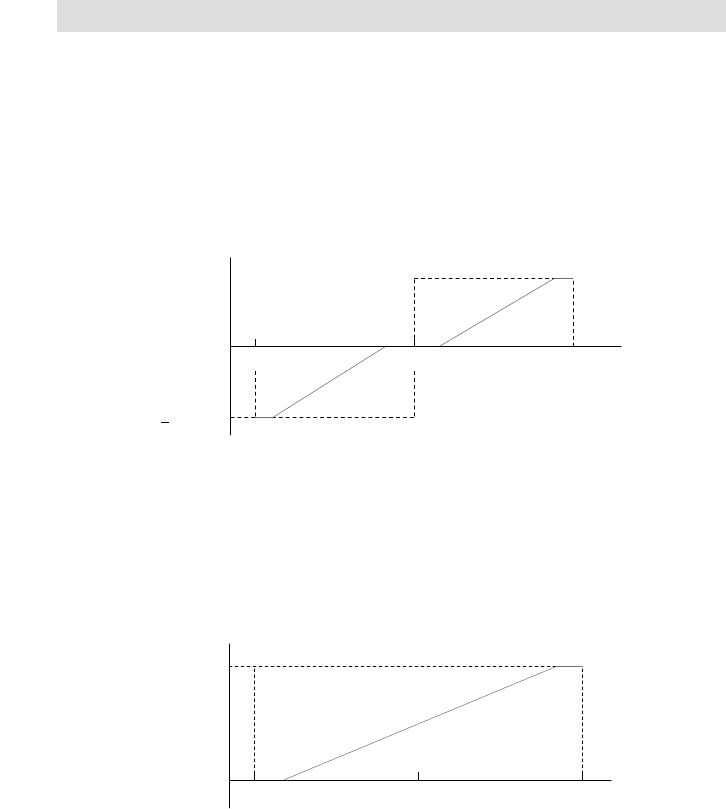
Identier: 0×1FF Frame type: Standard
Frame format: DATA DLC: 8 Bytes
Identier: determined by 0×204+ driver ID Frame type: Standard
Frame format: DATA DLC: 8 Bytes
Identier: 0×2FF Frame type: Standard
Frame format: DATA DLC: 8 Bytes
Motor Sending Message Format
The format in which the motor sends feedback data to the CAN bus.
CAN Communication Protocol
Motor Receiving Message Format
Users send command message to the motor to control the voltage output. The controllable voltage
range is -30000~0~30000.
Data Field Description Motor ID
DATA[0] Controls the voltage value in higher order byte (8 bits) 1
DATA[1] Controls the voltage value in lower order byte (8 bits)
DATA[2] Controls the voltage value in higher order byte (8 bits) 2
DATA[3] Controls the voltage value in lower order byte (8 bits)
DATA[4] Controls the voltage value in higher order byte (8 bits) 3
DATA[5] Controls the voltage value in lower order byte (8 bits)
DATA[6] Controls the voltage value in higher order byte (8 bits) 4
DATA[7] Controls the voltage value in lower order byte (8 bits)
Data Field Description
DATA[0] Controls the rotor mechanical angle in higher order byte (8 bits)
DATA[1] Controls the rotor mechanical angle in lower order byte (8 bits)
DATA[2] Controls the rotational speed in higher order byte (8 bits)
DATA[3] Controls the rotational speed in lower order byte (8 bits)
DATA[4] Actual torque current in higher order byte (8 bits)
DATA[5] Actual torque current in lower order byte (8 bits)
DATA[6] Motor temperature
DATA[7] Null
Data Field Description Motor ID
DATA[0] Controls the voltage value in higher order byte (8 bits) 5
DATA[1] Controls the voltage value in lower order byte (8 bits)
DATA[2] Controls the voltage value in higher order byte (8 bits) 6
DATA[3] Controls the voltage value in lower order byte (8 bits)
DATA[4] Controls the voltage value in higher order byte (8 bits) 7
DATA[5] Controls the voltage value in lower order byte (8 bits)
DATA[6] Null Null
DATA[7] Null
© 2018 DJI All Rights Reserved. 7
Sending frequency: 1KHz
Rotor mechanical angle value range: 0 ~ 8191
Rotor speed value unit: rpm
PWM Signal Description
PWM signal control
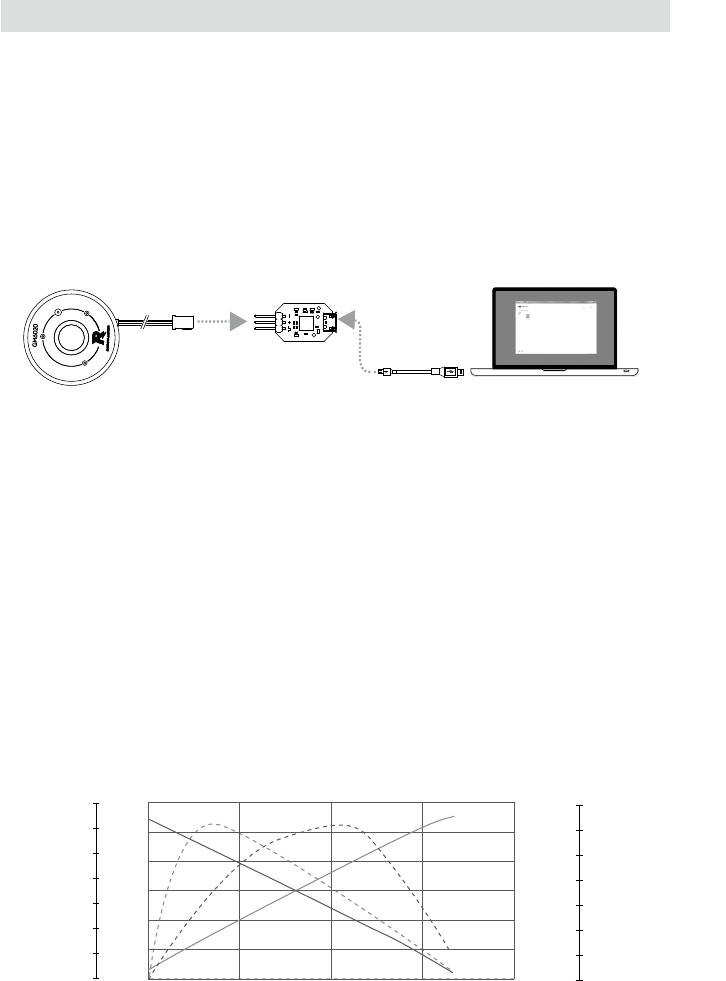
A PWM signal with an input frequency of 50Hz and a pulse width of 1000-2000 μ s. Users can
switch between speech control mode and position control mode inside RoboMaster Assistant.
(Position control mode is selected by default).
Speed Control Mode
In this mode, the motor can be controlled to rotate continuously in two directions. The diagram
below describes the mapping between PWM pulse width and speed.
Position Control Mode
In this mode, the motor can be simulated as servo. The diagram below shows the mapping between
PWM pulse width and position. The center point and the rotational angle range can be set inside
RoboMaster Assistant.
V
max
V
max
1000
1080 1480
0
1520
1920
2000
Speed ( rpm )
Pulse Width ( μs )
1500
Pulse Width ( μs )
Angle ( ° )
θ
max
1000 1080
0
1500
1920
2000
8 © 2018 DJI All Rights Reserved.
Motor USB to Serial Converter PC
0.5
1
1.5
2
2.5
3
0 0.5 1 1.5 2
I(A)
I
0
3
6
9
12
15
18
P(W)
P
0
50
100
150
200
250
300
350
n(rpm)
n
0
10
20
30
40
50
60
70
η(%)
η
T(N·m)
PWM Signal Calibration
1. Connect the motor and a PWM-supported device via the provided PWM cable.
2. Adjust the pulse width to the maximum (1900~2100μs) and power on the motor. The PWM signal
calibration starts with the status LED being solid green.
3. Adjust the pulse width to the minimum (900~1100μs) within 3 seconds. The motor driver
will record the pulse width figure, and then enters normal working mode if the calibration is
successful, with the status LED blinking green slowly. If calibration fails, the status LED will blink
orange quickly and the motor’s parameters will not be changed.
Using RoboMaster Assistant
Congure the motor or update its rmware using a USB to serial converter via RoboMaster Assistant.
1. Download RoboMaster Assistant from the RoboMaster ofcial website.
https://www.robomaster.com/en-US/products/components/general/GM6020#downloads
2. Connect the motor to the converter using the PWM cable, and then connect the converter to a
computer. Make sure the PWM cable is correctly connected; black for GND, grey for TX, and white
for PWM/RX.
3. Connect the motor to a power supply.
4. Launch the RoboMaster Assistant and check if the motor is successfully connected to your
computer.
5. Click Settings to adjust parameters.
6. Click Firmware Update and select the version you would like for the controller. RoboMaster
Assistant will automatically download and update the rmware.
Performance
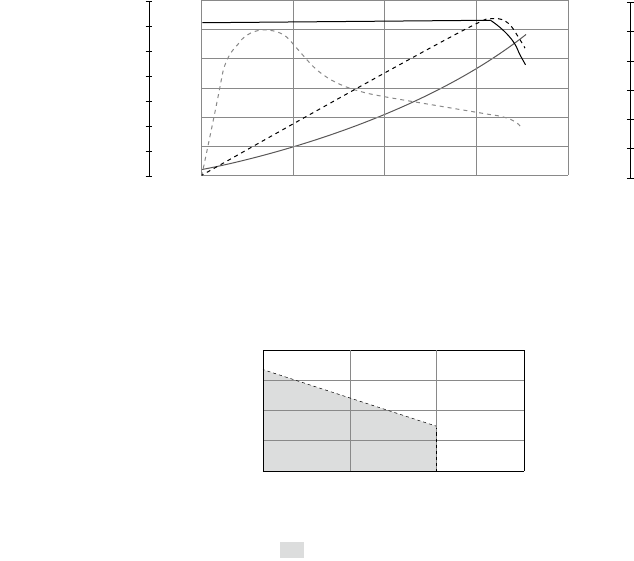
Load characteristics (speed open-loop control)
© 2018 DJI All Rights Reserved. 9
Load characteristics (speed closed-loop control)
P
I
η
n
0.5
1
1.5
2
2.5
3
0 0.4 0.8 1.2 1.6
I(A)
0
1.5
3
4.5
6
7.5
9
P(W)
0
10
20
30
40
50
60
70
n(rpm)
0
7.5
15
22.5
30
37.5
45
η(%)
T(N·m)
Operating Range
η – Electrical Efciency, T – Torque, I – Current, P – Output Power, n – Rotational Speed
n(rpm)
T(N·m)
0
100
200
300
400
1.20.6 1.8
Continuous Operating Range
The data above was generated in a laboratory setting with an output of 24 V, at the temperature of
77º F (25º C), and under normal dissipation conditions. These gures should be used for reference
only. Make sure to control running time properly in accordance with actual working temperature,
dissipation, etc.
10 © 2018 DJI All Rights Reserved.
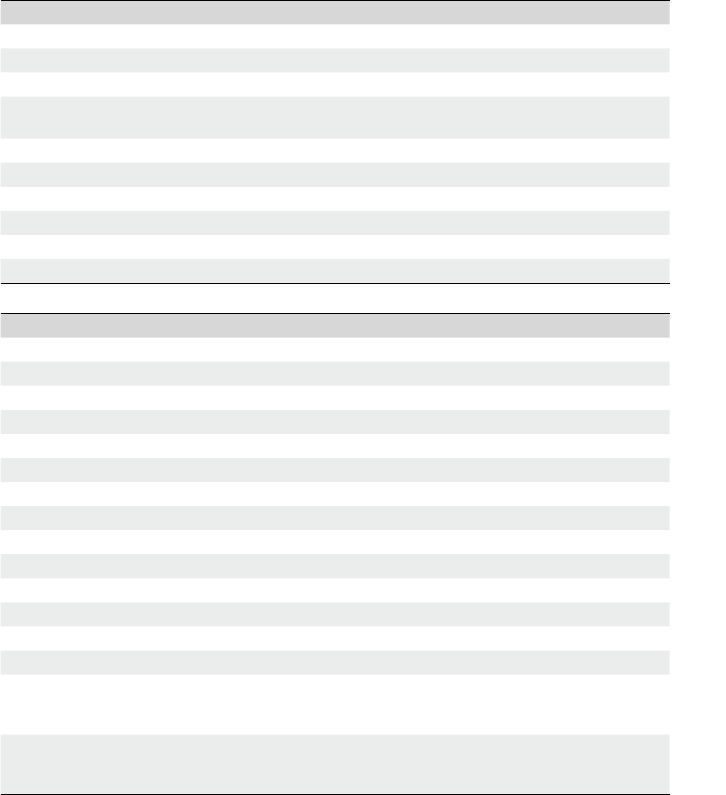
Motor Characteristic Parameters
Rated voltage DC 24 V
Torque constant 741 mN·m/A
Speed constant 13.33 rpm/V
Speed/Torque Gradient 156 rpm/(N·m)
Mechanical Time Constant 3 ms
Phase Resistance 1.8 Ω
Phase Inductance 5.78 mH
Operating Temperature Range 32°~ 131 ° F (0°~55° C)
Max Permissible Winding Temperature 257° F (125° C)
Number of Pole Pairs 10
Phase Number 3
Maximum radial load of bearing(dynamic load) 3.5 KN
Basic static radial load of bearing 2.2 KN
Motor weight Approx. 468 g
Dimensions
Hallow shaft inner diameter: 18 mm
Motor diameter: 66.7 mm
Total height: 45 mm
Cables’ length
XT30 power cable: 500 mm
CAN cable: 500 mm
PWM cable: 500 mm
Characteristic Parameters
Refer to the parameters below to make proper use of your motor.
Motor specications at rated voltage
Maximum no-load speed 320 rpm
No-load current 78 mA
Rated torque (max continuous torque) 1.2N·m
Adjustable speed range (No-load: 0-320 rpm)
(At rated torque: 0-132 rpm)
Torque pulsation factor 3.32%
Locating precision 13 bit
Rated current 1.62 A
Max efciency 67.85%
Stall Torque (continuous) 0.86N·m
Stall Current (continuous) 0.90 A
http://www.dji.com/support
DJI Support
WWW.ROBOMASTER.COM
Copyright © 2018 DJI All Rights Reserved.
are trademarks of DJI.and
