SH07APG SH 07 12 APG Service Manual
User Manual: SH07APG
Open the PDF directly: View PDF  .
.
Page Count: 46
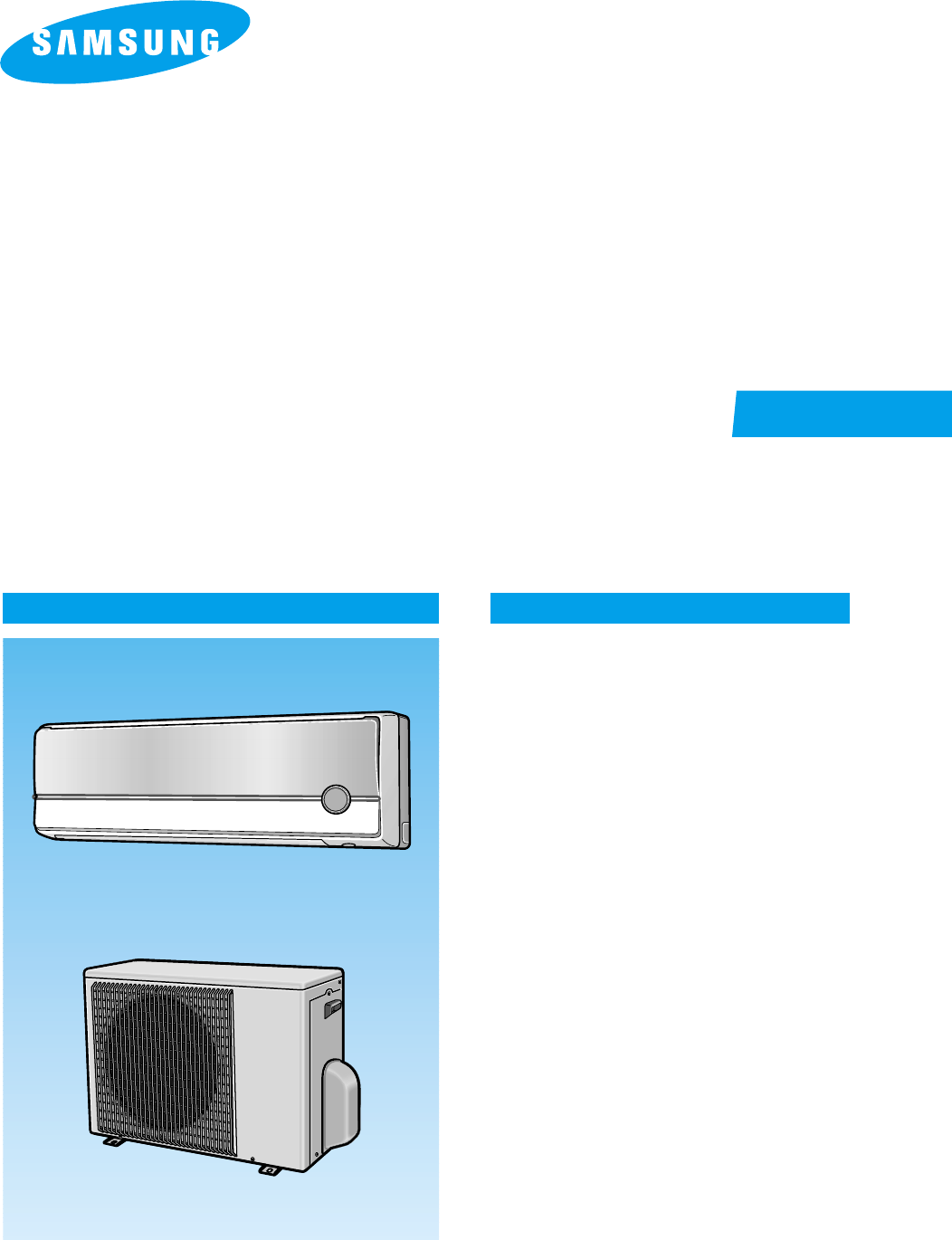
INDOOR UNIT
SH07APG
SH07APGA
SH09APG
SH12APG
OUTDOOR UNIT
SH07APGX
SH07APGAX
SH09APGX
SH12APGX
SERVICE Manual
CONTENTSAIR CONDITIONER
11. Product Specifications
12. Operating Instructions
13. Disassembly and Reassembly
14. Refrigerating Cycle Diagram
15. Set Up the Model Option
16. Troubleshooting
17. Exploded Views and Parts List
18. Block Diagram
19. PCB Diagram
10. Wiring Diagram
11. Schematic Diagram
ROOM AIR CONDITIONER
DB98_15732A(3)_co 3/9/04 10:10 AM Page 3
1Samsung Electronics
1. Product Specifications
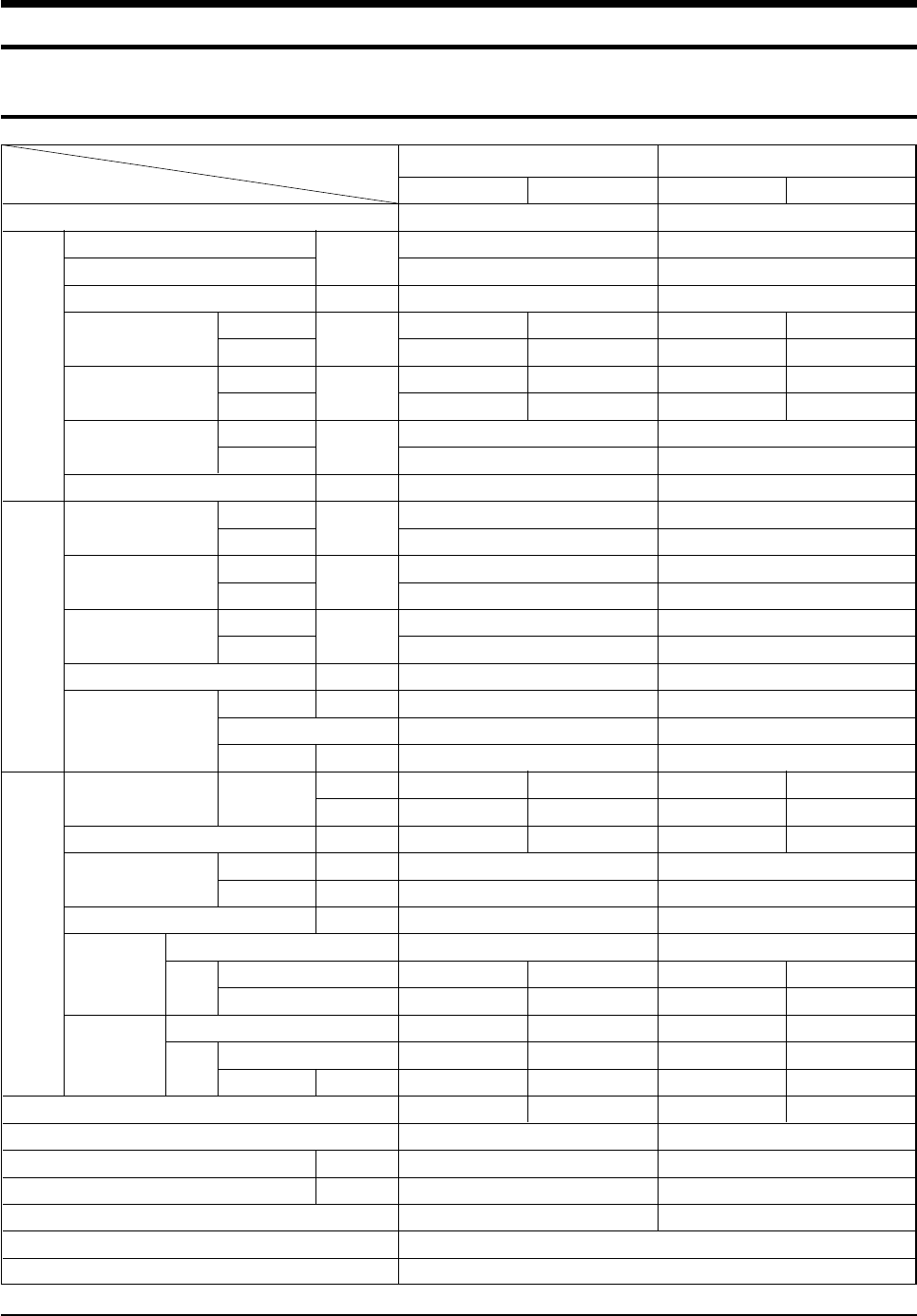
1-1 Table
Model
Item
SH07APG SH07APGA
Type
Cooling kW
Heating
Dehumidifying |/h
Air Volume Cooling m3/min
Heating
Noise Cooling dB
( ):EUROVENT Heating
Energy Efficiency Ratio Cooling
Heating W/W
Power V-Hz
Power Consumption Cooling W
Heating
Operating Current Cooling A
Heating
Power Factor Cooling %
Heating
Starting Current A
Length m
Power Cord Number of Core Wire
Capacity A
Outer W x H x D mm
Dimension inch
Weight kg
Refrigerant Pipe Liquid mm x L(m)
GAS mm x L(m)
Drain Hose D x L(mm)
Type
Compressor Motor Type
Rated Output
Type
Blower Motor Type
Rated Output W
Heat Exchanger
Refrigerant Control Unit
Freezer Oil Capacity cc
Refrigerant to Change(R410A) g
Protection Device(OLP)
Cooling Test Condition
Maximum Operation Condition
Wall-mounted
2.47
2.46
0.9
6.0 24
6.8 24
36(47) 47(47)
36(57) 47(57)
3.21
3.42
1-220 / 240-50
770
720
3.4
3.3
98.5
94.9
18.0
-
-
250V-10 / 16A
795 x 258 x 179 695 x 530 x 280
31.3 x 10.2 x 7.0 27.4 x 20.9 x 11.0
7.5 27.0
ø6.35 x 7
ø9.52 x 7
ø18 x 2,000
Rotary
--
--
Cross-fan Propeller
steel steel
11 25
2ROW 10STEP 1ROW 24STEP
CAPILLARY TUBE
350
650
MRA99901-9201
Wall-mounted
2.47
2.46
0.9
6.0 24
6.8 24
36(47) 36(47)
36(57) 47(57)
3.21
3.42
1-220 / 240-50
770
720
3.4
3.3
98.5
94.9
18.0
-
-
250V-10 / 16A
795 x 258 x 179 695 x 530 x 280
31.3 x 10.2 x 7.0 27.4 x 20.9 x 11.0
7.5 27.0
ø6.35 x 7
ø9.52 x 7
ø18 x 2,000
Rotary
--
--
Cross-fan Propeller
steel steel
11 25
2ROW 10STEP 1ROW 24STEP
CAPILLARY TUBE
350
600
RAC12126-9622
Size
Power
Perfor-
mance
Indoor unit Outdoor unit Indoor unit Outdoor unit
INDOOR UNIT : DB27˚C WB19˚C OUTDOOR UNIT : DB35˚C WB24˚C
INDOOR UNIT : DB32˚C WB23˚C OUTDOOR UNIT : DB43˚C WB26˚C
DB98_15732A(3)_1 3/9/04 10:08 AM Page 1
Samsung Electronics2
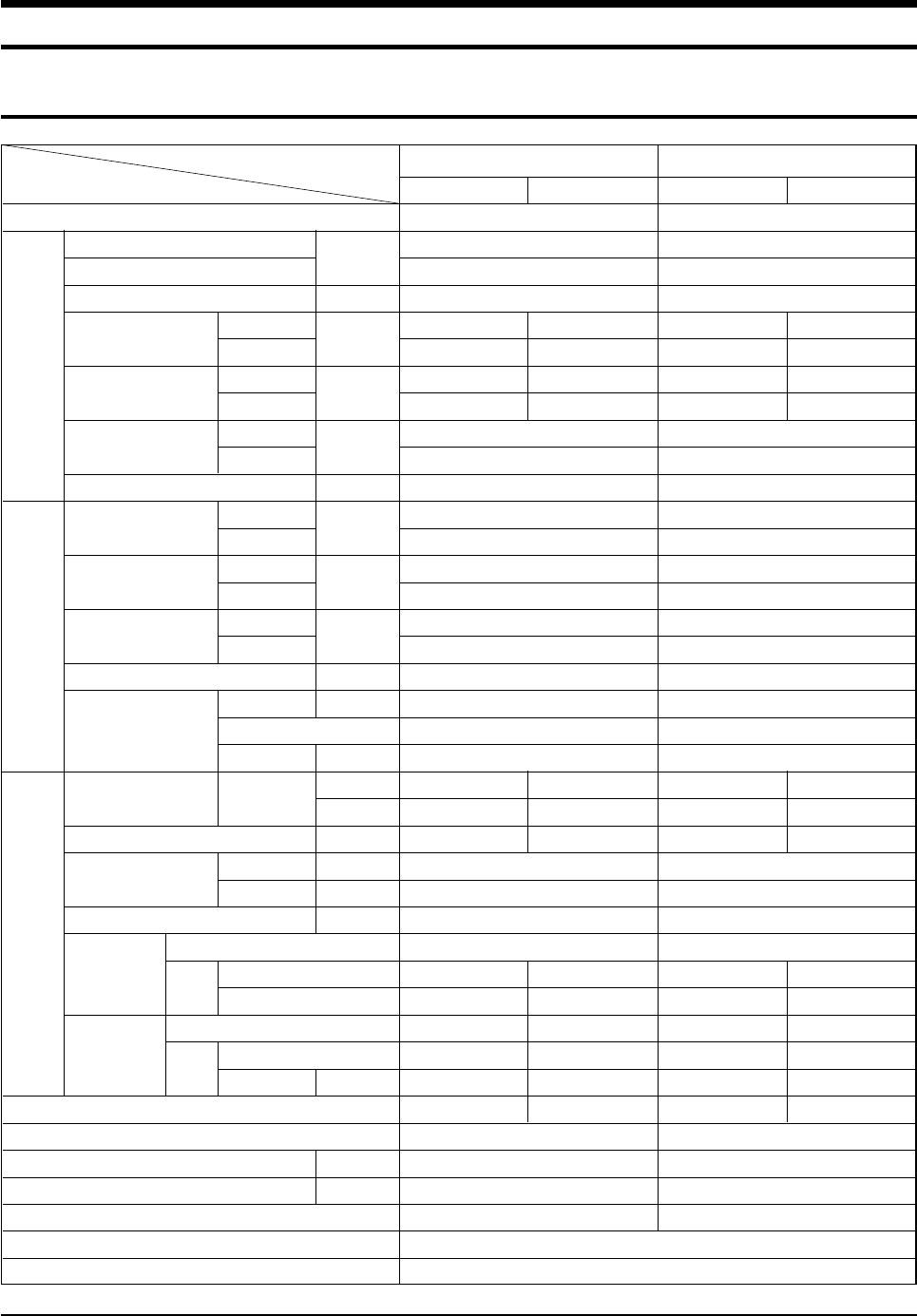
Table(cont.)
Model
Item
SH09APG SH12APG
Type
Cooling kW
Heating
Dehumidifying |/h
Air Volume Cooling m3/min
Heating
Noise Cooling dB
( ):EUROVENT Heating
Energy Efficiency Ratio Cooling
Heating W/W
Power V-Hz
Power Consumption Cooling W
Heating
Operating Current Cooling A
Heating
Power Factor Cooling %
Heating
Starting Current A
Length m
Power Cord Number of Core Wire
Capacity A
Outer W x H x D mm
Dimension inch
Weight kg
Refrigerant Pipe Liquid mm x L(m)
GAS mm x L(m)
Drain Hose D x L(mm)
Type
Compressor Motor Type
Rated Output
Type
Blower Motor Type
Rated Output W
Heat Exchanger
Refrigerant Control Unit
Freezer Oil Capacity cc
Refrigerant to Change(R410A) g
Protection Device(OLP)
Cooling Test Condition
Maximum Operation Condition
Wall-mounted
2.70
2.90
1.4
6.4 24
7.4 24
39(50) 48(58)
39(50) 48(58)
3.21
3.41
1-220 / 240-50
840
850
3.7
3.7
98.7
99.9
21.0
-
-
250V-10 / 16A
795 x 258 x 179 695 x 530 x 280
31.3 x 10.2 x 7.0 27.4 x 20.9 x 11.0
7.5 28.0
ø6.35 x 7
ø9.52 x 7
ø18 x 2,000
Rotary
--
--
Cross-fan Propeller
steel steel
11 25
2ROW 10STEP 1ROW 24STEP
CAPILLARY TUBE
280
590
RBC12054-12500
Wall-mounted
3.50
3.80
1.9
8.2 24
8.6 24
42(53) 50(63)
42(53) 50(63)
3.21
3.22
1-220 / 240-50
1,090
1,180
5.0
5.2
94.8
98.7
28.0
-
-
250V-10 / 16A
890 x 285 x 179 695 x 530 x 280
35.0 x 11.2 x 7.0 27.4 x 20.9 x 11.0
8.5 32.5
ø6.35 x 7
ø12.7 x 7
ø18 x 2,000
Rotary
--
--
Cross-fan Propeller
steel steel
15 25
2ROW 12STEP 2ROW 24STEP
CAPILLARY TUBE
500
880
RBC12128-12500
Size
Power
Perfor-
mance
Indoor unit Outdoor unit Indoor unit Outdoor unit
INDOOR UNIT : DB27˚C WB19˚C OUTDOOR UNIT : DB35˚C WB24˚C
INDOOR UNIT : DB32˚C WB23˚C OUTDOOR UNIT : DB43˚C WB26˚C
DB98_15732A(3)_1 3/9/04 10:08 AM Page 2
3Samsung Electronics
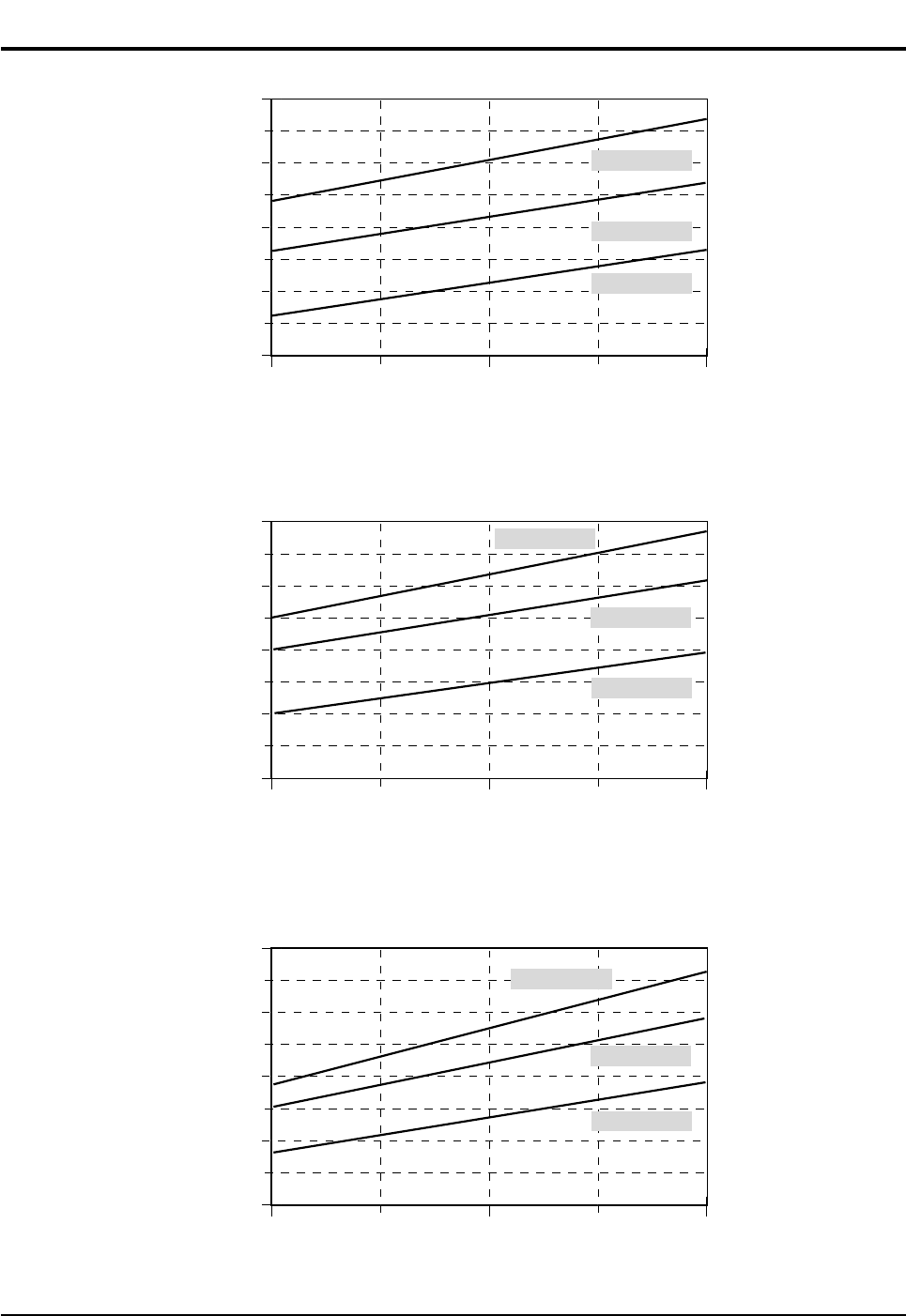
1-2 Pressure Graph
11
10
9
8
7
20 30
Outdoor drybulb temperature [deg C]
Low Pressure [kg/cm2G]
40
30.6/22.5
27/19
21.5/14.6
■SH07APG
■SH07APGA
10
9
8
7
3
20 30
Outdoor drybulb temperature [deg C]
Low Pressure [kg/cm2G]
40
30.6/22.5
27/19
21.5/14.6
■SH09APG
10
9
8
7
6
20 30
Outdoor drybulb temperature [deg C]
Low Pressure [kg/cm2G]
40
30.6/22.5
27/19
21.5/14.6
■SH12APG
DB98_15732A(3)_1 3/9/04 10:08 AM Page 3
Samsung Electronics4
2. Operating Instructions
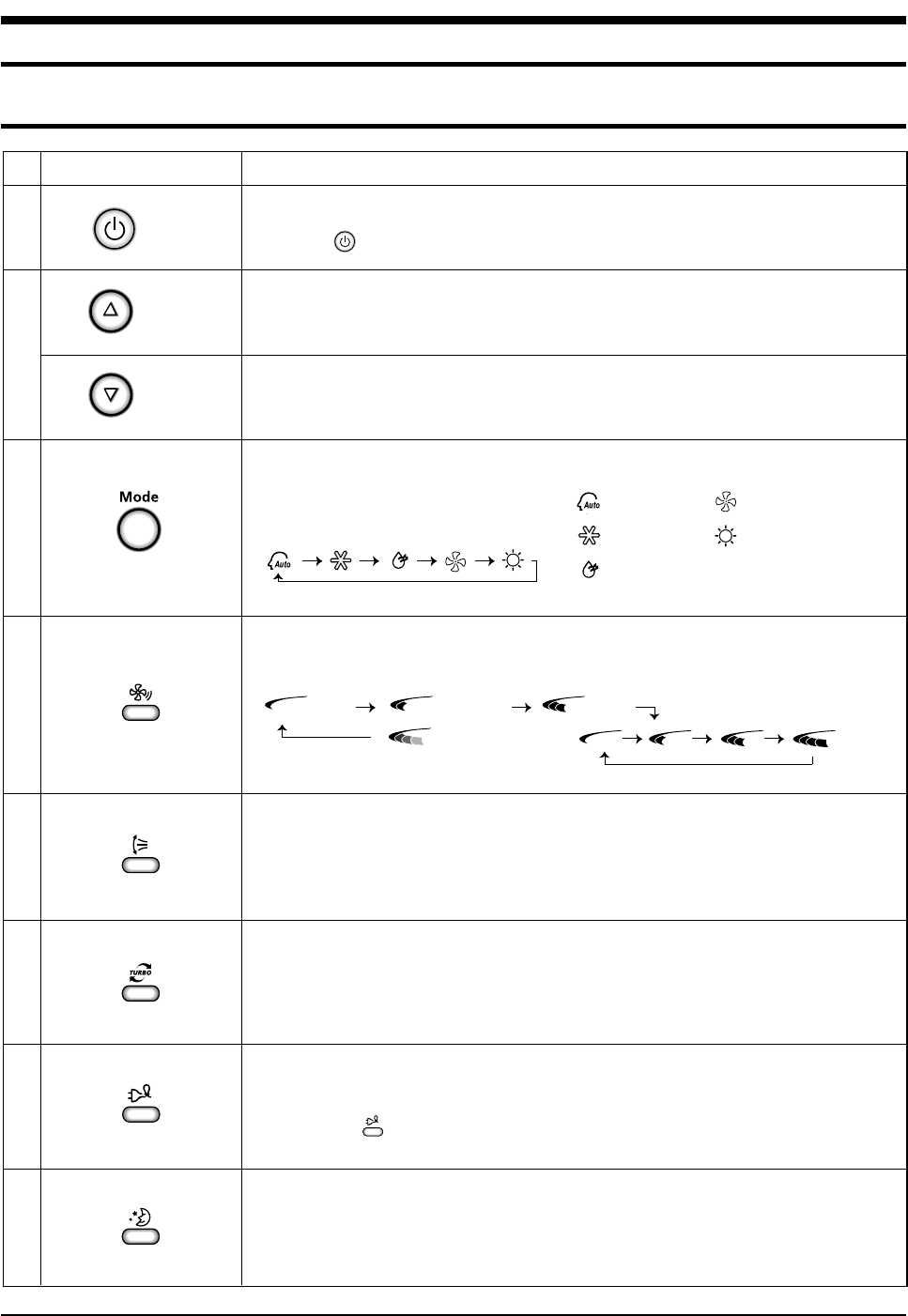
2-1 The Feature of Key in remote control
Fan speed adjustment button.
Each time you press this button, FAN SPEED is changed in the following order.
Temperature adjustment button(DOWN).
To decrease the temperature by the pressing the temperature button.
FUNCTION OF KEY
On/Off button.
Press the button to stop or run the air conditioner.
NAMED OF KEYNo
1
2
3
4
5
6
7
8
Swing button.
It adjusts the airflow to upward and downward.
Temperature adjustment button(UP).
To increase the temperature by the pressing the temperature button.
(On/Off)
(UP)
(DOWN)
Low Medium High
Automatic(rotated : )
Sleep button.
The sleep timer can be used when you are cooling or heating your room to switch the
air conditioner off automatically after a period of 6 hours.
Turbo button.
The air conditioner cools or heats the room as quickly as possible.
After 30 minutes, the air conditioner is reset automatically to the previous mode.
Mode selection button.
Each time you press this button
Mode is changed in the following order : Auto Mode : Fan Only
: Cool Mode : Heat Mode
: Dry Mode
Energy saving button.
If you wish to save energy when using your air conditioner, select the Energy saving
mode with the button.
DB98_15732A(3)_1 3/9/04 10:09 AM Page 4
5Samsung Electronics
Operating Instructions
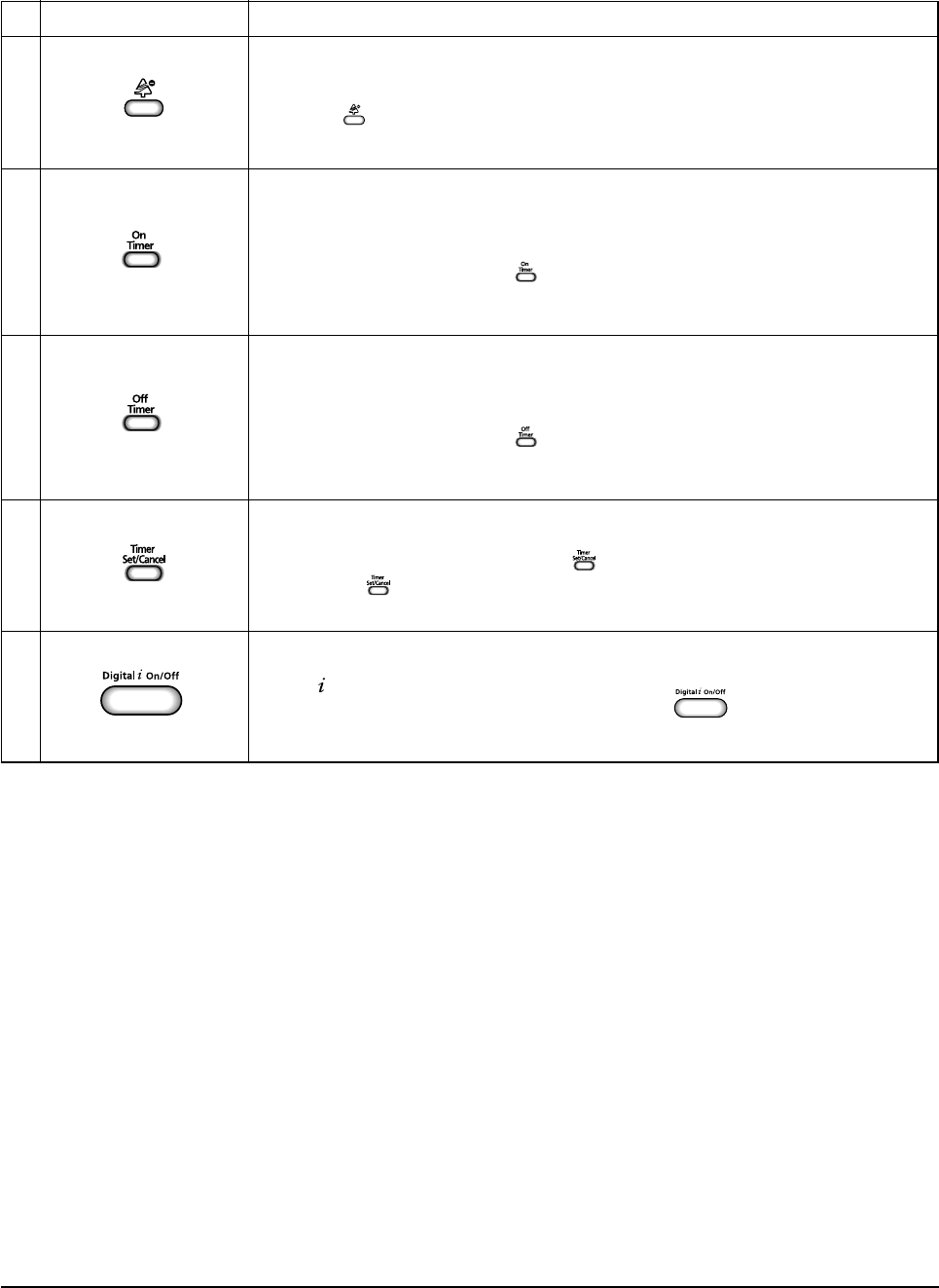
Digital On/Off button.
If you want to turn off the display during operation press the button.
Off Timer button.
The Off Timer enables you to switch off the air conditioner automatically after
a given period of time that is from 30 minutes to 24 hours.
To set the operating time, press the button one or more times until the required
time display.
FUNCTION OF KEY
Anion button.
Press the button to generate ion from the air conditioner.
NAMED OF KEYNo
9
10
11
12
13
On Timer button.
The On Timer enables you to switch on the air conditioner automatically after
a given period of time that is from 30 minutes to 24 hours.
To set the operating time, press the button one or more times until the required
time display.
Timer Set/Cancel button.
After setting On Timer or Off Timer, press the button to set it completely.
And press the button again to cancel On Timer or Off Timer set.
DB98_15732A(3)_1 3/9/04 10:09 AM Page 5
Samsung Electronics6
Operating Instructions
1. AUTO MODE : In this mode, operation mode(COOL,
HEAT) is selected automatically by the room temperature
of initial operation.
∆T= -1°C, -2°C, 0°C, +1°C, +2°C
∆T is controlled by setting temperature up/down key of
remote control
2. COOL MODE : The unit operates according to the
difference between the setting and room temperature.
(18°C~30°C)
3. HEAT MODE : The unit operates according to the
difference between the setting and room tempera-
ture.(16°C~30°C)
*Prevention against cold wind : In order to prevent the
cool air from flowing out at the heat mode, the indoor fan
does not operate or operates very slowly in the
following cases. At this time, the indoor heat exchanger
will be preheating.
- For 3~5 minutes after the initial operation
- For deicing operation
- The operation of an indoor fan in accordance with
the temperature of an indoor heat exchanger
*High temperature release function : It is a function to
detect an outdoor overload by the sensor of an indoor
heat exchanger and to turn the outdoor fan or the
compressor ON/OFF for safety.
*Deice : Deicing operation is controlled by indoor unit's
heat exchanger temperature and accumulating time of
compressor's operation.
Deice ends by sensing of the processing time by deice
condition.
4. DRY MODE : Has 3 states, each determined by room
temperature.
The unit operates in DRY mode.
*Compressor ON/OFF Time is controlled
compulsorily(can not set up the fan speed, always
breeze).
*Protective function : Low temperature release.
(Prevention against freeze)
5. TURBO MODE : This mode is available in AUTO, COOL,
HEAT, DRY, FAN MODE.
When this button is pressed at first, the air conditioner is
operated "powerful" state for 30 minutes regardless of the
set temperature, room temperature.
When this button is pressed again, or when the operating
time is 30 minutes, turbo operation mode is canceled and
returned to the previous mode.
*But, if you press the TURBO button in DRY or FAN
mode that is changed with AUTO mode automatically.
6. SLEEP MODE : Sleep mode is available only in COOL or
HEAT mode.
The operation will stop after 6 hours.
*In COOL mode : The setting temperature is automatical-
ly raised by 1°C each 1hour When the temperature has
been raised by total of 2°C, that temperature is
maintained.
*In HEAT mode : The setting temperature is automatically
dropped by 1°C each 1hour.
When the temperature has been dropped by total of
2°C, that temperature is maintained.
7. FAN SPEED : Manual (3 step), Auto (4 step)
Fan speed automatically varies depending on both the
difference between setting and the room temperature.
8. COMPULSORY OPERATION :
For operating the air conditioner without the remote
control.
*The air conditioner starts up in the most suitable mode
for the room temperature:
Room Temp
Tr≥21°C+∆T
21°C +∆T>Tr
Operation Type
Cool Operation (Set Temp:24˚C+∆T)
Heat Operation (Set Temp:22˚C+∆T)
2-1-1 Name & Function of Key in remote control
below 28˚C
28˚C~below 34˚C
34˚C~below 40˚C
above 40˚C
The temperature of
indoor heat exchanger Indoor fan speed
off
LL Speed
L Speed
Setting Speed
Room Temperature
Less than 21˚C
21˚C or above
Operating Mode
Heat
Cool
Temperature Setting
22˚C approx.
24˚C approx.
DB98_15732A(3)_1 3/9/04 10:09 AM Page 6
7Samsung Electronics
Operating Instructions
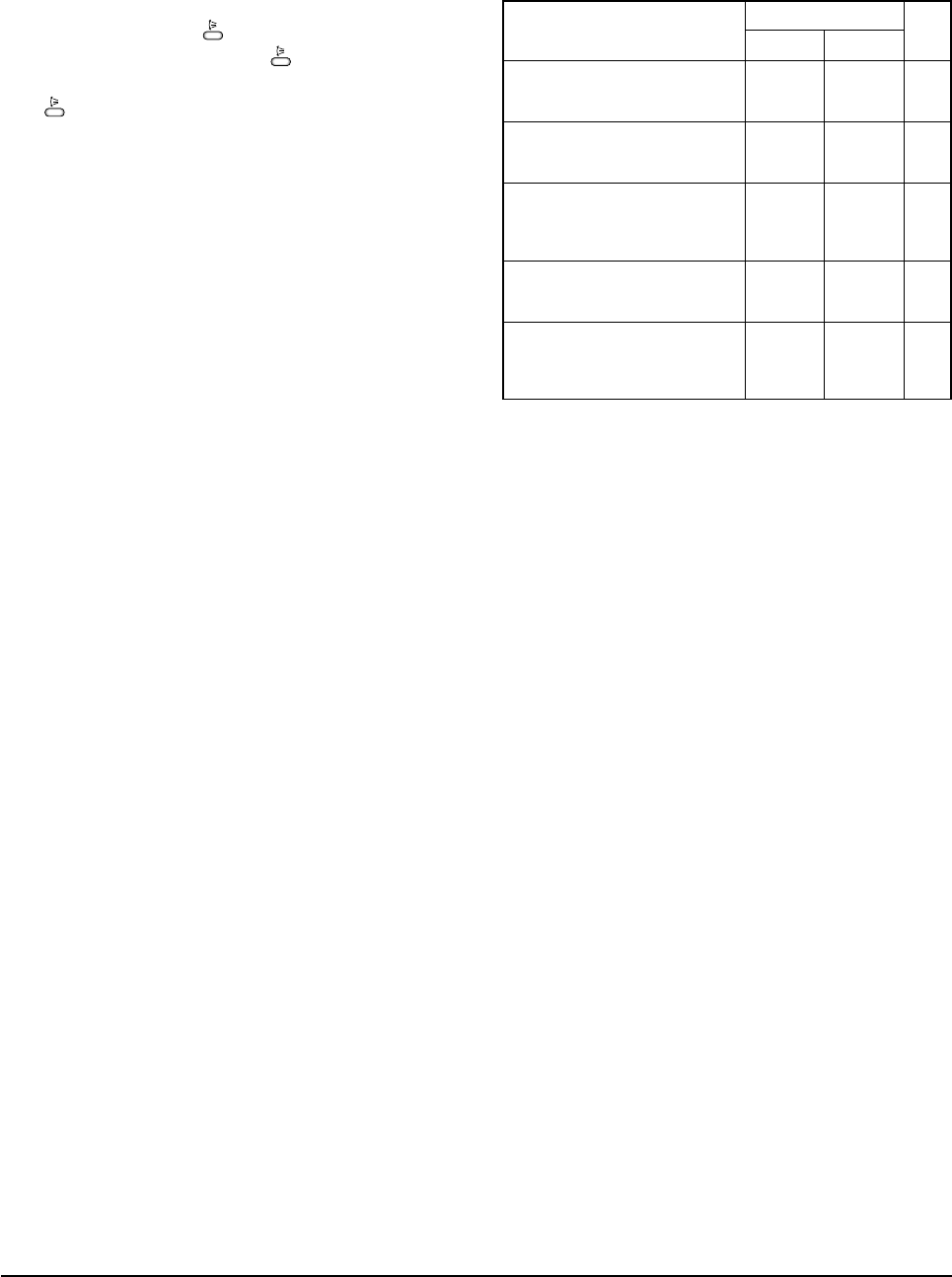
9. SWING : BLADE-H is rotated vertically by the stepping
motor.
*Swing Set : Press the button under the remote
control is displayed on LCD the and the blades
move up and down. If the one more time press the
button, blades location is stop.
10. SETTING THE ON/OFF TIMER. :
*ON TIMER : The On Timer enables you to switch on the
air conditioner automatically after a given period of time.
You can set the period of time from 30 minutes to 24
hours.
*OFF TIMER : The Off Timer enables you to switch off
the air conditioner automatically after a given period of
time. You can set the period of time from 30 minutes to
24 hours.
11. GENERATING ANION :
The air conditioner can generate anion with an ionizer in
the indoor unit.
12. SELF DIAGNOSIS
13. BUZZER SOUND : Whenever the On/Off button is
pressed or whenever change occurs to the condition
which is set up or select, the compulsory operation mode,
buzzer is sounded "beep".
Indoor unit room temperature sensor
error (open or short)
OFF E1
OFF E2
OFF E3
OFF E6
All lamp
blinking
All lamp
blinking
Indoor unit heat exchanger
temperature sensor error(open or short)
Indoor FAN MOTOR error :
Keep the RPM value 450 below for
15 seconds
Error in option
In case of No option set-up
In case of option data error
EEPROM error
Error Mode
Operation Off Operation On
DISPLAY 7-SEGMENT
Remark
DB98_15732A(3)_1 3/9/04 10:09 AM Page 7
Samsung Electronics8
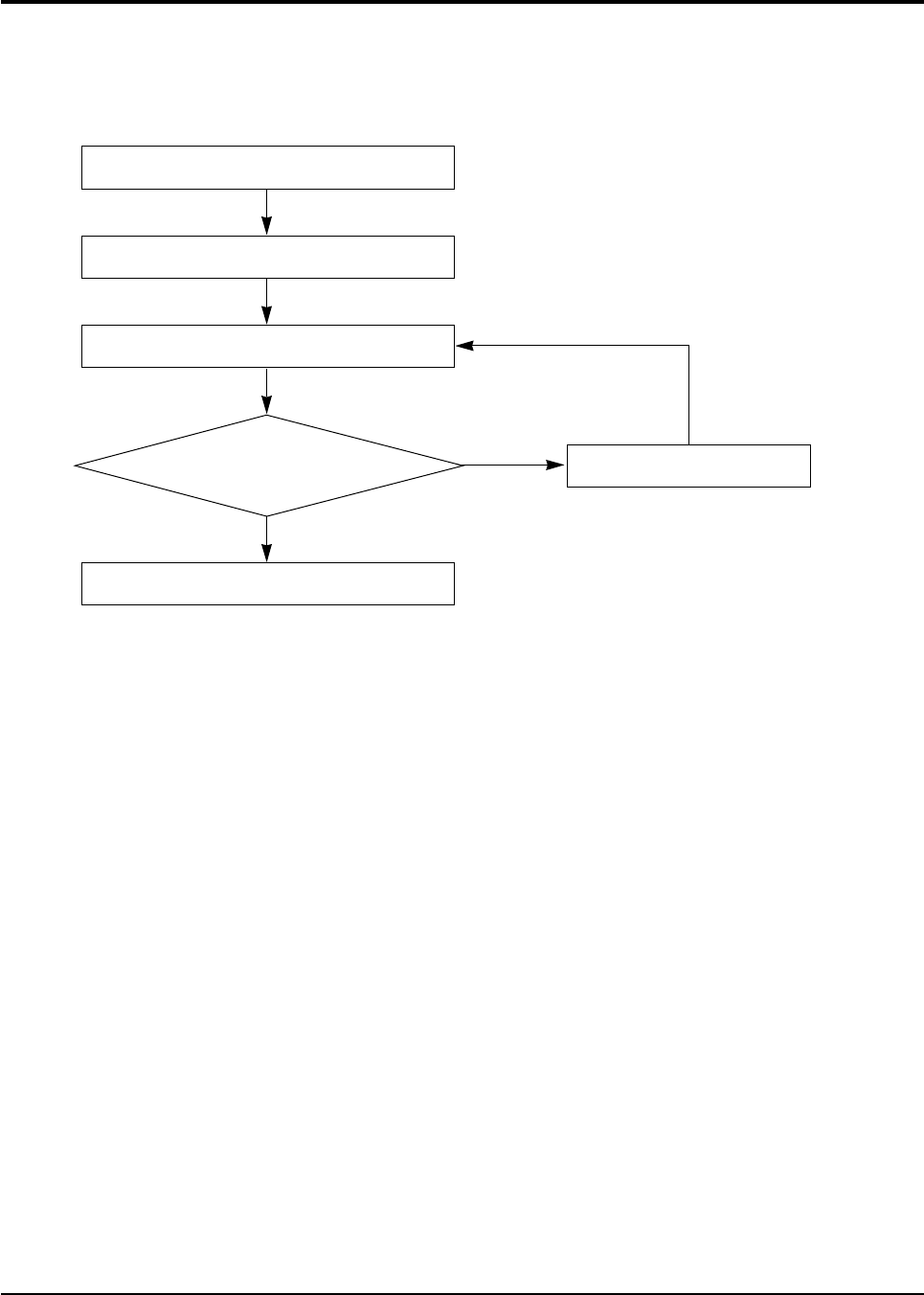
2-2 Replace PCB Model option
2-2-1 Replace PCB model option
No
Yes
Remove power cord
Replace the PCB module
Check the connection and plug in
Refer to set up the Model option(15~17page)
Replace another PCB
Does all display lamp blink?
DB98_15732A(3)_1 3/9/04 10:09 AM Page 8
9Samsung Electronics
3. Disassembly and Reassembly
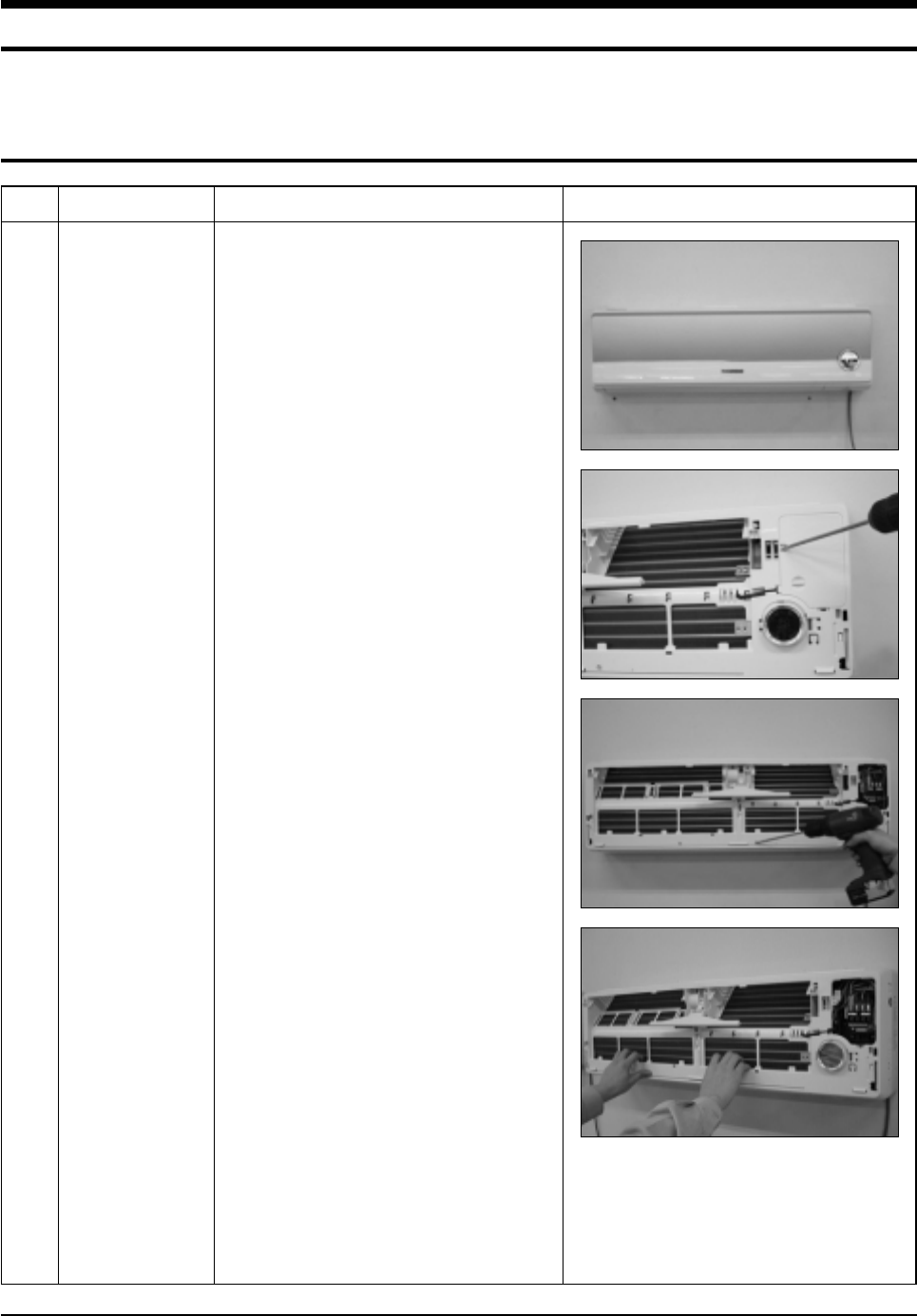
3-1 Indoor Unit
Stop operation of the air conditioner and remove the power cord before repairing the unit.
No Parts Procedure Remark
1 Front Panel 1) Stop the air conditioner operation and block
the main power.
2) Separate tape of Front Panel upper.
3) Slide the lower Front Grille down, then
disassemble it by pulling it forwards.
4) Open the upper Front Grille by pulling right
and left sides of the Grille.
5) Take the left and right Filter out.
6) Loosen one of the right screw and detach
the Terminal Cover.
7) Detach the thermistor from the Front Grille.
8) Loosen 5 fixing screws of Front Grille.
9) Pull the lower left and right of discharge
softly for the outside cover to be pulled out.
DB98_15732A(3)_1 3/9/04 10:09 AM Page 9
Samsung Electronics10
Disassembly and Reassembly
No Parts Procedure Remark
2
3
Electrical Parts
(Main PCB)
Tray Drain
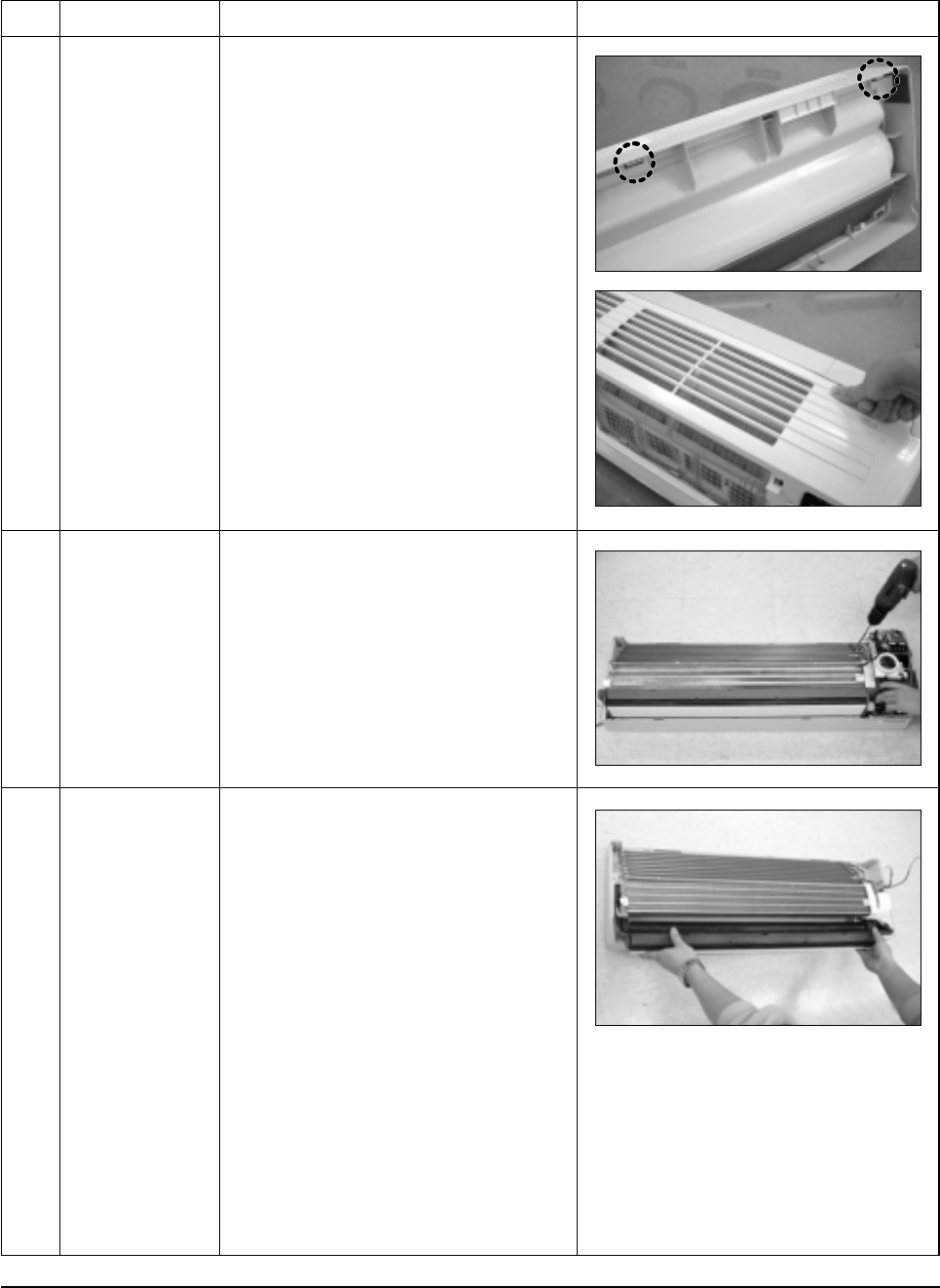
10) At first, press the left and center hook of
the back side of the Panel Grille with the
thumb to remove the hook. And press the
right of the upper side of the Panel Grille
with the fingers. And then disassemble the
Panel Grille.
1) Take all the connector of PCB upper side
out.(Including Power Cord)
2) Detach the outdoor unit connection wire
from the Terminal Block.
3) If pulling the main PCB up, it will be taken
out.
1) Pull Tray Drain out from the Back Body.
DB98_15732A(3)_1 3/9/04 10:09 AM Page 10
11Samsung Electronics
Disassembly and Reassembly
No Parts Procedure Remark
4
5
Heat Exchanger
Fan Motor
&
Cross Fan
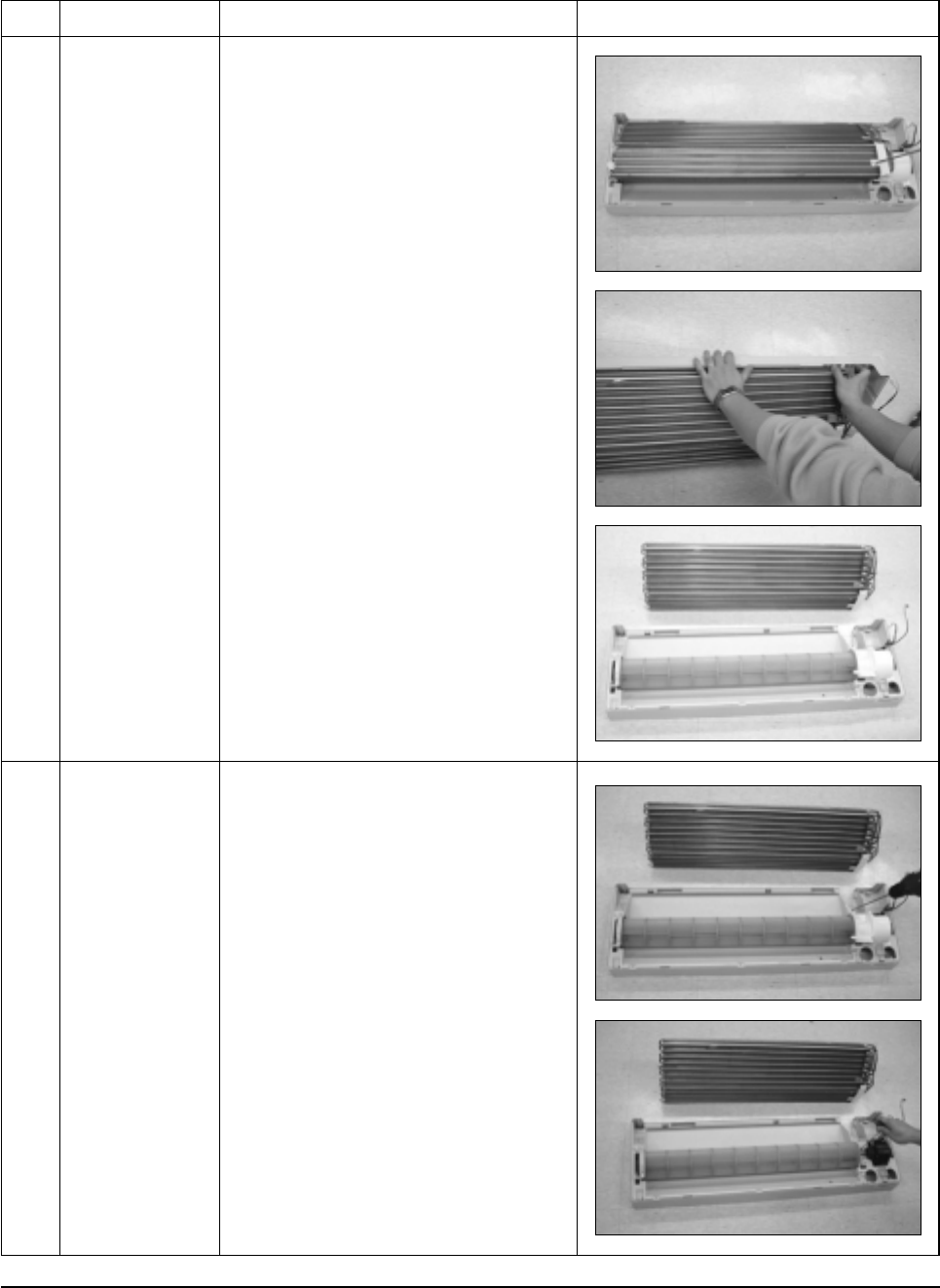
1) Loosen 2 fixing earth screws of right side.
2) Detach the Connection Pipe.
3) Detach the Holder Pipe at the rear side.
4) Loosen 3 fixing screws of right and left
side.
5) Detach the Heat Exchanger from the
indoor unit.
1) Loosen 2 fixing screws and separate the
Motor Holder.
2) Loosen 1 fixing screw of Fan Motor.
(with a M3 wrench)
3) Detach the Fan Motor from the Fan.
4) Detach the Fan from the left Holder
Bearing.
DB98_15732A(3)_1 3/9/04 10:09 AM Page 11
Samsung Electronics12
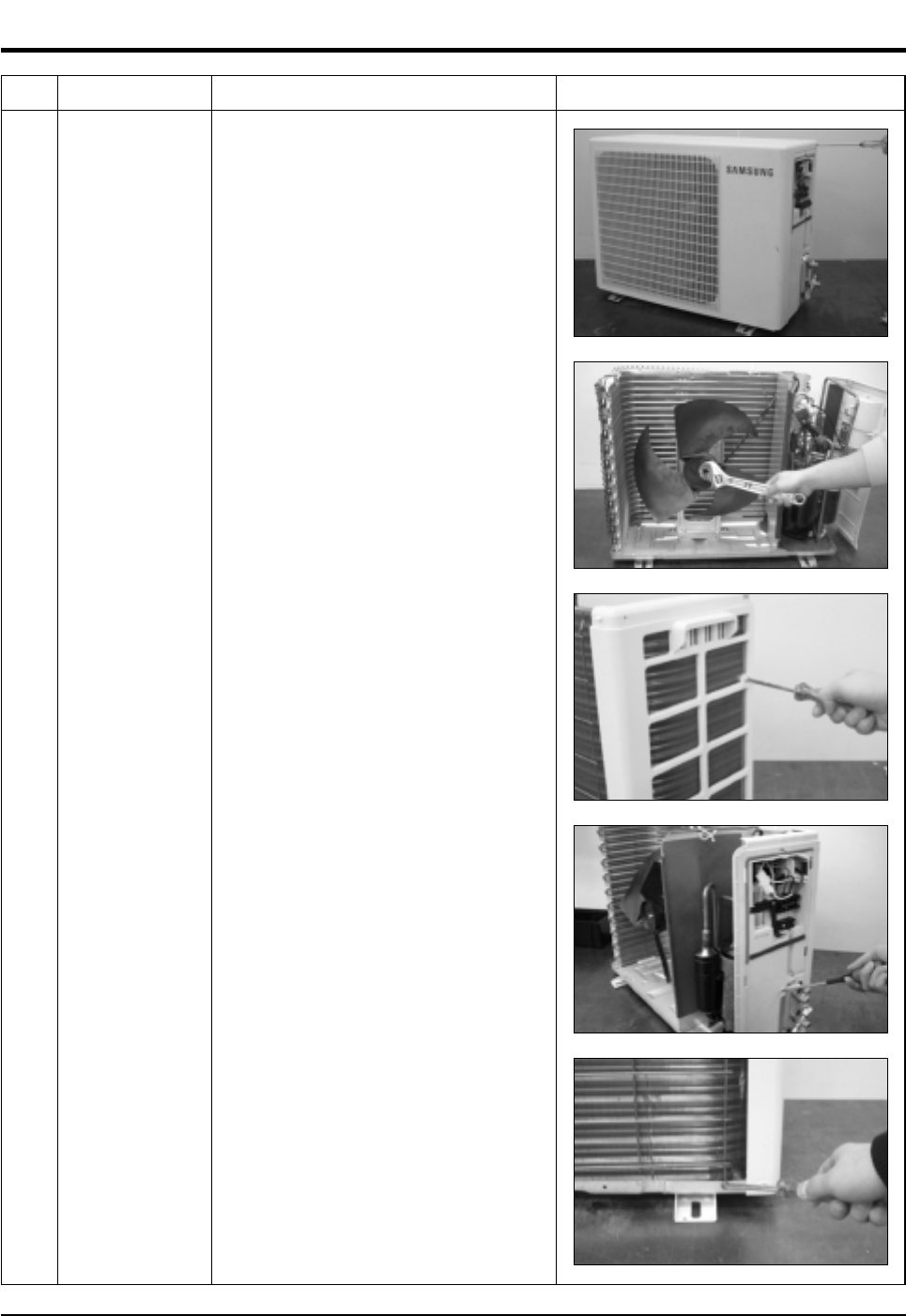
3-2 Outdoor Unit
No Parts Procedure Remark
1 Common Work 1) Loosen 2 fixing screws and separate the
Cover Valve.
2) Detach the connection wire from the
Terminal Block.
3) Loosen 4 fixing screws and detach the
Cabinet Front.
4) Loosen 2 fixing screws and detach the
Cabinet-Side LF.
5) Loosen 2 fixing screws of the Cabinet-Side
RH.
6) Loosen 2 fixing screws and detach the
Bar Steel.
DB98_15732A(3)_1 3/9/04 10:09 AM Page 12
13Samsung Electronics
Disassembly and Reassembly
No Parts Procedure Remark
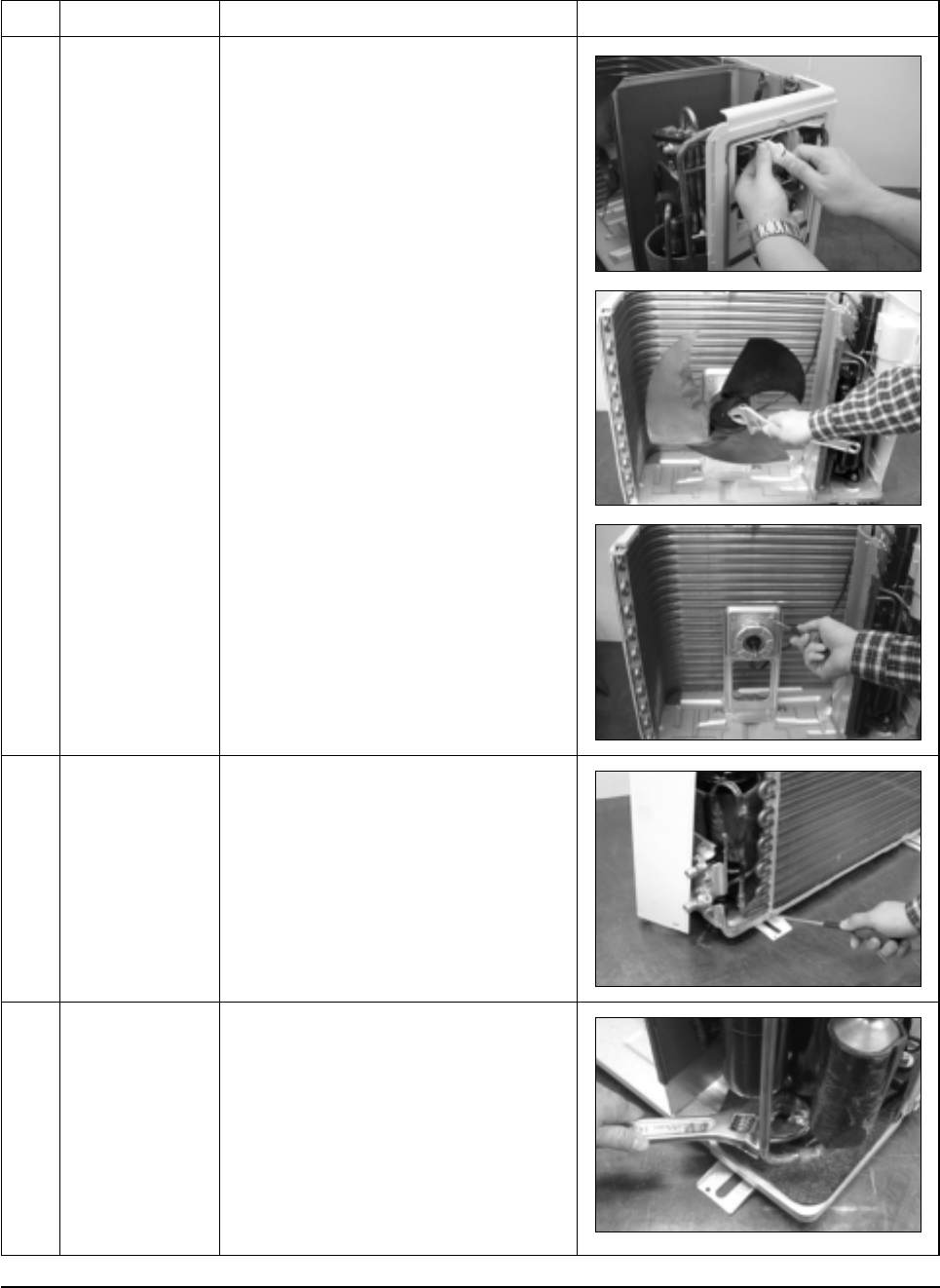
2
3
4
Fan
&
Motor
Heat Exchanger
Compressor
1) Detach the connection wire of the Motor
Fan.
2) Remove the Nut Flange.(Turn to the clock-
wise)
3) Detach the Fan.
4) Loosen 4 fixing screws to detach
the Motor.
5) Loosen 4 fixing screws and detach the
Motor Bracket from the Base.
1) Loosen 2 fixing screws of left and right
side.
2) Disassemble the inlet and outlet pipe by
welding.
3) Detach the Heat Exchanger.
1) Open the Terminal Cover of Compressor
and unscrew the Connection Terminal.
2) Disassemble the inlet and outlet pipe of
Compressor by welding.
3) Loosen 3 fixing bolts of the lower part.
4) Detach the Compressor.
DB98_15732A(3)_1 3/9/04 10:09 AM Page 13
Samsung Electronics14
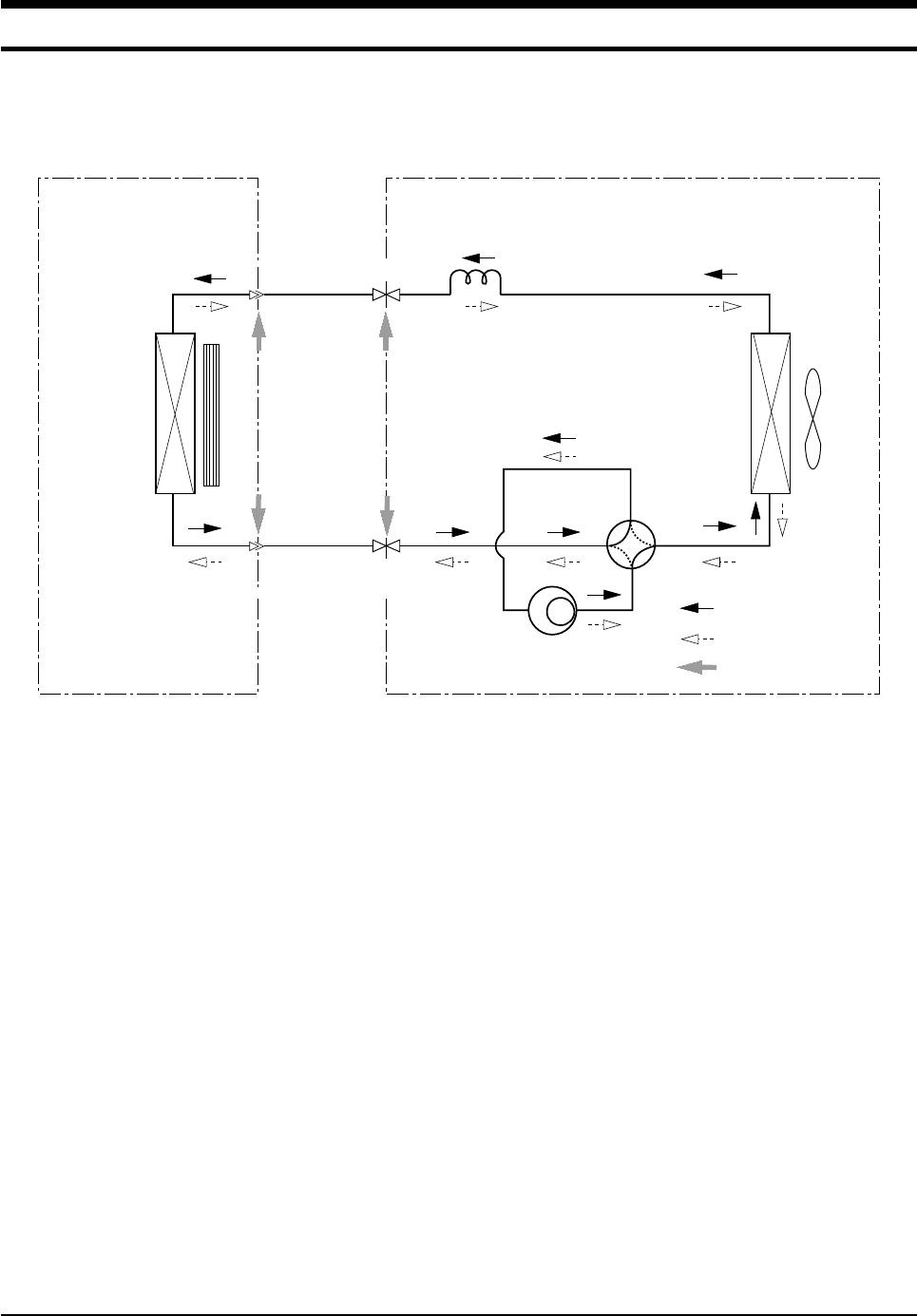
4. Refrigerating Cycle Diagram
Indoor Unit Outdoor Unit
T1
T2
2-Way valve
3-Way valve
Gas side
Heat
Exchanger
(Evaporator)
Heat
Exchanger
(Evaporator)
Liquid side
Capillary tube
4-Way valve
Cooling
Heating
Gas leak check point
Compressor
Cross fan
Propeller fan
DB98_15732A(3)_1 3/9/04 10:09 AM Page 14
15Samsung Electronics
5. Set Up the Model Option
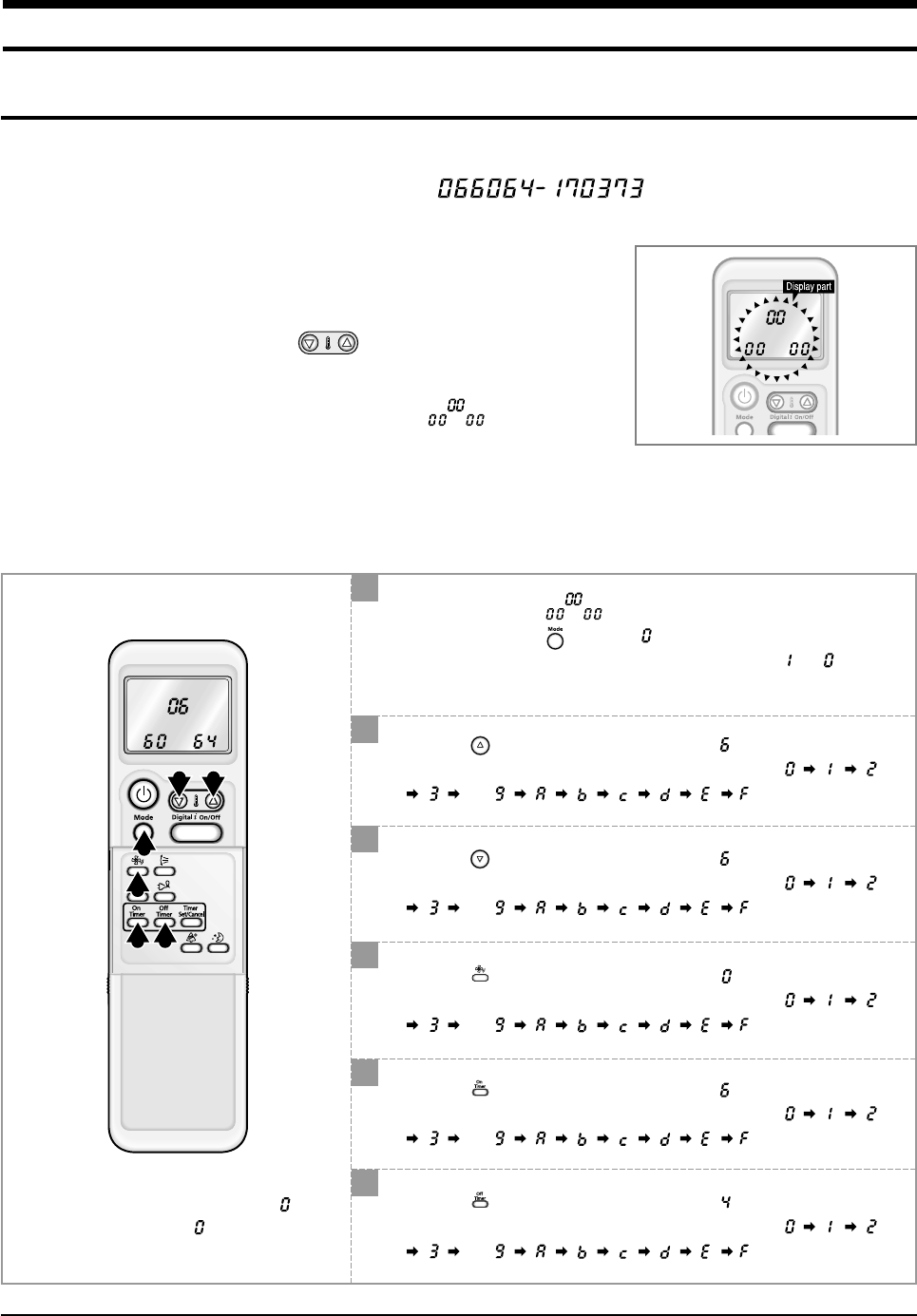
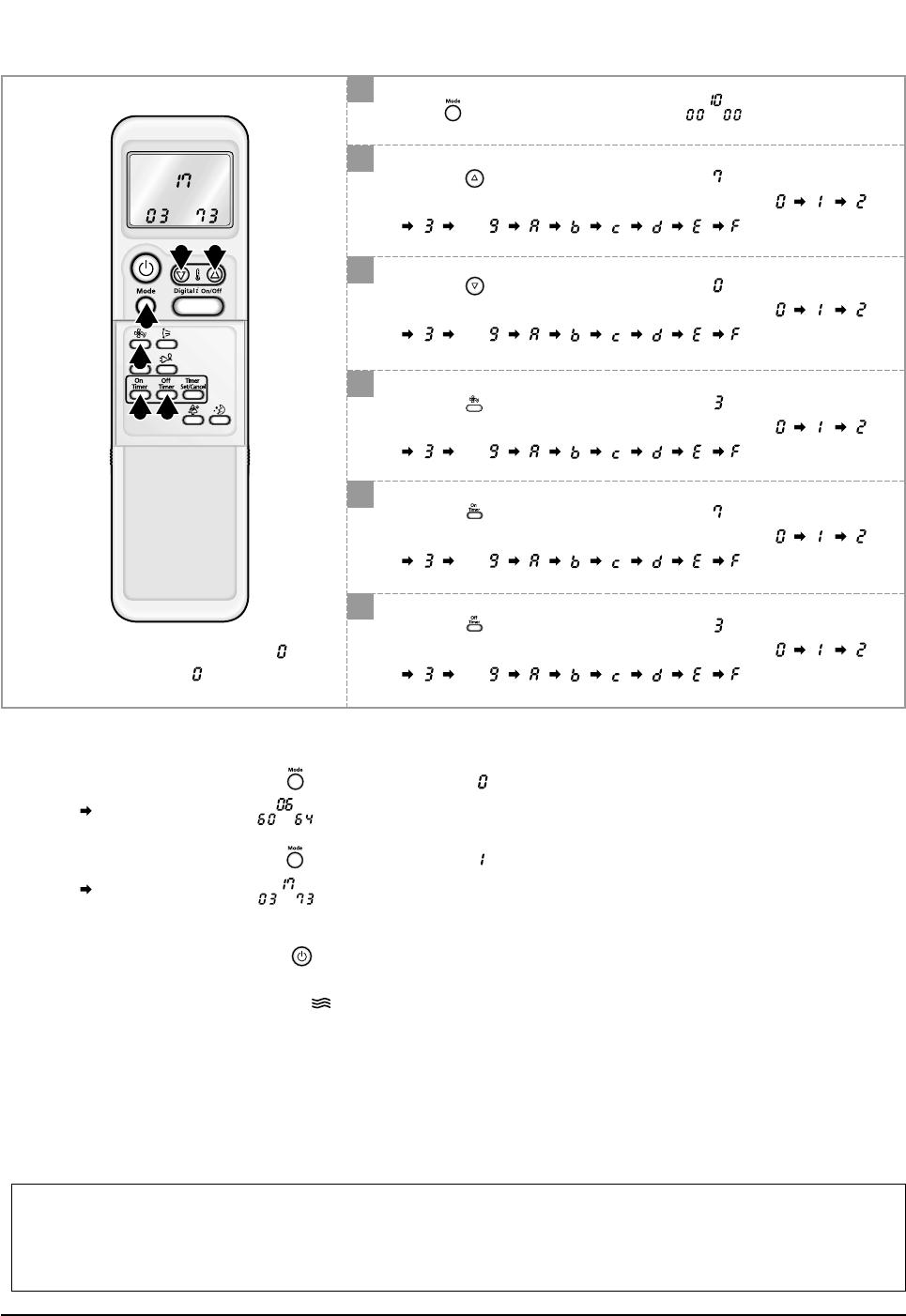
5-1 Setting Option Setup Method
ex) Option No. :
Step 1 : Enter the Option Setup mode.
1st Take out the batteries of remote control.
2nd Press the temperature button simultaneously and
insert the battery again.
3rd Make sure the remocon display shown as .
Step 2 : Enter the Option Setup mode and select your option according to the following procedure.
3 2
1
4
5 6
1
2
The default value is .
Otherwise, push the button to .
Every time you push the button, the display panel reads or
repeatedly.
✳Setting is not required if you must
a value which has a default.
Push the button to set the display panel to .
Every time you push the button, the display panel reads
. . . repeatedly.
3
Push the button to set the display panel to .
Every time you push the button, the display panel reads
. . . repeatedly.
4
Push the button to set the display panel to .
Every time you push the button, the display panel reads
. . . repeatedly.
5
Push the button to set the display panel to .
Every time you push the button, the display panel reads
. . . repeatedly.
6
Push the button to set the display panel to .
Every time you push the button, the display panel reads
. . . repeatedly.
DB98_15732A(3)_1 3/9/04 10:09 AM Page 15
Samsung Electronics16
Set Up the Model Option
7
8
Press button, then the default value is .
Push the button to set the display panel to .
Every time you push the button, the display panel reads
. . . repeatedly.
10
Push the button to set the display panel to .
Every time you push the button, the display panel reads
. . . repeatedly.
9
Push the button to set the display panel to .
Every time you push the button, the display panel reads
. . . repeatedly.
11
Push the button to set the display panel to .
Every time you push the button, the display panel reads
. . . repeatedly.
12
Push the button to set the display panel to .
Every time you push the button, the display panel reads
. . . repeatedly.
9 8
7
10
11 12
✳Setting is not required if you must
a value which has a default.
Step 3 : Upon completion of the selection, check you made right selections.
Press the Mode Selection key, to set the display part to and check the display part.
The display part shows .
Press the Mode Selection key, to set the display part to and check the display part.
The display part shows .
Step 4 : Pressing the ON/OFF button ( )
When pressing the operation ON/OFF key with the direction of remote controller for unit, the sound ''Ding'' or ''Diriring'' is
heard and the OPERATION ICON( ) lamp of the display is flickering at the same time, then the input of option is com-
pleted. (If the diriring sound isn't heard, try again pressing the ON/OFF button.)
Step 5 : Unit operation test-run
First, Remove the battery from the remote controller.
Second, Re-insert the battery into the remote controller.
Third, Press ON/OFF key with the direction of remote controller for set.
• Error Mode
1st If all lamps of indoor unit are flickering, plug out, plug in battery again and press the ON/OFF key to retry.
2nd If the unit is not working properly or all lamps are continuously flickering after setting the option code, see if the correct option code is
set up for its model.
DB98_15732A(3)_1 3/9/04 10:09 AM Page 16
17Samsung Electronics
Set up the Model Option
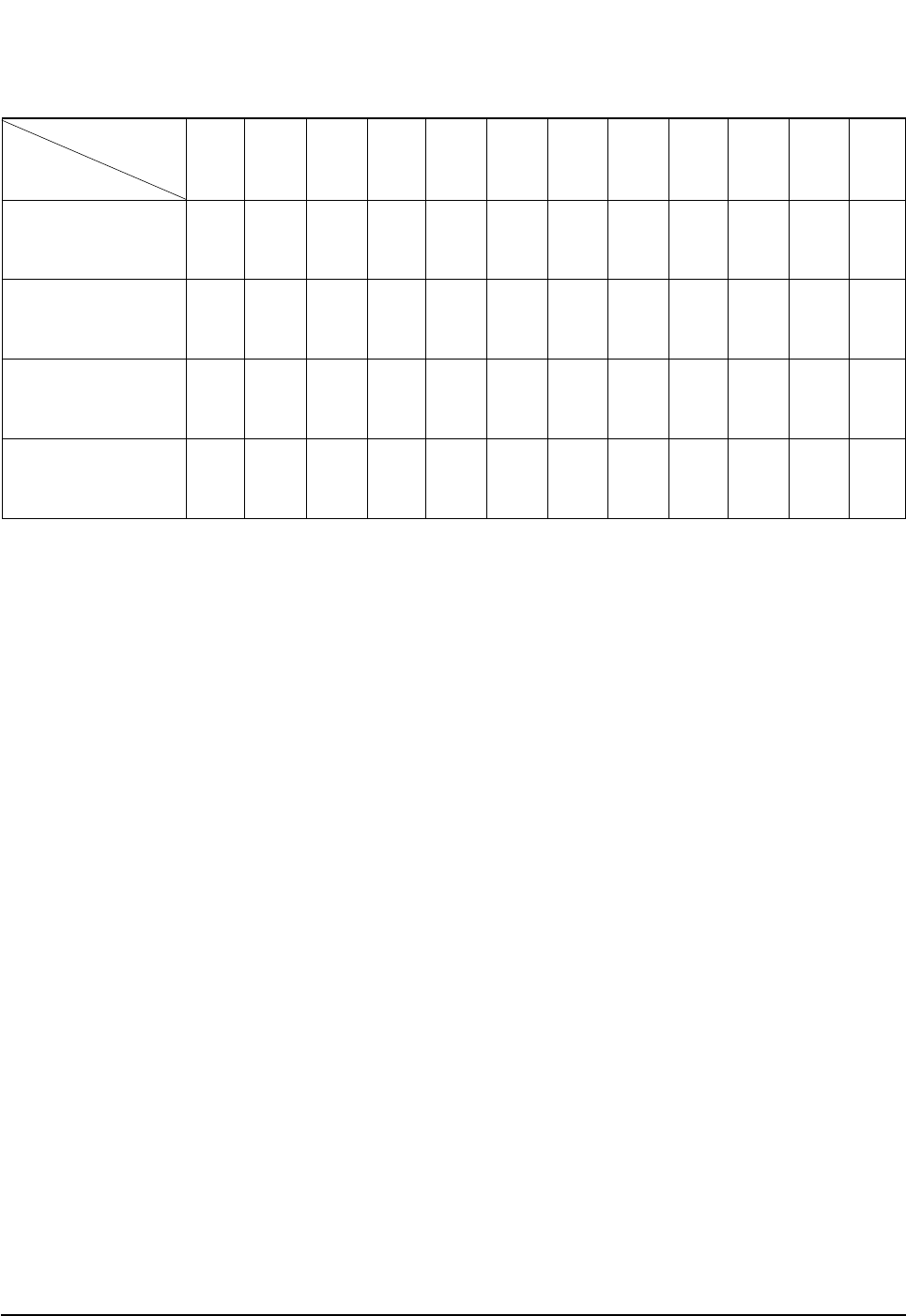
■OPTION ITEMS
REMOCON
MODEL SEG1 SEG2 SEG3 SEG4 SEG5 SEG6 SEG7 SEG8 SEG9 SEG10 SEG11 SEG12
SH07APG
SH07APGA
SH09APG
SH12APG
02606417022E
02606517022E
026565170351
067064170362
DB98_15732A(3)_1 3/9/04 10:09 AM Page 17
Samsung Electronics18
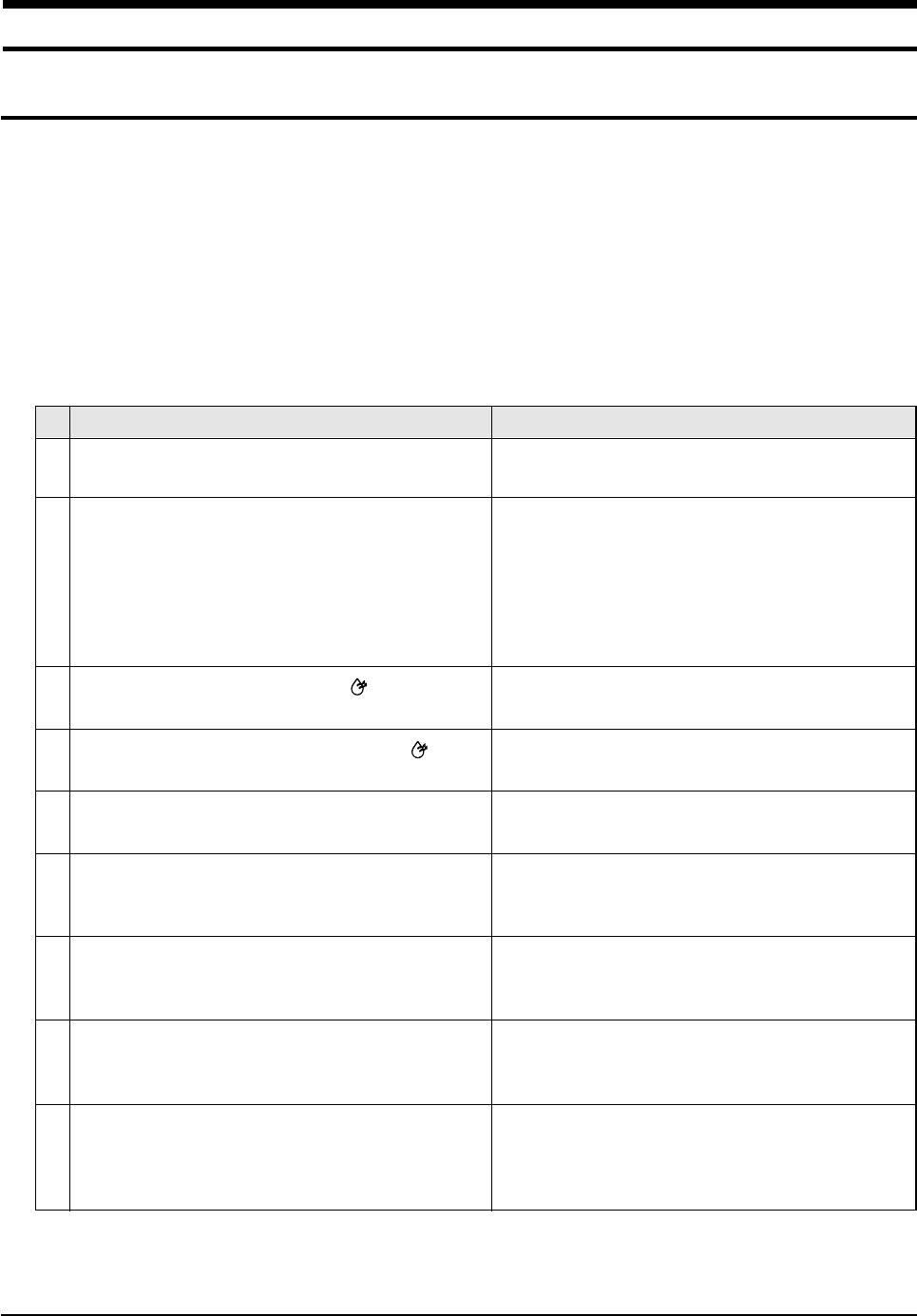
1. The input voltage should be rating voltage ±10% range.
The airconditioner may not operate properly if the voltage is out of this range.
2. Is the link cable linking the indoor unit and the outdoor unit linked properly?
The indoor unit and the outdoor unit shall be linked by 5 cables.
Check the terminals if the indoor unit and outdoor unit are properly linked by the same number of cables.
Otherwise the airconditioner may not operate properly.
3. When a problem occurs due to the contents illustrated in the table below it is a symptom not related to the malfunction of the
airconditioner.
The OPERATION indication LED(GREEN) blinks when a
power plug of the indoor unit is plugged in for the first time.
In a COOL operation mode, the compressor does not
operate at a room temperature higher than the setting
temperature that the INDOOR FAN should operate.
[In case of heat pump model]
In a HEAT operation mode, the compressor does not
operate at a room temperature lower than the setting
temperature that indoor fan should operate.
Fan speed setting is not allowed in DRY( ) mode.
Compressor stops operation intermittently in DRY( )
mode.
Timer LED(GREEN) of the indoor unit lights up and the
air conditioner does not operate.
The compressor stops intermittently in a COOL mode or
DRY mode, and fan speed of the indoor unit decreases.
[In case of heat pump model]
Compressor of the outdoor unit is operating although it is
turned off in a HEAT mode.
[In case of heat pump model]
The compressor and indoor fan stop intermittently in
HEAT mode.
[In case of heat pump model]
Indoor fan and outdoor fan stop operation intermittently
in a HEAT mode.
1
2
3
4
5
6
7
8
9
Operation of air conditioner Explanation
It indicates power is on. The LED stops blinking if the opera-
tion ON/OFF button on the remote control unit is pushed.
In happens after a delay of 3 minutes when the compressor
is reoperated. The same phenomenon occurs when a power
is on.
As a phenomenon that the compressor is reoperated after a
delay of 3 minutes, the indoor fan is adjusted automatically
with reference to a temperature of the air blew.
The speed of the indoor fan is set to LL in DRY mode.
Fan speed is selected automatically in AUTO mode.
Compressor operation is controlled automatically in DRY
mode depending on the room temperature and humidity.
Timer is being activated and the unit is in ready mode.
The unit operates normally if the timer operation is cancelled.
The compressor stops intermittently or the fan speed of the
indoor unit decreases to prevent inside/outside air frozen
depending on the inside/outside air temperature.
When the unit is turned off while de-ice is activated,
the compressor continues operation for up to 9 minutes
(maximum) until the deice is completed.
The compressor and indoor fan stop intermittently if room
temperature exceeds a setting temperature in order to protect
the compressor from overheated air in a HEAT mode.
The compressor operates in a reverse cycle to remove
exterior ice in a HEAT mode, and indoor fan and outdoor fan
do not operate intermittently for within 20% of the total heater
operation
No
6. Troubleshooting
6-1 Items to be checked first
DB98_15732A(3)_1 3/9/04 10:09 AM Page 18
19Samsung Electronics
Troubleshooting
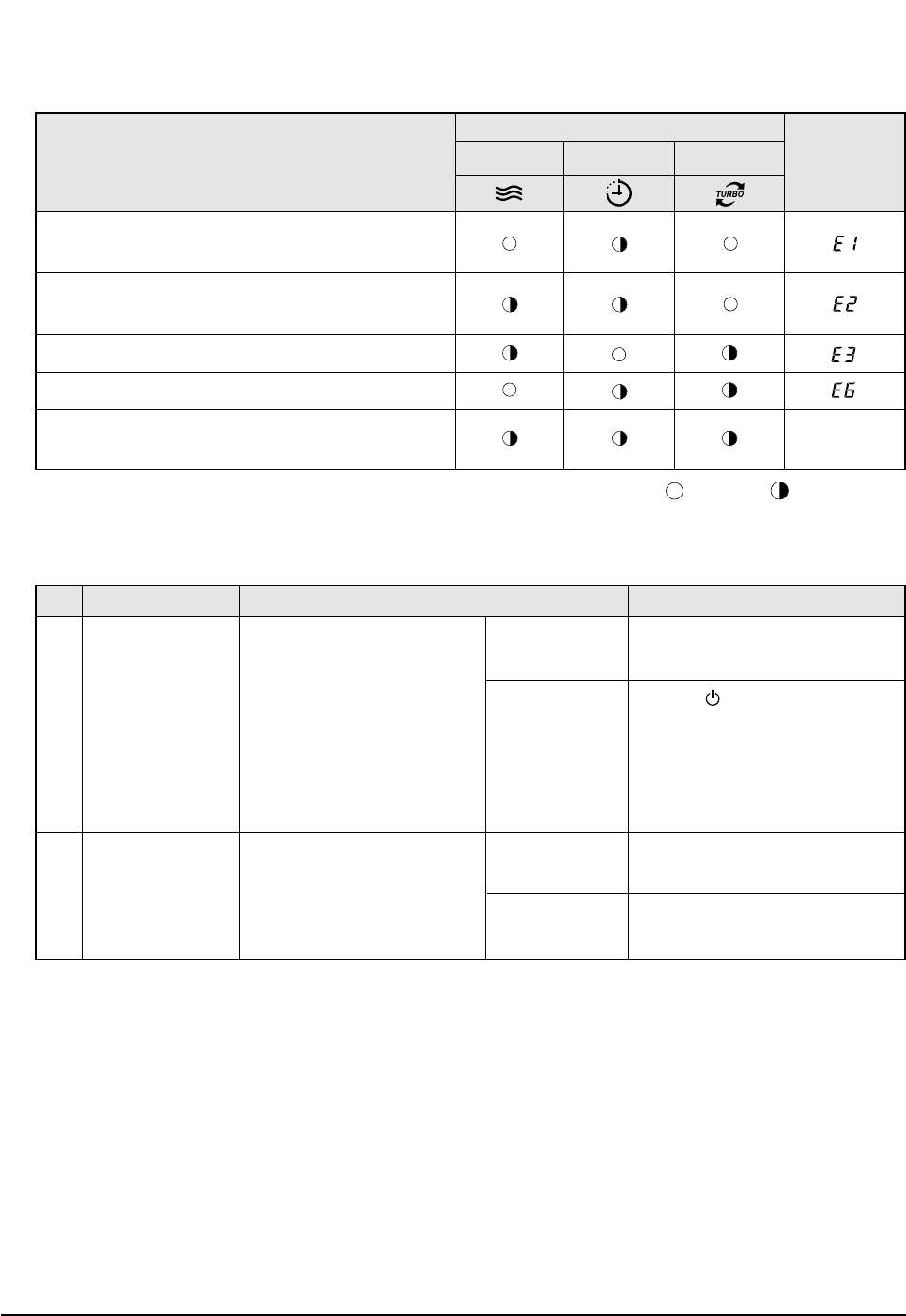
4. Indoor unit observes operation condition of the air conditioner, and displays self diagnosis details on the display panel.
5. Operation with abnormal motion
Indoor unit room temperature sensor error
(open or short)
Indoor unit heat exchanger temperature sensor error
(open or short)
Indoor fan motor malfunction
EEPROM error
Option error
(option wasn't set up or option data error) Display
Flickering
Error Mode
LAMP
7-segment
Display
OPERATION TIMER TURBO
: Lamp flickering
: Lamp off
No response from
the remote control
operation signal.
Unable to operate the
outdoor unit
• Plug out and plug in 5 seconds
later.
• Press the TURBO button with the
remote control.
• In 3 minutes, check the voltage
between the indoor unit terminal
block N(1) and 1.
Able to operate the
remote control.
Unable to operate
the remote control.
AC198V ~ AC242V
No power source
displayed.
OK
Press the (ON/OFF) button in the
indoor unit.
• If it operates, the remote control and
indoor unit receiver are in trouble.
• If not, the indoor unit is in trouble.
Problem with the outdoor unit or PCB
Problem with the relay (RY71) or PCB
No Abnormal condition Inspection Initial Diagnosis
1
2
DB98_15732A(3)_1 3/9/04 10:09 AM Page 19
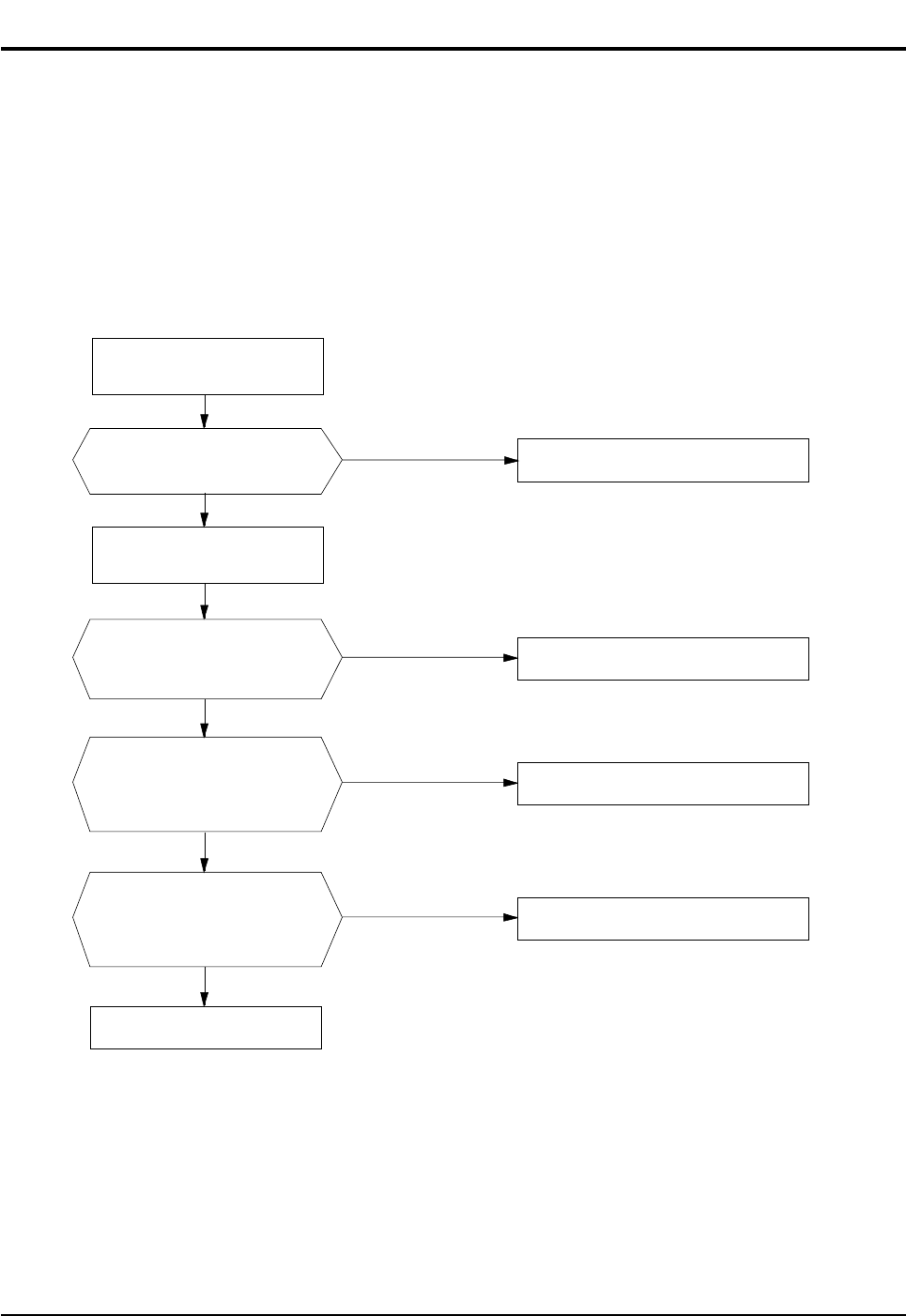
Samsung Electronics20
1. Checklist :
1) Is input voltage normal?
2) Is AC power linked correctly?
3) Is input voltage of DC regulator IC KA7805 (IC02) normal? (11VDC-12.5VDC)
4) Is output voltage of DC regulator IC KA7805 (IC02) normal? (4.5VDC-5.5VDC)
2. Troubleshooting procedure
Unplug the power cord and
plug it after 5 seconds
Press the Power Button on the
remote control unit to
operate the air conditioner
Check whether two wires
of power cord are
connected correctly to the
terminal block and control board.
Check whether the fuse on the
control board is normal.
FUSE: 3.15[A]/250[V]
Check the output of SMPS
on the control board.
Input power: AC230±15%[V]
IC02 Input: DC 12[V]
IC02 output: DC 5[V]
◆Check the setting temperature
◆Check the indoor unit
control board
◆Check the display board
Reconnect wires correctly
Replace fuse
PCB should be replaced
operate
does not operate
Yes
Yes
Yes
No
No
No
6-2 Fault Diagnosis by Symptom
6-2-1 No Power (completely dead)-Initial diagnosis
DB98_15732A(3)_1 3/9/04 10:09 AM Page 20
21Samsung Electronics
Troubleshooting
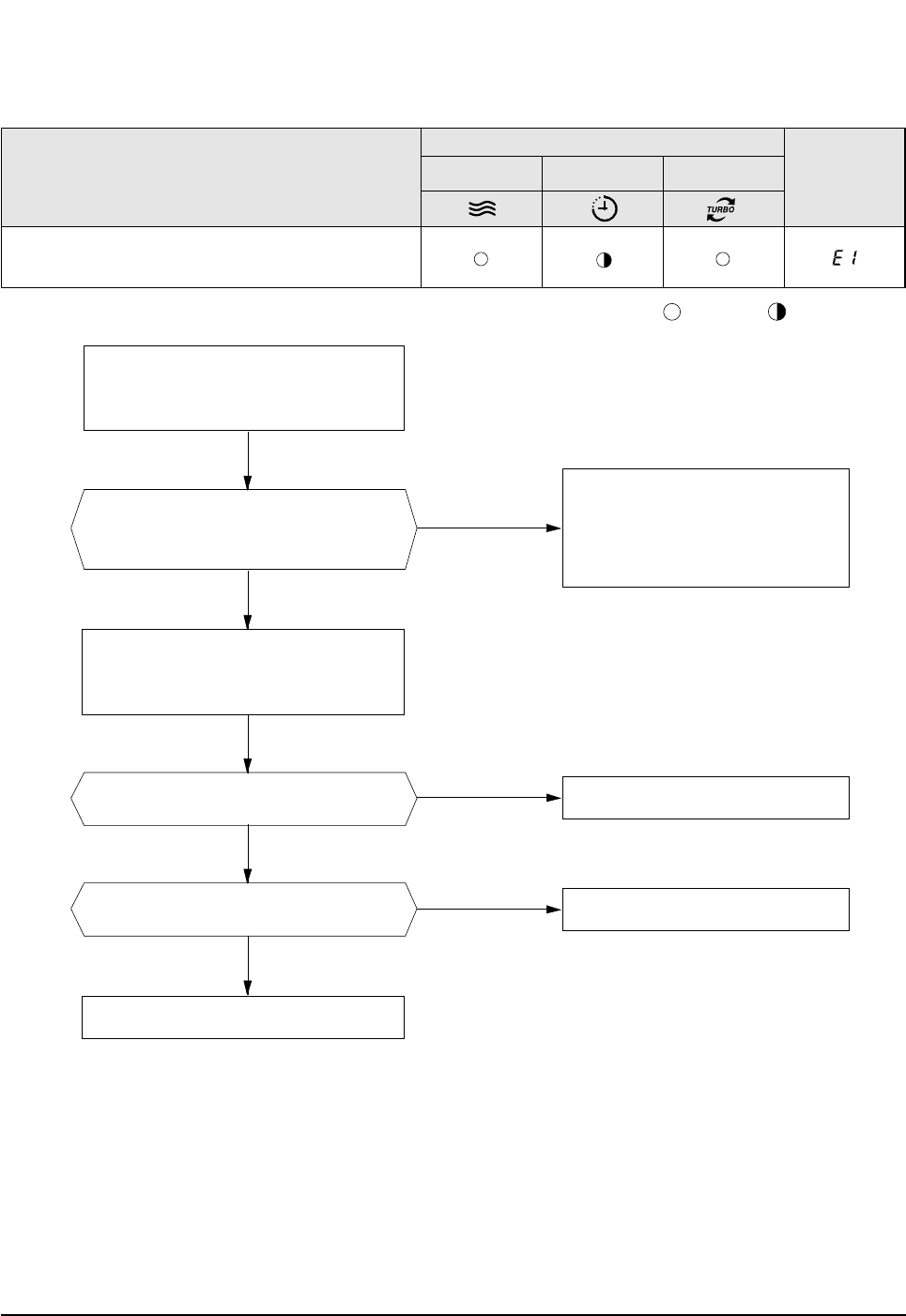
6-2-2 Room temperature sensor failure
No
ASS'Y Sensor Replace
SENSOR Resistance Value : 20˚C-12.09kΩ
SENSOR Resistance Value : 30˚C-8.31kΩ
SENSOR Resistance Value : 35˚C-6.94kΩ
SENSOR Resistance Value : 40˚C-5.83kΩ
Yes
No
No
Detach the assembly sensor from the
ASS'Y PCB CN43 connector and measure
the sensor resistance with an ohmmeter (tester).
Connect the sensor to CN43,
supply power, and measure the voltage of
#1 and #2 of the CN43 connector.
MICOM Error or Connector(CN43) check
Is the sensor resistance value
10KΩ±3% at the room temperature
of 25˚C?
Yes Poor ASS'Y PCB Replace
Below 0.5V?
Yes Poor ASS'Y PCB Replace
Over 4.9V?
Indoor unit room temperature sensor error(open or short)
Description
LAMP
OPERATION TIMER TURBO 7-segment
Display
: Lamp flickering
: Lamp off
DB98_15732A(3)_1 3/9/04 10:09 AM Page 21
Samsung Electronics22
Troubleshooting
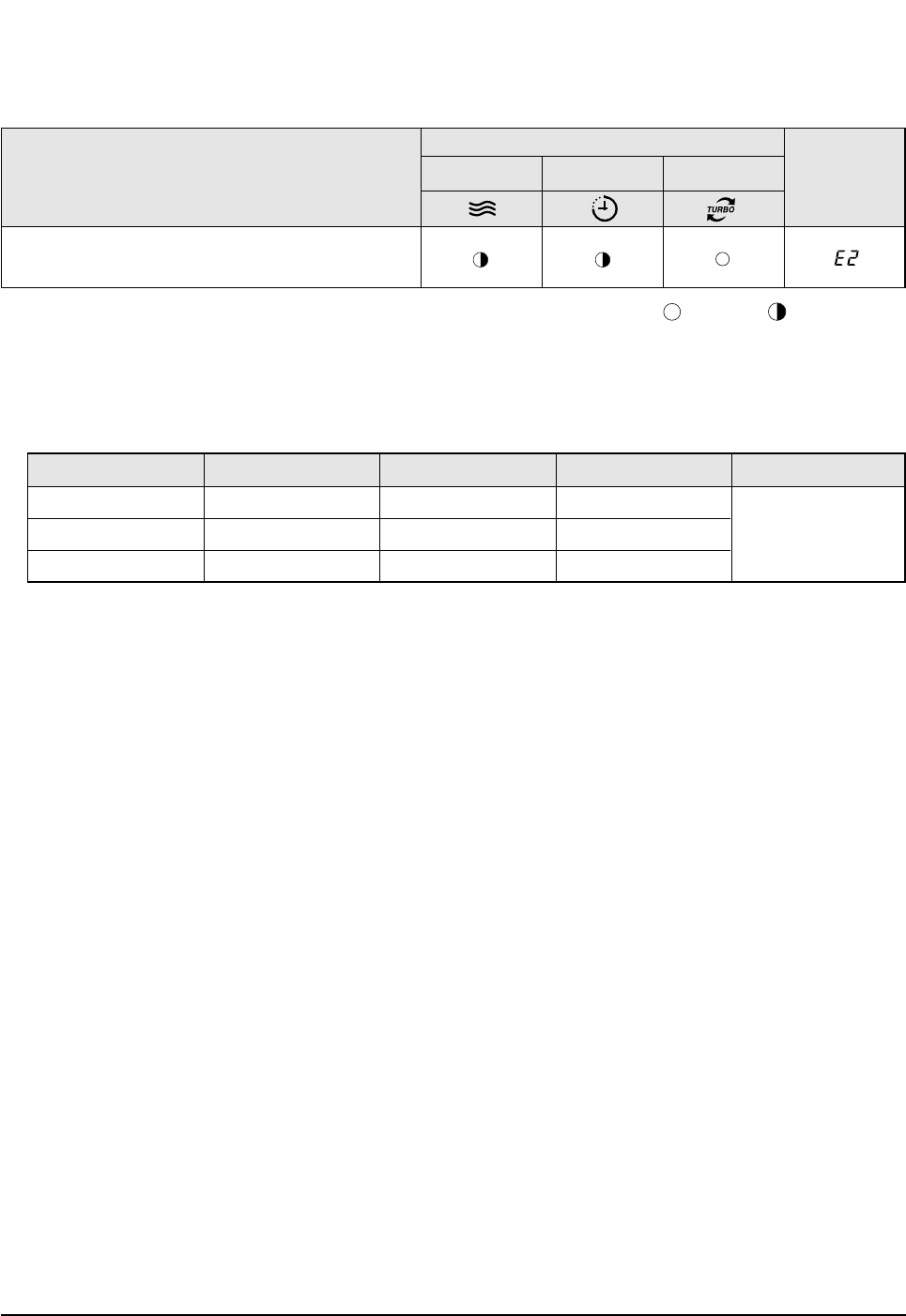
1. Check the assembly condition of the sensor connector(CN43) on the indoor unit Main PCB and if not assembled, reassemble the
connector accurately.
2. Detach the room pipe sensor connector(CN43) and check the resistance between connector 3 and 4.
If the above data is not met, replace the room pipe sensor.
3. Assemble the room pipe sensor to PCB, plug in, and check the voltage of connector 3 and 4. If the resistance is below 0.5V or
over 4.9V, replace the indoor Main PCB. (short or disconnected in the PCB board)
Temperature(˚C)
15
20
25
Temperature(˚C)
30
35
40
Resistance Value(Kohm)
8.31
6.94
5.83
Resistance Value(Kohm)
14.68
12.09
10
Others
The data tolerance
is ±3%.
6-2-3 Room Pipe sensor failure
Indoor unit heat exchanger temperature sensor error
(open or short)
Description
LAMP
OPERATION TIMER TURBO 7-segment
Display
: Lamp flickering
: Lamp off
DB98_15732A(3)_1 3/9/04 10:09 AM Page 22
23Samsung Electronics
Troubleshooting
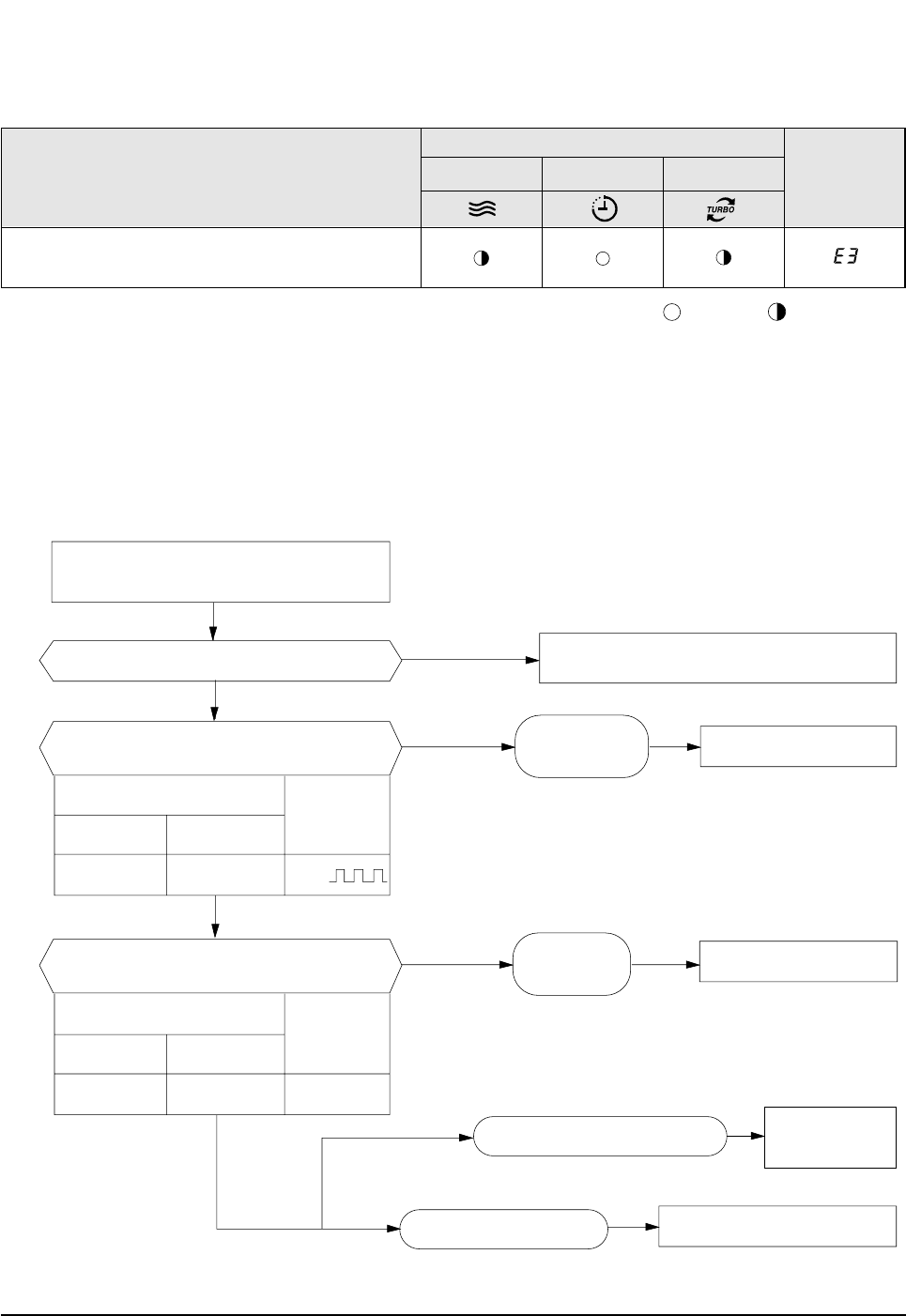
6-2-4 When the Indoor Unit Fan Does Not Operate. (Initial Diagnosis)
1. Checklist :
1) Is the indoor unit fan motor properly connected with the connector (CN72)?
2) Is the AC voltage correct?
3) Is HALL IC in indoor fan motor properly connected with the connector (CN44)?
4) Is the running capacitor (CR71) properly connected with PCB board?
2. Troubleshooting procedure
After unplugging out the power cord should
be reconnected within 5 seconds.
Does the OPERATION lamp blink?
Does the Solid State Relay(SS71) work properly?
Is the supply voltage of the fan motor sufficient?
Test rod location
PCB CN72 Condition
About AC 180V
Normal
voltage
pin #3 and #5 Fan operating
Yes
Yes
Yes
Yes
No
No
No Check as in the procedure "NO power"
PCB is
out of order. PCB should be replaced.
Replace Motor
Fan-Capacitor
Fan motor should be replaced.
Fan motor is out of order.
Motor Fan-Capacitor is out of order
Test rod location
+-
SS71-SS71- 12V
Normal
Voltage
Micom is
out of order. Micom should be replaced
Indoor fan motor malfunction
Description
LAMP
OPERATION TIMER TURBO 7-segment
Display
: Lamp flickering
: Lamp off
DB98_15732A(3)_1 3/9/04 10:09 AM Page 23
Samsung Electronics24
Troubleshooting
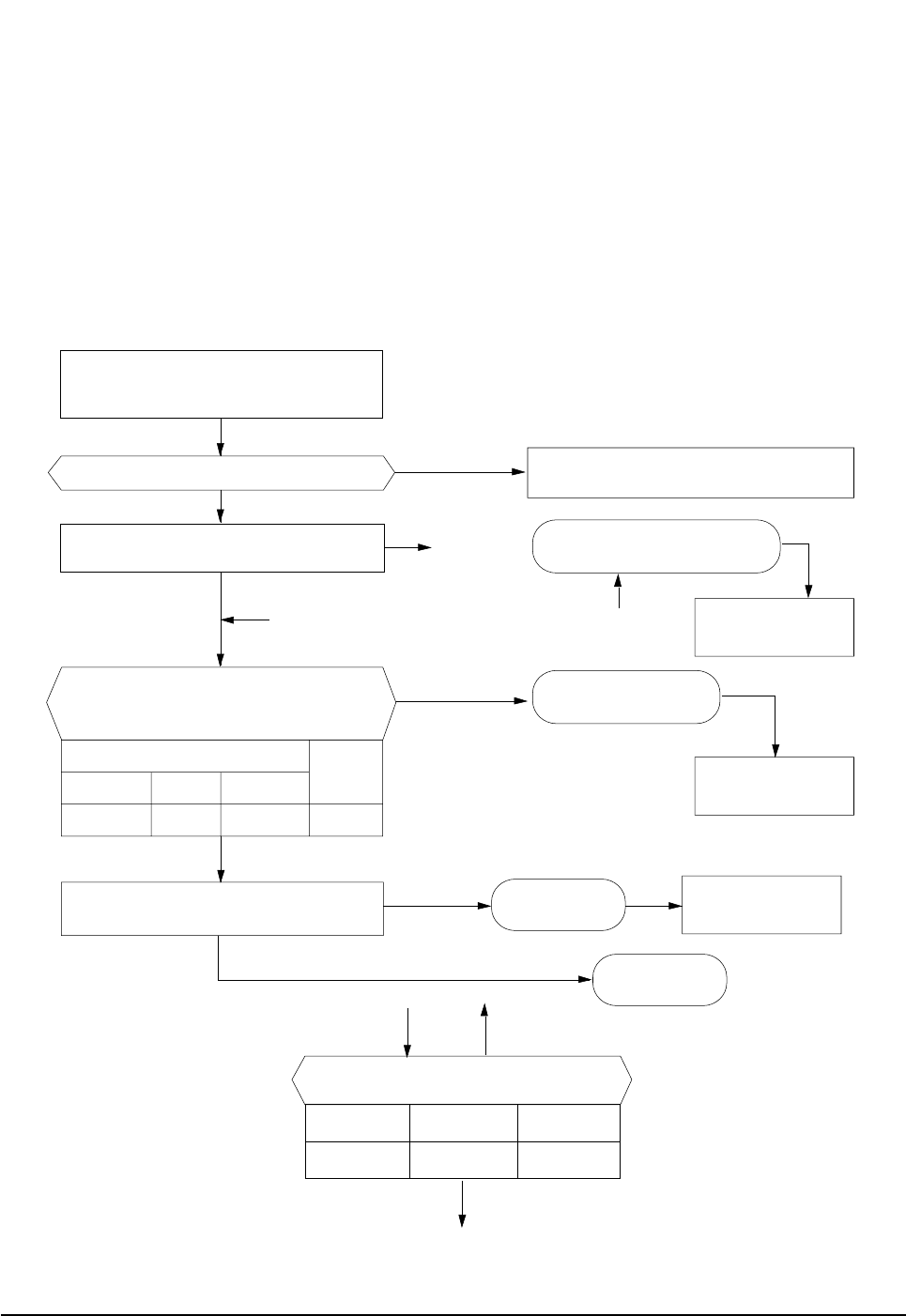
6-2-5 When the Outdoor Unit Does Not Operate. (Initial Diagnosis)
1. Checklist :
1) Is input voltage normal?
2) Is the set temperature of the remote control higher than room temperature in COOL mode?
3) Is the set temperature of the remote control lower than room temperature in HEAT mode?
4) Is the POWER IN connector (CN71) linked correctly?
5) Is the outdoor unit properly connected with the TERMINAL BLOCK connector(N(1), 1, 2, 3)?
2. Troubleshooting procedure
After unplugging out the power cord should be
reconnected within 5 seconds.
Does the OPERATION lamp blink
Yes
No
Yes
No
No
No
Yes
Yes
Outdoor unit is
out of order.
Power relay is
out of order Power relay should be
replaced.
PCB should be
checked.
Micom is
out of order.
Sensor Should be
replaced
Room temperature sensor is
out of order
Check as in the procedure "No Power"
Is the room sensor normal resistor?
10°C20°C30°C
17.96kΩ12.09kΩ8.3kΩ
Does the timer lamp blink during operation ?
Is the power relay RY71 operated by adjusting the
room temperature?
Is rating voltage ±10% range applied relay between
Terminal block No. N(1) and No. 1
Test rod location Normal
+ - Condition Voltage
IC4 Pin No.38 GND RY71 ON DC 4.8V
#
!
!
@
#
@
No
Yes
DB98_15732A(3)_1 3/9/04 10:09 AM Page 24
25Samsung Electronics
Troubleshooting
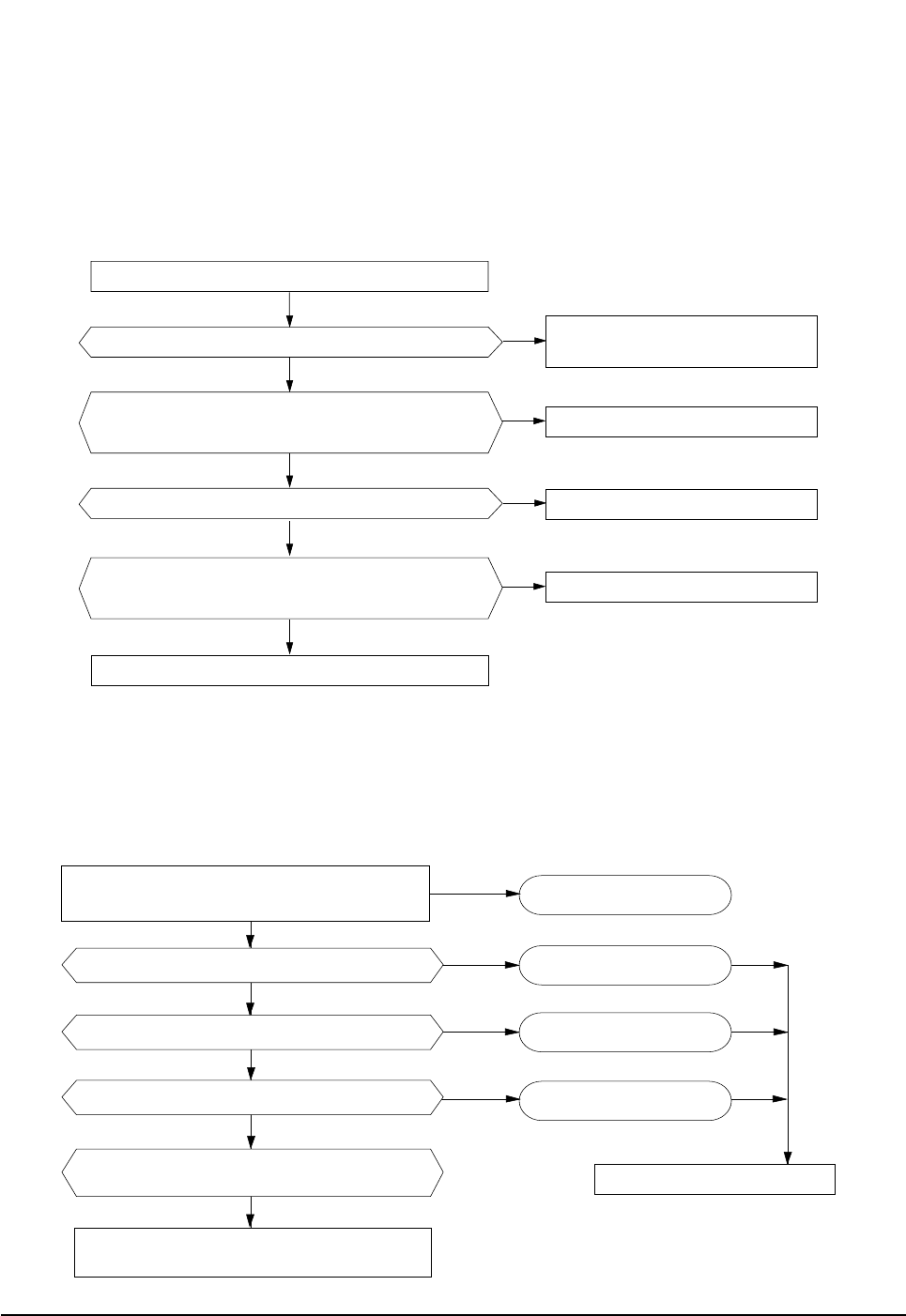
6-2-6 When the UP/DOWN Louver Motor Does Not Operate. (Initial Diagnosis)
1. Checklist :
1) Is input voltage normal?
2) Is the UP/DOWN louver motor properly connected with the connector (CN61)?
2. Troubleshooting procedure
6-2-7 In the HEAT mode, When there is no warm air current. Check this fist;
1. Is the set temperature of Remote Control lower than room temperature in Heat mode?
2. Is the Indoor PCB properly connected with the CN71 connector?
Remove power cord and plug in again in approx. 5 seconds.
Is STD lamp blinking?
Does operation start when swing button of the
remote control unit pushed?
Voltage at pin #57~#60 of micom (IC04) change?(Squarewave)
Voltage at pin #2 ~ #5 of CN61(motor connector)
change?(Squarewave)
UP/DOWN louver motor is faulty.
Driver IC06/08 (ULN2003A) is faulty.
Micom (IC04) is faulty.
Normal
Check as in the procedure
"No Power".
After training on, the heating operation
should start in 5 minutes.
Is the number #38 of Micom (IC04) DC 5.0V?
Is the number checking #11 of IC05 (ULN2003A) LOW?
Is the voltage between CN71 #1 and CN71 #5 rating voltage ±10% range
Abnormal 4-Way valve of Outdoor Unit.
or connecting Cable
4-Way valve should be replaced
or connecting Cable Check.
No
Yes
Yes
Yes
No
No
No
Yes Normal
Abnormal Micom
Abnormal IC05
Abnormal RY73
PCB should be replaced.
Yes
No
No
Yes
No
No
Yes
Yes
DB98_15732A(3)_1 3/9/04 10:09 AM Page 25

Samsung Electronics26
Troubleshooting
6-2-8 When the remote control is not receiving
1. Check if the connector was normally assembled.
2. Put the set in operation and check the voltage of No. 3(+) and No. 2(-) of the main PCB CN91 while operating the
remote control. When the voltage descends below 3V, the assembly module PCB is normal and the main PCB is poor.
Then replace the main PCB.
3. Replace the assembly display PCB because the module PCB is poor if the voltage between No. 2~3 of CN91
maintains 5V after the remote control starts operation.
DB98_15732A(3)_1 3/9/04 10:09 AM Page 26

MEMO
27Samsung Electronics
DB98_15732A(3)_1 3/9/04 10:09 AM Page 27
Samsung Electronics28
4
6
15-1
15-3
15-2
15-5
15-4
15-6
2
11
5
1
1-1-2
1-1-3
1-1-4
1-1-5
1-1-6
15
1-4
1-3
1-2
1-1-1
1-1
3
3-1
3-2
7
10
7-3
7-5
7-1
8
7-2
7-4
9
13
14
12
16
You can search for the updated part code
number through the ITSELF.
URL : http://itself.sec.samsung.co.kr
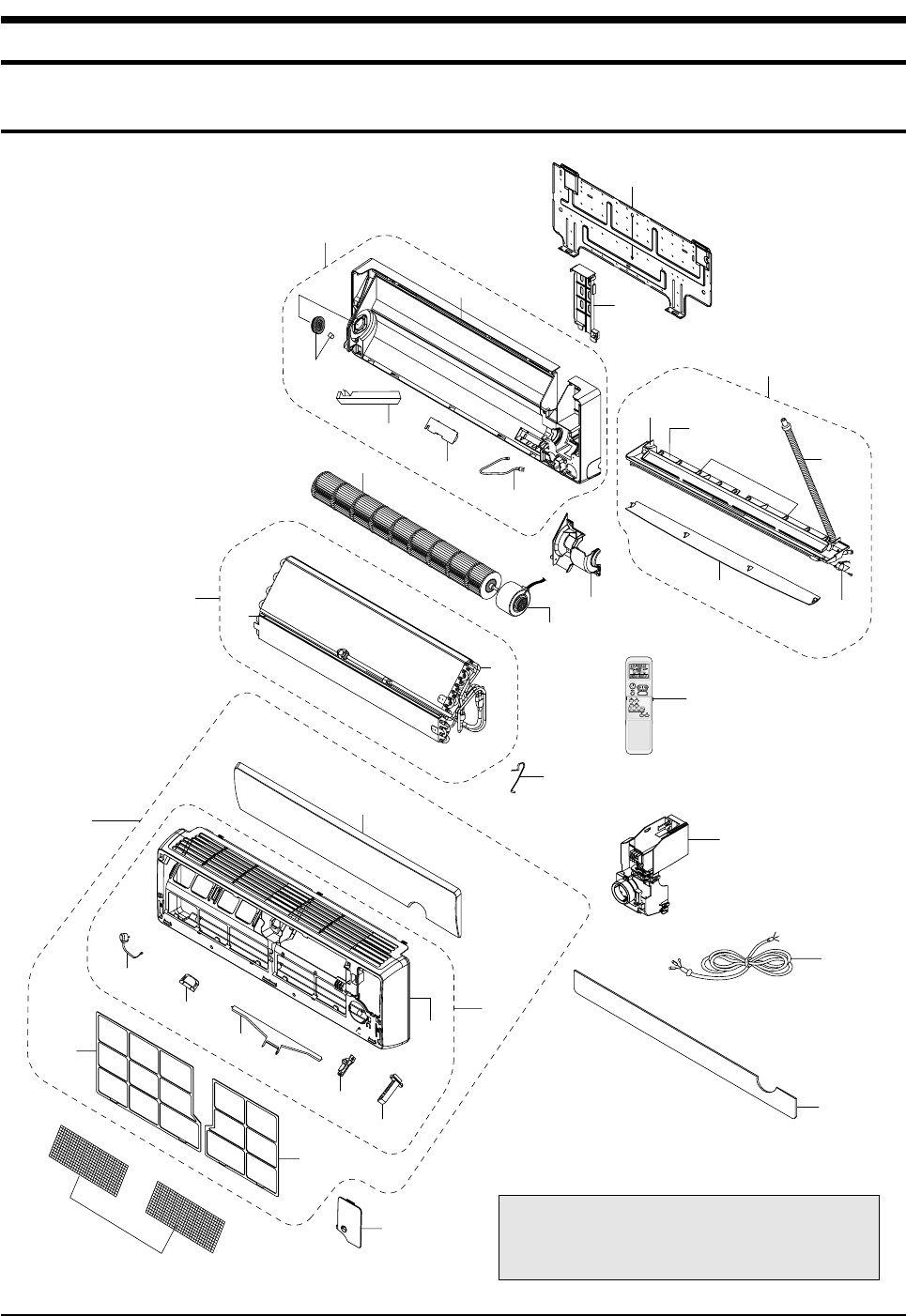
7. Exploded Views and Parts List
7-1 Indoor Unit
DB98_15732A(3)_1 3/9/04 10:09 AM Page 28
Exploded Views and Parts List
29Samsung Electronics
■
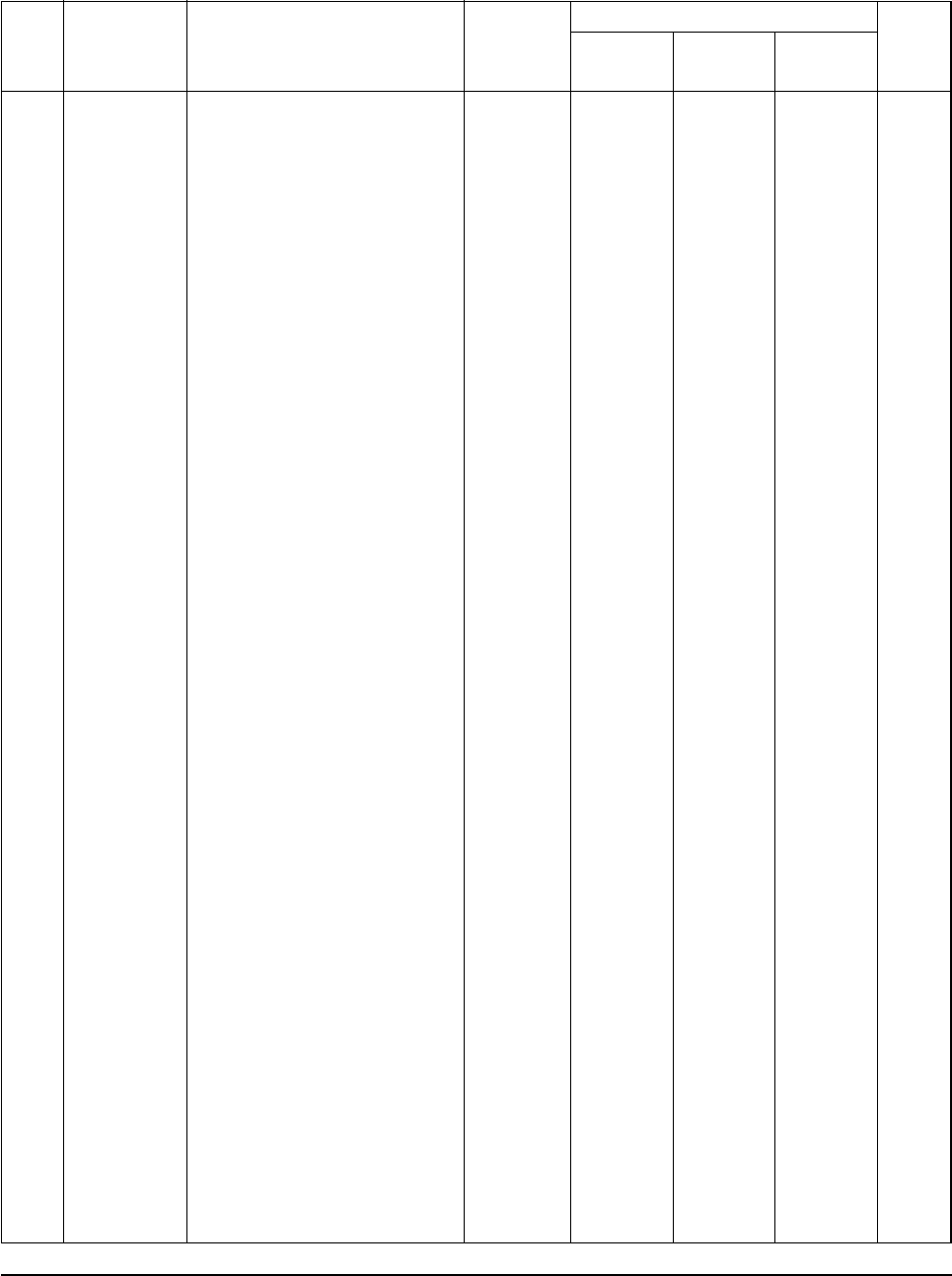
Parts List
Q'TY
No. Code No. Description Specification Remark
SH07APG
SH07APGA SH09APG SH12APG
1 DB92-00561A ASS'Y PANEL FRONT TOTAL ASS'Y -
DB92-00558A ASS'Y PANEL FRONT TOTAL ASS'Y 1
1-1 DB92-00560A ASS'Y PANEL FRONT SUB-P ASS'Y -
DB92-00557A ASS'Y PANEL FRONT SUB-P ASS'Y 1
1-1-1 DB92-00559A ASS'Y PANEL FRONT SUB ASS'Y -
DB92-00556A ASS'Y PANEL FRONT SUB ASS'Y 1
1-1-2 DB31-00166B MOTOR STEPPING - 1
1-1-3 DB61-01114A HOLDER MOTOR DC HIPS -
DB61-01123A HOLDER MOTOR DC HIPS 1
1-1-4 DB61-01115A HINGE GRILLE HIPS -
DB61-01132A HINGE GRILLE HIPS 1
1-1-5 DB61-01116A GUIDE LINK HIPS -
DB61-01133A GUIDE LINK HIPS 1
1-1-6 DB66-00364A LINK MOTOR ABS -
DB66-00365A LINK MOTOR ABS 1
1-2 DB64-00640A GRILLE UP ABS -
DB64-00655A GRILLE UP ABS 1
1-3 DB63-00585B FILTER-AIR LF PP -
DB63-00590B FILTER-AIR LF PP 1
1-4 DB63-00586B FILTER-AIR RH PP -
DB63-00591B FILTER-AIR RH PP 1
2 DB92-00540A ASS'Y GRILLE LOW ASS'Y -
DB92-00538A ASS'Y GRILLE LOW ASS'Y 1
3 DB96-02092J ASS'Y EVAPORATOR TOTAL ASS'Y -
DB96-02145G ASS'Y EVAPORATOR TOTAL ASS'Y 1
3-1 DB96-03123A ASS'Y EVAPORATOR ASS'Y -
DB96-03101A ASS'Y EVAPORATOR ASS'Y 1
3-2 DB67-00051A SPACE-EVAP PVC 1
4 DB95-00367E ASS'Y FILTER BIO ASS'Y 1
5 DB63-00581A COVER TERMINAL HIPS -
DB63-00588A COVER TERMINAL HIPS 1
6 DB93-02530G ASS'Y REMOCON ASS'Y 1
7 DB94-00488C ASS'Y BACK BODY ASS'Y -
DB94-00486C ASS'Y BACK BODY ASS'Y 1
7-1 DB61-01098A BACK BODY HIPS -
DB61-01119A BACK BODY HIPS 1
7-2 DB91-00248A ASS'Y ELECTRIC-IONS ASS'Y 1
7-3 DB63-00580A COVER-IONIZER HIPS 1
7-4 DB93-01383D ASS'Y CONNECTOR WIRE-IONIZER ASS'Y -
DB93-01451B ASS'Y CONNECTOR WIRE-IONIZER ASS'Y 1
7-5 DB94-00258A ASS'Y BEARING ASS'Y 1
8 DB94-00040R ASS'Y CROSS FAN ASS'Y -
DB94-00040F ASS'Y CROSS FAN ASS'Y 1
9 DB31-00152B MOTOR-FAN IN - -
DB31-00152A MOTOR-FAN IN - 1
10 DB61-01099A HOLDER-MOTOR PP -
DB61-01120A HOLDER-MOTOR PP 1
11 DB67-60030A SPRING-SENSOR STS301 1
12 DB70-00276A PLATE-HANGER SGCC-M -
DB70-00288A PLATE-HANGER SGCC-M 1
13 DB93-24541A ASS'Y CONTROL IN ASS'Y -
DB93-02542A ASS'Y CONTROL IN ASS'Y 1
14 DB90-00992A HOLDER-PIPE HIPS -
DB61-01121A HOLDER-PIPE HIPS 1
15 DB94-00468A ASS'Y TRAY DRAIN ASS'Y -
DB94-00465A ASS'Y TRAY DRAIN ASS'Y 1
15-1 DB63-00587A TRAY DRAIN HIPS -
DB63-00592A TRAY DRAIN HIPS 1
15-2 DB94-00062E ASS'Y HOSE DRAIN ASS'Y 1
15-3 DB61-01103A BLADE-H HIPS -
DB61-01125A BLADE-H HIPS 1
15-4 DB61-01104A BLADE-V PP -
DB61-01126A BLADE-V PP 3
15-5 DB95-20138A ASS'Y STEPPING MOTOR ASS'Y 1
15-6 DB63-00634A GUARD-SAFETY WIRE STS27 - OPTION
DB63-00635A GUARD-SAFETY WIRE STS27 1
16 DB93-01549B ASS'Y CONNECTOR POWER ASS'Y 1
1
-
1
-
1
-
1
1
-
1
-
1
-
1
-
1
-
1
-
1
-
1
-
1
-
1
-
-
1
1
-
1
1
-
1
-
1
1
1
-
1
1
-
1
-
1
-
1
1
-
1
-
1
-
1
-
1
-
1
1
-
3
-
1
1
-
1
-
1
-
1
-
1
1
-
1
-
1
-
1
-
1
-
1
-
1
-
1
-
1
-
1
-
1
1
1
-
1
1
-
1
-
1
1
1
-
1
1
-
1
-
1
-
1
1
-
1
-
1
-
1
-
1
-
1
1
-
1
-
3
1
-
1
1
DB98_15732A(3)_1 3/9/04 10:09 AM Page 29
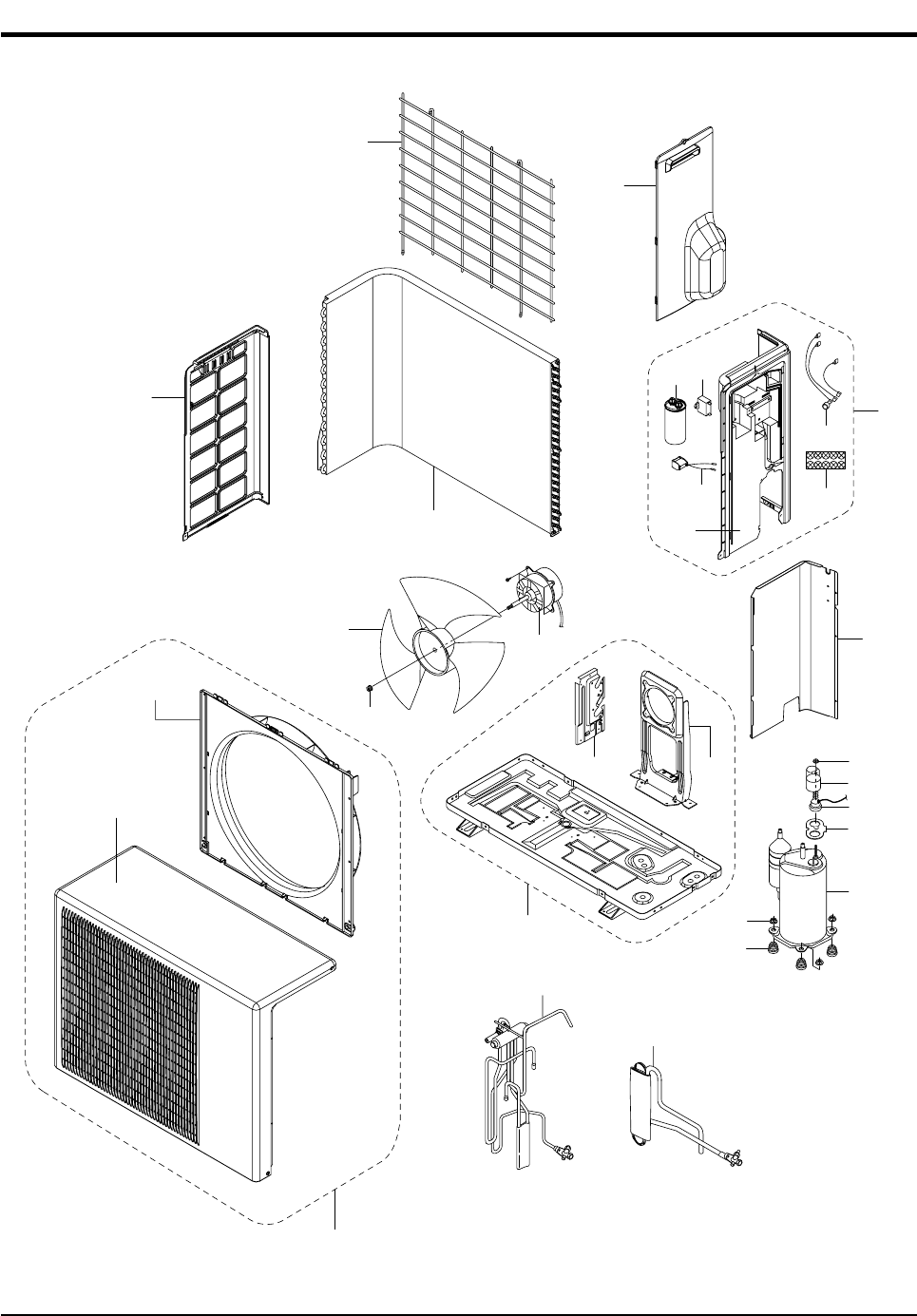
Samsung Electronics30
7-2 Outdoor Unit
4-2
14
7-3
17
16
5-6
15
13
6
4-1
9
8
3
2
1
18
4
10
5-5
5-7
5-1
5
5-3
5-4
5-2
7
7-1 7-2
12
11
DB98_15732A(3)_1 3/9/04 10:09 AM Page 30
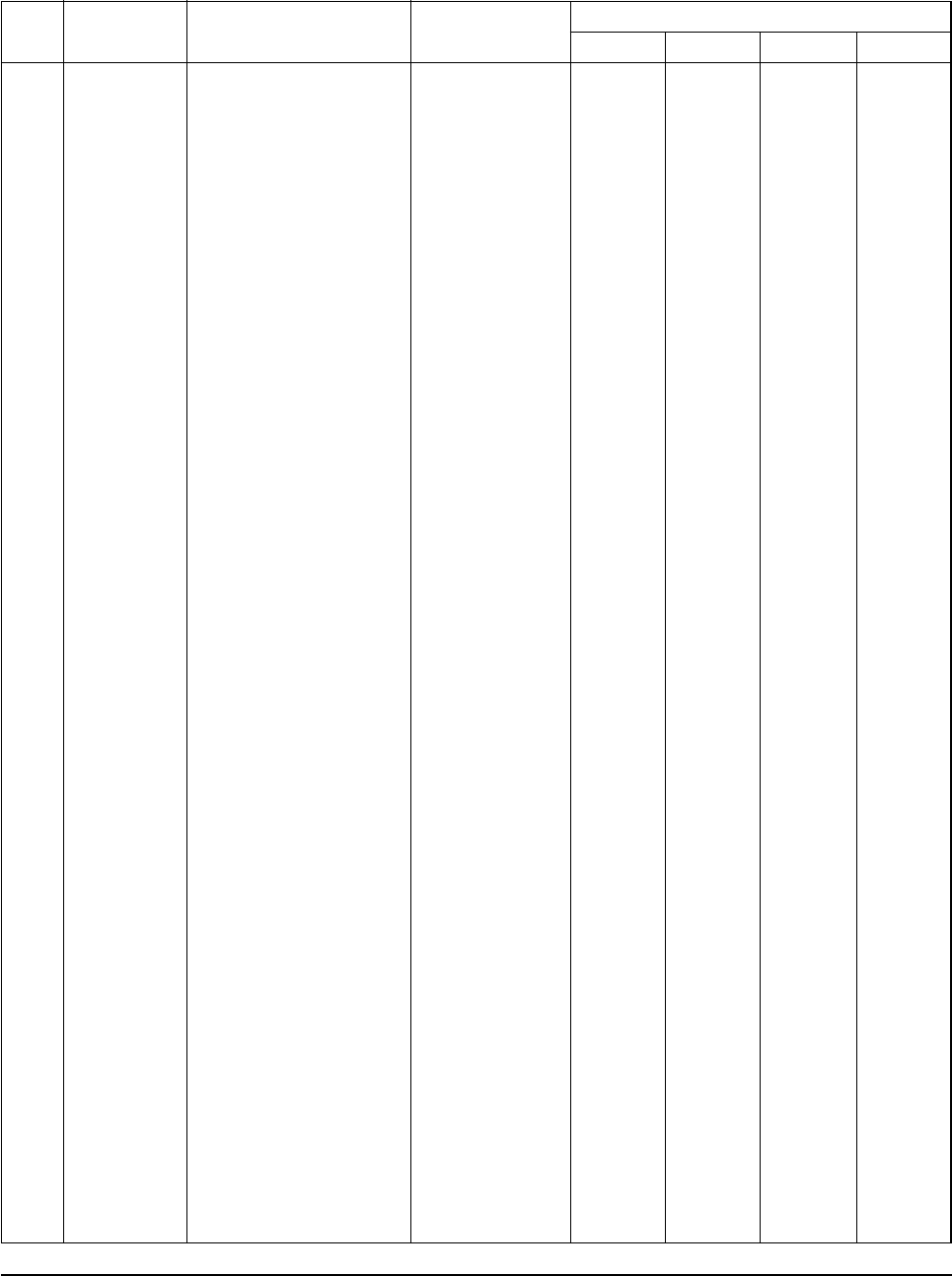
Exploded Views and Parts List
31Samsung Electronics
■
Parts List
Q'TY
No. Code No. Description Specification SH07APGX
SH07APGAX
SH09APGX SH12APGX
1 DB60-30020A NUT FLANGE 2C,M6,SM20C,NTR
2 DB67-50063A FAN PROPELLER AS+G/F 20%, ø405
3 DB31-10058C MOTOR FAN OUT 220/240V,50/60Hz
4 DB90-01338B ASS'Y CABINET FRONT ASS'Y
DB90-01338A ASS'Y CABINET FRONT ASS'Y
4-1 DB64-00648A CABINET FRONT PP
4-2 DB61-01113A BELL MOUTH PP
5 DB90-00133C ASS'Y CABINET SIDE RH ASS'Y
DB90-01333B ASS'Y CABINET SIDE RH ASS'Y
DB90-01333A ASS'Y CABINET SIDE RH ASS'Y
DB90-01333G ASS'Y CABINET SIDE RH ASS'Y
5-1 DB64-00650A CABINET SIDE RH PP
5-2 2501-001237 CAPACITOR-COMP 35uF/450VAC
2501-001238 CAPACITOR-COMP 40uF/450VAC
2501-001236 CAPACITOR-COMP 30uF/450VAC
5-3 2301-001375 CAPACITOR-MOTOR 1.5uF/450VAC
5-4 DB65-40049E TERMINAL BLOCK 4P
5-5 DB93-01547D ASS'Y LEAD WIRE Samsung COMPor
DB93-01547C ASS'Y LEAD WIRE Matsushita COMPor
5-6 DB35-00028B OLP RBC 12128-12500
DB35-00028A OLP RBC 12054-12500
DB35-00026A OLP MRA99901-9201
DB35-00015T OLP RAC12126-9622
5-7 DB33-00049A ASS'Y SOLENOID COIL ASS'Y
6 DB64-00649A CABINET SIDE LF PP
7 DB90-01056E ASS'Y BASE OUTDOOR ASS'Y
DB90-01056F ASS'Y BASE OUTDOOR ASS'Y
DB90-01056G ASS'Y BASE OUTDOOR ASS'Y
7-1 DB61-01322A BRACKET VALVE GALVA
7-2 DB61-00802A BRACKET MOTOR SGCC-M
7-3 DB73-00067A GROMMET-ISOLATOR NR
DB73-00070A GROMMET-ISOLATOR NR
DB63-00930A GROMMET-ISOLATOR NR
8 DB71-00085B BAR STEEL HSWR
DB71-00085A BAR STEEL HSWR
9 DB90-00947A ASS'Y COVER VALVE ASS'Y
10 DB94-00303B ASS'Y PARTITION ASS'Y
DB94-00500A ASS'Y PARTITION ASS'Y
11 DB96-03010A ASS'Y TUBE 4WAY VALVE ASS'Y
DB96-03011A ASS'Y TUBE 4WAY VALVE ASS'Y
DB96-03099A ASS'Y TUBE 4WAY VALVE ASS'Y
DB96-03531A ASS'Y TUBE 4WAY VALVE ASS'Y
12 DB96-02413G ASS'Y TUBE CAPILLARY ASS'Y
DB96-03094A ASS'Y TUBE CAPILLARY ASS'Y
DB96-03100A ASS'Y TUBE CAPILLARY ASS'Y
DB96-03277C ASS'Y TUBE CAPILLARY ASS'Y
13 G8C124JU1EL COMPRESSOR G8C124
G4A091JU1EP COMPRESSOR G4A091
DB95-00477A COMPRESSOR 5PS102
G4A080JU1EP COMPRESSOR G4080
14 DB60-30028A NUT WASHER HEX2CM8ZPC
15 DB63-20002A GASKET EPDM
DB63-00929A GASKET EPT
16 DB63-10165D COVER TERMINAL POM
DB63-00927A COVER TERMINAL PET
17 DB60-30018A NUT FLANGE M5,SM20C
DB60-30020A NUT FLANGE M6
18 DB96-02236A ASS'Y CONDENSER ASS'Y
DB96-03110A ASS'Y CONDENSER ASS'Y
DB96-03111A ASS'Y CONDENSER ASS'Y
1
1
1
-
1
1
1
-
-
1
-
1
-
-
1
1
1
-
1
-
-
1
-
1
1
-
-
1
1
1
-
-
3
-
1
1
-
1
-
-
1
-
-
-
1
-
-
-
1
-
3
-
1
-
1
-
1
-
-
1
1
1
1
1
-
1
1
1
-
-
-
1
1
-
-
1
1
1
-
1
-
-
-
1
1
1
-
-
1
1
3
-
-
1
-
1
1
-
1
-
-
-
1
-
-
-
1
-
-
-
3
1
-
1
-
1
-
1
-
-
1
1
1
-
1
1
1
-
1
-
-
1
-
1
-
1
1
1
-
-
1
-
-
1
1
-
1
-
1
1
-
3
-
-
1
1
-
1
-
1
-
-
-
1
-
-
-
1
-
-
3
1
-
1
-
1
-
-
1
-
1
1
1
-
1
1
1
-
-
-
1
1
-
-
1
1
1
1
-
-
-
-
1
1
1
-
1
-
1
1
-
3
-
-
1
1
-
1
-
-
-
1
-
-
-
1
-
-
-
1
3
1
-
1
-
1
-
-
-
1
DB98_15732A(3)_1 3/9/04 10:09 AM Page 31
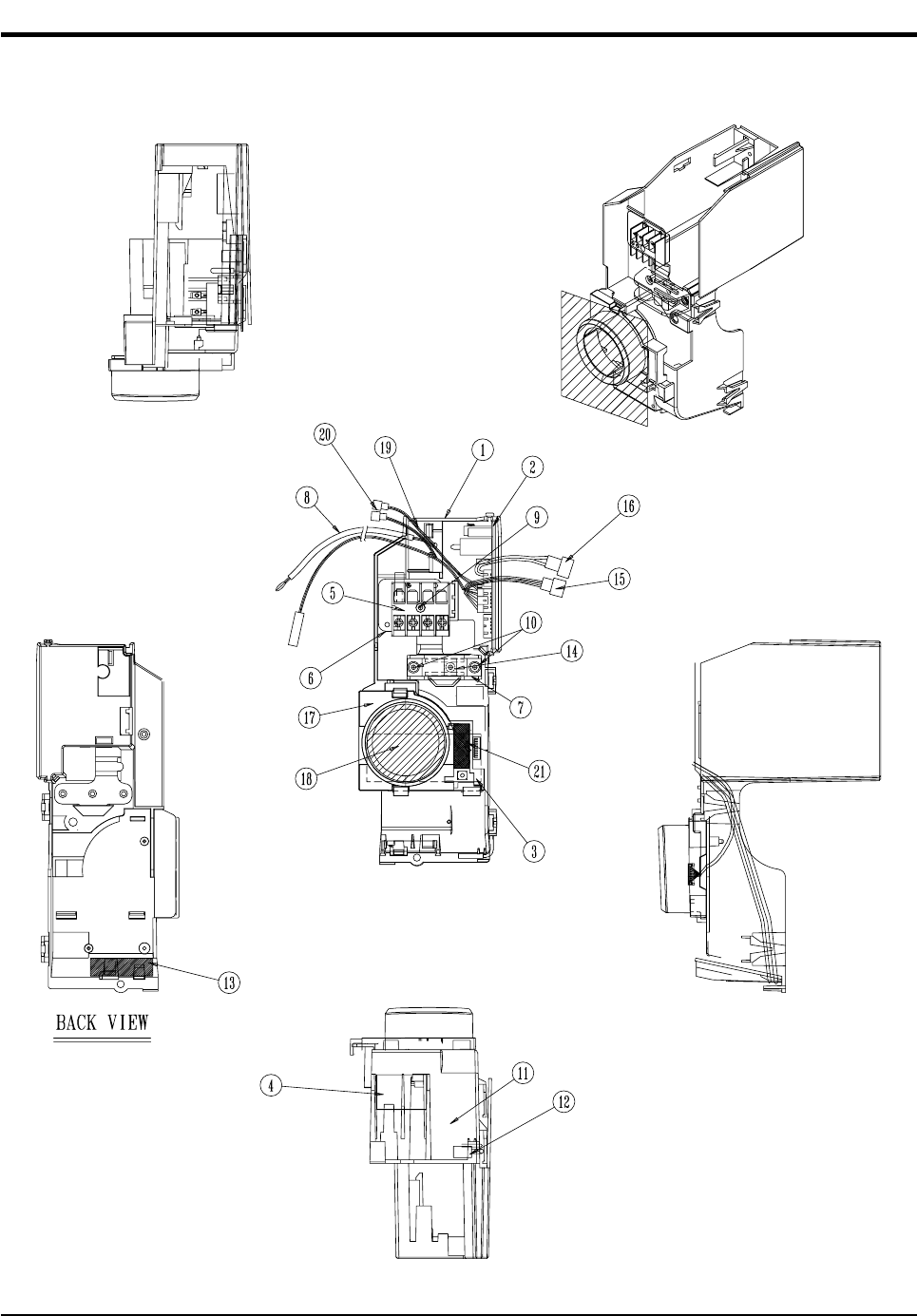
Samsung Electronics32
7-3 Ass'y Control In (Indoor Unit)
■SH07APG/SH07APGA/SH09APG : DB93-02542A
■SH12APG : DB93-02541A
DB98_15732A(3)_1 3/9/04 10:09 AM Page 32
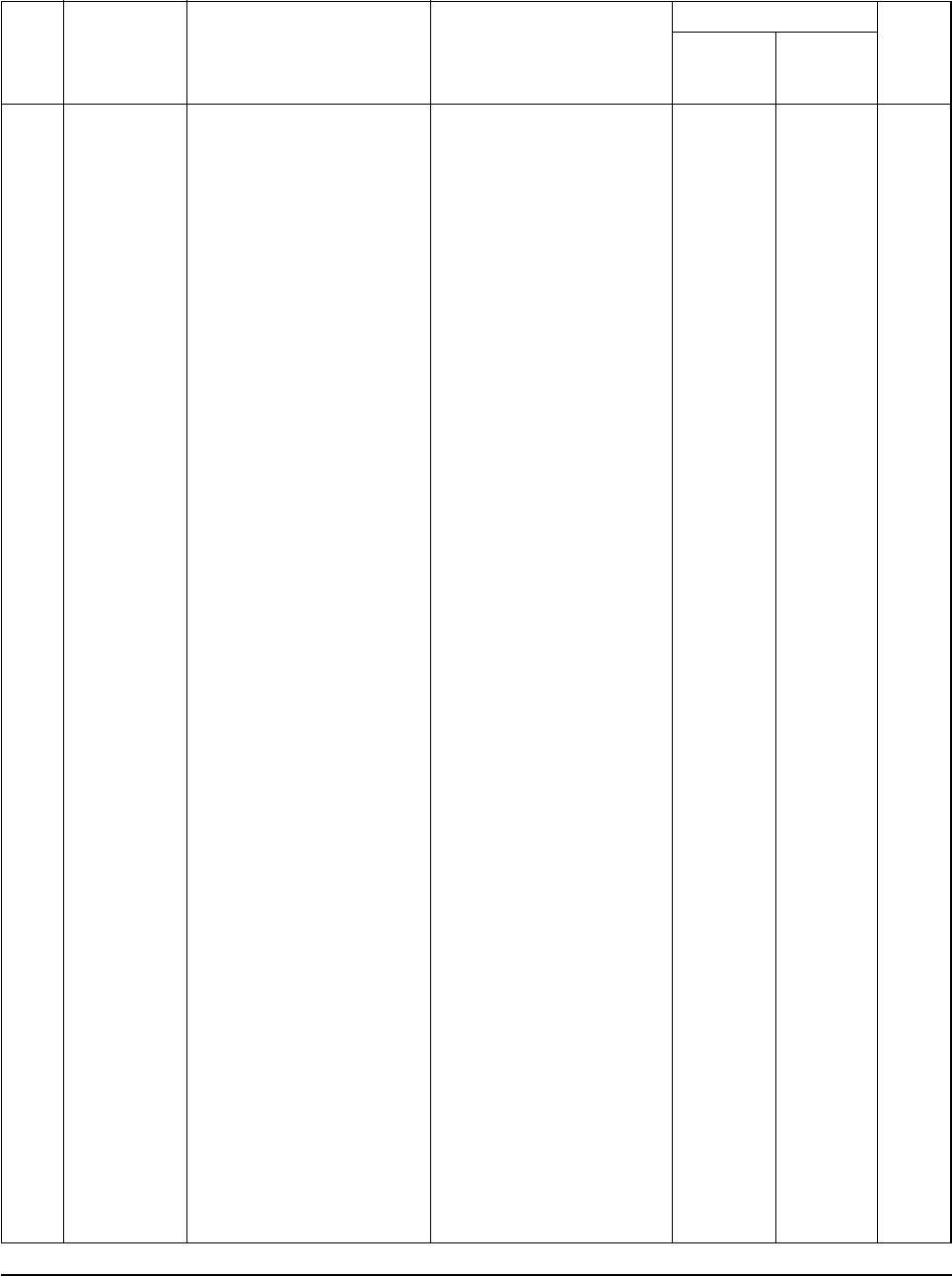
Exploded Views and Parts List
33Samsung Electronics
■
Parts List
Q'TY
No. Code No. Description Specification Remark
SH12APG
SH07APG
SH07APGA
SH09APG
1
2
3
4
5
6
7
8
9
10
11
12
13
14
15
16
17
18
19
20
21
DB61-01631A
DB61-01127A
DB93-02572A
DB93-01368G
DB93-01369A
DB93-02508A
DB65-00103B
DB70-00289A
DB61-00171A
DB32-00020A
6001-000929
6001-000725
DB93-01380A
DB93-01380B
DB39-00643F
DB39-00643M
DB62-01368X
-
DB39-00780B
DB39-00820A
DB61-01110A
DB64-00763A
DB93-01387A
DB39-00866B
DB72-00126N
CASE-CONTROL AC
CASE-CONTROL AC
ASS'Y MAIN PCB
ASS'Y S/W & DISPLAY PCB
ASS'Y-MODULE PCB
ASS'Y TERMINAL BLOCK
ASS'Y TERMINAL BLOCK
PLATE TERMINAL LOW
HOLDER WIRE CLAMP
ASS'Y THERMISTOR
SCREW-MACHINE
SCREW-MACHINE
C/W MODULE
C/W MODULE
C/W STEP MOTOR UP/DOWN
C/W STEP MOTOR UP/DOWN
SEAL
SCREW-MACHINE
C/W STEPPING MOTOR
C/W ION-PCB
HOLDER-DISPLAY
HALF MIRROR
ASS'Y PCB HVPS
ASS'Y C/W HVPS(12V)
SEAL
ABS
ABS
ASS'Y
ASS'Y
ASS'Y
ASS'Y
ASS'Y
SGCC-M,T1.2
HIPS
ASS'Y
PH M3xL22
TH M4xL16
ASS'Y
ASS'Y
ASS'Y
ASS'Y
61x40x3,30FOAM-PE,GRAY
PH M4x10
ASS'Y(AUTO GRILLE)
ASS'Y
ABS
95,T1.5
ASS'Y
ASS'Y
30x10x3,30FOAM-PE,GRAY
1
-
1
1
1
1
-
1
1
1
1
2
1
-
1
-
1
1
1
1
1
1
-
-
1
-
1
1
1
1
-
1
1
1
1
1
2
-
1
-
1
1
1
1
1
1
1
-
-
1
SNA
SNA
SNA
SNA
SNA
DB98_15732A(3)_1 3/9/04 10:09 AM Page 33
Samsung Electronics34
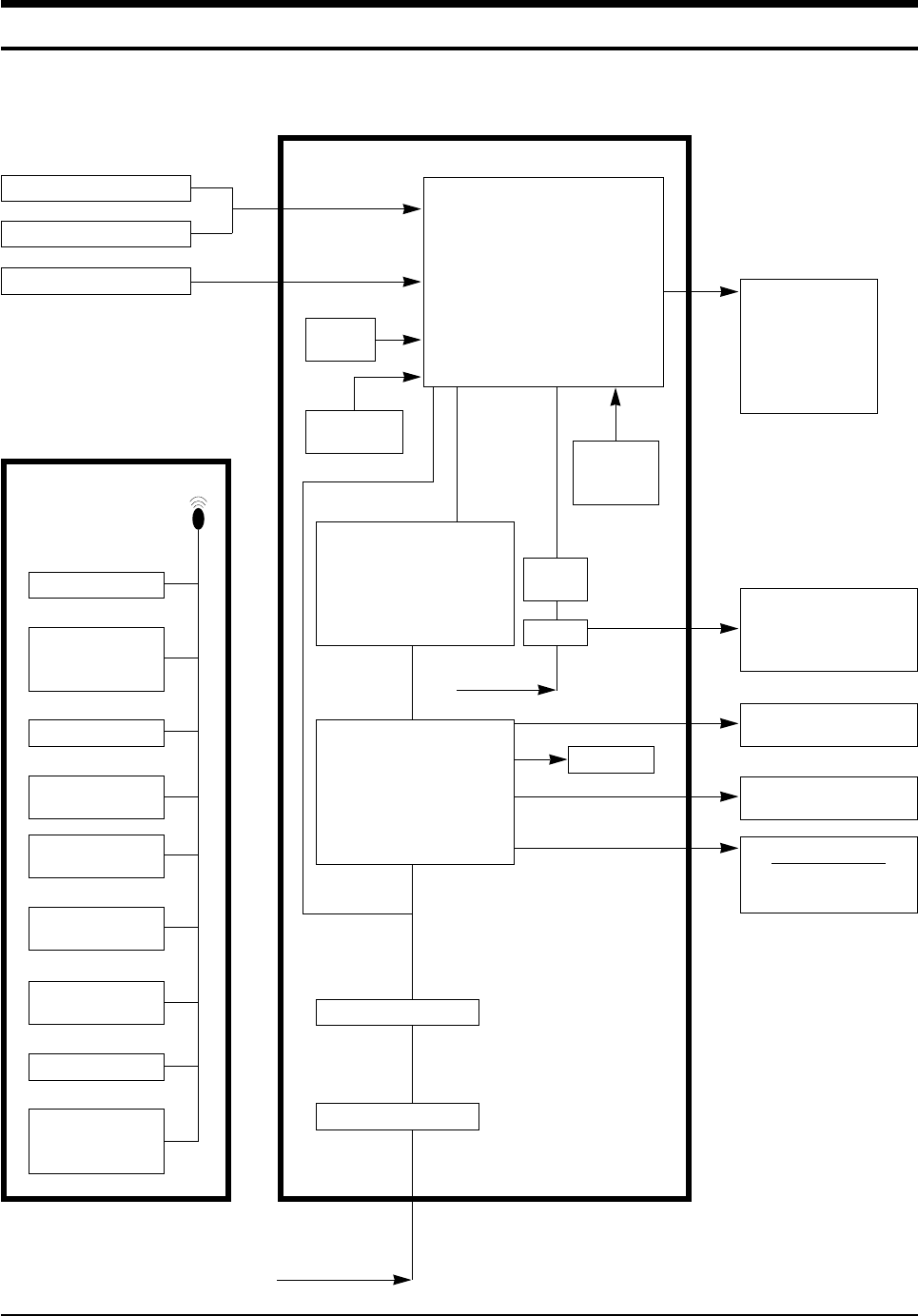
8. Block Diagram
HEAT EXCHANGER SENSOR
TURBO
OPERATION
TIMER
TEMPERATURE*
FUNCTION
INDOOR FAN MOTOR
(left/right)
BUZZER
COMPRESSOR
OUTDOOR FAN MOTOR
STEPPING MOTOR
-Blade
-Auto grille*
FUNCTION
PART
DISPLAY PART
* : Option
IC-MCU
ROOM TEMPERATURE SENSOR
CONTROLLER
REMOTE CONTROLLER
INFRARED SIGNAL
RESET
CIRCUIT
OSCILLATION
CIRCUIT
POWER ON/OFF
TURBO OPERATION
SLEEP SELECT
MODE
(AUTO, COOL, DRY,
FAN)
FAN SPEED SELECT
(H/M/L)
BLADE-H
MOVING SELECT
ON, OFF TIMER
SELECT
FUNCTION*
SELECT
TEMPERATURE
SELECT
ZERO
VOLTAGE
DETECT
• BLADE CONTROL
• AUTO GRILLE CONTROL*
• INDOOR FAN MOTOR CONTROL
• COMPRESSOR CONTROL
• TEMPERATURE CONTROL
• TIMER
• BUZZER CONTROL
• FUNCTION CONTROL*
TRIGGER
SIGNAL
SSR
• COMPRESSOR DRIVE
• OUTDOOR FAN MOTOR
DRIVE
• STEPPING MOTOR DRIVE
• BUZZER DRIVE
• FUNCTION DRIVE*
• COMPRESSOR CONTROL
SIGNAL
• STEPPING MOTOR
CONTROL SIGNAL
• BUZZER CONTROL SIGNAL
•
FUNCTION CONTROL SIGNAL*
DC 5V
DC 12V
AC INPUT
SMPS Power Block
VOLTAGE REGULATOR
AC INPUT
DB98_15732A(3)_1 3/9/04 10:09 AM Page 34
35Samsung Electronics
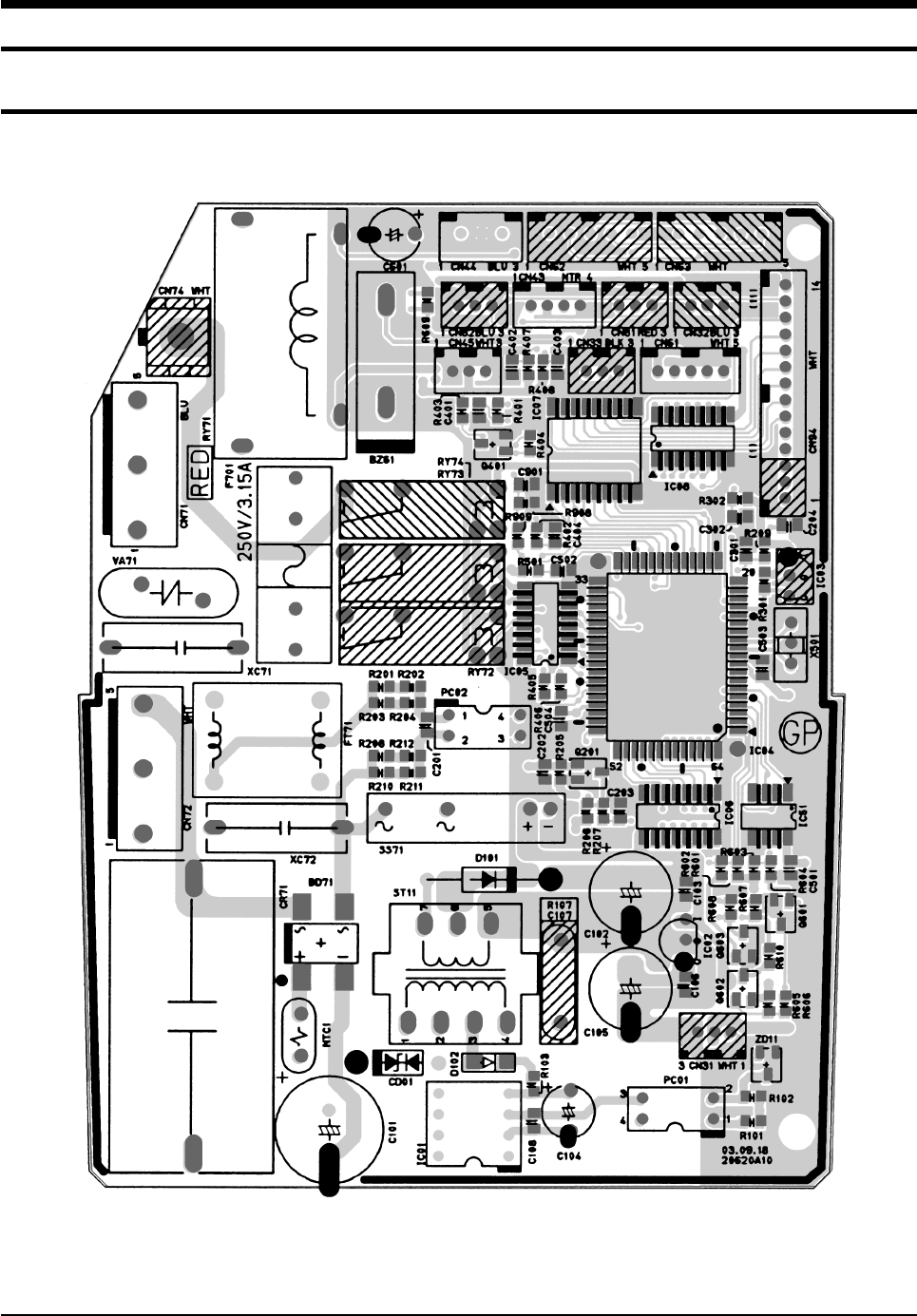
9. PCB Diagram
9-1 ASS’Y MAIN PCB(7K/9K/12K) : DB93-02572A
■TOP
DB98_15732A(3)_1 3/9/04 10:09 AM Page 35
Samsung Electronics36
PCB Diagram
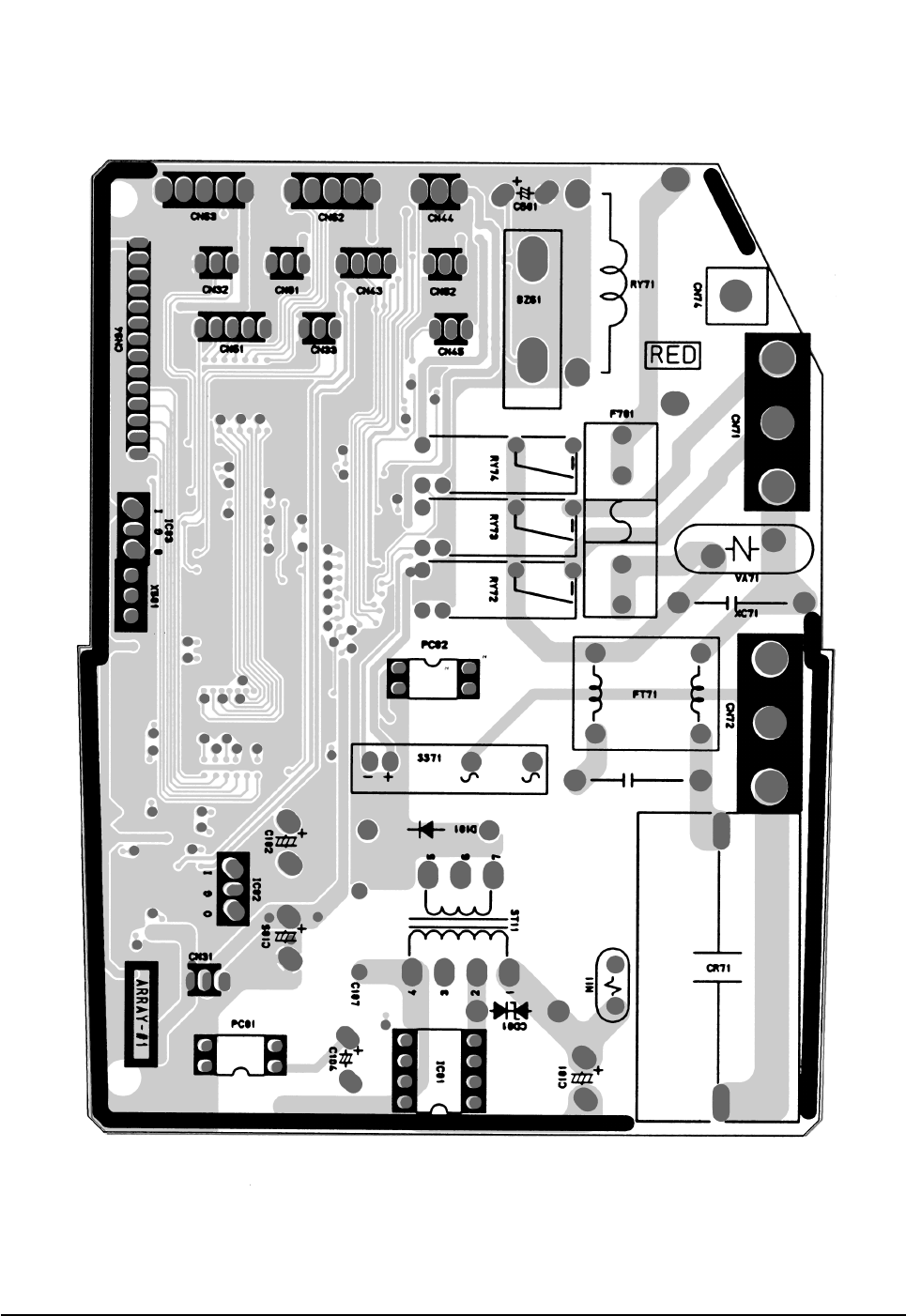
■BOTTOM
DB98_15732A(3)_1 3/9/04 10:09 AM Page 36

37Samsung Electronics
PCB Diagram
■
Parts List
BD71 DIODE-BRIDGE DF06S,600V,1A,SMD-4,TP 1 SNA
BZ61 BUZZER 80DB,9V ,-,2.0KHz,-,26.5x22.0x7.0mm 1 SNA
C101 C-AL 10uF,20%,450V,GP,TP,13x20mm,5 1 SNA
C102 C-AL 470uF,20%,25V,GP,TP 1 SNA
C103,C106,C108,C201 C-CERAMIC,DISC 100nF,+80-20%,50V,Y5V,TP,2012 14 SNA
C204,C301C302,C402
C403,C501,C502,C503
C504,C901
C104,C601 C-AL 47uF,20%,50V,GP,TP,6.3x11,5 2 SNA
C105 C-AL 470uF,20%,16V,GP,TP 1 SNA
C107 C-CERAMIC,DISC 2.2nF,20%,400V,Y5U,TP,12.5x6,10 1 SNA
R107 R-CARBON 12MΩ-J,0.5W 1 SNA
C202,C203,C404 C-CERAMIC,DISC 10nF,+80-20%,50V,Y5V,TP,2012 3 SNA
C401 C-CERAMIC,DISC 1nF,10%,50V,X7R,TP,2012,- 1 SNA
CD01 DIODE-TVS ST02D-200,185/200/215V,200W,DO-214 1 SNA
CN31,CN32,CN33 CONNECTOR-HEADER BOX,3P,1R,2mm,STRAIGHT,SN 3 SNA
CN43 CONNECTOR-HEADER BOX,4P,1R,2mm,STRAIGHT,SN 1 SNA
CN44 CONNECTOR-HEADER BOX,3P,1R,2.5mm,STRAIGHT,SN 1 SNA
CN45 CONNECTOR-HEADER BOX,3P,1R,2mm,STRAIGHT,SN 1 SNA
CN61 CONNECTOR-HEADER BOX,5P,1R,2mm,STRAIGHT,SN 1 SNA
CN62,CN63 CONNECTOR-HEADER BOX,5P,1R,2.5mm,STRAIGHT,SN 2 SNA
CN71 CONNECTOR-HEADER 1WALL,3P/5P,1R,3.96mm,STRAIGHT,SN 1 SNA
CN72 CONNECTOR-HEADER 1WALL,3P/5P,1R,3.96mm,STRAIGHT 1 SNA
CN74 CONNECTOR-TERMINAL PIN,MALE,#18-22,2.35mm 1 SNA
CN81 CONNECTOR-HEADER BOX,3P,1R,2mm,STRAIGHT,SN,RED 1 SNA
CN82 CONNECTOR-HEADER BOX,3P,1R,2mm,STRAIGHT,SN,BLU 1 SNA
CN94 CONNECTOR-HEADER BOX,11P,1R,2mm,STRAIGHT,SN 1 SNA
CN94 CONNECTOR-HEADER BOX,14P,1R,2mm,STRAIGHT,SN 1 SNA
CR71 C-FILM,MPPF 1.2uF,10%,450Vac,BK,38x18x30,3 1 SNA
D101 DIODE-RECTIFIER UG2D,200V,2A,DO-204AC,TP 1 SNA
D102 DIODE-SWITCHING RSL4148,100V,200mA,DO-35,TP 1 SNA
F701 FUSE-CARTRIDGE 250V,3.15A,TIME-LAG,GLASS,5x20mm 1 SNA
F701 FUSE- CLIP 500V,-,100M 1 SNA
FT71 LS404190M AS-S660,19mH,+50,-30%,-,300Mohm,2A,-,-,- 1 SNA
IC01 IC-PWM CONTROLLER VIPER12ADIP,DIP,8P,300MIL,PLASTIC 1 SNA
IC02 IC-POSI ADJUST REG 78L05A,TO-92,3P,-,PLASTIC,4.6 1 SNA
IC03 IC-VOLTAGE COMP,7533,TO-92,3P,-,SINGLE,-,-,PLASTIC 1 SNA
IC04 IC-MICOM S3C8489XZZ-QTR5,-,64,+5V,10MHz,STM-0219-O 1 SNA
IC05,IC06,IC08 TR-ARRAY 2003,NPN,7,1W,SOP-16,ST,1000 3 SNA
IC07 IC-SOURCE DRIVER TD62783AFW,SOL,18P,-,8,-500mA,TP 1 SNA
Specification RemarkQ'TYDescriptionLocation No.
DB98_15732A(3)_1 3/9/04 10:09 AM Page 37

Samsung Electronics38
PCB Diagram
■
Parts List (cont.)
IC51 IC-EEPROM 93LC56,128x16Bit,SOP,8P,150MIL,-,2.5V,- 1 SNA
NTC1 THERMISTOR-NTC 22ohm,1.4A,3100K,9.5mW/C,-,7.0,- 1 SNA
PC01 PHOTO-COUPLER TR,130-260%,200mW,DIP-4,ST 1 SNA
PC02 PHOTO-COUPLER TR,50-150%,200mW,DIP-4,ST 1 SNA
Q201,Q401,Q601,Q603 TR-SMALL SIGNAL 2SC2412K,NPN,200mW,SOT-23,TP,1 4 SNA
Q602 TR-SMALL SIGNAL MMST2907A,PNP,200mW,SOT-23,TP,100- 1 SNA
R101 R-CHIP 100ohm,5%,1/8W,DA,TP,2012 1 SNA
R102 R-CHIP 2.2Kohm,5%,1/8W,DA,TP,2012 1 SNA
R103 R-CHIP 6.8ohm,5%,1/8W,DA,TP,2012 1 SNA
R201,R202,R203,R204 R-CHIP 100Kohm,5%,1/8W,DA,TP,3216 8 SNA
R208,R210,R211,R212
R205,R501,R601,R603 R-CHIP 10Kohm,5%,1/8W,DA,TP,2012 6 SNA
R605,R908
R206,R207,R209,R301 R-CHIP 1Kohm,5%,1/8W,DA,TP,2012 11 SNA
R302R401,R402,R404
R602,R604,R610
R403 R-CHIP 6.8Kohm,5%,1/8W,DA,TP,2012 1 SNA
R405,R406 R-CHIP 330ohm,5%,1/8W,DA,TP,2012 2 SNA
R407,R408 R-CHIP 6.8Kohm,1%,1/8W,DA,TP,2012 2 SNA
R606,R909 R-CHIP 4.7Kohm,5%,1/8W,DA,TP,2012 2 SNA
R607,R608 R-CHIP 470ohm,5%,1/8W,DA,TP,2012 2 SNA
R609 R-CHIP 560ohm,5%,1/8W,DA,TP,2012 1 SNA
RY71 RELAY-POWER 12VDC,0.9W,75mA,SPST,MAX 20msec,10mS 1 SNA
RY72,RY73 RELAY-POWER DC12V,3A 250V AC,-,-,10mS,10mS 2 SNA
RY74 RELAY-POWER DC12V,3A 250V AC,-,-,10mS,10mS 1 SNA
SS71 SSR 12Vdc,-,2A,1mS,1mS 1 SNA
ST11 TRANS SWITCHING-S W TRANS;-,W-P/J,-,-,-,-,-,-,-,- 1 SNA
VA71 VARISTOR 560V,2500A,17.5x7.5mm,TP 1 SNA
X501 RESONATOR-CERAMIC 10MHz,0.5%,TP,10.0x5.0x8.0mm 1 SNA
XC71 C-FILM,MPPF 100nF,10%,275V,BK,18x6x12,15 1 SNA
XC72 C-FILM,MPPF 220nF,10%,275V,BK,18x12x6,18 1 SNA
ZD11 DIODE-ZENER BZX84-C11,10.4-11.6V,350mW,SOT-23,TP 1 SNA
Specification RemarkQ'TYDescriptionLocation No.
DB98_15732A(3)_1 3/9/04 10:09 AM Page 38
39Samsung Electronics
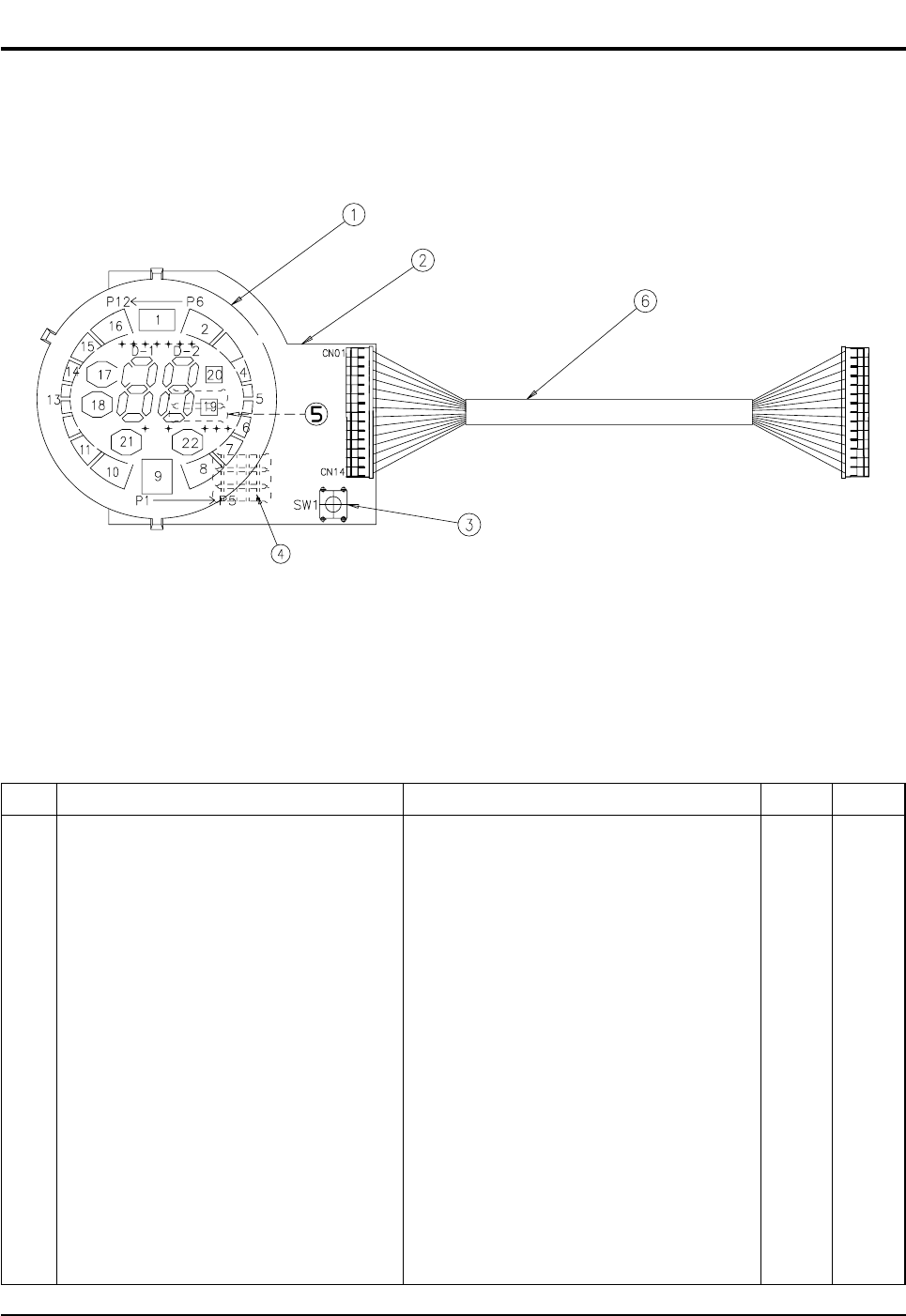
9-2 ASS'Y DISPLAY PCB : DB93-01368G
■
Parts List
No.
1 ASS'Y LED MODULE 1 SNA
2 PCB-DISPLAY FR-1 T1.6 1 SNA
3 TACT SWITCH KPT-1105A 1 SNA
4 RESISTOR 200ohm, 2W 2 SNA
5 RESISTOR 100ohm, 2W 3 SNA
6 CONNECTOR WIRE 14P 1 SNA
SpecificationDescription RemarkQ'TY
DB98_15732A(3)_1 3/9/04 10:09 AM Page 39
Samsung Electronics40
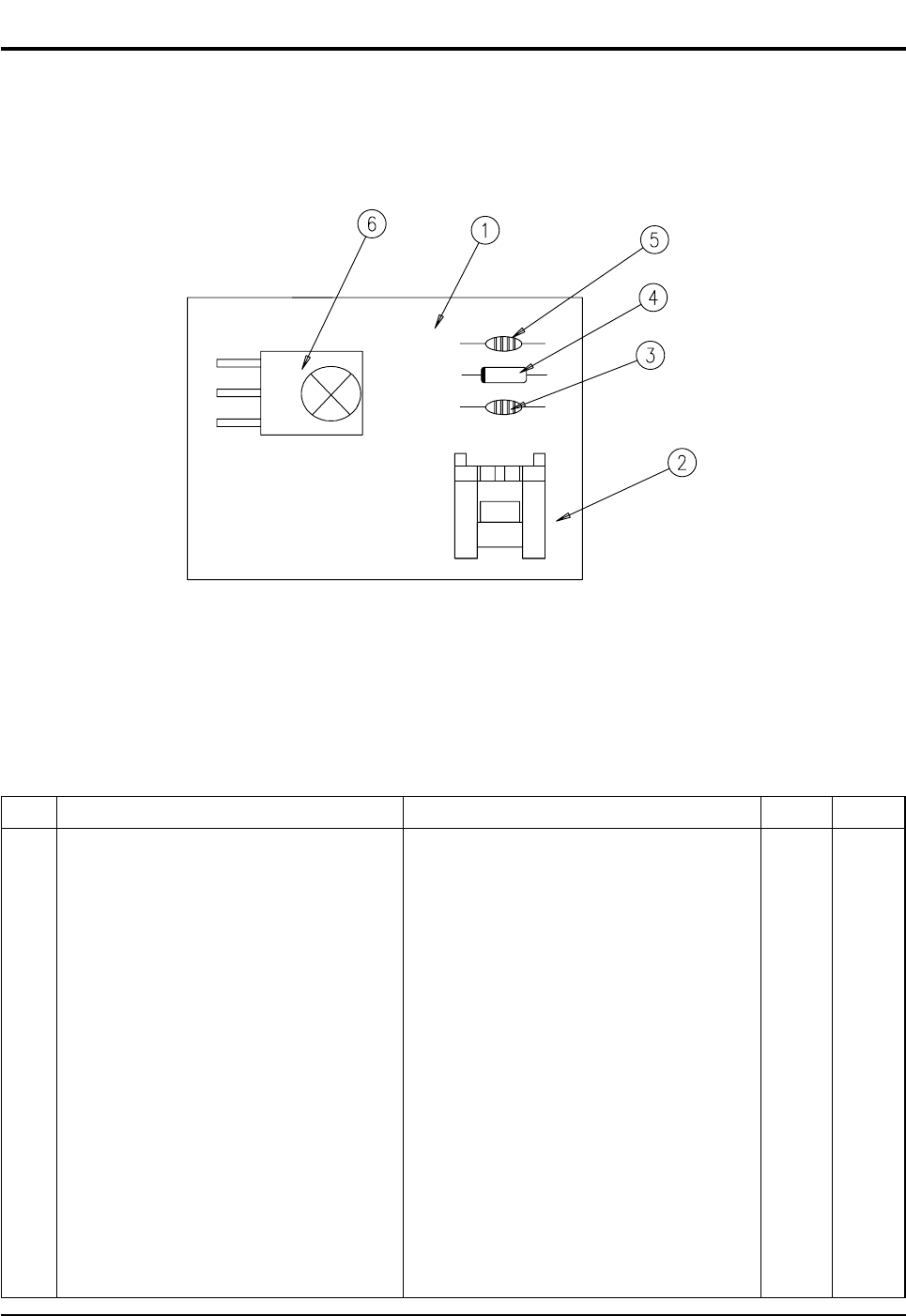
9-3 ASS'Y MODULE PCB : DB93-01369A
■
Parts List
No.
1 PCB MODULE FR1 T1.6 1 SNA
2 CONNECTOR-HEADER BOX, 3P, 1R, 2mm, ANGLE, SN 1 SNA
3 C-CERAMIC, MLC-AXIAL 1nF, 10%, 50V, Y5P, TP, 1.9 x 3.5, - 1 SNA
4 DIODE-SWITCHING 1N4148, 100V, 200mA, DO-35, TP 1 SNA
5 C-CERAMIC, MLC-AXIAL 100nF, +80-20%, 50V, Y5V, TP, 3.5 x 1 1 SNA
6 MODULE FRP4021H7 1 SNA
SpecificationDescription RemarkQ'TY
DB98_15732A(3)_1 3/9/04 10:09 AM Page 40
41Samsung Electronics
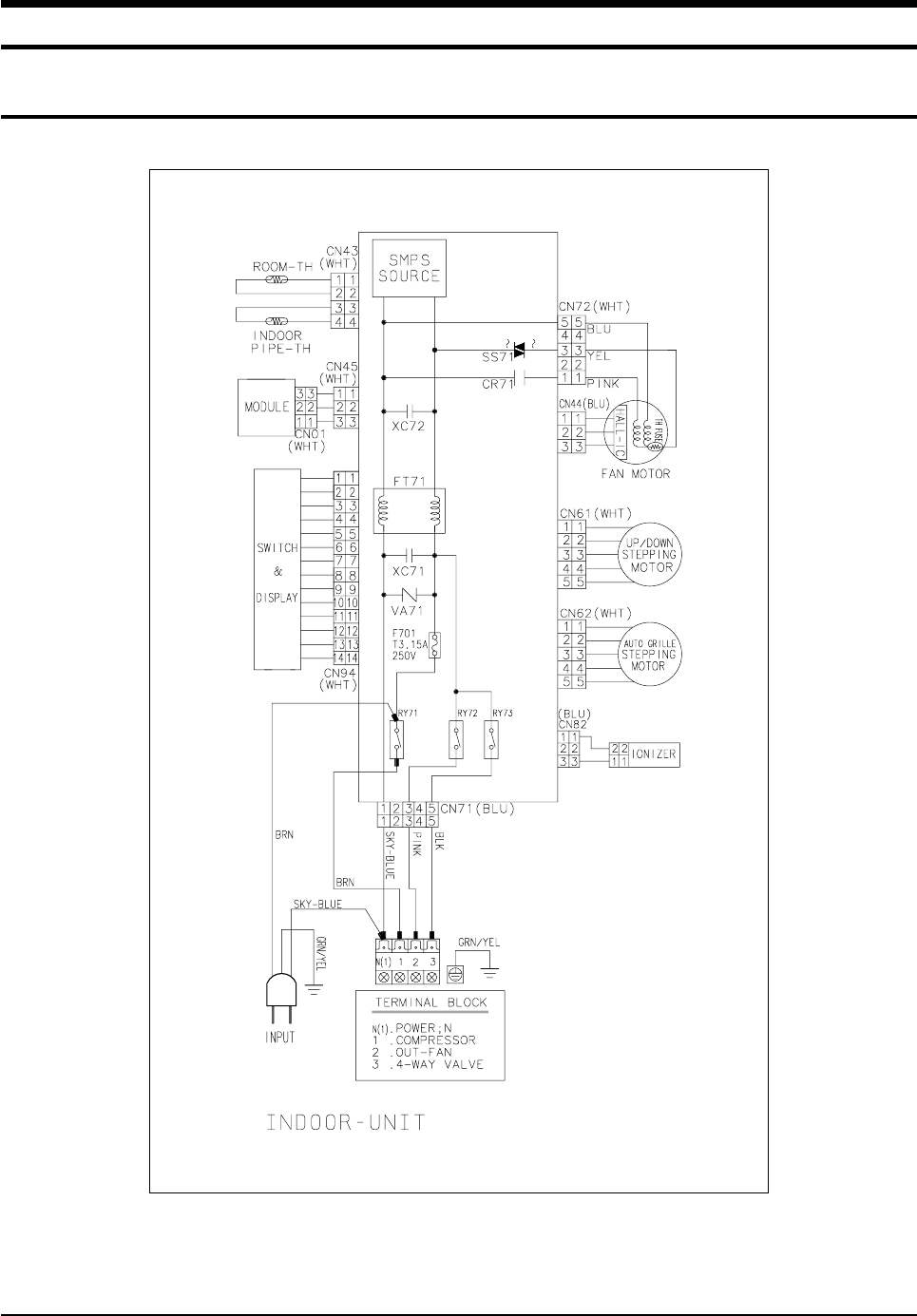
10. Wiring Diagram
10-1 Indoor Unit(7K/9K/12K)
This Document can not be used without Samsung's authorization.
Code No : DB98-15136A
DB98_15732A(3)_1 3/9/04 10:09 AM Page 41
Samsung Electronics42
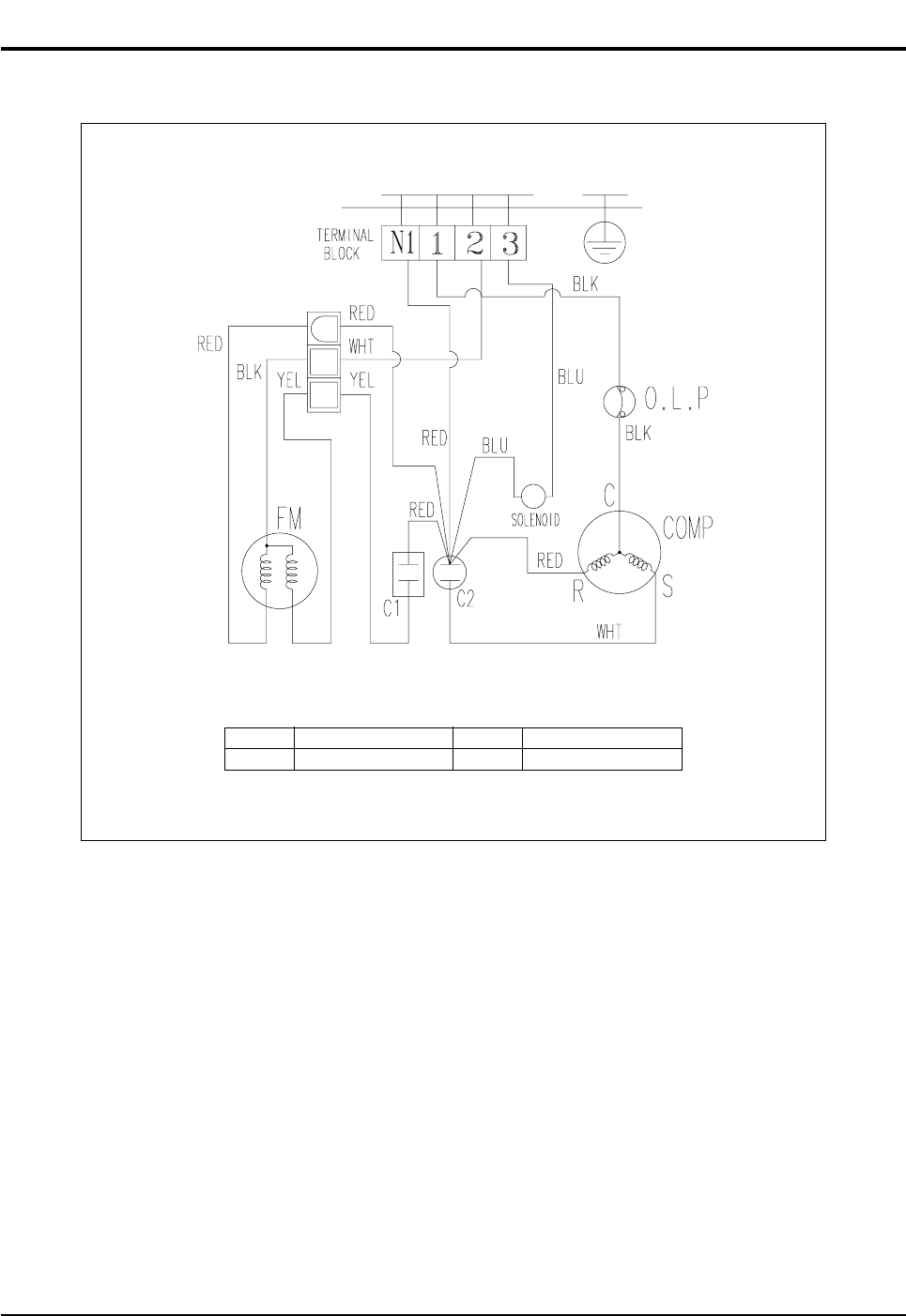
This Document can not be used without Samsung's authorization.
10-2 Outdoor Unit(7K/9K/12K)
Code No : DB98-15123A
C1 MOTOR CAPACITOR FM FAN MOTOR
C2 COMP CAPACITOR O.L.P OVER LOAD PROTECTOR
DB98_15732A(3)_1 3/9/04 10:09 AM Page 42
43Samsung Electronics
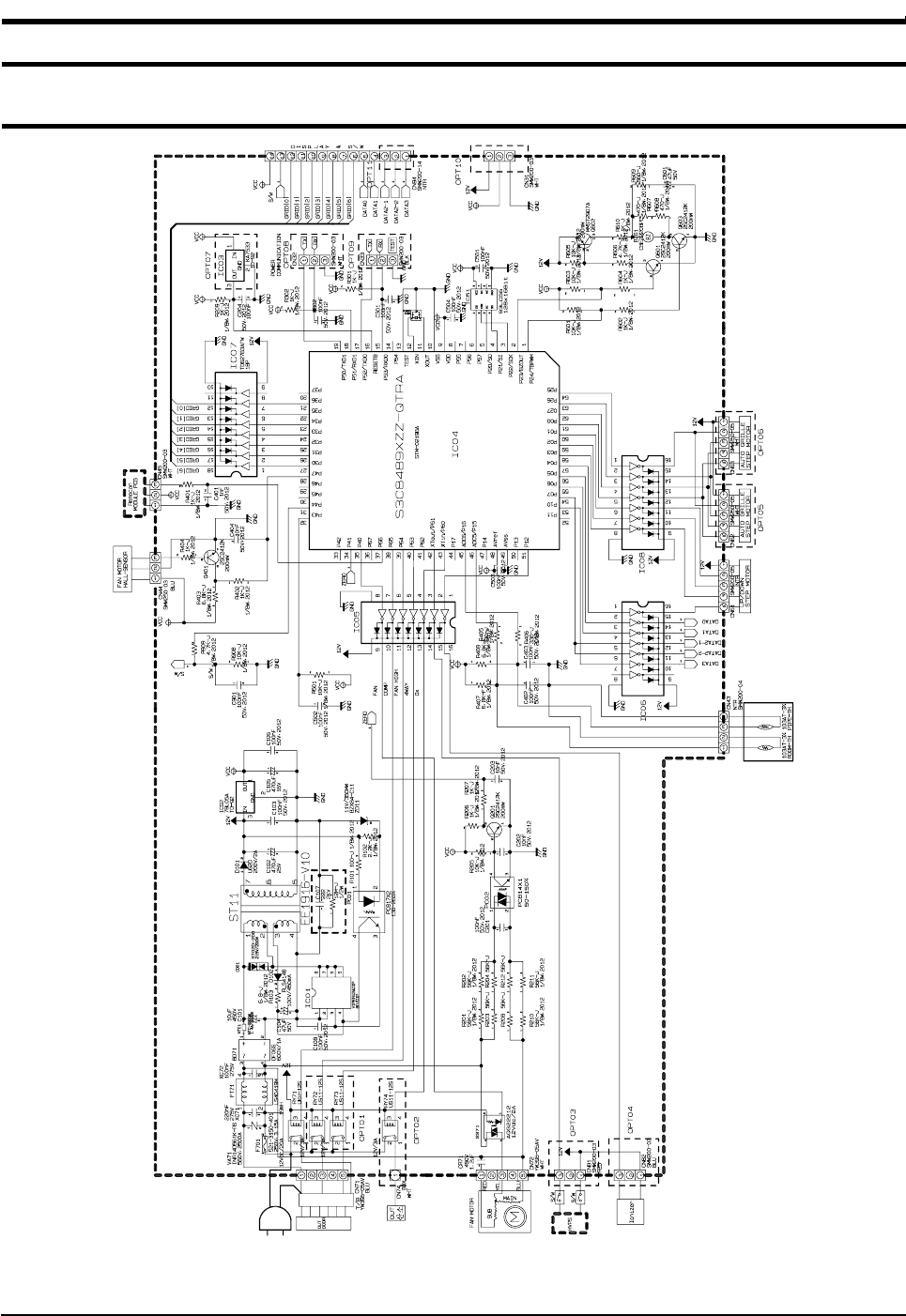
11. Schematic Diagram
11-1 Indoor Unit(7K/9K/12K)
This Document can not be used without Samsung's authorization.
DB98_15732A(3)_1 3/9/04 10:09 AM Page 43

MEMO
Samsung Electronics44
DB98_15732A(3)_1 3/9/04 10:09 AM Page 44

ELECTRONICS
This Service Manual is a property of Samsung Electronics Co., Ltd.
Any unauthorized use of Manual can be punished under applicable
International and/or domestic law.
© Samsung Electronics Co., Ltd. Mar. 2004.
Printed in Korea.
Code No. DB98-15732A(3)
DB98_15732A(3)_co 3/9/04 10:10 AM Page 2
