Name: SIM7000 Series AT Command Manual V1.03
SIM7000%20Series_AT%20Command%20Manual_V1.03
SIM7000%20Series%20AT%20Command%20Manual%20V1.03
SIM7000%20Series%20AT%20Command%20Manual%20V1.03
User Manual:
Open the PDF directly: View PDF  .
.
Page Count: 250 [warning: Documents this large are best viewed by clicking the View PDF Link!]
- Version History 11
- 1 Introduction 13
- 1.1 Scope of the document 13
- 1.2 Related documents 13
- 1.3 Conventions and abbreviations 13
- 1.4 AT Command syntax 13
- 1.5 Supported character sets 15
- 1.6 Flow control 15
- 1.7 Definitions 16
- 2 AT Commands According to V.25TER 17
- 2.1 Overview of AT Commands According to V.25TER 17
- 2.2 Detailed Description of AT Commands According to V.25TER 18
- 3 AT Commands According to 3GPP TS 27.007 37
- 3.1 Overview of AT Command According to 3GPP TS 27.007 37
- 3.2 Detailed Descriptions of AT Command According to 3GPP TS 27.007 37
- 4 AT Commands According to 3GPP TS 27.005 59
- 4.1 Overview of AT Commands According to 3GPP TS 27.005 59
- 4.2 Detailed Descriptions of AT Commands According to 3GPP TS 27.005 59
- 5 AT Commands Special for SIMCom 80
- 5.1 Overview 80
- 5.2 Detailed Descriptions of Commands 81
- 6 AT Commands for GPRS Support 111
- 6.1 Overview of AT Commands for GPRS Support 111
- 6.2 Detailed Descriptions of AT Commands for GPRS Support 111
- 7 AT Commands for IP Application 119
- 7.1 Overview 119
- 7.2 Detailed Descriptions of Commands 119
- 8 AT Commands for TCPIP Application Toolkit 121
- 8.1 Overview 121
- 8.2 Detailed Descriptions of Commands 122
- 9 AT Commands for HTTP Application 152
- 9.1 Overview 152
- 9.2 Detailed Descriptions of Commands 152
- 10 AT Commands for PING Application 162
- 10.1 Overview 162
- 10.2 Detailed Descriptions of Commands 162
- 11 AT Commands for FTP Application 166
- 11.1 Overview 166
- 11.2 Detailed Descriptions of Commands 167
- 12 AT Command for NTP function 189
- 12.1 Overview 189
- 12.2 Detailed Descriptions of Commands 189
- 13 AT Commands for OneNet Application 192
- 13.1 Overview 192
- 13.2 Detailed Descriptions of Commands 192
- 14 AT Commands for Telecom IOT Application 201
- 14.1 Overview 201
- 14.2 Detailed Descriptions of Commands 201
- 15 AT Commands for GNSS Application 204
- 15.1 Overview 204
- 15.2 Detailed Descriptions of Commands 205
- 16 AT Commands for File System 216
- 16.1 Overview 216
- 16.2 Detailed Descriptions of Commands 216
- 17 AT Commands for SIM Application Toolkit 224
- 17.1 Overview 224
- 17.2 Detailed Descriptions of Commands 224
- 18 AT Commands for TCP/UDP Application Supported SSL 229
- 18.1 Overview 229
- 18.2 Detailed Descriptions of Commands 229
- 19 Supported Unsolicited Result Codes 240
- 19.1 Summary of CME ERROR Codes 240
- 19.2 Summary of CMS ERROR Codes 243
- 19.3 Summary of Unsolicited Result Codes 247
- Version History
- Introduction
- AT Commands According to V.25TER
- Overview of AT Commands According to V.25TER
- Detailed Description of AT Commands According to V.25TER
- A/ Re-issues the Last Command Given
- ATD Mobile Originated Call to Dial A Number
- ATE Set Command Echo Mode
- ATH Disconnect Existing Connection
- ATI Display Product Identification Information
- ATL Set Monitor speaker loudness
- ATM Set Monitor Speaker Mode
- +++ Switch from Data Mode or PPP Online Mode to Command Mode
- ATO Switch from Command Mode to Data Mode
- ATQ Set Result Code Presentation Mode
- ATS0 Set Number of Rings before Automatically Answering the Call
- ATS3 Set Command Line Termination Character
- ATS4 Set Response Formatting Character
- ATS5 Set Command Line Editing Character
- ATS6 Pause Before Blind Dialling
- ATS7 Set Number of Seconds to Wait for Connection Completion
- ATS8 Set Number of Seconds to Wait for Comma Dial Modifier Encountered in Dial String of D Command
- ATS10 Set Disconnect Delay after Indicating the Absence of Data Carrier
- ATV TA Response Format
- ATX Set CONNECT Result Code Format and Monitor Call Progress
- AT&C Set DCD Function Mode
- AT&D Set DTR Function Mode
- AT&E Set CONNECT Result Code Format About Speed
- AT+GCAP Request Complete TA Capabilities List
- AT+GMI Request Manufacturer Identification
- AT+GMM Request TA Model Identification
- AT+GMR Request TA Revision Identification of Software Release
- AT+GOI Request Global Object Identification
- AT+GSN Request TA Serial Number Identification (IMEI)
- AT+ICF Set TE-TA Control Character Framing
- AT+IFC Set TE-TA Local Data Flow Control
- AT+IPR Set TE-TA Fixed Local Rate
- AT Commands According to 3GPP TS 27.007
- Overview of AT Command According to 3GPP TS 27.007
- Detailed Descriptions of AT Command According to 3GPP TS 27.007
- AT+CGMI Request Manufacturer Identification
- AT+CGMM Request Model Identification
- AT+CGMR Request TA Revision Identification of Software Release
- AT+CGSN Request Product Serial Number Identification
- AT+CSCS Select TE Character Set
- AT+CIMI Request International Mobile Subscriber Identity
- AT+CLCK Facility Lock
- AT+CMEE Report Mobile Equipment Error
- AT+COPS Operator Selection
- AT+CPAS Phone Activity Status
- AT+CPIN Enter PIN
- AT+CPWD Change Password
- AT+CRC Set Cellular Result Codes for Incoming Call Indication
- AT+CREG Network Registration
- AT+CRSM Restricted SIM Access
- AT+CSQ Signal Quality Report
- AT+CPOL Preferred Operator List
- AT+COPN Read Operator Names
- AT+CFUN Set Phone Functionality
- AT+CCLK Clock
- AT+CSIM Generic SIM Access
- AT+CBC Battery Charge
- AT+CUSD Unstructured Supplementary Service Data
- AT+CNUM Subscriber Number
- AT Commands According to 3GPP TS 27.005
- Overview of AT Commands According to 3GPP TS 27.005
- Detailed Descriptions of AT Commands According to 3GPP TS 27.005
- AT+CMGD Delete SMS Message
- AT+CMGF Select SMS Message Format
- AT+CMGL List SMS Messages from Preferred Store
- AT+CMGR Read SMS Message
- AT+CMGS Send SMS Message
- AT+CMGW Write SMS Message to Memory
- AT+CMSS Send SMS Message from Storage
- AT+CNMI New SMS Message Indications
- AT+CPMS Preferred SMS Message Storage
- AT+CRES Restore SMS Settings
- AT+CSAS Save SMS Settings
- AT+CSCA SMS Service Center Address
- AT+CSDH Show SMS Text Mode Parameters
- AT+CSMP Set SMS Text Mode Parameters
- AT+CSMS Select Message Service
- AT Commands Special for SIMCom
- Overview
- Detailed Descriptions of Commands
- AT+CPOWD Power off
- AT+CADC Read ADC
- AT+CFGRI Indicate RI When Using URC
- AT+CLTS Get Local Timestamp
- AT+CBAND Get and Set Mobile Operation Band
- AT+CNBP Set the state of the band preference
- AT+CNSMOD Show network system mode
- AT+CSCLK Configure Slow Clock
- AT+CCID Show ICCID
- AT+CDEVICE View Current Flash Device Type
- AT+GSV Display Product Identification Information
- AT+SGPIO Control the GPIO
- AT+SLEDS Set the Timer Period of Net Light
- AT+CNETLIGHT Close the Net Light or Open It to Shining
- AT+CSGS Netlight Indication of GPRS Status
- AT+CGPIO Control the GPIO by PIN Index
- AT+CBATCHK Set VBAT Checking Feature ON/OFF
- AT+CNMP Preferred mode selection
- AT+CMNB Preferred selection between CAT-M and NB-IoT
- AT+CPSMS Power Saving Mode Setting
- AT+CEDRXS Entended-DRX Setting
- AT+CPSI Inquiring UE system information
- AT+CGNAPN Get Network APN in CAT-M Or NB-IOT
- AT+CSDP Service Domain Preference
- AT+MCELLLOCK Lock the special CAT-M cell
- AT+NCELLLOCK Lock the special NB-IOT cell
- AT+NBSC Config NB-IOT Scrambling Feature
- AT+CAPNMODE Select the Mode of Application Configure APN
- AT+CRRCSTATE Query RRC State
- AT+CBANDCFG Configure CAT-M Or NB-IOT Band
- AT+CNACT App Network Active
- AT+CEDUMP Set whether the module reset when the module is crashed
- AT+CNBS Configure Band Scan Optimization For NB-IOT
- AT+CNDS Configure Service Domain Preference For NB-IOT
- AT+CENG Switch on or off Engineering Mode
- AT Commands for GPRS Support
- AT Commands for IP Application
- AT Commands for TCPIP Application Toolkit
- Overview
- Detailed Descriptions of Commands
- AT+CIPMUX Start Up Multi-IP Connection
- AT+CIPSTART Start Up TCP or UDP Connection
- AT+CIPSEND Send Data Through TCP or UDP Connection
- AT+CIPQSEND Select Data Transmitting Mode
- AT+CIPACK Query Previous Connection Data Transmitting State
- AT+CIPCLOSE Close TCP or UDP Connection
- AT+CIPSHUT Deactivate GPRS PDP Context
- AT+CLPORT Set Local Port
- AT+CSTT Start Task and Set APN, USER NAME, PASSWORD
- AT+CIICR Bring Up Wireless Connection with GPRS
- AT+CIFSR Get Local IP Address
- AT+CIFSREX Get Local IP Address extend
- AT+CIPSTATUS Query Current Connection Status
- AT+CDNSCFG Configure Domain Name Server
- AT+CDNSGIP Query the IP Address of Given Domain Name
- AT+CIPHEAD Add an IP Head at the Beginning of a Package Received
- AT+CIPATS Set Auto Sending Timer
- AT+CIPSPRT Set Prompt of ‘>’ When Module Sends Data
- AT+CIPSERVER Configure Module as Server
- AT+CIPCSGP Set GPRS for Connection Mode
- AT+CIPSRIP Show Remote IP Address and Port When Received Data
- AT+CIPDPDP Set Whether to Check State of GPRS Network Timing
- AT+CIPMODE Select TCPIP Application Mode
- AT+CIPCCFG Configure Transparent Transfer Mode
- AT+CIPSHOWTP Display Transfer Protocol in IP Head When Received Data
- AT+CIPUDPMODE UDP Extended Mode
- AT+CIPRXGET Get Data from Network Manually
- AT+CIPRDTIMER Set Remote Delay Timer
- AT+CIPSGTXT Select GPRS PDP context
- AT+CIPSENDHEX Set CIPSEND Data Format to Hex
- AT+CIPHEXS Set Output-data Format with suffix
- AT+CIPTKA Set TCP Keepalive Parameters
- AT+CIPOPTION Enable or Disable TCP nagle algorithm
- AT Commands for HTTP Application
- Overview
- Detailed Descriptions of Commands
- AT+HTTPINIT Initialize HTTP Service
- AT+HTTPTERM Terminate HTTP Service
- AT+HTTPPARA Set HTTP Parameters Value
- AT+HTTPDATA Input HTTP Data
- AT+HTTPACTION HTTP Method Action
- AT+HTTPREAD Read the HTTP Server Response
- AT+HTTPSTATUS Read HTTP Status
- AT+HTTPHEAD Read the HTTP Header Information of Server Response
- AT+HTTPTOFS download file to ap file system
- AT Commands for PING Application
- AT Commands for FTP Application
- Overview
- Detailed Descriptions of Commands
- AT+FTPPORT Set FTP Control Port
- AT+FTPMODE Set Active or Passive FTP Mode
- AT+FTPTYPE Set the Type of Data to Be Transferred
- AT+FTPPUTOPT Set FTP Put Type
- AT+FTPCID Set FTP Bearer Profile Identifier
- AT+FTPREST Set Resume Broken Download
- AT+FTPSERV Set FTP Server Address
- AT+FTPUN Set FTP User Name
- AT+FTPPW Set FTP Password
- AT+FTPGETNAME Set Download File Name
- AT+FTPGETPATH Set Download File Path
- AT+FTPPUTNAME Set Upload File Name
- AT+FTPPUTPATH Set Upload File Path
- AT+FTPGET Download File
- AT+FTPPUT Set Upload File
- AT+FTPDELE Delete Specified File in FTP Server
- AT+FTPSIZE Get the Size of Specified File in FTP Server
- AT+FTPSTATE Get the FTP State
- AT+FTPEXTPUT Extend Upload File
- AT+FTPMKD Make Directory on the Remote Machine
- AT+FTPRMD Remove Directory on the Remote Machine
- AT+FTPLIST List Contents of Directory on the Remote Machine
- AT+FTPEXTGET Extend Download File
- AT+FTPETPUT Upload File
- AT+FTPETGET Download File
- AT+FTPQUIT Quit Current FTP Session
- AT+FTPRENAME Rename the Specified File on the Remote Machine
- AT+FTPMDTM Get the Last Modification Timestamp of Specified File on the Remote Machine
- AT Command for NTP function
- AT Commands for OneNet Application
- Overview
- Detailed Descriptions of Commands
- AT+MIPLCREATE Create OneNet configuration
- AT+MIPLDELETE Delete OneNet configuration
- AT+MIPLOPEN Connect to OneNet
- AT+MIPLADDOBJ Add object
- AT+MIPLDELOBJ Delete Object
- AT+MIPLCLOSE Disconnect to OneNet
- AT+MIPLNOTIFY Notify data to OneNet
- AT+MIPLREADRSP Send response on read command
- AT+MIPLWRITERSP Send response on write command
- AT+MIPLEXECUTERSP Send response on execute command
- AT+MIPLOBSERVERSP Send response on observe command
- AT+MIPLDISCOVERRSP Send response on discover command
- AT+MIPLPARAMETERRSP Send response on parameter command
- AT+MIPLUPDATE Update registeration
- AT+MIPLVER Version of OneNet SDK
- AT Commands for Telecom IOT Application
- AT Commands for GNSS Application
- Overview
- Detailed Descriptions of Commands
- AT+CGNSPWR GNSS Power Control
- AT+CGNSINF GNSS Navigation Information Parsed From NMEA Sentences
- AT+CGNSURC GNSS Navigation URC Report
- AT+CGNSPORT GNSS NMEA Out Port Set
- AT+CGNSCOLD GNSS Cold Start
- AT+CGNSWARM GNSS Warm Start
- AT+CGNSHOT GNSS Hot Start
- AT+CGNSMOD GNSS Work Mode Set
- AT+CGNSCFG GNSS NMEA Out Configure
- AT+CGNSTST GNSS NMEA Data Out Put To At Port
- AT+CGNSXTRA GNSS XTRA Function Open
- AT+CGNSCPY GNSS XTRA File Copy
- AT Commands for File System
- Overview
- Detailed Descriptions of Commands
- AT+CFSINIT Get Flash Data Buffer
- AT+CFSWFILE Write File to the Flash Buffer Allocated by CFSINIT
- AT+CFSRFILE Read File from Flash
- AT+CFSDFILE Delete the File from the Flash
- AT+CFSGFIS Get File Size
- AT+CFSREN Rename a file
- AT+CFSGFRS Get the size of File System
- AT+CFSTERM Free the Flash Buffer Allocated by CFSINIT
- AT+CBAINIT Initialize the ap backup file system
- AT+CBALIST Set the files which want to backup
- AT+CBAPPS Start to backup ap file system Allocated by CBAINIT and CBALIST
- AT+CBART Restore the file into ap file system
- AT Commands for SIM Application Toolkit
- AT Commands for TCP/UDP Application Supported SSL
- Overview
- Detailed Descriptions of Commands
- AT+CACID Set TCP/UDP Identifier
- AT+CASSL Set protocol and SSL context identifier
- AT+CASSLCFG Set SSL certificate and timeout parameters
- AT+CAOPEN Open a TCP/UDP connection
- AT+CASEND Send data via an established connection
- AT+CARECV Receive data via an established connection
- AT+CACLOSE Close a TCP/UDP connection
- AT+CSSLCFG Configure SSL parameters of a context identifier
- Supported Unsolicited Result Codes
SIM7000 Series_AT Command
Manual_V1.03
SIMCOM COMFIDENTIAL FILE

Smart Machine Smart Decision
SIM7000 Series_AT Command Manual_V1.03 2 2018-05-08
Document Title SIM7000 Series AT Command Manual
Version 1.03
Date 2018-05-08
Status Release
Document Control ID SIM7000 Series_AT Command Manual_V1.03
General Notes
SIMCom offers this information as a service to its customers, to support application and
engineering efforts that use the products designed by SIMCom. The information provided is based
upon requirements specifically provided to SIMCom by the customers. SIMCom has not
undertaken any independent search for additional relevant information, including any information
that may be in the customer’s possession. Furthermore, system validation of this product designed
by SIMCom within a larger electronic system remains the responsibility of the customer or the
customer’s system integrator. All specifications supplied herein are subject to change.
Copyright
This document contains proprietary technical information which is the property of Shanghai
SIMCom Wireless Solutions Ltd, copying of this document and giving it to others and the using or
communication of the contents thereof, are forbidden without express authority. Offenders are
liable to the payment of damages. All rights reserved in the event of grant of a patent or the
registration of a utility model or design. All specification supplied herein are subject to change
without notice at any time.
Copyright © Shanghai SIMCom Wireless Solutions Ltd. 2018
SIMCOM COMFIDENTIAL FILE

Smart Machine Smart Decision
SIM7000 Series_AT Command Manual_V1.03 3 2018-05-08
Contents
Version History ......................................................................................... 11
1 Introduction ......................................................................................... 13
1.1 Scope of the document ................................................................................... 13
1.2 Related documents ......................................................................................... 13
1.3 Conventions and abbreviations ...................................................................... 13
1.4 AT Command syntax ...................................................................................... 13
1.4.1 Basic syntax ............................................................................................................ 14
1.4.2 S Parameter syntax .................................................................................................. 14
1.4.3 Extended Syntax ...................................................................................................... 14
1.4.4 Combining AT commands on the same Command line .......................................... 14
1.4.5 Entering successive AT commands on separate lines .............................................. 15
1.5 Supported character sets ................................................................................ 15
1.6 Flow control ................................................................................................... 15
1.6.1 Software flow control (XON/XOFF flow control) .................................................. 15
1.6.2 Hardware flow control (RTS/CTS flow control) ..................................................... 16
1.7 Definitions ...................................................................................................... 16
1.7.1 Parameter Saving Mode .......................................................................................... 16
1.7.2 Max Response Time ................................................................................................ 16
2 AT Commands According to V.25TER ............................................. 17
2.1 Overview of AT Commands According to V.25TER ..................................... 17
2.2 Detailed Description of AT Commands According to V.25TER .................... 18
2.2.1 A/ Re-issues the Last Command Given ............................................................... 18
2.2.2 ATD Mobile Originated Call to Dial A Number .................................................. 18
2.2.3 ATE Set Command Echo Mode ........................................................................... 19
2.2.4 ATH Disconnect Existing Connection ................................................................. 20
2.2.5 ATI Display Product Identification Information .................................................. 20
2.2.6 ATL Set Monitor speaker loudness ...................................................................... 21
2.2.7 ATM Set Monitor Speaker Mode ......................................................................... 21
2.2.8 +++ Switch from Data Mode or PPP Online Mode to Command Mode .............. 21
2.2.9 ATO Switch from Command Mode to Data Mode .............................................. 22
2.2.10 ATQ Set Result Code Presentation Mode ............................................................ 22
2.2.11 ATS0 Set Number of Rings before Automatically Answering the Call................ 23
2.2.12 ATS3 Set Command Line Termination Character ................................................ 23
2.2.13 ATS4 Set Response Formatting Character ........................................................... 24
2.2.14 ATS5 Set Command Line Editing Character ....................................................... 25
2.2.15 ATS6 Pause Before Blind Dialling ....................................................................... 25
2.2.16 ATS7 Set Number of Seconds to Wait for Connection Completion ..................... 26
2.2.17 ATS8 Set Number of Seconds to Wait for Comma Dial Modifier Encountered in
Dial String of D Command ..................................................................................................... 26
SIMCOM COMFIDENTIAL FILE

Smart Machine Smart Decision
SIM7000 Series_AT Command Manual_V1.03 4 2018-05-08
2.2.18 ATS10 Set Disconnect Delay after Indicating the Absence of Data Carrier ........ 27
2.2.19 ATV TA Response Format .................................................................................. 27
2.2.20 ATX Set CONNECT Result Code Format and Monitor Call Progress ................ 29
2.2.21 AT&C Set DCD Function Mode .......................................................................... 29
2.2.22 AT&D Set DTR Function Mode .......................................................................... 30
2.2.23 AT&E Set CONNECT Result Code Format About Speed ................................... 30
2.2.24 AT+GCAP Request Complete TA Capabilities List ............................................. 31
2.2.25 AT+GMI Request Manufacturer Identification .................................................... 31
2.2.26 AT+GMM Request TA Model Identification ....................................................... 31
2.2.27 AT+GMR Request TA Revision Identification of Software Release ................... 32
2.2.28 AT+GOI Request Global Object Identification .................................................... 32
2.2.29 AT+GSN Request TA Serial Number Identification (IMEI) ................................ 33
2.2.30 AT+ICF Set TE-TA Control Character Framing .................................................. 34
2.2.31 AT+IFC Set TE-TA Local Data Flow Control ..................................................... 34
2.2.32 AT+IPR Set TE-TA Fixed Local Rate .................................................................. 35
3 AT Commands According to 3GPP TS 27.007 .................................. 37
3.1 Overview of AT Command According to 3GPP TS 27.007 ........................... 37
3.2 Detailed Descriptions of AT Command According to 3GPP TS 27.007 ........ 37
3.2.1 AT+CGMI Request Manufacturer Identification ................................................. 37
3.2.2 AT+CGMM Request Model Identification .......................................................... 38
3.2.3 AT+CGMR Request TA Revision Identification of Software Release ................. 38
3.2.4 AT+CGSN Request Product Serial Number Identification .................................. 39
3.2.5 AT+CSCS Select TE Character Set ...................................................................... 39
3.2.6 AT+CIMI Request International Mobile Subscriber Identity ............................... 40
3.2.7 AT+CLCK Facility Lock ...................................................................................... 41
3.2.8 AT+CMEE Report Mobile Equipment Error ....................................................... 42
3.2.9 AT+COPS Operator Selection .............................................................................. 43
3.2.10 AT+CPAS Phone Activity Status .......................................................................... 45
3.2.11 AT+CPIN Enter PIN ............................................................................................ 45
3.2.12 AT+CPWD Change Password .............................................................................. 46
3.2.13 AT+CRC Set Cellular Result Codes for Incoming Call Indication ...................... 48
3.2.14 AT+CREG Network Registration ......................................................................... 49
3.2.15 AT+CRSM Restricted SIM Access ...................................................................... 50
3.2.16 AT+CSQ Signal Quality Report ........................................................................... 51
3.2.17 AT+CPOL Preferred Operator List ...................................................................... 52
3.2.18 AT+COPN Read Operator Names ........................................................................ 53
3.2.19 AT+CFUN Set Phone Functionality ..................................................................... 54
3.2.20 AT+CCLK Clock ................................................................................................. 55
3.2.21 AT+CSIM Generic SIM Access ........................................................................... 55
3.2.22 AT+CBC Battery Charge ..................................................................................... 56
3.2.23 AT+CUSD Unstructured Supplementary Service Data ........................................ 57
3.2.24 AT+CNUM Subscriber Number ........................................................................... 58
4 AT Commands According to 3GPP TS 27.005 .................................. 59
SIMCOM COMFIDENTIAL FILE

Smart Machine Smart Decision
SIM7000 Series_AT Command Manual_V1.03 5 2018-05-08
4.1 Overview of AT Commands According to 3GPP TS 27.005 ......................... 59
4.2 Detailed Descriptions of AT Commands According to 3GPP TS 27.005 ...... 59
4.2.1 AT+CMGD Delete SMS Message ....................................................................... 59
4.2.2 AT+CMGF Select SMS Message Format ............................................................ 60
4.2.3 AT+CMGL List SMS Messages from Preferred Store ......................................... 61
4.2.4 AT+CMGR Read SMS Message .......................................................................... 64
4.2.5 AT+CMGS Send SMS Message .......................................................................... 67
4.2.6 AT+CMGW Write SMS Message to Memory ..................................................... 68
4.2.7 AT+CMSS Send SMS Message from Storage ..................................................... 70
4.2.8 AT+CNMI New SMS Message Indications ......................................................... 71
4.2.9 AT+CPMS Preferred SMS Message Storage ....................................................... 73
4.2.10 AT+CRES Restore SMS Settings ......................................................................... 74
4.2.11 AT+CSAS Save SMS Settings ............................................................................. 75
4.2.12 AT+CSCA SMS Service Center Address ............................................................. 76
4.2.13 AT+CSDH Show SMS Text Mode Parameters .................................................... 77
4.2.14 AT+CSMP Set SMS Text Mode Parameters ........................................................ 77
4.2.15 AT+CSMS Select Message Service ..................................................................... 78
5 AT Commands Special for SIMCom ................................................. 80
5.1 Overview ........................................................................................................ 80
5.2 Detailed Descriptions of Commands ............................................................. 81
5.2.1 AT+CPOWD Power off ....................................................................................... 81
5.2.2 AT+CADC Read ADC ........................................................................................ 81
5.2.3 AT+CFGRI Indicate RI When Using URC ......................................................... 82
5.2.4 AT+CLTS Get Local Timestamp ......................................................................... 82
5.2.5 AT+CBAND Get and Set Mobile Operation Band .............................................. 84
5.2.6 AT+CNBP Set the state of the band preference ................................................... 85
5.2.7 AT+CNSMOD Show network system mode........................................................... 87
5.2.8 AT+CSCLK Configure Slow Clock ..................................................................... 88
5.2.9 AT+CCID Show ICCID ....................................................................................... 88
5.2.10 AT+CDEVICE View Current Flash Device Type ............................................... 89
5.2.11 AT+GSV Display Product Identification Information.......................................... 89
5.2.12 AT+SGPIO Control the GPIO .............................................................................. 90
5.2.13 AT+SLEDS Set the Timer Period of Net Light .................................................... 90
5.2.14 AT+CNETLIGHT Close the Net Light or Open It to Shining ............................. 91
5.2.15 AT+CSGS Netlight Indication of GPRS Status ................................................... 92
5.2.16 AT+CGPIO Control the GPIO by PIN Index ....................................................... 93
5.2.17 AT+CBATCHK Set VBAT Checking Feature ON/OFF ..................................... 94
5.2.18 AT+CNMP Preferred mode selection .................................................................. 94
5.2.19 AT+CMNB Preferred selection between CAT-M and NB-IoT ........................... 95
5.2.20 AT+CPSMS Power Saving Mode Setting............................................................ 96
5.2.21 AT+CEDRXS Entended-DRX Setting ................................................................ 97
5.2.22 AT+CPSI Inquiring UE system information ........................................................ 98
5.2.23 AT+CGNAPN Get Network APN in CAT-M Or NB-IOT ................................. 100
SIMCOM COMFIDENTIAL FILE

Smart Machine Smart Decision
SIM7000 Series_AT Command Manual_V1.03 6 2018-05-08
5.2.24 AT+CSDP Service Domain Preference ............................................................. 100
5.2.25 AT+MCELLLOCK Lock the special CAT-M cell ................................................ 101
5.2.26 AT+NCELLLOCK Lock the special NB-IOT cell ............................................... 102
5.2.27 AT+NBSC Config NB-IOT Scrambling Feature ............................................... 102
5.2.28 AT+CAPNMODE Select the Mode of Application Configure APN ................. 103
5.2.29 AT+CRRCSTATE Query RRC State ................................................................ 104
5.2.30 AT+CBANDCFG Configure CAT-M Or NB-IOT Band ................................... 105
5.2.31 AT+CNACT App Network Active .................................................................... 105
5.2.32 AT+CEDUMP Set whether the module reset when the module is crashed ........ 106
5.2.33 AT+CNBS Configure Band Scan Optimization For NB-IOT ........................... 107
5.2.34 AT+CNDS Configure Service Domain Preference For NB-IOT ....................... 108
5.2.35 AT+CENG Switch on or off Engineering Mode ................................................ 109
6 AT Commands for GPRS Support ................................................... 111
6.1 Overview of AT Commands for GPRS Support .......................................... 111
6.2 Detailed Descriptions of AT Commands for GPRS Support ....................... 111
6.2.1 AT+CGATT Attach or Detach from GPRS Service ........................................... 111
6.2.2 AT+CGDCONT Define PDP Context ................................................................ 112
6.2.3 AT+CGACT PDP Context Activate or Deactivate ............................................. 113
6.2.4 AT+CGPADDR Show PDP Address .................................................................. 114
6.2.5 AT+CGREG Network Registration Status ......................................................... 116
6.2.6 AT+CGSMS Select Service for MO SMS Messages ......................................... 117
7 AT Commands for IP Application .................................................... 119
7.1 Overview ...................................................................................................... 119
7.2 Detailed Descriptions of Commands ........................................................... 119
7.2.1 AT+SAPBR Bearer Settings for Applications Based on IP ................................ 119
8 AT Commands for TCPIP Application Toolkit ............................... 121
8.1 Overview ...................................................................................................... 121
8.2 Detailed Descriptions of Commands ........................................................... 122
8.2.1 AT+CIPMUX Start Up Multi-IP Connection ..................................................... 122
8.2.2 AT+CIPSTART Start Up TCP or UDP Connection............................................ 122
8.2.3 AT+CIPSEND Send Data Through TCP or UDP Connection ........................... 125
8.2.4 AT+CIPQSEND Select Data Transmitting Mode .............................................. 127
8.2.5 AT+CIPACK Query Previous Connection Data Transmitting State .................. 127
8.2.6 AT+CIPCLOSE Close TCP or UDP Connection .............................................. 128
8.2.7 AT+CIPSHUT Deactivate GPRS PDP Context ................................................. 129
8.2.8 AT+CLPORT Set Local Port .............................................................................. 129
8.2.9 AT+CSTT Start Task and Set APN, USER NAME, PASSWORD ................... 130
8.2.10 AT+CIICR Bring Up Wireless Connection with GPRS ..................................... 131
8.2.11 AT+CIFSR Get Local IP Address ...................................................................... 132
8.2.12 AT+CIFSREX Get Local IP Address extend ...................................................... 132
8.2.13 AT+CIPSTATUS Query Current Connection Status .......................................... 133
SIMCOM COMFIDENTIAL FILE

Smart Machine Smart Decision
SIM7000 Series_AT Command Manual_V1.03 7 2018-05-08
8.2.14 AT+CDNSCFG Configure Domain Name Server ............................................. 135
8.2.15 AT+CDNSGIP Query the IP Address of Given Domain Name ......................... 135
8.2.16 AT+CIPHEAD Add an IP Head at the Beginning of a Package Received......... 136
8.2.17 AT+CIPATS Set Auto Sending Timer ................................................................ 137
8.2.18 AT+CIPSPRT Set Prompt of ‘>’ When Module Sends Data .............................. 138
8.2.19 AT+CIPSERVER Configure Module as Server ................................................. 138
8.2.20 AT+CIPCSGP Set GPRS for Connection Mode ................................................ 139
8.2.21 AT+CIPSRIP Show Remote IP Address and Port When Received Data ........... 140
8.2.22 AT+CIPDPDP Set Whether to Check State of GPRS Network Timing ............. 141
8.2.23 AT+CIPMODE Select TCPIP Application Mode .............................................. 142
8.2.24 AT+CIPCCFG Configure Transparent Transfer Mode....................................... 142
8.2.25 AT+CIPSHOWTP Display Transfer Protocol in IP Head When Received Data 143
8.2.26 AT+CIPUDPMODE UDP Extended Mode ........................................................ 144
8.2.27 AT+CIPRXGET Get Data from Network Manually .......................................... 145
8.2.28 AT+CIPRDTIMER Set Remote Delay Timer ................................................... 147
8.2.29 AT+CIPSGTXT Select GPRS PDP context ...................................................... 148
8.2.30 AT+CIPSENDHEX Set CIPSEND Data Format to Hex ................................... 149
8.2.31 AT+CIPHEXS Set Output-data Format with suffix ........................................... 149
8.2.32 AT+CIPTKA Set TCP Keepalive Parameters .................................................... 150
8.2.33 AT+CIPOPTION Enable or Disable TCP nagle algorithm ............................... 151
9 AT Commands for HTTP Application ............................................. 152
9.1 Overview ...................................................................................................... 152
9.2 Detailed Descriptions of Commands ........................................................... 152
9.2.1 AT+HTTPINIT Initialize HTTP Service ............................................................ 152
9.2.2 AT+HTTPTERM Terminate HTTP Service ....................................................... 153
9.2.3 AT+HTTPPARA Set HTTP Parameters Value ................................................... 153
9.2.4 AT+HTTPDATA Input HTTP Data .................................................................... 155
9.2.5 AT+HTTPACTION HTTP Method Action ........................................................ 155
9.2.6 AT+HTTPREAD Read the HTTP Server Response .......................................... 157
9.2.7 AT+HTTPSTATUS Read HTTP Status .............................................................. 158
9.2.8 AT+HTTPHEAD Read the HTTP Header Information of Server Response ..... 159
9.2.9 AT+HTTPTOFS download file to ap file system ............................................... 159
10 AT Commands for PING Application ........................................... 162
10.1 Overview .................................................................................................. 162
10.2 Detailed Descriptions of Commands ........................................................ 162
10.2.1 AT+CIPPING PING Request ............................................................................. 162
10.2.2 AT+CIPCTL Set the Mode When Receiving an IP Packet ................................ 163
10.2.3 AT+CIPFLT Set the Rules of IP Filter ............................................................... 164
11 AT Commands for FTP Application ............................................. 166
11.1 Overview ...................................................................................................... 166
11.2 Detailed Descriptions of Commands ........................................................... 167
SIMCOM COMFIDENTIAL FILE

Smart Machine Smart Decision
SIM7000 Series_AT Command Manual_V1.03 8 2018-05-08
11.2.1 AT+FTPPORT Set FTP Control Port ................................................................. 167
11.2.2 AT+FTPMODE Set Active or Passive FTP Mode ............................................. 167
11.2.3 AT+FTPTYPE Set the Type of Data to Be Transferred ..................................... 168
11.2.4 AT+FTPPUTOPT Set FTP Put Type .................................................................. 169
11.2.5 AT+FTPCID Set FTP Bearer Profile Identifier .................................................. 169
11.2.6 AT+FTPREST Set Resume Broken Download .................................................. 170
11.2.7 AT+FTPSERV Set FTP Server Address ............................................................. 171
11.2.8 AT+FTPUN Set FTP User Name ....................................................................... 171
11.2.9 AT+FTPPW Set FTP Password .......................................................................... 172
11.2.10 AT+FTPGETNAME Set Download File Name ................................................. 173
11.2.11 AT+FTPGETPATH Set Download File Path ..................................................... 173
11.2.12 AT+FTPPUTNAME Set Upload File Name ...................................................... 174
11.2.13 AT+FTPPUTPATH Set Upload File Path ........................................................... 175
11.2.14 AT+FTPGET Download File ............................................................................. 175
11.2.15 AT+FTPPUT Set Upload File ............................................................................ 177
11.2.16 AT+FTPDELE Delete Specified File in FTP Server .......................................... 178
11.2.17 AT+FTPSIZE Get the Size of Specified File in FTP Server .............................. 178
11.2.18 AT+FTPSTATE Get the FTP State ..................................................................... 179
11.2.19 AT+FTPEXTPUT Extend Upload File ................................................................. 180
11.2.20 AT+FTPMKD Make Directory on the Remote Machine ................................... 181
11.2.21 AT+FTPRMD Remove Directory on the Remote Machine ............................... 181
11.2.22 AT+FTPLIST List Contents of Directory on the Remote Machine ................... 182
11.2.23 AT+FTPEXTGET Extend Download File ......................................................... 183
11.2.24 AT+FTPETPUT Upload File ............................................................................. 184
11.2.25 AT+FTPETGET Download File ........................................................................ 185
11.2.26 AT+FTPQUIT Quit Current FTP Session .......................................................... 186
11.2.27 AT+FTPRENAME Rename the Specified File on the Remote Machine ........... 187
11.2.28 AT+FTPMDTM Get the Last Modification Timestamp of Specified File on the
Remote Machine ................................................................................................................... 188
12 AT Command for NTP function .................................................... 189
12.1 Overview .................................................................................................. 189
12.2 Detailed Descriptions of Commands ........................................................ 189
12.2.1 AT+CNTPCID Set GPRS Bearer Profile’s ID ................................................... 189
12.2.2 AT+CNTP Sychronize Network Time................................................................ 189
13 AT Commands for OneNet Application ........................................ 192
13.1 Overview .................................................................................................. 192
13.2 Detailed Descriptions of Commands ........................................................ 192
13.2.1 AT+MIPLCREATE Create OneNet configuration ............................................. 192
13.2.2 AT+MIPLDELETE Delete OneNet configuration ............................................. 193
13.2.3 AT+MIPLOPEN Connect to OneNet ................................................................. 193
13.2.4 AT+MIPLADDOBJ Add object ......................................................................... 194
13.2.5 AT+MIPLDELOBJ Delete Object ..................................................................... 194
SIMCOM COMFIDENTIAL FILE

Smart Machine Smart Decision
SIM7000 Series_AT Command Manual_V1.03 9 2018-05-08
13.2.6 AT+MIPLCLOSE Disconnect to OneNet .......................................................... 195
13.2.7 AT+MIPLNOTIFY Notify data to OneNet ........................................................ 195
13.2.8 AT+MIPLREADRSP Send response on read command .................................... 196
13.2.9 AT+MIPLWRITERSP Send response on write command ................................. 197
13.2.10 AT+MIPLEXECUTERSP Send response on execute command ................... 197
13.2.11 AT+MIPLOBSERVERSP Send response on observe command ....................... 198
13.2.12 AT+MIPLDISCOVERRSP Send response on discover command ................ 198
13.2.13 AT+MIPLPARAMETERRSP Send response on parameter command .......... 199
13.2.14 AT+MIPLUPDATE Update registeration ...................................................... 200
13.2.15 AT+MIPLVER Version of OneNet SDK ........................................................ 200
14 AT Commands for Telecom IOT Application .............................. 201
14.1 Overview .................................................................................................. 201
14.2 Detailed Descriptions of Commands ........................................................ 201
14.2.1 AT+SIMLCREATE Create configuration .......................................................... 201
14.2.2 AT+SIMLMODE Connection mode .................................................................. 201
14.2.3 AT+SIMLOPEN Connect to Telecom IOT ........................................................ 202
14.2.4 AT+SIMLSEND Send data to Telecom IOT ...................................................... 202
14.2.5 AT+SIMLCLOSE Disconnect to Telecom IOT ................................................. 203
15 AT Commands for GNSS Application .......................................... 204
15.1 Overview .................................................................................................. 204
15.2 Detailed Descriptions of Commands ........................................................ 205
15.2.1 AT+CGNSPWR GNSS Power Control .............................................................. 205
15.2.2 AT+CGNSINF GNSS Navigation Information Parsed From NMEA Sentences205
15.2.3 AT+CGNSURC GNSS Navigation URC Report ............................................... 208
15.2.4 AT+CGNSPORT GNSS NMEA Out Port Set .................................................... 209
15.2.5 AT+CGNSCOLD GNSS Cold Start ................................................................... 209
15.2.6 AT+CGNSWARM GNSS Warm Start ............................................................... 210
15.2.7 AT+CGNSHOT GNSS Hot Start ....................................................................... 210
15.2.8 AT+CGNSMOD GNSS Work Mode Set ........................................................... 211
15.2.9 AT+CGNSCFG GNSS NMEA Out Configure .................................................. 212
15.2.10 AT+CGNSTST GNSS NMEA Data Out Put To At Port ................................ 213
15.2.11 AT+CGNSXTRA GNSS XTRA Function Open ................................................ 214
15.2.12 AT+CGNSCPY GNSS XTRA File Copy ....................................................... 214
16 AT Commands for File System ..................................................... 216
16.1 Overview .................................................................................................. 216
16.2 Detailed Descriptions of Commands ........................................................ 216
16.2.1 AT+CFSINIT Get Flash Data Buffer ................................................................. 216
16.2.2 AT+CFSWFILE Write File to the Flash Buffer Allocated by CFSINIT ........... 217
16.2.3 AT+CFSRFILE Read File from Flash ............................................................... 217
16.2.4 AT+CFSDFILE Delete the File from the Flash ................................................. 218
16.2.5 AT+CFSGFIS Get File Size ............................................................................... 219
SIMCOM COMFIDENTIAL FILE

Smart Machine Smart Decision
SIM7000 Series_AT Command Manual_V1.03 10 2018-05-08
16.2.6 AT+CFSREN Rename a file .............................................................................. 220
16.2.7 AT+CFSGFRS Get the size of File System ....................................................... 221
16.2.8 AT+CFSTERM Free the Flash Buffer Allocated by CFSINIT .......................... 221
16.2.9 AT+CBAINIT Initialize the ap backup file system ........................................... 222
16.2.10 AT+CBALIST Set the files which want to backup ........................................ 222
16.2.11 AT+CBAPPS Start to backup ap file system Allocated by CBAINIT and
CBALIST 223
16.2.12 AT+CBART Restore the file into ap file system ........................................... 223
17 AT Commands for SIM Application Toolkit ................................ 224
17.1 Overview .................................................................................................. 224
17.2 Detailed Descriptions of Commands ........................................................ 224
17.2.1 AT+STIN SAT Indication .................................................................................. 224
17.2.2 AT+STGI Get SAT information ........................................................................ 225
17.2.3 AT+STGR SAT respond .................................................................................... 227
17.2.4 AT+STK STK Switch ........................................................................................ 228
18 AT Commands for TCP/UDP Application Supported SSL .......... 229
18.1 Overview .................................................................................................. 229
18.2 Detailed Descriptions of Commands ........................................................ 229
18.2.1 AT+CACID Set TCP/UDP Identifier ................................................................. 229
18.2.2 AT+CASSL Set protocol and SSL context identifier ......................................... 230
18.2.3 AT+CASSLCFG Set SSL certificate and timeout parameters ........................... 231
18.2.4 AT+CAOPEN Open a TCP/UDP connection ..................................................... 232
18.2.5 AT+CASEND Send data via an established connection .................................... 234
18.2.6 AT+CARECV Receive data via an established connection ............................... 234
18.2.7 AT+CACLOSE Close a TCP/UDP connection .................................................. 235
18.2.8 AT+CSSLCFG Configure SSL parameters of a context identifier ..................... 235
19 Supported Unsolicited Result Codes ............................................. 240
19.1 Summary of CME ERROR Codes ........................................................... 240
19.2 Summary of CMS ERROR Codes ........................................................... 243
19.3 Summary of Unsolicited Result Codes .................................................... 247
SIMCOM COMFIDENTIAL FILE

Smart Machine Smart Decision
SIM7000 Series_AT Command Manual_V1.03 11 2018-05-08
Version History
Version
Date
Chapter
What is new
V1.00 2017-06-22 New version
V1.01 2017-09-08 5.2.22 AT+CPSI Add AT command
5.2.23 AT+CGNAPN
Add AT command
5.2.24 AT+CSDP Add AT command
5.2.25 AT+MCELLLOCK Add AT command
5.2.26 AT+NCELLLOCK Add AT command
5.2.27 AT+NBSC Add AT command
Charpter 7 Add IP
Charpter 9 Add HTTP
Charpter 10 Add PINGs
Charpter 13 Add GNSS
V1.02 2017-12-18 Delete ATZ,AT&F,AT&V
All
Modify parameter save mode and max
response time
1.7.1 Add AUTO_SAVE_REBOOT
1.7.2 Add Max response time
2.2.2 ATD Delete parameters <;>
3.2.14 AT+CREG Change description of parameters
5.2.28 AT+CAPNMODE
Add AT command
5.2.29 AT+CRRCSTATE Add AT command
5.2.30 AT+CBANDCFG Add AT command
8.2.2 AT+CIPSTART C
hange range of parameter <n> from
0…5 to 0…7
8.2.32 AT+CIPTKA Add AT command
8.2.33 AT+CIPOPTION Add AT command
Charpter 11
Add FTP
Charpter 12 Add NTP
13.3.10 AT+CGNSTST Add AT Command
V1.03 2018-05-08 3.2.17 AT+CPOL Modify parameters
3.2.24 AT+CNUM Add AT Command
5.2.1 AT+CEDRXS Modify range of < AcT-type>
SIMCOM COMFIDENTIAL FILE

Smart Machine Smart Decision
SIM7000 Series_AT Command Manual_V1.03 12 2018-05-08
5.2.31 AT+CNACT Add AT Command
5.2.32 AT+CEDUMP Add AT Command
5.2.33 AT+CNBS
Add AT Command
5.2.34 AT+CNDS
Add AT Command
5.2.35 AT+CENG Add AT Command
9.2.9 AT+HTTPTOFS Add AT Command
Charpter 13 Add OneNet
Charpter 14 Add Telecom IOT
Charpter 15 Add GNSS
Charpter 16 Add File system
Charpter 17 Add SAT
Charpter 18 Add SSL
SIMCOM COMFIDENTIAL FILE

Smart Machine Smart Decision
SIM7000 Series_AT Command Manual_V1.03 13 2018-05-08
1 Introduction
1.1 Scope of the document
This document presents the AT Command Set for SIMCom SIM7000 Series, including
SIM7000A, SIM700C, SIM7000E, SIM7000C-N, SIM7000E-N, SIM7000JC and SIM7000G.
1.2 Related documents
You can visit the SIMCom Website using the following link:
http://www.simcomm2m.com
1.3 Conventions and abbreviations
In this document, the GSM engines are referred to as following term:
ME (Mobile Equipment);
MS (Mobile Station);
TA (Terminal Adapter);
DCE (Data Communication Equipment) or facsimile DCE (FAX modem, FAX board);
In application, controlling device controls the GSM engine by sending AT Command via its
serial interface. The controlling device at the other end of the serial line is referred to as
following term:
TE (Terminal Equipment);
DTE (Data Terminal Equipment) or plainly "the application" which is running on an embedded
system;
1.4 AT Command syntax
The "AT" or "at" or "aT" or "At" prefix must be set at the beginning of each Command line. To
terminate a Command line enter <CR>.
Commands are usually followed by a response that includes.
"<CR><LF><response><CR><LF>"
Throughout this document, only the responses are presented,<CR><LF> are omitted
intentionally.
The AT Command set implemented by SIM7000 Series is a combination of 3GPP TS 27.005,
3GPP TS 27.007 and ITU-T recommendation V.25ter and the AT commands developed by
SIMCom.
Note: Only enter AT Command through serial port after SIM7000 Series is powered on and Unsolicited Result
SIMCOM COMFIDENTIAL FILE
Smart Machine Smart Decision
SIM7000 Series_AT Command Manual_V1.03 14 2018-05-08
Code "RDY" is received from serial port. If auto-bauding is enabled, the Unsolicited Result Codes "RDY"
and so on are not indicated when you start up the ME, and the "AT" prefix, or "at" prefix must be set at the
beginning of each command line.
All these AT commands can be split into three categories syntactically: "basic", "S parameter",
and "extended". These are as follows:
1.4.1 Basic syntax
These AT commands have the format of "AT<x><n>", or "AT&<x><n>", where "<x>"is the
Command, and "<n>"is/are the argument(s) for that Command. An example of this is "ATE<n>",
which tells the DCE whether received characters should be echoed back to the DTE according to
the value of "<n>". "<n>" is optional and a default will be used if missing.
1.4.2 S Parameter syntax
These AT commands have the format of "ATS<n>=<m>", where "<n>" is the index of the S
register to set, and "<m>"is the value to assign to it. "<m>" is optional; if it is missing, then a
default value is assigned.
1.4.3 Extended Syntax
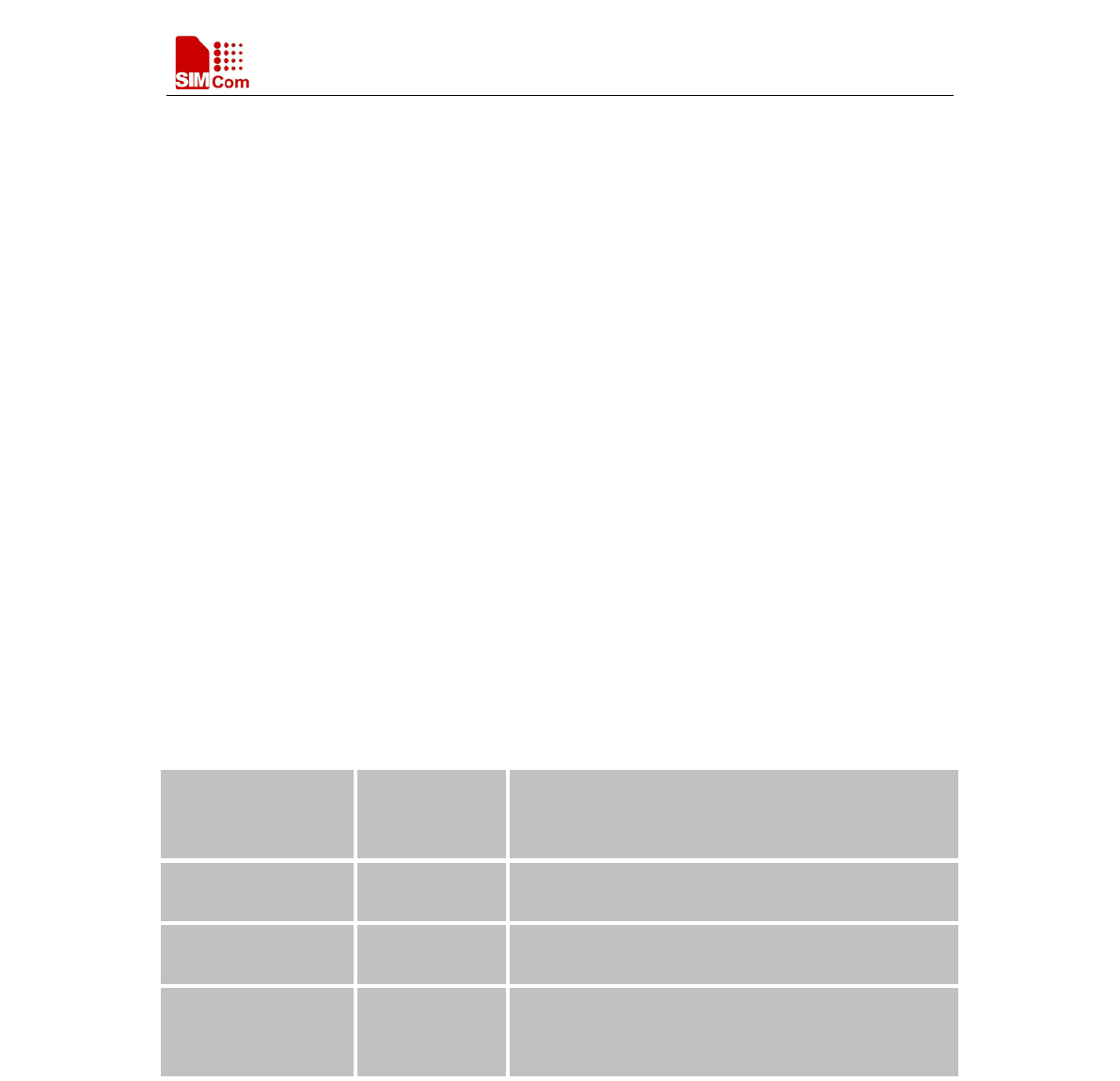
These commands can operate in several modes, as in the following table:
Table 1: Types of AT commands and responses
Test Command AT+<x>=?
The mobile equipment returns the list of parameters
and value ranges set with the corresponding Write
Command or by internal processes.
Read Command AT+<x>? This command
returns the currently set value of the
parameter or parameters.
Write Command AT+<x>=<…> This command sets the user-
definable parameter
values.
Execution Command AT+<x> The execution command reads non-variable
parameters affected by internal processes in the GSM
engine.
1.4.4 Combining AT commands on the same Command line
You can enter several AT commands on the same line. In this case, you do not need to type the
"AT" or "at" prefix before every command. Instead, you only need type "AT" or "at" the
beginning of the command line. Please note to use a semicolon as the command delimiter after
an extended command; in basic syntax or S parameter syntax, the semicolon need not enter, for
example: ATE1Q0S0=1S3=13V1X4;+IFC=0,0;+IPR=115200.
The Command line buffer can accept a maximum of 559 characters (counted from the first
command without "AT" or "at" prefix) or 39 AT commands. If the characters entered exceeded
SIMCOM COMFIDENTIAL FILE

Smart Machine Smart Decision
SIM7000 Series_AT Command Manual_V1.03 15 2018-05-08
this number then none of the Command will executed and TA will return "ERROR".
1.4.5 Entering successive AT commands on separate lines
When you need to enter a series of AT commands on separate lines, please Note that you need to
wait the final response (for example OK, CME error, CMS error) of last AT Command you
entered before you enter the next AT Command.
1.5 Supported character sets
The SIM7000 Series AT Command interface defaults to the IRA character set. The SIM7000
Series supports the following character sets:
GSM format
UCS2
IRA
The character set can be set and interrogated using the "AT+CSCS" Command (3GPP TS
27.007). The character set is defined in GSM specification 3GPP TS 27.005.
The character set affects transmission and reception of SMS and SMS Cell Broadcast messages,
the entry and display of phone book entries text field and SIM Application Toolkit alpha strings.
1.6 Flow control
Flow control is very important for correct communication between the GSM engine and DTE.
For in the case such as a data or fax call, the sending device is transferring data faster than the
receiving side is ready to accept. When the receiving buffer reaches its capacity, the receiving
device should be capable to cause the sending device to pause until it catches up.
There are basically two approaches to achieve data flow control: software flow control and
hardware flow control. SIM7000 Series support both two kinds of flow control.
In Multiplex mode, it is recommended to use the hardware flow control.
1.6.1 Software flow control (XON/XOFF flow control)
Software flow control sends different characters to stop (XOFF, decimal 19) and resume (XON,
decimal 17) data flow. It is quite useful in some applications that only use three wires on the
serial interface.
The default flow control approach of SIM7000 Series is hardware flow control (RTS/CTS flow
control), to enable software flow control in the DTE interface and within GSM engine, type the
following AT Command:
AT+IFC=1, 1
Ensure that any communications software package (e.g. Hyper terminal) uses software flow
control.
SIMCOM COMFIDENTIAL FILE

Smart Machine Smart Decision
SIM7000 Series_AT Command Manual_V1.03 16 2018-05-08
NOTE:
Software Flow control should not be used for data calls where binary data will be transmitted or
received (e.g. TCP/IP) as the DTE interface may interpret binary data as flow control characters.
1.6.2 Hardware flow control (RTS/CTS flow control)
Hardware flow control achieves the data flow control by controlling the RTS/CTS line. When the
data transfer should be suspended, the CTS line is set inactive until the transfer from the
receiving buffer has completed. When the receiving buffer is ok to receive more data, CTS goes
active once again.
To achieve hardware flow control, ensure that the RTS/CTS lines are present on your application
platform.
1.7 Definitions
1.7.1 Parameter Saving Mode
For the purposes of the present document, the following syntactical definitions apply:
- NO_SAVE: The parameter of the current AT command will be lost if module is rebooted or
current AT command doesn't have parameter.
- AUTO_SAVE: The parameter of the current AT command will be kept in NVRAM
automatically and take in effect immediately, and it won't be lost if module is rebooted.
- AUTO_SAVE_REBOOT: The parameter of the current AT command will be kept in
NVRAM automatically and take in effect after reboot, and it won't be lost if module is
rebooted.
- -: "-" means this AT command doesn’t care the parameter saving mode.
1.7.2 Max Response Time
Max response time is estimated maximum time to get response, the unit is seconds.
"-" means this AT command doesn’t care the response time.
SIMCOM COMFIDENTIAL FILE

Smart Machine Smart Decision
SIM7000 Series_AT Command Manual_V1.03 17 2018-05-08
2 AT Commands According to V.25TER
These AT Commands are designed according to the ITU-T (International Telecommunication
Union, Telecommunication sector) V.25ter document.
2.1 Overview of AT Commands According to V.25TER
Command
Description
A/
Re-issues the last command given
ATD Mobile originated call to dial a number
ATE Set command echo mode
ATH Disconnect existing connection
ATI Display product identification information
ATL
Set monitor speaker loudness
ATM Set monitor speaker mode
+++
Switch from data mode or ppp online mode to command mode
ATO Switch from command mode to data mode
ATQ Set result code presentation mode
ATS0 Set number of rings before automatically answering the call
ATS3 Set command line termination character
ATS4
Set response formatting character
ATS5
Set command line editing character
ATS6 Pause before blind dialling
ATS7 Set number of seconds to wait for connection completion
ATS8 Set number of seconds to wait for comma dial modifie
r encountered in
dial string of D command
ATS10
Set disconnect delay after indicating the absence of data carrier
ATV TA response format
ATX Set connect result code format and monitor call progress
ATZ Reset default configuration
AT&C Set DCD function mode
AT&D
Set DTR function mode
AT&F
Factory defined configuration
AT&V Display current configuration
AT&E Set CONNECT Result Code Format About Speed
AT+GCAP Request complete TA capabilities list
SIMCOM COMFIDENTIAL FILE

Smart Machine Smart Decision
SIM7000 Series_AT Command Manual_V1.03 18 2018-05-08
AT+GMI
Request manufacturer identification
AT+GMM Request TA model identification
AT+GMR
Request TA revision identification of software release
AT+GOI Request global object identification
AT+GSN Request TA serial number identification (IMEI)
AT+ICF Set TE-TA control character framing
AT+IFC Set TE-TA local data flow control
AT+IPR
Set TE-TA fixed local rate
2.2 Detailed Description of AT Commands According to V.25TER
2.2.1 A/ Re-issues the Last Command Given
A/ Re-issues the Last Command Given
Execution
Command
A/
Response
Re-issues the previous Command
Reference
V.25ter
Note
2.2.2 ATD Mobile Originated Call to Dial A Number
ATD Mobile Originated Call to Dial A Number
Execution
Command
ATD<n>[<mgsm
]
Response
This command can be used to set up outgoing data calls
. It also serves to
control supplementary services.
Note: This command may be aborted generally by receiving an ATH
Command or a character during execution. The aborting is not possible
during some states of connection establishment such as handshaking.
If error is related to ME functionality
+CME ERROR: <err>
If no dial tone and (parameter setting ATX2 or ATX4)
NO DIALTONE
If busy and (parameter setting ATX3 or ATX4)
BUSY
If a connection cannot be established
NO CARRIER
SIMCOM COMFIDENTIAL FILE

Smart Machine Smart Decision
SIM7000 Series_AT Command Manual_V1.03 19 2018-05-08
If the remote station does not answer
NO ANSWER
If connection successful and non-voice call.
CONNECT<text> TA switches to data mode.
Note: <text> output only if ATX<value>
parameter setting with the
<value> >0
When TA returns to command mode after call release
OK
Parameters
<n> String of dialing digits and optionally V.25ter modifiers dialing
digits: 0-9, * , #, +, A, B, C
Following V.25ter modifiers are ignored:
,(comma), T, P, !, W, @
Emergency call:
<n> Standardized emergency number 112 (no SIM needed)
<mgsm> String of GSM modifiers:
I Actives CLIR (Disables presentation of own number to
called party)
i Deactivates CLIR
(Enable presentation of own number
to called party)
G Activates Closed User Group invocation for this call
only
g Deactivates Closed User Group invocation for this call
only
Parameter Saving
Mode
NO_SAVE
Max Response
Time
Timeout set with ATS7 (data call)
Reference
V.25ter
Note
2.2.3 ATE Set Command Echo Mode
ATE Set Command Echo Mode
Execution
Command
ATE<value>
Response
This setting determines whethe
r or not the TA echoes characters received
from TE during Command state.
OK
Parameters
SIMCOM COMFIDENTIAL FILE

Smart Machine Smart Decision
SIM7000 Series_AT Command Manual_V1.03 20 2018-05-08
<value> 0 Echo mode off
1 Echo mode on
Parameter Saving
Mode
Max Response
Time
-
Reference
V.25ter
Note
2.2.4 ATH Disconnect Existing Connection
ATH Disconnect Existing Connection
Execution
Command
ATH
Response
Disconnect existing call by local TE from Command line and terminate call
OK
Note: OK is issued after circuit 109(DCD) is turned off, if it was previously
on.
Parameter Saving
Mode
NO_SAVE
Max
Response
Time
20s
Reference
V.25ter
Note
2.2.5 ATI Display Product Identification Information
ATI Display Product Identification Information
Execution
Command
ATI
Response
TA issues product information text
Example:
SIM7000 R1351
OK
Parameter Saving
Mode
NO_SAVE
Max Response
Time
-
Reference
V.25ter
Note
SIMCOM COMFIDENTIAL FILE

Smart Machine Smart Decision
SIM7000 Series_AT Command Manual_V1.03 21 2018-05-08
2.2.6 ATL Set Monitor speaker loudness
ATL Set Monitor speaker loudness
Execution
Command
ATL<value>
Response
OK
Parameters
<value> 0..3 Volume
Parameter Saving
Mode
NO_SAVE
Max Response
Time
-
Reference
V.25ter
Note
No effect in GSM
2.2.7 ATM Set Monitor Speaker Mode
ATM Set Monitor Speaker Mode
Execution
Command
ATM<value>
Response
OK
Parameters
<value> 0..2 Mode
Parameter Saving
Mode
NO_SAVE
Max Response
Time
-
Reference
V.25ter
Note
No effect in GSM
2.2.8 +++ Switch from Data Mode or PPP Online Mode to Command Mode
+++ Switch from Data Mode or PPP Online Mode to Command Mode
Execution
Command
+++
Response
The +++
character sequence causes the TA to cancel the data flow over the
AT inte
rface and switch to Command mode. This allows you to enter AT
Command while maintaining the data connection to the remote server.
OK
To prevent the +++
escape sequence from being misinterpreted as data, it
should comply to following sequence:
No characters entered for T1 time (1 second)
"+++" characters entered with no characters in between (1 second)
No characters entered for T1 timer (1 second)
Switch to Command mode, otherwise go to step 1.
SIMCOM COMFIDENTIAL FILE

Smart Machine Smart Decision
SIM7000 Series_AT Command Manual_V1.03 22 2018-05-08
Parameter Saving
Mode
NO_SAVE
Max Response
Time
-
Reference
V.25ter
Note
To return from Command mode back to data mode: Enter ATO.
2.2.9 ATO Switch from Command Mode to Data Mode
ATO Switch from Command Mode to Data Mode
Execution
Command
ATO[n]
Response
TA resumes the connection and switches back from command mode
to data
mode.
CONNECT
If connection is not successfully resumed
ERROR
else
TA returns to data mode from command mode CONNECT <text>
Note: <text> only if parameter setting ATX>0
Parameter
<n> 0 Switch from command mode to data mode.
Parameter Savin
g
Mode
NO_SAVE
Max Response
Time
-
Reference
V.25ter
Note
2.2.10 ATQ Set Result Code Presentation Mode
ATQ Set Result Code Presentation Mode
Execution
Command
ATQ<n>
Response
This parameter setting determines whether or not the TA transmits any result
code
to the TE. Information text transmitted in response is not affected by
this setting.
If <n>=0:
OK
If <n>=1:
(none)
Parameters
<n> 0 TA transmits result code
SIMCOM COMFIDENTIAL FILE

Smart Machine Smart Decision
SIM7000 Series_AT Command Manual_V1.03 23 2018-05-08
1 Result codes are suppressed and not transmitted
Parameter Saving
Mode
Max Response
Time
-
Reference
V.25ter
Note
2.2.11 ATS0 Set Number of Rings before Automatically Answering the Call
ATS0 Set Number of Rings before Automatically Answering the Call
Read Command
ATS0?
Response
<n>
OK
Parameters
See Write Command
Write Command
ATS0=<n>
Response
This parameter setting determines the number of rings before auto-answer.
OK
ERROR
Parameters
<n> 0 Automatic answering is disable.
1-255
Number of rings the modem will wait for before answering
the phone if a ring is detected.
Param
eter Saving
Mode
-
Max Response
Time
-
Reference
V.25ter
Note
If <n>
is set too high, the calling party may hang up before the call can be
answered automatically.
If using cmux port, ATH and AT+CHUP can hang up the call
(automatically answering) only in the CMUX channel 0.
If using dual-physical serial port, ATH and AT+CHUP can hang up the call
(automatically answering) only in UART1.
2.2.12 ATS3 Set Command Line Termination Character
ATS3 Set Command Line Termination Character
Read Command
ATS3?
Response
<n>
SIMCOM COMFIDENTIAL FILE

Smart Machine Smart Decision
SIM7000 Series_AT Command Manual_V1.03 24 2018-05-08
OK
Parameters
See Write Command
Write Command
ATS3=<n>
Response
This parameter setting determines the character recognized by TA to
terminate an incoming c
ommand line. The TA also returns this character in
output.
OK
ERROR
Parameters
<n> 13 Command line termination character
Parameter Saving
Mode
-
Max Response
Time
-
Reference
V.25ter
Note
Default 13 = CR. It only supports default value.
2.2.13 ATS4 Set Response Formatting Character
ATS4 Set Response Formatting Character
Read Command
ATS4?
Response
<n>
OK
Parameters
See Write Command
Write Command
ATS4=<n>
Response
This parameter setting determines the character generated by the TA for
result code and information text.
OK
ERROR
Parameters
<n> 10 Response formatting character
Param
eter Saving
Mode
-
Max Response
Time
-
Reference
Note
SIMCOM COMFIDENTIAL FILE

Smart Machine Smart Decision
SIM7000 Series_AT Command Manual_V1.03 25 2018-05-08
V.25ter
Default 10 = LF. It only supports default value.
2.2.14 ATS5 Set Command Line Editing Character
ATS5 Set Command Line Editing Character
Read Command
ATS5?
Response
<n>
OK
Parameters
See Write Command
Write Command
ATS5=<n>
Response
This parameter setting determines the character recognized by TA as a
request to delete from the c
ommand line the immediately preceding
character.
OK
ERROR
Parameters
<n> 0-8-127 Response formatting character
Parameter Saving
Mode
-
Max Response
Time
-
Reference
V.25ter
Note
Default 8 = Backspace.
2.2.15 ATS6 Pause Before Blind Dialling
ATS6 Pause Before Blind Dialling
Read Command
ATS6?
Response
<n>
OK
Write Command
ATS6=<n>
Response
OK
ERROR
Parameters
<n> 0-2-999 Time
Parameter Saving
Mode
-
Max Response
-
SIMCOM COMFIDENTIAL FILE

Smart Machine Smart Decision
SIM7000 Series_AT Command Manual_V1.03 26 2018-05-08
Time
Reference
V.25ter
Note
No effect in GSM
2.2.16 ATS7 Set Number of Seconds to Wait for Connection Completion
ATS7 Set Number of Seconds to Wait for Connection Completion
Read Command
ATS7?
Response
<n>
OK
Parameters
See Write Command
Write Command
ATS7=<n>
Response
This parameter setting determines the amount of time to wait for the
connection completion in case of answering or originating a call.
OK
ERROR
Parameters
<n> 0-255 Number of seconds to wait for connection completion
Parameter Saving
Mode
-
Max Response
Time
-
Reference
V.25ter
Note
If called party has specified a high value for ATS0=<n>, call setup may fail.
The correlation between ATS7 and ATS0 is important
Example: Call may fail if ATS7=30 and ATS0=20.
ATS7 is only applicable to data call.
2.2.17 ATS8 Set Number of Seconds to Wait for Comma Dial Modifier Encountered in
Dial String of D Command
ATS8 Set Number of Seconds to Wait for Comma Dial Modifier Encountered in D
ial
String of D Command
Read Command
ATS8?
Response
<n>
OK
Parameters
See Write Command
Write Command
Response
SIMCOM COMFIDENTIAL FILE

Smart Machine Smart Decision
SIM7000 Series_AT Command Manual_V1.03 27 2018-05-08
ATS8=<n> OK
ERROR
Parameters
<n> 0-2-255 The value of this register determines how long the
modem should pause when it sees a comma in the dialing string.
Parameter Saving
Mode
-
Max Response
Time
-
Reference
V.25ter
Note
No effect in GSM
2.2.18 ATS10 Set Disconnect Delay after Indicating the Absence of Data Carrier
ATS10 Set Disconnect Delay after Indicating the Absence of Data Carrier
Read Command
ATS10?
Response
<n>
OK
Parameters
See Write Command
Write Command
ATS10=<n>
Response
This parameter setting determines the amount of time that the TA will
remain connected in absence of data carrier. If the data carrier is once more
detected before disconnecting, the TA remains connected.
OK
ERROR
Parameters
<n> 1-14-255 Number of tenths seconds of delay
Parameter Saving
Mode
-
Max Response
Time
-
Reference
V.25ter
Note
2.2.19 ATV TA Response Format
ATV TA Response Format
Execution
Command
Response
This parameter setting determines the contents of the header and trailer
SIMCOM COMFIDENTIAL FILE

Smart Machine Smart Decision
SIM7000 Series_AT Command Manual_V1.03 28 2018-05-08
ATV<value> transmitted with result codes and information responses.
When <value>=0
0
When <value>=1
OK
Parameters
<value> 0 Information response: <text><CR><LF>
Short result code format: <numeric code><CR>
1 Information response: <CR><LF><text><CR><LF>
Long result code format: <CR><LF><verbose code>
<CR><LF>
The result codes, their numeric equivalents and brief descriptions of the use
of each are listed in the following table.
Parameter Saving
Mode
-
Max Response
Time
-
Reference
V.25ter
Note
ATV1 ATV0 Description
OK
0
Acknowledges execution of a Command
CONNECT
1
A connection has been established; the DCE is moving from
Command state to online data state
RING 2
The DCE has detected an incoming call signal from
network
NO CARRIER 3
The connection has been terminated or the attempt to
establish a connection failed
ERROR 4
Command not recognized, Command line maximum length
exceeded, parameter val
ue invalid, or other problem with
processing the Command line
NO DIALTONE 6 No dial tone detected
BUSY 7 Engaged (busy) signal detected
NO ANSWER
8
"@" (Wait for Quiet Answer) dial modifier was used, but
remote ringing followed by five seconds of silenc
e was not
detected before expiration of the connection timer (S7)
PROCEEDING
9
An AT command is being processed
CONNECT
<text>
Manufacturer-
specific
Same as CONNECT, but includes manufacturer-specific
text that may specify DTE speed, line speed, error control,
data compression, or other status
SIMCOM COMFIDENTIAL FILE

Smart Machine Smart Decision
SIM7000 Series_AT Command Manual_V1.03 29 2018-05-08
2.2.20 ATX Set CONNECT Result Code Format and Monitor Call Progress
ATX Set CONNECT Result Code Format and Monitor Call Progress
Execution
Command
ATX<value>
Response
This parameter setting determines whether or not t
he TA detected the
presence of dial tone and busy signal and whether or not TA transmits
particular result codes.
OK
ERROR
Parameters
<value> 0 CONNECT result code only returned, dial tone and busy
detection are both disabled.
1 CONNECT<text> resul
t code only returned, dial tone and
busy detection are both disabled.
2 CONNECT<text> result code returned, dial tone
detection is enabled, busy detection is disabled.
3 CONNECT<text> result code returned, dial tone
detection is disabled, busy detection is enabled.
4 CONNECT<text> result code returned, dial tone and
busy detection are both enabled.
Parameter Saving
Mode
-
Max Response
Time
-
Reference
V.25ter
Note
2.2.21 AT&C Set DCD Function Mode
AT&C Set DCD Function Mode
Execution
Command
AT&C<value>
Response
This parameter determines how the state of circuit 109 (DCD)
relates to the
detection of received line signal from the distant end.
OK
ERROR
Parameters
<value> 0 DCD line is always ON
1 DCD line is ON only in the presence of data carrier
Parameter Saving
Mode
-
Max Response
-
SIMCOM COMFIDENTIAL FILE

Smart Machine Smart Decision
SIM7000 Series_AT Command Manual_V1.03 30 2018-05-08
Time
Reference
V.25ter
Note
2.2.22 AT&D Set DTR Function Mode
AT&D Set DTR Function Mode
Execution
Command
AT&D[<value>]
Response
This parameter determines how the TA responds when circuit 108/2
(DTR)
is changed from the ON to the OFF condition during data mode.
OK
or
ERROR
Parameters
<value> 0 TA ignores status on DTR.
1 ON->OFF on DTR: Change to Command mode with
remaining the connected call.
2 ON->OFF on DTR: Disconnect call, change to Command
mode. During state DTR = OFF is auto-answer off.
Parameter Saving
Mode
-
Max Response
Time
-
Reference
V.25ter
Note
2.2.23 AT&E Set CONNECT Result Code Format About Speed
AT&E Set CONNECT Result Code Format About Speed
Execution
Command
AT&E[<value>]
This parameter setting determines to report Serial connection rate or
Wireless connection speed. It is valid only ATX above 0.
Response
OK
or
ERROR
Parameters
<value>
0 Wireless connection speed in integer format.
1 Serial connection rate in integer format. Such as: "115200"
Parameter Saving
Mode
NO_SAVE
Max Response
Time
-
SIMCOM COMFIDENTIAL FILE

Smart Machine Smart Decision
SIM7000 Series_AT Command Manual_V1.03 31 2018-05-08
Reference
V.25ter
Note
2.2.24 AT+GCAP Request Complete TA Capabilities List
AT+GCAP Request Complete TA Capabilities List
Execution
Command
AT+GCAP
Response
TA reports a list of additional capabilities.
+GCAP: list of supported <name>s
OK
Parameters
<name> +CGSM GSM function is supported
Parameter Saving
Mode
NO_SAVE
Max Response
Time
-
Reference
V.25ter
Note
2.2.25 AT+GMI Request Manufacturer Identification
AT+GMI Request Manufacturer Identification
Test Command
AT+GMI=?
Response
OK
Parameters
Execution
Command
AT+GMI
TA reports one or more lines of information text which permit the user to
identify the manufacturer.
SIMCOM_Ltd
OK
Parameter Saving
Mode
NO_SAVE
Max Resp
onse
Time
-
Reference
V.25ter
Note
2.2.26 AT+GMM Request TA Model Identification
AT+GMM Request TA Model Identification
SIMCOM COMFIDENTIAL FILE

Smart Machine Smart Decision
SIM7000 Series_AT Command Manual_V1.03 32 2018-05-08
Test Command
AT+GMM=?
Response
OK
Execution
Command
AT+GMM
TA reports one or more lines of information text which permit the user to
identify the specific model of device.
<model>
OK
Parameters
<model> Product model identification text
Parameter Saving
Mode
NO_SAVE
Max Response
Time
-
Reference
V.25ter
Note
2.2.27 AT+GMR Request TA Revision Identification of Software Release
AT+GMR Request TA Revision Identification of Software Release
Test Command
AT+GMR=?
Response
OK
Execution
Command
AT+GMR
TA reports one or more lines of information text which permit the user to
identify the revision of software release.
Revision: <revision>
OK
Parameters
<revision> Revision of software release
Parameter Saving
Mode
NO_SAVE
Max Response
Time
-
Reference
V.25ter
Note
2.2.28 AT+GOI Request Global Object Identification
AT+GOI Request Global Object Identification
SIMCOM COMFIDENTIAL FILE

Smart Machine Smart Decision
SIM7000 Series_AT Command Manual_V1.03 33 2018-05-08
Test Command
AT+GOI=?
Response
OK
Execution
Command
AT+GOI
Response
TA reports one or more lines of information text which permit the user to
identify the device, based on the ISO system for registering unique object
identifiers.
<Object Id>
OK
Parameters
<Object Id> Identifier of device type
see X.208, 209 for the format of <Object Id>
Parameter Saving
Mode
NO_SAVE
Max Response
Time
-
Reference
V.25ter
Note
2.2.29 AT+GSN Request TA Serial Number Identification (IMEI)
AT+GSN Request TA Serial Number Identification(IMEI)
Test Command
AT+GSN=?
Response
OK
Execution
Command
AT+GSN
Response
TA reports the IMEI (international mobile equipment identifier) number in
information text which permit the user to identify the individual ME device.
<sn>
OK
Parameters
<sn> IMEI of the
telephone(International Mobile station Equipment
Identity)
Parameter Saving
Mode
NO_SAVE
Max Response
Time
-
Reference
V.25ter
Note
The serial number (IMEI) is varied by individual ME device.
SIMCOM COMFIDENTIAL FILE

Smart Machine Smart Decision
SIM7000 Series_AT Command Manual_V1.03 34 2018-05-08
2.2.30 AT+ICF Set TE-TA Control Character Framing
AT+ICF Set TE-TA Control Character Framing
Test Command
AT+ICF=?
Response
+ICF: (list of supported <format>s),(list of supported <parity>s)
OK
Parameters
See Write Command
Read Command
AT+ICF?
Response
+ICF: <format>,<parity>
OK
Parameters
See Write Command
Write Command
AT+ICF=<forma
t>[,<parity>]
Response
This parameter setting determines the serial interface character framing
format and parity received by TA from TE.
OK
Parameters
<format> 1 8 data 0 parity 2 stop
2 8 data 1 parity 1 stop
3 8 data 0 parity 1 stop
4 7 data 0 parity 2 stop
5 7 data 1 parity 1 stop
6 7 data 0 parity 1 stop
<parity> 0 odd
1 even
3 space (0)
Parameter Saving
Mode
-
Max Response
Time
-
Reference
V.25ter
Note
The Command is applied for Command state;
In <format> parameter, "0 parity" means no parity;
The <parity> field is ignored if the <format>
field specifies no parity and
string "+ICF: <format>,255" will be response to "AT+ICF?" Command.
2.2.31 AT+IFC Set TE-TA Local Data Flow Control
AT+IFC Set TE-TA Local Data Flow Contro
l
SIMCOM COMFIDENTIAL FILE

Smart Machine Smart Decision
SIM7000 Series_AT Command Manual_V1.03 35 2018-05-08
Test Command
AT+IFC=?
Response
+IFC: (list of supported <dce_by_dte>s),(
list of supported
<dte_by_dce>s)
OK
Parameters
See Write Command
Read Command
AT+IFC?
Response
+IFC: <dce_by_dte>,<dte_by_dce>
OK
Parameters
See Write Command
Write Command
AT+IFC=<dce_b
y_dte>[,<dte_by
_dce>]
Response
This parameter setting determines the data flow control on the serial
interface for data mode.
OK
Parameters
<dce_by_dte> Specifies t
he method will be used by TE at receive of
data from TA
0 No flow control
1 Software flow control
2 Hardware flow control
<dte_by_dce> S
pecifies the method will be used by TA at receive of data
from TE
0 No flow control
1 Software flow control
2 Hardware flow control
Parameter Saving
Mode
-
Max Response
Time
-
Reference
V.25ter
Note
2.2.32 AT+IPR Set TE-TA Fixed Local Rate
AT+IPR Set TE-TA Fixed Local Rate
Test Command
AT+IPR=?
Response
+IPR: (list of supported auto detectable <rate>s),(
list of supported
fixed-only <rate>s)
SIMCOM COMFIDENTIAL FILE

Smart Machine Smart Decision
SIM7000 Series_AT Command Manual_V1.03 36 2018-05-08
OK
Parameters
See Write Command
Read Command
AT+IPR?
Response
+IPR: <rate>
OK
Parameters
See Write Command
Write Command
AT+IPR=<rate>
Response
This parameter setting de
termines the data rate of the TA on the serial
interface. The rate of Command takes effect following the issuance of any
result code associated with the current Command line.
OK
Parameters
<rate> Baud rate per second
0
300
600
1200
2400
4800
9600
19200
38400
57600
115200
230400
921600
2000000
2900000
3000000
3200000
3686400
4000000
Parameter Saving
Mode
AUTO_SAVE
Max Response
Time
-
Reference
V.25ter
Note
SIMCOM COMFIDENTIAL FILE

Smart Machine Smart Decision
SIM7000 Series_AT Command Manual_V1.03 37 2018-05-08
3 AT Commands According to 3GPP TS 27.007
3.1 Overview of AT Command According to 3GPP TS 27.007
Command Description
AT+CGMI
Request manufacturer identification
AT+CGMM
Request model identification
AT+CGMR Request TA revision identification of software release
AT+CGSN Request product serial number identification (identical with +GSN)
AT+CSCS Select TE character set
AT+CIMI Request international mobile subscriber identity
AT+CLCK
Facility lock
AT+CMEE
Report mobile equipment error
AT+COPS Operator selection
AT+CPAS Phone activity status
AT+CPIN Enter PIN
AT+CPWD Change password
AT+CRC Set cellular result codes for incoming call indication
AT+CREG
Network registration
AT+CRSM Restricted SIM access
AT+CSQ
Signal quality report
AT+CPOL Preferred operator list
AT+COPN Read operator names
AT+CFUN Set phone functionality
AT+CCLK Clock
AT+CSIM
Generic SIM access
AT+CBC
Battery charge
AT+CUSD Unstructured supplementary service data
AT+CNUM Subscriber Number
3.2 Detailed Descriptions of AT Command According to 3GPP TS 27.007
3.2.1 AT+CGMI Request Manufacturer Identification
AT+CGMI Request Manufacturer Identification
Test Command
AT+CGMI=?
Response
OK
Execution Response
SIMCOM COMFIDENTIAL FILE

Smart Machine Smart Decision
SIM7000 Series_AT Command Manual_V1.03 38 2018-05-08
Command
AT+CGMI
TA returns manufacturer identification text.
<manufacturer>
OK
Parameters
<manufacturer> The ID of manufacturer
Parameter Saving
Mode
NO_SAVE
Max Response
Time
-
Reference
3GPP TS 27.007
[13]
Note
3.2.2 AT+CGMM Request Model Identification
AT+CGMM Request Model Identification
Test Command
AT+CGMM=?
Response
OK
Execution
Command
AT+CGMM
Response
TA returns product model identification text.
<model>
OK
Parameters
<model> Product model identification text
Parameter Saving
Mode
NO_SAVE
Max Response
Time
-
Reference
3GPP TS 27.007
[13]
Note
3.2.3 AT+CGMR Request TA Revision Identification of Software Release
AT+CGMR Request TA Revision Identification of Software Release
Test Command
AT+CGMR=?
Response
OK
Execution
Command
AT+CGMR
Response
TA returns product software version identification text.
Revision: <revision>
SIMCOM COMFIDENTIAL FILE

Smart Machine Smart Decision
SIM7000 Series_AT Command Manual_V1.03 39 2018-05-08
OK
Parameters
<revision> Product software version identification text
Parameter Saving
Mode
NO_SAVE
Max Response
Time
-
Reference
3GPP TS 27.007
[13]
Note
3.2.4 AT+CGSN Request Product Serial Number Identification
AT+CGSN Request Product Serial Number Identification (Identical with +GSN)
Test Command
AT+CGSN=?
Response
OK
Execution
Command
AT+CGSN
Response
see +GSN
<sn>
OK
Parameters
<sn> International mobile equipment identity (IMEI)
Parameter Saving
Mode
NO_SAVE
Max Response
Time
-
Reference
3GPP TS 27.007
[13]
Note
3.2.5 AT+CSCS Select TE Character Set
AT+CSCS Select TE Character Set
Test Command
AT+CSCS=?
Response
+CSCS: (list of supported <chset>s)
OK
Parameters
<chset> "GSM" GSM 7 bit default alphabet (3GPP TS 23.038);
"UCS2" 16-bit universal multiple-octet coded character set
(ISO/IEC10646); UCS2 character strings are converted to
hexadecimal numbers from 0000 to FFFF; e.g.
SIMCOM COMFIDENTIAL FILE

Smart Machine Smart Decision
SIM7000 Series_AT Command Manual_V1.03 40 2018-05-08
"004100620063" equals three 16-bit characters with decimal
values 65, 98 and 99
"IRA" International reference alphabet (ITU-T T.50)
Read Command
AT+CSCS?
Response
+CSCS: <chset>
OK
Parameters
See Test Command
Write Command
AT+CSCS=<chse
t>
Response
Sets which character set <chset> are used by the TE. The TA can then
convert character strings correctly between the TE and ME character sets.
OK
If error is related to ME functionality:
+CME ERROR: <err>
Parameters
See Test Command
Parameter Saving
Mode
Max Response
Time
-
Reference
3GPP TS 27.007
[13]
Note
3.2.6 AT+CIMI Request International Mobile Subscriber Identity
AT+CIMI Request International Mobile Subscriber Identity
Test Command
AT+CIMI=?
Response
OK
Execution
Command
AT+CIMI
Response
TA returns <IMSI>for identifying the individual SIM which is attached to
ME.
<IMSI>
OK
If error is related to ME functionality:
+CME ERROR: <err>
Parameters
<IMSI> International Mobile Subscriber Identity (string without
double quotes)
Parameter Saving
Mode
NO_SAVE
SIMCOM COMFIDENTIAL FILE

Smart Machine Smart Decision
SIM7000 Series_AT Command Manual_V1.03 41 2018-05-08
Max Response
Time
20s
Reference
3GPP TS 27.007
[13]
Note
3.2.7 AT+CLCK Facility Lock
AT+CLCK Facility Lock
Test Command
AT+CLCK=?
Response
+CLCK: (list of supported <fac>s)
OK
Parameters
See Write Command
Write Command
AT+CLCK=<fac>
,<mode>[,<passw
d>[,<class>]]
Response
This Command is used to lock, unlock or interroga
te a ME or a network
facility <fac
>. Password is normally needed to do such actions. When
querying the status of a network service (<mode
>=2) the response line for
‘not active’ case (<status
>=0) should be returned only if service is not
active for any <class>.
If <mode>≠2 and Command is successful
OK
If <mode>=2 and Command is successful
+CLCK: <status>[,<class1>[<CR><LF>+CLCK:
<status>,<class2>[…]]
OK
If error is related to ME functionality:
+CME ERROR: <err>
Parameters
<fac>
"AB" All Barring services(only for <mode>=0)
"AC" All inComing barring services(only for <mode>=0)
"AG" All outGoing barring services(only for <mode>=0)
"AI" BAIC (Barr All Incoming Calls)
"AO" BAOC (Barr All Outgoing Calls)
"IR" BIC-Roam (Barr Incoming Calls when Roaming
outside the home country)
"OI" BOIC (Barr Outgoing International Calls)
"OX" BOIC-exHC (Barr Outgoing International Calls except
to Home Country)
SIMCOM COMFIDENTIAL FILE

Smart Machine Smart Decision
SIM7000 Series_AT Command Manual_V1.03 42 2018-05-08
"SC" SIM (lock SIM/UICC card) (SIM/UICC asks password
in MT power-up and when this lock command issued) Correspond
to PIN1 code.
"FD" SIM card or active application in the UICC (GSM or
USIM) fixed dialling memory feature (if PIN2 authentication has not
been done during the current session, PIN2 is required as <passwd>)
"PN" Network Personalization, Correspond to NCK code
"PU" Network subset Personalization Correspond to NSCK
code
"PP" Service Provider Personalization Correspond to SPCK
code
<mode> 0 unlock
1 lock
2 query status
<passwd> String type (Shall be the same as password specified for the
facility from the MT user interface or with command Change Password
+CPWD)
<class> 1-255
1 Voice (telephony)
2 Data refers to all bearer services; with <mode>=2 this
may refer only to some bearer service if TA does not support values 16,
32, 64 and 128)
4 Fax (facsimile services)
7 All classes
<status> 0 Not active
1 Active
Parameter Saving
Mode
NO_SAVE
Max Response
Time
15s
Reference
3GPP TS 27.007
[14]
Note
- CME errors if SIM not inserted or PIN is not entered.
3.2.8 AT+CMEE Report Mobile Equipment Error
AT+CMEE Report Mobile Equipment Error
Test Command
AT+CMEE=?
Response
+CMEE: (list of supported <n>s)
OK
Parameters
See Write Command
SIMCOM COMFIDENTIAL FILE

Smart Machine Smart Decision
SIM7000 Series_AT Command Manual_V1.03 43 2018-05-08
Read Command
AT+CMEE?
Response
+CMEE: <n>
OK
Parameters
See Write Command
Write Command
AT+CMEE=[<n>
]
Response
TA disables or enables the use of result code +CME ERROR: <err> as
an indication of an error relating to the functionality of the ME.
OK
If error is related to ME functionality:
+CME ERROR: <err>
Parameters
<n> 0 Disable +CME ERROR: <err> result code and use
ERROR instead.
1 Enable +CME ERROR: <err> result code and use numeric
<err>
2 Enable +CME ERROR: <err> result code and use
verbose <err> values
Parameter Saving
Mode
Max Response
Time
-
Reference
3GPP TS 27.007
[13]
Note
3.2.9 AT+COPS Operator Selection
AT+COPS Operator Selection
Test Command
AT+COPS=?
Response
TA returns a list of quadruplets, each representing an operator present in
the network. Any of the formats may be unavailable and should then be an
empty field. The list of operators shall be in order: home network,
networks referenced in SIM, and other networks.
+COPS: (list of supported<stat>,long alphanumeric<oper>,short
alphanumeric<oper>,numeric <oper>,<netact>)s[,,(list of supported
<mode>s),(list of supported <format>s)]
OK
If error is related to ME functionality:
+CME ERROR: <err>
SIMCOM COMFIDENTIAL FILE

Smart Machine Smart Decision
SIM7000 Series_AT Command Manual_V1.03 44 2018-05-08
Parameters
See Write Command
Read Command
AT+COPS?
Response
TA returns the current mode and the currently selected operator. If no
operator is selected,<format> and <oper> are omitted.
+COPS: <mode>[,<format>,<oper>,<netact>]
OK
If error is related to ME functionality:
+CME ERROR: <err>
Parameters
See Write Command
Write Command
AT+COPS=<mo
de>,[<format>[,<
oper>]]
Response
TA forces an attempt to
select and register the GSM network operator. If
the selected operator is not available, no other operator shall be selected
(except <mode
>=4). The selected operator name format shall apply to
further read commands (AT+COPS?).
OK
If error is related to ME functionality:
+CME ERROR: <err>
Parameters
<stat> 0 Unknown
1 Operator available
2 Operator current
3 Operator forbidden
<oper> Refer to [27.007]
operator in format as per <format>
<mode> 0 Automatic mode; <oper> field is ignored
1 Manual (<oper> field shall be present, and <AcT>
optionally)
2 manual deregister from network
3 set only <format> (for read Command +COPS?) - not
shown in Read Command response
4 Manual/automatic (<oper> field shall be present); if
manual selection fails, automatic mode (<mode>=0) is
entered
<format> 0 Long format alphanumeric <oper>
1 Short format alphanumeric <oper>
2 Numeric <oper>; GSM Location Area Identification
number
<netact> 0 User-specified GSM access technology
7 User-specified LTE M1 A GB access technology
SIMCOM COMFIDENTIAL FILE

Smart Machine Smart Decision
SIM7000 Series_AT Command Manual_V1.03 45 2018-05-08
9 User-specified LTE NB S1 access technology
Parameter Saving
Mode
AUTO_SAVE
Max Response
Time
Test command: 45 seconds
Write command: 120 seconds
Reference
3GPP TS 27.007
[14]
Note
3.2.10 AT+CPAS Phone Activity Status
AT+CPAS Phone Activity Status
Test Command
AT+CPAS=?
Response
+CPAS: (list of supported <pas>s)
OK
Parameters
See Execution Command
Execution
Command
AT+CPAS
Response
TA returns the activity status of ME.
+CPAS: <pas>
OK
If error is related to ME functionality:
+CME ERROR: <err>
Parameters
<pas> 0 Ready (MT allows commands from TA/TE)
3 Ringing (MT is ready for commands from TA/TE, but the
ger is active)
4 Call in progress (MT is ready for commands from TA/TE,
a call is in progress)
Parameter Saving
Mode
NO_SAVE
Max Response
Time
-
Reference
3GPP TS 27.007
[13]
Note
3.2.11 AT+CPIN Enter PIN
AT+CPIN Enter PIN
Test Command Response
SIMCOM COMFIDENTIAL FILE

Smart Machine Smart Decision
SIM7000 Series_AT Command Manual_V1.03 46 2018-05-08
AT+CPIN=?
OK
Read Command
AT+CPIN?
Response
TA returns a
n alphanumeric string indicating whether some password is
required or not.
+CPIN: <code>
OK
Parameters
<code>
READY MT is not pending for any password
SIM PIN MT is waiting SIM PIN to be given
SIM PUK MT is waiting for SIM PUK to be given
PH_SIM PIN ME is waiting for phone to SIM card (antitheft)
PH_SIM PUK ME is waiting for SIM PUK (antitheft)
SIM PIN2
PIN2, e.g. for editing the FDN book possible only
if preceding Command was acknowledged with +CME
ERROR:17
SIM PUK2 Possible
only if preceding Command was
acknowledged with error +CME ERROR: 18.
Write Command
AT+CPIN=<pin>[
,<new pin>]
Response
TA stores a password which is necessary before it can be operated (SIM
PIN, SIM PUK, PH-SIM PIN, etc.).
If the PIN required is SIM PUK
or SIM PUK2, the second pin is required.
This second pin,<new pin>, is used to replace the old pin in the SIM.
OK
If error is related to ME functionality:
+CME ERROR: <err>
Parameters
<pin> String type; password
<new pin> String type; If the PIN re
quired is SIM PUK or SIMPUK2:
new password
Parameter Saving
Mode
NO_SAVE
Max Response
Time
5s
Reference
3GPP TS 27.007
[13]
Note
3.2.12 AT+CPWD Change Password
AT+CPWD Change Password
Test Command
Response
SIMCOM COMFIDENTIAL FILE

Smart Machine Smart Decision
SIM7000 Series_AT Command Manual_V1.03 47 2018-05-08
AT+CPWD=? TA returns a list of pairs which presen
t the available facilities and the
maximum length of their password.
+CPWD: (list of supported <fac>s, list of supported <pwdlength>s)
OK
Parameters
<fac> See Write Command
<pwdlength> Integer max. length of password
Write Command
AT+CPWD=<fac
>,<oldpwd>,<new
pwd>
Response
TA sets a new password for the facility lock function.
OK
Parameters
<fac>
"AB" All Barring services
"AC" All inComing barring services(only for <mode>=0)
"AG"
All outGoing barring services(only for <mode>=0)
"AI" BAIC (Barr All Incoming Calls)
"AO"
BAOC (Barr All Outgoing Calls)
"IR" BIC-Roam (Barr Incoming Calls when Roaming
outside the home country)
"OI"
BOIC (Barr Outgoing International Calls)
"OX" BOIC-exHC (Barr Outgoing International Calls
except to Home Country)
"SC" SIM (lock SIM/UICC card) (SIM/UICC asks
password in MT power-up and when this lock
command issued) Correspond to PIN1 code.
"P2" SIM PIN2
<oldpwd> String type (string should be included in quotation marks):
password specified for the facility from the user interface or with
command. If an old password has not yet been set,<oldpwd> is not to
enter.
<newpwd> String type (string should be included in quotation marks):
new password
Parameter Saving
Mode
NO_SAVE
Max Response
Time
15s
Reference
3GPP TS 27.007
[13]
Note
SIMCOM COMFIDENTIAL FILE

Smart Machine Smart Decision
SIM7000 Series_AT Command Manual_V1.03 48 2018-05-08
3.2.13 AT+CRC Set Cellular Result Codes for Incoming Call Indication
AT+CRC Set Cellular Result Codes for Incoming Call Indication
Test Command
AT+CRC=?
Response
+CRC: (list of supported <mode>s)
OK
Parameters
See Write Command
Read Command
AT+CRC?
Response
+CRC: <mode>
OK
Parameters
See Write Command
Write Command
AT+CRC=[<mod
e>]
Response
TA controls whether or not the extended format of incoming call
indication is used.
OK
Parameters
<mode> 0 Disable extended format
1 Enable extended format
Omitted Use previous value
Unsolicited Result Code
When enabled, an incoming call is indicated to the TE with unsolicited
result code +CRING: <type> instead of the normal RING.
Parameters
<type> ASYNC Asynchronous transparent
SYNC Synchronous transparent
REL ASYNC Asynchronous non-transparent
REL SYNC Synchronous non-transparent
FAX Facsimile
VOICE Voice
Parameter Saving
Mode
NO_SAVE
Max Response
Time
-
Reference
3GPP TS 27.007
[13]
Note
SIMCOM COMFIDENTIAL FILE

Smart Machine Smart Decision
SIM7000 Series_AT Command Manual_V1.03 49 2018-05-08
3.2.14 AT+CREG Network Registration
AT+CREG Network Registration
Test Command
AT+CREG=?
Response
+CREG: (list of supported <n>s)
OK
Parameters
See Write Command
Read Command
AT+CREG?
Response
TA returns the status of result code presentation and an integer <stat>
which shows whet
her the network has currently indicated the registration
of the ME. Location information elements <lac> and <ci
> are returned
only when <n>=2 and ME is registered in the network.
+CREG: <n>,<stat>[,<lac>,<ci>,<netact>]
OK
If error is related to ME functionality:
+CME ERROR: <err>
Write Command
AT+CREG[=<n>
]
Response
TA controls the presentation of an unsolicited result code +CREG: <stat>
when <n>=1 and there is a change in the ME network registration status.
OK
Parameters
<n> 0 Disable network registration unsolicited result code
1 Enable network registration unsolicited result code
+CREG: <stat>
2 Enable network registration unsolicited result code with
location information(
2 is only for 7000 series module
which support GPRS.)
CREG: <stat>[,<lac>,<ci>,<netact>]
<stat> 0 Not registered, MT is not currently searching a new
operator to register to
1 Registered, home network
2 N
ot registered, but MT is currently searching a new
operator to register to
3 Registration denied
4 Unknown
5 Registered, roaming
<lac> String type
(string should be included in quotation marks);
two byte location area code in hexadecimal format
<ci> String type
(string should be included in quotation marks);
two byte cell ID in hexadecimal format
SIMCOM COMFIDENTIAL FILE

Smart Machine Smart Decision
SIM7000 Series_AT Command Manual_V1.03 50 2018-05-08
<netact> 0 User-specified GSM access technology
Unsolicited Result Code
If <n>=1 and there is a change in the MT network registration status
+CREG: <stat>
If <n>=2 and there is a change in the MT network registration status or a
change of the network cell:
+CREG: <stat>[,<lac>,<ci>,<netact>]
Parameters
See Write Command
Parameter Saving
Mode
-
Max Response
Time
-
Reference
3GPP TS 27.007
[13]
Note
3.2.15 AT+CRSM Restricted SIM Access
AT+CRSM Restricted SIM Access
Test Command
AT+CRSM=?
Response
OK
Write Command
AT+CRSM=<Co
mmand>[,<fileId
>[,<P1>,<P2>,<P
3>[,<data>]]]
Response
+CRSM: <sw1>,<sw2>[,<response>]
OK
ERROR
If error is related to ME functionality:
+CME ERROR: <err>
Parameters
<Command>
176 READ BINARY
178 READ RECORD
192 GET RESPONSE
214 UPDATE BINARY
220 UPDATE RECORD
242 STATUS
All other values are reserved; refer GSM 11.11.
<fileId> Integer type; this is the identifier for an elementary data file on
SIM. Mandatory for every Command except STATUS
<P1>,<P2>,<P3> Integer type, range 0 – 255
Parameters to be passed on by the ME to the SIM; refer GSM
11.11.
SIMCOM COMFIDENTIAL FILE

Smart Machine Smart Decision
SIM7000 Series_AT Command Manual_V1.03 51 2018-05-08
<data> Information which shall be written to the SIM (hex-decimal
character format)
<sw1>,<sw2> Integer type, range 0 - 255
Status information from the SIM about the execution of the
actual Command. These parameters are delivered to the TE in
both cases, on successful or failed execution of the Command;
refer GSM 11.11.
<response> Response of a successful completion of the Command
previously issued (hexadecimal character format)
Parameter Saving
Mode
NO_SAVE
Max Response
Time
-
Reference
3GPP TS 27.007
GSM 11.11
Note
3.2.16 AT+CSQ Signal Quality Report
AT+CSQ Signal Quality Report
Test Command
AT+CSQ=?
Response
+CSQ: (list of supported <rssi>s),(list of supported <ber>s)
OK
Execution
Command
AT+CSQ
Response
+CSQ: <rssi>,<ber>
OK
If error is related to ME functionality:
+CME ERROR: <err>
Execution Command returns received signal strength indication <rssi>
and channel bit error rate <ber> from the ME. Test Command returns
values supported by the TA.
Parameters
<rssi>
0 -115 dBm or less
1 -111 dBm
2...30 -110... -54 dBm
31 -52 dBm or greater
99 not known or not detectable
<ber> (in percent):
0...7 As RXQUAL values in the table in GSM 05.08 [20]
subclause 7.2.4
SIMCOM COMFIDENTIAL FILE

Smart Machine Smart Decision
SIM7000 Series_AT Command Manual_V1.03 52 2018-05-08
99 Not known or not detectable
Parameter Saving
Mode
NO_SAVE
Max Response
Time
-
Reference
3GPP TS 27.007
[13]
Note
3.2.17 AT+CPOL Preferred Operator List
AT+CPOL Preferred Operator List
Test Command
AT+CPOL=?
Response
+CPOL: (list of supported <index>s),(list of supported <format>s)
OK
Parameters
See Write Command
Read Command
AT+CPOL?
Response
+CPOL:
<index1>,<format>,<oper1>[,<GSM>,<GSM_compact>,<UTRAN>,<
E-UTRAN>][<CR><LF>+CPOL:
<index2>,<format>,<oper2>[,<GSM,<GSM_compact>,<UTRAN>,<E
-UTRAN>][…]]
OK
If error is related to ME functionality:
+CME ERROR: <err>
Parameters
See Write Command
Write Command
AT+CPOL=<ind
ex>[,<format>[,<
oper>[<GSM>,<
GSM_compact>,
<UTRAN>,<E-U
TRAN>]]]
Response
OK
If error is related to ME functionality:
+CME ERROR: <err>
Parameters
<index> Integer type: order number of operator in SIM preferred
operator list
<format> Indicates whether alphanumeric or numeric
format used (see +COPS Command)
0 Long format alphanumeric <oper>
1 Short format alphanumeric <oper>
2 Numeric <oper>
<oper> String type(string should be included in quotation marks)
SIMCOM COMFIDENTIAL FILE

Smart Machine Smart Decision
SIM7000 Series_AT Command Manual_V1.03 53 2018-05-08
<GSM> GSM access technology
0 Access technology is not selected
1 Access technology is selected
<GSM_compact> GSM compact access technology
0 Access technology is not selected
1 Access technology is selected
<UTRAN> UTRAN access technology
0 Access technology is not selected
1 Access technology is selected
<E-UTRAN> E-UTRAN access technology
0 Access technology is not selected
1 Access technology is selected
Parameter Saving
Mode
-
Max Response
Time
-
Reference
3GPP TS 27.007
[13]
Note
3.2.18 AT+COPN Read Operator Names
AT+COPN Read Operator Names
Test Command
AT+COPN=?
Response
OK
Execution
Command
AT+COPN
Response
+COPN: <numeric1>,<alpha1>
[<CR><LF>+COPN: <numeric2>,<alpha2>
[…]]
OK
If error is related to ME functionality:
+CME ERROR: <err>
Parameters
<numericn> String type (string should be included in quotation marks):
operator in numeric format (see +COPS)
<alphan> String type
(string should be included in quotation marks):
operator in long alphanumeric format (see +COPS)
Parameter Saving
Mode
NO_SAVE
Max Response
Time
-
Reference Note
SIMCOM COMFIDENTIAL FILE

Smart Machine Smart Decision
SIM7000 Series_AT Command Manual_V1.03 54 2018-05-08
3GPP TS 27.007
[13]
3.2.19 AT+CFUN Set Phone Functionality
AT+CFUN Set Phone Functionality
Test Command
AT+CFUN=?
Response
+CFUN: (list of supported <fun>s),(list of supported <rst>s)
OK
If error is related to ME functionality:
+CME ERROR: <err>
Parameters
See Write Command
Read Command
AT+CFUN?
Response
+CFUN: <fun>
OK
If error is related to ME functionality:
+CME ERROR: <err>
Parameters
See Write Command
Write Command
AT+CFUN=<fun
>[,<rst>]
Response
OK
If error is related to ME functionality:
+CME ERROR: <err>
Parameters
<fun>
0 Minimum functionality
1 Full functionality (Default)
4 Disable phone both transmit and receive RF circuits.
5 Factory Test Mode
6 Reset
7 Offline Mode
<rst>
0 Do not Reset the MT before setting it to <fun> power level.
1
Reset the MT before setting it to <fun> power level.
Parameter Saving
Mode
-
Max Response
Time
10s
Reference Note
SIMCOM COMFIDENTIAL FILE

Smart Machine Smart Decision
SIM7000 Series_AT Command Manual_V1.03 55 2018-05-08
3GPP TS 27.007
[13]
- The <fun> power level will be written to flash except minimum
functionality.
- AT+CFUN=1,1 can be used to reset module purposely at
minimum/full functionality mode.
- Response string "OK"
will be returned after module resets if baud
rate is set to fixed baud rate.
3.2.20 AT+CCLK Clock
AT+CCLK Clock
Test Command
AT+CCLK=?
Response
OK
Read Command
AT+CCLK?
Response
+CCLK: <time>
OK
If error is related to ME functionality:
+CME ERROR: <err>
Parameters
See Write Command
Write Command
AT+CCLK=<tim
e>
Response
OK
If error is related to ME functionality:
+CME ERROR: <err>
Parameters
<time> String type(string should be included in quotation marks)
value; format is "yy/MM/dd,hh:mm:ss±zz", where characters indicate
year (two last digits),month, day, hour, minutes, seconds and time zone
(indicates the difference, expressed in quarters of an hour, between the
local time and GMT; range -47...+48). E.g. 6th of May 2010, 00:01:52
GMT+2 hours equals to "
10/05/06,00:01:52+08
".
Parameter Saving
Mode
AUTO_SAVE
Max Response
Time
-
Reference
3GPP TS 27.007
[13]
Note
Only time zone is auto saved.
3.2.21 AT+CSIM Generic SIM Access
AT+CSIM Generic SIM Access
SIMCOM COMFIDENTIAL FILE

Smart Machine Smart Decision
SIM7000 Series_AT Command Manual_V1.03 56 2018-05-08
Test Command
AT+CSIM=?
Response
OK
Write Command
AT+CSIM=<leng
th>,<Command>
Response
+CSIM: <length>,<response>
OK
If error is related to ME functionality:
+CME ERROR: <err>
Parameters
<length> Integer type: length of characters sent to the TE in
<Command> or <response> (i.e. twice the number of octets in the raw
data).
<Command> String type (string should be included in quotation
marks): hex format: GSM 11.11 SIM Command sent from the ME to the
SIM.
<response> String type(string should be included in quotation
marks): hex format: GSM 11.11 response from SIM to <Command>.
Parameter Saving
Mode
NO_SAVE
Max Response
Time
-
Reference
3GPP TS 27.007
[13]
Note
3.2.22 AT+CBC Battery Charge
AT+CBC Battery Charge
Test Command
AT+CBC=?
Response
+CBC: (list of supported <bcs>s),(list of supported <bcl>s),(<voltage>)
OK
Parameters
See Execution Command
Execution
Command
AT+CBC
Response
+CBC: <bcs>,<bcl>,<voltage>
OK
If error is related to ME functionality:
+CME ERROR: <err>
Parameters
SIMCOM COMFIDENTIAL FILE

Smart Machine Smart Decision
SIM7000 Series_AT Command Manual_V1.03 57 2018-05-08
<bcs> Charge status
0 ME is not charging
1 ME is charging
2 Charging has finished
<bcl> Battery connection level
1...100 battery has 1-100 percent of capacity remaining
vent
<voltage> Battery voltage(mV)
Parameter Saving
Mode
NO_SAVE
Max Response
Time
-
Reference
3GPP TS 27.007
[13]
Note
3.2.23 AT+CUSD Unstructured Supplementary Service Data
AT+CUSD Unstructured Supplementary Service Data
Test Command
AT+CUSD=?
Response
+CUSD: (list of supported <n>s)
OK
Parameters
See Write Command
Read Command
AT+CUSD?
Response
+CUSD: <n>
OK
Parameters
See Write Command
Write Command
AT+CUSD=<n>,
<str>,<dcs>
Response
OK
If error is related to ME functionality:
+CME ERROR: <err>
Parameters
<n> A numeric parameter which indicates control of the unstructured
supplementary service data
0 disable the result code presentation in the TE
1 enable the result code presentation in the TE
2 cancel session (not applicable to read Command response)
<str> String type (string should be included in quotation marks)
USSD-string
SIMCOM COMFIDENTIAL FILE

Smart Machine Smart Decision
SIM7000 Series_AT Command Manual_V1.03 58 2018-05-08
<dcs> Cell Broadcast Data Coding Scheme in integer format
(default 0)
Parameter Saving
Mode
NO_SAVE
Max Response
Time
-
Reference
GSM 03.38 [25]
Note
When ussd is not suport or return error,TE will print +CUSD:4.
3.2.24 AT+CNUM Subscriber Number
AT+CNUM Subscriber Number
Test Command
AT+CNUM=?
Response
OK
Execution
Command
AT+CNUM
Response
+CNUM: "",<number1>,<type1>
OK
If error is related to ME functionality:
+CME ERROR: <err>
Parameters
<numberx> String type (string should be included in quotation marks)
phone number of format specified by <typex>
<typex> Type of address octet in integer format (refer GSM04.08[8]
subclause 10.5.4.7)
Parameter Saving
Mode
NO_SAVE
Max Response
Time
-
Reference
3GPP TS 27.007
[13]
Note
SIMCOM COMFIDENTIAL FILE

Smart Machine Smart Decision
SIM7000 Series_AT Command Manual_V1.03 59 2018-05-08
4 AT Commands According to 3GPP TS 27.005
The 3GPP TS 27.005 commands are for performing SMS and CBS related operations. SIM7000
Series supports both Text and PDU modes.
4.1 Overview of AT Commands According to 3GPP TS 27.005
Command Description
AT+CMGD Delete SMS message
AT+CMGF
Select SMS message format
AT+CMGL List SMS messages from preferred store
AT+CMGR
Read SMS message
AT+CMGS Send SMS message
AT+CMGW Write SMS message to memory
AT+CMSS Send SMS message from storage
AT+CNMI New SMS message indications
AT+CPMS
Preferred SMS message storage
AT+CRES
Restore SMS settings
AT+CSAS Save SMS settings
AT+CSCA SMS service center address
AT+CSDH Show SMS text mode parameters
AT+CSMP Set SMS text mode parameters
AT+CSMS
Select message service
4.2 Detailed Descriptions of AT Commands According to 3GPP TS 27.005
4.2.1 AT+CMGD Delete SMS Message
AT+CMGD Delete SMS Message
Test Command
AT+CMGD=?
Response
+CMGD: (list of supported <index>s),(list of supported <delflag>s)
OK
Parameters
See Write Command
Write Command
AT+CMGD=<in
Response
TA deletes message from preferred message storage <mem1
> location
SIMCOM COMFIDENTIAL FILE

Smart Machine Smart Decision
SIM7000 Series_AT Command Manual_V1.03 60 2018-05-08
dex>[,<delflag>] <index>.
OK
ERROR
If error is related to ME functionality:
+CMS ERROR: <err>
Parameters
<index> Integer type; value in the range of location numbers supported by
the associated memory
<delflag> 0 Delete the message specified in <index>
1 Delete all read messages from preferred message storage,
leaving unread messages and stored mobile originated
messages (whether sent or not) untouched
2 Delete all read messages from preferred message storage
and sent mobile originated messages, leaving unread
messages and unsent mobile originated messages
untouched
3 Delete all read messages from preferred message storage,
sent and unsent mobile originated messages leaving
unread messages untouched
4 Delete all messages from preferred message storage
including unread messages
Parameter Saving
Mode
NO_SAVE
Max Response
Time
5s(delete 1 message)
25s(delete 50 messages)
25s(delete 150 messages)
Reference
3GPP TS 27.005
Note
4.2.2 AT+CMGF Select SMS Message Format
AT+CMGF Select SMS Message Format
Test Command
AT+CMGF=?
Response
+CMGF: (list of supported <mode>s)
OK
Parameter
See Write Command
Read Command
AT+CMGF?
Response
+CMGF: <mode>
OK
Parameter
SIMCOM COMFIDENTIAL FILE

Smart Machine Smart Decision
SIM7000 Series_AT Command Manual_V1.03 61 2018-05-08
See Write Command
Write Command
AT+CMGF=[<m
ode>]
Response
TA sets parameter to den
ote which input and output format of messages to
use.
OK
Parameter
<mode> 0 PDU mode
1 Text mode
Parameter Saving
Mode
-
Max Response
Time
-
Reference
3GPP TS 27.005
Note
4.2.3 AT+CMGL List SMS Messages from Preferred Store
AT+CMGL List SMS Messages from Preferred Store
Test Command
AT+CMGL=?
Response
+CMGL: (list of supported <stat>s)
OK
Parameter
See Write Command
Write Command
AT+CMGL=<sta
t>[,<mode>]
Parameters
1) If text mode:
<stat> "REC UNREAD" Received unread messages
"REC READ" Received read messages
"STO UNSENT" Stored unsent messages
"STO SENT" Stored sent messages
"ALL" All messages
<mode> 0 Normal
1 Not change status of the specified SMS record
2) If PDU mode:
<stat> 0 Received unread messages
1 Received read messages
2 Stored unsent messages
3 Stored sent messages
4 All messages
<mode> 0 Normal
1 Not change status of the specified SMS record
Response
TA returns messages with status value <stat
> from message storage
SIMCOM COMFIDENTIAL FILE

Smart Machine Smart Decision
SIM7000 Series_AT Command Manual_V1.03 62 2018-05-08
<mem1
> to the TE. If status of the message is 'received unread', status in
the storage changes to 'received read'.
1) If text mode (+CMGF=1) and Command successful:
for SMS-SUBMITs and/or SMS-DELIVERs:
+CMGL: <index>,<stat>,<oa/da>[,<alpha>][,<scts>]
[,<tooa/toda>,<length>]<CR><LF><data>
[<CR><LF>+CMGL: <index>,<stat>,<da/oa>
[,<alpha>][,<scts>][,<tooa/toda>,<length>]<CR><LF><data>[...]]
for SMS-STATUS-REPORTs:
+CMGL: <index>,<stat>,<fo>,<mr>[,<ra>][,<tora>],<scts>,<dt>,<st>
[<CR><LF>+CMGL: <index>,<stat>,<fo>,<mr>
[,<ra>][,<tora>],<scts>,<dt>,<st>[...]]
for SMS-COMMANDs:
+CMGL: <index>,<stat>,<fo>,<ct>[<CR><LF>
+CMGL: <index>,<stat>,<fo>,<ct>[...]]
for CBM storage:
+CMGL: <index>,<stat>,<sn>,<mid>,<page>,<pages>
<CR><LF><data>
<CR><LF>+CMGL: <index>,<stat>,<sn>,<mid>,<page>,<pages>
<CR><LF><data>[...]]
OK
2) If PDU mode (+CMGF=0) and Command successful:
+CMGL: <index>,<stat>[,<alpha>],<length>
<CR><LF><pdu><CR><LF>
+CMGL: <index>,<stat>[,alpha],<length>
<CR><LF><pdu>[...]]
OK
3)If error is related to ME functionality:
+CMS ERROR: <err>
Parameters
<alpha> String type(string should be included in quotation marks)
alphanumeric representation of <da> or <oa> corresponding to the entry
found in MT phonebook; implementation of this feature is manufacturer
specific; used character set should be the one
selected with Command Select
TE Character Set +CSCS (see definition of this Command in 3GPP TS
27.007)
<da> GSM 03.40 TP-Destination-Address Address-Value field in
string format; BCD numbers (or GSM default alphabet characters) are
SIMCOM COMFIDENTIAL FILE

Smart Machine Smart Decision
SIM7000 Series_AT Command Manual_V1.03 63 2018-05-08
converted to characters of the currently selected TE character set (refer
Command +CSCS in 3GPP TS 27.007); type of address given by <toda>
<data> In the case of SMS: GSM 03.40 TP-User-Data in text mode
responses; format:
- if <dcs
> indicates that GSM 03.38 default alphabet is used and
<fo> indicates that GSM 03.40 TPUser-Data-Header-Indication
is not set:
- if TE character set other than "HEX" (refer Command Select
TE Character Set +CSCS in 3GPP TS 27.007):ME/TA converts
GSM alphabet into current TE character set according to rules
of Annex A
- if TE character set is "HEX": ME/TA converts each 7-bit
character of GSM alphabet into two IRA character long
hexadecimal number (e.g. character P (GSM 23) is presented as
17 (IRA 49 and 55))
- if <dcs> indicates that 8-bit or UCS2 data coding scheme is
used, or <fo> indicates that GSM 03.40
TP-User-Data-Header-Indication is set: ME/TA converts each
8-bit octet into two IRA character long hexadecimal number
(e.g. octet with integer value 42 is presented to TE as two
characters 2A (IRA 50 and 65)) In the case of CBS: GSM 03.41
CBM Content of Message in text mode responses; format:
- if <dcs> indicates that GSM 03.38 default alphabet is used:
- if TE character set other than "HEX" (refer Command +CSCS
in 3GPP TS 27.007): ME/TA converts GSM alphabet into
current TE character set according to rules of Annex A
- if TE character set is "HEX": ME/TA converts each 7-bit
character of GSM alphabet into two IRA character long
hexadecimal number
- if <dcs> indicates that 8-bit or UCS2 data coding scheme is
used: ME/TA converts each 8-bit octet into two IRA character
long hexadecimal number
<length> Integer type value indicating in the text mode (+CMGF=1)
the length of the message body <data> (or <cdata>) in characters; or in
PDU mode (+CMGF=0), the length of the actual TP data unit in octets (i.e.
the RP layer SMSC address octets are not counted in the length)
<index> I
nteger type; value in the range of location numbers supported
by the associated memory
<oa> GSM 03.40 TP-Originating-Address Address-Value field in
string format; BCD numbers (or GSM default alphabet characters) are
converted to characters of the currently selected TE character set (refer
Command +CSCS in 3GPP TS 27.007); type of address given by <tooa>
<pdu> In the case of SMS: GSM 04.11 SC address followed by
GSM 03.40 TPDU in hexadecimal format: ME/TA converts each octet of
SIMCOM COMFIDENTIAL FILE

Smart Machine Smart Decision
SIM7000 Series_AT Command Manual_V1.03 64 2018-05-08
TP data unit into two IRA character long hexadecimal number (e.g. octet
with integer value 42 is presented to TE as two characters 2A (IRA 50 and
65)). In the case of CBS: GSM 03.41 TPDU in hexadecimal format.
<scts> GSM 03.40 TP-Service-Center-Time-Stamp in time-string
format (refer <dt>)
<toda> GSM 04.11 TP-Destination-Address Type-of-Address octet
in integer format (when first character of <da> is + (IRA 43) default is 145,
otherwise default is 129)
<tooa> GSM 04.11 TP-Originating-Address Type-of-Address octet in
integer format (default refer<toda>)
Execution
Command
AT+CMGL
1) If text mode:
the same as AT+CMGL="REC UNREAD", received unread messages
2) If PDU mode:
the same as AT+CMGL=0, received unread messages
See more messages please refer to Write Command.
Parameters
See Write Command
Parameter Saving
Mode
NO_SAVE
Max Response
Time
20s(list 50 messages)
20s(list 150 messages)
Reference
3GPP TS 27.005
Note
4.2.4 AT+CMGR Read SMS Message
AT+CMGR Read SMS Message
Test Command
AT+CMGR=?
Response
OK
Write Command
AT+CMGR=<in
dex>[,<mode>]
Parameters
<index> Integer type; value in the range of location numbers supported
by the associated memory
<mode> 0 Normal
1 Not change status of the specified SMS record
Response
TA returns SMS message with location value <index
> from message
storage <mem1
> to the TE. If status of the message is 'received unread',
status in the storage changes to 'received read'.
1) If text mode (+CMGF=1) and Command successful:
for SMS-DELIVER:
+CMGR: <stat>,<oa>[,<alpha>],<scts>[,<tooa>,<fo>,<pid>,<dcs>
SIMCOM COMFIDENTIAL FILE

Smart Machine Smart Decision
SIM7000 Series_AT Command Manual_V1.03 65 2018-05-08
,<sca>,<tosca>,<length>]<CR><LF><data>
for SMS-SUBMIT:
+CMGR: <stat>,<da>[,<alpha>][,<toda>,<fo>,<pid>,<dcs>[,<vp>]
,<sca>,<tosca>,<length>]<CR><LF><data>
for SMS-STATUS-REPORTs:
+CMGR: <stat>,<fo>,<mr>[,<ra>][,<tora>],<scts>,<dt>,<st>
for SMS-COMMANDs:
+CMGR: <stat>,<fo>,<ct>[,<pid>[,<mn>][,<da>][,<toda>]
,<length><CR><LF><cdata>]
for CBM storage:
+CMGR: <stat>,<sn>,<mid>,<dcs>,<page>,<pages><CR><LF><data>
2) If PDU mode (+CMGF=0) and Command successful:
+CMGR: <stat>[,<alpha>],<length><CR><LF><pdu>
OK
3) If error is related to ME functionality:
+CMS ERROR: <err>
Parameters
<alpha> String type (string should be included in quotation marks)
alphanumeric representation of <da> or <oa> corresponding to the entry
found in MT phonebook; implementation of this feature is manufacturer
specific
<da> GSM 03.40 TP-Destination-Address Address-Value field in
string format; BCD numbers (or GSM default alphabet characters) are
converted to characters of the currently selected TE character set (specified
by +CSCS in 3GPP TS 27.007); type of address given by <toda>
<data> In the case of SMS: GSM 03.40 TP-User-Data in text mode
responses; format:
- if <dcs> indicates that GSM 03.3
8 default alphabet is used and
<fo> indicates that GSM 03.40 TPUser-Data-Header-Indication
is not set:
- if TE character set other than "HEX" (refer Command Select
TE Character Set +CSCS in 3GPP TS 27.007):ME/TA converts
GSM alphabet into current TE character set according to rules
of Annex A
- if TE character set is "HEX": ME/TA converts each 7-bit
character of GSM alphabet into two IRA character long
hexadecimal number (e.g. character P (GSM 23) is presented as
17 (IRA 49 and 55))
- if <dcs> indicates that 8-bit or UCS2 data coding scheme is
used, or <fo> indicates that GSM 03.40
SIMCOM COMFIDENTIAL FILE

Smart Machine Smart Decision
SIM7000 Series_AT Command Manual_V1.03 66 2018-05-08
TP-User-Data-Header-Indication is set: ME/TA converts each
8-bit octet into two IRA character long hexadecimal number
(e.g. octet with integer value 42 is presented to TE as two
characters 2A (IRA 50 and 65)) In the case of CBS: GSM 03.41
CBM Content of Message in text mode responses; format:
- if <dcs> indicates that GSM 03.38 default alphabet is used:
- if TE character set other than "HEX" (refer Command +CSCS
in 3GPP TS 27.007): ME/TA converts GSM alphabet into
current TE character set according to rules of Annex A
- if TE character set is "HEX": ME/TA converts each 7-bit
character of GSM alphabet into two IRA character long
hexadecimal number
- if <dcs> indicates that 8-bit or UCS2 data coding scheme is
used: ME/TA converts each 8-bit octet into two IRA character
long hexadecimal number
<dcs> Depending on the Command or result code: GSM 03.38 SMS
Data Coding Scheme (default 0), or Cell Broadcast Data Coding Scheme in
integer format
<fo> Depending on the Command or result code: first octet of
GSM 03.40 SMS-DELIVER, SMS-SUBMIT (default 17),
SMS-STATUS-REPORT, or SMS-COMMAND (default 2) in integer
format
<length> integer type value indicating in the text mode (+CMGF=1)
the length of the message body <data> (or <cdata>) in characters; or
in PDU mode (+CMGF=0), the length of the actual TP data unit in octets
(i.e. the RP layer SMSC address octets are not counted in the length)
<mid> GSM 03.41 CBM Message Identifier in integer format
<oa> GSM 03.40 TP-Originating-Address Address-Value field in
string format; BCD numbers (or GSM default alphabet characters) are
converted characters of the currently selected TE character set (specified by
+CSCS in 3GPP TS 27.007); type of address given by <tooa>
<pdu> In the case of SMS: GSM 04.11 SC address followed by
GSM 03.40 TPDU in hexadecimal format: ME/TA converts each octet of
TP data unit into two IRA character long hexadecimal number (e.g. octet
with integer value 42 is presented to TE as two characters 2A (IRA 50 and
65)). In the case of CBS: GSM 03.41 TPDU in hexadecimal format.
<pid> GSM 03.40 TP-Protocol-Identifier in integer format
(default 0)
<sca> GSM 04.11 RP SC address Address-Value field in string
format; BCD numbers (or GSM default alphabet characters) are converted
to characters of the currently selected TE character set (specified by +CSCS
in 3GPP TS 27.007); type of address given by <tosca>
<scts> GSM 03.40 TP-Service-Centre-Time-Stamp in time-string
format (refer <dt>)
SIMCOM COMFIDENTIAL FILE

Smart Machine Smart Decision
SIM7000 Series_AT Command Manual_V1.03 67 2018-05-08
<stat> 0 "REC UNREAD" Received unread messages
1 "REC READ" Received read messages
2 "STO UNSENT" Stored unsent messages
3 "STO SENT" Stored sent messages
4 "ALL" All messages
<toda> GSM 04.11 TP-Destination-Address Type-of-Address octet
in integer format (when first character of <da> is + (IRA 43) default is 145,
otherwise default is 129)
<tooa> GSM 04.11 TP-Originating-Address Type-of-Address octet
in integer format (default refer<toda>)
<tosca> GSM 04.11 RP SC address Type-of-Address octet in integer
format (default refer <toda>)
<vp> Depending on SMS-SUBMIT <fo> setting: GSM 03.40
TP-Validity-Period either in integer format (default 167) or in time-string
format (refer <dt>)
Parameter Saving
Mode
NO_SAVE
Max Response
Time
5s
Reference
3GPP TS 27.005
Note
4.2.5 AT+CMGS Send SMS Message
AT+CMGS Send SMS Message
Test Command
AT+CMGS=?
Response
OK
Write Command
1) If text mode
(+CMGF=1):
+CMGS=<da>[,
<toda>]
<CR>text is
entered
<ctrl-Z/ESC>
ESC quits without
sending
2) If PDU mode
(+CMGF=0):
+CMGS=<length
>
<CR>PDU is
Parameters
<da> GSM 03.40 TP-Destination-Address Address-Value field in
string format(string should be included in quotation marks); BCD numbers
(or GSM default alphabet characters) are converted to characters of the
currently selected TE character set (specified by +CSCS in 3GPP TS
27.007); type of address given by <toda>
<toda> GSM 04.11 TP-Destination-Address Type-of-Address octet
in integer format (when first character of <da> is + (IRA 43) default is 145,
otherwise default is 129)
<length> Integer type value (not exceed 160 bytes) indicating in the
text mode (+CMGF=1) the length of the message body <data> (or
<cdata>) in characters; or in PDU mode (+CMGF=0), the length of the
actual TP data unit in octets (i.e. the RP layer SMSC address octets are not
counted in the length)
Response
TA sends message from a TE to the network (SMS-SUBMIT). Message
SIMCOM COMFIDENTIAL FILE

Smart Machine Smart Decision
SIM7000 Series_AT Command Manual_V1.03 68 2018-05-08
given
<ctrl-Z/ESC>
reference value <mr> is returned to the TE on successful message delivery.
Optionally (when +CSMS <service> value is 1 and network supports)
<scts> is returned. Values can be used to identify message upon unsolicited
delivery status report result code.
1) If text mode(+CMGF=1) and sending successful:
+CMGS: <mr>
OK
2) If PDU mode(+CMGF=0) and sending successful:
+CMGS: <mr>
OK
3)If error is related to ME functionality:
+CMS ERROR: <err>
Parameter
<mr> GSM 03.40 TP-Message-Reference in integer format
Parameter Saving
Mode
NO_SAVE
Max Response
Time
60s
Reference
3GPP TS 27.005
Note
- Reject incoming call when sending messages.
4.2.6 AT+CMGW Write SMS Message to Memory
AT+CMGW Write SMS Message to Memory
Test Command
AT+CMGW=?
Response
OK
Write Command
1) If text mode
(+CMGF=1):
AT+CMGW=<o
a/da>[,<tooa/tod
a>][,<stat>]
<CR> text is
entered
<ctrl-Z/ESC>
<ESC> quits
without sending
2) If PDU mode
(+CMGF=0):
AT+CMGW=<le
Response
TA transmits SMS message (either SMS-DELIVER or SMS-
SUBMIT)
from TE to memory storage <mem2>. Memory location <index
> of the
stored mess
age is returned. By default message status will be set to 'stored
unsent', but parameter <stat> allows also other status values to be given.
If writing is successful:
+CMGW: <index>
OK
If error is related to ME functionality:
+CMS ERROR: <err>
Parameters
<oa> GSM 03.40 TP-Originating-Address Address-Value field in
string format(string should be included in quotation marks); BCD numbers
SIMCOM COMFIDENTIAL FILE

Smart Machine Smart Decision
SIM7000 Series_AT Command Manual_V1.03 69 2018-05-08
ngth>[,<stat>]
<CR>PDU is
given
<ctrl-Z/ESC>
(or GSM default alphabet characters) are converted to characters of the
currently selected TE character set (specified by +CSCS in 3GPP TS
27.007);type of address given by <tooa>
<da> GSM 03.40 TP-Destination-Address Address-Value field in
string format(string should be included in quotation marks); BCD numbers
(or GSM default alphabet characters) are converted to characters of the
currently selected TE character set (specified by +CSCS in 3GPP TS
27.007); type of address given by <toda>
<tooa> GSM 04.11 TP-Originating-Address Type-of-Address octet
in integer format (default refer <toda>)
<toda> GSM 04.11 TP-Destination-Address Type-of-Address octet in
integer format (when first character of <da> is + (IRA 43) default is 145,
otherwise default is 129)
129 Unknown type(IDSN format number)
161 National number type(IDSN format)
145 International number type(ISDN format)
177 Network specific number(ISDN format)
<length> Integer type value (not exceed 160 bytes) indicating in the
text mode (+CMGF=1) the length of the message body <data> (or
<cdata>) in characters;
or in PDU mode (+CMGF=0), the length of the actual TP
data unit in octets (i.e. the RP layer SMSC address octets are
not counted in the length)
<stat> in the text mode (+CMGF=1):
"STO UNSENT" Stored unsent messages
"STO SENT" Stored sent messages
in PDU mode (+CMGF=0):
0 Received unread messages
1 Received read messages
2 Stored unsent messages
3 Stored sent messages
<pdu> In the case of SMS: GSM 04.11 SC address followed by
GSM 03.40 TPDU in hexadecimal format: ME/TA converts each octet of
TP data unit into two IRA character long hexadecimal number (e.g. octet
with integer value 42 is presented to TE as two characters 2A (IRA 50 and
65)). In the case of CBS: GSM 03.41 TPDU in hexadecimal format.
<index> Index of message in selected storage <mem2>
Execution
Command
AT+CMGW
Response
TA transmits SMS message (either SMS-DELIVER or SMS-
SUBMIT)
from TE to memory storage <mem2>. Memory location <index
> of the
stored message is returned. By default message status will be set to 'stored
unsent', but parameter <stat> allows also other status values to be given.
If writing is successful:
SIMCOM COMFIDENTIAL FILE

Smart Machine Smart Decision
SIM7000 Series_AT Command Manual_V1.03 70 2018-05-08
+CMGW: <index>
OK
If error is related to ME functionality:
+CMS ERROR: <err>
Parameter Saving
Mode
NO_SAVE
Max Response
Time
5s
Reference
3GPP TS 27.005
Note
4.2.7 AT+CMSS Send SMS Message from Storage
AT+CMSS Send SMS Message from Storage
Test Command
AT+CMSS=?
Response
OK
Write Command
AT+CMSS=<ind
ex>[,<da>,<toda
>]
Response
TA sends message with location value <index
> from message storage
<mem2> to the network (SMS-SUBMIT). If new recipient address <da
> is
given, it shall be used instead of the one stored with the message. Reference
value <mr
> is returned to the TE on successful message delivery. Values
can be used to identify message upon unsolicited delivery status report
result code.
1) If text mode(+CMGF=1) and sending successful:
+CMSS: <mr>
OK
2) If PDU mode(+CMGF=0) and sending successful:
+CMSS: <mr>
OK
3)If error is related to ME functionality:
+CMS ERROR: <err>
Parameters
<index> Integer type; value in the range of location numbers
supported
by the associated memory
<da> GSM 03.40 TP-Destination-Address Address-Value field in
string format(string should be included in quotation marks); BCD numbers
(or GSM default alphabet characters) are converted to characters of the
currently selected TE character set (specified by +CSCS in 3GPP TS
27.007); type of address given by <toda>
<toda> GSM 04.11 TP-Destination-Address Type-of-Address octet
SIMCOM COMFIDENTIAL FILE

Smart Machine Smart Decision
SIM7000 Series_AT Command Manual_V1.03 71 2018-05-08
in integer format (when first character of <da> is + (IRA 43) default is 145,
otherwise default is 129)
<mr> GSM 03.40 TP-Message-Reference in integer format
Parameter Saving
Mode
NO_SAVE
Max Response
Time
60s
Reference
3GPP TS 27.005
Note
4.2.8 AT+CNMI New SMS Message Indications
AT+CNMI New SMS Message Indications
Test Command
AT+CNMI=?
Response
+CNMI: (list of supported <mode>s),(list of supported <mt>s),(list of
supported <bm>s),(list of supported <ds>s),(list of supported <bfr>s)
OK
Parameters
See Write Command
Read Command
AT+CNMI?
Response
+CNMI: <mode>,<mt>,<bm>,<ds>,<bfr>
OK
Parameters
See Write Command
Write Command
AT+CNMI=<mo
de>[,<mt>[,<bm
>[,<ds>[,<bfr>]]]
]
Response
TA selects the procedure for how the receiving of new messages from the
network is indicated to the TE when TE is active, e.g. DTR signal is ON. If
TE is inactive (e.
g. DTR signal is OFF), message receiving should be done
as specified in GSM 03.38.
OK
ERROR
Parameters
<mode> 0 Buffer unsolicited result codes in the TA. If TA result
code buffer is full, indications can be buffered in some other place or the
oldest indications may be discarded and replaced with the new received
indications.
1 Discard indication and reject new received message
unsolicited result codes when TA-TE link is reserved (e.g. in on-line data
mode). Otherwise forward them directly to the TE.
2 Buffer unsolicited result codes in the TA when TA-TE
SIMCOM COMFIDENTIAL FILE

Smart Machine Smart Decision
SIM7000 Series_AT Command Manual_V1.03 72 2018-05-08
link is reserved (e.g. in on-line data mode) and flush them to the TE after
reservation. Otherwise forward them directly to the TE.
<mt> (the rules for storing received SMs depend on its data coding
scheme (refer GSM 03.38 [2]), preferred memory storage (+CPMS) setting
and this value):
0 No SMS-DELIVER indications are routed to the TE.
1 If SMS-DELIVER is stored into ME/TA, indication of
the memory location is routed to the TE using unsolicited result code:
+CMTI: <mem>,<index>
2 SMS-DELIVERs (except class 2) are routed directly to
the TE using unsolicited result code:
+CMT: [<alpha>],<length><CR><LF><pdu> (PDU mode enabled) or
+CMT: <oa>,[<alpha>],<scts>
[,<tooa>,<fo>,<pid>,<dcs>,<sca>,<tosca>,<length>]<CR><LF><data>
(text mode enabled; about parameters in italics, refer Command Show Text
Mode Parameters +CSDH). Class 2 messages result in indication as defined
in <mt>=1.
3 Class 3 SMS-DELIVERs are routed directly to TE
using unsolicited result codes defined in <mt>=2. Messages of other classes
result in indication as defined in <mt>=1.
<bm> (the rules for storing received CBMs depend on its data
coding scheme (refer GSM 03.38 [2]), the setting of Select CBM Types
(+CSCB) and this value):
0 No CBM indications are routed to the TE.
2 New CBMs are routed directly to the TE using
unsolicited result code: +CBM: <length><CR><LF><pdu> (PDU mode
enabled) or
+CBM: <sn>,<mid>,<dcs>,<page>,<pages><CR><LF><data> (text
mode enabled).
<ds> 0 No SMS-STATUS-REPORTs are routed to the TE.
1 SMS-STATUS-REPORTs are routed to the TE using
unsolicited result code: +CDS: <length><CR><LF><pdu> (PDU mode
enabled) or +CDS: <fo>,<mr>[,<ra>][,<tora>],<scts>,<dt>,<st> (text
mode enabled)
2 If SMS-STATUS-REPORT is stored into ME/TA,
indication of the memory location is routed to the TE using unsolicited
result code: +CDSI: <mem3>,<index>
<bfr> 0
TA buffer of unsolicited result codes defined within this
Command is flushed to the TE when <mode> 1...3 is entered (OK response
shall be given before flushing the codes).
1 TA buffer of unsolicited result codes defined within this
command is cleared when <mode> 1…3 is entered
Unsolicited result code
1. Indicates that new message has been received
SIMCOM COMFIDENTIAL FILE

Smart Machine Smart Decision
SIM7000 Series_AT Command Manual_V1.03 73 2018-05-08
If <mt>=1:
+CMTI: <mem3>,<index>
If <mt>=2 (PDU mode enabled):
+CMT: [<alpha>],<length><CR><LF><pdu>
If <mt>=2 (text mode enabled):
+CMT:
<oa>,<scts>[,<tooa>,<fo>,<pid>,<dcs>,<sca>,<tosca>,<length>]<CR><
LF><data>
2. Indicates that new cell broadcast message has been received
If <bm>=2 (PDU mode enabled):
+CBM: <length><CR><LF><pdu>
If <bm>=2 (text mode enabled):
+CBM: <sn>,<mid>,<dcs>,<page>,<pages><CR><LF><data>
3. Indicates that new SMS status report has been received
If <ds>=1 (PDU mode enabled):
+CDS: <length><CR><LF><pdu>
If <ds>=1 (text mode enabled):
+CDS: <fo>,<mr>[,<ra>][,<tora>],<scts>,<dt>,<st>
Parameter Saving
Mode
-
Max Response
Time
-
Reference
3GPP TS 27.005
Note
- This command is used to select the procedure how receiving of new
messages from the network is indicated to the TE when TE is active,
e.g. DTR signal is ON. If TE is inactive (e.g. DTR signal is OFF). If
set <mt>=2,<mt>=3 or <ds>=1, make sure <mode>=1, otherwise
it will return error..
4.2.9 AT+CPMS Preferred SMS Message Storage
AT+CPMS Preferred SMS Message Storage
Test Command
AT+CPMS=?
Response
+CPMS: (list of supported <mem1>s),(list of supported <mem2>s),(list of
supported <mem3>s)
OK
Parameters
See Write Command
Read Command
AT+CPMS?
Response
+CPMS: <mem1>,<used1>,<total1>,<mem2>,<used2>,<total2>,
SIMCOM COMFIDENTIAL FILE

Smart Machine Smart Decision
SIM7000 Series_AT Command Manual_V1.03 74 2018-05-08
<mem3>,<used3>,<total3>
OK
ERROR
Parameters
See Write Command
Write Command
AT+CPMS=<me
m1>[,<mem2>[,<
mem3>]]
Response
TA selects memory storages <mem1>,<
mem2> and <mem3> to be used for
reading, writing, etc.
+CPMS: <used1>,<total1>,<used2>,<total2>,<used3>,<total3>
OK
ERROR
Parameters
<mem1> Messages to be read and deleted from this memory storage
"SM" SIM message storage
<mem2> Messages will be written and sent to this memory storage
"SM" SIM message storage
<mem3> Received messages will be placed in this memory storage if
routing to PC is not set ("+CNMI")
"SM" SIM message storage
<usedx> Integer type; Number of messages currently in <memx>
<totalx> Integer type; Number of messages storable in <memx>
Parame
ter Saving
Mode
NO_SAVE
Max Response
Time
-
Reference
3GPP TS 27.005
Note
4.2.10 AT+CRES Restore SMS Settings
AT+CRES Restore SMS Settings
Test Command
AT+CRES=?
Response
+CRES: list of supported <profile>s
OK
Parameter
See Write Command
Write Command
AT+CRES=<pro
file>
Response
Execution command restores message service settings from non-
volatile
memory to active memory. A TA can contain several profiles of settings.
Settings specified in commands Service Centre Address +CSCA and
Set
SIMCOM COMFIDENTIAL FILE

Smart Machine Smart Decision
SIM7000 Series_AT Command Manual_V1.03 75 2018-05-08
Message Paramete
rs +CSMP are restored. Certain settings may not be
supported by the storage (e.g. (U)SIM SMS parameters) and therefore can
not be restored.
OK
ERROR
Parameter
<profile> 0 Restore SM service settings from profile 0
Execution
Command
AT+CRES
Response
Same as AT+CRES=0.
OK
If error is related to ME functionality:
+CMS ERROR <err>
Parameter Saving
Mode
NO_SAVE
Max Response
Time
5s
Reference
3GPP TS 27.005
Note
4.2.11 AT+CSAS Save SMS Settings
AT+CSAS Save SMS Settings
Test Command
AT+CSAS=?
Response
+CSAS: list of supported <profile>s
OK
Parameter
See Write Command
Write Command
AT+CSAS=<prof
ile>
Response
Execution command saves active message service settings to a non-
volatile
memory. Settings specified in commands Service Centre Address +CSCA
and
Set Message Parameters +CSMP are saved. Certain settings may not be
supported by the storage (e.g. (U)SIM SMS parameters) and therefore can
not be saved.
OK
ERROR
Parameter
<profile> 0 Save SM service setting in profile 0
Execution
Command
AT+CSAS
Response
Same as AT+CSAS=0
OK
If error is related to ME functionality:
SIMCOM COMFIDENTIAL FILE

Smart Machine Smart Decision
SIM7000 Series_AT Command Manual_V1.03 76 2018-05-08
+CMS ERROR <err>
Parameter Saving
Mode
NO_SAVE
Max Response
Time
5s
Reference
3GPP TS 27.005
Note
4.2.12 AT+CSCA SMS Service Center Address
AT+CSCA SMS Service Center Address
Test Command
AT+CSCA=?
Response
OK
Read Command
AT+CSCA?
Response
+CSCA: <sca>,<tosca>[,<scaAlpha>]
OK
Parameters
See Write Command
Write Command
AT+CSCA=<sca
>[,<tosca>]
Response
TA updates the SMSC address, through which mobile originated SMS are
transmit
ted. In text mode, setting is used by send and writes commands. In
PDU mode, setting is used by the same commands, but only when the
length of the SMSC address coded into <pdu> parameter equals zero.
Note: The Command writes the parameters in NON-VOLATILE memory.
OK
If error is related to ME functionality:
+CME ERROR: <err>
Parameters
<sca> GSM 04.11 RP SC address Address-Value field in string
format(string should be included in quotation marks); BCD numbers (or
GSM default alphabet characters) are converted to characters of the
currently selected TE character set (specified by +CSCS in 3GPP TS
27.007); type of address given by <tosca>
<tosca> Service center address format GSM 04.11 RP SC address
Type-of-Address octet in integer format (default refer <toda>)
<scaAlpha> String type(string should be included in quotation
marks)
Service center address alpha data
Parameter Saving
Mode
NO_SAVE
Max Response
5s
SIMCOM COMFIDENTIAL FILE

Smart Machine Smart Decision
SIM7000 Series_AT Command Manual_V1.03 77 2018-05-08
Time
Reference
3GPP TS 27.005
Note
4.2.13 AT+CSDH Show SMS Text Mode Parameters
AT+CSDH Show SMS Text Mode Parameters
Test Command
AT+CSDH=?
Response
+CSDH: (list of supported <show>s)
OK
Parameter
See Write Command
Read Command
AT+CSDH?
Response
+CSDH: <show>
OK
Parameter
See Write Command
Write Command
AT+CSDH=<sho
w>
Response
TA determines whether detailed header information is shown in text mode
result codes.
OK
Parameter
<show> 0 Do not show header values defined in commands +CSCA
and +CSMP (<sca>,<tosca>,<fo>,<vp>,<pid> and <dcs>) nor
<length>,<toda> or <tooa> in +CMT, +CMGL, +CMGR result codes for
SMS-DELIVERs and SMS-SUBMITs in text mode
1 Show the values in result codes
Execution
Command
AT+CSDH
Response
OK
Parameter Saving
Mode
NO_SAVE
Max Response
Time
-
Reference
3GPP TS 27.005
Note
4.2.14 AT+CSMP Set SMS Text Mode Parameters
AT+CSMP Set SMS Text Mode Parameters
Test Command Response
SIMCOM COMFIDENTIAL FILE

Smart Machine Smart Decision
SIM7000 Series_AT Command Manual_V1.03 78 2018-05-08
AT+CSMP=?
OK
Parameters
See Write Command
Read Command
AT+CSMP?
Response
+CSMP: <fo>,<vp>,<pid>,<dcs>
OK
Parameters
See Write Command
Write Command
AT+CSMP=[<fo
>[,<vp>,<pid>,<
dcs>]]
Response
TA selects values for additional parameters needed when SM is sent to the
network or placed in a storage when text mode is selected (+CMGF=1). It is
possible to set the validity period starting from when the SM is received by
the SMSC (<vp
> is in range 0... 255) or define the absolute time of the
validity period termination (<vp> is a string).
Note: The Command writes the parameter <fo> in NON-
VOLATILE
memory.
OK
Parameters
<fo> Depending on the command or result code: first octet of GSM
03.40 SMS-DELIVER, SMS-SUBMIT (default 17),
SMS-STATUS-REPORT, or SMS-COMMAND (default 2) in integer
format. SMS status report is supported under text mode if <fo> is set to 49.
<vp> Depending on SMS-SUBMIT <fo> setting: GSM 03.40
TP-Validity-Period either in integer format (default 167) or in time-string
format (refer <dt>)
<pid> GSM 03.40 TP-Protocol-Identifier in integer format (default 0).
<dcs> GSM 03.38 SMS Data Coding Scheme in Integer format.
Parameter Saving
Mode
NO_SAVE
Max Response
Time
-
Reference
3GPP TS 27.005
Note
4.2.15 AT+CSMS Select Message Service
AT+CSMS Select Message Service
Test Command
AT+CSMS=?
Response
+CSMS: (list of supported <service>s)
OK
SIMCOM COMFIDENTIAL FILE

Smart Machine Smart Decision
SIM7000 Series_AT Command Manual_V1.03 79 2018-05-08
Parameter
See Write Command
Read Command
AT+CSMS?
Response
+CSMS: <service>,<mt>,<mo>,<bm>
OK
Parameters
See Write Command
Write Command
AT+CSMS=<ser
vice>
Response
+CSMS: <mt>,<mo>,<bm>
OK
If error is related to ME functionality:
+CME ERROR: <err>
Parameters
<service> 0 GSM 03.40 and 03.41 (the syn
tax of SMS AT commands
is compatible with 3GPP TS 27.005 Phase 2 version 4.7.0; Phase 2+
features which do not require new Command syntax may be supported (e.g.
correct routing of messages with new Phase 2+ data coding schemes))
1 GSM 03.40 and 03.41 (the syntax of SMS AT
commands is compatible with 3GPP TS 27.005 Phase 2+
version; the requirement of <service> setting 1 is
mentioned under corresponding command descriptions)
<mt> Mobile Terminated Messages:
0 Type not supported
1 Type supported
<mo> Mobile Originated Messages:
0 Type not supported
1 Type supported
<bm> Broadcast Type Messages:
0 Type not supported
1 Type supported
Parameter Saving
Mode
NO_SAVE
Max Response
Time
-
Reference
3GPP TS 27.005
Note
SIMCOM COMFIDENTIAL FILE

Smart Machine Smart Decision
SIM7000 Series_AT Command Manual_V1.03 80 2018-05-08
5 AT Commands Special for SIMCom
5.1 Overview
Command Description
AT+CPOWD
Power off
AT+CADC
Read ADC
AT+CFGRI Indicate RI when using URC
AT+CLTS Get local timestamp
AT+CBAND Get and set mobile operation band
AT+CNBP Set the state of the band preference
AT+CNSMOD
Show network system mode
AT+CSCLK
Configure slow clock
AT+CCID Show ICCID
AT+CDEVICE View Current Flash Device Type
AT+GSV Display product identification information
AT+SGPIO Control the GPIO
AT+SLEDS Set the timer period of net light
AT+CNETLIGHT
Close the net light or open it to shining
AT+CSGS Netlight indication of GPRS status
AT+CGPIO
Control the GPIO by PIN Index
AT+CBATCHK Set VBAT checking feature ON/OFF
AT+CNMP Preferred mode selection
AT+CMNB Preferred selection between CAT-M and NB-IoT
AT+CPSMS Power Saving Mode Setting
AT+CEDRXS
Entended-DRX Setting
AT+CPSI
Inquiring UE system information
AT+CGNAPN Get Network APN in CAT-M Or NB-IOT
AT+CSDP Service Domain Preference
AT+MCELLLOCK Lock the special CAT-M cell
AT+NCELLLOCK Lock the special NB-IOT cell
AT+NBSC
Config NB-IOT Scrambling Feature
AT+CAPNMODE
Select the mode of application configure APN
AT+CRRCSTATE Query RRC State
AT+CBANDCFG Configure CAT-M Or NB-IOT Band
AT+CNACT App Network Active
AT+CEDUMP Set whether the module reset when the module is crashed
SIMCOM COMFIDENTIAL FILE

Smart Machine Smart Decision
SIM7000 Series_AT Command Manual_V1.03 81 2018-05-08
AT+CNBS
Configure Band Scan Optimization for NB-IOT
AT+CNDS Configure Service Domain Preference For NB-IOT
AT+CENG
Switch on or off Engineering Mode
5.2 Detailed Descriptions of Commands
5.2.1 AT+CPOWD Power off
AT+CPOWD Power Off
Write Command
AT+CPOWD=<n
>
Response
[NORMAL POWER DOWN]
Parameter
<n> 0 Power off urgently (Will not send out NORMAL POWER
DOWN)
1 Normal power off (Will send out NORMAL POWER
DOWN)
Parameter Saving
Mode
NO_SAVE
Max Response
Time
-
Reference Note
5.2.2 AT+CADC Read ADC
AT+CADC Read ADC
Test Command
AT+CADC=?
Response
+CADC: (list of supported <status>s),(list of supported <value>s)
OK
Parameters
<status> 1 Success
0 Fail
<value> Integer 0,100-1700
Read Command
AT+CADC?
Response
+CADC: <status>,<value>
OK
Parameters
See Test Command
Parameter Saving
Mode
NO_SAVE
SIMCOM COMFIDENTIAL FILE

Smart Machine Smart Decision
SIM7000 Series_AT Command Manual_V1.03 82 2018-05-08
Max Response
Time
2s
Reference Note
5.2.3 AT+CFGRI Indicate RI When Using URC
AT+CFGRI Indicate RI When Using URC
Test Command
AT+CFGRI=?
Response
+CFGRI: (0-2)
OK
Parameters
See Write Command
Read Command
AT+CFGRI?
Response
+CFGRI: <status>
OK
Parameters
See Write Command
Write Command
AT+CFGRI=<st
atus>
Response
OK
ERROR
Parameters
<status> 0 Off
1 On(TCPIP, FTP and URC control RI pin)
2 On(only TCPIP control RI pin)
Parameter Saving
Mode
-
Max Response
Time
-
Reference Note
- RI pin can not controll by "AT+CFGRI" command when module has
call service or receiving SMS.
5.2.4 AT+CLTS Get Local Timestamp
AT+CLTS Get Local Timestamp
Test Command
AT+CLTS=?
Response
+CLTS: "yy/MM/dd,hh:mm:ss+/-zz"
OK
SIMCOM COMFIDENTIAL FILE

Smart Machine Smart Decision
SIM7000 Series_AT Command Manual_V1.03 83 2018-05-08
Read Command
AT+CLTS?
Response
+CLTS: <mode>
OK
Write Command
AT+CLTS=<mo
de>
Response
OK
ERROR
Parameters
<mode>
0 Disable
1 Enable
Unsolicited Result Code
When "get local timestamp" function is enabled, the following URC may
be reported if network sends the message to the MS to provide the MS
with subscriber specific information.
1. Refresh network name by network:
*PSNWID: "<mcc>", "<mnc>", "<full network name>",<full
network name CI>,"<short network name>",<short network name
CI>
2. Refresh time and time zone by network:
This is UTC time, the time queried by AT+CCLK command is local
time.
*PSUTTZ: <year>,<month>,<day>,<hour>,<min>,<sec>,"<time
zone>",<dst>
3. Refresh network time zone by network:
+CTZV: "<time zone>"
4. Refresh Network Daylight Saving Time by network:
DST: <dst>
Parameters
<mcc> String type; mobile country code
<mnc> String type; mobile network code
<full network name> String type; name of the network in full length.
<full network name CI> Integer type; indicates whether to add CI.
0 The MS will not add the initial letters of the Country's
Name to the text string.
1 The MS will add the initial letters of the Country's
Name and a separator (e.g. a space) to the text string.
<short network name> String type; abbreviated name of the network
SIMCOM COMFIDENTIAL FILE

Smart Machine Smart Decision
SIM7000 Series_AT Command Manual_V1.03 84 2018-05-08
<short network name CI> Integer type; indicates whether to add CI.
0 The MS will not add the initial letters of the Country's
Name to the text string.
1 The MS will add the initial letters of the Country's
Name and a separator (e.g. a space) to the text string.
<year> 4 digits of year (from network)
<month> Month (from network)
<day> Day (from network)
<hour> Hour (from network)
<min> Minute (from network)
<sec> Second (from network)
<time zone> String type; network time zone.
If the network time zone
has been adjusted for Daylight Saving Time, the network shall indicate
this by including the <dst> (Network Daylight Saving Time)
<dst> Network Daylight Saving Time; the content of this
indicates the value that used to adjust the network time zone
0 No adjustment for Daylight Saving Time
1 +1 hour adjustment for Daylight Saving
2 +2 hours adjustment for Daylight Saving Time
others Reserved
Parameter Saving
Mode
-
Max Response
Time
-
Reference
Note
Support for this Command will be network dependent.
Set AT+CLTS=1, it means user
can receive network time updating
and use AT+CCLK to show current time.
*PSUTTZ may report twice.
5.2.5 AT+CBAND Get and Set Mobile Operation Band
AT+CBAND Get and Set Mobile Operation Band
Test Command
AT+CBAND=?
Response
+CBAND: (list of supported <op_band>s)
OK
Parameter
See Write Command
Read Command
AT+CBAND?
Response
+CBAND: <op_band>
OK
SIMCOM COMFIDENTIAL FILE

Smart Machine Smart Decision
SIM7000 Series_AT Command Manual_V1.03 85 2018-05-08
Parameter
See Write Command
Write Command
AT+CBAND=<o
p_band>
Response
OK
If error is related to ME functionality:
+CME ERROR: <err>
Parameter
<op_band> A string parameter which indicate the operation band.
And the following strings should be included in quotation
marks.
EGSM_MODE
DCS_MODE
ALL_MODE
Parameter Saving
Mode
AUTO_SAVE
Max Response
Time
-
Reference Note
- Radio settings are stored in non-volatile memory.
- Only for GSM
5.2.6 AT+CNBP Set the state of the band preference
AT+CNBP Set the state of the band preference
Read Command
AT+CNBP?
Response
+CNBP: <mode>[,<lte_mode>]
OK
Parameter
See Write Command
Write Command
AT+CNBP=<mo
de>[,<lte_mode>
]
Response
OK
ERROR
Parameter
<mode> 64bit number, the value is "1" << "<pos>", then or by bit.
Some special mode value declared below:
0x40000000 BAND_PREF_NO_CHANGE
<pos>
0xFFFFFFFF7FFFFFFF Any (any value)
7 GSM_DCS_1800
8 GSM_EGSM_900
9 GSM_PGSM_900
SIMCOM COMFIDENTIAL FILE

Smart Machine Smart Decision
SIM7000 Series_AT Command Manual_V1.03 86 2018-05-08
<lte_mode> 64bit number, the value is "1" << "<lte_pos>", then or by bit
<lte_pos>
0x000007FF3FDF3FFF Any (any value)
0 EUTRAN_BAND1(UL:1920-1980; DL:2110-2170)
1 EUTRAN_BAND2(UL:1850-1910; DL:1930-1990)
2 EUTRAN_BAND3(UL:1710-1785; DL:1805-1880)
3 EUTRAN_BAND4(UL:1710-1755; DL:2110-2155)
4 EUTRAN_BAND5(UL: 824-849; DL: 869-894)
5 EUTRAN_BAND6(UL: 830-840; DL: 875-885)
6 EUTRAN_BAND7(UL:2500-2570; DL:2620-2690)
7 EUTRAN_BAND8(UL: 880-915; DL: 925-960)
8 EUTRAN_BAND9(UL:1749.9-1784.9; DL:1844.9-1879.9)
9 EUTRAN_BAND10(UL:1710-1770; DL:2110-2170)
10 EUTRAN_BAND11(UL:1427.9-1452.9; DL:1475.9-1500.9)
11 EUTRAN_BAND12(UL:698-716; DL:728-746)
12 EUTRAN_BAND13(UL: 777-787; DL: 746-756)
13 EUTRAN_BAND14(UL: 788-798; DL: 758-768)
16 EUTRAN_BAND17(UL: 704-716; DL: 734-746)
17 EUTRAN_BAND18(UL: 815-830; DL: 860-875)
18 EUTRAN_BAND19(UL: 830-845; DL: 875-890)
19 EUTRAN_BAND20(UL: 832-862; DL: 791-821)
20 EUTRAN_BAND21(UL: 1447.9-1462.9; DL:
1495.9-1510.9)
22 EUTRAN_BAND23(UL: 2000-2020; DL: 2180-2200)
23 EUTRAN_BAND24(UL: 1626.5-1660.5; DL: 1525 -1559)
24 EUTRAN_BAND25(UL: 1850-1915; DL: 1930 -1995)
25 EUTRAN_BAND26(UL: 814-849; DL: 859 -894)
26 EUTRAN_BAND27(UL: 807.5-824; DL: 852 -869)
27 EUTRAN_BAND28(703-748; DL: 758-803)
28 EUTRAN_BAND29(UL:1850-1910 or 1710-1755;
DL:716-728)
29 EUTRAN_BAND30(UL: 2305-2315 ; DL: 2350 - 2360)
32 EUTRAN_BAND33(UL: 1900-1920; DL: 1900-1920)
33 EUTRAN_BAND34(UL: 2010-2025; DL: 2010-2025)
34 EUTRAN_BAND35(UL: 1850-1910; DL: 1850-1910)
35 EUTRAN_BAND36(UL: 1930-1990; DL: 1930-1990)
36 EUTRAN_BAND37(UL: 1910-1930; DL: 1910-1930)
37 EUTRAN_BAND38(UL: 2570-2620; DL: 2570-2620)
38 EUTRAN_BAND39(UL: 1880-1920; DL: 1880-1920)
39 EUTRAN_BAND40(UL: 2300-2400; DL: 2300-2400)
40 EUTRAN_BAND41(UL: 2496-2690; DL: 2496-2690)
41 EUTRAN_BAND42(UL: 3400-3600; DL: 3400-3600)
SIMCOM COMFIDENTIAL FILE

Smart Machine Smart Decision
SIM7000 Series_AT Command Manual_V1.03 87 2018-05-08
42 EUTRAN_BAND43(UL: 3600-3800; DL: 3600-3800)
Parameter Saving
Mode
AUTO_SAVE
Max Response
Time
-
Reference Note
- Radio settings are stored in non-volatile memory.
5.2.7 AT+CNSMOD Show network system mode
AT+CNSMOD Show network system mode
Test Command
AT+CNSMOD=?
Response
+CNSMOD: (list of supported <n>s)
OK
Parameter
See Write Command
Read Command
AT+CNSMOD?
Response
+CNSMOD: <n>,<stat>
OK
Parameter
See Write Command
Write Command
AT+CNSMOD=
<n>
Response
OK
ERROR:
Parameter
<n>
0 Disable auto report the network system mode information
1 Auto report the network system mode information, command:
+CNSMOD: <stat>
<stat>
0 no service
1 GSM
3 EGPRS
7 LTE M1
9 LTE NB
Parameter Saving
Mode
-
Max Response
SIMCOM COMFIDENTIAL FILE

Smart Machine Smart Decision
SIM7000 Series_AT Command Manual_V1.03 88 2018-05-08
Time
Reference
5.2.8 AT+CSCLK Configure Slow Clock
AT+CSCLK Configure Slow Clock
Test Command
AT+CSCLK=?
Response
+CSCLK: (list of supported <n>s)
OK
Parameter
See Write Command
Read Command
AT+CSCLK?
Response
+CSCLK: <n>
OK
Parameter
See Write Command
Write Command
AT+CSCLK=<n
>
Response
OK
ERROR
Parameter
<n> 0 Disable slow clock, module will not enter sleep mode.
1 Enable slow clock, it is controlled by DTR. When DTR is
high, module can enter sleep mode. When DTR changes to low
level, module can quit sleep mode.
Parameter Saving
Mode
AUTO_SAVE
Max Response
Time
-
Reference Note
5.2.9 AT+CCID Show ICCID
AT+CCID Show ICCID
Test Command
AT+CCID=?
Response
OK
SIMCOM COMFIDENTIAL FILE

Smart Machine Smart Decision
SIM7000 Series_AT Command Manual_V1.03 89 2018-05-08
Execution
Command
AT+CCID
Response
Ccid data [ex. 898600810906F8048812]
OK
Parameter Saving
Mode
NO_SAVE
Max Response
Time
2s
Reference Note
5.2.10 AT+CDEVICE View Current Flash Device Type
AT+CDEVICE View Current Flash Device Type
Read Command
AT+CDEVICE?
Response
Device Name: Current flash device type
Ram Size: Current RAM size
OK
Parameter Saving
Mode
NO_SAVE
Max Response
Time
-
Reference
V.25ter
Note
5.2.11 AT+GSV Display Product Identification Information
AT+GSV Display Product Identification Information
Execution
Command
AT+GSV
Response
TA returns product information text
Example:
SIMCOM_Ltd
SIMCOM_SIM7000
Revision: 1351B01SIM7000
OK
Parameter Saving
Mode
NO_SAVE
Max Response
Time
-
SIMCOM COMFIDENTIAL FILE

Smart Machine Smart Decision
SIM7000 Series_AT Command Manual_V1.03 90 2018-05-08
Reference
Note
5.2.12 AT+SGPIO Control the GPIO
AT+SGPIO Control the GPIO
Test Command
AT+SGPIO=?
Response
+SGPIO: (0-1),(0-4),(0-1),(0-1)
OK
Parameters
See Write Command
Write Command
AT+SGPIO=<ope
ration>,<GPIO>,
<function>,<level
>
Response
OK
or
ERROR
Parameters
<operation>
0 Set the GPIO function including the GPIO output.
1 Read the GPIO level. Please note that only when the gpio is
set as input, user can use parameter 1 to read the GPIO level, otherwise the
module will return "ERROR".
<GPIO> The GPIO you want to be set. (
It has relations with the hardware,
please refer to the hardware manual)
<function> Only when <operation> is set to 0, this option takes effect.
0 Set the GPIO to input.
1 Set the GPIO to output
<level> 0 Set the GPIO low level
1 Set the GPIO high level
Para
meter Saving
Mode
NO_SAVE
Max Response
Time
-
Reference Note
5.2.13 AT+SLEDS Set the Timer Period of Net Light
AT+SLEDS Set the Timer Period of Net Light
Test Command
AT+SLEDS=?
Response
+SLEDS: (1-3),(0,40-65535),(0,40-65535)
OK
SIMCOM COMFIDENTIAL FILE

Smart Machine Smart Decision
SIM7000 Series_AT Command Manual_V1.03 91 2018-05-08
Parameters
See Write Command
Read Command
AT+SLEDS?
Response
+SLEDS: <mode>,<timer_on>,<timer_off>
OK
Parameters
See Write Command
Write Command
AT+SLEDS=<m
ode>,<timer_on>
,<timer_off>
Response
OK
ERROR
Parameters
<mode>
1 Set the timer period of net light while SIM7000 series
does not
register to the network
2 Set the timer period net light while SIM7000 series has already
registered to the network
3 Set the timer period net light while SIM7000 series is in the state of
PPP communication
<timer_on>
Timer period of "LED ON" in decimal format which range is 0 or
40-65535(ms)
<timer_off>
Timer period of "LED OFF" in decimal format which range is 0 or
40-65535(ms)
Parameter Saving
Mode
-
Max Response
Time
-
Reference
Note
The default value is :
<mode>,<timer_on>,<timer_off>
1,64,800
2,64,3000
3,64,300
5.2.14 AT+CNETLIGHT Close the Net Light or Open It to Shining
AT+CNETLIGHT Close the Net Light or Open It to Shining
Test Command
AT+CNETLIGH
T=?
Response
+CNETLIGHT: (0,1)
OK
SIMCOM COMFIDENTIAL FILE

Smart Machine Smart Decision
SIM7000 Series_AT Command Manual_V1.03 92 2018-05-08
Parameters
See Write Command
Read Command
AT+CNETLIGH
T?
Response
+CNETLIGHT: <mode>
OK
Parameters
See Write Command
Write Command
AT+CNETLIGH
T=<mode>
Response
OK
ERROR
Parameters
<mode>
0 Close the net light
1 Open the net light to shining
Parameter Saving
Mode
AUTO_SAVE
Max Response
Time
-
Reference
Note
5.2.15 AT+CSGS Netlight Indication of GPRS Status
AT+CSGS Netlight Indication of GPRS Status
Test Command
AT+CSGS=?
Response
+CSGS: (0-2)
OK
Parameters
See Write Command
Read Command
AT+CSGS?
Response
+CSGS: <mode>
OK
Parameters
See Write Command
Write Command
AT+CSGS=<mo
de>
Response
OK
ERROR
SIMCOM COMFIDENTIAL FILE

Smart Machine Smart Decision
SIM7000 Series_AT Command Manual_V1.03 93 2018-05-08
Parameters
<mode>
0 Disable
1 Enable, the netlight will be forced to enter into 64ms on/300ms off
blinking state in GPRS data transmission service. Otherwise, the
netlight state is not restricted.
2 Enable, the netlight will blink according to AT+SLEDS in GPRS
data transmission service.
Parameter Saving
Mode
Max Response
Time
-
Reference
Note
5.2.16 AT+CGPIO Control the GPIO by PIN Index
AT+CGPIO Control the GPIO by PIN Index
Test Command
AT+CGPIO=?
Response
+CGPIO: (0-1),( list of supported <pin>s),(0-1),(0-1)
OK
Parameters
See Write Command
Write Command
AT+CGPIO=<ope
ration>,<pin>,<fu
nction>,<level>
Response
OK
or
ERROR
Parameters
<operation>
0 Set the GPIO function including the GPIO output .
1 Read the GPIO level. Please note that only when the gpio is
set as input, user can use parameter 1 to read the GPIO level, otherwise the
module will return "ERROR".
<pin> The PIN index you want to be set. (
It has relations with the
hardware, please refer to the hardware manual)
<function> Only when <operation> is set to 0, this option takes effect.
0 Set the GPIO to input.
1 Set the GPIO to output
<level>
0 Set the GPIO low level
1 Set the GPIO high level
Parameter Saving
-
SIMCOM COMFIDENTIAL FILE

Smart Machine Smart Decision
SIM7000 Series_AT Command Manual_V1.03 94 2018-05-08
Mode
Max Response
Time
-
Reference Note
5.2.17 AT+CBATCHK Set VBAT Checking Feature ON/OFF
AT+CBATCHK Set VBAT Checking Feature ON/OFF
Test Command
AT+CBATCHK
=?
Response
+CBATCHK: (0,1)
OK
Read Command
AT+CBATCHK?
Response
+CBATCHK: <mode>
OK
Parameters
See Write Command
Write Command
AT+CBATCHK
=<mode>
Response
OK
If failed:
+CME ERROR: <err>
Parameters
<mode> 0 Close the function of VBAT checking
1 Open the function of VBAT checking
Parameter Saving
Mode
AUTO_SAVE
Max Response
Time
-
Reference
Note
5.2.18 AT+CNMP Preferred mode selection
AT+CNMP Preferred mode selection
Test Command
AT+CNMP=?
Response
+CNMP: (list of supported <mode>s)
OK
Read Command
AT+CNMP?
Response
+CNMP: <mode>
SIMCOM COMFIDENTIAL FILE

Smart Machine Smart Decision
SIM7000 Series_AT Command Manual_V1.03 95 2018-05-08
OK
Parameters
See Write Command
Write Command
AT+CNMP=<mo
de>
Response
OK
If failed:
+CME ERROR: <err>
Parameters
<mode> 2 Automatic
13 GSM only
38 LTE only
51 GSM and LTE only
Parameter Saving
Mode
AUTO_SAVE
Max Response
Time
-
Reference
Note
Default value of parameter <mode> is different among SIM70
00 series
project.
5.2.19 AT+CMNB Preferred selection between CAT-M and NB-IoT
AT+CMNB Preferred selection between CAT-M and NB-IoT
Test Command
AT+CMNB=?
Response
+CMNB: (list of supported<mode>s)
OK
Read Command
AT+CMNB?
Response
+CMNB: <mode>
OK
Parameters
See Write Command
Write Command
AT+CMNB=<mo
de>
Response
OK
If failed:
+CME ERROR: <err>
Parameters
<mode> 1 CAT-M
2 NB-Iot
3 CAT-M and NB-IoT
Parameter Saving
AUTO_SAVE
SIMCOM COMFIDENTIAL FILE

Smart Machine Smart Decision
SIM7000 Series_AT Command Manual_V1.03 96 2018-05-08
Mode
Max Response
Time
-
Reference Note
Default value of parameter <mode> is different among SIM70
00 series
project.
5.2.20 AT+CPSMS Power Saving Mode Setting
AT+CPSMS Power Saving Mode Setting
Test Command
AT+CPSMS=?
Response
+CPSMS: (list of supported <mode
>s),(list of supported
<Requested_Periodic-RAU
>s),(list of supported
<Requested_GPRS-READY-timer
>s),(list of supported
<Requested_Periodic-TAU
>s),(list of supported
<Requested_Active-Time>s)
OK
Read Command
AT+CPSMS?
Response
+CPSMS: <mode>,[<Requested_Periodic-RAU>],[<Requested_GPRS-
READY-timer>],[<Requested_Periodic-TAU>],[<Requested_Active-Ti
me>]
OK
Parameters
See Write Command
Write Command
AT+CPSMS=[<
mode>[,<Reques
ted_Periodic-RA
U>[,<Requested_
GPRS-READY-ti
mer>[,<Requeste
d_Periodic-TAU
>[,<Requested_A
ctive-Time>]]]]]
Response
OK
If failed:
+CME ERROR: <err>
Parameters
<mode>
0 Disable the use of PSM
1 Enable the use of PSM
<Requested_Periodic-RAU> Not supported
<Requested_GPRS-READY-timer> Not supported
<Requested_Periodic-TAU>
String type; one byte in an 8 bit format. Requested
extended periodic
TAU value (T3412) to be allocated to the UE in E-
UTRAN. The
requested extended periodic TAU value is coded as one byte
(octet 3) of the GPRS Timer 3 information elem
ent coded as bit
format (e.g. "01000111" equals 70 hours).
For the coding and the
value range, see the GPRS Timer 3 IE in 3GPP TS 24.008 [8]
SIMCOM COMFIDENTIAL FILE

Smart Machine Smart Decision
SIM7000 Series_AT Command Manual_V1.03 97 2018-05-08
Table 10.5.163a/3GPP TS 24.008. See also 3GPP TS 23.682 [149]
and 3GPP TS 23.401 [82]. The default value, if availa
ble, is
manufacturer specific.
<Requested_Active-Time>
String type; one byte in an 8 bit format. Requested
Active Time
value (T3324) to be allocated to the UE
. The requested Active Time
value is coded as one byte (octet 3) of the GPRS Timer
2
information e
lement coded as bit format (e.g. "00100100" equals 4
minutes). For the coding and the value range, see the GPRS Timer
2
IE in 3GPP TS 24.008 [8] Table 10.5.163/3GPP TS
24.008. See also
3GPP TS 23.682 [149], 3GPP TS 23.060 [47]
and
3GPP TS 23.401 [82]. The
default value, if available, is
manufacturer specific.
Parameter Saving
Mode
AUTO_SAVE
Max Response
Time
-
Reference
Note
5.2.21 AT+CEDRXS Entended-DRX Setting
AT+CEDRXS Entended-DRX Setting
Test Command
AT+CEDRXS=?
Response
+CEDRXS: (
list of supported
<n>s),<AcT-type>,<Requested_eDRX_value>
OK
Read Command
AT+CEDRXS?
Response
+CEDRXS: <AcT-type>,<Requested_eDRX_value>
OK
Parameters
See Write Command
Write Command
AT+CEDRXS=<
n>,<AcT-type>,<
Requested_eDR
X_value>
Response
OK
If failed:
+CME ERROR: <err>
Parameters
<n>
0 Disable the use of eDRX
1 Enable the use of eDRX
2 Enable the use of eDRX and auto report
3 Disable the use of eDRX(Reserved)
SIMCOM COMFIDENTIAL FILE

Smart Machine Smart Decision
SIM7000 Series_AT Command Manual_V1.03 98 2018-05-08
<AcT-type>
4 CAT-M
5 NB-IoT
<Requested_eDRX_value> Requested eDRX value. 4 bit format.
"0000"-"1111"
Parameter Saving
Mode
AUTO_SAVE
Max Response
Time
-
Reference Note
- The Requested_eDRX_value
is the value of cycle length, separately
means
5.12,10.24,20.48,40.96,61.44,81.92,102.40,122.88,143.36,163.84,327.
68,655.36,1310.72,2621.44,5242.88,10485.76.(seconds)
5.2.22 AT+CPSI Inquiring UE system information
AT+CPSI Inquiring UE system information
Test Command
AT+CPSI=?
Response
OK
Read Command
AT+CPSI?
If camping on a gsm cell:
+CPSI: <System Mode>,<Operation Mode>,<MCC>-<MNC>,<LA
C>,<Cell ID>,<Absolute RF Ch Num>,<RxLev>,<Track LO Adjus
t>,<C1-C2>
OK
If camping on a CAT-M or NB-IOT cell:
+CPSI: <System Mode>,<Operation Mode>,<MCC>-<MNC>,<TAC>
,<SCellID>,<PCellID>,<Frequency Band>,<earfcn>,<dlbw>,<ulbw>,<
RSRQ>,<RSRP>,<RSSI>,<RSSNR>
OK
If no service:
+CPSI: NO SERVICE,Online
OK
If failed:
+CME ERROR: <err>
Parameters
<System Mode> System mode.
"NO SERVICE"
"GSM"
"LTE CAT-M1"
SIMCOM COMFIDENTIAL FILE

Smart Machine Smart Decision
SIM7000 Series_AT Command Manual_V1.03 99 2018-05-08
"LTE NB-IOT"
<Operation Mode> UE operation mode.
"Online",
"Offline",
"Factory Test Mode",
"Reset",
"Low Power Mode".
<MCC> Mobile Country Code (first part of the PLMN code)
<MNC> Mobile Network Code (second part of the PLMN code)
<LAC> Location Area Code (hexadecimal digits)
<Cell ID> Service-cell Identify
<Absolute RF Ch Num> AFRCN for service-cell.
<Track LO Adjust> Track LO Adjust
<C1> Coefficient for base station selection
<C2> Coefficient for Cell re-selection
<TAC> Tracing Area Code
<SCellID> Serving Cell ID
<PCellID> Physical Cell ID
<Frequency Band> Frequency Band of active set
<earfcn> E-UTRA absolute radio frequency channel number for s
earching CAT-M or NB-IOT cells
<dlbw>
Transmission bandwidth configuration of the serving cell
on the downlink
<ulbw> Transmission bandwidth configuration of the serving cel
l on the uplink
<RSRP> Current reference signal received power.Available for C
AT-M or NB-IOT.
<RSRQ> Current reference signal receive quality as measured by L
1.
<RSSI> Current Received signal strength indicator
<RSSNR> Average reference signal signal-to-noise ratio of the servi
ng cell The value of SINR can be calculated according to <RSSNR>,
the formula is as below:
SINR = 2 * <RSSNR> - 20
The range of SINR is from -20 to 30
Parameter Saving
Mode
-
Max Response
Time
-
Reference Note
SIMCOM COMFIDENTIAL FILE

Smart Machine Smart Decision
SIM7000 Series_AT Command Manual_V1.03 100 2018-05-08
5.2.23 AT+CGNAPN Get Network APN in CAT-M Or NB-IOT
AT+CGNAPN Get Network APN in CAT-M Or NB-IOT
Test Command
AT+CGNAPN=?
Response
+CGNAPN: (list of supported <valid>s),<length>
OK
Execution
Command
AT+CGNAPN
Response
+CGNAPN: <valid>,<Network_APN>
OK
If failed:
+CME ERROR: <err>
Parameters
<valid>
0
The network did not sent APN parameter to UE.In the
case,<Network_APN> is NULL.
1 The network sent APN parameter to UE.
<length>
Max the length of <network_APN>.
<Network_APN>
String type.The network sends APN p
arameter to UE when UE
registers CAT-M or NB-
IOT network successfully.In
GSM,<Network_APN> always is NULL.
Parameter Saving
Mode
-
Max Response
Time
-
Reference Note
- In CAT-M or NB-
IOT,after UE sending attach request message,If core
network responds att
ach accept message that includes APN
parameter,<Netwok_APN> is valid.
5.2.24 AT+CSDP Service Domain Preference
AT+CSDP Service Domain Preference
Test Command
AT+CSDP=?
Response
+CSDP: (list of supported <domain>s)
OK
Read Command
AT+CSDP?
Response
+CSDP: <domain>
SIMCOM COMFIDENTIAL FILE

Smart Machine Smart Decision
SIM7000 Series_AT Command Manual_V1.03 101 2018-05-08
OK
Parameters
See Write Command
Write Command
AT+CSDP=<do
main>
Response
OK
If failed:
+CME ERROR: <err>
Parameters
<domain>
0 CS(Circuit Switched Domain) ONLY
1 PS(Packet Switched Domain) ONLY
2 CS(Circuit Switched Domain) + PS(Packet Switched Domain)
Parameter Saving
Mode
AUTO_SAVE_REBOOT
Max Response
Time
-
Reference
Note
5.2.25 AT+MCELLLOCK Lock the special CAT-M cell
AT+MCELLLOCK Lock the special CAT-M cell
Test Command
AT+MCELLLO
CK=?
Response
+MCELLLOCK: (0,1),(0-65535),(0-503)
OK
Read Command
AT+MCELLLO
CK?
Response
+MCELLLOCK: <mode>[,<earfcn>,<pci>]
OK
Parameters
See Write Command
Write Command
AT+MCELLLO
CK=<mode>[,<e
arfcn>,<pci>]
Response
OK
If failed:
+CME ERROR: <err>
Parameter
<mode> 0 Unlock
1 Lock
<earfcn> A number in the range 0-
65535 representing the EARFCN
to search
<pci> A number in the range 0-503 representing the Physical Cell
ID to search
SIMCOM COMFIDENTIAL FILE

Smart Machine Smart Decision
SIM7000 Series_AT Command Manual_V1.03 102 2018-05-08
Parameter Saving
Mode
AUTO_SAVE_REBOOT
Max Response
Time
-
Reference
Note
5.2.26 AT+NCELLLOCK Lock the special NB-IOT cell
AT+NCELLLOCK Lock the special NB-IOT cell
Test Command
AT+NCELLLO
CK=?
Response
+NCELLLOCK: (0,1),(0-65535),(0-503)
OK
Read Command
AT+NCELLLO
CK?
Response
+NCELLLOCK: <mode>[,<earfcn>,<pci>]
OK
Parameters
See Write Command
Write Command
AT+NCELLLO
CK=<mode>[,<e
arfcn>,<pci>]
Response
OK
If failed:
+CME ERROR: <err>
Parameter
<mode> 0 Unlock
1 Lock
<earfcn> A number in the range 0-
65535 representing the EARFCN
to search
<pci> A number in the range 0-503 representing the Physical Cell ID
to search
Parameter Saving
Mode
AUTO_SAVE_REBOOT
Max Response
Time
-
Reference
Note
5.2.27 AT+NBSC Config NB-IOT Scrambling Feature
AT+NBSC Config NB-IOT Scrambling Feature
Test Command
AT+NBSC=?
Response
+NBSC: (list of supported <mode>s)
SIMCOM COMFIDENTIAL FILE

Smart Machine Smart Decision
SIM7000 Series_AT Command Manual_V1.03 103 2018-05-08
OK
Read Command
AT+NBSC?
Response
+NBSC: <mode>
OK
Parameters
See Write Command
Write Command
AT+NBSC=<mo
de>
Response
OK
If failed:
+CME ERROR: <err>
Parameters
<mode>
0 Disable the scrambling feature in NB-IOT network.
1 Enable the scrambling feature in NB-IOT network.
Parameter Saving
Mode
AUTO_SAVE_REBOOT
Max Response
Time
-
Reference
Note
- Please configure UE in accordance with the base station,O
therwise UE
can not register NB-IOT network.
5.2.28 AT+CAPNMODE Select the Mode of Application Configure APN
AT+CAPNMODE Select the Mode of Application Configure APN
Test Command
AT+CAPNMOD
E=?
Response
+CAPNMODE: (list of supported <mode>s)
OK
Read Command
AT+CAPNMOD
E?
Response
+CAPNMODE: <mode>
OK
Parameters
See Write Command
Write Command
AT+CAPNMOD
E=<mode>
Response
OK
If failed:
+CME ERROR: <err>
Parameters
<mode> mode of application configure APN.In CAT-M or NB-IOT
SIMCOM COMFIDENTIAL FILE

Smart Machine Smart Decision
SIM7000 Series_AT Command Manual_V1.03 104 2018-05-08
network,if module has registered to the network successfull
y,it will get an APN from base station delivering.
0 Automatic mode
.Applications(AT+CSTT and AT+SAPBR) do
not need to config APN,it will use the APN from base station
delivering.
1 Manual mode
,Applications(AT+CSTT,AT+SAPBR) need to
config APN,these APNs can get from operators.
Parameter Saving
Mode
-
Max Response
Time
-
Reference Note
-
If module are using in GPRS network,you must config <mode> to 1
5.2.29 AT+CRRCSTATE Query RRC State
AT+CRRCSTATE Query RRC State
Test Command
AT+CRRCSTAT
E=?
Response
+CRRCSTATE: (list of supported <n>s)
OK
Read Command
AT+CRRCSTAT
E?
Response
+CRRCSTATE: <n>,<state>
OK
Parameters
See Write Command
Write Command
AT+CRRCSTAT
E=<n>
Response
OK
If failed:
+CME ERROR: <err>
Parameters
<n> Integer type
0 Disable unsolicited result code
1 Enable unsolicited result code "+CRRCSTATE: <state>"
<state> Integer type,indicates RRC connection state
0 Idle
1 Connected
255 Other
Parameter Saving
Mode
-
Max Response
Time
-
SIMCOM COMFIDENTIAL FILE

Smart Machine Smart Decision
SIM7000 Series_AT Command Manual_V1.03 105 2018-05-08
Reference Note
- The command is only valid that module registering in CAT-
M or
NB-IOT network.
5.2.30 AT+CBANDCFG Configure CAT-M Or NB-IOT Band
AT+CBANDCFG Configure CAT-M Or NB-IOT Band
Test Command
AT+CBANDCF
G=?
Response
+CBANDCFG: (CAT-M,NB-IOT),(list of supported <band>s)
OK
Read Command
AT+CBANDCF
G?
Response
+CBANDCFG: "CAT-M",<band>[,<band>…]
<CR><LF>+CBANDCFG: “NB-IOT”,<band>[,<band>…]
OK
Parameters
See Write Command
Write Command
AT+CBANDCF
G=<mode>,<ban
d>[,<band>…]
Response
OK
If failed:
+CME ERROR: <err>
Parameters
<mode> string type; network system mode.
"CAT-M" LTE Cat.M1(eMTC)
"NB-IOT" Narrow Band Internet of Things
<band> Integer type;The value of <band
> must is in the band list of
getting from AT+CBANDCFG=?
Parameter Saving
Mode
AUTO_SAVE
Max Response
Time
-
Reference Note
- The command can take effect immediately,It
does not need to reboot
module.
5.2.31 AT+CNACT App Network Active
AT+CNACT App Network Active
Read Command
AT+CNACT?
Response
+CNACT: <status>,<ip_addr>
OK
SIMCOM COMFIDENTIAL FILE

Smart Machine Smart Decision
SIM7000 Series_AT Command Manual_V1.03 106 2018-05-08
Parameters
See Write Command
Write Command
AT+CNACT=<m
ode>[,<apn>]
Response
OK
If failed:
+CME ERROR: <err>
Parameters
<mode>
0 Deactive
1 Active
2 Auto Active
<apn>
(Access Point Name) A string parameter (string should be included
in quotation marks) which is a logical name that is used to select the
GGSN or the external packet data network. If the value is null or
omitted, then the subscription value will be requested.The default
value is NULL.
<status>
0 Deactived
1 Actived
Parameter Saving
Mode
NO_SAVE
Max Response
Time
-
Reference Note
"+APP PDP: ACTIVE" will be reported if the app network active
d,and
"+APP PDP: DEACTIVE" will be reported if the app network deactived.
Auto Active means the will active automatically if the activation failed.
5.2.32 AT+CEDUMP Set whether the module reset when the module is crashed
AT+CEDUMP Set whether the module reset when the module is crashed
Read Command
AT+CEDUMP?
Response
+CEDUMP: <mode>
OK
If error is related to ME functionality:
+CME ERROR: <err>
Parameters
See Write Command
Write Command
AT+CEDUMP
=<mode>
Response
OK
If error is related to ME functionality:
SIMCOM COMFIDENTIAL FILE

Smart Machine Smart Decision
SIM7000 Series_AT Command Manual_V1.03 107 2018-05-08
+CME ERROR: <err>
Parameters
<fun>
0 The module will reset when the module is crashed(Default)
1 The module will go into download mode when the module is
crashed
Parameter Saving
Mode
-
Max Response
Time
Reference
Note
5.2.33 AT+CNBS Configure Band Scan Optimization For NB-IOT
AT+CNBS Configure Band Scan Optimization for NB-IOT
Test Command
AT+CNBS=?
Response
+CNBS: (1-5)
OK
Read Command
AT+CNBS?
Response
+CNBS: <n>
OK
Parameters
See Write Command
Write Command
AT+CNBS=<n>
Response
OK
If failed:
+CME ERROR: <err>
Parameters
Band scan is performed in the following levels based on the SNR:
level 0 Used for good SNR levels(0 db and above)
; detects strong cells
first and takes the shortest time to acquire cells.UE scans
each
raster in 30 ms.
level 1 Used for medium SNR levels(-9 dB and above),UE scans
each
raster for 200 ms
level 2 Used for poor SNR levels(-12.6 dB and above),UE scans
each
raster for 500 ms.
<n>
1 UE tries SNR level 0 band scan
2 UE tries SNR level 0 and level 1 band scan
3 UE tries SNR level 0, level 1, and level 2 band scan
SIMCOM COMFIDENTIAL FILE

Smart Machine Smart Decision
SIM7000 Series_AT Command Manual_V1.03 108 2018-05-08
4 Reserved
5 UE tries SNR level 2 band scan only
Parameter Saving
Mode
AUTO_SAVE_REBOOT
Max Response
Time
-
Reference Note
- The command controls
the band scan for different SNR levels. This
optimization is applicable only for NB-
IOT and it reduces the band
scan time and power consumption.
5.2.34 AT+CNDS Configure Service Domain Preference For NB-IOT
AT+CNDS Configure Service Domain Preference For NB-IOT
Test Command
AT+CNDS=?
Response
+CNDS: (list of supported <domain>s)
OK
Parameters
See Write Command
Read Command
AT+CNDS?
Response
+CNDS: <domain>
OK
Parameters
See Write Command
Write Command
AT+CNDS=<do
main>
Response
OK
If failed:
+CME ERROR: <err>
Parameters
<domain>
1 PS(Packet Switched Domain) ONLY
2 CS(Circuit Switched Domain) + PS(Packet Switched Domain)
Parameter Saving
Mode
AUTO_SAVE_REBOOT
Max Response
Time
-
Reference Note
- The command of AT+CSDP
is used to config service domain
preference for GSM and CAT-
M.If you want to config service domain
preference for NB-IOT,you can use AT+CNDS.
SIMCOM COMFIDENTIAL FILE

Smart Machine Smart Decision
SIM7000 Series_AT Command Manual_V1.03 109 2018-05-08
5.2.35 AT+CENG Switch on or off Engineering Mode
AT+CENG Switch on or off Engineering Mode
Test Command
AT+CENG=?
Response
TA returns the list of supported modes.
+CENG: (list of supported <mode>s),(list of supported <Ncell>s)
OK
Parameters
See Write Command
Read Command
AT+CENG?
Response
Engineering Mode is designed to allow a field engineer to view and test the
network information received by a handset, when the handset is either in
idle mode or dedicated mode (
that is: with a call active). In each mode, the
engineer is able to view network interaction for the "serving cell" (the cell
the handset is currently registered with) or for the neighboring cells.
TA returns the current engineering mode. The network information
including serving cell and neighboring cells are returned. <cell> carry with
them corresponding network interaction.
If camping on a gsm cell:
+CENG: <mode>,<Ncell>,<cell num>,<System Mode>
[+CENG: <cell>,"<bcch>,<rxl>,<bsic>,<cellid>,<mcc>,<mnc>,<lac>"
<CR><LF>+CENG:<cell>,"<bcch>,<rxl>,<bsic>,<cellid>,<mcc>,<mnc
>,<lac>"…]
OK
If camping on a CAT-M or NB-IOT cell:
+CENG: <mode>,<Ncell>,<cell num>,<System Mode>
[+CENG:
<cell>,"<earfcn>,<pci>,<rsrp>,<rssi>,<rsrq>,<sinr>,<tac>,<cellid>,<m
cc>,<mnc>,<tx power>"
<CR><LF>+CENG:<cell>,"<earfcn>,<pci>,<rsrp>,<rssi>,<rsrq>,<sinr
>"…]
OK
Parameters
See Write Command
Write Command Switch on or off engineering mode.
SIMCOM COMFIDENTIAL FILE

Smart Machine Smart Decision
SIM7000 Series_AT Command Manual_V1.03 110 2018-05-08
AT+CENG=<mo
de>[,<Ncell>]
OK
If failed:
+CME ERROR: <err>
Parameters
<mode> 0 Switch off engineering mode
1 Switch on engineering mode
<Ncell> 1 Display neighbor cell ID
<cell num> The number of cell,it includes serving cell and neighbor cells.
<System Mode> System mode.
"NO SERVICE"
"GSM"
"LTE CAT-M1"
"LTE NB-IOT"
<cell> 0 The serving cell
1-6 The index of the neighboring cell
<bcch> ARFCN(Absolute radio frequency channel number) of
BCCH carrier, in decimal format
<rxl> Receive level, in decimal format
<mcc> Mobile country code, in decimal format
<mnc> Mobile network code, in decimal format
<bsic> Base station identity code, in decimal format
<cellid> Cell id, in hexadecimal format
<lac> Location area code, in hexadecimal format
<earfcn> E-UTRA absolute radio frequency channel number for se
arching CAT-M or NB-IOT cells
<pci> Physical Cell ID
<rsrp> Current reference signal received power.Available for
CAT-M or NB-IOT.
<rssi> Current Received signal strength indicator
<rsrq> Current reference signal receive quality as measured by
L1.
<sinr> Signal to Interference plus Noise Ratio,The range is from
-20 to 30.
<tac> Tracing Area Code, in decimal format
<tx power> Tx power value in 1/10 dBm. <tx power>
is only meaningful
when the device is in traffic. When there is no traffic, the
value is invalid.The value of <tx power> is 255.
Parameter Saving
Mode
-
Max Response
Time
-
Reference Note
SIMCOM COMFIDENTIAL FILE

Smart Machine Smart Decision
SIM7000 Series_AT Command Manual_V1.03 111 2018-05-08
6 AT Commands for GPRS Support
6.1 Overview of AT Commands for GPRS Support
Command Description
AT+CGATT Attach or detach from GPRS service
AT+CGDCONT Define PDP context
AT+CGACT PDP context activate or deactivate
AT+CGPADDR Show PDP address
AT+CGREG
Network registration status
AT+CGSMS Select service for MO SMS messages
6.2 Detailed Descriptions of AT Commands for GPRS Support
6.2.1 AT+CGATT Attach or Detach from GPRS Service
AT+CGATT Attach or Detach from GPRS Service
Test Command
AT+CGATT=?
Response
+CGATT: (list of supported <state>s)
OK
Parameters
See Write Command
Read Command
AT+CGATT?
Response
+CGATT: <state>
OK
Parameters
See Write Command
Write Command
AT+CGATT=<st
ate>
Response
OK
If error is related to ME functionality:
+CME ERROR: <err>
Parameters
<state> Indicates the state of GPRS attachment
0 Detached
1 Attached
Other values are reserved and will result in an ERROR response to the
SIMCOM COMFIDENTIAL FILE

Smart Machine Smart Decision
SIM7000 Series_AT Command Manual_V1.03 112 2018-05-08
Write Command.
Parameter Saving
Mode
NO_SAVE
Max Response
Time
75 seconds
Reference
Note
6.2.2 AT+CGDCONT Define PDP Context
AT+CGDCONT Define PDP Context
Test Command
AT+CGDCONT
=?
Response
+CGDCONT: (range of supported
<cid>s),<PDP_type>,,,(list of
supported <d_comp>s),(list of supported <h_comp>s)(list of
<ipv4_ctrl>s),(list of <emergency_flag>s)
OK
Parameters
See Write Command
Read Command
AT+CGDCONT
?
Response
+CGDCONT:
[<cid>,<PDP_type>,<APN>,<PDP_addr>,<d_comp>,<h_comp>,<ipv4_
ctrl>,<emergency_flag>[<CR><LF> +CGDCONT:
<cid>,<PDP_type>,<APN>,<PDP_addr>,<d_comp>,<h_comp>,<ipv4_c
trl>,<emergency_flag>[...]]]
OK
Parameters
See Write Command
Write Command
AT+CGDCONT
=<cid>[,<PDP_ty
pe>[,<APN>[,<P
DP_addr>[,<d_c
omp>[,<h_comp
>][,<ipv4_ctrl>[,
<emergency_flag
>]]]]]]
Response
OK
or
ERROR
Parameters
<cid> (PDP Context Identifier) a numeric parameter which
specifies a particular PDP context definition. The parameter
is local to the TE-MT interface and is used in other PDP
context-related commands. The range of permitted values
(minimum value=1) is returned by the test form of the
command.
1…24
<PDP_type> (Packet Data Protocol type) A string parameter which
specifies the type of packet data protocol.
SIMCOM COMFIDENTIAL FILE

Smart Machine Smart Decision
SIM7000 Series_AT Command Manual_V1.03 113 2018-05-08
IP Internet Protocol (IETF STD 5)
PPP Point to Point Protocol
IPV6 Internet Protocol Version 6
IPV4V6 Dual PDN Stack
<APN> (Access Point Name) A string parameter (string should be
included in quotation marks) which is a logical name that
is used to select the GGSN or the external packet data
network. If the value is null or omitted, then the
subscription value will be requested.The default value is
NULL.
<PDP_addr> A string parameter that identifies the MT in the address
space applicable to the PDP.
Format: "<n>.<n>.<n>.<n>" where <n>=0..255
If the value is null or equals 0.0.0.0 a dynamic address will
be requested. The allocated address may be read using the
+CGPADDR command.
<d_comp> A numeric parameter that controls PDP data compression
0 Off (default if value is omitted)
1 On
2 V.42bis
<h_comp> A numeric parameter that controls PDP head compression
0 Off (default if value is omitted)
1 On
2 RFC1144
3 RFC2507
4 RFC3095
<ipv4_ctrl> Parameter that controls how the MT/TA requests to get the
IPv4 address information:
0 Address Allocation through NAS Signaling
1 on
<emergency_flag> Emergency_flag:
0 Off (default if value is omitted)
1 On
Parameter Saving
Mode
AUTO_SAVE
Max R
esponse
Time
-
Reference
Note
<cid> values 17 to 24 are supported from MPSS JO 1.0+ onwards.
6.2.3 AT+CGACT PDP Context Activate or Deactivate
AT+CGACT PDP Context Activate or Deactivate
Test Command Response
SIMCOM COMFIDENTIAL FILE

Smart Machine Smart Decision
SIM7000 Series_AT Command Manual_V1.03 114 2018-05-08
AT+CGACT=? +CGACT: (list of supported <state>s)
OK
Parameters
See Write Command
Read Command
AT+CGACT?
Response
+CGACT: <cid>,<state>[<CR><LF>+CGACT: <cid>,<state>…]
OK
Parameters
See Write Command
Write Command
AT+CGACT=<st
ate>[,<cid>[,<cid
>[,…]]]
Response
OK
If error is related to ME functionality:
+CME ERROR: <err>
Parameters
<state> Indicates the state of PDP context activation
0 Deactivated
1 Activated
Other values are reserved and will result in an ERROR
response to the Write Command.
<cid> A numeric parameter which specifies a particular PDP context
definition (see +CGDCONT Command). If the <cid> is
omitted, it only affects the first cid.
<cid> values 17 to 24 are supported from MPSS JO 1.0+
onwards.
1…24
Parameter Saving
Mode
NO_SAVE
Max Response
Time
150 seconds
Reference
Note
- This command is used to test PDPs with network simulators.
Successful activation of PDP on real network is not guaranteed.
6.2.4 AT+CGPADDR Show PDP Address
AT+CGPADDR Show PDP Address
Test Command
AT+CGPADDR=
?
Response
+CGPADDR: (list of defined <cid>s)
OK
Parameters
SIMCOM COMFIDENTIAL FILE

Smart Machine Smart Decision
SIM7000 Series_AT Command Manual_V1.03 115 2018-05-08
See Write Command
Write Command
AT+CGPADDR=
<cid>[,<cid>[,…]
]
Response
+CGPADDR: <cid>,<PDP_addr>
[<CR><LF>+CGPADDR: <cid>,<PDP_addr>[…]]
OK
or
ERROR
Parameters
<cid> A numeric parameter which specifies a particular PDP context
definition (see +CGDCONT Command)
1…24
<PDP_addr> String type, IP address
Format: "<n>.<n>.<n>.<n>" where <n>=0..255
<PDP_addr_IPV4>
A string parameter that identifies the MT in the address space
applicable to the PDP.
<PDP_addr_IPV6>
A string parameter that identifies the MT in the address space
applicable to the PDP when the sim_card supports ipv6.
The pdp type must be set to "ipv6" or "ipv4v6" by the
AT+CGDCONT command.
Execution
Command
AT+CGPADDR
Response
[+CGPADDR: <cid>,<PDP_addr>] +CGPADDR:
<cid>,<PDP_addr>[...]]]
OK
If error is related to ME functionality:
+CME ERROR: <err>
If SIM card supports IPV4V6 type and the PDP_type of the command
"AT+CGDCONT" defined is ipv4v6 :
[+CGPADDR: <cid>,<PDP_addr_IPV4>,<PDP_addr_IPV6>]
+CGPADDR: <cid>,<PDP_addr_IPV4>,<PDP_addr_IPV6> [...]]]
OK
Parameters
See Write Command
Parameter Saving
Mode
NO_SAVE
Max Response
Time
-
Reference
Note
SIMCOM COMFIDENTIAL FILE

Smart Machine Smart Decision
SIM7000 Series_AT Command Manual_V1.03 116 2018-05-08
- <cid> values 17 to 24 are supported from MPSS JO 1.0+ onwards.
- Write command returns address provided by the network if
a
connection has been established.
6.2.5 AT+CGREG Network Registration Status
AT+CGREG Network Registration Status
Test Command
AT+CGREG=?
Response
+CGREG: (list of supported <n>s)
OK
Parameters
See Write Command
Read Command
AT+CGREG?
Response
+CGREG: <n>,<stat>[,<lac>,<ci>,<netact> [,[<Active-Time>],
[<Periodic-RAU>],[<GPRS-READY-timer>]]]
OK
If error is related to ME functionality:
+CME ERROR: <err>
Parameters
See Write Command
Write Command
AT+CGREG[=<
n>]
Response
OK
ERROR
Parameters
<n> 0 Disable network registration unsolicited result code
1 Enable network registration unsolicited result code
+CGREG: <stat>
2 Enable network registration and location information
unsolicited result code +CGREG:
<stat>[,<lac>,<ci>,<netact>]
4 Enable display gprs time and periodic RAU
<stat>
0
Not registered, MT is not currently searching an
operator to register to.
The GPRS service is disabled, the UE is
allowed to attach for GPRS if requested by the user.
1 Registered, home network.
2
Not registered, but MT is currently trying to attach or
searching an operator to register to.
The GPRS service is
enabled, but an allowable PLMN is
currently not available. The
UE will start a GPRS attach as soon as an allowable PLMN is
available.
SIMCOM COMFIDENTIAL FILE

Smart Machine Smart Decision
SIM7000 Series_AT Command Manual_V1.03 117 2018-05-08
3 Registration denied, The GPRS service is disabled, the UE
is not allowed to attach for GPRS if it is requested by the user.
4 Unknown
5 Registered, roaming
<lac> String type (string should be included in quotation marks); two
byte location area code in hexadecimal format (e.g. "00C3"
equals 195 in decimal)
<ci> String type (string should be included in quotation marks); two
bytes cell ID in hexadecimal format
<netact> 0 User-specified GSM access technology
8 User-specified LTE M1 A GB access technology
9 User-specified LTE NB S1 access technology
<Active-Time>
String type; one byte in an 8 bit format. Requested Active Time
value (T3324) to be allocated to the UE. The requested Active
Time value is coded as one byte (octet 3) of the GPRS Timer 2
information element coded as bit format (e.g. "00100100" equals
4 minutes).
<Periodic-RAU>
String type; one byte in an 8 bit format. Requested extended
periodic TAU value (T3412) to be allocated to the UE in
E-UTRAN. The requested extended periodic TAU value is
coded as one byte (octet 3) of the GPRS Timer 3 information
element coded as bit format (e.g. "01000111" equals 70 hours).
<GPRS-READY-timer>
String type; one byte in an 8 bit format. Requested GPRS
READY timer value (T3314) to be allocated to the UE in
GERAN/UTRAN. The requested GPRS READY timer value is
coded as one byte (octet 2) of the GPRS Timer information
element coded as bit format (e.g. "01000011" equals 3 decihours
or 18 minutes).
Parameter Saving
Mode
-
Max Response
Time
-
Reference
Note
6.2.6 AT+CGSMS Select Service for MO SMS Messages
AT+CGSMS Select Service for MO SMS Messages
Test Command
AT+CGSMS=?
Response
+CGSMS: (list of currently available <service>s)
OK
SIMCOM COMFIDENTIAL FILE

Smart Machine Smart Decision
SIM7000 Series_AT Command Manual_V1.03 118 2018-05-08
Parameters
See Write Command
Read Command
AT+CGSMS?
Response
+CGSMS: <service>
OK
Parameters
See Write Command
Write Command
AT+CGSMS=<se
rvice>
Response
OK
If error is related to ME functionality:
+CME ERROR: <err>
Parameters
<service> A numeric parameter which indicates the service or service
preference to be used
0 Packet Domain(value is not really supported and is
internally mapped to 2)
1 Circuit switched(value is not really supported and is
internally mapped to 3)
2 Packet Domain preferred (use circuit switched if
GPRS not available)
3 Circuit switched preferred (use Packet Domain if circuit
switched not available)
Parameter Saving
Mode
AUTO_SAVE
Max Response
Time
-
Reference
Note
SIMCOM COMFIDENTIAL FILE

Smart Machine Smart Decision
SIM7000 Series_AT Command Manual_V1.03 119 2018-05-08
7 AT Commands for IP Application
7.1 Overview
Command Description
AT+SAPBR Bearer settings for applications based on IP
7.2 Detailed Descriptions of Commands
7.2.1 AT+SAPBR Bearer Settings for Applications Based on IP
AT+SAPBR Bearer Settings for Applications Based on IP
Test Command
AT+SAPBR=?
Response
+SAPBR: (0-4),(1-3), "ConParamTag","ConParamValue"
OK
Parameters
See Write Command
Write Command
AT+SAPBR=<c
md_type>,<cid>[
,<ConParamTag
>,<ConParamVa
lue>]
Response
OK
If <cmd_type>=2
+SAPBR: <cid>,<Status>,<IP_Addr>
OK
If <cmd_type>=4
+SAPBR:
<ConParamTag>,<ConParamValue>
OK
Unsolicited Result Code
+SAPBR <cid>: DEACT
Parameters
<cmd_type>
0 Close bearer
1 Open bearer
2 Query bearer
3 Set bearer parameters
4 Get bearer parameters
<cid> Bearer profile identifier
<Status>
SIMCOM COMFIDENTIAL FILE

Smart Machine Smart Decision
SIM7000 Series_AT Command Manual_V1.03 120 2018-05-08
0 Bearer is connecting
1 Bearer is connected
2 Bearer is closing
3 Bearer is closed
<ConParamTag> Bearer parameter
"APN"
Access point name string: maximum 64
characters
"USER" User name string: maximum 32 characters
"PWD" Password string: maximum 32 characters
<ConParamValue> Bearer paramer value
<IP_Addr> The IP address of bearer
Parameter Saving
Mode
NO_SAVE
Max Response
Time
When <cmd_type> is 1, 85 seconds
When <cmd_type> is 0, 65 seconds
Reference
Note
This command is applied to activate some applications such as HTTP, FTP.
SIMCOM COMFIDENTIAL FILE

Smart Machine Smart Decision
SIM7000 Series_AT Command Manual_V1.03 121 2018-05-08
8 AT Commands for TCPIP Application Toolkit
8.1 Overview
Command Description
AT+CIPMUX Start up multi-IP connection
AT+CIPSTART Start up TCP or UDP connection
AT+CIPSEND
Send data through TCP or UDP connection
AT+CIPQSEND Select data transmitting mode
AT+CIPACK Query previous connection data transmitting state
AT+CIPCLOSE Close TCP or UDP connection
AT+CIPSHUT Deactivate GPRS PDP context
AT+CLPORT Set local port
AT+CSTT Start task and set APN, user name, password
AT+CIICR Bring up wireless connection with GPRS
AT+CIFSR Get local IP address
AT+CIFSREX Get Local IP Address extend
AT+CIPSTATUS Query current connection status
AT+CDNSCFG
Configure domain name server
AT+CDNSGIP Query the IP address of given domain name
AT+CIPHEAD Add an IP head at the beginning of a package received
AT+CIPATS Set auto sending timer
AT+CIPSPRT Set prompt of ‘>’ when module sends data
AT+CIPSERVER Configure module as server
AT+CIPCSGP Set GPRS for connection mode
AT+CIPSRIP
Show remote IP address and port when received data
AT+CIPDPDP Set whether to check state of GPRS network timing
AT+CIPMODE Select TCPIP application mode
AT+CIPCCFG Configure transparent transfer mode
AT+CIPSHOWTP Display transfer protocol in IP head when received data
AT+CIPUDPMODE UDP extended mode
AT+CIPRXGET Get data from network manually
AT+CIPRDTIMER Set remote delay timer
SIMCOM COMFIDENTIAL FILE

Smart Machine Smart Decision
SIM7000 Series_AT Command Manual_V1.03 122 2018-05-08
AT+CIPSGTXT Select GPRS PDP context
AT+CIPSENDHEX Set CIPSEND Data Format to HEX
AT+CIPHEXS Set Output-data Format with suffix
AT+CIPTKA Set TCP keepalive parameters
AT+CIPOPTION Enable or Disable TCP nagle algorithm
8.2 Detailed Descriptions of Commands
8.2.1 AT+CIPMUX Start Up Multi-IP Connection
AT+CIPMUX Start Up Multi-IP Connection
Test Command
AT+CIPMUX=?
Response
+CIPMUX: (0,1)
OK
Parameters
See Write Command
Read Command
AT+CIPMUX?
Response
+CIPMUX: <n>
OK
Parameters
See Write Command
Write Command
AT+CIPMUX=<
n>
Response
OK
Parameters
<n> 0 Single IP connection
1 Multi IP connection
Parameter Saving
Mode
NO_SAVE
Max Response
Time
-
Reference
Note
- Only in IP initial state, AT+CIPMUX=1 is effective;
- Only when multi IP connection and GPRS application are both shut
down, AT+CIPMUX=0 is effective.
8.2.2 AT+CIPSTART Start Up TCP or UDP Connection
AT+CIPSTART Start Up TCP or UDP Connection
Test Command Response
SIMCOM COMFIDENTIAL FILE

Smart Machine Smart Decision
SIM7000 Series_AT Command Manual_V1.03 123 2018-05-08
AT+CIPSTART=
?
1) If AT+CIPMUX=0
+CIPSTART: (list of supported <mode>),(<IP address>),(<port>)
+CIPSTART: (list of supported <mode>),(<domain name>),(<port>)
OK
2) If AT+CIPMUX=1
+CIPSTART: (list of supported <n>),(list of supported <mode>),(<
IP
address>),(<port>)
+CIPSTART: (list of supported <n>),(list of supported <mode>),(<
domain
name>),(<port>)
OK
Parameters
See Write Command
Write Command
1)If single IP
connection
(+CIPMUX=0)
AT+CIPSTART=
<mode>,<IP
address>,<port>
Or
AT+CIPSTART=
<mode>,<domai
n name>,<port>
2)If multi-
IP
connection
(+CIPMUX=1)
AT+CIPSTART=
<n>,<mode>,<ad
dress>,<port>
AT+CIPSTART=
<n>,<mode>,<do
main name>,
<port>
Response
1)If single IP connection (+CIPMUX=0)
If format is right response
OK
otherwise response
If error is related to ME functionality:
+CME ERROR <err>
Response when connection exists
ALREADY CONNECT
Response when connection is successful
CONNECT OK
Otherwise
STATE: <state>
CONNECT FAIL
2)If multi-IP connection
(+CIPMUX=1)
If format is right
OK,
otherwise response
If error is related to ME functionality:
+CME ERROR <err>
Response when connection exists
<n>,ALREADY CONNECT
If connection is successful
<n>,CONNECT OK
Otherwise
<n>,CONNECT FAIL
Parameters
SIMCOM COMFIDENTIAL FILE

Smart Machine Smart Decision
SIM7000 Series_AT Command Manual_V1.03 124 2018-05-08
<n> 0..7 A
numeric parameter which indicates the connection
number
<mode> A string parameter which indicates the connection type
"TCP" Establish a TCP connection
"UDP" Establish a UDP connection
<IP address> A string parameter which indicates remote server IP address
<port> Remote server port
<domain name> A string parameter which indicates remote
server domain
name
<state> A string parameter which indicates the progress of connecting
0 IP INITIAL
1 IP START
2 IP CONFIG
3 IP GPRSACT
4 IP STATUS
5 TCP CONNECTING/UDP CONNECTING/
SERVER LISTENING
6 CONNECT OK
7 TCP CLOSING/UDP CLOSING
8 TCP CLOSED/UDP CLOSED
9 PDP DEACT
In Multi-IP state:
0 IP INITIAL
1 IP START
2 IP CONFIG
3 IP GPRSACT
4 IP STATUS
5 IP PROCESSING
9 PDP DEACT
Parameter Saving
Mode
NO_SAVE
Max Response
Time
When mode is multi-IP state, the max response time75 seconds.
When mode is single state, and the state is IP INITIAL, the max response
time is 160 seconds.
Reference
Note
- This command allows establishment of
a TCP/UDP connection only
when the state is IP INITIAL or IP STA
TUS when it is in single state.
In multi-IP state, the state is in IP STATUS only. So it is necessary to
process "AT+CIPSHUT" before user establishes
a TCP/UDP
connection with this command when the state is not IP INITIAL or IP
STATUS.
- When module is in multi-IP state, before this command is executed, it
is necessary to process "AT+CSTT, AT+CIICR, AT+CIFSR".
SIMCOM COMFIDENTIAL FILE

Smart Machine Smart Decision
SIM7000 Series_AT Command Manual_V1.03 125 2018-05-08
8.2.3 AT+CIPSEND Send Data Through TCP or UDP Connection
AT+CIPSEND Send Data Through TCP or UDP Connection
Test Command
AT+CIPSEND=?
Response
1) For single IP connection (+CIPMUX=0)
+CIPSEND: <length>
OK
2) For multi IP connection (+CIPMUX=1)
+CIPSEND: (0-7),<length>
OK
Parameters
See Write Command
Read Command
AT+CIPSEND?
Response
1) For single IP connection (+CIPMUX=0)
+CIPSEND: <size>
OK
2) For multi IP connection (+CIPMUX=1)
+CIPSEND: <n>,<size>
OK
Parameters
<n> A numeric parameter which indicates the connection number
<size> A numeric parameter which indicates the data length sent at a time
Write Command
1) If single IP
connection
(+CIPMUX=0)
AT+CIPSEND=<
length>
2) If multi IP
connection
(+CIPMUX=1)
AT+CIPSEND=<
n>[,<length>]
Response
This Command is used to send changeable length data
If single IP is connected (+CIPMUX=0)
If connection is not established or module is disconnected:
If error is related to ME functionality:
+CME ERROR <err>
If sending is successful:
When +CIPQSEND=0
SEND OK
When +CIPQSEND=1
DATA ACCEPT: <length>
If sending fails:
SEND FAIL
If multi IP connection is established (+CIPMUX=1)
If connection is not established or module is disconnected:
If error is related to ME functionality:
+CME ERROR <err>
SIMCOM COMFIDENTIAL FILE

Smart Machine Smart Decision
SIM7000 Series_AT Command Manual_V1.03 126 2018-05-08
If sending is successful:
When +CIPQSEND=0
<n>,SEND OK
When +CIPQSEND=1
DATA ACCEPT: <n>,<length>
If sending fails:
<n>,SEND FAIL
Parameters
<n> A numeric parameter which indicates the connection number
<length> A
numeric parameter which indicates the length of sending
data, it must be less than <size>
Execution
Command
AT+CIPSEND
Response ">",
then type data for
send,tap CTRL+Z
to send, tap ESC
to cancel the
operation
Response
This Command is used to send changeable length data.
If single IP connection is established (+CIPMUX=0)
If connection is not established or module is disconnected:
If error is related to ME functionality:
+CME ERROR <err>
If sending is successful:
When +CIPQSEND=0
SEND OK
When +CIPQSEND=1
DATA ACCEPT: <length>
If sending fails:
SEND FAIL
Note
This Command can only be used in single IP connection mode
(+CIPMUX=0) and to send data on the TCP or UDP connection that has
been established already. Ctrl-Z is used as a termination symbol. ESC is
used to cancel sending data. There are at most <size> bytes which can be
sent at a time.
Parameter Saving
Mode
NO_SAVE
Max Response
Time
When +CIPQSEND=0 and the remote server no response, after 645
seconds, "CLOSE" will be reported.
Reference
Note
- The data length which can be sent depends on network status.
- Set the time that send data automatically with the Command of
AT+CIPATS.
-
Only send data at the status of established connection.
SIMCOM COMFIDENTIAL FILE

Smart Machine Smart Decision
SIM7000 Series_AT Command Manual_V1.03 127 2018-05-08
8.2.4 AT+CIPQSEND Select Data Transmitting Mode
AT+CIPQSEND Select Data Transmitting Mode
Test Command
AT+CIPQSEND
=?
Response
+CIPQSEND: (0,1)
OK
Parameters
See Write Command
Read Command
AT+CIPQSEND
?
Response
+CIPQSEND: <n>
OK
Parameter
See Write Command
Write Command
AT+CIPQSEND
=<n>
Response
OK
Parameters
<n> 0 Normal mode –
when the server receives TCP data, it will
responsd SEND OK.
1 Quick send mode – when the data is sent to module, it will
responsd DATA ACCEPT: <n>,<length>, while not responding SEND OK.
Parameter Saving
Mode
NO_SAVE
Max Response
Time
-
Reference
Note
8.2.5 AT+CIPACK Query Previous Connection Data Transmitting State
AT+CIPACK Query Previous Connection Data Transmitting State
Test Command
AT+CIPACK=?
Response
OK
Write Command
If in multi IP
connection
(+CIPMUX=1)
AT+CIPACK=<
n>
Response
+CIPACK: <txlen>,<acklen>,<nacklen>
OK
Parameters
<n> A numeric parameter which indicates the connection number
<txlen> The data amount which has been sent
<acklen> The data amount confirmed successfully by the server
<nacklen> The data amount without confirmation by the server
SIMCOM COMFIDENTIAL FILE

Smart Machine Smart Decision
SIM7000 Series_AT Command Manual_V1.03 128 2018-05-08
Execution
Command
If in single IP
connection
(+CIPMUX=0)
AT+CIPACK
Response
+CIPACK: <txlen>,<acklen>,<nacklen>
OK
Parameters
See Write Command
Parameter Saving
Mode
NO_SAVE
Max Response
Time
-
Reference
Note
8.2.6 AT+CIPCLOSE Close TCP or UDP Connection
AT+CIPCLOSE Close TCP or UDP Connection
Test Command
AT+CIPCLOSE
=?
Response
OK
Write Command
1) If single IP
connection
(+CIPMUX=0)
AT+CIPCLOSE
=<n>
2) If multi IP
connection
(+CIPMUX=1)
AT+CIPCLOSE
=<id>,[<n>]
Response:
1) For single IP connection (+CIPMUX=0)
CLOSE OK
2) For multi IP connection (+CIPMUX=1)
<id>,CLOSE OK
Parameters
<n> 0 Slow close
1 Quick close
<id> A numeric parameter which indicates the connection number
Execution
Command
AT+CIPCLOSE
Response
If close is successfully:
CLOSE OK
If close fails:
ERROR
Parameter Saving
Mode
NO_SAVE
Max Response
Time
-
Reference
Note
AT+CIPCLOSE only closes connection at corresponding status of
TCP/UDP stack. To see the status use AT+CIPSTATUS command. Status
SIMCOM COMFIDENTIAL FILE

Smart Machine Smart Decision
SIM7000 Series_AT Command Manual_V1.03 129 2018-05-08
should be:
TCP CONNECTING, UDP CONNECTING, SERVER LISTENING or
CONNECT OK in single-connection mode (see <state> parameter);
CONNECTING or CONNECTED in multi-connection mode (see <client
state>);
OPENING or LISTENING in multi-connection mode (see <server state>).
Otherwise it will return "ERROR".
8.2.7 AT+CIPSHUT Deactivate GPRS PDP Context
AT+CIPSHUT Deactivate GPRS PDP Context
Test Command
AT+CIPSHUT=?
Response
OK
Execution
Command
AT+CIPSHUT
Response
If close is successful:
SHUT OK
If close fails:
ERROR
Parameter Saving
Mode
NO_SAVE
Max Response
Time
65 seconds
Reference
Note
- If this command is executed in multi-connection mode, all of the IP
connection will be shut.
- User can close gprs pdp context by AT+CIPSHUT. After it is closed,
the status is IP INITIAL.
- If "+PDP: DEACT"
urc is reported which means the gprs is released by
the network, then user still needs to execute "AT+CIPSHUT"
command to make PDP context come back to original state.
8.2.8 AT+CLPORT Set Local Port
AT+CLPORT Set Local Port
Test Command
AT+CLPORT=?
Response
1) For single IP connection (+CIPMUX=0)
+CLPORT: ("TCP","UDP"),(0-65535)
OK
2) For multi IP connection (+CIPMUX=1)
+CLPORT: (0-7),("TCP","UDP"),(0-65535)
OK
SIMCOM COMFIDENTIAL FILE

Smart Machine Smart Decision
SIM7000 Series_AT Command Manual_V1.03 130 2018-05-08
Parameters
See Write Command
Read Command
AT+CLPORT?
Response
1) For single IP connection (+CIPMUX=0)
+CLPORT: <TCP port>,<UDP port>
OK
2) For multi IP connection (+CIPMUX=1)
+CLPORT: 0,<TCP port>,<UDP port>
+CLPORT: 1,<TCP port>,<UDP port>
+CLPORT: 2,<TCP port>,<UDP port>
+CLPORT: 3,<TCP port>,<UDP port>
+CLPORT: 4,<TCP port>,<UDP port>
+CLPORT: 5,<TCP port>,<UDP port>
+CLPORT: 6,<TCP port>,<UDP port>
+CLPORT: 7,<TCP port>,<UDP port>
OK
Parameters
See Write Command
Write Command
1) For single IP
connection
(+CIPMUX=0)
AT+CLPORT=<
mode>,<port>
2) For multi IP
connection
(+CIPMUX=1)
AT+CLPORT=<
n>,<mode>,<por
t>
Response
OK
ERROR
Parameters
<n> 0..7 A numeric parameter which indicates the connection
number this used in multi IP connection
<mode> A string parameter which indicates the connection type
"TCP" TCP local port
"UDP" UDP local port
<port> 0-65535 A numeric parameter which indicates the local port.
Default value is 0, a port can be dynamically allocated a port.
Parameter Saving
Mode
NO_SAVE
Max Response
Time
-
Reference
Note
This command will be effective when module is set as a Client.
8.2.9 AT+CSTT Start Task and Set APN, USER NAME, PASSWORD
AT+CSTT Start Task and Set APN, USER NAME, PASSWORD
Test Command
Response
SIMCOM COMFIDENTIAL FILE

Smart Machine Smart Decision
SIM7000 Series_AT Command Manual_V1.03 131 2018-05-08
AT+CSTT=? +CSTT: "APN","USER","PWD"
OK
Parameters
See Write Command
Read Command
AT+CSTT?
Response
+CSTT: <apn>,<user name>,<password>
OK
Parameters
See Write Command
Write Command
AT+CSTT=<apn
>,<user
name>,<passwor
d>
Response
OK
ERROR
Parameters
<apn> A string parameter
which indicates the GPRS access point
name. The max length is 50 bytes.Defautl value is "CMNET".
<user name> A string parameter which indicates the GPRS user name.
The max length is 50 bytes.
<password> A string parameter which indicates the GPRS password.
The max length is 50 bytes.
Parameter Saving
Mode
NO_SAVE
Max Response
Time
-
Execution
Command
AT+CSTT
Response
OK
ERROR
Reference
Note
The write command and execution command of this command is valid only
at the state of IP INITIAL. After this command is executed, the state will be
changed to IP START.
8.2.10 AT+CIICR Bring Up Wireless Connection with GPRS
AT+CIICR Bring Up Wireless Connection with GPRS
Test Command
AT+CIICR=?
Response
OK
Execution
Command
AT+CIICR
Response
OK
ERROR
Parameter Saving
NO_SAVE
SIMCOM COMFIDENTIAL FILE

Smart Machine Smart Decision
SIM7000 Series_AT Command Manual_V1.03 132 2018-05-08
Mode
Max Response
Time
85 seconds
Reference Note
- AT+CIICR only activates moving scene at the status of IP START,
after operating this Command is executed, the state will be changed to
IP CONFIG.
- After module accepts the activated operation, if it is activated
successfully, module state will be changed to IP GPRSACT, and it
responds OK, otherwise it will respond ERROR.
8.2.11 AT+CIFSR Get Local IP Address
AT+CIFSR Get Local IP Address
Test Command
AT+CIFSR=?
Response
OK
Execution
Command
AT+CIFSR
Response
<IP address>
ERROR
Parameter
<IP address> A string parameter which indicates the IP address assigned
from GPRS
Parameter Saving
Mode
NO_SAVE
Max Response
Time
-
Reference
Note
Only after PDP context is activated, local IP address can be obtained by
AT+CIFSR, otherwise it will respond ERROR. To see the status use
AT+CIPSTATUS command. Status should be:
IP GPRSACT, TCP CONNECTING, UDP CONNECTING, SERVER
LISTENING, IP STATUS,
CONNECT OK, TCP CLOSING, UDP
CLOSING, TCP CLOSED, UDP CLOSED in single-
connection mode (see
<state> parameter);
IP STATUS, IP PROCESSING in multi-connection mode (see <state>
parameter).
8.2.12 AT+CIFSREX Get Local IP Address extend
AT+CIFSREX Get Local IP Address extend
Test Command
AT+CIFSREX=?
Response
OK
Execution
Response
SIMCOM COMFIDENTIAL FILE

Smart Machine Smart Decision
SIM7000 Series_AT Command Manual_V1.03 133 2018-05-08
Command
AT+CIFSREX
+CIFSREX: <IP address>
OK
Parameter
<IP address> A string parameter which indicates the IP address assigned
from GPRS
Parameter Saving
Mode
NO_SAVE
Max Response
Time
-
Reference
Note
Only after PDP context is activated, local IP address can be obtained by
AT+CIFSR, otherwise it will respond ERROR. To see the status use
AT+CIPSTATUS command. Status should be:
IP GPRSACT, TCP CONNECTING, UDP
CONNECTING, SERVER
LISTENING, IP STATUS,
CONNECT OK, TCP CLOSING, UDP
CLOSING, TCP CLOSED, UDP CLOSED in single-
connection mode (see
<state> parameter);
IP STATUS, IP PROCESSING in multi-connection mode (see <state>
parameter).
8.2.13 AT+CIPSTATUS Query Current Connection Status
AT+CIPSTATUS Query Current Connection Status
Test Command
AT+CIPSTATUS
=?
Response
OK
Write Command
If multi IP
connection
mode
(+CIPMUX=1)
AT+CIPSTATU
S=<n>
Response
+CIPSTATUS: <n>,<bearer>,<TCP/UDP>,<IP address>,<port>,
<client state>
OK
Parameters
See Execution Command
Execution
Command
AT+CIPSTATUS
Response
1)If in single connection mode (+CIPMUX=0)
OK
STATE: <state>
2) If in multi-connection mode (+CIPMUX=1)
OK
SIMCOM COMFIDENTIAL FILE

Smart Machine Smart Decision
SIM7000 Series_AT Command Manual_V1.03 134 2018-05-08
STATE: <state>
If the module is set as server
S: 0,<bearer>,<port>,<server state>
C: <n>,<bearer>,<TCP/UDP>,<IP address>,<port>,<client state>
Parameters
<n> 0-7 A
numeric parameter which indicates the connection
number
<bearer> 0-1 GPRS bearer, default is 0
<server state> OPENING
LISTENING
CLOSING
<client state> INITIAL
CONNECTING
CONNECTED
REMOTE CLOSING
CLOSING
CLOSED
<state> A string parameter which indicates the progress of
connecting
0 IP INITIAL
1 IP START
2 IP CONFIG
3 IP GPRSACT
4 IP STATUS
5 TCP CONNECTING/UDP CONNECTING
/SERVER LISTENING
6 CONNECT OK
7 TCP CLOSING/UDP CLOSING
8 TCP CLOSED/UDP CLOSED
9 PDP DEACT
In Multi-IP state:
0 IP INITIAL
1 IP START
2 IP CONFIG
3 IP GPRSACT
4 IP STATUS
5 IP PROCESSING
9 PDP DEACT
Parameter Saving
Mode
NO_SAVE
Max Response
Time
-
Reference Note
SIMCOM COMFIDENTIAL FILE

Smart Machine Smart Decision
SIM7000 Series_AT Command Manual_V1.03 135 2018-05-08
8.2.14 AT+CDNSCFG Configure Domain Name Server
AT+CDNSCFG Configure Domain Name Server
Test Command
AT+CDNSCFG=
?
Response
+CDNSCFG: ("Primary DNS"),("Secondary DNS")
OK
Parameters
See Write Command
Read Command
AT+CDNSCFG?
Response
PrimaryDns: <pri_dns>
SecondaryDns: <sec_dns>
OK
Parameter
See Write Command
Write Command
AT+CDNSCFG=
<pri_dns>[,<sec_
dns>]
Response
OK
ERROR
Parameters
<pri_dns> A string parameter
which indicates the IP address of the
primary domain name server. Default value is 0.0.0.0.
<sec_dns> A string parameter which indicates the IP address of the
secondary domain name server. Default value is 0.0.0.0.
Parameter Saving
Mode
NO_SAVE
Max Response
Time
-
Reference
Note
8.2.15 AT+CDNSGIP Query the IP Address of Given Domain Name
AT+CDNSGIP Query the IP Address of Given Domain Name
Test Command
AT+CDNSGIP=
?
Response
OK
Write Command
AT+CDNSGIP=
<domain name>
Response
OK
ERROR
If successful, return:
SIMCOM COMFIDENTIAL FILE

Smart Machine Smart Decision
SIM7000 Series_AT Command Manual_V1.03 136 2018-05-08
+CDNSGIP: 1,<domain name>,<IP1>[,<IP2>]
If fail, return:
+CDNSGIP:0,<dns error code>
Parameters
<domain name> A string parameter which indicates the domain name
<IP1> A string parameter which indicates the first IP address
corresponding to the domain name
<IP2> A string parameter which indicates the second IP address
corresponding to the domain name
<dns error code> A numeric parameter which indicates the error code
8 DNS COMMON ERROR
3 NETWORK ERROR
There are some other error codes as well.
Parameter Saving
Mode
NO_SAVE
Max Response
Time
-
Reference
Note
8.2.16 AT+CIPHEAD Add an IP Head at the Beginning of a Package Received
AT+CIPHEAD Add an IP Head at the Beginning of a Package Received
Test Command
AT+CIPHEAD=
?
Response
+CIPHEAD: (list of supported <mode>s)
OK
Parameter
See Write Command
Read Command
AT+CIPHEAD?
Response
+CIPHEAD: <mode>
OK
Parameters
See Write Command
Write Command
AT+CIPHEAD=
<mode>
Response
OK
ERROR
Parameters
<mode> A
numeric parameter which indicates whether an IP header
is added to the received data or not.
0 Not add IP header
1 Add IP header, the format is:
SIMCOM COMFIDENTIAL FILE

Smart Machine Smart Decision
SIM7000 Series_AT Command Manual_V1.03 137 2018-05-08
1) For single IP connection (+CIPMUX=0)
+IPD,<data length>:
2) For multi IP connection (+CIPMUX=1)
+RECEIVE,<n>,<data length>:
Parameter Saving
Mode
NO_SAVE
Max Response
Time
-
Reference
Note
8.2.17 AT+CIPATS Set Auto Sending Timer
AT+CIPATS Set Auto Sending Timer
Test Command
AT+CIPATS=?
Response
+CIPATS: (list of supported <mode>s),(list of supported <time>)
OK
Parameters
See Write Command
Read Command
AT+CIPATS?
Response
+CIPATS: <mode>,<time>
OK
Parameters
See Write Command
Write Command
AT+CIPATS=<m
ode>[,<time>]
Response
OK
ERROR
Parameters
<mode> A
numeric parameter which indicates whether set timer when
module is sending data
0 Not set timer when module is sending data
1 Set timer when module is sending data
<time> 1..100 A numeric parameter which indicates the seconds
after which the data will be sent
Parameter Saving
Mode
NO_SAVE
Max Response
Time
-
Reference
Note
SIMCOM COMFIDENTIAL FILE

Smart Machine Smart Decision
SIM7000 Series_AT Command Manual_V1.03 138 2018-05-08
8.2.18 AT+CIPSPRT Set Prompt of ‘>’ When Module Sends Data
AT+CIPSPRT Set Prompt of ‘>’ When Module Sends Data
Test Command
AT+CIPSPRT=?
Response
+CIPSPRT: (list of supported <send prompt>s)
OK
Parameters
See Write Command
Read Command
AT+CIPSPRT?
Response
+CIPSPRT: <send prompt>
OK
Parameters
See Write Command
Write Command
AT+CIPSPRT=<
send prompt>
Response
OK
ERROR
Parameters
<send prompt> A numeric parameter which indicates whether to
echo
prompt ‘>’ after module issues AT+CIPSEND command.
0 It shows "send ok" but does not prompt echo ‘>’ when sending
is successful.
1 It prompts echo ‘>’ and shows "send ok" when sending is
successful.
2 It neither prompts echo ‘>’ nor shows "send ok" when sending is
successful.
Parameter Saving
Mode
NO_SAVE
Max Response
Time
-
Reference
Note
8.2.19 AT+CIPSERVER Configure Module as Server
AT+CIPSERVER Configure Module as Server
Test Command
AT+CIPSERVE
R=?
Response
+CIPSERVER: (0-CLOSE SERVER, 1-OPEN SERVER),(1-65535)
OK
Parameters
See Write Command
SIMCOM COMFIDENTIAL FILE

Smart Machine Smart Decision
SIM7000 Series_AT Command Manual_V1.03 139 2018-05-08
Read Command
AT+CIPSERVE
R?
Response
+CIPSERVER: <mode>[,<port>,<channel id>,<bearer>]
OK
Parameters
See Write Command
Write Command
AT+CIPSERVE
R=<mode>[,<por
t>]
Response
OK
ERROR
Parameters
<mode> 0 Close server
1 Open server
<port> 1..65535 Listening port
<channel id> Channel id
<bearer> GPRS bearer
Parameter Saving
Mode
NO_SAVE
Max Res
ponse
Time
-
Reference
Note
This command is allowed to establish a TCP server only when the state is IP
INITIAL or IP STATUS when it is in single state. In multi-
IP state, the state
is in IP STATUS only.
8.2.20 AT+CIPCSGP Set GPRS for Connection Mode
AT+CIPCSGP Set GPRS for Connection Mode
Test Command
AT+CIPCSGP=?
Response
+CIPCSGP: 1-GPRS,APN,USER NAME,PASSWORD
OK
Parameters
See Write Command
Read Command
AT+CIPCSGP?
Response
+CIPCSGP: <mode>,<apn>,<user name>,<password>[,<rate>]
OK
Parameters
See Write Command
Write Command
AT+CIPCSGP=<
mode>[,(<apn>,<
Response
OK
ERROR
SIMCOM COMFIDENTIAL FILE

Smart Machine Smart Decision
SIM7000 Series_AT Command Manual_V1.03 140 2018-05-08
user name>,
<password>)]
Parameters
<mode> A
numeric parameter which indicates the wireless connection
mode
1 set GPRS as wireless connection mode
<apn> A string parameter which indicates the access point name
<user name> A string parameter which indicates the user name
<password> A string parameter which indicates the password
Parameter Saving
Mode
NO_SAVE
Max Response
Time
-
Reference
Note
8.2.21 AT+CIPSRIP Show Remote IP Address and Port When Received Data
AT+CIPSRIP Show Remote IP Address and Port When Received Data
Test Command
AT+CIPSRIP=?
Response
+CIPSRIP: (list of supported <mode>s)
OK
Parameters
See Write Command
Read Command
AT+CIPSRIP?
Response
+CIPSRIP: <mode>
OK
Parameters
See Write Command
Write Command
AT+CIPSRIP=<
mode>
Response
OK
ERROR
Parameters
<mode> A numeric parameter which shows remote IP address and port.
0 Do not show the prompt
1 Show the prompt, the format is as follows:
1) For single IP connection (+CIPMUX=0)
RECV FROM:<IP ADDRESS>:<PORT>
1) For multi IP connection (+CIPMUX=1)
+RECEIVE,<n>,<data length>,<IP ADDRESS>:<PORT>
Parameter Saving
Mode
NO_SAVE
SIMCOM COMFIDENTIAL FILE

Smart Machine Smart Decision
SIM7000 Series_AT Command Manual_V1.03 141 2018-05-08
Max Response
Time
-
Reference
8.2.22 AT+CIPDPDP Set Whether to Check State of GPRS Network Timing
AT+CIPDPDP Set Whether to Check State of GPRS Network Timing
Test Command
AT+CIPDPDP=?
Response
+CIPDPDP: (list of supported<mode>s, list of supported <interval>,
list
of supported <timer>)
OK
Parameters
See Write Command
Read Command
AT+CIPDPDP?
Response
+CIPDPDP: <mode>,<interval>,<timer>
OK
Parameters
See Write Command
Write Command
AT+CIPDPDP=<
mode>[,<interval
>,<timer>]
Response
OK
ERROR
Parameters
<mode>
0 Not set detect PDP
1 Set detect PDP
<interval>
1<=interval<=180(s), default value is 10.
<timer>
1<=timer<=10, default value is 3.
Parameter Saving
Mode
NO_SAVE
Max Response
Time
-
Reference
Note
If "+PDP: DEACT" urc is reported because of module not attaching to gprs
for a certain time or other reasons, user still needs to execute
"AT+CIPSHUT" command makes PDP context come back to original state.
SIMCOM COMFIDENTIAL FILE

Smart Machine Smart Decision
SIM7000 Series_AT Command Manual_V1.03 142 2018-05-08
8.2.23 AT+CIPMODE Select TCPIP Application Mode
AT+CIPMODE Select TCPIP Application Mode
Test Command
AT+CIPMODE=
?
Response
+CIPMODE: (0-NORMAL MODE,1-TRANSPARENT MODE)
OK
Parameters
See Write Command
Read Command
AT+CIPMODE?
Response
+CIPMODE: <mode>
OK
Parameters
See Write Command
Write Command
AT+CIPMODE=
<mode>
Response
OK
ERROR
Parameters
<mode> 0 Normal mode
1 Transparent mode
Parameter Saving
Mode
NO_SAVE
Max Response
Time
-
Reference
Note
8.2.24 AT+CIPCCFG Configure Transparent Transfer Mode
AT+CIPCCFG Configure Transparent Transfer Mode
Test Command
AT+CIPCCFG=
?
Response
+CIPCCFG:
(NmRetry:3-8),(WaitTm:1-10),(SendSz:1-1460),(esc:0,1) ,(Rxmode:0,1),
(RxSize:50-1460),(Rxtimer:20-1000)
OK
Parameters
See Write Command
Read Command
AT+CIPCCFG?
Response
+CIPCCFG:
<NmRetry>,<WaitTm>,<SendSz>,<esc>,<Rxmode>,<RxSize>,<Rxtime
r>
SIMCOM COMFIDENTIAL FILE

Smart Machine Smart Decision
SIM7000 Series_AT Command Manual_V1.03 143 2018-05-08
OK
Parameters
See Write Command
Write Command
AT+CIPCCFG=
<NmRetry>,<Wa
itTm>,<SendSz>,
<esc>[,<Rxmode
>,<RxSize>,<Rxt
imer>]
Response
OK
ERROR
Parameters
<NmRetry> Number of retries to be made for an IP packet.Default
value is 5.
<WaitTm> Number of 100ms intervals to wait for serial input before
sending the packet. Default value is 2.
<SendSz> Size in bytes of data block to be received from serial port
before sending. Default value is 1024.
<esc> Whether turn on the escape sequence, default is TRUE.
0 Turn off the escape sequence
1 Turn on the escape sequence
<Rxmode>
Whether to set time interval during output data from serial
port.
0 output data to serial port without interval
1 output data to serial port within <Rxtimer> interval
.
<RxSize> Output data length for each time. Default value is 1460.
<Rxtimer> Time interval (ms) to wait for serial port to output data
again. Default value: 50ms
Parameter Saving
Mode
NO_SAVE
Max
Response
Time
-
Reference
Note
This command will be effective only in single connection mode
(+CIPMUX=0)
8.2.25 AT+CIPSHOWTP Display Transfer Protocol in IP Head When Received Data
AT+CIPSHOWTP Display Transfer Protocol in IP Head When Received Data
Test Command
AT+CIPSHOWTP
=?
Response
+CIPSHOWTP: (list of supported <mode>s)
OK
Parameters
See Write Command
Read Command
AT+CIPSHOWTP
Response
+CIPSHOWTP: <mode>
SIMCOM COMFIDENTIAL FILE

Smart Machine Smart Decision
SIM7000 Series_AT Command Manual_V1.03 144 2018-05-08
?
OK
Parameters
See Write Command
Write Command
AT+CIPSHOWTP
=<mode>
Response
OK
ERROR
Parameters
<mode> A numeric parameter which indicates whether to
display
transfer protocol in IP header to received data or not
0 Not display transfer protocol
1 Display transfer protocol, the format is "+IPD,
<data size>,<TCP/UDP>:<data>"
Parameter Sav
ing
Mode
NO_SAVE
Max Response Time
-
Reference Note
- This command will be effective only in single connection mode
(+CIPMUX=0).
- Only when +CIPHEAD is set to 1, the setting of this command will
work.
8.2.26 AT+CIPUDPMODE UDP Extended Mode
AT+CIPUDPMODE UDP Extended Mode
Test Command
AT+CIPUDPMOD
E=?
Response
1) For single IP connection (+CIPMUX=0)
+CIPUDPMODE: (0-2),("(0-255).(0-255).(0-255).(0-255)"),(1-65535)
OK
2) For multi IP connection (+CIPMUX=1)
+CIPUDPMODE:
(0-5),(0-2),("(0-255).(0-255).(0-255).(0-255)"),(1-65535)
OK
Parameters
See Write Command
Read Command
AT+CIPUDPMOD
E?
Response
1) For single IP connection (+CIPMUX=0)
+CIPUDPMODE: <mode>[,<IP address>,<Port>]
OK
2) For multi IP connection (+CIPMUX=1)
SIMCOM COMFIDENTIAL FILE

Smart Machine Smart Decision
SIM7000 Series_AT Command Manual_V1.03 145 2018-05-08
+CIPUDPMODE: 0,<mode>[,<IP address>,<Port>]
+CIPUDPMODE: 1,<mode>[,<IP address>,<Port>]
+CIPUDPMODE: 2,<mode>[,<IP address>,<Port>]
+CIPUDPMODE: 3,<mode>[,<IP address>,<Port>]
+CIPUDPMODE: 4,<mode>[,<IP address>,<Port>]
+CIPUDPMODE: 5,<mode>[,<IP address>,<Port>]
+CIPUDPMODE: 6,<mode>[,<IP address>,<Port>]
+CIPUDPMODE: 7,<mode>[,<IP address>,<Port>]
OK
Parameter
See Write Command
Write Command
1) For single IP
connection
(+CIPMUX=0)
AT+CIPUDPMOD
E=<mode>[,<IP
address>,<Port>]
2) For multi IP
connection
(+CIPMUX=1)
AT+CIPUDPMOD
E=<n>,<mode>[,<I
P
address>,<Port>]
Response
OK
ERROR
<n> 0-7 A
numeric parameter which indicates the connection
number
<mode> 0 UDP Normal Mode
1 UDP Extended Mode
2 Set UDP address to be sent
<IP address> A string parameter which indicates remote IP address
<port> Remote port
Parameter Saving
Mode
NO_SAVE
Max Response Time
-
Reference
Note
8.2.27 AT+CIPRXGET Get Data from Network Manually
AT+CIPRXGET Get Data from Network Manually
Test Command
AT+CIPRXGET
=?
Response
If single IP connection (+CIPMUX=0)
+CIPRXGET: (list of supported <mode>s),(list of supported <reqlength>)
OK
If multi IP connection (+CIPMUX=1)
+CIPRXGET: (list of supported <mode>s), (list of supported <id>s), (
list
of supported <reqlength>)
SIMCOM COMFIDENTIAL FILE

Smart Machine Smart Decision
SIM7000 Series_AT Command Manual_V1.03 146 2018-05-08
OK
Parameters
See Write Command
Read Command
AT+CIPRXGET
?
Response
+CIPRXGET: <mode>
OK
Parameters
See Write Command
Write Command
1) If single IP
connection
(+CIPMUX=0)
AT+CIPRXGET
=<mode>[,<reqle
ngth>]
2) If
multi IP
connection
(+CIPMUX=1)
AT+CIPRXGET
=<mode>[,<id>,<
reqlength>]
Response
OK
ERROR
1)For single IP connection
If "AT+CIPSRIP=1" is set, IP address and port are contained.
if <mode>=1
+CIPRXGET: 1[,<IP ADDRESS>:<PORT>]
if <mode>=2
+CIPRXGET: 2,<reqlength>,<cnflength>[,<IP ADDRESS>:<PORT>]
1234567890…
OK
if <mode>=3
+CIPRXGET: 3,<reqlength>,<cnflength>[,<IP ADDRESS>:<PORT>]
5151…
OK
if <mode>=4
+CIPRXGET: 4,<cnflength>
OK
2)For multi IP connection
If "AT+CIPSRIP=1" is set, IP address and port is contained.
if <mode>=1
+CIPRXGET: 1[,<id>,<IP ADDRESS>:<PORT>]
if <mode>=2
+CIPRXGET: 2,<id>,<reqlength>,<cnflength>[,<IP
ADDRESS>:<PORT>]
1234567890…
OK
if <mode>=3
+CIPRXGET: 3,<id>,<reqlength>,<cnflength>[,<IP
ADDRESS>:<PORT>]
5151…
OK
SIMCOM COMFIDENTIAL FILE

Smart Machine Smart Decision
SIM7000 Series_AT Command Manual_V1.03 147 2018-05-08
if <mode>=4
+CIPRXGET: 4,<id>,<cnflength>
OK
If error is related to ME functionality:
+CME ERROR: <err>
Parameters
<mode>
0
Disable getting data from network manually, the module is
set to normal mode, data will be pushed to TE directly.
1 Enable getting data from network manually.
2 The module can get data, but the length of output
data can
not exceed 1460 bytes at a time.
3 Similar to mode 2, but in HEX mode, which means the
module can get 730 bytes maximum at a time.
4 Query how many data are not read with a given ID.
<id> A numeric parameter which indicates the connection number
<reqlength> Requested number of data bytes (1-1460 bytes)to be read.
If <mode>=4,the range of <reqlength> is 0-2920bytes.
<cnflength> Confirmed number of data bytes to be read, which may be less
than <length>. 0 indicates that no data can be read.
Parameter Saving
Mode
NO_SAVE
Max Response
Time
-
Reference
Note
To enable this function, parameter <mode> must be set to 1 before
connection.
8.2.28 AT+CIPRDTIMER Set Remote Delay Timer
AT+CIPRDTIMER Set Remote Delay Timer
Test Command
AT+CIPRDTIM
ER=?
Response
+CIPRDTIMER: (100-4000),(100-7000)
OK
Parameters
See Write Command
Read Command
AT+CIPRDTIM
ER?
Response
+CIPRDTIMER: <rdsigtimer>,<rdmuxtimer>
OK
SIMCOM COMFIDENTIAL FILE

Smart Machine Smart Decision
SIM7000 Series_AT Command Manual_V1.03 148 2018-05-08
Parameters
See Write Command
Write Command
AT+CIPRDTIM
ER=<rdsigtimer
>,<rdmuxtimer>
Response
OK
If error is related to ME functionality:
+CME ERROR: <err>
Parameters
<rdsigtimer> Remote delay timer of single connection. Default value is
2000.
<rdmuxtimer> Remote delay timer of multi-connections. D
efault value is
3500.
Parameter Saving
Mode
NO_SAVE
Max Response
Time
-
Reference Note
This command is used to shorten the disconnect time locally when the
remote server has been disconnected.
8.2.29 AT+CIPSGTXT Select GPRS PDP context
AT+CIPSGTXT Select GPRS PDP context
Test Command
AT+CIPSGTXT
=?
Response
+CIPSGTXT: (0,1)
OK
Parameters
See Write Command
Write Command
AT+CIPSGTXT
=<mode>
Response
OK
If error is related to ME functionality:
+CME ERROR: <err>
Parameters
<mode> 0 Select first PDP context
1 Select second PDP context
Param
eter Saving
Mode
NO_SAVE
Max Response
Time
-
Reference Note
This command is used to select pdp context, only for multi IP connection
(+CIPMUX=1).
SIMCOM COMFIDENTIAL FILE

Smart Machine Smart Decision
SIM7000 Series_AT Command Manual_V1.03 149 2018-05-08
8.2.30 AT+CIPSENDHEX Set CIPSEND Data Format to Hex
AT+CIPSENDHEX Set CIPSEND Data Format to HEX
Test Command
AT+CIPSENDH
EX=?
Response
+ CIPSENDHEX: (0,1)
OK
Parameters
See Write Command
Write Command
AT+CIPSENDH
EX=<mode>
Response
OK
If error is related to ME functionality:
+CME ERROR: <err>
Parameters
<mode> 0 The default format of output data in AT+CIPSEND.
1 Set the input data in HEX format when using CIPSEND
command to send data.
Parameter Saving
Mode
NO_SAVE
Max Response
Time
-
Reference Note
8.2.31 AT+CIPHEXS Set Output-data Format with suffix
AT+CIPHEXS Set Output-data Format with suffix
Test Command
AT+CIPHEXS=?
Response
+CIPHEXS: (list of supported <mode>s)
OK
Parameters
See Write Command
Write Command
AT+CIPHEXS=
<mode>
Response
OK
If error is related to ME functionality:
+CME ERROR: <err>
Parameters
<mode> 0 The default format of output data
1 Set the output data with suffix "0d 0a"
2 Set the output data in HEX format with suffix "0d 0a".
Parameter Saving
Mode
NO_SAVE
SIMCOM COMFIDENTIAL FILE

Smart Machine Smart Decision
SIM7000 Series_AT Command Manual_V1.03 150 2018-05-08
Max Response
Time
-
Reference Note:
This command is only available when "AT+CIPHEAD=1".
8.2.32 AT+CIPTKA Set TCP Keepalive Parameters
AT+CIPTKA Set TCP Keepalive Parameters
Test Command
AT+CIPTKA=?
Response
+CIPTKA: (list of supported <mode>s),(list of supported
<keepIdle>s),(list of supported <keepInterval>),(list of
supported <keepCount>s)
OK
Parameters
See Write Command
Read Command
AT+CIPTKA?
Response
+CIPTKA: <mode>,<keepIdle>,<keepInterval>,<keepCount>
OK
Parameters
See Write Command
Write Command
AT+CIPTKA=<
mode>[,<keepI
dle>[,<keepInte
rval>[,<keepCo
unt>]]]
Response
OK
If error is related to ME functionality:
ERROR
Parameters
<mode> Set TCP keepalive option.
0 Disable TCP keep alive mechanism
1 Enable TCP keep alive mechanism
<keepIdle> Integer type; Idle time (in second) before TCP sen
d the
initial keepalive probe.
30-7200 Default: 7200
<keepInterval>
Interval time (in second) between keepalive probes
retransmission.
30-600 Default: 75
<keepCount>
Integer type; Maximum number of keepalive
probes to be sent.
1-9 Default: 9
Parameter Saving
Mode
NO_SAVE
SIMCOM COMFIDENTIAL FILE

Smart Machine Smart Decision
SIM7000 Series_AT Command Manual_V1.03 151 2018-05-08
Max Response
Time
-
Reference
Note
8.2.33 AT+CIPOPTION Enable or Disable TCP nagle algorithm
AT+CIPOPTION Enable or Disable TCP nagle algorithm
Test Command
AT+CIPOPTIO
N=?
Response
+CIPOPTION: (list of supported <mode>s)
OK
Parameters
See Write Command
Read Command
AT+CIPOPTIO
N?
Response
+CIPOPTION: <mode>
OK
Parameters
See Write Command
Write Command
AT+CIPOPTIO
N=<mode>
Response
OK
If error is related to ME functionality:
ERROR
Parameters
<mode> Config to enable or disable TCP nagle algorithm
0 Enable TCP nagle algorithm
1 Disable TCP nagle algorithm
Parameter Saving
Mode
NO_SAVE
Max Response
Time
-
Reference
Note
SIMCOM COMFIDENTIAL FILE

Smart Machine Smart Decision
SIM7000 Series_AT Command Manual_V1.03 152 2018-05-08
9 AT Commands for HTTP Application
SIM7000 series has an embedded TCP/IP stack that is driven by AT commands and enables the
host application to easily access the Internet HTTP service. This chapter is a reference guide to
all the AT commands and responses defined to use with the TCP/IP stack in HTTP Service.
9.1 Overview
Command Description
AT+HTTPINIT
Initialize HTTP service
AT+HTTPTERM Terminate HTTP service
AT+HTTPPARA
Set HTTP parameters value
AT+HTTPDATA Input HTTP data
AT+HTTPACTION HTTP method action
AT+HTTPREAD Read the HTTP server response
AT+HTTPSTATUS Read HTTP status
AT+HTTPHEAD
Read the HTTP header information of server response
AT+HTTPTOFS
Download file to ap file system
9.2 Detailed Descriptions of Commands
9.2.1 AT+HTTPINIT Initialize HTTP Service
AT+HTTPINIT Initialize HTTP Service
Test Command
AT+HTTPINIT=
?
Response
OK
Execution
Command
AT+HTTPINIT
Response
OK
If error is related to ME functionality:
+CME ERROR: <err>
Parameter Saving
Mode
NO_SAVE
Max Response
Time
-
Reference Note
HTTPINIT should first be executed to initialize the HTTP service.
SIMCOM COMFIDENTIAL FILE

Smart Machine Smart Decision
SIM7000 Series_AT Command Manual_V1.03 153 2018-05-08
9.2.2 AT+HTTPTERM Terminate HTTP Service
AT+HTTPTERM Terminate HTTP Service
Test Command
AT+HTTPTER
M=?
Response
OK
Execution
command
AT+HTTPTER
M
Response
OK
If error is related to ME functionality:
+CME ERROR: <err>
Parameter Saving
Mode
NO_SAVE
Max Response
Time
-
Reference
Note
9.2.3 AT+HTTPPARA Set HTTP Parameters Value
AT+HTTPPARA Set HTTP Parameters Value
Test Command
AT+HTTPPARA
=?
Response
+HTTPPARA: "HTTPParamTag","HTTPParmValue"
OK
Parameters
See Write Command
Read Command
AT+HTTPPARA
?
Response
+HTTPPARA:
<HTTPParamTag>,<HTTPParamValue>
OK
Parameters
See Write Command
Write Command
AT+HTTPPARA
=<HTTPParamT
ag>,<HTTPPara
mValue>
Response
OK
If error is related to ME functionality:
+CME ERROR: <err>
Parameters
<HTTPParamTag>
"CID"
"URL"
HTTP Parameter
(Mandatory Parameter) Bearer profile identifier
SIMCOM COMFIDENTIAL FILE

Smart Machine Smart Decision
SIM7000 Series_AT Command Manual_V1.03 154 2018-05-08
"UA"
"PROIP"
"PROPORT"
"REDIR"
"BREAK"
"BREAKEND"
"TIMEOUT"
"CONTENT"
"USERDATA"
<HTTPParamValue>
(Mandatory Parameter) HTTP client URL
"http://'server'/'path':'tcpPort' "
"server": FQDN or IP-address
"path": path of file or directory
"tcpPort": default value is 80.
Refer to "IETF-RFC 2616".
The user agent string which is set by
the
application to identify the mobile. Usually this
parameter is set as operation system and software
version information.
Default value is "SIMCom_MODULE".
The IP address of HTTP proxy server
The port of HTTP proxy server
This flag controls the redirec
tion mechanism of the
SIM800 when it is acting as HTTP client
(numeric). If the server sends a redirect code
(range 30x), the client will automatically send a
new HTTP request when the flag is set to (1).
Default value is 0 (no redirection).
Parameter for HTTP method "GET", used for
resuming broken transfer.
Parameter for HTTP method "GET", used for
resuming broken transfer. which is used together
with "BREAK",
If the value of "BREAKEND" is bigger than
"BREAK", the transfer scope is from "BREAK" to
"BREAKEND".
If the value of "BREAKEND" is smaller than
"BREAK", the transfer scope is from "BREAK" to
the end of the file.
If both "BREAKEND" and "BREAK" are 0, the
resume broken transfer function is disabled.
HTTP session timeout value, scope: 30-
1000
second.
Default value is 120 seconds.
HTTP Parameter value. Type and supported
content depend on related <HTTPParamTag>.
Used to set the “Content-
Type” field in HTTP
header.
User data
HTTP Parameter value.Type and supported content
depend on related <HTTPParamTag>.
Parameter Saving
Mode
NO_SAVE
SIMCOM COMFIDENTIAL FILE

Smart Machine Smart Decision
SIM7000 Series_AT Command Manual_V1.03 155 2018-05-08
Max Response
Time
-
Reference
Note
Not all the HTTP Server supports "BREAK" and "BREAKEND"
parameters
9.2.4 AT+HTTPDATA Input HTTP Data
AT+HTTPDATA Input HTTP Data
Test Command
AT+HTTPDATA
=?
Response
+HTTPDATA: (list of supported <size>s),(list of supported <time>s)
OK
Parameters
See Write Command
Write Command
AT+HTTPDATA
=<size>,<time>
Response
DOWNLOAD
OK
If error is related to ME functionality:
+CME ERROR: <err>
Parameters
<size> Size in bytes of the data to POST.
1-319488 (bytes)
0 means delete all the content.
<time> 1000-120000
(millisecond) Maximum time in milliseconds to
input data.
Parameter Saving
Mode
NO_SAVE
Max Response
Time
-
Reference
Note
It is strongly
recommended to set enough time to input all data with the
length of <size>.
9.2.5 AT+HTTPACTION HTTP Method Action
AT+HTTPACTION HTTP Method Action
Test Command
AT+HTTPACTI
ON=?
Response
+HTTPACTION: (0-3)
OK
SIMCOM COMFIDENTIAL FILE

Smart Machine Smart Decision
SIM7000 Series_AT Command Manual_V1.03 156 2018-05-08
Parameters
See Write Command
Write Command
AT+HTTPACTI
ON=<Method>
Response
OK
If error is related to ME functionality:
+CME ERROR: <err>
Unsolicited Result Code
+HTTPACTION: <Method>,<StatusCode>,<DataLen>
Parameters
<Method> HTTP method specification:
0 GET
1 POST
2 HEAD
3 DELETE
<StatusCode>
HTTP Status Code responded by remote server, it
identifier refer to HTTP1.1(RFC2616)
100 Continue
101 Switching Protocols
200 OK
201 Created
202 Accepted
203 Non-Authoritative Information
204 No Content
205 Reset Content
206 Partial Content
300 Multiple Choices
301 Moved Permanently
302 Found
303 See Other
304 Not Modified
305 Use Proxy
307 Temporary Redirect
400 Bad Request
401 Unauthorized
402 Payment Required
403 Forbidden
404 Not Found
405 Method Not Allowed
406 Not Acceptable
407 Proxy Authentication Required
408 Request Time-out
409 Conflict
SIMCOM COMFIDENTIAL FILE

Smart Machine Smart Decision
SIM7000 Series_AT Command Manual_V1.03 157 2018-05-08
410 Gone
411 Length Required
412 Precondition Failed
413 Request Entity Too Large
414 Request-URI Too Large
415 Unsupported Media Type
416 Requested range not satisfiable
417 Expectation Failed
500 Internal Server Error
501 Not Implemented
502 Bad Gateway
503 Service Unavailable
504 Gateway Time-out
505 HTTP Version not supported
600 Not HTTP PDU
601 Network Error
602 No memory
603 DNS Error
604 Stack Busy
<DataLen> The length of data got
Parameter Saving
Mode
NO_SAVE
Max Response
Time
About 5 seconds in test, dependence on network status and the size of
request website
Reference
Note
9.2.6 AT+HTTPREAD Read the HTTP Server Response
AT+HTTPREAD Read the HTTP Server Response
Test Command
AT+HTTPREA
D=?
Response
+HTTPREAD: (list of supported <start_address>s),(
list of supported
<byte_size>s)
OK
Parameters
See Write Command
Write Command
AT+HTTPREA
D=<start_addres
s>,<byte_size>
Response
+HTTPREAD: <date_len>
<data>
OK
Read data when AT+HTTPACTION=0 or AT+HTTPDATA is executed.
SIMCOM COMFIDENTIAL FILE

Smart Machine Smart Decision
SIM7000 Series_AT Command Manual_V1.03 158 2018-05-08
If<byte_size> is bigger than the data size received, module will only return
actual data size.
If error is related to ME functionality:
+CME ERROR: <err>
Parameters
<data> Data from HTTP server or user input.
<start_address> The starting point for data output.
0-319488 (bytes)
<byte_size> The length for data output.
1-319488 (bytes)
<data_len> The actual length for data output.
Execution
Command
AT+HTTPREA
D
Response
+HTTPREAD: <date_len>
<data>
OK
Read all data when AT+HTTPACTION=0 or AT+HTTPDATA is executed.
If error is related to ME functionality:
+CME ERROR: <err>
Parameter Saving
Mode
NO_SAVE
Max Response
Time
-
Reference
Note
9.2.7 AT+HTTPSTATUS Read HTTP Status
AT+HTTPSTATUS Read HTTP Status
Test Command
AT+HTTPSTAT
US=?
Response
OK
Read Command
AT+HTTPSTAT
US?
Response
+HTTPSTATUS: <mode>,<status>,<finish>,<remain>
OK
If error is related to ME functionality:
+CME ERROR: <err>
SIMCOM COMFIDENTIAL FILE

Smart Machine Smart Decision
SIM7000 Series_AT Command Manual_V1.03 159 2018-05-08
Parameters:
<mode>
GET
POST
HEAD
<status>
0 idle
1 receiving
2 sending
<finish>
The amount of data which have been transmitted
<remain>
The amount of data remaining to be sent or received
Parameter Saving
Mode
NO_SAVE
Max Response
Time
-
9.2.8 AT+HTTPHEAD Read the HTTP Header Information of Server Response
AT+HTTPHEAD Read the HTTP Header Information of Server Response
Test Command
AT+HTTPHEAD
=?
Response
OK
Execution
Command
AT+HTTPHEAD
Response
+HTTPHEAD: <date_len>
<data>
OK
If error is related to ME functionality:
+CME ERROR: <err>
Parameters
<data_len> The actual length for http header data output
<data> Data from HTTP server
Parameter Saving
Mode
NO_SAVE
Max Response
Time
-
Reference Note
Read header data when AT+HTTPACTION=0 executed.
9.2.9 AT+HTTPTOFS download file to ap file system
AT+HTTPTOFS Download file to ap file system
SIMCOM COMFIDENTIAL FILE

Smart Machine Smart Decision
SIM7000 Series_AT Command Manual_V1.03 160 2018-05-08
Test Command
AT+HTTPTOFS=
?
Response
+HTTPTOFS: (1-255),(1-127)
OK
Read Command
AT+HTTPTOFS?
Response
+HTTPTOFS: <status>,<url>,<file_path>
OK
If error is related to ME functionality:
+CME ERROR: <err>
Parameters
See Write Command
Write Command
AT+HTTPTOFS=
<url>,<file_path>
Response
OK
+HTTPTOFS: <StatusCode>,<DataLen>
Parameters
<status>
0 Idle
1 Busy
<url> The url
<file_path>
File path and name on ap side,
For example: "/customer/test.bin","/custapp/ test.bin
","/fota/test.bin"
<StatusCode>
HTTP Status Code responded by remote server, it
identifier refer to HTTP1.1(RFC2616)
100 Continue
200 OK
206 Partial Content
400 Bad Request
404 Not Found
408 Request Time-out
500 Internal Server Error
600 Not HTTP PDU
601 Network Error
602 No memory
603 DNS Error
604 Stack Busy
620 SSL continue
65535 Other Errors
<DataLen>
The length of data download
SIMCOM COMFIDENTIAL FILE

Smart Machine Smart Decision
SIM7000 Series_AT Command Manual_V1.03 161 2018-05-08
Parame
ter Saving
Mode
NO_SAVE
Max Response
Time
-
Reference
Note
SIMCOM COMFIDENTIAL FILE

Smart Machine Smart Decision
SIM7000 Series_AT Command Manual_V1.03 162 2018-05-08
10 AT Commands for PING Application
SIM7000 series modules provide PING AT command is as follows:
10.1 Overview
Command Description
AT+CIPPING
PING Request
AT+CIPCTL Set the Mode When Receiving an IP Packet
AT+CIPFLT Set the Rules of IP Filter
10.2 Detailed Descriptions of Commands
10.2.1 AT+CIPPING PING Request
AT+CIPPING
PING Request
Test Command
AT+CIPPING=?
Response
+CIPPING: (list of supported <retryNum>s),(list of supported
<dataLen>s),(list of supported <timeout>s),(list of supported <ttl>s)
OK
Parameters
See Write Command
Read Command
AT+CIPPING?
Response
+CIPPING: <retryNum>,<dataLen>,<timeout>,<ttl>
OK
Parameters
See Write Command
Write Command
AT+CIPPING=<I
Paddr>[,<retryN
um>[,<dataLen>[
,<timeout>,<ttl>]]
]
Response
+CIPPING: <replyId>,<Ip Address>,<replyTime>,<ttl>[<CR><LF>
+CIPPING: <replyId>,<Ip Address>,<replyTime>,<ttl>[...]]
OK
or
ERROR
or
+CME ERROR: <err>
SIMCOM COMFIDENTIAL FILE

Smart Machine Smart Decision
SIM7000 Series_AT Command Manual_V1.03 163 2018-05-08
Parameters
<IPaddr> Address of the remote host, string type. This
parameter can be either:
- IP address in the format: "xxx.xxx.xxx.xxx"
- Host name solved by a DNS query
<retryNum> The number of Ping Echo Requset to send
1-100 Default: 4
<dataLen> The length of Ping Echo Request data
0-1024 Default: 8
<timeout> The timeout, in units of 100 ms, waiting for a single
Echo Reply
1-600 Default: 100(10 seconds)
<ttl> Time to live
1-255 Default: 64
<replyId> Echo Reply number
<IP Address> IP Address of the remote host
<replyTime> Time, in ms, required to receive the
response
Parameter Saving
Mode
NO_SAVE
Max Response
Time
-
Reference Note
- Before sending PING Request the GPRS context must be activated.
- When the Echo Request timeout expires (no reply received on time),
the response will contains <replyTime> setting to 600 and <ttl>
setting to 255.
- When executing this command, if PDP context is deactivated for
some reasons, such as out of service, etc.the "+PDP: DEACT"
URC
is reported and the command will end immediately.
- If executing the command in NB-IOT network,please config
<timeout> to 300(30 second).For example:
AT+CIPPING="www.google.cn",4,8,300,64
10.2.2 AT+CIPCTL Set the Mode When Receiving an IP Packet
AT+CIPCTL Set the Mode When Receiving an IP Packet
Test Command
AT+CIPCTL=?
Response
+CIPCTL: (list of supported <mode>s)
OK
Parameters
See Write Command
SIMCOM COMFIDENTIAL FILE

Smart Machine Smart Decision
SIM7000 Series_AT Command Manual_V1.03 164 2018-05-08
Read Command
AT+CIPCTL?
Response
+CIPCTL: <mode>
OK
Parameters
See Write Command
Write Command
AT+CIPCTL=<mod
e>
Response
OK
or
ERROR
or
+CME ERROR: <err>
Parameters
<mode> 0 Disable to send Echo Reply
1 Enable to send Echo Reply to every IP address
pinging it
2 Enable to send Echo Reply only to a subset of IP
Addresses pinging it. This subset of IP Addresses
can be set by "AT+CIPFLT" command.
Parameter Saving
Mode
NO_SAVE
Max Response Time -
Reference Note
The value of <mode> is stored in non volatile memory.
10.2.3 AT+CIPFLT Set the Rules of IP Filter
AT+CIPFLT Set the Rules of IP Filter
Test Command
AT+CIPFLT=?
Response
+CIPFLT: (list of supported <action>s),(list of supported <item>s)
OK
Parameter
See Write Command
Read Command
AT+CIPFLT?
Response
+CIPFLT: <item>,<ipAddr>,<mask>
[<CR><LF>+CIPFLT: <item>,<ipAddr>,<mask>
[…]]
OK
Parameter
See Write Command
SIMCOM COMFIDENTIAL FILE

Smart Machine Smart Decision
SIM7000 Series_AT Command Manual_V1.03 165 2018-05-08
Write Command
AT+CIPFLT=<actio
n>[,<item>][,<ipAd
dr>,<mask>]
Response
OK
or
ERROR
or
+CME ERROR: <err>
Parameter
<action> 0 Remove the rule specified by <item>.
<item> must be given.
1 Add the rule specified by <item>.
If <item> is not given, it can find an empty item
automatically. <ipAddr> and <mask> must be given.
2 Delete all of rules
<item> The item of IP filter rule
1-20
<ipAddr> Remote IP address,string type. It can be any
valid IP
address in the format of "xxx.xxx.xxx.xxx"
<mask> Mask to be applied to the <ipAddr>,string type.
It can be any valid IP address mask in the
format of "xxx.xxx.xxx.xxx"
Parameter Saving
Mode
NO_SAVE
Max Response Time
-
Reference Note
- When a packet comes from the IP address coming_IP, All rules
will be scanned to match the following criteria:
<coming_IP> & <mask> = <ipAddr> & <mask>
If the criterion is matched, the IP packet will be accepted and the
rule scan is finished. If the criterion is not matched, the IP packet
will be ignored.
-
The rule is stored in non volatile memory.
SIMCOM COMFIDENTIAL FILE

Smart Machine Smart Decision
SIM7000 Series_AT Command Manual_V1.03 166 2018-05-08
11 AT Commands for FTP Application
SIM7000 series has an embedded TCP/IP stack that is driven by AT commands and enables the
host application to easily access the Internet FTP service. This chapter is a reference guide to all
the AT commands and responses defined for using with the TCP/IP stack in FTP Service.
11.1 Overview
Command Description
AT+FTPPORT Set FTP control port
AT+FTPMODE
Set active or passive FTP mode
AT+FTPTYPE Set the type of data to be transferred
AT+FTPPUTOPT Set FTP put type
AT+FTPCID Set FTP bearer profile identifier
AT+FTPREST Set resume broken download
AT+FTPSERV Set FTP server address
AT+FTPUN
Set FTP user name
AT+FTPPW
Set FTP password
AT+FTPGETNAME Set download file name
AT+FTPGETPATH Set download file path
AT+FTPPUTNAME Set upload file name
AT+FTPPUTPATH Set upload file path
AT+FTPGET Download file
AT+FTPPUT
Set upload file
AT+FTPDELE Delete specified file in FTP server
AT+FTPSIZE
Get the size of specified file in FTP server
AT+FTPSTATE Get the FTP state
AT+FTPEXTPUT Extend upload file
AT+FTPMKD Make directory on the remote machine
AT+FTPRMD Remove directory on the remote machine
AT+FTPLIST
List contents of directory on the remote machine
AT+FTPEXTGET Extend download file
AT+FTPETPUT Upload File
AT+FTPETGET Download File
AT+FTPQUIT Quit current FTP session
AT+FTPRENAME Rename the Specified File on the Remote Machine
AT+FTPMDTM Get the Last Modification Timestamp of Specified File on the Remote
Machine
SIMCOM COMFIDENTIAL FILE

Smart Machine Smart Decision
SIM7000 Series_AT Command Manual_V1.03 167 2018-05-08
11.2 Detailed Descriptions of Commands
11.2.1 AT+FTPPORT Set FTP Control Port
AT+FTPPORT Set FTP Control Port
Test Command
AT+FTPPORT=
?
Response
OK
Read Command
AT+FTPPORT?
Response
+FTPPORT: <value>
OK
Parameters
See Write Command
Write Command
AT+FTPPORT=
<value>
Response
OK
If error is related to ME functionality:
+CME ERROR: <err>
Parameters
<value> The value of FTP Control port, from 1 to 65535.
Default value is 21
Parameter Saving
Mode
NO_SAVE
Max Response
Time
-
Reference Note
Nu
mbers above 65535 are illegal as the port identification fields are 16 bits
long in the TCP header.
11.2.2 AT+FTPMODE Set Active or Passive FTP Mode
AT+FTPMODE Set Active or Passive FTP Mode
Test Command
AT+FTPMODE
=?
Response
OK
Read Command
AT+FTPMODE?
Response
+FTPMODE: <value>
OK
Parameters
See Write Command
SIMCOM COMFIDENTIAL FILE

Smart Machine Smart Decision
SIM7000 Series_AT Command Manual_V1.03 168 2018-05-08
Write Command
AT+FTPMODE
=<value>
Response
OK
If error is related to ME functionality:
+CME ERROR: <err>
Parameters
<value> 0 Active FTP mode
1 Passive FTP mode
Parameter Saving
Mode
NO_SAVE
Max Response
Time
-
Reference
Note
11.2.3 AT+FTPTYPE Set the Type of Data to Be Transferred
AT+FTPTYPE Set the Type of Data to Be Transferred
Test Command
AT+FTPTYPE=
?
Response
OK
Read Command
AT+FTPTYPE?
Response
+FTPTYPE: <value>
OK
Parameters
See Write Command
Write Command
AT+FTPTYPE=
<value>
Response
OK
If error is related to ME functionality:
+CME ERROR: <err>
Parameters
<value> "A" For FTP ASCII sessions
"I" For FTP Binary sessions
Parameter Saving
Mode
NO_SAVE
Max Respons
e
Time
-
Reference
Note
When this value is set to A, all the data sent by the stack
to the FTP server is
made of 7 bits characters (NVT-
ASCII: the MSB is set to 0). As a
consequence binary data containing 8 bits characters will be corrupted
SIMCOM COMFIDENTIAL FILE

Smart Machine Smart Decision
SIM7000 Series_AT Command Manual_V1.03 169 2018-05-08
during the transfer if the FTPTYPE is set to A.
11.2.4 AT+FTPPUTOPT Set FTP Put Type
AT+FTPPUTOPT Set FTP Put Type
Test Command
AT+FTPPUTOP
T=?
Response
OK
Read Command
AT+FTPPUTOP
T?
Response
+FTPPUTOPT: <value>
OK
Parameters
See Write Command
Write Command
AT+FTPPUTOP
T=<value>
Response
OK
If error is related to ME functionality:
+CME ERROR: <err>
Parameters
<value> "APPE" For appending file
"STOU" For storing unique file
"STOR" For storing file
Parameter Saving
Mode
NO_SAVE
Max Response
Time
-
Reference
Note
11.2.5 AT+FTPCID Set FTP Bearer Profile Identifier
AT+FTPCID Set FTP Bearer Profile Identifier
Test Command
AT+FTPCID=?
Response
OK
Parameters
See Write Command
Read Command
AT+FTPCID?
Response
+FTPCID: <value>
OK
SIMCOM COMFIDENTIAL FILE

Smart Machine Smart Decision
SIM7000 Series_AT Command Manual_V1.03 170 2018-05-08
Parameter
See Write Command
Write Command
AT+FTPCID=<v
alue>
Response
OK
If error is related to ME functionality:
+CME ERROR: <err>
Parameters
<value> Bearer profile identifier refer to AT+SAPBR
Parameter Saving
Mode
NO_SAVE
Max Response
Time
-
Reference
Note
11.2.6 AT+FTPREST Set Resume Broken Download
AT+FTPREST Set Resume Broken Download
Test Command
AT+FTPREST=
?
Response
OK
Read Command
AT+FTPREST?
Response
+FTPREST: <value>
OK
Parameters
See Write Command
Write Command
AT+FTPREST=
<value>
Response
OK
If error is related to ME functionality:
+CME ERROR: <err>
Parameters
<value> Broken point to be resumed
Parameter Saving
Mode
NO_SAVE
Max Response
Time
-
Reference
Note
SIMCOM COMFIDENTIAL FILE

Smart Machine Smart Decision
SIM7000 Series_AT Command Manual_V1.03 171 2018-05-08
11.2.7 AT+FTPSERV Set FTP Server Address
AT+FTPSERV Set FTP Server Address
Test Command
AT+FTPSERV=
?
Response
OK
Read Command
AT+FTPSERV?
Response
+FTPSERV: <value>
OK
Parameters
See Write Command
Write Command
AT+FTPSERV=
<value>
Response
OK
If error is related to ME functionality:
+CME ERROR: <err>
Parameters
<value> 32-bit number in dotted-
decimal notation (i.e.
xxx.xxx.xxx.xxx) or alphanumeric ASCII text string up to 49
characters if
DNS is available
Parameter Saving
Mode
NO_SAVE
Max Response
Time
-
Reference
Note
11.2.8 AT+FTPUN Set FTP User Name
AT+FTPUN Set FTP User Name
Test Command
AT+FTPUN=?
Response
OK
Parameters
See Write Command
Read Command
AT+FTPUN?
Response
+FTPUN: <value>
OK
Parameters
See Write Command
SIMCOM COMFIDENTIAL FILE

Smart Machine Smart Decision
SIM7000 Series_AT Command Manual_V1.03 172 2018-05-08
Write Command
AT+FTPUN=<va
lue>
Response
OK
If error is related to ME functionality:
+CME ERROR: <err>
Parameters
<value> Alphanumeric ASCII text string up to 49 characters.
Parameter Saving
Mode
NO_SAVE
Max Response
Time
-
Reference
Note
11.2.9 AT+FTPPW Set FTP Password
AT+FTPPW Set FTP Password
Test Command
AT+FTPPW=?
Response
OK
Parameters
See Write Command
Read Command
AT+FTPPW?
Response
+FTPPW: <value>
OK
Parameters
See Write Command
Write Command
AT+FTPPW=<v
alue>
Response
OK
If error is related to ME functionality:
+CME ERROR: <err>
Parameters
<value> Alphanumeric ASCII text string up to 49 characters.
Parameter Saving
Mode
NO_SAVE
Max Response
Time
-
Reference
Note
SIMCOM COMFIDENTIAL FILE

Smart Machine Smart Decision
SIM7000 Series_AT Command Manual_V1.03 173 2018-05-08
11.2.10 AT+FTPGETNAME Set Download File Name
AT+FTPGETNAME Set Download File Name
Test Command
AT+FTPGETNA
ME=?
Response
OK
Read Command
AT+FTPGETNA
ME?
Response
+FTPGETNAME: <value>
OK
Parameters
See Write Command
Write Command
AT+FTPGETNA
ME=<value>
Response
OK
If error is related to ME functionality:
+CME ERROR: <err>
Parameters
<value> Alphanumeric ASCII text string up to 99 characters
Parameter Saving
Mode
NO_SAVE
Max Response
Time
-
Reference
Note
11.2.11 AT+FTPGETPATH Set Download File Path
AT+FTPGETPATH Set Download File Path
Test Command
AT+FTPGETPA
TH=?
Response
OK
Read Command
AT+FTPGETPA
TH?
Response
+FTPGETPATH: <value>
OK
Parameters
See Write Command
SIMCOM COMFIDENTIAL FILE

Smart Machine Smart Decision
SIM7000 Series_AT Command Manual_V1.03 174 2018-05-08
Write Command
AT+FTPGETPA
TH=<value>
Response
OK
If error is related to ME functionality:
+CME ERROR: <err>
Parameters
<value> Alphanumeric ASCII text string up to 255 characters
Parameter Saving
Mode
NO_SAVE
Max Response
Time
-
Reference
Note
11.2.12 AT+FTPPUTNAME Set Upload File Name
AT+FTPPUTNAME Set Upload File Name
Test Command
AT+FTPPUTNA
ME=?
Response
OK
Read Command
AT+FTPPUTNA
ME?
Response
+FTPPUTNAME: <value>
OK
Parameters
See Write Command
Write Command
AT+FTPPUTNA
ME=<value>
Response
OK
If error is related to ME functionality:
+CME ERROR: <err>
Parameters
<value> Alphanumeric ASCII text string up to 99 characters
Parameter Saving
Mode
NO_SAVE
Max Response
Time
-
Reference
Note
SIMCOM COMFIDENTIAL FILE

Smart Machine Smart Decision
SIM7000 Series_AT Command Manual_V1.03 175 2018-05-08
11.2.13 AT+FTPPUTPATH Set Upload File Path
AT+FTPPUTPATH Set Upload File Path
Test Command
AT+FTPPUTPA
TH=?
Response
OK
Read Command
AT+FTPPUTPA
TH?
Response
+FTPPUTPATH: <value>
OK
Parameters
See Write Command
Write Command
AT+FTPPUTPA
TH=<value>
Response
OK
If error is related to ME functionality:
+CME ERROR: <err>
Parameters
<value> Alphanumeric ASCII text string up to 255 characters
Parameter Saving
Mode
NO_SAVE
Max Response
Time
-
Reference
Note
11.2.14 AT+FTPGET Download File
AT+FTPGET Download File
Test Command
AT+FTPGET=?
Response
OK
Write Command
AT+FTPGET=<
mode>[,<reqleng
th>]
Response
If mode is 1 and it is a successful FTP get session:
OK
+FTPGET: 1,1
If data transfer finished:
+FTPGET: 1,0
If mode is 1 and it is a failed FTP get session:
SIMCOM COMFIDENTIAL FILE

Smart Machine Smart Decision
SIM7000 Series_AT Command Manual_V1.03 176 2018-05-08
OK
+FTPGET: 1,<error>
If mode is 2:
+FTPGET: 2,<cnflength>
012345678…
OK
If error is related to ME functionality:
+CME ERROR: <err>
Parameters
<mode> 1 For opening FTP get session
2 For reading FTP download data.
<reqlength> Requested number of data bytes (1-1460)to be read
<cnflength> Confirmed number of data bytes to be read, which may be less
than <length>. 0 indicates that no data can be read.
<error> 61 Net error
62 DNS error
63 Connect error
64 Timeout
65 Server error
66 Operation not allow
70 Replay error
71 User error
72 Password error
73 Type error
74 Rest error
75 Passive error
76 Active error
77 Operate error
78 Upload error
79 Download error
80 Manual quit
Parameter Saving
Mode
NO_SAVE
Max Response
Time
75 seconds(In case no response is received from server)
Reference
Note
When "+FTPGET: 1,1"
is shown, then use
"AT+FTPGET=2,<reqlength>"
to read data. If the module still has
unread data, "+FTPGET: 1,1" will be shown again in a certain time.
SIMCOM COMFIDENTIAL FILE

Smart Machine Smart Decision
SIM7000 Series_AT Command Manual_V1.03 177 2018-05-08
11.2.15 AT+FTPPUT Set Upload File
AT+FTPPUT Set Upload File
Test Command
AT+FTPPUT=?
Response
OK
Write Command
AT+FTPPUT=<
mode>[,<reqleng
th>]
Response
If mode is 1 and it is a successful FTP get session:
OK
+FTPPUT: 1,1,<maxlength>
If mode is 1 and it is a failed FTP get session:
OK
+FTPPUT: 1,<error>
If mode is 2 and <reqlength> is not 0
+FTPPUT: 2,<cnflength>
…… //Input data
OK
+FTPPUT: 1,1,1360
If mode is 2 and <reqlength
> is 0, it will respond OK, and FTP session will
be closed
OK
If data transfer finished.
+FTPPUT: 1,0
If error is related to ME functionality:
+CME ERROR: <err>
Parameters
<mode> 1 For opening FTP put session
2 For writing FTP upload data.
<reqlength> Requested number of data bytes(0-<maxlength>) to be
transmitted
<cnflength> Confirmed number of data bytes to be transmitted
<maxlength> The max length of data can be sent at a time. It depends on
the network status.
<error> See "AT+FTPGET"
Parameter Saving
Mode
NO_SAVE
Max Response
75 seconds(In case no response is received from server)
SIMCOM COMFIDENTIAL FILE

Smart Machine Smart Decision
SIM7000 Series_AT Command Manual_V1.03 178 2018-05-08
Time
Reference
Note
When "+FTPPUT: 1,1,<maxlength>"
is shown, then use
"AT+FTPPUT=2, <reqlength>" to write data.
11.2.16 AT+FTPDELE Delete Specified File in FTP Server
AT+FTPDELE Delete Specified File in FTP Server
Test Command
AT+FTPDELE=?
Response
OK
Parameters
See Execution Command
Execution
Command
AT+FTPDELE
Response
If successed:
OK
+FTPDELE: 1,0
If failed:
OK
+FTPDELE: 1,<error>
If error is related to ME functionality:
+CME ERROR: <err>
Parameters
<error> See "AT+FTPGET"
Parameter Saving
Mode
NO_SAVE
Max Response
Time
75 seconds(In case no response is received from server)
Reference
Note
The file to be deleted is specified by the "AT+FTPGETNAME"
and
"AT+FTPGETPATH" commands.
11.2.17 AT+FTPSIZE Get the Size of Specified File in FTP Server
AT+FTPSIZE Get the Size of Specified File in FTP Server
Test Command
AT+FTPSIZE=?
Response
OK
SIMCOM COMFIDENTIAL FILE

Smart Machine Smart Decision
SIM7000 Series_AT Command Manual_V1.03 179 2018-05-08
Parameters
See Execution Command
Execution
Command
AT+FTPSIZE
Response
If successed:
OK
+FTPSIZE: 1,0,<size>
If failed:
OK
+FTPSIZE: 1,<error>,0
If error is related to ME functionality:
+CME ERROR: <err>
Parameters
<error> See "AT+FTPGET"
<size> The file size. Unit: byte
Parameter Saving
Mode
NO_SAVE
Max Response
Time
75 seconds(In case no response is received from server)
Reference
Note
The file is specified by the "AT+FTPGETNAME"
and
"AT+FTPGETPATH" commands.
11.2.18 AT+FTPSTATE Get the FTP State
AT+FTPSTATE Get the FTP State
Test Command
AT+FTPSTATE=?
Response
OK
Parameters
See Execution Command
Execution
Command
AT+FTPSTATE
Response
+FTPSTATE: <state>
OK
If error is related to ME functionality:
+CME ERROR: <err>
SIMCOM COMFIDENTIAL FILE

Smart Machine Smart Decision
SIM7000 Series_AT Command Manual_V1.03 180 2018-05-08
Parameters
<state>
0 Idle
1 In the FTP session, including FTPGET, FTPPUT, FTPDELE
and FTPSIZE operation.
Parameter Saving
Mode
NO_SAVE
Max Response
Time
-
Reference
Note
11.2.19 AT+FTPEXTPUT Extend Upload File
AT+FTPEXTPUT Extend Upload File
Test Command
AT+FTPEXTPUT
=?
Response
OK
Write Command
AT+FTPEXTPUT
=<mode>[,<pos>,<
len>,<timeout>]
Response
If mode is 0 or 1
OK
If mode is 2
+FTPEXTPUT: <address>,<len>
…… //Input data
OK
If error is related to ME functionality:
+CME ERROR: <err>
Parameters
<mode> 0 use default FTPPUT method
1 use extend FTPPUT method
2 send data to RAM through serial port, then FTPPUT
method will get the data from RAM.
<pos> data offset address 0-300k
<len> data length 0-300k
<timeout> timeout value of serial port. 1000ms-1000000ms
<file name> File name length should less or equal 50 characters.
<err> See "AT+FTPGET"
Parameter Saving
Mode
NO_SAVE
Max Response
Time
75 seconds(In case no response is received from server)
SIMCOM COMFIDENTIAL FILE

Smart Machine Smart Decision
SIM7000 Series_AT Command Manual_V1.03 181 2018-05-08
Reference
Note
-
When extend FTPPUT mode is activated, input data then execute
"AT+FTPPUT=1"
to transmit, after session is complete, if
successful, it returns "+FTPPUT: 1,0"
, otherwise it returns
"+FTPPUT: 1,<error>", <error> see "AT+FTPGET".
11.2.20 AT+FTPMKD Make Directory on the Remote Machine
AT+FTPMKD Make Directory on the Remote Machine
Test Command
AT+FTPMKD=?
Response
OK
Execution
Command
AT+FTPMKD
Response
If success:
OK
+FTPMKD: 1,0
If failed:
OK
+FTPMKD: 1,<error>
If error is related to ME functionality:
+CME ERROR: <err>
Parameters
<error> See "AT+FTPGET"
Parameter Saving
Mode
NO_SAVE
Max Response
Time
75 seconds(In case no response is received from server)
Reference
Note
The created folder is specified by the "AT+FTPGETPATH" command.
11.2.21 AT+FTPRMD Remove Directory on the Remote Machine
AT+FTPRMD Remove Directory on the Remote Machine
Test Command
AT+FTPRMD=?
Response
OK
Execution
Command
AT+FTPRMD
Response
If success:
OK
SIMCOM COMFIDENTIAL FILE

Smart Machine Smart Decision
SIM7000 Series_AT Command Manual_V1.03 182 2018-05-08
+FTPRMD: 1,0
If failed:
OK
+FTPRMD: 1,<error>
If error is related to ME functionality:
+CME ERROR: <err>
Parameters
<error> See "AT+FTPGET"
Parameter Saving
Mode
NO_SAVE
Max Response
Time
75 seconds(In case no response is received from server)
Reference
Note
The removed folder is specified by the "AT+FTPGETPATH" command.
11.2.22 AT+FTPLIST List Contents of Directory on the Remote Machine
AT+FTPLIST List Contents of Directory on the Remote Machine
Test Command
AT+FTPLIST=?
Response
OK
Write Command
AT+FTPLIST=<m
ode>[,<reqlength>
]
Response
If mode is 1 and it is a successful FTP get session:
OK
+FTPLIST: 1,1
If data transfer is finished:
+FTPLIST: 1,0
If mode is 1 and it is a failed FTP get session:
OK
+FTPLIST: 1,<error>
If mode is 2:
+FTPLIST: 2,<cnflength>
012345678…
OK
SIMCOM COMFIDENTIAL FILE

Smart Machine Smart Decision
SIM7000 Series_AT Command Manual_V1.03 183 2018-05-08
If error is related to ME functionality:
+CME ERROR: <err>
Parameters
<mode>
1 For opening FTP get file list session
2 For reading FTP file list
<reqlength> Requested number of data bytes (1-1460) to be read
<cnflength> Confirmed number of data bytes to be read, which may be
less than <reqlength>. 0 indicates that no data can be read.
<error> See "AT+FTPGET"
Parameter Saving
Mode
NO_SAVE
Max Response
Time
75 seconds(In case no response is received from server)
Reference
Note
- When "+FTPLIST: 1,1" is shown, "AT+FTPLIST=2,<reqlength>"
can be used to read data. I
f the module still has unread data,
"+FTPLIST: 1,1" will be shown again in a certain time.
- If using "AT+FTPGETPATH"
to set a directory path, it will returned
the files contents un
der this directory; if set a file path, it will return
the information of the file specified.
11.2.23 AT+FTPEXTGET Extend Download File
AT+FTPEXTGET Extend Download File
Test Command
AT+FTPEXTGE
T=?
Response
OK
Parameters
See Write Command
Read Command
AT+FTPEXTGE
T?
Response
+FTPEXTGET: <mode>,<length>
OK
Parameters
See Write Command
Write Command
1) if mode is 0 or 1
AT+FTPEXTGE
T=<mode>
3)if mode is 3
AT+FTPEXTGE
T=<mode>,<pos>,
<len>
Response
If mode is 0:
OK
If mode is 1 and successfully download data:
OK
+FTPEXTGET: 1,0
SIMCOM COMFIDENTIAL FILE

Smart Machine Smart Decision
SIM7000 Series_AT Command Manual_V1.03 184 2018-05-08
If mode is 1 and failed to download data:
OK
+FTPEXTGET: 1,<error>
If mode is 3 and successfully download data:
+FTPEXTGET: 3,<length>
0123456…
OK
If <file name> is already exist in flash:
ERROR
Parameters
<mode> 0 use default FTPGET method.
1 open extend FTP get session and download data to RAM.
3 read the downloaded data from RAM, then output it to the
serial port.
<file name> File name length should less than or equal to 50 characters.
<pos> data offset should less than <length>.
<len> data length 0-300k.
<length> The length of the downloaded data from the remote machine.
<error> See "AT+FTPGET"
Parameter Saving
Mode
NO_SAVE
Max Response
Time
75 seconds(In case no response is received from server)
Reference
Note
-
The data it can get is 300k at most.
11.2.24 AT+FTPETPUT Upload File
AT+FTPETPUT Upload File
Test Command
AT+FTPETPUT
=?
Response
OK
Parameters
See Write Command
Write Command
AT+FTPETPUT
=<mode>
Response
If mode is 1 and successfully open PUT session:
OK
+FTPETPUT: 1,1
If mode is 1 and failed to open PUT session:
SIMCOM COMFIDENTIAL FILE

Smart Machine Smart Decision
SIM7000 Series_AT Command Manual_V1.03 185 2018-05-08
OK
+FTPETPUT: 1,<error>
If mode is 2:
+FTPETPUT: 2,1
… //Input data
<ETX> //To notify the module that all data has been sent,
switch
from data mode to command mode
OK
If data transfer finished:
+FTPETPUT: 1,0
If data transfer failed:
+FTPETPUT: 1,<error>
Parameters
<mode> 1 For opening FTPETPUT session.
2 For writing FTP upload data.
<error> See "AT+FTPEXTGET"
Parameter Saving
Mode
NO_SAVE
Max Response
Time
-
Reference Note
-
The TCP/IP stack will only interpret an <ETX> character as the end of
the file to be transferred if it's not preceded by a <DLE> character. As a
consequence the attached host must send <ETX> characters preceded
by <DLE> characters and it must also code <DLE> characters in
<DLE><DLE>.
11.2.25 AT+FTPETGET Download File
AT+FTPETGET Download File
Test Command
AT+FTPETGET
=?
Response
OK
Parameters
See Write Command
Write Command
AT+FTPETGET
=<mode>
Response
If mode is 1 and successfully open GET session:
OK
+FTPETGET: 1,1
SIMCOM COMFIDENTIAL FILE

Smart Machine Smart Decision
SIM7000 Series_AT Command Manual_V1.03 186 2018-05-08
If data transfer finished:
0123456789…
<ETX> //To notify the user that all data transfer has been finished
,
switch from data mode to command mode.
+FTPETGET: 1,0
If mode is 1 and failed to download data:
OK
+FTPETGET: 1,<error>
Parameters
<mode> 1 Open FTPETGET session and download data.
<error> See "AT+FTPEXTGET"
Parameter Saving
Mode
NO_SAVE
Max Response
Time
-
Reference
Note
- Each <ETX> character present in the payload data of
the FTP flow will
be coded by the TCP/IP stack on the serial port as <DLE><ETX>.
Each <DLE> character will be coded as <DLE><DLE>. The attached
host must then decode the FTP flow to remove these escape characters.
11.2.26 AT+FTPQUIT Quit Current FTP Session
AT+FTPQUIT Quit Current FTP Session
Test Command
AT+FTPQUIT=?
Response
OK
Execution
Command
AT+FTPQUIT
Response
If the current operation is GET method:
OK
+FTPGET: 1,80
If the current operation is PUT method:
OK
+FTPPUT: 1,80
If FTP is in idle state:
SIMCOM COMFIDENTIAL FILE

Smart Machine Smart Decision
SIM7000 Series_AT Command Manual_V1.03 187 2018-05-08
ERROR
Parameter Saving
Mode
NO_SAVE
Max Response
Time
-
Reference Note
11.2.27 AT+FTPRENAME Rename the Specified File on the Remote Machine
AT+FTPRENAME Rename the Specified File on the Remote Machine
Test Command
AT+FTRENAME
=?
Response
OK
Parameters
See Execution Command
Execution
Command
AT+FTPRENAM
E
Response
If success:
OK
+FTPRENAME: 1,0
If failed:
OK
+FTPRENAME: 1,<error>
If error is related to ME functionality:
+CME ERROR: <err>
Parameter
<error> See "AT+FTPGET"
Parameter Saving
Mode
NO_SAVE
Max Response
Time
-
Reference Note
- The file is specified by the "AT+FTPGETNAME"
and
"AT+FTPGETPATH" commands.
- The new file name is set by "AT+FTPPUTNAME"
and
"AT+FTPPUTPATH" command.
SIMCOM COMFIDENTIAL FILE

Smart Machine Smart Decision
SIM7000 Series_AT Command Manual_V1.03 188 2018-05-08
11.2.28 AT+FTPMDTM Get the Last Modification Timestamp of Specified File on the
Remote Machine
AT+FTPMDTM Get the
Last Modification Timestamp of Specified File on the Remote
Machine
Test Command
AT+FTPMDTM=
?
Response
OK
Parameters
See Execution Command
Execution
Command
AT+FTPMDTM
Response
If success:
OK
+FTPMDTM: 1,0,<timestamp>
If failed:
OK
+FTPMDTM: 1,<error>
If error is related to ME functionality:
+CME ERROR: <err>
Parameter
<error> See "AT+FTPGET"
<timestamp> The last modification timestamp of the specified file.
Parameter Saving
Mode
NO_SAVE
Ma
x Response
Time
-
Reference Note
The file is specified by the "AT+FTPGETNAME"
and
"AT+FTPGETPATH" commands.
SIMCOM COMFIDENTIAL FILE

Smart Machine Smart Decision
SIM7000 Series_AT Command Manual_V1.03 189 2018-05-08
12 AT Command for NTP function
12.1 Overview
Command Description
AT+CNTPCID Set GPRS bearer profile’s ID
AT+CNTP Synchrosize network time
12.2 Detailed Descriptions of Commands
12.2.1 AT+CNTPCID Set GPRS Bearer Profile’s ID
AT+CNTPCID Set GPRS Bearer Profile’s ID
Test Command
AT+CNTPCID=?
Response
+ CNTPCID: (range of supporded <cid>s)
OK
Parameters
See Write Command
Read Command
AT+CNTPCID?
Response
+ CNTPCID: <cid>
OK
Parameters
See Write Command
Write Command
AT+CNTPCID=<ci
d>
Response
OK
If error is related to ME functionality:
ERROR
Parameters
<cid> Bearer profile identifier, refer to AT+SAPBR
Parameter Saving
Mode
-
Max Response Time
-
Reference Note
12.2.2 AT+CNTP Sychronize Network Time
AT+CNTP Synchronize Network Time
SIMCOM COMFIDENTIAL FILE

Smart Machine Smart Decision
SIM7000 Series_AT Command Manual_V1.03 190 2018-05-08
Test Command
AT+CNTP=?
Response
+CNTP: (length of <ntp server>),(range of <time zone>),(range of
<cid>), (range of <mode>)
OK
Parameter
See Write Command
Read Command
AT+CNTP?
Response
+ CNTP: <ntp sever>,<time zone>,<cid>,<mode>
OK
Parameter
See Write Command
Write Command
AT+CNTP=<ntp
server>[,<time
zone>][,<cid>][,<m
ode>]
Response
OK
Parameter
<ntp server> NTP server’s url
<time zone> Local time zone, the range is (-47 to 48), in fact,
time zone range (-12 to 12), but taking into account that some countries
and regions will use half time zone, or even fourth time zone, so the
entire extended four time zones X, so that when the time zone of the
input integers are used, without the need for decimal. Time zone in
front of the West if it is a negative number indicates the time zone.
<cid> Bearer profile identifier, refer to AT+SAPBR
<mode> print network time on uart and set to local time
0 Just set network to localtime
1 Just output network time to AT port
2 Set network to localtime and output network time to AT
port
Execution command
AT+CNTP
Response
OK
+CNTP: <code>[,<time>]
Parameter
<code> 1 Network time synchronization is successful
61 Network Error
62 DNS resolution error
63 Connection Erro
64 Service response error
65 Service Response Timeout
<time> Network time
Parameter Saving
Mode
-
SIMCOM COMFIDENTIAL FILE

Smart Machine Smart Decision
SIM7000 Series_AT Command Manual_V1.03 191 2018-05-08
Max Response Time
-
Reference Note
- After successful synchronization time, you can use AT+CCLK to
query local time.
SIMCOM COMFIDENTIAL FILE

Smart Machine Smart Decision
SIM7000 Series_AT Command Manual_V1.03 192 2018-05-08
13 AT Commands for OneNet Application
13.1 Overview
Command Description
AT+MIPLCREATE Create OneNet configuration
AT+MIPLDELETE Delete OneNet configuration
AT+MIPLOPEN Connect to OneNet
AT+MIPLADDOBJ Add object
AT+MIPLDELOBJ
Delete object
AT+MIPLCLOSE Disconnect to OneNet
AT+MIPLNOTIFY
Notify data to OneNet
AT+MIPLREADRS
P
Send response on read command
AT+MIPLWRITER
SP
Send response on write command
AT+MIPLEXECUT
ERSP
Send response on execute command
AT+MIPLOBSERV
ERSP
Send response on observe command
AT+MIPLDISCOV
ERRSP
Send response on discover command
AT+MIPLPARAME
TERRSP
Send response on parameter command
AT+MIPLUPDATE Update registeration
AT+MIPLVER Version of OneNet SDK
13.2 Detailed Descriptions of Commands
13.2.1 AT+MIPLCREATE Create OneNet configuration
AT+MIPLCREATE Create OneNet configuration
Test Command
AT+MIPLCREAT
E=?
Response
+MIPLCREATE: <size>,<config>,<index>,<totalsize>,<flag>
OK
Parameters
See Write Command
SIMCOM COMFIDENTIAL FILE

Smart Machine Smart Decision
SIM7000 Series_AT Command Manual_V1.03 193 2018-05-08
Write Command
AT+MIPLCREAT
E=<size>,<config>,
<index>,<totalsize>
,<flag>
Response
<ref>
OK
Parameters
<size> Current <config> size
<config> Config in hex format
<index> Current config index
<totalsize> Total config size
<flag> Indicate the input is over or not
Parameter Saving
Mode
NO_SAVE
Max Response Time
-
Reference
Note
13.2.2 AT+MIPLDELETE Delete OneNet configuration
AT+MIPLDELETE Delete OneNet configuration
Test Command
AT+MIPLDELET
E=?
Response
+MIPLDELETE: <ref>
OK
Parameters
See Write Command
Write Command
AT+MIPLDELET
E=<ref>
Response
OK
Parameters
<ref> Config id
Parameter Saving
Mode
NO_SAVE
Max Response Time
-
Reference
Note
13.2.3 AT+MIPLOPEN Connect to OneNet
AT+MIPLOPEN Connect to OneNet
Test Command
AT+MIPLOPEN=?
Response
+MIPLOPEN: <ref>,<lifetime>,<param>
OK
Parameters
See Write Command
SIMCOM COMFIDENTIAL FILE

Smart Machine Smart Decision
SIM7000 Series_AT Command Manual_V1.03 194 2018-05-08
Write Command
AT+MIPLOPEN=
<ref>,<lifetime>,<p
aram>
Response
OK
Parameters
<ref> Config id
<lifetime> Lifetime to update automatically
<param> Reserved
Parameter Saving
Mode
NO_SAVE
Max Response Time -
Reference Note
13.2.4 AT+MIPLADDOBJ Add object
AT+MIPLADDOBJ Add object
Test Command
AT+MIPLADDOB
J=?
Response
+MIPLADDOBJ:
<ref>,<objectid>,<instancecount>,<instanceBitmap>,<attributeCou
nt>,<actionCount>
OK
Parameters
See Write Command
Write Command
AT+MIPLADDOB
J=<ref>,<objectid>
,<instancecount>,<i
nstanceBitmap>,<a
ttributeCount>,<ac
tionCount>
Response
OK
Parameters
<ref> Config id
<objectid> Object id
<instancecount> Count of instance
<instanceBitmap> Bitmap of instance
<attributeCount> Count of attribute resource
<actionCount> Count of action resource
Parameter Saving
Mode
NO_SAVE
Max Response Time -
Reference Note
13.2.5 AT+MIPLDELOBJ Delete Object
AT+MIPLDELOBJ Delete object
Test Command
AT+MIPLDELOB
J=?
Response
+MIPLDELOBJ: <ref>,<objectid>
OK
SIMCOM COMFIDENTIAL FILE

Smart Machine Smart Decision
SIM7000 Series_AT Command Manual_V1.03 195 2018-05-08
Parameters
See Write Command
Write Command
AT+MIPLDELOB
J=<ref>,<objectid>
Response
OK
Parameters
<ref> Config id
<object> Object id
Parameter Saving
Mode
NO_SAVE
Max Response Time -
Reference
Note
13.2.6 AT+MIPLCLOSE Disconnect to OneNet
AT+MIPLCLOSE Disconnect to OneNet
Test Command
AT+MIPLCLOSE
=?
Response
+MIPLCLOSE: <ref>
OK
Parameters
See Write Command
Write Command
AT+MIPLCLOSE
=<ref>
Response
OK
Parameters
<ref> Config id
Parameter Saving
Mode
NO_SAVE
Max Response Time -
Reference
Note
13.2.7 AT+MIPLNOTIFY Notify data to OneNet
AT+MIPLNOTIFY Notify data to OneNet
Test Command
AT+MIPLNOTIFY
=?
Response
+MIPLNOTIFY:
<ref>,<msgid>,<objectid>,<instanceid>,<resourceid>,<valuetype>,
<len>,<value>,<index>,<flag>[,<ackid>]
OK
Parameters
SIMCOM COMFIDENTIAL FILE

Smart Machine Smart Decision
SIM7000 Series_AT Command Manual_V1.03 196 2018-05-08
See Write Command
Write Command
AT+MIPLNOTIFY
=<ref>,<msgid>,<o
bjectid>,<instancei
d>,<resourceid>,<v
aluetype>,<len>,<v
alue>,<index>,<fla
g>[,<ackid>]
Response
OK
Parameters
<ref> Config id
<objectid> Object id
<instanceid> Instance id
<resourceid> Resource id
<valuetype> Type of value
1 String
2 Opaque
3 Integer
4 Float
5 Bool
<len> Length
<value> Value string
<index> Index of current input
<flag> Indicate the input is over or not
<ackid> Need ack or not
Parameter Saving
Mode
NO_SAVE
Max Response Time -
Reference
Note
13.2.8 AT+MIPLREADRSP Send response on read command
AT+MIPLREADRSP Send response on read command
Test Command
AT+MIPLREADR
SP=?
Response
+MIPLREADRSP:
<ref>,<msgid>,<result>,<objectid>,<instanceid>,<resourceid>,<val
uetype>,<len>,<value>,<index>,<flag>
OK
Parameters
See Write Command
Write Command
AT+MIPLREADR
SP=<ref>,<msgid>,
<result>,<objectid>
,<instanceid>,<reso
urceid>,<valuetype
>,<len>,<value>,<i
Response
OK
Parameters
<ref> Config id
<msgid> Message id
<result> Result
<objectid> Object id
SIMCOM COMFIDENTIAL FILE

Smart Machine Smart Decision
SIM7000 Series_AT Command Manual_V1.03 197 2018-05-08
ndex>,<flag> <instanceid> Instance id
<resourceid> Resource id
<valuetype> Type of value
1 String
2 Opaque
3 Integer
4 Float
5 Bool
<len> Length
<value> Value string
<index> Index of current input
<flag> Indicate the input is over or not
Parameter Saving
Mode
NO_SAVE
Max Response Time -
Reference
Note
13.2.9 AT+MIPLWRITERSP Send response on write command
AT+MIPLWRITERSP Send response on write command
Test Command
AT+MIPLWRITE
RSP=?
Response
+MIPLWRITERSP: <ref>,<msgid>,<result>
OK
Parameters
See Write Command
Write Command
AT+MIPLWRITE
RSP=<ref>,<msgid
>,<result>
Response
OK
Parameters
<ref> Config id
<msgid> Message id
<result> Result
Parameter Saving
Mode
NO_SAVE
Max Response Time -
Reference
Note
13.2.10 AT+MIPLEXECUTERSP Send response on execute command
AT+MIPLEXECUTERSP Send response on execute command
Test Command Response
SIMCOM COMFIDENTIAL FILE

Smart Machine Smart Decision
SIM7000 Series_AT Command Manual_V1.03 198 2018-05-08
AT+MIPLEXECU
TERSP=?
+MIPLEXECUTERSP: <ref>,<msgid>,<result>
OK
Parameters
See Write Command
Write Command
AT+MIPLEXECU
TERSP=<ref>,<ms
gid>,<result>
Response
OK
Parameters
<ref> Config id
<msgid> Message id
<result> Result
Parameter Saving
Mode
NO_SAVE
Max Response Time
-
Reference
Note
13.2.11 AT+MIPLOBSERVERSP Send response on observe command
AT+MIPLOBSERVERSP Send response on observe command
Test Command
AT+MIPLOBSER
VERSP=?
Response
+MIPLOBSERVERSP: <ref>,<msgid>,<result>
OK
Parameters
See Write Command
Write Command
AT+MIPLOBSER
VERSP=<ref>,<ms
gid>,<result>
Response
OK
Parameters
<ref> Config id
<msgid> Message id
<result> Result
Parameter Saving
Mode
NO_SAVE
Max Response Time -
Reference
Note
13.2.12 AT+MIPLDISCOVERRSP Send response on discover command
AT+MIPLDISCOVERRSP Send response on discover command
Test Command Response
SIMCOM COMFIDENTIAL FILE

Smart Machine Smart Decision
SIM7000 Series_AT Command Manual_V1.03 199 2018-05-08
AT+MIPLDISCOV
ERRSP=?
+MIPLDISCOVERRSP:
<ref>,<msgid>,<result>,<length>,<valuestring>
OK
Parameters
See Write Command
Write Command
AT+MIPLDISCOV
ERRSP=<ref>,<ms
gid>,<result>,<leng
th>,<valuestring>
Response
OK
Parameters
<ref> Config id
<msgid> Message id
<result> Result
<length> Number of resourceid
<valuestring> Resource id string
Parameter Saving
Mode
NO_SAVE
Max Response Time -
Reference
Note
13.2.13 AT+MIPLPARAMETERRSP Send response on parameter command
AT+MIPLPARAMETERRSP Send response on parameter command
Test Command
AT+MIPLPARAM
ETERRSP=?
Response
+MIPLPARAMETERRSP: <ref>,<msgid>,<result>
OK
Parameters
See Write Command
Write Command
AT+MIPLPARAM
ETERRSP=<ref>,<
msgid>,<result>
Response
OK
Parameters
<ref> Config id
<msgid> Message id
<result> Result
Parameter Saving
Mode
NO_SAVE
Max Response Time -
Reference
Note
SIMCOM COMFIDENTIAL FILE

Smart Machine Smart Decision
SIM7000 Series_AT Command Manual_V1.03 200 2018-05-08
13.2.14 AT+MIPLUPDATE Update registeration
AT+MIPLUPDATE Update registeration
Test Command
AT+MIPLUPDAT
E=?
Response
+MIPLUPDATE: <ref>,<lifetime>,<flag>
OK
Parameters
See Write Command
Write Command
AT+MIPLUPDAT
E=<ref>,<lifetime>
,<flag>
Response
OK
Parameters
<ref> Config id
<lifetime> Lifetime to update
<flag> Update with object update or not
Parameter Saving
Mode
NO_SAVE
Max Response Time -
Reference
Note
13.2.15 AT+MIPLVER Version of OneNet SDK
AT+MIPLVER Version of OneNet SDK
Read Command
AT+MIPLVER?
Response
+MIPLVER: <version>
OK
Parameters
<version> Version of SDK
Parameter Saving
Mode
-
Max Response Time
-
Reference
Note
SIMCOM COMFIDENTIAL FILE

Smart Machine Smart Decision
SIM7000 Series_AT Command Manual_V1.03 201 2018-05-08
14 AT Commands for Telecom IOT Application
14.1 Overview
Command Description
AT+SIMLCREATE
Create configuration
AT+SIMLMODE Connection mode
AT+SIMLOPEN Connect to Telecom IOT
AT+SIMLSEND Send data to Telecom IOT
AT+SIMLCLOSE
Disconnect to Telecom IOT
14.2 Detailed Descriptions of Commands
14.2.1 AT+SIMLCREATE Create configuration
AT+SIMLCREATE Create configuration
Test Command
AT+SIMLCREAT
E=?
Response
+SIMLCREATE: <config>
OK
Parameters
See Write Command
Write Command
AT+SIMLCREAT
E=<config>
Response
OK
Parameters
<config> Config in hex format
Parameter Saving
Mode
NO_SAVE
Max Response Time -
Reference
Note
14.2.2 AT+SIMLMODE Connection mode
AT+SIMLMODE Connection mode
Test Command
AT+SIMLMODE=
?
Response
+SIMLMODE: <mode>
OK
Parameters
SIMCOM COMFIDENTIAL FILE

Smart Machine Smart Decision
SIM7000 Series_AT Command Manual_V1.03 202 2018-05-08
See Write Command
Write Command
AT+SIMLMODE=
<mode>
Response
OK
Parameters
<mode> Connection mode
1 Other
2 Telecom IOT
Parameter Saving
Mode
NO_SAVE
Max Response Time -
Reference
Note
14.2.3 AT+SIMLOPEN Connect to Telecom IOT
AT+SIMLOPEN Connect to Telecom IOT
Test Command
AT+SIMLOPEN=?
Response
+SIMLOPEN: <lifetime>
OK
Parameters
See Write Command
Write Command
AT+SIMLOPEN=<
lifetime>
Response
OK
Parameters
<lifetime> Reserved
Parameter Saving
Mode
NO_SAVE
Max Response Time -
Reference
Note
14.2.4 AT+SIMLSEND Send data to Telecom IOT
AT+SIMLSEND Send data to Telecom IOT
Test Command
AT+SIMLSEND=?
Response
+SIMLSEND: <data>,<flag>
OK
Parameters
See Write Command
Write Command Response
SIMCOM COMFIDENTIAL FILE

Smart Machine Smart Decision
SIM7000 Series_AT Command Manual_V1.03 203 2018-05-08
AT+SIMLSEND=<
data>,<flag>
OK
Parameters
<data> String in hex format
<flag>
0 Input over
1 Input not over
Parameter Saving
Mode
NO_SAVE
Max Response Time -
Reference
Note
14.2.5 AT+SIMLCLOSE Disconnect to Telecom IOT
AT+SIMLCLOSE Disconnect to Telecom IOT
Execution
Command
AT+SIMLCLOSE
Response
OK
Parameters
Parameter Saving
Mode
-
Max Response Time -
Reference
Note
SIMCOM COMFIDENTIAL FILE
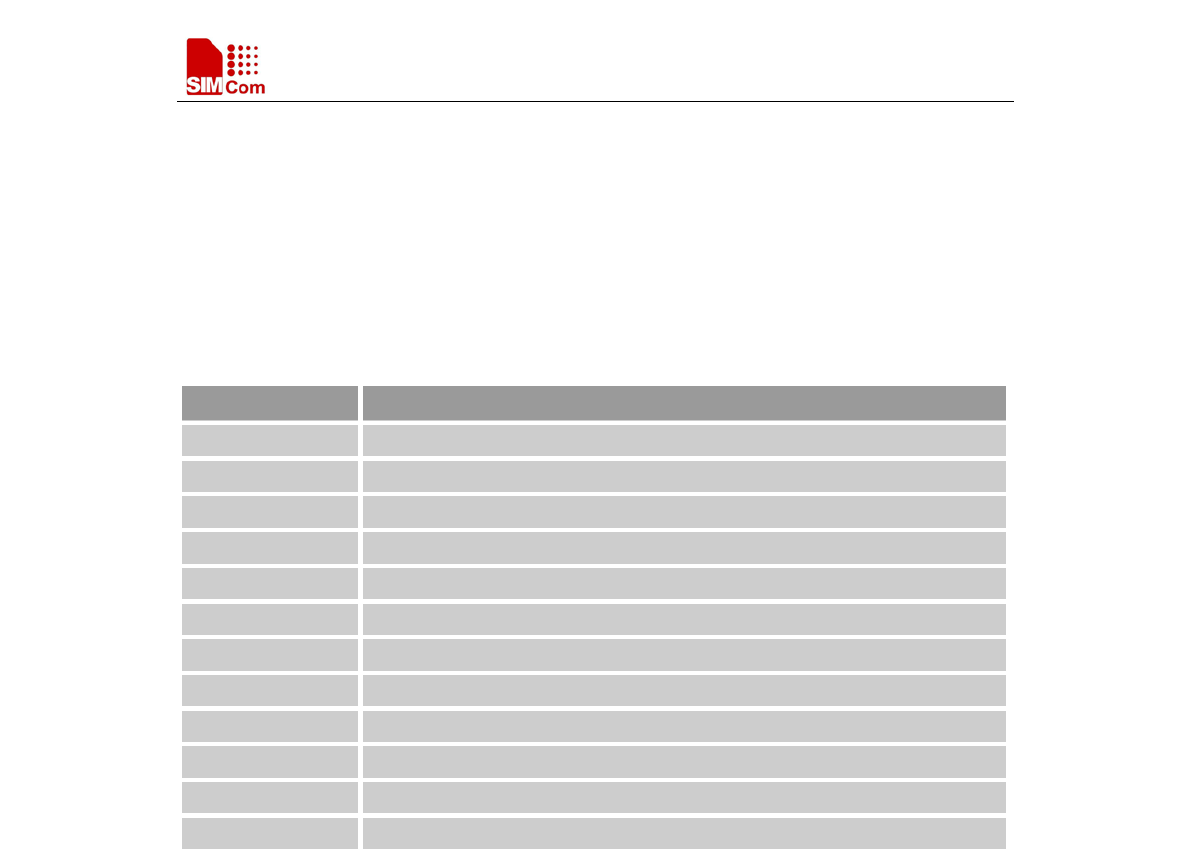
Smart Machine Smart Decision
SIM7000 Series_AT Command Manual_V1.03 204 2018-05-08
15 AT Commands for GNSS Application
SIM7000 series modules provide GNSS AT command is as follows:
15.1 Overview
Command
Description
AT+CGNSPWR GNSS Power Control
AT+CGNSINF
GNSS Navigation Information Parsed From NMEA Sentences
AT+CGNSURC
GNSS Navigation URC Report
AT+CGNSPORT GNSS Nmea Out Port Set
AT+CGNSCOLD
GNSS Cold Start
AT+CGNSWARM GNSS Warm Start
AT+CGNSHOT GNSS Hot Start
AT+CGNSMOD GNSS Work Mode Set
AT+CGNSCFG
GNSS Nmea Out Configure
AT+CGNSTST GNSS NMEA Data Out Put To AT Port
AT+CGNSXTRA
GNSS XTRA Function Open
AT+CGNSCPY GNSS XTRA File Copy
SIMCOM COMFIDENTIAL FILE

Smart Machine Smart Decision
SIM7000 Series_AT Command Manual_V1.03 205 2018-05-08
15.2 Detailed Descriptions of Commands
15.2.1 AT+CGNSPWR GNSS Power Control
15.2.2 AT+CGNSINF GNSS Navigation Information Parsed From NMEA Sentences
AT+CGNSINF GNSS Navigation Information Parsed From NMEA Sentences
Test Command
AT+CGNSINF=?
Response
OK
Parameters
See Execution Command
Execution
Command
Response
+CGNSINF: <GNSS run status>,<Fix status>,<UTC date & Time>,
AT+CGNSPWR GNSS Power Control
Test Command
AT+CGNSPWR
=?
Response
+CGNSPWR: (list of supported <mode>s )
OK
Parameters
See Write Command
Read Command
AT+CGNSPWR?
Response
TA returns the current status of GNSS Power supply
+CGNSPWR: <mode>
OK
Parameters
See Write Command
Write Command
AT+CGNSPWR
=<mode>
Response
OK
or
ERROR
Parameters
<mode>
0 Turn off GNSS power supply
1 Turn on GNSS power supply
Parameter Saving
Mode
NO_SAVE
Max Response
Time
-
Reference NMEA data will not out put to usb’
s NMEA port when set
AT+CGNSPWR=1 throug
h uart port except config it by
AT+CGNSCFG=1.
SIMCOM COMFIDENTIAL FILE

Smart Machine Smart Decision
SIM7000 Series_AT Command Manual_V1.03 206 2018-05-08
AT+CGNSINF <Latitude>,<Longitude>,<MSL Altitude>,<Speed Over Ground>,
<Course Over Ground>,<Fix Mode>,<Reserved1>,<HDOP>,
<PDOP>,<VDOP>,<Reserved2>,<GNSS Satellites in View>,
<GNSS Satellites Used>,<GLONASS Satellites Used>,<Reserved3>,
<C/N0 max>,<HPA>,<VPA>
OK
Parameters
<GNSS run status>
0 GNSS off
1 GNSS on
<Fix status>
0 Not fixed position
1 Fixed position
See below table 2-3.
Parameter Saving
Mode
NO_SAVE
Max Response
Time
-
Reference
Table 2-1: AT+CGNSINF return Parameters
Index Parameter Unit Range Length
1
GNSS run status
--
0-1
1
2 Fix status -- 0-1 1
3
UTC date & Time
yyyyMMddhh
mmss.sss
yyyy: [1980,2039]
MM : [1,12]
dd: [1,31]
hh: [0,23]
mm: [0,59]
ss.sss:[0.000,60.999]
18
4 Latitude ±dd.dddddd [-90.000000,90.000000] 10
5 Longitude ±ddd.dddddd [-180.000000,180.000000] 11
6 MSL Altitude meters 8
7 Speed Over Ground Km/hour [0,999.99] 6
8 Course Over Ground degrees [0,360.00] 6
9 Fix Mode -- 0,1,2[1] 1
10 Reserved1 0
11 HDOP -- [0,99.9] 4
12 PDOP -- [0,99.9] 4
SIMCOM COMFIDENTIAL FILE
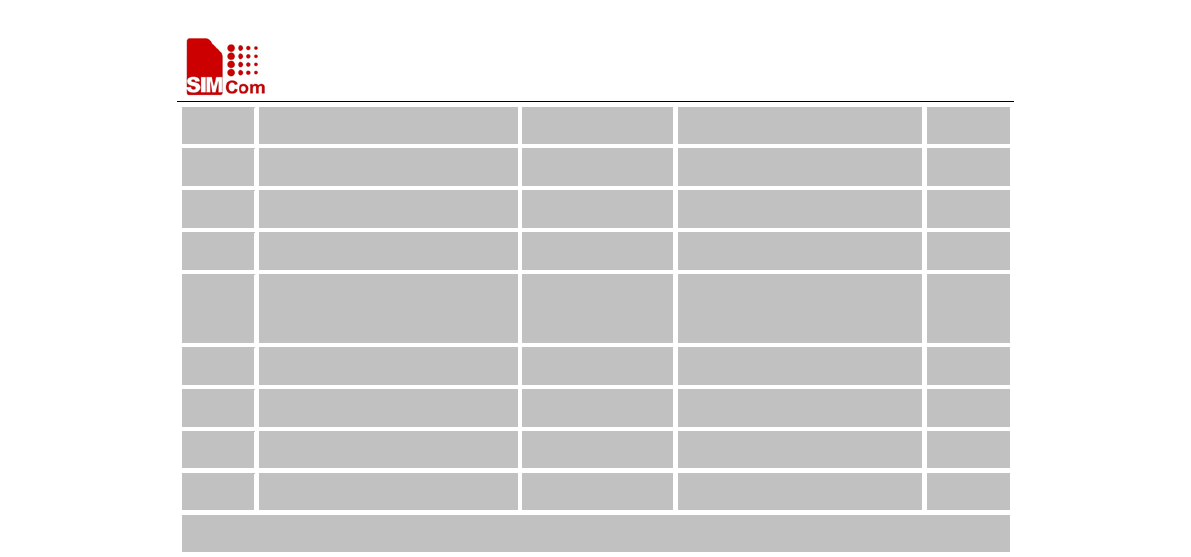
Smart Machine Smart Decision
SIM7000 Series_AT Command Manual_V1.03 207 2018-05-08
13 VDOP -- [0,99.9] 4
14 Reserved2 0
15 GPS Satellites in View -- [0,99] 2
16 GNSS Satellites Used -- [0,99] 2
17 GLONASS Satellite
s in
View
-- [0,99] 2
18 Reserved3 0
19 C/N0 max dBHz [0,55] 2
20 HPA[2] meters [0,9999.9] 6
21 VPA[2] meters [0,9999.9] 6
Total:(94) chars
SIMCOM COMFIDENTIAL FILE

Smart Machine Smart Decision
SIM7000 Series_AT Command Manual_V1.03 208 2018-05-08
15.2.3 AT+CGNSURC GNSS Navigation URC Report
AT+CGNSURC GNSS Navigation URC Report
Test Command
AT+CGNSURC
=?
Response
+CGNSURC: (0-255)
OK
Parameters
See Write Command
Read Command
AT+CGNSURC
?
Response
TA returns the current URC setting
+CGNSURC: <Navigation mode>
OK
Parameters
See Write Command
Unsolicited Result Code
+UGNSINF: <GNSS run status>,<Fix status>,<UTC date & Time>,
<Latitude>,<Longitude>,<MSL Altitude>,<Speed Over Ground>,
<Course Over Ground>,<Fix Mode>,<Reserved1>,<HDOP>,
<PDOP>,<VDOP>,<Reserved2>,<Satellites in View>,
<Satellites Used>,<Reserved3>,<C/N0 max>,<HPA>,<VPA>
Write Command
AT+CGNSURC
=<Navigation
mode>
Response
OK
or
ERROR
Parameters
<Navigation mode>:
0 Turn off navigation data URC report
1 Turn on navigation data URC report, and report every GNSS FIX
2 Turn on navigation data URC report, and report every 2 GNSS FIX
…
255 Turn on
navigation data URC report, and report every 255 GNSS
FIX
Parameter Saving
Mode
NO_SAVE
Max Response
Time
-
Reference
Note
- Factory setting is "AT+CGNSURC=0".
- URC "+UGNSINF: "parameters are the same as "+CGNSINF:"
return.
SIMCOM COMFIDENTIAL FILE

Smart Machine Smart Decision
SIM7000 Series_AT Command Manual_V1.03 209 2018-05-08
15.2.4 AT+CGNSPORT GNSS NMEA Out Port Set
AT+CGNSPORT GNSS NMEA Out Port Set
Test Command
AT+CGNSPORT
=?
Response
+CGNSPORT: (list of supported <port>)
OK
Parameters
See Write Command
Read Command
AT+CGNSPOR
T?
Response
+CGNSPORT: <port>
OK
Write Command
AT+CGNSPORT
=<port>
Response
OK
If error is related to ME functionality:
+CME ERROR: <err>
Parameters
<port> num of the port NMEA out
3 NMEA port
4 NONE
Parameter Saving
Mode
AUTO_SAVE_REBOOT
Max Response
Time
-
Reference
Note
Module must reboot to make it effect if <port> value is changed.
15.2.5 AT+CGNSCOLD GNSS Cold Start
AT+CGNSCOLD GNSS Cold Start
Test Command
AT+CGNSCOL
D=?
Response
OK
Execution
Command
AT+CGNSCOL
D
Response
If AT+CGNSXTRA=0
OK
Else if AT+CGNSXTRA=1
OK
+CGNSXTRA: <mod>
SIMCOM COMFIDENTIAL FILE

Smart Machine Smart Decision
SIM7000 Series_AT Command Manual_V1.03 210 2018-05-08
Parameters
<mod>
0 Aid XTRA file success
1 XTRA file is not exist
2 XTRA file is not effective
Parameter Saving
Mode
NO_SAVE
Max Response
Time
-
Reference Note
15.2.6 AT+CGNSWARM GNSS Warm Start
AT+CGNSWARM GNSS Warm Start
Test Command
AT+CGNSWAR
M=?
Response
OK
Execution
Command
AT+CGNSWAR
M
Response
OK
Parameter Saving
Mode
NO_SAVE
Max Response
Time
-
Reference
Note
15.2.7 AT+CGNSHOT GNSS Hot Start
AT+CGNSHOT GNSS Hot Start
Test Command
AT+CGNSHOT
=?
Response
OK
Execution
Command
AT+CGNSHOT
Response
OK
Parameter Saving
Mode
NO_SAVE
Max Response
Time
-
Reference
Note
SIMCOM COMFIDENTIAL FILE

Smart Machine Smart Decision
SIM7000 Series_AT Command Manual_V1.03 211 2018-05-08
15.2.8 AT+CGNSMOD GNSS Work Mode Set
AT+CGNSMOD GNSS Work Mode Set
Test Command
AT+CGNSMOD
=?
Response
+CGNSMOD: (list of supported <gps mode>),( list of supported <
glo
mode>s),( list of supported <bd mode>s),( list of supported <gal mode>s)
OK
Parameters
See Write Command
Read Command
AT+CGNSMOD
?
Response
+CGNSMOD: <gps mode>,<glo mode>,<bd mode>,<gal mode>
OK
Write Command
AT+CGNSMOD
=<gps
mode>,<glo
mode>,<bd
mode>,<gal
mode>
Response
OK
If error is related to ME functionality:
+CME ERROR: <err>
Parameters
<GPS mode> GPS work mode
1 Start GPS NMEA out
<glo mode> GLONASS work mode
0 Stop GLONASS NMEA out
1 Start GLONASS NMEA out
<bd mode> BEIDOU work mode
0 Stop BEIDOU NMEA out
1 Start BEIDOU NMEA out
2 BEIDOU outside of us
<ga mode> GALILEAN work mode
0 Stop GALILEAN NMEA out
1 Start GALILEAN NMEA out
2 GALILEAN out side of us
Parameter Saving
Mode
AUTO_SAVE_REBOOT
Max Response
Time
-
Reference Note
SIMCOM COMFIDENTIAL FILE

Smart Machine Smart Decision
SIM7000 Series_AT Command Manual_V1.03 212 2018-05-08
15.2.9 AT+CGNSCFG GNSS NMEA Out Configure
AT+CGNSCFG GNSS NMEA Out Configure
Test Command
AT+CGNSCFG=
?
Response
+CGNSCFG: (list of supported <mode>s )
OK
Parameters
See Write Command
Read Command
AT+CGNSCFG?
Response
TA returns the current status of configure
+CGNSCFG: <mode>
OK
Parameters
See Write Command
Write Command
AT+CGNSCFG=
<mode>
Response
OK
or
ERROR
Parameters
<mode> 0 Turn off GNSS NMEA data out put to USB’s NMEA port
when set AT+CGNSPWR=1/0 through UART
1 Turn on GNSS NMEA data out put to USB’s NMEA port
when set AT+CGNSPWR=1/0 through UART
2 Turn on GNSS NMEA data out put to UART3 port when
set AT+CGNSPWR=1/0
Parameter Saving
Mode
NO_SAVE
Max Response
Time
-
Reference Note
This command only supported in UART port.
SIMCOM COMFIDENTIAL FILE

Smart Machine Smart Decision
SIM7000 Series_AT Command Manual_V1.03 213 2018-05-08
15.2.10 AT+CGNSTST GNSS NMEA Data Out Put To At Port
AT+CGNSTST GNSS NMEA Data Out Put To At Port
Test Command
AT+CGNSTST=
?
Response
+CGNSTST: (0-1), (1-255)
OK
Parameters
See Write Command
Read Command
AT+CGNSTST?
Response
TA returns the current status of configure
+CGNSTST: <TST>
OK
Parameters
See Write Command
Write Command
AT+CGNSTST=
<TST>[,<cont>]
Response
OK
or
ERROR
Parameters
<TST> 0 Turn off GNSS NMEA data out put to AT port
1 Turn on GNSS NMEA data out put to AT port
<cont> 1-255 the number of NMEA data package
Parameter Saving
Mode
NO_SAVE
Max Response
Time
-
Reference
SIMCOM COMFIDENTIAL FILE

Smart Machine Smart Decision
SIM7000 Series_AT Command Manual_V1.03 214 2018-05-08
15.2.11 AT+CGNSXTRA GNSS XTRA Function Open
15.2.12 AT+CGNSCPY GNSS XTRA File Copy
AT+CGNSCPY GNSS XTRA File Copy
Test Command
AT+CGNSCPY=
?
Response
OK
Parameters
See Execution Command
Execution
Command
AT+CGNSCPY
Response
+CGNSCPY: <ret>
OK
AT+CGNSXTRA GNSS XTRA Function Open
Test Command
AT+CGNSXTRA
=?
Response
+CGNSXTRA: (0-1)
OK
Parameters
See Write Command
Read Command
AT+CGNSXTRA
?
Response
TA returns the current status of configure
+CGNSXTRA: <enable>
OK
Parameters
See Write Command
Write Command
AT+CGNSXTRA
=<enable>
Response
OK
or
ERROR
Parameters
<enable>
0 Disable XTRA function
1 Enable XTRA function
Parameter Saving
Mode
NO_SAVE
Max Response
Time
-
Reference
SIMCOM COMFIDENTIAL FILE

Smart Machine Smart Decision
SIM7000 Series_AT Command Manual_V1.03 215 2018-05-08
Parameters
<ret>
1 File not exist
0 Copy success
Parameter Saving
Mode
NO_SAVE
Max Response
Time
-
Reference
SIMCOM COMFIDENTIAL FILE

Smart Machine Smart Decision
SIM7000 Series_AT Command Manual_V1.03 216 2018-05-08
16 AT Commands for File System
16.1 Overview
Command Description
AT+CFSINIT Get Flash Data Buffer
AT+CFSWFILE Write File to the Flash Buffer Allocated by CFSINIT
AT+CFSRFILE Read File from Flash
AT+CFSDFILE Delete the File from the Flash
AT+CFSGFIS
Get File Size
AT+CFSREN Rename a file
AT+CFSGFRS
Get the size of file system
AT+CFSTERM Free the Flash Buffer Allocated by CFSINIT
AT+CBAINIT Initialize the ap backup file system
AT+CBALIST Set the files which want to backup
AT+CBAPPS Start to backup ap file system allocated by CBAINIT and CBALIST
AT+CBART
Restore the file into ap file system
16.2 Detailed Descriptions of Commands
16.2.1 AT+CFSINIT Get Flash Data Buffer
AT+CFSINIT Get Flash Data Buffer
Execution
Command
AT+CFSINIT
Response
OK
or
ERROR
or
+CME ERROR: <err>
Parameters
Parameter Saving
Mode
-
Max Response
Time
-
Reference
Note
SIMCOM COMFIDENTIAL FILE

Smart Machine Smart Decision
SIM7000 Series_AT Command Manual_V1.03 217 2018-05-08
16.2.2 AT+CFSWFILE Write File to the Flash Buffer Allocated by CFSINIT
AT+CFSWFILE Write File to the Flash Buffer Allocated by CFSINIT
Test Command
AT+CFSWFILE=
?
Response
+CFSWFILE: (0-3),"fileName",(0-1),(1-10240),(100-10000)
OK
Parameters
See Write Command
Write Command
AT+CFSWFILE=
<index>,<file
name>,<mode>,<fi
le size>,<input
time>
Response
OK
or
ERROR
or
+CME ERROR: <err>
Parameters
<index>
Directory of AP filesystem:
0 "/custapp/"
1 "/fota/"
2 "/datatx/"
3 "/customer/"
<file name>
File name length should less or equal 50 characters
<mode>
0 If the file already existed, write the data at the beginning of the
file.
1 If the file already existed, add the data at the end of the file.
<file size>
File size should be less than 10240 bytes.
<input time>
Millisecond, should send file during this period or you
can’t send file when timeout. The value should be less than 10000 ms.
Parameter Saving
Mode
-
Max Response
Time
-
Reference
Note
16.2.3 AT+CFSRFILE Read File from Flash
AT+CFSRFILE Read File from Flash
SIMCOM COMFIDENTIAL FILE

Smart Machine Smart Decision
SIM7000 Series_AT Command Manual_V1.03 218 2018-05-08
Test Command
AT+CFSRFILE=?
Response
+CFSRFILE: (0-3),"fileName",(0-1),(1-10240),(0-filesize)
OK
Parameters
See Write Command
Write Command
AT+CFSRFILE=<
index>,<file
name>,<mode>,<fi
le size>,<position>
Response
OK
or
ERROR
or
+CME ERROR: <err>
Parameters
<index>
Directory of AP filesystem:
0 "/custapp/"
1 "/fota/"
2 "/datatx/"
3 "/customer/"
<file name>
File name length should be less than or equal to 50 characters,
<mode>
0 Read data at the beginning of the file .
1 Read data at the <position> of the file .
<file size>
The size of the file that you want to read should be less than 10240.
<position> The starting position that will be read in the file.
When <write mode>=0, <positio
n> is invalid. Read data from the
beginning to the end of the file.
When <write mode>=1, <position> is valid. Read data from the <position>
to the end of the file.
Parameter Saving
Mode
-
Max Response
Time
-
Reference
Note
16.2.4 AT+CFSDFILE Delete the File from the Flash
AT+CFSDFILE Delete the File from the Flash
SIMCOM COMFIDENTIAL FILE

Smart Machine Smart Decision
SIM7000 Series_AT Command Manual_V1.03 219 2018-05-08
Test Command
AT+CFSDFILE=?
Response
+CFSDFILE: (0-3),"fileName"
OK
Parameters
See Write Command
Write Command
AT+CFSDFILE=
<index>,<file
name>
Response
OK
or
ERROR
or
+CME ERROR: <err>
Parameters
<index>
Directory of AP filesystem:
0 "/custapp/"
1 "/fota/"
2 "/datatx/"
3 "/customer/"
<file name>
File name length should be less than or equal to 50 characters.
Parameter Saving
Mode
-
Max Response
Time
-
Reference
Note
16.2.5 AT+CFSGFIS Get File Size
AT+CFSGFIS Get File Size
Test Command
AT+CFSGFIS=?
Response
+CFSGFIS: (0-3),"fileName"
OK
Parameters
See Write Command
Write Command
AT+CFSGFIS=<i
ndex>,<file name>
Response
ERROR
or
+CME ERROR: <err>
or
SIMCOM COMFIDENTIAL FILE

Smart Machine Smart Decision
SIM7000 Series_AT Command Manual_V1.03 220 2018-05-08
+CFSGFIS:<n>
OK
Parameters
<file name>
File name length should be less than or equal to 50 characters.
<n> File size
<index>
Directory of AP filesystem:
0 "/custapp/"
1 "/fota/"
2 "/datatx/"
3 "/customer/"
Parameter Saving
Mode
-
Max Response
Time
-
Reference
Note
16.2.6 AT+CFSREN Rename a file
AT+CFSREN Rename a file
Test Command
AT+CFSREN=?
Response
+CFSREN: (0-3),"old_name","new_name"
OK
Parameters
See Write Command
Write Command
AT+CFSREN=<in
dex>,<old file
name>,<new file
name>
Response
OK
or
ERROR
or
+CME ERROR: <err>
Parameters
<index>
Directory of AP filesystem:
0 "/custapp/"
1 "/fota/"
2 "/datatx/"
3 "/customer/"
SIMCOM COMFIDENTIAL FILE

Smart Machine Smart Decision
SIM7000 Series_AT Command Manual_V1.03 221 2018-05-08
<old file name>
File name length should be less than or equal to 50 characters.
<new file name>
File name length should be less than or equal to 50 characters.
Parameter Saving
Mode
-
Max Response
Time
-
Reference
Note
16.2.7 AT+CFSGFRS Get the size of File System
AT+CFSGFRS Get the size of file system
Read Command
AT+CFSGFRS?
Response
ERROR
or
+CME ERROR: <err>
or
+CFSGFRS:<n>
OK
Parameters
<n> the size of file system
Parameter Saving
Mode
-
Max Response
Time
-
Reference
Note
16.2.8 AT+CFSTERM Free the Flash Buffer Allocated by CFSINIT
AT+CFSTERM Free the Flash Buffer Allocated by CFSINIT
Execution
Command
AT+CFSTERM
Response
OK
or
ERROR
or
+CME ERROR: <err>
Parameters
SIMCOM COMFIDENTIAL FILE

Smart Machine Smart Decision
SIM7000 Series_AT Command Manual_V1.03 222 2018-05-08
Parameter Saving
Mode
-
Max Response
Time
-
Reference
Note
16.2.9 AT+CBAINIT Initialize the ap backup file system
AT+CBAINIT Initialize the ap backup file system
Execution
Command
AT+CBAINIT
Response
OK
or
ERROR
or
+CME ERROR: <err>
Parameters
Parameter Saving
Mode
-
Max Response
Time
3 seconds
Reference
Note
16.2.10 AT+CBALIST Set the files which want to backup
AT+CBALIST Set the files which want to backup
Read Command
AT+CBALIST?
Response
+CBALIST: <index>,<filename>
OK
Parameters
See Write Command
Write Command
AT+CBALIST=<i
ndex>,<filename>
Response
OK
If error is related to ME functionality:
+CME ERROR: <err>
Parameters
<index> 0-9 The file index.
10 Disable log
11 Enable log
<file name>File name length should less than or equal to 80 characters.
SIMCOM COMFIDENTIAL FILE

Smart Machine Smart Decision
SIM7000 Series_AT Command Manual_V1.03 223 2018-05-08
Parameter Saving
Mode
NO_SAVE
Max Response
Time
Reference
Note
16.2.11 AT+CBAPPS Start to backup ap file system Allocated by CBAINIT and
CBALIST
AT+CBAPPS Start to backup ap file system Allocated by CBAINIT and CBALIST
Execution
Command
AT+CBAPPS
Response
OK
or
ERROR
or
+CME ERROR: <err>
Parameters
Parameter Saving
Mode
-
Max Response
Time
3 seconds
Reference
Note
16.2.12 AT+CBART Restore the file into ap file system
AT+CBART Restore the file into ap file system
Execution
Command
AT+CBART
Response
OK
or
ERROR
or
+CME ERROR: <err>
Parameters
Parameter Saving
Mode
-
Max Response
Time
3 seconds
Reference
Note
The files should have been backup into ap file system
SIMCOM COMFIDENTIAL FILE

Smart Machine Smart Decision
SIM7000 Series_AT Command Manual_V1.03 224 2018-05-08
17 AT Commands for SIM Application Toolkit
17.1 Overview
Command Description
AT+STIN Get Flash Data Buffer
AT+STGI Get SAT information
AT+STGR SAT Respond
AT+STK STK Switch
17.2 Detailed Descriptions of Commands
17.2.1 AT+STIN SAT Indication
AT+STIN SAT Indication
Test Command
AT+STIN=?
Response
OK
Parameters
See Read Command
Read Command
AT+STIN?
Response
+STIN: <cmd_id>
OK
If the current proactive command has been changed:
+ STIN: <cmd_id>
Parameters
<cmd_id> Indicate the type of proactive command issued.
21 Display text
22 Get inkey
23 Get input
24 Select item
25 Set up menu
Parameter Saving
Mode
-
Max Response
Time
-
Reference
Notification that application will return to main menu automatically if user
doesn’t do any action in 2 minutes.
SIMCOM COMFIDENTIAL FILE

Smart Machine Smart Decision
SIM7000 Series_AT Command Manual_V1.03 225 2018-05-08
17.2.2 AT+STGI Get SAT information
AT+STGI Get SAT information
Test Command
AT+STGI=?
Response
OK
Parameters
See Write Command
Write Command
AT+STGI=<cmd_
id>
Response
If <cmd_id>=21:
+STGI:21,<prio>,<clear_mode>,<text_len>,<text>
OK
If <cmd_id>=22:
+STGI:22,<rsp_format>,<help>,<text_len>,<text>
OK
If <cmd_id>=23:
+STGI:23,<rsp_format>,<max_len>,<min_len>,<help>,<show><text_
len>,<text>
OK
If <cmd_id>=24:
+STGI:24,<help>,<softkey>,<present>,<title_len>,<title><item_num>
+STGI:24,<item_id>,<item_len>,<item_data>
[…]
OK
If <cmd_id>=25:
+STGI:25,<help>,<softkey>,<title_len>,<title><item_num>
+STGI:25,<item_id>,<item_len>,<item_data>
[…]
OK
or
ERROR
Parameters
<cmd_id> See AT+STIN.
<prio> Priority of display text.
0 Normal priority
SIMCOM COMFIDENTIAL FILE

Smart Machine Smart Decision
SIM7000 Series_AT Command Manual_V1.03 226 2018-05-08
1 High priority
<clear_mode>
0 Clear after a delay
1 Clear by user
<text_len> Length of text
<rsp_format>
0 SMS default alphabet
1 YES or NO
2 Numerical only
3 UCS2
<help>
0 Help unavailable
1 Help available
<max_len> Maximum length of input
<min_len> Minimum length of input
<show>
0 Hide input text
1 Display input text
<softkey>
0 No softkey preferred
1 Softkey preferred
<present> Menu presentation format available for select item
0 Presentation not specified
1 Data value presentation
2 Navigation presentation
<title_len> Length of title
<item_num> Number of items in the menu
<item_id> Identifier of item
<item_len> Length of item
<title> Title in ucs2 format
<item_data> Content of the item in ucs2 format
<text> Text in ucs2 format
Parameter Saving
Mode
-
Max Response
Time
-
Reference
Regularly this command is used upon receipt of an URC "+STIN" to
request the parameters of the proactive command. Then the TA is expected
to acknowledge the AT+STGI response with AT+STGR to confirm that
the proactive command has been executed.
SIMCOM COMFIDENTIAL FILE

Smart Machine Smart Decision
SIM7000 Series_AT Command Manual_V1.03 227 2018-05-08
17.2.3 AT+STGR SAT respond
AT+STGR SAT respond
Test Command
AT+STGR=?
Response
OK
Parameters
See Write Command
Write Command
AT+STGR=<cmd
_id>[,<data>]
Response
OK
or
ERROR
Parameters
<cmd_id> Identifier of proactive command.
22 Get inkey
23 Get input
24 Select item
25 Set up menu
83 Session end by user
84 Go backward
<data >
If <cmd_id>=22:
Input a character
If <cmd_id>=23:
Input a string.
If <rsp_format>
is YES or NO, input of a character in case of
ANSI character set requests one byte, e.g. "Y".
If <rsp_format> is
numerical only, input the characters in decimal
number, e.g. "123".
If <rsp_format> is UCS2, requests a 4 byte string, e.g. "0031".
<rsp_format> refer to the response by AT+STGI=23.
If <cmd_id>=24:
Input the identifier of the item selected by user.
If <cmd_id>=25:
Input the identifier of the item selected by user.
If <cmd_id>=83:
<data>Ignore
Note:
It could return main menu during proactive command id is not
22 or 23.
If <cmd_id>=84:
<data> Ignore
Parameter Savin
g
Mode
-
SIMCOM COMFIDENTIAL FILE

Smart Machine Smart Decision
SIM7000 Series_AT Command Manual_V1.03 228 2018-05-08
Max Response
Time
-
Reference Note
17.2.4 AT+STK STK Switch
AT+STK STK Switch
Test Command
AT+STK=?
Response
OK
Parameters
See Write Command
Read Command
AT+STK?
Response
+STK: <value>
OK
Parameters
See Write Command
Write Command
AT+STK=<value
>
Response
OK
or
ERROR
Parameters
<value>
0 Disable STK
1 Enable STK
Parameter Saving
Mode
-
Max Response
Time
-
Reference
Note
SIMCOM COMFIDENTIAL FILE

Smart Machine Smart Decision
SIM7000 Series_AT Command Manual_V1.03 229 2018-05-08
18 AT Commands for TCP/UDP Application Supported SSL
18.1 Overview
Command
Description
AT+CACID Set TCP/UDP identifier
AT+CASSL Set protocol and SSL context identifier
AT+CASSLCFG
Set SSL certificate and timeout parameters
AT+CAOPEN Open a TCP/UDP connection
AT+CASEND
Send data via an established connection
AT+CARECV Receive data via an established connection
AT+CACLOSE Close a TCP/UDP connection
AT+CSSLCFG Configure SSL parameters of a context identifier
18.2 Detailed Descriptions of Commands
18.2.1 AT+CACID Set TCP/UDP Identifier
AT+CACID Set TCP/UDP Identifier
Test Command
AT+CACID=?
Response
+CACID: (range of supported <cid>s)
OK
Parameters
See Write Command
Read Command
AT+CACID?
Response
+CACID: <cid>
OK
Parameters
See Write Command
Write Command
AT+CACID=<cid
>
Response
OK
If error is related to ME functionality:
+CME ERROR: <err>
Parameters
<cid> TCP/UDP identifier
Parameter Saving
Mode
NO_SAVE
SIMCOM COMFIDENTIAL FILE

Smart Machine Smart Decision
SIM7000 Series_AT Command Manual_V1.03 230 2018-05-08
Max Response
Time
-
Reference
Note
18.2.2 AT+CASSL Set protocol and SSL context identifier
AT+CASSL Set protocol and SSL context identifier
Test Command
AT+CASSL=?
Response
+CASSL: (range of supported <cid>s),0,(0-1)
+CASSL: (range of supported <cid>s),1,(0-5)
OK
Parameters
See Write Command
Read Command
AT+CASSL?
Response
If <cid> has been set by AT+CACID and <sslFlag> is 0:
+CASSL: <cid>,<sslFlag>,<protocol>
OK
If <cid> has been set by AT+CACID and <sslFlag> is 1:
+CASSL: <cid>,<sslFlag>,<ctxindex>
OK
If no <cid> has been set by AT+CACID:
OK
Parameter
See Write Command
Write Command
1)If <sslFlag> is 0:
AT+CASSL=<cid>
,<sslFlag>,<protoc
ol>
2)If <sslFlag> is 1:
AT+CASSL=<cid>
,<sslFlag>,<ctxind
ex>
Response
OK
If error is related to ME functionality:
+CME ERROR: <err>
Parameters
<cid> TCP/UDP identifier, interger.
<sslFlag> Interger
0 Not support SSL
1 Support SSL
<protocol> Interger
0 TCP
1 UDP
<ctxindex> The identifier of SSL configurations, see AT+CSSLCFG.
Parameter Saving
Mode
NO_SAVE
SIMCOM COMFIDENTIAL FILE

Smart Machine Smart Decision
SIM7000 Series_AT Command Manual_V1.03 231 2018-05-08
Max Response
Time
-
Reference
Note
18.2.3 AT+CASSLCFG Set SSL certificate and timeout parameters
AT+CASSLCFG Set SSL certificate and timeout parameters
Test Command
AT+CASSLCFG=
?
Response
+CASSLCFG: (range of supported <cid>s),"cacert",<caname>
+CASSLCFG: (range of supported <cid>s),"clientcert",<certname>
+CASSLCFG: (range of supported <cid>s),"psktable",<pskname>
+CASSLCFG: (range of supported <cid>s),"timeout",(0-65535)
OK
Parameters
See Write Command
Read Command
AT+CASSLCFG?
Response
If <cid> has been set by AT+CACID:
+CACID: <cid>
cacert: <caname>
clientcert: <certname>
psktable: <pskname>
timeout: <timeout>
OK
If no <cid> has been set by AT+CACID:
OK
Parameter
See Write Command
Write Command
AT+CASSLCFG=
<cid>,"cacert",<c
aname>
Response
OK
If error is related to ME functionality:
+CME ERROR: <err>
Parameters
<cid> TCP/UDP identifier, see AT+CACID
<caname> Alphanumeric ASCII text string up to 64 characters.
Root
certificate name that has been configured by AT+CSSLCFG.
Note: If the root certificate is empty, module will trust all certificates
as
default.
AT+CASSLCFG=
<cid>,"clientcert",
Response
OK
SIMCOM COMFIDENTIAL FILE

Smart Machine Smart Decision
SIM7000 Series_AT Command Manual_V1.03 232 2018-05-08
<certname> If error is related to ME functionality:
+CME ERROR: <err>
Parameters
<cid> see AT+CACID
<certname> Alphanumeric ASCII text string up to 64 characters.
Client
certificate name that has been configured by AT+CSSLCFG.
AT+CASSLCFG=
<cid>,"psktable",
<pskname>
Response
OK
If error is related to ME functionality:
+CME ERROR: <err>
Parameters
<cid> see AT+CACID
<pskname> Alphanumeric ASCII text string up to 64 characters.
PSK
table name that has been configured by AT+CSSLCFG.
AT+CASSLCFG=
<cid>,"timeout",<
timeout>
Response
OK
If error is related to ME functionality:
+CME ERROR: <err>
Parameters
<cid> see AT+CACID
<timeout> Timeout of send or receive data. unit is ms.
0-100-65535
Parameter Saving
Mode
NO_SAVE
Max Response
Time
-
Reference
Note
18.2.4 AT+CAOPEN Open a TCP/UDP connection
AT+CAOPEN Open a TCP/UDP connection
Test Command
AT+CAOPEN=?
Response
+CAOPEN: (range of supported <cid>s),<server>,(1-65535)
OK
Parameters
See Write Command
Read Command
AT+CAOPEN?
Response
If <cid> has been set by AT+CACID:
+CAOPEN: <cid>,<server>,<port>
SIMCOM COMFIDENTIAL FILE

Smart Machine Smart Decision
SIM7000 Series_AT Command Manual_V1.03 233 2018-05-08
OK
If no <cid> has been set by AT+CACID:
OK
Parameter
See Write Command
Write Command
AT+CAOPEN=<ci
d>,<server>,<port
>
Response
+CAOPEN: <cid>,<result>
OK
If error is related to ME functionality:
+CME ERROR: <err>
Parameters
<cid> see AT+CACID
<server> Alphanumeric ASCII text string up to 64 characters
. Server IP
address or host name.
<port> Interger. Server port.
<result>
0 Success
1 Status error
2 Configure type error
3 Parameter invalid
4 TCP connect error
5 UDP create error
6 Configuration load error
7 Socket add error
8 Certificate’s time expired
9 Certificate’s common name does not match
10 Certificate’s common name does not match and time expired
11 Connect failed error
12 Socket handle error
13 Data length error
14 Memory error
15 Data send error
16 SSL general error
Parameter Saving
Mode
NO_SAVE
Max Response
Time
-
Reference
Note
SIMCOM COMFIDENTIAL FILE

Smart Machine Smart Decision
SIM7000 Series_AT Command Manual_V1.03 234 2018-05-08
18.2.5 AT+CASEND Send data via an established connection
AT+CASEND Send data via an established connection
Test Command
AT+CASEND=?
Response
+CASEND: (range of supported <cid>s),( range of supported <datalen>)
OK
Parameters
See Write Command
Write Command
AT+CASEND=<ci
d>,<datalen>
Response
+CASEND: <cid>,<datalen>
…….. //Input data
OK
+CASEND: <cid>,<result>,<sendlen>
If error is related to ME functionality:
+CME ERROR: <err>
Parameters
<cid> see AT+CACID
<datalen> Requested number of data bytes to be transmitted
<sendlen> Data bytes that has been sent successfully
<result> see AT+CAOPEN
Parameter Saving
Mode
NO_SAVE
Max Response
Time
-
Reference
Note
18.2.6 AT+CARECV Receive data via an established connection
AT+ CARECV Receive data via an established connection
Test Command
AT+CARECV=?
Response
+CARECV: (range of supported <cid>s),( range of supported <readlen>)
OK
Parameters
See Write Command
Write Command
AT+CARECV=<ci
d>,<readlen>
Response
+CARECV: <cid>,<recvlen>
……. //output data
OK
If error is related to ME functionality:
SIMCOM COMFIDENTIAL FILE

Smart Machine Smart Decision
SIM7000 Series_AT Command Manual_V1.03 235 2018-05-08
+CME ERROR: <err>
Parameters
<cid> see AT+CACID
<readlen> Requested number of data bytes to be read
<recvlen> Data bytes that has been actually received
Parameter Saving
Mode
NO_SAVE
Max Response
Time
-
Reference
Note:
After open a connection or send data successfully, module will read data
actively. If module receives data, it will report "
+CARECV:
<cid>,<recvlen>" to remind user to read data.
18.2.7 AT+CACLOSE Close a TCP/UDP connection
AT+CACLOSE Close a TCP/UDP connection
Test Command
AT+CACLOSE=?
Response
+CACLOSE: (range of supported <cid>s)
OK
Parameters
See Write Command
Write Command
AT+CACLOSE=<
cid>
Response
OK
If error is related to ME functionality:
+CME ERROR: <err>
Parameters
<cid> see AT+CACID
Parameter Saving
Mode
NO_SAVE
Max Response
Time
-
Reference
Note
18.2.8 AT+CSSLCFG Configure SSL parameters of a context identifier
AT+CSSLCFG Configure SSL parameters of a context identifier
Test Command Response
SIMCOM COMFIDENTIAL FILE

Smart Machine Smart Decision
SIM7000 Series_AT Command Manual_V1.03 236 2018-05-08
AT+CSSLCFG=? +CSSLCFG: "sslversion",(0-5),(0-5)
+CSSLCFG:
"ciphersuite",(0-5),(0-7),(0x008A,0x008B,0x008C,0x008D,0x00A8,0x0
0A9,0x00AE,0x00AF,0x002F,0x0033,0x0035,0x0039,0xC02A,0xC02B,
0xC02C,0xC02D,0xC02E,0xC02F,0xC030,0xC031,0xC032,0xC09C,0x
C09D,0xC09E,0xC09F,0xC0A0,0xC09F,0xC0A1,0xC0A2,0xC0A3,0x
CC13,0xCC14,0xCC15)
+CSSLCFG: "ignorertctime",(0-5),(0-1)
+CSSLCFG: "protocol",(0-5),(1-2)
+CSSLCFG: "ctxindex",(0-5)
+CSSLCFG: "convert",(1-3),(<cname>,[<keyname>[,<passkey>]])
OK
Parameters
See Write Command
Read Command
AT+CSSLCFG?
Response
OK
Parameters
See Write Command
Write Command
AT+CSSLCFG="s
slversion",<ctxind
ex>,<sslversion>
Response
OK
If failed:
+CME ERROR: <err>
Parameters
<ctxindex> (0-5)
<sslversion>
2 QAPI_NET_SSL_PROTOCOL_UNKNOWN
1 QAPI_NET_SSL_PROTOCOL_TLS_1_0
3 QAPI_NET_SSL_PROTOCOL_TLS_1_1
4 QAPI_NET_SSL_PROTOCOL_TLS_1_2
5 QAPI_NET_SSL_PROTOCOL_DTLS_1_0
6
QAPI_NET_SSL_PROTOCOL_DTLS_1_2
AT+CSSLCFG="c
iphersuite",<ctxin
dex>,<cipher_inde
x>,<ciphersuite>
Response
OK
If failed:
+CME ERROR: <err>
Parameters
<ctxindex> (0-5)
<cipher_index> (0-7)
<ciphersuite>
0x008A
QAPI_NET_TLS_PSK_WITH_RC4_128_SHA
0x008B
QAPI_NET_TLS_PSK_WITH_3DES_EDE_CBC_SHA
0x008C QAPI_NET_TLS_PSK_WITH_AES_128_CBC_SHA
SIMCOM COMFIDENTIAL FILE

Smart Machine Smart Decision
SIM7000 Series_AT Command Manual_V1.03 237 2018-05-08
0x008D
QAPI_NET_TLS_PSK_WITH_AES_256_CBC_SHA
0x00A8
QAPI_NET_TLS_PSK_WITH_AES_128_GCM_SHA256
0x00A9
QAPI_NET_TLS_PSK_WITH_AES_256_GCM_SHA384
0x00AE QAPI_NET_T
LS_PSK_WITH_AES_128_CBC_SHA256
0x00AF
QAPI_NET_TLS_PSK_WITH_AES_256_CBC_SHA384
0x002F
QAPI_NET_TLS_RSA_WITH_AES_128_CBC_SHA
0x0033
QAPI_NET_TLS_DHE_RSA_WITH_AES_128_CBC_SHA
0x0035 QAPI_NET_TLS_RSA_W
ITH_AES_256_CBC_SHA
0x0039
QAPI_NET_TLS_DHE_RSA_WITH_AES_256_CBC_SHA
0x003C
QAPI_NET_TLS_RSA_WITH_AES_128_CBC_SHA256
0x003D
QAPI_NET_TLS_RSA_WITH_AES_256_CBC_SHA256
0x0067
QAPI_NET_TLS_DHE_RSA_WITH_AES_128_CBC_SHA256
0x006B
QAPI_NET_TLS_DHE_RSA_WITH_AES_256_CBC_SHA256
0x009C
QAPI_NET_TLS_RSA_WITH_AES_128_GCM_SHA256
0x009D
QAPI_NET_TLS_RSA_WITH_AES_256_GCM_SHA384
0x009E
QAPI_NET_TLS_DHE_RSA_WITH_AES_128_
GCM_SHA256
0x009F
QAPI_NET_TLS_DHE_RSA_WITH_AES_256_GCM_SHA384
0xC004
QAPI_NET_TLS_ECDH_ECDSA_WITH_AES_128_CBC_SHA
0xC005
QAPI_NET_TLS_ECDH_ECDSA_WITH_AES_256_CBC_SHA
0xC009
QAPI_NET_TLS_ECDHE_ECDSA_WITH_AES_128_CBC_SHA
0xC00A
QAPI_NET_TLS_ECDHE_ECDSA_WITH_AES_256_CBC_SHA
0xC00E
QAPI_NET_TLS_ECDH_RSA_WITH_AES_128_CBC_SHA
0xC00F
QAPI_NET_TLS_ECDH_RSA_WITH_AES_256_CBC_SHA
0xC013
QAPI_NET_TLS_ECDHE_RSA_WITH_AES_128_CBC_SHA
0xC014
QAPI_NET_TLS_ECDHE_RSA_WITH_AES_256_CBC_SHA
0xC023
QAPI_NET_TLS_ECDHE_ECDSA_WITH_AES_128_CBC_SHA256
0xC024
QAPI_NET_TLS_ECDHE_ECDSA_WITH_AES_256_CBC_SHA384
0xC025
QAPI_NET_TLS_ECDH_ECDSA_WITH_AES_128_CBC_SHA256
0xC026
QAPI_NET_
TLS_ECDH_ECDSA_WITH_AES_256_CBC_SHA384
0xC027
SIMCOM COMFIDENTIAL FILE

Smart Machine Smart Decision
SIM7000 Series_AT Command Manual_V1.03 238 2018-05-08
QAPI_NET_TLS_ECDHE_RSA_WITH_AES_128_CBC_SHA256
0xC028
QAPI_NET_TLS_ECDHE_RSA_WITH_AES_256_CBC_SHA384
0xC029
QAPI_NET_TLS_ECDH_RSA_WITH_AES_128_CBC_SHA256
0xC02A
QAPI_NET_TLS_ECDH_RSA_W
ITH_AES_256_CBC_SHA384
0xC02B
QAPI_NET_TLS_ECDHE_ECDSA_WITH_AES_128_GCM_SHA256
0xC02C
QAPI_NET_TLS_ECDHE_ECDSA_WITH_AES_256_GCM_SHA384
0xC02D
QAPI_NET_TLS_ECDH_ECDSA_WITH_AES_128_GCM_SHA256
0xC02E
QAPI_NET_TLS_ECDH_ECDSA_WITH_AES_256_GC
M_SHA384
0xC02F
QAPI_NET_TLS_ECDHE_RSA_WITH_AES_128_GCM_SHA256
0xC030
QAPI_NET_TLS_ECDHE_RSA_WITH_AES_256_GCM_SHA384
0xC031
QAPI_NET_TLS_ECDH_RSA_WITH_AES_128_GCM_SHA256
0xC032
QAPI_NET_TLS_ECDH_RSA_WITH_AES_256_GCM_SHA384
0xC09C
QAPI_NET_TLS_RSA_WITH_AES_128_CCM
0xC09D
QAPI_NET_TLS_RSA_WITH_AES_256_CCM
0xC09E
QAPI_NET_TLS_DHE_RSA_WITH_AES_128_CCM
0xC09F
QAPI_NET_TLS_DHE_RSA_WITH_AES_256_CCM
0xC0A0
QAPI_NET_TLS_RSA_WITH_AES_128_CCM_8
0xC0A1
QAPI_NET_TLS_RSA_WITH_AES_256_CCM_8
0xC0A2
QAPI_NET_TLS_DHE_RSA_WITH_AES_128_CCM_8
0xC0A3
QAPI_NET_TLS_DHE_RSA_WITH_AES_256_CCM_8
0xCC13
QAPI_NET_
TLS_ECDHE_RSA_WITH_CHACHA20_POLY1305_SH
A256
0xCC14
QAPI_NET_TLS_ECDHE_ECDSA_WITH_CHACHA20_POLY1305
_SHA256
0xCC15
QAPI_NET_TLS_DHE_RSA_WITH_CHACHA20_POLY1305_SHA2
56
AT+CSSLCFG="i
gnorertctime",<ct
xindex>,<ignorert
ctime>
Response
OK
If failed:
+CME ERROR: <err>
SIMCOM COMFIDENTIAL FILE

Smart Machine Smart Decision
SIM7000 Series_AT Command Manual_V1.03 239 2018-05-08
Parameters
<ctxindex> (0-5)
<ignorertctime>
0 Do not ignore the RTC time
1 Ignore the RTC time
AT+CSSLCFG="
protocol",<ctxinde
x>,<protocol>
Response
OK
If failed:
+CME ERROR: <err>
Parameters
<ctxindex> (0-5)
< protocol>
1 QAPI_NET_SSL_TLS_E
2 QAPI_NET_SSL_DTLS_E
AT+CSSLCFG="c
txindex",<ctxinde
x>
Response
+CSSLCFG:<ctxindex>,<sslversion>,<ciphersuite>,<ignorertctime>,<
protocol>
OK
If failed:
+CME ERROR: <err>
Parameters
See other commands
AT+CSSLCFG="c
onvert",<ssltype>,
<cname>[,<keyna
me>[,<passkey>]]
Response
OK
If failed:
+CME ERROR: <err>
Parameters
<ssltype>
1 QAPI_NET_SSL_CERTIFICATE_E
2 QAPI_NET_SSL_CA_LIST_E
3 QAPI_NET_SSL_PSK_TABLE_E
<cname> String type (string should be included in quotation marks):
name of cert file
<keyname> String type (string should be included in quotation
marks):name of key file
<passkey> String type (string should be included in quotation
marks):value of passkey
SIMCOM COMFIDENTIAL FILE

Smart Machine Smart Decision
SIM7000 Series_AT Command Manual_V1.03 240 2018-05-08
19 Supported Unsolicited Result Codes
19.1 Summary of CME ERROR Codes
Final result code +CME ERROR: <err> indicates an error related to mobile equipment or
network. The operation is similar to ERROR result code. None of the following commands in the
same Command line is executed. Neither ERROR nor OK result code shall be returned.
<err> values used by common messaging commands:
Code of <err> Meaning
0 phone failure
1 no connection to phone
2 phone-adaptor link reserved
3 operation not allowed
4
operation not supported
5 PH-SIM PIN required
6
PH-FSIM PIN required
7 PH-FSIM PUK required
10 SIM not inserted
11 SIM PIN required
12 SIM PUK required
13
SIM failure
14 SIM busy
15
SIM wrong
16 incorrect password
17 SIM PIN2 required
18 SIM PUK2 required
20 memory full
21
invalid index
22 not found
23 memory failure
24 text string too long
25 invalid characters in text string
26 dial string too long
27
invalid characters in dial string
30 no network service
31
network timeout
SIMCOM COMFIDENTIAL FILE

Smart Machine Smart Decision
SIM7000 Series_AT Command Manual_V1.03 241 2018-05-08
32
network not allowed - emergency call only
40 network personalisation PIN required
41
network personalisation PUK required
42 network subset personalisation PIN required
43 network subset personalisation PUK required
44 service provider personalisation PIN required
45 service provider personalisation PUK required
46
corporate personalisation PIN required
47 corporate personalisation PUK required
99 resource limitation
100 unknown
103 Illegal MS
106 Illegal ME
107
GPRS services not allowed
111 PLMN not allowed
112
Location area not allowed
113 Roaming not allowed in this location area
132 service option not supported
133 requested service option not subscribed
134 service option temporarily out of order
148
unspecified GPRS error
149 PDP authentication failure
150
invalid mobile class
160 DNS resolve failed
161 Socket open failed
171 MMS task is busy now
172
The MMS data is oversize
173
The operation is overtime
174 There is no MMS receiver
175 The storage for address is full
176 Not find the address
177 The connection to network is failed
178 Failed to read push message
179
This is not a push message
180 gprs is not attached
181
tcpip stack is busy
182 The MMS storage is full
183 The box is empty
SIMCOM COMFIDENTIAL FILE

Smart Machine Smart Decision
SIM7000 Series_AT Command Manual_V1.03 242 2018-05-08
184
failed to save MMS
185 It is in edit mode
186
It is not in edit mode
187 No content in the buffer
188 Not find the file
189 Failed to receive MMS
190 Failed to read MMS
191
Not M-Notification.ind
192 The MMS inclosure is full
193 Unknown
600 No Error
601 Unrecognized Command
602 Return Value Error
603
Syntax Error
604 Unspecified Error
605
Data Transfer Already
606 Action Already
607 Not At Cmd
608 Multi Cmd too long
609 Abort Cops
610
No Call Disc
611 BT SAP Undefined
612
BT SAP Not Accessible
613 BT SAP Card Removed
614 AT Not Allowed By Customer
753 missing required cmd parameter
754
invalid SIM command
755
invalid File Id
756 missing required P1/2/3 parameter
757 invalid P1/2/3 parameter
758 missing required command data
759 invalid characters in command data
765 Invalid input value
766
Unsupported mode
767 Operation failed
768
Mux already running
769 Unable to get control
770 SIM network reject
SIMCOM COMFIDENTIAL FILE

Smart Machine Smart Decision
SIM7000 Series_AT Command Manual_V1.03 243 2018-05-08
771
Call setup in progress
772 SIM powered down
773
SIM file not present
791 Param count not enough
792 Param count beyond
793 Param value range beyond
794 Param type not match
795
Param format invalid
796 Get a null param
797 CFUN state is 0 or 4
19.2 Summary of CMS ERROR Codes
Final result code +CMS ERROR: <err> indicates an error related to message service or
network. The operation is similar to ERROR result code. None of the following commands in the
same Command line is executed. Neither ERROR nor OK result code shall be returned.
<err> values used by common messaging commands:
Code of <err>
Meaning
1 Unassigned(unallocated) number
3 No route to destination
6 Channel unacceptable
8 Operator determined barring
10 Call barred
11 Reserved
16 Normal call clearing
17 User busy
18
No user responding
19 User alerting, no answer
21 Short message transfer rejected
22 Number changed
25 Pre-emption
26 Non-selected user clearing
27 Destination out of service
28 Invalid number format (incomplete number)
29 Facility rejected
30 Response to STATUS ENQUIRY
SIMCOM COMFIDENTIAL FILE

Smart Machine Smart Decision
SIM7000 Series_AT Command Manual_V1.03 244 2018-05-08
32 Normal, unspecified
34 No circuit/channel available
38 Network out of order
41 Temporary failure
42 Switching equipment Congestion
43
Access information discarded
44 Requested circuit/channel not available
47 Resources unavailable, unspecified
49 Quality of service unavailable
50 Requested facility not subscribed
55 Requested facility not subscribed
57 Bearer capability not authorized
58 Bearer capability not presently available
63 Service or option not available, unspecified
65 Bearer service not implemented
68 ACM equal or greater than ACM maximum
69
Requested facility not implemented
70 Only restricted digital information bearer capability is available
79 Service or option not implemented, unspecified
81 Invalid transaction identifier value
87 User not member of CUG
88 Incompatible destination
91 Invalid transit network selection
95
Semantically incorrect message
96 Invalid mandatory information
97 Message type non-existent or not implemented
98 Message type not compatible with protocol state
99 Information element non-existent or not implemented
100 Conditional information element error
101 Message not compatible with protocol
102 Recovery on timer expiry
111 Protocol error, unspecified
127 Interworking, unspecified
128 Telematic interworking not supported
129
Short message Type 0 not supported
SIMCOM COMFIDENTIAL FILE

Smart Machine Smart Decision
SIM7000 Series_AT Command Manual_V1.03 245 2018-05-08
130 Cannot replace short message
143 Unspecified TP-PID error
144 Data coding scheme (alphabet) not supported
145 Message class not supported
159 Unspecified TP-DCS error
160
Command cannot be acted
161 Command unsupported
175 Unspecified TP-Command error
176 TPDU not supported
192 SC busy
193 No SC subscription
194 SC system failure
195 Invalid SME address
196 Destination SME barred
197 SM Rejected-Duplicate SM
198 TP-VPF not supported
199
TP-VP not supported
208 SIM SMS storage full
209 No SMS storage capability in SIM
210 Error in MS
211 Memory Capacity Exceeded
212 SIM Application Toolkit Busy
213 SIM data download error
224
CP retry exceed
225 RP trim timeout
226 SMS connection broken
255 Unspecified error cause
300 ME failure
301
SMS reserved
302 operation not allowed
303 operation not supported
304 invalid PDU mode
305
invalid text mode
310
SIM not inserted
311 SIM pin necessary
312 PH SIM pin necessary
SIMCOM COMFIDENTIAL FILE

Smart Machine Smart Decision
SIM7000 Series_AT Command Manual_V1.03 246 2018-05-08
313
SIM failure
314 SIM busy
315
SIM wrong
316 SIM PUK required
317 SIM PIN2 required
318 SIM PUK2 required
320 memory failure
321
invalid memory index
322 memory full
323 invalid input parameter
324 invalid input format
325 invalid input value
330 SMSC address unknown
331
no network
332 network timeout
340
no cnma ack
500 Unknown
512 SMS no error
513 Message length exceeds maximum length
514 Invalid request parameters
515
ME storage failure
516 Invalid bearer service
517
Invalid service mode
518 Invalid storage type
519 Invalid message format
520 Too many MO concatenated messages
521
SMSAL not ready
522
SMSAL no more service
523 Not support TP-Status-Report & TP-Command in storage
524 Reserved MTI
525 No free entity in RL layer
526 The port number is already registerred
527 There is no free entity for port number
528
More Message to Send state error
529 MO SMS is not allow
530
GPRS is suspended
531 ME storage full
532 Doing SIM refresh
SIMCOM COMFIDENTIAL FILE

Smart Machine Smart Decision
SIM7000 Series_AT Command Manual_V1.03 247 2018-05-08
19.3 Summary of Unsolicited Result Codes
URC
Description
AT Command
+
CRING
: <type> Indicates incoming call to the TE if
extended format is enabled.
AT+CRC=1
+CREG:
<stat>[,<lac>,<ci>,<netact>]
There is a change in the MT network
registration status or a change of the
network cell.
AT+CREG=<n>
+CMTI: <mem3>,<index> Indicates that new message has been
received.
AT+CNMI
<mt>=1
+
CMTI
:
<mem3>,<index>,"MMS
PUSH"
Indicates that new MMS message has
been received.
AT+CNMI
<mt>=1
+
CMT
:
<length><CR><LF><pdu>
Indicates that new message has been
received.
AT+CNMI
<mt>=2 (PDU
mode)
+
CMT
:
<oa>,<scts>[,<tooa>,<fo>,<pi
d>,<dcs>,<sca>,<tosca>,
<length>]<CR><LF><data>
Indicates that new message has been
received.
AT+CNMI
<mt>=2 (text
mode)
+CBM:
<length><CR><LF><pdu>
Indicates that new cell broadcast
message has been received.
AT+CNMI
<bm>=2 (PDU
mode enabled):
+CBM:
<sn>,<mid>,<dcs>,<page>,<p
ages><CR><LF><data>
Indicates that new cell broadcast
message has been received.
AT+CNMI
<bm>=2 (text
mode enabled):
+CDS:
<length><CR><LF><pdu>
Indicates that new SMS status report has
been received.
AT+CNMI
<ds>=1 (PDU
mode enabled):
+CDS:
<fo>,<mr>[,<ra>][,<tora>],<s
cts>,<dt>,<st>
Indicates that new SMS status report has
been received.
AT+CNMI
<ds>=1 (text mode
enabled):
*PSNWID: "<mcc>",
"<mnc>", "<full network
name>",<full network name
CI>,"<short network
name>",<short network name
CI>
Refresh network name by network.
AT+CLTS=1
*PSUTTZ:
<year>,<month>,<day>,<hour
>,<min>,<sec>,"<time
Refresh time and time zone by network.
SIMCOM COMFIDENTIAL FILE

Smart Machine Smart Decision
SIM7000 Series_AT Command Manual_V1.03 248 2018-05-08
zone>",<dst>
+
CTZV
: "<time zone>" Refresh network time zone by network.
DST: <dst>
Refresh Network Daylight Saving Time
by network.
+CPIN: <code>
Indicates whether some password is
required or not.
AT+CPIN
+CPIN: NOT READY
SIM Card is not ready.
+CPIN: NOT INSERTED
SIM Card is not inserted.
+CUSD:
<n>[,<str_urc>[,<dcs>]]
Indicates an USSD response from the
network, or network initiated operation. AT+CUSD=1
NORMAL POWER DOWN
SIM7000 is powered down by the
PWRKEY pin or AT command
"AT+CPOWD=1".
UNDER-VOLTAGE
POWER DOWN
Under-voltage automatic power down.
UNDER-VOLTAGE
WARNNING
under-voltage warning
OVER-VOLTAGE POWER
DOWN
Over-voltage automatic power down.
OVER-VOLTAGE
WARNNING
over-voltage warning
RDY
Power on procedure is completed, and
the module is ready to operate at fixed
baud rate. (This URC does not appear
when auto-bauding function is active).
AT+IPR=<rate>
<rate> is not 0
+CFUN: <fun>
Phone functionality indication (This
URC does not appear when
auto-bauding function is active).
AT+IPR=<rate>
<rate> is not 0
[<n>,]CONNECT OK
TCP/ UDP connection is successful
AT+CIPSTART
CONNECT TCP/UDP connection in channel mode is
successful
[<n>,]CONNECT FAIL TCP/UDP connection fails AT+CIPSTART
[<n>,]
ALREADY
CONNECT
TCP/UDP connection exists AT+CIPSTART
[<n>,]SEND OK Data sending is successful
[<n>,]CLOSED TCP/UDP connection is closed
RECV FROM: <IP
ADDRESS>: <PORT>
shows remote IP address and port
(only in single connection mode)
AT+CIPSRIP=1
+IPD,<data
size>,<TCP/UDP>:<data>
display transfer protocol in IP header to
received data or not (only in single
connection mode)
AT+CIPHEAD
AT+CIPSHOWTP
+RECEIVE,<n>,<length> Received data from remote client (only
in multiple connection mode)
REMOTE IP: <IP
ADDRESS>
Remote client connected in
SIMCOM COMFIDENTIAL FILE

Smart Machine Smart Decision
SIM7000 Series_AT Command Manual_V1.03 249 2018-05-08
+CDNSGIP: 1,<domain
name>,<IP>[,<IP2>]
DNS successful AT+CDNSGIP
+CDNSGIP:0,<dns error
code>
DNS failed
+
PDP:
DEACT GPRS is disconnected by network
+APP PDP: ACTIVE
Active the network of app side
AT+CNACT=1
+APP PDP: DEACTIVE Deactive the network of app side AT+CNACT=0
SIMCOM COMFIDENTIAL FILE

Smart Machine Smart Decision
SIM7000 Series_AT Command Manual_V1.03 250 2018-05-08
Contact us:
Shanghai SIMCom wireless solutions Ltd.
Address: Building A, SIM Technology Building, No. 633 Jinzhong Road, Shanghai,
P. R. China 200335
Tel: +86 21 3252 3300
Fax: +86 21 3252 3020
URL: www.simcomm2m.com
SIMCOM COMFIDENTIAL FILE
