SKR V1.1 User Manual 使用手册
SKR%20V1.1_User%20Manual_%E4%BD%BF%E7%94%A8%E6%89%8B%E5%86%8C
User Manual:
Open the PDF directly: View PDF  .
.
Page Count: 11
深圳市必趣科技有限公司
BIG TREE TECH
BIGTREETECH
SKR V1.1
主板使用说明书

深圳市必趣科技有限公司
BIG TREE TECH
一、SKR 主板简介
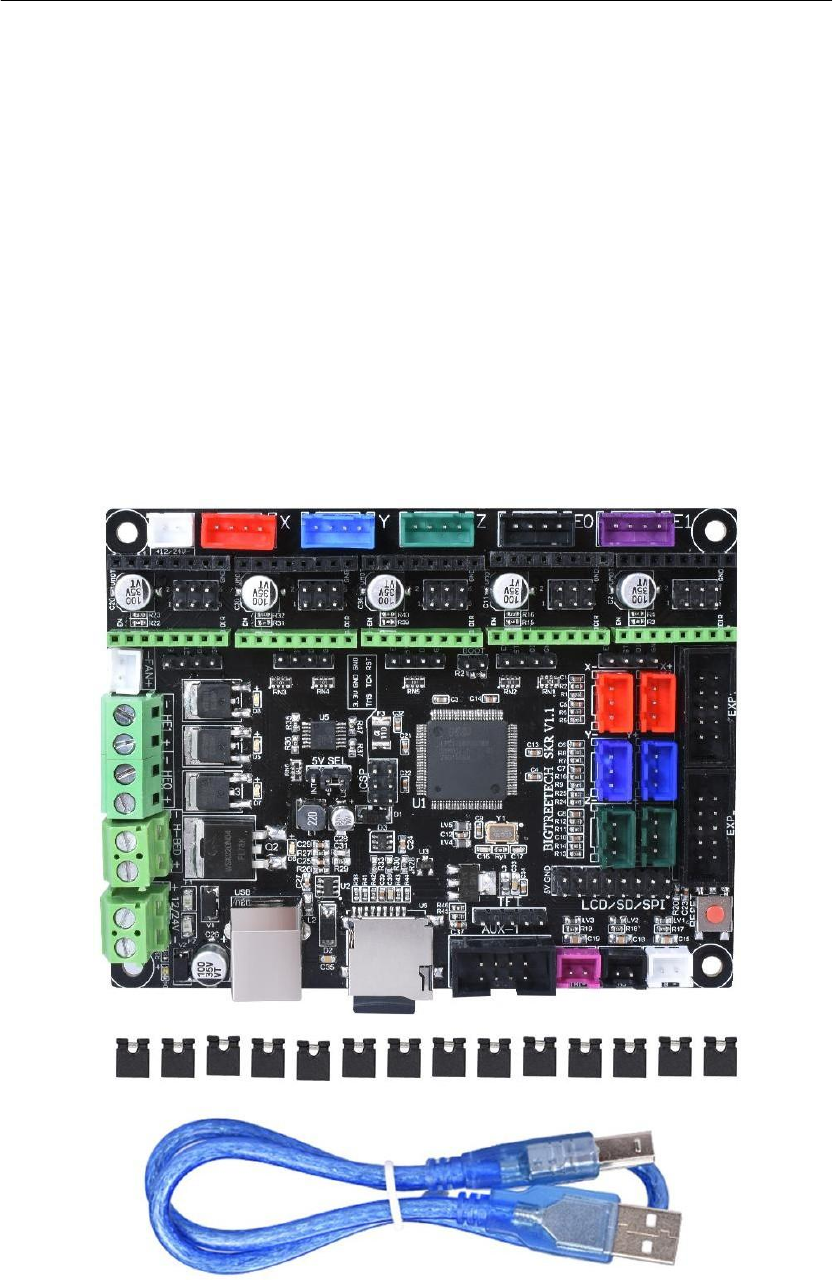
BIGTREETECH SKR V1.1 主板是深圳必趣科技有限公司 3D 打印
团队针对市面上主板存在的一些问题,推出的一款性价比很高的 3D
打印机主控板,特别适合中小型打印机使用。
BIGTREETECH SKR V1.1 motherboard is produce by ShenZhen
BigTree Technology CO.,LTD. .The team launched a cost-
effective 3D for some problems in the motherboards on the
market.
The SKR main board , especially suitable for small and
medium-sized printers.
Note : We have a small SD card for each motherboard.File
names cannot be changed in the SD card.
1.
SKR 主板特点:
1) 采用 32 位主频 100M 的 ARM 级 Cortex-M3 系列 LPC1768 主控芯片,性
能大幅提升;
2) 搭载高度模块化开源固件 Smoothieware,方便用户 DIY 及二次开发,免
除无法掌握核心代码的后顾之忧;
3) 使用强大的开发工具,Keil MDK 集成开发环境:支持在线调试,对产品
开发和性能优化更有帮助,采用 C 语言开发,开发门槛低;
4) PCB 板布线严谨美观,并专门做了散热优化处理;
5) 采用专用电源芯片,支持 12-24V 电源输入;
6) 可接受 24V 输入,同样功率下可以把热床电流减小到 1/4,有效解决热床
MOS 管发热问题;
7) 支持 2.8 寸、3.5 寸彩色触摸屏,支持 LCD12864 屏;
8) 系统支持中文简体、英文等语言,可自行切换;
9) 通过 SD 卡升级配置固件,操作简单方便;
10) 采用配置文件来设置驱动电流的方式,避免手动调节电流导致烧坏驱
动,方便,安全,可靠;
11) 支持断电续打、断料检测、打完关机等功能;
12) 采用高性能 MOSFET 管,散热效果更好。

深圳市必趣科技有限公司
BIG TREE TECH
Parameter Features:
1) ARM-class Cortex-M3 series LPC1768 master chip with 32-bit main
frequency 100M, Can be greatly improved;
2) Equipped with highly modular open source firmware Smoothieware,
convenient for users DIY and secondary development, do not worry about
the inability to master the core code of worries;
3) Using powerful development tools, Keil MDK integrated development
environment: support online debugging, more helpful for product
development and performance optimization, using C language development,
low development threshold.
4) PCB board wiring is rigorous and beautiful, and specializing in heat
dissipation optimization.
5) Using a dedicated power chip to support 12-24V power input;
6) Acceptable 24V input, the hot bed current can be reduced to 1/4 under
the same power, effectively solving the heating problem of the hot bed
MOS tube;
7) Support Disdplay : 2.8-inch, 3.5-inch color touch screen, LCD12864
screen;
8) The system supports Chinese simplified Chinese, English and other
languages, which can be switched by itself;
9) Upgrade the firmware by SD card, which is easy and convenient to
operate;
10) Use the configuration file to set the driving current mode, avoid
manual adjustment of the current to cause the burned drive, convenient,
safe and reliable;
11) High-performance MOSFET tube for better heat dissipation.
12)Support functions: Non-trace resumption after power off, run out
filament ,and auto shut down.
2.
SKR 主板参数:
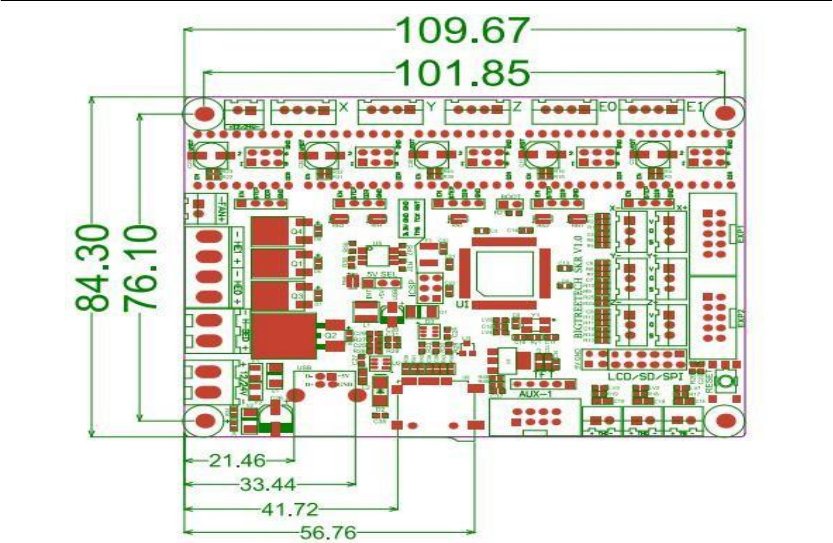
外观尺寸:110*85mm
安装尺寸:97mm*67mm
微处理器:ARM Cortex-M3 CPU
输入电压:DC12V-DC24V 5A-15A
电机驱动器:支持 TMC2208、TMC2130、LV8729、DRV8825、A4988
等,可单独外接电机驱动
电机驱动接口:X、Y、Z、E0、E1,五路(各路都有一个可再扩展接口),
最高可达 256 细分
温度传感器接口:TH0、TH1、TB,3 路 100K NTC(热电阻)
显示屏:2.8 寸 TFT、3.5 寸 TFT、LCD12864
PC 通信接口:方形 USB,方便插拔,通信波特率 115200
支持文件格式:G-code
支持机器结构:XYZ、delta、kossel、Ultimaker、corexy
推荐软件:Cura、Simplify3D、pronterface、Repetier-host、Makerware

深圳市必趣科技有限公司
BIG TREE TECH
Appearance size: 110*85mm Installation size: 97mm*67mm
Microprocessor: ARM Cortex-M3 CPU
Input voltage: DC12V-DC24V 5A-15A
Motor Driver: Supports TMC2208, TMC2130, LV8729, DRV8825, A4988
Etc., can be externally connected to the motor drive
Motor drive interface: X, Y, Z, E0, E1, five channels (each channel has a re-expandable
interface), up to 256 subdivisions
Temperature sensor interface: TH0, TH1, TB, 3 channels 100K NTC (thermal resistance)
Display: 2.8 inch TFT, 3.5 inch TFT, LCD12864
PC communication interface: square USB, easy to plug and unplug, communication
baud rate 115200
Support file format: G-code
Support machine structure: XYZ, delta, kossel, Ultimaker, corexy
Recommended software: Cura, Simplify3D, pronterface, Repetier-host, Makerware
深圳市必趣科技有限公司
BIG TREE TECH
二、SKR 主板通电
SKR 主板上电之后,左下角的 D4 红灯会亮起,表示供电正常;板子中部的
5V SEL 是电源选择端;
1) 当使用 USB 给主板供电时,需用短路帽连接+5V 和 USB 两脚;
2) 当使用 12V-24V 供电时,需用短路帽连接+5V 和 INT 引脚;
注:可同时接【12V-24V 电源】、【USB】,打印过程必须用短路帽连接+5V
和 INT 两脚。
After the SKR motherboard is powered on, the red light D4 in the
lower left corner will light up, indicating that the power supply is
normal; The middle of the board 5V SEL is the power supply selection
end;
1) when using USB to power the motherboard, short circuit cap
should be used to connect +5V and USB feet;
2) when 12v-24v power supply is used, short circuit cap shall be
used to connect +5V and INT pins;
Note: it can be connected to both [12v-24v power] and [USB] at
the same time. Short circuit cap must be used to connect +5V and INT
in the printing process.
三、SKR 主板与 PC 通信
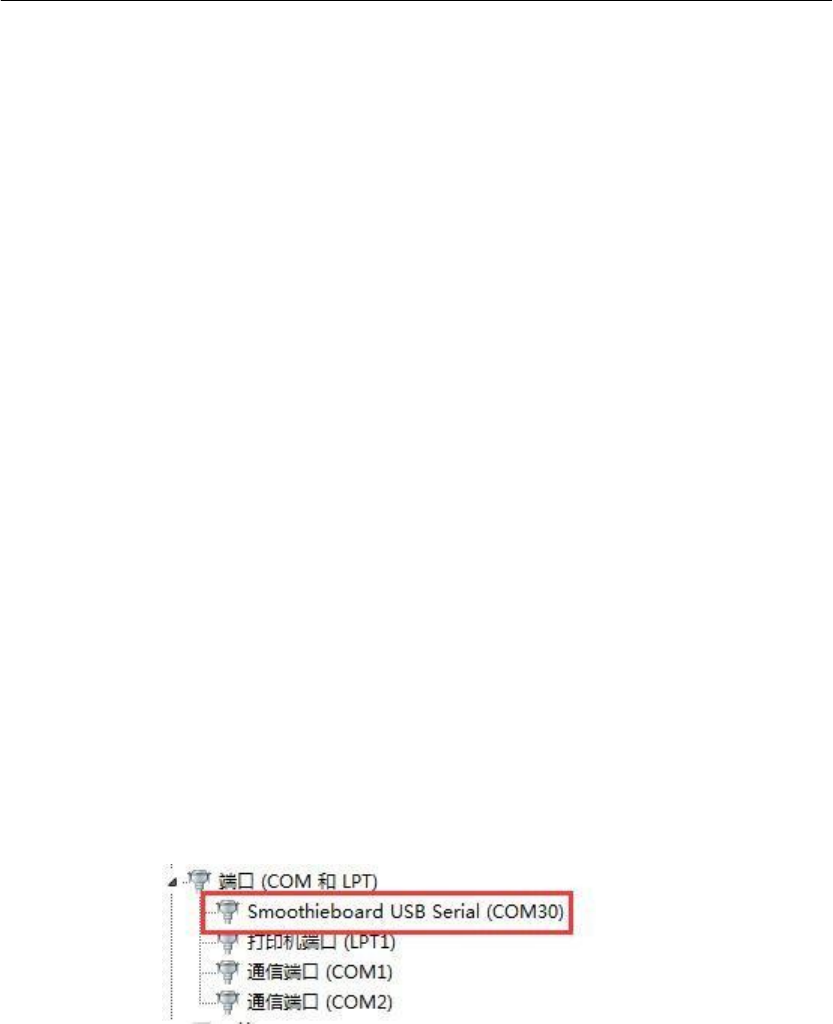
SKR 主板通过【USB】接口与 PC 通信,需要装驱动才能正常使用。
1. smoothieware-usb-driver-v1.1 驱动安装
驱动可从开源网 http://smoothieware.org/windows-drivers 获取;
2. 安装完驱动,用 USB 线连接 PC 和 SKR 主板
打开电脑“设备管理器”,可查看到“smoothieboard USB Serial”异步通信
口所属的 COM 号。
SKR motherboard through the [USB] interface and PC communication, need to
install the driver to use normally.
1. Smoothieware-usb-driver-v1.1 driver installation
Drivers are available from the open source web at
http://smoothieware.org/windows-drivers
2. After installing the driver, connect the PC and SKR motherboard with a USB
cable.
Open the computer "device manager", and you can see the COM number of
"smoothieboard USB Serial" asynchronous communication port.
四、SKR 主板接口说明
1. SKR 主板尺寸图
深圳市必趣科技有限公司
BIG TREE TECH
深圳市必趣科技有限公司
BIG TREE TECH
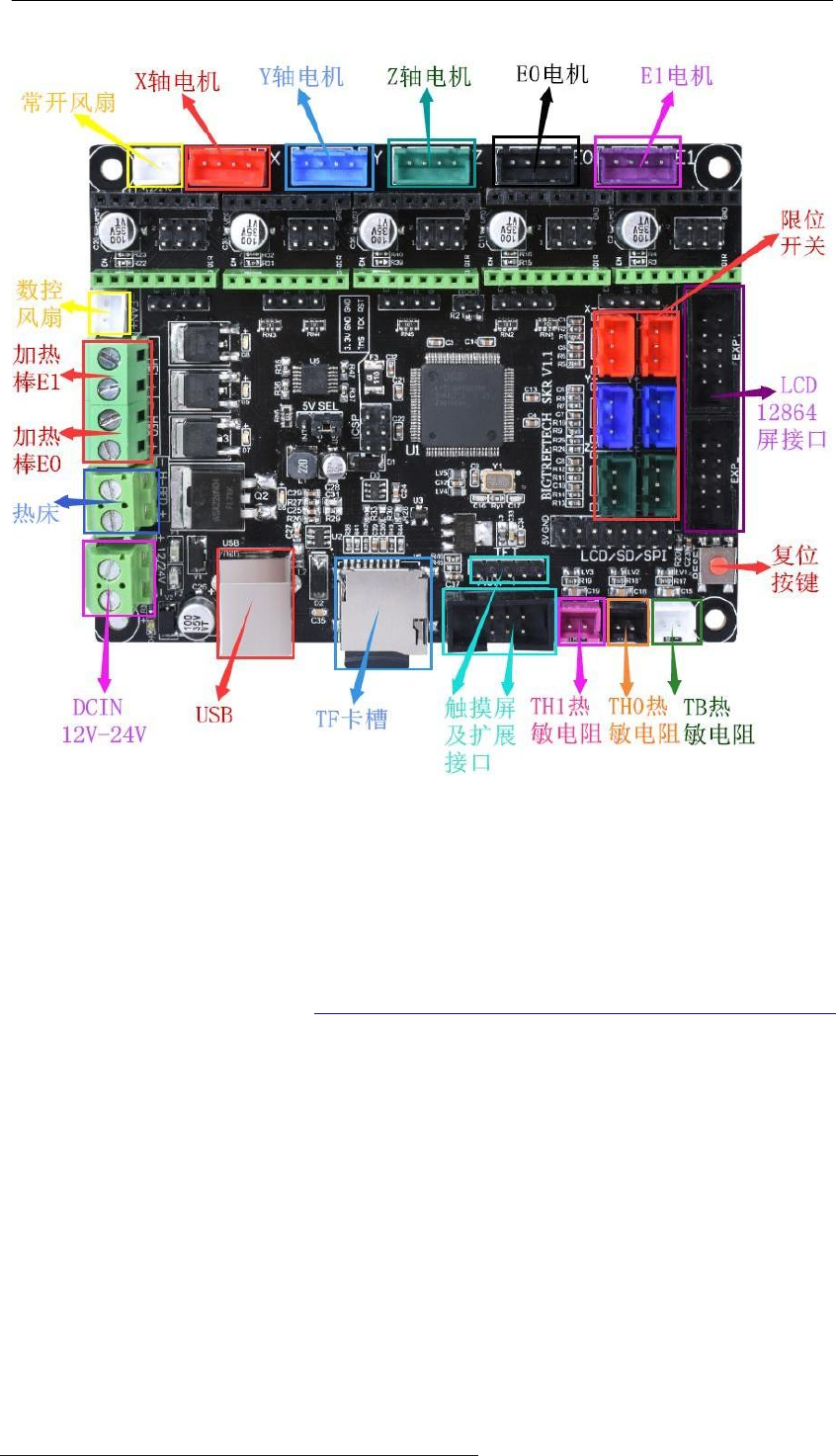
2. SKR 主板接线图
五、SKR 主板固件说明
出厂的主板里会装有测试使用的固件(I3 机型),可以直接使用,也可根据己
需自行更改。
1. SKR 主板固件获取方式
问客服或者技术人员获取;
登录开原网址进行下载:https://github.com/Smoothieware/Smoothieware
2. SKR 主板固件更新方法
1) 在下载好的固件包中选择适合自己机型的文件拷贝到SD 卡根目录,包括:
①固件 firmware.bin(根据自己机型进行选择)
②配置文件 config.txt(可根据自己需求自行更改配置)配置文件中的详
细功能选项可参考开原网址:http://smoothieware.org/configuration-options
注:不可更改文件名,firmware.bin 必须为小写!
2) 将 SD 卡插入主板 SD 卡槽中,重新上电或者按一下复位键,等约 10S 之
后即可更新完成;
Our motherboard will be equipped with firmware (I3 model) for testing, which can be used
directly or can be changed according to your own needs
1.The SKR motherboard firmware access method:
Log on to the open source site to download:
https://github.com/Smoothieware/Smoothieware

深圳市必趣科技有限公司
BIG TREE TECH
2.2. Firmware update method of SKR motherboard
1) select the file suitable for your model from the downloaded firmware package and copy it to
the SD root directory, including:
(1) firmware. bin (all that can be decided based on your own machine)
(2)Configuration file config.txt (you can change the configuration according to your own needs)
The details of the configuration file can be referenced in the open source web address:
http://smoothieware.org/configuration-options
Note: file names cannot be changed, firmware. bin must be lowercase!
We do not recommend using the tmc2130 spi on this board. If you really need to use spi on this
board, you need to change the firmware by yourself, and we do not have relevant firmware to
provide. In order to make it more comfortable for you to use, please directly use the STP/DIR
mode of tmc2130

深圳市必趣科技有限公司
BIG TREE TECH
六、注意事项:
1.
主板 5V SEL 必须连接INT 和+5V 两个引脚,方可进行
打印(即必须有 12V-24V 电源给主板供电才能进行打印);
2.
主板所接热床功率必须小于等于 110W(即热床电阻值
大于 1.3Ω),要是用大功率热床时,必须外接热床功率扩
展板;
3.
SD 卡中的固件文件名字不可更改(包括大小写);
4.
接线过程和插驱动过程必须是在断电前提下进行,在检
查线路正确连接及驱动正确插入后方可上电,防止接错线导
致主板和驱动被烧毁,造成不必要的损失;
5.
若要更换配置文件,请将出厂的配置文件备份,以记录
各
部分芯片引脚标号,然后对新的配置文件进行更改!
Attention:
1. 5V SEL of the motherboard must connect INT and +5V
pins before printing (that is, 12v-24v power supply must
be provided to the motherboard before printing);
2. Hot bed board receive power must be less than or
equal to 110 w (that is, the hot bed resistance is
greater than 1.3 Ω), if with high power hot bed, have
to external thermal power expanded bed plate;
3. The wiring process and plug-in driving process must
be carried out under the premise of power failure. The
power can be turned on after checking the correct

深圳市必趣科技有限公司
BIG TREE TECH
connection of the line and the correct insertion of the
drive, so as to prevent the wrong connection of the line
from burning the motherboard and drive and causing
unnecessary losses;
4.If you want to change the configuration file, backup
the factory configuration file to record the pin number
of each part of the chip, and then make changes to the
new configuration file.
FAQ
Q:电脑无法识别 SKR 主板?
A:检查是否安装 smoothieware-usb-driver-v1.1 驱动,可上
开原网址自
行下载安装,安装好后,用 USB 线连接电脑和 SKR 主板即可。
Q:更改配置文件后,插入主板,固件未能更新成功?
A:查看 SD 卡中的 firmware.bin 文件的格式是否正确,且是
否为
小写、文件名是否正确。
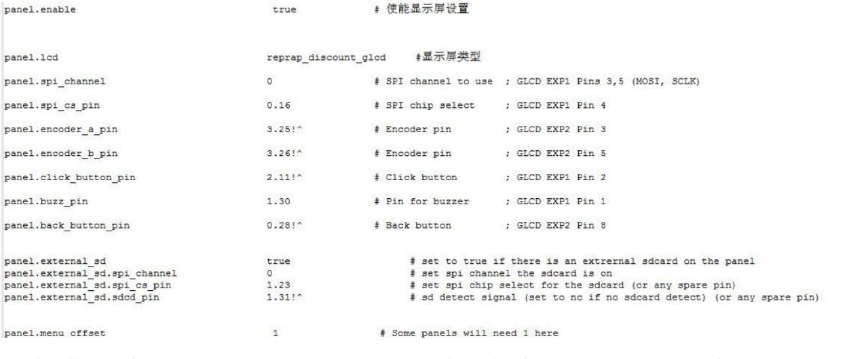
Q:自己更换配置文件后,LCD12864 屏无法显示?
A:在配置文件中找到屏幕的配置信息,对照下面的进行更改
深圳市必趣科技有限公司
BIG TREE TECH
Q: the computer cannot recognize the SKR motherboard?
A: check whether smoothieware-usb-driver-v1.1 driver is
installed. You can download and install it on the open
source website. After installation, connect the computer
and SKR motherboard with usb cable.
Q: after changing the configuration file and inserting
the motherboard, the firmware failed to be updated
successfully?
A: check that the SD card's firmware.bin file is all in
the right format, and that it is
Lowercase, filename is correct.
Q: after changing the configuration file by yourself,
the LCD12864 screen cannot be displayed?
A: find the screen configuration information in the
configuration file and make changes against the
following
