SW VMAN Datasheet
User Manual:
Open the PDF directly: View PDF  .
.
Page Count: 5
page 1
VIRTUALIZATION MANAGER 7.1
SolarWinds® Virtualization Manager delivers integrated VMware® vSphere® and Microsoft®
Hyper-V
® recommendations, capacity planning, performance monitoring, VM sprawl
control, VDI performance monitoring, conguration management, alert remediation, and
chargeback automation—all in one aordable product that’s easy to download, deploy,
and use. Start remediating your VM performance typically in about an hour.
Download a free product trial
and start monitoring your
network typically in about
an hour.
VIRTUALIZATION MANAGER AT A GLANCE
»Actionable intelligence provides recommendations for optimal server performance and
placement
»Use real-time dashboards to easily identify and troubleshoot performance, capacity, and
conguration problems
»Identify VM sprawl, which helps you reclaim and optimize space
»Monitor and manage your Amazon EC2® and EBS instances from the same console as your
on-premises virtualization environment
»Integrate with Server & Application Monitor for complete visibility of the application stack—from
app to VM to datastore—on the Orion® Platform interface
»Use baseline thresholds for alerting on performance discrepancies on clusters, hosts, VMs,
and datastores
»Help eliminate frequent logins into vCenter™ and take action within Virtualization Manager
DATASHEET
Comprehensive virtualization management for VMware vSphere and
Microsoft Hyper-V
Fully Functional for 30 Days
DOWNLOAD FREE TRIAL

page 2
DATASHEET: VIRTUALIZATION MANAGER
FEATURES
Actionable Intelligence
Provides active or predictive performance and placement recommendations that can be run
immediately, or scheduled to run at a select time.
Heterogeneous virtualization management
Manage both VMware vSphere and Microsoft Hyper-V environments through a single pane of glass.
Virtualization performance monitoring and management
Proactively monitor and analyze virtualization-specic performance problems in vSphere and
Hyper-V environments.
Full application stack visibility and contextual awareness
The AppStack™ dashboard will give you contextual awareness of the performance and mapping
of your applications and their dependence from the virtualization and storage layers.
Performance and data metric correlation
Using the PerfStack™ dashboard, you can cross-stack performance data and metrics across
your virtualization, storage, applications, systems, and networks systems, allowing for quicker
problem identication.
Virtualization management actions
Integration with the Orion Platform gives you virtualization management actions, such as power
on/o, suspend, and reboot a VM, as well as the ability to take and delete snapshots.
Migration management actions
With VMware vSphere Storage vMotion®, you can migrate VMs to a dierent host. Also, VM disks
can be migrated to a dierent data store or shared cluster volume using Storage vMotion.
Intelligent script-based automation
Execute management actions through customized scripts for maximum optimization of virtualized
resources.
Alert remediation
Congure an alert to trigger a management action based on set thresholds.
Enhanced virtualization metrics
Integration with the Orion Platform gives you more VM metrics data. Get access to features in
the Orion Platform, such as role-based access control, web-based reporting, alerting, improved
virtualization management, and a synchronization wizard.
VDI performance monitoring and management
Monitor Virtual Desktop Infrastructure (VDI) performance, quickly troubleshoot issues, and easily
plan VDI rollouts.
Fully Functional for 30 Days
DOWNLOAD FREE TRIAL

page 3
DATASHEET: VIRTUALIZATION MANAGER
VM rightsizing and capacity planning
Manage, plan, and optimize VMware vSphere and Microsoft Hyper-V virtual infrastructure capacity.
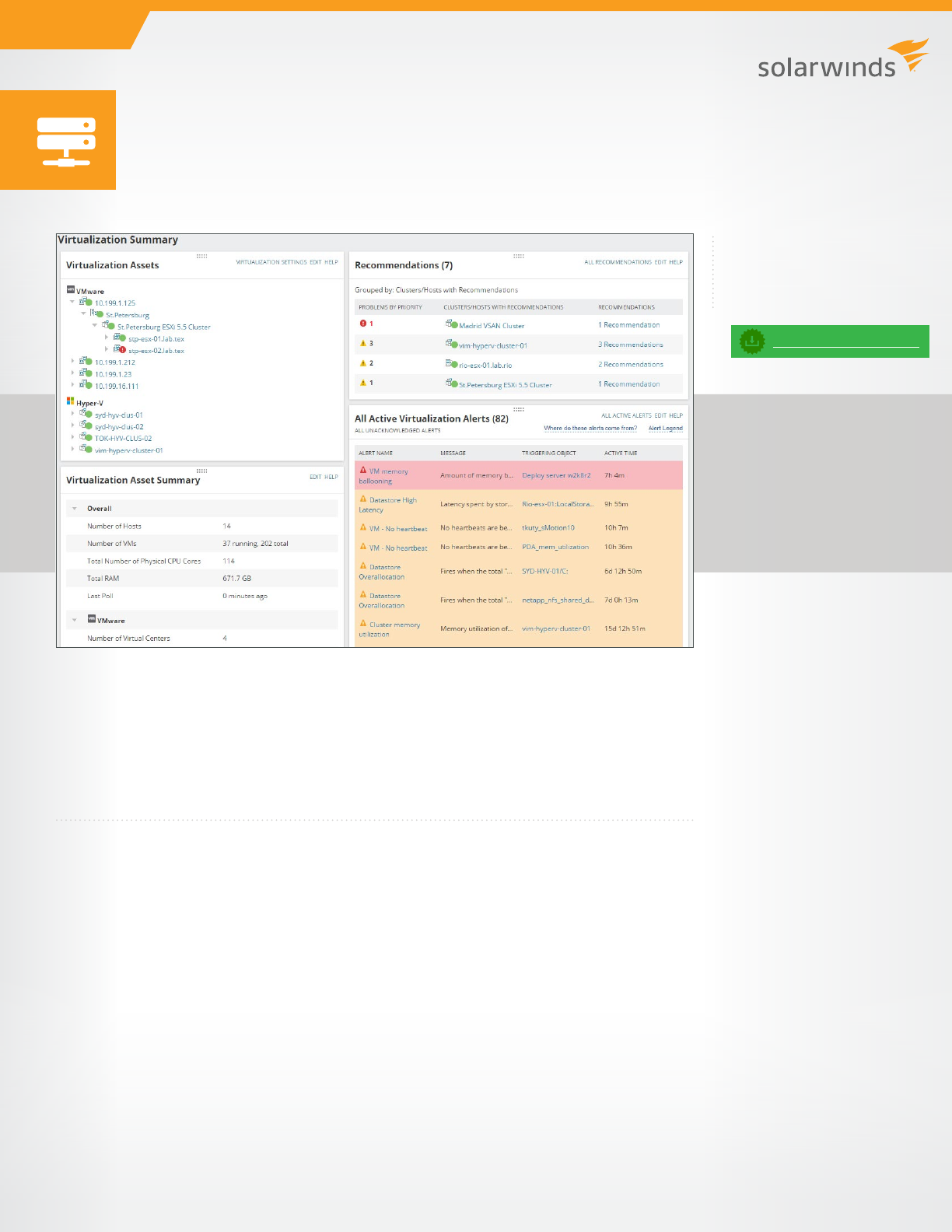
Virtualization dashboards
Get at-a-glance insight into the performance, capacity, conguration, and usage of your virtualized
infrastructure.
VM sprawl control
Find stale, zombie, and overallocated VMs, add or remove CPU and RAM, and delete orphaned
VMDKs.
Virtualization performance alerts
Quickly discover and act on performance issues using flexible, out-of-the-box alerts within
Virtualization Manager. It triggers alerts when a VM fails to respond during the expected interval.
Integrating with the Orion Platform allows you to set dynamic thresholds from baselines, and
receive alerts when your virtual appliance is about to reach warning or critical states.
Virtualization conguration management
Track VM and host congurations over time to determine if your virtual environment conguration
is performing optimally.
Virtualization dependency mapping and historical forensics
Map dependencies and perform forensic troubleshooting and problem analysis.
Virtualization chargeback and showback automation
Govern chargeback/showback IT, infrastructure, and cloud services.
INTEGRATES WITH APPLICATION STACK MANAGEMENT BUNDLE
Integration with SolarWinds Server & Application Monitor
When you integrate Virtualization Manager with SolarWinds Server & Application Monitor, you can
see a dashboard view of the health and status of your applications, as well as all dependent virtual
server, host, cluster, and datastore information that supports the application and its virtual server.
Integration with SolarWinds Web Performance Monitor
When you integrate Virtualization Manager with SolarWinds Web Performance Monitor, you can
see a dashboard view of the user experience and overall performance of internal (CRM, ERP,
intranet) and customer-facing web applications. Drill into website load times and page load speed
by location, waterfall charts for heaviest page elements, and more.
Integration with SolarWinds Storage Resource Monitor
Virtualization Manager integrates with SolarWinds Storage Resource Monitor to give you a more
detailed view of your virtual disks. You can drill through a datastore all the way to the LUN and
array level.
Fully Functional for 30 Days
DOWNLOAD FREE TRIAL
page 4
DATASHEET: VIRTUALIZATION MANAGER
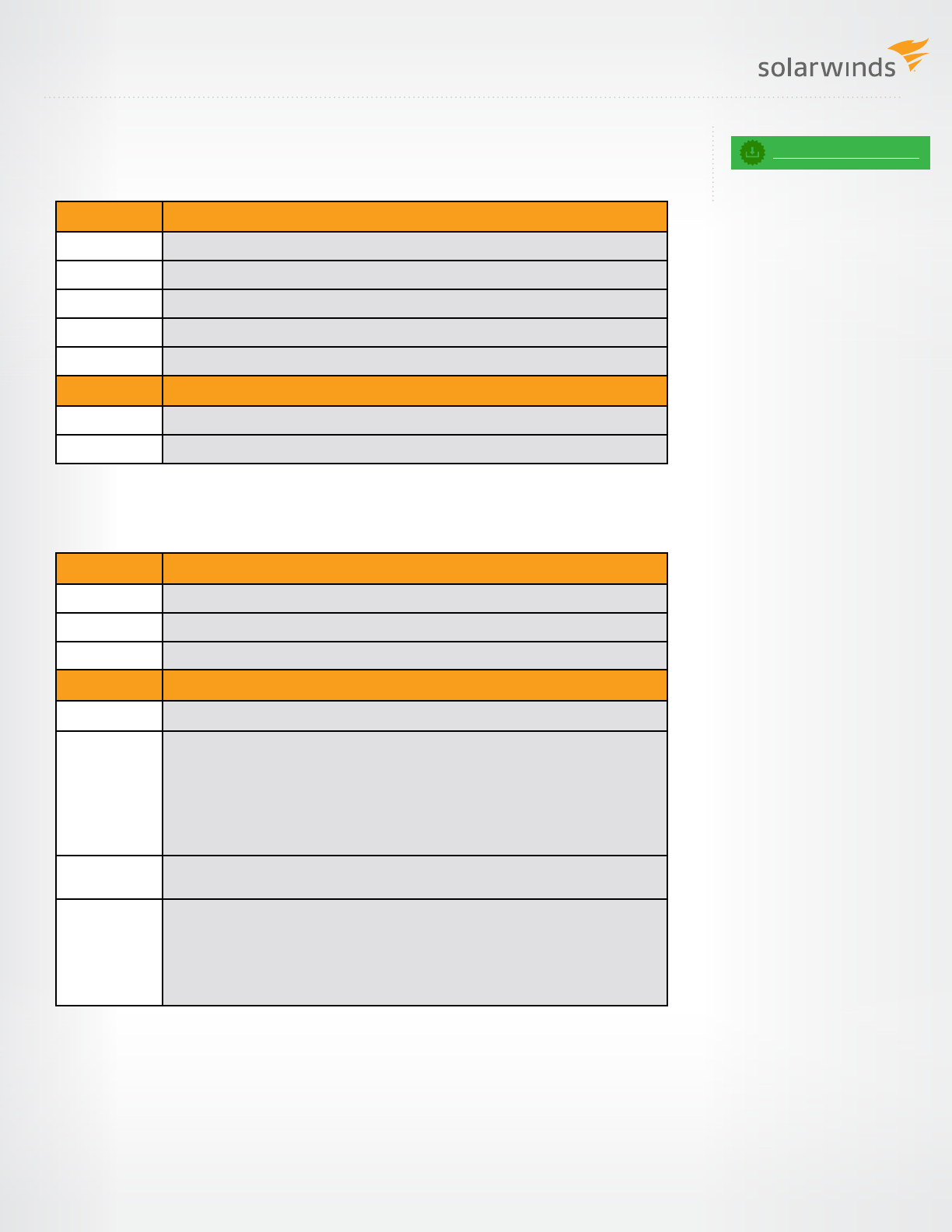
SYSTEM REQUIREMENTS
Virtual Appliance
Orion Server
NOTE: The minimum server requirements listed assume default conguration. Signicantly increasing
the poll rate or statistic collection rate could result in additional load on the server, which may require
a larger CPU or additional memory.
Fully Functional for 30 Days
DOWNLOAD FREE TRIAL
hardware minimum requirements
CPU 2GHz quad-core
Virtual CPU 4 vCPU
Memory 8GB + RAM minimum recommended
Hard Drive 200GB + free disk space (thin provision by default for VMware)
Other Virtual appliance-based installation
software minimum requirements
OS Runs on VMware vSphere v6.x, v5.x, or Microsoft Hyper-V 2008/2012
Database Integrated with virtual appliance
hardware minimum requirements
CPU 2.4GHz quad-core
Memory 4GB + RAM minimum recommended
Hard Drive 4GB free disk space minimum
software minimum requirements
OS Windows® Server® 2008 R2 SP1, 2012, 2012 R2
Database Supports Express, Standard, or Enterprise versions of the following:
• SQL Server® 2008, 2008 SP1, 2008 SP2, 2008 SP3, or 2008 SP4
• SQL Server 2008 R2, 2008 R2 SP1, 2008 R2 SP2, or 2008 R2 SP3
• SQL Server 2012, 2012 SP1, 2012 SP2, or 2012 SP3
• SQL Server 2014, or 2014 SP1
• SQL Server 2016
.Net
Framework
.NET 4.5 required
Web Console
browser
• Microsoft® Internet Explorer® version 11 or later with active scripting
• Microsoft Edge®
• Mozilla® Firefox® version 38 or later
• Google® Chrome® version 51 or later
• Safari® for iPhone®
For additional information, please contact SolarWinds at 866.530.8100 or e-mail sales@solarwinds.com.
To locate an international reseller near you, visit http://www.solarwinds.com/partners/reseller_locator.aspx
AMERICAS
Phone: 866.530.8100
Fax: 512.857.0125
E-mail: sales@solarwinds.com
EMEA
Phone: +353 21 5002900
Fax: +353 212 380 232
E-mail: sales@solarwinds.com
APAC
Tel : +65 6593 7600
Fax : +65 6593 7601
E-mail: sales@solarwinds.com
LEARN MORE
7171 Southwest Parkway | Building 400 | Austin, Texas 78735
For product information about SolarWinds products, visit solarwinds.com, call, or email:
© 2017 SolarWinds Worldwide, LLC. All rights reserved.
The SolarWinds, SolarWinds & Design, Orion, and THWACK trademarks are the exclusive property of SolarWinds Worldwide, LLC or its aliates,
are registered with the U.S. Patent and Trademark Oce, and may be registered or pending registration in other countries. All other SolarWinds
trademarks, service marks, and logos may be common law marks or are registered or pending registration. All other trademarks mentioned herein
are used for identication purposes only and are trademarks of (and may be registered trademarks) of their respective companies.
DATASHEET: VIRTUALIZATION MANAGER
TRY BEFORE YOU BUY. DOWNLOAD A FREE TRIAL!
Don’t just take our word for it. At SolarWinds, we believe you should try our software before you
buy. That’s why we oer free trials that deliver full product functionality. Simply download and
install the software, and take a break while SolarWinds Server & Application Monitor discovers
your applications and servers. When you get back, your application and server monitoring
environment will be waiting for you, complete with out-of-the-box dashboards, alerts, reports,
and more!
ABOUT SOLARWINDS
SolarWinds provides powerful and aordable IT management software to customers worldwide,
from Fortune 500® enterprises to small businesses, managed service providers (MSPs), government
agencies, and educational institutions. We are committed to focusing exclusively on IT, MSP, and
DevOps professionals, and strive to eliminate the complexity that our customers have been
forced to accept from traditional enterprise software vendors. Regardless of where the IT asset
or user sits, SolarWinds delivers products that are easy to nd, buy, use, maintain, and scale while
providing the power to address key areas of the infrastructure from on-premises to the cloud.
This focus and commitment to excellence in end-to-end hybrid IT performance management has
established SolarWinds as the worldwide leader in both network management software and MSP
solutions, and is driving similar growth across the full spectrum of IT management software. Our
solutions are rooted in our deep connection to our user base, which interacts in our THWACK®
online community to solve problems, share technology and best practices, and directly participate
in our product development process. Learn more today at www.solarwinds.com.
Fully Functional for 30 Days
DOWNLOAD FREE TRIAL
