Sparc Manual
User Manual:
Open the PDF directly: View PDF  .
.
Page Count: 26
SPARC manual
September 25, 2018
Contents
1 System installation 2
2 System usage 2
2.1 Queryingmode .................................. 4
2.2 AnswerSetMode................................. 5
3 Command Line Options 5
4 Syntax Description 6
4.1 Directives ..................................... 6
4.2 Sortdefinitions .................................. 7
4.3 PredicateDeclarations .............................. 10
4.4 ProgramRules................................... 10
4.5 Display (New!) ................................... 11
5 Answer Sets 12
6 Typechecking 13
6.1 Typeerrors..................................... 13
6.1.1 Sort definition errors . . . . . . . . . . . . . . . . . . . . . . . . . . . 13
6.1.2 Predicate declarations errors . . . . . . . . . . . . . . . . . . . . . . 15
6.1.3 Program rules errors . . . . . . . . . . . . . . . . . . . . . . . . . . . 16
6.2 Typewarnings................................... 16
6.2.1 ASP based warning checking . . . . . . . . . . . . . . . . . . . . . . 16
6.2.2 Constraint solver based warning checking . . . . . . . . . . . . . . 17
7SPARC and ASPIDE 19
7.1 Installation..................................... 19
7.2 Creating Projects and Adding SPARC source files . . . . . . . . . . . . . . 20
7.3 Executing queries and computing Answer sets . . . . . . . . . . . . . . . . 21
7.4 WarningsChecking................................ 24
1

1 System installation
For using the system, you need to have the following installed:
1. Java Runtime Environment (JRE) can be found at
http://www.oracle.com/technetwork/java/javase/downloads/jre8-downloads-2133155.html .
Java versions 1.8.0 181 or higher is required.
2. The SPARC to ASP translator. It can be downloaded at
https://github.com/iensen/sparc/blob/master/sparc.jar?raw=true .
3. An ASP solver. It can be one of the following:
(a) Clingo (recommended) https://github.com/potassco/clingo/releases .
(b) DLV http://www.dlvsystem.com/dlv/#1 . You need to download the static version
of the executable file.
4. (optional) Swi-Prolog. http://www.swi-prolog.org/. This item is only required if option
-wcon is used for type warning detection. (See sections 3 and 6.2.2).
If you are using the dlv solver, rename the solver executable file to dlv (dlv.exe for win-
dows).
Be sure the PATH system variable includes the directory where the solver executable
is located. For instructions on how to view/modify the PATH system variable, see ei-
ther of the following links:
http://www.java.com/en/download/help/path.xml
http://www.cyberciti.biz/faq/appleosx-bash-unix-change-set-path-environment-variable/
To check if the solver is installed correctly, run the command dlv -v (for dlv) or
clingo -v (for clingo). See figures 1 for dlv and 2 for clingo for examples of the ex-
pected output.
2 System usage
To demonstrate the usage of the system we will use the program Πbelow.
sorts
#person={bob,tim,andy}.
predicates
teacher(#person).
rules
teacher(bob).
The system can work in one of the two modes: querying mode and answer set mode.
2
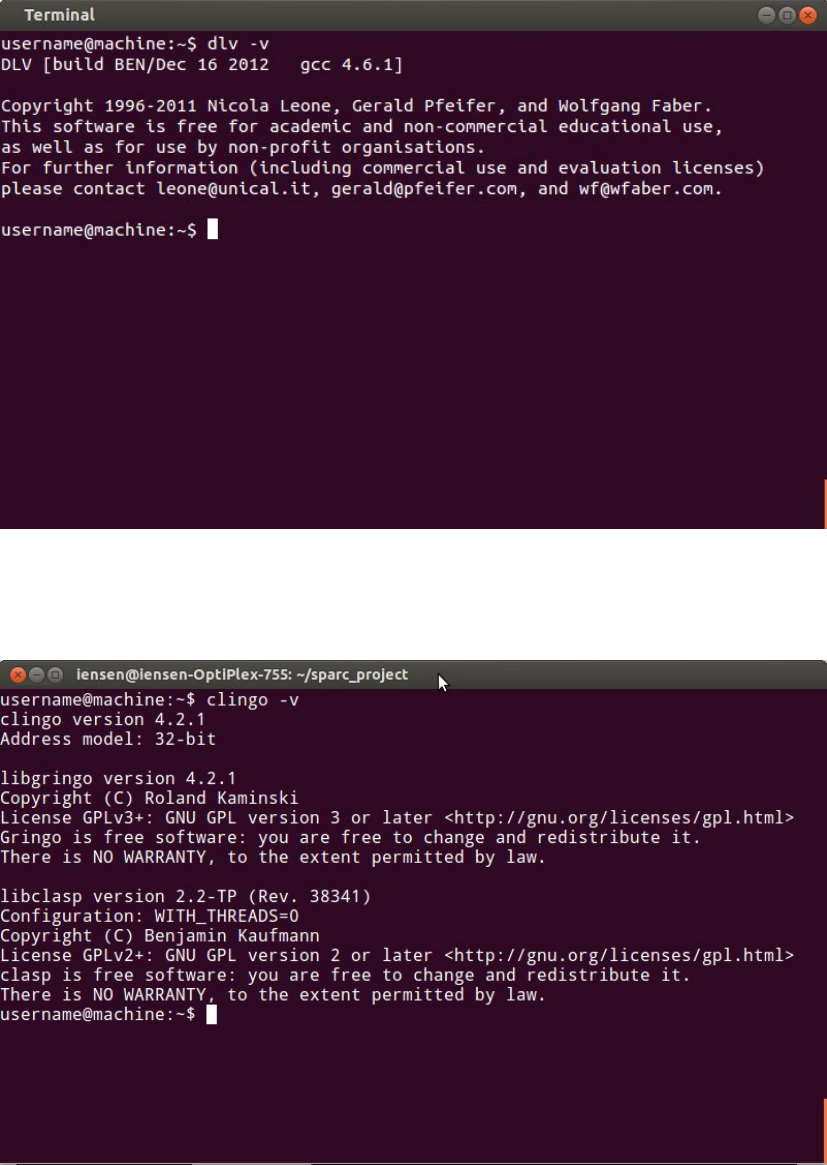
Figure 1: Checking the version of DLV solver
Figure 2: Checking the version of Clingo solver
3

2.1 Querying mode
In this mode we can ask queries about a SPARC program loaded into the system. The
general command line syntax for this mode is java -jar sparc.jar program file. Queries in
SPARC are positive or negative literals of the forms p(t1, t2, . . . , tn)or −p(t1, t2, . . . , tn)
correspondingly, where p(t1, t2, . . . , tn)is an atom of the loaded program Π( note that
ncan be equal to zero, in this case the query will be of the form por -p ).
The queries are answered as follows:
•The answer to a query lnot containing variables is yes, if l(with all arithmetic
expressions evaluated) belongs to all answer sets of Π.
•The answer to a query lnot containing variables is no, if −l(with double classical
negation removed and all arithmetic expressions evaluated) belongs to all answer
sets of Π.
•The answer to a query lnot containing variables is unknown, if it is not yes or no.
•The answer to a query of the form l(lis an atom of the form p(t1, . . . , tn)possibly
preceeded by a negation sign) is a collection of assignments X1=t1, . . . , Xn=
tn, where X1, . . . , Xnare all variables in p(t1, . . . , tn),t1, . . . , tnare ground terms,
and the answer to the query p(t10, . . . , tn0), obtained from p(t1, . . . , tn)by replacing
each variable Xiby a ground term ti, is yes.
To run SPARC on the program above, we change current directory to a directory
having the file program.sp with the program written in it, and the downloaded file
sparc.jar. Then, we run the command:
username@machine:˜$ java -jar sparc.jar program.sp
SPARC V2.25
program translated
?- teacher(bob).
yes
?- teacher(tim).
unknown
?- teacher(X).
X = bob
?- teacher(john).
program.sp: argument number 1 of predicate teacher/1, "john",
violates definition of sort "person"
?-exit.
The answer to the first query ?- teacher(bob) is yes, because the atom teacher(bob)
belongs to the only answer set of Π.
The answer to the second query ?- teacher(tim) is unknown, because neither the
atom teacher(bob) nor its negation belongs to the answer set of Π.
4

The answer to the query ?- teacher(X) is X = bob, because there is only one re-
placement (bob) for X, such that teacher(X) belongs to the answer set of Π.
For the fourth query, we see an error, because teacher(john) is not an atom of Π.
To quit the querying engine, use exit command.
2.2 Answer Set Mode
In this mode we can see the computed answer sets of the loaded program. The general
command line syntax for this mode is java -jar sparc.jar program file -A.
For the program Π, the answer set may be computed as it is shown below:
username@machine:˜$ java -jar sparc.jar program.sp -A
SPARC V2.25
program translated
DLV [build BEN/Dec 16 2012 gcc 4.6.1]
{teacher(bob)}
3 Command Line Options
In this section we describe the meanings of command line options supported by SPARC.
Some options(flags) do not take an argument and have the form -option, while others re-
quire arguments and can be written in the form -option arg. For each command line
option, we indicate whether it requires an argument, and if so, we describe its meaning.
•-A
Compute answer sets of the loaded program.
•-wcon
Show warnings determined by CLP-based algorithm. See section 6.2.2
•-wasp 1Show warnings determined by ASP-based algorithm. See section 6.2.1
•-solver arg Specify the solver which will be used for computing answer sets. arg
can have two possible values: dlv and clingo.
•(new!)-n [number]
Specify how many answer sets need to be displayed. This option can only be used
with option -A.
Examples:
•-n 2 will display exactly one answer sets.
1This option is temporary not working, use -wcon instead
5

•-n 0 will display all the answer sets.
For the complete list of dlv options, see http://www.dlvsystem.com/html/DLV_User_Manual.
html
For the complete list of clingo options, see http://sourceforge.net/projects/potassco/
files/potassco_guide/ Note that the option ”0” is passed to clingo solver by default
to compute all the answer sets of the program. Also, for programs containing
CR-rules, the options "--opt-mode=optN --quiet=1" are passed to clingo to
ensure correct output.
•-Help, -H, -help, –Help, –help, -h
Show help message.
•-o arg
Specify the output file where the translated ASP program will be written. arg is
the path to the output file. Note that if the option is not specified, the translated
ASP program will not be stored anywhere.
•input file
Specify the file where the sparc program is located.
4 Syntax Description
4.1 Directives
Directives should be written before sort definitions, at the very beginning of a program.
SPARC allows two types of directives:
#maxint
Directive #maxint specifies the maximum nonnegative number that could be used in
arithmetic calculations. For example,
#maxint=15.
limits integers to [0,15].
#const
Directive #const allows one to define constant values. The syntax is:
#const constantName = constantValue.
where constantName must begin with a lowercase letter and may be composed of let-
ters, underscores and digits, and constantV alue is either a nonnegative number or the
name of another constant defined before it.
6

4.2 Sort definitions
This section starts with a keyword sorts followed by a collection of sort definitions of
the form:
sort name =sort expression.
sort name is an identifier preceeded by the pound sign (#). sort expression on the right
hand side denotes a collection of strings called a sort. We divide all the sorts into basic
sorts and non-basic sorts.
Basic sorts are defined as named collections of numbers and identifiers, i.e, strings con-
sisting of
•letters: {a, b, c, d, ..., z, A, B, C, D, ..., Z}
•digits: {0,1,2, ..., 9}
•underscore:
and starting with a lowercase letter.
Anon-basic sort also contains at least one record of the form id(α1, . . . , αn)where id is
an identifier and
α1, . . . , αnare either identifiers, numbers or records.
We define sorts by means of expressions (in what follows sometimes referred to as state-
ments) of six types:
1. numeric range is of the form:
number1..number2
where number1and number2are non-negative numbers such that number1≤number2.
The expression defines the set
of sequential numbers
{number1, number1+ 1, . . . , number2}.
Example:
#sort1=1..3.
#sort1 consists of numbers {1,2,3}.
7

2. identifier range is of the form:
id1..id2
where id1and id2are identifiers both starting with a lowercase letter.
id1should be lexicographically 2smaller than or equal to id2, and the length of id1
must be less than or equal to the length of id2. That is, id1≤id2and |id1| ≤ |id2|.
The expression defines the set of strings {s:id1≤s≤id2∧ |id1|≤|s|≤|id2|}.
Example:
#sort1=a..f.
#sort1 consists of letters {a, b, c, d, e, f}.
3. set of ground terms is of the form:
{t1, .., , tn}
The expression denotes a set of ground terms {t1, ..., tn}, defined as follows:
•numbers and identifiers are ground terms;
•If fis an identifier and α1, . . . , αnare ground terms, then f(α1, . . . , αn)is a
ground term.
Example:
#sort1={f(a),a,b,2}.
4. set of records is of the form:
f(sort name1(var1), ..., sort namen(varn)) : condition(var1, ..., varn)
where fis an identifier, for 1≤i≤m sort nameioccurs in one of the pre-
ceeding sort definitions and the condition on variables var1, ..., varn(written as
condition(var1, ..., varn)) is defined as follows:
•if variand varjoccur in the sequence var1, ..., varnand is an element of
{>, <, ≤,≥}, then varivarjis a condition on var1, ..., varn.
•if C1and C2are both conditions on var1, ..., varn, and ⊕is an element of {∪,∩},
then (C1⊕ C2)is a condition on var1, ..., varn.
•if Cis a condition on var1, ..., varn, then not(C)is also a condition on var1, ..., varn.
2The system default encoding is used for ordering of individual characters
8

Variables var1, ..., varnoccurring in parenthesis after sort names are optional as
well as the condition :condition(var1, ..., varn).
If a condition contains a subcondition varivarj, then the sorts sortnameiand
sortnamej
must be defined by basic statements (the definition of a basic statement is given
below after the definition of a concatenation statement).
The expression defines a collection of ground terms
{f(t1, . . . , tn) : t1∈si∧ · · · ∧ tn∈sn∧(condition(X1, . . . , Xn)|X1=t1,...,Xn=tn)}
Example
#s=1..2.
#sf=f(s(X),s(Y),s(Z)): (X=Y or Y=Z).
The sort #sf consists of records {f(1,1,2), f(1,1,1), f(2,1,1)}
5. set-theoretic expression can be in one of the following forms:
•#sort name
•an expression of the form (3), denoting a set of ground terms
•an expression of the form (4), denoting a set of records
•(S15S2), where 5∈{+,−,∗} and both S1and S2are set theoretic expressions
#sort name must be a name of a sort occurring in one of the preceeding sort def-
initions. The operations +∗and −stand for union, intersection and difference
correspondingly.
Example :
#sort1={a,b,2}.
#sort2={1,2,3} + {a,b,f(c)} + f(#sort1).
#sort2 consists of ground terms {1,2,3, a, b, f(c), f (a), f (b), f(2)}.
6. concatenation is of the form
[b stmt1]...[b stmtn]
b stmt1, . . . , b stmtnmust be basic statements, defined as follows:
•statements of the forms (1)-(3) are basic
•statement Sof the form (5) is basic if:
–it does not contain sort expressions of the form (4), denoting sets of records
–none of curly brackets occurring in Scontains a record
9

–all sorts occurring in Sare defined by basic statements
Note that basic statement can only define a basic sort.
Example3.:
#sort1=[b][1..100].
sort1 consists of identifiers {b1, b2, . . . , b100}.
4.3 Predicate Declarations
The second part of a SPARC program starts with the keyword predicates
and is followed by statements of the form
pred symbol(#sortN ame1,...,#sortN amen)
Where pred symbol is an identifier (in what follows referred to as a predicate sym-
bol) and #sortName1,...,#sortN amenare sorts defined in sort definitions section of the
program.
Multiple declarations containing the same predicate symbol are not allowed. 0-arity
predicates must be declared as pred symbol(). For any sort name #s, the system in-
cludes declaration #s(#s)automatically.
4.4 Program Rules
The third part of a SPARC program starts with the keyword rules followed by standard
ASP rules(supported by the specified ASP solver 4) , possibly enchanced by arithmetic
expressions of arbitrary depth (e.g, p(X*X*X*X+1).) and/or consistency restoring (cr)-
rules. CR-rules are of the following form:
[label :]l0
+
←l1, . . . , lk, not lk+1 . . . not ln.(1)
where l’s are literals. Literals occurring in the heads of the rules must not be formed by
predicate symbols occurring as sort names in sort definitions. In addition, rules must
not contain unrestricted variables.
3We allow a shorthand ‘b‘ for singleton set {b}
4Currently, only DLV solver is fully supported(excluding #import directives). Clingo’s choice rules
and minimize statements will be added later
10
Definition 1 (Unrestricted Variable) A variable occurrung in a rule of a SPARC program is
called unrestriced if all its occurrences in the rule either belong to some relational atoms of the
form term1rel term2(where rel ∈ {>, >=, <, <=,=,! =}) and/or some term appearing in a
head of a choice or aggregate element.
Example 1 Consider the following SPARC program:
sorts
#s={f(a),b}.
predicates
p(#s).
rules
p(f(X)):-Y<2,2=Z,F>3,#count{Q:Q<W,p(W),T<2},p(Y).
Variables F,T,Z,Q are unrestricted.
4.5 Display (New!)
The last (optional) section of the program starts from the keyword display and is
followed by a collection of literals of the program. Every literal is followed by a dot
symbol (’.’).
The section defines which literals are included into the output of answer sets computed
in answer set mode (section 2.2). A ground literal is included into the output if and only
if it is unifiable with one of the literals from the display section of the program.
If the display section is not present, the output contains all the literals formed by all
the predicates of the program.
For example, consider the program:
sorts
#s = {a,b,c,f(a),f(b)}.
predicates
p(#s).
q().
s(#s).
rules
s(a):- #s(b).
s(a) :- #s(b).
-q:- #s(a).
p(a) :- -q.
-p(b).
p(f(a)).
-p(f(b)).
display
11
-q.
-p(f(X)).
p(X).
#s.
The program has one answer set, and the following literals are shown in the output:
{-q, -p(f(b)), p(a), p(f(a)), #s(a), #s(b), #s(c),
#s(f(a)), #s(f(b))}
Note that, for example, p(b) is not shown because it is not unifiable with any of the
literals in the display section.
If the display section is removed from the program, the output is as follows:
{s(a), -q, p(a), p(f(a)), -p(b), -p(f(b))}
Note that, when compared to the previous scenario, the literals formed by sort names
are not included into the output.
5 Answer Sets
A set of ground literals Sis an answer set of a SPARC program Πwith regular rules
only if Sis an answer set of an ASP program consisting of the same rules.
To define the semantics of a general SPARC program, we need notation for abductive
support. By α(r)we denote a regular rule obtained from a consistency restoring rule r
by replacing +
←by ←;αis expanded in the standard way to a set Xof CR-rules, i.e.,
α(A) = {α(r) : r∈A}. A collection Aof CR-rules of Πsuch that
1. R∪α(X)is consistent (i.e., has an answer set), and
2. any R0satisfying the above condition has cardinality which is greater than or
equal to that of R
is called an abductive support of Π. A set of ground literals Sis an answer set of a SPARC
program Πif Sis an answer set of R∪α(A), where Ris the set of regular rules of Π, for
some abductive support Aof Π.
Example
12
sorts
#s1={a}. % term "a" has sort "s1"
predicates
p(#s1). %predicate "p" accepts terms of sort s1
q(#s1). %predicate "q" accepts terms of sort s1
rules
p(a) :- not q(a).
-p(a).
q(a):+. % this is a CR-RULE.
Result:
username@machine:˜$ java -jar sparc.jar program -A
SPARC V2.25
program translated
DLV [build BEN/Dec 16 2012 gcc 4.6.1]
Best model: {-p(a), appl(r_0), q(a)}
Cost ([Weight:Level]): <[1:1]>
Additional literal appl(r0)was added to the answer set, which means that the first cr-
rule from the program was applied.
6 Typechecking
If no syntax errors are found, a static check of the program is performed. Any type-
related problems found during this check are classified into type errors and type warn-
ings.
6.1 Type errors
Type errors are considered as serious issues which make it impossible to compile and
execute the program. Type errors can occur in all four sections of a SPARC program.
6.1.1 Sort definition errors
The following are possible causes of a sort definition error that will result in a type error
message from SPARC:
1. A set-theoretic expression (statement 5 in section 4.2) containing a sort name that
has not been defined.
Example:
13
sorts
#s={a}.
#s2=#s1-#s.
2. Declaring a sort more than once.
Example:
sorts
#s={a}.
#s={b}.
3. An identifier range id1..id2(statement 2 in section 4.2) where id1is greater than id2.
Example:
sorts
#s=zbc..cbz.
4. A numeric range n1..n2(statement 1 in section 4.2) where n1is greater than n2.
Example:
sorts
#s=100500..1.
5. A numeric range (statement 2 in section 4.2) n1..n2that contains an undefined
constant.
Example:
#const n1=5.
sorts
#s=n1..n2.
6. An identifier range id1..id2(statement 3 in section 4.2) where the length of id1is
greater than the length of id2.
Example:
sorts
#s=abc..a.
7. A concatenation (statement 4 in section 4.2) that contains a non-basic sort.
Example:
14
sorts
#s={f(a)}.
#sc=[a][#s].
8. A record definition (statement 5 in section 4.2) that contains an undefined sort.
Example:
sorts
#s=1..2.
#fs=f(s,s2).
9. A record definition (statement 5 in section 4.2) that contains a condition with rela-
tion >, <, ≥,≤such that the corresponding sorts are not basic.
Example:
#s={a,b}.
#s1=f(#s).
#s2=g(s1(X),s2(Y)):X>Y.
10. A variable that is used more than once in a record definition (statement 5 in section
4.2).
Example:
sorts
#s1={a}.
#s=f(#s1(X),#s1(X)):(X!=X).
11. A sort that contains an empty collection of ground terms.
Example
sorts
#s1={a,b,c}
#s=#s1-{a,b,c}.
6.1.2 Predicate declarations errors
1. A predicate with the same name is defined more than once. Example:
sorts
#s={a}.
predicates
p(#s).
p(#s,#s).
15
2. A predicate declaration contains an undefined sort. Example:
sorts
#s={a}.
predicates
p(#ss).
6.1.3 Program rules errors
In program rules we first check each atom of the form p(t1, . . . , tn)and each term occur-
ring in the program Πfor satisfying the definitions of program atom and program term
correspondingly[1]. Moreover, we check that no sort occurs in a head of a rule of Π.
6.2 Type warnings
During this phase each rule in input SPARC program is checked for having at least one
ground instance. Warnings are reported if no ground instance for a SPARC rule was
found. Two options are available:
•-wcon: find warnings using constraint solver algorithm described in [1].
•-wasp: find warnings using ASP-based algorithm.
While both algorithms are intended to produce same results, their execution time
may vary. We recommend using constraint solver based option for programs involving
many arithmetic terms and numeric sorts and ASP-based checker for programs with
many deeply-nested records and symbolic terms.
6.2.1 ASP based warning checking
The option -wasp should be passed to the system to detect and display warnings using
a simple ASP based algorithm. For example, consider the SPARC program below.
sorts
#s1={a}.
#s2=f(#s1).
#s3={b}.
predicates
p(#s2).
q(#s3).
rules
p(f(X)):-q(X).
16

The only rule of the program has no ground instances with respect to defined sorts.
The execution trace is provided below
username@machine:˜$ java -jar sparc.jar program.sp -A -wasp
-solveropts "-pfilter=warning"
SPARC V2.29.5
program translated
DLV [build BEN/Dec 16 2012 gcc 4.6.1]
{ warning("p(f(X)):-q(X). ( line: 11, column: 1)")}
The atom warning("p(f(X)):-q(X). ( line: 11, column: 1)") is in-
cluded into the answer set as an indicator of potential problem.
In general, when the -wasp is passed to SPARC system, each answer set will con-
tain
warning("rule description")
for each rule which has no ground instances5and
has_ground_instance("rule description")
for all other rules of the input program.
6.2.2 Constraint solver based warning checking
The option -wcon must be passed to the system in order to detect and display warnings
using the algorithm described in [1]. Consider the following SPARC program:
#maxint = 1000.
sorts
#s = 1..1000.
predicates
p(#s).
q(#s).
rules
p(X-600):- q(X+600).
The only rule of the program has no ground instances with respect to defined sorts.
The execution trace is provided below
username@machine:˜$ java -jar sparc.jar program.sp -A -wcon
-solveropts "-pfilter=p"
%WARNING: Rule p(X-600):-q(X+600). at line 8, column 1
is an empty rule
program translated
DLV [build BEN/Dec 16 2012 gcc 4.6.1]
{}
5in current version, aggregates are skipped by this algorithm
17
The message
WARNING: Rule p(f(X)):-q(X). at line 8, column 1 is an empty rule
is an indicator of a potential problem.
18
7SPARC and ASPIDE
7.1 Installation
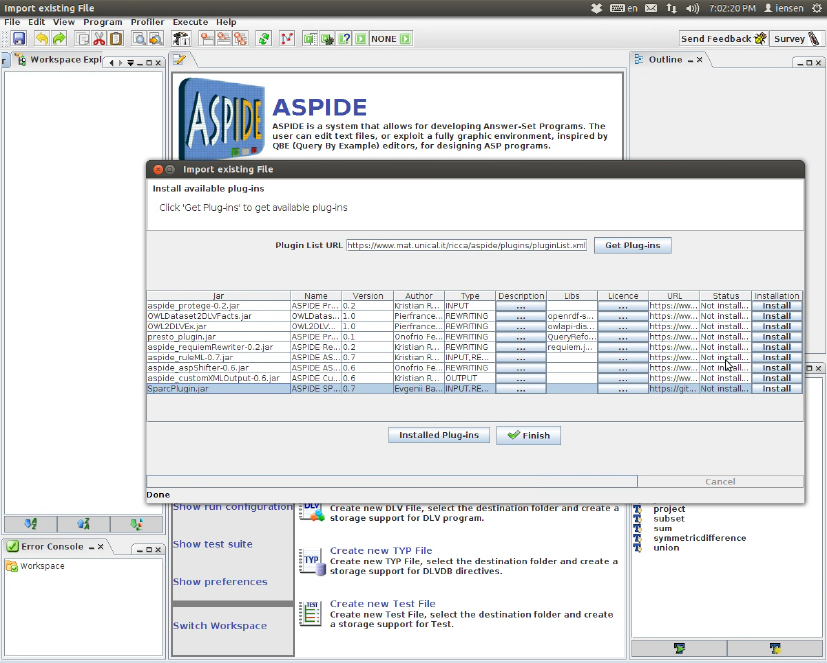
For using SPARC in ASPIDE, you will need to install ASPIDE(version 1.42 or greater).
The installer is available from https://www.mat.unical.it/ricca/aspide/download.html . See the
instructions here: https://www.mat.unical.it/ricca/aspide/documentation.html . Once ASPIDE
is installed, go to File ->Plug-ins ->Available plugins menu, and press install button in
the row containing SPARC plug-in (see Fig.3).
Figure 3: Installing SPARC plugin
19
7.2 Creating Projects and Adding SPARC source files
ASPIDE uses workspaces to store projects. Workspace is a folder that can contain multiple
projects. ASPIDE can have only one workspace opened, that is selected by a user when
ASPIDE starts. Source files should belong to a project to be used by ASPIDE query
engine and answer set computation tools.
•To create a new project, go to the menu File ->New and select New Project submenu.
Specify the project name in the pop-up window and click on Finish button. You
should see a new project appeared in workspace explorer.
•To add a new SPARC file, right click on the project to display context menu and
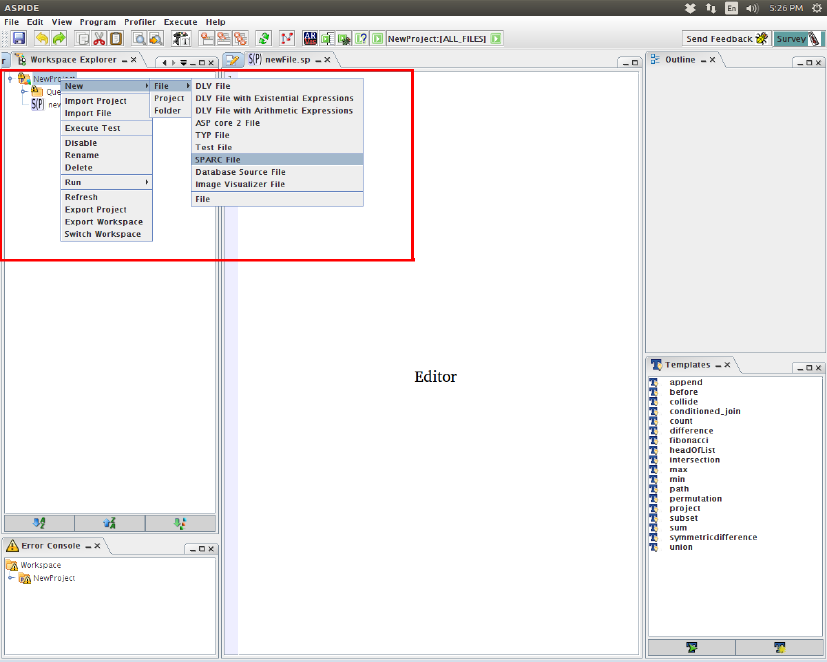
select New ->File ->SPARC File as it is shown on Figure 4 . Choose the file name
in the pop-up window. You should see a new file added under the project in
workspace explorer and displayed in ASPIDE editor window.
Figure 4: Adding SPARC source file
20
7.3 Executing queries and computing Answer sets
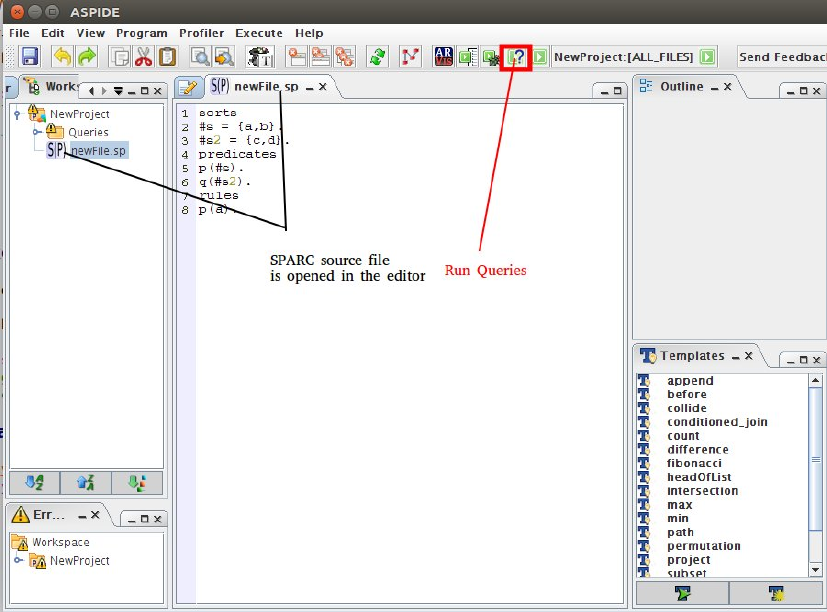
You can execute queries and compute answer sets as for usual ASP file. To execute a
query, open a sparc file in the ASPIDE editor and click on the button with a question
mark in the toolbar:
Figure 5: Open Query Interface
A window will appear where you can input and run queries. To run a query,
•mark Epistemic Mode checkbox (this is to follow the definition of query given in
the class)
•input your query into editbox named Query or select one from history
The results will appear in the listview named Results. See fig 6 for details.
21
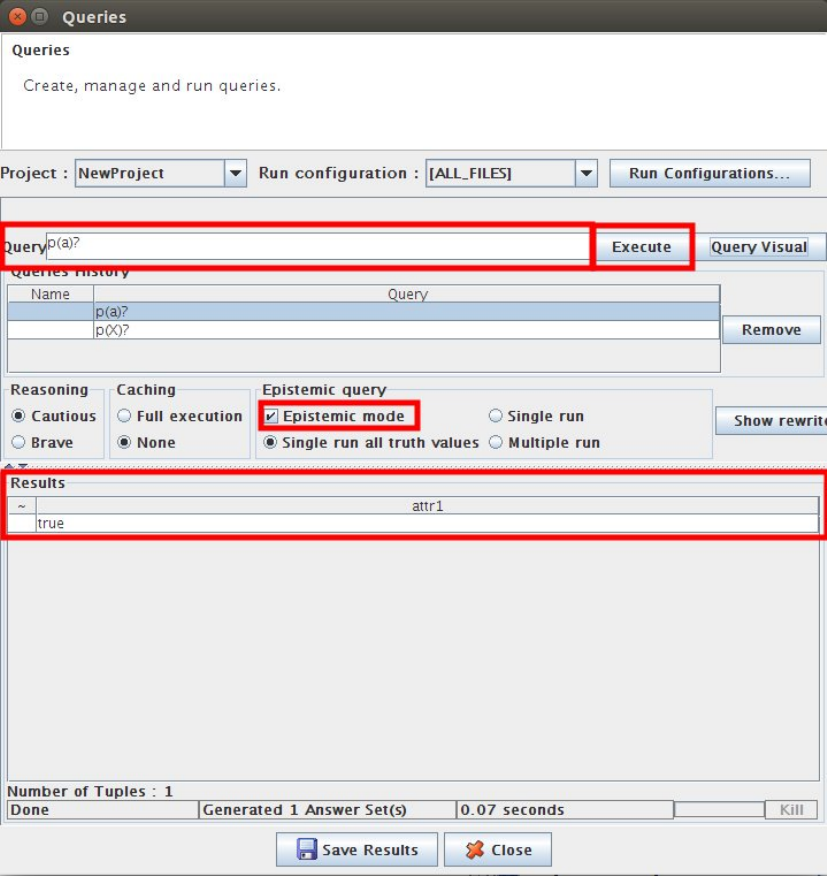
Figure 6: Execute a query
22
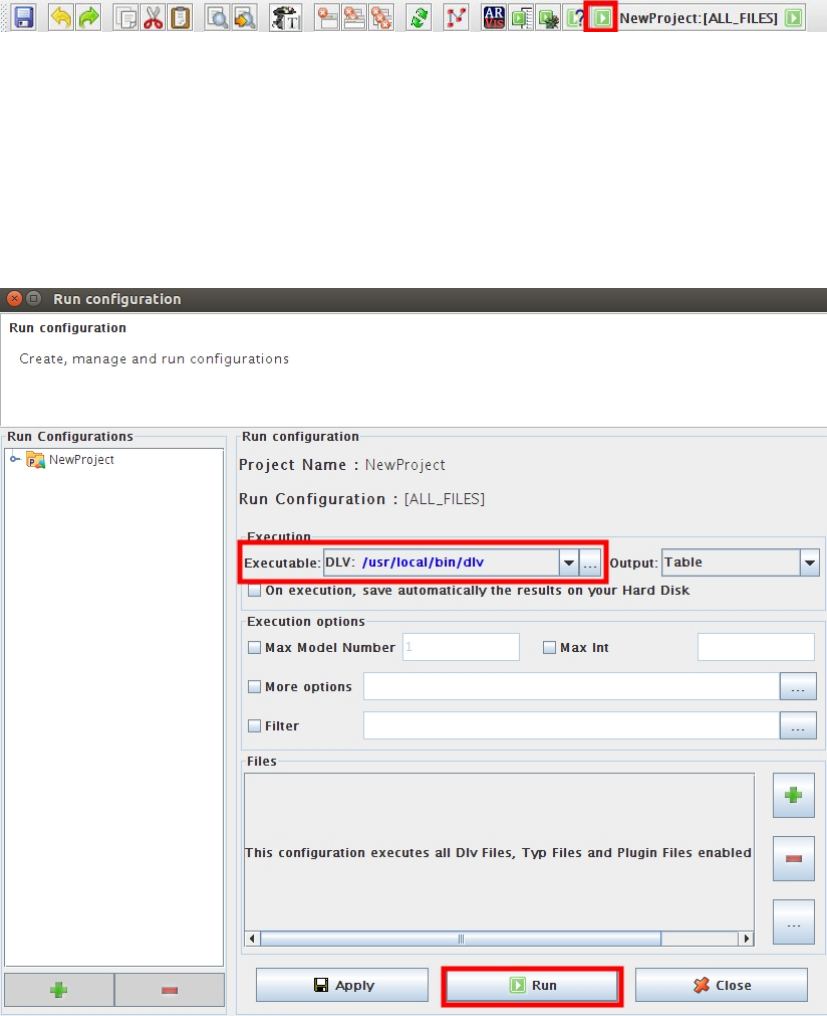
To compute answer sets of the program, press the button with green arrow marked
on figure 7.
Figure 7: Open answer sets window
In the appeared Run Configurations window:
•make sure a correct path to dlv in selected in Executable listbox.
•press Run button to see the answer sets
Figure 8: Run configurations window
23
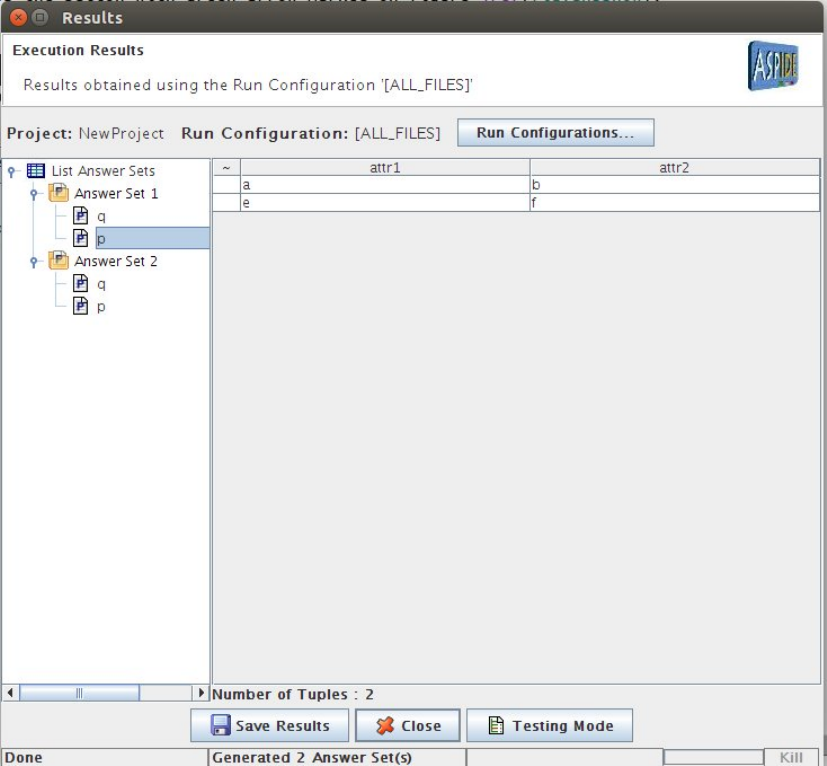
In the displayed window, answer sets are grouped by predicate symbols in their
literals. On figure 9, two answer sets are shown. The first one contains two literals
p(a, b)and p(e, f)and some literals with predicate symbol q.
Figure 9: Answer Sets
7.4 Warnings Checking
To see allow ASPIDE to show warnings (section 6.2), you need to install swi-prolog on
your system. Swi-prolog is available from http://www.swi-prolog.org/Download.html
After swi-prolog is installed, go to the ASPIDE menu File ->Preferences. In the ap-
peared window select the tab Executables/Solvers and add a new executable named
swipl with a path pointing to the swi-prolog executable. Usually, it is named swipl in
Unix/MacOS operating system and swipl.exe in Windows. Click on Save button to close
the window. See the details on figure 10. After the executable is added, you need to
24
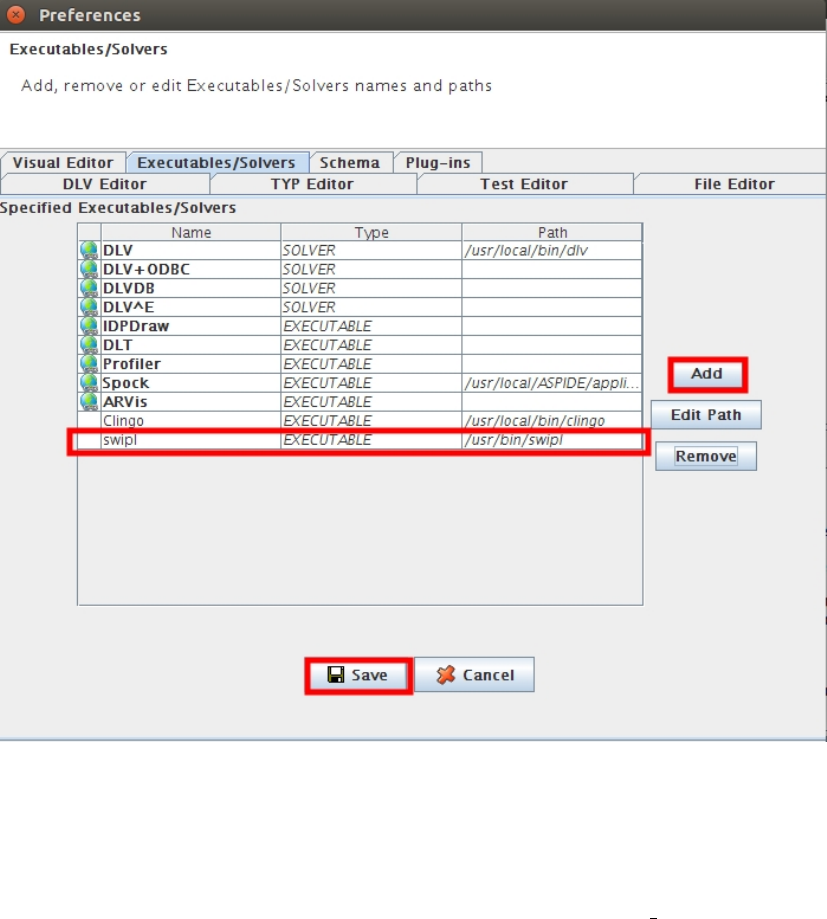
Figure 10: Adding swi-prolog executable
specify a flag property for the SPARC plug-in to make it check warnings. Go to AS-
PIDE menu File ->Plug-ins ->Manage Plug-ins. In the appeared window click on the cell
Properties in SPARC plug-in line and add a new property CHECK WARNINGS=TRUE as
it is shown on figure 11. Click on Close button to save the results. RESTART ASPIDE
FOR THE NEW CHANGES TO TAKE EFFECT.
25
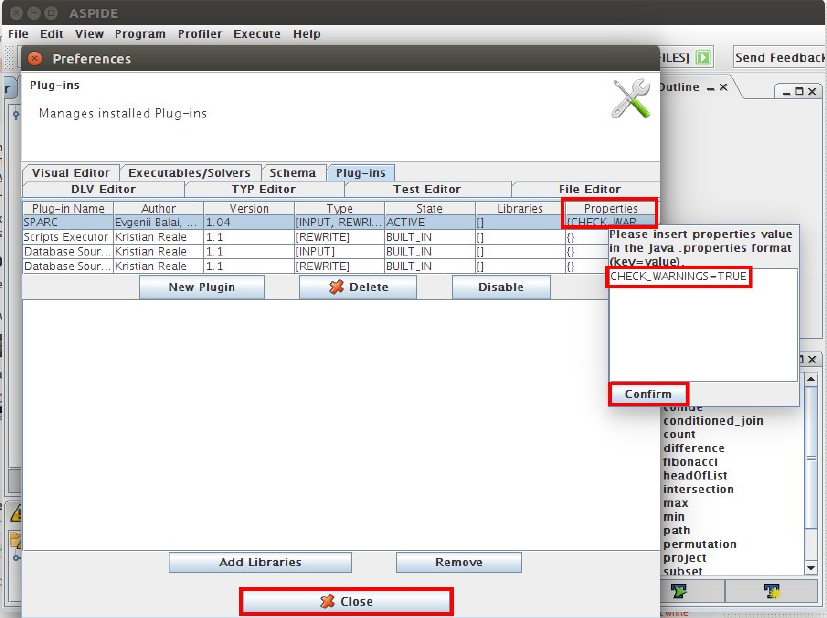
Figure 11: Adding swi-prolog executable
After the restart, you should be able to see the warnings in the left lower corner of
aspide interface (Error Console).
References
[1] Evgenii Balai, Michael Gelfond, and Yuanlin Zhang. Towards answer set program-
ming with sorts. In Logic Programming and Nonmonotonic Reasoning, pages 135–147.
Springer, 2013.
26
