Stream Jess Guide
User Manual:
Open the PDF directly: View PDF  .
.
Page Count: 5
User Manual
StreamJess v0.1
Table of Contents
I. Installation ............................................................................................................................................ 3
II. Getting started examples ...................................................................................................................... 3
2.1. Stream Generator default settings ............................................................................................... 3
2.2. Jess reasoning ............................................................................................................................... 4
III. User-defined examples ..................................................................................................................... 5
3.1. Change data .................................................................................................................................. 5
3.2. Change the model ......................................................................................................................... 5
3.3. Change the Jess rules .................................................................................................................... 5
References .................................................................................................................................................... 5
I. Installation
Download application’s source distribution from the Download section. Unzip the zip file into your local
folder. Import the project into your NetBeans. Download a copy of the InWaterSense ontology Protege
project including all ontology modules from the Download section. Download and import all the jar
libraries into your project including: C-SPARQL
1
v0.9.6, Jess
2
v7.1p2, Jess Tab
3
v1.7 and Protégé
4
v3.5.
Open main\StreamJess.java and replace the InWaterSense ontology project path with your local copy of
the ontology (modify the value of inwsOntologies variable). Moreover, modify the path location of Jess
rules to match the one of your local disc i.e. the inwsRules variable value. Make sure you are connected
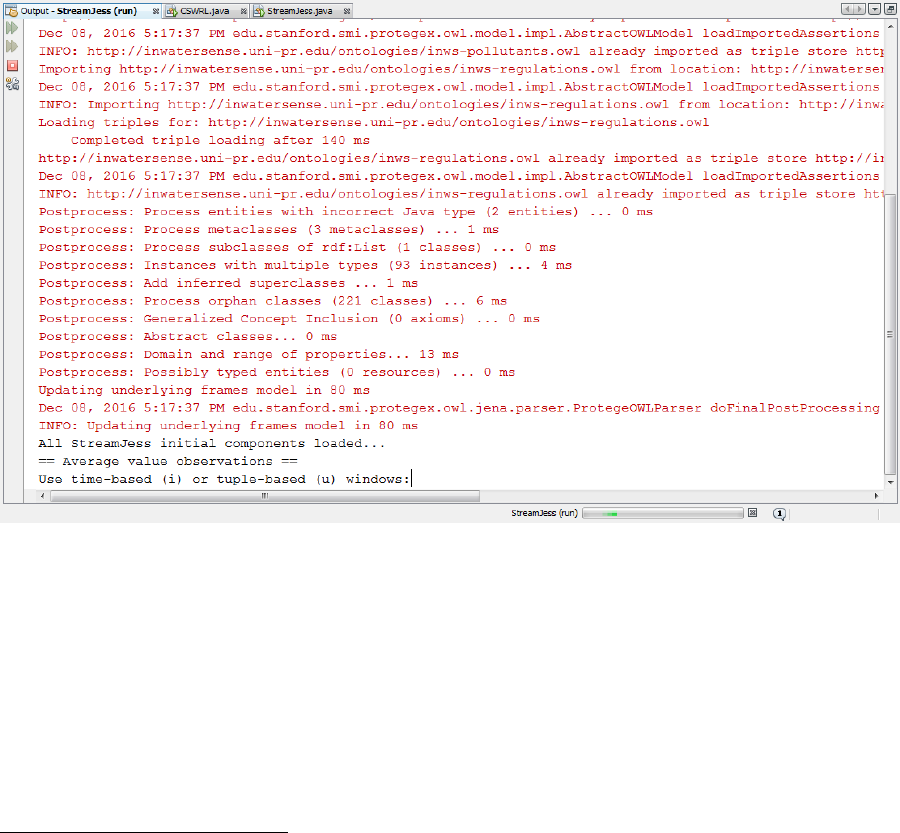
to the Internet for loading correctly the ontology modules and run the application. If everything was
correctly loaded the following screenshot should appear:
II. Getting started
2.1. Dataset and Stream Generator default settings
The default stream generator (INWSRDFStreamTestGenerator.java) produces sensor simulated values
on 70 different measurement sites for 11 water quality parameters. Our implemented WQM example
includes WFD monitoring of the following water quality parameters: Biochemical Oxygen Demand
(BOD5), pH, Arsenic, Benthic Invertebrate Fauna, Chromium III, "Cyanide", Diazinon, Dimethoate,
1
http://streamreasoning.org/resources/c-sparql
2
http://www.jessrules.com/
3
http://www.jessrules.com/jesswiki/view?JessTab
4
http://protege.stanford.edu/
Fluoride, Total Ammonia and Glyphosate. Furthermore, it identifies the potential sources of pollution
inducted by BOD5 and pH moderate values. All values are randomly generated. Two C-SPARQL queries
are encoded in the application’s main file StreamJess.java. One for considering observations one by one,
which according to Water Framework Directive (WFD) [1] is the case of pH observations and one for
average value observations, which include all other water quality observations according to WFD.
After correctly loading all the ontology modules and setting up the Jess’s working memory by mapping
the required classes as specified by initiateINWSrules.jess file, the user is presented with a dialog for
choosing the type of the windows for the average value observations and for individual ones. The
streaming of observations starts immediately after choosing the windows type and each second new
observation is produced. Of course, this is a modifiable parameter which can be set by changing the
milliseconds values in Thread.sleep(1000). Moreover, the user can also register multiple streamers,
which can be enabled by setting the value of variable NUM_STREAMS in StreamJess.java.
2.2. Jess reasoning
After C-SPARQL processes the first window results, the Jess engine acts to do the inference based on the
registered rules. Namely, based on C-SPARQL design principle each query attaches new result formatter.
Except for formatting the output, StreamJess uses the function RDFResultsFormatter(r), where r is the
instance of the Rete engine, to also do rule-based reasoning. For each new query result, firstly, new
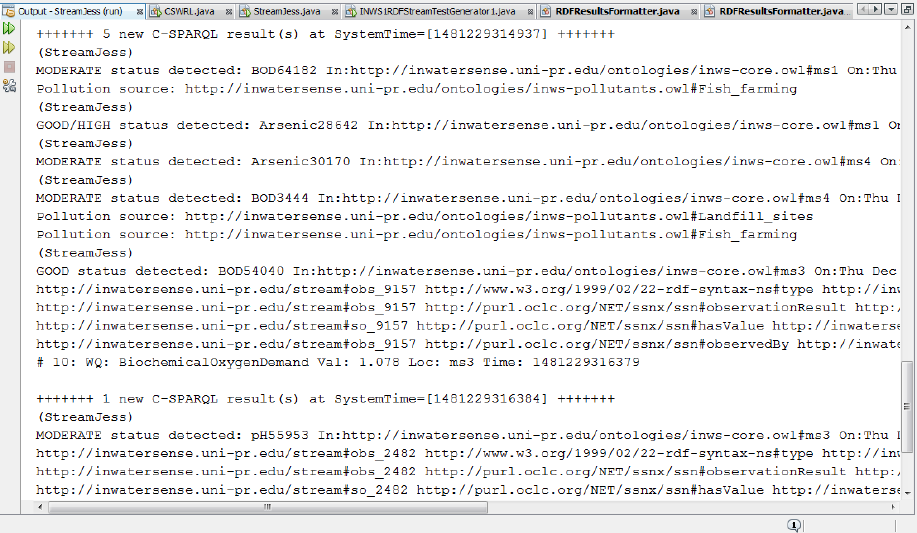
assertions are published into the knowledge base and then the Rete engine runs to do the rule-based
reasoning. The rules’ output gets printed out on the console as depicted in the following screenshot:
III. User-defined examples
This section contains information for users willing to write their own examples in StreamJess.
3.1. Change the dataset
In case one would like to use different water quality monitoring data, it will be required to stop the
streamer(s) and find appropriate middleware for importing real-time stream data and annotate them
appropriately based on the InWaterSense ontology pattern. In cases of importing stream data annotated
differently from InWaterSense ontology descriptions then he/she should provide their own model, write
their own Jess rules and potentially write appropriate Java codes. Of course, in these cases we prefer the
users to contact us.
3.2. Change the model
If one would like to use other model than InWaterSense ontology, then he/she would have to change
the variable path value of inwsOntologies, configure appropriately the stream generator and write
appropriate Jess rules.
3.3. Change the Jess rules
Using the InWaterSense model, users are open to add other Jess rules for monitoring or finding
potential sources of pollution. One can write a Jess rule, save it as a .jess file in the jessRules folder of
the project and write a Jess command like follows:
r.batch(inwsRules + "xxx.jess");
Place this line right after creating the Rete engine, but not after the running of C-SPARQL engine.
References
[1] Directive 2000/60/EC of the European Parliament and of the Council of Europe of 23 October 2000
establishing a frame-work for Community action in the Field of water quality O.J. L327/1, 2000.
