System Operation Manual
User Manual:
Open the PDF directly: View PDF  .
.
Page Count: 10
Simutech Multimedia Inc.
Fluid Processing System
FPS 4000
System Operations Manual

FPS 4000
Simutech Multimedia Inc.
Produced by:
Simutech Multimedia Inc.
200 - 4043 Carling Avenue
Ottawa, Ontario, Canada K2K 2A4
Toll Free Number: 1-866-942-9082
International Number: +1-613-722-1230
Fax: 613-722-2043
Email: info@simutechmultimedia.com
Web: www.simutechmultimedia.com
Copyright © 2017 Simutech Multimedia Inc. All rights reserved.
This product is sold “AS IS” except as otherwise provided and is
not to be relied upon as professional advice.
Published: November 2012
Revised: August 2017
System Operations Manual
Simutech Multimedia Inc.
Fluid Processing System - FPS 4000
The FPS 4000 Simulator is designed to simulate the process of using a Programmable Logic
Controller (PLC) to control the input, mixing, heating and settling of two different fluids before
sending the mixture onto the next stage for additional processing or recycling.
Systems similar to this may be found anywhere the mixing of two fluids is required. It is well
suited to certain chemical processes, as well as production lines in the food industry.
The Process
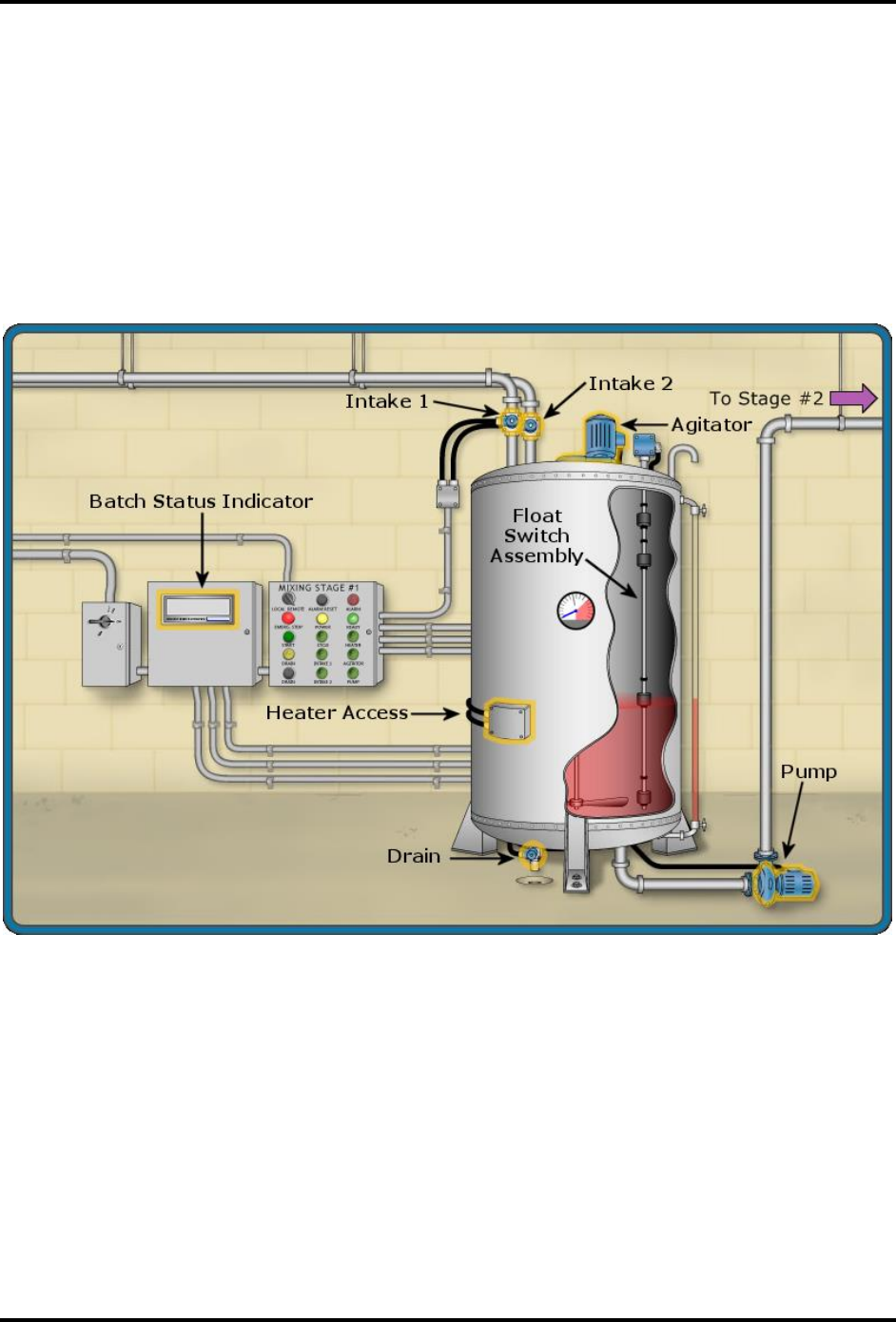
Input
The process depends on the program running in the PLC. Generally when the system starts, one
or two fluids begin to enter the tank through intake #1 and/or intake#2. When the correct volume
of fluid has entered the tank, the appropriate intake closes. Many of the processes use the float
assembly to determine the levels of the liquids. There are four preset levels that are fixed and
cannot be adjusted. These are set at 0.1% (empty tank), 40%, 85% and 95% (alarm level) of the
tank capacity. Changing these settings would require replacing the float assembly with one set to
the desired values.
FPS 4000
Simutech Multimedia Inc.
Processing
In all processes the liquids are agitated (mixed) at some point and in many processes are heated
to 70°C. This temperature is fixed and changing it would require replacing the temperature
switch with one set to the desired value.
Mixing can occur without heating but all the current processes are designed to include mixing
when the heater is engaged. The independent mixing time is determined by the program and can
easily be changed.
Output
Once the mixture has been processed there is usually a pause before the output commences. In
most processes the pump starts and transfers the liquid from the tank to the next processing stage
(Stage 2). Once Stage 2 is ready for a new batch, it sends a remote start signal to the control to
begin a new batch.
When Stage 2 receives a batch, it is tested for quality. If the batch does not pass the quality check
it is sent to the reclaiming unit. Also, if the batch does not reach Stage 2 within a certain time, it
can still be used but production targets will be missed. The test results are sent to the Batch
Status Indicator.
Control Panel
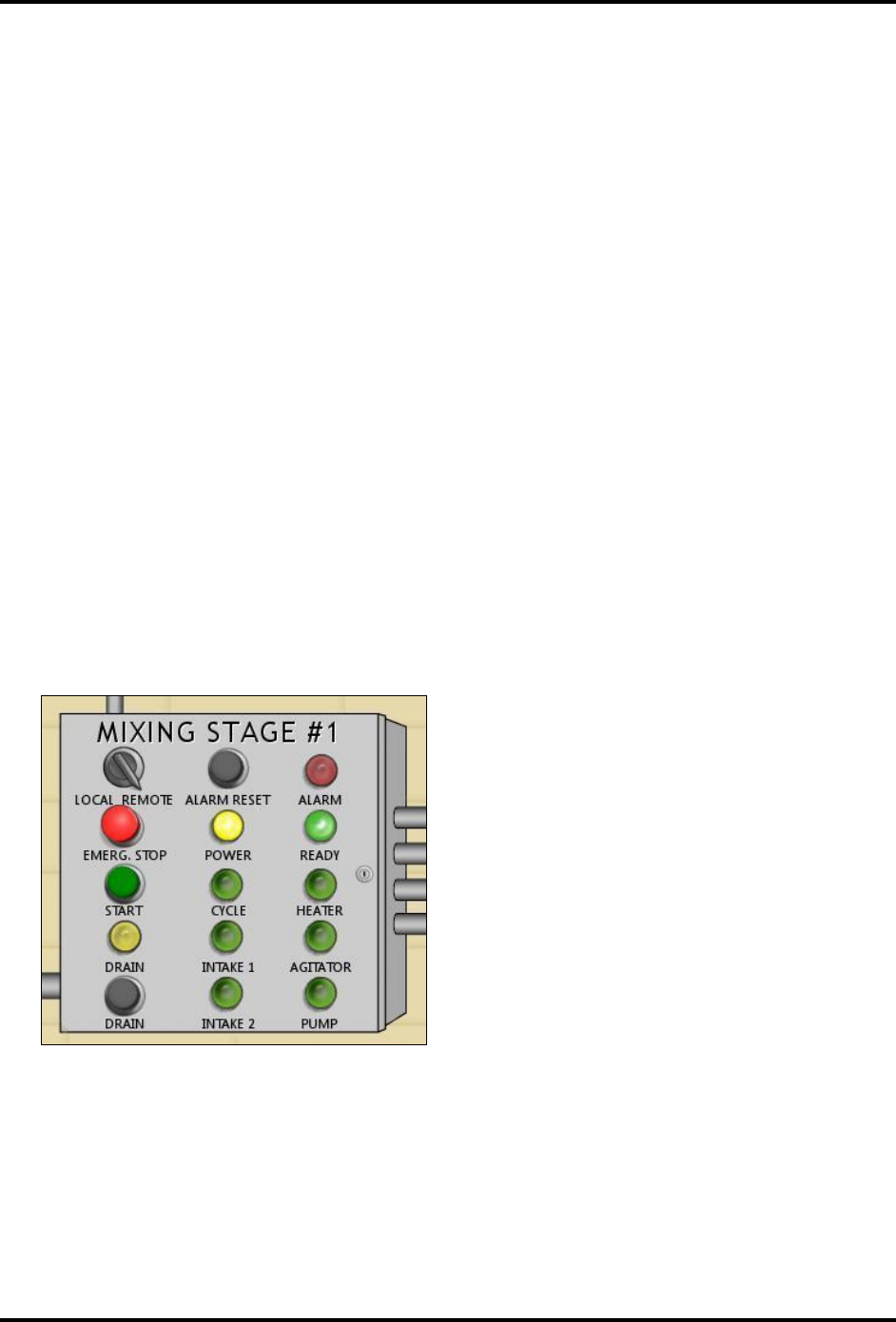
Control Panel Indicators:
• Power
• Ready
• Cycle
• Heater
• Agitator
• Pump
• Intake 1
• Intake 2
• Drain
• Alarm
Operator Controls:
• Local / Remote – Selects Local or Remote system operation
• Emergency Stop – Stops the system when in either Local or Remote
• Start – Starts the system when operation is Local
• Drain – Drains the tank when in either Local or Remote
System Operations Manual
Simutech Multimedia Inc.
• Alarm Reset – Resets the alarm warning light
Programmable Logic Controller (PLC)
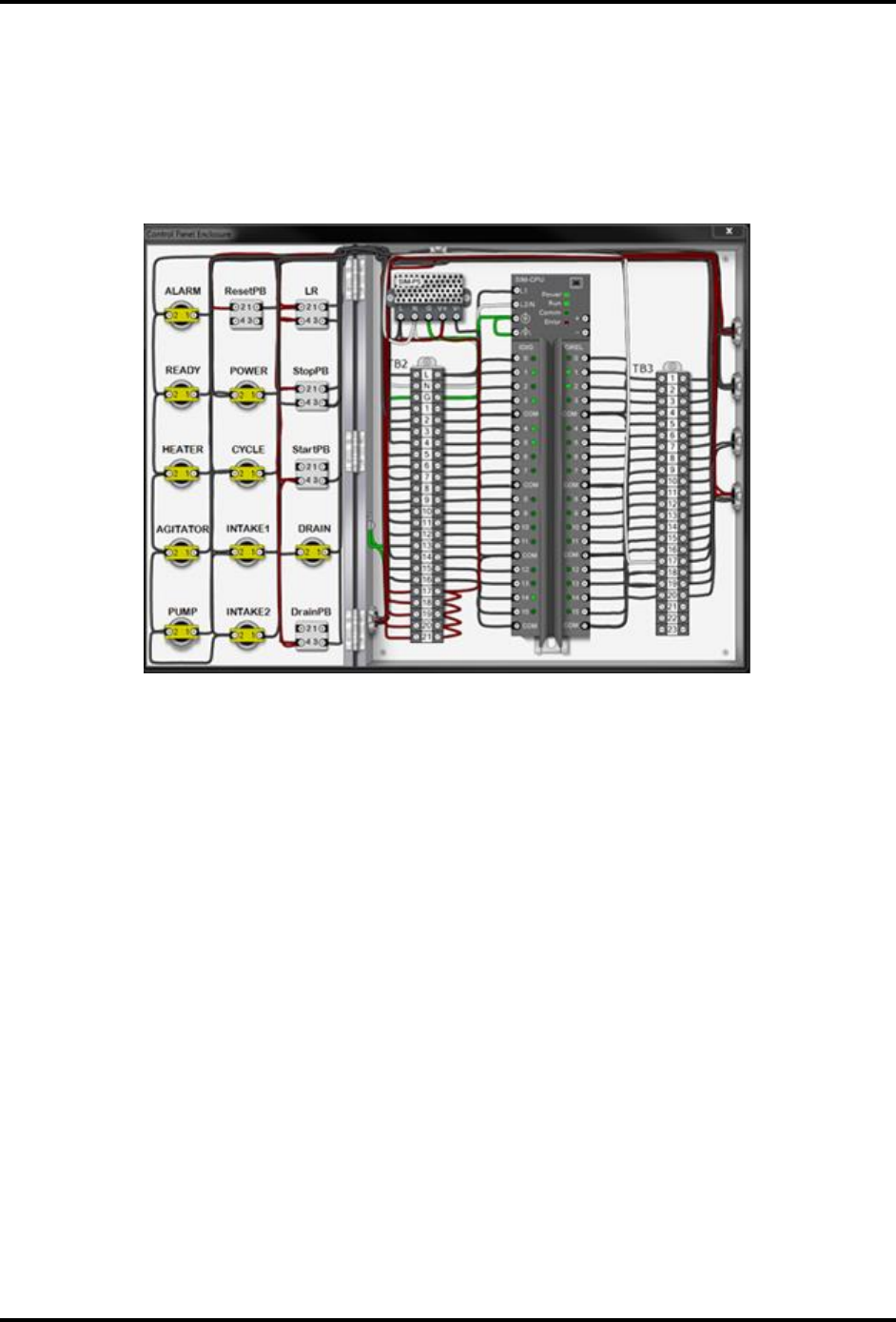
Inside the control panel enclosure is the PLC which is used to control the operation of the
system.
The addition of a PLC to the FPS system allows for versatility and easier troubleshooting. There
are sixteen inputs which are powered at 24 Volts DC. There are 16 outputs which are powered at
120 Volts AC.
Tank Indicators
There are two tank indicators:
• Temperature gauge on tank - this monitors the temperature of the contents of the tank
• Sight gauge on side of tank - shows the level of liquid in the tank
Batch Status Indicator
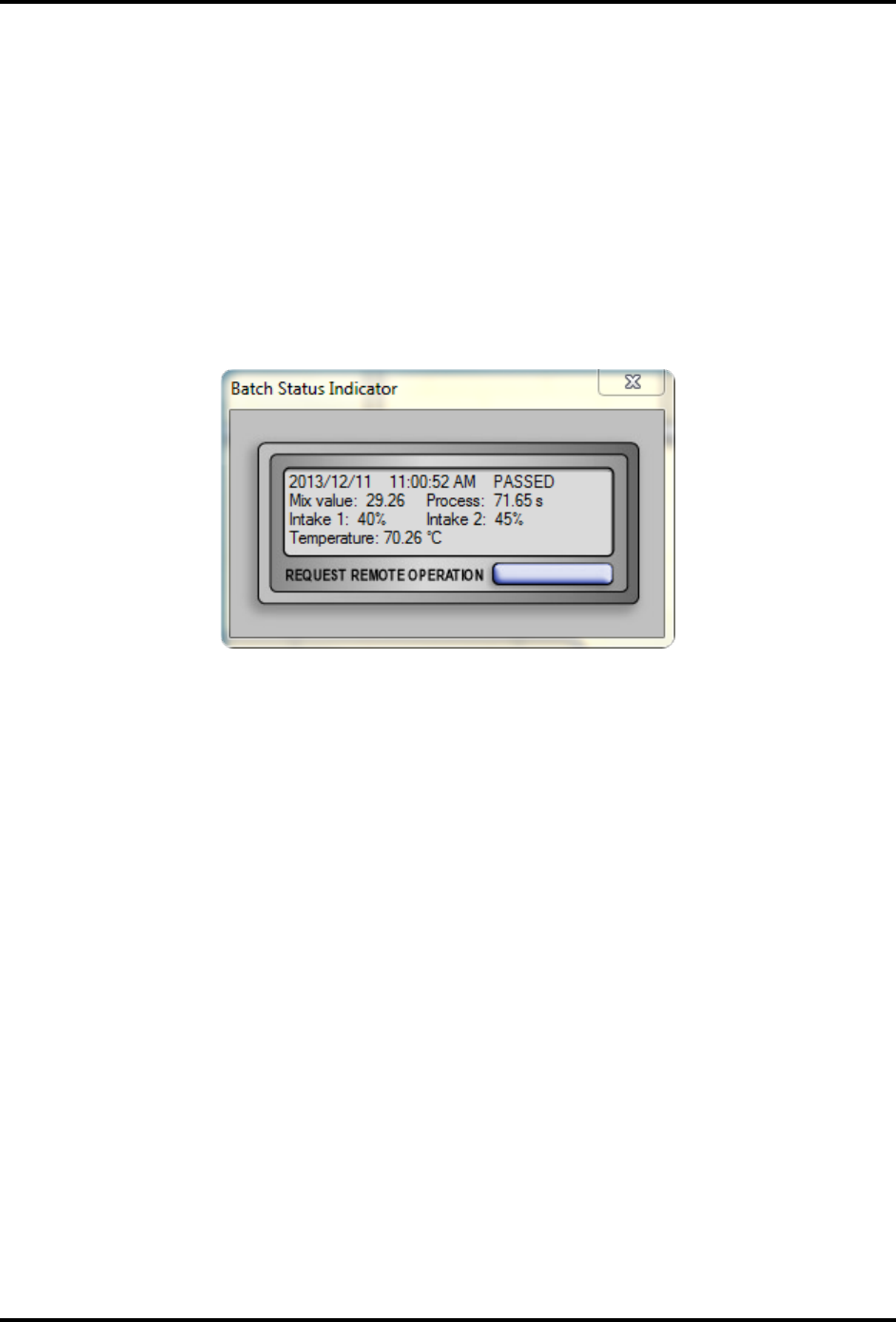
This device monitors and displays the status of each batch received by Stage 2 when in Remote
Operation. There are six possible results as shown below, and the display shows the result of the
most recent batch.
• Passed: meets quality control specifications
• Failed: does not meet quality control specifications
• Incomplete: received only a partial batch
• Delayed: received a batch but not within the allowed time
FPS 4000
Simutech Multimedia Inc.
• Timed Out: batch was requested but no batch received
• Too Fast: process finished ahead of expected time
This device also displays the following for the last run batch:
• The amount of each liquid used, as a percentage of the tank volume
• The maximum temperature reached
• The total mixing time
• The total time the process required to finish
This device also has a control to allow a request to be sent to the system operator for a Remote
Operation.
Batch Status Indicator
System Operations Manual
Simutech Multimedia Inc.
System Operation
The control system processes one batch at a time. The system can be started either locally or
remotely and proceeds through one cycle. In most processes the system must receive a start
signal to begin another cycle however, the PLC can be programmed to continually create
batches. There are many programs written for the FPS 4000. The default program is Program 1.
Program 1
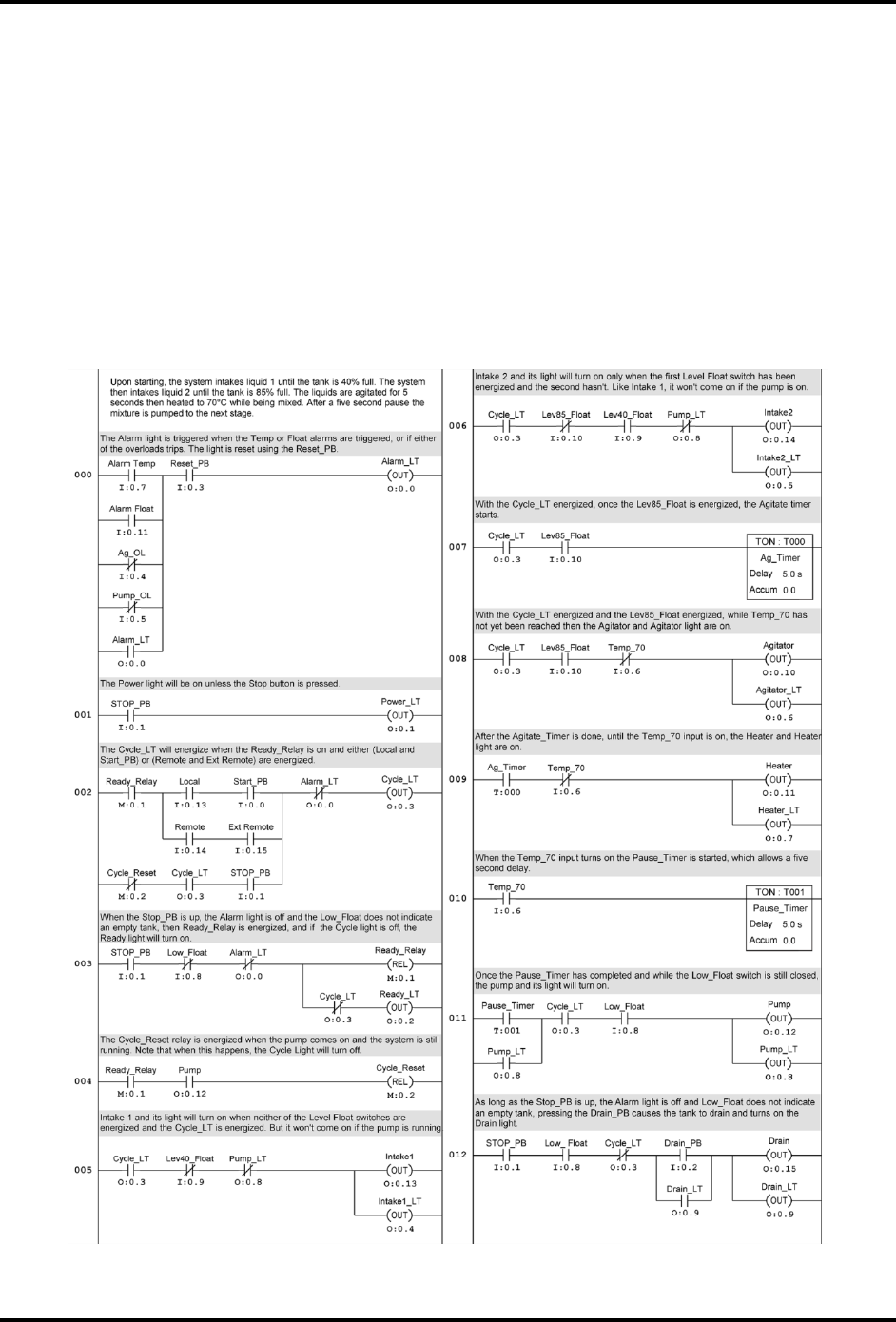
Program 1 is the PLC program that replicates the process used in the FPS 3000 system. There are
a few minor variations such as the inclusion of the agitator and pump overloads in the alarm
circuit.
The following describes the process through one cycle of Program 1.

FPS 4000
Simutech Multimedia Inc.
Automatic Operation
Initially:
• Power indicator indicates power is on
• Ready light indicates system is ready
• Control Switch Set to Remote
When Control receives a remote start signal:
• Cycle indicator comes on
• Ready indicator goes off
• Intake 1 opens
• Intake 1 indicator comes on
• Tank liquid level increases
• Float switch 1 closes
When level in tank reaches 40% (approx. 8 seconds):
• Float switch 2 operates
• Intake 1 closes
• Intake 1 indicator goes off
• Intake 2 opens
• Intake 2 indicator comes on
When level in tank reaches 85% (approx. 9 seconds):
• Float switch 3 operates
• Intake 2 closes
• Intake 2 indicator goes off
• Agitator motor starts
• Agitator indicator comes on
After a 5 second delay:
• Heater is energized
• Heater indicator comes on
• Liquid temperature begins to rise
Once liquid reaches a temperature of (70 °C) (approx. 24 seconds):
• Heater turns off
• Heater indicator goes off
• Agitator turns off
• Agitator indicator goes off
After a 5 second delay:
• Discharge pump starts
• Pump indicator comes on
• Liquid level decreases
When liquid level reaches 0 %: (approx. 21 seconds)
• Float switch 1 operates
• Discharge pump stops
• Pump indicator goes off
• System stops
• Ready light goes on
When the control receives another remote start signal, the process repeats.

System Operations Manual
Simutech Multimedia Inc.
Manual Operation
The system can also be manually operated:
• The ready light must be on
• Set the control switch to local - this also prevents the control from responding to the
remote start signal and the batch results are not set to the Batch Status Indicator
• To start the system, press the start pushbutton
• The same sequence of events occurs as the automatic operation
Draining the System
If there is a malfunction in the system or if it is stopped part way through the cycle, the tank must
be drained before it can be operated again:
• The tank can only be drained while the cycle light is off and power light is on
• Press the drain pushbutton
• If there is fluid in the tank and the cycle is not running, the drain solenoid is energized
• Drain solenoid closes when the tank is empty
Note: When the tank is drained, the mixture is sent to be reclaimed
Emergency Stop and Alarms
The system can be shut down at any time by pressing the Emergency Stop button. This works in
both Remote and Local control switch settings.
The system has four alarm conditions:
• If liquid level reaches 95%, the system shuts down and the alarm light comes on
• If temperature exceeds 90 °C, the system shuts down and the alarm light comes on
• If the Agitator motor overloads, (OL1) trips
• If the Pump motor overloads, (OL2) trips
The process cannot be started while in the alarm condition. When the condition causing the
alarm has cleared, the alarm can be reset by pressing the alarm reset button on the control panel.
Note: The tank is also equipped with a safety check valve in the breather which prevents tank
overflows.
Operational Parameters
• It is important that the fluids be mixed correctly. The next stage (stage 2), that receives
the finished batch, will detect any substandard mixtures and stop operations. Any batch

FPS 4000
Simutech Multimedia Inc.
that does not pass quality control will be reclaimed. The batch status indicator (located on
the power panel) shows the status and details of the previous batch. The specifications of
a proper batch are:
o Liquids must be in the proper proportion
o Liquid mixture must be agitated for the correct amount of time
o The mixture must be heated to the correct level (in most cases 70 °C)
o The entire process must be finished within a specified time
• Once the tank begins to fill, if the process is stopped before completing the cycle, the
tank contents must be drained before the process can be restarted.
• When tank contents are drained they are sent to the reclaiming unit.
• Heaters are designed to be immersed in liquid when operating. If these elements are
operated for a significant amount of time without being submersed, they will overheat
and burn out.
