TAP Developer Manual
User Manual:
Open the PDF directly: View PDF  .
.
Page Count: 66

Trustonic Applicaon Protecon
Developer Manual

TAP Developer Manual
CONFIDENTIAL
1
PREFACE
This specicaon is the condenal and proprietary informaon of Trustonic ("Condenal Informaon").
This specicaon is protected by copyright and the informaon described therein may be protected by one
or more EC patents, foreign patents, or pending applicaons. No part of the Specicaon may be reproduced
or divulged in any form by any means without the prior wrien authorizaon of Trustonic. Any use of the
Specicaon and the informaon described is forbidden (including, but not limited to, implementaon,
whether paral or total, modicaon, and any form of tesng or derivave work) unless wrien authorizaon
or appropriate license rights are previously granted by Trustonic.
TRUSTONIC MAKES NO REPRESENTATIONS OR WARRANTIES ABOUT THE SUITABILITY OF SOFTWARE
DEVELOPED FROM THIS SPECIFICATION, EITHER EXPRESS OR IMPLIED, INCLUDING BUT NOT LIMITED TO THE
IMPLIED WARRANTIES OF MERCHANTABILITY, FITNESS FOR A PARTICULAR PURPOSE, OR NON-
INFRINGEMENT. TRUSTONIC SHALL NOT BE LIABLE FOR ANY DAMAGES SUFFERED BY LICENSEE AS A RESULT
OF USING, MODIFYING OR DISTRIBUTING THIS SPECIFICATION OR ITS DERIVATIVES.
VERSION HISTORY
Version
Date
Modicaon
1.0
December 2016
First version for TAP 1.0 release
1.1
March 2017
Updates for TAP 1.1 release; including What’s New, seng the
logging/debug level, TUI API info, and makele keywords/ags.
1.2
June 2017
Updates for TAP 1.2 release; including key sharing API, and Protected
Client Library.
1.3
December 2017
Updates for TAP 1.3 release
1.4
March 2018
Updates for TAP 1.4 release, including AES-GCM and RSA support
Document code: v1.4, rev1—15/03/18

TAP Developer Manual
CONFIDENTIAL
2
TABLE OF CONTENTS
1 Introducon ............................................................................................................................................... 6
2 TAP API Overview ...................................................................................................................................... 7
2.1 Calling the Trusted Applicaon ............................................................................................................ 7
2.2 Implemenng the Trusted Applicaon ................................................................................................ 8
2.2.1 Trusted Storage ................................................................................................................................ 8
2.2.2 Cryptographic Operaons API .......................................................................................................... 8
2.2.2.1 High-speed AES support for stream ciphers .......................................................................................... 8
2.3 Deploying a TA in producon ............................................................................................................... 9
2.4 Using the Protected Client Library ....................................................................................................... 9
3 TAP API support ....................................................................................................................................... 10
3.1 GlobalPlaorm TEE Client API support ............................................................................................... 10
3.2 GlobalPlaorm TEE Internal Core API support ................................................................................... 10
3.2.1 Trusted Core Framework API ......................................................................................................... 11
3.2.2 Trusted Storage API for Data and Keys .......................................................................................... 12
3.2.2.1 SWP extension for TEE_OpenPersistentObject .................................................................................... 13
3.2.3 Cryptographic Operaons API ........................................................................................................ 13
3.2.3.1 SWP extension for TEE_AllocateOperaon .......................................................................................... 15
3.3 Supported Cryptographic Algorithms ................................................................................................. 15
3.4 Extended proprietary API ................................................................................................................... 19
3.4.1 Logging ........................................................................................................................................... 19
3.4.1.1 TEE_LogPrin ....................................................................................................................................... 19
3.4.1.2 TEE_LogvPrin ..................................................................................................................................... 20
3.4.1.3 TEE_DbgPrin ...................................................................................................................................... 20
3.4.1.4 TEE_DbgvPrin ..................................................................................................................................... 20
3.4.2 TEE_TBase_UnwrapObject ............................................................................................................. 20
3.4.3 TEE_TBase_DeriveKey .................................................................................................................... 21
3.4.4 TEE_TBase_AddEntropy ................................................................................................................. 22
3.4.5 SetDeviceId..................................................................................................................................... 22
3.4.6 TEE_TT_Unwrap ............................................................................................................................. 22
3.4.7 TEE_TT_KDF .................................................................................................................................... 23
3.4.8 Key sharing API ............................................................................................................................... 25
3.4.8.1 TEE_TT_Export ..................................................................................................................................... 25
3.4.8.2 TEE_TT_ Import .................................................................................................................................... 26
3.4.9 Trusted User Interface ................................................................................................................... 26
3.4.9.1 Error Codes ........................................................................................................................................... 26

TAP Developer Manual
CONFIDENTIAL
3
3.4.9.2 Types .................................................................................................................................................... 27
3.4.9.2.1 tlApiTuiScreenInfo_t ........................................................................................................................ 27
3.4.9.2.2 tlApiTuiTouchEventType_t .............................................................................................................. 27
3.4.9.2.3 tlApiTuiImage_t ............................................................................................................................... 28
3.4.9.2.4 tlApiTuiCoordinates_t ..................................................................................................................... 28
3.4.9.2.5 tlApiTuiTouchEvent_t ...................................................................................................................... 28
3.4.9.2.6 tlApiTuiImageInfo_t ......................................................................................................................... 28
3.4.9.2.7 tlApiTuiRectangle_t ......................................................................................................................... 29
3.4.9.2.8 tlApiTuiRawImage_t ........................................................................................................................ 29
3.4.9.2.9 tlApiTuiGraphicContext_t ................................................................................................................ 30
3.4.9.3 Funcons .............................................................................................................................................. 30
3.4.9.3.1 TEE_TBase_TUI_GetScreenInfo ....................................................................................................... 30
3.4.9.3.2 TEE_TBase_TUI_OpenSession ......................................................................................................... 31
3.4.9.3.3 TEE_TBase_TUI_CloseSession ......................................................................................................... 31
3.4.9.3.4 TEE_TBase_TUI_SetImage ............................................................................................................... 31
3.4.9.3.5 TEE_TBase_TUI_GetTouchEvent ..................................................................................................... 32
3.4.10 DRM API ......................................................................................................................................... 33
3.4.10.1 Structures ............................................................................................................................................. 33
3.4.10.1.1 tlApiDrmOsetSizePair .................................................................................................................. 33
3.4.10.1.2 tlApiDrmAlg .................................................................................................................................... 33
3.4.10.1.3 tlApiDrmLink .................................................................................................................................. 33
3.4.10.1.4 tlApiDrmInputSegmentDescriptor ................................................................................................. 34
3.4.10.1.5 tlApiDrmDecryptContext ............................................................................................................... 34
3.4.10.1.6 tlApiDRM_headerV1 ...................................................................................................................... 34
3.4.10.2 Constants ............................................................................................................................................. 35
3.4.10.3 Errors .................................................................................................................................................... 35
3.4.10.4 Funcons .............................................................................................................................................. 36
3.4.10.4.1 TEE_TBase_DRM_OpenSession ..................................................................................................... 36
3.4.10.4.2 TEE_TBase_DRM_ProcessContent ................................................................................................. 36
3.4.10.4.3 TEE_TBase_DRM_ProcessContentEx ............................................................................................. 37
3.4.10.4.4 TEE_TBase_DRM_CloseSession ..................................................................................................... 38
3.4.10.4.5 TEE_TBase_DRM_CheckLink .......................................................................................................... 38
4 Using THP Agent ...................................................................................................................................... 40
4.1 Installing or upgrading a TA ................................................................................................................ 40
4.2 Uninstalling a TA ................................................................................................................................. 43
4.3 Seng the debug level ....................................................................................................................... 43
5 Using the TUI layer library ....................................................................................................................... 45
5.1 Layout Modes Explained .................................................................................................................... 45

TAP Developer Manual
CONFIDENTIAL
4
5.2 Screen size adaptaon ....................................................................................................................... 47
5.2.1 Unit system overview ..................................................................................................................... 47
5.2.2 Android to TUI units conversion .................................................................................................... 48
5.2.3 Android screen density buckets ..................................................................................................... 48
5.2.4 Box model scaleX and scaleY.......................................................................................................... 49
5.2.5 Layout ............................................................................................................................................. 49
5.3 Events ................................................................................................................................................. 49
5.4 TUI layer library denions ................................................................................................................ 50
5.4.1 Constant ......................................................................................................................................... 50
5.4.1.1 Boxes dimension mode ........................................................................................................................ 50
5.4.1.2 Box state............................................................................................................................................... 51
5.4.1.3 Child layout .......................................................................................................................................... 51
5.4.1.4 Box alignment ...................................................................................................................................... 51
5.4.1.4.1 Horizontal alignment ....................................................................................................................... 51
5.4.1.4.2 Vercal alignment ........................................................................................................................... 52
5.4.2 Data structures ............................................................................................................................... 52
5.4.2.1 Box Structure........................................................................................................................................ 52
5.4.2.2 Box Flags ............................................................................................................................................... 53
5.4.2.3 Properes ............................................................................................................................................. 54
5.5 TUI layer library funcons .................................................................................................................. 55
5.5.1 Synopsis .......................................................................................................................................... 55
5.5.2 BoxModel_Register ........................................................................................................................ 55
5.5.3 BoxModel_Layout .......................................................................................................................... 56
5.5.4 BoxModel_Render ......................................................................................................................... 56
5.5.5 BoxModel_RenderVisible ............................................................................................................... 56
5.5.6 BoxModel_Show ............................................................................................................................ 56
5.5.7 BoxModel_Hide .............................................................................................................................. 56
5.5.8 BoxModel_RaiseEvent ................................................................................................................... 56
5.5.9 BoxModel_HandleBuonTouchRelease ........................................................................................ 57
5.5.10 BoxModel_GetContent .................................................................................................................. 57
5.5.11 BoxModel_Free .............................................................................................................................. 57
5.5.12 Renderers ....................................................................................................................................... 57
5.5.13 Rendering Funcons ...................................................................................................................... 58
5.5.14 Notes on Rendering Buons .......................................................................................................... 58
6 Fingerprint support for Trusted Applicaons .......................................................................................... 59
6.1 Architecture ........................................................................................................................................ 59

TAP Developer Manual
CONFIDENTIAL
5
6.2 Usage .................................................................................................................................................. 59
6.3 Prerequisites/Limitaons ................................................................................................................... 61
6.4 Internal API extension ........................................................................................................................ 61
6.4.1 Funcons ........................................................................................................................................ 61
6.4.1.1 TEE_TT_FingerprintAssociate ............................................................................................................... 61
6.4.1.2 TEE_TT_FingerprintVerify .................................................................................................................... 61
6.4.1.3 TEE_TT_FingerprintDissociate .............................................................................................................. 62
6.5 Client API extension ............................................................................................................................ 62
6.5.1 class FingerprintAgent .................................................................................................................... 62
6.5.1.1 Constructor .......................................................................................................................................... 62
6.5.1.2 Methods ............................................................................................................................................... 62
6.5.1.3 Interface ............................................................................................................................................... 62
6.5.2 class Authencaon ....................................................................................................................... 62
6.5.2.1 Constructor .......................................................................................................................................... 62
6.5.2.2 Methods ............................................................................................................................................... 62
6.5.2.3 Interface ............................................................................................................................................... 63
Appendix I. Makele keywords and ags........................................................................................................ 64

TAP Developer Manual
CONFIDENTIAL
6
1 INTRODUCTION
Welcome to the Trustonic Applicaon Protecon (TAP) Developer Manual.
This guide is for soware developers wring TAP applicaons. It provides informaon about TAP API support.
Topics include:
• TAP API overview
• TAP API support
• Using THPAgent
• Using the TUI layer library
• Fingerprint support for TAs
• Makele keywords and ags
For an overview of Trustonic Applicaon Protecon (TAP) and the documentaon, for a list of what’s new in
this release, and for informaon about designing a TA and choosing the type of protecon (TEE or SWP), see
the Introducon to TAP.

TAP Developer Manual
CONFIDENTIAL
7
2 TAP API OVERVIEW
This chapter provides an overview of the Trustonic Applicaon Protecon (TAP) API. It introduces the TEE
Internal API (used to develop TAs), and the TEE Client API (used by CAs to call a TA), and describes the
interface between the TA and CA.
Trustonic Applicaon Protecon oers developers a set of APIs which are based on the GlobalPlaorm TEE
standard for developing Trusted Applicaons. Trusted Applicaons can be isolated and protected through a
Trusted Execuon Environment or by using the Soware Protecon mechanism and the corresponding
Client, or Client Applicaon. The Client Applicaon is a standard Android or iOS applicaon which calls the
Trusted Applicaon to perform security-sensive operaons.
A Trusted Applicaon is command-oriented. Clients access a Trusted Applicaon by opening a session with
the Trusted Applicaon and invoking commands within the session. When a Trusted Applicaon receives a
command, it parses the messages associated with the command, performs any required processing, and then
sends a response back to the client.
The Trusted Applicaon is developed using the TEE Internal API which denes the API for using features such
as cryptography, secure storage of data, memory management, etc.
The Client part (the Client Applicaon) uses the TEE Client API for calling the Trusted Applicaon.
This secon outlines the main principles of the Internal API and Client API. For further details, refer to the
GlobalPlaorm specicaons.
For more informaon about determining what parts of your applicaon should be incorporated within a TA,
see the Introducon to TAP. Aer determining the split between the secure and non-secure parts, dene the
state in the TA and the interface between the TA and the Client Applicaon (CA). Your design must take into
consideraon the restricons of the TA environment and the CA-TA interfaces.
2.1 CALLING THE TRUSTED APPLICATION
To call and use a Trusted Applicaon, the Client Applicaon calls the Client API and performs the following
acons:
‹ Creates a context
‹ Opens a session on the Trusted Applicaon idened by its unique UUID
‹ Sends a command to the Trusted Applicaon along with parameters and data payload and reads the
response. This can be repeated several mes.
‹ Closes the session
‹ Destroys the context
For passing data between the Client Applicaon and the Trusted Applicaon, you can either pass values as
parameters or provide memory buers containing operaon payload. These memory buers are referred to
as Shared Memory.
A Shared Memory block is a region of memory allocated in the context of the Client Applicaon memory
space that can be used to transfer data between that Client Applicaon and a Trusted Applicaon. A Shared
Memory block can be either an exisng Client Applicaon memory which is subsequently registered with the
TEE Client API, or memory which is allocated on behalf of the Client Applicaon using the TEE Client API. A
Shared Memory block can be registered or allocated once and then used in mulple Commands, even in
mulple sessions provided they exist within the scope of the TEE Context in which the Shared Memory was
created. Typically, this pre-registraon is more ecient than registering a block of memory using temporary
registraon if that memory buer is used in more than one command invocaon.

TAP Developer Manual
CONFIDENTIAL
8
2.2 IMPLEMENTING THE TRUSTED APPLICATION
Each Trusted Applicaon implements the following entry point funcons which are called when a Client calls
the Trusted Applicaon:
‹ TA_CreateEntryPoint: this entry point is called when the Trusted Applicaon is instanated.
‹ TA_DestroyEntryPoint: this entry point is called when the Trusted Applicaon instance is being
destroyed
‹ TA_OpenSessionEntryPoint: this entry point is called when a Client opens a session with the Trusted
Applicaon
‹ TA_CloseSessionEntryPoint: this entry point is called when a Client closes a session with the Trusted
Applicaon
‹ TA_InvokeCommandEntryPoint: this entry point is called when the Client invokes a command of the
Trusted Applicaon, oponally passing parameters and data to the Trusted Applicaon.
When implemenng the entry points, use the Internal API to allocate memory, perform cryptographic
computaon, store persistent data securely, etc.
Note: Use only the Internal API in the Trusted Applicaon code. Any other third-party API is not guaranteed
to work or to oer the appropriate level of security.
2.2.1 Trusted Storage
The Internal API denes Trusted Storage for keys or general-purpose data. This API provides access to a
storage space for general-purpose data and key material with guarantees on the condenality and integrity
of the data stored and atomicity of the operaons that modify the storage.
The objects in this storage space are accessible only to the TA that created them and are not visible to other
TAs.
For more informaon, see the Trusted Storage API for Data and Keys chapter of the Global Plaorm TEE
Internal API Specicaon.
2.2.2 Cryptographic Operaons API
The Internal API provides the following cryptographic facilies:
• Generaon and derivaon of keys and key-pairs
• Support for the following types of cryptographic algorithms:
o Digests
o Symmetric Ciphers
o Message Authencaon Codes (MAC)
o Authencated Encrypon algorithms such as AES-CCM and AES-GCM
o Asymmetric Encrypon and Signature
o Key Exchange algorithms
For more informaon, see the Cryptographic Operaons API chapter of the Global Plaorm TEE Internal API
Specicaon.
2.2.2.1 High-speed AES support for stream ciphers
You can use high-speed AES for stream encrypon.
Note: high-speed AES support for stream ciphers is available for SWP only.
Because high-speed AES is not as secure as the default high-security version, Trustonic do not
recommend using it unless it is necessary for performance.

TAP Developer Manual
CONFIDENTIAL
9
To enable high-speed AES in the Trusted Applicaon’s makele, set:
CRYPTO_ALGORITHMS := HIGHSPEED_AES
Once enabled, high-speed AES is used for everything including the Secure Storage implementaon. The
default high-security AES and the high-speed AES versions cannot be used within the same Trusted
Applicaon. If both versions are needed by the applicaon, you must implement two dierent Trusted
Applicaons.
2.3 DEPLOYING A TA IN PRODUCTION
This secon provides informaon you need to be aware of when deploying TAs into producon.
If you’re deploying TAs commercially on Samsung devices, you must complete a validaon process. To do
this, you send informaon to Trustonic, including the package name and public key from your signed APK.
Trustonic then handles the validaon process with Samsung directly. Once approved, Samsung issues a
cercate and license le which is bundled with the applicaon. For more informaon, see:
hps://trustonic.zendesk.com/hc/en-us/arcles/200686791. For informaon about geng support and
accessing zendesk, see the Introducon to TAP.
Tip! Before deploying in a producon environment, remember to set the debugging level to ERROR by calling
the setLogLevel(LogLevel.level) method. For more informaon, see Seng the debug level.
2.4 USING THE PROTECTED CLIENT LIBRARY
The TAP SDK contains a protected version of libTee.so (a TAP Client library). This diers from the standard
library in the following ways:
• It is code-protected with a high-protecon level (obfuscaon, integrity checking, an-debug
features)
• SWP choice (TEEC_CHOICE=SWP) is disabled
Note: This is experimental funconality for customers who want to have a protected FALLBACK-mechanism.
To use the protected library in your TAP applicaon build, use the following commands (the example below
assumes that the current working directory is <TAP_SDK_ROOT>/device):
# Standard library back up
cp ./internal/ca_build/Bin/arm64-v8a/Release/libTee.so
./internal/ca_build/Bin/arm64-v8a/Release/libTee.so.backup
cp ./internal/ca_build/Bin/armeabi-v7a/Release/libTee.so
./internal/ca_build/Bin/armeabi-v7a/Release/libTee.so.backup
# Protected library use
cp ./swp/libs/libTee/arm64-v8a/Release/libTee.so.restricted
./internal/ca_build/Bin/arm64-v8a/Release/libTee.so
cp ./swp/libs/libTee/armeabi-v7a/Release/libTee.so.restricted
./internal/ca_build/Bin/armeabi-v7a/Release/libTee.so

TAP Developer Manual
CONFIDENTIAL
10
3 TAP API SUPPORT
This chapter describes the set of TAP API supported when using Kinibi TEE or Soware Protecon. Most of
this API is dened by the GlobalPlaorm standard:
• The GlobalPlaorm TEE Client API
• The GlobalPlaorm TEE Internal Core API
Refer to the GlobalPlaorm specicaons for details about the GlobalPlaorm APIs and how to use these
APIs: hp://www.globalplaorm.org/specicaonsdevice.asp.
Note: In TAP version 1 there is no proper API Level versioning—the one for Kinibi TEE is used. Ensure that
you set the API Level to, at least, the value of 5 in Client and Trusted Applicaon makeles.
3.1 GLOBALPLATFORM TEE CLIENT API SUPPORT
This secon outlines TAP support for the GlobalPlaorm TEE Client API specicaon.
Funcon
Kinibi TEE support
SWP support
TEEC_InializeContext
All Kinibi versions
From TAP version 1
TEEC_FinalizeContext
TEEC_RegisterSharedMemory
TEEC_AllocateSharedMemory
TEEC_ReleaseSharedMemory
TEEC_OpenSession
TEEC_CloseSession
TEEC_InvokeCommand
TEEC_RequestCancellaon
Not supported
3.2 GLOBALPLATFORM TEE INTERNAL CORE API SUPPORT
This secon outlines TAP support for the GlobalPlaorm TEE Internal Core API specicaons.
Note: for informaon about the header le, common data types, and constants, see the TEE Internal header
le.

TAP Developer Manual
CONFIDENTIAL
11
3.2.1 Trusted Core Framework API
Memory Management
Funcons
Kinibi TEE support
SWP support
TEE_GetPropertyAsString
All Kinibi versions. See *Note.
From TAP version 1. See **Note.
TEE_GetPropertyAsBool
TEE_GetPropertyAsU32
TEE_GetPropertyAsUUID
TEE_GetPropertyAsIdenty
TEE_GetPropertyAsBinaryBlock
Kinibi versions with API Level 7,
and later. See *Note.
Not supported.
TEE_GetCancellaonFlag
All Kinibi versions
Not supported
TEE_UnmaskCancellaon
TEE_MaskCancellaon
TEE_CheckMemoryAccessRights
From TAP version 1.
The funcon veries only if a
buer is mapped completely to
the memory of the TA.
TEE_Panic
From TAP version 1
TEE_SetInstanceData
TEE_GetInstanceData
TEE_Malloc
TEE_Realloc
TEE_Free
TEE_MemMove
TEE_MemCompare
TEE_MemFill
*Note: Subset of properes depends on Kinibi TEE version.
**Note: Currently supported properes in gpd.tee namespace: apiversion=1.0, descripon=TAP,
cryptography=true, arith.maxBigIntSize=0; in gpd.ta namespace: singleInstance=true, mulSession=false,
instanceKeepAlive=false, dataSize, stackSize, appID=TA UUID.

TAP Developer Manual
CONFIDENTIAL
12
3.2.2 Trusted Storage API for Data and Keys
Generic Object Funcons
Kinibi TEE support
SWP support
TEE_GetObjectInfo
All Kinibi versions.
From TAP version 1.
TEE_RestrictObjectUsage
TEE_CloseObject
TEE_GetObjectBuerAribute
From TAP version 1.
Not protected aributes.
TEE_GetObjectValueAribute
TEE_GetObjectInfo1
Kinibi versions with API
Level 7, and later.
From TAP version 1, when
built with API Level 7, or
later.
TEE_RestrictObjectUsage1
Transient Object Funcons
Kinibi TEE support
SWP support
TEE_AllocateTransientObject
All Kinibi versions.
From TAP version 1.
TEE_FreeTransientObject
TEE_ResetTransientObject
TEE_PopulateTransientObject
Not protected aributes.
TEE_InitRefAribute, TEE_InitValueAribute
From TAP version 1.
TEE_CopyObjectAributes
All Kinibi versions. See:
*Note.
TEE_CopyObjectAributes1
Kinibi versions with API
Level 7, and later. See:
*Note.
TEE_GenerateKey
All Kinibi versions except
with API level 11. See:
**Note.
From TAP version 1.
TEE_TYPE_RSA_KEYPAIR
not supported.
Persistent Object Funcons
Kinibi TEE support
SWP support
TEE_OpenPersistentObject
All Kinibi versions.
From TAP version 1.
TEE_CreatePersistentObject
TEE_CloseAndDeletePersistentObject
TEE_CloseAndDeletePersistentObject1
Kinibi versions with API
Level 7, and later.
TEE_RenamePersistentObject

TAP Developer Manual
CONFIDENTIAL
13
Persistent Object
Enumeraon Funcons
Kinibi TEE support
SWP support
TEE_AllocatePersistentObjectEnumerator
Kinibi versions with API
Level 7, and later.
From TAP version 1.
TEE_FreePersistentObjectEnumerator
TEE_ResetPersistentObjectEnumerator
TEE_StartPersistentObjectEnumerator
TEE_GetNextPersistentObject
Data Stream Access Funcons
Kinibi TEE support
SWP support
TEE_ReadObjectData
All Kinibi versions.
From TAP version 1.
TEE_WriteObjectData
TEE_TruncateObjectData
TEE_SeekObjectData
*Note: not supported for ECDSA and ECDH key types before API level 11 in TEE mode; the workaround is to
use TEE_GetObjectBuerAribute() to populate the other Object, or to build the TA using GpTRIC.
**Note: TEE_TYPE_DES and TEE_TYPE_DES3 are not supported on Kinibi versions with API level 11; see note
about DES/DES3 key generaon in release notes.
3.2.2.1 SWP extension for TEE_OpenPersistentObject
storageID equal to TEE_STORAGE_PERSO is used to obtain the handle to the keys provisioned at build
me. The following object types are currently supported for the build me provisioning:
• TEE_TYPE_RSA_KEYPAIR (from 1024 to 2048 bits including)
• TEE_TYPE_ECDSA_KEYPAIR
• All symmetric key types
Note: A storageID of TEE_STORAGE_PERSO can also be used by a TEE TA to access data personalized by
the TAM Server plugin and triggered by THP Agent personalizeTA().
3.2.3 Cryptographic Operaons API
Generic Operaon Funcons
Kinibi TEE support
SWP support
TEE_AllocateOperaon
All Kinibi versions.
From TAP version 1.
TEE_FreeOperaon
TEE_GetOperaonInfo
TEE_SetOperaonKey
TEE_GetOperaonInfoMulple
Not supported.
Not supported.

TAP Developer Manual
CONFIDENTIAL
14
TEE_ResetOperaon
TEE_SetOperaonKey2
TEE_CopyOperaon
Message Digest Funcons
Kinibi TEE support
SWP support
TEE_DigestUpdate
All Kinibi versions.
From TAP version 1.
TEE_DigestDoFinal
Symmetric Cipher Funcons
Kinibi TEE support
SWP support
TEE_CipherInit
All Kinibi versions.
From TAP version 1.
TEE_CipherUpdate
TEE_CipherDoFinal
MAC Funcons
Kinibi TEE support
SWP support
TEE_MACInit
All Kinibi versions.
From TAP version 1.
TEE_MACUpdate
TEE_MACComputeFinal
TEE_MACCompareFinal
Authencated Encrypon Funcons
Kinibi TEE support
SWP support
TEE_AEInit
When TA is built using TAP
1.4 GpTRIC: all Kinibi
versions.
Otherwise: Kinibi versions
with API level 11, and later.
TAP 1.4 and later, when
built with API Level 11, or
later.
Only the AES-GCM
algorithm is supported. The
only nonce length
supported is 12 bytes.
TEE_AEUpdateAAD
TEE_AEUpdate
TEE_AEEncryptFinal
TEE_AEDecryptFinal
Asymmetric Funcons
Kinibi TEE support
SWP support
TEE_AsymmetricEncrypt,
TEE_AsymmetricDecrypt
All Kinibi versions.
From TAP version 1.
TEE_AsymmetricSignDigest
TEE_AsymmetricVerifyDigest
Key Derivaon Funcon
Kinibi TEE support
SWP support

TAP Developer Manual
CONFIDENTIAL
15
TEE_DeriveKey
Kinibi versions with API level
API Level 7, and later.
From TAP version 1, when
built with API Level 7, or
later.
Random Data Generaon Funcon
Kinibi TEE support
SWP support
TEE_GenerateRandom
All Kinibi versions.
From TAP version 1.
Note: For more informaon about the cryptographic algorithms, key types, and key parts supported in the
Cryptographic Operaons API, see the GlobalPlaorm TEE Internal Core API:
hp://www.globalplaorm.org/specicaonsdevice.asp.
3.2.3.1 SWP extension for TEE_AllocateOperaon
Soware Protecon extends Table 6-4: TEE_AllocateOperaon Allowed Modes of the GlobalPlaorm TEE
Internal Core API specicaon:
Algorithm
Possible Modes
TEE_TT_ALG_UNWRAP_AES_ECB_NOPAD
TEE_TT_MODE_UNWRAP
TEE_TT_ALG_UNWRAP_AES_CBC_NOPAD
TEE_TT_ALG_UNWRAP_AES_CTR
TEE_TT_ALG_UNWRAP_AES_CBC_XMLENC
TEE_TT_ALG_KDF_NIST_800_108_COUNTER_CMAC_AES128
TEE_TT_MODE_KDF
TEE_TT_ALG_KDF_NIST_800_108_COUNTER_CMAC_AES128_L16BIT
TEE_TT_ALG_KDF_NO_CONVERSION
TEE_TT_ALG_KDF_SHA_1
TEE_TT_ALG_KDF_SHA_256
TEE_TT_ALG_KDF_SHA_384
3.3 SUPPORTED CRYPTOGRAPHIC ALGORITHMS
The following algorithms are supported in TEE mode or in Soware Protecon mode:
Algorithm
Supported Key Size
TEE_ALG_AES_ECB_NOPAD
128, 192 or 256 bits.
(192 bit only when deployed
on Kinibi with API Level 11, or
with TA built using GpTRIC with
APIO Level 11.)
TEE_ALG_AES_CBC_NOPAD
TEE_ALG_AES_CTR
TEE_ALG_AES_GCM
128, 192 or 256 bits.

TAP Developer Manual
CONFIDENTIAL
16
TEE_ALG_DES_ECB_NOPAD
Always 64 bits including the
parity bits. 2. See: ***Note.
TEE_ALG_DES_CBC_NOPAD
TEE_ALG_DES3_ECB_NOPAD
128 or 192 bits including the
parity bits. See: ***Note.
TEE_ALG_DES3_CBC_NOPAD
TEE_ALG_RSASSA_PKCS1_V1_5_MD5
256, 512, 768, 1024, 1536,
2048. See: *Note.
TEE_ALG_RSASSA_PKCS1_V1_5_SHA1
TEE_ALG_RSASSA_PKCS1_V1_5_SHA224
TEE_ALG_RSASSA_PKCS1_V1_5_SHA256
TEE_ALG_RSASSA_PKCS1_V1_5_SHA384
TEE_ALG_RSASSA_PKCS1_V1_5_SHA512
TEE_ALG_RSASSA_PKCS1_PSS_MGF1_SHA1
TEE_ALG_RSASSA_PKCS1_PSS_MGF1_SHA224
TEE_ALG_RSASSA_PKCS1_PSS_MGF1_SHA256
TEE_ALG_RSASSA_PKCS1_PSS_MGF1_SHA384
TEE_ALG_RSASSA_PKCS1_PSS_MGF1_SHA512
TEE_ALG_RSAES_PKCS1_V1_5
TEE_ALG_RSAES_PKCS1_OAEP_MGF1_SHA1
TEE_ALG_RSAES_PKCS1_OAEP_MGF1_SHA224
TEE_ALG_RSAES_PKCS1_OAEP_MGF1_SHA256
TEE_ALG_RSAES_PKCS1_OAEP_MGF1_SHA384
TEE_ALG_RSAES_PKCS1_OAEP_MGF1_SHA512
TEE_ALG_RSA_NOPAD
TEE_ALG_DSA_SHA1
From 1024 bits, mulple of 64
bits.
TEE_ALG_DSA_SHA224
2048 or 3072 bits.
TEE_ALG_DSA_SHA256
TEE_ALG_MD5
NA

TAP Developer Manual
CONFIDENTIAL
17
TEE_ALG_SHA1
TEE_ALG_SHA224
TEE_ALG_SHA256
TEE_ALG_SHA384
TEE_ALG_SHA512
TEE_ALG_HMAC_MD5
Between 64 and 512 bits,
mulple of 8 bits.
TEE_ALG_HMAC_SHA1
Between 80 and 512 bits,
mulple of 8 bits.
TEE_ALG_HMAC_SHA224
Between 112 and 512 bits,
mulple of 8 bits.
TEE_ALG_HMAC_SHA256
Between 192 and 1024 bits,
mulple of 8 bits.
TEE_ALG_HMAC_SHA384
Between 256 and 1024 bits,
mulple of 8 bits.
TEE_ALG_HMAC_SHA512
Between 256 and 1024 bits,
mulple of 8 bits.
TEE_ALG_ECDSA_P192
192 bits. See: **Note.
TEE_ALG_ECDSA_P224
224 bits. See: **Note.
TEE_ALG_ECDSA_P256
256 bits. See: **Note.
TEE_ALG_ECDSA_P384
384 bits. See: **Note.
TEE_ALG_ECDSA_P521
521 bits. See: **Note.
TEE_ALG_ECDH_P192
192 bits. See: **Note.
TEE_ALG_ECDH_P224
224 bits. See: **Note.
TEE_ALG_ECDH_P256
256 bits. See: **Note.
TEE_ALG_ECDH_P384
384 bits. See: **Note.
TEE_ALG_ECDH_P521
521 bits. See: **Note.
*Note: for the TEE_ALG_RSA… algorithms listed above, support is provided for 3K and 4K bit from TAP 1.4,
when deployed on Kinibi with API Level 11 or when the TA is built using GPTRIC with API Level 11.
**Note: for the TEE_ALG_EC… algorithms listed above, support is provided from Kinibi API Level 7 onwards.
If you are using GPTRIC, set the API Level in the TA to 7, even if the targeted device is lower.

TAP Developer Manual
CONFIDENTIAL
18
***Note: See note about DES/DES3 key generaon in release notes.
The following algorithms and key size are supported only in TEE mode:
Algorithm
Supported Key Size
TEE_ALG_AES_CCM
128, 192 or 256 bits.
TEE_ALG_AES_CTS
TEE_ALG_AES_XTS
TEE_ALG_DSA_SHA1
From 1024 bits, mulple of
64 bits.
TEE_ALG_DSA_SHA224
2048 or 3072 bits.
TEE_ALG_DSA_SHA256
TEE_ALG_DH_DERIVE_SHARED_SECRET
From 256 to 2048 bits.
All RSA algorithms above 2048 bits
Greater than 2048 bits.
The following algorithms and key size are supported only in Soware Protecon mode:
Algorithm
Supported Key Size
TEE_TT_ALG_UNWRAP_AES_ECB_NOPAD
128, 192 or 256 bits.
TEE_TT_ALG_UNWRAP_AES_CBC_NOPAD
TEE_TT_ALG_UNWRAP_AES_CTR
TEE_TT_ALG_UNWRAP_AES_CBC_XMLENC
TEE_TT_ALG_KDF_NIST_800_108_COUNTER_CMAC_AES128
NA
TEE_TT_ALG_KDF_NIST_800_108_COUNTER_CMAC_AES128_L16BI
T
TEE_TT_ALG_KDF_NO_CONVERSION
TEE_TT_ALG_KDF_SHA_1
TEE_TT_ALG_KDF_SHA_256
TEE_TT_ALG_KDF_SHA_384

TAP Developer Manual
CONFIDENTIAL
19
3.4 EXTENDED PROPRIETARY API
The following funcons provide extended features and can be called from Trusted Applicaons developed
with the TEE Internal API. The header le for the Extended Proprietary API is tee_internal_api_ext.h.
Generic Operaon Funcons
Kinibi TEE support
SWP support
TEE_LogPrin
All Kinibi versions.
From TAP version 1.
TEE_LogvPrin
TEE_DbgPrin
TEE_DbgPrin
TEE_TBase_UnwrapObject
Not supported.
TEE_TBase_DeriveKey
TEE_TBase_AddEntropy
SetDeviceId
Not supported.
From TAP version 1.
TEE_TT_Unwrap
TEE_TT_KDF
TEE_TBase_TUI_GetScreenInfo
All Kinibi versions.
Not supported.
TEE_TBase_TUI_OpenSession
TEE_TBase_TUI_CloseSession
TEE_TBase_TUI_SetImage
TEE_TBase_TUI_GetTouchEvent
TEE_TBase_DRM_OpenSession
TEE_TBase_DRM_ProcessContent
TEE_TBase_DRM_ProcessContentEx
Kinibi API Level 7, and later.
TEE_TBase_DRM_CloseSession
All Kinibi versions.
TEE_TBase_DRM_CheckLink
3.4.1 Logging
3.4.1.1 TEE_LogPrin
void TEE_LogPrintf (const char* fmt,...);
TAP Developer Manual
CONFIDENTIAL
20
This proprietary funcon allows wring formaed traces for logging purposes.
3.4.1.2 TEE_LogvPrin
void TEE_LogvPrintf (const char* fmt, va_list args);
This proprietary funcon allows wring formaed traces for logging purposes.
3.4.1.3 TEE_DbgPrin
void TEE_DbgPrintf (const char* fmt,...);
This proprietary funcon allows wring formaed traces for debugging purposes. It is only compiled in on
debug builds of the TA.
3.4.1.4 TEE_DbgvPrin
void TEE_DbgvPrintf (const char* fmt, va_list args);
This proprietary funcon allows wring formaed traces for debugging purposes. It is only compiled in on
debug builds of the TA.
3.4.2 TEE_TBase_UnwrapObject
TEE_Result TEE_TBase_UnwrapObject(
void *src,
size_t srcLen,
void *dest,
size_t destLen);
Descripon
Unwraps a secure object.
Note: this API is TEE only.
Decrypts and veries the checksum of given object for the context indicated in the secure object's header.
Veries and decrypts a secure object and stores the user data (plain data and the decrypted data) to a given
locaon.
Aer this operaon, the source address contains the decrypted secure object (whose user data starts
immediately aer the secure object header), or the aempt of the decrypon, which might be garbage, in
case the decrypon failed (due to a wrong context, for instance).
If dest is not NULL, copies the decrypted user data part to the specied locaon, which may overlap with
the memory occupied by the original secure object.
Parameters
• in, out src: [in] Encrypted secure object, [out] decrypted secure object i.e. the secure object header
data the plain data and the decrypted data (which was earlier encrypted by the wrapper funcon).
• in srcLen: Length of source buer i.e. the length of the secure object.
• in, out dest: Address of user data or NULL if no extracon of user data is desired. Note that this
buer has to be stacally allocated (which is the reason it is also set as an input parameter). The
tlApiWrapObjectExt does not allocate the buer, it only writes to the buer from the starng address
and maximum of destLen (see parameter below).
TAP Developer Manual
CONFIDENTIAL
21
• in, out destLen: [in] Length of desnaon buer. [out] Length of user data. The length of the
stacally allocated buer is sent as input for copying the userdata aer the decrypon of the secure
object. The length of the userdata is returned.
Return Code
• TLAPI_OK if operaon was successful.
• E_TLAPI_INVALID_INPUT if an input parameter is invalid.
• E_TLAPI_CR_WRONG_OUPUT_SIZE if the output buer is too small.
• E_TLAPI_SO_WRONG_VERSION if the version of the secure object is not supported.
• E_TLAPI_SO_WRONG_TYPE if secure object type is not supported.
• E_TLAPI_SO_WRONG_LIFETIME if the kind of lifeme of the secure object is not supported.
• E_TLAPI_SO_WRONG_CONTEXT if the kind of context of the secure object is not supported.
• E_TLAPI_SO_WRONG_CHECKSUM if (aer decrypon) the checksum over the whole secure
object (header and payload) is wrong. This is usually an indicaon that the secure object has been
tampered with, or that the client calling unwrap is not allowed to unwrap the secure object.
• E_TLAPI_UNMAPPED_BUFFER if one buer is not enrely mapped in Trusted Applicaon
address space.
Panic Reasons
• If the Implementaon detects any error which is not explicitly associated with a dened return
code for this funcon
3.4.3 TEE_TBase_DeriveKey
TEE_Result TEE_TBase_DeriveKey(
const void *salt,
size_t saltLen,
void *dest,
size_t destLen);
This funcon is equivalent to tlApiDeriveKey() with context set to MC_SO_CONTEXT_TLT and lifeme
set to MC_SO_LIFETIME_PERMANENT.
Descripon
Derives a new key from the hardware master key. The key derivaon funcon used by the implementaon
may vary across the implementaons.
Dierent salt values provide dierent keys.
The resulng key is expanded to destLen bytes using RFC5869 expansion.
The derived key can be diversied between Trusted Applicaons or Service Providers depending on the
context parameter.
The derived key can also be diversied between sessions or powercycles depending on the lifeme
parameter.
Parameters
• salt [in] Salt value for key derivaon.
• saltLen [in] Length of salt value.
• dest [out] Resulng key.
• destLen [in] Length of desired key.
Return Code
• TEE_SUCCESS: On success
TAP Developer Manual
CONFIDENTIAL
22
• An error code
Panic Reasons
• If dest or salt buers is not accessible
• If the Implementaon detects any other error which is not explicitly associated with a dened
return code for this funcon
3.4.4 TEE_TBase_AddEntropy
TEE_Result TEE_TBase_AddEntropy(
uint8_t* buf,
uint32_t buflen);
Descripon
Reseeds the Random Number Generator with the entropy supplied in parameter.
Parameters
• buf Buffer containing the additional entropy.
• buflen Length of buffer.
Return Code
• TLAPI_OK if operaon was successful.
3.4.5 SetDeviceId
TEE_TT_SetDeviceId (void* buffer, size_t length);
Descripon
The funcon binds the Secure Storage to a specic device ID.
Note: this API is for SWP only.
Parameters
• buffer: Pointer to the byte array containing the device ID. This byte array has to be generated based
on some hardware details or other environment-specic parameters.
• length: Number of bytes in the buffer parameter. The device ID can be of arbitrary length. If the
size is 0, the previously set device ID will be removed.
Panic Reasons
• If the Implementaon detects any error.
3.4.6 TEE_TT_Unwrap
TEE_Result TEE_TT_Unwrap(
TEE_OperationHandle operation,
void* wrappedKey, size_t wrappedKeyLen,
TEE_Attribute* attrs, uint32_t attrCount,
TEE_ObjectHandle unwrappedKey);
‘UNWRAPPING’ cryptographic algorithm must be enabled (CRYPTO_ALGORITHMS := UNWRAPPING).
Descripon
The funcon unwraps a buer that represents a wrapped key and converts it to an object handle.
Note: this API is for SWP only.
The TEE_TT_Unwrap funcon can only be used with algorithms dened in the table below:

TAP Developer Manual
CONFIDENTIAL
23
Algorithm
Operaon Parameters
TEE_TT_ALG_UNWRAP_AES_ECB_NOPAD
Unwrap algorithm based on AES cipher in ECB
mode without padding
TEE_TT_ALG_UNWRAP_AES_CBC_NOPAD
Unwrap algorithm based on AES cipher in CBC
mode without padding
TEE_TT_ALG_UNWRAP_AES_CTR
Unwrap algorithm based on AES cipher in CTR
mode
TEE_TT_ALG_UNWRAP_AES_CBC_XMLENC
Unwrapping algorithm based on AES cipher
using XML Encrypon Padding
(hp://www.w3.org/TR/xmlenc-core )
TEE_TTK_Unwrap currently supports only the following object types (wrapped keys):
• TEE_TYPE_RSA_KEYPAIR (from 1024 to 2048 bits including)
• TEE_TYPE_ECDSA_KEYPAIR
• All symmetric key types
Parameters
• operation: A handle on an opened cipher operaon setup with a key
• wrappedKey, wrappedKeyLen: Input buer that contains the wrapped key
• attrs, attrCount: Array of object public aributes.
• unwrappedKey: Handle on an uninialized transient object to be lled with the unwrapped key
Return Code
• TEE_SUCCESS: On success
• TEE_ERROR_BAD_FORMAT: If an incorrect or inconsistent input wrapped key is detected.
Panic Reasons
• operation is not a valid operaon handle of class TEE_TT_OPERATION_UNWRAP
• No key is programmed in the operaon
• The operaon mode is not TEE_TT_MODE_UNWRAP
• wrappedKey is equal to NULL
• derivedKeySize is not supported or is too large
• unwrappedKey is not a valid opened object handle that is transient and uninialized
• A mandatory parameter is missing
• Hardware or cryptographic algorithm failure
• If the Implementaon detects any other error which is not explicitly associated with a dened
return code for this funcon.
3.4.7 TEE_TT_KDF
Note: this API is available to SWP mode TAs only; for TEE mode TAs, employ #ifdefs to code around it.
According to the GP specicaon, the output of the TEE_DeriveKey funcon, derivedKey, MUST refer to
an object with type TEE_TYPE_GENERIC_SECRET. It cannot be used as the transient object (the key). Use
this key by retrieving its TEE_ATTR_SECRET_VALUE aribute using TEE_GetObjectBufferAttribute
and then populate to a new object with TEE_PopulateTransientObject. Since the key retrieval
operaon is not secure for SWP, a new API has been introduced that:
• takes the TEE_TYPE_GENERIC_SECRET (or any object type) and transforms it to another symmetric
type

TAP Developer Manual
CONFIDENTIAL
24
• performs a key derivaon using a parcular derivaon algorithm. Since the raw output of Die–
Hellman key exchange algorithm is considered as a weak secret, we recommend you perform an
addional conversion aerwards
TEE_Result TEE_TT_KDF(
TEE_OperationHandle operation,
TEE_ObjectHandle derivedKey,
uint32_t derivedKeySize,
TEE_Attribute* params,
uint32_t paramCount);
‘KDF’ cryptographic algorithm must be enabled (CRYPTO_ALGORITHMS := KDF).
Descripon
The key derivaon funcon derives a key object with specied key size from the key object set for the
operaon and values passed in parameters.
The TEE_TT_KDF funcon can only be used with algorithms dened in the table below:
Algorithm
Operaon Parameters
TEE_TT_ALG_KDF_NIST_800_108_COUNTER_C
MAC_AES128
TEE_TT_ATTR_KDF_NIST_800_LABEL:
label, a binary buer that idenes the purpose
for the derived key, as dened by the NIST
Special Publicaon 800-108
TEE_TT_ATTR_KDF_NIST_800_CONTEXT: the
context, a binary buer containing the
informaon related to the derived key, as
dened by the NIST Special Publicaon 800-108
TEE_TT_ALG_KDF_NIST_800_108_COUNTER_C
MAC_AES128_L16BIT
TEE_TT_ALG_KDF_SHA_1
TEE_TT_ALG_KDF_SHA_256
TEE_TT_ATTR_KDF_SHA256_PLAIN1,
TEE_TT_ATTR_KDF_SHA256_PLAIN2: buers
of bytes that should be prepended or appended
to the key value before calculang the SHA-256
hash value
TEE_TT_ALG_KDF_SHA_384
Parameters
• operation: A handle on an opened cipher operaon setup with a key
• derivedKey: Handle on an uninialized transient object to be lled with the derived key
• derivedKeySize: Requested key size. MUST be less than or equal to the maximum key size
specied when the object container was created. MUST be a valid value as dened in Table 5-9:
TEE_AllocateTransientObject Object Types and Key Sizes of GP specicaon
• params, paramCount: Parameters for the key derivaon as in the table above. The values of all
parameters are copied into the object so that the params array and all the memory buers it points
to may be freed aer this roune returns without aecng the object.
Return Code
• TEE_SUCCESS: On success
• TEE_ERROR_BAD_PARAMETERS: If an incorrect or inconsistent aribute is detected.
Panic Reasons
TAP Developer Manual
CONFIDENTIAL
25
• operation is not a valid operaon handle of class TEE_TT_OPERATION_KDF
• No key is programmed in the operaon
• The operaon mode is not TEE_TT_MODE_KDF
• derivedKey is not a valid opened object handle that is transient and uninialized
• derivedKeySize is not supported or is too large
• A mandatory parameter is missing
• Hardware or cryptographic algorithm failure
• If the Implementaon detects any other error which is not explicitly associated with a dened
return code for this funcon
3.4.8 Key sharing API
Use the following proprietary APIs to exchange keys between two dierent TAs that exist in dierent
processes. The TAs do not need to have the same UUID. However, to ensure compability with the exported
format, the TAs must be built using the same SDK.
Do not use this API to exchange keys between a TA and another enty, such as a server.
3.4.8.1 TEE_TT_Export
TEE_Result TEE_TT_Export([in] TEE_ObjectHandle object,
[in(objectIdLen)] void *objectID, size_t objectIDLen,
[outbuf] void *buffer, size_t *size);
‘KDF’ cryptographic algorithm must be enabled (CRYPTO_ALGORITHMS := KDF).
Descripon
The TEE_TT_Export API allows a TA to export the key materials of a persistent or transient object passed in
a parameter as an object into the output buer pointed to by a buer. This buer can then be passed in input
to TEE_TT_Import() to recreate the object.
Note: this API is for SWP only.
The output buer does not reveal any aributes of the object; private aributes are exported into a
protected form that are bound to the SKB export_key.
When a persistent object is passed, it must contain crypto aributes, it cannot be a pure data object.
Parameters
• object: Handle of the object to export.
• objectID, objectIDLen: A buer containing the object idener. The idener contains arbitrary
bytes, including the zero byte. The idener length MUST be less than or equal to
TEE_OBJECT_ID_MAX_LEN and can be zero. The buer containing the object idener cannot reside
in shared memory.
• buffer, size: Output buer to get the exported object blob.
Return Code
• TEE_SUCCESS : On success.
• TEE_ERROR_BAD_PARAMETERS : If a pure data persistent object is passed.
• TEE_ERROR_SHORT_BUFFER : If size value is equal to 0, or if the buer is not large enough to contain
the exported object.
• TEE_ERROR_OUT_OF_MEMORY : If there is not enough memory to complete the operaon.
• TEE_ERROR_GENERIC: if any of the internal crypto operaons fail unexpectedly.
Panic Reasons
TAP Developer Manual
CONFIDENTIAL
26
• object is not a valid handle on an inialized object that contains crypto aributes.
• objectIDLen is greater than TEE_OBJECT_ID_MAX_LEN.
• If the implementaon detects any other error which is not explicitly associated with a dened
return code for this funcon.
3.4.8.2 TEE_TT_ Import
TEE_Result TEE_TT_Import([out] TEE_ObjectHandle *object,
[in(objectIdLen)] void *objectID, size_t objectIDLen,
[inbuf] void *buffer, size_t size)
‘KDF’ cryptographic algorithm must be enabled (CRYPTO_ALGORITHMS := KDF).
Descripon
The TEE_TT_Import API creates a transient object from a data blob passed as buer previously created
with TEE_TT_Export. It returns a handle object that can be used to access the object’s aributes.
Note: this API is for SWP only.
Parameters
• object: A pointer to the handle, which contains the opened handle upon successful compleon. If
this funcon fails for any reason, the value pointed to by the object is set to TEE_HANDLE_NULL.
When the object handle is no longer required, it MUST be closed using a call to the
TEE_CloseObject funcon.
• objectID, objectIDLen: The object idener. Note that this cannot reside in shared memory.
• buffer, size: Input buer which contains the exported object obtained with TEE_TT_Export.
Return Code
• TEE_SUCCESS : On success
• TEE_ERROR_OUT_OF_MEMORY : If there is not enough memory to complete the operaon.
• TEE_ERROR_CORRUPT_OBJECT: If the exported object structure is incorrect or of an incorrect size, if
the exported object's integrity is found invalid, or if the exported key cannot be imported.
• TEE_ERROR_GENERIC: if any of the internal crypto operaons fail unexpectedly.
• TEE_ERROR_ITEM_NOT_FOUND: If object with corresponding objectID cannot be imported from the
input buer
Panic Reasons
• objectIDLen is greater than TEE_OBJECT_ID_MAX_LEN.
• If the implementaon detects any other error which is not explicitly associated with a dened
return code for this funcon.
3.4.9 Trusted User Interface
Note: this API is TEE only.
3.4.9.1 Error Codes
Constant Name
Value
API Level
Denion
E_TLAPI_TUI_NO_SESSION
0x00000501
3 and
higher
The session to TUI driver cannot be
found. It was not opened or has been
closed.

TAP Developer Manual
CONFIDENTIAL
27
E_TLAPI_TUI_BUSY
0x00000502
3 and
higher
TUI driver is busy. Another session may
be open.
E_TLAPI_TUI_NO_EVENT
0x00000503
3 and
higher
No TUI event has occurred since the
session started or the last call of get
event.
E_TLAPI_TUI_OUT_OF_DISPLAY
0x00000504
3 and
higher
The coordinates/size of a displayable
object are at least parally out of the of
display area.
E_TLAPI_TUI_IMG_BAD_FORMAT
0x00000505
3 and
higher
Some data found when parsing are
related to a feature that is not supported.
E_TLAPI_TUI_MISSED_EVENTS
0x00000506
6 and
higher
TUI event queue is overowed.
E_TLAPI_TUI_INVALID_CONTEXT
0x00000507
6 and
higher
The graphic context is invalid.
3.4.9.2 Types
3.4.9.2.1 tlApiTuiScreenInfo_t
typedef struct {
uint32_t grayscaleBitDepth;
uint32_t redBitDepth;
uint32_t greenBitDepth;
uint32_t blueBitDepth;
uint32_t width;
uint32_t height;
uint32_t wDensity;
uint32_t hDensity;
} tlApiTuiScreenInfo_t, *tlApiTuiScreenInfo_ptr;
General informaon about the screen.
The elds of the structure are:
• grayscaleBitDepth: Available grayscale depth.
• redBitDepth: Available red bit depth.
• greenBitDepth: Available green bit depth.
• blueBitDepth: Available blue bit depth.
• width: Width of the screen in pixel.
• height: Height of the screen in pixel.
• wDensity: Density of the screen in pixel-per-inch.
• hDensity: Density of the screen in pixel-per-inch.
3.4.9.2.2 tlApiTuiTouchEventType_t
Type of touch event.
typedef enum {
TUI_TOUCH_EVENT_RELEASED = 0,

TAP Developer Manual
CONFIDENTIAL
28
TUI_TOUCH_EVENT_PRESSED = 1,
} tlApiTuiTouchEventType_t;
Enumerator
TUI_TOUCH_EVENT_RELEASED: A pressed gesture has nished.
TUI_TOUCH_EVENT_PRESSED: A pressed gesture has occurred.
3.4.9.2.3 tlApiTuiImage_t
typedef struct {
void* imageFile;
uint32_t imageFileLength;
} tlApiTuiImage_t, *tlApiTuiImage_ptr;
Image le.
The elds of the structure are:
• imageFile: a buer containing the image le.
• imageFileLength: size of the buer.
3.4.9.2.4 tlApiTuiCoordinates_t
typedef struct {
uint32_t xOffset;
uint32_t yOffset;
} tlApiTuiCoordinates_t, *tlApiTuiCoordinates_ptr;
Coordinates.
These are related to the top-le corner of the screen.
The elds of the structure are:
• xOffset: x coordinate.
• xOffset: y coordinate.
3.4.9.2.5 tlApiTuiTouchEvent_t
typedef struct {
tlApiTuiTouchEventType_t type;
tlApiTuiCoordinates_t coordinates;
} tlApiTuiTouchEvent_t, *tlApiTuiTouchEvent_ptr;
Touch event data.
The elds of the structure are:
• type: type of touch event.
• coordinates: coordinates of the touch event in the screen.
3.4.9.2.6 tlApiTuiImageInfo_t
typedef enum {
TUI_IMAGE_TYPE_INVALID = 0,
TUI_IMAGE_TYPE_PNG
} tlApiTuiImageType_t;
typedef enum {

TAP Developer Manual
CONFIDENTIAL
29
TUI_IMAGE_PIXEL_FORMAT_GREYSCALE = 0,
TUI_IMAGE_PIXEL_FORMAT_TRUECOLOR,
TUI_IMAGE_PIXEL_FORMAT_GREYSCALE_ALPHA,
TUI_IMAGE_PIXEL_FORMAT_TRUECOLOR_ALPHA,
TUI_IMAGE_PIXEL_FORMAT_INDEXED
} tlApiTuiImagePixelFormat_t;
typedef struct {
uint32_t type;
uint32_t width;
uint32_t height;
uint32_t pixelFormat;
uint32_t colorDepth;
uint32_t decodingSize;
} tlApiTuiImageInfo_t, *tlApiTuiImageInfo_ptr;
Since API level 6.
The structure tlApiTuiImageInfo_t is lled by the tlApiTuiGetImageInfo() funcon.
The elds of the structure are:
• type: Image format. TUI_IMAGE_TYPE_XXX
• width: Image width in pixels
• height: Image height in pixels
• pixelFormat: Pixel format: TUI_IMAGE_PIXEL_FORMAT_XXX
• colorDepth: Color depth in bits
• decodingSize: Size of the buer to be allocated by the TA to decode the image using
tlApiTuiDecodeImage()
3.4.9.2.7 tlApiTuiRectangle_t
typedef struct {
int32_t x;
int32_t y;
uint32_t width;
uint32_t height;
} tlApiTuiRectangle_t, *tlApiTuiRectangle_ptr;
Since API level 6.
The elds of the structure are:
• x: X coordinate of the top-le corner of the rectangle.
• y: Y coordinate of the top-le corner of the rectangle.
• width: Width of the rectangle in pixels
• height: Height of the rectangle in pixels.
3.4.9.2.8 tlApiTuiRawImage_t
typedef struct {
void *data;
uint32_t size;
uint32_t pixelFormat;
uint32_t stride;
uint32_t width;
uint32_t height;
TAP Developer Manual
CONFIDENTIAL
30
} tlApiTuiRawImage_t, *tlApiTuiRawImage_ptr;
typedef enum {
TUI_RAW_PIXEL_FORMAT_RGBA_8888 = 0,
} tlApiTuiRawPixelFormat_t;
Since API level 6.
The elds of the structure are:
• data: A buer containing the pixels.
• size: Size of the buer.
• pixelFormat: Pixel format, only TUI_RAW_PIXEL_FORMAT_RGBA_8888 is supported.
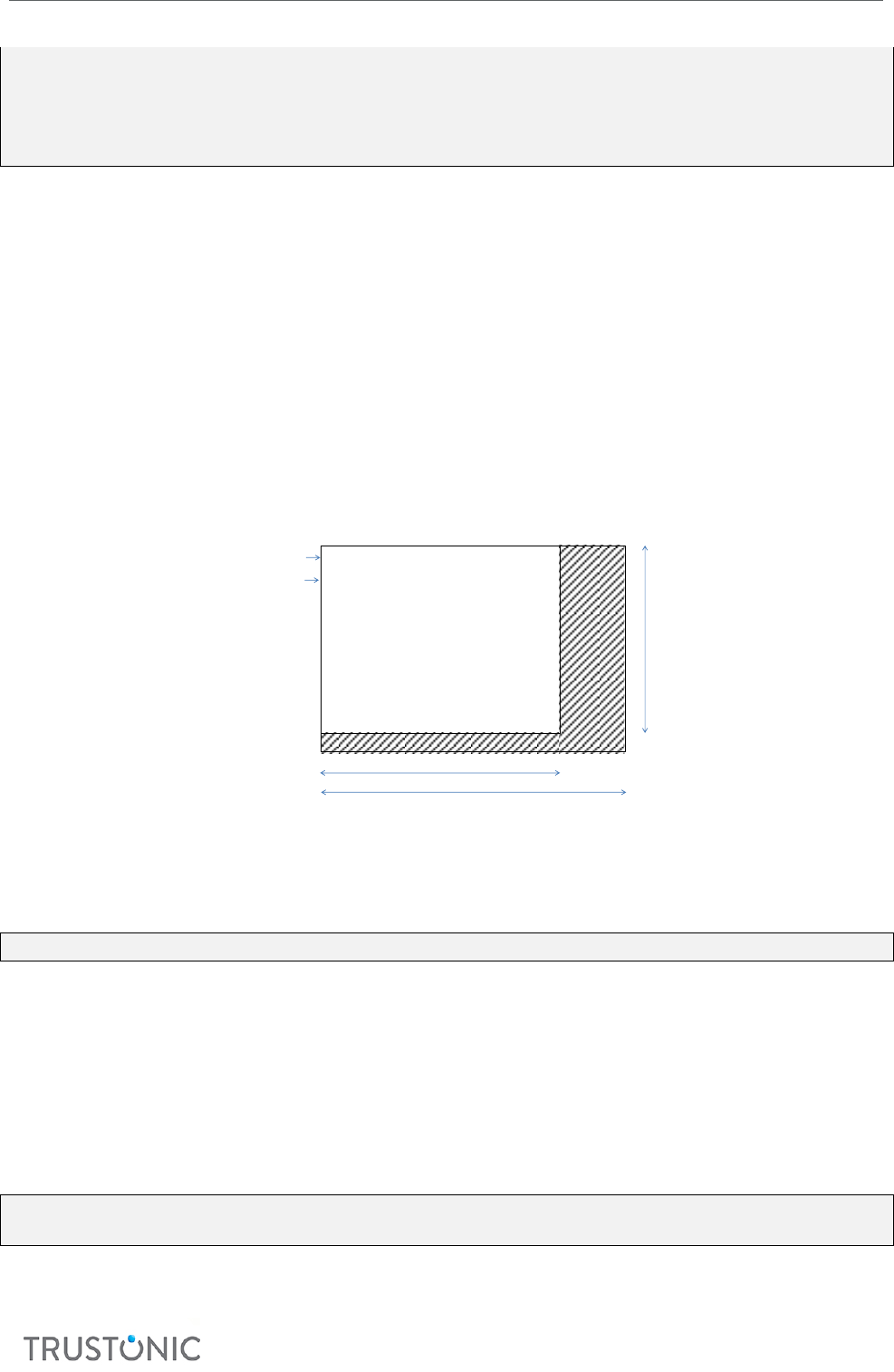
• stride: Image stride (number of bytes in the buer between the beginning of a line and the
beginning of the next line). This value must be mulple of 4 (the pixel size is 4 bytes) and greater
than 4 mes the image width. It is usually equal to the width mulplied by the number of bytes
per pixel.
• width: Image width in pixels.
• height: Image height in pixels.
Padding
width
stride
height
1st line
2nd line
Padding
Image
Memory representation of a raw image
3.4.9.2.9 tlApiTuiGraphicContext_t
typedef struct __tlApiTuiGraphicContext_t *tlApiTuiGraphicContext_t;
Since API level 6.
Opaque data type represenng a graphic context.
A graphic context holds some parameters related to a drawing area. The parameters include a drawing buer
and clipping parameters. The parameters apply to any operaon made using the graphic context.
3.4.9.3 Funcons
3.4.9.3.1 TEE_TBase_TUI_GetScreenInfo
TEE_Result TEE_TBase_TUI_GetScreenInfo(
tlApiTuiScreenInfo_ptr screenInfo);
Descripon

TAP Developer Manual
CONFIDENTIAL
31
Get screen informaon.
Parameters
• screenInfo: screen informaon.
Return Code
• TLAPI_OK if operaon was successful.
• E_TLAPI_DRV_NO_SUCH_DRIVER if the TUI driver cannot be found.
E_TLAPI_NULL_POINTER if one parameter is a null pointer.
3.4.9.3.2 TEE_TBase_TUI_OpenSession
TEE_Result TEE_TBase_TUI_OpenSession(void);
Descripon
Open a session to the TUI driver.
Return Code
• TLAPI_OK if operaon was successful.
• E_TLAPI_DRV_NO_SUCH_DRIVER if the TUI driver cannot be found.
• E_TLAPI_TUI_BUSY if the TUI driver cannot be opened.
3.4.9.3.3 TEE_TBase_TUI_CloseSession
TEE_Result TEE_TBase_TUI_CloseSession(void);
Descripon
Close the session to the TUI driver.
Return Code
• TLAPI_OK if operaon was successful.
• E_TLAPI_DRV_NO_SUCH_DRIVER if the TUI driver cannot be found.
• E_TLAPI_TUI_NO_SESSION if the TUI driver session cannot be found. It was not opened or
has been closed.
3.4.9.3.4 TEE_TBase_TUI_SetImage
TEE_Result TEE_TBase_TUI_SetImage (
tlApiTuiImage_ptr image,
tlApiTuiCoordinates_t coordinates);
Descripon
Draw an image in secure display.
Unlike other drawing funcons, this funcon draws directly to the front framebuer of the screen and is
subject to tearing.
Only non-interlaced PNG images can be displayed. The Error! Reference source not found. gives the c
apabilies of the PNG decoder.
PNG Image Type
Allowed bit depth
t-base decoder
API level
Greyscale
1, 2, 4, 8
Supported
3 and higher
Greyscale
16
Not supported
3

TAP Developer Manual
CONFIDENTIAL
32
Greyscale
16
Supported
4
Truecolor
8
Supported
3 and higher
Truecolor
16
Not supported
3 and higher
Indexed-color
1, 2, 4, 8
Not supported
3 and higher
Greyscale with alpha
8, 16
Not supported
3
Greyscale with alpha
8, 16
Supported
4
Truecolor with alpha
8
Not supported
3
Truecolor with alpha
8
Supported
4
Truecolor with alpha
16
Not supported
3 and higher
Parameters
• image: image to be displayed.
• coordinates: coordinates where to display the image in the screen, related to the top le
corner dened by tlApiTuiGetSreenInfo.
Return Code
• TLAPI_OK if operaon was successful.
• E_TLAPI_DRV_NO_SUCH_DRIVER if the TUI driver cannot be found.
• E_TLAPI_TUI_NO_SESSION if the TUI driver session cannot be found. It was not opened or has
been closed.
• E_TLAPI_NULL_POINTER if one parameter is a null pointer.
• E_TLAPI_ INVALID_INPUT if one parameter is not valid.
• E_TLAPI_TUI_IMG_BAD_FORMAT if the image le cannot be recognized as a valid le.
• E_TLAPI_NOT_IMPLEMENTED if some data found when parsing the image le are related to a
feature that is not supported.
• E_TLAPI_TUI_OUT_OF_DISPLAY if the image or a part of the image is out of the display area.
3.4.9.3.5 TEE_TBase_TUI_GetTouchEvent
TEE_Result TEE_TBase_TUI_GetTouchEvent(
tlApiTuiTouchEvent_ptr touchEvent);
Descripon
Get a touch event from TUI driver.
This is non-blocking call. It shall be called when the TL is noed.
The touch events are actually queued in the TUI driver. In case the queue overowed, the applicaon has
lost events and should call tlApiTuiGetTouchEvent and process events ASAP to avoid losing more.
Parameters
• touchEvent: the touch event that occurred.
Return Code
• TLAPI_OK if operaon was successful.

TAP Developer Manual
CONFIDENTIAL
33
• E_TLAPI_DRV_NO_SUCH_DRIVER if the TUI driver cannot be found.
• E_TLAPI_TUI_NO_SESSION if the TUI driver session cannot be found. It was not opened or has
been closed.
• E_TLAPI_TUI_NO_EVENT if no event has occurred since the session started or the last call of
this funcon.
• E_TLAPI_NULL_POINTER if one parameter is a null pointer.
• E_TLAPI_INVALID_RANGE if the pointed touch event structure is not within the secure
memory range.
• E_TLAPI_TUI_MISSED_EVENTS if the TUI event queue is overowed. In that case the value of
touchEvent is not accurate.
3.4.10 DRM API
Note: this API is TEE only.
3.4.10.1 Structures
3.4.10.1.1 tlApiDrmOsetSizePair
typedef struct
{
uint32_t nSize; /* Size of encrypted region */
uint32_t nOffset; /* offset to encrypted region */
} tlApiDrmOffsetSizePair_t;
Structure containing the oset and size of an encrypted data secon within a buer, potenally one of many
secons within the buer.
3.4.10.1.2 tlApiDrmAlg
typedef enum {
TLAPI_DRM_ALG_NONE,
TLAPI_DRM_ALG_AES_ECB,
TLAPI_DRM_ALG_AES_CBC,
TLAPI_DRM_ALG_AES_CTR32,
TLAPI_DRM_ALG_AES_CTR64,
TLAPI_DRM_ALG_AES_CTR96,
TLAPI_DRM_ALG_AES_CTR128,
TLAPI_DRM_ALG_AES_XTS,
TLAPI_DRM_ALG_AES_CBCCTS
} tlApiDrmAlg_t;
Enum containing list of cryptographic algorithms available.
3.4.10.1.3 tlApiDrmLink
typedef enum {
TLAPI_DRM_LINK_HDCP_1,
TLAPI_DRM_LINK_HDCP_2,
TLAPI_DRM_LINK_AIRPLAY,
TLAPI_DRM_LINK_DTCP,
#if TBASE_API_LEVEL >= 7
TLAPI_DRM_LINK_HDCP_2_1,
TLAPI_DRM_LINK_HDCP_2_2,
TLAPI_DRM_LINK_HDCP_1_0 = TLAPI_DRM_LINK_HDCP_1,
TLAPI_DRM_LINK_HDCP_2_0 = TLAPI_DRM_LINK_HDCP_2,

TAP Developer Manual
CONFIDENTIAL
34
#endif /* TBASE_API_LEVEL >= 7 */
} tlApiDrmLink_t;
Structure containing the type of output link that needs to be protected and checked according to license.
3.4.10.1.4 tlApiDrmInputSegmentDescriptor
typedef struct
{
uint32_t nTotalSize; /** size of buffer (plain + encrypted) */
uint32_t nNumBlocks; /* No. of encrypted regions */
tlApiDrmOffsetSizePair_t aPairs[TLAPI_DRM_INPUT_PAIR_NUMBER]; /* Array of
offset/size pairs */
}tlApiDrmInputSegmentDescriptor;
Structure containing the number of encrypted regions in the buer and their oset/size informaon.
3.4.10.1.5 tlApiDrmDecryptContext
The crypto context to contain all IV, key and algorithm informaon required to decrypt the content.
/**
* For DRM cipher/copy operations
*
* Parameters
* @param key [in] content key
* @param key_len [in] key length in bytes (16,24,32)
* @param iv [in] initialization vector. Always 16 bytes.
* @param ivlen [in] length initialization vector.
* @param alg [in] algorithm
* @param outputoffset [in] output data offset
*
*/
typedef struct tlApiDrmDecryptContext
{
uint8_t *key;
int32_t keylen;
uint8_t *iv;
uint32_t ivlen;
tlApiDrmAlg_t alg;
uint32_t outputoffet;
}tlApiDrmDecryptContext;
3.4.10.1.6 tlApiDRM_headerV1
Since API level 7
This structure is used for the tlApiDrmProcessContentEx().
/**
* Extended function for DRM cipher/copy operations
*
* Parameters
* @param size [in] Declared size of the structure to pass to the driver
* @param decryptCtx [in] DRM Cipher data
* @param input [in] virtual address of contiguous memory

TAP Developer Manual
CONFIDENTIAL
35
* @param inputDesc [in] number of blocks and offset data in the input array
to be decrypted.
* @param processmode [in] content. E.g., encrypted/plain text
* @param output [in/out] Reference to the address of output decrypted
content. Also use for driver to return an address
* @param rfu [in] Used to pass additional parameters to driver
* @param rfuLen [in] Size of the variable pointed by rfu
*
*/
uint32_t size;
tlApiDrmDecryptContext_t decryptCtx;
void *input;
tlApiDrmInputSegmentDescriptor_t inputDesc;
uint32_t processMode;
uint64_t output;
void *rfu;
uint32_t rfuLen;
} tlApiDRM_headerV1;
3.4.10.2 Constants
Constant Name
Value
Definition
TLAPI_DRM_KEY_SIZE_128
16
Key size supported for AES Cipher.
TLAPI_DRM_KEY_SIZE_192
24
Key size supported for AES Cipher.
TLAPI_DRM_KEY_SIZE_256
32
Key size supported for AES Cipher.
TLAPI_DRM_PROCESS_ENCRYPTED_DATA
1
Indicates encrypted data is being passed to the
driver.
TLAPI_DRM_PROCESS_DECRYPTED_DATA
2
Indicates decrypted data is being passed to the
driver.
TLAPI_DRM_INPUT_PAIR_NUMBER
10
Number of oset/size pair in input descriptor
3.4.10.3 Errors
Constant Name
Value
Definition
E_TLAPI_DRM_OK
0
No Error.
E_TLAPI_DRM_INVALID_PARAMS
0x601
Invalid parameter for Cipher
E_TLAPI_DRM_INTERNAL
0x602
Internal error in AES
E_TLAPI_DRM_MAP
0x603
Driver mapping error
E_TLAPI_DRM_PERMISSION_DENIED
0x604
Permission Denied
E_TLAPI_DRM_REGION_NOT_SECURE
0x605
If the output address is not protected.
E_TLAPI_DRM_SESSION_NOT_AVAILABLE
0x606
If a single session implementation is already
active, or a multi session implementation has
no free sessions.
TAP Developer Manual
CONFIDENTIAL
36
E_TLAPI_DRM_INVALID_COMMAND
0x607
If the command ID received is unrecognized.
E_TLAPI_DRM_ALGORITHM_NOT_SUPPORTED
0x608
If the requested algorithm is not supported by
the driver. If this error is thrown the trusted
application must decipher the content itself.
E_TLAPI_DRM_DRIVER_NOT_IMPLEMENTED
0x609
If the functions have not been implemented.
3.4.10.4 Funcons
3.4.10.4.1 TEE_TBase_DRM_OpenSession
TEE_Result TEE_TBase_DRM_OpenSession (
uint8_t *sHandle);
Descripon
If mulple session support is required it must be managed rst here, this funcon is also required to set up
any inial requirements in the hardware prior to decrypon for example (if required according to plaorm
and chose framework architecture):
• Inialize the Crypto Hardware
• Inialize the Media Framework
• Authencate the decoder rmware.
• Enable Firewalls.
Parameters
sHandle: [out] Session Handle of the new TA session.
Return Code
• E_TLAPI_DRM_OK if operaon was successful.
• E_TLAPI_DRM_INTERNAL general error in case of crypto problem
• E_TLAPI_DRM_MAP in case of error mapping memory to driver.
• E_TLAPI_DRM_PERMISSION_DENIED in case of rights access related issue
• E_TLAPI_DRM_SESSION_NOT_AVAILABLE in case the driver is busy and cannot open a session.
• E_TLAPI_DRM_DRIVER_NOT_IMPLEMENTED in case the funcon is not implemented.
3.4.10.4.2 TEE_TBase_DRM_ProcessContent
TEE_Result TEE_TBase_DRM_ProcessContent (
uint8_t sHandle,
tlApiDrmDecryptContext decryptCtx,
uint8_t *input,
tlApiDrmInputSegmentDescriptor inputDesc,
uint16_t processMode,
uint8_t *output);
Descripon
Processes the specied content.
If the algorithm is supported by the driver this funcon is used to decrypt the encrypted data into a protected
buer. If the algorithm is not supported it will respond in an error. In this case the decrypon should be done
by the Trusted Applicaon and the decrypted data shall be copied to the protected buer using this funcon
with processMode set to TL_DRM_PROCESS_DECRYPTED_DATA.

TAP Developer Manual
CONFIDENTIAL
37
The parameter processMode is a constant value indicang whether encrypted or decrypted data is being
treated from the TA.
If mulple sessions are supported, the sHandle parameter is used to idenfy the session requested for
decrypon.
Input, key and iv data provided within the tlApiDrmDecryptContext structure indicates the context
of the cryptographic operaon.
If a frame consists of mulple encrypted areas, the tlApiDrmInputSegmentDescriptor structure must
hold the osets and lengths of the encrypted regions, the osets will also correspond to the osets in the
output buer. If the input is merely one encrypted buer, this will be indicated by the structure. If the input
buer to the TA contains both clear and encrypted data then both clear and encrypted data must be passed
to the driver using this funcon.
The output parameter holds a reference to a protected output locaon for the decrypted data. The actual
type of reference may vary between plaorms, it may be an idener, address, ION handle, but needs to be
consistent between NW media framework component that retrieves the reference and the DRM driver that
handles it. It will be passed through from media framework to driver without modicaon by the NW and
SW intermediate components.
If processmode is TL_DRM_PROCESS_DECRYPTED_DATA the structure elements: key, keylen and iv
are ignored as they are irrelevant for the copy.
Parameters
• sHandle: [in] Session Handle of the current TA session.
• decryptCtx: [in] Contains the IV, Key, Key length and all necessary crypto informaon for the
requested algorithm.
• input: [in] Address to the start of a block of encrypted data, or if required mulple secons of
encrypted and decrypted segments the osets and lengths of which are described in the next
parameter.
• inputDesc: [in] Structure containing osets and lengths of data to be decrypted if mulple
segments are present within the same buer, if not it will contain the oset and length of the
only encrypted segment.
• processMode: [in] states whether the incoming data is decrypted or encrypted, which infers a
secure copy, or a decrypt operaon is required.
• output: [in] holds a reference to an output address, can be a handle, idener or address.
Return Code
• E_TLAPI_DRM_OK if operaon was successful.
• E_TLAPI_DRM_INVALID_PARAMS incorrect parameters in input.
• E_TLAPI_DRM_INTERNAL general Error in case of crypto problem
• E_TLAPI_DRM_MAP in case of error mapping memory to driver.
• E_TLAPI_DRM_PERMISSION_DENIED in case of rights access related issue
• E_TLAPI_DRM_REGION_NOT_SECURE if the memory for output is not protected
• E_TLAPI_DRM_ALGORITHM_NOT_SUPPORTED in case the algorithm is not supported.
• E_TLAPI_DRM_DRIVER_NOT_IMPLEMENTED in case the funcon is not implemented.
3.4.10.4.3 TEE_TBase_DRM_ProcessContentEx
TEE_Result TEE_TBase_DRM_ProcessContentEx(
uint8_t sHandle,
tlApiDRM_headerV1 *DRM_header);

TAP Developer Manual
CONFIDENTIAL
38
Descripon
Since API level 7
Processes the specied content.
Extended funcon for tlApiDrmProcessContent().
More parameters can be transmied to the DRM driver with the RFU elds of the tlApiDRM_headerV1
structure.
Parameters
• sHandle: [in] Session Handle of the current TA session.
• DRM_header: [in] Contains parameters to be sent to the driver.
Return Code
• E_TLAPI_DRM_OK if operaon was successful.
• E_TLAPI_DRM_INVALID_PARAMS incorrect parameters in input.
• E_TLAPI_DRM_INTERNAL general Error in case of crypto problem
• E_TLAPI_DRM_MAP in case of error mapping memory to driver.
• E_TLAPI_DRM_PERMISSION_DENIED in case of rights access related issue
• E_TLAPI_DRM_REGION_NOT_SECURE if the memory for output is not protected
• E_TLAPI_DRM_ALGORITHM_NOT_SUPPORTED in case the algorithm is not supported.
• E_TLAPI_DRM_DRIVER_NOT_IMPLEMENTED in case the funcon is not implemented.
3.4.10.4.4 TEE_TBase_DRM_CloseSession
TEE_Result TEE_TBase_DRM_CloseSession (uint8_t sHandle);
Descripon
Closes the DRM session.
It operates on the session indicated by the session handle passed in the funcon. If mul session is not
supported, this value is ignored.
Parameters
• sHandle: [in] Session Handle of the current TA session.
Return Code
• E_TLAPI_DRM_OK if operaon was successful.
• E_TLAPI_DRM_INTERNAL in case of failure.
• E_TLAPI_DRM_DRIVER_NOT_IMPLEMENTED in case the funcon is not implemented.
3.4.10.4.5 TEE_TBase_DRM_CheckLink
TEE_Result TEE_TBase_DRM_CheckLink (
uint8_t sHandle,
tlApiDrmLink_t link);
Descripon
This funcon is used to check the protected external link informaon like HDCPv1, HDCPv2, AirPlay and DTCP.
It operates on the session indicated by the session handle passed in the funcon. If mul-session is not
supported, this value is ignored.
Parameters
• sHandle: [in] Session Handle of the current TA session.

TAP Developer Manual
CONFIDENTIAL
39
• link: [in] external link informaon like HDCPv1, HDCPv2, AirPlay, and DTCP.
Return Code
• E_TLAPI_DRM_OK if operaon was successful.
• E_TLAPI_DRM_INTERNAL in case of failure.
• E_TLAPI_DRM_DRIVER_NOT_IMPLEMENTED in case the funcon is not implemented.

TAP Developer Manual
CONFIDENTIAL
40
4 USING THP AGENT
This chapter describes how to use the THP Agent to install or upgrade a TA.
The THP Agent is responsible for communicaon between Android and Trustonic. You use the THP Agent to
interface with TAs, and to perform commands such as installing, updang, and uninstalling TAs.
Tip! For informaon about using THP Agent to personalize TAs, see Developing a TAP Applicaon for Android.
4.1 INSTALLING OR UPGRADING A TA
Use the THP Agent command installOrUpdateTA() to install a TA or upgrade an already-installed TA.
TAs are installed at applicaon runme. To load a TA, the THP Agent method installOrUpdateTA() is
called when the applicaon starts. When this method is called for the very rst me in the lifeme of the
applicaon, it triggers a network connecon to the TAM server. For subsequent calls, no network connecon
is required.
The android sample provided with the TAP SDK demonstrates how to use the THP Agent interface to install
TAs. For more informaon about the android sample, see Developing a TAP Applicaon for Android.
Example
The following example shows the code implemented on the Android side to send commands to the THP
Agent.
First, we create a new THPAgent object to handle installing a TA.
THPAgent agent = new THPAgent(this);
Next, we set up the server. If using a secure connecon, we also set up the public key cercate within the
client that corresponds to the one set up on the server. For use with the Trustonic-hosted TAMv2
development server, this is included in the sample applicaon.
try {
// Require a certificate for https
agent = agent.setServerCA("-----BEGIN CERTIFICATE-----\n" +
activity.getString(R.string.ca_cert_raw) + "\n-----END CERTIFICATE-----
");
agent = agent. setServerBaseUrl
(activity.getString(R.string.tam_server_url));
}
catch(CertificateException e){
System.out.println("Certificate Exception" + e.getMessage());
}
The default values used above for the Trustonic-hosted development server and its public key cercate are
dened in values/strings.xml as follows:
<string name="tam_server_url">https://tam.cgbe.trustonic.com/tam-
server<string>
<string
name="ca_cert_raw">MIIDcjCCAlqgAwIBAgIEEjRWADANBgkqhkiG9w0BAQsFADA/MQswCQ
YDVQQGEwJVSzEaMBgGA1UECgwRVHJ1c3RvbmljIExpbWl0ZWQxFDASBgNVBAMMC1RMUyBSb29
0IENBMB4XDTEzMDIyNzE2MzY1MVoXDTM4MDIyMTE2MzY1MVowPzELMAkGA1UEBhMCVUsxGjAY
BgNVBAoMEVRydXN0b25pYyBMaW1pdGVkMRQwEgYDVQQDDAtUTFMgUm9vdCBDQTCCASIwDQYJK
oZIhvcNAQEBBQADggEPADCCAQoCggEBAMaJYI6y7hxdxBoInTkiYhL2qhBtD0Kcmfx+NTiUUk

TAP Developer Manual
CONFIDENTIAL
41
O+9u9qSyzbsN7kfgpsLO8Eq3AGg72zEjayXDfzmlHW1CnO/0nWDiM4b4hDhpJRspE2BCnKvAH
AvcQeGpzX5hhZLYh51Zrn/pOLCvoR9XV1inlw6M0+M9A5n11l6tEEWGbgWRnna+LJFX+bSGni
hP1Be2nHsVnqcIDMo/hzCj2ZX2G95e+UVPIc9JK/SVqFzYHltNjUyOFG7jGOncDhdG9vgHUoi
ikr6ZF7NHaovqxhIOiiK2tDVos//3/PgjrVwPkAJlVenMLpfEdxCtwyHO2frQpmkHc1eWFD5N
Gd8vzh2qECAwEAAaN2MHQwHQYDVR0OBBYEFE9Csq2lSvztAMSjVdll4sxTPwvbMB8GA1UdIwQ
YMBaAFE9Csq2lSvztAMSjVdll4sxTPwvbMA8GA1UdEwEB/wQFMAMBAf8wDgYDVR0PAQH/BAQD
AgIEMBEGCWCGSAGG+EIBAQQEAwICBDANBgkqhkiG9w0BAQsFAAOCAQEAQrnIh4jpJtNf6hqnC
pmwmQFD4456gFh0B3cmQnVvkfDCApJ+9G3xSsaL8LJRvK6c/pAV9p+0pvh3ftV4MFSw9AytZr
ihsrVykxlI1UGRHJmDO1hRh5QlfbMVfstHI0W8ec2Al41g3C9pM+FgBBKIoG6ewpDlaUbMXk8
033jf/OIyF5HTeQYqr788/ykFY32Mz0lpC2GdIeRThlK4ka63WuffdtKAayyPcitMeZtajJpa
7s02MZF9Dd5shISypnUvXAN/BZXIwQXSAOqajTGEv3X/wLyasm3nkEX29IgDvknLBoqnTS9rD
2LQ4BnqNQubr5XROBOlwdkrHTveN4Y9pA==</string>
Next, we supply the le name of the TA we want to install as a string (this is the same name generated as
output from the build_ta.py script).
We determine which TEE mode will be used for this installaon, as specied in TEEC_CHOICE in the setup.ini
le. The rot13 sample is installed in the following example:
agent.installOrUpdateTA(getString(R.string.taRot13_uuid),
this,
TEEMode.fromInt(
Integer.parseInt(
getString(R.string.taRot13_teec_choice))),
false);
This produces a call back—a method that is triggered when the installTA() method is completed:
@Override
public void onInstallTACompleted(Outcome outcome) {
String taMode = outcome.getTeeClient().name();
The outcome object supplies useful informaon, such as whether the TA was installed with a Trustonic TEE
or with SWP, and a return type to indicate whether installaon was successful or not:
switch(outcome.getEventType()){
case SUCCESSFUL:
Log.d(TAG, "onInstallTACompleted::SUCCESSFUL");
if (!CARot13.open()) {
Log.e(TAG, "Failed to open session to Rot13 TA");
} else {
Log.d(TAG, "Session to the Rot13 TA established");
installOK = true;
}
break;
case ERROR:
Log.e(TAG, "onInstallTACompleted::ERROR");
//method returned error. To see what happened, inspect the
exception thrown and perform custom logic
Throwable errorCause = outcome.getException();
Log.e(TAG, errorCause.getMessage(), errorCause);
}

TAP Developer Manual
CONFIDENTIAL
42
To install our second TA, we make a new THP Agent to handle our new TA. Aes (within Rot13 TAInstalled
callback method) is used in the example.
agent.installOrUpdateTA(getString(R.string.taAes_uuid),
new SecondListener(),
TEEMode.fromInt(
Integer.parseInt(
getString(R.string.taAes_teec_choice))),
false); //aes
We pass as a second argument a new listener, called SecondListener(). This handles the second TA's call back,
in the same way as onInstallTACompleted above handles the rst THPAgent's call back.
}
private class SecondListener implements InstallTAListener {
@Override
public void onInstallTACompleted(Outcome outcome) {
String taMode = outcome.getTeeClient().name();
switch (outcome.getEventType()) {
case SUCCESSFUL:
Log.d(TAG, "onInstallTACompleted::SUCCESSFUL");
if (!CAAes.CaOpen()) {
Log.e(TAG, "Failed to open session to Aes TA");
} else {
Log.d(TAG, "Session to the Aes TA established");
installOKAES = true;
}
break;
case ERROR:
Log.e(TAG, "onInstallTACompleted::ERROR");
//method returned error. To see what happened, inspect
the exception thrown and perform custom logic
Throwable errorCause = outcome.getException();
Log.e(TAG, errorCause.getMessage(), errorCause);
}
}
TAP Developer Manual
CONFIDENTIAL
43
4.2 UNINSTALLING A TA
This secon describes how to use THP Agent to uninstall a TA.
Uninstalling a TA works in a similar way to personalizeTA. You call the method uninstallTA, passing
the TA bundle (as you do for personalizaon) and an UninstallTAListener implementaon i.e. a
callback (similar to personalizeTA, except in that case you pass a PersonalizeTAListener
implementaon).
Example
For example, if your THPAgent instance is called “agent”, iniate the uninstall ow using:
agent.uninstallTA(taName,this);
Use this if your Android code implements the UninstallTAListener. This means you need to
implement the method onUninstallTACompleted(Outcome result).
The following shows a simple example implementaon of the method:
@Override
public void onUninstallTACompleted(Outcome outcome) {
if(outcome.getEventType() == EventType.SUCCESSFUL){
Log.i("UNINSTALLTEST","Uninstall successful");
}
else{
outcome.getException().printStackTrace();
}
}
4.3 SETTING THE DEBUG LEVEL
To help with debugging an Android applicaon, you can congure THPAgent to provide more detailed
informaon during tesng. Set the debug level by calling the setLogLevel(LogLevel.level)
method, where LogLevel.level is one of the following:
Level
Descripon
LogLevel.ERROR
Show only errors. This is the default seng. Use this seng in a producon
environment.
LogLevel.WARNING
Show errors and warnings. For example, a warning such as “connection
to TAM server failed, retrying. . . .”
LogLevel.INFO
Show errors, warnings and messages that give high-level progress status. For
example, “Going online to retrieve personalization
commands” or “the L2 SD is currently blocked: it is
necessary to go online and retrieve the unblock
command” or “performing Update TA”.
LogLevel.DEBUG
Show errors, warnings, messages and low-level informaon such as the raw
commands being passed down to SD-TA. Use this seng for development.

TAP Developer Manual
CONFIDENTIAL
44
LogLevel.TRACE
Show all of the above, plus detailed intermediate informaon. Use this if you
are developing an applicaon and want to send informaon to Trustonic for
support purposes.
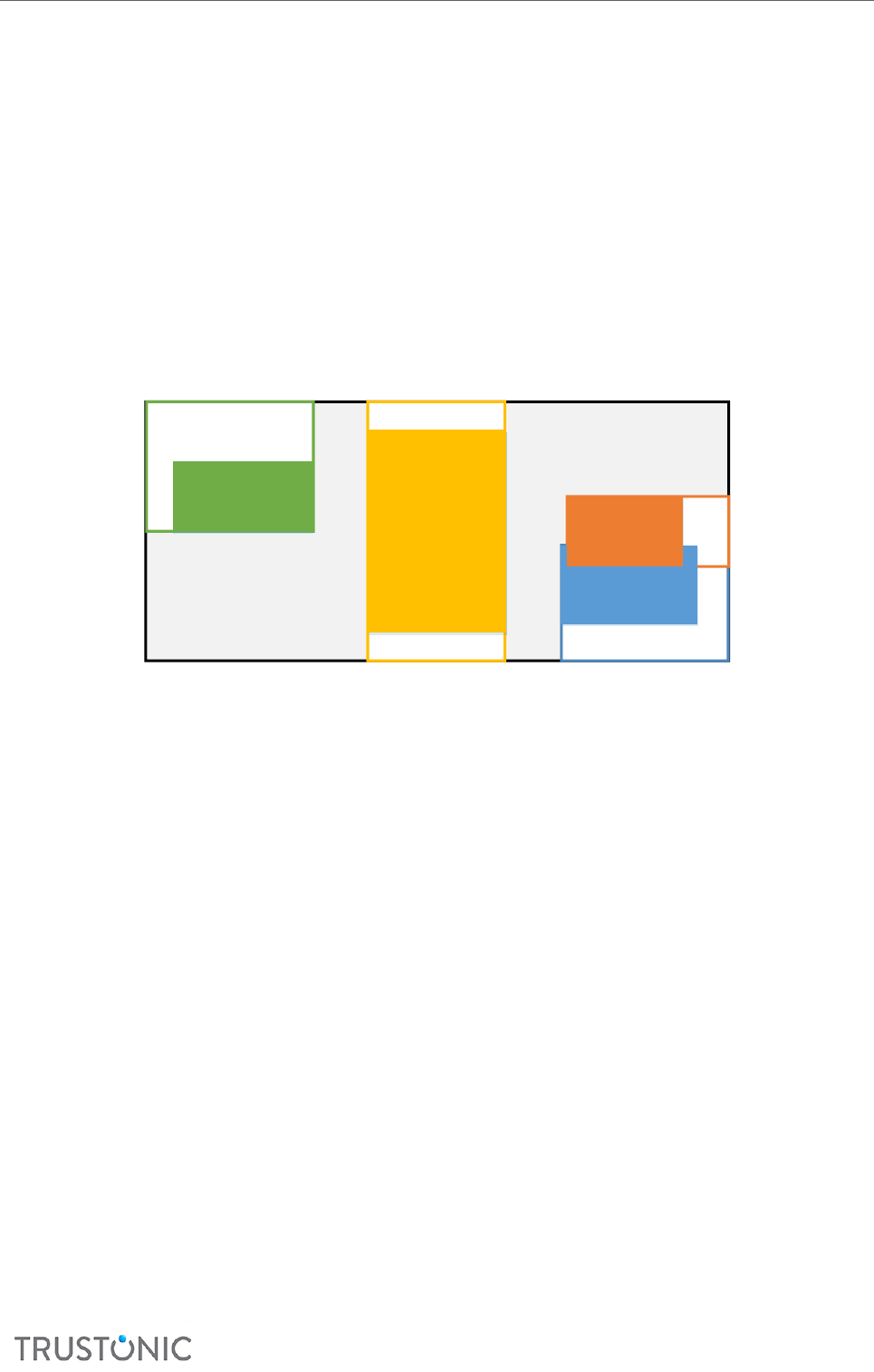
TAP Developer Manual
CONFIDENTIAL
45
5 USING THE TUI LAYER LIBRARY
This chapter describes the TUI layer library. This is a simple layout manager and rendering engine that allows
you to create UIs in the TUI using the industry-standard sketching tool.
The tool (referred to as the “box model” tool) consists of a structure of boxes, a set of stac methods to
assemble these and control rendering, and several independent renderers, each of which can render a single
box based on some content; for example, a rectangle, image or text label.
5.1 LAYOUT MODES EXPLAINED
The following diagrams show how margins and alignment of children can be used to achieve dierent eects.
D
AlignH=Left
AlignV=Top
A.MarginY
D.MarginY
A.MarginX
D.MarginX
Example Layout within a parent Container with ChildLayout=None
B.MarginX
A
AlignH=Right
AlignV=Bottom
B
AlignH=Right
AlignV=Centre
MarginY=0
C
Centre,Centre
MarginX=0
Height based on Parent
C.MarginY/2
C.MarginY/2
C
Centre,Centre
MarginX=0
Height based on Parent
C.MarginY/2
C.MarginY/2
In this example:
• Children are laid out independently, and may even overlap (they are rendered in rst-last order,
and receive events in last-rst order)
• Boxes with height set to ‘parent’ take up the enre parent height – MarginY. Boxes with width set
to parent are treated analogously.
• The parent box (the black box, in this example) can have its dimensions set to be ‘based on
children’ in which case the dimension is set to be the maximum of the (child dimension + child
margin) ignoring child boxes that are set to ‘based on parent’.
• If a box’s dimension is set to be based on content, then the size is determined by the renderer for
that box. In pracce, this is only useful for text areas
o If the width is set to be ‘based on content’ then a single line of text is measured, regardless
of length. If the height is also set to be based on content, it will be one line height.
o If the height is set to be based on content, then the text is rendered within a rectangle of
the specied width (whether explicit or based on children/parent) and the height is then
set to the height necessary to render all the text.
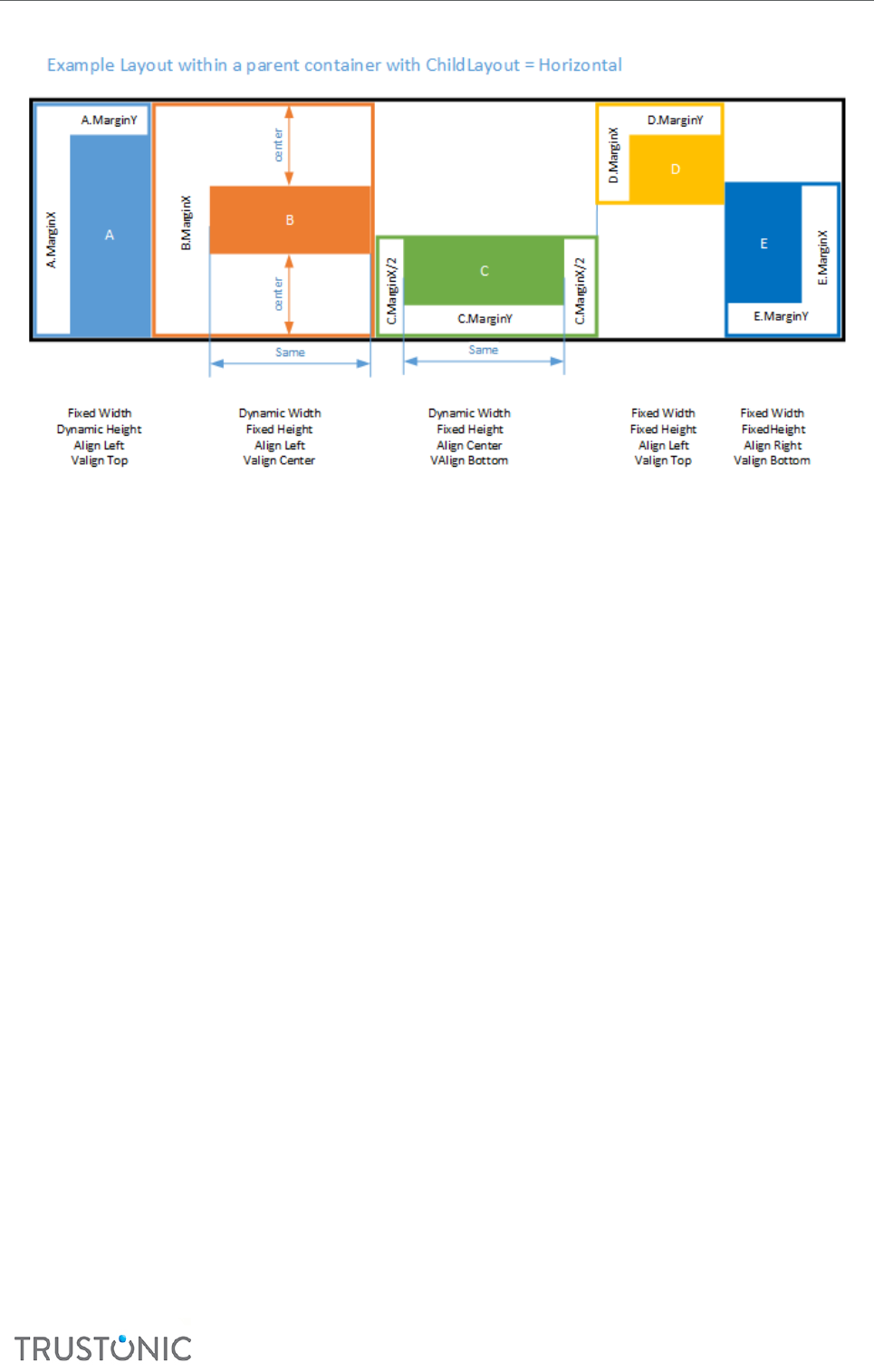
TAP Developer Manual
CONFIDENTIAL
46
In the diagram, ‘Dynamic’ means ‘based on Parent dimension’. In this example:
• Seng the ‘ow’ dimension to ‘based on parent’ shares the elasc space (horizontally, in this
example), whereas seng the opposing dimension to ‘based on parent’ uses the whole space
(vercally, in this example).
• Alignment can be used to posion the shape in the opposing direcon (vercally, in this case),
and to posion the margins in the ow direcon (horizontally, in this case)
• When margins are applied to a centered box, half the margin is used on each side.
• The parent box (black box, in this example) can have its dimensions set to be ‘based on
children’. If the ‘ow’ dimension is set to be based on child dimensions (horizontal, in this case),
then the parent width is set to the sum of the child margin values plus the sum of all children
whose size is not set to ‘based on parent’. If the opposing dimension is set to be based on child
dimensions, then the parent dimension is set to be the size of the largest value of (child width +
child margin), ignoring child sizes set to ‘based on parent’.
The following diagram shows a complex ow example. In this ‘ow’ layout, all children have idencal size
and margins.
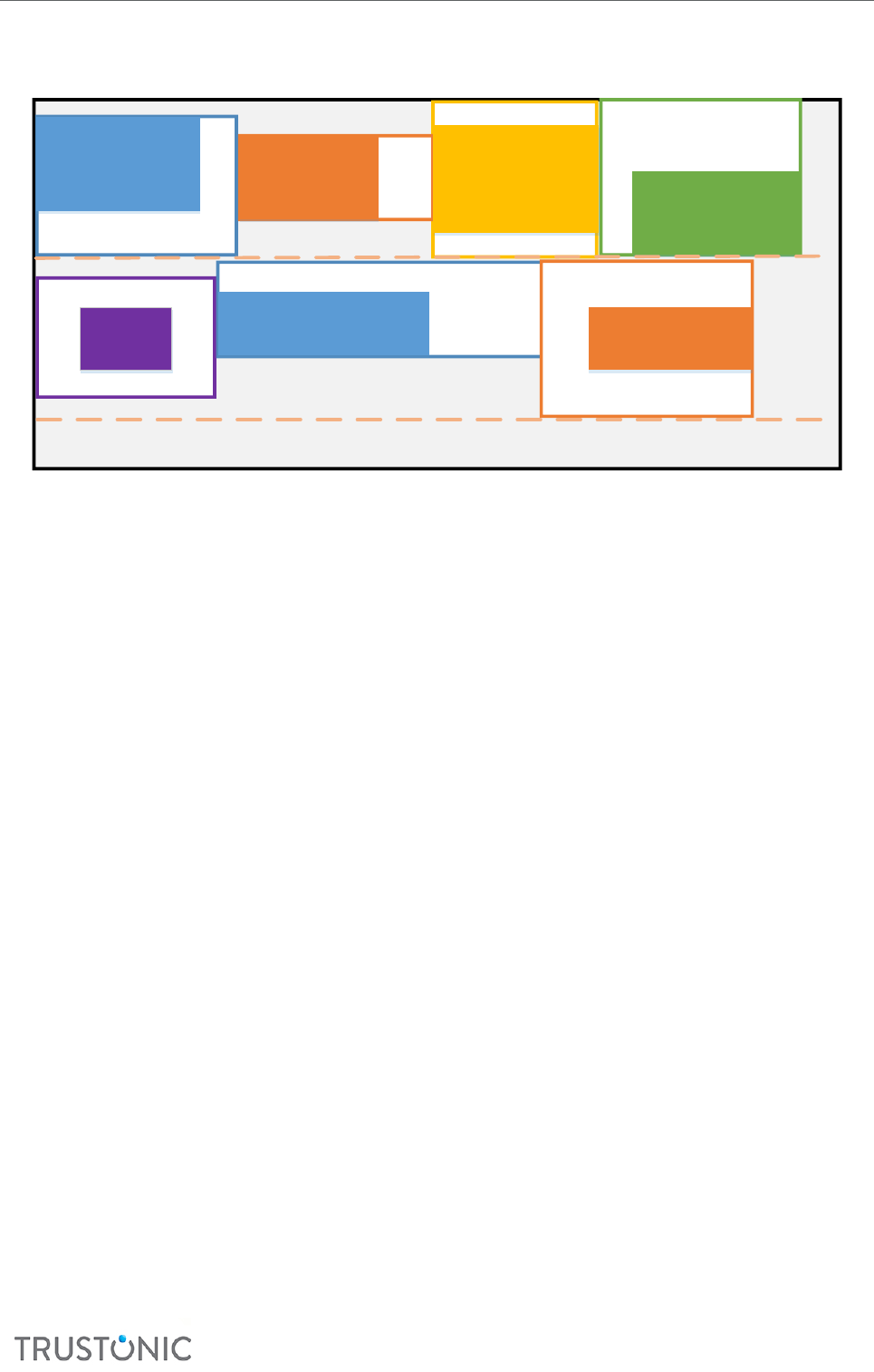
TAP Developer Manual
CONFIDENTIAL
47
A
AlignH=Right
AlignV=Bottom
B
AlignH=Right
AlignV=Centre
MarginY=0
C
Centre,Centre
MarginX=0
Height based on Parent D
AlignH=Left
AlignV=Top
E
Centre,
Centre
G
AlignH=Left
AlignV=Centre
F
A.MarginY
D.MarginY
G.MarginY/2
F.MarginY
A.MarginX
D.MarginX
F.MarginX
G.MarginX
E.MarginX/2
E.MarginX/2
B.MarginX
G.MarginY/2
E.MarginY/2
E.MarginY/2
Example Layout within a parent Container with ChildLayout=Flow
C.MarginY/2
C.MarginY/2
In this example:
• The line height (shown doed) for each line is based on the height of the tallest item on the
line, including its HMargin
• The number of items on a line is not xed, but is based on the number of items that will t
(with the rst item that does not t being moved to the next line)
• For calculaon purposes, the child box considered is always (width+marginx,height+marginy).
That box is then posioned based on AlignY for the child, and then the contents are posioned
within that using marginX,marginY
• Width based on parent size is NOT supported with ChildLayout=Flow
• Height based on parent size is supported, but is interpreted to be the height of the current line,
specically (current line height – the box’s margin). At least one box on the line must have a
non-dynamic height.
• A box with ChildLayout=Flow may not have either its width or height set to be based on child
size.
5.2 SCREEN SIZE ADAPTATION
5.2.1 Unit system overview
On Android, images assets and layout depends on both the screen size and the screen density. On layouts,
measures and coordinates are not specied in physical pixels. Instead, they are usually specied in dp (device
independent pixel) or sp (scaled pixel), which are not usable directly by the TUI.
On TUI, all units are physical screen pixels, so the library must handle the conversion from device-
independent measurement to device-dependent measurement.
FreeType, which is the font renderer used by the TUI, needs a font size in points (1/72th of an inch) and a
density in pixel/inch.
The TUI has access to this informaon through the API TEE_TBase_TUI_GetScreenInfo(), but may
not be able to use this informaon directly (see below).

TAP Developer Manual
CONFIDENTIAL
48
5.2.2 Android to TUI units conversion
The following secon provides the conversion from Android units to units usable by the TUI and FreeType,
and is based on the Android Documentaon.
Unit
name
Description
px
Actual device pixel. This is the only unit usable by the TUI API. Any dimension expressed in
another unit must be converted to px before reaching the TUI API.
dp
Device independent pixel – 1/160th of an inch.
Android defines it as: An abstract unit that is based on the physical density of the screen. These
units are relative to a 160 dpi (dots per inch) screen, on which 1dp is roughly equal to 1px.
Note that when converting this unit to px, Android does not use the device physical density
information. It uses an approximate density, of the form N×160 where N is an integer.
convertion to px
xpx = metrics.density × xdp
convertion for FreeType's FT_Set_Char_Size parameters:
char_width = x dp × 72 × 64 / 160
horz_resolution=metrics.density × 160
sp
Scale-independent Pixels – similar to dp unit, but it is also scaled by the user's font size
preference.
convertion to px:
x px = metrics.density × xsp
convertion for FreeType's FT_Set_Char_Size parameters:
char_width = xsp × 72 × 64 /160
horz_resolution = metrics.scaledDensity × 160
5.2.3 Android screen density buckets
On Android, image resources depend on the screen density. Android does not directly use the physical screen
density measured in pixel/inch. Instead, it classies the device screen into one of the following buckets:
bucket name
scaling factor (metrics.density)
ldpi
0.75
mdpi
1.0
hdpi
1.5

TAP Developer Manual
CONFIDENTIAL
49
xhdpi
2.0
xxhdpi
3.0
xxxhdpi
4.0
Each bucket has a scaling factor which expresses the density relave to a reference resoluon of 160
pixels/inch. For example, the Samsung Galaxy S7 Edge has 1440×2560 pixel display, for a screen measuring
2.86in×5.94in. The physical density is therefore approximavely 534 pixel/inch. Android classies this phone
in the xxxhdpi density bucket, so as far as Android is concerned, the phone has a density of 4×160 = 640
ppi. On this device, widget of 10×10 dp would take 40×40 screen pixels
The secure world does not have access to the scaling factor used by the normal world. The TUI reports the
density in physical pixel/inch, but that does not give the bucket informaon. The secure world does not have
access to the bucket informaon. The TA must obtain the scaling factor from the normal world.
The CA can get the screen density using the DisplayMetrics() API
DisplayMetrics metrics = new DisplayMetrics();
getWindowManager().getDefaultDisplay().getMetrics(metrics);
metrics.density; // scaling factor for the density
scaledDensity; // scaling factor for adjusted by user preferences
5.2.4 Box model scaleX and scaleY
Since the box model applies the scaling factors boxmodel.scaleX and boxmodel.scaleY to all the
box dimensions, the TA can express all dimension in the unit of its choosing (px, dp, sp), by seng the scale
factor appropriately as summarized in the table below
Value of scaleX/scaleY
Units in which boxes and text
dimension are expressed
1
px
Android’s
metrics.density
dp
Android’s
metrics.scaledDensity
sp
5.2.5 Layout
The layout used on the normal world depends on screen size measured in pixels. The TUI info returned by
TEE_TBase_TUIGetScreenInfo is used for this.
5.3 EVENTS
Three types of events are supported:
1. Regular Events
o These are idened events with an x,y coordinate which are passed to the ‘closest’ box and
which bubble upwards through the box hierarchy unl handled
▪ Specically, the top-level boxes are ordered top to boom and processed in this
order

TAP Developer Manual
CONFIDENTIAL
50
▪ For each visible root box, the box hierarchy is descended to nd the most closely
containing box
▪ This box is passed the event. If it returns ‘false’ from its handler (or has none), then
the event is passed to its parent, and their parent back up the tree
▪ If no box under the current visual root handles the event, it is passed to the next
lowest visual root, and the process connues
o Typical uses for events of this type are touch, move when touching, or release
o Custom events can be added, and arbitrary data passed to any event.
2. Secondary Events: Enter and Leave
o These are generated automacally if more than one ‘move’ event is seen in a row, or a
‘move’ follows a ‘touch’ (any ‘release’ event will cancel)
o If the previous event was outside a box, and the new event is inside the box, then an ‘Enter’
event is generated for that box. Similarly, if a previous event was inside a box, and the new
event is outside the box, a ‘Leave’ event is generated.
o Enter and Leave events DO NOT BUBBLE. They apply separately to each box entered/le.
3. Pseudo-events: Shown and Hidden
o These are generated automacally for every box in a shown/hidden hierarchy when the
show() or hide() methods are called.
o These events also DO NOT BUBBLE.
Secondary and pseudo-events are relavely expensive to process, so can be disabled if not needed.
The box model also supports a simplied view of Touch/Release if the Move/Enter/Leave events are not
used. In this mode, Release is registered at the same locaon as Touch, regardless of whether there was an
intervening movement (in the more advanced mode, buons will respond to Touch followed by any of
Release/Leave/Hide).
5.4 TUI LAYER LIBRARY DEFINITIONS
5.4.1 Constant
5.4.1.1 Boxes dimension mode
These constants indicate how the box dimension is calculated. They must set in the eld widthMode and
heightMode of the Box structure.
Constant name
Value
Descripon
EXPLICIT
0
Dimension is explicitly set in the width or height eld
of the box. The funcon BoxModel_Layout will not
change the width or height eld
FROM_PARENT
1
Dimension is computed from the parent box
dimension
FROM_CONTENT
2
Dimension is computed from the content. This applies
to text box only
FROM_CHILDREN
3
Dimension is computed from the child nodes

TAP Developer Manual
CONFIDENTIAL
51
5.4.1.2 Box state
These constants are bit ags indicang the state of the box.
Constant name
Value
Descripon
STATE_ACTIVE
1
The box is acve.
STATE_DISABLED
2
The box is disabled.
STATE_PRESSED
4
The box is pressed.
STATE_INHERIT
8
The box inherits the state of its parent.
5.4.1.3 Child layout
These constants indicate how children boxes are laid-out in a parent box.
Constant name
Value
Descripon
CHILD_LAYOUT_NONE
0
Each child is laid out independently of each other.
CHILD_LAYOUT_HORIZONTAL
1
Layout children horizontally, from le to right, within
the box.
CHILD_LAYOUT_VERTICAL
2
Layout children vercally, from top to boom, within
the box.
CHILD_LAYOUT_FLOW
3
Layout children rst horizontally, from le to right,
and then top to boom, within the box.
5.4.1.4 Box alignment
The following constants indicate how a box is posioned relave to its parent.
5.4.1.4.1 Horizontal alignment
These ags set the alignment of the box relave to its parent. They also control where the margin of the box,
if any, is placed. Refer to the descripon of the box ags hAlign and vAlign for details on how these
ags are used.
Constant name
Value
Descripon
ALIGN_CENTER
0
Center the current box horizontally relavely to its
parent
ALIGN_LEFT
1
Place the le border of the box on the le border of
its parent.
ALIGN_RIGHT
2
Place the right border of the box on the right border
of its parent.

TAP Developer Manual
CONFIDENTIAL
52
5.4.1.4.2 Vercal alignment
Constant name
Value
Descripon
ALIGN_CENTER
0
Center the current box vercally relavely to its parent
ALIGN_TOP
1
Place the top border of the box on the top border of
its parent.
ALIGN_BOTTOM
2
Place the boom border of the box on the boom
border of its parent.
5.4.2 Data structures
5.4.2.1 Box Structure
Each Box is a C structure with the following members:
typedef struct Box
{
char *db;
uint32_t width; /* logical pixels, scale to device pixels using boxmodel.ScaleX */
uint32_t height; /* logical pixels, scale to device pixels using boxmodel.ScaleY */
uint32_t x; /* 0,0 is top left, moving right/down as values grows. logical pixels*/
uint32_t y;
/* offset for layout from natural position defined by layout flags */
uint32_t marginX;
uint32_t marginY;
/* Flags - layout, state, etc */
struct boxFlags flags;
/* Structure */
struct Box *parent;
struct Box *nextSibling;
struct Box *firstChild;
/* Content */
void *content;
bool (*handleEvent)(struct Box *self, uint32_t x, uint32_t y, UIEventType type, void
*data);
} Box;
• width, height The size of the box in logical pixels. These are functions used by the application
program, and rendering engines to manipulate boxes.
• x, y The absolute location of the top left corner of the box on the screen. For child boxes
these values are set automatically by the layout manager. (0,0) is top left
• parent A pointer to the parent box that contains this box (or null for top level boxes/popups)
• firstChild, nextSibling, parent
Internal references used to enable efficient graph walking. These should not be set
explicitly; they are updated automatically as boxes are added to the graph.
• content A void * reference to content that is used by the rendering engine. The content and
interpretation of the data pointed to depends on the box type. For example, it
could be the colour information and/or text content. Content may be set to a
structure representing a set of content pointers, and the rendering engines will
choose the correct one based on the box’s state. If this is used, the F flag must be

TAP Developer Manual
CONFIDENTIAL
53
set. Note that the DYNAMIC_CONTENT structure may also be used to remember
application data for a box, which may then be used in event handlers (for example).
• flags A set of flags described in Box Flags.
• marginX, marginY
These values are used to adjust the position of the box during layout.
Layout uses the size (width+marginx,height+marginy) and then positions the box
inside this bounding box based on alignment. Margins apply on one side of a box,
unless it is centred, where the margin is split.
• Renderer A reference to a function to render the box’s content. The box model itself takes no
part in rendering, other than working out which boxes to render, and in what order,
and setting the clipping bounds appropriately.
• handleEvent A pointer to a function that will be sent any events related to this box, such as touch
events. The event handling function is told the x,y location of the event, the event
type and extra data (void*). It may return ‘true’ to indicate the event is handle, or
‘false’ in which case the event is offered to its parent.
5.4.2.2 Box Flags
The box ags are a stored in the C biield dened as follows:
struct boxFlags
{
unsigned int widthMode : 2;
unsigned int heightMode : 2;
unsigned int state : 3;
unsigned int dynamicContent : 1;
unsigned int childLayout : 2;
unsigned int hidden : 1;
unsigned int opaque : 1;
unsigned int hAlign : 2;
unsigned int vAlign : 2;
unsigned int childLayoutReversed : 1;
unsigned int layoutAdjustment : 1;
unsigned int _pad : 6;
unsigned int renderer : 8;
};
• Hidden Used to indicate a box is Hidden and neither it, nor its children, should be drawn, but
it will still take up space.
• opaque The box is fully opaque, so redrawing it will not require redrawing its parent beneath
it.
• childLayout One of four layout schemes for child boxes under this box:
1. CHILD_LAYOUT_NONE
2. CHILD_LAYOUT_HORIZONTAL - Child boxes are placed in a horizontal row, one aer the
other, le to right (or right to le)
3. CHILD_LAYOUT_VERTICAL - Child boxes are placed in a vercal column, one aer the
other, top to boom (or boom to top)
4. CHILD_LAYOUT_FLOW - Child boxes are owed le to right, line by line

TAP Developer Manual
CONFIDENTIAL
54
• widthMode, heightMode
Set the size of this boxes based on one of the following schemes. Horizontal and
Vertical schemes can be set separately.
1. EXPLICIT– size is given in pixels
2. FROM_PARENT – size is based on parent size
3. FROM_CONTENT – size is based on size of content (only applies to text)
4. FROM_CHILREN – size is the smallest size needed to layout children with the specied scheme.
• hAlign When the parent childLayout field is set to either CHILD_LAYOUT_NONE or
CHILD_LAYOUT_VERTICAL, this fields specify where the box is horizontally
placed in its parent box. After positioning a logical box of size
(width+marginX,height+marginY), in any parent’s childLayout mode, position the
box within this logical box based on the left/center/right alignment value so that the
margin is on the left, for left alignment, on the right for right alignment and split
50/50 for centred alignment.
• vAlign When the parent childLayout field is set to either CHILD_LAYOUT_NONE or
CHILD_LAYOUT_VERTICAL, this fields specify where the box is horizontally
placed in its parent box. After positioning a logical box of size
(width+marginX,height+marginY), in any parent’s childLayout mode, position the
box within this logical box based on the top/center/bottom alignment value so that
the margin is on the top, for top alignment, on the bottom for bottom alignment and
split 50/50 for centred alignment.
• state Used by renders and event handlers, but without direct influence on layout. State is
one of:
1. NORMAL Regular state (default)
2. PRESSED E.g. a buon currently being touched / depressed
3. ACTIVE E.g. a radio buon that is currently selected
4. DISABLED E.g. a disabled buon
5. INHERIT The state should be read from the rst ancestor box whose state is not
itself inherit. Useful when a logical buon is split into mulple sub-boxes for rendering.
6. DYNAMIC_CONTENT Used to indicate that the content used for rendering (see below) is
dependent on the box state. Renders should detect this state and read the correct content
based on the box state.
5.4.2.3 Properes
Properes of the box model are stored in a global object of type BoxModel. This global object is accessible by
the applicaon under the name boxmodel.
typedef struct BoxModel
{
int clipX;
int clipY;
int clipW;
int clipH;
float scaleX;
float scaleY;
Box *rootList;
int registeredEvents;

TAP Developer Manual
CONFIDENTIAL
55
void(*render)(Box *element);
void(*measure)(Box *element);
} BoxModel;
extern BoxModel boxmodel;
• scaleX,scaleY
o Scaling factors. These do not aect the box model itself, but should be used by renders to
scale the logical dimensions to physical dimensions. They can also be used to select
appropriate assets.
• clipX,clipY,clipW,clipH
o Clipping region. Rendering funcons can oponally use this to avoid unnecessary
processing. The box model itself uses these to avoid calling Render() on any box outside the
clipping region
• registeredEvents
o A bitset of events that will be propagated to boxes. Set to ‘all’ by default, it may be reduced
to improve performance. In parcular, ‘leave’, ‘enter’, ‘shown’ and ‘hidden’ events are
relavely expensive and can be disabled if not in use.
• rootList
o A tree of all boxes in the box model. Should not be used directly, but instead boxes should
be declared by calling the Add funcon. Made accessible to allow stac provisioning (to
avoid need for malloc).
5.5 TUI LAYER LIBRARY FUNCTIONS
These are funcons used by the Trusted Applicaons, and rendering engines to manipulate boxes.
5.5.1 Synopsis
Box *BoxModel_Register(Box *box);
void BoxModel_Layout(Box *element);
void BoxModel_Render(Box* element);
void BoxModel_RenderVisible(void);
UIEventType BoxModel_HandleButtonTouchRelease(Box *self, UIEventType type);
void BoxModel_RaiseEvent(short x, short y, UIEventType type, void *data);
void BoxModel_Hide(Box *el);
void BoxModel_Show(Box *el);
void *BoxModel_GetContent(Box* element);
5.5.2 BoxModel_Register
Box *BoxModel_Register(Box *box);
Descripon
Declare existence of a new box. All boxes must be declared. It adds the box provided as argument to the box
graph and updates it (each parent links to the rst child, and each child links to its next sibling).
Note. Top-level boxes (background, popups, etc) must be added in Z-order, lowest rst. The relave order of
boxes under a given parent dictates how they are laid out, but there is no need to add all children from one
box before another.
Parameters

TAP Developer Manual
CONFIDENTIAL
56
• box The box to be added to the global box forest. The field parent must be set to the
parent of the box, so this is added at the correct place in the graph. The other fields
for the box relatives are automatically updated by the function.
Return value
Returns the box itself, to allow more compact code.
5.5.3 BoxModel_Layout
void BoxModel_Layout(Box *element);
Descripon
Layout the contents of a box (recursively). This funcon computes the posion and dimension of all the boxes
that are descendant of element. This call is typically only called once, unless the contents or posion change.
Note as the x,y coordinate of each box is stored in absolute coordinates, if a popup is moved, Layout() must
be called again.
For scrolling boxes [future], boxes inside a scrolling container will have their coordinates stored relave to
the region being scrolled not the screen. Layout will not need to be called if an area scrolls.
5.5.4 BoxModel_Render
void BoxModel_Render(Box* element);
Descripon
Render the region covered by the specied box. This may include items below or above the box in the visual
stack. For example, if the image on a buon is changed, Render(buon) may be called to draw it showing
‘pressed’ state. The box model will take care of any boxes that overlap this, such as popups (by redrawing
them), and will also take care of boxes under this one if it is not opaque.
5.5.5 BoxModel_RenderVisible
void BoxModel_RenderVisible(void);
Descripon
Render all visible boxes. This is less ecient than the Render() call below, as it redraws the enre UI
5.5.6 BoxModel_Show
void BoxModel_Show(Box *el);
Descripon
Set the box to Visible, raise a shown event, and display.
5.5.7 BoxModel_Hide
void BoxModel_Hide(Box *el);
Descripon
Set the box to Hidden, raise a hidden event and redraw region under the box.
5.5.8 BoxModel_RaiseEvent
void BoxModel_RaiseEvent(short x, short y, UIEventType type, void *data);
Descripon

TAP Developer Manual
CONFIDENTIAL
57
Raise an event. The Event is routed to the top-most visible box at the coordinates (x,y). If this has no handler,
or returns false from the handler funcon, then the event is passed to each parent in turn. If nothing in this
stack handles the event at all, that ‘stack’ is ignored and the process restart with the next most visible stack.
5.5.9 BoxModel_HandleBuonTouchRelease
UIEventType BoxModel_HandleButtonTouchRelease(Box *self, UIEventType type);
Descripon
1. [Oponally] ulity method for boilerplate event handling
2. Handles Touch/Release/Leave events for a box by checking the box is enabled, changing its state to
pressed / released, and redrawing the box.
3. Will return EventType.Touch/EventType.Release for handled events, and EventType.None
otherwise.
5.5.10 BoxModel_GetContent
void *BoxModel_GetContent(Box* element);
Descripon
Return the content for a box, taking into account potenal dynamic content (content based on the box or
ancestor box state).
Renderer should not read the content directly (box->content) unless willing to handle dynamic content
themselves.
5.5.11 BoxModel_Free
void BoxModel_Free(Box* element);
Free the resources allocated for the box, either at by BoxModel_Render or BoxModel_Layout.
5.5.12 Renderers
Renderers are extensions to the box model to support rendering of individual boxes. Each renderer takes a
box as an argument, and each box contains a pointer to the relevant funcon for that box (or null if the box
itself is not rendered – for example if it is simply a container for other rendered boxes)
The renderer will typically use the following informaon
- box->X,Y,Width,Height
o Screen locaon to render at, plus size of the box
- box->Flags
o Flags for the box, in parcular, the box’s state.
- box->content
o void* pointer to data related to this renderer (e.g. text, color, font etc.)
This should always be accessed via GetContent() to enable dynamic state
- clipX,clipY,clipW,clipH
o Clipping region, which can be used to avoid drawing unnecessary areas. Clipping is useful
when there are mulple top level elements (e.g. popups).
o A renderer does not have to limit itself to the clipping region (but MUST limit itself to the
box’s dimensions), however if scrolling support is added in future, renderers will have to
respect clipping regions, so this is good pracce.
- scaleX,scaleY

TAP Developer Manual
CONFIDENTIAL
58
o Scaling to be applied to coordinates used in the box model. This is to enable DPI
independent UIs.
o Note that the box model does not directly make use of scale – however Renders must take
this into account and should scale box dimensions using these factors before applying to
the underlying display.
5.5.13 Rendering Funcons
Rendering funcons used in the test framework (and proposed for producon)
• Solid rectangle
• Simple border (hollow rectangle with line width = 1 pixel)
• Flowing text (le to right, top to boom, with words ed on a line broken at spaces).
o For Japanese and similar languages, spaces can be used to hint at break points, but are not
actually rendered.
• Image (PNG or Raw)
o Note that there is no scaling support at present
o For producon, a table of assets may be supported to allow easy conguraon of the set of
image assets for a given device/resoluon.
• Tiled Image (PNG or Raw)
o Repeat image in X and Y direcons. Useful for generang complex buon faces by
replicang a thin strip vercally or horizontally.
• Advanced Rectangle
o Oponal rounded corners (radius + list of corners to apply to)
o Oponal linear gradient (start/end colors + horizontal or vercal direcon). Uses basic
interpolaon of each of A,R,G,B channels.
o Note that there is limited/no an-aliasing support, and “under the covers” the rectangle is
created by a stack of smaller, solid rectangles.
5.5.14 Notes on Rendering Buons
To render shaped buons, try the following:
• Image based.
o Use an image for the enre buon.
o Use alternate images for other states (e.g. pressed, disabled etc.)
• Advanced Rectangle
o Rounded buons and simple gradients are supported; however, the lack of advanced
gradients or analiasing means this may not work in all cases.
o Alternate content can be used for other states.
• Slices/Tiled Images
o The le and right of the buon are supplied as images, and the centre as a third image that
is led.
o Alternate images can be used for the other states.
o BoxModel has good support for buons assembled in this way, including layout and state
inheritance.
• Sliced Rectangles
o Where a buon face has a variable gradient, it may be assembled from several sub-
rectangles, each using a linear gradient / single color
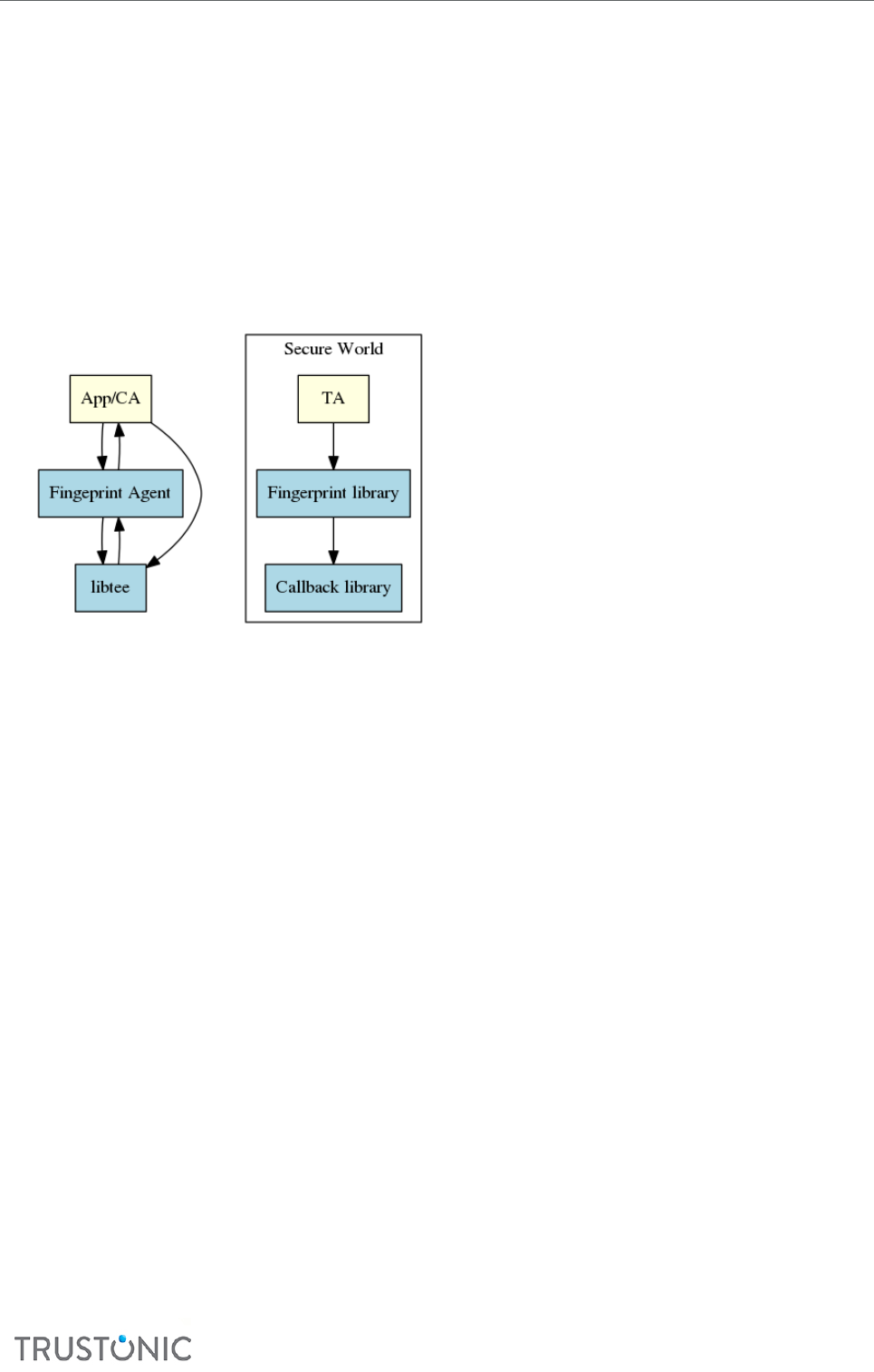
TAP Developer Manual
CONFIDENTIAL
59
6 FINGERPRINT SUPPORT FOR TRUSTED APPLICATIONS
This chapter describes the API extensions that allow a TA to authencate a user using their ngerprint.
6.1 ARCHITECTURE
Fingerprint authencaon in the TA uses the Android API for ngerprint.
The ngerprint authencaon in the TA is the joint operaon of two addional components, as well as
the Client and internal APIs.
• The ngerprint library is a stac library for TAs. It provides the ngerprint authencaon APIs to the
TAs and handles the communicaon with the Android ngerprint API.
• The ngerprint Agent is an Android archive. It is a proxy between the ngerprint library and the
Android ngerprint API. Addionally, it provides Java listeners so that the user applicaon can handle
the ngerprint authencaon UI by itself.
6.2 USAGE
The level of service of the ngerprint API for TAs is similar to the Android ngerprint API. It oers a
reduced set of operaons:
• Associate/Dissociate: establish/destroy a secure channel with the Android ngerprint API. This
operaon does not require a ngerprint capture.
• Verify: launch a ngerprint authencaon. This operaon requires a ngerprint capture.
There is no enroll operaon as the ngerprint API for TAs relies on templates enrolled in the Android
security sengs. Note that ngerprint templates must be registered, but enabling Android features
based on top of these templates is not necessary.
The following diagrams show the typical sequence of operaons to authencate a user using ngerprints
from a TA.
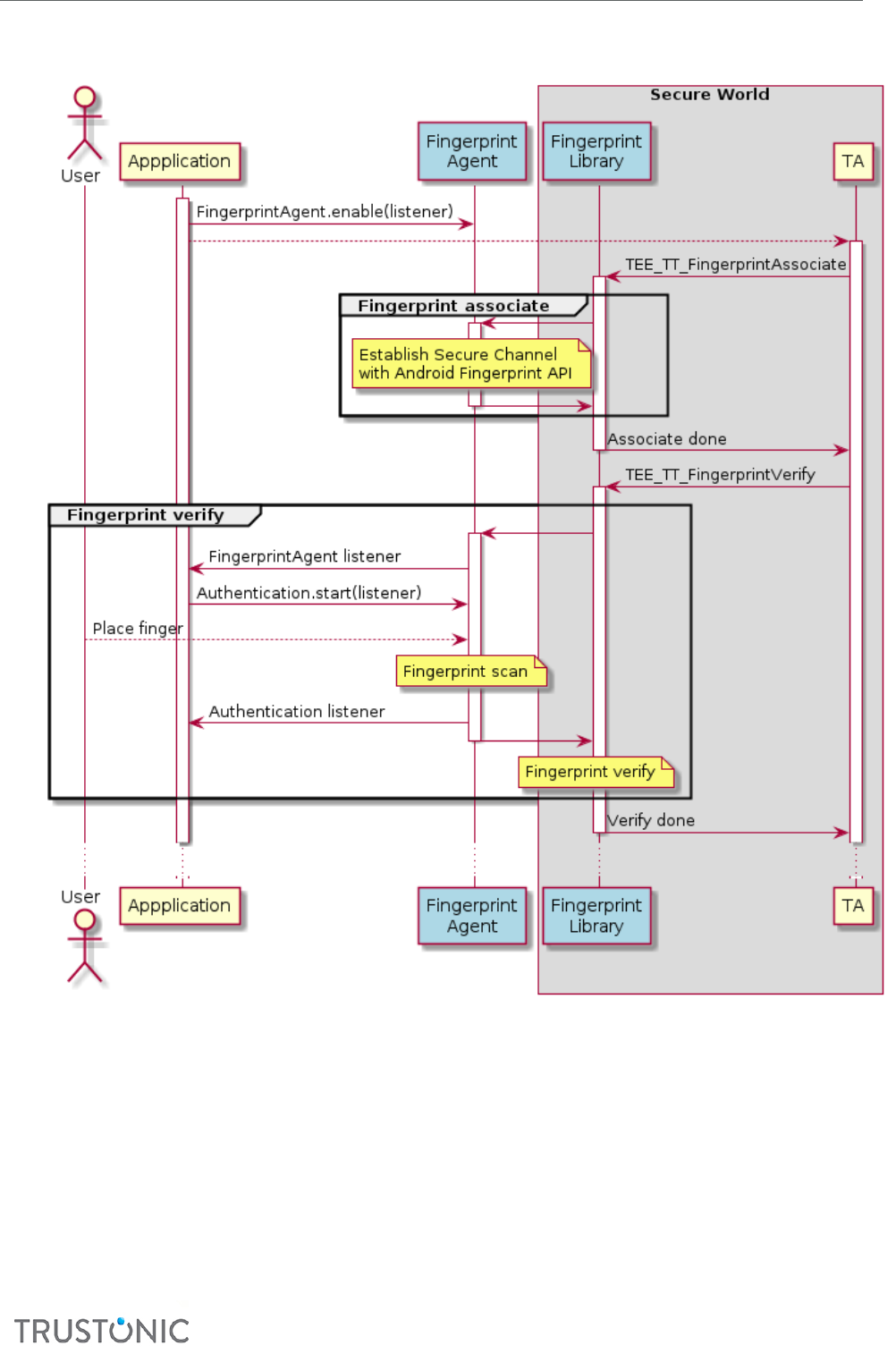
TAP Developer Manual
CONFIDENTIAL
60
Authencang:
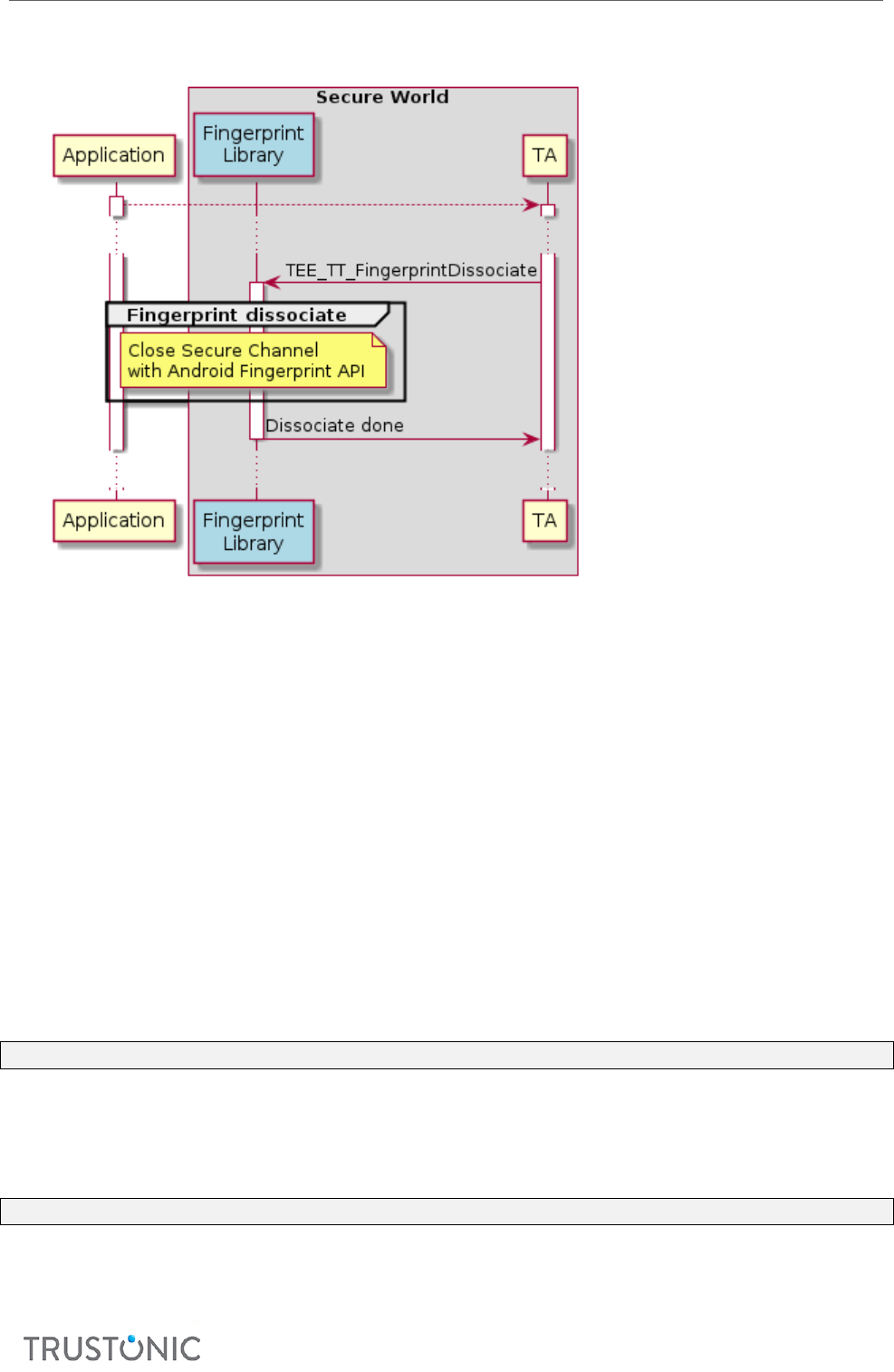
TAP Developer Manual
CONFIDENTIAL
61
Dissociang:
6.3 PREREQUISITES/LIMITATIONS
The TA targets devices that provide Android 6.0 API and ngerprint sensor hardware.
Android 6.0 does not allow enrolling a ngerprint using a user applicaon but the sengs applicaon.
Then the TA does not support the ngerprint enroll operaon but relies on ngerprint templates
registered by the Android security sengs.
The current implementaon does not oer any secure way to get the public key securely into the TA. It
is directly recovered from the Android security API.
6.4 INTERNAL API EXTENSION
6.4.1 Funcons
6.4.1.1 TEE_TT_FingerprintAssociate
This funcon gets an object handle associated to the ngerprint templates enrolled by the Android
system.
TEE_Result TEE_TT_FingerprintAssociate(TEE_ObjectHandle *);
6.4.1.2 TEE_TT_FingerprintVerify
This funcon veries a ngerprint against an object handle previously associated.
This funcon starts a ngerprint capture process including a user interacon.
TEE_Result TEE_TT_FingerprintVerify(TEE_ObjectHandle);

TAP Developer Manual
CONFIDENTIAL
62
6.4.1.3 TEE_TT_FingerprintDissociate
This funcon dissociates an object handle from the ngerprint templates enrolled by the Android system.
TEE_Result TEE_TT_FingerprintDissociate(TEE_ObjectHandle);
6.5 CLIENT API EXTENSION
6.5.1 class FingerprintAgent
6.5.1.1 Constructor
public FingerprintAgent(OnCallback callback)
This creates a new instance of the ngerprint agent.
The callback parameter is a listener that must implement the OnCallback interface.
6.5.1.2 Methods
public void enable() throws TeeException
The enable method must be called to enable the ngerprint support. No ngerprint listeners can be
invoked if not called.
public void disable()
The disable method disables the ngerprint support. No ngerprint listeners can be invoked once called.
6.5.1.3 Interface
public interface OnCallback {
void onCallback();
}
This interface provides a listener for authencaon nocaon. It is invoked each me a ngerprint
capture is requested allowing the app to handle the UI.
6.5.2 class Authencaon
6.5.2.1 Constructor
public Authentication(Context context, Callback callback)
This create a new instance of an object that is supposed to be acve within a ngerprint capture.
6.5.2.2 Methods
public void start()
The start method enables the ngerprint capture. No ngerprint capture listeners can be invoked if not
called.
public void cancel(String message)
The cancel method can be used to cancel a ngerprint capture. No ngerprint capture listeners can be
invoked once called.

TAP Developer Manual
CONFIDENTIAL
63
6.5.2.3 Interface
public interface Callback {
void onDone(String message);
void onErrorMessage(String message);
void onHelpMessage(String message);
}
This interface provides a listener for ngerprint capture events. It indicates the progress in authencaon
allowing the app to refresh the UI.
The capture ends with onDone is successful or onErrorMessage if failing. onHelpMessage provides
informaon enabling the user to beer process the capture.

TAP Developer Manual
CONFIDENTIAL
64
Appendix I. MAKEFILE KEYWORDS AND FLAGS
This appendix provides informaon about the keywords and ags used in the makele.mk of the TA.
Keyword/ag
Descripon
SDL1_ALIAS
the name of the Company key, as provided to key_gen.py
SDL2_ALIAS
the name of the Group key, as provided to key_gen.py
TA_KEY_ALIAS
the name of the TA “App” key, as provided to key_gen.py
PIN
the password to enable use of the keys held in the keystore
TA_VERSION
increment this to allow THPAgent’s installOrUpdateTA() to upgrade the
currently installed TA binary, when required
SRC_CPP, SRC_C,
SRC_S
the lenames of the SP’s C++, C and Assembler source code les,
respecvely
GP_ENTRYPOINTS
use the GlobalPlaorm TEE Client API (mandatory)
TA_INSTANCES
the maximum number of concurrently acve instances
TBASE_API_LEVEL
the version of the Kinibi API being targeted. To use later Kinibi APIs or TEE
features, set this level to one where those APIs are
HEAP_SIZE_INIT
the inial size of heap allocated during the loading of the TA
HEAP_SIZE_MAX
the maximum size of heap during the TA's lifeme (oponal)
INCLUDE_DIRS
include paths. Relave paths are supported in TAP version 1.3 only
TA_STATIC_KEY_FILE
the path to the key descripon le for the build-me provisioned SWP
keys
Cryptographic algorithm keywords/ags
The following lists the crypto algorithms required for soware-protected Trusted Applicaons:
Keyword/ag
Descripon
HIGHSPEED_AES
the High-Speed AES algorithm set for the enre Trusted Applicaon
instead of the High-Security AES
RSA
RSA decrypon, RSA signature and RSA key handling in Secure Storage
DES
DES symmetric encrypon/decrypon
HMAC
HMAC signing and vericaon (SHA-1, SHA-224, SHA-384, SHA-512, MD5)

TAP Developer Manual
CONFIDENTIAL
65
ECDSA
ECDSA signing and ECC key pair generaon using up to 264-bit and up to
528-bit prime curves, ECC key handling in Secure Storage
ECDH
ECDH and ECC key pair generaon using up to 264-bit and up to 528-bit
prime curves, ECC key handling in Secure Storage
DSA
DSA signing, DSA key generaon and DSA key handling in Secure Storage
UNWRAPPING
key unwrapping for all key types
KDF
key derivaon algorithm (for TEE_TT_KDF)
Reserved
Keyword/ag
Descripon
AUTH_TOOL_KEYSTORE
DO NOT USE. Allows the keystore to be provided elsewhere; however, this
feature is not yet fully integrated
TA_SERVICE_TYPE
must be set to SYS
TA_BUILD_PATH
auxiliary variable, used as Trusted Applicaon project root directory. DO
NOT change as other TAP scripts rely on this
TRUSTED_APP_DIR
auxiliary variable, used as Trusted Applicaon project source code
directory. DO NOT change as other TAP scripts rely on this
TRUSTED_APP_BIN
auxiliary variable indicang the path to intermediate Trusted Applicaon
binaries. Do not change as other TAP scripts rely on this
