Chapter 4 TCP IP Manual
TCP-IP-Manual
User Manual:
Open the PDF directly: View PDF  .
.
Page Count: 145 [warning: Documents this large are best viewed by clicking the View PDF Link!]
- Introduction
- I.1 Portable
- I.2 Scalable
- I.3 Coding Standards
- I.4 Third Party Certification
- I.5 MISRA C
- I.6 RTOS
- I.7 Single Network Interface Controller (NIC)
- I.8 µC/TCP IP Protocols
- I.9 Application Protocols
- I.10 µC/TCP IP Limitations
- Getting Started with µC/TCP-IP
- 1.00 Installing µC/TCP-IP
- 1.01 Example #1
- 1.01.01 BSP (Board Support Package)
- 1.01.02 Ex1
- 1.02 Configuration of the Example #1
- µC/TCP-IP Architecture
- 2.01.01 Your Application
- 2.01.02 LIB (Libraries)
- 2.01.03 BSD Socket API Layer
- 2.01.04 TCP/IP Layer
- 2.01.05 IF Layer
- 2.01.06 NIC Layer
- 2.01.07 PHY Layer
- 2.01.08 CPU Layer
- 2.01.09 RTOS Layer
- 2.02 Block Diagram
- 2.03 Directories
- 2.03.01 µC/TCP-IP Directories
- 2.03.01 Support Directories
- 2.03.02 Test Code Directories
- 2.04 Task model
- 2.04.01 µC/TCP-IP Tasks and Priorities
- 2.04.02 Receiving a Packet
- 2.04.03 Sending a Packet
- Buffer Management
- 3.01 Buffer Statistics
- 3.01.01 Buffer Statistics, Getting SMALL buffer statistics
- 3.01.02 Buffer Statistics, Getting LARGE buffer statistics
- 3.01.03 Buffer Statistics, Resetting the Maximum count of SMALL buffers used
- 3.01.04 Buffer Statistics, Resetting the Maximum count of LARGE buffers used
- Timer Management
- 4.01 Timer Statistics
- 4.01.01 Timer Statistics, Getting statistics
- ASCII Utilities
- 5.01 String to MAC address, NetASCII_Str_to_MAC()
- 5.02 MAC address to String, NetASCII_MAC_to_Str()
- 5.03 String to IP address, NetASCII_Str_to_IP()
- 5.04 IP address to String
- BSD v4 Socket Interface
- 6.01.01 UDP Socket Calls
- 6.01.02 TCP Socket Calls
- 6.02 Data Structures
- 6.03.01 accept() TCP
- 6.03.02 bind() TCP/UDP
- 6.03.03 close() TCP/UDP
- 6.03.04 connect() TCP/UDP
- 6.03.05 inet_addr()
- 6.03.06 inet_ntoa()
- 6.03.07 listen() TCP
- 6.03.08 recv() TCP/UDP
- 6.03.09 recvfrom() TCP/UDP
- 6.03.10 select() TCP/UDP
- 6.03.11 send() TCP/UDP
- 6.03.12 sendto() TCP/UDP
- 6.03.13 socket() TCP/UDP
- Micriµm Socket Layer
- 7.10 µC/TCP-IP Socket Error Codes
- NIC Drivers
- 8.01 Directories and Files
- 8.02 Interfacing to µC/TCP IP
- 8.02 ISRs, net_bsp_a.asm
- 8.03 net_bsp.c
- 8.04 net_nic.c
- 8.05.01 net_nic.c, NetNIC_Init()
- 8.05.02 net_nic.c, NetNIC_IntEn()
- 8.05.03 net_nic.c, NetNIC_ConnStatusGet()
- 8.05.04 net_nic.c, NetNIC_ISR_Handler()
- 8.05.05 net_nic.c, NetNIC_RxPktGetSize()
- 8.05.06 net_nic.c, NetNIC_RxPkt()
- 8.05.07 net_nic.c, NetNIC_RxPktDiscard()
- 8.05.08.01 net_nic.c, NetNIC_TxPktPrepare()
- 8.05.08.02 net_nic.c, NetNIC_TxPkt()
- 8.05.09 net_nic.c, NetNIC_RxISR_Handler()
- 8.05.10 net_nic.c, NetNIC_TxISR_Handler()
- 8.06 net_os.c
- 8.06.01 net_os.c, NetOS_NIC_Init()
- 8.06.02 net_os.c, NetOS_NIC_TxRdyWait()
- 8.06.03 net_os.c, NetOS_NIC_TxRdySignal()
- Configuration Manual
- 9.01 Network Configuration
- 9.01.01 Network Configuration, NET_CFG_INIT_CFG_VALS
- 9.01.02 Network Configuration, NET_CFG_OPTIMIZE
- 9.02 Debug Configuration
- 9.02.01 Debug Configuration, NET_DBG_CFG_DBG_INFO_EN
- 9.02.02 Debug Configuration, NET_DBG_CFG_MEM_CLR_EN
- 9.02.03 Debug Configuration, NET_DBG_CFG_TEST_EN
- 9.03 Argument Checking Configuration
- 9.03.01 Argument Checking Configuration, NET_ERR_CFG_ARG_CHK_EXT_EN
- 9.03.02 Argument Checking Configuration, NET_ERR_CFG_ARG_CHK_DBG_EN
- 9.04 Counters Configuration
- 9.04.01 Counters Configuration, NET_CTR_CFG_STAT_EN
- 9.04.02 Counters Configuration, NET_CTR_CFG_ERR_EN
- 9.05 Timers Configuration
- 9.05.01 Timers Configuration, NET_TMR_CFG_NBR_TMR
- 9.05.02 Timers Configuration, NET_TMR_CFG_TASK_FREQ
- 9.06 Network Buffers Configuration
- 9.06.01 Network Buffers Configuration, NET_BUF_CFG_NBR_SMALL
- 9.06.02 Network Buffers Configuration, NET_BUF_CFG_NBR_LARGE
- 9.06.03 Network Buffers Configuration, NET_BUF_CFG_DATA_SIZE_SMALL
- 9.06.04 Network Buffers Configuration, NET_BUF_CFG_DATA_SIZE_LARGE
- 9.07 NIC (Network Interface Controller) Configuration
- 9.07.01 NIC Configuration, NET_NIC_CFG_TX_RDY_INIT_VAL
- 9.07.02 NIC Configuration, NET_NIC_CFG_INT_CTRL_EN
- 9.07.03 NIC Configuration, NET_NIC_CFG_RD_WR_SEL
- 9.08 Network Interface Layer Configuration
- 9.08.01 Network Interface Layer Configuration, NET_IF_CFG_TYPE
- 9.08.02 Network Interface Layer Configuration, NET_IF_CFG_ADDR_FLTR_EN
- 9.09 ARP (Address Resolution Protocol) Configuration
- 9.09.01 ARP Configuration, NET_ARP_CFG_HW_TYPE
- 9.09.02 ARP Configuration, NET_ARP_CFG_PROTOCOL_TYPE
- 9.09.03 ARP Configuration, NET_ARP_CFG_NBR_CACHE
- 9.09.04 ARP Configuration, NET_ARP_CFG_ADDR_FLTR_EN
- 9.10 ICMP (Internet Control Message Protocol) Configuration
- 9.10.01 ICMP Configuration, NET_ICMP_CFG_TX_SRC_QUENCH_EN
- 9.10.02 ICMP Configuration, NET_ICMP_CFG_TX_SRC_QUENCH_SIZE
- 9.11 Transport Layer Configuration, NET_CFG_TRANSPORT_LAYER_SEL
- 9.12 UDP (User Datagram Protocol) Configuration
- 9.12.01 UDP Configuration, NET_UDP_CFG_APP_API_SEL
- 9.12.02 UDP Configuration, NET_UDP_CFG_RX_CHK_SUM_DISCARD_EN
- 9.12.03 UDP Configuration, NET_UDP_CFG_TX_CHK_SUM_EN
- 9.13 TCP (Transport Control Protocol) Configuration, NET_TCP_CFG_NBR_CONN
- 9.13.01 TCP, NET_TCP_CFG_NBR_CONN
- 9.13.02 TCP, NET_TCP_CFG_RX_WIN_SIZE_OCTET
- 9.13.03 TCP, NET_TCP_CFG_TX_WIN_SIZE_OCTET
- 9.13.04 TCP, NET_TCP_CFG_TIMEOUT_CONN_MAX_SEG_SEC
- 9.13.05 TCP, NET_TCP_CFG_TIMEOUT_CONN_ACK_DLY_MS
- 9.13.06 TCP, NET_TCP_CFG_TIMEOUT_CONN_RX_Q_MS
- 9.13.07 TCP, NET_TCP_CFG_TIMEOUT_CONN_TX_Q_MS
- 9.14 BSD v4 Sockets Configuration
- 9.14.01 BSD v4 Sockets Configuration, NET_SOCK_CFG_FAMILY
- 9.14.02 BSD v4 Sockets Configuration, NET_SOCK_CFG_NBR_SOCK
- 9.14.03 BSD v4 Sockets Configuration, NET_SOCK_CFG_BLOCK_SEL
- 9.14.04 BSD v4 API Configuration, NET_SOCK_CFG_SEL_EN
- 9.14.05 BSD v4 Sockets Configuration, NET_SOCK_CFG_SEL_NBR_EVENTS_MAX
- 9.14.06 BSD v4 Sockets Configuration, NET_SOCK_CFG_CONN_ACCEPT_Q_SIZE_MAX
- 9.14.07 BSD v4 Sockets Configuration, NET_SOCK_CFG_PORT_NBR_RANDOM_BASE
- 9.14.08 BSD v4 Sockets Configuration, NET_SOCK_CFG_TIMEOUT_RX_Q_MS
- 9.14.09 BSD v4 Sockets Configuration, NET_SOCK_CFG_TIMEOUT_CONN_REQ_MS
- 9.14.10 BSD v4 Sockets Configuration, NET_SOCK_CFG_TIMEOUT_CONN_ACCEPT_MS
- 9.14.11 BSD v4 Sockets Configuration, NET_SOCK_CFG_TIMEOUT_CONN_CLOSE_MS
- 9.14.12 BSD v4 API Configuration, NET_BSD_CFG_API_EN
- 9.15 Connection Manager Configuration
- 9.15.01 Connection Manager Configuration, NET_CONN_CFG_FAMILY
- 9.15.02 Connection Manager Configuration, NET_CONN_CFG_NBR_CONN
- 9.16 Application-Specific Configuration, app_cfg.h
- 9.16.01 Application-Specific Configuration, Operating System Configuration
- 9.16.02 Application-Specific Configuration, uC_CFG_OPTIMIZE_ASM_EN
- Debug Management
- 10.01 Network Debug Information Constants
- 10.02.01 Check Network Status, NetDbg_ChkStatus()
- 10.02.02 Check Network Resources Lost Status, NetDbg_ChkStatusRsrcLost()
- 10.02.03 Check Network Resources Low Status, NetDbg_ChkStatusRsrcLow()
- 10.02.04 Check Network Buffers Status, NetDbg_ChkStatusBufs()
- 10.02.05 Check Network Timers Status, NetDbg_ChkStatusTmrs()
- 10.02.06 Check Network Connections Status, NetDbg_ChkStatusConns()
- 10.02.07 Check TCP Layer Status, NetDbg_ChkStatusTCP()
- 10.03 Network Debug Monitor Task
- µC/TCP-IP Licensing Policy


2
Disclaimer
Specifications written in this manual are believed to be accurate, but are not guaranteed to
be entirely free of error. Specifications in this manual may be changed for functional or
performance improvements without notice. Please make sure your manual is the latest
edition. While the information herein is assumed to be accurate, Micrium assumes no
responsibility for any errors or omissions and makes no warranties. Micrium specifically
disclaims any implied warranty of fitness for a particular purpose.
Copyright notice
You may not extract portions of this manual or modify the PDF file in any way without the
prior written permission of Micrium. The software described in this document is furnished
under a license and may only be used or copied in accordance with the terms of such a
license.
© 2003-2007 Micriµm, Weston, Florida 33327-1848, U.S.A.
Trademarks
Names mentioned in this manual may be trademarks of their respective companies. Brand
and product names are trademarks or registered trademarks of their respective holders.
Registration
Please register the software via email. This way we can make sure you will receive updates
or notifications of updates as soon as they become available. For registration please
provide the following information:
• Your full name and the name of your supervisor
• Your company name
• Your job title
• Your email address and telephone number
• Company name and address
• Your company's main phone number
• Your company's web site address
• Name and version of the product
Please send this information to: licensing@micrium.com
Contact address
Micrium
949 Crestview Circle
Weston, FL 33327-1848
U.S.A.
Phone : +1 954 217 2036
FAX : +1 954 217 2037
WEB : www.micrium.com
Email : support@micrium.com

3
Manual versions
If you find any errors in this document, please inform us and we will make the appropriate
corrections for future releases.
Manual Version Date By Description
V1.54 Rev. A 2004/12/09 JJL Combined chapters in single document.
V1.54 Rev. B 2004/12/14 JJL Added Configuration constants in Chapter 17
V1.56 2005/01/23 JJL Added information about buffers and timers
V1.61 2005/02/10 JJL Updated ASCII APIs because they were changed
V1.70 2005/04/24 JJL NIC chapter revision
V1.71 2005/05/12 ITJ Updated Configuration Chapter;
Updated Socket error codes;
Added Debug Management Chapter
V1.72 2005/07/11 ITJ Updated NIC Receive/Transmit Sections;
Updated Configuration Sections
V1.73 2005/08/04 ITJ Corrected Socket Receive/Send Functional Descriptions
V1.80 2005/10/18 JJL Minor changes to the manual
V1.81 2005/10/21 JJL Added Delayed Acknowledge
V1.82 2005/12/13 ITJ Updated Debug Management Chapter
V1.83 2005/12/21 ITJ
V1.84 2006/04/14 ITJ
V1.84 2006/04/26 JDH Added information about example file usage
V1.85 2006/05/08 ITJ Updated Debug Status Functions
V1.86 2006/08/08 ITJ Corrected Socket API Descriptions
V1.87 2006/09/20 JJL Updated Manual
V1.88 2006/11/27 ITJ Updated Manual
V1.89 2007/03/08 ITJ Corrected Socket API & Configuration Descriptions
V1.90 2007/05/24 ITJ Updated Manual
V1.91 2007/10/24 ITJ Updated Manual
4
Table Of Contents
Introduction................................................................................................................................8
I.1 Portable.............................................................................................................................................8
I.2 Scalable.............................................................................................................................................8
I.3 Coding Standards..............................................................................................................................9
I.4 Third Party Certification...................................................................................................................9
I.5 MISRA C..........................................................................................................................................9
I.6 RTOS ..............................................................................................................................................10
I.7 Single Network Interface Controller (NIC).....................................................................................10
I.8 µC/TCP-IP Protocols...................................................................................................................10
I.9 Application Protocols......................................................................................................................10
I.10 µC/TCP-IP Limitations................................................................................................................11
Getting Started with µC/TCP-IP.....................................................................................12
1.00 Installing µC/TCP-IP...................................................................................................................12
1.01 Example #1 .....................................................................................................................................15
1.01.01 BSP (Board Support Package)........................................................................................................17
1.01.02 Ex1..................................................................................................................................................18
1.02 Configuration of the Example #1....................................................................................................23
µC/TCP-IP Architecture......................................................................................................25
2.01.01 Your Application ............................................................................................................................27
2.01.02 LIB (Libraries)................................................................................................................................27
2.01.03 BSD Socket API Layer ...................................................................................................................27
2.01.04 TCP/IP Layer ..................................................................................................................................27
2.01.05 IF Layer...........................................................................................................................................28
2.01.06 NIC Layer .......................................................................................................................................28
2.01.07 PHY Layer......................................................................................................................................29
2.01.08 CPU Layer ......................................................................................................................................29
2.01.09 RTOS Layer....................................................................................................................................29
2.02 Block Diagram................................................................................................................................30
2.03 Directories.......................................................................................................................................31
2.03.01 µC/TCP-IP Directories ................................................................................................................31
2.03.01 Support Directories.........................................................................................................................32
2.03.02 Test Code Directories......................................................................................................................33
2.04 Task model......................................................................................................................................34
2.04.01 µC/TCP-IP Tasks and Priorities......................................................................................................35
2.04.02 Receiving a Packet..........................................................................................................................35
2.04.03 Sending a Packet.............................................................................................................................37
5
Buffer Management..............................................................................................................39
3.01 Buffer Statistics...............................................................................................................................40
3.01.01 Buffer Statistics, Getting SMALL buffer statistics.........................................................................41
3.01.02 Buffer Statistics, Getting LARGE buffer statistics .........................................................................42
3.01.03 Buffer Statistics, Resetting the Maximum count of SMALL buffers used .....................................42
3.01.04 Buffer Statistics, Resetting the Maximum count of LARGE buffers used......................................42
Timer Management ..............................................................................................................43
4.01 Timer Statistics ...............................................................................................................................43
4.01.01 Timer Statistics, Getting statistics...................................................................................................44
ASCII Utilities..........................................................................................................................45
5.01 String to MAC address, NetASCII_Str_to_MAC() ........................................................................45
5.02 MAC address to String, NetASCII_MAC_to_Str() ........................................................................46
5.03 String to IP address, NetASCII_Str_to_IP() ...................................................................................47
5.04 IP address to String, NetASCII_IP_to_Str() ...................................................................................48
BSD v4 Socket Interface...................................................................................................49
6.01.01 UDP Socket Calls............................................................................................................................50
6.01.02 TCP Socket Calls............................................................................................................................51
6.02 Data Structures................................................................................................................................52
6.03.01 accept() TCP ...............................................................................................................................53
6.03.02 bind() TCP/UDP ......................................................................................................................55
6.03.03 close() TCP/UDP ......................................................................................................................57
6.03.04 connect() TCP/UDP......................................................................................................................58
6.03.05 inet_addr().......................................................................................................................................60
6.03.06 inet_ntoa().......................................................................................................................................62
6.03.07 listen() TCP...............................................................................................................................64
6.03.08 recv() TCP/UDP......................................................................................................................66
6.03.09 recvfrom() TCP/UDP......................................................................................................................69
6.03.10 select() TCP/UDP .....................................................................................................................72
6.03.11 send() TCP/UDP .....................................................................................................................74
6.03.12 sendto() TCP/UDP.....................................................................................................................77
6.03.13 socket() TCP/UDP .....................................................................................................................80
Micriµm Socket Layer.........................................................................................................82
7.10 µC/TCP-IP Socket Error Codes...................................................................................................83
6
NIC Drivers................................................................................................................................84
8.01 Directories and Files .......................................................................................................................84
8.02 Interfacing to µC/TCP-IP.............................................................................................................85
8.02 ISRs, net_bsp_a.asm.......................................................................................................................86
8.03 net_bsp.c .........................................................................................................................................87
8.04 net_nic.c..........................................................................................................................................88
8.05.01 net_nic.c, NetNIC_Init().................................................................................................................89
8.05.02 net_nic.c, NetNIC_IntEn()..............................................................................................................90
8.05.03 net_nic.c, NetNIC_ConnStatusGet()...............................................................................................91
8.05.04 net_nic.c, NetNIC_ISR_Handler()..................................................................................................92
8.05.05 net_nic.c, NetNIC_RxPktGetSize() ................................................................................................93
8.05.06 net_nic.c, NetNIC_RxPkt().............................................................................................................94
8.05.07 net_nic.c, NetNIC_RxPktDiscard() ................................................................................................98
8.05.08.01 net_nic.c, NetNIC_TxPktPrepare().................................................................................................99
8.05.08.02 net_nic.c, NetNIC_TxPkt()...........................................................................................................100
8.05.09 net_nic.c, NetNIC_RxISR_Handler()...........................................................................................102
8.05.10 net_nic.c, NetNIC_TxISR_Handler() ...........................................................................................104
8.06 net_os.c .........................................................................................................................................106
8.06.01 net_os.c, NetOS_NIC_Init()..........................................................................................................106
8.06.02 net_os.c, NetOS_NIC_TxRdyWait() ............................................................................................108
8.06.03 net_os.c, NetOS_NIC_TxRdySignal()..........................................................................................109
Configuration Manual........................................................................................................110
9.01 Network Configuration .................................................................................................................111
9.01.01 Network Configuration, NET_CFG_INIT_CFG_VALS..............................................................111
9.01.02 Network Configuration, NET_CFG_OPTIMIZE .........................................................................113
9.02 Debug Configuration.....................................................................................................................114
9.02.01 Debug Configuration, NET_DBG_CFG_DBG_INFO_EN..........................................................114
9.02.02 Debug Configuration, NET_DBG_CFG_MEM_CLR_EN ..........................................................114
9.02.03 Debug Configuration, NET_DBG_CFG_TEST_EN....................................................................114
9.03 Argument Checking Configuration...............................................................................................115
9.03.01 Argument Checking Configuration, NET_ERR_CFG_ARG_CHK_EXT_EN............................115
9.03.02 Argument Checking Configuration, NET_ERR_CFG_ARG_CHK_DBG_EN ...........................115
9.04 Counters Configuration.................................................................................................................116
9.04.01 Counters Configuration, NET_CTR_CFG_STAT_EN.................................................................116
9.04.02 Counters Configuration, NET_CTR_CFG_ERR_EN...................................................................116
9.05 Timers Configuration....................................................................................................................117
9.05.01 Timers Configuration, NET_TMR_CFG_NBR_TMR .................................................................117
9.05.02 Timers Configuration, NET_TMR_CFG_TASK_FREQ .............................................................117
9.06 Network Buffers Configuration ....................................................................................................118
9.06.01 Network Buffers Configuration, NET_BUF_CFG_NBR_SMALL..............................................119
9.06.02 Network Buffers Configuration, NET_BUF_CFG_NBR_LARGE..............................................119
9.06.03 Network Buffers Configuration, NET_BUF_CFG_DATA_SIZE_SMALL ................................119
9.06.04 Network Buffers Configuration, NET_BUF_CFG_DATA_SIZE_LARGE.................................119
9.07 NIC (Network Interface Controller) Configuration ......................................................................120
9.07.01 NIC Configuration, NET_NIC_CFG_TX_RDY_INIT_VAL ......................................................120
9.07.02 NIC Configuration, NET_NIC_CFG_INT_CTRL_EN................................................................120
9.07.03 NIC Configuration, NET_NIC_CFG_RD_WR_SEL ...................................................................120
9.08 Network Interface Layer Configuration........................................................................................121
9.08.01 Network Interface Layer Configuration, NET_IF_CFG_TYPE...................................................121
9.08.02 Network Interface Layer Configuration, NET_IF_CFG_ADDR_FLTR_EN...............................121
7
9.09 ARP (Address Resolution Protocol) Configuration......................................................................122
9.09.01 ARP Configuration, NET_ARP_CFG_HW_TYPE......................................................................122
9.09.02 ARP Configuration, NET_ARP_CFG_PROTOCOL_TYPE .......................................................122
9.09.03 ARP Configuration, NET_ARP_CFG_NBR_CACHE.................................................................122
9.09.04 ARP Configuration, NET_ARP_CFG_ADDR_FLTR_EN..........................................................122
9.10 ICMP (Internet Control Message Protocol) Configuration...........................................................123
9.10.01 ICMP Configuration, NET_ICMP_CFG_TX_SRC_QUENCH_EN............................................123
9.10.02 ICMP Configuration, NET_ICMP_CFG_TX_SRC_QUENCH_SIZE.........................................123
9.11 Transport Layer Configuration, NET_CFG_TRANSPORT_LAYER_SEL.................................124
9.12 UDP (User Datagram Protocol) Configuration.............................................................................125
9.12.01 UDP Configuration, NET_UDP_CFG_APP_API_SEL...............................................................125
9.12.02 UDP Configuration, NET_UDP_CFG_RX_CHK_SUM_DISCARD_EN...................................125
9.12.03 UDP Configuration, NET_UDP_CFG_TX_CHK_SUM_EN ......................................................126
9.13 TCP (Transport Control Protocol) Configuration, NET_TCP_CFG_NBR_CONN.....................127
9.13.01 TCP, NET_TCP_CFG_NBR_CONN...........................................................................................127
9.13.02 TCP, NET_TCP_CFG_RX_WIN_SIZE_OCTET........................................................................127
9.13.03 TCP, NET_TCP_CFG_TX_WIN_SIZE_OCTET........................................................................127
9.13.04 TCP, NET_TCP_CFG_TIMEOUT_CONN_MAX_SEG_SEC ...................................................127
9.13.05 TCP, NET_TCP_CFG_TIMEOUT_CONN_ACK_DLY_MS.....................................................127
9.13.06 TCP, NET_TCP_CFG_TIMEOUT_CONN_RX_Q_MS .............................................................128
9.13.07 TCP, NET_TCP_CFG_TIMEOUT_CONN_TX_Q_MS..............................................................128
9.14 BSD v4 Sockets Configuration.....................................................................................................129
9.14.01 BSD v4 Sockets Configuration, NET_SOCK_CFG_FAMILY....................................................129
9.14.02 BSD v4 Sockets Configuration, NET_SOCK_CFG_NBR_SOCK ..............................................129
9.14.03 BSD v4 Sockets Configuration, NET_SOCK_CFG_BLOCK_SEL.............................................129
9.14.04 BSD v4 Sockets Configuration, NET_SOCK_CFG_ SEL_EN....................................................129
9.14.05 BSD v4 Sockets Configuration, NET_SOCK_CFG_SEL_NBR_EVENTS_MAX......................129
9.14.06 BSD v4 Sockets Configuration, NET_SOCK_CFG_CONN_ACCEPT_Q_SIZE_MAX ............130
9.14.07 BSD v4 Sockets Configuration, NET_SOCK_CFG_PORT_NBR_RANDOM_BASE...............130
9.14.08 BSD v4 Sockets Configuration, NET_SOCK_CFG_TIMEOUT_RX_Q_MS .............................130
9.14.09 BSD v4 Sockets Configuration, NET_SOCK_CFG_TIMEOUT_CONN_REQ_MS ..................130
9.14.10 BSD v4 Sockets Configuration, NET_SOCK_CFG_TIMEOUT_CONN_ACCEPT_MS...........130
9.14.11 BSD v4 Sockets Configuration, NET_SOCK_CFG_TIMEOUT_CONN_CLOSE_MS..............130
9.14.12 BSD v4 API Configuration, NET_BSD_CFG_API_EN ..............................................................130
9.15 Connection Manager Configuration..............................................................................................132
9.15.01 Connection Manager Configuration, NET_CONN_CFG_FAMILY............................................132
9.15.02 Connection Manager Configuration, NET_CONN_CFG_NBR_CONN......................................132
9.16 Application-Specific Configuration, app_cfg.h ............................................................................133
9.16.01 Application-Specific Configuration, Operating System Configuration ........................................133
9.16.02 Application-Specific Configuration, uC_CFG_OPTIMIZE_ASM_EN .......................................134
Debug Management ...........................................................................................................135
10.01 Network Debug Information Constants ........................................................................................135
10.02.01 Check Network Status, NetDbg_ChkStatus()...............................................................................136
10.02.02 Check Network Resources Lost Status, NetDbg_ChkStatusRsrcLost() .......................................137
10.02.03 Check Network Resources Low Status, NetDbg_ChkStatusRsrcLow().......................................138
10.02.04 Check Network Buffers Status, NetDbg_ChkStatusBufs()...........................................................139
10.02.05 Check Network Timers Status, NetDbg_ChkStatusTmrs()...........................................................140
10.02.06 Check Network Connections Status, NetDbg_ChkStatusConns()................................................141
10.02.07 Check TCP Layer Status, NetDbg_ChkStatusTCP() ....................................................................143
10.03 Network Debug Monitor Task......................................................................................................144
µC/TCP-IP Licensing Policy............................................................................................145

8
Introduction
µC/TCP-IP is a compact, reliable, high performance TCP/IP protocol stack. Built from the ground up with
Micrium's renowned quality, scalability and reliability, µC/TCP-IP enables the rapid configuration of required
network options to minimize your time to market. µC/TCP-IP is the result of many man-years of development.
The source code for µC/TCP-IP contains over 100,000 lines of the cleanest, most consistent ANSI C source code
you will ever find in a TCP/IP stack implementation. C was chosen because C is still the most predominant
language in the embedded industry. Over 50% of the code actually consists of comments. Most global variables
and all functions are described. References to RFC (Request For Comments) are referenced in the code when
applicable. The code is designed to be used with just about any CPU, RTOS and NIC (Network Interface
Controller).
I.1 Portable
µC/TCP-IP was designed for resource constrained embedded applications. Although µC/TCP-IP can work on
some 8 and 16-bit processors, µC/TCP-IP will work best with 32 or 64-bit CPUs.
I.2 Scalable
The memory footprint of µC/TCP-IP can be adjusted at compile time based on the features you need and the
desired level of run-time argument checking. Also, throughout µC/TCP-IP, we keep track of statistics and, some
of those can be disabled in order to further reduce the footprint.

9
I.3 Coding Standards
Coding standards have been established early in the design of µC/TCP-IP and include the following:
- C coding style
- Naming convention for #define constants, macros, variables and functions
- Commenting
- Directory structure
These conventions makes µC/TCP-IP the cleanest TCP/IP stack implementation in the industry and makes it
easier to attain third party certification as outlined in the next section.
I.4 Third Party Certification
µC/TCP-IP has been designed from the ground up to be certifiable for use in avionics as well as medical and other
safety critical products. A company called Validated Software is preparing a Validation Suite(tm) for µC/TCP-IP
to provide all of the documentation necessary to deliver µC/TCP-IP as a pre-certifiable software component for
safety critical systems, including avionics RTCA DO-178B and EUROCAE ED-12B, medical FDA 510(k), and IEC
61058 standard for transportation and nuclear systems. The very affordable Validation Suite(tm), is available
through Validated Software. It will be immediately certifiable for the highest criticality systems, including DO-178B
Level A, Class III medical devices, and SIL3/SIL4 IEC-certified systems. For more information, check out the
µC/TCP-IP page on the Validated Software web site (www.ValidatedSoftware.com).
If your product is NOT safety critical, you should view the certification as proof that µC/TCP-IP is a very robust
and highly reliable TCP/IP stack.
I.5 MISRA C
The source code for µC/TCP-IP follows the Motor Industry Software Reliability Association (MISRA) C Coding
Standards. These standards were created by MISRA to improve the reliability and predictability of C programs in
critical automotive systems. Members of the MISRA consortium include Delco Electronics, Ford Motor Company,
Jaguar Cars Ltd., Lotus Engineering, Lucas Electronics, Rolls-Royce, Rover Group Ltd., and other firms and
universities dedicated to improving safety and reliability in automotive electronics. Full details of this standard can
be obtained directly from the MISRA web site, http://www.misra.org.uk.

10
I.6 RTOS
µC/TCP-IP assumes the presence of an RTOS. However, we don’t make any assumptions about which RTOS you
will be using with µC/TCP-IP. The only requirements from the RTOS are:
1) The RTOS must be able to support multiple tasks
2) The RTOS must provide binary and counting semaphore management services
µC/TCP-IP contains an encapsulation layer that allows you to use just about any commercial or open source
RTOS. In other words, details about the RTOS you use are hidden from µC/TCP-IP. µC/TCP-IP includes the
encapsulation layer for µC/OS-II, The Real-Time Kernel.
I.7 Single Network Interface Controller (NIC)
The current version of µC/TCP-IP only allows the use of a single NIC for any one product/application. At this
time, the single NIC must be an Ethernet controller. Any Ethernet-type NIC may be used provided a driver with the
appropriate API and BSP software is provided. Interface to a specific NIC (i.e. chip) is encapsulated in a couple of
files and it’s quite easy to adapt different NICs to µC/TCP-IP.
We are currently working on adding PPP (Point-to-Point Protocol) support to µC/TCP-IP.
I.8 µC/TCP-IP Protocols
µC/TCP-IP consists of the following protocols:
- NIC driver
- Interface (Ethernet)
- ARP (Address Resolution Protocol)
- IP (Internet Protocol)
- ICMP (Internet Control Message Protocol)
- UDP (User Datagram Protocol)
- TCP (Transport Control Protocol)
- Sockets (BSD v4)
I.9 Application Protocols
µC/TCP-IP can work with well known application layer protocols such as DHCP, DNS, TFTP, HTTP servers
(web server), FTP servers, SNTP clients, SNMP clients and more.
11
I.10 µC/TCP-IP Limitations
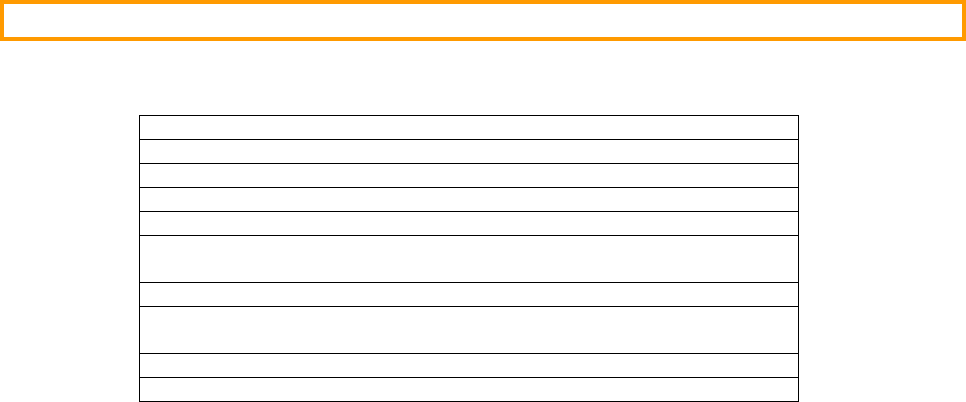
By design, we have limited some of the features of µC/TCP-IP. Table I-1 describes those limitations.
Supports a single network interface and one host IP address
Supports a single default gateway
No IP forwarding/routing
No IP multicasting
No IP transmit fragmentation
No IP Security options
RFC #1108
No ICMP Address Mask Agent/Server
RFC #1122, Section 3.2.2.9
No TCP Urgent Data
No TCP Security & Precedence
Table I-1, µC/TCP-IP limitations for current software version

12
Chapter 1
Getting Started with µC/TCP-IP
This chapter provides examples on how to use µC/TCP-IP. We decided to include this chapter early in the
µC/TCP-IP manual so you could start using µC/TCP-IP as soon as possible. In fact, we assume you know little
about µC/TCP-IP and networking. Concepts will be introduced as needed.
The sample code was compiled using the IAR Embedded Workbench V4.31a (or higher) for the ARM processor.
Tests were done using a Cogent CSB337 (ARM9 CPU) board which has an AT91RM9200 EMAC Network
Interface Controller (NIC). We selected an ARM processor because of its popularity in the networking world.
1.00 Installing µC/TCP-IP
The distribution of µC/TCP-IP is placed in a ZIP file called: uC-TCPIP-Vxyy.zip. The ZIP file contains all
the source code and documentation for µC/TCP-IP. Support modules are needed by the protocol stack and
provided in the µC/TCP-IP distribution. Support modules are placed in sub-directories as shown in Figure 1-1.
Figure 1-1, Test setup
13
\CPU This sub-directory contains CPU specific header files and code. For example, header files would
contain definition of CPU registers, I/O ports, timer registers and more. This sub-directory
contains other sub-directories for each type of CPU manufacturer and actual CPUs. The sub-
directories are organized as follows:
\CPU\<Manufacturer>\<CPU Model>
This directory is needed when testing code that uses the protocol stack on an actual target.
\EvalBoards This sub-directory contains sample code for evaluation boards. The sub-directories are organized
as follows:
\EvalBoards\<Manufacturer>\<Eval. Board Name>\<Compiler>\<Example Name>
The distribution contains sample code for the Cogent CSB337 Evaluation Board.
\uC-CPU This sub-directory contains CPU specific code which depends on the compiler used. The
uC-CPU sub-directory also contains additional sub-directories which are organized as follows:
\uC-CPU\<CPU Type>\<Compiler>
The uC-CPU sub-directory (and sub-directory) contains three files:
cpu_def.h
This file (which is found directly in the uC-CPU directory) declares #define constants for CPU
alignment, endianness, and other generic declarations.
cpu.h
This file is placed in the \uC-CPU\<CPU Type>\<Compiler> directory and contains type definitions
for 8, 16 and 32-bit signed and unsigned numbers. These are needed to be independent of
processor and compiler word size definitions. In other words, µC/TCP-IP always uses its own
datatypes instead of the C data types. cpu.h also declares other #define values, data types and
function prototypes.
cpu_a.asm
This file is placed in the \uC-CPU\<CPU Type>\<Compiler> directory and contains code to
enable/disable interrupts for the specific CPU.
\uC-LIB This sub-directory contains libraries that are common to all modules. The files in this directory are
needed if you compile µC/TCP-IP because we use the code found in these files. The directory
contains the following files:
lib_def.h
This file defines such things as TRUE/FALSE but, all #defines in this file starts with DEF_ and
thus TRUE/FALSE are actually DEF_TRUE and DEF_FALSE.
14
lib_mem.c and lib_mem.h
These files contain code to replace the standard library functions memclr(), memset(),
memcpy() and memcmp(). These functions are replaced by Mem_Clr(), Mem_Set(),
Mem_Copy() and Mem_Cmp(), respectively. The reason we declared our own functions is for
third party certification purposes. Specifically, FAA (Federal Aviation Administration)
certification requires that ALL the source code be available to certify a product that is intended to
be air worthy.
lib_str.c and lib_str.h
These files contain code to replace the standard library functions str???() with their equivalent
Str_???() functions. Again, this is to simplify third party certification for avionics and
medical use.
\uC-TCPIP This is the main sub-directory for µC/TCP-IP. This sub-directory contains additional sub-
directories for the different components of µC/TCP-IP. Code in \uC-TCPIP is independent of
the CPU used and its interrupt structure, the actual hardware (whether memory or I/O mapped),
etc. In other words, this code should be able to be used unchanged on a large number of different
platforms.
µC/TCP-IP assumes the presence of a Real-Time Operating System (RTOS). However, µC/TCP-IP can work
with just about any RTOS as long as the RTOS allows you to create tasks, assign priorities to tasks and supports
semaphores. Most RTOSs provide these basic functions.
15
1.01 Example #1
Examples #1 is used to show you the basic architecture of µC/TCP-IP and build an empty application. The
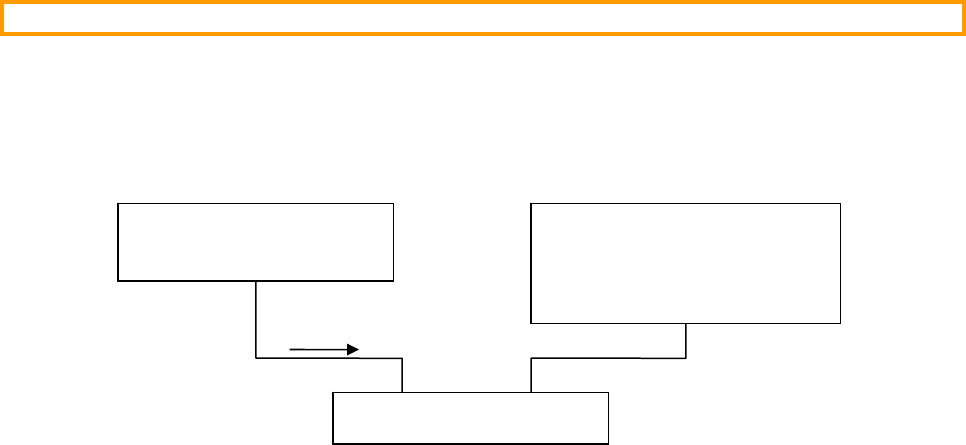
application also uses µC/OS-II as the RTOS. Figure 1-2 shows the test setup for Example #1. A Windows-based
PC and the target system were connected to a 10 Mbps 10-Base-T hub. The PC’s IP address was set to
10.10.10.111 and the target address was hard coded to 10.10.10.64.
Figure 1-2, Test setup
This example contains enough code to be able to ‘ping’ the board.
‘ping’ is a utility found on most computer (Windows-based PCs, Linux, Unix, etc.) and allows you to see if a
particular network enabled device is connected to your network. The IP address of the board is forced to
10.10.10.64 so, if you were to have a similar setup, you would be able to issue the following command from a
command-prompt:
ping 10.10.10.64
Ping (on the PC) should reply back with the ping time to the target. We had ping times of less than 10 milliseconds.
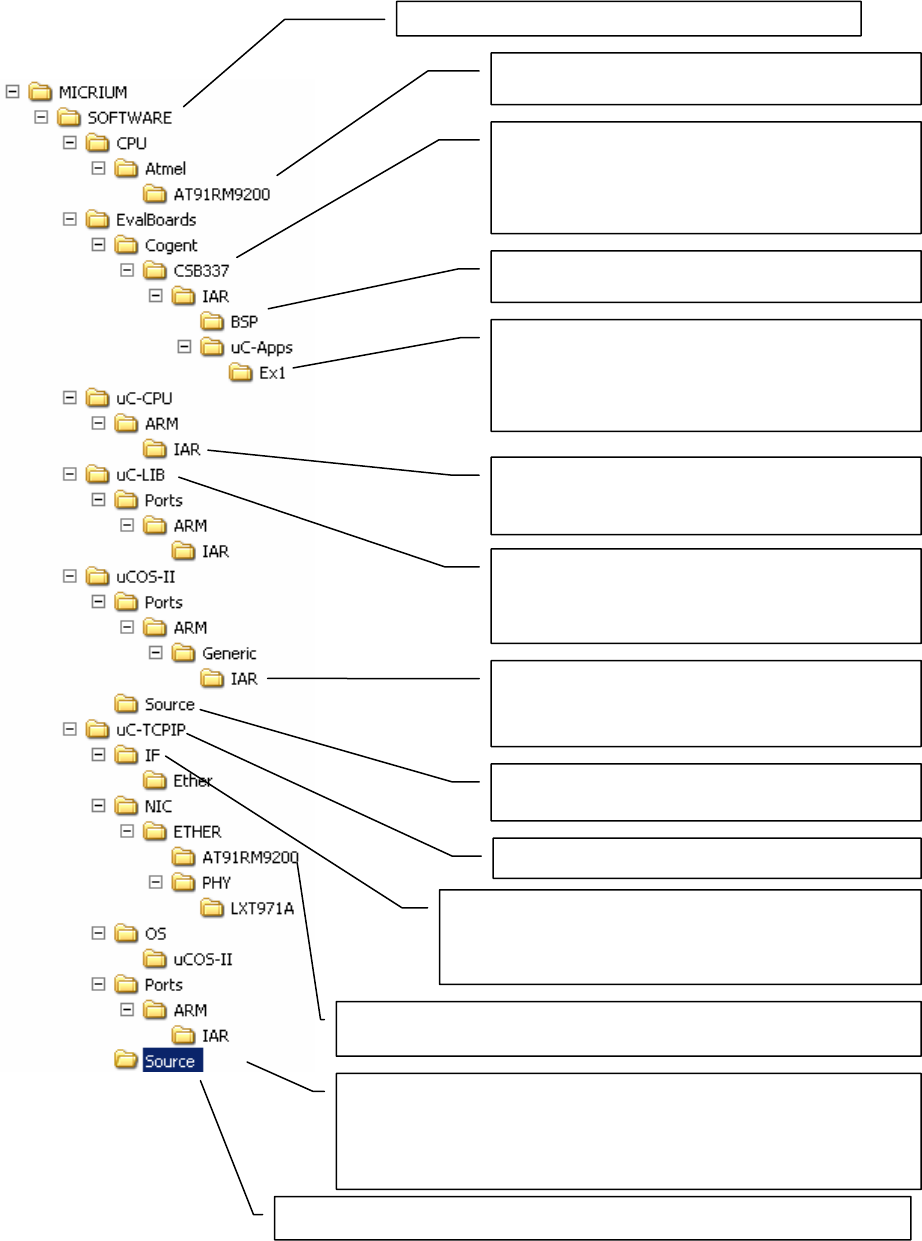
Figure 1-3 shows the directory tree of the different components needed to build a µC/TCP-IP based application.
For now, we will examine the contents of the following directories:
\Micrium\Software\EvalBoards\Cogent\CSB337\IAR\BSP
\Micrium\Software\EvalBoards\Cogent\CSB337\IAR\uC-Apps\Ex1
Windows-based PC Cogent CSB337 (ARM9)
Board
µC/OS-II & µC/TCP-IP
10 Mbps Hub
Ping 10.10.10.64
IP = 10.10.10.111
IP = 10.10.10.64
16
Figure 1-3, Directory tree for µC/TCP-IP based project
All Micrium software is
p
laced under
\
M
icrium\Software
Processor specific header files. These are provided by
the chi
p
manufacturer and define CPU I/O re
g
isters.
All sample code is placed under the ‘EvalBoards’
sub-directory. Specific evaluation boards are further
characterized by the board manufacturer (Cogent) and
the specific board (CSB337) followed by the tools used
to build the example (IAR’s Embedded Workbench).
This directory contains files that are common to all
exam
p
les. BSP stands for ‘Board Su
pp
ort Packa
g
e’.
This directory contains files that are specific to the
example, in this case, Example #1. This directory also
contains build specific files. The ‘Exe’ directory contains
the executable code that can be downloaded to the
target.
This directory contains files that are CPU and compiler
specific. The directory contains cpu_c.c, cpu_a.asm
and cpu_def.h.
This directory contains library files to replace standard
library functions such as memset(), memcpy(),
strcpy(), strcat(), etc. The reason we do this is to
simplify third party certification of your products.
This directory contains the processor specific source
files for the µC/OS-II ARM port running in ARM mode
and using the IAR toolchain.
This directory contains the processor independent
source files for the µC/OS-II RTOS.
This is the main directory for µC/TCP-IP.
µC/TCP-IP files related to network interfaces are placed under
the IF sub-directory. However, µC/TCP-IP currently only
supports Ethernet and this directory contains code which is
inde
p
endent of an
y
s
p
ecific Ethernet chi
p
s.
All Network Interface Controllers (NIC) driver software is found in the NIC sub-
directory. The AT91RM9200 directory contains the code specific to this NIC.
µC/TCP-IP assumes the presence of an RTOS and the OS directory
contains ports to different RTOSs. The uCOS-II directory contains the
µC/OS-II I specific files for µC/TCP-IP. driver software is found in the NIC
sub-directory. The AT91RM9200 directory contains the code specific to this
NIC.
This directory contains the CPU, NIC and RTOS independent code for µC
/
TCP-IP.

17
1.01.01 BSP (Board Support Package)
As described in Figure 1-3, the BSP (Board Support Package) directory contains common code that can be used in
more than one example. Specifically, the BSP directory contains the following files:
bsp.c
bsp.h
net_bsp.c
net_bsp.h
net_isr.c
csb33x_lnk_ram.xcl
bsp.c and bsp.h
BSP stands for Board Support Package and we place ‘services’ that the board provides in such a file. In our
case, bsp.c contains I/O, timer initialization code, LED control code, and more. The I/Os that we use on
the board are initialized when BSP_Init() is called.
The concept of a BSP is to hide the hardware details from the application code. It is important that
functions in a BSP reflect the function and does not make references to any CPU specifics. For example,
the code to turn on an LED is called LED_On() and not csb337_led(). If you use LED_On() in your
code, you can easily port your code to another processor (or board) simply by rewriting LED_On() to
control the LEDs on a different board. The same is true for other services. You will also notice that BSP
functions are prefixed with the function’s group. LED services start with LED_, Timer services start with
Tmr_, etc. In other words, BSP functions don’t need to be prefixed by BSP_.
net_bsp.c, net_bsp.h and net_isr.c
This file contains code specific to the NIC (Network Interface Controller) used and other functions that are
dependent of the hardware. Specifically, this file contains code to read data from and write data to the NIC,
provide delay functions, control power to the NIC, get a time stamp and more.
csb33x_lnk_ram.xcl
This file contains the linker command file for the IAR toolchain. This file specifies where code and data is
placed in memory. In this case, all the code is placed in RAM to make it easier to debug. When you are
ready to deploy your product, you will most likely need to create a csb33x_lnk_flash.xcl to locate
your code in Flash instead of RAM.

18
1.01.02 Ex1
This directory contains the code for this example and consist of:
app.c
app_cfg.h
Ex1.*
fs_conf.h
includes.h
net_cfg.h
os_cfg.h
app.c
This file contains the application code for example #1. As with most C programs, code execution start at
main() which is shown in listing 1-1. The example #1 starts µC/TCP-IP and a set of services that run
on top of it. These services (like web server) are sold separately from µC/TCP-IP. See section 1.02 to
know how to disable some services in the example if you have not purchased them.
Listing 1-1
int main (void)
{
#if (OS_TASK_NAME_SIZE >= 16)
CPU_INT08U err;
#endif
BSP_Init(); /* (1) Initialize BSP. */
APP_TRACE_DEBUG("Initialize OS...\n");
OSInit(); /* (2) Initialize OS. */
/* (3) Create start task. */
OSTaskCreateExt( AppTaskStart,
(void *)0,
(OS_STK *)&AppStartTaskStk[APP_START_OS_CFG_TASK_STK_SIZE - 1],
APP_START_OS_CFG_TASK_PRIO,
APP_START_OS_CFG_TASK_PRIO,
(OS_STK *)&AppStartTaskStk[0],
APP_START_OS_CFG_TASK_STK_SIZE,
(void *)0,
OS_TASK_OPT_STK_CHK | OS_TASK_OPT_STK_CLR);
/* (4) Give a name to tasks. */
#if (OS_TASK_NAME_SIZE >= 16)
OSTaskNameSet(OS_TASK_IDLE_PRIO, "Idle task", &err);
OSTaskNameSet(OS_TASK_STAT_PRIO, "Stat task", &err);
OSTaskNameSet(APP_START_OS_CFG_TASK_PRIO, "Start task", &err);
#endif
APP_TRACE_DEBUG("Start OS...\n");
OSStart(); /* (5) Start OS. */
}
L1-1(1) We start by initializing the I/Os we’ll be using on this board as well as the µC/OS-II tick interrupt
and the AT91RM9200’s interrupt controller.
19
L1-1(2) The example code assumes the presence of an RTOS called µC/OS-II and OSInit() is used to
initialize µC/OS-II.
L1-1(3) µC/OS-II requires that we create at least ONE application task. This is done by calling
OSTaskCreateExt() and specifying the task start address, the top-of-stack to use for this task, the
priority of the task and a few other arguments.
L1-1(4) µC/OS-II allows you to assign names to tasks that have been created. We thus assign a name to the
application task. These names are used mostly during debug. In fact, task names are displayed during
debug when using IAR’s C-Spy debugger (or other µC/OS-II aware debuggers).
L1-1(5) In order to start multitasking, your application needs to call OSStart(). OSStart() determines
which task, out of all the tasks created, will get to run on the CPU. In this case, µC/OS-II will run
AppTaskStart().
The first, and only ‘application’ task that µC/OS-II runs is shown in listing 1-2.
Listing 1-2
static void AppTaskStart (void *p_arg)
{
(void)p_arg; /* Prevent compiler warning. */
APP_TRACE_DEBUG("Initialize interrupt controller...\n");
BSP_InitIntCtrl(); /* (1) Initialize interrupt controller. */
APP_TRACE_DEBUG("Initialize OS timer...\n");
Tmr_Init(); /* (2) Initialize OS timer. */
#if (OS_TASK_STAT_EN > 0)
APP_TRACE_DEBUG("Initialize OS statistic task...\n");
OSStatInit(); /* (3) Initialize OS statistic task. */
#endif
#if APP_FS_ENABLED
AppInit_FS(); /* (4) Initialize file system. */
#endif
AppInit_TCPIP(); /* (5) Initialize TCP/IP stack. */
#if APP_DHCPc_ENABLED
AppInit_DHCPc(); /* (6) Initialize DHCP client. */
#endif
#if APP_HTTPs_ENABLED
APP_TRACE_DEBUG("Initialize HTTP server...\n");
HTTPs_Init(); /* (7) Initialize HTTP server. */
#endif
#if APP_FTPs_ENABLED
APP_TRACE_DEBUG("Initialize FTP server...\n");
/* (7) Initialize FTP server. */
FTPs_Init(AppIP_Addr, FTPs_CFG_DTP_IPPORT);
#endif
#if APP_TFTPs_ENABLED
APP_TRACE_DEBUG("Initialize TFTP server...\n");
TFTPs_Init(); /* (7) Initialize TFTP server. */
#endif
20
#if APP_DNSc_ENABLED
DNSc_Init(AppIP_DNS_Srvr); /* (8) Initialize DNS client. */
AppTest_DNSc(); /* Test DNS client. */
#endif
#if APP_FTPc_ENABLED
AppTest_FTPc(); /* (8) Test FTP client. */
#endif
#if APP_POP3c_ENABLED
AppTest_POP3c(); /* (8) Test POP3 client. */
#endif
#if APP_SMTPc_ENABLED
AppTest_SMTPc(); /* (8) Test SMTP client. */
#endif
#if APP_SNTPc_ENABLED
AppTest_SNTPc(); /* (8) Test SNTP client. */
#endif
APP_TRACE_DEBUG("Create application task...\n");
AppTaskCreate(); /* (9) Create application task. */
APP_TRACE_DEBUG("\n******************************************************************");
APP_TRACE_DEBUG("\n* *");
APP_TRACE_DEBUG("\n* Micrium uC/TCP-IP TTCP Performance measurement *");
APP_TRACE_DEBUG("\n* AT91RM9200 on Cogent CSB337 SDK *");
APP_TRACE_DEBUG("\n* *");
APP_TRACE_DEBUG("\n******************************************************************");
APP_TRACE_DEBUG("\n");
TTCP_Init(); /* (10)Initialize TTCP application */
#endif
LED_Off(1);
LED_Off(2);
LED_Off(3);
while (DEF_YES) { /* Task body, always written as an infinite loop. */
OSTimeDlyHMSM(0, 0, 0, 100);
}
}
L1-2(1) AppTaskStart() starts off by initializing the AT91RM9200 interrupt controller and start handling
interruptions.
L1-2(2) Enable the timer tick source from the microcontroller. µC/OS-II needs a time base to determine
when it’s time to preempt a task and let the next task scheduled to run. Details as to how this is done
can be found in the µC/OS-II book.
L1-2(3) If you set OS_TASK_STAT_EN to 1 in os_cfg.h then the µC/OS-II statistic task is initialized by
calling OSStatInit(). OSStatInit() basically figures out how fast the CPU is running in
order to determine how much CPU usage your application will be consuming. Details as to how this
is done can be found in the µC/OS-II book.
L1-2(4) Initialize File System. This is optional. File System is used by some µC/TCP-IP services. If you
purchased the µC/FTPs, µC/HTTPs or µC/TFTPs, you also need µC/FS.
L1-2(5) We then initialize the TCP/IP stack by calling NetInit(). NetInit() initializes all of
µC/TCP-IP’s data structures and creates two tasks. One task waits for packets to be received and the
other task manages timers.

21
IMPORTANT
Net_Init() returns an error code indicating whether the call was successful or not. If
Net_Init() returns NET_ERR_NONE then Net_Init() properly initialized µC/TCP-IP.
However, if Net_Init() returns something other than NET_ERR_NONE then you must examine
the error code to determine the source of the error.
Just as important, Net_Init() ‘aborts’ the initialization as soon as it finds an error. In other words,
if you don’t examine the return value you might have a partially initialized µC/TCP-IP and the
results are unpredictable.
L1-2(6) Each ‘node’ on a TCP/IP network requires a unique address. This is called the IP address and consists
of a 32-bit value. An IP address is generally represented as four decimal numbers separated by a dot
(Dotted Decimal Notation). Each value corresponds to an eight bit value and is assigned to its
corresponding position in the 32-bit word. For example, 160.110.80.40 corresponds to an IP
address of 0xA06E5028.
You should note here that the address is determined at run-time (Dynamic IP address) by the use of a
service called DHCP (dynamic host configuration protocol). The optional µC/DHCPc module
implements this protocol that allows the IP address of your target system (and many other
information) to be assigned by another computer on your network (typically DHCP server).
If you have not purchased the µC/DHCPc module, you should note that the address have to be
determined at compile time by your test code (Static IP address).
L1-2(7) Initialize the server modules (µC/FTPs, µC/HTTPs or µC/TFTPs). If you have not purchased
one or all of them, please look at section 1.02 how to disable them. Also, please look at their
respective documentation about how to configure them.
L1-2(8) Test the optional client modules:
• µC/DNSc client module: The DNS (domain name service) protocol enable to resolve fully
qualified domain name (FQDN) to IP addresses. Ex.: www.micrium.com resolved to
“198.66.208.142”. This enable the use of DNS name in code instead of the IP addresses, less
descriptive and subject to change over time.
• µC/FTPc client module: The FTP (file transfer protocol) protocol enable the transfer of files
over internet. You can transfer any kind of file to your target or from your target to your PC using
this protocol. The µC/FTPc client module can get and store files directly in the target’s RAM or
using a file system. In this case, you will need to purchase the µC/FS module.
• µC/POP3c client module: The POP3 (post office protocol 3) protocol enable the reception of
email messages from a mailserver. The email messages are stored in a user’s mailbox in the
server and pulled by the user. If you have to receive messages on your target from other
computers, you need µC/POP3c client module. You also need µC/DNSc client module since
POP3 servers are usually addressed by their DNS names.
• µC/SMTPc client module: The SMTP (simple mail transfer protocol) protocol enable transfer
of email messages over internet. The SMTP protocol is a push protocol. The sender of the
message pushes the message to the recipient’s mailbox. If you have to send email message from
your target to other computer, you need µC/SMTPc client module. You also need µC/DNSc
client module since POP3 servers are usually addressed by their DNS names.
22
• µC/SNTPc client module: The SNTP (simple network time protocol) protocol enable the
synchronization of computer’s real time clocks over the internet. The time information transferred
is and offset from NTP epoch (1900-01-01 00:00:00 GMT) and the resolution is the millisecond.
The µC/SNTPc client module transfers the current time over the internet but have no provision
to store & update the time. For this feature, you need the µC/CLK module. µC/CLK and
µC/SNTPc modules work independently. µC/CLK moduke can be initialized by any time
source, including network source using µC/SNTPc. µC/SNTPc module can be used to
synchronize any real-time clock, including µC/CLK, or just get a snapshot of the current time.
L1-2(9) Start the application task. The application task enters an infinite loop and blinks one of the LEDs.
L1-2(10) Initialize µC/TTCP module. This module enable user to make performance tests on µC/TCP-IP
stack.
With this simple application code, another computer on the same network can send a ping Echo Request to
this target.
app_cfg.h
This is an application-specific configuration file used to configure Micrium products and/or non-Micrium-
related application files. You MUST include this file in your application because some of the modules in
µC/TCP-IP assumes the presence of this file. app_cfg.h contains #defines to specify the task
priorities of each of the tasks in your application (including those of µC/TCP-IP) as well as the stack size
for those tasks.
The reason all task priorities are placed in one file is to make it easier to ‘see’ the task priorities for your
entire application in one place.
includes.h
includes.h is a ‘master’ header file that contains #include directives to include other header files.
This is done to make the code cleaner to read and easier to maintain. Note that we assume the presence of
includes.h.
Ex1.*
These files are IAR embedded workbench project files.
net_cfg.h
This file is used to configure µC/TCP-IP and defines the number of timers used in µC/TCP-IP, the
number of buffers for packets reception and transmission, the number of ARP (Address Resolution
Protocol) cache entries, the number of Sockets that your application can open and more. In all, there are
about 50 or so #define to set in this file.
os_cfg.h
This file is used to configure µC/OS-II and defines the number maximum number of tasks that your
application can have, which services will be enabled (semaphores, mailboxes, queues, etc.), the size of the
idle and statistic task and more. In all, there are about 60 or so #define that you can set in this file. Each
entry is commented and additional information about the purpose of each #define can be found in the
µC/OS-II book.
23
1.02 Configuration of the Example #1
Demonstration of the capabilities of the µC/TCP-IP stack is hard without code using it. There is a lot of
services that have been designed for TCP-IP over the years. Many of them have been implemented has
optional modules to run over µC/TCP-IP.
The example #1 integrates µC/TCP-IP and all the optional modules currently available. We are
understanding that every client may get its own set of optional modules so we have to provide clients a way
to disable the ones that they don’t have.
Here is the way (using IAR tools) to disable optional modules and get a fully customized µC/TCP-IP
demonstration example:
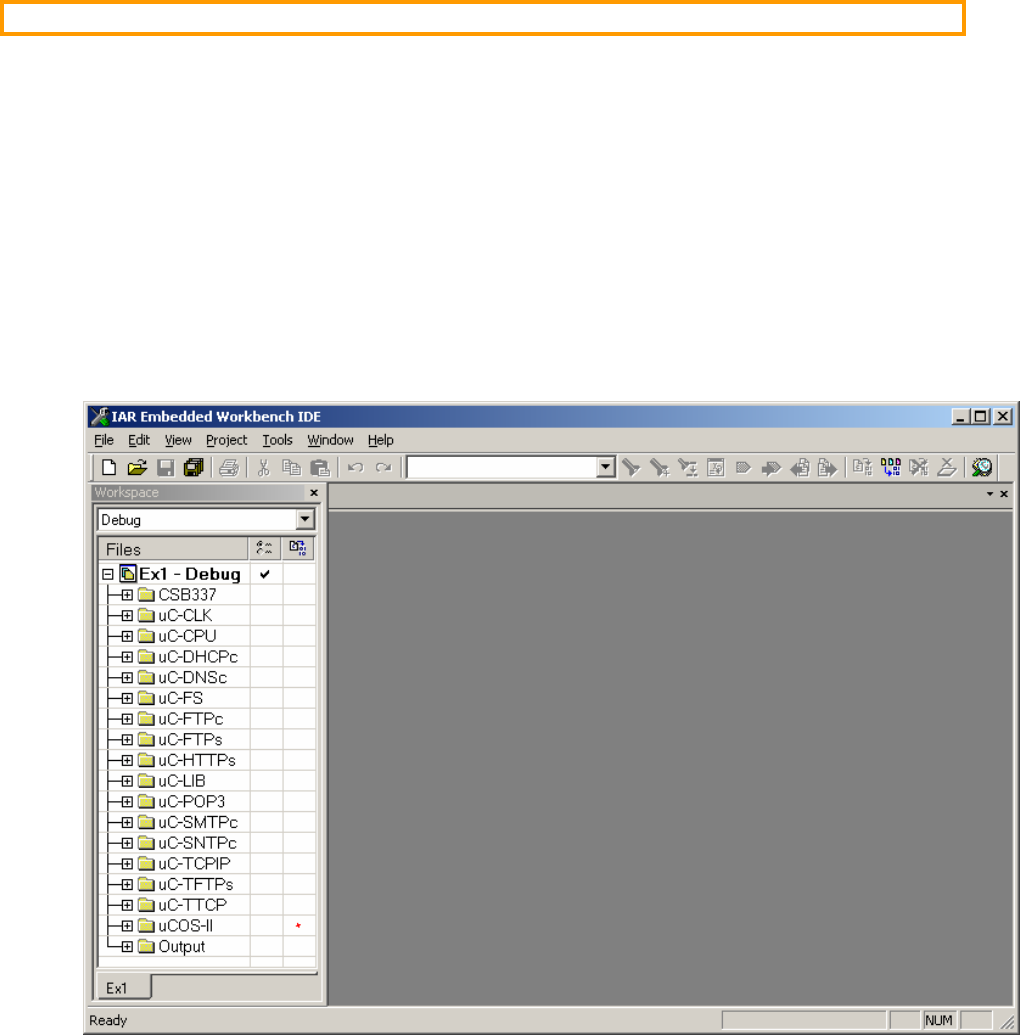
When the example project file is loaded into IAR tools, the screen look like this:
On the left pane, there is a list of different group of files included in the example, representing modules.
Some are mandatory, some are optional.
Mandatory modules: CSB337, µC/CPU, µC/LIB, µC/TCP-IP, µC/TTCP and µC/OS-II.
Optional modules: µC/CLK, µC/DHCPc, µC/DNSc, µC/FS, µC/FTPc, µC/FTPs,
µC/HTTPs, µC/POP3, µC/SMTPc, µC/SNTPc and µC/TFTPs.
24
Optional modules have interdependencies on other optional modules.
µC/FTPs, µC/HTTPs and µC/TFTPs modules needs the FS module. µC/FTPc module may need it
too, depending on configuration.
µC/DNSc is needed if you use DNS names instead of IP addresses in your application for addressing
other machines.
To remove an optional module, there is two steps. First, select the corresponding group of files in the left,
then press the “delete” key on your keyboard or select “remove” in the contextual menu. Then, select the
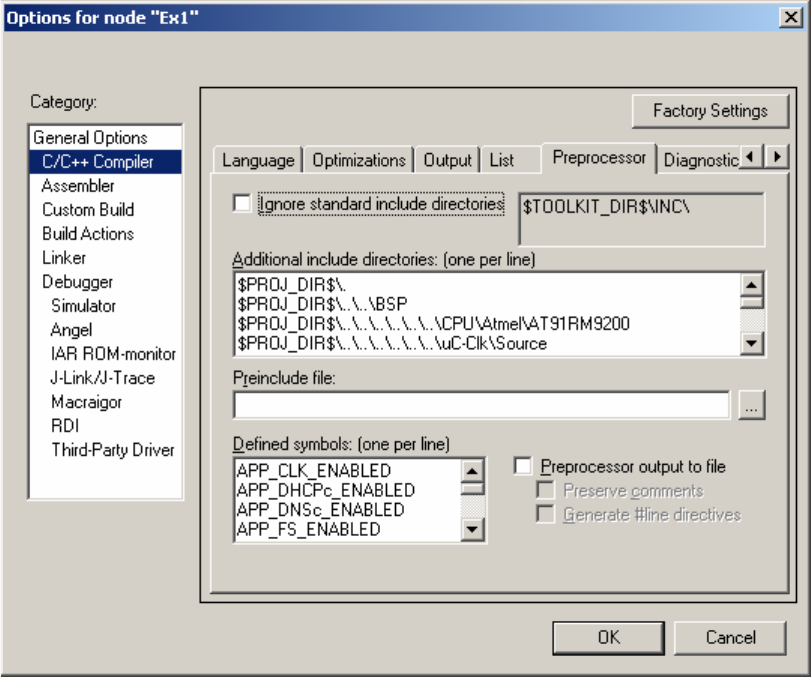
“Ex1-Debug” entry in the left pane, select “options” in the contextual menu, then “C/C++ compiler”, then
preprocessor pane. You will see a window like this:
On the “Defined symbols” list, remove the entry corresponding to the module you want to remove. Ex:
remove the APP_DHCPs_ENABLED entry if you want to remove the µC/DHCPc module.
After you are removed all the module you haven’t purchased, you are ready to compile your own
customized µC/TCP-IP example.
25
Chapter 2
µC/TCP-IP Architecture
µC/TCP-IP was written from the ground up to be modular and easy to adapt to different CPUs (Central Processing
Units), RTOSs (Real-Time Operating Systems), NICs (Network Interface Controllers) and compilers. Figure 2-1
shows a simplified block diagram of the different elements and their relationship.
You will probably notice that all of the µC/TCP-IP files start with ‘net_’. This convention allows you to quickly
identify files that belong to µC/TCP-IP. In fact, all functions and variables start with ‘Net’ and, all macros and
#defines start with ‘NET_’. These and other conventions are described in the ‘µC/TCP-IP Coding Convention’
appendix.

26
Figure 2-1, Relationship between Application, µC/TCP-IP, CPU, NIC and RTOS
Your Application
µC/TCP-IP
app_cfg.h
net_cfg.h
CPU Layer
cpu_a.asm
cpu.h
cpu_def.h
NIC Layer
net_nic.c/h
n
et nic def.h
RTOS Layer
n
et
_
os.c/h
net
_
bsp.c
NIC
RTOS CPU
Network
IF Layer
net_if_pkt.c/h
net_if.c.h
PHY
n
et
_
phy.c/h
net_bsd.c/h
net_sock.c/h
BSD Socket API Layer
net.c/h
net_cfg_net.h
net_dbg.h
net_def.h
net_err.h
net_type.h
net_arp.c/h
net_icmp.c/h
net_ip.c/h
net_tcp.c/h
net_udp.c/h
net_ascii.c/h
net_buf.c/h
net_conn.c/h
net_ctr.c/h
net_stat.c/h
net_tmr.c/h
net_util.c/h
NIC Chip Specific
Interface Specific
(Ethernet)
NIC / CPU Specific
PHY Specific
TCP/IP Layer
LIB
lib_def.h
lib_mem.*
lib_str.*

27
2.01.01 Your Application
Your application needs to provide configuration information to µC/TCP-IP in the form of a C header files called
app_cfg.h and net_cfg.h.
app_cfg.h is an application specific configuration file that MUST be present in your application. app_cfg.h
contains #defines to specify the task priorities of each of the tasks in your application (including those of
µC/TCP-IP) as well as the stack size for those tasks. The reason all task priorities are placed in one file is to make
it easier to ‘see’ the task priorities for your entire application in one place.
Some of the configuration data in net_cfg.h consist of specifying how many buffers will be allocated to the
TCP/IP stack, specify the number of timers to allocate to the stack, whether statistic counters will be maintained or
not, whether the MAC (Media Access Control) address is obtained from the chip or is specified in the code, the
number of ARP cache entries, whether UDP checksums are computed or not and more. In all, there are about 50
#define to set. However, most of the #define constants can be set to their recommended default value.
2.01.02 LIB (Libraries)
Because µC/TCP-IP is designed to be used in safety critical applications, all ‘standard’ library functions like
strcpy(), memset(), etc. have been re-written to follow the same quality as the rest as the protocol stack.
2.01.03 BSD Socket API Layer
Your application interfaces to µC/TCP-IP using the well known BSD socket API (Application Programming
Interface). You can either write your own TCP/IP applications using the BSD socket API or, you can purchase a
number of off-the-shelf TCP/IP components (Telnet, Web server, FTP server, etc.) which all interface to the BSD
socket interface. Note that the BSD socket layer is shown as a separate module but is actually part of µC/TCP-IP.
Alternatively, you can use µC/TCP-IP’s own socket interface functions (net_sock.*). Basically, net_bsd.*
is a layer of software to converts BSD socket calls to µC/TCP-IP socket calls. Of course, you would have a slight
performance gain by interfacing directly to net_sock.* functions. Micrium network products uses the
µC/TCP-IP socket interface functions.
2.01.04 TCP/IP Layer
This layer contains most of the CPU, NIC, RTOS and compiler independent code for µC/TCP-IP. There are three
categories of files in this section:
1) TCP/IP protocol specific files
a. ARP (net_arp.*),
b. ICMP (net_icmp.*),
c. IP (net_ip.*),
d. TCP (net_tcp.*),
e. UDP (net_udp.*)

28
2) Support files
a. ASCII conversions (net_ascii.*),
b. Buffer management (net_buf.*),
c. TCP/UDP connection management (net_conn.*),
d. Counter management (net_ctr.*),
e. Statistics (net_stat.*),
f. Timer Management (net_tmr.*),
g. other utilities (net_util.*).
3) Miscellaneous header files
a. Master µC/TCP-IP header file (net.h)
b. File containing error codes (net_err.h)
c. Miscellaneous µC/TCP-IP data types (net_type.h)
d. Miscellaneous definitions (net_def.h)
e. Debug (net_dbg.h)
f. Configuration definitions (net_cfg_net.h)
2.01.05 IF Layer
The IF Layer understands about types of network interfaces (Ethernet, TokenRing, etc.). However, the current
version of µC/TCP-IP only supports Ethernet interfaces. The IF layer is actually split into two sub-layers.
net_if_pkt.* is the interface between the TCP/IP Layer and understands packet type devices.
net_if_pkt.* could actually be used as-is with other packet type interfaces (other than Ethernet).
net_if_char.* is the interface between the TCP/IP Layer and understands serial-character type devices.
net_if.* contains the interface specifics but, independent of the actual chip (i.e. hardware). In other
words, for Ethernet, net_if.* understands about Ethernet frames, MAC addresses, frame
demultiplexing, and so on but, assumes nothing about actual Ethernet hardware.
2.01.06 NIC Layer
µC/TCP-IP can work with just about any NIC (Network Interface Controller) and we have done everything we can
to simplify the interface to different NICs. This layer knows about the specifics of the NIC: how to initialize the
NIC, how to enable and disable interrupts from the NIC, how to find the size of a received packet, how to read a
packet out of the NIC, how to write a packet to the NIC, how to set and get the NIC’s MAC (Media Access Control)
address and more.
In order to be independent of the ISR structure of your CPU and the mapping of the I/O registers of the NIC, we an
additional file to encapsulate such details as the actual ISR(s) from the NIC and the method of reading and writing to
the NIC registers.
net_bsp.c contains the code to read and write values from and to the NIC, time delays, ISR handler,
obtaining a time stamp from the environment and so on. This file is assumed to reside in your application.

29
2.01.07 PHY Layer
Some NIC interfaces to physical layer devices which may need to be initialized and controlled. This layer is shown
in Figure 2-1 as ‘dotted’ indicating that it’s not present with all NICs. In fact, some NICs have PHY control built-in.
2.01.08 CPU Layer
µC/TCP-IP can work with either an 8, 16, 32 or even 64-bit CPU but, needs to have information about the CPU
you are using. The CPU layer defines such things as the C data type corresponding to 16-bit and 32-bit variables,
whether the CPU is little or big endian and, how interrupts are disabled and enabled on the CPU, etc.
CPU specific files are found in the …\uC-CPU directory and, in order to adapt µC/TCP-IP to a different CPU, you
would need to either modify the cpu*.* files or, create new ones based on the ones supplied in the uC-CPU
directory. In general, it’s much easier to modify existing files because you have a better chance of not forgetting
anything.
2.01.09 RTOS Layer
µC/TCP-IP assumes the presence of an RTOS but, the RTOS layer allows µC/TCP-IP to be independent of any
specific RTOS. µC/TCP-IP consists of two tasks. One task is responsible for handling packet reception and sends
a response, and the other task is responsible for managing timers.
As a minimum, the RTOS you use needs to provides the following services:
1) You need to be able to create at least two tasks (Rx packet task and the timer task)
2) Semaphore management (or the equivalent) and µC/TCP-IP needs to be able to create at least 2
semaphores for each socket and an additional 4 semaphores for internal use.
3) Provide timer management services
µC/TCP-IP is provided with a µC/OS-II interface. If you use a different RTOS, you can use the net_os.* for
µC/OS-II as a template to interface to the RTOS of your choice. We discuss the RTOS interface in a later chapter.
30
2.02 Block Diagram
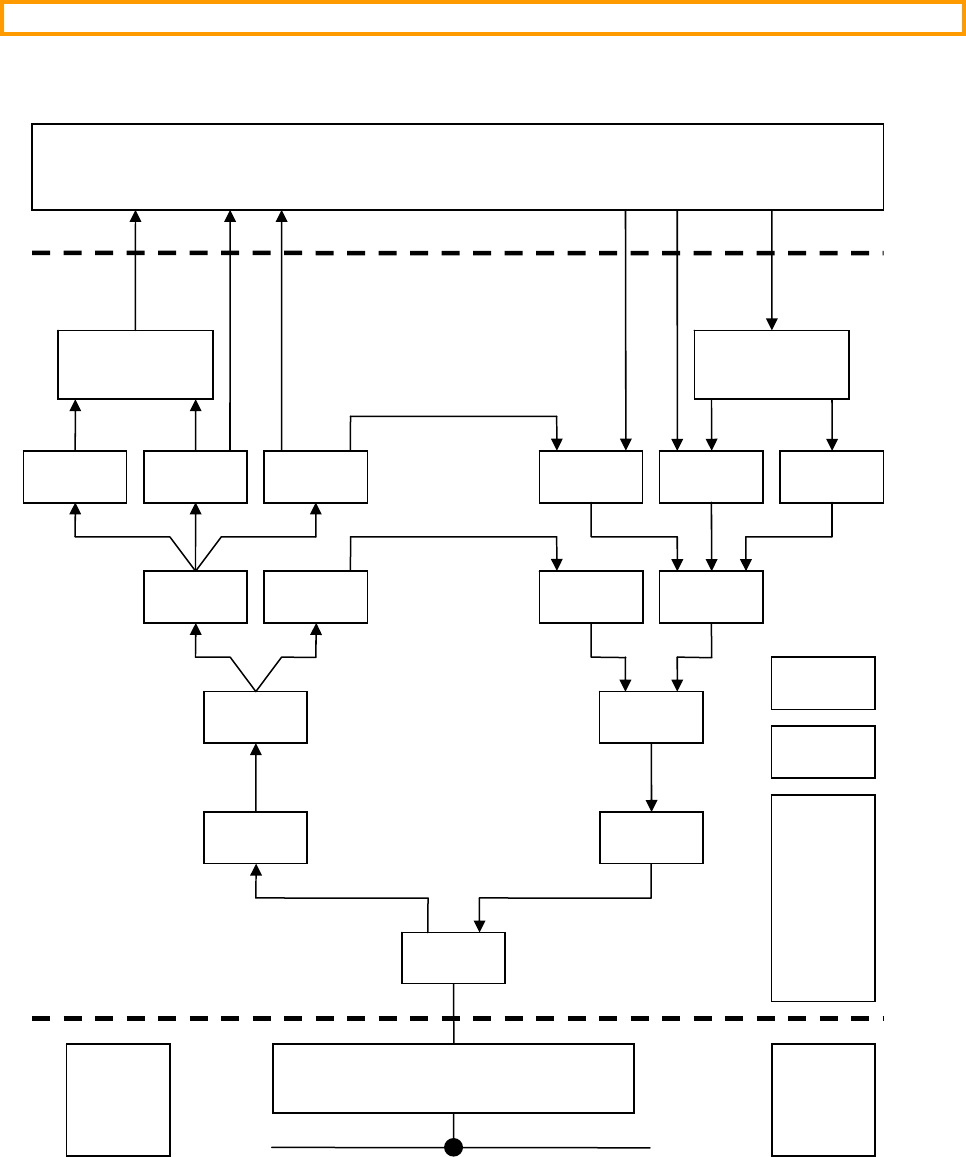
Figure 2-2 shows a block diagram of the modules found in µC/TCP-IP and their relationship. Also included are
the names of the files that are related to µC/TCP-IP.
Figure 2-2, µC/TCP-IP Block Diagram
IF
Network
NIC
IF
IP ARP
TCP UDP ICMP
Sockets
ARP IP
ICMP UDP TCP
Sockets
Your Application
Buf
Tmr
IF-Pkt IF-Pkt
net
_
if
_
pkt.*
n
et
_
if
_
pkt.*
n
et
_
if.*net
_
if.*
net
_
arp.*
n
et
_
a
rp
.
*
n
et
_
i
p
.
* net
_
ip.*
net
_
tcp.* net
_
tcp.*
n
et
_
u
dp.* net
_
udp.* net
_
icmp.*
n
et
_
i
cmp
.
*
net_bsd.*
net_sock.*
net_bsd.*
net_sock.*
net
_
buf.*
net
_
tmr.*
n
et
_
n
ic
.
*
app_cfg.h
net_cfg.h
Rx Tx Misc
net.*
net_ascii.*
net_cfg_net.h
net_conn.*
net_ctr.*
net_dbg.h
net_def.h
net_err.h
net_stat.*
net_type.h
net_util.*
µC
/
TCP-IP
Your Application
net_bsp.*
CPU LIB
cpu_def.h
cpu*.* lib_def.h
lib_mem.*
lib_str.*

31
2.03 Directories
The files shown in figure 2-1 and 2-2 are placed in a directory structure such as to group common elements. The
µC/TCP-IP distribution contains the following directories:
2.03.01 µC/TCP-IP Directories
\Micrium\Software\uC-TCPIP
This is the main directory for µC/TCP-IP.
\Micrium\Software\uC-TCPIP\IF
This directory contains interface specific files. Currently, µC/TCP-IP only supports one type of interface,
Ethernet. The Ethernet interface specific files are found in the following directories:
\Micrium\Software\uC-TCPIP\IF\net_if_pkt.*
net_if_pkt.* contain an interface layer between the NIC (Network Interface Controller) and the
Ethernet interface layer. This file should not have to change as long as we are dealing with ‘packet’
oriented interfaces such as Ethernet and Arcnet.
\Micrium\Software\uC-TCPIP\IF\Ether\net_if.*
net_if.* contains the Ethernet interface specifics. This file should not need to be modified.
\Micrium\Software\uC-TCPIP\NIC
This directory contains device drivers for different interfaces. Currently, µC/TCP-IP only supports one
type of interface, Ethernet. We tested µC/TCP-IP with two types of NICs: a SMC LAN91C111 and an
Atmel AT91RM9200 CPU containing an on-chip NIC. The NIC specific code is thus found in the
following directories:
\Micrium\Software\uC-TCPIP\NIC\Ether\LAN91C111\net_nic*.*
\Micrium\Software\uC-TCPIP\NIC\Ether\AT91RM9200\net_nic*.*
Other Ethernet controller drivers will be placed under the Ether sub-directory. Note that other NIC
drivers must also be called net_nic*.*. The directory determines which specific NIC your application
will actually use.
\Micrium\Software\uC-TCPIP\OS
This directory contains the RTOS abstraction layer which allows you to use µC/TCP-IP with just about
any commercial or in-house RTOS. You would place the abstraction layer for your own RTOS in a sub-
directory under OS as follows:
\Micrium\Software\uC-TCPIP\OS\rtos_name\net_os.*
Note that you must always name the files for your RTOS abstraction layer net_os.*.
µC/TCP-IP has been tested with µC/OS-II and the RTOS layer files for this RTOS are found in the
following directory:
\Micrium\Software\uC-TCPIP\OS\uCOS-II\net_os.*

32
\Micrium\Software\uC-TCPIP\Source
This directory contains all the CPU, NIC and RTOS independent files as shown in figure 2-1 and 2-2. You
should not have to change anything in this directory in order to use µC/TCP-IP.
2.03.01 Support Directories
µC/TCP-IP are assumes the presence of a number of support files as described in this section.
\Micrium\Software\CPU
This directory contains files that are generally supplied by a CPU manufacturer and typically contains
header files that define the access to CPU registers, I/O registers, timers and more. The name of the files
are determined by the CPU manufacturer.
\Micrium\Software\uC-CPU
This directory contains files that are used to adapt to different CPUs/compilers.
cpu_def.h
This file contains definitions used by the other CPU specific files. In fact, cpu_def.h should be
independent of the actual CPU used.
Within the uC-CPU directory, we define processor specific files.
\Micrium\Software\uC-CPU\cpu_type\compiler
cpu.h This file contains definitions of data word sizes. Specifically, you define here what C data types
are associated with 8, 16 and 32 bit integers and, 32 and 64 bit floating point numbers. cpu.h
also defines endianess, critical section macros CPU_CRITICAL_ENTER() and
CPU_CRITICAL_EXIT(), and more.
cpu_a.s
This file contains functions to implement critical section protection for the specific CPU type
used.
\Micrium\Software\uC-LIB
This directory contains library support files that are independent of the CPU, µC/TCP-IP and compiler.
Micrium doesn’t uses standard C library functions in order to simplify third-party certification.
lib_def.h
This file contains definitions that can be used by other applications. All #defines in this file
are prefixed by DEF_ and contains definitions for DEF_TRUE and DEF_FALSE, DEF_YES and
DEF_NO, DEF_ON and DEF_OFF and bit masks.
lib_mem.c/h
This file contains function to copy memory, clear memory, etc. All functions in this file start with
Mem_.

33
lib_str.c/h
This file contains function to replace the standard strcpy(), strcat(), etc. All functions
start with Str_.
2.03.02 Test Code Directories
\Micrium\Software\EvalBoards
Although not actually part of µC/TCP-IP, we created a standard directory structure where application
examples are placed. Specifically, sample code is placed under an ‘EvalBoards’ sub-directory. Each
different evaluation board is categorized by its manufacturer, the actual board name and the tools that were
used to test the sample code. Specifically, sample code is placed using the following structure:
\Micrium\Software\EvalBoard\manufacturer\board\tools
We tested µC/TCP-IP using the Cogent CSB337 (ARM9) processor using the IAR tool chain. Sample
code is thus placed under the following directory:
\Micrium\Software\EvalBoard\Cogent\CSB337\IAR\uC-Apps\Ex??
Each different example (Ex??) has its own directory under the IAR directory. The example directories
contain the following µC/TCP-IP related files:
app.c
app_cfg.h
includes.h
net_cfg.h
os_cfg.h
Of course, other source files, compiler build files, linker command files and so on are also found in the
example directories in order to create the specific example.
Code that is common to all of the examples and related to control of I/Os for a given evaluation board are
placed in a BSP sub-directory as shown below. BSP stands for ‘Board Support Package’
\Micrium\Software\EvalBoard\Cogent\CSB337\IAR\BSP
The BSP directory can contain the following files:
bsp.c
bsp.h
net_bsp.c
net_bsp.h
net_isr.c
You will notice the presence of a net_bsp.c files. This file is placed in the BSP directory because it is
dependent of the CPU and NIC used (interrupt structure, I/O ports, etc.) but, has a ‘net_’ prefix indicating
that it’s a network specific file.
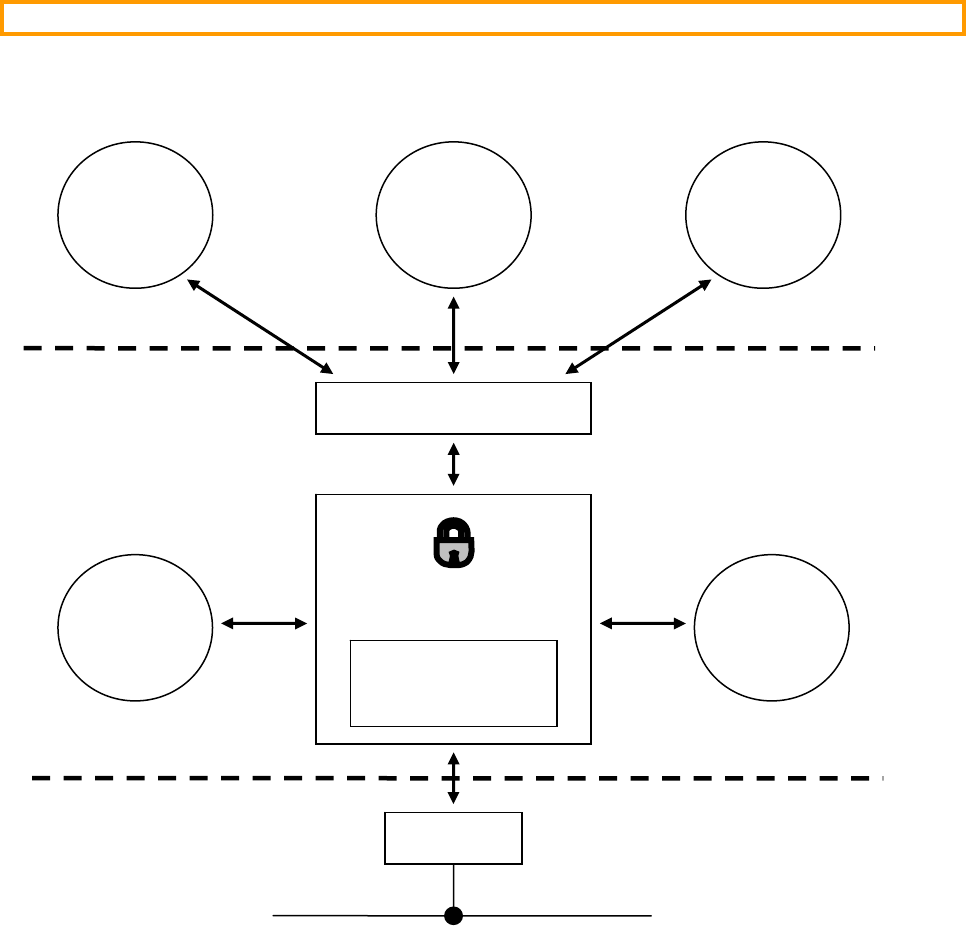
34
2.04 Task model
Figure 2-3 shows a simplified task model of µC/TCP-IP along with application tasks.
Figure 2-3, µC/TCP-IP, Task Model
Your application interfaces to µC/TCP-IP via a well known API (Application Programming Interface) called BSD
sockets (or µC/TCP-IP’s internal socket interface). Basically, you application can send and receive data to/from
other hosts on the network via this interface.
The BSD sockets API interfaces to internal structures and variables (i.e. data) that are maintained by µC/TCP-IP.
A binary semaphore (the global lock in Figure 2-3) is used to guard the access to this data to ensure exclusive
access. In other words, to read or write to this data, a task needs to acquire the binary semaphore before it can
access the data and release it when done. Of course, your application tasks don’t have to know anything about this
semaphore nor the data since its use is encapsulated by functions within µC/TCP-IP.
BSD Sockets API
Rx
Task µC/TCP-IP
Data
NIC
Global
Lock
Network
App
Task
App
Task
App
Task
Tmr
Task
µC
/
TCP-IP

35
As we previously mentioned, µC/TCP-IP supports only one NIC (Network Interface Controller) at a time.
Currently, µC/TCP-IP only works with Ethernet controller NICs but has been designed to support other types of
NICs in the future. Writing a driver for different Ethernet controllers is fairly straightforward and generally consists
of writing about two dozen fairly simple functions.
2.04.01 µC/TCP-IP Tasks and Priorities
µC/TCP-IP basically defines two internal tasks: a receive (Rx Task) and a timer task (Tmr Task). The Rx Task is
responsible for processing received packets from the NIC. If the packet is destined for an application, the Rx Task
will arrange to pass the information to the task using the appropriate TCP/IP protocol. The Tmr Task is responsible
for handling all timeouts related to the TCP/IP protocols.
When setting up task priorities, it’s recommended that you set the priority of tasks that will use µC/TCP-IP’s
services below that of the task priorities of µC/TCP-IP. In other words, µC/TCP-IP’s tasks should have a
higher priority than tasks that use µC/TCP-IP. This is to reduce starvation issues when an application task needs
to send a lot of data. However, if your application task that uses µC/TCP-IP needs to have a higher priority then
you should voluntarily relinquish the CPU on a regular basis. For example, you can suspend the task for a number
of OS clock ticks.
2.04.02 Receiving a Packet
Figure 2-4 shows a simplified task model of µC/TCP-IP when packets are received from the NIC. Here we
assume we have a TCP packet being received.
F2-4(1) A packet is sent on the network and the NIC recognizes its address as the destination for the
packet. The NIC then generates an interrupt and the NIC ISR determines that the interrupt comes
from a packet reception (as opposed to the completion of a transmission).
F2-4(2) Instead of processing the NIC directly from the ISR, we decided to pass the responsibility to a
task. The Rx ISR thus simply ‘signals’ the Rx Task that there is a packet to process. A counting
semaphore is used as the signaling mechanism. Note that further Rx interrupts are disabled to
prevent re-entering the ISR because on most NICs, the interrupt status is cleared only when the
packet is extracted from the NIC.
F2-4(3) The Rx Task does nothing until a signal is received from the Rx ISR.
F2-4(4) When a signal is received, the Rx Task wakes up and extracts the packet from the NIC and places
it in a receive buffer.
µC/TCP-IP maintains two types of buffers: small and large. A small buffer can typically hold
up to 256 bytes of data from the NIC. A large buffer can hold up to 1536 bytes. These sizes as
well as the quantity of these buffers are actually configurable at compile time to better suit the
actual intended application. The Rx Task queries the NIC for the size of the packet in order for it
to know which type of buffer is needed (small or large).
F2-4(5) Buffers are shared resource and any access to those or any other µC/TCP-IP data structures is
guarded by the binary semaphore guarding the data. This means that the Rx Task will need to
acquire the semaphore before it can get a buffer from the pool.
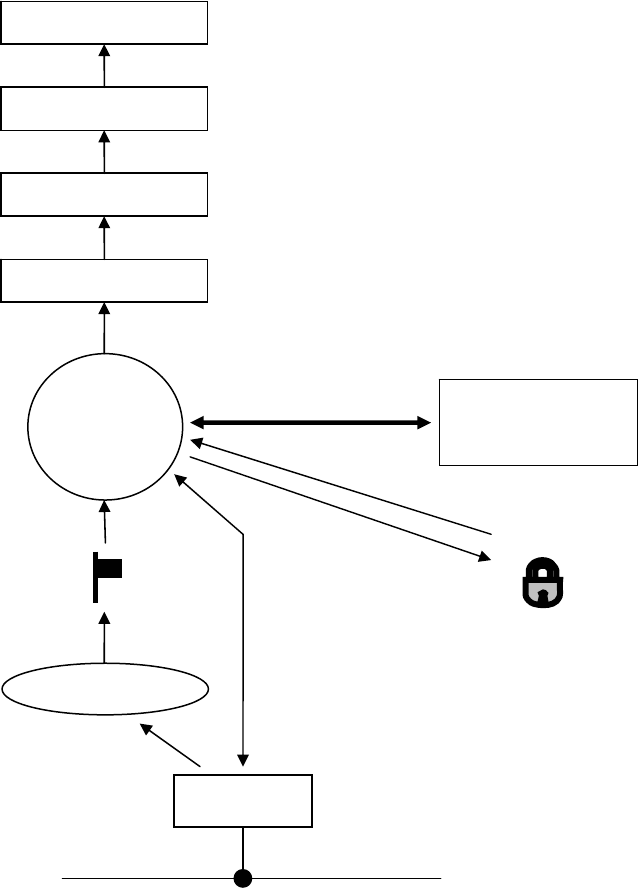
36
F2-4(6) The Rx Task obtains a buffer from the buffer pool. The packet is removed from the NIC and
placed in the buffer for further processing.
Figure 2-4, µC/TCP-IP, Receiving a Packet
F2-4(7) The Rx Task examines the Ethernet frame to determine whether the packet is destined for the ARP
or IP layer and passes the buffer to the appropriate layer for further processing. Note that the Rx
Task brings the data all the way up to the application layer and thus the appropriate µC/TCP-IP
P functions operate within the context of the Rx Task.
F2-4(8) When the packet is processed, the lock is released.
µC/TCP-IP
Rx
Task
µC/TCP-IP
Data
Rx ISR
NIC
Rx Semaphore
(Counting Semaphore
)
Global
Lock
Network
(1)
(2)
(3)
(4)
(5)
(6)
(6)
(8)
(7)
IF
IP
TCP
Sockets
37
2.04.03 Sending a Packet
Figure 2-5 shows a simplified task model of µC/TCP-IP when packets are sent through the NIC. In this example,
we show a TCP packet being sent.
Figure 2-5, µC/TCP-IP, Sending a Packet
Application
Task
T
xISR
NIC
Tx Rdy
Semaphore
Network
(4)
(2)
(1)
(3)
µC/TCP-IP
Data
Global
Lock
(5)
(6)
(7)
IF
IP
TCP
Sockets
(8)
38
F2-5(1) A task (assuming an application task) that wants to send data interfaces to µC/TCP-IP through
the BSD socket API.
F2-5(2) A function within µC/TCP-IP acquires the binary semaphore (i.e. the global lock) in order to
place the data to send into µC/TCP-IP’s data structures.
F2-5(3) The appropriate µC/TCP-IP layer processes the data to send to prepare it for transmission.
F2-5(4) The task (via the IF layer) then waits on a counting semaphore which is used to indicate that the
transmitter in the NIC is available to send a packet. If the NIC is not able to send the packet, the
task blocks until the semaphore is signaled by the NIC. Note that, at startup, the semaphore is
initialized with a value corresponding to the number of packets that can be sent at one time
through the NIC. In other words, if the NIC has sufficient buffer space to be able to queue up four
packets then the counting semaphore is initialized with a count of 4.
F2-5(5) When the NIC completes sending a packet, the NIC generates an interrupt.
F2-5(6) The Tx ISR signals the Tx Available semaphore indicating that the NIC is able to send another
packet.
F2-5(7) The task then wakes up and copies the packet to send into the NIC.
F2-5(8) After placing the packet into the NIC, the task releases the global data lock and continues
execution.
39
Chapter 3
Buffer Management
µC/TCP-IP places received packets in network buffers to be processed by the upper layers and also, places data to
send in network buffers. There are two types of buffers as shown in Figure 3-1: small and large. Each buffer
contains a header portion that is used by µC/TCP-IP. This header provides information to µC/TCP-IP about the
contents of the buffer. The data portion contains the data that has either been received by the NIC and thus will be
processed by µC/TCP-IP or, data that is destined for the NIC. Buffer management functions are found in
net_buf.*.
Small buffers are used by µC/TCP-IP when received data or, data to transmit fits in this size buffer.
The header structure is common to both types of buffers. A header currently requires about 200 bytes of storage.
Figure 3-1, µC/TCP-IP’s small and large buffers
Small Buffer Large Buffer
Network
Buffer
Header
Network
Buffer
Data
N
ET
_
BUF
_
CFG
_
DATA
_
SIZE
_
LARGE
NET
_
BUF
_
CFG
_
DATA
_
SIZE
_
SMALL

40
There are currently four configurable options for network buffers. You change the configuration values in
net_cfg.h which resides in your application:
NET_BUF_CFG_NBR_SMALL
This configuration constant determines the number of small network buffers used by µC/TCP-IP. The
number of buffers needed depends on the run-time behavior of your network and the expected traffic on the
network.
NET_BUF_CFG_NBR_LARGE
This configuration constant determines the number of large network buffers used by µC/TCP-IP. The
number of buffers needed depends on the run-time behavior of your network and the expected traffic on the
network.
NET_BUF_CFG_DATA_SIZE_SMALL
The configuration constant determines the size of the data portion for small buffers. The recommended
size for small buffers is around 256 bytes.
NET_BUF_CFG_DATA_SIZE_LARGE
The configuration constant determines the size of the data portion for large buffers. Typically you would
set large buffers to the largest packet that can be sent on the NIC. In the case of Ethernet, you should set
this buffer to 1596.
3.01 Buffer Statistics
µC/TCP-IP maintains run-time statistics on the usage of the buffers and your application can thus query
µC/TCP-IP to find out how many buffers are available, how many buffers are used, what the maximum number of
buffer usage is, and more. Your application can also reset the statistics of maximum number of buffers used.
Examining buffer statistics allows you to better manage your memory usage. Typically, you would allocate more
buffers than you ‘think’ you need and then, by examining buffer usage statistics, you can make adjustments. For
example, if you allocate 100 small buffers but your application never uses more than 25 buffers than, you might
want to consider reducing the number of small buffers to something like 30 or so.
Statistics are kept in a data structure called NET_STAT_POOL (see net_stat.h). The data structure is shown
below:
typedef struct net_stat_pool {
NET_TYPE Type;
NET_STAT_POOL_QTY EntriesInit;
NET_STAT_POOL_QTY EntriesTotal;
NET_STAT_POOL_QTY EntriesAvail;
NET_STAT_POOL_QTY EntriesUsed;
NET_STAT_POOL_QTY EntriesUsedMax;
NET_STAT_POOL_QTY EntriesLostCur;
NET_STAT_POOL_QTY EntriesLostTotal;
CPU_INT32U EntriesAllocatedCtr;
CPU_INT32U EntriesDeallocatedCtr;
} NET_STAT_POOL;
NET_STAT_POOL_QTY is a data type currently set to CPU_INT16U and thus can contains a maximum count of
65535.

41
Access to buffer statistics is obtained via interface functions that your application can call (described in the next
sections). Most likely, you will only need to examine the following variables in NET_STAT_POOL:
.EntriesAvail
This variable indicates how many buffers are available in the pool.
.EntriesUsed
This variable indicates how many buffers are currently used by the TCP/IP stack.
.EntriesUsedMax
This variable indicates the maximum number of buffers used since it was last reset.
.EntriesAllocatedCtr
This variable indicates the total number of times buffers were allocated (i.e. used by the TCP/IP stack).
.EntriesDeallocatedCtr
This variable indicates the total number of times buffers were returned back to the buffer pool.
3.01.01 Buffer Statistics, Getting SMALL buffer statistics
NetBuf_SmallPoolStatGet() allows you to obtain statistics on small buffer usage. The prototype of this
function is shown below:
NET_STAT_POOL NetBuf_SmallPoolStatGet (void);
You would use this function as follows:
NET_STAT_POOL small_stats;
:
:
small_stats = NetBuf_SmallPoolStatGet();
printf(“#Buffers Used : %05d\n”, small_stats.EntriesUsed);
printf(“#Buffers Available: %05d\n”, small_stats.EntriesAvail);
printf(“Peak Buffer Usage : %05d\n”, small_stats.EntriesUsedMax);
:
:

42
3.01.02 Buffer Statistics, Getting LARGE buffer statistics
NetBuf_LargePoolStatGet() allows you to obtain statistics on large buffer usage. The prototype of this
function is shown below:
NET_STAT_POOL NetBuf_LargePoolStatGet (void);
You would use this function as follows:
NET_STAT_POOL large_stats;
:
:
large_stats = NetBuf_LargePoolStatGet();
printf(“#Buffers Used : %05d\n”, large_stats.EntriesUsed);
printf(“#Buffers Available: %05d\n”, large_stats.EntriesAvail);
printf(“Peak Buffer Usage : %05d\n”, large_stats.EntriesUsedMax);
:
:
3.01.03 Buffer Statistics, Resetting the Maximum count of SMALL buffers used
You can RESET the maximum number of small buffers used by calling the following function:
void NetBuf_SmallPoolStatResetUsedMax(void);
3.01.04 Buffer Statistics, Resetting the Maximum count of LARGE buffers used
You can RESET the maximum number of large buffers used by calling the following function:
void NetBuf_LargePoolStatResetUsedMax(void);

43
Chapter 4
Timer Management
µC/TCP-IP manages software timers that are used to keep track of timeouts. Timer management functions are
found in net_tmr.*. You can set the number of available timers via the configuration constant:
NET_TMR_CFG_NBR_TMR (see net_cfg.h). The number of timers affect the amount of RAM required by
µC/TCP-IP. Each timer requires 8 bytes plus 4 pointers. Timers are required for:
- Each ARP cache entry
- IP fragment reassembly
- The ICMP low-network-resources monitor task
- Each TCP connection for the TCP state machine
4.01 Timer Statistics
µC/TCP-IP maintains run-time statistics on the usage of the timers and your application can thus query
µC/TCP-IP to find out how many timers are available, how many timers are used, what the maximum number of
timer usage is, and more. Your application can also reset the statistics of maximum number of timers used.
Examining timer statistics allows you to better manage your memory usage. Typically, you would allocate more
timers than you ‘think’ you need and then, by examining timer usage statistics, you can make adjustments.
Statistics are kept in a data structure called NET_STAT_POOL (see net_stat.h). The data structure is shown
below:
typedef struct net_stat_pool {
NET_TYPE Type;
NET_STAT_POOL_QTY EntriesInit;
NET_STAT_POOL_QTY EntriesTotal;
NET_STAT_POOL_QTY EntriesAvail;
NET_STAT_POOL_QTY EntriesUsed;
NET_STAT_POOL_QTY EntriesUsedMax;
NET_STAT_POOL_QTY EntriesLostCur;
NET_STAT_POOL_QTY EntriesLostTotal;
CPU_INT32U EntriesAllocatedCtr;
CPU_INT32U EntriesDeallocatedCtr;
} NET_STAT_POOL;

44
NET_STAT_POOL_QTY is a data type currently set to CPU_INT16U and thus can contains a maximum count of
65535.
Access to timer statistics is obtained via interface functions that your application can call (described in the next
sections). Most likely, you will only need to examine the following variables in NET_STAT_POOL:
.EntriesAvail
This variable indicates how many timers are available in the pool.
.EntriesUsed
This variable indicates how many timers are currently used by the TCP/IP stack.
.EntriesUsedMax
This variable indicates the maximum number of timers used since it was last reset.
.EntriesAllocatedCtr
This variable indicates the total number of times timers were allocated (i.e. used by the TCP/IP stack).
.EntriesDeallocatedCtr
This variable indicates the total number of times timers were returned back to the timer pool.
4.01.01 Timer Statistics, Getting statistics
NetTmr_PoolStatGet() allows you to obtain statistics on small buffer usage. The prototype of this function is
shown below:
NET_STAT_POOL NetTmr_PoolStatGet (void);
You would use this function as follows:
NET_STAT_POOL tmr_stats;
:
:
tmr_stats = NetTmr_PoolStatGet();
printf(“#Timers Used : %05d\n”, tmr_stats.EntriesUsed);
printf(“#Timers Available: %05d\n”, tmr_stats.EntriesAvail);
printf(“Peak Timer Usage : %05d\n”, tmr_stats.EntriesUsedMax);
:
:

45
Chapter 5
ASCII Utilities
µC/TCP-IP contains utility functions that are used to convert IP addresses to and from ASCII strings and also
MAC addresses to and from ASCII strings. These functions are found in net_ascii.*.
5.01 String to MAC address, NetASCII_Str_to_MAC()
This function converts a series of hexadecimal numbers to a MAC address. The hexadecimal numbers must be
separated by a colon character. The prototype for this function is:
void NetASCII_Str_to_MAC (CPU_CHAR *paddr_mac_ascii,
CPU_INT08U *paddr_mac,
NET_ERR *perr)
paddr_mac_ascii
is a pointer to an ASCII string that contains hexadecimal numbers separated by colons that represents the
MAC address. Note that the first ASCII character to the left is the most significant digit.
"00:1A:07:AC:22:09"
paddr_mac
is a pointer to an array of CPU_INT08U large enough to hold NET_IF_ADDR_SIZE entries.
perr
is a pointer to an error code that is returned by this function and can be either:
NET_ASCII_ERR_NONE MAC address successfully converted.
NET_ASCII_ERR_NULL_PTR You passed a NULL pointer for argument
paddr_mac_ascii or paddr_mac.
NET_ASCII_ERR_INVALID_LEN Invalid ASCII string length.
NET_ASCII_ERR_INVALID_CHAR Invalid ASCII character.
NET_ASCII_ERR_INVALID_CHAR_LEN Invalid ASCII character length.
NET_ASCII_ERR_INVALID_CHAR_SEQ Invalid ASCII character sequence.

46
5.02 MAC address to String, NetASCII_MAC_to_Str()
This function converts a MAC address to a series of hexadecimal numbers represented in ASCII. The hexadecimal
numbers are separated by a colon character. The prototype for this function is:
void NetASCII_MAC_to_Str (CPU_INT08U *paddr_mac,
CPU_CHAR *paddr_mac_ascii,
CPU_BOOLEAN hex_lower_case,
CPU_BOOLEAN hex_colon_sep,
NET_ERR *perr)
paddr_mac
is a pointer to an array of CPU_INT08U large enough to hold NET_IF_ADDR_SIZE entries.
paddr_mac_ascii
is a pointer to an ASCII string that contains hexadecimal numbers separated by colons that represents the
MAC address. Note that the first ASCII character to the left is the most significant digit. The string must
be large enough to hold (NET_IF_ADDR_SIZE * 3) bytes.
hex_lower_case
indicates that you want to format hexadecimal numbers using lower case characters instead of upper case
characters. This argument can take the following values:
DEF_NO Format alphabetic hexadecimal characters in upper case.
DEF_YES Format alphabetic hexadecimal characters in lower case.
hex_colon_sep
indicates that you want to separate hexadecimal numbers using colon characters instead of hyphen
characters. This argument can take the following values:
DEF_NO Separate hexadecimal values with hyphen characters.
DEF_YES Separate hexadecimal values with colon characters.
perr is a pointer to an error code that is returned by this function and can be either:
NET_ASCII_ERR_NONE ASCII string successfully formatted.
NET_ASCII_ERR_NULL_PTR You passed a NULL pointer for argument
paddr_mac_ascii or paddr_mac.
47
5.03 String to IP address, NetASCII_Str_to_IP()
This function converts an IPv4 address in ASCII dotted-decimal notation to a network protocol IPv4 address in host-
order. The prototype for this function is:
NET_IP_ADDR NetASCII_Str_to_IP (CPU_CHAR *paddr_ip_ascii,
NET_ERR *perr)
paddr_ip_ascii
Pointer to an ASCII string that contains a dotted-decimal IPv4 address.
perr
Pointer to variable that will hold the return error code from this function :
NET_ASCII_ERR_NONE IPv4 address successfully converted.
NET_ASCII_ERR_NULL_PTR Argument 'paddr_ip_ascii' passed a NULL
pointer.
NET_ASCII_ERR_INVALID_LEN Invalid ASCII string length.
NET_ASCII_ERR_INVALID_CHAR Invalid ASCII character.
NET_ASCII_ERR_INVALID_CHAR_LEN Invalid ASCII character length.
NET_ASCII_ERR_INVALID_CHAR_VAL Invalid ASCII character value.
NET_ASCII_ERR_INVALID_CHAR_SEQ Invalid ASCII character sequence.
This function returns an IPv4 address represented by ASCII string, if NO errors. NET_IP_ADDR_NONE,
otherwise.
RFC #1983 states that "dotted decimal notation ... refers [to] IP addresses of the form A.B.C.D; where each letter
represents, in decimal, one byte of a four byte IP address". In other words, the dotted-decimal notation separates
four decimal octet values by the dot, or period, character ('.'). Each decimal value represents one octet of the IP
address starting with the most significant octet in network order.
IP Address Examples:
DOTTED DECIMAL NOTATION HEXADECIMAL EQUIVALENT
127.0.0.1 0x7F000001
192.168.1.64 0xC0A80140
255.255.255.0 0xFFFFFF00
The dotted-decimal ASCII string MUST:
Include ONLY decimal values & the dot, or period, character ('.') ; ALL other characters are trapped as
invalid, including any leading or trailing characters.
Include EXACTLY four decimal values separated by EXACTLY three dot characters.
Ensure that each decimal value does NOT exceed the maximum octet value (i.e. 255).
Ensure that each decimal value's number of decimal digits, including leading zeros, does NOT exceed the
maximum number of digits, NET_ASCII_CHAR_MAX_OCTET_ADDR_IP.

48
5.04 IP address to String
This function convert a network protocol IPv4 address in host-order into a dotted-decimal notation ASCII string.
The function prototype is:
void NetASCII_IP_to_Str (NET_IP_ADDR addr_ip,
CPU_CHAR *paddr_ip_ascii,
CPU_BOOLEAN lead_zeros,
NET_ERR *perr)
addr_ip
IPv4 address.
paddr_ip_ascii
Pointer to an ASCII character array that will hold the return ASCII string from this function.
lead_zeros
Prepend leading zeros option:
DEF_NO Do NOT prepend leading zeros to each decimal octet value.
DEF_YES Prepend leading zeros to each decimal octet value.
perr
Pointer to variable that will hold the return error code from this function:
NET_ASCII_ERR_NONE ASCII string successfully created.
NET_ASCII_ERR_NULL_PTR Argument paddr_ip_ascii passed a NULL pointer.
NET_ASCII_ERR_INVALID_CHAR_LEN Invalid ASCII character length.
RFC #1983 states that "dotted decimal notation refers [to] IP addresses of the form A.B.C.D; where each letter
represents, in decimal, one byte of a four byte IP address". In other words, the dotted-decimal notation separates
four decimal octet values by the dot, or period, character ('.'). Each decimal value represents one octet of the IP
address starting with the most significant octet in network order.
IP Address Examples:
DOTTED DECIMAL NOTATION HEXADECIMAL EQUIVALENT
127.0.0.1 0x7F000001
192.168.1.64 0xC0A80140
255.255.255.0 0xFFFFFF00
The size of the ASCII character array that will hold the return ASCII string MUST be greater than or equal to
NET_ASCII_LEN_MAX_ADDR_IP.
Leading zeros option prepends leading '0's prior to the first non-zero digit in each decimal octet value. The number
of leading zeros is such that the decimal octet's number of decimal digits is equal to the maximum number of digits,
NET_ASCII_CHAR_MAX_OCTET_ADDR_IP.
If leading zeros option DISABLED and the decimal value of the octet is zero; then one digit of '0' value is formatted.
This is NOT a leading zero; but a single decimal digit of '0' value.
49
Chapter 6
BSD v4 Socket Interface
Your application interfaces to µC/TCP-IP using the well known BSD socket API (Application Programming
Interface). You can either write your own TCP/IP applications using this API or, you can purchase a number of
off-the-shelf TCP/IP components (Telnet, Web server, FTP server, etc.) which all interface to the BSD socket
interface.
You can also use µC/TCP-IP’s own socket interface functions which are found in the net_sock.* files.
Basically, net_bsd.* is a layer of software that converts BSD socket calls to µC/TCP-IP socket calls as shown
in Figure 6-1. You would have a slight performance gain by interfacing directly to net_sock.* functions.
µC/TCP-IP’s socket API is discussed in Chapter 7. Also, the µC/TCP-IP calls are more versatile because they
provide an error code to the calling function instead of just 0 or -1. Micrium layer 7 application typically use the
µC/TCP-IP socket interface functions instead of the BSD functions.
Figure 6-1, BSD Socket Interface relationship to µC/TCP-IP
Your Application
BSD Socket Interface
µC
/
TCP-IP Socket Interface
µC
/
TCP-IP
n
et_sock.*
n
et_bsd.*
50
6.01.01 UDP Socket Calls
Figure 6-2 shows a typical UDP client-server application and the BSD calls used. The client does not establish a
connection with the server. Instead, the client simply sends datagrams to the server using sendto() which
contains the address of the server as a parameter. The server calls recvfrom() which waits until data arrives
from a client (assuming the socket has been open in ‘blocking’ mode). recvfrom() returns enough information
about the client to allow the server to send it a response.
Figure 6-2, BSD Socket calls used in a typical UDP client-server application
socket()
recvfrom()
close()
sendto()
socket()
r
ecvfrom()
s
e
ndto()
b
ind()
Block until datagram
is received
Process the request
from the client
Data (Reply to Client)
Data (Request to Server)
UDP Client
UDP Serve
r
Block until datagram
i
s
r
ece
i
ved
More
Requests
Done
Service
More
Requests
51
6.01.02 TCP Socket Calls
Figure 6-3 shows a typical TCP client-server application and the BSD calls used. You would typically start the
server first and then, sometime later, start the client which connects to the server. The client sends requests to the
server, the server processes the request and then, sends back a reply to the client. This continues until the client
closes its end of the connection. Closing the client causes the client to send a special notification to the server. The
server then closes its end of the connection and, either terminates or, waits for a new client connection.
Figure 6-3, Using BSD Socket calls in a TCP connection
socket()
recv()
close()
send()
s
ocket()
r
ecv()
s
end()
b
ind()
Block until we get a
connection from a client
Process the request
fr
o
m
t
h
e
c
li
e
n
t
Data (Reply to Client)
Data (Request to Server)
TCP Client TCP Serve
r
More
Requests
Done
Service
More
Requests
listen()
a
ccept()
connect
(
)
Establish connection
(TCP three-way handshaking)
Block until we receive data
Block until we receive data
r
ecv()
c
lose()
New socket created to
handle the connection
Server listens for
other connections
52
6.02 Data Structures
sockaddr
Generic (non-address-family-specific) address structure
struct sockaddr {
CPU_INT16U sa_family; /* Address family (e.g., AF_INET) */
CPU_CHAR sa_data[14]; /* Protocol-specific address information */
};
in_addr
Internet (IP) address structure
struct in_addr {
NET_IP_ADDR s_addr; /* IP address (32 bits) */
};
sockaddr_in
struct sockaddr_in {
CPU_INT16U sin_family; /* Internet protocol (PF_INET) */
CPU_INT16U sin_port; /* Address port (16 bits) */
struct in_addr sin_addr; /* IP address (32 bits) */
CPU_CHAR sin_zero[8]; /* Not used */
};
Family values must be in host CPU byte order. All address values must be in network byte order (big endian).
Figure 6-4 shows the sockaddr and the sockaddr_in data structures overlaid one on top of the other.
Figure 6-4, sockaddr_in is a different ‘view’ of the sockaddr data structure
sin
_
family sin
_
port sin
_
addr
s
in
_
z
ero
sa
_
family sa
_
data
2 bytes 2 bytes 4 bytes
8
bytes
sockaddr
sockaddr_in
32-bit
Internet
Address
8 b
y
tes of unused data
14 b
y
tes of data
16-bit
Port
Number
16-bit
Famil
y
16-
b
it Famil
y

53
6.03.01 accept() TCP
accept() normally blocks waiting for connections addressed to the IP address and port number to which the
given socket is bound to (you must have previously called listen() on the given socket, see Figure 6-3). When a
connection arrives and the TCP handshake is successfully completed, a new socket is returned. The local and
remote address and port numbers of the new socket have been filled in with the local port number of the new socket,
and the remote address information has been returned in the sockaddr_in structure.
Prototype
int accept ( int sock_id,
struct sockaddr *paddr_remote,
socklen_t *paddr_len);
Arguments
sock_id This is the socket ID returned by the socket() call when the socket was created.
sock_id assumes to be bound to an address by the bind() call and is listening for
connections via the listen() call (see Figure 6-3).
paddr_remote Pointer to a socket address structure (see section 6.02, Data Structures) which contains
the address of the remote host.
paddr_len Pointer to the size of the socket address data structure which should always be:
sizeof(struct sockaddr) OR sizeof(struct sockaddr_in)
Returned Value
accept() returns a newly connected socket descriptor if no error occurs and -1 otherwise. If the socket is
configured for non-blocking, a return value of -1 which could indicate that the no requests for connection were
queued when accept() was called. In this case, the server could do something else and call accept() at a
later time. In other words, the server can ‘poll’ for a connection.
Notes / Warnings
See 'net_bsd.h BSD 4.x SOCKET ADDRESS DATA TYPES' for socket address format(s).
Socket addresses MUST be in network-order.
Uses µC/TCP-IP’s Function
NetSock_Accept()
54
Example
int MySockID;
int NewSockID;
struct sockaddr_in MySockAddr;
void AppTask (void)
{
int bind_status;
int addr_len;
:
:
/* Call bind() */
/* Call listen() */
:
NewSockID = accept(MySocketID,
(struct sockaddr *)&MySockAddr,
&addr_len);
if (NewSockID < 0) {
close(MySocketID);
} else {
/* Connection established with remote host, use NewSockID to communicate with client */
}
:
:
}

55
6.03.02 bind() TCP/UDP
Addresses are assigned to sockets with the bind function. bind() is generally always called by servers and not
clients. In all cases, a port number must be specified.
Prototype
int bind ( int sock_id,
struct sockaddr *paddr_local,
socklen_t addr_len);
Arguments
sock_id This is the socket ID returned by the socket() call when the socket was created.
paddr_local Pointer to a socket address structure (see section 6.02, Data Structures) which contains
the address of the local host to bind to.
addr_len This argument specifies the size of the socket address data structure and should always be:
sizeof(struct sockaddr) OR sizeof(struct sockaddr_in)
Returned Value
bind() returns 0 if successful or -1 upon error.
Notes / Warnings
See 'net_bsd.h BSD 4.x SOCKET ADDRESS DATA TYPES' for socket address format(s).
Socket addresses MUST be in network-order.
Uses µC/TCP-IP’s Function
NetSock_Bind()
56
Example
int MySockID;
struct sockaddr_in MySockAddr;
void AppTask (void)
{
int bind_status;
:
:
MySockAddr.sin_family = AF_INET;
MySockAddr.sin_port = htons(MY_SERVER_PORT_NBR);
MySockAddr.sin_addr.s_addr = htonl(INADDR_ANY);
bind_status = bind(MySocketID,
(struct sockaddr *)&MySockAddr,
sizeof(struct sockaddr_in));
if (bind_status < 0) {
close(MySocketID);
} else {
/* Socket bound to desired port */
}
:
:
}
Example Comment(s)
It’s typical to specify INADDR_ANY as the IP address to bind to especially for servers. This indicates that we would
like to bind to any IP address in case the server has more than one IP address. However, the current version of
µC/TCP-IP only supports one IP address per target system in which µC/TCP-IP runs on. It’s preferable to bind
to any IP address in case µC/TCP-IP supports multiple IP addresses in the future.

57
6.03.03 close() TCP/UDP
This function is called to terminate communications on a socket. The socket is marked to prevent further send and
receives.
Prototype
int close (int sock_id);
Arguments
sock_id This is the socket ID returned by the socket() call when the socket was created OR
the socket ID returned by the accept() call.
Returned Value
close() returns 0 if successful or -1 upon error.
Notes / Warnings
None
Uses µC/TCP-IP’s Function
NetSock_Close()
Example
int MySocketID;
void AppTask (void)
{
:
:
close(MySocketID);
:
:
}

58
6.03.04 connect() TCP/UDP
This function establishes a connection between the given socket and the remote socket associated with the foreign
address, if any. If the function returns successfully, the given socket's local and remote IP address and port
information have been filled in. If the socket was not previously bound to a local port, one is assigned randomly.
After a socket endpoint is created, a client task will normally try to connect to a server application. The meaning
of connect() is very different for TCP and UDP sockets.
For TCP sockets, connect() returns successfully only after completing a handshake with the remote TCP
implementation and the given socket's local and remote IP address and port information have been filled in,
Success implies the existence of a reliable channel to that socket. connect() attempts to “dial a phone
number” and connect with the server’s socket similar to a telephone call. The connection is maintained for the
life of the socket.
For UDP sockets, you can ‘connect’ to a different remote socket. All datagrams will be addressed to the same
socket and, only datagrams from that socket will be accepted at this end while the ‘connect’ is still applicable.
Prototype
int connect ( int sock_id,
struct sockaddr *paddr_remote,
socklen_t addr_len);
Arguments
sock_id This is the socket ID returned by the socket() call when the socket was created.
paddr_remote Pointer to a socket address structure (see section 6.02, Data Structures) which
contains the address of the remote host to connect to.
addr_len This argument specifies the size of the socket address data structure and should always be:
sizeof(struct sockaddr) OR sizeof(struct sockaddr_in)
Returned Value
connect() returns 0 if successful or -1 upon error.
Notes / Warnings
None
Uses µC/TCP-IP’s Function
NetSock_Conn()
59
Example
int MySockID;
struct sockaddr_in ServerAddr;
void AppTask (void)
{
int connect_status;
:
:
ServerAddr.sin_family = AF_INET;
ServerAddr.sin_port = htons(REMOTE_SERVER_PORT_NBR);
MySockAddr.sin_addr.s_addr = htonl(INADDR_ANY);
connect_status = connect(MySocketID,
(struct sockaddr *)&ServerAddr,
sizeof(struct sockaddr_in));
if (connect_status < 0) {
close(MySocketID);
} else {
/* Socket connected to remote server */
}
:
:
}
60
6.03.05 inet_addr()
This function converts an IPv4 address in ASCII dotted-decimal notation to a network protocol IPv4 address in
network-order.
Prototype
in_addr_t inet_addr (char *paddr);
Arguments
paddr Pointer to an ASCII string that contains a dotted-decimal IPv4 address (see Note #2).
Returned Value
Network-order IPv4 address represented by ASCII string, if NO errors.
-1 otherwise (i.e. 0xFFFFFFFF).
Notes / Warnings
1) RFC 1983 states that "dotted decimal notation ... refers [to] IP addresses of the form A.B.C.D; where each
letter represents, in decimal, one byte of a four byte IP address".
In other words, the dotted-decimal notation separates four decimal octet values by the dot, or period,
character ('.'). Each decimal value represents one byte of the IP address starting with the most significant
byte in network order.
IP Address Examples :
DOTTED DECIMAL NOTATION HEXADECIMAL EQUIVALENT
127.0.0.1 0x7F000001
192.168.1.64 0xC0A80140
255.255.255.0 0xFFFFFF00
MSO ….…… LSO MSO …. LSO
MSO Most Significant Octet in Dotted Decimal IP Address
LSO Least Significant Octet in Dotted Decimal IP Address
2) The dotted-decimal ASCII string MUST include ONLY decimal values and the dot, or period, character
('.'). ALL other characters trapped as invalid, including any leading or trailing characters. The ASCII
string MUST also include EXACTLY four decimal values separated by EXACTLY three dot characters.
Each decimal value MUST NOT exceed the maximum octet value (i.e. 255), ensure that each decimal
value does NOT include leading zeros.
Uses µC/TCP-IP’s Function / Macro
NetASCII_Str_to_IP()
NET_UTIL_HOST_TO_NET_32()
61
Example
void AppTask (void)
{
inet_addr_t ip;
inet_addr_t msk;
:
:
ip = inet_addr(“192.168.1.64”);
msk = inet_addr(“255.255.255.0”);
:
:
}
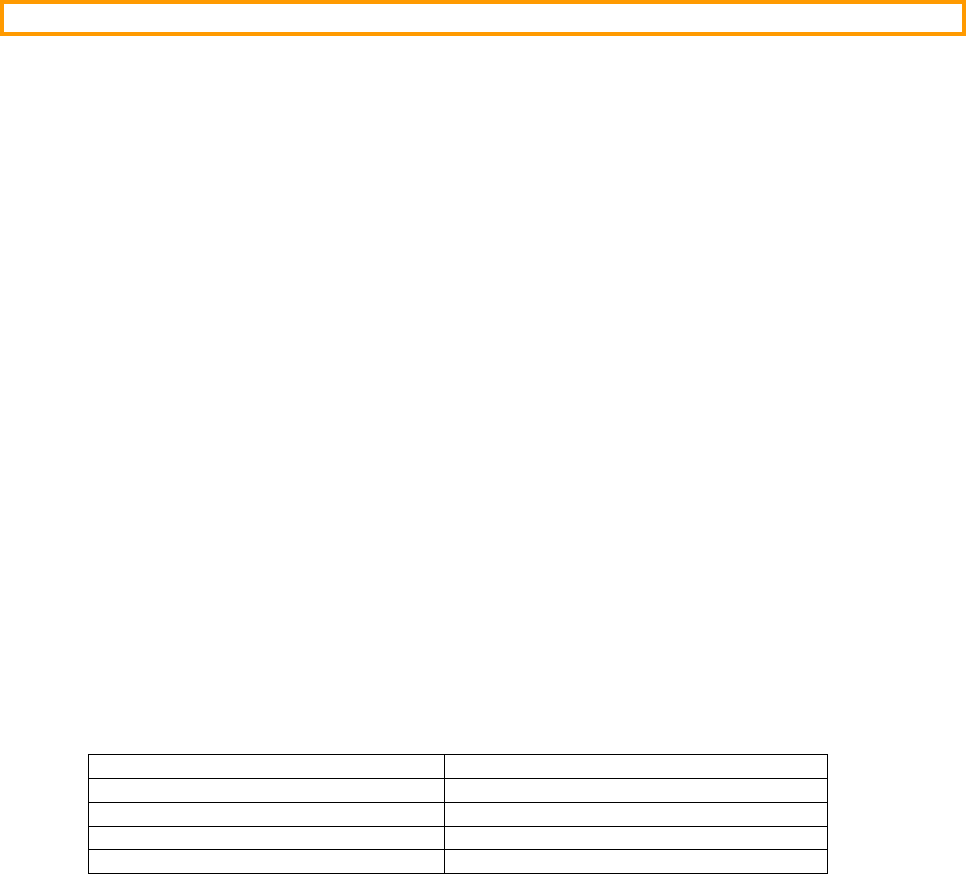
62
6.03.06 inet_ntoa()
This function converts a network protocol IPv4 address in network-order to an IPv4 address in ASCII dotted-
decimal notation.
Prototype
char *inet_ntoa (struct in_addr addr);
Arguments
in_addr IPv4 address.
Returned Value
Pointer to ASCII string of converted IPv4 address (see Note #2), if NO errors.
NULL pointer otherwise.
Notes / Warnings
1) RFC 1983 states that "dotted decimal notation ... refers [to] IP addresses of the form A.B.C.D; where each
letter represents, in decimal, one byte of a four byte IP address".
In other words, the dotted-decimal notation separates four decimal octet values by the dot, or period,
character ('.'). Each decimal value represents one octet of the IP address starting with the most significant
octet in network order.
IP Address Examples :
DOTTED DECIMAL NOTATION HEXADECIMAL EQUIVALENT
127.0.0.1 0x7F000001
192.168.1.64 0xC0A80140
255.255.255.0 0xFFFFFF00
MSO ….…… LSO MSO …. LSO
MSO Most Significant Octet in Dotted Decimal IP Address
LSO Least Significant Octet in Dotted Decimal IP Address
2) Since the character string is returned in a single, global character string array, this conversion function is
NOT reentrant.
3) The IP address is saved in a ‘global’ array called NetBSD_IP_to_Str_Array[] and needs to be
copied ‘out’ of this array to be able to use inet_ntoa() for another IP address.
Uses µC/TCP-IP’s Function
NetASCII_IP_to_Str()
63
Example
void AppTask (void)
{
char *pstr;
char ascii_ip_addr[NET_BSD_ASCII_LEN_MAX_ADDR_IP];
:
:
pstr = inet_ntoa(0xC0A80140); /* Convert 192.168.1.64 to ASCII string */
Str_Copy(ascii_ip_addr, pstr); /* Copy this string to local buffer */
:
:
}

64
6.03.07 listen() TCP
Indicates that the given socket is ready to accept incoming connections. The socket must already be associated
with a local port (i.e., bind() must have been called previously). After this call, incoming TCP connection
requests addressed to the given local port (and IP address, if specified previously) will be completed and queued
until they are passed to the program via accept().
listen() applies only to stream type sockets (i.e. TCP sockets).
Prototype
int listen (int sock_id,
int sock_q_size);
Arguments
sock_id This is the socket ID returned by the socket() call when the socket was created.
sock_q_size Maximum number of new connections (sockets) waiting. In other words, this
argument specifies the maximum queue length of pending connections while the
server is busy servicing the current request.
Returned Value
Returns 0 if no error and -1 otherwise.
Notes / Warnings
None.
Uses µC/TCP-IP’s Function
NetSock_Listen()
65
Example
int MySockID;
struct sockaddr_in MySockAddr;
void AppTask (void)
{
int listen_status;
:
:
/* Call socket() */
/* Call bind() */
listen_status = listen(MySocketID, 3);
if (listen_status < 0) {
close(MySocketID);
} else {
/* Socket placed in listening state, proceed to ‘accept’ connections */
/* Call accept() */
}
:
:
}

66
6.03.08 recv() TCP/UDP
This function copies up to a specified number of bytes, received on the socket, into a specified location. The
specified socket must be in the connected state.
If the socket is configured for blocking mode, recv() blocks until either at least one byte is returned or the
connection closes (indicated by returning 0).
If the socket is configured for non-blocking mode, recv() returns a -1 if no data is available.
The return value indicates the number of bytes actually copied into the buffer starting at the pointed-to location.
For a stream socket (i.e. TCP), the bytes are delivered in the same order as they were transmitted, without
omissions. For a datagram socket (i.e. UDP), each recv() returns the data from at most one send(), and
order is not necessarily preserved. If the buffer provided to recv() is not big enough for the next available
datagram, the datagram is silently truncated to the size of the buffer.
You would typically use recv() for TCP sockets and recvfrom() for UDP sockets.
Prototype
ssize_t recv (int sock_id,
void *pdata_buf,
_size_t data_buf_len,
int flags);
Arguments
sock_id This is the socket ID returned by the socket() call when the socket was created
OR the socket ID returned by the accept() call.
pdata_buf Is a pointer to where the received message will be stored.
data_buf_len Contains the size of the destination buffer.
flags Specifies receive options. You can logically OR the flags. Valid flags are:
0 No socket flags selected
MSG_PEEK Receive socket data without consuming the data
MSG_DONTWAIT Receive the data without blocking
In most cases, you would set flags to 0.
Returned Value
recv() returns the number of data octets actually received, -1 upon error, and 0 indicates that the connection was closed.
67
Blocking vs Non-Blocking
The default setting for µC/TCP-IP is blocking. However, you can change that at compile time by setting the
configuration #define (see net_cfg.h) NET_SOCK_CFG_BLOCK_SEL to one of the following values:
NET_SOCK_BLOCK_SEL_DFLT sets blocking mode to the default, or blocking, unless modified by run-
time options.
NET_SOCK_BLOCK_SEL_BLOCK sets the blocking mode to blocking. This means that recv() will
wait until data is available from the socket. After creating the socket, you can specify a timeout when in
blocking mode by calling the µC/TCP-IP function NetSock_CfgTimeoutRxQ_Set(). In other
words, recv() will wait forever until a message is received unless you specify a timeout value.
NetSock_CfgTimeoutRxQ_Set() require three parameters:
NET_SOCK_ID sock_id
CPU_INT32U timeout_ms
NET_ERR *perr
sock_id is the socket ID that you pass to recv().
timeout_ms is the amount of time (in milliseconds) to wait for data to be received from the
socket. If you specify a time of NET_TMR_TIME_INFINITE then, the socket will wait forever
for data to arrive.
perr is a pointer to an error code that is returned from NetSock_CfgTimeoutRxQ_Set().
NET_SOCK_ERR_NONE indicates that the socket timeout was set correctly.
NET_SOCK_BLOCK_SEL_NO_BLOCK sets the blocking mode to non-blocking. This means that
recv() call will NOT wait if data is not available from the socket. The caller should examine the return
code of the function. 0 indicates that the connection has been lost and -1 indicates that no data was
available. Of course, you will have to ‘poll’ recv() on a regular basis if data is not available.
The current version of the software selects blocking or non-blocking at compile time for all sockets. A future
version of µC/TCP-IP will allow the selection of blocking or non-bloacking at the individual socket level.
However, each call to recv() can pass the MSG_DONTWAIT flag to disable blocking on that call.
Notes / Warnings
Only some recv() flag options are implemented. If other flag options are requested, recvfrom() returns an
error so that flag options are NOT silently ignored.
Uses µC/TCP-IP’s Function
NetSock_RxData()
68
Example
int MySockID;
CPU_INT08U RxBuf[100];
void AppTask (void)
{
int rx_data_len;
:
:
rx_data_len = recv(MySocketID, (void *)&RxBuf[0], 100, 0);
if (rx_data_len > 0) { /* See if we received data */
/* Process data received */
} else if (rx_data_len == 0) { /* See if connection has been lost */
close(MySocketID);
} else {
/* Data not received */
}
:
:
}

69
6.03.09 recvfrom() TCP/UDP
recvfrom() is used to receive from a UDP socket. The function copies a specified number of bytes received
on a socket to a specified location.
Prototype
ssize_t recvfrom ( int sock_id,
void *pdata_buf,
_size_t data_buf_len,
int flags,
struct sockaddr *paddr_remote,
socklen_t *paddr_len);
Arguments
sock_id This is the socket ID returned by the socket() call when the socket was created
OR the socket ID returned by the accept() call.
pdata_buf This is a pointer to where the data received from the socket will be placed.
data_buf_len This argument specifies the maximum number of bytes to place in the pdata_buf
buffer.
flags Control flags and can be one of the following values. Note that options can be
logically OR’d together:
0 No socket flags selected.
MSG_PEEK Receive socket data without consuming the socket data.
MSG_DONTWAIT Receive socket data without blocking.
In most cases, you would set flags to 0.
paddr_remote Pointer to an address buffer that will hold the socket address structure
with the received data's remote address (see section 6.02, Data Structures).
paddr_len When recvfrom() is called, paddrlen points to the size of the address buffer
pointed to by paddr_remote. When the function returns, paddr_len points to
the actual size of socket address structure with the received data's remote address.
Returned Value
recvfrom() returns the number of data octets actually received, -1 upon error, and 0 indicates that the
connection was closed.
70
Blocking vs Non-Blocking
The default setting for µC/TCP-IP is blocking. However, you can change that at compile time by setting the
configuration #define (see net_cfg.h) NET_SOCK_CFG_BLOCK_SEL to one of the following values:
NET_SOCK_BLOCK_SEL_DFLT sets blocking mode to the default, or blocking, unless modified by run-
time options.
NET_SOCK_BLOCK_SEL_BLOCK sets the blocking mode to blocking. This means that recvfrom()
will wait until data is available from the socket. After creating the socket, you can specify a timeout when
in blocking mode by calling the µC/TCP-IP function NetSock_CfgTimeoutRxQ_Set(). In other
words, recvfrom() will wait forever until a message is received unless you specify a timeout value.
NetSock_CfgTimeoutRxQ_Set() require three parameters:
NET_SOCK_ID sock_id
CPU_INT32U timeout_ms
NET_ERR *perr
sock_id is the socket ID that you pass to recvfrom().
timeout_ms is the amount of time (in milliseconds) to wait for data to be received from the
socket. If you specify a time of NET_TMR_TIME_INFINITE then, the socket will wait forever
for data to arrive.
perr is a pointer to an error code that is returned from NetSock_CfgTimeoutRxQ_Set().
NET_SOCK_ERR_NONE indicates that the socket timeout was set correctly.
NET_SOCK_BLOCK_SEL_NO_BLOCK sets the blocking mode to non-blocking. This means that
recvfrom() call will NOT wait if data is not available from the socket. The caller should examine the
return code of the function. 0 indicates that data was received and -1 indicates that no data was available.
Of course, you will have to ‘poll’ recvfrom() on a regular basis if data is not available.
The current version of the software selects blocking or non-blocking at compile time for all sockets. A future
version of µC/TCP-IP will allow the selection of blocking or non-bloacking at the individual socket level.
However, each call to recvfrom() can pass the MSG_DONTWAIT flag to disable blocking on that call.
Notes / Warnings
For UDP sockets, all data is transmitted and received atomically -- i.e. every single, complete datagram transmitted
MUST be received as a single, complete datagram. Thus, if the socket's type is datagram and the receive data buffer
size is NOT large enough for the received data, the remaining data octets are silently discarded and NO error is
returned. See also 'net_sock.c NetSock_RxDataFrom() Note #3' & 'net_sock.c
NetSock_RxDataHandler() Note #2'.
Only some recvfrom() flag options are implemented. If other flag options are requested, recvfrom() returns
an error so that flag options are NOT silently ignored.
Uses µC/TCP-IP’s Function
NetSock_RxDataFrom()
71
Example
char rx_buf[100];
struct sockaddr_in sock_addr;
int sock_addr_len;
int rx_msg_len;
sock_addr_len = sizeof(sock_addr);
rx_msg_len = recvfrom(sock_id,
(void *)&rx_buf[0],
sizeof(rx_buf),
0,
(struct sockaddr *)&sock_addr,
&sock_addr_len);
if (rx_msg_len < 0) {
/* Data not received */
} else {
/* Data received */
}

72
6.03.10 select() TCP/UDP
This function checks if any sockets are ready for available read, write, &/or error operations.
Prototype
int select ( int desc_nbr_max,
struct fd_set *pdesc_rd,
struct fd_set *pdesc_wr,
struct fd_set *pdesc_err,
struct timeval *ptimeout);
Arguments
desc_nbr_max Specifies the maximum number of socket file descriptors in the file descriptor sets.
pdesc_rd Pointer to a set of socket file descriptors to :
(a) Check for available read operations.
(b) (1) Return the actual socket file descriptors ready for available read
operations, if no errors;
(2) Return the initial, non-modified set of socket file descriptors, on any errors;
(3) Return a null-valued (i.e. zero-cleared) descriptor set, if any timeout expires.
pdesc_wr Pointer to a set of socket file descriptors to :
(a) Check for available write operations.
(b) (1) Return the actual socket file descriptors ready for available write
operations, if no errors;
(2) Return the initial, non-modified set of socket file descriptors, on any errors;
(3) Return a null-valued (i.e. zero-cleared) descriptor set, if any timeout expires.
pdesc_err Pointer to a set of socket file descriptors to :
(a) Check for any available socket errors.
(b) (1) Return the actual socket file descriptors ready with any pending errors;
(2) Return the initial, non-modified set of socket file descriptors, on any errors;
(3) Return a null-valued (i.e. zero-cleared) descriptor set, if any timeout expires.
ptimeout Pointer to a timeout argument.
Returned Value
select() returns the number of socket file descriptors ready with available operations if successful, 0 upon
timeout, and -1 upon error.
Notes / Warnings
Enabled via NET_SOCK_CFG_SEL_EN
ONLY supports socket file descriptors (i.e. socket ID descriptor numbers).
73
Uses µC/TCP-IP’s Function
NetSock_Sel()
Example
int MySockID_UDP;
int MySockID_TCP;
void AppTask (void)
{
int rtn_val;
int rdy;
struct sockaddr_in addr;
struct fd_set fdset;
struct timeval timeout;
/* Configure UDP socket server. */
MySockID_UDP = socket(PF_INET, SOCK_DGRAM, IPPROTO_UDP);
Mem_Clr((void *)&addr,
(CPU_SIZE_T) sizeof(addr));
addr.sin_family = AF_INET;
addr.sin_port = htons(UDP_SERVER_PORT_NBR);
addr.sin_addr.s_addr = htonl(UDP_SERVER_ADDR);
rtn_val = bind(MySockID_UDP, &addr, sizeof(addr));
/* Configure TCP socket server. */
MySockID_TCP = socket(PF_INET, SOCK_STREAM, IPPROTO_TCP);
Mem_Clr((void *)&addr,
(CPU_SIZE_T) sizeof(addr));
addr.sin_family = AF_INET;
addr.sin_port = htons(TCP_SERVER_PORT_NBR);
addr.sin_addr.s_addr = htonl(TCP_SERVER_ADDR);
rtn_val = bind(MySockID_TCP, &addr, sizeof(addr));
rtn_val = listen(MySockID_TCP, 3);
while (DEF_ON) { /* Handle socket servers forever. */
FD_ZERO(&fdset);
FD_SET(MySockID_UDP, &fdset);
FD_SET(MySockID_TCP, &fdset);
timeout.tv_sec = 123;
timeout.tv_usec = 456789;
rtn_val = select((int ) FD_SETSIZE,
(struct fd_set *)&fdset,
(struct fd_set *) 0,
(struct fd_set *) 0,
(struct timeval *)&timeout);
if (rtn_val > 0) { /* If any server socket ready, ... */
/* ... handle ready sockets. */
rdy = FD_IS_SET(MySockID_UDP, &fdset);
if (rdy == 1) {
Handle ready UDP socket server;
}
rdy = FD_IS_SET(MySockID_TCP, &fdset);
if (rdy == 1) {
Handle ready TCP socket server;
}
}
}
}

74
6.03.11 send() TCP/UDP
send() sends bytes contained in a buffer to a TCP socket. send() can only be used when a socket is in the
connected state. If the socket does not have enough buffer space available to hold the message being sent,
send() will block, unless the socket has been placed in non-blocking mode, or the MSG_DONTWAIT flag has
been set in the flags parameter.
Prototype
ssize_t send (int sock_id,
void *p_data,
_size_t data_len,
int flags);
Arguments
sock_id This is the socket ID returned by the socket() call when the socket was created
OR the socket ID returned by the accept() call.
p_data This is a pointer to the application data to send.
data_len This argument specifies the number of octets to send.
flags Control flags and ca be one of the following values:
0 No socket flags selected.
MSG_DONTWAIT Send data without blocking.
In most cases, you would set flags to 0.
Returned Value
send() returns the number of data octets actually sent, -1 upon error, and 0 indicates that the connection was
closed. A positive return value does not mean that the message was delivered, it just indicates that it was sent
or queued for sending.
Blocking vs Non-Blocking
The default setting for µC/TCP-IP is blocking. However, you can change that at compile time by setting the
configuration #define (see net_cfg.h) NET_SOCK_CFG_BLOCK_SEL to one of the following values:
NET_SOCK_BLOCK_SEL_DFLT sets blocking mode to the default, or blocking, unless modified by run-
time options.
NET_SOCK_BLOCK_SEL_BLOCK sets the blocking mode to blocking. This means that send() will
wait until data is able to be prepared and/or transmitted through the socket. After creating the socket, you
can specify a timeout when in blocking mode by calling the µC/TCP-IP function
NetSock_CfgTimeoutTxQ_Set() for TCP sockets (UDP sockets are best effort and exit with error
rather than block). In other words, send() will wait forever until a message is prepared and/or
75
transmitted unless you specify a timeout value. NetSock_CfgTimeoutTxQ_Set() require three
parameters:
NET_SOCK_ID sock_id
CPU_INT32U timeout_ms
NET_ERR *perr
sock_id is the socket ID that you pass to send().
timeout_ms is the amount of time (in milliseconds) to wait for data to be prepared and/or
transmitted through the socket. If you specify a time of NET_TMR_TIME_INFINITE then, the
socket will wait forever for data to transmit.
perr is a pointer to an error code that is returned from NetSock_CfgTimeoutTxQ_Set().
NET_SOCK_ERR_NONE indicates that the socket timeout was set correctly.
NET_SOCK_BLOCK_SEL_NO_BLOCK sets the blocking mode to non-blocking. This means that
send() call will NOT wait if data is not sent to the socket. As much data from the message that can fit in
the TCP buffer will be sent. The caller should examine the return code of the function. A positive value
indicates the number of octets that was sent data and -1 indicates that no data was sent and, 0 indicates
that the connection was lost. Of course, you will have to ‘poll’ send() on a regular basis if data is not
sent.
The current version of the software selects blocking or non-blocking at compile time for all sockets. A future
version of µC/TCP-IP will allow the selection of blocking or non-bloacking at the individual socket level.
However, each call to send() can pass the MSG_DONTWAIT flag to disable blocking on that call.
Notes / Warnings
Even though you can select blocking or non-blocking at compile time, the current version of the software indirectly
always blocks. We say indirectly because, it’s not the socket that blocks but instead, it’s the driver who waits for
availability of the transmitter.
Only some send() flag options are implemented. If other flag options are requested, send() returns an error so
that flag options are NOT silently ignored.
Uses µC/TCP-IP’s Function
NetSock_TxData()
76
Example
int sock_id;
char tx_buf[100];
int tx_msg_len;
/* Place message into tx_buf[] */
tx_msg_len = send(sock_id,
&tx_buf[0],
sizeof(tx_buf),
0);
if (tx_msg_len > 0) {
/* Data was sent */
} else if (tx_msg_len == 0) {
/* Connection was lost */
} else {
/* Data not sent */
}

77
6.03.12 sendto() TCP/UDP
sendto()sends bytes contained in a buffer to a UDP socket. If the socket does not have enough buffer space
available to hold the message being sent, sendto() will block, unless the socket has been placed in
non-blocking mode, or the MSG_DONTWAIT flag has been set in the flags parameter.
Prototype
ssize_t sendto ( int sock_id,
void *p_data,
_size_t data_len,
int flags,
struct sockaddr *paddr_remote,
socklen_t addr_len);
Arguments
sock_id This is the socket ID returned by the socket() call when the socket was created
OR the socket ID returned by the accept() call.
p_data This is a pointer to the application data to send.
data_len This argument specifies the number of octets to send.
flags Control flags and ca be one of the following values:
0 No socket flags selected.
MSG_DONTWAIT Send data without blocking.
In most cases, you would set flags to 0.
paddr_remote Pointer to the destination address buffer (see section 6.02, Data Structures).
addr_len This argument specifies the size of the socket address data structure and should always be:
sizeof(struct sockaddr) OR sizeof(struct sockaddr_in)
Returned Value
sendto() returns the number of data octets actually sent, -1 upon error, and 0 indicates that the connection was
closed. A positive return value does not mean that the message was delivered, it just indicates that it was sent
or queued for sending.
Blocking vs Non-Blocking
The default setting for µC/TCP-IP is blocking. However, you can change that at compile time by setting the
configuration #define (see net_cfg.h) NET_SOCK_CFG_BLOCK_SEL to one of the following values:
78
NET_SOCK_BLOCK_SEL_DFLT sets blocking mode to the default, or blocking, unless modified by run-
time options.
NET_SOCK_BLOCK_SEL_BLOCK sets the blocking mode to blocking. This means that sendto() will
wait until data is able to be prepared and/or transmitted through the socket. After creating the socket, you
can specify a timeout when in blocking mode by calling the µC/TCP-IP function
NetSock_CfgTimeoutTxQ_Set() for TCP sockets (UDP sockets are best effort and exit with error
rather than block). In other words, sendto() will wait forever until a message is prepared and/or
transmitted unless you specify a timeout value. NetSock_CfgTimeoutTxQ_Set() require three
parameters:
NET_SOCK_ID sock_id
CPU_INT32U timeout_ms
NET_ERR *perr
sock_id is the socket ID that you pass to sendto().
timeout_ms is the amount of time (in milliseconds) to wait for data to be prepared and/or
transmitted through the socket. If you specify a time of NET_TMR_TIME_INFINITE then, the
socket will wait forever for data to transmit.
perr is a pointer to an error code that is returned from NetSock_CfgTimeoutTxQ_Set().
NET_SOCK_ERR_NONE indicates that the socket timeout was set correctly.
NET_SOCK_BLOCK_SEL_NO_BLOCK sets the blocking mode to non-blocking. This means that
sendto() call will NOT wait if data is not sent to the socket. The caller should examine the return code
of the function. A positive value indicates the number of octets that was sent data and -1 indicates that no
data was sent. Of course, you will have to ‘poll’ sendto() on a regular basis if data is not sent.
The current version of the software selects blocking or non-blocking at compile time for all sockets. A future
version of µC/TCP-IP will allow the selection of blocking or non-bloacking at the individual socket level.
However, each call to sendto() can pass the MSG_DONTWAIT flag to disable blocking on that call.
Notes / Warnings
Even though you can select blocking or non-blocking at compile time, the current version of the software indirectly
always assumes blocking. We say indirectly because, it’s not the socket that blocks but instead, it’s the driver who
waits for availability of the transmitter.
For UDP sockets, all data is transmitted atomically -- i.e. each call to transmit data MUST be transmitted in a single,
complete datagram. Since IP transmit fragmentation is NOT currently supported (see 'net_ip.h Note #1e'), if the
socket's type is datagram and the requested application/socket transmit data length is greater than MTU, then the
socket data transmit is aborted and NO socket data is transmitted. See also 'net_sock.c
NetSock_TxDataTo() Note #3' and 'net_sock.c NetSock_TxDataHandler() Note #2'.
Only some sendto() flag options are implemented. If other flag options are requested, sendto() returns an
error so that flag options are NOT silently ignored.
79
Uses µC/TCP-IP’s Function
NetSock_TxDataTo()
Example
int sock_id;
char tx_buf[100];
struct sockaddr_in sock_addr;
int tx_msg_len;
tx_msg_len = (CPU_INT16S)sendto(sock_id,
&tx_buf[0],
sizeof(tx_buf),
0,
(struct sockaddr *)&sock_addr,
sizeof(struct sockaddr));
if (tx_msg_len < 0) {
/* Data not sent */
} else {
/* Data sent */
}

80
6.03.13 socket() TCP/UDP
Creates a TCP or UDP socket, which may then be used as a communication endpoint for sending and receiving data
using the specified protocol. You would specify TCP with the socket type/protocol pair SOCK_STREAM /
IPPROTO TCP and UDP, with the socket type/protocol pair SOCK_DGRAM / IPPROTO_UDP.
Prototype
int socket (int protocol_family,
int sock_type,
int protocol);
Arguments
protocol_family Always use AF_INET or PF_INET (both values are the same) for TCP/IP sockets. This
field establishes the domain.
sock_type Type of socket:
SOCK_STREAM for TCP
SOCK_DGRAM for UDP
SOCK_STREAM is a reliable byte-stream flow, where bytes are received the remote
application in the same order as they were sent. File transfer and terminal emulation are
examples of applications that require this type of protocol.
SOCK_DGRAM preserve message boundaries. Applications that exchange client request
messages and server response messages are examples of datagram communication
Note that you can in fact specify 0 as the protocol since specifying SOCK_STREAM
for the sock_type implies IPPROTO_TCP and, specifying SOCK_DGRAM for the
sock_type implies IPPROTO_UDP.
protocol Socket protocol:
IPPROTO_TCP for TCP
IPPROTO_UDP for UDP
Note that you can in fact specify 0 as the protocol since specifying SOCK_STREAM
for the sock_type implies IPPROTO_TCP and, specifying SOCK_DGRAM for the
sock_type implies IPPROTO_UDP.

81
Arguments Summary
The table below shows you the different ways you can specify the three arguments.
TCP/IP Protocol Arguments
protocol_family sock_type protocol
TCP AF_INET or PF_INET SOCK_STREAM IPPROTO_UDP
TCP AF_INET or PF_INET SOCK_STREAM 0
UDP AF_INET or PF_INET SOCK_DGRAM IPPROTO_TCP
UDP AF_INET or PF_INET SOCK_DGRAM 0
Returned Value
socket() returns the descriptor of the new socket ID (non-negative value) if no error occurs or -1 upon error.
Notes / Warnings
The protocol characteristics of a socket are frozen when it is created. In other words, you cannot change a stream
socket to a datagram socket (or vice versa) at run-time.
It’s also very important that both sides (your target and the remote host) have sockets with the same socket family
type and, protocol.
Uses µC/TCP-IP’s Function
NetSock_Open()
Example
int AppTCPSockID_1;
int AppTCPSockID_2;
int AppUDPSockID_1;
int AppUDPSockID_2;
void AppTask (void)
{
:
:
AppTCPSockID_1 = socket(PF_INET, SOCK_STREAM, IPPROTO_TCP);
AppTCPSockID_2 = socket(PF_INET, SOCK_STREAM, 0);
:
:
AppUDPSockID_1 = socket(PF_INET, SOCK_DGRAM, IPPROTO_UDP);
AppUDPSockID_2 = socket(PF_INET, SOCK_DGRAM, 0);
:
:
}
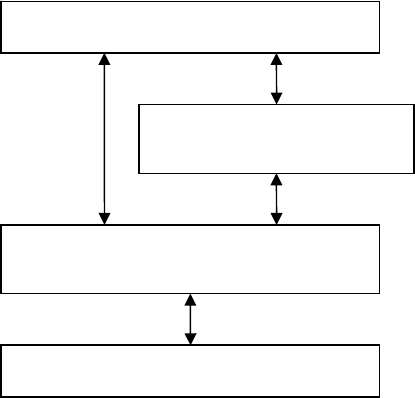
82
Chapter 7
Micriµm Socket Layer
In addition to the BSD socket API discussed in Chapter 6, your application may interface to µC/TCP-IP using its
own socket API found in the net_sock.* files. Basically, your application would skip the BSD socket layer &
instead directly call the µC/TCP-IP socket layer as shown in Figure 14-1. You would have a slight performance
gain by interfacing directly to net_sock.* functions. The µC/TCP-IP calls are more versatile because they
provide an error code to the calling function instead of just 0 or -1. Micrium layer 7 application typically use the
µC/TCP-IP socket interface functions instead of the BSD functions.
Figure 7-1, µC/TCP-IP Socket Interface
Your Application
BSD Socket Interface
µC
/
TCP-IP Socket Interface
µC
/
TCP-IP
n
et_sock.*
n
e
t_bsd.*

83
7.10 µC/TCP-IP Socket Error Codes
When socket functions return error codes, the error codes SHOULD be inspected to determine if the error is a
temporary, non-fault condition (like no data to receive) or fatal (like the socket has been closed).
Whenever any of the following fatal error codes are returned by any µC/TCP-IP socket function, that socket
MUST be immediately closed()'d without further by other socket functions :
NET_SOCK_ERR_NOT_USED
NET_SOCK_ERR_INVALID_FAMILY
NET_SOCK_ERR_INVALID_PROTOCOL
NET_SOCK_ERR_INVALID_TYPE
NET_SOCK_ERR_INVALID_STATE
NET_SOCK_ERR_FAULT

84
Chapter 8
NIC Drivers
µC/TCP-IP is able to work with a number of Network Interface Controllers (NICs). If we don’t have a driver for
the specific NIC you are planning on using, you can write your own driver as described in this chapter. However,
it’s recommended that you modify an already existing NIC driver with your NIC’s specific code. We recommend
that you follow our coding convention for consistency reasons.
µC/TCP-IP currently only supports Ethernet type interface controllers. There are many Ethernet controllers
available on the market and each one requires a driver to work with µC/TCP-IP. It’s actually possible to adapt
drivers written for other TCP/IP stacks because the drivers are basically only responsible for copying data to and
from the NIC.
The amount of code needed to interface a specific NIC to µC/TCP-IP greatly depends on the complexity of the
NIC.
8.01 Directories and Files
Drivers are placed under the NIC directory as shown below.
\Micrium\Software\uC-TCPIP\NIC
µC/TCP-IP is capable of supporting multiple types of NICs but, currently only supports Ethernet. Ethernet drivers
are thus placed under the \Ether subdirectory as shown below.
\Micrium\Software\uC-TCPIP\NIC\Ether
Individual NICs are typically identified by the manufacturer’s part number. µC/TCP-IP currently supports the
SMC LAN91C111 and Atmel’s AT91RM9200 integrated MAC (Media Access Controller). You will find the
drivers for these NICs in the following directories (assuming you purchased them with µC/TCP-IP).
\Micrium\Software\uC-TCPIP\NIC\Ether\LAN91C111\net_nic*.*
\Micrium\Software\uC-TCPIP\NIC\Ether\AT91RM9200\net_nic*.*
Note that NIC drivers must be called net_nic*.*. The actual directory determines which specific NIC
your application will actually use.
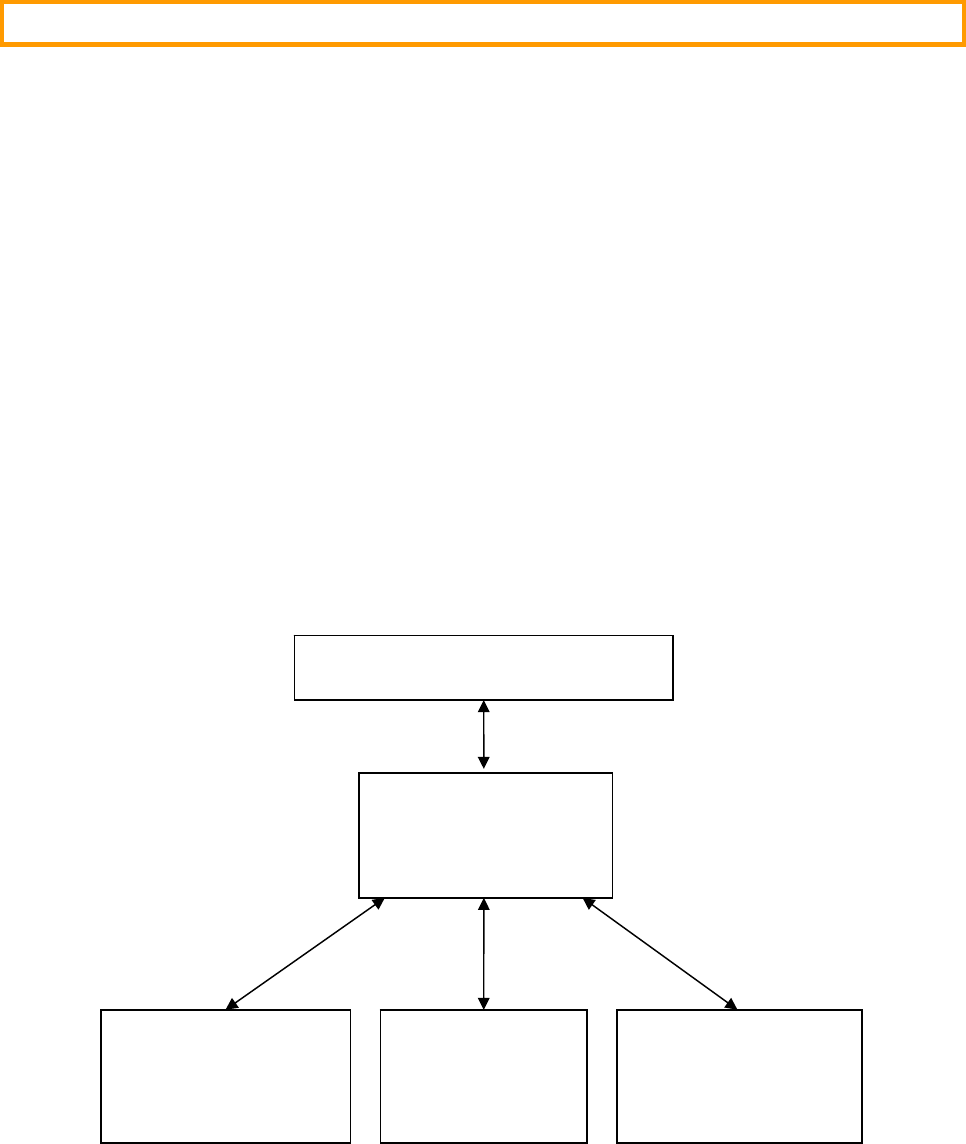
85
8.02
Interfacing to µC/TCP-IP
Figure 8-1 shows the relationship between µC/TCP-IP, the NIC driver, the RTOS (Real-Time Operating System)
and your BSP (Board Support Package). Here is a brief description of the contents of each file. More details will be
provided in subsequent sections.
net_nic.* contains the NIC specific code but, is independent of the CPU and RTOS used. Also,
net_nic.* doesn’t know about the interface to the actual chip (memory or I/O mapped).
net_bsp_a.s is an assembly language file that handles receive and transmit ISRs (Interrupt Service
Routines) from your NIC. It is assumed to be part of your application code because it depends on the CPU
you are using, its interrupt structure and the compiler used. The ISR is typically written in assembly
language but could also written in C if your compiler and RTOS allows it.
net_bsp.c contains code specific to the actual chip in your system. As a minimum, this file contains
functions to read data from and write commands/data to the NIC. This file can also contain other NIC
specific functions as needed by the NIC. Specifically, it can contain code to enable/disable ISRs from the
NIC, initialize the NIC’s ISRs, and do other ISR related functions. net_bsp.c should contain code that
is specific to the board or I/O structure of your target. This file is also assumed to be part of your
application code because it depends on the CPU you are using, its interrupt structure and the compiler used.
net_os.c contains code that interfaces to your RTOS. Functions specific to the NIC will be discussed in
this chapter.
Figure 8-1, Interface relationship to NIC
ISRs
(net_bsp_a.asm)
Section 8.02
(Your Application)
µC/TCP-IP
BSP
(net_bsp.c)
Section 8.03
(Your Application)
NIC Driver
(net_nic.*)
Section 8.04
(Chip Specific)
OS
(net_os.c)
Section 8.05
(RTOS Specific)

86
8.02 ISRs, net_bsp_a.asm
µC/TCP-IP assumes that NIC handling is interrupt driven. Packets received will interrupt the CPU and the
completion of a packet transmission will also interrupt the CPU. We assume that ISRs (Interrupt Service Routines)
are part of your application code but will be calling services provided by the stack or the RTOS.
If you need to write your ISRs in assembly language, we recommend that you call the file net_bsp_a.asm for
consistency. This file is assumed to be part of your application code and thus would be located in your application’s
directory. Listing 8-1 shows the pseudo-code of a typical NIC ISR. In most cases, net_bsp_a.asm only needs
sufficient code to save/restore CPU registers and call the function NetNIC_ISR_Handler() which is found in
net_nic.c.
Listing 8-1, Pseudo-code of NIC ISR written in assembly language
NetNIC_ISR:
Save CPU registers;
Call OS ISR entry function;
Call NetNIC_ISR_Handler();
Call OS ISR exit function;
Restore CPU registers;
Return from interrupt;
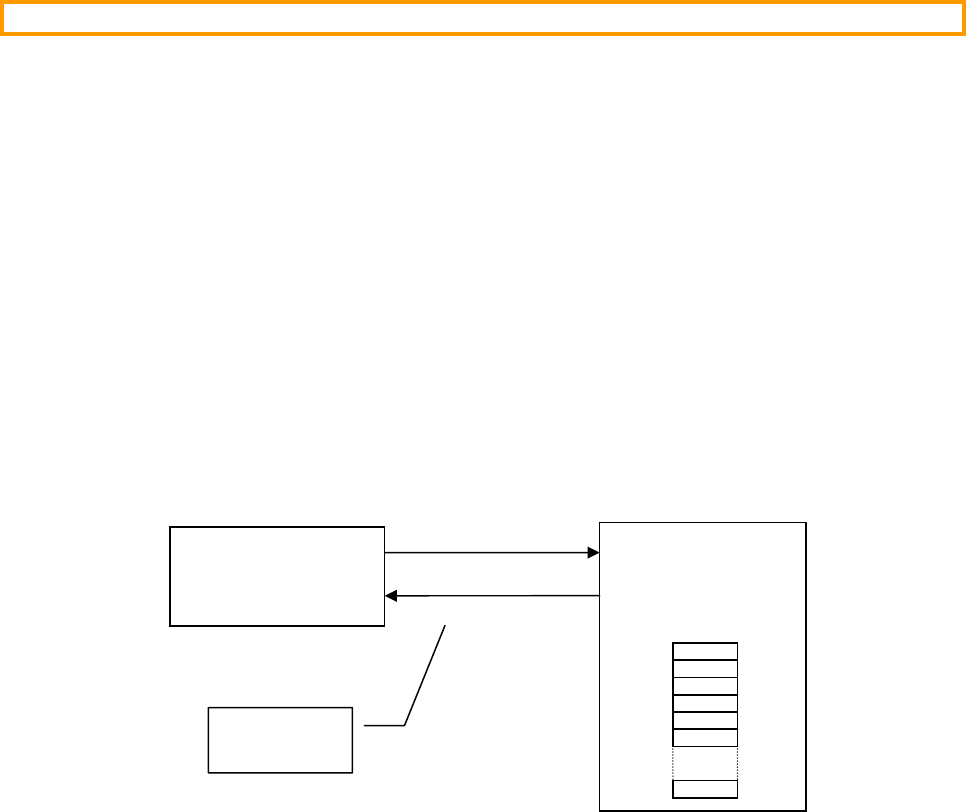
87
8.03 net_bsp.c
net_bsp.c is a file that is assumed to be part of your application code since it’s specific to how the NIC is
connected to your target as shown in Figure 8-2. It’s assumed that the CPU interfaces with the NIC via a series
registers defined by the NIC. Each register is identified by a unique ID or, address (0 .. N-1). The specific NIC
defines what each register does. Figure 8-2 shows an interface to a NIC with 16-bit wide registers and thus,
net_bsp.c defines two functions: NetNIC_Rd16() and NetNIC_Wr16(). The prototype for these functions
is shown below:
CPU_INT16U NetNIC_Rd_16 (CPU_INT16U reg_offset);
void NetNIC_Wr_16 (CPU_INT16U reg_offset, CPU_INT16U val);
where:
reg_offset is the register ID.
val is the value to set the register to.
You will notice that the functions are prefixed with NetNIC_ even though they are in the file net_bsp.c. The
reasoning is that NetNIC_Rd_16() (for example) is a NIC function that should have normally been part of
net_nic.c but, because it’s target specific, it needs to be placed in a file that will change based on the target.
Figure 8-2, Interface between µC/TCP-IP and the NIC
net_bsp.c also contains ISR related functions such as initialization of the interrupt controller for the NIC ISR,
setting up the interrupt vector, enabling and disabling interrupts from the NIC, etc. Below are additional functions
that µC/TCP-IP expects to find in net_bsp.c:
NetNIC_IntInit() is a function that initializes the NIC interrupt on the target. Basically, this function
sets up the interrupt controller (if present), sets up the interrupt vector associated with the NIC interrupt
and, enables the NIC interrupt.
NetNIC_IntClr() is a function that clears the NIC interrupt. In other words, this is a function that
indicates that the NIC interrupt has been serviced and that the NIC can receive another interrupt.
Code for these functions is assumed to be present if you set NET_NIC_CFG_INT_CTRL_EN to DEF_ENABLED
in net_cfg.h.
NIC
N
etNIC_Rd
_
1
6()
µC/TCP-IP
N
etNIC
_
W
r
_
1
6()
Registers
0
1
2
N
-
1
Defined in
net_bsp.c

88
8.04 net_nic.c
As previously mentioned, functions in this file contains the NIC specific code but, is independent of the CPU and
RTOS used. Also, net_nic.c doesn’t know about the interface to the actual chip (memory or I/O mapped).
This file contains code for the following functions:
void NetNIC_Init (NET_ERR *perr);
void NetNIC_IntEn (void);
CPU_BOOLEAN NetNIC_ConnStatusGet (void);
void NetNIC_ConnStatusChk (void);
void NetNIC_ISR_Handler (void);
CPU_INT16U NetNIC_RxPktGetSize (void);
void NetNIC_RxPkt (void *ppkt,
CPU_INT16U size,
NET_ERR *perr);
void NetNIC_RxPktDiscard (CPU_INT16U size,
NET_ERR *perr);
void NetNIC_TxPkt (void *ppkt,
CPU_INT16U size,
NET_ERR *perr);

89
8.05.01 net_nic.c, NetNIC_Init()
This function is called by Net_Init() to initialize the NIC. The code in listing 8-2 shows the typical operations
performed by NetNIC_Init(). You should simply copy this code for your own driver.
Listing 8-2, Initializing the NIC
void NetNIC_Init (NET_ERR *perr)
{
NetOS_NIC_Init(perr); /* Create NIC OS objects */
if (*perr != NET_OS_ERR_NONE) {
return;
}
NetNIC_ConnStatus = DEF_OFF; /* Initialize the NIC status */
#if (NET_CTR_CFG_STAT_EN == DEF_ENABLED) /* Initialize NIC statistic counters */
NetNIC_StatRxPktCtr = 0;
NetNIC_StatTxPktCtr = 0;
#endif
#if (NET_CTR_CFG_ERR_EN == DEF_ENABLED) /* Initialize NIC error counters */
NetNIC_ErrRxPktDiscardedCtr = 0;
NetNIC_ErrTxPktDiscardedCtr = 0;
#endif
NetNIC_InitHardware(); /* Initialize the NIC hardware */
*perr = NET_NIC_ERR_NONE;
}
Listing 8-3 shows the pseudo-code for a function that would initialize the NIC hardware via the function
NetNIC_InitHardware().
Listing 8-3, Initializing the NIC hardware
void NetNIC_InitHardware (void)
{
/* Turn ON the NIC */
/* Initialize the chip’s registers */
/* Read the MAC address if it’s store in EEPROM */
/* Initiate auto negotiation */
/* Enable the NIC’s receiver */
/* Enable the NIC’s transmitter */
#if (NET_NIC_CFG_INT_CTRL_EN == DEF_ENABLED)
NetNIC_IntInit(); /* Initialize the interrupt controller for the NIC .. */
/* .. see net_bsp.c */
#endif
}

90
8.05.02 net_nic.c, NetNIC_IntEn()
This function is called at the very end of Net_Init() to enable interrupts from the NIC. The pseudo-code for this
function is shown in listing 8-4.
Listing 8-4, Enabling both Rx and Tx NIC interrupts
void NetNIC_IntEn (void)
{
/* Enable Rx interrupts from the NIC */
/* Enable Tx interrupts from the NIC */
}
You will notice that we also transmit interrupts even though we don’t have anything to transmit. The reason for this
is explained in section 8.01.01, NetOS_NIC_Init().

91
8.05.03 net_nic.c, NetNIC_ConnStatusGet()
This function is called to get the NIC's network connection status. Listing 8-5 shows the code for this function and
in most cases, it doesn’t need to change. However, the NIC's network connection status is encapsulated in this
function for the possibility of obtaining the connection status using a non-trivial procedure.
Listing 8-5, Obtaining the connection status from the NIC
CPU_BOOLEAN NetNIC_ConnStatusGet (void)
{
return (NetNIC_ConnStatus);
}

92
8.05.04 net_nic.c, NetNIC_ISR_Handler()
This function is called by NetNIC_ISR() (possibly written in assembly language) to handler both Rx and Tx
interrupts from the NIC. The pseudo-code for this function is shown in Listing 8-6. Note that at the end of the
function we call NetNIC_IntClr() to clear the interrupt that appears on the interrupt controller (if one is used).
You will recall that NetNIC_IntClr() is defined in net_bsp.c because the implementation depends on the
interrupt structure of the CPU used in the target system.
Listing 8-6, Servicing both Rx and Tx interrupts
void NetNIC_ISR_Handler (void)
{
Determine the source of the interrupt;
if (Rx interrupt) {
NetNIC_RxISR_Handler(); /* Interrupt was from the reception of a packet */
}
if (Tx interrupt) {
NetNIC_TxISR_Handler(); /* Interrupt was from the completion of a packet transmission */
}
#if (NET_NIC_CFG_INT_CTRL_EN == DEF_ENABLED)
NetNIC_IntClr(); /* Clear the interrupt controller for the NIC interrupt */
#endif
}

93
8.05.05 net_nic.c, NetNIC_RxPktGetSize()
This function is called by the IF layer to determine how many bytes were received by the NIC. This allows the IF
layer to determine the size of the buffer needed to buffer the packet in order to pass it along to the other stack layers
for processing. The pseudo-code in Listing 8-7 shows what this function needs to accomplish.
Listing 8-7, Obtaining the size of the packet received from the NIC
CPU_INT16U NetNIC_RxPktGetSize (void)
{
CPU_INT16U size;
size = Get the size (in bytes) of the packet received from the NIC;
return (size);
}

94
8.05.06 net_nic.c, NetNIC_RxPkt()
This function is called by the IF layer (NetIF_RxTaskHandler()) to extract a packet received out of the NIC
and place it into a network buffer. The pseudo-code for this function is shown in Listing 8-8. Note that if the packet
is successfully read from the NIC we increment the NetNIC_StatRxPktCtr counter (to keep track of the
number of packets received) using the NET_CTR_STAT_INC() macro. The local variable cpu_sr is necessary
because the macro NET_CTR_STAT_INC() needs to increment NetNIC_StatRxPktCtr indivisibly.
ppkt is a pointer to the ‘data’ portion of the network buffer where the packet from the NIC will be placed.
size is the size (in number of bytes) of the packet to retrieve from the NIC. Note that the size was obtained by
the NetNIC_RxPktGetSize() function discussed in section 8.05.05.
perr is a pointer to an variable that holds the error code reported by this function. Valid error code are:
NET_NIC_ERR_NONE Packet successfully read.
NET_ERR_INIT_INCOMPLETE Network initialization NOT complete.
The NIC packet receive function can read data from the NIC octet-by-octet or by words. By the way, an octet is 8
bits. This term is used in networking, rather than byte, because some systems might have bytes that are not 8 bits
long.
For NICs with DMA capability, the NIC driver MUST DMA-receive NIC packets into its own memory buffer(s) in
order to avoid CPU word-alignment exceptions. The NIC driver's NetNIC_RxPkt() function would then
Mem_Copy() the received packet from the NIC's DMA memory buffer(s) into the ‘data’ portion of the network
buffer pointed to by ppkt.

95
Figure 8-3, Reading the NIC one octet at a time
Listing 8-8, Reading a packet out of the NIC and into a network buffer
void NetNIC_RxPkt (void *ppkt,
CPU_INT16U size,
NET_ERR *perr)
{
#if ((NET_CTR_CFG_STAT_EN == DEF_ENABLED) && \
(CPU_CFG_CRITICAL_METHOD == CPU_CRITICAL_METHOD_STATUS_LOCAL))
CPU_SR cpu_sr;
#endif
CPU_INT08U *p_buf;
if (Net_InitDone != DEF_YES) { /* Ignore packet if we haven’t completed stack init. */
*perr = NET_ERR_INIT_INCOMPLETE;
return;
}
p_buf = (CPU_INT08U *)ppkt; /* Point to destination buffer */
while (size > 0) {
*p_buf++ = NetNIC_Rd08(); /* Read one octet at a time from the NIC */
size--;
}
Re-enable Rx interrupts from the NIC;
NET_CTR_STAT_INC(NetNIC_StatRxPktCtr);
*perr = NET_NIC_ERR_NONE;
}
a
b
c
d
Received Packet
n
+1
+
2
+
3
…
a
b
c
d
Network Buffer
n
+1
+
2
+
3
…
a
NetNIC_Rd08()
NIC
96
Figure 8-4, Reading the NIC two octets at a time (Network Order)
Listing 8-9, Reading a packet out of the NIC and into a network buffer
void NetNIC_RxPkt (void *ppkt,
CPU_INT16U size,
NET_ERR *perr)
{
#if ((NET_CTR_CFG_STAT_EN == DEF_ENABLED) && \
(CPU_CFG_CRITICAL_METHOD == CPU_CRITICAL_METHOD_STATUS_LOCAL))
CPU_SR cpu_sr;
#endif
CPU_INT16U rx_data;
CPU_INT08U *p_buf;
if (Net_InitDone != DEF_YES) { /* Ignore packet if we haven’t completed stack init. */
*perr = NET_ERR_INIT_INCOMPLETE;
return;
}
p_buf = (CPU_INT08U *)ppkt; /* Point to destination buffer */
while (size > 0) {
rx_data = NetNIC_Rd16();
*p_buf++ = (CPU_INT08U)(rx_data >> 8);
size--;
if (size == 0) {
break;
} else {
*p_buf++ = (CPU_INT08U)(rx_data & 0x00FF);
size--;
}
}
Re-enable Rx interrupts from the NIC;
NET_CTR_STAT_INC(NetNIC_StatRxPktCtr);
*perr = NET_NIC_ERR_NONE;
}
NIC
a
b
c
d
Received Packet
n
+1
+
2
+
3
…
a
b
c
d
Network Buffer
n
+1
+
2
+
3
…
a
b
NetNIC_Rd16()
MSB LSB

97
Figure 8-5, Reading the NIC four octets at a time (Network Order)
Listing 8-9, Reading a packet out of the NIC and into a network buffer
void NetNIC_RxPkt (void *ppkt,
CPU_INT16U size,
NET_ERR *perr)
{
#if ((NET_CTR_CFG_STAT_EN == DEF_ENABLED) && \
(CPU_CFG_CRITICAL_METHOD == CPU_CRITICAL_METHOD_STATUS_LOCAL))
CPU_SR cpu_sr;
#endif
CPU_INT16U rx_data;
CPU_INT08U *p_buf;
if (Net_InitDone != DEF_YES) { /* Ignore packet if we haven’t completed stack init. */
*perr = NET_ERR_INIT_INCOMPLETE;
return;
}
p_buf = (CPU_INT08U *)ppkt; /* Point to destination buffer */
while (size > 0) {
rx_data = NetNIC_Rd32();
*p_buf++ = (CPU_INT08U)((rx_data >> 24) & 0xFF);
size--;
if (size == 0) {
break;
} else {
*p_buf++ = (CPU_INT08U)((rx_data >> 16) & 0xFF);
size--;
if (size == 0) {
break;
} else {
*p_buf++ = (CPU_INT08U)((rx_data >> 8) & 0xFF);
size--;
if (size == 0) {
break;
} else {
*p_buf++ = (CPU_INT08U)(rx_data & 0xFF);
size--;
}
}
}
}
Re-enable Rx interrupts from the NIC;
NET_CTR_STAT_INC(NetNIC_StatRxPktCtr);
*perr = NET_NIC_ERR_NONE;
}
a
b
c
d
Received Packet
n
+1
+
2
+
3
…
a
b
c
d
Network Buffer
n
+1
+
2
+
3
…
a
b
NetNIC_Rd32()
c
d

98
8.05.07 net_nic.c, NetNIC_RxPktDiscard()
It is often necessary to discard packets because of error conditions that have been detected by the network stack.
When this occurs, NetNIC_RxPktDiscard() is called. This function typically writes the appropriate command
to the NIC to discard the received packet. However, depending on the NIC, it’s possible that there is actually
nothing to do and thus, this function would almost be empty. The pseudo-code and a portion of the actual code for
this function is shown in listing 8-9. Note that if the packet is discarded, we increment the
NetNIC_ErrRxPktDiscardedCtr counter using the NET_CTR_ERR_INC() macro. The local variable
cpu_sr is necessary because the macro NET_CTR_ERR_INC() needs to increment
NetNIC_ErrRxPktDiscardedCtr indivisibly.
size is the number of bytes to discard from the NIC.
perr is a pointer to an variable that holds the error code reported by this function. Valid error code are:
NET_NIC_ERR_NONE Packet successfully discarded.
NET_ERR_INIT_INCOMPLETE Network initialization NOT complete.
Listing 8-9, Getting the NIC to discard the received packet
void NetNIC_RxPktDiscard (CPU_INT16U size,
NET_ERR *perr)
{
#if ((NET_CTR_CFG_STAT_EN == DEF_ENABLED) && \
(CPU_CFG_CRITICAL_METHOD == CPU_CRITICAL_METHOD_STATUS_LOCAL))
CPU_SR cpu_sr;
#endif
if (Net_InitDone != DEF_YES) { /* If not initialized, abort the discard */
*perr = NET_ERR_INIT_INCOMPLETE;
return;
}
Write commands to the NIC to discard the last packet received;
NET_CTR_ERR_INC(NetNIC_ErrRxPktDiscardedCtr);
*perr = NET_NIC_ERR_NONE;
}

99
8.05.08.01 net_nic.c, NetNIC_TxPktPrepare()
This function is called by the NetIF_Pkt_Tx() function to prepare a NIC packet for transmission. Note that this
function is necessary only if the NIC has multiple transmit packets & has the capability to transmit packet(s) while
simultaneously preparing other NIC transmit packet(s).
From a CPU usage standpoint, preparing NIC transmit packet(s) separately from finally transmitting the packet(s) is
no more or less efficient than if combined in a single transmit function. But from a network throughput standpoint,
preparing additional NIC transmit packet(s) while the NIC is actively transmitting other previously-prepared
packet(s) significantly improves network throughput performance.
To accomodate NICs with this simultaneous prepare & transmit packet(s) capability, the NIC driver may implement
the transmit preparation in the NetNIC_TxPktPrepare() function and the
NET_NIC_CFG_TX_PKT_PREPARE_EN configuration constant MUST be configured as DEF_ENABLED.
ppkt is a pointer to the first byte of data to write to the NIC.
size is the number of bytes to write to the NIC.
perr is a pointer to an variable that holds the error code reported by this function. Valid error code are:
NET_NIC_ERR_NONE Packet successfully written/sent to the NIC.
NET_ERR_INIT_INCOMPLETE Network initialization NOT complete.
NET_ERR_TX NIC Transmit error.
For NIC's with DMA capability, the NIC driver MUST prepare DMA-transmit NIC packets from its own memory
buffer(s) in order to avoid internal buffer corruption and deadlocks. The NIC driver's
NetNIC_TxPktPrepare() function would Mem_Copy() the transmit packet from the ‘data’ portion of the
network buffer pointed to by ppkt into the NIC's DMA memory buffer(s). The NIC driver could then configure the
DMA transmit to start in NetNIC_TxPkt() or the NIC driver could wait until NetNIC_TxPkt() to start the
DMA transmit.
If a NIC does not have the capability to simultaneously prepare and transmit packet(s), this function is not necessary
and the preparation for transmitting packet(s) may be fully implemented in the NetNIC_TxPkt(). In this case,
the NIC driver does need not to implement the NetNIC_TxPktPrepare() function but the
NET_NIC_CFG_TX_PKT_PREPARE_EN configuration constant MUST be configured as DEF_DISABLED.

100
8.05.08.02 net_nic.c, NetNIC_TxPkt()
This function is called by the NetIF_Pkt_Tx() function to write a packet to the NIC for transmission. The
pseudo-code and a portion of the actual code for this function is shown in listing 8-10. Note that if the packet is
successfully written to the NIC, we assume that the packet has been sent and we thus increment the
NetNIC_StatTxPktCtr counter using the NET_CTR_STAT_INC() macro. The local variable cpu_sr is
necessary because the macro NET_CTR_STAT_INC() needs to increment NetNIC_StatTxPktCtr
indivisibly.
ppkt is a pointer to the first byte of data to write to the NIC.
size is the number of bytes to write to the NIC.
perr is a pointer to an variable that holds the error code reported by this function. Valid error code are:
NET_NIC_ERR_NONE Packet successfully written/sent to the NIC.
NET_ERR_INIT_INCOMPLETE Network initialization NOT complete.
NET_ERR_TX NIC Transmit error.
The NIC packet transmit function can write data into the NIC octet-by-octet or by words.
The NIC packet transmit function MUST read data from network buffers to ensure the following :
1) That the data reads from network buffers satisfies any CPU word-alignment requirements. Since various IF
layers may require data to start on different word-aligned boundaries inside the network buffers, the packet
data in the network buffer already ensures that internal accesses are CPU-word-size aligned.
This means that the data must be read from network buffers either :
a) Octet-by-octet starting from the data pointer address (ppkt)
b) By words aligned to the starting data pointer address (ppkt) –
which may NOT necessarily start on a CPU-word-size aligned boundary
If the packet transmit data is written into the NIC in words, then the words must be appropriately constructed
from network buffer data octets to satisfy the network CPU-word-size alignment requirements.
2) That the data writes into NIC transmit packets correctly order the data octets to maintain network-order.
For NIC's with DMA capability, the NIC driver MUST DMA-transmit NIC packets from its own memory buffer(s)
in order to avoid internal buffer corruption and deadlocks. The NIC driver's NetNIC_TxPkt() function would
Mem_Copy() the transmit packet from the ‘data’ portion of the network buffer pointed to by ppkt into the NIC's
DMA memory buffer(s). The NIC driver would then configure the DMA transmit to start immediately or at some
later point in time.

101
Listing 8-10, Writing a packet to the NIC
void NetNIC_TxPkt (void *ppkt,
CPU_INT16U size,
NET_ERR *perr)
{
#if ((NET_CTR_CFG_STAT_EN == DEF_ENABLED) && \
(CPU_CFG_CRITICAL_METHOD == CPU_CRITICAL_METHOD_STATUS_LOCAL))
CPU_SR cpu_sr;
#endif
if (Net_InitDone != DEF_YES) { /* Abort transmission if init NOT complete */
*perr = NET_ERR_INIT_INCOMPLETE;
return;
}
Write the packet into the NIC packet from the buffer pointed to by ‘ppkt’ and with size
‘size’ :
while (size > 0) {
Read data octet from buffer;
Write data octet into NIC;
size--;
}
OR
while (size > 0) {
Read data word from buffer;
if (data word aligned to NIC packet) {
Write data word into NIC packet in network-order;
} else {
Split data word into octets;
Write data octets into NIC packet in network-order;
}
size -= word - size;
}
if (*perr != NET_NIC_ERR_NONE) {
NetNIC_TxPktDiscard(perr);
return;
}
NET_CTR_STAT_INC(NetNIC_StatTxPktCtr);
}
102
8.05.09 net_nic.c, NetNIC_RxISR_Handler()
This function is called by NetNIC_ISR_Handler() (see section 8.05.04) to handle packet reception. Note that
this is a local function because it’s called from within net_nic.c. We decided to make
NetNIC_RxISR_Handler() a separate function to make the code cleaner. However, if your application needs
every bit of performance, you can integrate the Rx portion of the handler directly in NetNIC_ISR_Handler().
NetNIC_RxISR_Handler() doesn’t actually do much except signal the Rx Packet Semaphore indicating that
a packet was received from the NIC. This semaphore needs to be a counting semaphore because it needs to be able
to ‘remember’ the number of times the NIC signaled the reception of packets which could happen if the NIC
contains multiple receive buffers. Figure 8-3 shows the relationship between the NIC, the Rx ISR and the Rx task.
Figure 8-3, Packet reception interrupt and the Rx Packet Semaphore
F8-3(1) The IF layer always waits for packets to arrive and thus waits forever for the Rx Packet
Semaphore to be signaled.
F8-3(2) When a packet arrives, the NIC signals the Rx Packet Semaphore (describe shortly) and the IF Rx
Task reads the packet out of the NIC and places the read packet in a network buffer and passes
this buffer to the upper layers of the protocol for processing.
F8-3(3) When a packet is received, the NIC generates an interrupt and NetNIC_ISR() is invoked.
F8-3(4) NetNIC_ISR() doesn’t do much because typically this function is written in assembly language
and we prefer writing most of the code in C and thus, NetNIC_ISR() simply calls
NetNIC_ISR_Handler() which determines that the cause of the interrupt was from a packet
reception and thus, calls NetNIC_RxISR_Handler(). The pseudo-code and a portion of the
actual code for this function is shown in listing 8-11.
R
xISR
NIC
Rx Packet
Semaphore
(Counting Semaphore)
Network
(3)
(1)
(4)
(2)
IF Rx Task
N
et
O
S
_
I
F
_
R
xTaskWait()
N
et
O
S
_
I
F
_
R
xTaskSignal
(
)
net_os.c
net
_
b
sp
_
a.s
NetNIC
_
ISR()
net
_
nic.c
NetNIC
_
ISR
_
Handler()
NetNIC
_
RxISR
_
Handler()
net
_
if
_
pkt.c
(5)

103
F8-3(5) NetNIC_RxISR_Handler() doesn’t do much either except call
NetOS_IF_RxTaskSignal() to notify the IF Rx Task that a packet was received. We
decided to defer processing of the received packet to a task instead of handling it in the ISR to
keep the ISR as short as possible and, make the driver easier to write. You will note that all
RTOS related functions are encapsulated in a file called net_os.c. By simply changing the
contents of net_os.c, you can adapt µC/TCP-IP to different RTOSs. Of course, for this to
work, you need to maintain the same function names since the rest of the stack assumes these
function names.
Listing 8-11, Handling packet reception interrupts
static void NetNIC_RxISR_Handler (void)
{
NET_ERR err;
NetOS_IF_RxTaskSignal(&err); /* Signal Net IF Rx Task that NIC received a packet */
switch (err) {
case NET_IF_ERR_NONE:
Disable Rx interrupts from the NIC;
break;
case NET_IF_ERR_RX_Q_FULL:
case NET_IF_ERR_RX_Q_POST_FAIL:
default:
NetNIC_RxPktDiscard(0, &err);
break;
}
}
With most NICs, the interrupt from the NIC is actually cleared when the NIC is read. Since we don’t actually read
the NIC from the ISR, we must disable further Rx interrupts from the NIC until we actually read the NIC which is
done in the IF Rx Task.

104
8.05.10 net_nic.c, NetNIC_TxISR_Handler()
This function is called by NetNIC_ISR_Handler() when a packet is sent to the NIC. Note that this is a local
function because it’s called from within net_nic.c. We decided to make NetNIC_TxISR_Handler() a
separate function to make the code cleaner. However, if your application needs every bit of performance, you can
integrate the Tx portion of the handler directly in NetNIC_ISR_Handler().
NetNIC_TxISR_Handler() doesn’t actually do much except signal the Tx Rdy Semaphore indicating that the
NIC completed sending a packet or, is ready to send a packet. Figure 8-4 shows the relationship between the NIC,
the Tx ISR and the IF layer.
Figure 8-4, Sending a packet and the Tx Rdy Semaphore
F8-4(1) Before writing a packet to the NIC, the IF (Interface) layer needs to acquire the Tx Rdy
Semaphore. A semaphore value greater than 0 indicates that the NIC is able to transmit a packet.
A value of 0, indicates that the NIC is unable to send a packet because it’s already busy with
processing a transmit request. The IF layer will thus WAIT (i.e. block) until the semaphore is
signaled and thus available.
F8-4(2) If the semaphore is available (a value greater than 0), the IF layer simply moves the packet to
send onto the NIC for transmission. Of course, the semaphore value is decremented. This
operation is performed atomically by your RTOS.
Tx ISR
NIC
Tx Rdy
Semaphore
Network
(3)
(1)
(4)
(2)
IF
N
et
O
S
_
N
IC_TxRdyWait()
N
et
O
S
_
N
IC_TxRdySignal
(
)
net_os.c
net
_
isr
_
a.s
NetNIC
_
ISR()
net
_
nic.c
NetNIC
_
ISR
_
Handler()
NetNIC
_
TxISR
_
Handler()
net
_
if
_
pkt.c
(5)

105
F8-4(3) When the NIC completes sending a packet, the NIC generates an interrupt. The function that
handles the ISR is called NetNIC_ISR(). This function is found in net_bsp_a.s (or
net_bsp.c if you can write all your ISRs in C).
F8-4(4)
F8-4(5) The NIC’s Tx ISR calls the C handler NetNIC_ISR_Handler() to handle most of the ISR in
C instead of assembly language. Note that on some NICs, there is a single ISR for both Rx and
Tx interrupts. In this case, the ISR handler determines whether the interrupt was caused by a
received packet or, completion of a transmitted packet (or a transmit empty condition). For the
transmission interrupt, NetNIC_ISR_Handler() calls NetNIC_TxISR_Handler() which
signals the Tx Rdy Semaphore (by calling NetOS_NIC_TxRdySignal()) indicating that the
NIC is able to send another packet (because it just completed sending a packet). If the IF layer
blocked waiting for the semaphore then, it’s unblocked and the packet can be moved to the NIC as
in F8-4(2). If the IF layer was not blocked (because it only had one packet to send) then, the
semaphore is simply signaled and the Tx ISR terminates.
The pseudo-code for NetNIC_TxISR_Handler() is shown in Listing 8-12.
Listing 8-12, Handling packet transmission interrupts
static void NetNIC_TxISR_Handler (void)
{
Acknowledge the Tx interrupt to clear the NIC interrupt;
Re-enable Tx Interrupts;
NetOS_NIC_TxRdySignal();
}

106
8.06 net_os.c
net_os.c contains RTOS interface functions to make µC/TCP-IP independent of the actual RTOS used. In this
section, we only discuss the RTOS functions related to the NIC driver but, net_os.c contains many more RTOS
related services needed by the network stack.
8.06.01 net_os.c, NetOS_NIC_Init()
This function is called to initialize RTOS objects used by the NIC driver. The NIC driver makes use of a semaphore
that indicates when it’s able to transmit data to the NIC. Figure 8-4 showed the relationship between the Tx Rdy
Semaphore, the NIC and the NIC’s Tx ISR.
The initial value of the semaphore greatly depends on how the Tx Interrupt is generated for the specific NIC. For
the generic configuration of the NIC Tx Rdy Semaphore for single-transmit-packet-buffer NICs ONLY, configure
NET_NIC_CFG_TX_RDY_INIT_VAL in net_cfg.h as follows:
0 For NIC driver's that use the Transmit Empty interrupt
1 For NIC driver's that use the Transmit Complete interrupt
NIC with Transmit Empty Interrupt:
For example, if a NIC driver is coded to use the Transmit Empty interrupt (i.e. an interrupt is generated
ONLY when the transmitter goes from non-empty to empty), NET_NIC_CFG_TX_RDY_INIT_VAL
would be set to 0. The semaphore is initialized to 0 because as soon as we enable the transmit interrupt for
the first time, the NIC will issue an interrupt. What we want to do is signal the semaphore to indicate that
the transmitter is ready and then disable interrupts from the transmitter. The NIC Transmit Empty ISR
must be written to:
- Clear the ISR
- Clear the interrupt enable
- Signal the OS object that the transmit is empty
It’s also important to note that NetNIC_TxPkt() (or a subfunction) must re-enable the transmit interrupt
after the transmit data has been written into the NIC.
NIC with Transmit Complete Interrupt:
If a NIC driver is coded to use the Transmit Done/Complete interrupt (i.e. an interrupt is generated WHEN
the transmitter is done transmitting a packet), NET_NIC_CFG_TX_RDY_INIT_VAL would be set to 1.
The semaphore is initialized to 1 because at initialization, we would not transmit anything and thus, there
would be no transmit complete interrupt issued. In other words, the transmit ready semaphore would
indicate that the transmitter is ready to accept packets to send. The NIC Transmit Complete ISR must be
written to:
- Clear the ISR
- Signal the OS object that the transmit is empty
You should note that the transmit interrupt is always enabled since it will only interrupt the CPU after a
transmit packet has been sent.

107
The pseudo-code for NetOS_NIC_Init() is shown in listing 8-13.
Listing 8-13, Initializing RTOS objects used by the NIC
void NetOS_NIC_Init (NET_ERR *perr)
{
/* Initialize the Tx Rdy Semaphore (see above discussion for initial value) */
*perr = NET_ERR_NONE;
}

108
8.06.02 net_os.c, NetOS_NIC_TxRdyWait()
NetOS_NIC_TxRdyWait() is the function that the IF calls to determine if the NIC is able to receive a packet for
transmission. Typically, the caller should block (i.e. wait forever) for the semaphore to be available. Alternatively,
you can implement the code to block with a timeout (if your RTOS allows this) and take corrective action if the
block times out.
The pseudo-code for this function is shown in Listing 8-14.
Listing 8-14, Waiting for the NIC to be ready to transmit packets
void NetOS_NIC_TxRdyWait (NET_ERR *perr)
{
/* Wait for Tx Rdy Semaphore with optional timeout */
switch (semaphore wait error code) {
case ‘no error’:
*perr = NET_NIC_ERR_NONE;
break;
case ‘wait timed out’:
default:
*perr = NET_NIC_ERR_TX_RDY_SIGNAL_TIMEOUT;
break;
}
}
Note that this function needs to set *perr to either NET_NIC_ERR_NONE if the wait was successful or,
NET_NIC_ERR_TX_RDY_SIGNAL_TIMEOUT if the wait timed out.

109
8.06.03 net_os.c, NetOS_NIC_TxRdySignal()
This function is called by the NIC’s Tx handler to indicate that the NIC has completed transmission of a packet.
This function should generally map to a single OS call to perform the signaling. The pseudo-code is shown in
listing 8-15.
Listing 8-15, Signaling completion of a transmitted packet
void NetOS_NIC_TxRdySignal (void)
{
/* Signal that NIC has transmitted a packet */
}
110
Chapter 9
Configuration Manual
µC/TCP-IP is configurable at compile time via about 50 #defines. Of these, 5 values may likely never change
(there is only currently only one configuration choice). This leaves 45 or so values to configure. #defines are
used because they allow code and data sizes to be scaled at compile time based on your selection. In other words,
this allows the footprint of µC/TCP-IP to be adjusted based on your requirements.
It’s recommended that you start your configuration process with the recommended values. When multiple values
for a #define are possible, the recommended or default value is shown in RED.

111
9.01 Network Configuration
There are two parameters to set for the network configuration:
NET_CFG_INIT_CFG_VALS
NET_CFG_OPTIMIZE
9.01.01 Network Configuration, NET_CFG_INIT_CFG_VALS
This configuration constant is used to determine whether internal TCP/IP parameters are set to default values or, are
set by the user. NET_CFG_INIT_CFG_VALS can take on of two values:
NET_INIT_CFG_VALS_DFLT
Configure µC/TCP-IP’s network parameters with default values. The application need only call
Net_Init() to initialize both µC/TCP-IP and its configurable parameters. This configuration is
highly recommended since configuring network parameters requires in-depth knowledge of the protocol
stack. In fact, most books we have consulted recommend the default values that we selected.
Parameter Units Minimum Maximum Default
NetDbg_RsrcBufSmallThLo_nbr #Small Buffers 1 (19 / 20) * #Small Buffers Maximum Value
NetDbg_RsrcBufSmallThLoHyst_nbr #Small Buffers 1 ( 1 / 6) * #Small Buffers Maximum Value
NetDbg_RsrcBufLargeThLo_nbr #Large Buffers 1 (19 / 20) * #Large Buffers Maximum Value
NetDbg_RsrcBufLargeThLoHyst_nbr #Large Buffers 1 ( 1 / 6) * #Large Buffers Maximum Value
NetDbg_RsrcTmrThLo_nbr #Timers 1 (19 / 20) * #Timers Maximum Value
NetDbg_RsrcTmrThLoHyst_nbr #Timers 1 ( 1 / 6) * #Timers Maximum Value
NetDbg_RsrcConnThLo_nbr #Connections 1 (19 / 20) * #Connections Maximum Value
NetDbg_RsrcConnThLoHyst_nbr #Connections 1 ( 1 / 6) * #Connections Maximum Value
NetDbg_RsrcARP_CacheThLo_nbr #ARP Caches 1 (19 / 20) * #ARP Caches Maximum Value
NetDbg_RsrcARP_CacheThLoHyst_nbr #ARP Caches 1 ( 1 / 6) * #ARP Caches Maximum Value
NetDbg_RsrcTCP_ConnThLo_nbr #TCP Connections 1 (19 / 20) * #TCP Connections Maximum Value
NetDbg_RsrcTCP_ConnThLoHyst_nbr #TCP Connections 1 ( 1 / 6) * #TCP Connections Maximum Value
NetDbg_RsrcSockThLo_nbr #Sockets 1 (19 / 20) * #Sockets Maximum Value
NetDbg_RsrcSockThLoHyst_nbr #Sockets 1 ( 1 / 6) * #Sockets Maximum Value
NetDbg_MonTaskTime_sec Seconds 1 600 60
NetConn_AccessedTh_nbr #Connections 10 65000 100
NetARP_CacheTimeout_sec Seconds 60 600 60
NetARP_CacheAccessedTh_nbr #ARP Caches 100 65000 1000
NetARP_ReqMaxAttempts_nbr #Attempts 1 6 4
NetARP_ReqTimeout_sec Seconds 1 10 5
NetIP_AddrThisHost IP address 0.0.0.0 255.255.255.255 0.0.0.0
NetIP_AddrThisHostSubnetMask IP address 0.0.0.0 255.255.255.255 0.0.0.0
NetIP_AddrDfltGateway IP address 0.0.0.0 255.255.255.255 0.0.0.0
NetIP_FragReasmTimeout_sec Seconds 1 10 5
NetICMP_TxSrcQuenchTxTh_nbr #Source Quenches
Transmitted 1 100 5
Table 9-1, µC/TCP-IP Internal Parameters
112
NET_INIT_CFG_VALS_APP_INIT
It’s possible to change the parameters listed in Table 9-1 by calling µC/TCP-IP functions that will do the
work for you based on the parameter values you desire. Some of these values might in fact be stored in
non-volatile memory that is recalled at power-up (e.g. using EEPROM or battery-backed RAM) by your
application. If you select this option, you will need to initialize ALL of these configuration parameters.
Alternatively, you can first call Net_InitDflt() to initialize all the parameter to their default values
and then simply change only the ones you need afterwards.

113
9.01.02 Network Configuration, NET_CFG_OPTIMIZE
Some of the code in µC/TCP-IP offers you the choice of optimizing the code for better performance or, for the
smallest code size via the NET_CFG_OPTIMIZE value. The choices are:
NET_OPTIMIZE_SPD
Optimizes network protocol suite for best speed performance
NET_OPTIMIZE_SIZE
Optimizes network protocol suite for best binary image size

114
9.02 Debug Configuration
A fair amount of code in µC/TCP-IP has been included to simplify debugging. Two configuration constants are
used for this purpose:
NET_DBG_CFG_DBG_INFO_EN
NET_DBG_CFG_TEST_EN
NET_DBG_CFG_MEM_CLR_EN
9.02.01 Debug Configuration, NET_DBG_CFG_DBG_INFO_EN
This configuration constant is used to enable/disable network protocol suite debug information:
- Internal constants assigned to global variables
- Internal variable data sizes calculated & assigned to global variables
- Run-time debug functions that provide information on :
- Internal resource usage – low or lost resources
- Internal faults or errors
The value can either be:
DEF_DISABLED
or DEF_ENABLED
9.02.02 Debug Configuration, NET_DBG_CFG_MEM_CLR_EN
This configuration constant is used to clear internal network data structures when allocated & deallocated. By
clearing we mean setting all bytes in the data structures to 0 or to default initialization values. You can set this
configuration constant to either:
DEF_DISABLED
or DEF_ENABLED
You would typically set it to DEF_DISABLED unless you are debugging a Layer 7 application and you want to
examine the contents of the buffer. Having the buffer cleared generally helps you differentiate between ‘proper’
data and ‘pollution’.
9.02.03 Debug Configuration, NET_DBG_CFG_TEST_EN
This configuration constant is used internally for testing/debugging purposes and can be set to either:
DEF_DISABLED
or DEF_ENABLED

115
9.03 Argument Checking Configuration
Most functions in µC/TCP-IP include code to validate arguments that are passed to it. Specifically, µC/TCP-IP
as code to check to see if a passed pointer is a NULL pointer, if an argument is within a valid range, etc. Two
configuration constants are used for this purpose:
NET_ERR_CFG_ARG_CHK_EXT_EN
NET_ERR_CFG_ARG_CHK_DBG_EN
9.03.01 Argument Checking Configuration, NET_ERR_CFG_ARG_CHK_EXT_EN
This configuration constant allows code to be generated to check arguments for functions that can be called by the
user and, for functions which are internal but receives arguments from an API that the user can call. Also, enabling
this check verifies whether µC/TCP-IP is initialized before API tasks and functions perform the desired function.
You can set this configuration constant to either:
DEF_DISABLED
or DEF_ENABLED
9.03.02 Argument Checking Configuration, NET_ERR_CFG_ARG_CHK_DBG_EN
This configuration constant allows code to be generated which checks to make sure that pointers passed to functions
are not NULL, that arguments are within range, etc. You can set this configuration constant to either:
DEF_DISABLED
or DEF_ENABLED

116
9.04 Counters Configuration
µC/TCP-IP contains code that increments counters to keep of statistics such as the number of packets received, the
number of packets transmitted, etc. Also, µC/TCP-IP contains counters that are incremented when error
conditions are detected. There are two configuration constants for this:
NET_CTR_CFG_STAT_EN
NET_CTR_CFG_ERR_EN
9.04.01 Counters Configuration, NET_CTR_CFG_STAT_EN
This configuration constant determines whether the code and data space used to keep track of statistics will be
included. You can set this configuration constant to either:
DEF_DISABLED
or DEF_ENABLED
9.04.02 Counters Configuration, NET_CTR_CFG_ERR_EN
This configuration constant determines whether the code and data space used to keep track of errors will be
included. You can set this configuration constant to either:
DEF_DISABLED
or DEF_ENABLED

117
9.05 Timers Configuration
µC/TCP-IP manages software timers that are used to keep track of timeouts. There are currently only two
configuration options for timers:
NET_TMR_CFG_NBR_TMR
NET_TMR_CFG_TASK_FREQ
9.05.01 Timers Configuration, NET_TMR_CFG_NBR_TMR
This configuration constant determines the number of timers that µC/TCP-IP will be managing. Of course, the
number of timers affect the amount of RAM required by µC/TCP-IP. Each timer requires 8 bytes plus 4 pointers.
Timers are required for:
- The Network Debug Monitor Task 1 total
- Each ARP cache entry 1 per ARP cache
- Each IP fragment reassembly 1 per IP fragment chain
- Each TCP connection 7 per TCP connection
A good starting point may be to allocate the maximum number of timers for all resources. For instance, if the
Network Debug Monitor Task is enabled (see section 18.30), 20 ARP caches are configured
(NET_ARP_CFG_NBR_CACHE = 20), & 10 TCP connections are configured (NET_TCP_CFG_NBR_CONN =
10); the maximum number of timers for these resources is 1 for the Network Debug Monitor Task, (20 * 1) for
the ARP caches and, (10 * 7) for the TCP connections :
# Timers = 1 + (20 * 1) + (10 * 7) = 91
9.05.02 Timers Configuration, NET_TMR_CFG_TASK_FREQ
This configuration constant determines how often (in Hz) the network timers are to be updated. This value MUST
NOT be configured as a floating-point number. You would be typically set this value to 10 Hz.
118
9.06 Network Buffers Configuration
µC/TCP-IP places received packets in network buffers to be processed by the upper layers and also, places data to
send in network buffers. There are two types of buffers as shown in Figure 9-1: small and large. Each buffer
contains a header portion that is used by µC/TCP-IP. This header provides information to µC/TCP-IP about the
contents of the buffer. The data portion contains the data that has either been received by the NIC and thus will be
processed by µC/TCP-IP or, data that is destined for the NIC.
Small buffers are used by µC/TCP-IP when received data or, data to transmit fits in this size buffer.
The header structure is common to both types of buffers. A header currently requires about 200 bytes of storage.
Figure 9-1, µC/TCP-IP’s small and large buffers
There are currently four configurable options for network buffers:
NET_BUF_CFG_NBR_SMALL
NET_BUF_CFG_NBR_LARGE
NET_BUF_CFG_DATA_SIZE_SMALL
NET_BUF_CFG_DATA_SIZE_LARGE
Small Buffer Large Buffer
Network
Buffer
Header
Network
Buffer
Data
N
ET
_
BUF
_
CFG
_
DATA
_
SIZE
_
LARGE
NET
_
BUF
_
CFG
_
DATA
_
SIZE
_
SMALL

119
9.06.01 Network Buffers Configuration, NET_BUF_CFG_NBR_SMALL
This configuration constant determines the number of small network buffers used by µC/TCP-IP. The number of
buffers needed depends on the run-time behavior of your network and the expected traffic on the network. We
tested µC/TCP-IP with 20 small buffers.
9.06.02 Network Buffers Configuration, NET_BUF_CFG_NBR_LARGE
This configuration constant determines the number of large network buffers used by µC/TCP-IP. The number of
buffers needed depends on the run-time behavior of your network and the expected traffic on the network. We
tested µC/TCP-IP with 20 large buffers.
9.06.03 Network Buffers Configuration, NET_BUF_CFG_DATA_SIZE_SMALL
The configuration constant determines the size of the data portion for small buffers. The recommended size for
small buffers is around 256 bytes.
9.06.04 Network Buffers Configuration, NET_BUF_CFG_DATA_SIZE_LARGE
The configuration constant determines the size of the data portion for large buffers. Typically you would set large
buffers to the largest packet that can be sent on the NIC. In the case of Ethernet, you should set this buffer to 1596.

120
9.07 NIC (Network Interface Controller) Configuration
Currently, two parameters need to be configured for the NIC:
NET_NIC_CFG_TX_RDY_INIT_VAL
NET_NIC_CFG_INT_CTRL_EN
9.07.01 NIC Configuration, NET_NIC_CFG_TX_RDY_INIT_VAL
This configuration constant determines the initial value of the semaphore used to indicate whether the NIC is ready
to transmit packet or not. Refer to the discussion on NetOS_NIC_Init() in the NIC Driver chapter. This value
greatly depends on the type of NIC used.
9.07.02 NIC Configuration, NET_NIC_CFG_INT_CTRL_EN
This configuration constant tells the NIC driver whether there is an interrupt controller in your system. This is
needed to allow the NIC to call a function to clear the interrupt source from the interrupt controller. This function
is: NetNIC_IntClr(). This configuration value can either be set to:
DEF_DISABLED There is no interrupt controller in your system
or
DEF_ENABLED There is an interrupt controller in your system
9.07.03 NIC Configuration, NET_NIC_CFG_RD_WR_SEL
This optional configuration constant tells the NIC driver how the board-specific read/write functionality of the NIC
should be implemented. This configuration value can either be set to:
NET_NIC_RD_WR_SEL_MACRO NIC read/write functionality SHOULD be implemented with
macro's in the applications net_bsp.h
or
NET_NIC_RD_WR_SEL_FNCT NIC read/write functionality SHOULD be implemented with
functions in the applications net_bsp.c and MUST be
prototyped in the NIC's net_nic.h

121
9.08 Network Interface Layer Configuration
These configuration constants are used by the Interface Layer (IF layer). There are currently two configuration
constants to set:
NET_IF_CFG_TYPE
NET_IF_CFG_ADDR_FLTR_EN
9.08.01 Network Interface Layer Configuration, NET_IF_CFG_TYPE
This configuration constant determines the type of network interface used by µC/TCP-IP. Currently, only
Ethernet NICs can be used and thus, this parameter should ALWAYS be set to NET_IF_TYPE_ETHER.
9.08.02 Network Interface Layer Configuration, NET_IF_CFG_ADDR_FLTR_EN
This configuration constant determines whether address filtering is enabled or not. This configuration value can
either be set to:
DEF_DISABLED Addresses are NOT filtered
or
DEF_ENABLED Addresses are filtered

122
9.09 ARP (Address Resolution Protocol) Configuration
ARP is only required for some network interfaces like Ethernet. There are currently four configuration constants to
set:
NET_ARP_CFG_HW_TYPE
NET_ARP_CFG_PROTOCOL_TYPE
NET_ARP_CFG_NBR_CACHE
NET_ARP_CFG_ADDR_FLTR_EN
9.09.01 ARP Configuration, NET_ARP_CFG_HW_TYPE
The current version of µC/TCP-IP only supports Ethernet-type networks and thus, this configuration constant
should ALWAYS be set to NET_ARP_HW_TYPE_ETHER.
9.09.02 ARP Configuration, NET_ARP_CFG_PROTOCOL_TYPE
The current version of µC/TCP-IP only supports IP v4 and thus, this configuration constant should ALWAYS be
set to NET_ARP_PROTOCOL_TYPE_IP_V4.
9.09.03 ARP Configuration, NET_ARP_CFG_NBR_CACHE
ARP caches the mapping of IP addresses to physical (i.e. MAC) addresses. The number of cache entries depends on
the size of your local network and the number of different hosts you expect your product to be communicating with.
Each cache entry requires about 50 bytes of RAM (assuming IPv4, Ethernet NICs and 32-bit pointers). We tested
µC/TCP-IP with a fairly small network and we set the size to 10.
9.09.04 ARP Configuration, NET_ARP_CFG_ADDR_FLTR_EN
This configuration constant determines whether address filtering is enabled or not. This configuration value can
either be set to:
DEF_DISABLED Addresses are NOT filtered
or
DEF_ENABLED Addresses are filtered

123
9.10 ICMP (Internet Control Message Protocol) Configuration
The ICMP configuration currently only requires you to set two configuration constants:
NET_ICMP_CFG_MON_TASK_EN
NET_ICMP_CFG_TX_SRC_QUENCH_SIZE
9.10.01 ICMP Configuration, NET_ICMP_CFG_TX_SRC_QUENCH_EN
ICMP transmits ICMP source quench messages to other hosts when the Network Resources are low (see section
18.30). This configuration value can either be set to:
DEF_DISABLED ICMP Transmit Source Quenches disabled
or
DEF_ENABLED ICMP Transmit Source Quenches enabled
9.10.02 ICMP Configuration, NET_ICMP_CFG_TX_SRC_QUENCH_SIZE
This configuration value sets the ICMP transmit source quench list size. The recommended initial value for this
parameter is 10.

124
9.11 Transport Layer Configuration, NET_CFG_TRANSPORT_LAYER_SEL
µC/TCP-IP allows you to either select to include code for UDP or for both UDP and TCP. Of course, enabling
only UDP would reduce both the code size and data size required by µC/TCP-IP. However, some application
software may need TCP. The allowable values for this configuration constant are:
NET_TRANSPORT_LAYER_SEL_UDP_TCP
or NET_TRANSPORT_LAYER_SEL_UDP

125
9.12 UDP (User Datagram Protocol) Configuration
UDP configuration currently only requires you to set three configuration constants:
NET_UDP_CFG_APP_API_SEL
NET_UDP_CFG_RX_CHK_SUM_DISCARD_EN
NET_UDP_CFG_TX_CHK_SUM_EN
9.12.01 UDP Configuration, NET_UDP_CFG_APP_API_SEL
This configuration constant is used to determine where to send the demultiplexed UDP datagram. Specifically, the
datagram may be sent to the socket layer, only to a function you would write in your application or both. The
allowable values for this parameter are:
NET_UDP_APP_API_SEL_SOCK Only send datagram to socket layer
NET_UDP_APP_API_SEL_APP Only send datagram to your application
NET_UDP_APP_API_SEL_SOCK_APP Send datagram first to the socket layer then, your application
If your application is to receive the datagram then, you will need to define the following function in your application
to process the datagram received:
void NetUDP_RxAppDataHandler(NET_BUF *pbuf,
NET_IP_ADDR src_addr,
NET_UDP_PORT_NBR src_port,
NET_IP_ADDR dest_addr,
NET_UDP_PORT_NBR dest_port,
NET_ERR *perr);
9.12.02 UDP Configuration, NET_UDP_CFG_RX_CHK_SUM_DISCARD_EN
This configuration constant is used to determine whether packets received without a valid checksum are discarded or
kept. Before a UDP Datagram Check-Sum is validated, it is necessary to check whether the UDP datagram was
transmitted with or without a computed Check-Sum (see RFC #768, Section 'Fields : Checksum'). See also
net_udp.c NetUDP_RxPktValidate(), note #6d. This configuration value can either be set to:
DEF_DISABLED ALL UDP datagrams received without a check-sum are flagged so that "an
application may optionally discard datagrams without checksums" (see RFC
#1122, Section 4.1.3.4).
or
DEF_ENABLED ALL UDP datagrams received without a checksum are discarded.

126
9.12.03 UDP Configuration, NET_UDP_CFG_TX_CHK_SUM_EN
This configuration constant is used to determine whether UDP checksums are computed for transmission to other
hosts. An application MAY optionally be able to control whether a UDP checksum will be generated (see RFC
#1122, Section 4.1.3.4). See also net_udp.c NetUDP_TxPktPrepareHdr(), note #4b. This configuration
value can either be set to:
DEF_DISABLED ALL UDP datagrams are transmitted without a computed checksum
or
DEF_ENABLED ALL UDP datagrams are transmitted with a computed checksum

127
9.13 TCP (Transport Control Protocol) Configuration, NET_TCP_CFG_NBR_CONN
TDP configuration currently only requires you to set four configuration constants:
NET_TCP_CFG_NBR_CONN
NET_TCP_CFG_RX_WIN_SIZE_OCTET
NET_TCP_CFG_TX_WIN_SIZE_OCTET
NET_TCP_CFG_TIMEOUT_CONN_MAX_SEG_SEC
NET_TCP_CFG_TIMEOUT_CONN_ACK_DLY_MS
NET_TCP_CFG_TIMEOUT_CONN_RX_Q_MS
NET_TCP_CFG_TIMEOUT_CONN_TX_Q_MS
9.13.01 TCP, NET_TCP_CFG_NBR_CONN
This configuration constant establishes the maximum number of concurrent TCP connections that µC/TCP-IP will
be able to handle. This value is application specific.
9.13.02 TCP, NET_TCP_CFG_RX_WIN_SIZE_OCTET
This configuration constant sets the connection receive window size. We recommend starting with a value of 4096.
9.13.03 TCP, NET_TCP_CFG_TX_WIN_SIZE_OCTET
This configuration constant sets the connection transmit window size. We recommend starting with a value of 8192.
9.13.04 TCP, NET_TCP_CFG_TIMEOUT_CONN_MAX_SEG_SEC
Configures TCP connections default maximum segment lifetime timeout (MSL) value. The value is specified in
integer seconds. We recommend starting with a value of 3 seconds.
9.13.05 TCP, NET_TCP_CFG_TIMEOUT_CONN_ACK_DLY_MS
The constant sets up the TCP acknowledgement delay in integer milliseconds.
RFC #2581, Section 4.2 states that "an ACK MUST be generated within 500 ms of the arrival of the first
unacknowledged packet". Thus, 500 ms is the default value.

128
9.13.06 TCP, NET_TCP_CFG_TIMEOUT_CONN_RX_Q_MS
Configures TCP connection receive queue timeout (in milliseconds OR no timeout if configured with
NET_TMR_TIME_INFINITE). We recommend starting with a value of 3000 milliseconds OR the no-timeout
value of NET_TMR_TIME_INFINITE.
9.13.07 TCP, NET_TCP_CFG_TIMEOUT_CONN_TX_Q_MS
Configures TCP connection transmit queue timeout (in milliseconds OR no timeout if configured with
NET_TMR_TIME_INFINITE). We recommend starting with a value of 3000 milliseconds OR the no-timeout
value of NET_TMR_TIME_INFINITE.

129
9.14 BSD v4 Sockets Configuration
The BSD v4 socket configuration currently only requires you to set nine values:
NET_SOCK_CFG_FAMILY
NET_SOCK_CFG_NBR_SOCK
NET_SOCK_CFG_BLOCK_SEL
NET_SOCK_CFG_CONN_ACCEPT_Q_SIZE_MAX
NET_SOCK_CFG_PORT_NBR_RANDOM_BASE
NET_SOCK_CFG_TIMEOUT_RX_Q_MS
NET_SOCK_CFG_TIMEOUT_CONN_REQ_MS
NET_SOCK_CFG_TIMEOUT_CONN_ACCEPT_MS
NET_SOCK_CFG_TIMEOUT_CONN_CLOSE_MS
9.14.01 BSD v4 Sockets Configuration, NET_SOCK_CFG_FAMILY
The current version of µC/TCP-IP only supports one option for this parameter: NET_SOCK_FAMILY_IP_V4.
9.14.02 BSD v4 Sockets Configuration, NET_SOCK_CFG_NBR_SOCK
This configuration constant determines the maximum number of sockets that can be opened at the same time. This
value is application specific.
9.14.03 BSD v4 Sockets Configuration, NET_SOCK_CFG_BLOCK_SEL
This configuration constant determines the default blocking (or non-blocking) behavior for sockets. The default is
non-blocking. This parameter can take the following values:
NET_SOCK_BLOCK_SEL_DFLT Use the default (i.e. non-blocking)
NET_SOCK_BLOCK_SEL_BLOCK Sockets will be blocking by default
NET_SOCK_BLOCK_SEL_NO_BLOCK Sockets will be non-blocking by default
If you select blocking mode, you can block with a timeout. The amount of time for the timeout is determined by
various timeout functions implemented in net_sock.c :
NetSock_CfgTimeoutRxQ_Set()
NetSock_CfgTimeoutConnReqSet()
NetSock_CfgTimeoutConnAcceptSet()
NetSock_CfgTimeoutConnCloseSet()
9.14.04 BSD v4 API Configuration, NET_SOCK_CFG_SEL_EN
. This configuration value can either be set to:
DEF_DISABLED BSD select() API disabled
or
DEF_ENABLED BSD select() API enabled

130
9.14.05 BSD v4 Sockets Configuration, NET_SOCK_CFG_SEL_NBR_EVENTS_MAX
This configuration constant is used to configure the maximum number of socket events/operations that select()
can wait on. One recommended initial value for this parameter is 10.
9.14.06 BSD v4 Sockets Configuration, NET_SOCK_CFG_CONN_ACCEPT_Q_SIZE_MAX
This configuration constant is used to configure stream-type sockets' accept queue maximum size. One
recommended initial value for this parameter is 5.
9.14.07 BSD v4 Sockets Configuration, NET_SOCK_CFG_PORT_NBR_RANDOM_BASE
This configuration constant is used to establish the starting number for the ‘random port number’. Since two times
the number of random ports are required for each socket, the base value for the random port number must be :
Random Port Number Base <= 65535 – (2 * NET_SOCK_CFG_NBR_SOCK)
The arbitrary default value of 65000 is a good starting point for NET_SOCK_CFG_NBR_SOCK values less than 18.
9.14.08 BSD v4 Sockets Configuration, NET_SOCK_CFG_TIMEOUT_RX_Q_MS
This configuration constant is used to establish a socket receive queue timeout (in milliseconds OR no timeout if
configured with NET_TMR_TIME_INFINITE). We recommend starting with a value of 3000 milliseconds OR
the no-timeout value of NET_TMR_TIME_INFINITE.
9.14.09 BSD v4 Sockets Configuration, NET_SOCK_CFG_TIMEOUT_CONN_REQ_MS
This configuration constant is used to establish a socket connection request timeout (in milliseconds OR no timeout
if configured with NET_TMR_TIME_INFINITE). We recommend starting with a value of at least 10000
milliseconds OR the no-timeout value of NET_TMR_TIME_INFINITE.
9.14.10 BSD v4 Sockets Configuration, NET_SOCK_CFG_TIMEOUT_CONN_ACCEPT_MS
This configuration constant is used to establish a socket connection accept timeout (in milliseconds OR no timeout
if configured with NET_TMR_TIME_INFINITE). We recommend starting with a value of at least 3000
milliseconds OR the no-timeout value of NET_TMR_TIME_INFINITE.
9.14.11 BSD v4 Sockets Configuration, NET_SOCK_CFG_TIMEOUT_CONN_CLOSE_MS
This configuration constant is used to establish a socket connection close timeout (in milliseconds OR no timeout
if configured with NET_TMR_TIME_INFINITE). We recommend starting with a value of at least 10000
milliseconds.

131
9.14.12 BSD v4 API Configuration, NET_BSD_CFG_API_EN
. This configuration value can either be set to:
DEF_DISABLED BSD 4.x layer API disabled
or
DEF_ENABLED BSD 4.x layer API enabled
132
9.15 Connection Manager Configuration
This section defines the connection manager’s configuration. There are two configuration constants in this section:
NET_CONN_CFG_FAMILY
NET_CONN_CFG_NBR_CONN
9.15.01 Connection Manager Configuration, NET_CONN_CFG_FAMILY
This configuration constant determines the connection manager’s family and should always be set to
NET_CONN_FAMILY_IP_V4_SOCK.
9.15.02 Connection Manager Configuration, NET_CONN_CFG_NBR_CONN
This configuration constant determines the total number of connections for the stack. The configured number of
connections MUST be greater than the configured/required/expected number of application connections & transport
layer connections.

133
9.16 Application-Specific Configuration, app_cfg.h
This section defines the configuration constants that are related to µC/TCP-IP but are application-specific. Most
of these configuration constants relate to the various ports for µC/TCP-IP such as the CPU, OS, NIC, or network
interface ports. Some of the configuration constants relate to the compiler and standard library ports.
These configuration constants should be defined in an application's app_cfg.h file.
9.16.01 Application-Specific Configuration, Operating System Configuration
These configuration constants relate to the µC/TCP-IP OS port. For many OSs, the µC/TCP-IP task priorities,
stack sizes, and other options may need to be explicitly configured.
The priority of µC/TCP-IP tasks is dependent on the network communication requirements of the application. For
most applications, the priority for µC/TCP-IP tasks is typically lower than the priority for other application tasks.
Consult the specific OS's documentation to determine the OS's priority scheme.
For µC/OS-II, the following OS task priorities and OS stack sizes must be configured:
NET_OS_CFG_IF_RX_TASK_PRIO 50
NET_OS_CFG_TMR_TASK_PRIO 51
The arbitrary task priorities of 50 and 51 are a good starting point for most applications.
NET_OS_CFG_TMR_TASK_STK_SIZE 1000
NET_OS_CFG_IF_RX_TASK_STK_SIZE 1000
The arbitrary stack size of 1000 is a good starting point for most applications.

134
9.16.02 Application-Specific Configuration, uC_CFG_OPTIMIZE_ASM_EN
This configuration constant determines whether optimized assembly files/functions should be included in the
µC/TCP-IP build. µC/TCP-IP optimization file(s), which are available only for certain processors and
compilers, are located in the following directories:
\<µC-TCPIP>\Ports\<cpu>\<compiler>\
where
<µC-TCPIP> directory path for µC/TCP-IP
<Ports> directory name for ALL processor specific code
<cpu> directory name for specific processor (CPU)
<compiler> directory name for specific compiler
Currently, only the following optimization files/functions are available for µC/TCP-IP:
\<µC-TCPIP>\Ports\<cpu>\<compiler>\net_util_a.asm
NetUtil_16BitSumDataCalcAlign_32()
The uC_CFG_OPTIMIZE_ASM_EN configuration value can either be set to:
DEF_DISABLED No optimized assembly files/functions are included in the µC/TCP-IP build.
or
DEF_ENABLED Optimized assembly files/functions are included in the µC/TCP-IP build.

135
Chapter 10
Debug Management
µC/TCP-IP contains debug constants & functions that may be used by applications to determine network RAM
usage, check run-time network resource usage, or check network error or fault conditions. These constants &
functions are found in net_dbg.*. Most of these debug features must be enabled by appropriate configuration
constants (see Chapter 9).
10.01 Network Debug Information Constants
Network debug information constants provide the developer with run-time statistics on µC/TCP-IP configuration,
data type & structure sizes, & data RAM usage. The list of debug information constants can be found in
net_dbg.c Sections GLOBAL NETWORK MODULE DEBUG INFORMATION CONSTANTS & GLOBAL
NETWORK MODULE DATA SIZE CONSTANTS. These debug constants are enabled by configuring
NET_DBG_CFG_DBG_INFO_EN to DEF_ENABLED.
You could use these constants as follows:
CPU_INT16U net_version;
CPU_INT32U net_data_size;
CPU_INT32U net_data_size_buf_large;
CPU_INT32U net_data_size_buf_large_tbl;
net_version = Net_Version;
net_data_size = Net_DataSize;
net_data_size_buf_large = NetBuf_LargeSize;
net_data_size_buf_large_tbl = NetBuf_LargeTblSize;
printf(“µC/TCP-IP Version : %05d\n”, net_version);
printf(“Total Network RAM Used : %05d\n”, net_data_size);
printf(“Large Network Buffer Size : %05d\n”, net_data_size_buf_large);
printf(“Large Network Buffer Table Size : %05d\n”, net_data_size_buf_large_tbl);

136
10.02.01 Check Network Status, NetDbg_ChkStatus()
This function returns the current run-time status of certain µC/TCP-IP conditions. This function is enabled by
configuring NET_DBG_CFG_DBG_STATUS_EN to DEF_ENABLED. The prototype for this function is:
NET_DBG_STATUS NetDbg_ChkStatus (void)
The function returns NET_DBG_STATUS_OK if all network conditions are OK; i.e. no warnings, faults, or errors
currently exist. Otherwise, the function returns the following status condition codes logically OR'd :
NET_DBG_STATUS_FAULT Some network status fault(s).
NET_DBG_STATUS_RSRC_LOST Some network resources lost.
NET_DBG_STATUS_RSRC_LO Some network resources low.
NET_DBG_STATUS_FAULT_BUF Some network buffer management fault(s).
NET_DBG_STATUS_FAULT_TMR Some network timer management fault(s).
NET_DBG_STATUS_FAULT_CONN Some network connection management fault(s).
NET_DBG_STATUS_FAULT_TCP Some TCP layer fault(s).
You could use this function as follows:
NET_DBG_STATUS net_status;
CPU_BOOLEAN net_fault;
CPU_BOOLEAN net_fault_conn;
CPU_BOOLEAN net_rsrc_lost;
CPU_BOOLEAN net_rsrc_low;
net_status = NetDbg_ChkStatus();
net_fault = DEF_BIT_IS_SET(net_status, NET_DBG_STATUS_FAULT);
net_fault_conn = DEF_BIT_IS_SET(net_status, NET_DBG_STATUS_FAULT_CONN);
net_rsrc_lost = DEF_BIT_IS_SET(net_status, NET_DBG_STATUS_RSRC_LOST);
net_rsrc_lo = DEF_BIT_IS_SET(net_status, NET_DBG_STATUS_RSRC_LO);

137
10.02.02 Check Network Resources Lost Status, NetDbg_ChkStatusRsrcLost()
This function returns whether any µC/TCP-IP resources have been lost. This function is enabled by configuring
NET_DBG_CFG_DBG_STATUS_EN to DEF_ENABLED. The prototype for this function is:
NET_DBG_STATUS NetDbg_ChkStatusRsrcLost (void)
The function returns NET_DBG_STATUS_OK if no network resources lost. Otherwise, the function returns the
following resources lost condition codes logically OR'd :
NET_DBG_SF_RSRC_LOST Some network resources lost.
NET_DBG_SF_RSRC_LOST_BUF_SMALL Some network SMALL buffer resources lost.
NET_DBG_SF_RSRC_LOST_BUF_LARGE Some network LARGE buffer resources lost.
NET_DBG_SF_RSRC_LOST_TMR Some network timer resources lost.
NET_DBG_SF_RSRC_LOST_CONN Some network connection resources lost.
NET_DBG_SF_RSRC_LOST_ARP_CACHE Some network ARP cache resources lost.
NET_DBG_SF_RSRC_LOST_TCP_CONN Some network TCP connection resources lost.
NET_DBG_SF_RSRC_LOST_SOCK Some network socket resources lost.
You could use this function as follows:
NET_DBG_STATUS net_status;
CPU_BOOLEAN net_rsrc_lost;
CPU_BOOLEAN net_rsrc_lost_tmr;
CPU_BOOLEAN net_rsrc_lost_conn;
CPU_BOOLEAN net_rsrc_lost_sock;
net_status = NetDbg_ChkStatusRsrcLost();
net_rsrc_lost = DEF_BIT_IS_SET(net_status, NET_DBG_SF_RSRC_LOST);
net_rsrc_lost_tmr = DEF_BIT_IS_SET(net_status, NET_DBG_SF_RSRC_LOST_TMR);
net_rsrc_lost_conn = DEF_BIT_IS_SET(net_status, NET_DBG_SF_RSRC_LOST_CONN);
net_rsrc_lost_sock = DEF_BIT_IS_SET(net_status, NET_DBG_SF_RSRC_LOST_SOCK);

138
10.02.03 Check Network Resources Low Status, NetDbg_ChkStatusRsrcLow()
This function returns whether any µC/TCP-IP resources are currently low. This function is enabled by
configuring NET_DBG_CFG_DBG_STATUS_EN to DEF_ENABLED or when the Debug Monitor Task itself is
enabled (see section 10.30). The prototype for this function is:
NET_DBG_STATUS NetDbg_ChkStatusRsrcLow (void)
The function returns NET_DBG_STATUS_OK if no network resources are low. Otherwise, the function returns the
following resources low condition codes logically OR'd :
NET_DBG_SF_RSRC_LO Some network resources low.
NET_DBG_SF_RSRC_LO_BUF_SMALL Network SMALL buffer resources low.
NET_DBG_SF_RSRC_LO_BUF_LARGE Network LARGE buffer resources low.
NET_DBG_SF_RSRC_LO_TMR Network timer resources low.
NET_DBG_SF_RSRC_LO_CONN Network connection resources low.
NET_DBG_SF_RSRC_LO_ARP_CACHE Network ARP cache resources low.
NET_DBG_SF_RSRC_LO_TCP_CONN Network TCP connection resources low.
NET_DBG_SF_RSRC_LO_SOCK Network socket resources low.
You could use this function as follows:
NET_DBG_STATUS net_status;
CPU_BOOLEAN net_rsrc_lo;
CPU_BOOLEAN net_rsrc_lo_tmr;
CPU_BOOLEAN net_rsrc_lo_conn;
CPU_BOOLEAN net_rsrc_lo_sock;
net_status = NetDbg_ChkStatusRsrcLo();
net_rsrc_lo = DEF_BIT_IS_SET(net_status, NET_DBG_SF_RSRC_LO);
net_rsrc_lo_tmr = DEF_BIT_IS_SET(net_status, NET_DBG_SF_RSRC_LO_TMR);
net_rsrc_lo_conn = DEF_BIT_IS_SET(net_status, NET_DBG_SF_RSRC_LO_CONN);
net_rsrc_lo_sock = DEF_BIT_IS_SET(net_status, NET_DBG_SF_RSRC_LO_SOCK);

139
10.02.04 Check Network Buffers Status, NetDbg_ChkStatusBufs()
This function returns the current run-time status of µC/TCP-IP buffers. This function is enabled by configuring
NET_DBG_CFG_DBG_STATUS_EN to DEF_ENABLED. The prototype for this function is:
NET_DBG_STATUS NetDbg_ChkStatusBufs (void)
The function returns NET_DBG_STATUS_OK if all network buffers are OK; i.e. no buffer faults currently exist.
Otherwise, the function returns the following network buffer fault codes logically OR'd :
NET_DBG_SF_BUF Some network buffer management fault(s).
NET_DBG_SF_BUF_SMALL_TYPE Small buffer invalid type.
NET_DBG_SF_BUF_SMALL_ID Small buffer invalid ID.
NET_DBG_SF_BUF_SMALL_LINK_TYPE Small buffer invalid link type.
NET_DBG_SF_BUF_SMALL_LINK_UNUSED Small buffer link unused.
NET_DBG_SF_BUF_SMALL_LINK_BACK_TO_BUF Small buffer invalid link back to same buffer.
NET_DBG_SF_BUF_SMALL_LINK_NOT_TO_BUF Small buffer invalid link NOT back to same buffer.
NET_DBG_SF_BUF_SMALL_LINK_TO_BUF Small buffer invalid link back to buffer.
NET_DBG_SF_BUF_SMALL_POOL_TYPE Small buffer invalid pool buffer type.
NET_DBG_SF_BUF_SMALL_POOL_ID Small buffer invalid pool buffer ID.
NET_DBG_SF_BUF_SMALL_POOL_DUP Small buffer pool contains duplicate buffer(s).
NET_DBG_SF_BUF_SMALL_POOL_NBR_MAX Small buffer pool number of buffers greater than
maximum number of small buffers.
NET_DBG_SF_BUF_SMALL_USED_IN_POOL Small buffer used but in pool.
NET_DBG_SF_BUF_SMALL_UNUSED_NOT_IN_POOL Small buffer unused but NOT in pool.
NET_DBG_SF_BUF_LARGE_TYPE Large buffer invalid type.
NET_DBG_SF_BUF_LARGE_ID Large buffer invalid ID.
NET_DBG_SF_BUF_LARGE_LINK_TYPE Large buffer invalid link type.
NET_DBG_SF_BUF_LARGE_LINK_UNUSED Large buffer link unused.
NET_DBG_SF_BUF_LARGE_LINK_BACK_TO_BUF Large buffer invalid link back to same buffer.
NET_DBG_SF_BUF_LARGE_LINK_NOT_TO_BUF Large buffer invalid link NOT back to same buffer.
NET_DBG_SF_BUF_LARGE_LINK_TO_BUF Large buffer invalid link back to buffer.
NET_DBG_SF_BUF_LARGE_POOL_TYPE Large buffer invalid pool buffer type.
NET_DBG_SF_BUF_LARGE_POOL_ID Large buffer invalid pool buffer ID.
NET_DBG_SF_BUF_LARGE_POOL_DUP Large buffer pool contains duplicate buffer(s).
NET_DBG_SF_BUF_LARGE_POOL_NBR_MAX Large buffer pool number of buffers greater than
maximum number of large buffers.
NET_DBG_SF_BUF_LARGE_USED_IN_POOL Large buffer used but in pool.
NET_DBG_SF_BUF_LARGE_UNUSED_NOT_IN_POOL Large buffer unused but NOT in pool.
You could use this function as follows:
NET_DBG_STATUS net_status;
CPU_BOOLEAN net_fault_buf;
net_status = NetDbg_ChkStatusBufs();
net_fault_buf = DEF_BIT_IS_SET(net_status, NET_DBG_SF_BUF);

140
10.02.05 Check Network Timers Status, NetDbg_ChkStatusTmrs()
This function returns the current run-time status of µC/TCP-IP timers. This function is enabled by configuring
NET_DBG_CFG_DBG_STATUS_EN to DEF_ENABLED. The prototype for this function is:
NET_DBG_STATUS NetDbg_ChkStatusTmrs (void)
The function returns NET_DBG_STATUS_OK if all network timers are OK; i.e. no timer faults currently exist.
Otherwise, the function returns the following network timer fault codes logically OR'd :
NET_DBG_SF_TMR Some network timer management fault(s).
NET_DBG_SF_TMR_TYPE Network timer invalid type.
NET_DBG_SF_TMR_ID Network timer invalid id.
NET_DBG_SF_TMR_LINK_TYPE Network timer invalid link type.
NET_DBG_SF_TMR_LINK_UNUSED Network timer link unused.
NET_DBG_SF_TMR_LINK_BACK_TO_TMR Network timer invalid link back to same timer.
NET_DBG_SF_TMR_LINK_TO_TMR Network timer invalid link back to timer.
NET_DBG_SF_TMR_POOL_TYPE Network timer invalid pool type.
NET_DBG_SF_TMR_POOL_ID Network timer invalid pool ID.
NET_DBG_SF_TMR_POOL_DUP Network timer pool contains duplicate timer(s).
NET_DBG_SF_TMR_POOL_NBR_MAX Network timer pool number of timers greater than
maximum number of timers.
NET_DBG_SF_TMR_LIST_TYPE Network timer task list invalid type.
NET_DBG_SF_TMR_LIST_ID Network timer task list invalid ID.
NET_DBG_SF_TMR_LIST_DUP Network timer task list contains duplicate timer(s).
NET_DBG_SF_TMR_LIST_NBR_MAX Network timer task list number of timers greater than
maximum number of timers.
NET_DBG_SF_TMR_LIST_NBR_USED Network timer task list number of timers NOT equal
to number of used timers.
NET_DBG_SF_TMR_USED_IN_POOL Network timer used but in pool.
NET_DBG_SF_TMR_UNUSED_NOT_IN_POOL Network timer unused but NOT in pool.
NET_DBG_SF_TMR_UNUSED_IN_LIST Network timer unused but in timer task list.
You could use this function as follows:
NET_DBG_STATUS net_status;
CPU_BOOLEAN net_fault_tmr;
net_status = NetDbg_ChkStatusTmrs();
net_fault_tmr = DEF_BIT_IS_SET(net_status, NET_DBG_SF_TMR);

141
10.02.06 Check Network Connections Status, NetDbg_ChkStatusConns()
This function returns the current run-time status of µC/TCP-IP connections. This function is enabled by
configuring NET_DBG_CFG_DBG_STATUS_EN to DEF_ENABLED and when the Network Connections module
itself is enabled. The prototype for this function is:
NET_DBG_STATUS NetDbg_ChkStatusConns (void)
The function returns NET_DBG_STATUS_OK if all network connections are OK; i.e. no connection faults currently
exist. Otherwise, the function returns the following network connection fault codes logically OR'd :
NET_DBG_SF_CONN Some network connection management fault(s).
NET_DBG_SF_CONN_TYPE Network connection invalid type.
NET_DBG_SF_CONN_FAMILY Network connection invalid family.
NET_DBG_SF_CONN_ID Network connection invalid ID.
NET_DBG_SF_CONN_ID_NONE Network connection with NO connection IDs.
NET_DBG_SF_CONN_ID_UNUSED Network connection linked to unused connection.
NET_DBG_SF_CONN_LINK_TYPE Network connection invalid link type.
NET_DBG_SF_CONN_LINK_UNUSED Network connection link unused.
NET_DBG_SF_CONN_LINK_BACK_TO_CONN Network connection invalid link back to
same connection.
NET_DBG_SF_CONN_LINK_NOT_TO_CONN Network connection invalid link NOT back to
same connection.
NET_DBG_SF_CONN_LINK_NOT_IN_LIST Network connection NOT in appropriate
connection list.
NET_DBG_SF_CONN_POOL_TYPE Network connection invalid pool type.
NET_DBG_SF_CONN_POOL_ID Network connection invalid pool ID.
NET_DBG_SF_CONN_POOL_DUP Network connection pool contains duplicate
connection(s).
NET_DBG_SF_CONN_POOL_NBR_MAX Network connection pool number of connections
greater than maximum number of connections.
NET_DBG_SF_CONN_LIST_IX_NBR_MAX Network connection invalid list index number.
NET_DBG_SF_CONN_LIST_NBR_NOT_SOLITARY Network connection lists number of connections
NOT equal to solitary connection.
NET_DBG_SF_CONN_USED_IN_POOL Network connection used but in pool.
NET_DBG_SF_CONN_USED_NOT_IN_LIST Network connection used but NOT in list.
NET_DBG_SF_CONN_UNUSED_IN_LIST Network connection unused but in list.
NET_DBG_SF_CONN_UNUSED_NOT_IN_POOL Network connection unused but NOT in pool.
NET_DBG_SF_CONN_IN_LIST_IN_POOL Network connection in list & in pool.
NET_DBG_SF_CONN_NOT_IN_LIST_NOT_IN_POOL Network connection NOT in list & NOT in pool.
142
You could use this function as follows:
NET_DBG_STATUS net_status;
CPU_BOOLEAN net_fault_conn;
net_status = NetDbg_ChkStatusConns();
net_fault_conn = DEF_BIT_IS_SET(net_status, NET_DBG_SF_CONN);

143
10.02.07 Check TCP Layer Status, NetDbg_ChkStatusTCP()
This function returns the current run-time status of µC/TCP-IP's TCP layer. This function is enabled by
configuring NET_DBG_CFG_DBG_STATUS_EN to DEF_ENABLED and when the TCP layer itself is enabled. The
prototype for this function is:
NET_DBG_STATUS NetDbg_ChkStatusTCP (void)
The function returns NET_DBG_STATUS_OK if the TCP layer is OK; i.e. no TCP layer faults currently exist.
Otherwise, the function returns the following TCP layer fault codes logically OR'd :
NET_DBG_SF_TCP Some TCP layer fault(s).
NET_DBG_SF_TCP_CONN_TYPE TCP connection invalid type.
NET_DBG_SF_TCP_CONN_ID TCP connection invalid ID.
NET_DBG_SF_TCP_CONN_LINK_TYPE TCP connection invalid link type.
NET_DBG_SF_TCP_CONN_LINK_UNUSED TCP connection link unused.
NET_DBG_SF_TCP_CONN_POOL_TYPE TCP connection invalid pool type.
NET_DBG_SF_TCP_CONN_POOL_ID TCP connection invalid pool ID.
NET_DBG_SF_TCP_CONN_POOL_DUP TCP connection pool contains duplicate connection(s).
NET_DBG_SF_TCP_CONN_POOL_NBR_MAX TCP connection pool number of connections greater
than maximum number of connections.
NET_DBG_SF_TCP_CONN_USED_IN_POOL TCP connection used in pool.
NET_DBG_SF_TCP_CONN_UNUSED_NOT_IN_POOL TCP connection unused NOT in pool.
NET_DBG_SF_TCP_CONN_Q Some TCP connection queue fault(s).
NET_DBG_SF_TCP_CONN_Q_BUF_TYPE TCP connection queue buffer invalid type.
NET_DBG_SF_TCP_CONN_Q_BUF_UNUSED TCP connection queue buffer unused.
NET_DBG_SF_TCP_CONN_Q_LINK_TYPE TCP connection queue buffer invalid link type.
NET_DBG_SF_TCP_CONN_Q_LINK_UNUSED TCP connection queue buffer link unused.
NET_DBG_SF_TCP_CONN_Q_BUF_DUP TCP connection queue contains duplicate buffer(s).
You could use this function as follows:
NET_DBG_STATUS net_status;
CPU_BOOLEAN net_fault_tcp;
net_status = NetDbg_ChkStatusTCP();
net_fault_tcp = DEF_BIT_IS_SET(net_status, NET_DBG_SF_TCP);

144
10.03 Network Debug Monitor Task
The Network Debug Monitor Task periodically checks the current run-time status of certain µC/TCP-IP
conditions & saves that status to global variables which may be queried by other network modules.
Currently, the Network Debug Monitor Task is only enabled when ICMP Transmit Source Quenches are enabled
(see section 9.10.01) because this is the only network functionality that requires a periodic update of certain network
status conditions. Applications do not need the Debug Monitor Task functionality since applications have access to
the same debug status functions that the Monitor Task calls.

145
Appendix A
µC/TCP-IP Licensing Policy
You can evaluate the µC/TCP-IP source code for FREE for 45 days, but a license is required when µC/TCP-IP
is used commercially. The policy is as follows:
µC/TCP-IP source and object code can be used by accredited Colleges and Universities without requiring
a license, as long as there is no commercial application involved. In other words, no licensing is required if
µC/TCP-IP is used for educational use.
You need to obtain an 'Executable Distribution License' to embed µC/TCP-IP in a product that is sold
with the intent to make a profit or if the product is not used for education or 'peaceful' research.
For licensing details, contact us at:
Micrium
949 Crestview Circle
Weston, FL 33327-1848
U.S.A.
Phone : +1 954 217 2036
FAX : +1 954 217 2037
WEB : www.micrium.com
Email : licensing@micrium.com
