466 2296A Wall Touchpad Inin TX 3030 01 1 Design Line
TX-3030-01-1 DesignLine Touchpad TX-3030-01-1 DesignLine Touchpad
User Manual: TX-3030-01-1 DesignLine Touchpad AlarmHow.net Library
Open the PDF directly: View PDF  .
.
Page Count: 1
466-2296A • November 2007
Copyright © 2007, GE Security Inc.
DesignLine Flat Wall Touchpad
Installation Instructions
Introduction
This is the GE DesignLine Flat Wall Touchpad Installation
Instructions for model TX-3030-01-1. The touchpad enables you
to turn the system on before exiting and upon entering the home
or to turn on the siren and call the central monitoring station if
there is an emergency. If lamp modules have been installed, you
can use the touchpad to turn system-controlled lights on or off.
The unit is a lithium coin battery-powered, wireless transmitter.
It provides a convenient option for the following system
operations:
• Arm the system (doors, windows, and motion sensors).
• Arm the system with no entry delay (if programmed).
• Disarm the system.
• Trigger panic alarms.
• Turn system-controlled lights on or off.
• Open the garage door (if programed).
Programming guidelines
Refer to your control panel documentation for instructions on
programming and sensor testing your touchpad. Use the
following guidelines to add touchpads to the system:
• Program (learn) the touchpads into the control panel as
unsupervised sensors.
• Each learned touchpad uses one of the available zones.
• Use sensor group number 01, 03, 06, or 07 (all Concord,
Simon 3, and Simon XT panels only).
Touchpad operation
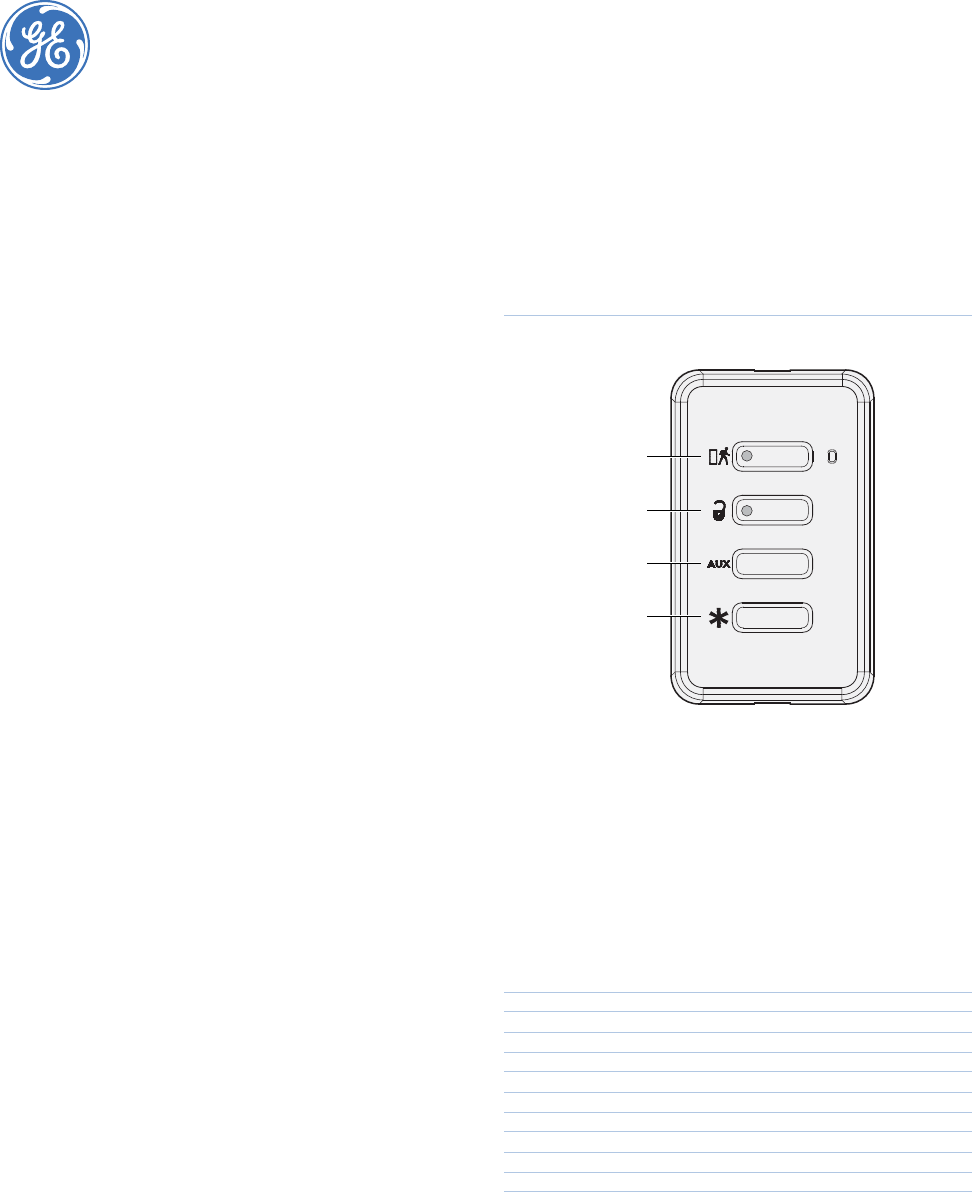
The touchpad buttons (Figure 1) should operate as follows:
Unlock button. Disarms the control panel. The doors,
windows, and motion sensors are disarmed.
Lock button. The following key presses will depend on
your control panel configuration.
• If pressed once, the control panel arms doors and
windows (stay mode).
• If pressed twice, the control panel arms motion
sensors, doors, and windows (away mode) (all
Concord, Simon 3, and Simon XT panels only).
• If pressed three times, the control panel activates the
latchkey feature if programmed (all Concord, Simon 3,
and Simon XT panels only).
Lock and Unlock buttons. If the touchpad is programmed
(learned) as a panic or portable auxiliary group number,
when you press the Lock and Unlock buttons simulta-
neously, the touchpad will activate alarm reports to the
central station. Depending on the group number, it may acti-
vate an audible or silent alarm.
Auxiliary button. For all Concord, Simon 3, and Simon
XT panels, it toggles system-controlled lights on/off. For
NetworX panels the default is stay, but it can be changed to
operate a relay.
Star button. For all Simon 3 and Simon XT panels, if used
with the X-10 universal module, the control panel will cause
the garage door to open or close. For NetworX panels it
performs the same function as pressing the Star button on
the control panel keypad and may be programmed to
operate a relay.
Figure 1. Touchpad buttons
FCC compliance
This device complies with part 15 of the FCC rules. Operation is subject to the
following conditions:
1. This device may not cause harmful interference.
2. This device must accept any interference received, including interference
that may cause undesired operation.
Changes or modifications not expressly approved by the party responsible for
compliance could void the user’s authority to operate the equipment.
FCC ID: B4Z-TX-3030-01
Industry Canada ID: 1175C-TX303001
Specifications
Battery Panasonic CR2032 3 VDC, 225 mAh, lithium
coin battery (5-year typical battery life)
Transmitter frequency 319.508 MHz (crystal controlled)
Transmitter frequency tolerance ± 8 kHz
Transmitter bandwidth 24 kHz
Modulation type Amplitude shift key (ASK)
Unique ID codes 16 million
Peak field strength Typical 50,000 uV/m at 3m
Operating temperature 32 to 120°F (0 to 49°C)
Enclosure ABS PA-765
Weight 1.75 oz. (48 g)
Dimensions (WxHxD) 2.67 x 4.41 x 0.31 in. (6.78 x 11.2 x 0.79 cm)
Color White
Unlock button
Star button
Lock button
Auxiliary button
Technical support
Toll-free: 888.GESECURity (888.437.3287 in the US, including Alaska and Hawaii; Puerto Rico; Canada).
Outside the toll-free area: Contact your local dealer.
www.gesecurity.com
