TekVISA Programmer Manual Tek VISA
User Manual:
Open the PDF directly: View PDF  .
.
Page Count: 266 [warning: Documents this large are best viewed by clicking the View PDF Link!]
- Title Page
- Table of Contents
- Preface
- Getting Started
- Operations Summary
- Operations
- viAssertTrigger (vi, protocol)
- viBufRead (vi, buf, count, retCount)
- viBufWrite (vi, buf, count, retCount)
- viClear (vi)
- viClose (vi)
- viDisableEvent (vi, eventType, mechanism)
- viDiscardEvents (vi, eventType, mechanism)
- viEnableEvent (vi, eventType, mechanism, context)
- viEventHandler (vi, eventType, context, userHandle)
- viFindNext (findList, instrDesc)
- viFindRsrc (sesn, expr, findList, retCount, instrDesc)
- viFlush (vi, mask)
- viGetAttribute (vi, attribute, attrState)
- viInstallHandler (vi, eventType, handler, userHandle)
- viLock (vi, lockType, timeout, requestedKey, accessKey)
- viOpen (sesn, rsrcName, accessMode, timeout, vi)
- viOpenDefaultRM (sesn)
- viParseRsrc (sesn, rsrcName, intfType, intfNum)
- viPrintf (vi, writeFmt, <arg1, arg2, ...>)
- viQueryf (vi, writeFmt, readFmt, <arg1, arg2,...>)
- viRead (vi, buf, count, retCount)
- viReadAsync (vi, buf, count, jobId)
- viReadSTB (vi, status)
- viReadToFile (vi, fileName, count, retCount)
- viScanf (vi, readFmt, <arg1, arg2,...>)
- viSetAttribute (vi, attribute, attrState)
- viSetBuf (vi, mask, size)
- viSPrintf (vi, buf, writeFmt, <arg1, arg2,...>)
- viSScanf (vi, buf, readFmt, <arg1, arg2,...>)
- viStatusDesc (vi, status, desc)
- viTerminate (vi, degree, jobId)
- viUninstallHandler (vi, eventType, handler, userHandle)
- viUnlock (vi)
- viUsbControlIn (vi, bmRequestType, bRequest, wValue, wIndex, wLength, buffer, retCount)
- viUsbControlOut (vi, bmRequestType, bRequest, wValue, wIndex, wLength, buffer)
- viVPrintf (vi, writeFmt, params)
- viVQueryf (vi, writeFmt, readFmt, params)
- viVScanf (vi, readFmt, params)
- viVSPrintf (vi, buf, writeFmt, params)
- viVSScanf (vi, buf, readFmt, params)
- viWaitOnEvent (vi, inEventType, timeout, outEventType, outContext)
- viWrite (vi, buf, count, retCount)
- viWriteAsync (vi, buf, count, jobId)
- viWriteFromFile (vi, fileName, count, retCount)
- Attributes Summary
- Attributes
- VI_ATTR_ASRL_AVAIL_NUM
- VI_ATTR_ASRL_BAUD
- VI_ATTR_ASRL_CTS_STATE
- VI_ATTR_ASRL_DATA_BITS
- VI_ATTR_ASRL_DCD_STATE
- VI_ATTR_ASRL_DSR_STATE
- VI_ATTR_ASRL_DTR_STATE
- VI_ATTR_ASRL_END_IN
- VI_ATTR_ASRL_END_OUT
- VI_ATTR_ASRL_FLOW_CNTRL
- VI_ATTR_ASRL_PARITY
- VI_ATTR_ASRL_REPLACE_CHAR
- VI_ATTR_ASRL_RI_STATE
- VI_ATTR_ASRL_RTS_STATE
- VI_ATTR_ASRL_STOP_BITS
- VI_ATTR_ASRL_XOFF_CHAR
- VI_ATTR_ASRL_XON_CHAR
- VI_ATTR_BUFFER
- VI_ATTR_EVENT_TYPE
- VI_ATTR_GPIB_PRIMARY_ADDR
- VI_ATTR_GPIB_READDR_EN
- VI_ATTR_GPIB_SECONDARY_ADDR
- VI_ATTR_GPIB_UNADDR_EN
- VI_ATTR_INTF_INST_NAME
- VI_ATTR_INTF_NUM
- VI_ATTR_INTF_TYPE
- VI_ATTR_IO_PROT
- VI_ATTR_JOB_ID
- VI_ATTR_MAX_QUEUE_LENGTH
- VI_ATTR_OPER_NAME
- VI_ATTR_RD_BUF_OPER_MODE
- VI_ATTR_RET_COUNT
- VI_ATTR_RM_SESSION
- VI_ATTR_RSRC_IMPL_VERSION
- VI_ATTR_RSRC_LOCK_STATE
- VI_ATTR_RSRC_MANF_ID
- VI_ATTR_RSRC_MANF_NAME
- VI_ATTR_RSRC_NAME
- VI_ATTR_RSRC_SPEC_VERSION
- VI_ATTR_SEND_END_EN
- VI_ATTR_STATUS
- VI_ATTR_SUPPRESS_END_EN
- VI_ATTR_TCPIP_ADDR
- VI_ATTR_TCPIP_HOSTNAME
- VI_ATTR_TCPIP_KEEPALIVE
- VI_ATTR_TCPIP_NODELAY
- VI_ATTR_TCPIP_PORT
- VI_ATTR_TERMCHAR
- VI_ATTR_TERMCHAR_EN
- VI_ATTR_TMO_VALUE
- VI_ATTR_TRIG_ID
- VI_ATTR_USB_INTFC_NUM
- VI_ATTR_USB_MAX_INTR_SIZE
- VI_ATTR_USB_PROTOCOL
- VI_ATTR_USB_RECV_INTR_DATA
- VI_ATTR_USB_RECV_INTR_SIZE
- VI_ATTR_USB_SERIAL_NUM
- VI_ATTR_USER_DATA
- VI_ATTR_WR_BUF_OPER_MODE
- Events
- Programming Examples
- Appendix A: VISA Data Type Assignments
- Appendix B: Completion and Error Codes
- Glossary
- Index

xx
TekVISA
ZZZ
Programmer Manual
*P077014001*
077-0140-01

TekVISA
ZZZ
Programmer Manual
xx
www.tektronix.com
077-0140-01

Copyright © Tektronix. All rights reserved. Licensed software products are owned by Tektronix or its subsidiaries
or suppliers, and are protected by national copyright laws and international treaty provisions.
Tektronix products are covered by U.S. and foreign patents, issued and pending. Information in this publication
supersedes that in all previously published material. Specifications and price change privileges reserved.
TEKTRONIX and TEK are registered trademarks of Tektronix, Inc.
Contacting Tektronix
Tektronix, Inc.
14150 SW Karl Braun Drive
P.O . Bo x 50 0
Beaverton, OR 97077
USA
For product information, sales, service, and technical support:
In North America, call 1-800-833-9200.
Worldwide, visit www.tektronix.com to find contacts in your area.

Tektronix TekVISA Programmer Manual i
Table of Contents
Preface xv...................................................
Who Should Read This Manual xv.....................................
About This Manual xv...............................................
Conventions xvi....................................................
Related Manuals and Information xvii...................................
Getting Started
Getting Started 1--1............................................
Product Description 1--1..............................................
Features and Benefits 1--2.........................................
Applications and Connectivity Supported by TekVISA 1--2...............
Terminology 1--5....................................................
Resources, INSTR Resource, SOCKET Resource, and Sessions 1--5........
Operations, Attributes, and Events 1--5...............................
The Resource Manager 1--5........................................
Virtual Instruments and Virtual GPIB 1--7.............................
WhatYouNeedtoGetStarted 1--8......................................
TekVISA Installation 1--8..........................................
The TekVISA Configuration Utility 1--9..............................
Reference
Operations Summary 2--1......................................
Operations 2--5...............................................
viAssertTrigger (vi, protocol) 2--5.......................................
viBufRead (vi, buf, count, retCount) 2--7.................................
viBufWrite (vi, buf, count, retCount) 2--8.................................
viClear (vi) 2--10.....................................................
viClose (vi) 2--12.....................................................
viDisableEvent (vi, eventType, mechanism) 2--13...........................
viDiscardEvents (vi, eventType, mechanism) 2--15..........................
viEnableEvent (vi, eventType, mechanism, context) 2--17....................
viEventHandler (vi, eventType, context, userHandle) 2--21....................
viFindNext (findList, instrDesc) 2--23....................................
viFindRsrc (sesn, expr, findList, retCount, instrDesc) 2--25....................
viFlush (vi, mask) 2--31................................................
viGetAttribute (vi, attribute, attrState) 2--33................................
viInstallHandler (vi, eventType, handler, userHandle) 2--35...................
viLock (vi, lockType, timeout, requestedKey, accessKey) 2--38................
viOpen (sesn, rsrcName, accessMode, timeout, vi) 2--41......................
viOpenDefaultRM (sesn) 2--44..........................................
viParseRsrc (sesn, rsrcName, intfType, intfNum) 2--46.......................
viPrintf (vi, writeFmt, <arg1, arg2, ...>) 2--48..............................
viQueryf (vi, writeFmt, readFmt, <arg1, arg2,...>) 2--55......................
viRead (vi, buf, count, retCount) 2--57....................................
viReadAsync (vi, buf, count, jobId) 2--61..................................
viReadSTB (vi, status) 2--66............................................

Table of Contents
ii Tektronix TekVISA Programmer Manual
viReadToFile (vi, fileName, count, retCount) 2--67..........................
viScanf (vi, readFmt, <arg1, arg2,...>) 2--70................................
viSetAttribute (vi, attribute, attrState) 2--78................................
viSetBuf (vi, mask, size) 2--80..........................................
viSPrintf (vi, buf, writeFmt, <arg1, arg2,...>) 2--81..........................
viSScanf (vi, buf, readFmt, <arg1, arg2,...>) 2--84...........................
viStatusDesc (vi, status, desc) 2--86......................................
viTerminate (vi, degree, jobId) 2--87......................................
viUninstallHandler (vi, eventType, handler, userHandle) 2--89.................
viUnlock (vi) 2--90....................................................
viUsbControlIn (vi, bmRequestType, bRequest, wValue,
wIndex, wLength, buffer, retCount) 2--92..............................
viUsbControlOut (vi, bmRequestType, bRequest, wValue,
wIndex, wLength, buffer) 2--95......................................
viVPrintf (vi, writeFmt, params) 2--98....................................
viVQueryf (vi, writeFmt, readFmt, params) 2--100...........................
viVScanf (vi, readFmt, params) 2--102.....................................
viVSPrintf (vi, buf, writeFmt, params) 2--104...............................
viVSScanf (vi, buf, readFmt, params) 2--106................................
viWaitOnEvent (vi, inEventType, timeout, outEventType, outContext) 2--107......
viWrite (vi, buf, count, retCount) 2--110....................................
viWriteAsync (vi, buf, count, jobId) 2--112.................................
viWriteFromFile (vi, fileName, count, retCount) 2--116.......................
Attributes
Attributes Summary 3--1.......................................
Attributes 3--5................................................
VI_ATTR_ASRL_AVAIL_NUM 3--5....................................
VI_ATTR_ASRL_BAUD 3--5..........................................
VI_ATTR_ASRL_CTS_STATE 3--6.....................................
VI_ATTR_ASRL_DATA_BITS 3--6.....................................
VI_ATTR_ASRL_DCD_STATE 3--7....................................
VI_ATTR_ASRL_DSR_STATE 3--7.....................................
VI_ATTR_ASRL_DTR_STATE 3--8....................................
VI_ATTR_ASRL_END_IN 3--8........................................
VI_ATTR_ASRL_END_OUT 3--9......................................
VI_ATTR_ASRL_FLOW_CNTRL 3--10..................................
VI_ATTR_ASRL_PARITY 3--11........................................
VI_ATTR_ASRL_REPLACE_CHAR 3--11................................
VI_ATTR_ASRL_RI_STATE 3--12......................................
VI_ATTR_ASRL_RTS_STATE 3--12.....................................
VI_ATTR_ASRL_STOP_BITS 3--13.....................................
VI_ATTR_ASRL_XOFF_CHAR 3--13....................................
VI_ATTR_ASRL_XON_CHAR 3--14....................................
VI_ATTR_BUFFER 3--14..............................................
VI_ATTR_EVENT_TYPE 3--15.........................................
VI_ATTR_GPIB_PRIMARY_ADDR 3--15................................
VI_ATTR_GPIB_READDR_EN 3--16....................................
VI_ATTR_GPIB_SECONDARY_ADDR 3--16.............................
VI_ATTR_GPIB_UNADDR_EN 3--17....................................
VI_ATTR_INTF_INST_NAME 3--17.....................................
VI_ATTR_INTF_NUM 3--18...........................................

Table of Contents
Tektronix TekVISA Programmer Manual iii
VI_ATTR_INTF_TYPE 3--18...........................................
VI_ATTR_IO_PROT 3--19.............................................
VI_ATTR_JOB_ID 3--19...............................................
VI_ATTR_MAX_QUEUE_LENGTH 3--20................................
VI_ATTR_OPER_NAME 3--20.........................................
VI_ATTR_RD_BUF_OPER_MODE 3--21.................................
VI_ATTR_RET_COUNT 3--21..........................................
VI_ATTR_RM_SESSION 3--22.........................................
VI_ATTR_RSRC_IMPL_VERSION 3--22.................................
VI_ATTR_RSRC_LOCK_STATE 3--23...................................
VI_ATTR_RSRC_MANF_ID 3--23......................................
VI_ATTR_RSRC_MANF_NAME 3--24...................................
VI_ATTR_RSRC_NAME 3--24.........................................
VI_ATTR_RSRC_SPEC_VERSION 3--25.................................
VI_ATTR_SEND_END_EN 3--26.......................................
VI_ATTR_STATUS 3--26..............................................
VI_ATTR_SUPPRESS_END_EN 3--27...................................
VI_ATTR_TCPIP_ADDR 3--27.........................................
VI_ATTR_TCPIP_HOSTNAME 3--28....................................
VI_ATTR_TCPIP_KEEPALIVE 3--28....................................
VI_ATTR_TCPIP_NODELAY 3--29.....................................
VI_ATTR_TCPIP_PORT 3--29..........................................
VI_ATTR_TERMCHAR 3--30..........................................
VI_ATTR_TERMCHAR_EN 3--30.......................................
VI_ATTR_TMO_VALUE 3--31.........................................
VI_ATTR_TRIG_ID 3--31..............................................
VI_ATTR_USB_INTFC_NUM 3--32.....................................
VI_ATTR_USB_MAX_INTR_SIZE 3--32.................................
VI_ATTR_USB_PROTOCOL 3--33......................................
VI_ATTR_USB_RECV_INTR_DATA 3--33...............................
VI_ATTR_USB_RECV_INTR_SIZE 3--34................................
VI_ATTR_USB_SERIAL_NUM 3--34....................................
VI_ATTR_USER_DATA 3--35..........................................
VI_ATTR_WR_BUF_OPER_MODE 3--35................................
Events
Events 4--1...................................................
VI_EVENT_EXCEPTION 4--1.........................................
VI_EVENT_IO_COMPLETION 4--1....................................
VI_EVENT_SERVICE_REQ 4--2.......................................
Examples
Programming Examples 5--1....................................
Introduction 5--1....................................................
Compiling and Linking Examples 5--2...................................
Opening and Closing Sessions 5--3......................................
SIMPLE.CPP Example 5--4........................................
Finding Resources 5--5...............................................

Table of Contents
iv Tektronix TekVISA Programmer Manual
Using Regular Expressions 5--5.....................................
SIMPLEFINDRSRC.CPP Example 5--6..............................
Using Attribute Matching 5--7......................................
FINDRSRCATTRMATCH.CPP Example 5--7.........................
Setting and Retrieving Attributes 5--9....................................
Retrieving Attributes 5--9..........................................
Setting Attributes 5--9.............................................
ATTRACCESS.CPP Example 5--9...................................
Basic Input/Output 5--11...............................................
Reading and Writing Data 5--11......................................
Synchronous Read/Write 5--12.......................................
Extract from SIMPLE.CPP Example 5--12.............................
RWEXAM.CPP Example 5--12......................................
Asynchronous Read/Write 5--13......................................
Clear 5--13......................................................
Trigger 5--14.....................................................
Status/Service Request 5--14........................................
Reading and Writing Formatted Data 5--14................................
Formatted I/O Operations 5--16......................................
FORMATIO.CPP Example 5--16.....................................
Resizing the Formatted I/O Buffers 5--21..............................
BUFFERIO.CPP Example 5--21.....................................
Flushing the Formatted I/O Buffer 5--23...............................
Buffered I/O Operations 5--24.......................................
Variable List Operations 5--24.......................................
Controlling the Serial I/O Buffers 5--24................................
Handling Events 5--25.................................................
Queueing Mechanism 5--25.........................................
SRQWAIT.CPP Example 5--26......................................
Callback Mechanism 5--29..........................................
SRQ.CPP Example 5--30...........................................
Exception Handling 5--33...........................................
Generating an Error Condition on Asynchronous Operations 5--34..........
Locking and Unlocking Resources 5--34...................................
Locking Types and Access Privileges 5--35.............................
EXLOCKEXAM.CPP Example 5--35.................................
Testing Exclusive Locking 5--37.....................................
Lock Sharing 5--38................................................
Acquiring an Exclusive Lock While Owning a Shared Lock 5--39...........
Nested Locks 5--39................................................
SHAREDLOCK.CPP Example 5--40..................................
Testing Shared Locking 5--42........................................
Building a Graphical User Interface 5--43.................................
Appendices
Appendix A: VISA Data Type Assignments A--1....................
Appendix B: Completion and Error Codes B--1.....................

Table of Contents
Tektronix TekVISA Programmer Manual v
List of Figures
Figure 1--1: TekVISA Supports Multiple Development
Environments 1--3..........................................
Figure 1--2: TekVISA Supports Local and
Remote Connectivity 1--4....................................
Figure 1--3: Key VISA Terminology for INSTR Resource 1--6.........
Figure 1--4: Key VISA Terminology for SOCKET Resource 1--7......
Figure 1--5: System Tray 1--9....................................
Figure 5--1: SIMPLE.CPP Example 5--5..........................
Figure 5--2: SIMPLEFINDRSRC.CPP Example 5--7................
Figure 5--3: FINDRSRCATTRMATCH.CPP Example 5--9...........
Figure 5--4: ATTRACCESS.CPP Example 5--11.....................
Figure 5--5: Read/Write Extract from SIMPLE.CPP Example 5--12....
Figure 5--6: RWEXAM.CPP Example 5--13.........................
Figure 5--7: Types of Formatted Read/Write Operations 5--16.........
Figure 5--8: FORMATIO.CPP Example 5--21.......................
Figure 5--9: BUFFERIO.CPP Example 5--23........................
Figure 5--10: SRQWAIT.CPP Example 5--29.......................
Figure 5--11: SRQ.CPP Example 5--33.............................
Figure 5--12: EXLOCKEXAM.CPP Example 5--37..................
Figure 5--13: SHAREDLOCK.CPP Example 5--41...................
Figure 5--14: VISAAPIDemo Graphical User Interface 5--43...........
Figure 5--15: C++ Controls Toolbar and Form, Code,
and Properties Windows 5--45.................................
Figure A--2: Your Program Can Use the Instrument
Driver API or VISA API A--2....................................

Table of Contents
vi Tektronix TekVISA Programmer Manual
List of Tables
Table ii: Table of Typographic Conventions xvi...................
Table 1--1: Installing TekVISA Software on a PC 1--8...............
Table 2--1: Table of VISA Operations by Category 2--1..............
Table 2--2: viAssertTrigger() Parameters 2--5......................
Table 2--3: viAssertTrigger() Completion Codes 2--5................
Table 2--4: viAssertTrigger() Error Codes 2--5.....................
Table 2--5: viBufRead() Parameters 2--7..........................
Table 2--6: viBufRead() Completion Codes 2--7....................
Table 2--7: viBufRead() Error Codes 2--7.........................
Table 2--8: Special Value for retCount Parameter
with viBufRead() 2--8......................................
Table 2--9: viBufWrite() Parameters 2--9..........................
Table 2--10: viBufWrite() Completion Codes 2--9...................
Table 2--11: viBufWrite() Error Codes 2--9........................
Table 2--12: Special Value for retCount Parameter
with viBufWrite() 2--10......................................
Table 2--13: viClear() Parameters 2--11............................
Table 2--14: viClear() Completion Codes 2--11......................
Table 2--15: viClear() Error Codes 2--11...........................
Table 2--16: viClose() Parameters 2--12............................
Table 2--17: viClose() Completion Codes 2--12......................
Table 2--18: viClose() Error Codes 2--13...........................
Table 2--19: viDisableEvent() Parameters 2--14.....................
Table 2--20: viDisableEvent() Completion Codes 2--14...............
Table 2--21: viDisableEvent() Error Codes 2--14.....................
Table 2--22: Special Values for eventType Parameter
with viDisableEvent() 2--15...................................
Table 2--23: Special Values for mechanism Parameter
with viDisableEvent() 2--15...................................
Table 2--24: viDiscardEvents() Parameters 2--16....................
Table 2--25: viDiscardEvents() Completion Codes 2--16..............
Table 2--26: viDiscardEvents() Error Codes 2--16...................
Table 2--27: Special Values for eventType Parameter
with viDiscardEvents() 2--17..................................

Table of Contents
Tektronix TekVISA Programmer Manual vii
Table 2--28: Special Values for mechanism Parameter
with viDiscardEvents() 2--17..................................
Table 2--29: viEnableEvent() Parameters 2--17......................
Table 2--30: viEnableEvent() Completion Codes 2--18................
Table 2--31: viEnableEvent() Error Codes 2--18.....................
Table 2--32: Special Values for eventType Parameter
with viEnableEvent() 2--19...................................
Table 2--33: Special Values for mechanism Parameter
with viEnableEvent() 2--20...................................
Table 2--34: viEventHandler() Parameters 2--21.....................
Table 2--35: viEventHandler() Completion Codes 2--21...............
Table 2--36: viFindNext() Parameters 2--23.........................
Table 2--37: viFindNext() Completion Codes 2--24...................
Table 2--38: viFindNext() Error Codes 2--24........................
Table 2--39: viFindRsrc() Parameters 2--25.........................
Table 2--40: viFindRsrc() Completion Codes 2--26...................
Table 2--41: viFindRsrc() Error Codes 2--26........................
Table 2--42: Special Value for retCount Parameter
with viFindRsrc() 2--29......................................
Table 2--43: Special Value for findList Parameter
with viFindRsrc() 2--29......................................
Table 2--44: Regular Expression Special Characters
and Operators 2--29.........................................
Table 2--45: Examples of Regular Expression Matches 2--30..........
Table 2--46: Examples That Include Attribute
Expression Matches 2--31....................................
Table 2--47: viFlush() Parameters 2--32............................
Table 2--48: viFlush() Completion Codes 2--32......................
Table 2--49: viFlush() Error Codes 2--32...........................
Table 2--50: viFlush Values for mask Parameter 2--33...............
Table 2--51: viGetAttribute() Parameters 2--34......................
Table 2--52: viGetAttribute() Completion Codes 2--34................
Table 2--53: viGetAttribute() Error Codes 2--34.....................
Table 2--54: viInstallHandler() Parameters 2--35....................
Table 2--55: viInstallHandler() Completion Codes 2--35..............
Table 2--56: viInstallHandler() Error Codes 2--36...................
Table 2--57: viLock() Parameters 2--38............................
Table 2--58: viLock() Completion Codes 2--39......................
Table 2--59: viLock() Error Codes 2--39............................
Table 2--60: viOpen() Parameters 2--41............................

Table of Contents
viii Tektronix TekVISA Programmer Manual
Table 2--61: viOpen() Completion Codes 2--42......................
Table 2--62: viOpen() Error Codes 2--42...........................
Table 2--63: Resource Address String Grammar
and Examples with viOpen() 2--43.............................
Table 2--64: Special Values for accessMode Parameter
with viOpen() 2--43.........................................
Table 2--65: viOpenDefaultRM() Parameters 2--44..................
Table 2--66: viOpenDefaultRM() Completion Codes 2--44.............
Table 2--67: viOpenDefaultRM() Error Codes 2--44..................
Table 2--68: viParseRsrc() Parameters 2--46........................
Table 2--69: viParseRsrc() Completion Codes 2--46..................
Table 2--70: viParseRsrc() Error Codes 2--46.......................
Table 2--71: viPrintf() Parameters 2--48............................
Table 2--72: viPrintf() Completion Codes 2--48......................
Table 2--73: viPrintf() Error Codes 2--48...........................
Table 2--74: Special Characters used with viPrintf() 2--49.............
Table 2--75: ANSI C Standard Modifiers used
with viPrintf() 2--50.........................................
Table 2--76: Enhanced Modifiers to ANSI C Standards
used with viPrintf() 2--52....................................
Table 2--77: Modifiers used with Argument Types
%, c, and d with viPrintf() 2--53..............................
Table 2--78: Modifiers used with Argument Type f
with viPrintf() 2--53........................................
Table 2--79: Modifiers used with Argument
Types s and b with viPrintf() 2--54............................
Table 2--80: Modifiers used with Argument
Types B and y with viPrintf() 2--55............................
Table 2--81: viQueryf() Parameters 2--56...........................
Table 2--82: viQueryf() Completion Codes 2--56.....................
Table 2--83: viQueryf() Error Codes 2--56..........................
Table 2--84: viRead() Parameters 2--58............................
Table 2--85: viRead() Completion Codes 2--58......................
Table 2--86: viRead() Error Codes 2--58...........................
Table 2--87: Success Code Conditions for GPIB Interfaces
with ViRead() 2--61.........................................
Table 2--88: viReadAsync() Parameters 2--61.......................
Table 2--89: viReadAsync() Completion Codes 2--61.................
Table 2--90: viReadAsync() Error Codes 2--62......................

Table of Contents
Tektronix TekVISA Programmer Manual ix
Table 2--91: Special Value for jobId Parameter
with viReadAsync() 2--65....................................
Table 2--92: viReadSTB() Parameters 2--66.........................
Table 2--93: viReadSTB() Completion Codes 2--66...................
Table 2--94: viReadSTB() Error Codes 2--66........................
Table 2--95: viReadToFile() Parameters 2--68.......................
Table 2--96: viReadToFile() Completion Codes 2--68.................
Table 2--97: viReadToFile() Error Codes 2--68......................
Table 2--98: Special Value for the retCount Parameter
with viReadToFile() 2--69.....................................
Table 2--99: viScanf() Parameters 2--70............................
Table 2--100: viScanf() Completion Codes 2--70.....................
Table 2--101: viScanf() Error Codes 2--70..........................
Table 2--102: ANSI C Standard Modifiers used
with viScanf() 2--73.........................................
Table 2--103: Enhanced Modifiers to ANSI C Standards
used with viScanf() 2--73.....................................
Table 2--104: Modifiers used with Argument Type c
with viScanf() 2--74.........................................
Table 2--105: Modifiers used with Argument Type d
with viScanf() 2--74.........................................
Table 2--106: Modifiers used with Argument Type f
with viScanf() 2--74.........................................
Table 2--107: Modifiers used with Argument Type s
with viScanf() 2--75.........................................
Table 2--108: Modifiers used with Argument Type b
with viScanf() 2--76.........................................
Table 2--109: Modifiers used with Argument Type t
with viScanf() 2--76.........................................
Table 2--110: Modifiers used with Argument Type T
with viScanf() 2--77.........................................
Table 2--111: Modifiers used with Argument Type y
with viScanf() 2--77.........................................
Table 2--112: viSetAttribute() Parameters 2--78.....................
Table 2--113: viSetAttribute() Completion Codes 2--78...............
Table 2--114: viSetAttribute() Error Codes 2--79....................
Table 2--115: viSetBuf() Parameters 2--80..........................
Table 2--116: viSetBuf() Completion Codes 2--80....................
Table 2--117: viSetBuf() Error Codes 2--80.........................
Table 2--118: Flags used with Mask Parameter
with viSetBuf() 2--81........................................

Table of Contents
xTektronix TekVISA Programmer Manual
Table 2--119: viSPrintf() Parameters 2--82..........................
Table 2--120: viSPrintf() Completion Codes 2--82....................
Table 2--121: viSPrintf() Error Codes 2--82.........................
Table 2--122: viSScanf() Parameters 2--84..........................
Table 2--123: viSScanf() Completion Codes 2--84....................
Table 2--124: viSScanf() Error Codes 2--85.........................
Table 2--125: viStatusDesc() Parameters 2--87......................
Table 2--126: viStatusDesc() Completion Codes 2--87.................
Table 2--127: viTerminate() Parameters 2--88.......................
Table 2--128: viTerminate() Completion Codes 2--88.................
Table 2--129: viTerminate() Error Codes 2--88......................
Table 2--130: viUninstallHandler() Parameters 2--89.................
Table 2--131: viUninstallHandler() Completion Codes 2--89...........
Table 2--132: viUninstallHandler() Error Codes 2--89................
Table 2--133: Special Values for handler Parameter
with viUninstallHandler() 2--90...............................
Table 2--134: viUnlock() Parameters 2--90..........................
Table 2--135: viUnlock() Completion Codes 2--91....................
Table 2--136: viUnlock() Error Codes 2--91.........................
Table 2--137: viUsbContrlIn() Parameters 2--92.....................
Table 2--138: viUsbContrlIn() Completion Codes 2--92...............
Table 2--139: viUsbContrlIn() Error Codes 2--93....................
Table 2--140: viUsbContrlOut() Parameters 2--95...................
Table 2--141: viUsbContrlOut() Completion Codes 2--96.............
Table 2--142: viUsbContrlOut() Error Codes 2--96...................
Table 2--143: viVPrintf() Parameters 2--98.........................
Table 2--144: viVPrintf() Completion Codes 2--98...................
Table 2--145: viVPrintf() Error Codes 2--98........................
Table 2--146: viVQueryf() Parameters 2--100........................
Table 2--147: viVQueryf() Completion Codes 2--101..................
Table 2--148: viVQueryf() Error Codes 2--101.......................
Table 2--149: viVScanf() Parameters 2--102..........................
Table 2--150: viVScanf() Completion Codes 2--102....................
Table 2--151: viVScanf() Error Codes 2--103.........................
Table 2--152: viVSPrintf() Parameters 2--104........................
Table 2--153: viVSPrintf() Completion Codes 2--104..................
Table 2--154: viVSPrintf() Error Codes 2--104.......................
Table 2--155: viVSScanf() Parameters 2--106........................
Table 2--156: viVSScanf() Completion Codes 2--106..................

Table of Contents
Tektronix TekVISA Programmer Manual xi
Table 2--157: viVSScanf() Error Codes 2--106........................
Table 2--158: viWaitOnEvent() Parameters 2--108....................
Table 2--159: viWaitOnEvent() Completion Codes 2--108..............
Table 2--160: viWaitOnEvent() Error Codes 2--108...................
Table 2--161: Special Values for inEventType Parameter
with viWaitOnEvents() 2--109.................................
Table 2--162: Special Values for timeout Parameter
with viWaitOnEvents() 2--109.................................
Table 2--163: Special Values for outEventType Parameter
with viWaitOnEvents() 2--109.................................
Table 2--164: Special Values for outContext Parameter
with viWaitOnEvents() 2--110.................................
Table 2--165: viWrite() Parameters 2--110...........................
Table 2--166: viWrite() Completion Codes 2--110.....................
Table 2--167: viWrite() Error Codes 2--111..........................
Table 2--168: Special Value for retCount Parameter
with viWrite() 2--111.........................................
Table 2--169: viWriteAsync() Parameters 2--112......................
Table 2--170: viWriteAsync() Completion Codes 2--112................
Table 2--171: viWriteAsync() Error Codes 2--112.....................
Table 2--172: Special Value for jobId Parameter
with viWriteAsync() 2--115....................................
Table 2--173: viWriteFromFile Parameters 2--116....................
Table 2--174: viWriteFromFile Completion Codes 2--116..............
Table 2--175: viWriteFromFile() Error Codes 2--116..................
Table 2--176: Special Value for retCount Parameter
with viWriteFromFile() 2--117.................................
Table 3--1: Table of VISA Attributes by Category 3--1...............
Table 3--2: VI_ATTR_ASRL_AVAIL_NUM Attribute 3--5...........
Table 3--3: VI_ATTR_ASRL_BAUD Attribute 3--5.................
Table 3--4: VI_ATTR_ASRL_CTS_STATE Attribute 3--6...........
Table 3--5: VI_ATTR_ASRL_DATA_BITS Attribute 3--6............
Table 3--6: VI_ATTR_ASRL_DCD_STATE Attribute 3--7...........
Table 3--7: VI_ATTR_ASRL_DSR_STATE Attribute 3--7...........
Table 3--8: VI_ATTR_ASRL_DTR_STATE Attribute 3--8...........
Table 3--9: VI_ATTR_ASRL_END_IN Attribute 3--8...............
Table 3--10: VI_ATTR_ASRL_END_OUT Attribute 3--9............
Table 3--11: VI_ATTR_ASRL_FLOW_CNTRL Attribute 3--10........
Table 3--12: VI_ATTR_ASRL_PARITY Attribute 3--11..............

Table of Contents
xii Tektronix TekVISA Programmer Manual
Table 3--13: VI_ATTR_ASRL_REPLACE_CHAR
Attribute 3--11.............................................
Table 3--14: VI_ATTR_ASRL_RI_STATE Attribute 3--12............
Table 3--15: VI_ATTR_ASRL_RTS_STATE Attribute 3--12..........
Table 3--16: VI_ATTR_ASRL_STOP_BITS Attribute 3--13...........
Table 3--17: VI_ATTR_ASRL_XOFF_CHAR Attribute 3--13.........
Table 3--18: VI_ATTR_ ASRL_XON_CHAR Attribute 3--14..........
Table 3--19: VI_ATTR_BUFFER Attribute 3--14....................
Table 3--20: VI_ATTR_EVENT_TYPE Attribute 3--15...............
Table 3--21: VI_ATTR_GPIB_PRIMARY_ADDR Attribute 3--15......
Table 3--22: VI_ATTR_GPIB_READDR_EN Attribute 3--16..........
Table 3--23: VI_ATTR_GPIB_SECONDARY_ADDR
Attribute 3--16.............................................
Table 3--24: VI_ATTR_GPIB_UNADDR_EN Attribute 3--17..........
Table 3--25: VI_ATTR_INTF_INST_NAME Attribute 3--17..........
Table 3--26: VI_ATTR_INTF_NUM Attribute 3--18.................
Table 3--27: VI_ATTR_INTF_TYPE Attribute 3--18.................
Table 3--28: VI_ATTR_IO_PROT Attribute 3--19...................
Table 3--29: VI_ATTR_Job_ID Attribute 3--19......................
Table 3--30: VI_ATTR_MAX_QUEUE_LENGTH Attribute 3--20.....
Table 3--31: VI_ATTR_OPER_NAME Attribute 3--20...............
Table 3--32: VI_ATTR_RD_BUF_OPER_MODE Attribute 3--21......
Table 3--33: VI_ATTR_RET_COUNT Attribute 3--21................
Table 3--34: VI_ATTR_RM_SESSION Attribute 3--22...............
Table 3--35: VI_ATTR_RSRC_IMPL_VERSION Attribute 3--22......
Table 3--36: ViVersion Description for
VI_ATTR_RSRC_IMPL_VERSION 3--22......................
Table 3--37: VI_ATTR_RSRC_LOCK_STATE Attribute 3--23........
Table 3--38: VI_ATTR_RSRC_MANF_ID Attribute 3--23............
Table 3--39: VI_ATTR_RSRC_MANF_NAME Attribute 3--24........
Table 3--40: VI_ATTR_RSRC_NAME Attribute 3--24...............
Table 3--41: Resource Address String Grammar 3--25...............
Table 3--42: VI_ATTR_RSRC_SPEC_VERSION Attribute 3--25......
Table 3--43: ViVersion Description for
VI_ATTR_RSRC_SPEC_VERSION 3--25......................
Table 3--44: VI_ATTR_SEND_END_EN Attribute 3--26..............
Table 3--45: VI_ATTR_STATUS Attribute 3--26....................
Table 3--46: VI_ATTR_SUPPRESS_END_EN Attribute 3--27.........
Table 3--47: VI_ATTR_TCPIP_ADDR Attribute 3--27...............

Table of Contents
Tektronix TekVISA Programmer Manual xiii
Table 3--48: VI_ATTR_TCPIP_HOSTNAME Attribute 3--28.........
Table 3--49: VI_ATTR_TCPIP_KEEPALIVE Attribute 3--28.........
Table 3--50: VI_ATTR_TCPIP_NODELAY Attribute 3--29...........
Table 3--51: VI_ATTR_TCPIP_PORT Attribute 3--29...............
Table 3--52: VI_ATTR_TERMCHAR Attribute 3--30................
Table 3--53: VI_ATTR_TERMCHAR_EN Attribute 3--30............
Table 3--54: VI_ATTR_TMO_VALUE Attribute 3--31...............
Table 3--55: VI_ATTR_TRIG_ID Attribute 3--31....................
Table 3--56: VI_ATTR_USB_INTFC_NUM Attribute 3--32..........
Table 3--57: VI_ATTR_USB_MAX_INTR_SIZE Attribute 3--32......
Table 3--58: VI_ATTR_USB_PROTOCOL Attribute 3--33...........
Table 3--59: VI_ATTR_USB_RECV_INTR_DATA Attribute 3--33....
Table 3--60: VI_ATTR_USB_RECV_INTR_SIZE Attribute 3--34.....
Table 3--61: VI_ATTR_USB_SERIAL_NUM Attribute 3--34..........
Table 3--62: VI_ATTR_USER_DATA Attribute 3--35................
Table 3--63: VI_ATTR_WR_BUF_OPER_MODE Attribute 3--35......
Table 4--1: VI_EVENT_EXCEPTION Related Attributes 4--1........
Table 4--2: VI_EVENT_IO_COMPLETION
Related Attributes 4--1.....................................
Table 4--3: VI_EVENT_SERVICE_REQ Related
Attributes 4--2............................................
Table A--1: Type Assignments for VISA and Instrument
Driver APIs A--2...........................................
Table A--2: Type Assignments for VISA APIs Only A--6.............
Table B--1: Completion Codes B--1...............................
TableB--2:ErrorCodes B--2....................................

Table of Contents
xiv Tektronix TekVISA Programmer Manual

Tektronix TekVISA Programmer Manual xv
Preface
Who Should Read This Manual
This manual is both a reference and a tutorial. It is intended for use by Tektronix
instrumentation end users and application programmers who wish to develop or
modify
HVISA-compliant instrument driver software.
HApplications that use VISA-compliant instrument driver software.
About This Manual
This programming manual describes TekVISA, the Tektronix implementation of
the Virtual Instrument Software Architecture (VISA) Library, an interface-inde-
pendent software interface endorsed by the VXIplug&play Systems Alliance.
The manual is organized as follows:
HThe Preface and Getting Started sections briefly cover the audience and
conventions for this guide, present overview concepts, summarize TekVISA
features and applications, and explain how to configure TekVISA resources.
HThe Reference section presents TekVISA operations, attributes, and events in
alphabetical order.
HThe Operations Summary chapter summarizes the VISA operations
implemented by Tektronix.
HThe Operations chapter describes each VISA operation including its
syntax and sample usage.
HThe Attributes Summary chapter summarizes the VISA attributes
implemented by Tektronix.
HThe Attributes chapter describes each VISA attribute including its syntax
and usage.
HThe Events chapter describes each VISA event implemented by
Tektronix including its syntax and usage.
HThe Programming Examples section contains short programs that illustrate
usage of VISA operations, attributes, and events to accomplish specific
tasks.
HAppendices contain summary information for quick reference.

Preface
xvi Tektronix TekVISA Programmer Manual
HThe VISA Data Type Assignments appendix lists VISA data types in
alphabetical order
HThe Completion and Error Codes appendix lists operation completion
codes and error codes in alphabetical order.
HA Glossary and Index appear at the end of the manual.
Conventions
This manual makes use of certain notational conventions and typefaces in
distinctive ways, as summarized in Table i.
Table i: Table of Typographic Conventions
Typeface Meaning Example
italics Used to introduce terms or to
specify variables for which
actual values should be sub-
stituted.
A common I/O library called
the Virtual Instrument
Software Architecture
(VISA)
The requestedKey will be
copied into the user buffer
referredtobytheaccess-
Key.
boldface Used to emphasize important
points or to denote exact
characters to type or buttons
to click in step-by-step proce-
dures.
The viFindRsrc() operation
matches an expression
against the resources avail-
able for a particular inter-
face.
1. Click OK.
NOTE Used to call attention to notes
or tips in text.
NOTE.Read this carefully.
<item1, item2, ...> This notation is used to desig-
nate a variable list of one or
more items separated by
commas.
viScanf (vi, readFmt,
<arg1, arg2, ...>)
Code This font is used to designate
blocks of code.
*result = m_ViStatus;
Menu > Submenu This notation is used to desig-
nate a series of cascading
menus.
The example here means:
from the File menu, choose
Open.
1. Choose File > Open.

Preface
Tektronix TekVISA Programmer Manual xvii
Related Manuals and Information
Refer to the following manuals for information regarding related products,
manuals, and programming specifications.
HThis programming manual resides in Adobe Acrobat format on the TekVISA
Product Software CD.
HThe AD007 GPIB-LAN Adapter User Manual (071-0245-XX) provides
related information if you are controlling your instrumentation from a remote
PC over an Ethernet GPIB-LAN connection. This guide is located on the
AD007 Product Software CD.
HRefer to the Online Help and Programmer Online Guide for information to
use and program each instrument.
HGeneral information and specifications for Virtual Instrument Software
Architecture (VISA) are available from the web site of the VXIplug&play
System Alliance at http://www.vxipnp.org. The following document relates
to the Tektronix implementation of VISA:
NOTE. Some of the latest VISA specifications are now available at the IVI
Foundation web site at http://www.ivifoundation.org.
HVPP-4.3: The VISA Library Revision 3.0. This specification is intended
to be used in conjunction with the VPP-3.X specifications supporting
instrument driver development.
HVPP-4.3.5: VISA Shared Components.
HAll related specifications for the VXIplug&play are available at
http://www.vxipnp.org.
HAll related specifications for the IVI are available at
http://www.ivifoundation.org.

Preface
xviii Tektronix TekVISA Programmer Manual

Getting Started

Tektronix TekVISA Programmer Manual 1-1
Getting Started
Product Description
Test and measurement applications require some kind of I/O library to communi-
cate with test instrumentation. As a step toward industry-wide software
compatibility, the VXIplug&play Systems Alliance developed a common I/O
library called the Virtual Instrument Software Architecture (VISA).VISA
provides a common standard for software developers so that software from
multiple vendors, such as instrument drivers, can run on the same platform.
An instrument driver is a library of functions that handles the details of
controlling and communicating with a specific instrument such as a Tektronix
oscilloscope. Instrumentation end users have been writing their own instrument
drivers for years.
This manual describes TekVISA, the Tektronix implementation of the VISA
Application Programming Interface (API). TekVISA is industry-compliant
software, available with selected Tektronix instrument models, for writing
interoperable instrument drivers in a variety of Application Development
Environments (ADEs).
TekVISA implements a subset of Version 3.0 of the VISA specification for
controlling GPIB, USB, and serial (RS-232) instrument interfaces locally or
remotely via an Ethernet LAN connection. TekVISA provides the interface-inde-
pendent functionality needed to control and access the embedded software of
Tektronix test and measurement equipment in the following ways:
HUsing virtual GPIB software running locally on Windows-based instrument-
sation
HUsing physical GPIB controller hardware
HUsing asynchronous serial controller hardware
HSupports 32-bit and 64-bit VISA Shared Components. The standard
directory structure, environment variables, and registry entries are per VISA
Shared Components version 1.1.0.
HOver a Local Area Network (LAN) that uses VXI-11 protocol, TCP/IP
Socket, and one of the following:
HAn AD007 LAN-to-GPIB adapter to GPIB controller hardware
HAn Ethernet connection together with VXI-11 server running on
Windows-based instruments such as the TDS7000 and TDS/CSA8000
Series Oscilloscopes

Getting Started
1-2 Tektronix TekVISA Programmer Manual
HAn Ethernet connection together with Socket server running on
Windows--based instruments such as the DPO/DSA7000 Series
Oscilloscopes
HUsing a USB connection for USB instruments such as the TDS1000B and
TDS2000B series
HUsing TekLink hardware to TekLink-enabled instruments
TekVISA offers the following features and benefits:
HImproves ease of use for end users by providing a consistent methodology
for using instrument drivers from a variety of vendors
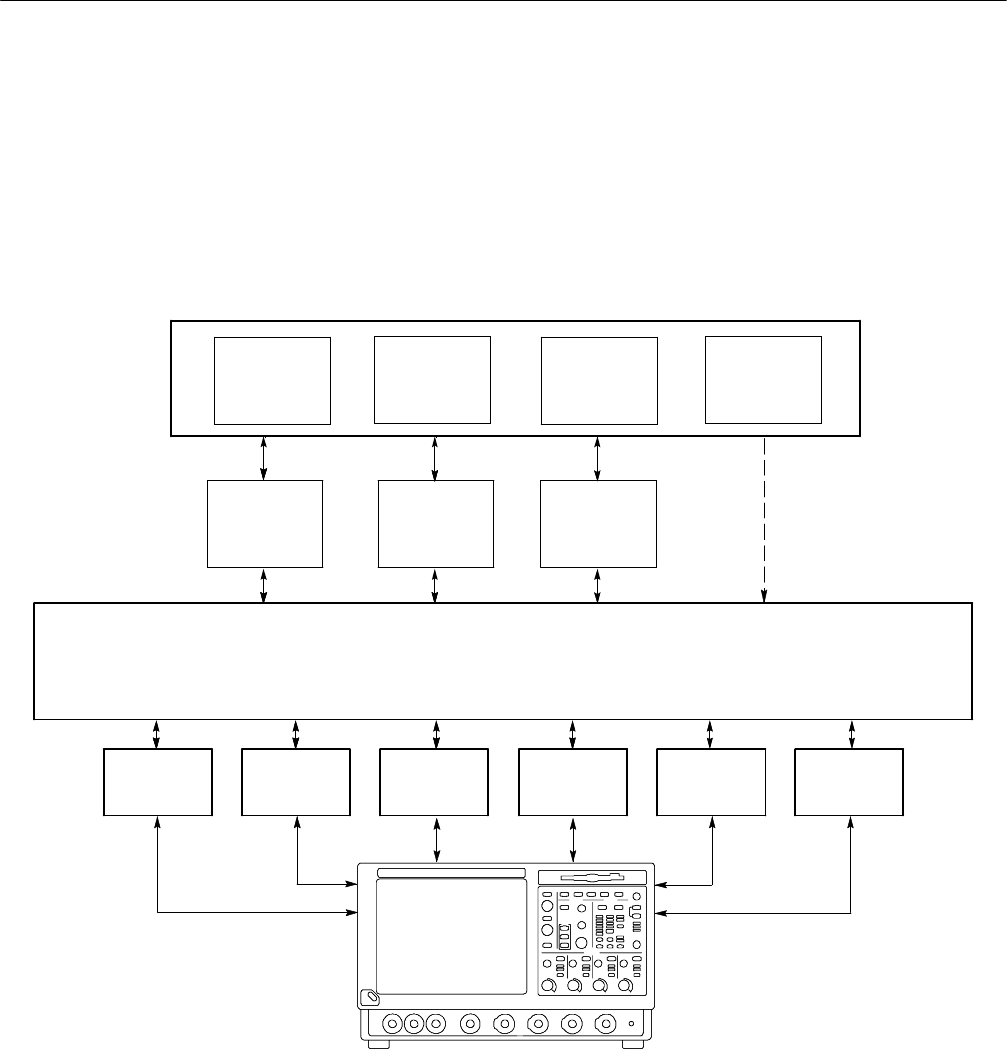
HProvides language interface libraries for programmers using multiple
Application Development Environments as shown in Figure 1--1, including:
HMicrosoft C/C++
HMicrosoft Visual Basic
HLabVIEW graphics software using the G language
HMATLAB analysis software
HProvides an Instrument Manager utility for setting up and searching
additional VISA resources
HProvides debugging utilities such as TalkerListener and CallMonitor
HAllows software installation on any number of PCs
TekVISA is beneficial in a variety of situations and applications:
HA single instrument driver can be used by multiple Application Development
Environments.
HInstrument drivers from several vendors can be combined in a single user
application.
HUser programs running on Windows-based instrumentation can use TekVISA
to control instrument operation via a virtual GPIB software connection,
without using any external GPIB hardware.
HUser programs running on remote PCs networked toWindows-based
instrumentation can use TekVISA to control instrument operation via a
virtual GPIB, VXI-11 server, and Socket server connection. No external
GPIB-LAN hardware is needed. Only an Ethernet LAN connection is
required.
Features and Benefits
Applications and
Connectivity Supported
by TekVISA
Getting Started
Tektronix TekVISA Programmer Manual 1-3
HUser programs connected locally or remotely to other non-Windows-based
Tektronix instrumentation can use TekVISA to control instrument operation
via a GPIB, USB, or serial (RS232) connection locally, or remotely via
TCPIP directly or via a Tektronix AD007 GPIB-LAN adapter.
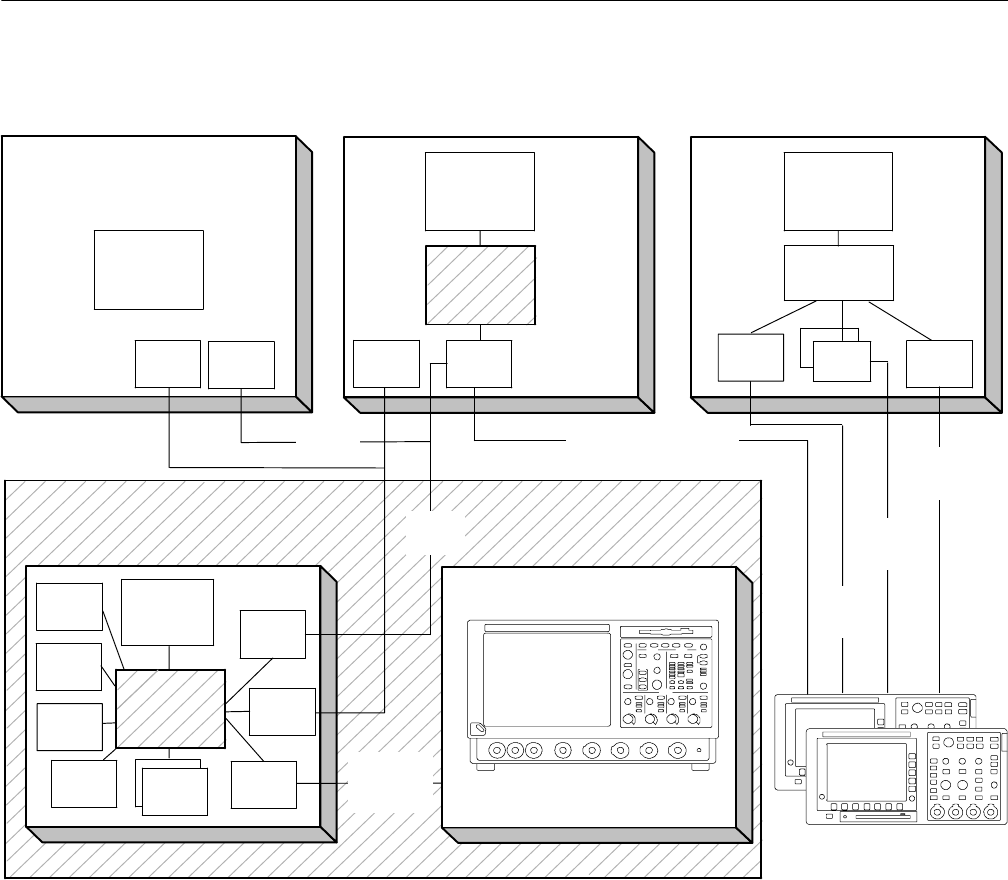
Figures 1--1 and 1--2 illustrate the variety of software, local hardware, and
network connections to embedded instrumentation supported by TekVISA.
Application Development Environments (ADE)
C, C++
Program
Visual Basic
Program
LabVIEW and
LabWindows MATLAB
IVI--COM VXIplug &
play TVC
TekVISA Input/Output Library API
Virtual GPIB
(GPIB8)
GPIB
(GPIB0--GPIB3)
ASRL
(RS232 COM1,
COM2)
LAN
(VXI--11, Socket)
Test and Measurement Instruments
TekLinkUSB
C, C++
Program
Visual Basic
Program
LabVIEW and
LabWindows MATLAB
Test and Measurement Instruments
Figure 1- 1: TekVISA Supports Multiple Development Environments
Getting Started
1-4 Tektronix TekVISA Programmer Manual
Remote
Windows- based Controller
User
Application
ASRL GPIB Virtual
GPIB
Embedded Software side
of Instrument
VXI--11
Client
software
GPIB
connection
Ethernet
LAN
VXI--11
Server
Local
Windows- based Controller
User
Application
User
Application
Non Windows- based
Instruments
Windows- based
Oscilloscope
Windows--side
of Instrument
ASRL
Remote
UNIX- based Controller
Ethernet
LAN
User
Application
VXI--11
Client
VISA Library
VISA Library
USB
VISA Library
GPIB
TekLink
GPIB--LAN Adapter
w/VXI--11 / Ethernet Lan USB
Hardwave
RS--232
Hardwave
GPIB
Hardwave
Socket
Server
VXI--11
Client
Socket
Client
Client
Socket
Client
Socket
Figure 1- 2: TekVISA Supports Local and Remote Connectivity

Getting Started
Tektronix TekVISA Programmer Manual 1-5
Terminology
The VISA specification introduces a number of new terms. Refer to the Glossary
at the end of this manual for a complete list of terms and definitions. Some key
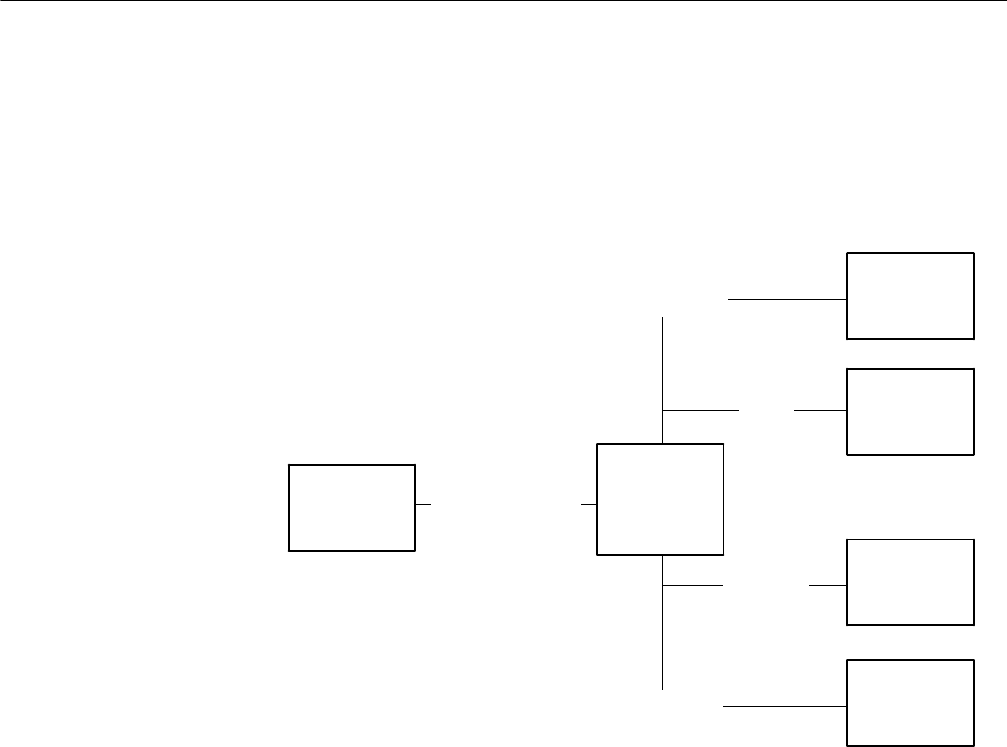
terms are discussed in the following paragraphs and illustrated in Figure 1--3.
VISA defines an architecture consisting of many resources that encapsulate
device functionality. In VISA, every defined software module is a resource. In
general, the term resource is synonymous with the word object in object-oriented
architectures. For VISA, resource more specifically refers to a particular
implementation or instance, in object-oriented terms, of a resource class, which
is the definition for how to create a particular resource.
A specialized type of resource class is a VISA instrument control (INSTR)
resource class, which defines how to control a particular device. An INSTR
resource class encapsulates the various operations for a particular device together
(reading, writing, triggering, and so on) so that a program can interact with that
device through a single resource. TekVISA supports many kinds of devices
associated with the INSTR resource class: GPIB, ASRL (serial) devices, USB,
TCPIP/LAN, and TekLink.
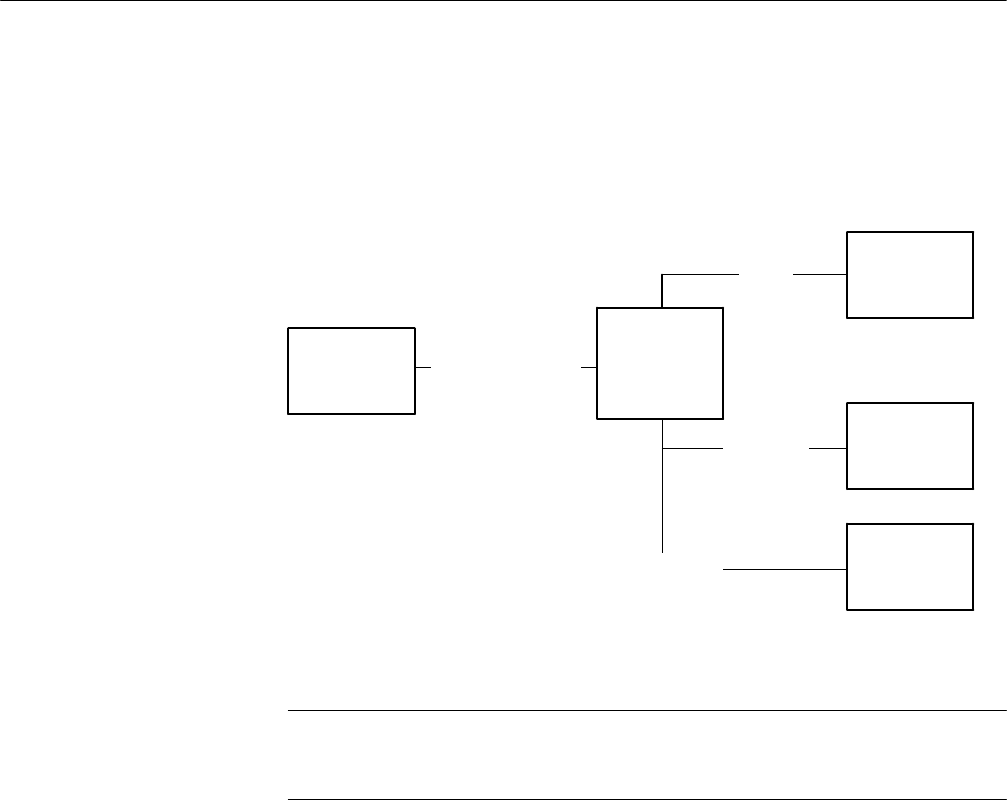
The TCP/IP Socket (SOCKET) Resource encapsulates the operations and
properties of the capabilities of a raw network socket connection using TCP/IP.
A VISA Socket Resource like the INSTR resource, starts with the basic
operations and attributes of the VISA Resource Template. The SOCKET
Resource exposes the capability of a raw network socket connection over
TCP/IP.
Applications that use VISA can access device resources by opening sessions to
them. A session is a communication path between a software element and a
resource. Every session in VISA is unique and has its own life cycle. VISA
defines a locking mechanism to restrict access to resources for special circum-
stances.
After establishing a session, an application can communicate with a resource by
invoking operations associated with the resource or by updating characteristics
of resources called attributes. Some attributes depict the instantaneous state of
the resource and others define changeable parameters that modify the behavior of
resources. A VISA system also allows information exchange through events.
VISA Resource Manager is the name given to the part of VISA that manages
resources. This management includes support for opening, closing, and finding
resources; setting and retrieving resource attributes; generating events on
resources; and so on.
Resources, INSTR
Resource, SOCKET
Resource, and Sessions
Operations, Attributes,
and Events
The Resource Manager
Getting Started
1-6 Tektronix TekVISA Programmer Manual
The VISA Resource Manager provides access to all resources registered with it.
It is therefore at the root of a subsystem of connected resources. Currently, one
Resource Manager is available by default after initialization. This is called the
Default Resource Manager. This identifier is used when opening resources,
finding available resources, and performing other operations on device resources.
INSTR
Resources
(Virtual
Instruments)
perform Operations
have Attributes
Events
Sessions
Default
Resource
Manager
provides access to
operate within
raise/respond to
Figure 1- 3: Key VISA Terminology for INSTR Resource
Getting Started
Tektronix TekVISA Programmer Manual 1-7
SOCKET
Resources
(Virtual
Instruments)
perform Operations
have Attributes
Sessions
Default
Resource
Manager
provides access to
operate within
Figure 1- 4: Key VISA Terminology for SOCKET Resource
NOTE. SOCKET connections do not support VISA Events.
SOCKET connections automatically perform a viLock() of the interface and
cannot be shared like other VISA bus types.
Avirtual instrument is a name given to the grouping of software modules
(VISA resources with any associated or required hardware) to give the function-
ality of a traditional stand-alone instrument. Within VISA, a virtual instrument is
the logical grouping of any of the VISA resources. TekVISA supports USB,
ASRL (serial) and GPIB virtual instruments, which work with accompanying
USBTMC, RS-232 and GPIB hardware respectively.
In addition, TekVISA includes a specialized type of GPIB resource called virtual
GPIB. User programs running on oscilloscopes with Windows-based instrumen-
tation, or running on a remote PC connected by LAN to such an instrument, can
access the embedded instrument software by using a virtual GPIB software
connection, without the need for any GPIB controller hardware or cables.
Virtual Instruments and
Virtual GPIB

Getting Started
1-8 Tektronix TekVISA Programmer Manual
What You Need to Get Started
VISA applications that communicate with Tektronix instrumentation should use
TekVISA, the Tektronix version of VISA. You should install and configure
TekVISA on each PC that communicates with Tektronix instrumentation using
the VISA standard.
The software installation includes a utility to help you configure TekVISA
resources. The VISA Instrument Manager allows you to detect USB, GPIB, and
serial (ASRL) resource assignments, and to add or remove remote hosts (such as
VXI-11 or Socket clients connected by Ethernet LAN or by an AD007 adapter
and associated GPIB hardware).
NOTE. If you are connecting to a network just to print screen hardcopy data, you
do not need to install or configure TekVISA software.
TekVISA comes installed on current Tektronix MS-Windows oscilloscopes as
part of the Product Software.
To install TekVISA software on a PC connected to your Tektronix oscilloscope,
follow the steps shown below on Table 1--1.
Table 1- 1: Installing TekVISA Software on a PC
Alternative Locations for Finding
TekVISA Software
Instructions for Installing TekVISA Software
on a PC
The product software CD for your
MS-Windows oscilloscope
In your MS-Windows computer, select Start > Run,
browse the CD to the TekVISA folder, and run
setup.exe.
The TDSPCS1 OpenChoice PC
Communications Software CD
Follow the instructions in the installation wizard.
The OpenChoice Solutions Software
Developers’ Kit CD
Click on the Developers’ Kit browser button for
Software Drivers and then for TekVISA
The current TekVISA installation
download from the Tektronix Web site
Unzip the downloaded file in a temporary directory of
your choice and run setup.exe.
The IVI foundation VISA shared components will get
installed as part of the TekVISA installation.
NOTE. If you have already installed TekVISA from an earlier version of the
Tektronix Software Solutions CD or with Wavestar, you should uninstall that
version first, and then reinstall TekVISA from the most recent source.
TekVISA Installation

Getting Started
Tektronix TekVISA Programmer Manual 1-9
Included with the TekVISA installation is the TekVISA Instrument Manager
utility, which lets you find resource assignments and add or remove network
hosts (instruments). Once an instrument is added to the TekVISA configuration,
you can communicate with it by using a VISA compliant instrument driver.
To run the TekVISA Instrument Manager utility, you click on the TekVISA
resource maanger icon in the system tray shown in Figure 1--4. Alternatively,
you can select, Start > Programs > TekVISA > OpenChoice Instrument
Manager.
VISA Resource Manager Configuration
Figure 1- 5: System Tray
The TekVISA
Configuration Utility

Getting Started
1-10 Tektronix TekVISA Programmer Manual

Reference

Tektronix TekVISA Programmer Manual 2-1
Operations Summary
The following table summarizes Tektronix VISA operations by category.
Table 2- 1: Table of VISA Operations by Category
Operation Description Page
Opening and Closing Sessions, Events, and Find Lists
viOpenDefaultRM Return a session to the Default Resource Manager 2--44
viOpen Open a session to the specified resource 2--41
viClose Close the specified session, event, or find list 2--12
Finding Resources
viFindRsrc Find a list of resources associated with a specified
interface
2--25
viFindNext Return the next resource from the find list 2--23
viParseRsrc Parses a resource string to get the interface information 2--41
Setting and Retrieving Attributes
viGetAttribute Retrieve the state of an attribute for the specified session,
event, or find list
2--33
viSetAttribute Set the state of an attribute for the specified session,
event, or find list
2--78
viStatusDesc Retrieve a user--readable description of the specified
status code
2--86
Reading and Writing Basic Data
viWrite Write data synchronously to a device from the specified
buffer
2--110
viWriteAsync Write data asynchronously to a device from the specified
buffer
2--112
viWriteFromFile Take data from a file and write it to a device synchronously 2--116
viRead Read data synchronously from a device into the specified
buffer
2--57
viReadAsync Read data asynchronously from a device into the specified
buffer
2--61
viReadToFile Read data synchronously from a device and store the
transferred data in a file
2--67
viTerminate Terminate normal execution of an asynchronous read or
write operation
2--87
Other Basic I/O Operations
viClear Clear a device 2--10

Operations Summary
2-2 Tektronix TekVISA Programmer Manual
Table 2- 1: Table of VISA Operations by Category (Cont.)
Operation PageDescription
Other Basic I/O Operations
viAssertTrigger Assert software or hardware trigger 2--5
viReadSTB Read a status byte of the service request 2--66
Reading and Writing Formatted Data
Formatted Buffer Operations
viBufWrite Write data synchronously to a device from the formatted
I/O buffer
2--8
viBufRead Read data synchronously from a device into the formatted
I/O buffer
2--7
viSetBuf Set the size of the formatted I/O and/or serial buffer(s) 2--80
viFlush Manually flush the specified buffer(s) 2--31
Formatted Write Operations * (See Note)
viPrintf Format and write data to a device using a variable
argument list
2--48
viVprintf Format and write data to a device using a pointer to a
variable argument list
2--98
viSPrintf Format and write data to a user--specified buffer using a
variable argument list
2--81
viVSPrintf Format and write data to a user--specified buffer using a
pointer to a variable argument list
2--104
Formatted Read Operations * (See Note)
viScanf Read and format data from a device using a variable
argument list
2--70
viVScanf Read and format data from a device using a pointer to a
variable argument list
2--102
viSScanf Read and format data from a user--specified buffer using a
variable argument list
2--84
viVSScanf Read and format data from a user--specified buffer using a
pointer to a variable argument list
2--106
Formatted Read/Write Operations * (See Note)
viQueryf Write and read formatted data to and from a device using a
variable argument list
2--55
viVQueryf Write and read formatted data to and from a device using a
pointer to a variable argument list
2--100
Handling Events
viEnableEvent Enable notification of a specified event 2--17
viDisableEvent Disable notification of the specified event using the
specified mechanism
2--13

Operations Summary
Tektronix TekVISA Programmer Manual 2-3
Table 2- 1: Table of VISA Operations by Category (Cont.)
Operation PageDescription
Handling Events
viDiscardEvents Discard all pending occurrences of the specified events for
the specified mechanism(s) and session
2--15
viWaitOnEvent Wait for an occurrence of the specified event for a given
session
2--107
viInstallHandler Install callback handler(s) for the specified event 2--35
viUninstallHandler Uninstall callback handler(s) for the specified event 2--89
viEventHandler Prototype for handler(s) to be called back when a particular
event occurs
2--21
Locking and Unlocking Resources
viLock Obtain a lock on the specified resource 2--38
viUnlock Relinquish a lock on the specified resource 2--90
Operations Specific to Interface type
viUsbControlIn Request arbitrary data from a USB device on the default
control port
2--92
viUsbControlOut Send arbitrary data to a USB device on the default control
port
2--95

Operations Summary
2-4 Tektronix TekVISA Programmer Manual

Tektronix TekVISA Programmer Manual 2-5
Operations
The following Tektronix VISA operations are presented in alphabetical order.
viAssertTrigger (vi, protocol)
Asserts a software trigger for a GPIB, USBTMC, or serial device.
ViStatus viAssertTrigger (ViSession vi, ViUInt16 protocol)
viAssertTrigger (ByVal vi As Long, ByVal protocol As Integer) As Long
Table 2- 2: viAssertTrigger() Parameters
Name Direction Description
vi IN Unique logical identifier to a session.
protocol IN Trigger protocol to use during assertion. Valid values are:
VI_TRIG_PROT_DEFAULT
Table 2- 3: viAssertTrigger() Completion Codes
Completion Codes Description
VI_SUCCESS The specified trigger was successfully asserted to the device.
Table 2- 4: viAssertTrigger() Error Codes
Error Codes Description
VI_ERROR_INV_SESSION
VI_ERROR_INV_OBJECT
The given session or object reference is invalid (both
are the same value).
VI_ERROR_NSUP_OPER The given vi does not support this operation.
VI_ERROR_RSRC_LOCKED Specified operation could not be performed because
the resource identified by vi has been locked for this
kind of access.
VI_ERROR_INV_PROT The protocol specified is invalid.
VI_ERROR_TMO Timeout expired before operation completed.
Usage
C Format
Visual Basic Format
Parameters
Return Values

Operations
2-6 Tektronix TekVISA Programmer Manual
Table 2- 4: viAssertTrigger() Error Codes (Cont.)
Error Codes Description
VI_ERROR_RAW_WR_PROT_VIOL Violation of raw write protocol occurred during
transfer.
VI_ERROR_RAW_RD_PROT_VIOL Violation of raw read protocol occurred during
transfer.
VI_ERROR_INP_PROT_VIOL Device reported an input protocol error during
transfer.
VI_ERROR_BERRt Bus error occurred during transfer.
VI_ERROR_LINE_IN_USE The specified trigger line is currently in use.
VI_ERROR_NCIC The interface associated with the given vi is not
currently the controller in charge.
VI_ERROR_NLISTENERS No Listeners condition is detected (both NRFD and
NDAC are deasserted).
VI_ERROR_INV_SETUP Unable to start operation because setup is invalid
(due to attributes being set to an inconsistent state).
ViSession rm, vi;
ViUInt16 val;
if (viOpenDefault(&rm) < VI_SUCCESS) return;
if (viOpen(rm, ”GPIB8::1::INSTR“, VI_NULL, VI_NULL, &vi)
< VI_SUCCESS) return;
viAssertTrigger(vi, value);
viClose(rm);
The viAssertTrigger() operation will assert a software trigger as follows:
HFor a GPIB device, the device is addressed to listen, and then the GPIB GET
command is sent.
HFor a serial device, if VI_ATTR_IO_PROT is VI_ASRL488, the device is
sent the string “*TRG\n”. This operation is not valid for a serial device if
VI_ATTR_IO_PROT is VI_NORMAL.
HFor GPIB, USBTMC, and serial software triggers, VI_TRIG_PROT_DE-
FAULT is the only valid protocol.
Basic Input/Output
VI_ATTR_IO_PROT
C Example
Comments
See Also
Operations
Tektronix TekVISA Programmer Manual 2-7
viBufRead (vi, buf, count, retCount)
Reads data synchronously from a device into the formatted I/O buffer.
ViStatus viBufRead (ViSession vi,ViPBufbuf, ViUInt32 count, ViPUInt32 retCount)
viBufRead (ByVal vi As Long, ByVal buf As String, ByVal count As Long, retCount As
Long) As Long
Table 2- 5: viBufRead() Parameters
Name Direction Description
vi IN Unique logical identifier to a session.
buf OUT Represents the location of a buffer to receive data from device.
count IN Number of bytes to be read.
retCount OUT Represents the location of an integer that will be set to the
number of bytes actually transferred.
Table 2- 6: viBufRead() Completion Codes
Completion Codes Description
VI_SUCCESS The operation completed successfully and the END indicator
was received (for interfaces that have END indicators).
VI_SUCCESS_TERM_CHAR The specified termination character was read.
VI_SUCCESS_MAX_CNT The number of bytes read is equal to count.
Table 2- 7: viBufRead() Error Codes
Error Codes Description
VI_ERROR_INV_SESSION
VI_ERROR_INV_OBJECT
The given session or object reference is invalid (both are the
same value).
VI_ERROR_NSUP_OPER The given vi does not support this operation.
VI_ERROR_RSRC_LOCKED Specified operation could not be performed because the
resource identified by vi has been locked for this kind of
access.
VI_ERROR_TMO Timeout expired before operation completed.
VI_ERROR_IO An unknown I/O error occurred during transfer.
Usage
C Format
Visual Basic Format
Parameters
Return Values

Operations
2-8 Tektronix TekVISA Programmer Manual
ViSession rm, vi;
char buffer[256];
if (viOpenDefault(&rm) < VI_SUCCESS) return;
if (viOpen(rm, ”GPIB8::1::INSTR“, VI_NULL, VI_NULL, &vi)
< VI_SUCCESS) return;
if (viBufWrite(vi, (ViBuf) ”*IDN?“, 5, VI_NULL) < VI_SUCCESS)
return;
viBufRead(vi, (ViBuf) buffer, sizeof(buffer), VI_NULL);
printf(”%s\n“, buffer);
viClose(rm);
The viBufRead() operation is similar to viRead() and does not perform any kind
of data formatting. It differs from viRead() in that the data is read from the
formatted I/O read buffer—the same buffer used by viScanf() and related
operations—rather than directly from the device.
NOTE. You can intermix this operation with viScanf(), but you should not mix it
with viRead().
Table 2- 8: Special Value for retCount Parameter with viBufRead()
Value Description
VI_NULL If you pass this value, the number of bytes transferred is not returned. You
may find this useful if you only need to know whether the operation
succeeded or failed.
Reading and Writing Formatted Data
viBufWrite (vi, buf, count, retCount)
viBufWrite (vi, buf, count, retCount)
Writes data synchronously to a device from the formatted I/O buffer.
ViStatus viBufWrite(ViSession vi,ViBufbuf, ViUInt32 count,
ViPUInt32 retCount)
viBufWrite(ByVal vi As Long, ByVal buf As String, ByVal count As Long, retCount As
Long) As Long
C Example
Comments
See Also
Usage
C Format
Visual Basic Format

Operations
Tektronix TekVISA Programmer Manual 2-9
Table 2- 9: viBufWrite() Parameters
Name Direction Description
vi IN Unique logical identifier to a session.
buf OUT Represents the location of a data block to be sent to the
device.
count IN Number of bytes to be written.
retCount OUT Represents the location of an integer that will be set to the
number of bytes actually transferred.
Table 2- 10: viBufWrite() Completion Codes
Completion Codes Description
VI_SUCCESS Operation completed successfully.
Table 2- 11: viBufWrite() Error Codes
Error Codes Description
VI_ERROR_INV_SESSION
VI_ERROR_INV_OBJECT
The given session or object reference is invalid (both are the
same value).
VI_ERROR_NSUP_OPER The given vi does not support this operation.
VI_ERROR_RSRC_LOCKED Specified operation could not be performed because the
resource identified by vi has been locked for this kind of
access.
VI_ERROR_TMO Timeout expired before operation completed.
If this operation returns this message, the write buffer for the
specified session is cleared.
VI_ERROR_INV_SETUP Unable to start write operation because setup is invalid (due to
attributes being set to an inconsistent state).
VI_ERROR_IO An unknown I/O error occurred during transfer.
Parameters
Return Values

Operations
2-10 Tektronix TekVISA Programmer Manual
ViSession rm, vi;
char buffer[256];
if (viOpenDefault(&rm) < VI_SUCCESS) return;
if (viOpen(rm, ”GPIB8::1::INSTR“, VI_NULL, VI_NULL, &vi)
< VI_SUCCESS) return;
if (viBufWrite(vi, (ViBuf) “*IDN?”, 5, VI_NULL) < VI_SUCCESS)
return;
viBufRead(vi, (ViBuf) buffer, sizeof(buffer), VI_NULL);
printf(”%s\n“, buffer);
viClose(rm);
The viBufWrite() operation is similar to viWrite() and does not perform any kind
of data formatting. It differs from viWrite() in that the data is written to the
formatted I/O write buffer—the same buffer used by viPrintf() and related
operations—rather than directly to the device.
NOTE. You can intermix this operation with viPrintf(), but you should not mix it
with viWrite().
Table 2- 12: Special Value for retCount Parameter with viBufWrite()
Value Description
VI_NULL If you pass this value, the number of bytes transferred is not returned. You
may find this useful if you only need to know whether the operation
succeeded or failed.
Reading and Writing Formatted Data
viBufRead (vi, buf, count, retCount)
viClear (vi)
Clears a device.
ViStatus viClear (ViSession vi)
viClear (ByVal vi As Long) As Long
C Example
Comments
See Also
Usage
C Format
Visual Basic Format

Operations
Tektronix TekVISA Programmer Manual 2-11
Table 2- 13: viClear() Parameters
Name Direction Description
vi IN Unique logical identifier to a session.
Table 2- 14: viClear() Completion Codes
Completion Codes Description
VI_SUCCESS Operation completed successfully.
Table 2- 15: viClear() Error Codes
Error Codes Description
VI_ERROR_INV_SESSION
VI_ERROR_INV_OBJECT
The given session or object reference is invalid (both are the
same value).
VI_ERROR_NSUP_OPER The given vi does not support this operation.
VI_ERROR_RSRC_LOCKED Specified operation could not be performed because the
resource identified by vi has been locked for this kind of
access.
VI_ERROR_TMO Timeout expired before operation completed.
VI_ERROR_RAW_WR_PROT
_VIOL
Violation of raw write protocol occurred during transfer.
VI_ERROR_RAW_RD_PROT
_VIOL
Violation of raw read protocol occurred during transfer.
VI_ERROR_BERRt Bus error occurred during transfer.
VI_ERROR_NCIC The interface associated with the given vi is not currently the
controller in charge.
VI_ERROR_NLISTENERS No Listeners condition is detected (both NRFD and NDAC are
deasserted).
VI_ERROR_INV_SETUP Unable to start operation because setup is invalid (due to
attributes being set to an inconsistent state).
ViSession rm, vi;
if (viOpenDefault(&rm) < VI_SUCCESS) return;
if (viOpen(rm, ”GPIB8::1::INSTR“, VI_NULL, VI_NULL, &vi)
< VI_SUCCESS) return;
viClear(vi);
viClose(rm);
Parameters
Return Values
C Example

Operations
2-12 Tektronix TekVISA Programmer Manual
The viClear() operation performs an IEEE 488.1--style clear of the device.
HFor GPIB systems, the Selected Device Clear command is used.
HFor a serial device, if VI_ATTR_IO_PROT is VI_ASRL488, the device is
sent the string “*CLS\n”. This operation is not valid for a serial device if
VI_ATTR_IO_PROT is VI_NORMAL.
NOTE. Invoking viClear() will also discard the read and write buffers used by the
formatted I/O services for that session.
Basic Input/Output
VI_ATTR_IO_PROT
viClose (vi)
Closes the specified session, event, or find list.
ViStatus viClose (ViObject vi)
viClose (ByVal vi As Long) As Long
Table 2- 16: viClose() Parameters
Name Direction Description
vi IN Unique logical identifier to a session, event, or find list.
Table 2- 17: viClose() Completion Codes
Completion Codes Description
VI_SUCCESS Session, event, or find list closed successfully.
VI_WARN_NULL_OBJECT The specified object reference is uninitialized.
This message is returned if the value VI_NULL is passed to it.
Comments
See Also
Usage
C Format
Visual Basic Format
Parameters
Return Values

Operations
Tektronix TekVISA Programmer Manual 2-13
Table 2- 18: viClose() Error Codes
Error Codes Description
VI_ERROR_INV_SESSION
VI_ERROR_INV_OBJECT
The given session or object reference is invalid (both are the
same value).
VI_ERROR_CLOS-
ING_FAILED
Unable to deallocate the previously allocated data structures
corresponding to this session or object reference.
ViSession rm, vi;
if (viOpenDefault(&rm) < VI_SUCCESS) return;
if (viOpen(rm, ”GPIB8::1::INSTR“, VI_NULL, VI_NULL, &vi)
< VI_SUCCESS) return;
viClose(vi);
viClose(rm);
The viClose() operation closes a session, event, or a find list, and frees all data
structures allocated for the specified vi.
Opening and Closing Sessions, Events, and Find Lists
viOpen (sesn, rsrcName, accessMode, timeout, vi)
viOpenDefaultRM (sesn)
viDisableEvent (vi, eventType, mechanism)
Disables notification of the specified event using the specified mechanism.
ViStatus viDisableEvent (ViSession vi, ViEventType eventType,
ViUInt16 mechanism)
viDisableEvent (ByVal vi As Long, ByVal EventType As Long, ByVal mechanism As
Integer) As Long
C Example
Comments
See Also
Usage
C Format
Visual Basic Format

Operations
2-14 Tektronix TekVISA Programmer Manual
Table 2- 19: viDisableEvent() Parameters
Name Direction Description
vi IN Unique logical identifier to a session.
eventType IN Logical event identifier.
mechanism IN Specifies event handling mechanisms to be disabled. The
queuing mechanism is disabled by specifying VI_QUEUE, and
the callback mechanism is disabled by specifying VI_HNDLR
or VI_SUSPEND_HNDLR. It is possible to disable both
mechanisms simultaneously by specifying VI_ALL_MECH.
Table 2- 20: viDisableEvent() Completion Codes
Completion Codes Description
VI_SUCCESS Event disabled successfully.
VI_SUCCESS_EVENT_DIS Specified event is already disabled for at least one of the
specified mechanisms.
Table 2- 21: viDisableEvent() Error Codes
Error Codes Description
VI_ERROR_INV_SESSION
VI_ERROR_INV_OBJECT
The given session or object reference is invalid (both are the
same value).
VI_ERROR_INV_EVENT Specified event type is not supported by the resource.
VI_ERROR_INV_MECH Invalid mechanism specified.
ViSession rm, vi;
if ( viOpenDefaultRM(&rm) < VI_SUCCESS) return;
if (viOpen(rm, ”GPIB8::1::INSTR“, NULL, NULL, &vi) < VI_SUCCESS)
return;
viEnableEvent(vi, VI_EVENT_SERVICE_REQ, VI_QUEUE, VI_NULL);
// Do some processing here
// Cleanup and exit
viDisableEvent(vi, VI_EVENT_SERVICE_REQ, VI_QUEUE);
viClose(vi);
viClose(rm);
Parameters
Return Values
C Example

Operations
Tektronix TekVISA Programmer Manual 2-15
The viDisableEvent() operation disables servicing of an event identified by
eventType for the mechanisms specified in mechanism.
This operation prevents new event occurrences from being added to the queue(s);
however, event occurrences already existing in the queue(s) are not flushed. Use
viDiscardEvents() if you want to discard events remaining in the queue(s).
Table 2- 22: Special Values for eventType Parameter with viDisableEvent()
Value Description
VI_ALL_ENABLED_EVENTS Disable all events that were previously enabled. Allows a
session to stop receiving all events.
Table 2- 23: Special Values for mechanism Parameter with viDisableEvent()
Value Description
VI_QUEUE Disable this session from receiving the specified event(s) via
the waiting queue. Stops the session from receiving queued
events.
VI_HNDLR or VI_SUS-
PEND_HNDLR
Disable this session from receiving the specified event(s) via a
callback handler or a callback queue. Specifying either
VI_HNDLR or VI_SUSPEND_HNDLR stops applications from
receiving callback events.
VI_ALL_MECH Disable this session from receiving the specified event(s) via
any mechanism. Disables both the queuing and callback
mechanisms.
Handling Events
viEnableEvent (vi, eventType, mechanism, context)
viDiscardEvents (vi, eventType, mechanism)
Discards all pending occurrences of the specified events for the specified
mechanism(s) and session.
ViStatus viDiscardEvents (ViSession vi, ViEventType eventType,
ViUInt16 mechanism)
viDiscardEvents (ByVal vi As Long, ByVal EventType As Long, ByVal mechanism As
Integer) As Long
Comments
See Also
Usage
C Format
Visual Basic Format

Operations
2-16 Tektronix TekVISA Programmer Manual
Table 2- 24: viDiscardEvents() Parameters
Name Direction Description
vi IN Unique logical identifier to a session.
eventType IN Logical event identifier.
mechanism IN Specifies event handling mechanisms to be discarded. The
VI_QUEUE value is specified for the queuing mechanism and
the VI_SUSPEND_HNDLR value is specified for pending
events in the callback mechanism. To discard both mecha-
nisms simultaneously, specify VI_ALL_MECH.
Table 2- 25: viDiscardEvents() Completion Codes
Completion Codes Description
VI_SUCCESS Event queue flushed successfully.
VI_SUCCESS_QUEUE_
EMPTY
Operation completed successfully, but queue was empty.
Table 2- 26: viDiscardEvents() Error Codes
Error Codes Description
VI_ERROR_INV_SESSION
VI_ERROR_INV_OBJECT
The given session or object reference is invalid (both are the
same value).
VI_ERROR_INV_EVENT Specified event type is not supported by the resource.
VI_ERROR_INV_MECH Invalid mechanism specified.
// Cleanup and exit
status = viDiscardEvents(vi, VI_EVENT_SERVICE_REQ, VI_QUEUE);
The viDiscardEvents() operation discards all pending occurrences of the
specified event types and mechanisms from the specified session.
HThe discarded event occurrences are not available to a session at a later time.
HThis operation does not apply to event contexts that have already been
delivered to the application.
Parameters
Return Values
C Example
Comments
Operations
Tektronix TekVISA Programmer Manual 2-17
Table 2- 27: Special Values for eventType Parameter with viDiscardEvents()
Value Description
VI_ALL_ENABLED_EVENTS Discard events of every type enabled for the given session.
The information about all the event occurrences which have not
yet been handled is discarded. This operation is useful to
remove event occurrences that an application no longer needs.
Table 2- 28: Special Values for mechanism Parameter with
viDiscardEvents()
Value Description
VI_QUEUE Discard the specified event(s) from the waiting queue.
VI_HNDLR or VI_SUS-
PEND_HNDLR
Discard the specified event(s) from the callback queue.
VI_ALL_MECH Discard the specified event(s) from all mechanisms.
Handling Events
viWaitOnEvent (vi, inEventType, timeout, outEventType, outContext)
viEnableEvent (vi, eventType, mechanism, context)
Enables notification of a specified event.
ViStatus viEnableEvent (ViSession vi, ViEventType eventType,
ViUInt16 mechanism, viEventFilter context)
viEnableEvent (ByVal vi As Long, ByVal EventType As Long, ByVal mechanism As
Integer, ByVal context As Long) As Long
Table 2- 29: viEnableEvent() Parameters
Name Direction Description
vi IN Unique logical identifier to a session.
eventType IN Logical event identifier.
See Also
Usage
C Format
Visual Basic Format
Parameters

Operations
2-18 Tektronix TekVISA Programmer Manual
Table 2- 29: viEnableEvent() Parameters (Cont.)
Name DescriptionDirection
mechanism IN Specifies event handling mechanisms to be enabled. The
queuing mechanism is enabled by specifying VI_QUEUE, and
the callback mechanism is enabled by specifying VI_HNDLR
or VI_SUSPEND_HNDLR. It is possible to enable both
mechanisms simultaneously by specifying “bit--wise OR” of
VI_QUEUE and one of the two mode values for the callback
mechanism.
context IN VI_NULL
Table 2- 30: viEnableEvent() Completion Codes
Completion Codes Description
VI_SUCCESS Event enabled successfully.
VI_SUCCESS_EVENT_EN Specified event is already enabled for at least one of the
specified mechanisms.
Table 2- 31: viEnableEvent() Error Codes
Error Codes Description
VI_ERROR_INV_SESSION
VI_ERROR_INV_OBJECT
The given session or object reference is invalid (both are the
same value).
VI_ERROR_INV_EVENT Specified event type is not supported by the resource.
VI_ERROR_INV_MECH Invalid mechanism specified.
Returned if called with the mechanism parameter equal to the
“bit--wise OR” of VI_SUSPEND_HNDLR and VI_HNDLR.
VI_ERROR_INV_CONTEXT Specified event context is invalid.
VI_ERROR_HNDLR_NINS-
TALLED
If no handler is installed for the specified event type, the
request to enable the callback mechanism for the event type
returns this error code. The session cannot be enabled for the
VI_HNDLR mode of the callback mechanism.
Return Values

Operations
Tektronix TekVISA Programmer Manual 2-19
ViSession rm, vi;
if ( viOpenDefaultRM(&rm) < VI_SUCCESS) return;
if (viOpen(rm, ”GPIB8::1::INSTR“, NULL, NULL, &vi) < VI_SUCCESS)
return;
viEnableEvent(vi, VI_EVENT_SERVICE_REQ, VI_QUEUE, VI_NULL);
// Do some processing here
// Cleanup and exit
viDisableEvent(vi, VI_EVENT_SERVICE_REQ, VI_QUEUE);
viClose(vi);
viClose(rm);
The viEnableEvent() operation enables notification of an event identified by
eventType for mechanisms specified in mechanism.
Table 2- 32: Special Values for eventType Parameter with viEnableEvent()
Value Description
VI_ALL_ENABLED_EVENTS Switch all events previously enabled on this session to the
callback mechanism specified in the mechanism parameter.
Makes it easier to switch between the two callback mecha-
nisms for multiple events.
C Example
Comments

Operations
2-20 Tektronix TekVISA Programmer Manual
Table 2- 33: Special Values for mechanism Parameter with viEnableEvent()
Value Description
VI_QUEUE Enable this session to receive the specified event via the
waiting queue. Events must be retrieved manually via the
viWaitOnEvent() operation.
Enables the specified session to queue events.
VI_HNDLR Enable this session to receive the specified event via a
callback handler, which must have already been installed via
viInstallHandler().
Enables the session to invoke a callback function to execute
the handler. Applications must install at least one handler to
be enabled for this mode.
VI_SUSPEND_HNDLR Enable this session to receive the specified event via a
callback queue. Events will not be delivered to the session until
viEnableEvent() is invoked again with the VI_HNDLR
mechanism.
Enables the session to receive callbacks, but invocation of the
handler is deferred to a later time. Successive calls to this
operation replace the old callback mechanism with the new
callback mechanism.
HEvent queuing and callback mechanisms operate independently. Enabling
one mode does not enable or disable the other mode.
HIf the mode is switched from VI_SUSPEND_HNDLR to VI_HNDLR for an
event type,VISA will call installed handlers once for each event occurrence
pending in the session (and dequeued from the suspend handler queue)
before switching modes.
HA session enabled to receive events can start receiving them before the
viEnableEvent() operation returns. In this case, the handlers set for an event
type are executed before completion of the enable operation.
HIf the mode is switched from VI_HNDLR to VI_SUSPEND_HNDLR for an
event type, VISA will defer handler invocation for occurrences of the event
type.
HIf a session has events pending in its queue(s) and viClose() is invoked on
that session, VISA will free all pending event occurrences and associated
contexts not yet delivered to the application for that session.
Handling Events
viDisableEvent (vi, EventType, mechanism)
See Also

Operations
Tektronix TekVISA Programmer Manual 2-21
viEventHandler (vi, eventType, context, userHandle)
Prototype for handler(s) to be called back when a particular event occurs.
ViStatus viEventHandler(ViSession vi, ViEventType eventType,
ViEvent context, ViAddr userHandle)
Not applicable
Table 2- 34: viEventHandler() Parameters
Name Direction Description
vi IN Unique logical identifier to a session.
eventType IN Logical event identifier.
context IN A handle specifying the unique occurrence of an event.
userHandle IN A value specified by an application that can be used for
identifying handlers uniquely in a session for an event.
Table 2- 35: viEventHandler() Completion Codes
Completion Codes Description
VI_SUCCESS Event handled successfully.
VI_SUCCESS_NCHAIN Event handled successfully. Do not invoke any other handlers
on this session for this event.
Usage
C Format
Visual Basic Format
Parameters
Return Values

Operations
2-22 Tektronix TekVISA Programmer Manual
ViStatus _VI_FUNCH ServiceReqEventHandler(ViSession vi, ViEventType
eventType, ViEvent event, ViAddr userHandle)
{
printf(”srq occurred\n“);
return VI_SUCCESS;
}
int main(int argc, char* argv[])
{
ViSession rm, vi;
ViStatus status;
char string[256];
ViUInt32 retCnt;
status = viOpenDefaultRM(&rm);
if (status < VI_SUCCESS) goto error;
status = viOpen(rm, ”GPIB8::1::INSTR“, NULL, NULL, &vi);
if (status < VI_SUCCESS) goto error;
// Setup and enable event handler
status = viInstallHandler(vi, VI_EVENT_SERVICE_REQ,
ServiceReqEventHandler, NULL);
if (status < VI_SUCCESS) goto error;
status = viEnableEvent(vi, VI_EVENT_SERVICE_REQ,
VI_HNDLR, VI_NULL);
if (status < VI_SUCCESS) goto error;
// Do processing here
// Cleanup and exit
status = viDisableEvent(vi, VI_EVENT_SERVICE_REQ, VI_HNDLR);
if (status < VI_SUCCESS) goto error;
status = viUninstallHandler(vi, VI_EVENT_SERVICE_REQ,
ServiceReqEventHandler, NULL);
if (status < VI_SUCCESS) goto error;
viClose(vi);
viClose(rm);
viEventHandler() is the prototype for a user event handler that is installed with
the viInstallHandler() operation. The user handler is called whenever a session
receives an event and is enabled for handling events in the VI_HNDLR mode.
The handler services the event and returns VI_SUCCESS on completion.
Because each event type defines its own context in terms of attributes, refer to
the appropriate event definition to determine which attributes can be retrieved
using the context parameter.
C Example
Comments

Operations
Tektronix TekVISA Programmer Manual 2-23
HThe VISA system automatically invokes the viClose() operation on the event
context when a user handler returns. Because the event context must still be
valid after the user handler returns (so that VISA can free it up), do not
invoke the viClose() operation on an event context passed to a user handler.
However, if the user handler will not return to VISA, call viClose() on the
event context to manually delete the event object. This situation may occur
when a handler throws a C++ exception in response to a VISA exception
event.
HNormally, you should always return VI_SUCCESS from all callback
handlers, since future versions or implementations of VISA may take actions
based on other return values. However, if a specific handler does not want
other handlers to be invoked for the given event for the given session, you
should return VI_SUCCESS_NCHAIN. No return value from a handler on
one session will affect callbacks on other sessions.
Handling Events
viInstallHandler (vi, eventType, handler, userHandle)
viUninstallHandler (vi, eventType, handler, userHandle)
viFindNext (findList, instrDesc)
Returns the next resource from the find list.
ViStatus viFindNext(ViFindList findList,ViPRsrcinstrDesc[])
viFindNext (ByVal findList As Long, ByVal instrDesc As String) As Long
Table 2- 36: viFindNext() Parameters
Name Direction Description
findList IN Describes a find list. This parameter must be created by
viFindRsrc().
instrDesc OUT Returns a string identifying the location of a device. Strings can
then be passed to viOpen() to establish a session to the given
device.
See Also
Usage
C Format
Visual Basic Format
Parameters

Operations
2-24 Tektronix TekVISA Programmer Manual
Table 2- 37: viFindNext() Completion Codes
Completion Codes Description
VI_SUCCESS Resource(s) found.
Table 2- 38: viFindNext() Error Codes
Error Codes Description
VI_ERROR_INV_SESSION
VI_ERROR_INV_OBJECT
The given session or object reference is invalid (both are the
same value).
VI_ERROR_NSUP_OPER The given findList does not support this operation.
VI_ERROR_RSRC_NFOUND There are no more matches.
ViSession rm, vi;
ViStatus status;
ViChar desc[256], id[256], buffer[256];
ViUInt32 retCnt, itemCnt;
ViFindList list;
ViUInt32 i;
// Open a default Session
status = viOpenDefaultRM(&rm);
if (status < VI_SUCCESS) goto error;
// Find all GPIB devices
status = viFindRsrc(rm, ”GPIB?*INSTR“, &list, &itemCnt, desc);
if (status < VI_SUCCESS) goto error;
for(i=0;i<itemCnt;i++){
// Open resource found in rsrc list
status = viOpen(rm, desc, VI_NULL, VI_NULL, &vi);
if (status < VI_SUCCESS) goto error;
// Send an ID query.
status = viWrite(vi, (ViBuf) ”*idn“, 5, &retCnt);
if (status < VI_SUCCESS) goto error;
// Clear the buffer and read the response
status = viRead(vi, (ViBuf) id, sizeof(id), &retCnt);
id[retCnt] = ’\0’;
if (status < VI_SUCCESS) goto error;
// Print the response
printf(”id: %s: %s\n“, desc, id);
// We’re done with this device so close it
Return Values
C Example

Operations
Tektronix TekVISA Programmer Manual 2-25
viClose(vi);
// Get the next item
viFindNext(list, desc);
}
// Clean up
viClose(rm);
The viFindNext() operation returns the next device found in the list created by
viFindRsrc(). The list is referenced by the handle returned by viFindRsrc().
NOTE. The size of the instrDesc parameter should be at least 256 bytes.
Finding Resources
viFindRsrc (sesn, expr, findList, retcnt, instrDesc)
viFindRsrc (sesn, expr, findList, retCount, instrDesc)
Find a list of resources associated with a specified interface.
ViStatus viFindRsrc(ViSession sesn, ViString expr,
ViPFindList findList, ViPUInt32 retCount,ViPRsrcinstrDesc[])
viFindRsrc (ByVal sesn As Long, ByVal expr As String, ByVal findList As Long, ByVal
retCount As Long, ByVal instrDesc As String) As Long
Table 2- 39: viFindRsrc() Parameters
Name Direction Description
sesn IN Resource Manager session (should always be the Default
Resource Manager for VISA returned from viOpenDefaultRM())
expr IN This is a regular expression followed by an optional logical
expression. The grammar for this expression is given below.
findList OUT Returns a handle identifying this search session. This handle
will be used as an input in viFindNext().
Comments
See Also
Usage
C Format
Visual Basic Format
Parameters

Operations
2-26 Tektronix TekVISA Programmer Manual
Table 2- 39: viFindRsrc() Parameters (Cont.)
Name DescriptionDirection
retCount OUT Number of matches.
instrDesc OUT Returns a string identifying the location of a device. Strings can
then be passed to viOpen() to establish a session to the given
device.
Table 2- 40: viFindRsrc() Completion Codes
Completion Codes Description
VI_SUCCESS Resource(s) found.
Table 2- 41: viFindRsrc() Error Codes
Error Codes Description
VI_ERROR_INV_SESSION
VI_ERROR_INV_OBJECT
The given session or object reference is invalid (both are the
same value).
VI_ERROR_NSUP_OPER The given sesn does not support this operation.
VI_ERROR_INV_EXPR Invalid expression specified for search.
VI_ERROR_RSRC_NFOUND Specified expression does not match any devices.
Return Values

Operations
Tektronix TekVISA Programmer Manual 2-27
ViSession rm, vi;
ViStatus status;
ViChar desc[256], id[256], buffer[256];
ViUInt32 retCnt, itemCnt;
ViFindList list;
ViUInt32 i;
// Open a default Session
status = viOpenDefaultRM(&rm);
if (status < VI_SUCCESS) goto error;
// Find all GPIB devices
status = viFindRsrc(rm, “GPIB?*INSTR”, &list, &itemCnt, desc);
if (status < VI_SUCCESS) goto error;
for(i=0;i<itemCnt;i++){
// Open resource found in rsrc list
status = viOpen(rm, desc, VI_NULL, VI_NULL, &vi);
if (status < VI_SUCCESS) goto error;
// Send an ID query.
status = viWrite(vi, (ViBuf) ”*idn?“, 5, &retCnt);
if (status < VI_SUCCESS) goto error;
// Clear the buffer and read the response
status = viRead(vi, (ViBuf) id, sizeof(id), &retCnt);
id[retCnt] = ’\0’;
if (status < VI_SUCCESS) goto error;
// Print the response
printf(”id: %s: %s\n“, desc, id);
// We’re done with this device so close it
viClose(vi);
// Get the next item
viFindNext(list, desc);
}
// Clean up
viClose(rm);
C Example for INSTR
Resource

Operations
2-28 Tektronix TekVISA Programmer Manual
ViSession rm, vi;
ViStatus status;
ViChar desc[256], id[256], buffer[256];
ViUInt32 retCnt, itemCnt;
ViFindList list;
ViUInt32 i;
// Open a default Session
status = viOpenDefaultRM(&rm);
if (status < VI_SUCCESS) goto error;
// Find all TCPIP SOCKET devices
status = viFindRsrc(rm, “TCPIP?*SOCKET”, &list, &itemCnt, desc);
if (status < VI_SUCCESS) goto error;
for(i=0;i<itemCnt;i++){
// Open resource found in rsrc list
status = viOpen(rm, desc, VI_NULL, VI_NULL, &vi);
if (status < VI_SUCCESS) goto error;
// Send an ID query.
status = viWrite(vi, (ViBuf) “*idn?”, 5, &retCnt);
if (status < VI_SUCCESS) goto error;
// Clear the buffer and read the response
status = viRead(vi, (ViBuf) id, sizeof(id), &retCnt);
id[retCnt] = ’\0’;
if (status < VI_SUCCESS) goto error;
// Print the response
printf(“id: %s: %s\n”, desc, id);
// We’re done with this device so close it
viClose(vi);
// Get the next item
viFindNext(list, desc);
}
// Clean up
viClose(rm);
C Example for Socket
Resource
Operations
Tektronix TekVISA Programmer Manual 2-29
The viFindRsrc() operation matches the value specified in expr with the
resources available for a particular interface. On successful completion, this
function returns the first resource found in the list (instrDesc).
NOTE. The size of the instrDesc parameter should be at least 256 bytes.
HThis function also returns a count (retcnt) to indicate if more resources were
found, and returns a handle to the list of resources (findList). This handle
must be used as an input to viFindNext() and should be passed to viClose()
when it is no longer needed.
HThe retcnt and findList parameters can optionally be omitted if. only the first
match is important and the number of matches is not needed.
Table 2- 42: Special Value for retCount Parameter with viFindRsrc()
Value Description
VI_NULL If you pass this value, VISA does not return the number of matches.
Table 2- 43: Special Value for findList Parameter with viFindRsrc()
Value Description
VI_NULL If you pass this value and the operation completes successfully, VISA does
not return the findList handle and invokes viClose() on the handle instead.
HThe search criteria specified in the expr parameter has two parts: a regular
expression over a resource string, and an optional logical expression over
attribute values. A regular expression is a string consisting of ordinary
characters as well as special characters.
Table 2- 44: Regular Expression Special Characters and Operators
Special Char-
acters and Op-
erators Meaning
?Matches any one character.
\Makes the character that follows it an ordinary character instead of special
character. For example, when a question mark follows a backslash (\?), it
matches the ? character instead of any one character.
[list] Matches any one character from the enclosed list. You can use a hyphen to
match a range of characters.
Comments

Operations
2-30 Tektronix TekVISA Programmer Manual
Table 2- 44: Regular Expression Special Characters and Operators (Cont.)
Special Char-
acters and Op-
erators Meaning
[^list] Matches any character not in the enclosed list. You can use a hyphen to
match a range of characters.
*Matches 0 or more occurrences of the preceding character or expression.
+Matches 1 or more occurrences of the preceding character or expression.
exp|exp Matches either the preceding or following expression. The or operator |
matches the entire expression that precedes or follows it and not just the
character that precedes or follows it. For example, ASRL|GPIB means
(ASRL)|(GPIB), not ASR(L|G)PIB.
(exp) Grouping characters or expressions.
HYou use a regular expression to specify patterns to match in a given string.
The regular expression is matched against the resource strings of resources
known to the VISA Resource Manager.
HThe viFindRsrc() operation uses a case--insensitive compare feature when
matching resource names against the regular expression specified in expr.
For example, calling viFindRsrc() with “GPIB?*INSTR” would return the
same resources as invoking it with “gpib?*instr”.
Table 2- 45: Examples of Regular Expression Matches
Regular Expression Sample Matches
GPIB?*INSTR Matches GPIB0::2::INSTR and GPIB1::1::1::INSTR.
GPIB[0--9]*::?*INSTR Matches GPIB0::2::INSTR and GPIB1::1::1::INSTR..
GPIB[0--9]::?*INSTR Matches GPIB0::2::INSTR and GPIB1::1::1::INSTR but not
GPIB12::8::INSTR.
GPIB[^0]::?*INSTR Matches GPIB1::1::1::INSTR but not GPIB0::2::INSTR or
GPIB12::8::INSTR.
ASRL[0--9]*::?*INSTR Matches ASRL1::INSTR but not GPIB0::5::INSTR.
ASRL1+::INSTR Matches ASRL1::INSTR and ASRL11::INSTR but not
ASRL2::INSTR.
?*INSTR Matches all INSTR (device) resources.
?* Matches all resources.
TCPIP?*SOCKET Matches all TCPIP SOCKET resources.

Operations
Tektronix TekVISA Programmer Manual 2-31
HIf the resource string matches the regular expression, the attribute values of
the resource are then matched against the expression over attribute values. If
the match is successful, the resource has met the search criteria and gets
added to the list of resources found.
HThe optional attribute expression allows construction of flexible and
powerful expressions with the use of logical ANDs, ORs and NOTs. Equal
(==) and unequal (!=) comparators can be used compare attributes of any
type, and in addition, other inequality comparators (>, <, >=, <=) can be
used to compare attributes of numeric type. If the attribute type is ViString,
a regular expression can be used in matching the attribute. Only global
attributes can be used in the attribute expression.
Table 2- 46: Examples That Include Attribute Expression Matches
Expr Meaning
GPIB[0--9]*::?*::?*::INSTR
{VI_ATTR_GPIB_SEC-
ONDARY_ADDR > 0}
Find all GPIB devices that have secondary addresses greater
than 0.
ASRL?*INSTR{VI_ATTR_ASR
L_BAUD == 9600}
Find all serial ports configured at 9600 baud.
?*ASRL?*INSTR{VI_ATTR_M
ANF_ID == 0xFF6 &&
!(VI_ATTR_ASRL_LA == 0 ||
VI_ATTR_SLOT <= 0)}
Find all ASRL instrument resources whose manufacturer ID is
FF6 and who are not logical address 0, slot 0, or external
controllers.
Finding Resources
viFindNext (findList, instrDesc)
viFlush (vi, mask)
Manually flushes the specified buffer(s).
ViStatus viFlush (ViSession vi, ViUint16 mask)
viFlush (ByVal vi As Long, ByVal mask As Integer) As Long
See Also
Usage
C Format
Visual Basic Format
Operations
2-32 Tektronix TekVISA Programmer Manual
Table 2- 47: viFlush() Parameters
Name Direction Description
vi IN Unique logical identifier to a session.
mask IN Specifies the action to be taken with flushing the buffer.
Table 2- 48: viFlush() Completion Codes
Completion Codes Description
VI_SUCCESS Buffers flushed successfully.
Table 2- 49: viFlush() Error Codes
Error Codes Description
VI_ERROR_INV_SESSION
VI_ERROR_INV_OBJECT
The given session or object reference is invalid (both are the
same value).
VI_ERROR_RSRC_LOCKED Specified operation could not be performed because the
resource identified by vi has been locked for this kind of
access.
VI_ERROR_IO Could not perform read/write operation because of I/O error.
VI_ERROR_TMO The read/write operation was aborted because timeout expired
while operation was in progress.
VI_ERROR_INV_MASK The specified mask does not specify a valid flush operation on
read/write resource.
// Request the curve
status = viPrintf(vi, “CURVE?\n”);
if (status < VI_SUCCESS) goto error;
// Always flush if a viScanf follows a viPrintf or
// viBufWrite.
status = viFlush(vi, VI_WRITE_BUF | VI_READ_BUF_DISCARD);
if (status < VI_SUCCESS) goto error;
// Get first char and validate
status = viScanf(vi, “%c”, &c);
Parameters
Return Values
C Example

Operations
Tektronix TekVISA Programmer Manual 2-33
The value of mask can be one of the following flags:
Table 2- 50: viFlush Values for mask Parameter
Flag Meaning
VI_READ_BUF Discard the read buffer contents. If data was present in the
read buffer and no END--indicator was present, read from the
device until encountering an END indicator (which causes the
loss of data). This action resynchronizes the next viScanf() call
to read a <TERMINATED RESPONSE MESSAGE>. (Refer to
the IEEE 488.2 standard.)
VI_READ_BUF_DISCARD Discard the read buffer contents (does not perform any I/O to
the device).
VI_WRITE_BUF Flush the write buffer by writing all buffered data to the device.
VI_WRITE_BUF_DISCARD Discard the write buffer contents (does not perform any I/O to
the device).
VI_ASRL_IN_BUF Discard the receive buffer contents (same as
VI_ASRL_IN_BUF_DISCARD).
VI_ASRL_IN_BUF_DISCARD Discard the receive buffer contents (does not perform any I/O
to the device)
VI_ASRL_OUT_BUF Flush the transmit buffer by writing all buffered data to the
device.
VI_ASRL_OUT_BUF_DIS-
CARD
Discard the transmit buffer contents (does not perform any I/O
to the device).
HIt is possible to combine any of these read flags and write flags for different
buffers by ORing the flags. However, combining two flags for the same
buffer in the same call to viFlush() is illegal.
HNotice that when using formatted I/O operations with a serial device, a flush
of the formatted I/O buffers also causes the corresponding serial communica-
tion buffers to be flushed. For example, calling viFlush() with
VI_WRITE_BUF also flushes the VI_ASRL_OUT_BUF.
Reading and Writing Formatted Data
viSetBuf (vi, mask, size)
viGetAttribute (vi, attribute, attrState)
Retrieves the state of an attribute for the specified session, event, or find list.
Comments
See Also
Usage

Operations
2-34 Tektronix TekVISA Programmer Manual
ViStatus viGetAttribute(ViObject vi, ViAttr attribute,
ViAttrState attrState)
viGetAttribute (ByVal vi As Long, ByVal attribute As Long, ByVal attrState As Long)
As Long
Table 2- 51: viGetAttribute() Parameters
Name Direction Description
vi IN Unique logical identifier to a session, event, or find list.
attribute IN Session, event, or find list attribute for which the state query is
made.
attrState OUT The state of the queried attribute for a specified resource. The
interpretation of the returned value is defined by the individual
resource.
Table 2- 52: viGetAttribute() Completion Codes
Completion Codes Description
VI_SUCCESS Session, event, or find list attribute retrieved successfully.
Table 2- 53: viGetAttribute() Error Codes
Error Codes Description
VI_ERROR_INV_SESSION
VI_ERROR_INV_OBJECT
The given session or object reference is invalid (both are the
same value).
VI_ERROR_NSUP_ATTR The specified attribute is not defined by the referenced
session, event, or find list.
// Get VISA’s vendors name, VISA Specification
// Version, and implementation version.
status = viGetAttribute(rm, VI_ATTR_RSRC_MANF_NAME, buffer);
if (status < VI_SUCCESS) goto error;
status = viGetAttribute(rm, VI_ATTR_RSRC_SPEC_VERSION,
&version);
if (status < VI_SUCCESS) goto error;
status = viGetAttribute(rm, VI_ATTR_RSRC_IMPL_VERSION,
&impl);
if (status < VI_SUCCESS) goto error;
C Format
Visual Basic Format
Parameters
Return Values
C Example

Operations
Tektronix TekVISA Programmer Manual 2-35
tThe viGetAttribute() operation is used to retrieve the state of an attribute for the
specified session, event, or find list.
The output parameter attrState is of the type of the attribute actually being
retrieved. For example, when retrieving an attribute defined as a ViBoolean, your
application should pass a reference to a variable of type ViBoolean. Similarly, if
the attribute is defined as being ViUInt32, your application should pass a
reference to a variable of type ViUInt32.
Setting and Retrieving Attributes
viSetAttribute (vi, attribute, attrState)
viInstallHandler (vi, eventType, handler, userHandle)
Installs callback handler(s) for the specified event.
ViStatus viInstallHandler (ViSession vi, ViEventType eventType,
ViHndlr handler, ViAddr userHandle)
Not Applicable
Table 2- 54: viInstallHandler() Parameters
Name Direction Description
vi IN Unique logical identifier to a session.
eventType IN Logical event identifier.
handler IN Interpreted as a valid reference to a handler to be installed by a
client application.
userHandle IN A value specified by an application that can be used for
identifying handlers uniquely for an event type.
Table 2- 55: viInstallHandler() Completion Codes
Completion Codes Description
VI_SUCCESS Event handler installed successfully.
Comments
See Also
Usage
C Format
Visual Basic Format
Parameters
Return Values

Operations
2-36 Tektronix TekVISA Programmer Manual
Table 2- 56: viInstallHandler() Error Codes
Error Codes Description
VI_ERROR_INV_SESSION
VI_ERROR_INV_OBJECT
The given session or object reference is invalid (both are the
same value).
VI_ERROR_INV_EVENT Specified event type is not supported by the resource.
VI_ER-
ROR_INV_HNDLR_REF
The given handler reference is invalid.
VI_ERROR_HNDLR_NINS-
TALLED
The handler was not installed. This may be returned if an
application attempts to install multiple handlers for the same
event on the same session.

Operations
Tektronix TekVISA Programmer Manual 2-37
ViStatus _VI_FUNCH ServiceReqEventHandler(ViSession vi, ViEventType eventType,
ViEvent event, ViAddr userHandle)
{
printf(”srq occurred\n“);
return VI_SUCCESS;
}
int main(int argc, char* argv[])
{
ViSession rm, vi;
ViStatus status;
char string[256];
ViUInt32 retCnt;
status = viOpenDefaultRM(&rm);
if (status < VI_SUCCESS) goto error;
status = viOpen(rm, ”GPIB8::1::INSTR“, NULL, NULL,
&vi);
if (status < VI_SUCCESS) goto error;
// Setup and enable event handler
status = viInstallHandler(vi, VI_EVENT_SERVICE_REQ,
ServiceReqEventHandler, NULL);
if (status < VI_SUCCESS) goto error;
status = viEnableEvent(vi, VI_EVENT_SERVICE_REQ,
VI_HNDLR, VI_NULL);
if (status < VI_SUCCESS) goto error;
// Do processing here
// Cleanup and exit
status = viDisableEvent(vi, VI_EVENT_SERVICE_REQ,
VI_HNDLR);
if (status < VI_SUCCESS) goto error;
status = viUninstallHandler(vi, VI_EVENT_SERVICE_REQ,
ServiceReqEventHandler, NULL);
if (status < VI_SUCCESS) goto error;
viClose(vi);
viClose(rm);
return 0;
error:
viStatusDesc(rm, status, string);
fprintf(stderr, ”Error: %s\n“, (ViBuf) string);
return 0;
}
C Example

Operations
2-38 Tektronix TekVISA Programmer Manual
The viInstallHandler() operation allows applications to install handlers on
sessions. The handler specified in handler is installed along with any previously
installed handlers for the specified event.
HYou can specify a value in userHandle that is passed to the handler on its
invocation. VISA identifies handlers uniquely using the handler reference
and this value.
HVISA allows you to install multiple handlers for an event type on the same
session. You can install multiple handlers through multiple invocations of
the viInstallHandler() operation, where each invocation adds to the previous
list of handlers. If more than one handler is installed for an event type, each
handlers is invoked on every occurrence of the specified event(s). Handlers
are invoked in Last In First Out (LIFO) order.
Handling Events
viUninstallHandler (vi, eventType, handler, userHandle)
viLock (vi, lockType, timeout, requestedKey, accessKey)
Obtains a lock on the specified resource.
ViStatus viLock(ViSession vi, ViAccessMode lockType, ViUInt32 timeout, ViKeyId
requestedKey, ViPKeyId accessKey[])
viLock (ByVal vi As Long, ByVal lockType As Long, ByVal timeout As Long, ByVal
requestedKey As String, ByVal accessKey As String) As Long
Table 2- 57: viLock() Parameters
Name Direction Description
vi IN Unique logical identifier to a session.
lockType IN Specifies the type of lock requested, which can be either
VI_EXCLUSIVE_LOCK or VI_SHARED_LOCK.
timeout IN Absolute time period (in milliseconds) that a resource waits to
get unlocked by the locking session before returning this
operation with an error.
Comments
See Also
Usage
C Format
Visual Basic Format
Parameters

Operations
Tektronix TekVISA Programmer Manual 2-39
Table 2- 57: viLock() Parameters (Cont.)
Name DescriptionDirection
requestedKey IN This parameter is not used and should be set to VI_NULL
when lockType is VI_EXCLUSIVE_LOCK (exclusive locks).
When trying to lock the resource as VI_SHARED_LOCK
(shared), a session can either set it to VI_NULL, so that VISA
generates an accessKey for the session, or the session can
suggest an accessKey to use for the shared lock. Refer to the
comments section below for more details.
accessKey OUT This parameter should be set to VI_NULL when lockType is
VI_EXCLUSIVE_LOCK (exclusive locks). When trying to lock
the resource as VI_SHARED_LOCK (shared), the resource
returns a unique access key for the lock if the operation
succeeds. This accessKey can then be passed to other
sessions to share the lock.
Table 2- 58: viLock() Completion Codes
Completion Codes Description
VI_SUCCESS Specified access mode is successfully acquired.
VI_SUCCESS_NESTED_EX-
CLUSIVE
Specified access mode is successfully acquired, and this
session has nested exclusive locks.
VI_SUCCESS_NESTED_
SHARED
Specified access mode is successfully acquired, and this
session has nested shared locks.
Table 2- 59: viLock() Error Codes
Error Codes Description
VI_ERROR_INV_SESSION
VI_ERROR_INV_OBJECT
The given session or object reference is invalid (both are the
same value).
VI_ERROR_RSRC_LOCKED Specified type of lock cannot be obtained because the
resource is already locked with a lock type incompatible with
the lock requested. For example, this error is returned if a
viLock() operation requesting a shared lock is invoked from a
session that has an exclusive lock.
VI_ERROR_INV_LOCK_
TYPE
The specified type of lock is not supported by this resource.
VI_ERROR_INV_AC-
CESS_KEY
The requestedKey value passed in is not a valid access key to
the specified resource.
VI_ERROR_TMO Specified type of lock could not be obtained within the
specified timeout period.
Return Values

Operations
2-40 Tektronix TekVISA Programmer Manual
ViSession rm, vi;
char string[256];
ViUInt32 retCnt;
int i = 0;
if (viOpenDefaultRM(&rm) < VI_SUCCESS) return;
if (viOpen(rm, ”GPIB8::1::INSTR“, NULL, NULL, &vi) < VI_SUCCESS)
return;
for (i = 1; i < 100; i++) {
viLock(vi, VI_EXCLUSIVE_LOCK, VI_TMO_INFINITE, NULL,
NULL);
if (viWrite(vi, (ViBuf) ”ch1:scale?“, 10, &retCnt)
< VI_SUCCESS) return;
if (viRead(vi, (ViBuf) string, 256, &retCnt)
< VI_SUCCESS) return;
printf(”%d: scale %s“, i, string);
viUnlock(vi);
}
This operation is used to obtain a lock on the specified resource. The caller can
specify the type of lock requested—exclusive or shared lock—and the length of
time the operation will suspend while waiting to acquire the lock before timing
out. This operation can also be used for sharing and nesting locks.
NOTE. If requesting a VI_SHARED_LOCK, the size of the accessKey parameter
should be at least 256 bytes.
HThe requestedKey and the accessKey parameters apply only to shared locks.
When using the lock type VI_EXCLUSIVE_LOCK, requestedKey and
accessKey should be set to VI_NULL.
HVISA allows you to specify a key to be used for lock sharing through the use
of the requestedKey parameter. Or, you can pass VI_NULL for requestedKey
when obtaining a shared lock, in which case VISA will generate a unique
access key and return it through accessKey. If you do specify a requestedKey,
VISA will try to use this value for the accessKey. As long as the resource is
not locked, VISA will use the requestedKey as the access key and grant the
lock. When the operation succeeds, the requestedKey will be copied into the
user buffer referred to by the accessKey.
HThe session that gained a shared lock can pass the accessKey to other
sessions for the purpose of sharing the lock. The session wanting to join the
group of sessions sharing the lock can use the key as an input value to the
requestedKey parameter. VISA will add the session to the list of sessions
sharing the lock, as long as the requestedKey value matches the accessKey
C Example
Comments

Operations
Tektronix TekVISA Programmer Manual 2-41
value for the particular resource. The session obtaining a shared lock in this
manner will then have the same access privileges as the original session that
obtained the lock.
HYou can obtain nested locks through this operation. To acquire nested locks,
invoke the viLock() operation with the same lock type as the previous
invocation of this operation. For each session, viLock() and viUnlock() share
a lock count, which is initialized to 0. Each invocation of viLock() for the
same session (and for the same lockType) increases the lock count. In the
case of a shared lock, it returns with the same accessKey every time.
When a session locks the resource a multiple number of times, you must
invoke the viUnlock() operation an equal number of times in order to unlock
the resource. That is, the lock count increments for each invocation of
viLock(), and decrements for each invocation of viUnlock(). A resource is
actually unlocked only when the lock count is 0.
Locking and Unlocking Resources
viUnlock (vi)
viOpen (sesn, rsrcName, accessMode, timeout, vi)
Opens a session to the specified resource.
ViStatus viOpen(ViSession sesn,ViRsrcrsrcname, ViAccessMode mode, ViUInt32
timeout, ViPSession vi)
viOpen (ByVal sesn As Long, ByVal rsrcName As String,
ByVal accessMode As Long, ByVal timeout As Long, vi As Long) As Long
Table 2- 60: viOpen() Parameters
Name Direction Description
sesn IN Resource Manager session (should always be the Default
Resource Manager for VISA returned from viOpenDe-
faultRM()).
rsrcName IN Unique symbolic name of a resource.
accessMode IN Specifies the mode(s) by which the resource is to be accessed:
VI_EXCLUSIVE_LOCK and/or VI_LOAD_CONFIG. If the latter
value is not used, the session uses the default values provided
by VISA. Multiple access modes can be used simultaneously
by specifying a “bit--wise OR” of the above values.
See Also
Usage
C Format
Visual Basic Format
Parameters

Operations
2-42 Tektronix TekVISA Programmer Manual
Table 2- 60: viOpen() Parameters (Cont.)
Name DescriptionDirection
timeout IN If the accessMode parameter requests a lock, then this
parameter specifies the absolute time period (in milliseconds)
that the resource waits to get unlocked before this operation
returns an error; otherwise, this parameter is ignored.
vi OUT Unique logical identifier reference to a session.
Table 2- 61: viOpen() Completion Codes
Completion Codes Description
VI_SUCCESS Session opened successfully.
VI_SUCCESS_DEV_NPRE-
SENT
Session opened successfully, but the device at the specified
address is not responding.
VI_WARN_CONFIG_
NLOADED
The specified configuration either does not exist or could not
be loaded; using VISA--specified defaults instead.
Table 2- 62: viOpen() Error Codes
Error Codes Description
VI_ERROR_INV_SESSION
VI_ERROR_INV_OBJECT
The given session or object reference is invalid (both are the
same value).
VI_ERROR_INV_RSRC_
NAME
Invalid resource reference specified. Parsing error.
VI_ER-
ROR_INV_ACC_MODE
Invalid access mode.
VI_ERROR_RSRC_NFOUND Insufficient location information or resource not present in the
system.
VI_ERROR_ALLOC Insufficient system resources to open a session.
VI_ERROR_RSRC_BUSY The resource is valid, but VISA cannot currently access it.
VI_ERROR_RSRC_LOCKED Specified type of lock cannot be obtained because the
resource is already locked with a lock type incompatible with
the lock requested.
VI_ERROR_TMO A session to the resource could not be obtained within the
specified timeout period.
VI_ERROR_LIBRARY_
NFOUND
A code library required by VISA could not be located or loaded.
Return Values

Operations
Tektronix TekVISA Programmer Manual 2-43
// Open the GPIB device at primary address 1, GPIB board 8
status = viOpen(rm, “GPIB8::1::INSTR”, VI_NULL, VI_NULL,
&vi);
if (status < VI_SUCCESS) goto error;
The viOpen() operation opens a session to the specified resource. It returns a
session identifier that can be used to call any other operations of that resource.
HThe GPIB keyword can be used to establish communication with a GPIB
device.
HThe ASRL keyword is used to establish communication with an asynchro-
nous serial device (such as RS--232).
HAn address string must uniquely identify the resource. The following table
shows the grammar for the address string and gives examples.
HOptional string segments are shown in square brackets ([ ]).
HThe default value for the optional string segment board is 0.
HThe default value for the optional string segment secondary address is
none.
HAddress strings are not case sensitive.
Table 2- 63: Resource Address String Grammar and Examples with
viOpen()
Grammar Example Description
GPIB[ board]
:: primary address
[:: secondary address]
[::INSTR]
GPIB::1::0::INSTR A GPIB device at primary address 1 and
secondary address 0 in GPIB interface 0.
ASRL
[ board][::INSTR]
ASRL1::INSTR A serial device attached to interface ASRL1.
Table 2- 64: Special Values for accessMode Parameter with viOpen()
Value Description
VI_EXCLUSIVE_LOCK Used to acquire an exclusive lock immediately upon opening a
session; if a lock cannot be acquired, the session is closed and
an error is returned.
VI_LOAD_CONFIG Used to configure attributes to values specified by an external
configuration utility.
C Example
Comments
Operations
2-44 Tektronix TekVISA Programmer Manual
Opening and Closing Sessions
viOpenDefaultRM (sesn)
viClose (vi)
viOpenDefaultRM (sesn)
Returns a session to the Default Resource Manager.
ViStatus viOpenDefaultRM(ViSession sesn)
viOpenDefaultRM (ByVal sesn As Long) As Long
Table 2- 65: viOpenDefaultRM() Parameters
Name Direction Description
sesn OUT Unique logical identifier to a Default Resource Manager
session.
Table 2- 66: viOpenDefaultRM() Completion Codes
Completion Codes Description
VI_SUCCESS Session to the Default Resource Manager resource created
successfully.
Table 2- 67: viOpenDefaultRM() Error Codes
Error Codes Description
VI_ERROR_SYSTEM_
ERROR
The VISA system failed to initialize.
VI_ERROR_ALLOC Insufficient system resources to create a session to the Default
Resource Manager resource.
VI_ERROR_INV_SETUP Some implementation--specific configuration file is corrupt or
does not exist.
VI_ERROR_LI-
BRARY_NFOUND
A code library required by VISA could not be located or loaded.
See Also
Usage
C Format
Visual Basic Format
Parameters
Return Values

Operations
Tektronix TekVISA Programmer Manual 2-45
// Open a default session
status = viOpenDefaultRM(&rm);
if (status < VI_SUCCESS) goto error;
The viOpenDefaultRM() function must be called before any VISA operations
can be invoked.
HThe first call to this function initializes the VISA system, including the
Default Resource Manager resource, and also returns a session to that
resource.
HSubsequent calls to this function return new and unique sessions to the same
Default Resource Manager resource.
HWhen a Resource Manager session is closed, all find lists and device
sessions opened with that Resource Manager session are also closed.
Opening and Closing Sessions
viOpen (sesn, rsrcName, accessMode, timeout, vi)
viClose (vi)
C Example
Comments
See Also

Operations
2-46 Tektronix TekVISA Programmer Manual
viParseRsrc (sesn, rsrcName, intfType, intfNum)
Parses a resource string to get the interface information.
ViStatus viParseRsrc(ViSession sesn,ViRsrc rsrcName, ViUint16 intfType,ViUInt
intfNum)
viParseRsrc (ByVal sesn As Long, ByVal rsrcName As String,
ByVal intfType As Integer, ByVal intfNum As Integer) As Long
Table 2- 68: viParseRsrc() Parameters
Name Direction Description
sesn IN Resource Manager session (should always be the Default
Resource Manager for VISA returned from viOpenDefaultRM())
rsrcName IN Unique symbolic name of a resource.
intfType OUT Interface type of the given resource string.
intfNum OUT Board number of the interface of the given resource string.
Table 2- 69: viParseRsrc() Completion Codes
Completion Codes Description
VI_SUCCESS Resource string is valid.
Table 2- 70: viParseRsrc() Error Codes
Error Codes Description
VI_ERROR_INV_SESSION
VI_ERROR_INV_OBJECT
The given session or object reference is invalid (both are the
same value).
VI_ERROR_NSUP_OPER The given session does not support this operation. For VISA,
this operation is supported only by the Default Resource
Manager session.
VI_ERROR_INV_
RSRC_NAME
Invalid resource reference specified. Parsing error.
VI_ERROR_RSRC_NFOUND Insufficient location information or resource not present in the
system.
VI_ERROR_ALLOC Insufficient system resources to parse the string.
Usage
C Format
Visual Basic Format
Parameters
Return Values

Operations
Tektronix TekVISA Programmer Manual 2-47
Table 2- 70: viParseRsrc() Error Codes (Cont.)
Error Codes Description
VI_ERROR_LIBRARY_
NFOUND
A code library required by VISA could not be located or loaded.
VI_ERROR_INTF_NUM_
NCONFIG
The interface type is valid but the specified interface number is
not configured.
if (viOpenDefaultRM(&rm) < VI_SUCCESS) return;
if (viParseRsrc(rm,“GPIB8::1::INSTR”, ifType, ifNum)) < VI_SUCCESS)
return;
This operation parses a resource string to verify its validity. It should succeed for
all strings returned by viFindRsrc() and recognized by viOpen(). This operation
is useful if you want to know what interface a given resource descriptor would
use without actually opening a session to it.
The values returned in intfType and intfNum correspond to the attributes
VI_ATTR_INTF_TYPE and VI_ATTR_INTF_NUM. These values would be the
same if a user opened that resource with viOpen() and queried the attributes with
viGetAttribute().
NOTE. The size of the instrDesc parameter should be at least 256 bytes.
HThis function returns information determined solely from the resource string
and any static configuration information (such as.INI files or the Registry).
HThis function is case--insensitive when matching resource names against the
name specified in rsrcName. Calling viParseRsrc() with “gpib8::1::instr”
will produce the same results as invoking it with “GPIB 8::1::INSTR”.
Finding Resources
viFindNext (findList, instrDesc)
viFindRsrc (sesn, expr, findList, retcnt, instrDesc)
C Example
Comments
See Also

Operations
2-48 Tektronix TekVISA Programmer Manual
viPrintf (vi, writeFmt, <arg1, arg2, ...>)
Formats and writes data to a device using the optional variable--length argument
list.
ViStatus viPrintf (ViSession vi, ViString writeFmt,...)
Not applicable
Table 2- 71: viPrintf() Parameters
Name Direction Description
vi IN Unique logical identifier to a session.
writeFmt IN String describing the format for arguments.
<arg1, arg2,
...>
IN Optional argument(s) the format string is applied to.
Table 2- 72: viPrintf() Completion Codes
Completion Codes Description
VI_SUCCESS Parameters were successfully formatted.
Table 2- 73: viPrintf() Error Codes
Error Codes Description
VI_ERROR_INV_SESSION
VI_ERROR_INV_OBJECT
The given session or object reference is invalid (both are the
same value).
VI_ERROR_RSRC_LOCKED Specified operation could not be performed because the
resource identified by vi has been locked for this kind of
access.
VI_ERROR_IO Could not perform write operation because of I/O error.
VI_ERROR_TMO Timeout expired before write operation completed.
VI_ERROR_INV_FMT A format specifier in the writeFmt string is invalid.
VI_ERROR_NSUP_FMT A format specifier in the writeFmt string is not supported.
VI_ERROR_ALLOC The system could not allocate a formatted I/O buffer because
of insufficient system resources.
Usage
C Format
Visual Basic Format
Parameters
Return Values

Operations
Tektronix TekVISA Programmer Manual 2-49
// Turn headers off, this makes parsing easier
status = viPrintf(vi, “header off\n”);
if (status < VI_SUCCESS) goto error;
// Get record length value
status = viQueryf(vi, ”hor:reco?\n“, ”%ld“, elements);
if (status < VI_SUCCESS) goto error;
// Make sure start, stop values for curve query match the
// full record length
status = viPrintf(vi, “data:start %d;data:stop %d\n”, 0,
(*elements)--1);
if (status < VI_SUCCESS) goto error;
The viPrintf() operation sends data to a device as specified by the format string
(writeFmt). Before sending the data, the operation formats the argument
characters as specified in the writeFmt string.
HThe viWrite() operation performs the actual low--level I/O to the device. As a
result, you should not use the viWrite() and viPrintf() operations in the same
session.
HThe writeFmt string can include regular character sequences, special
formatting characters, and special format specifiers.
HThe regular characters (including white spaces) are written to the device
unchanged.
HThe special characters consist of ‘ \’ (backslash) followed by a character.
HThe format specifier sequence consists of ‘%’ (percent) followed by an
optional modifier (flag), followed by a format code.
Special formatting character sequences send special characters. The following
table lists the special characters and describes what they send to the device.
Table 2- 74: Special Characters used with viPrintf()
Formatting
Character Character Sent to Device
\n Sends the ASCII LF character. The END identifier will also be automatically
sent.
\r Sends an ASCII CR character.
\t Sends an ASCII TAB character.
\### Sends the ASCII character specified by the octal value.
C Example
Comments
Special Formatting
Characters

Operations
2-50 Tektronix TekVISA Programmer Manual
Table 2- 74: Special Characters used with viPrintf() (Cont.)
Formatting
Character Character Sent to Device
\x## Sends the ASCII character specified by the hexadecimal value.
\” Sends the ASCII double--quote (”) character.
\\ Sends a backslash (\) character.
The format specifiers convert the next parameter in the sequence according to the
modifier and format code, after which the formatted data is written to the
specified device. The format specifier takes the following syntax:
%[modifiers]format code
HModifiers are optional codes that describe the target data.
HFormat code specifies which data type the argument is represented in.
HIn the following tables, a ‘d’ format code refers to all conversion codes of
type integer (‘d’, ‘i’, ‘o’, ‘u’, ‘x’, ‘X’), unless specified as %d only.
Similarly, an ‘f’ format code refers to all conversion codes of type float (‘f’,
‘e’, ‘E’, ‘g’, ‘G’), unless specified as %f only. Every conversion command
starts with the % character and ends with a conversion character (format
code). Between the % character and the format code, the following modifiers
can appear in the sequence.
Table 2- 75: ANSI C Standard Modifiers used with viPrintf()
Modifier
Supported with
Format Code Description
An integer specifying
field width.
d, f, s format codes This specifies the minimum field width of the
converted argument. If an argument is shorter
than the field width, it will be padded on the
left (or on the right if the -- flag is present).
Special case:
For the @H, @Q, and @B flags, the field
width includes the #H, #Q, and #B strings,
respectively.
An asterisk (*) may be present in lieu of a field
width modifier, in which case an extra arg is
used. This arg must be an integer representing
the field width.
Format Specifiers
ANSI C Standard
Modifiers

Operations
Tektronix TekVISA Programmer Manual 2-51
Table 2- 75: ANSI C Standard Modifiers used with viPrintf() (Cont.)
Modifier Description
Supported with
Format Code
An integer specifying
precision.
d, f, s format codes The precision string consists of a string of
decimal digits. A . (decimal point) must prefix
the precision string. The precision string
specifies the following:
a. The minimum number of digits to appear
for the @1, @H, @Q, and @B flags and
the i, o, u, x, and X format codes.
b. The maximum number of digits after the
decimal point in case of f format codes.
c. The maximum numbers of characters for
the string (s) specifier.
d. Maximum significant digits for g format
code.
An asterisk (*) may be present in lieu of a
precision modifier, in which case an extra arg
is used. This arg must be an integer represent-
ing the precision of a numeric field.
An argument length
modifier.
h, l, L, z, and Z are
legal values. (z and Z
are not ANSI C stan-
dard modifiers.)
h (d, b, B format
codes)
l (d, f, b, B format
codes)
L (f format code)
z (b, B format codes)
Z (b, B format codes)
The argument length modifiers specify one of
the following:
a. The h modifier promotes the argument to
a short or unsigned short, depending on
the format code type.
b. The l modifier promotes the argument to a
long or unsigned long.
c. The L modifier promotes the argument to
a long double parameter.
d. The z modifier promotes the argument to
an array of floats.
e. The Z modifier promotes the argument to
an array of doubles.

Operations
2-52 Tektronix TekVISA Programmer Manual
Table 2- 76: Enhanced Modifiers to ANSI C Standards used with viPrintf()
Modifier
Supported with
Format Code Description
A comma (,) followed
by an integer n,
where nrepresents
the array size.
%d and %f only The corresponding argument is interpreted as
a reference to the first element of an array of
size n.
The first nelements of this list are printed in
the format specified by the format code.
An asterisk (*) may be present after the
comma (,) modifier, in which case an extra arg
is used. This arg must be an integer represent-
ing the array size of the given type.
@1 %d and %f only Converts to an IEEE 488.2 defined NR1
compatible number, which is an integer
without any decimal point (for example, 123).
@2 %d and %f only Converts to an IEEE 488.2 defined NR2
compatible number. The NR2 number has at
least one digit after the decimal point (for
example, 123.45).
@3 %d and %f only Converts to an IEEE 488.2 defined NR3
compatible number. An NR3 number is a
floating point number represented in an
exponential form (for example, 1.2345E--67).
@H %d and %f only Converts to an IEEE 488.2 defined <HEXADE-
CIMAL NUMERIC RESPONSE DATA>. The
number is represented in a base of sixteen
form. Only capital letters should represent
numbers. The number is of form #HXXX..,
where XXX.. is a hexadecimal number (for
example, #HAF35B).
@Q %d and %f only Converts to an IEEE 488.2 defined <OCTAL
NUMERIC RESPONSE DATA>. The number
is represented in a base of eight form. The
number is of the form #QYYY.., where YYY.. is
an octal number (for example, #Q71234).
@B %d and %f only Converts to an IEEE 488.2 defined <BINARY
NUMERIC RESPONSE DATA>. The number
is represented in a base two form. The number
is of the form #BZZZ.., where ZZZ.. is a binary
number (for example, #B011101001).
The following are the allowed format code characters. A format specifier
sequence should include one and only one format code.
Enhanced Modifiers to
ANSI C Standards

Operations
Tektronix TekVISA Programmer Manual 2-53
Standard ANSI C Format Codes
%Send the ASCII percent (%) character.
cArgument type: A character to be sent.
dArgument type: An integer.
Table 2- 77: Modifiers used with Argument Types %, c, and d with viPrintf()
Modifier Interpretation
Default function-
ality
Print an integer in NR1 format (an integer without a decimal point).
@2 or @3 The integer is converted into a floating point number and output in the
correct format.
field width Minimum field width of the output number. Any of the six IEEE 488.2
modifiers can also be specified with field width.
Length modifier l arg is a long integer.
Length modifier h arg is a short integer.
,array size arg points to an array of integers (or long or short integers, depending on the
length modifier) of size array size. The elements of this array are separated
by array size -- 1 commas and output in the specified format.
fArgument type: A floating point number.
Table 2- 78: Modifiers used with Argument Type f with viPrintf()
Modifier Interpretation
Default function-
ality
Print a floating point number in NR2 format (a number with at least one digit
after the decimal point).
@1 Print an integer in NR1 format. The number is truncated.
@3 Print a floating point number in NR3 format (scientific notation). Precision
canalsobespecified.
field width Minimum field width of the output number. Any of the six IEEE 488.2
modifiers can also be specified with field width.
Length modifier I arg is a double float.
Length modifier L arg is a long double.
,array size arg points to an array of floats (or doubles or long doubles, depending on
the length modifier) of size array size. The elements of this array are
separated by array size -- 1 commas and output in the specified format.
sArgument type: A reference to a NULL--terminated string that is sent to the
device without change.

Operations
2-54 Tektronix TekVISA Programmer Manual
Enhanced Format Codes
bArgument type: A location of a block of data.
Table 2- 79: Modifiers used with Argument Types s and b with viPrintf()
Modifier Interpretation
Default function-
ality
The data block is sent as an IEEE 488.2 <DEFINITE LENGTH ARBITRARY
BLOCK RESPONSE DATA>. A count (long integer) must appear as a flag
that specifies the number of elements (by default, bytes) in the block. A field
width or precision modifier is not allowed with this format code.
* (asterisk) An asterisk may be present instead of the count. In such a case, two args
are used, the first of which is a long integer specifying the count of the
number of elements in the data block. The second arg is a reference to the
data block. The size of an element is determined by the optional length
modifier (see below), and the default is byte width.
Length modifier h arg points to an array of unsigned short integers (16 bits). The count
corresponds to the number of words rather than bytes. The data is swapped
and padded into standard IEEE 488.2 format, if native computer representa-
tion is different.
Length modifier l arg points to an array of unsigned long integers. The count specifies the
number of longwords (32 bits). Each longword data is swapped and padded
into standard IEEE 488.2 format, if native computer representation is
different.
Length modifier z arg points to an array of floats. The count specifies the number of floating
point numbers (32 bits). The numbers are represented in IEEE 754 format, if
native computer representation is different.
Length modifier
Z
arg points to an array of doubles. The count specifies the number of double
floats (64 bits). The numbers will be represented in IEEE 754 format, if
native computer representation is different.
BArgument type: A location of a block of data. The functionality is similar to b,
except the data block is sent as an IEEE 488.2 <INDEFINITE LENGTH
ARBITRARY BLOCK RESPONSE DATA>. This format involves sending an
ASCII LF character with the END indicator set after the last byte of the block.
yArgument type: A location of a block of binary data.

Operations
Tektronix TekVISA Programmer Manual 2-55
Table 2- 80: Modifiers used with Argument Types B and y with viPrintf()
Modifier Interpretation
Default function-
ality
The data block is sent as raw binary data. A count (long integer) must
appear as a flag that specifies the number of elements (by default, bytes) in
the block. A field width or precision modifier is not allowed with this format
code.
* (asterisk) An asterisk may be present instead of the count. In such a case, two args
are used, the first of which is a long integer specifying the count of the
number of elements in the data block. The second arg is a reference to the
data block. The size of an element is determined by the optional length
modifier (see below), and the default is byte width.
Length modifier h arg points to an array of unsigned short integers (16 bits). The count
corresponds to the number of words rather than bytes. If the optional !ol
byte order modifier is present, the data is sent in little endian format;
otherwise, the data is sent in standard IEEE 488.2 format. The data will be
byte swapped and padded as appropriate if native computer representation
is different.
Length modifier l arg points to an array of unsigned long integers (32 bits). The count
specifies the number of longwords rather than bytes. If the optional !ol byte
order modifier is present, the data is sent in little endian format; otherwise,
the data is sent in standard IEEE 488.2 format. The data will be byte
swapped and padded as appropriate if native computer representation is
different.
Byte order modi-
fier !ob
Data is sent in standard IEEE 488.2 (big endian) format. This is the default
behavior if neither !ob nor !ol is present.
Byte order modi-
fier !ol
Data is sent in little endian format.
HThe END indicator is not appended when LF(\n) is part of a binary data
block, as with %b or %B.
HFor ANSI C compatibility, VISA also supports the following conversion
codes for output codes: ‘i,’ ‘o,’ ‘u,’ ‘n,’ ‘x,’ ‘X,’ ‘e,’ ‘E,’ ‘g,’ ‘G’, and ‘p.’
For further explanation of these conversion codes, see the ANSI C Standard.
Reading and Writing Formatted Data
viScanf (vi, readFmt, <arg1, arg2, ...>)
viQueryf (vi, writeFmt, readFmt, <arg1, arg2, ...>)
viQueryf (vi, writeFmt, readFmt, <arg1, arg2,...>)
Writes and reads formatted data to and from a device using the optional
variable--length argument list.
See Also
Usage

Operations
2-56 Tektronix TekVISA Programmer Manual
ViStatus viQueryf (ViSession vi, ViString writeFmt, ViString readFmt,...)
Not Applicable
Table 2- 81: viQueryf() Parameters
Name Direction Description
vi IN Unique logical identifier to a session.
writeFmt IN ViString describing the format of write arguments.
readFmt IN ViString describing the format of read arguments.
<arg1,
arg2,...>
IN OUT Optional argument(s) on which write and read format strings
are applied.
Table 2- 82: viQueryf() Completion Codes
Completion Codes Description
VI_SUCCESS Successfully completed the Query operation.
Table 2- 83: viQueryf() Error Codes
Error Codes Description
VI_ERROR_INV_SESSION
VI_ERROR_INV_OBJECT
The given session or object reference is invalid (both are the
same value).
VI_ERROR_RSRC_LOCKED Specified operation could not be performed because the
resource identified by vi has been locked for this kind of
access.
VI_ERROR_IO Could not perform read/write operation because of I/O error.
VI_ERROR_TMO Timeout occurred before read/write operation completed.
VI_ERROR_INV_FMT A format specifier in the writeFmt or readFmt string is invalid.
VI_ERROR_NSUP_FMT A format specifier is not supported for current argument type.
VI_ERROR_ALLOC The system could not allocate a formatted I/O buffer because
of insufficient system resources.
C Format
Visual Basic Format
Parameters
Return Values

Operations
Tektronix TekVISA Programmer Manual 2-57
// Get the yoffset to help calculate the vertical values.
status = viQueryf(vi, “WFMOUTPRE:YOFF?\n”, “%f”, &yoffset);
if (status < VI_SUCCESS) goto error;
// Get the ymult to help calculate the vertical values.
status = viQueryf(vi, “WFMOutpre:YMULT?\n”, “%f”, &ymult);
if (status < VI_SUCCESS) goto error;
This operation provides a mechanism of “Send, then Receive” typical to a
command sequence from a commander device. In this manner, the response
generated from the command can be read immediately.
HThis operation is a combination of the viPrintf() and viScanf() operations.
HThe first narguments corresponding to the first format string are formatted
by using the writeFmt string, then sent to the device. The write buffer is
flushed immediately after the write portion of the operation completes. After
these actions, the response data is read from the device into the remaining
parameters (starting from parameter n+1) using the readFmt string.
NOTE. Because the prototype for this function cannot provide complete
type--checking, remember that all output parameters must be passed by
reference.
Reading and Writing Formatted Data
viPrintf (vi, writeFmt, <arg1, arg2, ...>)
viScanf (vi, readFmt, <arg1, arg2, ...>)
viRead (vi, buf, count, retCount)
Reads data synchronously from a device into the specified buffer.
ViStatus viRead (ViSession vi,ViPBufbuf, ViUInt32 count, ViPUInt32 retCount)
viRead (ByVal vi As Long, ByVal buf As String, ByVal count As Long, ByVal retCount
As Long) As Long
C Example
Comments
See Also
Usage
C Format
Visual Basic Format

Operations
2-58 Tektronix TekVISA Programmer Manual
Table 2- 84: viRead() Parameters
Name Direction Description
vi IN Unique logical identifier to a session.
buf OUT Represents the location of a buffer to receive data from device.
count IN Number of bytes to be read.
retCount OUT Represents the location of an integer that will be set to the
number of bytes actually transferred.
Table 2- 85: viRead() Completion Codes
Completion Codes Description
VI_SUCCESS The operation completed successfully and the END indicator
was received (for interfaces that have END indicators).
VI_SUCCESS_TERM_CHAR The specified termination character was read.
VI_SUCCESS_MAX_CNT The number of bytes read is equal to count.
Table 2- 86: viRead() Error Codes
Error Codes Description
VI_ERROR_INV_SESSION
VI_ERROR_INV_OBJECT
The given session or object reference is invalid (both are the
same value).
VI_ERROR_NSUP_OPER The given vi does not support this operation.
VI_ERROR_RSRC_LOCKED Specified operation could not be performed because the
resource identified by vi has been locked for this kind of
access.
VI_ERROR_TMO Timeout expired before operation completed.
VI_ER-
ROR_RAW_WR_PROT_VIOL
Violation of raw write protocol occurred during transfer.
VI_ER-
ROR_RAW_RD_PROT_VIOL
Violation of raw read protocol occurred during transfer.
VI_ERROR_OUTP_PROT_
VIOL
Device reported an output protocol error during transfer.
VI_ERROR_BERRt Bus error occurred during transfer.
VI_ERROR_INV_SETUP Unable to start read operation because setup is invalid (due to
attributes being set to an inconsistent state).
VI_ERROR_NCIC The interface associated with the given vi is not currently the
controller in charge.
Parameters
Return Values

Operations
Tektronix TekVISA Programmer Manual 2-59
Table 2- 86: viRead() Error Codes (Cont.)
Error Codes Description
VI_ERROR_NLISTENERS No Listeners condition is detected (both NRFD and NDAC are
deasserted).
VI_ERROR_ASRL_PARITY A parity error occurred during transfer.
VI_ERROR_ASRL_FRAMING A framing error occurred during transfer.
VI_ERROR_ASRL_OVER-
RUN
An overrun error occurred during transfer. A character was not
read from the hardware before the next character arrived.
VI_ERROR_IO An unknown I/O error occurred during transfer.
if (viWrite(vi, (ViBuf) ”*idn?“, 5, VI_NULL) < VI_SUCCESS) return;
if (viRead(vi, (ViBuf), buffer, sizeof(buffer)--1, &retCnt)
< VI_SUCCESS) return;
buffer[retCnt] = ’\0’; // ensures null terminator in string
The viRead() operation synchronously transfers data. The data read is to be
stored in the buffer represented by buf. This operation returns only when the
transfer terminates. Only one synchronous read operation can occur at any one
time.
HA viRead() operation can complete successfully if one or more of the
following conditions were met (it is possible to have one, two, or all three of
these conditions satisfied at the same time):
HEND indicator received.
HTermination character read.
HNumber of bytes read is equal to count.
Condition 1: End Indicator Received
HIf the following conditions are met, viRead() returns VI_SUCCESS
regardless of whether the termination character is received or the number of
bytes read is equal to count.
HIf an END indicator is received, and
HVI_ATTR_SUPPRESS_END_EN is VI_FALSE.
HIf either of the following conditions are met, viRead() will not terminate
because of an END condition (and therefore will not return VI_SUCCESS).
The operation can still complete successfully due to a termination character
or reading the maximum number of bytes requested.
HIf VI_ATTR_SUPPRESS_END_EN is VI_TRUE
C Example
Comments

Operations
2-60 Tektronix TekVISA Programmer Manual
HIf vi is a session to an ASRL INSTR resource, and
VI_ATTR_ASRL_END_IN is VI_ASRL_END_NONE.
Condition 2: Termination Character Read
HIf the following conditions are met, viRead() returns VI_SUC-
CESS_TERM_CHAR regardless of whether the number of bytes read is
equal to count.
HIf no END indicator is received, and
Hthe termination character is read, and
HVI_ATTR_TERMCHAR_EN is VI_TRUE.
HUnder the following condition, viRead() will not terminate because of
reading a termination character (and therefore will not return VI_SUC-
CESS_TERM_CHAR). The operation can still complete successfully due to
reading the maximum number of bytes requested.
HIf VI_ATTR_TERMCHAR_EN is VI_FALSE.
HIf the following conditions are met, viRead() treats the value stored in
VI_ATTR_TERMCHAR as an END indicator regardless of the value of
VI_ATTR_TERMCHAR_EN.
HIf vi is a session to an ASRL INSTR resource, and
HVI_ATTR_ASRL_END_IN is VI_ASRL_END_TERMCHAR.
Condition 3: Number of Bytes Read Equals Count
HIf the following conditions are met, viRead() returns VI_SUC-
CESS_MAX_CNT.
HIf no END indicator is received, and
Hno termination character is read, and
Hthe number of bytes read is equal to count.
HIf you pass VI_NULL as the retCount parameter to the viRead() operation,
the number of bytes transferred will not be returned. This may be useful if it
is only important to know whether the operation succeeded or failed.

Operations
Tektronix TekVISA Programmer Manual 2-61
Table 2- 87: Success Code Conditions for GPIB Interfaces with ViRead()
TRUE FALSE Success Code
END received VI_ATTR_SUPPRESS_END
_EN
VI_SUCCESS
VI_ATTR_TERM_CHAR_EN END received VI_SUCCESS_TERM_CHAR
max bytes requested received END received VI_SUCCESS_MAX_CNT
Reading and Writing Data
viWrite (vi, buf, count, retCount)
viReadAsync (vi, buf, count, jobId)
Reads data asynchronously from a device into the specified buffer.
ViStatus viReadAsync (ViSession vi,ViPBufbuf, ViUInt32 count, ViPJobId jobId)
Not Applicable
Table 2- 88: viReadAsync() Parameters
Name Direction Description
vi IN Unique logical identifier to a session.
buf OUT Represents the location of a buffer to receive data from device.
count IN Number of bytes to be read.
jobId OUT Represents the location of a variable that will be set to the job
identifier of this asynchronous read operation.
Table 2- 89: viReadAsync() Completion Codes
Completion Codes Description
VI_SUCCESS Asynchronous read operation successfully queued.
VI_SUCCESS_SYNC Read operation performed synchronously.
See Also
Usage
C Format
Visual Basic Format
Parameters
Return Values

Operations
2-62 Tektronix TekVISA Programmer Manual
Table 2- 90: viReadAsync() Error Codes
Error Codes Description
VI_ERROR_INV_SESSION
VI_ERROR_INV_OBJECT
The given session or object reference is invalid (both are the
same value).
VI_ERROR_RSRC_LOCKED Specified operation could not be performed because the
resource identified by vi has been locked for this kind of
access.
VI_ERROR_QUEUE_ERROR Unable to queue read operation.
// rwwait.cpp
//
#include <stdio.h>
#include <string.h>
#include <windows.h>
#include ”visa.h“
// viReadAsync/viWriteAsync example --
// These commands can potentially decrease test time by allowing
// several read or write commands to happen in parallel.
int main(int argc, char* argv[])
C Example

Operations
Tektronix TekVISA Programmer Manual 2-63
{
ViSession rm, vi[2];
ViJobId jobid[2];
ViStatus status;
char string[2][256];
ViEventType eventType[2];
ViEvent event[2];
int i;
// clear strings
for(i=0;i<2;i++){
memset(string[i], 0, 256);
}
// Open the default RM
status = viOpenDefaultRM(&rm);
if (status < VI_SUCCESS) goto error;
// Open multiple devices
status = viOpen(rm, ”GPIB0::1::INSTR“, NULL, NULL, &vi[0]);
if (status < VI_SUCCESS) goto error;
status = viOpen(rm, ”GPIB8::1::INSTR“, NULL, NULL,
&vi[1]);
if (status < VI_SUCCESS) goto error;
// Enable waiting on the events
for(i=0;i<2;i++){
status = viEnableEvent(vi[i], VI_EVENT_IO_COMPLETION,
VI_QUEUE, VI_NULL);
if (status < VI_SUCCESS) goto error;
}
// Write commands to several devices (this allows
// several writes to be done in parallel)
for(i=0;i<2;i++){
status = viWriteAsync(vi[i],(ViBuf) ”*idn?“,
5, &jobid[i]);
if (status < VI_SUCCESS) goto error;
}
// Wait for completion on all of the devices
for(i=0;i<2;i++){
viWaitOnEvent(vi[i], VI_EVENT_IO_COMPLETION,
INFINITE, &eventType[i], &event[i]);
}

Operations
2-64 Tektronix TekVISA Programmer Manual
// Queue the read for all the devices (this allows
// several reads to be done im parallel)
for(i=0;i<2;i++){
status = viReadAsync(vi[i], (ViBuf) string[i],
256, &jobid[i]);
if (status < VI_SUCCESS) goto error;
}
// Wait for all the reads to complete
for(i=0;i<2;i++){
viWaitOnEvent(vi[i], VI_EVENT_IO_COMPLETION,
INFINITE, &eventType[i], &event[i]);
}
// Write out the *idn? strings.
for(i=0;i<2;i++){
printf(”%d: %s\n“, i, string[i]);
}
// Cleanup and exit
for(i=0;i<2;i++){
status = viDisableEvent(vi[i], VI_EVENT_IO_COMPLETION,
VI_QUEUE);
if (status < VI_SUCCESS) goto error;
}
viClose(rm);
return 0;
error:
viStatusDesc(rm, status, string[0]);
fprintf(stderr, ”Error: %s\n“, (ViBuf) string[0]);
return 0;
}
The viReadAsync() operation asynchronously transfers data. The data read is to
be stored in the buffer represented by buf. This operation normally returns before
the transfer terminates.
HBefore calling this operation, you should enable the session for receiving I/O
completion events. After the transfer has completed, an I/O completion event
is posted.
HThe operation returns jobId, which you can use either
Hwith viTerminate() to abort the operation, or
Hwith an I/O completion event to identify which asynchronous read
operation completed.
Comments

Operations
Tektronix TekVISA Programmer Manual 2-65
Table 2- 91: Special Value for jobId Parameter with viReadAsync()
Value Description
VI_NULL Do not return a job identifier. This option may be useful if only one
asynchronous operation will be pending at a given time.
HSince an asynchronous I/O request could complete before viReadAsync()
returns, and the I/O completion event can be distinguished based on the job
identifier, an application must be made aware of the job ID before the first
moment that the I/O completion event could possibly occur. Setting jobId
before the data transfer even begins ensures that an application can always
match the jobId with the VI_ATTR_JOB_ID attribute of the I/O completion
event.
HIf multiple jobs are queued at the same time on the same session, an
application can use the jobId to distinguish the jobs, as they are unique
within a session.
HThe viReadAsync() operation may be implemented synchronously, which
could be done by using the viRead() operation. This means that an applica-
tion can use the asynchronous operations transparently, even if a low--level
driver supports only synchronous data transfers. If viReadAsync() is
implemented synchronously and a given invocation is valid, it returns
VI_SUCCESS_SYNC and all status information is returned in a
VI_EVENT_IO_COMPLETION. Status codes are the same as those listed
for viRead().
HThe status code VI_ERROR_RSRC_LOCKED can be returned either
immediately or from the VI_EVENT_IO_COMPLETION event.
HThe contents of the output buffer pointed to by buf are not guaranteed to be
valid until the VI_EVENT_IO_COMPLETION event occurs.
HFor each successful call to viReadAsync(), there is one and only one
VI_EVENT_IO_COMPLETION event occurrence.
HIf the jobId parameter returned from viReadAsync() is passed to viTermi-
nate() and a VI_EVENT_IO_COMPLETION event has not yet occurred for
the specified jobId, the viTerminate() operation raises a
VI_EVENT_IO_COMPLETION event on the given vi, and the
VI_ATTR_STATUS field of that event is set to VI_ERROR_ABORT.
Asynchronous Read/Write
viWriteAsync (vi,buf,count,jobId)
viTerminate (vi, degree, jobId)
See Also

Operations
2-66 Tektronix TekVISA Programmer Manual
viReadSTB (vi, status)
Reads a status byte of the service request.
ViStatus viReadSTB (ViSession vi, ViPUInt16 status)
viReadSTB (ByVal vi As Long, ByVal status As Integer) As Long
Table 2- 92: viReadSTB() Parameters
Name Direction Description
vi IN Unique logical identifier to the session.
status OUT Service request status byte.
Table 2- 93: viReadSTB() Completion Codes
Completion Codes Description
VI_SUCCESS Operation completed successfully.
Table 2- 94: viReadSTB() Error Codes
Error Codes Description
VI_ERROR_INV_SESSION
VI_ERROR_INV_OBJECT
The given session or object reference is invalid (both are the
same value).
VI_ERROR_NSUP_OPER The given vi does not support this operation.
VI_ERROR_RSRC_LOCKED Specified operation could not be performed because the
resource identified by vi has been locked for this kind of
access.
VI_ERROR_SRQ_
NOCCURRED
Service request has not been received for the session.
VI_ERROR_TMO Timeout expired before operation completed.
VI_ER-
ROR_RAW_WR_PROT_VIOL
Violation of raw write protocol occurred during transfer.
VI_ER-
ROR_RAW_RD_PROT_VIOL
Violation of raw read protocol occurred during transfer.
VI_ERROR_BERR Bus error occurred during transfer.
Usage
C Format
Visual Basic Format
Parameters
Return Values

Operations
Tektronix TekVISA Programmer Manual 2-67
Table 2- 94: viReadSTB() Error Codes (Cont.)
Error Codes Description
VI_ERROR_NCIC The interface associated with the given vi is not currently the
controller in charge.
VI_ERROR_NLISTENERS No Listeners condition is detected (both NRFD and NDAC are
deasserted).
VI_ERROR_INV_SETUP Unable to start read operation because setup is invalid (due to
attributes being set to an inconsistent state).
ViUInt16 stb;
viReadSTB(vi, &stb);
The viReadSTB() operation reads a service request status from a service
requester (the message--based device). For example, on the IEEE 488.2 interface,
the message is read by polling devices; for other types of interfaces, a message is
sent in response to a service request to retrieve status information.
HFor a serial device, if VI_ATTR_IO_PROT is VI_ASRL488, the device is
sent the string “*STB?\n”, and then the device’s status byte is read.
HThis operation is not valid for a serial device if VI_ATTR_IO_PROT is
VI_NORMAL. In that case, viReadSTB() returns VI_ERROR_INV_SETUP.
HIf the status information is only one byte long, the most significant byte is
returned with the zero value.
HIf the service requester does not respond in the actual timeout period,
VI_ERROR_TMO is returned.
Status/Service Request
VI_ATTR_IO_PROT
viReadToFile (vi, fileName, count, retCount)
Reads data synchronously from a device, and stores the transferred data in a file.
ViStatus viReadToFile (ViSession vi, ViString fileName, ViUInt32 count, ViUInt32
retCount)
viReadToFile(By Val vi As Long, By Val fileNameAs String, By Val count
As Long, By Val retCount As Long) As Long
C Example
Comments
See Also
Usage
C Format
Visual Basic Format

Operations
2-68 Tektronix TekVISA Programmer Manual
Table 2- 95: viReadToFile() Parameters
Name Direction Description
vi IN Unique logical identifier to a session.
fileName IN Name of the file to which data will be written.
count IN Number of bytes to be read.
retCount OUT Number of bytes actually transferred.
Table 2- 96: viReadToFile() Completion Codes
Completion Codes Description
VI_SUCCESS The operation completed successfully and the END indicator
was received (for interfaces that have END indicators).
VI_SUCCESS_TERM_CHAR The specified termination character was read.
VI_SUCCESS_MAX_CNT The number of bytes read is equal to count.
Table 2- 97: viReadToFile() Error Codes
Error Codes Description
VI_ERROR_INV_SESSION
VI_ERROR_INV_OBJECT
The given session or object reference is invalid (both are the
same value).
VI_ERROR_NSUP_OPER The given vi does not support this operation.
VI_ERROR_RSRC_LOCKED Specified operation could not be performed because the
resource identified by vi has been locked for this kind of
access.
VI_ERROR_TMO Timeout expired before operation completed.
VI_ER-
ROR_RAW_WR_PROT_VIOL
Violation of the raw write protocol occurred during transfer.
VI_ER-
ROR_RAW_RD_PROT_VIOL
Violation of the raw read protocol occurred during transfer.
VI_ER-
ROR_OUTP_PROT_VIOL
Device reported an output protocol error during transfer.
VI_ERROR_BERR Bus error occurred during transfer.
VI_ERROR_INV_SETUP Unable to start read operation because setup is invalid (due to
attributes being set to an inconsistent state).
VI_ERROR_NLISTENERS No listeners condition is detected (both NRFD and NDAC are
deasserted).
Parameters
Return Values
Operations
Tektronix TekVISA Programmer Manual 2-69
Table 2- 97: viReadToFile() Error Codes (Cont.)
Error Codes Description
VI_ERROR_ASRL_PARITY A parity error occurred during transfer.
VI_ERROR_ASRL_FRAMING A framing error occurred during transfer.
VI_ERROR_ASRL_OVER-
RUN
An overrun error occurred during transfer. A character was not
read from the hardware before the next character arrived.
VI_ERROR_IO An unknown I/O error occurred during transfer.
VI_ERROR_FILE_ACCESS An error occurred while trying to open the specified file.
Possible reasons include an invalid path or lack of access
rights.
VI_ERROR_FILE_IO An error occurred while accessing the specified file.
VI_ERROR_CONN_LOST The I/O connection for the given session has been lost.
ViSession rm, vi;
ViStatus status = VI_SUCCESS;
ViUInt32 retCount;
if ( viOpenDefaultRM(&rm) < VI_SUCCESS) return;
if (viOpen(rm, “GPIB8::1::INSTR”, NULL, NULL, &vi) < VI_SUCCESS)
return;
status = viReadToFile(vi,“curve.bin”,20,&retCount);
viClose(vi);
viClose(rm);
This read operation synchronously transfers data. The file specified in fileName
is opened in binary write-only mode. If the value of
VI_ATTR_FILE_APPEND_EN is VI_FALSE, any existing contents are
destroyed; otherwise, the file contents are preserved. The data read is written to
the file. This operation returns only when the transfer terminates.
This operation is useful for storing raw data to be processed later.
Table 2- 98: Special Value for the retCount Parameter with viReadToFile()
Error Codes Description
VI_NULL Do not return the number of bytes transferred.
Reading and Writing Data
viRead (vi, buf, count, retCount)
viWriteFromFile (vi,fileName,count,retCount)
C Example
Comments
See Also

Operations
2-70 Tektronix TekVISA Programmer Manual
viScanf (vi, readFmt, <arg1, arg2,...>)
Reads and formats data from a device using the optional variable--length
argument list.
ViStatus viScanf (ViSession vi, ViString readFmt,...)
Not Applicable
Table 2- 99: viScanf() Parameters
Name Direction Description
vi IN Unique logical identifier to a session.
readFmt IN String describing the format for arguments.
<arg1,
arg2,...>
OUT Optional argument(s) into which the data is read and the format
string is applied.
Table 2- 100: viScanf() Completion Codes
Completion Codes Description
VI_SUCCESS Data was successfully read and formatted into arg parame-
ter(s)
Table 2- 101: viScanf() Error Codes
Error Codes Description
VI_ERROR_INV_SESSION
VI_ERROR_INV_OBJECT
The given session or object reference is invalid (both are the
same value).
VI_ERROR_RSRC_LOCKED Specified operation could not be performed because the
resource identified by vi has been locked for this kind of
access.
VI_ERROR_IO Could not perform read operation because of I/O error.
VI_ERROR_TMO Timeout expired before read operation completed.
VI_ERROR_INV_FMT A format specifier in the readFmt string is invalid.
VI_ERROR_NSUP_FMT A format specifier in the readFmt string is not supported.
VI_ERROR_ALLOC The system could not allocate a formatted I/O buffer because
of insufficient system resources.
Usage
C Format
Visual Basic Format
Parameters
Return Values

Operations
Tektronix TekVISA Programmer Manual 2-71
// Get first char and validate
status = viScanf(vi, “%c”, &c);
if (status < VI_SUCCESS) goto error;
assert(c == ’#’);
// Get width of element field.
status = viScanf(vi, “%c”, &c);
if (status < VI_SUCCESS) goto error;
assert(c >= ’0’ && c <= ’9’);
// Read element characters
count = c -- ’0’;
for (i = 0; i < count; i++) {
status = viScanf(vi, “%c”, &c);
if (status < VI_SUCCESS) goto error;
assert(c >= ’0’ && c <= ’9’);
}
// Read waveform into allocated storage
ptr = (double*) malloc(*elements*sizeof(double));
for (i = 0; i < *elements; i++) {
status = viScanf(vi, “%c”, &c);
if (status < VI_SUCCESS) goto error;
ptr[i] = (((double) c) -- yoffset) * ymult;
}
return ptr;
The viScanf() operation receives data from a device, formats it by using the
format string, and stores the resulting data in the arg parameter list.
HThe viRead() operation is used for the actual low--level read from the device.
As a result, you should not use the viRead() and viScanf() operations in the
same session.
NOTE. Because the prototype for this function cannot provide complete type--
checking, remember that all output parameters must be passed by reference.
HThe format string can have format specifier sequences, white characters, and
ordinary characters.
HThe white characters—blank, vertical tabs, horizontal tabs, form feeds,
new line/linefeed, and carriage return—are ignored except in the case of
%c and %[ ].
HAll other ordinary characters except % should match the next character
read from the device.
C Example
Comments

Operations
2-72 Tektronix TekVISA Programmer Manual
HThe format string consists of a %, followed by optional modifier flags,
followed by one of the format codes in that sequence. It is of the form
%[modifier]format code
Hwhere the optional modifier describes the data format,
Hwhile format code indicates the nature of data (data type).
HOne and only one format code should be performed at the specifier sequence.
A format specification directs the conversion to the next input arg.The
results of the conversion are placed in the variable that the corresponding
argument points to, unless the * assignment--suppressing character is given.
In such a case, no arg is used and the results are ignored.
HThe viScanf() operation accepts input until an END indicator is read or all
the format specifiers in the readFmt string are satisfied. Thus, detecting an
END indicator before the readFmt string is fully consumed will result in
ignoring the rest of the format string. Also, if some data remains in the
buffer after all format specifiers in the readFmt string are satisfied, the data
will be kept in the buffer and will be used by the next viScanf() operation.
HWhen viScanf() times out, the next call to viScanf() will read from an empty
buffer and force a read from the device. Notice that when an END indicator
is received, not all arguments in the format string may be consumed.
However, the operation still returns a successful completion code. The
following two tables describe optional modifiers that can be used in a format
specifier sequence.

Operations
Tektronix TekVISA Programmer Manual 2-73
Table 2- 102: ANSI C Standard Modifiers used with viScanf()
Modifier
Supported with For-
mat Code Description
An integer specifying
field width.
%s,%c,%[]format
codes
It specifies the maximum field width that the
argument will take. A ‘#’ may also appear
instead of the integer field width, in which case
the next arg is a reference to the field width.
This arg is a reference to an integer for %c
and %s. The field width is not allowed for %d
or %f.
A length modifier (‘h,’
‘l,’‘L,’‘z,’or‘Z’).z
and Z are not ANSI C
standard modifiers.
h (d, b format codes) l
(d, f, b format codes)
L (f format code) z (b
format code) Z (b
format code)
The argument length modifiers specify one of
the following:
a. The h modifier promotes the argument to
be a reference to a short integer or
unsigned short integer, depending on the
format code.
b. The l modifier promotes the argument to
point to a long integer or unsigned long
integer.
c. The L modifier promotes the argument to
point to a long double floats parameter.
d. The z modifier promotes the argument to
point to an array of floats.
e. The Z modifier promotes the argument to
point to an array of double floats.
*All format codes An asterisk (*) acts as the assignment
suppression character. The input is not
assigned to any parameters and is discarded.
Table 2- 103: Enhanced Modifiers to ANSI C Standards used with viScanf()
Modifier
Supported with For-
mat Code Description
A comma (,) followed
by an integer n,
where n represents
the array size.
%d and %f only The corresponding argument is interpreted as
a reference to the first element of an array of
size n. The first n elements of this list are
printed in the format specified by the format
code. A number sign (#) may be present after
the comma (,) modifier, in which case an extra
arg is used. This arg must be an integer
representing the array size of the given type.
ANSI C Standard
Modifiers
Enhanced Modifiers to
ANSI C Standards

Operations
2-74 Tektronix TekVISA Programmer Manual
ANSI C Format Codes
cArgument type: A reference to a character.
Table 2- 104: Modifiers used with Argument Type c with viScanf()
Modifier Interpretation
Default function-
ality
A character is read from the device and stored in the parameter. field width
field width number of characters are read and stored at the reference
location (the default field width is 1). No NULL character is added at the end
of the data block.
NOTE. This format code does not ignore white space in the device input stream.
dArgument type: A reference to an integer.
Table 2- 105: Modifiers used with Argument Type d with viScanf()
Modifier Interpretation
Default function-
ality
Characters are read from the device until an entire number is read. The
number read may be in either IEEE 488.2 formats <DECIMAL NUMERIC
PROGRAM DATA>, also known as NRf; flexible numeric representation
(NR1, NR2, NR3...); or <NON--DECIMAL NUMERIC PROGRAM DATA>
(#H, #Q, and #B).
field width The input number will be stored in a field at least this wide.
Length modifier l arg is a reference to a long integer.
Length modifier h arg is a reference to a short integer. Rounding is performed according to
IEEE 488.2 rules (0.5 and up).
,array size arg points to an array of integers (or long or short integers, depending on
the length modifier) of size array size. The elements of this array should be
separated by commas. Elements will be read until either array size number
of elements are consumed or they are no longer separated by commas.
fArgument type: A reference to a floating point number.
Table 2- 106: Modifiers used with Argument Type f with viScanf()
Modifier Interpretation
Default function-
ality
Characters are read from the device until an entire number is read. The
number read may be in either IEEE 488.2 formats <DECIMAL NUMERIC
PROGRAM DATA> (NRf) or <NON--DECIMAL NUMERIC PROGRAM
DATA> (#H, #Q, and #B)
field width The input number will be stored in a field at least this wide.
Format Codes

Operations
Tektronix TekVISA Programmer Manual 2-75
Table 2- 106: Modifiers used with Argument Type f with viScanf() (Cont.)
Modifier Interpretation
Length modifier l arg is a reference to a double floating point number.
Length modifier L arg is a reference to a long double number.
,array size arg points to an array of floats (or double or long double, depending on the
length modifier) of size array size. The elements of this array should be
separated by commas. Elements will be read until either array size number
of elements are consumed or they are no longer separated by commas.
sArgument type: A reference to a string.
Table 2- 107: Modifiers used with Argument Type s with viScanf()
Modifier Interpretation
Default function-
ality
All leading white space characters are ignored. Characters are read from the
device into the string until a white space character is read.
field width This flag gives the maximum string size. If the field width contains a number
sign (#), two arguments are used. The first argument read is a pointer to an
integer specifying the maximum array size. The second should be a
referencetoanarray.Incaseoffield width characters already read before
encountering a white space, additional characters are read and discarded
until a white space character is found. In case of # field width, the actual
number of characters read are stored back in the integer pointed to by the
first argument.

Operations
2-76 Tektronix TekVISA Programmer Manual
Enhanced Format Codes
bArgument type: A reference to a data array.
Table 2- 108: Modifiers used with Argument Type b with viScanf()
Modifier Interpretation
Default function-
ality
The data must be in IEEE 488.2 <ARBITRARY BLOCK PROGRAM DATA>
format. The format specifier sequence should have a flag describing the
field width, which will give a maximum count of the number of bytes (or
words or longwords, depending on length modifiers) to be read from the
device. If the field width contains a # sign, two arguments are used. The first
arg read is a pointer to a long integer specifying the maximum number of
elements that the array can hold. The second arg should be a reference to
an array. Also, the actual number of elements read is stored back in the first
argument. In the absence of length modifiers, the data is assumed to be of
byte--size elements. In some cases, data might be read until an END
indicator is read.
Length modifier h arg points to an array of 16--bit words, and count specifies the number of
words. Data that is read is assumed to be in IEEE 488.2 byte ordering. It will
be byte swapped and padded as appropriate to native computer format.
Length modifier I arg points to an array of 32--bit longwords, and count specifies the number
of longwords. Data that is read is assumed to be in IEEE 488.2 byte
ordering. It will be byte swapped and padded as appropriate to native
computer format.
Length modifier z arg points to an array of floats, and count specifies the number of floating
point numbers. Data that is read is an array of 32--bit IEEE 754 format
floating point numbers.
Length modifier
Z
arg is a reference to a long double number.
,array size arg points to an array of doubles, and the count specifies the number of
floating point numbers. Data that is read is an array of 64--bit IEEE 754
format floating point numbers.
tArgument type: A reference to a string.
Table 2- 109: Modifiers used with Argument Type t with viScanf()
Modifier Interpretation
Default function-
ality
Characters are read from the device until the first END indicator is received.
The character on which the END indicator was received is included in the
buffer.
field width This flag gives the maximum string size. If an END indicator is not received
before field width number of characters, additional characters are read and
discarded until an END indicator arrives. #field width has the same meaning
as in %s.

Operations
Tektronix TekVISA Programmer Manual 2-77
TArgument type: A reference to a string.
Table 2- 110: Modifiers used with Argument Type T with viScanf()
Modifier Interpretation
Default function-
ality
Characters are read from the device until the first linefeed character (\n) is
received. The linefeed character is included in the buffer.
field width This flag gives the maximum string size. If a linefeed character is not
received before field width number of characters, additional characters are
read and discarded until a linefeed character arrives. #field width has the
same meaning as in %s.
yArgument type: A location of a block of binary data.
Table 2- 111: Modifiers used with Argument Type y with viScanf()
Modifier Interpretation
Default function-
ality
The data block is read as raw binary data. The format specifier sequence
should have a flag describing the array size, which will give a maximum
count of the number of bytes (or words or longwords, depending on length
modifiers) to be read from the device. If the array size contains a # sign, two
arguments are used. The first argument read is a pointer to a long integer
that specifies the maximum number of elements that the array can hold. The
second argument should be a reference to an array. Also, the actual number
of elements read is stored back in the first argument. In the absence of
length modifiers, the data is assumed to be byte--size elements. In some
cases, data might be read until an END indicator is read.
Length modifier h The data block is assumed to be a reference to an array of unsigned short
integers (16 bits). The count corresponds to the number of words rather than
bytes. If the optional “!ol” modifier is present, the data read is assumed to be
in little endian format; otherwise, the data read is assumed to be in standard
IEEE 488.2 format. The data will be byte swapped and padded as
appropriate to native computer format.
Length modifier I The data block is assumed to be a reference to an array of unsigned long
integers (32 bits). The count corresponds to the number of longwords rather
than bytes. If the optional “!ol” modifier is present, the data read is assumed
to be in little endian format; otherwise, the data read is assumed to be in
standard IEEE 488.2 format. The data will be byte swapped and padded as
appropriate to native computer format.
Byte order modi-
fier !ob
The data being read is assumed to be in standard IEEE 488.2 (big endian)
format. This is the default behavior if neither !ob nor !ol is present.
Byte order modi-
fier !ol
The data being read is assumed to be in little endian format.

Operations
2-78 Tektronix TekVISA Programmer Manual
HFor ANSI C compatibility, VISA also supports the following conversion
codes for input codes: ’i,’ ’o,’ ’u,’ ’n,’ ’x,’ ’X,’ ’e,’ ’E,’ ’g,’ ’G,’ ’p,’ ’[...],’
and ’[^...].’ For further explanation of these conversion codes, see the ANSI
C Standard.
Reading and Writing Formatted Data
viPrintf (vi, writeFmt, <arg1, arg2, ...>)
viQueryf (vi, writeFmt, readFmt, <arg1, arg2, ...>)
VI_ATTR_RD_BUF_OPER_MODE
viSetAttribute (vi, attribute, attrState)
Sets the state of an attribute for the specified session, event, or find list.
ViStatus viSetAttribute(ViObject vi, ViAttr attribute, ViAttrState attrState)
viSetAttribute (ByVal vi As Long, ByVal attribute As Long, ByVal attrState As Long)
As Long
Table 2- 112: viSetAttribute() Parameters
Name Direction Description
vi IN Unique logical identifier to a session.
attribute IN Attribute for which the state is to be modified.
attrState IN The state of the attribute to be set for the specified resource.
The interpretation of the individual attribute value is defined by
the resource.
Table 2- 113: viSetAttribute() Completion Codes
Completion Codes Description
VI_SUCCESS Attribute value set successfully.
VI_WARN_NSUP_ATTR_
STATE
Although the specified attribute state is valid, it is not
supported by this implementation.
See Also
Usage
C Format
Visual Basic Format
Parameters
Return Values

Operations
Tektronix TekVISA Programmer Manual 2-79
Table 2- 114: viSetAttribute() Error Codes
Error Codes Description
VI_ERROR_INV_SESSION
VI_ERROR_INV_OBJECT
The given session or object reference is invalid (both are the
same value).
VI_ERROR_NSUP_ATTR The specified attribute is not defined by the referenced
session, event, or find list.
VI_ERROR_NSUP_ATTR_
STATE
The specified state of the attribute is not valid, or is not
supported as defined by the session, event, or find list.
VI_ERROR_ATTR_READON-
LY
The specified attribute is read--only.
// Set timeout to 5 seconds
status = viSetAttribute(vi, VI_ATTR_TMO_VALUE, 5000);
if (status < VI_SUCCESS) goto error;
The viSetAttribute() operation is used to modify the state of an attribute for the
specified object.
HBoth VI_WARN_NSUP_ATTR_STATE and VI_ER-
ROR_NSUP_ATTR_STATE indicate that the specified attribute state is not
supported.
HA resource normally returns the error code VI_ER-
ROR_NSUP_ATTR_STATE when it cannot set a specified attribute
state.
HThe completion code VI_WARN_NSUP_ATTR_STATE is intended to
alert the application that although the specified optional attribute state is
not supported, the application should not fail. One example is attempting
to set an attribute value that would increase performance speeds. This is
different from attempting to set an attribute value that specifies required
but nonexistent hardware, or a value that would change assumptions a
resource might make about the way data is stored or formatted (such as
byte order).
Setting and Retrieving Attributes
viGetAttribute (vi, attribute, attrState)
C Example
Comments
See Also

Operations
2-80 Tektronix TekVISA Programmer Manual
viSetBuf (vi, mask, size)
Sets the size of the formatted I/O and/or serial buffer(s).
ViStatus viSetBuf(ViSession vi, ViUInt16 mask,
ViUInt32 size)
viSetBuf (ByVal vi As Long, ByVal mask
As Integer, ByVal size As Long) As Long
Table 2- 115: viSetBuf() Parameters
Name Direction Description
vi IN Unique logical identifier to a session.
mask IN Specifies the type of buffer.
size IN The size to be set for the specified buffer(s)
Table 2- 116: viSetBuf() Completion Codes
Completion Codes Description
VI_SUCCESS Buffer size set successfully.
VI_WARN_NSUP_BUF The specified buffer is not supported.
Table 2- 117: viSetBuf() Error Codes
Error Codes Description
VI_ERROR_INV_SESSION
VI_ERROR_INV_OBJECT
The given session or object reference is invalid (both are the
same value).
VI_ERROR_RSRC_LOCKED Specified operation could not be performed because the
resource identified by vi has been locked for this kind of
access.
VI_ERROR_ALLOC The system could not allocate the buffer(s) of the specified size
because of insufficient system resources.
VI_ERROR_INV_MASK The system cannot set the buffer for the given mask.
viSetBuf(vi, VI_READ_BUF, 1024*10); // set buffer to 10K
Usage
C Format
Visual Basic Format
Parameters
Return Values
C Example

Operations
Tektronix TekVISA Programmer Manual 2-81
The viSetBuf() operation changes the buffer size of the read and/or write buffer
for formatted I/O and/or serial communication. The mask parameter specifies the
buffer for which to set the size. The mask parameter can specify multiple buffers
by bit--ORing any of the following values together.
Table 2- 118: Flags used with Mask Parameter with viSetBuf()
Flag Interpretation
VI_READ_BUF Formatted I/O read buffer.
VI_WRITE_BUF Formatted I/O write buffer.
VI_ASRL_IN_BUF Serial communication receive buffer.
VI_ASRL_OUT_BUF Serial communication transmit buffer.
HA call to viSetBuf() flushes the session’s related read/write buffer(s).
Although you can explicitly flush the buffers by making a call to viFlush(),
the buffers are flushed implicitly under some conditions. These conditions
vary for the viPrintf() and viScanf() operations.
HSince not all serial drivers support user--defined buffer sizes, VISA may not
be able to control this feature. If an application requires a specific buffer size
for performance reasons, but VISA cannot guarantee that size, we recom-
mend you use some form of handshaking to prevent overflow conditions.
Reading and Writing Formatted Data
viFlush (vi, mask)
viSPrintf (vi, buf, writeFmt, <arg1, arg2,...>)
Formats and writes data to a user--specified buffer using an optional variable--
length argument list.
ViStatus viSPrintf (ViSession vi,ViPBufbuf,
ViString writeFmt, ...)
Not Applicable
Comments
See Also
Usage
C Format
Visual Basic Format
Operations
2-82 Tektronix TekVISA Programmer Manual
Table 2- 119: viSPrintf() Parameters
Name Direction Description
vi IN Unique logical identifier to a session.
buf OUT Buffer where data is to be written.
writeFmt IN The format string to apply to arguments.
<arg1,
arg2,...>
IN Optional argument(s) on which the format string is applied. The
formatted data is written to the specified buffer.
Table 2- 120: viSPrintf() Completion Codes
Completion Codes Description
VI_SUCCESS Parameters were successfully formatted.
Table 2- 121: viSPrintf() Error Codes
Error Codes Description
VI_ERROR_INV_SESSION
VI_ERROR_INV_OBJECT
The given session or object reference is invalid (both are the
same value).
VI_ERROR_RSRC_LOCKED Specified operation could not be performed because the
resource identified by vi has been locked for this kind of
access.
VI_ERROR_INV_FMT A format specifier in the writeFmt string is invalid.
VI_ERROR_NSUP_FMT A format specifier in the writeFmt string is not supported.
VI_ERROR_ALLOC The system could not allocate a formatted I/O buffer because
of insufficient system resources.
#include <stdio.h>
#include <string.h>
#include <visa.h>
#include <stdarg.h>
// This example opens a specific GPIB device, sets the data start
// and stop locations and logs the command sent to c:\logfile.txt
int main(int argc, char* argv[])
{
ViSession rm = VI_NULL, vi = VI_NULL;
ViStatus status;
ViChar buffer[256];
Parameters
Return Values
C Example

Operations
Tektronix TekVISA Programmer Manual 2-83
const long start = 1;
const long stop = 500;
FILE* log = fopen(”C:\\logfile.txt“, ”w“);
// Open a default Session
status = viOpenDefaultRM(&rm);
if (status < VI_SUCCESS) goto error;
// Open the gpib device at primary address 1, gpib board 8
status = viOpen(rm, ”GPIB0::1::INSTR“, VI_NULL, VI_NULL,
&vi);
if (status < VI_SUCCESS) goto error;
status = viSPrintf(vi, (ViBuf) buffer, “data:start %d;
data:stop %d”, start, stop);
if (status < VI_SUCCESS) goto error;
if (log != NULL)
fprintf(log, ”%s’n“, buffer);
status = viWrite(vi, (ViBuf) buffer, strlen(buffer),
VI_NULL);
if (status < VI_SUCCESS) goto error;
// Clean up
if (log != NULL)
fclose(log);
viClose(vi); // Not needed, but makes things a bit more
// understandable
viClose(rm);
return 0;
error:
// Report error and clean up
viStatusDesc(vi, status, buffer);
fprintf(stderr, ”failure: %s\n“, buffer);
if (rm != VI_NULL) {
viClose(rm);
}
return 1;
}
The viSPrintf() operation is similar to viPrintf(), except that the output is not
written to the device; it is written to the user--specified buffer. This output buffer
will be NULL terminated.
Comments

Operations
2-84 Tektronix TekVISA Programmer Manual
If this operation outputs an END indicator before all the arguments are satisfied,
the rest of the writeFmt string is ignored and the buffer string is still terminated
by a NULL.
Reading and Writing Formatted Data
viSScanf (vi, readFmt, <arg1, arg2,...>)
viSScanf (vi, buf, readFmt, <arg1, arg2,...>)
Reads and formats data from a user--specified buffer using an optional variable--
length argument list.
ViStatus viSScanf (ViSession vi,ViPBufbuf,
ViString readFmt, ...)
Not Applicable
Table 2- 122: viSScanf() Parameters
Name Direction Description
vi IN Unique logical identifier to a session.
readFmt IN String describing the format for arguments.
<arg1,
arg2,...>
OUT Optional argument(s) into which the data is read and to which
the format string is applied.
Table 2- 123: viSScanf() Completion Codes
Completion Codes Description
VI_SUCCESS Data was successfully read and formatted into arg parame-
ter(s).
See Also
Usage
C Format
Visual Basic Format
Parameters
Return Values

Operations
Tektronix TekVISA Programmer Manual 2-85
Table 2- 124: viSScanf() Error Codes
Error Codes Description
VI_ERROR_INV_SESSION
VI_ERROR_INV_OBJECT
The given session or object reference is invalid (both are the
same value).
VI_ERROR_RSRC_LOCKED Specified operation could not be performed because the
resource identified by vi has been locked for this kind of
access.
VI_ERROR_IO Could not perform read operation because of I/O error.
VI_ERROR_TMO Timeout expired before read operation completed.
VI_ERROR_INV_FMT A format specifier in the readFmt string is invalid.
VI_ERROR_NSUP_FMT A format specifier in the readFmt string is not supported.
VI_ERROR_ALLOC The system could not allocate a formatted I/O buffer because
of insufficient system resources.
#include <stdio.h>
#include <string.h>
#include <visa.h>
#include <stdarg.h>
// This example opens a specific GPIB device, and scans
// 10 comma--separated integers into a long array
int main(int argc, char* argv[])
{
ViSession rm = VI_NULL, vi = VI_NULL;
ViStatus status;
char buffer[256];
long scanArray[10];
ViChar *scanStr = ”0,1,2,3,4,5,6,7,8,9“;
int i;
// Open a default Session
status = viOpenDefaultRM(&rm);
if (status < VI_SUCCESS) goto error;
// Open the gpib device at primary address 1, gpib board 8
status = viOpen(rm, ”GPIB0::1::INSTR“, VI_NULL, VI_NULL,
&vi);
if (status < VI_SUCCESS) goto error;
// Read a 10--element comma--separated array into a long array
status = viSScanf(vi, (ViBuf) scanStr, “%,10d”, scanArray);
if (status < VI_SUCCESS) goto error;
C Example

Operations
2-86 Tektronix TekVISA Programmer Manual
for(i=0;i<10;i++){
printf(”%d “, scanArray[i]);
}
printf(”\n“);
viClose(vi); // Not needed, but makes things a bit more
// understandable
viClose(rm);
return 0;
error:
// Report error and clean up
viStatusDesc(vi, status, buffer);
fprintf(stderr, ”failure: %s\n“, buffer);
if (rm != VI_NULL) {
viClose(rm);
}
return 1;
}
The viSScanf() operation is similar to viScanf(), except that the data is read from
a user--specified buffer rather than from a device.
Reading and Writing Formatted Data
viSPrintf (vi, writeFmt, <arg1, arg2,...>)
viStatusDesc (vi, status, desc)
Retrieves a user--readable description of the specified status code.
ViStatus viStatusDesc (ViObject vi, ViStatus status,
ViString desc)
viStatusDesc (ByVal vi As Long, ByVal status
As Long, ByVal desc As String) As Long
Comments
See Also
Usage
C Format
Visual Basic Format
Operations
Tektronix TekVISA Programmer Manual 2-87
Table 2- 125: viStatusDesc() Parameters
Name Direction Description
vi IN Unique logical identifier to a session, event, or find list.
status IN Status code to interpret.
desc OUT The user--readable string interpretation of the status code
passed to the operation.
Table 2- 126: viStatusDesc() Completion Codes
Completion Codes Description
VI_SUCCESS Description successfully returned.
VI_WARN_UNKNOWN_
STATUS
The status code passed to the operation could not be
interpreted.
// Report error
viStatusDesc(vi, status, buffer);
fprintf(stderr, ”failure: %s\n“, buffer);
The viStatusDesc() operation is used to retrieve a user--readable string that
describes the status code presented.
If the string cannot be interpreted, the operation returns the warning code
VI_WARN_UNKNOWN_STATUS. However, the output string desc is valid
regardless of the status return value.
NOTE. The size of the desc parameter should be at least 256 bytes.
Appendix B: Completion and Error Codes
viTerminate (vi, degree, jobId)
Terminates normal execution of an asynchronous read or write operation.
ViStatus viTerminate(ViObject vi, ViUInt16 degree,
ViJobId jobId)
Parameters
Return Values
C Example
Comments
See Also
Usage
C Format

Operations
2-88 Tektronix TekVISA Programmer Manual
Not Applicable
Table 2- 127: viTerminate() Parameters
Name Direction Description
vi IN Unique logical identifier to an object.
degree IN VI_NULL
jobId IN Specifies an operation identifier.
Table 2- 128: viTerminate() Completion Codes
Completion Codes Description
VI_SUCCESS Request serviced successfully.
Table 2- 129: viTerminate() Error Codes
Error Codes Description
VI_ERROR_INV_SESSION
VI_ERROR_INV_OBJECT
The given session or object reference is invalid (both are the
same value).
VI_ERROR_INV_JOB_ID Specified job identifier is invalid.
This message is returned If the operation associated with the
specified jobId has already completed.
VI_ERROR_INV_DEGREE Specified degree is invalid.
viTerminate(vi, VI_NULL, jobid);
The vi Terminate() operation is used to request a session to terminate normal
execution of an operation, as specified by the jobId parameter.
HThe jobId parameter is a unique value generated from each call to an
asynchronous operation.
HIf a user passes VI_NULL as the jobId value to viTerminate(), VISA aborts
the specified asynchronous operation and the resulting I/O completion event
contains the status code VI_ERROR_ABORT.
Asynchronous Read/Write
viReadAsync (vi,buf,count,jobId)
viWriteAsync (vi,buf,count,jobId)
Visual Basic Format
Parameters
Return Values
C Example
Comments
See Also
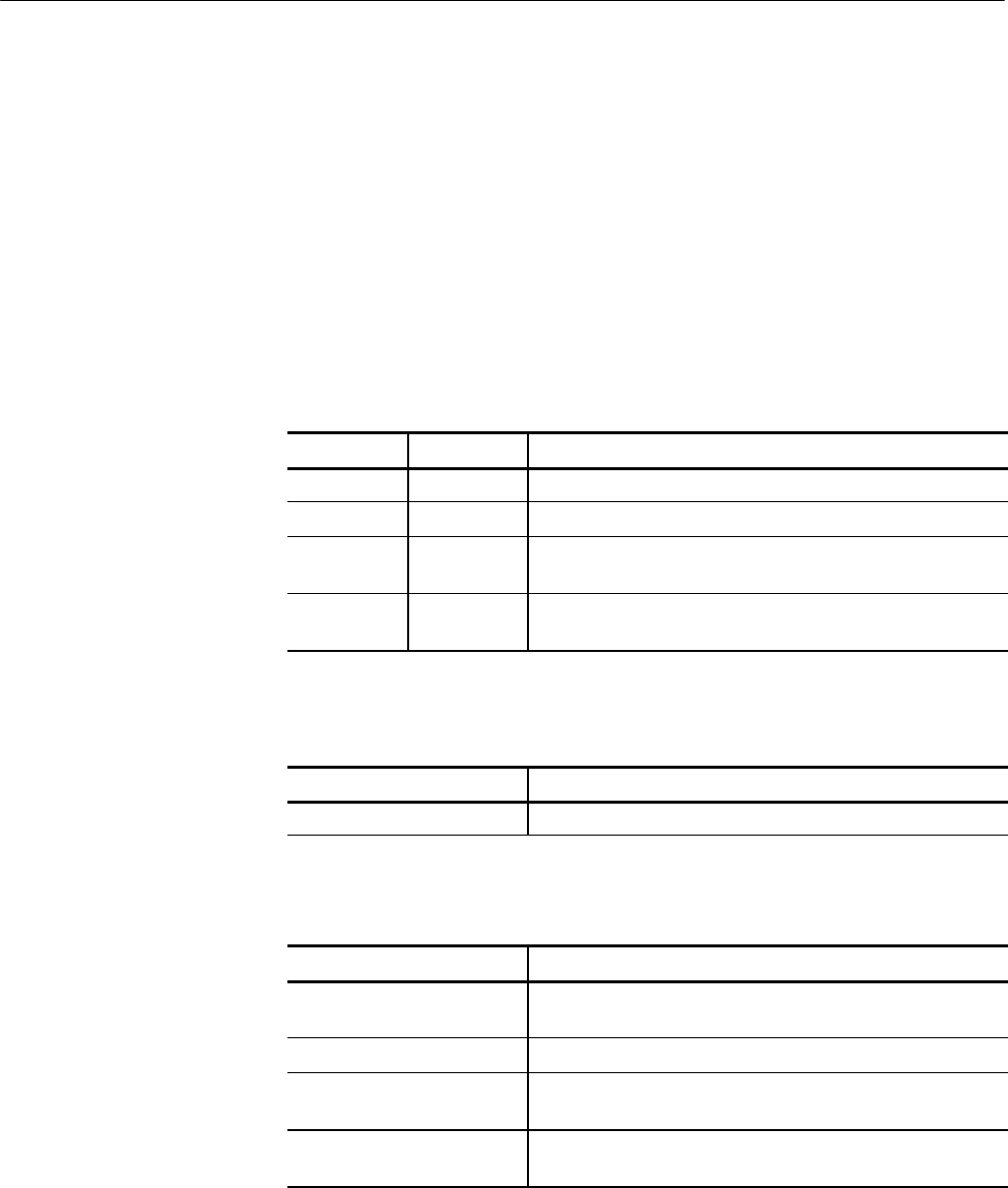
Operations
Tektronix TekVISA Programmer Manual 2-89
viUninstallHandler (vi, eventType, handler, userHandle)
Uninstalls callback handler(s) for the specified event .
ViStatus viUninstallHandler (ViSession vi, ViEventType eventType,
ViHndlr handler, ViAddr userHandle)
Not Applicable
Table 2- 130: viUninstallHandler() Parameters
Name Direction Description
vi IN Unique logical identifier to a session.
eventType IN Logical event identifier.
handler IN Interpreted as a valid reference to a handler to be uninstalled
by a client application.
userHandle IN A value specified by an application that can be used for
identifying handlers uniquely in a session for an event.
Table 2- 131: viUninstallHandler() Completion Codes
Completion Codes Description
VI_SUCCESS Event handler successfully uninstalled.
Table 2- 132: viUninstallHandler() Error Codes
Error Codes Description
VI_ERROR_INV_SESSION
VI_ERROR_INV_OBJECT
The given session or object reference is invalid (both are the
same value).
VI_ERROR_INV_EVENT Specified event type is not supported by the resource.
VI_ERROR_INV_HNDLR_
REF
Either the specified handler reference or the user context value
(or both) does not match any installed handler.
VI_ERROR_HNDLR_
NINSTALLED
A handler is not currently installed for the specified event.
Usage
C Format
Visual Basic Format
Parameters
Return Values

Operations
2-90 Tektronix TekVISA Programmer Manual
// Cleanup and exit
status = viDisableEvent(vi, VI_EVENT_SERVICE_REQ, VI_HNDLR);
if (status < VI_SUCCESS) goto error;
status = viUninstallHandler(vi, VI_EVENT_SERVICE_REQ,
ServiceReqEventHandler, NULL);
if (status < VI_SUCCESS) goto error;
viClose(vi);
viClose(rm);
The viUninstallHandler() operation allows applications to uninstall handlers for
events on sessions.
HApplications should also specify the value in the userHandle parameter that
was passed while installing the handler. VISA identifies handlers uniquely
using the handler reference and this value.
HAll the handlers, for which the handler reference and the userhandle value
matches, are uninstalled.
Table 2- 133: Special Values for handler Parameter with viUninstallHandler()
Value Description
VI_ANY_HNDLR Causes the operation to uninstall all the handlers with the
matching value in the userHandle parameter.
Handling Events
viInstallHandler (vi, eventType, handler, userHandle)
viUnlock (vi)
Relinquish a lock on the specified resource.
ViStatus viUnlock (ViSession vi)
viUnlock (ByVal vi As Long) As Long
Table 2- 134: viUnlock() Parameters
Name Direction Description
vi IN Unique logical identifier to a session.
C Example
Comments
See Also
Usage
C Format
Visual Basic Format
Parameters
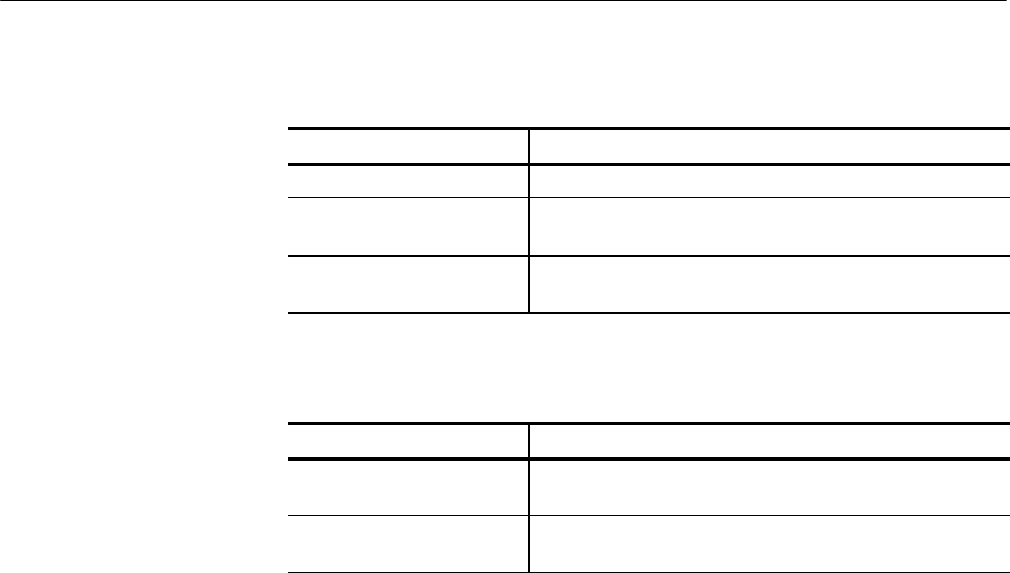
Operations
Tektronix TekVISA Programmer Manual 2-91
Table 2- 135: viUnlock() Completion Codes
Completion Codes Description
VI_SUCCESS Lock successfully relinquished.
VI_SUCCESS_NESTED_
EXCLUSIVE
Call succeeded, but this session still has nested exclusive
locks.
VI_SUC-
CESS_NESTED_SHARED
Call succeeded, but this session still has nested shared locks.
Table 2- 136: viUnlock() Error Codes
Error Codes Description
VI_ERROR_INV_SESSION
VI_ERROR_INV_OBJECT
The given session or object reference is invalid (both are the
same value).
VI_ERROR_SESN_
NLOCKED
The current session did not have any lock on the resource.
ViSession rm, vi;
char string[256];
ViUInt32 retCnt;
int i = 0;
if (viOpenDefaultRM(&rm) < VI_SUCCESS) return;
if (viOpen(rm, ”GPIB8::1::INSTR“, NULL, NULL, &vi) < VI_SUCCESS)
return;
for (i = 1; i < 100; i++) {
viLock(vi, VI_EXCLUSIVE_LOCK, VI_TMO_INFINITE, NULL,
NULL);
if (viWrite(vi, (ViBuf) ”ch1:scale?“, 10, &retCnt)
< VI_SUCCESS) return;
if (viRead(vi, (ViBuf) string, 256, &retCnt)
< VI_SUCCESS) return;
printf(”%d: scale %s“, i, string);
viUnlock(vi);
}
This operation is used to relinquish the lock previously obtained using the
viLock() operation.
Locking and Unlocking Resources
viLock (vi, lockType, timeout, requestedKey, accessKey)
Return Values
C Example
Comments
See Also

Operations
2-92 Tektronix TekVISA Programmer Manual
viUsbControlIn (vi, bmRequestType, bRequest, wValue, wIndex, wLength,
buffer, retCount)
Request arbitrary data from a USB device on the default control port.
ViStatus viUsbControlIn (ViSession vi, ViInt16 bmRequestType, ViInt16 bRequest,
ViUInt16 wValue, ViUInt16 wIndex, ViUInt16 wLength, Unsigned char [] buffer,
ViUInt16 retCount);
viUsbControlIn (ByVal vi As Long, ByVal bmRequestType As Integer, ByVal bRequest
As Integer, ByVal wValue As Integer, ByVal wIndex As Integer, ByVal wLength As
Integer, buffer As Byte, retCount As Integer) As Long
Table 2- 137: viUsbContrlIn() Parameters
Name Direction Description
vi IN Unique logical identifier to a session.
bmRequest-
Type
IN The bmRequestType parameter of the setup stage of a USB
control transfer. Refer to the USB specification for further
details.
bRequest IN The bRequest parameter of the setup stage of a USB control
transfer.
wValue IN The wValue parameter of the setup stage of a USB control
transfer.
wIndex IN The wIndex parameter of the setup stage of a USB control
transfer. This is usually the index of the interface or endpoint.
wLength IN The wLength parameter of the setup stage of a USB control
transfer. This value also specifies the size of the data buffer to
receive the data from the optional data stage of the control
transfer.
buffer OUT The data buffer that receives the data from the optional data
stage of the control transfer. This is ignored if wLength is 0.
retCount OUT Number of bytes actually transferred in the optional data stage
of the control transfer. This parameter may be VI_NULL if you
do not need this information.
Table 2- 138: viUsbContrlIn() Completion Codes
Completion Codes Description
VI_SUCCESS Operation completed successfully.
Usage
C Format
Visual Basic Format
Parameters
Return Values

Operations
Tektronix TekVISA Programmer Manual 2-93
Table 2- 139: viUsbContrlIn() Error Codes
Error Codes Description
VI_ERROR_INV_OBJECT The given session reference is invalid.
VI_ERROR_RSRC_LOCKED Specified operation could not be performed because the
resource identified by vi has been locked for this kind of
access.
VI_ERROR_TMO Timeout expired before the operation completed.
VI_ERROR_INV_SETUP Unable to start the write operation because the setup is invalid
(due to attributes being set to an inconsistent state).
VI_ERROR_IO An unknown I/O error occurred during transfer.
VI_ERROR_CONN_LOST The I/O connection for the given session has been lost.
VI_ERROR_INV_PARAME-
TER
The value of some parameter, which parameter is unknown, is
invalid.
VI_ERROR_INV_MASK The bmRequestType parameter contains an invalid mask.
/#include “stdafx.h”
#include <stdio.h>
#include <memory.h>
#include <visa.h>
#define GET_CAPABILITIES 0x07
#define USB_DIR_IN 0x80
#define USB_TYPE_CLASS 0x01 << 5
#define USB_RECIP_INTERFACE 0x01
#define GET_CAPABILITIES_RESPONSE_SIZE 0x18
int _tmain(int argc, _TCHAR* argv[])
{
ViSession rm = VI_NULL, vi = VI_NULL;
ViStatus status;
ViChar buffer[256];
ViInt16 bmRequestType = USB_DIR_IN | USB_TYPE_CLASS |
USB_RECIP_INTERFACE;
ViInt16 bRequest = GET_CAPABILITIES;
ViUInt16 wValue = 0x00;
ViUInt16 wIndex = 0x00;
ViUInt16 wLength = GET_CAPABIL-
ITIES_RESPONSE_SIZE;
ViUInt16 RetCount = 0;
bool bTalk = false;
bool bListen = false;
// Open a default Session
status = viOpenDefaultRM(&rm);
if (status < VI_SUCCESS) goto error;
C Example

Operations
2-94 Tektronix TekVISA Programmer Manual
// Open a VISA session to the USB device
status = viOpen(rm, ”USB0::1689::1025::Q10033::0::INSTR”, VI_NULL,
VI_NULL, &vi);
//Note: “USB0::1689::1025::Q10033::0::INSTR” is a VISA descriptor for
specific USBTMC instrument.
// Please change this to a valid VISA descriptor name for your USBTMC
instrument.
if (status < VI_SUCCESS) goto error;
status = viUsbControlIn (vi, bmRequestType, bRequest, wValue, wIndex,
wLength, (ViPBuf) buffer, &RetCount);
if (status < VI_SUCCESS) goto error;
if((buffer[4] & 0x02) == 1)
{
printf(“The Device is Talk Only.\n”);
bTalk = true;
}
if((buffer[4] & 0x01) == 1)
{
printf(“The Device is Listen Only.\n”);
bListen = true;
}
if((bTalk == false) && (bListen == false))
{
printf(“The Device is capable of both talk & listen.\n”);
}
// Clean up
viClose(vi); // Not needed, but makes things a bit more understandable
viClose(rm);
return 0;
error:
// Report error and clean up
viStatusDesc(vi, status, buffer);
fprintf(stderr, “failure: %s\n”, buffer);
if (rm != VI_NULL) {
viClose(rm);
}
return 0;
This operation can be used to request arbitrary data from a USB device on the default
control port.
Comments

Operations
Tektronix TekVISA Programmer Manual 2-95
viUsbControlOut (vi, bmRequestType, bRequest, wValue,wIndex, wLength,
buffer)
viUsbControlOut (vi, bmRequestType, bRequest, wValue, wIndex, wLength,
buffer)
Send arbitrary data to a USB device on the default control port
ViUInt16 viUsbControlOut (ViSession vi, ViInt16 bmRequestType,
ViInt16 bRequest, ViUInt16 wValue, ViUInt16 wIndex, ViUInt16 wLength,
ViBuf buffer);
viUsbControlOut (ByVal vi As Long, ByVal bmRequestType As
Integer, ByVal bRequest As Integer, ByVal wValue As Integer, ByVal wIndex As Integer,
ByVal wLength As Integer, buffer As Byte) As Long
Table 2- 140: viUsbContrlOut() Parameters
Name Direction Description
vi IN Unique logical identifier to a session.
bmRequest-
Type
IN The bmRequestType parameter of the setup stage of a USB
control transfer. Refer to the USB specification for further
details.
bRequest IN The bRequest parameter of the setup stage of a USB control
transfer.
wValue IN The wValue parameter of the setup stage of a USB control
transfer.
wIndex IN The wIndex parameter of the setup stage of a USB control
transfer. This is usually the index of the interface or endpoint.
wLength IN The wLength parameter of the setup stage of a USB control
transfer. This value also specifies the size of the data buffer to
receive the data from the optional data stage of the control
transfer.
buffer IN The data buffer that sends the data in the optional data stage
of the control transfer. This is ignored if wLength is 0.
See Also
Usage
C Format
Visual Basic Format
Parameters
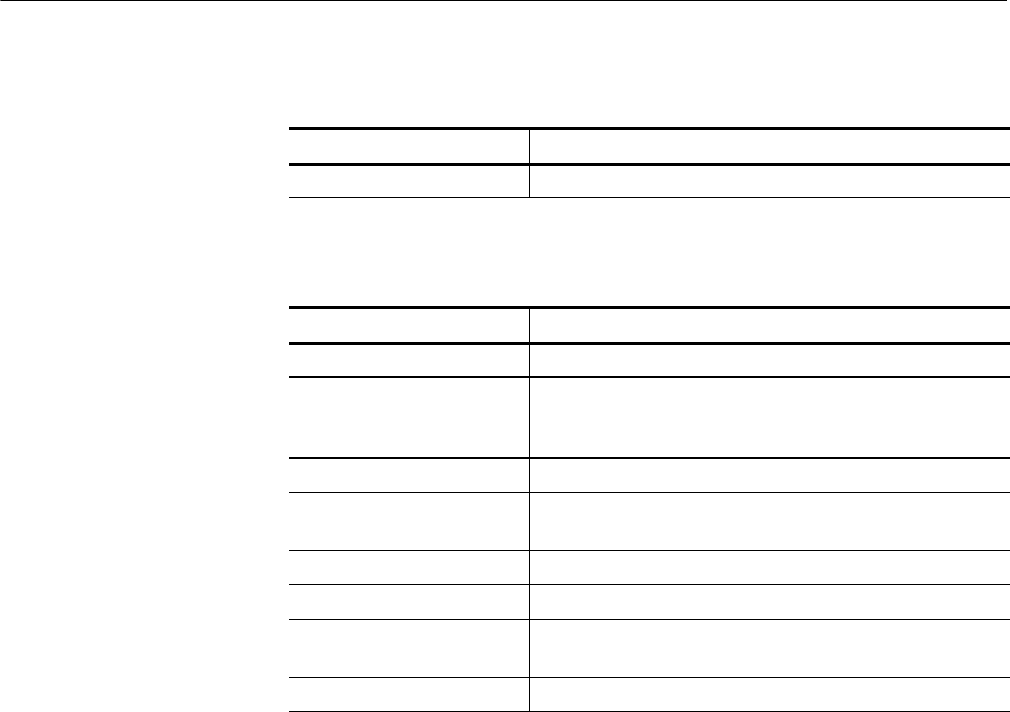
Operations
2-96 Tektronix TekVISA Programmer Manual
Table 2- 141: viUsbContrlOut() Completion Codes
Completion Codes Description
VI_SUCCESS Operation completed successfully.
Table 2- 142: viUsbContrlOut() Error Codes
Error Codes Description
VI_ERROR_INV_OBJECT The given session reference is invalid.
VI_ERROR_RSRC_LOCKED Specified operation could not be performed because the
resource identified by vi has been locked for this kind of
access.
VI_ERROR_TMO Timeout expired before the operation completed.
VI_ERROR_INV_SETUP Unable to start the write operation because the setup is invalid
(due to attributes being set to an inconsistent state).
VI_ERROR_IO An unknown I/O error occurred during transfer.
VI_ERROR_CONN_LOST The I/O connection for the given session has been lost.
VI_ERROR_INV_PARAME-
TER
The value of some parameter, which parameter is unknown, is
invalid.
VI_ERROR_INV_MASK The bmRequestType parameter contains an invalid mask.
// UsbControlOut.cpp : Defines the entry point for the console application.
//
#include “stdafx.h”
#include <stdio.h>
#include <memory.h>
#include <visa.h>
#define USB_DIR_OUT 0x00
#define USB_TYPE_STANDARD 0x00 << 5
#define USB_RECIP_ENDPOINT 0x02
#define USB_REQ_CLEAR_FEATURE 0x01
int _tmain(int argc, _TCHAR* argv[])
{
ViSession rm = VI_NULL, vi = VI_NULL;
ViStatus status;
ViChar buffer[256];
ViUInt32 retCnt = 0;
ViInt16 bmRequestType = USB_DIR_OUT | USB_TYPE_STAN-
DARD | USB_RECIP_ENDPOINT;
ViInt16 bRequest = USB_REQ_CLEAR_FEATURE;
Return Values
C Example

Operations
Tektronix TekVISA Programmer Manual 2-97
ViUInt16 wValue = 0x00;
ViUInt16 wIndex = 0x06;
ViUInt16 wLength = 0x00;
// Open a default Session
status = viOpenDefaultRM(&rm);
if (status < VI_SUCCESS) goto error;
// Open a VISA session to the USB device
status = viOpen(rm, ”USB0::1689::1025::Q10033::0::INSTR”, VI_NULL,
VI_NULL, &vi);
//Note: “USB0::1689::1025::Q10033::0::INSTR” is a VISA descriptor for
specific USBTMC instrument.
// Please change this to a valid VISA descriptor name for your USBTMC
instrument.
if (status < VI_SUCCESS) goto error;
// Sending CLEAR_FEATURE
status = viUsbControlOut (vi, bmRequestType, USB_REQ_CLEAR_FEA-
TURE, wValue, wIndex, wLength, NULL);
if (status < VI_SUCCESS) goto error;
// Clean up
viClose(vi); // Not needed, but makes things a bit more understandable
viClose(rm);
return 0;
error:
// Report error and clean up
viStatusDesc(vi, status, buffer);
fprintf(stderr, “failure: %s\n”, buffer);
if (rm != VI_NULL) {
viClose(rm);
}
return 0;
}
This operation can be used to send arbitrary data to a USB device on the default control
port.
viUsbControlIn (vi, bmRequestType, bRequest, wValue,wIndex, wLength,
buffer, retCount)
Comments
See Also

Operations
2-98 Tektronix TekVISA Programmer Manual
viVPrintf (vi, writeFmt, params)
Formats and writes data to a device using a pointer to a variable--length argument
list.
ViStatus viVPrintf (ViSession vi, ViString writeFmt, ViVAList params)
viVPrintf (ByVal vi As Long, ByVal writeFmt As String, ByVal params As Any) As
Long
Table 2- 143: viVPrintf() Parameters
Name Direction Description
vi IN Unique logical identifier to a session.
writeFmt IN The format string to apply to parameters in ViVAList
params IN A pointer to a variable argument list containing the variable
number of parameters on which the format string is applied.
The formatted data is written to the specified device.
Table 2- 144: viVPrintf() Completion Codes
Completion Codes Description
VI_SUCCESS Parameters were successfully formatted.
Table 2- 145: viVPrintf() Error Codes
Error Codes Description
VI_ERROR_INV_SESSION
VI_ERROR_INV_OBJECT
The given session or object reference is invalid (both are the
same value).
VI_ERROR_RSRC_LOCKED Specified operation could not be performed because the
resource identified by vi has been locked for this kind of
access.
VI_ERROR_IO Could not perform write operation because of I/O error.
VI_ERROR_TMO Timeout expired before write operation completed.
VI_ERROR_INV_FMT A format specifier in thewriteFmt string is invalid.
VI_ERROR_NSUP_FMT A format specifier in the writeFmt string is not supported.
VI_ERROR_ALLOC The system could not allocate a formatted I/O buffer because
of insufficient system resources.
Usage
C Format
Visual Basic Format
Parameters
Return Values

Operations
Tektronix TekVISA Programmer Manual 2-99
#include <stdio.h>
#include <string.h>
#include <visa.h>
#include <stdarg.h>
// My printf which always prepends the command with a header off
ViStatus MyPrintf(ViSession vi, ViString fmt, ...)
{
ViStatus retval;
ViVAList args;
viBufWrite(vi, (ViBuf) ”header off“, 10, VI_NULL);
va_start(args, fmt);
retval = viVPrintf(vi, fmt, args);
va_end(args);
return retval;
}
int main(int argc, char* argv[])
{
ViSession rm = VI_NULL, vi = VI_NULL;
ViStatus status;
char buffer[256];
long const start = 1;
long const stop = 500;
// Open a default Session
status = viOpenDefaultRM(&rm);
if (status < VI_SUCCESS) goto error;
// Open the gpib device at primary address 1, gpib board 8
status = viOpen(rm, ”GPIB0::1::INSTR“, VI_NULL, VI_NULL,
&vi);
if (status < VI_SUCCESS) goto error;
status = MyPrintf(vi, ”data:start %d;data:stop %d“, start,
stop);
if (status < VI_SUCCESS) goto error;
viClose(vi); // Not needed, but makes things a bit more
// understandable
viClose(rm);
return 0;
error:
// Report error and clean up
viStatusDesc(vi, status, buffer);
C Example

Operations
2- 100 Tektronix TekVISA Programmer Manual
fprintf(stderr, ”failure: %s\n“, buffer);
if (rm != VI_NULL) {
viClose(rm);
}
return 1;
}
This operation is similar to viPrintf() except that params provides a pointer to a
variable argument list rather than the variable argument list itself (with separate
arg parameters).
Reading and Writing Formatted Data
viVScanf (vi, readFmt, params)
viVQueryf(vi, writeFmt, readFmt, params)
viVQueryf (vi, writeFmt, readFmt, params)
Writes and reads formatted data to and from a device using a pointer to a
variable--length argument list.
ViStatus viVQueryf (ViSession vi, ViString writeFmt, ViString readFmt,ViVAList
params)
viVQueryf (ByVal vi As Long, ByVal writeFmt As String, ByVal readFmt As String,
ByVal params As Any) As Long
Table 2- 146: viVQueryf() Parameters
Name Direction Description
vi IN Unique logical identifier to a session.
writeFmt IN The format string to apply to write parameters in ViVAList
readFmt IN The format string to apply to read parameters in ViVAList
params IN OUT A pointer to a variable argument list containing the variable
number of write and read parameters. The write parameters
are formatted and written to the specified device. The read
parameters store the data read from the device after the format
string is applied to the data.
Comments
See Also
Usage
C Format
Visual Basic Format
Parameters

Operations
Tektronix TekVISA Programmer Manual 2- 101
Table 2- 147: viVQueryf() Completion Codes
Completion Codes Description
VI_SUCCESS Successfully completed the Query operation.
Table 2- 148: viVQueryf() Error Codes
Error Codes Description
VI_ERROR_INV_SESSION
VI_ERROR_INV_OBJECT
The given session or object reference is invalid (both are the
same value).
VI_ERROR_RSRC_LOCKED Specified operation could not be performed because the
resource identified by vi has been locked for this kind of
access.
VI_ERROR_IO Could not perform read/write operation because of I/O error.
VI_ERROR_TMO Timeout expired before read/write operation completed.
VI_ERROR_INV_FMT A format specifier in the writeFmt or readFmt string is invalid.
VI_ERROR_NSUP_FMT A format specifier in the writeFmt or readFmt string is not
supported.
VI_ERROR_ALLOC The system could not allocate a formatted I/O buffer because
of insufficient system resources.
#include <stdio.h>
#include <visa.h>
#include <stdarg.h>
// My own Queryf that flushes the write buffer before doing a query.
ViStatus MyQueryf(ViSession vi, ViString writeFmt, ViString readFmt, ...)
{
ViStatus retval;
ViVAList args;
// Make sure pending writes are written
retval = viFlush(vi, VI_WRITE_BUF | VI_READ_BUF);
if (retval < VI_SUCCESS) return retval;
//PassQueryontoVISA
va_start(args, readFmt);
retval = viVQueryf(vi, writeFmt, readFmt, args);
va_end(args);
return retval;
}
Return Values
C Example

Operations
2- 102 Tektronix TekVISA Programmer Manual
This operation is similar to viQueryf() except that params provides a pointer to a
variable argument list rather than the variable argument list itself (with separate
arg parameters).
NOTE. Because the prototype for this function cannot provide complete type--
checking, remember that all output parameters must be passed by reference.
Reading and Writing Formatted Data
viVScanf (vi, readFmt, params)
viVPrintf(vi, writeFmt, params)
viVScanf (vi, readFmt, params)
Reads and formats data from a device using a pointer to a variable--length
argument list.
ViStatus viVScanf (ViSession vi, ViString readFmt,ViVAList params)
viVScanf (ByVal vi As Long, ByVal readFmt As String, ByVal params As Any) As
Long
Table 2- 149: viVScanf() Parameters
Name Direction Description
vi IN Unique logical identifier to a session.
readFmt IN The format string to apply to read parameters in ViVAList
params OUT A pointer to a variable argument list containing the variable
number of parameters into which the data is read and the
format string is applied.
Table 2- 150: viVScanf() Completion Codes
Completion Codes Description
VI_SUCCESS Data was successfully read and formatted into arg parame-
ter(s).
Comments
See Also
Usage
C Format
Visual Basic Format
Parameters
Return Values
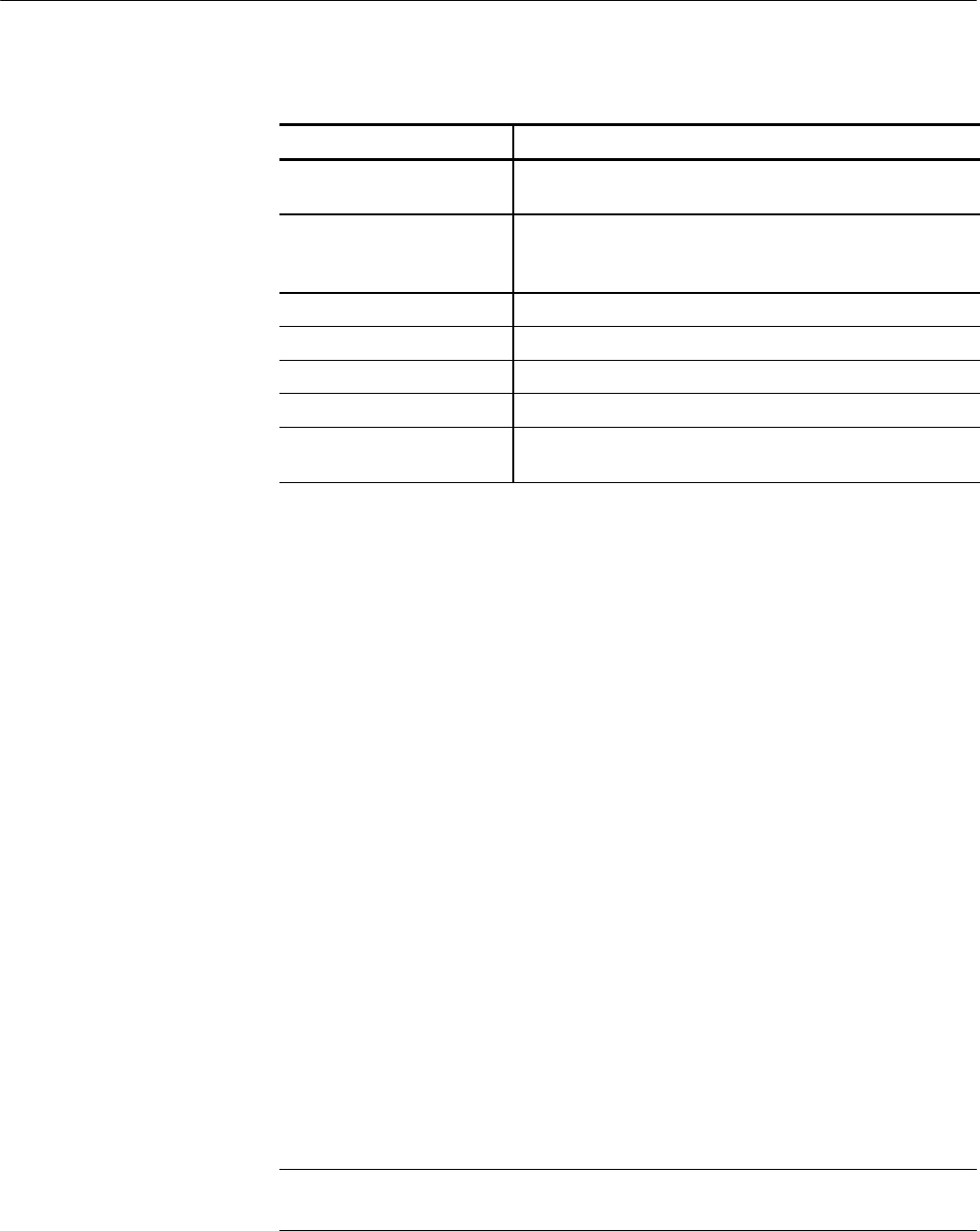
Operations
Tektronix TekVISA Programmer Manual 2- 103
Table 2- 151: viVScanf() Error Codes
Error Codes Description
VI_ERROR_INV_SESSION
VI_ERROR_INV_OBJECT
The given session or object reference is invalid (both are the
same value).
VI_ERROR_RSRC_LOCKED Specified operation could not be performed because the
resource identified by vi has been locked for this kind of
access.
VI_ERROR_IO Could not perform read operation because of I/O error.
VI_ERROR_TMO Timeout expired before read operation completed.
VI_ERROR_INV_FMT A format specifier in thereadFmt string is invalid.
VI_ERROR_NSUP_FMT A format specifier in the readFmt string is not supported.
VI_ERROR_ALLOC The system could not allocate a formatted I/O buffer because
of insufficient system resources.
#include <stdio.h>
#include <visa.h>
#include <stdarg.h>
// My own Scan that flushes the write buffer before doing a query.
ViStatus MyScanf(ViSession vi, ViString readFmt, ...)
{
ViStatus retval;
ViVAList args;
// Make sure pending writes are written
retval = viFlush(vi, VI_WRITE_BUF);
if (retval < VI_SUCCESS) return retval;
//PassQueryontoVISA
va_start(args, readFmt);
retval = viVScanf(vi, readFmt, args);
va_end(args);
return retval;
}
This operation is similar to viScanf() except that params provides a pointer to a
variable argument list rather than the variable argument list itself (with separate
arg parameters).
NOTE. Because the prototype for this function cannot provide complete type--
checking, remember that all output parameters must be passed by reference.
C Example
Comments
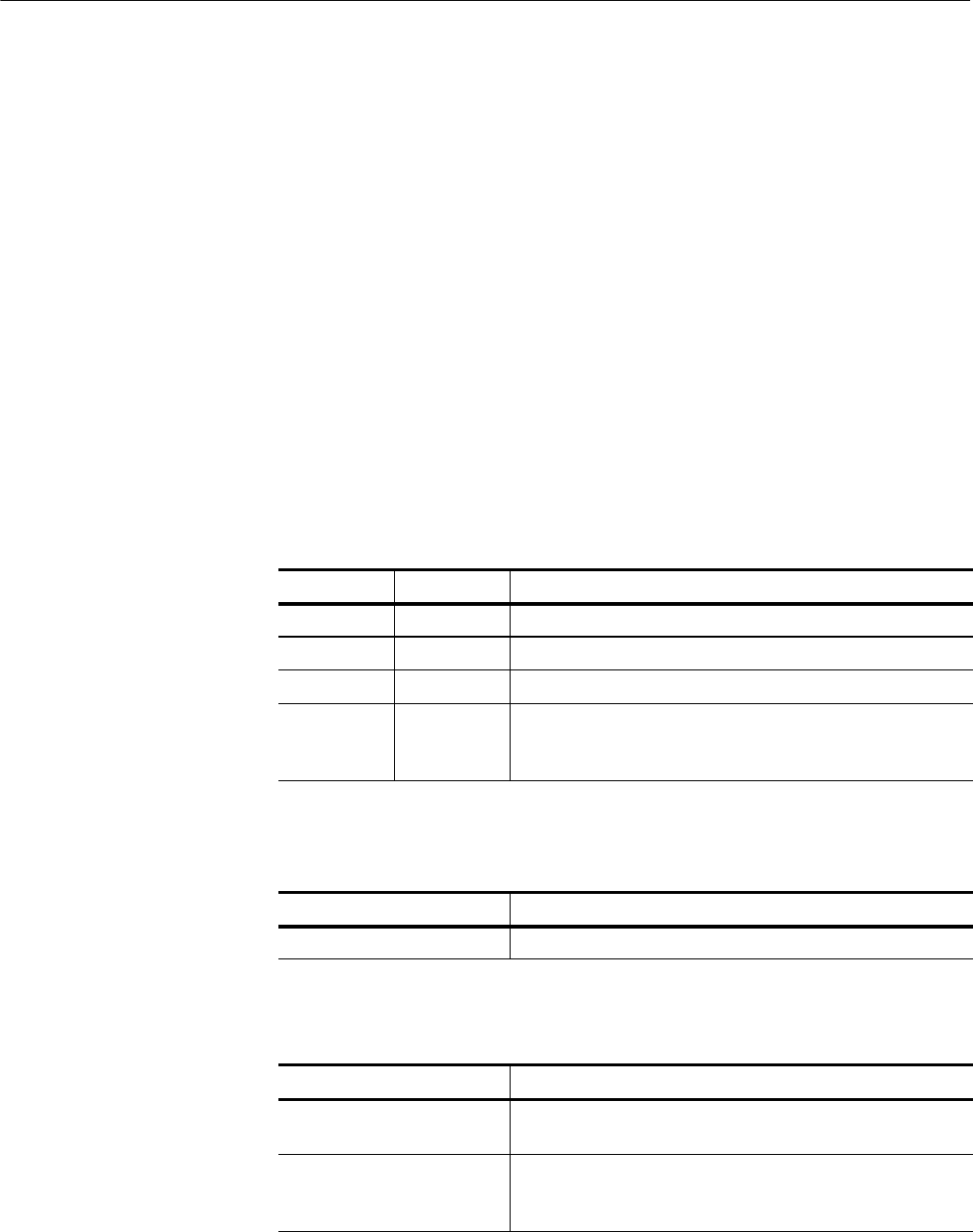
Operations
2- 104 Tektronix TekVISA Programmer Manual
Reading and Writing Formatted Data
viVQueryf (vi, writeFmt, readFmt, params)
viVPrintf(vi, writeFmt, params)
viVSPrintf (vi, buf, writeFmt, params)
Formats and writes data to a user--specified buffer using a pointer to a variable--
length argument list.
ViStatus viVSPrintf (ViSession vi,ViPBufbuf, ViString writeFmt, ViVAList params)
viVSPrintf (ByVal vi As Long, ByVal buf As String, ByVal writeFmt As String, ByVal
params As Any) As Long
Table 2- 152: viVSPrintf() Parameters
Name Direction Description
vi IN Unique logical identifier to a session.
buf OUT Buffer where data is to be written.
writeFmt IN The format string to apply to parameters in ViVAList.
params IN A pointer to a variable argument list containing the variable
number of parameters on which the format string is applied.
The formatted data is written to the specified buffer.
Table 2- 153: viVSPrintf() Completion Codes
Completion Codes Description
VI_SUCCESS Parameters were successfully formatted.
Table 2- 154: viVSPrintf() Error Codes
Error Codes Description
VI_ERROR_INV_SESSION
VI_ERROR_INV_OBJECT
The given session or object reference is invalid (both are the
same value).
VI_ERROR_RSRC_LOCKED Specified operation could not be performed because the
resource identified by vi has been locked for this kind of
access.
See Also
Usage
C Format
Visual Basic Format
Parameters
Return Values

Operations
Tektronix TekVISA Programmer Manual 2- 105
Table 2- 154: viVSPrintf() Error Codes (Cont.)
Error Codes Description
VI_ERROR_INV_FMT A format specifier in the writeFmt string is invalid.
VI_ERROR_NSUP_FMT A format specifier in the writeFmt string is not supported.
VI_ERROR_ALLOC The system could not allocate a formatted I/O buffer because
of insufficient system resources.
#include <stdio.h>
#include <string.h>
#include <visa.h>
#include <stdarg.h>
// My printf writes directly to the device (no buffering)
ViStatus MyPrintf(ViSession vi, ViString fmt, ...)
{
ViStatus retval;
ViVAList args;
ViChar buffer[256];
va_start(args, fmt);
retval = viVSPrintf(vi, (ViBuf) buffer, fmt, args);
va_end(args);
if (retval >= VI_SUCCESS) {
retval = viWrite(vi, (ViBuf) buffer, strlen(buffer),
VI_NULL);
}
return retval;
}
This operation is similar to viVPrintf() except that the output is not written to the
device; it is written to the user--specified buffer. This output buffer is NULL
terminated.
If this operation outputs an END indicator before all the arguments are satisfied,
the rest of the writeFmt string is ignored and the buffer string is still terminated
by a NULL.
Reading and Writing Formatted Data
viVSScanf (vi, buf, readFmt, params)
C Example
Comments
See Also

Operations
2- 106 Tektronix TekVISA Programmer Manual
viVSScanf (vi, buf, readFmt, params)
Reads and formats data from a user--specified buffer using a pointer to a
variable--length argument list.
ViStatus viVSScanf (ViSession vi,ViPBufbuf, ViString readFmt, ViVAList params)
viVSScanf (ByVal vi As Long, ByVal buf As String, ByVal readFmt As String, ByVal
params As Any) As Long
Table 2- 155: viVSScanf() Parameters
Name Direction Description
vi IN Unique logical identifier to a session.
buf IN Buffer from which data is read and formatted.
readFmt IN The format string to apply to parameters in ViVAList.
params OUT A pointer to a variable argument list with the variable number
of parameters into which the data is read and to which the
format string is applied.
Table 2- 156: viVSScanf() Completion Codes
Completion Codes Description
VI_SUCCESS Data was successfully read and formatted into arg
parameter(s).
Table 2- 157: viVSScanf() Error Codes
Error Codes Description
VI_ERROR_INV_SESSION
VI_ERROR_INV_OBJECT
The given session or object reference is invalid (both are the
same value).
VI_ERROR_RSRC_LOCKED Specified operation could not be performed because the
resource identified by vi has been locked for this kind of
access.
VI_ERROR_INV_FMT A format specifier in the readFmt string is invalid.
VI_ERROR_NSUP_FMT A format specifier in the readFmt string is not supported.
VI_ERROR_ALLOC The system could not allocate a formatted I/O buffer because
of insufficient system resources.
Usage
C Format
Visual Basic Format
Parameters
Return Values

Operations
Tektronix TekVISA Programmer Manual 2- 107
#include <stdio.h>
#include <string.h>
#include <visa.h>
#include <stdarg.h>
// My scanf reads directly from the device (no buffering).
// The unscanned portions of the buffer will be lost.
ViStatus MyScanf(ViSession vi, ViString fmt, ...)
{
ViStatus retval;
ViVAList args;
ViChar buffer[1024];
retval = viRead(vi, (ViBuf) buffer, sizeof(buffer), VI_NULL);
if (retval >= VI_SUCCESS) {
va_start(args, fmt);
retval = viVSScanf(vi, (ViBuf) buffer, fmt, args);
va_end(args);
}
return retval;
}
The viVSScanf() operation is similar to viVScanf() except that the data is read
from a user--specified buffer rather than a device.
NOTE. Because the prototype for this function cannot provide complete type--
checking, remember that all output parameters must be passed by reference.
Reading and Writing Formatted Data
viVSPrintf (vi, buf, writeFmt, params)
viWaitOnEvent (vi, inEventType, timeout, outEventType, outContext)
Waits for an occurrence of the specified event for a given session.
ViStatus viWaitOnEvent(ViSession vi, ViEventType inEventType,
ViUInt32 timeout, ViPEventType outEventType,ViPEvent outContext)
viWaitOnEvent (ByVal vi As Long, ByVal inEventType As Long, ByVal timeout As
Long, ByVal outEventType As Long, ByVal outcontext As Long) As Long
C Example
Comments
See Also
Usage
C Format
Visual Basic Format

Operations
2- 108 Tektronix TekVISA Programmer Manual
Table 2- 158: viWaitOnEvent() Parameters
Name Direction Description
vi IN Unique logical identifier to a session.
inEventType IN Logical identifier of the event(s) to wait for.
timeout IN Absolute time period in time units that the resource shall wait
for a specified event to occur before returning the time elapsed
error. The time unit is in milliseconds.
outEventType OUT Logical identifier of the event actually received.
outContext OUT A handle specifying the unique occurrence of an event.
Table 2- 159: viWaitOnEvent() Completion Codes
Completion Codes Description
VI_SUCCESS Wait terminated successfully on receipt of an event occurrence.
The queue is empty.
VI_SUCCESS_QUEUE_
NEMPTY
Wait terminated successfully on receipt of an event notification.
There is still at least one more event occurrence of the type
specified by inEventType available for this session.
Table 2- 160: viWaitOnEvent() Error Codes
Error Codes Description
VI_ERROR_INV_SESSION
VI_ERROR_INV_OBJECT
The given session or object reference is invalid (both are the
same value).
VI_ERROR_INV_EVENT Specified event type is not supported by the resource.
VI_ERROR_TMO Specified event did not occur within the specified time period.
VI_ERROR_NENABLED The session must be enabled for events of the specified type in
order to receive them.
viWrite(vi, (ViBuf) ”*CLS“, 4, VI_NULL);
viWrite(vi, (ViBuf) ”:ACQUIRE:STATE 1“, 16, VI_NULL);
viwrite(vi, (ViBuf) ”*OPC“, 4, VI_NULL);
viWaitOnEvent(vi, VI_EVENT_SERVICE_REQ, 5000, &eventType, &context)
viReadSTB(vi, &stb)
Parameters
Return Values

Operations
Tektronix TekVISA Programmer Manual 2- 109
The viWaitOnEvent() operation suspends the execution of a thread of an
application and waits for an event of the type specified by inEventType for a time
period specified by timeout.
HYou can only wait for events that have been enabled with the
viEnableEvent() operation. Refer to individual event descriptions for context
definitions.
HviWaitOnEvent() removes the specified event from the event queue if one
that matches the type is available. The process of dequeuing makes an
additional space available in the queue for events of the same type.
HWhen the outContext handle returned from a successful invocation of
viWaitOnEvent() is no longer needed, it should be passed to viClose().
HIf a session’s event queue becomes full and a new event arrives, the new
event is discarded.
HThe default value of VI_ATTR_MAX_QUEUE_LENGTH is 50.
Table 2- 161: Special Values for inEventType Parameter with
viWaitOnEvents()
Value Description
VI_ALL_ENABLED_EVENTS The operation waits for any event that is enabled for the given
session.
Table 2- 162: Special Values for timeout Parameter with viWaitOnEvents()
Value Description
VI_TMO_INFINITE The operation is suspended indefinitely.
VI_TMO_IMMEDIATE The operation is not suspended; therefore, this value can be
used to dequeue events from an event queue.
HThe outEventType and outContext parameters are optional and can be
VI_NULL.
Table 2- 163: Special Values for outEventType Parameter with
viWaitOnEvents()
Value Description
VI_NULL Used if the event type is known from the inEventType parameter.
Comments
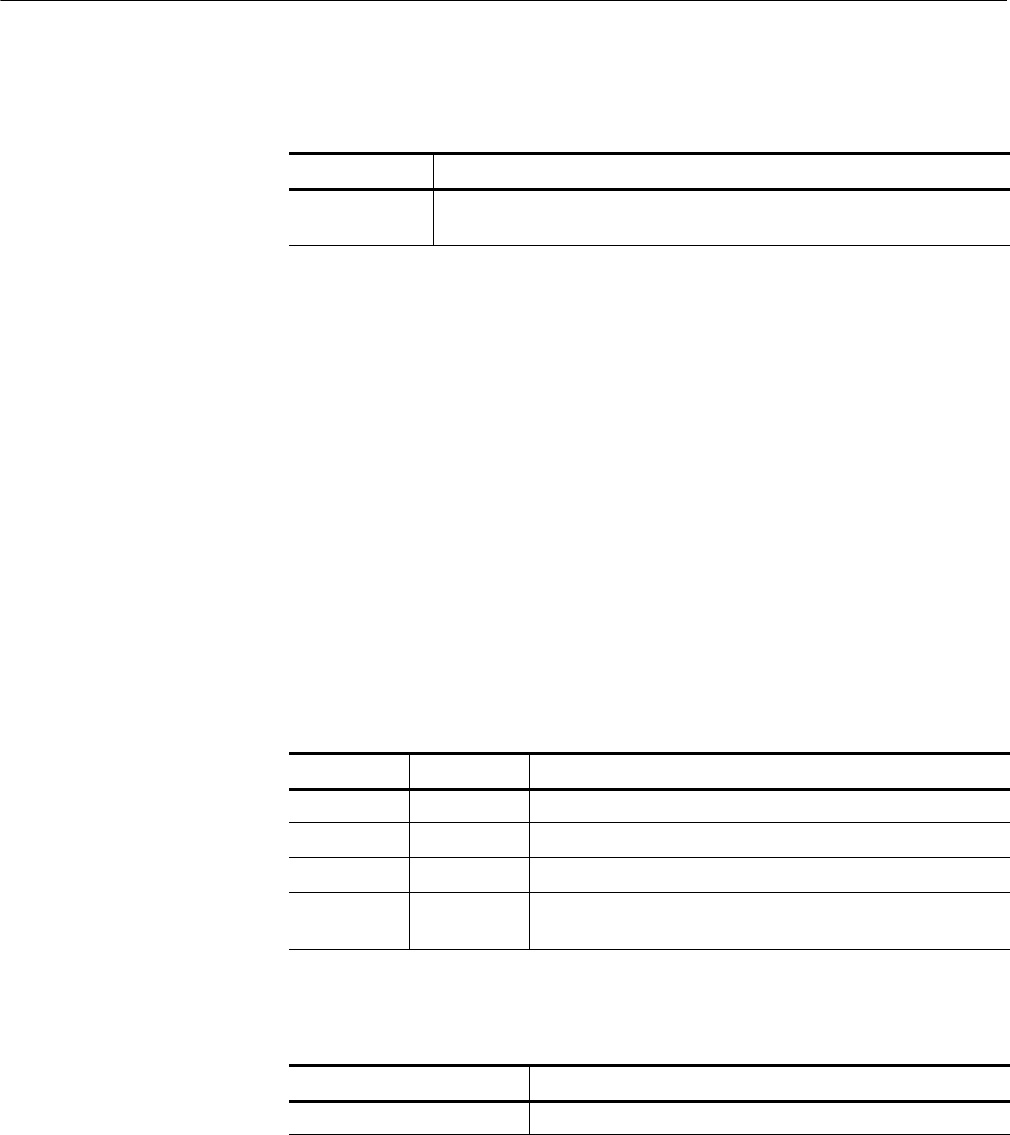
Operations
2-110 Tektronix TekVISA Programmer Manual
Table 2- 164: Special Values for outContext Parameter with
viWaitOnEvents()
Value Description
VI_NULL Used if the outContext handle is not needed to retrieve additional
information. If that case, VISA will automatically close the event context.
Handling Events
viDiscardEvents (vi, event, mechanism)
viWrite (vi, buf, count, retCount)
Writes data synchronously to a device from the specified buffer.
ViStatus viWrite (ViSession vi,ViBufbuf, ViUInt32 count, ViPUInt32 retCount)
viWrite (ByVal vi As Long, ByVal buf As String, ByVal count As Long, ByVal retCount
As Long) As Long
Table 2- 165: viWrite() Parameters
Name Direction Description
vi IN Unique logical identifier to a session.
buf IN Represents the location of a data block to be sent to device.
count IN Number of bytes to be written.
retCount OUT Represents the location of an integer that will be set to the
number of bytes actually transferred.
Table 2- 166: viWrite() Completion Codes
Completion Codes Description
VI_SUCCESS Transfer completed.
See Also
Usage
C Format
Visual Basic Format
Parameters
Return Values

Operations
Tektronix TekVISA Programmer Manual 2- 111
Table 2- 167: viWrite() Error Codes
Error Codes Description
VI_ERROR_INV_SESSION
VI_ERROR_INV_OBJECT
The given session or object reference is invalid (both are the
same value).
VI_ERROR_NSUP_OPER The given vi does not support this operation.
VI_ERROR_RSRC_LOCKED Specified operation could not be performed because the
resource identified by vi has been locked for this kind of
access.
VI_ERROR_TMO Timeout expired before operation completed.
VI_ER-
ROR_RAW_WR_PROT_VIOL
Violation of raw write protocol occurred during transfer.
VI_ER-
ROR_RAW_RD_PROT_VIOL
Violation of raw read protocol occurred during transfer.
VI_ERROR_INP_PROT_VIOL Device reported an input protocol error during transfer.
VI_ERROR_BERR Bus error occurred during transfer.
VI_ERROR_INV_SETUP Unable to start write operation because setup is invalid (due to
attributes being set to an inconsistent state).
VI_ERROR_NCIC The interface associated with the given vi is not currently the
controller in charge.
VI_ERROR_NLISTENERS No Listeners condition is detected (both NRFD and NDAC are
deasserted).
VI_ERROR_IO An unknown I/O error occurred during transfer.
if (viWrite(vi, (ViBuf) “*idn?”, 5, VI_NULL) < VI_SUCCESS) return;
if (viRead(vi, (ViBuf) buffer, sizeof(buffer)--1, &retCnt)
< VI_SUCCESS) return;
buffer[retCnt] = ’\0’; // ensure the string is null terminated
printf(”id: %s\n“, buffer);
The viWrite() operation synchronously transfers data. The data to be written is in
the buffer represented by buf.
HThis operation returns only when the transfer terminates.
HOnly one synchronous write operation can occur at any one time.
Table 2- 168: Special Value for retCount Parameter with viWrite()
Value Description
VI_NULL Do not return the number of bytes transferred. This may be useful if it is only
important to know whether the operation succeeded or failed.
C Example
Comments
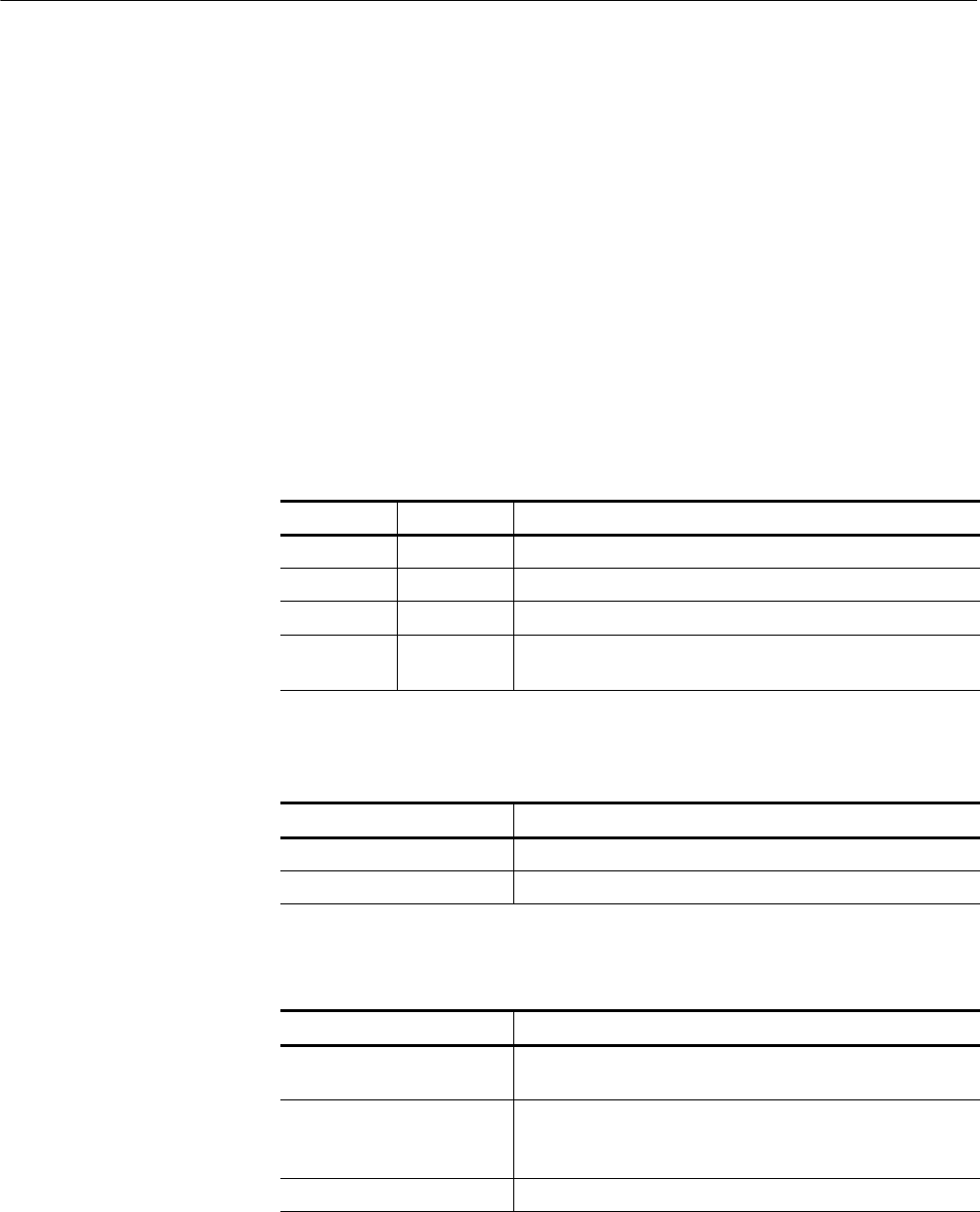
Operations
2-112 Tektronix TekVISA Programmer Manual
Reading and Writing Data
viRead (vi, buf, count, retCount)
viWriteAsync (vi, buf, count, jobId)
Writes data asynchronously to a device from the specified buffer.
ViStatus viWriteAsync (ViSession vi,ViBufbuf, ViUInt32 count, ViPJobId retCount)
Not Applicable
Table 2- 169: viWriteAsync() Parameters
Name Direction Description
vi IN Unique logical identifier to a session.
buf IN Represents the location of a data block to be sent to device..
count IN Number of bytes to be written.
jobId OUT Represents the location of a variable that will be set to the job
identifier of this asynchronous write operation.
Table 2- 170: viWriteAsync() Completion Codes
Completion Codes Description
VI_SUCCESS Asynchronous write operation successfully queued.
VI_SUCCESS_SYNC Write operation performed synchronously.
Table 2- 171: viWriteAsync() Error Codes
Error Codes Description
VI_ERROR_INV_SESSION
VI_ERROR_INV_OBJECT
The given session or object reference is invalid (both are the
same value).
VI_ERROR_RSRC_LOCKED Specified operation could not be performed because the
resource identified by vi has been locked for this kind of
access.
VI_ERROR_QUEUE_ERROR Unable to queue write operation.
See Also
Usage
C Format
Visual Basic Format
Parameters
Return Values

Operations
Tektronix TekVISA Programmer Manual 2-113
// rwwait.cpp
//
#include <stdio.h>
#include <string.h>
#include <windows.h>
#include ”visa.h“
// viReadAsync/viWriteAsync example --
// These commands can potentially decrease test time by allowing
// several read or write commands to happen in parallel.
int main(int argc, char* argv[])
{
ViSession rm, vi[2];
ViJobId jobid[2];
ViStatus status;
char string[2][256];
ViEventType eventType[2];
ViEvent event[2];
int i;
// clear strings
for(i=0;i<2;i++){
memset(string[i], 0, 256);
}
// Open the default RM
status = viOpenDefaultRM(&rm);
if (status < VI_SUCCESS) goto error;
// Open multiple devices
status = viOpen(rm, ”GPIB0::1::INSTR“, NULL, NULL, &vi[0]);
if (status < VI_SUCCESS) goto error;
status = viOpen(rm, ”GPIB8::1::INSTR“, NULL, NULL, &vi[1]);
if (status < VI_SUCCESS) goto error;
// Enable waiting on the events
for(i=0;i<2;i++){
status = viEnableEvent(vi[i], VI_EVENT_IO_COMPLETION,
VI_QUEUE, VI_NULL);
if (status < VI_SUCCESS) goto error;
}
// Write commands to several devices (this allows
// several writes to be done in parallel)
for(i=0;i<2;i++){
status = viWriteAsync(vi[i], (ViBuf) “*idn?”,
5, &jobid[i]);
C Example

Operations
2-114 Tektronix TekVISA Programmer Manual
if (status < VI_SUCCESS) goto error;
}
// Wait for completion on all of the devices
for(i=0;i<2;i++){
viWaitOnEvent(vi[i], VI_EVENT_IO_COMPLETION,
INFINITE, &eventType[i], &event[i]);
}
// Queue the read for all the devices (this allows
// several reads to be done im parallel)
for(i=0;i<2;i++){
status = viReadAsync(vi[i], (ViBuf) string[i], 256,
&jobid[i]);
if (status < VI_SUCCESS) goto error;
}
// Wait for all the reads to complete
for(i=0;i<2;i++){
viWaitOnEvent(vi[i], VI_EVENT_IO_COMPLETION,
INFINITE, &eventType[i], &event[i]);
}
// Write out the *idn? strings.
for(i=0;i<2;i++){
printf(”%d: %s\n“, i, string[i]);
}
// Cleanup and exit
for(i=0;i<2;i++){
status = viDisableEvent(vi[i], VI_EVENT_IO_COMPLETION,
VI_QUEUE);
if (status < VI_SUCCESS) goto error;
}
viClose(rm);
return 0;
error:
viStatusDesc(rm, status, string[0]);
fprintf(stderr, ”Error: %s\n“, (ViBuf) string[0]);
return 0;
}
The viWriteAsync() operation asynchronously transfers data. The data to be written is
in the buffer represented by buf.
HThis operation normally returns before the transfer terminates.
HBefore calling this operation, you should enable the session for receiving I/O
completion events. After the transfer has completed, an I/O completion event
is posted.
Comments

Operations
Tektronix TekVISA Programmer Manual 2-115
HThe operation returns a job identifier that you can use with either viTermi-
nate() to abort the operation or with an I/O completion event to identify
which asynchronous write operation completed.
HSince an asynchronous I/O request could complete before the vWriteAsync()
operation returns, and the I/O completion event can be distinguished based
on the job identifier, an application must be made aware of the job identifier
before the first moment that the I/O completion event could possibly occur.
Setting the output parameter jobId before the data transfer even begins
ensures that an application can always match the jobId parameter with the
VI_ATTR_JOB_ID attribute of the I/O completion event.
HIf multiple jobs are queued at the same time on the same session, an
application can use the jobId to distinguish the jobs, as they are unique
within a session.
HThe viWriteAsync() operation MAY be implemented synchronously, which
could be done by using the viWrite() operation. This means that an applica-
tion can use the asynchronous operations transparently even if a low--level
driver only supports synchronous data transfers. If the viWriteAsync()
operation is implemented synchronously and a given invocation of the
operation is valid, the operation returns VI_SUCCESS_SYNC AND all
status information is returned in a VI_EVENT_IO_COMPLETION.
HThe status code VI_ERROR_RSRC_LOCKED can be returned either
immediately or from the VI_EVENT_IO_COMPLETION event.
HFor each successful call to viWriteAsync(), there is one and only one
VI_EVENT_IO_COMPLETION event occurrence.
Table 2- 172: Special Value for jobId Parameter with viWriteAsync()
Value Description
VI_NULL Do not return a job identifier. This option may be useful if only one
asynchronous operation will be pending at a given time.
Asychronous Read/Write
viReadAsync (vi,buf,count,jobId)
ViTerminate (vi, degree, jobId)
See Also

Operations
2-116 Tektronix TekVISA Programmer Manual
viWriteFromFile (vi, fileName, count, retCount)
Take data from a file and write it to a device synchronously.
ViStatus viWriteFromFile(ViSession vi, ViString fileName, ViUInt32 count, ViUInt32
retCount)
viWriteFromFile(By Val vi As Long, By Val fileName As String, By Val
count As Long, By Val retCount As Long) As Long
Table 2- 173: viWriteFromFile Parameters
Name Direction Description
vi IN Unique logical identifier to a session.
fileName IN Name of the file from which data will be read.
count IN Number of bytes to be written.
retCount OUT Number of bytes actually transferred.
Table 2- 174: viWriteFromFile Completion Codes
Completion Codes Description
VI_SUCCESS Transfer completed.
Table 2- 175: viWriteFromFile() Error Codes
Error Codes Description
VI_ERROR_INV_SESSION
VI_ERROR_INV_OBJECT
The given session or object reference is invalid (both are the
same value).
VI_ERROR_NSUP_OPER The given vi does not support this operation.
VI_ERROR_RSRC_LOCKED Specified operation could not be performed because the
resource identified by vi has been locked for this kind of
access.
VI_ERROR_TMO Timeout expired before the operation completed.
VI_ER-
ROR_RAW_WR_PROT_VIOL
Violation of the raw write protocol occurred during transfer.
VI_ER-
ROR_RAW_RD_PROT_VIOL
Violation of the raw read protocol occurred during transfer.
Usage
C Format
Visual Basic Format
Parameters
Return Values

Operations
Tektronix TekVISA Programmer Manual 2-117
Table 2- 175: viWriteFromFile() Error Codes (Cont.)
Error Codes Description
VI_ERROR_INP_PROT_VIOL Device reported an input protocol error during transfer.
VI_ERROR_BERR Bus error occurred during transfer.
VI_ERROR_NCIC The interface associated with the given vi is not currently the
controller in charge.
VI_ERROR_NLISTENERS No Listeners condition is detected (both NRFD and NDAC are
deasserted).
VI_ERROR_IO An unknown I/O error occurred during transfer.
VI_ERROR_FILE_ACCESS An error occurred while trying to open the specified file.
Possible reasons include an invalid path or lack of access
rights.
VI_ERROR_FILE_IO An error occurred while accessing the specified file.
VI_ERROR_CONN_LOST The I/O connection for the given session has been lost.
ViSession rm, vi;
ViStatus status = VI_SUCCESS;
ViUInt32 retCount;
if ( viOpenDefaultRM(&rm) < VI_SUCCESS) return;
if (viOpen(rm, “GPIB8::1::INSTR”, NULL, NULL, &vi) < VI_SUCCESS)
return;
status = viWriteFromFile(vi,“curve.bin”,20,&retCount);
viClose(vi);
viClose(rm);
This write operation synchronously transfers data. The file specified in fileName is
opened in binary read--only mode, and the data (up to the end--of--file, or the number of
bytes specified in count) is read. The data is then written to the device. This operation
returns only when the transfer terminates.
This operation is useful for sending data that was already processed and/or
formatted.
Table 2- 176: Special Value for retCount Parameter with viWriteFromFile()
Value Description
VI_NULL Do not return the number of bytes transferred.
C Example
Comments

Operations
2-118 Tektronix TekVISA Programmer Manual
Reading and Writing Data
viWrite (vi, buf, count, retCount)
viReadToFile (vi,fileName,count,retCount)
See Also

Attributes

Tektronix TekVISA Programmer Manual 3-1
Attributes Summary
The following table summarizes Tektronix VISA attributes by category. Within
categories, attributes appear in alphabetical order.
Table 3- 1: Table of VISA Attributes by Category
Attribute Description Page
Resource Attributes
VI_ATTR_MAX_QUEUE_LENGTH Specifies the maximum numberof events that
can be queued at any time on the given ses-
sion.
3--20
VI_ATTR_RM_SESSION Specifies the session of the Resource Man-
ager that was used to open this session.
3--22
VI_ATTR_RSRC_IMPL_VERSION Resource version that uniquely identifies
each of the different revisions or implementa-
tions of a resource.
3--22
VI_ATTR_RSRC_LOCK_STATE The current locking state of the resource on
the given session.
3--23
VI_ATTR_RSRC_MANF_ID A value that corresponds to the VXI manufac-
turer ID of the manufacturer that created the
VISA implementation.
3--23
VI_ATTR_RSRC_MANF_NAME A string that corresponds to the VXI manufac-
turer name of the manufacturer that created
the VISA implementation.
3--24
VI_ATTR_RSRC_NAME The unique identifier for a resource. 3--24
VI_ATTR_RSRC_SPEC_VERSION Resource version that uniquely identifies the
version of the VISA specification to which the
implementation is compliant.
3--25
VI_ATTR_USER_DATA Data used privately by the application for a
particular session.
3--35
Interface Attributes
VI_ATTR_INTF_INST_NAME Human--readable text describing the given in-
terface.
3--17
VI_ATTR_INTF_NUM Board number for the given interface. 3--18
VI_ATTR_INTF_TYPE Specifies the interface type of the given
session.
3--18
VI_ATTR_IO_PROT Specifies which protocol to use, depending
on the type of interface.
3--19
Serial Device Attributes
VI_ATTR_ASRL_AVAIL_NUM Shows the number of bytes available in the
global receive buffer.
3--5

Attributes Summary
3-2 Tektronix TekVISA Programmer Manual
Table 3- 1: Table of VISA Attributes by Category (Cont.)
Attribute PageDescription
Serial Device Attributes
VI_ATTR_ASRL_BAUD The baud rate of the interface. 3--5
VI_ATTR_ASRL_CTS_STATE Shows the current state of the Clear--to--
Send (CTS) input signal.
3--6
VI_ATTR_ASRL_DATA_BITS The number of data bits contained in each
frame(5to8).
3--6
VI_ATTR_ASRL_DCD_STATE Shows the current state of the Data Carrier
Detect (DCD) input signal.
3--7
VI_ATTR_ASRL_DSR_STATE Shows the current state of the Data Set
Ready (DSR) input signal.
3--7
VI_ATTR_ASRL_DTR_STATE Used to manually assert or unassert the
Data Terminal Ready (DTR) output signal.
3--8
VI_ATTR_ASRL_END_IN Indicates the method used to terminate read
operations.
3--8
VI_ATTR_ASRL_END_OUT Indicates the method used to terminate
write operations.
3--9
VI_ATTR_ASRL_FLOW_CNTRL Indicates the type of flow control used by
the transfer mechanism.
3--10
VI_ATTR_ASRL_PARITY The parity used with every frame trans-
mitted and received.
3--11
VI_ATTR_ASRL_REPLACE_CHAR Specifies the character to be used to
replace incoming characters that arrive with
errors (such as parity error).
3--11
VI_ATTR_ASRL_RI_STATE Shows the current state of the Ring
Indicator (RI) input signal.
3--12
VI_ATTR_ASRL_RTS_STATE Used to manually assert or unassert the
Request To Send (RTS) output signal.
3--12
VI_ATTR_ASRL_STOP_BITS The number of stop bits used to indicate the
end of a frame.
3--13
VI_ATTR_ASRL_XOFF_CHAR Specifies the value of the XOFF character
used for XON/XOFF flow control (both
directions).
3--13
VI_ATTR_ASRL_XON_CHAR Specifies the value of the XON character
used for XON/XOFF flow control (both
directions).
3--14
GPIB Device Attributes
VI_ATTR_GPIB_PRIMARY_ADDR Primary address of the GPIB device used by
the given session.
3--15
VI_ATTR_GPIB_READDR_EN Specifies whether to use repeat addressing
before each read or write operation.
3--16

Attributes Summary
Tektronix TekVISA Programmer Manual 3-3
Table 3- 1: Table of VISA Attributes by Category (Cont.)
Attribute PageDescription
GPIB Device Attributes
VI_ATTR_GPIB_SECONDARY_
ADDR
Secondary address of the GPIB device
used by the given session.
3--16
VI_ATTR_GPIB_UNADDR_EN Specifies whether to unaddress the device
(UNT and UNL) after each read or write
operation.
3--17
Read/Write Attributes
VI_ATTR_RD_BUF_OPER_MODE Determines the operational mode of the read
buffer.
3--21
VI_ATTR_SEND_END_EN Specifies whether to assert END during the
transfer of the last byte of the buffer.
3--26
VI_ATTR_SUPPRESS_END_EN Specifies whether to suppress the END
indicator termination.
3--27
VI_ATTR_TERMCHAR Termination character. 3--30
VI_ATTR_TERMCHAR_EN Flag that determines whether the read
operation should terminate when a termina-
tion character is received.
3--30
VI_ATTR_WR_BUF_OPER_MODE Determines the operational mode of the write
buffer.
3--21
Event Attributes
VI_ATTR_BUFFER Contains the address of a buffer that was
used in an asynchronous operation.
3--14
VI_ATTR_EVENT_TYPE Unique logical identifier of the event. 3--15
VI_ATTR_JOB_ID Contains the job ID of the asynchronous op-
eration that has completed.
3--19
VI_ATTR_OPER_NAME The name of the operation generating the
event.
3--20
VI_ATTR_RET_COUNT Contains the actual number of elements that
were asynchronously transferred.
3--21
VI_ATTR_STATUS Contains the return code of the asynchronous
I/O operation that has completed or status
code returned by an operation generating an
error.
3--26
Miscellaneous Attributes
VI_ATTR_TMO_VALUE Minimum timeout value to use, in millisec-
onds.
3--31
VI_ATTR_TRIG_ID Identifier for the current triggering mecha-
nism.
3--31

Attributes Summary
3-4 Tektronix TekVISA Programmer Manual
Table 3- 1: Table of VISA Attributes by Category (Cont.)
Attribute PageDescription
USBTMC Device Attributes
VI_ATTR_USB_INTFC_NUM Specifies the USB interface number of the
device to which the session is connected.
3--32
VI_ATTR_USB_MAX_INTR_SIZE Specifies the maximum number of bytes
that the USB device will send on the
interrupt-IN pipe.
3--32
VI_ATTR_USB_PROTOCOL Specifies the USB protocol number. 3--33
VI_ATTR_USB_RECV_INTR_DATA Specifies the actual data that was received
from the USB interrupt-IN pipe.
3--33
VI_ATTR_USB_RECV_INTR_SIZE Specifies the size of the data that was
received from the USB interrupt-IN pipe.
3--34
VI_ATTR_USB_SERIAL_NUM Shows the serial number of the USB
instrument. Used only for display purposes.
3--34
TCPIP Specific INSTR/SOCKET Resource Attributes
VI_ATTR_TCPIP_ADDR Specifies the TCPIP address of the device
to which the session is connected.
3--27
VI_ATTR_TCPIP_HOSTNAME Specifies the host name of the device. 3--28
VI_ATTR_TCPIP_KEEPALIVE An application can request a TCP/IP
provider to enable the use of keep-alive
packets on TCP connections.
3--28
VI_ATTR_TCPIP_NODELAY Disables the Nagle algorithm when the
attribute is enabled.
3--29
VI_ATTR_TCPIP_PORT Specifies the port number for a given TCPIP
address.
3--29
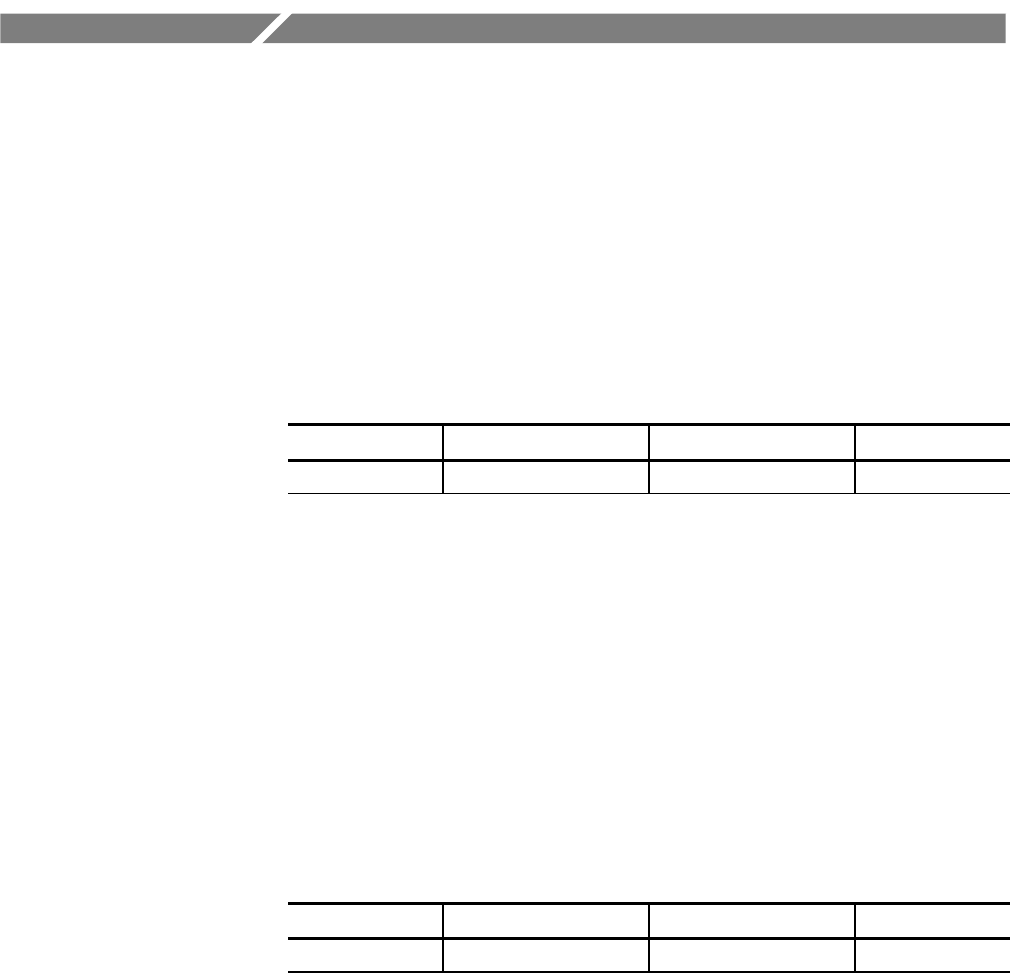
Tektronix TekVISA Programmer Manual 3-5
Attributes
The following Tektronix VISA attributes are presented in alphabetical order.
VI_ATTR_ASRL_AVAIL_NUM
Shows the number of bytes available in the global receive buffer.
Table 3- 2: VI_ATTR_ASRL_AVAIL_NUM Attribute
Data Type Range of Values Default Access Privilege
ViUInt32 0 to FFFFFFFFh 0 Read Only Global
Applicable to serial devices.
Controlling the Serial I/O Buffers
Setting and Retrieving Attributes
VI_ATTR_ASRL_BAUD
The baud rate of the interface.
Table 3- 3: VI_ATTR_ASRL_BAUD Attribute
Data Type Range of Values Default Access Privilege
ViUInt32 0 to FFFFFFFFh 9600 Read/Write Global
Applicable to serial devices. Although represented as an unsigned 32--bit integer
so that any baud rate can be used, it usually requires a commonly used rate such
as 300, 1200, 2400, or 9600 baud.
Setting and Retrieving Attributes
Usage
Comments
See Also
Usage
Comments
See Also

Attributes
3-6 Tektronix TekVISA Programmer Manual
VI_ATTR_ASRL_CTS_STATE
Shows the current state of the Clear--to--Send (CTS) input signal.
Table 3- 4: VI_ATTR_ASRL_CTS_STATE Attribute
Data Type Range of Values Default Access Privilege
ViInt16 VI_STATE_ASSERTED
VI_STATE_UNASSERTED
VI_STATE_UNKNOWN
N/A Read Only Global
Applicable to serial devices.
Setting and Retrieving Attributes
VI_ATTR_ASRL_FLOW_CNTRL
VI_ATTR_ASRL_RTS_STATE
VI_ATTR_ASRL_DATA_BITS
The number of data bits contained in each frame (5 to 8).
Table 3- 5: VI_ATTR_ASRL_DATA_BITS Attribute
Data Type Range of Values Default Access Privilege
ViUint16 5to8 8Read/Write Global
Applicable to serial devices. The data bits for each frame are located in the
low--order bits of every byte stored in memory.
Setting and Retrieving Attributes
Usage
Comments
See Also
Usage
Comments
See Also

Attributes
Tektronix TekVISA Programmer Manual 3-7
VI_ATTR_ASRL_DCD_STATE
Shows the current state of the Data Carrier Detect (DCD) input signal.
Table 3- 6: VI_ATTR_ASRL_DCD_STATE Attribute
Data Type Range of Values Default Access Privilege
ViInt16 VI_STATE_ASSERTED
VI_STATE_UNASSERTED
VI_STATE_UNKNOWN
N/A Read Only Global
Applicable to serial devices. The DCD signal is often used by modems to
indicate the detection of a carrier (remote modem) on the telephone line. The
DCD signal is also known as Receive Line Signal Detect (RLSD).
Setting and Retrieving Attributes
VI_ATTR_ASRL_DSR_STATE
Shows the current state of the Data Set Ready (DSR) input signal.
Table 3- 7: VI_ATTR_ASRL_DSR_STATE Attribute
Data Type Range of Values Default Access Privilege
ViInt16 VI_STATE_ASSERTED
VI_STATE_UNASSERTED
VI_STATE_UNKNOWN
N/A Read Only Global
Applicable to serial devices.
Setting and Retrieving Attributes
VI_ATTR_ASRL_FLOW_CNTRL
VI_ATTR_ASRL_DTR_STATE
Usage
Comments
See Also
Usage
Comments
See Also

Attributes
3-8 Tektronix TekVISA Programmer Manual
VI_ATTR_ASRL_DTR_STATE
Used to manually assert or unassert the Data Terminal Ready (DTR) output
signal.
Table 3- 8: VI_ATTR_ASRL_DTR_STATE Attribute
Data Type Range of Values Default Access Privilege
ViInt16 VI_STATE_ASSERTED
VI_STATE_UNASSERTED
VI_STATE_UNKNOWN
N/A Read/Write Global
Applicable to serial devices.
Setting and Retrieving Attributes
VI_ATTR_ASRL_FLOW_CNTRL
VI_ATTR_ASRL_DSR_STATE
VI_ATTR_ASRL_END_IN
Indicates the method used to terminate read operations.
Table 3- 9: VI_ATTR_ASRL_END_IN Attribute
Data Type Range of Values Default Access Privilege
ViUInt16 VI_ASRL_END_NONE
VI_ASRL_END_LAST_
BIT
VI_ASRL_END_
TERMCHAR
VI_ASRL_END_
TERMCHAR
Read/Write Local
Applicable to serial devices.
HIf set to VI_ASRL_END_NONE, the read will not terminate until all of the
requested data is received (or an error occurs).
HIf set to VI_ASRL_END_LAST_BIT, the read will terminate as soon as a
character arrives with its last bit set. For example, if
VI_ATTR_ASRL_DATA_BITS is set to 8, the read will terminate when a
character arrives with the 8th bit set.
Usage
Comments
See Also
Usage
Comments

Attributes
Tektronix TekVISA Programmer Manual 3-9
HIf set to VI_ASRL_END_TERMCHAR, the read will terminate as soon as
the character in VI_ATTR_TERMCHAR is received.
Setting and Retrieving Attributes
VI_ATTR_TERMCHAR
VI_ATTR_ASRL_END_OUT
Indicates the method used to terminate write operations.
Table 3- 10: VI_ATTR_ASRL_END_OUT Attribute
Data Type Range of Values Default Access Privilege
ViUInt16 VI_ASRL_END_NONE
VI_ASRL_END_LAST_
BIT
VI_ASRL_END_
TERMCHAR
VI_ASRL_END_BREAK
VI_ASRL_END_NONE Read/Write Local
Applicable to serial devices.
HIf set to VI_ASRL_END_NONE, the write will not append anything to the
data being written.
HIf set to VI_ASRL_END_BREAK, the write will transmit a break after all
the characters for the write have been sent.
HIf set to VI_ASRL_END_LAST_BIT, the write will send all but the last
character with the last bit clear, then transmit the last character with the last
bit set. For example, if VI_ATTR_ASRL_DATA_BITS is set to 8, the write
will clear the 8th bit for all but the last character, then transmit the last
character with the 8th bit set.
HIf set to VI_ASRL_END_TERMCHAR, the write will send the character in
VI_ATTR_TERMCHAR after the data being transmitted.
Setting and Retrieving Attributes
VI_ATTR_TERMCHAR
See Also
Usage
Comments
See Also
Attributes
3-10 Tektronix TekVISA Programmer Manual
VI_ATTR_ASRL_FLOW_CNTRL
Indicates the type of flow control used by the transfer mechanism.
Table 3- 11: VI_ATTR_ASRL_FLOW_CNTRL Attribute
Data Type Range of Values Default Access Privilege
ViUInt16 VI_ASRL_FLOW_NONE
VI_ASRL_FLOW_XON_
XOFF
VI_ASRL_FLOW_RTS_
CTS
VI_ASRL_FLOW_DTR_
DSR
VI_ASRL_FLOW_NONE Read/Write Global
Applicable to serial devices.
HIf set to VI_ASRL_FLOW_NONE, the transfer mechanism does not use
flow control, and buffers on both sides of the connection are assumed to be
large enough to hold all data transferred.
HIf set to VI_ASRL_FLOW_XON_XOFF, the transfer mechanism uses the
XON and XOFF characters to perform flow control. It
Hcontrols input flow by sending XOFF when the receive buffer is nearly
full.
Hcontrols the output flow by suspending transmission when XOFF is
received.
HIf set to VI_ASRL_FLOW_RTS_CTS, the transfer mechanism uses the RTS
output signal and the CTS input signal to perform flow control. It
Hcontrols input flow by unasserting the RTS signal when the receive
buffer is nearly full.
Hcontrols output flow by suspending the transmission when the CTS
signal is unasserted.
HIn this case, the VI_ATTR_ASRL_RTS_STATE attribute is ignored
when changed, but can be read to determine whether the background
flow control is asserting or unasserting the signal.
HIf set to VI_ASRL_FLOW_DTR_DSR, the transfer mechanism uses the
DTR output signal and the DSR input signal to perform flow control. It
Hcontrols input flow by unasserting the DTR signal when the receive
buffer is nearly full, and it
Usage
Comments
Attributes
Tektronix TekVISA Programmer Manual 3-11
Hcontrols output flow by suspending the transmission when the DSR
signal is unasserted.
HThis attribute can specify multiple flow control mechanisms by bit--ORing
multiple values together. However, certain combinations may not be
supported by all serial ports and/or operating systems.
Setting and Retrieving Attributes
VI_ATTR_ASRL_PARITY
The parity used with every frame transmitted and received.
Table 3- 12: VI_ATTR_ASRL_PARITY Attribute
Data Type Range of Values Default Access Privilege
ViUInt16 VI_ASRL_PAR_NONE
VI_ASRL_PAR_ODD
VI_ASRL_PAR_EVEN
VI_ASRL_PAR_MARK
VI_ASRL_PAR_SPACE
VI_ASRL_PAR_NONE Read/Write Global
Applicable to serial devices.
HVI_ASRL_PAR_MARK means that the parity bit exists and is always 1.
HVI_ASRL_PAR_SPACE means that the parity bit exists and is always 0.
Setting and Retrieving Attributes
VI_ATTR_ASRL_REPLACE_CHAR
Specifies the character to be used to replace incoming characters that arrive with
errors (such as parity error).
Table 3- 13: VI_ATTR_ASRL_REPLACE_CHAR Attribute
Data Type Range of Values Default Access Privilege
ViUInt8 0toFFh 0Read/Write Local
See Also
Usage
Comments
See Also
Usage

Attributes
3-12 Tektronix TekVISA Programmer Manual
Applicable to serial devices.
Setting and Retrieving Attributes
VI_ATTR_ASRL_RI_STATE
Shows the current state of the Ring Indicator (RI) input signal.
Table 3- 14: VI_ATTR_ASRL_RI_STATE Attribute
Data Type Range of Values Default Access Privilege
ViInt16 VI_STATE_ASSERTED
VI_STATE_UNASSERTED
VI_STATE_UNKNOWN
N/A Read Only Global
Applicable to serial devices. The RI signal is often used by modems to indicate
that the telephone line is ringing.
Setting and Retrieving Attributes
VI_ATTR_ASRL_RTS_STATE
Used to manually assert or unassert the Request To Send (RTS) output signal.
Table 3- 15: VI_ATTR_ASRL_RTS_STATE Attribute
Data Type Range of Values Default Access Privilege
ViInt16 VI_STATE_ASSERTED
VI_STATE_UNASSERTED
VI_STATE_UNKNOWN
N/A Read/Write Global
Applicable to serial devices.
When the VI_ATTR_ASRL_FLOW_CNTRL attribute is set to
VI_ASRL_FLOW_RTS_CTS, this attribute is ignored when changed, but can be
read to determine whether the background flow control is asserting or unassert-
ing the signal.
Comments
See Also
Usage
Comments
See Also
Usage
Comments
Attributes
Tektronix TekVISA Programmer Manual 3-13
Setting and Retrieving Attributes
VI_ATTR_ASRL_FLOW_CNTRL
VI_ATTR_ASRL_CTS_STATE
VI_ATTR_ASRL_STOP_BITS
The number of stop bits used to indicate the end of a frame.
Table 3- 16: VI_ATTR_ASRL_STOP_BITS Attribute
Data Type Range of Values Default Access Privilege
ViUInt16 VI_ASRL_STOP_ONE
VI_ASRL_STOP_ONE5
VI_ASRL_STOP_TWO
VI_ASRL_STOP_ONE Read/Write Global
Applicable to serial devices. The value VI_ASRL_STOP_ONE5 indicates
one--and--one--half (1.5) stop bits.
Setting and Retrieving Attributes
VI_ATTR_ASRL_XOFF_CHAR
Specifies the value of the XOFF character used for XON/XOFF flow control
(both directions).
Table 3- 17: VI_ATTR_ASRL_XOFF_CHAR Attribute
Data Type Range of Values Default Access Privilege
ViUInt8 0toFFh <Ctrl--S> (13h) Read/Write Local
Applicable to serial devices. If XON/XOFF flow control (software handshaking)
is not being used, the value of this attribute is ignored.
Setting and Retrieving Attributes
VI_ATTR_ASRL_FLOW_CNTRL
VI_ATTR_ASRL_XON_CHAR
See Also
Usage
Comments
See Also
Usage
Comments
See Also

Attributes
3-14 Tektronix TekVISA Programmer Manual
VI_ATTR_ASRL_XON_CHAR
Specifies the value of the XON character used for XON/XOFF flow control
(both directions).
Table 3- 18: VI_ATTR_ ASRL_XON_CHAR Attribute
Data Type Range of Values Default Access Privilege
ViUInt8 0toFFh <Ctrl--Q> (11h) Read/Write Local
Applicable to serial devices. If XON/XOFF flow control (software handshaking)
is not being used, the value of this attribute is ignored.
Setting and Retrieving Attributes
VI_ATTR_ASRL_FLOW_CNTRL
VI_ATTR_ASRL_XOFF_CHAR
VI_ATTR_BUFFER
Contains the address of a buffer that was used in an asynchronous operation.
Table 3- 19: VI_ATTR_BUFFER Attribute
Data Type Range of Values Default Access Privilege
ViBuf N/A N/A Read Only
This attribute is used to check the buffer after event I/O completion.
Setting and Retrieving Attributes
Events
VI_EVENT_IO_COMPLETION
Usage
Comments
See Also
Usage
Comments
See Also

Attributes
Tektronix TekVISA Programmer Manual 3-15
VI_ATTR_EVENT_TYPE
Unique logical identifier of the event.
Table 3- 20: VI_ATTR_EVENT_TYPE Attribute
Data Type Range of Values Default Access Privilege
ViEventType 0 to FFFFFFFFh N/A Read Only
.This attribute is used to identify one of the event types listed in the section on
Events.
Setting and Retrieving Attributes
Events
VI_ATTR_GPIB_PRIMARY_ADDR
Primary address of the GPIB device used by the given session.
Table 3- 21: VI_ATTR_GPIB_PRIMARY_ADDR Attribute
Data Type Range of Values Default Access Privilege
ViUInt16 0to30 N/A Read Only Global
Applicable to GPIB devices. See the viOpen() operation for more information
about the format for addressing GPIB devices.
Setting and Retrieving Attributes
VI_ATTR_RSRC_NAME
viOpen()
Usage
Comments
See Also
Usage
Comments
See Also

Attributes
3-16 Tektronix TekVISA Programmer Manual
VI_ATTR_GPIB_READDR_EN
Specifies whether to use repeat addressing before each read or write operation.
Table 3- 22: VI_ATTR_GPIB_READDR_EN Attribute
Data Type Range of Values Default Access Privilege
Boolean VI_TRUE
VI_FALSE
VI_TRUE Read/Write Local
Applicable to GPIB devices.
Setting and Retrieving Attributes
VI_ATTR_GPIB_UNADDR_EN
VI_ATTR_GPIB_SECONDARY_ADDR
Secondary address of the GPIB device used by the given session.
Table 3- 23: VI_ATTR_GPIB_SECONDARY_ADDR Attribute
Data Type Range of Values Default Access Privilege
ViUInt16 0to30
VI_NO_SEC_ADDR
VI_NO_SEC_ADDR Read Only Global
Applicable to GPIB devices. See the viOpen() operation for more information
about the format for addressing GPIB devices.
Setting and Retrieving Attributes
VI_ATTR_RSRC_NAME
viOpen()
Usage
Comments
See Also
Usage
Comments
See Also

Attributes
Tektronix TekVISA Programmer Manual 3-17
VI_ATTR_GPIB_UNADDR_EN
Specifies whether to unaddress the device (UNT and UNL) after each read or
write operation.
Table 3- 24: VI_ATTR_GPIB_UNADDR_EN Attribute
Data Type Range of Values Default Access Privilege
ViBoolean VI_TRUE
VI_FALSE
VI_FALSE Read/Write Local
Applicable to GPIB devices.
Setting and Retrieving Attributes
VI_ATTR_GPIB_READDR_EN
VI_ATTR_INTF_INST_NAME
Human--readable text describing the given interface.
Table 3- 25: VI_ATTR_INTF_INST_NAME Attribute
Data Type Range of Values Default Access Privilege
ViString N/A N/A Read Only Global
Applicable to GPIB and serial interfaces.
Setting and Retrieving Attributes
VI_ATTR_INTF_NUM
Usage
Comments
See Also
Usage
Comments
See Also

Attributes
3-18 Tektronix TekVISA Programmer Manual
VI_ATTR_INTF_NUM
Board number for the given interface.
Table 3- 26: VI_ATTR_INTF_NUM Attribute
Data Type Range of Values Default Access Privilege
ViUInt16 0 to FFFFh 0 Read Only Global
Applicable to GPIB and serial interfaces.
Setting and Retrieving Attributes
VI_ATTR_INTF_NAME
VI_ATTR_INTF_TYPE
Specifies the interface type of the given session.
Table 3- 27: VI_ATTR_INTF_TYPE Attribute
Data Type Range of Values Default Access Privilege
ViUInt16 VI_INTF_GPIB
VI_INTF_ASRL
N/A Read Only Global
Applicable to GPIB and serial interfaces.
Setting and Retrieving Attributes
Usage
Comments
See Also
Usage
Comments
See Also
Attributes
Tektronix TekVISA Programmer Manual 3-19
VI_ATTR_IO_PROT
Specifies which protocol to use, depending on the type of interface.
Table 3- 28: VI_ATTR_IO_PROT Attribute
Data Type Range of Values Default Access Privilege
ViUInt16 VI_NORMAL
VI_HS488
VI_ASRL488
VI_NORMAL Read/Write Local
Choices depend of interface type:
HWith GPIB interfaces, you can choose between normal and high--speed
(HS488) data transfers.
HWith serial interfaces, you can choose between normal and ASRL488--style
transfers, in which case the viAssertTrigger(), viReadSTB(), and viClear()
operations send 488.2--defined strings.
Setting and Retrieving Attributes
Controlling the Serial I/O Buffers
viAssertTrigger()
viReadSTB()
viClear()
VI_ATTR_JOB_ID
Contains the job ID of the asynchronous operation that has completed.
Table 3- 29: VI_ATTR_Job_ID Attribute
Data Type Range of Values Default Access Privilege
ViJobID N/A NA Read Only
This attribute is used to check the job ID after event I/O completion
Setting and Retrieving Attributes
Events
VI_EVENT_IO_COMPLETION
Usage
Comments
See Also
Usage
Comments
See Also

Attributes
3-20 Tektronix TekVISA Programmer Manual
VI_ATTR_MAX_QUEUE_LENGTH
Specifies the maximum number of events that can be queued at any time on the
given session.
Table 3- 30: VI_ATTR_MAX_QUEUE_LENGTH Attribute
Data Type Range of Values Default Access Privilege
ViUInt32 1h to FFFFFFFFh 50 Read/Write Local
If the number of pending occurrences exceeds the value specified in this
attribute, the lowest--priority events are discarded. This attribute is
HRead/Write until viEnableEvent() is called for the first time on a session
HRead Only after viEnableEvent() is called for the first time on a session
Setting and Retrieving Attributes
viEnableEvent()
VI_ATTR_OPER_NAME
The name of the operation generating the event.
Table 3- 31: VI_ATTR_OPER_NAME Attribute
Data Type Range of Values Default Access Privilege
ViString N/A N/A Read Only
This attribute is used to check the operation name that generated an event,
typically an exception. For example, for an exception generated from the
viLock() operation, VI_ATTR_OPER_NAME would contain the string
“viLock”.
Setting and Retrieving Attributes
Events
VI_EVENT_EXCEPTION
Usage
Comments
See Also
Usage
Comments
See Also
Attributes
Tektronix TekVISA Programmer Manual 3-21
VI_ATTR_RD_BUF_OPER_MODE
Determines the operational mode of the read buffer.
Table 3- 32: VI_ATTR_RD_BUF_OPER_MODE Attribute
Data Type Range of Values Default Access Privilege
ViUInt16 VI_FLUSH_ON_ACCESS
VI_FLUSH_DISABLE
VI_FLUSH_DISABLE Read/Write Local
When the operational mode is set to
HVI_FLUSH_DISABLE (default), the buffer is flushed only on explicit calls
to viFlush().
HVI_FLUSH_ON_ACCESS, the buffer is flushed every time a viScanf()
operation completes.
Setting and Retrieving Attributes
viScanf()
VI_ATTR_RET_COUNT
Contains the actual number of elements that were asynchronously transferred.
Table 3- 33: VI_ATTR_RET_COUNT Attribute
Data Type Range of Values Default Access Privilege
ViUInt32 0 to FFFFFFFFh N/A Read Only
This attribute is used to check the return count after event I/O completion.
Setting and Retrieving Attributes
VI_EVENT_IO_COMPLETION
Usage
Comments
See Also
Usage
Comments
See Also
Attributes
3-22 Tektronix TekVISA Programmer Manual
VI_ATTR_RM_SESSION
Specifies the session of the Resource Manager that was used to open this session.
Table 3- 34: VI_ATTR_RM_SESSION Attribute
Data Type Range of Values Default Access Privilege
ViSession N/A N/A Read Only Local
The value of this attribute for the Default Resource Manager is VI_NULL.
Setting and Retrieving Attributes
VI_ATTR_RSRC_IMPL_VERSION
Resource version that uniquely identifies each of the different revisions or
implementations of a resource.
Table 3- 35: VI_ATTR_RSRC_IMPL_VERSION Attribute
Data Type Range of Values Default Access Privilege
ViVersion 0 to FFFFFFFFh N/A Read Only Global
The value of this attribute is defined by the individual manufacturer and
increments the total version value on subsequent revisions. The value of
sub--minor versions is non--zero only for pre--release versions (beta). All
officially released products have a sub--minor value of zero.
Table 3- 36: ViVersion Description for VI_ATTR_RSRC_IMPL_VERSION
Bits 31 to 20 Bits 19 to 8 Bits0to7
Major Number Minor Number Sub--minor Number
Setting and Retrieving Attributes
Usage
Comments
See Also
Usage
Comments
See Also
Attributes
Tektronix TekVISA Programmer Manual 3-23
VI_ATTR_RSRC_LOCK_STATE
The current locking state of the resource on the given session.
Table 3- 37: VI_ATTR_RSRC_LOCK_STATE Attribute
Data Type Range of Values Default Access Privilege
ViAccessMode VI_NO_LOCK
VI_EXCLUSIVE_LOCK
VI_SHARED_LOCK
VI_NO_LOCK Read Only Global
The resource can be unlocked, locked with an exclusive lock, or locked with a
shared lock.
Setting and Retrieving Attributes
Locking and Unlocking Resources
VI_ATTR_RSRC_MANF_ID
A value that corresponds to the VXI manufacturer ID of the manufacturer that
created the VISA implementation.
Table 3- 38: VI_ATTR_RSRC_MANF_ID Attribute
Data Type Range of Values Default Access Privilege
ViUInt16 0 to 3FFFh N/A Read Only Global
The manufacturer of TekVISA is Tektronix.
Setting and Retrieving Attributes
Usage
Comments
See Also
Usage
Comments
See Also

Attributes
3-24 Tektronix TekVISA Programmer Manual
VI_ATTR_RSRC_MANF_NAME
A string that corresponds to the VXI manufacturer name of the manufacturer that
created the VISA implementation.
Table 3- 39: VI_ATTR_RSRC_MANF_NAME Attribute
Data Type Range of Values Default Access Privilege
ViString N/A N/A Read Only Global
The manufacturer of TekVISA is Tektronix.
Setting and Retrieving Attributes
VI_ATTR_RSRC_NAME
The unique identifier for a resource.
Table 3- 40: VI_ATTR_RSRC_NAME Attribute
Data Type Range of Values Default Access Privilege
ViRsrc N/A N/A Read Only Global
For the Default Resource Manager, the value of this attribute is “”, the empty
string.
HThe value of this attribute must be compliant with the address structure
presented in the following table. See the viOpen() description for examples.
HOptional string segments are shown in square brackets ([ ]).
HThe default value for the optional string segment board is 0.
HThe default value for the optional string segment secondary address is
none.
HAddress strings are not case sensitive.
Usage
Comments
See Also
Usage
Comments

Attributes
Tektronix TekVISA Programmer Manual 3-25
Table 3- 41: Resource Address String Grammar
Interface Syntax
ASRL ASRL[ board][::INSTR]
GPIB GPIB[ board]:: primary address[:: secondary address][::INSTR]
Setting and Retrieving Attributes
viOpen()
VI_ATTR_RSRC_SPEC_VERSION
Resource version that uniquely identifies the version of the VISA specification to
which the implementation is compliant.
Table 3- 42: VI_ATTR_RSRC_SPEC_VERSION Attribute
Data Type Range of Values Default Access Privilege
ViVersion 0 to FFFFFFFFh 00200000h Read Only Global
This current implementation is compliant with Version 2.0 of the VISA
Specification.
Table 3- 43: ViVersion Description for VI_ATTR_RSRC_SPEC_VERSION
Bits 31 to 20 Bits 19 to 8 Bits0to7
Major Number Minor Number Sub--minor Number
Setting and Retrieving Attributes
See Also
Usage
Comments
See Also
Attributes
3-26 Tektronix TekVISA Programmer Manual
VI_ATTR_SEND_END_EN
Specifies whether to assert END during the transfer of the last byte of the buffer.
Table 3- 44: VI_ATTR_SEND_END_EN Attribute
Data Type Range of Values Default Access Privilege
Vi Boolean VI_TRUE
VI_FALSE
VI_TRUE Read/Write Local
Applicable to GPIB and serial devices.
Setting and Retrieving Attributes
Basic Input/Output
Reading and Writing Formatted Data
VI_ATTR_STATUS
Contains the return code of the asynchronous I/O operation that has completed or
status code returned by an operation generating an error.
Table 3- 45: VI_ATTR_STATUS Attribute
Data Type Range of Values Default Access Privilege
ViStatus N/A N/A Read Only
This attribute is used to check the return code after event I/O completion or the
status code after an exception event.
Setting and Retrieving Attributes
Handling Events
VI_EVENT_IO_COMPLETION
VI_EVENT_EXCEPTION
Usage
Comments
See Also
Usage
Comments
See Also

Attributes
Tektronix TekVISA Programmer Manual 3-27
VI_ATTR_SUPPRESS_END_EN
Specifies whether to suppress the END indicator termination.
Table 3- 46: VI_ATTR_SUPPRESS_END_EN Attribute
Data Type Range of Values Default Access Privilege
ViBoolean VI_TRUE
VI_FALSE
VI_FALSE Read/Write Local
If this attribute is set to
HVI_TRUE, the END indicator does not terminate read operations.
HVI_FALSE, the END indicator terminates read operations.
Setting and Retrieving Attributes
viRead()
VI_ATTR_TCPIP_ADDR
Specifies the TCPIP address of the device to which the session is connected.
This string is formatted in dot notation.
Table 3- 47: VI_ATTR_TCPIP_ADDR Attribute
Data Type Range of Values Default Access Privilege
ViString N/A N/A Read Only Global
This attribute is applicable to TCPIP INSTR and TCPIP SOCKET.
Setting and Retrieving Attributes
VI_ATTR_TCPIP_HOSTNAME
Usage
Comments
See Also
Usage
Comments
See Also

Attributes
3-28 Tektronix TekVISA Programmer Manual
VI_ATTR_TCPIP_HOSTNAME
Specifies the host name of the device. If no host name is available, this attribute
returns an empty string.
Table 3- 48: VI_ATTR_TCPIP_HOSTNAME Attribute
Data Type Range of Values Default Access Privilege
ViString N/A N/A Read Only Global
This attribute is applicable to TCPIP INSTR and TCPIP SOCKET.
Setting and Retrieving Attributes
VI_ATTR_TCPIP_ADDR
VI_ATTR_TCPIP_KEEPALIVE
An application can request a TCP/IP provider to enable the use of keep--alive
packets on TCP connections by turning on this attribute. If a connection is
dropped as a result of keep--alives, the error code VI_ERROR_CONN_LOST is
returned to current and subsequent I/O calls on the session.
Table 3- 49: VI_ATTR_TCPIP_KEEPALIVE Attribute
Data Type Range of Values Default Access Privilege
ViBoolean VI_TRUE
VI_FALSE
VI_FALSE Read/Write Local
This attribute is applicable to TCPIP SOCKET only.
Setting and Retrieving Attributes
VI_ATTR_TCPIP_NODELAY
Usage
Comments
See Also
Usage
Comments
See Also

Attributes
Tektronix TekVISA Programmer Manual 3-29
VI_ATTR_TCPIP_NODELAY
Disables the Nagle algorithm when this attribute is enabled. The Nagle algorithm
improves network performance by buffering send data until a full--size packet
can be sent. This attribute is enabled by default in VISA to verify that synchro-
nous writes get flushed immediately.
Table 3- 50: VI_ATTR_TCPIP_NODELAY Attribute
Data Type Range of Values Default Access Privilege
ViBoolean VI_TRUE
VI_FALSE
VI_FALSE Read/Write Local
This attribute is applicable to TCPIP SOCKET only.
Setting and Retrieving Attributes
VI_ATTR_TCPIP_KEEPALIVE
VI_ATTR_TCPIP_PORT
Specifies the port number for a given TCPIP address. For a TCPIP SOCKET
resource, this is a required part of the address string.
Table 3- 51: VI_ATTR_TCPIP_PORT Attribute
Data Type Range of Values Default Access Privilege
ViUInt16 0 to FFFFh N/A Read Only Global
This attribute is applicable to TCPIP SOCKET only.
Setting and Retrieving Attributes
Usage
Comments
See Also
Usage
Comments
See Also

Attributes
3-30 Tektronix TekVISA Programmer Manual
VI_ATTR_TERMCHAR
Termination character.
Table 3- 52: VI_ATTR_TERMCHAR Attribute
Data Type Range of Values Default Access Privilege
ViUInt8 0toFFh 0Ah (linefeed) Read/Write Local
When the termination character is read and VI_ATTR_TERMCHAR_EN is
enabled during a read operation, the read operation terminates.
Setting and Retrieving Attributes
Basic Input/Output
Reading and Writing Formatted Data
VI_ATTR_TERMCHAR_EN
VI_ATTR_ASRL_END_IN
VI_ATTR_ASRL_END_OUT
viRead()
VI_ATTR_TERMCHAR_EN
Flag that determines whether the read operation should terminate when a
termination character is received.
Table 3- 53: VI_ATTR_TERMCHAR_EN Attribute
Data Type Range of Values Default Access Privilege
ViBoolean VI_TRUE
VI_FALSE
VI_FALSE Read/Write Local
When the termination character is read and VI_ATTR_TERMCHAR_EN is
enabled during a read operation, the read operation terminates.
Setting and Retrieving Attributes
Basic Input/Output
Reading and Writing Formatted Data
VI_ATTR_TERMCHAR
viRead()
Usage
Comments
See Also
Usage
Comments
See Also

Attributes
Tektronix TekVISA Programmer Manual 3-31
VI_ATTR_TMO_VALUE
Minimum timeout value to use, in milliseconds.
Table 3- 54: VI_ATTR_TMO_VALUE Attribute
Data Type Range of Values Default Access Privilege
ViUInt32 VI_TMO_IMMEDIATE
1 to FFFFFFFEh
VI_TMO_INFINITE
2000 Read/Write Local
A timeout value of
HVI_TMO_IMMEDIATE means that operations should never wait for the
device to respond.
HVI_TMO_INFINITE disables the timeout mechanism.
Setting and Retrieving Attributes
VI_ATTR_TRIG_ID
Identifier for the current triggering mechanism.
Table 3- 55: VI_ATTR_TRIG_ID Attribute
Data Type Range of Values Default Access Privilege
ViInt16 VI_TRIG_SW VI_TRIG_SW Read/Write Local
Applicable to GPIB and serial devices.
Setting and Retrieving Attributes
viAssertTrigger()
Usage
Comments
See Also
Usage
Comments
See Also
Attributes
3-32 Tektronix TekVISA Programmer Manual
VI_ATTR_USB_INTFC_NUM
Specifies the USB interface number of the device to which the session is
connected.
Table 3- 56: VI_ATTR_USB_INTFC_NUM Attribute
Data Type Range of Values Default Access Privilege
viInt16 0toFEh 0Read Only Global
Applicable only to USB INSTR devices.
Setting and Retrieving Attributes
VI_ATTR_USB_MAX_INTR_SIZE
Specifies the maximum number of bytes that the USB device will send on the
interrupt-IN pipe.
Table 3- 57: VI_ATTR_USB_MAX_INTR_SIZE Attribute
Data Type Range of Values Default Access Privilege
ViUInt16 0 to FFFFh N/A Read/Write Local
Applicable only to USB INSTR devices.
If a USB interrupt contains more data than this size, the data in excess of this
size will be lost.
VI_ATTR_USB_MAX_INTR_SIZE is Read/Write when the corresponding
session is not enabled to receive USB interrupt events. When the session is
enabled to receive USB interrupt events, the attribute
VI_ATTR_USB_MAX_INTR_SIZE is Read Only
Setting and Retrieving Attributes
Usage
Comments
See Also
Usage
Comments
See Also

Attributes
Tektronix TekVISA Programmer Manual 3-33
VI_ATTR_USB_PROTOCOL
Specifies the USB protocol number.
Table 3- 58: VI_ATTR_USB_PROTOCOL Attribute
Data Type Range of Values Default Access Privilege
ViInt16 0toFFh N/A Read Only Global
Applicable only to USB INSTR devices.
Setting and Retrieving Attributes
VI_ATTR_USB_RECV_INTR_DATA
Specifies the actual data that was received from the USB interrupt-IN pipe.
Table 3- 59: VI_ATTR_USB_RECV_INTR_DATA Attribute
Data Type Range of Values Default Access Privilege
ViAUInt8 N/A N/A Read Only
Applicable only to USB INSTR devices. Contains the actual received data from
the USB Interrupt. The size of the data buffer passed in must be at least equal to
the value of VI_ATTR_USB_RECV_INTR_SIZE.
Setting and Retrieving Attributes
VI_ATTR_USB_RECV_INTR_SIZE
Usage
Comments
See Also
Usage
Comments
See Also

Attributes
3-34 Tektronix TekVISA Programmer Manual
VI_ATTR_USB_RECV_INTR_SIZE
Specifies the size of the data that was received from the USB interrupt-IN pipe.
Table 3- 60: VI_ATTR_USB_RECV_INTR_SIZE Attribute
Data Type Range of Values Default Access Privilege
ViUInt16 0 to FFFFh N/A Read/Write Local
Applicable only to USB INSTR devices. Contains the number of bytes of USB
interrupt data that is stored.
Setting and Retrieving Attributes
VI_ATTR_USB_RECV_INTR_DATA
VI_ATTR_USB_SERIAL_NUM
This string attribute is the serial number of the USB instrument. The value of
this attribute should be used only for display purposes and not for programmatic
decisions.
Table 3- 61: VI_ATTR_USB_SERIAL_NUM Attribute
Data Type Range of Values Default Access Privilege
viString N/A N/A Read Only Global
Applicable only to USB INSTR devices.
Setting and Retrieving Attributes
Usage
Comments
See Also
Usage
Comments
See Also
Attributes
Tektronix TekVISA Programmer Manual 3-35
VI_ATTR_USER_DATA
Data used privately by the application for a particular session.
Table 3- 62: VI_ATTR_USER_DATA Attribute
Data Type Range of Values Default Access Privilege
ViAddr N/A N/A Read/Write Local
This data is not used by VISA for any purpose and is provided to the application
for its own use.
Setting and Retrieving Attributes
VI_ATTR_WR_BUF_OPER_MODE
Determines the operational mode of the write buffer.
Table 3- 63: VI_ATTR_WR_BUF_OPER_MODE Attribute
Data Type Range of Values Default Access Privilege
ViUInt16 VI_FLUSH_ON_ACCESS
VI_FLUSH_WHEN_FULL
VI_FLUSH_WHEN_FULL Read/Write Local
When the operational mode is set to
HVI_FLUSH_WHEN_FULL (default), the buffer is flushed when an END
indicator is written to the buffer, or when the buffer fills up.
HVI_FLUSH_ON_ACCESS, the write buffer is flushed under the same
conditions, and also every time a viPrintf() operation completes.
Setting and Retrieving Attributes
Basic Input/Output
Reading and Writing Formatted Data
viPrintf()
Usage
Comments
See Also
Usage
Comments
See Also

Attributes
3-36 Tektronix TekVISA Programmer Manual

Events
Tektronix TekVISA Programmer Manual 4-1
Events
The following event types are presented in alphabetical order.
VI_EVENT_EXCEPTION
Notification that an error condition has occurred during an operation invocation.
Table 4- 1: VI_EVENT_EXCEPTION Related Attributes
Event Attribute Description
VI_ATTR_EVENT_TYPE Unique logical identifier of the event.
Value = VI_EVENT_EXCEPTION.
VI_ATTR_STATUS Status code returned by the operation generating the error.
VI_ATTR_OPER_NAME The name of the operation generating the event.
Exception Handling
Generating an Error Condition
VI_EVENT_IO_COMPLETION
Notification that an asynchronous operation has completed.
Table 4- 2: VI_EVENT_IO_COMPLETION Related Attributes
Event Attribute Description
VI_ATTR_EVENT_TYPE Unique logical identifier of the event.
Value = VI_EVENT_IO_COMPLETION.
VI_ATTR_STATUS Return code of the asynchronous I/O operation that has
completed.
VI_ATTR_JOB_ID The job ID of the asynchronous operation that has completed.
VI_ATTR_BUFFER The address of a buffer that was used in an asynchronous
operation.
VI_ATTR_RET_COUNT The actual number of elements that were asynchronously
transferred.
VI_ATTR_OPER_NAME The name of the operation generating the event.
Usage
See Also
Usage

Events
4-2 Tektronix TekVISA Programmer Manual
Asynchronous Read/Write
viReadAsync()
viWriteAsync
VI_EVENT_SERVICE_REQ
Notification that a service request was received from the device.
Table 4- 3: VI_EVENT_SERVICE_REQ Related Attributes
Event Attribute Description
VI_ATTR_EVENT_TYPE Unique logical identifier of the event.
Value = VI_EVENT_SERVICE_REQ.
Status/Service Request
See Also
Usage
See Also

Examples

Tektronix TekVISA Programmer Manual 5-1
Programming Examples
Introduction
The programming examples discussed here illustrate methods you can use to
control the oscilloscope using VISA. All the program examples assume that the
device descriptor is GPIB8::1::INSTR. The sample programs include:
SIMPLE.CPP — illustrates opening and closing a session
SIMPLEFINDRSRC.CPP — illustrates finding resources using regular
expressions
FINDRSRCATTRMATCH.CPP — illustrates finding resources using attribute
matching
ATTRACCESS.CPP — illustrates getting and setting attributes
RWEXAM.CPP — illustrates basic input/output
FORMATIO.CPP — illustrates formatted input/output
BUFFERIO.CPP — demonstrates the performance effect of resizing the
formatted I/O buffers
SRQWAIT.CPP — illustrates event handling using the queuing mechanism
SRQ.CPP — illustrates event handling using the callback mechanism
EXLOCKEXAM.CPP — illustrates exclusive locking of resources
SHAREDLOCK.CPP — illustrates shared locking of resources
The sample programs were written in Microsoft Visual C ++ 6.0. If you wish to
develop code, you will need to compile and link using two Visual C++ files:
visa32.lib and visa.h. If you have TekVISA (or any version of VISA) installed on
your computer, these files can be found in the C:\vxipnp\winnt directory.
HThe visa32.lib file is located in the \lib\Msc subdirectory of the
C:\vxipnp\winnt directory.
HThe visa.h file is located in the \include subdirectory of the C:\vxipnp\winnt
directory.
For more information about TekVISA installation and packaging, refer to the
Getting Started chapter of this book, and the README.PDF file that accompa-
nies the TekVISA installation software on the Product Software CD for your
Tektronix instruments.

Programming Examples
5-2 Tektronix TekVISA Programmer Manual
Compiling and Linking Examples
NOTE. Some project examples in this chapter have already been configured and
compiled on the accompanying CD.
To make an executable for any of the files (for example, a project named
SIMPLE), perform the following steps:
1. Install TekVISA if necessary.
2. InstallVisualC
++ if necessary.
3. If necessary, copy the programming example files to your hard disk.
4. Set up a project for each example. The example below creates a new project
for the SAMPLE example program.
a. Invoke Visual C++.
b. From the File menu, select New.
c. From the Projects tab, Choose Win32 Console Application.
d. Select the directory where you want to store the project, give the project
a name, for example, Simple, and click OK.
e. Select An Empty Project, click Finish and OK.
f. From the Project menu, select Add to Project > Files... , navigate to the
folder where you stored the Simple.cpp source file, select it, and click
OK.
5. From the Project menu, select Settings.
6. Select All Configurations in the Settings for combo box.
7. From the C/C++ tab:
a. Choose the Precompiled Headers category and select Not using precom-
piled headers.
b. Choose the Preprocessor category and under the heading Additional
Include directories, type c:\vxipnp\win95\include (or
c:\vxipnp\winNT\include if you are running under Windows NT)
8. From the Link tab:
a. Choose the General category and under the heading Object/library
modules,addvisa32.lib to the list of files in the text entry box.

Programming Examples
Tektronix TekVISA Programmer Manual 5-3
b. Choose the Input category and under the heading Additional library path,
type c:\Program Files\IVI Foundation\VISA\WinNT\lib\msc and click OK.
9. To compile and link your sample program, choose Build from the Build menu
or press F7.
10. To run the sample program, choose Execute from the Build menu or press
Ctrl+F7.
Opening and Closing Sessions
The VISA Resource Manager assigns unique resource addresses and IDs and
provides access to resources registered with it. Currently, one such manager is
available by default to a VISA application after initialization—the Default
Resource Manager. The Default Resource Manager is used when finding
available resources, opening resources, and performing other operations at the
resource level.
HApplications use the viOpenDefaultRM() function to get access to the
Default Resource Manager. This function must be called before any VISA
operations can be invoked.
HThe first call to this function initializes the VISA system, including the
Default Resource Manager resource, and returns a session to that
resource.
HSubsequent calls to this function return unique sessions to the same
Default Resource Manager resource.
HAfter opening the Default Resource Manager, applications use the viOpen()
operation to get access to a particular instrument resource. This operation
opens a session to a device resource that is uniquely identified by an address
string. TekVISA supports the following address string grammar syntax for
GPIB and serial devices:
HGPIB[board]::primaryaddress[::secondaryaddress][::INSTR]
HASRL[board][::INSTR]
HUSB[board]::manufacturer ID::model code::serial number[::USB
interface number][::INSTR]
where brackets [ ] enclose optional fields, the default board is 0, and the
default secondary address is None. For example, GPIB8 refers to the GPIB
INSTR device on board 0 at primary address 8.
HOnce an application has opened a session to a VISA resource using some of
the services in the VISA Resource Manager, it can use viClose() to close that
session and free up all the system resources associated with it. The VISA

Programming Examples
5-4 Tektronix TekVISA Programmer Manual
system is also responsible for freeing up all associated system resources
whenever an application becomes dysfunctional.
HIF the viClose() operation is invoked on a session returned from viOpenDe-
faultRM(), all VISA sessions opened with the corresponding Default
Resource Manager session are also closed.
The following C++ example, SIMPLE.CPP, opens the Default Resource
Manager, opens a session to a GPIB device, queries the device, and then closes
the session to the GPIB device and closes the session to the Default Resource
Manager. Note that the first Close() operation is optional and not really
necessary, since closing the Default Resource Manager also closes any sessions
opened with it.
#include <visa.h>
#include <stdio.h>
#include <memory.h>
// This example opens a specific GPIB device, does an *idn query
// and prints the result.
int main(int argc, char* argv[])
{
ViSession rm = VI_NULL, vi = VI_NULL;
ViStatus status;
ViChar buffer[256];
ViUInt32 retCnt;
// Open a default session
status = viOpenDefaultRM(&rm);
if (status < VI_SUCCESS) goto error;
// Open the GPIB device at primary address 1, GPIB board 8
status = viOpen(rm, “GPIB8::1::INSTR”, VI_NULL, VI_NULL,
&vi);
if (status < VI_SUCCESS) goto error;
// Send an ID query.
status = viWrite(vi, (ViBuf) ”*idn?“, 5, &retCnt);
if (status < VI_SUCCESS) goto error;
// Clear the buffer and read the response
memset(buffer, 0, sizeof(buffer));
status = viRead(vi, (ViBuf) buffer, sizeof(buffer), &retCnt);
if (status < VI_SUCCESS) goto error;
// Print the response
printf(”id: %s\n“, buffer);
// Clean up
SIMPLE.CPP Example

Programming Examples
Tektronix TekVISA Programmer Manual 5-5
viClose(vi); // Not needed, but makes things a bit more
// understandable
viClose(rm); // Closes resource manager and any sessions
// opened with it
return 0;
error:
// Report error and clean up
viStatusDesc(vi, status, buffer);
fprintf(stderr, ”failure: %s\n“, buffer);
if (rm != VI_NULL) {
viClose(rm);
}
return 1;
}
Figure 5- 1: SIMPLE.CPP Example
Finding Resources
The VISA Resource Manager resource gives applications the ability to search a
VISA system for a resource in order to establish a communication link to it.
Applications can request this service by using the viFindRsrc() and viFind-
Next() operations.
HThe viFindRsrc() operation matches an expression against the resources
available for a particular interface. The search is based on a resource address
string that uniquely identifies a given resource in the system. Search criteria
can include a regular expression matched against the address strings of
available resources, and an optional attribute expression involving logical
comparisons of attribute values. If the match is successful, viFindRsrc()
returns a handle to a find list as well as the first resource found in the list,
along with a count to indicate if more matching resources were found for the
designated interface. The find list handle must be used as an input to
viFindNext().
HThe viFindNext () operation receives the find list handle created by
viFindRsrc() and returns the next device resource found in the list.
HWhen the find list handle is no longer needed, it should be passed to
viClose().TheviClose() operation is used not only to close sessions, but
also to free find lists returned from the viFindRsrc() operation, as well as
events returned from the viWaitOnEvent() operation.
Aregular expression is a string used for pattern matching against the resource
address strings known to the VISA Resource Manager. The expression can
include regular characters as well as wildcard characters such as ?. Given a
Using Regular
Expressions

Programming Examples
5-6 Tektronix TekVISA Programmer Manual
regular expression as input, the viFindRsrc() operation compares it to a resource
string or list of strings, and returns a list of one or more strings that match the
regular expression.
The following C++ example, SIMPLEFINDRSRC.CPP, opens the Default
Resource Manager, finds all available GPIB devices, opens a session to the first
one, prints its response to an ID query, closes the session, finds the next one, and
so on for all GPIB devices found. At the end of the example, the program closes
the session to the Default Resource Manager.
#include <visa.h>
#include <stdio.h>
#include <memory.h>
// This example cycles through all GPIB devices and prints out
// each instrument’s response to an *idn? query.
int main(int argc, char* argv[])
{
ViSession rm = VI_NULL, vi = VI_NULL;
ViStatus status;
ViChar desc[256], id[256], buffer[256];
ViUInt32 retCnt, itemCnt;
ViFindList list;
ViUInt32 i;
// Open a default session
status = viOpenDefaultRM(&rm);
if (status < VI_SUCCESS) goto error;
// Find all GPIB devices
status = viFindRsrc(rm, “GPIB?*INSTR”, &list, &itemCnt,
desc);
if (status < VI_SUCCESS) goto error;
for(i=0;i<itemCnt;i++){
// Open resource found in rsrc list
status = viOpen(rm, desc, VI_NULL, VI_NULL, &vi);
if (status < VI_SUCCESS) goto error;
// Send an ID query.
status = viWrite(vi, (ViBuf) ”*idn?“, 5, &retCnt);
if (status < VI_SUCCESS) goto error;
// Clear the buffer and read the response
memset(id, 0, sizeof(id));
status = viRead(vi, (ViBuf) id, sizeof(id), &retCnt);
if (status < VI_SUCCESS) goto error;
// Print the response
SIMPLEFINDRSRC.CPP
Example

Programming Examples
Tektronix TekVISA Programmer Manual 5-7
printf(”id: %s: %s\n“, desc, id);
// We’re done with this device so close it
viClose(vi);
// Get the next item
viFindNext(list, desc);
}
// Clean up
viClose(rm);
return 0;
error:
// Report error and clean up
viStatusDesc(vi, status, buffer);
fprintf(stderr, ”failure: %s\n“, buffer);
if (rm != VI_NULL) {
viClose(rm);
}
return 1;
}
Figure 5- 2: SIMPLEFINDRSRC.CPP Example
If the resource string matches the regular expression, the attribute values of the
resource are then matched against an optional attribute expression if one exists.
This expresson can include the use of logical ANDs, ORs and NOTs. Equal (==)
and unequal (!=) comparators can be used to compare attributes of any type, and
other inequality comparators (>, <, >=, <=) can be used to compare attributes of
numeric type. If the attribute type is ViString, a regular expression can be used in
matching the attribute. Only global attributes can be used in the attribute
expression.
The following C++ example, FINDRSRCATTRMATCH.CPP, opens the
Default Resource Manager, finds all GPIB devices with primary addresses
between 1 and 5, then cycles through the find list and, for each found device,
opens a session, print its response to an ID query, and closes the session. At the
end of the example, the program closes the session to the Default Resource
Manager.
#include <visa.h>
#include <stdio.h>
#include <memory.h>
// This example cycles through all GPIB devices with primary address
Using Attribute Matching
FINDRSRCATTRMATCH.
CPP Example

Programming Examples
5-8 Tektronix TekVISA Programmer Manual
// between 1 and 5 and prints out each instrument’s response to an
// *idn? query.
int main(int argc, char* argv[])
{
ViSession rm = VI_NULL, vi = VI_NULL;
ViStatus status;
ViChar desc[256], id[256], buffer[256];
ViUInt32 retCnt, itemCnt;
ViFindList list;
ViUInt32 i;
// Open a default session
status = viOpenDefaultRM(&rm);
if (status < VI_SUCCESS) goto error;
// Find all GPIB devices
status = viFindRsrc(rm, “GPIB?*INSTR\
{VI_ATTR_GPIB_PRIMARY_ADDR >= 1\
&& VI_ATTR_GPIB_PRIMARY_ADDR <= 5}”,
&list, &itemCnt, desc);
if (status < VI_SUCCESS) goto error;
for(i=0;i<itemCnt;i++){
// Open resource found in rsrc list
status = viOpen(rm, desc, VI_NULL, VI_NULL, &vi);
if (status < VI_SUCCESS) goto error;
// Send an ID query.
status = viWrite(vi, (ViBuf) ”*idn?“, 5, &retCnt);
if (status < VI_SUCCESS) goto error;
// Clear the buffer and read the response
memset(id, 0, sizeof(id));
status = viRead(vi, (ViBuf) id, sizeof(id), &retCnt);
if (status < VI_SUCCESS) goto error;
// Print the response
printf(”id: %s: %s\n“, desc, id);
// We’re done with this device so close it
viClose(vi);
// Get the next item
viFindNext(list, desc);
}
// Clean up
viClose(rm);

Programming Examples
Tektronix TekVISA Programmer Manual 5-9
return 0;
error:
// Report error and clean up
viStatusDesc(vi, status, buffer);
fprintf(stderr, ”failure: %s\n“, buffer);
if (rm != VI_NULL) {
viClose(rm);
}
return 1;
}
Figure 5- 3: FINDRSRCATTRMATCH.CPP Example
Setting and Retrieving Attributes
Resources have attributes associated with them. Some attributes depict the
instantaneous state of the resource and some define changeable parameters that
can be used to modify the behavior of the resources. VISA defines operations for
retrieving and modifying the value of individual resource attributes.
The VISA operation for retrieving the value of an attribute is viGetAttribute().
The VISA operation for modifying the value of an attribute is viSetAttribute().
The following C++ example, ATTRACCESS.CPP, opens the Default Resource
Manager, gets some information about the VISA implementation, then opens a
session to a particular GPIB device (the GPIB INSTR device on board 8 at
primary address 1), sets the timeout to 5 seconds, queries the device ID, and
prints the results. At the end of the example, the program closes the sessions to
the device and to the Default Resource Manager.
In this example, the program uses the viGetAttribute() operationtoretrieve
VISA implementation information. Specifically, the program consults the
VI_ATTR_RSRC_MANF_NAME, VI_ATTR_RSRC_SPEC_VERSION, and
VI_ATTR_RSRC_IMPL_VERSION attribute values to obtain the VISA
Manufacturer name, the VISA specification version it supports, and the VISA
implementation version.
In this example, the program uses the viSetAttribute() operation to set the
timeout to 5 seconds. Specifically, the program sets the
VI_ATTR_TMO_VALUE to 5000 milliseconds, which corresponds to 5
seconds.
Retrieving Attributes
Setting Attributes
ATTRACCESS.CPP
Example

Programming Examples
5-10 Tektronix TekVISA Programmer Manual
#include <visa.h>
#include <stdio.h>
#include <memory.h>
// This example gets some info about the VISA implementation,
// opens a specific GPIB device, sets the timeout to 5 seconds, and
// does an *idn query then prints the result.
int main(int argc, char* argv[])
{
ViSession rm = VI_NULL, vi = VI_NULL;
ViStatus status;
ViChar buffer[256];
ViUInt32 retCnt;
ViVersion version = 0, impl = 0;
// Open a default session
status = viOpenDefaultRM(&rm);
if (status < VI_SUCCESS) goto error;
// Get and print VISA’s vendors name, VISA Specification
// Version, and implementation version.
status = viGetAttribute(rm, VI_ATTR_RSRC_MANF_NAME, buffer);
if (status < VI_SUCCESS) goto error;
status = viGetAttribute(rm, VI_ATTR_RSRC_SPEC_VERSION,
&version);
if (status < VI_SUCCESS) goto error;
status = viGetAttribute(rm, VI_ATTR_RSRC_IMPL_VERSION,
&impl);
if (status < VI_SUCCESS) goto error;
printf(”VISA Manufacturer Name: %s, supports %x spec,
%x implementation version\n“, buffer, version, impl);
// Open the GPIB device at primary address 1, GPIB board 8
status = viOpen(rm, ”GPIB8::1::INSTR“, VI_NULL, VI_NULL,
&vi);
if (status < VI_SUCCESS) goto error;
// Set timeout to 5 seconds
status = viSetAttribute(vi, VI_ATTR_TMO_VALUE, 5000);
if (status < VI_SUCCESS) goto error;
// Send an ID query.
status = viWrite(vi, (ViBuf) ”*idn?“, 5, &retCnt);
if (status < VI_SUCCESS) goto error;
// Clear the buffer and read the response
memset(buffer, 0, sizeof(buffer));
status = viRead(vi, (ViBuf) buffer, sizeof(buffer), &retCnt);
if (status < VI_SUCCESS) goto error;

Programming Examples
Tektronix TekVISA Programmer Manual 5-11
// Print the response
printf(”id: %s\n“, buffer);
// Clean up
viClose(vi); // Not needed, but makes things a bit more
// understandable
viClose(rm);
return 0;
error:
// Report error and clean up
viStatusDesc(vi, status, buffer);
fprintf(stderr, ”failure: %s\n“, buffer);
if (rm != VI_NULL) {
viClose(rm);
}
return 1;
}
Figure 5- 4: ATTRACCESS.CPP Example
Basic Input/Output
The VISA INSTR resource provides a program with Basic Input/Output services
to
HSend blocks of data to a device
HRequest blocks of data from a device
HSend the device clear command to a device
HTrigger a device
HFind information about a device’s status
The Basic Input/Output Services allow devices associated with an INSTR
resource to read and write data synchronously or asynchronously. The resource
can receive and send data in the native mode of the associated interface, or in any
alternate mode supported by the interface.
The VISA Write Service lets a program send blocks of data from an explicit
user--specified buffer to the device. The device can interpret the data as
necessary—for example, as messages, commands, or binary encoded data.
Setting the appropriate attribute modifies the data transmittal method and other
features such as whether to send an END indicator with each block of data.
Reading and Writing Data

Programming Examples
5-12 Tektronix TekVISA Programmer Manual
The VISA Read Service lets a program request blocks of data from the device.
The data is returned in an explicit, user--specified buffer. How the returned data is
interpreted depends on how the device has been programmed. For example, the
information could be messages, commands, or binary encoded data. Setting the
appropriate attribute modifies the data transmittal method and other features such
as the termination character.
The basic synchronous I/O operations are viRead() and viWrite().
The following extract from the SIMPLE.CPP example highlights the synchro-
nous read/write portions of that example. Here, the program sends a 5--byte ID
query (*idn?) to a GPIB device using a user--specified buffer, then clears the
buffer for readability and reads the device’s ID response from the same buffer.
// Send an ID query.
status = viWrite(vi, (ViBuf) “*idn?”, 5, &retCnt);
if (status < VI_SUCCESS) goto error;
// Clear the buffer and read the response
memset(buffer, 0, sizeof(buffer));
status = viRead(vi, (ViBuf) buffer, sizeof(buffer), &retCnt);
if (status < VI_SUCCESS) goto error;
// Print the response
printf(”id: %s\n“, buffer);
Figure 5- 5: Read/Write Extract from SIMPLE.CPP Example
In the following RWEXAM.CPP example, the program sends a 5--byte ID query
(*idn?) to a GPIB device using a user--specified buffer, then reads the device’s ID
response from the same buffer. In this case, unlike the previous example the
buffer is not cleared before it is read.
#include <stdio.h>
#include ”visa.h“
int main(int argc, char* argv[])
{
ViSession rm, vi;
ViStatus status;
char string[256];
ViUInt32 retCnt;
status = viOpenDefaultRM(&rm);
if (status < VI_SUCCESS) goto error;
status = viOpen(rm, ”GPIB8::1::INSTR“, NULL, NULL, &vi);
if (status < VI_SUCCESS) goto error;
Synchronous Read/Write
Extract from SIMPLE.CPP
Example
RWEXAM.CPP Example

Programming Examples
Tektronix TekVISA Programmer Manual 5-13
status = viWrite(vi, (ViBuf) “*idn?”, 5, &retCnt);
if (status < VI_SUCCESS) goto error;
status = viRead(vi, (ViBuf) string, 256, &retCnt);
if (status < VI_SUCCESS) goto error;
printf(”*idn response %s\n“, string);
viClose(vi);
viClose(rm);
return 0;
error:
viStatusDesc(rm, status, string);
fprintf(stderr, ”Error: %s\n“, (ViBuf) string);
return 0;
}
Figure 5- 6: RWEXAM.CPP Example
Any INSTR resources can have asynchronous, non--blocking operations
associated with them. The basic asynchronous I/O operations are viReadAsync()
and viWriteAsync(). These operations are invoked just like other operations.
However, instead of waiting for the actual job to be done, they simply register
the job to be done and return immediately. When I/O is complete, an event is
generated to indicate the completion status.
Before beginning an asynchronous transfer, you must enable the session for the
I/O completion event using the viEnableEvent() operation. After the transfer,
you can use the viWaitOnEvent() operation to wait for the
VI_EVENT_IO_COMPLETION event.
If you want to abort such an asynchronous operation after a specified time
period, use viTerminate() with the unique job ID returned from the session of
the operation to be aborted. If a VI_EVENT_IO_COMPLETION event has not
yet occurred for the specified jobId,theviTerminate() operation raises a
VI_EVENT_IO_COMPLETION event.
The VISA Clear Service lets a program send the device clear command to the
device it is associated with. The action that the device takes depends on the
interface to which it is connected. For a GPIB device, this amounts to sending
the IEEE 488.1 SDC (04h) command. For a serial device, the string “*CLS\n” is
sent if 488--style protocol is being used.
Invoking a viClear() operation on a device resource not only resets the hardware,
it also flushes the formatted I/O read buffer (applies it to the hardware) and
discards the contents of the formatted I/O write buffer used by the Formatted I/O
Services for that session.
Asynchronous Read/Write
Clear

Programming Examples
5-14 Tektronix TekVISA Programmer Manual
The VISA Trigger Service provides monitoring and control access to the trigger
of the device associated with the resource. Specifically, the viAssertTrigger()
operation handles assertion of software triggers for GPIB and serial devices.
The VISA Status/Service Request Service allows a program to service requests
made by other requesters in a system, and can procure device status information.
Your program can determine if an event is a service request by using the
viGetAttribute() operation to get the value of the VI_ATTR_EVENT_TYPE
attribute. A related activity is to use the viWaitOnEvent() operationtowaiton
the VI_EVENT_SERVICE_REQUEST event. You can then use the vi-
ReadSTB() operation to manually obtain device status information by reading
the status byte of the service request. For example, you might read this byte to
determine which GPIB device among several possibilities is making the request.
If the resource cannot obtain the status information from the requester in the
timeout period, it returns a timeout.
Reading and Writing Formatted Data
NOTE. In version 1.1 and earlier versions of TekVISA, the operations described
in this section return the value NOT IMPLEMENTED.
Buffering can improve performance and throughput by making it possible to
transfer large blocks of data to and from devices at certain times. The Formatted
I/O Services support formatting and intermediate buffering in two ways:
NOTE. These distinctions are analogous to the differences in syntax between the
formatted I/O operation fprint() (implicit buffering held by a file pointer) and
buffered I/O operation sprint() (explicit user--specified buffering) in the ANSI C
/C++ languages.
HThe TekVISA formatted I/O operations write to an implicit write buffer and
read from an implicit read buffer associated with a virtual instrument. These
operations include viPrintf(),viScanf(),viQueryf(), and the related variable
list operations (viVPrintf(),viVScanf(),andViVQueryf()). In this
document, these implicit buffers that are held by a file pointer are called the
formatted I/O buffers.
The related operations viSetBuf(),viBufRead(),viBufWrite(),and
viFlush() can also act on these implicit buffers to set the buffer size, read
and write segments of the buffer, and flush the contents (by applying them to
the hardware in the case of the read buffer, or discarding them in the case of
the write buffer).
Trigger
Status/Service Request

Programming Examples
Tektronix TekVISA Programmer Manual 5-15
Invoking a viClear() operation on a device resource not only resets the
hardware, it also flushes the formatted I/O read buffer (applies it to the
hardware) and discards the contents of the formatted I/O write buffer used by
the formatted I/O operations for that session.
HThe TekVISA buffered I/O operations write formatted information to and
read it from explicit user--supplied buffers that you provide. These operations
include viSPrintf(),viSScanf() and the related variable list operations
(viVSPrintf(),andviVSScanf()).
The related operations viBufRead() and viBufWrite() can also act on these
explicit buffers to read data segments from a device into a user--supplied
buffer, and write data segments from a user--supplied buffer to a device.
Since all of these operations actually use the viWrite() and viRead() operations
to perform low--level I/O to and from the device, you are discouraged from
mixing the viWrite() and viRead() basic I/O operations with formatted I/O
and/or buffered I/O operations in the same session. If you do mix these
operations, you must be careful to flush buffers correctly when moving between
operations. Figure 5--7 illustrates the various types of formatted read/write
operations supported by VISA.
Programming Examples
5-16 Tektronix TekVISA Programmer Manual
Implicit Read/
Explicit User
Supplied
viSPrintf,
viSScanf
viVSPrintf
viVSScanf
operated on by
viPrintf, viScanf
viQueryf
viVPrintf,viVScanf
viVQueryf
operate on
operate on
Pointer to
Argument List
viVPrintf,viVScanf
viVQueryf
viVSPrintf
viVSScanf
operate on
Operations
Buffered I/O
Operations
Formatted I/O
Operations
viBufRead
viBufWrite
viSetBuf
viFlush
viClear
Variable
Buffers
Write Buffers
Variable List
Figure 5- 7: Types of Formatted Read/Write Operations
The TekVISA formatted I/O operations write to an implicit write buffer and read
from an implicit read buffer associated with a virtual instrument. Usage of these
operations is illustrated in the following example.
The following C++ example, FORMATIO.CPP, includes a main program that
opens the Default Resource Manager, opens a session to the GPIB device with
primary address 1 on board 8, calls the ReadWaveform() function to get header
and waveform data from a Tektronix TDS scope, then writes the response to the
standard output, and closes the session. At the end of the example, the program
closes the session to the Default Resource Manager.
To review the use of Tektronix TDS scope commands and formatted I/O
operations in more detail:
1. The header off command sent using the viPrintf() operation causes the
oscilloscope to omit headers on query responses, so that only the argument is
returned. The \n format string sends the ASCII LF character and END
identifier.
Formatted I/O Operations
FORMATIO.CPP Example

Programming Examples
Tektronix TekVISA Programmer Manual 5-17
2. The hor:reco? query sent using the viQueryf() operation asks the oscillo-
scope for the current horizontal record length and receives the response.The
\n format string sends the ASCII LF character and END identifier. The %ld
modifier and format code specify that the argument is a long integer.
3. The data:start %d;data:stop %d\n commands sent using the viPrintf()
operation set the starting data point to 0 and the ending data point to the
record length -- 1 for the waveform transfer that will be initiated later using a
CURVE? query. The %d format codes specify that the arguments are integers.
The \n format string sends the ASCII LF character and END identifier.
4. The WFMOUTPRE:YOFF?\n query sent using the viQueryf() operation asks the
oscilloscope for the vertical offset (YOFF) and receives the response. This
information is needed to convert digitizing units to vertical units (typically
volts) in order to scale the data. The %f format code specifies that the
argument is a floating point number. The \n format string sends the ASCII
LF character and END identifier.
5. The WFMOutpre:YMULT?\n query sent using the viQueryf() operation asks the
oscilloscope for the vertical scale factor (YMULT) per digitizing level (also
called the Y multiple) vertical multiplier and receives the response. This
information is needed to convert digitizing units to vertical units (typically
volts) in order to scale the data. The %f format code specifies that the
argument is a floating point number. The \n format string sends the ASCII
LF character and END identifier.
6. The DATA:ENCDG RIBINARY;WIDTH 1\n command sent using the viPrintf()
operation sets the data format for the waveform transfer to binary using
signed integer data--point representation, with the most significant byte
transferred first. The DATA:WIDTH command sets the number of bytes to
transfer to one byte per data point. The \n format string sends the ASCII LF
character and END identifier.
In binary format, the waveform is formatted as:
#<a><bbb><data><newline>
where:
a= the number of bbytes
bbb = the number of bytes to transfer
data = the curve data
newline = a single--byte new--line character at the end
7. The CURVE?\n query sent using the viPrintf() operation asks the oscilloscope
to transfer the waveform. The \n format string sends the ASCII LF character
and END identifier. Since the waveform could easily exceed the size of the
formatted I/O read buffer, a viQueryf() is not being used here. Instead, we

Programming Examples
5-18 Tektronix TekVISA Programmer Manual
want to split up the write (viPrintf()) and read (viScanf()) operations, rather
than combining them in a single query.
8. The viFlush(vi, VI_WRITE_BUF | VI_READ_BUF_DISCARD) operation
performs two combined tasks before getting the oscilloscope’s response to
the CURVE? query. It transfers the contents of the formatted I/O write buffer
(in this case, the CURVE? query) to the oscilloscope, and discards the
contents of the formatted I/O read buffer.This flushing operation should
always be performed before a viScanf() operation that follows a viPrintf() or
viBufWrite() operation, to guarantee that flushing occurs.
9. The first viScanf(vi, “%c”, &c)operation reads the first character of the
waveform response from the oscilloscope. The %c format code specifies that
the argument is a character. This character is expected to be #.
10. The second viScanf(vi, “%c”, &c)operation reads the next character of the
waveform response from the oscilloscope. This character specifies the width
of the next field, which contains the number of bytes of waveform data to
transfer, and is expected to be between 0 and 9.
11. The third viScanf(vi, “%c”, &c)operation reads the characters that
represent the number of bytes to transfer. The result of the previous scan is
used as the counter in the FOR loop. Each character read is expected to be
between 0 and 9.
12. The program uses the results of the previous scan to allocate the right size
for an array of double--word floating--point numbers that will contain the
waveform. Then the fourth viScanf(vi, “%c”, &c) operation reads the
waveform itself, using the result of the previous scan as the counter in the
FOR loop. The viScanf() operation accepts input until an END indicator is
read or all the format specifiers in the format string are satisfied.
13. The ptr[i] = (((double) c) - yoffset) * ymult;calculation converts
the waveform data results from string data into a numerical array of
double--word floating point numbers, and also converts the data from
digitizing units into vertical units (typically volts in the case of waveform
data).
#include <visa.h>
#include <stdio.h>
#include <stdlib.h>
#include <assert.h>
// This function reads the currently selected waveform and returns
// it as an array of doubles.
double* ReadWaveform(ViSession vi, long* elements) {
ViStatus status;
float yoffset, ymult;
ViChar buffer[256];
ViChar c;

Programming Examples
Tektronix TekVISA Programmer Manual 5-19
long count, i;
double* ptr = NULL;
assert(elements != NULL);
status = viSetAttribute(vi, VI_ATTR_WR_BUF_OPER_MODE,
VI_FLUSH_ON_ACCESS);
status = viSetAttribute(vi, VI_ATTR_RD_BUF_OPER_MODE,
VI_FLUSH_ON_ACCESS);
// Turn headers off, this makes parsing easier
status = viPrintf(vi, “header off\n”);
if (status < VI_SUCCESS) goto error;
// Get record length value
status = viQueryf(vi, “hor:reco?\n”, “%ld”, elements);
if (status < VI_SUCCESS) goto error;
// Make sure start, stop values for curve query match the
// full record length
status = viPrintf(vi, “data:start %d;data:stop %d\n”, 0,
(*elements)--1);
if (status < VI_SUCCESS) goto error;
// Get the yoffset to help calculate the vertical values.
status = viQueryf(vi, “WFMOUTPRE:YOFF?\n”, “%f”, &yoffset);
if (status < VI_SUCCESS) goto error;
// Get the ymult to help calculate the vertical values.
status = viQueryf(vi, “WFMOutpre:YMULT?\n”, “%f”, &ymult);
if (status < VI_SUCCESS) goto error;
// Request 8--bit binary data on the curve query
status = viPrintf(vi, “DATA:ENCDG RIBINARY;WIDTH 1\n”);
if (status < VI_SUCCESS) goto error;
// Request the curve
status = viPrintf(vi, “CURVE?\n”);
if (status < VI_SUCCESS) goto error;
// Always flush if a viScanf follows a viPrintf or
// viBufWrite.
status = viFlush(vi, VI_WRITE_BUF | VI_READ_BUF_DISCARD);
if (status < VI_SUCCESS) goto error;
// Get first char and validate
status = viScanf(vi, “%c”, &c);
if (status < VI_SUCCESS) goto error;
assert(c == ’#’);
// Get width of element field.

Programming Examples
5-20 Tektronix TekVISA Programmer Manual
status = viScanf(vi, “%c”, &c);
if (status < VI_SUCCESS) goto error;
assert(c >= ’0’ && c <= ’9’);
// Read element characters
count = c -- ’0’;
for (i = 0; i < count; i++) {
status = viScanf(vi, “%c”, &c);
if (status < VI_SUCCESS) goto error;
assert(c >= ’0’ && c <= ’9’);
}
// Read waveform into allocated storage
ptr = (double*) malloc(*elements*sizeof(double));
for (i = 0; i < *elements; i++) {
status = viScanf(vi, “%c”, &c);
if (status < VI_SUCCESS) goto error;
ptr[i] = (((double) c) -- yoffset) * ymult;
}
status = viFlush(vi, VI_WRITE_BUF | VI_READ_BUF_DISCARD);
if (status < VI_SUCCESS) goto error;
return ptr;
error:
// Report error and clean up
viStatusDesc(vi, status, buffer);
fprintf(stderr, ”failure: %s\n“, buffer);
if (ptr != NULL) free(ptr);
return NULL;
}
// This program reads a waveform from a Tektronix
// TDS scope and writes the floating point values to
// stdout.
int main(int argc, char* argv[])
{
ViSession rm = VI_NULL, vi = VI_NULL;
ViStatus status;
ViChar buffer[256];
double* wfm = NULL;
long elements, i;
// Open a default session
status = viOpenDefaultRM(&rm);
if (status < VI_SUCCESS) goto error;
// Open the GPIB device at primary address 1, GPIB board 8

Programming Examples
Tektronix TekVISA Programmer Manual 5-21
status = viOpen(rm, ”GPIB8::1::INSTR“, VI_NULL, VI_NULL,
&vi);
if (status < VI_SUCCESS) goto error;
// Read waveform and write it to stdout
wfm = ReadWaveform(vi, &elements);
if (wfm != NULL) {
for(i=0;i<elements;i++){
printf(”%f\n“, wfm[i]);
}
}
// Clean up
if (wfm != NULL) free(wfm);
viClose(vi); // Not needed, but makes things a bit more
// understandable
viClose(rm);
return 0;
error:
// Report error and clean up
viStatusDesc(vi, status, buffer);
fprintf(stderr, ”failure: %s\n“, buffer);
if (rm != VI_NULL) viClose(rm);
if (wfm != NULL) free(wfm);
return 1;
}
Figure 5- 8: FORMATIO.CPP Example
The VISA system provides separate formatted I/O read and write buffers that you
can modify using the viSetBuf() operation. Use of these buffers is illustrated in
the following example.
The following C++ example, BUFFERIO.CPP, demonstrates the performance
effect of resizing the formatted I/O buffers. In this example as in the
FORMATIO.CPP example, the main program opens the Default Resource
Manager, opens a session to the GPIB device with primary address 1 on board 8,
and calls the ReadWaveform() function to get header and waveform data from a
Tektronix TDS scope.
In this case, before calling the ReadWaveform() function, the program starts a
FOR loop that sets the read buffer size to 10, 100, 1000, and 10000 to show the
effect of buffer sizes on performance. Each time through the loop, the program
initializes a benchmark start time, calls the ReadWaveform() function five times
to read segments of the waveform, and then writes the buffer size and the time
required to read the buffer. After printing all the benchmark numbers for
Resizing the Formatted I/O
Buffers
BUFFERIO.CPP Example

Programming Examples
5-22 Tektronix TekVISA Programmer Manual
comparison, the program closes the session to the oscilloscope and closes the
session to the Default Resource Manager.
#include <visa.h>
#include <stdio.h>
#include <stdlib.h>
#include <assert.h>
#include <time.h>
// This function reads the currently selected waveform and returns
// it as an array of doubles.
double* ReadWaveform(ViSession vi, long* elements) {
.
.(same as FORMATIO Example)
.
return ptr;
error:
// Report error and clean up
viStatusDesc(vi, status, buffer);
fprintf(stderr, ”failure: %s\n“, buffer);
if (ptr != NULL) free(ptr);
return NULL;
}
// This program shows the performance effect of sizing buffers
// with buffered I/O.
int main(int argc, char* argv[])
{
ViSession
rm = VI_NULL, vi = VI_NULL;
ViStatus status;
ViChar buffer[256];
double* wfm = NULL;
long elements, i;
ViUInt32 bufferSize = 10;
unsigned long start, total;
// Open a default session
status = viOpenDefaultRM(&rm);
if (status < VI_SUCCESS) goto error;
// Open the GPIB device at primary address 1, GPIB board 8
status = viOpen(rm, ”GPIB8::1::INSTR“, VI_NULL, VI_NULL,
&vi);
if (status < VI_SUCCESS) goto error;
// Try buffer sizes 10, 100, ..., 10000 to show effect
// of buffer sizes on performance.

Programming Examples
Tektronix TekVISA Programmer Manual 5-23
for (bufferSize = 10; bufferSize <= 10000; bufferSize *= 10)
{
// Set new buffer size
viSetBuf(vi, VI_READ_BUF, bufferSize);
// Get Start time for benchmark
start = time(NULL);
// Loop several times
for(i=0;i<5;i++){
wfm = ReadWaveform(vi, &elements);
}
// Print results
total = time(NULL) -- start;
printf(”bufSize %d, time %3.1fs\n“, bufferSize,
((double) total)/5.0);
}
// Clean up
if (wfm != NULL) free(wfm);
viClose(vi); // Not needed, but makes things a bit more
// understandable
viClose(rm);
return 0;
error:
// Report error and clean up
viStatusDesc(vi, status, buffer);
fprintf(stderr, ”failure: %s\n“, buffer);
if (rm != VI_NULL) viClose(rm);
if (wfm != NULL) free(wfm);
return 1;
}
Figure 5- 9: BUFFERIO.CPP Example
The formatted I/O write buffer is maintained by the formatted I/O write
operations—viPrintf(), viVPrintf(), and viBufWrite(). Flushing a write buffer
immediately sends any queued data to the device. To explicitly flush the write
buffer, you can call the viFlush() operation with a write flag set.
The formatted I/O read buffer is maintained by the formatted I/O read opera-
tions— viScanf(),viVScanf(),andviBufRead(). Flushing a read buffer discards
the data in the read buffer. This guarantees that the next call to viScanf() (or a
related buffered read operation) reads data directly from the device rather than
from queued data in the read buffer. To explicitly flush the read buffer, you can
call the viFlush() operation with a read flag set.
Flushing the Formatted I/O
Buffer

Programming Examples
5-24 Tektronix TekVISA Programmer Manual
Although you can explicitly flush the buffers by calling the viFlush() operation,
the buffers are flushed implicitly under some conditions. These conditions vary
for the viPrintf() and viScanf() operations.
The write buffer is flushed automatically under the following conditions:
HWhen an END--indicator character is sent.
HWhen the buffer is full.
HIn response to a call to viSetBuf() with the VI_WRITE_BUF flag set.
Invoking a viClear() operation on a device resource also flushes the read buffer
and discards the contents of the write buffer used by the formatted I/O operations
for that session. At such a time, any ongoing operation through the read/write
port must be aborted.
Refer back to the FORMATIO.CPP example for sample usage of the viPrintf(),
viScanf(),viQueryf(),andviFlush() operations with Tektronix TDS oscillo-
scopes.
Abuffered I/O write operation writes formatted data to an explicit user--specifed
buffer, while a buffered I/O read operation reads formatted data from an explicit
user--specified buffer. These operations include viSPrintf(),viSScanf() and the
related variable list operations (viVSPrintf(),andviVSScanf()).
The related operations viBufRead() and viBufWrite() can also act on these
explicit buffers to read data segments from a device into a user--supplied buffer,
and write data segments from a user--supplied buffer to a device.
The VISA variable list operations use a pointer argument to a variable argument
list, rather than the variable list itself as the argument. The VISA variable list
operations include viVPrintf,viVSPrintf,viVScanf,viVSScanf,and
viVQueryf. These operations are identical in operation to their ANSI C/C++
counterpart versions of variable list operations. Please refer to a C programming
manual for more information.
You can use the viSetBuf() operation to control the sizes of the serial commu-
nication receive and transmit buffers. By resizing these buffers, you can realize
performance improvements for serial device communication comparable to those
derived from resizing the formatted I/O buffers. Refer to the section entitled
Resizing the Formatted I/O Buffers for an example illustrating buffer resizing.
Buffered I/O Operations
Variable List Operations
Controlling the Serial I/O
Buffers

Programming Examples
Tektronix TekVISA Programmer Manual 5-25
Handling Events
An event is a means of communicating between a VISA resource and its
applications. Typically, events occur because a condition requires the attention of
applications.
VISA provides two independent mechanisms for an application to receive
events: queuing and callback handling. The queuing and callback mechanisms
are suitable for different programming styles:
HThe queuing mechanism is generally useful for non--critical events that do
not need immediate servicing. To receive events using the queuing mecha-
nism, an application must invoke the viWaitOnEvent() operation. All of the
occurrences of a specified event type are placed in a session--based event
queue. There is one event queue per event type per session. The application
can receive the event occurrences later by dequeuing them with the
viWaitOnEvent() operation.
HThe callback mechanism is useful when immediate responses are needed. To
receive events using the callback mechanism, an application must install a
callback handler using the viInstallHandler() operation. The application is
called directly by invoking a handler function that the application installed
prior to enabling the event. The callback handler is invoked on every
occurrence of the specified event.
By default, a session is not enabled to receive any events by either mechanism.
Since these mechanisms work independently of each other, both can be enabled
at the same time. An application can enable either or both mechanisms using the
viEnableEvent() operation. The callback handling mechanism can be enabled
for one of two modes: immediate callback or delayed callback queuing.The
viEnableEvent() operation is also used to switch between the two callback
modes. The viDisableEvent() operation is used to disable either or both
mechanisms, regardless of the current state of the other.
When an application receives an event occurrence via either mechanism, it can
determine information about the event by invoking viGetAttribute() on that
event. When the application no longer needs the event information, it must call
viClose() on that event. The viClose() operation is used not only to close
sessions, but also to free events returned from the viWaitOnEvent() operation.
Applications can use the queuing mechanism in VISA to receive events only
when it requests them. An application retrieves the event information by using
the viWaitOnEvent() operation. If the specified event(s) exist in the queue,
these operations retrieve the event information and return immediately. Other-
wise, the application thread is blocked until the specified event(s) occur or until
the timeout expires, whichever happens first. When an event occurrence
unblocks a thread, the event is not queued for the session on which the wait
operation was invoked.
Queueing Mechanism

Programming Examples
5-26 Tektronix TekVISA Programmer Manual
Once a session is enabled for queuing, all the event occurrences of the specified
event type are queued. When a session is disabled for queuing, any further event
occurrences are not queued, but event occurrences that were already in the event
queue are retained. The retained events can be dequeued at any time using the
viWaitOnEvent() operation. An application can explicitly clear (flush) the event
queue for a specified event type using the viDiscardEvents() operation.
The following C++ example, SRQWAIT.CPP, demonstrates event handling
using the queuing mechanism. The program begins by opening the Default
Resource Manager and opening a session to the GPIB device with primary
address 1 on board 8. Next the program enables notification of the
VI_EVENT_SERVICE_REQ event.
The program then uses a series of viWrite() operations to send Tektronix TDS
scope commands to set up the instrument. These commands do the following:
1. The :DATA:ENCDG RIBINARY;SOURCE CH1;START 1;STOP 500;WIDTH 2
commands do the following:
a. Set the data format for the waveform transfer to binary using signed
integer data--point representation, with the most significant byte
transferred first.
b. Set the data source to channel 1.
c. Set the starting data point to 0 and the ending data point to 500 for the
waveform transfer that will be initiated later.
d. Set the number of bytes to transfer to two bytes per data point.
2. The :ACQUIRE:STOPAFTER SEQUENCE;REPET 0;STATE 0;MODE SAMPLE
commands tell the oscilloscope to:
a. Acquire a single sequence (equivalent to pressing SINGLE from the
front panel).
b. Disable repetitive mode (equivalent to setting Equivalent Time Auto/Off
in the Acquisition control window).
c. Stop acquisition (equivalent to pressing STOP from the front panel).
d. Set the acquisition mode to sample (equivalent to selecting HORIZON-
TAL/ACQUISITION from the HORIZ/ACQ menu and then choosing
SAMPLE from the Acquisition Mode group box.
SRQWAIT.CPP Example

Programming Examples
Tektronix TekVISA Programmer Manual 5-27
3. The DESE 1;*ESE 1;*SRE 32 commands and the *CLS command tell the
oscilloscope to:
a. Set registers to await an Operation Complete (OPC) event (bit 1) in the
event queue. This event is summarized in the Event Status Bit(ESB) of
the Status Byte Register.
b. Set the Event Status Bit (bit 5) to await a Service Request (SRQ).
c. Clear the event registers.
4. In the For loop, the :ACQUIRE:STATE 1 command starts acquisition and is
equivalent to pressing the front panel RUN button or setting the state to ON.
5. The *OPC command generates the Operation Complete message in the
Standard Event Status Register (SESR) and generates a Service Request
(SRQ) when all pending operations complete. This allows programmers to
synchronize operation of the oscilloscope with their application program.
After using the viWaitOnEvent() operation to wait for an SRQ event to occur,
the program prints a success or failure message, uses the viDisableEvent()
operation to disable the VI_EVENT_SERVICE_REQ event, closes the session to
the oscilloscope, and closes the session to the Default Resource Manager.
// srqwait.cpp :Defines the entry point for the console application.
//
#include <stdio.h>
#include <string.h>
#include <windows.h>
#include ”visa.h“
int main(int argc, char* argv[])
{
ViSession rm, vi;
ViStatus status;
char string[256];
ViUInt32 retCnt;
int i;
ViUInt16 stb;
ViEventType eventType = 0;
ViEvent context = 0;
status = viOpenDefaultRM(&rm);
if (status < VI_SUCCESS) goto error;
status = viOpen(rm, ”GPIB8::1::INSTR“, NULL, NULL, &vi);
if (status < VI_SUCCESS) goto error;
status = viEnableEvent(vi, VI_EVENT_SERVICE_REQ, VI_QUEUE,
VI_NULL);
if (status < VI_SUCCESS) goto error;

Programming Examples
5-28 Tektronix TekVISA Programmer Manual
// Setup instrument
status = viWrite(vi, (ViBuf)
”:DATA:ENCDG RIBINARY;SOURCE CH1;START 1;STOP 500;WIDTH 2“,
56, &retCnt);
if (status < VI_SUCCESS) goto error;
status = viWrite(vi, (ViBuf)
”:ACQUIRE:STOPAFTER SEQUENCE;REPET 0;STATE 0;MODE
SAMPLE“,
55, &retCnt);
if (status < VI_SUCCESS) goto error;
status = viWrite(vi, (ViBuf) ”DESE 1;*ESE 1;*SRE 32“, 21,
&retCnt);
if (status < VI_SUCCESS) goto error;
// Do cause some srqs
for (i = 0; i < 100; i++) {
status = viWrite(vi, (ViBuf) ”*CLS“, 4, &retCnt);
if (status < VI_SUCCESS) goto error;
status = viWrite(vi, (ViBuf) ”:ACQUIRE:STATE 1“, 16,
&retCnt);
if (status < VI_SUCCESS) goto error;
status = viWrite(vi, (ViBuf) ”*OPC“, 4, &retCnt);
if (status < VI_SUCCESS) goto error;
status = viWaitOnEvent(vi, VI_EVENT_SERVICE_REQ,
5000, &eventType, &context);
if (status >= VI_SUCCESS) {
printf(”(%d) Received SRQ\n“, i);
viClose(context);
}else{
viStatusDesc(vi, status, string);
printf(
”(%d) viWaitOnEvent Failed -- \”%s\“\n“,
string);
}
viReadSTB(vi, &stb);
}
// Cleanup and exit
status = viDisableEvent(vi, VI_EVENT_SERVICE_REQ, VI_QUEUE);
if (status < VI_SUCCESS) goto error;
viClose(vi);
viClose(rm);
return 0;
error:
viStatusDesc(rm, status, string);
fprintf(stderr, ”Error: %s\n“, (ViBuf) string);
return 0;
}

Programming Examples
Tektronix TekVISA Programmer Manual 5-29
Figure 5- 10: SRQWAIT.CPP Example
Applications can use the callback mechanism by installing handler functions that
can be called back when a particular event type is received. The viInstallHan-
dler() operation can be used to install handlers to receive specified event types.
The handlers are invoked on every occurrence of the specified event, once the
session is enabled for the callback mechanism. One handler must be installed
before a session can be enabled for sensing using the callback mechanism.
VISA allows applications to install multiple handlers for an event type on the
same session. Multiple handlers can be installed through multiple invocations of
the viInstallHandler() operation, where each invocation adds to the previous list
of handlers. If more than one handler is installed for an event type, each of the
handlers is invoked on every occurrence of the specified event(s). VISA specifies
that the handlers are invoked in Last In First Out (LIFO) order.
When a handler is invoked, the VISA resource provides the event context as a
parameter to the handler. The event context is filled in by the resource. Applica-
tions can retrieve information from the event context object using the viGetAttri-
bute() operation.
An application can supply a reference to any application--defined value while
installing handlers. This reference is passed back to the application as the
userHandle parameter to the callback routine during handler invocation. This
allows applications to install the same handler with different application--defined
event contexts.
For example, an application can:
Hinstall a handler with a fixed event context value 0x1 on a session for an
event type.
Hinstall the same handler with a different event context value, for example
0x2, for the same event type.
The two installations of the same handler are different from one another. Both
handlers are invoked when the event of the given type occurs. However, in one
invocation, the value passed to userHandle is 0x1 and in the other it is 0x2.
Thus, event handlers are uniquely identified by a combination of the userHandle
handler address and the user event context. This identification is particularly
useful when different handling methods need to be done depending on the user
context data. Refer to viEventHandler(), an event service handler procedure
prototype, for more information about writing an event handler.
An application may install the same handler on multiple sessions. In this case,
the handler is invoked in the context of each session for which it was installed.
The callback mechanism of a particular session can be in one of three different
states: handling,orsuspended handling,ordisabled.
Callback Mechanism

Programming Examples
5-30 Tektronix TekVISA Programmer Manual
HWhen a session transitions to the handling state, the callback handler is
invoked for all the occurrences of the specified event type.
HWhen a session transitions to the suspended handling state, the callback
handler is not invoked for any new event occurrences, but occurrences are
kept in a suspended handler queue. The handler is invoked later, when a
transition to the handling state occurs.
In the suspended handling state, a maximum of the
VI_ATTR_MAX_QUEUE_LENGTH number of event occurrences are kept
pending. If the number of pending occurrences exceeds the value specified in
this attribute, the lowest--priority events are discarded. An application can
explicitly clear (flush) the callback queue for a specified event type using the
viDiscardEvents() operation.
HWhen a session transitions to the disabled state, the session ignores any new
event occurrences, but any pending occurrences are retained in the queue.
The following C++ example, SRQ.CPP, demonstrates event handling using the
callback mechanism. This example first defines a handler function called
ServiceReqEventHandler, which simply prints a message that a service request
occurred and returns successfully. The main program begins by opening the
Default Resource Manager and opening a session to the GPIB device with
primary address 1 on board 8. Next the program installs the ServiceReqEven-
tHandler callback handler for the VI_EVENT_SERVICE_REQ event, and then
enables notification of the VI_EVENT_SERVICE_REQ event.
The program then uses a series of viWrite() operations to send Tektronix TDS
scope commands that do the following:
1. The :RECALL:SETUP FACTORY and :SELECT:CH1 1;CH2 0;CH3 0;CH4 0
commands reset the instrument to factory settings and select four channels.
2. The :DATA:ENCDG RIBINARY;SOURCE CH1;START 1;STOP 500;WIDTH 2
commands do the following:
a. Set the data format for the waveform transfer to binary using signed
integer data--point representation, with the most significant byte
transferred first.
b. Set the data source to channel 1.
c. Set the starting data point to 0 and the ending data point to 500 for the
waveform transfer that will be initiated later.
d. Set the number of bytes to transfer to two bytes per data point.
3. The :ACQUIRE:STOPAFTER SEQUENCE;REPET 0;STATE 0;MODE SAMPLE
commands tell the oscilloscope to:
SRQ.CPP Example

Programming Examples
Tektronix TekVISA Programmer Manual 5-31
a. Acquire a single sequence (equivalent to pressing SINGLE from the
front panel).
b. Disable repetitive mode (equivalent to setting Equivalent Time Auto/Off
in the Acquisition control window).
c. Stop acquisition (equivalent to pressing STOP from the front panel)
d. Set the acquisition mode to sample (equivalent to selecting HORIZON-
TAL/ACQUISITION from the HORIZ/ACQ menu and then choosing
SAMPLE from the Acquisition Mode group box.
4. The DESE 1;*ESE 1;*SRE 32 commands and the *CLS command tell the
oscilloscope to:
a. Set registers to await an Operation Complete (OPC) event (bit 1) in the
event queue. This event is summarized in the Event Status Bit(ESB) of
the Status Byte Register.
b. Set the Event Status Bit (bit 5) to await a Service Request (SRQ).
c. Clear the event registers.
5. The :ACQUIRE:STATE RUN command starts acquisition and is equivalent to
pressing the front panel RUN button.
6. The *OPC command generates the Operation Complete message in the
Standard Event Status Register (SESR) and generates a Service Request
(SRQ) when all pending operations complete. This allows programmers to
synchronize operation of the oscilloscope with their application program.
After waiting long enough for an SRQ event to occur, the program disables the
VI_EVENT_SERVICE_REQ event, uninstalls the ServiceReqEventHandle
handler, closes the session to the oscilloscope, and closes the session to the
Default Resource Manager.
// srq.cpp : Defines the entry point for the console application.
//
#include <stdio.h>
#include <string.h>
#include <windows.h>
#include ”visa.h“
ViStatus _VI_FUNCH ServiceReqEventHandler(ViSession vi, ViEventType
eventType, ViEvent event, ViAddr userHandle)
{
printf(”srq occurred\n“);
return VI_SUCCESS;
}
int main(int argc, char* argv[])

Programming Examples
5-32 Tektronix TekVISA Programmer Manual
{
ViSession rm, vi;
ViStatus status;
char string[256];
ViUInt32 retCnt;
status = viOpenDefaultRM(&rm);
if (status < VI_SUCCESS) goto error;
status = viOpen(rm, ”GPIB8::1::INSTR“, NULL, NULL, &vi);
if (status < VI_SUCCESS) goto error;
// Setup and enable event handler
status = viInstallHandler(vi, VI_EVENT_SERVICE_REQ,
ServiceReqEventHandler, NULL);
if (status < VI_SUCCESS) goto error;
status = viEnableEvent(vi, VI_EVENT_SERVICE_REQ, VI_HNDLR,
VI_NULL);
if (status < VI_SUCCESS) goto error;
// Setup instrument
status = viWrite(vi, (ViBuf) ”:RECALL:SETUP FACTORY“, 21,
&retCnt);
if (status < VI_SUCCESS) goto error;
status = viWrite(vi, (ViBuf) ”:SELECT:CH1 1;CH2 0;CH3 0;CH4
0“, 31, &retCnt);
if (status < VI_SUCCESS) goto error;
status = viWrite(vi, (ViBuf) ”:DATA:ENCDG RIBINARY;SOURCE
CH1;START 1;STOP 500;WIDTH 2“, 56, &retCnt);
if (status < VI_SUCCESS) goto error;
status = viWrite(vi, (ViBuf) ”:ACQUIRE:STOPAFTER
SEQUENCE;REPET 0;STATE 0;MODE SAMPLE“, 55,
&retCnt);
if (status < VI_SUCCESS) goto error;
status = viWrite(vi, (ViBuf) ”DESE 1;*ESE 1;*SRE 32“, 21,
&retCnt);
if (status < VI_SUCCESS) goto error;
// Do a single acq
status = viWrite(vi, (ViBuf) ”*CLS“, 4, &retCnt);
if (status < VI_SUCCESS) goto error;
status = viWrite(vi, (ViBuf) ”:ACQUIRE:STATE 1“, 16,
&retCnt);
if (status < VI_SUCCESS) goto error;
status = viWrite(vi, (ViBuf) ”*OPC“, 4, &retCnt);
if (status < VI_SUCCESS) goto error;
// Wait around long enough for srq event to occur
::Sleep(10000);
// Cleanup and exit

Programming Examples
Tektronix TekVISA Programmer Manual 5-33
status = viDisableEvent(vi, VI_EVENT_SERVICE_REQ, VI_HNDLR);
if (status < VI_SUCCESS) goto error;
status = viUninstallHandler(vi, VI_EVENT_SERVICE_REQ,
ServiceReqEventHandler, NULL);
if (status < VI_SUCCESS) goto error;
viClose(vi);
viClose(rm);
return 0;
error:
viStatusDesc(rm, status, string);
fprintf(stderr, ”Error: %s\n“, (ViBuf) string);
return 0;
}
Figure 5- 11: SRQ.CPP Example
NOTE. In version 1.1 and earlier versions of TekVISA, support for exception
handling is NOT IMPLEMENTED.
In VISA, exceptions are defined as events, and exception handling takes place
using the callback mechanism. Each error condition defined by operations of
resources can cause exception events. When an error occurs, normal execution of
that session operation halts. The operation notifies the application of the error
condition by raising an exception event (event type VI_EVENT_EXCEPTION).
Raising the exception event invokes the application--specified exception callback
routine(s) installed for the particular session, based on whether this exception
event is currently enabled for the given session. The notification includes the
cause of the error. Once notified, the application can tell the VISA system the
action to take, depending on the error’s severity.
Exception handling uses the same operations as those used for general event
handling. Your application can install a callback handler that is invoked on an
error. This installation can be done using the viInstallHandler() operationona
session. Once a handler is installed, a session can be enabled for exception event
using the viEnableEvent() operation. The exception event is like any other event
in VISA, except that the queuing and suspended handling mechanisms are not
allowed.
When an error occurs for a session operation, the exception handler is executed
synchronously; that is, the operation that caused the exception blocks until the
exception handler completes its execution. When invoked, the exception handler
can check the error condition and instruct the exception operation to take a
specific action. For example:
Exception Handling

Programming Examples
5-34 Tektronix TekVISA Programmer Manual
HThe handler can instruct the exception operation to continue normally
(returning the indicated error code) or to not invoke any additional handlers
(in the case of handler nesting).
HA given implementation may choose to provide implementation--specific
return codes for users’ exception handlers, and may take alternate actions
based on those codes.
HA vendor--specific return code from an exception handler might cause the
VISA implementation to close all sessions for the given process and exit the
application.
NOTE. Using vendor--specific return codes makes an application incompatible
with other implementations.
One situation in which an exception event will not be generated is in the case of
asynchronous operations. If the error is detected after the operation is posted
(that is, once the asynchronous portion has begun), the status is returned
normally via the I/O completion event (type IO_COMPLETION_EVENT).
However, if an error occurs before the asynchronous portion begins (that is, the
error is returned from the asynchronous operation itself), then the exception
event will still be raised. This deviation is because asynchronous operations
already raise an event when they complete, and this I/O completion event may
occur in the context of a separate thread previously unknown to the application.
In summary, a single application event handler can easily handle error conditions
arising from both exception events and failed asynchronous operations.
Locking and Unlocking Resources
Applications can open multiple sessions to a resource simultaneously and access
the resource through the different sessions concurrently. However, an application
accessing a resource might want to restrict other applications or sessions from
accessing the same resource. For example, an application might need sole access
to a resource in order to perform a sequence of writes. VISA defines a locking
mechanism to restrict resource access in such special circumstances. The
viLock() operation is used to acquire a lock on a resource and the viUnlock()
operation is used to relinquish the lock.
The VISA locking mechanism enforces arbitration of access to resources on a
per--session basis. If a session locks a resource, operations invoked on the
resource through other sessions are either serviced or returned with an error,
depending on the operation and the type of lock used.
Generating an Error
Condition on
Asynchronous Operations

Programming Examples
Tektronix TekVISA Programmer Manual 5-35
If a VISA resource is not locked by any of its sessions, all sessions have full
privilege to invoke any operation and update any global attributes. Sessions are
not required to have locks to invoke operations or update global attributes.
However, if some other session has already locked the resource, attempts to
update global attributes or execute certain operations will fail.
VISA defines two different types of locks: exclusive locks and shared locks.
HIf a session has an exclusive lock to a resource, other sessions cannot modify
global attributes or invoke operations, but can still get attributes. Locking a
resource restricts access from other sessions and prevents other sessions from
acquiring an exclusive lock. In the case where an exclusive lock is acquired,
locking a resource guarantees that operations do not fail because other
sessions have acquired a lock on that resource.
HShared locks are similar to exclusive locks in terms of access privileges, but
can still be shared between multiple sessions. If a session has a shared lock
to a resource, it can perform any operation and update any global attribute in
that resource, unless some other session has an exclusive lock. Other
sessions with shared locks can also modify global attributes and invoke
operations. A session that does not have a shared lock will lack this
capability.
The VI_ATTR_RSRC_LOCK_STATE attribute specifies the current locking
state of a resource on a given session.
In TekVISA, only INSTR resource operations are restricted by the locking
scheme. Also, not all operations are restricted by locking. Some operations may
be permitted even when there is an exclusive lock on a resource. Likewise, some
global attributes may not be read when there is any kind of lock on the resource.
These exceptions, when applicable, are mentioned in the descriptions of
individual operations and attributes in the Reference part of this manual.
The following C++ example, EXLOCKEXAM.CPP, demonstrates exclusive
locking of a resource. In this example, if a --l is typed on the command line when
the executable is invoked, the lockflag is set to TRUE. The program then opens
the Default Resource Manager and opens a session to the GPIB device with
primary address 1 on board 8. Next the program opens a FOR loop that will
iterate 100 times.
Each time through the loop, if lockflag is TRUE, the program uses the vilock()
operation toset an exclusive lock on the device for an infinite period of time. The
program then uses a series of viWrite() and viRead() operations to send and
receive Tektronix TDS scope commands and responses as follows:
1. The :ch1:scale? command queries the oscilloscope for the vertical scale of
channel 1. Sending this command is equivalent to selecting Vertical Setup
Locking Types and
Access Privileges
EXLOCKEXAM.CPP
Example

Programming Examples
5-36 Tektronix TekVISA Programmer Manual
from the Vertical menu and then viewing the Scale. The program reads the
response from the scope and then prints it, along with the number of times
the program has been through the FOR loop.
2. The :ch1:position? command queries the oscilloscope for the vertical
position setting for channel 1. This command is equivalent to selecting
Position from the Vertical menu.vertical Position/Scale of channel 1. The
program reads the response from the scope and then prints it, along with the
number of times the program has been through the FOR loop.
Each time through the loop, the program unlocks the device using the
viUnlock() operation. Once the program exits the FOR loop, it closes the session
to the oscilloscope, and closes the session to the Default Resource Manager.
#include <stdio.h>
#include <stdlib.h>
#include ”visa.h”
int main(int argc, char* argv[])
{
ViSession rm = VI_NULL, vi = VI_NULL;
ViStatus status;
char string[256];
ViUInt32 retCnt;
int i = 0;
bool lockflag = false;
bool bLockState = false;
if (argc == 2 && argv[1][0] == ’--’ && argv[1][1] == ’l’) {
lockflag = true;
}
status = viOpenDefaultRM(&rm);
if (status < VI_SUCCESS) goto error;
status = viOpen(rm, ”GPIB8::1::INSTR”, NULL, NULL, &vi);
if (status < VI_SUCCESS) goto error;
for (i = 1; i < 100; i++) {
if (lockflag) {
viLock(vi, VI_EXCLUSIVE_LOCK, VI_TMO_INFINITE,
NULL, NULL);
bLockState = true;
}
status = viWrite(vi, (ViBuf) ”ch1:scale?”, 10, &retCnt);
if (status < VI_SUCCESS) goto error;
status = viRead(vi, (ViBuf) string, 256, &retCnt);
if (status < VI_SUCCESS) goto error;
printf(”%d: scale %s”, i, string);

Programming Examples
Tektronix TekVISA Programmer Manual 5-37
status = viWrite(vi, (ViBuf) ”ch1:position?”, 13, &retCnt);
if (status < VI_SUCCESS) goto error;
status = viRead(vi, (ViBuf) string, 256, &retCnt);
if (status < VI_SUCCESS) goto error;
printf(”%d: position %s”, i, string);
if (lockflag) {
viUnlock(vi);
bLockState = false;
}
}
viClose(vi);
viClose(rm);
return 0;
error:
viStatusDesc(rm, status, string);
fprintf(stderr, ”Error: %s\n”, (ViBuf) string);
if (bLockState && vi != VI_NULL)
viUnlock(vi);
if (vi != VI_NULL)
viClose(vi);
if (rm != VI_NULL)
viClose(rm);
return 0;
Figure 5- 12: EXLOCKEXAM.CPP Example
You can see for yourself how exclusive locking works by running two instances
of the program as follows:
1. Bring up an MS--DOS Prompt window, change to the directory where the
EXLOCKEXAM.EXE file is located, and type:
EXLOCKEXAM --l
NOTE. Be sure to type l for locked, not the number 1.
2. Before you press Enter, bring up another MS--DOS Prompt window, change
to the same directory, and type
EXLOCKEXAM
3. Now press Enter in each window in quick succession.
The locked instance runs and prints correctly, while the unlocked instance
exits with an error.
Testing Exclusive Locking

Programming Examples
5-38 Tektronix TekVISA Programmer Manual
4. Try running the programs again with both instances having the --l lock
switch, or try running them with neither having the --l lock switch, to see the
possibilities.
If you run two instances with the --l option, both will run correctly. If you
run two instances at once without the --l option, they will not work correctly
(and will terminate with an error).
Because the VISA locking mechanism is session--based, multiple threads sharing
a session that has locked a resource have the same access privileges to that
resource. Some applications, however, with separate sessions to a resource might
want all those sessions to have the same privilege as the session that locked the
resource. In other cases, there might be a need to share locks among sessions in
different applications. Essentially, sessions that acquire a lock to a resource may
share the lock with other sessions they select, and exclude access from other
sessions.
VISA defines a shared lock type that gives exclusive access privileges to a
session, along with the discretionary capability to share these exclusive
privileges. A session can acquire a shared lock on a resource to get exclusive
access privileges to it. When sharing the resource using a shared lock, the
viLock() operation returns an accessKey that can be used to share the lock. The
session can then share this lock with any other session by passing around the
accessKey.
Before other sessions can access the locked resource, they need to acquire the
lock by passing the accesskey in the requestedKey parameter of the viLock()
operation. Invoking viLock() with the same key will register the new session to
have the same access privilege as the original session. The session that acquired
the access privileges through the sharing mechanism can also pass the access key
to other sessions for resource sharing. All the sessions sharing a resource using
the shared lock should synchronize their accesses to maintain a consistent state
of the resource.
VISA provides the flexibility for applications to specify a key to use as the
accessKey, instead of VISA generating the accessKey. Applications can suggest a
key value to use through the requestedKey parameter of the viLock() operation.
If the resource was not locked, the resource will use this requestedKey as the
accessKey. If the resource was locked using a shared lock and the requestedKey
matches the key with which the resource was locked, the resource will grant
shared access to the session. If an application attempts to lock a resource using a
shared lock and passes VI_NULL as the requestedKey parameter, VISA will
generate an accessKey for the session.
A session seeking to share an exclusive lock with other sessions needs to acquire
a shared lock for this purpose. If it requests an exclusive lock, no valid access
key will be returned. Consequently, the session will not be able to share it with
Lock Sharing

Programming Examples
Tektronix TekVISA Programmer Manual 5-39
any other sessions. This precaution minimizes the possibility of inadvertent or
malicious access to the resource.
When multiple sessions have acquired a shared lock, VISA allows one of the
sessions to acquire an exclusive lock along with the shared lock it is holding.
That is, a session holding a shared lock could also acquire an exclusive lock
using the viLock() operation. The session holding both the exclusive and shared
lock will have the same access privileges that it had when it was holding the
shared lock only. However, this would prevent other sessions holding the shared
lock from accessing the locked resource. When the session holding the exclusive
lock releases the resource using the viUnlock() operation, all the sessions
(including the one that had acquired the exclusive lock) will again have all the
access privileges associated with the shared lock. This is useful when multiple
sessions holding a shared lock must synchronize. This can also be used when one
of the sessions must execute in a critical section.
In the reverse case in which a session is holding an exclusive lock only (no
shared locks), VISA does not allow it to change to a shared lock.
VISA supports nested locking. That is, a session can lock the same VISA
resource multiple times for the same lock type. Unlocking the resource requires
an equal number of invocations of the viUnlock() operation. A resource can be
actually unlocked only when the lock count is 0.
Each session maintains a separate lock count for each type of lock. Repeated
invocations of the viLock() operation for the same session will increase the
appropriate lock count, depending on the type of lock requested. In the case of a
shared lock, nesting viLock() calls will return with the same accessKey every
time. In case of an exclusive lock, viLock() will not return any accessKey,
regardless of whether it is nested or not.
A session does not need to pass in the access key obtained from the previous
invocation of viLock() to gain a nested shared lock on the resource. However, if
an application does pass in an access key when nesting on shared locks, it must
be the correct one for that session.
Acquiring an Exclusive
Lock While Owning a
Shared Lock
Nested Locks

Programming Examples
5-40 Tektronix TekVISA Programmer Manual
The following C++ example, SHAREDLOCK.CPP, demonstrates acquiring an
exclusive lock while holding a shared lock, and also illustrates nested locking. In
this example, the program opens the Default Resource Manager and opens a
session to the GPIB device with primary address 1 on board 8. The program then
uses the vilock() operation to establish a shared lock on the device for an infinite
period of time, with “mykey” defined as the key to the lock. A shared lock
allows other applications that use the same key to have access to the specified
resource. Next the program opens a FOR loop that will iterate 100 times.
Each time through the loop, the program uses the vilock() operation toset an
exclusive lock on the device for an infinite period of time. This lock is nested
inside the shared lock on the resource. The program then uses a series of
viWrite() and viRead() operations to send and receive Tektronix TDS scope
commands and responses as follows:
1. The :ch1:scale? command queries the oscilloscope for the vertical scale of
channel 1. Sending this command is equivalent to selecting Vertical Setup
from the Vertical menu and then viewing the Scale. The program reads the
response from the scope and then prints it, along with the number of times
the program has been through the FOR loop.
2. The :ch1:position? command queries the oscilloscope for the vetical
position setting for channel 1. This command is equivalent to selecting
Position from the Vertical menu.vertical Position/Scale of channel 1. The
program reads the response from the scope and then prints it, along with the
number of times the program has been through the FOR loop.
Each time through the loop, the program unlocks the exclusive lock on the
device using the viUnlock() operation, and sleeps long enough for a cooperating
program that shares the lock to execute. Once the program exits the FOR loop, it
unlocks the outer shared lock on the device using the viUnlock() operation,
closes the session to the oscilloscope, and closes the session to the Default
Resource Manager.
#include <stdio.h>
#include <stdlib.h>
#include ”visa.h”
#include <windows.h>
#include <signal.h>
ViSession rm = VI_NULL, vi = VI_NULL;
int main(int argc, char* argv[])
{
ViStatus status;
char string[256];
ViUInt32 retCnt;
int i = 0;
status = viOpenDefaultRM(&rm);
SHAREDLOCK.CPP
Example

Programming Examples
Tektronix TekVISA Programmer Manual 5-41
if (status < VI_SUCCESS) goto error;
status = viOpen(rm, ”GPIB8::1::INSTR”, VI_NULL, VI_NULL, &vi);
if (status < VI_SUCCESS) goto error;
// A shared lock only allows other applications that use the same
// key to have access to the specified resource.
viLock(vi, VI_SHARED_LOCK, VI_TMO_INFINITE, ”mykey”, VI_NULL);
for (i = 1; i < 100; i++) {
viLock(vi, VI_EXCLUSIVE_LOCK, VI_TMO_INFINITE,
VI_NULL, VI_NULL);
status = viWrite(vi, (ViBuf) ”ch1:scale?”, 10, &retCnt);
if (status < VI_SUCCESS) goto error;
status = viRead(vi, (ViBuf) string, 256, &retCnt);
if (status < VI_SUCCESS) goto error;
printf(”%d: scale %s”, i, string);
status = viWrite(vi, (ViBuf) ”ch1:position?”, 13, &retCnt);
if (status < VI_SUCCESS) goto error;
status = viRead(vi, (ViBuf) string, 256, &retCnt);
if (status < VI_SUCCESS) goto error;
printf(”%d: position %s”, i, string);
viUnlock(vi);
::Sleep(1000);
}
//Cleanupandexit
viUnlock(vi);
viClose(vi);
viClose(rm);
return 0;
error:
// Print error info
viStatusDesc(rm, status, string);
fprintf(stderr, ”Error: %s\n”, (ViBuf) string);
// Clean up
if (vi != VI_NULL) {
// clear all remaining locks
while (viUnlock(vi) >= VI_SUCCESS)
;
viClose(vi);
}
if (rm != VI_NULL)
viClose(rm);
Figure 5- 13: SHAREDLOCK.CPP Example

Programming Examples
5-42 Tektronix TekVISA Programmer Manual
You can see for yourself how shared locking works by running two instances of
the program as follows:
1. Bring up an MS--DOS Prompt window, change to the directory where the
SHAREDLOCK.EXE file is located, and type:
SHAREDLOCK
2. Before you press Enter, bring up another MS--DOS Prompt window, change
to the same directory, and type
SHAREDLOCK
3. Now press Enter in each window in quick succession.
The two instances with the shared lock cooperate and work together, taking
turns sequentially while the other one sleeps.
4. Now try running the EXLOCKEXAM exclusive locking example with the --l
switch, while one or more instances of the SHAREDLOCK program are
running.
The EXLOCKEXAM program will wait until all instances of the
SHAREDLOCK program have completed before it can access the resource.
Testing Shared Locking
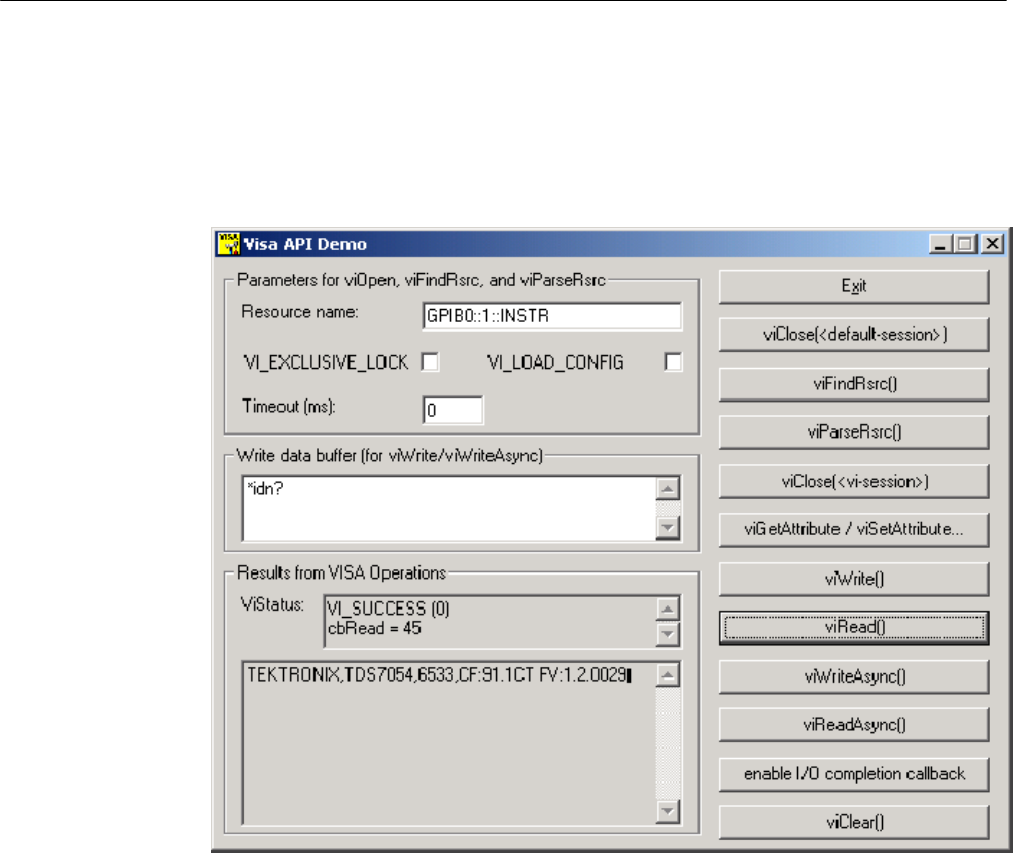
Programming Examples
Tektronix TekVISA Programmer Manual 5-43
Building a Graphical User Interface
The VISAAPIDemo example incorporates a number of TekVISA operations and
illlustrates their use in a C++ program with a graphical user interface.
Figure 5- 14: VISAAPIDemo Graphical User Interface
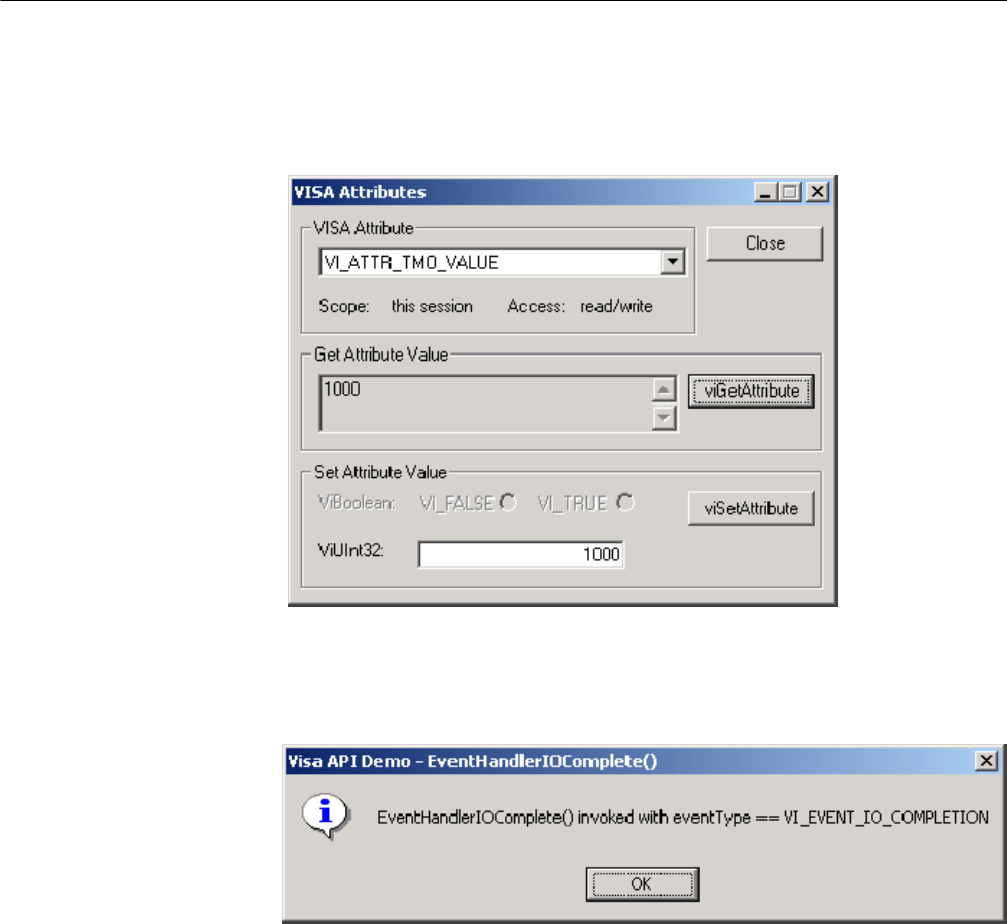
Programming Examples
5-44 Tektronix TekVISA Programmer Manual
When the viGetAttribute/viSetAttribute... button is pressed, the following dialog
box appears:
When the enable I/O completion button is pressed, the following confirmation
box appears:
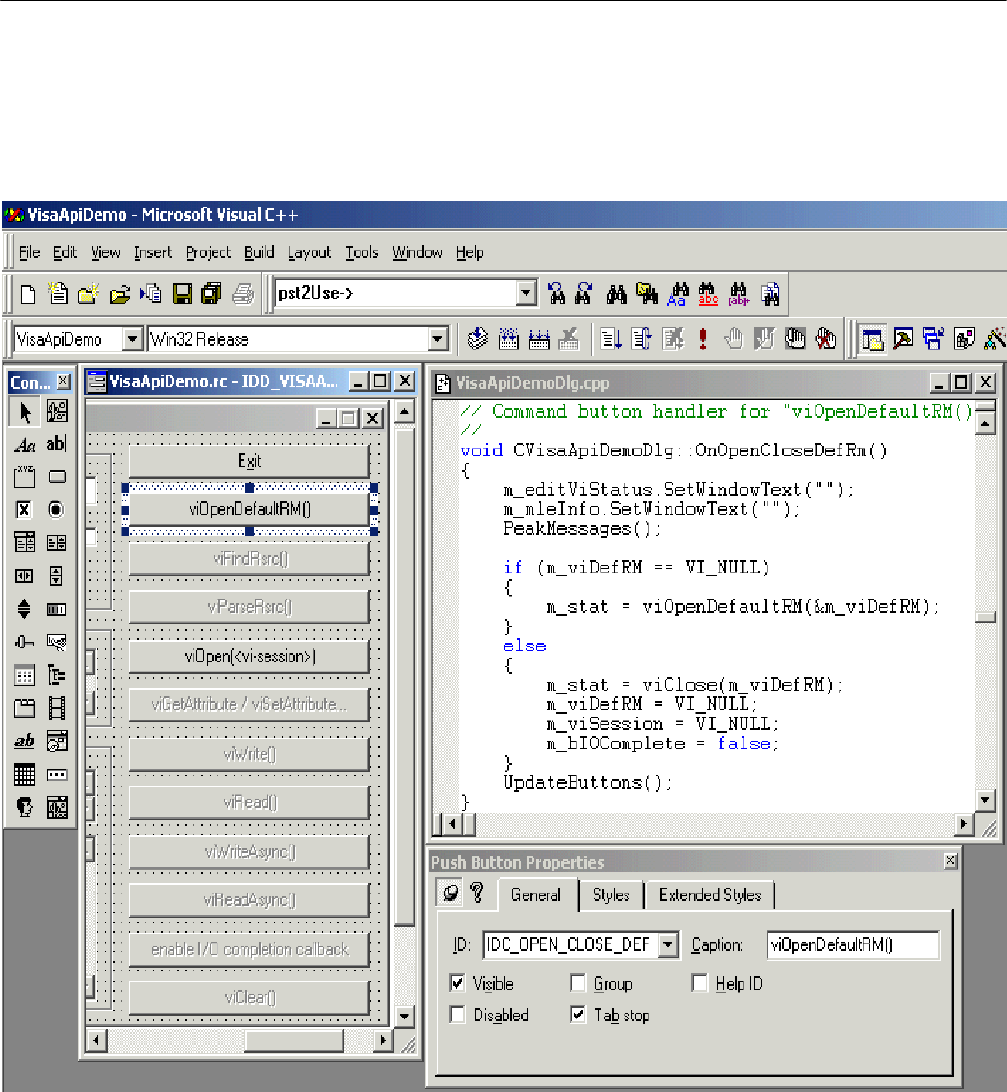
Programming Examples
Tektronix TekVISA Programmer Manual 5-45
The source code for this example can be found on your CD. The following figure
illlustrates the control toolbar and various windows used in building this
example in Visual C++.
Figure 5- 15: C++ Controls Toolbar and Form, Code, and Properties Windows

Programming Examples
5-46 Tektronix TekVISA Programmer Manual

Appendices

Tektronix TekVISA Programmer Manual A-1
Appendix A: VISA Data Type Assignments
Tables A--1 and A--2 give the type assignments for ANSI C and Visual Basic for
each generic VISA data type. Although ANSI C types can be defined in a header
file, Visual Basic types cannot.
Table A--1 lists those types that are both used and exported by direct users of
VISA (such as instrument drivers). Table A--2 lists types that may be used but
not exported by such users. For example, end--users would see the types
specified in A--1 exported by a VXI Plug&Play instrument driver; however, end
users would not see the types specified in Table A--2.
Thus, if you are writing a program using the VISA API, you will see the data
types in both tables. However, if you are writing a program using a VXI
Plug&Play instrument driver API, you will only see the data types in Table A--1.
Figure A--1 on page A--2 shows the instrument drivers that your program can
use.
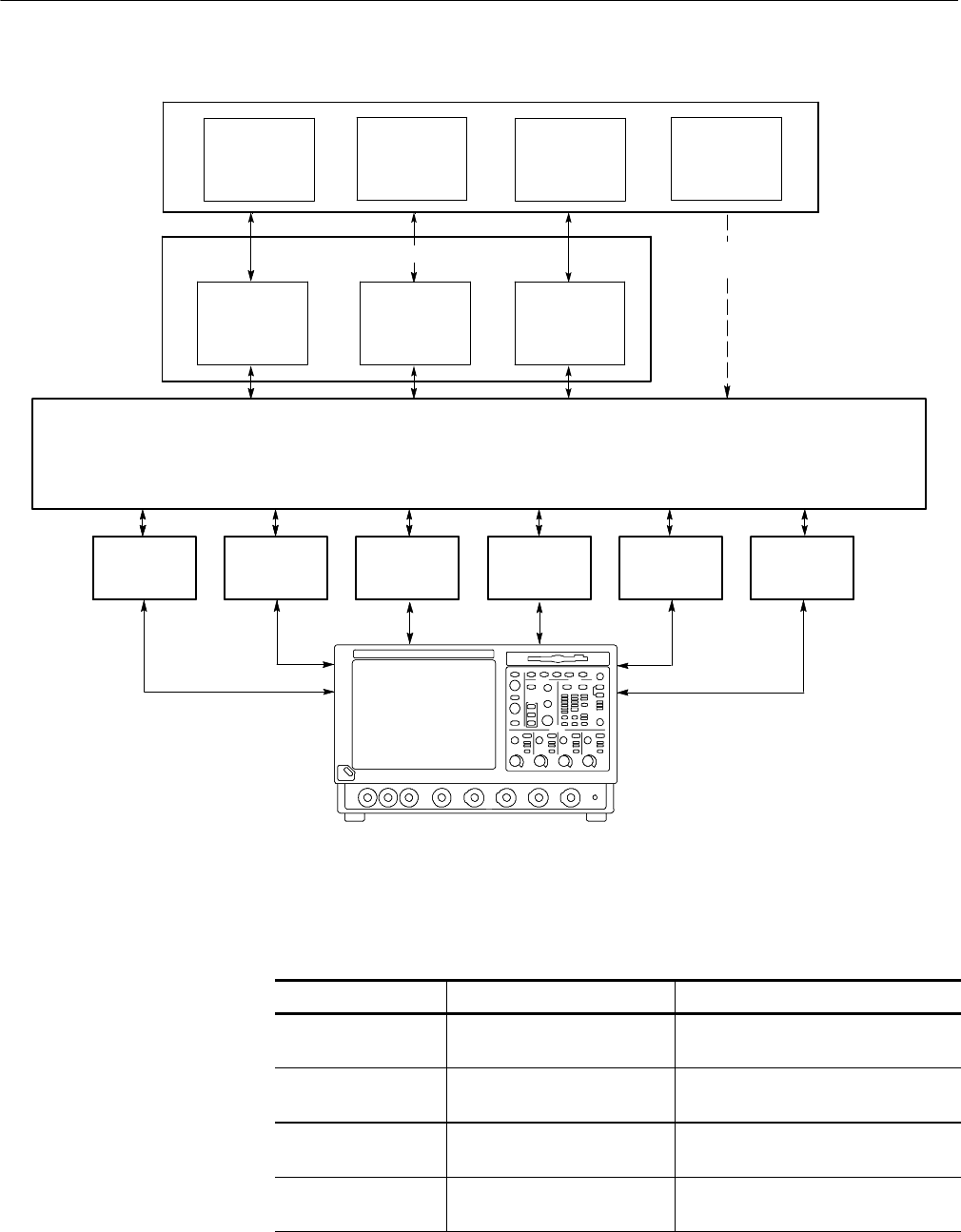
Appendix A: VISA Data Type Assignments
A-2 Tektronix TekVISA Programmer Manual
Application Development Environments (ADE)
C, C++
Program
Visual Basic
Program
LabVIEW and
LabWindows MATLAB
IVI--COM VXIplug &
play TVC
TekVISA Input/Output Library API
Program uses Instrument Driver API Program uses
TekVISA API
Virtual GPIB
(GPIB8)
GPIB
(GPIB0--GPIB3)
ASRL
(RS232 COM1,
COM2)
LAN
(VXI--11, Socket)
Test and Measurement Instruments
TekLinkUSB
Test and Measurement Instruments
Figure A- 2: Your Program Can Use the Instrument Driver API or VISA API
Table A- 1: Type Assignments for VISA and Instrument Driver APIs
VISA Data Type C / Visual Basic Bindings Description
ViUInt32 unsigned long
Long
A 32--bit unsigned integer.
ViPUInt32 ViUInt32 *
N/A
The location of a 32--bit unsigned
integer.
ViAUInt32 ViUInt32[]
N/A
An array of 32--bit unsigned integers.
ViInt32 signed long
Long
A 32--bit signed integer.

Appendix A: VISA Data Type Assignments
Tektronix TekVISA Programmer Manual A-3
Table A- 1: Type Assignments for VISA and Instrument Driver APIs (Cont.)
VISA Data Type DescriptionC / Visual Basic Bindings
ViPInt32 ViInt32 *
N/A
The location of a 32--bit signed
integer.
ViAInt32 ViInt32[]
N/A
An array of 32--bit signed integers.
ViUInt16 unsigned short
Integer
A 16--bit unsigned integer.
ViPUInt16 ViUInt16 *
N/A
The location of a 16--bit unsigned
integer.
ViAUInt16 ViUInt16[]
N/A
An array of 16--bit unsigned integers.
ViInt16 signed short
Integer
A 16--bit signed integer.
ViPInt16 ViInt16 *
N/A
The location of a 16--bit signed
integer.
ViAInt16 ViInt16[]
N/A
An array of 16--bit signed integers.
ViUInt8 unsigned char
Integer/Byte
An 8--bit unsigned integer.
ViPUInt8 ViUInt8 *
N/A
The location of an 8--bit unsigned
integer.
ViAUInt8 ViUInt8[]
N/A
An array of 8--bit unsigned integers.
ViInt8 signed char
Integer/Byte
An 8--bit signed integer.
ViPInt8 ViInt8 *
N/A
The location of an 8--bit signed
integer.
ViAInt8 ViInt8[]
N/A
An array of 8--bit signed integers.
ViAddr void *
Long
A type that references another data
type, in cases where the other data
type may vary depending on a particu-
lar context.
ViPAddr ViAddr *
N/A
The location of a ViAddr.
ViAAddr ViAddr[]
N/A
An array of type ViAddr.
ViChar char
Integer/Byte
An 8--bit integer representing an ASCII
character.
ViPChar ViChar *
N/A
The location of a ViChar.

Appendix A: VISA Data Type Assignments
A-4 Tektronix TekVISA Programmer Manual
Table A- 1: Type Assignments for VISA and Instrument Driver APIs (Cont.)
VISA Data Type DescriptionC / Visual Basic Bindings
ViAChar ViChar[]
N/A
An array of type ViChar.
ViByte unsigned char
Integer/Byte
An 8--bit unsigned integer representing
an extended ASCII character.
ViPByte ViByte *
N/A
The location of a ViByte.
ViAByte ViByte[]
N/A
An array of type ViByte.
ViBoolean ViUInt16
Integer
A type for which there are two comple-
mentaryvalues: VI_TRUE and
VI_FALSE.
ViPBoolean ViBoolean *
N/A
The location of a ViBoolean.
ViABoolean ViBoolean[]
N/A
An array of type ViBoolean.
ViReal32 float
Single
A 32--bit single--precision value.
ViPReal32 ViReal32 *
N/A
The location of a 32--bit single--preci-
sion value.
ViAReal32 ViReal32[]
N/A
An array of 32--bit single--precision
values.
ViReal64 double
Double
A 64--bit double--precision value.
ViPReal64 ViReal64 *
N/A
The location of a 64--bit double--preci-
sion value.
ViAReal64 ViReal64[]
N/A
An array of 64--bit double--precision
values.
ViBuf ViPByte
String
The location of a block of data.
ViPBuf ViPByte
String
The location to store a block of data.
ViABuf ViBuf[]
N/A
An array of type ViBuf.
ViString ViPChar
String
The location of a NULL--terminated
ASCII string.
ViPString ViPChar
String
ThelocationtostoreaNULL--termi-
nated ASCII string.
ViAString ViString[]
N/A
An array of type
ViString.

Appendix A: VISA Data Type Assignments
Tektronix TekVISA Programmer Manual A-5
Table A- 1: Type Assignments for VISA and Instrument Driver APIs (Cont.)
VISA Data Type DescriptionC / Visual Basic Bindings
ViRsrc ViString
String
A ViString type that is further restricted
to
adhere to the addressing grammar for
resources as described in Table 2--63.
ViPRsrc ViString
String
ThelocationtostoreaViRsrc.
ViARsrc ViRsrc[]
N/A
An array of type ViRsrc.
ViStatus ViInt32
Long
A defined type that contains values
corresponding to VISA--defined
Completion and Error termination
codes.
ViPStatus ViStatus *
N/A
The location of a ViStatus.
ViAStatus ViStatus[]
N/A
An array of type ViStatus.
ViVersion ViUInt32
Long
A defined type that contains a refer-
encetoall
information necessary for the architect
to
represent the current version of a
resource.
ViPVersion ViVersion *
N/A
The location of a ViVersion.
ViAVersion ViVersion[]
N/A
An array of type ViVersion.
ViObject ViUInt32
Long
The most fundamental VISA data
type. It
contains attributes and can be closed
when no
longer needed.
ViPObject ViObject *
N/A
The location of a ViObject.
ViAObject ViObject[]
N/A
An array of type ViObject.
ViSession ViObject
Long
A defined type that contains a refer-
encetoall
information necessary for the architect
to
manage a communication channel
with a
resource.

Appendix A: VISA Data Type Assignments
A-6 Tektronix TekVISA Programmer Manual
Table A- 1: Type Assignments for VISA and Instrument Driver APIs (Cont.)
VISA Data Type DescriptionC / Visual Basic Bindings
ViPSession ViSession *
N/A
The location of a ViSession.
ViASession ViSession[]
N/A
An array of type ViSession.
ViAttr ViUInt32
Long
A type that uniquely identifies an
attribute.
ViConstString const ViChar *
String
A ViString type that is guaranteed to
not be
modified by any driver.
Table A- 2: Type Assignments for VISA APIs Only
VISA Data Type C / Visual Basic Bindings Description
ViAccessMode ViUInt32
Long
A defined type that specifies the
different
mechanisms that control access to a
resource.
ViPAccessMode ViAccessMode *
N/A
The location of a ViAccessMode.
ViBusAddress ViUInt32
Long
A type that represents the system
dependent
physical address.
ViPBusAddress ViBusAddress *
N/A
The location of a ViBusAddress.
ViBusSize ViUInt32
Long
A type that represents the system
dependent
physical address size.
ViAttrState ViUInt32
Long
A value unique to the individual type
of an
attribute.
ViPAttrState void *
Any
The location of a ViAttrState.
ViVAList va_list
Any
The location of a list of a variable
number of
parameters of differing types.
ViEventType ViUInt32
Long
A defined type that uniquely identifies
thetypeofanevent.
ViPEventType ViEventType *
N/A
The location of a
ViEventType.

Appendix A: VISA Data Type Assignments
Tektronix TekVISA Programmer Manual A-7
Table A- 2: Type Assignments for VISA APIs Only (Cont.)
VISA Data Type DescriptionC / Visual Basic Bindings
ViAEventType ViEventType *
N/A
An array of type
ViEventType.
ViPAttr ViAttr *
N/A
The location of a ViAttr.
ViAAttr ViAttr *
N/A
An array of type ViAttr.
ViEventFilter ViUInt32
Long
A defined type that specifies filtering
masks or other information unique to
an event.
ViFindList ViObject
Long
A defined type that contains a refer-
ence to all resources found during a
search operation.
ViPFindList ViFindList *
N/A
The location of a
ViFindList.
ViEvent ViObject
Long
A defined type that encapsulates the
information necessary to process an
event.
ViPEvent ViEvent *
N/A
The location of a
ViEvent.
ViKeyId ViString
String
A defined type that contains a refer-
ence to all information necessary for
the architect to manage the associa-
tion of a thread or process and
session with a lock on a resource.
ViPKeyId ViPString
String
The location of a
ViKeyId.
ViJobId ViUInt32
Long
A defined type that contains a refer-
ence to all information necessary for
the architect to encapsulate the
information necessary for a posted
operation request.
ViPJobId ViJobId *
N/A
The location of a
ViJobId.
ViHndlr ViStatus (*)
(ViSession,
ViEventType,
ViEvent, ViAddr)
N/A
A value representing an entry point to
an operation for use as a callback.

Appendix A: VISA Data Type Assignments
A-8 Tektronix TekVISA Programmer Manual

Tektronix TekVISA Programmer Manual B-1
Appendix B: Completion and Error Codes
The following Tektronix VISA completion and error codes are presented in
alphabetical order within category.
Table B- 1: Completion Codes
Code Description
VI_SUCCESS_DEV_
NPRESENT
The session opened successfully, but the device at the
specified address is not responding.
VI_SUCCESS_EVENT_EN The specified event is already enabled for at least one of the
specified mechanisms.
VI_SUCCESS_EVENT_DIS The specified event is already disabled for at least one of the
specified mechanisms.
VI_SUCCESS_MAX_CNT The number of bytes read is equal to count.
VI_SUCCESS_NCHAIN Event handled successfully. Do not invoke any other handlers
on this session for this event.
VI_SUCCESS_NESTED_
EXCLUSIVE
The specified access mode is successfully acquired, and this
session has nested exclusive locks.
VI_SUCCESS_NESTED_
SHARED
The specified access mode is successfully acquired, and this
session has nested shared locks.
VI_SUCCESS_QUEUE_
EMPTY
The operation completed successfully, but queue was empty.
VI_SUCCESS_QUEUE_
NEMPTY
Wait terminated successfully on receipt of an event notification.
There is still at least one more event occurrence of the type
specified by inEventType available for this session.
VI_SUCCESS_SYNC Read or write operation performed synchronously.
VI_SUCCESS_TERM_CHAR The specified termination character was read.
VI_WARN_CONFIG_
NLOADED
The specified configuration either does not exist or could not
be loaded; using VISA--specified defaults instead.
VI_WARN_NSUP_ATTR_
STATE
Although the specified attribute state is valid, it is not
supported by this implementation.
VI_WARN_NSUP_BUF The specified buffer is not supported.
VI_WARN_NULL_OBJECT The specified object reference is uninitialized.
This message is returned if the value VI_NULL is passed to it.
VI_WARN_UNKNOWN_
STATUS
The status code passed to the operation could not be
interpreted.

Appendix B: Completion and Error Codes
B-2 Tektronix TekVISA Programmer Manual
Table B- 2: Error Codes
Code Description
VI_ERROR_ALLOC The system could not allocate a formatted I/O buffer because
of insufficient system resources.
VI_ERROR_ASRL_FRAMING A framing error occurred during transfer.
VI_ERROR_ASRL_OVER-
RUN
An overrun error occurred during transfer. A character was not
read from the hardware before the next character arrived.
VI_ERROR_ASRL_PARITY A parity error occurred during transfer.
VI_ERROR_ATTR_READON-
LY
The specified attribute is read--only.
VI_ERROR_BERR Bus error occurred during transfer.
VI_ERROR_CLOS-
ING_FAILED
Unable to deallocate the previously allocated data structures
corresponding to this session or object reference.
VI_ERROR_HNDLR_
NINSTALLED
If no handler is installed for the specified event type, the
request to enable the callback mechanism for the event type
returns this error code. The session cannot be enabled for the
VI_HNDLR mode of the callback mechanism.
VI_ERROR_INP_PROT_VIOL Device reported an input protocol error during transfer.
VI_ERROR_INV_ACCESS_
KEY
The requestedKey value passed in is not a valid access key to
the specified resource.
VI_ERROR_INV_ACC_
MODE
Invalid access mode.
VI_ERROR_INV_CONTEXT Specified event context is invalid.
VI_ERROR_INV_DEGREE Specified degree is invalid.
VI_ERROR_INV_EVENT Specified event type is not supported by the resource.
VI_ERROR_INV_EXPR Invalid expression specified for search.
VI_ERROR_INV_FMT A format specifier in the writeFmt string is invalid.
VI_ERROR_INV_HNDLR_
REF
Either the specified handler reference or the user context value
(or both) does not match any installed handler.
VI_ERROR_INV_JOB_ID Specified job identifier is invalid.
This message is returned If the operation associated with the
specified jobId has already completed.
VI_ERROR_INV_LOCK_
TYPE
The specified type of lock is not supported by this resource.
VI_ERROR_INV_MASK The system cannot set the buffer for the given mask.
VI_ERROR_INV_MECH Invalid mechanism specified.
VI_ERROR_INV_OBJECT
VI_ERROR_INV_SESSION
The given session or object reference is invalid (both are the
same value).
VI_ERROR_INV_PROT The protocol specified is invalid.

Appendix B: Completion and Error Codes
Tektronix TekVISA Programmer Manual B-3
Table B- 2: Error Codes (Cont.)
Code Description
VI_ERROR_INV_RSRC_
NAME
Invalid resource reference specified. Parsing error.
VI_ERROR_INV_SETUP Some implementation--specific configuration file is corrupt or
does not exist.
VI_ERROR_IO An unknown I/O error occurred during transfer.
VI_ERROR_LIBRARY_
NFOUND
A code library required by VISA could not be located or loaded.
VI_ERROR_LINE_IN_USE The specified trigger line is currently in use.
VI_ERROR_NCIC The interface associated with the given vi is not currently the
controller in charge.
VI_ERROR_NENABLED The session must be enabled for events of the specified type in
order to receive them.
VI_ERROR_NLISTENERS No Listeners condition is detected (both NRFD and NDAC are
deasserted).
VI_ERROR_NSUP_ATTR The specified attribute is not defined by the referenced
session, event, or find list.
VI_ERROR_NSUP_ATTR_
STATE
The specified state of the attribute is not valid, or is not
supported as defined by the session, event, or find list.
VI_ERROR_NSUP_FMT A format specifier in the writeFmt string is not supported.
VI_ERROR_NSUP_OPER The given vi does not support this operation.
VI_ERROR_OUTP_PROT_
VIOL
Device reported an output protocol error during transfer.
VI_ERROR_RAW_WR_
PROT_VIOL
Violation of raw write protocol occurred during transfer.
VI_ERROR_RAW_RD_
PROT_VIOL
Violation of raw read protocol occurred during transfer.
VI_ERROR_RSRC_BUSY The resource is valid, but VISA cannot currently access it.
VI_ERROR_RSRC_LOCKED Specified type of lock cannot be obtained because the
resource is already locked with a lock type incompatible with
the lock requested
VI_ERROR_RSRC_NFOUND There are no more matches.
VI_ERROR_SESN_
NLOCKED
The current session did not have any lock on the resource.
VI_ERROR_SRQ_
NOCCURRED
Service request has not been received for the session.
VI_ERROR_SYSTEM_
ERROR
The VISA system failed to initialize.
VI_ERROR_TMO Timeout expired before write operation completed.

Appendix B: Completion and Error Codes
B-4 Tektronix TekVISA Programmer Manual

Tektronix TekVISA Programmer Manual Glossary- 1
Glossary
The following are some specialized terms used within this document.
Address
A string (or other language construct) that uniquely locates and identifies a
resource. VISA defines an ASCII--based grammar that associates strings with
particular physical devices or interfaces and VISA resources.
ADE
Application Development Environment
API
Application Programmers Interface. The direct interface that an end user sees
when creating an application. The VISA API consists of the sum of all of the
operations, attributes, and events of each of the VISA Resource Classes.
Attribute
A value within a resource that reflects a characteristic of the operational state
of a resource.
Bus Error
An error that signals failed access to an address. Bus errors occur with
low--level accesses to memory and usually involve hardware with bus
mapping capabilities. For example, non--existent memory, a non--existent
register, or an incorrect device access can cause a bus error.
Communication Channel
ThesameasSession. A communication path between a software element and
a resource. Every communication channel in VISA is unique.
Controller
A device that can control another device(s) or is in the process of performing
an operation on another device.
Device
An entity that receives commands from a controller. A device can be an
instrument, a computer (acting in a non--controller role), or a peripheral
(such as a plotter or printer). In VISA, the concept of a device is generally
the logical association of several VISA resources.
GPIB (General Purpose Interface Bus)
An interconnection bus and protocol that allows you to connect multiple
instruments in a network under the control of a controller. Also known as
IEEE 488 bus. It transfers data with eight parallel data lines, five control
lines, and three handshake lines.

Glossary
Glossary- 2 Tektronix TekVISA Programmer Manual
Instrument
A device that accepts some form of stimulus to perform a designated task,
test, or measurement function. Two common forms of stimuli are message
passing and register reads and writes. Other forms include triggering or
varying forms of asynchronous control.
Interface
A generic term that applies to the connection between devices and control-
lers. It includes the communication media and the device/controller hardware
necessary for cross--communication.
Instrument Driver
Library of functions for controlling a specific instrument
IVI
Interchangeable Virtual Instrument
LabVIEW
Graphical programming ADE for Windows, Windows NT, and Sun
operating systems
LabWindows/CVI
C--based ADE for the Windows and Sun operating systems
LLB
LabVIEW VI library
NI--488
National Instruments GPIB interface software
NI--VXI
National Instruments VXIbus interface software
Operation
An action defined by a resource that can be performed on a resource.
Oscilloscope
An instrument for making a graph of two factors. These are typically voltage
versus time.
PnP
VXIplug&play Instrument Drivers
Process
An operating system component that shares a system’s resources. A
multi--process system is a computer system that allows multiple programs to
execute simultaneously, each in a separate process environment. A single--
process system is a computer system that allows only a single program to
execute at a given point in time.

Glossary
Tektronix TekVISA Programmer Manual Glossary- 3
Register
An address location that either contains a value that is a function of the state
of hardware or can be written into to cause hardware to perform a particular
action or to enter a particular state. In other words, an address location that
controls and/or monitors hardware.
Resource Class
The definition for how to create a particular resource. In general, this is
synonymous with the connotation of the word class in object--oriented
architectures. For VISA Instrument Control Resource Classes, this refers to
the definition for how to create a resource that controls a particular capability
of a device.
Resource or Resource Instance
In general, this term is synonymous with the connotation of the word object
in object--oriented architectures. For VISA, resource more specifically refers
to a particular implementation (or instance in object--oriented terms) of a
Resource Class. In VISA, every defined software module is a resource.
Session
ThesameasCommunication Channel. A communication path between a
software element and a resource. Every communication channel in VISA is
unique.
SRQ
IEEE 488 Service Request. This is an asynchronous request from a remote
GPIB device that requires service. A service request is essentially an
interrupt from a remote device. For GPIB, this amounts to asserting the SRQ
line on the GPIB.
Status Byte
A byte of information returned from a remote device that shows the current
state and status of the device. If the device follows IEEE 488 conventions,
bit 6 of the status byte indicates if the device is currently requesting service.
TVC
TekVISA Control
Template Function
Instrument driver subsystem function common to the majority of VXI-
plug&play instrument drivers.
Top--level Example
A high--level test--oriented instrument driver function. It is typically
developed from the instrument driver subsystem functions.
USB
Universal Serial Bus

Glossary
Glossary- 4 Tektronix TekVISA Programmer Manual
Virtual Instrument
A name given to the grouping of software modules (in this case, VISA
resources with any associated or required hardware) to give the functionality
of a traditional stand--alone instrument. Within VISA, a virtual instrument is
the logical grouping of any of the VISA resources. The VISA Instrument
Control Resources Organizer serves as a means to group any number of any
type of VISA Instrument Control Resources within a VISA system.
VI
LabVIEW program or Virtual Instrument
Virtual GPIB
A special type of GPIB resource that creates a software connection between
the embedded instrument software and the Windows software on a Tektronix
Windows--based oscilloscope, without the need for any GPIB controller
hardware or cables.
VISA
Virtual Instrument Software Architecture. The architecture consists of two
main VISA components: the VISA Resource Manager and the VISA
Instrument Control Resources.
VISA Instrument Control Resources
This is the name given to the part of VISA that defines all of the device--spe-
cific resource classes. VISA Instrument Control Resources encompass all
defined device and interface capabilities for direct, low--level instrument
control.
VISA Resource Manager
This is the name given to the part of VISA that manages resources. This
management includes support for opening, closing, and finding resources;
setting attributes, retrieving attributes, and generating events on resources;
andsoon.
VISA Resource Template
This is the name given to the part of VISA that defines the basic constraints
and interface definition for the creation and use of a VISA resource. All
VISA resources must derive their interface from the definition of the VISA
Resource Template.

Tektronix TekVISA Programmer Manual Index- 1
Index
A
Address, Glossary--1
ADE, Glossary--1
API, Glossary--1
Application Development Environments (ADE), 1--1
LabVIEW, 1--2
MATLAB, 1--2
Microsoft C/C++, 1--2
Microsoft Visual Basic, 1--2
Attribute, Glossary--1
attributes, 1--5
B
Bus Error, Glossary--1
C
Communication Channel, Glossary--1
Completion and Error Codes, B--1
in alphabetical order, B--1
Controller, Glossary--1
D
Default Resource Manager, 1--6
Device, Glossary--1
E
Event types, in alphabetical order, 4--1
events, 1--5
F
Finding Resources
Examples of Regular Expression Matches, 2--30
Examples That Include Attribute Expression
Matches, 2--31
Regular Expression Special Characters and
Operators, 2--29
G
Glossary, Glossary--1
GPIB, Glossary--1
GPIB (General Purpose Interface Bus), Glossary--1
I
Instrument, Glossary--2
instrument control (INSTR) resource class, 1--5
Instrument Driver, Glossary--2
instrument driver, 1--1
Instrument Manager utility, 1--2
Interchangeable Virtual Instrument, Glossary--2
Interface, Glossary--2
L
LabVIEW, Glossary--2
LabWindows/CVI, Glossary--2
LLB, Glossary--2
locking mechanism, 1--5
M
Manuals, related, xvii
N
NI--488, Glossary--2
NI--VXI, Glossary--2
O
Opening Resources, Resource Address String Grammar
and Examples, 2--43
Operation, Glossary--2
operations, 1--5
Oscilloscope, Glossary--2
P
ParseRsrc (sesn, rsrcName, intfType, intfNum), 2--46
Process, Glossary--2
Programming examples, 5--1
basic input output
asynchronous read/write, 5--13
reading and writing data, 5--11
basic input/output, 5--11
Clear, 5--13
extract from SIMPLE.CPP example, 5--12

Index
Index- 2 Tektronix TekVISA Programmer Manual
RWEXAM.CPP example, 5--12
Status/Service Request, 5--14
synchronous read/write, 5--12
Trigger, 5--14
Compiling and linking, 5--2
finding resources, 5--5
FINDRSRCATTRMATCH.CPP example, 5--7
SIMPLEFINDRSRC.CPP example, 5--6
using attribute matching, 5--7
using regular expressions, 5--5
handling events, 5--25
callback mechanism, 5--29
exception handling, 5--33
generating an error condition on asynchronous
operations, 5--34
queueing mechanism, 5--25
SRQ.CPP example, 5--26, 5--30
locking and unlocking resources, 5--34
acquiring an exclusive lock while owning a shared
lock, 5--39
EXLOCKEXAM.CPP example, 5--35
lock sharing, 5--38
locking types and access privileges, 5--35
nested locks, 5--39
SHAREDLOCK.CPP example, 5--40
testing exclusive locking, 5--37
testing shared locking, 5--42
opening and closing sessions, 5--3
SIMPLE.CPP example, 5--4
reading and writing formatted data, 5--14
buffered I/O operations, 5--24
BUFFERIO.CPP example, 5--21
controlling the serial I/O buffers, 5--24
flushing the formatted I/O buffer, 5--23
FORMATIO.CPP example, 5--16
formatted I/O operations, 5--16
resizing the formatted I/O buffers, 5--21
variable list operations, 5--24
setting and retrieving attributes, 5--9
ATTRACCESS.CPP example, 5--9
retrieving attributes, 5--9
setting attributes, 5--9
R
Register, Glossary--3
Related Manuals, xvii
Resource Address String Grammar, 3--25
Resource Class, Glossary--3
Resource or Resource Instance, Glossary--3
resources, 1--5
S
Session, Glossary--3
sessions, 1--5
SOCKET, 1--5
SRQ, Glossary--3
Status Byte, Glossary--3
T
TDS7000 Series Oscilloscopes, remote PCs networked
to, 1--2
Tektronix AD007 GPIB--LAN adapter, 1--2
TekVisa, 1--1
applications and connectivity supported by, 1--2
features and benefits, 1--2
installation, 1--8
product description, 1--1
TekVisa attributes
by category, 3--1
event attributes, 3--3
GPIB device attributes, 3--2
interface attributes, 3--1
miscellaneous attrbutes, 3--3
read/write attributes, 3--3
resource attributes, 3--1
serial device attributes, 3--1
TekVISA Control, Glossary--3
TekVisa Manual
conventions used, xvi
who should read, xv
TekVisa operations
by category, 2--1
finding resources, 2--1
handling events, 2--2
locking and unlocking resources, 2--3
opening and closing sessions, events, and find lists,
2--1
other basic I/O operations, 2--1
reading and writing basic data, 2--1
reading and writing formatted data, 2--2
setting and retrieving attributes, 2--1
Template Function, Glossary--3
Terminology, 1--5
Top--level Example, Glossary--3

Index
Tektronix TekVISA Programmer Manual Index- 3
U
Universal Serial Bus, Glossary--3
V
VI, Glossary--4
VI_ALL_ENABLED_EVENTS, 2--15, 2--17, 2--19,
2--109
VI_ALL_MECH, 2--15, 2--17
VI_ANY_HNDLR, 2--90
VI_ASRL_END_BREAK, 3--9
VI_ASRL_END_LAST_BIT, 3--8, 3--9
VI_ASRL_END_NONE, 2--60, 3--8, 3--9
VI_ASRL_END_TERMCHAR, 2--60, 3--8, 3--9
VI_ASRL_FLOW_DTR_DSR, 3--10
VI_ASRL_FLOW_NONE, 3--10
VI_ASRL_FLOW_RTS_CTS, 3--10, 3--12
VI_ASRL_FLOW_XON_XOFF, 3--10
VI_ASRL_IN_BUF, 2--33, 2--81
VI_ASRL_IN_BUF_DISCARD, 2--33
VI_ASRL_OUT_BUF, 2--33, 2--81
VI_ASRL_OUT_BUF_DISCARD, 2--33
VI_ASRL_PAR_EVEN, 3--11
VI_ASRL_PAR_MARK, 3--11
VI_ASRL_PAR_NONE, 3--11
VI_ASRL_PAR_ODD, 3--11
VI_ASRL_PAR_SPACE, 3--11
VI_ASRL_STOP_ONE, 3--13
VI_ASRL_STOP_ONE5, 3--13
VI_ASRL_STOP_TWO, 3--13
VI_ASRL488, 2--6, 2--12, 2--67, 3--19
VI_ATTR_ASRL_AVAIL_NUM, 3--5
VI_ATTR_ASRL_BAUD, 3--5
VI_ATTR_ASRL_CTS_STATE, 3--6
VI_ATTR_ASRL_DATA_BITS, 3--6, 3--8
VI_ATTR_ASRL_DCD_STATE, 3--7
VI_ATTR_ASRL_DSR_STATE, 3--7
VI_ATTR_ASRL_DTR_STATE, 3--8
VI_ATTR_ASRL_END_IN, 2--60, 3--8
VI_ATTR_ASRL_END_OUT, 3--9
VI_ATTR_ASRL_FLOW_CNTRL, 3--10, 3--12
VI_ATTR_ASRL_PARITY, 3--11
VI_ATTR_ASRL_REPLACE_CHAR, 3--11
VI_ATTR_ASRL_RI_STATE, 3--12
VI_ATTR_ASRL_RTS_STATE, 3--12
VI_ATTR_ASRL_STOP_BITS, 3--13
VI_ATTR_ASRL_XOFF_CHAR, 3--13
VI_ATTR_ASRL_XON_CHAR, 3--14
VI_ATTR_BUFFER, 3--14
VI_ATTR_EVENT_TYPE, 3--15
VI_ATTR_GPIB_PRIMARY_ADDR, 3--15
VI_ATTR_GPIB_READDR_EN, 3--16
VI_ATTR_GPIB_SECONDARY_ADDR, 3--16
VI_ATTR_GPIB_UNADDR_EN, 3--17
VI_ATTR_INTF_INST_NAME, 3--17
VI_ATTR_INTF_NUM, 3--18
VI_ATTR_INTF_TYPE, 3--18
VI_ATTR_IO_PROT, 2--6, 2--12, 2--67, 3--19
VI_ATTR_JOB_ID, 2--65, 2--115
VI_ATTR_JOB_ID , 3--19
VI_ATTR_MAX_QUEUE_LENGTH, 2--109, 3--20
VI_ATTR_OPER_NAME, 3--20
VI_ATTR_RD_BUF_OPER_MODE, 3--21
VI_ATTR_RET_COUNT, 3--21
VI_ATTR_RM_SESSION, 3--22
VI_ATTR_RSRC_IMPL_VERSION, 3--22
VI_ATTR_RSRC_LOCK_STATE, 3--23
VI_ATTR_RSRC_MANF_ID, 3--23
VI_ATTR_RSRC_MANF_NAME, 3--24
VI_ATTR_RSRC_NAME, 3--24
VI_ATTR_RSRC_SPEC_VERSION, 3--25
VI_ATTR_SEND_END_EN, 3--26
VI_ATTR_STATUS, 2--65, 3--26
VI_ATTR_SUPPRESS_END_EN, 2--59, 3--27
VI_ATTR_TCPIP_ADDR, 3--27
VI_ATTR_TCPIP_HOSTNAME, 3--28
VI_ATTR_TCPIP_KEEPALIVE, 3--28
VI_ATTR_TCPIP_NODELAY, 3--29
VI_ATTR_TCPIP_PORT, 3--29
VI_ATTR_TERMCHAR, 2--60, 3--9, 3--30
VI_ATTR_TERMCHAR_EN, 2--60, 3--30
VI_ATTR_TMO_VALUE, 3--31
VI_ATTR_TRIG_ID, 3--31
VI_ATTR_USB_INTFC_NUM, 3--32
VI_ATTR_USB_MAX_INTR_SIZE, 3--32
VI_ATTR_USB_PROTOCOL, 3--33
VI_ATTR_USB_RECV_INTR_DATA, 3--33
VI_ATTR_USB_RECV_INTR_SIZE, 3--34
VI_ATTR_USB_SERIAL_NUM, 3--34
VI_ATTR_USER_DATA, 3--35
VI_ATTR_WR_BUF_OPER_MODE, 3--35
VI_EVENT_EXCEPTION, 4--1
VI_EVENT_IO_COMPLETION, 2--65, 2--115, 4--1
VI_EVENT_SERVICE_REQUEST, 4--2
VI_EXCLUSIVE_LOCK, 2--40, 2--43, 3--23
VI_FALSE, 2--59, 3--16, 3--17, 3--26, 3--27, 3--28, 3--29,
3--30
VI_FLUSH_DISABLE, 3--21
VI_FLUSH_ON_ACCESS, 3--21, 3--35
VI_FLUSH_WHEN_FULL, 3--35
VI_HNDLR, 2--15, 2--17, 2--20
VI_HS488, 3--19
VI_INTF_ASRL, 3--18

Index
Index- 4 Tektronix TekVISA Programmer Manual
VI_INTF_GPIB, 3--18
VI_LOAD_CONFIG, 2--43
VI_NO_LOCK, 3--23
VI_NO_SEC_ADDR, 3--16
VI_NORMAL, 2--6, 2--12, 2--67, 3--19
VI_NULL, 2--29, 2--40, 2--60, 2--69, 2--88, 2--109,
2--110, 2--111, 2--115, 2--117, 3--22
VI_QUEUE, 2--15, 2--17, 2--20
VI_READ_BUF, 2--33, 2--81
VI_READ_BUF_DISCARD, 2--33
VI_SHARED_LOCK, 3--23
VI_SUCCESS_MAX_CNT, 2--60
VI_SUCCESS_TERM_CHAR, 2--60
VI_SUSPEND_HNDLR, 2--15, 2--17, 2--20
VI_TMO_IMMEDIATE, 2--109, 3--31
VI_TMO_INFINITE, 2--109, 3--31
VI_TRIG_PROT_DEFAULT, 2--6
VI_TRIG_SW, 3--31
VI_TRUE, 2--59, 3--16, 3--17, 3--26, 3--27, 3--28, 3--29,
3--30
VI_WRITE_BUF, 2--33, 2--81
VI_WRITE_BUF_DISCARD, 2--33
viAssertTrigger (vi, protocol), 2--5
viBufRead (vi, buf, count, retCount), 2--7
viBufWrite (vi, buf, count, retCount), 2--8
viClear (vi), 2--10
viClose (vi), 2--12
viDisableEvent (vi, event, mechanism), 2--13
viDiscardEvents (vi, event, mechanism), 2--15
viEnableEvent (vi, eventType, mechanism, context),
2--17
viEventHandler (vi, eventType, context, userHandle),
2--21
viFindNext (findList, instrDesc), 2--23
viFindRsrc (sesn, expr, findList, retcnt, instrDesc),
2--25
viFlush (vi, mask), 2--31
viGetAttribute (vi, attribute, attrState), 2--33
viInstallHandler (vi, eventtype, handler, userHandle),
2--35
viLock (vi, lockType, timeout, requestedKey,
accessKey), 2--38
viOpen (sesn, rsrcName, accessMode, timeout, vi),
2--41
viOpenDefaultRM (sesn), 2--44
viPrintf (vi, writeFmt, <arg1, arg2, ...>), 2--48
viQueryf (vi, writeFmt, readFmt, <arg1, arg2,...>),
2--55
viRead (vi, buf, count, retCount), 2--57
viReadAsync (vi, buf, count, jobId), 2--61
viReadSTB (vi, status), 2--66
viReadToFile (vi, fileName, count, retCount), 2--67
virtual GPIB, 1--1, 1--7
Virtual Instrument, Glossary--4
virtual instrument, 1--7
Virtual Instrument Software Architecture (VISA), 1--1
VISA, Glossary--4
VISA Data Type Assignments, A--1
for ANSI C, A--1
for Visual Basic, A--1
VISA Instrument Control Resources, Glossary--4
VISA Resource Manager, 1--5, Glossary--4
VISA Resource Template, Glossary--4
viScanf (vi, readFmt, <arg1, arg2,...>), 2--70
viSetAttribute (vi, attribute, attrState), 2--78
viSetBuf (vi, mask, size), 2--80
viSPrintf (vi, buf, writeFmt, <arg1, arg2,...>), 2--81
viSScanf (vi, readFmt, <arg1, arg2,...>), 2--84
viStatusDesc (vi, status, desc), 2--86
viTerminate (vi, degree, jobId), 2--87
viUninstallHandler (vi, eventType, handler, user-
Handle), 2--89
viUnlock (vi), 2--90
viUsbControlIn (vi, bmRequestType, bRequest,
wValue, wIndex, wLength, buffer, retCount), 2--92
viUsbControlOut (vi, bmRequestType, bRequest,
wValue, wIndex, wLength, buffer), 2--95
viVPrintf (vi, writeFmt, params), 2--98
viVQueryf (vi, writeFmt, readFmt, params), 2--100
viVScanf (vi, readFmt, params), 2--102
viVSPrintf (vi, buf, writeFmt, params), 2--104
viVSScanf (vi, buf, readFmt, params), 2--106
viWaitOnEvent (vi, inEventType, timeout, outEvent-
Type, outContext), 2--107
viWrite (vi, buf, count, retCount), 2--110
viWriteAsync (vi, buf, count, jobId), 2--112
viWriteFromFile (vi, fileName, count, retCount), 2--116
VXIplug&play Instrument Drivers, Glossary--2
