The VTK M User’s Guide VTKm Users
User Manual:
Open the PDF directly: View PDF  .
.
Page Count: 372 [warning: Documents this large are best viewed by clicking the View PDF Link!]
- I Getting Started
- II Using VTK-m
- Basic Provisions
- Array Handles
- Device Adapters
- Timers
- Variant Array Handles
- Data Sets
- III Developing with VTK-m
- IV Advanced Development
- V Appendix

DRAFT
Published by Kitware Inc. c
2018
All product names mentioned herein are the trademarks of their respective owners.
This document is available under a Creative Commons Attribution 4.0 International license available at
http://creativecommons.org/licenses/by/4.0/.
This project has been funded in whole or in part with Federal funds from the Department of Energy, including
from Sandia National Laboratories, Los Alamos National Laboratory, Advanced Simulation and Computing,
and Oak Ridge National Laboratory.
Sandia National Laboratories is a multimission laboratory managed and operated by National Technology and
Engineering Solutions of Sandia LLC, a wholly owned subsidiary of Honeywell International Inc. for the U.S.
Department of Energy’s National Nuclear Security Administration under contract DE-NA0003525.
SAND 2018-13465 B
Printed and produced in the United States of America.
[ISBN number 978-1-930934-33-7
] [UPDATE ISBN NUMBERS HERE FOR EACH EDITION]

DRAFT
CONTRIBUTORS
This book includes contributions from the VTK-m community including the VTK-m development team and the
user community. We would like to thank the following people for their significant contributions to this text:
Matthew Letter for his help keeping the user’s guide up to date with the VTK-m source code.
Sujin Philip,Robert Maynard,James Kress,Abhishek Yenpure, and Mark Kim for their descriptions
of numerous filters.
Allison Vacanti for her documentation of several VTK-m features in Sections 7.4.9 and 7.4.10.
David Pugmire for his documentation of multi-block data sets (Section 11.5) and select filters.
Abhishek Yenpure and La-ti Lo for their documentation of locator structures (Chapter 15).
ABOUT THE COVER
The cover image is a visualization of the temperature field computed by the Nek5000 thermal hydraulics simu-
lator. In the simulation twin inlets pump air into a box with a temperature difference between the 2 inlets. The
visualization is provided by Matthew Larsen at Lawrence Livermore National Laboratory.
The interior cover image represents seismic wave propagation through the Earth. The visualization is provided
by Matthew Larsen at Lawrence Livermore National Laboratory.
The cover design was done by Steve Jordan.
Join the VTK-m Community at m.vtk.org
iii
DRAFT
DRAFT
CONTENTS
I Getting Started 1
1 Introduction 3
1.1 HowtoUseThisGuide.............................................. 3
1.2 Conventions Used in This Guide . . . . . . . . . . . . . . . . . . . . . . . . . . . . . . . . . . . . . . . . . 4
2 Build and Install VTK-m 7
2.1 GettingVTK-m .................................................. 7
2.2 ConfigureVTK-m................................................. 8
2.3 BuildingVTK-m.................................................. 10
2.4 LinkingtoVTK-m................................................. 11
3 File I/O 15
3.1 Readers....................................................... 15
3.1.1 LegacyVTKFileReader......................................... 15
3.2 Writers ....................................................... 16
3.2.1 LegacyVTKFileWriter......................................... 16
4 Running Filters 17
4.1 FieldFilters .................................................... 17
4.1.1 CellAverage................................................ 18
4.1.2 Coordinate System Transforms . . . . . . . . . . . . . . . . . . . . . . . . . . . . . . . . . . . . . 19
Cylindrical Coordinate System Transform . . . . . . . . . . . . . . . . . . . . . . . . . . . . . . . . 19
Spherical Coordinate System Transform . . . . . . . . . . . . . . . . . . . . . . . . . . . . . . . . . 19
4.1.3 CrossProduct............................................... 20
4.1.4 DotProduct................................................ 21
4.1.5 FieldtoColors .............................................. 21
4.1.6 Gradients ................................................. 23

DRAFT
CONTENTS
4.1.7 PointAverage............................................... 24
4.1.8 PointElevation .............................................. 25
4.1.9 PointTransform ............................................. 25
4.1.10 SurfaceNormals.............................................. 26
4.1.11 VectorMagnitude............................................. 27
4.1.12 ZFPCompression............................................. 28
4.2 DataSetFilters .................................................. 29
4.2.1 CleanGrid................................................. 29
4.2.2 Clip with Implicit Function . . . . . . . . . . . . . . . . . . . . . . . . . . . . . . . . . . . . . . . 30
4.2.3 ExternalFaces .............................................. 31
4.2.4 VertexClustering............................................. 32
4.3 DataSetwithFieldFilters ............................................ 32
4.3.1 ClipwithField .............................................. 33
4.3.2 MarchingCubes.............................................. 34
4.3.3 Threshold ................................................. 35
4.3.4 Streamlines ................................................ 35
4.4 AdvancedFieldManagement........................................... 36
4.4.1 InputFields................................................ 36
4.4.2 Passing Fields from Input to Output . . . . . . . . . . . . . . . . . . . . . . . . . . . . . . . . . . 37
5 Rendering 39
5.1 ScenesandActors ................................................. 39
5.2 Canvas ....................................................... 40
5.3 Mappers ...................................................... 40
5.4 Views........................................................ 41
5.5 ChangingRenderingModes............................................ 42
5.6 ManipulatingtheCamera............................................. 43
5.6.1 2DCameraMode............................................. 43
ViewRange................................................. 43
Pan ..................................................... 44
Zoom .................................................... 44
5.6.2 3DCameraMode............................................. 44
PositionandOrientation.......................................... 45
Movement.................................................. 46
Pan ..................................................... 47
Zoom .................................................... 47
Reset .................................................... 47
vi CONTENTS

DRAFT
CONTENTS
5.7 InteractiveRendering ............................................... 48
5.7.1 RenderingIntoaGUI .......................................... 48
5.7.2 CameraMovement ............................................ 49
Rotate.................................................... 49
Pan ..................................................... 50
Zoom .................................................... 51
5.8 ColorTables .................................................... 51
II Using VTK-m 53
6 Basic Provisions 55
6.1 GeneralApproach ................................................. 55
6.2 PackageStructure................................................. 56
6.3 Function and Method Environment Modifiers . . . . . . . . . . . . . . . . . . . . . . . . . . . . . . . . . . 57
6.4 CoreDataTypes.................................................. 58
6.4.1 SingleNumberTypes........................................... 58
6.4.2 VectorTypes ............................................... 59
6.4.3 Pair .................................................... 62
6.4.4 Range ................................................... 62
6.4.5 Bounds................................................... 63
6.5 Traits........................................................ 64
6.5.1 TypeTraits ................................................ 64
6.5.2 VectorTraits ............................................... 66
6.6 ListTags ...................................................... 68
6.6.1 BuildingListTags ............................................ 68
6.6.2 TypeLists................................................. 69
6.6.3 OperatingonLists ............................................ 71
6.7 ErrorHandling................................................... 72
6.8 VTK-mVersion .................................................. 74
7 Array Handles 77
7.1 CreatingArrayHandles.............................................. 78
7.2 ArrayPortals.................................................... 80
7.3 Allocating and Populating Array Handles . . . . . . . . . . . . . . . . . . . . . . . . . . . . . . . . . . . . 82
7.4 FancyArrays.................................................... 83
7.4.1 ConstantArrays ............................................. 84
7.4.2 CountingArrays ............................................. 84
CONTENTS vii

DRAFT
CONTENTS
7.4.3 CastArrays................................................ 85
7.4.4 DiscardArrays .............................................. 86
7.4.5 PermutedArrays ............................................. 86
7.4.6 ZippedArrays............................................... 88
7.4.7 CoordinateSystemArrays........................................ 88
7.4.8 Composite Vector Arrays . . . . . . . . . . . . . . . . . . . . . . . . . . . . . . . . . . . . . . . . 90
7.4.9 Extract Component Arrays . . . . . . . . . . . . . . . . . . . . . . . . . . . . . . . . . . . . . . . 91
7.4.10 SwizzleArrays .............................................. 92
7.4.11 GroupedVectorArrays.......................................... 92
7.5 VirtualArrays ................................................... 94
7.6 DeepArrayCopies................................................. 96
7.7 ComputeArrayRange .............................................. 97
7.8 Interface to Execution Environment . . . . . . . . . . . . . . . . . . . . . . . . . . . . . . . . . . . . . . . 97
8 Device Adapters 101
8.1 DeviceAdapterTag................................................ 101
8.1.1 DefaultDeviceAdapter ......................................... 101
8.1.2 Specifying Device Adapter Tags . . . . . . . . . . . . . . . . . . . . . . . . . . . . . . . . . . . . . 103
8.2 DeviceAdapterTraits............................................... 104
8.3 RuntimeDeviceTracker.............................................. 106
8.4 DeviceAdapterAlgorithms............................................ 108
8.4.1 Copy.................................................... 108
8.4.2 CopyIf................................................... 109
8.4.3 CopySubRange .............................................. 109
8.4.4 LowerBounds ............................................... 110
8.4.5 Reduce................................................... 110
8.4.6 ReduceByKey............................................... 111
8.4.7 ScanExclusive............................................... 111
8.4.8 ScanExclusiveByKey ........................................... 112
8.4.9 ScanInclusive ............................................... 112
8.4.10 ScanInclusiveByKey ........................................... 113
8.4.11 Schedule.................................................. 113
8.4.12 Sort .................................................... 114
8.4.13 SortByKey................................................. 114
8.4.14 Synchronize ................................................ 114
8.4.15 Unique................................................... 114
8.4.16 UpperBounds ............................................... 115
viii CONTENTS

DRAFT
CONTENTS
8.4.17 Specifying the Device Adapter . . . . . . . . . . . . . . . . . . . . . . . . . . . . . . . . . . . . . . 116
9 Timers 117
10 Variant Array Handles 119
10.1 QueryingandCasting............................................... 119
10.2 CastingtoUnknownTypes............................................ 121
10.3 SpecifyingCastLists ............................................... 122
11 Data Sets 125
11.1 BuildingDataSets................................................. 125
11.1.1 CreatingUniformGrids ......................................... 126
11.1.2 Creating Rectilinear Grids . . . . . . . . . . . . . . . . . . . . . . . . . . . . . . . . . . . . . . . . 126
11.1.3 Creating Explicit Meshes . . . . . . . . . . . . . . . . . . . . . . . . . . . . . . . . . . . . . . . . . 127
11.1.4 AddFields................................................. 129
11.2 CellSets ...................................................... 130
11.2.1 StructuredCellSets ........................................... 131
11.2.2 ExplicitCellSets............................................. 132
11.2.3 CellSetPermutations .......................................... 133
11.2.4 DynamicCellSets ............................................ 133
11.2.5 BlocksandAssemblies .......................................... 134
11.2.6 ZeroCellSets............................................... 134
11.3 Fields........................................................ 134
11.4 CoordinateSystems ................................................ 135
11.5 Multi-BlockData ................................................. 135
III Developing with VTK-m 137
12 Worklets 139
12.1 WorkletTypes................................................... 139
12.2 Dispatchers..................................................... 140
12.3 ProvidedWorklets................................................. 141
12.4 CreatingWorklets................................................. 141
12.4.1 ControlSignature............................................. 142
TypeListTags ............................................... 142
12.4.2 ExecutionSignature ........................................... 143
12.4.3 InputDomain............................................... 144
12.4.4 WorkletOperator............................................. 144
CONTENTS ix

DRAFT
CONTENTS
12.5 WorkletTypeReference.............................................. 145
12.5.1 FieldMap................................................. 145
12.5.2 TopologyMap............................................... 148
PointtoCellMap ............................................. 149
CellToPointMap ............................................. 152
GeneralTopologyMaps .......................................... 156
12.5.3 PointNeighborhood ........................................... 159
NeighborhoodInformation......................................... 161
ConvolvingSmallKernels ......................................... 162
12.5.4 ReducebyKey .............................................. 164
12.6 WholeArrays ................................................... 169
12.7 AtomicArrays................................................... 172
12.8 WholeCellSets .................................................. 174
12.9 ExecutionObjects................................................. 177
12.10Scatter ....................................................... 179
12.11ErrorHandling................................................... 182
13 Math 185
13.1 BasicMath..................................................... 185
13.2 VectorAnalysis .................................................. 188
13.3 Matrices ...................................................... 189
13.4 Newton’sMethod ................................................. 190
14 Working with Cells 193
14.1 CellShapeTagsandIds.............................................. 193
14.1.1 Converting Between Tags and Identifiers . . . . . . . . . . . . . . . . . . . . . . . . . . . . . . . . 193
14.1.2 CellTraits................................................. 195
14.2 Parametric and World Coordinates . . . . . . . . . . . . . . . . . . . . . . . . . . . . . . . . . . . . . . . 196
14.3 Interpolation.................................................... 197
14.4 Derivatives ..................................................... 197
14.5 EdgesandFaces.................................................. 198
15 Locators 203
15.1 CellLocators.................................................... 203
15.1.1 Building a Cell Locator . . . . . . . . . . . . . . . . . . . . . . . . . . . . . . . . . . . . . . . . . 204
BoundingIntervalHierarchy ....................................... 204
15.1.2 Using Cell Locators in a Worklet . . . . . . . . . . . . . . . . . . . . . . . . . . . . . . . . . . . . 204
15.2 PointLocators................................................... 206
x CONTENTS

DRAFT
CONTENTS
15.2.1 Building Point Locators . . . . . . . . . . . . . . . . . . . . . . . . . . . . . . . . . . . . . . . . . 206
UniformGridPointLocator........................................ 206
15.2.2 Using Point Locators in a Worklet . . . . . . . . . . . . . . . . . . . . . . . . . . . . . . . . . . . 206
16 Generating Cell Sets 209
16.1 SingleCellType.................................................. 209
16.2 CombiningLikeElements............................................. 212
16.3 Faster Combining Like Elements with Hashes . . . . . . . . . . . . . . . . . . . . . . . . . . . . . . . . . . 216
16.4 VariableCellTypes ................................................ 222
17 Creating Filters 227
17.1 FieldFilters .................................................... 227
17.2 Field Filters Using Cell Connectivity . . . . . . . . . . . . . . . . . . . . . . . . . . . . . . . . . . . . . . 230
17.3 DataSetFilters .................................................. 232
17.4 DataSetwithFieldFilters ............................................ 235
18 Custom Array Storage 239
18.1 BasicStorage.................................................... 240
18.2 ImplementingFancyArrays............................................ 240
18.2.1 ImplicitArrayHandles.......................................... 240
18.2.2 TransformedArrays ........................................... 242
18.2.3 DerivedStorage.............................................. 244
18.3 AdaptingDataStructures............................................. 252
19 Try Execute 259
IV Advanced Development 263
20 Implementing Device Adapters 267
20.1 Tag ......................................................... 267
20.2 RuntimeDetector ................................................. 268
20.3 ArrayManagerExecution............................................. 269
20.3.1 ArrayManagerExecution ......................................... 269
20.3.2 ExecutionPortalFactoryBasic ..................................... 271
20.3.3 ExecutionArrayInterfaceBasic .................................... 272
20.4 VirtualObjectTransfer.............................................. 274
20.5 Algorithms..................................................... 276
20.6 TimerImplementation............................................... 280
CONTENTS xi

DRAFT
CONTENTS
21 Function Interface Objects 283
21.1 DeclaringandCreating .............................................. 283
21.2 Parameters..................................................... 284
21.3 Invoking ...................................................... 285
21.4 ModifyingParameters............................................... 287
21.5 Transformations .................................................. 288
21.6 ForEach ...................................................... 291
22 Worklet Arguments 293
22.1 TypeChecks .................................................... 293
22.2 Transport...................................................... 295
22.3 Fetch ........................................................ 298
22.4 Creating New ControlSignature Tags ..................................... 302
22.5 Creating New ExecutionSignature Tags .................................... 302
23 New Worklet Types 305
23.1 MotivatingExample................................................ 305
23.2 ThreadIndices................................................... 309
23.3 SignatureTags................................................... 311
23.4 WorkletSuperclass ................................................ 313
23.5 Dispatcher ..................................................... 315
23.6 UsingtheWorklet................................................. 319
23.6.1 QuadraticType2Curve......................................... 319
23.6.2 TreeFractal................................................ 321
23.6.3 DragonFractal .............................................. 323
23.6.4 HilbertCurve............................................... 325
V Appendix 329
Index 331
xii CONTENTS
DRAFT
LIST OF FIGURES
1.1 Comparison of Marching Cubes implementations. . . . . . . . . . . . . . . . . . . . . . . . . . . . . . . . . 4
2.1 The CMake GUI configuring the VTK-m project. . . . . . . . . . . . . . . . . . . . . . . . . . . . . . . . . 9
5.1 Example output of VTK-m’s rendering system. . . . . . . . . . . . . . . . . . . . . . . . . . . . . . . . . 42
5.2 Alternaterenderingmodes. ............................................ 43
5.3 The view range bounds to give a Camera. .................................... 44
5.4 The position and orientation parameters for a Camera. ............................. 45
5.5 Camera movement functions relative to position and orientation. . . . . . . . . . . . . . . . . . . . . . . . . 46
6.1 Diagram of the VTK-m framework. . . . . . . . . . . . . . . . . . . . . . . . . . . . . . . . . . . . . . . . . 56
6.2 VTK-mpackagehierarchy.............................................. 57
11.1Anexampleexplicitmesh.............................................. 127
11.2 The relationship between a cell shape and its topological elements (points, edges, and faces). . . . . . . . 131
11.3 The arrangement of points and cells in a 3D structured grid. . . . . . . . . . . . . . . . . . . . . . . . . . 131
11.4 Example of cells in a CellSetExplict and the arrays that define them. . . . . . . . . . . . . . . . . . . . . 132
12.1 Annotated example of a worklet declaration. . . . . . . . . . . . . . . . . . . . . . . . . . . . . . . . . . . 142
12.2 The collection of values for a reduce by key worklet. . . . . . . . . . . . . . . . . . . . . . . . . . . . . . . 164
12.3 The angles incident around a point in a mesh. . . . . . . . . . . . . . . . . . . . . . . . . . . . . . . . . . . 175
14.1BasicCellShapes.................................................. 194
14.2 The constituent elements (points, edges, and faces) of cells. . . . . . . . . . . . . . . . . . . . . . . . . . . 198
16.1 Duplicate lines from extracted edges. . . . . . . . . . . . . . . . . . . . . . . . . . . . . . . . . . . . . . . . 212
18.1 Array handles, storage objects, and the underlying data source. . . . . . . . . . . . . . . . . . . . . . . . . 239

DRAFT
List of Figures
23.1 Basic shape for the Koch Snowflake. . . . . . . . . . . . . . . . . . . . . . . . . . . . . . . . . . . . . . . . 306
23.2 The Koch Snowflake after multiple iterations. . . . . . . . . . . . . . . . . . . . . . . . . . . . . . . . . . . 306
23.3 Parametric coordinates for the Koch Snowflake shape. . . . . . . . . . . . . . . . . . . . . . . . . . . . . . 306
23.4 Applying the line fractal transform for the Koch Snowflake. . . . . . . . . . . . . . . . . . . . . . . . . . . 307
23.5 The quadratic type 2 curve fractal. . . . . . . . . . . . . . . . . . . . . . . . . . . . . . . . . . . . . . . . . 319
23.6Thetreefractal. .................................................. 321
23.7 The first four iterations of the dragon fractal. . . . . . . . . . . . . . . . . . . . . . . . . . . . . . . . . . . 323
23.8 The dragon fractal after 12 iterations. . . . . . . . . . . . . . . . . . . . . . . . . . . . . . . . . . . . . . . 324
23.9Hilbertcurvefractal................................................. 325
xiv List of Figures
DRAFT
LIST OF EXAMPLES
2.1 Cloning the main VTK-m git repository. . . . . . . . . . . . . . . . . . . . . . . . . . . . . . . . . . . . . . 7
2.2 Updating a git repository with the pull command. . . . . . . . . . . . . . . . . . . . . . . . . . . . . . . . 7
2.3 Running CMake on a cloned VTK-m repository. . . . . . . . . . . . . . . . . . . . . . . . . . . . . . . . . 8
2.4 Using make tobuildVTK-m. ........................................... 10
2.5 Loading VTK-m configuration from an external CMake project. . . . . . . . . . . . . . . . . . . . . . . . . 11
2.6 Linking VTK-m code into an external program. . . . . . . . . . . . . . . . . . . . . . . . . . . . . . . . . . 12
2.7 Using an optional component of VTK-m. . . . . . . . . . . . . . . . . . . . . . . . . . . . . . . . . . . . . 13
3.1 ReadingalegacyVTKfile. ............................................ 16
3.2 WritingalegacyVTKfile.............................................. 16
4.1 Using PointElevation,whichisafieldfilter. .................................. 18
4.2 Using VertexClustering, which is a data set filter. . . . . . . . . . . . . . . . . . . . . . . . . . . . . . . . 29
4.3 Using ClipWithImplicitFunction......................................... 31
4.4 Using MarchingCubes, which is a data set with field filter. . . . . . . . . . . . . . . . . . . . . . . . . . . . 32
4.5 Using ClipWithField. ............................................... 33
4.6 Using Streamline, which is a data set with field filter. . . . . . . . . . . . . . . . . . . . . . . . . . . . . . 36
4.7 Setting a field’s active filter with an association. . . . . . . . . . . . . . . . . . . . . . . . . . . . . . . . . 37
4.8 Turning off the passing of all fields when executing a filter. . . . . . . . . . . . . . . . . . . . . . . . . . . 37
4.9 Setting one field to pass by name. . . . . . . . . . . . . . . . . . . . . . . . . . . . . . . . . . . . . . . . . . 37
4.10 Using a list of fields for a filter to pass. . . . . . . . . . . . . . . . . . . . . . . . . . . . . . . . . . . . . . . 37
4.11 Excluding a list of fields for a filter to pass. . . . . . . . . . . . . . . . . . . . . . . . . . . . . . . . . . . . 38
4.12 Using vtkm::filter::FieldSelection. ..................................... 38
4.13 Selecting one field and its association for a filter to pass. . . . . . . . . . . . . . . . . . . . . . . . . . . . . 38
4.14 Selecting a list of fields and their associations for a filter to pass. . . . . . . . . . . . . . . . . . . . . . . . 38
5.1 Creating an Actor and adding it to a Scene.................................... 40
5.2 Creating a canvas for rendering. . . . . . . . . . . . . . . . . . . . . . . . . . . . . . . . . . . . . . . . . . . 40
5.3 Constructing a View................................................. 41

DRAFT
LIST OF EXAMPLES
5.4 Changing the background and foreground colors of a View............................ 41
5.5 Using Canvas::Paint inadisplaycallback. ................................... 41
5.6 Saving the result of a render as an image file. . . . . . . . . . . . . . . . . . . . . . . . . . . . . . . . . . . 42
5.7 Creating a mapper for a wireframe representation. . . . . . . . . . . . . . . . . . . . . . . . . . . . . . . . 42
5.8 Creating a mapper for point representation. . . . . . . . . . . . . . . . . . . . . . . . . . . . . . . . . . . . 42
5.9 Panningthecamera. ................................................ 44
5.10Zoomingthecamera................................................. 44
5.11 Directly setting vtkm::rendering::Camera position and orientation. . . . . . . . . . . . . . . . . . . . . . 46
5.12 Moving the camera around the look at point. . . . . . . . . . . . . . . . . . . . . . . . . . . . . . . . . . . 46
5.13Panningthecamera. ................................................ 47
5.14Zoomingthecamera................................................. 47
5.15 Resetting a Camera toviewgeometry. ...................................... 48
5.16 Resetting a Camera tobeaxisaligned. ...................................... 48
5.17 Rendering a View and pasting the result to an active OpenGL context. . . . . . . . . . . . . . . . . . . . . 49
5.18 Interactive rotations through mouse dragging with Camera::TrackballRotate. ............... 50
5.19 Pan the view based on mouse movements. . . . . . . . . . . . . . . . . . . . . . . . . . . . . . . . . . . . . 50
5.20 Zoom the view based on mouse movements. . . . . . . . . . . . . . . . . . . . . . . . . . . . . . . . . . . . 51
5.21 Specifying a ColorTable for an Actor. ...................................... 51
6.1 Usage of an environment modifier macro on a function. . . . . . . . . . . . . . . . . . . . . . . . . . . . . 58
6.2 Suppressing warnings about functions from mixed environments. . . . . . . . . . . . . . . . . . . . . . . . 58
6.3 Creatingvectortypes. ............................................... 59
6.4 Vectoroperations. ................................................. 59
6.5 Repurposing a vtkm::Vec.............................................. 60
6.6 Using vtkm::VecCConst withaconstantarray. ................................. 60
6.7 Using vtkm::VecVariable. ............................................ 61
6.8 Using vtkm::Range. ................................................ 62
6.9 Using vtkm::Bounds................................................. 63
6.10 Definition of vtkm::TypeTraits <vtkm::Float32 >. .............................. 64
6.11 Using TypeTraits foragenericremainder..................................... 65
6.12 Definition of vtkm::VecTraits <vtkm::Id3 >................................... 66
6.13 Using VecTraits forlessfunctors. ........................................ 67
6.14Creatinglisttags................................................... 69
6.15Definingnewtypelists. .............................................. 70
6.16 Converting dynamic types to static types with ListForEach. ......................... 71
6.17Simpleerrorreporting................................................ 72
6.18 Using VTKM ASSERT. ................................................ 73
6.19 Using VTKM STATIC ASSERT............................................. 73
xvi LIST OF EXAMPLES

DRAFT
LIST OF EXAMPLES
7.1 Declaration of the vtkm::cont::ArrayHandle templated class. . . . . . . . . . . . . . . . . . . . . . . . . 78
7.2 Creating an ArrayHandle foroutputdata..................................... 78
7.3 Creating an ArrayHandle that points to a provided C array. . . . . . . . . . . . . . . . . . . . . . . . . . . 78
7.4 Creating an ArrayHandle that points to a provided std::vector........................ 79
7.5 Invalidating an ArrayHandle by letting the source std::vector leave scope. . . . . . . . . . . . . . . . . . 79
7.6 A simple array portal implementation. . . . . . . . . . . . . . . . . . . . . . . . . . . . . . . . . . . . . . . 80
7.7 Using ArrayPortalToIterators. ......................................... 81
7.8 Using ArrayPortalToIteratorBegin and ArrayPortalToIteratorEnd..................... 81
7.9 Using portals from an ArrayHandle. ....................................... 82
7.10 Allocating an ArrayHandle. ............................................ 82
7.11 Populating a newly allocated ArrayHandle. ................................... 83
7.12 Using ArrayHandleConstant. ........................................... 84
7.13 Using make ArrayHandleConstant......................................... 84
7.14 Using ArrayHandleIndex. ............................................. 84
7.15 Using ArrayHandleCounting. ........................................... 84
7.16 Using make ArrayHandleCounting......................................... 85
7.17 Counting backwards with ArrayHandleCounting. ................................ 85
7.18 Using ArrayHandleCounting with vtkm::Vec objects............................... 85
7.19 Using ArrayHandleCast............................................... 85
7.20 Using make ArrayHandleCast. .......................................... 86
7.21 Using ArrayHandleDiscard............................................. 86
7.22 Using ArrayHandlePermutation. ......................................... 86
7.23 Using make ArrayHandlePermutation....................................... 87
7.24 Using ArrayHandleZip. .............................................. 88
7.25 Using make ArrayHandleZip. ........................................... 88
7.26 Using ArrayHandleUniformPointCoordinates. ................................. 89
7.27 Using a ArrayHandleCartesianProduct...................................... 89
7.28 Using make ArrayHandleCartesianProduct. .................................. 90
7.29 Using ArrayHandleCompositeVector........................................ 90
7.30 Using make ArrayHandleCompositeVector. ................................... 91
7.31 Extracting components of Vecs in an array with ArrayHandleExtractComponent. .............. 91
7.32 Using make ArrayHandleExtractComponent. .................................. 91
7.33 Swizzling components of Vecs in an array with ArrayHandleSwizzle...................... 92
7.34 Using make ArrayHandleSwizzle. ........................................ 92
7.35 Using ArrayHandleGroupVec. ........................................... 92
7.36 Using make ArrayHandleGroupVec......................................... 93
7.37 Using ArrayHandleGroupVecVariable....................................... 93
LIST OF EXAMPLES xvii

DRAFT
LIST OF EXAMPLES
7.38 Using MakeArrayHandleGroupVecVariable. ................................... 94
7.39 Using templates for generic array handles. . . . . . . . . . . . . . . . . . . . . . . . . . . . . . . . . . . . . 94
7.40 A problem that can occur when an array handle type is not known. . . . . . . . . . . . . . . . . . . . . . 95
7.41 Using an ArrayHandleVirtual. .......................................... 95
7.42 Casting a ArrayHandleVirtual toaknowntype. ................................ 96
7.43 Using ArrayCopy................................................... 97
7.44 Using ArrayRangeCompute. ............................................ 97
7.45 Using an execution array portal from an ArrayHandle.............................. 98
8.1 Macros to port VTK-m code among different devices . . . . . . . . . . . . . . . . . . . . . . . . . . . . . . 102
8.2 Specifying a device using a device adapter tag. . . . . . . . . . . . . . . . . . . . . . . . . . . . . . . . . . 103
8.3 Specifying a default device for template parameters. . . . . . . . . . . . . . . . . . . . . . . . . . . . . . . 104
8.4 Using DeviceAdapterTraits. ........................................... 105
8.5 Managing invalid devices without compile time errors. . . . . . . . . . . . . . . . . . . . . . . . . . . . . . 105
8.6 Disabling a device with RuntimeDeviceTracker.................................. 107
8.7 Resetting the global RuntimeDeviceTracker. .................................. 108
8.8 Globally restricting which devices VTK-m uses. . . . . . . . . . . . . . . . . . . . . . . . . . . . . . . . . . 108
8.9 Prototype for vtkm::cont::Algorithm. ..................................... 108
8.10 Using the Copy algorithm.............................................. 108
8.11 Using the CopyIf algorithm............................................. 109
8.12 Using the CopySubRange algorithm......................................... 110
8.13 Using the LowerBounds algorithm. ........................................ 110
8.14 Using the Reduce algorithm............................................. 110
8.15 Using the ReduceByKey algorithm. ........................................ 111
8.16 Using the ScanExclusive algorithm. ....................................... 111
8.17 Using ScanExclusiveByKey algorithm....................................... 112
8.18 Using the ScanInclusive algorithm. ....................................... 112
8.19 Using the ScanInclusiveByKey algorithm..................................... 113
8.20 Using the Sort algorithm.............................................. 114
8.21 Using the SortByKey algorithm........................................... 114
8.22 Using the Unique algorithm............................................. 115
8.23 Using the UpperBounds algorithm. ........................................ 115
8.24 Using the DeviceAdapter with vtkm::cont::Algorithm............................. 116
9.1 Using vtkm::cont::Timer. ............................................ 117
10.1 Creating a VariantArrayHandle. ......................................... 119
10.2 Non type-specific queries on VariantArrayHandle. ............................... 120
10.3 Using NewInstance. ................................................ 120
10.4 Querying the component and storage types of a VariantArrayHandle. .................... 120
xviii LIST OF EXAMPLES

DRAFT
LIST OF EXAMPLES
10.5 Casting a VariantArrayHandle to a virtual ArrayHandle. ........................... 121
10.6 Casting a VariantArrayHandle to a concrete ArrayHandle. .......................... 121
10.7 Operating on VariantArrayHandle with CastAndCall.............................. 121
10.8 Trying all component types in a VariantArrayHandle.............................. 123
10.9 Specifying a single component type in a VariantArrayHandle.......................... 123
10.10Using VariantArrayHandleBase to accept generic variant array handles. . . . . . . . . . . . . . . . . . . . 123
11.1Creatingauniformgrid............................................... 126
11.2 Creating a uniform grid with custom origin and spacing. . . . . . . . . . . . . . . . . . . . . . . . . . . . . 126
11.3Creatingarectilineargrid.............................................. 126
11.4 Creating an explicit mesh with DataSetBuilderExplicit. ........................... 128
11.5 Creating an explicit mesh with DataSetBuilderExplicitIterative. ..................... 128
11.6 Adding fields to a DataSet. ............................................ 129
11.7 Subsampling a data set with CellSetPermutation................................ 133
11.8 Creating a MultiBlock. .............................................. 135
11.9 Queries on a MultiBlock. ............................................. 136
11.10Applying a filter to multi block data. . . . . . . . . . . . . . . . . . . . . . . . . . . . . . . . . . . . . . . . 136
12.1 Using the provided PointElevation worklet. .................................. 141
12.2 A ControlSignature. ............................................... 142
12.3 An ExecutionSignature. ............................................. 143
12.4 An InputDomain declaration. ........................................... 144
12.5 An overloaded parenthesis operator of a worklet. . . . . . . . . . . . . . . . . . . . . . . . . . . . . . . . . 144
12.6 Implementation and use of a field map worklet. . . . . . . . . . . . . . . . . . . . . . . . . . . . . . . . . . 147
12.7 Leveraging field maps and field maps for general processing. . . . . . . . . . . . . . . . . . . . . . . . . . . 148
12.8 Implementation and use of a map point to cell worklet. . . . . . . . . . . . . . . . . . . . . . . . . . . . . 151
12.9 Implementation and use of a map cell to point worklet. . . . . . . . . . . . . . . . . . . . . . . . . . . . . 154
12.10Retrieve neighborhood field value. . . . . . . . . . . . . . . . . . . . . . . . . . . . . . . . . . . . . . . . . 161
12.11Iterating over the valid portion of a neighborhood. . . . . . . . . . . . . . . . . . . . . . . . . . . . . . . . 162
12.12Implementation and use of a point neighborhood worklet. . . . . . . . . . . . . . . . . . . . . . . . . . . . 162
12.13A helper class to manage histogram bins. . . . . . . . . . . . . . . . . . . . . . . . . . . . . . . . . . . . . 166
12.14A simple map worklet to identify histogram bins, which will be used as keys. . . . . . . . . . . . . . . . . 166
12.15Creating a vtkm::worklet::Keys object...................................... 167
12.16A reduce by key worklet to write histogram bin counts. . . . . . . . . . . . . . . . . . . . . . . . . . . . . 167
12.17A worklet that averages all values with a common key. . . . . . . . . . . . . . . . . . . . . . . . . . . . . . 168
12.18Using a reduce by key worklet to average values falling into the same bin. . . . . . . . . . . . . . . . . . . 168
12.19Using WholeArrayIn to access a lookup table in a worklet. . . . . . . . . . . . . . . . . . . . . . . . . . . . 170
12.20Using AtomicArrayInOut to count histogram bins in a worklet. . . . . . . . . . . . . . . . . . . . . . . . . 173
12.21Using WholeCellSetIn to sum the angles around each point. . . . . . . . . . . . . . . . . . . . . . . . . . 175
LIST OF EXAMPLES xix

DRAFT
LIST OF EXAMPLES
12.22Using ExecObject to access a lookup table in a worklet. . . . . . . . . . . . . . . . . . . . . . . . . . . . . 177
12.23Declaration of a scatter type in a worklet. . . . . . . . . . . . . . . . . . . . . . . . . . . . . . . . . . . . . 180
12.24Constructing a dispatcher that requires a custom scatter. . . . . . . . . . . . . . . . . . . . . . . . . . . . 180
12.25Using ScatterUniform. .............................................. 181
12.26Using ScatterCounting............................................... 181
12.27Raising an error in the execution environment. . . . . . . . . . . . . . . . . . . . . . . . . . . . . . . . . . 183
13.1 Creating a Matrix.................................................. 189
13.2 Using NewtonsMethod to solve a small system of nonlinear equations. . . . . . . . . . . . . . . . . . . . . . 191
14.1 Using CellShapeIdToTag. ............................................. 194
14.2 Using CellTraits to implement a polygon normal estimator. . . . . . . . . . . . . . . . . . . . . . . . . . 195
14.3 Interpolating field values to a cell’s center. . . . . . . . . . . . . . . . . . . . . . . . . . . . . . . . . . . . . 197
14.4 Computing the derivative of the field at cell centers. . . . . . . . . . . . . . . . . . . . . . . . . . . . . . . 197
14.5Usingcelledgefunctions. ............................................. 199
14.6Usingcellfacefunctions............................................... 200
15.1 Building a vtkm::cont::BoundingIntervalHierarchy.............................. 204
15.2 Using a CellLocator inaworklet. ........................................ 205
15.3 Building a vtkm::cont::PointLocatorUniformGrid. .............................. 206
15.4 Using a PointLocator inaworklet......................................... 207
16.1 A simple worklet to count the number of edges on each cell. . . . . . . . . . . . . . . . . . . . . . . . . . . 209
16.2 A worklet to generate indices for line cells. . . . . . . . . . . . . . . . . . . . . . . . . . . . . . . . . . . . . 210
16.3 Invoking worklets to extract edges from a cell set. . . . . . . . . . . . . . . . . . . . . . . . . . . . . . . . . 211
16.4 Converting cell fields using a simple permutation. . . . . . . . . . . . . . . . . . . . . . . . . . . . . . . . . 211
16.5 A simple worklet to count the number of edges on each cell. . . . . . . . . . . . . . . . . . . . . . . . . . . 212
16.6 Worklet generating canonical edge identifiers. . . . . . . . . . . . . . . . . . . . . . . . . . . . . . . . . . . 213
16.7 A worklet to generate indices for line cells from combined edges. . . . . . . . . . . . . . . . . . . . . . . . 213
16.8 Invoking worklets to extract unique edges from a cell set. . . . . . . . . . . . . . . . . . . . . . . . . . . . 215
16.9 Converting cell fields that average collected values. . . . . . . . . . . . . . . . . . . . . . . . . . . . . . . . 216
16.10A simple worklet to count the number of edges on each cell. . . . . . . . . . . . . . . . . . . . . . . . . . . 216
16.11Worklet generating hash values. . . . . . . . . . . . . . . . . . . . . . . . . . . . . . . . . . . . . . . . . . . 217
16.12Worklet to resolve hash collisions occurring on edge identifiers. . . . . . . . . . . . . . . . . . . . . . . . . 217
16.13A worklet to generate indices for line cells from combined edges and potential collisions. . . . . . . . . . . 219
16.14Invoking worklets to extract unique edges from a cell set using hash values. . . . . . . . . . . . . . . . . . 220
16.15A worklet to average values with the same key, resolving for collisions. . . . . . . . . . . . . . . . . . . . . 221
16.16Invoking the worklet to process cell fields, resolving for collisions. . . . . . . . . . . . . . . . . . . . . . . . 222
16.17A worklet to count the points in the final cells of extracted faces . . . . . . . . . . . . . . . . . . . . . . . 223
16.18Converting counts of connectivity groups to offsets for ArrayHandleGroupVecVariable............ 224
16.19A worklet to generate indices for polygon cells of different sizes from combined edges and potential collisions.224
xx LIST OF EXAMPLES

DRAFT
LIST OF EXAMPLES
16.20Invoking worklets to extract unique faces froma cell set. . . . . . . . . . . . . . . . . . . . . . . . . . . . . 225
17.1 Header declaration for a field filter. . . . . . . . . . . . . . . . . . . . . . . . . . . . . . . . . . . . . . . . . 228
17.2 Implementation of a field filter. . . . . . . . . . . . . . . . . . . . . . . . . . . . . . . . . . . . . . . . . . . 229
17.3 Header declaration for a field filter using cell topology. . . . . . . . . . . . . . . . . . . . . . . . . . . . . . 230
17.4 Implementation of a field filter using cell topology. . . . . . . . . . . . . . . . . . . . . . . . . . . . . . . . 231
17.5 Header declaration for a data set filter. . . . . . . . . . . . . . . . . . . . . . . . . . . . . . . . . . . . . . . 233
17.6 Implementation of the DoExecute method of a data set filter. . . . . . . . . . . . . . . . . . . . . . . . . . 234
17.7 Implementation of the DoMapField method of a data set filter. . . . . . . . . . . . . . . . . . . . . . . . . 234
17.8 Header declaration for a data set with field filter. . . . . . . . . . . . . . . . . . . . . . . . . . . . . . . . . 236
17.9 Implementation of the DoExecute method of a data set with field filter. . . . . . . . . . . . . . . . . . . . 237
17.10Implementation of the DoMapField method of a data set with field filter. . . . . . . . . . . . . . . . . . . . 237
18.1 Declaration of the vtkm::cont::ArrayHandle templated class (again). . . . . . . . . . . . . . . . . . . . . 240
18.2 Specifying the storage type for an ArrayHandle. ................................ 240
18.3 Functor that doubles an index. . . . . . . . . . . . . . . . . . . . . . . . . . . . . . . . . . . . . . . . . . . 241
18.4 Declaring a ArrayHandleImplicit......................................... 241
18.5 Using make ArrayHandleImplicit......................................... 241
18.6 Custom implicit array handle for even numbers. . . . . . . . . . . . . . . . . . . . . . . . . . . . . . . . . . 241
18.7 Functor to scale and bias a value. . . . . . . . . . . . . . . . . . . . . . . . . . . . . . . . . . . . . . . . . . 242
18.8 Using make ArrayHandleTransform. ....................................... 243
18.9 Custom transform array handle for scale and bias. . . . . . . . . . . . . . . . . . . . . . . . . . . . . . . . 243
18.10Derived array portal for concatenated arrays. . . . . . . . . . . . . . . . . . . . . . . . . . . . . . . . . . . 244
18.11Storage for derived container of concatenated arrays. . . . . . . . . . . . . . . . . . . . . . . . . . . . . . 245
18.12Prototype for vtkm::cont::internal::ArrayTransfer. ............................ 247
18.13Prototype for ArrayTransfer constructor..................................... 248
18.14ArrayTransfer for derived storage of concatenated arrays. . . . . . . . . . . . . . . . . . . . . . . . . . . . 249
18.15ArrayHandle for derived storage of concatenated arrays. . . . . . . . . . . . . . . . . . . . . . . . . . . . . 251
18.16Fictitious field storage used in custom array storage examples. . . . . . . . . . . . . . . . . . . . . . . . . 252
18.17Array portal to adapt a third-party container to VTK-m. . . . . . . . . . . . . . . . . . . . . . . . . . . . 252
18.18Prototype for vtkm::cont::internal::Storage. ................................ 253
18.19Storage to adapt a third-party container to VTK-m. . . . . . . . . . . . . . . . . . . . . . . . . . . . . . . 254
18.20Array handle to adapt a third-party container to VTK-m. . . . . . . . . . . . . . . . . . . . . . . . . . . . 255
18.21Using an ArrayHandle withcustomcontainer................................... 256
18.22Redefining the default array handle storage. . . . . . . . . . . . . . . . . . . . . . . . . . . . . . . . . . . . 257
19.1 A function to find the average value of an array in parallel. . . . . . . . . . . . . . . . . . . . . . . . . . . 259
19.2 Using TryExecute. ................................................. 259
20.1 Contents of the base header for a device adapter. . . . . . . . . . . . . . . . . . . . . . . . . . . . . . . . . 267
20.2 Implementation of a device adapter tag. . . . . . . . . . . . . . . . . . . . . . . . . . . . . . . . . . . . . . 268
LIST OF EXAMPLES xxi

DRAFT
LIST OF EXAMPLES
20.3 Prototype for DeviceAdapterRuntimeDetector.................................. 268
20.4 Implementation of DeviceAdapterRuntimeDetector specialization . . . . . . . . . . . . . . . . . . . . . . 268
20.5 Prototype for vtkm::cont::internal::ArrayManagerExecution. ....................... 269
20.6 Specialization of ArrayManagerExecution..................................... 270
20.7 Prototype for vtkm::cont::internal::ExecutionPortalFactoryBasic. ................... 271
20.8 Specialization of ExecutionPortalFactoryBasic................................. 272
20.9 Prototype for vtkm::cont::internal::ExecutionArrayInterfaceBasic. .................. 272
20.10Specialization of ExecutionArrayInterfaceBasic. ............................... 273
20.11Prototype for vtkm::cont::internal::VirtualObjectTransfer. ....................... 274
20.12Specialization of VirtualObjectTransfer..................................... 275
20.13Minimal specialization of DeviceAdapterAlgorithm. .............................. 277
20.14Specialization of DeviceAdapterTimerImplementation. ............................ 280
21.1 Declaring vtkm::internal::FunctionInterface................................. 283
21.2 Using vtkm::internal::make FunctionInterface................................ 283
21.3 Getting the arity of a FunctionInterface..................................... 284
21.4 Using FunctionInterface::GetParameter(). .................................. 284
21.5 Using FunctionInterface::SetParameter(). .................................. 284
21.6 Invoking a FunctionInterface........................................... 285
21.7 Invoking a FunctionInterface withatransform................................. 285
21.8 Getting return value from FunctionInterface safely............................... 286
21.9 Appending parameters to a FunctionInterface. ................................ 287
21.10Replacing parameters in a FunctionInterface.................................. 287
21.11Chaining Replace and Append with a FunctionInterface............................ 287
21.12Using a static transform of function interface class. . . . . . . . . . . . . . . . . . . . . . . . . . . . . . . . 288
21.13Using a dynamic transform of a function interface. . . . . . . . . . . . . . . . . . . . . . . . . . . . . . . . 289
21.14Using DynamicTransform to cast dynamic arrays in a function interface. . . . . . . . . . . . . . . . . . . . 290
21.15Using the ForEach feature of FunctionInterface. ............................... 291
22.1 Behavior of vtkm::cont::arg::TypeCheck. ................................... 294
22.2 Defining a custom TypeCheck............................................ 294
22.3 Behavior of vtkm::cont::arg::Transport. ................................... 297
22.4 Defining a custom Transport............................................ 297
22.5 Defining a custom Fetch. ............................................. 299
22.6 Defining a custom Aspect.............................................. 301
22.7 Defining a new ControlSignature tag....................................... 302
22.8 Using a custom ControlSignature tag. ..................................... 302
22.9 Defining a new ExecutionSignature tag. .................................... 303
22.10Using a custom ExecutionSignature tag. .................................... 303
xxii LIST OF EXAMPLES

DRAFT
LIST OF EXAMPLES
23.1 A support class for a line fractal worklet. . . . . . . . . . . . . . . . . . . . . . . . . . . . . . . . . . . . . 306
23.2 Demonstration of how we want to use the line fractal worklet. . . . . . . . . . . . . . . . . . . . . . . . . . 308
23.3 Implementation of GetThreadIndices in a worklet superclass. . . . . . . . . . . . . . . . . . . . . . . . . . 309
23.4 Implementation of a thread indices class. . . . . . . . . . . . . . . . . . . . . . . . . . . . . . . . . . . . . . 310
23.5 Custom ControlSignature tag for the input domain of our example worklet type. . . . . . . . . . . . . . 311
23.6 A Fetch for an aspect that does not depend on any control argument. . . . . . . . . . . . . . . . . . . . . 311
23.7 Custom ExecutionSignature tag that only relies on input domain information in the thread indices. . . . 312
23.8 Output ControlSignature tag for our motivating example. . . . . . . . . . . . . . . . . . . . . . . . . . . 312
23.9 Implementation of Transport for the output in our motivating example. . . . . . . . . . . . . . . . . . . . 312
23.10Implementing a FieldIn tag. ........................................... 313
23.11Superclass for a new type of worklet. . . . . . . . . . . . . . . . . . . . . . . . . . . . . . . . . . . . . . . . 314
23.12Standard template arguments for a dispatcher class. . . . . . . . . . . . . . . . . . . . . . . . . . . . . . . 315
23.13Subclassing DispatcherBase. ........................................... 316
23.14Typical constructor for a dispatcher. . . . . . . . . . . . . . . . . . . . . . . . . . . . . . . . . . . . . . . . 316
23.15Declaration of DoInvoke ofadispatcher...................................... 316
23.16Checking the input domain tag and type. . . . . . . . . . . . . . . . . . . . . . . . . . . . . . . . . . . . . 317
23.17Calling BasicInvoke from a dispatcher’s DoInvoke................................ 317
23.18Implementation of a dispatcher for a new type of worklet. . . . . . . . . . . . . . . . . . . . . . . . . . . . 318
23.19A worklet to generate a quadratic type 2 curve fractal. . . . . . . . . . . . . . . . . . . . . . . . . . . . . . 319
23.20A worklet to generate a tree fractal. . . . . . . . . . . . . . . . . . . . . . . . . . . . . . . . . . . . . . . . 321
23.21A worklet to generate the dragon fractal. . . . . . . . . . . . . . . . . . . . . . . . . . . . . . . . . . . . . 323
23.22A worklet to generate the Hilbert curve. . . . . . . . . . . . . . . . . . . . . . . . . . . . . . . . . . . . . . 325
LIST OF EXAMPLES xxiii
DRAFT
DRAFT
Part I
Getting Started
DRAFT

DRAFT
CHAPTER
ONE
INTRODUCTION
High-performance computing relies on ever finer threading. Advances in processor technology include ever greater
numbers of cores, hyperthreading, accelerators with integrated blocks of cores, and special vectorized instructions,
all of which require more software parallelism to achieve peak performance. Traditional visualization solutions
cannot support this extreme level of concurrency. Extreme scale systems require a new programming model and
a fundamental change in how we design algorithms. To address these issues we created VTK-m: the visualization
toolkit for multi-/many-core architectures.
VTK-m supports a number of algorithms and the ability to design further algorithms through a top-down design
with an emphasis on extreme parallelism. VTK-m also provides support for finding and building links across
topologies, making it possible to perform operations that determine manifold surfaces, interpolate generated
values, and find adjacencies. Although VTK-m provides a simplified high-level interface for programming, its
template-based code removes the overhead of abstraction.
VTK-m simplifies the development of parallel scientific visualization algorithms by providing a framework of
supporting functionality that allows developers to focus on visualization operations. Consider the listings in
Figure 1.1 that compares the size of the implementation for the Marching Cubes algorithm in VTK-m with
the equivalent reference implementation in the CUDA software development kit. Because VTK-m internally
manages the parallel distribution of work and data, the VTK-m implementation is shorter and easier to maintain.
Additionally, VTK-m provides data abstractions not provided by other libraries that make code written in VTK-
m more versatile.
VTK-m is written in C++ and makes extensive use of templates. The toolkit is implemented as a header
library, meaning that all the code is implemented in header files (with extension .h) and completely included
in any code that uses it. This allows the compiler to inline and specialize code for better performance.
Did you know?
1.1 How to Use This Guide
This user’s guide is organized into four parts to help guide novice to advanced users and to provide a convenient
reference. Part I, Getting Started, provides everything needed to get up and running with VTK-m. In this part
we learn the basics of reading and writing data files, using filters to process data, and performing basic rendering
to view the results.
Part II, Using VTK-m, dives deeper into the VTK-m library and provides all the information needed to customize
VTK-m’s data structures and support multiple devices.

DRAFT
1.2. Conventions Used in This Guide
CUDA SDK VTK-m
431 LOC 265 LOC
Figure 1.1: Comparison of the Marching Cubes algorithm in VTK-m and the reference implementation in the
CUDA SDK. Implementations in VTK-m are simpler, shorter, more general, and easier to maintain. (Lines of
code (LOC) measurements come from cloc.)
Part III, Developing with VTK-m, documents how to use VTK-m’s framework to develop new or custom visu-
alization algorithms. This part describes the concept of a worklet, how they are used to implement and execute
algorithms, and how to use worklets to implement new filters.
Part IV, Advanced Development, exposes the inner workings of VTK-m. These concepts allow you to design
new algorithmic structures not already available in VTK-m.
1.2 Conventions Used in This Guide
When documenting the VTK-m API, the following conventions are used.
•Filenames are printed in a sans serif font.
•C++ code is printed in a monospace font.
4 Chapter 1. Introduction
DRAFT
1.2. Conventions Used in This Guide
•Macros and namespaces from VTK-m are printed in red.
•Identifiers from VTK-m are printed in blue.
•Signatures, described in Chapter 12, and the tags used in them are printed in green.
This guide provides actual code samples throughout its discussions to demonstrate their use. These examples
are all valid code that can be compiled and used although it is often the case that code snippets are provided.
In such cases, the code must be placed in a larger context.
In this guide we periodically use these Did you know? boxes to provide additional information related to
the topic at hand.
Did you know?
Common Errors blocks are used to highlight some of the common problems or complications you might
encounter when dealing with the topic of discussion.
Common Errors
Chapter 1. Introduction 5
DRAFT
DRAFT
CHAPTER
TWO
BUILD AND INSTALL VTK-M
Before we begin describing how to develop with VTK-m, we have a brief overview of how to build VTK-m,
optionally install it on your system, and start your own programs that use VTK-m.
2.1 Getting VTK-m
VTK-m is an open source software product where the code is made freely available. To get the latest released
version of VTK-m, go to the VTK-m releases page:
http://m.vtk.org/index.php/VTK-m_Releases
For access to the most recent work, the VTK-m development team provides public anonymous read access to
their main source code repository. The main VTK-m repository on a gitlab instance hosted at Kitware, Inc. The
repository can be browsed from its project web page:
https://gitlab.kitware.com/vtk/vtk-m
The source code in the VTK-m repository is access through the git version control tool. If you have not used
git before, there are several resources available to help you get familiar with it. Github has a nice setup guide
(https://help.github.com/articles/set-up-git) to help you get up and running quickly. For more complete
documentation, we recommend the Pro Git book (https://git-scm.com/book).
To get a copy of the VTK-m repository, issue a git clone command.
Example 2.1: Cloning the main VTK-m git repository.
1git cl on e h ttps :// g itl ab . k itw are . c om / v tk / vtk - m. git
The git clone command will create a copy of all the source code to your local machine. As time passes and you
want to get an update of changes in the repository, you can do that with the git pull command.
Example 2.2: Updating a git repository with the pull command.
1git pull
DRAFT
2.2. Configure VTK-m
The proceeding examples for using git are based on the git command line tool, which is particularly prevalent
on Unix-based and Mac systems. There also exist several GUI tools for accessing git repositories. These
tools each have their own interface and they can be quite different. However, they all should have roughly
equivalent commands named “clone” to download a repository given a url and “pull” to update an existing
repository.
Did you know?
2.2 Configure VTK-m
VTK-m uses a cross-platform configuration tool named CMake to simplify the configuration and building across
many supported platforms. CMake is available from many package distribution systems and can also be down-
loaded for many platforms from http://cmake.org.
Most distributions of CMake come with a convenient GUI application (cmake-gui) that allows you to browse
all of the available configuration variables and run the configuration. Many distributions also come with an
alternative terminal-based version (ccmake), which is helpful when accessing remote systems where creating GUI
windows is difficult.
One helpful feature of CMake is that it allows you to establish a build directory separate from the source directory,
and the VTK-m project requires that separation. Thus, when you run CMake for the first time, you want to set
the build directory to a new empty directory and the source to the downloaded or cloned files. The following
example shows the steps for the case where the VTK-m source is cloned from the git repository. (If you extracted
files from an archive downloaded from the VTK-m web page, the instructions are the same from the second line
down.)
Example 2.3: Running CMake on a cloned VTK-m repository.
1git cl on e h ttps :// g itl ab . k itw are . c om / v tk / vtk - m. git
2mkd ir vtkm - bui ld
3cd vtkm - bui ld
4cmake - gu i . ./ vtk - m
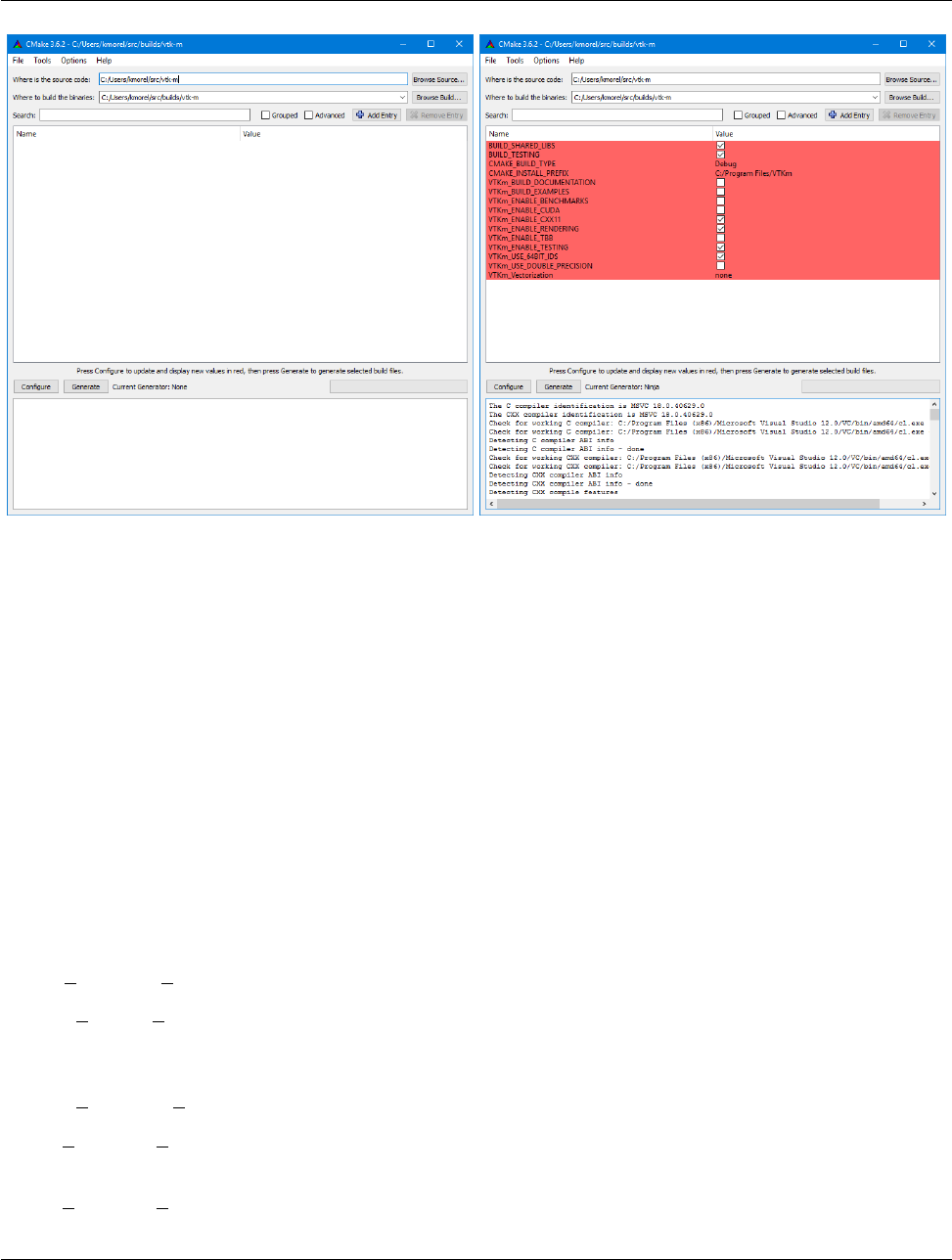
The first time the CMake GUI runs, it initially comes up blank as shown at left in Figure 2.1. Verify that the
source and build directories are correct (located at the top of the GUI) and then click the “Configure” button
near the bottom. The first time you run configure, CMake brings up a dialog box asking what generator you
want for the project. This allows you to select what build system or IDE to use (e.g. make, ninja, Visual Studio).
Once you click “Finish,” CMake will perform its first configuration. Don’t worry if CMake gives an error about
an error in this first configuration process.
Most options in CMake can be reconfigured at any time, but not the compiler and build system used. These
must be set the first time configure is run and cannot be subsequently changed. If you want to change the
compiler or the project file types, you will need to delete everything in the build directory and start over.
Common Errors
After the first configuration, the CMake GUI will provide several configuration options as shown in Figure 2.1
on the right. You now have a chance to modify the configuration of VTK-m, which allows you to modify both
8 Chapter 2. Build and Install VTK-m
DRAFT
2.2. Configure VTK-m
Figure 2.1: The CMake GUI configuring the VTK-m project. At left is the initial blank configuration. At right
is the state after a configure pass.
the behavior of the compiled VTK-m code as well as find components on your system. Using the CMake GUI is
usually an iterative process where you set configuration options and re-run “Configure.” Each time you configure,
CMake might find new options, which are shown in red in the GUI.
It is often the case during this iterative configuration process that configuration errors occur. This can occur
after a new option is enabled but CMake does not automatically find the necessary libraries to make that feature
possible. For example, to enable TBB support, you may have to first enable building TBB, configure for TBB
support, and then tell CMake where the TBB include directories and libraries are.
Once you have set all desired configuration variables and resolved any CMake errors, click the “Generate”
button. This will create the build files (such as makefiles or project files depending on the generator chosen at
the beginning). You can then close the CMake GUI.
There are a great number of configuration parameters available when running CMake on VTK-m. The following
list contains the most common configuration parameters.
BUILD SHARED LIBS Determines whether static or shared libraries are built.
CMAKE BUILD TYPE Selects groups of compiler options from categories like Debug and Release. Debug
builds are, obviously, easier to debug, but they run much slower than Release builds. Use Release builds
whenever releasing production software or doing performance tests.
CMAKE INSTALL PREFIX The root directory to place files when building the install target.
VTKm ENABLE EXAMPLES The VTK-m repository comes with an examples directory. This macro deter-
mines whether they are built.
VTKm ENABLE BENCHMARKS If on, the VTK-m build includes several benchmark programs. The bench-
marks are regression tests for performance.
Chapter 2. Build and Install VTK-m 9
DRAFT
2.3. Building VTK-m
VTKm ENABLE CUDA Determines whether VTK-m is built to run on CUDA GPU devices.
VTKm CUDA Architecture Specifies what GPU architecture(s) to build CUDA for. The options include
native, fermi, kepler, maxwell, pascal, and volta.
VTKm ENABLE OPENMP Determines whether VTK-m is built to run on multi-core devices using OpenMP
pragmas provided by the C++ compiler.
VTKm ENABLE RENDERING Determines whether to build the rendering library.
VTKm ENABLE TBB Determines whether VTK-m is built to run on multi-core x86 devices using the Intel
Threading Building Blocks library.
VTKm ENABLE TESTING If on, the VTK-m build includes building many test programs. The VTK-m
source includes hundreds of regression tests to ensure quality during development.
VTKm USE 64BIT IDS If on, then VTK-m will be compiled to use 64-bit integers to index arrays and other
lists. If off, then VTK-m will use 32-bit integers. 32-bit integers take less memory but could cause failures
on larger data.
VTKm USE DOUBLE PRECISION If on, then VTK-m will use double precision (64-bit) floating point num-
bers for calculations where the precision type is not otherwise specified. If off, then single precision (32-bit)
floating point numbers are used. Regardless of this setting, VTK-m’s templates will accept either type.
2.3 Building VTK-m
Once CMake successfully configures VTK-m and generates the files for the build system, you are ready to build
VTK-m. As stated earlier, CMake supports generating configuration files for several different types of build tools.
Make and ninja are common build tools, but CMake also supports building project files for several different types
of integrated development environments such as Microsoft Visual Studio and Apple XCode.
The VTK-m libraries and test files are compiled when the default build is invoked. For example, if Makefiles
were generated, the build is invoked by calling make in the build directory. Expanding on Example 2.3
Example 2.4: Using make to build VTK-m.
1git cl on e h ttps :// g itl ab . k itw are . c om / v tk / vtk - m. git
2mkd ir vtkm - bui ld
3cd vtkm - bui ld
4cmake - gu i . ./ vtk - m
5make -j
6make test
7make install
The Makefiles and other project files generated by CMake support parallel builds, which run multiple com-
pile steps simultaneously. On computers that have multiple processing cores (as do almost all modern
computers), this can significantly speed up the overall compile. Some build systems require a special flag to
engage parallel compiles. For example, make requires the -j flag to start parallel builds as demonstrated in
Example 2.4.
Did you know?
10 Chapter 2. Build and Install VTK-m
DRAFT
2.4. Linking to VTK-m
CMake allows you to switch between several types of builds including default, Debug, and Release. Programs
and libraries compiled as release builds can run much faster than those from other types of builds. Thus,
it is important to perform Release builds of all software released for production or where runtime is a
concern. Some integrated development environments such as Microsoft Visual Studio allow you to specify
the different build types within the build system. But for other build programs, like make, you have to
specify the build type in the CMAKE BUILD TYPE CMake configuration variable, which is described in
Section 2.2.
Common Errors
CMake creates several build “targets” that specify the group of things to build. The default target builds all
of VTK-m’s libraries as well as tests, examples, and benchmarks if enabled. The test target executes each of
the VTK-m regression tests and verifies they complete successfully on the system. The install target copies the
subset of files required to use VTK-m to a common installation directory. The install target may need to be run
as an administrator user if the installation directory is a system directory.
A good portion of VTK-m is a header-only library, which does not need to be built in a traditional sense.
However, VTK-m contains a significant amount of tests to ensure that the header code does compile and
run correctly on a given system. If you are not concerned with testing a build on a given system, you can
turn off building the testing, benchmarks, and examples using the CMake configuration variables described
in Section 2.2. This can shorten the VTK-m compile time.
Did you know?
2.4 Linking to VTK-m
Ultimately, the value of VTK-m is the ability to link it into external projects that you write. The header files and
libraries installed with VTK-m are typical, and thus you can link VTK-m into a software project using any type
of build system. However, VTK-m comes with several CMake configuration files that simplify linking VTK-m
into another project that is also managed by CMake. Thus, the documentation in this section is specifically for
finding and configuring VTK-m for CMake projects.
VTK-m can be configured from an external project using the find package CMake function. The behavior and
use of this function is well described in the CMake documentation. The first argument to find package is the
name of the package, which in this case is VTKm. CMake configures this package by looking for a file named
VTKmConfig.cmake, which will be located in the lib/cmake/vtkm-X.Xdirectory of the install or build of VTK-m.
The configurable CMake variable VTKm DIR can be set to the directory that contains this file.
Example 2.5: Loading VTK-m configuration from an external CMake project.
1fi nd_ pa cka ge ( VT Km R EQU IRE D )
Chapter 2. Build and Install VTK-m 11
DRAFT
2.4. Linking to VTK-m
The CMake find package function also supports several features not discussed here including specifying
a minimum or exact version of VTK-m and turning off some of the status messages. See the CMake
documentation for more details.
Did you know?
When you load the VTK-m package in CMake, several libraries are defined. Projects building with VTK-m
components should link against one or more of these libraries as appropriate, typically with the target link -
libraries command.
Example 2.6: Linking VTK-m code into an external program.
1fi nd_ pa cka ge ( VT Km R EQU IRE D )
2
3ad d_ ex ecu ta bl e ( my prog m ypr og . cxx )
4ta rg et_ link _li br ari es ( mypr og vtkm_co nt )
The following libraries are made available.
vtkm cont Contains the base objects used to control VTK-m. This library should always be linked in.
vtkm rendering Contains VTK-m’s rendering components. This library is only available if VTKm EN-
ABLE RENDERING is set to true.
The “libraries” made available in the VTK-m do more than add a library to the linker line. These libraries
are actually defined as external targets that establish several compiler flags, like include file directories.
Many CMake packages require you to set up other target options to compile correctly, but for VTK-m it is
sufficient to simply link against the library.
Did you know?
Because the VTK-m CMake libraries do more than set the link line, correcting the link libraries can do more
than fix link problems. For example, if you are getting compile errors about not finding VTK-m header
files, then you probably need to link to one of VTK-m’s libraries to fix the problem rather than try to add
the include directories yourself.
Common Errors
The following is a list of all the CMake variables defined when the find package function completes.
VTKm FOUND Set to true if the VTK-m CMake package is successfully loaded. If find package was not
called with the REQUIRED option, then this variable should be checked before attempting to use VTK-m.
VTKm VERSION The version number of the loaded VTK-m package. The package also sets VTKm VER-
SION MAJOR,VTKm VERSION MINOR, and VTKm VERSION PATCH to get the individual compo-
nents of the version. There is also a VTKm VERSION FULL that is augmented with a partial git SHA to
identify snapshots in between releases.
12 Chapter 2. Build and Install VTK-m
DRAFT
2.4. Linking to VTK-m
VTKm ENABLE CUDA Set to true if VTK-m was compiled for CUDA.
VTKm ENABLE OPENMP Set to true if VTK-m was compiled for OpenMP.
VTKm ENABLE TBB Set to true if VTK-m was compiled for TBB.
VTKm ENABLE RENDERING Set to true if the VTK-m rendering library was compiled.
VTKm ENABLE MPI Set to true if VTK-m was compiled with MPI support.
These package variables can be used to query whether optional components are supported before they are used
in your CMake configuration.
Example 2.7: Using an optional component of VTK-m.
1fi nd_ pa cka ge ( VT Km R EQU IRE D )
2
3if ( NO T V TK m_ EN AB LE_ RE ND ER IN G )
4m es sa g e ( S EN D_ ER RO R " VTK - m m us t b e b u il t wi th r e nd er in g on ." )
5end if ()
6
7ad d_ ex ecu ta bl e ( my prog m ypr og . cxx )
8ta rg et_ link _li br ari es ( mypr og vtkm_co nt v tkm _re nder ing )
Chapter 2. Build and Install VTK-m 13
DRAFT
DRAFT
CHAPTER
THREE
FILE I/O
Before VTK-m can be used to process data, data need to be loaded into the system. VTK-m comes with a basic
file I/O package to get started developing very quickly. All the file I/O classes are declared under the vtkm::io
namespace.
Files are just one of many ways to get data in and out of VTK-m. In Part II we explore efficient ways to
define VTK-m data structures. In particular, Section 11.1 describes how to build VTK-m data set objects
and Section 18.3 documents how to adapt data structures defined in other libraries to be used directly in
VTK-m.
Did you know?
3.1 Readers
All reader classes provided by VTK-m are located in the vtkm::io::reader namespace. The general interface
for each reader class is to accept a filename in the constructor and to provide a ReadDataSet method to load
the data from disk.
The data in the file are returned in a vtkm::cont::DataSet object. Chapter 11 provides much more details
about the contents of a data set object, but for now we treat DataSet as an opaque object that can be passed
around readers, writers, filters, and rendering units.
3.1.1 Legacy VTK File Reader
Legacy VTK files are a simple open format for storing visualization data. These files typically have a .vtk
extension. Legacy VTK files are popular because they are simple to create and read and are consequently
supported by a large number of tools. The format of legacy VTK files is well documented in The VTK User’s
Guide1. Legacy VTK files can also be read and written with tools like ParaView and VisIt.
Legacy VTK files can be read using the vtkm::io::reader::VTKDataSetReader class. The constructor for
this class takes a string containing the filename. The ReadDataSet method reads the data from the previously
indicated file and returns a vtkm::cont::DataSet object, which can be used with filters and rendering.
1A free excerpt describing the file format is available at http://www.vtk.org/Wiki/File:VTK-File-Formats.pdf.

DRAFT
3.2. Writers
Example 3.1: Reading a legacy VTK file.
1#include <vtkm/i o /reader/VTKDataSetReader. h >
2
3vtkm:: cont:: DataSet OpenDataFromVTKFile()
4{
5vtkm:: io :: reader:: VTKDataSetReader reader(" da ta . v tk ") ;
6
7re tu rn reader. Re adDat aS et ();
8}
3.2 Writers
All writer classes provided by VTK-m are located in the vtkm::io::writer namespace. The general interface
for each writer class is to accept a filename in the constructor and to provide a WriteDataSet method to save data
to the disk. The WriteDataSet method takes a vtkm::cont::DataSet object as an argument, which contains
the data to write to the file.
3.2.1 Legacy VTK File Writer
Legacy VTK files can be written using the vtkm::io::writer::VTKDataSetWriter class. The constructor for
this class takes a string containing the filename. The WriteDataSet method takes a vtkm::cont::DataSet
object and writes its data to the previously indicated file.
Example 3.2: Writing a legacy VTK file.
1#include <vtkm/i o /writer/VTKDataSetWriter. h >
2
3void SaveDataAsVTKFile(vtkm:: cont :: DataSet data)
4{
5vtkm:: io :: writer:: VTKDataSetWriter writer(" da ta . v tk ") ;
6
7writer. W ri te Dat aS et ( data );
8}
16 Chapter 3. File I/O
DRAFT
CHAPTER
FOUR
RUNNING FILTERS
Filters are functional units that take data as input and write new data as output. Filters operate on vtkm::-
cont::DataSet objects, which are introduced with the file I/O operations in Chapter 3 and are described in
more detail in Chapter 11. For now we treat DataSet mostly as an opaque object that can be passed around
readers, writers, filters, and rendering units.
The structure of filters in VTK-m is significantly simpler than their counterparts in VTK. VTK filters
are arranged in a dataflow network (a.k.a. a visualization pipeline) and execution management is handled
automatically. In contrast, VTK-m filters are simple imperative units, which are simply called with input
data and return output data.
Did you know?
VTK-m comes with several filters ready for use, and in this chapter we will give a brief overview of these filters.
All VTK-m filters are currently defined in the vtkm::filter namespace. We group filters based on the type of
operation that they do and the shared interfaces that they have. Later Part III describes the necessary steps in
creating new filters in VTK-m.
4.1 Field Filters
Every vtkm::cont::DataSet object contains a list of fields. A field describes some numerical value associated
with different parts of the data set in space. Fields often represent physical properties such as temperature,
pressure, or velocity. Field filters are a class of filters that generate a new field. These new fields are typically
derived from one or more existing fields or point coordinates on the data set. For example, mass, volume, and
density are interrelated, and any one can be derived from the other two.
Before a filter is run, it is important to set up the state of the filter object to the parameters of the algorithm.
The state parameters will vary from one filter to the next, but one state parameter that all field filters share
is the “active” field for the operation. The active field is set with a call to the SetActiveField method. The
argument to SetActiveField is a string that names this input field. Alternatively, you can call the SetUseCo-
ordinateSystemAsField with an argument of true to use the point coordinates as the input field rather than
a specified field. See Sections 11.3 and 11.4 for more information on fields and coordinate systems, respectively.
Finally, SetOutputFieldName, specifies the name assigned to the generated field. If not specified, then the filter
will use a default name.
All field filters contain an Execute method. When calling Execute avtkm::cont::DataSet or vtkm::cont::-
MultiBlock object with the input data is provided as an argument. The Execute method returns a DataSet or

DRAFT
4.1. Field Filters
MultiBlock object (matching the type of the input to Execute), which contains the data generated.
The following example provides a simple demonstration of using a field filter. It specifically uses the point
elevation filter, which is one of the field filters.
Example 4.1: Using PointElevation, which is a field filter.
1VTKM_CONT
2vtkm:: cont:: DataSet ComputeAirPressure(vtkm:: cont :: DataSet dataSet)
3{
4vtkm:: filter:: PointElevation e lev ati on Fil ter ;
5
6// Use the e le va tion filter to es ti ma te a tmospheri c pr es su re based on the
7// hei ght of the point coordina te s . Atm ospheric p re ssure is 1 01325 Pa at
8// sea level and drops about 12 Pa per meter .
9el eva tio nF ilt er . Se tOu tpu tFi eld Nam e (" pressur e ");
10 el evat ion Fil te r . Se tLo wPo int (0.0 , 0.0 , 0.0 );
11 el eva tio nFi lte r . Set Hi ghP oi nt (0.0 , 0.0 , 2000.0) ;
12 el eva tionFi lte r . Set Ra nge (101325.0 , 7 7325.0);
13
14 el eva ti onF il ter . S et UseC oor di nate Sy stem AsF ie ld ( true );
15
16 vtkm:: cont:: DataSet r es ul t = el eva tio nFi lter . Execut e ( data Set );
17
18 re tu rn result;
19 }
4.1.1 Cell Average
vtkm::filter::CellAverage is the cell average filter. It will take a data set with a collection of cells and a field
defined on the points of the data set and create a new field defined on the cells. The values of this new derived
field are computed by averaging the values of the input field at all the incident points. This is a simple way to
convert a point field to a cell field.
The default name for the output cell field is the same name as the input point field. The name can be overridden
as always using the SetOutputFieldName method.
CellAverage provides the following methods.
SetActiveCellSetIndex/GetActiveCellSetIndex Specifies the index for the cell set to use from the data set
provided to the Execute method. The default index is 0, which is the first cell set.
SetActiveField/GetActiveFieldName Specifies the name of the field to use as input.
SetUseCoordinateSystemAsField/GetUseCoordinateSystemAsField Specifies a Boolean flag that determines
whether to use point coordinates as the input field. Set to false by default. When true, the values for the
active field are ignored.
SetActiveCoordinateSystem/GetActiveCoordinateSystemIndex Specifies the index of which coordinate sys-
tem to use as the input field. The default index is 0, which is the first coordinate system.
SetOutputFieldName/GetOutputFieldName Specifies the name of the output field generated.
Execute Takes a data set, executes the filter on a device, and returns a data set that contains the result.
SetFieldsToPass/GetFieldsToPass Specifies which fields to pass from input to output. By default all fields
are passed. See Section 4.4.2 for more details.
18 Chapter 4. Running Filters

DRAFT
4.1. Field Filters
4.1.2 Coordinate System Transforms
VTK-m provides multiple filters to translate between different coordiante systems.
Cylindrical Coordinate System Transform
vtkm::filter::CylindricalCoordinateSystemTransform is a coordinate system transformation filter. The
filter will take a data set and transform the points of the coordinate system. By default, the filter will transform
the coordinates from a cartesian coordinate system to a cylindrical coordinate system. The order for cylindrical
coordinates is (R,θ, Z)
The default name for the output field is “cylindricalCoordinateSystemTransform”, but that can be overridden
as always using the SetOutputFieldName method.
In addition the standard SetOutputFieldName and Execute methods, CylindricalCoordinateSystemTrans-
form provides the following methods.
SetCartesianToCylindrical This method specifies a transformation from cartesian to cylindrical coordinates.
SetCylindricalToCartesian This method specifies a transformation from cylindrical to cartesian coordinates.
SetActiveCellSetIndex/GetActiveCellSetIndex Specifies the index for the cell set to use from the data set
provided to the Execute method. The default index is 0, which is the first cell set.
SetActiveField/GetActiveFieldName Specifies the name of the field to use as input.
SetUseCoordinateSystemAsField/GetUseCoordinateSystemAsField Specifies a Boolean flag that determines
whether to use point coordinates as the input field. Set to false by default. When true, the values for the
active field are ignored.
SetActiveCoordinateSystem/GetActiveCoordinateSystemIndex Specifies the index of which coordinate sys-
tem to use as the input field. The default index is 0, which is the first coordinate system.
SetOutputFieldName/GetOutputFieldName Specifies the name of the output field generated.
Execute Takes a data set, executes the filter on a device, and returns a data set that contains the result.
SetFieldsToPass/GetFieldsToPass Specifies which fields to pass from input to output. By default all fields
are passed. See Section 4.4.2 for more details.
Spherical Coordinate System Transform
vtkm::filter::SphericalCoordinateSystemTransform is a coordinate system transformation filter. The filter
will take a data set and transform the points of the coordinate system. By default, the filter will transform
the coordinates from a cartesian coordinate system to a spherical coordinate system. The order for spherical
coordinates is (R,θ, φ)
The default name for the output field is “sphericalCoordinateSystemTransform”, but that can be overridden as
always using the SetOutputFieldName method.
In addition the standard SetOutputFieldName and Execute methods, CylindricalCoordinateSystemTrans-
form provides the following methods.
SetCartesianToSpherical This method specifies a transformation from cartesian to spherical coordinates.
Chapter 4. Running Filters 19

DRAFT
4.1. Field Filters
SetSphericalToCartesian This method specifies a transformation from spherical to cartesian coordinates.
SetActiveCellSetIndex/GetActiveCellSetIndex Specifies the index for the cell set to use from the data set
provided to the Execute method. The default index is 0, which is the first cell set.
SetActiveField/GetActiveFieldName Specifies the name of the field to use as input.
SetUseCoordinateSystemAsField/GetUseCoordinateSystemAsField Specifies a Boolean flag that determines
whether to use point coordinates as the input field. Set to false by default. When true, the values for the
active field are ignored.
SetActiveCoordinateSystem/GetActiveCoordinateSystemIndex Specifies the index of which coordinate sys-
tem to use as the input field. The default index is 0, which is the first coordinate system.
SetOutputFieldName/GetOutputFieldName Specifies the name of the output field generated.
Execute Takes a data set, executes the filter on a device, and returns a data set that contains the result.
SetFieldsToPass/GetFieldsToPass Specifies which fields to pass from input to output. By default all fields
are passed. See Section 4.4.2 for more details.
4.1.3 Cross Product
vtkm::filter::CrossProduct computes the cross product of two vector fields for every element in the input
data set. The cross product filter computes (PrimaryField ×SecondaryField), where both the primary and
secondary field are specified using methods on the CrossProduct class. The cross product computation works
for both point and cell centered vector fields.
CrossProduct provides the following methods.
SetPrimaryField/GetPrimaryFieldName Specifies the name of the field to use as input for the primary (first)
value of the cross product.
SetUseCoordinateSystemAsPrimaryField/GetUseCoordinateSystemAsPrimaryField Specifies a Boolean
flag that determines whether to use point coordinates as the primary input field. Set to false by default.
When true, the name for the primary field is ignored.
SetPrimaryCoordinateSystem/GetPrimaryCoordinateSystemIndex Specifies the index of which coordinate
system to use as the primary input field. The default index is 0, which is the first coordinate system.
SetSecondaryField/GetSecondaryFieldName Specifies the name of the field to use as input for the secondary
(second) value of the cross product.
SetUseCoordinateSystemAsSecondaryField/GetUseCoordinateSystemAsSecondaryField Specifies a
Boolean flag that determines whether to use point coordinates as the secondary input field. Set to
false by default. When true, the name for the secondary field is ignored.
SetSecondaryCoordinateSystem/GetSecondaryCoordinateSystemIndex Specifies the index of which coordi-
nate system to use as the secondary input field. The default index is 0, which is the first coordinate
system.
SetOutputFieldName/GetOutputFieldName Specifies the name of the output field generated.
Execute Takes a data set, executes the filter on a device, and returns a data set that contains the result.
SetFieldsToPass/GetFieldsToPass Specifies which fields to pass from input to output. By default all fields
are passed. See Section 4.4.2 for more details.
20 Chapter 4. Running Filters

DRAFT
4.1. Field Filters
4.1.4 Dot Product
vtkm::filter::DotProduct computes the dot product of two vector fields for every element in the input data
set. The dot product filter computes (PrimaryField ·SecondaryField), where both the primary and secondary
field are specified using methods on the DotProduct class. The dot product computation works for both point
and cell centered vector fields.
DotProduct provides the following methods.
SetPrimaryField/GetPrimaryFieldName Specifies the name of the field to use as input for the primary (first)
value of the dot product.
SetUseCoordinateSystemAsPrimaryField/GetUseCoordinateSystemAsPrimaryField Specifies a Boolean
flag that determines whether to use point coordinates as the primary input field. Set to false by default.
When true, the name for the primary field is ignored.
SetPrimaryCoordinateSystem/GetPrimaryCoordinateSystemIndex Specifies the index of which coordinate
system to use as the primary input field. The default index is 0, which is the first coordinate system.
SetSecondaryField/GetSecondaryFieldName Specifies the name of the field to use as input for the secondary
(second) value of the dot product.
SetUseCoordinateSystemAsSecondaryField/GetUseCoordinateSystemAsSecondaryField Specifies a
Boolean flag that determines whether to use point coordinates as the secondary input field. Set to
false by default. When true, the name for the secondary field is ignored.
SetSecondaryCoordinateSystem/GetSecondaryCoordinateSystemIndex Specifies the index of which coordi-
nate system to use as the secondary input field. The default index is 0, which is the first coordinate
system.
SetOutputFieldName/GetOutputFieldName Specifies the name of the output field generated.
Execute Takes a data set, executes the filter on a device, and returns a data set that contains the result.
SetFieldsToPass/GetFieldsToPass Specifies which fields to pass from input to output. By default all fields
are passed. See Section 4.4.2 for more details.
4.1.5 Field to Colors
vtkm::filter::FieldToColors takes a field in a data set, looks up each value in a color table, and writes the
resulting colors to a new field. The color to be used for each field value is specified using a vtkm::cont::-
ColorTable object. ColorTable objects are also used with VTK-m’s rendering module and are described in
Section 5.8.
FieldToColors has three modes it can use to select how it should treat the input field.
FieldToColors::SCALAR Treat the field as a scalar field. It is an error to a field of any type that cannot be
directly converted to a basic floating point number (such as a vector).
FieldToColors::MAGNITUDE Given a vector field, take the magnitude of each field value before looking it up in
the color table.
FieldToColors::COMPONENT Select a particular component of the vectors in a field to map to colors.
Chapter 4. Running Filters 21

DRAFT
4.1. Field Filters
Additionally, FieldToColors has different modes in which it can represent colors in its output.
FieldToColors::RGB Output colors are represented as RGB values with each component represented by an
unsigned byte. Specifically, these are vtkm::Vec <vtkm::UInt8,3> values.
FieldToColors::RGBA Output colors are represented as RGBA values with each component represented by an
unsigned byte. Specifically, these are vtkm::Vec <vtkm::UInt8,4> values.
FieldToColors provides the following methods.
SetColorTable/GetColorTable Specifies the vtkm::cont::ColorTable object to use to map field values to
colors.
SetMappingMode/GetMappingMode Specifies the input mapping mode. The value is one of the SCALAR,MAGNI-
TUDE, or COMPONENT selectors described previously.
SetMappingToScalar Sets the input mapping mode to scalar. Shortcut for SetMappingMode(vtkm::filter::-
FieldToColors::SCALAR ).
SetMappingToMagnitude Sets the input mapping mode to vector. Shortcut for SetMappingMode(vtkm::fil-
ter::FieldToColors::MAGNITUDE ).
SetMappingToComponent Sets the input mapping mode to component. Shortcut for SetMappingMode(vtkm::-
filter::FieldToColors::COMPONENT ).
IsMappingScalar Returns true if the input mapping mode is scalar (FieldToColors::SCALAR).
IsMappingMagnitude Returns true if the input mapping mode is magnitude (FieldToColors::MAGNITUDE).
IsMappingComponent Returns true if the input mapping mode is component (FieldToColors::COMPONENT).
SetMappingComponent/GetMappingComponent Specifies the component of the vector to use in the mapping.
This only has an effect if the input mapping mode is set to COMPONENT.
SetOutputMode/GetOutputMode Specifies the output representation of colors. The value is one of the RGB or
RGBA selectors described previously.
SetOutputToRGB Sets the output representation to 8-bit RGB. Shortcut for SetOutputMode(vtkm::filter::-
FieldToColors::RGB ).
SetOutputToRGBA Sets the output representation to 8-bit RGBA. Shortcut for SetOutputMode(vtkm::fil-
ter::FieldToColors::RGBA ).
IsOutputRGB Returns true if the output representation is 8-bit RGB (FieldToColors::RGB).
IsOutputRGBA Returns true if the output representation is 8-bit RGBA (FieldToColors::RGBA).
SetNumberOfSamplingPoints/GetNumberOfSamplingPoints Specifies how many samples to use when looking
up color values. The implementation of FieldToColors first builds an array of color samples to quickly
look up colors for particular values. The size of this lookup array can be adjusted with this parameter. By
default, an array of 256 colors is used.
SetActiveField/GetActiveFieldName Specifies the name of the field to use as input.
SetUseCoordinateSystemAsField/GetUseCoordinateSystemAsField Specifies a Boolean flag that determines
whether to use point coordinates as the input field. Set to false by default. When true, the values for the
active field are ignored.
22 Chapter 4. Running Filters

DRAFT
4.1. Field Filters
SetActiveCoordinateSystem/GetActiveCoordinateSystemIndex Specifies the index of which coordinate sys-
tem to use as the input field. The default index is 0, which is the first coordinate system.
SetOutputFieldName/GetOutputFieldName Specifies the name of the output field generated.
Execute Takes a data set, executes the filter on a device, and returns a data set that contains the result.
SetFieldsToPass/GetFieldsToPass Specifies which fields to pass from input to output. By default all fields
are passed. See Section 4.4.2 for more details.
4.1.6 Gradients
vtkm::filter::Gradients computes the gradient of a point based input field for every element in the input data
set. The gradient computation can either generate cell center based gradients, which are fast but less accurate,
or more accurate but slower point based gradients. The default for the filter is output as cell centered gradients,
but can be changed by using the SetComputePointGradient method. The default name for the output fields is
“Gradients”, but that can be overriden as always using the SetOutputFieldName method.
Gradients provides the following methods.
SetComputePointGradient/GetComputePointGradient Specifies whether we are computing point or cell based
gradients. The output field(s) of this filter will be point based if this is enabled.
SetComputeDivergence/GetComputeDivergence Specifies whether the divergence field will be generated. By
default the name of the array will be “Divergence” but can be changed by using SetDivergenceName. The
field will be a cell field unless ComputePointGradient is enabled. The input array must have 3 components
in order to compute this. The default is off.
SetComputeVorticity/GetComputeVorticity Specifies whether the vorticity field will be generated. By default
the name of the array will be “Vorticity” but can be changed by using SetVorticityName. The field will
be a cell field unless ComputePointGradient is enabled. The input array must have 3 components in order
to compute this. The default is off.
SetComputeQCriterion/GetComputeQCriterion Specifies whether the Q-Criterion field will be generated. By
default the name of the array will be “QCriterion” but can be changed by using SetQCriterionName. The
field will be a cell field unless ComputePointGradient is enabled. The input array must have 3 components
in order to compute this. The default is off.
SetComputeGradient/GetComputeGradient Specifies whether the actual gradient field is written to the output.
When processing fields that have 3 components it is desirable to compute information such as Divergence,
Vorticity, or Q-Criterion without incurring the cost of also having to write out the 3x3 gradient result. The
default is on.
SetColumnMajorOrdering/SetRowMajorOrdering When processing input fields that have 3 components, the
output will be a a 3x3 gradient. By default VTK-m outputs all matrix like arrays in Row Major ordering
(C-Ordering). The ordering can be changed when integrating with libraries like VTK or with FORTRAN
codes that use Column Major ordering. The default is Row Major. This setting is only relevant for 3
component input fields when SetComputeGradient is enabled.
SetDivergenceName/GetDivergenceName Specifies the output cell normals field name. The default is “Diver-
gence”.
SetVorticityName/GetVorticityName Specifies the output Vorticity field name. The default is “Vorticity”
Chapter 4. Running Filters 23

DRAFT
4.1. Field Filters
SetQCriterionName/GetQCriterionName Specifies the output Q-Criterion field name. The default is “QCrite-
rion”.
SetActiveCellSetIndex/GetActiveCellSetIndex Specifies the index for the cell set to use from the data set
provided to the Execute method. The default index is 0, which is the first cell set.
SetActiveField/GetActiveFieldName Specifies the name of the field to use as input.
SetUseCoordinateSystemAsField/GetUseCoordinateSystemAsField Specifies a Boolean flag that determines
whether to use point coordinates as the input field. Set to false by default. When true, the values for the
active field are ignored.
SetActiveCoordinateSystem/GetActiveCoordinateSystemIndex Specifies the index of which coordinate sys-
tem to use as the input field. The default index is 0, which is the first coordinate system.
SetOutputFieldName/GetOutputFieldName Specifies the name of the output field generated.
Execute Takes a data set, executes the filter on a device, and returns a data set that contains the result.
SetFieldsToPass/GetFieldsToPass Specifies which fields to pass from input to output. By default all fields
are passed. See Section 4.4.2 for more details.
4.1.7 Point Average
vtkm::filter::PointAverage is the point average filter. It will take a data set with a collection of cells and
a field defined on the cells of the data set and create a new field defined on the points. The values of this new
derived field are computed by averaging the values of the input field at all the incident cells. This is a simple
way to convert a cell field to a point field.
The default name for the output cell field is the same name as the input point field. The name can be overridden
as always using the SetOutputFieldName method.
In addition the standard SetOutputFieldName and Execute methods, PointAverage provides the following
methods.
SetActiveCellSetIndex/GetActiveCellSetIndex Specifies the index for the cell set to use from the data set
provided to the Execute method. The default index is 0, which is the first cell set.
SetActiveField/GetActiveFieldName Specifies the name of the field to use as input.
SetUseCoordinateSystemAsField/GetUseCoordinateSystemAsField Specifies a Boolean flag that determines
whether to use point coordinates as the input field. Set to false by default. When true, the values for the
active field are ignored.
SetActiveCoordinateSystem/GetActiveCoordinateSystemIndex Specifies the index of which coordinate sys-
tem to use as the input field. The default index is 0, which is the first coordinate system.
SetOutputFieldName/GetOutputFieldName Specifies the name of the output field generated.
Execute Takes a data set, executes the filter on a device, and returns a data set that contains the result.
SetFieldsToPass/GetFieldsToPass Specifies which fields to pass from input to output. By default all fields
are passed. See Section 4.4.2 for more details.
24 Chapter 4. Running Filters

DRAFT
4.1. Field Filters
4.1.8 Point Elevation
vtkm::filter::PointElevation computes the “elevation” of a field of point coordinates in space. The filter
will take a data set and a field of 3 dimensional vectors and compute the distance along a line defined by a low
point and a high point. Any point in the plane touching the low point and perpendicular to the line is set to the
minimum range value in the elevation whereas any point in the plane touching the high point and perpendicular
to the line is set to the maximum range value. All other values are interpolated linearly between these two
planes. This filter is commonly used to compute the elevation of points in some direction, but can be repurposed
for a variety of measures. Example 4.1 gives a demonstration of the elevation filter.
The default name for the output field is “elevation”, but that can be overridden as always using the SetOutput-
FieldName method.
PointElevation provides the following methods.
SetLowPoint/SetHighPoint This pair of methods is used to set the low and high points, respectively, of the
elevation. Each method takes three floating point numbers specifying the x,y, and zcomponents of the
low or high point.
SetRange Sets the range of values to use for the output field. This method takes two floating point numbers
specifying the low and high values, respectively.
SetActiveField/GetActiveFieldName Specifies the name of the field to use as input.
SetUseCoordinateSystemAsField/GetUseCoordinateSystemAsField Specifies a Boolean flag that determines
whether to use point coordinates as the input field. Set to false by default. When true, the values for the
active field are ignored.
SetActiveCoordinateSystem/GetActiveCoordinateSystemIndex Specifies the index of which coordinate sys-
tem to use as the input field. The default index is 0, which is the first coordinate system.
SetOutputFieldName/GetOutputFieldName Specifies the name of the output field generated.
Execute Takes a data set, executes the filter on a device, and returns a data set that contains the result.
SetFieldsToPass/GetFieldsToPass Specifies which fields to pass from input to output. By default all fields
are passed. See Section 4.4.2 for more details.
4.1.9 Point Transform
vtkm::filter::PointTransform is the point transform filter. The filter will take a data set and a field of 3
dimensional vectors and perform the specified point transform operation. Multiple point transformations can be
accomplished by subsequent calls to the filter and specifying the result of the previous transform as the input
field.
The default name for the output field is “transform”, but that can be overridden as always using the SetOut-
putFieldName method.
In addition the standard SetOutputFieldName and Execute methods, PointTransform provides the following
methods.
SetTranslation This method translates, or moves, each point in the input field by a given direction. This
method takes either a three component vector of floats, or the x,y,ztranslation values separately.
Chapter 4. Running Filters 25

DRAFT
4.1. Field Filters
SetRotation This method is used to rotate the input field about a given axis. This method takes a single
floating point number to specify the degrees of rotation and either a vector representing the rotation axis,
or the x,y,zaxis components separately.
SetRotationX This method is used to rotate the input field about the X axis. This method takes a single
floating point number to specify the degrees of rotation.
SetRotationY This method is used to rotate the input field about the Y axis. This method takes a single
floating point number to specify the degrees of rotation.
SetRotationZ This method is used to rotate the input field about the Z axis. This method takes a single floating
point number to specify the degrees of rotation.
SetScale This method is used to scale the input field. This method takes either a single float to scale each
vector component of the field equally, or the x,y,zscaling values as separate floats, or a three component
vector.
SetTransform This is a generic transform method. This method takes a 4x4 matrix and applies this to the
input field.
SetActiveCellSetIndex/GetActiveCellSetIndex Specifies the index for the cell set to use from the data set
provided to the Execute method. The default index is 0, which is the first cell set.
SetActiveField/GetActiveFieldName Specifies the name of the field to use as input.
SetUseCoordinateSystemAsField/GetUseCoordinateSystemAsField Specifies a Boolean flag that determines
whether to use point coordinates as the input field. Set to false by default. When true, the values for the
active field are ignored.
SetActiveCoordinateSystem/GetActiveCoordinateSystemIndex Specifies the index of which coordinate sys-
tem to use as the input field. The default index is 0, which is the first coordinate system.
SetOutputFieldName/GetOutputFieldName Specifies the name of the output field generated.
Execute Takes a data set, executes the filter on a device, and returns a data set that contains the result.
SetFieldsToPass/GetFieldsToPass Specifies which fields to pass from input to output. By default all fields
are passed. See Section 4.4.2 for more details.
4.1.10 Surface Normals
vtkm::filter::SurfaceNormals computes the surface normals of a polygonal data set at its points and/or cells.
The filter takes a data set as input and by default, uses the active coordinate system to compute the normals.
Optionally, a coordinate system or a point field of 3d vectors can be explicitly provided to the Execute method.
The cell normals are computed based on each cell’s winding order using vector cross-product. For non-polygonal
cells, a zeroed vector is assigned. The point normals are computed by averaging the cell normals of the incident
cells of each point.
The default name for the output fields is “Normals”, but that can be overridden using the SetCellNormalsName
and SetPointNormalsName methods. The filter will also respect the name in SetOutputFieldName if neither of
the others are set.
SurfaceNormals provides the following methods.
SetGenerateCellNormals/GetGenerateCellNormals Specifies whether the cell normals should be generated.
26 Chapter 4. Running Filters

DRAFT
4.1. Field Filters
SetGeneratePointNormals/GetGeneratePointNormals Specifies whether the point normals should be gener-
ated.
SetNormalizeCellNormals/GetNormalizeCellNormals Specifies whether cell normals should be normalized
(made unit length). Default value is true. The intended use case of this flag is for faster, approximate
point normals generation by skipping the normalization of the face normals. Note that when set to false,
the result cell normals will not be unit length normals and the point normals will be different.
SetCellNormalsName/GetCellNormalsName Specifies the output cell normals field name.
SetPointNormalsName/GetPointNormalsName Specifies the output point normals field name.
SetActiveCellSetIndex/GetActiveCellSetIndex Specifies the index for the cell set to use from the data set
provided to the Execute method. The default index is 0, which is the first cell set.
SetActiveField/GetActiveFieldName Specifies the name of the field to use as input.
SetUseCoordinateSystemAsField/GetUseCoordinateSystemAsField Specifies a Boolean flag that determines
whether to use point coordinates as the input field. Set to false by default. When true, the values for the
active field are ignored.
SetActiveCoordinateSystem/GetActiveCoordinateSystemIndex Specifies the index of which coordinate sys-
tem to use as the input field. The default index is 0, which is the first coordinate system.
SetOutputFieldName/GetOutputFieldName Specifies the name of the output field generated.
Execute Takes a data set, executes the filter on a device, and returns a data set that contains the result.
SetFieldsToPass/GetFieldsToPass Specifies which fields to pass from input to output. By default all fields
are passed. See Section 4.4.2 for more details.
4.1.11 Vector Magnitude
vtkm::filter::VectorMagnitude takes a field comprising vectors and computes the magnitude for each vector.
The vector field is selected as usual with the SetActiveField method. The default name for the output field is
“magnitude”, but that can be overridden as always using the SetOutputFieldName method.
VectorMagnitude provides the following methods.
SetActiveField/GetActiveFieldName Specifies the name of the field to use as input.
SetUseCoordinateSystemAsField/GetUseCoordinateSystemAsField Specifies a Boolean flag that determines
whether to use point coordinates as the input field. Set to false by default. When true, the values for the
active field are ignored.
SetActiveCoordinateSystem/GetActiveCoordinateSystemIndex Specifies the index of which coordinate sys-
tem to use as the input field. The default index is 0, which is the first coordinate system.
SetOutputFieldName/GetOutputFieldName Specifies the name of the output field generated.
Execute Takes a data set, executes the filter on a device, and returns a data set that contains the result.
SetFieldsToPass/GetFieldsToPass Specifies which fields to pass from input to output. By default all fields
are passed. See Section 4.4.2 for more details.
Chapter 4. Running Filters 27

DRAFT
4.1. Field Filters
4.1.12 ZFP Compression
vtkm::filter::ZFPCompressor takes a 1D, 2D, or 3D field and compresses the values using the compression
algorithm ZFP. The field is selected as usual with the SetActiveField method. The rate of compression is set
using SetRate. The default name for the output field is “compressed”
ZFPCompressor provides the following methods:
SetRate/GetRate Specifies the rate of compression.
SetActiveField/GetActiveFieldName Specifies the name of the field to use as input.
SetActiveField/GetActiveFieldName Specifies the name of the field to use as input.
SetUseCoordinateSystemAsField/GetUseCoordinateSystemAsField Specifies a Boolean flag that determines
whether to use point coordinates as the input field. Set to false by default. When true, the values for the
active field are ignored.
SetActiveCoordinateSystem/GetActiveCoordinateSystemIndex Specifies the index of which coordinate sys-
tem to use as the input field. The default index is 0, which is the first coordinate system.
SetOutputFieldName/GetOutputFieldName Specifies the name of the output field generated.
Execute Takes a data set, executes the filter on a device, and returns a data set that contains the result.
SetFieldsToPass/GetFieldsToPass Specifies which fields to pass from input to output. By default all fields
are passed. See Section 4.4.2 for more details.
vtkm::filter::ZFPDecompressor takes a field of compressed values and decompresses into scalar values using
the compression algorithm ZFP. The field is selected as usual with the SetActiveField method. The rate of
compression is set using SetRate. The default name for the output field is “decompressed”
ZFPDecompressor provides the following methods:
SetRate Specifies the rate of compression.
SetActiveField/GetActiveFieldName Specifies the name of the field to use as input.
SetActiveField/GetActiveFieldName Specifies the name of the field to use as input.
SetUseCoordinateSystemAsField/GetUseCoordinateSystemAsField Specifies a Boolean flag that determines
whether to use point coordinates as the input field. Set to false by default. When true, the values for the
active field are ignored.
SetActiveCoordinateSystem/GetActiveCoordinateSystemIndex Specifies the index of which coordinate sys-
tem to use as the input field. The default index is 0, which is the first coordinate system.
SetOutputFieldName/GetOutputFieldName Specifies the name of the output field generated.
Execute Takes a data set, executes the filter on a device, and returns a data set that contains the result.
SetFieldsToPass/GetFieldsToPass Specifies which fields to pass from input to output. By default all fields
are passed. See Section 4.4.2 for more details.
28 Chapter 4. Running Filters
DRAFT
4.2. Data Set Filters
4.2 Data Set Filters
Data set filters are a class of filters that generate a new data set with a new topology. This new topology is
typically derived from an existing data set. For example, a data set can be significantly altered by adding,
removing, or replacing cells.
Before a filter is run, it is important to set up the state of the filter object to the parameters of the algorithm.
The state parameters will vary from one filter to the next, but one state parameter that all data set filters share
is the “active” cell set for the operation. The active cell set is set with a call to the SetActiveCellSetIndex.
Likewise, SetActiveCoordinateSystem selects which coordinate system to operate on. By default, the filter will
operate on the first cell set and coordinate system. (See Sections 11.2 and 11.4 for more information about cell
sets and coordinate systems, respectively.)
All data set filters contain an Execute method. When calling Execute avtkm::cont::DataSet or vtkm::-
cont::MultiBlock object with the input data is provided as an argument. The Execute method returns a
DataSet or MultiBlock object (matching the type of the input to Execute), which contains the data generated.
The following example provides a simple demonstration of using a data set filter. It specifically uses the vertex
clustering filter, which is one of the data set filters.
Example 4.2: Using VertexClustering, which is a data set filter.
1vtkm:: filter:: VertexClustering vertexClustering;
2
3ve rte xC lus ter in g . Set Num ber OfD ivi sio ns ( vtkm:: Id3 (128 , 128 , 12 8) );
4
5vtkm:: cont:: DataSet simplifiedSurface = vertexClustering.Execute(originalSurface);
4.2.1 Clean Grid
vtkm::filter::CleanGrid is a filter that converts a cell set to an explicit representation and potentially removes
redundant or unused data. It does this by iterating over all cells in the data set, and for each one creating the
explicit cell representation that is stored in the output. (Explicit cell sets are described in Section 11.2.2.) One
benefit of using CleanGrid is that it can optionally remove unused points[ and combine coincident points
when implemented]. Another benefit is that the resulting cell set will be of a known specific type.
The result of vtkm::filter::CleanGrid is not necessarily smaller, memory-wise, than its input. For
example, “cleaning” a data set with a structured topology will actually result in a data set that requires
much more memory to store an explicit topology.
Common Errors
CleanGrid provides the following methods.
SetCompactPointFields/GetCompactPointFields Sets a Boolean flag that determines whether unused points
are removed from the output. If true (the default), then the output data set will have a new coordinate
system containing only those points being used by the cell set, and the indices of the cells will be adjusted
to the new ordering of points. If false, then the output coordinate systems will be a shallow copy of the
input coordinate systems.
Chapter 4. Running Filters 29

DRAFT
4.2. Data Set Filters
SetActiveCellSetIndex/GetActiveCellSetIndex Specifies the index for the cell set to use from the data set
provided to the Execute method. The default index is 0, which is the first cell set.
SetActiveCoordinateSystem/GetActiveCoordinateSystemIndex Specifies the index of which coordinate sys-
tem to use as when computing spatial locations in the mesh. The default index is 0, which is the first
coordinate system.
Execute Takes a data set, executes the filter on a device, and returns a data set that contains the result.
SetFieldsToPass/GetFieldsToPass Specifies which fields to pass from input to output. By default all fields
are passed. See Section 4.4.2 for more details.
4.2.2 Clip with Implicit Function
Clipping is an operation that removes regions from the data set based on a user-provided value or function.
The vtkm::filter::ClipWithImplicitFunction takes an implicit function as an argument. VTK-m’s implicit
functions[, described in detail in Section [AddReferece],] are simple objects that take 3D spatial coor-
dinates and return a field value that often describes a shape. ClipWithImplicitFunction discards regions of
the original data set according to the values of the implicit function. (A companion filter that discards a region
of the data based on the value of a scalar field is described in Section 4.3.1.)
The result of ClipWithImplicitFunction is a volume. If a cell has its vertices positioned all outside the implicit
function, then it will be discarded entirely. Likewise, if a cell its vertices all inside the implicit function, then
it will be retained in its entirety. If a cell has some vertices inside the implicit function and some outside, then
the cell will be split into the portions inside (which will be retained) and the portions outside (which will be
discarded).
ClipWithImplicitFunction provides the following methods.
SetImplicitFunctionGetImplicitFunction Specifies the implicit function to be used to perform the clip op-
eration. The filter does not directly take a vtkm::ImplicitFunction but rather an ImplicitFunction
wrapped inside of a vtkm::cont::ImplicitFunctionHandle. The ImplicitFunctionHandle manages
the use of the virtual methods in ImplicitFunction on different devices, which may be using different
memory spaces or require different processor instructions. An ImplicitFunctionHandle is easily created
with the vtkm::cont::make ImplicitFunctionHandle function.
SetInvertClip Specifies whether the result of the clip filter should be inverted. If set to false (the default), all
regions where the implicit function is negative will be removed. If set to true, all regions where the implicit
function is positive will be removed.
SetActiveCellSetIndex/GetActiveCellSetIndex Specifies the index for the cell set to use from the data set
provided to the Execute method. The default index is 0, which is the first cell set.
SetActiveCoordinateSystem/GetActiveCoordinateSystemIndex Specifies the index of which coordinate sys-
tem to use as when computing spatial locations in the mesh. The default index is 0, which is the first
coordinate system.
Execute Takes a data set, executes the filter on a device, and returns a data set that contains the result.
SetFieldsToPass/GetFieldsToPass Specifies which fields to pass from input to output. By default all fields
are passed. See Section 4.4.2 for more details.
30 Chapter 4. Running Filters
DRAFT
4.2. Data Set Filters
In the example provided below the vtkm::Sphere implicit function is used. This function evaluates to a negative
value if points from the original dataset occur within the sphere, evaluates to 0 if the points occur on the surface
of the sphere, and evaluates to a positive value if the points occur outside the sphere.
Example 4.3: Using ClipWithImplicitFunction.
1// Pa ra me te rs n eeded f or implicit fu nc ti on
2vtkm:: Sphere implicitFunction(vtkm :: make_Vec (1 , 0 , 1) , 0 .5) ;
3
4// Cre ate an i nstance of a clip filter with this imp licit f un ction .
5vtkm:: filter:: ClipWithImplicitFunction clip;
6clip.SetImplicitFunction(
7vtkm:: cont:: mak e_ Impl ici tFun ct ionH an dle ( im pl ici tFu nct ion ));
8
9// By default , ClipWithImplicitFunction will remove everything in side the sphere .
10 // Set the i nvert clip flag to keep the insid e of the sphe re and r emove e ve ry thing
11 // el se .
12 clip . Se tI nve rtC li p ( true );
13
14 // Execu te the clip filter
15 vtkm:: cont:: DataSet o ut Data = clip . Exe cute ( i nD at a );
4.2.3 External Faces
vtkm::filter::ExternalFaces is a filter that extracts all the external faces from a polyhedral data set. An
external face is any face that is on the boundary of a mesh. Thus, if there is a hole in a volume, the boundary
of that hole will be considered external. More formally, an external face is one that belongs to only one cell in a
mesh.
ExternalFaces provides the following methods.
SetCompactPoints/GetCompactPoints Specifies whether point fields should be compacted. If on, the filter will
remove from the output all points that are not used in the resulting surface. If off (the default), unused
points will remain listed in the topology, but point fields and coordinate systems will be shallow-copied to
the output.
SetPassPolyData/GetPassPolyData Specifies how polygonal data (polygons, lines, and vertices) will be han-
dled. If on (the default), these cells will be passed to the output. If off, these cells will be removed from
the output. (Because they have less than 3 topological dimensions, they are not considered to have any
“faces.”)
SetActiveCellSetIndex/GetActiveCellSetIndex Specifies the index for the cell set to use from the data set
provided to the Execute method. The default index is 0, which is the first cell set.
SetActiveCoordinateSystem/GetActiveCoordinateSystemIndex Specifies the index of which coordinate sys-
tem to use as when computing spatial locations in the mesh. The default index is 0, which is the first
coordinate system.
Execute Takes a data set, executes the filter on a device, and returns a data set that contains the result.
SetFieldsToPass/GetFieldsToPass Specifies which fields to pass from input to output. By default all fields
are passed. See Section 4.4.2 for more details.
Chapter 4. Running Filters 31

DRAFT
4.3. Data Set with Field Filters
4.2.4 Vertex Clustering
vtkm::filter::VertexClustering is a filter that simplifies a polygonal mesh. It does so by dividing space into
a uniform grid of bin and then merges together all points located in the same bin. The smaller the dimensions of
this binning grid, the fewer polygons will be in the output cells and the coarser the representation. This surface
simplification is an important operation to support level of detail (LOD) rendering in visualization applications.
Example 4.2 provides a demonstration of the vertex clustering filter.
VertexClustering provides the following methods.
SetNumberOfDivisions/GetNumberOfDimensions Specifies the dimensions of the uniform grid that establishes
the bins used for clustering. Setting smaller numbers of dimensions produces a smaller output, but with a
coarser representation of the surface. The dimensions are provided as a vtkm::Id3.
SetActiveCellSetIndex/GetActiveCellSetIndex Specifies the index for the cell set to use from the data set
provided to the Execute method. The default index is 0, which is the first cell set.
SetActiveCoordinateSystem/GetActiveCoordinateSystemIndex Specifies the index of which coordinate sys-
tem to use as when computing spatial locations in the mesh. The default index is 0, which is the first
coordinate system.
Execute Takes a data set, executes the filter on a device, and returns a data set that contains the result.
SetFieldsToPass/GetFieldsToPass Specifies which fields to pass from input to output. By default all fields
are passed. See Section 4.4.2 for more details.
4.3 Data Set with Field Filters
Data set with field filters are a class of filters that generate a new data set with a new topology. This new
topology is derived from an existing data set and at least one of the fields in the data set. For example, a field
might determine how each cell is culled, clipped, or sliced.
Before a filter is run, it is important to set up the state of the filter object to the parameters of the algorithm.
The state parameters will vary from one filter to the next, but one state parameter that all data set with field
filters share is the “active” field for the operation. The active field is set with a call to the SetActiveField
method. The argument to SetActiveField is a string that names this input field. Another state parameters all
data set with field filters share is the “active” cell set for the operation. The active cell set is set with a call to the
SetActiveCellSetIndex. Likewise, SetActiveCoordinateSystem selects which coordinate system to operate
on. By default, the filter will operate on the first cell set and coordinate system. (See Sections 11.2 and 11.4 for
more information about cell sets and coordinate systems, respectively.) Finally, SetOutputFieldName, specifies
the name assigned to the generated field. If not specified, then the filter will use a default name.
All data set with field filters contain an Execute method. When calling Execute avtkm::cont::DataSet or
vtkm::cont::MultiBlock object with the input data is provided as an argument. The Execute method returns
aDataSet or MultiBlock object (matching the type of the input to Execute), which contains the data generated.
The following example provides a simple demonstration of using a data set with field filter. It specifically uses
the Marching Cubes filter, which is one of the data set with field filters.
Example 4.4: Using MarchingCubes, which is a data set with field filter.
1vtkm:: filter:: MarchingCubes m ar chi ng Cub es ;
2
3ma rch in gCu be s . Set Ac tiv eFi el d (" pointvar ");
32 Chapter 4. Running Filters

DRAFT
4.3. Data Set with Field Filters
4ma rch in gCu bes . S et Is oValue ( 10 .0 );
5
6vtkm:: cont:: DataSet i sos urface = marchi ngC ube s . Execut e ( in Data );
4.3.1 Clip with Field
Clipping is an operation that removes regions from the data set based on a user-provided value or function. The
vtkm::filter::ClipWithField filter takes a clip value as an argument and removes regions where a named
scalar field is below (or above) that value. (A companion filter that discards a region of the data based on an
implicit function is described in Section 4.2.2.)
The result of ClipWithField is a volume. If a cell has field values at its vertices that are all below the specified
value, then it will be discarded entirely. Likewise, if a cell has field values at its vertices that are all above
the specified value, then it will be retained in its entirety. If a cell has some vertices with field values below
the specified value and some above, then the cell will be split into the portions above the value (which will be
retained) and the portions below the value (which will be discarded).
This operation is sometimes called an isovolume because it extracts the volume of a mesh that is inside the
iso-region of a scalar. This is in contrast to an isosurface (also known as a contour), which extracts only the
surface of that iso-value. (See Section 4.3.2 for extracting an isosurface.) ClipWithField is also similar to a
threshold operation, which extracts cells based on the value of field. The difference is that threshold will either
keep or remove entire cells based on the field values whereas clip with carve cells that straddle the valid regions.
(See section 4.3.3 for threshold extraction.)
ClipWithField provides the following methods.
SetClipValue/GetClipValue Specifies the field value for the clip operation. Regions where the active field is
less than this value are clipped away from each input cell.
SetInvertClip Specifies if the result for the clip filter should be inverted. If set to false (the default), regions
where the active field is less than the specified clip value are removed. If set to true, regions where the
active field is more than the specified clip value are removed.
SetActiveField/GetActiveFieldName Specifies the name of the field to use as input.
SetUseCoordinateSystemAsField/GetUseCoordinateSystemAsField Specifies a Boolean flag that determines
whether to use point coordinates as the input field. Set to false by default. When true, the values for the
active field are ignored.
SetActiveCoordinateSystem/GetActiveCoordinateSystemIndex Specifies the index of which coordinate sys-
tem to use as when computing spatial locations in the mesh. The default index is 0, which is the first
coordinate system.
SetActiveCellSetIndex/GetActiveCellSetIndex Specifies the index for the cell set to use from the data set
provided to the Execute method. The default index is 0, which is the first cell set.
Execute Takes a data set, executes the filter on a device, and returns a data set that contains the result.
SetFieldsToPass/GetFieldsToPass Specifies which fields to pass from input to output. By default all fields
are passed. See Section 4.4.2 for more details.
Example 4.5: Using ClipWithField.
1// Cre ate an i nstance of a clip filter that discar ds all regio ns with scalar
2// value less than 25.
Chapter 4. Running Filters 33

DRAFT
4.3. Data Set with Field Filters
3vtkm:: filter:: ClipWithField clip;
4clip . Se tC lip Val ue (2 5.0 );
5clip . Se tA cti ve Fie ld (" p oin tva r ");
6
7// Execu te the clip filter
8vtkm:: cont:: DataSet o ut Data = clip . Exe cute ( i nD at a );
4.3.2 Marching Cubes
Contouring is one of the most fundamental filters in scientific visualization. A contour is the locus where a field is
equal to a particular value. A topographic map showing curves of various elevations often used when hiking in hilly
regions is an example of contours of an elevation field in 2 dimensions. Extended to 3 dimensions, a contour gives
a surface. Thus, a contour is often called an isosurface. Marching Cubes is a well know algorithm for computing
contours and is implemented by vtkm::filter::MarchingCubes. Example 4.4 provides a demonstration of the
Marching Cubes filter.
MarchingCubes provides the following methods.
SetIsoValue/GetIsoValue Specifies the value on which to extract the contour. The contour will be the surface
where the field (provided to Execute) is equal to this value.
SetMergeDuplicatePoints/GetMergeDuplicatePoints Specifies whether coincident points in the data set
should be merged. Because the Marching Cubes filter (like all filters in VTK-m) runs in parallel, parallel
threads can (and often do) create duplicate versions of points. When this flag is set to true, a secondary
operation will find all duplicated points and combine them together.
SetGenerateNormals/GetGenerateNormals Specifies whether to generate normal vectors for the surface. Nor-
mals are used in shading calculations during rendering and can make the surface appear more smooth. By
default, the generated normals are based on the gradient of the field being contoured and can be quite
expensive to compute. A faster method is available that computes the normals based on the faces of the
isosurface mesh, but the normals do not look as good as the gradient based normals. Fast normals can be
enabled using the flags described bellow.
SetComputeFastNormalsForStructured/GetComputeFastNormalsForStructured Specifies whether to use the
fast method of normals computation for Structured data sets. This is only valid if the generate normals
flag is set.
SetComputeFastNormalsForUnstructured/GetComputeFastNormalsForUnstructured Specifies whether to
use the fast method of normals computation for unstructured data sets. This is only valid if the gen-
erate normals flag is set.
SetNormalArrayName/GetNormalArrayName Specifies the name used for the normals field if it is being created.
SetActiveField/GetActiveFieldName Specifies the name of the field to use as input.
SetUseCoordinateSystemAsField/GetUseCoordinateSystemAsField Specifies a Boolean flag that determines
whether to use point coordinates as the input field. Set to false by default. When true, the values for the
active field are ignored.
SetActiveCoordinateSystem/GetActiveCoordinateSystemIndex Specifies the index of which coordinate sys-
tem to use as when computing spatial locations in the mesh. The default index is 0, which is the first
coordinate system.
SetActiveCellSetIndex/GetActiveCellSetIndex Specifies the index for the cell set to use from the data set
provided to the Execute method. The default index is 0, which is the first cell set.
34 Chapter 4. Running Filters

DRAFT
4.3. Data Set with Field Filters
Execute Takes a data set, executes the filter on a device, and returns a data set that contains the result.
SetFieldsToPass/GetFieldsToPass Specifies which fields to pass from input to output. By default all fields
are passed. See Section 4.4.2 for more details.
4.3.3 Threshold
A threshold operation removes topology elements from a data set that do not meet a specified criterion. The
vtkm::filter::Threshold filter removes all cells where the field (provided to Execute) is not between a range
of values.
Note that Threshold either passes an entire cell or discards an entire cell. This can consequently lead to jagged
surfaces at the interface of the threshold caused by the shape of cells that jut inside or outside the removed
region. See Section 4.3.1 for a clipping filter that will clip off a smooth region of the mesh.
Threshold provides the following methods.
SetLowerThreshold/GetLowerThreshold Specifies the lower scalar value. Any cells where the scalar field is
less than this value are removed.
SetUpperThresholdGetUpperThreshold Specifies the upper scalar value. Any cells where the scalar field is
more than this value are removed.
SetActiveField/GetActiveFieldName Specifies the name of the field to use as input.
SetUseCoordinateSystemAsField/GetUseCoordinateSystemAsField Specifies a Boolean flag that determines
whether to use point coordinates as the input field. Set to false by default. When true, the values for the
active field are ignored.
SetActiveCoordinateSystem/GetActiveCoordinateSystemIndex Specifies the index of which coordinate sys-
tem to use as when computing spatial locations in the mesh. The default index is 0, which is the first
coordinate system.
SetActiveCellSetIndex/GetActiveCellSetIndex Specifies the index for the cell set to use from the data set
provided to the Execute method. The default index is 0, which is the first cell set.
Execute Takes a data set, executes the filter on a device, and returns a data set that contains the result.
SetFieldsToPass/GetFieldsToPass Specifies which fields to pass from input to output. By default all fields
are passed. See Section 4.4.2 for more details.
4.3.4 Streamlines
Streamlines are a powerful technique for the visualization of flow fields. A streamline is a curve that is parallel
to the velocity vector of the flow field. Individual streamlines are computed from an initial point location (seed)
using a numerical method to integrate the point through the flow field.
vtkm::filter::Streamline provides the following methods.
SetSeeds Specifies the seed locations for the streamlines. Each seed is advected in the vector field to generate
one streamline for each seed.
Chapter 4. Running Filters 35

DRAFT
4.4. Advanced Field Management
SetStepSize Specifies the step size used for the numerical integrator (4th order Runge-Kutta method) to inte-
grate the seed locations through the flow field.
SetNumberOfSteps Specifies the number of integration steps to be performed on each streamline.
Example 4.6: Using Streamline, which is a data set with field filter.
1vtkm:: filter:: S tr ea ml in e streamlines;
2
3// S pec if y the seeds .
4vtkm:: cont:: ArrayHandle <vtkm:: Vec <vtkm:: FloatDefault , 3>> seedArray ;
5se ed Array . Allocate (2);
6se ed Arr ay . G e tPo rt al Co nt ro l (). Se t (0 , vtkm:: Vec <vtkm:: FloatDefault , 3 >(0 , 0 , 0));
7se ed Arr ay . G e tPo rt al Co nt ro l (). Se t (1 , vtkm:: Vec <vtkm:: FloatDefault , 3 >(1 , 1 , 1));
8
9st reaml in es . S etA cti veF iel d (" ve ctorvar ");
10 st reaml in es . S etS te pS ize (0 .1);
11 st reaml in es . S etN umb erOfSt eps (100 );
12 st rea ml ines . SetSeed s ( see dArray );
13
14 vtkm:: cont:: DataSet s tre amli neC urv es = st rea mli nes . Execut e ( in Da ta );
4.4 Advanced Field Management
Most filters work with fields as inputs and outputs to their algorithms. Although in the previous discussions of
the filters we have seen examples of specifying fields, these examples have been kept brief in the interest of clarity.
In this section we revisit how filters manage fields and provide more detailed documentation of the controls.
Note that not all of the discussion in this section applies to all the aforementioned filters. For example, not all
filters have a specified input field. But where possible, the interface to the filter objects is kept consistent.
4.4.1 Input Fields
Many of VTK-m’s filters have a method named SetActiveField, which selects a field in the input data to use
as the data for the filter’s algorithm. We have already seen how SetActiveField takes the name of the field as
an argument. However, SetActiveField also takes an optional second argument that specifies which topological
elements the field is associated with (such as points or cells). If specified, this argument is one of the following.
vtkm::cont::Field::ASSOC ANY Any field regardless of the association. (This is the default if no association
is given.)
vtkm::cont::Field::ASSOC POINTS A field that applies to points. There is a separate field value attached to
each point. Point fields usually represent samples of continuous data that can be reinterpolated through
cells. Physical properties such as temperature, pressure, density, velocity, etc. are usually best represented
in point fields. Data that deals with the points of the topology, such as displacement vectors, are also
appropriate for point data.
vtkm::cont::Field::ASSOC CELL SET A field that applies to cells. There is a separate field value attached
to each cell in a cell set. Cell fields usually represent values from an integration over the finite cells of the
mesh. Integrated values like mass or volume are best represented in cell fields. Statistics about each cell
like strain or cell quality are also appropriate for cell data.
36 Chapter 4. Running Filters
DRAFT
4.4. Advanced Field Management
vtkm::cont::Field::ASSOC WHOLE MESH A “global” field that applies to the whole mesh. These often contain
summary or annotation information. An example of a whole mesh field could be the volume that the mesh
covers.
Example 4.7: Setting a field’s active filter with an association.
1filter. S etA cti veF iel d (" pointvar " , vtkm:: cont:: Fi eld :: As so ci at ion :: PO INTS );
It is possible to have two fields with the same name that are only differentiatable by the association. That
is, you could have a point field and a cell field with different data but the same name. Thus, it is best
practice to specify the field association when possible. Likewise, it is poor practice to have two fields with
the same name, particularly if the data are not equivalent in some way. It is often the case that fields are
selected without an association.
Common Errors
It is also possible to set the active scalar field as a coordinate system of the data. A coordinate system essentially
provides the spatial location of the points of the data and they have a special place in the vtkm::cont::DataSet
structure. (See Section 11.4 for details on coordinate systems.) You can use a coordinate system as the active
scalars by calling the SetUseCoordinateSystemAsField method with a true flag. Since a DataSet can have
multiple coordinate systems, you can select the desired coordinate system with SetActiveCoordinateSystem.
(By default, the first coordinate system will be used.)
[Example of setting the active coordinate system.]
4.4.2 Passing Fields from Input to Output
After a filter successfully executes and returns a new data set, fields are mapped from input to output. Depending
on what operation the filter does, this could be a simple shallow copy of an array, or it could be a computed
operation. By default, the filter will automatically pass all fields from input to output (performing whatever
transformations are necessary). You can control which fields are passed (and equivalently which are not) with
the SetFieldsToPass methods of vtkm::filter::Filter.
There are multiple ways to to use Filter::SetFieldsToPass to control what fields are passed. If you want
to turn off all fields so that none are passed, call SetFieldsToPass with vtkm::filter::FieldSelection::-
MODE NONE.
Example 4.8: Turning off the passing of all fields when executing a filter.
1filter. S et Fie ld sTo Pas s (vtkm:: filter:: FieldSelection:: MO DE _N ON E );
If you want to pass one specific field, you can pass that field’s name to SetFieldsToPass.
Example 4.9: Setting one field to pass by name.
1filter. S et Fie ld sTo Pas s (" p oi ntvar ");
Or you can provide a list of fields to pass by giving SetFieldsToPass an initializer list of names.
Example 4.10: Using a list of fields for a filter to pass.
1filter. S etF ieldsT oPa ss ({ " pointvar " , " cellv ar " });
Chapter 4. Running Filters 37
DRAFT
4.4. Advanced Field Management
If you want to instead select a list of fields to not pass, you can add vtkm::filter::FieldSelection::MODE -
EXCLUDE as an argument to SetFieldsToPass.
Example 4.11: Excluding a list of fields for a filter to pass.
1filter. S etF ieldsT oPa ss ({ " pointvar " , " cellv ar " },
2vtkm:: filter:: FieldSelection::MODE_EXCLUDE);
Ultimately, Filter::SetFieldsToPass takes a vtkm::filter::FieldSelection object. You can create one
directly to select (or exclude) specific fields and their associations.
Example 4.12: Using vtkm::filter::FieldSelection.
1vtkm:: filter:: FieldSelection fieldSelection;
2fi eld Sel ect ion . AddFi eld (" s calars ");
3fi eld Sel ection . A ddField (" cellv ar ", vtkm:: cont:: Fi eld :: A ss ociation :: CELL_SE T );
4
5filter.SetFieldsToPass(fieldSelection);
It is also possible to specify field attributions directly to Filter::SetFieldsToPass. If you only have one field,
you can just specify both the name and attribution. If you have multiple fields, you can provide an initializer
list of std::pair or vtkm::Pair containing a std::string and a vtkm::cont::Field::AssociationEnum.
In either case, you can add an optional last argument of vtkm::filter::FieldSelection::MODE EXCLUDE to
exclude the specified filters instead of selecting them.
Example 4.13: Selecting one field and its association for a filter to pass.
1filter. S etF iel dsT oPass (" p ointvar " , vtkm:: cont:: F iel d :: As so ci at ion :: POINTS );
Example 4.14: Selecting a list of fields and their associations for a filter to pass.
1filter. S et Fie ld sTo Pas s (
2{vtkm :: m ak e_ Pa ir (" pointvar " , vtkm:: cont:: F iel d :: As so ci at io n :: POI NTS ),
3vtkm:: make_Pai r (" cell var " , vtkm:: cont:: Field :: As sociation :: CELL _S ET ),
4vtkm:: make_Pai r (" scal ars " , vtkm:: cont:: Field :: As sociation :: ANY ) });
38 Chapter 4. Running Filters
DRAFT
CHAPTER
FIVE
RENDERING
Rendering, the generation of images from data, is a key component to visualization. To assist with rendering,
VTK-m provides a rendering package to produce imagery from data, which is located in the vtkm::rendering
namespace.
The rendering package in VTK-m is not intended to be a fully featured rendering system or library. Rather, it
is a lightweight rendering package with two primary use cases:
1. New users getting started with VTK-m need a “quick and dirty” render method to see their visualization
results.
2. In situ visualization that integrates VTK-m with a simulation or other data-generation system might need
a lightweight rendering method.
Both of these use cases require just a basic rendering platform. Because VTK-m is designed to be integrated
into larger systems, it does not aspire to have a fully featured rendering system.
VTK-m’s big sister toolkit VTK is already integrated with VTK-m and has its own fully featured rendering
system. If you need more rendering capabilities than what VTK-m provides, you can leverage VTK instead.
Did you know?
5.1 Scenes and Actors
The primary intent of the rendering package in VTK-m is to visually display the data that is loaded and
processed. Data are represented in VTK-m by vtkm::cont::DataSet objects. DataSet is presented in Chapters
3 and 4. For now we treat DataSet mostly as an opaque object that can be passed around readers, writers,
filters, and rendering units. Detailed documentation for DataSet is provided in Chapter 11.
To render a DataSet, the data are wrapped in a vtkm::rendering::Actor class. The Actor holds the compo-
nents of the DataSet to render (a cell set, a coordinate system, and a field). A color table can also be optionally
be specified, but a default color table will be specified otherwise.
Actors are collected together in an object called vtkm::rendering::Scene. An Actor is added to a Scene with
the AddActor method. The following example demonstrates creating a Scene with one Actor.

DRAFT
5.2. Canvas
Example 5.1: Creating an Actor and adding it to a Scene.
1vtkm:: rendering:: Actor actor ( surf ac eD ata . GetCellSet () ,
2s urf ac eD ata . G et Co or di na te Sy st em () ,
3su rfa ce Data . GetFiel d (" Ran dom Poi ntSc al ars "));
4
5vtkm:: rendering:: Scene scene ;
6sce ne . A ddActo r ( actor );
5.2 Canvas
Acanvas is a unit that represents the image space that is the target of the rendering. The canvas’ primary
function is to manage the buffers that hold the working image data during the rendering. The canvas also
manages the context and state of the rendering subsystem.
vtkm::rendering::Canvas is the base class of all canvas objects. Each type of rendering system has its own
canvas subclass, but currently the only rendering system provided by VTK-m is the internal ray tracer. [Make
sure this becomes true.] The canvas for the ray tracer is vtkm::rendering::CanvasRayTracer.Canvas-
RayTracer is typically constructed by giving the width and height of the image to render.
Example 5.2: Creating a canvas for rendering.
1vtkm:: rendering:: CanvasRayTracer canvas(1920, 1080);
5.3 Mappers
Amapper is a unit that converts data (managed by an Actor) and issues commands to the rendering subsystem
to generate images. All mappers in VTK-m are a subclass of vtkm::rendering::Mapper. Different rendering
systems (as established by the Canvas) often require different mappers. Also, different mappers could render
different types of data in different ways. For example, one mapper might render polygonal surfaces whereas
another might render polyhedra as a translucent volume. Thus, a mapper should be picked to match both the
rendering system of the Canvas and the data in the Actor.
The following mappers are provided by VTK-m.
vtkm::rendering::MapperRayTracer Uses VTK-m’s built in ray tracing system to render the visible surface
of a mesh. MapperRayTracer only works in conjunction with CanvasRayTracer.
vtkm::rendering::MapperCylinder Uses VTK-m’s built in ray tracing system to render cylinders as lines of
a mesh. MapperCylinder only works in conjunction with CanvasRayTracer.
vtkm::rendering::MapperPoint Uses VTK-m’s built in ray tracing system to render the visible points/vertices
of a mesh. MapperPoint only works in conjunction with CanvasRayTracer.
vtkm::rendering::MapperQuad Uses VTK-m’s built in ray tracing system to render the visible quadrilaterals
of a mesh. MapperQuad only works in conjunction with CanvasRayTracer.
vtkm::rendering::MapperVolume Uses VTK-m’s built in ray tracing system to render polyhedra as a translu-
cent volume. MapperVolume only works in conjunction with CanvasRayTracer.
vtkm::rendering::MapperWireframer Uses VTK-m’s built in ray tracing system to render the cell edges (i.e.
the “wireframe”) of a mesh. MapperWireframer only works in conjunction with CanvasRayTracer.
40 Chapter 5. Rendering
DRAFT
5.4. Views
5.4 Views
Aview is a unit that collects all the structures needed to perform rendering. It contains everything needed to
take a Scene (Section 5.1) and use a Mapper (Section 5.3) to render it onto a Canvas (Section 5.2). The view
also annotates the image with spatial and scalar properties.
The base class for all views is vtkm::rendering::View.View is an abstract class, and you must choose one of the
three provided subclasses, vtkm::rendering::View3D,vtkm::rendering::View2D, and vtkm::rendering::-
View3D, depending on the type of data being presented. All three view classes take a Scene, a Mapper, and a
Canvas as arguments to their constructor.
Example 5.3: Constructing a View.
1vtkm:: rendering:: Actor actor ( surf ac eD ata . GetCellSet () ,
2s urf ac eD ata . G et Co or di na te Sy st em () ,
3su rfa ce Data . GetFiel d (" Ran dom Poi ntSc al ars "));
4
5vtkm:: rendering:: Scene scene ;
6sce ne . A ddActo r ( actor );
7
8vtkm:: rendering:: MapperRayTracer mapper;
9vtkm:: rendering:: CanvasRayTracer canvas(1920, 1080);
10
11 vtkm:: rendering:: View3D v ie w ( scene , map per , c an va s );
12 view . In iti ali ze ( );
Once the View is created but before it is used to render, the Initialize method should be called. This is
demonstrated in Example 5.3.
The View also maintains a background color (the color used in areas where nothing is drawn) and a foreground
color (the color used for annotation elements). By default, the View has a black background and a white
foreground. These can be set in the view’s constructor, but it is a bit more readable to set them using the
View::SetBackground and View::SetForeground methods. In either case, the colors are specified using the
vtkm::rendering::Color helper class, which manages the red, green, and blue color channels as well as an
optional alpha channel. These channel values are given as floating point values between 0 and 1.
Example 5.4: Changing the background and foreground colors of a View.
1view . Se tB ac kgr ou ndC ol or ( vtkm:: rendering:: Color ( 1. 0 f , 1 .0 f , 1. 0 f ));
2view . Se tF or egr ou ndC ol or ( vtkm:: rendering:: Color ( 0. 0 f , 0 .0 f , 0. 0 f ));
Although the background and foreground colors are set independently, it will be difficult or impossible to see
the annotation if there is not enough contrast between the background and foreground colors. Thus, when
changing a View’s background color, it is always good practice to also change the foreground color.
Common Errors
Once the View is constructed, intialized, and set up, it is ready to render. This is done by calling the View::Paint
method.
Example 5.5: Using Canvas::Paint in a display callback.
1view . Pai nt ();
Putting together Examples 5.3, 5.4, and 5.5, the final render of a view looks like that in Figure 5.1.
Chapter 5. Rendering 41
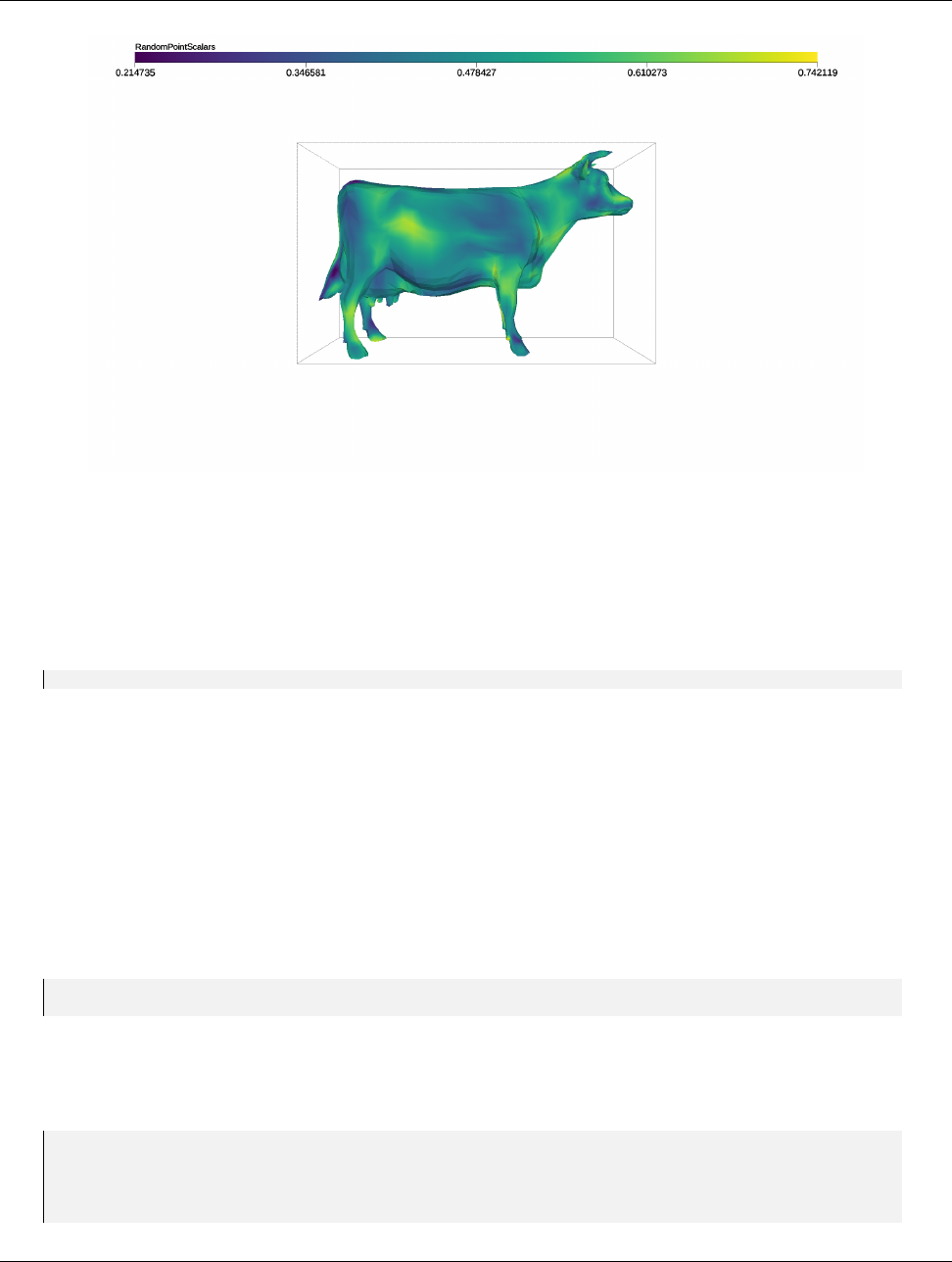
DRAFT
5.5. Changing Rendering Modes
Figure 5.1: Example output of VTK-m’s rendering system.
Of course, the vtkm::rendering::CanvasRayTracer created in 5.3 is an offscreen rendering buffer, so you cannot
immediately see the image. When doing batch visualization, an easy way to output the image to a file for later
viewing is with the View::SaveAs method. This method saves the file in the portable pixelmap (PPM) format.
Example 5.6: Saving the result of a render as an image file.
1vie w . Sav eAs (" Ba si cR end er in g . ppm ");
We visit doing interactive rendering in a GUI later in Section 5.7.
5.5 Changing Rendering Modes
Example 5.3 constructs the default mapper for ray tracing, which renders the data as an opaque solid. However,
you can change the rendering mode by using one of the other mappers listed in Section 5.3. For example, say you
just wanted to see a wireframe representation of your data. You can achieve this by using vtkm::rendering::-
MapperWireframer.
Example 5.7: Creating a mapper for a wireframe representation.
1vtkm:: rendering:: MapperWireframer mapper;
2vtkm:: rendering:: View3D v ie w ( scene , map per , c an va s );
Alternatively, perhaps you wish to render just the points of mesh. vtkm::rendering::MapperPoint renders the
points as spheres and also optionally can scale the spheres based on field values.
Example 5.8: Creating a mapper for point representation.
1vtkm:: rendering:: Ma ppe rPo int m ap per ;
2ma pp er . U seVa ria bl eRa di us ( t rue );
3ma ppe r . S et Ra di us De lt a ( 10 .0 f );
4
5vtkm:: rendering:: View3D v ie w ( scene , map per , c an va s );
42 Chapter 5. Rendering
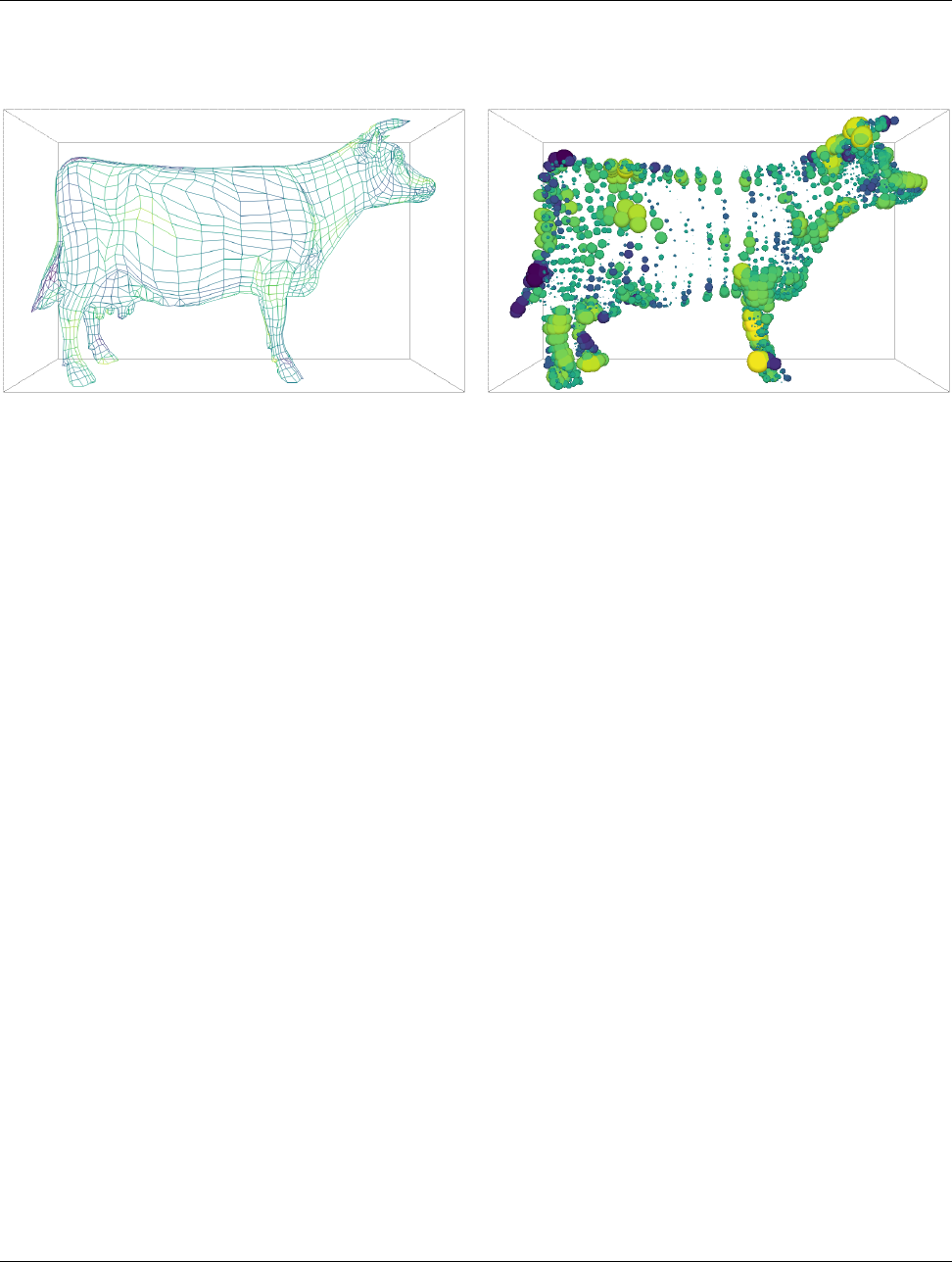
DRAFT
5.6. Manipulating the Camera
These mappers respectively render the images shown in Figure 5.2. Other mappers, such as those that can
render translucent volumes, are also available.
Figure 5.2: Examples of alternate rendering modes using different mappers. The left image is rendered with
MapperWireframer. The right image is rendered with MapperPoint.
5.6 Manipulating the Camera
The vtkm::rendering::View uses an object called vtkm::rendering::Camera to describe the vantage point
from which to draw the geometry. The camera can be retrieved from the View::GetCamera method. That
retrieved camera can be directly manipulated or a new camera can be provided by calling View::SetCamera. In
this section we discuss camera setups typical during view set up. Camera movement during interactive rendering
is revisited in Section 5.7.2.
ACamera operates in one of two major modes: 2D mode or 3D mode. 2D mode is designed for looking at flat
geometry (or close to flat geometry) that is parallel to the x-y plane. 3D mode provides the freedom to place the
camera anywhere in 3D space. The different modes can be set with SetModeTo2D and SetModeTo3D, respectively.
The interaction with the camera in these two modes is very different.
5.6.1 2D Camera Mode
The 2D camera is restricted to looking at some region of the x-y plane.
View Range
The vantage point of a 2D camera can be specified by simply giving the region in the x-y plane to look at. This
region is specified by calling SetViewRange2D on Camera. This method takes the left, right, bottom, and top of
the region to view. Typically these are set to the range of the geometry in world space as shown in Figure 5.3.
There are 3 overloaded versions of the SetViewRange2D method. The first version takes the 4 range values, left,
right, bottom, and top, as separate arguments in that order. The second version takes two vtkm::Range objects
specifying the range in the x and y directions, respectively. The third version trakes a single vtkm::Bounds
object, which completely specifies the spatial range. (The range in z is ignored.) The Range and Bounds objects
are documented later in Sections 6.4.4 and 6.4.5, respectively.
Chapter 5. Rendering 43
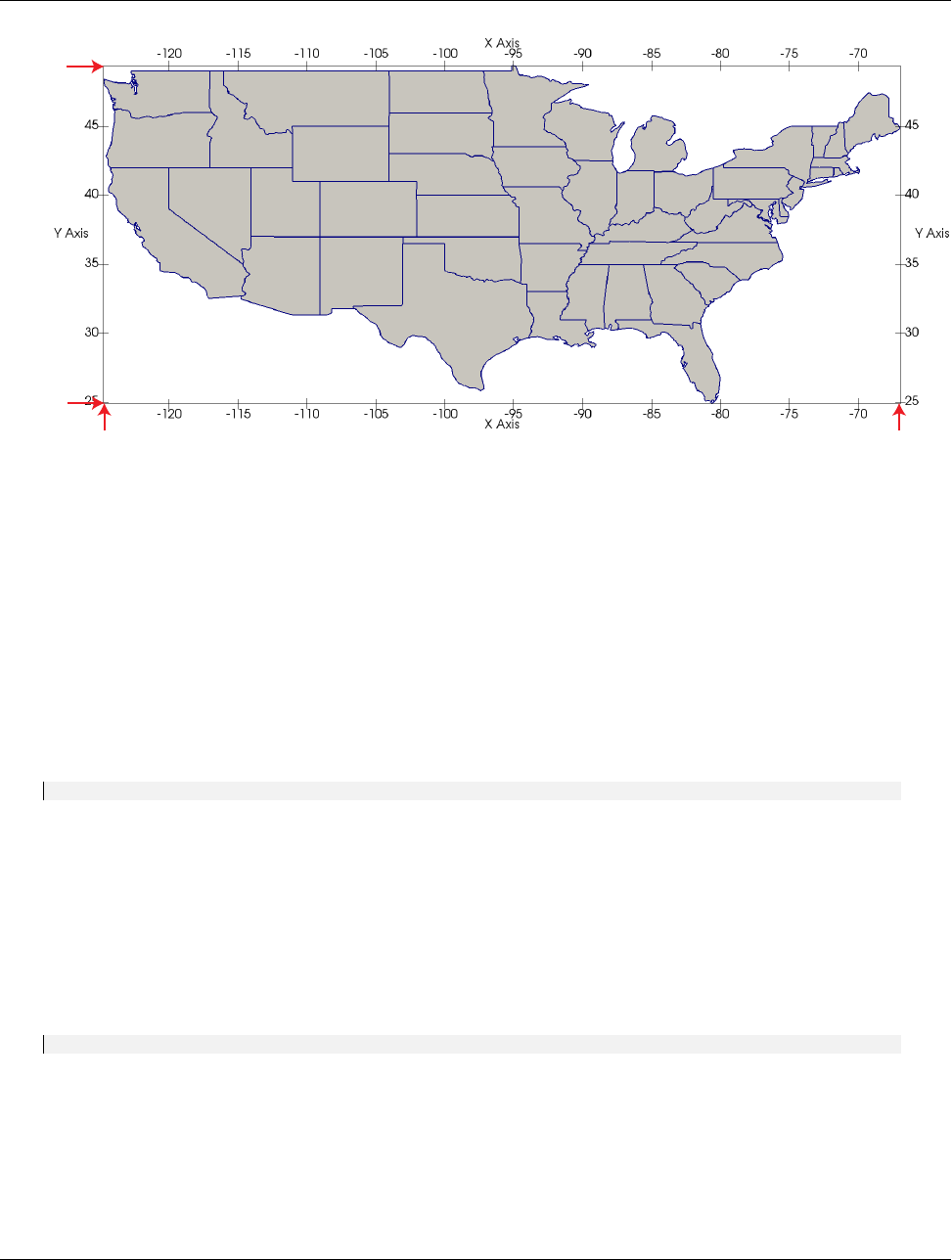
DRAFT
5.6. Manipulating the Camera
Bottom
(Y Min)
Top
(Y Max)
Left
(X Min)
Right
(X Max)
Figure 5.3: The view range bounds to give a Camera.
Pan
A camera pan moves the viewpoint left, right, up, or down. A camera pan is performed by calling the Pan
method on Camera.Pan takes two arguments: the amount to pan in x and the amount to pan in y.
The pan is given with respect to the projected space. So a pan of 1 in the x direction moves the camera to focus
on the right edge of the image whereas a pan of −1 in the x direction moves the camera to focus on the left edge
of the image.
Example 5.9: Panning the camera.
1vie w . Ge tCa me ra (). P an ( de lta X , del taY );
Zoom
A camera zoom draws the geometry larger or smaller. A camera zoom is performed by calling the Zoom method
on Camera.Zoom takes a single argument specifying the zoom factor. A positive number draws the geometry
larger (zoom in), and larger zoom factor results in larger geometry. Likewise, a negative number draws the
geometry smaller (zoom out). A zoom factor of 0 has no effect.
Example 5.10: Zooming the camera.
1view . Ge tCa mer a (). Zoom ( z oom Fac tor );
5.6.2 3D Camera Mode
The 3D camera is a free-form camera that can be placed anywhere in 3D space and can look in any direction.
The projection of the 3D camera is based on the pinhole camera model in which all viewing rays intersect a
single point. This single point is the camera’s position.
44 Chapter 5. Rendering
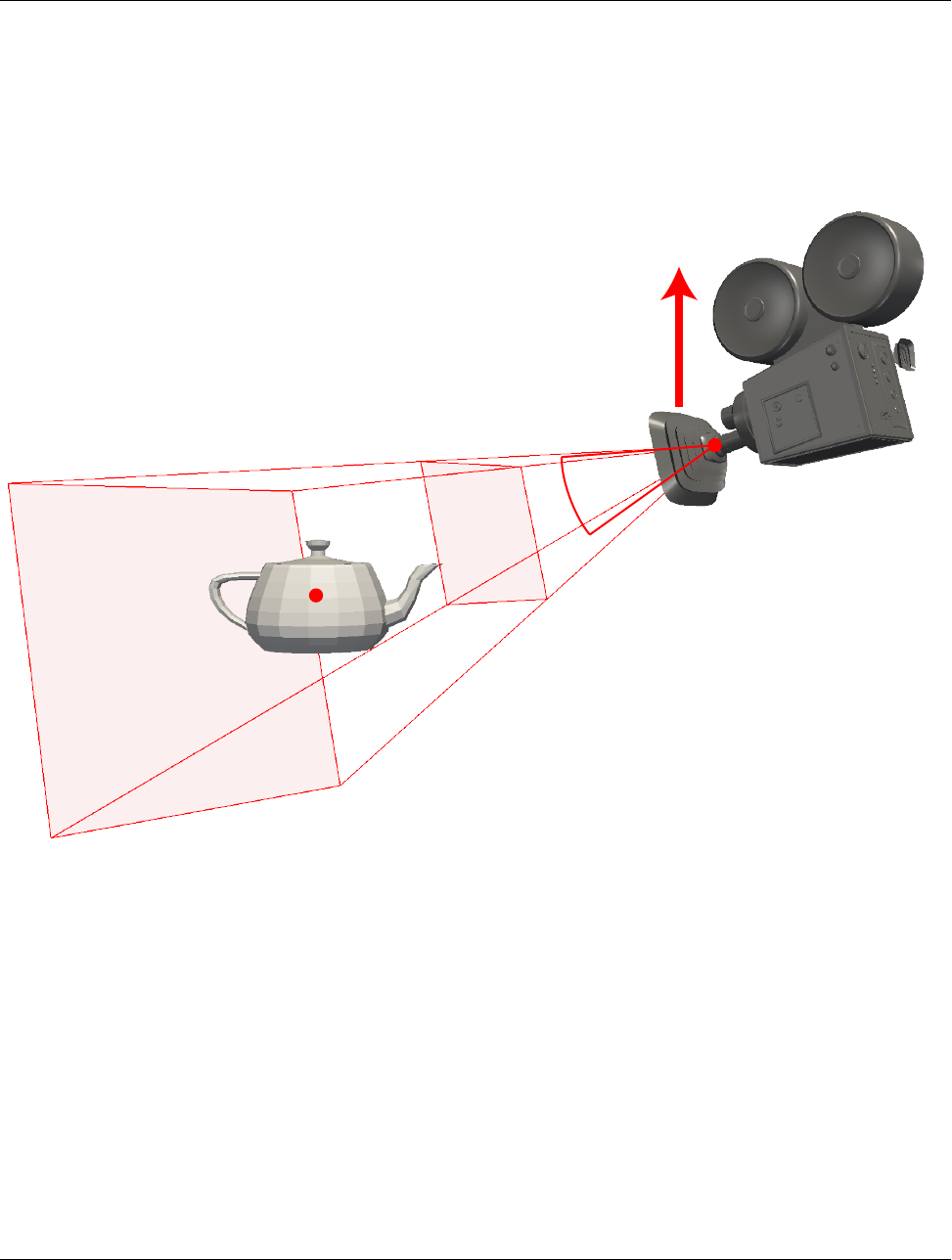
DRAFT
5.6. Manipulating the Camera
Position and Orientation
The position of the camera, which is the point where the observer is viewing the scene, can be set with the
SetPosition method of Camera. The direction the camera is facing is specified by giving a position to focus
on. This is called either the “look at” point or the focal point and is specified with the SetLookAt method of
Camera. Figure 5.4 shows the relationship between the position and look at points.
Look At
PositionField of
View
View
Up
Clipping
Range
Near
Clipping
Range
Far
Figure 5.4: The position and orientation parameters for a Camera.
In addition to specifying the direction to point the camera, the camera must also know which direction is
considered “up.” This is specified with the view up vector using the SetViewUp method in Camera. The view up
vector points from the camera position (in the center of the image) to the top of the image. The view up vector
in relation to the camera position and orientation is shown in Figure 5.4.
Another important parameter for the camera is its field of view. The field of view specifies how wide of a region
the camera can see. It is specified by giving the angle in degrees of the cone of visible region emanating from
the pinhole of the camera to the SetFieldOfView method in the Camera. The field of view angle in relation to
the camera orientation is shown in Figure 5.4. A field of view angle of 60◦usually works well.
Finally, the camera must specify a clipping region that defines the valid range of depths for the object. This is
a pair of planes parallel to the image that all visible data must lie in. Each of these planes is defined simply
by their distance to the camera position. The near clip plane is closer to the camera and must be in front of
all geometry. The far clip plane is further from the camera and must be behind all geometry. The distance to
Chapter 5. Rendering 45
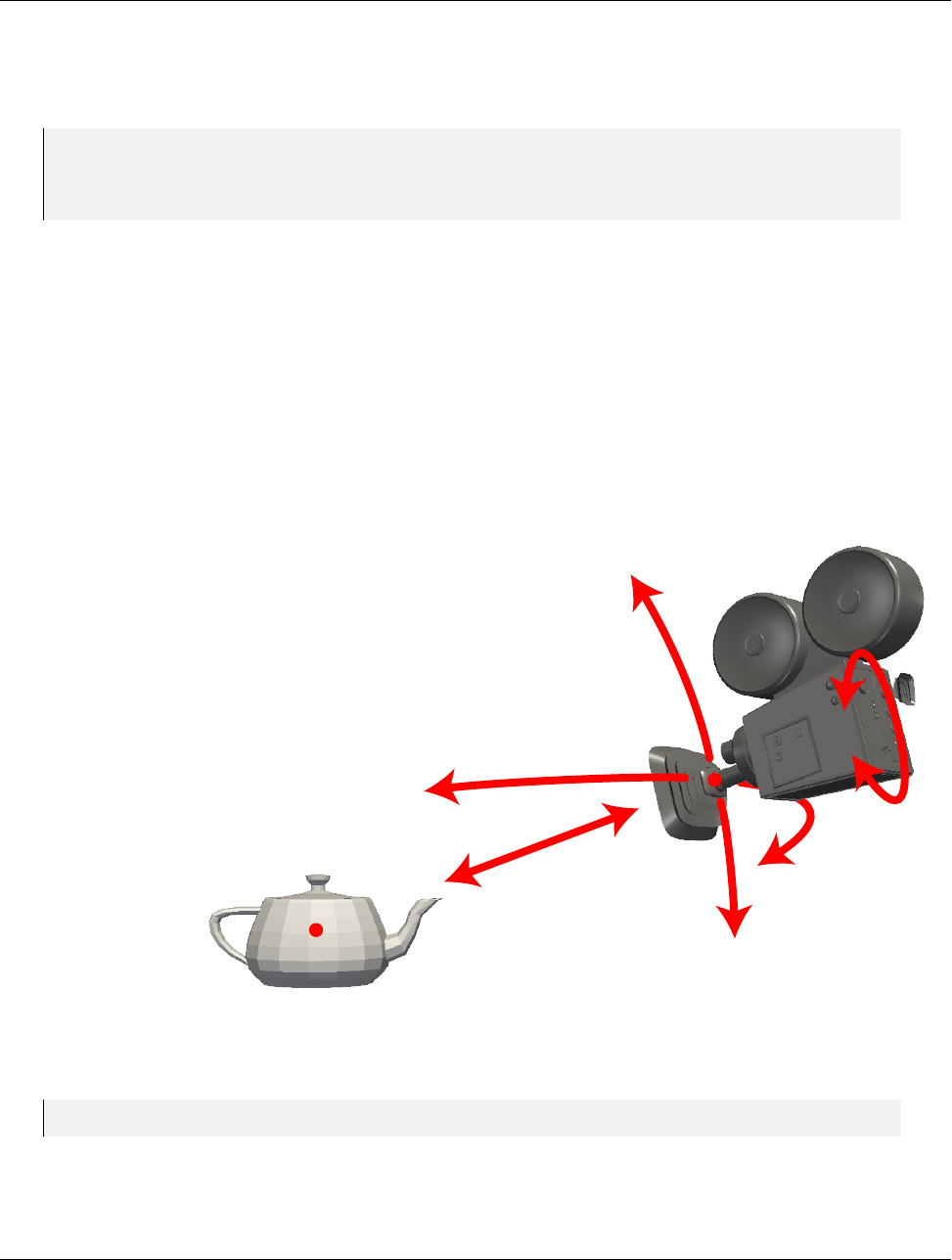
DRAFT
5.6. Manipulating the Camera
both the near and far planes are specified with the SetClippingRange method in Camera. Figure 5.4 shows the
clipping planes in relationship to the camera position and orientation.
Example 5.11: Directly setting vtkm::rendering::Camera position and orientation.
1camera . SetPosit io n ( vtkm:: make_Vec (10.0 , 6.0 , 6. 0));
2ca me ra . S et Loo kAt ( vtkm:: m ak e_ Vec (0.0 , 0.0 , 0.0)) ;
3ca me ra . S et Vie wUp ( vtkm:: m ak e_ Vec (0.0 , 1.0 , 0.0)) ;
4camer a . Set Fiel dOf Vie w ( 60.0);
5camer a . Set Clip pin gRan ge (0.1 , 100. 0);
Movement
In addition to specifically setting the position and orientation of the camera, vtkm::rendering::Camera contains
several convenience methods that move the camera relative to its position and look at point.
Two such methods are elevation and azimuth, which move the camera around the sphere centered at the look at
point. Elevation raises or lowers the camera. Positive values raise the camera up (in the direction of the view
up vector) whereas negative values lower the camera down. Azimuth moves the camera around the look at point
to the left or right. Positive values move the camera to the right whereas negative values move the camera to
the left. Both Elevation and Azimuth specify the amount of rotation in terms of degrees. Figure 5.5 shows the
relative movements of Elevation and Azimuth.
Dolly
Elevation
Azimuth
Roll
Figure 5.5: Camera movement functions relative to position and orientation.
Example 5.12: Moving the camera around the look at point.
1view . Ge tCa mer a (). Az imu th ( 45. 0) ;
2view . Ge tCa mer a (). Elevation(45.0);
46 Chapter 5. Rendering

DRAFT
5.6. Manipulating the Camera
The Elevation and Azimuth methods change the position of the camera, but not the view up vector. This
can cause some wild camera orientation changes when the direction of the camera view is near parallel to
the view up vector, which often happens when the elevation is raised or lowered by about 90 degrees.
Common Errors
In addition to rotating the camera around the look at point, you can move the camera closer or further from the
look at point. This is done with the Dolly method. The Dolly method takes a single value that is the factor
to scale the distance between camera and look at point. Values greater than one move the camera away, values
less than one move the camera closer. The direction of dolly movement is shown in Figure 5.5.
Finally, the Roll method rotates the camera around the viewing direction. It has the effect of rotating the
rendered image. The Roll method takes a single value that is the angle to rotate in degrees. The direction of
roll movement is shown in Figure 5.5.
Pan
A camera pan moves the viewpoint left, right, up, or down. A camera pan is performed by calling the Pan
method on Camera.Pan takes two arguments: the amount to pan in x and the amount to pan in y.
The pan is given with respect to the projected space. So a pan of 1 in the x direction moves the camera to focus
on the right edge of the image whereas a pan of −1 in the x direction moves the camera to focus on the left edge
of the image.
Example 5.13: Panning the camera.
1vie w . Ge tCa me ra (). P an ( de lta X , del taY );
Zoom
A camera zoom draws the geometry larger or smaller. A camera zoom is performed by calling the Zoom method
on Camera.Zoom takes a single argument specifying the zoom factor. A positive number draws the geometry
larger (zoom in), and larger zoom factor results in larger geometry. Likewise, a negative number draws the
geometry smaller (zoom out). A zoom factor of 0 has no effect.
Example 5.14: Zooming the camera.
1view . GetCamera (). Zoom ( zo omFactor );
Reset
Setting a specific camera position and orientation can be frustrating, particularly when the size, shape, and
location of the geometry is not known a priori. Typically this involves querying the data and finding a good
camera orientation.
To make this process simpler, vtkm::rendering::Camera has a convenience method named ResetToBounds that
automatically positions the camera based on the spatial bounds of the geometry. The most expedient method to
find the spatial bounds of the geometry being rendered is to get the vtkm::rendering::Scene object and call
GetSpatialBounds. The Scene object can be retrieved from the vtkm::rendering::View, which, as described
in Section 5.4, is the central object for managing rendering.
Chapter 5. Rendering 47
DRAFT
5.7. Interactive Rendering
Example 5.15: Resetting a Camera to view geometry.
1void Re set Ca mer a ( vtkm:: rendering:: View & vie w )
2{
3vtkm:: Bounds bou nds = view . Get Scene (). Ge tS patia lB oun ds ();
4view . Ge tCa mer a (). R ese tTo Bo und s ( bo un ds );
5}
The ResetToBounds method operates by placing the look at point in the center of the bounds and then placing
the position of the camera relative to that look at point. The position is such that the view direction is the
same as before the call to ResetToBounds and the distance between the camera position and look at point has
the bounds roughly fill the rendered image. This behavior is a convenient way to update the camera to make
the geometry most visible while still preserving the viewing position. If you want to reset the camera to a new
viewing angle, it is best to set the camera to be pointing in the right direction and then calling ResetToBounds
to adjust the position.
Example 5.16: Resetting a Camera to be axis aligned.
1view . Ge tCa mer a (). S etP osi tio n ( vtkm:: m ak e_ Vec (0.0 , 0.0 , 0.0)) ;
2view . Ge tCa mer a (). Se tLo okA t ( vtkm :: m ak e_Vec (0.0 , 0.0 , -1.0));
3view . Ge tCa mer a (). Se tVi ewU p ( vtkm :: m ak e_Vec (0.0 , 1.0 , 0.0)) ;
4vtkm:: Bounds bou nds = view . Get Scene (). Ge tS patia lB oun ds ();
5view . Ge tCa mer a (). R ese tTo Bo und s ( bo un ds );
5.7 Interactive Rendering
So far in our description of VTK-m’s rendering capabilities we have talked about doing rendering of fixed scenes.
However, an important use case of scientific visualization is to provide an interactive rendering system to explore
data. In this case, you want to render into a GUI application that lets the user interact manipulate the view.
The full design of a 3D visualization application is well outside the scope of this book, but we discuss in general
terms what you need to plug VTK-m’s rendering into such a system.
In this section we discuss two important concepts regarding interactive rendering. First, we need to write images
into a GUI while they are being rendered. Second, we want to translate user interaction to camera movement.
5.7.1 Rendering Into a GUI
Before being able to show rendering to a user, we need a system rendering context in which to push the images.
In this section we demonstrate the display of images using the OpenGL rendering system, which is common for
scientific visualization applications. That said, you could also use other rendering systems like DirectX or even
paste images into a blank widget.
Creating an OpenGL context varies depending on the OS platform you are using. If you do not already have
an application you want to integrate with VTK-m’s rendering, you may wish to start with graphics utility API
such as GLUT or GLFW. The process of initializing an OpenGL context is not discussed here.
The process of rendering into an OpenGL context is straightforward. First call Paint on the View object to do
the actual rendering. Second, get the image color data out of the View’s Canvas object. This is done by calling
GetColorBuffer on the Canvas object. This will return a vtkm::cont::ArrayHandle object containing the
image’s pixel color data. (ArrayHandles are discussed in detail in Chapter 7.) A raw pointer can be pulled out
of this ArrayHandle by calling GetStorage().GetBasePointer(). Third, the pixel color data are pasted into
the OpenGL render context. There are multiple ways to do so, but the most straightforward way is to use the
glDrawPixels function provided by OpenGL. Fourth, swap the OpenGL buffers. The method to swap OpenGL
48 Chapter 5. Rendering
DRAFT
5.7. Interactive Rendering
buffers varies by OS platform. The aforementioned graphics libraries GLUT and GLFW each provide a function
for doing so.
Example 5.17: Rendering a View and pasting the result to an active OpenGL context.
1view . Pai nt ();
2
3// Get the color buff er contai ni ng the re nde red image .
4vtkm:: cont:: ArrayHandle <vtkm:: Vec <vtkm:: Float32 , 4> > co lo rB uf fer =
5view . Get Ca nvas (). G et Color Bu ffer ();
6
7// Pull the C arra y out of the a rr ay ha nd le .
8void* colorArray = co lor Bu ffer . GetStora ge (). Ge tBa seP oin ter ();
9
10 // Wr ite the C array to an Open GL buff er .
11 gl Dra wP ixe ls (( GL int ) vi ew . G et Can vas (). Ge tWi dth () ,
12 ( GL in t ) vi ew . G etC anv as ( ). Ge tHe igh t () ,
13 GL_RGBA ,
14 GL_FLOAT ,
15 co lo rA rr ay );
16
17 // Sw ap the Op en GL buf fe rs ( sy st em depende nt ).
5.7.2 Camera Movement
When interactively manipulating the camera in a windowing system, the camera is usually moved in response
to mouse movements. Typically, mouse movements are detected through callbacks from the windowing system
back to your application. Once again, the details on how this works depend on your windowing system. The
assumption made in this section is that through the windowing system you will be able to track the x-y pixel
location of the mouse cursor at the beginning of the movement and the end of the movement. Using these two
pixel coordinates, as well as the current width and height of the render space, we can make several typical camera
movements.
Pixel coordinates in VTK-m’s rendering system originate in the lower-left corner of the image. However,
windowing systems generally report mouse coordinates with the origin in the upper-left corner. The upshot
is that the y coordinates will have to be reversed when translating mouse coordinates to VTK-m image
coordinates. This inverting is present in all the following examples.
Common Errors
Rotate
A common and important mode of interaction with 3D views is to allow the user to rotate the object under
inspection by dragging the mouse. To facilitate this type of interactive rotation, vtkm::rendering::Camera
provides a convenience method named TrackballRotate. The TrackballRotate method takes a start and end
position of the mouse on the image and rotates viewpoint as if the user grabbed a point on a sphere centered in
the image at the start position and moved under the end position.
The TrackballRotate method is typically called from within a mouse movement callback. The callback must
record the pixel position from the last event and the new pixel position of the mouse. Those pixel positions must
be normalized to the range -1 to 1 where the position (-1,-1) refers to the lower left of the image and (1,1) refers
Chapter 5. Rendering 49

DRAFT
5.7. Interactive Rendering
to the upper right of the image. The following example demonstrates the typical operations used to establish
rotations when dragging the mouse.
Example 5.18: Interactive rotations through mouse dragging with Camera::TrackballRotate.
1void Do Mo use Rot at e ( vtkm:: rendering:: View& view ,
2vtkm:: Id mouseStartX ,
3vtkm:: Id mouseStartY ,
4vtkm:: Id mouseEndX ,
5vtkm:: Id m ouseEndY )
6{
7vtkm:: Id s cr eenWidth = view . Ge tC an va s (). Ge tW id th ();
8vtkm:: Id s creenHe ig ht = view . Get Ca nv as (). GetHeight ();
9
10 // C onvert the mou se position coordinates , given in pix els from 0 to
11 // width / height , to n or ma lized scre en c oo rd in ates from -1 to 1. Note that y
12 // scr een coord in at es are usual ly given from the top down wh ereas our
13 // geo me try tr ansforms are given from bottom up , so you have to re verse the y
14 // coordiantes .
15 vtkm:: Float32 sta rtX = (2. 0 f * mou se St ar tX ) / scr ee nW id th - 1.0 f;
16 vtkm:: Float32 st art Y = -(( 2. 0 f * m ou se St art Y ) / s cre en He ig ht - 1 .0 f ) ;
17 vtkm:: Float32 endX = ( 2. 0 f * m ou se End X ) / s cr een Wi dth - 1 .0 f ;
18 vtkm:: Float32 endY = -( (2.0 f * mo us eE nd Y ) / s cr een He igh t - 1.0 f );
19
20 view . Ge tCamera (). Trac kb all Ro ta te ( startX , startY , endX , endY );
21 }
Pan
Panning can be performed by calling Camera::Pan with the translation relative to the width and height of the
canvas. For the translation to track the movement of the mouse cursor, simply scale the pixels the mouse has
traveled by the width and height of the image.
Example 5.19: Pan the view based on mouse movements.
1void Do Mou seP an ( vtkm:: rendering :: View& view ,
2vtkm:: Id mouseStartX ,
3vtkm:: Id mouseStartY ,
4vtkm:: Id mouseEndX ,
5vtkm:: Id m ouseEndY )
6{
7vtkm:: Id s cr eenWidth = view . Ge tC an va s (). Ge tW id th ();
8vtkm:: Id s creenHe ig ht = view . Get Ca nv as (). GetHeight ();
9
10 // C onvert the mou se position coordinates , given in pix els from 0 to
11 // width / height , to n or ma lized scre en c oo rd in ates from -1 to 1. Note that y
12 // scr een coord in at es are usual ly given from the top down wh ereas our
13 // geo me try tr ansforms are given from bottom up , so you have to re verse the y
14 // coordiantes .
15 vtkm:: Float32 sta rtX = (2. 0 f * mou se St ar tX ) / scr ee nW id th - 1.0 f;
16 vtkm:: Float32 st art Y = -(( 2. 0 f * m ou se St art Y ) / s cre en He ig ht - 1 .0 f ) ;
17 vtkm:: Float32 endX = ( 2. 0 f * m ou se End X ) / s cr een Wi dth - 1 .0 f ;
18 vtkm:: Float32 endY = -( (2.0 f * mo us eE nd Y ) / s cr een He igh t - 1.0 f );
19
20 vtkm:: Float32 deltaX = endX - startX;
21 vtkm:: Float32 deltaY = endY - startY;
22
23 vie w . Ge tCa me ra (). P an ( de lta X , del taY );
24 }
50 Chapter 5. Rendering

DRAFT
5.8. Color Tables
Zoom
Zooming can be performed by calling Camera::Zoom with a positive or negative zoom factor. When using Zoom
to respond to mouse movements, a natural zoom will divide the distance traveled by the mouse pointer by the
width or height of the screen as demonstrated in the following example.
Example 5.20: Zoom the view based on mouse movements.
1void Do Mou se Zoo m ( vtkm:: rendering:: View & view ,
2vtkm:: Id mouseStartY ,
3vtkm:: Id m ouseEndY )
4{
5vtkm:: Id s creenHe ig ht = view . Get Ca nv as (). GetHeight ();
6
7// C onvert the mou se position coordinates , given in pixel s from 0 to height ,
8// to n or ma li ze d sc reen coord in at es from -1 to 1. Note that y sc reen
9// coordi na te s are usuall y given from the top down where as our geo me tr y
10 // tr an sf or ms are given from bo ttom up , so you have to rev erse the y
11 // coordiantes .
12 vtkm:: Float32 st art Y = -(( 2. 0 f * m ou se St art Y ) / s cre en He ig ht - 1 .0 f ) ;
13 vtkm:: Float32 endY = -( (2.0 f * mo us eE nd Y ) / s cr een He igh t - 1.0 f );
14
15 vtkm:: Float32 zoomFact or = end Y - s ta rt Y ;
16
17 view . GetCamera (). Zoom ( zo omFactor );
18 }
5.8 Color Tables
An important feature of VTK-m’s rendering units is the ability to pseudocolor objects based on scalar data.
This technique maps each scalar to a potentially unique color. This mapping from scalars to colors is defined by
avtkm::cont::ColorTable object. A ColorTable can be specified as an optional argument when constructing
avtkm::rendering::Actor. (Use of Actors is discussed in Section 5.1.)
Example 5.21: Specifying a ColorTable for an Actor.
1vtkm:: rendering:: Actor actor ( surf ac eD ata . GetCellSet () ,
2s urf ac eD ata . G et Co or di na te Sy st em () ,
3s urf ac eD ata . G et Fie ld (" R a nd om Po int Sc al ar s ") ,
4vtkm:: cont:: C ol or Ta bl e (" inferno "));
The easiest way to create a ColorTable is to provide the name of one of the many predefined sets of color
provided by VTK-m. A list of all available predefined color tables is provided below.
Viridis Matplotlib Virdis, which is designed to have perceptual uni-
formity, accessibility to color blind viewers, and good con-
version to black and white. This is the default color map.
Cool to Warm A color table designed to be perceptually even, to work well
on shaded 3D surfaces, and to generally perform well across
many uses.
Cool to Warm Extended This colormap is an expansion on cool to warm that moves
through a wider range of hue and saturation. Useful if you
are looking for a greater level of detail, but the darker colors
at the end might interfere with 3D surfaces.
Inferno Matplotlib Inferno, which is designed to have perceptual uni-
formity, accessibility to color blind viewers, and good conver-
sion to black and white.
Chapter 5. Rendering 51

DRAFT
5.8. Color Tables
Plasma Matplotlib Plasma, which is designed to have perceptual uni-
formity, accessibility to color blind viewers, and good conver-
sion to black and white.
Black-Body Radiation The colors are inspired by the wavelengths of light from black
body radiation. The actual colors used are designed to be
perceptually uniform.
X Ray Greyscale colormap useful for making volume renderings sim-
ilar to what you would expect in an x-ray.
Green A sequential color map of green varied by saturation.
Black - Blue - White A sequential color map from black to blue to white.
Blue to Orange A double-ended (diverging) color table that goes from dark
blues to a neutral white and then a dark orange at the other
end.
Gray to Red A double-ended (diverging) color table with black/gray at
the low end and orange/red at the high end.
Cold and Hot A double-ended color map with a black middle color and
diverging values to either side. Colors go from red to yellow
on the positive side and through blue on the negative side.
Blue - Green - Orange A three-part color map with blue at the low end, green in
the middle, and orange at the high end.
Yellow - Gray - Blue A three-part color map with yellow at the low end, gray in
the middle, and blue at the high end.
Rainbow Uniform A color table that spans the hues of a rainbow. There have
been many scientific perceptual studies on the effectiveness
of rainbow colors, and they uniformly found them to be in-
effective. This color table modifies the hues to make them
more perceptually uniform, which should improve the effec-
tiveness of the colors. However, we still recommend the other
color tables over this one.
Jet A rainbow color table that adds some darkness for greater
perceptual resolution. The ends of the jet color table might
be too dark for 3D surfaces.
Rainbow Desaturated All the badness of the rainbow color table with periodic dark
points added, which can help identify rate of change.
[There is more functionality to document in ColorTable. In particular, building color tables
by adding control points. However, I am not bothering to document that right now because
(1) I don’t think many people will use it and (2) it is pretty clear from the Doxygen.]
52 Chapter 5. Rendering
DRAFT
Part II
Using VTK-m
DRAFT

DRAFT
CHAPTER
SIX
BASIC PROVISIONS
This section describes the core facilities provided by VTK-m. These include macros, types, and classes that
define the environment in which code is run, the core types of data stored, and template introspection. We also
start with a description of package structure used by VTK-m.
6.1 General Approach
VTK-m is designed to provide a pervasive parallelism throughout all its visualization algorithms, meaning that
the algorithm is designed to operate with independent concurrency at the finest possible level throughout. VTK-
m provides this pervasive parallelism by providing a programming construct called a worklet, which operates on
a very fine granularity of data. The worklets are designed as serial components, and VTK-m handles whatever
layers of concurrency are necessary, thereby removing the onus from the visualization algorithm developer.
Worklet operation is then wrapped into filters, which provide a simplified interface to end users.
A worklet is essentially a small functor or kernel designed to operate on a small element of data. (The name
“worklet” means a small amount of work. We mean small in this sense to be the amount of data, not necessarily
the amount of instructions performed.) The worklet is constrained to contain a serial and stateless function.
These constraints form three critical purposes. First, the constraints on the worklets allow VTK-m to schedule
worklet invocations on a great many independent concurrent threads and thereby making the algorithm per-
vasively parallel. Second, the constraints allow VTK-m to provide thread safety. By controlling the memory
access the toolkit can insure that no worklet will have any memory collisions, false sharing, or other parallel pro-
gramming pitfalls. Third, the constraints encourage good programming practices. The worklet model provides
a natural approach to visualization algorithm design that also has good general performance characteristics.
VTK-m allows developers to design algorithms that are run on massive amounts of threads. However, VTK-m
also allows developers to interface to applications, define data, and invoke algorithms that they have written or
are provided otherwise. These two modes represent significantly different operations on the data. The operating
code of an algorithm in a worklet is constrained to access only a small portion of data that is provided by the
framework. Conversely, code that is building the data structures needs to manage the data in its entirety, but
has little reason to perform computations on any particular element.
Consequently, VTK-m is divided into two environments that handle each of these use cases. Each environment
has its own API, and direct interaction between the environments is disallowed. The environments are as follows.
Execution Environment This is the environment in which the computational portion of algorithms are exe-
cuted. The API for this environment provides work for one element with convenient access to information
such as connectivity and neighborhood as needed by typical visualization algorithms. Code for the execu-
tion environment is designed to always execute on a very large number of threads.
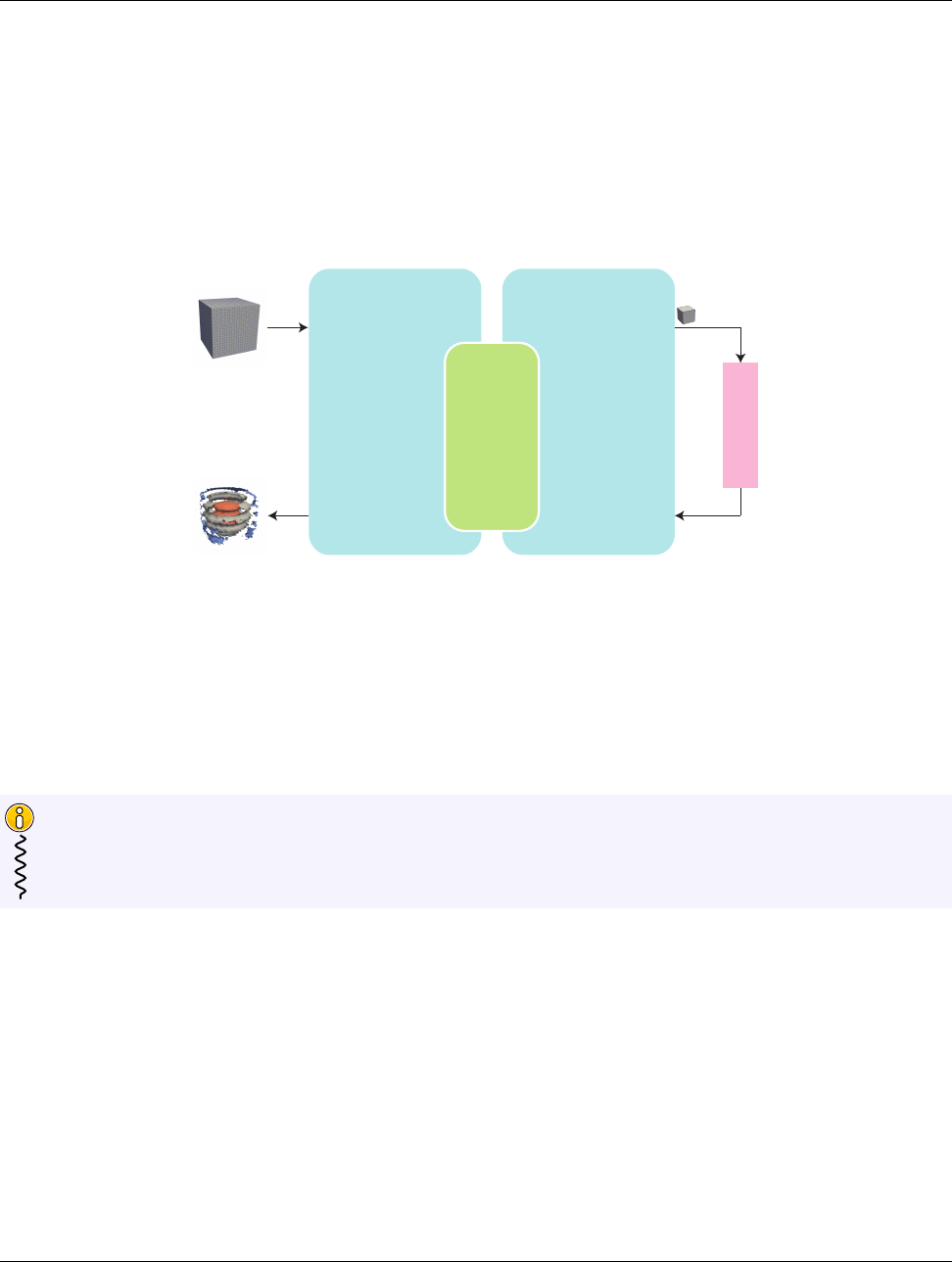
DRAFT
6.2. Package Structure
Control Environment This is the environment that is used to interface with applications, interface with
I/O devices, and schedule parallel execution of the algorithms. The associated API is designed for users
that want to use VTK-m to analyze their data using provided or supplied filters. Code for the control
environment is designed to run on a single thread (or one single thread per process in an MPI job).
These dual programming environments are partially a convenience to isolate the application from the execution
of the worklets and are partially a necessity to support GPU languages with host and device environments. The
control and execution environments are logically equivalent to the host and device environments, respectively, in
CUDA and other associated GPU languages.
Worklet
Control
Environment
Data Model
Array Handle
Invoke
Execution
Environment
Cell Operations
Field Operations
Basic Math
Make Cells
Allocate
Transfer
Schedule
Sort
Scan
...
Device
Adapter
Figure 6.1: Diagram of the VTK-m framework.
Figure 6.1 displays the relationship between the control and execution environment. The typical workflow when
using VTK-m is that first the control thread establishes a data set in the control environment and then invokes a
parallel operation on the data using a filter. From there the data is logically divided into its constituent elements,
which are sent to independent invocations of a worklet. The worklet invocations, being independent, are run on
as many concurrent threads as are supported by the device. On completion the results of the worklet invocations
are collected to a single data structure and a handle is returned back to the control environment.
Are you only planning to use filters in VTK-m that already exist? If so, then everything you work with will
be in the control environment. The execution environment is only used when implementing algorithms for
filters.
Did you know?
6.2 Package Structure
VTK-m is organized in a hierarchy of nested packages. VTK-m places definitions in namespaces that correspond
to the package (with the exception that one package may specialize a template defined in a different namespace).
The base package is named vtkm . All classes within VTK-m are placed either directly in the vtkm package or
in a package beneath it. This helps prevent name collisions between VTK-m and any other library.
As described in Section 6.1, the VTK-m API is divided into two distinct environments: the control environment
and the execution environment. The API for these two environments are located in the vtkm::cont and vtkm::-
exec packages, respectively. Items located in the base vtkm namespace are available in both environments.
56 Chapter 6. Basic Provisions
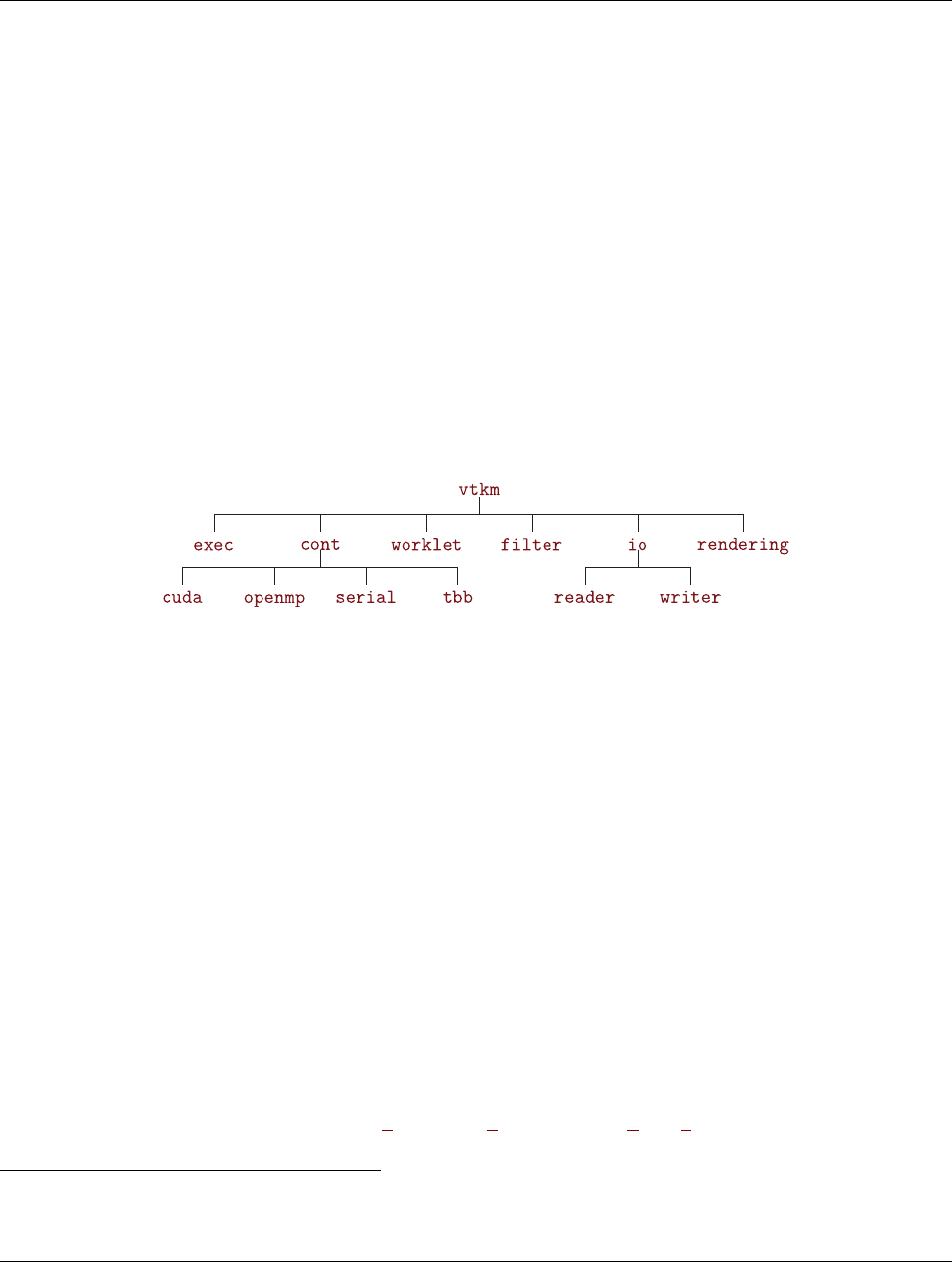
DRAFT
6.3. Function and Method Environment Modifiers
Although it is conventional to spell out names in identifiers,1there is an exception to abbreviate control and
execution to cont and exec, respectively. This is because it is also part of the coding convention to declare
the entire namespace when using an identifier that is part of the corresponding package. The shorter names
make the identifiers easier to read, faster to type, and more feasible to pack lines in 80 column displays. These
abbreviations are also used instead of more common abbreviations (e.g. ctrl for control) because, as part of
actual English words, they are easier to type.
Further functionality in VTK-m is built on top of the base vtkm ,vtkm::cont , and vtkm::exec packages.
Support classes for building worklets, described in Chapter 12, are contained in the vtkm::worklet package.
Other facilities in VTK-m are provided in their own packages such as vtkm::io ,vtkm::filter , and vtkm::-
rendering . These packages are described in Part I.
VTK-m contains code that uses specialized compiler features, such as those with CUDA, or libraries, such as Intel
Threading Building Blocks, that will not be available on all machines. Code for these features are encapsulated
in their own packages under the vtkm::cont namespace: vtkm::cont::cuda and vtkm::cont::tbb .
VTK-m contains OpenGL interoperability that allows data generated with VTK-m to be efficiently transferred
to OpenGL objects. This feature is encapsulated in the vtkm::opengl package.
Figure 6.2 provides a diagram of the VTK-m package hierarchy.
Figure 6.2: VTK-m package hierarchy.
By convention all classes will be defined in a file with the same name as the class name (with a .h extension)
located in a directory corresponding to the package name. For example, the vtkm::cont::ArrayHandle class is
found in the vtkm/cont/ArrayHandle.h header. There are, however, exceptions to this rule. Some smaller classes
and types are grouped together for convenience. These exceptions will be noted as necessary.
Within each namespace there may also be internal and detail sub-namespaces. The internal namespaces
contain features that are used internally and may change without notice. The detail namespaces contain
features that are used by a particular class but must be declared outside of that class. Users should generally
ignore classes in these namespaces.
6.3 Function and Method Environment Modifiers
Any function or method defined by VTK-m must come with a modifier that determines in which environments
the function may be run. These modifiers are C macros that VTK-m uses to instruct the compiler for which
architectures to compile each method. Most user code outside of VTK-m need not use these macros with the
important exception of any classes passed to VTK-m. This occurs when defining new worklets, array storage,
and device adapters.
VTK-m provides three modifier macros, VTKM CONT,VTKM EXEC, and VTKM EXEC CONT, which are used to declare
functions and methods that can run in the control environment, execution environment, and both environments,
1VTK-m coding conventions are outlined in the doc/CodingConventions.md file in the VTK-m source code and at https://gitlab.
kitware.com/vtk/vtk-m/blob/master/docs/CodingConventions.md
Chapter 6. Basic Provisions 57
DRAFT
6.4. Core Data Types
respectively. These macros get defined by including just about any VTK-m header file, but including vtkm/-
Types.h will ensure they are defined.
The modifier macro is placed after the template declaration, if there is one, and before the return type for the
function. Here is a simple example of a function that will square a value. Since most types you would use this
function on have operators in both the control and execution environments, the function is declared for both
places.
Example 6.1: Usage of an environment modifier macro on a function.
1template <typename ValueType >
2VTKM_EXEC_CONT ValueType Square(const ValueType & i nV alue )
3{
4re tu rn inValue * inValue;
5}
The primary function of the modifier macros is to inject compiler-specific keywords that specify what architecture
to compile code for. For example, when compiling with CUDA, the control modifiers have host in them
and execution modifiers have device in them.
It is sometimes the case that a function declared as VTKM EXEC CONT has to call a method declared as VTKM -
EXEC or VTKM CONT. Generally functions should not call other functions with incompatible control/execution
modifiers, but sometimes a generic VTKM EXEC CONT function calls another function determined by the template
parameters, and the valid environments of this subfunction may be inconsistent. For cases like this, you can
use the VTKM SUPPRESS EXEC WARNINGS to tell the compiler to ignore the inconsistency when resolving the
template. When applied to a templated function or method, VTKM SUPPRESS EXEC WARNINGS is placed before
the template keyword. When applied to a non-templated method in a templated class, VTKM SUPPRESS EXEC -
WARNINGS is placed before the environment modifier macro.
Example 6.2: Suppressing warnings about functions from mixed environments.
1VTKM_SUPPRESS_EXEC_WARNINGS
2template <typename Functor >
3VTKM_EXEC_CONT void OverlyComplicatedForLoop(Functor& functor ,
4vtkm:: Id numInterations)
5{
6for (vtkm:: Id index = 0; index < nu mI nte ra ti ons ; index ++)
7{
8functor();
9}
10 }
6.4 Core Data Types
Except in rare circumstances where precision is not a concern, VTK-m does not directly use the core C types
like int,float, and double. Instead, VTK-m provides its own core types, which are declared in vtkm/Types.h.
6.4.1 Single Number Types
To ensure portability across different compilers and architectures, VTK-m provides type aliases for the following
basic types with explicit precision: vtkm::Float32,vtkm::Float64,vtkm::Int8,vtkm::Int16,vtkm::Int32,
vtkm::Int64,vtkm::UInt8,vtkm::UInt16,vtkm::UInt32, and vtkm::UInt64. Under most circumstances
when using VTK-m (and performing visualization in general) the type of data is determined by the source of the
data or resolved through templates. In the case where a specific type of data is required, these VTK-m–defined
types should be preferred over basic C types like int or float.
58 Chapter 6. Basic Provisions

DRAFT
6.4. Core Data Types
Many of the structures in VTK-m require indices to identify elements like points and cells. All indices for arrays
and other lists use the type vtkm::Id. By default this type is a 32-bit wide integer but can be easily changed
by compile options. The CMake configuration option VTKM USE 64BIT IDS can be used to change vtkm::Id
to be 64 bits wide. This configuration can be overridden by defining the C macro VTKM USE 64BIT IDS or
VTKM NO 64BIT IDS to force vtkm::Id to be either 64 or 32 bits. These macros must be defined before any
VTK-m header files are included to take effect.
There is also a secondary index type named vtkm::IdComponent that is used to index components of short
vectors (discussed in Section 6.4.2). This type is an integer that might be a shorter width than vtkm::Id.
There is also the rare circumstance in which an algorithm in VTK-m computes data values for which there is
no indication what the precision should be. For these circumstances, the type vtkm::FloatDefault is provided.
By default this type is a 32-bit wide floating point number but can be easily changed by compile options. The
CMake configuration option VTKM USE DOUBLE PRECISION can be used to change vtkm::FloatDefault to
be 64 bits wide. This configuration can be overridden by defining the C macro VTKM USE DOUBLE PRECISION
or VTKM NO DOUBLE PRECISION to force vtkm::FloatDefault to be either 64 or 32 bits. These macros must
be defined before any VTK-m header files are included to take effect.
For convenience, you can include either vtkm/internal/ConfigureFor32.h or vtkm/internal/ConfigureFor64.h to force
both vtkm::Id and vtkm::FloatDefault to be 32 or 64 bits.
6.4.2 Vector Types
Visualization algorithms also often require operations on short vectors. Arrays indexed in up to three dimensions
are common. Data are often defined in 2-space and 3-space, and transformations are typically done in homoge-
neous coordinates of length 4. To simplify these types of operations, VTK-m provides the vtkm::Vec <T,Size>
templated type, which is essentially a fixed length array of a given type.
The default constructor of vtkm::Vec objects leaves the values uninitialized. All vectors have a constructor with
one argument that is used to initialize all components. All vtkm::Vec objects also have a constructor that allows
you to set the individual components (one per argument). All vtkm::Vec objects with a size that is greater than
4 are constructed at run time and support an arbitrary number of initial values. Likewise, there is a vtkm::-
make Vec convenience function that builds initialized vector types with an arbitrary number of components.
Once created, you can use the bracket operator to get and set component values with the same syntax as an
array.
Example 6.3: Creating vector types.
1vtkm:: Vec <vtkm:: Float32 , 3> A{ 1 }; // A is (1 , 1 , 1)
2A [1] = 2; // A is now (1 , 2, 1)
3vtkm:: Vec <vtkm:: Float32 , 3> B{ 1 , 2 , 3 }; // B is (1 , 2 , 3)
4vtkm:: Vec <vtkm:: Float32 , 3> C = vtkm:: make_Vec(3 , 4, 5); // C is (3 , 4 , 5)
5// creatio n with i ni ti alizer li sts
6vtkm:: Vec <vtkm:: Float32 , 5> D{ 1 }; // D is (1 , 1 , 1, 1, 1)
7vtkm:: Vec <vtkm:: Float32 , 5> E{ 1 , 2 , 3, 4, 5 }; // E is (1 , 2 , 3, 4, 5)
8vtkm:: Vec <vtkm:: Float32 , 5> F = { 6, 7 , 8, 9, 10 }; // F is (6 , 7 , 8, 9, 10)
9auto G = vtkm:: make_Vec (1 , 3 , 5, 7, 9); // G is (1 , 3 , 5, 7, 9)
The types vtkm::Id2 and vtkm::Id3 are type aliases of vtkm::Vec <vtkm::Id,2> and vtkm::Vec <vtkm::-
Id,2>. These are used to index arrays of 2 and 3 dimensions, which is common.
vtkm::Vec supports component-wise arithmetic using the operators for plus (+), minus (-), multiply (*), and
divide (/). It also supports scalar to vector multiplication with the multiply operator. The comparison operators
equal (==) is true if every pair of corresponding components are true and not equal (!=) is true otherwise. A
special vtkm::Dot function is overloaded to provide a dot product for every type of vector.
Chapter 6. Basic Provisions 59
DRAFT
6.4. Core Data Types
Example 6.4: Vector operations.
1vtkm:: Vec <vtkm:: Float32 , 3> A{ 1 , 2 , 3 };
2vtkm:: Vec <vtkm:: Float32 , 3> B{ 4 , 5 , 6.5 };
3vtkm:: Vec <vtkm:: Float32 , 3> C = A + B; // C is (5 , 7 , 9.5)
4vtkm:: Vec <vtkm:: Float32 , 3> D = 2.0 f * C; // D is (10 , 14 , 19)
5vtkm:: Float32 s = vtkm:: Do t (A , B ) ; / / s i s 3 3.5
6bool b1 = (A == B ); // b1 is false
7bool b2 = (A == vtkm:: make_Vec(1 , 2, 3)); // b2 is true
8
9vtkm:: Vec <vtkm:: Float32 , 5> E{ 1 , 2.5 , 3 , 4, 5 }; // E is (1 , 2 , 3, 4, 5)
10 vtkm:: Vec <vtkm:: Float32 , 5> F{ 6 , 7, 8.5 , 9, 10.5 }; // F is (6 , 7 , 8 , 9, 10)
11 vtkm:: Vec <vtkm:: Float32 , 5> G = E + F; // G is (7 , 9.5 , 11.5 , 13 , 15.5)
12 bool b3 = (E == F ); // b3 is false
13 bool b4 = (G == vtkm:: make_Vec(7 .f , 9 .5 f , 1 1. 5 f , 1 3. f , 1 5. 5 f )); // b4 i s tr ue
These operators, of course, only work if they are also defined for the component type of the vtkm::Vec. For
example, the multiply operator will work fine on objects of type vtkm::Vec <char,3>, but the multiply operator
will not work on objects of type vtkm::Vec <std::string,3> because you cannot multiply objects of type
std::string.
In addition to generalizing vector operations and making arbitrarily long vectors, vtkm::Vec can be repurposed
for creating any sequence of homogeneous objects. Here is a simple example of using vtkm::Vec to hold the
state of a polygon.
Example 6.5: Repurposing a vtkm::Vec.
1vtkm:: Vec <vtkm:: Vec <vtkm:: Float32 , 2>, 3> equilateralTriangle(
2vtkm:: make_ Ve c (0.0 , 0.0) ,
3vtkm:: make_ Ve c (1.0 , 0.0) ,
4vtkm:: make_ Ve c (0.5, 0.8660254));
The vtkm::Vec class provides a convenient structure for holding and passing small vectors of data. However,
there are times when using Vec is inconvenient or inappropriate. For example, the size of vtkm::Vec must be
known at compile time, but there may be need for a vector whose size is unknown until compile time. Also, the
data populating a vtkm::Vec might come from a source that makes it inconvenient or less efficient to construct
avtkm::Vec. For this reason, VTK-m also provides several Vec-like objects that behave much like vtkm::Vec
but are a different class. These Vec-like objects have the same interface as vtkm::Vec except that the NUM -
COMPONENTS constant is not available on those that are sized at run time. Vec-like objects also come with a
CopyInto method that will take their contents and copy them into a standard Vec class. (The standard Vec
class also has a CopyInto method for consistency.)
The first Vec-like object is vtkm::VecC, which exposes a C-type array as a Vec. The constructor for vtkm::VecC
takes a C array and a size of that array. There is also a constant version of VecC named vtkm::VecCConst, which
takes a constant array and cannot be mutated. The vtkm/Types.h header defines both VecC and VecCConst as
well as multiple versions of vtkm::make VecC to easily convert a C array to either a VecC or VecCConst.
The following example demonstrates converting values from a constant table into a vtkm::VecCConst for further
consumption. The table and associated methods define how 8 points come together to form a hexahedron.
Example 6.6: Using vtkm::VecCConst with a constant array.
1VTKM_EXEC
2vtkm:: VecCConst <vtkm:: IdComponent > HexagonIndexToIJK(vtkm:: IdComponent index )
3{
4static const vtkm:: IdComponent He xag on I nd exT oI JKT abl e [8][3 ] = {
5{ 0, 0, 0 } , { 1, 0, 0 } , { 1 , 1, 0 }, { 0 , 1, 0 },
6{ 0, 0, 1 } , { 1, 0, 1 } , { 1 , 1, 1 }, { 0 , 1, 1 }
7};
8
9re tu rn vtkm:: make_VecC( H exa gonI nd exT oIJ KTa ble [ index ] , 3);
10 }
60 Chapter 6. Basic Provisions
DRAFT
6.4. Core Data Types
11
12 VTKM_EXEC
13 vtkm:: IdComponent HexagonIJKToIndex(vtkm:: VecCConst <vtkm:: IdComponent > ijk )
14 {
15 static const vtkm:: IdComponent He xag on I JK ToI nd exT abl e [2 ][ 2] [2 ] = {
16 {
17 // i =0
18 { 0, 4 }, // j =0
19 { 3, 7 }, // j =1
20 },
21 {
22 // i =1
23 { 1, 5 }, // j =0
24 { 2, 6 }, // j =1
25 }
26 };
27
28 re tu rn H exa go nIJ KTo In dex Tab le [ ijk [ 0]] [ ijk [1]][ ijk [2]];
29 }
The vtkm::VecC and vtkm::VecCConst classes only hold a pointer to a buffer that contains the data. They
do not manage the memory holding the data. Thus, if the pointer given to vtkm::VecC or vtkm::VecCConst
becomes invalid, then using the object becomes invalid. Make sure that the scope of the vtkm::VecC or
vtkm::VecCConst does not outlive the scope of the data it points to.
Common Errors
The next Vec-like object is vtkm::VecVariable, which provides a Vec-like object that can be resized at run time
to a maximum value. Unlike VecC,VecVariable holds its own memory, which makes it a bit safer to use. But
also unlike VecC, you must define the maximum size of VecVariable at compile time. Thus, VecVariable is
really only appropriate to use when there is a predetermined limit to the vector size that is fairly small.
The following example uses a vtkm::VecVariable to store the trace of edges within a hexahedron. This example
uses the methods defined in Example 6.6.
Example 6.7: Using vtkm::VecVariable.
1vtkm:: VecVariable <vtkm:: IdComponent , 4> HexagonShortestPath(
2vtkm:: IdComponent startPoint ,
3vtkm:: IdComponent endPoint)
4{
5vtkm:: VecCConst <vtkm:: IdComponent > s tartIJK = He xa gon In dex To IJK ( st ar tP oi nt );
6vtkm:: VecCConst <vtkm:: IdComponent > endIJK = H ex ago nInd exT oIJ K ( end Point );
7
8vtkm:: Vec <vtkm:: IdComponent , 3 > currentIJ K ;
9startIJK . Co pyInto ( currentIJK );
10
11 vtkm:: VecVariable <vtkm:: IdComponent , 4 > pat h ;
12 path . Append ( s tar tPo int );
13 for (vtkm:: IdComponent dimension = 0; dimension < 3; dimension ++)
14 {
15 if ( c ur ren tIJK [ dimension ] != end IJK [ dim ension ])
16 {
17 cu rrentIJK [ dimension ] = en dIJK [ di me nsion ];
18 path . Append ( H exa gonI JKT oInd ex ( current IJ K ));
19 }
20 }
21
Chapter 6. Basic Provisions 61

DRAFT
6.4. Core Data Types
22 re tu rn path;
23 }
VTK-m provides further examples of Vec-like objects as well. For example, the vtkm::VecFromPortal and
vtkm::VecFromPortalPermute objects allow you to treat a subsection of an arbitrarily large array as a Vec.
These objects work by attaching to array portals, which are described in Section 7.2. Another example of a
Vec-like object is vtkm::VecRectilinearPointCoordinates, which efficiently represents the point coordinates
in an axis-aligned hexahedron. Such shapes are common in structured grids. These and other data sets are
described in Chapter 11.
6.4.3 Pair
VTK-m defines a vtkm::Pair <T1,T2> templated object that behaves just like std::pair from the standard
template library. The difference is that vtkm::Pair will work in both the execution and control environment,
whereas the STL std::pair does not always work in the execution environment.
The VTK-m version of vtkm::Pair supports the same types, fields, and operations as the STL version. VTK-m
also provides a vtkm::make Pair function for convenience.
6.4.4 Range
VTK-m provides a convenience structure named vtkm::Range to help manage a range of values. The Range
struct contains two data members, Min and Max, which represent the ends of the range of numbers. Min and
Max are both of type vtkm::Float64.Min and Max can be directly accessed, but Range also comes with the
following helper functions to make it easier to build and use ranges. Note that all of these functions treat the
minimum and maximum value as inclusive to the range.
Range::IsNonEmpty Returns true if the range covers at least one value.
Range::Contains Takes a single number and returns true if that number is contained within the range.
Range::Length Returns the distance between Min and Max. Empty ranges return a length of 0. Note that if the
range is non-empty and the length is 0, then Min and Max must be equal, and the range contains exactly
one number.
Range::Center Returns the number equidistant to Min and Max. If the range is empty, NaN is returned.
Range::Include Takes either a single number or another range and modifies this range to include the given
number or range. If necessary, the range is grown just enough to encompass the given argument. If the
argument is already in the range, nothing changes.
Range::Union A nondestructive version of Include, which builds a new Range that is the union of this range
and the argument. The +operator is also overloaded to compute the union.
The following example demonstrates the operation of vtkm::Range.
Example 6.8: Using vtkm::Range.
1vtkm:: Range range ; // d efault co nst ruc tor is empt y range
2bool b1 = range . IsNonEmpty (); // b1 is fal se
3
4ran ge . I nclud e (0. 5); // range now is [0.5 .. 0.5]
5bool b2 = range . Is No nEmpty (); // b2 is true
6bool b3 = range . Co nt ai ns (0 .5); // b3 is true
62 Chapter 6. Basic Provisions

DRAFT
6.4. Core Data Types
7bool b4 = range . Co nt ains (0.6) ; // b4 is f alse
8
9ran ge . I nclud e (2. 0); // range is now [0.5 .. 2]
10 bool b5 = range . Co nt ai ns (0 .5); // b3 is true
11 bool b6 = range . Co nt ai ns (0 .6); // b4 is t rue
12
13 ran ge . Includ e (vtkm:: Range ( -1 , 1)) ; / / r an ge is now [ -1 .. 2]
14
15 ran ge . Includ e (vtkm:: Range (3 , 4)) ; / / r ang e is n ow [ -1 .. 4 ]
16
17 vtkm:: Float64 lower = range . Mi n ; // lower is -1
18 vtkm:: Float64 upper = range . Ma x ; // upper is 4
19 vtkm:: Float64 len gth = rang e . Leng th (); // len gt h is 5
20 vtkm:: Float64 cen ter = ra nge . Cen ter (); // c ent er is 1.5
6.4.5 Bounds
VTK-m provides a convenience structure named vtkm::Bounds to help manage an axis-aligned region in 3D
space. Among other things, this structure is often useful for representing a bounding box for geometry. The
Bounds struct contains three data members, X,Y, and Z, which represent the range of the bounds along each re-
spective axis. All three of these members are of type vtkm::Range, which is discussed previously in Section 6.4.4.
X,Y, and Zcan be directly accessed, but Bounds also comes with the following helper functions to make it easier
to build and use ranges.
Bounds::IsNonEmpty Returns true if the bounds cover at least one value.
Bounds::Contains Takes a vtkm::Vec of size 3 and returns true if those point coordinates are contained within
the range.
Bounds::Center Returns the point at the center of the range as a vtkm::Vec <vtkm::Float64,3>.
Bounds::Include Takes either a vtkm::Vec of size 3 or another bounds and modifies this bounds to include the
given point or bounds. If necessary, the bounds are grown just enough to encompass the given argument.
If the argument is already in the bounds, nothing changes.
Bounds::Union A nondestructive version of Include, which builds a new Bounds that is the union of this bounds
and the argument. The +operator is also overloaded to compute the union.
The following example demonstrates the operation of vtkm::Bounds.
Example 6.9: Using vtkm::Bounds.
1vtkm:: Bounds bou nd s ; // default constr uctor m akes empty
2bool b1 = bounds . Is No nE mp ty (); // b1 is fal se
3
4bounds . Inclu de ( vtkm:: make_Vec(0.5 , 2.0 , 0.0)) ; // bo unds con tai ns only
5// the po int [0.5 , 2 , 0]
6bool b2 = bounds . Is No nE mp ty (); // b2 is true
7bool b3 = bo und s . Con tai ns ( vtkm:: ma ke_Vec (0.5 , 2.0 , 0. 0) ); // b3 is true
8bool b4 = bo und s . Con tai ns ( vtkm:: ma ke_Vec (1 , 1, 1)); // b4 is false
9bool b5 = bo und s . Con tai ns ( vtkm:: ma ke_Vec (0 , 0, 0)); // b5 is false
10
11 bounds . Inclu de ( vtkm:: make_Vec(4 , -1, 2)); // boun ds is re gion [0.5 .. 4] in X ,
12 // [ -1 .. 2] in Y,
13 // and [0 .. 2] in Z
14 bool b6 = bo und s . Con tai ns ( vtkm :: make_ Ve c (0.5 , 2.0 , 0.0)) ; // b6 is true
15 bool b7 = bo und s . Con tai ns ( vtkm:: ma ke_Vec (1 , 1, 1)); // b7 is true
16 bool b8 = bo und s . Con tai ns ( vtkm:: ma ke_Vec (0 , 0, 0)); // b8 is false
Chapter 6. Basic Provisions 63

DRAFT
6.5. Traits
17
18 vtkm:: Bounds ot her Bou nd s ( vtkm:: make _V ec (0 , 0 , 0) , vtkm :: m ake_Vec (3 , 3 , 3 )) ;
19 // o th er Bo unds is reg ion [0 .. 3] in X , Y , and Z
20 bounds . In cl ude ( otherBo un ds ); // bo unds is now region [0 .. 4] in X ,
21 // [ -1 .. 3] i n Y ,
22 // and [0 .. 3] in Z
23
24 vtkm:: Vec <vtkm:: Float64 , 3 > lo we r( bou nd s .X .Min , b ou nd s . Y . Min , bou nds . Z . Min );
25 // l owe r is [0 , -1 , 0]
26 vtkm:: Vec <vtkm:: Float64 , 3 > up pe r( bou nd s .X .Max , b ou nd s . Y . Max , bou nds . Z . Max );
27 // u ppe r is [4 , 3 , 3]
28
29 vtkm:: Vec <vtkm:: Float64 , 3> cen ter = bou nds . Cente r (); // cente r is [2 , 1, 1.5]
6.5 Traits
When using templated types, it is often necessary to get information about the type or specialize code based on
general properties of the type. VTK-m uses traits classes to publish and retrieve information about types. A
traits class is simply a templated structure that provides type aliases for tag structures, empty types used for
identification. The traits classes might also contain constant numbers and helpful static functions. See Effective
C++ Third Edition by Scott Mayers for a description of traits classes and their uses.
6.5.1 Type Traits
The vtkm::TypeTraits <T> templated class provides basic information about a core type. These type traits
are available for all the basic C++ types as well as the core VTK-m types described in Section 6.4. vtkm::-
TypeTraits contains the following elements.
NumericTag This type is set to either vtkm::TypeTraitsRealTag or vtkm::TypeTraitsIntegerTag to signal
that the type represents either floating point numbers or integers.
DimensionalityTag This type is set to either vtkm::TypeTraitsScalarTag or vtkm::TypeTraitsVectorTag
to signal that the type represents either a single scalar value or a tuple of values.
ZeroInitialization A static member function that takes no arguments and returns 0 (or the closest equivalent
to it) cast to the type.
The definition of vtkm::TypeTraits for vtkm::Float32 could like something like this.
Example 6.10: Definition of vtkm::TypeTraits <vtkm::Float32 >.
1namespace vtkm {
2
3template <>
4st ru ct TypeTraits <vtkm:: Float32 >
5{
6using Nu me ri cT ag =vtkm:: TypeTraitsRealTag;
7using DimensionalityTag =vtkm:: TypeTraitsScalarTag;
8
9VTKM_EXEC_CONT
10 static vtkm :: Float32 ZeroInitialization() { r et ur n vtkm:: Float32(0); }
11 };
12
13 }
64 Chapter 6. Basic Provisions

DRAFT
6.5. Traits
Here is a simple example of using vtkm::TypeTraits to implement a generic function that behaves like the
remainder operator (%) for all types including floating points and vectors.
Example 6.11: Using TypeTraits for a generic remainder.
1#include <vtkm/T ype Tr ai ts . h >
2
3#include <vtkm/ M at h .h >
4
5template <typename T >
6T AnyRemainder(const T& numerator , const T & denominato r );
7
8namespace detail
9{
10
11 template <typename T >
12 T AnyRemainderImpl(const T& numerator ,
13 const T& denominator ,
14 vtkm:: TypeTraitsInte ge rT ag ,
15 vtkm:: TypeTraitsScalarTag)
16 {
17 re tu rn n um er ator % de nom in ato r ;
18 }
19
20 template <typename T >
21 T AnyRemainderImpl(const T& numerator ,
22 const T& denominator ,
23 vtkm:: TypeTraitsRealTag ,
24 vtkm:: TypeTraitsScalarTag)
25 {
26 // The VTK -m math library con ta ins a Remainder funct io n that operat es on
27 // f loating po int numbe rs .
28 re tu rn vtkm:: Remainder( n um er at or , de no mina tor );
29 }
30
31 template <typename T , typename NumericTag >
32 T AnyRemainderImpl(const T& numerator ,
33 const T& denominator ,
34 Num eri cTag ,
35 vtkm:: TypeTraitsVectorTag)
36 {
37 T result;
38 for (in t componentIndex = 0; componentIndex < T::NUM_COMPONENTS; componentIndex++)
39 {
40 result [ comp on ent Ind ex ] =
41 An yRema in der ( numerator [ co mpo nen tIn dex ] , d enomi na to r [ co mpo nen tI nde x ]);
42 }
43 re tu rn result;
44 }
45
46 } // nam es pa ce detail
47
48 template <typename T >
49 T AnyRemainder(const T& numerator , const T & de nom in at or )
50 {
51 re tu rn detail:: A ny Rem ai nde rI mpl ( nu me ra to r ,
52 denominator ,
53 typename vtkm:: TypeTraits <T >:: Nu me ri cT ag () ,
54 typename vtkm:: TypeTraits <T >:: DimensionalityTag());
55 }
Chapter 6. Basic Provisions 65

DRAFT
6.5. Traits
6.5.2 Vector Traits
The templated vtkm::Vec class contains several items for introspection (such as the component type and its
size). However, there are other types that behave similarly to Vec objects but have different ways to perform
this introspection.
For example, VTK-m contains Vec-like objects that essentially behave the same but might have different features.
Also, there may be reason to interchangeably use basic scalar values, like an integer or floating point number, with
vectors. To provide a consistent interface to access these multiple types that represents vectors, the vtkm::-
VecTraits <T> templated class provides information and accessors to vector types.It contains the following
elements.
ComponentType This type is set to the type for each component in the vector. For example, a vtkm::Id3 has
ComponentType defined as vtkm::Id.
IsSizeStatic This type is set to either vtkm::VecTraitsTagSizeStatic if the vector has a static number of
components that can be determined at compile time or set to vtkm::VecTraitsTagSizeVariable if the
size of the vector is determined at run time. If IsSizeStatic is set to VecTraitsTagSizeVariable, then
VecTraits will be missing some information that cannot be determined at compile time.
HasMultipleComponents This type is set to either vtkm::VecTraitsTagSingleComponent if the vector length
is size 1 or vtkm::VecTraitsTagMultipleComponents otherwise. This tag can be useful for creating spe-
cialized functions when a vector is really just a scalar. If the vector type is of variable size (that is,
IsSizeStatic is VecTraitsTagSizeVariable), then HasMultipleComponents might be VecTraitsTag-
MultipleComponents even when at run time there is only one component.
NUM COMPONENTS An integer specifying how many components are contained in the vector. NUM COMPONENTS is
not available for vector types of variable size (that is, IsSizeStatic is VecTraitsTagSizeVariable).
GetNumberOfComponents A static method that takes an instance of a vector and returns the number of compo-
nents the vector contains. The result of GetNumberOfComponents is the same value of NUM COMPONENTS
for vector types that have a static size (that is, IsSizeStatic is VecTraitsTagSizeStatic). But unlike
NUM COMPONENTS,GetNumberOfComponents works for vectors of any type.
GetComponent A static method that takes a vector and returns a particular component.
SetComponent A static method that takes a vector and sets a particular component to a given value.
CopyInto A static method that copies the components of a vector to a vtkm::Vec.
The definition of vtkm::VecTraits for vtkm::Id3 could look something like this.
Example 6.12: Definition of vtkm::VecTraits <vtkm::Id3 >.
1namespace vtkm {
2
3template <>
4st ru ct VecTraits <vtkm:: Id3 >
5{
6using ComponentType =vtkm:: I d ;
7static co ns t int NUM_COMPONENTS = 3;
8using IsSizeStatic =vtkm:: VecTraitsTagSizeStatic;
9using HasMultipleComponents =vtkm:: VecTraitsTagMultipleComponents;
10
11 VTKM_EXEC_CONT
12 static vtkm :: IdComponent GetNumberOfComponents(const vtkm:: Id3 &)
13 {
66 Chapter 6. Basic Provisions

DRAFT
6.5. Traits
14 re tu rn NUM_COMPONENTS;
15 }
16
17 VTKM_EXEC_CONT
18 static const vtkm:: I d & GetComponent(const vtkm:: Id3 & vector , int c om pon en t )
19 {
20 re tu rn v ec to r [ com pon en t ];
21 }
22 VTKM_EXEC_CONT
23 static vtkm :: I d & GetComponent(vtkm:: I d3 & vector , int c omponent )
24 {
25 re tu rn v ec to r [ com pon en t ];
26 }
27
28 VTKM_EXEC_CONT
29 static void SetComponent(vtkm:: Id3 & vector , in t component , vtkm :: Id value )
30 {
31 vecto r [ com pon ent ] = value ;
32 }
33
34 template <vtkm:: IdComponent DestSize >
35 VTKM_EXEC_CONT static void Co py Into ( const vtkm:: I d3 & src ,
36 vtkm:: Vec <vtkm:: Id , DestSize >& dest)
37 {
38 for (vtkm:: IdComponent in dex = 0; ( in dex < NUM_COMPONENTS) && ( index < D es tS ize );
39 ind ex ++)
40 {
41 dest [ inde x ] = src [ in de x ];
42 }
43 }
44 };
45
46 } // nam es pa ce vtkm
The real power of vector traits is that they simplify creating generic operations on any type that can look like
a vector. This includes operations on scalar values as if they were vectors of size one. The following code uses
vector traits to simplify the implementation of less functors that define an ordering that can be used for sorting
and other operations.
Example 6.13: Using VecTraits for less functors.
1#include <vtkm/VecTraits.h >
2
3// Thi s fun ct or p rovides a to tal o rd ering of vec to rs . Ev ery c om pa red vec tor
4// will be ei ther less , greater , or equal ( as su ming all the vecto r components
5// al so have a total or de ring ).
6template <typename T >
7st ru ct LessTotalOrder
8{
9VTKM_EXEC_CONT
10 bool operator()( const T & left , const T& r ig ht )
11 {
12 for (in t index = 0; in dex < vtkm:: VecTraits <T >:: NUM_COMPONENTS; index ++)
13 {
14 using ComponentType =typename vtkm:: VecTraits <T >:: ComponentType;
15 const ComponentType& leftVa lu e = vtkm:: VecTraits < T > :: G et Co mp on en t ( left , i nd ex );
16 const ComponentType& rightValue =
17 vtkm:: VecTraits <T > :: G etC om po ne nt ( right , in de x );
18 if ( l ef tValue < ri ghtVa lu e )
19 {
20 re tu rn true;
21 }
22 if ( r ig htV alue < l eftValue )
23 {
Chapter 6. Basic Provisions 67

DRAFT
6.6. List Tags
24 re tu rn f al se ;
25 }
26 }
27 // If we are here , the ve ctors are equal ( or at least e qu iv al ent ).
28 re tu rn f al se ;
29 }
30 };
31
32 // This functo r p rovides a partia l o rd ering of v ectors . It retu rn s true if and
33 // only if all c om po ne nt s satisf y the less o pe ra ti on . It is po ss ib le fo r
34 // vecto rs to be nei th er less , greater , nor equal , but the trans it iv e c losur e
35 // is s ti ll v al id .
36 template <typename T >
37 st ru ct LessPartialOrder
38 {
39 VTKM_EXEC_CONT
40 bool operator()( const T & left , const T& r ig ht )
41 {
42 for (in t index = 0; in dex < vtkm:: VecTraits <T >:: NUM_COMPONENTS; index ++)
43 {
44 using ComponentType =typename vtkm:: VecTraits <T >:: ComponentType;
45 const ComponentType& leftVa lu e = vtkm:: VecTraits < T > :: G et Co mp on en t ( left , i nd ex );
46 const ComponentType& rightValue =
47 vtkm:: VecTraits <T > :: G etC om po ne nt ( right , in de x );
48 if (!( le ft Va lu e < r ig ht Va lu e ))
49 {
50 re tu rn f al se ;
51 }
52 }
53 // If we are here , all components satisfy less than r el at ion .
54 re tu rn true;
55 }
56 };
6.6 List Tags
VTK-m internally uses template metaprogramming, which utilizes C++ templates to run source-generating
programs, to customize code to various data and compute platforms. One basic structure often uses with
template metaprogramming is a list of class names (also sometimes called a tuple or vector, although both of
those names have different meanings in VTK-m).
Many VTK-m users only need predefined lists, such as the type lists specified in Section 6.6.2. Those users
can skip most of the details of this section. However, it is sometimes useful to modify lists, create new lists, or
operate on lists, and these usages are documented here.
VTK-m uses a tag-based mechanism for defining lists, which differs significantly from lists in many other template
metaprogramming libraries such as with boost::mpl::vector or boost::vector. Rather than enumerating all
list entries as template arguments, the list is referenced by a single tag class with a descriptive name. The intention
is to make fully resolved types shorter and more readable. (Anyone experienced with template programming
knows how insanely long and unreadable types can get in compiler errors and warnings.)
6.6.1 Building List Tags
List tags are constructed in VTK-m by defining a struct that publicly inherits from another list tags. The base
list tags are defined in the vtkm/ListTag.h header.
The most basic list is defined with vtkm::ListTagEmpty. This tag represents an empty list.
68 Chapter 6. Basic Provisions

DRAFT
6.6. List Tags
vtkm::ListTagBase <T, ...> represents a list of the types given as template parameters. vtkm::ListTagBase
supports a variable number of parameters with the maximum specified by VTKM MAX BASE LIST.
Finally, lists can be combined together with vtkm::ListTagJoin <ListTag1,ListTag2>, which concatinates
two lists together.
The following example demonstrates how to build list tags using these base lists classes. Note first that all the
list tags are defined as struct rather than class. Although these are roughly synonymous in C++, struct
inheritance is by default public, and public inheritance is important for the list tags to work. Note second that
these tags are created by inheritance rather than using a type alias. Although a type alias defined with using
will work, it will lead to much uglier type names defined by the compiler.
Example 6.14: Creating list tags.
1#include <vtkm/ListTag.h>
2
3// Placeholder cl asses re pr esentin g th ings that m igh t be in a template
4// meta pro gra m list .
5class Foo ;
6class Bar ;
7class Baz ;
8class Qux ;
9class Xyz zy ;
10
11 // The names of the fo ll ow in g tags are indicative of the lists they c on tain .
12
13 st ru ct FooList : vtkm:: ListTagBase < Foo >
14 {
15 };
16
17 st ru ct F oo Ba rL is t : vtkm:: ListTagBase < Foo , Bar >
18 {
19 };
20
21 st ru ct B az Qux Xy zzyLi st : vtkm:: ListTagBase <Baz , Qux , Xyzzy >
22 {
23 };
24
25 st ru ct QuxBazBarFooList : vtkm :: ListTagBase < Qux , Baz , Bar , Foo >
26 {
27 };
28
29 st ru ct FooBarBazQuxXyzzyList : vtkm:: ListTagJoin < FooBa rList , BazQu xXy zzyLis t >
30 {
31 };
6.6.2 Type Lists
One of the major use cases for template metaprogramming lists in VTK-m is to identify a set of potential data
types for arrays. The vtkm/TypeListTag.h header contains predefined lists for known VTK-m types. Although
technically all these lists are of C++ types, the types we refer to here are those data types stored in data arrays.
The following lists are provided.
vtkm::TypeListTagId Contains the single item vtkm::Id.
vtkm::TypeListTagId2 Contains the single item vtkm::Id2.
vtkm::TypeListTagId3 Contains the single item vtkm::Id3.
Chapter 6. Basic Provisions 69

DRAFT
6.6. List Tags
vtkm::TypeListTagIndex A list of all types used to index arrays. Contains vtkm::Id,vtkm::Id2, and vtkm::-
Id3.
vtkm::TypeListTagFieldScalar A list containing types used for scalar fields. Specifically, it contains floating
point numbers of different widths (i.e. vtkm::Float32 and vtkm::Float64).
vtkm::TypeListTagFieldVec2 A list containing types for values of fields with 2 dimensional vectors. All these
vectors use floating point numbers.
vtkm::TypeListTagFieldVec3 A list containing types for values of fields with 3 dimensional vectors. All these
vectors use floating point numbers.
vtkm::TypeListTagFieldVec4 A list containing types for values of fields with 4 dimensional vectors. All these
vectors use floating point numbers.
vtkm::TypeListTagField A list containing all the types generally used for fields. It is the combination of
vtkm::TypeListTagFieldScalar,vtkm::TypeListTagFieldVec2,vtkm::TypeListTagFieldVec3, and
vtkm::TypeListTagFieldVec4.
vtkm::TypeListTagScalarAll A list of all scalar types. It contains signed and unsigned integers of widths
from 8 to 64 bits. It also contains floats of 32 and 64 bit widths.
vtkm::TypeListTagVecCommon A list of the most common vector types. It contains all vtkm::Vec class of size
2 through 4 containing components of unsigned bytes, signed 32-bit integers, signed 64-bit integers, 32-bit
floats, or 64-bit floats.
vtkm::TypeListTagVecAll A list of all vtkm::Vec classes with standard integers or floating points as compo-
nents and lengths between 2 and 4.
vtkm::TypeListTagAll A list of all types included in vtkm/Types.h with vtkm::Vec s with up to 4 components.
vtkm::TypeListTagCommon A list containing only the most used types in visualization. This includes signed
integers and floats that are 32 or 64 bit. It also includes 3 dimensional vectors of floats. This is the default
list used when resolving the type in variant arrays (described in Chapter 10).
If these lists are not sufficient, it is possible to build new type lists using the existing type lists and the list bases
from Section 6.6.1 as demonstrated in the following example.
Example 6.15: Defining new type lists.
1#define VTKM_DEFAULT_TYPE_LIST_TAG MyCommonTypes
2
3#include <vtkm/ListTag.h>
4#include <vtkm/ T ype Li st Tag .h >
5
6// A list of 2 D v ector types .
7st ru ct V ec2List : vtkm:: ListTagBase <vtkm:: Id2 ,
8vtkm:: Vec <vtkm:: Float32 , 2>,
9vtkm:: Vec <vtkm:: Float64 , 2>>
10 {
11 };
12
13 // An ap pl ic ation that uses 2D geo metry might c ommonly en co un te r this list of
14 // t yp es .
15 st ru ct M yC ommon Ty pe s : vtkm:: ListTagJoin <Vec2List , vtkm:: TypeListTagCommon >
16 {
17 };
70 Chapter 6. Basic Provisions

DRAFT
6.6. List Tags
The vtkm/TypeListTag.h header also defines a macro named VTKM DEFAULT TYPE LIST TAG that defines a de-
fault list of types to use in classes like vtkm::cont::VariantArrayHandle (Chapter 10). This list can be
overridden by defining the VTKM DEFAULT TYPE LIST TAG macro before any VTK-m headers are included. If
included after a VTK-m header, the list is not likely to take effect. Do not ignore compiler warnings about the
macro being redefined, which you will not get if defined correctly. Example 6.15 also contains an example of
overriding the VTKM DEFAULT TYPE LIST TAG macro.
6.6.3 Operating on Lists
VTK-m template metaprogramming lists are typically just passed to VTK-m methods that internally operate
on the lists. Although not typically used outside of the VTK-m library, these operations are also available.
The vtkm/ListTag.h header comes with a vtkm::ListForEach function that takes a functor object and a list tag.
It then calls the functor object with the default object of each type in the list. This is most typically used with
C++ run-time type information to convert a run-time polymorphic object to a statically typed (and possibly
inlined) call.
The following example shows a rudimentary version of coverting a dynamically-typed array to a statically-typed
array similar to what is done in VTK-m classes like vtkm::cont::VariantArrayHandle (which is documented
in Chapter 10).
Example 6.16: Converting dynamic types to static types with ListForEach.
1st ru ct MyArrayBase
2{
3// A vi rt ual d es tr uc to r ma kes sure C ++ RTTI will be generate d . It also h elps
4// e ns ure subcla ss destr uct ors are call ed .
5virtu al ˜ My Ar ra yBa se () {}
6};
7
8template <typename T >
9st ru ct M yA rr ay Impl : pu bl ic MyArrayBase
10 {
11 std :: v ec to r <T > A rr ay ;
12 };
13
14 template <typename T >
15 void Pr efi xS um ( std :: v ect or <T >& arr ay )
16 {
17 T sum ( typename vtkm:: VecTraits <T >:: ComponentType(0));
18 for (typename std :: vector <T >:: it era to r i ter = array . begin () ; iter != array . end ();
19 iter ++)
20 {
21 sum = sum + * iter ;
22 * ite r = su m ;
23 }
24 }
25
26 st ru ct PrefixSumFunctor
27 {
28 MyArrayBase* ArrayPointer;
29
30 Pr efi xSu mFu nct or ( My Arr ay Ba se * array Po int er )
31 : ArrayPointer(arrayPointer)
32 {
33 }
34
35 template <typename T >
36 void operator()( T )
37 {
Chapter 6. Basic Provisions 71

DRAFT
6.7. Error Handling
38 using Co ncre teA rr ayT ype = M yA rr ay Impl < T >;
39 Co ncr et eAr ra yType * c on cr eteAr ra y =
40 dy nam ic_ cas t < C on cr et eA rr ay Ty pe * >( this - > A rr ayP oi nt er );
41 if ( c onc re teA rra y != NULL )
42 {
43 Pr efi xS um ( conc rete Array - > Ar ra y );
44 }
45 }
46 };
47
48 void Do Prefi xS um ( M yAr ra yB ase * array )
49 {
50 PrefixSumFunctor functor = PrefixSumFunctor(array);
51 vtkm:: ListForEach( fu nct or , vtkm:: TypeListTagCommon());
52 }
6.7 Error Handling
VTK-m uses exceptions to report errors. All exceptions thrown by VTK-m will be a subclass of vtkm::cont::-
Error. For simple error reporting, it is possible to simply catch a vtkm::cont::Error and report the error
message string reported by the Error::GetMessage method.
Example 6.17: Simple error reporting.
1int main(in t argc , c ha r ** arg v )
2{
3try
4{
5// Do somethi ng cool wit h VTK -m
6// ...
7}
8cat ch ( vtkm:: cont:: E rro r err or )
9{
10 std :: co ut << e rr or . G et Me ssa ge () << s td :: e nd l ;
11 re tu rn 1;
12 }
13 re tu rn 0;
14 }
There are several subclasses to vtkm::cont::Error. The specific subclass gives an indication of the type of
error that occured when the exception was thrown. Catching one of these subclasses may help a program better
recover from errors.
vtkm::cont::ErrorBadAllocation Thrown when there is a problem accessing or manipulating memory. Often
this is thrown when an allocation fails because there is insufficient memory, but other memory access errors
can cause this to be thrown as well.
vtkm::cont::ErrorBadType Thrown when VTK-m attempts to perform an operation on an object that is of
an incompatible type.
vtkm::cont::ErrorBadValue Thrown when a VTK-m function or method encounters an invalid value that
inhibits progress.
vtkm::cont::ErrorExecution Throw when an error is signaled in the execution environment for example when
a worklet is being executed.
vtkm::cont::ErrorInternal Thrown when VTK-m detects an internal state that should never be reached.
This error usually indicates a bug in VTK-m or, at best, VTK-m failed to detect an invalid input it should
have.
72 Chapter 6. Basic Provisions
DRAFT
6.7. Error Handling
vtkm::io::ErrorIO Thrown by a reader or writer when a file error is encountered.
In addition to the aforementioned error signaling, the vtkm/Assert.h header file defines a macro named VTKM -
ASSERT. This macro behaves the same as the POSIX assert macro. It takes a single argument that is a condition
that is expected to be true. If it is not true, the program is halted and a message is printed. Asserts are useful
debugging tools to ensure that software is behaving and being used as expected.
Example 6.18: Using VTKM ASSERT.
1template <typename T >
2VTKM_CONT T GetArrayValue(vtkm:: cont :: ArrayHandle <T> arrayHandle , vtkm:: Id index )
3{
4VTKM_ASSERT( index >= 0) ;
5VTKM_ASSERT( index < a rra yHa ndl e . Ge tNum ber Of Val ues () );
Like the POSIX assert, if the NDEBUG macro is defined, then VTKM ASSERT will become an empty expres-
sion. Typically NDEBUG is defined with a compiler flag (like -DNDEBUG) for release builds to better optimize
the code. CMake will automatically add this flag for release builds.
Did you know?
A helpful warning provided by many compilers alerts you of unused variables. (This warning is commonly
enabled on VTK-m regression test nightly builds.) If a function argument is used only in a VTKM ASSERT,
then it will be required for debug builds and be unused in release builds. To get around this problem, add
a statement to the function of the form (void)variableName ;. This statement will have no effect on the
code generated but will suppress the warning for release builds.
Common Errors
Because VTK-m makes heavy use of C++ templates, it is possible that these templates could be used with
inappropriate types in the arguments. Using an unexpected type in a template can lead to very confusing errors,
so it is better to catch such problems as early as possible. The VTKM STATIC ASSERT macro, defined in vtkm/-
StaticAssert.h makes this possible. This macro takes a constant expression that can be evaluated at compile time
and verifies that the result is true.
In the following example, VTKM STATIC ASSERT and its sister macro VTKM STATIC ASSERT MSG, which allows
you to give a descriptive message for the failure, are used to implement checks on a templated function that is
designed to work on any scalar type that is represented by 32 or more bits.
Example 6.19: Using VTKM STATIC ASSERT.
1template <typename T >
2VTKM_EXEC_CONT void My Math Fun cti on ( T& v al ue )
3{
4VTKM_STATIC_ASSERT(( std :: is_same < typename vtkm:: TypeTraits <T >:: DimensionalityTag ,
5vtkm:: TypeTraitsScalarTag >:: value ));
6
7VT KM _ST ATIC _ASS ERT _M SG ( si ze of (T ) >= 4,
8" My Mat hFu nc tio n needs types with at least 32 bits .");
Chapter 6. Basic Provisions 73
DRAFT
6.8. VTK-m Version
In addition to the several trait template classes provided by VTK-m to introspect C++ types, the C++
standard type traits header file contains several helpful templates for general queries on types. Example 6.19
demonstrates the use of one such template: std::is same.
Did you know?
Many templates used to introspect types resolve to the tags std::true type and std::false type rather
than the constant values true and false that VTKM STATIC ASSERT expects. The std::true type and
std::false type tags can be converted to the Boolean literal by adding ::value to the end of them.
Failing to do so will cause VTKM STATIC ASSERT to behave incorrectly. Example 6.19 demonstrates getting
the Boolean literal from the result of std::is same.
Common Errors
6.8 VTK-m Version
As the VTK-m code evolves, changes to the interface and behavior will inevitably happen. Consequently, code
that links into VTK-m might need a specific version of VTK-m or changes its behavior based on what version of
VTK-m it is using. To facilitate this, VTK-m software is managed with a versioning system and advertises its
version in multiple ways. As with many software products, VTK-m has three version numbers: major, minor, and
patch. The major version represents significant changes in the VTK-m implementation and interface. Changes
in the major version include backward incompatible changes. The minor version represents added functionality.
Generally, changes in the minor version to not introduce changes to the API (although the early 1.X versions of
VTK-m violate this). The patch version represents fixes provided after a release occurs. Patch versions represent
minimal change and do not add features.
If you are writing a software package that is managed by CMake and load VTK-m with the find package
command as described in Section 2.4, then you can query the VTK-m version directly in the CMake config-
uration. When you load VTK-m with find package, CMake sets the variables VTKm VERSION MAJOR,
VTKm VERSION MINOR, and VTKm VERSION PATCH to the major, minor, and patch versions, respectively.
Additionally, VTKm VERSION is set to the “major.minor” version number and VTKm VERSION FULL is set
to the “major.minor.patch” version number. If the current version of VTK-m is actually a development version
that is in between releases of VTK-m, then and abbreviated SHA of the git commit is also included as part of
VTKm VERSION FULL.
If you have a specific version of VTK-m required for your software, you can also use the version option to
the find package CMake command. The find package command takes an optional version argument
that causes the command to fail if the wrong version of the package is found.
Did you know?
It is also possible to query the VTK-m version directly in your code through preprocessor macros. The vtkm/-
Version.h header file defines the following preprocessor macros to identify the VTK-m version. VTKM VERSION -
MAJOR,VTKM VERSION MINOR, and VTKM VERSION PATCH are set to integer numbers representing the major,
74 Chapter 6. Basic Provisions
DRAFT
6.8. VTK-m Version
minor, and patch versions, respectively. Additionally, VTKM VERSION is set to the “major.minor” version number
as a string and VTKM VERSION FULL is set to the “major.minor.patch” version number (also as a string). If the
current version of VTK-m is actually a development version that is in between releases of VTK-m, then and
abbreviated SHA of the git commit is also included as part of VTKM VERSION FULL.
Note that the CMake variables all begin with VTKm (lowercase “m”) whereas the preprocessor macros begin
with VTKM (all uppercase). This follows the respective conventions of CMake variables and preprocessor
macros.
Common Errors
Note that vtkm/Version.h does not include any other VTK-m header files. This gives your code a chance to load,
query, and react to the VTK-m version before loading any VTK-m code proper.
Chapter 6. Basic Provisions 75
DRAFT
DRAFT
CHAPTER
SEVEN
ARRAY HANDLES
An array handle, implemented with the vtkm::cont::ArrayHandle class, manages an array of data that can
be accessed or manipulated by VTK-m algorithms. It is typical to construct an array handle in the control
environment to pass data to an algorithm running in the execution environment. It is also typical for an
algorithm running in the execution environment to allocate and populate an array handle, which can then be
read back in the control environment. It is also possible for an array handle to manage data created by one
VTK-m algorithm and passed to another, remaining in the execution environment the whole time and never
copied to the control environment.
The array handle may have up to two copies of the array, one for the control environment and one for
the execution environment. However, depending on the device and how the array is being used, the array
handle will only have one copy when possible. Copies between the environments are implicit and lazy. They
are copied only when an operation needs data in an environment where the data is not.
Did you know?
vtkm::cont::ArrayHandle behaves like a shared smart pointer in that when the C++ object is copied, each
copy holds a reference to the same array. These copies are reference counted so that when all copies of the
vtkm::cont::ArrayHandle are destroyed, any allocated memory is released.
An ArrayHandle defines the following methods.
ArrayHandle::GetNumberOfValues Returns the number of entries in the array.
ArrayHandle::Allocate Resizes the array to include the number of entries given. Any previously stored data
might be discarded.
ArrayHandle::Shrink Resizes the array to the number of entries given. Any data stored in the array is pre-
served. The number of entries must be less than those given in the last call to Allocate.
ArrayHandle::ReleaseResourcesExecution If the ArrayHandle is holding any data on a device (such as a
GPU), that memory is released to be used elsewhere. No data is lost from this call. Any data on the
released resources is copied to the control environment (the local CPU) before the memory is released.
ArrayHandle::ReleaseResources Releases all memory managed by this ArrayHandle. Any data in this mem-
ory is lost.
ArrayHandle::SyncControlArray Makes sure any data in the execution environment is also available in the
control environment. This method is useful when timing parallel algorithms and you want to include the
time to transfer data between parallel devices and their hosts.
DRAFT
7.1. Creating Array Handles
ArrayHandle::GetPortalControl Returns an array portal that can be used to access the data in the array
handle in the control environment. Array portals are described in Section 7.2.
ArrayHandle::GetPortalConstControl Like GetPortalControl but returns a read-only array portal rather
than a read/write array portal.
ArrayHandle::PrepareForInput Readies the data as input to a parallel algorithm. See Section 7.8 for more
details.
ArrayHandle::PrepareForOutput Readies the data as output to a parallel algorithm. See Section 7.8 for more
details.
ArrayHandle::PrepareForInPlace Readies the data as input and output to a parallel algorithm. See Sec-
tion 7.8 for more details.
ArrayHandle::GetDeviceAdapterId Returns a vtkm::cont::DeviceAdapterId describing on which device
adapter, if any, the array h andle’s data is available. Device adapter ids are described in Section 8.2.
ArrayHandle::GetStorage Returns the vtkm::cont::Storage object that manages the data. The type of the
storage object is defined by the storage tag template parameter of the ArrayHandle. Storage objects are
described in detail in Chapter 18.
7.1 Creating Array Handles
vtkm::cont::ArrayHandle is a templated class with two template parameters. The first template parameter
is the only one required and specifies the base type of the entries in the array. The second template parameter
specifies the storage used when storing data in the control environment. Storage objects are discussed later in
Chapter 18, and for now we will use the default value.
Example 7.1: Declaration of the vtkm::cont::ArrayHandle templated class.
1template <
2typename T ,
3typename St or ag eT ag = VTKM_DEFAULT_STORAGE_TAG >
4class ArrayHandle;
There are multiple ways to create and populate an array handle. The default vtkm::cont::ArrayHandle con-
structor will create an empty array with nothing allocated in either the control or execution environment. This
is convenient for creating arrays used as the output for algorithms.
Example 7.2: Creating an ArrayHandle for output data.
1vtkm:: cont:: ArrayHandle <vtkm:: Float32 > outputArray;
Constructing an ArrayHandle that points to a provided C array or std::vector is straightforward with the
vtkm::cont::make ArrayHandle functions. These functions will make an array handle that points to the array
data that you provide.
Example 7.3: Creating an ArrayHandle that points to a provided C array.
1vtkm:: Float32 dataBuffer [50];
2// Populate da ta Bu ff er with meaningful data . Pe rh aps read data from a file .
3
4vtkm:: cont:: ArrayHandle <vtkm:: Float32 > i np ut Ar ra y =
5vtkm:: cont:: make_ArrayHandle( dataBu ff er , 50);
78 Chapter 7. Array Handles
DRAFT
7.1. Creating Array Handles
Example 7.4: Creating an ArrayHandle that points to a provided std::vector.
1std :: vect or < vtkm:: Float32 > da taBuffer ;
2// Populate da ta Bu ff er with meaningful data . Pe rh aps read data from a file .
3
4vtkm:: cont:: ArrayHandle <vtkm:: Float32 > i np ut Ar ra y =
5vtkm:: cont:: make_ArrayHandle( da taBuffer );
Be aware that vtkm::cont::make ArrayHandle makes a shallow pointer copy. This means that if you change or
delete the data provided, the internal state of ArrayHandle becomes invalid and undefined behavior can ensue.
The most common manifestation of this error happens when a std::vector goes out of scope. This subtle
interaction will cause the vtkm::cont::ArrayHandle to point to an unallocated portion of the memory heap.
For example, if the code in Example 7.4 where to be placed within a callable function or method, it could cause
the vtkm::cont::ArrayHandle to become invalid.
Because ArrayHandle does not manage data provided by make ArrayHandle, you should only use these as
temporary objects. Example 7.5 demonstrates a method of copying one of these temporary arrays into safe
managed memory, and Section 7.3 describes how to put data directly into an ArrayHandle object.
Common Errors
Example 7.5: Invalidating an ArrayHandle by letting the source std::vector leave scope.
1VTKM_CONT
2vtkm:: cont:: ArrayHandle <vtkm:: Float32 > BadD at aL oa d ()
3{
4std :: vect or < vtkm:: Float32 > da taBuffer ;
5// Populate da ta Bu ff er with meaningful data . Pe rh aps read data from a file .
6
7vtkm:: cont:: ArrayHandle <vtkm:: Float32 > i np ut Ar ra y =
8vtkm:: cont:: make_ArrayHandle( da taBuffer );
9
10 re tu rn i np utA rr ay ;
11 // THIS IS W RON G ! At this point d at aB uf fe r goes out of sc ope and delete s its
12 // mem ory . However , in pu tA rray has a p ointer to that memory , which b ecome s an
13 // invalid pointe r in the re tu rn ed o bject . Bad thin gs will happe n when the
14 // ArrayHandle is us ed .
15 }
16
17 VTKM_CONT
18 vtkm:: cont:: ArrayHandle <vtkm:: Float32 > SafeDataLoad()
19 {
20 std :: vect or < vtkm:: Float32 > da taBuffer ;
21 // Populate da ta Bu ff er with meaningful data . Pe rh aps read data from a file .
22
23 vtkm:: cont:: ArrayHandle <vtkm:: Float32 > t mpArray =
24 vtkm:: cont:: make_ArrayHandle( da taBuffer );
25
26 // This copies the data from one ArrayHandle t o a no th er ( in th e e x ecu ti on
27 // e nv ir on ment ). A lthough it is an e xt ra ne ou s copy , it is u suall y pr etty fast
28 // on a par allel dev ice . A nothe r op tion is to make sure that the buffer in
29 // the std :: vect or never goes out of scope befo re all the ArrayHandle
30 // references , but this extra st ep al lows the ArrayHandle to mana ge its own
31 // m emor y and ensu re ev er yth ing is val id .
32 vtkm:: cont:: ArrayHandle <vtkm:: Float32 > inputArray ;
33 vtkm:: cont:: ArrayCopy( tmpArray , in pu tA rr ay );
34
35 re tu rn i np utA rr ay ;
Chapter 7. Array Handles 79

DRAFT
7.2. Array Portals
36 // This is safe .
37 }
7.2 Array Portals
An array handle defines auxiliary structures called array portals that provide direct access into its data. An
array portal is a simple object that is somewhat functionally equivalent to an STL-type iterator, but with a
much simpler interface. Array portals can be read-only (const) or read-write and they can be accessible from
either the control environment or the execution environment. All these variants have similar interfaces although
some features that are not applicable can be left out.
An array portal object contains each of the following:
ValueType The type for each item in the array.
GetNumberOfValues A method that returns the number of entries in the array.
Get A method that returns the value at a given index.
Set A method that changes the value at a given index. This method does not need to exist for read-only (const)
array portals.
The following code example defines an array portal for a simple C array of scalar values. This definition has no
practical value (it is covered by the more general vtkm::cont::internal::ArrayPortalFromIterators), but
demonstrates the function of each component.
Example 7.6: A simple array portal implementation.
1template <typename T >
2class SimpleScalarArrayPortal
3{
4pu bl ic :
5using Va lueType = T ;
6
7// Th ere is no s pecif ic at ion fo r creatin g array portals , but they ge ne ra ll y
8// need a co nstructor like this to be practical .
9VTKM_EXEC_CONT
10 Si mple Sca larA rra yPor tal ( V al ueType * array , vtkm:: Id numberOfValues)
11 : Ar ra y ( ar ra y )
12 , NumberOfValues(numberOfValues)
13 {
14 }
15
16 VTKM_EXEC_CONT
17 SimpleScalarArrayPortal()
18 : Ar ra y ( NULL )
19 , NumberOfValues(0)
20 {
21 }
22
23 VTKM_EXEC_CONT
24 vtkm:: Id GetNumberOfValues() const {re tu rn this->NumberOfValues; }
25
26 VTKM_EXEC_CONT
27 Va lu eT yp e G et ( vtkm :: Id ind ex ) const {re tu rn this - > Ar ra y [ in de x ]; }
28
29 VTKM_EXEC_CONT
30 void Set ( vtkm:: Id index , ValueType value ) const { this -> Array [ index ] = valu e ; }
80 Chapter 7. Array Handles

DRAFT
7.2. Array Portals
31
32 private:
33 Va lue Ty pe * A rr ay ;
34 vtkm:: Id NumberOfValues;
35 };
Although array portals are simple to implement and use, and array portals’ functionality is similar to iterators,
there exists a great deal of code already based on STL iterators and it is often convienient to interface with an
array through an iterator rather than an array portal. The vtkm::cont::ArrayPortalToIterators class can
be used to convert an array portal to an STL-compatible iterator. The class is templated on the array portal
type and has a constructor that accepts an instance of the array portal. It contains the following features.
ArrayPortalToIterators::IteratorType The type of an STL-compatible random-access iterator that can
provide the same access as the array portal.
ArrayPortalToIterators::GetBegin A method that returns an STL-compatible iterator of type IteratorType
that points to the beginning of the array.
ArrayPortalToIterators::GetEnd A method that returns an STL-compatible iterator of type IteratorType
that points to the end of the array.
Example 7.7: Using ArrayPortalToIterators.
1template <typename Por tal Type >
2VTKM_CONT std :: vector < typename PortalType :: Val ueType > Copy Arr ayP ort alT oVec to r (
3const Po rta lT ype & p orta l )
4{
5using Va lueType = typename Po rt alT yp e :: Valu eTy pe ;
6std :: vector < V al ue Ty pe > r esult (
7static_cast < std :: size_t >( por ta l . Ge tNu mbe rOf Valu es ()));
8
9vtkm:: cont:: ArrayPortalToIterators < Por ta lT yp e > i ter ato rs ( porta l );
10
11 std :: c opy ( i te ra to rs . G et Beg in () , i te ra to rs . G et En d () , re su lt . be gin ( ));
12
13 re tu rn result;
14 }
As a convenience, vtkm/cont/ArrayPortalToIterators.h also defines a pair of functions named vtkm::cont::Ar-
rayPortalToIteratorBegin() and vtkm::cont::ArrayPortalToIteratorEnd() that each take an array portal
as an argument and return a begin and end iterator, respectively.
Example 7.8: Using ArrayPortalToIteratorBegin and ArrayPortalToIteratorEnd.
1std :: vect or < vtkm:: Float32 > myContainer(
2static_cast < std :: size_t >( por ta l . Ge tNu mbe rOf Valu es ()));
3
4std :: co py ( vtkm:: cont :: ArrayPortalToIteratorBegin(portal),
5vtkm:: cont:: ArrayPortalToIteratorEnd(portal),
6my Con tai ner . begin ());
ArrayHandle contains two internal type definitions for array portal types that are capable of interfacing with the
underlying data in the control environment. These are PortalControl and PortalConstControl, which define
read-write and read-only (const) array portals, respectively.
ArrayHandle also contains similar type definitions for array portals in the execution environment. Because these
types are dependent on the device adapter used for execution, these type definitions are embedded in a tem-
plated class named ExecutionTypes. Within ExecutionTypes are the type definitions Portal and PortalConst
defining the read-write and read-only (const) array portals, respectively, for the execution environment for the
given device adapter tag.
Chapter 7. Array Handles 81
DRAFT
7.3. Allocating and Populating Array Handles
Because vtkm::cont::ArrayHandle is control environment object, it provides the methods GetPortalControl
and GetPortalConstControl to get the associated array portal objects. These methods also have the side effect
of refreshing the control environment copy of the data as if you called SyncControlArray. Be aware that calling
GetPortalControl will invalidate any copy in the execution environment, meaning that any subsequent use will
cause the data to be copied back again.
Example 7.9: Using portals from an ArrayHandle.
1template <typename T >
2void SortCheckArrayHandle(vtkm:: cont:: ArrayHandle < T > a r ra yH and le )
3{
4using Po rt al Ty pe = typename vtkm:: cont:: ArrayHandle <T >:: P or tal Con tr ol ;
5using Po rtalC on stTyp e = typename vtkm:: cont:: ArrayHandle < T >:: P orta lC ons tCo ntrol ;
6
7Po rt al Ty pe rea dwr ite Por ta l = ar rayHa nd le . G etP ort alC ont rol ();
8// This is actu al ly p retty du mb . Sortin g would be ge ne ra ll y fa ster in
9// paralle l in the ex ec ut io n e nvironmen t using the d ev ic e adapter algorithms .
10 std :: so rt ( vtkm:: cont :: ArrayPortalToIteratorBegin( r ead wri teP or tal ) ,
11 vtkm:: cont:: ArrayPortalToIteratorEnd( re adw rit ePo rta l ));
12
13 Po rtalC on stTyp e r ea dP or ta l = ar ra yH an dle . Ge tPo rta lC ons tC o nt rol ();
14 for (vtkm:: Id index = 1; index < readPortal . Ge tNu mb erO fV alu es (); in dex ++)
15 {
16 if ( r ead Po rta l . Get ( i ndex - 1) > r ead Po rta l . Get ( i ndex ))
17 {
18 std :: co ut << " S ort ing is wr on g !" << std :: endl ;
19 bre ak ;
20 }
21 }
22 }
Most operations on arrays in VTK-m should really be done in the execution environment. Keep in mind
that whenever doing an operation using a control array portal, that operation will likely be slow for large
arrays. However, some operations, like performing file I/O, make sense in the control environment.
Did you know?
7.3 Allocating and Populating Array Handles
vtkm::cont::ArrayHandle is capable of allocating its own memory. The most straightforward way to allocate
memory is to call the ArrayHandle::Allocate method. The Allocate method takes a single argument, which
is the number of elements to make the array.
Example 7.10: Allocating an ArrayHandle.
1vtkm:: cont:: ArrayHandle <vtkm:: Float32 > arrayHandle;
2
3const vtkm:: Id A RR AY _S IZ E = 50;
4ar ray Ha ndle . Allocat e ( ARR AY_SIZE );
82 Chapter 7. Array Handles
DRAFT
7.4. Fancy Arrays
The ability to allocate memory is a key difference between ArrayHandle and many other common forms
of smart pointers. When one ArrayHandle allocates new memory, all other ArrayHandles pointing to
the same managed memory get the newly allocated memory. This can be particularly surprising when the
originally managed memory is empty. For example, older versions of std::vector initialized all its values
by setting them to the same object. When a vector of ArrayHandles was created and one entry was
allocated, all entries changed to the same allocation.
Common Errors
Once an ArrayHandle is allocated, it can be populated by using the portal returned from ArrayHandle::-
GetPortalControl, as described in Section 7.2. This is roughly the method used by the readers in the I/O
package (Chapter 3).
Example 7.11: Populating a newly allocated ArrayHandle.
1vtkm:: cont:: ArrayHandle <vtkm:: Float32 > arrayHandle;
2
3const vtkm:: Id A RR AY _S IZ E = 50;
4ar ray Ha ndle . Allocat e ( ARR AY_SIZE );
5
6using Po rt al Ty pe = vtkm:: cont:: ArrayHandle <vtkm:: Float32 >:: Porta lC ont ro l ;
7Po rt al Ty pe porta l = arrayHandl e . Ge tPo rta lCo ntr ol ();
8
9for (vtkm:: Id index = 0; index < AR RA Y_ SI ZE ; in dex ++)
10 {
11 po rt al . Set ( ind ex , Ge tV al ueF or Ar ra y ( ind ex ));
12 }
7.4 Fancy Arrays
One of the features of using ArrayHandles is that they hide the implementation and layout of the array behind
a generic interface. This gives us the opportunity to replace a simple C array with some custom definition of the
data and the code using the ArrayHandle is none the wiser.
This gives us the opportunity to implement fancy arrays that do more than simply look up a value in an array. For
example, arrays can be augmented on the fly by mutating their indices or values. Or values could be computed
directly from the index so that no storage is required for the array at all.
VTK-m provides many of the fancy arrays, which we explore in this section. Later in Chapter 18 we explore
how to create custom arrays that adapt new memory layouts or augment other types of arrays.
One of the advantages of VTK-m’s implementation of fancy arrays is that they can define whole arrays
without actually storing and values. For example, ArrayHandleConstant,ArrayHandleCounting, and
ArrayHandleIndex do not store data in any array in memory. Rather, they construct the value for an
index at runtime. Likewise, arrays like ArrayHandlePermute construct new arrays from the values of
other arrays without having to create a copy of the data.
Did you know?
Chapter 7. Array Handles 83

DRAFT
7.4. Fancy Arrays
7.4.1 Constant Arrays
A constant array is a fancy array handle that has the same value in all of its entries. The constant array provides
this array without actually using any memory.
Specifying a constant array in VTK-m is straightforward. VTK-m has a class named vtkm::cont::ArrayHan-
dleConstant.ArrayHandleConstant is a templated class with a single template argument that is the type of
value for each element in the array. The constructor for ArrayHandleConstant takes the value to provide by
the array and the number of values the array should present. The following example is a simple demonstration
of the constant array handle.
Example 7.12: Using ArrayHandleConstant.
1// Create an array of 50 entries , all c on ta in in g the numbe r 3. This could be
2// used , for example , to re pr es en t the sizes of all the pol yg ons in a set
3// where we know all the poly go ns are t ri an gles .
4vtkm:: cont:: ArrayHandleConstant <vtkm: : Id > co ns ta nt Ar ray (3 , 5 0);
The vtkm/cont/ArrayHandleConstant.h header also contains the templated convenience function vtkm::cont::-
make ArrayHandleConstant that takes a value and a size for the array. This function can sometimes be used
to avoid having to declare the full array type.
Example 7.13: Using make ArrayHandleConstant.
1// Create an array of 50 entries , all c on ta in in g the numbe r 3.
2vtkm:: cont:: make_ArrayHandleConstant(3 , 50 )
7.4.2 Counting Arrays
A counting array is a fancy array handle that provides a sequence of numbers. These fancy arrays can represent
the data without actually using any memory.
VTK-m provides two versions of a counting array. The first version is an index array that provides a specialized
but common form of a counting array called an index array. An index array has values of type vtkm::Id that
start at 0 and count up by 1 (i.e. 0,1,2,3,...). The index array mirrors the array’s index.
Specifying an index array in VTK-m is done with a class named vtkm::cont::ArrayHandleIndex. The construc-
tor for ArrayHandleIndex takes the size of the array to create. The following example is a simple demonstration
of the index array handle.
Example 7.14: Using ArrayHandleIndex.
1// C reate an a rra y co nt ai ni ng [0 , 1 , 2, 3, ... , 49].
2vtkm:: cont:: ArrayHandleIndex i nd ex Ar ra y (50);
The vtkm::cont::ArrayHandleCounting class provides a more general form of counting. ArrayHandleCounting
is a templated class with a single template argument that is the type of value for each element in the array.
The constructor for ArrayHandleCounting takes three arguments: the start value (used at index 0), the step
from one value to the next, and the length of the array. The following example is a simple demonstration of the
counting array handle.
Example 7.15: Using ArrayHandleCounting.
1// C rea te an ar ra y co nta ini ng [ -1.0 , -0.9 , -0.8 , ... , 0.9 , 1.0 ]
2vtkm:: cont:: ArrayHandleCounting <vtkm:: Float32 > s amp le Ar ra y ( - 1.0 f , 0.1 f , 2 1) ;
84 Chapter 7. Array Handles
DRAFT
7.4. Fancy Arrays
In addition to being simpler to declare, ArrayHandleIndex is slightly faster than ArrayHandleCounting.
Thus, when applicable, you should prefer using ArrayHandleIndex.
Did you know?
The vtkm/cont/ArrayHandleCounting.h header also contains the templated convenience function vtkm::cont::-
make ArrayHandleCounting that also takes the start value, step, and length as arguments. This function can
sometimes be used to avoid having to declare the full array type.
Example 7.16: Using make ArrayHandleCounting.
1// Create an array of 50 entries , all c on ta in in g the numbe r 3.
2vtkm:: cont:: make_ArrayHandleCounting( - 1.0 f , 0.1 f , 21)
There are no fundamental limits on how ArrayHandleCounting counts. For example, it is possible to count
backwards.
Example 7.17: Counting backwards with ArrayHandleCounting.
1// C re at e an ar ra y co nt ain in g [49 , 48 , 47 , 46 , ... , 0].
2vtkm:: cont:: ArrayHandleCounting <vtkm: : Id > ba ckwa rdI nd exA rr ay (49 , -1, 50);
It is also possible to use ArrayHandleCounting to make sequences of vtkm::Vec values with piece-wise counting
in each of the components.
Example 7.18: Using ArrayHandleCounting with vtkm::Vec objects.
1// C re at e an a rray cont aing [(0 , -3 ,75) , (1 ,2 ,25) , (3 ,7 , -25)]
2vtkm:: cont:: make_ArrayHandleCounting(
3vtkm:: make_ Ve c (0 , -3 , 75) , vtkm :: make _V ec (1 , 5 , -50) , 3)
7.4.3 Cast Arrays
A cast array is a fancy array that changes the type of the elements in an array. The cast array provides this
re-typed array without actually copying or generating any data. Instead, casts are performed as the array is
accessed.
VTK-m has a class named vtkm::cont::ArrayHandleCast to perform this implicit casting. ArrayHandleCast
is a templated class with two template arguments. The first argument is the type to cast values to. The second
argument is the type of the original ArrayHandle. The constructor to ArrayHandleCast takes the ArrayHandle
to modify by casting.
Example 7.19: Using ArrayHandleCast.
1template <typename T >
2VTKM_CONT void Foo ( const std :: vector <T >& inp utD ata )
3{
4vtkm:: cont:: ArrayHandle < T > o ri gi na lA rr ay = vtkm:: cont:: make_ArrayHandle( inputData );
5
6vtkm:: cont:: ArrayHandleCast <vtkm:: Float64 ,vtkm :: cont:: ArrayHandle < T > > c as tA rr ay (
7or ig inalA rr ay );
The vtkm/cont/ArrayHandleCast.h header also contains the templated convenience function vtkm::cont::make -
ArrayHandleCast that constructs the cast array. The first argument is the original ArrayHandle original array
to cast. The optional second argument is of the type to cast to (or you can optionally specify the cast-to type
as a template argument.
Chapter 7. Array Handles 85

DRAFT
7.4. Fancy Arrays
Example 7.20: Using make ArrayHandleCast.
1vtkm:: cont:: make_ArrayHandleCast <vtkm:: Float64 >( o ri gin al Arr ay )
7.4.4 Discard Arrays
It is sometimes the case where you will want to run an operation in VTK-m that fills values in two (or more)
arrays, but you only want the values that are stored in one of the arrays. It is possible to allocate space for both
arrays and then throw away the values that you do not want, but that is a waste of memory. It is also possible
to rewrite the functionality to output only what you want, but that is a poor use of developer time.
To solve this problem easily, VTK-m provides vtkm::cont::ArrayHandleDiscard. This array behaves similar
to a regular ArrayHandle in that it can be “allocated” and has size, but any values that are written to it are
immediately discarded. ArrayHandleDiscard takes up no memory.
Example 7.21: Using ArrayHandleDiscard.
1template <typename InputArrayType ,
2typename OutputArrayType1 ,
3typename OutputArrayType2 >
4VTKM_CONT void DoF oo ( I npu tArr ayT ype input ,
5OutputArrayType1 output1 ,
6OutputArrayType2 output2);
7
8template <typename InputArrayType >
9VTKM_CONT inline vtkm:: cont:: ArrayHandle <vtkm:: FloatDefault > D oB ar (
10 InputArrayType input)
11 {
12 VTKM_IS_ARRAY_HANDLE(InputArrayType);
13
14 vtkm:: cont:: ArrayHandle <vtkm:: FloatDefault > keepOutput ;
15
16 vtkm:: cont:: ArrayHandleDiscard <vtkm:: FloatDefault > discar dO utp ut ;
17
18 Do Fo o ( input , k eep Ou tpu t , di sc ard Ou tp ut );
19
20 re tu rn k ee pOu tp ut ;
21 }
7.4.5 Permuted Arrays
A permutation array is a fancy array handle that reorders the elements in an array. Elements in the array can
be skipped over or replicated. The permutation array provides this reordered array without actually coping any
data. Instead, indices are adjusted as the array is accessed.
Specifying a permutation array in VTK-m is straightforward. VTK-m has a class named vtkm::cont::Array-
HandlePermutation that takes two arrays: an array of values and an array of indices that maps an index in the
permutation to an index of the original values. The index array is specified first. The following example is a
simple demonstration of the permutation array handle.
Example 7.22: Using ArrayHandlePermutation.
1using Id Ar ra yT yp e = vtkm:: cont:: ArrayHandle <vtkm:: Id >;
2using Id Porta lT ype = Id Arr ay Type :: P ort al Con tr ol ;
3
4using ValueArrayType = vtkm:: cont:: ArrayHandle <vtkm:: Float64 >;
5using ValuePortalType = ValueArrayType::PortalControl;
6
7// C reat e a rr ay with va lu es [0.0 , 0.1 , 0.2 , 0.3]
86 Chapter 7. Array Handles
DRAFT
7.4. Fancy Arrays
8Va lue Arr ayT ype valueArray ;
9va lueArray . Allocate ( 4);
10 Va lue Por tal Typ e valu eP or tal = va lue Ar ra y . Ge tPo rta lContr ol ();
11 v alu eP or tal . Se t (0 , 0.0 );
12 v alu eP or tal . Se t (1 , 0.1 );
13 v alu eP or tal . Se t (2 , 0.2 );
14 v alu eP or tal . Se t (3 , 0.3 );
15
16 // Use ArrayHandlePermutation to make an a rra y = [0.3 , 0.0 , 0.1].
17 Id Arr ayTyp e i dArray1 ;
18 idArray1 . Al locate (3);
19 Id Por tal Type idPo rta l1 = idArra y1 . Ge tPo rtalCo ntr ol ();
20 i dP or ta l1 . S et (0 , 3) ;
21 i dP or ta l1 . S et (1 , 0) ;
22 i dP or ta l1 . S et (2 , 1) ;
23 vtkm:: cont:: ArrayHandlePermutation < IdA rr ayTy pe , Val ueArra yType > perm ute dAr ray1 (
24 idArray1 , valueArray );
25
26 // Use ArrayHandlePermutation to make an a rra y = [0.1 , 0.2 , 0.2 , 0.3 , 0.0]
27 Id Arr ayTyp e i dArray2 ;
28 idArray2 . Al locate (5);
29 Id Por tal Type idPo rta l2 = idArra y2 . Ge tPo rtalCo ntr ol ();
30 i dP or ta l2 . S et (0 , 1) ;
31 i dP or ta l2 . S et (1 , 2) ;
32 i dP or ta l2 . S et (2 , 2) ;
33 i dP or ta l2 . S et (3 , 3) ;
34 i dP or ta l2 . S et (4 , 0) ;
35 vtkm:: cont:: ArrayHandlePermutation < IdA rr ayTy pe , Val ueArra yType > perm ute dAr ray2 (
36 idArray2 , valueArray );
The vtkm/cont/ArrayHandlePermutation.h header also contains the templated convenience function vtkm::-
cont::make ArrayHandlePermutation that takes instances of the index and value array handles and returns a
permutation array. This function can sometimes be used to avoid having to declare the full array type.
Example 7.23: Using make ArrayHandlePermutation.
1vtkm:: cont:: make_ArrayHandlePermutation( id Arr ay , v al ue Ar ray )
When using an ArrayHandlePermutation, take care that all the provided indices in the index array point
to valid locations in the values array. Bad indices can cause reading from or writing to invalid memory
locations, which can be difficult to debug.
Common Errors
You can write to a ArrayHandlePermutation by, for example, using it as an output array. Writes to
the ArrayHandlePermutation will go to the respective location in the source array. However, ArrayHan-
dlePermutation cannot be resized.
Did you know?
Chapter 7. Array Handles 87

DRAFT
7.4. Fancy Arrays
7.4.6 Zipped Arrays
A zip array is a fancy array handle that combines two arrays of the same size to pair up the corresponding values.
Each element in the zipped array is a vtkm::Pair containing the values of the two respective arrays. These pairs
are not stored in their own memory space. Rather, the pairs are generated as the array is used. Writing a pair
to the zipped array writes the values in the two source arrays.
Specifying a zipped array in VTK-m is straightforward. VTK-m has a class named vtkm::cont::ArrayHan-
dleZip that takes the two arrays providing values for the first and second entries in the pairs. The following
example is a simple demonstration of creating a zip array handle.
Example 7.24: Using ArrayHandleZip.
1using Ar ra yT yp e1 = vtkm:: cont:: ArrayHandle <vtkm:: Id >;
2using Po rt alT ype1 = Arr ayT yp e1 :: Po rta lCo nt rol ;
3
4using Ar ra yT yp e2 = vtkm:: cont:: ArrayHandle <vtkm:: Float64 >;
5using Po rt alT ype2 = Arr ayT yp e2 :: Po rta lCo nt rol ;
6
7// Create an array of vtkm:: Id w ith v al ue s [3 , 0 , 1]
8Ar ray Typ e1 arr ay 1 ;
9array 1 . Alloca te (3);
10 Po rta lTy pe1 por ta l1 = a rr ay 1 . GetP ort alCo ntr ol ();
11 po rt al 1 . S et (0 , 3);
12 po rt al 1 . S et (1 , 0);
13 po rt al 1 . S et (2 , 1);
14
15 // Cr eate a se cond array of vtkm:: Float32 with values [0.0 , 0.1 , 0.2]
16 Ar ray Typ e2 arr ay 2 ;
17 array 2 . Alloca te (3);
18 Po rta lTy pe2 por ta l2 = a rr ay 2 . GetP ort alCo ntr ol ();
19 po rt al 2 . S et (0 , 0. 0);
20 po rt al 2 . S et (1 , 0. 1);
21 po rt al 2 . S et (2 , 0. 2);
22
23 // Zip the two a rrays tog et her to create an array of
24 // vtkm:: Pair <vtkm: : Id ,vtkm:: Float64 > with values [(3 ,0.0) , (0 ,0.1) , (1 ,0.2)]
25 vtkm:: cont:: ArrayHandleZip < Ar rayT yp e1 , Ar ra yTyp e2 > z ip Ar ra y ( arra y1 , ar ray 2 );
The vtkm/cont/ArrayHandleZip.h header also contains the templated convenience function vtkm::cont::make -
ArrayHandleZip that takes instances of the two array handles and returns a zip array. This function can
sometimes be used to avoid having to declare the full array type.
Example 7.25: Using make ArrayHandleZip.
1vtkm:: cont:: make_ArrayHandleZip( array 1 , arr ay2 )
7.4.7 Coordinate System Arrays
Many of the data structures we use in VTK-m are described in a 3D coordinate system. Although, as we will
see in Chapter 11, we can use any ArrayHandle to store point coordinates, including a raw array of 3D vectors,
there are some common patterns for point coordinates that we can use specialized arrays to better represent the
data.
There are two fancy array handles that each handle a special form of coordinate system. The first such array
handle is vtkm::cont::ArrayHandleUniformPointCoordinates, which represents a uniform sampling of space.
The constructor for ArrayHandleUniformPointCoordinates takes three arguments. The first argument is a
vtkm::Id3 that specifies the number of samples in the x,y, and zdirections. The second argument, which is
optional, specifies the origin (the location of the first point at the lower left corner). If not specified, the origin
88 Chapter 7. Array Handles

DRAFT
7.4. Fancy Arrays
is set to [0,0,0]. The third argument, which is also optional, specifies the distance between samples in the x,y,
and zdirections. If not specified, the spacing is set to 1 in each direction.
Example 7.26: Using ArrayHandleUniformPointCoordinates.
1// C reate a set of point coordin at es f or a uniform grid in the space b etween
2// -5 and 5 in the x directio n and -3 and 3 in the y and z directions . The
3// un if orm sampling is space d in 0.08 unit i nc re me nt s in the x direction ( f or
4// 126 s am ples ), 0.08 unit increment s in the y di re ct io n ( fo r 76 sa mples ) and
5// 0. 24 un it i nc rem ent s in t he z direc tion ( f or 26 s am ples ). That makes
6// 248 ,976 val ue s in the a rr ay total .
7vtkm:: cont:: ArrayHandleUniformPointCoordinates uniformCoordinates(
8vtkm:: Id3 (126 , 76 , 26) ,
9vtkm:: Vec <vtkm:: FloatDefault , 3 >{ -5 .0 f , -3.0 f , -3. 0 f },
10 vtkm:: Vec <vtkm:: FloatDefault , 3 >{ 0.08 f , 0 .0 8 f , 0 .24 f } );
The second fancy array handle for special coordinate systems is vtkm::cont::ArrayHandleCartesianProduct,
which represents a rectilinear sampling of space where the samples are axis aligned but have variable spacing.
Sets of coordinates of this type are most efficiently represented by having a separate array for each component
of the axis, and then for each [i,j,k] index of the array take the value for each component from each array using
the respective index. This is equivalent to performing a Cartesian product on the arrays.
ArrayHandleCartesianProduct is a templated class. It has three template parameters, which are the types of
the arrays used for the x,y, and zaxes. The constructor for ArrayHandleCartesianProduct takes the three
arrays.
Example 7.27: Using a ArrayHandleCartesianProduct.
1using Ax is Array Ty pe = vtkm:: cont:: ArrayHandle <vtkm:: Float32 >;
2using AxisPortalType = AxisArrayType::PortalControl;
3
4// Cre ate array fo r x axis coordina te s with values [0.0 , 1.1 , 5.0]
5Ax isA rra yT ype xAxisArray ;
6xA xisArray . Allocate ( 3);
7Ax isP ort alT ype xAxisPor ta l = xAxisArray . G etP ort alC ont rol ();
8xA xi sPo rt al . Set (0 , 0.0 f );
9xA xi sPo rt al . Set (1 , 1.1 f );
10 xA xi sPo rt al . Set (2 , 5.0 f );
11
12 // Cre ate array fo r y axis coordina te s with values [0.0 , 2.0]
13 Ax isA rra yT ype yAxisArray ;
14 yA xisArray . Allocate ( 2);
15 Ax isP ort alT ype yAxisPor ta l = yAxisArray . G etP ort alC ont rol ();
16 yA xi sPo rt al . Set (0 , 0.0 f );
17 yA xi sPo rt al . Set (1 , 2.0 f );
18
19 // Cre ate array fo r z axis coordina te s with values [0.0 , 0.5]
20 Ax isA rra yT ype zAxisArray ;
21 zA xisArray . Allocate ( 2);
22 Ax isP ort alT ype zAxisPor ta l = zAxisArray . G etP ort alC ont rol ();
23 zA xi sPo rt al . Set (0 , 0.0 f );
24 zA xi sPo rt al . Set (1 , 0.5 f );
25
26 // Cre ate point c oordinate s fo r a " r ect ili nea r grid " w it h axis - a ligned poi nt s
27 // with variable spa cing by takin g the Cartesia n prod uc t of the three
28 // pre vio usl y def in ed array s . This ge ner at es the fo llo wing 3 x2x2 = 12 value s :
29 //
30 // [0.0 , 0.0 , 0.0] , [1.1 , 0.0 , 0.0] , [5.0 , 0.0 , 0.0] ,
31 // [0.0 , 2.0 , 0.0] , [1.1 , 2.0 , 0.0] , [5.0 , 2.0 , 0.0] ,
32 // [0.0 , 0.0 , 0.5] , [1.1 , 0.0 , 0.5] , [5.0 , 0.0 , 0.5] ,
33 // [0.0 , 2.0 , 0.5] , [1.1 , 2.0 , 0.5] , [5.0 , 2.0 , 0.5]
34 vtkm:: cont::
35 ArrayHandleCartesianProduct <AxisArrayType , AxisArrayType , AxisArrayType >
36 re cti lin ea rCo ord in ate s ( xAxisArray , y Axi sAr ray , zA xi sA rr ay );
Chapter 7. Array Handles 89
DRAFT
7.4. Fancy Arrays
The vtkm/cont/ArrayHandleCartesianProduct.h/header also contains the templated convenience function vtkm::-
cont::make ArrayHandleCartesianProduct that takes the three axis arrays and returns an array of the Carte-
sian product. This function can sometimes be used to avoid having to declare the full array type.
Example 7.28: Using make ArrayHandleCartesianProduct.
1vtkm:: cont:: make_ArrayHandleCartesianProduct( xAxisA rr ay , yAxi sA rr ay , zA xis Arr ay )
These specialized arrays for coordinate systems greatly reduce the code duplication in VTK-m. Most sci-
entific visualization systems need separate implementations of algorithms for uniform, rectilinear, and un-
structured grids. But in VTK-m an algorithm can be written once and then applied to all these different
grid structures by using these specialized array handles and letting the compiler’s templates optimize the
code.
Did you know?
7.4.8 Composite Vector Arrays
A composite vector array is a fancy array handle that combines two to four arrays of the same size and value
type and combines their corresponding values to form a vtkm::Vec. A composite vector array is similar in
nature to a zipped array (described in Section 7.4.6) except that values are combined into vtkm::Vec s instead
of vtkm::Pair s. The created vtkm::Vec s are not stored in their own memory space. Rather, the Vecs are
generated as the array is used. Writing Vecs to the composite vector array writes values into the components of
the source arrays.
A composite vector array can be created using the vtkm::cont::ArrayHandleCompositeVector class. This
class has a variadic template argument that is a “signature” for the arrays to be combined. The constructor for
ArrayHandleCompositeVector takes instances of the array handles to combine.
Example 7.29: Using ArrayHandleCompositeVector.
1// C reate an a rra y with [0 , 1, 2, 3 , 4]
2using Ar ra yT yp e1 = vtkm:: cont:: ArrayHandleIndex;
3Ar ra yT yp e1 array1 (5);
4
5// C reate an a rra y with [3 , 1, 4, 1 , 5]
6using Ar ra yT yp e2 = vtkm:: cont:: ArrayHandle <vtkm:: Id >;
7Ar ray Typ e2 arr ay 2 ;
8array 2 . Alloca te (5);
9Ar ray Typ e2 :: P ort alCont rol ar ray Por tal 2 = arr ay 2 . GetP ort alCo ntr ol ();
10 a rra yP or ta l2 . S et (0 , 3) ;
11 a rra yP or ta l2 . S et (1 , 1) ;
12 a rra yP or ta l2 . S et (2 , 4) ;
13 a rra yP or ta l2 . S et (3 , 1) ;
14 a rra yP or ta l2 . S et (4 , 5) ;
15
16 // C reate an a rra y with [2 , 7, 1, 8 , 2]
17 using Ar ra yT yp e3 = vtkm:: cont:: ArrayHandle <vtkm:: Id >;
18 Ar ray Typ e3 arr ay 3 ;
19 array 3 . Alloca te (5);
20 Ar ray Typ e2 :: P ort alCont rol ar ray Por tal 3 = arr ay 3 . GetP ort alCo ntr ol ();
21 a rra yP or ta l3 . S et (0 , 2) ;
22 a rra yP or ta l3 . S et (1 , 7) ;
23 a rra yP or ta l3 . S et (2 , 1) ;
24 a rra yP or ta l3 . S et (3 , 8) ;
25 a rra yP or ta l3 . S et (4 , 2) ;
90 Chapter 7. Array Handles

DRAFT
7.4. Fancy Arrays
26
27 // C re at e an ar ra y w ith [0 , 0 , 0 , 0]
28 using Ar ra yT yp e4 = vtkm:: cont:: ArrayHandleConstant <vtkm:: Id >;
29 A rr a yTy pe 4 arr ay4 (0 , 5) ;
30
31 // Use Arr ayh an d le Com pos it e Ve cto r to cr eate the array
32 // [(0 ,3 ,2 ,0) , (1 ,1 ,7 ,0) , (2 ,4 ,1 ,0) , (3 ,1 ,8 ,0) , (4 ,5 ,2 ,0)].
33 using CompositeArrayType = vtkm:: cont ::
34 ArrayHandleCompositeVector < Ar rayType1 , ArrayType2 , A rrayType3 , Arra yTy pe4 >;
35 Co mpo si teA rr ayT yp e c omp os it eArra y ( array1 , array2 , array3 , ar ray4 );
The vtkm/cont/ArrayHandleCompositeVector.h header also contains the templated convenience function vtkm::-
cont::make ArrayHandleCompositeVector which takes a variable number of array handles and returns an
ArrayHandleCompositeVector. This function can sometimes be used to avoid having to declare the full array
type. ArrayHandleCompositeVector is also often used to combine scalar arrays into vector arrays.
Example 7.30: Using make ArrayHandleCompositeVector.
1vtkm:: cont:: make_ArrayHandleCompositeVector( array1 , array2 , array3 , a rra y4 )
7.4.9 Extract Component Arrays
Component extraction allows access to a single component of an ArrayHandle with a vtkm::Vec ValueType.
vtkm::cont::ArrayHandleExtractComponent allows one component of a vector array to be extracted without
creating a copy of the data. ArrayHandleExtractComponent can also be combined with ArrayHandleCompos-
iteVector (described in Section 7.4.8) to arbitrarily stitch several components from multiple arrays together.
As a simple example, consider an ArrayHandle containing 3D coordinates for a collection of points and a filter
that only operates on the points’ elevations (Z, in this example). We can easily create the elevation array
on-the-fly without allocating a new array as in the following example.
Example 7.31: Extracting components of Vecs in an array with ArrayHandleExtractComponent.
1using ValueArrayType = vtkm:: cont:: ArrayHandle <vtkm:: Vec <vtkm:: Float64 , 3 > >;
2
3// Cr eate array with values [ (0.0 , 0.1 , 0.2) , (1.0 , 1.1 , 1.2) , (2.0 , 2.1 , 2.2) ]
4Va lue Arr ayT ype valueArray ;
5va lueArray . Allocate ( 3);
6auto valueP or ta l = va lu eAr ra y . Get Por tal Con tro l ();
7v alu eP or tal . Se t (0 , vtkm:: make_Vec(0.0 , 0.1 , 0. 2) );
8v alu eP or tal . Se t (1 , vtkm:: make_Vec(1.0 , 1.1 , 1. 2) );
9v alu eP or tal . Se t (2 , vtkm:: make_Vec(2.0 , 2.1 , 2. 2) );
10
11 // Use ArrayHandleExtractComponent to make an array = [1.3 , 2.3 , 3 .3] .
12 vtkm:: cont:: ArrayHandleExtractComponent < V al ueAr rayTyp e > ex trac ted Comp onen tAr ray (
13 val ueA rray , 2);
The vtkm/cont/ArrayHandleExtractComponent.h header also contains the templated convenience function
vtkm::cont::make ArrayHandleExtractComponent that takes an ArrayHandle of Vecs and vtkm::IdCompo-
nent which returns an appropriately typed ArrayHandleExtractComponent containing the values for a specified
component. The index of the component to extract is provided as an argument to make ArrayHandleExtract-
Component, which is required. The use of make ArrayHandleExtractComponent can be used to avoid having to
declare the full array type.
Example 7.32: Using make ArrayHandleExtractComponent.
1vtkm:: cont:: make_ArrayHandleExtractComponent( valueA rr ay , 2)
Chapter 7. Array Handles 91

DRAFT
7.4. Fancy Arrays
7.4.10 Swizzle Arrays
It is often useful to reorder or remove specific components from an ArrayHandle with a vtkm::Vec ValueType.
vtkm::cont::ArrayHandleSwizzle provides an easy way to accomplish this.
The template parameters of ArrayHandleSwizzle specify a “component map,” which defines the swizzle opera-
tion. This map consists of the components from the input ArrayHandle, which will be exposed in the ArrayHan-
dleSwizzle. For instance, vtkm::cont::ArrayHandleSwizzle <Some3DArrayType, 3> with Some3DArray and
vtkm::Vec <vtkm::IdComponent, 3>(0, 2, 1) as constructor arguments will allow access to a 3D array, but with
the Y and Z components exchanged. This rearrangement does not create a copy, and occurs on-the-fly as data
are accessed through the ArrayHandleSwizzle’s portal. This fancy array handle can also be used to eliminate
unnecessary components from an ArrayHandle’s data, as shown below.
Example 7.33: Swizzling components of Vecs in an array with ArrayHandleSwizzle.
1using ValueArrayType = vtkm:: cont:: ArrayHandle <vtkm:: Vec <vtkm:: Float64 , 4 > >;
2
3// Cre ate array with valu es
4// [ (0.0 , 0.1 , 0.2 , 0.3) , (1.0 , 1.1 , 1.2 , 1.3) , (2.0 , 2.1 , 2.2 , 2.3) ]
5Va lue Arr ayT ype valueArray ;
6va lueArray . Allocate ( 3);
7auto valueP or ta l = va lu eAr ra y . Get Por tal Con tro l ();
8v alu eP or tal . Se t (0 , vtkm:: make_Vec(0.0 , 0.1 , 0.2 , 0. 3) );
9v alu eP or tal . Se t (1 , vtkm:: make_Vec(1.0 , 1.1 , 1.2 , 1. 3) );
10 v alu eP or tal . Se t (2 , vtkm:: make_Vec(2.0 , 2.1 , 2.2 , 2. 3) );
11
12 // Use ArrayHandleSwizzle to make an array of Vec -3 wit h x ,y , z ,w s wi zz le d to z , x , w
13 // [ (0.2 , 0.0 , 0.3) , (1.2 , 1.0 , 1.3) , (2.2 , 2.0 , 2.3) ]
14 vtkm:: cont:: ArrayHandleSwizzle < Valu eArray Type , 3> swizz led Arr ay (
15 val ueA rray , vtkm:: Vec <vtkm:: IdComponent , 3 >(2 , 0 , 3 ));
The vtkm/cont/ArrayHandleSwizzle.h header also contains the templated convenience function vtkm::cont::-
make ArrayHandleSwizzle that takes an ArrayHandle of Vecs and returns an appropriately typed ArrayHan-
dleSwizzle containing swizzled vectors. The indices of the swizzled components are provided as arguments
to make ArrayHandleSwizzle after the ArrayHandle. The use of make ArrayHandleSwizzle can be used to
avoid having to declare the full array type.
Example 7.34: Using make ArrayHandleSwizzle.
1vtkm:: cont:: make_ArrayHandleSwizzle( valueArray , 2 , 0, 3)
7.4.11 Grouped Vector Arrays
A grouped vector array is a fancy array handle that groups consecutive values of an array together to form
avtkm::Vec. The source array must be of a length that is divisible by the requested Vec size. The created
vtkm::Vec s are not stored in their own memory space. Rather, the Vecs are generated as the array is used.
Writing Vecs to the grouped vector array writes values into the the source array.
A grouped vector array is created using the vtkm::cont::ArrayHandleGroupVec class. This templated class
has two template arguments. The first argument is the type of array being grouped and the second argument is
an integer specifying the size of the Vecs to create (the number of values to group together).
Example 7.35: Using ArrayHandleGroupVec.
1// C reate an a rra y co nt ai ni ng [0 , 1 , 2, 3, 4 , 5 , 6, 7, 8 , 9 , 10 , 11]
2using Ar rayType = vtkm:: cont:: ArrayHandleIndex;
3Ar ra yType sourceArray (12);
4
5// C reat e an a rr ay containing [(0 ,1) , (2 ,3) , (4 ,5) , (6 ,7) , (8 ,9) , (10 ,1 1)]
92 Chapter 7. Array Handles

DRAFT
7.4. Fancy Arrays
6vtkm:: cont:: ArrayHandleGroupVec < A rr ay Ty pe , 2 > ve c2A rra y ( so urc eAr ray );
7
8// C reat e an a rr ay containing [(0 ,1 ,2) , (3 ,4 ,5) , (6 ,7 ,8) , (9 ,10 ,11)]
9vtkm:: cont:: ArrayHandleGroupVec < A rr ay Ty pe , 3 > ve c3A rra y ( so urc eAr ray );
The vtkm/cont/ArrayHandleGroupVec.h header also contains the templated convenience function vtkm::cont::-
make ArrayHandleGroupVec that takes an instance of the array to group into Vecs. You must specify the size
of the Vecs as a template parameter when using vtkm::cont::make ArrayHandleGroupVec.
Example 7.36: Using make ArrayHandleGroupVec.
1// C re at e an a rray containing [(0 ,1 ,2 ,3) , (4 ,5 ,6 ,7) , (8 ,9 ,10 ,11)]
2vtkm:: cont:: make_ArrayHandleGroupVec <4 >( s our ceArra y )
ArrayHandleGroupVec is handy when you need to build an array of vectors that are all of the same length, but
what about when you need an array of vectors of different lengths? One common use case for this is if you are
defining a collection of polygons of different sizes (triangles, quadrilaterals, pentagons, and so on). We would like
to define an array such that the data for each polygon were stored in its own Vec (or, rather, Vec-like) object.
vtkm::cont::ArrayHandleGroupVecVariable does just that.
ArrayHandleGroupVecVariable takes two arrays. The first array, identified as the “source” array, is a flat
representation of the values (much like the array used with ArrayHandleGroupVec). The second array, iden-
tified as the “offsets” array, provides for each vector the index into the source array where the start of the
vector is. The offsets array must be monotonically increasing. The first and second template parameters to
ArrayHandleGroupVecVariable are the types for the source and offset arrays, respectively.
It is often the case that you will start with a group of vector lengths rather than offsets into the source array.
If this is the case, then the vtkm::cont::ConvertNumComponentsToOffsets helper function can convert an
array of vector lengths to an array of offsets. The first argument to this function is always the array of vector
lengths. The second argument, which is optional, is a reference to a ArrayHandle into which the offsets should
be stored. If this offset array is not specified, an ArrayHandle will be returned from the function instead. The
third argument, which is also optional, is a reference to a vtkm::Id into which the expected size of the source
array is put. Having the size of the source array is often helpful, as it can be used to allocate data for the source
array or check the source array’s size. It is also OK to give the expected size reference but not the offset array
reference.
Example 7.37: Using ArrayHandleGroupVecVariable.
1// Create an array of count s c on taining [4 , 2 , 3 , 3]
2vtkm:: IdComponent co un tB uf fe r [4] = { 4 , 2, 3, 3 };
3vtkm:: cont:: ArrayHandle <vtkm:: IdComponent > countArray =
4vtkm:: cont:: make_ArrayHandle(countBuffer , 4);
5
6// C on ver t t he c ou nt ar ra y to an of fse t a rra y [0 , 4 , 6 , 9]
7// R et ur ns the n um ber of total components : 12
8vtkm:: Id s our ceA rra ySi ze ;
9using Of fsetA rr ayTyp e = vtkm:: cont:: ArrayHandle <vtkm:: Id >;
10 Of fsetA rr ayTyp e o ff se tA rr ay =
11 vtkm:: cont:: ConvertNumComponentsToOffsets( cou nt Ar ra y , sour ceA rray Siz e );
12
13 // C reate an a rra y co nt ai ni ng [0 , 1 , 2, 3, 4 , 5 , 6, 7, 8 , 9 , 10 , 11]
14 using So urceA rr ayTyp e = vtkm:: cont:: ArrayHandleIndex;
15 So urc eAr ray Typ e sour ce Ar ray ( s our ceA rra ySi ze );
16
17 // C reat e an a rr ay containing [(0 ,1 ,2 ,3) , (4 ,5) , (6 ,7 ,8) , (9 ,10 ,11)]
18 vtkm:: cont:: ArrayHandleGroupVecVariable <SourceArrayType , OffsetArrayType >
19 ve cVar iab leAr ray ( sourceA rr ay , of fse tAr ray );
The vtkm/cont/ArrayHandleGroupVecVariable.h header also contains the templated convenience function vtkm::-
cont::make ArrayHandleGroupVecVariable that takes an instance of the source array to group into Vec-like
Chapter 7. Array Handles 93
DRAFT
7.5. Virtual Arrays
objects and the offset array.
Example 7.38: Using MakeArrayHandleGroupVecVariable.
1// C reat e an a rr ay containing [(0 ,1 ,2 ,3) , (4 ,5) , (6 ,7 ,8) , (9 ,10 ,11)]
2vtkm:: cont:: make_ArrayHandleGroupVecVariable( sourc eA rr ay , of fse tAr ray )
You can write to ArrayHandleGroupVec and ArrayHandleGroupVecVariable by, for example, using it as
an output array. Writes to these arrays will go to the respective location in the source array. ArrayHandle-
GroupVec can also be allocated and resized (which in turn causes the source array to be allocated). However,
ArrayHandleGroupVecVariable cannot be resized and the source array must be pre-allocated. You can use
the source array size value returned from ConvertNumComponentsToOffsets to allocate source arrays.
Did you know?
Keep in mind that the values stored in a ArrayHandleGroupVecVariable are not actually vtkm::Vec
objects. Rather, they are “Vec-like” objects, which has some subtle but important ramifications. First, the
type will not match the vtkm::Vec template, and there is no automatic conversion to vtkm::Vec objects.
Thus, many functions that accept vtkm::Vec objects as parameters will not accept the Vec-like object.
Second, the size of Vec-like objects are not known until runtime. See Sections 6.4.2 and 6.5.2 for more
information on the difference between vtkm::Vec and Vec-like objects.
Common Errors
7.5 Virtual Arrays
One of the complications that all the variations to array handle described in Section 7.4 introduces is that the
actual type of the array might not be known. That can be problematic when writing functions or methods that
operate on arrays. Often this issue can be resolved by simply making a templated argument that accepts any
object that looks like an ArrayHandle. VTK-m provides the macro VTKM IS ARRAY HANDLE to verify that a
template type is in fact an array handle.
Example 7.39: Using templates for generic array handles.
1// NOTE : There are faste r wa ys to sum large arrays in VTK -m.
2template <typename ArrayHandleType >
3VT KM _CONT vtkm :: Float64 SumArrayHandle(const A rr ayH and leT ype & arra yH andle )
4{
5VTKM_IS_ARRAY_HANDLE( A rr ayH and le Typ e );
6
7typename Ar rayHa nd leTyp e :: Po rta lC ons tC ont ro l port al =
8ar rayHa nd le . G etPo rt alCo ns tCon tr ol ();
9vtkm:: Float64 sum = 0.0;
10 for (vtkm:: Id index = 0; index < portal . Get Nu mbe rO fValu es (); ++ in dex )
11 {
12 sum += po rta l . Get ( in dex );
13 }
14
15 re tu rn s um ;
16 }
94 Chapter 7. Array Handles

DRAFT
7.5. Virtual Arrays
However, in some cases using a template in this way is not feasible. For example, what if you are calling a virtual
method, which cannot be practically templated like this? Or what if you need to store the arrays in a secondary
object that cannot be practically templated on all possible array types? Or what if you need to return an array
handle, but you do not know the specific type of array handle until runtime?
Example 7.40: A problem that can occur when an array handle type is not known.
1std :: vect or < vtkm:: cont:: ArrayHandle <vtkm:: Float64 >> vectorOfArrays;
2
3// Ma ke basic arra y .
4vtkm:: cont:: ArrayHandle <vtkm:: Float64 > bas icA rr ay ;
5// Fi ll basicArray ...
6ve cto rOf Arr ays . p ush_back ( basicArray ); // Wor ks fine
7// The p re vious line works fine b ecause you are pass ing a standa rd ArrayHandle
8// to a meth od that ex pects a standard ArrayHandle of the sam e ty pe .
9
10 // Ma ke fancy arra y .
11 vtkm:: cont:: ArrayHandleCounting <vtkm:: Float64 > fa ncy Arr ay ( -1.0 , 0.1 , AR RAY _SI ZE );
12 ve cto rOf Arr ays . p ush_back ( fancyArray ); // ERR OR !!!!
13 // The previous line fails to c ompil e b ecause it is passin g an ArrayHandleCounting
14 // to a meth od that ex pects a standard ArrayHandle , and you cann ot d irectly make
15 // this cast.
To get around this problem, VTK-m provides the vtkm::cont::ArrayHandleVirtual class. ArrayHandleVir-
tual is a special type of array handle that can be wrapped around a ArrayHandle, any of the fancy array handles
described in Section 7.4, or any other possible custom array that can be created.
ArrayHandleVirtual can be used like any other array handle.
Example 7.41: Using an ArrayHandleVirtual.
1VTKM_CONT std :: vector < vtkm:: Float64 > Su mSe vera lA rra yHa ndl es (
2const std :: v ecto r < vtkm:: cont:: ArrayHandleVirtual <vtkm:: Float64 >>& vectorOfArrays)
3{
4std :: vect or < vtkm:: Float64 > sums ;
5for ( au to && a rra yHa ndl e : v ec tor Of Arr ays )
6{
7sums . push_back ( S umA rra yHa ndl e ( arr ay Handl e ));
8}
9
10 re tu rn sums;
11 }
12
13 VTKM_CONT void DoStuff()
14 {
15 std :: vect or < vtkm:: cont:: ArrayHandleVirtual <vtkm:: Float64 >> vectorOfArrays;
16
17 // Ma ke basic arra y .
18 vtkm:: cont:: ArrayHandle <vtkm:: Float64 > bas icA rr ay ;
19 // Fi ll basicArray ...
20 ve cto rOf Arr ays . p ush_back ( basicArray );
21
22 // Ma ke fancy arra y .
23 vtkm:: cont:: ArrayHandleCounting <vtkm:: Float64 > fa ncy Arr ay ( -1.0 , 0.1 , AR RAY _SI ZE );
24 ve cto rOf Arr ays . p ush_back ( fancyArray );
25
26 std :: vect or < vtkm:: Float64 > sums = Su mSev er alAr ra yHan dl es ( ve cto rOf Arr ays );
27 }
Chapter 7. Array Handles 95

DRAFT
7.6. Deep Array Copies
ArrayHandleVirtual can be used when you do not know what kind of array you are working with. However,
you still need to know the type of value stored in the array (floating point, integer, vector, ect.). vtkm::-
cont::VariantArrayHandle, described in Chapter 10, can instead be used in the case where you do not
know the type of values in the array.
Did you know?
The ArrayHandleVirtual class also comes with some special methods to work with types that are not known
until runtime.
ArrayHandleVirtual::NewInstance Creates a new array of the same type.
ArrayHandleVirtual::IsType Given an array handle type, returns true if the array stored in the ArrayHan-
dleVirtual is the same type as the one given.
ArrayHandleVirtual::Cast Given an array handle type, casts the array to that type and returns it. If the
stored array is of the wrong type, and exception is thrown.
One common use case for querying the type stored in a ArrayHandleVirtual is to create “fast paths” for common
types. The following example demonstrates using casting to create a fast path for a basic ArrayHandle but also
providing a fallback using the virtual interface, which may be slower due to calling virtual methods to get values.
Example 7.42: Casting a ArrayHandleVirtual to a known type.
1VT KM _CONT vtkm :: Float64 SumArrayHandleVirtual(
2const vtkm:: cont:: ArrayHandleVirtual <vtkm:: Float64 >& virtualArray)
3{
4if ( v ir tua lA rra y . IsType < vtkm:: cont:: ArrayHandle <vtkm:: Float64 >>())
5{
6// Fast path fo r basic array st orage ( direct access to me mory )
7vtkm:: cont:: ArrayHandle <vtkm:: Float64 > basicArray =
8virtualArray.Cast<vtkm:: cont:: ArrayHandle <vtkm:: Float64 >>();
9re tu rn S umA rra yHa nd le ( ba sicArray );
10 }
11 else
12 {
13 // Sl ower path to go through ge neral vir tual interface
14 re tu rn S umA rra yH and le ( vi rt ual Ar ray );
15 }
16 }
7.6 Deep Array Copies
As stated previously, an ArrayHandle object behaves as a smart pointer that copies references to the data
without copying the data itself. This is clearly faster and more memory efficient than making copies of the data
itself and usually the behavior desired. However, it is sometimes the case that you need to make a separate copy
of the data.
To simplify copying the data, VTK-m comes with the vtkm::cont::ArrayCopy convenience function defined in
vtkm/cont/ArrayCopy.h.ArrayCopy takes the array to copy from (the source) as its first argument and the array
to copy to (the destination) as its second argument. The destination array will be properly reallocated to the
correct size.
96 Chapter 7. Array Handles
DRAFT
7.7. Compute Array Range
Example 7.43: Using ArrayCopy.
1vtkm:: cont:: ArrayCopy( tmpA rr ay , i nputArra y );
ArrayCopy will copy data in parallel. If desired, you can specify the device as the third argument to
ArrayCopy using either a device adapter tag or a runtime device tracker. Both the tags and tracker are
described in Chapter 8.
Did you know?
7.7 Compute Array Range
It is common to need to know the minimum and/or maximum values in an array. To help find these values,
VTK-m provides the vtkm::cont::ArrayRangeCompute convenience function defined in vtkm/cont/ArrayRange-
Compute.h.ArrayRangeCompute simply takes an ArrayHandle on which to find the range of values.
If given an array with vtkm::Vec values, ArrayRangeCompute computes the range separately for each component
of the Vec. The return value for ArrayRangeCompute is vtkm::cont::ArrayHandle <vtkm::Range >. This
returned array will have one value for each component of the input array’s type. So for example if you call
ArrayRangeCompute on a vtkm::cont::ArrayHandle <vtkm::Id3 >, the returned array of Ranges will have 3
values in it. Of course, when ArrayRangeCompute is run on an array of scalar types, you get an array with a
single value in it.
Each value of vtkm::Range holds the minimum and maximum value for that component. The Range object is
documented in Section 6.4.4.
Example 7.44: Using ArrayRangeCompute.
1vtkm:: cont:: ArrayHandle <vtkm:: Range > rangeAr ra y =
2vtkm:: cont:: ArrayRangeCompute( arrayHand le );
3auto rangeP or ta l = ra ng eAr ra y . Get Port al Cons tC ontr ol ();
4for (vtkm:: Id index = 0; index < rang eP or ta l . Ge tN umb er OfV al ues (); ++ ind ex )
5{
6vtkm:: Range c omp on en tRa ng e = ra ng ePo rt al . Get ( in dex );
7std :: cout << " Va lues f or co mponent " << i ndex << " go from "
8<< componentRange.Min << " to " << componentRange.Max << std :: en dl ;
9}
ArrayRangeCompute will compute the minimum and maximum values in parallel. If desired, you can specify
the parallel hardware device used for the computation as an optional second argument to ArrayRangeCom-
pute. You can specify the device using a runtime device tracker, which is documented in Section 8.3.
Did you know?
7.8 Interface to Execution Environment
One of the main functions of the array handle is to allow an array to be defined in the control environment and
then be used in the execution environment. When using an ArrayHandle with filters or worklets, this transition
Chapter 7. Array Handles 97

DRAFT
7.8. Interface to Execution Environment
is handled automatically. However, it is also possible to invoke the transfer for use in your own scheduled
algorithms.
The ArrayHandle class manages the transition from control to execution with a set of three methods that
allocate, transfer, and ready the data in one operation. These methods all start with the prefix Prepare and are
meant to be called before some operation happens in the execution environment. The methods are as follows.
ArrayHandle::PrepareForInput Copies data from the control to the execution environment, if necessary, and
readies the data for read-only access.
ArrayHandle::PrepareForInPlace Copies the data from the control to the execution environment, if necessary,
and readies the data for both reading and writing.
ArrayHandle::PrepareForOutput Allocates space (the size of which is given as a parameter) in the execution
environment, if necessary, and readies the space for writing.
The PrepareForInput and PrepareForInPlace methods each take a single argument that is the device adapter
tag where execution will take place (see Section 8.1 for more information on device adapter tags). Prepare-
ForOutput takes two arguments: the size of the space to allocate and the device adapter tag. Each of these meth-
ods returns an array portal that can be used in the execution environment. PrepareForInput returns an object
of type ArrayHandle::ExecutionTypes<DeviceAdapterTag¿::PortalConst whereas PrepareForInPlace and
PrepareForOutput each return an object of type ArrayHandle::ExecutionTypes<DeviceAdapterTag¿::Por-
tal.
Although these Prepare methods are called in the control environment, the returned array portal can only
be used in the execution environment. Thus, the portal must be passed to an invocation of the execution
environment. Typically this is done with a call to vtkm::cont::Algorithm::Schedule. This and other device
adapter algorithms are described in detail in Section 8.4, but here is a quick example of using these execution
array portals in a simple functor.
Example 7.45: Using an execution array portal from an ArrayHandle.
1template <typename T , typename Device >
2st ru ct D ou bleFu nc to r : p ub li c vtkm:: exec::FunctorBase
3{
4using In putPo rt alTyp e = typename vtkm:: cont:: ArrayHandle <
5T >:: template Execu tionTyp es < Device >:: PortalCon st ;
6using OutputPortalType =
7typename vtkm:: cont:: ArrayHandle <T >:: template E xecutio nTypes < Device >:: P ortal ;
8
9VTKM_CONT
10 Do ubl eF unc tor ( I npu tP ort alT ype inputPortal , O utp utPort alT ype outp ut Por ta l )
11 : I np ut Porta l ( in putPo rt al )
12 , OutputPortal(outputPortal)
13 {
14 }
15
16 VTKM_EXEC
17 void operator()( vtkm:: Id in de x ) const
18 {
19 this - > O ut put Po rta l . Set ( index , 2 * this - > I npu tP ort al . G et ( i ndex ));
20 }
21
22 In put Por tal Typ e Inpu tP or tal ;
23 Ou tpu tPo rta lTy pe O ut put Po rtal ;
24 };
25
26 template <typename T , typename Device >
27 void Do ubl eA rra y ( vtkm:: cont:: ArrayHandle < T > i npu tAr ra y ,
98 Chapter 7. Array Handles
DRAFT
7.8. Interface to Execution Environment
28 vtkm:: cont:: ArrayHandle <T> outputArray ,
29 Device)
30 {
31 vtkm:: Id n um Va lu es = i np ut Ar ra y . Ge tN umb er OfV al ues ();
32
33 Do ub le Fu nct or < T , Dev ic e > fu nct or (
34 in put Arr ay . P rep ar eFo rInp ut ( De vice ()) ,
35 ou tpu tAr ray . P rep ar eFo rOut put ( numVa lu es , D evice ( )) );
36
37 vtkm:: cont:: A lg or it hm :: Schedu le ( Device () , functor , num Va lu es );
38 }
[We should re-think this example.]
It should be noted that the array handle will expect any use of the execution array portal to finish before the next
call to any ArrayHandle method. Since these Prepare methods are typically used in the process of scheduling
an algorithm in the execution environment, this is seldom an issue.
There are many operations on ArrayHandle that can invalidate the array portals, so do not keep them
around indefinitely. It is generally better to keep a reference to the ArrayHandle and use one of the
Prepare each time the data are accessed in the execution environment.
Common Errors
Chapter 7. Array Handles 99
DRAFT

DRAFT
CHAPTER
EIGHT
DEVICE ADAPTERS
As multiple vendors vie to provide accelerator-type processors, a great variance in the computer architecture
exists. Likewise, there exist multiple compiler environments and libraries for these devices such as CUDA,
OpenMP, and various threading libraries. These compiler technologies also vary from system to system.
To make porting among these systems at all feasible, we require a base language support, and the language we
use is C++. The majority of the code in VTK-m is constrained to the standard C++ language constructs to
minimize the specialization from one system to the next.
Each device and device technology requires some level of code specialization, and that specialization is encapsu-
lated in a unit called a device adapter. Thus, porting VTK-m to a new architecture can be done by adding only
a device adapter.
The device adapter is shown diagrammatically as the connection between the control and execution environments
in Figure 6.1 on page 56. The functionality of the device adapter comprises two main parts: a collection of parallel
algorithms run in the execution environment and a module to transfer data between the control and execution
environments.
This chapter describes how tags are used to specify which devices to use for operations within VTK-m. The
chapter also outlines the features provided by a device adapter that allow you to directly control a device. Finally,
we document how to create a new device adapter to port or specialize VTK-m for a different device or system.
8.1 Device Adapter Tag
A device adapter is identified by a device adapter tag. This tag, which is simply an empty struct type, is used as
the template parameter for several classes in the VTK-m control environment and causes these classes to direct
their work to a particular device.
There are two ways to select a device adapter. The first is to make a global selection of a default device adapter.
The second is to specify a specific device adapter as a template parameter.
8.1.1 Default Device Adapter
A default device adapter tag is specified in vtkm/cont/DeviceAdapter.h. If no other information is given, VTK-m
attempts to choose a default device adapter that is a best fit for the system it is compiled on. VTK-m currently
select the default device adapter with the following sequence of conditions.
•If the source code is being compiled by CUDA, the CUDA device is used.
DRAFT
8.1. Device Adapter Tag
•If the compiler does not support CUDA and VTK-m was configured to use Intel Threading Building Blocks,
then that device is used.
•If neither CUDA nor TBB is being used and VTK-m was configured to use OpenMP compiler directives,
then the OpenMP device is used.
•If no parallel device adapters are found, then VTK-m falls back to a serial device.
You can also set the default device adapter specifically by setting the VTKM DEVICE ADAPTER macro. This macro
must be set before including any VTK-m files. You can set VTKM DEVICE ADAPTER to any one of the following.
VTKM DEVICE ADAPTER SERIAL Performs all computation on the same single thread as the control environment.
This device is useful for debugging. This device is always available.
VTKM DEVICE ADAPTER CUDA Uses a CUDA capable GPU device. For this device to work, VTK-m must be
configured to use CUDA and the code must be compiled by the CUDA nvcc compiler.
VTKM DEVICE ADAPTER OPENMP Uses OpenMP compiler extensions to run algorithms on multiple threads. For
this device to work, VTK-m must be configured to use OpenMP and the code must be compiled with a
compiler that supports OpenMP pragmas.
VTKM DEVICE ADAPTER TBB Uses the Intel Threading Building Blocks library to run algorithms on multiple
threads. For this device to work, VTK-m must be configured to use TBB and the executable must be
linked to the TBB library.
These macros provide a useful mechanism for quickly reconfiguring code to run on different devices. The following
example shows a typical block of code at the top of a source file that could be used for quick reconfigurations.
Example 8.1: Macros to port VTK-m code among different devices
1// Unc om men t on e ( and onl y one ) of t he f oll owi ng to r ec on fi gu re the VTK - m
2// code to use a par ti cu la r de vice . Com ment them all to aut om at icall y pick a
3// device.
4#define V TK M_D EV ICE _A DAP TER V TK M_D EVI CE _ AD APT ER_ SER IA L
5//#define VTKM_DEVICE_ADAPTER VTKM_DEVICE_ADAPTER_CUDA
6//#define V TK M_D EVI CE _AD AP TER V TKM _D EVI CE_ ADA PT ER_ OPE NMP
7//#define V TK M_D EVI CE _AD AP TER V TK M _D EVI CE _ AD APT ER_ TB B
8
9#include <vtkm/cont/ DeviceA da pte r .h >
Filters do not actually use the default device adapter tag. They have a more sophisticated device selection
mechanism that determines the devices available at runtime and will attempt running on multiple devices.
Did you know?
The default device adapter can always be overridden by specifying a device adapter tag, as described in the next
section. There is actually one more internal default device adapter named VTKM DEVICE ADAPTER ERROR that
will cause a compile error if any component attempts to use the default device adapter. This feature is most
often used in testing code to check when device adapters should be specified.
102 Chapter 8. Device Adapters
DRAFT
8.1. Device Adapter Tag
8.1.2 Specifying Device Adapter Tags
In addition to setting a global default device adapter, it is possible to explicitly set which device adapter to use
in any feature provided by VTK-m. This is done by providing a device adapter tag as a template argument to
VTK-m templated objects. The following device adapter tags are available in VTK-m.
vtkm::cont::DeviceAdapterTagSerial Performs all computation on the same single thread as the control
environment. This device is useful for debugging. This device is always available. This tag is defined in
vtkm/cont/DeviceAdapterSerial.h.
vtkm::cont::DeviceAdapterTagCuda Uses a CUDA capable GPU device. For this device to work, VTK-m
must be configured to use CUDA and the code must be compiled by the CUDA nvcc compiler. This tag is
defined in vtkm/cont/cuda/DeviceAdapterCuda.h.
vtkm::cont::DeviceAdapterTagOpenMP Uses OpenMP compiler extensions to run algorithms on multiple
threads. For this device to work, VTK-m must be configured to use OpenMP and the code must be
compiled with a compiler that supports OpenMP pragmas. This tag is defined in vtkm/cont/openmp/De-
viceAdapterOpenMP.h.
vtkm::cont::DeviceAdapterTagTBB Uses the Intel Threading Building Blocks library to run algorithms on
multiple threads. For this device to work, VTK-m must be configured to use TBB and the executable must
be linked to the TBB library. This tag is defined in vtkm/cont/tbb/DeviceAdapterTBB.h.
The following example uses the tag for the Intel Threading Building blocks device adapter to prepare an output
array for that device. In this case, the device adapter tag is passed as a parameter for the ArrayHandle::-
PrepareForOutput method.
Example 8.2: Specifying a device using a device adapter tag.
1ar ray Han dle . P rep ar eFo rO utp ut (50 , vtkm:: cont:: DeviceAdapterTagTBB());
A device adapter tag is a class just like every other type in C++. Thus it is possible to accidently use a
type that is not a device adapter tag when one is expected as a template argument. This leads to unexpected
errors in strange parts of the code. To help identify these errors, it is good practice to use the VTKM IS -
DEVICE ADAPTER TAG macro to verify the type is a valid device adapter tag. Example 8.3 uses this macro
on line 4.
Common Errors
When structuring your code to always specify a particular device adapter, consider setting the default device
adapter (with the VTKM DEVICE ADAPTER macro) to VTKM DEVICE ADAPTER ERROR. This will cause the compiler
to produce an error if any object is instantiated with the default device adapter, which checks to make sure the
code properly specifies every device adapter parameter.
VTK-m also defines a macro named VTKM DEFAULT DEVICE ADAPTER TAG, which can be used in place of an
explicit device adapter tag to use the default tag. This macro is used to create new templates that have template
parameters for device adapters that can use the default. The following example defines a functor to be used with
the DeviceAdapterAlgorithm::Schedule operation (to be described later) that is templated on the device it
uses.
Chapter 8. Device Adapters 103
DRAFT
8.2. Device Adapter Traits
Example 8.3: Specifying a default device for template parameters.
1template <typename Device = VTKM_DEFAULT_DEVICE_ADAPTER_TAG >
2st ru ct SetPortalFunctor : vtkm :: exec:: Fu nc torBase
3{
4VTKM_IS_DEVICE_ADAPTER_TAG(Device);
5
6using ExecPortalType =
7typename vtkm:: cont:: ArrayHandle <vtkm:: Id >:: Execut ionType s < Device >:: Port al ;
8ExecPortalType Portal;
9
10 VTKM_CONT
11 SetPortalFunctor(vt km :: cont:: ArrayHandle <vtkm:: Id > array , vtkm :: Id size)
12 : Po rtal ( arra y . Pr ep are For Ou tpu t (size , D evice ()))
13 {
14 }
15
16 VTKM_EXEC
17 void operator()( vtkm:: Id in de x ) const
18 {
19 using Va lueType = typename Ex ecP ort alT ype :: ValueType ;
20 this - > P ort al . Se t ( index , T est Va lue ( index , Va lu eT yp e ( )) );
21 }
22 };
There was a time when VTK-m required all user code to specify a device and have a single default device
adapter. Since then, VTK-m has become more flexible in the device that it uses and instead encourages code
to support multiple device adapters specified by a runtime device tracker. Thus, the use of VTKM DEFAULT -
DEVICE ADAPTER TAG is now discouraged and may be removed in future version of VTK-m. Instead, use
the runtime device tracker described in Section 8.3.
Common Errors
8.2 Device Adapter Traits
In Section 6.5 we see that VTK-m defines multiple traits classes to publish and retrieve information about types.
In addition to traits about basic data types, VTK-m also has instances of defining traits for other features. One
such traits class is vtkm::cont::DeviceAdapterTraits, which provides some basic information about a device
adapter tag. The DeviceAdapterTraits class provides the following features.
DeviceAdapterTraits::GetId Astatic method taking no arguments that returns a unique integer identifier
for the device adapter. The integer identifier is stored in a type named vtkm::cont::DeviceAdapterId,
which is currently aliased to vtkm::Int8. The device adapter id is useful for storing run time information
about a device without directly compiling for the class.
DeviceAdapterTraits::GetName Astatic method that returns a string description for the device adapter.
The string is stored in a type named vtkm::cont::DeviceAdapterNameType, which is currently aliased to
std::string. The device adapter name is useful for printing information about a device being used.
DeviceAdapterTraits::Valid Astatic const bool that is true if the implementation of the device is avail-
able. The valid flag is useful for conditionally compiling code depending on whether a device is available.
104 Chapter 8. Device Adapters

DRAFT
8.2. Device Adapter Traits
The following example demonstrates using the vtkm::cont::DeviceAdapterId to check whether an array al-
ready has its data available on a particular device. Code like this can be used to attempt find a device on
which data is already available to avoid moving data across devices. For simplicity, this example just outputs a
message.
Example 8.4: Using DeviceAdapterTraits.
1template <typename ArrayHandleType , typename DeviceAdapterTag >
2void CheckArrayHandleDevice(const ArrayHandleType& array, DeviceAdapterTag)
3{
4VTKM_IS_ARRAY_HANDLE( A rr ayH and le Typ e );
5VTKM_IS_DEVICE_ADAPTER_TAG(DeviceAdapterTag);
6
7vtkm:: cont:: DeviceAdapterId c urr ent De vic e = arr ay . G etDe vic eA dap te rId ();
8if ( c ur ren tD evi ce == De vic eAd apt erT ag ())
9{
10 std :: cout << " Array is alre ady on d evice " << Dev ic eAdap te rTa g (). Ge tName ()
11 << std :: en dl ;
12 }
13 else
14 {
15 std :: cout << " Co pyin g a rray to devic e " << De vice Ada pte rTag (). G et Name ()
16 << std :: en dl ;
17 array.PrepareForInput(DeviceAdapterTag());
18 }
19 }
VTK-m contains multiple devices that might not be available for a variety of reasons. For example, the CUDA
device is only available when code is being compiled with the special nvcc compiler. To make it easier to man-
age devices that may be available in some configurations but not others, VTK-m always defines the device
adapter tag structure, but signals whether the device features are available through the traits Valid flag. For
example, VTK-m always provides the vtkm/cont/cuda/DeviceAdapterCuda.h header file and the vtkm::cont::-
DeviceAdapterTagCuda tag defined in it. However, vtkm::cont::DeviceAdapterTraits <vtkm::cont::De-
viceAdapterTagCuda >::Valid is true if and only if VTK-m was configured to use CUDA and the code is
being compiled with nvcc. The following example uses DeviceAdapterTraits to wrap the function defined in
Exampleex:DeviceAdapterTraits in a safer version of the function that checks whether the device is valid and
will compile correctly in either case.
Example 8.5: Managing invalid devices without compile time errors.
1namespace detail
2{
3
4template <typename ArrayHandleType , typename DeviceAdapterTag >
5void SafeCheckArrayHandleDeviceImpl(const A rr ayH and le Typ e & array ,
6DeviceAdapterTag ,
7std :: t rue_type )
8{
9C he ck Ar ra yH an dl eD ev ic e ( array , De vi ce Ad ap te rTa g ( )) ;
10 }
11
12 template <typename ArrayHandleType , typename DeviceAdapterTag >
13 void SafeCheckArrayHandleDeviceImpl(const A rr ayH and le Typ e &,
14 DeviceAdapterTag ,
15 std :: f alse_type )
16 {
17 std :: cout << " De vice " < < D evi ceA dapt erT ag (). G etNa me () << " is not av ai lab le "
18 << std :: en dl ;
19 }
20
21 } // nam es pa ce detail
22
Chapter 8. Device Adapters 105
DRAFT
8.3. Runtime Device Tracker
23 template <typename ArrayHandleType , typename DeviceAdapterTag >
24 void SafeCheckArrayHandleDevice(const ArrayHandleType& array, DeviceAdapterTag)
25 {
26 static const bool deviceVali d = De vi ceA dap ter Tag :: I sEnabled ;
27 detail::SafeCheckArrayHandleDeviceImpl(
28 array , De v ic eA da pt er Ta g () , s td :: i nt eg ral _c on sta nt < bool , d evi ceV al id > () );
29 }
Note that Example 8.5 makes use of std::integral constant to make it easier to overload a function based
on a bool value. The example also makes use of std::true type and std::false type, which are aliases of
true and false Boolean integral constants. They save on typing and make the code more clear.
It is rare that you have to directly query whether a particular device is valid. If you wish to write functions
that support multiple devices, it is common to wrap them in a vtkm::cont::TryExecute, which takes care
of invalid devices for you. TryExecute is described in Chapter19.
Did you know?
Be aware that even though supported VTK-m devices always have a tag and associated traits defined, the
rest of the implementation will likely be missing for devices that are not valid. Thus, you are likely to
get errors in code that uses an invalid tag in any class that is not DeviceAdapterTraits. For example,
you might be tempted to implement the behavior of Example 8.5 by simply adding an if condition to the
function in Example 8.4. However, if you did that, then you would get compile errors in other if branches
that use the invalid device tag (even though they can never be reached). This is why Example 8.5 instead
uses function overloading to avoid compiling any code that attempts to use an invalid device adapter.
Common Errors
8.3 Runtime Device Tracker
It is often the case that you are agnostic about what device VTK-m algorithms run so long as they complete
correctly and as fast as possible. Thus, rather than directly specify a device adapter, you would like VTK-m to
try using the best available device, and if that does not work try a different device. Because of this, there are
many features in VTK-m that behave this way. For example, you may have noticed that running filters, as in
the examples of Chapter 4, you do not need to specify a device; they choose a device for you.
However, even though we often would like VTK-m to choose a device for us, we still need a way to manage device
preferences. VTK-m also needs a mechanism to record runtime information about what devices are available so
that it does not have to continually try (and fail) to use devices that are not available at runtime. These needs
are met with the vtkm::cont::RuntimeDeviceTracker class. RuntimeDeviceTracker maintains information
about which devices can and should be run on. RuntimeDeviceTracker has the following methods.
RuntimeDeviceTracker::CanRunOn Takes a device adapter tag and returns true if VTK-m was configured for
the device and it has not yet been marked as disabled.
RuntimeDeviceTracker::DisableDevice Takes a device adapter tag and marks that device to not be used.
Future calls to CanRunOn for this device will return false until that device is reset.
106 Chapter 8. Device Adapters
DRAFT
8.3. Runtime Device Tracker
RuntimeDeviceTracker::ResetDevice Takes a device adapter tag and resets the state for that device to its
default value. Each device defaults to on as long as VTK-m is configured to use that device and a basic
runtime check finds a viable device.
RuntimeDeviceTracker::Reset Resets all devices. This equivocally calls ResetDevice for all devices supported
by VTK-m.
RuntimeDeviceTracker::ForceDevice Takes a device adapter tag and enables that device. All other devices are
disabled. This method throws a vtkm::cont::ErrorBadValue if the requested device cannot be enabled.
RuntimeDeviceTracker::DeepCopy RuntimeDeviceTracker behaves like a smart pointer for its state. That is,
if you copy a RuntimeDeviceTracker and then change the state of one (by, for example, calling DisableDe-
vice on one), then the state changes for both. If you want to copy the state of a RuntimeDeviceTracker
but do not want future changes to effect each other, then use DeepCopy. There are two versions of Deep-
Copy. The first version takes no arguments and returns a new RuntimeDeviceTracker. The second version
takes another instance of a RuntimeDeviceTracker and copies its state into this class.
RuntimeDeviceTracker::ReportAllocationFailure A device might have less working memory available than
the main CPU. If this is the case, memory allocation errors are more likely to happen. This method is
used to report a vtkm::cont::ErrorBadAllocation and disables the device for future execution.
ARuntimeDeviceTracker can be used to specify which devices to consider for a particular operation. For
example, let us say that we want to perform a deep copy of an array using the vtkm::cont::ArrayCopy method
(described in Section 7.6). However, we do not want to do the copy on a CUDA device because we happen to
know the data is not on that device and we do not want to spend the time to transfer the data to that device.
ArrayCopy takes an optional RuntimeDeviceTracker argument, so we can pass in a tracker with the CUDA
device disabled.
Example 8.6: Disabling a device with RuntimeDeviceTracker.
1vtkm:: cont:: RuntimeDeviceTracker tracker;
2track er . D isa ble De vic e ( vtkm :: cont:: DeviceAdapterTagCuda());
3
4vtkm:: cont:: ArrayCopy( srcA rr ay , destA rr ay , tra cker );
Section 8.2 warned that using device adapter tags for devices that are not available can cause compile time
errors when used with most features of VTK-m. This is not the case for RuntimeDeviceTracker. You
may pass RuntimeDeviceTracker any device adapter tag regardless of whether VTK-m is configured for
that device or whether the current compiler supports that device. This allows you to set up a RuntimeDe-
viceTracker in a translation unit that does not support a particular device and pass it to function compiled
in a unit that does.
Did you know?
It can be tedious to maintain your own RuntimeDeviceTracker and pass it to every function that chooses a
device. To make this easier, VTK-m maintains a global runtime device tracker, which can be retrieved with
the vtkm::cont::GetGlobalRuntimeDeviceTracker function. Specifying a RuntimeDeviceTracker is almost
always optional, and the global runtime device tracker is used if none is specified.
One of the nice features about having a global runtime device tracker is that when an algorithm encounters a
problem with a device, it can be marked as disabled and future algorithms can skip over that non-functioning
device. That said, it may be the case where you want to re-enable a device previously marked as disabled.
For example, an algorithm may disable a device in the global tracker because that device ran out of memory.
Chapter 8. Device Adapters 107
DRAFT
8.4. Device Adapter Algorithms
However, your code might want to re-enable such devices if moving on to a different data set. This can be done
by simply calling a reset method on the global runtime device tracker.
Example 8.7: Resetting the global RuntimeDeviceTracker.
1vtkm:: cont:: GetGlobalRuntimeDeviceTracker(). Rese t ();
It is also possible to restrict devices that are used through the global runtime device adapter. For example, if
you are debugging some code, you might find it useful to restrict VTK-m to use the serial device.
Example 8.8: Globally restricting which devices VTK-m uses.
1vtkm:: cont:: GetGlobalRuntimeDeviceTracker(). Force De vi ce (
2vtkm:: cont:: DeviceAdapterTagSerial());
8.4 Device Adapter Algorithms
VTK-m comes with the templated class vtkm::cont::Algorithm that provides a set of algorithms that can be
invoked in the control environment and are run on the execution environment. All algorithms also accept an
optional device adapter argument.
Example 8.9: Prototype for vtkm::cont::Algorithm.
1namespace vtkm
2{
3namespace cont
4{
5
6st ru ct A lg ori th m ;
7}
8} // nam es pa ce vtkm
Algorithm contains no state. It only has a set of static methods that implement its algorithms. The following
methods are available.
Many of the following device adapter algorithms take input and output ArrayHandles, and these functions
will handle their own memory management. This means that it is unnecessary to allocate output arrays. For
example, it is unnecessary to call ArrayHandle::Allocate for the output array passed to the Algorithm::-
Copy method.
Did you know?
8.4.1 Copy
The Algorithm::Copy method copies data from an input array to an output array. The copy takes place in the
execution environment.
Example 8.10: Using the Copy algorithm.
1std :: vect or < vtkm:: Int32 > in pu tB uf fe r { 7, 0, 1 , 1, 5, 5 , 4 , 3, 7, 8 , 9 , 3 };
2vtkm:: cont:: ArrayHandle <vtkm:: Int32 > input =
3vtkm:: cont:: make_ArrayHandle( in put Bu ffer );
4
5vtkm:: cont:: ArrayHandle <vtkm:: Int32 > output;
108 Chapter 8. Device Adapters

DRAFT
8.4. Device Adapter Algorithms
6
7vtkm:: cont:: A lg or it hm :: Copy ( input , outpu t );
8
9// o utput has { 7 , 0 , 1, 1, 5 , 5, 4, 3 , 7 , 8, 9, 3 }
8.4.2 CopyIf
The Algorithm::CopyIf method selectively removes values from an array. The copy if algorithm is also some-
times referred to as stream compact. The first argument, the input, is an ArrayHandle to be compacted (by
removing elements). The second argument, the stencil, is an ArrayHandle of equal size with flags indicating
whether the corresponding input value is to be copied to the output. The third argument is an output Array-
Handle whose length is set to the number of true flags in the stencil and the passed values are put in order to
the output array.
Algorithm::CopyIf also accepts an optional fourth argument that is a unary predicate to determine what
values in the stencil (second argument) should be considered true. A unary predicate is a simple functor with a
parentheses argument that has a single argument (in this case, a value of the stencil), and returns true or false.
[When written, replace the previous sentence with a reference to the chapter on predicates
and operators.] The unary predicate determines the true/false value of the stencil that determines whether a
given entry is copied. If no unary predicate is given, then CopyIf will copy all values whose stencil value is not
equal to 0 (or the closest equivalent to it). More specifically, it copies values not equal to vtkm::TypeTraits::-
ZeroInitialization.
Example 8.11: Using the CopyIf algorithm.
1std :: vect or < vtkm:: Int32 > in pu tB uf fe r { 7, 0, 1 , 1, 5, 5 , 4 , 3, 7, 8 , 9 , 3 };
2std :: vect or < vtkm:: UInt8 > st en ci lBuff er { 0 , 1, 0, 0 , 1 , 0, 0, 1 , 0 , 1, 0 , 1 };
3vtkm:: cont:: ArrayHandle <vtkm:: Int32 > input =
4vtkm:: cont:: make_ArrayHandle( in put Bu ffer );
5vtkm:: cont:: ArrayHandle <vtkm:: UInt8 > stencil =
6vtkm:: cont:: make_ArrayHandle( st enc ilB uf fer );
7
8vtkm:: cont:: ArrayHandle <vtkm:: Int32 > output;
9
10 vtkm:: cont:: A lg or it hm :: C opyIf ( input , stencil , o utput );
11
12
13 // o utput has { 0 , 5 , 3, 8, 3 }
14
15 st ru ct LessThan5
16 {
17 VTKM_EXEC_CONT bool operator()( vtkm:: Int32 x ) const {r et ur n x < 5; }
18 };
19
20 vtkm:: cont:: A lg or it hm :: Co pyIf ( input , input , output , LessThan5 ());
21
22 // o utput has { 0 , 1 , 1, 4, 3 , 3 }
8.4.3 CopySubRange
The Algorithm::CopySubRange method copies the contents of a section of one ArrayHandle to another. The
first argument is the input ArrayHandle. The second argument is the index from which to start copying data.
The third argument is the number of values to copy from the input to the output. The fourth argument is the
output ArrayHandle, which will be grown if it is not large enough. The fifth argument, which is optional, is the
index in the output array to start copying data to. If the output index is not specified, data are copied to the
beginning of the output array.
Chapter 8. Device Adapters 109

DRAFT
8.4. Device Adapter Algorithms
Example 8.12: Using the CopySubRange algorithm.
1std :: vect or < vtkm:: Int32 > in pu tB uf fe r { 7, 0, 1 , 1, 5, 5 , 4 , 3, 7, 8 , 9 , 3 };
2vtkm:: cont:: ArrayHandle <vtkm:: Int32 > input =
3vtkm:: cont:: make_ArrayHandle( in put Bu ffer );
4
5vtkm:: cont:: ArrayHandle <vtkm:: Int32 > output;
6
7vtkm:: cont:: A lg or it hm :: C op yS ubRange ( input , 1, 7, outpu t );
8
9// o utput has { 0 , 1 , 1, 5, 5 , 4, 3 }
8.4.4 LowerBounds
The Algorithm::LowerBounds method takes three arguments. The first argument is an ArrayHandle of sorted
values. The second argument is another ArrayHandle of items to find in the first array. LowerBounds find the
index of the first item that is greater than or equal to the target value, much like the std::lower bound STL
algorithm. The results are returned in an ArrayHandle given in the third argument.
There are two specializations of Algorithm::LowerBounds. The first takes an additional comparison function
that defines the less-than operation. The second specialization takes only two parameters. The first is an
ArrayHandle of sorted vtkm::Id s and the second is an ArrayHandle of vtkm::Id to find in the first list. The
results are written back out to the second array. This second specialization is useful for inverting index maps.
Example 8.13: Using the LowerBounds algorithm.
1std :: vect or < vtkm:: Int32 > so rt ed Bu ffer { 0 , 1 , 1, 3, 3 , 4 , 5, 5 , 7 , 7, 8, 9 };
2std :: vect or < vtkm:: Int32 > va lu es Bu ffer { 7 , 0 , 1, 1, 5 , 5 , 4, 3 , 7 , 8, 9, 3 };
3
4vtkm:: cont:: ArrayHandle <vtkm:: Int32 > sorted =
5vtkm:: cont:: make_ArrayHandle(sortedBuffer);
6vtkm:: cont:: ArrayHandle <vtkm:: Int32 > values =
7vtkm:: cont:: make_ArrayHandle(valuesBuffer);
8
9vtkm:: cont:: ArrayHandle <vtkm:: Id > ou tp ut ;
10
11 vtkm:: cont:: A lg or it hm :: L ow er Bo un ds (sorted , values , out put );
12
13 // o utput has { 8 , 0 , 1, 1, 6 , 6, 5, 3 , 8 , 10 , 11 , 3 }
14
15 std :: vect or < vtkm:: Int32 > re vS ort ed Buffe r { 9, 8 , 7 , 7, 5, 5 , 4 , 3, 3 , 1 , 1, 0 };
16 vtkm:: cont:: ArrayHandle <vtkm:: Int32 > r ev er seSor te d =
17 vtkm:: cont:: make_ArrayHandle( re vSo rte dBu ff er );
18
19 vtkm:: cont:: A lg or it hm :: L ow er Bo un ds (
20 rever seSor ted , values , output , vtkm:: SortGreater());
21
22 // o utput has { 2 , 11 , 9, 9, 4 , 4 , 6, 7, 2 , 1 , 0, 7 }
8.4.5 Reduce
The Algorithm::Reduce method takes an input array, initial value, and a binary function and computes a “total”
of applying the binary function to all entries in the array. The provided binary function must be associative
(but it need not be commutative). There is a specialization of Reduce that does not take a binary function and
computes the sum.
Example 8.14: Using the Reduce algorithm.
1std :: vect or < vtkm:: Int32 > in pu tB uf fe r { 1, 1, 5 , 5 };
110 Chapter 8. Device Adapters

DRAFT
8.4. Device Adapter Algorithms
2vtkm:: cont:: ArrayHandle <vtkm:: Int32 > input =
3vtkm:: cont:: make_ArrayHandle( in put Bu ffer );
4
5vtkm:: Int32 sum = vtkm:: cont:: Al go ri th m :: Red uce ( input , 0);
6
7// sum is 12
8
9vtkm:: Int32 product = vtkm:: cont:: Al gorithm :: Redu ce ( input , 1, vtkm:: Multiply ());
10 // produ ct is 25
8.4.6 ReduceByKey
The Algorithm::ReduceByKey method works similarly to the Reduce method except that it takes an additional
array of keys, which must be the same length as the values being reduced. The arrays are partitioned into
segments that have identical adjacent keys, and a separate reduction is performed on each partition. The unique
keys and reduced values are returned in separate arrays.
Example 8.15: Using the ReduceByKey algorithm.
1std :: vect or < vtkm: : Id > keyBuffer { 0 , 0 , 3, 3 , 3 , 3, 5, 6 , 6 , 6, 6, 6 };
2std :: vect or < vtkm:: Int32 > in pu tB uf fe r { 7, 0, 1 , 1, 5, 5 , 4 , 3, 7, 8 , 9 , 3 };
3
4vtkm:: cont:: ArrayHandle <vtkm:: Id > keys = vtkm:: cont:: make_ArrayHandle( keyBuffer );
5vtkm:: cont:: ArrayHandle <vtkm:: Int32 > input =
6vtkm:: cont:: make_ArrayHandle( in put Bu ffer );
7
8vtkm:: cont:: ArrayHandle <vtkm:: Id > uniqueKeys ;
9vtkm:: cont:: ArrayHandle <vtkm:: Int32 > s ums ;
10
11 vtkm:: cont:: A lg or it hm :: R ed uc eB yK ey (keys , input , uniqueKeys , sums , vtkm:: Add ());
12
13 // uni qu eK eys is { 0 , 3, 5, 6 }
14 // sums is { 7 , 12 , 4, 30 }
15
16 vtkm:: cont:: ArrayHandle <vtkm:: Int32 > pro ducts ;
17
18 vtkm:: cont:: A lg or it hm :: R ed uc eB yK ey (
19 keys , input , uniqueKeys , products , vtkm:: M ultiply ());
20
21 // p roducts is { 0, 25 , 4, 4536 }
8.4.7 ScanExclusive
The Algorithm::ScanExclusive method takes an input and an output ArrayHandle and performs a running
sum on the input array. The first value in the output is always 0. The second value in the output is the same
as the first value in the input. The third value in the output is the sum of the first two values in the input. The
fourth value in the output is the sum of the first three values of the input, and so on. ScanExclusive returns
the sum of all values in the input. There are two forms of ScanExclusive. The first performs the sum using
addition. The second form other accepts a custom binary function to use as the “sum” operator and a custom
initial value (instead of 0).
Example 8.16: Using the ScanExclusive algorithm.
1std :: vect or < vtkm:: Int32 > in pu tB uf fe r { 7, 0, 1 , 1, 5, 5 , 4 , 3, 7, 8 , 9 , 3 };
2vtkm:: cont:: ArrayHandle <vtkm:: Int32 > input =
3vtkm:: cont:: make_ArrayHandle( in put Bu ffer );
4
5vtkm:: cont:: ArrayHandle <vtkm:: Int32 > runningSum ;
Chapter 8. Device Adapters 111

DRAFT
8.4. Device Adapter Algorithms
6
7vtkm:: cont:: A lg or it hm :: S ca nE xclus iv e ( input , runningSum );
8
9// run ni ng Sum is { 0, 7, 7, 8, 9, 14 , 19 , 23 , 26 , 33 , 41 , 50 }
10
11 vtkm:: cont:: ArrayHandle <vtkm:: Int32 > runningMax ;
12
13 vtkm:: cont:: A lg or it hm :: S ca nE xclus iv e ( input , r unn ing Max , vtkm:: Maximum() , - 1);
14
15 // run ni ng Max is { -1 , 7, 7 , 7 , 7, 7, 7 , 7 , 7, 7, 8 , 9 }
8.4.8 ScanExclusiveByKey
The Algorithm::ScanExclusiveByKey method works similarly to the ScanExclusive method except that it
takes an additional array of keys, which must be the same length as the values being scanned. The arrays are
partitioned into segments that have identical adjacent keys, and a separate scan is performed on each partition.
Only the scanned values are returned.
Example 8.17: Using ScanExclusiveByKey algorithm.
1std :: vect or < vtkm: : Id > keyBuffer { 0 , 0 , 3, 3 , 3 , 3, 5, 6 , 6 , 6, 6, 6 };
2std :: vect or < vtkm:: Int32 > in pu tB uf fe r { 7, 0, 1 , 1, 5, 5 , 4 , 3, 7, 8 , 9 , 3 };
3
4vtkm:: cont:: ArrayHandle <vtkm:: Id > keys = vtkm:: cont:: make_ArrayHandle( keyBuffer );
5vtkm:: cont:: ArrayHandle <vtkm:: Int32 > input =
6vtkm:: cont:: make_ArrayHandle( in put Bu ffer );
7
8vtkm:: cont:: ArrayHandle <vtkm:: Int32 > runningS um s ;
9
10 vtkm:: cont:: A lg or it hm :: S canEx clusi veByK ey (keys , input , runningSu ms );
11
12 // runningSums is { 0 , 7, 0, 1 , 2 , 7, 0 , 0 , 3, 10 , 18 , 27 }
13
14 vtkm:: cont:: ArrayHandle <vtkm:: Int32 > runningMaxes;
15
16 vtkm:: cont:: A lg or it hm :: S canEx clusi veByK ey (
17 keys , input , ru nningMax es , -1 , vtkm:: Maximum());
18
19 // run ni ng Max is { -1 , 7, -1 , 1 , 1, 5, -1 , -1, 3, 7 , 8 , 9 }
8.4.9 ScanInclusive
The Algorithm::ScanInclusive method takes an input and an output ArrayHandle and performs a running
sum on the input array. The first value in the output is the same as the first value in the input. The second
value in the output is the sum of the first two values in the input. The third value in the output is the sum of the
first three values of the input, and so on. ScanInclusive returns the sum of all values in the input. There are
two forms of ScanInclusive: one performs the sum using addition whereas the other accepts a custom binary
function to use as the sum operator.
Example 8.18: Using the ScanInclusive algorithm.
1std :: vect or < vtkm:: Int32 > in pu tB uf fe r { 7, 0, 1 , 1, 5, 5 , 4 , 3, 7, 8 , 9 , 3 };
2vtkm:: cont:: ArrayHandle <vtkm:: Int32 > input =
3vtkm:: cont:: make_ArrayHandle( in put Bu ffer );
4
5vtkm:: cont:: ArrayHandle <vtkm:: Int32 > runningSum ;
6
7vtkm:: cont:: A lg or it hm :: S ca nI nclus iv e ( input , runningSum );
112 Chapter 8. Device Adapters

DRAFT
8.4. Device Adapter Algorithms
8
9// run ni ng Sum is { 7, 7, 8, 9, 14 , 19 , 23 , 26 , 33 , 41 , 50 , 53 }
10
11 vtkm:: cont:: ArrayHandle <vtkm:: Int32 > runningMax ;
12
13 vtkm:: cont:: A lg or it hm :: S ca nI nclus iv e ( input , r unn ing Max , vtkm:: Maximum());
14
15 // run ni ng Max is { 7 , 7, 7, 7 , 7, 7, 7 , 7 , 7, 8, 9 , 9 }
8.4.10 ScanInclusiveByKey
The Algorithm::ScanInclusiveByKey method works similarly to the ScanInclusive method except that it
takes an additional array of keys, which must be the same length as the values being scanned. The arrays are
partitioned into segments that have identical adjacent keys, and a separate scan is performed on each partition.
Only the scanned values are returned.
Example 8.19: Using the ScanInclusiveByKey algorithm.
1std :: vect or < vtkm: : Id > keyBuffer { 0 , 0 , 3, 3 , 3 , 3, 5, 6 , 6 , 6, 6, 6 };
2std :: vect or < vtkm:: Int32 > in pu tB uf fe r { 7, 0, 1 , 1, 5, 5 , 4 , 3, 7, 8 , 9 , 3 };
3
4vtkm:: cont:: ArrayHandle <vtkm:: Id > keys = vtkm:: cont:: make_ArrayHandle( keyBuffer );
5vtkm:: cont:: ArrayHandle <vtkm:: Int32 > input =
6vtkm:: cont:: make_ArrayHandle( in put Bu ffer );
7
8vtkm:: cont:: ArrayHandle <vtkm:: Int32 > runningS um s ;
9
10 vtkm:: cont:: A lg or it hm :: S canIn clusi veByK ey (keys , input , runningSu ms );
11
12 // ru nn ing Su ms is { 7 , 7 , 1 , 2, 7 , 12 , 4 , 3, 10 , 18 , 27 , 30 }
13
14 vtkm:: cont:: ArrayHandle <vtkm:: Int32 > runningMaxes;
15
16 vtkm:: cont:: A lg or it hm :: S canIn clusi veByK ey (
17 keys , input , ru nningMax es , vtkm:: Maximum());
18
19 // run ni ng Max is { 7 , 7, 1, 1 , 5, 5, 4 , 3 , 7, 8, 9 , 9 }
8.4.11 Schedule
The Algorithm::Schedule method takes a functor as its first argument and invokes it a number of times specified
by the second argument. It should be assumed that each invocation of the functor occurs on a separate thread
although in practice there could be some thread sharing.
There are two versions of the Schedule method. The first version takes a vtkm::Id and invokes the functor that
number of times. The second version takes a vtkm::Id3 and invokes the functor once for every entry in a 3D
array of the given dimensions.
The functor is expected to be an object with a const overloaded parentheses operator. The operator takes as a
parameter the index of the invocation, which is either a vtkm::Id or a vtkm::Id3 depending on what version of
Schedule is being used. The functor must also subclass vtkm::exec::FunctorBase, which provides the error
handling facilities for the execution environment. FunctorBase contains a public method named RaiseError
that takes a message and will cause a vtkm::cont::ErrorExecution exception to be thrown in the control
environment.
Chapter 8. Device Adapters 113

DRAFT
8.4. Device Adapter Algorithms
8.4.12 Sort
The Algorithm::Sort method provides an unstable sort of an array. There are two forms of the Sort method.
The first takes an ArrayHandle and sorts the values in place. The second takes an additional argument that is
a functor that provides the comparison operation for the sort.
Example 8.20: Using the Sort algorithm.
1std :: vect or < vtkm:: Int32 > in pu tB uf fe r { 7, 0, 1 , 1, 5, 5 , 4 , 3, 7, 8 , 9 , 3 };
2vtkm:: cont:: ArrayHandle <vtkm:: Int32 > array =
3vtkm:: cont:: make_ArrayHandle( in put Bu ffer );
4
5vtkm:: cont:: A lg or it hm :: Sort ( array );
6
7// array has { 0 , 1 , 1, 3 , 3 , 4, 5, 5 , 7 , 7, 8, 9 }
8
9vtkm:: cont:: A lg or it hm :: Sort ( array , vtkm :: SortGreater());
10
11 // array has { 9 , 8 , 7, 7 , 5 , 5, 4, 3 , 3 , 1, 1, 0 }
8.4.13 SortByKey
The Algorithm::SortByKey method works similarly to the Sort method except that it takes two ArrayHandles:
an array of keys and a corresponding array of values. The sort orders the array of keys in ascending values and
also reorders the values so they remain paired with the same key. Like Sort,SortByKey has a version that sorts
by the default less-than operator and a version that accepts a custom comparison functor.
Example 8.21: Using the SortByKey algorithm.
1std :: vect or < vtkm:: Int32 > keyBuffer { 7 , 0 , 1, 5 , 4 , 8, 9, 3 };
2std :: vect or < vtkm: : Id > va lu eB uf fer { 0, 1, 2 , 3 , 4, 5 , 6 , 7 };
3
4vtkm:: cont:: ArrayHandle <vtkm:: Int32 > keys =
5vtkm:: cont:: make_ArrayHandle( ke yB uff er );
6vtkm:: cont:: ArrayHandle <vtkm:: Id > val ues =
7vtkm:: cont:: make_ArrayHandle( va lue Bu ffer );
8
9vtkm:: cont:: A lg or it hm :: SortByKey ( keys , value s );
10
11 // ke ys has { 0, 1 , 3, 4, 5 , 7 , 8, 9 }
12 // v alues has { 1 , 2 , 7, 4, 3 , 0, 5, 6 }
13
14 vtkm:: cont:: A lg or it hm :: SortByKey ( keys , values , vtkm:: SortGreater());
15
16 // ke ys has { 9, 8 , 7, 5, 4 , 3 , 1, 0 }
17 // v alues has { 6 , 5 , 0, 3, 4 , 7, 2, 1 }
8.4.14 Synchronize
The Synchronize method waits for any asynchronous operations running on the device to complete and then
returns.
8.4.15 Unique
The Algorithm::Unique method removes all duplicate values in an ArrayHandle. The method will only find
duplicates if they are adjacent to each other in the array. The easiest way to ensure that duplicate values are
114 Chapter 8. Device Adapters

DRAFT
8.4. Device Adapter Algorithms
adjacent is to sort the array first.
There are two versions of Unique. The first uses the equals operator to compare entries. The second accepts a
binary functor to perform the comparisons.
Example 8.22: Using the Unique algorithm.
1std :: vect or < vtkm:: Int32 > va lu es Bu ffer { 0 , 1 , 1, 3, 3 , 4 , 5, 5 , 7 , 7, 7, 9 };
2vtkm:: cont:: ArrayHandle <vtkm:: Int32 > values =
3vtkm:: cont:: make_ArrayHandle(valuesBuffer);
4
5vtkm:: cont:: Al gorithm :: Uniq ue ( v alue s );
6
7// v alues has {0 , 1 , 3, 4, 5 , 7, 9}
8
9std :: vect or < vtkm:: Float64 > fv alues Bu ff er { 0.0 , 0.001 , 0.0 , 1.5 , 1.499 , 2.0 };
10 vtkm:: cont:: ArrayHandle <vtkm:: Float64 > fvalues =
11 vtkm:: cont:: make_ArrayHandle( fv alu esB uf fer );
12
13 st ru ct AlmostEqualFunctor
14 {
15 VTKM_EXEC_CONT bool operator()( vtkm:: Float64 x , vtkm:: Float64 y) const
16 {
17 re tu rn (vtkm:: Abs ( x - y) < 0.1);
18 }
19 };
20
21 vtkm:: cont:: A lg or it hm :: Un ique ( fvalues , A lm ost Eq ual Fu nct or ());
22
23 // value s has {0.0 , 1.5 , 2.0}
8.4.16 UpperBounds
The Algorithm::UpperBounds method takes three arguments. The first argument is an ArrayHandle of sorted
values. The second argument is another ArrayHandle of items to find in the first array. UpperBounds find the
index of the first item that is greater than to the target value, much like the std::upper bound STL algorithm.
The results are returned in an ArrayHandle given in the third argument.
There are two specializations of UpperBounds. The first takes an additional comparison function that defines
the less-than operation. The second takes only two parameters. The first is an ArrayHandle of sorted vtkm::Id
s and the second is an ArrayHandle of vtkm::Id s to find in the first list. The results are written back out to
the second array. This second specialization is useful for inverting index maps.
Example 8.23: Using the UpperBounds algorithm.
1std :: vect or < vtkm:: Int32 > so rt ed Bu ffer { 0 , 1 , 1, 3, 3 , 4 , 5, 5 , 7 , 7, 8, 9 };
2std :: vect or < vtkm:: Int32 > va lu es Bu ffer { 7 , 0 , 1, 1, 5 , 5 , 4, 3 , 7 , 8, 9, 3 };
3
4vtkm:: cont:: ArrayHandle <vtkm:: Int32 > sorted =
5vtkm:: cont:: make_ArrayHandle(sortedBuffer);
6vtkm:: cont:: ArrayHandle <vtkm:: Int32 > values =
7vtkm:: cont:: make_ArrayHandle(valuesBuffer);
8
9vtkm:: cont:: ArrayHandle <vtkm:: Id > ou tp ut ;
10
11 vtkm:: cont:: A lg or it hm :: U pp er Bo un ds (sorted , values , out put );
12
13 // o utput has { 10 , 1 , 3, 3, 8 , 8 , 6, 5, 10 , 11 , 12 , 5 }
14
15 std :: vect or < vtkm:: Int32 > re vS ort ed Buffe r { 9, 8 , 7 , 7, 5, 5 , 4 , 3, 3 , 1 , 1, 0 };
16 vtkm:: cont:: ArrayHandle <vtkm:: Int32 > r ev er seSor te d =
Chapter 8. Device Adapters 115

DRAFT
8.4. Device Adapter Algorithms
17 vtkm:: cont:: make_ArrayHandle( re vSo rte dBu ff er );
18
19 vtkm:: cont:: A lg or it hm :: U pp er Bo un ds (
20 rever seSor ted , values , output , vtkm:: SortGreater());
21
22 // o utput has { 4 , 12 , 11 , 11 , 6 , 6 , 7, 9 , 4 , 2, 1, 9 }
8.4.17 Specifying the Device Adapter
When you call a method in vtkm::cont::Algorithm, a device is automatically specified based on available
hardware and the VTK-m state. However, if you want to use a specific device, you can specify that device by
passing either a vtkm::cont::DeviceAdapterId or a device adapter tag as the first argument to any of these
methods.
Example 8.24: Using the DeviceAdapter with vtkm::cont::Algorithm.
1std :: vect or < vtkm:: Int32 > in pu tB uf fe r { 7, 0, 1 , 1, 5, 5 , 4 , 3, 7, 8 , 9 , 3 };
2vtkm:: cont:: ArrayHandle <vtkm:: Int32 > input =
3vtkm:: cont:: make_ArrayHandle( in put Bu ffer );
4
5vtkm:: cont:: ArrayHandle <vtkm:: Int32 > output_no_device_specified;
6
7vtkm:: cont:: ArrayHandle <vtkm:: Int32 > output_device_specified;
8
9vtkm:: cont:: A lg or it hm :: Copy ( input , o ut p ut _no _de vi c e_ spe cif ied );
10
11 // op ti onal we can pass the de vice or int id number
12 vtkm:: cont:: A lg or it hm :: Copy ( De vic eA dapte rT ag () , input , o utp ut _de vic e_ spe cif ie d );
13
14 // o utput has { 7 , 0 , 1, 1, 5 , 5, 4, 3 , 7 , 8, 9, 3 }
116 Chapter 8. Device Adapters
DRAFT
CHAPTER
NINE
TIMERS
It is often the case that you need to measure the time it takes for an operation to happen. This could be for
performing measurements for algorithm study or it could be to dynamically adjust scheduling.
Performing timing in a multi-threaded environment can be tricky because operations happen asynchronously.
In the VTK-m control environment timing is simplified because the control environment operates on a single
thread. However, operations invoked in the execution environment may run asynchronously to operations in the
control environment.
To ensure that accurate timings can be made, VTK-m provides a vtkm::cont::Timer class that is templated on
the device adapter to provide an accurate measurement of operations that happen on the device. If not template
parameter is provided, the default device adapter is used.
The timing starts when the Timer is constructed. The time elapsed can be retrieved with a call to the Timer::-
GetElapsedTime method. This method will block until all operations in the execution environment complete so
as to return an accurate time. The timer can be restarted with a call to the Timer::Reset method.
Example 9.1: Using vtkm::cont::Timer.
1vtkm:: filter:: PointElevation e lev ati on Fil ter ;
2el eva ti onF il ter . S et UseC oor di nate Sy stem AsF ie ld ( true );
3el eva tio nF ilt er . Se tOu tpu tFi eld Nam e (" el evation ");
4
5vtkm:: cont:: Timer <> tim er ;
6
7vtkm:: cont:: DataSet r es ul t = el eva tio nFi lter . Execut e ( data Set );
8
9// This code makes sure data is pulle d back to the host in a host / de vice
10 // architecture.
11 vtkm:: cont:: ArrayHandle <vtkm:: Float64 > o utArray ;
12 resul t . GetFie ld (" e lev ation "). G et Data (). Co py To ( o ut Arr ay );
13 outArray . G etP orta lCo nstC ont rol ();
14
15 vtkm:: Float64 el aps edT ime = timer . G et Ela pse dT ime ();
16
17 std :: co ut << " T ime to run : " << e lap se dT im e < < std :: e nd l ;
Make sure the Timer being used is match to the device adapter used for the computation. This will ensure
that the parallel computation is synchronized.
Common Errors

DRAFT
Some device require data to be copied between the host CPU and the device. In this case you might want
to measure the time to copy data back to the host. This can be done by “touching” the data on the host by
getting a control portal.
Common Errors
118 Chapter 9. Timers
DRAFT
CHAPTER
TEN
VARIANT ARRAY HANDLES
The ArrayHandle class uses templating to make very efficient and type-safe access to data. However, it is some-
times inconvenient or impossible to specify the element type and storage at run-time. The VariantArrayHandle
class provides a mechanism to manage arrays of data with unspecified types.
vtkm::cont::VariantArrayHandle holds a reference to an array. Unlike ArrayHandle,VariantArrayHandle
is not templated. Instead, it uses C++ run-type type information to store the array without type and cast it
when appropriate.
AVariantArrayHandle can be established by constructing it with or assigning it to an ArrayHandle. The
following example demonstrates how a VariantArrayHandle might be used to load an array whose type is not
known until run-time.
Example 10.1: Creating a VariantArrayHandle.
1VTKM_CONT
2vtkm:: cont:: VariantArrayHandle LoadVariantArray(co nst v oi d * buffer ,
3vtkm:: Id length ,
4std :: s trin g t yp e )
5{
6vtkm:: cont:: VariantArrayHandle handle;
7if ( type == " float")
8{
9vtkm:: cont:: ArrayHandle <vtkm:: Float32 > c on crete Ar ra y =
10 vtkm:: cont:: make_ArrayHandle( re in terpret_ cast < const vtkm:: Float32* >( b uf fe r ),
11 length);
12 handle = c onc ret eA rra y ;
13 }
14 els e if ( ty pe == " i nt ")
15 {
16 vtkm:: cont:: ArrayHandle <vtkm:: Int32 > c on cr eteAr ra y =
17 vtkm:: cont:: make_ArrayHandle( re in terpret_ cast < const vtkm:: Int32 * >( b uf fe r ) ,
18 length);
19 handle = c onc ret eA rra y ;
20 }
21 re tu rn handle;
22 }
10.1 Querying and Casting
Data pointed to by a VariantArrayHandle is not directly accessible. However, there are a few generic queries
you can make without directly knowing the data type. The GetNumberOfValues method returns the length of
the array with respect to its base data type. It is also common in VTK-m to use data types, such as vtkm::Vec,

DRAFT
10.1. Querying and Casting
with multiple components per value. The GetNumberOfComponents method returns the number of components
in a vector-like type (or 1 for scalars).
Example 10.2: Non type-specific queries on VariantArrayHandle.
1std :: vect or < vtkm:: Float32 > scalarBuffer(10);
2vtkm:: cont:: VariantArrayHandle scalarDynamicHandle(
3vtkm:: cont:: make_ArrayHandle(scalarBuffer));
4
5// This r eturns 10.
6vtkm:: Id s cal arA rra yS ize = s ca lar Dynami cHa ndl e . Get Num ber OfV alu es ();
7
8// This r eturns 1.
9vtkm:: IdComponent sc al arC omp one nt s = sc ala rDy nam icH and le . Get Nu mbe rOf Com pone nt s ();
10
11 std :: vect or < vtkm:: Vec <vtkm:: Float32 , 3>> ve ct orBuffe r (20 );
12 vtkm:: cont:: VariantArrayHandle vectorDynamicHandle(
13 vtkm:: cont:: make_ArrayHandle(vectorBuffer));
14
15 // This r eturns 20.
16 vtkm:: Id v ect orA rra yS ize = v ec tor Dynami cHa ndl e . Get Num ber OfV alu es ();
17
18 // This r eturns 3.
19 vtkm:: IdComponent ve ct orC omp one nt s = ve cto rDy nam icH and le . Get Nu mbe rOf Com pone nt s ();
It is also often desirable to create a new array based on the underlying type of a VariantArrayHandle. For
example, when a filter creates a field, it is common to make this output field the same type as the input. To
satisfy this use case, VariantArrayHandle has a method named NewInstance that creates a new empty array
with the same underlying type as the original array.
Example 10.3: Using NewInstance.
1std :: vect or < vtkm:: Float32 > scalarBuffer(10);
2vtkm:: cont:: VariantArrayHandle variantHandle(
3vtkm:: cont:: make_ArrayHandle(scalarBuffer));
4
5// This c reates a new em pty array of type Float32.
6vtkm:: cont:: VariantArrayHandle n ew Varia nt Arr ay = v ar iantH an dl e . Ne wI ns ta nc e ();
Before the data with a VariantArrayHandle can be accessed, the type of the array must be established. This
is usually done internally within VTK-m when a worklet or filter is invoked and the VariantArrayHandle is
converted into an ArrayHandleVirtual. However, it is also possible to query the types and cast to a concrete
ArrayHandle.
You can query the component type using the IsValueType method. IsValueType takes a value type and returns
whether that matches the underlying array. You can query the component type and storage type using the
IsType method. IsType takes an example array handle type and returns whether the underlying array matches
the given static array type.
Example 10.4: Querying the component and storage types of a VariantArrayHandle.
1std :: vect or < vtkm:: Float32 > scalarBuffer(10);
2vtkm:: cont:: ArrayHandle <vtkm:: Float32 > concreteHandle =
3vtkm:: cont:: make_ArrayHandle(scalarBuffer);
4vtkm:: cont:: VariantArrayHandle variantHandle(concreteHandle);
5
6// This returns true
7bool is Fl oat 32 Arr ay = vari an tHa nd le . IsType < decl ty pe ( c onc ret eH and le ) >();
8
9// This r eturns false
10 boo l i sI dA rr ay = va ria nt Ha ndl e . IsTyp e < vtkm:: cont:: ArrayHandle <vtkm: : Id >>();
120 Chapter 10. Variant Array Handles
DRAFT
10.2. Casting to Unknown Types
Once the type of the VariantArrayHandle is known, it can be cast to either to ArrayHandleVirtual or a
concrete ArrayHandle, which has access to the data as described in Chapter 7. The easiest ways to do this is to
use AsVirtual when desiring an ArrayHandleVirtual or CopyTo method when wanting a concrete ArrayHandle.
The AsVirtual templated method takes a value type as a template parameter and returns a array handle virtual
that points to the array in VariantArrayHandle. If the given types are incorrect, then AsVirtual throws a
vtkm::cont::ErrorControlBadValue exception.
Example 10.5: Casting a VariantArrayHandle to a virtual ArrayHandle.
1vtkm:: cont:: ArrayHandleVirtual <vtkm:: Float32 > virtualArray =
2va ri ant Han dl e . AsVi rt ua l < vtkm:: Float32 >();
Remember that ArrayHandle and VariantArrayHandle represent pointers to the data, so this “copy” is a
shallow copy. There is still only one copy of the data, and if you change the data in one array handle that
change is reflected in the other.
Common Errors
The CopyTo templated method takes a reference to an ArrayHandle as an argument and sets that array handle
to point to the array in VariantArrayHandle. If the given types are incorrect, then CopyTo throws a vtkm::-
cont::ErrorControlBadValue exception.
Example 10.6: Casting a VariantArrayHandle to a concrete ArrayHandle.
1variantHandle.CopyTo(concreteHandle);
Remember that ArrayHandle and VariantArrayHandle represent pointers to the data, so this “copy” is a
shallow copy. There is still only one copy of the data, and if you change the data in one array handle that
change is reflected in the other.
Common Errors
10.2 Casting to Unknown Types
Using AsVirtual, and CopyTo are fine as long as the correct types are known, but often times they are not. For
this use case VariantArrayHandle has a method named CastAndCall that attempts to cast the array to some
set of types.
The CastAndCall method accepts a functor to run on the appropriately cast array. The functor must have an
overloaded const parentheses operator that accepts an ArrayHandle of the appropriate type.
Example 10.7: Operating on VariantArrayHandle with CastAndCall.
1st ru ct PrintArrayContentsFunctor
2{
3template <typename T >
4VTKM_CONT void operator()( const vtkm:: cont:: ArrayHandleVirtual <T >& arra y ) const
Chapter 10. Variant Array Handles 121
DRAFT
10.3. Specifying Cast Lists
5{
6this - > Pr in tAr rayP ort al ( array . Ge tP ort al Con st Con tr ol ( ));
7}
8
9private:
10 template <typename Por tal Type >
11 VTKM_CONT void PrintArrayPortal(const P ort alT ype & portal ) const
12 {
13 for (vtkm:: Id index = 0; index < portal . Get Nu mbe rO fValu es (); in dex ++)
14 {
15 // All A rr ay Po rt al objec ts have Valu eT yp e for the type of each value .
16 using Va lueType = typename Po rt alT yp e :: Valu eTy pe ;
17
18 Va lue Ty pe va lu e = por tal . Ge t ( inde x );
19
20 vtkm:: IdComponent nu mC om ponen ts =
21 vtkm:: VecTraits < Valu eT yp e >:: G et Num be rO fCo mp one nt s ( val ue );
22 for (vtkm:: IdComponent componentIndex = 0; componentIndex < numComponents;
23 componentIndex++)
24 {
25 std :: cout << " "
26 << vtkm:: VecTraits < V al ueTy pe >:: G etC om po nen t ( value , c om po nen tI nd ex );
27 }
28 std :: co ut << std :: en dl ;
29 }
30 }
31 };
32
33 template <typename VariantArrayType >
34 void PrintArrayContents(const VariantArrayType& array)
35 {
36 arr ay . Ca stA ndCal l ( Pr intA rra yCon ten tsFu nct or ());
37 }
It is possible to store any form of ArrayHandle in a VariantArrayHandle, but it is not possible for
CastAndCall to check every possible form of ArrayHandle. If CastAndCall cannot determine the Array-
Handle type, then an ErrorControlBadValue is thrown. The following section describes how to specify the
forms of ArrayHandle to try.
Common Errors
10.3 Specifying Cast Lists
The CastAndCall method can only check a finite number of value types. The default form of CastAndCall uses
a default set of common types. These default lists can be overridden using the VTK-m list tags facility, which
is discussed at length in Section 6.6.
Common type lists for value are defined in vtkm/TypeListTag.h and are documented in Section 6.6.2. This header
also defines VTKM DEFAULT TYPE LIST TAG, which defines the default list of value types tried in CastAndCall.
There is a form of CastAndCall that accepts a tag for the list of component types. This can be used when the
specific list is known at the time of the call. However, when creating generic operations like the PrintArray-
Contents function in Example 10.7, passing these tag is inconvenient at best.
122 Chapter 10. Variant Array Handles
DRAFT
10.3. Specifying Cast Lists
To address this use case, VariantArrayHandle has a method named ResetTypes. This method returns a new
object that behaves just like a VariantArrayHandle with identical state except that the cast and call functionality
uses the specified component types instead of the default. (Note that PrintArrayContents in Example 10.7 is
templated on the type of VariantArrayHandle. This is to accommodate using the objects from the ResetTypes
method, which have the same behavior but different type names.)
So the default component type list contains a subset of the basic VTK-m types. If you wanted to accommodate
more types, you could use ResetTypes.
Example 10.8: Trying all component types in a VariantArrayHandle.
1Pr int Arra yC ont ent s ( dynami cA rra y . Re se tT yp es ( vtkm:: TypeListTagAll()));
Likewise, if you happen to know a particular type of the variant array, that can be specified to reduce the amount
of object code created by templates in the compiler.
Example 10.9: Specifying a single component type in a VariantArrayHandle.
1Pr int Arra yC ont ent s ( dynami cA rra y . Re se tT yp es ( vtkm:: TypeListTagId()));
The ResetTypes does not change the object. Rather, it returns a new object with different type information.
This method has no effect unless you do something with the returned value.
Common Errors
The ResetTypes works by returning a vtkm::cont::VariantArrayHandleBase object. VariantArrayHandle-
Base specifies the value tag as a template argument and otherwise behaves just like VariantArrayHandle.
I lied earlier when I said at the beginning of this chapter that VariantArrayHandle is a class that is not
templated. This symbol is really just a type alias of VariantArrayHandleBase. Because the VariantAr-
rayHandle fully specifies the template arguments, it behaves like a class, but if you get a compiler error it
will show up as VariantArrayHandleBase.
Did you know?
Most code does not need to worry about working directly with VariantArrayHandleBase. However, it is
sometimes useful to declare it in templated functions that accept variant array handles so that works with every
type list. The function in Example 10.7 did this by making the variant array handle class itself the template
argument. This will work, but it is prone to error because the template will resolve to any type of argument.
When passing objects that are not variant array handles will result in strange and hard to diagnose errors.
Instead, we can define the same function using VariantArrayHandleBase so that the template will only match
variant array handle types.
Example 10.10: Using VariantArrayHandleBase to accept generic variant array handles.
1template <typename TypeList >
2void PrintArrayContents(const vtkm:: cont:: VariantArrayHandleBase < Ty pe Lis t >& arr ay )
3{
4arr ay . Ca stA ndCal l ( Pr intA rra yCon ten tsFu nct or ());
5}
Chapter 10. Variant Array Handles 123
DRAFT

DRAFT
CHAPTER
ELEVEN
DATA SETS
Adata set, implemented with the vtkm::cont::DataSet class, contains and manages the geometric data struc-
tures that VTK-m operates on. A data set comprises the following 3 data structures.
Cell Set A cell set describes topological connections. A cell set defines some number of points in space and how
they connect to form cells, filled regions of space. A data set must have at least one cell set, but can have
more than one cell set defined. This makes it possible to define groups of cells with different properties.
For example, a simulation might model some subset of elements as boundary that contain properties the
other elements do not. Another example is the representation of a molecule that requires atoms and bonds,
each having very different properties associated with them.
Field A field describes numerical data associated with the topological elements in a cell set. The field is
represented as an array, and each entry in the field array corresponds to a topological element (point, edge,
face, or cell). Together the cell set topology and discrete data values in the field provide an interpolated
function throughout the volume of space covered by the data set. A cell set can have any number of fields.
Coordinate System A coordinate system is a special field that describes the physical location of the points
in a data set. Although it is most common for a data set to contain a single coordinate system, VTK-m
supports data sets with no coordinate system such as abstract data structures like graphs that might not
have positions in a space. DataSet also supports multiple coordinate systems for data that have multiple
representations for position. For example, geospatial data could simultaneously have coordinate systems
defined by 3D position, latitude-longitude, and any number of 2D projections.
In addition to the base vtkm::cont::DataSet, VTK-m provides vtkm::cont::MultiBlock to represent multi-
block data sets. A MultiBlock is implemented as a collection of DataSet objects. Multi-block data sets are
described later in Section 11.5.
11.1 Building Data Sets
Before we go into detail on the cell sets, fields, and coordinate systems that make up a data set in VTK-m, let
us first discuss how to build a data set. One simple way to build a data set is to load data from a file using the
vtkm::io module. Reading files is discussed in detail in Chapter 3.
This section describes building data sets of different types using a set of classes named DataSetBuilder*, which
provide a convenience layer on top of vtkm::cont::DataSet to make it easier to create data sets.

DRAFT
11.1. Building Data Sets
11.1.1 Creating Uniform Grids
Uniform grids are meshes that have a regular array structure with points uniformly spaced parallel to the axes.
Uniform grids are also sometimes called regular grids or images.
The vtkm::cont::DataSetBuilderUniform class can be used to easily create 2- or 3-dimensional uniform grids.
DataSetBuilderUniform has several versions of a method named Create that takes the number of points in
each dimension, the origin, and the spacing. The origin is the location of the first point of the data (in the lower
left corner), and the spacing is the distance between points in the x, y, and z directions. The Create methods
also take an optional name for the coordinate system and an optional name for the cell set.
The following example creates a vtkm::cont::DataSet containing a uniform grid of 101×101 ×26 points.
Example 11.1: Creating a uniform grid.
1vtkm:: cont:: DataSetBuilderUniform dataSetBuilder;
2
3vtkm:: cont:: DataSet d ata Se t = d ataS etB ui lde r . Cr ea te ( vtkm:: Id3 (101 , 101 , 26) );
If not specified, the origin will be at the coordinates (0,0,0) and the spacing will be 1 in each direction. Thus,
in the previous example the width, height, and depth of the mesh in physical space will be 100, 100, and 25,
respectively, and the mesh will be centered at (50,50,12.5). Let us say we actually want a mesh of the same
dimensions, but we want the zdirection to be stretched out so that the mesh will be the same size in each
direction, and we want the mesh centered at the origin.
Example 11.2: Creating a uniform grid with custom origin and spacing.
1vtkm:: cont:: DataSetBuilderUniform dataSetBuilder;
2
3vtkm:: cont:: DataSet dataSet =
4da taS etBu ild er . Cr ea te ( vtkm:: Id3(101 , 101 , 26) ,
5vtkm:: Vec <vtkm:: FloatDefault , 3 >( -50.0 , -50.0 , -50.0) ,
6vtkm:: Vec <vtkm:: FloatDefault , 3 >(1.0 , 1.0 , 4 .0 )) ;
11.1.2 Creating Rectilinear Grids
A rectilinear grid is similar to a uniform grid except that a rectilinear grid can adjust the spacing between
adjacent grid points. This allows the rectilinear grid to have tighter sampling in some areas of space, but the
points are still constrained to be aligned with the axes and each other. The irregular spacing of a rectilinear grid
is specified by providing a separate array each for the x, y, and z coordinates.
The vtkm::cont::DataSetBuilderRectilinear class can be used to easily create 2- or 3-dimensional rectilinear
grids. DataSetBuilderRectilinear has several versions of a method named Create that takes these coordinate
arrays and builds a vtkm::cont::DataSet out of them. The arrays can be supplied as either standard C arrays
or as std::vector objects, in which case the data in the arrays are copied into the DataSet. These arrays can
also be passed as ArrayHandle objects, in which case the data are shallow copied.
The following example creates a vtkm::cont::DataSet containing a rectilinear grid with 201×201 ×101 points
with different irregular spacing along each axis.
Example 11.3: Creating a rectilinear grid.
1// Make x co or di na tes range from -4 to 4 with ti ghter spa cing near 0.
2std :: vect or < vtkm:: Float32 > xCoordinates;
3for (vtkm:: Float32 x = -2.0 f ; x <= 2.0 f; x += 0.02 f)
4{
5xC oor di nat es . p ush _ba ck ( vtkm:: Copy Sign ( x * x , x ));
6}
7
126 Chapter 11. Data Sets
DRAFT
11.1. Building Data Sets
8// Make y coord in at es range from 0 to 2 with tighte r sp acing near 2.
9std :: vect or < vtkm:: Float32 > yCoordinates;
10 for (vtkm:: Float32 y = 0.0 f; y <= 4.0 f; y += 0.02 f)
11 {
12 yC oor di nat es . p ush _ba ck ( vtkm:: Sqrt(y ) );
13 }
14
15 // Make z coor di na te s r angefrom -1 to 1 wi th even s pa cing .
16 std :: vect or < vtkm:: Float32 > zCoordinates;
17 for (vtkm:: Float32 z = -1.0 f ; z <= 1.0 f; z += 0.02 f)
18 {
19 z Co or din at es . p u sh_ ba ck ( z );
20 }
21
22 vtkm:: cont:: DataSetBuilderRectilinear dataSetBuilder;
23
24 vtkm:: cont:: DataSet dataSet =
25 da taS etBu ild er . Cr ea te ( xCo or dina te s , yCoord in at es , zCo ord ina tes );
11.1.3 Creating Explicit Meshes
An explicit mesh is an arbitrary collection of cells with arbitrary connections. It can have multiple different
types of cells. Explicit meshes are also known as unstructured grids.
The cells of an explicit mesh are defined by providing the shape, number of indices, and the points that comprise
it for each cell. These three things are stored in separate arrays. Figure 11.1 shows an example of an explicit
mesh and the arrays that can be used to define it.
0
1
2
3
4
5
6
7
01
2
3
4
Connectivity
0
2
1
0
4
3
2
1
2
5
2
3
7
6
5
3
4
7
Cell 0
Cell 1
Cell 2
Cell 3
Cell 4
vtk::CELL_SHAPE_TRIANGLE
vtk::CELL_SHAPE_QUAD
vtk::CELL_SHAPE_TRIANGLE
vtk::CELL_SHAPE_POLYGON
vtk::CELL_SHAPE_TRIANGLE
Shape
3
Num Indices
4
3
5
3
Figure 11.1: An example explicit mesh.
The vtkm::cont::DataSetBuilderExplicit class can be used to create data sets with explicit meshes.
DataSetBuilderExplicit has several versions of a method named Create. Generally, these methods take
the shapes, number of indices, and connectivity arrays as well as an array of point coordinates. These arrays
can be given in std::vector objects, and the data are copied into the DataSet created.
The following example creates a mesh like the one shown in Figure 11.1.
Chapter 11. Data Sets 127

DRAFT
11.1. Building Data Sets
Example 11.4: Creating an explicit mesh with DataSetBuilderExplicit.
1// Array of point c oo rd inates .
2std :: vect or < vtkm:: Vec <vtkm:: Float32 , 3>> pointCoordinates;
3pointCoordinates.push_back(vtkm :: Vec <vtkm:: Float32 , 3 > (1 .1 f , 0. 0f , 0. 0 f ));
4pointCoordinates.push_back(vtkm :: Vec <vtkm:: Float32 , 3 > (0 .2 f , 0. 4f , 0. 0 f ));
5pointCoordinates.push_back(vtkm :: Vec <vtkm:: Float32 , 3 > (0 .9 f , 0. 6f , 0. 0 f ));
6pointCoordinates.push_back(vtkm :: Vec <vtkm:: Float32 , 3 > (1 .4 f , 0. 5f , 0. 0 f ));
7pointCoordinates.push_back(vtkm :: Vec <vtkm:: Float32 , 3 > (1 .8 f , 0. 3f , 0. 0 f ));
8pointCoordinates.push_back(vtkm :: Vec <vtkm:: Float32 , 3 > (0 .4 f , 1. 0f , 0. 0 f ));
9pointCoordinates.push_back(vtkm :: Vec <vtkm:: Float32 , 3 > (1 .0 f , 1. 2f , 0. 0 f ));
10 pointCoordinates.push_back(vtkm :: Vec <vtkm:: Float32 , 3 >(1 .5 f , 0 .9 f , 0 .0 f ));
11
12 // Array of shape s .
13 std :: vect or < vtkm:: UInt8 > shapes;
14 sh ap es . p us h_b ack ( vtkm:: CELL_SHAPE_TRIANGLE);
15 sh ap es . p us h_b ack ( vtkm:: CELL_SHAPE_QUAD);
16 sh ap es . p us h_b ack ( vtkm:: CELL_SHAPE_TRIANGLE);
17 sh ap es . p us h_b ack ( vtkm:: CELL_SHAPE_POLYGON);
18 sh ap es . p us h_b ack ( vtkm:: CELL_SHAPE_TRIANGLE);
19
20 // A rr ay of nu mb er of in dic es pe r cel l .
21 std :: vect or < vtkm:: IdComponent > numIndic es ;
22 nu mIndices . push_back (3);
23 nu mIndices . push_back (4);
24 nu mIndices . push_back (3);
25 nu mIndices . push_back (5);
26 nu mIndices . push_back (3);
27
28 // Conn ect ivi ty ar ra y .
29 std :: vect or < vtkm: : Id > connectivity;
30 co nn ec tivit y . p us h_ back (0); // Cell 0
31 co nne cti vity . pu sh _ba ck (2);
32 co nne cti vity . pu sh _ba ck (1);
33 co nn ec tivit y . p us h_ back (0); // Cell 1
34 co nne cti vity . pu sh _ba ck (4);
35 co nne cti vity . pu sh _ba ck (3);
36 co nne cti vity . pu sh _ba ck (2);
37 co nn ec tivit y . p us h_ back (1); // Cell 2
38 co nne cti vity . pu sh _ba ck (2);
39 co nne cti vity . pu sh _ba ck (5);
40 co nn ec tivit y . p us h_ back (2); // Cell 3
41 co nne cti vity . pu sh _ba ck (3);
42 co nne cti vity . pu sh _ba ck (7);
43 co nne cti vity . pu sh _ba ck (6);
44 co nne cti vity . pu sh _ba ck (5);
45 co nn ec tivit y . p us h_ back (3); // Cell 4
46 co nne cti vity . pu sh _ba ck (4);
47 co nne cti vity . pu sh _ba ck (7);
48
49 // Copy these ar rays into a DataSet.
50 vtkm:: cont:: DataSetBuilderExplicit dataSetBuilder;
51
52 vtkm:: cont:: DataSet dataSet =
53 da taS etBu ild er . Cr ea te ( pointCo ord in ate s , shapes , numI nd ices , c onn ect ivi ty );
Often it is awkward to build your own arrays and then pass them to DataSetBuilderExplicit. There also
exists an alternate builder class named vtkm::cont::DataSetBuilderExplicitIterative that allows you to
specify each cell and point one at a time rather than all at once. This is done by calling one of the versions of
AddPoint and one of the versions of AddCell for each point and cell, respectively. The next example also builds
the mesh shown in Figure 11.1 except this time using DataSetBuilderExplicitIterative.
Example 11.5: Creating an explicit mesh with DataSetBuilderExplicitIterative.
1vtkm:: cont:: DataSetBuilderExplicitIterative dataSetBuilder;
128 Chapter 11. Data Sets

DRAFT
11.1. Building Data Sets
2
3da taS etB ui lde r . AddPoint (1.1 , 0.0 , 0.0 );
4da taS etB ui lde r . AddPoint (0.2 , 0.4 , 0.0 );
5da taS etB ui lde r . AddPoint (0.9 , 0.6 , 0.0 );
6da taS etB ui lde r . AddPoint (1.4 , 0.5 , 0.0 );
7da taS etB ui lde r . AddPoint (1.8 , 0.3 , 0.0 );
8da taS etB ui lde r . AddPoint (0.4 , 1.0 , 0.0 );
9da taS etB ui lde r . AddPoint (1.0 , 1.2 , 0.0 );
10 da taS etB ui lde r . AddPoint (1.5 , 0.9 , 0.0 );
11
12 da ta Set Bu ild er . A ddC ell ( vt km :: CELL_SHAPE_TRIANGLE);
13 da taS etB uil de r . Add Ce llP oi nt (0);
14 da taS etB uil de r . Add Ce llP oi nt (2);
15 da taS etB uil de r . Add Ce llP oi nt (1);
16
17 da ta Set Bu ild er . A ddC ell ( vt km :: CELL_SHAPE_QUAD);
18 da taS etB uil de r . Add Ce llP oi nt (0);
19 da taS etB uil de r . Add Ce llP oi nt (4);
20 da taS etB uil de r . Add Ce llP oi nt (3);
21 da taS etB uil de r . Add Ce llP oi nt (2);
22
23 da ta Set Bu ild er . A ddC ell ( vt km :: CELL_SHAPE_TRIANGLE);
24 da taS etB uil de r . Add Ce llP oi nt (1);
25 da taS etB uil de r . Add Ce llP oi nt (2);
26 da taS etB uil de r . Add Ce llP oi nt (5);
27
28 da ta Set Bu ild er . A ddC ell ( vt km :: CELL_SHAPE_POLYGON);
29 da taS etB uil de r . Add Ce llP oi nt (2);
30 da taS etB uil de r . Add Ce llP oi nt (3);
31 da taS etB uil de r . Add Ce llP oi nt (7);
32 da taS etB uil de r . Add Ce llP oi nt (6);
33 da taS etB uil de r . Add Ce llP oi nt (5);
34
35 da ta Set Bu ild er . A ddC ell ( vt km :: CELL_SHAPE_TRIANGLE);
36 da taS etB uil de r . Add Ce llP oi nt (3);
37 da taS etB uil de r . Add Ce llP oi nt (4);
38 da taS etB uil de r . Add Ce llP oi nt (7);
39
40 vtkm:: cont:: DataSet d ataS et = data Set Bui lde r . Cre at e ();
11.1.4 Add Fields
In addition to creating the geometric structure of a data set, it is usually important to add fields to the data.
Fields describe numerical data associated with the topological elements in a cell. They often represent a physical
quantity (such as temperature, mass, or volume fraction) but can also represent other information (such as
indices or classifications).
The easiest way to define fields in a data set is to use the vtkm::cont::DataSetFieldAdd class. This class works
on DataSets of any type. It has methods named AddPointField and AddCellField that define a field for either
points or cells. Every field must have an associated field name.
Both AddPointField and AddCellField are overloaded to accept arrays of data in different structures. Field
arrays can be passed as standard C arrays or as std::vectors, in which case the data are copied. Field arrays
can also be passed in a ArrayHandle, in which case the data are not copied.
The following (somewhat contrived) example defines fields for a uniform grid that identify which points and cells
are on the boundary of the mesh.
Example 11.6: Adding fields to a DataSet.
1// M ak e a s imp le st ruc tu red d at a set .
Chapter 11. Data Sets 129

DRAFT
11.2. Cell Sets
2const vtkm:: Id3 p oin tD im en si on s (20 , 20 , 10);
3const vtkm:: Id3 cellDimensions = pointDimensions - vtkm:: Id3 (1 , 1 , 1) ;
4vtkm:: cont:: DataSetBuilderUniform dataSetBuilder;
5vtkm:: cont:: DataSet d ataSe t = da ta Set Bu ild er . Create ( p oi ntD ime nsi ons );
6
7// This is the help er object to add fi elds to a data set .
8vtkm:: cont:: DataSetFieldAdd d at aSe tFi eld Ad d ;
9
10 // Create a field that identifies po ints on the boundary .
11 std :: vect or < vtkm:: UInt8 > boundaryPoints;
12 for (vtkm:: Id zI ndex = 0; zIn dex < p oi nt Dim en sions [2]; zIn dex ++)
13 {
14 for (vtkm:: Id yI ndex = 0; yIn dex < p oi nt Dim en sions [1]; yIn dex ++)
15 {
16 for (vtkm:: Id xI ndex = 0; xIn dex < p oi nt Dim en sions [0]; xIn dex ++)
17 {
18 if (( xIndex == 0) || ( xI ndex == p oi nt Dim en sions [0] - 1) || ( y Index == 0) ||
19 ( y Index == p oin tD imens io ns [1] - 1) || ( zInde x == 0) ||
20 ( zInde x == po int Dim ensi ons [2] - 1))
21 {
22 bo und ary Poi nts . p ush_back (1);
23 }
24 else
25 {
26 bo und ary Poi nts . p ush_back (0);
27 }
28 }
29 }
30 }
31
32 da taS etF ie ldA dd . Ad dP oin tF ie ld ( dataSet , " bou nd ary _po int s ", bound ar yPo int s );
33
34 // C re at e a field that i dentifi es cells on the boundar y .
35 std :: vect or < vtkm:: UInt8 > boundaryCells;
36 for (vtkm:: Id zI ndex = 0; zIn dex < cel lD imens io ns [2]; zIndex ++)
37 {
38 for (vtkm:: Id yI ndex = 0; yIn dex < cel lD imens io ns [1]; yIndex ++)
39 {
40 for (vtkm:: Id xI ndex = 0; xIn dex < cel lD imens io ns [0]; xIndex ++)
41 {
42 if (( xIndex == 0) || ( xI ndex == cel lD imens io ns [0] - 1) || ( yIn dex == 0) ||
43 ( y Index == c ell Di me nsion s [1] - 1) || ( zI ndex == 0) ||
44 ( zInde x == cell Dim ens ions [2] - 1))
45 {
46 bo und ary Cel ls . push_back (1);
47 }
48 else
49 {
50 bo und ary Cel ls . push_back (0);
51 }
52 }
53 }
54 }
55
56 da taS etF iel dAd d . Add Ce llF ie ld ( dataSet , " bou nda ry _ce lls " , b oun dar yCe ll s );
11.2 Cell Sets
A cell set determines the topological structure of the data in a data set. Fundamentally, any cell set is a
collection of cells, which typically (but not always) represent some region in space. 3D cells are made up of
130 Chapter 11. Data Sets
DRAFT
11.2. Cell Sets
points, edges, and faces. (2D cells have only points and edges, and 1D cells have only points.) Figure 11.2 shows
the relationship between a cell’s shape and these topological elements. The arrangement of these points, edges,
and faces is defined by the shape of the cell, which prescribes a specific ordering of each. The basic cell shapes
provided by VTK-m are discussed in detail in Section 14.1 starting on page 193.
Points
Edges Face
Figure 11.2: The relationship between a cell shape and its topological elements (points, edges, and faces).
There are multiple ways to express the connections of a cell set, each with different benefits and restrictions.
These different cell set types are managed by different cell set classes in VTK-m. All VTK-m cell set classes
inherit from vtkm::cont::CellSet. The two basic types of cell sets are structured and explicit, and there are
several variations of these types.
11.2.1 Structured Cell Sets
Avtkm::cont::CellSetStructured defines a 1-, 2-, or 3-dimensional grid of points with lines, quadrilaterals,
or hexahedra, respectively, connecting them. The topology of a CellSetStructured is specified by simply
providing the dimensions, which is the number of points in the i,j, and kdirections of the grid of points. The
number of points is implicitly i×j×kand the number of cells is implicitly (i−1) ×(j−1) ×(k−1) (for 3D
grids). Figure 11.3 demonstrates this arrangement.
i
j
k
Cell
Point
Figure 11.3: The arrangement of points and cells in a 3D structured grid.
The big advantage of using vtkm::cont::CellSetStructured to define a cell set is that it is very space efficient
Chapter 11. Data Sets 131
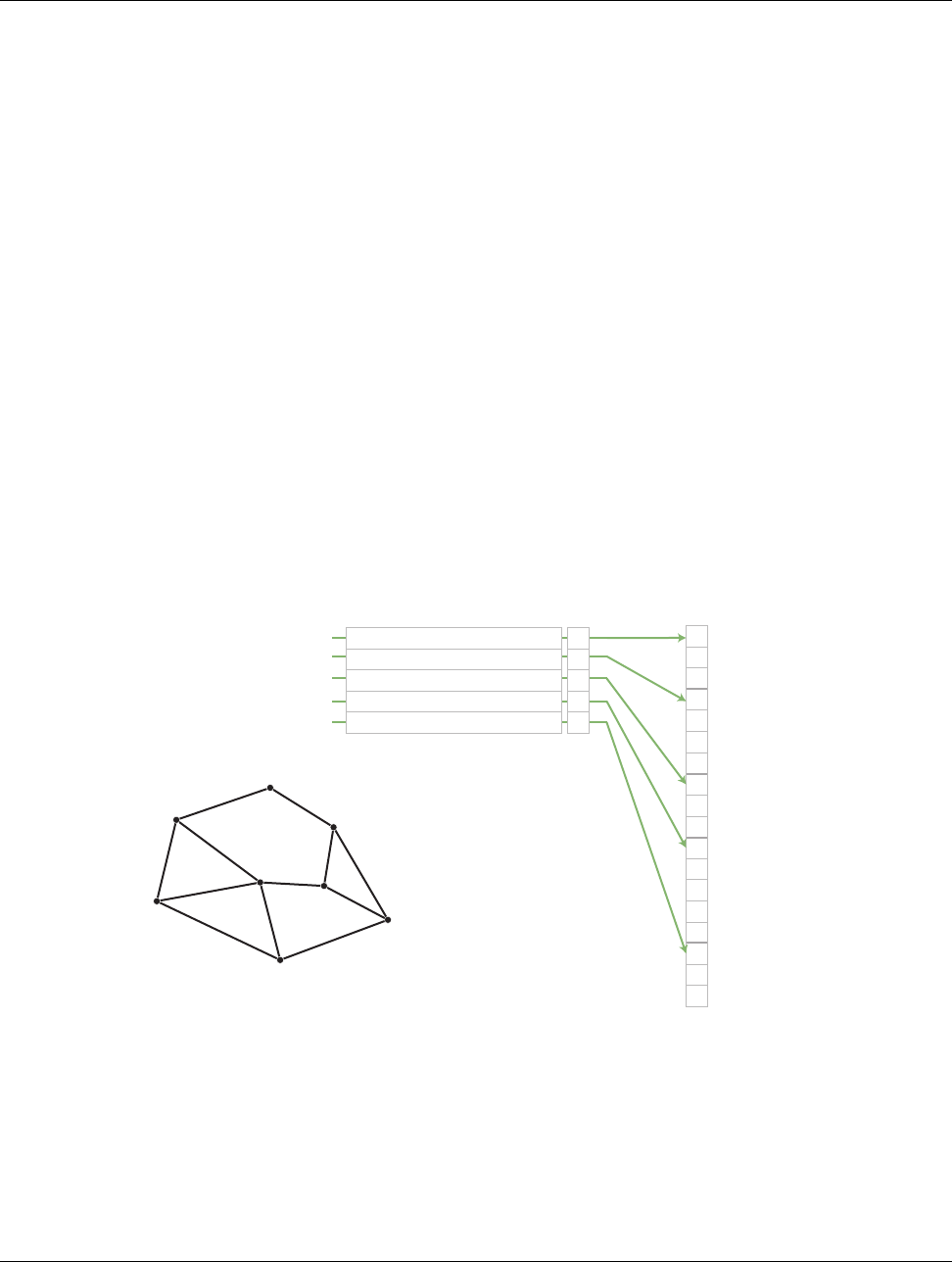
DRAFT
11.2. Cell Sets
because the entire topology can be defined by the three integers specifying the dimensions. Also algorithms
can be optimized for CellSetStructured’s regular nature. However, CellSetStructured’s strictly regular grid
structure also limits its applicability. A structured cell set can only be a dense grid of lines, quadrilaterals, or
hexahedra. It cannot represent irregular data well.
Many data models in other software packages, such as the one for VTK, make a distinction between uniform,
rectilinear, and curvilinear grids. VTK-m’s cell sets do not. All three of these grid types are represented by
CellSetStructured. This is because in a VTK-m data set the cell set and the coordinate system are defined
independently and used interchangeably. A structured cell set with uniform point coordinates makes a uniform
grid. A structured cell set with point coordinates defined irregularly along coordinate axes makes a rectilinear
grid. And a structured cell set with arbitrary point coordinates makes a curvilinear grid. The point coordinates
are defined by the data set’s coordinate system, which is discussed in Section 11.4 starting on page 135.
11.2.2 Explicit Cell Sets
Avtkm::cont::CellSetExplicit defines an irregular collection of cells. The cells can be of different types and
connected in arbitrary ways. This is done by explicitly providing for each cell a sequence of points that defines
the cell.
An explicit cell set is defined with a minimum of three arrays. The first array identifies the shape of each cell.
(Cell shapes are discussed in detail in Section 14.1 starting on page 193.) The second array identifies how many
points are in each cell. The third array has a sequence of point indices that make up each cell. Figure 11.4 shows
a simple example of an explicit cell set.
0
1
2
3
4
5
6
7
01
2
3
4
Connectivity
0
2
1
0
4
3
2
1
2
5
2
3
7
6
5
3
4
7
Cell 0
Cell 1
Cell 2
Cell 3
Cell 4
vtk::CELL_SHAPE_TRIANGLE
vtk::CELL_SHAPE_QUAD
vtk::CELL_SHAPE_TRIANGLE
vtk::CELL_SHAPE_POLYGON
vtk::CELL_SHAPE_TRIANGLE
Shape
3
Num Indices
4
3
5
3
Figure 11.4: Example of cells in a CellSetExplict and the arrays that define them.
An explicit cell set may also have other topological arrays such as an array of offsets of each cell into the
connectivity array or an array of cells incident on each point. Although these arrays can be provided, they are
optional and can be internally derived from the shape, num indices, and connectivity arrays.
vtkm::cont::ExplicitCellSet is a powerful representation for a cell set because it can represent an arbitrary
collection of cells. However, because all connections must be explicitly defined, ExplicitCellSet requires a
significant amount of memory to represent the topology.
132 Chapter 11. Data Sets
DRAFT
11.2. Cell Sets
An important specialization of an explicit cell set is vtkm::cont::CellSetSingleType.CellSetSingleType is
an explicit cell set constrained to contain cells that all have the same shape and all have the same number of
points. So for example if you are creating a surface that you know will contain only triangles, CellSetSingleType
is a good representation for these data.
Using CellSetSingleType saves memory because the array of cell shapes and the array of point counts no longer
need to be stored. CellSetSingleType also allows VTK-m to skip some processing and other storage required
for general explicit cell sets.
11.2.3 Cell Set Permutations
Avtkm::cont::CellSetPermutation rearranges the cells of one cell set to create another cell set. This re-
structuring of cells is not done by copying data to a new structure. Rather, CellSetPermutation establishes a
look-up from one cell structure to another. Cells are permuted on the fly while algorithms are run.
ACellSetPermutation is established by providing a mapping array that for every cell index provides the
equivalent cell index in the cell set being permuted. CellSetPermutation is most often used to mask out cells
in a data set so that algorithms will skip over those cells when running.
Although CellSetPermutation can mask cells, it cannot mask points. All points from the original cell set
are available in the permuted cell set regardless of whether they are used.
Did you know?
The following example uses vtkm::cont::CellSetPermutation with a counting array to expose every tenth
cell. This provides a simple way to subsample a data set.
Example 11.7: Subsampling a data set with CellSetPermutation.
1// Cr eate a si mple data set .
2vtkm:: cont:: DataSetBuilderUniform dataSetBuilder;
3vtkm:: cont:: DataSet o rigina lDa taSe t = da taS etB uild er . Creat e ( vtkm:: Id3(33 , 33 , 2 6)) ;
4vtkm:: cont:: CellSetStructured <3 > o rig in al Ce ll Se t ;
5or igi nalD ata Set . Ge tCe llS et (). Copy To ( o rig inal Cel lSe t );
6
7// Cr eate a per mu ta ti on arra y f or the ce lls . Each value in the array refe rs
8// to a cell in the original cell set . Thi s pa rt ic ul ar array selec ts every
9// 10 th c el l .
10 vtkm:: cont:: ArrayHandleCounting <vtkm: : Id > p erm ut at io nA rr ay (0 , 10 , 2 560 );
11
12 // Creat e a per mu tation of that cell set containing only every 10 th cell .
13 vtkm:: cont:: CellSetPermutation <vtkm:: cont:: CellSetStructured <3 > ,
14 vtkm:: cont:: ArrayHandleCounting <vtkm: : Id > >
15 pe rmu tedCel lSe t ( per mu tationAr ray , or igi nal CellSe t );
11.2.4 Dynamic Cell Sets
vtkm::cont::DataSet must hold an arbitrary collection of vtkm::cont::CellSet objects, which it cannot do
while knowing their types at compile time. To manage storing CellSets without knowing their types, DataSet
actually holds references using vtkm::cont::DynamicCellSet.
DynamicCellSet is similar in nature to VariantArrayHandle except that it, of course, holds CellSets instead
of ArrayHandles. The interface for the two classes is similar, and you should review the documentation for
VariantArrayHandle (in Chapter 10 starting on page 119) to understand DynamicCellSet.
Chapter 11. Data Sets 133

DRAFT
11.3. Fields
vtkm::cont::DynamicCellSet has a method named CastToBase that returns a const reference to the held cell
set as the abstract CellSet class. This can be used to easily access the virtual methods in the CellSet interface.
You can also create a new instance of a cell set with the same type using the NewInstance method.
The DynamicCellSet::IsType method can be used to determine whether the cell set held in the dynamic cell
set is of a given type. If the cell set type is known, DynamicCellSet::Cast can be used to safely downcast the
cell set object, or DynamicCellSet::CopyTo can be used to safely copy to a reference of the appropriate type.
When a typed version of the cell set stored in the DynamicCellSet is needed but the type is not known, which
happens regularly in the internal workings of VTK-m, the CastAndCall method can be used to make this
transition. CastAndCall works by taking a functor and calls it with the appropriately cast cell set object.
The CastAndCall method works by attempting to cast to a known set of types. This set of types used is defined by
the macro VTKM DEFAULT CELL SET LIST TAG, which is declared in vtkm/cont/CellSetListTag.h. This list can
be overridden globally by defining the VTKM DEFAULT CELL SET LIST TAG macro before any VTK-m headers
are included.
The set of types used in a CastAndCall can also be changed only for a particular instance of a dynamic cell set
by calling its ResetCellSetList. This method takes a list of cell types and returns a new variant array handle
of a slightly different type that will use this new list of cells for dynamic casting.
11.2.5 Blocks and Assemblies
Rather than just one cell set, a vtkm::cont::DataSet can hold multiple cell sets. This can be used to construct
multiblock data structures or assemblies of parts. Multiple cell sets can also be used to represent subsets of the
data with particular properties such as all cells filled with a material of a certain type. Or these multiple cells
might represent particular features in the data, such as the set of faces representing a boundary in the simulation.
11.2.6 Zero Cell Sets
It is also possible to construct a vtkm::cont::DataSet that contains no cell set objects whatsoever. This can
be used to manage data that does not contain any topological structure. For example, a collection of series that
come from columns in a table could be stored as multiple fields in a data set with no cell set.
11.3 Fields
A field on a data set provides a value on every point in space on the mesh. Fields are often used to describe
physical properties such as pressure, temperature, mass, velocity, and much more. Fields are represented in a
VTK-m data set as an array where each value is associated with a particular element type of a mesh (such as
points or cells). This association of field values to mesh elements and the structure of the cell set determines
how the field is interpolated throughout the space of the mesh.
Fields are manged by the vtkm::cont::Field class. Field holds its data with a VariantArrayHandle, which
itself is a container for an ArrayHandleVirtual.Field also maintains the association and, optionally, the name
of a cell set for which the field is valid.
The data array can be retrieved as a VariantArrayHandle using the GetData method of Field.Field also has
a convenience method named GetRange that finds the range of values stored in the field array. The returned
value of GetRange is an ArrayHandle containing vtkm::Range values. The ArrayHandle will have as many
values as components in the field. So, for example, calling GetRange on a scalar field will return an ArrayHandle
134 Chapter 11. Data Sets

DRAFT
11.4. Coordinate Systems
with exactly 1 entry in it. Calling GetRange on a field of 3D vectors will return an ArrayHandle with exactly 3
entries corresponding to each of the components in the range.
11.4 Coordinate Systems
A coordinate system determines the location of a mesh’s elements in space. The spatial location is described
by providing a 3D vector at each point that gives the coordinates there. The point coordinates can then be
interpolated throughout the mesh.
Coordinate systems are managed by the vtkm::cont::CoordinateSystem class. In actuality, a coordinate
system is just a field with a special meaning, and so the CoordinateSystem class inherits from the Field class.
CoordinateSystem constrains the field to be associated with points and typically has 3D floating point vectors
for values.
In addition to all the methods provided by the Field superclass, the CoordinateSystem also provides a Get-
Bounds convenience method that returns a vtkm::Bounds object giving the spatial bounds of the coordinate
system.
It is typical for a DataSet to have one coordinate system defined, but it is possible to define multiple coordinate
systems. This is helpful when there are multiple ways to express coordinates. For example, positions in geographic
may be expressed as Cartesian coordinates or as latitude-longitude coordinates. Both are valid and useful in
different ways.
It is also valid to have a DataSet with no coordinate system. This is useful when the structure is not rooted in
physical space. For example, if the cell set is representing a graph structure, there might not be any physical
space that has meaning for the graph.
11.5 Multi-Block Data
A multi-block data set, implemented with vtkm::cont::MultiBlock, comprises a set of vtkm::cont::DataSet
objects. The MultiBlock interface allows for adding, inserting, and replacing DataSets in its list with the
AddBlock (or AddBlocks), InsertBlock, and ReplaceBlock methods, respectively. The GetBlocks method
returns a list of DataSet objects in a std::vector.
The following example creates a vtkm::cont::MultiBlock containing two uniform grid data sets.
Example 11.8: Creating a MultiBlock.
1// Cre ate two u nifor m data sets
2vtkm:: cont:: DataSetBuilderUniform dataSetBuilder;
3
4vtkm:: cont:: DataSet d ata Set 1 = da taSe tBu il der . C reat e ( vtkm:: Id3 ( 10 , 10 , 10) );
5vtkm:: cont:: DataSet d ata Set 2 = da taSe tBu il der . C reat e ( vtkm:: Id3 ( 30 , 30 , 30) );
6
7// Add the dat as ets to a mult i blo ck
8vtkm:: cont:: M ul ti Bl oc k mu lti Bl oc k ;
9mu ltiBlock . AddBlock ( da taSet1 );
10 mu ltiBlock . AddBlock ( da taSet2 );
It is always possible to retrieve the independent blocks in a MultiBlock, from which you can iterate and get
information about the data. However, VTK-m provides several helper functions to collect metadata information
about the collection as a whole. However, MultiBlock also offers several helper methods to collect metadata
information about the collection as a whole. Each function is in its own respective header file.
Chapter 11. Data Sets 135
DRAFT
11.5. Multi-Block Data
vtkm::cont::BoundsCompute Queries the bounds of all the DataSets contained in the given MultiBlock and
returns a vtkm::Bounds object encompassing the conglomerate data.
vtkm::cont::BoundsGlobalCompute An MPI version of BoundsCompute that also finds the bounds around the
conglomerate data across all processes. All MPI processes must call this method.
vtkm::cont::FieldRangeCompute Given a MultiBlock, the name of a field, and (optionally) an association of
the field, returns the minimum and maximum value of that field over all the contained blocks. The result
is returned in a ArrayHandle of vtkm::Range objects in the same manner as the vtkm::cont::Field::-
GetRange method (see Section 11.3).
vtkm::cont::FieldRangeGlobalCompute An MPI version of FieldRangeCompute that also finds the field
ranges over all blocks on all processes. All MPI processes must call this method.
The following example illustrates a spatial bounds query and a field range query on a vtkm::MultiBlock.
Example 11.9: Queries on a MultiBlock.
1// Get the bo un ds of a multi - b lo ck data set
2vtkm:: Bounds bounds = vtkm:: cont:: BoundsCompute( mu lt iBl ock );
3
4// Get the o ve ral l m in / ma x of a f ie ld nam ed " c ell var "
5vtkm:: cont:: ArrayHandle <vtkm:: Range > c el lv arRan ge s =
6vtkm:: cont:: FieldRangeCompute( mu lt iB lo ck , " c ell va r ");
7
8// A ssuming the " cell var " field has scalar values , then c ell var Ran ges has one entry
9vtkm:: Range ce llvarRa ng e = ce llvar Ra ng es . G et Por tal Co nst Co n tr ol (). Get (0);
The aforementioned functions for querying a MultiBlock object also work on DataSet objects. This is
particularly useful with the BoundsGlobalCompute and FieldRangeGlobalCompute to manage distributed
parallel objects.
Did you know?
Filters can be executed on MultiBlock objects in a similar way they are executed on DataSet objects. In both
cases, the Execute method is called on the filter giving data object as an argument.
Example 11.10: Applying a filter to multi block data.
1vtkm:: filter:: CellAverage c ell Avera ge ;
2ce llA verag e . Set Act ive Field (" p oi ntvar " , vtkm:: cont:: Field :: Assoc ia ti on :: POI NTS );
3
4vtkm:: cont:: M ul ti Bl oc k re su lts = ce llA ver age . Execut e ( mul tiBlock );
[Need to re-add this if Policies survive the transition to dynamic objects.]
136 Chapter 11. Data Sets
DRAFT
Part III
Developing with VTK-m
DRAFT

DRAFT
CHAPTER
TWELVE
WORKLETS
The simplest way to implement an algorithm in VTK-m is to create a worklet. A worklet is fundamentally a
functor that operates on an element of data. Thus, it is a class or struct that has an overloaded parenthesis
operator (which must be declared const for thread safety). However, worklets are also embedded with a sig-
nificant amount of metadata on how the data should be managed and how the execution should be structured.
This chapter explains the basic mechanics of defining and using worklets.
12.1 Worklet Types
Different operations in visualization can have different data access patterns, perform different execution flow,
and require different provisions. VTK-m manages these different accesses, execution, and provisions by grouping
visualization algorithms into common classes of operation and supporting each class with its own worklet type.
Each worklet type has a generic superclass that worklets of that particular type must inherit. This makes the
type of the worklet easy to identify. The following list describes each worklet type provided by VTK-m and the
superclass that supports it. Details on how to create worklets of each type are given in Section 12.5. It is also
possible to create new worklet types in VTK-m. This is an advanced topic covered in Chapter 23.
Field Map A worklet deriving vtkm::worklet::WorkletMapField performs a basic mapping operation that
applies a function (the operator in the worklet) on all the field values at a single point or cell and creates a
new field value at that same location. Although the intention is to operate on some variable over a mesh,
aWorkletMapField may actually be applied to any array. Thus, a field map can be used as a basic map
operation.
Topology Map A worklet deriving vtkm::worklet::WorkletMapTopology or one of its sibling classes performs
a mapping operation that applies a function (the operator in the worklet) on all elements of a particular
type (such as points or cells) and creates a new field for those elements. The basic operation is similar to
a field map except that in addition to access fields being mapped on, the worklet operation also has access
to incident fields.
There are multiple convenience classes available for the most common types of topology mapping. vtkm::-
worklet::WorkletMapPointToCell calls the worklet operation for each cell and makes every incident point
available. This type of map also has access to cell structures and can interpolate point fields. Likewise,
vtkm::worklet::WorkletMapCellToPoint calls the worklet operation for each point and makes every
incident cell available.
Point Neighborhood A worklet deriving from vtkm::worklet::WorkletPointNeighborhood performs a
mapping operation that applies a function (the operator in the worklet) on all points of a structured

DRAFT
12.2. Dispatchers
mesh. The basic operation is similar to a field map except that in addition to having access to the point
being operated on, you can get the field values of nearby points within a neighborhood of a given size.
Point neighborhood worklets can only applied to structured cell sets.
Reduce by Key A worklet deriving vtkm::worklet::WorkletReduceByKey operates on an array of keys and
one or more associated arrays of values. When a reduce by key worklet is invoked, all identical keys are
collected and the worklet is called once for each unique key. Each worklet invocation is given a Vec-like
containing all values associated with the unique key. Reduce by key worklets are very useful for combining
like items such as shared topology elements or coincident points.
12.2 Dispatchers
Worklets are instantiated in the control environment and run in the execution environment. This means that
the control environment must have a means to invoke worklets that start running in the execution environment.
This invocation is done through a set of dispatcher objects. A dispatcher object is an object in the control
environment that has an instance of a worklet and can invoke that worklet with a set of arguments. There are
multiple types of dispatcher objects, each corresponding to a type of worklet object. All dispatcher objects have
at least one template parameter: the worklet class being invoked, which is always the first argument.
All dispatcher objects must be constructed with an instance of the worklet they are to invoke. If no worklet is
provided to the constructor, a new worklet object is created with the default constructor. Many worklets do not
require any state, so allowing the dispatcher to construct its own is fine. However, if the worklet holds some
parameters (e.g. a threshold value), then you will have to construct a worklet and pass it to a dispatcher as it
is created.
All dispatcher classes have a method named Invoke that launches the worklet in the execution environment.
The arguments to Invoke must match those expected by the worklet, which is specified by something called a
control signature. The expected arguments for worklets provided by VTK-m are documented in Section 12.3.
Also, for any worklet, the Invoke arguments can be gleaned from the control signature, which is described in
Section 12.4.1.
The following is a list of the dispatchers defined in VTK-m. The dispatcher classes correspond to the list of
worklet types specified in Section 12.1. Many examples of using these dispatchers are provided in Section 12.3.
vtkm::worklet::DispatcherMapField The dispatcher used in conjunction with a worklet that subclasses
vtkm::worklet::WorkletMapField. The dispatcher class has one template argument: the worklet type.
vtkm::worklet::DispatcherMapTopology The dispatcher used in conjunction with a worklet that subclasses
vtkm::worklet::WorkletMapTopology or one of its sibling classes (such as vtkm::worklet::WorkletMap-
PointToCell). The dispatcher class has one template argument: the worklet type.
vtkm::worklet::DispatcherPointNeighborhood The dispatcher used in conjunction with a worklet that sub-
classes vtkm::worklet::WorkletPointNeighborhood. The dispatcher class has one template argument:
the worklet type.
vtkm::worklet::DispatcherReduceByKey The dispatcher used in conjunction with a worklet that subclasses
vtkm::worklet::WorkletReduceByKey. The dispatcher class has one template argument: the worklet
type.
140 Chapter 12. Worklets

DRAFT
12.3. Provided Worklets
12.3 Provided Worklets
VTK-m comes with several worklet implementations. These worklet implementations for the most part provide
the underlying implementations of the filters described in Chapter 4. The easiest way to execute a filter is to run
it from the associated filter class. However, if your data is not in a vtkm::cont::DataSet structure or you have
knowledge of the specific data types used in the DataSet, it might be more efficient to run the worklet directly.
Note that many of the filters use multiple worklets under the covers to implement the full functionality.
The following example demonstrates using the simple vtkm::worklet::PointElevation worklet directly.
Example 12.1: Using the provided PointElevation worklet.
1VTKM_CONT
2vtkm:: cont:: ArrayHandle <vtkm:: FloatDefault > ComputeAirPressure(
3vtkm:: cont:: ArrayHandle <vtkm:: Vec <vtkm:: FloatDefault , 3>> pointCoordinates)
4{
5vtkm:: worklet:: PointElevation elevationWorklet;
6
7// Use the e le va tion worklet to estimat e at mospheric pressu re based on the
8// hei ght of the point coordina te s . Atm ospheric p re ssure is 1 01325 Pa at
9// sea level and drops about 12 Pa per meter .
10 el eva tio nWo rkl et . Se tLo wP oi nt ( vtkm:: Vec <vtkm:: Float64 , 3 >(0.0 , 0.0 , 0.0));
11 el ev ati on Wor kl et . S etH igh Po int ( vtkm:: Vec <vtkm:: Float64 , 3 >(0.0 , 0.0 , 20 00.0));
12 el eva tionWo rkl et . Se tRange (101325.0 , 7 7325.0);
13
14 vtkm:: worklet:: DispatcherMapField <vtkm:: worklet:: PointElevation >
15 el eva tio nDi spatch er ( el eva tio nWo rk let );
16
17 vtkm:: cont:: ArrayHandle <vtkm:: FloatDefault > pre ssure ;
18
19 el evat ion Di spa tche r . Invoke ( p ointCoor din at es , p ressure );
20
21 re tu rn p re ssure ;
22 }
12.4 Creating Worklets
A worklet is created by implementing a class or struct with the following features.
1. The class must contain a functional type named ControlSignature, which specifies what arguments are
expected when invoking the class with a dispatcher in the control environment.
2. The class must contain a functional type named ExecutionSignature, which specifies how the data gets
passed from the arguments in the control environment to the worklet running in the execution environment.
3. The class must contain a type named InputDomain, which identifies which input parameter defines the
input domain of the data.
4. The class may define a scatter operation to override a 1:1 mapping from input to output.
5. The class must contain an implementation of the parenthesis operator, which is the method that is executed
in the execution environment. The parenthesis operator must be declared const.
6. The class must publicly inherit from a base worklet class that specifies the type of operation being per-
formed.
Figure 12.1 demonstrates all of the required components of a worklet.
Chapter 12. Worklets 141
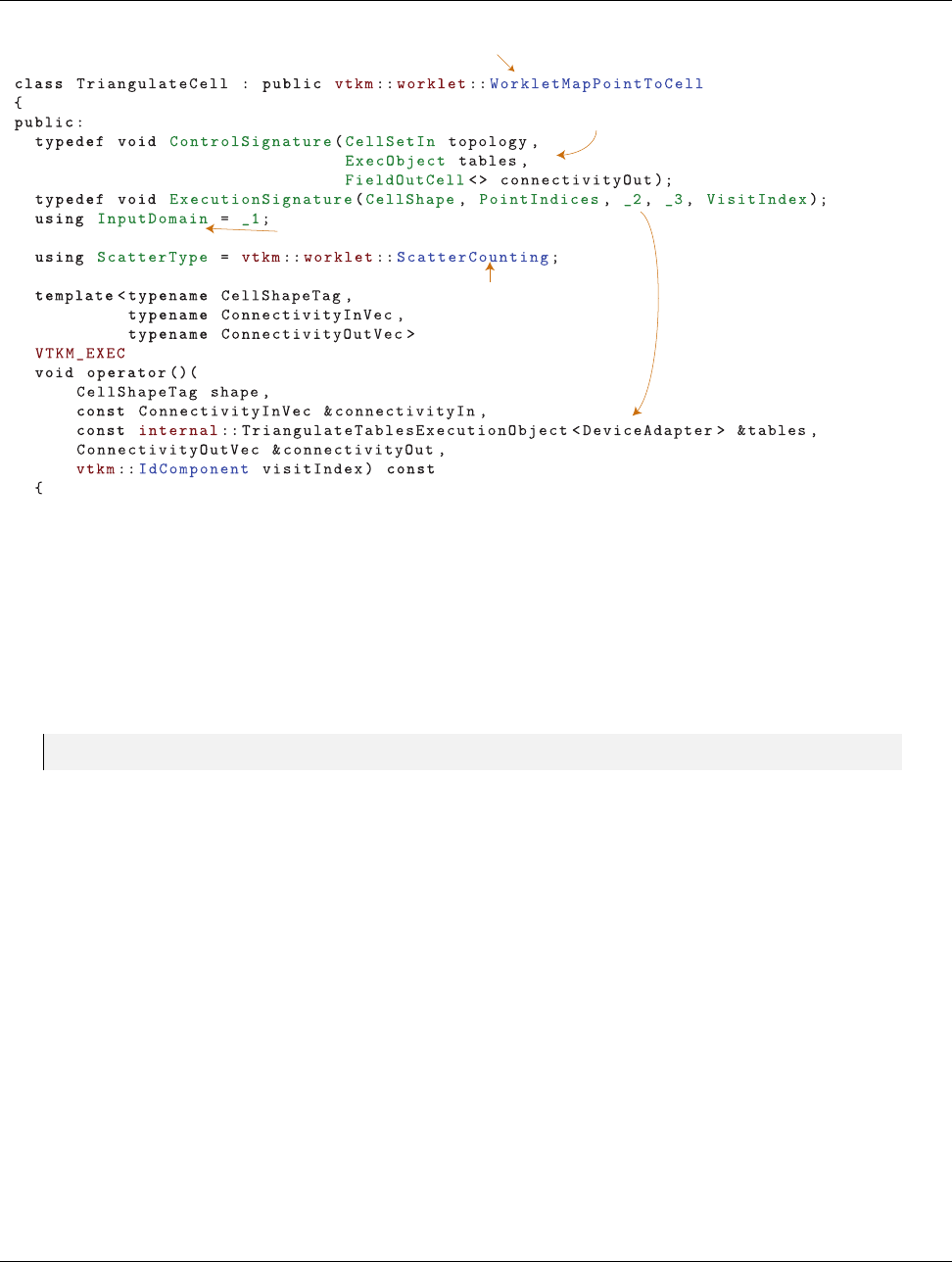
DRAFT
12.4. Creating Worklets
Denes dispatching method
Denes how input arrays and structures are interpreted
Denes how data are
assigned to threads
Species domain argument (optional)
Denes mapping from
input domain to output
domain (optional)
Algorithms are just functions that
run on a single instance of the input
Figure 12.1: Annotated example of a worklet declaration.
12.4.1 Control Signature
The control signature of a worklet is a functional type named ControlSignature. The function prototype
matches the calling specification used with the dispatcher Invoke function.
Example 12.2: A ControlSignature.
1using ControlSignature =void(FieldIn <VecAll > inputVectors ,
2FieldOut <Scalar > outputMagnitudes);
The return type of the function prototype is always void because the dispatcher Invoke functions do not return
values. The parameters of the function prototype are tags that identify the type of data that is expected to be
passed to invoke. ControlSignature tags are defined by the worklet type and the various tags are documented
more fully in Section 12.5.
By convention, ControlSignature tag names start with the base concept (e.g. Field or Topology) followed by
the domain (e.g. Point or Cell) followed by In or Out. For example, FieldPointIn would specify values for a
field on the points of a mesh that are used as input (read only). Although they should be there in most cases,
some tag names might leave out the domain or in/out parts if they are obvious or ambiguous.
Type List Tags
Some tags are templated to have modifiers. For example, Field tags have a template argument that is set to a
type list tag defining what types of field data are supported. (See Section 6.6.2 for a description of type lists.)
In fact, this type list modifier is so common that the following convenience subtags used with Field tags are
defined for all worklet types.
142 Chapter 12. Worklets

DRAFT
12.4. Creating Worklets
Any type list will work as modifiers for ControlSignature tags. However, these common type lists are
provided for convenience and to make the ControlSignature shorter and more readable.
Did you know?
AllTypes All possible types.
CommonTypes The most used types in visualization. This includes signed integers and floats that are 32 or 64
bit. It also includes 3 dimensional vectors of floats. The same as vtkm::TypeListTagCommon.
IdType Contains the single item vtkm::Id. The same as vtkm::TypeListTagId.
Id2Type Contains the single item vtkm::Id2. The same as vtkm::TypeListTagId2.
Id3Type Contains the single item vtkm::Id3. The same as vtkm::TypeListTagId3.
Index All types used to index arrays. Contains vtkm::Id,vtkm::Id2, and vtkm::Id3. The same as vtkm::-
TypeListTagIndex.
FieldCommon A list containing all the types generally used for fields. It is the combination of Scalar,Vec2,
Vec3, and Vec4. The same as vtkm::TypeListTagField.
Scalar Types used for scalar fields. Specifically, it contains floating point numbers of different widths (i.e.
vtkm::Float32 and vtkm::Float64). The same as vtkm::TypeListTagFieldScalar.
ScalarAll All scalar types. It contains signed and unsigned integers of widths from 8 to 64 bits. It also contains
floats of 32 and 64 bit widths. The same as vtkm::TypeListTagScalarAll.
Vec2 Types for values of fields with 2 dimensional vectors. All these vectors use floating point numbers. The
same as vtkm::TypeListTagFieldVec2.
Vec3 Types for values of fields with 3 dimensional vectors. All these vectors use floating point numbers. The
same as vtkm::TypeListTagFieldVec3.
Vec4 Types for values of fields with 4 dimensional vectors. All these vectors use floating point numbers. The
same as vtkm::TypeListTagFieldVec4.
VecAll All vtkm::Vec classes with standard integers or floating points as components and lengths between 2
and 4. The same as vtkm::TypeListTagVecAll.
VecCommon The most common vector types. It contains all vtkm::Vec class of size 2 through 4 containing
components of unsigned bytes, signed 32-bit integers, signed 64-bit integers, 32-bit floats, or 64-bit floats.
The same as vtkm::TypeListTagVecCommon.
12.4.2 Execution Signature
Like the control signature, the execution signature of a worklet is a functional type named ExecutionSignature.
The function prototype must match the parenthesis operator (described in Section 12.4.4) in terms of arity and
argument semantics.
Example 12.3: An ExecutionSignature.
1using ExecutionSignature =_2 (_1 );
Chapter 12. Worklets 143

DRAFT
12.4. Creating Worklets
The arguments of the ExecutionSignature’s function prototype are tags that define where the data come from.
The most common tags are an underscore followed by a number, such as 1,2, etc. These numbers refer back
to the corresponding argument in the ControlSignature. For example, 1means data from the first control
signature argument, 2means data from the second control signature argument, etc.
Unlike the control signature, the execution signature optionally can declare a return type if the parenthesis
operator returns a value. If this is the case, the return value should be one of the numeric tags (i.e. 1,2,
etc.) to refer to one of the data structures of the control signature. If the parenthesis operator does not return
a value, then ExecutionSignature should declare the return type as void.
In addition to the numeric tags, there are other execution signature tags to represent other types of data. For
example, the WorkIndex tag identifies the instance of the worklet invocation. Each call to the worklet function
will have a unique WorkIndex. Other such tags exist and are described in the following section on worklet types
where appropriate.
12.4.3 Input Domain
All worklets represent data parallel operations that are executed over independent elements in some domain.
The type of domain is inherent from the worklet type, but the size of the domain is dependent on the data being
operated on. One of the arguments given to the dispatcher’s Invoke in the control environment must specify
the domain.
A worklet identifies the argument specifying the domain with a type alias named InputDomain. The InputDomain
must be aliased to one of the execution signature numeric tags (i.e. 1,2, etc.). By default, the InputDomain
points to the first argument, but a worklet can override that to point to any argument.
Example 12.4: An InputDomain declaration.
1using InputDomain =_1 ;
Different types of worklets can have different types of domain. For example a simple field map worklet has a
FieldIn argument as its input domain, and the size of the input domain is taken from the size of the associated
field array. Likewise, a worklet that maps topology has a CellSetIn argument as its input domain, and the size
of the input domain is taken from the cell set.
Specifying the InputDomain is optional. If it is not specified, the first argument is assumed to be the input
domain.
12.4.4 Worklet Operator
A worklet is fundamentally a functor that operates on an element of data. Thus, the algorithm that the worklet
represents is contained in or called from the parenthesis operator method.
Example 12.5: An overloaded parenthesis operator of a worklet.
1template <typename T , vtkm :: IdComponent Size >
2VTKM_EXEC Toperator()( const vtkm:: Vec < T , Size > & i nVe ct or ) const
3{
There are some constraints on the parenthesis operator. First, it must have the same arity as the Execu-
tionSignature, and the types of the parameters and return must be compatible. Second, because it runs in
the execution environment, it must be declared with the VTKM EXEC (or VTKM EXEC CONT) modifier. Third, the
method must be declared const to help preserve thread safety.
144 Chapter 12. Worklets

DRAFT
12.5. Worklet Type Reference
12.5 Worklet Type Reference
There are multiple worklet types provided by VTK-m, each designed to support a particular type of operation.
Section 12.1 gave a brief overview of each type of worklet. This section gives a much more detailed reference
for each of the worklet types including identifying the generic superclass that a worklet instance should derive,
listing the signature tags and their meanings, and giving an example of the worklet in use.
12.5.1 Field Map
A worklet deriving vtkm::worklet::WorkletMapField performs a basic mapping operation that applies a func-
tion (the operator in the worklet) on all the field values at a single point or cell and creates a new field value at
that same location. Although the intention is to operate on some variable over the mesh, a WorkletMapField
can actually be applied to any array.
AWorkletMapField subclass is invoked with a vtkm::worklet::DispatcherMapField. This dispatcher has one
template argument: the type of the worklet subclass.
A field map worklet supports the following tags in the parameters of its ControlSignature.
FieldIn This tag represents an input field. A FieldIn argument expects an ArrayHandle or a VariantAr-
rayHandle in the associated parameter of the dispatcher’s Invoke. Each invocation of the worklet gets a
single value out of this array.
FieldIn has a single template parameter that specifies what data types are acceptable for the array. The
type tags are described in Section 12.4.1 starting on page 143.
The worklet’s InputDomain can be set to a FieldIn argument. In this case, the input domain will be the
size of the array.
FieldOut This tag represents an output field. A FieldOut argument expects an ArrayHandle or a VariantAr-
rayHandle in the associated parameter of the dispatcher’s Invoke. The array is resized before scheduling
begins, and each invocation of the worklet sets a single value in the array.
FieldOut has a single template parameter that specifies what data types are acceptable for the array. The
type tags are described in Section 12.4.1 starting on page 143.
FieldInOut This tag represents field that is both an input and an output. A FieldInOut argument expects
an ArrayHandle or a VariantArrayHandle in the associated parameter of the dispatcher’s Invoke. Each
invocation of the worklet gets a single value out of this array, which is replaced by the resulting value after
the worklet completes.
FieldInOut has a single template parameter that specifies what data types are acceptable for the array.
The type tags are described in Section 12.4.1 starting on page 143.
The worklet’s InputDomain can be set to a FieldInOut argument. In this case, the input domain will be
the size of the array.
WholeArrayIn This tag represents an array where all entries can be read by every worklet invocation. A
WholeArrayIn argument expects an ArrayHandle in the associated parameter of the dispatcher’s Invoke.
An array portal capable of reading from any place in the array is given to the worklet. Whole arrays are
discussed in detail in Section 12.6 starting on page 169.
WholeArrayIn has a single template parameter that specifies what data types are acceptable for the array.
The type tags are described in Section 12.4.1 starting on page 143.
Chapter 12. Worklets 145
DRAFT
12.5. Worklet Type Reference
WholeArrayOut This tag represents an array where any entry can be written by any worklet invocation. A
WholeArrayOut argument expects an ArrayHandle in the associated parameter of the dispatcher’s Invoke.
An array portal capable of writing to any place in the array is given to the worklet. Developers should
take care when using writable whole arrays as introducing race conditions is possible. Whole arrays are
discussed in detail in Section 12.6 starting on page 169.
WholeArrayOut has a single template parameter that specifies what data types are acceptable for the array.
The type tags are described in Section 12.4.1 starting on page 143.
WholeArrayInOut This tag represents an array where any entry can be read or written by any worklet invocation.
AWholeArrayInOut argument expects an ArrayHandle in the associated parameter of the dispatcher’s
Invoke. An array portal capable of reading from or writing to any place in the array is given to the worklet.
Developers should take care when using writable whole arrays as introducing race conditions is possible.
Whole arrays are discussed in detail in Section 12.6 starting on page 169.
WholeArrayInOut has a single template parameter that specifies what data types are acceptable for the
array. The type tags are described in Section 12.4.1 starting on page 143.
AtomicArrayInOut This tag represents an array where any entry can be read or written by any worklet in-
vocation. A AtomicArrayInOut argument expects an ArrayHandle in the associated parameter of the
dispatcher’s Invoke. A vtkm::exec::AtomicArray object capable of performing atomic operations to the
entries in the array is given to the worklet. Atomic arrays can help avoid race conditions but can slow
down the running of a parallel algorithm. Atomic arrays are discussed in detail in Section 12.7 starting on
page 172.
ExecObject This tag represents an execution object that is passed directly from the control environment to the
worklet. A ExecObject argument expects a subclass of vtkm::exec::ExecutionObjectBase. Subclasses
of ExecutionObjectBase behave like a factory for objects that work on particular devices. They do this
by implementing a PrepareForExecution method that takes a device adapter tag and returns an object
that works on that device. That device-specific object is passed directly to the worklet. Execution objects
are discussed in detail in Section 12.9 starting on page 177.
A field map worklet supports the following tags in the parameters of its ExecutionSignature.
1,2,... These reference the corresponding parameter in the ControlSignature.
WorkIndex This tag produces a vtkm::Id that uniquely identifies the invocation of the worklet.
VisitIndex This tag produces a vtkm::IdComponent that uniquely identifies when multiple worklet invocations
operate on the same input item, which can happen when defining a worklet with scatter (as described in
Section 12.10).
InputIndex This tag produces a vtkm::Id that identifies the index of the input element, which can differ from
the WorkIndex in a worklet with a scatter (as described in Section 12.10).
OutputIndex This tag produces a vtkm::Id that identifies the index of the output element. (This is generally
the same as WorkIndex.)
ThreadIndices This tag produces an internal object that manages indices and other metadata of the current
thread. Thread indices objects are described in Section 23.2, but most users can get the information they
need through other signature tags.
Field maps most commonly perform basic calculator arithmetic, as demonstrated in the following example.
146 Chapter 12. Worklets
DRAFT
12.5. Worklet Type Reference
Example 12.6: Implementation and use of a field map worklet.
1#include <vtkm/worklet/DispatcherMapField. h >
2#include <vtkm/worklet/Workl et Map Fie ld . h >
3
4#include <vtkm/cont/ArrayHandle. h >
5#include <vtkm/cont/VariantArrayHandle. h >
6
7#include <vtkm/VecTraits.h >
8#include <vtkm/VectorAnalysis.h>
9
10 namespace vtkm
11 {
12 namespace worklet
13 {
14
15 st ru ct Magnitude
16 {
17 class ComputeMagnitude : pu bl ic vtkm:: worklet:: WorkletMapField
18 {
19 pu bl ic :
20 using ControlSignature =void(FieldIn <VecAll > inputVectors ,
21 FieldOut <Scalar > outputMagnitudes);
22 using ExecutionSignature =_2 (_1 );
23
24 using InputDomain =_1 ;
25
26 template <typename T , vtkm :: IdComponent Size >
27 VTKM_EXEC Toperator()( const vtkm:: Vec < T , Size > & i nVe ct or ) const
28 {
29 re tu rn vtkm:: Magnitude( i nVector );
30 }
31 };
32
33 template <typename ValueType , typename Storage >
34 VTKM_CONT static vtkm:: cont:: ArrayHandle <
35 typename vtkm:: VecTraits <ValueType >::ComponentType >
36 Run ( const vtkm:: cont:: ArrayHandle <ValueType , Storage >& inp ut )
37 {
38 using ComponentType =typename vtkm:: VecTraits <ValueType >::ComponentType;
39 vtkm:: cont:: ArrayHandle <ComponentType > out pu t ;
40
41 vtkm:: worklet:: DispatcherMapField < Comput eMagnitu de > d ispatcher ;
42 di spa tch er . I nv ok e (input , ou tp ut );
43
44 re tu rn output;
45 }
46 };
47
48 } // nam es pa ce worklet
49 } // nam es pa ce vtkm
Example 12.6 is using an informal but helpful convention where worklets are defined inside another class
that also contains a static method named Run that runs the worklet using a common set of operations.
The Run method helps make clear the intention and use of the worklet. This is especially important for
operations that require a series of worklet invocations that might be non-obvious.
Did you know?
Although simple, the WorkletMapField worklet type can be used (and abused) as a general parallel-
Chapter 12. Worklets 147

DRAFT
12.5. Worklet Type Reference
for/scheduling mechanism. In particular, the WorkIndex execution signature tag can be used to get a unique
index, the WholeArray* tags can be used to get random access to arrays, and the ExecObject control signature
tag can be used to pass execution objects directly to the worklet. Whole arrays and execution objects are talked
about in more detail in Sections 12.6 and 12.9, respectively, in more detail, but here is a simple example that
uses the random access of WholeArrayOut to make a worklet that copies an array in reverse order.
Example 12.7: Leveraging field maps and field maps for general processing.
1namespace vtkm
2{
3namespace worklet
4{
5
6st ru ct ReverseArrayCopy
7{
8st ru ct PermuteArrayValues : vtkm:: worklet:: WorkletMapField
9{
10 using ControlSignature =void(FieldIn < > inputArr ay , WholeArrayOut < > outputAr ra y );
11 using ExecutionSignature =void(_1 ,_2 ,WorkIndex);
12 using InputDomain =_1 ;
13
14 template <typename InputType , typename OutputArrayPortalType >
15 VTKM_EXEC void operator()( const InputType & inputValue ,
16 const Ou tpu tAr ray Port al Typ e & o ut pu tArrayPorta l ,
17 vtkm:: Id w orkIndex ) const
18 {
19 vtkm:: Id o ut In de x = ou tp utA rra yPo rta l . Get Num ber OfV alu es () - w or kIndex - 1;
20 if ( o ut Index >= 0)
21 {
22 ou tp ut Ar ray Po rt al . S et ( o ut In de x , i np utV al ue );
23 }
24 else
25 {
26 this - > RaiseError (" Outpu t array not sized correctly .");
27 }
28 }
29 };
30
31 template <typename T , typename Storage >
32 VTKM_CONT static vtkm:: cont:: ArrayHandle < T > R un (
33 const vtkm:: cont:: ArrayHandle < T , Storage >& inArray)
34 {
35 vtkm:: cont:: ArrayHandle < T > o utA rr ay ;
36 ou tA rray . Allocat e ( inArra y . GetN umb erO fVal ues ());
37
38 vtkm:: worklet:: DispatcherMapField < PermuteArrayVa lue s > d ispatcher ;
39 di spa tch er . I nv ok e (inArray , outAr ray );
40
41 re tu rn o ut Array ;
42 }
43 };
44
45 } // nam es pa ce worklet
46 } // nam es pa ce vtkm
12.5.2 Topology Map
A topology map performs a mapping that it applies a function (the operator in the worklet) on all the elements
of a DataSet of a particular type (i.e. point, edge, face, or cell). While operating on the element, the worklet
has access to data from all incident elements of another type.
148 Chapter 12. Worklets

DRAFT
12.5. Worklet Type Reference
There are several versions of topology maps that differ in what type of element being mapped from and what
type of element being mapped to. The subsequent sections describe these different variations of the topology
maps. Regardless of their names, they are all defined in vtkm/worklet/WorkletMapTopology.h and are all invoked
with vtkm::worklet::DispatcherMapTopology.
Point to Cell Map
A worklet deriving vtkm::worklet::WorkletMapPointToCell performs a mapping operation that applies a
function (the operator in the worklet) on all the cells of a DataSet. While operating on the cell, the worklet
has access to fields associated both with the cell and with all incident points. Additionally, the worklet can get
information about the structure of the cell and can perform operations like interpolation on it.
AWorkletMapPointToCell subclass is invoked with a vtkm::worklet::DispatcherMapTopology. This dis-
patcher has one template argument: the type of the worklet subclass.
A point to cell map worklet supports the following tags in the parameters of its ControlSignature.
CellSetIn This tag represents the cell set that defines the collection of cells the map will operate on. A
CellSetIn argument expects a CellSet subclass or a DynamicCellSet in the associated parameter of the
dispatcher’s Invoke. Each invocation of the worklet gets a cell shape tag. (Cell shapes and the operations
you can do with cells are discussed in Chapter 14.)
There must be exactly one CellSetIn argument, and the worklet’s InputDomain must be set to this
argument.
FieldInPoint This tag represents an input field that is associated with the points. A FieldInPoint argument
expects an ArrayHandle or a VariantArrayHandle in the associated parameter of the dispatcher’s Invoke.
The size of the array must be exactly the number of points.
Each invocation of the worklet gets a Vec-like object containing the field values for all the points incident
with the cell being visited. The order of the entries is consistent with the defined order of the vertices for
the visited cell’s shape. If the field is a vector field, then the provided object is a Vec of Vecs.
FieldInPoint has a single template parameter that specifies what data types are acceptable for the array.
The type tags are described in Section 12.4.1 starting on page 143.
FieldInCell This tag represents an input field that is associated with the cells. A FieldInCell argument
expects an ArrayHandle or a VariantArrayHandle in the associated parameter of the dispatcher’s Invoke.
The size of the array must be exactly the number of cells. Each invocation of the worklet gets a single
value out of this array.
FieldInCell has a single template parameter that specifies what data types are acceptable for the array.
The type tags are described in Section 12.4.1 starting on page 143.
FieldOutCell This tag represents an output field, which is necessarily associated with cells. A FieldOut-
Cell argument expects an ArrayHandle or a VariantArrayHandle in the associated parameter of the
dispatcher’s Invoke. The array is resized before scheduling begins, and each invocation of the worklet sets
a single value in the array.
FieldOutCell has a single template parameter that specifies what data types are acceptable for the array.
The type tags are described in Section 12.4.1 starting on page 143.
FieldOut is an alias for FieldOutCell (since output arrays can only be defined on cells).
FieldInOutCell This tag represents field that is both an input and an output, which is necessarily associated
with cells. A FieldInOutCell argument expects an ArrayHandle or a VariantArrayHandle in the asso-
ciated parameter of the dispatcher’s Invoke. Each invocation of the worklet gets a single value out of this
array, which is replaced by the resulting value after the worklet completes.
Chapter 12. Worklets 149

DRAFT
12.5. Worklet Type Reference
FieldInOutCell has a single template parameter that specifies what data types are acceptable for the
array. The type tags are described in Section 12.4.1 starting on page 143.
FieldInOut is an alias for FieldInOutCell (since output arrays can only be defined on cells).
WholeArrayIn This tag represents an array where all entries can be read by every worklet invocation. A
WholeArrayIn argument expects an ArrayHandle in the associated parameter of the dispatcher’s Invoke.
An array portal capable of reading from any place in the array is given to the worklet. Whole arrays are
discussed in detail in Section 12.6 starting on page 169.
WholeArrayIn has a single template parameter that specifies what data types are acceptable for the array.
The type tags are described in Section 12.4.1 starting on page 143.
WholeArrayOut This tag represents an array where any entry can be written by any worklet invocation. A
WholeArrayOut argument expects an ArrayHandle in the associated parameter of the dispatcher’s Invoke.
An array portal capable of writing to any place in the array is given to the worklet. Developers should
take care when using writable whole arrays as introducing race conditions is possible. Whole arrays are
discussed in detail in Section 12.6 starting on page 169.
WholeArrayOut has a single template parameter that specifies what data types are acceptable for the array.
The type tags are described in Section 12.4.1 starting on page 143.
WholeArrayInOut This tag represents an array where any entry can be read or written by any worklet invocation.
AWholeArrayInOut argument expects an ArrayHandle in the associated parameter of the dispatcher’s
Invoke. An array portal capable of reading from or writing to any place in the array is given to the worklet.
Developers should take care when using writable whole arrays as introducing race conditions is possible.
Whole arrays are discussed in detail in Section 12.6 starting on page 169.
WholeArrayInOut has a single template parameter that specifies what data types are acceptable for the
array. The type tags are described in Section 12.4.1 starting on page 143.
AtomicArrayInOut This tag represents an array where any entry can be read or written by any worklet in-
vocation. A AtomicArrayInOut argument expects an ArrayHandle in the associated parameter of the
dispatcher’s Invoke. A vtkm::exec::AtomicArray object capable of performing atomic operations to the
entries in the array is given to the worklet. Atomic arrays can help avoid race conditions but can slow
down the running of a parallel algorithm. Atomic arrays are discussed in detail in Section 12.7 starting on
page 172.
ExecObject This tag represents an execution object that is passed directly from the control environment to the
worklet. A ExecObject argument expects a subclass of vtkm::exec::ExecutionObjectBase. Subclasses
of ExecutionObjectBase behave like a factory for objects that work on particular devices. They do this
by implementing a PrepareForExecution method that takes a device adapter tag and returns an object
that works on that device. That device-specific object is passed directly to the worklet. Execution objects
are discussed in detail in Section 12.9 starting on page 177.
A field map worklet supports the following tags in the parameters of its ExecutionSignature.
1,2,... These reference the corresponding parameter in the ControlSignature.
CellShape This tag produces a shape tag corresponding to the shape of the visited cell. (Cell shapes and the
operations you can do with cells are discussed in Chapter 14.) This is the same value that gets provided
if you reference the CellSetIn parameter.
PointCount This tag produces a vtkm::IdComponent equal to the number of points incident on the cell being
visited. The Vecs provided from a FieldInPoint parameter will be the same size as PointCount.
150 Chapter 12. Worklets

DRAFT
12.5. Worklet Type Reference
PointIndices This tag produces a Vec-like object of vtkm::Id s giving the indices for all incident points. Like
values from a FieldInPoint parameter, the order of the entries is consistent with the defined order of the
vertices for the visited cell’s shape.
WorkIndex This tag produces a vtkm::Id that uniquely identifies the invocation of the worklet.
VisitIndex This tag produces a vtkm::IdComponent that uniquely identifies when multiple worklet invocations
operate on the same input item, which can happen when defining a worklet with scatter (as described in
Section 12.10).
InputIndex This tag produces a vtkm::Id that identifies the index of the input element, which can differ from
the WorkIndex in a worklet with a scatter (as described in Section 12.10).
OutputIndex This tag produces a vtkm::Id that identifies the index of the output element. (This is generally
the same as WorkIndex.)
ThreadIndices This tag produces an internal object that manages indices and other metadata of the current
thread. Thread indices objects are described in Section 23.2, but most users can get the information they
need through other signature tags.
Point to cell field maps are a powerful construct that allow you to interpolate point fields throughout the space
of the data set. See Chapter 14 for a description on how to work with the cell information provided to the
worklet. The following example provides a simple demonstration that finds the geometric center of each cell by
interpolating the point coordinates to the cell centers.
Example 12.8: Implementation and use of a map point to cell worklet.
1#include <vtkm/worklet/DispatcherMapTopology.h >
2#include <vtkm/worklet/WorkletMapTopology. h >
3
4#include <vtkm/cont/DataSet. h >
5#include <vtkm/cont/DataSetFieldAdd. h >
6
7#include <vtkm/exec/CellInterpolate. h >
8#include <vtkm/exec/ParametricCoordinates.h >
9
10 namespace vtkm
11 {
12 namespace worklet
13 {
14
15 st ru ct C el lC en te r
16 {
17 class InterpolateCenter : pu bl i c vtkm:: worklet:: WorkletMapPointToCell
18 {
19 pu bl ic :
20 using ControlSignature =void(CellSetIn cellSet ,
21 FieldInPoint <> inputPointField ,
22 FieldOut <> outpu tC ell Fi el d );
23 using ExecutionSignature =_3 (_1 ,PointCount ,_2 );
24
25 using InputDomain =_1 ;
26
27 template <typename CellShape ,typename InputPointFieldType >
28 VTKM_EXEC typename InputPointFieldType::ComponentType operator()(
29 CellShape shape ,
30 vtkm:: IdComponent numPoints ,
31 const In put Poi ntF iel dTy pe & i npu tPo int Fi eld ) const
32 {
33 vtkm:: Vec <vtkm:: FloatDefault , 3> parametricCenter =
34 vtkm:: exec:: ParametricCoordinatesCenter( n um Po in ts , shape , * this );
Chapter 12. Worklets 151

DRAFT
12.5. Worklet Type Reference
35 re tu rn vtkm:: exec:: CellInterpolate(
36 in put Po int Fie ld , p ar ame tri cCe nte r , shape , * thi s );
37 }
38 };
39
40 template <typename CellSetType , typename ValueType , typename StorageType >
41 VTKM_CONT static vtkm:: cont:: ArrayHandle < V alue Ty pe > R un (
42 const Ce llSetTy pe & cellSet ,
43 const vtkm:: cont:: ArrayHandle < V al ueType , S tora geTy pe >& in Poi ntF ield )
44 {
45 vtkm:: cont:: ArrayHandle < V al ueType > ou tCe llF ield ;
46
47 vtkm:: worklet:: DispatcherMapTopology <
48 vtkm:: worklet:: C el lC en te r :: In te rp olateCenter >
49 di sp atc he r ;
50 di spa tch er . I nv ok e (cellSet , inP oi nt Fiel d , outC ell Fie ld );
51
52 re tu rn outCellField;
53 }
54 };
55
56 } // nam es pa ce worklet
57 } // nam es pa ce vtkm
Cell To Point Map
A worklet deriving vtkm::worklet::WorkletMapCellToPoint performs a mapping operation that applies a
function (the operator in the worklet) on all the points of a DataSet. While operating on the point, the worklet
has access to fields associated both with the point and with all incident cells.
AWorkletMapCellToPoint subclass is invoked with a vtkm::worklet::DispatcherMapTopology. This dis-
patcher has one template argument: the type of the worklet subclass.
A cell to point map worklet supports the following tags in the parameters of its ControlSignature.
CellSetIn This tag represents the cell set that defines the collection of points the map will operate on. A
CellSetIn argument expects a CellSet subclass or a DynamicCellSet in the associated parameter of the
dispatcher’s Invoke.
There must be exactly one CellSetIn argument, and the worklet’s InputDomain must be set to this
argument.
FieldInCell This tag represents an input field that is associated with the cells. A FieldInCell argument
expects an ArrayHandle or a VariantArrayHandle in the associated parameter of the dispatcher’s Invoke.
The size of the array must be exactly the number of cells.
Each invocation of the worklet gets a Vec-like object containing the field values for all the cells incident
with the point being visited. The order of the entries is arbitrary but will be consistent with the values of
all other FieldInCell arguments for the same worklet invocation. If the field is a vector field, then the
provided object is a Vec of Vecs.
FieldInCell has a single template parameter that specifies what data types are acceptable for the array.
The type tags are described in Section 12.4.1 starting on page 143.
FieldInPoint This tag represents an input field that is associated with the points. A FieldInPoint argument
expects an ArrayHandle or a VariantArrayHandle in the associated parameter of the dispatcher’s Invoke.
The size of the array must be exactly the number of points. Each invocation of the worklet gets a single
value out of this array.
152 Chapter 12. Worklets

DRAFT
12.5. Worklet Type Reference
FieldInPoint has a single template parameter that specifies what data types are acceptable for the array.
The type tags are described in Section 12.4.1 starting on page 143.
FieldOutPoint This tag represents an output field, which is necessarily associated with points. A FieldOut-
Point argument expects an ArrayHandle or a VariantArrayHandle in the associated parameter of the
dispatcher’s Invoke. The array is resized before scheduling begins, and each invocation of the worklet sets
a single value in the array.
FieldOutPoint has a single template parameter that specifies what data types are acceptable for the array.
The type tags are described in Section 12.4.1 starting on page 143.
FieldOut is an alias for FieldOutPoint (since output arrays can only be defined on points).
FieldInOutPoint This tag represents field that is both an input and an output, which is necessarily associated
with points. A FieldInOutPoint argument expects an ArrayHandle or a VariantArrayHandle in the
associated parameter of the dispatcher’s Invoke. Each invocation of the worklet gets a single value out of
this array, which is replaced by the resulting value after the worklet completes.
FieldInOutPoint has a single template parameter that specifies what data types are acceptable for the
array. The type tags are described in Section 12.4.1 starting on page 143.
FieldInOut is an alias for FieldInOutPoint (since output arrays can only be defined on points).
WholeArrayIn This tag represents an array where all entries can be read by every worklet invocation. A
WholeArrayIn argument expects an ArrayHandle in the associated parameter of the dispatcher’s Invoke.
An array portal capable of reading from any place in the array is given to the worklet. Whole arrays are
discussed in detail in Section 12.6 starting on page 169.
WholeArrayIn has a single template parameter that specifies what data types are acceptable for the array.
The type tags are described in Section 12.4.1 starting on page 143.
WholeArrayOut This tag represents an array where any entry can be written by any worklet invocation. A
WholeArrayOut argument expects an ArrayHandle in the associated parameter of the dispatcher’s Invoke.
An array portal capable of writing to any place in the array is given to the worklet. Developers should
take care when using writable whole arrays as introducing race conditions is possible. Whole arrays are
discussed in detail in Section 12.6 starting on page 169.
WholeArrayOut has a single template parameter that specifies what data types are acceptable for the array.
The type tags are described in Section 12.4.1 starting on page 143.
WholeArrayInOut This tag represents an array where any entry can be read or written by any worklet invocation.
AWholeArrayInOut argument expects an ArrayHandle in the associated parameter of the dispatcher’s
Invoke. An array portal capable of reading from or writing to any place in the array is given to the worklet.
Developers should take care when using writable whole arrays as introducing race conditions is possible.
Whole arrays are discussed in detail in Section 12.6 starting on page 169.
WholeArrayInOut has a single template parameter that specifies what data types are acceptable for the
array. The type tags are described in Section 12.4.1 starting on page 143.
AtomicArrayInOut This tag represents an array where any entry can be read or written by any worklet in-
vocation. A AtomicArrayInOut argument expects an ArrayHandle in the associated parameter of the
dispatcher’s Invoke. A vtkm::exec::AtomicArray object capable of performing atomic operations to the
entries in the array is given to the worklet. Atomic arrays can help avoid race conditions but can slow
down the running of a parallel algorithm. Atomic arrays are discussed in detail in Section 12.7 starting on
page 172.
ExecObject This tag represents an execution object that is passed directly from the control environment to the
worklet. A ExecObject argument expects a subclass of vtkm::exec::ExecutionObjectBase. Subclasses
Chapter 12. Worklets 153
DRAFT
12.5. Worklet Type Reference
of ExecutionObjectBase behave like a factory for objects that work on particular devices. They do this
by implementing a PrepareForExecution method that takes a device adapter tag and returns an object
that works on that device. That device-specific object is passed directly to the worklet. Execution objects
are discussed in detail in Section 12.9 starting on page 177.
A field map worklet supports the following tags in the parameters of its ExecutionSignature.
1,2,... These reference the corresponding parameter in the ControlSignature.
CellCount This tag produces a vtkm::IdComponent equal to the number of cells incident on the point being
visited. The Vecs provided from a FieldInCell parameter will be the same size as CellCount.
CellIndices This tag produces a Vec-like object of vtkm::Id s giving the indices for all incident cells. The
order of the entries is arbitrary but will be consistent with the values of all other FieldInCell arguments
for the same worklet invocation.
WorkIndex This tag produces a vtkm::Id that uniquely identifies the invocation of the worklet.
VisitIndex This tag produces a vtkm::IdComponent that uniquely identifies when multiple worklet invocations
operate on the same input item, which can happen when defining a worklet with scatter (as described in
Section 12.10).
InputIndex This tag produces a vtkm::Id that identifies the index of the input element, which can differ from
the WorkIndex in a worklet with a scatter (as described in Section 12.10).
OutputIndex This tag produces a vtkm::Id that identifies the index of the output element. (This is generally
the same as WorkIndex.)
ThreadIndices This tag produces an internal object that manages indices and other metadata of the current
thread. Thread indices objects are described in Section 23.2, but most users can get the information they
need through other signature tags.
Cell to point field maps are typically used for converting fields associated with cells to points so that they can be
interpolated. The following example does a simple averaging, but you can also implement other strategies such
as a volume weighted average.
Example 12.9: Implementation and use of a map cell to point worklet.
1#include <vtkm/worklet/DispatcherMapTopology.h >
2#include <vtkm/worklet/WorkletMapTopology. h >
3
4#include <vtkm/cont/DataSet. h >
5#include <vtkm/cont/DataSetFieldAdd. h >
6#include <vtkm/cont/DynamicCellSet. h >
7#include <vtkm/cont/Field . h >
8#include <vtkm/cont/VariantArrayHandle. h >
9
10 namespace vtkm
11 {
12 namespace worklet
13 {
14
15 st ru ct ConvertCellFieldsToPointFields
16 {
17 class AverageCellField : pu bl ic vtkm:: worklet:: WorkletMapCellToPoint
18 {
19 pu bl ic :
20 using ControlSignature =void(CellSetIn cellSet ,
154 Chapter 12. Worklets

DRAFT
12.5. Worklet Type Reference
21 FieldInCell <> inputCellField ,
22 FieldOut <> outputPointField);
23 using ExecutionSignature =void(CellCount ,_2 ,_3 );
24
25 using InputDomain =_1 ;
26
27 template <typename InputCellFieldType , typename OutputFieldType >
28 VTKM_EXEC void operator()( vtkm:: IdComponent numCells ,
29 const In put Cel lFi eld Typ e & inpu tC ellFiel d ,
30 Ou tpu tFi eld Typ e & f iel dA ver ag e ) const
31 {
32 // TODO : This t ri ckery with c allin g DoAverage with an ext ra f ab ri ca te d type
33 // is to ha ndle when the dynami c type r es ol ut io n provides co mb in at ions that
34 // are in compa ti bl e . On the todo list fo r VTK - m is to all ow you to ex press
35 // types that are the same for different p ar am et er s of the co ntrol
36 // signatur e . When tha t happens , we can get rid of this hack .
37 using InputComponentType = typename In pu tCe ll Fie ld Typ e :: ComponentType;
38 this - > Do Ave rag e ( numC ell s ,
39 inputCellField ,
40 fieldAverage ,
41 vtkm:: ListTagBase < InputComp one nt Type , Outpu tField Type > ());
42 }
43
44 private:
45 template <typename InputCellFieldType , typename OutputFieldType >
46 VTKM_EXEC void DoAverage (
47 vtkm:: IdComponent numCells ,
48 const In put Cel lFi eld Typ e & inpu tC ellFiel d ,
49 Ou tpu tFi el dTy pe & field Avera ge ,
50 vtkm:: ListTagBase <OutputFieldType , OutputFieldType >) const
51 {
52 fi el dA verag e = Ou tp ut Fie ld Type (0);
53
54 for (vtkm:: IdComponent cellIndex = 0; cellIndex < numCel ls ; ce ll Index ++)
55 {
56 fi el dA verag e = fi el dA verage + in pu tCell Fi eld [ ce llIndex ];
57 }
58
59 fi el dA verag e = fi el dA verage / Ou tp utF ie ld Typ e ( n um Cells );
60 }
61
62 template <typename T1 , typename T2 , typename T3 >
63 VTKM_EXEC void Do Ave rag e ( vtkm:: IdComponent , T1 , T2 , T3 ) const
64 {
65 this - > Rai seE rr or (" Incom pa tib le t ypes for input and output .");
66 }
67 };
68
69 VTKM_CONT
70 static vtkm :: cont:: DataSet Ru n ( const vtkm:: cont:: DataSet& inData)
71 {
72 vtkm:: cont:: DataSet outData;
73
74 // Copy pa rts of s tr uc tu re that s hould be pass ed t hroug h .
75 for (vtkm:: Id cellS etI nde x = 0; ce llSetI nde x < inDat a . GetN umb er OfC ellS ets ();
76 cellSetIndex++)
77 {
78 outDa ta . AddCellSet ( inDat a. Ge tC el lS et ( c ell Se tIn de x ));
79 }
80 for (vtkm:: Id coord Sy sI ndex = 0;
81 co ord Sys Ind ex < i nD at a . Ge tNu mb erO fC oor di nat eS yst em s ();
82 co or dSysI nd ex ++)
83 {
84 outDa ta . A dd Coo rdi nat eSy ste m ( inDat a . Ge tC oor din ate Sys tem ( c oor dS ys Ind ex ));
Chapter 12. Worklets 155

DRAFT
12.5. Worklet Type Reference
85 }
86
87 // Copy all fields , converting cell f iel ds to point fi elds .
88 for (vtkm:: Id fieldIndex = 0; fieldI nd ex < inDa ta . Ge tNu mb erO fF iel ds ();
89 fi el dI nd ex ++)
90 {
91 vtkm:: cont:: Field inFie ld = in Dat a . Ge tField ( fieldIndex );
92 if ( inFiel d . Get Associ ati on () == vtkm:: cont:: Field :: A ss oc iation :: C EL L_SET )
93 {
94 vtkm:: cont:: VariantArrayHandle i nFi el dDa ta = inF ie ld . GetDa ta ();
95 vtkm:: cont:: DynamicCellSet i nC el lS et =
96 inData . Ge tCellSet ( inFie ld . Ge tAssoc Cel lSe t () );
97
98 vtkm:: cont:: VariantArrayHandle o ut Fie ld Dat a = inFieldD at a . Ne wInst an ce ();
99 vtkm:: worklet:: DispatcherMapTopology < A ve rageCellFi eld > dispatcher ;
100 di spa tch er . I nv ok e ( inCell Set , inFiel dD at a , outFie ldD ata );
101
102 vtkm:: cont:: DataSetFieldAdd::AddCellField(
103 outData , inFie ld . GetNa me () , outF ie ldDa ta , inFie ld . G etA ssoc Cel lSe t ());
104 }
105 else
106 {
107 outDa ta . AddField ( in Fiel d );
108 }
109 }
110
111 re tu rn outData;
112 }
113 };
114
115 } // nam es pa ce worklet
116 } // nam es pa ce vtkm
General Topology Maps
A worklet deriving vtkm::worklet::WorkletMapTopology performs a mapping operation that applies a function
(the operator in the worklet) on all the elements of a specified type from a DataSet. While operating on each
element, the worklet has access to fields associated both with that element and with all incident elements of a
different specified type.
The WorkletMapTopology class is a template with two template parameters. The first template parameter
specifies the “from” topology element, and the second template parameter specifies the “to” topology element.
The worklet is scheduled such that each instance is associated with a particular “to” topology element and has
access to incident “from” topology elements.
These from and to topology elements are specified with topology element tags, which are defined in the vtkm/-
TopologyElementTag.h header file. The available topology element tags are vtkm::TopologyElementTagCell,
vtkm::TopologyElementTagPoint,vtkm::TopologyElementTagEdge, and vtkm::TopologyElementTagFace,
which represent the cell, point, edge, and face elements, respectively.
WorkletMapTopology is a generic form of a topology map, and it can perform identically to the aforementioned
forms of topology map with the correct template parameters. For example,
vtkm::worklet::WorkletMapTopology <vtkm::TopologyElementTagPoint,vtkm::Topolo-
gyElementTagCell >
is equivalent to the vtkm::worklet::WorkletMapPointToCell class except the signature tags have different
names. The names used in the specific topology map superclasses (such as WorkletMapPointToCell) tend to
156 Chapter 12. Worklets

DRAFT
12.5. Worklet Type Reference
be easier to read and are thus preferable. However, the generic WorkletMapTopology is available for topology
combinations without a specific superclass or to support more general mappings in a worklet.
The general topology map worklet supports the following tags in the parameters of its ControlSignature, which
are equivalent to tags in the other topology maps but with different (more general) names.
CellSetIn This tag represents the cell set that defines the collection of elements the map will operate on. A
CellSetIn argument expects a CellSet subclass or a DynamicCellSet in the associated parameter of the
dispatcher’s Invoke. Each invocation of the worklet gets a cell shape tag. (Cell shapes and the operations
you can do with cells are discussed in Chapter 14.)
There must be exactly one CellSetIn argument, and the worklet’s InputDomain must be set to this
argument.
FieldInFrom This tag represents an input field that is associated with the “from” elements. A FieldInFrom ar-
gument expects an ArrayHandle or a VariantArrayHandle in the associated parameter of the dispatcher’s
Invoke. The size of the array must be exactly the number of “from” elements.
Each invocation of the worklet gets a Vec-like object containing the field values for all the “from” elements
incident with the “to” element being visited. If the field is a vector field, then the provided object is a Vec
of Vecs.
FieldInFrom has a single template parameter that specifies what data types are acceptable for the array.
The type tags are described in Section 12.4.1 starting on page 143.
FieldInTo This tag represents an input field that is associated with the “to” element. A FieldInTo argument
expects an ArrayHandle or a VariantArrayHandle in the associated parameter of the dispatcher’s Invoke.
The size of the array must be exactly the number of cells. Each invocation of the worklet gets a single
value out of this array.
FieldInTo has a single template parameter that specifies what data types are acceptable for the array.
The type tags are described in Section 12.4.1 starting on page 143.
FieldOut This tag represents an output field, which is necessarily associated with “to” elements. A FieldOut ar-
gument expects an ArrayHandle or a VariantArrayHandle in the associated parameter of the dispatcher’s
Invoke. The array is resized before scheduling begins, and each invocation of the worklet sets a single
value in the array.
FieldOut has a single template parameter that specifies what data types are acceptable for the array. The
type tags are described in Section 12.4.1 starting on page 143.
FieldInOut This tag represents field that is both an input and an output, which is necessarily associated
with “to” elements. A FieldInOut argument expects an ArrayHandle or a VariantArrayHandle in the
associated parameter of the dispatcher’s Invoke. Each invocation of the worklet gets a single value out of
this array, which is replaced by the resulting value after the worklet completes.
FieldInOut has a single template parameter that specifies what data types are acceptable for the array.
The type tags are described in Section 12.4.1 starting on page 143.
WholeArrayIn This tag represents an array where all entries can be read by every worklet invocation. A
WholeArrayIn argument expects an ArrayHandle in the associated parameter of the dispatcher’s Invoke.
An array portal capable of reading from any place in the array is given to the worklet. Whole arrays are
discussed in detail in Section 12.6 starting on page 169.
WholeArrayIn has a single template parameter that specifies what data types are acceptable for the array.
The type tags are described in Section 12.4.1 starting on page 143.
Chapter 12. Worklets 157
DRAFT
12.5. Worklet Type Reference
WholeArrayOut This tag represents an array where any entry can be written by any worklet invocation. A
WholeArrayOut argument expects an ArrayHandle in the associated parameter of the dispatcher’s Invoke.
An array portal capable of writing to any place in the array is given to the worklet. Developers should
take care when using writable whole arrays as introducing race conditions is possible. Whole arrays are
discussed in detail in Section 12.6 starting on page 169.
WholeArrayOut has a single template parameter that specifies what data types are acceptable for the array.
The type tags are described in Section 12.4.1 starting on page 143.
WholeArrayInOut This tag represents an array where any entry can be read or written by any worklet invocation.
AWholeArrayInOut argument expects an ArrayHandle in the associated parameter of the dispatcher’s
Invoke. An array portal capable of reading from or writing to any place in the array is given to the worklet.
Developers should take care when using writable whole arrays as introducing race conditions is possible.
Whole arrays are discussed in detail in Section 12.6 starting on page 169.
WholeArrayInOut has a single template parameter that specifies what data types are acceptable for the
array. The type tags are described in Section 12.4.1 starting on page 143.
AtomicArrayInOut This tag represents an array where any entry can be read or written by any worklet in-
vocation. A AtomicArrayInOut argument expects an ArrayHandle in the associated parameter of the
dispatcher’s Invoke. A vtkm::exec::AtomicArray object capable of performing atomic operations to the
entries in the array is given to the worklet. Atomic arrays can help avoid race conditions but can slow
down the running of a parallel algorithm. Atomic arrays are discussed in detail in Section 12.7 starting on
page 172.
ExecObject This tag represents an execution object that is passed directly from the control environment to the
worklet. A ExecObject argument expects a subclass of vtkm::exec::ExecutionObjectBase. Subclasses
of ExecutionObjectBase behave like a factory for objects that work on particular devices. They do this
by implementing a PrepareForExecution method that takes a device adapter tag and returns an object
that works on that device. That device-specific object is passed directly to the worklet. Execution objects
are discussed in detail in Section 12.9 starting on page 177.
A general topology map worklet supports the following tags in the parameters of its ExecutionSignature.
1,2,... These reference the corresponding parameter in the ControlSignature.
CellShape This tag produces a shape tag corresponding to the shape of the visited “to” element. (Cell shapes
and the operations you can do with cells are discussed in Chapter 14.) This is the same value that gets
provided if you reference the CellSetIn parameter.
If the “to” element is cells, the CellShape clearly will match the shape of each cell. Other elements will
have shapes to match their structures. Points have vertex shapes, edges have line shapes, and faces have
some type of polygonal shape.
FromCount This tag produces a vtkm::IdComponent equal to the number of “from” elements incident on the
“to” element being visited. The Vecs provided from a FieldInFrom parameter will be the same size as
FromCount.
FromIndices This tag produces a Vec-like object of vtkm::Id s giving the indices for all incident “from” ele-
ments. The order of the entries is consistent with the values of all other FieldInFrom arguments for the
same worklet invocation.
WorkIndex This tag produces a vtkm::Id that uniquely identifies the invocation of the worklet.
158 Chapter 12. Worklets

DRAFT
12.5. Worklet Type Reference
VisitIndex This tag produces a vtkm::IdComponent that uniquely identifies when multiple worklet invocations
operate on the same input item, which can happen when defining a worklet with scatter (as described in
Section 12.10).
InputIndex This tag produces a vtkm::Id that identifies the index of the input element, which can differ from
the WorkIndex in a worklet with a scatter (as described in Section 12.10).
OutputIndex This tag produces a vtkm::Id that identifies the index of the output element. (This is generally
the same as WorkIndex.)
ThreadIndices This tag produces an internal object that manages indices and other metadata of the current
thread. Thread indices objects are described in Section 23.2, but most users can get the information they
need through other signature tags.
12.5.3 Point Neighborhood
A worklet deriving vtkm::worklet::WorkletPointNeighborhood performs a mapping operation that applies a
function (the operator in the worklet) on all the points of a DataSet. While operating on the point, the worklet
has access to field values on nearby points within a neighborhood.
AWorkletPointNeighborhood subclass is invoked with a vtkm::worklet::DispatcherPointNeighborhood.
This dispatcher has one template argument: the type of the worklet subclass.
A point neighborhood worklet supports the following tags in the parameters of its ControlSignature.
CellSetIn This tag represents the cell set that defines the collection of points the map will operate on. A
CellSetIn argument expects a vtkm::cont::CellSetStructured object in the associated parameter of
the dispatcher’s Invoke. The object could also be stored in a DynamicCellSet, but it is an error to use
any object other than CellSetStructured.
There must be exactly one CellSetIn argument, and the worklet’s InputDomain must be set to this
argument.
FieldIn This tag represents an input field that is associated with the points. A FieldIn argument expects an
ArrayHandle or a VariantArrayHandle in the associated parameter of the dispatcher’s Invoke. The size
of the array must be exactly the number of points. Each invocation of the worklet gets a single value out
of this array.
FieldIn has a single template parameter that specifies what data types are acceptable for the array. The
type tags are described in Section 12.4.1 starting on page 143.
FieldInNeighborhood This tag represents an input field that is associated with the points. A FieldInNeigh-
borhood argument expects an ArrayHandle or a VariantArrayHandle in the associated parameter of the
dispatcher’s Invoke. The size of the array must be exactly the number of points.
What differentiates FieldInNeighborhood from FieldIn is that FieldInNeighborhood allows the worklet
function to access the field value at the point it is visiting and the field values in the neighborhood around it.
Thus, instead of getting a single value out of the array, each invocation of the worklet gets a vtkm::exec::-
FieldNeighborhood object. FieldNeighborhood objects are described in the Neighborhood Information
section starting on page 161.
Each invocation of the worklet gets a single value out of this array.
FieldIn has a single template parameter that specifies what data types are acceptable for the array. The
type tags are described in Section 12.4.1 starting on page 143.
Chapter 12. Worklets 159

DRAFT
12.5. Worklet Type Reference
FieldOut This tag represents an output field, which is necessarily associated with points. A FieldOut argument
expects an ArrayHandle or a VariantArrayHandle in the associated parameter of the dispatcher’s Invoke.
The array is resized before scheduling begins, and each invocation of the worklet sets a single value in the
array.
FieldOut has a single template parameter that specifies what data types are acceptable for the array. The
type tags are described in Section 12.4.1 starting on page 143.
FieldInOut This tag represents field that is both an input and an output, which is necessarily associated with
points. A FieldInOut argument expects an ArrayHandle or a VariantArrayHandle in the associated
parameter of the dispatcher’s Invoke. Each invocation of the worklet gets a single value out of this array,
which is replaced by the resulting value after the worklet completes.
FieldInOut has a single template parameter that specifies what data types are acceptable for the array.
The type tags are described in Section 12.4.1 starting on page 143.
WholeArrayIn This tag represents an array where all entries can be read by every worklet invocation. A
WholeArrayIn argument expects an ArrayHandle in the associated parameter of the dispatcher’s Invoke.
An array portal capable of reading from any place in the array is given to the worklet. Whole arrays are
discussed in detail in Section 12.6 starting on page 169.
WholeArrayIn has a single template parameter that specifies what data types are acceptable for the array.
The type tags are described in Section 12.4.1 starting on page 143.
WholeArrayOut This tag represents an array where any entry can be written by any worklet invocation. A
WholeArrayOut argument expects an ArrayHandle in the associated parameter of the dispatcher’s Invoke.
An array portal capable of writing to any place in the array is given to the worklet. Developers should
take care when using writable whole arrays as introducing race conditions is possible. Whole arrays are
discussed in detail in Section 12.6 starting on page 169.
WholeArrayOut has a single template parameter that specifies what data types are acceptable for the array.
The type tags are described in Section 12.4.1 starting on page 143.
WholeArrayInOut This tag represents an array where any entry can be read or written by any worklet invocation.
AWholeArrayInOut argument expects an ArrayHandle in the associated parameter of the dispatcher’s
Invoke. An array portal capable of reading from or writing to any place in the array is given to the worklet.
Developers should take care when using writable whole arrays as introducing race conditions is possible.
Whole arrays are discussed in detail in Section 12.6 starting on page 169.
WholeArrayInOut has a single template parameter that specifies what data types are acceptable for the
array. The type tags are described in Section 12.4.1 starting on page 143.
AtomicArrayInOut This tag represents an array where any entry can be read or written by any worklet in-
vocation. A AtomicArrayInOut argument expects an ArrayHandle in the associated parameter of the
dispatcher’s Invoke. A vtkm::exec::AtomicArray object capable of performing atomic operations to the
entries in the array is given to the worklet. Atomic arrays can help avoid race conditions but can slow
down the running of a parallel algorithm. Atomic arrays are discussed in detail in Section 12.7 starting on
page 172.
ExecObject This tag represents an execution object that is passed directly from the control environment to the
worklet. A ExecObject argument expects a subclass of vtkm::exec::ExecutionObjectBase. Subclasses
of ExecutionObjectBase behave like a factory for objects that work on particular devices. They do this
by implementing a PrepareForExecution method that takes a device adapter tag and returns an object
that works on that device. That device-specific object is passed directly to the worklet. Execution objects
are discussed in detail in Section 12.9 starting on page 177.
A point neighborhood worklet supports the following tags in the parameters of its ExecutionSignature.
160 Chapter 12. Worklets

DRAFT
12.5. Worklet Type Reference
1,2,... These reference the corresponding parameter in the ControlSignature.
Boundary This tag produces a vtkm::exec::arg::BoundaryState object, which provides information about
where the local neighborhood is in relationship to the full mesh. BoundaryState objects are described in
the Neighborhood Information section starting on page 161.
WorkIndex This tag produces a vtkm::Id that uniquely identifies the invocation of the worklet.
VisitIndex This tag produces a vtkm::IdComponent that uniquely identifies when multiple worklet invocations
operate on the same input item, which can happen when defining a worklet with scatter (as described in
Section 12.10).
InputIndex This tag produces a vtkm::Id that identifies the index of the input element, which can differ from
the WorkIndex in a worklet with a scatter (as described in Section 12.10).
OutputIndex This tag produces a vtkm::Id that identifies the index of the output element. (This is generally
the same as WorkIndex.)
ThreadIndices This tag produces an internal object that manages indices and other metadata of the current
thread. Thread indices objects are described in Section 23.2, but most users can get the information they
need through other signature tags.
Neighborhood Information
As stated earlier in this section, what makes a WorkletPointNeighborhood worklet special is its ability to get
field information in a neighborhood surrounding a point rather than just the point itself. This is done using the
special FieldInNeighborhood ControlSignature tag. When you use this tag, rather than getting the single
field value for the point, you get a vtkm::exec::FieldNeighborhood object.
The FieldNeighborhood class (which has a single template argument of the array portal type values are stored in)
contains a Get method that retrieves a field value relative to the local neighborhood. FieldNeighborhood::Get
takes the i,j,kindex of the point with respect to the local point. So, calling FieldNeighborhood::Get(0,0,0)
retrieves at the point being visited. Likewise, Get(-1,0,0) gets the value to the “left” of the point visited and
Get(1,0,0) gets the value to the “right.” FieldNeighborhood::Get is overloaded to accept the index as either
three separate vtkm::IdComponent values or a single vtkm::Vec <vtkm::IdComponent,3>.
Example 12.10: Retrieve neighborhood field value.
1sum = su m + i n put Fi el d . Ge t (i , j , k );
When performing operations on a neighborhood within the mesh, it is often important to know whether the
expected neighborhood is contained completely within the mesh or whether the neighborhood extends beyond
the borders of the mesh. This can be queried using a vtkm::exec::BoundaryState object, which is provided
when a Boundary tag is listed in the ExecutionSignature.
Generally, BoundaryState allows you to specify the size of the neighborhood at runtime. The neighborhood size
is specified by a radius. The radius specifies the number of items in each direction the neighborhood extends.
So, for example, a point neighborhood with radius 1 would contain a 3 ×3×3 neighborhood centered around the
point. Likewise, a point neighborhood with radius 2 would contain a 5 ×5×5 neighborhood centered around the
point. BoundaryState provides several methods to determine if the neighborhood is contained in the mesh.
MinNeighborIndices Given a radius for the neighborhood, returns a vtkm::Vec <vtkm::IdComponent,3> for
the “lower left” (minimum) index. If the visited point is in the middle of the mesh, the returned triplet
is the negative radius for all components. But if the visited point is near the mesh boundary, then the
minimum index will be clipped.
Chapter 12. Worklets 161

DRAFT
12.5. Worklet Type Reference
For example, if the visited point is at [5,5,5] and MinNeighborIndices(2) is called, then [−2,−2,−2] is
returned. However, if the visited point is at [0,1,2] and MinNeighborIndices(2) is called, then [0,−1,−2]
is returned.
MaxNeighborIndices Given a radius for the neighborhood, returns a vtkm::Vec <vtkm::IdComponent,3> for
the “upper right” (maximum) index. If the visited point is in the middle of the mesh, the returned triplet
is the negative radius for all components. But if the visited point is near the mesh boundary, then the
maximum index will be clipped.
For example, if the visited point is at [5,5,5] in a 103mesh and MaxNeighborIndices(2) is called, then
[2,2,2] is returned. However, if the visited point is at [7,8,9] in the same mesh and MaxNeighborIndices(2)
is called, then [2,1,0] is returned.
InBoundary Given a radius for the neighborhood, returns true if the neighborhood is contained completely
within the boundary of the mesh, false otherwise.
InXBoundary Given a radius for the neighborhood, returns false if the neighborhood extends beyond the edge
of the mesh in the positive or negative X (I) direction, true otherwise.
InYBoundary Given a radius for the neighborhood, returns false if the neighborhood extends beyond the edge
of the mesh in the positive or negative Y (J) direction, true otherwise.
InZBoundary Given a radius for the neighborhood, returns false if the neighborhood extends beyond the edge
of the mesh in the positive or negative Z (K) direction, true otherwise.
The BoundaryState::MinNeighborIndices and BoundaryState::MaxNeighborIndices are particularly useful
for iterating over the valid portion of the neighborhood.
Example 12.11: Iterating over the valid portion of a neighborhood.
1au to m i nI n di ces = b ou n da r y . M i nN ei gh bo rI n di ce s ( this - > N um be rO fL ay er s ) ;
2au to m a xI n di ces = b ou n da r y . M a xN ei gh bo rI n di ce s ( this - > N um be rO fL ay er s ) ;
3
4T sum = 0;
5vtkm:: IdComponent size = 0;
6for (vtkm:: IdComponent k = minIndic es [2 ]; k <= m ax In dices [2]; ++ k )
7{
8for (vtkm:: IdComponent j = minIndic es [1 ]; j <= m ax In dices [1]; ++ j )
9{
10 for (vtkm:: IdComponent i = minIndic es [0 ]; i <= m ax In dices [0]; ++ i )
11 {
12 sum = su m + i n put Fi el d . Ge t (i , j , k );
13 ++ si ze ;
14 }
15 }
16 }
Convolving Small Kernels
A common use case for point neighborhood worklets is to convolve a small kernel with a structured mesh. A
very simple example of this is averaging out the values the values within some distance to the central point. This
has the effect of smoothing out the field (although smoothing filters with better properties exist). The following
example shows a worklet that applies this simple “box” averaging.
Example 12.12: Implementation and use of a point neighborhood worklet.
1#include <vtkm/worklet/DispatcherPointNeighborhood.h >
2#include <vtkm/worklet/WorkletPointNeighborhood. h >
162 Chapter 12. Worklets

DRAFT
12.5. Worklet Type Reference
3
4#include <vtkm/exec/BoundaryState. h >
5#include <vtkm/exec/FieldNeighborhood. h >
6
7#include <vtkm/cont/DataSet. h >
8#include <vtkm/cont/DataSetFieldAdd. h >
9
10 namespace vtkm
11 {
12 namespace worklet
13 {
14
15 st ru ct BoxBlur
16 {
17 class ApplyBoxKernel : pu bl ic vtkm:: worklet:: WorkletPointNeighborhood
18 {
19 private:
20 vtkm:: IdComponent NumberOfLayers;
21
22 pu bl ic :
23 using ControlSignature =void(CellSetIn cellSet ,
24 FieldInNeighborhood <> inp utF ield ,
25 FieldOut <> ou tputField );
26 using ExecutionSignature =_3 (_2 ,Bo un dary );
27
28 using InputDomain =_1 ;
29
30 ApplyBoxKernel(vtkm:: IdComponent k er ne lS iz e )
31 {
32 VTKM_ASSERT( k er ne lS ize >= 3);
33 VTKM_ASSERT(( ke rn el Si ze % 2) == 1);
34
35 this - > Num be rO fLa ye rs = ( kernelSi ze - 1) / 2;
36 }
37
38 template <typename In pu tF ie ld Po rt al Ty pe >
39 VTKM_EXEC typename InputFieldPortalType::ValueType operator()(
40 const vtkm:: exec:: FieldNeighborhood < I nputFieldPort al Ty pe >& inpu tField ,
41 const vtkm:: exec:: BoundaryState& boun dary ) const
42 {
43 using T = typename I npu tFie ldP ort alTy pe :: V alu eType ;
44
45 au to m i nI n di ces = b ou n da r y . M i nN ei gh bo rI n di ce s ( this - > N um be rO fL ay er s ) ;
46 au to m a xI n di ces = b ou n da r y . M a xN ei gh bo rI n di ce s ( this - > N um be rO fL ay er s ) ;
47
48 T sum = 0;
49 vtkm:: IdComponent size = 0;
50 for (vtkm:: IdComponent k = minIndic es [2 ]; k <= m ax In dices [2]; ++ k )
51 {
52 for (vtkm:: IdComponent j = minIndic es [1 ]; j <= m ax In dices [1]; ++ j )
53 {
54 for (vtkm:: IdComponent i = minIndic es [0 ]; i <= m ax In dices [0]; ++ i )
55 {
56 sum = su m + i n put Fi el d . Ge t (i , j , k );
57 ++ si ze ;
58 }
59 }
60 }
61
62 re tu rn s ta ti c_ cast < T >( sum / size );
63 }
64 };
65
66 template <typename CellSetType , typename ValueType , typename StorageType >
Chapter 12. Worklets 163
DRAFT
12.5. Worklet Type Reference
67 VTKM_CONT static vtkm:: cont:: ArrayHandle < V alue Ty pe > R un (
68 const Ce llSetTy pe & cellSet ,
69 const vtkm:: cont:: ArrayHandle < V al ueType , S tora geTy pe >& inP oi ntFi eld ,
70 vtkm:: IdComponent kernel Si ze )
71 {
72 vtkm:: cont:: ArrayHandle < V al ueType > ou tCe llF ield ;
73
74 vtkm:: worklet:: DispatcherPointNeighborhood <
75 vtkm:: worklet::BoxBlur::ApplyBoxKernel >
76 di sp at ch er { A pp lyBox Ke rn el { k er ne lS iz e } };
77 di spa tch er . I nv ok e (cellSet , inP oi nt Fiel d , outC ell Fie ld );
78
79 re tu rn outCellField;
80 }
81 };
82
83 } // nam es pa ce worklet
84 } // nam es pa ce vtkm
12.5.4 Reduce by Key
A worklet deriving vtkm::worklet::WorkletReduceByKey operates on an array of keys and one or more asso-
ciated arrays of values. When a reduce by key worklet is invoked, all identical keys are collected and the worklet
is called once for each unique key. Each worklet invocation is given a Vec-like containing all values associated
with the unique key. Reduce by key worklets are very useful for combining like items such as shared topology
elements or coincident points.
0 2 1 0 4114
24681234
4.7 9.7 9.2 1.3 7.9 6.7 5.3 8.1
1
6 2 3
9.2 6.7 5.3
Worklet Call 2
0
2 8
4.7 1.3
Worklet Call 1
2
4
9.7
Worklet Call 3
4
1 4
7.9 8.1
Worklet Call 4
Keys
Values 1
Values 2
Key
Values 1
Values 2
Figure 12.2: The collection of values for a reduce by key worklet.
Figure 12.2 show a pictorial representation of how VTK-m collects data for a reduce by key worklet. All calls to
a reduce by key worklet has exactly one array of keys. The key array in this example has 4 unique keys: 0, 1,
2, 4. These 4 unique keys will result in 4 calls to the worklet function. This example also has 2 arrays of values
associated with the keys. (A reduce by keys worklet can have any number of values arrays.)
Within the dispatch of the worklet, all these common keys will be collected with their associated values. The
parenthesis operator of the worklet will be called once per each unique key. The worklet call will be given a
Vec-like containing all values that have the key.
AWorkletReduceByKey subclass is invoked with a vtkm::worklet::DispatcherReduceByKey. This dispatcher
has one template argument: the type of the worklet subclass.
164 Chapter 12. Worklets

DRAFT
12.5. Worklet Type Reference
A reduce by key worklet supports the following tags in the parameters of its ControlSignature.
KeysIn This tag represents the input keys. A KeysIn argument expects a vtkm::worklet::Keys object in the
associated parameter of the dispatcher’s Invoke. The Keys object, which wraps around an ArrayHandle
containing the keys and manages the auxiliary structures for collecting like keys, is described later in this
section.
Each invocation of the worklet gets a single unique key.
AWorkletReduceByKey object must have exactly one KeysIn parameter in its ControlSignature, and
the InputDomain must point to the KeysIn parameter.
ValuesIn This tag represents a set of input values that are associated with the keys. A ValuesIn argument
expects an ArrayHandle or a VariantArrayHandle in the associated parameter of the dispatcher’s Invoke.
The number of values in this array must be equal to the size of the array used with the KeysIn argument.
Each invocation of the worklet gets a Vec-like object containing all the values associated with the unique
key.
ValuesIn has a single template parameter that specifies what data types are acceptable for the array. The
type tags are described in Section 12.4.1 starting on page 143.
ValuesInOut This tag behaves the same as ValuesIn except that the worklet may write values back into the Vec-
like object, and these values will be placed back in their original locations in the array. Use of ValuesInOut
is rare.
ValuesOut This tag behaves the same as ValuesInOut except that the array is resized appropriately and no
input values are passed to the worklet. As with ValuesInOut, values the worklet writes to its Vec-like
object get placed in the location of the original arrays. Use of ValuesOut is rare.
ReducedValuesOut This tag represents the resulting reduced values. A ReducedValuesOut argument expects
an ArrayHandle or a VariantArrayHandle in the associated parameter of the dispatcher’s Invoke. The
array is resized before scheduling begins, and each invocation of the worklet sets a single value in the array.
ReducedValuesOut has a single template parameter that specifies what data types are acceptable for the
array. The type tags are described in Section 12.4.1 starting on page 143.
ReducedValuesIn This tag represents input values that come from (typically) from a previous invocation of a
reduce by key. A ReducedValuesOut argument expects an ArrayHandle or a VariantArrayHandle in the
associated parameter of the dispatcher’s Invoke. The number of values in the array must equal the number
of unique keys.
ReducedValuesIn has a single template parameter that specifies what data types are acceptable for the
array. The type tags are described in Section 12.4.1 starting on page 143.
AReducedValuesIn argument is usually used to pass reduced values from one invocation of a reduce by
key worklet to another invocation of a reduced by key worklet such as in an algorithm that requires iterative
steps.
A reduce by key worklet supports the following tags in the parameters of its ExecutionSignature.
1,2,... These reference the corresponding parameter in the ControlSignature.
ValueCount This tag produces a vtkm::IdComponent that is equal to the number of times the key associated
with this call to the worklet occurs in the input. This is the same size as the Vec-like objects provided by
ValuesIn arguments.
WorkIndex This tag produces a vtkm::Id that uniquely identifies the invocation of the worklet.
Chapter 12. Worklets 165

DRAFT
12.5. Worklet Type Reference
VisitIndex This tag produces a vtkm::IdComponent that uniquely identifies when multiple worklet invocations
operate on the same input item, which can happen when defining a worklet with scatter (as described in
Section 12.10).
InputIndex This tag produces a vtkm::Id that identifies the index of the input element, which can differ from
the WorkIndex in a worklet with a scatter (as described in Section 12.10).
OutputIndex This tag produces a vtkm::Id that identifies the index of the output element. (This is generally
the same as WorkIndex.)
ThreadIndices This tag produces an internal object that manages indices and other metadata of the current
thread. Thread indices objects are described in Section 23.2, but most users can get the information they
need through other signature tags.
As stated earlier, the reduce by key worklet is useful for collected like values. To demonstrate the reduce by key
worklet, we will create a simple mechanism to generate a histogram in parallel. (VTK-m comes with its own
histogram implementation, but we create our own version here for a simple example.) The way we can use the
reduce by key worklet to compute a histogram is to first identify which bin of the histogram each value is in,
and then use the bin identifiers as the keys to collect the information. To help with this example, we will first
create a helper class named BinScalars that helps us manage the bins.
Example 12.13: A helper class to manage histogram bins.
1class Bi nS ca la rs
2{
3pu bl ic :
4VTKM_EXEC_CONT
5Bi nScalar s ( const vtkm:: Range & range , vtkm:: Id numBins)
6:Ran ge ( r an ge )
7, NumBins(numBins)
8{
9}
10
11 VTKM_EXEC_CONT
12 Bi nScalar s ( const vtkm:: Range & range , vtkm:: Float64 tolerance )
13 :Ran ge ( r an ge )
14 {
15 this - > Num Bins = vtkm:: Id ( th is - > Ra ng e . Leng th () / tol era nce ) + 1;
16 }
17
18 VTKM_EXEC_CONT
19 vtkm:: Id GetBin(vtkm:: Float64 va lu e ) const
20 {
21 vtkm:: Float64 ratio = ( v al ue - this -> Range .Min) / this - > Ra ng e . Leng th ();
22 vtkm:: Id bin = vtkm:: Id ( r at io * this - > Num Bins );
23 bin = vtkm:: Max ( bin , vtkm :: Id (0));
24 bin = vtkm:: Min ( bin , this - > N u mBi ns - 1 );
25 re tu rn b in ;
26 }
27
28 private:
29 vtkm:: Range Range ;
30 vtkm:: Id NumBins;
31 };
Using this helper class, we can easily create a simple map worklet that takes values, identifies a bin, and writes
that result out to an array that can be used as keys.
Example 12.14: A simple map worklet to identify histogram bins, which will be used as keys.
1st ru ct IdentifyBins : vtkm:: worklet:: WorkletMapField
166 Chapter 12. Worklets

DRAFT
12.5. Worklet Type Reference
2{
3using ControlSignature =void(FieldIn <Scalar > data , FieldOut <IdType > b ins );
4using ExecutionSignature =_2 (_1 );
5using InputDomain =_1 ;
6
7Bi nSc ala rs Bi ns ;
8
9VTKM_CONT
10 IdentifyBins(const Bi nSc ala rs & bi ns )
11 : Bin s ( bi ns )
12 {
13 }
14
15 VTKM_EXEC
16 vtkm:: Id operator ()( vtkm:: Float64 value ) const {r et ur n Bins . G et Bi n ( va lu e ); }
17 };
Once you generate an array to be used as keys, you need to make a vtkm::worklet::Keys object. The Keys
object is what will be passed to the invoke of the reduce by keys dispatcher. This of course happens in the
control environment after calling the dispatcher for our worklet for generating the keys.
Example 12.15: Creating a vtkm::worklet::Keys object.
1vtkm:: cont:: ArrayHandle <vtkm:: Id > bi nI ds ;
2vtkm:: worklet:: DispatcherMapField < I dent ifyB ins > id en tif yD isp at che r ( bin s );
3id enti fyD is pat cher . I nvok e ( va lues Ar ra y , b in Ids );
4
5vtkm:: worklet:: Keys <vtkm:: Id > keys ( bi nId s , De vi ce Ad apt er Ta g ( )) ;
Now that we have our keys, we are finally ready for our reduce by key worklet. A histogram is simply a count
of the number of elements in a bin. In this case, we do not really need any values for the keys. We just need the
size of the bin, which can be identified with the internally calculated ValueCount.
A complication we run into with this histogram filter is that it is possible for a bin to be empty. If a bin is empty,
there will be no key associated with that bin, and the reduce by key dispatcher will not call the worklet for that
bin/key. To manage this case, we have to initialize an array with 0’s and then fill in the non-zero entities with
our reduce by key worklet. We can find the appropriate entry into the array by using the key, which is actually
the bin identifier, which doubles as an index into the histogram. The following example gives the implementation
for the reduce by key worklet that fills in positive values of the histogram.
Example 12.16: A reduce by key worklet to write histogram bin counts.
1st ru ct C ou nt Bins : vtkm:: worklet:: WorkletReduceByKey
2{
3using ControlSignature =void(KeysIn keys , WholeArrayOut < > b in Co un ts );
4using ExecutionSignature =void(_1 , ValueCount , _2 );
5using InputDomain =_1 ;
6
7template <typename BinCountsPortalType >
8VTKM_EXEC void operator()( vtkm:: Id binId ,
9vtkm:: IdComponent numValuesInBin ,
10 BinCountsPortalType& binCounts) const
11 {
12 bi nCo un ts . Set ( binId , n um Val ue sIn Bi n );
13 }
14 };
The previous example demonstrates the basic usage of the reduce by key worklet to count common keys. A more
common use case is to collect values associated with those keys, do an operation on those values, and provide
a “reduced” value for each unique key. The following example demonstrates such an operation by providing a
worklet that finds the average of all values in a particular bin rather than counting them.
Chapter 12. Worklets 167

DRAFT
12.5. Worklet Type Reference
Example 12.17: A worklet that averages all values with a common key.
1st ru ct B in Av er ag e : vtkm:: worklet:: WorkletReduceByKey
2{
3using ControlSignature =void(KeysIn keys ,
4ValuesIn <> originalValues ,
5ReducedValuesOut <> av er ag es );
6using ExecutionSignature =_3 (_2 );
7using InputDomain =_1 ;
8
9template <typename OriginalValuesVecType >
10 VTKM_EXEC typename OriginalValuesVecType::ComponentType operator()(
11 const Or igi nalV al ues Vec Type & orig in alV alu es ) const
12 {
13 typename OriginalValuesVecType::ComponentType sum = 0;
14 for (vtkm:: IdComponent in dex = 0;
15 ind ex < o rig ina lVa lu es . Ge tNu mber Of Comp on ent s ();
16 ind ex ++)
17 {
18 sum = sum + or ig inalV al ue s [ i nde x ];
19 }
20 re tu rn sum / or igi na lVa lue s . Ge tNum be rOf Comp on ent s ();
21 }
22 };
To complete the code required to average all values that fall into the same bin, the following example shows the
full code required to invoke such a worklet. Note that this example repeats much of the previous examples, but
shows it in a more complete context.
Example 12.18: Using a reduce by key worklet to average values falling into the same bin.
1st ru ct CombineSimilarValues
2{
3st ru ct IdentifyBins : vtkm:: worklet:: WorkletMapField
4{
5using ControlSignature =void(FieldIn <Scalar > data , FieldOut <IdType > b ins );
6using ExecutionSignature =_2 (_1 );
7using InputDomain =_1 ;
8
9Bi nSc ala rs Bi ns ;
10
11 VTKM_CONT
12 IdentifyBins(const Bi nSc ala rs & bi ns )
13 : Bin s ( bi ns )
14 {
15 }
16
17 VTKM_EXEC
18 vtkm:: Id operator ()( vtkm:: Float64 value ) const {r et ur n Bins . G et Bi n ( va lu e ); }
19 };
20
21 st ru ct B in Av er ag e : vtkm:: worklet:: WorkletReduceByKey
22 {
23 using ControlSignature =void(KeysIn keys ,
24 ValuesIn <> originalValues ,
25 ReducedValuesOut <> av er ag es );
26 using ExecutionSignature =_3 (_2 );
27 using InputDomain =_1 ;
28
29 template <typename OriginalValuesVecType >
30 VTKM_EXEC typename OriginalValuesVecType::ComponentType operator()(
31 const Or igi nalV al ues Vec Type & orig in alV alu es ) const
32 {
33 typename OriginalValuesVecType::ComponentType sum = 0;
34 for (vtkm:: IdComponent in dex = 0;
168 Chapter 12. Worklets
DRAFT
12.6. Whole Arrays
35 ind ex < o rig ina lVa lu es . Ge tNu mber Of Comp on ent s ();
36 ind ex ++)
37 {
38 sum = sum + or ig inalV al ue s [ i nde x ];
39 }
40 re tu rn sum / or igi na lVa lue s . Ge tNum be rOf Comp on ent s ();
41 }
42 };
43
44 template <typename InArrayHandleType , typename DeviceAdapterTag >
45 VTKM_CONT static vtkm:: cont:: ArrayHandle <typename I nA rra yH and leT yp e :: ValueType >
46 Run ( const I nAr ray Han dle Ty pe & va luesArray , vtkm:: Id numBins , DeviceAdapterTag)
47 {
48 VTKM_IS_ARRAY_HANDLE(InArrayHandleType);
49
50 using Va lueType = typename In Arr ayHand leT ype :: V alueType ;
51
52 vtkm:: Range range =
53 vtkm:: cont:: ArrayRangeCompute( valuesArr ay ). Get Po rtal Co nst Cont ro l (). Get (0);
54 Bi nS ca la rs b in s ( range , n um Bi ns );
55
56 vtkm:: cont:: ArrayHandle <vtkm:: Id > bi nI ds ;
57 vtkm:: worklet:: DispatcherMapField < I dent ifyB ins > id en tif yD isp at che r ( bin s );
58 id enti fyD is pat cher . I nvok e ( va lues Ar ra y , b in Ids );
59
60 vtkm:: worklet:: Keys <vtkm:: Id > keys ( bi nId s , De vi ce Ad apt er Ta g ( )) ;
61
62 vtkm:: cont:: ArrayHandle < V al ueType > co mbi ne dVa lue s ;
63
64 vtkm:: worklet:: DispatcherReduceByKey < B in Av er ag e > av era ge Dis patc her ;
65 av erag eDi spat che r . Inv ok e (keys , v al ue sA rr ay , co mbi nedV alu es );
66
67 re tu rn combinedValues;
68 }
69 };
12.6 Whole Arrays
As documented in Section 12.5, each worklet type has a set of parameter types that can be used to pass data to
and from the worklet invocation. But what happens if you want to pass data that cannot be expressed in these
predefined mechanisms. Chapter 23 describes how to create completely new worklet types and parameter tags.
However, designing such a system for a one-time use is overkill.
Instead, all VTK-m worklets provide a trio of mechanisms that allow you to pass arbitrary data to a worklet. In
this section, we will explore a whole array argument that provides random access to an entire array. In a later
section we describe an even more general mechanism to describe any execution object.
The VTK-m worklet dispatching mechanism performs many safety checks to prevent race conditions across
concurrently running worklets. Using a whole array within a worklet circumvents this guarantee of safety,
so be careful when using whole arrays, especially when writing to whole arrays.
Common Errors
A whole array is declared by adding a WholeArrayIn, a WholeArrayInOut, or a WholeArrayOut to the Con-
trolSignature. The corresponding argument to the dispatcher’s Invoke should be an ArrayHandle. The
Chapter 12. Worklets 169

DRAFT
12.6. Whole Arrays
ArrayHandle must already be allocated in all cases, including when using WholeArrayOut. When the data are
passed to the operator of the worklet, it is passed as an array portal object. This means that the worklet can
access any entry in the array with Get and/or Set methods.
We have already seen a demonstration of using a whole array in Example 12.7 to perform a simple array copy.
Here we will construct a more thorough example of building functionality that requires random array access.
Let’s say we want to measure the quality of triangles in a mesh. A common method for doing this is using the
equation
q=4a√3
h2
1+h2
2+h2
3
where ais the area of the triangle and h1,h2, and h3are the lengths of the sides. We can easily compute this
in a cell to point map, but what if we want to speed up the computations by reducing precision? After all, we
probably only care if the triangle is good, reasonable, or bad. So instead, let’s build a lookup table and then
retrieve the triangle quality from that lookup table based on its sides.
The following example demonstrates creating such a table lookup in an array and using a worklet argument
tagged with WholeArrayIn to make it accessible.
Example 12.19: Using WholeArrayIn to access a lookup table in a worklet.
1#include <vtkm/cont/ArrayHandle. h >
2#include <vtkm/cont/DataSet. h >
3
4#include <vtkm/worklet/DispatcherMapTopology.h >
5#include <vtkm/worklet/WorkletMapTopology. h >
6
7#include <vtkm/CellShape.h >
8#include <vtkm/ M at h .h >
9#include <vtkm/VectorAnalysis.h>
10
11 namespace detail
12 {
13
14 static const vtkm:: Id TRIANGLE_QUALITY_TABLE_DIMENSION = 8;
15 static const vtkm:: Id TRIANGLE_QUALITY_TABLE_SIZE =
16 TRIANGLE_QUALITY_TABLE_DIMENSION * TRIANGLE_QUALITY_TABLE_DIMENSION;
17
18 VTKM_CONT
19 vtkm:: cont:: ArrayHandle <vtkm:: Float32 > GetTriangleQualityTable()
20 {
21 // Use these p recompute d value s f or the array . A r eal ap pli cat ion w ou ld
22 // prob ab ly use a large r array , but we are k eepin g it small fo r demonstration
23 // p urposes .
24 static vtkm :: Float32 t ria ngl eQua li tyB uff er [ TRI AN GLE_ QUA LI TY_T AB LE_S IZE ] = {
25 0, 0, 0 , 0 , 0, 0, 0 , 0 ,
26 0, 0, 0 , 0 , 0, 0, 0 , 0.244 31 f ,
27 0, 0, 0 , 0 , 0, 0, 0. 43 298 f , 0 .4705 9 f ,
28 0, 0, 0 , 0 , 0, 0.5421 7 f , 0.6 5923 f , 0.6 64 08 f ,
29 0 , 0 , 0 , 0, 0 .57 972 f , 0. 754 25 f , 0 .8 215 4 f , 0 .8 15 36 f ,
30 0, 0, 0, 0.54217f, 0.75425f, 0.87460f, 0.92567f, 0.92071f,
31 0, 0, 0.43298f, 0.65923f, 0.82154f, 0.92567f, 0.97664f, 0.98100f,
32 0, 0.24431f, 0.47059f, 0.66408f, 0.81536f, 0.92071f, 0.98100f, 1
33 };
34
35 re tu rn vtkm:: cont:: make_ArrayHandle(triangleQualityBuffer ,
36 TRIANGLE_QUALITY_TABLE_SIZE);
37 }
38
39 template <typename T >
40 VTKM_EXEC_CONT vtkm:: Vec <T, 3> TriangleEdgeLengths(const vtkm:: Vec < T , 3 >& p oi nt 1 ,
41 const vtkm:: Vec < T , 3 >& point2 ,
170 Chapter 12. Worklets

DRAFT
12.6. Whole Arrays
42 const vtkm:: Vec < T , 3 >& po int 3 )
43 {
44 re tu rn vtkm:: make_V ec (vtkm:: Magnitude(point1 - point2),
45 vtkm:: Magnitude(point2 - point3),
46 vtkm:: Magnitude(point3 - point1));
47 }
48
49 VTKM_SUPPRESS_EXEC_WARNINGS
50 template <typename Por tal Type , typename T >
51 VTKM_EXEC_CONT static vtkm:: Float32 LookupTriangleQuality(
52 const PortalType& triangleQualityPortal ,
53 const vtkm:: Vec < T , 3 >& point 1 ,
54 const vtkm:: Vec < T , 3 >& point 2 ,
55 const vtkm:: Vec < T , 3 >& p oi nt 3 )
56 {
57 vtkm:: Vec <T , 3> edgeLen gt hs = T ri ang le Edg eL eng th s ( point1 , point2 , point 3 );
58
59 // To r edu ce the size of the table , we just s tor e the qual ity of tria ng le s
60 // with the lo ngest edge of size 1. The t abl e is 2D in dexed by the le ngth
61 // of the othe r two edge s . Thus , to use the t abl e we have to id entify the
62 // l on gest edge and scal e appro pr ia tel y .
63 T sm al lE dg e1 = vtkm:: Min ( e dge Len gths [0] , ed geLeng ths [1 ]) ;
64 T tmpEdge = vtkm:: M ax ( e dge Len gth s [0] , ed ge Length s [1 ]) ;
65 T sm al lE dg e2 = vtkm:: Min ( e dge Len gths [2] , tm pE dge );
66 T la rg eEdge = vtkm:: Ma x ( edg eLe ngt hs [2] , tm pEdge );
67
68 sm allEdge1 /= largeEdge ;
69 sm allEdge2 /= largeEdge ;
70
71 // Find index into array .
72 vtkm:: Id i ndex1 = s tati c_ca st < vtkm: : Id >(
73 vtkm:: Floor (smallEdge1 * (TRIANGLE_QUALITY_TABLE_DIMENSION - 1) + 0.5));
74 vtkm:: Id i ndex2 = s tati c_ca st < vtkm: : Id >(
75 vtkm:: Floor (smallEdge2 * (TRIANGLE_QUALITY_TABLE_DIMENSION - 1) + 0.5));
76 vtkm:: Id totalIndex = index1 + index2 * TRIANGLE_QUALITY_TABLE_DIMENSION;
77
78 re tu rn t ri an gl eQ ua lit yP or ta l . Get ( t ot alI nd ex );
79 }
80
81 } // nam es pa ce detail
82
83 st ru ct TriangleQuality
84 {
85 st ru ct TriangleQualityWorklet : vtkm:: worklet:: WorkletMapPointToCell
86 {
87 using ControlSignature =void(CellSetIn cells ,
88 FieldInPoint <Vec3 > pointC oo rd inates ,
89 WholeArrayIn <Scalar > tr ia ng le Qu al it yT ab le ,
90 FieldOutCell <Scalar > tr iangl eQ ualit y );
91 using ExecutionSignature =_4 (CellShape ,_2 ,_3 );
92 using InputDomain =_1 ;
93
94 template <typename CellShape ,
95 typename Po in tC oo rd in at es Ty pe ,
96 typename TriangleQualityTablePortalType >
97 VT KM _EXEC vtkm :: Float32 operator ()(
98 CellShape shape ,
99 const Po int Coo rdi nat esT ype & po intCoordi na te s ,
100 const Tr iang le Qual ity Tabl ePo rt alTy pe & tri ang leQ ual ity Tab le ) const
101 {
102 if ( s ha pe . Id != vtkm:: CELL_SHAPE_TRIANGLE)
103 {
104 this - > RaiseError (" Only t ri an gl es are supported for tria ng le quality .");
105 re tu rn vtkm:: Na n32 ();
Chapter 12. Worklets 171
DRAFT
12.7. Atomic Arrays
106 }
107
108 re tu rn detail:: L ooku pTr iangle Qua lity ( t riangleQualityTab le ,
109 pointCoordinates[0],
110 pointCoordinates[1],
111 pointCoordinates[2]);
112 }
113 };
114
115 template <typename DeviceAdapterTag >
116 VTKM_CONT static vtkm:: cont:: ArrayHandle <vtkm:: Float32 > Run (
117 vtkm:: cont:: DataSet dataSet ,
118 DeviceAdapterTag)
119 {
120 vtkm:: cont:: ArrayHandle <vtkm:: Float32 > triangleQualityTable =
121 detail::GetTriangleQualityTable();
122
123 vtkm:: cont:: ArrayHandle <vtkm:: Float32 > triangleQualities;
124
125 vtkm:: worklet:: DispatcherMapTopology <TriangleQualityWorklet > dispatcher;
126 di spa tch er . I nv ok e ( dataSe t . Get Cel lSe t () ,
127 da taS et . G et Co or di na te Sy st em (). G et Dat a () ,
128 tr ia ng le Qu al it yT ab le ,
129 triangleQualities);
130
131 re tu rn triangleQualities;
132 }
133 };
12.7 Atomic Arrays
One of the problems with writing to whole arrays is that it is difficult to coordinate the access to an array from
multiple threads. If multiple threads are going to write to a common index of an array, then you will probably
need to use an atomic array.
An atomic array allows random access into an array of data, similar to a whole array. However, the operations
on the values in the atomic array allow you to perform an operation that modifies its value that is guaranteed
complete without being interrupted and potentially corrupted.
Due to limitations in available atomic operations, atomic arrays can currently only contain vtkm::Int32
or vtkm::Int64 values.
Common Errors
To use an array as an atomic array, first add the AtomicArrayInOut tag to the worklet’s ControlSignature.
The corresponding argument to the dispatcher’s Invoke should be an ArrayHandle, which must already be
allocated and initialized with values.
When the data are passed to the operator of the worklet, it is passed in a vtkm::exec::AtomicArray structure.
AtomicArray has two important methods:
AtomicArray::Add Takes as arguments an index and a value. The entry in the array corresponding to the index
will have the value added to it. If multiple threads attempt to add to the same index in the array, the
172 Chapter 12. Worklets
DRAFT
12.7. Atomic Arrays
requests will be serialized so that the final result is the sum of all the additions. Add returns the value that
was replaced. That is, it returns the value right before the addition.
AtomicArray::CompareAndSwap Takes as arguments an index, a new value, and an old value. If the entry in
the array corresponding to the index has the same value as the “old value,” then it is changed to the “new
value” and the original value is return from the method. If the entry in the array is not the same as the “old
value,” then nothing happens to the array and the value that is actually stored in the array is returned. If
multiple threads attempt to compare and swap to the same index in the array, the requests are serialized.
Atomic arrays help resolve hazards in parallel algorithms, but they come at a cost. Atomic operations are
more costly than non-thread-safe ones, and they can slow a parallel program immensely if used incorrectly.
Common Errors
The following example uses an atomic array to count the bins in a histogram. It does this by making the array of
histogram bins an atomic array and then using an atomic add. Note that this is not the fastest way to create a
histogram. We gave an implementation in Section 12.5.4 that is generally faster (unless your histogram happens
to be very sparse). VTK-m also comes with a histogram worklet that uses a similar approach.
Example 12.20: Using AtomicArrayInOut to count histogram bins in a worklet.
1st ru ct C ou nt Bins : vtkm:: worklet:: WorkletMapField
2{
3using ControlSignature =void(FieldIn <Scalar > data ,
4AtomicArrayInOut <> his to gr amBin s );
5using ExecutionSignature =void(_1 ,_2 );
6using InputDomain =_1 ;
7
8vtkm:: Range HistogramRange;
9vtkm:: Id NumberOfBins;
10
11 VTKM_CONT
12 Co un tBi ns ( const vtkm:: Ra ng e & histogramRange , vtkm:: Id & numBins)
13 : HistogramRange(histogramRange)
14 , Nu mbe rOf Bin s ( numBin s )
15 {
16 }
17
18 template <typename T , typename AtomicArrayType >
19 VTKM_EXEC void operator()( T value , const At omi cAr ray Typ e & h ist og ram Bi ns ) const
20 {
21 vtkm:: Float64 interp =
22 ( va lue - this - > H is to gra mR an ge . Min) / this - > His tog ra mRa nge . Le ngth ();
23 vtkm:: Id bin = static_cast <vtkm :: Id >( i nterp * this -> Numb er Of Bin s );
24 if ( bi n < 0)
25 {
26 bin = 0;
27 }
28 if ( bin >= this - > Num be rOfBi ns )
29 {
30 bin = this - > Number Of Bi ns - 1;
31 }
32
33 hi st og ram Bi ns . Ad d (bin , 1) ;
34 }
35 };
Chapter 12. Worklets 173

DRAFT
12.8. Whole Cell Sets
12.8 Whole Cell Sets
Section 12.5.2 describes how to make a topology map filter that performs an operation on cell sets. The worklet
has access to a single cell element (such as point or cell) and its immediate connections. But there are cases
when you need more general queries on a topology. For example, you might need more detailed information than
the topology map gives or you might need to trace connections from one cell to the next. To do this VTK-m
allows you to provide a whole cell set argument to a worklet that provides random access to the entire topology.
A whole cell set is declared by adding a WholeCellSetIn to the worklet’s ControlSignature. The corresponding
argument to the dispatcher’s Invoke should be a CellSet subclass or a DynamicCellSet (both of which are
described in Section 11.2).
The WholeCellSetIn is templated and takes two arguments: the “from” topology type and the “to” topology
type, respectively. These template arguments must be one of the topology element tags, but for convenience
you can use Point and Cell in lieu of vtkm::TopologyElementTagPoint and vtkm::TopologyElementTagCell,
respectively. The “from” and “to” topology types define which topological elements can be queried and which
incident elements are returned. The semantics of the “from” and “to” topology is the same as that for the general
topology maps described in Section 12.5.2. You can look up an element of the “to” topology by index and then
get all of the “from” elements that are incident from it.
For example, a WholeCellSetIn<Point,Cell>allows you to find all the points that are incident on each cell
(as well as querying the cell shape). Likewise, a WholeCellSetIn<Cell,Point>allows you to find all the cells
that are incident on each point. The default parameters of WholeCellSetIn are from point to cell. That is,
WholeCellSetIn<> is equivalent to WholeCellSetIn<Point,Cell>.
When the cell set is passed to the operator of the worklet, it is passed in a special connectivity object. The
actual object type depends on the cell set, but vtkm::exec::CellSetStructured and are two common examples
vtkm::exec::CellSetExplicit. All these connectivity objects share a common interface. First, they all declare
the following public types.
CellShapeTag The tag for the cell shapes of the cell set. (Cell shape tags are described in Section 14.1.) If
the connectivity potentially contains more than one type of cell shape, then this type will be vtkm::-
CellShapeTagGeneric.
IndicesType AVec-like type that stores all the incident indices.
Second they all provide the following methods.
GetNumberOfElements Get the number of “to” topology elements in the cell set. All the other methods require
an element index, and this represents the range of valid indices. The return type is vtkm::Id.
GetCellShape Takes an index for an element and returns a CellShapeTag object of the corresponding cell shape.
If the “to” topology elements are not strictly cell, then a reasonably close shape is returned. For example,
if the “to” topology elements are points, then the shape is returned as a vertex.
GetNumberOfIndices Takes an index for an element and returns the number of incident “from” elements are
connected to it. The returned type is vtkm::IdComponent.
GetIndices Takes an index for an element and returns a Vec-like object of type IndicesType containing the
indices of all incident “from” elements. The size of the Vec-like object is the same as that returned from
GetNumberOfIndicices.
VTK-m comes with several functions to work with the shape and index information returned from these con-
nectivity objects. Most of these methods are documented in Chapter 14.
174 Chapter 12. Worklets
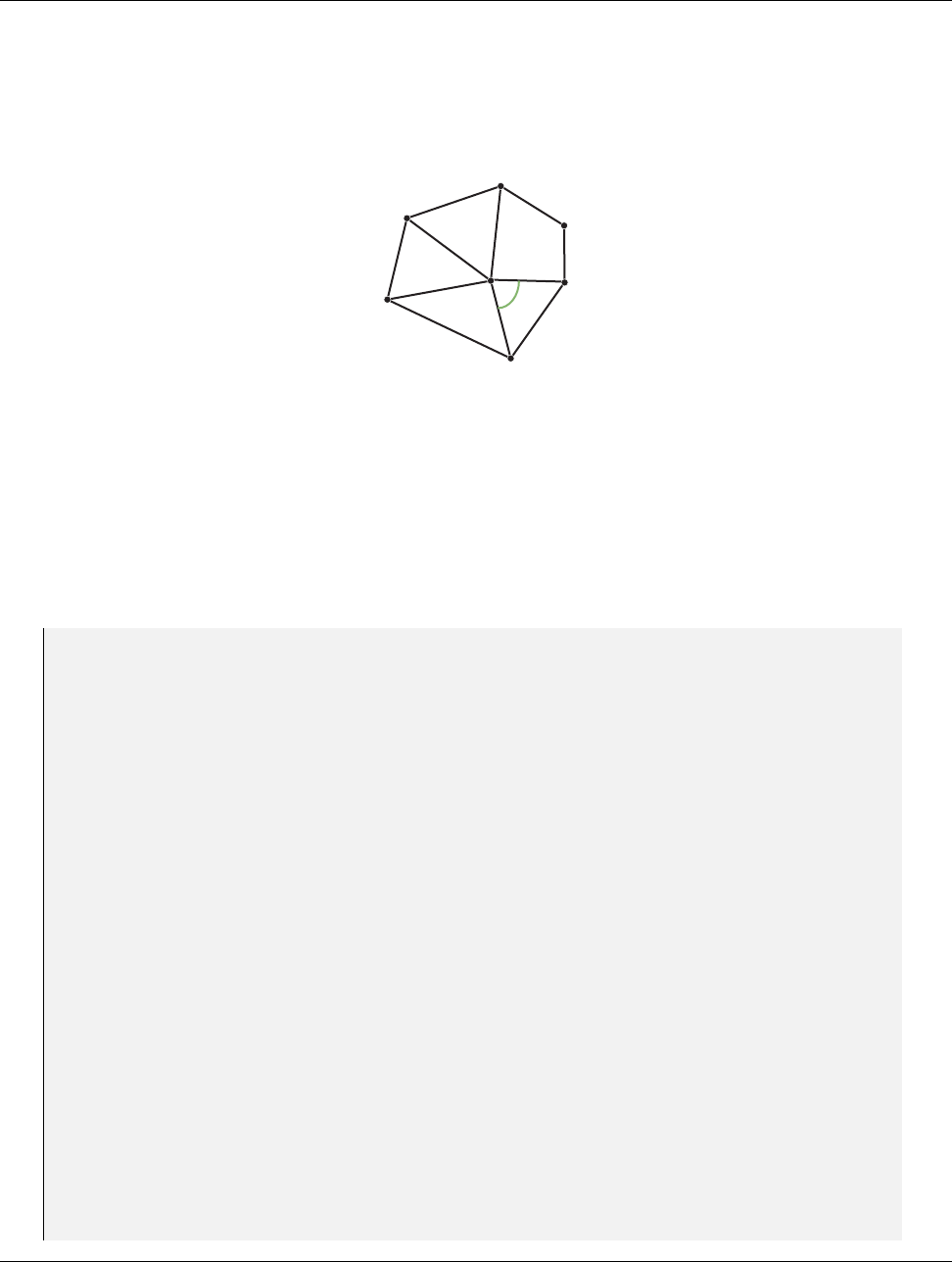
DRAFT
12.8. Whole Cell Sets
Let us use the whole cell set feature to help us determine the “flatness” of a polygonal mesh. We will do this
by summing up all the angles incident on each on each point. That is, for each point, we will find each incident
polygon, then find the part of that polygon using the given point, then computing the angle at that point, and
then summing for all such angles. So, for example, in the mesh fragment shown in Figure 12.3 one of the angles
attached to the middle point is labeled θj.
θj
Figure 12.3: The angles incident around a point in a mesh.
We want a worklet to compute Pjθfor all such attached angles. This measure is related (but not the same as)
the curvature of the surface. A flat surface will have a sum of 2π. Convex and concave surfaces have a value less
than 2π, and saddle surfaces have a value greater than 2π.
To do this, we create a map cell to point worklet (Section 12.5.2) that visits every point and gives the index of
every incident cell. The worklet then uses a whole cell set to inspect each incident cell to measure the attached
angle and sum them together.
Example 12.21: Using WholeCellSetIn to sum the angles around each point.
1st ru ct S um Of An gles : vtkm:: worklet:: WorkletMapCellToPoint
2{
3using ControlSignature =void(CellSetIn inputCells ,
4WholeCellSetIn <> , // Same as i np ut Ce ll s
5WholeArrayIn <> pointCoords ,
6FieldOutPoint <Scalar > angleSum );
7using ExecutionSignature =void(CellIndices incidentCells ,
8In pu tI nd ex pointIndex ,
9_2 cellSet ,
10 _3 pointCoordsPortal ,
11 _4 outSum);
12 using InputDomain =_1 ;
13
14 template <typename IncidentCellVecType ,
15 typename CellSetType ,
16 typename PointCoordsPortalType ,
17 typename SumType >
18 VTKM_EXEC void operator()( const I nc ide ntC ell Vec Typ e & inci dentC ells ,
19 vtkm:: Id p oin tIndex ,
20 const Ce llSetTy pe & cellSet ,
21 const Po int Coo rds Port al Typ e & p oi nt CoordsPorta l ,
22 SumTy pe & ou tS um ) const
23 {
24 using Co ordType = typename Po intC oor dsPo rta lTy pe :: ValueType ;
25
26 Co or dT yp e th isP oin t = p oi nt Co or dsP or ta l . Get ( p oin tIn de x );
27
28 outSum = 0;
29 for (vtkm:: IdComponent incidentCellIndex = 0;
30 in cid ent Cel lIn dex < i nci de ntC el ls . Ge tNu mbe rOfC om pone nt s ();
31 ++incidentCellIndex)
32 {
33 // Get i nfo rm ati on ab ou t i nci den t c ell .
Chapter 12. Worklets 175

DRAFT
12.8. Whole Cell Sets
34 vtkm:: Id c ellIndex = i nci de ntC el ls [ in cid ent Cel lIn dex ];
35 typename Ce ll Se tT ype :: CellSha pe Ta g c el lS hape =
36 cellS et . G etC el lSh ap e ( ce ll Index );
37 typename Ce ll Se tT ype :: IndicesTy pe cell Co nne ct io ns =
38 cellS et . GetIndices ( cellIndex );
39 vtkm:: IdComponent nu mP oin tsI nC ell = ce ll Set . GetN um ber OfI ndi ces ( cellIndex );
40 vtkm:: IdComponent numEdge s =
41 vtkm:: exec:: CellEdgeNumberOfEdges( n umP oin ts InC ell , cell Sh ap e , * th is );
42
43 // Itera te over all edges and find the first one with p oi nt In de x .
44 // Use that to find the fi rst v ector .
45 vtkm:: IdComponent edgeIndex = -1;
46 Co ord Typ e v ec 1 ;
47 whi le ( tru e )
48 {
49 ++ edgeIndex ;
50 if ( e dgeIndex >= numEdge s )
51 {
52 this - > RaiseError (" Bad cell . Coul d not find two i ncident edges .");
53 re tu rn ;
54 }
55 auto edge =
56 vtkm:: make_ Vec (vtkm:: exec:: CellEdgeLocalIndex(
57 nu mPo in tsI nCe ll , 0 , ed ge In de x , c el lS ha pe , * t his ) ,
58 vtkm:: exec:: CellEdgeLocalIndex(
59 numPoin ts InCell , 1 , edgeIndex , cel lShape , * this ));
60 if ( c el lCo nne cti on s [edge [0]] == po in tI nd ex )
61 {
62 vec 1 = po in tC oor ds Po rt al . G et ( c el lCo nn ec tio ns [ e dg e [ 1] ]) - t hi sPo int ;
63 bre ak ;
64 }
65 else if ( ce llC onn ec tio ns [ ed ge [1]] == pointIndex )
66 {
67 vec 1 = po in tC oor ds Po rt al . G et ( c el lCo nn ec tio ns [ e dg e [ 0] ]) - t hi sPo int ;
68 bre ak ;
69 }
70 else
71 {
72 // Co nt inue to next iterat io n of loop .
73 }
74 }
75
76 // Continu e iteration over remaining edges and find the se con d one wi th
77 // po in tIndex . Use that to find the s econd v ector .
78 Co ord Typ e v ec 2 ;
79 whi le ( tru e )
80 {
81 ++ edgeIndex ;
82 if ( e dgeIndex >= numEdge s )
83 {
84 this - > RaiseError (" Bad cell . Coul d not find two i ncident edges .");
85 re tu rn ;
86 }
87 auto edge =
88 vtkm:: make_ Vec (vtkm:: exec:: CellEdgeLocalIndex(
89 nu mPo in tsI nCe ll , 0 , ed ge In de x , c el lS ha pe , * t his ) ,
90 vtkm:: exec:: CellEdgeLocalIndex(
91 numPoin ts InCell , 1 , edgeIndex , cel lShape , * this ));
92 if ( c el lCo nne cti on s [edge [0]] == po in tI nd ex )
93 {
94 vec 2 = po in tC oor ds Po rt al . G et ( c el lCo nn ec tio ns [ e dg e [ 1] ]) - t hi sPo int ;
95 bre ak ;
96 }
97 else if ( ce llC onn ec tio ns [ ed ge [1]] == pointIndex )
176 Chapter 12. Worklets

DRAFT
12.9. Execution Objects
98 {
99 vec 2 = po in tC oor ds Po rt al . G et ( c el lCo nn ec tio ns [ e dg e [ 0] ]) - t hi sPo int ;
100 bre ak ;
101 }
102 else
103 {
104 // Co nt inue to next iterat io n of loop .
105 }
106 }
107
108 // The dot produc t of two unit v ector s is equal to the c osine of the
109 // a ng le bet ween them .
110 vtkm:: Normalize( vec 1 );
111 vtkm:: Normalize( vec 2 );
112 Su mTy pe cos in e = sta tic_ cast < S umT ype >( vtkm:: Do t ( vec1 , ve c2 ));
113
114 outSum += vtkm :: ACos(cosine);
115 }
116 }
117 };
12.9 Execution Objects
Although passing whole arrays and cell sets into a worklet is a convenient way to provide data to a worklet that
is not divided by the input or output domain, they are sometimes not the best structures to represent data.
Thus, all worklets support a another type of argument called an execution object, or exec object for short, that
provides a user-defined object directly to each invocation of the worklet. This is defined by an ExecObject tag
in the ControlSignature.
The execution object must be a subclass of vtkm::cont::ExecutionObjectBase. Also, it must implement a
PrepareForExecution method declared with VTKM CONT, templated on device adapter tag, and passed as an
argument. The PrepareForExecution function creates an execution object that can be passed from the control
environment to the execution environment and be usable in the execution environment, and any method of the
produced object used within the worklet must be declared with VTKM EXEC or VTKM EXEC CONT.
An execution object can refer to an array, but the array reference must be through an array portal for the
execution environment. This can be retrieved from the PrepareForInput method in vtkm::cont::ArrayHandle
as described in Section 7.8. Other VTK-m data objects, such as the subclasses of vtkm::cont::CellSet, have
similar methods.
Returning to the example we have in Section 12.6, we are computing triangle quality quickly by looking up the
value in a table. In Example 12.19 the table is passed directly to the worklet as a whole array. However, there
is some additional code involved to get the appropriate index into the table for a given triangle. Let us say that
we want to have the ability to compute triangle quality in many different worklets. Rather than pass in a raw
array, it would be better to encapsulate the functionality in an object.
We can do that by creating an execution object with a PrepareForExecution that creates an object that has
the table stored inside and methods to compute the triangle quality. The following example uses the table built
in Example 12.19 to create such an object.
Example 12.22: Using ExecObject to access a lookup table in a worklet.
1template <typename DeviceAdapterTag >
2class TriangleQualityTableExecutionObject
3{
4pu bl ic :
5VTKM_CONT
6TriangleQualityTableExecutionObject()
Chapter 12. Worklets 177

DRAFT
12.9. Execution Objects
7{
8this - > TablePortal =
9detail:: Get Tri angl eQ ual ityT ab le (). P rep ar eFo rIn pu t ( Dev ice Ada pte rT ag ());
10 }
11
12 template <typename T >
13 VT KM _EXEC vtkm :: Float32 G etQ ua lit y ( const vtkm:: Vec < T , 3 >& p oi nt 1 ,
14 const vtkm:: Vec < T , 3 >& point2 ,
15 const vtkm:: Vec < T , 3 >& po int 3 ) const
16 {
17 re tu rn detail:: Loo kup Tri an gle Qua li ty ( this -> TablePorta l , point1 , point2 , poi nt3 );
18 }
19
20 private:
21 using TableArrayType = vtkm:: cont:: ArrayHandle <vtkm:: Float32 >;
22 using TableArrayPortalType =
23 typename Ta ble Arr ayT ype :: Exec utio nTyp es < DeviceAda pterTa g >:: Po rta lCo nst ;
24 Ta ble Arra yP orta lT ype Ta blePort al ;
25 };
26
27 class TriangleQualityTable : pu bl ic vtkm:: cont:: ExecutionObjectBase
28 {
29 pu bl ic :
30 template <typename Device >
31 VTKM_CONT TriangleQualityTableExecutionObject <Device > PrepareForExecution(
32 Device) const
33 {
34 re tu rn T ri an gl eQu al it yT abl eE xe cu tio nO bj ec t < Device > ();
35 }
36 };
37
38 st ru ct TriangleQualityWorklet2 : vtkm:: worklet:: WorkletMapPointToCell
39 {
40 using ControlSignature =void(CellSetIn cells ,
41 FieldInPoint <Vec3 > pointC oo rd inates ,
42 Ex ec Ob je ct t ri an gl eQ ua li ty Ta bl e ,
43 FieldOutCell <Scalar > tr iangl eQ ualit y );
44 using ExecutionSignature =_4 (CellShape ,_2 ,_3 );
45 using InputDomain =_1 ;
46
47 template <typename CellShape ,
48 typename Po in tC oo rd in at es Ty pe ,
49 typename TriangleQualityTableType >
50 VT KM _EXEC vtkm :: Float32 operator ()(
51 CellShape shape ,
52 const Po int Coo rdi nat esT ype & po intCoordi na te s ,
53 const TriangleQualityTableType& triangleQualityTable) const
54 {
55 if ( s ha pe . Id != vtkm:: CELL_SHAPE_TRIANGLE)
56 {
57 this - > RaiseError (" Only t ri an gl es are supported for tria ng le quality .");
58 re tu rn vtkm:: Na n32 ();
59 }
60
61 re tu rn t ria ngle Qua lit yTab le . Ge tQual it y (
62 pointCoordinates[0], pointCoordinates[1], pointCoordinates[2]);
63 }
64 };
65
66 // Normall y we would e ncapsulat e this call in a filter , but for demonstrative
67 // purpose s we are just c alling the worklet directly .
68 template <typename DeviceAdapterTag >
69 VT KM _CONT vtkm :: cont:: ArrayHandle <vtkm:: Float32 > RunTriangleQuality2(
70 vtkm:: cont:: DataSet dataSet ,
178 Chapter 12. Worklets
DRAFT
12.10. Scatter
71 DeviceAdapterTag)
72 {
73 TriangleQualityTable triangleQualityTable;
74
75 vtkm:: cont:: ArrayHandle <vtkm:: Float32 > triangleQualities;
76
77 vtkm:: worklet:: DispatcherMapTopology < T ria ngleQ ualit yW orkle t2 > d ispatcher ;
78 di spa tch er . I nv ok e ( dataSe t . Get Cel lSe t () ,
79 da taS et . G et Co or di na te Sy st em (). G et Dat a () ,
80 tr ia ng le Qu al it yT ab le ,
81 triangleQualities);
82
83 re tu rn triangleQualities;
84 }
12.10 Scatter
The default scheduling of a worklet provides a 1 to 1 mapping from the input domain to the output domain.
For example, a vtkm::worklet::WorkletMapField gets run once for every item of the input array and produces
one item for the output array. Likewise, vtkm::worklet::WorkletMapPointToCell gets run once for every cell
in the input topology and produces one associated item for the output field.
However, there are many operations that do not fall well into this 1 to 1 mapping procedure. The operation
might need to pass over elements that produce no value or the operation might need to produce multiple values
for a single input element.
Such non 1 to 1 mappings can be achieved by defining a scatter for a worklet. The following types of scatter are
provided by VTK-m.
vtkm::worklet::ScatterIdentity Provides a basic 1 to 1 mapping from input to output. This is the default
scatter used if none is specified.
vtkm::worklet::ScatterUniform Provides a 1 to many mapping from input to output with the same number
of outputs for each input. The worklet provides a number at runtime that defines the number of output
values to produce per input.
vtkm::worklet::ScatterCounting Provides a 1 to any mapping from input to output with different numbers
of outputs for each input. The worklet provides an ArrayHandle that is the same size as the input
containing the count of output values to produce for each input. Values can be zero, in which case that
input will be skipped.
Scatters are often used to create multiple outputs for a single input, but they can also be used to remove
inputs from the output. In particular, if you provide a count of 0 in a ScatterCounting count array, no
outputs will be created for the associated input. To simply mask out some elements from the input, provide
ScatterCounting with a stencil array of 0’s and 1’s with a 0 for every element you want to remove and a
1 for every element you want to pass. You can also mix 0’s with counts larger than 1 to drop some elements
and add multiple results for other elements.
Did you know?
Chapter 12. Worklets 179
DRAFT
12.10. Scatter
To define a scatter procedure, the worklet must provide a type definition named ScatterType. The ScatterType
must be set to one of the aforementioned Scatter* classes. It is common, but optional, to also provide a static
method named MakeScatter that generates an appropriate scatter object for the worklet if you cannot use the
default constructor for the scatter. This static method can be used by users of the worklet to set up the scatter
for the dispatcher.
Example 12.23: Declaration of a scatter type in a worklet.
1using ScatterType =vtkm:: worklet:: ScatterCounting;
2
3template <typename CountArrayType , typename DeviceAdapterTag >
4VTKM_CONT static ScatterType MakeScatter(const Co un tAr ray Ty pe & countArray ,
5DeviceAdapterTag)
6{
7VTKM_IS_ARRAY_HANDLE(CountArrayType);
8re tu rn ScatterType( countArray , D evi ce Ada pte rT ag ());
9}
When using a scatter that produces multiple outputs for a single input, the worklet is invoked multiple times
with the same input values. In such an event the worklet operator needs to distinguish these calls to produce the
correct associated output. This is done by declaring one of the ExecutionSignature arguments as VisitIndex.
This tag will pass a vtkm::IdComponent to the worklet that identifies which invocation is being called.
It is also the case that the when a scatter can produce multiple outputs for some input that the index of the
input element is not the same as the WorkIndex. If the index to the input element is needed, you can use the
InputIndex tag in the ExecutionSignature. It is also good practice to use the OutputIndex tag if the index
to the output element is needed.
It is stated in Section 12.2 that when a dispatcher object is created, it must be given a worklet object (or a
default object will be created). Additionally, a dispatcher must have a scatter object when it is created. Like
with the worklet, if the required scatter object does not hold any state, then the dispatcher can automatically
create a scatter object with the scatter’s default constructor. This is the case for the default scatter, so none of
the previous examples needed to define a scatter for the dispatcher. However, a ScatterCounting needs to be
constructed, set up, and passed to the dispatcher’s constructor. As mentioned previously, it is generally good
practice for the worklet to provide a static MakeScatter method to construct a scatter of the correct type and
state if the dispatcher requires a custom scatter. If both a worklet object and a scatter object need to be given
to a dispatcher’s constructor, the worklet is given as the first argument.
Example 12.24: Constructing a dispatcher that requires a custom scatter.
1auto g en erate Sc att er =
2Cl ip Po in ts :: G enerate :: M akeScatter ( countArray , D ev ice Ad ap ter Ta g ());
3vtkm:: worklet:: DispatcherMapField < ClipPoint s :: Generate > d is pat che rGen er ate (
4ge nerat eS catte r );
A scatter object does not have to be tied to a single worklet/dispatcher instance. In some cases it makes
sense to use the same scatter object multiple times for worklets that have the same input to output mapping.
Although this is not common, it can save time by reusing the set up computations of ScatterCounting.
Did you know?
To demonstrate using scatters with worklets, we provide some contrived but illustrative examples. The first
example is a worklet that takes a pair of input arrays and interleaves them so that the first, third, fifth, and so
on entries come from the first array and the second, fourth, sixth, and so on entries come from the second array.
We achieve this by using a vtkm::cont::ScatterUniform of size 2 and using the VisitIndex to determine from
which array to pull a value.
180 Chapter 12. Worklets

DRAFT
12.10. Scatter
Example 12.25: Using ScatterUniform.
1st ru ct InterleaveArrays : vtkm :: worklet:: WorkletMapField
2{
3using ControlSignature =void(FieldIn <>, FieldIn < >, FieldOut < >);
4using ExecutionSignature =void(_1 ,_2 ,_3 ,V is it In de x );
5using InputDomain =_1 ;
6
7using ScatterType =vtkm:: worklet:: ScatterUniform <2 >;
8
9template <typename T >
10 VTKM_EXEC void operator()( const T & input0 ,
11 const T& input1 ,
12 T& output ,
13 vtkm:: IdComponent visitI nd ex ) const
14 {
15 if ( v is it Ind ex == 0)
16 {
17 output = input0;
18 }
19 else // visitIndex == 1
20 {
21 output = input1;
22 }
23 }
24 };
The second example takes a collection of point coordinates and clips them by an axis-aligned bounding box. It
does this using a vtkm::cont::ScatterCounting with an array containing 0 for all points outside the bounds
and 1 for all points inside the bounds. As is typical with this type of operation, we use another worklet with a
default identity scatter to build the count array.
Example 12.26: Using ScatterCounting.
1st ru ct C li pP oi nt s
2{
3class Cou nt : p ub li c vtkm:: worklet:: WorkletMapField
4{
5pu bl ic :
6using ControlSignature =void(FieldIn <Vec3 > points ,
7FieldOut <IdComponentType > count );
8using ExecutionSignature =_2 (_1 );
9using InputDomain =_1 ;
10
11 template <typename T >
12 VTKM_CONT Cou nt ( const vtkm:: Vec <T , 3 >& b ou nd sM in ,
13 const vtkm:: Vec < T , 3 >& b ou nds Ma x )
14 : B ou nds Min ( b oun dsMin [0] , bo und sMi n [1] , boundsMi n [2])
15 , Bo und sM ax ( b oun ds Max [0] , b oundsMax [1] , boundsMax [ 2])
16 {
17 }
18
19 template <typename T >
20 VT KM _EXEC vtkm :: IdComponent operator ()( const vtkm:: Vec < T , 3 >& po int ) const
21 {
22 re tu rn static_cast <vtkm :: IdComponent >(
23 ( this - > B oun ds Mi n [ 0] < p oin t [ 0]) && ( this - > B ou nd sMi n [1] < p oi nt [ 1]) & &
24 ( this - > B oun ds Mi n [ 2] < p oin t [ 2]) && ( this - > B ou nd sMa x [0] > p oi nt [ 0]) & &
25 ( this - > B oun ds Ma x [ 1] > p oin t [ 1]) && ( this - > B ou nd sMa x [2] > p oi nt [ 2] ));
26 }
27
28 private:
29 vtkm:: Vec <vtkm:: FloatDefault , 3 > B oundsMin ;
30 vtkm:: Vec <vtkm:: FloatDefault , 3 > B oundsMax ;
31 };
Chapter 12. Worklets 181

DRAFT
12.11. Error Handling
32
33 class Generate : p ub li c vtkm:: worklet:: WorkletMapField
34 {
35 pu bl ic :
36 using ControlSignature =void(FieldIn <Vec3 > inPoints , FieldOut <Vec3 > outPoin ts );
37 using ExecutionSignature =void(_1 ,_2 );
38 using InputDomain =_1 ;
39
40 using ScatterType =vtkm:: worklet:: ScatterCounting;
41
42 template <typename CountArrayType , typename DeviceAdapterTag >
43 VTKM_CONT static ScatterType MakeScatter(const Co un tAr ray Ty pe & countArray ,
44 DeviceAdapterTag)
45 {
46 VTKM_IS_ARRAY_HANDLE(CountArrayType);
47 re tu rn ScatterType( countArray , D evi ce Ada pte rT ag ());
48 }
49
50 template <typename InType , typename OutType >
51 VTKM_EXEC void operator()( const vtkm:: Vec < InTy pe , 3 >& i nP oi nt ,
52 vtkm:: Vec < O ut Ty pe , 3 >& ou tP oin t ) const
53 {
54 // The scat te r en sures that this method is only c alled f or inp ut po ints
55 // that are passe d to the ou tput ( where the co unt was 1). Thus , in this
56 // case we know that we just need to copy the input to the ou tput .
57 outPoint = vtkm:: Vec < OutType , 3 >( i nPoint [0] , inPo int [1] , in Po int [2]);
58 }
59 };
60
61 template <typename T , typename Storage ,typename DeviceAdapterTag >
62 VTKM_CONT static vtkm:: cont:: ArrayHandle <vtkm:: Vec < T , 3> > Run (
63 const vtkm:: cont:: ArrayHandle <vtkm:: Vec <T , 3 > , Storage >& poi ntA rray ,
64 vtkm:: Vec < T , 3> b oun ds Mi n ,
65 vtkm:: Vec < T , 3> b oun ds Ma x ,
66 DeviceAdapterTag)
67 {
68 vtkm:: cont:: ArrayHandle <vtkm:: IdComponent > cou ntA rray ;
69
70 Cl ipP oin ts :: C ou nt wo rkl et Cou nt ( bo un dsMin , b oun dsM ax );
71 vtkm:: worklet:: DispatcherMapField < C lipPoints :: Count > d isp atc herCou nt (
72 workletCount);
73 di spa tche rCo unt . Inv oke ( pointArray , c ountA rr ay );
74
75 vtkm:: cont:: ArrayHandle <vtkm:: Vec <T , 3 > > c li pp ed Po in t sA rr ay ;
76
77 auto g en erate Sc att er =
78 Cl ip Po in ts :: G enerate :: M akeScatter ( countArray , D ev ice Ad ap ter Ta g ());
79 vtkm:: worklet:: DispatcherMapField < ClipPoint s :: Generate > d is pat che rGen er ate (
80 ge nerat eS catte r );
81 di sp atc he rGe ne rat e . Inv oke ( point Arra y , c li ppe dP oin ts Arr ay );
82
83 re tu rn clippedPointsArray;
84 }
85 };
12.11 Error Handling
It is sometimes the case during the execution of an algorithm that an error condition can occur that causes
the computation to become invalid. At such a time, it is important to raise an error to alert the calling code
of the problem. Since VTK-m uses an exception mechanism to raise errors, we want an error in the execution
182 Chapter 12. Worklets

DRAFT
12.11. Error Handling
environment to throw an exception.
However, throwing exceptions in a parallel algorithm is problematic. Some accelerator architectures, like CUDA,
do not even support throwing exceptions. Even on architectures that do support exceptions, throwing them in
a thread block can cause problems. An exception raised in one thread may or may not be thrown in another,
which increases the potential for deadlocks, and it is unclear how uncaught exceptions progress through thread
blocks.
VTK-m handles this problem by using a flag and check mechanism. When a worklet (or other subclass of vtkm::-
exec::FunctorBase) encounters an error, it can call its RaiseError method to flag the problem and record a
message for the error. Once all the threads terminate, the scheduler checks for the error, and if one exists it
throws a vtkm::cont::ErrorExecution exception in the control environment. Thus, calling RaiseError looks
like an exception was thrown from the perspective of the control environment code that invoked it.
Example 12.27: Raising an error in the execution environment.
1st ru ct S qu ar eR oo t : vtkm:: worklet:: WorkletMapField
2{
3pu bl ic :
4using ControlSignature =void(FieldIn <Scalar > , FieldOut <Scalar >);
5using ExecutionSignature =_2 (_1 );
6
7template <typename T >
8VTKM_EXEC Toperator()( T x ) const
9{
10 if ( x < 0)
11 {
12 this - > RaiseError (" Canno t take the squa re root of a negati ve number .");
13 }
14 re tu rn vtkm:: Sqrt( x );
15 }
16 };
It is also worth noting that the VTKM ASSERT macro described in Section 6.7 also works within worklets and
other code running in the execution environment. Of course, a failed assert will terminate execution rather than
just raise an error so is best for checking invalid conditions for debugging purposes.
Chapter 12. Worklets 183
DRAFT
DRAFT
CHAPTER
THIRTEEN
MATH
VTK-m comes with several math functions that tend to be useful for visualization algorithms. The implementa-
tion of basic math operations can vary subtly on different accelerators, and these functions provide cross platform
support.
All math functions are located in the vtkm package. The functions are most useful in the execution environment,
but they can also be used in the control environment when needed.
13.1 Basic Math
The vtkm/Math.h header file contains several math functions that replicate the behavior of the basic POSIX
math functions as well as related functionality.
When writing worklets, you should favor using these math functions provided by VTK-m over the standard
math functions in math.h. VTK-m’s implementation manages several compiling and efficiency issues when
porting.
Did you know?
vtkm::Abs Returns the absolute value of the single argument. If given a vector, performs a component-wise
operation.
vtkm::ACos Returns the arccosine of a ratio in radians. If given a vector, performs a component-wise operation.
vtkm::ACosH Returns the hyperbolic arccossine. If given a vector, performs a component-wise operation.
vtkm::ASin Returns the arcsine of a ratio in radians. If given a vector, performs a component-wise operation.
vtkm::ASinH Returns the hyperbolic arcsine. If given a vector, performs a component-wise operation.
vtkm::ATan Returns the arctangent of a ratio in radians. If given a vector, performs a component-wise opera-
tion.
vtkm::ATan2 Computes the arctangent of y/x where yis the first argument and xis the second argument.
ATan2 uses the signs of both arguments to determine the quadrant of the return value. ATan2 is only
defined for floating point types (no vectors).

DRAFT
13.1. Basic Math
vtkm::ATanH Returns the hyperbolic arctangent. If given a vector, performs a component-wise operation.
vtkm::Cbrt Takes one argument and returns the cube root of that argument. If called with a vector type,
returns a component-wise cube root.
vtkm::Ceil Rounds and returns the smallest integer not less than the single argument. If given a vector,
performs a component-wise operation.
vtkm::CopySign Copies the sign of the second argument onto the first argument and returns that. If the second
argument is positive, returns the absolute value of the first argument. If the second argument is negative,
returns the negative absolute value of the first argument.
vtkm::Cos Returns the cosine of an angle given in radians. If given a vector, performs a component-wise
operation.
vtkm::CosH Returns the hyperbolic cosine. If given a vector, performs a component-wise operation.
vtkm::Epsilon Returns the difference between 1 and the least value greater than 1 that is representable by
a floating point number. Epsilon is useful for specifying the tolerance one should have when considering
numerical error. The Epsilon method is templated to specify either a 32 or 64 bit floating point number.
The convenience methods Epsilon32 and Epsilon64 are non-templated versions that return the precision
for a particular precision.
vtkm::Exp Computes exwhere xis the argument to the function and eis Euler’s number (approximately
2.71828). If called with a vector type, returns a component-wise exponent.
vtkm::Exp10 Computes 10xwhere xis the argument. If called with a vector type, returns a component-wise
exponent.
vtkm::Exp2 Computes 2xwhere xis the argument. If called with a vector type, returns a component-wise
exponent.
vtkm::ExpM1 Computes ex−1 where xis the argument to the function and eis Euler’s number (approximately
2.71828). The accuracy of this function is good even for very small values of x. If called with a vector
type, returns a component-wise exponent.
vtkm::Floor Rounds and returns the largest integer not greater than the single argument. If given a vector,
performs a component-wise operation.
vtkm::FMod Computes the remainder on the division of 2 floating point numbers. The return value is
numerator −n·denominator, where numerator is the first argument, denominator is the second argu-
ment, and nis the quotient of numerator divided by denominator rounded towards zero to an integer. For
example, FMod(6.5,2.3) returns 1.9, which is 6.5−2·4.6. If given vectors, FMod performs a component-
wise operation. FMod is similar to Remainder except that the quotient is rounded toward 0 instead of the
nearest integer.
vtkm::Infinity Returns the representation for infinity. The result is greater than any other number except
another infinity or NaN. When comparing two infinities or infinity to NaN, neither is greater than, less
than, nor equal to the other. The Infinity method is templated to specify either a 32 or 64 bit floating
point number. The convenience methods Infinity32 and Infinity64 are non-templated versions that
return the precision for a particular precision.
vtkm::IsFinite Returns true if the argument is a normal number (neither a NaN nor an infinite).
vtkm::IsInf Returns true if the argument is either positive infinity or negative infinity.
vtkm::IsNan Returns true if the argument is not a number (NaN).
186 Chapter 13. Math

DRAFT
13.1. Basic Math
vtkm::IsNegative Returns true if the single argument is less than zero, false otherwise.
vtkm::Log Computes the natural logarithm (i.e. logarithm to the base e) of the single argument. If called with
a vector type, returns a component-wise logarithm.
vtkm::Log10 Computes the logarithm to the base 10 of the single argument. If called with a vector type,
returns a component-wise logarithm.
vtkm::Log1P Computes ln(1+x) where xis the single argument and ln is the natural logarithm (i.e. logarithm
to the base e). The accuracy of this function is good for very small values. If called with a vector type,
returns a component-wise logarithm.
vtkm::Log2 Computes the logarithm to the base 2 of the single argument. If called with a vector type, returns
a component-wise logarithm.
vtkm::Max Takes two arguments and returns the argument that is greater. If called with a vector type, returns
a component-wise maximum.
vtkm::Min Takes two arguments and returns the argument that is lesser. If called with a vector type, returns
a component-wise minimum.
vtkm::ModF Returns the integral and fractional parts of the first argument. The second argument is a reference
in which the integral part is stored. The return value is the fractional part. If given vectors, ModF performs
a component-wise operation.
vtkm::Nan Returns the representation for not-a-number (NaN). A NaN represents an invalid value or the result
of an invalid operation such as 0/0. A NaN is neither greater than nor less than nor equal to any other
number including other NaNs. The NaN method is templated to specify either a 32 or 64 bit floating point
number. The convenience methods Nan32 and NaN64 are non-templated versions that return the precision
for a particular precision.
vtkm::NegativeInfinity Returns the representation for negative infinity. The result is less than any other
number except another negative infinity or NaN. When comparing two negative infinities or negative in-
finity to NaN, neither is greater than, less than, nor equal to the other. The NegativeInfinity method is
templated to specify either a 32 or 64 bit floating point number. The convenience methods NagativeIn-
finity32 and NegativeInfinity64 are non-templated versions that return the precision for a particular
precision.
vtkm::Pi Returns the constant π(about 3.14159).
vtkm::Pi 2 Returns the constant π/2 (about 1.570796).
vtkm::Pi 3 Returns the constant π/3 (about 1.047197).
vtkm::Pi 4 Returns the constant π/4 (about 0.785398).
vtkm::Pow Takes two arguments and returns the first argument raised to the power of the second argument.
This function is only defined for vtkm::Float32 and vtkm::Float64.
vtkm::RCbrt Takes one argument and returns the cube root of that argument. The result of this function is
equivalent to 1/Cbrt(x). However, on some devices it is faster to compute the reciprocal cube root than
the regular cube root. Thus, you should use this function whenever dividing by the cube root.
vtkm::Remainder Computes the remainder on the division of 2 floating point numbers. The return value is
numerator−n·denominator, where numerator is the first argument, denominator is the second argument,
and nis the quotient of numerator divided by denominator rounded towards the nearest integer. For
example, FMod(6.5,2.3) returns −0.4, which is 6.5−3·2.3. If given vectors, Remainder performs a
Chapter 13. Math 187

DRAFT
13.2. Vector Analysis
component-wise operation. Remainder is similar to FMod except that the quotient is rounded toward the
nearest integer instead of toward 0.
vtkm::RemainderQuotient Performs an operation identical to Reminder. In addition, this function takes a
third argument that is a reference in which the quotient is given.
vtkm::Round Rounds and returns the integer nearest the single argument. If given a vector, performs a
component-wise operation.
vtkm::RSqrt Takes one argument and returns the square root of that argument. The result of this function is
equivalent to 1/Sqrt(x). However, on some devices it is faster to compute the reciprocal square root than
the regular square root. Thus, you should use this function whenever dividing by the square root.
vtkm::SignBit Returns a nonzero value if the single argument is negative.
vtkm::Sin Returns the sine of an angle given in radians. If given a vector, performs a component-wise operation.
vtkm::SinH Returns the hyperbolic sine. If given a vector, performs a component-wise operation.
vtkm::Sqrt Takes one argument and returns the square root of that argument. If called with a vector type,
returns a component-wise square root. On some hardware it is faster to find the reciprocal square root, so
RSqrt should be used if you actually plan to divide byt the square root.
vtkm::Tan Returns the tangent of an angle given in radians. If given a vector, performs a component-wise
operation.
vtkm::TanH Returns the hyperbolic tangent. If given a vector, performs a component-wise operation.
vtkm::TwoPi Returns the constant 2π(about 6.283185).
13.2 Vector Analysis
Visualization and computational geometry algorithms often perform vector analysis operations. The vtkm/-
VectorAnalysis.h header file provides functions that perform the basic common vector analysis operations.
vtkm::Cross Returns the cross product of two vtkm::Vec of size 3.
vtkm::Lerp Given two values xand yin the first two parameters and a weight was the third parameter,
interpolates between xand y. Specifically, the linear interpolation is (y−x)w+xalthough Lerp might
compute the interpolation faster than using the independent arithmetic operations. The two values may
be scalars or equal sized vectors. If the two values are vectors and the weight is a scalar, all components
of the vector are interpolated with the same weight. If the weight is also a vector, then each component of
the value vectors are interpolated with the respective weight component.
vtkm::Magnitude Returns the magnitude of a vector. This function works on scalars as well as vectors, in
which case it just returns the scalar. It is usually much faster to compute MagnitudeSquared, so that
should be substituted when possible (unless you are just going to take the square root, which would be
besides the point). On some hardware it is also faster to find the reciprocal magnitude, so RMagnitude
should be used if you actually plan to divide by the magnitude.
vtkm::MagnitudeSquared Returns the square of the magnitude of a vector. It is usually much faster to compute
the square of the magnitude than the length, so you should use this function in place of Magnitude or
RMagnitude when needing the square of the magnitude or any monotonically increasing function of a
magnitude or distance. This function works on scalars as well as vectors, in which case it just returns the
square of the scalar.
188 Chapter 13. Math

DRAFT
13.3. Matrices
vtkm::Normal Returns a normalized version of the given vector. The resulting vector points in the same
direction as the argument but has unit length.
vtkm::Normalize Takes a reference to a vector and modifies it to be of unit length. Normalize(v) is function-
ally equivalent to v*=RMagnitude(v).
vtkm::RMagnitude Returns the reciprocal magnitude of a vector. On some hardware RMagnitude is faster than
Magnitude, but neither is as fast as MagnitudeSquared. This function works on scalars as well as vectors,
in which case it just returns the reciprocal of the scalar.
vtkm::TriangleNormal Given three points in space (contained in vtkm::Vec s of size 3) that compose a triangle
return a vector that is perpendicular to the triangle. The magnitude of the result is equal to twice the
area of the triangle. The result points away from the “front” of the triangle as defined by the standard
counter-clockwise ordering of the points.
13.3 Matrices
Linear algebra operations on small matrices that are done on a single thread are located in vtkm/Matrix.h.
This header defines the vtkm::Matrix templated class. The template parameters are first the type of component,
then the number of rows, then the number of columns. The overloaded parentheses operator can be used to
retrieve values based on row and column indices. Likewise, the bracket operators can be used to reference the
Matrix as a 2D array (indexed by row first). The following example builds a Matrix that contains the values
012
10 11 12
Example 13.1: Creating a Matrix.
1vtkm:: Matrix <vtkm:: Float32 , 2 , 3> mat ri x ;
2
3// Using pa ren thesi s n otation .
4ma tri x (0 , 0) = 0 .0 f ;
5ma tri x (0 , 1) = 1 .0 f ;
6ma tri x (0 , 2) = 2 .0 f ;
7
8// Using brack et not ation .
9matrix[1][0] = 10.0f;
10 matrix[1][1] = 11.0f;
11 matrix[1][2] = 12.0f;
The vtkm/Matrix.h header also defines the following functions that operate on matrices.
vtkm::MatrixDeterminant Takes a square Matrix as its single argument and returns the determinant of that
matrix.
vtkm::MatrixGetColumn Given a Matrix and a column index, returns a vtkm::Vec of that column. This
function might not be as efficient as vtkm::MatrixRow. (It performs a copy of the column).
vtkm::MatrixGetRow Given a Matrix and a row index, returns a vtkm::Vec of that row.
vtkm::MatrixIdentity Returns the identity matrix. If given no arguments, it creates an identity matrix and
returns it. (In this form, the component type and size must be explicitly set.) If given a single square
matrix argument, fills that matrix with the identity.
Chapter 13. Math 189

DRAFT
13.4. Newton’s Method
vtkm::MatrixInverse Finds and returns the inverse of a given matrix. The function takes two arguments.
The first argument is the matrix to invert. The second argument is a reference to a Boolean that is set to
true if the inverse is found or false if the matrix is singular and the returned matrix is incorrect.
vtkm::MatrixMultiply Performs a matrix-multiply on its two arguments. Overloaded to work for matrix-
matrix, vector-matrix, or matrix-vector multiply.
vtkm::MatrixSetColumn Given a Matrix, a column index, and a vtkm::Vec, sets the column of that index to
the values of the Tuple.
vtkm::MatrixSetRow Given a Matrix, a row index, and a vtkm::Vec, sets the row of that index to the values
of the Tuple.
vtkm::MatrixTranspose Takes a Matrix and returns its transpose.
vtkm::SolveLinearSystem Solves the linear system Ax =band returns x. The function takes three arguments.
The first two arguments are the matrix Aand the vector b, respectively. The third argument is a reference
to a Boolean that is set to true if a single solution is found, false otherwise.
13.4 Newton’s Method
VTK-m’s matrix methods (documented in Section 13.3) provide a method to solve a small linear system of
equations. However, sometimes it is necessary to solve a small nonlinear system of equations. This can be done
with the vtkm::NewtonsMethod function defined in the vtkm/NewtonsMethod.h header.
The NewtonsMethod function assumes that the number of variables equals the number of equations. Newton’s
method operates on an iterative evaluate and search. Evaluations are performed using the functors passed into
the NewtonsMethod. The function takes the following 6 parameters (three of which are optional).
1. A functor whose operation takes a vtkm::Vec and returns a vtkm::Matrix containing the math function’s
Jacobian vector at that point.
2. A functor whose operation takes a vtkm::Vec and returns the evaluation of the math function at that
point as another vtkm::Vec.
3. The vtkm::Vec that represents the desired output of the function.
4. A vtkm::Vec to use as the initial guess. If not specified, the origin is used.
5. The convergence distance. If the iterative method changes all values less than this amount, then it considers
the solution found. If not specified, set to 10−3.
6. The maximum amount of iterations to run before giving up and returning the best solution. If not specified,
set to 10.
The NewtonsMethod function returns a vtkm::NewtonsMethodResult object. NewtonsMethodResult is a struct
templated on the type and number of input values of the nonlinear system. NewtonsMethodResult contains the
following items.
Valid Abool that is set to false if the solution runs into a singularity so that no possible solution is found.
Converged Abool that is set to true if a solution is found that is within the convergence distance specified. It
is set to false if the method did not convert in the specified number of iterations.
190 Chapter 13. Math

DRAFT
13.4. Newton’s Method
Solution Avtkm::Vec containing the solution to the nonlinear system. If Converged is false, then this value
is likely inaccurate. If Valid is false, then this value is undefined.
Example 13.2: Using NewtonsMethod to solve a small system of nonlinear equations.
1// A functo r for the m at hem ati ca l fun cti on f (x ) = [ dot (x ,x ), x [0]* x [ 1] ]
2st ru ct FunctionFunctor
3{
4template <typename T >
5VTKM_EXEC_CONT vtkm:: Vec < T , 2> operator()( const vtkm:: Vec < T , 2 >& x ) const
6{
7re tu rn vtkm:: make_V ec (vtkm:: D ot (x, x) , x [0] * x [1 ]);
8}
9};
10
11 // A functo r for the J acobian of the mathe ma ti ca l f unction
12 // f (x ) = [ dot ( x ,x ), x [0]* x [1]] , wh ic h is
13 // | 2* x [0 ] 2 * x [1 ] |
14 // | x [1] x [0] |
15 st ru ct JacobianFunctor
16 {
17 template <typename T >
18 VTKM_EXEC_CONT vtkm:: Matrix <T , 2 , 2> operator()( const vtkm:: Vec < T , 2 >& x ) const
19 {
20 vtkm:: Matrix <T, 2, 2 > j ac ob ian ;
21 jacobian (0 , 0) = 2 * x [0];
22 jacobian (0 , 1) = 2 * x [1];
23 ja co bia n (1 , 0) = x [ 1] ;
24 ja co bia n (1 , 1) = x [ 0] ;
25
26 re tu rn j ac obian ;
27 }
28 };
29
30 VTKM_EXEC
31 void SolveNonlinear()
32 {
33 // Use Newton ’s meth od to so lve the n on li near s ystem of e qu at io ns :
34 //
35 // x ˆ2 + y ˆ 2 = 2
36 // x*y = 1
37 //
38 // T h er e a re t wo p os s ib le s ol u ti on s , w hi ch ar e ( x =1 , y =1) an d ( x = -1 , y = - 1) .
39 // The one found d epen ds on the st ar tin g v al ue .
40 vtkm:: NewtonsMethodResult <vtkm:: Float32 , 2> answ er1 =
41 vtkm:: NewtonsMethod( J ac ob ian Fu nc to r () ,
42 F un cti on Fu nc to r () ,
43 vtkm:: make_ Ve c (2 .0 f , 1 .0 f ) ,
44 vtkm:: make_ Ve c (1 .0 f , 0 .0 f ) );
45 if (! answer 1 . Valid || ! a ns wer1 . C onverged )
46 {
47 // Faile d to find so lu ti on
48 }
49 // a nswer1 . S olution is [1 ,1]
50
51 vtkm:: NewtonsMethodResult <vtkm:: Float32 , 2> answ er2 =
52 vtkm:: NewtonsMethod( J ac ob ian Fu nc to r () ,
53 F un cti on Fu nc to r () ,
54 vtkm:: make_ Ve c (2 .0 f , 1 .0 f ) ,
55 vtkm:: make_ Ve c (0 .0 f , -2 .0 f ) );
56 if (! answer 2 . Valid || ! a ns wer2 . C onverged )
57 {
58 // Faile d to find so lu ti on
59 }
Chapter 13. Math 191

DRAFT
13.4. Newton’s Method
60 // a nsw er2 is [ -1 , -1]
61 }
192 Chapter 13. Math
DRAFT
CHAPTER
FOURTEEN
WORKING WITH CELLS
In the control environment, data is defined in mesh structures that comprise a set of finite cells. (See Section 11.2
starting on page 130 for information on defining cell sets in the control environment.) When worklets that operate
on cells are scheduled, these grid structures are broken into their independent cells, and that data is handed to
the worklet. Thus, cell-based operations in the execution environment exclusively operate on independent cells.
Unlike some other libraries such as VTK, VTK-m does not have a cell class that holds all the information
pertaining to a cell of a particular type. Instead, VTK-m provides tags or identifiers defining the cell shape,
and companion data like coordinate and field information are held in separate structures. This organization is
designed so a worklet may specify exactly what information it needs, and only that information will be loaded.
14.1 Cell Shape Tags and Ids
Cell shapes can be specified with either a tag (defined with a struct with a name like CellShapeTag*) or an
enumerated identifier (defined with a constant number with a name like CELL SHAPE *). These shape tags and
identifiers are defined in vtkm/CellShape.h and declared in the vtkm namespace (because they can be used in
either the control or the execution environment). Figure 14.1 gives both the identifier and the tag names.
In addition to the basic cell shapes, there is a special “empty” cell with the identifier vtkm::CELL SHAPE EMPTY
and tag vtkm::CellShapeTagEmpty. This type of cell has no points, edges, or faces and can be thought of as a
placeholder for a null or void cell.
There is also a special cell shape “tag” named vtkm::CellShapeTagGeneric that is used when the actual cell
shape is not known at compile time. CellShapeTagGeneric actually has a member variable named Id that
stores the identifier for the cell shape. There is no equivalent identifier for a generic cell; cell shape identifiers
can be placed in a vtkm::IdComponent at runtime.
When using cell shapes in templated classes and functions, you can use the VTKM IS CELL SHAPE TAG to ensure
a type is a valid cell shape tag. This macro takes one argument and will produce a compile error if the argument
is not a cell shape tag type.
14.1.1 Converting Between Tags and Identifiers
Every cell shape tag has a member variable named Id that contains the identifier for the cell shape. This
provides a convenient mechanism for converting a cell shape tag to an identifier. Most cell shape tags have their
Id member as a compile-time constant, but CellShapeTagGeneric is set at run time.
vtkm/CellShape.h also declares a templated class named vtkm::CellShapeIdToTag that converts a cell shape
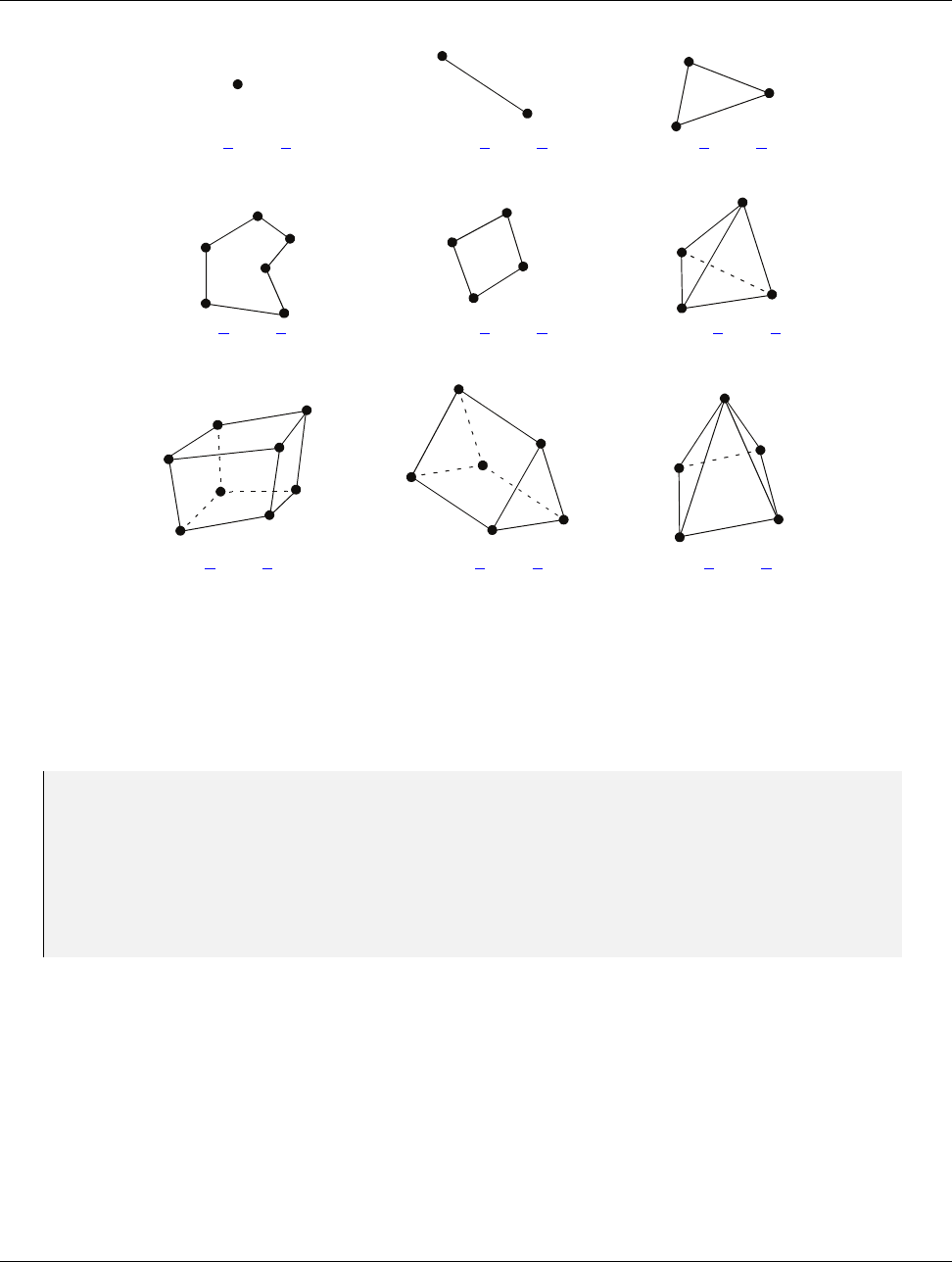
DRAFT
14.1. Cell Shape Tags and Ids
0
2
1
vtkm::CELL SHAPE VERTEX vtkm::CELL SHAPE LINE vtkm::CELL SHAPE TRIANGLE
vtkm::CellShapeTagVertex vtkm::CellShapeTagLine vtkm::CellShapeTagTriangle
01
n-2
n-1
2
3
1
0
3
0
1
2
vtkm::CELL SHAPE POLYGON vtkm::CELL SHAPE QUAD vtkm::CELL SHAPE TETRA
vtkm::CellShapeTagPolygon vtkm::CellShapeTagQuad vtkm::CellShapeTagTetra
01
2
3
4
5
76
2
0
1
5
3
4
3
01
2
4
vtkm::CELL SHAPE HEXAHEDRON vtkm::CELL SHAPE WEDGE vtkm::CELL SHAPE PYRAMID
vtkm::CellShapeTagHexahedron vtkm::CellShapeTagWedge vtkm::CellShapeTagPyramid
Figure 14.1: Basic Cell Shapes
identifier to a cell shape tag. CellShapeIdToTag has a single template argument that is the identifier. Inside
the class is a type named Tag that is the type of the correct tag.
Example 14.1: Using CellShapeIdToTag.
1void CellFunction(vtkm:: CellShapeTagTriangle)
2{
3std :: co ut < < " In C el lF un ct io n fo r tr ian gle s ." < < std :: en dl ;
4}
5
6void DoSomethingWithACell()
7{
8// Calls Ce ll Fu nc tion ov erloaded with a vtkm:: CellShapeTagTriangle.
9CellFunction(vtkm:: CellShapeIdToTag <vtkm:: CELL_SHAPE_TRIANGLE >:: Tag ());
10 }
However, CellShapeIdToTag is only viable if the identifier can be resolved at compile time. In the case where
a cell identifier is stored in a variable or an array or the code is using a CellShapeTagGeneric, the correct cell
shape is not known at run time. In this case, vtkmGenericCellShapeMacro can be used to check all possible
conditions. This macro is embedded in a switch statement where the condition is the cell shape identifier.
vtkmGenericCellShapeMacro has a single argument, which is an expression to be executed. Before the expression
is executed, a type named CellShapeTag is defined as the type of the appropriate cell shape tag. Often this
method is used to implement the condition for a CellShapeTagGeneric in a function overloaded for cell types.
A demonstration of vtkmGenericCellShapeMacro is given in Example 14.2.
194 Chapter 14. Working with Cells

DRAFT
14.1. Cell Shape Tags and Ids
14.1.2 Cell Traits
The vtkm/CellTraits.h header file contains a traits class named vtkm::CellTraits that provides information
about a cell. Each specialization of CellTraits contains the following members.
CellTraits::TOPOLOGICAL DIMENSIONS Defines the topological dimensions of the cell type. This is 3 for poly-
hedra, 2 for polygons, 1 for lines, and 0 for points.
CellTraits::TopologicalDimensionsTag A type set to either vtkm::CellTopologicalDimensionsTag <3>,
CellTopologicalDimensionsTag<2>,CellTopologicalDimensionsTag<1>, or CellTopologicalDimen-
sionsTag<0>. The number is consistent with TOPOLOGICAL DIMENSIONS. This tag is provided for conve-
nience when specializing functions.
CellTraits::IsSizeFixed Set to either vtkm::CellTraitsTagSizeFixed for cell types with a fixed number of
points (for example, triangle) or vtkm::CellTraitsTagSizeVariable for cell types with a variable number
of points (for example, polygon).
CellTraits::NUM POINTS Avtkm::IdComponent set to the number of points in the cell. This member is only
defined when there is a constant number of points (i.e. IsSizeFixed is set to vtkm::CellTraitsTagSize-
Fixed).
Example 14.2: Using CellTraits to implement a polygon normal estimator.
1namespace detail
2{
3
4VTKM_SUPPRESS_EXEC_WARNINGS
5template <typename PointCoordinatesVector , typename WorkletType >
6VTKM_EXEC_CONT typename Po int Coo rd ina tes Ve cto r :: ComponentType CellNormalImpl(
7const Po int Coo rdi nate sV ect or & pointC oo rd inates ,
8vtkm:: CellTopologicalDimensionsTag <2 > ,
9const Wo rkletTy pe & worklet)
10 {
11 if ( p oi ntC oor din ate s . Get Num ber OfCo mp one nts () >= 3)
12 {
13 re tu rn vtkm:: TriangleNormal(
14 pointCoordinates[0], pointCoordinates[1], pointCoordinates[2]);
15 }
16 else
17 {
18 worklet. Ra is eE rr or (" D eg en er at e po ly gon .");
19 re tu rn t yp e na me Po int Coo rd ina tes Ve cto r :: ComponentType();
20 }
21 }
22
23 VTKM_SUPPRESS_EXEC_WARNINGS
24 template <typename PointCoordinatesVector ,
25 vtkm:: IdComponent Dimensions ,
26 typename WorkletType >
27 VTKM_EXEC_CONT typename Po int Coo rd ina tes Ve cto r :: ComponentType CellNormalImpl(
28 const Po int Coo rdi nate sV ect or &,
29 vtkm:: CellTopologicalDimensionsTag < Dim en si on s > ,
30 const Wo rkletTy pe & worklet)
31 {
32 worklet. Rai se Er ro r (" Only po lygons su pported for cell normals .");
33 re tu rn t yp e na me Po int Coo rd ina tes Ve cto r :: ComponentType();
34 }
35
36 } // nam es pa ce detail
37
Chapter 14. Working with Cells 195

DRAFT
14.2. Parametric and World Coordinates
38 VTKM_SUPPRESS_EXEC_WARNINGS
39 template <typename CellShape ,typename PointCoordinatesVector , typename WorkletType >
40 VTKM_EXEC_CONT typename Po int Coo rd ina tes Ve cto r :: ComponentType Ce ll No rm al (
41 CellShape ,
42 const Po int Coo rdi nate sV ect or & pointC oo rd inates ,
43 const Wo rkletTy pe & worklet)
44 {
45 re tu rn detail::CellNormalImpl(
46 pointCoordinates ,
47 typename vtkm:: CellTraits <CellShape >::TopologicalDimensionsTag(),
48 worklet);
49 }
50
51 VTKM_SUPPRESS_EXEC_WARNINGS
52 template <typename PointCoordinatesVector , typename WorkletType >
53 VTKM_EXEC_CONT typename Po int Coo rd ina tes Ve cto r :: ComponentType Ce ll No rm al (
54 vtkm:: CellShapeTagGeneric shape ,
55 const Po int Coo rdi nate sV ect or & pointC oo rd inates ,
56 const Wo rkletTy pe & worklet)
57 {
58 sw itc h ( s ha pe . I d )
59 {
60 vtkmGenericCellShapeMacro(
61 re tu rn C el lN orm al ( C e llS ha pe Ta g () , p oi ntC oo rdi na te s , worklet));
62 default:
63 worklet. Rai se Er ro r (" U nk nown cell type .");
64 re tu rn t yp e na me Po int Coo rd ina tes Ve cto r :: ComponentType();
65 }
66 }
14.2 Parametric and World Coordinates
Each cell type supports a one-to-one mapping between a set of parametric coordinates in the unit cube (or some
subset of it) and the points in 3D space that are the locus contained in the cell. Parametric coordinates are useful
because certain features of the cell, such as vertex location and center, are at a consistent location in parametric
space irrespective of the location and distortion of the cell in world space. Also, many field operations are much
easier with parametric coordinates.
The vtkm/exec/ParametricCoordinates.h header file contains the following functions for working with parametric
coordinates.
vtkm::exec::ParametricCoordinatesCenter Returns the parametric coordinates for the center of a given
shape. It takes 4 arguments: the number of points in the cell, a vtkm::Vec of size 3 to store the results, a
shape tag, and a worklet object (for raising errors). A second form of this method takes 3 arguments and
returns the result as a vtkm::Vec <vtkm::FloatDefault,3> instead of passing it as a parameter.
vtkm::exec::ParametricCoordinatesPoint Returns the parametric coordinates for a given point of a given
shape. It takes 5 arguments: the number of points in the cell, the index of the point to query, a vtkm::Vec
of size 3 to store the results, a shape tag, and a worklet object (for raising errors). A second form of this
method takes 3 arguments and returns the result as a vtkm::Vec <<vtkm::FloatDefault,3> instead of
passing it as a parameter.
vtkm::exec::ParametricCoordinatesToWorldCoordinates Given a vector of point coordinates (usually given
by a FieldPointIn worklet argument), a vtkm::Vec of size 3 containing parametric coordinates, a shape
tag, and a worklet object (for raising errors), returns the world coordinates.
196 Chapter 14. Working with Cells

DRAFT
14.3. Interpolation
vtkm::exec::WorldCoordinatesToParametricCoordinates Given a vector of point coordinates (usually given
by a FieldPointIn worklet argument), a vtkm::Vec of size 3 containing world coordinates, a shape tag,
and a worklet object (for raising errors), returns the parametric coordinates. This function can be slow for
cell types with nonlinear interpolation (which is anything that is not a simplex).
14.3 Interpolation
The shape of every cell is defined by the connections of some finite set of points. Field values defined on those
points can be interpolated to any point within the cell to estimate a continuous field.
The vtkm/exec/CellInterpolate.h header contains the function vtkm::exec::CellInterpolate that takes a vector
of point field values (usually given by a FieldPointIn worklet argument), a vtkm::Vec of size 3 containing
parametric coordinates, a shape tag, and a worklet object (for raising errors). It returns the field interpolated
to the location represented by the given parametric coordinates.
Example 14.3: Interpolating field values to a cell’s center.
1st ru ct C el lC en ters : vtkm:: worklet:: WorkletMapPointToCell
2{
3using ControlSignature =void(CellSetIn ,
4FieldInPoint <> inputField ,
5FieldOutCell <> ou tputField );
6using ExecutionSignature =void(CellShape ,PointCount ,_2 ,_3 );
7using InputDomain =_1 ;
8
9template <typename CellShapeTag , typename FieldInVecType , typename FieldOutType >
10 VTKM_EXEC void operator()(CellShapeTag shape,
11 vtkm:: IdComponent pointCount ,
12 const Fi eld In Vec Typ e & inputField ,
13 FieldOutType& outputField) const
14 {
15 vtkm:: Vec <vtkm:: FloatDefault , 3> c enter =
16 vtkm:: exec:: ParametricCoordinatesCenter( p oi nt Coun t , shape , * thi s );
17 ou tp ut Fi eld = vtkm:: exec:: CellInterpolate( i np utFi el d , cen ter , shape , * thi s );
18 }
19 };
14.4 Derivatives
Since interpolations provide a continuous field function over a cell, it is reasonable to consider the derivative of
this function. The vtkm/exec/CellDerivative.h header contains the function vtkm::exec::CellDerivative that
takes a vector of scalar point field values (usually given by a FieldPointIn worklet argument), a vtkm::Vec
of size 3 containing parametric coordinates, a shape tag, and a worklet object (for raising errors). It returns
the field derivative at the location represented by the given parametric coordinates. The derivative is return in
avtkm::Vec of size 3 corresponding to the partial derivatives in the x,y, and zdirections. This derivative is
equivalent to the gradient of the field.
Example 14.4: Computing the derivative of the field at cell centers.
1st ru ct C el lDe ri vativ es : vtkm:: worklet:: WorkletMapPointToCell
2{
3using ControlSignature =void(CellSetIn ,
4FieldInPoint <> inputField ,
5FieldInPoint <Vec3 > pointC oo rd inates ,
6FieldOutCell <> ou tputField );
Chapter 14. Working with Cells 197
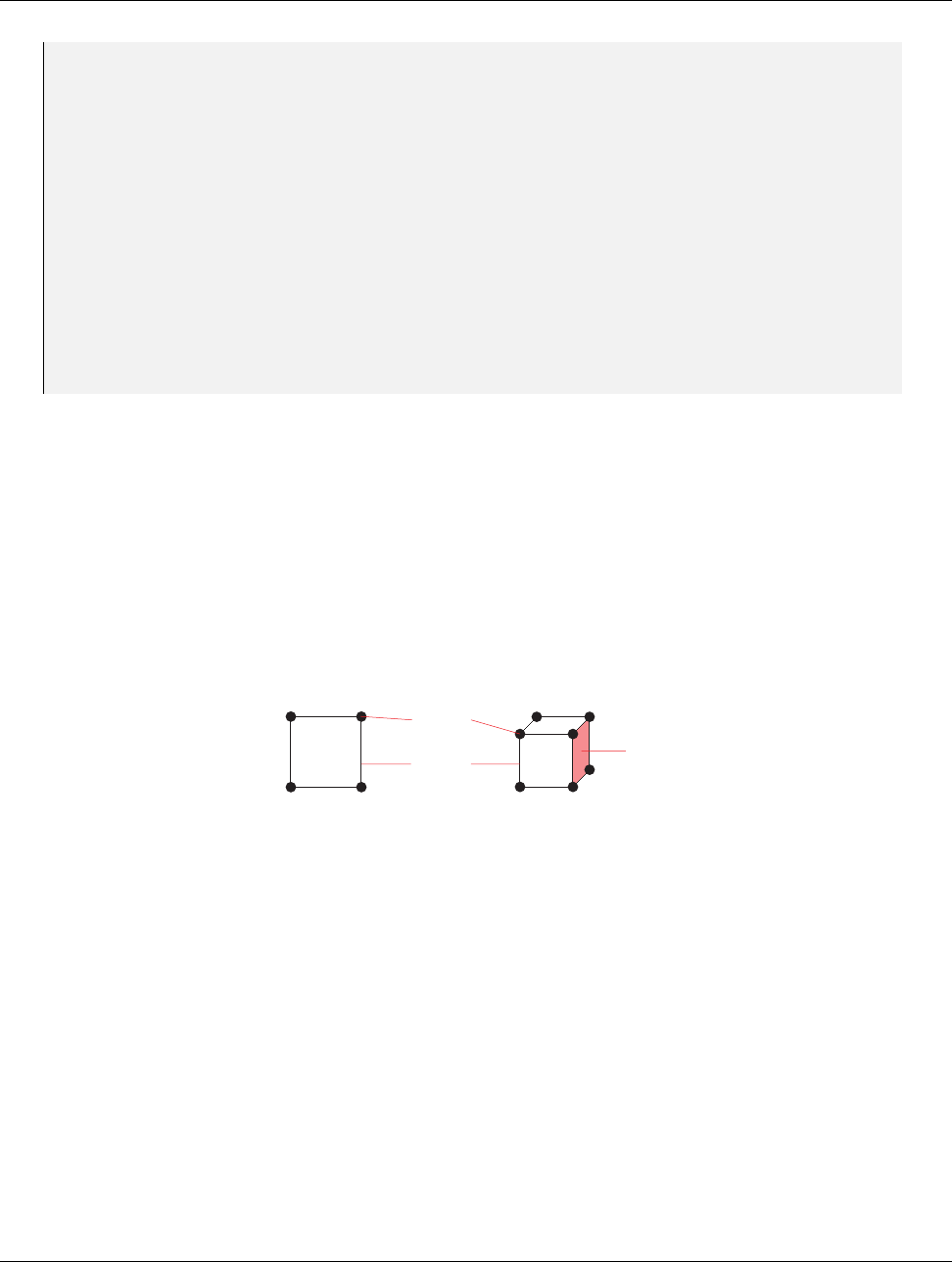
DRAFT
14.5. Edges and Faces
7using ExecutionSignature =void(CellShape ,PointCount ,_2 ,_3 ,_4 );
8using InputDomain =_1 ;
9
10 template <typename CellShapeTag ,
11 typename FieldInVecType ,
12 typename PointCoordVecType ,
13 typename FieldOutType >
14 VTKM_EXEC void operator()(CellShapeTag shape,
15 vtkm:: IdComponent pointCount ,
16 const Fi eld In Vec Typ e & inputField ,
17 const Po int Coo rdV ecT ype & poi ntCoor di na tes ,
18 FieldOutType& outputField) const
19 {
20 vtkm:: Vec <vtkm:: FloatDefault , 3> c enter =
21 vtkm:: exec:: ParametricCoordinatesCenter( p oi nt Coun t , shape , * thi s );
22 ou tp ut Fi eld =
23 vtkm:: exec:: CellDerivative( in pu tFie ld , poi ntC oor din ate s , center , shape , * thi s );
24 }
25 };
14.5 Edges and Faces
As explained earlier in this chapter, a cell is defined by a collection of points and a shape identifier that
describes how the points come together to form the structure of the cell. The cell shapes supported by VTK-m
are documented in Section 14.1. It contains Figure 14.1 on page 194, which shows how the points for each shape
form the structure of the cell.
Most cell shapes can be broken into subelements. 2D and 3D cells have pairs of points that form edges at the
boundaries of the cell. Likewise, 3D cells have loops of edges that form faces that encase the cell. Figure 14.2
demonstrates the relationship of these constituent elements for some example cell shapes.
Points
Edges Face
Figure 14.2: The constituent elements (points, edges, and faces) of cells.
The header file vtkm/exec/CellEdge.h contains a collection of functions to help identify the edges of a cell. The
first such function is vtkm::exec::CellEdgeNumberOfEdges. This function takes the number of points in the
cell, the shape of the cell, and an instance of the calling worklet (for error reporting). It returns the number of
edges the cell has (as a vtkm::IdComponent).
The second function is vtkm::exec::CellEdgeLocalIndex. This function takes, respectively, the number of
points, the local index of the point in the edge (0 or 1), the local index of the edge (0 to the number of edges in
the cell), the shape of the cell, and an instance of the calling worklet. It returns a vtkm::IdComponent containing
the local index (between 0 and the number of points in the cell) of the requested point in the edge. This local
point index is consistent with the point labels in Figure 14.2. To get the point indices relative to the data set,
the edge indices should be used to reference a PointIndices list.
The third function is vtkm::exec::CellEdgeCanonicalId. This function takes the number of points, the local
index of the edge, the shape of the cell, a Vec-like containing the global id of each cell point, and an instance
of the calling worklet. It returns a vtkm::Id2 that is globally unique to that edge. If CellEdgeCanonicalId
is called on an edge for a different cell, the two will be the same if and only if the two cells share that edge.
CellEdgeCanonicalId is useful for finding coincident components of topology.
198 Chapter 14. Working with Cells
DRAFT
14.5. Edges and Faces
The following example demonstrates a pair of worklets that use the cell edge functions. As is typical for operations
of this nature, one worklet counts the number of edges in each cell and another uses this count to generate the
data.
Example 14.5 demonstrates one of many techniques for creating cell sets in a worklet. Chapter 16 describes
this and many more such techniques.
Did you know?
Example 14.5: Using cell edge functions.
1st ru ct E dg es Co un t : vtkm:: worklet:: WorkletMapPointToCell
2{
3using ControlSignature =void(CellSetIn ,FieldOutCell <> numEdgesInCell);
4using ExecutionSignature =_2 (CellShape ,P oi nt Co un t );
5using InputDomain =_1 ;
6
7template <typename CellShapeTag >
8VT KM _EXEC vtkm :: IdComponent operator ()( Ce ll ShapeTa g cellShape ,
9vtkm:: IdComponent nu mP oin tsI nCe ll ) const
10 {
11 re tu rn vtkm:: exec:: CellEdgeNumberOfEdges( nu mPo intsIn Cel l , cell Sh ap e , * th is );
12 }
13 };
14
15 st ru ct EdgesExtract : vtkm:: worklet:: WorkletMapPointToCell
16 {
17 using ControlSignature =void(CellSetIn ,FieldOutCell < > e dg eI nd ic es );
18 using ExecutionSignature =void(CellShape ,PointIndices ,VisitIndex ,_2 );
19 using InputDomain =_1 ;
20
21 using ScatterType =vtkm:: worklet:: ScatterCounting;
22
23 template <typename CellShapeTag ,
24 typename PointIndexVecType ,
25 typename EdgeIndexVecType >
26 VTKM_EXEC void operator()( C el lS ha peTag cellShape ,
27 const Po int Ind exV ecT ype & gl ob alP oi nt Ind ic esFor Ce ll ,
28 vtkm:: IdComponent edgeIndex ,
29 Ed geI nde xVe cTy pe & e dge Indic es ) const
30 {
31 vtkm:: IdComponent nu mP oin ts In Cel l =
32 globalPointIndicesForCell.GetNumberOfComponents();
33
34 vtkm:: IdComponent pointInCellIndex0 = vtkm:: exec:: CellEdgeLocalIndex(
35 numPoin ts InCell , 0 , edgeIndex , cel lShape , * this );
36 vtkm:: IdComponent pointInCellIndex1 = vtkm:: exec:: CellEdgeLocalIndex(
37 numPoin ts InCell , 1 , edgeIndex , cel lShape , * this );
38
39 ed ge Indic es [0] = gl oba lPo intI nd ices Fo rCel l [ poi ntI nCe llI nde x0 ];
40 ed ge Indic es [1] = gl oba lPo intI nd ices Fo rCel l [ poi ntI nCe llI nde x1 ];
41 }
42 };
The header file vtkm/exec/CellFace.h contains a collection of functions to help identify the faces of a cell. The
first such function is vtkm::exec::CellFaceNumberOfFaces. This function takes the shape of the cell and an
instance of the calling worklet (for error reporting). It returns the number of faces the cell has (as a vtkm::-
IdComponent).
Chapter 14. Working with Cells 199

DRAFT
14.5. Edges and Faces
The second function is vtkm::exec::CellFaceNumberOfPoints. This function takes the local index of the face
(0 to the number of faces in the cell), the shape of the cell, and an instance of the calling worklet. It returns the
number of points the specified face has (as a vtkm::IdComponent).
The third function is vtkm::exec::CellFaceLocalIndex. This function takes, respectively, the local index of
the point in the face (0 to the number of points in the face), the local index of the face (0 to the number of
faces in the cell), the shape of the cell, and an instance of the calling worklet. It returns a vtkm::IdComponent
containing the local index (between 0 and the number of points in the cell) of the requested point in the face.
The points are indexed in counterclockwise order when viewing the face from the outside of the cell. This local
point index is consistent with the point labels in Figure 14.2. To get the point indices relative to the data set,
the face indices should be used to reference a PointIndices list.
The fourth function is vtkm::exec::CellFaceCanonicalId. This function takes the local index of the face, the
shape of the cell, a Vec-like containing the global id of each cell point, and an instance of the calling worklet.
It returns a vtkm::Id3 that is globally unique to that face. If CellFaceCanonicalId is called on a face for a
different cell, the two will be the same if and only if the two cells share that face. CellFaceCanonicalId is
useful for finding coincident components of topology.
The following example demonstrates a triple of worklets that use the cell face functions. As is typical for
operations of this nature, the worklets are used in steps to first count entities and then generate new entities.
In this case, the first worklet counts the number of faces and the second worklet counts the points in each face.
The third worklet generates cells for each face.
Example 14.6: Using cell face functions.
1st ru ct F ac es Co un t : vtkm:: worklet:: WorkletMapPointToCell
2{
3using ControlSignature =void(CellSetIn ,FieldOutCell <> numFacesInCell);
4using ExecutionSignature =_2 (C el lS ha pe );
5using InputDomain =_1 ;
6
7template <typename CellShapeTag >
8VT KM _EXEC vtkm :: IdComponent operator ()( C ell Sha peT ag ce llShape ) const
9{
10 re tu rn vtkm:: exec:: CellFaceNumberOfFaces( cel lS ha pe , * t hi s );
11 }
12 };
13
14 st ru ct FacesCountPoints : vtkm :: worklet:: WorkletMapPointToCell
15 {
16 using ControlSignature =void(CellSetIn ,
17 FieldOutCell <> numPointsInFace ,
18 FieldOutCell <> fa ce Sh ap e );
19 using ExecutionSignature =void(CellShape ,VisitIndex ,_2 ,_3 );
20 using InputDomain =_1 ;
21
22 using ScatterType =vtkm:: worklet:: ScatterCounting;
23
24 template <typename CellShapeTag >
25 VTKM_EXEC void operator()( C el lS ha peTag cellShape ,
26 vtkm:: IdComponent faceIndex ,
27 vtkm:: IdComponent& numPointsInFace ,
28 vtkm:: UInt8 & f ac eShape ) const
29 {
30 nu mPoin ts InFac e =
31 vtkm:: exec:: CellFaceNumberOfPoints( fa ceIndex , cell Shape , * this );
32 switch ( num Po int sI nFa ce )
33 {
34 case 3:
35 fa ce Shape = vtkm:: CELL_SHAPE_TRIANGLE;
36 bre ak ;
200 Chapter 14. Working with Cells

DRAFT
14.5. Edges and Faces
37 case 4:
38 fa ce Shape = vtkm:: CELL_SHAPE_QUAD;
39 bre ak ;
40 default:
41 fa ce Shape = vtkm:: CELL_SHAPE_POLYGON;
42 bre ak ;
43 }
44 }
45 };
46
47 st ru ct FacesExtract : vtkm:: worklet:: WorkletMapPointToCell
48 {
49 using ControlSignature =void(CellSetIn ,FieldOutCell < > f ac eI nd ic es );
50 using ExecutionSignature =void(CellShape ,PointIndices ,VisitIndex ,_2 );
51 using InputDomain =_1 ;
52
53 using ScatterType =vtkm:: worklet:: ScatterCounting;
54
55 template <typename CellShapeTag ,
56 typename PointIndexVecType ,
57 typename FaceIndexVecType >
58 VTKM_EXEC void operator()( C el lS ha peTag cellShape ,
59 const Po int Ind exV ecT ype & gl ob alP oi nt Ind ic esFor Ce ll ,
60 vtkm:: IdComponent faceIndex ,
61 Fa ceI nde xVe cTy pe & f ace Indic es ) const
62 {
63 vtkm:: IdComponent nu mPo in tsI nFa ce = faceIn di ce s . Get Num berO fCo mpo nent s ();
64 VTKM_ASSERT( n um Poi nts InF ac e ==
65 vtkm:: exec:: CellFaceNumberOfPoints( fa ceIndex , cell Shape , * this ));
66 for (vtkm:: IdComponent pointInFaceIndex = 0;
67 pointInFaceIndex < numPointsInFace;
68 pointInFaceIndex++)
69 {
70 vtkm:: IdComponent pointInCellIndex = vtkm :: exec:: CellFaceLocalIndex(
71 pointInFa ce In dex , fa ceIndex , c ellShap e , * this );
72 fa ce Indic es [ p oi ntI nFa ceI nd ex ] = glob alP oint In dice sF orCe ll [ p oin tIn Cel lIn dex ];
73 }
74 }
75 };
Chapter 14. Working with Cells 201
DRAFT
DRAFT
CHAPTER
FIFTEEN
LOCATORS
Locators are a special type of structure that allows you to take a point coordinate in space and then find a
topological element that contains or is near that coordinate. VTK-m comes with multiple types of locators,
which are categorized by the type of topological element that they find. For example, a cell locator takes a
coordinate in world space and finds the cell in a vtkm::cont::DataSet that contains that cell. Likewise, a point
locator takes a coordinate in world space and finds a point from a vtkm::cont::CoordinateSystem nearby.
Different locators differ in their interface slightly, but they all follow the same basic operation. First, they are
constructed and provided with one or more elements of a vtkm::cont::DataSet. Then they are built with a
call to an Update method. The locator can then be passed to a worklet as an ExecObject, which will cause the
worklet to get a special execution version of the locator that can do the queries.
Other visualization libraries, like VTK-m’s big sister toolkit VTK, provide similar locator structures that
allow iterative building by adding one element at a time. VTK-m explicitly disallows this use case. Although
iteratively adding elements to a locator is undoubtedly useful, such an operation will inevitably bottleneck
a highly threaded algorithm in critical sections. This makes iterative additions to locators too costly to
support in VTK-m.
Did you know?
15.1 Cell Locators
Cell Locators in VTK-m provide a means of building spatial search structures that can later be used to find
a cell containing a certain point. This could be useful in scenarios where the application demands the cell to
which a point belongs to to achieve a certain functionality. For example, while tracing a particle’s path through
a vector field, after every step we lookup which cell the particle has entered to interpolate the velocity at the
new location to take the next step.
Using cell locators is a two step process. The first step is to build the search structure. This is done by
instantiating one of the subclasses of vtkm::cont::CellLocator, providing a cell set and coordinate system
(usually from a vtkm::cont::DataSet), and then updating the structure. Once the cell locator is built, it can
be used in the execution environment within a filter or worklet.
DRAFT
15.1. Cell Locators
15.1.1 Building a Cell Locator
All Cell Locators in VTK-m inherit from vtkm::cont::CellLocator, which provides the basic interface for the
required features of cell locators. This generic interface provides methods to set the cell set (with SetCellSet
and GetCellSet) and to set the coordinate system (with SetCoordinates and GetCoordinates). Once the cell
set and coordinates are provided, you may call Update to construct the search structures. Although Update is
called from the control environment, the search structure will be built on parallel devices.
VTK-m currently exposes the implementations of the following Cell Locators.
Bounding Interval Hierarchy
The vtkm::cont::BoundingIntervalHierarchy cell locator is based on the bounding interval hierarchy spatial
search structure. The implementation in VTK-m takes two parameters: the number of splitting planes used
to split the cells uniformly along an axis at each level and the maximum leaf size, which determines if a node
needs to be split further. These parameters can be provided as parameters for the constructor or through the
SetNumberOfPlanes and SetMaxLeafSize methods.
[TODO: Compile this example.]
Example 15.1: Building a vtkm::cont::BoundingIntervalHierarchy.
1// C reate a locator that will use 5 splitting places ,
2// and will have a ma ximum of 10 cells per leaf node .
3vtkm:: cont::BoundingIntervalHierarchy locator(5, 10):
4// Provide s the CellSet requir ed f or the locator
5locat or . Se tCell Se t ( cel lS et )
6// Provide s the c oo rd in at e s ystem r eq uired for the locator
7locat or . Set Coo rdi nat es ( coor ds )
8// Build the search str uct ur e ( using a paralle l device )
9locat or . Updat e ();
15.1.2 Using Cell Locators in a Worklet
The vtkm::cont::CellLocator interface implements vtkm::cont::ExecutionObjectBase. This means that
any CellLocator can be used in worklets as an ExecObject argument (as defined in the ControlSignature). See
Section 12.9 for information on ExecObject arguments to worklets.
When a vtkm::cont::CellLocator class is passed as an ExecObject argument to a worklet Invoke, the worklet
receives a pointer to a vtkm::exec::CellLocator object. vtkm::exec::CellLocator provides a FindCell
method that identifies a containing cell given a point location in space.
Note that vtkm::cont::CellLocator and vtkm::exec::CellLocator are different objects with different
interfaces despite the similar names.
Common Errors
The CellLocator::FindCell() method takes 4 arguments. The first argument is an input query point. The
second argument is used to return the id of the cell containing this point (or -1 if the point is not found in any
cell). The third argument is used to return the parametric coordinates for the point within the cell (assuming it is
found in any cell). The fourth argument is a reference to the calling worklet (used for error reporting purposes).
204 Chapter 15. Locators

DRAFT
15.1. Cell Locators
The following example defines a simple worklet to get the containing cell id and parametric coordinates of a
collection of world coordinates.
[TODO: Compile this example.]
Example 15.2: Using a CellLocator in a worklet.
1st ru ct QueryCellIds : p ub li c vtkm:: worklet:: WorkletMapField
2{
3using ControlSignature =void (FieldIn <>,
4Exe cOb ject ,
5FieldOut <>,
6FieldOut < >);
7using ExecutionSignature =void (_1 ,_2 ,_3 ,_4 );
8
9template <typename Point , typename B oun di ngI nt erv al Hie ra rch yE xec Ob jec t >
10 VT KM _EXEC vtkm :: IdComponent operator ()(
11 const Poi nt & point ,
12 BoundingIntervalHierarchyExecObject locator,
13 vtkm:: Id & cellId ,
14 vtkm:: Vec <vtkm:: FloatDefault , 3 >& pa ra met ri c ) const
15 {
16 loc at or - > Fi nd Ce ll ( point , c el lId , pa ram et ric , * t hi s );
17 }
18 }; // s tr uc t QueryCellIds
19
20 void QueryPointsInDataset(
21 vtkm:: cont:: DataSet& dataSet ,
22 vtkm:: cont:: ArrayHandle <vtkm:: Vec <vtkm:: FloatDefault , 3 > >& q u er yP oi nt s ;
23 vtkm:: IdComponent numPlanes ,
24 vtkm:: IdComponent maxLeadNodes)
25 {
26 using De vi ceAda pt er = VTKM_DEFAULT_DEVICE_ADAPTER_TAG;
27 using Al go ri th ms = vtkm:: cont:: A lgorithm ;
28 using Tim er = vtkm:: cont::Timer <DeviceAdapter >;
29
30 // Ext ract the data neede d to bu ild the loc ator from the DataSet
31 vtkm:: cont:: DynamicCellSet c ellSet = da taSet . GetCellSet ();
32 vtkm:: cont:: A rra yHa ndl eVi rt u al Coo rdi nat es ve rt ices =
33 dataS et . GetC oo rdi na teS ys tem (). GetDa ta ();
34
35 // Construct the search structure by prov id in g the required data ,
36 // and then exec ut in g the B uil d m ethod on the lo cator obje ct .
37 vtkm:: cont::BoundingIntervalHierarchy locator =
38 vtkm:: cont:: Bou ndin gI nte rv alHi er arc hy ( n um Pl an es , ma xLe afN ode s );
39 locat or . Se tCell Se t ( cel lS et );
40 locat or . Se tCo ordina tes ( d ataSet . G etC oord ina teSy ste m ());
41 locat or . Updat e ();
42
43 // Define the arrays f or storing the outp ut of quer ies
44 vtkm:: cont:: ArrayHandle <vtkm:: Id > cellIds;
45 vtkm:: cont:: ArrayHandle <vtkm:: Vec <vtkm:: Fla ot Default , 3 >> p arametr ic ;
46
47 // Inv oke the worklet by pr ov id in g the locator as an E xecObject
48 vtkm:: worklet:: DispatcherMapField < Quer yC el lIds >( ). Invok e ( qu er yP oi nt s ,
49 locator ,
50 cellIds ,
51 pa ra me tr ic );
52 // Continu e to Proce ss
53 }
Chapter 15. Locators 205

DRAFT
15.2. Point Locators
15.2 Point Locators
Point Locators in VTK-m provide a means of building spatial search structures that can later be used to find the
nearest neighbor a certain point. This could be useful in scenarios where the closest pairs of points are needed.
For example, during halo finding of particles in cosmology simulations, pairs of nearest neighbors within certain
linking length are used to form clusters of particles.
Using cell locators is a two step process. The first step is to build the search structure. This is done by
instantiating one of the subclasses of vtkm::cont::PointLocator, providing a coordinate system (usually from
avtkm::cont::DataSet) representing the location of points that can later be found through queries, and then
updating the structure. Once the cell locator is built, it can be used in the execution environment within a filter
or worklet.
15.2.1 Building Point Locators
All point Locators in VTK-m inherit from vtkm::cont::PointLocator, which provides the basic interface for
the required features of point locators. This generic interface provides methods to set the coordinate system
(with SetCoordinates and GetCoordinates) of training points. Once the coordinates are provided, you may call
Update to construct the search structures. Although Update is called from the control environment, the search
structure will be built on parallel devices
VTK-m currently exposes the implementations of the following Point Locators.
Uniform Grid Point Locator
The vtkm::cont::PointLocatorUniformGrid point locator is based on the uniform grid search structure. It
divides the search space into a uniform grid of bins. A search for a point near a given coordinate starts in
the bin containing the search coordinates. If a candidate point is not found in that bin, points are searched
in an expanding neighborhood of grid bins. The constructor of vtkm::cont::PointLocatorUniformGrid takes
three parameters: the minimum position of the bounding box of the search space, the maximum position of the
bounding box, and the number of grid cells to divide the search space.
[TODO: Compile this example.]
Example 15.3: Building a vtkm::cont::PointLocatorUniformGrid.
1// C reate a Poi ntL oc ato rUn if orm Gri d with boundin g box of 0 , 0, 0 to
2// 10 , 10 , 10 and divide the space into a 5 by 5 by 5 3D grid .
3vtkm:: cont::PointLocatorUniformGrid locator(
4{ 0.0 f , 0.0 f , 0.0 f } , { 1 0.0 f , 1 0. 0 f , 1 0.0 f } , { 5 , 5 , 5 });
5// Set the p osition t ra ining p oints
6lo ca tor . S etC oor ds ( co or d );
7// Build the sear ch s tr uc tu re
8lo ca tor . B ui ld ();
15.2.2 Using Point Locators in a Worklet
The vtkm::cont::PointLocator interface implements vtkm::cont::ExecutionObjectBase. This means that
any PointLocator can be used in worklets as an ExecObject argument (as defined in the ControlSignature).
See Section 12.9 for information on ExecObject arguments to worklets.
When a vtkm::cont::PointLocator class is passed as an ExecObject argument to a worklet Invoke, the
worklet receives a pointer to a vtkm::exec::PointLocator object. vtkm::exec::PointLocator provides a
206 Chapter 15. Locators
DRAFT
15.2. Point Locators
FindNearestNeighbor method that identifies the nearest neighbor point given a coordinate in space.
Note that vtkm::cont::PointLocator and vtkm::exec::PointLocator are different objects with different
interfaces despite the similar names.
Common Errors
The vtkm::exec::CellLocator::FindNearestNeighbor() method takes 3 arguments. The first argument is
an input query point. The second argument is used to return the id of the nearest neighbor point (or -1 if the
point is not found, for example, in the case of an empty set of data set points). The third argument is used to
return the squared distance for the query point to its nearest neighbor.
[TODO: Compile this example.]
Example 15.4: Using a PointLocator in a worklet.
1class PointLocatorUniformGridWorklet : pu bl ic vtkm:: worklet:: WorkletMapField
2{
3pu bl ic :
4using ControlSignature =void (FieldIn <> qcIn ,
5Ex ec Ob je ct locator ,
6FieldOut <> nnIdOut ,
7FieldOut <> nn Di st Ou t );
8
9using ExecutionSignature =void (_1 ,_2 ,_3 ,_4 );
10
11 VTKM_CONT
12 PointLocatorUniformGridWorklet() {}
13
14 template <typename CoordiVecType ,
15 typename Locator ,
16 typename IndexType ,
17 typename Coo rdi Type >
18 VTKM_EXEC void operator()( const C oo rd iVe cT ype & qc ,
19 const Locat or & locator ,
20 In de xType & nnIdOut ,
21 Co ord iTy pe & nnDis ) const
22 {
23 locator - > Find Ne are stN eig hbo r (qc , nnIdOut , nnDis );
24 }
25 };
26 /// // rand om ly g en erate testi ng poin ts /////
27 std :: vect or < vtkm:: Vec <vtkm:: Float32 , 3 >> qc Ve c ;
28 for (vtkm:: In t32 i = 0; i < n Testi ng Po int ; i ++)
29 {
30 qcV ec . pu sh_ bac k ( vtkm:: make_Vec( dr ( d re ) , dr ( dr e ), dr ( dr e ) )) ;
31 }
32 auto qc_Ha nd le = vtkm:: cont:: make_ArrayHandle( qcV ec );
33
34 vtkm:: cont:: ArrayHandle <vtkm:: Id > nnId_Handle;
35 vtkm:: cont:: ArrayHandle <vtkm:: Float32 > nnDis_Handle;
36
37 PointLocatorUniformGridWorklet pointLocatorUniformGridWorklet;
38 vtkm:: worklet:: DispatcherMapField < P oi ntL oc ato rUn ifo rm Gri dWo rk let , Devi ceAda pter >
39 lo cat orD isp atc her ( p oint Lo cato rUn ifor mGr idWo rkl et );
40 lo cato rDi spat che r . Inv ok e ( qc_Han dle , locator , n nI d_ Ha nd le , nn Dis _Ha ndl e );
Chapter 15. Locators 207
DRAFT
DRAFT
CHAPTER
SIXTEEN
GENERATING CELL SETS
This chapter describes techniques for designing algorithms in VTK-m that generate cell sets to be inserted in a
vtkm::cont::DataSet. Although Chapter 11 on data sets describes how to create a data set, including defining
its set of cells, these are serial functions run in the control environment that are not designed for computing
geometric structures. Rather, they are designed for specifying data sets built from existing data arrays, from
inherently slow processes (such as file I/O), or for small test data. In this chapter we discuss how to write worklets
that create new mesh topologies by writing data that can be incorporated into a vtkm::cont::CellSet.
This chapter is constructed as a set of patterns that are commonly employed to build cell sets. These techniques
apply the worklet structures documented in Chapter 12. Although it is possible for these worklets to generate
data of its own, the algorithms described here follow the more common use case of deriving one topology
from another input data set. This chapter is not (and cannot be) completely comprehensive by covering every
possible mechanism for building cell sets. Instead, we provide the basic and common patterns used in scientific
visualization.
16.1 Single Cell Type
For our first example of algorithms that generate cell sets is one that creates a set of cells in which all the cells
are of the same shape and have the same number of points. Our motivating example is an algorithm that will
extract all the edges from a cell set. The resulting cell set will comprise a collection of line cells that represent
the edges from the original cell set. Since all cell edges can be represented as lines with two endpoints, we know
all the output cells will be of the same type. As we will see later in the example, we can use a vtkm::cont::-
CellSetSingleType to represent the data.
It is rare that an algorithm generating a cell set will generate exactly one output cell for each input cell. Thus,
the first step in an algorithm generating a cell set is to count the number of cells each input item will create. In
our motivating example, this is the the number of edges for each input cell.
Example 16.1: A simple worklet to count the number of edges on each cell.
1st ru ct C ou nt Ed ge s : vtkm:: worklet:: WorkletMapPointToCell
2{
3using ControlSignature =void(CellSetIn cellSet , FieldOut < > n um Edges );
4using ExecutionSignature =_2 (CellShape ,P oi nt Co un t );
5using InputDomain =_1 ;
6
7template <typename CellShapeTag >
8VTKM_EXEC_CONT vtkm:: IdComponent operator()(
9Ce ll Sh apeTa g cel lShape ,
10 vtkm:: IdComponent nu mP oin tsI nCe ll ) const
11 {
DRAFT
16.1. Single Cell Type
12 re tu rn vtkm:: exec:: CellEdgeNumberOfEdges( nu mPo intsIn Cel l , cell Sh ap e , * th is );
13 }
14 };
This count array generated in Example 16.1 can be used in a vtkm::worklet::ScatterCounting of a subsequent
worklet that generates the output cells. (See Section 12.10 for information on using a scatter with a worklet.)
We will see this momentarily.
If you happen to have an operation that you know will have the same count for every input cell, then you
can skip the count step and use a vtkm::worklet::ScatterUniform instead of ScatterCount. Doing so
will simplify the code and skip some computation. We cannot use ScatterUniform in this example because
different cell shapes have different numbers of edges and therefore different counts. However, if we were
theoretically to make an optimization for 3D structured grids, we know that each cell is a hexahedron with
12 edges and could use a ScatterUniform<12> for that.
Did you know?
The second and final worklet we need to generate our wireframe cells is one that outputs the indices of an
edge. The worklet parenthesis’s operator takes information about the input cell (shape and point indices) and
an index of which edge to output. The aforementioned ScatterCounting provides a VisitIndex that signals
which edge to output. The worklet parenthesis operator returns the two indices for the line in, naturally enough,
avtkm::Vec <vtkm::Id,2>.
Example 16.2: A worklet to generate indices for line cells.
1class Ed ge In di ce s : p ub li c vtkm:: worklet:: WorkletMapPointToCell
2{
3pu bl ic :
4using ControlSignature =void(CellSetIn cellSet , FieldOut < > conn ec ti vit yO ut );
5using ExecutionSignature =void(CellShape ,PointIndices ,_2 ,V is it In de x );
6using InputDomain =_1 ;
7
8using ScatterType =vtkm:: worklet:: ScatterCounting;
9
10 template <typename CellShapeTag , typename PointIndexVecType >
11 VTKM_EXEC void operator()( C el lS ha peTag cellShape ,
12 const Po int Ind exV ecT ype & gl ob alP oi nt Ind ic esFor Ce ll ,
13 vtkm:: Vec <vtkm:: Id , 2 >& c on nec tiv ity Ou t ,
14 vtkm:: IdComponent edgeIndex ) const
15 {
16 vtkm:: IdComponent nu mP oin ts In Cel l =
17 globalPointIndicesForCell.GetNumberOfComponents();
18
19 vtkm:: IdComponent pointInCellIndex0 = vtkm:: exec:: CellEdgeLocalIndex(
20 numPoin ts InCell , 0 , edgeIndex , cel lShape , * this );
21 vtkm:: IdComponent pointInCellIndex1 = vtkm:: exec:: CellEdgeLocalIndex(
22 numPoin ts InCell , 1 , edgeIndex , cel lShape , * this );
23
24 co nne cti vi tyO ut [0] = gl oba lPoi ntI ndi cesF or Cell [ p oin tI nCe llI nde x0 ];
25 co nne cti vi tyO ut [1] = gl oba lPoi ntI ndi cesF or Cell [ p oin tI nCe llI nde x1 ];
26 }
27 };
Our ultimate goal is to fill a vtkm::cont::CellSetSingleType object with the generated line cells. A CellSetS-
ingleType requires 4 items: the number of points, the constant cell shape, the constant number of points in
each cell, and an array of connection indices. The first 3 items are trivial. The number of points can be taken
from the input cell set as they are the same. The cell shape and number of points are predetermined to be line
210 Chapter 16. Generating Cell Sets

DRAFT
16.1. Single Cell Type
and 2, respectively. The last item, the array of connection indices, is what we are creating with the worklet in
Example 16.2.
However, there is a complication. The connectivity array for CellSetSingleType is expected to be a flat
array of vtkm::Id indices, not an array of Vec objects. We could jump through some hoops adjusting the
ScatterCounting to allow the worklet to output only one index of one cell rather than all indices of one cell.
But that would be overly complicated and inefficient.
A simpler approach is to use the vtkm::cont::ArrayHandleGroupVec fancy array handle (described in Sec-
tion 7.4.11) to make a flat array of indices look like an array of Vec objects. The following example shows a Run
method in a worklet helper class. Note the use of make ArrayHandleGroupVec when calling the Invoke method
to make this conversion.
Example 16.3: Invoking worklets to extract edges from a cell set.
1template <typename CellSetType >
2VT KM _CONT vtkm :: cont:: CellSetSingleType < > R un ( const Ce llS etT yp e & i nCe llSet )
3{
4VTKM_IS_DYNAMIC_OR_STATIC_CELL_SET(CellSetType);
5
6vtkm:: cont:: ArrayHandle <vtkm:: IdComponent > edg eCo unts ;
7vtkm:: worklet:: DispatcherMapTopology <CountEdges > countEdgeDispatcher;
8co un tEd ge Dis pa tche r . Inv oke ( in Ce ll Se t , e dge Cou nts );
9
10 vtkm:: worklet:: ScatterCounting scat ter ( e dg eCo unt s );
11 this->OutputToInputCellMap =
12 scatt er . G et Out put ToI npu tMa p ( inCellSet . Ge tNu mbe rOf Ce lls ());
13
14 vtkm:: cont:: ArrayHandle <vtkm:: Id > connectivityArray;
15 vtkm:: worklet:: DispatcherMapTopology < E dg eI nd ic es > e dge In dic esDi spat che r ( sc at ter );
16 ed ge Ind ices Dis pa tch er . Invo ke (
17 inCellSet , vtkm :: cont:: make_ArrayHandleGroupVec <2 >( c on nec ti vit yArr ay ));
18
19 vtkm:: cont:: CellSetSingleType < > ou tCe llSet ( i nCellSet . Get Name ());
20 ou tCe llS et . Fill (
21 in Ce llS et . G e tN umb er Of Po in ts () , vtkm:: CELL_SHAPE_LINE , 2 , c onn ec tiv it yAr ra y );
22
23 re tu rn o ut Cel lS et ;
24 }
Another feature to note in Example 16.3 is that the method calls GetOutputToInputMap on the Scatter object
it creates and squirrels it away for later use. The reason for this behavior is to implement mapping fields that
are attached to the input cells to the indices of the output. In practice, this worklet is going to be called on
DataSet objects to create new DataSet objects. The method in Example 16.3 creates a new CellSet, but we
also need a method to transform the Fields on the data set. The saved OutputToInputCellMap array allows us
to transform input fields to output fields.
The following example shows another convenience method that takes this saved OutputToInputCellMap array
and converts an array from an input cell field to an output cell field array. Note that we can do this by using
the OutputToInputCellMap as an index array in a vtkm::cont::ArrayHandlePermutation.
Example 16.4: Converting cell fields using a simple permutation.
1template <typename ValueType , typename Storage >
2VT KM _CONT vtkm :: cont:: ArrayHandle <ValueType > ProcessCellField(
3const vtkm:: cont:: ArrayHandle <ValueType , Storage >& inCellFiel d ) const
4{
5vtkm:: cont:: ArrayHandle < V al ueType > ou tCe llF ield ;
6vtkm:: cont:: ArrayCopy(vtkm :: cont:: make_ArrayHandlePermutation(
7this - > Out put To In pu tCe ll Map , inCellF ie ld ),
8outCellField);
9re tu rn outCellField;
Chapter 16. Generating Cell Sets 211
DRAFT
16.2. Combining Like Elements
10 }
16.2 Combining Like Elements
Our motivating example in Section 16.1 created a cell set with a line element representing each edge in some
input data set. However, on close inspection there is a problem with our algorithm: it is generating a lot of
duplicate elements. The cells in a typical mesh are connected to each other. As such, they share edges with
each other. That is, the edge of one cell is likely to also be part of one or more other cells. When multiple cells
contain the same edge, the algorithm we created in Section 16.1 will create multiple overlapping lines, one for
each cell using the edge, as demonstrated in Figure 16.1. What we really want is to have one line for every edge
in the mesh rather than many overlapping lines.
Figure 16.1: Duplicate lines from extracted edges. Consider the small mesh at the left comprising a square and
a triangle. If we count the edges in this mesh, we would expect to get 6. However, our na¨ıve implementation in
Section 16.1 generates 7 because the shared edge (highlighted in red in the wireframe in the middle) is duplicated.
As seen in the exploded view at right, one line is created for the square and one for the triangle.
In this section we will re-implement the algorithm to generate a wireframe by creating a line for each edge,
but this time we will merge duplicate edges together. Our first step is the same as before. We need to count
the number of edges in each input cell and use those counts to create a vtkm::worklet::ScatterCounting for
subsequent worklets. Counting the edges is a simple worklet.
Example 16.5: A simple worklet to count the number of edges on each cell.
1st ru ct C ou nt Ed ge s : vtkm:: worklet:: WorkletMapPointToCell
2{
3using ControlSignature =void(CellSetIn cellSet , FieldOut < > n um Edges );
4using ExecutionSignature =_2 (CellShape ,P oi nt Co un t );
5using InputDomain =_1 ;
6
7template <typename CellShapeTag >
8VTKM_EXEC_CONT vtkm:: IdComponent operator()(
9Ce ll Sh apeTa g cel lShape ,
10 vtkm:: IdComponent nu mP oin tsI nCe ll ) const
11 {
12 re tu rn vtkm:: exec:: CellEdgeNumberOfEdges( nu mPo intsIn Cel l , cell Sh ap e , * th is );
13 }
14 };
In our previous version, we used the count to directly write out the lines. However, before we do that, we want
to identify all the unique edges and identify which cells share this edge. This grouping is exactly the function
that the reduce by key worklet type (described in Section 12.5.4 is designed to accomplish. The principal idea is
to write a “key” that uniquely identifies the edge. The reduce by key worklet can then group the edges by the
key and allow you to combine the data for the edge.
Thus, our goal of finding duplicate edges hinges on producing a key where two keys are identical if and only if
the edges are the same. One straightforward key is to use the coordinates in 3D space by, say, computing the
midpoint of the edge. The main problem with using point coordinates approach is that a computer can hold a
212 Chapter 16. Generating Cell Sets

DRAFT
16.2. Combining Like Elements
point coordinate only with floating point numbers of limited precision. Computer floating point computations
are notorious for providing slightly different answers when the results should be the same. For example, if an
edge as endpoints at p1and p2and two different cells compute the midpoint as (p1+p2)/2 and (p2+p1)/2,
respectively, the answer is likely to be slightly different. When this happens, the keys will not be the same and
we will still produce 2 edges in the output.
Fortunately, there is a better choice for keys based on the observation that in the original cell set each edge
is specified by endpoints that each have unique indices. We can combine these 2 point indices to form a
“canonical” descriptor of an edge (correcting for order).1VTK-m comes with a helper function, vtkm::exec::-
CellEdgeCanonicalId, defined in vtkm/exec/CellEdge.h to produce these unique edge keys as vtkm::Id2 s. Our
second worklet produces these canonical edge identifiers.
Example 16.6: Worklet generating canonical edge identifiers.
1class EdgeIds : pu bl ic vtkm:: worklet:: WorkletMapPointToCell
2{
3pu bl ic :
4using ControlSignature =void(CellSetIn cellSet , FieldOut <> canonicalIds);
5using ExecutionSignature =void(Ce ll Sh ap e cellShape ,
6PointIndices gl ob alPointIndices ,
7Vi si tI nd ex localEdgeIndex ,
8_2 canonicalIdOut);
9using InputDomain =_1 ;
10
11 using ScatterType =vtkm:: worklet:: ScatterCounting;
12
13 template <typename CellShapeTag , typename PointIndexVecType >
14 VTKM_EXEC void operator()( C el lS ha peTag cellShape ,
15 const Po int Ind exV ecT ype & gl ob alP oi nt Ind ic esFor Ce ll ,
16 vtkm:: IdComponent localEdgeIndex ,
17 vtkm:: Id2 & canonicalIdOut) const
18 {
19 vtkm:: IdComponent nu mP oin ts In Cel l =
20 globalPointIndicesForCell.GetNumberOfComponents();
21
22 canonicalIdOut = vtkm:: exec:: CellEdgeCanonicalId(numPointsInCell ,
23 localEdgeIndex ,
24 cellShape ,
25 globalPointIndicesForCell ,
26 * this );
27 }
28 };
Our third and final worklet generates the line cells by outputting the indices of each edge. As hinted at earlier,
this worklet is a reduce by key worklet (inheriting from vtkm::worklet::WorkletReduceByKey). The reduce
by key dispatcher will collect the unique keys and call the worklet once for each unique edge. Because there is
no longer a consistent mapping from the generated lines to the elements of the input cell set, we need pairs of
indices identifying the cells/edges from which the edge information comes. We use these indices along with a
connectivity structure produced by a WholeCellSetIn to find the information about the edge. As shown later,
these indices of cells and edges can be extracted from the ScatterCounting used to executed the worklet back
in Example 16.6.
As we did in Section 16.1, this worklet writes out the edge information in a vtkm::Vec <vtkm::Id,2> (which in
some following code will be created with an ArrayHandleGroupVec).
Example 16.7: A worklet to generate indices for line cells from combined edges.
1class Ed ge In di ce s : p ub li c vtkm:: worklet:: WorkletReduceByKey
1Using indices to find common mesh elements is described by Miller et al. in “Finely-Threaded History-Based Topology Compu-
tation” (in Eurographics Symposium on Parallel Graphics and Visualization, June 2014).
Chapter 16. Generating Cell Sets 213
DRAFT
16.2. Combining Like Elements
2{
3pu bl ic :
4using ControlSignature =void(KeysIn keys ,
5WholeCellSetIn <> inputCells ,
6ValuesIn <> originCells ,
7ValuesIn <> originEdges ,
8ReducedValuesOut <> con ne cti vi ty Out );
9using ExecutionSignature =void(_2 inputCells ,
10 _3 originCell ,
11 _4 originEdge ,
12 _5 co nn ect iv it yOu t );
13 using InputDomain =_1 ;
14
15 template <typename CellSetType ,
16 typename OriginCellsType ,
17 typename OriginEdgesType >
18 VTKM_EXEC void operator()( const Cel lS et Typ e & cellSet ,
19 const Or igi nC ell sTy pe & originCe lls ,
20 const Or igi nE dge sTy pe & originEd ges ,
21 vtkm:: Id2 & c onn ec tiv ity Out ) const
22 {
23 // Regardless of how many ce lls / edges are in our lo cal input , we know they are
24 // all the same , so just pick the fi rst one .
25 vtkm:: IdComponent nu mP oin tsI nC ell = ce ll Set . GetN um ber OfI ndi ces ( o ri gi nC ells [ 0]) ;
26 vtkm:: IdComponent edgeIndex = o ri gi nEdges [0];
27 auto cellS hape = c ellSet . Ge tCe ll Sha pe ( o riginCe ll s [0]);
28
29 vtkm:: IdComponent pointInCellIndex0 = vtkm:: exec:: CellEdgeLocalIndex(
30 numPoin ts InCell , 0 , edgeIndex , cel lShape , * this );
31 vtkm:: IdComponent pointInCellIndex1 = vtkm:: exec:: CellEdgeLocalIndex(
32 numPoin ts InCell , 1 , edgeIndex , cel lShape , * this );
33
34 auto gl obal Po intI ndi cesF orC ell = c el lS et . G etInd ic es ( o ri ginCe ll s [0]);
35 co nne cti vi tyO ut [0] = gl oba lPoi ntI ndi cesF or Cell [ p oin tI nCe llI nde x0 ];
36 co nne cti vi tyO ut [1] = gl oba lPoi ntI ndi cesF or Cell [ p oin tI nCe llI nde x1 ];
37 }
38 };
It so happens that the vtkm::Id2 s generated by CellEdgeCanonicalId contain the point indices of the
two endpoints, which is enough information to create the edge. Thus, in this example it would be possible
to forgo the steps of looking up indices through the cell set. That said, this is more often not the case, so
for the purposes of this example we show how to construct cells without depending on the structure of the
keys.
Did you know?
With these 3 worklets, it is now possible to generate all the information we need to fill a vtkm::cont::-
CellSetSingleType object. A CellSetSingleType requires 4 items: the number of points, the constant cell
shape, the constant number of points in each cell, and an array of connection indices. The first 3 items are
trivial. The number of points can be taken from the input cell set as they are the same. The cell shape and
number of points are predetermined to be line and 2, respectively.
The last item, the array of connection indices, is what we are creating with the worklet in Example 16.7. The
connectivity array for CellSetSingleType is expected to be a flat array of vtkm::Id indices, but the worklet
needs to provide groups of indices for each cell (in this case as a Vec object). To reconcile what the worklet
provides and what the connectivity array must look like, we use the vtkm::cont::ArrayHandleGroupVec fancy
array handle (described in Section 7.4.11) to make a flat array of indices look like an array of Vec objects. The
214 Chapter 16. Generating Cell Sets

DRAFT
16.2. Combining Like Elements
following example shows a Run method in a worklet helper class. Note the use of make ArrayHandleGroupVec
when calling the Invoke method to make this conversion.
Example 16.8: Invoking worklets to extract unique edges from a cell set.
1template <typename CellSetType >
2VT KM _CONT vtkm :: cont:: CellSetSingleType < > R un ( const Ce llS etT yp e & i nCe llSet )
3{
4VTKM_IS_DYNAMIC_OR_STATIC_CELL_SET(CellSetType);
5
6// First , cou nt the edges in each cell .
7vtkm:: cont:: ArrayHandle <vtkm:: IdComponent > edg eCo unts ;
8vtkm:: worklet:: DispatcherMapTopology <CountEdges > countEdgeDispatcher;
9co un tEd ge Dis pa tche r . Inv oke ( in Ce ll Se t , e dge Cou nts );
10
11 vtkm:: worklet:: ScatterCounting scat ter ( e dg eCo unt s );
12 this->OutputToInputCellMap =
13 scatt er . G et Out put ToI npu tMa p ( inCellSet . Ge tNu mbe rOf Ce lls ());
14 vtkm:: worklet:: ScatterCounting:: Vis it Ar rayTy pe ou tpu tT oIn put Ed geM ap =
15 scatt er . Ge tV isi tAr ra y ( inCellSet . G etN umb erO fCe lls ());
16
17 // Second , for each edge , extr act a canonical id .
18 vtkm:: cont:: ArrayHandle <vtkm:: Id2 > canonicalIds;
19
20 vtkm:: worklet:: DispatcherMapTopology < E dge Id s > e dg eId sD is pat ch er ( s cat te r );
21 ed geId sDi spat che r . Inv ok e ( inCell Set , ca non ica lId s );
22
23 // Third , use a Keys object to c ombin e all like edge ids .
24 this->CellToEdgeKeys = vtkm :: worklet:: Keys <vtkm:: Id2 >(canonicalIds);
25
26 // Fourth , use a reduce -by - key to ext ract indice s for ea ch un ique edge .
27 vtkm:: cont:: ArrayHandle <vtkm:: Id > connectivityArray;
28 vtkm:: worklet:: DispatcherReduceByKey < E dg eI nd ic es > e dge In dic esDi spat che r ;
29 ed ge Ind ices Dis pa tch er . Invo ke (
30 this->CellToEdgeKeys ,
31 inCellSet ,
32 this - > Out put To In pu tCe ll Map ,
33 ou tp ut To In pu tE dg eM ap ,
34 vtkm:: cont:: make_ArrayHandleGroupVec <2 >( co nnec tiv ityA rra y ));
35
36 // Fifth , use the created conn ec ti vi ty ar ray to build a cell set .
37 vtkm:: cont:: CellSetSingleType < > ou tCe llSet ( i nCellSet . Get Name ());
38 ou tCe llS et . Fill (
39 in Ce llS et . G e tN umb er Of Po in ts () , vtkm:: CELL_SHAPE_LINE , 2 , c onn ec tiv it yAr ra y );
40
41 re tu rn o ut Cel lS et ;
42 }
Another feature to note in Example 16.8 is that the method calls GetOutputToInputMap on the Scatter object
it creates and squirrels it away for later use. It also saves the vtkm::worklet::Keys object created for later user.
The reason for this behavior is to implement mapping fields that are attached to the input cells to the indices of
the output. In practice, these worklet are going to be called on DataSet objects to create new DataSet objects.
The method in Example 16.8 creates a new CellSet, but we also need a method to transform the Fields on the
data set. The saved OutputToInputCellMap array and Keys object allow us to transform input fields to output
fields.
The following example shows another convenience method that takes these saved objects and converts an array
from an input cell field to an output cell field array. Because in general there are several cells that contribute to
each edge/line in the output, we need a method to combine all these cell values to one. The most appropriate
combination is likely an average of all the values. Because this is a common operation, VTK-m provides the
vtkm::worklet::AverageByKey to help perform exactly this operation. AverageByKey provides a Run method
that takes a Keys object, an array of in values, and a device adapter tag and produces and array of values
Chapter 16. Generating Cell Sets 215
DRAFT
16.3. Faster Combining Like Elements with Hashes
averaged by key.
Example 16.9: Converting cell fields that average collected values.
1template <typename ValueType , typename Storage >
2VT KM _CONT vtkm :: cont:: ArrayHandle <ValueType > ProcessCellField(
3const vtkm:: cont:: ArrayHandle <ValueType , Storage >& inCellFiel d ) const
4{
5re tu rn vtkm:: worklet:: AverageByKey:: Ru n (
6this->CellToEdgeKeys ,
7vtkm:: cont:: make_ArrayHandlePermutation( this - > O ut pu tT oI npu tC el lM ap ,
8in Ce ll Fi eld ));
9}
16.3 Faster Combining Like Elements with Hashes
In the previous two sections we constructed worklets that took a cell set and created a new set of cells that
represented the edges of the original cell set, which can provide a wireframe of the mesh. In Section 16.1 we
provided a pair of worklets that generate one line per edge per cell. In Section 16.2 we improved on this behavior
by using a reduce by key worklet to find and merge shared edges.
If we were to time all the operations run in the later implementation to generate the wireframe (i.e. the operations
in Example 16.8), we would find that the vast majority of the time is not spent in the actual worklets. Rather,
the majority of the time is spent in collecting the like keys, which happens in the constructor of the vtkm::-
worklet::Keys object. Internally, keys are collected by sorting them. The most fruitful way to improve the
performance of this algorithm is to improve the sorting behavior.
The details of how the sort works is dependent on the inner workings of the device adapter. It turns out that
the performance of the sort of the keys is highly dependent on the data type of the keys. For example, sorting
numbers stored in a 32-bit integer is often much faster than sorting groups of 2 or 3 64-bit integer. This is
particularly true when the sort is capable of performing a radix-based sort.
An easy way to convert collections of indices like those returned from vtkm::exec::CellEdgeCanonicalId to
a 32-bit integer is to use a hash function. To facilitate the creation of hash values, VTK-m comes with a simple
vtkm::Hash function (in the vtkm/Hash.h header file). Hash takes a Vec or Vec-like object of integers and returns
a value of type vtkm::HashType (an alias for a 32-bit integer). This hash function uses the FNV-1a algorithm
that is designed to create hash values that are quasi-random but deterministic. This means that hash values of
two different identifiers are unlikely to be the same.
That said, hash collisions can happen and become increasingly likely on larger data sets. Therefore, if we wish
to use hash values, we also have to add conditions that manage when collisions happen. Resolving hash value
collisions adds overhead, but time saved in faster sorting of hash values generally outweighs the overhead added
by resolving collisions.2In this section we will improve on the implementation given in Section 16.2 by using
hash values for keys and resolving for collisions.
As always, our first step is to count the number of edges in each input cell. These counts are used to create a
vtkm::worklet::ScatterCounting for subsequent worklets.
Example 16.10: A simple worklet to count the number of edges on each cell.
1st ru ct C ou nt Ed ge s : vtkm:: worklet:: WorkletMapPointToCell
2{
3using ControlSignature =void(CellSetIn cellSet , FieldOut < > n um Edges );
4using ExecutionSignature =_2 (CellShape ,P oi nt Co un t );
2A comparison of the time required for completely unique keys and hash keys with collisions is studied by Lessley, et al. in
“Techniques for Data-Parallel Searching for Duplicate Elements” (in IEEE Symposium on Large Data Analysis and Visualization,
October 2017).
216 Chapter 16. Generating Cell Sets

DRAFT
16.3. Faster Combining Like Elements with Hashes
5using InputDomain =_1 ;
6
7template <typename CellShapeTag >
8VTKM_EXEC_CONT vtkm:: IdComponent operator()(
9Ce ll Sh apeTa g cel lShape ,
10 vtkm:: IdComponent nu mP oin tsI nCe ll ) const
11 {
12 re tu rn vtkm:: exec:: CellEdgeNumberOfEdges( nu mPo intsIn Cel l , cell Sh ap e , * th is );
13 }
14 };
Our next step is to generate keys that can be used to find like elements. As before, we will use the vtkm::-
exec::CellEdgeCanonicalId function to create a unique representation for each edge. However, rather than
directly use the value from CellEdgeCanonicalId, which is a vtkm::Id2, we will instead use that to generate a
hash value.
Example 16.11: Worklet generating hash values.
1class Ed ge Ha sh es : p ub li c vtkm:: worklet:: WorkletMapPointToCell
2{
3pu bl ic :
4using ControlSignature =void(CellSetIn cellSet , FieldOut < > h as hV alues );
5using ExecutionSignature =_2 (C el lS ha pe cellShape ,
6PointIndices gl ob alPointIndices ,
7Vi si tI nd ex localEdgeIndex);
8using InputDomain =_1 ;
9
10 using ScatterType =vtkm:: worklet:: ScatterCounting;
11
12 template <typename CellShapeTag , typename PointIndexVecType >
13 VT KM _EXEC vtkm :: H as hType operator()(
14 Ce ll Sh apeTa g cel lShape ,
15 const Po int Ind exV ecT ype & gl ob alP oi nt Ind ic esFor Ce ll ,
16 vtkm:: IdComponent localEdgeIndex) const
17 {
18 vtkm:: IdComponent nu mP oin ts In Cel l =
19 globalPointIndicesForCell.GetNumberOfComponents();
20 re tu rn vtkm:: Hash(vtkm:: exec :: CellEdgeCanonicalId(numPointsInCell ,
21 localEdgeIndex ,
22 cellShape ,
23 globalPointIndicesForCell ,
24 * this ));
25 }
26 };
The hash values generated by the worklet in Example 16.11 will be the same for two identical edges. However,
it is no longer guaranteed that two distinct edges will have different keys, and collisions of this nature become
increasingly common for larger cell sets. Thus, our next step is to resolve any such collisions.
The following example provides a worklet that goes through each group of edges associated with the same hash
value (using a reduce by key worklet). It identifies which edges are actually the same as which other edges,
marks a local identifier for each unique edge group, and returns the number of unique edges associated with the
hash value.
Example 16.12: Worklet to resolve hash collisions occurring on edge identifiers.
1class EdgeHashCollisions : pu bl ic vtkm:: worklet:: WorkletReduceByKey
2{
3pu bl ic :
4using ControlSignature =void(KeysIn keys ,
5WholeCellSetIn <> inputCells ,
6ValuesIn <> originCells ,
7ValuesIn <> originEdges ,
Chapter 16. Generating Cell Sets 217

DRAFT
16.3. Faster Combining Like Elements with Hashes
8ValuesOut <> localEdge In di ces ,
9ReducedValuesOut <> nu mE dg es );
10 using ExecutionSignature =_6 (_2 inputCells ,
11 _3 originCells ,
12 _4 originEdges ,
13 _5 localEdgeIndices);
14 using InputDomain =_1 ;
15
16 template <typename CellSetType ,
17 typename OriginCellsType ,
18 typename OriginEdgesType ,
19 typename lo ca lE dg eI nd ic es Ty pe >
20 VT KM _EXEC vtkm :: IdComponent operator ()(
21 const Ce llSetTy pe & cellSet ,
22 const Or igi nC ell sTy pe & originCe lls ,
23 const Or igi nE dge sTy pe & originEd ges ,
24 lo cal Edg eInd ic esT ype & lo cal Edg eIn dic es ) const
25 {
26 vtkm:: IdComponent nu mE dgesI nH as h = loc al Edg eI ndice s . Ge tNu mb erO fC o mp one nt s ();
27
28 // Sanity checks.
29 VTKM_ASSERT( o rigin Ce ll s . Get Numb erO fCo mpon ent s () == nu mE dge sIn Has h );
30 VTKM_ASSERT( o rigin Ed ge s . Get Numb erO fCo mpon ent s () == nu mE dge sIn Has h );
31
32 // Clear out localEdgeIndices
33 for (vtkm:: IdComponent in dex = 0; index < num Ed ge sIn Ha sh ; ++ index )
34 {
35 localEdgeIndices[index] = -1;
36 }
37
38 // Count how many uniq ue ed ges there are and create an id f or each;
39 vtkm:: IdComponent numUniqueEdges = 0;
40 for (vtkm:: IdComponent firstEdgeIndex = 0; firstEdgeIndex < numEdgesInHash;
41 ++firstEdgeIndex)
42 {
43 if ( l oca lEd geI ndi ce s [ fir stE dge In dex ] == -1)
44 {
45 vtkm:: IdComponent edgeId = numUniqueEdges;
46 lo cal Edg eIn di ces [ f irs tE dge Ind ex ] = ed geId ;
47 // Fi nd all matchi ng edges .
48 vtkm:: Id firstCellIndex = originCells[firstEdgeIndex];
49 vtkm:: Id2 ca non ic al Edg eI d = vtkm:: exec:: CellEdgeCanonicalId(
50 cellS et . G etN umb erO fIn dic es ( fi rst Ce llI nd ex ),
51 or ig inE dg es [ fi rs tEd ge Ind ex ],
52 cellS et . G etC el lSh ap e ( fir stC el lIn dex ) ,
53 cellS et . G et In di ce s ( fi rst Cel lI nde x ),
54 * this );
55 for (vtkm:: IdComponent laterEdgeIndex = firstEdgeIndex + 1;
56 laterEdgeIndex < numEdgesInHash;
57 ++laterEdgeIndex)
58 {
59 vtkm:: Id laterCellIndex = originCells[laterEdgeIndex];
60 vtkm:: Id2 otherCanonicalEdgeId = vtkm:: exec:: CellEdgeCanonicalId(
61 cellS et . G etN umb erO fIn dic es ( la ter Ce llI nd ex ),
62 or ig inE dg es [ la te rEd ge Ind ex ],
63 cellS et . G etC el lSh ap e ( lat erC el lIn dex ) ,
64 cellS et . G et In di ce s ( la ter Cel lI nde x ),
65 * this );
66 if ( c an oni cal Edg eI d == ot her Cano ni cal Edg eId )
67 {
68 lo cal Edg eIn di ces [ l ate rE dge Ind ex ] = ed geId ;
69 }
70 }
71 ++numUniqueEdges;
218 Chapter 16. Generating Cell Sets

DRAFT
16.3. Faster Combining Like Elements with Hashes
72 }
73 }
74
75 re tu rn numUniqueEdges;
76 }
77 };
With all hash collisions correctly identified, we are ready to generate the connectivity array for the line elements.
This worklet uses a reduce by key dispatch like the previous example, but this time we use a ScatterCounting
to run the worklet multiple times for hash values that contain multiple unique edges. The worklet takes all the
information it needs to reference back to the edges in the original mesh including a WholeCellSetIn, look back
indices for the cells and respective edges, and the unique edge group indicators produced by Example 16.11.
As in the previous sections, this worklet writes out the edge information in a vtkm::Vec <vtkm::Id,2> (which
in some following code will be created with an ArrayHandleGroupVec).
Example 16.13: A worklet to generate indices for line cells from combined edges and potential collisions.
1class Ed ge In di ce s : p ub li c vtkm:: worklet:: WorkletReduceByKey
2{
3pu bl ic :
4using ControlSignature =void(KeysIn keys ,
5WholeCellSetIn <> inputCells ,
6ValuesIn <> originCells ,
7ValuesIn <> originEdges ,
8ValuesIn <> lo calEdgeIn di ce s ,
9ReducedValuesOut <> con ne cti vi ty Out );
10 using ExecutionSignature =void(_2 inputCells ,
11 _3 originCell ,
12 _4 originEdge ,
13 _5 localEdgeIndices ,
14 Vi si tI nd ex localEdgeIndex ,
15 _6 co nn ect iv it yOu t );
16 using InputDomain =_1 ;
17
18 using ScatterType =vtkm:: worklet:: ScatterCounting;
19
20 template <typename CellSetType ,
21 typename OriginCellsType ,
22 typename OriginEdgesType ,
23 typename Lo ca lE dg eI nd ic es Ty pe >
24 VTKM_EXEC void operator()( const Cel lS et Typ e & cellSet ,
25 const Or igi nC ell sTy pe & originCe lls ,
26 const Or igi nE dge sTy pe & originEd ges ,
27 const Lo cal Edg eIn dic esT ype & lo calEdgeIn di ce s ,
28 vtkm:: IdComponent localEdgeIndex ,
29 vtkm:: Id2 & c onn ec tiv ity Out ) const
30 {
31 // Find the first edge that m atches the index giv en and r et ur n it .
32 for (vtkm:: IdComponent edgeIndex = 0;; ++ e dgeIndex )
33 {
34 if ( l oc alE dge Ind ice s [ ed ge Index ] == lo cal Edg eI nde x )
35 {
36 vtkm:: Id c ellIndex = o rig inC ells [ ed geIndex ];
37 vtkm:: IdComponent nu mP oin tsI nC ell = ce ll Set . GetN um ber OfI ndi ces ( cellIndex );
38 vtkm:: IdComponent ed geI nCe llI nde x = o rigin Ed ges [ edgeIndex ];
39 auto cellS hape = c ellSet . Ge tCe ll Sha pe ( c ellIndex );
40
41 vtkm:: IdComponent pointInCellIndex0 = vtkm:: exec:: CellEdgeLocalIndex(
42 numPoin ts InCell , 0 , edgeIn Ce llIndex , cellShape , * this );
43 vtkm:: IdComponent pointInCellIndex1 = vtkm:: exec:: CellEdgeLocalIndex(
44 numPoin ts InCell , 1 , edgeIn Ce llIndex , cellShape , * this );
45
46 auto gl obal Po intI ndi cesF orC ell = c el lS et . G etInd ic es ( cellIndex );
Chapter 16. Generating Cell Sets 219

DRAFT
16.3. Faster Combining Like Elements with Hashes
47 co nne cti vi tyO ut [0] = gl oba lPoi ntI ndi cesF or Cell [ p oin tI nCe llI nde x0 ];
48 co nne cti vi tyO ut [1] = gl oba lPoi ntI ndi cesF or Cell [ p oin tI nCe llI nde x1 ];
49
50 bre ak ;
51 }
52 }
53 }
54 };
With these 3 worklets, it is now possible to generate all the information we need to fill a vtkm::cont::-
CellSetSingleType object. A CellSetSingleType requires 4 items: the number of points, the constant cell
shape, the constant number of points in each cell, and an array of connection indices. The first 3 items are
trivial. The number of points can be taken from the input cell set as they are the same. The cell shape and
number of points are predetermined to be line and 2, respectively.
The last item, the array of connection indices, is what we are creating with the worklet in Example 16.7. The
connectivity array for CellSetSingleType is expected to be a flat array of vtkm::Id indices, but the worklet
needs to provide groups of indices for each cell (in this case as a Vec object). To reconcile what the worklet
provides and what the connectivity array must look like, we use the vtkm::cont::ArrayHandleGroupVec fancy
array handle (described in Section 7.4.11) to make a flat array of indices look like an array of Vec objects. The
following example shows a Run method in a worklet helper class. Note the use of make ArrayHandleGroupVec
when calling the Invoke method to make this conversion.
Example 16.14: Invoking worklets to extract unique edges from a cell set using hash values.
1template <typename CellSetType >
2VT KM _CONT vtkm :: cont:: CellSetSingleType < > R un ( const Ce llS etT yp e & i nCe llSet )
3{
4VTKM_IS_DYNAMIC_OR_STATIC_CELL_SET(CellSetType);
5
6// First , cou nt the edges in each cell .
7vtkm:: cont:: ArrayHandle <vtkm:: IdComponent > edg eCo unts ;
8vtkm:: worklet:: DispatcherMapTopology <CountEdges > countEdgeDispatcher;
9co un tEd ge Dis pa tche r . Inv oke ( in Ce ll Se t , e dge Cou nts );
10
11 vtkm:: worklet:: ScatterCounting scat ter ( e dg eCo unt s );
12 this->OutputToInputCellMap =
13 scatt er . G et Out put ToI npu tMa p ( inCellSet . Ge tNu mbe rOf Ce lls ());
14 vtkm:: worklet:: ScatterCounting:: Vis it Ar rayTy pe ou tpu tT oIn put Ed geM ap =
15 scatt er . Ge tV isi tAr ra y ( inCellSet . G etN umb erO fCe lls ());
16
17 // Second , for each edge , extr act a hash .
18 vtkm:: cont:: ArrayHandle <vtkm:: HashType > hashValues ;
19
20 vtkm:: worklet:: DispatcherMapTopology < E dg eH as he s > Ed geH as hes Di spa tc her ( s ca tter );
21 Ed ge Has he sDis pat ch er . I nvok e ( inCellSe t , h ash Val ues );
22
23 // Third , use a Keys object to c ombin e all like hash es .
24 this->CellToEdgeKeys = vtkm :: worklet:: Keys <vtkm:: HashType >( hashValues );
25
26 // Fourth , use a reduce -by - key to col lect like hash values , re solve collisions ,
27 // and count the numbe r of unique edges as so ci at ed with each hash .
28 vtkm:: cont:: ArrayHandle <vtkm:: IdComponent > numUniqueEdgesInEachHash;
29
30 vtkm:: worklet:: DispatcherReduceByKey < E dgeHashColli sio ns >
31 edgeHashCollisionDispatcher;
32 ed ge Has hC oll is ionD isp at cher . I nvok e (this - > CellTo EdgeKe ys ,
33 inCellSet ,
34 this - > Out put To In pu tCe ll Map ,
35 ou tp ut To In pu tE dg eM ap ,
36 this - > Loc alEdgeIn dices ,
37 numUniqueEdgesInEachHash);
220 Chapter 16. Generating Cell Sets
DRAFT
16.3. Faster Combining Like Elements with Hashes
38
39 // Fifth , use a reduce -by - key to ext ract indice s for each un ique edge .
40 this->HashCollisionScatter.reset(
41 new vtkm:: worklet:: ScatterCounting(numUniqueEdgesInEachHash));
42
43 vtkm:: cont:: ArrayHandle <vtkm:: Id > connectivityArray;
44 vtkm:: worklet:: DispatcherReduceByKey < E dg eI nd ic es > e dge In dic esDi spat che r (
45 *this->HashCollisionScatter);
46 ed ge Ind ices Dis pa tch er . Invo ke (
47 this->CellToEdgeKeys ,
48 inCellSet ,
49 this - > Out put To In pu tCe ll Map ,
50 ou tp ut To In pu tE dg eM ap ,
51 this - > Loc alEdgeIn dices ,
52 vtkm:: cont:: make_ArrayHandleGroupVec <2 >( co nnec tiv ityA rra y ));
53
54 // Sixth , use the created conn ec ti vi ty ar ray to build a cell set .
55 vtkm:: cont:: CellSetSingleType < > ou tCe llSet ( i nCellSet . Get Name ());
56 ou tCe llS et . Fill (
57 in Ce llS et . G e tN umb er Of Po in ts () , vtkm:: CELL_SHAPE_LINE , 2 , c onn ec tiv it yAr ra y );
58
59 re tu rn o ut Cel lS et ;
60 }
As noted in Section 16.2, in practice these worklets are going to be called on DataSet objects to create new
DataSet objects. Although Example 16.14 creates a new CellSet, we also need a method to transform the
Fields on the data set. To do this, we need to save some information. This includes the map from the edge
of each cell to its origin cell (OutputToInputCellMap), a Keys object on the hash values (CellToEdgeKeys), an
array of indices resolving collisions (LocalEdgeIndices), and a ScatterCounting to repeat edge outputs when
unique edges collide on a hash (HashCollisionScatter).
Note that HashCollisionScatter is an object of type vtkm::worklet::ScatterCounting, which does
not have a default constructor. That can be a problem since you do not have the data to construct Hash-
CollisionScatter until Run is called. To get around this chicken-and-egg issue, it is best to store the
ScatterCounter as a pointer. It is best practice to use a smart pointer, like std::shared ptr to manage
it.
Common Errors
In Section 16.2 we used a convenience method to average a field attached to cells on the input to each unique
edge in the output. Unfortunately, that function does not take into account the collisions that can occur on the
keys. Instead we need a custom worklet to average those values that match the same unique edge.
Example 16.15: A worklet to average values with the same key, resolving for collisions.
1class AverageCellField : pu bl ic vtkm:: worklet:: WorkletReduceByKey
2{
3pu bl ic :
4using ControlSignature =void(KeysIn keys ,
5ValuesIn <> inFieldValues ,
6ValuesIn <> lo calEdgeIn di ce s ,
7ReducedValuesOut <> ave ra ge dFiel d );
8using ExecutionSignature =_4 (_2 inFieldValues ,
9_3 localEdgeIndices ,
10 Vi si tI nd ex localEdgeIndex);
11 using InputDomain =_1 ;
12
Chapter 16. Generating Cell Sets 221

DRAFT
16.4. Variable Cell Types
13 using ScatterType =vtkm:: worklet:: ScatterCounting;
14
15 template <typename InFieldValuesType , typename LocalEdgeIndicesType >
16 VTKM_EXEC typename InFieldValuesType::ComponentType operator()(
17 const In Fie ldV alu esT ype & inF ieldV alues ,
18 const Lo cal Edg eIn dic esT ype & lo calEdgeIn di ce s ,
19 vtkm:: IdComponent localEdgeIndex) const
20 {
21 using Fi eldType = typename InFieldValuesType::ComponentType;
22
23 Fi el dType average Fi el d = FieldType (0);
24 vtkm:: IdComponent numValues = 0;
25 for (vtkm:: IdComponent red uc eI nd ex = 0;
26 re du ceI nd ex < inFiel dV alu es . G etN umbe rO fCo mpon en ts ();
27 ++ reduc eI nd ex )
28 {
29 if ( l oca lEd geI ndi ces [ reduce In de x ] == l oca lEd geI nde x )
30 {
31 Fi el dType fi eld Va lu e = in Fi eld Va lue s [ red uc eI ndex ];
32 averageField = averageField + fieldValue;
33 ++ numValues ;
34 }
35 }
36 VTKM_ASSERT( n um Values > 0);
37 re tu rn a ver ag eFi el d / numValues ;
38 }
39 };
With this worklet, it is straightforward to process cell fields.
Example 16.16: Invoking the worklet to process cell fields, resolving for collisions.
1template <typename ValueType , typename Storage >
2VT KM _CONT vtkm :: cont:: ArrayHandle <ValueType > ProcessCellField(
3const vtkm:: cont:: ArrayHandle <ValueType , Storage >& inCellFiel d ) const
4{
5vtkm:: cont:: ArrayHandle < V al ueType > av era geF ield ;
6vtkm:: worklet:: DispatcherReduceByKey < A ve rageCellFi eld > dispatcher (
7*this->HashCollisionScatter);
8di spa tch er . I nv ok e (this - > CellTo EdgeKe ys ,
9vtkm:: cont:: make_ArrayHandlePermutation(
10 this - > Out put To In pu tCe ll Map , inCellF ie ld ),
11 this - > Loc alEdgeIn dices ,
12 averageField);
13 re tu rn averageField;
14 }
16.4 Variable Cell Types
So far in our previous examples we have demonstrated creating a cell set where every cell is the same shape and
number of points (i.e. a CellSetSingleType). However, it can also be the case where an algorithm must create
cells of a different type (into a vtkm::cont::CellSetExplicit). The procedure for generating cells of different
shapes is similar to that of creating a single shape. There is, however, an added step of counting the size (in
number of points) of each shape to build the appropriate structure for storing the cell connectivity.
Our motivating example is a set of worklets that extracts all the unique faces in a cell set and stores them in a
cell set of polygons. This problem is similar to the one addressed in Sections 16.1, 16.2, and 16.3. In both cases
it is necessary to find all subelements of each cell (in this case the faces instead of the edges). It is also the case
that we expect many faces to be shared among cells in the same way edges are shared among cells. We will use
222 Chapter 16. Generating Cell Sets

DRAFT
16.4. Variable Cell Types
the hash-based approach demonstrated in Section 16.3 except this time applied to faces instead of edges.
The main difference between the two extraction tasks is that whereas all edges are lines with two points, faces
can come in different sizes. A tetrahedron has triangular faces whereas a hexahedron has quadrilateral faces.
Pyramid and wedge cells have both triangular and quadrilateral faces. Thus, in general the algorithm must be
capable of outputing multiple cell types.
Our algorithm for extracting unique cell faces follows the same algorithm as that in Section 16.3. We first need
three worklets (used in succession) to count the number of faces in each cell, to generate a hash value for each face,
and to resolve hash collisions. These are essentially the same as Examples 16.10, 16.11, and 16.12, respectively,
with superficial changes made (like changing Edge to Face). To make it simpler to follow the discussion, the
code is not repeated here.
When extracting edges, these worklets provide everything necessary to write out line elements. However, before
we can write out polygons of different sizes, we first need to count the number of points in each polygon. The
following example does just that. This worklet also writes out the identifier for the shape of the face, which
we will eventually require to build a CellSetExplicit. Also recall that we have to work with the information
returned from the collision resolution to report on the appropriate unique cell face.
Example 16.17: A worklet to count the points in the final cells of extracted faces
1class CountPointsInFace : pu bl i c vtkm:: worklet:: WorkletReduceByKey
2{
3pu bl ic :
4using ControlSignature =void(KeysIn keys ,
5WholeCellSetIn <> inputCells ,
6ValuesIn <> originCells ,
7ValuesIn <> originFaces ,
8ValuesIn <> lo calFaceIn di ce s ,
9ReducedValuesOut <> faceShape ,
10 ReducedValuesOut <> numPointsInEachFace);
11 using ExecutionSignature =void(_2 inputCells ,
12 _3 originCell ,
13 _4 originFace ,
14 _5 localFaceIndices ,
15 Vi si tI nd ex localFaceIndex ,
16 _6 faceShape ,
17 _7 nu mP oin ts In Fac e );
18 using InputDomain =_1 ;
19
20 using ScatterType =vtkm:: worklet:: ScatterCounting;
21
22 template <typename CellSetType ,
23 typename OriginCellsType ,
24 typename OriginFacesType ,
25 typename Lo ca lF ac eI nd ic es Ty pe >
26 VTKM_EXEC void operator()( const Cel lS et Typ e & cellSet ,
27 const Or igi nC ell sTy pe & originCe lls ,
28 const Or igi nF ace sTy pe & originFa ces ,
29 const Lo cal Fac eIn dic esT ype & lo calFaceIn di ce s ,
30 vtkm:: IdComponent localFaceIndex ,
31 vtkm:: UInt8 & faceShape ,
32 vtkm:: IdComponent& numP oi nts InF ace ) const
33 {
34 // Fi nd the fi rs t face that m at che s the in de x gi ve n .
35 for (vtkm:: IdComponent faceIndex = 0;; ++ f aceIndex )
36 {
37 if ( l oc alF ace Ind ice s [ fa ce Index ] == lo cal Fac eI nde x )
38 {
39 vtkm:: Id c ellIndex = o rig inC ells [ fa ceIndex ];
40 fa ce Shape = vtkm:: exec:: CellF ac eSh ap e (
41 or iginF ac es [ faceIndex ], cel lS et . G etC ell Sha pe ( c el lIn dex ), * this );
42 nu mPoin ts InFac e = vtkm:: exec:: CellFaceNumberOfPoints(
Chapter 16. Generating Cell Sets 223

DRAFT
16.4. Variable Cell Types
43 or iginF ac es [ faceIndex ], cel lS et . G etC ell Sha pe ( c el lIn dex ), * this );
44 bre ak ;
45 }
46 }
47 }
48 };
When extracting edges, we converted a flat array of connectivity information to an array of Vecs using an
ArrayHandleGroupVec. However, ArrayHandleGroupVec can only create Vecs of a constant size. Instead, for
this use case we need to use vtkm::cont::ArrayHandleGroupVecVariable. As described in Section 7.4.11,
ArrayHandleGroupVecVariable takes a flat array of values and an index array of offsets that points to the
beginning of each group to represent as a Vec-like. The worklet in Example 16.17 does not actually give us the
array of offsets we need. Rather, it gives us the count of each group. We can get the offsets from the counts by
using the vtkm::cont::ConvertNumComponentsToOffsets convenience function.
Example 16.18: Converting counts of connectivity groups to offsets for ArrayHandleGroupVecVariable.
1vtkm:: cont:: ArrayHandle <vtkm:: Id > offsetsArray;
2vtkm:: Id connectivityArraySize;
3vtkm:: cont:: ConvertNumComponentsToOffsets(
4nu mP oi nt sI nE ac hF ac e , offs etsArray , con ne cti vi tyA rra yS ize );
5Ou tCe ll Set Ty pe :: C onn ect ivit yA rra yTy pe c onn ect iv ity Arr ay ;
6co nne ctiv ity Arr ay . Alloca te ( con nec tivi tyA rray Siz e );
7auto c on nec tiv it yAr ray Ve cs =
8vtkm:: cont:: make_ArrayHandleGroupVecVariable( co nn ectivityArray , offset sAr ra y );
Once we have created an ArrayHandleGroupVecVariable, we can pass that to a worklet that produces the point
connections for each output polygon. The worklet is very similar to the one for creating edge lines (shown in
Example 16.13), but we have to correctly handle the Vec-like of unknown type and size.
Example 16.19: A worklet to generate indices for polygon cells of different sizes from combined edges and
potential collisions.
1class Fa ce In di ce s : p ub li c vtkm:: worklet:: WorkletReduceByKey
2{
3pu bl ic :
4using ControlSignature =void(KeysIn keys ,
5WholeCellSetIn <> inputCells ,
6ValuesIn <> originCells ,
7ValuesIn <> originFaces ,
8ValuesIn <> lo calFaceIn di ce s ,
9ReducedValuesOut <> con ne cti vi ty Out );
10 using ExecutionSignature =void(_2 inputCells ,
11 _3 originCell ,
12 _4 originFace ,
13 _5 localFaceIndices ,
14 Vi si tI nd ex localFaceIndex ,
15 _6 co nn ect iv it yOu t );
16 using InputDomain =_1 ;
17
18 using ScatterType =vtkm:: worklet:: ScatterCounting;
19
20 template <typename CellSetType ,
21 typename OriginCellsType ,
22 typename OriginFacesType ,
23 typename Lo ca lF ac eI nd ic es Ty pe ,
24 typename ConnectivityVecType >
25 VTKM_EXEC void operator()( const Cel lS et Typ e & cellSet ,
26 const Or igi nC ell sTy pe & originCe lls ,
27 const Or igi nF ace sTy pe & originFa ces ,
28 const Lo cal Fac eIn dic esT ype & lo calFaceIn di ce s ,
29 vtkm:: IdComponent localFaceIndex ,
224 Chapter 16. Generating Cell Sets

DRAFT
16.4. Variable Cell Types
30 Co nne cti vit yVecTy pe & c on nec tiv it yOu t ) const
31 {
32 // Find the first face that m atches the index giv en and r et ur n it .
33 for (vtkm:: IdComponent faceIndex = 0;; ++ f aceIndex )
34 {
35 if ( l oc alF ace Ind ice s [ fa ce Index ] == lo cal Fac eI nde x )
36 {
37 vtkm:: Id c ellIndex = o rig inC ells [ fa ceIndex ];
38 vtkm:: IdComponent fa ceI nCe llI nde x = o rigin Fa ces [ faceIndex ];
39 auto cellS hape = c ellSet . Ge tCe ll Sha pe ( c ellIndex );
40 vtkm:: IdComponent nu mP oin ts In Fac e =
41 co nne cti vi tyO ut . Ge tNu mbe rOfC om pon ent s ();
42
43 VTKM_ASSERT( n um Poi nts InF ac e == vtkm :: exec:: CellFaceNumberOfPoints(
44 fa ceI nC ell Ind ex , ce ll Sh ap e , * th is ));
45
46 auto gl obal Po intI ndi cesF orC ell = c el lS et . G etInd ic es ( cellIndex );
47 for (vtkm:: IdComponent loc al Po in tI = 0; lo ca lP oi nt I < num Point sI nFa ce ;
48 ++ local Po in tI )
49 {
50 vtkm:: IdComponent pointInCellIndex = vtkm :: exec:: CellFaceLocalIndex(
51 local Po intI , fac eIn Cel lIndex , cel lS ha pe , * t hi s );
52 co nne cti vit yOu t [ loc alP oi nt I ] =
53 gl obal Po intI nd ices Fo rCel l [ po int InC ell Ind ex ];
54 }
55
56 bre ak ;
57 }
58 }
59 }
60 };
With these worklets in place, we can use the following helper method to execute the series of worklets to extract
unique faces.
Example 16.20: Invoking worklets to extract unique faces froma cell set.
1vtkm:: cont:: ArrayHandle <vtkm:: Id > offsetsArray;
2vtkm:: Id connectivityArraySize;
3vtkm:: cont:: ConvertNumComponentsToOffsets(
4nu mP oi nt sI nE ac hF ac e , offs etsArray , con ne cti vi tyA rra yS ize );
5Ou tCe ll Set Ty pe :: C onn ect ivit yA rra yTy pe c onn ect iv ity Arr ay ;
6co nne ctiv ity Arr ay . Alloca te ( con nec tivi tyA rray Siz e );
7auto c on nec tiv it yAr ray Ve cs =
8vtkm:: cont:: make_ArrayHandleGroupVecVariable( co nn ectivityArray , offset sAr ra y );
As noted previously, in practice these worklets are going to be called on DataSet objects to create new DataSet
objects. The process for doing so is no different from our previous algorithm as described at the end of Section 16.3
(Examples 16.15 and 16.16).
Chapter 16. Generating Cell Sets 225
DRAFT
DRAFT
CHAPTER
SEVENTEEN
CREATING FILTERS
In Chapter 12 we discuss how to implement an algorithm in the VTK-m framework by creating a worklet.
Worklets might be straightforward to implement and invoke for those well familiar with the appropriate VTK-
m API. However, novice users have difficulty using worklets directly. For simplicity, worklet algorithms are
generally wrapped in what are called filter objects for general usage. Chapter 4 introduces the concept of filters
and documents those that come with the VTK-m library. In this chapter we describe how to build new filter
objects using the worklet examples introduced in Chapter 12.
Unsurprisingly, the base filter objects are contained in the vtkm::filter package. The basic implementation
of a filter involves subclassing one of the base filter objects and implementing the DoExecute method. The
DoExecute method performs the operation of the filter and returns a new data set containing the result.
As with worklets, there are several flavors of filter types to address different operating behaviors although their
is not a one-to-one relationship between worklet and filter types. This chapter is sectioned by the different filter
types with an example of implementations for each.
17.1 Field Filters
As described in Section 4.1 (starting on page 17), field filters are a category of filters that generate a new fields.
These new fields are typically derived from one or more existing fields or point coordinates on the data set. For
example, mass, volume, and density are interrelated, and any one can be derived from the other two.
Field filters are implemented in classes that derive the vtkm::filter::FilterField base class. FilterField
is a templated class that has a single template argument, which is the type of the concrete subclass.
The convention of having a subclass be templated on the derived class’ type is known as the Curiously
Recurring Template Pattern (CRTP). In the case of FilterField and other filter base classes, VTK-m
uses this CRTP behavior to allow the general implementation of these algorithms to run DoExecute in the
subclass, which as we see in a moment is itself templated.
Did you know?
All FilterField subclasses must implement a DoExecute method. The FilterField base class implements an
Execute method (actually several overloaded versions of Execute), processes the arguments, and then calls the
DoExecute method of its subclass. The DoExecute method has the following 4 arguments.
•An input data set contained in a vtkm::cont::DataSet object. (See Chapter 11 for details on DataSet

DRAFT
17.1. Field Filters
objects.)
•The field from the DataSet specified in the Execute method to operate on. The field is always passed as
an instance of vtkm::cont::ArrayHandle. (See Chapter 7 for details on ArrayHandle objects.) The type
of the ArrayHandle is generally not known until the class is used and requires a template type.
•Avtkm::filter::FieldMetadata object that contains the associated metadata of the field not contained
in the ArrayHandle of the second argument. The FieldMetadata contains information like the name of
the field and what topological element the field is associated with (such as points or cells).
•A policy class. [Re-add following line after policies are documented if they are still there.]
The type of the policy is generally unknown until the class is used and requires a template type.
In this section we provide an example implementation of a field filter that wraps the “magnitude” worklet
provided in Example 12.6 (listed on page 147). By convention, filter implementations are split into two files.
The first file is a standard header file with a .h extension that contains the declaration of the filter class without
the implementation. So we would expect the following code to be in a file named FieldMagnitude.h.
Example 17.1: Header declaration for a field filter.
1namespace vtkm
2{
3namespace filter
4{
5
6class FieldMagnitude : pu bl ic vtkm:: filter:: FilterField <FieldMagnitude >
7{
8pu bl ic :
9VTKM_CONT
10 FieldMagnitude();
11
12 template <typename ArrayHandleType , typename Policy >
13 VT KM _CONT vtkm :: cont:: DataSet DoExecute (
14 const vtkm:: cont:: DataSet& inDataSet ,
15 const Ar ray Ha ndl eTy pe & inField ,
16 const vtkm:: filter:: FieldMetadata& fieldMetadata ,
17 vtkm:: filter:: PolicyBase < P olic y >);
18 };
19
20 template <>
21 class FilterTraits <vtkm :: filter::FieldMagnitude >
22 {
23 pu bl ic :
24 st ru ct InputFieldTypeList : vtkm:: ListTagBase <vtkm:: Vec <vtkm:: Float32 , 2 >,
25 vtkm:: Vec <vtkm:: Float64 , 2>,
26 vtkm:: Vec <vtkm:: Float32 , 3>,
27 vtkm:: Vec <vtkm:: Float64 , 3>,
28 vtkm:: Vec <vtkm:: Float32 , 4>,
29 vtkm:: Vec <vtkm:: Float64 , 4>>
30 {
31 };
32 };
33
34 } // nam es pa ce filter
35 } // nam es pa ce vtkm
Notice that in addition to declaring the class for FieldMagnitude, Example 17.1 also specializes the vtkm::-
filter::FilterTraits templated class for FieldMagnitude. The FilterTraits class, declared in vtkm/filter/-
FilterTraits.h, provides hints used internally in the base filter classes to modify its behavior based on the subclass.
AFilterTraits class is expected to define the following types.
228 Chapter 17. Creating Filters

DRAFT
17.1. Field Filters
FilterTraits::InputFieldTypeList A type list containing all the types that are valid for the input field. For
example, a filter operating on positions in space might limit the types to three dimensional vectors. Type
lists are discussed in detail in Section 6.6.2.
In the particular case of our FieldMagnitude filter, the filter expects to operate on some type of vector field.
Thus, the InputFieldTypeList is modified to a list of all standard floating point Vecs.
Once the filter class and (optionally) the FilterTraits are declared in the .h file, the implementation filter is by
convention given in a separate .hxx file. So the continuation of our example that follows would be expected in a
file named FieldMagnitude.hxx. The .h file near its bottom needs an include line to the .hxx file. This convention
is set up because a near future version of VTK-m will allow the building of filter libraries containing default
policies that can be used by only including the header declaration.
The implementation of DoExecute is straightforward. A worklet is invoked to compute a new field array.
DoExecute then returns a newly constructed vtkm::cont::DataSet object containing the result. There are
numerous ways to create a DataSet, but to simplify making filters, VTK-m provides the vtkm::filter::-
internal::CreateResult function to simplify the process. There are several overloaded versions of vtkm::-
filter::internal::CreateResult (defined in header file vtkm/filter/internal/CreateResult.h, but the simplest
one to use for a filter that adds a field takes the following 5 arguments.
•The input data set. This is the same data set passed to the first argument of DoExecute.
•The array containing the data for the new field, which was presumably computed by the filter.
•The name of the new field.
•The topological association (e.g. points or cells) of the new field. In the case where the filter is a sim-
ple operation on a field array, the association can usually be copied from the FieldMetadata passed to
DoExecute.
•The name of the element set the new field is associated with. This only has meaning if the new field is
associated with cells and usually is specified if and only if the new field is associated with cells. This name
usually can be copied from the FieldMetadata passed to DoExecute.
Note that all fields need a unique name, which is the reason for the third argument to CreateResult. The
vtkm::filter::FilterField base class contains a pair of methods named SetOutputFieldName and GetOut-
putFieldName to allow users to specify the name of output fields. The DoExecute method should respect the
given output field name. However, it is also good practice for the filter to have a default name if none is given.
This might be simply specifying a name in the constructor, but it is worthwhile for many filters to derive a name
based on the name of the input field.
Example 17.2: Implementation of a field filter.
1namespace vtkm
2{
3namespace filter
4{
5
6VTKM_CONT
7FieldMagnitude::FieldMagnitude()
8{
9this - > SetO ut put Fie ldN ame ("");
10 }
11
12 template <typename ArrayHandleType , typename Policy >
13 VT KM _CONT cont :: DataSet F iel dMa gni tud e :: DoExecute (
14 const vtkm:: cont:: DataSet& inDataSet ,
Chapter 17. Creating Filters 229

DRAFT
17.2. Field Filters Using Cell Connectivity
15 const Ar ray Ha ndl eTy pe & inField ,
16 const vtkm:: filter:: FieldMetadata& fieldMetadata ,
17 vtkm:: filter:: PolicyBase < P olic y >)
18 {
19 VTKM_IS_ARRAY_HANDLE( A rr ayH and le Typ e );
20
21 using ComponentType =
22 typename vtkm:: VecTraits <typename Ar ra yH and le Typ e :: ValueT ype >:: ComponentType;
23
24 vtkm:: cont:: ArrayHandle <ComponentType > o ut Field =
25 vtkm:: worklet:: M ag ni tu de :: Run ( in Fie ld );
26
27 std :: stri ng o utF ie ld Nam e = this -> Ge tOu tpu tFi eld Nam e ();
28 if ( o ut Fie ld Nam e == "")
29 {
30 ou tF ie ldNam e = fi el dMeta da ta . Ge tName () + " _m ag ni tu de ";
31 }
32
33 re tu rn vtkm:: filter:: in te rn al :: CreateResult(inDataSet ,
34 outField ,
35 outFieldName ,
36 fieldMetadata.GetAssociation(),
37 fieldMetadata.GetCellSetName());
38 }
39
40 } // nam es pa ce filter
41 } // nam es pa ce vtkm
17.2 Field Filters Using Cell Connectivity
A special subset of field filters are those that take into account the connectivity of a cell set to compute derivative
fields. These types of field filters should be implemented in classes that derive the vtkm::filter::FilterCell
base class. FilterCell is itself a subclass of vtkm::filter::FilterField and behaves essentially the same.
FilterCell adds the pair of methods SetActiveCellSetIndex and GetActiveCellSetIndex. The SetActive-
CellSetIndex method allows users to specify which cell set of the given DataSet to use. Likewise, FilterCell
subclasses should use GetActiveCellSetIndex when retrieving a cell set from the given DataSet.
Like FilterField,FilterCell is a templated class that takes as its single template argument the type of the
derived class. Also like FilterField, a FilterCell subclass must implement a method named DoExecute
with 4 arguments: an input vtkm::cont::DataSet object, a vtkm::cont::ArrayHandle of the input field, a
vtkm::filter::FieldMetadata information object, and a policy class.
In this section we provide an example implementation of a field filter on cells that wraps the “cell center” worklet
provided in Example 12.8 (listed on page 151). By convention, filter implementations are split into two files.
The first file is a standard header file with a .h extension that contains the declaration of the filter class without
the implementation. So we would expect the following code to be in a file named CellCenter.h.
Example 17.3: Header declaration for a field filter using cell topology.
1namespace vtkm
2{
3namespace filter
4{
5
6class Ce ll Ce nt er s : p ub li c vtkm:: filter:: Filte rCe ll <CellCenters >
7{
8pu bl ic :
9VTKM_CONT
10 Ce ll Ce nt ers ();
230 Chapter 17. Creating Filters
DRAFT
17.2. Field Filters Using Cell Connectivity
11
12 template <typename ArrayHandleType , typename Policy >
13 VT KM _CONT vtkm :: cont:: DataSet DoExecute (
14 const vtkm:: cont:: DataSet& inDataSet ,
15 const Ar ray Ha ndl eTy pe & inField ,
16 const vtkm:: filter:: FieldMetadata&FieldMetadata ,
17 vtkm:: filter:: PolicyBase < P olic y >);
18 };
19
20 } // nam es pa ce filter
21 } // nam es pa ce vtkm
You may have noticed that Example 17.1 provided a specialization for vtkm::filter::FilterTraits but
Example 17.3 provides no such specialization. This demonstrates that declaring filter traits is optional. If
a filter only works on some limited number of types, then it can use FilterTraits to specify the specific
types it supports. But if a filter is generally applicable to many field types, it can simply use the default
filter traits.
Did you know?
Once the filter class and (optionally) the FilterTraits are declared in the .h file, the implementation filter is by
convention given in a separate .hxx file. So the continuation of our example that follows would be expected in a
file named CellCenter.hxx. The .h file near its bottom needs an include line to the .hxx file. This convention is set
up because a near future version of VTK-m will allow the building of filter libraries containing default policies
that can be used by only including the header declaration.
Like with a FilterField, a subclass of FilterCell implements DoExecute by invoking a worklet to compute a
new field array and then return a newly constructed vtkm::cont::DataSet object.
Example 17.4: Implementation of a field filter using cell topology.
1namespace vtkm
2{
3namespace filter
4{
5
6VTKM_CONT
7Ce ll Ce nt ers :: CellCente rs ()
8{
9this - > SetO ut put Fie ldN ame ("");
10 }
11
12 template <typename ArrayHandleType , typename Policy >
13 VT KM _CONT cont :: DataSet C ell Ce nte rs :: D oEx ecute (
14 const vtkm:: cont:: DataSet& inDataSet ,
15 const Ar ray Ha ndl eTy pe & inField ,
16 const vtkm:: filter:: FieldMetadata& fieldMetadata ,
17 vtkm:: filter:: PolicyBase < P olic y >)
18 {
19 VTKM_IS_ARRAY_HANDLE( A rr ayH and le Typ e );
20
21 if (! f iel dM eta da ta . Is Po int Fi eld ())
22 {
23 thr ow vtkm:: cont:: ErrorBadType(" Cell C enter s filter op er at es on p oin t data .");
24 }
25
26 vtkm:: cont:: DynamicCellSet cellSet =
27 in Da taSet . GetCellSet ( this - > GetA cti veCe ll Set Inde x ());
Chapter 17. Creating Filters 231
DRAFT
17.3. Data Set Filters
28
29 using Va lueType = typename Ar ray Han dle Typ e :: ValueType ;
30
31 vtkm:: cont:: ArrayHandle < ValueType > outF ie ld = vtkm:: worklet:: Ce ll Ce nt er :: Run (
32 vtkm:: filter:: ApplyPolicy( cel lSe t , Po lic y ()) , in Fiel d );
33
34 std :: stri ng o utF ie ld Nam e = this -> Ge tOu tpu tFi eld Nam e ();
35 if ( o ut Fie ld Nam e == "")
36 {
37 ou tF ie ldNam e = fiel dM et adata . Get Name () + " _ce nter ";
38 }
39
40 re tu rn vtkm:: filter:: in te rn al :: CreateResult(
41 inDataSet ,
42 outField ,
43 outFieldName ,
44 vtkm:: cont:: Field :: A ssociatio n :: CELL_SET ,
45 cellSet.GetName());
46 }
47
48 } // nam es pa ce filter
49 } // nam es pa ce vtkm
The policy passed to the DoExecute method contains information on what types of cell sets should be
supported by the execution. This list of cell set types could be different than the default types specified the
DynamicCellSet returned from DataSet::GetCellSet. Thus, it is important to apply the policy to the
cell set before passing it to the dispatcher’s invoke method. The policy is applied by calling the vtkm::-
filter::ApplyPolicy function on the DynamicCellSet. The use of ApplyPolicy is demonstrated in
Example 17.4. [The details of this may change when moving to virtual methods.]
Common Errors
17.3 Data Set Filters
As described in Section 4.2 (starting on page 29), data set filters are a category of filters that generate a data set
with a new cell set based off the cells of an input data set. For example, a data set can be significantly altered
by adding, removing, or replacing cells.
Data set filters are implemented in classes that derive the vtkm::filter::FilterDataSet base class. Filter-
DataSet is a templated class that has a single template argument, which is the type of the concrete subclass.
All FilterDataSet subclasses must implement two methods: DoExecute and DoMapField. The FilterDataSet
base class implements Execute and MapFieldOntoOutput methods that process the arguments and then call the
DoExecute and DoMapField methods, respectively, of its subclass.
The DoExecute method has the following 2 arguments.
•An input data set contained in a vtkm::cont::DataSet object. (See Chapter 11 for details on DataSet
objects.)
•A policy class. [Re-add following line after policies are documented if they are still there.]
The type of the policy is generally unknown until the class is used and requires a template type.
232 Chapter 17. Creating Filters

DRAFT
17.3. Data Set Filters
The DoMapField method has the following 4 arguments.
•Avtkm::cont::DataSet object that was returned from the last call to DoExecute. The method both
needs information in the DataSet object and writes its results back to it, so the parameter should be
declared as a non-const reference. (See Chapter 11 for details on DataSet objects.)
•The field from the DataSet specified in the Execute method to operate on. The field is always passed as
an instance of vtkm::cont::ArrayHandle. (See Chapter 7 for details on ArrayHandle objects.) The type
of the ArrayHandle is generally not known until the class is used and requires a template type.
•Avtkm::filter::FieldMetadata object that contains the associated metadata of the field not contained
in the ArrayHandle of the second argument. The FieldMetadata contains information like the name of
the field and what topological element the field is associated with (such as points or cells).
•A policy class. [Re-add following line after policies are documented if they are still there.]
The type of the policy is generally unknown until the class is used and requires a template type.
In this section we provide an example implementation of a data set filter that wraps the functionality of extracting
the edges from a data set as line elements. Many variations of implementing this functionality are given in
Chapter 16. For the sake of argument, we are assuming that all the worklets required to implement edge
extraction are wrapped up in structure named vtkm::worklet ::ExtractEdges. Furthermore, we assume that
ExtractEdges has a pair of methods, Run and ProcessCellField, that create a cell set of lines from the edges
in another cell set and average a cell field from input to output, respectively. The ExtractEdges may hold state.
All of these assumptions are consistent with the examples in Chapter 16.
By convention, filter implementations are split into two files. The first file is a standard header file with a .h
extension that contains the declaration of the filter class without the implementation. So we would expect the
following code to be in a file named ExtractEdges.h.
Example 17.5: Header declaration for a data set filter.
1template <typename Policy >
2inline VT KM _CONT vtkm :: cont:: DataSet E xt rac tEdge s :: Do Ex ecute (
3const vtkm:: cont:: DataSet& inData ,
4vtkm:: filter:: PolicyBase < P olic y > pol icy )
5{
6
7const vtkm:: cont:: DynamicCellSet& inCells =
8inData . GetCellSet ( this - > GetA ct iveC el lSet In dex ());
9
10 vtkm:: cont:: CellSetSingleType < > outC el ls =
11 this - > W ork let . R un ( vtkm:: filter:: ApplyPolicy( i nC ell s , po lic y ));
12
13 vtkm:: cont:: DataSet outData;
14
15 outDa ta . Ad dCell Se t ( out Cells );
16
17 for (vtkm:: IdComponent coordSystemIndex = 0;
18 co ordS yst emI ndex < in Da ta . G et Num be rOf Co ordi nate Sys te ms ();
19 ++coordSystemIndex)
20 {
21 outDa ta . A dd Coo rdi nat eSy ste m ( inDat a . Ge tC oor din ate Sys tem ( c oor dS yst emI nde x ));
22 }
23
24 re tu rn outData;
25 }
Once the filter class and (optionally) the FilterTraits are declared in the .h file, the implementation of the
filter is by convention given in a separate .hxx file. So the continuation of our example that follows would be
Chapter 17. Creating Filters 233

DRAFT
17.3. Data Set Filters
expected in a file named ExtractEdges.hxx. The .h file near its bottom needs an include line to the .hxx file. This
convention is set up because a near future version of VTK-m will allow the building of filter libraries containing
default policies that can be used by only including the header declaration.
The implementation of DoExecute first calls the worklet methods to generate a new CellSet class. It then
constructs a DataSet containing this CellSet. It also has to pass all the coordinate systems to the new DataSet.
Finally, it returns the DataSet.
Example 17.6: Implementation of the DoExecute method of a data set filter.
1template <typename Policy >
2inline VT KM _CONT vtkm :: cont:: DataSet E xt rac tEdge s :: Do Ex ecute (
3const vtkm:: cont:: DataSet& inData ,
4vtkm:: filter:: PolicyBase < P olic y > pol icy )
5{
6
7const vtkm:: cont:: DynamicCellSet& inCells =
8inData . GetCellSet ( this - > GetA ct iveC el lSet In dex ());
9
10 vtkm:: cont:: CellSetSingleType < > outC el ls =
11 this - > W ork let . R un ( vtkm:: filter:: ApplyPolicy( i nC ell s , po lic y ));
12
13 vtkm:: cont:: DataSet outData;
14
15 outDa ta . Ad dCell Se t ( out Cells );
16
17 for (vtkm:: IdComponent coordSystemIndex = 0;
18 co ordS yst emI ndex < in Da ta . G et Num be rOf Co ordi nate Sys te ms ();
19 ++coordSystemIndex)
20 {
21 outDa ta . A dd Coo rdi nat eSy ste m ( inDat a . Ge tC oor din ate Sys tem ( c oor dS yst emI nde x ));
22 }
23
24 re tu rn outData;
25 }
The implementation of DoMapField checks to see what elements the given field is associated with (e.g. points
or cells), processes the field data as necessary, and adds the field to the DataSet. The vtkm::filter::Field-
Metadata passed to DoMapField provides some features to make this process easier. FieldMetadata contains
methods to query what the field is associated with such as IsPointField and IsCellField.FieldMetadata
also has a method named AsField that creates a new vtkm::cont::Field object with a new data array and
metadata that matches the input.
Example 17.7: Implementation of the DoMapField method of a data set filter.
1template <typename T , typename StorageType , typename Policy >
2inline VTKM_CONT bool ExtractE dges :: D oMa pField (
3vtkm:: cont:: DataSet& result ,
4const vtkm:: cont:: ArrayHandle < T , St ora geT yp e >& i nput ,
5const vtkm:: filter:: FieldMetadata& fieldMeta ,
6const vtkm:: filter:: PolicyBase < Po lic y >&)
7{
8vtkm:: cont:: Field output;
9
10 if ( f ie ldM et a . Is Poi ntF iel d ())
11 {
12 output = f ieldMeta . AsFie ld ( i nput ); // pass thr ou gh
13 }
14 else if ( fi eldMeta . IsCel lF ield ())
15 {
16 output = f ieldMeta . AsFie ld ( this -> Wor kl et . Pr oces sCe llF ield ( in pu t ));
17 }
18 else
234 Chapter 17. Creating Filters

DRAFT
17.4. Data Set with Field Filters
19 {
20 re tu rn f al se ;
21 }
22
23 resul t . AddFie ld ( outpu t );
24
25 re tu rn true;
26 }
17.4 Data Set with Field Filters
As described in Section 4.3 (starting on page 32), data set with field filters are a category of filters that generate
a data set with a new cell set based off the cells of an input data set along with the data in at least one field.
For example, a field might determine how each cell is culled, clipped, or sliced.
Data set with field filters are implemented in classes that derive the vtkm::filter::FilterDataSetWithField
base class. FilterDataSetWithField is a templated class that has a single template argument, which is the
type of the concrete subclass.
All FilterDataSetWithField subclasses must implement two methods: DoExecute and DoMapField. The
FilterDataSetWithField base class implements Execute and MapFieldOntoOutput methods that process the
arguments and then call the DoExecute and DoMapField methods, respectively, of its subclass.
The DoExecute method has the following 4 arguments. (They are the same arguments for DoExecute of field
filters as described in Section 17.1.)
•An input data set contained in a vtkm::cont::DataSet object. (See Chapter 11 for details on DataSet
objects.)
•The field from the DataSet specified in the Execute method to operate on. The field is always passed as
an instance of vtkm::cont::ArrayHandle. (See Chapter 7 for details on ArrayHandle objects.) The type
of the ArrayHandle is generally not known until the class is used and requires a template type.
•Avtkm::filter::FieldMetadata object that contains the associated metadata of the field not contained
in the ArrayHandle of the second argument. The FieldMetadata contains information like the name of
the field and what topological element the field is associated with (such as points or cells).
•A policy class. [Re-add following line after policies are documented if they are still there.]
The type of the policy is generally unknown until the class is used and requires a template type.
The DoMapField method has the following 4 arguments. (They are the same arguments for DoExecute of field
filters as described in Section 17.3.)
•Avtkm::cont::DataSet object that was returned from the last call to DoExecute. The method both
needs information in the DataSet object and writes its results back to it, so the parameter should be
declared as a non-const reference. (See Chapter 11 for details on DataSet objects.)
•The field from the DataSet specified in the Execute method to operate on. The field is always passed as
an instance of vtkm::cont::ArrayHandle. (See Chapter 7 for details on ArrayHandle objects.) The type
of the ArrayHandle is generally not known until the class is used and requires a template type.
•Avtkm::filter::FieldMetadata object that contains the associated metadata of the field not contained
in the ArrayHandle of the second argument. The FieldMetadata contains information like the name of
the field and what topological element the field is associated with (such as points or cells).
Chapter 17. Creating Filters 235

DRAFT
17.4. Data Set with Field Filters
•A policy class. [Re-add following line after policies are documented if they are still there.]
The type of the policy is generally unknown until the class is used and requires a template type.
In this section we provide an example implementation of a data set with field filter that blanks the cells in a
data set based on a field that acts as a mask (or stencil). Any cell associated with a mask value of zero will be
removed.
We leverage the worklets in the VTK-m source code that implement the Threshold functionality. The threshold
worklets are templated on a predicate class that, given a field value, returns a flag on whether to pass or cull
the given cell. The vtkm::filter::Threshold class uses a predicate that is true for field values within a range.
Our blank cells filter will instead use the predicate class vtkm::NotZeroInitialized that will cull all values
where the mask is zero.
By convention, filter implementations are split into two files. The first file is a standard header file with a .h
extension that contains the declaration of the filter class without the implementation. So we would expect the
following code to be in a file named BlankCells.h.
Example 17.8: Header declaration for a data set with field filter.
1namespace vtkm
2{
3namespace filter
4{
5
6class Bl an kC el ls : p ub li c vtkm:: filter:: FilterDataSetWithField < Bla nk Cell s >
7{
8pu bl ic :
9template <typename ArrayHandleType , typename Policy >
10 VT KM _CONT vtkm :: cont:: DataSet DoExecute (
11 const vtkm:: cont:: DataSet& inDataSet ,
12 const Ar ray Ha ndl eTy pe & inField ,
13 const vtkm:: filter:: FieldMetadata& fieldMetadata ,
14 vtkm:: filter:: PolicyBase < P olic y >);
15
16 template <typename T , typename StorageType , typename Policy >
17 VTKM_CONT bool DoM apF ie ld ( vtkm:: cont :: DataSet& result ,
18 const vtkm:: cont:: ArrayHandle < T , St ora geT yp e >& i nput ,
19 const vtkm:: filter:: FieldMetadata& fieldMeta ,
20 const vtkm:: filter:: PolicyBase < Po lic y >& pol icy );
21
22 private:
23 vtkm:: worklet:: T hr es ho ld Worklet;
24 };
25
26
27 template <>
28 st ru ct FilterTraits <vtkm :: filter:: Bla nkC ells >
29 {
30 st ru ct InputFieldTypeList : vtkm:: TypeListTagScalarAll
31 {
32 };
33 };
34
35 } // nam es pa ce filter
36 } // nam es pa ce vtkm
Note that the filter class declaration is accompanied by a specialization of FilterTraits to specify the field
is meant to operate specifically on scalar types. Once the filter class and (optionally) the FilterTraits are
declared in the .h file, the implementation of the filter is by convention given in a separate .hxx file. So the
continuation of our example that follows would be expected in a file named BlankCells.hxx. The .h file near its
bottom needs an include line to the .hxx file. This convention is set up because a near future version of VTK-m
236 Chapter 17. Creating Filters

DRAFT
17.4. Data Set with Field Filters
will allow the building of filter libraries containing default policies that can be used by only including the header
declaration.
The implementation of DoExecute first calls the worklet methods to generate a new CellSet class. It then
constructs a DataSet containing this CellSet. It also has to pass all the coordinate systems to the new DataSet.
Finally, it returns the DataSet.
Example 17.9: Implementation of the DoExecute method of a data set with field filter.
1template <typename ArrayHandleType , typename Policy >
2VT KM _CONT vtkm :: cont:: DataSet Blank Ce ll s :: D oEx ec ute (
3const vtkm:: cont:: DataSet& inData ,
4const Ar ray Ha ndl eTy pe & inField ,
5const vtkm:: filter:: FieldMetadata& fieldMetadata ,
6vtkm:: filter:: PolicyBase < P olic y >)
7{
8VTKM_IS_ARRAY_HANDLE( A rr ayH and le Typ e );
9
10 if (! f iel dM eta da ta . Is Ce ll Field ())
11 {
12 thr ow vtkm:: cont:: ErrorBadValue(" Blanking field m ust be a cell field .");
13 }
14
15 const vtkm:: cont:: DynamicCellSet& inCells =
16 inData . GetCellSet ( this - > GetA ct iveC el lSet In dex ());
17
18 vtkm:: cont:: DynamicCellSet o ut Cells =
19 this - > W ork let . R un ( vtkm:: filter:: ApplyPolicy( i nC ell s , Po lic y ()) ,
20 inField ,
21 fieldMetadata.GetAssociation(),
22 vtkm:: NotZeroInitialized());
23
24 vtkm:: cont:: DataSet outData;
25
26 outDa ta . Ad dCell Se t ( out Cells );
27
28 for (vtkm:: IdComponent coordSystemIndex = 0;
29 co ordS yst emI ndex < in Da ta . G et Num be rOf Co ordi nate Sys te ms ();
30 ++coordSystemIndex)
31 {
32 outDa ta . A dd Coo rdi nat eSy ste m ( inDat a . Ge tC oor din ate Sys tem ( c oor dS yst emI nde x ));
33 }
34
35 re tu rn outData;
36 }
The implementation of DoMapField checks to see what elements the given field is associated with (e.g. points
or cells), processes the field data as necessary, and adds the field to the DataSet. The vtkm::filter::Field-
Metadata passed to DoMapField provides some features to make this process easier. FieldMetadata contains
methods to query what the field is associated with such as IsPointField and IsCellField.FieldMetadata
also has a method named AsField that creates a new vtkm::cont::Field object with a new data array and
metadata that matches the input.
Example 17.10: Implementation of the DoMapField method of a data set with field filter.
1template <typename T , typename StorageType , typename Policy >
2inline VTKM_CONT bool Bla nk Ce ll s :: Do Ma pF ie ld (
3vtkm:: cont:: DataSet& result ,
4const vtkm:: cont:: ArrayHandle < T , St ora geT yp e >& i nput ,
5const vtkm:: filter:: FieldMetadata& fieldMeta ,
6const vtkm:: filter:: PolicyBase < Po lic y >&)
7{
8vtkm:: cont:: Field output;
Chapter 17. Creating Filters 237

DRAFT
17.4. Data Set with Field Filters
9
10 if ( f ie ldM et a . Is Poi ntF iel d ())
11 {
12 output = f ieldMeta . AsFie ld ( i nput ); // pass thr ou gh
13 }
14 else if ( fi eldMeta . IsCel lF ield ())
15 {
16 output = f ieldMeta . AsFie ld ( this -> Wor kl et . Pr oces sCe llF ield ( in pu t ));
17 }
18 else
19 {
20 re tu rn f al se ;
21 }
22
23 resul t . AddFie ld ( outpu t );
24
25 re tu rn true;
26 }
238 Chapter 17. Creating Filters
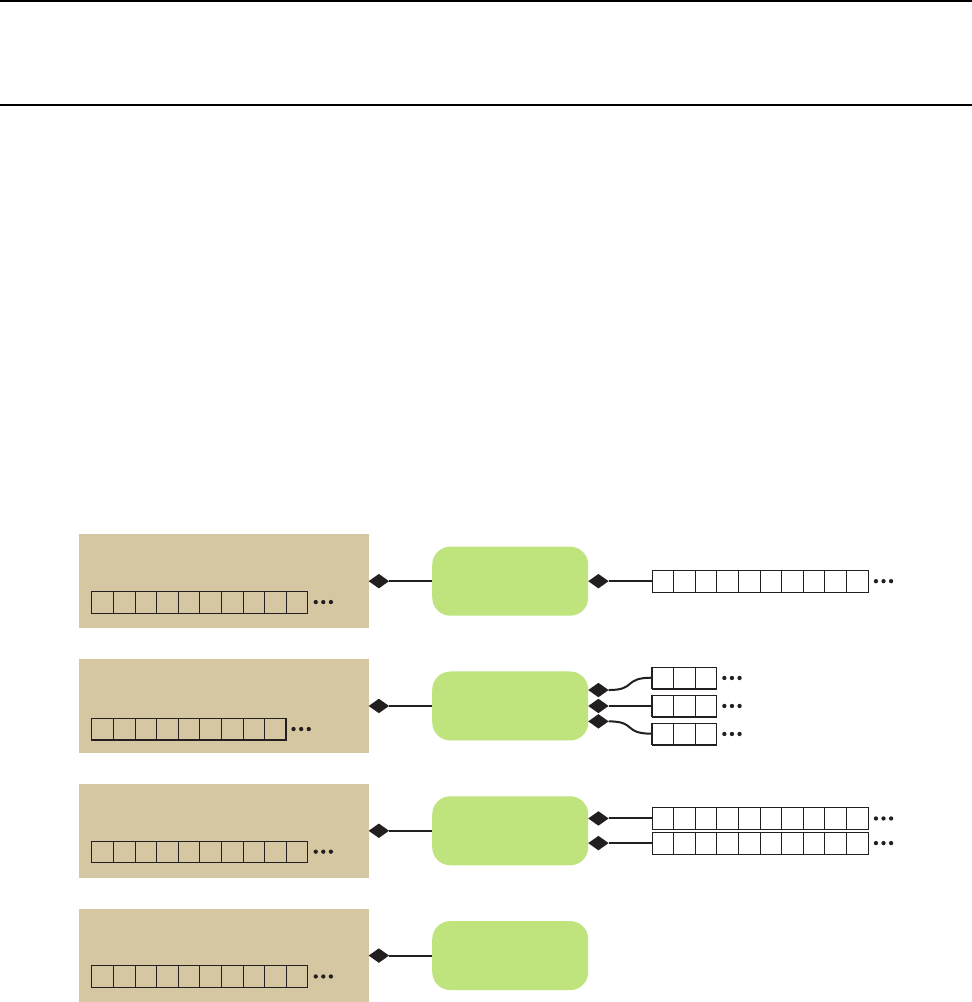
DRAFT
CHAPTER
EIGHTEEN
CUSTOM ARRAY STORAGE
Chapter 7 introduces the vtkm::cont::ArrayHandle class. In it, we learned how an ArrayHandle manages the
memory allocation of an array, provides access to the data via array portals, and supervises the movement of
data between the control and execution environments.
In addition to these data management features, ArrayHandle also provides a configurable storage mechanism
that allows you, through efficient template configuration, to redefine how data are stored and retrieved. The
storage object provides an encapsulated interface around the data so that any necessary strides, offsets, or other
access patterns may be handled internally. The relationship between array handles and their storage object is
shown in Figure 18.1.
Array Handle
x x x x x x x x x x
Basic
Storage x x x x x x x x x x
Permutation
Storage x x x x x x x x x x
2930219726
Array Handle
x x x x x x x x x x
Array Handle
x y z x y z x y z
Composite Vector
Storage y y y
x x x
z z z
Array Handle
0123456789
Index
Storage
Figure 18.1: Array handles, storage objects, and the underlying data source.
One interesting consequence of using a generic storage object to manage data within an array handle is that
the storage can be defined functionally rather than point to data stored in physical memory. Thus, implicit
array handles are easily created by adapting to functional “storage.” For example, the point coordinates of a
uniform rectilinear grid are implicit based on the topological position of the point. Thus, the point coordinates
for uniform rectilinear grids can be implemented as an implicit array with the same interface as explicit arrays
(where unstructured grid points would be stored). In this chapter we explore the many ways you can manipulate

DRAFT
18.1. Basic Storage
the ArrayHandle storage.
18.1 Basic Storage
As previously discussed in Chapter 7, vtkm::cont::ArrayHandle takes two template arguments.
Example 18.1: Declaration of the vtkm::cont::ArrayHandle templated class (again).
1template <
2typename T ,
3typename St or ag eT ag = VTKM_DEFAULT_STORAGE_TAG >
4class ArrayHandle;
The first argument is the only one required and has been demonstrated multiple times before. The second (op-
tional) argument specifies something called a storage, which provides the interface between the generic vtkm::-
cont::ArrayHandle class and a specific storage mechanism in the control environment.
In this and the following sections we describe this storage mechanism. A default storage is specified in much the
same way as a default device adapter is defined (as described in Section 8.1.1. It is done by setting the VTKM -
STORAGE macro. This macro must be set before including any VTK-m header files. Currently the only practical
storage provided by VTK-m is the basic storage, which simply allocates a continuous section of memory of the
given base type. This storage can be explicitly specified by setting VTKM STORAGE to VTKM STORAGE BASIC
although the basic storage will also be used as the default if no other storage is specified (which is typical).
The default storage can always be overridden by specifying an array storage tag. The tag for the basic storage
is located in the vtkm/cont/StorageBasic.h header file and is named vtkm::cont::StorageTagBasic. Here is an
example of specifying the storage type when declaring an array handle.
Example 18.2: Specifying the storage type for an ArrayHandle.
1vtkm:: cont:: ArrayHandle <vtkm:: Float32 ,vtkm:: cont:: StorageTagBasic > a rrayH an dl e ;
VTK-m also defines a macro named VTKM DEFAULT STORAGE TAG that can be used in place of an explicit storage
tag to use the default tag. This macro is used to create new templates that have template parameters for storage
that can use the default.
18.2 Implementing Fancy Arrays
Although the behavior of fancy arrays might seem complicated, they are actually straightforward to implement.
VTK-m provides several mechanisms to implement fancy arrays.
18.2.1 Implicit Array Handles
The generic array handle and storage templating in VTK-m allows for any type of operations to retrieve a
particular value. Typically this is used to convert an index to some location or locations in memory. However,
it is also possible to compute a value directly from an index rather than look up some value in memory. Such
an array is completely functional and requires no storage in memory at all. Such a functional array is called
an implicit array handle. Implicit arrays are an example of fancy array handles, which are array handles that
behave like regular arrays but do special processing under the covers to provide values.
Specifying a functional or implicit array in VTK-m is straightforward. VTK-m has a special class named
vtkm::cont::ArrayHandleImplicit that makes an implicit array containing values generated by a user-specified
240 Chapter 18. Custom Array Storage
DRAFT
18.2. Implementing Fancy Arrays
functor. A functor is simply a C++ class or struct that contains an overloaded parenthesis operator so that it
can be used syntactically like a function.
To demonstrate the use of ArrayHandleImplicit, let us say we want an array of even numbers. The array has
the values [0,2,4,6,...] (double the index) up to some given size. Although we could easily create this array in
memory, we can save space and possibly time by computing these values on demand.
VTK-m already comes with an implicit array handle named vtkm::cont::ArrayHandleCounting that can
make implicit even numbers as well as other more general counts. So in practice you would not have to
create a special implicit array, but we are doing so here for demonstrative purposes.
Did you know?
The first step to using ArrayHandleImplicit is to declare a functor. The functor’s parenthesis operator should
accept a single argument of type vtkm::Id and return a value appropriate for that index. The parenthesis
operator should also be declared const because it is not allowed to change the class’ state.
Example 18.3: Functor that doubles an index.
1st ru ct DoubleIndexFunctor
2{
3VTKM_EXEC_CONT
4vtkm:: Id operator ()( vtkm:: Id i nd ex ) const {re tu rn 2 * i nde x ; }
5};
Once the functor is defined, an implicit array can be declared using the templated vtkm::cont::ArrayHan-
dleImplicit class. The single template argument is the functor’s type.
Example 18.4: Declaring a ArrayHandleImplicit.
1vtkm:: cont:: ArrayHandleImplicit < D oubleIndexFuncto r > im pli cit Arr ay (
2D ou bl eI nd ex Fu nc to r () , 5 0) ;
For convenience, vtkm/cont/ArrayHandleImplicit.h also declares the vtkm::cont::make ArrayHandleImplicit
function. This function takes a functor and the size of the array and returns the implicit array.
Example 18.5: Using make ArrayHandleImplicit.
1vtkm:: cont:: make_ArrayHandleImplicit( D o ub le In de xF un ct or () , 5 0) ;
If the implicit array you are creating tends to be generally useful and is something you use multiple times, it
might be worthwhile to make a convenience subclass of vtkm::cont::ArrayHandleImplicit for your array.
Example 18.6: Custom implicit array handle for even numbers.
1#include <vtkm/cont/ArrayHandleImplicit. h >
2
3class ArrayHandleDoubleIndex
4:pu bl ic vtkm:: cont:: ArrayHandleImplicit < Doub leI nd exFunctor >
5{
6pu bl ic :
7VTKM_ARRAY_HANDLE_SUBCLASS_NT(
8ArrayHandleDoubleIndex ,
9(vtkm:: cont:: ArrayHandleImplicit < D oubleIndexFunctor >));
10
11 VTKM_CONT
12 ArrayHandleDoubleIndex(vtkm:: Id numberOfValues)
13 : S up erc la ss ( D ou bl eI nd ex Fu nc to r () , nu mb er Of Va lu es )
14 {
15 }
16 };
Chapter 18. Custom Array Storage 241
DRAFT
18.2. Implementing Fancy Arrays
Subclasses of ArrayHandle provide constructors that establish the state of the array handle. All array handle
subclasses must also use either the VTKM ARRAY HANDLE SUBCLASS macro or the VTKM ARRAY HANDLE SUB-
CLASS NT macro. Both of these macros define the types Superclass,ValueType, and StorageTag as well as a
set of constructors and operators expected of all ArrayHandle classes. The difference between these two macros
is that VTKM ARRAY HANDLE SUBCLASS is used in templated classes whereas VTKM ARRAY HANDLE SUBCLASS NT
is used in non-templated classes.
The ArrayHandle subclass in Example 18.6 is not templated, so it uses the VTKM ARRAY HANDLE SUBCLASS NT
macro. (The other macro is described in Section 18.2.2 on page 243). This macro takes two parameters. The first
parameter is the name of the subclass where the macro is defined and the second parameter is the immediate
superclass including the full template specification. The second parameter of the macro must be enclosed in
parentheses so that the C pre-processor correctly handles commas in the template specification.
18.2.2 Transformed Arrays
Another type of fancy array handle is the transformed array. A transformed array takes another array and
applies a function to all of the elements to produce a new array. A transformed array behaves much like a map
operation except that a map operation writes its values to a new memory location whereas the transformed array
handle produces its values on demand so that no additional storage is required.
Specifying a transformed array in VTK-m is straightforward. VTK-m has a special class named vtkm::cont::-
ArrayHandleTransform that takes an array handle and a functor and provides an interface to a new array
comprising values of the first array applied to the functor.
To demonstrate the use of ArrayHandleTransform, let us say that we want to scale and bias all of the values in
a target array. That is, each value in the target array is going to be multiplied by a given scale and then offset
by adding a bias value. (The scale and bias are uniform across all entries.) We could, of course, easily create a
worklet to apply this scale and bias to each entry in the target array and save the result in a new array, but we
can save space and possibly time by computing these values on demand.
The first step to using ArrayHandleTransform is to declare a functor. The functor’s parenthesis operator should
accept a single argument of the type of the target array and return the transformed value. For more generally
applicable transform functors, it is often useful to make the parenthesis operator a template. The parenthesis
operator should also be declared const because it is not allowed to change the class’ state.
Example 18.7: Functor to scale and bias a value.
1template <typename T >
2st ru ct ScaleBiasFunctor
3{
4VTKM_EXEC_CONT
5Sc aleBi as Fun ct or ( T scale = T (1) , T bias = T (0))
6: Sc al e ( sc al e )
7, Bias(bias)
8{
9}
10
11 VTKM_EXEC_CONT
12 Toperator()( T x ) const {r et ur n this - > Scale * x + this -> Bia s ; }
13
14 T Sc al e ;
15 T Bia s ;
16 };
Once the functor is defined, a transformed array can be declared using the templated vtkm::cont::ArrayHan-
dleTransform class. The first template argument is the type of array being transformed. The second template
argument is the type of functor used for the transformation. The third template argument, which is optional, is
242 Chapter 18. Custom Array Storage

DRAFT
18.2. Implementing Fancy Arrays
the type for an inverse functor that provides the inverse operation of the functor in the second argument. This
inverse functor is used for writing values into the array. For arrays that will only be read from, there is no need
to supply this inverse functor.
That said, it is generally easier to use the vtkm::cont::make ArrayHandleTransform convenience function.
This function takes an array and a functor (and optionally an inverse functor) and returns a transformed array.
Example 18.8: Using make ArrayHandleTransform.
1vtkm:: cont:: make_ArrayHandleTransform( array ,
2ScaleBiasFunctor <vtkm:: Float32 >(2 , 3))
If the transformed array you are creating tends to be generally useful and is something you use multiple times,
it might be worthwhile to make a convenience subclass of vtkm::cont::ArrayHandleTransform or convenience
make ArrayHandle* function for your array.
Example 18.9: Custom transform array handle for scale and bias.
1#include <vtkm/cont/ArrayHandleTransform. h >
2
3template <typename ArrayHandleType >
4class ArrayHandleScaleBias : pu bl ic vtkm:: cont:: ArrayHandleTransform <
5ArrayHandleType ,
6ScaleBiasFunctor <typename A rra yH and le Typ e :: ValueT ype > >
7{
8pu bl ic :
9VTKM_ARRAY_HANDLE_SUBCLASS(
10 Ar ra yH an dl eS ca le Bi as ,
11 ( A rr ay Han dl eS cal eB ia s < A rra yH an dl eT yp e >) ,
12 (vtkm:: cont:: ArrayHandleTransform <
13 ArrayHandleType ,
14 ScaleBiasFunctor <typename A rra yHa ndl eTy pe :: Value Type > >));
15
16 VTKM_CONT
17 ArrayHandleScaleBias(const Ar ra yH and le Type & array , V al ue Ty pe scale , V al ue Ty pe bias )
18 : Sup er cl as s ( array , S caleBiasF un ct or < ValueType >( scale , bias ))
19 {
20 }
21 };
22
23 template <typename ArrayHandleType >
24 VTKM_CONT Ar ra yHa ndl eS cal eBias < A rrayHa ndleTy pe > m ake_ Arra yHa ndle Scal eBi as (
25 const Ar ray Ha ndl eTy pe & array ,
26 typename Ar rayHa nd leTyp e :: Va lu eT yp e scale ,
27 typename Ar ra yHa nd leT yp e :: V alu eTy pe bia s )
28 {
29 re tu rn A rrayH an dle Sca leBias < Ar rayHan dleTyp e >( array , scale , bias );
30 }
Subclasses of ArrayHandle provide constructors that establish the state of the array handle. All array handle
subclasses must also use either the VTKM ARRAY HANDLE SUBCLASS macro or the VTKM ARRAY HANDLE SUB-
CLASS NT macro. Both of these macros define the types Superclass,ValueType, and StorageTag as well as a
set of constructors and operators expected of all ArrayHandle classes. The difference between these two macros
is that VTKM ARRAY HANDLE SUBCLASS is used in templated classes whereas VTKM ARRAY HANDLE SUBCLASS NT
is used in non-templated classes.
The ArrayHandle subclass in Example 18.9 is templated, so it uses the VTKM ARRAY HANDLE SUBCLASS macro.
(The other macro is described in Section 18.3 on page 256). This macro takes three parameters. The first
parameter is the name of the subclass where the macro is defined, the second parameter is the type of the
subclass including the full template specification, and the third parameter is the immediate superclass including
the full template specification. The second and third parameters of the macro must be enclosed in parentheses
so that the C pre-processor correctly handles commas in the template specification.
Chapter 18. Custom Array Storage 243

DRAFT
18.2. Implementing Fancy Arrays
18.2.3 Derived Storage
Aderived storage is a type of fancy array that takes one or more other arrays and changes their behavior in
some way. A transformed array (Section 18.2.2) is a specific type of derived array with a simple mapping. In
this section we will demonstrate the steps required to create a more general derived storage. When applicable,
it is much easier to create a derived array as a transformed array or using the other fancy arrays than to create
your own derived storage. However, if these pre-existing fancy arrays do not work work, for example if your
derivation uses multiple arrays or requires general lookups, you can do so by creating your own derived storage.
For the purposes of the example in this section, let us say we want 2 array handles to behave as one array with
the contents concatenated together. We could of course actually copy the data, but we can also do it in place.
The first step to creating a derived storage is to build an array portal that will take portals from arrays being
derived. The portal must work in both the control and execution environment (or have a separate version for
control and execution).
Example 18.10: Derived array portal for concatenated arrays.
1#include <vtkm/cont/ A lg o rit hm .h >
2#include <vtkm/cont/ArrayHandle. h >
3#include <vtkm/cont/ Ar ray Po rtal .h >
4template <typename P1 , typename P2 >
5class ArrayPortalConcatenate
6{
7pu bl ic :
8using P or ta l Ty pe 1 = P1 ;
9using P or ta l Ty pe 2 = P2 ;
10 using Va lueType = typename Po rtalT ype1 :: V alu eType ;
11
12 VTKM_SUPPRESS_EXEC_WARNINGS
13 VTKM_EXEC_CONT
14 Ar ray Por ta lCo nca te nat e ()
15 : Port al1 ()
16 , P or tal2 ()
17 {
18 }
19
20 VTKM_SUPPRESS_EXEC_WARNINGS
21 VTKM_EXEC_CONT
22 ArrayPortalConcatenate(const Por ta lType 1 & portal1 , const Po rta lTy pe2 por ta l2 )
23 : Portal1(portal1)
24 , Portal2(portal2)
25 {
26 }
27
28 /// Copy con st ru ct or f or any other Arra yPo rt alC onc at ena te with a p ortal type
29 /// that can be copie d to this port al type . This allows us to do any type
30 /// cast in g that the portal s do ( like the non - const to const cast ).
31 VTKM_SUPPRESS_EXEC_WARNINGS
32 template <typename OtherP1 , typename OtherP2 >
33 VTKM_EXEC_CONT ArrayPortalConcatenate(
34 const Ar ra yPo rt alC on cat ena te < O th er P1 , Oth er P2 >& src )
35 : P ort al 1 ( src . G et Por ta l1 ())
36 , P or ta l2 ( s rc . G etP ort al 2 ( ))
37 {
38 }
39
40 VTKM_SUPPRESS_EXEC_WARNINGS
41 VTKM_EXEC_CONT
42 vtkm:: Id GetNumberOfValues() const
43 {
44 re tu rn this - > Port al1 . G etN umbe rOf Val ues () + this - > Portal2 . Get Num berO fVa lue s ();
45 }
244 Chapter 18. Custom Array Storage
DRAFT
18.2. Implementing Fancy Arrays
46
47 VTKM_SUPPRESS_EXEC_WARNINGS
48 VTKM_EXEC_CONT
49 Va lu eT yp e G et ( vtkm :: Id ind ex ) const
50 {
51 if ( in de x < this -> P orta l1 . Ge tNum ber OfV alue s ())
52 {
53 re tu rn this - > Po rta l1 . Get ( i ndex );
54 }
55 else
56 {
57 re tu rn this - > Port al2 . Get ( index - this - > Por ta l1 . Ge tNum ber OfV alue s ()) ;
58 }
59 }
60
61 VTKM_SUPPRESS_EXEC_WARNINGS
62 VTKM_EXEC_CONT
63 void Set ( vtkm:: Id index , const V alu eTy pe & va lu e ) const
64 {
65 if ( in de x < this -> P orta l1 . Ge tNum ber OfV alue s ())
66 {
67 this - > P ort al1 . S et ( index , val ue );
68 }
69 else
70 {
71 this - > Por tal2 . Set ( index - this -> Por tal1 . G etNu mbe rOf Valu es () , value );
72 }
73 }
74
75 VTKM_EXEC_CONT
76 const Po rtalTyp e1 & GetPortal1 () const {r e t ur n this - > Portal 1 ; }
77 VTKM_EXEC_CONT
78 const Po rtalTyp e2 & GetPortal2 () const {r e t ur n this - > Portal 2 ; }
79
80 private:
81 Po rta lTy pe1 P orta l1 ;
82 Po rta lTy pe2 P orta l2 ;
83 };
Like in an adapter storage, the next step in creating a derived storage is to define a tag for the adapter. We
shall call ours StorageTagConcatenate and it will be templated on the two array handle types that we are
deriving. Then, we need to create a specialization of the templated vtkm::cont::internal::Storage class.
The implementation for a Storage for a derived storage is usually trivial compared to an adapter storage
because the majority of the work is deferred to the derived arrays.
Example 18.11: Storage for derived container of concatenated arrays.
1template <typename ArrayHandleType1 , typename ArrayHandleType2 >
2st ru ct StorageTagConcatenate
3{
4};
5
6namespace vtkm
7{
8namespace cont
9{
10 namespace interna l
11 {
12
13 template <typename ArrayHandleType1 , typename ArrayHandleType2 >
14 class Storage <typename Ar ra yHa ndleT yp e1 :: Val ueType ,
15 St or ag eT ag Co ncatenate < Ar ra yH andleType 1 , A rrayHan dl eT ype2 > >
16 {
17 pu bl ic :
Chapter 18. Custom Array Storage 245

DRAFT
18.2. Implementing Fancy Arrays
18 using Va lueType = typename Ar ray Han dleTyp e1 :: V alueType ;
19
20 using Po rt al Ty pe =
21 ArrayPortalConcatenate <typename A rra yH andle Ty pe1 :: P ortal Contr ol ,
22 typename Ar rayHa nd leT yp e2 :: Por talControl >;
23 using Po rtalC on stTyp e =
24 ArrayPortalConcatenate <typename A rra yH andle Ty pe1 :: P ortalConstControl ,
25 typename Ar rayHa nd leT yp e2 :: PortalConst Co nt ro l >;
26
27 VTKM_CONT
28 Storage()
29 : Va li d ( fa ls e )
30 {
31 }
32
33 VTKM_CONT
34 Storage(const ArrayHandleType1 array1, const ArrayHandleType2 array2)
35 : Array1(array1)
36 , Array2(array2)
37 , V al id ( true )
38 {
39 }
40
41 VTKM_CONT
42 Po rt al Ty pe GetPort al ()
43 {
44 VTKM_ASSERT( t his - > Va lid );
45 re tu rn P ort alT yp e ( this -> Array1 . G etP orta lCo ntro l () ,
46 this - > Arr ay 2 . GetP ort alCo ntr ol ());
47 }
48
49 VTKM_CONT
50 PortalConstType GetPortalConst() const
51 {
52 VTKM_ASSERT( t his - > Va lid );
53 re tu rn P ort alCo nst Typ e ( this -> Arr ay 1 . Ge tPo rtal Cons tCo ntro l () ,
54 this - > Arr ay 2 . Ge tPo rtal Cons tCo nt rol ());
55 }
56
57 VTKM_CONT
58 vtkm:: Id GetNumberOfValues() const
59 {
60 VTKM_ASSERT( t his - > Va lid );
61 re tu rn this - > Arra y1 . G etNu mbe rOfV alu es () + this - > Arr ay 2 . Ge tNu mbe rOfV alu es ();
62 }
63
64 VTKM_CONT
65 void Al loc ate ( vtkm:: Id numberOfValues)
66 {
67 VTKM_ASSERT( t his - > Va lid );
68 // This impl em en tatio n of allocate , wh ich all oc at es the same a mount in both
69 // arrays , is arbitrary . It could , for example , lea ve the size of Array1
70 // alone and chan ge the size of Arra y2 . Or , pro bably most likely , it could
71 // simply th row an error and state that this operatio n is inva lid .
72 vtkm:: Id half = nu mb erOfV al ues / 2;
73 this - > Arr ay 1 . All oc ate ( n umb erO fVal ues - half );
74 this - > Ar ra y2 . A llo ca te ( ha lf );
75 }
76
77 VTKM_CONT
78 void Shrink(vtkm:: Id numberOfValues)
79 {
80 VTKM_ASSERT( t his - > Va lid );
81 if ( n umbe rOf Val ues < this - > Array1 . G et Num ber Of Val ues ())
246 Chapter 18. Custom Array Storage

DRAFT
18.2. Implementing Fancy Arrays
82 {
83 this - > Arr ay 1 . Shri nk ( n umb erOf Val ues );
84 this - > Arr ay 2 . Shri nk (0);
85 }
86 else
87 {
88 this - > Arr ay 2 . Shri nk ( n umb erOf Val ues - this - > Arra y1 . G etNu mbe rOfV alu es ());
89 }
90 }
91
92 VTKM_CONT
93 void ReleaseResources()
94 {
95 VTKM_ASSERT( t his - > Va lid );
96 this - > Arr ay 1 . Rele ase Reso urc es ();
97 this - > Arr ay 2 . Rele ase Reso urc es ();
98 }
99
100 // Requrie d fo r later use in ArrayTransfer class.
101 VTKM_CONT
102 const Ar ray Han dle Ty pe1 & GetArray1 () const
103 {
104 VTKM_ASSERT( t his - > Va lid );
105 re tu rn this - > Arra y1 ;
106 }
107 VTKM_CONT
108 const Ar ray Han dle Ty pe2 & GetArray2 () const
109 {
110 VTKM_ASSERT( t his - > Va lid );
111 re tu rn this - > Arra y2 ;
112 }
113
114 private:
115 ArrayHandleType1 Array1;
116 ArrayHandleType2 Array2;
117 bool V al id ;
118 };
119
120 } // nam es pa ce int er nal
121 } // nam es pa ce cont
122 } // nam es pa ce vtkm
One of the responsibilities of an array handle is to copy data between the control and execution environments.
The default behavior is to request the device adapter to copy data items from one environment to another.
This might involve transferring data between a host and device. For an array of data resting in memory, this is
necessary. However, implicit storage (described in the previous section) overrides this behavior to pass nothing
but the functional array portal. Likewise, it is undesirable to do a raw transfer of data with derived storage. The
underlying arrays being derived may be used in other contexts, and it would be good to share the data wherever
possible. It is also sometimes more efficient to copy data independently from the arrays being derived than from
the derived storage itself.
The mechanism that controls how a particular storage gets transferred to and from the execution environment
is encapsulated in the templated vtkm::cont::internal::ArrayTransfer class. By creating a specialization
of vtkm::cont::internal::ArrayTransfer, we can modify the transfer behavior to instead transfer the arrays
being derived and use the respective copies in the control and execution environments.
vtkm::cont::internal::ArrayTransfer has three template arguments: the base type of the array, the storage
tag, and the device adapter tag.
Example 18.12: Prototype for vtkm::cont::internal::ArrayTransfer.
1namespace vtkm
Chapter 18. Custom Array Storage 247

DRAFT
18.2. Implementing Fancy Arrays
2{
3namespace cont
4{
5namespace interna l
6{
7
8template <typename T , typename StorageTag , typename DeviceAdapterTag >
9class ArrayTransfer;
10 }
11 } // nam es pa ce cont
12 } // nam es pa ce vtkm
All vtkm::cont::internal::ArrayTransfer implementations must have a constructor method that accepts a
pointer to a vtkm::cont::internal::Storage object templated to the same base type and storage tag as the
ArrayTransfer object. Assuming that an ArrayHandle is templated using the parameters in Example 18.12,
the prototype for the constructor must be equivalent to the following.
Example 18.13: Prototype for ArrayTransfer constructor.
1ArrayTransfer(vtkm:: cont:: internal :: Storage < T , S to ra ge Ta g > * s to ra ge );
Typically the constructor either saves the Storage pointer or other relevant objects from the Storage for later
use in the methods.
In addition to this non-default constructor, the vtkm::cont::internal::ArrayTransfer specialization must
define the following items.
ArrayTransfer::ValueType The type for each item in the array. This is the same type as the first template
argument.
ArrayTransfer::PortalControl The type of an array portal that is used to access the underlying data in the
control environment.
ArrayTransfer::PortalConstControl A read-only (const) version of PortalControl.
ArrayTransfer::PortalExecution The type of an array portal that is used to access the underlying data in
the execution environment.
ArrayTransfer::PortalConstExecution A read-only (const) version of PortalExecution.
ArrayTransfer::GetNumberOfValues A method that returns the number of values currently allocated in the
execution environment. The results may be undefined if none of the load or allocate methods have yet
been called.
ArrayTransfer::PrepareForInput A method responsible for transferring data from the control to the execution
for input. PrepareForInput has one Boolean argument that controls whether this transfer should actually
take place. When true, data from the Storage object given in the constructor should be transferred to the
execution environment; otherwise the data should not be copied. An ArrayTransfer for a derived array
typically ignores this parameter since the arrays being derived manages this transfer already. Regardless
of the Boolean flag, a PortalConstExecution is returned.
ArrayTransfer::PrepareForInPlace A method that behaves just like PrepareForInput except that the data
in the execution environment is used for both reading and writing so the method returns a PortalExecu-
tion. If the array is considered read-only, which is common for derived arrays, then this method should
throw a vtkm::cont::ErrorControlBadValue.
ArrayTransfer::PrepareForOutput A method that takes a size (in a vtkm::Id) and allocates an array in the
execution environment of the specified size. The initial memory can be uninitialized. The method returns a
248 Chapter 18. Custom Array Storage

DRAFT
18.2. Implementing Fancy Arrays
PortalExecution for the allocated data. If the array is considered read-only, which is common for derived
arrays, then this method should throw a vtkm::cont::ErrorControlBadValue.
ArrayTransfer::RetrieveOutputData This method takes an array storage pointer (which is the same as that
passed to the constructor, but provided for convenience), allocates memory in the control environment,
and copies data from the execution environment into it. If the derived array is considered read-only
and both PrepareForInPlace and PrepareForOutput throw exceptions, then this method should never
be called. If it is, then that is probably a bug in ArrayHandle, and it is OK to throw vtkm::cont::-
ErrorControlInternal.
ArrayTransfer::Shrink A method that adjusts the size of the array in the execution environment to something
that is a smaller size. All the data up to the new length must remain valid. Typically, no memory is
actually reallocated. Instead, a different end is marked. If the derived array is considered read-only, then
this method should throw a vtkm::cont::ErrorControlBadValue.
ArrayTransfer::ReleaseResources A method that frees any resources (typically memory) in the execution
environment.
Continuing our example derived storage that concatenates two arrays started in Examples 18.10 and 18.11, the
following provides an ArrayTransfer appropriate for the derived storage.
Example 18.14: ArrayTransfer for derived storage of concatenated arrays.
1namespace vtkm
2{
3namespace cont
4{
5namespace interna l
6{
7
8template <typename ArrayHandleType1 , typename ArrayHandleType2 , typename Device >
9class ArrayTransfer <typename Ar rayHa nd leT yp e1 :: ValueType ,
10 St or ag eT ag Co ncatenate < Ar ra yH andleType 1 , A rrayHan dl eT ype2 > ,
11 Device >
12 {
13 pu bl ic :
14 using Va lueType = typename Ar ray Han dleTyp e1 :: V alueType ;
15
16 private:
17 using St orageTag = S tor age Ta gConcaten at e < Array HandleTy pe1 , Arr ayHandle Type2 >;
18 using St or ag eT yp e = vtkm:: cont:: in te rn al :: Storage < Va lu eT yp e , St or ageT ag >;
19
20 pu bl ic :
21 using Po rt alCon tr ol = typename S tor ageTy pe :: PortalType ;
22 using PortalConstControl = typename Stor ag eT yp e :: Po rta lC ons tTy pe ;
23
24 using Po rtalE xe cutio n = Arra yP or ta lC oncatenate <
25 typename ArrayHandleType1::template Execu tionTyp es < Device >:: Portal ,
26 typename ArrayHandleType2::template Execu tionTyp es < Device >:: Portal >;
27 using Po rta lC ons tEx ec uti on = A rr ay Po rt alConcate na te <
28 typename ArrayHandleType1::template Execu tionTyp es < Device >:: PortalConst ,
29 typename ArrayHandleType2::template Execu tionTyp es < Device >:: PortalConst >;
30
31 VTKM_CONT
32 ArrayTransfer( Storage Ty pe * sto ra ge )
33 : Ar ray 1 ( st or age - > Ge tAr ray 1 ())
34 , A rra y2 ( sto ra ge - > Get Arr ay 2 ())
35 {
36 }
37
38 VTKM_CONT
Chapter 18. Custom Array Storage 249

DRAFT
18.2. Implementing Fancy Arrays
39 vtkm:: Id GetNumberOfValues() const
40 {
41 re tu rn this - > Arra y1 . G etNu mbe rOfV alu es () + this - > Arr ay 2 . Ge tNu mbe rOfV alu es ();
42 }
43
44 VTKM_CONT
45 Po rt al Con st Exe cu ti on P re par eF orI np ut ( boo l v tk mNo tUs ed ( u pdateD at a ))
46 {
47 re tu rn P orta lCo nstE xecu tio n ( this -> Arr ay 1 . Prep are For Inpu t ( Device ()) ,
48 this - > Arr ay 2 . Prep are For Inpu t ( Device ()));
49 }
50
51 VTKM_CONT
52 Po rta lEx ecu tio n Pr epa reF orI nPlace ( bool vt kmN otUsed ( up da te Da ta ))
53 {
54 re tu rn P ort alEx ecu tio n ( this -> Arr ay 1 . Prep are ForI nPl ace ( Devic e ()) ,
55 this - > Arr ay 2 . Prep are ForI nPl ace ( Devic e ()));
56 }
57
58 VTKM_CONT
59 PortalExecution PrepareForOutput(vtkm:: Id numberOfValues)
60 {
61 // This impl em en tatio n of allocate , wh ich all oc at es the same a mount in both
62 // arrays , is arbitrary . It could , for example , lea ve the size of Array1
63 // alone and chan ge the size of Arra y2 . Or , pro bably most likely , it could
64 // simply th row an error and state that this operatio n is inva lid .
65 vtkm:: Id half = nu mb erOfV al ues / 2;
66 re tu rn P ort al Exe cut io n (
67 this - > Ar ra y1 . Prepa re For Out put ( n umb er OfV al ues - half , Devi ce ()) ,
68 this - > Ar ra y2 . Prepa re For Out put ( half , Device () ));
69 }
70
71 VTKM_CONT
72 void Re tri eve Outp ut Dat a ( Sto rageT yp e * v tk mN otU sed ( st or ag e )) const
73 {
74 // Im pl ement at ion of this m ethod s hou ld be un necessary . The i nt er nal
75 // arr ay hand les shou ld a utoma ti ca lly r et ri eve the ou tput data as
76 // nec essary .
77 }
78
79 VTKM_CONT
80 void Shrink(vtkm:: Id numberOfValues)
81 {
82 if ( n umbe rOf Val ues < this - > Array1 . G et Num ber Of Val ues ())
83 {
84 this - > Arr ay 1 . Shri nk ( n umb erOf Val ues );
85 this - > Arr ay 2 . Shri nk (0);
86 }
87 else
88 {
89 this - > Arr ay 2 . Shri nk ( n umb erOf Val ues - this - > Arra y1 . G etNu mbe rOfV alu es ());
90 }
91 }
92
93 VTKM_CONT
94 void ReleaseResources()
95 {
96 this->Array1.ReleaseResourcesExecution();
97 this->Array2.ReleaseResourcesExecution();
98 }
99
100 private:
101 ArrayHandleType1 Array1;
102 ArrayHandleType2 Array2;
250 Chapter 18. Custom Array Storage

DRAFT
18.2. Implementing Fancy Arrays
103 };
104
105 } // nam es pa ce int er nal
106 } // nam es pa ce cont
107 } // nam es pa ce vtkm
The final step to make a derived storage is to create a mechanism to construct an ArrayHandle with a storage
derived from the desired arrays. This can be done by creating a trivial subclass of vtkm::cont::ArrayHandle
that simply constructs the array handle to the state of an existing storage. It uses a protected constructor of
vtkm::cont::ArrayHandle that accepts a constructed storage.
Example 18.15: ArrayHandle for derived storage of concatenated arrays.
1template <typename ArrayHandleType1 , typename ArrayHandleType2 >
2class ArrayHandleConcatenate
3:pu bl ic vtkm:: cont:: ArrayHandle <
4typename Ar rayHa nd leT yp e1 :: ValueType ,
5St or ag eT ag Co ncatenate < Ar ra yH andleType 1 , A rrayHan dl eT ype2 > >
6{
7pu bl ic :
8VTKM_ARRAY_HANDLE_SUBCLASS(
9ArrayHandleConcatenate ,
10 ( A rr ay Ha ndl eC on ca ten at e < A rr ay Ha nd le Ty pe 1 , Ar ray Ha ndl eTy pe 2 >) ,
11 (vtkm:: cont:: ArrayHandle <
12 typename Ar rayHa nd leT yp e1 :: ValueType ,
13 St orage Ta gConcaten at e < A rr ayHandle Type1 , Arr ayHand leType2 > >));
14
15 private:
16 using St or ag eT yp e = vtkm:: cont:: in te rn al :: Storage < Va lu eT yp e , St or ageT ag >;
17
18 pu bl ic :
19 VTKM_CONT
20 ArrayHandleConcatenate(const ArrayHandleType1& array1 ,
21 const ArrayHandleType2& array2)
22 : Sup er cl as s ( St orage Ty pe ( array1 , arra y2 ))
23 {
24 }
25 };
Subclasses of ArrayHandle provide constructors that establish the state of the array handle. All array handle
subclasses must also use either the VTKM ARRAY HANDLE SUBCLASS macro or the VTKM ARRAY HANDLE SUB-
CLASS NT macro. Both of these macros define the types Superclass,ValueType, and StorageTag as well as a
set of constructors and operators expected of all ArrayHandle classes. The difference between these two macros
is that VTKM ARRAY HANDLE SUBCLASS is used in templated classes whereas VTKM ARRAY HANDLE SUBCLASS NT
is used in non-templated classes.
The ArrayHandle subclass in Example 18.15 is templated, so it uses the VTKM ARRAY HANDLE SUBCLASS macro.
(The other macro is described in Section 18.3 on page 256). This macro takes three parameters. The first
parameter is the name of the subclass where the macro is defined, the second parameter is the type of the
subclass including the full template specification, and the third parameter is the immediate superclass including
the full template specification. The second and third parameters of the macro must be enclosed in parentheses
so that the C pre-processor correctly handles commas in the template specification.
vtkm::cont::ArrayHandleCompositeVector is an example of a derived array handle provided by VTK-m. It
references some fixed number of other arrays, pulls a specified component out of each, and produces a new
component that is a tuple of these retrieved components.
Chapter 18. Custom Array Storage 251
DRAFT
18.3. Adapting Data Structures
18.3 Adapting Data Structures
The intention of the storage parameter for vtkm::cont::ArrayHandle is to implement the strategy design
pattern to enable VTK-m to interface directly with the data of any third party code source. VTK-m is designed
to work with data originating in other libraries or applications. By creating a new type of storage, VTK-m can
be entirely adapted to new kinds of data structures.
Keep in mind that memory layout used can have an effect on the running time of algorithms in VTK-m.
Different data layouts and memory access can change cache performance and introduce memory affinity
problems. The example code given in this section will likely have poorer cache performance than the basic
storage provided by VTK-m. However, that might be an acceptable penalty to avoid data copies.
Common Errors
In this section we demonstrate the steps required to adapt the array handle to a data structure provided by a
third party. For the purposes of the example, let us say that some fictitious library named “foo” has a simple
structure named FooFields that holds the field values for a particular part of a mesh, and then maintain the
field values for all locations in a mesh in a std::deque object.
Example 18.16: Fictitious field storage used in custom array storage examples.
1# inclu de < deque >
2
3st ru ct FooFields
4{
5float Pressure ;
6float Te mperatu re ;
7float Velocity [3];
8// And so on ...
9};
10
11 using Fo oFie lds Deq ue = std :: deque < FooFi el ds >;
VTK-m expects separate arrays for each of the fields rather than a single array containing a structure holding
all of the fields. However, rather than copy each field to its own array, we can create a storage for each field that
points directly to the data in a FooFieldsDeque object.
The first step in creating an adapter storage is to create a control environment array portal to the data. This is
described in more detail in Section 7.2 and is generally straightforward for simple containers like this. Here is
an example implementation for our FooFieldsDeque container.
Example 18.17: Array portal to adapt a third-party container to VTK-m.
1#include <vtkm/ A ss ert .h >
2#include <vtkm/cont/in ternal /IteratorFromArrayPortal.h >
3
4// D eq ueType e xp ected to be e ither FooF ie ldsDe qu e or const FooFieldsDeque
5template <typename DequeType >
6class ArrayPortalFooPressure
7{
8pu bl ic :
9using Va lueType = float;
10
11 VTKM_CONT
12 Ar ray Por ta lFo oPr es sur e ()
13 : C ont ain er ( NUL L )
252 Chapter 18. Custom Array Storage

DRAFT
18.3. Adapting Data Structures
14 {
15 }
16
17 VTKM_CONT
18 Ar rayP ort alFo oPr ess ure ( De queType * cont ain er )
19 : Container ( contai ner )
20 {
21 }
22
23 // Require d to copy c om pa ti bl e t ype s of A rr a yP ort al Foo Pre ss ure . Really ne eded
24 // to copy from non - const to const ve rsions of arr ay p ortals .
25 template <typename OtherDequeType >
26 VTKM_CONT ArrayPortalFooPressure(
27 const Ar ray Por tal FooPre ssu re < Othe rDeque Type >& other )
28 : C ont ai ner ( other . Ge tCo nta in er ( ))
29 {
30 }
31
32 VTKM_CONT
33 vtkm:: Id GetNumberOfValues() const
34 {
35 re tu rn static_cast <vtkm : : Id >( this - > Cont ai ne r - > si ze ()) ;
36 }
37
38 VTKM_CONT
39 Va lu eT yp e G et ( vtkm :: Id ind ex ) const
40 {
41 VTKM_ASSERT( index >= 0) ;
42 VTKM_ASSERT( index < this - > Ge tNu mb erO fVal ues () );
43 re tu rn (* this - > Con tai ner )[ i nd ex ]. P re ssu re ;
44 }
45
46 VTKM_CONT
47 void Set ( vtkm:: Id index , ValueType value ) const
48 {
49 VTKM_ASSERT( index >= 0) ;
50 VTKM_ASSERT( index < this - > Ge tNu mb erO fVal ues () );
51 (* this - > Container )[ s tatic_cast < std :: size_t >( index )]. Pr es sure = va lue ;
52 }
53
54 // Here fo r the copy c ons tr uctor .
55 VTKM_CONT
56 De qu eType * GetC on tai ner () const {r et ur n this - > Con tainer ; }
57
58 private:
59 De qu eType * Conta ine r ;
60 };
The next step in creating an adapter storage is to define a tag for the adapter. We shall call ours Storage-
TagFooPressure. Then, we need to create a specialization of the templated vtkm::cont::internal::Storage
class. The ArrayHandle will instantiate an object using the array container tag we give it, and we define our
own specialization so that it runs our interface into the code.
vtkm::cont::internal::Storage has two template arguments: the base type of the array and the storage tag.
Example 18.18: Prototype for vtkm::cont::internal::Storage.
1namespace vtkm
2{
3namespace cont
4{
5namespace interna l
6{
7
Chapter 18. Custom Array Storage 253

DRAFT
18.3. Adapting Data Structures
8template <typename T , class St ora geTag >
9class Storage;
10 }
11 } // nam es pa ce cont
12 } // nam es pa ce vtkm
The vtkm::cont::internal::Storage must define the following items.
Storage::ValueType The type of each item in the array. This is the same type as the first template argument.
Storage::PortalType The type of an array portal that can be used to access the underlying data. This array
portal needs to work only in the control environment.
Storage::PortalConstType A read-only (const) version of PortalType.
Storage::GetPortal A method that returns an array portal of type PortalType that can be used to access the
data manged in this storage.
Storage::GetPortalConst Same as GetPortal except it returns a read-only (const) array portal.
Storage::GetNumberOfValues A method that returns the number of values the storage is currently allocated
for.
Storage::Allocate A method that allocates the array to a given size. All values stored in the previous allocation
may be destroyed.
Storage::Shrink A method like Allocate with two differences. First, the size of the allocation must be smaller
than the existing allocation when the method is called. Second, any values currently stored in the array
will be valid after the array is resized. This constrained form of allocation allows the array to be resized
and values valid without ever having to copy data.
Storage::ReleaseResources A method that instructs the storage to free all of its memory.
The following provides an example implementation of our adapter to a FooFieldsDeque. It relies on the Array-
PortalFooPressure provided in Example 18.17.
Example 18.19: Storage to adapt a third-party container to VTK-m.
1// Include s or de fi ni ti on f or ArrayPortalFooPressure
2
3st ru ct StorageTagFooPressure
4{
5};
6
7namespace vtkm
8{
9namespace cont
10 {
11 namespace interna l
12 {
13
14 template <>
15 class Storage <float , StorageTagFooPressure >
16 {
17 pu bl ic :
18 using Va lueType = float;
19
20 using Po rtalType = ArrayPorta lFooP ressu re < Fo oF ieldsD eq ue >;
21 using Po rta lCo nstTyp e = Ar ray Po rtalF ooPress ure < const FooFieldsDeque >;
22
254 Chapter 18. Custom Array Storage

DRAFT
18.3. Adapting Data Structures
23 VTKM_CONT
24 Storage()
25 : C ont ain er ( NUL L )
26 {
27 }
28
29 VTKM_CONT
30 Storage( F ooF iel dsD equ e * c ont ainer )
31 : Container ( contai ner )
32 {
33 }
34
35 VTKM_CONT
36 Po rt al Ty pe GetPort al () { re tu rn P or ta lT ype ( this - > C on ta in e r ); }
37
38 VTKM_CONT
39 PortalConstType GetPortalConst() const {ret ur n P or ta lC on st Ty pe ( this - > C on ta in e r ); }
40
41 VTKM_CONT
42 vtkm:: Id GetNumberOfValues() const
43 {
44 re tu rn static_cast <vtkm : : Id >( this - > Cont ai ne r - > si ze ()) ;
45 }
46
47 VTKM_CONT
48 void Al loc ate ( vtkm:: Id numberOfValues)
49 {
50 this - > Cont ainer - > re si ze ( sta ti c_ ca st < std :: size_t >( n umb erO fVal ues ));
51 }
52
53 VTKM_CONT
54 void Shrink(vtkm:: Id numberOfValues)
55 {
56 this - > Cont ainer - > re si ze ( sta ti c_ ca st < std :: size_t >( n umb erO fVal ues ));
57 }
58
59 VTKM_CONT
60 void Re le ase Re sou rce s () { this - > Contain er - > clea r (); }
61
62 private:
63 Fo oFi eld sDe que * Container ;
64 };
65
66 } // nam es pa ce int er nal
67 } // nam es pa ce cont
68 } // nam es pa ce vtkm
The final step to make a storage adapter is to make a mechanism to construct an ArrayHandle that points to
a particular storage. This can be done by creating a trivial subclass of vtkm::cont::ArrayHandle that simply
constructs the array handle to the state of an existing container.
Example 18.20: Array handle to adapt a third-party container to VTK-m.
1class ArrayHandleFooPressure
2:pu bl ic vtkm:: cont:: ArrayHandle <float , StorageTagFooPressure >
3{
4private:
5using St or ag eT yp e = vtkm:: cont:: in te rn al :: Storage <float , StorageTagFooPressure >;
6
7pu bl ic :
8VTKM_ARRAY_HANDLE_SUBCLASS_NT(
9ArrayHandleFooPressure ,
10 (vtkm:: cont:: ArrayHandle <float , StorageTagFooPressure >));
11
Chapter 18. Custom Array Storage 255
DRAFT
18.3. Adapting Data Structures
12 VTKM_CONT
13 Ar ray Hand le FooP re ssur e ( Fo oFi eld sD equ e * c on tainer )
14 : Sup er cl as s ( St orage Ty pe ( c on ta iner ))
15 {
16 }
17 };
Subclasses of ArrayHandle provide constructors that establish the state of the array handle. All array handle
subclasses must also use either the VTKM ARRAY HANDLE SUBCLASS macro or the VTKM ARRAY HANDLE SUB-
CLASS NT macro. Both of these macros define the types Superclass,ValueType, and StorageTag as well as a
set of constructors and operators expected of all ArrayHandle classes. The difference between these two macros
is that VTKM ARRAY HANDLE SUBCLASS is used in templated classes whereas VTKM ARRAY HANDLE SUBCLASS NT
is used in non-templated classes.
The ArrayHandle subclass in Example 18.20 is not templated, so it uses the VTKM ARRAY HANDLE SUBCLASS NT
macro. (The other macro is described in Section 18.2.2 on page 243). This macro takes two parameters. The first
parameter is the name of the subclass where the macro is defined and the second parameter is the immediate
superclass including the full template specification. The second parameter of the macro must be enclosed in
parentheses so that the C pre-processor correctly handles commas in the template specification.
With this new version of ArrayHandle, VTK-m can now read to and write from the FooFieldsDeque structure
directly.
Example 18.21: Using an ArrayHandle with custom container.
1VTKM_CONT
2void GetElevationAirPressure(vtkm:: cont:: DataSet grid , Fo oFie lds Deq ue * f ie ld s )
3{
4// Make an array h and le that p oints to the pres su re v alues in the field s .
5Ar rayH andl eFo oP res sure pr ess ure Han dle ( fie ld s );
6
7// Use the e le va tion worklet to estimat e at mospheric pressu re based on the
8// hei ght of the point coordina te s . Atm ospheric p re ssure is 1 01325 Pa at
9// sea level and drops about 12 Pa per meter .
10 vtkm:: worklet:: PointElevation e levation ;
11 el ev ation . SetLow Po in t (vtkm:: make_Vec(0.0 , 0.0 , 0. 0) );
12 el eva tio n . Se tH igh Poi nt ( vtkm:: make_V ec (0.0 , 0.0 , 2000.0 ));
13 el ev ation . SetRange (1013 25.0 , 773 25.0);
14
15 vtkm:: worklet:: DispatcherMapField <vtkm:: worklet:: PointElevation > d is pa tc he r (
16 el ev ation );
17 di spa tch er . I nvok e ( grid . G et Coo rd ina te Sy ste m ( ). Ge tD ata () , p re ssu re Han dl e );
18
19 // Make sure the valu es are flus hed back to the c ontrol env ir on me nt .
20 pr ess ure Ha ndl e . Syn cCo ntr ol Arr ay ();
21
22 // Now the p ressure field is in the fi elds contai ne r .
23 }
When using an ArrayHandle in VTK-m some code may be executed in an execution environment with a
different memory space. In these cases data written to an ArrayHandle with a custom storage will not
be written directly to the storage system you defined. Rather, they will be written to a separate array in
the execution environment. If you need to access data in your custom data structure, make sure you call
SyncControlArray on the ArrayHandle, as is demonstrated in Example 18.21.
Common Errors
256 Chapter 18. Custom Array Storage
DRAFT
18.3. Adapting Data Structures
Most of the code in VTK-m will create ArrayHandles using the default storage, which is set to the basic storage
if not otherwise specified. If you wish to replace the default storage used, then set the VTKM STORAGE macro to
VTKM STORAGE UNDEFINED and set the VTKM DEFAULT STORAGE TAG to your tag class. These definitions have
to happen before including any VTK-m header files. You will also have to declare the tag class (or at least a
prototype of it) before including VTK-m header files.
Example 18.22: Redefining the default array handle storage.
1#define V TK M_ ST ORAGE V TK M_S TOR AG E_U ND E FI NED
2#define VTKM_DEFAULT_STORAGE_TAG StorageTagFooPressure
3
4st ru ct StorageTagFooPressure;
ArrayHandles are often stored in dynamic objects like variant arrays (Chapter 10) or data sets (Chap-
ter 11). When this happens, the array’s type information, including the storage used, is lost. VTK-m will
execute algorithms using the ArrayHandleVirtual interface. For hot path types and storages for filters it is
good to specify custom sets in the policy when executing filters. [When/if available, add references
to chap:Policies.]
Common Errors
Chapter 18. Custom Array Storage 257
DRAFT
DRAFT
CHAPTER
NINETEEN
TRY EXECUTE
Throughout this chapter and elsewhere in this book we have seen examples that require specifying the device on
which to run using a device adapter tag. This is an important aspect when writing portable parallel algorithms.
However, it is often the case that users of these algorithms are agnostic about what device VTK-m algorithms
run so long as they complete correctly and as fast as possible. Thus, rather than directly specify a device adapter,
you would like VTK-m to try using the best available device, and if that does not work try a different device.
Because of this, there are many features in VTK-m that behave this way. For example, you may have noticed
that running filters, as in the examples of Chapter 4, you do not need to specify a device; they choose a device
for you.
Internally, the filter superclasses have a mechanism to automatically select a device, try it, and fall back to other
devices if the first one fails. We saw this at work in the implementation of filters in Chapter 17. Most of the
outward facing interfaces of parallel algorithms in VTK-m are through these filter classes. For everything else,
there is the vtkm::cont::TryExecute function.
TryExecute is a simple, generic mechanism to run an algorithm that requires a device adapter without directly
specifying a device adapter. vtkm::cont::TryExecute is a templated function with two arguments. The first
argument is a functor object whose parenthesis operator takes a device adapter tag and returns a bool that is
true if the call succeeds on the given device. The second argument is a vtkm::cont::RuntimeDeviceTracker
that specifies what devices to try. RuntimeDeviceTracker is documented in Section 8.3.
To demonstrate the operation of TryExecute, consider an operation to find the average value of an array. Doing
so with a given device adapter is a straightforward use of the reduction operator.
Example 19.1: A function to find the average value of an array in parallel.
1template <typename T , typename Storage ,typename Device >
2VTKM_CONT T ArrayAverage(const vtkm:: cont:: ArrayHandle < T , Storage >& array , De vice )
3{
4T sum = vtkm:: cont:: Al go ri thm :: Reduce ( array , T (0 ));
5re tu rn sum / T ( arr ay . G etN um ber OfVa lue s ( ));
6}
The function in Example 19.1 requires a device adapter. We want to make an alternate version of this function
that does not need a specific device adapter but rather finds one to use. To do this, we first make a functor
as described earlier. It takes a device adapter tag as an argument, calls the version of the function shown in
Example 19.1, and returns true when the operation succeeds. We then create a new version of the array average
function that does not need a specific device adapter tag and calls TryExecute with the aforementioned functor.
Example 19.2: Using TryExecute.
1namespace detail
2{
3
DRAFT
4template <typename T , typename Storage >
5st ru ct ArrayAverageFunctor
6{
7using In Ar ra yT yp e = vtkm:: cont:: ArrayHandle < T , Storage >;
8
9In Arr ayT ype I nArr ay ;
10 T OutVal ue ;
11
12 VTKM_CONT
13 ArrayAverageFunctor(const I nAr ray Typ e & array )
14 : InAr ray ( array )
15 {
16 }
17
18 template <typename Device >
19 VTKM_CONT bool operator()( D ev ice )
20 {
21 // Call the ve rsion of ArrayAv er ag e that takes a De viceA da pt er .
22 this - > Ou tV al ue = Ar rayAver ag e ( this -> InArray , Devic e ());
23
24 re tu rn true;
25 }
26 };
27
28 } // nam es pa ce detail
29
30 template <typename T , typename Storage >
31 VTKM_CONT T ArrayAverage(const vtkm:: cont:: ArrayHandle < T , Storage >& array ,
32 vtkm:: cont:: RuntimeDeviceTracker tracker =
33 vtkm:: cont:: GetGlobalRuntimeDeviceTracker())
34 {
35 detail::ArrayAverageFunctor <T, Storage > fun ctor ( array );
36
37 bool foundAverage = vtkm:: cont:: TryExecute ( func tor , t rac ker );
38
39 if (!foundAverage)
40 {
41 thr ow vtkm:: cont:: ErrorExecution(" Could not compu te array ave ra ge .");
42 }
43
44 re tu rn f un ct or . OutValu e ;
45 }
By convention, functions that use TryExecute to try multiple devices should have an argument that accepts
avtkm::cont::RuntimeDeviceTracker. This argument should be optional, with the default value set to
what the vtkm::cont::GetGlobalRuntimeDeviceTracker function returns.
Did you know?
When TryExecute calls the operation of your functor, it will catch any exceptions that the functor might
throw. TryExecute will interpret any thrown exception as a failure on that device and try another device.
If all devices fail, TryExecute will return a false value rather than throw its own exception. This means if
you want to have an exception thrown from a call to TryExecute, you will need to check the return value
Common Errors
260 Chapter 19. Try Execute

DRAFT
and throw the exception yourself.
Chapter 19. Try Execute 261
DRAFT
DRAFT
Part IV
Advanced Development
DRAFT

DRAFT
[Need to document virtual objects (when they settle down).]
265
DRAFT
DRAFT
CHAPTER
TWENTY
IMPLEMENTING DEVICE ADAPTERS
VTK-m comes with several implementations of device adapters so that it may be ported to a variety of platforms.
It is also possible to provide new device adapters to support yet more devices, compilers, and libraries. A new
device adapter provides a tag, a class to manage arrays in the execution environment, a class to establish virtual
objects in the execution environment, a collection of algorithms that run in the execution environment, and
(optionally) a timer.
Most device adapters are associated with some type of device or library, and all source code related directly to that
device is placed in a subdirectory of vtkm/cont. For example, files associated with CUDA are in vtkm/cont/cuda,
files associated with the Intel Threading Building Blocks (TBB) are located in vtkm/cont/tbb, and files associated
with OpenMP are in vtkm/cont/openmp. The documentation here assumes that you are adding a device adapter
to the VTK-m source code and following these file conventions.
For the purposes of discussion in this section, we will give a simple example of implementing a device adapter
using the std::thread class provided by C++11. We will call our device Cxx11Thread and place it in the
directory vtkm/cont/cxx11.
By convention the implementation of device adapters within VTK-m are divided into 5 header files with the names
DeviceAdapterTag∗.h,DeviceAdapterRuntimeDetector∗.h,ArrayManagerExecution∗.h,VirtualObjectTransfer∗.h, and
DeviceAdapterAlgorithm∗.h, which are hidden in internal directories. The DeviceAdapter∗.h that most code in-
cludes is a trivial header that simply includes these other 4 files. For our example std::thread device, we will
create the base header at vtkm/cont/cxx11/DeviceAdapterCxx11Thread.h. The contents are the following (with
minutia like include guards removed).
Example 20.1: Contents of the base header for a device adapter.
1#include <vtkm/cont/ cx x1 1 / internal / D e vi c eA da pt e rT ag Cx x1 1 Th re ad . h >
2#include <vtkm/cont/ cx x1 1 / internal / D evic eAd apt erR unt imeD ete cto rCx x11 Thr ead .h>
3#include <vtkm/cont/ cx x1 1 / internal /ArrayManagerExecutionCxx11Thread.h>
4#include <vtkm/cont/ cx x1 1 / internal /VirtualObjectTransferCxx11Thread.h>
5#include <vtkm/cont/ cx x1 1 / internal /DeviceAdapterAlgorithmCxx11Thread.h>
The reason VTK-m breaks up the code for its device adapters this way is that there is an interdependence between
the implementation of each device adapter and the mechanism to pick a default device adapter. Breaking up
the device adapter code in this way maintains an acyclic dependence among header files.
20.1 Tag
The device adapter tag, as described in Section 8.1 is a simple empty type that is used as a template parameter
to identify the device adapter. Every device adapter implementation provides one. The device adapter tag is
typically defined in an internal header file with a prefix of DeviceAdapterTag.

DRAFT
20.2. Runtime Detector
The device adapter tag should be created with the macro VTKM VALID DEVICE ADAPTER. This adapter takes
an abbreviated name that it will append to DeviceAdapterTag to make the tag structure. It will also create
some support classes that allow VTK-m to introspect the device adapter. The macro also expects a unique
integer identifier that is usually stored in a macro prefixed with VTKM DEVICE ADAPTER . These identifiers for
the device adapters provided by the core VTK-m are declared in vtkm/cont/internal/DeviceAdapterTag.h.
The following example gives the implementation of our custom device adapter, which by convention would be
placed in the vtkm/cont/cxx11/internal/DeviceAdapterTagCxx11Thread.h header file.
Example 20.2: Implementation of a device adapter tag.
1#include <vtkm/cont/in ternal /DeviceAdapterTag.h>
2
3// If this d evice a da pter were to be cont ri bu te d to VTK -m , then this macro
4// de cl aration s hould be moved to D ev iceAd ap ter Ta g .h and giv en a unique
5// numbe r . It also has te be less than V T K_ MAX _DE VI C E_ ADA PTE R_ ID
6#define VTKM_DEVICE_ADAPTER_CXX11_THREAD 7
7
8VTKM_VALID_DEVICE_ADAPTER(Cxx11Thread , VTKM_DEVICE_ADAPTER_CXX11_THREAD);
20.2 Runtime Detector
VTK-m defines a template named vtkm::cont::DeviceAdapterRuntimeDetector that provides the ability to
detect whether a given device is available on the current system. DeviceAdapterRuntimeDetector has a single
template argument that is the device adapter tag.
Example 20.3: Prototype for DeviceAdapterRuntimeDetector.
1namespace vtkm
2{
3namespace cont
4{
5
6template <typename DeviceAdapterTag >
7class DeviceAdapterRuntimeDetector;
8}
9} // nam es pa ce vtkm
All device adapter implementations must create a specialization of DeviceAdapterRuntimeDetector. They must
contain a method named DeviceAdapterRuntimeDetectorExists that returns a true or false value to indicate
whether the device is available on the current runtime system. For our simple C++ threading example, the
C++ threading is always available (even if only one such processing element exists) so our implementation
simply returns true if the device has been compiled.
Example 20.4: Implementation of DeviceAdapterRuntimeDetector specialization
1namespace vtkm
2{
3namespace cont
4{
5
6template <>
7class DeviceAdapterRuntimeDetector <vtkm:: cont::DeviceAdapterTagCxx11Thread >
8{
9pu bl ic :
10 VTKM_CONT bool E xists () const
11 {
12 re tu rn vtkm:: cont:: Dev ice Ad a pt erT agC xx1 1T h re ad :: IsE na bl ed ;
13 }
268 Chapter 20. Implementing Device Adapters

DRAFT
20.3. Array Manager Execution
14 };
15
16 } // nam es pa ce cont
17 } // nam es pa ce vtkm
20.3 Array Manager Execution
VTK-m defines a template named vtkm::cont::internal::ArrayManagerExecution that is responsible for al-
locating memory in the execution environment and copying data between the control and execution environment.
ArrayManagerExecution is also paired with two helper classes, vtkm::cont::internal::ExecutionPortal-
FactoryBasic and vtkm::cont::internal::ExecutionArrayInterfaceBasic, which provide operations for
creating and operating on and manipulating data in standard C arrays. All 3 class specializations are typically
defined in an internal header file with a prefix of ArrayManagerExecution. The following subsections describe
each of these classes.
20.3.1 ArrayManagerExecution
Example 20.5: Prototype for vtkm::cont::internal::ArrayManagerExecution.
1namespace vtkm
2{
3namespace cont
4{
5namespace interna l
6{
7
8template <typename T , typename StorageTag , typename DeviceAdapterTag >
9class ArrayManagerExecution;
10 }
11 } // nam es pa ce cont
12 } // nam es pa ce vtkm
A device adapter must provide a partial specialization of vtkm::cont::internal::ArrayManagerExecution for
its device adapter tag. The implementation for ArrayManagerExecution is expected to manage the resources
for a single array. All ArrayManagerExecution specializations must have a constructor that takes a pointer
to a vtkm::cont::internal::Storage object. The ArrayManagerExecution should store a reference to this
Storage object and use it to pass data between control and execution environments. Additionally, ArrayMan-
agerExecution must provide the following elements.
ValueType The type for each item in the array. This is the same type as the first template argument.
PortalType The type of an array portal that can be used in the execution environment to access the array.
PortalConstType A read-only (const) version of PortalType.
GetNumberOfValues A method that returns the number of values stored in the array. The results are undefined
if the data has not been loaded or allocated.
PrepareForInput A method that ensures an array is allocated in the execution environment and valid data
is there. The method takes a bool flag that specifies whether data needs to be copied to the execution
environment. (If false, then data for this array has not changed since the last operation.) The method
returns a PortalConstType that points to the data.
Chapter 20. Implementing Device Adapters 269

DRAFT
20.3. Array Manager Execution
PrepareForInPlace A method that ensures an array is allocated in the execution environment and valid data
is there. The method takes a bool flag that specifies whether data needs to be copied to the execution
environment. (If false, then data for this array has not changed since the last operation.) The method
returns a PortalType that points to the data.
PrepareForOutput A method that takes an array size and allocates an array in the execution environment of
the specified size. The initial memory may be uninitialized. The method returns a PortalType to the
data.
RetrieveOutputData This method takes a storage object, allocates memory in the control environment, and
copies data from the execution environment into it. If the control and execution environments share arrays,
then this can be a no-operation.
CopyInto This method takes an STL-compatible iterator and copies data from the execution environment into
it.
Shrink A method that adjusts the size of the array in the execution environment to something that is a smaller
size. All the data up to the new length must remain valid. Typically, no memory is actually reallocated.
Instead, a different end is marked.
ReleaseResources A method that frees any resources (typically memory) in the execution environment.
Specializations of this template typically take on one of two forms. If the control and execution environments
have separate memory spaces, then this class behaves by copying memory in methods such as PrepareForInput
and RetrieveOutputData. This might require creating buffers in the control environment to efficiently move
data from control array portals.
However, if the control and execution environments share the same memory space, the execution array manager
can, and should, delegate all of its operations to the Storage it is constructed with. VTK-m comes with a class
called vtkm::cont::internal::ArrayManagerExecutionShareWithControl that provides the implementation
for an execution array manager that shares a memory space with the control environment. In this case, making
the ArrayManagerExecution specialization be a trivial subclass is sufficient.
Continuing our example of a device adapter based on C++11’s std::thread class, here is the im-
plementation of ArrayManagerExecution, which by convention would be placed in the vtkm/con-
t/cxx11/internal/ArrayManagerExecutionCxx11Thread.h header file.
Example 20.6: Specialization of ArrayManagerExecution.
1#include <vtkm/cont/ cx x1 1 / internal / D e vi c eA da pt e rT ag Cx x1 1 Th re ad . h >
2
3#include <vtkm/cont/in ternal /ArrayManagerExecution. h >
4#include <vtkm/cont/in ternal /ArrayManagerExecutionShareWithControl. h >
5
6namespace vtkm
7{
8namespace cont
9{
10 namespace interna l
11 {
12
13 template <typename T , typename StorageTag >
14 class ArrayManagerExecution <T , S tor age Ta g , vtkm:: cont ::DeviceAdapterTagCxx11Thread >
15 :pu bl ic vtkm:: cont:: in te rn al :: ArrayManagerExecutionShareWithControl < T , S tor ag eT ag >
16 {
17 using Su pe rc la ss =
18 vtkm:: cont:: i nt ernal :: ArrayManagerExecutionShareWithControl < T , S to ra geT ag >;
19
20 pu bl ic :
270 Chapter 20. Implementing Device Adapters

DRAFT
20.3. Array Manager Execution
21 VTKM_CONT
22 ArrayManagerExecution(typename S upe rclass :: S tor age Type * stor ag e )
23 : S up erc las s ( stor age )
24 {
25 }
26 };
27
28 } // nam es pa ce int er nal
29 } // nam es pa ce cont
30 } // nam es pa ce vtkm
20.3.2 ExecutionPortalFactoryBasic
Example 20.7: Prototype for vtkm::cont::internal::ExecutionPortalFactoryBasic.
1namespace vtkm
2{
3namespace cont
4{
5namespace interna l
6{
7
8template <typename T , typename DeviceAdapterTag >
9st ru ct ExecutionPortalFactoryBasic;
10 }
11 } // nam es pa ce cont
12 } // nam es pa ce vtkm
A device adapter must provide a partial specialization of vtkm::cont::internal::ExecutionPortalFactory-
Basic for its device adapter tag. The implementation for ExecutionPortalFactoryBasic is capable of taking
pointers to an array in the execution environment and returning an array portal to the data in that array.
ExecutionPortalFactoryBasic has no state and all of its methods are static. ExecutionPortalFactoryBasic
provides the following elements.
ValueType The type for each item in the array. This is the same type as the first template argument.
PortalType The type for the read/write portals created by the class.
PortalConstType The type for read-only portals created by the class.
CreatePortal A static method that takes two pointers of type ValueType* that point to the beginning (first
element) and end (one past the last element) of the array to create a portal for the array. Returns a portal
of type PortalType that works in the execution environment.
CreatePortalConst A static method that takes two pointers of type const ValueType* that point to the
beginning (first element) and end (one past the last element) of the array to create a portal for the array.
Returns a portal of type PortalConstType that works in the execution environment.
Specializations of this template typically take on one of two forms. If the control and execution environments share
the same memory space, then the execution array manager can, and should, return a simple vtkm::cont::inter-
nal::ArrayPortalFromIterators. VTK-m comes with a class called vtkm::cont::internal::ExecutionPor-
talFactoryBasicShareWithControl that provides the implementation for a basic execution portal factory that
shares a memory space with the control environment. In this case, making the ExecutionPortalFactoryBasic
specialization be a trivial subclass is sufficient.
However, if the control and execution environments have separate memory spaces, then the typical vtkm::-
cont::internal::ArrayPortalFromIterators class might not work in the execution environment. In this case
a custom array portal class will have to be implemented and created within the ExecutionPortalFactoryBasic.
Chapter 20. Implementing Device Adapters 271

DRAFT
20.3. Array Manager Execution
Continuing our example of a device adapter based on C++11’s std::thread class, here is the imple-
mentation of ExecutionPortalFactoryBasic, which by convention would be placed in the vtkm/con-
t/cxx11/internal/ArrayManagerExecutionCxx11Thread.h header file.
Example 20.8: Specialization of ExecutionPortalFactoryBasic.
1#include <vtkm/cont/ cx x1 1 / internal / D e vi c eA da pt e rT ag Cx x1 1 Th re ad . h >
2
3#include <vtkm/cont/in ternal /ArrayManagerExecutionShareWithControl. h >
4
5namespace vtkm
6{
7namespace cont
8{
9namespace interna l
10 {
11
12 template <typename T >
13 st ru ct ExecutionPortalFactoryBasic < T , vtkm:: cont::DeviceAdapterTagCxx11Thread >
14 :pu bl ic vtkm:: cont:: in te rn al :: ExecutionPortalFactoryBasicShareWithControl <T >
15 {
16 };
17
18 } // nam es pa ce int er nal
19 } // nam es pa ce cont
20 } // nam es pa ce vtkm
20.3.3 ExecutionArrayInterfaceBasic
Example 20.9: Prototype for vtkm::cont::internal::ExecutionArrayInterfaceBasic.
1namespace vtkm
2{
3namespace cont
4{
5namespace interna l
6{
7
8template <typename DeviceAdapterTag >
9st ru ct ExecutionArrayInterfaceBasic;
10 }
11 } // nam es pa ce cont
12 } // nam es pa ce vtkm
A device adapter must provide a partial specialization of vtkm::cont::internal::ExecutionArrayInterface-
Basic for its device adapter tag. The implementation for ExecutionArrayInterfaceBasic is expected to allow
allocation of basic C arrays in the execution environment and to copy data between control and execution
environments. All implementations of ExecutionArrayInterfaceBasic are expected to inherit from vtkm::-
cont::internal::ExecutionArrayInterfaceBasicBase and implement the pure virtual methods therein. All
implementations are also expected to have a constructor that takes a reference to a vtkm::cont::internal::-
StorageBasicBase, which should subsequently be passed to the ExecutionArrayInterfaceBasicBase. The
methods that vtkm::cont::internal::ExecutionArrayInterfaceBasic must override are the following.
GetDeviceId Returns a vtkm::cont::DeviceAdapterId integer representing a unique identifier for the device
associated with this implementation. This number should be the same as the VTKM DEVICE ADAPTER -
macro described in Section 20.1.
Allocate Takes a reference to a vtkm::cont::internal::TypelessExecutionArray, which holds a collection
of array pointer references, and a size of allocation in bytes. The method should allocate an array of the
272 Chapter 20. Implementing Device Adapters

DRAFT
20.3. Array Manager Execution
given size in the execution environment and return the resulting pointers in the given TypelessExecu-
tionArray reference.
Free Takes a reference to a vtkm::cont::internal::TypelessExecutionArray created in a previous call to
Allocate and frees the memory. The array references in the TypelessExecutionArray should be set to
nullptr.
CopyFromControl Takes a const void* pointer for an array in the control environment, a void* for an array in
the execution environment, and a size of the arrays in bytes. The method copies the data from the control
array to the execution array.
CopyToControl Takes a const void* pointer for an array in the execution environment, a void* for an array in
the control environment, and a size of the arrays in bytes. The method copies the data from the execution
array to the control array.
Specializations of this template typically take on one of two forms. If the control and execution environments
have separate memory spaces, then this class behaves by allocating arrays on the device and copying data between
the main CPU and the device.
However, if the control and execution environments share the same memory space, then the execution array
interface can, and should, use the storage on the control environment to allocate arrays and do simple copies
(shallow where possible). VTK-m comes with a class called vtkm::cont::internal::ExecutionArrayInter-
faceBasicShareWithControl that provides the implementation for a basic execution array interface that shares
a memory space with the control environment. In this case, it is best to make the ExecutionArrayInterfaceBa-
sic specialization a subclass of ExecutionArrayInterfaceBasicShareWithControl. Note that in this case you
still need to define a constructor that takes a reference to vtkm::cont::internal::StorageBasicBase (which
is passed straight to the superclass) and an implementation of the GetDeviceId method.
Continuing our example of a device adapter based on C++11’s std::thread class, here is the imple-
mentation of ExecutionArrayInterfaceBasic, which by convention would be placed in the vtkm/con-
t/cxx11/internal/ArrayManagerExecutionCxx11Thread.h header file.
Example 20.10: Specialization of ExecutionArrayInterfaceBasic.
1#include <vtkm/cont/ cx x1 1 / internal / D e vi c eA da pt e rT ag Cx x1 1 Th re ad . h >
2
3#include <vtkm/cont/in ternal /ArrayManagerExecutionShareWithControl. h >
4
5namespace vtkm
6{
7namespace cont
8{
9namespace interna l
10 {
11
12 template <>
13 st ru ct ExecutionArrayInterfaceBasic <vtkm:: cont::DeviceAdapterTagCxx11Thread >
14 :pu bl ic vtkm:: cont:: in te rn al :: ExecutionArrayInterfaceBasicShareWithControl
15 {
16 pu bl ic :
17 using Su pe rc la ss =
18 vtkm:: cont:: i nt ernal :: ExecutionArrayInterfaceBasicShareWithControl;
19
20 VTKM_CONT
21 ExecutionArrayInterfaceBasic(vtkm:: cont:: i nt er nal :: StorageBasicBase& storage)
22 : S up erc las s ( stor age )
23 {
24 }
25
Chapter 20. Implementing Device Adapters 273

DRAFT
20.4. Virtual Object Transfer
26 VTKM_CONT
27 virtual vtkm:: cont:: DeviceAdapterId G et De vi ce Id () const final o verride
28 {
29 re tu rn vtkm:: cont:: Dev ice Ad a pt erT agC xx1 1T h re ad ();
30 }
31 };
32
33 } // nam es pa ce int er nal
34 } // nam es pa ce cont
35 } // nam es pa ce vtkm
20.4 Virtual Object Transfer
VTK-m defines a template named vtkm::cont::internal::VirtualObjectTransfer that is responsible for in-
stantiating virtual objects in the execution environment. [Re-add the following after it is implemented.]
The VirtualObjectTransfer class is the internal mechanism that allocates space for the object and sets up the
virtual method tables for them. This class has two template parameters. The first parameter is the concrete
derived type of the virtual object to be transferred to the execution environment. It is assumed that after the
object is copied to the execution environment, a pointer to a base superclass of this concrete derived type will
be used. The second template argument is the device adapter on which to put the object.
Example 20.11: Prototype for vtkm::cont::internal::VirtualObjectTransfer.
1namespace vtkm
2{
3namespace cont
4{
5namespace interna l
6{
7
8template <typename VirtualDerivedType , typename DeviceAdapter >
9st ru ct VirtualObjectTransfer;
10 }
11 } // nam es pa ce cont
12 } // nam es pa ce vtkm
A device adapter must provide a partial specialization of VirtualObjectTransfer for its device adapter tag.
This partial specialization is typically defined in an internal header file with a prefix of VirtualObjectTransfer.
The implementation for VirtualObjectTransfer can establish a virtual object in the execution environment
based on an object in the control environment, update the state of said object, and release all the resources for
the object. VirtualObjectTransfer must provide the following methods.
VirtualObjectTransfer (constructor) A VirtualObjectTransfer has a constructor that takes a pointer to the
derived type that (eventually) gets transferred to the execution environment of the given device adapter.
The object provide must stay valid for the lifespan of the VirtualObjectTransfer object.
PrepareForExecution Transfers the virtual object (given in the constructor) to the execution environment and
returns a pointer to the object that can be used in the execution environment. The returned object may
not be valid in the control environment and should not be used there. PrepareForExecution takes a single
bool argument. If the argument is false and PrepareForExecution was called previously, then the method
can return the same data as the last call without any updates. If the argument is true, then the data in
the execution environment is always updated regardless of whether data was copied in a previous call to
PrepareForExecution. This argument is used to tell the VirtualObjectTransfer whether the object in
the control environment has changed and has to be updated in the execution environment.
274 Chapter 20. Implementing Device Adapters
DRAFT
20.4. Virtual Object Transfer
ReleaseResources Frees up any resources in the execution environment. Any previously returned virtual object
from PrepareForExecution becomes invalid. (The destructor for VirtualObjectTransfer should also
release the resources.)
Specializations of this template typically take on one of two forms. If the control and execution environments
have separate memory spaces, then this class behaves by copying the concrete control object to the execution
environment (where the virtual table will be invalid) and a new object is created in the execution environment
by copying the object from the control environment. It can be assumed that the object can be trivially copied
(with the exception of the virtual method table).
For some devices, like CUDA, it is either only possible or more efficient to allocate data from the host
(the control environment). To avoid having to allocate data from the device (the execution environment),
implement PrepareForExecution by first allocating data from the host and then running code on the device
that does a “placement new” to create and copy the object in the pre-allocated space.
Did you know?
However, if the control and execution environments share the same memory space, the virtual object transfer
can, and should, just bind directly with the target concrete object. VTK-m comes with a class called vtkm::-
cont::internal::VirtualObjectTransferShareWithControl that provides the implementation for a virtual
object transfer that shares a memory space with the control environment. In this case, making the VirtualOb-
jectTransfer specialization be a trivial subclass is sufficient. Continuing our example of a device adapter based
on C++11’s std::thread class, here is the implementation of VirtualObjectTransfer, which by convention
would be placed in the vtkm/cont/cxx11/internal/VirtualObjectTransferCxx11Thread.h header file.
Example 20.12: Specialization of VirtualObjectTransfer.
1#include <vtkm/cont/ cx x1 1 / internal / D e vi c eA da pt e rT ag Cx x1 1 Th re ad . h >
2
3#include <vtkm/cont/in ternal /VirtualObjectTransfer. h >
4#include <vtkm/cont/in ternal /VirtualObjectTransferShareWithControl. h >
5
6namespace vtkm
7{
8namespace cont
9{
10 namespace interna l
11 {
12
13 template <typename VirtualDerivedType >
14 st ru ct VirtualObjectTransfer < V ir tualDerivedType ,
15 vtkm:: cont::DeviceAdapterTagCxx11Thread >
16 :VirtualObjectTransferShareWithControl < VirtualDeri vedType >
17 {
18 VTKM_CONT VirtualObjectTransfer(const V irt ual Der ive dTy pe * v irt ua lOb je ct )
19 :VirtualObjectTransferShareWithControl < VirtualDeri vedType >( v irt ual Ob jec t )
20 {
21 }
22 };
23
24 } // nam es pa ce int er nal
25 } // nam es pa ce cont
26 } // nam es pa ce vtkm
Chapter 20. Implementing Device Adapters 275
DRAFT
20.5. Algorithms
20.5 Algorithms
A device adapter implementation must also provide a specialization of vtkm::cont::DeviceAdapterAlgorithm,
which is documented in Section 8.4. The implementation for the device adapter algorithms is typically placed
in a header file with a prefix of DeviceAdapterAlgorithm.
Although there are many methods in DeviceAdapterAlgorithm, it is seldom necessary to implement them all.
Instead, VTK-m comes with vtkm::cont::internal::DeviceAdapterAlgorithmGeneral that provides generic
implementation for most of the required algorithms. By deriving the specialization of DeviceAdapterAlgorithm
from DeviceAdapterAlgorithmGeneral, only the implementations for Schedule and Synchronize need to be
implemented. All other algorithms can be derived from those.
That said, not all of the algorithms implemented in DeviceAdapterAlgorithmGeneral are optimized for all
types of devices. Thus, it is worthwhile to provide algorithms optimized for the specific device when possible.
In particular, it is best to provide specializations for the sort, scan, and reduce algorithms.
It is standard practice to implement a specialization of DeviceAdapterAlgorithm by having it inherit
from vtkm::cont::internal::DeviceAdapterAlgorithmGeneral and specializing those methods that are
optimized for a particular system. DeviceAdapterAlgorithmGeneral is a templated class that takes as
its single template parameter the type of the subclass. For example, a device adapter algorithm struc-
ture named DeviceAdapterAlgorithm<DeviceAdapterTagFoo> will subclass DeviceAdapterAlgorithmGen-
eral<DeviceAdapterAlgorithm<DeviceAdapterTagFoo> >.
The convention of having a subclass be templated on the derived class’ type is known as the Curiously
Recurring Template Pattern (CRTP). In the case of DeviceAdapterAlgorithmGeneral, VTK-m uses
this CRTP behavior to allow the general implementation of these algorithms to run Schedule and other
specialized algorithms in the subclass.
Did you know?
One point to note when implementing the Schedule methods is to make sure that errors handled in the exe-
cution environment are handled correctly. As described in Section 12.11, errors are signaled in the execution
environment by calling RaiseError on a functor or worklet object. This is handled internally by the vtkm::-
exec::internal::ErrorMessageBuffer class. ErrorMessageBuffer really just holds a small string buffer,
which must be provided by the device adapter’s Schedule method.
So, before Schedule executes the functor it is given, it should allocate a small string array in the execution
environment, initialize it to the empty string, encapsulate the array in an ErrorMessageBuffer object, and set
this buffer object in the functor. When the execution completes, Schedule should check to see if an error exists
in this buffer and throw a vtkm::cont::ErrorExecution if an error has been reported.
Exceptions are generally not supposed to be thrown in the execution environment, but it could happen on
devices that support them. Nevertheless, few thread schedulers work well when an exception is thrown in
them. Thus, when implementing adapters for devices that do support exceptions, it is good practice to catch
them within the thread and report them through the ErrorMessageBuffer.
Common Errors
276 Chapter 20. Implementing Device Adapters

DRAFT
20.5. Algorithms
The following example is a minimal implementation of device adapter algorithms using C++11’s std::thread
class. Note that no attempt at providing optimizations has been attempted (and many are possible). By
convention this code would be placed in the vtkm/cont/cxx11/internal/DeviceAdapterAlgorithmCxx11Thread.h
header file.
Example 20.13: Minimal specialization of DeviceAdapterAlgorithm.
1#include <vtkm/cont/ cx x1 1 / internal / D e vi c eA da pt e rT ag Cx x1 1 Th re ad . h >
2
3#include <vtkm/cont/DeviceAdapterAlgorithm. h >
4#include <vtkm/cont/ErrorExecution. h >
5#include <vtkm/cont/in ternal /DeviceAdapterAlgorithmGeneral. h >
6
7# inclu de < thread >
8
9namespace vtkm
10 {
11 namespace cont
12 {
13
14 template <>
15 st ru ct DeviceAdapterAlgorithm <vtkm:: cont ::DeviceAdapterTagCxx11Thread >
16 :vtkm :: cont:: internal:: DeviceAdapterAlgorithmGeneral <
17 DeviceAdapterAlgorithm <vtkm:: cont ::DeviceAdapterTagCxx11Thread >,
18 vtkm:: cont::DeviceAdapterTagCxx11Thread >
19 {
20 private:
21 template <typename FunctorType >
22 st ru ct ScheduleKernel1D
23 {
24 VTKM_CONT
25 ScheduleKernel1D(const F unc tor Typ e & f un ctor )
26 : Functor(functor)
27 {
28 }
29
30 VTKM_EXEC
31 void operator()() const
32 {
33 try
34 {
35 for (vtkm:: Id th re ad Id = this - > BeginId ; thread Id < this -> EndId ; th re ad Id ++)
36 {
37 this - > Fun ctor ( t hr eadId );
38 // If an error is raised , abort e xe cu ti on .
39 if ( this - > Err orM es sa ge . Is Er ror Ra ise d ())
40 {
41 re tu rn ;
42 }
43 }
44 }
45 cat ch ( vtkm:: cont :: Error err or )
46 {
47 this - > Er ror Mess age . R ais eEr ror ( e rr or . G etM ess age (). c_s tr ()) ;
48 }
49 ca tc h ( st d :: ex cep ti on err or )
50 {
51 this - > Er ror Mess age . R ais eEr ror ( e rr or . wh at ());
52 }
53 cat ch (. ..)
54 {
55 this - > ErrorM es sag e . Ra is eE rr or (" U nk no wn exception raised .");
56 }
57 }
Chapter 20. Implementing Device Adapters 277

DRAFT
20.5. Algorithms
58
59 Fu nct orT ype F unct or ;
60 vtkm:: exec:: i nt ernal :: Er rorM es sag eBu ffer ErrorMes sa ge ;
61 vtkm:: Id BeginId;
62 vtkm:: Id E nd Id ;
63 };
64
65 template <typename FunctorType >
66 st ru ct ScheduleKernel3D
67 {
68 VTKM_CONT
69 ScheduleKernel3D(const F unc torType & functor , vtkm:: Id3 maxRange)
70 : Functor(functor)
71 , M axRange ( ma xRange )
72 {
73 }
74
75 VTKM_EXEC
76 void operator()() const
77 {
78 vtkm:: Id3 th re ad Id 3D (this - > Begin Id % this -> MaxRan ge [0] ,
79 ( this -> BeginI d / this -> Max Range [0]) % this - > Ma xR an ge [1] ,
80 this - > Beg inId / ( this -> MaxRa nge [0] * this - > Max Range [1])) ;
81
82 try
83 {
84 for (vtkm:: Id th re ad Id = this - > BeginId ; thread Id < this -> EndId ; th re ad Id ++)
85 {
86 this - > Fun ctor ( t hre ad Id3 D );
87 // If an error is raised , abort e xe cu ti on .
88 if ( this - > Err orM es sa ge . Is Er ror Ra ise d ())
89 {
90 re tu rn ;
91 }
92
93 th re ad Id 3D [ 0]++;
94 if ( t hr ea dId 3D [0] >= MaxRan ge [0])
95 {
96 th re ad Id 3D [0] = 0;
97 th re ad Id 3D [ 1]++;
98 if ( t hr ea dId 3D [1] >= MaxRan ge [1])
99 {
100 th re ad Id 3D [1] = 0;
101 th re ad Id 3D [ 2]++;
102 }
103 }
104 }
105 }
106 cat ch ( vtkm:: cont:: E rro r err or )
107 {
108 this - > Er ror Mess age . R ais eEr ror ( e rr or . G etM ess age (). c_s tr ()) ;
109 }
110 ca tc h ( st d :: ex cep ti on err or )
111 {
112 this - > Er ror Mess age . R ais eEr ror ( e rr or . wh at ());
113 }
114 cat ch (. ..)
115 {
116 this - > ErrorM es sag e . Ra is eE rr or (" U nk no wn exception raised .");
117 }
118 }
119
120 Fu nct orT ype F unct or ;
121 vtkm:: exec:: i nt ernal :: Er rorM es sag eBu ffer ErrorMes sa ge ;
278 Chapter 20. Implementing Device Adapters

DRAFT
20.5. Algorithms
122 vtkm:: Id BeginId;
123 vtkm:: Id E nd Id ;
124 vtkm:: Id3 Ma xR ange ;
125 };
126
127 template <typename Ker nel Type >
128 VTKM_CONT static void Do Sc he du le ( K ernelType kernel , vtkm:: Id numInstances)
129 {
130 if (numInstances < 1)
131 {
132 re tu rn ;
133 }
134
135 const vtkm:: Id MESSAGE_SIZE = 1024;
136 char errorS tr in g [ MES SA GE _SI ZE ];
137 er ro rSt ri ng [0] = ’\0 ’;
138 vtkm:: exec:: i nt ernal :: Er ro rMe ssag eBu ff er e rro rMe ssa ge ( er ro rS tr ing , M ESS AGE_SI ZE );
139 kernel . Funct or . S etEr ror Mess ageB uff er ( e rro rMe ssa ge );
140 kernel.ErrorMessage = errorMessage;
141
142 vtkm:: Id n umT hr ead s = sta ti c_ca st < vtkm: : Id >( std :: threa d :: har dw are _co nc urr en cy ());
143 if ( n um Th rea ds > numIn st anc es )
144 {
145 nu mT hr ea ds = numIns ta nce s ;
146 }
147 vtkm:: Id n umI nst an ces Pe rTh rea d = ( num In st an ces + n um Th reads - 1) / n um Threads ;
148
149 std :: t hrea d * t hre adP ool = new std :: t hr ea d [ num Thr ead s ];
150 vtkm:: Id beginId = 0;
151 for (vtkm:: Id threadInd ex = 0; t hr ea dI nd ex < numThreads ; th re adIndex ++)
152 {
153 vtkm:: Id e ndId = s td :: mi n ( beg inI d + nu mI nst anc es Per Th rea d , n umI ns ta nce s );
154 Ke rne lTy pe th rea dKe rne l = ke rnel ;
155 th rea dKe rne l . BeginI d = beg inId ;
156 th re ad Kerne l . En dId = e ndI d ;
157 std :: thre ad n ewThread ( thr ea dK ern el );
158 th re adP oo l [ th rea dIn de x ]. sw ap ( newThread );
159 be gi nId = endId ;
160 }
161
162 for (vtkm:: Id threadInd ex = 0; t hr ea dI nd ex < numThreads ; th re adIndex ++)
163 {
164 th re adP oo l [ th rea dIn de x ]. jo in ();
165 }
166
167 delete [] threadPool ;
168
169 if ( e rr orM es sag e . Is Err or Rai sed ())
170 {
171 thr ow vtkm:: cont:: ErrorExecution( e rr orStr in g );
172 }
173 }
174
175 pu bl ic :
176 template <typename FunctorType >
177 VTKM_CONT static void Schedul e ( Fun cto rTy pe functor , vtkm:: Id numInstances)
178 {
179 Do Sch edu le ( Sc hed ul eKe rn el1 D < F un ct or Ty pe >( f unct or ), numIn sta nce s );
180 }
181
182 template <typename FunctorType >
183 VTKM_CONT static void Schedul e ( Fun cto rTy pe functor , vtkm:: Id3 maxRan ge )
184 {
185 vtkm:: Id n umInsta nc es = m ax Ra nge [0] * ma xR an ge [1] * maxRang e [2];
Chapter 20. Implementing Device Adapters 279

DRAFT
20.6. Timer Implementation
186 Do Sch edu le ( Sc hed ul eKe rn el3 D < F un ct or Ty pe >( functor , m ax Ran ge ), nu mIn stance s );
187 }
188
189 VTKM_CONT
190 static void Sy nc hr on ize ()
191 {
192 // No thing to do . Th is devic e sc he du le s all of its o pe ra ti on s using a
193 // split / join para di gm . This means that the if the cont rol t hr eaad is
194 // calli ng th is method , then noth ing should be ru nning in the execution
195 // environment .
196 }
197 };
198
199 } // nam es pa ce cont
200 } // nam es pa ce vtkm
20.6 Timer Implementation
The VTK-m timer, described in Chapter 9, delegates to an internal class named vtkm::cont::DeviceAdapter-
TimerImplementation. The interface for this class is the same as that for vtkm::cont::Timer. A default im-
plementation of this templated class uses the system timer and the Synchronize method in the device adapter
algorithms.
However, some devices might provide alternate or better methods for implementing timers. For example, the TBB
and CUDA libraries come with high resolution timers that have better accuracy than the standard system timers.
Thus, the device adapter can optionally provide a specialization of DeviceAdapterTimerImplementation, which
is typically placed in the same header file as the device adapter algorithms.
Continuing our example of a custom device adapter using C++11’s std::thread class, we could use the de-
fault timer and it would work fine. But C++11 also comes with a std::chrono package that contains some
portable time functions. The following code demonstrates creating a custom timer for our device adapter us-
ing this package. By convention, DeviceAdapterTimerImplementation is placed in the same header file as
DeviceAdapterAlgorithm.
Example 20.14: Specialization of DeviceAdapterTimerImplementation.
1# inclu de < chrono >
2
3namespace vtkm
4{
5namespace cont
6{
7
8template <>
9class DeviceAdapterTimerImplementation <vtkm:: cont::DeviceAdapterTagCxx11Thread >
10 {
11 pu bl ic :
12 VTKM_CONT
13 DeviceAdapterTimerImplementation() { this->Reset(); }
14
15 VTKM_CONT
16 void Res et ()
17 {
18 vtkm:: cont:: DeviceAdapterAlgorithm <
19 vtkm:: cont:: D ev ic eAdap te rT agC xx 11 Threa d >:: Synch ro ni ze ();
20 this - > Sta rt Time = std :: c hrono :: hi gh_r es olu tion _c lock :: now ();
21 }
22
23 VTKM_CONT
280 Chapter 20. Implementing Device Adapters
DRAFT
20.6. Timer Implementation
24 vtkm:: Float64 GetElapsedTime()
25 {
26 vtkm:: cont:: DeviceAdapterAlgorithm <
27 vtkm:: cont:: D ev ic eAdap te rT agC xx 11 Threa d >:: Synch ro ni ze ();
28 std :: chr ono :: hig h_ res olu ti on_ clo ck :: ti me _point endTi me =
29 std :: chr ono :: hig h_ res olu ti on_ clo ck :: now ();
30
31 std :: chr ono :: hig h_ res olu ti on_ clo ck :: du ra tion e lapsedT ic ks =
32 endTi me - this - > Sta rtTime ;
33
34 std :: chr ono :: duration < vtkm:: Float64 > e lap sed Sec ond s ( el aps ed Tic ks );
35
36 re tu rn e lap se dSe con ds . c ou nt ();
37 }
38
39 private:
40 std :: chr ono :: hig h_ res olu ti on_ clo ck :: ti me _point St ar tT im e ;
41 };
42
43 } // nam es pa ce cont
44 } // nam es pa ce vtkm
[At some point add a chapter on OpenGL interoperability (I guess).]
Chapter 20. Implementing Device Adapters 281
DRAFT
DRAFT
CHAPTER
TWENTYONE
FUNCTION INTERFACE OBJECTS
For flexibility’s sake a worklet is free to declare a ControlSignature with whatever number of arguments are
sensible for its operation. The Invoke method of the dispatcher is expected to support arguments that match
these arguments, and part of the dispatching operation may require these arguments to be augmented before
the worklet is scheduled. This leaves dispatchers with the tricky task of managing some collection of arguments
of unknown size and unknown types.
[FunctionInterface is in the vtkm::internal interface. I still can’t decide if it should be moved
to the vtkm interface.]
To simplify this management, VTK-m has the vtkm::internal::FunctionInterface class. FunctionInter-
face is a templated class that manages a generic set of arguments and return value from a function. An instance
of FunctionInterface holds an instance of each argument. You can apply the arguments in a FunctionInter-
face object to a functor of a compatible prototype, and the resulting value of the function call is saved in the
FunctionInterface.
21.1 Declaring and Creating
vtkm::internal::FunctionInterface is a templated class with a single parameter. The parameter is the
signature of the function. A signature is a function type. The syntax in C++ is the return type followed by the
argument types encased in parentheses.
Example 21.1: Declaring vtkm::internal::FunctionInterface.
1// Fu nc tio nI nte rf ace s matc hi ng some co mmo n POSIX f un ctions .
2vtkm:: inter na l :: FunctionInterface <size_t(const c ha r *) > s tr le nI nt er fac e ;
3
4vtkm:: inter na l :: FunctionInterface < char *( ch ar * , const char * s2 , siz e_t ) >
5strncpyInterface;
The vtkm::internal::make FunctionInterface function provies an easy way to create a FunctionInterface
and initialize the state of all the parameters. make FunctionInterface takes a variable number of arguments,
one for each parameter. Since the return type is not specified as an argument, you must always specify it as a
template parameter.
Example 21.2: Using vtkm::internal::make FunctionInterface.
1const char * s = " Hello World ";
2static const size_t BU FF ER_SIZE = 100;
3char * bu ff er = ( ch ar *) m allo c ( BU FFE R_SI ZE );
4
5st rlenI nt erfac e = vtkm:: in te rn al :: make_FunctionInterface < size _t >( s );

DRAFT
21.2. Parameters
6
7strncpyInterface =
8vtkm:: inter na l :: make_FunctionInterface < c ha r * >( b uf fe r , s , B UF FE R_ SI ZE );
21.2 Parameters
One created, FunctionInterface contains methods to query and manage the parameters and objects associated
with them. The number of parameters can be retrieved either with the constant field ARITY or with the GetArity
method.
Example 21.3: Getting the arity of a FunctionInterface.
1VTKM_STATIC_ASSERT(vtkm:: in te rnal :: FunctionInterface < si ze _t ( const char *) >:: AR ITY ==
21);
3
4vtkm:: IdComponent arity = s tr ncp yI nterf ac e . GetArit y (); // arity = 3
To get a particular parameter, FunctionInterface has the templated method GetParameter. The template
parameter is the index of the parameter. Note that the parameters in FunctionInterface start at index 1.
Although this is uncommon in C++, it is customary to number function arguments starting at 1.
There are two ways to specify the index for GetParameter. The first is to directly specify the template parameter
(e.g. GetParameter<1>()). However, note that in a templated function or method where the type is not fully
resolved the compiler will not register GetParameter as a templated method and will fail to parse the template
argument without a template keyword. The second way to specify the index is to provide a vtkm::internal::-
IndexTag object as an argument to GetParameter. Although this syntax is more verbose, it works the same
whether the FunctionInterface is fully resolved or not. The following example shows both methods in action.
Example 21.4: Using FunctionInterface::GetParameter().
1void GetFirstParameterResolved(
2const vtkm:: i nt er nal :: FunctionInterface <void( st d :: s tr in g ) >& in ter fa ce )
3{
4// The fo ll ow in g two uses of GetPa ra me te r are equival en t
5std :: co ut << int erf ace . G etPa ram et er <1 >() << std :: en dl ;
6std :: cout << in terface . GetPa ra meter ( vtkm:: in ternal :: IndexTag <1 >()) << std :: endl ;
7}
8
9template <typename FunctionSignature >
10 void GetFirstParameterTemplated(
11 const vtkm:: i nt er nal :: FunctionInterface <FunctionSignature >& interface)
12 {
13 // The fo ll ow in g two uses of GetPa ra me te r are equival en t
14 std :: cout << interf ace . template G etPa rame ter <1 >() << std :: en dl ;
15 std :: cout << in terface . GetPa ra meter ( vtkm:: in ternal :: IndexTag <1 >()) << std :: endl ;
16 }
Likewise, there is a SetParmeter method for changing parameters. The same rules for indexing and template
specification apply.
Example 21.5: Using FunctionInterface::SetParameter().
1void SetFirstParameterResolved(
2vtkm:: inter na l :: FunctionInterface <void( s td :: s tri ng ) >& int er face ,
3const std :: s trin g & n ew Fir stP aram ete r )
4{
5// The fo ll ow in g two uses of SetPa ra me te r are equival en t
6in te rface . SetParam eter <1 >( n ewF ir stP ar ame te r );
7in te rface . S etP ara me ter ( n ew FirstParam ete r , vtkm:: in te rnal :: IndexTa g <1 >());
284 Chapter 21. Function Interface Objects

DRAFT
21.3. Invoking
8}
9
10 template <typename FunctionSignature , typename T >
11 void SetFirstParameterTemplated(
12 vtkm:: inter na l :: FunctionInterface <FunctionSignature >& interface ,
13 T newFirstParameter)
14 {
15 // The fo ll ow in g two uses of SetPa ra me te r are equival en t
16 in te rface . template S etP arame ter <1 >( new Fi rst Pa ramet er );
17 in te rface . S etP ara me ter ( n ew FirstParam ete r , vtkm:: in te rnal :: IndexTa g <1 >());
18 }
21.3 Invoking
FunctionInterface can invoke a functor of a matching signature using the parameters stored within. If the
functor returns a value, that return value will be stored in the FunctionInterface object for later retrieval.
There are several versions of the invoke method. There are always seperate versions of invoke methods for the
control and execution environments so that functors for either environment can be executed. The basic version
of invoke passes the parameters directly to the function and directly stores the result.
Example 21.6: Invoking a FunctionInterface.
1vtkm:: inter na l :: FunctionInterface <size_t(const c ha r *) > s tr le nI nt er fac e ;
2st rle nInt erf ace . Set Para me ter <1 >(" H el lo world ");
3
4st rle nInt erf ace . In vok eCo nt ( strle n );
5
6size_t length = st rle nI nterf ac e . Ge tR eturn Va lue (); // len gth = 11
Another form of the invoke methods takes a second transform functor that is applied to each argument before
passed to the main function. If the main function returns a value, the transform is applied to that as well before
being stored back in the FunctionInterface.
Example 21.7: Invoking a FunctionInterface with a transform.
1// Our t ran sform c onv er ts C s tri ng s to integ ers , leaves eve ryt hin g else al on e .
2st ru ct TransformFunctor
3{
4template <typename T >
5VTKM_CONT const T& operator ()( const T& x ) const
6{
7re tu rn x ;
8}
9
10 VTKM_CONT
11 vtkm:: Int32 operator()( const ch ar * x ) const {r et ur n at oi ( x ); }
12 };
13
14 // The f un ct ion we are invo ki ng s imply com pares two number s .
15 st ru ct IsSameFunctor
16 {
17 template <typename T1 , typename T2 >
18 VTKM_CONT bool operator()( const T1 & x , const T2 & y ) const
19 {
20 re tu rn x == y ;
21 }
22 };
23
24 void TryTransformedInvoke()
25 {
Chapter 21. Function Interface Objects 285

DRAFT
21.3. Invoking
26 vtkm:: inter na l :: FunctionInterface < bool ( const char * , vtkm:: Int 32 ) >
27 functionInterface = vtkm:: inte rn al :: make_FunctionInterface <bool >(
28 (const char *)"4 2" , ( vtkm:: Int32 )42) ;
29
30 fu nct ion Inte rf ace . I nvo ke Co nt ( I sSa meF un cto r () , T ran sfo rmF unc tor ());
31
32 bool isSame = fun ct ion Int erf ace . G etR et urn Val ue (); // is Same = true
33 }
As demonstrated in the previous examples, FunctionInterface has a method named GetReturnValue that
returns the value from the last invoke. Care should be taken to only use GetReturnValue when the function
specification has a return value. If the function signature has a void return type, using GetReturnValue will
cause a compile error.
FunctionInterface has an alternate method named GetReturnValueSafe that returns the value wrapped in
a templated structure named vtkm::internal::FunctionInterfaceReturnContainer. This structure always
has a static constant Boolean named VALID that is false if there is no return type and true otherwise. If the
container is valid, it also has an entry named Value containing the result.
Example 21.8: Getting return value from FunctionInterface safely.
1template <typename Res ult Type , bool Valid >
2st ru ct PrintReturnFunctor;
3
4template <typename Res ult Type >
5st ru ct P rin tRe tu rnF unc tor < R es ul tT yp e , true >
6{
7VTKM_CONT
8void operator()(
9const vtkm:: i nt er nal :: FunctionInterfaceReturnContainer < ResultType >& x ) const
10 {
11 std :: cout << x. Value << std :: endl ;
12 }
13 };
14
15 template <typename Res ult Type >
16 st ru ct P rin tRe tu rnF unc tor < R es ul tT yp e , false >
17 {
18 VTKM_CONT
19 void operator()(
20 const vtkm:: i nt er nal :: FunctionInterfaceReturnContainer < ResultType >&) const
21 {
22 std :: co ut < < " No re tu rn type ." << std :: en dl ;
23 }
24 };
25
26 template <typename FunctionInterfaceType >
27 void Pr int Retur n ( const Fun cti onIn te rfa ceT ype & fun ct ion Int erf ace )
28 {
29 using Re su lt Ty pe = typename F unct io nInt er face Ty pe :: Re su lt Ty pe ;
30 using ReturnContainerType =
31 vtkm:: inter na l :: FunctionInterfaceReturnContainer < Res ul tT yp e >;
32
33 Pr int Re tur nFu nct or < ResultTyp e , Re tur nC ont ai ner Type :: VALID > printR etu rn ;
34 pr in tRetu rn ( f un cti onI nte rfa ce . Ge tRe tur nVa lue Saf e ());
35 }
286 Chapter 21. Function Interface Objects

DRAFT
21.4. Modifying Parameters
21.4 Modifying Parameters
In addition to storing and querying parameters and invoking functions, FunctionInterface also contains mul-
tiple ways to modify the parameters to augment the function calls. This can be used in the same use case as a
chain of function calls that generally pass their parameters but also augment the data along the way.
The Append method returns a new FunctionInterface object with the same parameters plus a new parameter
(the argument to Append) to the end of the parameters. There is also a matching AppendType templated structure
that can return the type of an augmented FunctionInterface with a new type appended.
Example 21.9: Appending parameters to a FunctionInterface.
1using vtkm:: i nt er nal :: FunctionInterface;
2using vtkm:: i nt er nal :: make_FunctionInterface;
3
4using InitialFunctionInterfaceType =
5FunctionInterface <void( std :: string , vtkm:: Id ) >;
6InitialFunctionInterfaceType initialFunctionInterface =
7make_FunctionInterface <void >( std :: stri ng (" Hel lo World ") , vtkm:: Id (42));
8
9using AppendedFunctionInterfaceType1 =
10 FunctionInterface <void( std :: string , vtkm:: Id , s td :: s tri ng ) >;
11 AppendedFunctionInterfaceType1 appendedFunctionInterface1 =
12 in iti alF un cti onI nte rf ace . Append (std :: s tring (" foob ar "));
13 // ap pe n de dFu nct ion In ter fac e1 has pa ra me te rs (" Hello World " , 42 , " f oobar ")
14
15 using AppendedFunctionInterfaceType2 =
16 In it ia lF unc ti on In ter fa ce Ty pe :: Ap pend Ty pe < vtkm:: Float32 >: : type ;
17 AppendedFunctionInterfaceType2 appendedFunctionInterface2 =
18 initialFunctionInterface.Append(vtkm :: Float32(3.141));
19 // ap pen de d Fu nct ion In t er fac e2 has pa ra me ters (" Hello W orl d " , 42 , 3.141 )
Replace is a similar method that returns a new FunctionInterface object with the same paraemters except
with a specified parameter replaced with a new parameter (the argument to Replace). There is also a matching
ReplaceType templated structure that can return the type of an augmented FunctionInterface with one of
the parameters replaced.
Example 21.10: Replacing parameters in a FunctionInterface.
1using vtkm:: i nt er nal :: FunctionInterface;
2using vtkm:: i nt er nal :: make_FunctionInterface;
3
4using InitialFunctionInterfaceType =
5FunctionInterface <void( std :: string , vtkm:: Id ) >;
6InitialFunctionInterfaceType initialFunctionInterface =
7make_FunctionInterface <void >( std :: stri ng (" Hel lo World ") , vtkm:: Id (42));
8
9using ReplacedFunctionInterfaceType1 =
10 FunctionInterface <void(vtkm:: Float32 ,vtkm :: Id ) >;
11 ReplacedFunctionInterfaceType1 replacedFunctionInterface1 =
12 initialFunctionInterface.Replace <1>(vtkm:: Float32(3.141)) ;
13 // re pl a ce dFu nct ion In ter fac e1 has pa ra me te rs (3.141 , 42)
14
15 using ReplacedFunctionInterfaceType2 =
16 In itia lFu ncti onI nter fac eTyp e :: ReplaceType <2 , std :: string >:: type ;
17 ReplacedFunctionInterfaceType2 replacedFunctionInterface2 =
18 in iti alF un cti onI nte rf ace . Replace <2 >( std :: str ing (" f oob ar "));
19 // re pla ce d Fu nct ion In t er fac e2 has pa ra me ters (" Hello W orl d " , " fooba r ")
It is sometimes desirable to make multiple modifications at a time. This can be achieved by chaining modifications
by calling Append or Replace on the result of a previous call.
Chapter 21. Function Interface Objects 287
DRAFT
21.5. Transformations
Example 21.11: Chaining Replace and Append with a FunctionInterface.
1template <typename FunctionInterfaceType >
2void FunctionCallChain(const Fu nct ion Int erf ace Type & parameters , vtkm:: Id arraySiz e )
3{
4// In this hypot he ti ca l f unction call chain , this fu nc tion r eplaces the
5// first parameter w ith an array of that type and appe nds the a rray siz e
6// to the end of the parameters .
7
8using ArrayValueType =
9typename FunctionInterfaceType::template ParameterType <1>::type;
10
11 // A llo cat e and i nit ial ize a rr ay .
12 Ar ray Val ueT ype v alu e = p arameters . template GetParameter <1>();
13 Ar ray Val ue Typ e * array = new Arra yV alu eT ype [ a rraySize ];
14 for (vtkm:: Id index = 0; index < arraySize ; index ++)
15 {
16 arr ay [ i ndex ] = value ;
17 }
18
19 // Call next f unction with modified parameters .
20 Ne xtFu nct ion Chai nCa ll ( parameters . template Replace <1 >( ar ra y ). Appen d ( arr ayS ize ));
21
22 // C lea n up .
23 delet e [] ar ra y ;
24 }
21.5 Transformations
Rather than replace a single item in a FunctionInterface, it is sometimes desirable to change them all in a
similar way. FunctionInterface supports two basic transform operations on its parameters: a static transform
and a dynamic transform. The static transform determines its types at compile-time whereas the dynamic
transform happens at run-time.
The static transform methods (named StaticTransformCont and StaticTransformExec) operate by accepting
a functor that defines a function with two arguments. The first argument is the FunctionInterface parameter
to transform. The second argument is an instance of the vtkm::internal::IndexTag templated class that
statically identifies the parameter index being transformed. An IndexTag object has no state, but the class
contains a static integer named INDEX. The function returns the transformed argument.
The functor must also contain a templated class named ReturnType with an internal type named type that
defines the return type of the transform for a given parameter type. ReturnType must have two template
parameters. The first template parameter is the type of the FunctionInterface parameter to transform. It is
the same type as passed to the operator. The second template parameter is a vtkm::IdComponent specifying
the index.
The transformation is only applied to the parameters of the function. The return argument is unaffected.
The return type can be determined with the StaticTransformType template in the FunctionInterface class.
StaticTransformType has a single parameter that is the transform functor and contains a type named type
that is the transformed FunctionInterface.
In the following example, a static transform is used to convert a FunctionInterface to a new object that has
the pointers to the parameters rather than the values themselves. The parameter index is always ignored as all
parameters are uniformly transformed.
Example 21.12: Using a static transform of function interface class.
1st ru ct ParametersToPointersFunctor
288 Chapter 21. Function Interface Objects

DRAFT
21.5. Transformations
2{
3template <typename T , vtkm :: IdComponent Index >
4st ru ct R et ur nT yp e
5{
6using type = const T *;
7};
8
9template <typename T , vtkm :: IdComponent Index >
10 VTKM_CONT const T* operator ()( const T & x , vtkm:: i nternal ::IndexTag <Index >) const
11 {
12 re tu rn &x;
13 }
14 };
15
16 template <typename FunctionInterfaceType >
17 VTKM_CONT typename FunctionInterfaceType::template StaticTransformType <
18 ParametersToPointersFunctor >::type
19 ParametersToPointers(FunctionInterfaceType& functionInterface)
20 {
21 re tu rn f unc ti onI nte rfa ce . St ati cTr ans for mCo nt ( Pa rame te rsTo Po inte rsF un ctor ());
22 }
There are cases where one set of parameters must be transformed to another set, but the types of the new
set are not known until run-time. That is, the transformed type depends on the contents of the data. The
DynamicTransformCont method achieves this using a templated callback that gets called with the correct type
at run-time.
The dynamic transform works with two functors provided by the user code (as opposed to the one functor in
static transform). These functors are called the transform functor and the finish functor. The transform functor
accepts three arguments. The first argument is a parameter to transform. The second argument is a continue
function. Rather than return the transformed value, the transform functor calls the continue function, passing
the transformed value as an argument. The third argument is a vtkm::internal::IndexTag for the index of
the argument being transformed.
Unlike its static counterpart, the dynamic transform method does not return the transformed FunctionInter-
face. Instead, it passes the transformed FunctionInterface to the finish functor passed into DynamicTrans-
formCont.
In the following contrived but illustrative example, a dynamic transform is used to convert strings containing
numbers into number arguments. Strings that do not have numbers and all other arguments are passed through.
Note that because the types for strings are not determined till run-time, this transform cannot be determined
at compile time with meta-template programming. The index argument is ignored because all arguments are
transformed the same way.
Example 21.13: Using a dynamic transform of a function interface.
1st ru ct UnpackNumbersTransformFunctor
2{
3template <typename InputType , typename ContinueFunctor , vtkm:: IdComponent Index >
4VTKM_CONT void operator()( const InputType & input ,
5const Co nti nu eFu nct or & co nt inueFu nc ti on ,
6vtkm:: inter na l ::IndexTag <Index >) const
7{
8continueFunction(input);
9}
10
11 template <typename ContinueFunctor , vtkm:: IdComponent Index >
12 VTKM_CONT void operator()( const std :: stri ng & input ,
13 const Co nti nu eFu nct or & co nt inueFu nc ti on ,
14 vtkm:: inter na l ::IndexTag <Index >) const
15 {
Chapter 21. Function Interface Objects 289

DRAFT
21.5. Transformations
16 if (( input [0] >= ’0 ’) && ( i npu t [0] <= ’9 ’))
17 {
18 std :: s trin gst rea m str ea m ( inpu t );
19 vtkm:: FloatDefault val ue ;
20 strea m >> v al ue ;
21 continueFunction(value);
22 }
23 else
24 {
25 continueFunction(input);
26 }
27 }
28 };
29
30 st ru ct UnpackNumbersFinishFunctor
31 {
32 template <typename FunctionInterfaceType >
33 VTKM_CONT void operator()( Fun ct ion Int erf aceT yp e & f unc tio nIn ter fa ce ) const
34 {
35 // Do something
36 }
37 };
38
39 template <typename FunctionInterfaceType >
40 void Do Unp ackNum ber s ( const Func tio nIn ter face Ty pe & f unc tio nIn ter fac e )
41 {
42 fu nct ionIn te rfa ce . Dy nam icT ran sfo rmC ont ( U npa ckNu mb ersT ran sf ormF un ctor () ,
43 UnpackNumbersFinishFunctor());
44 }
One common use for the FunctionInterface dynamic transform is to convert parameters of virtual polymor-
phic type like vtkm::cont::VariantArrayHandle and vtkm::cont::DynamicPointCoordinates. This use case
is handled with a functor named vtkm::cont::internal::DynamicTransform. When used as the dynamic
transform functor, it will convert all of these dynamic types to their static counterparts.
Example 21.14: Using DynamicTransform to cast dynamic arrays in a function interface.
1template <typename Device >
2st ru ct ArrayCopyFunctor
3{
4template <typename Signature >
5VTKM_CONT void operator()(
6vtkm:: inter na l :: FunctionInterface < Sig na tu re > fu nct io nIn te rfa ce ) const
7{
8fu nct ion Inte rf ace . I nvo ke Co nt (* this );
9}
10
11 template <typename T >
12 VTKM_CONT void operator()( const vtkm:: cont:: ArrayHandleVirtual <T >& input ,
13 vtkm:: cont:: ArrayHandleVirtual <T >& ou tp ut ) const
14 {
15 vtkm:: cont:: A lg or it hm :: Copy ( input , outpu t );
16 }
17
18 template <typename TIn , typename TOut >
19 VTKM_CONT void operator()( const vtkm:: cont:: ArrayHandleVirtual < TI n >& ,
20 vtkm:: cont:: ArrayHandleVirtual < TOut >&) const
21 {
22 thr ow vtkm:: cont:: ErrorBadType(" Arrays to copy must be the same t ype .");
23 }
24 };
25
26 template <typename Device >
27 void CopyVariantArrays(vtkm:: cont :: VariantArrayHandle input ,
290 Chapter 21. Function Interface Objects

DRAFT
21.6. For Each
28 vtkm:: cont:: VariantArrayHandle output ,
29 Device)
30 {
31 vtkm:: inter na l :: FunctionInterface <void(vtkm:: cont:: VariantArrayHandle ,
32 vtkm:: cont:: VariantArrayHandle)>
33 functionInterface = vtkm:: inte rn al :: make_FunctionInterface <void >( input , ou tp ut );
34
35 functionInterface.DynamicTransformCont(vtkm:: cont:: internal:: DynamicTransform() ,
36 Ar ray Cop yFu nct or < Dev ice >() );
37 }
21.6 For Each
The invoke methods (principally) make a single function call passing all of the parameters to this function. The
transform methods call a function on each parameter to convert it to some other data type. It is also sometimes
helpful to be able to call a unary function on each parameter that is not expected to return a value. Typically
the use case is for the function to have some sort of side effect. For example, the function might print out some
value (such as in the following example) or perform some check on the data and throw an exception on failure.
This feature is implemented in the for each methods of FunctionInterface. As with all the FunctionInterface
methods that take functors, there are separate implementations for the control environment and the execution
environment. There are also separate implementations taking const and non-const references to functors to
simplify making functors with side effects.
Example 21.15: Using the ForEach feature of FunctionInterface.
1st ru ct PrintArgumentFunctor
2{
3template <typename T , vtkm :: IdComponent Index >
4VTKM_CONT void operator()( const T& argument , vtkm:: in te rnal ::IndexTag <Index >) const
5{
6std :: cout << Ind ex << ":" << a rg ument << " ";
7}
8};
9
10 template <typename FunctionInterfaceType >
11 VTKM_CONT void PrintArguments(const F unc tion In ter face Ty pe & f unc tio nIn ter fac e )
12 {
13 std :: cout << "( ";
14 fu nct ion Int erface . F orEac hC on t ( Pri ntA rgum en tFu ncto r ());
15 std :: cout << ")" << std :: endl ;
16 }
Chapter 21. Function Interface Objects 291
DRAFT

DRAFT
CHAPTER
TWENTYTWO
WORKLET ARGUMENTS
From the ControlSignature and ExecutionSignature defined in worklets, VTK-m uses template meta-
programming to build the code required to manage data from control to execution environment. These signatures
contain tags that define the meaning of each argument and control how the argument data are transferred from
the control to execution environments and broken up for each worklet instance.
Chapter 12 documents the many ControlSignature and ExecutionSignature tags that come with the worklet
types. This chapter discusses the internals of these tags and how they control data management. Defining new
worklet argument types can allow you to define new data structures in VTK-m. New worklet arguments are also
usually a critical components for making new worklet types, as described in Chapter 23.
The management of data in worklet arguments is handled by three classes that provide type checking, trans-
portation, and fetching. This chapter will first describe these type checking, transportation, and fetching classes
and then describe how ControlSignature and ExecutionSignature tags specify these classes.
Throughout this chapter we demonstrate the definition of worklet arguments using an example of a worklet
argument that represents line segments in 2D. The input for such an argument expects an ArrayHandle con-
taining floating point vtkm::Vec s of size 2 to represent coordinates in the plane. The values in the array are
paired up to define the two endpoints of each segment, and the worklet instance will receive a Vec-2 of Vec-2’s
representing the two endpoints. In practice, it is generally easier to use a vtkm::cont::ArrayHandleGroupVec
(see Section 7.4.11), but this is a simple example for demonstration purposes. Plus, we will use this special
worklet argument for our example of a custom worklet type in Chapter 23.
22.1 Type Checks
Before attempting to move data from the control to the execution environment, the VTK-m dispatchers check
the input types to ensure that they are compatible with the associated ControlSignature concept. This is done
with the vtkm::cont::arg::TypeCheck struct.
The TypeCheck struct is templated with two parameters. The first parameter is a tag that identifies which
check to perform. The second parameter is the type of the control argument (after any dynamic casts). The
TypeCheck class contains a static constant Boolean named value that is true if the type in the second parameter
is compatible with the tag in the first or false otherwise.
Type checks are implemented with a defined type check tag (which, by convention, is defined in the vtkm::-
cont::arg namespace and starts with TypeCheckTag) and a partial specialization of the vtkm::cont::arg::-
TypeCheck structure. The following type checks (identified by their tags) are provided in VTK-m.
vtkm::cont::arg::TypeCheckTagExecObject True if the type is an execution object. All execution objects

DRAFT
22.1. Type Checks
must derive from vtkm::exec::ExecutionObjectBase and must be copyable through memcpy or similar
mechanism.
vtkm::cont::arg::TypeCheckTagArray True if the type is a vtkm::cont::ArrayHandle.TypeCheckTagAr-
ray also has a template parameter that is a type list. The ArrayHandle must also have a value type
contained in this type list.
vtkm::cont::arg::TypeCheckTagAtomicArray Similar to TypeCheckTagArray except it only returns true for
array types with values that are supported for atomic arrays.
vtkm::cont::arg::TypeCheckTagCellSet True if and only if the object is a vtkm::cont::CellSet or one of
its subclasses.
vtkm::cont::arg::TypeCheckTagKeys True if and only if the object is a vtkm::worklet::Keys class.
Here are some trivial examples of using TypeCheck. Typically these checks are done internally in the base
VTK-m dispatcher code, so these examples are for demonstration only.
Example 22.1: Behavior of vtkm::cont::arg::TypeCheck.
1st ru ct MyExecObject : vtkm:: cont:: ExecutionObjectBase
2{
3vtkm:: Id V al ue ;
4};
5
6void DoTypeChecks()
7{
8using vtkm:: cont:: arg :: TypeCheck;
9using vtkm:: cont:: arg :: TypeCheckTagArray;
10 using vtkm:: cont:: arg :: TypeCheckTagExecObject;
11
12 bool chec k1 = TypeCheck <TypeCheckTagExecObject , MyE xecO bjec t >:: v al ue ; // true
13 bool chec k2 = TypeCheck <TypeCheckTagExecObject ,vtkm: : Id >:: value ; // f al se
14
15 using Ar rayType = vtkm:: cont:: ArrayHandle <vtkm:: Float32 >;
16
17 bool check3 = // true
18 TypeCheck <TypeCheckTagArray <vtkm:: TypeListTagField >, A rr ay Type >:: va lu e ;
19 bool check4 = // false
20 TypeCheck <TypeCheckTagArray <vtkm:: TypeListTagIndex >, A rr ay Type >:: va lu e ;
21 bool chec k5 = TypeCheck <TypeCheckTagExecObject , Arra yT ype >:: v al ue ; // fal se
22 }
A type check is created by first defining a type check tag object, which by convention is placed in the vtkm::-
cont::arg namespace and whose name starts with TypeCheckTag. Then, create a specialization of the vtkm::-
cont::arg::TypeCheck template class with the first template argument matching the aforementioned tag. As
stated previously, the TypeCheck class must contain a value static constant Boolean representing whether the
type is acceptable for the corresponding Invoke argument.
This example of a TypeCheck returns true for control objects that are ArrayHandles with a value type that is a
floating point vtkm::Vec of size 2.
Example 22.2: Defining a custom TypeCheck.
1namespace vtkm
2{
3namespace cont
4{
5namespace arg
6{
7
294 Chapter 22. Worklet Arguments
DRAFT
22.2. Transport
8st ru ct TypeCheckTag2DCoordinates
9{
10 };
11
12 template <typename ArrayType >
13 st ru ct TypeCheck < T ype Ch eck Ta g2D Co ord in ate s , ArrayType >
14 {
15 static const bool value = vtkm :: cont:: arg :: TypeCheck <
16 vtkm:: cont:: arg :: TypeCheckTagArray <vtkm:: TypeListTagFieldVec2 > ,
17 Arr ayType >:: v al ue ;
18 };
19
20 } // nam es pa ce arg
21 } // nam es pa ce cont
22 } // nam es pa ce vtkm
The type check defined in Example 22.2 could actually be replaced by the more general TypeCheckTagArray
that already comes with VTK-m (and, in fact, the implementation uses this type check internally for
simplicity). This example is mostly provided for demonstrative purposes. In practice, it is often useful to
use std::is same or std::is base of, which are provided by the standard template library starting with
C++11, to determine value in a TypeCheck.
Did you know?
22.2 Transport
After all the argument types are checked, the base dispatcher must load the data into the execution environment
before scheduling a job to run there. This is done with the vtkm::cont::arg::Transport struct.
The Transport struct is templated with three parameters. The first parameter is a tag that identifies which
transport to perform. The second parameter is the type of the control parameter (after any dynamic casts). The
third parameter is a device adapter tag for the device on which the data will be loaded.
ATransport contains a type named ExecObjectType that is the type used after data is moved to the execution
environment. A Transport also has a const parenthesis operator that takes 4 arguments: the control-side object
that is to be transported to the execution environment, the control-side object that represents the input domain,
the size of the input domain, and the size of the output domain and returns an execution-side object. This
operator is called in the control environment, and the operator returns an object that is ready to be used in the
execution environment.
Transports are implemented with a defined transport tag (which, by convention, is defined in the vtkm::cont::-
arg namespace and starts with TransportTag) and a partial specialization of the vtkm::cont::arg::Transport
structure. The following transports (identified by their tags) are provided in VTK-m.
vtkm::cont::arg::TransportTagExecObject Simply returns the given execution object, which should be
ready to load onto the device.
vtkm::cont::arg::TransportTagArrayIn Loads data from a vtkm::cont::ArrayHandle onto the specified
device using the array handle’s PrepareForInput method. The size of the array must be the same as the
input domain. The returned execution object is an array portal.
Chapter 22. Worklet Arguments 295

DRAFT
22.2. Transport
vtkm::cont::arg::TransportTagArrayOut Allocates data onto the specified device for a vtkm::cont::Ar-
rayHandle using the array handle’s PrepareForOutput method. The array is allocated to the size of the
output domain. The returned execution object is an array portal.
vtkm::cont::arg::TransportTagArrayInOut Loads data from a vtkm::cont::ArrayHandle onto the speci-
fied device using the array handle’s PrepareForInPlace method. The size of the array must be the same
size as the output domain (which is not necessarily the same size as the input domain). The returned
execution object is an array portal.
vtkm::cont::arg::TransportTagWholeArrayIn Loads data from a vtkm::cont::ArrayHandle onto the spec-
ified device using the array handle’s PrepareForInput method. This transport is designed to be used with
random access whole arrays, so unlike TransportTagArrayIn the array size can be unassociated with the
input domain. The returned execution object is an array portal.
vtkm::cont::arg::TransportTagWholeArrayOut Readies data from a vtkm::cont::ArrayHandle onto the
specified device using the array handle’s PrepareForOutput method. This transport is designed to be used
with random access whole arrays, so unlike TransportTagArrayOut the array size can be unassociated
with the input domain. Thus, the array must be pre-allocated and its size is not changed. The returned
execution object is an array portal.
vtkm::cont::arg::TransportTagWholeArrayInOut Loads data from a vtkm::cont::ArrayHandle onto the
specified device using the array handle’s PrepareForInPlace method. This transport is designed to be used
with random access whole arrays, so unlike TransportTagArrayInOut the array size can be unassociated
with the input domain. The returned execution object is an array portal.
vtkm::cont::arg::TransportTagAtomicArray Loads data from a vtkm::cont::ArrayHandle and creates a
vtkm::exec::AtomicArray.
vtkm::cont::arg::TransportTagCellSetIn Loads data from a vtkm::cont::CellSet object. The Trans-
portTagCellSetIn it a templated class with two parameters: the “from” topology and the “to” topology.
(See Section 12.5.2 for a description of “from” and “to” topologies.) The returned execution object is a
connectivity object (as described in Section 12.8).
vtkm::cont::arg::TransportTagTopologyFieldIn Similar to TransportTagArrayIn except that the size is
checked against the “from” topology of a cell set for the input domain. The input domain object is assumed
to be a vtkm::cont::CellSet.
vtkm::cont::arg::TransportTagKeysIn Loads data from a vtkm::worklet::Keys object. This transport
is intended to be used for the input domain of a vtkm::worklet::WorkletReduceByKey. The returned
execution object is of type vtkm::exec::internal::ReduceByKeyLookup.
vtkm::cont::arg::TransportTagKeyedValuesIn Loads data from a vtkm::cont::ArrayHandle onto the
specified device using the array handle’s PrepareForInput method. This transport uses the input do-
main object, which is expected to be a vtkm::worklet::Keys object, and groups the entries in the array
by unique keys. The returned execution object is an array portal of grouped values.
vtkm::cont::arg::TransportTagKeyedValuesOut Loads data from a vtkm::cont::ArrayHandle onto the
specified device using the array handle’s PrepareForOutput method. This transport uses the input domain
object, which is expected to be a vtkm::worklet::Keys object, and groups the entries in the array by
unique keys. The returned execution object is an array portal of grouped values.
vtkm::cont::arg::TransportTagKeyedValuesInOut Loads data from a vtkm::cont::ArrayHandle onto the
specified device using the array handle’s PrepareForInPlace method. This transport uses the input
domain object, which is expected to be a vtkm::worklet::Keys object, and groups the entries in the
array by unique keys. The returned execution object is an array portal of grouped values.
296 Chapter 22. Worklet Arguments

DRAFT
22.2. Transport
Here are some trivial examples of using Transport. Typically this movement is done internally in the base
VTK-m dispatcher code, so these examples are for demonstration only.
Example 22.3: Behavior of vtkm::cont::arg::Transport.
1using Ar rayType = vtkm:: cont:: ArrayHandle <vtkm: : Id >;
2
3void Do Tra ns port ( Ar rayType inArray , ArrayType outArray )
4{
5using Device = VTKM_DEFAULT_DEVICE_ADAPTER_TAG;
6
7using vtkm:: cont:: arg :: Transport;
8using vtkm:: cont:: arg :: TransportTagArrayIn;
9using vtkm:: cont:: arg :: TransportTagArrayOut;
10 using vtkm:: cont:: arg :: TransportTagWholeArrayInOut;
11
12 // The ar ray in t ra nsp ort ret urn s a read - onl y ar ray po rtal .
13 using ArrayInTransport = Transport <TransportTagArrayIn , ArrayType , Device >;
14 Ar rayIn Tr ans po rt :: E xecOb je ctTyp e inPo rt al =
15 A rr ay In Tra ns po rt ()( i nA rr ay , i nA rr ay , 10 , 10);
16
17 // The ar ra y out transport return s an alloc ate d a rr ay p or tal .
18 using ArrayOutTransport = Transport <Transpo rt Ta gA rr ay Ou t , ArrayT ype , Device >;
19 Ar ray Ou tTr an sport :: E xe cO bje ct Ty pe ou tP or ta l =
20 A rr ay Ou tT ra ns po rt ( )( o ut Arra y , in Ar ra y , 10 , 1 0);
21
22 // The wh ole ar ra y in tra nsp ort ret urn s a read - onl y ar ray po rtal wra ppe d in
23 // a vtkm:: exec::ExecutionWholeArrayConst.
24 using WholeArrayTransport =
25 Transport <TransportTagWholeArrayInOut , Arr ayType , Device >;
26 Wh ole Ar ray Tr ans po rt :: Ex ec Objec tT yp e w ho le Ar ra y =
27 Wh ole Ar ray Tr ans po rt ()( inArray , inArray , 10 , 10);
28 }
A transport is created by first defining a transport tag object, which by convention is placed in the vtkm::-
cont::arg namespace and whose name starts with TransportTag. Then, create a specialization of the vtkm::-
cont::arg::Transport template class with the first template argument matching the aforementioned tag. As
stated previously, the Transport class must contain an ExecObjectType type and a parenthesis operator turning
the associated control argument into an execution environment object.
This example internally uses a vtkm::cont::ArrayHandleGroupVec to take values from an input ArrayHandle
and pair them up to represent line segments. The resulting execution object is an array portal containing Vec-2
values of Vec-2’s.
Example 22.4: Defining a custom Transport.
1namespace vtkm
2{
3namespace cont
4{
5namespace arg
6{
7
8st ru ct TransportTag2DLineSegmentsIn
9{
10 };
11
12 template <typename ContObjectType , typename Device >
13 st ru ct Transport <vtkm:: cont:: arg::TransportTag2DLineSegmentsIn ,
14 ContObjectType ,
15 Device >
16 {
17 VTKM_IS_ARRAY_HANDLE(ContObjectType);
18
Chapter 22. Worklet Arguments 297
DRAFT
22.3. Fetch
19 using GroupedArrayType = vtkm :: cont:: ArrayHandleGroupVec <ContObjectType , 2>;
20
21 using ExecObjectType =
22 typename GroupedArrayType::template Execu tionTyp es < Device >:: PortalCon st ;
23
24 template <typename InputDomainType >
25 VTKM_CONT ExecObjectType operator()( const Con tO bje ctT yp e & object ,
26 const In put Do mai nTy pe &,
27 vtkm:: Id i npu tRange ,
28 vtkm:: Id )const
29 {
30 if ( obje ct . Ge tNum ber OfVa lue s () != in put Ran ge * 2)
31 {
32 thr ow vtkm:: cont:: ErrorBadValue(
33 "2 D line segment a rray size does not agree with input size .");
34 }
35
36 Gr oupe dAr ray Type groupe dAr ray ( o bj ec t );
37 re tu rn g roupe dA rray . Pr epa re For Inp ut ( Device ());
38 }
39 };
40
41 } // nam es pa ce arg
42 } // nam es pa ce cont
43 } // nam es pa ce vtkm
It is fair to assume that the Transport’s control object type matches whatever the associated TypeCheck
allows. However, it is good practice to provide a secondary compile-time check in the Transport class
for debugging purposes in case there is a problem with the TypeCheck or this Transport is used with an
unexpected TypeCheck.
Common Errors
22.3 Fetch
Before the function of a worklet is invoked, the VTK-m internals pull the appropriate data out of the execution
object and pass it to the worklet function. A class named vtkm::exec::arg::Fetch is responsible for pulling
this data out and putting computed data in to the execution objects.
The Fetch struct is templated with four parameters. The first parameter is a tag that identifies which type of
fetch to perform. The second parameter is a different tag that identifies the aspect of the data to fetch.
The third template parameter to a Fetch struct is a type of thread indices object, which manages the indices
and other metadata associated with the thread for which the Fetch operator gets called. The specific type of
the thread indices object depends on the type of worklet begin invoked, but all thread indices classes implement
methods named GetInputIndex,GetOutputIndex, and GetVisitIndex to get those respective indices. The
thread indices object may also contain other methods to get information pertinent to the associated worklet’s
execution. For example a thread indices object associated with a topology map has methods to get the shape
identifier and incident from indices of the current input object. Thread indices objects are discussed in more
detail in Section 23.2.
The fourth template parameter to a Fetch struct is the type of the execution object that is created by the
Transport (as described in Section 22.2). This is generally where the data are fetched from.
298 Chapter 22. Worklet Arguments

DRAFT
22.3. Fetch
AFetch contains a type named ValueType that is the type of data that is passed to and from the worklet
function. A Fetch also has a pair of methods named Load and Store that get data from and add data to the
execution object at a given domain or thread index.
Fetches are specified with a pair of fetch and aspect tags. Fetch tags are by convention defined in the vtkm::-
exec::arg namespace and start with FetchTag. Likewise, aspect tags are also defined in the vtkm::exec::arg
namespace and start with AspectTag. The Fetch class is partially specialized on these two tags.
The most common aspect tag is vtkm::exec::arg::AspectTagDefault, and all fetch tags should have a spe-
cialization of vtkm::exec::arg::Fetch with this tag. The following list of fetch tags describes the execution
objects they work with and the data they pull for each aspect tag they support.
vtkm::exec::arg::FetchTagExecObject Simply returns an execution object. This fetch only supports the
AspectTagDefault aspect. The Load returns the executive object in the associated parameter. The Store
does nothing.
vtkm::exec::arg::FetchTagWholeCellSetIn Loads data from a cell set. The Load simply returns the execu-
tion object created with a TransportTagCellSetIn and the Store does nothing.
vtkm::exec::arg::FetchTagArrayDirectIn Loads data from an array portal. This fetch only supports the
AspectTagDefault aspect. The Load gets data directly from the domain (thread) index. The Store does
nothing.
vtkm::exec::arg::FetchTagArrayDirectOut Stores data to an array portal. This fetch only supports the
AspectTagDefault aspect. The Store sets data directly to the domain (thread) index. The Load does
nothing.
vtkm::exec::arg::FetchTagCellSetIn Load data from a cell set. This fetch is used with the worklet topology
maps to pull topology information from a cell set. The Load simply returns the cell shape of the given input
cells and the Store method does nothing. This tag is typically used with the input domain object, and as-
pects like vtkm::exec::arg::AspectTagFromCount and vtkm::exec::arg::AspectTagFromIndices are
used to get more detailed information.
vtkm::exec::arg::FetchTagArrayTopologyMapIn Loads data from the “from” topology in a topology map.
For example, in a point to cell topology map, this fetch will get the field values for all points attached to
the cell being visited. The Load returns a Vec-like object containing all the incident field values whereas
the Store method does nothing. This fetch is designed for use in topology maps and expects the input
domain to be a cell set.
A fetch is created by first defining a fetch tag object, which by convention is placed in the vtkm::exec::arg
namespace and whose name starts with FetchTag. Then, create a specialization of the vtkm::exec::arg::-
Fetch template class with the first template argument matching the aforementioned tag. As stated previously,
the Fetch class must contain a ValueType type and a pair of Load and Store methods that get a value out of
the data and store a value in the data, respectively.
Example 22.5: Defining a custom Fetch.
1namespace vtkm
2{
3namespace exec
4{
5namespace arg
6{
7
8st ru ct FetchTag2DLineSegmentsIn
9{
10 };
Chapter 22. Worklet Arguments 299
DRAFT
22.3. Fetch
11
12 template <typename ThreadIndicesType , typename ExecObjectType >
13 st ru ct Fetch <vtkm:: exec :: arg::FetchTag2DLineSegmentsIn ,
14 vtkm:: exec:: arg :: AspectTagDefault ,
15 ThreadIndicesType ,
16 ExecObjectType >
17 {
18 using Va lueType = typename Ex ecO bje ctT ype :: ValueType ;
19
20 VTKM_SUPPRESS_EXEC_WARNINGS
21 VTKM_EXEC
22 Va lue Typ e L oa d ( const Thread Ind ice sTy pe & indices ,
23 const Ex ecO bje ct Typ e & a rrayP or ta l ) const
24 {
25 re tu rn a rr ayP or tal . Get ( i nd ice s . G et Inp ut Ind ex () );
26 }
27
28 VTKM_EXEC
29 void Sto re ( const ThreadIndicesType&, const ExecObjectType&, const ValueType &) const
30 {
31 // S tor e is a no - o p f or thi s fe tc h .
32 }
33 };
34
35 } // nam es pa ce arg
36 } // nam es pa ce exec
37 } // nam es pa ce vtkm
The fetch defined in Example 22.5 could actually be replaced by the more general FetchTagArrayDirectIn
that already comes with VTK-m. This example is mostly provided for demonstrative purposes.
Did you know?
In addition to the aforementioned aspect tags that are explicitly paired with fetch tags, VTK-m also provides
some aspect tags that either modify the behavior of a general fetch or simply ignore the type of fetch.
vtkm::exec::arg::AspectTagDefault Performs the “default” fetch. Every fetch tag should have an imple-
mentation of vtkm::exec::arg::Fetch with that tag and AspectTagDefault.
vtkm::exec::arg::AspectTagWorkIndex Simply returns the domain (or thread) index ignoring any associated
data. This aspect is used to implement the WorkIndex execution signature tag.
vtkm::exec::arg::AspectTagInputIndex Returns the index of the element being used from the input domain.
This is often the same as the work index but can be different if a scatter is being used. (See Section 12.10
for information on scatters in worklets.)
vtkm::exec::arg::AspectTagOutputIndex Returns the index of the element being written to the output.
This is generally the same as the work index.
vtkm::exec::arg::AspectTagVisitIndex Returns the visit index corresponding to the current input. To-
gether the pair of input index and visit index are unique.
vtkm::exec::arg::AspectTagCellShape Returns the cell shape from the input domain. This aspect is de-
signed to be used with topology maps.
300 Chapter 22. Worklet Arguments

DRAFT
22.3. Fetch
vtkm::exec::arg::AspectTagFromCount Returns the number of elements associated with the “from” topology
that are incident to the input element of the “to” topology. This aspect is designed to be used with topology
maps.
vtkm::exec::arg::AspectTagFromIndices Returns a Vec-like object containing the indices to the elements
associated with the “from” topology that are incident to the input element of the “to” topology. This
aspect is designed to be used with topology maps.
vtkm::exec::arg::AspectTagValueCount Returns the number of times the key associated with the current
input. This aspect is designed to be used with reduce by key maps.
An aspect is created by first defining an aspect tag object, which by convention is placed in the vtkm::exec::arg
namespace and whose name starts with AspectTag. Then, create specializations of the vtkm::exec::arg::-
Fetch template class where appropriate with the second template argument matching the aforementioned tag.
This example creates a specialization of a Fetch to retrieve the first point of a line segment.
Example 22.6: Defining a custom Aspect.
1namespace vtkm
2{
3namespace exec
4{
5namespace arg
6{
7
8st ru ct AspectTagFirstPoint
9{
10 };
11
12 template <typename ThreadIndicesType , typename ExecObjectType >
13 st ru ct Fetch <vtkm:: exec :: arg::FetchTag2DLineSegmentsIn ,
14 vtkm:: exec:: arg ::AspectTagFirstPoint ,
15 ThreadIndicesType ,
16 ExecObjectType >
17 {
18 using Va lueType = typename Ex ec Obj ec tT ype :: ValueType :: ComponentType;
19
20 VTKM_SUPPRESS_EXEC_WARNINGS
21 VTKM_EXEC
22 Va lue Typ e L oa d ( const Thread Ind ice sTy pe & indices ,
23 const Ex ecO bje ct Typ e & a rrayP or ta l ) const
24 {
25 re tu rn a rr ayP or tal . Get ( i nd ice s . G et Inp ut Ind ex ( ))[ 0] ;
26 }
27
28 VTKM_EXEC
29 void Sto re ( const ThreadIndicesType&, const ExecObjectType&, const ValueType &) const
30 {
31 // S tor e is a no - o p f or thi s fe tc h .
32 }
33 };
34
35 } // nam es pa ce arg
36 } // nam es pa ce exec
37 } // nam es pa ce vtkm
Chapter 22. Worklet Arguments 301
DRAFT
22.4. Creating New ControlSignature Tags
22.4 Creating New ControlSignature Tags
The type checks, transports, and fetches defined in the previous sections of this chapter conspire to interpret the
arguments given to a dispatcher’s Invoke method and provide data to an instance of a worklet. What remains
to be defined are the tags used in the ControlSignature and ExecutionSignature that bring these three items
together. These two types of tags are defined differently. In this section we discuss the ControlSignature tags.
AControlSignature tag is defined by a struct (or equivocally a class). This struct is typically defined inside
a worklet (or, more typically, a worklet superclass) so that it can be used without qualifying its namespace.
VTK-m has requirements for every defined ControlSignature tag.
The first requirement of a ControlSignature tag is that it must inherit from vtkm::cont::arg::ControlSig-
natureTagBase. You will get a compile error if you attempt to use a type that is not a subclass of ControlSig-
natureTagBase in a ControlSignature.
The second requirement of a ControlSignature tag is that it must contain the following three types: TypeCheck-
Tag,TransportTag, and FetchTag. As the names would imply, these specify tags for TypeCheck,Transport,
and Fetch classes, respectively, which were discussed earlier in this chapter.
The following example defines a ControlSignature tag for an array that represents 2D line segments using the
classes defined in previous examples.
Example 22.7: Defining a new ControlSignature tag.
1st ru ct LineSegment2DCoordinatesIn : vtkm:: cont :: arg:: ControlSignatureTagBase
2{
3using TypeCheckTag = vtkm:: cont:: arg ::TypeCheckTag2DCoordinates;
4using TransportTag = vtkm:: cont:: arg :: T ran sp ortT ag2 DL ine Segm en tsIn ;
5using FetchTag = vtkm:: exec:: arg ::FetchTag2DLineSegmentsIn;
6};
Once defined, this tag can be used like any other ControlSignature tag.
Example 22.8: Using a custom ControlSignature tag.
1using ControlSignature =void( L in eSeg me nt2 DCoo rd inat es In coordsIn ,
2FieldOut <Vec2 > vecOut ,
3FieldIn <Index > index );
22.5 Creating New ExecutionSignature Tags
An ExecutionSignature tag is defined by a struct (or equivocally a class). This struct is typically defined
inside a worklet (or, more typically, a worklet superclass) so that it can be used without qualifying its namespace.
VTK-m has requirements for every defined ExecutionSignature tag.
The first requirement of an ExecutionSignature tag is that it must inherit from vtkm::exec::arg::Execu-
tionSignatureTagBase. You will get a compile error if you attempt to use a type that is not a subclass of
ExecutionSignatureTagBase in an ExecutionSignature.
The second requirement of an ExecutionSignature tag is that it must contain a type named AspectTag, which
is set to an aspect tag. As discussed in Section 22.3, the aspect tag is passed as a template argument to the
vtkm::exec::arg::Fetch class to modify the data it loads and stores. The numerical ExecutionSignature
tags (i.e. 1,2, etc.) operate by setting the AspectTag to vtkm::exec::arg::AspectTagDefault, effectively
engaging the default fetch.
The third requirement of an ExecutionSignature tag is that it contains an INDEX member that is a static
const vtkm::IdComponent. The number that INDEX is set to refers to the ControlSignature argument from
302 Chapter 22. Worklet Arguments
DRAFT
22.5. Creating New ExecutionSignature Tags
which that data come from (indexed starting at 1). The numerical ExecutionSignature tags (i.e. 1,2, etc.)
operate by setting their INDEX values to the corresponding number (i.e. 1, 2, etc.). An ExecutionSignature tag
might take another tag as a template argument and copy the INDEX from one to another. This allows you to use
a tag to modify the aspect of another tag. Most often this is used to apply a particular aspect to a numerical
ExecutionSignature tag (i.e. 1,2, etc.). Still other ExecutionSignature tags might not need direct access
to any ControlSignature arguments (such as those that pull information from thread indices). If the INDEX
does not matter (because the execution object parameter to the Fetch Load and Store is ignored). In this case,
the ExecutionSignature tag can set the INDEX to 1, because there is guaranteed to be at least one control
argument.
The following example defines an ExecutionSignature tag to get the coordinates for only the first point in a
2D line segment. The defined tag takes as an argument another tag (generally one of the numeric tags), which
is expected to point to a ControlSignature argument with a LineSegment2DCoordinatesIn (as defined in
Example 22.7).
Example 22.9: Defining a new ExecutionSignature tag.
1template <typename ArgTag >
2st ru ct F ir st Po in t : vtkm:: exec:: arg :: ExecutionSignatureTagBase
3{
4static const vtkm:: IdComponent IND EX = ArgTa g :: I ND EX ;
5using As pectTag = vtkm:: exec:: arg ::AspectTagFirstPoint;
6};
Once defined, this tag can be used like any other ExecutionSignature tag.
Example 22.10: Using a custom ExecutionSignature tag.
1using ControlSignature =void( L in eSeg me nt2 DCoo rd inat es In coordsIn ,
2FieldOut <Vec2 > vecOut ,
3FieldIn <Index > index );
4using ExecutionSignature =void( Fi rs tP oi nt < _1 >, SecondPoint <_1 > , _2 );
Chapter 22. Worklet Arguments 303
DRAFT

DRAFT
CHAPTER
TWENTYTHREE
NEW WORKLET TYPES
The basic building block for an algorithm in VTK-m is the worklet. Chapter 12 describes the different types of
worklet types provided by VTK-m and how to use them to create algorithms. However, it is entirely possible that
this set of worklet types does not directly cover what is needed to implement a particular algorithm. One way
around this problem is to use some of the numerous back doors provided by VTK-m to provide less restricted
access in the execution environment such as using whole arrays for random access.
However, it make come to pass that you encounter a particular pattern of execution that you find useful for
implementing several algorithms. If such is the case, it can be worthwhile to create a new worklet type that
directly supports such a pattern. Creating a new worklet type can provide two key advantages. First, it
makes implementing algorithms of this nature easier, which saves developer time. Second, it can make the
implementation of such algorithms safer. By encapsulating the management of structures and regulating the
data access, users of the worklet type can be more assured of correct behavior.
This chapter documents the process for creating new worklet types. The operation of a worklet requires the
coordination of several different object types such as dispatchers, argument handlers, and thread indices. This
chapter will provide examples of all these required components. To tie all these features together, we start this
chapter with a motivating example for an implementation of a custom worklet type. The chapter then discusses
the individual components of the worklet, which in the end come together for the worklet type that is then
demonstrated.
23.1 Motivating Example
For our motivation to create a new worklet type, let us consider the use case of building fractals. Fractals are
generally not a primary concern of visualization libraries like VTK-m, but building a fractal (or approximations
of fractals) has similarities the the computational geometry problems in scientific visualization. In particular,
we consider the class of fractals that is generated by replacing each line in a shape with some collection of lines.
These types of fractals are interesting because, in addition to other reasons, the right parameters result in a
shape that has infinite length confined to a finite area.
A simple but well known example of a line fractal is the Koch Snowflake. The Koch Snowflake starts as a line
or triangle that gets replaced with the curve shown in Figure 23.1.
The fractal is formed by iteratively replacing the curve’s lines with this basic shape. Figure 23.2 shows the
second iteration and then several subsequent iterations that create a “fuzzy” curve. The curve is confined to a
limited area regardless of how many iterations are performed, but the length of the curve approaches infinity as
the number of iterations approaches infinity.
In our finite world we want to estimate the curve of the Koch Snowflake by performing a finite amount of
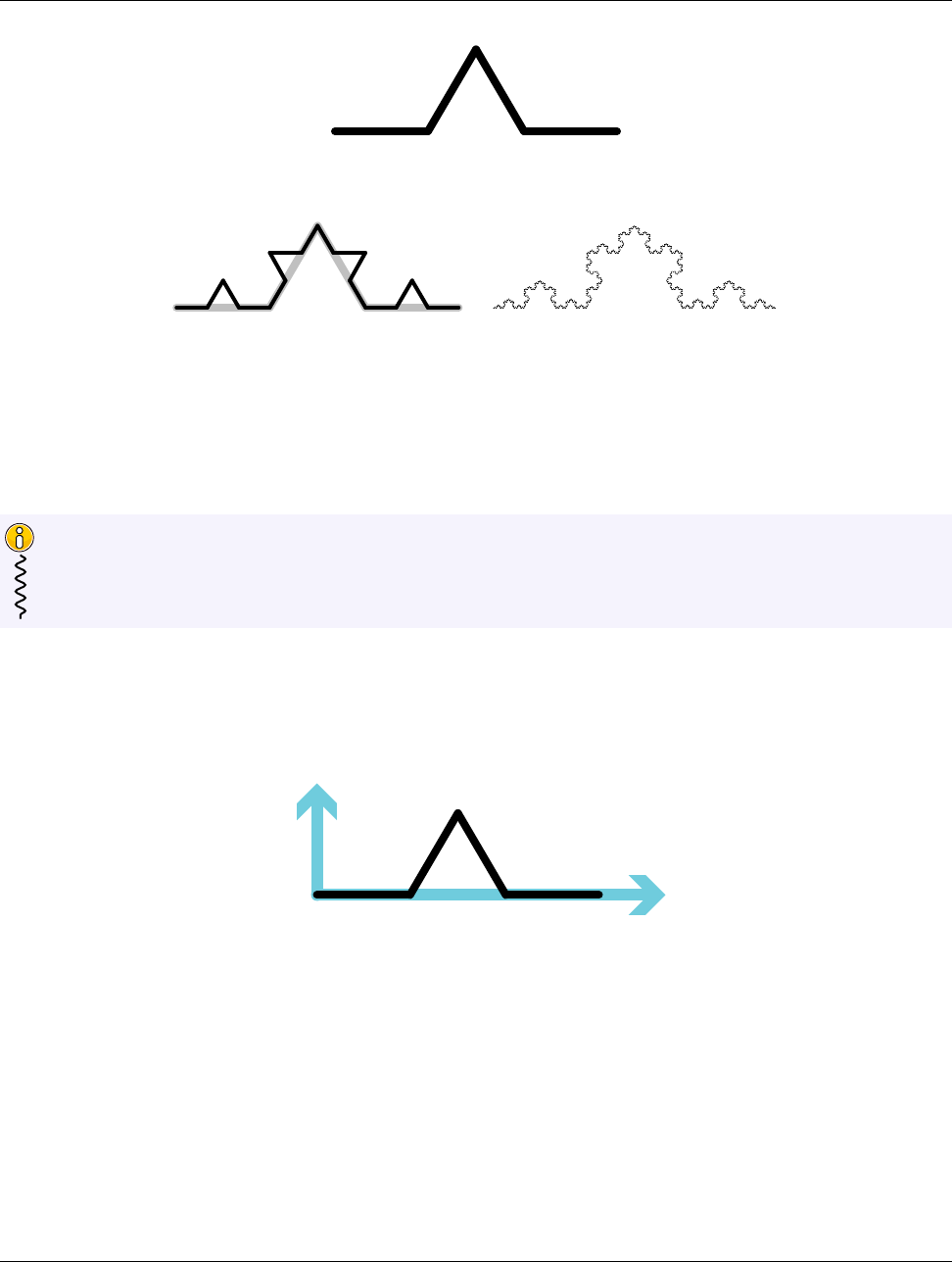
DRAFT
23.1. Motivating Example
Figure 23.1: Basic shape for the Koch Snowflake.
Figure 23.2: The Koch Snowflake after the second iteration (left image) and after several more iterations (right
image).
iterations. This is similar to a Lindenmayer system but with less formality. The size of the curve grows quickly
and in practice it takes few iterations to make close approximations.
The Koch Snowflake is just one example of many line fractals we can make with this recursive line sub-
stitution, which is why it is fruitful to create a worklet type to implement such fractals. We use the Koch
Snowflake to set up the example here. Section 23.6 provides several more examples.
Did you know?
To implement line fractals of this nature, we want to be able to define the lines of the base shape in terms of
parametric coordinates and then transform the coordinates to align with a line segment. For example, the Koch
Snowflake base shape could be defined with parametric coordinates shown in Figure 23.3.
(0,0) (0.33,0)
(0.5,0.29)
(0.67,0) (1,0)
Figure 23.3: Parametric coordinates for the Koch Snowflake shape.
Given these parametric coordinates, for each line we define an axis with the main axis along the line segment
and the secondary axis perpendicular to that. Given this definition, we can perform each fractal iteration by
applying this transform for each line segment as shown in Figure 23.4.
To implement the application of the line fractal demonstrated in Figure 23.4, let us define a class named Line-
FractalTransform that takes as its constructor the coordinates of two ends of the original line. As its operator,
LineFractalTransform takes a point in parametric space and returns the coordinates in world space in respect
to the original line segment. We define this class in the vtkm::exec namespace because the intended use case
is by worklets of the type we are making. A definition of LineFractalTransform is given in Example 23.1
Example 23.1: A support class for a line fractal worklet.
306 Chapter 23. New Worklet Types
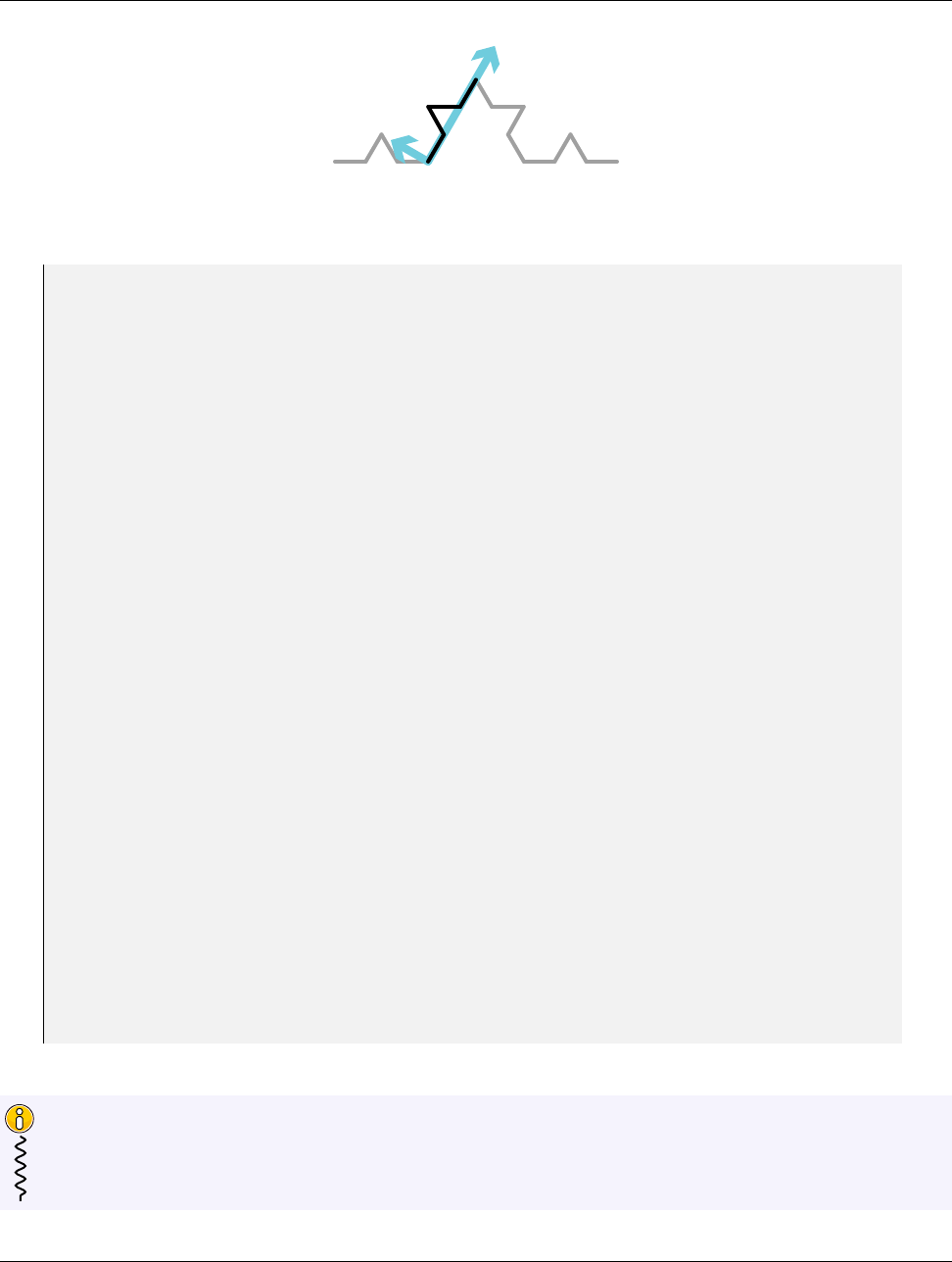
DRAFT
23.1. Motivating Example
Figure 23.4: Applying the line fractal transform for the Koch Snowflake.
1namespace vtkm
2{
3namespace exec
4{
5
6class LineFractalTransform
7{
8using VecType = vtkm:: Vec <vtkm:: FloatDefault , 2 >;
9
10 pu bl ic :
11 template <typename T >
12 VTKM_EXEC LineFractalTransform(const vtkm:: Vec <T , 2 >& poi nt 0 ,
13 const vtkm:: Vec < T , 2 >& p oi nt 1 )
14 {
15 this - > Off se t = point0 ;
16 this - > UAxis = p oint 1 - point 0 ;
17 this - > VAxis = vtkm:: make_V ec (- this -> UAxis [1] , this - > UAxi s [0 ]) ;
18 }
19
20 template <typename T >
21 VT KM _EXEC vtkm :: Vec <T , 2 > operator ()( const vtkm:: Vec < T , 2 >& p po in t ) const
22 {
23 VecTy pe pp oin tCa st ( pp oi nt );
24 VecTy pe tra ns fo rm =
25 pp oi nt Ca st [0] * this -> UAxis + p po in tC as t [1] * this -> VA xis + this -> Offs et ;
26 re tu rn vtkm:: Vec <T , 2 > ( t ra ns fo r m );
27 }
28
29 template <typename T >
30 VT KM _EXEC vtkm :: Vec <T , 2 > operator ()( T x , T y ) const
31 {
32 re tu rn (* th is )( vtkm:: Vec < T , 2 >( x , y ) );
33 }
34
35 private:
36 VecTy pe Offse t ;
37 Ve cT ype UAxis ;
38 Ve cT ype VAxis ;
39 };
40
41 } // nam es pa ce exec
42 } // nam es pa ce vtkm
The definition of LineFractalTransform (or something like it) is not strictly necessary for implementing
a worklet type. However, it is common to implement such supporting classes that operate in the execution
environment in support of the operations typically applied by the worklet type.
Did you know?
Chapter 23. New Worklet Types 307

DRAFT
23.1. Motivating Example
The remainder of this chapter is dedicated to defining a WorkletLineFractal class and supporting objects that
allow you to easily make line fractals. Example 23.2 demonstrates how we intend to use this worklet type.
Example 23.2: Demonstration of how we want to use the line fractal worklet.
1st ru ct KochSnowflake
2{
3st ru ct FractalWorklet : vtkm:: worklet:: Wor kletL ine Fr act al
4{
5using ControlSignature =void( Se gm en ts In , Segmen ts Ou t <4 >);
6using ExecutionSignature =void(Transform , _2 );
7using InputDomain =_1 ;
8
9template <typename SegmentsOutVecType >
10 void operator()( const vtkm:: exec::LineFractalTransform& transform ,
11 Se gme nts Out VecTyp e & s egm ent sO utV ec ) const
12 {
13 s eg me nt sO ut Ve c [ 0] [0 ] = tr an sf orm ( 0. 00 f , 0 .0 0 f );
14 s eg me nt sO ut Ve c [ 0] [1 ] = tr an sf orm ( 0. 33 f , 0 .0 0 f );
15
16 s eg me nt sO ut Ve c [ 1] [0 ] = tr an sf orm ( 0. 33 f , 0 .0 0 f );
17 s eg me nt sO ut Ve c [ 1] [1 ] = tr an sf orm ( 0. 50 f , 0 .2 9 f );
18
19 s eg me nt sO ut Ve c [ 2] [0 ] = tr an sf orm ( 0. 50 f , 0 .2 9 f );
20 s eg me nt sO ut Ve c [ 2] [1 ] = tr an sf orm ( 0. 67 f , 0 .0 0 f );
21
22 s eg me nt sO ut Ve c [ 3] [0 ] = tr an sf orm ( 0. 67 f , 0 .0 0 f );
23 s eg me nt sO ut Ve c [ 3] [1 ] = tr an sf orm ( 1. 00 f , 0 .0 0 f );
24 }
25 };
26
27 template <typename Device >
28 VTKM_CONT static vtkm:: cont:: ArrayHandle <vtkm:: Vec <vtkm :: FloatDefault , 2 >> Run (
29 vtkm:: IdComponent numIterations ,
30 Device)
31 {
32 using VecType = vtkm:: Vec <vtkm:: Float32 , 2 >;
33
34 vtkm:: cont:: ArrayHandle < V ecT ype > p oint s ;
35
36 // I ni ti al iz e points ar ray wi th a single line
37 point s . Alloca te (2);
38 po in ts . G et Por ta lC ont ro l (). Se t (0 , Vec Typ e ( 0. 0f , 0.0 f ) );
39 po in ts . G et Por ta lC ont ro l (). Se t (1 , Vec Typ e ( 1. 0f , 0.0 f ) );
40
41 vtkm:: worklet:: Di sp at che rL ineFrac ta l < Koc hS now fl ake :: Fract al Wo rk le t , Device >
42 di sp atc he r ;
43
44 for (vtkm:: IdComponent i = 0; i < numIt er at ions ; ++ i )
45 {
46 vtkm:: cont:: ArrayHandle < V ecT ype > o ut Po in ts ;
47 di spa tch er . I nv ok e (points , outPoint s );
48 points = o utPoints ;
49 }
50
51 re tu rn points;
52 }
53 };
308 Chapter 23. New Worklet Types

DRAFT
23.2. Thread Indices
23.2 Thread Indices
The first internal support class for implementing a worklet type is a class that manages indices for a thread.
As the name would imply, the thread indices class holds a reference to an index identifying work to be done
by the current thread. This includes indices to the current input element and the current output element.
The thread indices object can also hold other information (that may not strictly be index data) about the
input and output data. For example, the thread indices object for topology maps (named vtkm::exec::arg::-
ThreadIndicesTopologyMap) maintains cell shape and connection indices for the current input object.
As is discussed briefly in Section 22.3, a thread indices object is given to the vtkm::exec::arg::Fetch class to
retrieve data from the execution object. The thread indices object serves two important functions for the Fetch.
The first function is to cache information about the current thread that is likely to be used by multiple objects
retrieving information. For example, in a point to cell topology map data from point fields must be retrieved by
looking up indices in the topology connections. It is more efficient to retrieve the topology connections once and
store them in the thread indices than it is to look them up independently for each field.
The second function of thread indices is to make it easier to find information about the input domain when
fetching data. Once again, getting point data in a point to cell topology map requires looking up connectivity
information in the input domain. However, the Fetch object for the point field does not have direct access to
the data for the input domain. Instead, it gets this information from the thread indices.
All worklet classes have a method named GetThreadIndices that constructs a thread indices object for a given
thread. GetThreadIndices is called with 5 parameters: a unique index for the thread (i.e. worklet instance), an
array portal that maps output indices to input indices (which might not be one-to-one if a scatter is being used),
an array portal that gives the visit index for each output index, the execution object for the input domain, and
an offset of the current index of the local invoke to a global indexing (used for streaming).
The base worklet implementation provides an implementation of GetThreadIndices that creates a vtkm::-
exec::arg::ThreadIndicesBasic object. This provides the minimum information required in a thread indices
object, but non-trivial worklet types are likely to need to provide their own thread indices type. This following
example shows the implementation of GetThreadIndices we will use in our worklet type superclass (discussed
in more detail in Section 23.4).
Example 23.3: Implementation of GetThreadIndices in a worklet superclass.
1VTKM_SUPPRESS_EXEC_WARNINGS
2template <typename OutToInPortalType ,
3typename VisitPortalType ,
4typename InputDomainType >
5VT KM _EXEC vtkm :: exec:: arg ::ThreadIndicesLineFractal GetThreadIndices(
6vtkm:: Id threadIndex ,
7const Ou tTo InP ort alT ype & outToIn ,
8const Vi sit Po rta lTy pe & visit ,
9const In put Do mai nTy pe & inputPoi nts ,
10 vtkm:: Id globalThreadIndexOffset) const
11 {
12 re tu rn vtkm:: exec:: arg ::ThreadIndicesLineFractal(
13 threadIndex , outToIn , visit , inputP oin ts , gl ob alT hre ad I nd exO ffs et );
14 }
As we can see in Example 23.3, our new worklet type needs a custom thread indices class. Specifically, we want
the thread indices class to manage the coordinate information of the input line segment.
Chapter 23. New Worklet Types 309

DRAFT
23.2. Thread Indices
The implementation of a thread indices object we demonstrate here stores point coordinate information in
addition to actual indices. It is acceptable for a thread indices object to store data that are not strictly
indices. That said, the thread indices object should only load data (index or not) that is almost certain to
be used by any worklet implementation. The thread indices object is created before any time that the worklet
operator is called. If the thread indices object loads data that is never used by a worklet, that is a waste.
Did you know?
An implementation of a thread indices object usually derives from vtkm::exec::arg::ThreadIndicesBasic (or
some other existing thread indices class) and adds to it information specific to a particular worklet type.
Example 23.4: Implementation of a thread indices class.
1namespace vtkm
2{
3namespace exec
4{
5namespace arg
6{
7
8class ThreadIndicesLineFractal : pu bl ic vtkm:: exec:: arg ::ThreadIndicesBasic
9{
10 using Su pe rc la ss = vtkm:: exec:: arg :: Th rea dIn dic esB asi c ;
11
12 pu bl ic :
13 using CoordinateType = vtkm:: Vec <vtkm:: FloatDefault , 2 >;
14
15 VTKM_SUPPRESS_EXEC_WARNINGS
16 template <typename OutToInPortalType ,
17 typename VisitPortalType ,
18 typename InputPointPortal >
19 VTKM_EXEC ThreadIndicesLineFractal(vtkm:: Id threadIndex ,
20 const Ou tTo InP ort alT ype & outToIn ,
21 const Vi sit Po rta lTy pe & visit ,
22 const In put Poi ntP or tal & inputPoin ts ,
23 vtkm:: Id globalThreadIndexOffset = 0)
24 : S upe rc las s ( thread In de x ,
25 ou tTo In . Get ( t hr ead In dex ) ,
26 vi si t . Get ( t hr ead In dex ) ,
27 globalThreadIndexOffset)
28 {
29 this - > P oi nt0 = in pu tPo in ts . Ge t (this - > Ge tI np utI nd ex () )[0 ];
30 this - > P oi nt1 = in pu tPo in ts . Ge t (this - > Ge tI np utI nd ex () )[1 ];
31 }
32
33 VTKM_EXEC
34 const Co ord in ate Typ e & GetPoint0 () const {r e t ur n this - > Point0 ; }
35
36 VTKM_EXEC
37 const Co ord in ate Typ e & GetPoint1 () const {r e t ur n this - > Point1 ; }
38
39 private:
40 CoordinateType Point0;
41 CoordinateType Point1;
42 };
43
44 } // nam es pa ce arg
45 } // nam es pa ce exec
46 } // nam es pa ce vtkm
310 Chapter 23. New Worklet Types

DRAFT
23.3. Signature Tags
23.3 Signature Tags
It is common that when defining a new worklet type, the new worklet type is associated with new types of data.
Thus, it is common that implementing new worklet types involves defining custom tags for ControlSignatures
and ExecutionSignatures. This in turn typically requires creating custom TypeCheck,Transport, and Fetch
classes.
Chapter 22 describes in detail the process of defining new worklet types and the associated code to manage data
from an argument to the dispatcher’s Invoke to the data that are passed to the worklet operator. Rather than
repeat the discussion, readers should review Chapter 22 for details on how custom arguments are defined for a
new worklet type. In particular, we use the code from Examples 22.2 (page 294), 22.4 (page 297), and 22.5 (page
299) to implement an argument representing 2D line segments (which is our input domain). All these examples
culminate in the definition of a ControlSignature tag in our worklet superclass.
Example 23.5: Custom ControlSignature tag for the input domain of our example worklet type.
1st ru ct S eg me nt sI n : vtkm:: cont:: arg :: ControlSignatureTagBase
2{
3using TypeCheckTag = vtkm:: cont:: arg ::TypeCheckTag2DCoordinates;
4using TransportTag = vtkm:: cont:: arg :: T ran sp ortT ag2 DL ine Segm en tsIn ;
5using FetchTag = vtkm:: exec:: arg ::FetchTag2DLineSegmentsIn;
6};
As you have worked with different existing worklet types, you have likely noticed that different worklet types
have special ExecutionSignature tags to point to information in the input domain. For example, a point to cell
topology map has special ExecutionSignature tags for getting the input cell shape and the indices to all points
incident on the current input cell. We described in the beginning of the chapter that we wanted our worklet
type to provide worklet implementations an object named LineFractalTransform (Example 23.1), so it makes
sense to define our own custom ExecutionSignature tag to provide this object.
Chapter 22 gives an example of a custom ExecutionSignature tag that modifies what information is fetched
from an argument (Examples 22.6 and 22.9). However, ExecutionSignature tags that only pull data from input
domain behave a little differently because they only get information from the thread indices object and ignore
the associated data object. This is done by providing a partial specialization of vtkm::exec::arg::Fetch that
specializes on the aspect tag but not on the fetch tag.
Example 23.6: A Fetch for an aspect that does not depend on any control argument.
1namespace vtkm
2{
3namespace exec
4{
5namespace arg
6{
7
8st ru ct AspectTagLineFractalTransform
9{
10 };
11
12 template <typename FetchTag , typename ExecObjectType >
13 st ru ct Fetch <FetchTag ,
14 vtkm:: exec:: arg ::AspectTagLineFractalTransform ,
15 vtkm:: exec:: arg ::ThreadIndicesLineFractal ,
16 ExecObjectType >
17 {
18 using ValueType = LineFractalTransform;
19
20 VTKM_SUPPRESS_EXEC_WARNINGS
21 VTKM_EXEC
22 Va lue Typ e L oa d ( const vtkm:: exec:: arg ::ThreadIndicesLineFractal& indices ,
Chapter 23. New Worklet Types 311

DRAFT
23.3. Signature Tags
23 const ExecObjectType&) const
24 {
25 re tu rn V alueType ( ind ices . GetPoint0 () , ind ic es . GetPoint1 ());
26 }
27
28 VTKM_EXEC
29 void Sto re ( const vtkm:: exec:: arg ::ThreadIndicesLineFractal&,
30 const ExecObjectType&,
31 const Va lueType &) const
32 {
33 // S tor e is a no - o p f or thi s fe tc h .
34 }
35 };
36
37 } // nam es pa ce arg
38 } // nam es pa ce exec
39 } // nam es pa ce vtkm
The definition of an associated ExecutionSignature tag simply has to use the define aspect as its AspectTag.
The tag also has to define a INDEX member (which is required of all ExecutionSignature tags). This is problem-
atic as this execution argument does not depend on any particular control argument. Thus, it is customary to
simply set the INDEX to 1. There is guaranteed to be at least one ControlSignature argument for any worklet
implementation. Thus, the first argument is sure to exist and can then be ignored.
Example 23.7: Custom ExecutionSignature tag that only relies on input domain information in the thread
indices.
1st ru ct T ra ns form : vtkm:: exec:: arg :: ExecutionSignatureTagBase
2{
3static const vtkm:: IdComponent INDEX = 1;
4using As pectTag = vtkm:: exec:: arg ::AspectTagLineFractalTransform;
5};
So far we have discussed how to get input line segments into our worklet. We also need a ControlSignature
tag to represent the output line segments created by instances of our worklet. The motivating example has each
worklet outputting a fixed number (greater than 1) of line segments for each input line segment. To manage
this, we will define another ControlSignature tag that outputs these line segments (as two Vec-2 coordinates).
This is defined as a Vec of Vec-2’s. The tag takes the number of line segments as a template argument.
Example 23.8: Output ControlSignature tag for our motivating example.
1template <vtkm:: IdComponent NumSegments >
2st ru ct S eg me nt sOut : vtkm:: cont:: arg:: ControlSignatureTagBase
3{
4using TypeCheckTag = vtkm:: cont:: arg ::TypeCheckTag2DCoordinates;
5using TransportTag = vtkm:: cont:: arg :: T ra nsp ort Tag2 DLi neS egme nts Out < NumSe gm en ts >;
6using FetchTag = vtkm:: exec:: arg :: FetchTagArrayDirectOut;
7};
You can see that the tag in Example 23.8 relies on a custom transport named TransportTag2DLineSegmentsOut.
There is nothing particularly special about this transport, but we provide the implementation here for complete-
ness.
Example 23.9: Implementation of Transport for the output in our motivating example.
1namespace vtkm
2{
3namespace cont
4{
5namespace arg
6{
7
312 Chapter 23. New Worklet Types
DRAFT
23.4. Worklet Superclass
8template <vtkm:: IdComponent NumOutputPerInput >
9st ru ct TransportTag2DLineSegmentsOut
10 {
11 };
12
13 template <vtkm:: IdComponent NumOutputPerInput ,
14 typename ContObjectType ,
15 typename Device >
16 st ru ct Transport <vtkm:: cont:: arg:: T ran spo rtT ag2 DLi neSegm ent sOu t < NumOu tputPerInput >,
17 ContObjectType ,
18 Device >
19 {
20 VTKM_IS_ARRAY_HANDLE(ContObjectType);
21
22 using GroupedArrayType = vtkm :: cont:: ArrayHandleGroupVec <
23 vtkm:: cont:: ArrayHandleGroupVec <ContObjectType , 2>,
24 NumOutputPerInput >;
25
26 using ExecObjectType =
27 typename GroupedArrayType::template Execu tionTyp es < Device >:: Porta l ;
28
29 template <typename InputDomainType >
30 VTKM_CONT ExecObjectType operator()( const Con tO bje ctT yp e & object ,
31 const In put Do mai nTy pe &,
32 vtkm:: Id ,
33 vtkm:: Id outputRange) const
34 {
35 Gr ou ped Ar ray Ty pe g rou pe dAr ray ( vtkm:: cont:: make_ArrayHandleGroupVec <2 >( o bj ect )) ;
36 re tu rn g ro upe dA rr ay . Pr ep are For Out put ( ou tpu tRange , Dev ice ());
37 }
38 };
39
40 } // nam es pa ce arg
41 } // nam es pa ce cont
42 } // nam es pa ce vtkm
In addition to these special ControlSignature tags that are specific to the nature of our worklet type, it is
common to need to replicate some more common or general ControlSignature tags. One such tag, which is
appropriate for our worklet type, is a “field” type that takes an array with exactly one value associated with
each input or output element. We can build these field tags using existing type checks, transports, and fetches.
The following example defines a FieldIn tag for our fractal worklet type. A FieldOut tag can be made in a
similar manner.
Example 23.10: Implementing a FieldIn tag.
1template <typename TypeList = AllTypes >
2st ru ct FieldIn :vtkm:: cont:: arg :: ControlSignatureTagBase
3{
4using TypeCheckTag = vtkm:: cont:: arg :: TypeCheckTagArray <TypeList >;
5using TransportTag = vtkm:: cont:: arg :: TransportTagArrayIn;
6using FetchTag = vtkm:: exec:: arg :: FetchTagArrayDirectIn;
7};
23.4 Worklet Superclass
The penultimate step in defining a new worklet type is to define a class that will serve as the superclass of
all implementations of worklets of this type. This class itself must inherit from vtkm::worklet::internal::-
WorkletBase. By convention the worklet superclass is placed in the vtkm::worklet namespace and its name
starts with Worklet.
Chapter 23. New Worklet Types 313

DRAFT
23.4. Worklet Superclass
Within the worklet superclass we define the signature tags (as discussed in Section 23.3) and the Get-
ThreadIndices method (as discussed in Section 23.2. The worklet superclass can also override other default
behavior of the WorkletBase (such as special scatter). And the worklet superclass can provide other items that
might be particularly useful to its subclasses (such as commonly used tags).
Example 23.11: Superclass for a new type of worklet.
1namespace vtkm
2{
3namespace worklet
4{
5
6class WorkletLineFractal : pu bl ic vtkm:: worklet:: internal:: WorkletBase
7{
8pu bl ic :
9/// Contro l s ig na tu re tag for line se gm ents in the p lan e . Used as the i nput
10 /// domai n .
11 ///
12 st ru ct S eg me nt sI n : vtkm:: cont:: arg :: ControlSignatureTagBase
13 {
14 using TypeCheckTag = vtkm:: cont:: arg ::TypeCheckTag2DCoordinates;
15 using TransportTag = vtkm:: cont:: arg :: T ran sp ortT ag2 DL ine Segm en tsIn ;
16 using FetchTag = vtkm:: exec:: arg ::FetchTag2DLineSegmentsIn;
17 };
18
19 /// Contro l s ig na tu re tag for a g roup of outpu t line se gments . The template
20 /// ar gu me nt s pe ci fi es how many line se gm ents are o ut pu tt ed f or each inpu t .
21 /// The type is a Vec - l ik e ( o f s ize N um Se gm en ts ) of Vec -2 ’ s .
22 ///
23 template <vtkm:: IdComponent NumSegments >
24 st ru ct S eg me nt sOut : vtkm:: cont:: arg:: ControlSignatureTagBase
25 {
26 using TypeCheckTag = vtkm:: cont:: arg ::TypeCheckTag2DCoordinates;
27 using TransportTag = vtkm:: cont:: arg :: T ra nsp ort Tag2 DLi neS egme nts Out < NumSe gm en ts >;
28 using FetchTag = vtkm:: exec:: arg :: FetchTagArrayDirectOut;
29 };
30
31 /// Contro l s ig na tu re tag for input fields . There is one e ntry per input line
32 /// se gm ent . This tag takes a template arg um en t that is a type list tag that
33 /// li mits the p ossible val ue types in the arr ay .
34 ///
35 template <typename TypeList = AllTypes >
36 st ru ct FieldIn :vtkm:: cont:: arg :: ControlSignatureTagBase
37 {
38 using TypeCheckTag = vtkm:: cont:: arg :: TypeCheckTagArray <TypeList >;
39 using TransportTag = vtkm:: cont:: arg :: TransportTagArrayIn;
40 using FetchTag = vtkm:: exec:: arg :: FetchTagArrayDirectIn;
41 };
42
43 /// Contro l s ig na tu re tag for input fields . There is one e ntry per input line
44 /// se gm ent . This tag takes a template arg um en t that is a type list tag that
45 /// li mits the p ossible val ue types in the arr ay .
46 ///
47 template <typename TypeList = AllTypes >
48 st ru ct F ieldOut :vtkm:: cont:: arg :: ControlSignatureTagBase
49 {
50 using TypeCheckTag = vtkm:: cont:: arg :: TypeCheckTagArray <TypeList >;
51 using TransportTag = vtkm:: cont:: arg :: TransportTagArrayOut;
52 using FetchTag = vtkm:: exec:: arg :: FetchTagArrayDirectOut;
53 };
54
55 /// Exec ut io n s ig nature tag fo r a L ine Fr act al Tra ns for m from the input .
56 ///
57 st ru ct T ra ns form : vtkm:: exec:: arg :: ExecutionSignatureTagBase
314 Chapter 23. New Worklet Types
DRAFT
23.5. Dispatcher
58 {
59 static const vtkm:: IdComponent INDEX = 1;
60 using As pectTag = vtkm:: exec:: arg ::AspectTagLineFractalTransform;
61 };
62
63 VTKM_SUPPRESS_EXEC_WARNINGS
64 template <typename OutToInPortalType ,
65 typename VisitPortalType ,
66 typename InputDomainType >
67 VT KM _EXEC vtkm :: exec:: arg ::ThreadIndicesLineFractal GetThreadIndices(
68 vtkm:: Id threadIndex ,
69 const Ou tTo InP ort alT ype & outToIn ,
70 const Vi sit Po rta lTy pe & visit ,
71 const In put Do mai nTy pe & inputPoi nts ,
72 vtkm:: Id globalThreadIndexOffset) const
73 {
74 re tu rn vtkm:: exec:: arg ::ThreadIndicesLineFractal(
75 threadIndex , outToIn , visit , inputP oin ts , gl ob alT hre ad I nd exO ffs et );
76 }
77 };
78
79 } // nam es pa ce worklet
80 } // nam es pa ce vtkm
Be wary of creating worklet superclasses that are templated. The C++ compiler rules for superclass tem-
plates that are only partially specialized are non-intuitive. If a subclass does not fully resolve the template,
features of the superclass such as signature tags will have to be qualified with typename keywords, which
reduces the usability of the class.
Common Errors
23.5 Dispatcher
The final element required for a new worklet type is an associated dispatcher class for invoking the worklet.
As documented in Chapter 12, each worklet type has its own associated dispatcher object. By convention,
the dispatcher is placed in the vtkm::worklet and has the same name as the worklet superclass with the
Worklet replaced with Dispatcher. So since the worklet superclass for our motivating example is named
WorkletLineFractal, we name the associated dispatcher DispatcherLineFractal.
Also by convention, a dispatcher is a templated class. The first template argument should be the type of the
worklet (which should be a subclass of the associated worklet superclass). The last template argument should be a
device adapter tag with a default value set to VTKM DEFAULT DEVICE ADAPTER TAG. Other template arguments
that the dispatcher might need should be placed in between these two.
Example 23.12: Standard template arguments for a dispatcher class.
1template <typename WorkletType , typename Device = VTKM_DEFAULT_DEVICE_ADAPTER_TAG >
2class DispatcherLineFractal
A dispatcher implementation inherits from vtkm::worklet::internal::DispatcherBase.DispatcherBase is
itself a templated class with the following three templated arguments.
1. The dispatcher class that is subclassing DispatcherBase. All template arguments must be given.
Chapter 23. New Worklet Types 315
DRAFT
23.5. Dispatcher
2. The type of the worklet being dispatched (which by convention is the first argument of the dispatcher’s
template).
3. The expected superclass of the worklet, which is associated with the dispatcher implementation. Dis-
patcherBase will check that the worklet has the appropriate superclass and provide a compile error if
there is a mismatch.
The convention of having a subclass be templated on the derived class’ type is known as the Curiously
Recurring Template Pattern (CRTP). In the case of DispatcherBase, VTK-m uses this CRTP behavior
to allow the general implementation of Invoke to run DoInvoke in the subclass, which as we see in a
moment is itself templated.
Did you know?
Example 23.13: Subclassing DispatcherBase.
1template <typename WorkletType , typename Device = VTKM_DEFAULT_DEVICE_ADAPTER_TAG >
2class DispatcherLineFractal
3:pu bl ic vtkm:: worklet:: internal::DispatcherBase <
4DispatcherLineFractal <WorkletType >,
5WorkletType ,
6vtkm:: worklet:: W or kl et LineFractal >
The dispatcher should have two constructors. The first constructor takes a worklet and a dispatcher. Both
arguments should have a default value that is a new object created with its default constructor. It is good
practice to put a warning on this constructor letting users know if they get a compile error there it is probably
because the worklet or dispatcher does not have a default constructor and they need to provide one. The second
constructor just takes a dispatcher.
Example 23.14: Typical constructor for a dispatcher.
1// If you get a com pile er ror he re about there being no appro pr ia te cons tr uc to r
2// for ScatterType , then that p ro bably means that the worklet you are tr ying to
3// exe cute has d efine d a cust om ScatterType and that you need to cr eate one
4// ( be cause th ere is no de fault way to c on st ruct the scat te r ). By conventi on ,
5// workle ts that de fine a custo m sc atter type us ually p ro vide a st atic me thod
6// na med M akeScatte r that constructs a s catter ob ject .
7VTKM_CONT
8DispatcherLineFractal(const Wo rk letType & worklet = W or kle tT yp e () ,
9const ScatterType& scatter = ScatterType())
10 : S upe rcl as s ( worklet , scatter)
11 {
12 }
13
14 VTKM_CONT
15 DispatcherLineFractal(const ScatterType& scatter)
16 : Sup er cl as s ( Wo rklet Ty pe () , scat ter )
17 {
18 }
Finally, the dispatcher must implement a const method named DoInvoke. The DoInvoke method should take a
single argument. The argument will be an object of type vtkm::internal::Invocation although it is usually
more convenient to just express the argument type as a single template parameter. The Invocation could
contain several data items, so it is best to pass this argument as a constant reference.
Example 23.15: Declaration of DoInvoke of a dispatcher.
1template <typename Inv oca tion >
2VTKM_CONT void DoInvok e ( Inv ocation & invocation ) const
316 Chapter 23. New Worklet Types

DRAFT
23.5. Dispatcher
Invocation is an object that encapsulates the state and data relevant to the invoke. Invocation contains
multiple types and data items. For brevity only the ones most likely to be used in a DoInvoke method are
documented here. We discuss these briefly before getting back to the implementation of DoInvoke.
vtkm::internal::Invocation contains a data member named Parameters that contains the data passed to
the Invoke method of the dispatcher (with some possible transformations applied). Parameters is stored in a
vtkm::internal::FunctionInterface template object. (FunctionInterface is described in Chapter 21.) The
specific type of Parameters is defined as type ParameterInterface in the Invoke object.
The Invoke object also contains the types ControlInterface and ExecutionInterface that are FunctionIn-
terface classes built from the ControlSignature and ExecutionSignature of the worklet. These Function-
Interface classes provide a simple mechanism for introspecting the arguments of the worklet’s signatures.
All worklets must also define an input domain index, which points to one of the ControlSignature/Invoke
arguments. This number is also captured in the vtkm::internal::Invocation object in a field named In-
putDomainIndex. For convenience, Invocation also has the type InputDomainTag set to be the same as the
ControlSignature argument corresponding to the input domain. Likewise, Invocation has the type InputDo-
mainType set to be the same type as the (transformed) input domain argument to Invoke.Invocation also has
a method name GetInputDomain that returns the invocation object passed to Invoke.
Getting back to the implementation of a dispatcher, the DoInvoke should first verify that the ControlSignature
argument associated with the input domain is of the expected type. This can be done by comparing the
Invocation::InputDomainTag with the expected signature tag using a tool like std::is same. This step
is not strictly necessary, but is invaluable to users diagnosing issues with using the dispatcher. It does not
hurt to also check that the Invoke argument for the input domain is also the same as expected (by checking
Invocation::InputDomainType). It is additionally helpful to have a descriptive comment near these checks.
Example 23.16: Checking the input domain tag and type.
1// Get the contro l sign at ur e tag fo r the inpu t d om ai n .
2using InputDomainTag = typename In vo ca ti on ::InputDomainTag;
3
4// If you get a c ompile error on this line , then you have set the input
5// do mai n to s om et hi ng that is not a Se gm en tsIn parameter , wh ich is not
6// v al id .
7VTKM_STATIC_ASSERT(
8( std :: i s_s am e < I np utD oma inT ag ,
9vtkm:: worklet:: W ork le tLi ne Fra ct al :: SegmentsIn >:: value ));
10
11 // This is the type fo r the input d omain
12 using In putDo ma inTyp e = typename In vo ca ti on :: In put Dom ai nTy pe ;
13
14 // If you get a com pile er ror on thi s line , then you have t ried to use
15 // s om et hi ng that is not a vtkm :: cont:: ArrayHandle as the input domain to a
16 // topolog y o pe ra ti on ( that o pe ra tes on a cell set co nn ec ti on domain ).
17 VTKM_IS_ARRAY_HANDLE( I np utD oma in Typ e );
Next, DoInvoke must determine the size in number of elements of the input domain. When the default identity
scatter is used, the input domain size corresponds to the number of instances the worklet is executed. (Other scat-
ters will transform the input domain size to an output domain size, and that output domain size will determine the
number of instances.) The input domain size is generally determined by using Invocation::::GetInputDomain
and querying the input domain argument. In our motivating example, the input domain is an ArrayHandle and
the input domain size is half the size of the array (since array entries are paired up into line segments).
The final thing DoInvoke does is call BasicInvoke on its DispatcherBase superclass. BasicInvoke does the
complicated work of transferring arguments, scheduling the parallel job, and calling the worklet’s operator.
BasicInvoke takes three arguments: the Invocation object, the size of the input domain, and the device
adapter tag to run on.
Chapter 23. New Worklet Types 317
DRAFT
23.5. Dispatcher
Example 23.17: Calling BasicInvoke from a dispatcher’s DoInvoke.
1// We can pull the input doma in p ar am et er ( the data s pe ci fy in g the i npu t
2// d om ain ) from the in voc ation o bj ec t .
3const In putDo ma inTyp e & in pu tD om ai n = in vocation . Get In putDo ma in ();
4
5// Now that we have the input domain , we can extrac t the range of the
6// sch edu li ng and call Ba sic In voke .
7this - > BasicInvoke ( invo cat ion , inpu tD om ain . G et Num ber OfV alues () / 2);
Putting this all together, the following example demonstrates the full implementation of the dispatcher for our
motivating example.
Example 23.18: Implementation of a dispatcher for a new type of worklet.
1namespace vtkm
2{
3namespace worklet
4{
5
6template <typename WorkletType , typename Device = VTKM_DEFAULT_DEVICE_ADAPTER_TAG >
7class DispatcherLineFractal
8:pu bl ic vtkm:: worklet:: internal::DispatcherBase <
9DispatcherLineFractal <WorkletType >,
10 WorkletType ,
11 vtkm:: worklet:: W or kl et LineFractal >
12 {
13 using Su pe rc la ss =
14 vtkm:: worklet:: internal:: D ispatc herBas e < D isp atc her Lin eFr act al < Wo rk letT yp e > ,
15 WorkletType ,
16 vtkm:: worklet:: W or kl et LineFractal >;
17 using ScatterType =typename Su pe rc la ss :: ScatterType;
18
19 pu bl ic :
20 // If you get a com pile er ror he re about there being no appro pr ia te cons tr uc to r
21 // for ScatterType , then that p ro bably means that the worklet you are tr ying to
22 // exe cute has d efine d a cust om ScatterType and that you need to cr eate one
23 // ( be cause th ere is no de fault way to c on st ruct the scat te r ). By conventi on ,
24 // workle ts that de fine a custo m sc atter type us ually p ro vide a st atic me thod
25 // na med M akeScatte r that constructs a s catter ob ject .
26 VTKM_CONT
27 DispatcherLineFractal(const Wo rk letType & worklet = W or kle tT yp e () ,
28 const ScatterType& scatter = ScatterType())
29 : S upe rcl as s ( worklet , scatter)
30 {
31 }
32
33 VTKM_CONT
34 DispatcherLineFractal(const ScatterType& scatter)
35 : Sup er cl as s ( Wo rklet Ty pe () , scat ter )
36 {
37 }
38
39 template <typename Inv oca tion >
40 VTKM_CONT void DoInvok e ( Inv ocation & invocation ) const
41 {
42 // Get the contro l sign at ur e tag fo r the inpu t d om ai n .
43 using InputDomainTag = typename In vo ca ti on ::InputDomainTag;
44
45 // If you get a c ompile error on this line , then you have set the input
46 // do mai n to s om et hi ng that is not a Se gm en tsIn parameter , wh ich is not
47 // v al id .
48 VTKM_STATIC_ASSERT(
49 ( std :: i s_s am e < I np utD oma inT ag ,
50 vtkm:: worklet:: W ork le tLi ne Fra ct al :: SegmentsIn >:: value ));
318 Chapter 23. New Worklet Types
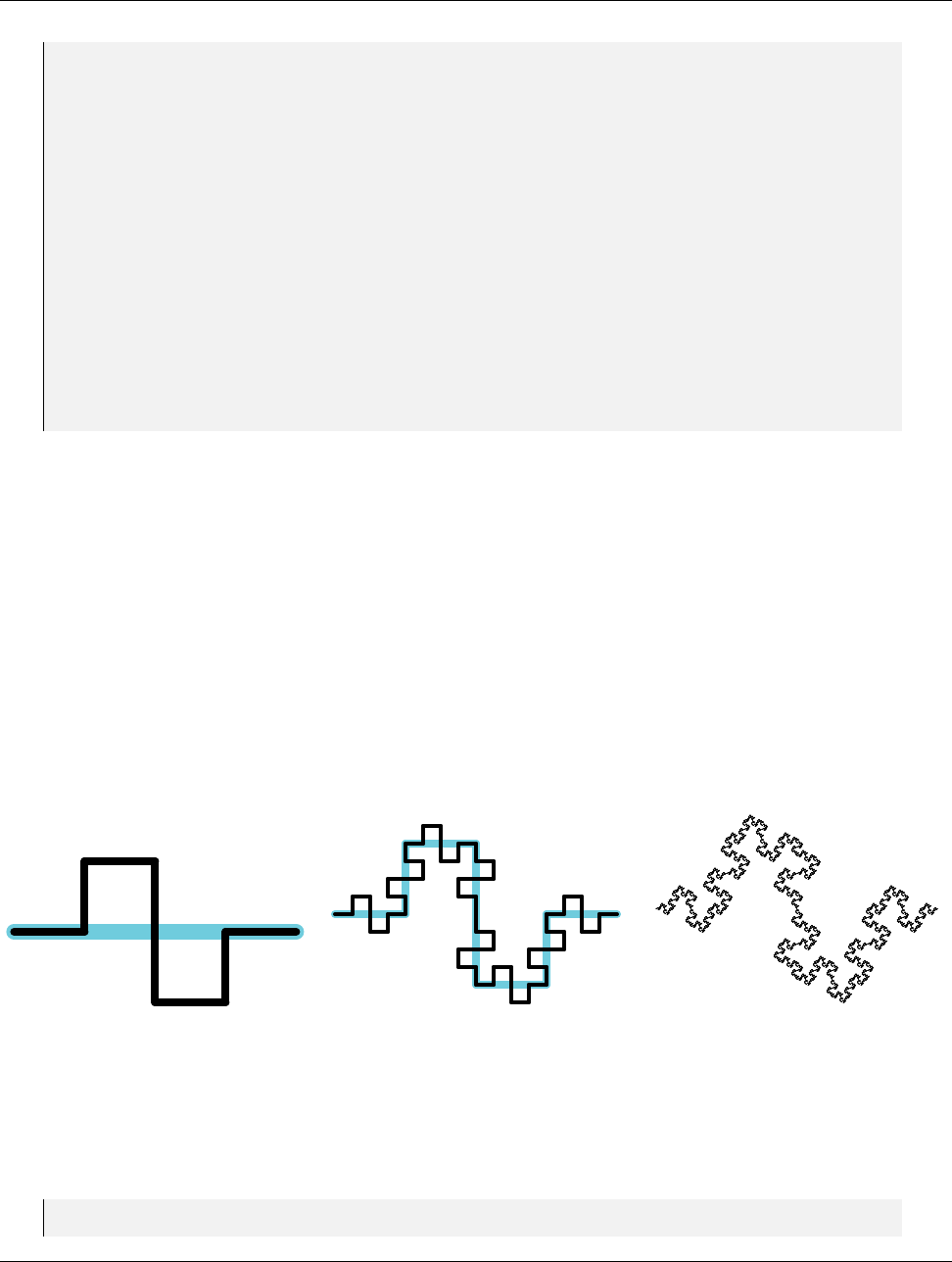
DRAFT
23.6. Using the Worklet
51
52 // This is the type fo r the input d omain
53 using In putDo ma inTyp e = typename In vo ca ti on :: In put Dom ai nTy pe ;
54
55 // If you get a com pile er ror on thi s line , then you have t ried to use
56 // s om et hi ng that is not a vtkm :: cont:: ArrayHandle as the input domain to a
57 // topolog y o pe ra ti on ( that o pe ra tes on a cell set co nn ec ti on domain ).
58 VTKM_IS_ARRAY_HANDLE( I np utD oma in Typ e );
59
60 // We can pull the input doma in p ar am et er ( the data s pe ci fy in g the i npu t
61 // d om ain ) from the in voc ation o bj ec t .
62 const In putDo ma inTyp e & in pu tD om ai n = in vocation . Get In putDo ma in ();
63
64 // Now that we have the input domain , we can extrac t the range of the
65 // sch edu li ng and call Ba sic In voke .
66 this - > BasicInvoke ( invo cat ion , inpu tD om ain . G et Num ber OfV alues () / 2);
67 }
68 };
69
70 } // nam es pa ce worklet
71 } // nam es pa ce vtkm
23.6 Using the Worklet
Now that we have our full implementation of a worklet type that generates line fractals, let us have some fun
with it. The beginning of this chapter shows an implementation of the Koch Snowflake. The remainder of this
chapter demonstrates other fractals that are easily implemented with our worklet type.
23.6.1 Quadratic Type 2 Curve
There are multiple variants of the Koch Snowflake. One simple but interesting version is the quadratic type 1
curve. This fractal has a shape similar to what we used for Koch but has right angles and goes both up and
down as shown in Figure 23.5.
Figure 23.5: The quadratic type 2 curve fractal. The left image gives the first iteration. The middle image gives
the second iteration. The right image gives the result after a few iterations.
The quadratic type 2 curve is implemented exactly like the Koch Snowflake except we output 8 lines to every
input instead of 4, and, of course, the positions of the lines we generate are different.
Example 23.19: A worklet to generate a quadratic type 2 curve fractal.
1st ru ct QuadraticType2
2{
Chapter 23. New Worklet Types 319

DRAFT
23.6. Using the Worklet
3st ru ct FractalWorklet : vtkm:: worklet:: Wor kletL ine Fr act al
4{
5using ControlSignature =void( Se gm en ts In , Segmen ts Ou t <8 >);
6using ExecutionSignature =void(Transform , _2 );
7using InputDomain =_1 ;
8
9template <typename SegmentsOutVecType >
10 void operator()( const vtkm:: exec::LineFractalTransform& transform ,
11 Se gme nts Out VecTyp e & s egm ent sO utV ec ) const
12 {
13 s eg me nt sO ut Ve c [ 0] [0 ] = tr an sf orm ( 0. 00 f , 0 .0 0 f );
14 s eg me nt sO ut Ve c [ 0] [1 ] = tr an sf orm ( 0. 25 f , 0 .0 0 f );
15
16 s eg me nt sO ut Ve c [ 1] [0 ] = tr an sf orm ( 0. 25 f , 0 .0 0 f );
17 s eg me nt sO ut Ve c [ 1] [1 ] = tr an sf orm ( 0. 25 f , 0 .2 5 f );
18
19 s eg me nt sO ut Ve c [ 2] [0 ] = tr an sf orm ( 0. 25 f , 0 .2 5 f );
20 s eg me nt sO ut Ve c [ 2] [1 ] = tr an sf orm ( 0. 50 f , 0 .2 5 f );
21
22 s eg me nt sO ut Ve c [ 3] [0 ] = tr an sf orm ( 0. 50 f , 0 .2 5 f );
23 s eg me nt sO ut Ve c [ 3] [1 ] = tr an sf orm ( 0. 50 f , 0 .0 0 f );
24
25 s eg me nt sO ut Ve c [ 4] [0 ] = tr an sf orm ( 0. 50 f , 0 .0 0 f );
26 s eg me nt sO ut Ve c [ 4] [1 ] = tr an sf orm ( 0. 50 f , - 0. 25 f );
27
28 s eg me nt sO ut Ve c [ 5] [0 ] = tr an sf orm ( 0. 50 f , - 0. 25 f );
29 s eg me nt sO ut Ve c [ 5] [1 ] = tr an sf orm ( 0. 75 f , - 0. 25 f );
30
31 s eg me nt sO ut Ve c [ 6] [0 ] = tr an sf orm ( 0. 75 f , - 0. 25 f );
32 s eg me nt sO ut Ve c [ 6] [1 ] = tr an sf orm ( 0. 75 f , 0 .0 0 f );
33
34 s eg me nt sO ut Ve c [ 7] [0 ] = tr an sf orm ( 0. 75 f , 0 .0 0 f );
35 s eg me nt sO ut Ve c [ 7] [1 ] = tr an sf orm ( 1. 00 f , 0 .0 0 f );
36 }
37 };
38
39 template <typename Device >
40 VTKM_CONT static vtkm:: cont:: ArrayHandle <vtkm:: Vec <vtkm :: FloatDefault , 2 >> Run (
41 vtkm:: IdComponent numIterations ,
42 Device)
43 {
44 using VecType = vtkm:: Vec <vtkm:: Float32 , 2 >;
45
46 vtkm:: cont:: ArrayHandle < V ecT ype > p oint s ;
47
48 // I ni ti al iz e points ar ray wi th a single line
49 point s . Alloca te (2);
50 po in ts . G et Por ta lC ont ro l (). Se t (0 , Vec Typ e ( 0. 0f , 0.0 f ) );
51 po in ts . G et Por ta lC ont ro l (). Se t (1 , Vec Typ e ( 1. 0f , 0.0 f ) );
52
53 vtkm:: worklet:: Di sp at cherLin eF ra ct al < Qu adr at icT ype 2 :: F ractalW orkle t , Device >
54 di sp atc he r ;
55
56 for (vtkm:: IdComponent i = 0; i < numIt er at ions ; ++ i )
57 {
58 vtkm:: cont:: ArrayHandle < V ecT ype > o ut Po in ts ;
59 di spa tch er . I nv ok e (points , outPoint s );
60 points = o utPoints ;
61 }
62
63 re tu rn points;
64 }
65 };
320 Chapter 23. New Worklet Types
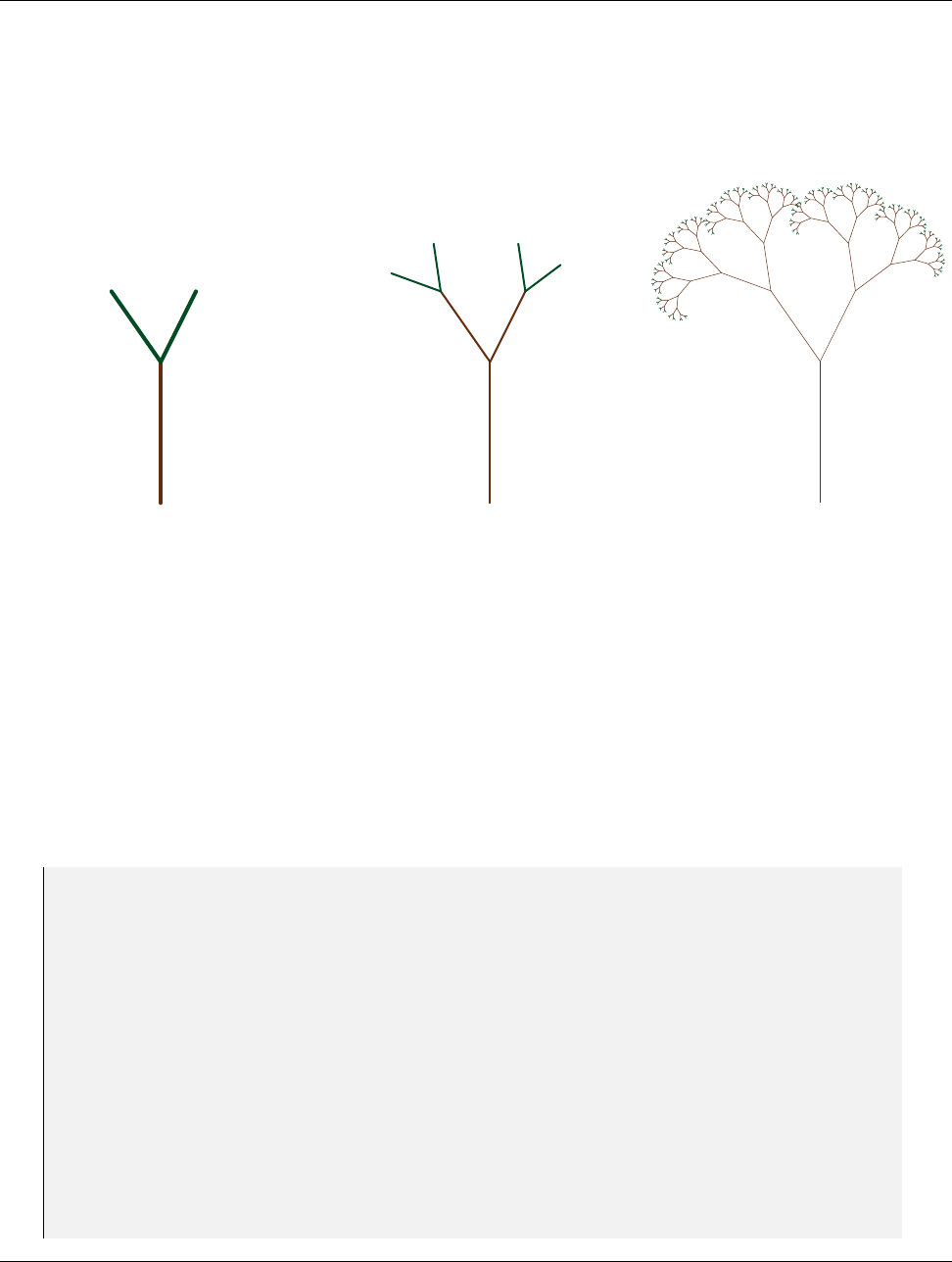
DRAFT
23.6. Using the Worklet
23.6.2 Tree Fractal
Another type of fractal we can make is a tree fractal. We will make a fractal similar to a Pythagoras tree except
using lines instead of squares. Our fractal will start with a vertical line that will be replaced with the off-center
“Y” shape shown in Figure 23.6. Iterative replacing using this “Y” shape produces a bushy tree shape.
Figure 23.6: The tree fractal replaces each line with the “Y” shape shown at left. An iteration grows branches
at the end (middle). After several iterations the tree branches out to the bushy shape at right.
One complication of implementing this tree fractal is that we really only want to apply the “Y” shape to the
“leaves” of the tree. For example, once we apply the “Y” to the trunk, we do not want to apply it to the trunk
again. If we were to apply it to the trunk again, we would create duplicates of the first layer of branches.
We can implement this feature in our worklet by using a count scatter. (Worklet scatters are described in
Section 12.10.) Instead of directing the fractal worklet to generate 3 output line segments for every input line
segment, we tell the fractal worklet to generate just 1 output line segment. We then use a scatter counting to
generate 3 line segments for the leaves and 1 line segment for all other line segments. The count array for the
initial iteration is initialized to a single 3. Each iteration then creates the count array for the next iteration by
writing a 1 for the base line segment and a 3 from the other two line segments.
Example 23.20: A worklet to generate a tree fractal.
1st ru ct TreeFractal
2{
3st ru ct FractalWorklet : vtkm:: worklet:: Wor kletL ine Fr act al
4{
5using ControlSignature =void( Se gm en ts In ,
6SegmentsOut <1>,
7FieldOut <> cou nt Nex tI ter at ion );
8using ExecutionSignature =void(Transform , VisitIndex ,_2 ,_3 );
9using InputDomain =_1 ;
10
11 using ScatterType =vtkm:: worklet:: ScatterCounting;
12
13 template <typename Storage ,typename Device >
14 VTKM_CONT static ScatterType MakeScatter(
15 const vtkm:: cont:: ArrayHandle <vtkm:: IdComponent ,Storage >& count ,
16 Device)
17 {
18 re tu rn ScatterType( count , Dev ice ()) ;
19 }
20
Chapter 23. New Worklet Types 321

DRAFT
23.6. Using the Worklet
21 template <typename SegmentsOutVecType >
22 void operator()( const vtkm:: exec::LineFractalTransform& transform ,
23 vtkm:: IdComponent visitIndex ,
24 Se gme nts Out Vec Typ e & segm entsOut Vec ,
25 vtkm:: IdComponent& co un tNe xtI ter at ion ) const
26 {
27 switch ( visitIndex )
28 {
29 case 0:
30 s eg me nt s Ou tV ec [ 0] [ 0] = t ra ns fo rm ( 0.0 f , 0 .0 f ) ;
31 s eg me nt s Ou tV ec [ 0] [ 1] = t ra ns fo rm ( 1.0 f , 0 .0 f ) ;
32 co unt Ne xtI te rat io n = 1;
33 bre ak ;
34 case 1:
35 s eg me nt s Ou tV ec [ 0] [ 0] = t ra ns fo rm ( 1.0 f , 0 .0 f ) ;
36 s eg me nt sO ut Ve c [ 0] [1 ] = tr an sf orm (1 .5 f , -0.25 f );
37 co unt Ne xtI te rat io n = 3;
38 bre ak ;
39 case 2:
40 s eg me nt s Ou tV ec [ 0] [ 0] = t ra ns fo rm ( 1.0 f , 0 .0 f ) ;
41 s eg me nt sO ut Ve c [ 0] [1 ] = tr an sf orm (1 .5 f , 0 .35 f ) ;
42 co unt Ne xtI te rat io n = 3;
43 bre ak ;
44 default:
45 this - > Rai seE rr or (" Unexpected vis it index .");
46 }
47 }
48 };
49
50 template <typename Device >
51 VTKM_CONT static vtkm:: cont:: ArrayHandle <vtkm:: Vec <vtkm :: FloatDefault , 2 >> Run (
52 vtkm:: IdComponent numIterations ,
53 Device)
54 {
55 using VecType = vtkm:: Vec <vtkm:: Float32 , 2 >;
56
57 vtkm:: cont:: ArrayHandle < V ecT ype > p oint s ;
58
59 // I ni ti al iz e points ar ray wi th a single line
60 point s . Alloca te (2);
61 po in ts . G et Por ta lC ont ro l (). Se t (0 , Vec Typ e ( 0. 0f , 0.0 f ) );
62 po in ts . G et Por ta lC ont ro l (). Se t (1 , Vec Typ e ( 0. 0f , 1.0 f ) );
63
64 vtkm:: cont:: ArrayHandle <vtkm:: IdComponent > c ou nt ;
65
66 // Ini tia liz e count array with 3 ( meani ng itera te )
67 cou nt . A ll oca te (1 );
68 co un t . G et Po rt alC on tr ol (). S et (0 , 3 );
69
70 for (vtkm:: IdComponent i = 0; i < numIt er at ions ; ++ i )
71 {
72 vtkm:: worklet:: D is pa tc he rLineFractal < TreeFr ac ta l :: Fract alWorkl et , Device >
73 di sp atc he r ( Fra cta lWo rk let :: MakeS ca tt er ( count , Dev ic e ( ))) ;
74
75 vtkm:: cont:: ArrayHandle < V ecT ype > o ut Po in ts ;
76 di spa tch er . I nv ok e (points , out Points , coun t );
77 points = o utPoints ;
78 }
79
80 re tu rn points;
81 }
82 };
322 Chapter 23. New Worklet Types
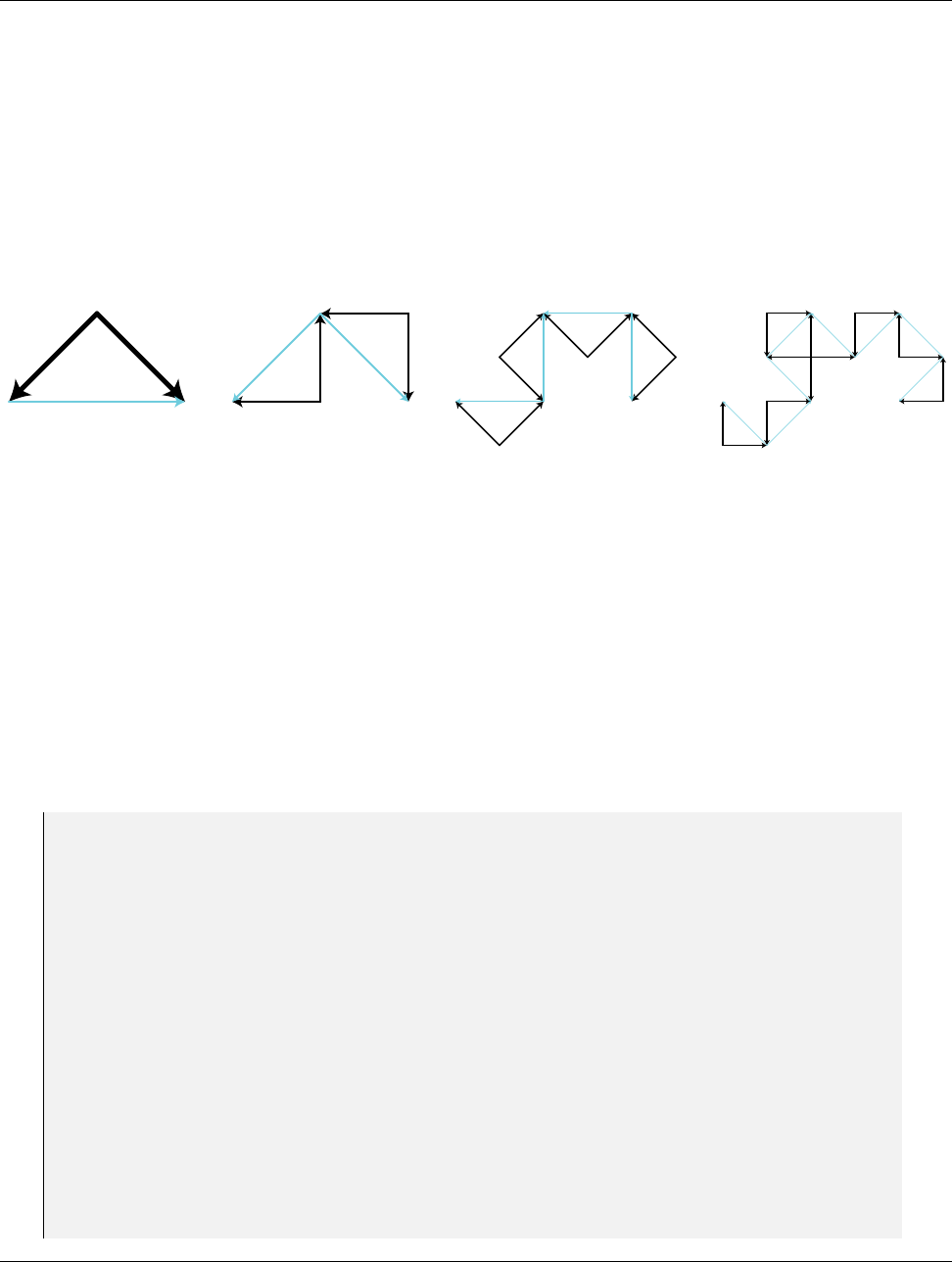
DRAFT
23.6. Using the Worklet
23.6.3 Dragon Fractal
The next fractal we will implement is known as the dragon fractal. The dragon fractal is also sometimes known
as the Heighway dragon or the Harter-Heighway dragon after creators John Heighway, Bruce Banks, and William
Harter. It is also sometimes colloquially referred to as the Jurassic Park dragon as the fractal was prominently
featured in the Jurassic Park novel by Michael Crichton.
The basic building block is simple. Each line segment is replaced by two line segments bent at 90 degrees and
attached to the original segments endpoints as shown in Figure 23.7. As you can see by the fourth iteration a
more complicated pattern starts to emerge. Figure 23.8 shows the twelfth iteration a demonstrates a repeating
spiral.
Figure 23.7: The first four iterations of the dragon fractal. The cyan lines give the previous iteration for reference.
What makes the dragon fractal different than the Koch Snowflake and similar fractals like the the quadratic
curves implementation-wise is that the direction shape flips from one side to another. Note in the second image
of Figure 23.7 the first bend is under the its associated line segment whereas the second is above its line segment.
The easiest way for us to control the bend is to alternate the direction of the line segments. In Figure 23.7 each
line segment has an arrowhead indicating the orientation of the first and second point with the arrowhead at the
second point. Note that the shape is defined such that the first point of both line segments meet at the right
angle. With the shape defined this way, each iteration is applied to put the bend to the left of the segment with
respect to an observer at the first point looking at the second point.
Other than reversing the direction of half the line segments, the implementation of the dragon fractal is nearly
identical to the Koch Snowflake.
Example 23.21: A worklet to generate the dragon fractal.
1st ru ct DragonFractal
2{
3st ru ct FractalWorklet : vtkm:: worklet:: Wor kletL ine Fr act al
4{
5using ControlSignature =void( Se gm en ts In , Segmen ts Ou t <2 >);
6using ExecutionSignature =void(Transform , _2 );
7using InputDomain =_1 ;
8
9template <typename SegmentsOutVecType >
10 void operator()( const vtkm:: exec::LineFractalTransform& transform ,
11 Se gme nts Out VecTyp e & s egm ent sO utV ec ) const
12 {
13 s eg me nt s Ou tV ec [ 0] [ 0] = t ra ns fo rm ( 0.5 f , 0 .5 f ) ;
14 s eg me nt s Ou tV ec [ 0] [ 1] = t ra ns fo rm ( 0.0 f , 0 .0 f ) ;
15
16 s eg me nt s Ou tV ec [ 1] [ 0] = t ra ns fo rm ( 0.5 f , 0 .5 f ) ;
17 s eg me nt s Ou tV ec [ 1] [ 1] = t ra ns fo rm ( 1.0 f , 0 .0 f ) ;
18 }
19 };
20
21 template <typename Device >
22 VTKM_CONT static vtkm:: cont:: ArrayHandle <vtkm:: Vec <vtkm :: FloatDefault , 2 >> Run (
23 vtkm:: IdComponent numIterations ,
Chapter 23. New Worklet Types 323
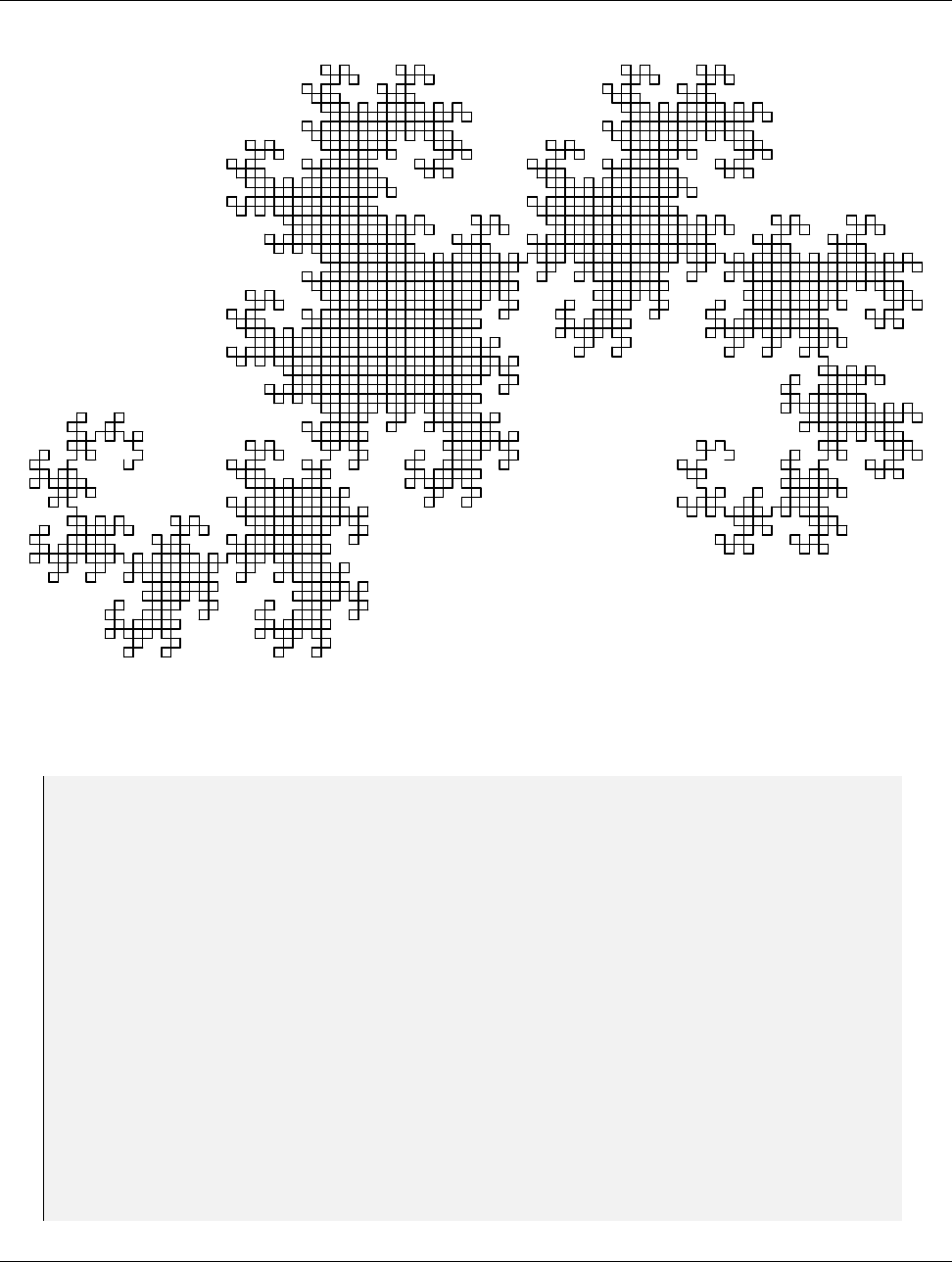
DRAFT
23.6. Using the Worklet
Figure 23.8: The dragon fractal after 12 iterations.
24 Device)
25 {
26 using VecType = vtkm:: Vec <vtkm:: Float32 , 2 >;
27
28 vtkm:: cont:: ArrayHandle < V ecT ype > p oint s ;
29
30 // I ni ti al iz e points ar ray wi th a single line
31 point s . Alloca te (2);
32 po in ts . G et Por ta lC ont ro l (). Se t (0 , Vec Typ e ( 0. 0f , 0.0 f ) );
33 po in ts . G et Por ta lC ont ro l (). Se t (1 , Vec Typ e ( 1. 0f , 0.0 f ) );
34
35 vtkm:: worklet:: Di sp at che rL ineFrac ta l < Dra go nFr ac tal :: Fract al Wo rk le t , Device >
36 di sp atc he r ;
37
38 for (vtkm:: IdComponent i = 0; i < numIt er at ions ; ++ i )
39 {
40 vtkm:: cont:: ArrayHandle < V ecT ype > o ut Po in ts ;
41 di spa tch er . I nv ok e (points , outPoint s );
42 points = o utPoints ;
43 }
44
45 re tu rn points;
46 }
47 };
324 Chapter 23. New Worklet Types
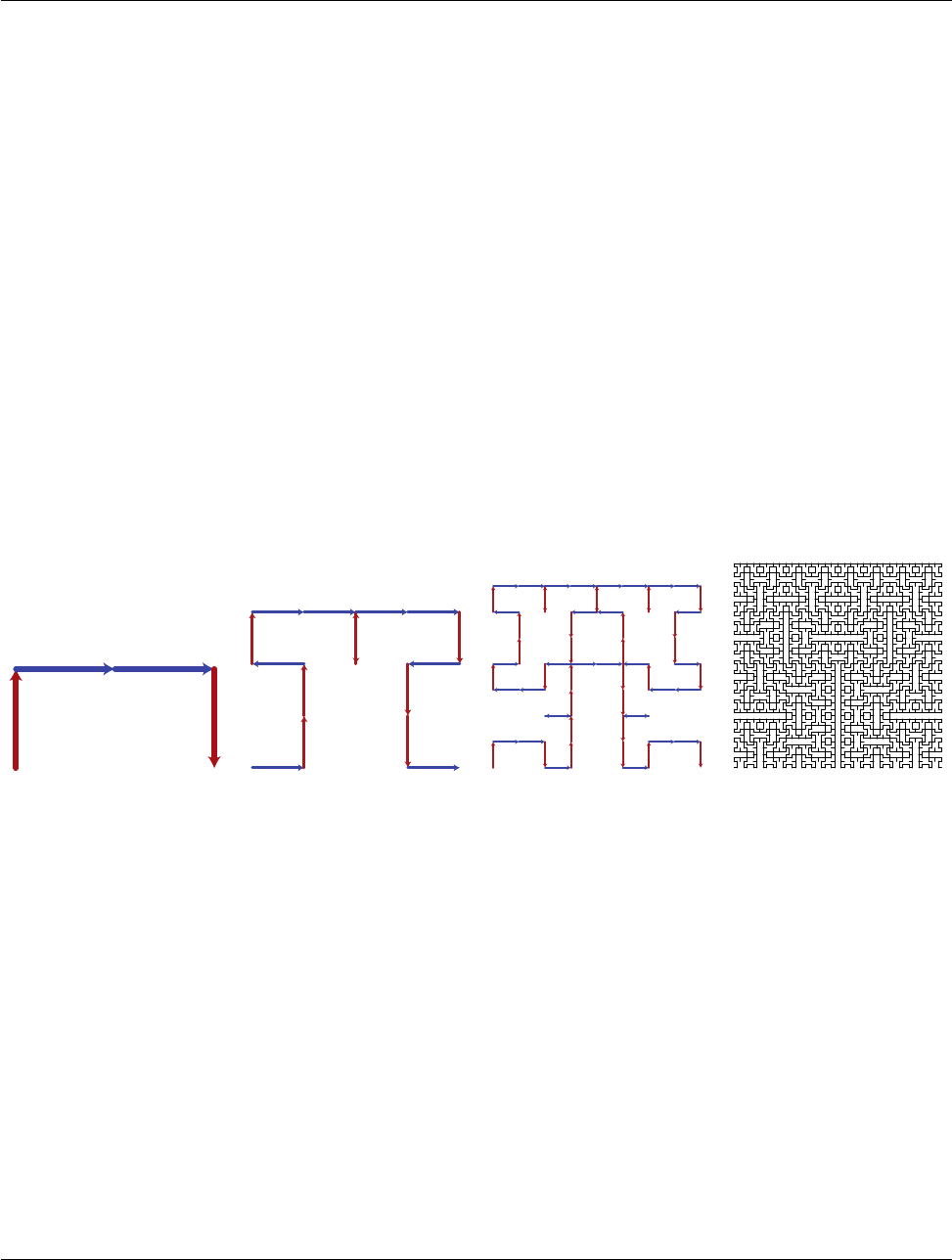
DRAFT
23.6. Using the Worklet
23.6.4 Hilbert Curve
For our final example we will look into using our fractal worklet to construct a space-filling curve. A space-filling
curve is a type of fractal that defines a curve that, when iterated to its infinite length, completely fills a space.
Space-filling curves have several practical uses by allowing you to order points in a 2 dimensional or higher space
in a 1 dimensional array in such a way that points close in the higher dimensional space are usually close in the
1 dimensional ordering. For this fractal we will be generating the well-known Hilbert curve. (Specifically, we
will be generating the 2D Hilbert curve.)
The 2D Hilbert curve fills in a rectangular region in space. (Our implementation will fill a unit square in the [0,1]
range, but a simple scaling can generalize it to any rectangle.) Without loss of generality, we will say that the
curve starts in the lower left corner of the region and ends in the lower right corner. The Hilbert curve starts by
snaking around the lower-left corner then into the upper-left followed by the upper-right and then lower-right.
The curve is typically generated by recursively dividing and orienting these quadrants.
To generate the Hilbert curve in our worklet system, we will define our line segments as the connection from
the lower left of (entrance to) the region to the lower right of (exit from) the region. The fractal generation
breaks this line to a 4 segment curve that moves up, then right, then back down. Figure 23.9 demonstrates
the Hilbert curve. (Readers familiar with the Hilbert curve might notice the shape is a bit different than other
representations. Where many derivations derive the Hilbert curve by connecting the center of oriented boxes,
our derivation uses a line segment along one edge of these boxes. The result is a more asymmetrical shape in
early iterations, but the two approaches are equivalent as the iterations approach infinity.)
Figure 23.9: The first, second, third, and sixth iterations, respectively, of the Hilbert curve fractal.
Like the dragon fractal, the Hilbert curve needs to flip the shape in different directions. For example, the first
iteration, shown at left in Figure 23.9, is drawn to the “left” of the initial line along the horizontal axis. The
next iteration, the second image in Figure 23.9, is created by drawing the shape to the “right” of the vertical
line segments but to the left of the horizontal segments.
Section 23.6.3 solved this problem for the dragon fractal by flipping the direction of some of the line segments.
Such an approach would work for the Hilbert curve, but it results in line segments being listed out of order and
with inconsistent directions with respect to the curve. For the dragon fractal, the order and orientation of line
segments is of little consequence. But for many applications of a space-filling curve the distance along the curve
is the whole point, so we want the order of the line segments to be consistent with the curve.
To support this flipped shape while preserving the line segment order, we will use a data field attached to the
line segments. That is, each line segment will have a value to represent which way to draw the shape. If the field
value is set to 1 (represented by the blue line segments in Figure 23.9), then the shape is drawn to the “left.” If
the field value is set to -1 (represented by the red line segments in Figure 23.9), then the shape is inverted and
drawn to the “right.” This field is passed in and out of the worklet using the FieldIn and FieldOut tags.
Example 23.22: A worklet to generate the Hilbert curve.
Chapter 23. New Worklet Types 325

DRAFT
23.6. Using the Worklet
1st ru ct HilbertCurve
2{
3st ru ct FractalWorklet : vtkm:: worklet:: Wor kletL ine Fr act al
4{
5using ControlSignature =void( Se gm en ts In ,
6FieldIn <> directionIn ,
7SegmentsOut <4>,
8FieldOut <> directionOut);
9using ExecutionSignature =void(Transform , _2 ,_3 ,_4 );
10 using InputDomain =_1 ;
11
12 template <typename SegmentsOutVecType >
13 void operator()( const vtkm:: exec::LineFractalTransform& transform ,
14 vtkm:: Int8 directionIn ,
15 Se gme nts Out Vec Typ e & segm entsOut Vec ,
16 vtkm:: Vec <vtkm:: Int8 , 4>& directionOut) const
17 {
18 s eg me nt sO ut Ve c [ 0] [0 ] = tr an sf orm (0 .0 f , di re ct io nI n * 0 .0 f );
19 s eg me nt sO ut Ve c [ 0] [1 ] = tr an sf orm (0 .0 f , di re ct io nI n * 0 .5 f );
20 di re cti on Out [0] = - d ire ct ion In ;
21
22 s eg me nt sO ut Ve c [ 1] [0 ] = tr an sf orm (0 .0 f , di re ct io nI n * 0 .5 f );
23 s eg me nt sO ut Ve c [ 1] [1 ] = tr an sf orm (0 .5 f , di re ct io nI n * 0 .5 f );
24 di rec ti onOut [1] = directionI n ;
25
26 s eg me nt sO ut Ve c [ 2] [0 ] = tr an sf orm (0 .5 f , di re ct io nI n * 0 .5 f );
27 s eg me nt sO ut Ve c [ 2] [1 ] = tr an sf orm (1 .0 f , di re ct io nI n * 0 .5 f );
28 di rec ti onOut [2] = directionI n ;
29
30 s eg me nt sO ut Ve c [ 3] [0 ] = tr an sf orm (1 .0 f , di re ct io nI n * 0 .5 f );
31 s eg me nt sO ut Ve c [ 3] [1 ] = tr an sf orm (1 .0 f , di re ct io nI n * 0 .0 f );
32 di re cti on Out [3] = - d ire ct ion In ;
33 }
34 };
35
36 template <typename Device >
37 VTKM_CONT static vtkm:: cont:: ArrayHandle <vtkm:: Vec <vtkm :: FloatDefault , 2 >> Run (
38 vtkm:: IdComponent numIterations ,
39 Device)
40 {
41 using VecType = vtkm:: Vec <vtkm:: Float32 , 2 >;
42
43 vtkm:: cont:: ArrayHandle < V ecT ype > p oint s ;
44
45 // I ni ti al iz e points ar ray wi th a single line
46 point s . Alloca te (2);
47 po in ts . G et Por ta lC ont ro l (). Se t (0 , Vec Typ e ( 0. 0f , 0.0 f ) );
48 po in ts . G et Por ta lC ont ro l (). Se t (1 , Vec Typ e ( 1. 0f , 0.0 f ) );
49
50 vtkm:: cont:: ArrayHandle <vtkm:: Int8 > d irections ;
51
52 // Ini tia lize di rec ti on with pos itive .
53 di rections . Allocate ( 1);
54 d ir e cti on s . G e tP ort al Co nt ro l () . Set (0 , 1 );
55
56 vtkm:: worklet:: Di sp at che rL ineFrac ta l < Hilbe rt Curve :: Fr actal Wo rk le t , Device >
57 di sp atc he r ;
58
59 for (vtkm:: IdComponent i = 0; i < numIt er at ions ; ++ i )
60 {
61 vtkm:: cont:: ArrayHandle < V ecT ype > o ut Po in ts ;
62 vtkm:: cont:: ArrayHandle <vtkm:: Int8 > outDirections;
63 di spa tch er . I nv ok e (points ,
64 dir ect ions ,
326 Chapter 23. New Worklet Types

DRAFT
23.6. Using the Worklet
65 outPoints ,
66 vtkm:: cont:: make_ArrayHandleGroupVec <4 >( o utDi rec tio ns ));
67 points = o utPoints ;
68 di re ct io ns = outD ir ect io ns ;
69 }
70
71 re tu rn points;
72 }
73 };
Chapter 23. New Worklet Types 327
DRAFT
DRAFT
Part V
Appendix
DRAFT

DRAFT
INDEX
π, 187, 188
1, 144, 146, 150, 154, 158, 161, 165, 302, 303
2, 144, 146, 150, 154, 158, 161, 165, 302, 303
device , 58
host , 58
Abs, 185
absolute value, 185
ACos, 185
ACosH, 185
Actor, 39, 51
actor, 39
Add, 172, 173
AddActor, 39
AddBlock, 135
AddBlocks, 135
AddCell, 128
AddCellField, 129
AddPoint, 128
AddPointField, 129
Algorithm, xviii, 98, 108, 116
Copy, 108
CopyIf, 109
CopySubRange, 109
LowerBounds, 110
Reduce, 110
ReduceByKey, 111
ScanExclusive, 111
ScanExclusiveByKey, 112
ScanInclusive, 112
ScanInclusiveByKey, 113
Schedule, 98, 113
Sort, 114
SortByKey, 114
Unique, 114
UpperBounds, 115
algorithm, 108–116, 276–280
copy, 108
copy if, 109
copy sub range, 109
lower bounds, 110
reduce, 110
reduce by key, 111
scan
exclusive, 111
exclusive by key, 112
inclusive, 112
inclusive by key, 113
schedule, 113
selecting device, 116
sort, 114
by key, 114
stream compact, 109
synchronize, 114
unique, 114
upper bounds, 115
Allocate, 77, 82, 108, 254
AllTypes, 143
Append, 287
AppendType, 287
ApplyPolicy, 232
arccosine, 185
arcsine, 185
arctangent, 185
arg namespace, 293–295, 297, 299, 301
ARITY, 284
arity, 284
array handle, 77–99, 239–257
adapting, 252–257
allocate, 82
Cartesian product, 89–90
cast, 85–86
composite vector arrays, 90–91
constant, 84
counting, 84–85
deep copy, 96–97
derived, 244–251
discard, 86
execution environment, 97–99
extract component, 91
fancy, 83–251
group vector, 92–94
implicit, 240–242
index, 84

DRAFT
Index
maximum, 97
minimum, 97
permutation, 86–87
populate, 83
portal, 80–82
range, 97
rectilinear point coordinates, 89–90
storage, 239–257
default, 240, 257
subclassing, 241, 251, 255
swizzle, 92
transform, 242–243
uniform point coordinates, 88–89
variant, 119–123
virtual, 94–96
zip, 88
array manager execution, 269–274
array portal, 80–82
array transfer, 247–251
ArrayCopy, 96, 107
ArrayCopy.h, 96
ArrayHandle, xvii, xxi, 48, 57, 77–79, 82, 97, 177, 228, 230,
233, 235, 239, 240, 251, 252, 255, 294–296
Allocate, 77, 82, 108
ExecutionTypes, 98
GetDeviceAdapterId, 78
GetNumberOfValues, 77
GetPortalConstControl, 78
GetPortalControl, 78, 83
GetStorage, 78
PrepareForInPlace, 78, 98
PrepareForInput, 78, 98
PrepareForOutput, 78, 98, 103
ReleaseResources, 77
ReleaseResourcesExecution, 77
Shrink, 77
SyncControlArray, 77
ArrayHandle.h, 57
ArrayHandleCartesianProduct, 89
ArrayHandleCast, 85
ArrayHandleCast.h, 85
ArrayHandleCompositeVector, 90, 251
ArrayHandleCompositeVector.h, 91
ArrayHandleConstant, 84
ArrayHandleConstant.h, 84
ArrayHandleCounting, 84, 241
ArrayHandleCounting.h, 85
ArrayHandleDiscard, 86
ArrayHandleExtractComponent, 91
ArrayHandleExtractComponent.h, 91
ArrayHandleGroupVec, 92, 211, 214, 220, 293, 297
ArrayHandleGroupVec.h, 93
ArrayHandleGroupVecVariable, 93, 224
ArrayHandleGroupVecVariable.h, 93
ArrayHandleImplicit, 240, 241
ArrayHandleImplicit.h, 241
ArrayHandleIndex, 84
ArrayHandlePermutation, 86, 211
ArrayHandlePermutation.h, 87
ArrayHandleSwizzle, 92
ArrayHandleSwizzle.h, 92
ArrayHandleTransform, 242, 243
ArrayHandleUniformPointCoordinates, 88
ArrayHandleVirtual, 95
Cast, 96
IsType, 96
NewInstance, 96
ArrayHandleZip, 88
ArrayHandleZip.h, 88
ArrayManagerExecution, xxii, 269
ArrayManagerExecutionShareWithControl, 270
ArrayPortalFromIterators, 80, 271
ArrayPortalToIteratorBegin, 81
ArrayPortalToIteratorEnd, 81
ArrayPortalToIterators, 81
GetBegin, 81
GetEnd, 81
IteratorType, 81
ArrayPortalToIterators.h, 81
ArrayRangeCompute, 97
ArrayRangeCompute.h, 97
ArrayTransfer, xxi, 247, 248
GetNumberOfValues, 248
PortalConstControl, 248
PortalConstExecution, 248
PortalControl, 248
PortalExecution, 248
PrepareForInPlace, 248
PrepareForInput, 248
PrepareForOutput, 248
ReleaseResources, 249
RetrieveOutputData, 249
Shrink, 249
ValueType, 248
AsField, 234, 237
ASin, 185
ASinH, 185
aspect, 299–302
cell shape, 300
default, 299, 300, 302
from count, 301
from indices, 301
input index, 300
output index, 300
value count, 301
visit index, 300
work index, 300
AspectTag, 299, 302
AspectTagCellShape, 300
AspectTagDefault, 299, 300, 302
332 Index
DRAFT
Index
AspectTagFromCount, 299, 301
AspectTagFromIndices, 299, 301
AspectTagInputIndex, 300
AspectTagOutputIndex, 300
AspectTagValueCount, 301
AspectTagVisitIndex, 300
AspectTagWorkIndex, 300
assert, 73–74, 183
static, 73–74
Assert.h, 73
ASSOC ANY, 36
ASSOC CELL SET, 36
ASSOC POINTS, 36
ASSOC WHOLE MESH, 37
AssociationEnum, 38
AsVirtual, 121
ATan, 185
ATan2, 185
ATanH, 186
atomic array, 172–173
AtomicArray, 146, 150, 153, 158, 160, 172, 296
Add, 172
CompareAndSwap, 173
AtomicArrayInOut, xix, 146, 150, 153, 158, 160, 172, 173
average, 18–24
AverageByKey, 215
Azimuth, 46, 47
azimuth, 46
background color, 41
basic execution array interface, 272–274
basic execution portal factory, 271–272
Boundary, 161
BoundaryState, 161
MaxNeighborIndices, 162
MinNeighborIndices, 162
BoundingIntervalHierarchy, xx, 204
Bounds, xvi, 43, 63, 135, 136
Center, 63
Contains, 63
Include, 63
IsNonEmpty, 63
Union, 63
BoundsCompute, 136
BoundsGlobalCompute, 136
BUILD SHARED LIBS, 9
Camera, xvi, 43, 46, 47, 49
Pan, 50
Zoom, 51
camera, 43–47
2D, 43–44
3D, 44–47
azimuth, 46
clipping range, 45
elevation, 46
far clip plane, 45
field of view, 45
focal point, 45
interactive, 49–51
look at, 45
mouse, 49–51
near clip plane, 45
pan, 44, 47
pinhole, 44
position, 45
reset, 47–48
up, 45
view range, 43
view up, 45
zoom, 44, 47
CanRunOn, 106
Canvas, 40
canvas, 40
ray tracer, 40
CanvasRayTracer, 40, 42
Cartesian product array handle, 89–90
Cast, 96, 134
cast array handle, 85–86
CastAndCall, xix, 121, 122, 134
CastToBase, 134
Cbrt, 186
Ceil, 186
ceiling, 186
Cell, 174
cell, 193–201
derivative, 197–198
edge, 131, 198–199
face, 131, 198–201
gradient, 197–198
interpolation, 197
parametric coordinates, 196–197
point, 131, 198
shape, 198
world coordinates, 196–197
cell average, 18
cell gradients, 23–24
cell locator, 203
cell set, 125, 130–134
dynamic, 133–134
explicit, 132–133
generate, 209–225
permutation, 133
shape, 131
single type, 132–133
structured, 131–132
whole, 174–177
cell shape, 131, 193–196
cell to point map worklet, 152–156
cell to point worklet, 139
cell traits, 195–196
Index 333
DRAFT
Index
CELL SHAPE EMPTY, 193
CELL SHAPE HEXAHEDRON, 194
CELL SHAPE LINE, 194
CELL SHAPE POLYGON, 194
CELL SHAPE PYRAMID, 194
CELL SHAPE QUAD, 194
CELL SHAPE TETRA, 194
CELL SHAPE TRIANGLE, 194
CELL SHAPE VERTEX, 194
CELL SHAPE WEDGE, 194
CellAverage, 18
CellCount, 154
CellDerivative, 197
CellDerivative.h, 197
CellEdge.h, 198, 213
CellEdgeCanonicalId, 198, 213, 216, 217
CellEdgeLocalIndex, 198
CellEdgeNumberOfEdges, 198
CellFace.h, 199
CellFaceCanonicalId, 200
CellFaceLocalIndex, 200
CellFaceNumberOfFaces, 199
CellFaceNumberOfPoints, 200
CellIndices, 154
CellInterpolate, 197
CellInterpolate.h, 197
CellLocator, 203, 204, 207
FindCell, 204
FindNearestNeighbor, 207
CellSet, 131, 133, 177, 209, 294, 296
CellSetExplicit, 132, 174, 222
generate, 222–225
CellSetIn, 144, 149, 152, 157, 159
CellSetListTag.h, 134
CellSetPermutation, 133
CellSetSingleType, 133, 209, 210, 214, 220
generate, 209–222
CellSetStructured, 131, 159, 174
CellShape, 150, 158
CellShape.h, 193
CellShapeIdToTag, 193
CellShapeTag, 174, 194
CellShapeTagEmpty, 193
CellShapeTagGeneric, 174, 193
CellShapeTagHexahedron, 194
CellShapeTagLine, 194
CellShapeTagPolygon, 194
CellShapeTagPyramid, 194
CellShapeTagQuad, 194
CellShapeTagTetra, 194
CellShapeTagTriangle, 194
CellShapeTagVertex, 194
CellShapeTagWedge, 194
CellToEdgeKeys, 221
CellTopologicalDimensionsTag, 195
CellTraits, 195
IsSizeFixed, 195
NUM POINTS, 195
TOPOLOGICAL DIMENSIONS, 195
TopologicalDimensionsTag, 195
CellTraits.h, 195
CellTraitsTagSizeFixed, 195
CellTraitsTagSizeVariable, 195
Center, 62, 63
clean grid, 29–30
CleanGrid, 29
clip
field, 33–34
implicit function, 30–31
clipping range, 45
ClipWithField, 33
ClipWithImplicitFunction, 30
CMake, 8–13, 74
configuration, 8–10
BUILD SHARED LIBS, 9
CMAKE BUILD TYPE, 9, 11
CMAKE INSTALL PREFIX, 9
VTKm CUDA Architecture, 10
VTKm DIR, 11
VTKm ENABLE BENCHMARKS, 9
VTKm ENABLE CUDA, 10
VTKm ENABLE EXAMPLES, 9
VTKm ENABLE OPENMP, 10
VTKm ENABLE RENDERING, 10, 12
VTKm ENABLE TBB, 10
VTKm ENABLE TESTING, 10
VTKM USE 64BIT IDS, 59
VTKm USE 64BIT IDS, 10
VTKM USE DOUBLE PRECISION, 59
VTKm USE DOUBLE PRECISION, 10
VTKm VERSION, 74
VTKm VERSION FULL, 74
VTKm VERSION MAJOR, 74
VTKm VERSION MINOR, 74
VTKm VERSION PATCH, 74
version, 74
VTK-m library
vtkm cont, 12
vtkm rendering, 12
VTK-m package, 11–13
libraries, 12
variables, 12–13
version, 74
VTKm ENABLE CUDA, 13
VTKm ENABLE MPI, 13
VTKm ENABLE OPENMP, 13
VTKm ENABLE RENDERING, 13
VTKm ENABLE TBB, 13
VTKm FOUND, 12
VTKm VERSION, 12
334 Index

DRAFT
Index
VTKm VERSION FULL, 12
VTKm VERSION MAJOR, 12
VTKm VERSION MINOR, 12
VTKm VERSION PATCH, 12
CMAKE BUILD TYPE, 9, 11
CMAKE INSTALL PREFIX, 9
coding conventions, 57
Color, 41
color
background, 41
foreground, 41
color tables, 51–52
default, 51
ColorTable, 21, 22, 51
column, 189
CommonTypes, 143
CompareAndSwap, 173
COMPONENT, 21, 22
ComponentType, 66
composite vector array handle, 90–91
compression
zfp, 28
ComputePointGradient, 23
ConfigureFor32.h, 59
ConfigureFor64.h, 59
constant array handle, 84
cont namespace, 56, 57
Contains, 62, 63
contour, 34–35
control environment, 56
control signature, xii, xix, xxii, xxiii, 141–146, 149, 150,
152, 154, 157–159, 161, 165, 169, 172, 174, 177,
206, 283, 293, 302, 303, 311–313, 317
atomic array, 172–173
execution object, 177–179
tags, 302
type list tags, 142–143
whole array, 169–172
whole cell set, 174–177
ControlSignatureTagBase, 302
ConvertNumComponentsToOffsets, 93, 224
coordinate system, 125, 135
coordinate system transform, 19–20
cylindrical, 19
spherical, 19–20
CoordinateSystem, 135, 203
Copy, xviii, 108
copy, 108
copy if, 109
copy sub range, 109
CopyIf, xviii, 109
CopyInto, 60, 66
CopySign, 186
CopySubRange, xviii, 109, 110
CopyTo, 121, 134
Cos, 186
CosH, 186
cosine, 186
counting array handle, 84–85
Create, 126, 127
CreateResult, 229
CreateResult.h, 229
Cross, 188
cross product, 20, 188
CrossProduct, 20
cube root, 186
CUDA, 10, 58, 101, 103
cuda namespace, 57
cylindrical coordinate system transform, 19–20
CylindricalCoordinateSystemTransform, 19
data set, 125–136
building, 125–130
cell set, see cell set
clean, 29–30
coordinate system, see coordinate system
field, see field
generate, 209–225
multiblock, see multiblock
data set filter, 29–32, 232–235
data set with field filter, 235–238
data set with filter, 32–36
DataSet, 15–17, 29, 32, 37, 39, 125, 126, 133–135, 141, 203,
206, 209, 227, 229–233, 235
GetCellSet, 232
DataSetBuilderExplicit, 127
DataSetBuilderExplicitIterative, 128
DataSetBuilderRectilinear, 126
DataSetBuilderUniform, 126
DataSetFieldAdd, 129
Debug, 9
decompression
zfp, 28
deep array copy, 96–97
DeepCopy, 107
default runtime device tracker, 108
derivative, 197–198
derived storage, 244–251
detail namespace, 57
determinant, 189
device adapter, 101–116, 267–281
algorithm, 108–116, 276–280
copy, 108
copy if, 109
copy sub range, 109
lower bounds, 110
reduce, 110
reduce by key, 111
schedule, 113
sort, 114
stream compact, 109
Index 335

DRAFT
Index
synchronize, 114
unique, 114
upper bounds, 115
array manager, 269–274
basic execution array interface, 272–274
basic execution portal, 271–272
default runtime tracker, 108
implementing, 267–281
runtime detector, 268–269
runtime tracker, 106–108, 259
default, 108
tag, 267–268
timer, 280–281
try execute, 259–261
virtual object transfer, 274–275
device adapter tag, 101–104
provided, 103
device adapter traits, 104–106
DeviceAdapter, xviii, 116
DeviceAdapter.h, 101
DeviceAdapterAlgorithm, 276
Schedule, 103
DeviceAdapterAlgorithmGeneral, 276
DeviceAdapterCuda.h, 103, 105
DeviceAdapterId, 78, 104, 105, 116, 272
DeviceAdapterNameType, 104
DeviceAdapterOpenMP.h, 103
DeviceAdapterRuntimeDetector, 268
DeviceAdapterSerial.h, 103
DeviceAdapterTag.h, 268
DeviceAdapterTagCuda, 103, 105
DeviceAdapterTagOpenMP, 103
DeviceAdapterTagSerial, 103
DeviceAdapterTagTBB, 103
DeviceAdapterTBB.h, 103
DeviceAdapterTimerImplementation, 280
DeviceAdapterTraits, 104, 105
GetId, 104
GetName, 104
Valid, 104
DimensionalityTag, 64
DisableDevice, 106, 107
discard array handle, 86
dispatcher, 140
creating new, 315–319
invocation object, 317
DispatcherBase, 315
DispatcherMapField, 140, 145
DispatcherMapTopology, 140, 149, 152
DispatcherPointNeighborhood, 140, 159
DispatcherReduceByKey, 140, 164
DoExecute, xxi, 227, 229–235, 237
Dolly, 47
DoMapField, xxi, 232–235, 237
Dot, 59
dot product, 21
DotProduct, 21
dragon fractal, 323–324
dynamic cell set, 133–134
DynamicCellSet, 133, 134
Cast, 134
CopyTo, 134
IsType, 134
DynamicPointCoordinates, 290
DynamicTransform, 290
DynamicTransformCont, 289
edge, 131, 198–199
Elevation, 46, 47
elevation, 25, 46
environment, 55, 56
control, 56
execution, 55, 56
Epsilon, 186
Error, 72
GetMessage, 72
ErrorBadAllocation, 72, 107
ErrorBadType, 72
ErrorBadValue, 72, 107
ErrorControlBadValue, 121, 248, 249
ErrorControlInternal, 249
ErrorExecution, 72, 113, 183, 276
ErrorInternal, 72
ErrorIO, 73
ErrorMessageBuffer, 276
errors, 72–74, 182–183
assert, 73–74, 183
control environment, 72–73
execution environment, 72, 113, 182–183
worklet, 182–183
exec namespace, 56, 57, 306
ExecObject, xx, 146, 148, 150, 153, 158, 160, 177, 203, 204,
206
ExecObjectType, 295, 297
Execute, 17–21, 23–35, 136, 227, 228, 232, 233, 235
execution array interface, 272–274
execution array manager, 269–274
execution environment, 55, 56
execution object, 177–179
execution portal factory, 271–272
execution signature, xii, xix, xxii, xxiii, 141, 143–144, 146,
150, 154, 158, 160, 161, 165, 180, 293, 302, 303,
311, 312, 317
tags, 302–303
ExecutionArrayInterfaceBasic, xxii, 269, 272
ExecutionArrayInterfaceBasicBase, 272
ExecutionArrayInterfaceBasicShareWithControl, 273
ExecutionObjectBase, 146, 150, 153, 158, 160, 177, 204,
206, 294
ExecutionPortalFactoryBasic, xxii, 269, 271
ExecutionPortalFactoryBasicShareWithControl, 271
336 Index

DRAFT
Index
ExecutionSignatureTagBase, 302
ExecutionTypes, 81, 98
Exp, 186
Exp10, 186
Exp2, 186
explicit cell set, 132–133
single type, 132–133
explicit mesh, 127
ExplicitCellSet, 132
ExpM1, 186
exponential, 186
external faces, 31
ExternalFaces, 31
extract component array handle, 91
face, 131, 198–201
external, 31
false type, 74
fancy array handle, 83–251
far clip plane, 45
Fetch, 298–302, 309, 311
fetch, 298–301
aspect, see aspect
cell set, 299
direct input array, 299
direct output array, 299
execution object, 299
topology map array input, 299
whole cell set, 299
FetchTag, 299, 302
FetchTagArrayDirectIn, 299
FetchTagArrayDirectOut, 299
FetchTagArrayTopologyMapIn, 299
FetchTagCellSetIn, 299
FetchTagExecObject, 299
FetchTagWholeCellSetIn, 299
Field, 36–38, 134, 136, 234, 237
ASSOC ANY, 36
ASSOC CELL SET, 36
ASSOC POINTS, 36
ASSOC WHOLE MESH, 37
AssociationEnum, 38
GetRange, 136
field, 17, 125, 134–135
field filter, 17–28, 227–230
field filter using cells, 230–232
field map worklet, 139, 145–148
field of view, 45
field to colors, 21–23
FieldCommon, 143
FieldIn, 144, 145, 159, 313
FieldInCell, 149, 152
FieldInFrom, 157
FieldInNeighborhood, 159, 161
FieldInOut, 145, 150, 153, 157, 160
FieldInOutCell, 149, 150
FieldInOutPoint, 153
FieldInPoint, 149, 152, 153
FieldInTo, 157
FieldMetadata, 228, 230, 233–235, 237
FieldNeighborhood, 159, 161
Get, 161
FieldOut, 145, 149, 153, 157, 160, 313
FieldOutCell, 149
FieldOutPoint, 153
FieldPointIn, 142, 196, 197
FieldRangeCompute, 136
FieldRangeGlobalCompute, 136
FieldSelection, xv, 37, 38
MODE EXCLUDE, 38
MODE NONE, 37
FieldToColors, 21, 22
COMPONENT, 21, 22
MAGNITUDE, 21, 22
RGB, 22
RGBA, 22
SCALAR, 21, 22
file I/O, 15–16
read, 15–16
write, 16
Filter, 37
SetFieldsToPass, 37, 38
filter, 17–38, 55, 227–238
contour, 34–35
data set, 29–32, 232–235
data set with field, 32–36, 235–238
field, 17–28, 227–230
using cells, 230–232
fields, 36–38
input, 36–37
passing, 37–38
input fields, 36–37
isosurface, 34–35
Marching Cubes, 34–35
passing fields, 37–38
streamline, 36
streamlines, 35
threshold, 35
traits, 228–229, 231
filter namespace, 17, 57, 227
FilterCell, 230
FilterDataSet, 232
FilterDataSetWithField, 235
FilterField, 227, 229, 230
FilterTraits, 228, 231
InputFieldTypeList, 229
FilterTraits.h, 228
FindCell, 204
FindNearestNeighbor, 207
Float32, xvi, 58, 64, 70, 143, 187
Float64, 58, 62, 63, 70, 143, 187
Index 337

DRAFT
Index
FloatDefault, 59, 196
Floor, 186
floor, 186
FMod, 186
focal point, 45
ForceDevice, 107
foreground color, 41
FromCount, 158
FromIndices, 158
function interface, 283–291
append parameter, 287
dynamic transform, 289–291
for each, 291
invoke, 285–286
replace parameter, 287
static transform, 288–289
function modifier, 57, 58, 144, 177
function signature, 283
functional array, 240–242
FunctionInterface, xxii, 283, 317
FunctionInterfaceReturnContainer, 286
functor, 55, 241
FunctorBase, 113, 183
Get, 80, 161, 170
GetActiveCellSetIndex, 18–20, 24, 26, 27, 30–35, 230
GetActiveCoordinateSystemIndex, 18–20, 23–28, 30–35
GetActiveFieldName, 18–20, 22, 24–28, 33–35
GetArity, 284
GetBegin, 81
GetBlocks, 135
GetBounds, 135
GetCamera, 43
GetCellNormalsName, 27
GetCellSet, 204, 232
GetCellShape, 174
GetClipValue, 33
GetColorBuffer, 48
GetColorTable, 22
GetCompactPointFields, 29
GetCompactPoints, 31
GetComponent, 66
GetComputeDivergence, 23
GetComputeFastNormalsForStructured, 34
GetComputeFastNormalsForUnstructured, 34
GetComputeGradient, 23
GetComputePointGradient, 23
GetComputeQCriterion, 23
GetComputeVorticity, 23
GetCoordinates, 204
GetData, 134
GetDeviceAdapterId, 78
GetDivergenceName, 23
GetElapsedTime, 117
GetEnd, 81
GetFieldsToPass, 18–21, 23–28, 30–33, 35
GetGenerateCellNormals, 26
GetGenerateNormals, 34
GetGeneratePointNormals, 27
GetGlobalRuntimeDeviceTracker, 107, 260
GetId, 104
GetImplicitFunction, 30
GetIndices, 174
GetInputIndex, 298
GetIsoValue, 34
GetLowerThreshold, 35
GetMappingComponent, 22
GetMappingMode, 22
GetMergeDuplicatePoints, 34
GetMessage, 72
GetName, 104
GetNormalArrayName, 34
GetNormalizeCellNormals, 27
GetNumberOfComponents, 66, 120
GetNumberOfDimensions, 32
GetNumberOfElements, 174
GetNumberOfIndices, 174
GetNumberOfIndicices, 174
GetNumberOfSamplingPoints, 22
GetNumberOfValues, 77, 80, 119, 248, 254
GetOutputFieldName, 18–21, 23–28, 229
GetOutputIndex, 298
GetOutputMode, 22
GetOutputToInputMap, 211, 215
GetParameter, 284
GetPassPolyData, 31
GetPointNormalsName, 27
GetPortal, 254
GetPortalConst, 254
GetPortalConstControl, 78, 82
GetPortalControl, 78, 82, 83
GetPrimaryCoordinateSystemIndex, 20, 21
GetPrimaryFieldName, 20, 21
GetQCriterionName, 24
GetRange, 134–136
GetRate, 28
GetReturnValue, 286
GetReturnValueSafe, 286
GetSecondaryCoordinateSystemIndex, 20, 21
GetSecondaryFieldName, 20, 21
GetSpatialBounds, 47
GetStorage, 78
GetUpperThreshold, 35
GetUseCoordinateSystemAsField, 18–20, 22, 24–28, 33–35
GetUseCoordinateSystemAsPrimaryField, 20, 21
GetUseCoordinateSystemAsSecondaryField, 20, 21
GetVisitIndex, 298
GetVorticityName, 23
git, 7–8
glDrawPixels, 48
gradient, 197–198
338 Index

DRAFT
Index
Gradients, 23
gradients, 23–24
group vector array handle, 92–94
h, 90
Harter-Heighway dragon, 323
Hash, 216
Hash.h, 216
HashCollisionScatter, 221
HashType, 216
HasMultipleComponents, 66
Heighway dragon, 323
hexahedron, 194
Hilbert curve, 325–327
histogram, 166, 173
hyperbolic arccossine, 185
hyperbolic arcsine, 185
hyperbolic cosine, 186
hyperbolic sine, 188
hyperbolic tangent, 186, 188
I/O, 15–16
Id, 59, 66, 69, 70, 84, 93, 110, 113, 115, 143, 146, 151, 154,
158, 159, 161, 165, 166, 174, 193, 210, 211, 213,
214, 219, 220, 241, 248
Id2, 59, 69, 70, 143, 198, 213, 214, 217
Id2Type, 143
Id3, xvi, 32, 59, 66, 69, 70, 88, 97, 113, 143, 200
Id3Type, 143
IdComponent, 59, 91, 92, 146, 150, 151, 154, 158, 159, 161,
162, 165, 166, 174, 180, 193, 195, 198–200, 288,
302
identity matrix, 189
IdType, 143
image, 126
implicit array handle, 240–242
implicit function
clip, 30–31
implicit storage, 240–242
ImplicitFunction, 30
ImplicitFunctionHandle, 30
InBoundary, 162
Include, 62, 63
INDEX, 302, 303
Index, 143
index array handle, 84
IndexTag, 284, 288, 289
IndicesType, 174
Infinity, 186
Initialize, 41
input domain, xix, 141, 144–145, 149, 152, 157, 159, 165
input index, 180
InputFieldTypeList, 229
InputIndex, 146, 151, 154, 159, 161, 166, 180
InsertBlock, 135
Int16, 58
Int32, 58, 172
Int64, 58, 172
Int8, 58, 104
Intel Threading Building Blocks, 10, 102, 103
interactive rendering, 48–51
OpenGL, 48–49
internal namespace, 57, 283
interoperability, 57
interpolation, 197
inverse cosine, 185
inverse hyperbolic cosine, 185
inverse hyperbolic sine, 185
inverse hyperbolic tangent, 186
inverse matrix, 190
inverse sine, 185
inverse tangent, 185
Invocation, 316, 317
invocation object, 317
Invoke, 140, 142, 144–146, 149, 150, 152, 153, 157–160, 165,
169, 172, 174, 204, 206, 211, 215, 220, 283, 294,
302
invoke, 140
InXBoundary, 162
InYBoundary, 162
InZBoundary, 162
io namespace, 15, 57, 125
is same, 74
IsCellField, 234, 237
IsFinite, 186
IsInf, 186
IsMappingComponent, 22
IsMappingMagnitude, 22
IsMappingScalar, 22
IsNan, 186
IsNegative, 187
IsNonEmpty, 62, 63
isosurface, 34–35
IsOutputRGB, 22
IsOutputRGBA, 22
isovolume, 33–34
IsPointField, 234, 237
IsSizeFixed, 195
IsSizeStatic, 66
IsType, 96, 120, 134
IsValueType, 120
IteratorType, 81
Jurassic Park dragon, 323
kernel, 55
Keys, xix, 165, 167, 215, 216, 294, 296
KeysIn, 165
Koch Snowflake, 305
Length, 62
Lerp, 188
Index 339
DRAFT
Index
less, 67
level of detail, 32
Lindenmayer system, 306
line, 194
linear interpolation, 188
linear system, 190
ListForEach, 71
lists, 68–72
types, 69–71
ListTag.h, 68, 71
ListTagBase, 69
ListTagEmpty, 68
ListTagJoin, 69
Load, 299, 303
LocalEdgeIndices, 221
LOD, 32
Log, 187
Log10, 187
Log1P, 187
Log2, 187
logarithm, 187
look at, 45
lower bounds, 110
LowerBounds, xviii, 110
MAGNITUDE, 21, 22
Magnitude, 188
magnitude, 27
MagnitudeSquared, 188
make ArrayHandle, 78, 79
make ArrayHandleCartesianProduct, 90
make ArrayHandleCast, 85
make ArrayHandleCompositeVector, 91
make ArrayHandleConstant, 84
make ArrayHandleCounting, 85
make ArrayHandleExtractComponent, 91
make ArrayHandleGroupVec, 93
make ArrayHandleGroupVecVariable, 93
make ArrayHandleImplicit, 241
make ArrayHandlePermutation, 87
make ArrayHandleSwizzle, 92
make ArrayHandleTransform, 243
make ArrayHandleZip, 88
make FunctionInterface, xxii, 283
make ImplicitFunctionHandle, 30
make Pair, 62
make Vec, 59
make VecC, 60
MakeScatter, 180
map, 139
map cell to point, 152–156
map field, 145–148
map point neighborhood, 159–164
map point to cell, 149–152
map topology, 156–159
MapFieldOntoOutput, 232, 235
Mapper, 40
mapper, 40, 42–43
MapperCylinder, 40
MapperPoint, 40, 42
MapperQuad, 40
MapperRayTracer, 40
MapperVolume, 40
MapperWireframer, 40, 42
Marching Cubes, 34–35
MarchingCubes, 34
math, 185–192
Math.h, 185
Matrix, 189, 190
matrix, 189–190
Matrix.h, 189
MatrixDeterminant, 189
MatrixGetColumn, 189
MatrixGetRow, 189
MatrixIdentity, 189
MatrixInverse, 190
MatrixMultiply, 190
MatrixRow, 189
MatrixSetColumn, 190
MatrixSetRow, 190
MatrixTranspose, 190
Max, 62, 187
maximum, 187
MaxNeighborIndices, 162
metaprogramming, 68
method modifier, 57, 58, 144, 177
Min, 62, 187
minimum, 187
MinNeighborIndices, 161, 162
MODE EXCLUDE, 38
MODE NONE, 37
ModF, 187
modifier
control, 57, 58, 144, 177
execution, 57, 58, 144, 177
mouse rotation, 49–50
MultiBlock, 17, 29, 32, 125, 135, 136
multiblock, 135–136
namespace, 56
detail, 57
internal, 57
vtkm, 56, 57, 185, 193, 283
vtkm::cont, 56, 57
vtkm::cont::arg, 293–295, 297
vtkm::cont::cuda, 57
vtkm::cont::tbb, 57
vtkm::exec, 56, 57, 306
vtkm::exec::arg, 299, 301
vtkm::filter, 17, 57, 227
vtkm::internal, 283
vtkm::io, 15, 57, 125
340 Index
DRAFT
Index
vtkm::io::reader, 15
vtkm::io::writer, 16
vtkm::opengl, 57
vtkm::rendering, 39, 57
vtkm::worklet, 57, 233, 313, 315
Nan, 187
natural logarithm, 187
NDEBUG, 73
near clip plane, 45
negative, 187
NegativeInfinity, 187
neighborhood worklet, 159–164
radius, 161
NewInstance, xviii, 96, 120, 134
Newton’s method, 190–192
NewtonsMethod, 190
NewtonsMethod.h, 190
NewtonsMethodResult, 190
Normal, 189
Normalize, 189
normals, 26–27
not a number, 187
NotZeroInitialized, 236
NUM COMPONENTS, 66
NUM POINTS, 195
NumericTag, 64
OpenGL, 48–49, 57
opengl namespace, 57
OpenMP, 10, 102, 103
output index, 180
OutputIndex, 146, 151, 154, 159, 161, 166, 180
OutputToInputCellMap, 211, 215, 221
packages, 56–57
Paint, 41, 48
Pair, 38, 62, 88, 90
Pan, 44, 47, 50
parametric coordinates, 196–197
ParametricCoordinates.h, 196
ParametricCoordinatesCenter, 196
ParametricCoordinatesPoint, 196
ParametricCoordinatesToWorldCoordinates, 196
permutation cell set, 133
permuted array handle, 86–87
pervasive parallelism, 55
Pi, 187
Pi 2, 187
Pi 3, 187
Pi 4, 187
pinhole camera, 44
Point, 174
point, 131, 198
point average, 24
point elevation, 25
point gradients, 23–24
point locator, 203
point neighborhood worklet, 139, 159–164
point to cell map worklet, 149–152
point to cell worklet, 139
point transform, 25–26
PointAverage, 24
PointCount, 150
PointElevation, 25, 141
PointIndices, 151, 198, 200
PointLocator, 206, 207
PointLocatorUniformGrid, xx, 206
PointTransform, 25
policy, 232
polygon, 194
Portal, 81, 98
PortalConst, 81, 98
PortalConstControl, 81, 248
PortalConstExecution, 248
PortalConstType, 254
PortalControl, 81, 248
PortalExecution, 248, 249
PortalType, 254
Pow, 187
power, 187
PrepareForExecution, 146, 150, 154, 158, 160, 177
PrepareForInPlace, 78, 98, 248, 249, 296
PrepareForInput, 78, 98, 177, 248, 295, 296
PrepareForOutput, 78, 98, 103, 248, 249, 296
PrintArrayContents, 122, 123
pseudocolor, 51
pyramid, 194
quadrilateral, 194
RaiseError, 113, 183
Range, xvi, 43, 62, 63, 97, 134, 136
Center, 62
Contains, 62
Include, 62
IsNonEmpty, 62
Length, 62
Union, 62
range
array, 97
field, 134
RCbrt, 187
read file, 15–16
ReadDataSet, 15
reader namespace, 15
reciprocal cube root, 187
reciprocal square root, 188
rectilinear grid, 126
rectilinear point coordinates array handle, 89–90
Reduce, xviii, 110, 111
reduce, 110
reduce by key, 111
Index 341

DRAFT
Index
reduce by key worklet, 140, 164–169, 212
ReduceByKey, xviii, 111
ReduceByKeyLookup, 296
ReducedValuesIn, 165
ReducedValuesOut, 165
regular grid, 126
Release, 9
ReleaseResources, 77, 249, 254
ReleaseResourcesExecution, 77
Remainder, 187
remainder, 186, 187
RemainderQuotient, 188
rendering, 39–47
actor, 39
camera, 43–47
2D, 43–44
3D, 44–47
azimuth, 46
clipping range, 45
elevation, 46
far clip plane, 45
field of view, 45
focal point, 45
look at, 45
mouse, 49–51
near clip plane, 45
pan, 44, 47
position, 45
reset, 47–48
up, 45
view range, 43
view up, 45
zoom, 44, 47
canvas, 40
color tables, 51–52
default, 51
interactive, 48–51
mapper, 40, 42–43
OpenGL, 48–49
scene, 39
view, 41–42
rendering namespace, 39, 57
Replace, 287
ReplaceBlock, 135
ReplaceType, 287
ReportAllocationFailure, 107
Reset, 107, 117
ResetCellSetList, 134
ResetDevice, 107
ResetToBounds, 47, 48
ResetTypes, 123
RetrieveOutputData, 249
ReturnType, 288
RGB, 22
RGBA, 22
RMagnitude, 189
Roll, 47
Round, 188
round down, see floor
round up, see ceiling
row, 189
RSqrt, 188
Run method, 147
runtime device tracker, 106–108, 259
default, 108
RuntimeDeviceTracker, 106, 259, 260
CanRunOn, 106
DeepCopy, 107
DisableDevice, 106
ForceDevice, 107
ReportAllocationFailure, 107
Reset, 107
ResetDevice, 107
SaveAs, 42
SCALAR, 21, 22
Scalar, 143
ScalarAll, 143
scan
exclusive, 111
exclusive by key, 112
inclusive, 112
inclusive by key, 113
ScanExclusive, xviii, 111, 112
ScanExclusiveByKey, xviii, 112
ScanInclusive, xviii, 112, 113
ScanInclusiveByKey, xviii, 113
scatter, 179–182
scatter type, 180
ScatterCounting, 179, 181, 210, 212, 216, 221
ScatterIdentity, 179
ScatterUniform, 179, 180, 210
Scene, 39, 47
scene, 39
Schedule, 98, 103, 113
schedule, 113
serial, 102, 103
Set, 80, 170
SetActiveCellSetIndex, 18–20, 24, 26, 27, 29–35, 230
SetActiveCoordinateSystem, 18–20, 23–35, 37
SetActiveField, 17–20, 22, 24–28, 32–36
SetBackground, 41
SetCamera, 43
SetCartesianToCylindrical, 19
SetCartesianToSpherical, 19
SetCellNormalsName, 26, 27
SetCellSet, 204
SetClippingRange, 46
SetClipValue, 33
SetColorTable, 22
SetColumnMajorOrdering, 23
342 Index

DRAFT
Index
SetCompactPointFields, 29
SetCompactPoints, 31
SetComponent, 66
SetComputeDivergence, 23
SetComputeFastNormalsForStructured, 34
SetComputeFastNormalsForUnstructured, 34
SetComputeGradient, 23
SetComputePointGradient, 23
SetComputeQCriterion, 23
SetComputeVorticity, 23
SetCoordinates, 204
SetCylindricalToCartesian, 19
SetDivergenceName, 23
SetFieldOfView, 45
SetFieldsToPass, 18–21, 23–28, 30–33, 35, 37, 38
SetForeground, 41
SetGenerateCellNormals, 26
SetGenerateNormals, 34
SetGeneratePointNormals, 27
SetHighPoint, 25
SetImplicitFunction, 30
SetInvertClip, 30, 33
SetIsoValue, 34
SetLookAt, 45
SetLowerThreshold, 35
SetLowPoint, 25
SetMappingComponent, 22
SetMappingMode, 22
SetMappingToComponent, 22
SetMappingToMagnitude, 22
SetMappingToScalar, 22
SetMaxLeafSize, 204
SetMergeDuplicatePoints, 34
SetModeTo2D, 43
SetModeTo3D, 43
SetNormalArrayName, 34
SetNormalizeCellNormals, 27
SetNumberOfDivisions, 32
SetNumberOfPlanes, 204
SetNumberOfSamplingPoints, 22
SetNumberOfSteps, 36
SetOutputFieldName, 17–21, 23–28, 32, 229
SetOutputMode, 22
SetOutputToRGB, 22
SetOutputToRGBA, 22
SetParmeter, 284
SetPassPolyData, 31
SetPointNormalsName, 26, 27
SetPosition, 45
SetPrimaryCoordinateSystem, 20, 21
SetPrimaryField, 20, 21
SetQCriterionName, 23, 24
SetRange, 25
SetRate, 28
SetRotation, 26
SetRotationX, 26
SetRotationY, 26
SetRotationZ, 26
SetRowMajorOrdering, 23
SetScale, 26
SetSecondaryCoordinateSystem, 20, 21
SetSecondaryField, 20, 21
SetSeeds, 35
SetSphericalToCartesian, 20
SetStepSize, 36
SetTransform, 26
SetTranslation, 25
SetUpperThreshold, 35
SetUseCoordinateSystemAsField, 17–20, 22, 24–28, 33–35,
37
SetUseCoordinateSystemAsPrimaryField, 20, 21
SetUseCoordinateSystemAsSecondaryField, 20, 21
SetViewRange2D, 43
SetViewUp, 45
SetVorticityName, 23
shape, 131, 193–196, 198
edge, 131, 198–199
face, 131, 198–201
point, 131, 198
Shrink, 77, 249, 254
signature, 283
control, xii, xix, xxii, xxiii, 141–146, 149, 150, 152,
154, 157–159, 161, 165, 169, 172, 174, 177, 206,
283, 293, 302, 303, 311–313, 317
tags, 302
execution, xii, xix, xxii, xxiii, 141, 143–144, 146, 150,
154, 158, 160, 161, 165, 180, 293, 302, 303, 311,
312, 317
tags, 302–303
signature tags, 142
1, 144, 146, 150, 154, 158, 161, 165, 302, 303
2, 144, 146, 150, 154, 158, 161, 165, 302, 303
AllTypes, 143
AtomicArrayInOut, xix, 146, 150, 153, 158, 160, 172,
173
Boundary, 161
Cell, 174
CellCount, 154
CellIndices, 154
CellSetIn, 144, 149, 152, 157, 159
CellShape, 150, 158
CommonTypes, 143
ExecObject, xx, 146, 148, 150, 153, 158, 160, 177, 203,
204, 206
FieldCommon, 143
FieldIn, 144, 145, 159, 313
FieldInCell, 149, 152
FieldInFrom, 157
FieldInNeighborhood, 159, 161
FieldInOut, 145, 150, 153, 157, 160
Index 343

DRAFT
Index
FieldInOutCell, 149, 150
FieldInOutPoint, 153
FieldInPoint, 149, 152, 153
FieldInTo, 157
FieldOut, 145, 149, 153, 157, 160, 313
FieldOutCell, 149
FieldOutPoint, 153
FieldPointIn, 142, 196, 197
FromCount, 158
FromIndices, 158
Id2Type, 143
Id3Type, 143
IdType, 143
Index, 143
InputIndex, 146, 151, 154, 159, 161, 166, 180
KeysIn, 165
OutputIndex, 146, 151, 154, 159, 161, 166, 180
Point, 174
PointCount, 150
PointIndices, 151, 198, 200
ReducedValuesIn, 165
ReducedValuesOut, 165
Scalar, 143
ScalarAll, 143
ThreadIndices, 146, 151, 154, 159, 161, 166
ValueCount, 165, 167
ValuesIn, 165
ValuesInOut, 165
ValuesOut, 165
Vec2, 143
Vec3, 143
Vec4, 143
VecAll, 143
VecCommon, 143
VisitIndex, 146, 151, 154, 159, 161, 166, 180, 210
WholeArrayIn, xix, 145, 150, 153, 157, 160, 169, 170
WholeArrayInOut, 146, 150, 153, 158, 160, 169
WholeArrayOut, 146, 148, 150, 153, 158, 160, 169, 170
WholeCellSetIn, xix, 174, 175, 213, 219
WorkIndex, 144, 146, 148, 151, 154, 158, 159, 161, 165,
166, 180, 300
SignBit, 188
Sin, 188
sine, 188
single type cell set, 132–133
SinH, 188
SolveLinearSystem, 190
Sort, xviii, 114
sort, 114
by key, 114
SortByKey, xviii, 114
Sphere, 31
spherical coordinate system transform, 19
SphericalCoordinateSystemTransform, 19
Sqrt, 188
square root, 188
static assert, 73–74
StaticAssert.h, 73
StaticTransformCont, 288
StaticTransformExec, 288
StaticTransformType, 288
Storage, xxi, 78, 245, 248, 253, 254, 269
Allocate, 254
GetNumberOfValues, 254
GetPortal, 254
GetPortalConst, 254
PortalConstType, 254
PortalType, 254
ReleaseResources, 254
Shrink, 254
ValueType, 254
storage, 239–257
adapting, 252–257
default, 240, 257
derived, 244–251
implicit, 240–242
StorageBasic.h, 240
StorageBasicBase, 272, 273
StorageTag, 242, 243, 251, 256
StorageTagBasic, 240
Store, 299, 303
stream compact, 109
Streamline, 35
streamlines, 35–36
structured cell set, 131–132
Superclass, 242, 243, 251, 256
surface normals, 26–27
surface simplification, 32
SurfaceNormals, 26
swizzle array handle, 92
SyncControlArray, 77, 82, 256
synchronize, 114
Tag, 194
tag, 64
cell shape, 193–194
device adapter, 101–104
provided, 103
dimensionality, 64
lists, 68–72
multiple components, 66
numeric, 64
shape, 193–194
single component, 66
static vector size, 66
topology element, 156
type lists, 69–71
type traits, 64–65
variable vector size, 66
vector traits, 66–67
Tan, 188
344 Index

DRAFT
Index
tangent, 188
TanH, 188
TBB, 10, 102, 103
tbb namespace, 57
template metaprogramming, 68
tetrahedron, 194
thread indices, 298, 309–310
ThreadIndices, 146, 151, 154, 159, 161, 166
ThreadIndicesBasic, 309, 310
ThreadIndicesTopologyMap, 309
Threshold, 35, 236
threshold, 35
Timer, xviii, 117, 280
GetElapsedTime, 117
Reset, 117
timer, 117–118, 280–281
TOPOLOGICAL DIMENSIONS, 195
TopologicalDimensionsTag, 195
topology element tag, 156
topology map worklet, 139, 156–159
TopologyElementTag.h, 156
TopologyElementTagCell, 156, 174
TopologyElementTagEdge, 156
TopologyElementTagFace, 156
TopologyElementTagPoint, 156, 174
TrackballRotate, 49
traits, 64–68
device adapter, 104–106
filter, 228–229, 231
type, 64–65
vector, 66–68
transfer virtual object, 274–275
transform, 25–26
transformed array, 242–243
Transport, xxii, 295, 297
transport, 295–298
atomic array, 296
cell set, 296
execution object, 295
input array, 295
input array keyed values, 296
input/output array, 296
input/output array keyed values, 296
keys, 296
output array, 296
output array keyed values, 296
topology mapped field, 296
whole array input, 296
whole array input/output, 296
whole array output, 296
TransportTag, 295, 302
TransportTagArrayIn, 295
TransportTagArrayInOut, 296
TransportTagArrayOut, 296
TransportTagAtomicArray, 296
TransportTagCellSetIn, 296
TransportTagExecObject, 295
TransportTagKeyedValuesIn, 296
TransportTagKeyedValuesInOut, 296
TransportTagKeyedValuesOut, 296
TransportTagKeysIn, 296
TransportTagTopologyFieldIn, 296
TransportTagWholeArrayIn, 296
TransportTagWholeArrayInOut, 296
TransportTagWholeArrayOut, 296
transpose matrix, 190
triangle, 194
TriangleNormal, 189
true type, 74
try execute, 259–261
TryExecute, 106, 259
TwoPi, 188
type, 288
type check, 293–295
array, 294
atomic array, 294
cell set, 294
execution object, 293
keys, 294
type list tags, 142–143
type lists, 69–71
type traits, 64–65
type traits, 74
TypeCheck, xxii, 293, 294
TypeCheckTag, 293, 302
TypeCheckTagArray, 294
TypeCheckTagAtomicArray, 294
TypeCheckTagCellSet, 294
TypeCheckTagExecObject, 293
TypeCheckTagKeys, 294
TypelessExecutionArray, 272, 273
TypeListTag.h, 69, 71, 122
TypeListTagAll, 70
TypeListTagCommon, 70, 143
TypeListTagField, 70, 143
TypeListTagFieldScalar, 70, 143
TypeListTagFieldVec2, 70, 143
TypeListTagFieldVec3, 70, 143
TypeListTagFieldVec4, 70, 143
TypeListTagId, 69, 143
TypeListTagId2, 69, 143
TypeListTagId3, 69, 143
TypeListTagIndex, 70, 143
TypeListTagScalarAll, 70, 143
TypeListTagVecAll, 70, 143
TypeListTagVecCommon, 70, 143
Types.h, 58, 60, 70
TypeTraits, xvi, 64, 65, 109
ZeroInitialization, 109
TypeTraitsIntegerTag, 64
Index 345

DRAFT
Index
TypeTraitsRealTag, 64
TypeTraitsScalarTag, 64
TypeTraitsVectorTag, 64
UInt16, 58
UInt32, 58
UInt64, 58
UInt8, 22, 58
uniform grid, 126
uniform point coordinates array handle, 88–89
Union, 62, 63
Unique, xviii, 114, 115
unique, 114
unstructured grid, 127
Update, 203, 204
upper bounds, 115
UpperBounds, xviii, 115
VALID, 286
Valid, 104, 105
Value, 286
value, 294, 295
ValueCount, 165, 167
ValuesIn, 165
ValuesInOut, 165
ValuesOut, 165
ValueType, 80, 91, 92, 242, 243, 248, 251, 254, 256, 299
variant array handle, 119–123
cast, 120–123
construct, 119
new instance, 120
query, 119, 120
VariantArrayHandle, 71, 96, 119, 290
VariantArrayHandleBase, 123
Vec, xvi, xvii, 22, 59, 60, 63, 66, 70, 85, 90–92, 94, 97, 119,
143, 161, 162, 188–191, 196, 197, 210, 213, 219,
293, 294
Vec-like, 60–62, 66
Vec2, 143
Vec3, 143
Vec4, 143
VecAll, 143
VecC, 60, 61
VecCConst, xvi, 60, 61
VecCommon, 143
VecFromPortal, 62
VecFromPortalPermute, 62
VecRectilinearPointCoordinates, 62
vector analysis, 188–189
vector magnitude, 27
vector traits, 66–68
VectorAnalysis.h, 188
VectorMagnitude, 27
VecTraits, xvi, 66
VecTraitsTagMultipleComponents, 66
VecTraitsTagSingleComponent, 66
VecTraitsTagSizeStatic, 66
VecTraitsTagSizeVariable, 66
VecVariable, xvi, 61
version, 74–75
CMake, 74
macro, 74–75
Version.h, 74, 75
vertex, 194
vertex clustering, 32
VertexClustering, 32
View, 41, 43, 47
GetCamera, 43
Paint, 41
SaveAs, 42
SetBackground, 41
SetCamera, 43
SetForeground, 41
view, 41–42
view up, 45
View2D, 41
View3D, 41
virtual array handle, 94–96
virtual object transfer, 274–275
VirtualObjectTransfer, xxii, 274
VirtualObjectTransferShareWithControl, 275
visit index, 180
VisitIndex, 146, 151, 154, 159, 161, 166, 180, 210
VTK-m CMake package, 11–13
libraries, 12
vtkm cont, 12
vtkm rendering, 12
variables, 12–13
VTKm ENABLE CUDA, 13
VTKm ENABLE MPI, 13
VTKm ENABLE OPENMP, 13
VTKm ENABLE RENDERING, 13
VTKm ENABLE TBB, 13
VTKm FOUND, 12
VTKm VERSION, 12
VTKm VERSION FULL, 12
VTKm VERSION MAJOR, 12
VTKm VERSION MINOR, 12
VTKm VERSION PATCH, 12
version, 74
VTKDataSetReader, 15
VTKDataSetWriter, 16
vtkm namespace, 56, 57, 185, 193, 283
vtkm/cont/ArrayHandleCartesianProduct.h/h, 90
vtkm/cont/cuda/DeviceAdapterCuda.h, 103, 105
vtkm/cont/internal/DeviceAdapterTag.h, 268
vtkm/cont/openmp/DeviceAdapterOpenMP.h, 103
vtkm/cont/tbb/DeviceAdapterTBB.h, 103
vtkm/cont/ArrayCopy.h, 96
vtkm/cont/ArrayHandle.h, 57
vtkm/cont/ArrayHandleCast.h, 85
346 Index

DRAFT
Index
vtkm/cont/ArrayHandleCompositeVector.h, 91
vtkm/cont/ArrayHandleConstant.h, 84
vtkm/cont/ArrayHandleCounting.h, 85
vtkm/cont/ArrayHandleExtractComponent.h, 91
vtkm/cont/ArrayHandleGroupVec.h, 93
vtkm/cont/ArrayHandleGroupVecVariable.h, 93
vtkm/cont/ArrayHandleImplicit.h, 241
vtkm/cont/ArrayHandlePermutation.h, 87
vtkm/cont/ArrayHandleSwizzle.h, 92
vtkm/cont/ArrayHandleZip.h, 88
vtkm/cont/ArrayPortalToIterators.h, 81
vtkm/cont/ArrayRangeCompute.h, 97
vtkm/cont/CellSetListTag.h, 134
vtkm/cont/DeviceAdapter.h, 101
vtkm/cont/DeviceAdapterSerial.h, 103
vtkm/cont/StorageBasic.h, 240
vtkm/exec/CellDerivative.h, 197
vtkm/exec/CellEdge.h, 198, 213
vtkm/exec/CellFace.h, 199
vtkm/exec/CellInterpolate.h, 197
vtkm/exec/ParametricCoordinates.h, 196
vtkm/filter/internal/CreateResult.h, 229
vtkm/filter/FilterTraits.h, 228
vtkm/internal/ConfigureFor32.h, 59
vtkm/internal/ConfigureFor64.h, 59
vtkm/worklet/WorkletMapTopology.h, 149
vtkm::cont, 56, 57
vtkm::cont::arg, 293–295, 297
vtkm::cont::cuda, 57
vtkm::cont::tbb, 57
vtkm::exec, 56, 57, 306
vtkm::exec::arg, 299, 301
vtkm::filter, 17, 57, 227
vtkm::internal, 283
vtkm::io, 15, 57, 125
vtkm::io::reader, 15
vtkm::io::writer, 16
vtkm::opengl, 57
vtkm::rendering, 39, 57
vtkm::worklet, 57, 233, 313, 315
VTKM ARRAY HANDLE SUBCLASS, 242, 243, 251,
256
VTKM ARRAY HANDLE SUBCLASS NT, 242, 243,
251, 256
VTKM ASSERT, xvi, 73, 183
VTKM CONT, 57, 58, 177
vtkm cont, 12
VTKm CUDA Architecture, 10
VTKM DEFAULT CELL SET LIST TAG, 134
VTKM DEFAULT DEVICE ADAPTER TAG, 103, 104,
315
VTKM DEFAULT STORAGE TAG, 240, 257
VTKM DEFAULT TYPE LIST TAG, 71, 122
VTKM DEVICE ADAPTER, 102, 103
VTKM DEVICE ADAPTER CUDA, 102
VTKM DEVICE ADAPTER ERROR, 102, 103
VTKM DEVICE ADAPTER OPENMP, 102
VTKM DEVICE ADAPTER SERIAL, 102
VTKM DEVICE ADAPTER TBB, 102
VTKm DIR, 11
VTKm ENABLE BENCHMARKS, 9
VTKm ENABLE CUDA, 10, 13
VTKm ENABLE EXAMPLES, 9
VTKm ENABLE MPI, 13
VTKm ENABLE OPENMP, 10, 13
VTKm ENABLE RENDERING, 10, 12, 13
VTKm ENABLE TBB, 10, 13
VTKm ENABLE TESTING, 10
VTKM EXEC, 57, 58, 144, 177
VTKM EXEC CONT, 57, 58, 144, 177
VTKm FOUND, 12
VTKM IS ARRAY HANDLE, 94
VTKM IS CELL SHAPE TAG, 193
VTKM IS DEVICE ADAPTER TAG, 103
VTKM MAX BASE LIST, 69
VTKM NO 64BIT IDS, 59
VTKM NO DOUBLE PRECISION, 59
vtkm rendering, 12
VTKM STATIC ASSERT, xvi, 73, 74
VTKM STATIC ASSERT MSG, 73
VTKM STORAGE, 240, 257
VTKM STORAGE BASIC, 240
VTKM STORAGE UNDEFINED, 257
VTKM SUPPRESS EXEC WARNINGS, 58
VTKM USE 64BIT IDS, 59
VTKm USE 64BIT IDS, 10
VTKM USE DOUBLE PRECISION, 59
VTKm USE DOUBLE PRECISION, 10
VTKM VALID DEVICE ADAPTER, 268
VTKM VERSION, 75
VTKm VERSION, 12, 74
VTKM VERSION FULL, 75
VTKm VERSION FULL, 12, 74
VTKM VERSION MAJOR, 74
VTKm VERSION MAJOR, 12, 74
VTKM VERSION MINOR, 74
VTKm VERSION MINOR, 12, 74
VTKM VERSION PATCH, 74
VTKm VERSION PATCH, 12, 74
vtkm/Assert.h, 73
vtkm/CellShape.h, 193
vtkm/CellTraits.h, 195
vtkm/Hash.h, 216
vtkm/ListTag.h, 68, 71
vtkm/Math.h, 185
vtkm/Matrix.h, 189
vtkm/NewtonsMethod.h, 190
vtkm/StaticAssert.h, 73
vtkm/TopologyElementTag.h, 156
vtkm/TypeListTag.h, 69, 71, 122
Index 347

DRAFT
Index
vtkm/Types.h, 58, 60, 70
vtkm/VectorAnalysis.h, 188
vtkm/Version.h, 74, 75
vtkmGenericCellShapeMacro, 194
wedge, 194
whole array, 169–172
whole cell set, 174–177
WholeArrayIn, xix, 145, 150, 153, 157, 160, 169, 170
WholeArrayInOut, 146, 150, 153, 158, 160, 169
WholeArrayOut, 146, 148, 150, 153, 158, 160, 169, 170
WholeCellSetIn, xix, 174, 175, 213, 219
wireframe, 42
WorkIndex, 144, 146, 148, 151, 154, 158, 159, 161, 165, 166,
180, 300
worklet, 55, 139–183
atomic array, 172–173
control signature, 142–143
creating, 141–183
error handling, 182–183
execution object, 177–179
execution signature, 143–144
input domain, 144
scatter, 179–182
whole array, 169–172
whole cell set, 174–177
worklet namespace, 57, 233, 313, 315
worklet types, 139–140, 145–169
cell to point, 139
cell to point map, 152–156
creating new, 305–327
field map, 139, 145–148
point neighborhood, 139, 159–164
point to cell, 139
point to cell map, 149–152
reduce by key, 140, 164–169, 212
topology map, 139, 156–159
WorkletBase, 313
WorkletMapCellToPoint, 139, 152
WorkletMapField, 139, 140, 145, 179
WorkletMapPointToCell, 139, 140, 149, 156, 179
WorkletMapTopology, 139, 140, 156
WorkletMapTopology.h, 149
WorkletPointNeighborhood, 139, 140, 159
WorkletReduceByKey, 140, 164, 213, 296
world coordinates, 196–197
WorldCoordinatesToParametricCoordinates, 197
write file, 16
WriteDataSet, 16
writer namespace, 16
X, 63
Y, 63
Z, 63
ZeroInitialization, 64, 109
zfp
compression, 28
decompression, 28
ZFPCompressor, 28
ZFPDecompressor, 28
zipped array handles, 88
Zoom, 44, 47, 51
348 Index
