TQ Solutions Thermal Validation Software The Fluke TQSoft And TQAero Data Sheet Brochure
TQSoft-and-TQAero-Thermal-Validation-Software-Technical-Data-Sheet-Brochure TQSoft-and-TQAero-Thermal-Validation-Software-Technical-Data-Sheet-Brochure
User Manual: The-Fluke-TQSoft-and-TQAero-Thermal-Validation-Software-Data-Sheet-Brochure
Open the PDF directly: View PDF  .
.
Page Count: 4
TQSoft and TQAero
Thermal Validation
Software Technical Data
For FDA 21 CFR Part 11 and AMS 2750 compliant
data collection
The Fluke 2638A Hydra Series III and Fluke Calibration 1586A Super-DAQ are ideal
for general purpose and precision temperature data acquisition applications. Ther-
mal validation software from TQSolutions has long supported the Fluke Hydra Series
data loggers. TQSoft and TQAero now support the Fluke 2638A and 1586A products
for enhanced data collection and reporting required in regulated industries.
Many data acquisition applications require com-
pliance to government and standards agency
requirements (for example, 21 CFR Part 11 and
AMS 2750). Software from TQSolutions has been
designed to enable engineers, technicians, and
lab managers to meet the key guidelines for tem-
perature data collection. These software solutions
provide a complete qualification, reporting, docu-
mentation, and audit trail management system.
TQSoft
• Compliance with United States Food and Drug
Administration (FDA) Title 21 CFR Part 11 regu-
lations on electronic records and signatures for
incubation, sterilization, freezing, drying and
temperature mapping validation applications in
pharmaceutical and biomedical industries.
• Developed in accordance with Good Automated
Manufacturing Practice (GAMP) from the Inter-
national Society for Pharmaceutical Engineering
(ISPE).
• Compliance with European standards for ster-
ilization, decontamination, and disinfecting
(EN554, EN285, EN15883, HTM2010, HTM2030),
ISO 15833 requirements for washer-disinfectors,
and ISO 17025 competence requirements for
testing and calibration laboratories.
• Has been audited by major pharmaceutical com-
panies and its quality documentation has passed
FDA audits.
TQAero
• Compliance with National Aerospace and
Defense Contractors Accreditation Program
(NADCAP) and SAE International AMS 2750
guidelines covering industrial heat treating
applications in aerospace and transportation
industries.
• Supports heat treatment processes validation
by Temperature Uniformity Survey (TUS) and
System Accuracy Test (SAT) procedures required
by AMS 2750.
Key features
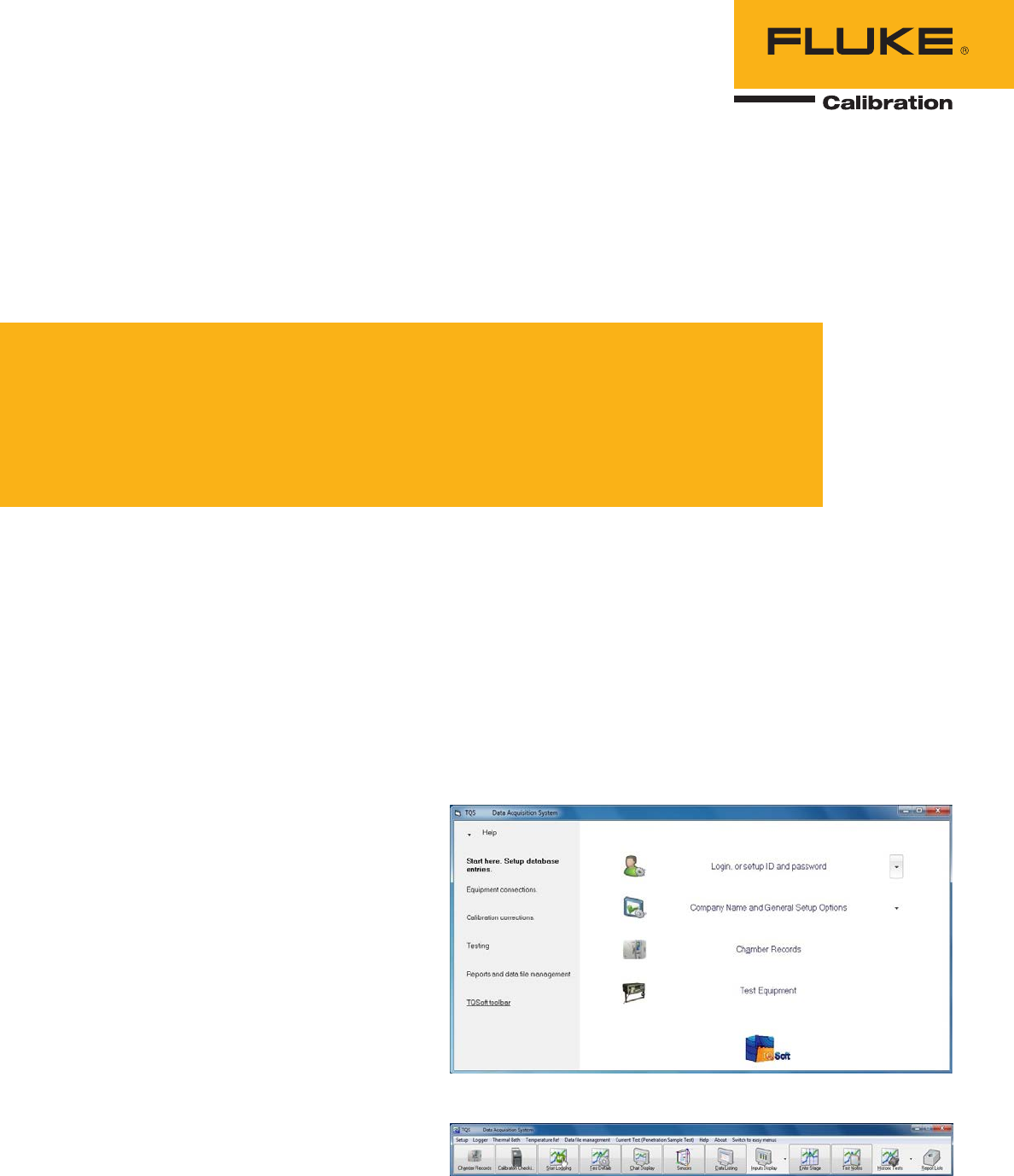
Easy menu system and toolbar
TQSoft and TQAero provide a menu system
designed to simplify thermal validation test setup.
The left panel guides you step by step. Dropdown
arrows on the right list the full range of options. If
desired, easily switch to the toolbar for access to
all software features.
Figure 1. Easy menu system.
Figure 2. Menu toolbar.
2 Fluke Corporation TQSoft and TQAero Thermal Validation Software
Data security and audit trail
TQSoft and TQAero check data files used to
produce reports. Any changes made by an unau-
thorized person will render records unusable. All
changes made by an authorized user are audited
with full details of the changes made and actions
performed.
Test equipment preparation and sensor
calibration
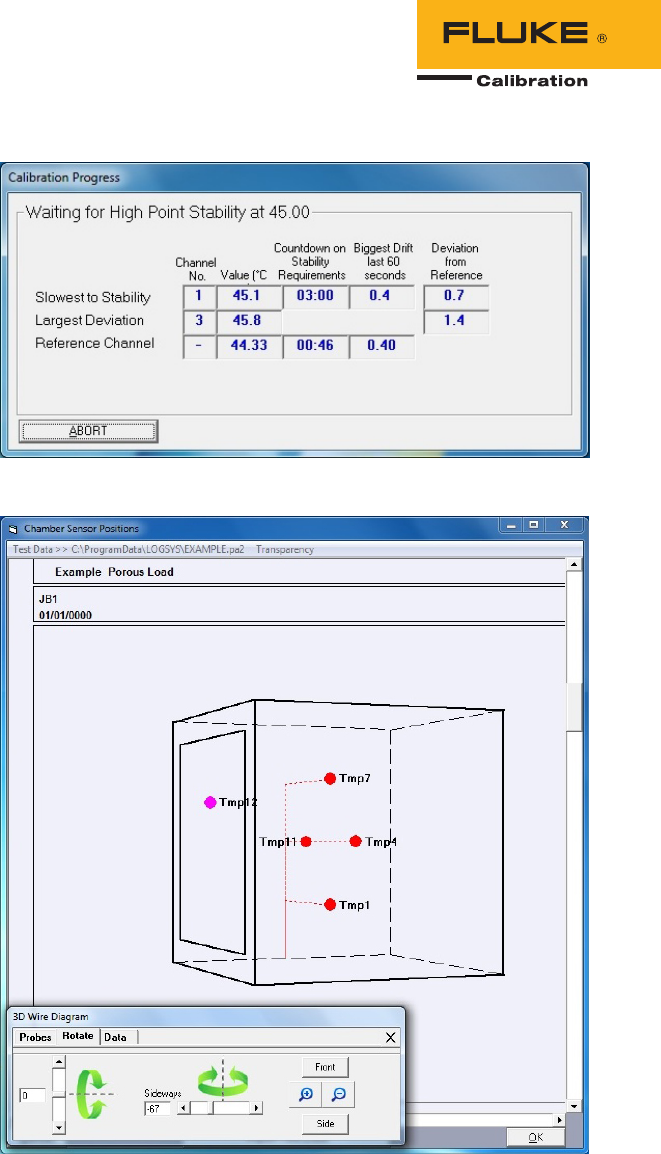
Both TQSoft and TQAero guide you through data
logger channel configuration and communications
setup with a temperature source, thermometer
readout, and reference probe. Fluke 2638A and
1586A models are automatically detected as
data loggers for easy setup. Prior to a thermal
validation test, an automatic or manual sensor
calibration can be performed to determine multiple
point offsets for each channel to correct for sensor
measurement inaccuracy. When the sensors
and reference probe are detected to be stable as
defined, the software automatically applies all
correction offsets, generates, and saves a full and
traceable calibration report.
Thermal validation test setup
TQSoft and TQAero allow you to set up and
manage a three-dimensional (3D) wire diagram of
the chamber space. Drag and drop sensors to their
correct position in the 3D space. The completed
diagram can be rotated and magnified. There
are options for real time display of measurement
values and to represent temperature gradients
with color shading at each sensor position. After
the test is complete, a real time display can be
replayed with a time slider showing temperature
behavior in the chamber. Completed diagrams can
be easily added to reports.
Sample test specifications
Sample test specifications are included to help
you quickly become familiar with the software.
The test specification contains selection settings
for target temperature, channel configuration,
all calibration information, and all temperature
parameters. When you select a test specification
and start a test, all settings are automatically
applied by the software, and a report can be auto-
matically generated at the end of the test. Once
you are familiar with the software, you can make
modifications and create new test specifications to
meet your specific needs.
Figure 3. Automatic sensor calibration.
Figure 4. Chamber sensor positions.
3 Fluke Corporation TQSoft and TQAero Thermal Validation Software
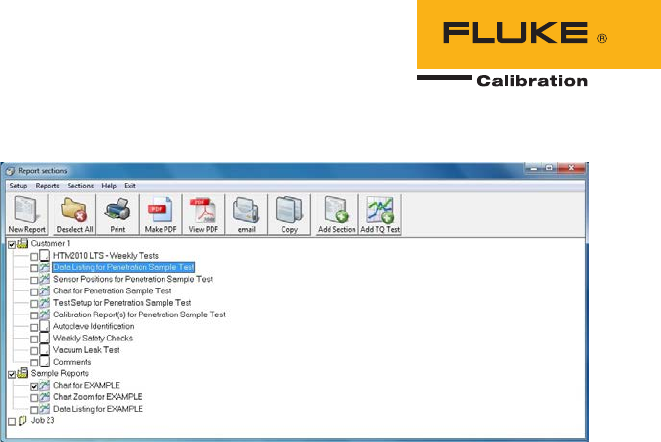
Figure 5. Reports Manager.
Reports
TQSoft and TQAero include a large library of tem-
plates for creating reports tailored to the needs of
individuals, organizations, processes, and equip-
ment. It’s easy to assemble a full report from the
report sections. Cover pages, charts, data lists, cal-
ibration reports, calibration certificates, etc. can be
included. The Report Manager window has been
designed to manage and print complete reports.
Fluke Calibration instruments supported
Data acquisition systems
1586A Super-DAQ Precision Temperature Scanner
2638A Hydra Series III Data Acquisition System/
Digital Multimeter
2620A/2625A Hydra Series Data Acquisition Unit/
Data Logger
2635A/C Portable Data Acquisition
2680 Series Data Acquisition Systems
2640A/2645A NetDAQ Data Acquisition Unit
Thermometer readouts
1502A/1504 Tweener
1523/1524 Reference Thermometers
Temperature sources
9142/9143/9144 Field Metrology Wells
9190A Ultra-Cool Field Metrology Well
9170/9171/9172/9173 Metrolog y Wells
9103/9140/9141 Dr y-Well Calibrators
9009 Dual-Block Calibrator
9011 Dual-Well Calibrator
9101 Zero-Point Dry-Well
9007 Portable Lab Dry-Well
6102/7102/7103 Micro-Baths
6330/7320/7340/7380 Compact Baths
6331/7321/7341/7381 Deep-Well Compact Baths
9150 Thermocouple Calibration Furnace
System requirements
One of the following Microsoft operating systems:
Windows XP
Windows 7
Windows 8
Disk space: 250MB
Languages
English
Demonstration
Contact your Fluke representative to arrange a
demonstration of the software.
Pricing
Contact your Fluke representative to request a
quote.
Ordering information
Models Description
TQSOFT-IQ/OQ TQSoft Pharma Process Analysis and Validation Software
Data acquisition software with activation key code. Electronic signatures and
operator action audit trail. Configurable for use in discrete process validation.
Provides FDA 21 CFR part 11 compliant user access controls. Includes IQ/OQ
Documentation to help customers test their validation system with their
processes. This set of PDF documents on CD provides a test plan to guide
customers in TQSoft installation and qualification using their instruments,
test specifications, and reporting requirements. Email support and one remote
installation and training session is included.
TQAERO TQAero Furnace Validation Software
Data acquisition software with activation key code. NADCAP compliant user
access controls and operator action audit trail. Configurable for use in discrete
process validation. TQAero is a configuration of TQSoft providing complete
support for AMS2750 requirements. Email support and one remote installation
and training session is included.
VAL-BNDR-TQS Validation Reference Binder
This is a set of TQSolutions documents on CD summarizing TQSoft system
acceptance testing to GAMP standards.
Customization and training services
For customers setting up complete validation systems, more extensive
support and training is recommended and usually required. A range
of customization and training options is available for TQSoft and
TQAero. Contact TQSolutions at info@tqsolutions.net to discuss your
training requirements.
4 Fluke Corporation TQSoft and TQAero Thermal Validation Software
Fluke Calibration
PO Box 9090,
Everett, WA 98206 U.S.A.
Fluke Europe B.V.
PO Box 1186, 5602 BD
Eindhoven, The Netherlands
Web access: http://www.flukecal.eu
For more information call:
In the U.S.A. (877) 355-3225 or Fax (425) 446-5716
In Europe/M-East/Africa +31 (0) 40 2675 200 or Fax +31 (0) 40 2675 222
In Canada (800)-36-FLUKE or Fax (905) 890-6866
From other countries +1 (425) 446-6110 or Fax +1 (425) 446-5716
Web access: http://www.flukecal.com
©2015 Fluke Calibration. Specifications subject to change without notice.
6/2015 6005284b-en
Pub-ID 13405-eng
Modification of this document is not permitted without written permission
from Fluke Calibration.
Fluke Calibration. Precision, performance, confidence.™
