Easy Mobile User Guide
USER_GUIDE
User Manual:
Open the PDF directly: View PDF  .
.
Page Count: 18

EasyMobileBasicUserGuide
ThisdocumentistheofficialuserguidefortheLiteversionoftheEasyMobilepluginforUnitybySgLibGames.
EasyMobileVersions
EasyMobilePro
EasyMobileBasic
EasyMobileLite(Free)
ImportantLinks
Website
APIReference
SupportEmail
Forum
ConnectwithSgLibGames
UnityAssetStore
Facebook
Twitter
YouTube
About
3

NativeAPIs|NativeUI:Introduction
TheNativeUImoduleallowsyoutoaccessnativemobileUIelementssuchasalertsanddialogs.Thismodule
requiresnoconfigurationandalltaskscanbedonefromscript.
Alerts
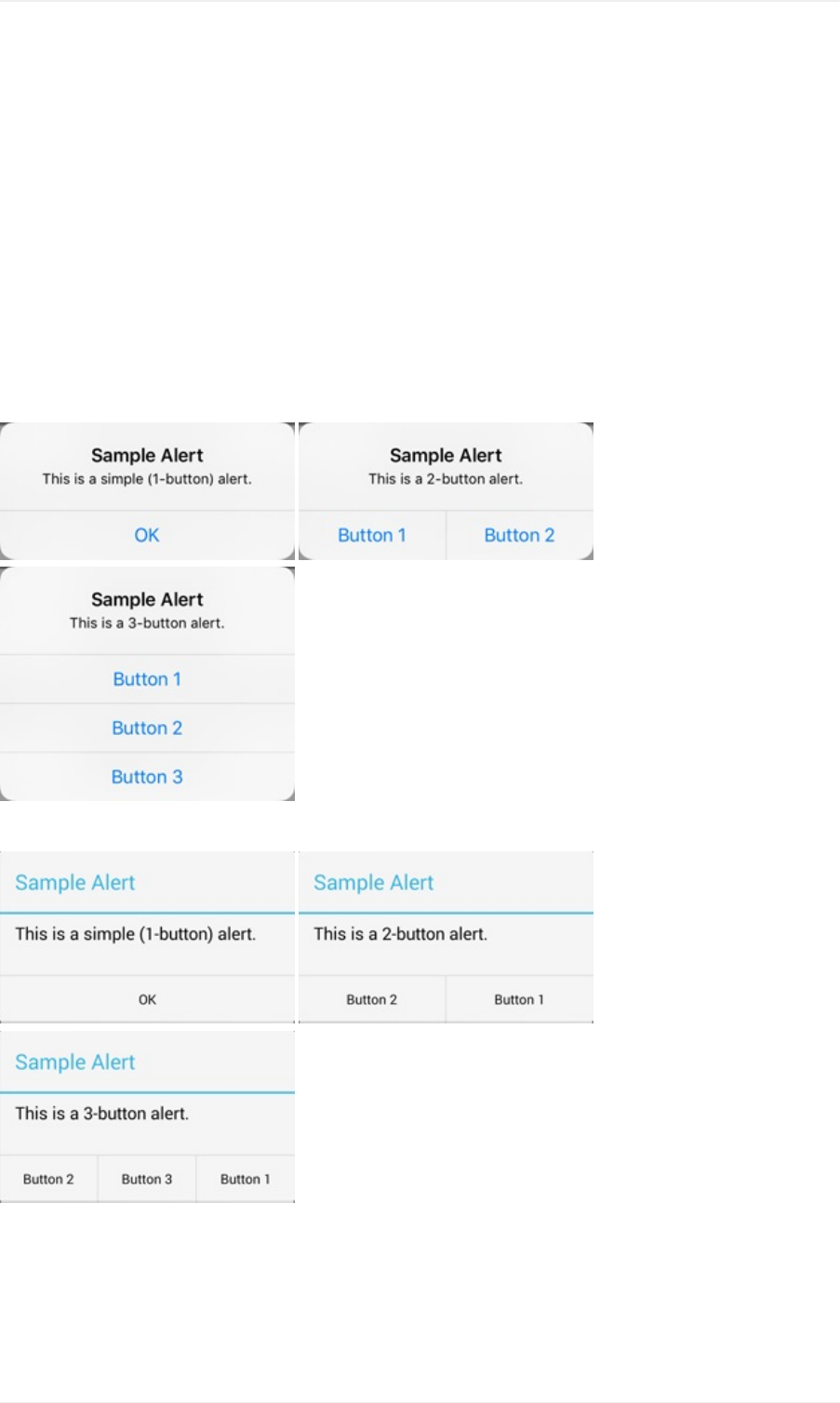
Alertsareusefulinprovidingtheuserscontextualinformation,askingforconfirmationorpromptingthemtomakea
selectionoutofseveraloptions.Analertcanhaveone,twoorthreebuttonswithit.
BelowarethethreetypesofalertoniOS.
AndbelowarethethreetypesofalertonAndroid.
Toasts
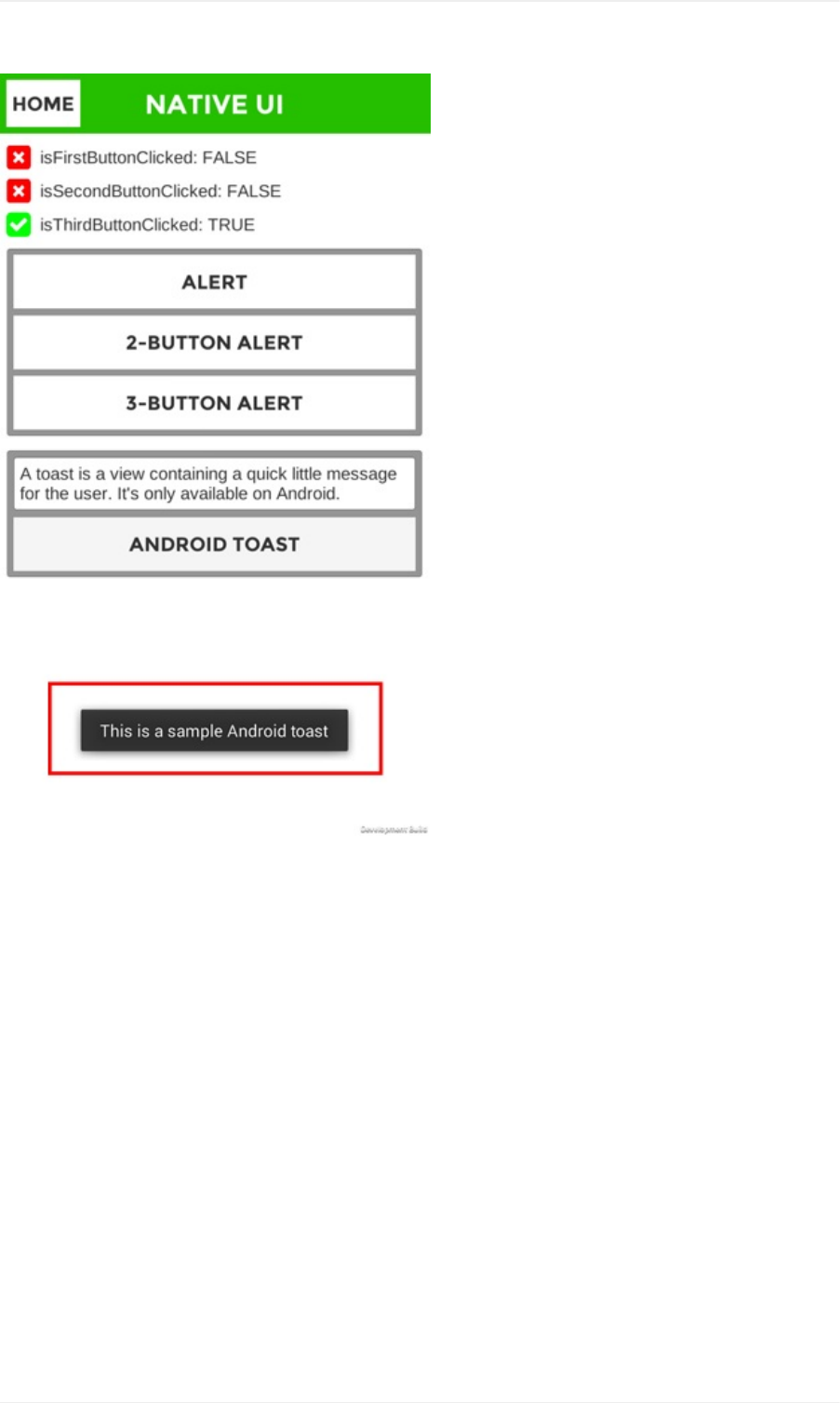
Toastsareshortmessagesdisplayedatthebottomofthescreen.Theyautomaticallydisappearafteratimeout.
ToastsareavailableonAndroidonly.Belowisasampletoastmessage.
NativeUI
5
NativeUI
6

NativeAPIs|NativeUI:Scripting
ThissectionprovidesaguidetoworkwithNativeUIscriptingAPI.
YoucanaccesstheNativeUImoduleAPIviatheNativeUIclassundertheEasyMobilenamespace.
Alerts
AlertsareavailableonbothiOSandAndroidplatformandcanhaveuptothreebuttons.
Simple(one-button)alertsareusefulingivingtheusercontextualinformation.Toshowasimplealertwiththedefault
OKbutton,youonlyneedtoprovideatitleandamessageforthealert:
//ShowasimplealertwithOKbutton
NativeUI.AlertPopupalert=NativeUI.Alert("SampleAlert","ThisisasamplealertwithanOKbutton.");
Youcanalsoshowaone-buttonalertwithacustombuttonlabel.
//Showanalertwithabuttonlabeledas"Gotit"
NativeUI.AlertPopupalert=NativeUI.Alert(
"SampleAlert",
"Thisisasamplealertwithacustombutton.",
"Gotit"
);
Two-buttonalertscanbeusefulwhenneedingtoaskforuserconfirmation.Toshowatwo-buttonalert,youneedto
specifythelabelsofthesetwobuttons.
//Showatwo-buttonalertwiththebuttonslabeledas"Button1"&"Button2"
NativeUI.AlertPopupalert=NativeUI.ShowTwoButtonAlert(
"SampleAlert",
"Thisisatwo-buttonalert.",
"Button1",
"Button2"
);
Three-buttonalertscanbeusedtopresenttheuserwithseveraloptions,atypicalusageofitistoimplementtheRate
Uspopup.Toshowathree-buttonalert,youneedtospecifythelabelsofthethreebuttons.
//Showathree-buttonalertwiththebuttonslabeledas"Button1","Button2"&"Button3"
NativeUI.AlertPopupalert=NativeUI.ShowThreeButtonAlert(
"SampleAlert",
"Thisisathree-buttonalert.",
"Button1",
"Button2",
"Button3"
);
Wheneveranalertisshown,aNativeUI.AlertPopupobjectisreturned,whenthealertisclosed,thisobjectwillfirean
OnCompleteeventandthendestroyitself.Theargumentofthiseventistheindexoftheclickedbutton.Youshould
listentothiseventandtakeappropriateactiondependingonthebuttonselected.
//ShowathreebuttonalertandhandleitsOnCompleteevent
NativeUI.AlertPopupalert=NativeUI.ShowThreeButtonAlert(
"SampleAlert",
"Thisisathree-buttonalert.",
Scripting
7

"Button1",
"Button2",
"Button3"
);
//Subscribetotheevent
if(alert!=null)
{
alert.OnComplete+=OnAlertCompleteHandler;
}
//Theeventhandler
voidOnAlertCompleteHandler(intbuttonIndex)
{
switch(buttonIndex)
{
case0:
//Button1wasclicked
break;
case1:
//Button2wasclicked
break;
case2:
//Button3wasclicked
break;
default:
break;
}
}
Onlyonealertpopupcanbeshownatatime.Anycalltoshowanalertwhileanotheroneisbeingdisplayedwillbe
ignored.YoucancheckifanalertisbeingshownusingtheIsShowingAlertmethod.
//Checkifanalertisbeingdisplayed.
boolisShowingAlert=NativeUI.IsShowingAlert();
Toasts
Toastisashortmessagedisplayedatthebottomofthescreenandautomaticallydisappearsafteratimeout.Toasts
areavailableonlyonAndroidplatform.Toshowatoastmessage:
//Showasampletoastmessage
NativeUI.ShowToast("ThisisasampleAndroidtoast");
Scripting
8

Sharing:Introduction
TheSharingmodulehelpsyoueasilysharetextsandimagestosocialnetworksincludingFacebook,Twitterand
Google+usingthenativesharingfunctionality.Inaddition,italsoprovidesconvenientmethodstocapturethe
screenshotstobeshared.
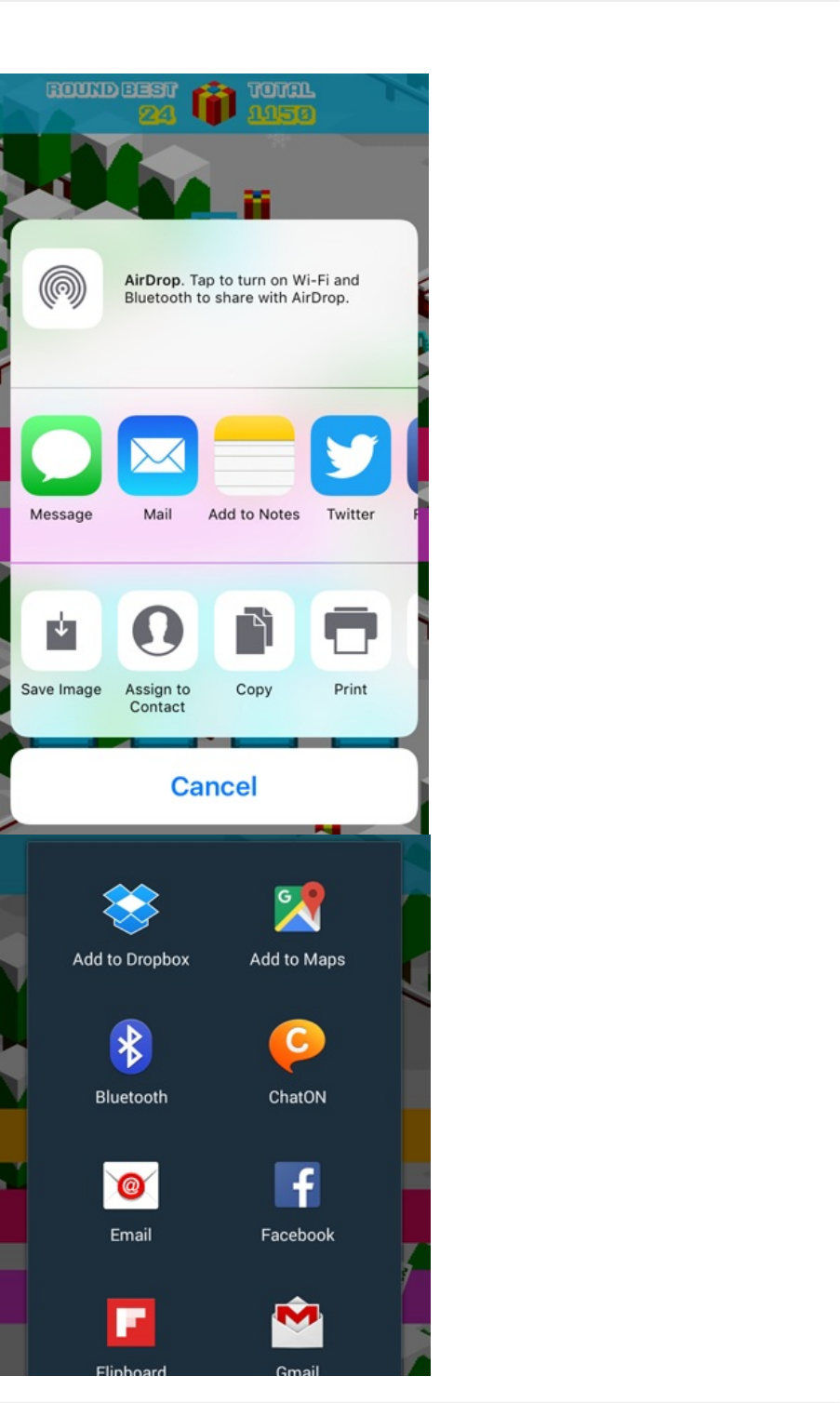
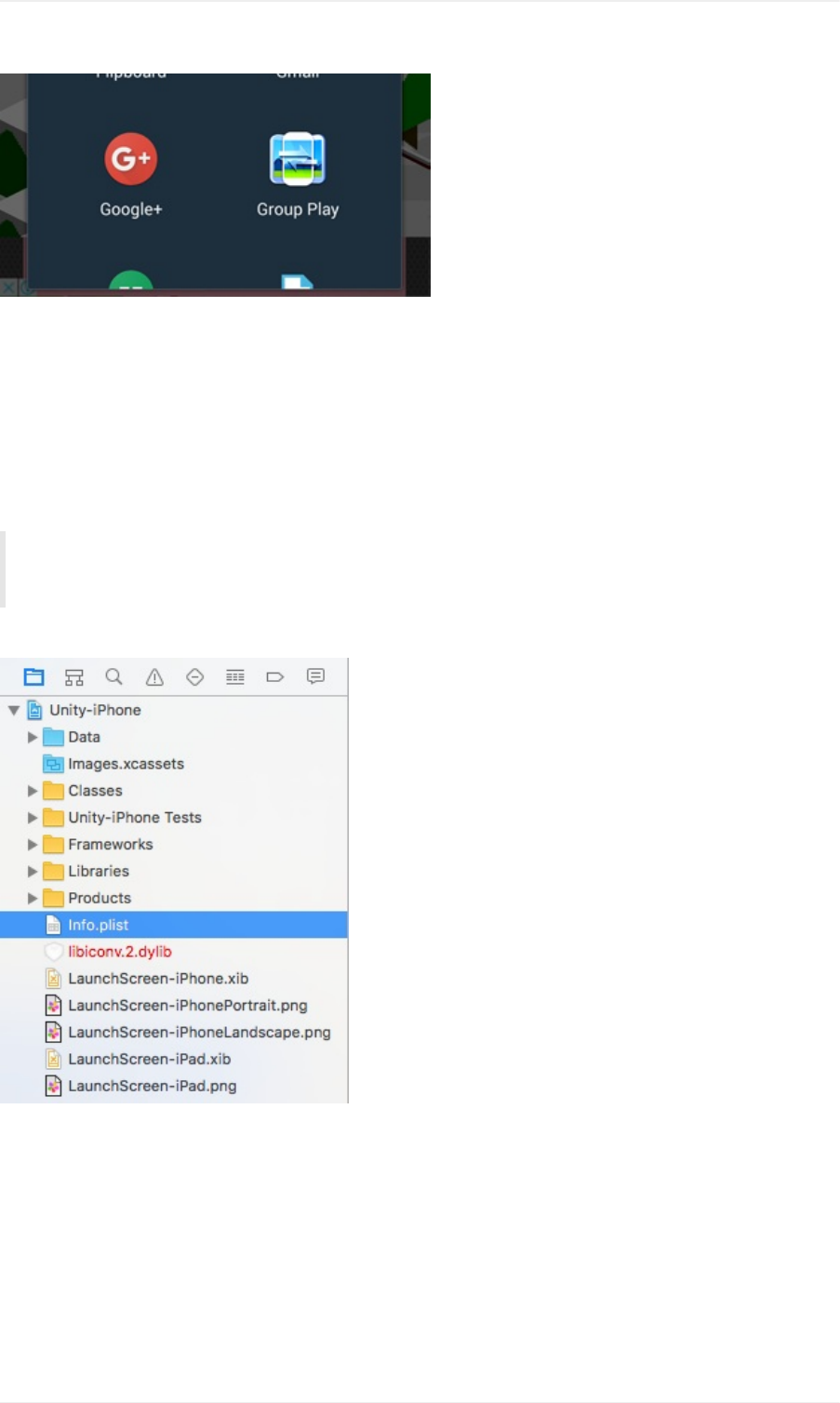
BelowarethesharinginterfacesoniOSandAndroid,respectively.
Introduction
9
Introduction
10
[iOS]RequestPhotoLibraryAccessPermission
SinceiOS10,inordertousethe"SaveImage"featureofthesharingutility,theappneedstoaskforuserpermission
beforeitcanaccessthephotolibrary.Failuretodosowillcausetheapptocrashassoonastheuserselectsthe
option.Torequestthephotolibraryaccesspermission,youneedtoaddthePrivacy-PhotoLibraryUsage
DescriptionandPrivacy-PhotoLibraryAdditionsUsageDescriptionpropertiestotheInfo.plistofyourXcode
project.
Asofthiswriting,outtestsshowthatoniOS10,thePrivacy-PhotoLibraryUsageDescriptionpropertyis
required.WhileiOS11asksforthePrivacy-PhotoLibraryAdditionsUsageDescriptionproperty.
Thereforeit'srecommendedtoaddbothpropertiesifyourtargetplatformsincludingiOS10andabove.
InyourgeneratedXcodeprojectopentheInfo.plistfile.
Clickthe+buttonontherightofInformationPropertyListtoaddanewkey.
Introduction
11
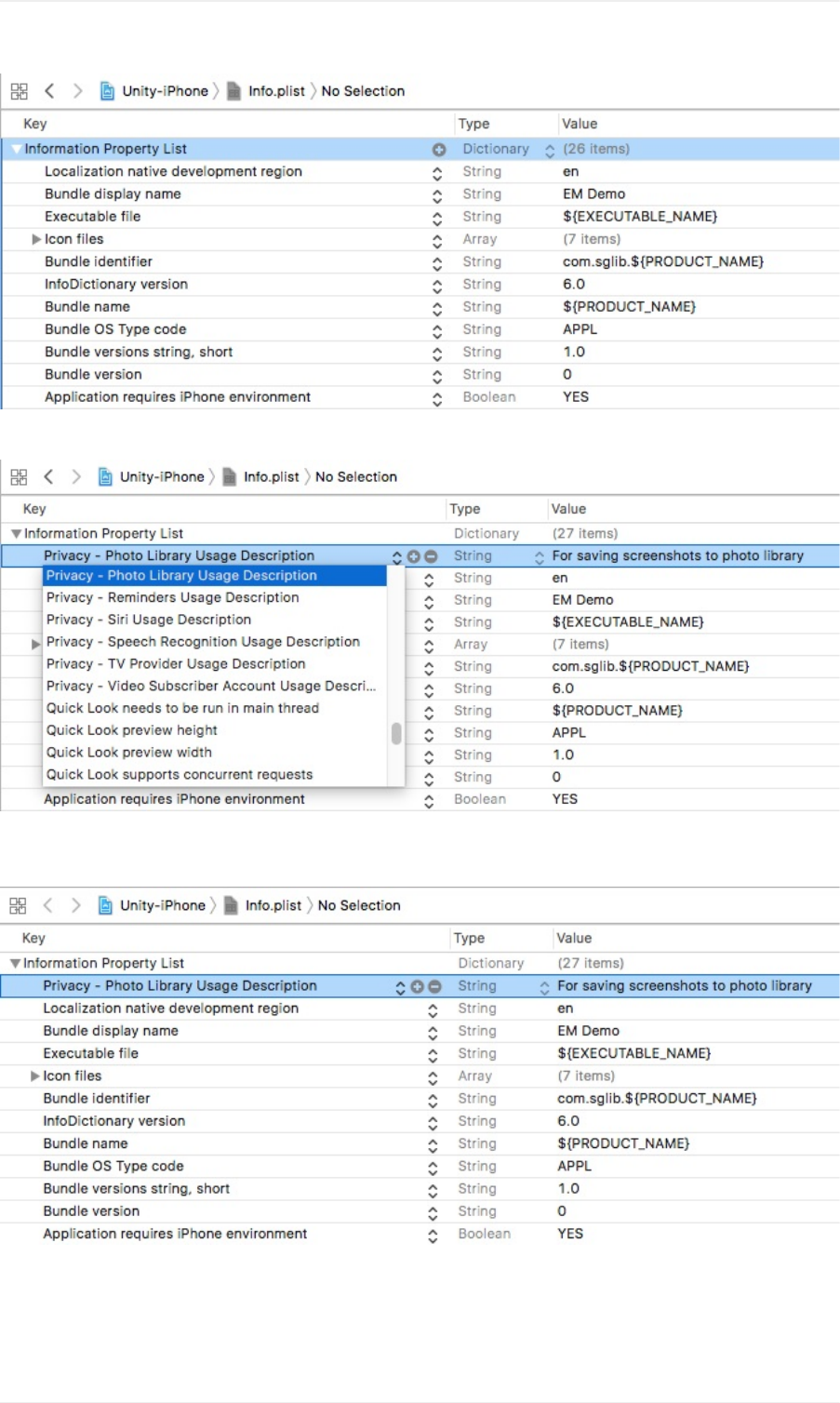
ScrolldowntofindthePrivacy-PhotoLibraryUsageDescriptionkey.
Enteravalueforthekey,thismessagewillbedisplayedastheapprequestsaccesspermissionwhentheuser
selectsthe"SaveImage"option.
RepeattheprocesstoaddthePrivacy-PhotoLibraryAdditionsUsageDescriptionproperty.
Introduction
12
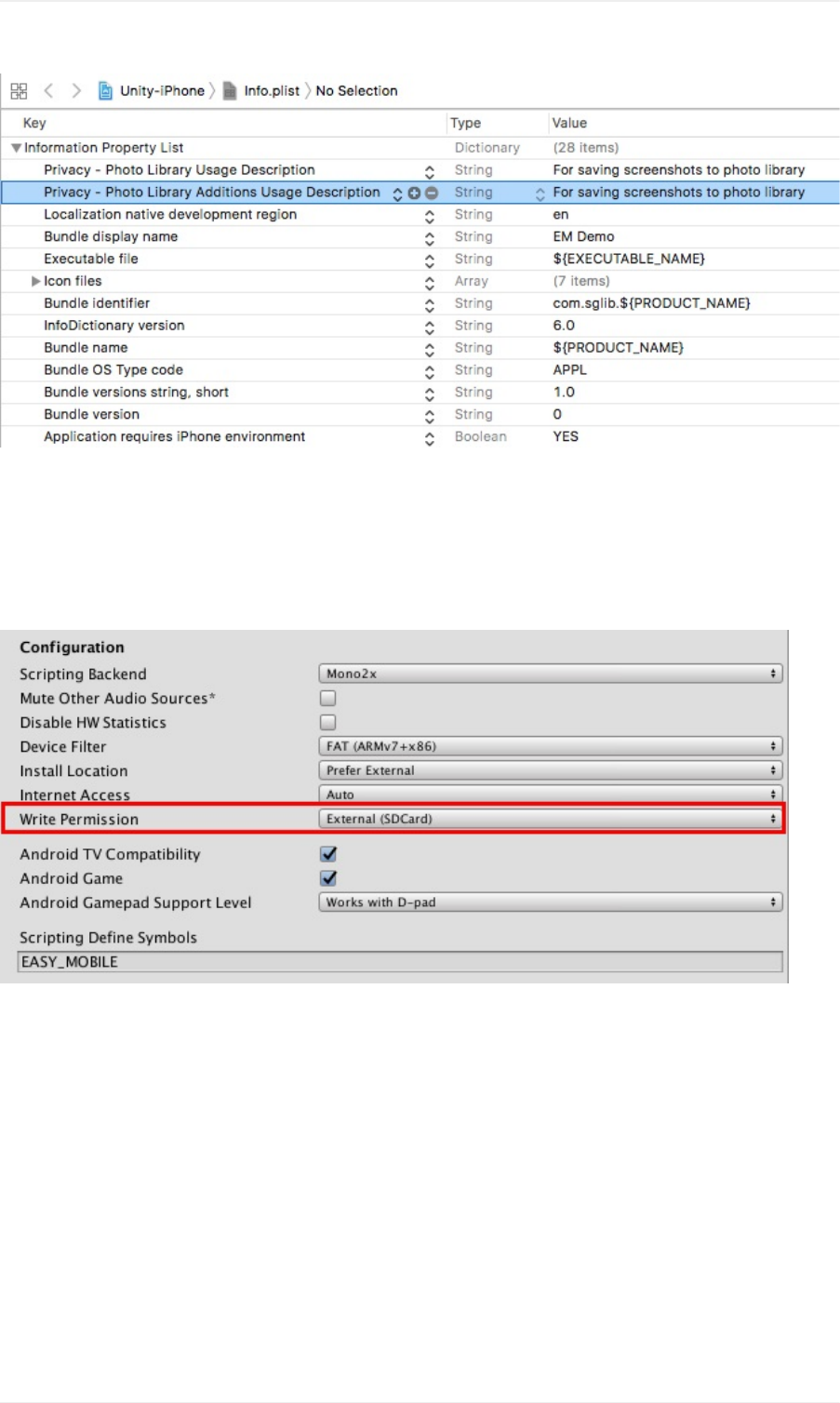
[Android]EnableExternalWritePermission
ForthismoduletofunctiononAndroid,itisnecessarytoenablethepermissiontowritetoexternalstorage.Todoso,
gotoEdit>ProjectSettings>Player,selectAndroidsettingstab,thenlocatetheConfigurationsectionandsetthe
WritePermissiontoExternal(SDCard).
Introduction
13

Sharing:Scripting
ThissectionprovidesaguidetoworkwithSharingmodulescriptingAPI.
YoucanaccesstheSharingmoduleAPIviatheSharingclassundertheEasyMobilenamespace.
ScreenshotCapturing
Tocapturethedevice'sscreenshot,youhaveafewoptions.
ScreenshotasPNGImage
Tocaptureandsaveascreenshotofthewholedevicescreen,simplyspecifythefilenametobesaved.This
screenshotwillbesavedasaPNGimageinthedirectorypointedbyApplication.persistentDataPath.Notethatthis
method,aswellasotherscreenshotcapturingmethods,needstobecalledattheendofaframe(whentherendering
hasdone)forittoproduceaproperimage.ThereforeyoushouldcallitwithinacoroutineafterWaitForEndOfFrame().
//Coroutinethatcapturesandsavesascreenshot
IEnumeratorSaveScreenshot()
{
//Waituntiltheendofframe
yieldreturnnewWaitForEndOfFrame();
//TheSaveScreenshot()methodreturnsthepathofthesavedimage
//Theprovidedfilenamewillbeaddeda".png"extensionautomatically
stringpath=Sharing.SaveScreenshot("screenshot");
}
Youcanalsocapturesandsavesjustaportionofthescreen:
//Coroutinethatcapturesandsavesaportionofthescreen
IEnumeratorSaveScreenshot()
{
//Waituntiltheendofframe
yieldreturnnewWaitForEndOfFrame();
//Capturetheportionofthescreenstartingat(50,50),
//hasawidthof200andaheightof400pixels.
stringpath=Sharing.SaveScreenshot(50,50,200,400,"screenshot");
}
ScreenshotasTexture2D
InsomecasesyoumaywanttocaptureascreenshotandobtainaTexture2Dobjectofitinsteadofsavingtodisk,
e.g.tocreateaspritefromthetextureanddisplayitin-game.
//CoroutinethatcapturesascreenshotandgeneratesaTexture2Dobjectofit
IEnumeratorCaptureScreenshot()
{
//Waituntiltheendofframe
yieldreturnnewWaitForEndOfFrame();
//CreateaTexture2DobjectofthescreenshotusingtheCaptureScreenshot()method
Texture2Dtexture=Sharing.CaptureScreenshot();
}
Similartothecaseabove,youcanalsocaptureonlyaportionofthescreen.
Scripting
14

//CoroutinethatcapturesaportionofthescreenshotandgeneratesaTexture2Dobjectofit
IEnumeratorCaptureScreenshot()
{
//Waituntiltheendofframe
yieldreturnnewWaitForEndOfFrame();
//CreateaTexture2DobjectofthescreenshotusingtheCaptureScreenshot()method
//Thecapturedportionstartsat(50,50)andhasawidthof200,aheightof400pixels.
Texture2Dtexture=Sharing.CaptureScreenshot(50,50,200,400);
}
Notethatscreenshotcapturingshouldbedoneattheendoftheframe.
Sharing
Toshareanimageyoualsohaveafewoptions.Youcanalsoattachamessagetobesharedwiththeimage.
DuetoFacebookpolicy,pre-filledmessageswillbeignoredwhensharingtothisnetwork,i.e.sharing
messagesmustbewrittenbytheuser.
ShareaSavedImage
Youcanshareasavedimagebyspecifyingitspath.
//Shareasavedimage
//Supposewehavea"screenshot.png"imagestoredinthepersistentDataPath,
//we'llconstructitspathfirst
stringpath=System.IO.Path.Combine(Application.persistentDataPath,"screenshot.png");
//Sharetheimagewiththepath,asamplemessageandanemptysubject
Sharing.ShareImage(path,"Thisisasamplemessage");
ShareaTexture2D
YoucanalsoshareaTexture2Dobjectobtainedsomepointbeforethesharingtime.Internally,thismethodwillalso
createaPNGimagefromtheTexture2D,saveittothepersistentDataPath,andfinallysharethatimage.
//ShareaTexture2D
//sampleTextureisaTexture2Dobjectcapturedsometimebefore
//ThismethodsavesthetextureasaPNGimagenamed"screenshot.png"inpersistentDataPath,
//thensharesitwithasamplemessageandanemptysubject
Sharing.ShareTexture2D(sampleTexture,"screenshot","Thisisasamplemessage");
ShareaText
Youcanshareatext-onlymessageusingtheShareTextmethod.NotethatFacebookdoesn'tallowpre-filledsharing
messages,sothetextwillbediscardedwhensharingtothisparticularnetwork.
//Shareatext
Sharing.ShareText("HellofromEasyMobile!");
ShareaURL
ToshareaURL,usetheShareURLmethod.OnnetworkslikeFacebookorTwitter,asummaryofthepagewillbe
shownifthesharedURLpointstoawebsite.URLsarealsousefultoshareGIFimageshostedonsiteslikeGiphy
(seetheGIF>Scriptingsection).
Scripting
15

//ShareaURL
Sharing.ShareURL("www.sglibgames.com");
Scripting
16
ReleaseNotes
Version2.0.0
Changes
Editor:
UpdatedUserGuidelink.
UpgradedtoGooglePlayServicesResolverversion1.2.89.
TheminimumrequiredversionofUnityisnow5.5.5f1.
Version1.1.0
Changes
Reviseddemoapp.
RevisedscriptingAPIs.
BugFixes
FixedsharingissuesonAndroidNougat.
Version1.0.0
Firstrelease.
ReleaseNotes
17