User Manual Drawbar Expander
User Manual:
Open the PDF directly: View PDF  .
.
Page Count: 12
KEYBOARDPARTNER UG
HX3 Drawbar Expander Version 5
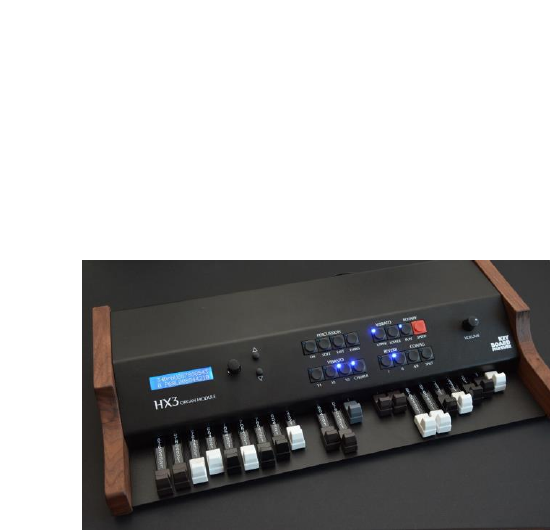
HX3 Drawbar Expander is a tonewheel organ
emulation with all B3 features in compact
desktop format, creating the legendary
unmatched HX3 sound. Controlled via MIDI, it
offers selectable CC-sets for various
keyboards. Unlimited polyphony, presets,
parameters tweakable by simple menus - like
key click response, percussion punch and
more. In addition, General MIDI sounds like
piano and strings are available.
As an option (extended licence required), the new HX3 RealOrgan engine is capable of emulating
all electromagnetic organs including the famous H100, combo organs, concert organs of the 70s
and 80s like Böhm Orchester and Wersi Helios. This implies up to 15 harmonics, up to 12
drawbars per manual with individual mixtures, including phasing rotor (WersiVoice), mechanical
and electronic keying available simultaneously. ADSR envelope available on all drawbars, also
H100 percussion and "Harp Sustain". Various tone generator waveforms selectable, for "cheesy"
combo organs as well as fully fledged concert organs.
Features
Compact organ emulator with two sets of drawbars plus pedal
Authentic reproduction of generator, tapering, key contacts, percussion and vibrato by
FPGA (Field Programmable Gate Array) and physical modelling
Tunable in range of A = 433 through 447 Hz
Extremely low internal latency of 50 microseconds Key-to-Audio. However, MIDI
transmission delays are about 1 ms per note played.
Natural key click by "rattling" contacts
Accurate Rotary simulation with separate 122 amp output
Dual MIDI IN for 2 separate keyboards or bass pedal
MIDI OUT sends NI B4® compatible control codes
LCD display and menu system
Swell (expression) pedal and footswitch jacks
Separate outputs for amp and rotary simulation as well as plain organ
Connector for 11-pin Leslie® Speakers
USB for MIDI over USB, firmware updates, and parameter editing
Effects DSP with 3 reverb levels
24 voices GM Synth
Default MIDI setting is channels 1/2/3 for upper/lower/bass, MIDI CC NI B4 with Sustain on CC
#64.
DC input 9 to 12V, 500 mA min., 5.5/2.1 mm plug, plus on center.
Trademarks Hammond®, B3® and Leslie® belong to Hammond Suzuki Corporation (Japan). Trademark NI B4
belongs to Native Intrumens GmbH, Germany. Product and company names used in this document apply for
illustration and example purposes only. Keyboardpartner is not related to these trade marks in any way.
Please read this manual carefully before using the HX3 Drawbar Expander.
Only clean with damp soft cloth. Using detergents or solvents may deteriorate
finish and lettering.
Wood parts are unique, so deviations in colour and texture may occur. Maintain
finish by using medium dark wood wax or wood oil. Do not allow water spills to
stain into wood.
Keep packaging in case of service shipment.
Only use appropriate power supply as advised. Input voltages exceeding 15V
may damage the device.
Designed for indoor use only. Do not use HX3 Drawbar Expander in moist
places. Do not spill liquids or solvents into unit.
No user-serviceable parts inside. Refer to qualified technician or service
representative if problems occur.
EU conformity declaration
The producer/distributor
KEYBOARDPARTNER UG
Entwicklung elektronischer Musikinstrumente
Carsten Meyer
Ithweg 37, D-30851 Langenhagen
info@keyboardpartner.de
hereby declares, that the product
HX3.5 Mainboard
has been designed, produced and examined in compliance with the DIN VDE 0580 standard and in
accordance with the EU Low Voltage Directive.
Following directives, standards and guidelines have been used:
EMV-Richtlinie 2004/108/EG
Niederspannungsrichtlinie 2006/95 EG
RoHS-Richtlinie 2011/65/EU
Langenhagen, August 2018
______________________________
Carsten Meyer / Geschäftsführer
1.0 Jack Connections
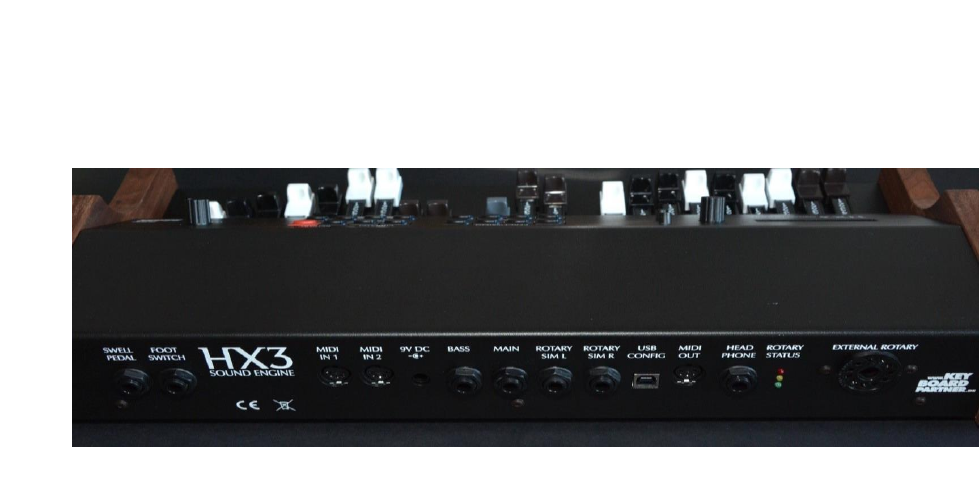
HX3 Drawbar Expander connectors on back panel, left to right:
SWELL PEDAL ¼” stereo jack. Expression pedal input is compatible with Yamaha FC-7
and similar expression pedals (direct connection preferred for speed/accuracy, but may
also be remote controlled by MIDI control change, controller 11). Plug connection: Sleeve =
ground / potentiometer start, ring = potentiometer tap, tip = potentiometer end.
FOOT SWITCH ¼” stereo jack. Single or double footswitch controls simulated rotary speed
as well as external rotary cabinet speed: SLOW/FAST on plug tip, RUN/STOP on plug ring.
Please use latching foot switches; momentary (button type) switches are not supported. If
single footswitch is used, Rotary is always on RUN (no plug ring, input grounded by plug
sleeve).
MIDI IN 1 Accepts MIDI data from master keyboard 1 or bass pedal
MIDI IN 2 Accepts MIDI data from master keyboard 2 or bass pedal
9V DC Use stabilized DC wall wart 9 to 12V with at least 500mA current output, inner/outer
plug diameter 2.1/5.5 mm on DC input jack. Polarity: Plus on inner tip.
BASS Separate audio output for bass pedal sound
MAIN Plain Organ output, as sent to external Leslie speaker
AUDIO 1/L Audio output left channel of internal rotary simulation
AUDIO 2/R Audio output right channel of internal rotary simulation
USB USB B-type connector for MIDI over USB, for updates and configuration by HX3.5
Editor application.
MIDI OUT Sends MIDI data of HX3 Drawbar Expander’s own controllers
HEADPHONE Stereo output of internal rotary simulation, headphone amplifier
ROTARY STATUS 3 LEDs indicate status of external Leslie ®, green = on, red = slow,
yellow = fast
EXTERNAL ROTARY Standard 11-pin Leslie® speaker connector

1.1 Volume Control
Output level of all output channels is controlled by Master Volume rotary knob or MIDI CC #7
“Volume”, whichever occurs last.
Organ's swell pedal position is controlled by an expression pedal or MIDI CC #11 “Expression”,
whichever occurs last. The loudness curve is similar to the swell pedal of a classic tonewheel
organ, so expression volume will not reach zero. We recommend connecting an expression pedal
Yamaha FC-7 or similar (1/4" jack, 10k to 47k total resistance) directly to the HX3 module.
MIDI CC #11 and #7 may be altered via menu to any valid MIDI CC Number.
2. Panel Buttons
HX3 drawbar expander has two sets of drawbars for upper and lower manual as well as pedal and
pedal sustain drawbars, and a set of 16 buttons. LED-illuminated buttons control main organ
functions as found on a real B3:
Perc ON toggles percussion on/off. When on, drawbar 1’ is cancelled (see No DB1 @Perc
parameter below to change cancelling behaviour)
Perc SOFT toggles normal/soft percussion. Drawbar volume is muted in “normal” position
Perc FAST toggles slow/fast percussion decay
Perc 3RD toggles 2nd and 3rd percussion harmonic
Similar to Hammond® console organs, drawbar volume is muted in “normal” position to
emphasize percussion effect. Muting level in “normal” position may be changed by menu.
VIBRATO UPPER toggles vibrato on upper manual on/off
VIBRATO LOWER toggles vibrato on lower manual on/off
Rotary buttons control both internal rotary simulation as well as a Leslie® speaker connected to
11-pin socket simultaneously. Rotary simulation may be controlled by footswitch or panel buttons
alternatively. A flashing LED indicates rotary speed.
ROTARY RUN toggles rotary motors on/off
ROTARY SPEED toggles slow/fast rotary speed
Six vibrato/chorus variations are set by 4 buttons:
VIBRATO V1 sets vibrato/chorus depth 1 (shallow)
VIBRATO V2 sets vibrato/chorus depth 2 (medium)
VIBRATO V3 sets vibrato/chorus depth 3 (deep)
VIBRATO CHORUS toggles between vibrato and chorus mode. Vibrato setting does not
have any effect if VIBRATO UPPER and VIBRATO LOWER are both off.
REVERB I and REVERB II select 3 different reverb settings and reverb off. Press I and II
simultaneously to select reverb III.
CONFIG A/B selects the pedal signal insert point before or after the Preamp simulation. In
many cases it is desirable to limit the overdrive effect to the manuals.
CONFIG SPLIT sets keyboard split mode on or off. See 3.2.1 Split Configuration for
details.

3.0 Menu Panel
On power on, the presets/drawbar menu is present. Pressing the rotary knob twice briefly will let
you return to the presets/drawbar menu from any other menu position. The menu system consists
of up to 120 entries, depending on licence.
Turn the rotary know to select overall Common Presets 0 to 15. Overall presets consist of voice
numbers for upper manual, lower manual, and pedal, tab switch settings (percussion, vibrato etc.),
volume and 122 tube amp gain as well as all other sound defining parameters, except rotary
run/fast/slow. LEDs show current percussion and vibrato setting.
Press rotary knob once briefly to scroll through the menu. Up/down arrows are white (active) and
parameter arrow is outlined (inactive) in this mode. Press rotary knob again briefly to change an
entry. A white “<” arrow indicates the selected entry that may be altered.
Alternatively you may use the up/down buttons to step through the menu (autorepeat when you
keep the button pressed).
Turn the rotary knob counterclockwise (or press the down button) to access upper (U), lower (L) or
pedal (P) Voice Presets.
40 voices (0 … 39) are available for each manual and pedal. Voices 0 to 15 contain the organ
drawbar settings. Voices 16 to 39 select a General MIDI (GM) preset. GM presets may be
predefined by use of the HX3.5 Editor application.
Common Presets only contain the Voice Preset number of each manual, not the drawbar setting
itself. This allows for saving a voice number from 16 up (GM voice) on a particular manual to a
Common Preset.
Turn the rotary know clockwise (or press the up button) to navigate to the TubeAmp Gain setting.
TubeAmp Gain sets volume of the internal rotary tube amp simulation from 0 to full (overdriven
tube amp). The simulated Amp will get into decent saturation on increased swell amount and
higher gain values as seen on ‘real’ amps. Amount of distortion is controlled by swell pedal.
A “*” star on the display indicates that a parameter has been changed and now differs from the
stored preset. To store a changed parameter value to a preset, keep the encoder knob pressed
until a “Saved… to…” prompt appears. A capital letter (U/L/P/T/C) indicates where the particular
parameter is saved; U = upper manual voice, L = lower manual voice, P = pedal voice, T and C =
overall common preset.
You may edit and store Voice settings separately from overall presets. However, if you store an
overall preset, the current voice settings will always be stored with it.
3.1 Menu Upper/Lower/Pedal
Menu entry count depends on selected basic organ model (default: B3). Other organs (H100,
Böhm/Wersi, Versatile Electronic Gating, Conn Single Note Generator, CheesyCombo) are
available with extended licence only. Navigate to Organ Model in the menu to alter the basic
organ model. On B3 and Combo organ models, mixture drawbars are not active.
Starting from the preset/drawbar menu turn the rotary know counterclockwise (or press the down
button) to navigate to the voice settings for upper manual, lower manual, and pedal. The white „<“
arrow points to the selected manual.
DrbXXXXXXXXXXXX - voice menu, shows upper/lower or pedal drawbar settings as
numbers 0 … 8 (here represented as "X") for 12 drawbars (9 harmonics plus 3 mixtures).
To alter individual drawbar settings, step further in the menu.
Turn the rotary knob to alter a voice setting.

3.1.1 Upper Manual
Scroll upwards, starting from the preset/drawbar menu, to navigate to percussion, vibrato und
drawbar settings for the upper manual. Drawbars settings will be saved as voice presets for the
upper manual.
3.1.1.0 B3 Organ Model
Organ Model selects basic organ model
3.1.1.0 H100 Organ Model
UpperDB Mix1 to UpperDB Mix3 – mixture drawbar settings for upper manual. Mixtures
consist of up to 3 higher harmonics in individual levels. Please note: As opposed to the
original H100, HX3.5 provides three mixtures instead of two.
H100 HarpSust - activates Harp Sustain effect, 4’ harmonic decays after key has been
released
H100 2ndVoice – selected percussion harmonics will not decay. As on H100, all
percussion voices are bypassing the vibrato circuit. If drawbar voices are on vibrato and 2nd
Voice is active, this will yield a nice chorus effect.
Perc/EG Mask – selects harmonics to enter the percussion/2nd Voice circuit. Each “o”
symbol represents a single harmonic from 16’ to Mixture 3. An underscore indicates the
harmonic to be changed. If activated, the “o” symbol is filled white.
Organ Model – selects basic organ model
3.1.2 Lower Manual
Scroll downwards - starting from the preset/drawbar menu - to navigate to the vibrato und drawbar
settings for the lower manual. Drawbars settings will be saved as voice presets for the lower
manual.
Menu entry count depends on selected basic organ model (default: B3). Other organs (H100,
Böhm/Wersi, Versatile Electronic Gating, Conn Single Note Generator, CheesyCombo) are
available with extended licence only. Navigate to Organ Model menu to change basic organ
model.
LowerDB Mix1 to LowerDB Mix3 – (non-B3 organs only) mixture drawbar settings for
lower manual. Mixtures consist of up to 3 higher harmonics in individual levels. Please note:
As opposed to the original H100, HX3.5 provides three mixtures instead of one.
3.1.3 Pedal
Pedal drawbars including ADSR setting are saved to active pedal voice preset.
Pedal Attack - changes pedal ADSR envelope attack time.
Pedal Decay - changes pedal ADSR envelope decay time
Pedal Sustain - changes pedal ADSR envelope sustain level
Pedal Release - changes pedal ADSR envelope release time (often called string bass
“sustain” on other organs)
Pedal Harmonc – sets harmonic breakup of individual harmonics over time. Set to lower
values to obtain a „picked bass“ effect.

3.2 Defaults Group
Step downwards to navigate to various default settings; change to desired value by turning
incremental encoder knob. Save changes to current overall preset by pressing knob for more than
2 seconds.
ToneTrimPot – mimics TONE pot on simulated AO28 amp; well, a little bit more on high
values.
TubeAmp Insrt – activates 122 amp simulation, otherwise amp is bypassed. TubeAmp
Gain has no effect if off.
SpkrSim Insrt – activates rotary cabinet simulation, otherwise horn/rotor simulation is
bypassed (recommended for use of external rotary cabinet).
Reverb Lvl 1 reverb amount of reverb program 1
Reverb Lvl 2 reverb amount of reverb program 2
Reverb Lvl 3 reverb amount of reverb program 3
Transpose – allows transposition by up to +24 or -24 half note steps. Notes beyond 5
octave limits of console organ will not produce any sound due to accuracy of physical
model.
3.2.1 Split Configuration
Keyboard split default is “pedal mapped to lower manual” on first 25 keys (console organ pedal
range, two octaves). Default split modes may be changed by menu:
Split Manual – switches split mode on or off.
Split Mode – default split setting on power-up, engaged when split set to ON.
o 'PedalToLower', map pedal to lower manual up to split point
o 'LowerToUpper', map lower to upper manual up to split point
o 'PedalToUpper', map pedal to upper manual up to split point
o 'LowerToU +1', map lower to upper manual up to split point, transpose lower +1
octave
o 'LowerToU +2' map lower to upper manual up to split point, transpose lower +2
octave
Split Point – sets split point (when split is on) as key number (24 is second „C“ on manual).
Split point and split mode may also be changed by one of the following procedures:
Pedal to Lower: Press a single key on lower manual key while switching SPLIT on to
obtain a custom split point (useful for playing pedal bass lines on dual manual keyboards
without bass pedals).
Lower to Upper: Press a single key on upper manual while switching SPLIT on to map
lower to upper manual up to this key (useful for playing 16’ bass lines or 4’ backing chords
on single manual keyboards).
Pedal to Upper: Press two keys simultaneously on upper manual while switching SPLIT on
to map pedal to upper manual up to highest of both keys pressed (useful for playing pedal
bass lines on single manual keyboards without bass pedal).

Lower to Upper +1: Press three keys simultaneously on upper manual while switching
SPLIT on to map lower to upper manual up to highest of all keys pressed. Lower notes
range is transposed one octave up (useful for left-hand 8’ backing chords on single manual
keyboards).
Lower to Upper +2: Press four keys simultaneously on upper manual while switching
SPLIT on to map lower to upper manual up to highest of all keys pressed. Lower notes
range is transposed two octaves up (useful for left-hand 16’ backing chords on single
manual keyboards).
3.2.2 Generator Group
TG WaveSet – selects harmonic content of tone generator. Will be changed according
automatically with organ model selection, but may be overridden by this menu:
o 0…3 – B3, clean to rich harmonics (new to old organ), increasing harmonic distortion
on lower notes
o 4 – Clean LSI/transistor sine generator
o 5 – Sawtooth-like tone
o 6 – Squarewave-like tone
o 7 – Cheesy Combo organ
TG CapSet – sets tone generator age and characteristic:
o 1955 (very aged caps, mellow sound)
o 1961 (aged wax caps, jazz-type sound)
o 1972 (new “red” caps, rock-type sound)
o Recapped (more aggressive)
o Straight (no tapering, equal loudness)
o Cheesy (emphasises higher notes)
TG Gears Tune – sets organ generator tuning in range from A = 433 through 447 Hz
TG Flutter – adjusts tone generator "sloppyness" (spring clutch tension, bearing precision).
TG Leakage – sets tone generator leakage (crosstalk noise of adjacent notes, “growl”)
ContSpringFlx – adjusts key contact spring flex, affects click frequency
ContSpringDmp – adjusts key contact spring damping, affects click length
No DB1 @Perc enables drawbar 1’ cancelling when percussion ON (as original B3®)
DB16 Foldback – controls foldback behaviour on 16' lowest octave. Foldback is
configurable in 4 settings:
o foldback with full level,
o foldback with muted level (original B3 behaviour),
o no foldback ("all way down") with full level (like H-100®) or
o no foldback ("all way down") with muted level.

3.2.3 Preamp Group and Misc.
Along with ToneTrimPot (see above), adjusts behaviour and response of the emulated AO28
preamp chassis and transformer/tube saturation.
Swell Type – controls preamp loudness behaviour on swell pedal changes:
o Hammond AO28 (“deep” loudness curve)
o Böhm/Wersi (shallow loudness curve)
o Linear
SwellTrimCap – adjusts organ output volume like the trim cap in B3 swell pedal control.
Higher values add more punch and output transformer saturation effects.
Minimal Swell – adjusts minimal organ output in swell pedal heel position.
AO28 TubeAge – controls emulated AO28 preamp tube aging (higher triode distortion k2 in
12BH7 output stage).
3.2.4 Commons Group
MIDI Channel – sets MIDI base receive channel 1 to 10 (upper manual, lower manual is on
+1, pedals on +2).
MIDI Option – sets MIDI routing behaviour to:
o Local Tx – own MIDI events are sent on MIDI OUT
o Inp 1 Thru – MIDI IN 1 is routed to MIDI OUT as THRU
o Inp 2 Thru – do not use
o USB InThru – USB MIDI IN is routed to MIDI OUT as THRU
MIDI CC Set – sets recognized MIDI CC set to
o NI B4 d3c - Native Instruments B4, Doepfer d3c controller (default),
o VoceDrawbar,
o KeyB/Duo,
o Hamichord,
o Hammond XK,
o Hammond SK (Note: Hammond changed MIDI CC set between XK and SK series,
so try out which will fit)
o BoehmSempra (full MIDI implementation of all parameters, see MIDI documentation)
o Custom CC (not implemented yet).
MIDI Swell CC – sets accepted swell/expression CC number (default #11).
MIDI VolumeCC – sets accepted overall volume CC number (default #7).

3.2.5 Vibrato Group
Detailed modelling of scanner vibrato features lots of adjustable parameters. Avoid randomly
changing parameters; they are intended for real organ enthusiasts – you should know what you’re
doing.
Scanner Gears – adjusts scanner drive gear and thereby vibrato frequency.
Scanner Leak – adjusts leakage of higher notes in scanner compartment due to parasitic
capacitances.
VibCh ModFac – adjusts amplitude modulation caused by delay line on all vibrato/chorus
knob settings.
VibCh PreEmph – adjusts treble increase when vibrato/chorus is switched on. Effect on
chorus is obvious, while increase on Vibrato is more subtile.
VibCh Reflect – sets amount of reflected signal on LC linebox due to aged caps. Higher
values lead to a ‚celeste’-like effect as found on model M100.
VibCh Respons – sets upper frequency response of LC linebox.
Ch LineboxLvl – adjusts ‚wet’ modulated amount when in chorus mode.
Ch BypassLvl – adjusts ‚dry’ unmodulated amount when in chorus mode.
3.2.6 Percussion Group
PercNormLvl – adjusts percussion level in PERC ON, NORMAL tab setting.
PercSoftLvl – adjusts percussion level in PERC ON, SOFT tab setting.
PercLongTm – adjusts percussion decay rate in PERC ON, SLOW tab setting (higher
value = faster).
PercShortTm – adjusts percussion decay rate in PERC ON, FAST tab setting (higher value
= faster).
PercMuteDB – sets drawbar muting amount while in Perc NORM. No mute will happen if
value set to 125.
PercPrecharge – sets percussion circuit recovery time; if set to lower values, staccato
notes yield muted percussion.
3.2.7 Rotary Group
HornSlowTm - Rotary simulation horn revolution time when set to SLOW
RotorSlowTm - Rotary simulation rotor revolution time when set to SLOW
HornFastTm - Rotary simulation horn revolution time when set to FAST
RotorFastTm - Rotary simulation rotor revolution time when set to FAST
HornRampUp - Rotary simulation horn acceleration from SLOW to FAST.
RotorRampUp - Rotary simulation rotor acceleration from SLOW to FAST.
HornRampDown - Rotary simulation horn brake time from FAST to SLOW.
RotorRampDown - Rotary simulation rotor brake time from FAST to SLOW.
Rotary Throb - Rotary simulation "throb" modulation factor

Rotary Spread - Rotary simulation stereo spread (width).
Rotary Balnce - Rotary simulation volume balance horn/rotor.
3.3 Updates/Scripts
Update installation instructions and firmware images are made available through our HX3.5 Github
repository on https://github.com/keyboardpartner/HX35. For your HX3.5 Drawbar Expander, use
file UPDATEDrawbar Expander.zip and follow instructions given on the Github page.
Setup File – Selection of an update oder setup script from a SD card. For details more
please see http://wiki.keyboardpartner.de/index.php?title=HX3.5_DSP-Updates
3.4 Factory Reset
To retrieve the factory defaults, press the MenuPanel encoder knob when powering on until
“Factory Reset” prompt appears, then confirm by pressing “up” button. Note: A factory reset will
void your presets.
3.5 Serial Numbers and Licences
HX3 is protected against forgery by licence numbers. If not set appropriately after firmware
update, HX3 will refuse to work after 2 minutes. Licences may be re-installed at any time. Please
contact KeyboardPartner to obtain a valid licence key. We need your serial number (issued on
startup and by HX3 Editor application) to generate new licences for you.
4.0 MIDI Control
HX3 Drawbar Expander accepts MIDI key on/off events (default: channel 1 to upper manual, 2 to
lower manual, channel 3 to bass pedals) as well as various MIDI CCs with selectable compatibility
sets. MIDI dynamics slightly influences key click noise. SysEx data is always ignored. HX3
drawbar expander has 2 independent MIDI inputs for connection of two master keyboards or
keyboard and bass pedal. MIDI OUT on Extension board (optional) transmits all MIDI CC
controller data according to NI B4 standard, independent of selected MIDI receive CC set.
HX3 expander may be remote-controlled via given MIDI CC set, but some settings are available
via menu system only. If a valid MIDI CC command is received (despite expression/volume
changes) for current MIDI CC set, MenuPanel will briefly show the changed parameter.
Connect MIDI out of your MIDI controller or master keyboard to HX3 MIDI input. HX3 does not
introduce any audio latency, so delays are only due to MIDI transmission.
Since MIDI is a one-way interface, HX3 cannot determine the setting of any MIDI controller value
until you touch/use it once. As default, all HX3 controllers are OFF. Do not use any controller
button or drawbar unless HX3 is ready to accept its data; it is a good idea to power up HX3 first
and later your MIDI master keyboard or master controller.
A valid MIDI CC received will override HX3's own analog controllers and switches until they are
touched again. If you use your HX3-attached swell pedal, any MIDI expression message will be
overwritten. Otherwise, by not using the directly attached swell pedal, MIDI expression messages
are accepted.

Note: Some MIDI controllers as well as organ keyboards (like Hammond® XK and SK series)
allow 2nd and 3rd harmonic percussion ON at same time. HX3 implementation regards "2nd ON"
as "Percussion ON" tab in this case.
5. HX3 Apps
HX3.5 Editor for Windows application is a convenient way to update or maintain your HX3
Drawbar Expander. It allows for firmware and sound engine updates, parameter tweaking and
preset setup for experienced users.
Programs and complete documentation are available through our wiki pages on
http://wiki.keyboardpartner.de/index.php?title=HX3.5_Main_page
Join the HX3 community at http://forum.keyboardpartner.de
KEYBOARDPARTNER UG
Entwicklung elektronischer Musikinstrumente
Carsten Meyer, Ithweg 37, D-30851 Langenhagen
Web: www.keyboardpartner.de Instructions: wiki.keyboardpartner.de
EMail: info@keyboardpartner.de
All information given herein is given to describe certain components and shall not be considered
as a guarantee of characteristics. Rights to technical changes reserved.
