V50PPRV1 Rev B Vista 50P Program Manual
User Manual: Vista-50P Program Manual AlarmHow.net Library
Open the PDF directly: View PDF  .
.
Page Count: 5
– 7 –
VISTA 50P/VISTA 50-PUL
SINGLE PARTITION PROGRAMMING FORM
Standard default (*97) values are shown in brackets [ ], otherwise default = 0. Fields bordered by dotted line can be
programmed using the #93 Menu mode.
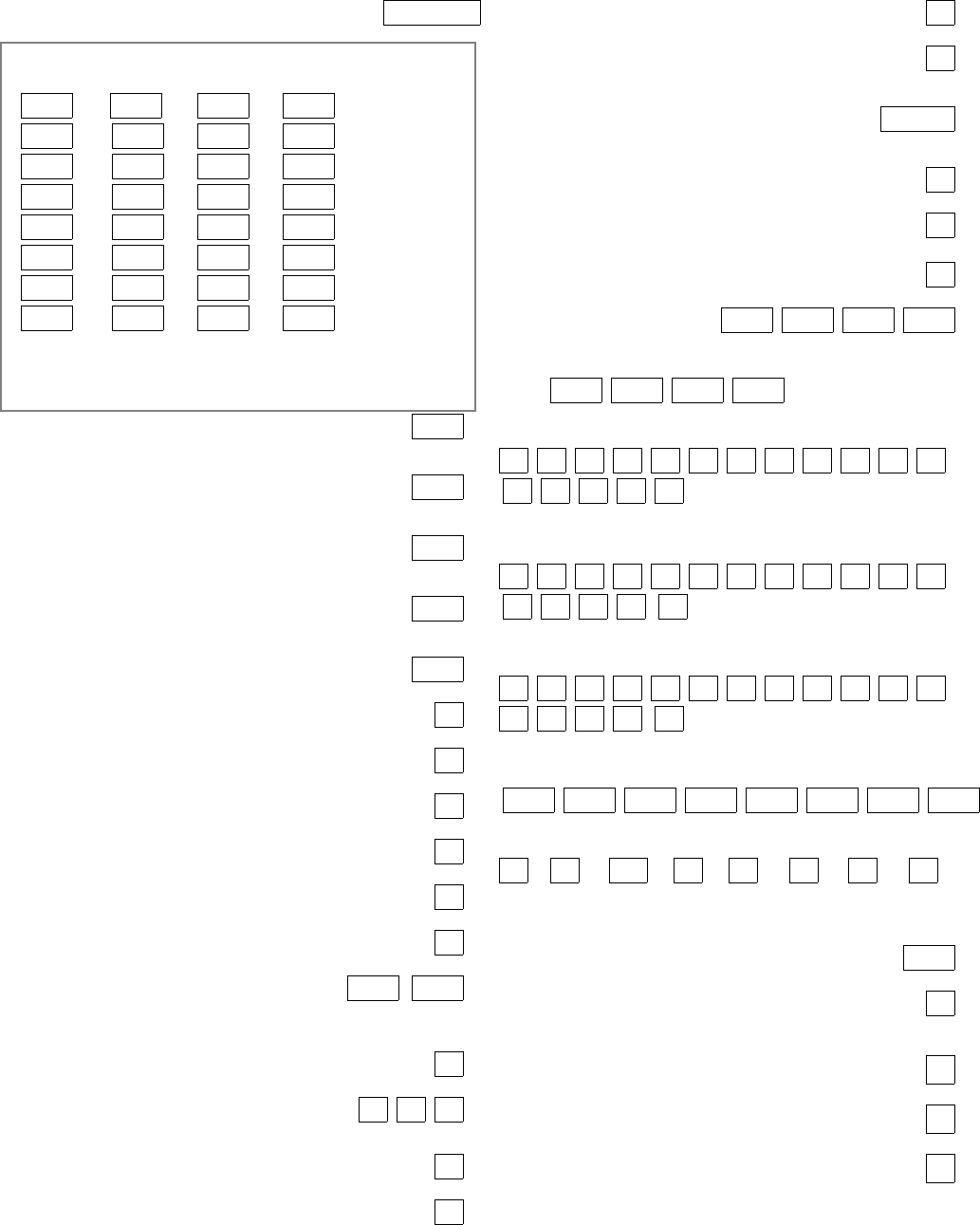
*00 INSTALLER CODE | | |
Enter 4 digits, 0-9 [4140]
ASSIGN RESPONSE TYPE FOR ZONES 1-27, 95-99
(Enter 00-10) see fields 1*01-1*09 for response types for zones 28-87.
*02 *03 *04 *05
1 | 9 | 17 | 25 |
2 | 10 | 18 | 26 |
3 | 11 | 19 | 27 |
4 | 12 | 20 | 0|0
5 | 13 | 21 | 97 | polling loop short
6 | 14 | 22 | 95 | (1+✱ panic)
7 | 15 | 23 | 96 | (3+ # panic)
8 | 16 | 24 | 99 | (✱+ # panic)
RESPONSE TYPES: 00 = Disabled zone; 01 = Entry/Exit #1;
02 = Entry/Exit #2; 03 = Perimeter; 04 = Interior Follower;
05 = Day/Night; 06 = 24 hour Silent Alarm; 07 = 24 hour Audible Alarm;
08 = 24 hour Auxiliary; 09 = Fire; 10 = Interior, Delay; 20 = arm stay;
21 = arm away; 22 = disarm; 23= no alarm response
*09 ENTRY DELAY #1 [02] |
00-15 times 15 seconds
Maximum 3 for UL Listed installations.
*10 EXIT DELAY #1 [03] |
00-15 times 15 seconds
Maximum 4 for UL Listed installations.
*11 ENTRY DELAY #2 [06] |
00-15 times 15 seconds
Maximum 3 for UL Listed installations.
*12 EXIT DELAY #2 [08] |
00-15 times 15 seconds
Maximum 4 for UL Listed installations.
*13 ALARM SOUNDER DURATION [04] |
01-15 times 2 minutes. Minimum 4 minutes for UL.
*14 ZONE 9 RESPONSE TIME [0]
1=fast; 0= normal; "0" for UL.
*15 KEYSWITCH ASSIGNMENT [0]
Enter partition in which keyswitch used, 1-8; 0=disable
*16 CONFIRMATION OF ARMING DING [0]
1=enable; 0=disable
*17 AC LOSS KEYPAD SOUNDING [0]
1=yes; 0=no
*18 UL AC LOSS SIREN [0]
1=yes; 0=no
*19 RANDOMIZE AC LOSS REPORT [0]
1=randomize 10-40 min.; 0=no
*20 VOICE MODULE PHONE CODE [00] | |
Enter 01-09 for 1st digit; 11 (for *) or 12 (for #) for 2nd digit.
To disable voice module, enter 1st digit = 00 & 2nd digit = 11
Must be disabled for UL Listed installations.
*21 PREVENT FIRE TIME-OUT [0]
1=no timeout; 0=fire timeout
*22 KEYPAD PANIC ENABLES [001]
1=enable; 0=disable 95 96 99
*23 MULTIPLE ALARMS [1]
1=yes; 0=no
*24 IGNORE EXPANSION ZONE TAMPER [0]
1=yes; 0=enable for RF and RPMs
*25 BURG.TRIGGER FOR RESPONSE TYPE 8 [1]
1=enable; 0=disable
*26 INTELLIGENT TEST REPORTING [0]
Set "0" for UL 1=yes, (no report sent if any other report
was recently sent); 0=no
*27 TEST REPORT INTERVAL [024] | |
Enter interval in hours, 001-999; 000=no report ; Max. 024
for UL.
*28 POWER UP IN PREVIOUS STATE [1]
1=yes; 0=no; "1" for UL.
*29 QUICK ARM [1]
1=yes; 0=no
*30 TOUCH-TONE OR ROTARY DIAL [0]
1=TouchTone; 0=rotary
*31 PABX ACCESS CODE | | | |
00-09; B-F (11-15)
*32 PRIMARY SUBSCRIBER ACCT #
| | | |
Enter 00-09; B-F (11-15) [15 15 15 15]
*33 PRIMARY PHONE NUMBER
Enter 0-9 for each digit; enter #11 for *, #12 for #, and #13 for
2 sec. pause
*34 SECONDARY PHONE NUMBER
Enter 0-9 for each digit; enter #11 for *, #12 for #, and #13 for
2 sec. pause
*35 DOWNLOAD PHONE No.
Enter 0-9 for each digit; enter #11 for *, #12 for #, and #13 for
2 sec. pause
*36 DOWNLOAD ID No.
| | | | | | | |
Enter 00-09; A-F (10-15) [15 15 15 15 15 15 15 15]
*37 DOWNLOAD COMMAND ENABLES
0
Dialer System Not Remote Remote Remote Upload Download
Shutdwn Shutdwn Used Bypass Disarm Arm Program Program
See field 1*53 for Callback disable option; [1=enable]; 0=disable; For UL
installations, all options must be disabled.
*38 PREVENT ZONE XX BYPASS [00] |
01-86; 00 if all zones (except Fire zones) can be bypassed
*39 ENABLE OPEN/CLOSE REPORT [0]
FOR INSTALLER CODE
1=enable; 0=disable
*40 OPEN/CLOSE REPORT FOR KEYSWITCH [0]
1=enable; 0=disable
*41 NORMALLY CLOSED or EOLR (Zones 2-8) [1]
1=N.C.loops; 0=EOLR supervision; Must be "0" for UL.
*42 DIAL TONE PAUSE [0]
0=5 seconds; 1=11 seconds; 2=30 seconds; Must be "0" for UL.
– 8 –
*43 DIAL TONE DETECTION [1]
1=wait for true dial tone; 0=pause, then dial
*44 RING DETECTION COUNT [00] |
01-14; 15=answering machine; 00=no detection
*45 PRIMARY FORMAT [0]
0=Low Speed; 1=Contact ID; 2=Ademco High Speed;
3=Ademco Express
*46 LOW SPEED FORMAT (Primary) [0]
0=Ademco Low Speed; 1=Sescoa/Radionics
*47 SECONDARY FORMAT [0]
0=Low Speed; 1=Contact ID; 2=Ademco High Speed;
3=Ademco Express
*48 LOW SPEED FORMAT (Sec.) [0]
0=Ademco Low Speed; 1=Sescoa/Radionics
*49 CHECKSUM VERIFICATION [0] [0]
1=yes; 0=no PrimScndry
*50 SESCOA/RADIONICS SELECT [0]
1=Sescoa; 0=Radionics
*51 DUAL REPORTING [0]
1=yes; 0=no If used with Spilt Reporting "1" option (1*34),
alarms go to both primary & secondary numbers, while all other
reports go to secondary only. If used with Split Reporting "2"
option, alarms go to both, open/close and test messages go to
secondary only, while all other reports go to primary.
*52 STANDARD/EXPANDED REPORT (PRIMARY)
[0]
Alarm Rstr Bypass Trbl Opn/Cls Low Bat
0=standard; 1=expanded; Note: Expanded overrides 4+2 format
*53 STANDARD/EXPANDED REPORT (SECONDARY)
[0]
Alarm Rstr Bypass Trbl Opn/Cls Low Bat
0=standard; 1=expanded; Note: Expanded overrides 4+2 format
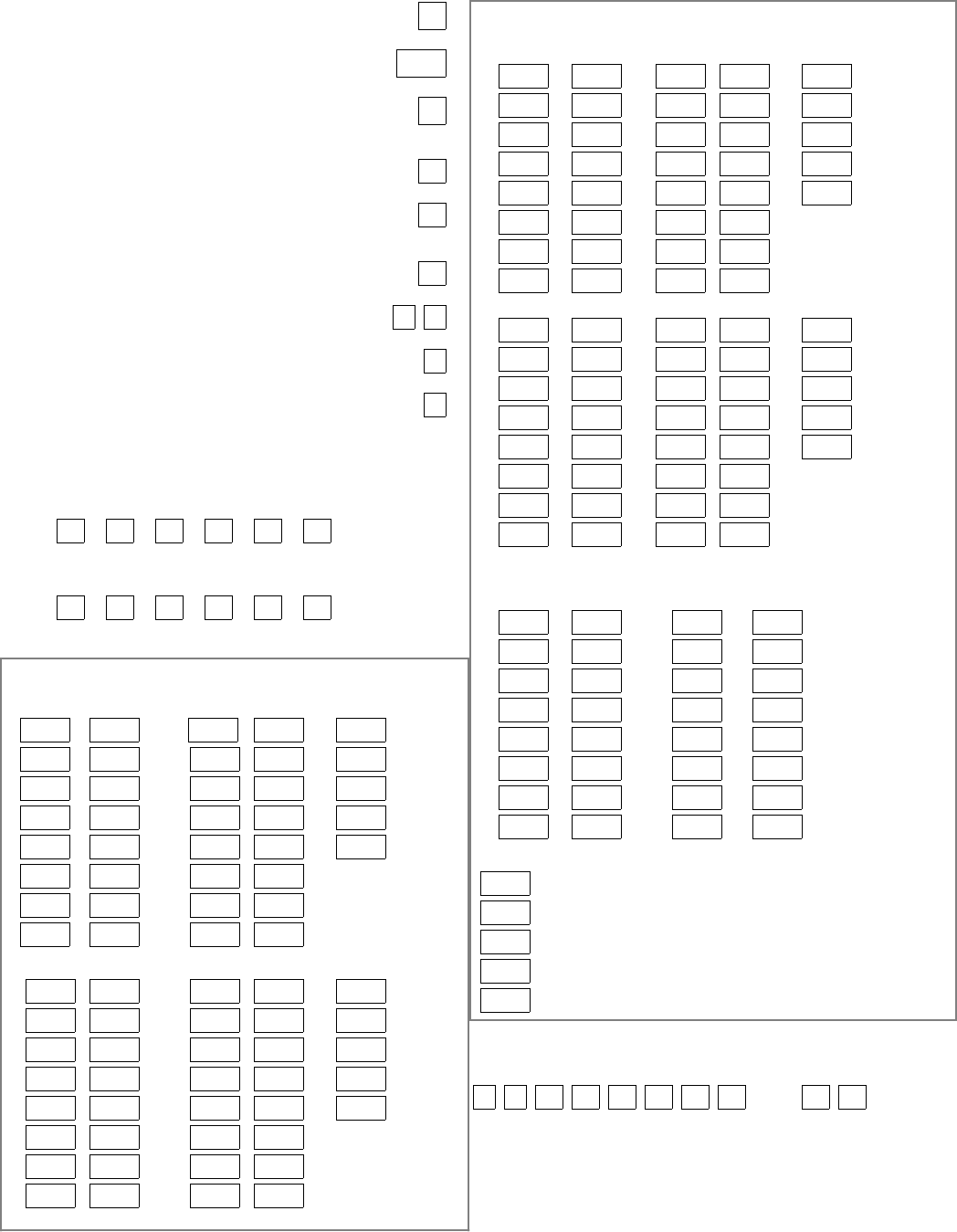
ALARM REPORT CODE & ID DIGITS FOR ZONES 1-32 &
SUPV. & RESTORE CODES [All codes default to 00]
*54 CODE *55 ID *56 CODE *57 ID *58
1 | | 9 | | | Alarm Rst.
2 | | 10 | | | Trouble
3 | | 11 | | | Trble Rst.
4 | | 12 | | | Bypass
5 | | 13 | | | Bypss Rst.
6 | | 14 | |
7 | | 15 | |
8 | | 16 | |
*59 CODE *60 ID *61 CODE*62 ID *63
17 | | 25 | | | Alarm Rst.
18 | | 26 | | | Trouble
19 | | 27 | | | Trble Rst.
20 | | 28 | | | Bypass
21 | | 29 | | | Bypss Rst.
22 | | 30 | |
23 | | 31 | |
24 | | 32 | |
ALARM REPORT CODE & ID DIGITS FOR ZONES 33-64 &
SUPV. & RESTORE CODES [All codes default to 00]
*64 CODE *65 ID *66 CODE*67 ID *68
33 | | 41 | | | Alarm Rst.
34 | | 42 | | | Trouble
35 | | 43 | | | Trble Rst.
36 | | 44 | | | Bypass
37 | | 45 | | | Bypss Rst.
38 | | 46 | |
39 | | 47 | |
40 | | 48 | |
*69 CODE *70 ID *71 CODE *72 ID *73
49 | | 57 | | | Alarm Rst.
50 | | 58 | | | Trouble
51 | | 59 | | | Trble Rst.
52 | | 60 | | | Bypass
53 | | 61 | | | Bypss Rst.
54 | | 62 | |
55 | | 63 | |
56 | | 64 | |
ALARM REPORT CODE & ID DIGITS FOR ZONES 81-87, RF
RCVRs & PANICS, & THEIR SUPV. & RESTORE CODES
*74 CODE *75 ID *76 CODE *77 ID [All codes default=00]
81 | | 89 | |
82 | | 90 | |
83 | | 91 | |
84 | | | | Duress
85 | | 97 | | Poll loop short
86 | | 95 | | (panic key 1+*)
87 | | 96 | | ( panic key 3+#)
88 | | 99 | | ( panic key * + #)
*78
| Alarm Rst.
| Trouble
| Trble Rst.
| Bypass
| Bypss Rst.
NOTES: 97= Poll Loop Short; 88 & 90 = RCVR not
receiving transmitter signals. 89 & 91 = RCVR not
responding, bad conn. to panel. 87 = Voice Module
supervision.
ZONE TYPE RESTORE ENABLES
1=enable; [0=disable]
*79 FOR ZONE TYPES 1-8 *80 FOR TYPES 9/10
12 345678 910
– 9 –
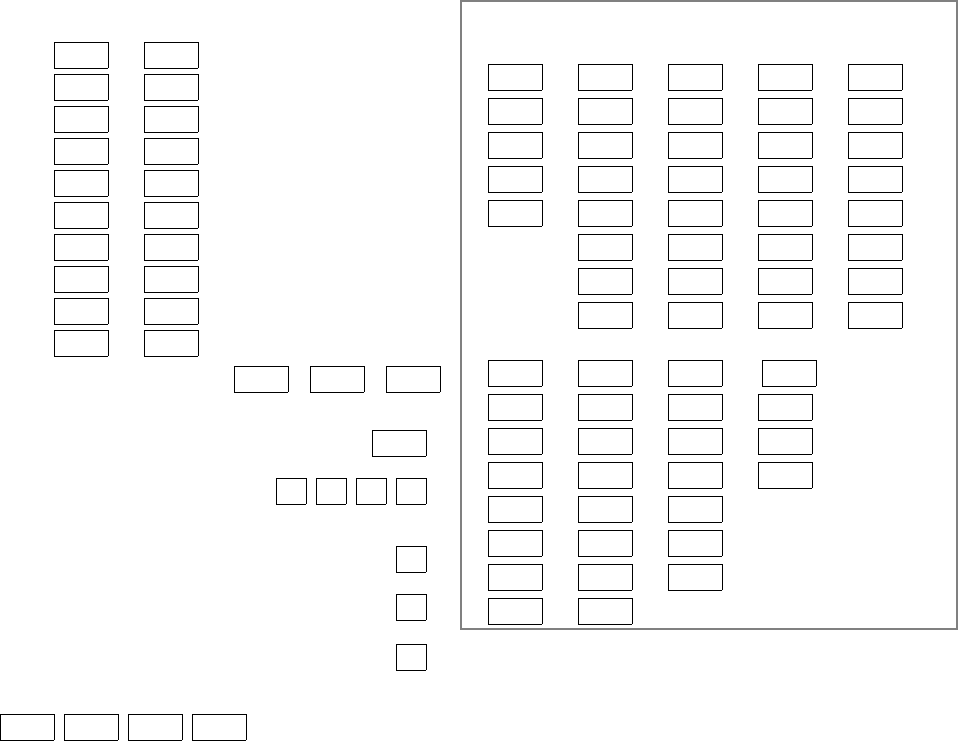
SYSTEM NON ALARM CODES
*81 *82
First Digit Second Digit
Close | |
Open | |
Low Battery | |
Low Bat Res | |
AC Loss | |
AC Restore | |
Test | |
Power | |
Cancel | |
Prog. Tamp. | |
Second digit of each code
applies only to 4+2 or
expanded (fields *52 &
*53) formats.
*83 FIRST TEST REPORT TIME | | |
[Day 00; hour 12; min 00] Days 01-07 Hours 00-23 Min 00-59;
00 in all boxes=instant (Day 01= Monday)
*84 SWINGER SUPPRESSION [15] |
01-15 alarms; Must be "00" (disabled) for UL.
*85 ENABLE DIALER REPORTS [0]
FOR PANICS & DURESS 95 96 99 Duress
1=enable; 0=disable
*87 ENTRY WARNING [1]
1=continuous; 0=3 beeps
*88 BURG. ALARM COMM. DELAY [0]
1=16 seconds; 0=no delay
*89 RESTORE REPORT TIMING [0]
0=instant; 1=at bell timeout; 2=at disarm
*90 SECONDARY SUBSCRIBER ACCT #
| | | |
Enter 00-09; B-F (11-15) [15 15 15 15]
2nd Page Programming Fields (press *94)
ASSIGN RESPONSE TYPE FOR ZONES
(Enter 00-10; see Response Types below)
1*01 1*02 1*03 1*04 1*05
28 | 33 | 41 | 49 | 57 |
29 | 34 | 42 | 50 | 58 |
30 | 35 | 43 | 51 | 59 |
31 | 36 | 44 | 52 | 60 |
32 | 37 | 45 | 53 | 61 |
38 | 46 | 54 | 62 |
39 | 47 | 55 | 63 |
40 | 48 | 56 | 64 |
1*06 1*07 1*08 1*09
65 | 73 | 81 | 88 | 2nd RCVR
66 | 74 | 82 | 89 | 2nd RCVR
67 | 75 | 83 | 90 | 1st RCVR
68 | 76 | 84 | 91 | 1st RCVR
69 | 77 | 85 |
70 | 78 | 86 |
71 | 79 | 87 | Voice Module
72 | 80 |
RESPONSE TYPES: 00 = Disabled zone; 01 = Entry/Exit #1; 02 =
Entry/Exit #2; 03 = Perimeter; 04 = Interior Follower; 05 = Day/Night;
06 = 24 hour Silent Alarm; 07 = 24 hour Audible Alarm; 08 = 24 hour
Auxiliary; 09 = Fire; 10 = Interior, Delay; 20=arm stay; 21=arm away;
22=disarm; 23=no alarm response
NOTES: If using 1 or 2 RF RCVRs, enable their respective faults (88-91)
as troubles (type 5) to provide trouble annunciation. Enter 00 if no
annunciation is desired. 88 & 90 = RCVR not receiving transmitter signals.
89 & 91 = RCVR not responding, bad conn. to panel.
– 10 –
1*17 LOBBY PARTITION [0]
Enter the "common lobby" partition (1-8)
1*18 AFFECTS LOBBY [0]
Enter 1 if this partition affects the common lobby;
enter 0 if it does not
1*19 ARMS LOBBY [0]
Enter 1 if arming this partition attempts to arm lobby;
enter 0 if it does not
1*20 EXIT ERROR LOGIC [0]
1=Enable (E/E and interior zones will be bypassed if faulted
after exit delay); 0=Disable
1*21 EXIT DELAY RESET [0]
0=No; 1=Resets Exit Delay to 60 seconds after
zone is closed.
FIELDS 1*22-1*25: Allow four sets of two zones each to be
linked so that both must fault within a five minute period to
cause an alarm.
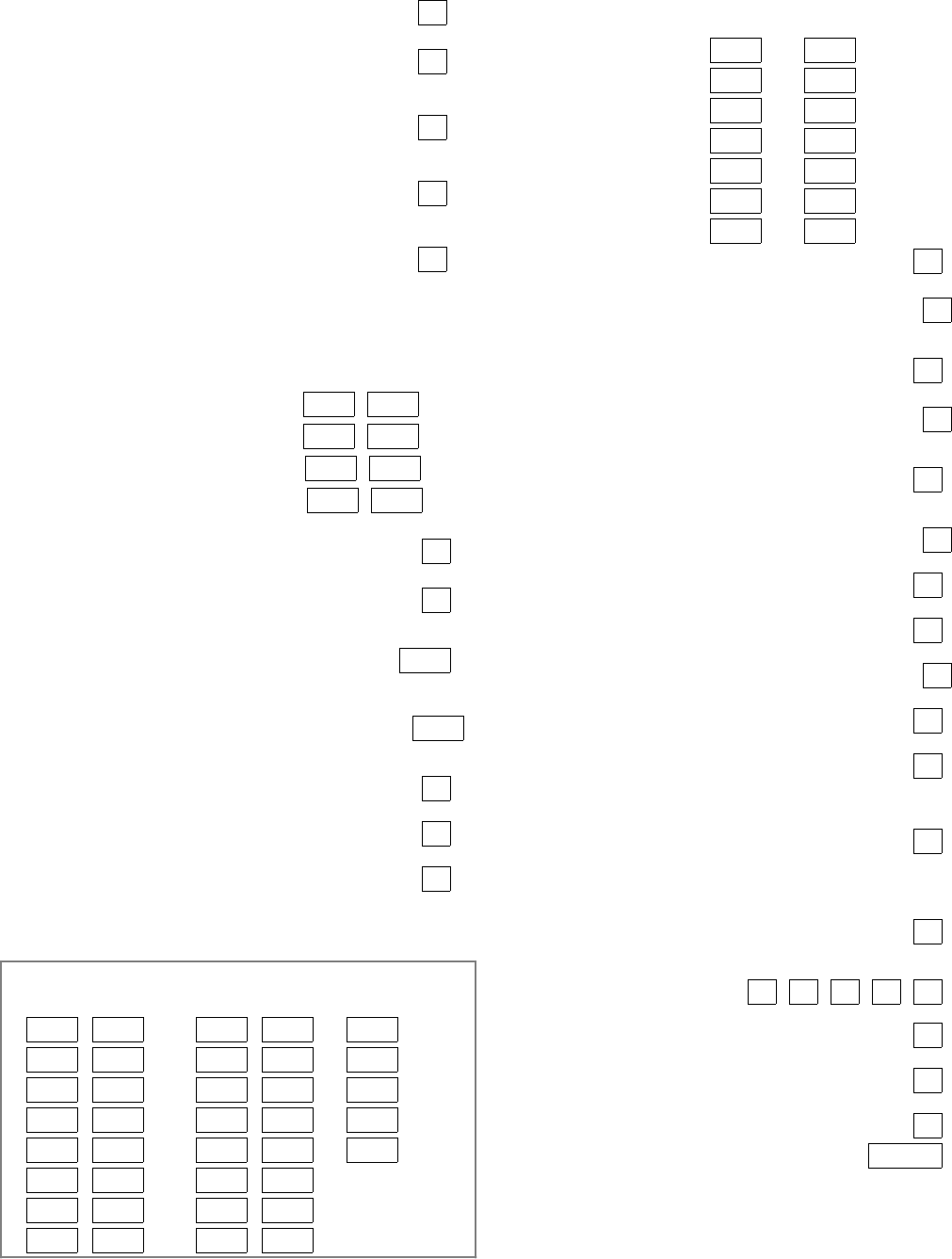
1*22 CROSS-ZONING PAIR ONE | |
1*23 CROSS-ZONING PAIR TWO | |
1*24 CROSS-ZONING PAIR THREE | |
1*25 CROSS-ZONING PAIR FOUR | |
1*28 RF TX LOW BATTERY SOUND [0]
1=immediate; 0=when disarmed; Must be "1" for UL
1*29 RF TX LOW BATTERY REPORT ENABLE [0]
1=enable; 0=disable
Must be "1" for UL
1*30 RF RCVR CHECK-IN INTERVAL [06] |
02-15 times 2 hours; 00 disables supervision
Max. "6" (12 hr) for UL
1*31 RF TRANSMITTER CHECK-IN INTERVAL[12] |
02-15 times 2 hours; 00 disables transmitter supervision
Max. "6" (12 hr) for UL
1*32 RF RECEIVER TYPE [0]
1=4281 ( must have correct revision level); 2=5881
1*33 TOUCH-TONE W/ROTARY BACKUP [0]
1=enable; 0=disable
1*34 COMM. SPLIT REPORT SELECTION [0]
0=no; 1=alarms primary, others secondary;
2=open/close, test secondary, others primary; See *51 for
comments.
ALARM REPORT CODE & ID DIGITS FOR ZONES
65-80 & SUPV. & RESTORE CODES [codes default to zero]
1*35 CODE 1*36 ID 1*37 CODE 1*38 ID 1*39
65 | | 73 | | | Alarm Rst.
66 | | 74 | | | Trouble
67 | | 75 | | | Trble Rst.
68 | | 76 | | | Bypass
69 | | 77 | | | Byps Rstt
70 | | 78 | |
71 | | 79 | |
72 | | 80 | |
NON-ALARM DIALER CODES ( Armed Stay, Time Set & Event Logging)
1*40 First Digit 1*41 Second Digit
Armed STAY | |
Time/Date set or event log reset | |
Event log 50% & 90% full | |
Event log overflow | |
Exit Error (Zone) | |
Exit Error (User) | |
Recent Close | |
1*42 CALL WAITING DEFEAT [0]
1=Yes; 0=No
1*43 PERM. KEYPAD BACKLIGHT [0]
1=enable; 0=disable When disabled, display lights when any
key is pressed, and turns off after period of keypad inactivity.
1*44 WIRELESS KEYPAD [0]
TAMPER DETECT ENABLE 1=enable; 0=disable
1*45 EXIT DELAY SOUNDING [0]
1=enable; 0=disable Produces quick beeping during exit
delay if enabled.
1*46 AUXILIARY OUTPUT MODE [0]
0=ground start; 1=open/close trigger; 2=keypad sounding;
3=AAV trigger
1*47 CHIME ON EXTERNAL SIREN [0]
1=enable; 0=disable
1*48 WIRELESS KEYPAD ASSIGNMENT [0]
0=disable; enter partition in which RF keypad used, 1-8.
1*49 SUPPRESS TX SUPERVISION SOUND [1]
1=disable; 0=enable. Must be "0" for UL.
1*52 SEND CANCEL IF ALARM + OFF [0]
1=no restriction; 0=within Bell Timeout period only
1*53 DOWNLOAD CALLBACK [0]
1=callback not required; 0=callback required; Must be "0" forUL.
1*57 5800 RF BUTTON GLOBAL ARM [0]
Enter "1" to have the system arm/disarm following the button
user's global arm settings. Enter "0" if the button is not to be
used to global arm the system.
1*58 5800 RF BUTTON FORCE ARM [0]
Enter "1" to enable. If a zone is faulted after pressing button,
keypad will beep once. User should press button again within
4 sec. to force arm. Enter "0" to disable.
Must be disabled for UL Listed installations.
1*60 ZONE 5 AUDIO ALARM VERIFICATION [0]
Enter 1 if 2-way audio (AAV) is being used; Enter 0 if it
is not.
1*70 EVENT LOG TYPES
1=enable logging; 0=disable Alrm Chck Byps O/C Systm
1*71 12/24 HOUR TIME STAMP FORMAT [0]
0=12 hour; 1=24 hour
1*72 EVENT LOG PRINTER ON-LINE [0]
0=disable; 1=enable
1*73 PRINTER BAUD RATE 1=300; 0=1200 [0]
1*74 RELAY TIMEOUT XX MINUTES [000] | |
Enter the relay timeout, 0-127 in multiples of 2 minutes, desired
for #80 Menu Mode time driven event relay command numbers
"04/09" and #93 Menu Mode Relay Programming output
command "56".
– 11 –
1*75 RELAY TIMEOUT YY SECONDS [000] | |
Enter the relay timeout, 0-127 seconds, desired for #80 Menu
Mode time driven event relay command numbers "05/10" and
#93 Menu Mode Relay Programming command "57".
1*76 ACCESS CONTROL RELAY FOR PART. [0] |
Relay will be pulsed for 2 seconds whenever code + [0] is
pressed. Enter 00-16; 00=none
3rd Page Programming Fields press *94)
2*00 NUMBER OF PARTITIONS [1]
Enter 1-8
2*01 DAYLIGHT SAVINGS TIME [04, 10] | |
START/END MONTH Start End
00-12; if no daylight savings time, enter 00,00
2*02 DAYLIGHT SAVINGS TIME [1, 5] |
START/END WEEKEND # Start | End
Enter 1-7. 1=first; 2=second; 3=third; 4=fourth; 5=last; 6=next
to last; 7=3rd from last [1,5; 1st Sunday in April, last in Oct.]
2*05 AUTO-ARM DELAY [15] |
Enter the time between the end of the arming window and the
start of auto-arming warning period, in values of 1-14 times 4
minutes 00=instant; [15=no auto arm at all]. When this delay
expires, the Auto-Arm Warrning Period begins.
2*06 AUTO-ARM WARNING PERIOD [00] |
This is the time during which the user is warned to exit the
premises prior to the auto-arming of the system (beeps every
15 seconds; "ALERT" displayed). Enter 01-15 minutes.
00=instant at end of arming delay .
2*07 AUTO-DISARM DELAY [15] |
This is the time between the end of the disarming window and
auto-disarming. Enter 01-14 times 4 minutes; 00=instant at
end of window; 15=no auto-disarm.
2*08 ENABLE FORCE ARM FOR AUTO-ARM [0]
0=disable; 1=enable
2*09 OPEN/CLOSE REPORTS BY EXCEPTION [0]
1=enable; 0=disable; If enabled, only openings and closings
occurring outside the scheduled opening /
closing windows will trigger dialer reports. Opening reports
will also be suppressed during the closing window.,
2*10 ALLOW DISARMING ONLY DURING [0]
ARMING/DISARMING WINDOWS
See system-wide field 2*11 if enabling field 2*10. This feature
adds high security to the installation.
0=disable; 1=enable
2*11 ALLOW DISARM OUTSIDE WINDOW [0]
IF ALARM OCCURS
Used only if field 2*10 (partition-specific field) is set to "1". If
this field is enabled ("1") the system can be disarmed outside
the disarm window if an alarm has occurred. If "0", disarming
can only be done during the disarm window. If field 2*10 is set
to "0" for a partition, this field has no effect for that partition.
SCHEDULING RELATED DIALER REPORTS
2*13 2*14
1st Digit 2nd Digit
| | Early opening report code
| | Early closing report code
| | Late opening report code
| | Late closing report code
| | No opening (late to open) report code
| | No closing (late to close) report code
| | Auto-arm failure report code
| | Access schedule changed report code
2*18 ENABLE GOTO FOR THIS PARTITION [0]
1=enable; 0=disable
2*19 USE PARTITION DESCRIPTORS [0]
0=disable; 1=enable
2*20 ENABLE J7 TRIGGERS by PARTITION [1]
0=disable for displayed partition; 1=enable for displayed
partition
2*21 ENABLE SUPERVISION PULSES FOR LRR
TRIGGER OUTPUTS [000] | |
Used for supervised connection to 7920SE. F B S
Enter 0 to disable or 1 to enable the listed outputs.
F= Fire; B= Burglary; S= Silent panic/duress
SUMMARY OF PROGRAMMING COMMANDS
• To enter program mode, enter installer code +
[8] + [0] + [0]
• To set standard defaults, press *97
• To set communication defaults, press *94 +
one of the following: *80=low speed; *81=Ademco
Express; *82=Ademco High Speed; *83=Ademco's
Contact ID
• To change to next page of program fields,
press *94
• To return to previous set of fields, press *99
• To erase account & phone number field
entries, press [*] + field number + [*]
• To assign zone descriptors, press #93 +
follow menu prompts
• To add custom words, press #93 + follow menu
prompts
• To enter Installer's Message, press #93 +
follow menu prompts
• To exit program mode, press *99 OR *98: *99
allows re-access to programming mode by installer
code. *98 prevents re-access to programming
mode by installer code.
